#🆘│community-support
1 messages · Page 398 of 1
 shut bolt
 hybrid badger
958934856115585085 server id
 humble sequoiaBOT

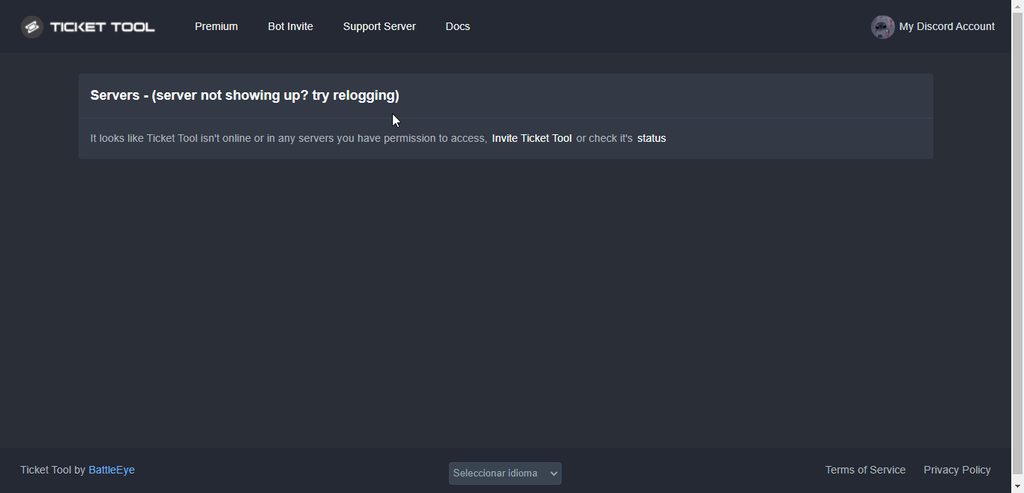
Don't see your server in the dashboard?
You will possibly need to relog. Look below to see steps on how to relog.
How to relog in the Dashboard.
First, you will need to go to the dashboard. Once your there, click on your avatar on the top right. after you clicked it, you will see button that says Logout. You must click that. Once you have logged out, you can log back in.
Note:
You need one of these 3 things to access the dashboard.
1. Server Owner (Level: 6)
2. Server Administrator (Level: 4)
3. Dashboard Role (Level: 2)
:warning: You can check your level using $level on your Discord Server
User permission level with Ticket Tool
@User is permission level: 0 (User)
```» *If it shows that your permission is **0**, you don't have any of the above **3 things** to manage the dashboard.*


**See the picture below on how to relog:**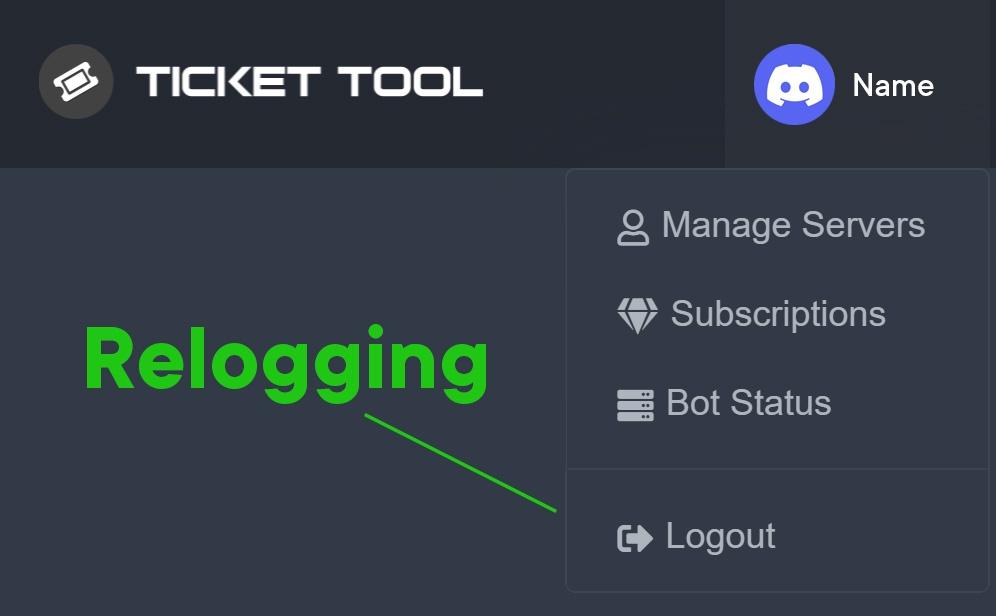
 shut bolt
Ya veo el problema
Tienes que poner el emoji completo
Osea
Hacer $Id <:twitchemoji2:>
shut bolt
Sep
 velvet fiber
thanks it worked
shut bolt
$id 
humble sequoiaBOT
<:mike:914179028997505125>
shut bolt
Así
shut bolt
velvet fiber
thanks it worked
Sure 
 hybrid badger
im confused af right now
shut bolt
$id
humble sequoiaBOT
<:mike:914179028997505125>
hybrid badger
ah
hybrid badger
ahh
shut bolt
Y eso lo pones en el panel
hybrid badger
perame
shut bolt
Tranqui
 hybrid badger
okay si funciona
solo este emoji que mande alli arriba no sirve
a saber pq
si ves.. despues de hacer el commando de $id
no sale
shut bolt
hybrid badger
si ves.. despues de hacer el commando de $id
El emoji es de ese server?
hybrid badger
no
hybrid badger
es de otro
hybrid badger
okay
shut bolt
Si el bot no está en el server no puede usarlo
 hallow schooner
I am unable to add tickettool back on the server, upgraded to premium, enabled permissions, invited it back, but unable to see it on the server
showing an error that says i have to run $debug, but its not letting me
hybrid badger
shut bolt
Si el bot no está en el server no puede usarlo
works thx
 iron nightBOT
Gave +1 Rep to @shut bolt
humble sequoiaBOT
━━ moved to ticket ━━
shut bolt
hybrid badger
works thx
Sure
 novel latch
Good evening! I have a big question, I need to know how I can tag a channel through a ticket. For example: Remember to visit #faq .. I tried it in many ways with {channel#faq}, {#faq}, among other tests and nothing.. Thank you very much in advance ❤️
 scenic plinth
novel latch
Good evening! I have a big question, I need to know how I can tag a channel thro...
scenic plinth
novel latch
Good evening! I have a big question, I need to know how I can tag a channel thro...
Try the channel ID "method".
If you don't know what the channels ID is, you can refer to the command I use below. Copy the entire section of <@id> and paste it into your ticket message, without {}
humble sequoiaBOT
<#776680605517742090>
 pastel quartz
Hi guys, How do I set up the bot so a certain role can close the ticket?
 jade topaz
pastel quartz
Hi guys, How do I set up the bot so a certain role can close the ticket?
jade topaz
pastel quartz
Hi guys, How do I set up the bot so a certain role can close the ticket?

Instructions on editing permissions set within tickets.
pastel quartz
jade topaz
https://docs.tickettool.xyz/dashboard/panel-configs/permission-options
yeah, I am looking into that, but people assigned to support roles cannot close the ticket
shut bolt
jade topaz
https://docs.tickettool.xyz/dashboard/panel-configs/permission-options
That's not the menu for that
shut bolt
pastel quartz
yeah, I am looking into that, but people assigned to support roles cannot close ...
Please go into the Close button settings and send us an screenshot of your settings please
$buttons
humble sequoiaBOT

The new Discord Buttons allow for a much smoother and convenient experience. They reduce lag and work much better than emojis. With ticket tool you can edit all the buttons however you like! Buttons can show emojis, text and can have 4 different colors.
Where can I edit them?
Dashboard ➞ Panel Configs ➞ Settings ➞ Button Options ➞ Setting
 shut bolt
This is how to get to the Close Ticket button settings
 spare apex
Is the ticket tool safe to use nowW?
 solid stream
spare apex
Is the ticket tool safe to use nowW?
solid stream
spare apex
Is the ticket tool safe to use nowW?
Yes, It was safe about 10 minutes after it was reported, the bugged update was quickly reverted.
pastel quartz
shut bolt
This is how to get to the Close Ticket button settings

I added the roles on the close button but the bot still throws this error :(
shut bolt
pastel quartz
Does the bot have access to that ticket?
aka, having permissions to see the ticket, as well as the rest of needed perms it needs to manage the ticket
pastel quartz
The bot was not added to the ticket channel, i added it manually and tried to close again and it worked! Why is the bot not being auto-added on ticket creation?
shut bolt
pastel quartz
The bot was not added to the ticket channel, i added it manually and tried to cl...
The bot is auto-added by default, the only reason why it won't work would be if it got removed from the server and then re added or if someone removed it's permissions manually
pastel quartz
Yeah, we kicked it a couple of days ago and then readded.. can you point what permission should be granted?
shut bolt
pastel quartz
Yeah, we kicked it a couple of days ago and then readded.. can you point what pe...
It should have all of these perms for a proper work.

Both on it's role and the tickets itself
The tickets that he creates already have the permissions if everything was set properly
So you should check within the old ticket from which it got removed
pastel quartz
Thank you for your help, ill check those permissions

 grave wren
How we can make a ticket 🎫?
 slender minnow
$help setup
humble sequoiaBOT
Setting up Ticket Tool
Visit the docs for setup info
General Setup
slender minnow
@grave wrenrefer above to set up ticket tool for opening tickets for your server member ^
 wheat torrent
؟
 hallow viper
$help setup
humble sequoiaBOT
Setting up Ticket Tool
Visit the docs for setup info
General Setup
 storm ferry
greetings fellas i need one tiny help and basically i invited the bot made the set-up as the server owner i can react to emoji to create ticket but for my two specific roles they dont have permission how or what do i need to do so they have access to create ticket too?
 grave wren
slender minnow
<@!935053416877666304>refer above to set up ticket tool for opening tickets for ...
grave wren
slender minnow
<@!935053416877666304>refer above to set up ticket tool for opening tickets for ...
Thx
iron nightBOT
Gave +1 Rep to @slender minnow
 jade topaz
Greetings so I'm having trouble setting up the bot in general I've clicked the links nothing seems to be working and I dont know what to do I've used this bot before and it doesnt seem to be working the same this time .
 raven spruce
?????
 raven spruce
???
 zinc fable
Hello everyone
jade topaz
Hello
 gilded verge
storm ferry
greetings fellas i need one tiny help and basically i invited the bot made the s...
gilded verge
storm ferry
greetings fellas i need one tiny help and basically i invited the bot made the s...
Hi, usually, tickets cannot be created by users whose role has been added to the Blacklist Roles. If that's not what it is about, then in this case you have to enter the panel settings and then the button for creating tickets. If you want everyone to be able to receive the ticket, set everyone's permission to Allowed Roles and you should be fine.
gilded verge
jade topaz
Greetings so I'm having trouble setting up the bot in general I've clicked the l...
Hi, I would like to try to understand what links are you talking about?
jade topaz
The bot has links In its bio

I've clicked every single one of them and it's difficult for me to understand how to set the bot up
gilded verge
oh, then:
humble sequoiaBOT

You can check our documentation here.
You can also check #573205317870157855 for the basic setup.
Our documentation contains all the info you need about the bot to be able to setup and configure the bot however you like.
storm ferry
gilded verge
Hi, usually, tickets cannot be created by users whose role has been added to the...
i dont think i have added any role to blacklist and like i said i need only the two roles users want to create ticket so lets say
only people with verified role can have access to create ticket but with none role cant
gilded verge
In that case, add the two roles you are talking about to Allowed Roles and only add @everyone to Disabled Roles.
Something like this:
 storm ferry
gilded verge
In that case, add the two roles you are talking about to `Allowed Roles` and onl...
storm ferry
gilded verge
In that case, add the two roles you are talking about to `Allowed Roles` and onl...
on which category is that though... I can't find it


 fair ruin
storm ferry
fair ruin
storm ferry
interestingly its still doesnt allow it 🤔

 gilded verge
to be sure, the bot has all the required permissions?
humble sequoiaBOT
ᅠ
@pseudo glen requires the following permissions:
Add Reactions
Read Channels
Send Messages
Manage Messages
Embed Links
Attach Files
Read History
Manage Roles
To change the role permissions, you can go to your Discord Server ➞ Server Settings ➞ Roles ➞ @Ticket Tool
To change the channel permissions, you can go to your Channel Settings ➞ Permissions ➞ Ticket Tool
ᅠ
Note:
You can give Ticket Tool Administrative Permissions instead of all the permissions listed above, but it's entirely optional and NOT necessary.
 storm ferry
ye i did that in first place 🤔
gilded verge
and is his role placed higher than what you showed? I mean higher than these two roles.
 gilded verge
a oke, hm..
gilded verge
storm ferry
interestingly its still doesnt allow it 🤔
you saved those settings, right?
storm ferry
of course
gilded verge
could you please send the panel to the channel and try to click the ticket again?
i mean create a ticket 😅
storm ferry
still the same 
 gilded verge
At the moment I am not able to help you, I will go to check different variations of this case on the test server and it will probably take a long time, so if someone else will be able to help you faster, it is good.
 its all good thank you for trying it ❤️
iron nightBOT
its all good thank you for trying it ❤️
iron nightBOT
Gave +1 Rep to @gilded verge
storm ferry
 gilded verge
storm ferry
<:Salute:885742724626661436> its all good thank you for trying it ❤️
gilded verge
storm ferry
<:Salute:885742724626661436> its all good thank you for trying it ❤️
but there will be something else I will ask you for. 
- Make sure that in
General Optionsthere are roles assigned to theSupport Team Rolesand that theTicket Limitis at least 1. - Regarding the
Permission Options, here you have a link to my video and there please check if you have the same permissions. (#🆘│community-support message) - Remember to add the
@everyonerole to disabled in theButton OptionsofCreate Ticket - Settingsin addition to the allowed roles.
If you want to change the name in the active ticket, use the command $rename, if you want to change for new tickets, it is available for premium.
but if you had premium, replace count to author.name.

oh, so you meant the username, sorry 😅
storm ferry
gilded verge
but there will be something else I will ask you for. <:PepoG:867607055460335626>...
well the thing is there is no extra support role only mine role which i want it like an user with these roles ( #🆘│community-support message ) to click on the ticket emoji and the channel creats where only me, the bot, and the user who clicked to it to see it 0_o i know it might not make a sense but its a different server then community server
gilded verge
that is, apart from the support team roles, everything I wrote, you checked, right?
 eternal geyser
Is there a function that automatically closes the ticket if the user does not write a ticket for a long time?
gilded verge
eternal geyser
Is there a function that automatically closes the ticket if the user does not wr...
It doesn't exist, however is planed 🙂
 hallow solar
storm ferry
gilded verge
that is, apart from the `support team roles`, everything I wrote, you checked, r...
hallow solar
storm ferry
gilded verge
that is, apart from the `support team roles`, everything I wrote, you checked, r...
i think its solved somehow just created new panel added my own role
gilded verge
so it works in the new panel, right?
storm ferry
yup
gilded verge
I am curious now where the error was in the previous panel 
but glad you got it fixed 
storm ferry
gilded verge
I am curious now where the error was in the previous panel <a:peepoGiggles:79097...
same 😅 thank you again
gilded verge
If you want to change the name from Ticket to Booking then you must have premium  As shown in the screenshot.
As long as you don't have premium, you can rename tickets (after creating them) to whatever you want [just use $rename on ticket channel]
but if you had premium, replace count to author.name.

 last pebble
HI i voted in top.gg but it did not update on he vote command that i had voted it still say 0 votes
jade topaz
When i make a ticket it goes to the top of my channels, how to i make it go to the bottom underneath ticket-creator (on my server)
 torn kiln
jade topaz
When i make a ticket it goes to the top of my channels, how to i make it go to t...
torn kiln
jade topaz
When i make a ticket it goes to the top of my channels, how to i make it go to t...
yeah I wanna know that too whoever answers them pls ping me in it
and, how do I change this part of the panel?
 gilded verge
jade topaz
When i make a ticket it goes to the top of my channels, how to i make it go to t...
gilded verge
jade topaz
When i make a ticket it goes to the top of my channels, how to i make it go to t...
In this case, you need to set the category of the opened tickets.
Dashboard->Panel Configs->Panel Settings->Expand Category Options and choose channel
gilded verge
torn kiln
and, how do I change this part of the panel?
Go to Dashboard->Panel Configs->Panel Settings->Expand Ticket Options->Edit Ticket Message->change Message Text

 tired geyser
jade topaz
tired geyser
jade topaz
How to solve this problem?
 slender minnow
The bot cannot delete messages.
 hexed dust
hi i have a question, i dont know how to make the bot works with a command like to open a ticket you can do !ticket but it doesnt work with me, can soemeone help
pls
slender minnow
head over to panel config ---> permissions ---> ticket owner permission (idr what its called but its probably user open permission) ---> force allow/set neutral the perm to read message history
slender minnow
hexed dust
hi i have a question, i dont know how to make the bot works with a command like ...
you need to enable it from the panel config first
hexed dust
it is enabled tho
like it is in panel conffigs>settings>command style tickets right ?
slender minnow
yes
make sure that you are using them within a monitored channel (you can set up one from panel config)
hexed dust
it works thanks mate
 reef olive
Hello, good, I have a question that I don't know why this happens to me, I have the premium bot and when someone opens a ticket it closes automatically and I don't know why someone helps me??
 astral idol
So i understand with the issue previous, its all good, however since it happened my tickets no longer go to the correct spot, even after putting them back into the panel to open there. and now for some reason i dont have permissions to close tickets (i am the discord owner and do all the bots). im so confused. :/
solid stream
astral idol
So i understand with the issue previous, its all good, however since it happened...
Is your category full?
Discord has a 50 channel limit
This is #🆘│community-support goto #💬│general-chat or #💬│gen-chat-multilingual for that..
raven spruce
USA
jade topaz
How to solve this problem?

if I vote ticket tool, will I get the pro version for 12 hours?
jade topaz
jade topaz
if I vote ticket tool, will I get the pro version for 12 hours?
You mean premium version true?
Ye
gilded verge
You must have a minimum of 6 votes to be able to receive a premium code
gilded verge
I don't understand, there are 2 sites that you vote for every 12 hours. 😐
jade topaz
gilded verge
You must have a minimum of 6 votes to be able to receive a premium code <:peepoB...
Really?
gilded verge
yes, please go to #🤖│bot-spam and use $vote
discord boats is gone a few weeks ago. You can click on first and third site (Top .gg and BotsForDiscord)
jade topaz
gilded verge
discord boats is gone a few weeks ago. You can click on first and third site (To...
So every 6 votes 12 hours of premium version free true?
gilded verge
wait a minute, there was a conversion rate here somewhere, give me a second
oh, i have:
2 votes = 1 day
gilded verge
Yes, So for as many days as you manage to collect premium, then you enter the channel #🤖│bot-spam and write * $vote redeem and in a private message from the Ticket Tool bot you get a code that you have to enter on your dashboard.
 copper owl
gilded verge
Yes, So for as many days as you manage to collect premium, then you enter the ch...
copper owl
gilded verge
Yes, So for as many days as you manage to collect premium, then you enter the ch...
$vote redeem
not $redeem code
gilded verge
oh, im sorry 
copper owl
npnp
last pebble
gilded verge
Yes, So for as many days as you manage to collect premium, then you enter the ch...
HOw many days should l save upfor
gilded verge
Pre-collect yourself for 15 days. I did that and then it was better to use and vote because it was already certain that nothing will break or turn off
I mean, you can as much as you want because it depends on you 😄
 obsidian steppe
Hi all! Does anybody have any solutions for this problem? I’ve added tickettool to a server which I have manage server permissions, and the bot is online in my server. But it just won’t show up in the dashboard on the tickettool site. I’ve tried logging out and in, removing the bot from the server and reauthorising, but I’m still having no luck. Any help appreciated!


 elder solstice
Who will help to understand the ticket write to me in the ls please
gilded verge
obsidian steppe
Hi all! Does anybody have any solutions for this problem? I’ve added tickettool ...
Hey, do you know your server id? If so, in the link, instead of word your-id-server, paste your server id. It's always worth a try, I did this with other bots when they didn't want to work.
Link: https://tickettool.xyz/dashboard/your-id-server
gilded verge
elder solstice
Who will help to understand the ticket write to me in the ls please
What do you mean? What kind of help do you need?
+I do not recommend spamming this question on every channel
obsidian steppe
gilded verge
Hey, do you know your server id? If so, in the link, instead of word `your-id-se...
Thanks for your response - I tried doing the above with my server I’d, it it just brought me back to the home page 😕
iron nightBOT
Gave +1 Rep to @gilded verge
gilded verge
@obsidian steppe,Hmm... I could try and recommend a few things to check. Please answer in the order of questions below.
- On your server, use the
$levelcommand and please send me what the bot replied. - Try a different browser or device and see if anything improves.
- Kick the bot from the server, but when inviting it again, use a different browser.
If the above fails, use the command $debug on your server and open a ticket on the channel #🎫│make-a-ticket. The link that appears after using $debug will be useful in a ticket to the staff.
obsidian steppe
gilded verge
<@!483936876227723274>,Hmm... I could try and recommend a few things to check. P...
Thanks - I found the problem and it was your first point. Although I have manage server, I don’t have full admin and so my level is 0. So we’re working on that. Thanks again for your responses 🙂
iron nightBOT
Gave +1 Rep to @gilded verge
gilded verge
yay! nice 
*just as I checked what could be the reason, I found out that you need administrator privileges 😅
 ebon gale
I have a problem in competitive, whenever I click on the keys they automatically hold and this only happens on the comp, does anyone know how to solve it?
humble sequoiaBOT

⚠️ You're in the wrong place
We provide support for @pseudo glen discord bot and cannot help you with whatever issue you have.
- Please make sure to contact the appropriate Support Team.
If you don't have any further questions regarding our bot Ticket Tool, please close this ticket
gilded verge
ebon gale
I have a problem in competitive, whenever I click on the keys they automatically...

 echo estuary
is there anyone who would be willing to help me out with my ticket tool?
humble sequoiaBOT
We would love to help you, but if you don't tell us what you need help with we can't help you :(
 vague cloak
When I try to send panel to channel the bot tell me it don't have permission to post to said channel but he has all the permission already...
Failed to send: Access Denied (Ticket Tool doesn't have permission to view or send into this channel)
 acoustic ridge
is it just me? whenever I try to use the vote link it just doesnt load and it says page missing
 loud turtle
I've seen somewhere when one panel allows any person but then another panel that restricts people without the specific role. Can this be applied anywhere?
loud turtle
acoustic ridge
is it just me? whenever I try to use the vote link it just doesnt load and it sa...
Maybe cause the link has expired?
loud turtle
No idea how to help you then
 formal hare
yall i need help
t!addsupport [@leads/ @LARP | Staff Manager ]
i do this
but it dont work in my server
what i do
 radiant moss
formal hare
t!addsupport [@leads/ @LARP | Staff Manager ]
radiant moss
formal hare
t!addsupport [@leads/ @LARP | Staff Manager ]
Assuming you are using the $add key just use
$add @leads
$add @LARP | Staff Manager
formal hare
Okay I will thanks
 peak spear
How do I get the golden Bot?
gilded verge
vague cloak
When I try to send panel to channel the bot tell me it don't have permission to ...
Please check if the bot's Ticket Tool role has the same permissions as in the video.
+If you have set the category of open tickets, make sure this bot's role has channel view permissions as i showed.
humble sequoiaBOT
Ticket Tool Premium
Get premium at https://tickettool.xyz/premium
Manage your subscriptions at https://tickettool.xyz/subscriptions
Why Premium?
Premium lets you customize the bot just how you want it. It also helps keep the bot running.
gilded verge
@peak spear
peak spear
gilded verge
<@!696818933210284103> <:this:894279341108772914>
Thanks
iron nightBOT
Gave +1 Rep to @gilded verge
peak spear
How do I add more than one of this?
 loud turtle
peak spear
How do I add more than one of this?
loud turtle
peak spear
How do I add more than one of this?
Maybe premium?
peak spear
ok
loud turtle
Create a ticket see how they help
 silk kestrel
can we use ticket bot now? need any update?
loud turtle
silk kestrel
can we use ticket bot now? need any update?
YEs you can
silk kestrel
loud turtle
YEs you can
great
loud turtle
ticket tool is working perfectly for me
silk kestrel
nothing need update?
loud turtle
Not really
vague cloak
gilded verge
Please check if the bot's Ticket Tool role has the same permissions as in the vi...
Yes all the permission are the same as your video. Going to bed I'll look into it again tomorrow. Thanks for the reply.
iron nightBOT
Gave +1 Rep to @gilded verge
scenic plinth
peak spear
How do I add more than one of this?
For future reference don't ghost ping support.
loud turtle
scenic plinth
For future reference don't ghost ping support.
Yes do not
 stray monolith
not all of the servers I manage are on the dashboard. Please reply with ping when u respond
 vocal pollen

 stray monolith
create ticket
loud turtle
Anyone else want some help?
stray monolith
loud turtle
Anyone else want some help?
humble sequoiaBOT
Don't see your server in the dashboard?
You will possibly need to relog. Look below to see steps on how to relog.
How to relog in the Dashboard.
First, you will need to go to the dashboard. Once your there, click on your avatar on the top right. after you clicked it, you will see button that says Logout. You must click that. Once you have logged out, you can log back in.
Note:
You need one of these 3 things to access the dashboard.
1. Server Owner (Level: 6)
2. Server Administrator (Level: 4)
3. Dashboard Role (Level: 2)
:warning: You can check your level using $level on your Discord Server
User permission level with Ticket Tool
@User is permission level: 0 (User)
```» *If it shows that your permission is **0**, you don't have any of the above **3 things** to manage the dashboard.*
**See the picture below on how to relog:** tawdry eagle
stray monolith
not all of the servers I manage are on the dashboard. Please reply with ping whe...
tawdry eagle
stray monolith
not all of the servers I manage are on the dashboard. Please reply with ping whe...
@stray monolith ^
 ornate tide
hello guys how to create different buttons for tickettool?
 loud tangle
Hello. I have a problem. When I try to close a ticket, it says: System Failure - Missing Access, although I am the owner of the server. What can it be?
 willow kite
how can staff respond to tickets?
jade topaz
How i can create a ticket
humble sequoiaBOT
You can check our documentation here.
You can also check #573205317870157855 for the basic setup.
Our documentation contains all the info you need about the bot to be able to setup and configure the bot however you like.

 craggy geyser
$help transcript
humble sequoiaBOT
How do I save transcript to a channel?
To save transcripts to a channel go to the Dashboard -> Panel Configs -> Settings -> Logging Options -> Transcript Channel
 jade topaz
Oh ty
loud turtle
jade topaz
How i can create a ticket
Create a panel
loud turtle
willow kite
how can staff respond to tickets?
Set as support role
loud turtle
ornate tide
hello guys how to create different buttons for tickettool?
Pls create a ticket
$help
humble sequoiaBOT
Help Options
$help commands - Information on commands
$help setup - Information on bot setup
$help faq - Frequently asked questions
jade topaz
How i create a panel
loud turtle
jade topaz
How i create a panel
Go to panel configs. Create a panel. And send to specific channel
formal hare
I still need help it dosent work when i use $add @leads
jade topaz
How are people doing this shit bruh

How do people have access to spam this shit in my server
copper owl
jade topaz
How are people doing this shit bruh
ID of server?
copper owl
no need to ping
and alright
well you banning the bot kinda stops me from understanding why this happened so
jade topaz
copper owl
no need to ping
My bad just wake up to this bruh like ugh
copper owl
someone most likely made a shared role a dashboard role
which gave access to users to spam
jade topaz
copper owl
well you banning the bot kinda stops me from understanding why this happened so
Someone is doing it but I’m not understanding how it always happens with this bot n many severs I’ve had and my passwords aren’t leaked and nobody has access to roles or anything
jade topaz
copper owl
someone most likely made a shared role a dashboard role
How would they do that
copper owl
jade topaz
Someone is doing it but I’m not understanding how it always happens with this bo...
if they have access to the dashboard, they can do that]
jade topaz
copper owl
if they have access to the dashboard, they can do that]
Nobody has access but me
copper owl
jade topaz
How would they do that
going to the dashboard, then server configs, then assigning a dashboard role
copper owl
jade topaz
Nobody has access but me
there's something wrong with your configs then.. no one should have access to that command
or ability to send panels
jade topaz
how do i make it ping my mods
gilded verge
jade topaz
how do i make it ping my mods
$mentions
humble sequoiaBOT
Mentions
Within all the messages the bot's sends (both embeds and text) you can mention either channels, roles, or even users, these mentions will only send a notification to the user if they are used within a text field, e.g: a role mentioned in an embed won't ping at all the users who have that role.
For mentioning a role you can use one out of three options:
{@Role Name} ➞ Which is Case Sensitive.
{RoleID} ➞ Replace RoleId with the Id of the role you are trying to ping.
<@&RoleID> ➞ Discord's native syntax to ping roles.
<#ChannelID> ➞ Mention a channel by its ID.
<@UserID> ➞ Mention a user by its ID.
gilded verge
Dashboard->Panel Configs->Panel Settings->Expand Ticket Options->Put your mentions in the Message Text
 iron robin
Hello guys, good work on shutting down the security issue. Looking for a little support, would like when people "create a ticket" that it gives them 4 options to route the ticket to the right people, so tech support, marketing support, collab support, team support, how do I go about doing this please?
Is that possible and if so is there a guide somewhere?
copper owl
iron robin
Hello guys, good work on shutting down the security issue. Looking for a little ...
not possible currently
you can have something like #🎫│make-a-ticket though, it requires premium
copper owl
that doesnt exist currently
iron nightBOT
Gave +1 Rep to @copper owl
iron robin
Isn't it something we can do with multipanel?
copper owl
copper owl
not possible currently
you can have something like <#571706435449257997> though...
^
And no, it isn't
the multipanel looks like #🎫│make-a-ticket
it doesn't give them an option to choose after they press the create ticket button
willow kite
loud turtle
Set as support role
thanks @loud turtle
iron nightBOT
Gave +1 Rep to @loud turtle
 pallid shore
hello so if 2 people create a ticket at the same time the bot says that you need to wait. Does the premium bot prevent that? So poeple wouldnt have to wait to create new tickets
humble sequoiaBOT
⚠️ You're in the wrong place
We provide support for @pseudo glen discord bot and cannot help you with whatever issue you have.
- Please make sure to contact the appropriate Support Team.
If you don't have any further questions regarding our bot Ticket Tool, please close this ticket
gilded verge
@spice gazelle
 spice gazelle
?
gilded verge
wrong server
spice gazelle
I cant make it on the other there when i want to make it there stands: invaild from body
gilded verge
spice gazelle
I cant make it on the other there when i want to make it there stands: invaild f...
who gave you this server that you will get help here? (answer meaning to this msg: #🆘│community-support message)
spice gazelle
Me
 nimble wigeon
How I can get the premium?
nimble wigeon
@copper owl لو سمحت
shut bolt
 potent wagon
com o lo configuraba?
potent wagon
com o lo configuraba?
$helpes setup
humble sequoiaBOT
Invitando a Ticket Tool
Lo primero que debe hacer es invitar al bot, dando click aquí.
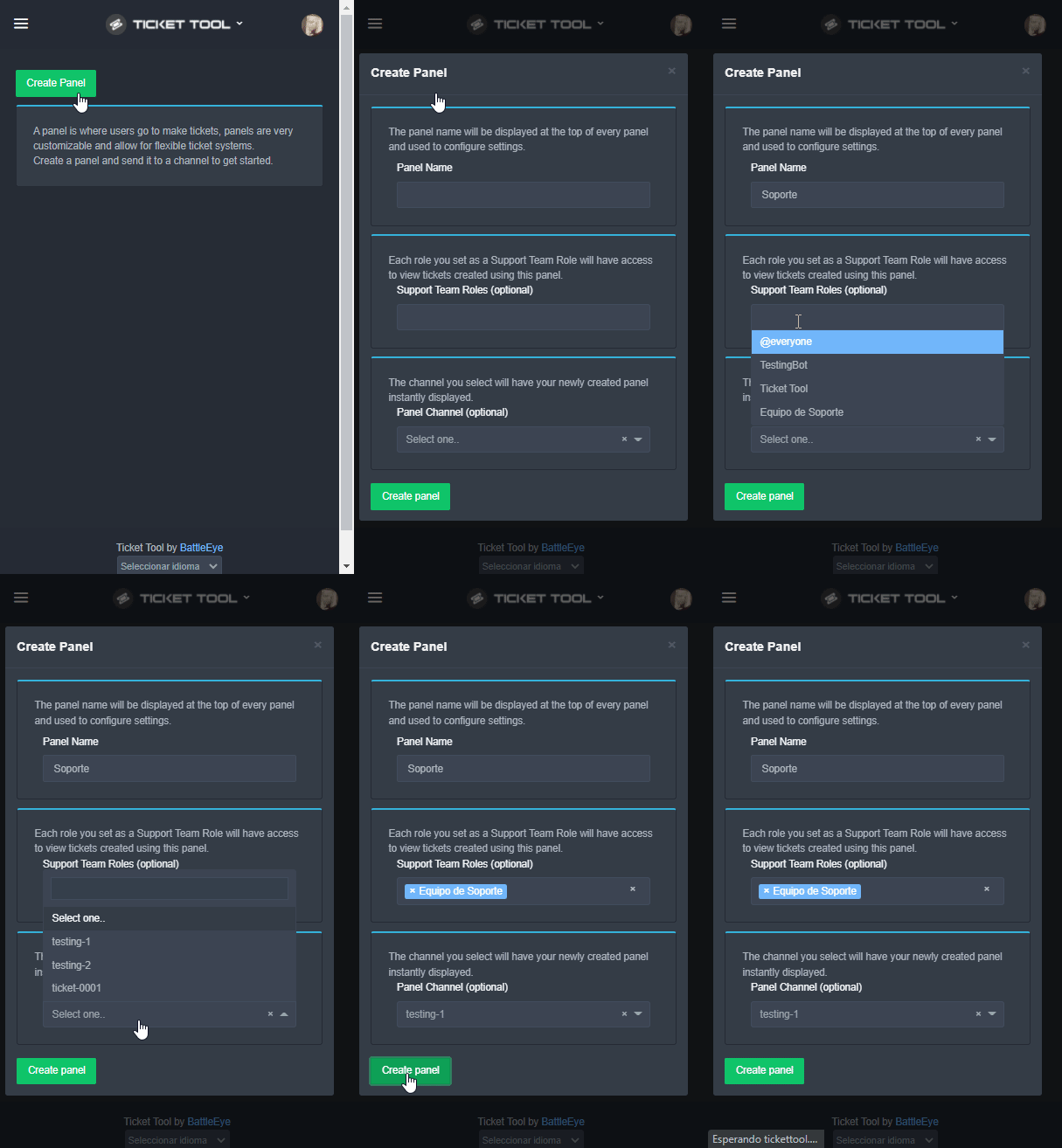
Una vez haya invitado al bot, diríjase al panel de control y cree un panel.
Un panel es usado para definir las configuraciones de un ticket (los usuarios que pueden ver el ticket, los permisos, los nombres, entre otros).
Creando un Panel
Para crear un panel, diríjase a la pestaña de Panel Configs o Configuraciones del Panel en el panel de control de su servidor.
Una vez esté allí, de click en Create Panel / Crear Panel.
Panel Name → Es el nombre que desea que tenga el panel, puede asignar el nombre de su preferencia.
Support Team Roles → Seleccione los roles que deseen que puedan ver los tickets que se creen desde este panel.
Panel Channel → Elija el canal al que quiera que el panel sea enviado al ser creado. (Este campo es opcional, puede reenviar el panel posteriormente si es necesario)
Finalmente de nuevamente click en Create Panel como ilustra el siguiente GIF
 shut bolt
nimble wigeon
<@!548583124062175232> لو سمحت
shut bolt
nimble wigeon
<@!548583124062175232> لو سمحت
#546557408902905896 Rule 4
nimble wigeon
shut bolt
<#546557408902905896> Rule 4
I’m sorry
copper owl
and sending me a friend request is also against the rules
nimble wigeon
copper owl
and sending me a friend request is also against the rules
Ok I’m sorry, can you tell me how I can get the premium
humble sequoiaBOT
Ticket Tool Premium
Get premium at https://tickettool.xyz/premium
Manage your subscriptions at https://tickettool.xyz/subscriptions
Why Premium?
Premium lets you customize the bot just how you want it. It also helps keep the bot running.
gilded verge
@nimble wigeon
nimble wigeon
gilded verge
<@!855526510647967754> <:this:894279341108772914>
Thx bro
iron nightBOT
Gave +1 Rep to @gilded verge
 cold kettle
🇫🇷 | Bonsoir. J'arrive plus à ouvrir un ticket sur tout les serveur discord depuis plusieurs jours. Voici ce que ça me fait
 gilded verge
cold kettle
🇫🇷 | Bonsoir. J'arrive plus à ouvrir un ticket sur tout les serveur discord de...
gilded verge
cold kettle
🇫🇷 | Bonsoir. J'arrive plus à ouvrir un ticket sur tout les serveur discord de...
Bonsoir. Il ne vous reste plus qu'à mettre à jour l'application Discord.
*Si vous voulez vous remercier pour mon aide, utilisez la réponse avec la mention incluse et écrivez thanks
humble sequoiaBOT
Update your discord App
Buttons are a relatively new addition to discord and don't work with some older versions of the app.
Please verify that you have the latest version of discord, by going to the app or play store.
Discord for the  App Store
Discord for the  Play Store
 viscid vapor
how do I fix
gilded verge
humble sequoia
iron nightBOT
Gave +1 Rep to @gilded verge
jade topaz
Hello, could you help me to configure the tickets? I'm new and I've never used this bot sorry (ticket tool primary bot)
humble sequoiaBOT
You can check our documentation here.
You can also check #573205317870157855 for the basic setup.
Our documentation contains all the info you need about the bot to be able to setup and configure the bot however you like.
 tribal cedar
Check the documentation there's a step by step
jade topaz
I'm sorry but I don't speak English and it's difficult for me
shut bolt
Hablas español?
shut bolt
$helpes setup
humble sequoiaBOT
Invitando a Ticket Tool
Lo primero que debe hacer es invitar al bot, dando click aquí.
Una vez haya invitado al bot, diríjase al panel de control y cree un panel.
Un panel es usado para definir las configuraciones de un ticket (los usuarios que pueden ver el ticket, los permisos, los nombres, entre otros).
Creando un Panel
Para crear un panel, diríjase a la pestaña de Panel Configs o Configuraciones del Panel en el panel de control de su servidor.
Una vez esté allí, de click en Create Panel / Crear Panel.
Panel Name → Es el nombre que desea que tenga el panel, puede asignar el nombre de su preferencia.
Support Team Roles → Seleccione los roles que deseen que puedan ver los tickets que se creen desde este panel.
Panel Channel → Elija el canal al que quiera que el panel sea enviado al ser creado. (Este campo es opcional, puede reenviar el panel posteriormente si es necesario)
Finalmente de nuevamente click en Create Panel como ilustra el siguiente GIF
iron nightBOT
Gave +1 Rep to @tribal cedar
tribal cedar
Nps
gilded verge
 hidden dock
Where to I get my license key from? Iam new here
hidden dock
Where to I get my license key from? Iam new here
Hey, what key are you talking about?
hidden dock
I think key for my zeta hack
 sly spindle
If I buy premium bot. Does it go down automatically from the server when the subscription expires?
humble sequoiaBOT
⚠️ You're in the wrong place
We provide support for @pseudo glen discord bot and cannot help you with whatever issue you have.
- Please make sure to contact the appropriate Support Team.
If you don't have any further questions regarding our bot Ticket Tool, please close this ticket
gilded verge
@hidden dock
hidden dock
 gilded verge
hidden dock
gilded verge
hidden dock
wrong server
gilded verge
sly spindle
If I buy premium bot. Does it go down automatically from the server when the sub...
After the subscription expires, you will have to enter the Dashboard and change to bot primary, otherwise your tickets will not work.
hidden dock
Bro iam new here and dont know anything about this cheat, really in need of help pls
gilded verge
hidden dock
Bro iam new here and dont know anything about this cheat, really in need of help...
i said wrong server. We can't help you with this what you said.
hidden dock
Ok so what server should I be going to?
gilded verge
idk 🤷
 worn arrow
 humble sequoiaBOT
Update your discord App
Buttons are a relatively new addition to discord and don't work with some older versions of the app.
Please verify that you have the latest version of discord, by going to the app or play store.
Discord for the App Store
Discord for the Play Store
gilded verge
@worn arrow
 brisk sable
can i make tickets open under a certain catergory?
shut bolt
brisk sable
can i make tickets open under a certain catergory?
$help category
humble sequoiaBOT
How to set the open category
To set a open category go to the Dashboard -> Panel Configs -> Settings -> Category Options -> Category Open
 brisk sable
okay thank you @shut bolt and also when i go to close a ticket it says system failed missing permissons
shut bolt
brisk sable
okay thank you <@!518666147441278998> and also when i go to close a ticket it s...
Run $debug
And check which permissions the bot marks as ❌
Those are the permissions missing
If it doesn't answer
Make sure it has access to the ticket and can type on it
brisk sable
thank you
shut bolt
Sure
 cunning kestrel
Hello, I have a problem with the ticket tool. A role does not have the ability to access tickets. How to do ?
shut bolt
cunning kestrel
Hello, I have a problem with the ticket tool. A role does not have the ability t...
You want that role to be able to see the tickets?
cunning kestrel
Yes that's it
shut bolt
$help support
humble sequoiaBOT
How to let support team see into a ticket
About support roles
A support role lets your support team see into tickets with out having to add them manually to each and every ticket.
You can add as many support roles as you like per panel.
NOTE that the way discord works all admins can see into tickets regardless of this.
How to set a support role
To set a Support role go to the Dashboard -> Panel Configs -> Settings -> General Options -> Support Team Roles.

NOTE that the support role will not be able to see into tickets that are already created..
shut bolt
Follow this process and they'll be able to see your new tickets
cunning kestrel
Yes I did that and it didn't work...
shut bolt
cunning kestrel
Yes I did that and it didn't work...
Note that it only applies to new tickets
cunning kestrel
I know, but it still doesn't work 😅
 prisma tree
Sorry.. I have open a ticket.. For problem.. To deposit... I don't have. A txt
shut bolt
cunning kestrel
I know, but it still doesn't work 😅
Server ID please
cunning kestrel
I give you my server?
shut bolt
The ID of the server
cunning kestrel
What is the server ID?
humble sequoiaBOT
How to turn on developer mode
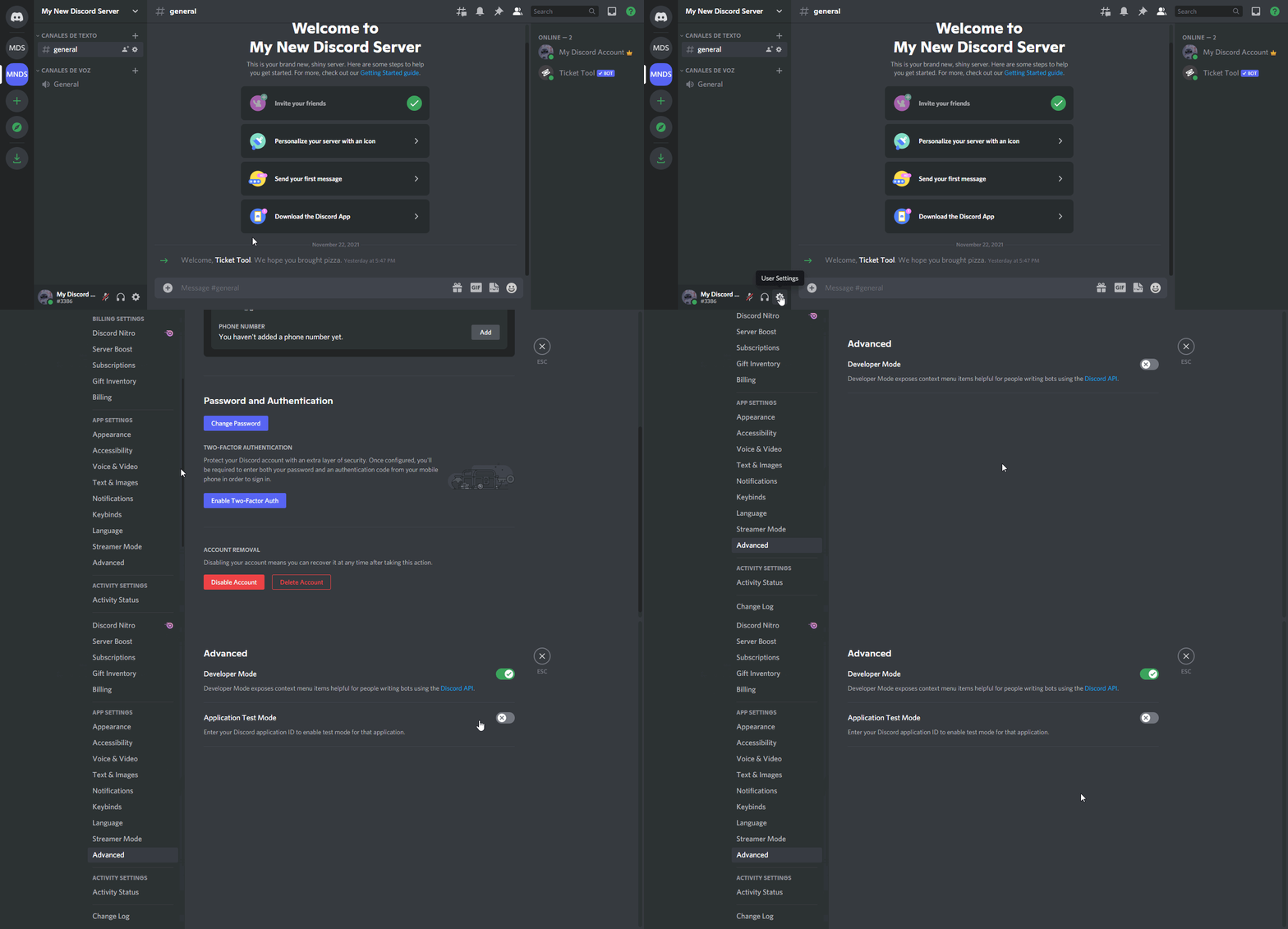
To enable developer mode do the following:
[:desktop: PC] go to Settings ➞ Advanced ➞ Developer mode
[:mobile_phone: Mobile] go to Settings ➞ Appearance ➞ Developer mode
Developer Mode allows you to get the ID of any channel, user, role, or server.
VIA the ID, you can use them with <> alongside their corresponding format to mention a channel/role/user...
They're mostly used to mention channels, users, or roles in Embeds
Formats
Channels: <#ID> ➝ #🤖│bot-spam
Users: <@ID> ➝ @humble sequoia
Roles: <@&ID> ➝ <@&642118166243311646>
 humble sequoiaBOT
Server id - 509192800865353738
Server id - 509192800865353738
shut bolt
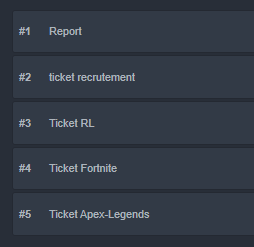
It will answer with a number, the ID
 cunning kestrel
fortnite ticket panel
shut bolt
cunning kestrel
fortnite ticket panel
Alright I'll need to move this to a ticket if that's fine with you
cunning kestrel
that is to say?
shut bolt
That if you are fine with me opening a ticket as in #🎫│make-a-ticket to look further into the problem
cunning kestrel
Ah yes, excuse me I did not understand
shut bolt
No problem, I didn't express properly
cunning kestrel
😅
humble sequoiaBOT
━━ moved to ticket ━━
 sudden ivy
Hello,I have a problem with the ticket tool. A role does not have the ability to access tickets. How to do ?
gilded verge
sudden ivy
Hello,I have a problem with the ticket tool. A role does not have the ability to...
Hey, but you mean the moderator role can't see the tickets or the regular user can't see his ticket?
sudden ivy
Ok .
gilded verge
Could you please show the error that is displayed?
 gilded verge
I understand everyone should be able to open tickets, right?
sudden ivy
Can’t open it say same thing.
gilded verge
Dashboard->Panel Configs->Panel Settings->Expand Button Options->click Settings on Create Ticket and to Allowed Roles add @everyone and Save
 sudden ivy
How do that .
gilded verge
wait, how to go to dashboard?
sudden ivy
Ok.
gilded verge
As I wrote, go to Dashboard->Panel Configs->Panel Settings->Expand Button Options->click Settings on Create Ticket and to Allowed Roles add @everyone and Save Settings
sudden ivy
Ok.
jade topaz
guys help so in my server i want it to say ticket- then the user that opened the ticket

then when i am here
i put it to ticket-{user}
and it puts it to there discord id
so like ticket-678005644338397246
instead of ticket-diski
 gilded verge
@jade topaz, I'd rather be sure, so you want your ticket to be like:
ticket-miroxik74
or 2.ticket-334671104704774154?
gilded verge
peak spear
How do I add more than one emoji like the picture?
What is in the picture are multipanels. That's what you meant, right? ⬇️
humble sequoiaBOT
For a more convenient use of multipanels, you can now combine panels on the dashboard. This will allow you to directly send the multipanel from the dashboard or via the $panel ID command.
Where can I find this?
You can find this setting on the Dashboard -> Panel Configs -> Settings -> General Options
Note: if you're attaching all the panels to a panel called English, don't include English in the attached panels box (If you do this, it will create duplicate)
This will put all buttons from all of your panels on one message. The message is the panel message from the panel you're combining these panels in.

 Note: This is a premium feature
jade topaz
gilded verge
<@456226577798135808>, I'd rather be sure, so you want your ticket to be like:
1...
Note: This is a premium feature
jade topaz
gilded verge
<@456226577798135808>, I'd rather be sure, so you want your ticket to be like:
1...
1
i want it to look like 1 when i open a ticket
loud turtle
jade topaz
i want it to look like 1 when i open a ticket
That feature is only available with premium
I'm excited for my new role if I keep helping
 amber atlas
Is there a way to see logs of closed tickets?
gilded verge
jade topaz
i want it to look like 1 when i open a ticket
As stated above, you need premium but once you have it use {author.name}
jade topaz
gilded verge
As stated above, you need premium but once you have it use `{author.name}`
okay thank you
iron nightBOT
Gave +1 Rep to @gilded verge
jade topaz
loud turtle
That feature is only available with premium
thank you
loud turtle
Your welcome
loud turtle
amber atlas
Is there a way to see logs of closed tickets?
Transcript I think
gilded verge
amber atlas
Is there a way to see logs of closed tickets?
Yes, after closing the ticket, use the command $transcript and the logs will be sent to the selected channel.
 loud turtle
Yes....
amber atlas
gilded verge
Yes, after closing the ticket, use the command `$transcript` and the logs will b...
oh okay. i'll try that. thank you guys @loud turtle !
iron nightBOT
Gave +1 Rep to @gilded verge
peak spear
humble sequoia
Thanks
iron nightBOT
Gave +1 Rep to @humble sequoia
jade topaz
Quel est la commande pour que les gens puisse créer des tickets
loud turtle
créer un panneau sans aucune liste noire dans les configurations de panneau @jade topaz
gilded verge
@jade topaz, Toutes les commandes peuvent être trouvées après la connexion à votre serveur dans Tableau de bord dans Configurations de commande
humble sequoiaBOT
You can check our documentation here.
You can also check #573205317870157855 for the basic setup.
Our documentation contains all the info you need about the bot to be able to setup and configure the bot however you like.
 fallow ingot
What part do you need help with?
 vocal vine
So I tag the bot
And it just won’t work
I want it to be like this
Gimmie a sec

This is my friends server
But it won’t work
fallow ingot
How doesn’t it work?
vocal vine
Can I just invite you in my server
Idk how to use
I’m not a proffered
Professional sorry
fallow ingot
Unfortunately not, unless it necessary for me to join.
vocal vine
It is nessecary
fallow ingot
I can help you here, I just need you to answer my questions so I can help you to the best of my ability.
vocal vine
Ok
fallow ingot
Now, what doesn’t work in your friends server?
vocal vine
This is how it looks so far

No I’m my friends server it works but in mine it doesn’t
In*
fallow ingot
Firstly, you’ll need to set a panel and send it.
vocal vine
How do I set it up
humble sequoiaBOT
Creating a panel
To create a panel we are going to need to head over to the panel configs on the dashboard
Once at the dashboard we will need to click Create Panel
Enter a panel name (Fill in any optional settings you want)
Click Create Panel and your ready to get started with configuring your panel
An example of a creating a panel is shown below.
 vocal vine
I’m on mobile
Plus the video is blurry
I gimmie a sec ima try
Ok I created it
Oh thank you
It works
thanks @fallow ingot
iron nightBOT
Gave +1 Rep to @fallow ingot
vocal vine
What does the rep do?
fallow ingot
nothing really
loud turtle
 zinc quiver
like the transcript if i deleted the ticket
zinc quiver
like the transcript if i deleted the ticket
Transcript will be saved before you close the ticket
So it's the same answer
zinc quiver
loud turtle
Transcript will be saved before you close the ticket
no i mean if i deleted the ticket
or where do i see list of transcripts
loud turtle
zinc quiver
or where do i see list of transcripts
You don't
You need to download the transcripts to save them. No list
zinc quiver
sad
loud turtle
zinc quiver
sad
It's how it is
zinc quiver
when i have to download every single transcripts 
loud turtle
zinc quiver
when i have to download every single transcripts <:niceman:887053631998812240>
I don't care about transcripts
iron nightBOT
Gave +1 Rep to @loud turtle
loud turtle
zinc quiver
but anyways thanks <@!892253288521682964>
Pleasure
 forest cosmos
anyone know why only 1 server of the two with the bot pop up in my dashboard even after relogging?
Do I need to log on all devices?
humble sequoiaBOT
Don't see your server in the dashboard?
You will possibly need to relog. Look below to see steps on how to relog.
How to relog in the Dashboard.
First, you will need to go to the dashboard. Once your there, click on your avatar on the top right. after you clicked it, you will see button that says Logout. You must click that. Once you have logged out, you can log back in.
Note:
You need one of these 3 things to access the dashboard.
1. Server Owner (Level: 6)
2. Server Administrator (Level: 4)
3. Dashboard Role (Level: 2)
:warning: You can check your level using $level on your Discord Server
User permission level with Ticket Tool
@User is permission level: 0 (User)
```» *If it shows that your permission is **0**, you don't have any of the above **3 things** to manage the dashboard.*


**See the picture below on how to relog:**Check the note of the embed, that could be the reason
forest cosmos
humble sequoia
Hey I love you
shut bolt
Glad I could help
shut bolt
forest cosmos
how do i change my level?
You would need to require the server owner to give you administrator permission
Or a dashboard role
humble sequoiaBOT
Any role you put there will have full access to the ticket tool dashboard. The server owner and users with admin permissions already have access to the dashboard.
Be careful of which roles to put here
 forest cosmos
What if do have server admin?
shut bolt
forest cosmos
What if do have server admin?
What do you mean?
forest cosmos
I have a server admin role with all possible permissions grantable to a user who isnt server owner
shut bolt
forest cosmos
I have a server admin role with all possible permissions grantable to a user who...
What was the bot's response to $level?
forest cosmos
You know @shut bolt I appreciate your help my server owner doesn't know how to build roles lol
Thank you @shut bolt
iron nightBOT
Gave +1 Rep to @shut bolt
shut bolt
Sure
 minor birch
@loud turtle Hey bro it didnt work
anything else i can try? The members still cant see the -create-a-ticket button
Does the bot need admin perms?
 green totem
can anyone tell me why Ticket Tool needs admin perms? What happens if we don't have admin perms? Right now, I have it off of admin, and it seems the only thing that is different is I can't close the ticket using the "close" button. I have to actually delete the channel within Discord.
copper owl
green totem
can anyone tell me why Ticket Tool needs admin perms? What happens if we don't h...
whoever told you ticket tool needs admin is fortunately mistaken
If your tickets aren't closing, then there's a permission issue going on.
green totem
copper owl
whoever told you ticket tool needs admin is fortunately mistaken
Lol it says that on the TT documentation, but all good. I know sometimes those things become dated. Do you happen to know which permission it needs to have the “close tickets” button work?
copper owl
green totem
Lol it says that on the TT documentation, but all good. I know sometimes those t...
can you Screenshot what you're talking about then?
also running $debug within the ticket should let you know which permissions are missing
green totem
copper owl
also running $debug within the ticket should let you know which permissions are ...
ah ok, that is helpful. didn't know that
this is the error I receive when trying to close ticket via in-channel "close" button

Also it looks like I misread the documentation
Instructions on setting up Ticket Tool in your server.
it says you must have admin permission to set up, not that the bot needs it 🙂
I am having my own user issues 😂
copper owl
Gotcha. Was making sure because I was 100% positive it didn't say the bot needed admin. I was one of the people to assist writing the docs lol
copper owl
green totem
this is the error I receive when trying to close ticket via in-channel "close" b...
running debug should provide you with a list of the permissions it's lacking
green totem
thanks, I will try that in a private ticket that I open just for me
green totem
copper owl
running debug should provide you with a list of the permissions it's lacking
does it matter what channel you run $debug in? The command is not returning anything, and it is definitely added to the channel and has "send messages" turned on.
copper owl
yup
 sullen beacon
hey guys, question on ticket tool
I'm not the admin, but I have perms to delete the tickets; but can't close the tickets
where can I configure this?
minor birch
@copper owl Hey bro people in my server cant see the create-a-ticket button, but they can see the bot in the channel
why is that? No role is blacklisted either
 worthy void
How do I invite the Premium Ticket Bot into the server?
humble sequoiaBOT
The first thing you will need to do is invite the premium bot, an invite can be found here
Once the bot is in your server we will head to the dashboard and manage your server. When you are managing your server, you want to head into "Server Configs" then click the drop down menu under "Select the bot you would like to use on this server" then click "Ticket Tool#6207" and then save.
 fallow ingot
@worthy void
 tame ferry
I am interested in using Ticket Tool for my server and I am coming from "another" ticket bot. Is there a way where Staff put in like closing notes? Like a short summary for the archive/logging ?
grave wren
Hi can somebody send how make a make a ticket 🎫 in my server
loud turtle
grave wren
Hi can somebody send how make a make a ticket 🎫 in my server
Create a panel
grave wren
loud turtle
Create a panel
How?
loud turtle
grave wren
How?
Go to panel configs create panel and send to specific channel
tame ferry
Also, is there a way to auto delete closed tickets, if I am storing the transcript kind of like an archive. I don't need a channel full of closed tickets.
grave wren
tame ferry
Also, is there a way to auto delete closed tickets, if I am storing the transcri...
How?
loud turtle
Support team roles are optional but also required
grave wren
loud turtle
Go to panel configs create panel and send to specific channel
Can u send a link for me
grave wren
loud turtle
Like this
Like what?
loud turtle
grave wren
Like what?
First wait
grave wren
loud turtle
First wait
K
grave wren
loud turtle
Like that
Yes thx
iron nightBOT
Gave +1 Rep to @loud turtle
loud turtle
I would discuss with you the following options but that just wastes my time
loud turtle
grave wren
Yes thx
Welcome
loud turtle
Yes
After creating a panel. Click settings then category options then pick a category in the category open section, So once a ticket is open, it can be in a category you have chosen.
That should help
iron nightBOT
Gave +1 Rep to @loud turtle
loud turtle
Let's go

 tidal junco
Hello Team
users opening a ticket are unable to add attachments to the ticket. Am i missing some permissions to the bot?
grave wren
 rose garnet
I think you should have premium I think not sure
loud turtle
grave wren
I think you should have premium I think not sure
Yes you should
loud turtle
tidal junco
users opening a ticket are unable to add attachments to the ticket. Am i missing...
Maybe you are
tidal junco
loud turtle
Maybe you are
any idea which persmission is missing? Thank you
iron nightBOT
Gave +1 Rep to @loud turtle
loud turtle
tidal junco
any idea which persmission is missing? Thank you
When adding the robot, there are some permissions that need to be required. You can see the required permissions in the website. In server info
iron nightBOT
Gave +1 Rep to @loud turtle
slender minnow
tidal junco
any idea which persmission is missing? Thank you
Panel Config ---> User Ticket Open Permissions (or something like that)
Allow them to add attachement.
tidal junco
thanks @slender minnow
iron nightBOT
Gave +1 Rep to @slender minnow
tidal junco
it worked
 craggy geyser
It's how I used to do my server before getting premium
loud turtle
 drifting topaz
I feel bad
drifting topaz
I feel bad
I don't
slender minnow
i use one panel for all, too lazy to keep creating multiple
and then redirecting users to the righ tones
loud turtle
slender minnow
i use one panel for all, too lazy to keep creating multiple
That's not a problem for me
drifting topaz
Its not that expensive though, you should buy, its worth it
loud turtle
drifting topaz
Its not that expensive though, you should buy, its worth it
Not expensive for you, for me, it costs 3480 here
fallow ingot
 drifting topaz
loud turtle
Not expensive for you, for me, it costs 3480 here
drifting topaz
loud turtle
Not expensive for you, for me, it costs 3480 here
3.4k usd?
Where do u live
craggy geyser
loud turtle
I'm stuck with primary. It's still ticket tool so doesn't matter
Could vote to build up premium
loud turtle
drifting topaz
3.4k usd?
Not usd
drifting topaz
craggy geyser
Could vote to build up premium
How much time does it give u again
loud turtle
Let's not chat here
drifting topaz
$vote
craggy geyser
drifting topaz
How much time does it give u again
Each vote is 12h. Need 6 votes minimum to redeem. Two working sites currently each can be voted every 12 hours
Discord.boats shut down
craggy geyser
Please keep commands to #🤖│bot-spam please
loud turtle
craggy geyser
Please keep commands to <#910978476536905738> please
True
jade topaz
how can i close all
humble sequoiaBOT
━━ moved to ticket ━━
shut bolt
 wintry kernel
What is the benefit of voting for ticket tool in top.gg?
wintry kernel
What is the benefit of voting for ticket tool in top.gg?
You can get free premium if you collect enough votes, check $votes in #🤖│bot-spam
wintry kernel
shut bolt
You can get free premium if you collect enough votes, check `$votes` in <#910978...
How many votes should i get?
shut bolt
wintry kernel
How many votes should i get?
At least 6 so you are able to redeem them
shut bolt
wintry kernel
How can i redeem them?
$vote redeem
wintry kernel
Ok thanks <3
shut bolt
Sure
wintry kernel
thanks @shut bolt
iron nightBOT
Gave +1 Rep to @shut bolt
shut bolt
 desert brook
Help-
 humble sequoiaBOT
Don't see your server in the dashboard?
You will possibly need to relog. Look below to see steps on how to relog.
How to relog in the Dashboard.
First, you will need to go to the dashboard. Once your there, click on your avatar on the top right. after you clicked it, you will see button that says Logout. You must click that. Once you have logged out, you can log back in.
Note:
You need one of these 3 things to access the dashboard.
1. Server Owner (Level: 6)
2. Server Administrator (Level: 4)
3. Dashboard Role (Level: 2)
:warning: You can check your level using $level on your Discord Server
User permission level with Ticket Tool
@User is permission level: 0 (User)
```» *If it shows that your permission is **0**, you don't have any of the above **3 things** to manage the dashboard.*


**See the picture below on how to relog:**Try this
desert brook
Ok
 sacred lion
Hey everyone!! can someone send me a video about how to use Ticket tool premium, I don´t find any single video about it and I really want to know how it works
shut bolt
sacred lion
Hey everyone!! can someone send me a video about how to use Ticket tool premium,...
Hi there! You mean how to invite the premium bot?
sacred lion
Hey Pablo!! I mean, I already have ticket premium, but idk how to create more categories in a ticket, as the one you have with Spanish, english and that stuff
shut bolt
Alright!
humble sequoiaBOT
For a more convenient use of multipanels, you can now combine panels on the dashboard. This will allow you to directly send the multipanel from the dashboard or via the $panel ID command.
Where can I find this?
You can find this setting on the Dashboard -> Panel Configs -> Settings -> General Options
Note: if you're attaching all the panels to a panel called English, don't include English in the attached panels box (If you do this, it will create duplicate)
This will put all buttons from all of your panels on one message. The message is the panel message from the panel you're combining these panels in.
Note: This is a premium feature
 sacred lion
Thank you so much man!! <3
shut bolt
sacred lion
Thank you so much man!! <3
No problem mate, let me know if you need any other help
 eternal quiver
I'm trying to add a support role that can answer tickets, and I was able to add it in the Ticket Tool dashboard, but it doesn't seem to have worked.
shut bolt
eternal quiver
I'm trying to add a support role that can answer tickets, and I was able to add ...
Take into account it will only apply to new tickets, and make sure you saved changes
eternal quiver
Ah okay thank you. It works on the new ticket I tested.
shut bolt
Sure
shut bolt
jade topaz
If I voted 6 tines I can use ticket tool premium version for 3 days true?
Correct
jade topaz
Thanks @shut bolt
iron nightBOT
Gave +1 Rep to @shut bolt
shut bolt
Sure
jade topaz
How do I add multiple buttons in one panel?
Like...
1st Button Name - Help
2nd Button name - Giveaway
3rd Button name - Report
And if I click on the 1st button, the ticket name should be help-(nums)
And if the 2nd button, the ticket name should be gw-(nums)
How do I do that? ^
humble sequoiaBOT
For a more convenient use of multipanels, you can now combine panels on the dashboard. This will allow you to directly send the multipanel from the dashboard or via the $panel ID command.
Where can I find this?
You can find this setting on the Dashboard -> Panel Configs -> Settings -> General Options
Note: if you're attaching all the panels to a panel called English, don't include English in the attached panels box (If you do this, it will create duplicate)
This will put all buttons from all of your panels on one message. The message is the panel message from the panel you're combining these panels in.
Note: This is a premium feature
shut bolt
To have multiple buttons follow this process
To change the default name of each panel do this
humble sequoiaBOT
The ticket name is the default channel name of all tickets. To edit it, go to your Dashboard > Panel Configs > Settings > Ticket Options. There you can edit the channel name of opened and closed tickets. You can also use variables in there.
 Note: This is a premium feature
 hallow pendant
Does anyone know how to relog ticket tool because it's In my server but not showing up on dashboard
 lilac granite
Hey guys, whenever someone made a ticket they can not see the ticket channel? How can I fix this?
shut bolt
jade topaz
And yeah, if I vote 6 times on top.gg, I will get the premium code right?
You'll need to do $vote redeem to get the code
shut bolt
hallow pendant
Does anyone know how to relog ticket tool because it's In my server but not show...
 shut bolt
lilac granite
Hey guys, whenever someone made a ticket they can not see the ticket channel? Ho...
shut bolt
lilac granite
Hey guys, whenever someone made a ticket they can not see the ticket channel? Ho...
How are you testing it? Using an alt, using View As Role, a user from your server reported it?
shut bolt
hallow pendant
I feel stupid
No worries 😅
 dusty canopy
Hey whats up guys/gals
 quartz vector
Aquí se puede consultar en Idioma español?
dusty canopy
Does anyone know if you can create a ticket in the server without verifying?
humble sequoiaBOT
━━ moved to ticket ━━
shut bolt
dusty canopy
Does anyone know if you can create a ticket in the server without verifying?
In which server?
dusty canopy
shut bolt
In which server?
one of my servers
dusty canopy
shut bolt
In which server?
ive got a welcome message with the ticket channel in the message for members to click on if they need help but they can only use it when they are verifyd
shut bolt
dusty canopy
ive got a welcome message with the ticket channel in the message for members to ...
Alright, is the verification done through a role?
shut bolt
dusty canopy
click on reaction to verify and you the members get the role
You could hide the channel in which the panel is placed to be only visible to that role or you can blacklist everyone and whitelist the verified role for that specific button
lilac granite
shut bolt
How are you testing it? Using an alt, using View As Role, a user from your serve...
view as role
dusty canopy
shut bolt
You could hide the channel in which the panel is placed to be only visible to th...
The whitelist option needs to be commanded or is is somehwhere on teh website?
humble sequoiaBOT
Using the View as Role feature.
The View as Role discord feature will not work for testing ticket tool. Ticket Tool opens permissions with user permissions & not role permissions.
shut bolt
lilac granite
view as role
That's the problem, please use an alt account
shut bolt
dusty canopy
The whitelist option needs to be commanded or is is somehwhere on teh website?
It is inside the button settings, check below for more info
$buttons
humble sequoiaBOT
The new Discord Buttons allow for a much smoother and convenient experience. They reduce lag and work much better than emojis. With ticket tool you can edit all the buttons however you like! Buttons can show emojis, text and can have 4 different colors.
Where can I edit them?
Dashboard ➞ Panel Configs ➞ Settings ➞ Button Options ➞ Setting
lilac granite
shut bolt
That's the problem, please use an alt account
Got you, thanks g
iron nightBOT
Gave +1 Rep to @shut bolt
shut bolt
lilac granite
Got you, thanks g
Sure
vocal vine
Thanks @shut bolt
iron nightBOT
Gave +1 Rep to @shut bolt
vocal vine
What does that do?
shut bolt
vocal vine
Thanks <@!518666147441278998>
Sure
shut bolt
vocal vine
What does that do?
It's a reputation system
So
You get a point for each person that says thanks to you
dusty canopy
shut bolt
You could hide the channel in which the panel is placed to be only visible to th...
Alright. I want everyone to be able to create a ticket even before being verified? Just to make sure explained it correctly
shut bolt
dusty canopy
Alright. I want everyone to be able to create a ticket even before being verifie...
Oh, then by default you don't have to do nothing mate, they will be able to create tickets too if you haven't changed any setting
humble sequoiaBOT
Any role you assign as a blacklisted role won't be able to use commands or reactions.
Selecting a blacklisted role
Go to your Dashboard ➞ Server Configs. There you will find the option to select blacklisted roles.
Note: Don't forget to save.
 humble sequoiaBOT
The new Discord Buttons allow for a much smoother and convenient experience. They reduce lag and work much better than emojis. With ticket tool you can edit all the buttons however you like! Buttons can show emojis, text and can have 4 different colors.
Where can I edit them?
Dashboard ➞ Panel Configs ➞ Settings ➞ Button Options ➞ Setting
dusty canopy
They are both correct. No blacklisted & No disabled roles
shut bolt
Alright then people should be able to use the panel without any problem
If they get to see a message error please let us know
dusty canopy
It keeps saying "The interaction failed"
shut bolt
For everyone?
dusty canopy
you can see the channel, click on the button but won't allow the ticket to be created
dusty canopy
shut bolt
For everyone?
Yes
shut bolt
Is the bot on the server?
dusty canopy
If i verify, then it will let me
dusty canopy
shut bolt
Is the bot on the server?
yes
shut bolt
I'll move this to a ticket if that's fine with you
dusty canopy
of course. thank you
shut bolt
No problem
 short meadow
I have a question how can I add a role to see the ticket?
gilded verge
short meadow
I have a question how can I add a role to see the ticket?
you mean support(mod) role?
short meadow
Yeah so that people can enter a ticket after someone opened it
gilded verge
Dashboard->Panel Configs->Panel Settings->Expand General Options->Add a moderator role to the Support Team Roles
 iron nightBOT
Gave +1 Rep to @gilded verge
gilded verge
no problem
jade topaz
Hello
If I bought the premium version and the subscription ended and the bot left...If I add it later the message that contain the ticket will work again or Should I send it again?
gilded verge
jade topaz
If I bought the premium version and the subscription ended and the bot left...If...
Hi, in this case go to Dashboard->Server Configs->Change premium bot to free

and next go to Panel Configs and re-send your panel
jade topaz
gilded verge
and next go to `Panel Configs` and re-send your panel <:peepoBlush:8432122252081...
And If I add the premium bot again the panel (ticket) will work normally?
gilded verge
if your premium has ended, the premium bot will not work
i hope i understand well? if not then please ask again. 😳
jade topaz
hello how can i be on the staff team?
gilded verge
jade topaz
hello how can i be on the staff team?
Hey, please go to: #📣│server-news message
jade topaz
I already called a ticket but no one came can you tell me how to join the staff team?
gilded verge
You need to wait for an answer, you have no other choice. 🤷
jade topaz
gilded verge
i hope i understand well? if not then please ask again. 😳
After the premium ended I pay for the premium again
Will the ticket that sent before the premium end first time work normal?
loud turtle
jade topaz
After the premium ended I pay for the premium again
Will the ticket that sent be...
Yes
It's a channel, the bot won't affect it
The bot just creates a channel. When the bot is gone, the channel still 3xists
loud turtle
 hazy delta
people in my server dont have permission to open a ticket
hazy delta
people in my server dont have permission to open a ticket
Blacklist riles
$help blacklist
humble sequoiaBOT
Help Options
$help commands - Information on commands
$help setup - Information on bot setup
$help faq - Frequently asked questions
 loud turtle
Maybe @everyone was included in that
jade topaz
Thanks @loud turtle
iron nightBOT
Gave +1 Rep to @loud turtle
loud turtle
 young bobcat
Não consigo add
young bobcat
Não consigo add
Verifique em seu endereço de e-mail para garantir que o discord conheça você
loud turtle
jade topaz
Thanks <@892253288521682964>
Welcome
young bobcat
loud turtle
Verifique em seu endereço de e-mail para garantir que o discord conheça você
Ok
loud turtle
@Ticket tool Proficient here I come
jade topaz
Is it 100% necessary to give Ticket Tool View Channels permission?
loud turtle
jade topaz
Is it 100% necessary to give Ticket Tool View Channels permission?
Yes
How will it create tickets if it can't even view tickets or channels for panels
jade topaz
Well, it has visibility to the channel that the panel is in, and I've given it view channel permission in a category
gilded verge
jade topaz
Well, it has visibility to the channel that the panel is in, and I've given it v...
If the Ticket Tool role (in the role settings) has the permission to view channels disabled, but has the display of channels in a given category enabled, it will work without a problem.
jade topaz
gilded verge
If the Ticket Tool role (in the role settings) has the permission to view channe...
That's what I thought. but I'd get an error:

It would create the channel but everyone can see it
manage roles is enabled
gilded verge
I had this error too, I will send a video in a moment, please wait.
interesting, it worked for me a moment ago, but maybe it was only a moment, because now, as I continue to check, there is no option, so you need to turn on the display of channels in the role settings 😮
Okay now I don't understand how it works anymore, look. On my main server, I have the same bot and category perms as well as on the test server, literally everything is the same because I checked several times. The difference is that on the main server I have premium and it works normally there and on the test server I do not have premium and it does not work even if all the settings are the same. Soon I will make a video because this situation amused me and I do not know how it is possible. XDDDD
jade topaz
Hm, that's interesting.
loud turtle
jade topaz
It would create the channel but everyone can see it
Support team roles include @everyone I think
gilded verge
A bit long movie because it lasts 3 minutes, but does anyone know how to logically explain it? xDDDD
shut bolt
jade topaz
It would create the channel but everyone can see it
Hey, so everyone are able to see your tickets, right?
jade topaz
shut bolt
Hey, so everyone are able to see your tickets, right?
Yes, when view channels is off.
shut bolt
jade topaz
Yes, when view channels is off.
Could you please give me your server's ID?
jade topaz
shut bolt
Could you please give me your server's ID?
854244047160999937
shut bolt
jade topaz
854244047160999937
Everything looks fine on my side, I'll open a ticket to check further the problem if you are fine with that
jade topaz
shut bolt
Everything looks fine on my side, I'll open a ticket to check further the proble...
Please go ahead
shut bolt
Alright, cya there
humble sequoiaBOT
━━ moved to ticket ━━
 grim maple
@shut bolt Is there a way to control which channel support tickets show under in a discord server? Right now they all populate at the top of our server
shut bolt
grim maple
<@!518666147441278998> Is there a way to control which channel support tickets s...
Affirmative! You can assign a category for tickets to be placed in, check the message below
$help category
humble sequoiaBOT
How to set the open category
To set a open category go to the Dashboard -> Panel Configs -> Settings -> Category Options -> Category Open
grim maple
shut bolt
Affirmative! You can assign a category for tickets to be placed in, check the me...
Knew it was something easy! Thanks!
iron nightBOT
Gave +1 Rep to @shut bolt
shut bolt
Sure! Thanks for using Ticket Tool
 woeful shale
Cuales son los comandos del bot?
shut bolt
woeful shale
Cuales son los comandos del bot?
Hay varios, utiliza $help commands en #🤖│bot-spam para el listado
Buscas setear el bot para que funcione?
solid stream
gilded verge
A bit long movie because it lasts 3 minutes, but does anyone know how to logical...
You get it fixed?
 hoary osprey
is it possible to see how many tickets have been claimed and by who? like a leaderboard of the person with the most claimed tickets
shut bolt
hoary osprey
is it possible to see how many tickets have been claimed and by who? like a lead...
Currently it's not possible, stats are a planned feature tho
hoary osprey
o alr ty
 high cedar
Hey buddies
shut bolt
hoary osprey
o alr ty
Sure
gilded verge
solid stream
You get it fixed?
The problem is that I can't understand how it works, a bot without premium needs to have channel display enabled and a bot with premium doesn't need to have it turned on. (Oh, sorry for reply ping)
gilded verge
Whoops, bad translate 😅
i mean view channel permission
 hexed hound
Guys
Ticket tool was working fine
But now it says
warning this server is not active please make sure it's the correct Bot (premium VS free)
humble sequoiaBOT
━━ moved to ticket ━━
jade topaz
can you make verification buttons with ticket tool?
shut bolt
jade topaz
can you make verification buttons with ticket tool?
Verification as in granting a verified role?
jade topaz
yes
shut bolt
Not possible, you can have a ticket verification system though 😉
jade topaz
how?
humble sequoiaBOT
You can check our documentation here.
You can also check #573205317870157855 for the basic setup.
Our documentation contains all the info you need about the bot to be able to setup and configure the bot however you like.
shut bolt
Create a panel through which your users can manually be verified by your staffs
humble sequoiaBOT
Don't see your server in the dashboard?
You will possibly need to relog. Look below to see steps on how to relog.
How to relog in the Dashboard.
First, you will need to go to the dashboard. Once your there, click on your avatar on the top right. after you clicked it, you will see button that says Logout. You must click that. Once you have logged out, you can log back in.
Note:
You need one of these 3 things to access the dashboard.
1. Server Owner (Level: 6)
2. Server Administrator (Level: 4)
3. Dashboard Role (Level: 2)
:warning: You can check your level using $level on your Discord Server
User permission level with Ticket Tool
@User is permission level: 0 (User)
```» *If it shows that your permission is **0**, you don't have any of the above **3 things** to manage the dashboard.*


**See the picture below on how to relog:**how can i assign a particular role for ticket tool bot..if someone create a ticket..he would get a particular role..and i wanna turn off my other bot moderation for tht particular role in new ticket channel
fallow ingot
jade topaz
how can i assign a particular role for ticket tool bot..if someone create a tick...
That’s not possible with Ticket Tool.
jade topaz
oki thanks
fallow ingot
No problem.
humble sequoiaBOT
We would love to help you, but if you don't tell us what you need help with we can't help you :(
slender minnow
@empty plume sure if you could mention it in here, someone will help you out.
 empty plume
opened a ticket and someone is helping me
slender minnow
Oh ok
 bleak wolf
Как настроить бота?
 calm ridge
How do you make it like this?
 humble sequoiaBOT
For a more convenient use of multipanels, you can now combine panels on the dashboard. This will allow you to directly send the multipanel from the dashboard or via the $panel ID command.
Where can I find this?
You can find this setting on the Dashboard -> Panel Configs -> Settings -> General Options
Note: if you're attaching all the panels to a panel called English, don't include English in the attached panels box (If you do this, it will create duplicate)
This will put all buttons from all of your panels on one message. The message is the panel message from the panel you're combining these panels in.
Note: This is a premium feature
 lilac girder
@calm ridge
 robust sandalBOT
bleak wolf
Как настроить бота?
robust sandalBOT
bleak wolf
Как настроить бота?
 PandaDude
How do I set up a bot?
 Russian (ru) → English (en)
humble sequoiaBOT
Russian (ru) → English (en)
humble sequoiaBOT
You can check our documentation here.
You can also check #573205317870157855 for the basic setup.
Our documentation contains all the info you need about the bot to be able to setup and configure the bot however you like.
lilac girder
@bleak wolf
 jolly rivet
humble sequoiaBOT
jolly rivet
humble sequoiaBOT
━━ moved to ticket ━━
 humble sequoiaBOT
Multipanels are a premium feature that allow for a single panel with multiple buttons to open different tickets.
How to create a Multipanel
Premium users can combine multiple panels into one multipanel.
First, find the IDs of each panel you wish to combine. You can find them in your Panel Configs in the Dashboard
Next, send the multipanel to a channel using $panel [id1] [id2] {id3} ....
e.g. $panel 1 2 4 17 35 to combine panels 1, 2, 4, 17 and 35.
Up to 25 panels may be combined.
 drifting topaz
$vote
copper owl
drifting topaz
$vote
#🤖│bot-spam
 crisp ibex
Hello! I haven't made any changes to the server, however the community can now see open tickets and close/interact with them. Is there a quick fix?
(also hi and i appreciate that this discord exists!)
lilac girder
$kv
humble sequoiaBOT
How to hide tickets from everyone
Head over to your Dashboard ➞ Panel Configs ➞ Settings ➞ Permission Options ➞ Edit Everyone Roles Opened Permissions

NOTE that @everyone can type aswell if it has permissions to send messages
lilac girder
@crisp ibex
 errant cipher
How do i change the text bot sends with the embed when someone opens a ticket?
ping me after answering
humble sequoiaBOT
The Ticket Message is the first message sent by the bot in a new ticket. To customise it head over to your Dashboard ➞ Panel Configs ➞ Settings ➞ Ticket Options ➞ Edit Ticket Message
 scenic plinth
@errant cipher
errant cipher
got it
scenic plinth

jade topaz
when i update something from the dashboard how long does it take to be put into the server
tame ferry
When adjusting settings.. do I need to "send" the panel to the discord server again or will the changes for that panel if already on the discord just save?
Or is that "send" feature only for the first upload to get it on the server?
scenic plinth
jade topaz
when i update something from the dashboard how long does it take to be put into ...
Make sure you save your settings when you configure them. Changes take immediate change to the server, but if it's updating a panel message, resend the panel.
If you're talking about the bot giving roles by clicking buttons, no.
scenic plinth
tame ferry
When adjusting settings.. do I need to "send" the panel to the discord server ag...
Varies the change.
For things like the panel message, you will need to resend.
Permissions updating or anything with tickets itself will only take place with new settings on new tickets after the change.
tame ferry
I felt I needed to re"send" the panel to discord to get the ticket message when you make the ticket to change
I am also playing with a trial of the premium bot and testing the transcript feature and noticing that 2 sets are being sent to the channel.. one as claimed and another as closed..

 atomic solstice
tame ferry
I am also playing with a trial of the premium bot and testing the transcript fea...
atomic solstice
tame ferry
I am also playing with a trial of the premium bot and testing the transcript fea...
that is because you have it setup to save a transcript when the ticket closes & when it deletes
so the ticket closes, saves and renames to closed
then once you delete it saves again
meaning it has 2 names
 atomic solstice
tame ferry
It says and/or
atomic solstice
tame ferry
It says and/or
that or is there because you can disable ticket closing and have it delete imediately
so it would only save once
but since you have closing and deleting enabled it will save for both
tame ferry
I have the "two step ticket" turned off
OK so since I am using that feature.. I should only send transcripts when it's deleted
 true hinge
Hello, is it possible to configure ticket tool when we have already put it on another server?
tame ferry
Bc all tickets that get closed and up deleted
atomic solstice
yes that would be good
atomic solstice
true hinge
Hello, is it possible to configure ticket tool when we have already put it on an...
What do you mean when you put it on another server?
did you put it on a server that you cannot manage?
true hinge
I have already put the bot ticket tool on a server that I can configure but I cannot configure another
 digital onyx
What is this ?
 atomic solstice
true hinge
I have already put the bot ticket tool on a server that I can configure but I ca...
atomic solstice
true hinge
I have already put the bot ticket tool on a server that I can configure but I ca...
so you want to ask if you can configure the other one as well?
atomic solstice
digital onyx
What is this ?
log out and log back in
digital onyx
atomic solstice
log out and log back in
Ok
true hinge
Yes
atomic solstice
digital onyx
Ok
also make sure you are logged in with the correct discord account
atomic solstice
true hinge
Yes
are you staff in the other server that you cannot configure?
digital onyx
atomic solstice
also make sure you are logged in with the correct discord account
Thx
iron nightBOT
Gave +1 Rep to @atomic solstice
atomic solstice
true hinge
yes
can you type $level in that server and tell me what number the bot responds with?
true hinge
4

I know how to configure it but I don't know where because when I go to the site I don't see this server
atomic solstice
true hinge
ok just log out and log back in to the dashboard
that will reload the server list
true hinge
ok thx
 frosty trench
Hello all  I have a little problem on the ticket tool site
In "manage server" The server is not displayed on the board on the site, can you help me, because reloading the web page does nothing
And those on many servers
 lapis garden
Hey I added the bot to my server however is not appearing on the dashboard when I go to manage server
 lavish ibex
Hey, the founder of the server I work in bought ticket tool premium. Can, I, as an admin add the premium bot to my server?
jade topaz
Can someone help
shut bolt
lavish ibex
Hey, the founder of the server I work in bought ticket tool premium. Can, I, as ...
Affirmative
humble sequoiaBOT
The first thing you will need to do is invite the premium bot, an invite can be found here
Once the bot is in your server we will head to the dashboard and manage your server. When you are managing your server, you want to head into "Server Configs" then click the drop down menu under "Select the bot you would like to use on this server" then click "Ticket Tool#6207" and then save.
lapis garden
lapis garden
Hey I added the bot to my server however is not appearing on the dashboard when ...
@shut bolt Any troubleshoot for this perhaps?


 humble sequoiaBOT
Don't see your server in the dashboard?
You will possibly need to relog. Look below to see steps on how to relog.
How to relog in the Dashboard.
First, you will need to go to the dashboard. Once your there, click on your avatar on the top right. after you clicked it, you will see button that says Logout. You must click that. Once you have logged out, you can log back in.
Note:
You need one of these 3 things to access the dashboard.
1. Server Owner (Level: 6)
2. Server Administrator (Level: 4)
3. Dashboard Role (Level: 2)
:warning: You can check your level using $level on your Discord Server
User permission level with Ticket Tool
@User is permission level: 0 (User)
```» *If it shows that your permission is **0**, you don't have any of the above **3 things** to manage the dashboard.*


**See the picture below on how to relog:**
Don't see your server in the dashboard?
You will possibly need to relog. Look below to see steps on how to relog.
How to relog in the Dashboard.
First, you will need to go to the dashboard. Once your there, click on your avatar on the top right. after you clicked it, you will see button that says Logout. You must click that. Once you have logged out, you can log back in.
Note:
You need one of these 3 things to access the dashboard.
1. Server Owner (Level: 6)
2. Server Administrator (Level: 4)
3. Dashboard Role (Level: 2)
:warning: You can check your level using $level on your Discord Server
User permission level with Ticket Tool
@User is permission level: 0 (User)
```» *If it shows that your permission is **0**, you don't have any of the above **3 things** to manage the dashboard.*


**See the picture below on how to relog:**Thanks!
shut bolt
Sure
 merry drum
I need to setup ticket bot. How do i do it lol
can someone send me a chanel or smth to go to
nvm
 sour ibex
V
 obtuse seal
hey, how do i rename my tickets to the username
humble sequoiaBOT
━━ moved to ticket ━━