#🆘│community-support
1 messages · Page 397 of 1
 slow drift
 lilac patrol
I am the only seeing this?

 gilded verge
lilac patrol
I am the only seeing this?
gilded verge
lilac patrol
I am the only seeing this?
I saw that until I updated the application on my phone. 😕
 humble sequoiaBOT
Update your discord App
Buttons are a relatively new addition to discord and don't work with some older versions of the app.
Please verify that you have the latest version of discord, by going to the app or play store.
Discord for the  App Store
Discord for the  Play Store
 obtuse hawk
How do I make a channel a ticket?
gilded verge
obtuse hawk
How do I make a channel a ticket?
Your answer is on the channel #573205317870157855
obtuse hawk
gilded verge
Your answer is on the channel <#573205317870157855>
Tnx
 lunar chasm
Is there any quick fix for what to do if I just added the bot to my discord but it's not showing up in the manage servers dashboard?
gilded verge
lunar chasm
Is there any quick fix for what to do if I just added the bot to my discord but ...
yeap, look at first question on channel: #799695838917820416
lunar chasm
gilded verge
yeap, look at first question on channel: <#799695838917820416>
Yes I had looked through there
but it seems to suggest checking if the bot is online
which it is reported as being
and I logged out and back in
Can the server admin make it so moderators can utilize the tool?
gilded verge
You mean, could they use the dashboard on the site or use it to create tickets?
lunar chasm
So that moderators can make changes in the dashboard on the site
I know mee6 for example will allow the admin to add roles of who can manipulate the both through the dashboard
gilded verge
In this case, log in to the dashboard, select the server, click Server Configs and in the Dashboard Roles field add the roles that are to have access to the dashboard.
 lunar chasm
gilded verge
In this case, log in to the dashboard, select the server, click `Server Configs`...
lunar chasm
gilded verge
In this case, log in to the dashboard, select the server, click `Server Configs`...
thank you
 iron nightBOT
Gave +1 Rep to @gilded verge
 jade topaz
I need help creating a setting up a ticket
humble sequoiaBOT
Setting up Ticket Tool
Visit the docs for setup info
General Setup
gilded verge
@jade topaz 
 dusky stone
Hello , How can i activate my prem on tickettool bot ?
jade topaz
Hey
Good evening from the French, I have a question? I have more or less 400 tickets open, how can I delete them all at once?
gilded verge
dusky stone
Hello , How can i activate my prem on tickettool bot ?
have you already bought?
jade topaz
Bonsoir des français j ai une question ? J ai plus ou moins 400 ticket ouvert comment les supprimer tous en une fois ?
gilded verge
jade topaz
Bonsoir des français j ai une question ? J ai plus ou moins 400 ticket ouvert co...
Unfortunately, you have to delete them one at a time, this is not possible at the moment.
dusky stone
gilded verge
have you already bought?
i add ..
gilded verge
then if you already bought premium, go to the channel #🤖│bot-spam and use the command $pc
 gilded verge
two?
dusky stone
yes
gilded verge
can you show me your dashboard? i mean like this:

 gilded verge
I don't want to interfere with the payment, so please contact support. Go to #🎫│make-a-ticket and click Billing
 fringe lynx
how do I add a role so they can also see all tickets made?
 shut bolt
What do you mean by * TICKETS *, you mean to have them spawn in a new category?
shut bolt
fringe lynx
how do I add a role so they can also see all tickets made?
$help support
humble sequoiaBOT
How to let support team see into a ticket
About support roles
A support role lets your support team see into tickets with out having to add them manually to each and every ticket.
You can add as many support roles as you like per panel.
NOTE that the way discord works all admins can see into tickets regardless of this.
How to set a support role
To set a Support role go to the Dashboard -> Panel Configs -> Settings -> General Options -> Support Team Roles.

NOTE that the support role will not be able to see into tickets that are already created..
 proven void
So I’m seeing an issue where new tickets created with a button are also generating events.
Is this intentional?
shut bolt
proven void
So I’m seeing an issue where new tickets created with a button are also generati...
What do you mean by "are also generating events"?
 shut bolt
proven void
But they also have tickets under the correct category
shut bolt
proven void
But they also have tickets under the correct category
Does this category have 50 channels?
proven void
50 channels?
shut bolt
Yes
shut bolt
proven void
Oh if a ticket is a channel then yes
Alright, that's the cause of the ticket being created at the top of the server, Discord only allows up to 50 channels per category, to fix it you can assign a secondary category as shown below
https://i.imgur.com/Z3TGbGu.gif
 proven void
Ok I’ll check that out. Thanks
shut bolt
Sure
 brazen pagoda
anyone know how to add a rol to see the tickets?
shut bolt
brazen pagoda
anyone know how to add a rol to see the tickets?
$help support
humble sequoiaBOT
How to let support team see into a ticket
About support roles
A support role lets your support team see into tickets with out having to add them manually to each and every ticket.
You can add as many support roles as you like per panel.
NOTE that the way discord works all admins can see into tickets regardless of this.
How to set a support role
To set a Support role go to the Dashboard -> Panel Configs -> Settings -> General Options -> Support Team Roles.
NOTE that the support role will not be able to see into tickets that are already created..
lilac patrol
gilded verge
I saw that until I updated the application on my phone. 😕
Oh so I just have to update my discord?
gilded verge
In my case, it helped, so it's worth a try
 autumn yacht
My server is not showing up on ticket tool when I click the “manage server” option
humble sequoiaBOT

Don't see your server in the dashboard?
You will possibly need to relog. Look below to see steps on how to relog.
How to relog in the Dashboard.
First, you will need to go to the dashboard. Once your there, click on your avatar on the top right. after you clicked it, you will see button that says Logout. You must click that. Once you have logged out, you can log back in.
Note:
You need one of these 3 things to access the dashboard.
1. Server Owner (Level: 6)
2. Server Administrator (Level: 4)
3. Dashboard Role (Level: 2)
:warning: You can check your level using $level on your Discord Server
User permission level with Ticket Tool
@User is permission level: 0 (User)
```» *If it shows that your permission is **0**, you don't have any of the above **3 things** to manage the dashboard.*
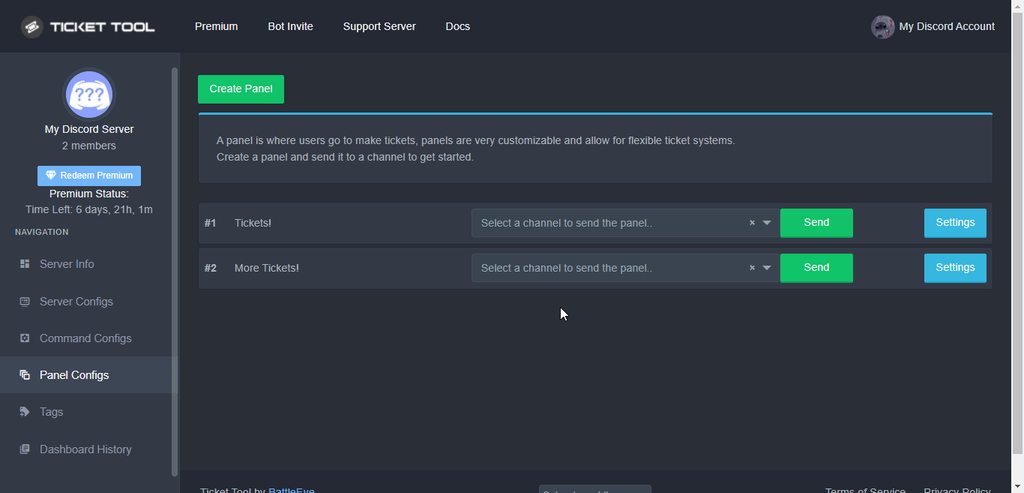
**See the picture below on how to relog:**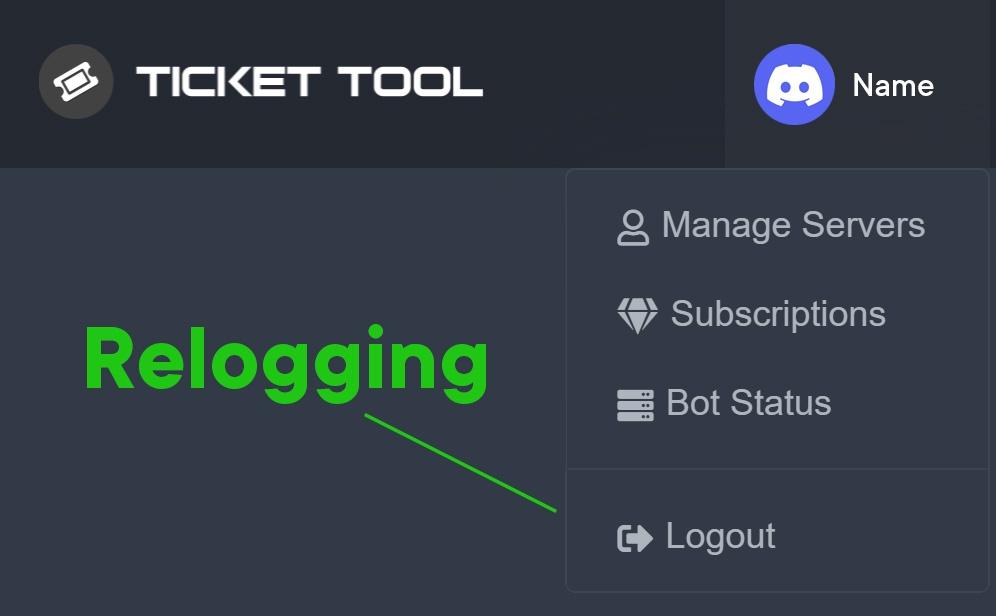 autumn yacht
humble sequoia
autumn yacht
humble sequoia
I’ve tried
shut bolt
Read the full embed
autumn yacht
Ok
shut bolt

 bronze quest

shut bolt

brazen pagoda
shut bolt
$help support
Ty
iron nightBOT
Gave +1 Rep to @shut bolt
shut bolt
Sure
 wise oar
who can i talk to that knows the most about this bot?
shut bolt
wise oar
who can i talk to that knows the most about this bot?
You can open a ticket, just as you did, but not closing it would make you can receive a response from the support team
wise oar
so make another ticket? like i just did (that was an accident)
wise oar
thank you
shut bolt


 toxic dust
When making a ticket is there a way to blacklist the admin role
shut bolt
toxic dust
When making a ticket is there a way to blacklist the admin role
What do you mean by blacklisting an admin?
toxic dust
So I’m having an occasion within server that person 1 has issue with and admin. Well they can’t make a ticket without said admin seeing directly what’s said.
I would like to be able to have the ticket open without said admins be able to view
shut bolt
Does that admin have the actual Administrator permission?
toxic dust
Correct
shut bolt
Then there isn't a way to restrict them access to the ticket, that permission grants access to all channels
shut bolt
Sure
 true flicker
$help support
humble sequoiaBOT
How to let support team see into a ticket
About support roles
A support role lets your support team see into tickets with out having to add them manually to each and every ticket.
You can add as many support roles as you like per panel.
NOTE that the way discord works all admins can see into tickets regardless of this.
How to set a support role
To set a Support role go to the Dashboard -> Panel Configs -> Settings -> General Options -> Support Team Roles.
NOTE that the support role will not be able to see into tickets that are already created..
Don't see your server in the dashboard?
You will possibly need to relog. Look below to see steps on how to relog.
How to relog in the Dashboard.
First, you will need to go to the dashboard. Once your there, click on your avatar on the top right. after you clicked it, you will see button that says Logout. You must click that. Once you have logged out, you can log back in.
Note:
You need one of these 3 things to access the dashboard.
1. Server Owner (Level: 6)
2. Server Administrator (Level: 4)
3. Dashboard Role (Level: 2)
:warning: You can check your level using $level on your Discord Server
User permission level with Ticket Tool
@User is permission level: 0 (User)
```» *If it shows that your permission is **0**, you don't have any of the above **3 things** to manage the dashboard.*


**See the picture below on how to relog:**I'm so noob just read
shut bolt
true flicker
I'm so noob just read
Did that solve it?
 quartz notch
How do I set up the bot
humble sequoiaBOT

You can check our documentation here.
You can also check #573205317870157855 for the basic setup.
Our documentation contains all the info you need about the bot to be able to setup and configure the bot however you like.
shut bolt
Check this guide
quartz notch
shut bolt
Check this guide
I don’t understand it
shut bolt
quartz notch
I don’t understand it
Which step
shut bolt
quartz notch
Creating the panel
$help panel
humble sequoiaBOT
Creating a panel
To create a panel we are going to need to head over to the panel configs on the dashboard
Once at the dashboard we will need to click Create Panel
Enter a panel name (Fill in any optional settings you want)
Click Create Panel and your ready to get started with configuring your panel
An example of a creating a panel is shown below.
 shut bolt
Click on create Panel
Then assign it a name
And support team roles if you want
If you want to send it right away pick also a channel
And click again on create
quartz notch
shut bolt
Click on create Panel
Where
shut bolt
quartz notch
Where
Panel Configs tab inside the dashboard
shut bolt
quartz notch
What’s the dashboard roles for
Roles which have full access to the dashboard
quartz notch
Ok
 quartz notch
Does it already create it
shut bolt
quartz notch
Does it already create it
You mean if it's created automatically?
quartz notch
shut bolt
You mean if it's created automatically?
Yeah
shut bolt
humble sequoia
You must create it and send it as shown before
quartz notch
shut bolt
You must create it and send it as shown before
How do I create it
shut bolt
humble sequoia
quartz notch
I’m sorry I’m new to setting up bots
shut bolt
No worries
quartz notch
Will it change my screen after I create it
shut bolt
quartz notch
Will it change my screen after I create it
It will show a message to redirect you to that ticket
quartz notch
How do I give home the permissions
shut bolt
quartz notch
How do I give home the permissions
Who?
quartz notch
Ticket bot
shut bolt
quartz notch
Ticket bot
$perms
humble sequoiaBOT
ᅠ
@pseudo glen requires the following permissions:
Add Reactions
Read Channels
Send Messages
Manage Messages
Embed Links
Attach Files
Read History
Manage Roles
To change the role permissions, you can go to your Discord Server ➞ Server Settings ➞ Roles ➞ @Ticket Tool
To change the channel permissions, you can go to your Channel Settings ➞ Permissions ➞ Ticket Tool
ᅠ
Note:
You can give Ticket Tool Administrative Permissions instead of all the permissions listed above, but it's entirely optional and NOT necessary.
 quartz notch
It won’t let me give home the administrator permissions like in the picture
shut bolt
quartz notch
It won’t let me give home the administrator permissions like in the picture
Read carefully the whole message
 shut bolt
quartz notch
Thank you very much
shut bolt
quartz notch
Thank you very much
Sure
quartz notch
But is there a way I can make it ping people
shut bolt
quartz notch
I’m very sorry if I got on your nerves
Oh no, no worries mate, sorry if that was the impression I gave 😅
shut bolt
quartz notch
But is there a way I can make it ping people
A role?
quartz notch
Yeah pretty much
 cinder flame
Was wondering if anyone can help me figure out how to customize the panel buttons in a private server like this


shut bolt
cinder flame
Was wondering if anyone can help me figure out how to customize the panel button...
Hi there!
 shut bolt
Have you already created the multipanel?
cinder flame
shut bolt
Have you already created the multipanel?
Yes
humble sequoiaBOT

The new Discord Buttons allow for a much smoother and convenient experience. They reduce lag and work much better than emojis. With ticket tool you can edit all the buttons however you like! Buttons can show emojis, text and can have 4 different colors.
Where can I edit them?
Dashboard ➞ Panel Configs ➞ Settings ➞ Button Options ➞ Setting

 shut bolt
humble sequoia
shut bolt
humble sequoia
Next step is to go inside the settings of the Create Ticket button of each panel
cinder flame
humble sequoia
Ahhhhhh gotcha
shut bolt
cinder flame
This is what I have so far lmao
It's a good start
shut bolt
shut bolt
Next step is to go inside the settings of the Create Ticket button of each panel
And there you'll be able to change the name, color emoji and even permissions for it
Once you have saved changes, resend the panel and should be good 
 shut bolt
No need to apologize! We are here to help
cinder flame
Thanks @shut bolt 
iron nightBOT
Gave +1 Rep to @shut bolt
shut bolt
Let me know how it goes
cinder flame
shut bolt
Let me know how it goes <:smil:936485535403356221>
I got it!!!!!!!!
Thank you, thank you! 😄
shut bolt
Sure!!
cinder flame
Thank you @shut bolt
iron nightBOT
Gave +1 Rep to @shut bolt
shut bolt
Thanks for supporting Ticket Tool
cinder flame

shut bolt
Thanks @cinder flame
iron nightBOT
Gave +1 Rep to @cinder flame
shut bolt

 lavish canopy
how do i make ticket pop up so ppl can use it and look at it?
 brisk flare
Can I use images Lol
 edgy dune
He isn’t joining. My server
 ivory nova
I need help this won’t go away
 humble sequoiaBOT
Don't see your server in the dashboard?
You will possibly need to relog. Look below to see steps on how to relog.
How to relog in the Dashboard.
First, you will need to go to the dashboard. Once your there, click on your avatar on the top right. after you clicked it, you will see button that says Logout. You must click that. Once you have logged out, you can log back in.
Note:
You need one of these 3 things to access the dashboard.
1. Server Owner (Level: 6)
2. Server Administrator (Level: 4)
3. Dashboard Role (Level: 2)
:warning: You can check your level using $level on your Discord Server
User permission level with Ticket Tool
@User is permission level: 0 (User)
```» *If it shows that your permission is **0**, you don't have any of the above **3 things** to manage the dashboard.*


**See the picture below on how to relog:**
Setting up Ticket Tool
Visit the docs for setup info
General Setup
 slender minnow
brisk flare
Can I use images Lol
slender minnow
brisk flare
Can I use images Lol
Yes you can
 tribal hawk
hi
How can i add room like this room #🎫│make-a-ticket in my server
I am not good in English
gilded verge
tribal hawk
I am not good in English
Hi, i think you mean Multipanels.
humble sequoiaBOT
For a more convenient use of multipanels, you can now combine panels on the dashboard. This will allow you to directly send the multipanel from the dashboard or via the $panel ID command.
Where can I find this?
You can find this setting on the Dashboard -> Panel Configs -> Settings -> General Options
Note: if you're attaching all the panels to a panel called English, don't include English in the attached panels box (If you do this, it will create duplicate)
This will put all buttons from all of your panels on one message. The message is the panel message from the panel you're combining these panels in.

 Note: This is a premium feature
 dull crest
gilded verge
dull crest
gilded verge
Unfortunately no, I am also waiting for this option 
gilded verge
I hope Pablo won't be mad at me if I answer 😳
Hi, please go to Dashboard->Panel Configs->Panel Settings->Expand Category Options and put your channel to Category Open ⬇️

 pulsar wyvern
hello! i dont know if this has been answered already, im having trouble with the "Close" category: we've had already around 50 successful tickets being closed and sent to their "Closed" category, but now they stay on the same category they were created. how can we fix this? thanks!
gilded verge
pulsar wyvern
hello! i dont know if this has been answered already, im having trouble with the...
Hi, Discord have a limit of 50 channels per category. To get around this, you can set a second category (or more) that will be used when the first is full 
pulsar wyvern
uh i didnt know this but i guessed it had to do with some limit about that
i've been cleaning closed tickets anyways just in case
can I add multiple categories to the "closed" tickets so they go to the next if the first is full?
gilded verge
I think in this case you will have to change the category of closed tickets in the panel configuration 
wait...
pulsar wyvern
👀
pulsar wyvern
if i have to manually change category every 50 closed tickets i can live with that, no worries
gilded verge
I just saw that you can add a few categories to closed tickets but if it works the way you would like, I don't know. I can try to check it
 rustic monolith
 humble sequoiaBOT
Update your discord App
Buttons are a relatively new addition to discord and don't work with some older versions of the app.
Please verify that you have the latest version of discord, by going to the app or play store.
Discord for the App Store
Discord for the Play Store
gilded verge
gilded verge
if i understand correctly you have purchased premium right?
(when it comes to tickets, I am already checking)
pulsar wyvern
yup, purchased on feb 10 i think
iron nightBOT
Gave +1 Rep to @gilded verge
gilded verge
once i'm done checking the previous case for you, i'll use ping, okay?
pulsar wyvern
ah yeah thank you
 barren stratus
I want to set up a bot but I get this error what to do?
 gilded verge
Hi again @pulsar wyvern, i have news for you
I don't know why but I only got 48 channels but okay. Anyway, it works as you need it, take a look.
gilded verge
barren stratus
I want to set up a bot but I get this error what to do?
In this case, you can also kick the bot and invite it back to the server. Usually, this also helps to fix this error.
barren stratus
gilded verge
In this case, you can also kick the bot and invite it back to the server. Usuall...
I tried but all without success
gilded verge
then please go to #799695838917820416 and read 1. Why can I not manage my server on the dashboard?
barren stratus
gilded verge
then please go to <#799695838917820416> and read `1. Why can I not manage my ser...
thank you for helping me
iron nightBOT
Gave +1 Rep to @gilded verge
lavish canopy
slender minnow
<@617533867351474194> refer below to set up the bot
Thanks
iron nightBOT
Gave +1 Rep to @slender minnow
 lavish patrol
humble sequoiaBOT
lavish patrol
humble sequoiaBOT
The Ticket Message is the first message sent by the bot in a new ticket. To customise it head over to your Dashboard ➞ Panel Configs ➞ Settings ➞ Ticket Options ➞ Edit Ticket Message
 gilded verge
Hi @lavish patrol, look
 fickle imp
I am currently trying to do exactly the bot does when somebody opens a ticket. Mentions the support team, however I am having an issue finding out how do I get the bot to mention a role? Thanks!
humble sequoiaBOT
Mentions
Within all the messages the bot's sends (both embeds and text) you can mention either channels, roles, or even users, these mentions will only send a notification to the user if they are used within a text field, e.g: a role mentioned in an embed won't ping at all the users who have that role.
For mentioning a role you can use one out of three options:
{@Role Name} ➞ Which is Case Sensitive.
{RoleID} ➞ Replace RoleId with the Id of the role you are trying to ping.
<@&RoleID> ➞ Discord's native syntax to ping roles.
<#ChannelID> ➞ Mention a channel by its ID.
<@UserID> ➞ Mention a user by its ID.
gilded verge
@fickle imp
fickle imp
Thank you a ton!
jade topaz
im trying to make the bot make a ticket in a Category but when i add the Text category i want it to be made it i dont even post it there but in top of everything else
gilded verge
I could have misunderstood but you want the: 1. bot to create tickets in the category you set in the panel settings or 2. do you want the bot to create tickets without categories?
jade topaz
1
but i added the "category" but it dont post the ticket in the category even i told it to
gilded verge
are you sure the bot has all permissions? ⬇️
humble sequoiaBOT
ᅠ
@pseudo glen requires the following permissions:
Add Reactions
Read Channels
Send Messages
Manage Messages
Embed Links
Attach Files
Read History
Manage Roles
To change the role permissions, you can go to your Discord Server ➞ Server Settings ➞ Roles ➞ @Ticket Tool
To change the channel permissions, you can go to your Channel Settings ➞ Permissions ➞ Ticket Tool
ᅠ
Note:
You can give Ticket Tool Administrative Permissions instead of all the permissions listed above, but it's entirely optional and NOT necessary.
gilded verge
have you tried to resend your panel to a given channel?
gilded verge
So you can send the panel, but when you click create channel, it does not appear in the category where you set it, right?
I think I just discovered your problem by checking something on the test server  please wait....
jade topaz
gilded verge
So you can send the panel, but when you click create channel, it does not appear...
correct
😄
gilded verge
jade topaz
correct
Please look at this 😳
Did this help to fix your problem?
gilded verge
hmmm
gilded verge
I'm starting to wonder whether to ask you for a link to the server and if you trust me and then give me a role with admin permission so that I can check your configuration ... I am constantly trying to think where the error might be, but I'm a visual learner and it's a bit hard for me to find out. If you try to trust me, I will try to help, but if not, I am sorry that I can do nothing more. In this case, let's wait and maybe someone else will know the answer. 😕
gilded verge
it's always worth a try
jade topaz
yeah
slender minnow
gilded verge
I'm starting to wonder whether to ask you for a link to the server and if you tr...
*would suggest checking the categories added in panel config *
pulsar wyvern
gilded verge
Hi again <@!212885171379109888>, i have news for you <a:peeposhy:881106659341135...
exactly as i predicted then 😎 tyvm for your explanation and taking the time to answer this!
thanks @gilded verge
iron nightBOT
Gave +1 Rep to @gilded verge
gilded verge
I know that I did not help as you wanted, but I tried as best I could
pulsar wyvern
you cannot make discord remove the 50 channel limit
jade topaz
pulsar wyvern
you cannot make discord remove the 50 channel limit
that was the issue
i had 50 tickets open xD
+1 @gilded verge ❤️
gilded verge
?
 whole sapphire
Hi
humble sequoiaBOT
We would love to help you, but if you don't tell us what you need help with we can't help you :(
whole sapphire
jsks
 frosty lotus
hello § do you know if its possible to put an hyperlink inside the ticket ?
slender minnow
frosty lotus
hello § do you know if its possible to put an hyperlink inside the ticket ?
yep
frosty lotus
thx
gilded verge
 sacred igloo
How creat work ticket
sacred igloo
How creat work ticket
Hi, please go to #573205317870157855 and read 2. Create the Panel
frosty lotus
slender minnow
yep
so i for example : hyeprelink ??
slender minnow
frosty lotus
so i for example : [hyeprelink](link) ??
yep just replace the link with the link you want to be redirected to
 pliant surge
Is it possible to lock new members out of a server endless they complete a ticket?
slender minnow
pliant surge
Is it possible to lock new members out of a server endless they complete a ticke...
Yep, you can just allow everyone role access to the channel where the panel is sent while denying access in the server channel.
Then, you manually hand out roles after they open a ticket.
 boreal geode
Hey so in my server I am trying to add the tickets and stuff but when I try to make a chat with the ticket in and you have to press the thing to make a ticket it wont show up for others only me
 waxen helm
mine says to run a debug?
 atomic solstice
$help category
humble sequoiaBOT
How to set the open category
To set a open category go to the Dashboard -> Panel Configs -> Settings -> Category Options -> Category Open
 atomic solstice
jade topaz
hey
atomic solstice
jade topaz
hey
here ^^
 brave stump
I renamed my panel in the web dash but in the server the button still shows the old name. Is there a way to get the new name to come through or do I just recreate the panel fresh?
 copper owl
resend the panel
brave stump
copper owl
resend the panel
Is that command based or in the dash config?
And thank you
copper owl
brave stump
Is that command based or in the dash config?
both
brave stump
copper owl
both
I'm an idiot, just did it. Was IN the settings and not just on the taskbar of the panel. Saw it clearly, appreciate it!
copper owl
anytime
 fleet hamlet
Hi
I have a question and I can’t seem to figure it out even tho it’s very basic
How do you set ticket tool to a channel in a server??
Like what command do I use to set it up
For example if it was like u say “.set up ticket tool #the channel you want”
 scenic plinth
You would have to configure the bot through the dashboard. Although you could send the panel through a command, you have to set the panel up through the dashboard.
You can see the dashboard with the link below. If you are unfamiliar with the setup, you can view the setup documentation I have also linked below for you.
Dashboard to help you with your setup: https://tickettool.xyz/manage-servers/
Documentation: https://docs.tickettool.xyz/general/setup
fleet hamlet
alr thanks!
 viscid jacinth
 shut bolt
gilded verge
*I hope Pablo won't be mad at me if I answer* 😳
Hi, please go to `Dashboard`->...
shut bolt
gilded verge
*I hope Pablo won't be mad at me if I answer* 😳
Hi, please go to `Dashboard`->...
I won't, I was at class so thanks for answering
iron nightBOT
Gave +1 Rep to @gilded verge
humble sequoiaBOT
We would love to help you, but if you don't tell us what you need help with we can't help you :(
 whole tusk
Now when I open ticket the bot type to me this ??

What is this ??
What should I do to make the bot open ticket
gilded verge
whole tusk
What should I do to make the bot open ticket
Hi, go to Dashboard->Panel Configs->Settings of your panel->Expand General Options and please change Ticket Limit to 1, as in the screen below:

*and Save settings 😅
 static garnet
السلام عليكم
gilded verge
static garnet
السلام عليكم
jade topaz
is there a way if u make a ticket, the ticket will automatically goes to a category?
shut bolt
jade topaz
is there a way if u make a ticket, the ticket will automatically goes to a categ...
$help category
humble sequoiaBOT
How to set the open category
To set a open category go to the Dashboard -> Panel Configs -> Settings -> Category Options -> Category Open
iron nightBOT
Gave +1 Rep to @shut bolt
shut bolt
jade topaz
thanks <@!518666147441278998>
Sure
jade topaz
what about if they closed or delete the ticket, a bot will send the ticket to them like a copy of the ticket
quartz notch
Thanks @shut bolt
iron nightBOT
Gave +1 Rep to @shut bolt
shut bolt
jade topaz
what about if they closed or delete the ticket, a bot will send the ticket to th...
Go into the Logging Options menu, you should see the DM Transcript feature and you can enable it while having a premium subscription :)
shut bolt
quartz notch
Thanks <@!518666147441278998>

jade topaz
shut bolt
Go into the Logging Options menu, you should see the DM Transcript feature and y...
so the both will dm who ever made the ticket or the owner?
shut bolt
jade topaz
so the both will dm who ever made the ticket or the owner?
Whoever made the ticket
jade topaz
hmmm, its somehow not working
shut bolt
Do you have premium?
iron nightBOT
Gave +1 Rep to @shut bolt
shut bolt
Sure
 native pier
Who all can work on the Ticket Tool dashboard? I'm an admin in a server and it's not letting me into the dashboard
Nevermind, apparently the owner didn't set up the admin role correctly, I figured it out
 rustic hornet
Hello, I added a bot to my discord, and the site doesn't see it at all, what should I do?
humble sequoiaBOT
Don't see your server in the dashboard?
You will possibly need to relog. Look below to see steps on how to relog.
How to relog in the Dashboard.
First, you will need to go to the dashboard. Once your there, click on your avatar on the top right. after you clicked it, you will see button that says Logout. You must click that. Once you have logged out, you can log back in.
Note:
You need one of these 3 things to access the dashboard.
1. Server Owner (Level: 6)
2. Server Administrator (Level: 4)
3. Dashboard Role (Level: 2)
:warning: You can check your level using $level on your Discord Server
User permission level with Ticket Tool
@User is permission level: 0 (User)
```» *If it shows that your permission is **0**, you don't have any of the above **3 things** to manage the dashboard.*


**See the picture below on how to relog:**thank you
jade topaz
i guys i am having a issue were i can not see the server that i want to set the bot up for
i have re invted the bot and i ahve all perms
and it still does not show up
humble sequoiaBOT
Don't see your server in the dashboard?
You will possibly need to relog. Look below to see steps on how to relog.
How to relog in the Dashboard.
First, you will need to go to the dashboard. Once your there, click on your avatar on the top right. after you clicked it, you will see button that says Logout. You must click that. Once you have logged out, you can log back in.
Note:
You need one of these 3 things to access the dashboard.
1. Server Owner (Level: 6)
2. Server Administrator (Level: 4)
3. Dashboard Role (Level: 2)
:warning: You can check your level using $level on your Discord Server
User permission level with Ticket Tool
@User is permission level: 0 (User)
```» *If it shows that your permission is **0**, you don't have any of the above **3 things** to manage the dashboard.*


**See the picture below on how to relog:**@jade topaz refer above ^
jade topaz
slender minnow
<@456226577798135808> refer above ^
yea i just saw that thank you
iron nightBOT
Gave +1 Rep to @slender minnow
jade topaz
how do u add emojis to the panel like

like that in the panel
when i press save for the create ticket button option it doesn’t save
 wide marsh
https://twitter.com/SerpentAU/status/1509784187154628614?s=20&t=Bbi4oT0iGSZfpRvMB7r50A
IS THIS REAL?

THIS IS 100% CONFIRMED. AUDIT LOG FROM DOODLES & SHAMANZS
🚨 TICKET TOOL IS HACKED 🚨
REMOVE IT FROM YOUR SERVER.
Likes
401
Retweets
228

 Twitter
·
Twitter
·


cause it's giving me chills
copper owl
Yeah ticket tool isn't hacked.
wide marsh
copper owl
Yeah ticket tool isn't hacked.
was it hacked before? is the question
copper owl
that's also a no
wide marsh
oh
copper owl
It was a bug in an update
copper owl
The update was reverted and it should be fine now
wide marsh
mhmm ok, cause due to this bug... so many servers are kicking out ticket tool and my friends said me to kick too
anyways thanks for replying!!
 woeful flax
copper owl
Yeah ticket tool isn't hacked.
woeful flax
copper owl
Yeah ticket tool isn't hacked.
...if a bug resulted in a security vulnerability that hackers took advantage of to commit theft, you wouldn't consider that 'being hacked'?
copper owl
woeful flax
...if a bug resulted in a security vulnerability that hackers took advantage of ...
No because being hacked would insinuate someone took control over the entire bot. The entire code and the entire functionality of it.
Exploiting a bug is simply exploiting a bug in a bot. It isn't being hacked.
it's Still bad nonetheless.
jade topaz
How do u add emojis to the panel like 
woeful flax
copper owl
No because being hacked would insinuate someone took control over the entire bot...
I get ya'll are trying to do damage control, but yeah I don't think it's the time to be splitting hairs on semantics especially if it's already been confirmed that the exploit did occur.
There's a lot of confusion right now about exactly what happened in a lot of servers so if the extent of the information being volunteered on ya'lls part is "we weren't hacked" I think that's not very helpful.
Anyways, good luck with handling everything - this has gotta suck so I feel for ya'll.
 rocky anchor
do we need to do anything to update the bot/code?
copper owl
woeful flax
There's a lot of confusion right now about exactly what happened in a lot of ser...
We weren't hacked
There was an update to the add commands recently.
It had a bug which caused this issue and it was reverted back to the old code due to the bug.
That should be the full extent of info we can provide currently while our Dev looks into everything from his end
copper owl
rocky anchor
do we need to do anything to update the bot/code?
No, it does it all by itself once the Dev pushes an update. It's reverted by now so you don't have to worry about anything
 shell forum
Anyone elses @pseudo glen not letting them $add
 solid stream
$add test
$add
Yeah.. I quickly removed the broken one and it seems the old one wasn't put back.
 elder ocean
 scenic plinth
⚠️ $add and $remove commands not working?
Yeah... the internet is a weird place.
These commands will not work as per a intended halt for the command due to an issue with the bot. I recommend adding the permissions manually through the channel.
 feral drift
This is 100% confirmed or what??

 marsh schooner
feral drift
This is 100% confirmed or what??
marsh schooner
feral drift
This is 100% confirmed or what??
its not hacked, just command bug they say
 odd zealot
Hey so just want to clarify, this was an exploit that allowed someone to abuse the $add and $remove commands correct?
The exploit did not allow anyone to potentially see what information was inside the tickets, just add and remove perms?
solid stream
odd zealot
Hey so just want to clarify, this was an exploit that allowed someone to abuse t...
correct
feral drift
marsh schooner
its not hacked, just command bug they say
this does not have to do with the bug, from the pics the Ticket tool was used to created channel overrides
marsh schooner
@solid stream wait its true
scenic plinth
⚠️ Exploited bug and social media (Twitter) posts
A command that had a unknown bug was exploited in mostly NFT Marketed Servers, atleast as been reported.
As stated in my reply message, due to this the commands in the reply will not work, these commands not working is intended.
The allowed permission the bot gave does not affect data or security of your information in your servers.
We haven't had further reported incidents.
and to answer your question, no ticket tool was not hacked
solid stream
odd zealot
Hey so just want to clarify, this was an exploit that allowed someone to abuse t...
as far as we can tell, I'm still digging around the source, but according to the audit log reports they only had webhook and that's send only
marsh schooner
solid stream
as far as we can tell, I'm still digging around the source, but according to the...
is it too much to regenerate the token?
 visual ingot
scenic plinth
⚠️ __**Exploited bug and social media (Twitter) posts**__
A command that had a ...
visual ingot
scenic plinth
⚠️ __**Exploited bug and social media (Twitter) posts**__
A command that had a ...
hi Kenzy, so no need to disable Ticket Tool on our servers yeah?
solid stream
marsh schooner
is it too much to regenerate the token?
I'm working on that now, even though I don't think it needs it.
marsh schooner
solid stream
I'm working on that now, even though I don't think it needs it.
just to be safe
odd zealot
solid stream
as far as we can tell, I'm still digging around the source, but according to the...
Gotcha. Thanks for the response and sorry you have to deal with the some of these other folks. I know its probably stressful. Ive used ticket tool for all of my discord servers and would hate to have to find another one so this gives me some comfort.
Appreciate the due diligence from you this late at night 
iron nightBOT
Gave +1 Rep to @solid stream
visual ingot
Hi Ticket Tool
so what is the official statement
do we need to kick the ticket tool bot from our servers or not?
or if we are to remove ticket tool bot, then how to go about it?
jade topaz
No
 near iris
You guys, what's going on
solid stream
The bugged code has been removed and we have no reason to believe there's any other exploits like this.
 devout island
hi is this true?

 scarlet plinth
I'm being urged to remove ticket tool by my mods, Popping in here to see whats going on
devout island
I didn't click the link since it might be some sort of hack
near iris
solid stream
The bugged code has been removed and we have no reason to believe there's any ot...
Rumours sucks
marsh schooner
solid stream
The bugged code has been removed and we have no reason to believe there's any ot...
can you make official statements so people doesnt get lost
oh it already there
wide marsh
solid stream
I'm working on that now, even though I don't think it needs it.
Just do a quick restart, will not take hardly more than 10min to come back completely online
visual ingot
marsh schooner
oh it already there
where did u see it
devout island
solid stream
The bugged code has been removed and we have no reason to believe there's any ot...
Okay, thanks
iron nightBOT
Gave +1 Rep to @solid stream
marsh schooner
visual ingot
where did u see it
 runic creek
does Ticket Tool bot needs a Manage Webhook Permissions?
wide marsh
runic creek
does Ticket Tool bot needs a Manage Webhook Permissions?
no ig
solid stream
runic creek
does Ticket Tool bot needs a Manage Webhook Permissions?
it does not... that was left as I had planned to make use of it in the future, allowing people to send messages from the dashboard..
I didn't see a reason to remove it until now.
marsh schooner
solid stream
it does not... that was left as I had planned to make use of it in the future, a...
thanks for all the support. have a good sleep man, many people depend on your bot. i have some suggestion maybe add log drain to your internal app metrics.
iron nightBOT
Gave +1 Rep to @solid stream
runic creek
So technically, those Discord Servers who claims that they were hacked by the bot lacks on securities in terms of discord permissions. If there was a bug that Ticket Tool grants webhook permissions, if it wasn't turned on for Ticket Tool in there server bug won't occur. It's the server owner's/server manager's fault.
Ticket Tool has nothing to do with the hacked occur on those servers
 old basin
hey anyone know why the bot is offline in my server?
 copper cosmos
same
old basin
and anyone know how to fix it
 carmine grove
same here with @old basin
 zinc fable
the bot just went down in my server too
carmine grove
my bot dead
 shadow axle
carmine grove
shadow axle
<#571104498483986466>
shadow axle
carmine grove
shadow axle
<#571104498483986466>
thank you! 🙂
iron nightBOT
Gave +1 Rep to @shadow axle
 umbral sky
I'm guessing they are restarting part of the platform... there's a mention of that above.
marsh schooner
runic creek
So technically, those Discord Servers who claims that they were hacked by the bo...
it had manage webhook but for this accident to happen it needs manage server which doesnt require. it's happen because many server had bots role with administrators permission
shadow axle
The bot's token was regenerated as an added safety measure, it'll take a while for the bot to come online everywhere
jade topaz
shadow axle
The bot's token was regenerated as an added safety measure, it'll take a while f...
Ok,Thanks
 glass otter
yo guys is any1 experiencing issues with the dashboard? its not showing me my servers.
glass otter
shadow axle
The bot's token was regenerated as an added safety measure, it'll take a while f...
oh
nvm that answers that then 😅
jade topaz
Why bot ticket offline
shadow axle
 glass otter
shadow axle
<#571104498483986466>
glass otter
shadow axle
<#571104498483986466>
thanks
iron nightBOT
Gave +1 Rep to @shadow axle
marsh schooner
 unreal tinsel
Hi quick question, when a ticket it created, is it possible to make the bot (when it creates the channel) to mark the channel as a Age Restricted channel?
feel free to ping me btw :)
solid stream
unreal tinsel
Hi quick question, when a ticket it created, is it possible to make the bot (whe...
not curranty..
 dire matrix
Hi, I receive this image in one of my servers and wanted to ask if this is possible
 solid stream
Damn though.. the amount of money they could have made if they did hack it..
I need to spend a few weeks looking very close at every aspect of my security..
I keep things secure.. but I didn't realize more than just trolls wanted to attack.. or had a reason..
dire matrix
copper owl
<#571104498483986466> for the full context
Thanks sir
iron nightBOT
Gave +1 Rep to @copper owl
solid stream
solid stream
Damn though.. the amount of money they could have made if they did hack it..
I wonder if discord would transfer my bot to a another discord account for added security? one that isn't used for anything but holding the bot ownership
copper owl
solid stream
I wonder if discord would transfer my bot to a another discord account for added...
Last time i checked, for very very Valid reasons they would. Doesn't hurt to try though
 craggy geyser
Would that be beneficial? You said they would need 2FA to access the token
solid stream
Also would be cool if they added an IP whitelist to the token itself...
solid stream
craggy geyser
Would that be beneficial? You said they would need 2FA to access the token
If my phone was ever stolen
idk.,.
 gaunt turtle
hey are rumors regarding the ticket tool being hacked real?
craggy geyser
If the phone was stolen, surely the other account is compromised too
craggy geyser
gaunt turtle
hey are rumors regarding the ticket tool being hacked real?
No. #📣│bot-news
solid stream
craggy geyser
If the phone was stolen, surely the other account is compromised too
nah, wouldn't be logged in anyplace ever..
and the 2fa would be an authy or something like it.
feral drift
solid stream
I wonder if discord would transfer my bot to a another discord account for added...
this would be smart to do, in a cold account thats untouched and not connected to the internet! i would ask and find out!
craggy geyser
Knowing nothing about coding discord bots, would it inconvenience you to have it separate?
solid stream
craggy geyser
Knowing nothing about coding discord bots, would it inconvenience you to have it...
Get the token and never look at it again
feral drift
craggy geyser
Would that be beneficial? You said they would need 2FA to access the token
yes it would be super beneficial and added security
solid stream
Name, icon etc can be changed using the token I thnk
craggy geyser
So you don't need to access the account for updates or anything?
feral drift
solid stream
Get the token and never look at it again
yes , have the account offline, and untouched , not connected to anything
solid stream
craggy geyser
So you don't need to access the account for updates or anything?
Only if I need to regenerate the token
zinc fable
@solid stream is the G.O.A.T, this bot has always been A1 and serves as a multipurpose tool.
feral drift
so then if it gets hacked then you know its owner went rouge!
 craggy geyser
What about whitelable versions? Assuming this is a separate thing totally
solid stream
craggy geyser
What about whitelable versions? Assuming this is a separate thing totally
whitelable is upto the token holder.. not my fault or issue to keep it safe on their end.
 craggy geyser
But nothing done to the token holder can be passed back to the main bot I assume?
solid stream
Whitelabel bots would have no effect on the main bot.


 craggy geyser
As one dad to another. Sleep. You need it


 void swan
i have a ticket that shows this message every time i try to close it from my account or my 2nd account (that made the ticket). i removed and re-invited the bot, and that didn't work. i just created a ticket with my main account and everything worked fine. this one is just stuck with this error message...
 craggy geyser
Does the bot still see the channel?
 merry basalt
🚨 ANTI-WEBHOOK CODE TO PROTECT YOUR DISCORD SERVER 🚨
- It deletes the webhook message
- It deletes every webhook in the server
- It finds the webhook creator and removes their privileges
- It logs it all in a channel
Send this to your developers.
Likes
252
Retweets
105
 Twitter
·
Twitter
·
Maybe this helps
Should we disable for the first the ticket tool ?
shadow axle
merry basalt
https://twitter.com/serpentau/status/1509802990177484801?s=21&t=Nbjouby-4VXYykPY...
No it doesn't, coding a bot to delete all webhooks that get created is super dumb, there are plenty of bots that rely on webhooks to function
humble sequoiaBOT
━━ moved to ticket ━━
 hidden lake
solid stream
I keep things secure.. but I didn't realize more than just trolls wanted to atta...
hidden lake
solid stream
I keep things secure.. but I didn't realize more than just trolls wanted to atta...
Some of the largest crypto currency communities are using this bot. Obviously they are under constant attack, and the ticket bot is an attack vector. That it is assumed only trolls would want to try to find exploits is concerning
 granite crane
j
 umbral lark
Hey do you know where I can remove this message ?
 hidden lake
umbral lark
Hey do you know where I can remove this message ?
hidden lake
umbral lark
Hey do you know where I can remove this message ?
''rejeter le message'' - click on it. It should delete
granite crane
VIVE LA FRANCE
umbral lark
Yes I know but where I can disable it
craggy geyser
You can't at the moment
iron nightBOT
Gave +1 Rep to @craggy geyser
 pearl ledge

Prob just a dumb April fools joke, just wanna check in here
Captcha bot got "hacked" I'm not using it so I don't really care, just want to check with the ticket tool
pearl ledge
Alright, I did see it before they started saying this, but it's prob just some misinformation spreading 
Thanks 
Thanks @copper owl 
iron nightBOT
Gave +1 Rep to @copper owl
copper owl
anytime
 echo blaze
How do I get all the closed tickets into 1 category and the opened ones into another?
And also, I have Ticket Tool for 2 reasons. How do I make the bot state the reason of opening ticket in the embed?
 terse kiln
thank you for the update staff
 plain surge
echo blaze
How do I get all the closed tickets into 1 category and the opened ones into ano...
plain surge
echo blaze
How do I get all the closed tickets into 1 category and the opened ones into ano...
You can choose an open and closed category from here
$help category
humble sequoiaBOT
How to set the open category
To set a open category go to the Dashboard -> Panel Configs -> Settings -> Category Options -> Category Open
zinc fable
@plain surge thanks for everything you do
iron nightBOT
Gave +1 Rep to @plain surge
echo blaze
plain surge
You can choose an open and closed category from here
Thank You 🙂
iron nightBOT
Gave +1 Rep to @plain surge
plain surge
echo blaze
And also, I have Ticket Tool for 2 reasons. How do I make the bot state the reas...
To achieve this, you would need to create the ticket using commands. Would you like me to explain how?
humble sequoiaBOT
Votes
Current Votes: 0
Lifetime Votes: 0
Linked Votes: 0
Vote Links
Linking Info
Linked User: Not Linked
You can give your future votes to another user by linking with that user.
To link use $vote link (@user or userId)
To unlink use $vote unlink
Redeeming
Each vote is worth 12 hours of premium and can be redeemed once you have atleast 6 votes.
Your current votes are worth 0m
To redeem your current votes use $vote redeem
 nova coral
Hello @plain surge could you help me a bit? What does the announcement that was made meant?
 wheat torrent
Ok how many votes does I need ?
echo blaze
plain surge
To achieve this, you would need to create the ticket using commands. Would you l...
I have a panels in 2 channels (let them be xyz and abc). If a person opens a ticket from the xyz channel, the bot hsould state that the person opened a ticket from the xyz channel.
plain surge
nova coral
Hello <@!278649994477830145> could you help me a bit? What does the announcement...
There's no need to ping 😊
The announcement made was to explain a bug that occured after rolling out an update the add command.
The update has be reverted now and everything is working fine again
echo blaze
$vote link @echo blaze
humble sequoiaBOT
You can't link to yourself.. sillypants. =)
humble sequoiaBOT
Votes
Current Votes: 0
Lifetime Votes: 0
Linked Votes: 0
Vote Links
Linking Info
Linked User: Not Linked
You can give your future votes to another user by linking with that user.
To link use $vote link (@user or userId)
To unlink use $vote unlink
Redeeming
Each vote is worth 12 hours of premium and can be redeemed once you have atleast 6 votes.
Your current votes are worth 0m
To redeem your current votes use $vote redeem
plain surge
echo blaze
I have a panels in 2 channels (let them be `xyz` and `abc`). If a person opens a...
The user opens a ticket using the panel message like the one in #🎫│make-a-ticket. This can't provide a reason when the ticket is opened.
If you want to be able to show the reason the ticket was opened, you will have to use the $new command. This isn't efficient for members to use everytime they want to open a ticket though and more of a command that should be left to your staff to use
As a member can use the command to open a ticket for anyone using the other user ID
echo blaze
plain surge
The user opens a ticket using the panel message like the one in <#57170643544925...
What does the $new command do?
$new
plain surge
When you enable the $new command for a panel. You also need to choose a channel for the bot to monitor (look for the command in). Anyone with access to that channel can use the command. It is used like this: $new [userID]
This then opens a ticket for the user whose ID was used
@echo blaze
plain surge
Yh, that's why we recommend users to have the bot monitor a private channel and preferably staff are the ones who have access to it
 rare river
yo, if we kicked the ticketool this am from our server but didnt delete any panels etc, if I invite it back will it work as normal? or do I need to do anything
copper owl
Will be normal
 rugged perch
How do i fix the ticket?
I add ticket in my sevrer
server
but its not showing Up.
copper owl
for reference, asking in multiple places isn't necessary
wheat torrent
Id I get premium bot by voting how many days it will stay with me.?
copper owl
you have a ticket opened
copper owl
wheat torrent
Id I get premium bot by voting how many days it will stay with me.?
depends on how much your votes equate to
copper owl
rugged perch
wdym?
you opened a ticket.
rugged perch
copper owl
you opened a ticket.
ye
wheat torrent
Ok how many votes Does I need for 1 month ?
copper owl
what is your question exactly
copper owl
minimum
wheat torrent
If I vote and 5 of my friend vote with me
copper owl
yes
wheat torrent
I will get premium for one day ?
copper owl
copper owl
Calculate it. 12 hours for one vote
^
wheat torrent
Ok good for now
copper owl
Every vote is 12 hours
wheat torrent
copper owl
Every vote is 12 hours
For one account ?
rare river
rare river
yo, if we kicked the ticketool this am from our server but didnt delete any pane...
any idea?
wheat torrent
I mean for me I need to wait 12 hour but my friend he should wait if he didn’t vote yet ?
copper owl
rare river
any idea?
i already answered you
copper owl
copper owl
Will be normal
^
copper owl
wheat torrent
I mean for me I need to wait 12 hour but my friend he should wait if he didn’t v...
No. they're separate accounts
rare river
sorry wasnt a direct reply so didnt know if it was to me as it was mid convo
wheat torrent
So if I vote and my friend want to vote he don’t need to wait 12 hour right ?
If he didn’t vote yet
copper owl
copper owl
No. they're separate accounts
^
rare river
what is the neccessity to manage webhooks permission?
if we have already setup all our panels can we remove that perm?
copper owl
rare river
what is the neccessity to manage webhooks permission?
What?
Webhooks isn't needed by ticket tool
rare river
just tryna minimise stuff like this mornign

it asks for it
I assume to send the panels in the beginning
copper owl
Hm, wait let me check something
rare river
but if I send all my panels I could turn it off afterwards, to minimise risk
please @ when you reply or have heard from devs xx
rare river
okay thanks
rare river
does global ticket limit overide panel ticket limits or the other way around? please @ me
craggy geyser
rare river
if we have already setup all our panels can we remove that perm?
Just to clarify, that permission is never needed. Panels aren't webhooks. It was a permission that used to be needed when Josiah was trying to work with webhooks, but that was removed and he hasn't updated that yet. He posted something earlier in general I think saying how webhook and reactions perms aren't needed any more at all
rare river
craggy geyser
Just to clarify, that permission is never needed. Panels aren't webhooks. It was...
okay perhaps should change it so it doesnt request it when adding to the server as then it cant manage webhooks and no such thing as this morning would've happened
https://cdn.discordapp.com/attachments/776680605517742090/959434415107358750/unknown.png

also why does it need manage roles??
appreciate the reply and information swift
craggy geyser

And this mornings thing would have happened as lots of servers give it admin. Manage roles is for assigning perms in tickets
rare river
MARVELOUS thank you for the feedback, perhaps make an advice to peple of that so people know exactly what it needs
craggy geyser
I think updating what it asks for is high on the to do list now. But a large update has been being worked on for both the dashboard and bot, with most of the code being rewritten so originally updating that was left for that update
rare river
solid
copper owl
that's actually why this all happened, battle was updating and redoing the commands for adding and removing
by this, i mean #📣│bot-news
devout island
Hi, I just want to ask is there a new link to add ticket tool?
craggy geyser
No. Nothing has changed other than the update being reverted
 little pine
why am i (owner) the only one who can see the ticket embed inside a ticket, others cant see the ticket embed so they cant close/delete the ticket
heres others pov:
 devout island
okay, thank you 🙂
little pine
 glossy fable
and perms
glossy fable
and perms
not in tickettool settings?
glossy fable
little pine
not in tickettool settings?
there too
craggy geyser
$help perms
humble sequoiaBOT
How to set the permissions for tickets
To set a change permissions go to the Dashboard -> Panel Configs -> Settings -> Permission Options

 digital lake
Hey, I've setup the open and closed category for the tickets, but it isn't working as intended
The bot doesn't put the tickets in the categories I've set it to
 queen pagoda
digital lake
Hey, I've setup the open and closed category for the tickets, but it isn't worki...
queen pagoda
digital lake
Hey, I've setup the open and closed category for the tickets, but it isn't worki...
I had to manually add permissions to my categories to get the tickets to go where I wanted after changing the setting in the dashboard.
slender minnow
digital lake
The bot doesn't put the tickets in the categories I've set it to
heya, can i see how you set it up from the dashboard?
slender minnow
 spark wave
can I put a ticket on a server that is not mine but I am one of the admins
spark wave
can I put a ticket on a server that is not mine but I am one of the admins
if you have the admin perm? sure you can
spark wave
ok]
 stray iris
OMG why I can't open ticket :(((
jade topaz
what does this mean? You changed it? I had it way different

Do I reinvite the bot after what happened? Seems like you took actions for me...
maybe to secure servers
 restive summit
Is the ticket tool functional? Heard about the issues earlier this morning, but I never allowed webhooks on my discord so am I safe to continue as normal or have to do anything atm?
Someone just made a ticket and it seems normal to me so far, is there anything discord owners have to do atm?
jade topaz
jade topaz
what does this mean? You changed it? I had it way different
yeah just checked, you changed what permissions bot has on my server now... XD I assume it was to secure servers.
solid stream
restive summit
Someone just made a ticket and it seems normal to me so far, is there anything d...
The issue has been fixed, you don't need to make any changes, but removing webhook perms is fine as added security
restive summit
solid stream
The issue has been fixed, you don't need to make any changes, but removing webho...
Ok thanks, thanks, if I had webhooks disabled for everyone on the discord since it's foundation, are you saying to reinvite the bot and then disable webhooks on permissions on that bot? Or am I fine with my pre-existing permissions since no one can create webhooks/manage them anyway?
iron nightBOT
Gave +1 Rep to @solid stream
slender minnow
i dont have the perms to change that on my server anymore  but did the fix really fixed the issue?
solid stream
restive summit
Ok thanks, thanks, if I had webhooks disabled for everyone on the discord since ...
You can modify the bots and perms without reinviting it, the same way you modify any role.
But you're also fine the way it is.
restive summit
Ok , your tool is great, thanks man
jade topaz
I reinvited. But on dashboard bot permissions info cant be changed, it just shows as you set it up
 pale pilot
jade topaz
yeah just checked, you changed what permissions bot has on my server now... XD I...
pale pilot
jade topaz
yeah just checked, you changed what permissions bot has on my server now... XD I...
as far as I'm aware the bot didn't remove its own permissions, I don't even think that's possible
pale pilot
jade topaz
I reinvited. But on dashboard bot permissions info cant be changed, it just show...
it's just info, not something to change on the dash
jade topaz
pale pilot
as far as I'm aware the bot didn't remove its own permissions, I don't even thin...
I never changed it, bot was not quarantined or anything
solid stream
jade topaz
I reinvited. But on dashboard bot permissions info cant be changed, it just show...
The bot perms on the dashboard is visual only to confirm they're correct.
pale pilot
jade topaz
I never changed it, bot was not quarantined or anything
someone else might have
but there's no way for the bot to remove it's own perms
jade topaz
pale pilot
someone else might have
I have perms only
clearly it was not my side, I am not a hater lol, just saying what problem was there, and had m concerned
I had only administrator disabled on dashboard
pale pilot
Then check your audit logs
jade topaz
Hey, I do apologize, I had ticket tool whitelisted but idk why wick removed it. It was from wick side, not ticket tool 
will fix on my side
pale pilot
sure thing
Wick allows you to set whitelisted categories, I would do that for your ticket category
jade topaz
pale pilot
Wick allows you to set whitelisted categories, I would do that for your ticket c...
Thank you
iron nightBOT
Gave +1 Rep to @pale pilot
solid stream
jade topaz
what does this mean? You changed it? I had it way different
We didn't make any changes to bot perms, the bot can't, check your action logs.. Someone else did this, it's likely your bot role is low on the list and anyone above it with manage roles can make these changes.
jade topaz
solid stream
We didn't make any changes to bot perms, the bot can't, check your action logs.....
wick revokes when I add bot to whitelisst, asking in their support now. Thank you again,
 digital lake
queen pagoda
I had to manually add permissions to my categories to get the tickets to go wher...
digital lake
queen pagoda
I had to manually add permissions to my categories to get the tickets to go wher...
Oh, it must be the permission issue then
digital lake
slender minnow
heya, can i see how you set it up from the dashboard?
Let me, try David's suggestion first.. If it doesn't work I'll ask you, thanks!
 fallow lagoon
i want make same it i have tic<@!722196398635745312>
fallow lagoon
fallow lagoon
i want make same it i have tic<@!722196398635745312>
@Lukas
queen pagoda
I saw this suggestion but had a different use-case in mind than what the submitter/commenter is looking at: #💡│suggestions message
Our use-case is that we use tickets to onboard people to our server. We wanted to expose some channels: Rules, example things, and an area for these pre-accepted folks to chat with the larger user-base in a DMZ sort of visitor chat until they are admitted.
We didn't want to grant access to those chats until they are in the ticket process since we thought it might result in them circumventing submitting a ticket altogether.
Should I submit a separate suggestion or is there a good way to comment on that one?
 mystic pivot
Who knows how to set more than one tick in one message like this?
 queen pagoda
mystic pivot
Who knows how to set more than one tick in one message like this?
queen pagoda
mystic pivot
Who knows how to set more than one tick in one message like this?
Attached panels in general options perhaps?
mystic pivot
queen pagoda
Attached panels in general options perhaps?
are you sure ?
queen pagoda
mystic pivot
are you sure ?
I just tested it on my server so I am now.
copper owl
they're correct
 zinc sedge
Hey i have question. I keep getting an error, Failed to send to panel $debug
 obsidian jasper
do you mean ticket tool couldn't send the panel?
zinc sedge
yeah
obsidian jasper
it might be from your footer, image, etc
zinc sedge
im on panel config > and click on search a channel to send panel
obsidian jasper
hm
do you have any images
or footers
for the ticket panel
they might be the problem
hello??
zinc sedge
yea just checked it and its still not working
very strange
allowed the channel and category literally all the permissions
obsidian jasper
hm
uh
do you have an image or footer
the links possibly are the prolem
problem*
you can either remove them or get a new image link
 dark cloak
Hello everyone
I am trying to use Ticket Tool to implement a betting system in my server. Does anyone know how to streamline that process?
slender minnow
dark cloak
I am trying to use Ticket Tool to implement a betting system in my server. Does ...
TicketTool is a ticketing bot, it makes ticket for users to express their issues. You can use it as a betting system, by just making a simple panel, users open tickets through this panel and send the amount they wanna bet.
Other then that, there is no alternate way.
fallow lagoon
mystic pivot
Who knows how to set more than one tick in one message like this?
how i can do it
i have
ticket tool
.
premum
humble sequoiaBOT
For a more convenient use of multipanels, you can now combine panels on the dashboard. This will allow you to directly send the multipanel from the dashboard or via the $panel ID command.
Where can I find this?
You can find this setting on the Dashboard -> Panel Configs -> Settings -> General Options
Note: if you're attaching all the panels to a panel called English, don't include English in the attached panels box (If you do this, it will create duplicate)
This will put all buttons from all of your panels on one message. The message is the panel message from the panel you're combining these panels in.
Note: This is a premium feature
 verbal stirrup
Hello i invite ticket tool bot to my discord but the serveur are not in the manage server
 sour quiver
Hi, I would like to know what is the minimum permission required to touch the panel?
verbal stirrup
sour quiver
Hi, I would like to know what is the minimum permission required to touch the pa...
Touch the panel ?
sour quiver
ye
verbal stirrup
sour quiver
ye
Are you french ?
sour quiver
ye
verbal stirrup
sour quiver
ye
C'est quoi toucher le panel pour toi ?
sour quiver
En gros avoir accès a la création de ticket etc
Genre faut avoir comme permission sur le serveur en question si ont veux avoir accès a sa
verbal stirrup
sour quiver
En gros avoir accès a la création de ticket etc
Ah c'est dans panel config pour creer les tickets
verbal stirrup
sour quiver
Genre faut avoir comme permission sur le serveur en question si ont veux avoir a...
Bah admin je pense
sour quiver
Justement je veux pas un "je pense" je veux être sur x)
fallow lagoon
humble sequoia
i dont understand
verbal stirrup
sour quiver
Justement je veux pas un "je pense" je veux être sur x)
Enfin pour en ouvrir un genre sur le discord sa se configure dans la configuration du ticket
mystic pivot
How can I take premium ?
zinc sedge
Question
Some people cant send screenshots
in tickets
i have added attach files
but not working still?
 kindred arch
cant see my server in the manage server page
 crude scarab
Anyone know how to get it to auto save transcript when the ticket is deleted or you cant do that anymore?/
 fair hare
hello
copper owl
crude scarab
Anyone know how to get it to auto save transcript when the ticket is deleted or ...
you can, logging options, the option to do that is there
fair hare
is bot safe
copper owl
kindred arch
cant see my server in the manage server page
log out and back into the website
crude scarab
jade topaz
Because its a premium option and you dont have premium
copper owl
fair hare
is bot safe
yes it is safe now, the exploit doesnt exist because the update causing it has been reverted. #📣│bot-news explains more
crude scarab
copper owl
you can, logging options, the option to do that is there
Thanks
iron nightBOT
Gave +1 Rep to @copper owl
dark cloak
slender minnow
TicketTool is a ticketing bot, it makes ticket for users to express their issues...
Thanks!
iron nightBOT
Gave +1 Rep to @slender minnow
fair hare
copper owl
yes it is safe now, the exploit doesnt exist because the update causing it has b...
thanks for the quick response!
iron nightBOT
Gave +1 Rep to @copper owl
copper owl
No problem
crude scarab
How does one get rid of this message I feel very stupid
 copper owl
$epmessage
humble sequoiaBOT
How can I edit/disable the ephemeral message?
These pop ups can only be seen by the user who triggered a certain action, like creating a ticket. They cannot be edited or disabled, as they are a discord requirement that is set by the developer of any bot. The ephemeral messages can be removed by pressing the little blue Dismiss message text, or by restarting your discord client.
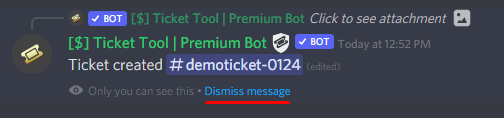 copper owl
this should explain it
crude scarab
Thanks
 haughty oak
Hi guys can anyone get me back to the anime server i was kicked when there was bot attack on the server like several months ago auto kicked and i never been able to get help or someone to get me back there
copper owl
haughty oak
Hi guys can anyone get me back to the anime server i was kicked when there was b...
wrong server
humble sequoiaBOT

⚠️ You're in the wrong place
We provide support for @pseudo glen discord bot and cannot help you with whatever issue you have.
- Please make sure to contact the appropriate Support Team.
If you don't have any further questions regarding our bot Ticket Tool, please close this ticket
 unborn jungle
The pin button is not appearing when a ticket is opened and I don't think I have the permissions restricted
copper owl
unborn jungle
The pin button is not appearing when a ticket is opened and I don't think I have...
pin button?
what is that
unborn jungle
The claim button
copper owl
did you enable claiming
copper owl
screenshot that please
unborn jungle
 copper owl
you enabled the button, but did you enable claiming itself
check the claiming options of your panel settings
 unborn jungle
So there's no way to claim the ticket?
copper owl
without premium, no
copper owl
well that's unfortunate
iron nightBOT
Gave +1 Rep to @copper owl
 short topaz
i need help beacuse it keeps saying debug i have andit still wont load
short topaz
can we go into a vc
 fallow ingot
No sorry.
short topaz
ok
fallow ingot
Just let us know what you need help with here, and someone will help you.
short topaz
im trying to add tickets and i added the channel i wanted it on it says debug i did that nothing happend says the same thing
@shut bolt
fallow ingot
short topaz
im trying to add tickets and i added the channel i wanted it on it says debug i...
Simply follow exactly the instructions it says in the website error run $debug and send me the link here.
Make sure the channel you run the command in has permissions otherwise the debug command won’t work.
shut bolt
jade topaz
Are you guys hacked?
Nope, you can read more on #📣│bot-news :)
jade topaz
so its real yes or no?
 burnt acorn
yes
shut bolt
It didn't got hacked
jade topaz
Bro who am i to believe lmao
burnt acorn
it did
shut bolt
jade topaz
Bro who am i to believe lmao
The support team lol
jade topaz
One person is saying it is one person saying not
burnt acorn
my server got nuked
jade topaz
shut bolt
The support team lol
yeah but whys everyone else saying it is
copper owl
burnt acorn
my server got nuked
Webhook perms don't even give you this ability LMAOOO
shut bolt
jade topaz
yeah but whys everyone else saying it is
Cause they haven't read #📣│bot-news
copper owl
Like if you're going to troll, at least troll correctly
burnt acorn
mhm
 radiant moss
@proven quarry not the channel to express your opinons
 ember horizon
Hi there, please help as I am getting this error message.

 runic citrus
ember horizon
Hi there, please help as I am getting this error message.
runic citrus
ember horizon
Hi there, please help as I am getting this error message.
Same
plain surge
runic citrus
Same
Please make sure that the bot is on your server
slender minnow
ember horizon
Hi there, please help as I am getting this error message.
Please update your discord client from your respective app store.
If you cannot see the update, try restarting your device and/or clear your respective app store cache.
humble sequoiaBOT
Convidando o Ticket Tool
A primeira coisa que você precisa fazer é convidar o bot, o convite pode ser encontrado aqui.
Quando o bot estiver no seu servidor, iremos para o painel e criaremos o painel
Um painel é usado para definir as configurações de cada ticket e as pessoas reagem para criar um ticket.
_ _
_ _
Criando um painel
Para criar um painel, precisaremos ir até as configurações do painel no painel
Uma vez no painel, precisaremos clicar em Criar painel
Digite o nome do painel (preencha as configurações opcionais que você deseja)
Clique em Criar painel e você estará pronto para começar a configurar seu painel.
_ _
_ _
Enviando um painel
Depois de criar um painel no painel, você precisará enviá-lo para um canal usando enviar no painel
Selecione o canal em que você deseja criar seu painel e clique em enviar.
Para outras perguntas, consulte $helppt faq
 shut bolt
humble sequoia
shut bolt
humble sequoia
@solar hornet
 robust sandalBOT
Este é o guia de configuração em português
 English (en) → Portuguese (Brazil) (pt)
shut bolt
humble sequoia
English (en) → Portuguese (Brazil) (pt)
shut bolt
humble sequoia
 solar hornet
just a question from the cell phone?
robust sandalBOT
É o mesmo processo, a única diferença é que para acessar a guia de configs do painel você precisará usar o ícone  no canto superior esquerdo do seu telefone
English (en) → Portuguese (Brazil) (pt)
solar hornet
I got it here thanks a lot for the aj
shut bolt


 jade chasm
 balmy shard
How to fix
balmy shard
How to fix
Try to update Discord app.
solid stream
This was seen awhile back with an old version of discord.. But generally it involved Apple devices.
robust sandalBOT
solar hornet
I got it here thanks a lot for the aj
 DEVIANT (David)
Eu tenho aqui muito obrigado pela aj
English (en) → Portuguese (Brazil) (pt)
 shut falcon
How I can see my deleted tickets
 wooden panther
shut falcon
How I can see my deleted tickets
wooden panther
shut falcon
How I can see my deleted tickets
You can’t see deleted Tickets. Because they are deleted.. but if you saved the Transcript, you can click on „Direct Transscript“
shut falcon
wooden panther
You can’t see deleted Tickets. Because they are deleted.. but if you saved the T...
Where direct Transcript. Jus wanna know
wooden panther
Where you can find it?
shut falcon
Idk
 sullen beacon
hey guys, is it safe to invite ticket tool back into our server now?
 frail mirage
sullen beacon
hey guys, is it safe to invite ticket tool back into our server now?
frail mirage
sullen beacon
hey guys, is it safe to invite ticket tool back into our server now?
i think yes because #📣│bot-news i just added it
wheat torrent
I just get 6 votes but the bot shows me 0 vote when I type $vote
Also

And 6 of my friend do
**$vote link @wheat torrent **
 plucky haven
 civic raft
Comment on créer un ticket ?
 oblique ermine
What is the solution despite I download else Copy From discord
 humble sequoiaBOT
Solved in another channel.
fallow lagoon
How do I find the ID?
pls
copper owl
What ID
gilded verge
$idcommand
humble sequoiaBOT
How do I get the ID of Roles/Channels/Emojis?
Ticket Tool has a useful command that helps you get the ID of various things like channels, roles, emojis and your server.
Just use the command $id <#channel/@role/:emoji:>. Now copy everything, including the brackets <...>, to your dashboard (or wherever you want it)
If you want the server ID, just use $id.
Examples:
Server ID: $id ➝
509192800865353738
Roles: $id @Role ➝@humble sequoia
Channel: $id #channel ➝#🤖│bot-spam
User: $id @user ➝@copper owl
Emoji: $id➝

 gilded verge
I think this id
 narrow gust
Hello, when I create a ticket it is deleted right after, anyone have an idea ?
 copper owl
check the audit logs to see who's deleting the tickets immediately
if you're just a normal member in that server, you'll have to contact the server staff of that server to get it fixed
jade topaz
why deos the bot need manage role rights for? i dont get it
 fair folio
Hi there a way of deleting all closed tickets at once
instead of 1 by 1?
on the website or something?
copper owl
jade topaz
why deos the bot need manage role rights for? i dont get it
to be able to set permissions in channels.
i was confused about it too until i tested it out. feel free to test it out yourself to see
copper owl
fair folio
Hi there a way of deleting all closed tickets at once
Nope
fair folio

copper owl
and i dont think it will exist at any point
fair folio
would be a good function for servers with lots of tickets :/
copper owl
fair folio
would be a good function for servers with lots of tickets :/
Add more support members.
rate limits are a thing, and unfortunately closing all tickets down would just rate limit ticket tool and completely halt it's functionality.
jade topaz
copper owl
to be able to set permissions in channels.
deos this not fall under manage channels? or deos this only cover channel information and not rights?
copper owl
jade topaz
deos this not fall under manage channels? or deos this only cover channel inform...
manage channels does not allow you to edit permissions no
it allows you to edit the name, bitrate (if VC), slowmode and region
jade topaz
hm ok
copper owl
Manage Roles + Manage channels allow you to edit everything. Both are needed because 1. ticket tool needs to set permissions and 2. ticket tool needs to be able to edit the channel name
among other reasons but that's just the simplified version
 reef geode
 dull kettle
Hello don’t know if anyone can help I have deleted data and cache and signed back in . Everything was looking good with initial update screen but it is now showing vpn etc on top of the screen but the settings box is in the middle of the screen and the guide isn’t coming up
copper owl
dull kettle
Hello don’t know if anyone can help I have deleted data and cache and signed bac...
you're in the wrong server bud. I dont think any of this has any relation to ticket tool
 compact cedar
Does ticket tool need hooks
copper owl
compact cedar
Does ticket tool need hooks
hooks?
if you mean webhook perms, no it doesnt need it
compact cedar
Does it ever use webhooks? It is a suggested permission when inviting it to ur server
copper owl
nope, im not even sure why it asks for those permissions.
Webhook Permissions and Adding Reactions are not needed anymore. and they'll be removed as required perms in the next major update
copper owl
np
 knotty elbow
Why do I get this message?
 copper owl
knotty elbow
Why do I get this message?
copper owl
knotty elbow
Why do I get this message?
if you've selected the premium bot in your dashboard, then you need to either invite the premium bot and resend the panels or choose the free bot in your dashboard
 runic robin
Is it necessary to grant manage roles and webhooks perms?
copper owl
runic robin
Is it necessary to grant manage roles and webhooks perms?
manage roles, yes, webhooks, no
runic robin
copper owl
manage roles, yes, webhooks, no
thx
iron nightBOT
Gave +1 Rep to @copper owl
 shy cape
My servers ain't loading at dashboard i tried relog in
 rancid basin
Hey, how do I configure the bot for the team to see ticket messages
copper owl
$help support
humble sequoiaBOT
How to let support team see into a ticket
About support roles
A support role lets your support team see into tickets with out having to add them manually to each and every ticket.
You can add as many support roles as you like per panel.
NOTE that the way discord works all admins can see into tickets regardless of this.
How to set a support role
To set a Support role go to the Dashboard -> Panel Configs -> Settings -> General Options -> Support Team Roles.
NOTE that the support role will not be able to see into tickets that are already created..
copper owl
define their role as a support role
rancid basin
thanks i need this bot for my server
copper owl
anytime
solid stream
compact cedar
Does it ever use webhooks? It is a suggested permission when inviting it to ur s...
I'll be removing it's request for in the coming days, along with reactions as their not needed.
 faint anchor
Hi I need help it is not letting me add the ticket tool to my discord server.
gilded verge
Please make sure in the audit logs that no another bot is blocking access to the server for the Ticket Tool bot

 tribal cedar
$perms
humble sequoiaBOT
ᅠ
@pseudo glen requires the following permissions:
Add Reactions
Read Channels
Send Messages
Manage Messages
Embed Links
Attach Files
Read History
Manage Roles
To change the role permissions, you can go to your Discord Server ➞ Server Settings ➞ Roles ➞ @Ticket Tool
To change the channel permissions, you can go to your Channel Settings ➞ Permissions ➞ Ticket Tool
ᅠ
Note:
You can give Ticket Tool Administrative Permissions instead of all the permissions listed above, but it's entirely optional and NOT necessary.
tribal cedar
Check the perms @jade topaz
 gritty tide


 humble sequoiaBOT
You can check our documentation here.
You can also check #573205317870157855 for the basic setup.
Our documentation contains all the info you need about the bot to be able to setup and configure the bot however you like.
 valid trellis
Hi guys, I got this message on my server today, it show up on a public channel. Is there a problem? Should I report this to you?
 gilded verge
Hi @valid trellis, This message usually appears after someone uses the command $debug
from what I can see on screenshot, everything is fine so nothing to worry about
jade topaz
There’s / commands, right?
Is there a way to pull up old tickets after deleting? Accidentally deleted a ticket that I had open a few hours ago
jade topaz
jade topaz
Is there a way to pull up old tickets after deleting? Accidentally deleted a tic...
Deleting a ticket is irreversible, if you just closed the ticket you can see the transcript.
Where would the transcript be? and would it show the conversation had?
gilded verge
If you are asking if there are any forward slash commands, there are currently not.
jade topaz
gilded verge
If you are asking if there are any forward slash commands, there are currently n...
Is it viewable on the dashboard?
jade topaz
jade topaz
Where would the transcript be? and would it show the conversation had?
If the channel does not exist, you cannot get the transcript after deleting it.
gilded verge
You have all the commands available in your dashboard in Command Configs
jade topaz
Ahh ok
 hybrid badger
Hey, does somebody know how to add Emoji to the Embed Description? I'd like to add the Twitch Symbol but it only works on Buttons as an Emoji ...
shut bolt
hybrid badger
Hey, does somebody know how to add Emoji to the Embed Description? I'd like to a...
Use the $id command
$id 
humble sequoiaBOT
<:mike:922863825827536966>
:mike:
shut bolt
And copy the text
 hybrid badger
thanks
shut bolt
Sure
hybrid badger
thanks @shut bolt
iron nightBOT
Gave +1 Rep to @shut bolt
shut bolt
hybrid badger
do i have to upload it first to my server?
for example i wanna use twitch:314349922755411970
thats the id of it 🙂
shut bolt
:twitch:
shut bolt
hybrid badger
do i have to upload it first to my server?
Yes
If Ticket Tool does not have access to the emoji
It can't use it
And take into account to use the full string including <>
hybrid badger
Its weird. Button Emoji works
but when i put twitch:314349922755411970 in the Panel Message it doesnt
here it works aswell  but just in the Panel Description it doesnt 😦
 velvet fiber
i need help the server isn't popping up no matter how much i reload
hybrid badger
@shut bolt still doesnt work .. uploaded one to my server.. and it doesnt work 😦
shut bolt
hybrid badger
<@!518666147441278998> still doesnt work .. uploaded one to my server.. and it d...
Server ID please