#🆘│community-support
1 messages · Page 396 of 1
 shut bolt
 full fable
is there any way to reopen a ticket from a different server after it has been closed if im not the admin
shut bolt
full fable
is there any way to reopen a ticket from a different server after it has been cl...
No
full fable
Well I’m screwed then 🥲
 mint brook
Hi basically after a certain amnt if tickets done , the bot starts making tickets at the very top of the server prolly coz the carrot was filled but This is creating a lota mixing is there any way to fix this ?
 solid briar
What does it mean when people have this show up when they want to open a ticket 'Invalid Form Body'
When I try to open a Ticket it's working fine.
 gilded verge
solid briar
What does it mean when people have this show up when they want to open a ticket ...
gilded verge
solid briar
What does it mean when people have this show up when they want to open a ticket ...
He needs to update Discord 
solid briar
gilded verge
He needs to update Discord <:PepoG:867607055460335626>
ah now it's working thank you 🙂
 iron nightBOT
Gave +1 Rep to @gilded verge
 iron locust
how ido claim
gilded verge
iron locust
how ido claim
Claim what?
 humble sequoiaBOT
━━ moved to ticket ━━
 winter moon
I have a problem. If I want to open a ticket and click on the button there ist the message "invalid Form body" what should I do now?
gilded verge
winter moon
I have a problem. If I want to open a ticket and click on the button there ist t...
You need to update Discord
winter moon
Okay
winter moon
gilded verge
You need to update Discord
I have no Update for discord
gilded verge
This usually occurs when the application is not updated.
winter moon
gilded verge
This usually occurs when the application is not updated.
Is the beta version the problem?
gilded verge
oh, this could be the reason 😳
 regal goblet
@winter moon try reinstalling
winter moon
I will try it
 jade topaz
Hm hi
 hollow mantle
halo
 weak oasis
hey
 strange moss
hey
winter moon
regal goblet
<@!713285312159154210> try reinstalling
This doesnt work
 outer hearth
I tried submitting a support ticket but
Warning: Server at discords channel limit of 500
 copper owl
Then you have to wait
until the server deletes some channels or tickets
Nothing we can do, it's a discord limitation
outer hearth
i tried again after 1 day but it still happens
mint brook
Hi basically after a certain amnt if tickets done , the bot starts making tickets at the very top of the server prolly coz the carrot was filled but This is creating a lota mixing is there any way to fix this ?
 craggy geyser
mint brook
Hi basically after a certain amnt if tickets done , the bot starts making ticket...
craggy geyser
mint brook
Hi basically after a certain amnt if tickets done , the bot starts making ticket...
Discord have a limit of 50 channels per category. But you can set more than one category for a panel and then when the first one is full, it will use the next
 craggy lava
Hi
Why can't I make a ticket from my phone?
People from the computer can, but not from the phone
can this be solved somehow?
regal goblet
#546557408902905896 Rule #4 Dont tag staff team @silver wagon
humble sequoiaBOT

You can check our documentation here.
You can also check #573205317870157855 for the basic setup.
Our documentation contains all the info you need about the bot to be able to setup and configure the bot however you like.
regal goblet
@silver wagon Here^^
 silver wagon
Pls how to create ticket
regal goblet
humble sequoia
Check the guidelines mentioned here @silver wagon
 fallow ingot
craggy lava
Hi
Why can't I make a ticket from my phone?
People from the computer can, but no...
fallow ingot
craggy lava
Hi
Why can't I make a ticket from my phone?
People from the computer can, but no...
Update your app
craggy lava
thx ❤️
 polar plover
How do I change that name?

 graceful plinth
🇵🇱
gilded verge
polar plover
How do I change that name?
These are multipanels and they are only available for Premium users, so now you can't do that.
polar plover
gilded verge
These are multipanels and they are only available for Premium users, so now you ...
I have prime and I am together but he name crate ticket
And idk how I chang him
gilded verge
To do this, go to your dashboard, next in the settings on your panel, then expand the Button Options tab and change the name in Create Ticket Settings. 
 terse lichen
any config sellers in here
gilded verge
gilded verge
To do this, go to your dashboard, next in the settings on your panel, then expan...
*this settings

 frozen charm
I set up auto transcripts, and it won't work. Can someone help?
gilded verge
Auto Save Transcript only work for premium
frozen charm
I have premium
This isn't my main acc, since people would stalk me from my server, but yeah
gilded verge
you must select the log channel and the autosave-transcript event
 frozen charm
oh my god I am so very very dumb
gilded verge
no, you not
iron nightBOT
Gave +1 Rep to @gilded verge
frozen charm
that was unexpected and did make me smile
jade topaz
I made a couple tickets in my server and I can’t make more
 drifting basalt
How can we setup such that only members with a particular role can close or delete the tickets ?
 frosty venture
how to make ticket channel
gilded verge
jade topaz
I made a couple tickets in my server and I can’t make more
If you have opened a few tickets you can't get more and probably because there is a limit. Check your settings.
gilded verge
drifting basalt
How can we setup such that only members with a particular role can close or dele...
It would be a good idea to add this role as Support Team Roles. Go to Dashboard->Panel Configs->Panel Settings and to add permissions for these roles you want in the command settings.
*Maybe there's a faster option, but I did that that's the way I'm talking about it.

 gilded verge
frosty venture
i mean how to make a ticket channel
gilded verge
frosty venture
i mean how to make a ticket channel
To make it clear, you mean this, right?

If yes, please go to #🤖│bot-spam and use: $help setup
frosty venture
ok
 short ledge
Hmm for some reason I’m unable to delete ticket channels created thru the bot or transcribe thin into a log channel. I was able to do this initially but not anymore…
 toxic tiger
Why is the bot not giving me any help
 gilded verge
toxic tiger
Why is the bot not giving me any help
gilded verge
toxic tiger
Why is the bot not giving me any help
#🤖│bot-spam
drifting basalt
gilded verge
It would be a good idea to add this role as `Support Team Roles`. Go to `Dashboa...
Even members who don't have support role are able to use commands and close tickets in my server
gilded verge
ou, I guess I'm starting to understand. I will try to make a video to show you how to properly set the permissions. It can take a while, please wait.
but if someone else can help you faster, get help from that person.
toxic tiger
None of the comands work
gilded verge
toxic tiger
Why is the bot not giving me any help
this is wrong channel, you must go to #🤖│bot-spam (click on this channel)
gilded verge
drifting basalt
Even members who don't have support role are able to use commands and close tick...
Below I showed my setup for a no premium server. Btw, those 4 roles, which can be seen in the video, are support roles.
If there is still a problem or any questions, let us know.
*I hope that I helped at least a little.
drifting basalt
gilded verge
*I hope that I helped at least a little.
Ya Thanks a lot
iron nightBOT
Gave +1 Rep to @gilded verge
 silent falcon
The interaction failed
for this error how do i fix this?
it's my first time that my customer encounter. no body else has that problem when creating a ticket
humble sequoiaBOT
━━ moved to ticket ━━
 bronze iris
I need for my LTV to be migrated, im see that I just missed the window Please help for me not to lose my investment thanks in advance!
not really sure how to make a ticket
 ocean acorn
Go to #🎫│make-a-ticket to make a ticket
bronze iris
not sure why I cant text on your link
ocean acorn
wdym?
bronze iris
I clicked on English emoji and didnt know what to do next
ocean acorn
It should've made a ticket
bronze iris
this is my complaint: I need for my LTV to be migrated, im see that I just missed the window Please help for me not to lose my investment thanks in advance!
humble sequoiaBOT

⚠️ You're in the wrong place
We provide support for @pseudo glen discord bot and cannot help you with whatever issue you have.
- Please make sure to contact the appropriate Support Team.
If you don't have any further questions regarding our bot Ticket Tool, please close this ticket
bronze iris
this is to much!
shut bolt
We can't help with that, sorry
 shut bolt
 hearty crypt
Help?
hearty crypt
Help?
Could you give me the server ID please?
shut bolt
hearty crypt
non-empty strings?
That means some field that should have text is being empty, but it's a weird error I've seen before
Thanks, please allow me a second
iron nightBOT
Gave +1 Rep to @hearty crypt
shut bolt
Oh alright
I see the problem
The panel's name
You have 2 ways to solve it
Option 1
Give a name to your panel
Option 2
Edit the transcript message
And remove or place something to that field
Let me know which one you prefer and I'll guide you
hearty crypt
I'll try the second one rn
shut bolt
Sure, let me know how it goes
hearty crypt
haha alr
shut bolt
Have a good one mate 
 fast jetty
Hi, Premium for this bot allows me to edit the Pfp of the Bot and the Activity/Status of it?
humble sequoiaBOT

Ticket Tool avatar/status Customisation
@pseudo glen is like another discord user; you can't control its avatar icon or status, and we cannot change it for a specific server.
However, on your server, you can change the bot's nickname
 fallow ingot

fast jetty
fallow ingot
<:this:894279341108772914>
Thank you
iron nightBOT
Gave +1 Rep to @fallow ingot
fallow ingot
anytime
 gloomy tundra
How can I create multi panel?
humble sequoiaBOT
For a more convenient use of multipanels, you can now combine panels on the dashboard. This will allow you to directly send the multipanel from the dashboard or via the $panel ID command.
Where can I find this?
You can find this setting on the Dashboard -> Panel Configs -> Settings -> General Options
Note: if you're attaching all the panels to a panel called English, don't include English in the attached panels box (If you do this, it will create duplicate)
This will put all buttons from all of your panels on one message. The message is the panel message from the panel you're combining these panels in.

 Note: This is a premium feature
 crude relic
How do i ping the support team in my ticket message
crude relic
crude relic
How do i ping the support team in my ticket message
@short stump
gilded verge
crude relic
<@!754690065044734013>
Read the #546557408902905896, mainly rule 4
Then you can go to #🤖│bot-spam and use $help ping
crude relic
gilded verge
**Read the <#546557408902905896>, mainly rule `4`**
Then you can go to <#910978...
ok
 plucky bridge
O ticket tool está bugado pq no site do ticket tool não aparece meu serve pra eu configurar sendo que ele tá com o meu cargo (dono) já reloguei mais não funciona peço que me ajude.
🇧🇷?
The ticket tool is buggy, because on his website it doesn't show up for me to configure, and it has my position (owner) I've relogged it but it doesn't work, I ask you to help me.
🇺🇲?
 stuck lagoon
gm ,I need your guys help , how could i find the delete ticket?
plucky bridge
?
gilded verge
stuck lagoon
gm ,I need your guys help , how could i find the delete ticket?
If a ticket is deleted, it cannot be restored. If the ticket is closed, you will still be able to access it. I'm not sure, but do you mean the transcription, i.e. the transcript of the conversation?
stuck lagoon
yes
gilded verge
Does your server have premium?
*Bcs If the server does not have premium and you want the transcription to be saved, go to your open ticket channel, there you need to use the $transcript command and then the transcription will be sent to the channel you set in the panel settings.
 grand tide
Hello, I need some help.
How do I make in my channel to where other people can click on submit a ticket?
I can see it in my channel but they cannot see it in theirs
gilded verge
grand tide
I can see it in my channel but they cannot see it in theirs
Hey, so this is all about permissions. Go to Dashboard, then Panel Settings, and then Permission Options. In the video I showed the permissions I did for the server without premium.
I hope that I helped at least a little.
gilded verge
grand tide
Thanks boss that worked
oh, then can you use: thanks @miroxik74 (with mention) in one message?
this help me 
iron nightBOT
Gave +1 Rep to @gilded verge
gilded verge
yay! love u 
 feral citrus
i need help
gilded verge
feral citrus
i need help
No one can help you because ~~they ~~ we don't know what you mean. 😐
feral citrus
i rebranded my server and want to change the automatic message that is sent in a new ticket but i can’t find out how
@gilded verge
 gilded verge
Go to Dashboard->Panel Settings->Expand Panel Options and click Edit Panel Message. Then change text on Message Text and Embed Description. You need premium to change  Message Text but dont need premium to
  Embed Description.

 tough ibex
Hi guys,
Can you help me?
How can I get a ticket for support channel?
gilded verge
tough ibex
Hi guys,
Can you help me?
How can I get a ticket for support channel?
Hi, please go to #🤖│bot-spam and use $help setup
 gleaming wigeon
is there auto transcript
gilded verge
Yes, but only for premium
fallow ingot
here are the premium perks:
humble sequoiaBOT
 Faster Premium Bot
Automatic Transcripts
Full Customization
Custom Buttons
Direct Messages
Ticket Automation
Multipanels
Premium Support
You can purchase premium here:
Price
$6 - Monthly
$66 - Yearly
 Premium
 fallow ingot
or you can get ticket tool premium for free
fallow ingot
all you have to do is vote every 12 hours.
gleaming wigeon
$vote
humble sequoiaBOT
Votes
Current Votes: 0
Lifetime Votes: 0
Linked Votes: 0
Vote Links
Linking Info
Linked User: Not Linked
You can give your future votes to another user by linking with that user.
To link use $vote link (@user or userId)
To unlink use $vote unlink
Redeeming
Each vote is worth 12 hours of premium and can be redeemed once you have atleast 6 votes.
Your current votes are worth 0m
To redeem your current votes use $vote redeem
fallow ingot
only you can vote
gleaming wigeon
admins
fallow ingot
or they can vote and transfer the votes to you using $vote link command.
fallow ingot
you need to get 6d or votes worth then you'll be able to redeem.
I'd save up to about 30 days if was you.
fallow ingot
👍
gleaming wigeon
thanks for helping
fallow ingot
anytime
gleaming wigeon
thanks @fallow ingot
gilded verge
@aaronxyas, Where can I find all the available commands on this server? 😳
iron nightBOT
Gave +1 Rep to @fallow ingot
gilded verge
thanks @fallow ingot
iron nightBOT
Gave +1 Rep to @fallow ingot
fallow ingot
anytime
fallow ingot
gilded verge
gleaming wigeon
how can i enable auto transc.
this is for premium servers
gleaming wigeon
ok i enabled it
gilded verge
Then if you have premium, go to Dashboard->Panel Settings->Logging Options->Auto Save Transcript
 untold blaze
how to make it so ticket tool pings a role when a ticket is opened
gilded verge
untold blaze
how to make it so ticket tool pings a role when a ticket is opened
Go to Dashboard->Panel Settings->Expand Panel Options->Edit Panel Message. Add the role name or the role ID to the Message Text, but your server need premium to change Message Text. Look below:
humble sequoiaBOT
Mentions
Within all the messages the bot's sends (both embeds and text) you can mention either channels, roles, or even users, these mentions will only send a notification to the user if they are used within a text field, e.g: a role mentioned in an embed won't ping at all the users who have that role.
For mentioning a role you can use one out of three options:
{@Role Name} ➞ Which is Case Sensitive.
{RoleID} ➞ Replace RoleId with the Id of the role you are trying to ping.
<@&RoleID> ➞ Discord's native syntax to ping roles.
<#ChannelID> ➞ Mention a channel by its ID.
<@UserID> ➞ Mention a user by its ID.
gloomy tundra
Multi panel is not working
 echo cipher
hi
gilded verge
gloomy tundra
Multi panel is not working
Of course it works because I checked it a moment ago, you need premium to did this.
gloomy tundra
gilded verge
Of course it works because I checked it a moment ago, you need premium to did th...
It works on free trial?
gilded verge
It should work even if it's a free trial 😕
gilded verge
gloomy tundra
It works on free trial?
I created a new server especially for you and used the free trial. Everything works fine 😉

 scarlet python
Как сделать так чтобы бот работал
gilded verge
jade topaz
How to setup ticket tool transcript and logs
$help transcript
humble sequoiaBOT
How do I save transcript to a channel?
To save transcripts to a channel go to the Dashboard -> Panel Configs -> Settings -> Logging Options -> Transcript Channel
 gilded verge
scarlet python
Как сделать так чтобы бот работал
gilded verge
scarlet python
Как сделать так чтобы бот работал
$help setup
humble sequoiaBOT
Setting up Ticket Tool
Visit the docs for setup info
General Setup
gloomy tundra
gilded verge
I created a new server especially for you and used the free trial. Everything wo...
Can you say me how it works? In dm
Please
gilded verge
I can make a video in my configuration, please wait.
 lavish topaz
gilded verge
gloomy tundra
Can you say me how it works? In dm
lavish topaz
gilded verge
gloomy tundra
Can you say me how it works? In dm
*I have no roles in commands because this server is a test server specifically made to show you that everything is working fine.
If you have questions, don't hesitate
 grizzled sail
Is there a way to edit the ticket panel without having to send a new message?
gilded verge
grizzled sail
Is there a way to edit the ticket panel without having to send a new message?
You mean editing what's in the screenshot, right?
 grizzled sail
gilded verge
You mean editing what's in the screenshot, right?
grizzled sail
gilded verge
You mean editing what's in the screenshot, right?
yes
gilded verge
then unfortunately not, you would have to re-send the panel to the channel. 
grizzled sail
I have seen this in one server tho. Is it a premium feature?
 gilded verge
grizzled sail
I have seen this in one server tho. Is it a premium feature?
gilded verge
grizzled sail
I have seen this in one server tho. Is it a premium feature?
I think these are just panels but configured for a given topic.
grizzled sail
I'm sorry I don't understand or maybe I'm not fimiliar with that haha
gilded verge
My point is, someone made a panel and wrote a custom Panel Message
My example custom panel:

When you go to Dashboard->Panel Settings-> Expand Panel Options->Edit Panel Message, there you can change the Embed Description for free up to 250 characters of message.
If necessary, I showed what is what on the screen
 grizzled sail
Thank you! @gilded verge
 snow canopy
hello
gilded verge
grizzled sail
Thank you! <@!334671104704774154>
can you use it again but without edit, please?
grizzled sail
gilded verge
can you use it again but without edit, please? <a:peeposhy:881106659341135882>
I forgot to ping you there and hence edited lol
jade topaz
Gayzao
snow canopy
jade topaz
Gayzao
um brasileiro?
jade topaz
Não
snow canopy
ata
jade topaz
?
snow canopy
eu adicionei o ticket no meu serve dai fui configurar e não aparece la o serve akkakakaka
jade topaz
hi
snow canopy
não sei oque eu faço
gilded verge
grizzled sail
I forgot to ping you there and hence edited lol
Yes, my only point is, if you want to say thanks, use thanks @mention without editing and then the user gets a reputation point :>
iron nightBOT
Gave +1 Rep to @grizzled sail
snow canopy
I added the ticket to my discord and when I went to configure the server, what can I do?
gilded verge
snow canopy
I added the ticket to my discord and when I went to configure the server, what c...
$help setup
humble sequoiaBOT
Setting up Ticket Tool
Visit the docs for setup info
General Setup
jade topaz
hi i just bought a premium bot ticket tool
how can i make a different sections and every section with hes emoji
@atomic solstice @copper owl
copper owl
jade topaz
<@!601783394334015498> <@!548583124062175232>
Read the pins in here.
And don't ping us for support.
jade topaz
bro just tell me what i do and stop talking to me like this it's my first time here !!!!
chill
jade topaz
i'm trying to get helped like u brother
 dapper spindle

humble sequoiaBOT
For a more convenient use of multipanels, you can now combine panels on the dashboard. This will allow you to directly send the multipanel from the dashboard or via the $panel ID command.
Where can I find this?
You can find this setting on the Dashboard -> Panel Configs -> Settings -> General Options
Note: if you're attaching all the panels to a panel called English, don't include English in the attached panels box (If you do this, it will create duplicate)
This will put all buttons from all of your panels on one message. The message is the panel message from the panel you're combining these panels in.
Note: This is a premium feature
copper owl
@jade topaz Read the message above that explains how you have multiple buttons in one message.
dapper spindle
dapper spindle
How do I put a custom role that can see the ticket if it opens?
@copper owl
copper owl
copper owl
And don't ping us for support.
@dapper spindle
Just be patient. I can't help multiple people at the same time.
$help support
humble sequoiaBOT
How to let support team see into a ticket
About support roles
A support role lets your support team see into tickets with out having to add them manually to each and every ticket.
You can add as many support roles as you like per panel.
NOTE that the way discord works all admins can see into tickets regardless of this.
How to set a support role
To set a Support role go to the Dashboard -> Panel Configs -> Settings -> General Options -> Support Team Roles.

NOTE that the support role will not be able to see into tickets that are already created..
copper owl
@dapper spindle read this ^
dapper spindle
copper owl
$help support
Okay
humble sequoiaBOT
The first thing you will need to do is invite the premium bot, an invite can be found here
Once the bot is in your server we will head to the dashboard and manage your server. When you are managing your server, you want to head into "Server Configs" then click the drop down menu under "Select the bot you would like to use on this server" then click "Ticket Tool#6207" and then save.
 copper owl
jade topaz
"scared to mention"
copper owl
jade topaz
"scared to mention"
appreciate you following the rules :)
jade topaz
i did the steps but still the premium didn't join our discord
copper owl
It most likely did if you followed all the steps correctly. Check the members list, and check the roles. If you have the premium ticket tool bot role in the server, then it joined
jade topaz
so i make a new role for the bot then i add it ?
copper owl
Nope. You check the roles to see if the premium ticket tool role was created already.
jade topaz
nope
copper owl
If it was created already, then the premium bot is in the server
jade topaz
not yet
copper owl
jade topaz
not yet
Then you didn't follow the steps 100% correctly
try again and make sure no one is kicking or banning the bot (VIA audit logs)
jade topaz
how i find the premium code ?
copper owl
jade topaz
how i find the premium code ?
There wouldn't be a code if you bought it via our website
humble sequoiaBOT
Ticket Tool Premium
Get premium at https://tickettool.xyz/premium
Manage your subscriptions at https://tickettool.xyz/subscriptions
Why Premium?
Premium lets you customize the bot just how you want it. It also helps keep the bot running.
copper owl
second link here, you should see the subscription
copper owl
You have to invite it yourself
as seen above. It should join immediately once you're done with the steps.
jade topaz
i did the steps and i pressed save subscriptions
but the premium didn't join the discord server
gilded verge
how not work? premium work, watch:
gilded verge

 dusky yoke
hello, good afternoon, do you have any special reason that does not let me configure the bot in a discord SV? it tells me that it is not online
gilded verge
I don't know if it's up to date but .... #🆘│community-support message
It's strange because the ~~usual ~~primary bot on my server works, maybe you have to wait or something?
dusky yoke
tenks
jade topaz
can i change the premium bot pic/name ?
gilded verge
Currently, it is not possible to change avatar Ticket Tool bot, unless I don't know something xD
But if you want to change nickname on server, you can do it 😄
humble sequoiaBOT
Ticket Tool avatar/status Customisation
@pseudo glen is like another discord user; you can't control its avatar icon or status, and we cannot change it for a specific server.
However, on your server, you can change the bot's nickname
 copper birch
Help me
gilded verge
with?
copper birch
response":"Failed to locate null","style":"error"}
gilded verge
Then I can't help but please wait for someone else.
iron nightBOT
Gave +1 Rep to @gilded verge
 atomic orbit
How do I whitelist a role?
copper birch
@iron night Help me
iron nightBOT
Couldn't find command 'me'
gilded verge
atomic orbit
How do I whitelist a role?
As far as I know you can add a role but only to Blacklist
Can you say more what you mean?
atomic orbit
gilded verge
As far as I know you can add a role but only to Blacklist <:PepoG:86760705546033...
I never blacklisted a role and it says the role it’s blacklisted when I check the permissionlevel (-1)
gilded verge
I'm not sure if I can help here, im sorry
atomic orbit
It’s okay thank you
 idle summit
atomic orbit
gilded verge
As far as I know you can add a role but only to Blacklist <:PepoG:86760705546033...
idle summit
atomic orbit
gilded verge
As far as I know you can add a role but only to Blacklist <:PepoG:86760705546033...
oh yes if I may ask, where do you blacklist them?
gilded verge
 atomic orbit
Bruh, I accidentally typed my role there I’m so dumb
 buoyant grove
Does anyone know how I can close and delete all the tickets on my server?
copper birch
 fallow ingot
buoyant grove
Does anyone know how I can close and delete all the tickets on my server?
fallow ingot
buoyant grove
Does anyone know how I can close and delete all the tickets on my server?
You can’t unfortunately.
fallow ingot
copper birch
You’ve been rate limited, don’t worry it’s not permanent and we didn’t manually ban you from the website. It’s something we have to stop attacks. It should re allow you access to the dashboard within 1 hour. However it may be longer or shorter.
 pearl ledge
Hi, just wondered if it's possible to auto delete a ticket if inactive for a certain amount of time
copper owl
Nope. Not as of now. It's a highly suggest feature so it might get added again in the near future.
 next pawn
Need help
 jaunty basalt
Can you delete a ticket with a reason?
regal goblet
You can close the ticket with $close reason
jaunty basalt
Cheers, do I just ping the bot to check the prefix?
jaunty basalt
Yeah, got it. Thanks @regal goblet
iron nightBOT
Gave +1 Rep to @regal goblet
regal goblet
Yw
humble sequoiaBOT
We would love to help you, but if you don't tell us what you need help with we can't help you :(
fallow ingot
@next pawn ^^
humble sequoiaBOT
Ticket Tool Premium
Get premium at https://tickettool.xyz/premium
Manage your subscriptions at https://tickettool.xyz/subscriptions
Why Premium?
Premium lets you customize the bot just how you want it. It also helps keep the bot running.
 winter bay
my server isnt showing up
humble sequoiaBOT

Don't see your server in the dashboard?
You will possibly need to relog. Look below to see steps on how to relog.
How to relog in the Dashboard.
First, you will need to go to the dashboard. Once your there, click on your avatar on the top right. after you clicked it, you will see button that says Logout. You must click that. Once you have logged out, you can log back in.
Note:
You need one of these 3 things to access the dashboard.
1. Server Owner (Level: 6)
2. Server Administrator (Level: 4)
3. Dashboard Role (Level: 2)
:warning: You can check your level using $level on your Discord Server
User permission level with Ticket Tool
@User is permission level: 0 (User)
```» *If it shows that your permission is **0**, you don't have any of the above **3 things** to manage the dashboard.*
**See the picture below on how to relog:**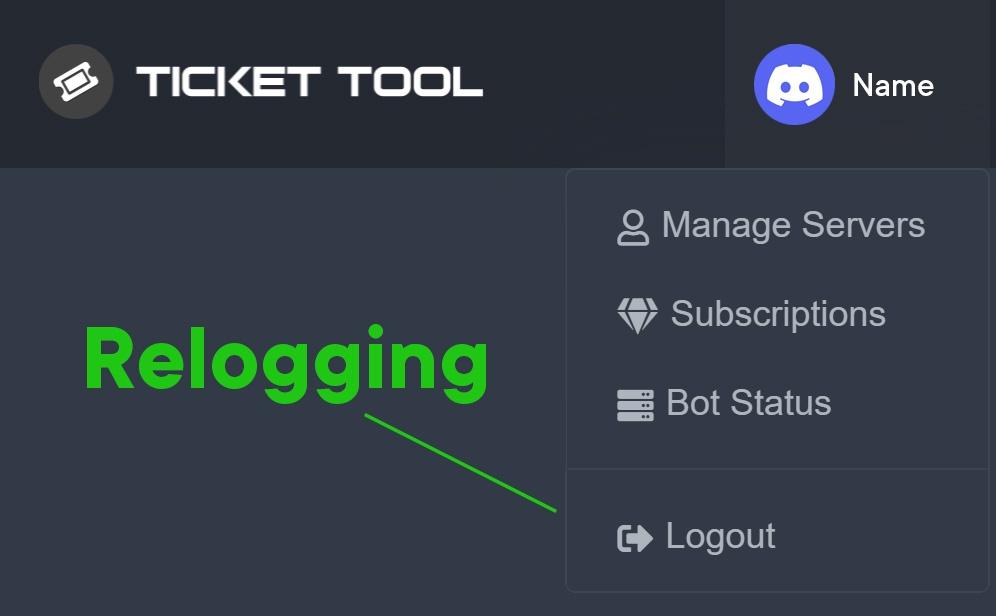 humble sequoiaBOT
━━ moved to ticket ━━
 whole owl
polar plover
whole owl
polar plover
How do I get the tick that never gets erased?
regal goblet
The tick? @polar plover
regal goblet
polar plover
i want my admin can not use $delete
Ah you would have to disable your admins role from the delete command
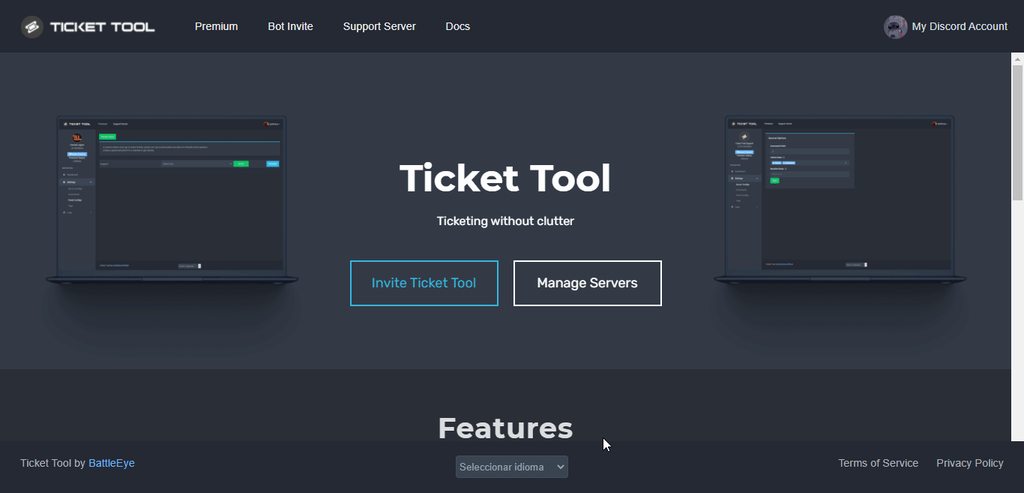
Like this ^^
humble sequoiaBOT
You can check our documentation here.
You can also check #573205317870157855 for the basic setup.
Our documentation contains all the info you need about the bot to be able to setup and configure the bot however you like.
Creating a panel
To create a panel we are going to need to head over to the panel configs on the dashboard
Once at the dashboard we will need to click Create Panel
Enter a panel name (Fill in any optional settings you want)
Click Create Panel and your ready to get started with configuring your panel
An example of a creating a panel is shown below.
 regal goblet
@jade topaz check both embeds above, they have all the necessary info on how to start using the bot
iron nightBOT
Gave +1 Rep to @regal goblet
regal goblet
Lol no problem
jade topaz
can i ping a role in tickets with free one? its so annoying
copper owl
jade topaz
can i ping a role in tickets with free one? its so annoying
Yeah you can
$help ping
humble sequoiaBOT
How to make Ticket Tool ping a role
To make ticket tool ping a role when a ticket is opened, go to the Dashboard -> Panel Configs -> Settings -> Ticket Options -> Ticket Message -> Message Text and do this:
{@Role name} This is case sensitive and the role must have @mentions enabled
 copper owl
check the message above for an explanation
copper owl
no problem
 coral onyx
it gives an error, what is the reason? Unknown Integration
jade topaz
is there a command to close every open tickets ,
?
 plain surge
coral onyx
it gives an error, what is the reason? Unknown Integration
plain surge
coral onyx
it gives an error, what is the reason? Unknown Integration
Please make sure that Discord is up to date on your device
plain surge
jade topaz
is there a command to close every open tickets ,
?
No, but you can use the command $close in each ticket channel rather than pressing the button
coral onyx
@plain surge latest version
humble sequoiaBOT
━━ moved to ticket ━━
jade topaz
What do tags do?
jade topaz
@copper owl
jade topaz
copper owl
<#546557408902905896>
sorry
 random verge
Hi! I would like to know if when managing the Ticket Free bot, when adding its first message in a chat, you can add an image
jade topaz
$help image
humble sequoiaBOT
Help Options
$help commands - Information on commands
$help setup - Information on bot setup
$help faq - Frequently asked questions
 lapis pagoda
$help commads
humble sequoiaBOT
Help Options
$help commands - Information on commands
$help setup - Information on bot setup
$help faq - Frequently asked questions
random verge
Where?
shut bolt
jade topaz
where do I upload the picture to get the link to put into my pannel
$directURL
Well I forgot the tag name
But basically I suggest Imgur
shut bolt
random verge
Hi! I would like to know if when managing the Ticket Free bot, when adding its f...
With the free version you can't use the image fields
jade topaz
shut bolt
But basically I suggest Imgur
ok
humble sequoiaBOT
What are the direct URLs?
A direct access URL is an easy to read URL that users can enter to get to a specific item, document, page, category, or perspective, in which our bot TicketTool can read and get it displayed in your 'Panel Message' or your 'Ticket Message'.
Where can I get them?
The recommended way is to use 'Imgur', you can signup within a few minutes and then upload the image you want, and copy the URL of the uploaded image and paste it into one of the four boxes. There are alternatives to this, such as other image or video storing websites or using 'Open Original' of an image and paste it in (please be aware that if your image is deleted, Discord will automatically delete the link to it in a few days). Please note this requires 'Premium'. Imgur
 shut bolt
There we go
random verge
oh ok thank you very much
shut bolt
No problem
gilded verge
I don't understand imgur, I don't think I can get along with him so I did it differently.
I have a special channel on the server and I uploaded the image on that channel. I copied the link to this image (to the image, not the message) and put it in the Panel Message->Image Url (big at bottom).
shut bolt
gilded verge
I don't understand imgur, I don't think I can get along with him so I did it dif...
Yeah you can do that but if you delete the message, channel or server it will get deleted. Imgur doesn't delete their images, unless you delete them manually
Imgur is quite simple, you go to their /upload page, then you right click on the uploaded image and then go to open in new tab, that will show a link somewhat like: i.imgur.com/XYZ.extension
And that is the direct url you can use
gilded verge
thanks @shut bolt
iron nightBOT
Gave +1 Rep to @shut bolt
shut bolt
Sure 
gilded verge
 ripe birch
I want to add a role to the ticket tool thing
ripe birch
I want to add a role to the ticket tool thing
Do you mean adding a role to tickets?
If so, take a look below:
humble sequoiaBOT
Mentions
Within all the messages the bot's sends (both embeds and text) you can mention either channels, roles, or even users, these mentions will only send a notification to the user if they are used within a text field, e.g: a role mentioned in an embed won't ping at all the users who have that role.
For mentioning a role you can use one out of three options:
{@Role Name} ➞ Which is Case Sensitive.
{RoleID} ➞ Replace RoleId with the Id of the role you are trying to ping.
<@&RoleID> ➞ Discord's native syntax to ping roles.
<#ChannelID> ➞ Mention a channel by its ID.
<@UserID> ➞ Mention a user by its ID.
 atomic solstice
@forest vigil try typing $debug in one of the channels in your server and send here the link that the bot responds with
if it doesn't respond then make sure the bot has the view channels & send messages on  in that channel
 forest vigil
atomic solstice
forest vigil
https://discordapp.com/channels/509192800865353738/662692902245498910/9572848708...
forest vigil
atomic solstice
forest vigil
https://discordapp.com/channels/509192800865353738/662692902245498910/9572848708...
ok try this link: https://tickettool.xyz/dashboard/956513152705654804

once you do that you can try logging out and logging back in and it should be in the manage servers tab after that
forest vigil
atomic solstice
ok try this link: https://tickettool.xyz/dashboard/956513152705654804
Tysm, it worked
atomic solstice
no problem
 cobalt breach
Hi, I have a question, so in my server, the ticket setup looks a bit like this:

and it's already made
but I want to add a role that automatically has access to the created ticket
but when I go in panel configs of the server

this is all I see
is there anyway I can add the role?
Thankyou for your kind help
 cobalt breach
gilded verge
If you mean `Support Team Roles`, go to settings of your panel
cobalt breach
gilded verge
If you mean `Support Team Roles`, go to settings of your panel
ohh thankyou, for some reason I completely missed that-
gilded verge
you're welcome 
jade topaz
How do I make it so staff can’t delete tickets


 gilded verge
jade topaz
How do I make it so staff can’t delete tickets
gilded verge
jade topaz
How do I make it so staff can’t delete tickets
In this case, you can remove the permission to use the $delete command.
Dashboard->Command Configs


 jade topaz
I don’t want my staff closing them
gilded verge
yes, that's why you just need to add @everyone to theDisabled Roles in this command.
so you don't want them to close their tickets either? then do the same for the $close command
jade topaz
Ok
 cyan python

 gilded verge
cyan python
gilded verge
cyan python
this is not general
cyan python
who?
gilded verge
go to #💬│general-chat
cyan python
cares?
gilded verge
rules?
cyan python
omg bro stfu
gilded verge
Stop insulting me
cyan python
🤡 🤡 🤡
cyan python
gilded verge
Stop insulting me
nah
jade topaz
cyan python
who?
Jidion lines.. Bruh If you no longer need support kindly redirect yourself to #💬│general-chat!


 scenic egret
is there a way to see past tickets opened, I had a guy buy something and the transcript didnt save cause i didnt have premium
atomic solstice
scenic egret
is there a way to see past tickets opened, I had a guy buy something and the tra...
if you didn't save a transcript and the ticket was deleted then there is nothing you can do
scenic egret
atomic solstice
if you didn't save a transcript and the ticket was deleted then there is nothing...
gotcha ty
iron nightBOT
Gave +1 Rep to @atomic solstice
 untold salmon
can some1 help me
gilded verge
no one can help if you don't write what your problem is 😐
gilded verge
and did you check the permissions, does the bot have the right ones?
humble sequoiaBOT
ᅠ
@pseudo glen requires the following permissions:
Add Reactions
Read Channels
Send Messages
Manage Messages
Embed Links
Attach Files
Read History
Manage Roles
To change the role permissions, you can go to your Discord Server ➞ Server Settings ➞ Roles ➞ @Ticket Tool
To change the channel permissions, you can go to your Channel Settings ➞ Permissions ➞ Ticket Tool
ᅠ
Note:
You can give Ticket Tool Administrative Permissions instead of all the permissions listed above, but it's entirely optional and NOT necessary.
 untold salmon
gilded verge
and did you check the permissions, does the bot have the right ones?
untold salmon
gilded verge
and did you check the permissions, does the bot have the right ones?
yeah
gilded verge
please give the bot administrator permission for a while and try sending the panel again. I'd like to make sure
untold salmon
ok
it already has everything
and i tried sending the panel it says it sent but it didn't
gilded verge
- Have you ever changed from primary to premium bot on your server?
- Could you show me the dashboard screenshot? I mean "Bot Permission Info"
- Do you see any error messages after sending the panel to the channel?
untold salmon
gilded verge
1. Have you ever changed from primary to premium bot on your server?
2. Could yo...
sure
untold salmon
gilded verge
1. Have you ever changed from primary to premium bot on your server?
2. Could yo...
 gilded verge
Could you still answer the 1st and 3rd questions?
 cerulean vapor
Personne sait répondre à mon ticket
J'ai un gros problème avec le site tickettool
gilded verge
 wispy breach
perdón de 25 de febrero
wispy breach
perdón de 25 de febrero
*Estas en el servidor equivocado
wispy breach
@gilded verge Idont urdestand
gilded verge
wispy breach
<@334671104704774154> Idont urdestand
When you send the panel to the channel, do you see any error?
untold salmon
gilded verge
Could you still answer the 1st and 3rd questions? <a:peeposhy:881106659341135882...
wdym
gilded verge
something like this:
do you see any error?
 wispy breach
@gilded verge no, see any error
jade topaz
Hey guys
gilded verge
wispy breach
<@334671104704774154> no, see any error
oh! Let's test something, please kick and re-invite the bot to the server. Then try to log in to the Panel again and send the panel to the channel, okay?
gilded verge
 worldly escarp
it doesnt come up in the dashboard
worldly escarp
it doesnt come up in the dashboard
Hi, please read "1. Why can I not manage my server on the dashboard?" on #799695838917820416
jade topaz
How do I give certain roles permission to view tickets
gilded verge
If you mean moderators: Go to Dashboard->Panel Configs->Panel Settings->Expand General Options and in Support Team Roles add moderator role
but if you mean all permissions then I recommend these:
untold salmon
@gilded verge do u know why i can't do the thing i'm kinda confused
gilded verge
wait
gilded verge
gilded verge
oh! Let's test something, please kick and re-invite the bot to the server. Then ...
ehm, okay? my message left... then again...
@untold salmon, do you try to re-invite bot?
untold salmon
gilded verge
ehm, okay? my message left... then again...
<@!756725416965963839>, do you try t...
i'll try now
 junior quarry
Hello, what is the reason for me being blocked every once in a while?
 humble sequoiaBOT
⚠️ You're in the wrong place
We provide support for @pseudo glen discord bot and cannot help you with whatever issue you have.
- Please make sure to contact the appropriate Support Team.
If you don't have any further questions regarding our bot Ticket Tool, please close this ticket
humble sequoiaBOT
You can check our documentation here.
You can also check #573205317870157855 for the basic setup.
Our documentation contains all the info you need about the bot to be able to setup and configure the bot however you like.
gilded verge
jade topaz
how to add the channel ticket in my server
this ⬆️
gilded verge
 brave tartan
my blacklist role doesnt work
brave tartan
my blacklist role doesnt work
Everything works correctly.

 brave tartan

 gilded verge
Have you used a test account for this?
gilded verge
😄
jade topaz
How do I get the transcript to be sent when the ticket is closed?
gilded verge
use command $transcript
jade topaz
I saw it in a friend of mine, a bot was sending a message to the #transcript ticket as it was closed, is there such a feature?
Or maybe I am wrong?
gilded verge
i think, you mean auto-transcript-save, this is for premium
jade topaz
gilded verge
i think, you mean auto-transcript-save, this is for premium <:peepoBlush:8432122...
😭
 wanton path
what does Bypass channel list and watch all of them mean in command style tickets?
gilded verge
jade topaz
😭
Remember you can have premium for free. All you have to do is vote for a bot on both sides every 12 hours. Go to the channel #🤖│bot-spam and use $vote command and read that information
 silk pivot
So um I am trying to create a ticket where only a specific role can open that ticket not everyone can open
jade topaz
@gilded verge how can i open it (auto-transcript-save) (found)
silk pivot
My settings are like this and it's not working
 gilded verge
jade topaz
<@!334671104704774154> how can i open it (auto-transcript-save) (found)
gilded verge
jade topaz
<@!334671104704774154> how can i open it (auto-transcript-save) (found)
There :
Dashboard->Panel Configs->Panel Settings->Logging Options->Auto Save Transcript
 gilded verge
silk pivot
My settings are like this and it's not working
gilded verge
silk pivot
My settings are like this and it's not working
- Do you check it from the test account?
If yes: - Have you checked the difference between having this role and not having this role on the test account?
I am asking because I have the same configuration and everything works fine

 late stirrup
hi i need help with the ticket bot
gilded verge
what you mean?
late stirrup
i have the ticket tool on my friends server and i want to get to the dashboard and i cant
how i can do it
gilded verge
huh? wait... can you try ask again?
late stirrup
?
gilded verge
nvm, wait please...
late stirrup
https://tickettool.xyz/manage-servers this would not work for me
gilded verge
on your friends server, use command $level and please send a screenshot
late stirrup
User permission level with Ticket Tool
permission level: 4 (Guild Administrator)
this is it
gilded verge
on the TicketTool website, please log out and log in again, then check if the server is displayed
*I mean, make sure you are logged in with the correct account
gilded verge
To be sure, please check it from a different browser and if that doesn't help, try it on a different device
late stirrup
Servers - (server not showing up? try relogging)
It looks like Ticket Tool isn't online or in any servers you have permission to access,Invite Ticket Toolor check it'sstatus
this is on the website
gilded verge
You can also try to kick him from the server and invite him again
jade topaz
is there a way a user can have multiple tickets open?
gilded verge
late stirrup
but i have the permission to go to the dashboard or ?
if you are the server administrator you should have access to the dashboard, after inviting the bot to the server again, check if the server is displayed
late stirrup
its not 
gilded verge
still not see?
late stirrup
no 😦
gilded verge
in this case, it is worth contacting the support directly, go to the channel #🎫│make-a-ticket and select the appropriate option
I'm sorry there is nothing else I can do, sorry 
 iron nightBOT
Gave +1 Rep to @gilded verge
gilded verge
woah! you're welcome
gilded verge
jade topaz
is there a way a user can have multiple tickets open?
in your panel settings you can define the limit of open tickets for a given user
 jade topaz
gilded verge
in your panel settings you can define the limit of open tickets for a given user
jade topaz
gilded verge
in your panel settings you can define the limit of open tickets for a given user
just this sec found it thanks 😄
iron nightBOT
Gave +1 Rep to @gilded verge
gilded verge
oh 😅
 turbid halo
تروحون للسينما؟ 
untold salmon
gilded verge
To be sure, please check it from a different browser and if that doesn't help, t...
it didn't work
gilded verge
then try to kick bot and invite again, did you check it?
untold salmon
the reinvite
untold salmon
gilded verge
then try to kick bot and invite again, did you check it?
yes
gilded verge
in this case, it is worth contacting the support directly, go to the channel #🎫│make-a-ticket and select the appropriate option.
I'm sorry there is nothing else I can do, sorry
untold salmon
np thank you still
gilded verge
 storm bloom
Can sm help me ?
storm bloom
Can sm help me ?
please go to #799695838917820416 and look at "1. Why can I not manage my server on the dashboard?"
jade topaz
Hii, where do I use $vote redeem command? will it generate code if I do in bot commands XD Not sure if I want others to see, or will it dm me
probably dm because other way doesnt make sense
it did dm me, just now
thank you! XD
 meager bramble
Not had service since Wednesday. Was told down for maintenance but two days later still service. Has anyone else experienced this as not getting anywhere with ticket tool, no answer?!!,,,,
shut bolt
meager bramble
Not had service since Wednesday. Was told down for maintenance but two days late...
Ticket tool hasn't been down for maintenance this last week
It was probably closed in the server you faced that
meager bramble
Yes server problems but no solutions as yet
shut bolt
meager bramble
Yes server problems but no solutions as yet
If they decided to lock their tickets its not something we control
meager bramble
Missed all the F1 over past 2days. Ok, thank you.. Will wait to see possible alternatives, if someone comes back to me that is 😔
shut bolt
meager bramble
Missed all the F1 over past 2days. Ok, thank you.. Will wait to see possible alt...
Alright, may we close the ticket you opened here?
meager bramble
Yep! Will wait to see if can another working url. Thanks anyway
jade topaz
what is the limit of tags? How many can we create? For Premium
 regal goblet
@jade topaz Unlimited for both free and premium users
 coarse trench
Can you $add someone to the ticket without it being posted in the ticket chat? Like a quiet add?
gilded verge
coarse trench
Can you $add someone to the ticket without it being posted in the ticket chat? L...
To add someone to ticket, you have to do it on this channel, then the answer is no 😕
 coarse trench
gilded verge
To add someone to ticket, you have to do it on this channel, then the answer is ...
coarse trench
gilded verge
To add someone to ticket, you have to do it on this channel, then the answer is ...
No, I mean on an actual ticket. When I use the $add command it send a message in the ticket that i added that person to the ticket. I am wondering if I can add someone without sending that message
gilded verge
Unfortunately not, or you can manually change the permissions of a given ticket channel and add a user there
coarse trench
Gotcha. thanks
 unborn phoenix
hey guys needing some help with the ticket tool trying to add a make a ticket section
 slender minnow
unborn phoenix
hey guys needing some help with the ticket tool trying to add a make a ticket se...
slender minnow
unborn phoenix
hey guys needing some help with the ticket tool trying to add a make a ticket se...
Ticket Category? Or the message that helps user open a ticket?
unborn phoenix
i have a rust server and discord server for rust i want it to be where they can open a ticket to contact a certain role of people and also for any rule breaking or cheaters
slender minnow
$help setup
humble sequoiaBOT
Setting up Ticket Tool
Visit the docs for setup info
General Setup
slender minnow
Refer this guide to set up that mssg using the bot ^
jade topaz
how do I add certain roles to be able to view tickets
slender minnow
$help support
humble sequoiaBOT
How to let support team see into a ticket
About support roles
A support role lets your support team see into tickets with out having to add them manually to each and every ticket.
You can add as many support roles as you like per panel.
NOTE that the way discord works all admins can see into tickets regardless of this.
How to set a support role
To set a Support role go to the Dashboard -> Panel Configs -> Settings -> General Options -> Support Team Roles.
NOTE that the support role will not be able to see into tickets that are already created..
slender minnow
@jade topaz refer above ^
jade topaz
hello, I want a ticket system to my discord Failed: Invalid panel id gives an error like this, can you help me?
slender minnow
jade topaz
hello, I want a ticket system to my discord Failed: Invalid panel id gives an er...
can i see a screenshot of what you are getting?
jade topaz
 slender minnow
jade topaz
slender minnow
jade topaz
you use it as $panel [panel id] where the panel id is numeric form
like $panel 1 which will send the very first panel
 slender minnow
yep
jade topaz
Do I need to enter the id of my own discord?
jade topaz
0
slender minnow
you need to make one before using the bot
refer the docs for setting up panels
$help setup
humble sequoiaBOT
Setting up Ticket Tool
Visit the docs for setup info
General Setup
slender minnow
^
jade topaz
thx
meager bramble
Hi, can someone please help? I am not sure which MAC address you have operating on my account as I have two. Not getting any service on either of them!
jade topaz
H
humble sequoiaBOT
⚠️ You're in the wrong place
We provide support for @pseudo glen discord bot and cannot help you with whatever issue you have.
- Please make sure to contact the appropriate Support Team.
If you don't have any further questions regarding our bot Ticket Tool, please close this ticket
 vernal zenith
My server doesn't show up

 copper owl
log out and back into the website
vernal zenith
ty
 remote spruce
hello, I don't know why I try to add the bot to a discord server but it can't find it on the board, do you know why?
humble sequoiaBOT
Don't see your server in the dashboard?
You will possibly need to relog. Look below to see steps on how to relog.
How to relog in the Dashboard.
First, you will need to go to the dashboard. Once your there, click on your avatar on the top right. after you clicked it, you will see button that says Logout. You must click that. Once you have logged out, you can log back in.
Note:
You need one of these 3 things to access the dashboard.
1. Server Owner (Level: 6)
2. Server Administrator (Level: 4)
3. Dashboard Role (Level: 2)
:warning: You can check your level using $level on your Discord Server
User permission level with Ticket Tool
@User is permission level: 0 (User)
```» *If it shows that your permission is **0**, you don't have any of the above **3 things** to manage the dashboard.*


**See the picture below on how to relog:**@remote spruce refer above ^
 halcyon bluff
my account got banned for botting and idk how to fix it with the life time guarantee
copper owl
halcyon bluff
my account got banned for botting and idk how to fix it with the life time guara...
seems like you're in the wrong support server
 tulip girder
Hello, I currently have the premium paid for the bot, and I have a question because I want to place the tickets that will be opened in a discord category
instead of in the root of the discord
could that be?
 lilac girder
$help category
humble sequoiaBOT
How to set the open category
To set a open category go to the Dashboard -> Panel Configs -> Settings -> Category Options -> Category Open
 lilac girder
@tulip girder
tulip girder
thanks!
 prime spindle
Hello, how to make tickets private when people want to create ticket
like it not be public
humble sequoiaBOT
━━ moved to ticket ━━
 obsidian jasper
ticket tool says that it cant talk or view the channel when it has an admin role
copper owl
obsidian jasper
ticket tool says that it cant talk or view the channel when it has an admin role
does it have a role called admin or does the role have administrator permissions
copper owl
obsidian jasper
it has administrator perms
Screenshot that please, and screenshot the error
obsidian jasper
 copper owl
okay and screenshot the administrator role
obsidian jasper
 copper owl
ID of the server?
obsidian jasper
let me check rq
 ashen aspen
what will happen if tickets reached 50?
copper owl
ashen aspen
what will happen if tickets reached 50?
you'll have to elaborate
ashen aspen
copper owl
you'll have to elaborate
what?
im asking.. what if server have 50 tickets and someone tried to create a new ticket
copper owl
obsidian jasper
946562800065605632
your footer icon is pretty weird.
 obsidian jasper
huh
ashen aspen
and category limit is 50
copper owl
ashen aspen
and category limit is 50
it will get created at the top of the server
obsidian jasper
obsidian jasper
huh
ill remove it
copper owl
obsidian jasper
huh
try copy pasting it into a channel in your server and see how long it is.
obsidian jasper
the footer?
copper owl
obsidian jasper
the footer?
the footer icon
ashen aspen
copper owl
it will get created at the top of the server
but does the "uncategorized" category also have limit?
copper owl
ashen aspen
but does the "uncategorized" category also have limit?
the what?
uncategorized category?
what does that mean
ashen aspen
lol
obsidian jasper
copper owl
the footer icon
i dont remember where i found it
ashen aspen
the top of server
obsidian jasper
ill go ahead and remove it so uh
copper owl
ashen aspen
the top of server
discord servers have a limit of 500 channels
categories have a limit of 50
copper owl
obsidian jasper
ill go ahead and remove it so uh
yeah it's pretty long. that's what is causing your issue
 obsidian jasper
ty it worked!
copper owl
this is your icon haha
obsidian jasper
thats super big lol
copper owl
yeah that was the issue
obsidian jasper
i think i copy and pasted the google link instead of the image link
copper owl
obsidian jasper
i think i copy and pasted the google link instead of the image link
No worries, glad it's fine now
 solar pasture
how do i change the location ticket transcripts are saved to?
ashen aspen
copper owl
categories have a limit of 50
yeah the limit of the top of server is also 50
gilded verge
solar pasture
how do i change the location ticket transcripts are saved to?
If you want, then change Transcript Channel on Panel Settings to another
 solar pasture
gilded verge
If you want, then change `Transcript Channel` on `Panel Settings` to another <:p...
solar pasture
gilded verge
If you want, then change `Transcript Channel` on `Panel Settings` to another <:p...
Sweet thank you!!
iron nightBOT
Gave +1 Rep to @gilded verge
 exotic epoch
gilded verge
exotic epoch
gilded verge
#546557408902905896, Dont ping staff, rule 4 @exotic epoch
Image Url (big at bottom), Thumbnail Url (top right), Footer Icon Url is only available for premium
 brisk cove

jade topaz
is there a way i can send an image with my ticket message? i got a banner made and i was wondering if i could have the bot send it
 opal mica
jade topaz
is there a way i can send an image with my ticket message? i got a banner made a...
opal mica
jade topaz
is there a way i can send an image with my ticket message? i got a banner made a...
You need premium for that I think
shut bolt
jade topaz
is there a way i can send an image with my ticket message? i got a banner made a...
You can do it, as Kings mentioned you'll need premium
humble sequoiaBOT
What are the direct URLs?
A direct access URL is an easy to read URL that users can enter to get to a specific item, document, page, category, or perspective, in which our bot TicketTool can read and get it displayed in your 'Panel Message' or your 'Ticket Message'.
Where can I get them?
The recommended way is to use 'Imgur', you can signup within a few minutes and then upload the image you want, and copy the URL of the uploaded image and paste it into one of the four boxes. There are alternatives to this, such as other image or video storing websites or using 'Open Original' of an image and paste it in (please be aware that if your image is deleted, Discord will automatically delete the link to it in a few days). Please note this requires 'Premium'. Imgur
shut bolt
Use the direct url on the Image Url field
opal mica
If you don't have premium you can do the 7 day trial of premium to do it for 7 days
jade topaz
after the 7 days does it delete?
opal mica
jade topaz
after the 7 days does it delete?
With the free trial I think it will. But if you buy premium for 1 month you can renew it and 1 year
 winged ivy
how to setup automatic delete ticket in XXX time ?
shut bolt
Not a possibility as of now
 thin shale
jade topaz
thin shale
jade topaz
how to edit this massage
 craggy geyser
Currently you can't
jade topaz
this
 gilded verge
Dashboard->Panel Configs->Panel Settings->Ticket Options->Ticket Message->Embed Description
humble sequoiaBOT
The Ticket Message is the first message sent by the bot in a new ticket. To customise it head over to your Dashboard ➞ Panel Configs ➞ Settings ➞ Ticket Options ➞ Edit Ticket Message
 craggy geyser
Have a gif if easier
jade topaz
How can I become with tech support arabic
 tiny widget
hi could i can get some help 🙏
humble sequoiaBOT
We would love to help you, but if you don't tell us what you need help with we can't help you :(
copper owl
you haven't even made a ticket yet
copper owl
tiny widget
what is thiss for
it's the support server for ticket tool
tiny widget
could you explain a bit more sorry i very confused
humble sequoiaBOT
⚠️ You're in the wrong place
We provide support for @pseudo glen discord bot and cannot help you with whatever issue you have.
- Please make sure to contact the appropriate Support Team.
If you don't have any further questions regarding our bot Ticket Tool, please close this ticket
copper owl
you're in the wrong server
We aren't the people you're looking for, we cant help you with any issues unless they're related to ticket tool
copper owl
tiny widget
okay thanks for nothing why are people online soo wired get a life mf
Not sure why you're pissed off at me LMAOOO
copper owl
tiny widget
suck my balls
Nah I'm good brother, I'll take a hardddd pass on that
tiny widget
catch me outside
copper owl
👍
 hearty quest
backgroundless ticket tool emoji
 hearty quest
backgroundless ticket tool emoji
hearty quest
hearty quest
backgroundless ticket tool emoji
if you want to make it into an emoji/role icon
 gentle laurel
Botu discorda nasıl kurabilirim
 native ledge
Hey! I was wondering if there is the possibility to have more than 1 emoji in the same panel, so it opens tickets for different reasons.
craggy geyser
native ledge
Hey! I was wondering if there is the possibility to have more than 1 emoji in th...
Do you mean like #🎫│make-a-ticket?
If so, it's a premium feature
native ledge
Yes. Okay thank u 😄
humble sequoiaBOT
Multipanels are a premium feature that allow for a single panel with multiple buttons to open different tickets.
How to create a Multipanel
Premium users can combine multiple panels into one multipanel.
First, find the IDs of each panel you wish to combine. You can find them in your Panel Configs in the Dashboard
Next, send the multipanel to a channel using $panel [id1] [id2] {id3} ....
e.g. $panel 1 2 4 17 35 to combine panels 1, 2, 4, 17 and 35.
Up to 25 panels may be combined.

For a more convenient use of multipanels, you can now combine panels on the dashboard. This will allow you to directly send the multipanel from the dashboard or via the $panel ID command.
Where can I find this?
You can find this setting on the Dashboard -> Panel Configs -> Settings -> General Options
Note: if you're attaching all the panels to a panel called English, don't include English in the attached panels box (If you do this, it will create duplicate)
This will put all buttons from all of your panels on one message. The message is the panel message from the panel you're combining these panels in.
Note: This is a premium feature
humble sequoiaBOT
You can check our documentation here.
You can also check #573205317870157855 for the basic setup.
Our documentation contains all the info you need about the bot to be able to setup and configure the bot however you like.
gilded verge
@gentle laurel ⬆️
 frosty warren
How do you set it up on mobile?
humble sequoiaBOT
━━ moved to ticket ━━
 ruby wyvern
Can you change the permissions to allow users to add an attachment on the ticket. Eg. A screenshot of an issue?
slender minnow
ruby wyvern
Can you change the permissions to allow users to add an attachment on the ticket...
yes
ruby wyvern
slender minnow
yes
How?
slender minnow
Panel config ---> user ticket open permissions
ruby wyvern
Ok ty
hearty quest
do i need to invite the premium bot for the premium features
i have premium
i used a key
copper owl
no you dont have to
you can use the premium features on the free bot
if you have premium that is, which in this case you do
jade topaz
hearty quest
do i need to invite the premium bot for the premium features
The premium bot will have faster response times and better uptime due to a lower number of servers, It's only recommended to switch if you plan to stay with Ticket Tool premium for an extended period of time.
And, yes it is still optional.
 hearty quest
so Premium features will work on the normal bot?
copper owl
jade topaz
The premium bot will have faster response times and better uptime due to a lower...
BTW, No need to answer someone when they've already been helped
jade topaz
copper owl
BTW, No need to answer someone when they've already been helped
it was a recommendation + I didn't interrupt anyone or anything. If we shouldn't have perms to speak here, please do tell XD
 fervent salmon
Is there a way to check for how long I have the premium subscription?
jade topaz
Can anyone tell me why the bot sometimes just doesnt move the tickets into a category and they show up at the top? Now I gotta clean all my tickets :/
 rough latch
Can anyone tell me how to make it so that members can send images and links in their tickets
craggy geyser
fervent salmon
Is there a way to check for how long I have the premium subscription?
You can manage it here
humble sequoiaBOT
Ticket Tool Premium
Get premium at https://tickettool.xyz/premium
Manage your subscriptions at https://tickettool.xyz/subscriptions
Why Premium?
Premium lets you customize the bot just how you want it. It also helps keep the bot running.
craggy geyser
jade topaz
Can anyone tell me why the bot sometimes just doesnt move the tickets into a cat...
Discord have a limit of 50 channels per category. To get around this, you can set a second category (or more) that will be used when the first is full
craggy geyser
rough latch
Can anyone tell me how to make it so that members can send images and links in t...
You can edit the user opened permissions
humble sequoiaBOT
How to hide tickets from everyone
Head over to your Dashboard ➞ Panel Configs ➞ Settings ➞ General Options ➞ Edit Everyone Roles Opened Permissions

NOTE that @everyone can type aswell if it has permissions to send messages
jade topaz
craggy geyser
Discord have a limit of 50 channels per category. To get around this, you can se...
oooo thank you
jade topaz
fervent salmon
Is there a way to check for how long I have the premium subscription?
On your dashboard. You will see something like this:
 rough latch
craggy geyser
You can edit the user opened permissions
rough latch
craggy geyser
You can edit the user opened permissions
do i need premium
iron nightBOT
Gave +1 Rep to @craggy geyser
craggy geyser
rough latch
do i need premium
No
fervent salmon
jade topaz
On your dashboard. You will see something like this:
only see this

Guess i wasn't the one that paid for it and my friend did, might be the reason why i don't see it
craggy geyser
fervent salmon
Guess i wasn't the one that paid for it and my friend did, might be the reason w...
Subscriptions do only see that. The link I sent allows you to see when it renews (though if you didn't pay for it, you won't see it)
rough latch
craggy geyser
No
when i open general this is what i get
 fervent salmon
ty
craggy geyser
rough latch
when i open general this is what i get
Scroll down and open up "Permission options". The picture is correct but the text is wrong. I'll alert the manager to fix it
rough latch
craggy geyser
Scroll down and open up "Permission options". The picture is correct but the tex...
ty brotha
iron nightBOT
Gave +1 Rep to @craggy geyser
 indigo thistle
Hey I have a question
Is there a way to test when you create a ticket with discord.py?
copper owl
indigo thistle
Is there a way to test when you create a ticket with discord.py?
what do you mean exactly
 nova mural
 humble sequoiaBOT
━━ moved to ticket ━━
indigo thistle
copper owl
what do you mean exactly
Like can I test when a ticket has been created or maybe even create one using discord.py in a custom bot
shut bolt
indigo thistle
Like can I test when a ticket has been created or maybe even create one using di...
The only way to do that would be using the command style ticket feature and have your custom bot use the $new command, now, Ticket Tool only will execute up to 30 commands per minute that are being triggered by bots. This is also a shard limit, so if anyone on the shard of the server you are using your custom bot is doing a similar process you could be limited
indigo thistle
Ok, is there a link?
shut bolt
indigo thistle
Ok, is there a link?
A link to what exactly?
indigo thistle
The documentation of the $new
shut bolt
indigo thistle
The documentation of the $new

Creating tickets via commands!
indigo thistle
Ok thanks
shut bolt
Sure
 vestal vector
Hey everyone is there a way to change what category the tickets open up in?
shut bolt
vestal vector
Hey everyone is there a way to change what category the tickets open up in?
$help category
humble sequoiaBOT
How to set the open category
To set a open category go to the Dashboard -> Panel Configs -> Settings -> Category Options -> Category Open
vestal vector
That was fast thank you so much for your help!
shut bolt
Sure
vestal vector
thanks @shut bolt
iron nightBOT
Gave +1 Rep to @shut bolt
 bright vault
hey guys, maybe someone know how to help me?
I dont understand why (as an admin) I do not receive ping when a ticket is created
this is how I set the Ticket Message

 full brook
how do i set up the bot in my own server?
bright vault
and this is how it comes. It seems it tag correctly the Admin team, but the team does not receive any ping/notification
 humble sequoiaBOT
━━ moved to ticket ━━
humble sequoiaBOT
For a more convenient use of multipanels, you can now combine panels on the dashboard. This will allow you to directly send the multipanel from the dashboard or via the $panel ID command.
Where can I find this?
You can find this setting on the Dashboard -> Panel Configs -> Settings -> General Options
Note: if you're attaching all the panels to a panel called English, don't include English in the attached panels box (If you do this, it will create duplicate)
This will put all buttons from all of your panels on one message. The message is the panel message from the panel you're combining these panels in.
Note: This is a premium feature
mint brook
Hi basically the ticket tool makes tickets at the top of the server after hitting the category limit but can i make 2 specific categories frm where the ticket opens and a category for overflow ?
And what if the overflow category gets filled ?

shut bolt
mint brook
Hi basically the ticket tool makes tickets at the top of the server after hittin...
you can add as many overflow categories as you wish
Well, not infinite
But you can add them
mint brook
shut bolt
you can add as many overflow categories as you wish
But i dont want the members to see the extra categories so if i hide them , it wld still make tickets right ?
shut bolt
mint brook
But i dont want the members to see the extra categories so if i hide them , it w...
As long as the bot has perms on the categories it will work fine
mint brook
Oki ty
shut bolt
Sure
mint brook
Thanks @shut bolt
iron nightBOT
Gave +1 Rep to @shut bolt
jade topaz
why i can't create ticket
 plain surge
Hi @jade topaz
You need to activate the option to create a ticket using commands.
Head over to your Dashboard > Panel configs > Settings of the panel you want > Command style ticket > Enable 
And then choose a channel for the bot to monitor for the command.
Please note:
Anyone who can view the channel you choose can create a ticket using the command
jade topaz
plain surge
Hi <@456226577798135808>
You need to activate the option to create a ticket usin...
i have enabled it

but
 plain surge
Please press save again and then try
 valid trellis
Hi guys, did this happen because users opened the ticket at the same time?
 craggy geyser
Yeah. It is a glitch that used to be more common, but is now rarer. If it keeps happening let us know as the shard your bot is on might be slow. But the occasional time is to be expected if tickets are created at the same time
valid trellis
craggy geyser
Yeah. It is a glitch that used to be more common, but is now rarer. If it keeps ...
Ok Swift, thanks for ur help! 
iron nightBOT
Gave +1 Rep to @craggy geyser
jade topaz
how do i make it so when a ticket is created, mods have access to the ticket channels?
craggy geyser
$help support
humble sequoiaBOT
How to let support team see into a ticket
About support roles
A support role lets your support team see into tickets with out having to add them manually to each and every ticket.
You can add as many support roles as you like per panel.
NOTE that the way discord works all admins can see into tickets regardless of this.
How to set a support role
To set a Support role go to the Dashboard -> Panel Configs -> Settings -> General Options -> Support Team Roles.
NOTE that the support role will not be able to see into tickets that are already created..
iron nightBOT
Gave +1 Rep to @craggy geyser
 neat forge
how i change it to english
 craggy geyser
Edit the panel message
humble sequoiaBOT
The panel message is where people react to make a ticket. To customize it head over to your Dashboard --> Panel Configs -> Settings -> Panel Options -> Edit Panel Message
 neat forge
thx @craggy geyser
iron nightBOT
Gave +1 Rep to @craggy geyser
 astral glade
How do i make the ticket thing but they have to use pictures
plain surge
 static swallow
The bot just took and left my server, is this normal?
static swallow
The bot just took and left my server, is this normal?
It was probably kicked by someone or by a security bot. Please check your server audit log to know who it was
 humble sequoiaBOT
━━ moved to ticket ━━
plain surge
astral glade
How do i make the ticket thing but they have to use pictures
You can set up the bot by following the steps on the docs
humble sequoiaBOT
You can check our documentation here.
You can also check #573205317870157855 for the basic setup.
Our documentation contains all the info you need about the bot to be able to setup and configure the bot however you like.
plain surge
Don't know what you mean by the pictures part though
 thin loom
humble sequoiaBOT
thin loom
humble sequoiaBOT
━━ moved to ticket ━━
 outer gull
How do I do this in normal type?
 brave tartan
is there a command to ticket ban people?
 signal glade
Hi, I added this bot to my server.
slender minnow
brave tartan
is there a command to ticket ban people?
You cant ban people from tickets but remove them if they are not the ticket owners (not sure if removing the ticket owner works)


 brave tartan
slender minnow
You cant ban people from tickets but remove them if they are not the ticket owne...
brave tartan
slender minnow
You cant ban people from tickets but remove them if they are not the ticket owne...
i need to add a role to the user that has the blackist on it
list*
atomic solstice
outer gull
How do I do this in normal type?
Claiming is a premium ticket
slender minnow
You can just give that user the role and blacklist that role from opening tickets.
brave tartan
i want it like a tag tho so it says (you have been blacklisted)
atomic solstice
signal glade
Although i have added it... In the dashboard it says this
Try to log out and log back in to the dashboard
slender minnow
brave tartan
i want it like a tag tho so it says (you have been blacklisted)
Yep, you can make a seperate tag with that response.
brave tartan
kk!
 tight hollow
como puedo poner permisos a un rol para que pueda configurar el bot sin tener permisos admin
 surreal parrot
hello
when I want to open a ticket this message is displayed?
 brave tartan
surreal parrot
hello
when I want to open a ticket this message is displayed?
brave tartan
surreal parrot
hello
when I want to open a ticket this message is displayed?
its missing permissions
tight hollow
How can I set permissions to a role so that I can configure the bot without having admin permissions?
surreal parrot
@brave tartan how should they be changed?
brave tartan
surreal parrot
<@!702810500383113276> how should they be changed?
give the bot the manage messages perm
 tight hollow
How can I set permissions to a role so that I can configure the bot without havi...
tight hollow
tight hollow
How can I set permissions to a role so that I can configure the bot without havi...
@brave tartan pls help me
brave tartan
tight hollow
How can I set permissions to a role so that I can configure the bot without havi...
do you not want the admin perm?
atomic solstice
tight hollow
How can I set permissions to a role so that I can configure the bot without havi...
you can do that by selecting a role as a dashboard role
humble sequoiaBOT
Any role you put there will have full access to the ticket tool dashboard. The server owner and users with admin permissions already have access to the dashboard.
Be careful of which roles to put here
 outer gull
atomic solstice
Claiming is a premium ticket
outer gull
atomic solstice
Claiming is a premium ticket
But this person has the normal type
 atomic solstice
outer gull
But this person has the normal type
atomic solstice
outer gull
But this person has the normal type
you can use premium features with the free bot if you purchase the premium subscription
they have premium just use the normal bot
outer gull
atomic solstice
they have premium just use the normal bot
What is the price?
humble sequoiaBOT
Faster Premium Bot
Automatic Transcripts
Full Customization
Custom Buttons
Direct Messages
Ticket Automation
Multipanels
Premium Support
You can purchase premium here:
Price
$6 - Monthly
$66 - Yearly
Premium
atomic solstice
outer gull
What is the price?
here ^^ $6 monthly or $66 yearly
outer gull
atomic solstice
here ^^ $6 monthly or $66 yearly
Thanks 😊
iron nightBOT
Gave +1 Rep to @atomic solstice
atomic solstice
no problem
jade topaz
Is there any plan to have a lifetime plan for premium?
copper owl
jade topaz
Is there any plan to have a lifetime plan for premium?
used to be a thing and discontinued. No exceptions have been made for anyone in the 9+ months ive been here
So, I can safely say it'll be a no
jade topaz
copper owl
used to be a thing and discontinued. No exceptions have been made for anyone in ...
Fair enough, thank you!
thanks @copper owl
iron nightBOT
Gave +1 Rep to @copper owl
copper owl
no worries
 glad rune
Hello
"It looks like Ticket Tool isn't online or in any servers you have permission to access"
I already done all the steps needed
atomic solstice
glad rune
Hello
"It looks like Ticket Tool isn't online or in any servers you have permiss...
are you the Owner of the server or and Administrator?
glad rune
atomic solstice
are you the Owner of the server or and Administrator?
Yes I'm an admin
atomic solstice
glad rune
Yes I'm an admin
can you type $debug in one of the channels where the bot can see and write in?
glad rune
Also I already relogged few times
atomic solstice
and then send here the link that the bot responds with?
glad rune
Yes one moment please
atomic solstice
glad rune
https://discordapp.com/channels/509192800865353738/662692902245498910/9584456138...
yeah, your permission level in the bot is User so only way for you to access the dashboard is if you tell the owner to add your role as a dashboard role
humble sequoiaBOT
Any role you put there will have full access to the ticket tool dashboard. The server owner and users with admin permissions already have access to the dashboard.
Be careful of which roles to put here
atomic solstice
no problem
glad rune
atomic solstice
no problem
Which role does the owner needs to give me?
In moderator options?
atomic solstice
glad rune
Which role does the owner needs to give me?
he doesn't need to give you a role in the server, he has to go to the dashboard and assign one of the roles as a Dashboard role. if he wants he can assign it to the admin role. Or they can make a new role and set that one as dashboard role and then give it to you in discord
 spiral crescent
bug at manage server
atomic solstice
spiral crescent
bug at manage server
HI, what bug have you encountered?
spiral crescent
i reloging 999 times and nothing
atomic solstice
spiral crescent
i reloging 999 times and nothing
try typing $level in the discord server that you are trying to access and send here a screenshot of what the bot replies with
 past sonnet
or is it just not working for me to create tickets? I have my sense on the panel but it does not appear on the channels, it worked a few minutes ago
humble sequoiaBOT
━━ moved to ticket ━━
 honest kestrel
tight hollow
How can I set permissions to a role so that I can configure the bot without havi...
honest kestrel
tight hollow
How can I set permissions to a role so that I can configure the bot without havi...
the bot is trusted you dont have to worry about it
jade topaz
How do I make distinctive buttons with your distinctive shoes? @atomic solstice
shut bolt
jade topaz
How do I make distinctive buttons with your distinctive shoes? <@601783394334015...
#546557408902905896 Please do not ping support team
 hidden hinge
so right now i have two panels created, each for two seperate things, but when a ticket is created they look exactly the same (both starting with "ticket"-####) is there a way to change it so it could say something else so its easier to identify which ticket is which?
humble sequoiaBOT
The ticket name is the default channel name of all tickets. To edit it, go to your Dashboard > Panel Configs > Settings > Ticket Options. There you can edit the channel name of opened and closed tickets. You can also use variables in there.
 Note: This is a premium feature
shut bolt
Note: This is a premium feature
shut bolt
While having premium edit the default name of each panel following the process above :)
hidden hinge
ah u need premium damn
shut bolt
hidden hinge
ah u need premium damn
For making it happen automatically, yeap
hidden hinge
thank you
shut bolt
hidden hinge
thank you
No problem, just in case you are interested, you can obtain free premium by voting. For more information on this topic feel free to run $votes in #🤖│bot-spam
jade topaz
someone help me plz
humble sequoiaBOT
We would love to help you, but if you don't tell us what you need help with we can't help you :(
jade topaz
ok sorry
um i need help with
i want to set bot good
like when i open ticket it send me dm
when i close ticket it send me dm
is that premium or no
craggy geyser
Yes
 queen girder
anyone knw how to add emoji in panel embed
i tried like :pepe: in embed but it doesnt work
@gloomy jacinth >
sry fr the ping
atomic solstice
$idcommand
humble sequoiaBOT
How do I get the ID of Roles/Channels/Emojis?
Ticket Tool has a useful command that helps you get the ID of various things like channels, roles, emojis and your server.
Just use the command $id <#channel/@role/:emoji:>. Now copy everything, including the brackets <...>, to your dashboard (or wherever you want it)
If you want the server ID, just use $id.
Examples:
Server ID: $id ➝
509192800865353738
Roles: $id @Role ➝@humble sequoia
Channel: $id #channel ➝#🤖│bot-spam
User: $id @user ➝@copper owl
Emoji: $id
 atomic solstice
use the emoji id ^^
 gloomy jacinth
🙂
queen girder
Thanks a lot babes
 glass rose
Тут русские есть? 😂
 dull sun
How do you make a ticket
queen girder
is there anyway to restore all panels if the current server terminated?
humble sequoiaBOT
━━ moved to ticket ━━
 slow timber
Is there a way to increase the 1000-message limit for ticket transcriptions?
craggy geyser
I think premium gets a higher limit (can't remember the numbers for the limits though). But it is a fixed limit for each bot to prevent rate limits being applied
gilded verge
i used the wrong channel before so ...
@winter ore, In your server settings try to find the Show Boost progress bar in Overview, if you don't have it, you can't turn it on.
 grand pulsar
How to add a role so that not only I can look at tickets, but also look for other people
gilded verge
grand pulsar
How to add a role so that not only I can look at tickets, but also look for othe...
what you mean "look for other people"?