#🆘│community-support
1 messages · Page 392 of 1
 dark trench
@copper owl
dark trench
help me with that👆
 copper owl
You opened a ticket didn't you?
dark trench
copper owl
You opened a ticket didn't you?
yes
copper owl
did you see the message that mentioned you're in the wrong place?
dark trench
copper owl
did you see the message that mentioned you're in the wrong place?
yes but
copper owl
But what? you're in the wrong place, I'm not sure what you want us to do about your ban
dark trench
pls read it and tell me what to do
copper owl
re read what I've said until now pal
Good luck fixing your issue because it beats me on what you can do
dark trench
0k🥲
 jade topaz
Help
ANYONE
BRUH
G
G
DG
D
GS
@atomic solstice
@radiant moss
???
???
?
bruh
 atomic solstice
jade topaz
<@!601783394334015498>
atomic solstice
jade topaz
<@!601783394334015498>
Don't spam & don't ping support
jade topaz
bruh
atomic solstice
if you need help tell us what you need help with
jade topaz
wait
atomic solstice
just typing Help won't do anything
 atomic solstice
meaning that channel was made by a user not by the Ticket Tool bot
jade topaz
then how?
atomic solstice
so you cannot use the close or delete command inside it
was that channel made by a staff member and just renamed ?
check your log channels or the audit log for channel creation and there you will see
 atomic solstice
if you made it that means the bot cannot delete it
do you want the bot to open tickets from there?
if yes start by creating a panel
$help panel
 humble sequoiaBOT
Creating a panel
To create a panel we are going to need to head over to the panel configs on the dashboard
Once at the dashboard we will need to click Create Panel
Enter a panel name (Fill in any optional settings you want)
Click Create Panel and your ready to get started with configuring your panel
An example of a creating a panel is shown below.

 nimble wigeon
How I can do this?

 fallow ingot
nimble wigeon
How I can do this?
fallow ingot
nimble wigeon
How I can do this?
Multi panels is a premium feature
 green stirrup
Hello, is it possible that the bot sends an automatic message according to the nickname of the person who created the ticket ?
nimble wigeon
fallow ingot
Multi panels is a premium feature
I have the trail
humble sequoiaBOT
Multipanels are a premium feature  that allow for a single panel with multiple buttons to open different tickets.
How to create a Multipanel
Premium users can combine multiple panels into one multipanel.
First, find the IDs of each panel you wish to combine. You can find them in your Panel Configs in the Dashboard
Next, send the multipanel to a channel using $panel [id1] [id2] {id3} ....
e.g. $panel 1 2 4 17 35 to combine panels 1, 2, 4, 17 and 35.
Up to 25 panels may be combined.
 fallow ingot
green stirrup
Hello, is it possible that the bot sends an automatic message according to the n...
fallow ingot
green stirrup
Hello, is it possible that the bot sends an automatic message according to the n...
No it's not.
green stirrup
fallow ingot
No it's not.
ty 🙂
 iron nightBOT
Gave +1 Rep to @fallow ingot
fallow ingot
anytime
 raw lily
Where can I find my ticket history?
 slender minnow
raw lily
Where can I find my ticket history?
slender minnow
raw lily
Where can I find my ticket history?
Ticket history... there are two features that i can think of of you say that that is ticket logs and transcripts
Which one are you looking for?
raw lily
ticket logs
slender minnow
If you have set it up from your dashboard to save logs in the specified channel, you can then find them in that channel
raw lily
slender minnow
If you have set it up from your dashboard to save logs in the specified channel,...
thank i will go fine it
iron nightBOT
Gave +1 Rep to @slender minnow
raw lily
slender minnow
If you have set it up from your dashboard to save logs in the specified channel,...
where dashboard
slender minnow


 spare ingot
 cerulean sentinel
how do I make buttons like this?
cerulean sentinel
how do I make buttons like this?
I want to know that too
humble sequoiaBOT
Multipanels are a premium feature that allow for a single panel with multiple buttons to open different tickets.
How to create a Multipanel
Premium users can combine multiple panels into one multipanel.
First, find the IDs of each panel you wish to combine. You can find them in your Panel Configs in the Dashboard
Next, send the multipanel to a channel using $panel [id1] [id2] {id3} ....
e.g. $panel 1 2 4 17 35 to combine panels 1, 2, 4, 17 and 35.
Up to 25 panels may be combined.
For a more convenient use of multipanels, you can now combine panels on the dashboard. This will allow you to directly send the multipanel from the dashboard or via the $panel ID command.
Where can I find this?
You can find this setting on the Dashboard -> Panel Configs -> Settings -> General Options
Note: if you're attaching all the panels to a panel called English, don't include English in the attached panels box (If you do this, it will create duplicate)
This will put all buttons from all of your panels on one message. The message is the panel message from the panel you're combining these panels in.

 Note: This is a premium feature
fallow ingot
Note: This is a premium feature
fallow ingot
@spare ingot @cerulean sentinel ^^
cerulean sentinel
tysm
fallow ingot
anytime
jade topaz
How To Set Tickets In One sepcified Category Like AnYOne Make Ticket So Their Ticket are show in one specified category
<@&642118166243311646>
 tribal cedar
$help category
humble sequoiaBOT
How to set the open category
To set a open category go to the Dashboard -> Panel Configs -> Settings -> Category Options -> Category Open

 lyric rover
Warning: Ticket limit reached, You already have 1 tickets open of the 1 allowed for this panel - How to solve this problem
slender minnow
lyric rover
Warning: Ticket limit reached, You already have 1 tickets open of the 1 allowed ...
Close the previous ticket to open a new one.
 potent wagon
ola
 regal goblet
potent wagon
ola
regal goblet
potent wagon
ola
@potent wagon necesitas ayuda?
 brave girder
I added the bot to my server but I don't know how to activate it, can someone help?
humble sequoiaBOT

You can check our documentation here.
You can also check #573205317870157855 for the basic setup.
Our documentation contains all the info you need about the bot to be able to setup and configure the bot however you like.
brave girder
Thanks

 odd bough
hey uav tool is not working keeps saying software frozen... any one having same problem?
humble sequoiaBOT
For a more convenient use of multipanels, you can now combine panels on the dashboard. This will allow you to directly send the multipanel from the dashboard or via the $panel ID command.
Where can I find this?
You can find this setting on the Dashboard -> Panel Configs -> Settings -> General Options
Note: if you're attaching all the panels to a panel called English, don't include English in the attached panels box (If you do this, it will create duplicate)
This will put all buttons from all of your panels on one message. The message is the panel message from the panel you're combining these panels in.
Note: This is a premium feature
regal goblet
@jade topaz ^^ premium feature
regal goblet
@odd bough uav tool?
 cursive pike
humble sequoia
cursive pike
humble sequoia
This picture is blurry
regal goblet
@cursive pike you can click it and it will get bigger
 uncut umbra
i wanna ask can i get the ticket chat back when the ticket is closed?
im not the owner server
 craggy geyser
If the ticket hasn't been deleted, someone with access can reopen it. Otherwise no. They might have a transcript you can have, but if not then nothing can be done
Nothing is stored on our end
odd bough
yes
 acoustic stratus
I want to add a role to the tickets, I mean like if someone opens a tickets that more roles cab see the ticket how can I do this
humble sequoiaBOT
━━ moved to ticket ━━
 wise dirge
Hey!
-
Can i create multipanels with free version?
-
with premium, can i also change the avatar of the bot?
copper owl
wise dirge
Hey!
1) Can i create multipanels with free version?
2) with premium, can i also...
No for both questions
wise dirge
Oki thnx
 native cosmos
Anyone?
 crimson dragon
Same
humble sequoiaBOT
━━ moved to ticket ━━
crimson dragon
 humble lake
How do I put my ticket tool in a channel?
humble lake
How do I put my ticket tool in a channel?
Make ticket
tribal cedar
If you hadn't setup transcripts before you would be unable to see old tickets
 next vine
How long does it take for a ticket to be processed by the "Ticket Tool | Primary Bot"?
 shut bolt
next vine
How long does it take for a ticket to be processed by the "Ticket Tool | Primary...
shut bolt
next vine
How long does it take for a ticket to be processed by the "Ticket Tool | Primary...
You mean how long does it take to create?
 solar lake
shut bolt
You mean how long does it take to create?
solar lake
shut bolt
You mean how long does it take to create?
I created a support ticket, I would appreciate it if you would help
next vine
shut bolt
You mean how long does it take to create?
Wdym, is there a guide how to do it?
shut bolt
next vine
Wdym, is there a guide how to do it?
I don't know what you mean, are you looking to set the bot?
next vine
Yes but its not working, its says i should keep reloging
shut bolt
next vine
Yes but its not working, its says i should keep reloging
And have you relogged?
next vine
shut bolt
I don't know what you mean, are you looking to set the bot?
I cant choose a Server or am i doing anything wrong?
 next vine
shut bolt
And have you relogged?
next vine
shut bolt
And have you relogged?
Yes
shut bolt
next vine
I cant choose a Server or am i doing anything wrong?
Oh, if you can't pick a server that means you got perms on none servers to add bots
next vine
So i cant create a ticket?
shut bolt
next vine
So i cant create a ticket?
If you mean you can't set the bot, you can't as you got none servers to do it in
iron nightBOT
Gave +1 Rep to @shut bolt
shut bolt
next vine
Thanks <@!518666147441278998>
Sure mate, if you need further help don't hesitate to ask us 
 primal nacelle
tribal cedar
If you hadn't setup transcripts before you would be unable to see old tickets
primal nacelle
tribal cedar
If you hadn't setup transcripts before you would be unable to see old tickets
But we need to do it before close right?
primal nacelle
So how I do set up? I have the options when the tickets are open to have transcripts. But when I click then where they go? And can I delete them? @shut bolt
shut bolt
primal nacelle
So how I do set up? I have the options when the tickets are open to have transcr...
Hi
Please don't ping us
shut bolt
primal nacelle
But we need to do it before close right?
Yes
primal nacelle
I apologize
shut bolt
primal nacelle
So how I do set up? I have the options when the tickets are open to have transcr...
$help transcript
humble sequoiaBOT
How do I save transcript to a channel?
To save transcripts to a channel go to the Dashboard -> Panel Configs -> Settings -> Logging Options -> Transcript Channel
 shut bolt
The transcripts go to the Transcript channel you have choose in your dashboard
shut bolt
primal nacelle
I apologize
It's fine
shut bolt
primal nacelle
So how I do set up? I have the options when the tickets are open to have transcr...
Sorry didn't quite get that you can delete what? The ticket or the transcript?
primal nacelle
shut bolt
Sorry didn't quite get that you can delete what? The ticket or the transcript?
So like I delete the ticket, I push close, transcript and then delete. So where I will see the saved transcripts
shut bolt
humble sequoia
Okey, so you close the ticket, then you save its transcript and once that's done, you can delete it. The transcript will be saved to the channel you pick on your dashboard as shown here
primal nacelle
shut bolt
Okey, so you close the ticket, then you save its transcript and once that's done...
Copy thanks sir. I appreciate your help
iron nightBOT
Gave +1 Rep to @shut bolt
shut bolt
Sure mate
 glacial jay
How do I create the ticket bot and stuff 🚶♀️🚶♀️
humble sequoiaBOT
You can check our documentation here.
You can also check #573205317870157855 for the basic setup.
Our documentation contains all the info you need about the bot to be able to setup and configure the bot however you like.
 zealous lily
hiii how do i put the persons username as the ticket name when they open the ticket?
humble sequoiaBOT
The ticket name is the default channel name of all tickets. To edit it, go to your Dashboard > Panel Configs > Settings > Ticket Options. There you can edit the channel name of opened and closed tickets. You can also use variables in there.
 Note: This is a premium feature
shut bolt
Note: This is a premium feature
shut bolt
Use the {ticket.user.name} variable on the Ticket Opened field
 fiery wraith
hey
when a new ticket is created, how can I force the ticket to stay under a specific category?
Currently the created ticket channel is placed at the top of the server channels
shut bolt
fiery wraith
when a new ticket is created, how can I force the ticket to stay under a specifi...
$help category
humble sequoiaBOT
How to set the open category
To set a open category go to the Dashboard -> Panel Configs -> Settings -> Category Options -> Category Open
 fiery wraith
thx u, @shut bolt
shut bolt
fiery wraith
thx u, <@!518666147441278998>
Sure
fiery wraith
shut bolt
Sure <:smil:936485535403356221>
cheers!
shut bolt

jade topaz
hello

What do I do to open the ticket?

help
@rancid matrix

<@&819975798584508456>
copper owl
that doesn't ping
just open a ticket if you want our help
Someone who's available will answer
jade topaz
Where is the ticket?
jade topaz
ok
jade topaz
copper owl
<#571706435449257997>
thx 

iron nightBOT
Gave +1 Rep to @copper owl
jade topaz
Hey how can i do it that The bot are pinging a specifical role when i write a tag?
 sweet iron
Hi
I can’t seem to open a ticket
Or even create one
Can anyone help?
It keeps saying ‘transaction failed’
 plain surge
$help ping
humble sequoiaBOT
How to make Ticket Tool ping a role
To make ticket tool ping a role when a ticket is opened, go to the Dashboard -> Panel Configs -> Settings -> Ticket Options -> Ticket Message -> Message Text and do this:
{@Role name} This is case sensitive and the role must have @mentions enabled
 plain surge
jade topaz
Hey how can i do it that The bot are pinging a specifical role when i write a ta...
plain surge
jade topaz
Hey how can i do it that The bot are pinging a specifical role when i write a ta...
Make sure that the ping is in the message and not in the embed
plain surge
sweet iron
Can anyone help?
Please make sure that your Discord app is up to date
humble sequoiaBOT
Update your discord App
Buttons are a relatively new addition to discord and don't work with some older versions of the app.
Please verify that you have the latest version of discord, by going to the app or play store.
Discord for the  App Store
Discord for the  Play Store
sweet iron
plain surge
Please make sure that your Discord app is up to date
Ok..
next vine
Why i didnt get a reply?
i did everything like thier said in the Setup...
 next vine
I open a new Ticket, can you guys tell me if i forgot about something?

 bronze comet
next vine
I open a new Ticket, can you guys tell me if i forgot about something?
bronze comet
next vine
I open a new Ticket, can you guys tell me if i forgot about something?
Are you trying to ping a role?
next vine
bronze comet
Are you trying to ping a role?
I did something wrong with pinging a role...
I created a new Ticket but im not sure if im doing it right...
 bronze comet
next vine
I did something wrong with pinging a role...
I created a new Ticket but im not ...
bronze comet
next vine
I did something wrong with pinging a role...
I created a new Ticket but im not ...
The second one is correct, the first one is missing an @ before its name, so if the first one is a role, it should be {@Breaker}
If you want it to ping you specifically, it should be @next vine
next vine
bronze comet
If you want it to ping you specifically, it should be ``<@891075262660349963>``
Where do you find my ID?
bronze comet
Enable developer mode (User Settings -> Advanced)
Then right click your name, then "Copy ID"
next vine
bronze comet
Then right click your name, then "Copy ID"
And now I have to wait?
 bronze comet
next vine
And now I have to wait?
bronze comet
next vine
And now I have to wait?
Should be in < > and not { }
next vine
bronze comet
Should be in < > and not { }
Like this?
 bronze comet
If pinging a user that would be correct, if pinging a role, then it should be {@Breaker} as previously mentioned.
next vine
bronze comet
If pinging a user that would be correct, if pinging a role, then it should be ``...
I still dont know if i just have to wait now or what i need to do in order to get some help...
bronze comet
next vine
I still dont know if i just have to wait now or what i need to do in order to ge...
Change the first line to {@Breaker}
next vine
bronze comet
Change the first line to ``{@Breaker}``
You mean like in that Ticket?
 bronze comet
Yep
next vine
bronze comet
Yep
And from then, I just have to wait?
bronze comet
Simply close and reopen the ticket
next vine
bronze comet
Simply close and reopen the ticket
@bronze comet Thank you, i hope it will work...
iron nightBOT
Gave +1 Rep to @bronze comet
 pure raven
Hi I want to ask, how can I add buttons on ticket tool?
slender minnow
$buttons
humble sequoiaBOT

The new Discord Buttons allow for a much smoother and convenient experience. They reduce lag and work much better than emojis. With ticket tool you can edit all the buttons however you like! Buttons can show emojis, text and can have 4 different colors.
Where can I edit them?
Dashboard ➞ Panel Configs ➞ Settings ➞ Button Options ➞ Setting
 slender minnow
@pure raven ^
next vine
How long does it take, till i got some help with my tool?
slender minnow
next vine
How long does it take, till i got some help with my tool?
If you have opened a ticket then you would be responded soon when a support member is available.
next vine
SR.Support TEAM or the normal Support Team?
slender minnow
Either
next vine
Do i need to ping someone especially?
Cause i cant imagine that it will took so long...
slender minnow
Nope, how long ago was the ticket opened?
 full dew
next vine
How long does it take, till i got some help with my tool?
full dew
next vine
How long does it take, till i got some help with my tool?
24h-48h
They have lives too.
next vine
i opened a ticket in the midnight (00:30) but reconized i did something wrong so i created a new one a hour ago.
full dew
Ok then, wait it out. It says in the ticket 24-48 hours.
iron nightBOT
Gave +1 Rep to @slender minnow
slender minnow
24 hours is the longest in the worst case iirc
full dew
next vine
i opened a ticket in the midnight (00:30) but reconized i did something wrong so...
Which ticket did you open?
next vine
full dew
They have lives too.
Y i understand this but i paid for something what i cant use now...
and my licence is running...
so till now i payed for nothing.
I hope i got a compensation
full dew
So you opened a billing ticket?
next vine
full dew
Which ticket did you open?

No, i guess its a tool problem
i can start the Tool but after 5 minutes my game is crashing
full dew
That is not in the ticket tool server...
humble sequoiaBOT

⚠️ You're in the wrong place
We provide support for @pseudo glen discord bot and cannot help you with whatever issue you have.
- Please make sure to contact the appropriate Support Team.
If you don't have any further questions regarding our bot Ticket Tool, please close this ticket
slender minnow
^
next vine
So where i have to go then?
full dew
slender minnow
@next vine thats your server, corredt?
full dew
Apex legends has nothing to do with this?
slender minnow
??
next vine
slender minnow
<@891075262660349963> thats your server, corredt?
right
full dew
In the image he sent, it said something about Apex Legends.
next vine
for what is the ticket tool then
pure raven
humble sequoia
also is it only for premium users?
slender minnow
You need to contact the appropriate staff for help, thats your server and only your server staff can respond (if added).
full dew
To help with your issues with the ticket tool. Not apex legends.
slender minnow
pure raven
also is it only for premium users?
Nope
pure raven
slender minnow
Nope
hmm why the emoji doesn't change
full dew
pure raven
hmm why the emoji doesn't change
That is for premium users.
pure raven
full dew
That is for premium users.
owh okay
next vine
slender minnow
Nope
Yesterday it says im not a premium user and i cant use it
slender minnow
next vine
Yesterday it says im not a premium user and i cant use it
The game or the bot said that?
next vine
full dew
<#571706435449257997>
.
full dew
What do you need help with?
next vine
Where Lightning said , i should create a ticket for my problem
slender minnow
If its related to @humble sequoia bot and not any other game,software, etc.
next vine
Yes, I bought IZI for Apex Legends.
it works up to 5 minutes after then the game crash and i have to restart my pc thats my problem.
So where i have to create a ticket?
slender minnow
In the apex legends discord support server (if there is one)
full dew
next vine
Yes, I bought IZI for Apex Legends.
it works up to 5 minutes after then the gam...
In the Apex Legends server if that is a thing
slender minnow
@full dew please read the pinned message. Two people helping out one will only confuse them out.
 next vine
Its obv a problem from the Cheat software...
slender minnow
next vine
Its obv a problem from the Cheat software...
You are in the wrong server, you should try approaching the respective staff/support team for help. You won't be able to get help regarding IZI or apex legends in here.
full dew
slender minnow
<@799835043392258048> please read the pinned message. Two people helping out one...
Where is this pinned?
slender minnow
In this channel
next vine
@slender minnow @full dew Thank you guys
iron nightBOT
Gave +1 Rep to @slender minnow
next vine
@full dew Thank you
 dull goblet
hi i invited bot into the server, but it didnt show on my dashboard
humble sequoiaBOT

Don't see your server in the dashboard?
You will possibly need to relog. Look below to see steps on how to relog.
How to relog in the Dashboard.
First, you will need to go to the dashboard. Once your there, click on your avatar on the top right. after you clicked it, you will see button that says Logout. You must click that. Once you have logged out, you can log back in.
Note:
You need one of these 3 things to access the dashboard.
1. Server Owner (Level: 6)
2. Server Administrator (Level: 4)
3. Dashboard Role (Level: 2)
:warning: You can check your level using $level on your Discord Server
User permission level with Ticket Tool
@User is permission level: 0 (User)
```» *If it shows that your permission is **0**, you don't have any of the above **3 things** to manage the dashboard.*
**See the picture below on how to relog:**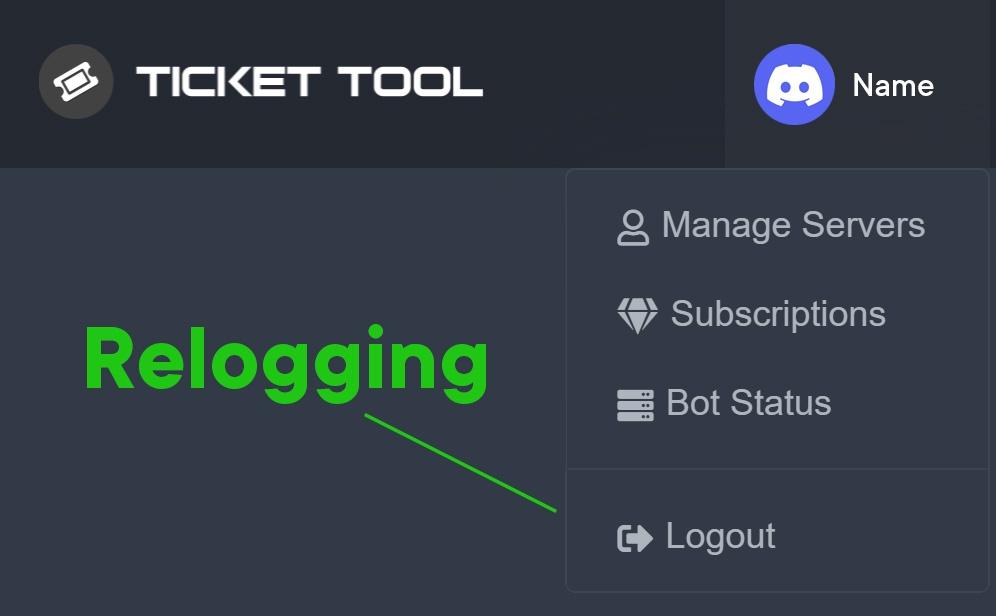 slender minnow
@dull goblet ^
dull goblet
got it!
 open anvil
You
every time I start the hacks and insert the key, my pc crashes. how can i solve?
R6
humble sequoiaBOT
⚠️ You're in the wrong place
We provide support for @pseudo glen discord bot and cannot help you with whatever issue you have.
- Please make sure to contact the appropriate Support Team.
If you don't have any further questions regarding our bot Ticket Tool, please close this ticket
solar lake
open anvil
You
every time I start the hacks and insert the key, my pc crashes. how can i so...
your whole pc?
 proud mountain
$help ping
copper owl
proud mountain
$help ping
use #🤖│bot-spam
proud mountain
copper owl
use <#910978476536905738>
sorry
 novel granite
Il y a des français ?
fallow ingot
$frticket
humble sequoiaBOT

L'équipe du support Français
Cher client,
Si vous avez besoin d'aide, ouvriez un ticket pour le support Français s'il vous plaît.
Allez au #🎫│make-a-ticket et tapez sur le button contenant l'emoji 🇫🇷
fallow ingot
@novel granite ^
novel granite
Oui
fallow ingot
humble sequoia
Lisez ceci
copper owl
they have a ticket open
jade topaz
Help me pls
copper owl
jade topaz
Help me pls
without context to your problem, we cant
so it would be advised to explain the issue
jade topaz
Why ?
 jade topaz
Why ?
jade topaz
jade topaz
Why ?
you have the false bot
 vestal owl
Hey! When a user tries to create a ticket it says "Warning you do not have perms to do this" What do I do? I have change the perms on the dashboard
 rose garnet
Perms
rose garnet
 vestal owl
it has admin
rose garnet
Administrator isn't required
rose garnet
vestal owl
Hey! When a user tries to create a ticket it says "Warning you do not have perms...
Have you tried to give manage channel perms
vestal owl
rose garnet
Have you tried to give manage channel perms
it has admin it doesnt need that the perms with tickettool are fine it isn't letting the user create one
copper owl
vestal owl
it isn't a problem with tickettool
it's a problem with your configuration
make sure you havent blacklisted any roles in your server configs page
vestal owl
i made it so all member roles can open tickers
vestal owl
I havem't
copper owl
send the server ID
rose garnet
@signal nymph invite bot via link in about me
or search for it in Google
and choose server
and then go to panel configs
jade topaz
Why?
 copper owl
jade topaz
Why?
copper owl
jade topaz
Why?
which bot do you have invited? premium or free?
 copper owl
okay, and which one do you have selected in the server configs page?
jade topaz
Here I want to send I can not
 copper owl
okay, and which one do you have selected in the server configs page?
copper owl
copper owl
okay, and which one do you have selected in the server configs page?
answer the question please
jade topaz
No, it worked, thank you
copper owl
👍
jade topaz

؟
الملف مايفتح
في احد يساعدني
Hi
The file does not open
Can someone help me
 feral portal
Is there a way to log transcripts and have them accessible in a channel AND send to people simultaneously?
copper owl
feral portal
Is there a way to log transcripts and have them accessible in a channel AND send...
with premium, you can have it sent to the user who opened the ticket only
feral portal
Ye I have that
copper owl
as a free user, you can only save them in the channel
copper owl
feral portal
Ye I have that
alright great
copper owl
yeah you can do both
copper owl
you dont have to choose one, you can have both active
feral portal
copper owl
check the logging options
Thank you Neptune’s
iron nightBOT
Gave +1 Rep to @copper owl
 copper owl
just make sure to enable the feature and also select when you want the action done
copper owl
feral portal
Thank you Neptune’s
no worries
feral portal
copper owl
just make sure to enable the feature and also select when you want the action do...
Can I do this from my phone
copper owl
feral portal
Can I do this from my phone
you can set it all up from your phone
like, the entire bot
feral portal
Oh ye and
copper owl
so yeah, doesnt matter what device
copper owl
feral portal
My photo isn’t loading on my ticket
make sure you're using something like imgur
feral portal
I use?
copper owl
where it's a direct link
copper owl
feral portal
Is there a file type u would recommend
yeah the link needs to be directly to the image
feral portal
Ye
copper owl
feral portal
I used gyazo
i havent used it so im not sure
copper owl
feral portal
I used gyazo and it still shows 3 dots
try imgur then
feral portal
Alright will do
copper owl
if that doesnt work, you can come back here or #🎫│make-a-ticket
feral portal
Sweettttt!
feral portal
copper owl
if that doesnt work, you can come back here or <#571706435449257997>
Also since I have premium I can photos to my ticket panels too right?
copper owl
yup
jade topaz
copper owl
just zoom in
وكيف اسويها
jade topaz
يعني
copper owl
حسب جوالك
copper owl
👍
jade topaz
طيب ماعرف اسوي
copper owl
حبيبي ما بتعرف تعمل zoom in ?
 untold heron
hello
jade topaz
ههههه
copper owl
حبيبي كبر الصورة بس
untold heron
can someone tell me why i can't find my server to manage it?
copper owl
untold heron
can someone tell me why i can't find my server to manage it?
log out and log back in the website
rose garnet
@jade topaz ههههه
jade topaz
 copper owl
اها
jade topaz
ماضبط
copper owl
في شي منو صح عندك
jade topaz
قلت لك كذا سالتك علشان اتاكد
jade topaz
copper owl
في شي منو صح عندك
كيف
copper owl
jade topaz
كيف
لأنو تأكدت الtranscript و منو هيك
jade topaz
يعني
untold heron
thanky!! @copper owl
copper owl
جرب استعمل غير google
jade topaz
جربت
copper owl
و شوف اذا في تعديل ع discord
copper owl
jade topaz
جربت
شو جربت؟
jade topaz
Brava and yandex
copper owl
عندك شي جهاز ثاني طيب؟
jade topaz
 jade topaz
copper owl
عندك شي جهاز ثاني طيب؟
jade topaz
copper owl
عندك شي جهاز ثاني طيب؟
لا
copper owl
jade topaz
انت عملتله download??
jade topaz
 jade topaz

 copper owl
انات جربت من عندي و اشتغل
jade topaz
ارسل لي
copper owl
ارسل ليك شو
jade topaz
صورة
copper owl
مفكرني عم كزب عليك يعني؟
copper owl
استنى
copper owl
ضبط او؟
jade topaz
 copper owl
ابعت الID السيرفر
copper owl
copper owl
ابعت الID السيرفر
^^
jade topaz
950081099546116185
humble sequoiaBOT
كيفية تعطيل بوت البريميوم
لتعطيل بوت البريميوم ، سيتعين عليك الانتقال إلى
Dashboard -> Server Configs -> Premium bot
ستظل ميزات البريميوم تعمل على البوت المجاني.
 copper owl
@jade topaz ^^
jade topaz
مافهمت
copper owl
شو ما فهمت؟
jade topaz
اه
copper owl
اقراء حبيبي
tribal cedar
 runic robin
are there any coupons out right now?
runic robin
are there any coupons out right now?
Not that I know of
 opaque spruce
Hola (Hi!)
rose garnet
solar lake
opaque spruce
Hola (Hi!)
Lmao
shut bolt
Hi
humble sequoiaBOT
You can check our documentation here.
You can also check #573205317870157855 for the basic setup.
Our documentation contains all the info you need about the bot to be able to setup and configure the bot however you like.
shut bolt
You can go and start with step 2 since you already have invited the bot
shut bolt
 timber forge
<@!518666147441278998>
timber forge
<@!518666147441278998>
There is no need to ping me mate
humble sequoiaBOT
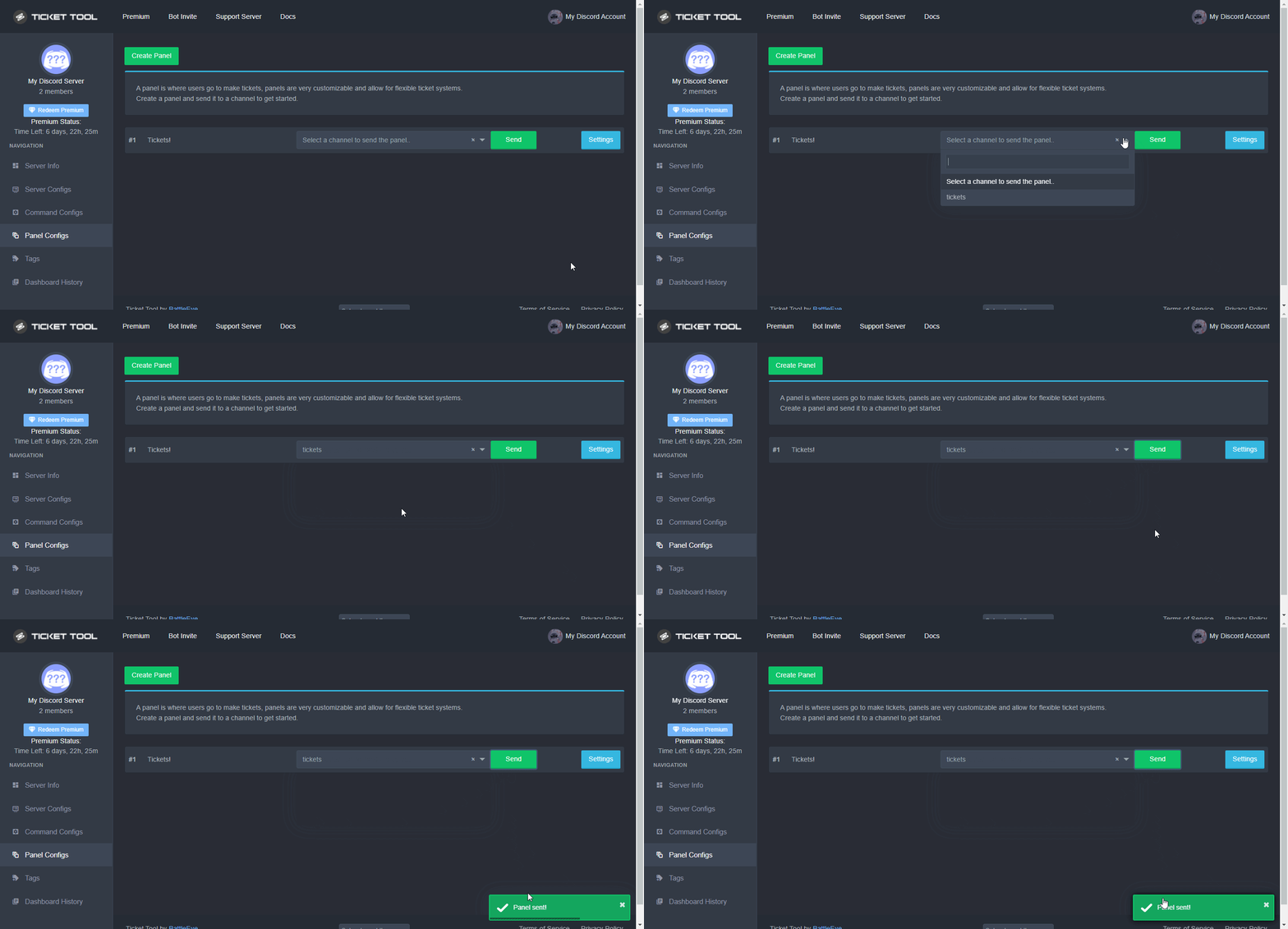
Sending a panel
Once you've created a panel on the dashboard you will need to send it to a channel using send on the dashboard
Select the channel you want your panel to be created in and click send.
For other questions checkout $help faq
An example of a sending a panel is shown below.
 shut bolt
timber forge
It says I haven’t given it permission to
shut bolt
timber forge
It says I haven’t given it permission to
Check that the bot has permissions to send messages in that channel, you can run $debug in that channel and the bot should respond with a permission diagnose
 shut bolt
timber forge
I’m trying not to
shut bolt
timber forge
I’m trying not to
I didn't get that, so you want to send the panel to that channel? Or to a different channel?
timber forge
I want to send it to a different channel
I just don’t know how
Or why it won’t let me send it to any channel
shut bolt
timber forge
I want to send it to a different channel
Run $debug in the channel you want to send the panel to
 shut bolt
Then the bot can't see the channel
shut bolt
Sure
timber forge
It worked
shut bolt
timber forge
i know what it is
Which was the problem?
timber forge
why the ticket bot wasn’t in the server
it’s because I hadn’t gave it permission to
shut bolt
Oh i see
shut bolt
Is it all working now?
timber forge
I’ll check if it lets me add the ticket
shut bolt
Sure, let me know how that goes
timber forge
Yess! It worked
 iron nightBOT
Gave +1 Rep to @shut bolt
shut bolt
Sure
 halcyon hatch
How to move the created ticket location?
shut bolt
halcyon hatch
How to move the created ticket location?
$help category
humble sequoiaBOT
How to set the open category
To set a open category go to the Dashboard -> Panel Configs -> Settings -> Category Options -> Category Open
shut bolt
halcyon hatch
that makes the new channel go underneath?
Yup, that makes it go in the category you pick
iron nightBOT
Gave +1 Rep to @shut bolt
shut bolt
Sure
halcyon hatch
how to auto-delete closed tickets?
shut bolt
halcyon hatch
how to auto-delete closed tickets?
You can make them to be automatically deleted after them being closed if you go into your General Options menu and mark as  the
the Two Step Ticket feature
 tidal birch
Hey Pablo, I'm having issues with my server in ticket tool dashboard after adding it to a new server, I've relogged several times and the server still doesn't show up on my manage server list
shut bolt
tidal birch
Hey Pablo, I'm having issues with my server in ticket tool dashboard after addin...
Hey mate
humble sequoiaBOT
Don't see your server in the dashboard?
You will possibly need to relog. Look below to see steps on how to relog.
How to relog in the Dashboard.
First, you will need to go to the dashboard. Once your there, click on your avatar on the top right. after you clicked it, you will see button that says Logout. You must click that. Once you have logged out, you can log back in.
Note:
You need one of these 3 things to access the dashboard.
1. Server Owner (Level: 6)
2. Server Administrator (Level: 4)
3. Dashboard Role (Level: 2)
:warning: You can check your level using $level on your Discord Server
User permission level with Ticket Tool
@User is permission level: 0 (User)
```» *If it shows that your permission is **0**, you don't have any of the above **3 things** to manage the dashboard.*


**See the picture below on how to relog:**Please check the Note of the embed
Let me know what the bot answers with if you run that command on your server
tidal birch
shut bolt
Please check the Note of the embed
It responds with 0, I am currently modding a server that is not my own but I have the perms necessary for what I need to do, so since I'm level 0 how do I get it to go up
Does the server owner need to do it?
 shut bolt
tidal birch
Does the server owner need to do it?
shut bolt
tidal birch
Does the server owner need to do it?
You will need to ask them to give you Administrator permission or to mark one of your roles as a dashboard role, more info on dashboard roles below
humble sequoiaBOT
Any role you put there will have full access to the ticket tool dashboard. The server owner and users with admin permissions already have access to the dashboard.
Be careful of which roles to put here
 tidal birch
shut bolt
You will need to ask them to give you `Administrator` permission or to mark one ...
tidal birch
shut bolt
You will need to ask them to give you `Administrator` permission or to mark one ...
Ok thank you
iron nightBOT
Gave +1 Rep to @shut bolt
shut bolt
Sure
pure raven
Hi I want to ask, if I'm not a premium user but I use the settings to add some buttons on the ticket system will it charge me money?
tidal birch
thanks @shut bolt
shut bolt
pure raven
Hi I want to ask, if I'm not a premium user but I use the settings to add some b...
You can use the bot for free! If you want to use a premium feature then you'll need to have either a premium subscription or the free trial enabled, we won't charge you unless you subscribe to
pure raven
shut bolt
You can use the bot for free! If you want to use a premium feature then you'll n...
owhh okay
thanks @shut bolt
iron nightBOT
Gave +1 Rep to @shut bolt
shut bolt
Sure
solar lake
Pablo, how do I become a support team person? I have started to learn how the ticket tool bot works and I love helping people. Just wondering if that is possible and how?
shut bolt
solar lake
Pablo, how do I become a support team person? I have started to learn how the ti...
$staffapps
humble sequoiaBOT
How do be I become a Support Member?
You can become a support member in 2 ways:
1. You can be really active in #🆘│community-support gain <@&799500225579712543> role and get chosen by a Manager
2. You can apply VIA our applications that would be sent in #📣│server-news
We currently have Support Teams for the following languages:
:flag_us: English
:flag_jo: Arabic
:flag_fr: French
:flag_de: German
:flag_br: Portuguese
:flag_es: Spanish.
shut bolt
This is mainly how to achieve it
solar lake
I can do all support team languages lmao
solar lake
Portuguese not really though
solar lake
Ok so just help people?
shut bolt
solar lake
Who are some managers? It says to be chosen by one
We got four of them, #918271177988907079
shut bolt
Sure
 silver hare
thanks @mystic hound
iron nightBOT
Gave +1 Rep to @mystic hound
silver hare
for helping me out
jade topaz
Whenever i try to add my bot to a server it addes but when i go to configure it in the dashboard it only shows 3 servers and those arent the ones i want to configure
humble sequoiaBOT
━━ moved to ticket ━━
 daring horizon
is there anyway to talk with some one
solar lake
daring horizon
is there anyway to talk with some one
Yeah
What question you got? I can answer
jade topaz
jade topaz
Whenever i try to add my bot to a server it addes but when i go to configure it ...
Maybe try relogging that's what ppl say
solar lake
jade topaz
Maybe try relogging that's what ppl say
Yeah, that’s the way that usually works
jade topaz
Ye
 kind hill
Bot offline?

 west lily
what do i need to add it keeps saying missing permission

 winter dust
kind hill
Bot offline?
winter dust
kind hill
Bot offline?
It's happening with me also
@eager cargo
@radiant moss
@wicked scroll
 onyx steppe
why is bot fown
west lily
winter dust
It's happening with me also
could taht be my problem too
 jagged bluff

 lyric oar
winter dust
lyric oar
winter dust
Don't know
 tardy moon
it keeps saying missing permissions, then i reset ticket tool my server disappeared
on the ticket tool website
winter dust
@radiant moss
winter dust
tardy moon
it keeps saying missing permissions, then i reset ticket tool my server disappea...
It's not showing to me
 untold pewter
winter dust
<@261346621369876501>
untold pewter
winter dust
<@261346621369876501>
stop spam pinging
winter dust
untold pewter
stop spam pinging
Okay
untold pewter
tardy moon
it keeps saying missing permissions, then i reset ticket tool my server disappea...
ticket tool is offline, that would be why
 vivid delta
untold pewter
ticket tool is offline, that would be why
vivid delta
untold pewter
ticket tool is offline, that would be why
Same
winter dust
untold pewter
ticket tool is offline, that would be why
Why it is offline?
vivid delta
and It keep saying bot error
untold pewter
winter dust
Why it is offline?
no idea but you can't do anything about it except waiting for it to get back up
winter dust
untold pewter
no idea but you can't do anything about it except waiting for it to get back up
Ok
west lily
untold pewter
no idea but you can't do anything about it except waiting for it to get back up
could u do a annocement when its back online
oh ur not mod nvm
untold pewter
west lily
could u do a annocement when its back online
check now
 glacial badger
jade topaz
glacial badger
jade topaz
Is the bot down?
glacial badger
yeap
 trail fox
yeah
west lily
untold pewter
check now
nothing
jade topaz
rip
trail fox
ripp
 nimble oracle
j
west lily
ITS BACK
glacial badger
no
 warped wind
ah thats what we're all here for huh
glacial badger
its back only for this server
 tawny plank
ok
runic robin
how come my mods can't close tickets? is there a setting I have change?
 lunar slate
Bot is down?
untold pewter
it's back online
lunar slate

 icy epoch
heloo
tawny plank
yes
jade topaz
IS it back on?
 glacial badger
yea, it's back
 glacial badger
no
novel granite


 brittle timber
ITS NOT WORKING
 halcyon mulch
not back for me
winter dust
Now also it's offline
glacial badger
the best is tickettool
winter dust
If we want to invite the bot to our server
It's important to have ownership?
Or it can be done with adminstrator
winter dust
I have that one but whenever i am going to invite that server doesn't came
tawny plank
Idk you must be lacking the perms to invite or some sort
ask the owner instead but we usually have the access to invite the bots
cause owner dont do much of the work
this perm must be on
 winter dust
Working.....
tawny plank
yes
glacial badger
it's back
icy epoch
i dont have acss to mt mange server. why?

 tired ferry
@pseudo glen
 lost cosmos
aa
tired ferry
Bot off 
jade topaz
how long do outages like this usually last?
lost cosmos
i was litterly setting up rn lmao
lost cosmos
jade topaz
how long do outages like this usually last?
an hour
jade topaz
alr
jade topaz
The bot is offline, when it would be online agn?
lost cosmos
kk
lost cosmos
e
jade topaz
offline again?
icy epoch
jade topaz
offline again?
yes
 honest kestrel
yea
jade topaz
jade topaz
offline again?
O that makes sense lol
honest kestrel
@pseudo glen
 hallow bone
@safe prairiepleas
 abstract flint
Why bot offline?
 vestal totem
Why is the bot offline on my discord server?
jade topaz
Bots up agaian for me
abstract flint
vestal totem
Why is the bot offline on my discord server?
This is on all servers
vestal totem
abstract flint
This is on all servers
Ok
vestal totem
abstract flint
This is on all servers
But not on this one @pseudo glen
jade topaz
jade topaz
can you guys help me please ?
Wh at do you need
jade topaz
jade topaz
Wh at do you need
my bot is offline when i invite him
can you help please ?
lost cosmos
the bots down
lost cosmos
shud be back on all servers too
 modern silo
Yall can shutup now its bk :)
lost cosmos
jade topaz
Mines back up but if you live in other places maby not for you
where do u live
not acutal location
just give itmezone or something
modern silo
Broo #💬│general-chat exist
vestal totem
I think its online again
abstract flint
All right, the bot works nicely
icy epoch
how i can ping a role in my server?

 strange tide
icy epoch
strange tide
icy epoch
ok thank you @strange tide
 crisp quiver
hello, is it possible to set slow mode to the opened ticket channel ?
 severe path
No
crisp quiver
ty
 late hound
Hello, can you help me from the bot, I don’t understand what channel is needed.
slender minnow
late hound
Hello, can you help me from the bot, I don’t understand what channel is needed.
What channel?
slender minnow
@quick cypress refer #546557408902905896, you shouldn't ping a support team member for help.
You can ask in here or just wait for someone to respond to your ticket (if you have made one through #🎫│make-a-ticket)
 quick cypress
ok
late hound
slender minnow
What channel?
For a ticket
slender minnow
late hound
For a ticket
the one through which the user opens a ticket?
tribal cedar
I'm also trying to figure out what he means and for some reason what perms is needed comes to mind.
slender minnow
what comes to mind is how do i send the channel to a specific channel?
late hound
slender minnow
the one through which the user opens a ticket?
Yes
slender minnow
late hound
Yes
if the panel's been set up then you can just run the command $panel <id> without the <> and id replaced by the panel id
severe path

slender minnow
uhmm...
humble sequoiaBOT
Warning: This channel isn't a ticket

 west shadow
._.
craggy geyser
Only works if you have set up command style tickets. Otherwise they open via panels like #🎫│make-a-ticket
There is no need for us to go to your server
 wispy breach
necesito ayuda
wispy breach
No me llega un retiro del 11 de febrero
solar lake
Estás hablando de recuperar el dinero? o algo más, realmente no entiendo tu problema.
@wispy breach
wispy breach
no hice un retiro a mi wallet el 11 de febrero y hasta ahora no llega
 robust sandalBOT
wispy breach
no hice un retiro a mi wallet el 11 de febrero y hasta ahora no llega
robust sandalBOT
wispy breach
no hice un retiro a mi wallet el 11 de febrero y hasta ahora no llega
 Nmop1995
I did not make a withdrawal to my wallet on February 11 and so far it does not arrive
 Spanish (es) → English (en)
wispy breach
Spanish (es) → English (en)
wispy breach
no, el retiro que realice de mi cuenta ya activa, no llega a mi wallet
solar lake
wispy breach
no, el retiro que realice de mi cuenta ya activa, no llega a mi wallet
el dinero no volvió a su cuenta?
humble sequoiaBOT
⚠️ Está en el lugar equivocado
Brindamos soporte para el bot de Discord @pseudo glen y no le podemos ayudar con el problema que presenta.
- Por favor asegúrese de contactar al Equipo de Soporte adecuado.
Si no tiene alguna duda relacionada a nuestro bot, Ticket Tool, por favor cierre este ticket.
 fallow ingot
@wheat torrent Claiming is a premium feature.
 wheat torrent
Ohh ok
fallow ingot
Sorry.
wheat torrent
Thx @fallow ingot
iron nightBOT
Gave +1 Rep to @fallow ingot
wheat torrent

fallow ingot
:)
wheat torrent
Ok another question
How can I do the panel but with buttons
Not reaction
@fallow ingot
humble sequoiaBOT
The new Discord Buttons allow for a much smoother and convenient experience. They reduce lag and work much better than emojis. With ticket tool you can edit all the buttons however you like! Buttons can show emojis, text and can have 4 different colors.
Where can I edit them?
Dashboard ➞ Panel Configs ➞ Settings ➞ Button Options ➞ Setting
iron nightBOT
Gave +1 Rep to @fallow ingot
humble sequoiaBOT
You can check our documentation here.
You can also check #573205317870157855 for the basic setup.
Our documentation contains all the info you need about the bot to be able to setup and configure the bot however you like.
fallow ingot

 stone prairie
aaron
fallow ingot
@stone prairie
stone prairie
can u help
fallow ingot
oop
fallow ingot
humble sequoia
take a look at what I just sent for you
fallow ingot
What with?
 mystic grail
is it possible to remove the log data and just have the embed for ticket logs?
(remove the message in the red circle)
 fallow ingot
mystic grail
is it possible to remove the log data and just have the embed for ticket logs?
(...
fallow ingot
mystic grail
is it possible to remove the log data and just have the embed for ticket logs?
(...
No you can't sorry.
 mystic hound
blame discord ^^
opaque spruce
.
rose garnet
@stone prairie invite primary bot to server that you want to set and then go to dashboard and then manage server that you want to set and then go to panel configs and then create panel
don't forget to make support team role
rose garnet
jade topaz
pls i need help
What do you want
 jade topaz
How can I do that

 rose garnet
Create ticket
jade topaz
I made one like this. I want to make two
 jade topaz
jade topaz
jade topaz
Such as:
rose garnet
jade topaz
I made one like this. I want to make two
Well create new panel
but turn off create button from it
jade topaz
I have made
jade topaz
rose garnet
Have you set multi panels
 rose garnet
2
jade topaz
click where?
 rose garnet
You need three panels
jade topaz
k
rose garnet
but third one shouldn't have create button
 rose garnet
jade topaz
I only want 2
rose garnet
jade topaz
I only want 2
To make 2 in one panel you need to make three panels
fallow ingot
Hey there @jade topaz
rose garnet
jade topaz
click where?
General
rose garnet
rose garnet
General
In third panel as well
humble sequoiaBOT
Multipanels are a premium feature that allow for a single panel with multiple buttons to open different tickets.
How to create a Multipanel
Premium users can combine multiple panels into one multipanel.
First, find the IDs of each panel you wish to combine. You can find them in your Panel Configs in the Dashboard
Next, send the multipanel to a channel using $panel [id1] [id2] {id3} ....
e.g. $panel 1 2 4 17 35 to combine panels 1, 2, 4, 17 and 35.
Up to 25 panels may be combined.
For a more convenient use of multipanels, you can now combine panels on the dashboard. This will allow you to directly send the multipanel from the dashboard or via the $panel ID command.
Where can I find this?
You can find this setting on the Dashboard -> Panel Configs -> Settings -> General Options
Note: if you're attaching all the panels to a panel called English, don't include English in the attached panels box (If you do this, it will create duplicate)
This will put all buttons from all of your panels on one message. The message is the panel message from the panel you're combining these panels in.
Note: This is a premium feature
jade topaz
ok thx
fallow ingot
anytime
rose garnet
rose garnet
In third panel as well
Well i have tried
fallow ingot
rose garnet
Well i have tried
Do you have an problem? I haven't seen your messages, so i'm not sure. Anything I can help with?
 finite phoenix
I need help pls
humble sequoiaBOT
We would love to help you, but if you don't tell us what you need help with we can't help you :(
copper owl
We're ticket tool support
so I'm not quite sure what you expect us to do
and alright then
 static widget
help
I can't see what people said after the ticket recovery, I think it's some kind of encryption
 jade topaz
Bro thats literally arabic characters 
 shut otter
Hello is there a way i can close all the tickets channel by one command

 tender tundra
I have questions about ticket took. Mine stuff already set and connected. But is there away I can make the conversation privately so other member don’t see our conversation when you are talking to one of your member ?
tender tundra
shut otter
Hello is there a way i can close all the tickets channel by one command
You’ll see emoji lock and emoji deleted
tribal cedar
tender tundra
I have questions about ticket took. Mine stuff already set and connected. But is...
You mean all members of your server can see tickets?
tribal cedar
shut otter
I don't want close every ticket step by step
There is no way to close multiple tickets
tender tundra
shut otter
I don't want close every ticket step by step
Ohhh it step by step
shut otter
Is there in future
tender tundra
tribal cedar
You mean all members of your server can see tickets?
Like said only role can see our conversation talking to members . But member can see our conversation talking to another member
It does give them everyone notifications what we be saying
tribal cedar
Try to edit the perms everyone gets in panel configs -> permission options
tribal cedar
shut otter
Is there in future
Not sure.
tender tundra
tribal cedar
Try to edit the perms everyone gets in panel configs -> permission options
Those 2
 tribal cedar
Sorry phone call out of no where
tender tundra
tribal cedar
Sorry phone call out of no where
Np lol
 tender tundra
Which one is to turn off?
tribal cedar
Read messages
For everyone open and closed perms
Then you won't have everyone in the server viewing your tickets
This will work on new tickets only
tender tundra
Mmm ima try it
tribal cedar
Just make sure it has 
tribal cedar
Manage channels means they can edit the channel settings.
tender tundra
Ohhhhh… wow ima do that too
 deft sluice
someone has the same problem as me?
 tribal cedar
deft sluice
someone has the same problem as me?
tribal cedar
deft sluice
someone has the same problem as me?
Update your discord app
humble sequoiaBOT
Update your discord App
Buttons are a relatively new addition to discord and don't work with some older versions of the app.
Please verify that you have the latest version of discord, by going to the app or play store.
Discord for the App Store
Discord for the Play Store


 glad plume
What's the debug command again?
tribal cedar
glad plume
What's the debug command again?
It's $debug
tribal cedar
tender tundra
Only member can’t open ticket lol
Check what roles you have listed as blacklisted roles
Screen shot that for me
glad plume
tribal cedar
It's $debug
Ty!
humble sequoiaBOT
Any role you assign as a blacklisted role won't be able to use commands or reactions.
Selecting a blacklisted role
Go to your Dashboard ➞ Server Configs. There you will find the option to select blacklisted roles.
Note: Don't forget to save.

 tribal cedar
 sullen hound
Add view and send perms to the ticket tool role for the channel your trying to send the panel to
sullen hound
i didn't understand (:
tender tundra
tribal cedar
Check what roles you have listed as blacklisted roles
I have 2 roles that are admin only .
tribal cedar
tender tundra
I have 2 roles that are admin only .
There shouldn't be anything listed in blacklisted roles
In server configs
sullen hound
can u show me what i have to do
tribal cedar
sullen hound
i didn't understand (:
I'm sorry I can't say it any other way
sullen hound
in something like videw