#🆘│community-support
1 messages · Page 391 of 1
 copper owl
if you go to the category options
you can input multiple Open and closed categories
so once category #1 is full, it goes to #2
 jade topaz
 👀
👀
jade topaz
copper owl
you can assign more than one category BTW
On ticket tool dashboard?
copper owl
yeah
jade topaz
You know where just see category open and closed ones
jade topaz
Oh, keep adding them up?
jade topaz
Do i need to send panel again once thats modified or it will update alone?
jade topaz
copper owl
update alone
Thanks again ❤️
 iron nightBOT
Gave +1 Rep to @copper owl
copper owl
anytime brother
 glossy sluice
Whoops, sorry for the slow response. We do have premium, not sure why I don't have the role in here, haha. Claiming a ticket a member has opened works fine, but a support person claiming a ticket they themselves opened doesn't work. Where would I change that setting? Searched high and low and couldn't find it haha
 fallow ingot
You can't change that setting, support can't claim their own ticket.
let me get you that premium role.
there you go
copper owl
glossy sluice
Whoops, sorry for the slow response. We do have premium, not sure why I don't ha...
Can I ask a few questions?
might have a work around to your issue
fallow ingot
oop, if anyone knows its neptune..
glossy sluice
Sure
copper owl
glossy sluice
Sure
is the support member opening the ticket themselves only to add the user they're trying to talk to afterwards?
glossy sluice
copper owl
is the support member opening the ticket themselves only to add the user they're...
Yes
copper owl
glossy sluice
Yes
do you have a private staff channel where you guys use bot commands?
copper owl
glossy sluice
Yes
are you currently using the Command Style Ticket feature anywhere on your server?
glossy sluice
copper owl
are you currently using the Command Style Ticket feature anywhere on your server...
No? Only for $claim and $add, we don't use it for creating tickets currently.
copper owl
glossy sluice
No? Only for $claim and $add, we don't use it for creating tickets currently.
enable the feature, have it monitor your private bot commands channel, and use $new <user id> to force open a ticket for a user, the support member will be able to claim the ticket seeing as TT will open the ticket as if the user was the one to open it
work around for your issue 👍
glossy sluice
Ah, very nice workaround. Now to try to teach old dogs new tricks haha. We've just started using claiming, previously they would rename the ticket to like "charles-support-1234" and drag it where they wanted it haha.
Good game of 20 questions, very successful!
 copper owl
glossy sluice
Good game of 20 questions, very successful!
copper owl
glossy sluice
Good game of 20 questions, very successful!
Let me know if you'd like to play again, I'd love to :)
copper owl
glossy sluice
Ah, very nice workaround. Now to try to teach old dogs new tricks haha. We've ju...
I'd suggest sitting down and looking at all the features
Maybe going through the documentation
there's probably a lot more you'd like to use but still aren't aware of
fallow ingot
i didnt think of the $new command
glossy sluice
I think the only features we're not really using right now is multi-panels (don't really have a use for them) and tags as we have our own bot with slash commads that handles that for us 🙂
I'll take another look though in case I've missed anything
copper owl
glossy sluice
I think the only features we're not really using right now is multi-panels (don'...
Sounds good :)
Have a good one friend o/
Until our next game of 20 questions LMFAO
copper owl
fallow ingot
i didnt think of the $new command
a very good tool if you want to force open tickets for people so you talk to them. I've used them in every server i introduced TT to
glossy sluice
Haha, more of a feature suggestion but it would be awesome to have a graph on the dashboard of tickets created by day/week/month/year.
Members are always astonished when we tell them how many tickets we have open on an average day lol. Would be cool to show them some charts of ticket growth over time
copper owl
glossy sluice
Haha, more of a feature suggestion but it would be awesome to have a graph on th...
Stats are a planned feature 👀
Patience though, no set ETA for the update seeing as we only have one dev
glossy sluice
Ah yeah I get that. I'm the solo dev for our community + do most community management stuff. People don't realize there's only 24 hours in a day.
copper owl
glossy sluice
Ah yeah I get that. I'm the solo dev for our community + do most community manag...
yeah.. people online and patience don't mix well sometimes.
fallow ingot
copper owl
a very good tool if you want to force open tickets for people so you talk to the...
same i didnt know that's what they were wanting to do tho. So good thinking
glossy sluice
4,700 tickets in 13 months. It's not a ton compared to some places I'm sure, but boy is it exhausting lol.
copper owl
fallow ingot
same i didnt know that's what they were wanting to do tho. So good thinking
well technically I dont think they wanted to do that, but it's definitely an effective workaround from adding the user yourself. Force TT to do it >:)
copper owl
glossy sluice
4,700 tickets in 13 months. It's not a ton compared to some places I'm sure, but...
jesus
 slow coral
copper owl
slow coral
copper owl
Assign a transcript channel
You can do so by going to the panel configs page, then the panel settings, then logging options
option to choose a transcript channel is right there
 cobalt garden
I can't open a ticket on my own server
copper owl
why not? any error messages?
cobalt garden
it says invalid form body
cobalt garden
Thank you
copper owl
anytime
copper owl
faster and more stable
 indigo zodiac
copper owl
faster and more stable
indigo zodiac
copper owl
faster and more stable
is it free?
 tidal hinge
😐
indigo zodiac
o-o
i mean i invited it to my server...
for free
so............
would it work?!
copper owl
is the paid version of Ticket Tool free?
copper owl
indigo zodiac
i mean i invited it to my server...
yeah but without a subscription , it wont do anything
indigo zodiac
this is what i have
 copper owl
indigo zodiac
this is what i have
copper owl
indigo zodiac
this is what i have
Yup. Everyone does.
indigo zodiac
copper owl
Yup. Everyone does.
so it wont work right?
copper owl
indigo zodiac
so it wont work right?
yeah.. The paid version of ticket tool wont work for free
indigo zodiac
copper owl
yeah.. The **paid version** of ticket tool wont work for **free**
alr thx
iron nightBOT
Gave +1 Rep to @copper owl
 hollow lava
Is there a premium bot?
copper owl
yes there is
hollow lava
copper owl
yes there is
Can you wish it mention
hollow lava
copper owl
<@722196398635745312>
This is normal, not premium
copper owl
No it isn't lol
jade topaz
why can't I create a ticket?
 copper owl
Literally says in the name
copper owl
jade topaz
why can't I create a ticket?
old discord client
Update it or delete and reinstall discord
jade topaz
copper owl
Update it or delete and reinstall discord
Thank you very much
iron nightBOT
Gave +1 Rep to @copper owl
hollow lava
copper owl
No it isn't lol
Look to the original name
copper owl
hollow lava
Look to the original name
I'm not sure why we're debating this...
That is the premium bot
the free one is @pseudo glen
They both have different numbers but the same name
 copper owl
Read what I said again
because at this point we'll be going back and forth.
If you have any other questions, feel free to ask.
 regal fox
jade topaz
why can't I create a ticket?
regal fox
jade topaz
why can't I create a ticket?
had this exact issue. glad I checked this chanel out before asking.
didn't realise I was also outdated on discord aha
jade topaz
Yep
 humble sequoiaBOT
Update your discord App
Buttons are a relatively new addition to discord and don't work with some older versions of the app.
Please verify that you have the latest version of discord, by going to the app or play store.
Discord for the  App Store
Discord for the  Play Store
 zenith ferry
hi everyone! When people open support tickets I have a problem that they don't see the message history. How do I fix that?
 shut bolt
zenith ferry
hi everyone! When people open support tickets I have a problem that they don't s...
shut bolt
zenith ferry
hi everyone! When people open support tickets I have a problem that they don't s...
Hey there
$help perms
humble sequoiaBOT
How to set the permissions for tickets
To set a change permissions go to the Dashboard -> Panel Configs -> Settings -> Permission Options
 shut bolt
Go into the User Opened Permissions
Mark as  the Read Message History
And Save changes
zenith ferry
shut bolt
Go into the User Opened Permissions
thank you so much!
iron nightBOT
Gave +1 Rep to @shut bolt
shut bolt
Sure 
 humble sequoiaBOT
For a more convenient use of multipanels, you can now combine panels on the dashboard. This will allow you to directly send the multipanel from the dashboard or via the $panel ID command.
Where can I find this?
You can find this setting on the Dashboard -> Panel Configs -> Settings -> General Options
Note: if you're attaching all the panels to a panel called English, don't include English in the attached panels box (If you do this, it will create duplicate)
This will put all buttons from all of your panels on one message. The message is the panel message from the panel you're combining these panels in.

 Note: This is a premium feature
 snow solar
many button on one panel
shut bolt

snow solar
shut bolt
<:this:894279341108772914>
i understand ._.
shut bolt
snow solar
i understand ._.
I just do that with everyone lol
snow solar
shut bolt
I just do that with everyone lol
and? whate is the sulution
shut bolt
What do you mean?
shut bolt
humble sequoia
This is how to do it lol
snow solar
i understand it hhh
shut bolt
Then what do you mean "whate is the sulution"
 robust sandalBOT
snow solar
الحل
robust sandalBOT
snow solar
الحل
 ,Wàssim.
Solution
 Arabic (ar) → English (en)
shut bolt
Arabic (ar) → English (en)
shut bolt
/ar Yeah, that's the solution lol
robust sandalBOT
نعم ، هذا هو الحل لول
English (en) → Arabic (ar)
snow solar
but now how io can do this
 shut bolt
humble sequoia
shut bolt
humble sequoia
This is how to do it
shut bolt
humble sequoia
Read this, that's how to do it
snow solar
LOL I stand it hhhh
shut bolt
I don't get what do you mean, you asked how to do it, that's how to do it, you ask again how to do it, I refer you to the explanation...
snow solar
shut bolt
I don't get what do you mean, you asked how to do it, that's how to do it, you a...
شكرا لك لقد عرفت
robust sandalBOT
snow solar
شكرا لك لقد عرفت
,Wàssim.
Thank you, I knew.
Arabic (ar) → English (en)
shut bolt
Sure I guess
 fast trout
humble sequoiaBOT
fast trout
humble sequoiaBOT

⚠️ You're in the wrong place
We provide support for @pseudo glen discord bot and cannot help you with whatever issue you have.
- Please make sure to contact the appropriate Support Team.
If you don't have any further questions regarding our bot Ticket Tool, please close this ticket
 jade chasm
Hello! Just want to ask if it's allowed to have multiple roles to have access on the tickets?
 twin nest
I can't access the dashboard, but the bot and myself have admin privs
twin nest
twin nest
I can't access the dashboard, but the bot and myself have admin privs
scratch this, its a relog thing
fallow ingot
jade chasm
Hello! Just want to ask if it's allowed to have multiple roles to have access on...
Sure just add the roles you want to be able to see tickets to the Support Team. Or you could add them as additional roles.
jade chasm
fallow ingot
Sure just add the roles you want to be able to see tickets to the Support Team. ...
Saw it already. Thanks for the reply!
iron nightBOT
Gave +1 Rep to @fallow ingot
fallow ingot
Oh okay, anytime.
 gray star
fallow ingot
gray star
fallow ingot
@gray star FYI use commands in #🤖│bot-spam this channels if you need support
 plain dock
Hey
 tight wigeon
whats this mean?
Failed: Invalid Form Body components[0].components[0].emoji.id: Invalid emoji components[0].components[2].emoji.id: Invalid emoji
THANK YOU
oop
caps lock
now a real answer?
tight wigeon
thank you both for 'trying' / sarcasm
its been sorted
fallow ingot
Okay.
fallow ingot
plain dock
How do I add the bot
Discord
Discord is the easiest way to communicate over voice, video, and text. Chat, hang out, and stay close with your friends and communities.
Update your discord, if your discord has the latest version then delete and reinstall.
humble sequoiaBOT

Don't see your server in the dashboard?
You will possibly need to relog. Look below to see steps on how to relog.
How to relog in the Dashboard.
First, you will need to go to the dashboard. Once your there, click on your avatar on the top right. after you clicked it, you will see button that says Logout. You must click that. Once you have logged out, you can log back in.
Note:
You need one of these 3 things to access the dashboard.
1. Server Owner (Level: 6)
2. Server Administrator (Level: 4)
3. Dashboard Role (Level: 2)
:warning: You can check your level using $level on your Discord Server
User permission level with Ticket Tool
@User is permission level: 0 (User)
```» *If it shows that your permission is **0**, you don't have any of the above **3 things** to manage the dashboard.*
**See the picture below on how to relog:**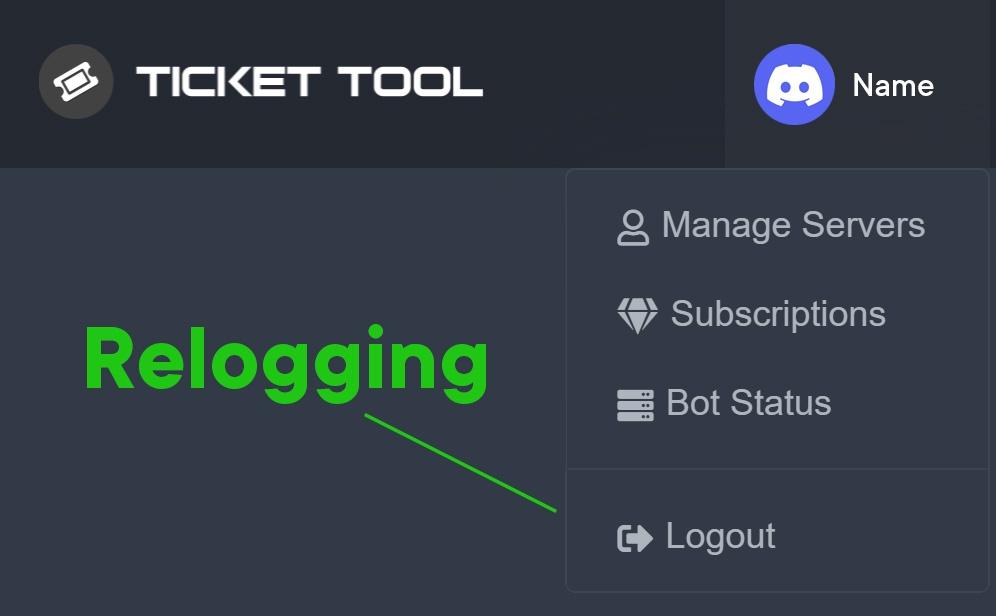 fallow ingot
@barren grail ^^
 barren grail
need help, bot joined on my server but i dont see in the manage servers
fallow ingot
barren grail
need help, bot joined on my server but i dont see in the manage servers
Read the embed I just sent.
barren grail
fallow ingot
Read the embed I just sent.
thanks
iron nightBOT
Gave +1 Rep to @fallow ingot
 storm basin
Guys
How to setup that when you open a ticket that ticket tool pings a specific role
jade topaz
djecooooooooooooooooooooo volite li vi pilaaaaaaaaaaaaaaaaaaaaaaaaaaaaaavvvvvvvvvvvvvvvvv
alooooooooooooooooo
 fallow ingot
$help ping
humble sequoiaBOT
How to make Ticket Tool ping a role
To make ticket tool ping a role when a ticket is opened, go to the Dashboard -> Panel Configs -> Settings -> Ticket Options -> Ticket Message -> Message Text and do this:
{@Role name} This is case sensitive and the role must have @mentions enabled
 fallow ingot
@storm basin ^^
fallow ingot
barren grail
thanks
anytime
 ocean pasture
hey there
 hollow kiln
$help tkcket
humble sequoiaBOT
Help Options
$help commands - Information on commands
$help setup - Information on bot setup
$help faq - Frequently asked questions
hollow kiln
$help faq
humble sequoiaBOT
====== FAQ ======
If a question interests you run the command to see the answer.
Q: What is the prefix and how do I change it?
A: $help prefix
Q: How do I let my support team see into a ticket?
A: $help support
Q: How do I make a ticket ping my support when it's created?
A: $help ping
Q: How do I set a transcript channel?
A: $help transcript
Q: How do I limit the number of tickets a user can create?
A: $help limit
Q: How do I set what category tickets are created in?
A: $help category
Q: How do I set what category tickets are moved to when closed?
A: $help closed
Q: How do I set a custom reaction?
A: $help reaction
Q: How do I set the permissions for the tickets?
A: $help perms
Q: How do I create a panel?
A: $help panel
Q: How do I get the panel in my discord?
A: $help send
Q: How do I add or remove users from a ticket?
A: $help add
Q: Ticket Tool isn't responding to my commands, How do I fix it?
A: $help offline
Q: How does the claim command work?
A: $help claim
hollow kiln
$help panel
humble sequoiaBOT
Creating a panel
To create a panel we are going to need to head over to the panel configs on the dashboard
Once at the dashboard we will need to click Create Panel
Enter a panel name (Fill in any optional settings you want)
Click Create Panel and your ready to get started with configuring your panel
An example of a creating a panel is shown below.
 hollow kiln
$help perms
humble sequoiaBOT
How to set the permissions for tickets
To set a change permissions go to the Dashboard -> Panel Configs -> Settings -> Permission Options
hollow lava
$help premium
humble sequoiaBOT
Help Options
$help commands - Information on commands
$help setup - Information on bot setup
$help faq - Frequently asked questions
 slender minnow
@hollow lava @hollow kiln you guys should use bot commands in #🤖│bot-spam
hollow kiln
Ok sorry
 knotty bone
$help ping
humble sequoiaBOT
How to make Ticket Tool ping a role
To make ticket tool ping a role when a ticket is opened, go to the Dashboard -> Panel Configs -> Settings -> Ticket Options -> Ticket Message -> Message Text and do this:
{@Role name} This is case sensitive and the role must have @mentions enabled
barren grail
There is some option that when creating the ticket contact options come out, for example (1-Talk to a staff, 2-Make a ban appeal, etc)
fallow ingot
barren grail
There is some option that when creating the ticket contact options come out, for...
that's not possible.
barren grail
fallow ingot
that's not possible.
and whith premium?
fallow ingot
it's still not possible with Ticket Tool.
 mild talon
$help panel
humble sequoiaBOT
Creating a panel
To create a panel we are going to need to head over to the panel configs on the dashboard
Once at the dashboard we will need to click Create Panel
Enter a panel name (Fill in any optional settings you want)
Click Create Panel and your ready to get started with configuring your panel
An example of a creating a panel is shown below.
 halcyon marlin
hi thanks thats work, yes 1 other thing
ive edited the panel
added the bot to a channel
now ive tried to make a new channel, send the bot to the channel its saying it doesnt have permisson
shut bolt
halcyon marlin
now ive tried to make a new channel, send the bot to the channel its saying it d...
Use $debug to check which permissions the bot can be missing on that channel
shut bolt
 turbid yacht
$help category
turbid yacht
$help category
If you are going to use commands please use #🤖│bot-spam
turbid yacht
shut bolt
If you are going to use commands please use <#910978476536905738>
I'm sorry.
shut bolt
turbid yacht
I'm sorry.
No problem
jade topaz
is it possible to add the same panels to another server without adding it to the panel config 1 by 1. as in a copy and paste type of thing?
shut bolt
jade topaz
is it possible to add the same panels to another server without adding it to the...
Yup!
humble sequoiaBOT
Backup and Restore allows you to transfer your premium status, panels, tags, and all settings to a new server.
You can also use it to keep a backup of your settings incase you need to suddenly move servers. We suggest you keep this backup key somewhere safe, incase your server is deleted. You will want to copy the whole key.
First, go to your dashboard, then Server Configs and generate a new backup key by pressing the green button. Now, a key should be generated in the box above. You may need to refresh the page to see this.
Once you have your backup key, navigate to the same page on the new server. Copy the key on the second field.
Now you can choose what you want to copy. Finally, press the green “Restore Configs” button.
 shut bolt
Check our backup feature
jade topaz
thanks @shut bolt
iron nightBOT
Gave +1 Rep to @shut bolt
shut bolt
Sure
 fading terrace
$secret
shut bolt
?
 tribal cedar
I supposed it was a secret
 tight needle
Hello everyone, I joined a server and created a ticket and accidentally left the server, now that Im rejoined I can not creat another ticket due to my last open ticket, anyway I can close the ticket without waiting 72hrs?
 wispy epoch
What extra stuff can you get with the 'premium' ticket tool

 coarse merlin
Is there a way to automatically give the person that opened a ticket the transcript of the ticket after the ticket has been closed?
 azure trout
tickets working again for me
humble sequoiaBOT
 Faster Premium Bot
Automatic Transcripts
Full Customization
Custom Buttons
Direct Messages
Ticket Automation
Multipanels
Premium Support
You can purchase premium here:
Price
$6 - Monthly
$66 - Yearly
 Premium
 forest goblet
@wispy epoch ⬆️
@azure trout @fluid gulch Please update your Discord app, you appear to have an outdated version. That should solve your issue.
 fluid gulch
nah my discord was updated, it’s working now but it showed the bot as offline
forest goblet
coarse merlin
Is there a way to automatically give the person that opened a ticket the transcr...
That's a premium feature that can be enabled through Panel Configs > Settings > Logging Options > Direct Message Transcript on the dashboard.
forest goblet
fluid gulch
nah my discord was updated, it’s working now but it showed the bot as offline
Apparently a shard was restarted then, sorry for the inconvenience.
coarse merlin
forest goblet
That's a premium feature that can be enabled through **Panel Configs > Settings ...
Aah, I see. Thanks for the info.
iron nightBOT
Gave +1 Rep to @forest goblet
forest goblet
You're welcome!
 burnt quest
Hi, is it possible to get tickettool to automatically add a role to anyone who opens a ticket from a specific panel?
copper owl
No
burnt quest
ok thank you
wispy epoch
forest goblet
<@638298572093128724> ⬆️
Oh ok, sorry I was busy
forest goblet
No worries
 cyan stream
It’s me open the ticket 🎫
 wary verge
how do i change the prefix
 gilded verge
wary verge
how do i change the prefix
gilded verge
wary verge
how do i change the prefix
Go to your dashboard, choose your server and click "Server Configs". There you will see "Command Prefix" and change there.
 tawny cypress
how can i set a log channel for the ticket?
gilded verge
tawny cypress
how can i set a log channel for the ticket?
Go to the settings of the panel you have created and expand "Logging Options".

 jagged oriole
How can I fix this?
 copper owl
by updating your discord client
copper owl
there isnt really another way of saying that...
you update your discord. The error is caused because you have an old version of discord
jagged oriole
Isee
I can open tickets someone sent that to me.
Thanks you
Thanks @copper owl
iron nightBOT
Gave +1 Rep to @copper owl
 tranquil cairn
thank you @copper owl 10/10 great service and a super fast response
iron nightBOT
Gave +1 Rep to @copper owl
slender minnow
You can open a ticket by clicking the buttons attached to the response of the bot.
To set the bot, refer the docs (link's given below)...
humble sequoiaBOT
iron nightBOT
Gave +1 Rep to @slender minnow
 strong lance
Hi, please help. Why I cant set the premission to close channel? BTW im the owner...
fallow ingot
strong lance
**Hi, please help. Why I cant set the premission to close channel? BTW im the ow...
What do you mean?
Are you meaning to edit close ticket permissions?
strong lance
Yes, I set it, But I cant close my own ticket
fallow ingot
strong lance
Yes, I set it, But I cant close my own ticket
Run $close in the ticket.
humble sequoiaBOT
ᅠ
@pseudo glen requires the following permissions:
Add Reactions
Read Channels
Send Messages
Manage Messages
Embed Links
Attach Files
Read History
Manage Roles
To change the role permissions, you can go to your Discord Server ➞ Server Settings ➞ Roles ➞ @Ticket Tool
To change the channel permissions, you can go to your Channel Settings ➞ Permissions ➞ Ticket Tool
ᅠ
Note:
You can give Ticket Tool Administrative Permissions instead of all the permissions listed above, but it's entirely optional and NOT necessary.
 strong lance


 fallow ingot
strong lance
fallow ingot
strong lance
Run $debug in your server and tell me once you’ve done it.
 fallow ingot
So it seems to be working
strong lance
But what is it? In the bottom?
Why its not delete the channel?
OHHHHH. Its work
Thanks
But why its not tag the staff?
fallow ingot
You need to click the delete button. Or you can run $delete
fallow ingot
strong lance
But why its not tag the staff?
It did tag staff…
strong lance
I mean, it ping the @jade topaz but its just in the screen, and its not ping and the staff dont get notifications about the ping
strong lance
fallow ingot
It did tag staff…
I know, but why is the massage is not yellow? And when I tag you or me, its yellow
@fallow ingot
fallow ingot
Changing the colour is a premium feature
Resolved in dms ^^
(User was muted for image spam)
 golden fossil
Hello
 serene fiber
Why can't I open a ticket if I closed another one?
slender minnow
serene fiber
Why can't I open a ticket if I closed another one?
if you already have a ticket open and if you cannot open another while the previous one is still open then its bcz the server staff has set up the bot to restrict the max number of open tickets per user
serene fiber
slender minnow
if you already have a ticket open and if you cannot open another while the previ...
I had one open but then I closed it and still can't open a new one
slender minnow
serene fiber
I had one open but then I closed it and still can't open a new one
what sort of response do you get while opening a ticket? can you share a screenshot if possible?
serene fiber
slender minnow
what sort of response do you get while opening a ticket? can you share a screens...

Bottom
slender minnow
you already have a ticket open
make sure that you have closed the ticket before opening a new ticket
serene fiber
It is closed

There's normally a ticket channel
I dmed the bot the glitch reset command but it didn't respond
@slender minnow
fallow ingot
serene fiber
It is closed
Run $delete in the ticket. Then try opening a new one.
serene fiber
fallow ingot
Run `$delete` in the ticket. Then try opening a new one.
I can't chat in the channel
 lethal apex
Why
 slender minnow
fallow ingot
Run `$delete` in the ticket. Then try opening a new one.
slender minnow
fallow ingot
Run `$delete` in the ticket. Then try opening a new one.
they cannot open a new one and the old one is problem hidden
@serene fiber can you ask the respective server staff to close your ticket for you as you may not have the perm to view the ticket channel.
fallow ingot
slender minnow
they cannot open a new one and the old one is problem hidden
I thought they were the owner :/
humble sequoiaBOT
⚠️ You're in the wrong place
We provide support for @pseudo glen discord bot and cannot help you with whatever issue you have.
- Please make sure to contact the appropriate Support Team.
If you don't have any further questions regarding our bot Ticket Tool, please close this ticket
fallow ingot
@jade topaz ^
slender minnow
fallow ingot
I thought they were the owner :/
nope they aren't
atleast thats what can be assumed from the screenshot
slender minnow
jade topaz
ß
You are in the wrong server to ask that question.
jade topaz
@slender minnow can you sent me the server ?
slender minnow
i do not have the link to the server, and please do not ping me unless its really important
jade topaz
oh ok
 proven yoke
shut bolt
proven yoke
shut bolt
$help support
humble sequoiaBOT
How to let support team see into a ticket
About support roles
A support role lets your support team see into tickets with out having to add them manually to each and every ticket.
You can add as many support roles as you like per panel.
NOTE that the way discord works all admins can see into tickets regardless of this.
How to set a support role
To set a Support role go to the Dashboard -> Panel Configs -> Settings -> General Options -> Support Team Roles.

NOTE that the support role will not be able to see into tickets that are already created..
 tepid valve
How do I set the bot so that when someone closes the ticket it doesnt get deleted
shut bolt
Enable the Two Step Ticket inside the general options menu (panel's settings)
jade topaz
can i please make a ticket?
i dropped my picaxe on accident and somone picked it up, but won't give it back
humble sequoiaBOT
⚠️ You're in the wrong place
We provide support for @pseudo glen discord bot and cannot help you with whatever issue you have.
- Please make sure to contact the appropriate Support Team.
If you don't have any further questions regarding our bot Ticket Tool, please close this ticket
 smoky blaze
How can I make it to where when a ticket is opened it pings staff?
fallow ingot
$help ping
humble sequoiaBOT
How to make Ticket Tool ping a role
To make ticket tool ping a role when a ticket is opened, go to the Dashboard -> Panel Configs -> Settings -> Ticket Options -> Ticket Message -> Message Text and do this:
{@Role name} This is case sensitive and the role must have @mentions enabled
fallow ingot
@smoky blaze ^
smoky blaze
thanks!
 stuck crater
also, if we have different panels for different types of tickets, can we limit to one ticket only across all categories ? and not one for each
some people open tickets for all categories for no reason...
humble sequoiaBOT
Unlike the regular Ticket Limit, the global limit will limit the amount of tickets a user can create at the same time for ALL Panels. When a ticket is closed again, the limit resets for that user.
To customize it head over to your Dashboard ➞ Server Configs ➞ Global Ticket Limit
Note:
This is not a limit for how many tickets a user can open at all times or how many tickets you can have open on the server in total. This is just a limit per user for open tickets.
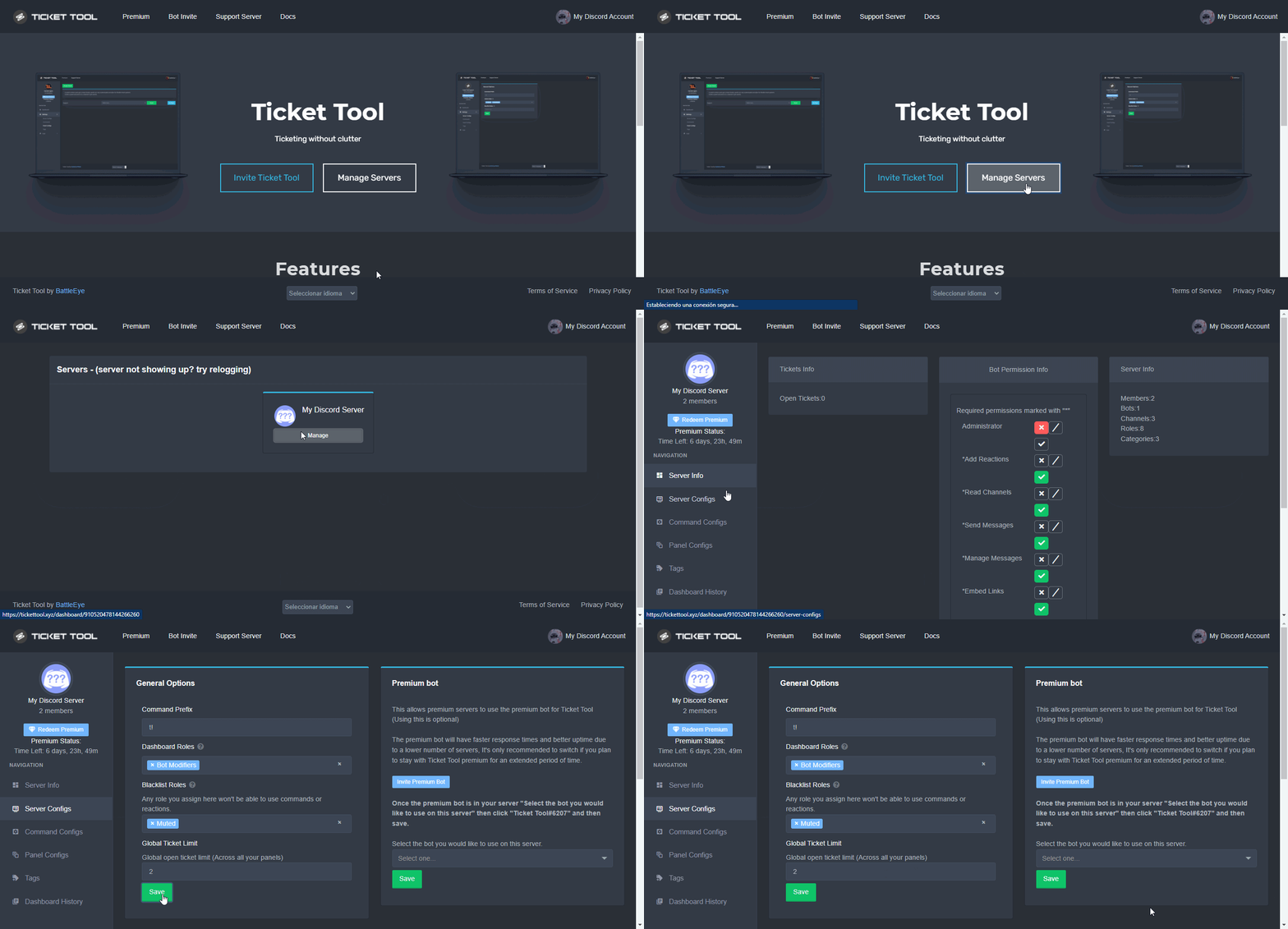 fallow ingot
^
iron nightBOT
Gave +1 Rep to @fallow ingot
fallow ingot
stuck crater
also, where can i limit who can open a type of ticket ?
Go to the Dashboard > Panel Configs > Settings > Button Options > Create ticket settings and disable the @everyone role then add the role you want to allow to open tickets.

 dim sand
Is there a way that once the ticket has been closed it will add a role to the person who created the ticket? Or do we have to hand-add the role?
jade topaz
Can you make it so a ticket closes auto if nobody types in a speciffic amount of time?
shut bolt
dim sand
Is there a way that once the ticket has been closed it will add a role to the pe...
Nope
stuck crater
fallow ingot
Go to the Dashboard > Panel Configs > Settings > Button Options > Create ticket ...
❤️
dim sand
shut bolt
Nope
Okay, thank you! Just wanted to make sure :)
iron nightBOT
Gave +1 Rep to @shut bolt
fallow ingot
jade topaz
Can you make it so a ticket closes auto if nobody types in a speciffic amount of...
No, but it’s planed.
shut bolt
dim sand
Okay, thank you! Just wanted to make sure :)
No problem
smoky blaze
When someone tries to open a ticket it says they dont have permission
how do I change that?
fallow ingot
Make sure their is no blacklisted role set.
humble sequoiaBOT
Any role you assign as a blacklisted role won't be able to use commands or reactions.
Selecting a blacklisted role
Go to your Dashboard ➞ Server Configs. There you will find the option to select blacklisted roles.
Note: Don't forget to save.
 fallow ingot
@smoky blaze ^
smoky blaze
thanks
fallow ingot
Sure, anytime.
 bronze cairn
will open a ticket but anyone encounter a wrong form type error? regular user in our sever cant seem to get button to work
shut bolt
bronze cairn
will open a ticket but anyone encounter a wrong form type error? regular user in...
You mean "Invalid Body Form" error?
bronze cairn
shut bolt
You mean "Invalid Body Form" error?
He cant seem to recreate the error message but thinks it said Invalid Form Type, but could be wrong. says buttons not responding now, they are working fine for me but im admin
shut bolt
bronze cairn
He cant seem to recreate the error message but thinks it said Invalid Form Type,...
Is this user on a mobile device?
bronze cairn
shut bolt
Is this user on a mobile device?
I believe so yes
humble sequoiaBOT
Update your discord App
Buttons are a relatively new addition to discord and don't work with some older versions of the app.
Please verify that you have the latest version of discord, by going to the app or play store.
Discord for the App Store
Discord for the Play Store
shut bolt
This is a problem that recently happened with mobile Discord
Ask them to update their app
And that should fix it
bronze cairn
ah, ok will do
shut bolt
If not, try them to reinstall the app
 wide marsh
Guys do categories have limit to number of channels?
Cause ticket tool did not make channels in the category neeeded
Am I seeing bugs which I have never seen or wot 👀
Like ticket tool did not move so many tickets yesterday to the closed tickets category and around 15 tickets made in no category...
Does this happen when so many tickets are made? Or wot cause never seen this
 tawdry eagle
wide marsh
Guys do categories have limit to number of channels?
tawdry eagle
wide marsh
Guys do categories have limit to number of channels?
Discord limit is 50 channels in a category
 radiant moss
$help perms
humble sequoiaBOT
How to set the permissions for tickets
To set a change permissions go to the Dashboard -> Panel Configs -> Settings -> Permission Options
radiant moss
Give them the attach files permissions
iron nightBOT
Gave +1 Rep to @radiant moss
radiant moss

Yes, go into the panel settings tho under permissions
Press the three lines on the top left and go to panel configs
iron nightBOT
Gave +1 Rep to @radiant moss
wide marsh
tawdry eagle
Discord limit is 50 channels in a category
Hmm, ok that's the reason ticket tool might be breaking 0ut
shut bolt
wide marsh
Hmm, ok that's the reason ticket tool might be breaking 0ut
Assign an overflow category and that will make that new tickets get placed there in case the main one is full
https://i.imgur.com/Z3TGbGu.gif
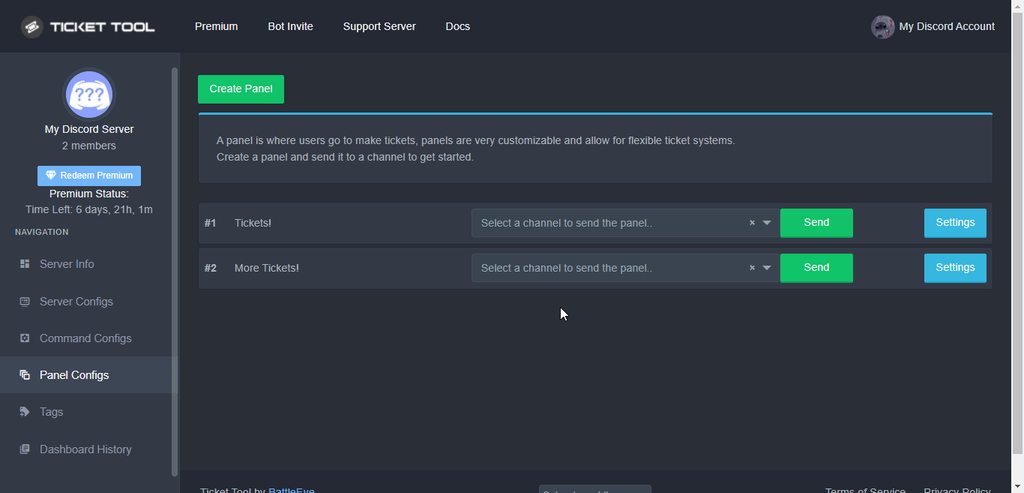 wide marsh
shut bolt
Assign an overflow category and that will make that new tickets get placed there...
wide marsh
shut bolt
Assign an overflow category and that will make that new tickets get placed there...
Ohhh, we can do that ic
shut bolt
Yup
iron nightBOT
Gave +1 Rep to @regal creek
 next summit
bruh ? where is the navigation ?

bruh windows 7 ultimate i need windows 10
but i think my pc will start lag
 steep dove
Hey guys,
the command $help isn't bringing anything up on my server, how can i set up?
 meager jacinth
can we create a ticket section and make it view for some specific roles, even though we have another one which we dont want to have access to the specific role.
lemme explain,
i want a ticket section for support - mods+ to access
i want another section for donations - giveaway and event manager to access
BUT i dont want giveaway and event managers to access support tickets.
copper owl
Then don't input them as a support role for support tickets
If a role has administrator permissions, the people with the role will have access to all channels regardless, including tickets
jade topaz
will ticket tool be moving to / commands on april?
jade topaz
Hi, for some reason ticket tool isn't going to the correct category no matter what I do. Permissions seem to be correct and it's set correctly on the dashboard. Any advice? (I'm a new user)
copper owl
Did you input the category in the Panel settings
 copper owl
Then there's a permission issue most likely
Try giving the bot admin and see if it works
if it does, then it's a permission issue, and you'll have to review the perms given to TT in the category
jade topaz
yeah it works
copper owl
okay so it's a permission issue
you can remove admin if you'd like and give it the necessary perms it needs to work
jade topaz
For some reason I don't see a permission issue
It has manage channels, it can view that category and edit perms
 copper owl
those 3 aren't the only necessary ones though
Run $debug and you'll see all the necessary perms it needs
jade topaz
Okay figured it out, was the manage messages & add reactions. Tysm. Quick question btw, is there a way to make it so my mods can close tickets but only admins can delete them?
For transcript saving manually
copper owl
Go to the button options section of your panel settings
for your close button, make it support only if you'd like
for the delete button, disable support only if it's enabled, then put @everyone in the Disabled roles section and then your admin roles in your Allowed Roles section
jade topaz
Like this?
 jade topaz
does that include ppl with "administrator" discord permission or no?
iron nightBOT
Gave +1 Rep to @copper owl
 gaunt sphinx
hi! i was wondering if you can block users from using the bot at the server?
jade topaz
yes u can @gaunt sphinx
shut bolt
Ghost ping hmmm
copper owl
don't we always love a bit of ghost pings
copper owl
oh 😔 LMFAO
 covert crest
how do i make it so instead of saying "ticket-0001" it would say "ticket-alexok"
@shut bolt
humble sequoiaBOT
The ticket name is the default channel name of all tickets. To edit it, go to your Dashboard > Panel Configs > Settings > Ticket Options. There you can edit the channel name of opened and closed tickets. You can also use variables in there.
 Note: This is a premium feature
shut bolt
Note: This is a premium feature
shut bolt
Edit the default name use the {ticket.user.name} variable
 proud fable
hmm my server is nto showing any ideas what i can do to make it show up?
i did relog
covert crest
okay thanks
humble sequoiaBOT
Don't see your server in the dashboard?
You will possibly need to relog. Look below to see steps on how to relog.
How to relog in the Dashboard.
First, you will need to go to the dashboard. Once your there, click on your avatar on the top right. after you clicked it, you will see button that says Logout. You must click that. Once you have logged out, you can log back in.
Note:
You need one of these 3 things to access the dashboard.
1. Server Owner (Level: 6)
2. Server Administrator (Level: 4)
3. Dashboard Role (Level: 2)
:warning: You can check your level using $level on your Discord Server
User permission level with Ticket Tool
@User is permission level: 0 (User)
```» *If it shows that your permission is **0**, you don't have any of the above **3 things** to manage the dashboard.*


**See the picture below on how to relog:**wait i still dont get it
proud fable
im the server owner yes
shut bolt
covert crest
wait i still dont get it
What don't you get
shut bolt
proud fable
im the server owner yes
Try logging on incognito to the dashboard
 proud fable
hmm
shut bolt
covert crest
what do i put
Btw, it won't work if you don't got premium
proud fable
ty worked
shut bolt
proud fable
ty worked
Sure
shut bolt
covert crest
i gotta pay to make it say my name ;-;
I mean, you can change the name manually with the command
covert crest
aw man
 craggy brook
How do I make a ticket
humble sequoiaBOT

You can check our documentation here.
You can also check #573205317870157855 for the basic setup.
Our documentation contains all the info you need about the bot to be able to setup and configure the bot however you like.
craggy brook
Like how do u make it so other people can open tickets
shut bolt
humble sequoia
Here you got the guide for it
 primal birch

 chilly mason
How i can add some one in the ticket
@shut bolt How i can add some one in the ticket
I hope u can help me 👍
shut bolt
chilly mason
<@518666147441278998> How i can add some one in the ticket
I hope u can help me ...
chilly mason
Sorry
shut bolt
Read the rules, you already got warned
shut bolt
chilly mason
<@518666147441278998> How i can add some one in the ticket
I hope u can help me ...
$help add
humble sequoiaBOT
How to add or remove users on tickets
To add a user to a ticket use $add <user>
To remove a user from a ticket use $remove <user>
jade topaz
hi
 signal beacon
Hi I need help, I added a bot to my server but I can not find it on the site even after restoring, I have been waiting for 1 hours
gaunt sphinx
jade topaz
yes u can <@!561217028841668630>
and how??
tribal cedar
signal beacon
Hi I need help, I added a bot to my server but I can not find it on the site eve...
You mean you can't find it on dashboard?
humble sequoiaBOT
Any role you assign as a blacklisted role won't be able to use commands or reactions.
Selecting a blacklisted role
Go to your Dashboard ➞ Server Configs. There you will find the option to select blacklisted roles.
Note: Don't forget to save.
tribal cedar
@gaunt sphinx 
jade topaz
how do i close tickets
tribal cedar
jade topaz
how do i close tickets
Either by using the $close command or clicking the button
jade topaz
once a ticket is started, how do i know and respond?
gaunt sphinx
tribal cedar
<@561217028841668630> <:this:858678924062097408>
yeah but, can you like ue
''$block user'' or something
bcs there it says a role lol
tribal cedar
jade topaz
once a ticket is started, how do i know and respond?
Once a ticket is open a channel is created.
tribal cedar
gaunt sphinx
''$block user'' or something
No. You would simply add the role to users who you didn't want to be able to make tickets
jade topaz
tribal cedar
Once a ticket is open a channel is created.
correct but does my moderators automatically get added to that channel?
tribal cedar
If you've added them as a support role then yes
You can configured support roles per panel under general options
 glossy cradle
hello i have a problem of ticket tool, i have open a ticket
tribal cedar
glossy cradle
hello i have a problem of ticket tool, i have open a ticket
If you've opened a ticket please get help from there.
glossy cradle
tribal cedar
If you've opened a ticket please get help from there.
ok
glossy cradle
tribal cedar
If you've opened a ticket please get help from there.
but I don't have an answer even if the french support is connected
glossy cradle
tribal cedar
What's the question?
issue but Can you speak french
tribal cedar
No I only speak english
glossy cradle
oh ok
gaunt sphinx
tribal cedar
No. You would simply add the role to users who you didn't want to be able to mak...
you gave me an idea
''blocked from support'' role
or something like that
tysm!
tribal cedar
Nps. Yea just make a role and add it to the server configs. The give the role to anyone you don't want to be able to make tickets
gaunt sphinx
tribal cedar
Nps. Yea just make a role and add it to the server configs. The give the role to...
aha aha got it
is there any way i can thank you with the bot?
thanks @tribal cedar
iron nightBOT
Gave +1 Rep to @tribal cedar
gaunt sphinx
ah there lol
tribal cedar
😀 ty
gaunt sphinx
tribal cedar
😀 ty
yh, have a good night!
tribal cedar
You as well
 silk iris
what a terrible support, I haven't done the tickeet support, and already closed when i was still premium
as soon as I lost premium membership, the ticket closed?
still haven't answer my question, how to do $debug? i cannot send panel
shut bolt
silk iris
what a terrible support, I haven't done the tickeet support, and already closed ...
We have a 12 hour policy of inactive tickets, we left your ticket opened for 14 hours and you never answered to our support team, it's not terrible support, it's that you don't answer
shut bolt
silk iris
still haven't answer my question, how to do $debug? i cannot send panel
Go into the channel you are trying to send the panel, run $debug
silk iris
like this right? nothing works
 shut bolt
silk iris
like this right? nothing works
shut bolt
silk iris
like this right? nothing works
Server ID?
silk iris
948811851981025310
shut bolt
Which bot do you have invited to your server?
 round gulch
what is the diffrence between make-a-ticket and premium-ticket?
humble sequoiaBOT
━━ moved to ticket ━━
shut bolt
That regarding your question you have a ticket opened, which I just saw you impatiently closed as well as deleted your message once you got sent the "Moved to ticket" notice [User deleted his message]
shut bolt
round gulch
what is the diffrence between make-a-ticket and premium-ticket?
Premium tickets are exclusive for premium subscribers
round gulch
are they faster espons times like any benifits?
shut bolt
Usually, yes
Depends on the time
We got the team distributed along the whole world as you can tell from #918271177988907079
shut bolt
Np
silk iris
shut bolt
Which bot do you have invited to your server?
this the bot ID: 948813049295405119
i only have 2 bots right now, im testing on my own server first before pushing to my team's one


 upper portal
I believe my name gamertag was put incorrect into the whitelist. Can’t log in still.
 steady hearth
Are the Bots having issues tracking information? Im in one where we use $clockin and $clockout and it is no longer tracking that data.
 hardy blaze
Kann mir hier wer jemand etwas erklären
 past basin
The support role can't use the command $add username#id only the owners of the server can.
fallow ingot
past basin
The support role can't use the command $add username#id only the owners of the s...
Do they have the support role?
fallow ingot
steady hearth
Are the Bots having issues tracking information? Im in one where we use $clockin...
Ticket tool doesn’t have this feature…
fallow ingot
 ember scroll
Why am I getting this message if I have ticket tool premium?
ember scroll
Why am I getting this message if I have ticket tool premium?
You no longer have an active subscription, renew it to be able to use Ticket Tool Premium.
humble sequoiaBOT
━━ moved to ticket ━━
fallow ingot
oop
 willow tundra
sorry
copper owl
and they deleted the message
humble sequoiaBOT
Multipanels are a premium feature  that allow for a single panel with multiple buttons to open different tickets.
How to create a Multipanel
Premium users can combine multiple panels into one multipanel.
First, find the IDs of each panel you wish to combine. You can find them in your Panel Configs in the Dashboard
Next, send the multipanel to a channel using $panel [id1] [id2] {id3} ....
e.g. $panel 1 2 4 17 35 to combine panels 1, 2, 4, 17 and 35.
Up to 25 panels may be combined.
 willow tundra
fallow ingot
head to your ticket for support
willow tundra
fallow ingot
head to your ticket for support
sorry Ive just figured this channel out shouldve asked before creating a ticket but thanks 😄
iron nightBOT
Gave +1 Rep to @fallow ingot
fallow ingot
Happy to help!
 fallow ingot
$help add
humble sequoiaBOT
How to add or remove users on tickets
To add a user to a ticket use $add <user>
To remove a user from a ticket use $remove <user>
fallow ingot
@past basin make sure they are doing it like above.
If you’re doing it with a username try using a ID.
 rose field
$add
 silk iris
like this right? nothing works
silk iris
silk iris
like this right? nothing works
hello so how to debug? when i was in premium still not answered as well.
bot ID: 948813049295405119
server ID: 948811851981025310
fallow ingot
past basin
I will let them check for sure
Yeah, it should work with a ID.
fallow ingot
silk iris
hello so how to debug? when i was in premium still not answered as well.
Run $debug
 valid belfry
how do I make it so a ticket goes into a specific catagory
slender minnow
$help category
humble sequoiaBOT
How to set the open category
To set a open category go to the Dashboard -> Panel Configs -> Settings -> Category Options -> Category Open
 slender minnow
@valid belfry ^
valid belfry
legend
slender minnow
^^
 limber quest
Hi ticket crew
Trying to get Ticket tool working on my discord via mobile
Getting this
 tribal cedar
limber quest
Getting this
tribal cedar
limber quest
Getting this
Update your client
humble sequoiaBOT
Update your discord App
Buttons are a relatively new addition to discord and don't work with some older versions of the app.
Please verify that you have the latest version of discord, by going to the app or play store.
Discord for the App Store
Discord for the Play Store
limber quest
Ok cool
 limber crescent
.
limber quest
tribal cedar
Update your client
Hope that works. Will report back
tribal cedar
It should. Please do.
tribal cedar
limber crescent
.
Need something?
 turbid prawn
Hey guys
is there anyway that we can see the old deleted ticket messages? the transcript
tribal cedar
limber quest
Appreciate it
Anytime
tribal cedar
turbid prawn
is there anyway that we can see the old deleted ticket messages? the transcript
If you have them posting to a channel sure.
fallow ingot
turbid prawn
is there anyway that we can see the old deleted ticket messages? the transcript
Not unless you have a channel set for logging transcripts.
fallow ingot
tribal cedar
If you have them posting to a channel sure.
Oop didn’t see this :/
tribal cedar
No worries
turbid prawn
but we need to manually transcript them first right?
tribal cedar
You need to setup transcripts first yes and also it's a premium feature
turbid prawn
Thank you so much!
tribal cedar
Nps
 raven ember
How i can edit this embed?
 humble sequoiaBOT
The Ticket Message is the first message sent by the bot in a new ticket. To customise it head over to your Dashboard ➞ Panel Configs ➞ Settings ➞ Ticket Options ➞ Edit Ticket Message
 tribal cedar
@raven ember
raven ember
tribal cedar
<@743799875761733643> <:this:858678924062097408>
Thankss
tribal cedar
Anytime
 quartz spire
hello, how do i make the created channel for created ticket is invisible for everyone except the person who created the ticket and the support team?
tribal cedar
quartz spire
hello, how do i make the created channel for created ticket is invisible for eve...
Check panel settings -> permission options and the one you want to check is the everyone role
round gulch
Yep
quartz spire
tribal cedar
Check panel settings -> permission options and the one you want to check is the ...
yes it worked, thank you for the support
iron nightBOT
Gave +1 Rep to @tribal cedar
tribal cedar
quartz spire
yes it worked, thank you for the support
Anytime
slender minnow
not like that iirc
but you can use tags to send customized responses
other then that, that would look really good in #💡│suggestions
slender minnow
s!suggest [suggestion without these brackets] in #🤖│bot-spam
humble sequoiaBOT
Multipanels are a premium feature that allow for a single panel with multiple buttons to open different tickets.
How to create a Multipanel
Premium users can combine multiple panels into one multipanel.
First, find the IDs of each panel you wish to combine. You can find them in your Panel Configs in the Dashboard
Next, send the multipanel to a channel using $panel [id1] [id2] {id3} ....
e.g. $panel 1 2 4 17 35 to combine panels 1, 2, 4, 17 and 35.
Up to 25 panels may be combined.
slender minnow
@jade topaz refer above ^
 vital niche
C
 vapid wadi
Hi, how i do let my members ticket?
 turbid bear
Someone send a ticket and I closed it in my server. But still when he tries to make a new ticket bot says he has a ticket already. what can I do ?
jade topaz
We're are the premium settings on dashboard?
 sleek coyote
jade topaz
how do i create ticket?
sleek coyote
jade topaz
how do i create ticket?
 manic sandal
مافي عربببب
jade topaz
manic sandal
مافي عربببب
theres
manic sandal
انت عربي؟؟
jade topaz
sure
humble sequoiaBOT
⚠️ You're in the wrong place
We provide support for @pseudo glen discord bot and cannot help you with whatever issue you have.
- Please make sure to contact the appropriate Support Team.
If you don't have any further questions regarding our bot Ticket Tool, please close this ticket
 vital musk
does anyone have the premium bot invite link?
tribal cedar
Send a message like the ticket message?
humble sequoiaBOT
The Ticket Message is the first message sent by the bot in a new ticket. To customise it head over to your Dashboard ➞ Panel Configs ➞ Settings ➞ Ticket Options ➞ Edit Ticket Message
iron nightBOT
Gave +1 Rep to @tribal cedar
humble sequoiaBOT
The first thing you will need to do is invite the premium bot, an invite can be found here
Once the bot is in your server we will head to the dashboard and manage your server. When you are managing your server, you want to head into "Server Configs" then click the drop down menu under "Select the bot you would like to use on this server" then click "Ticket Tool#6207" and then save.
 vital musk
thank uuu x
tribal cedar
Nps
tribal cedar
You can disable 2 step close and 2 step ticket then on $close the ticket will close and delete
 zealous steeple
is there a way I can disable the delete ticket and those stuff and when I just close the ticket it deletes automatically?
tribal cedar
Disable 2 step ticket and 2 step close in panel configs -> general options
 regal goblet
zealous steeple
is there a way I can disable the delete ticket and those stuff and when I just c...
regal goblet
zealous steeple
is there a way I can disable the delete ticket and those stuff and when I just c...
sorry about that earlier, something urgent came up
 low smelt
Hi im new here someone can tell me how i can join to giveaways???
 full dew
low smelt
Hi im new here someone can tell me how i can join to giveaways???
full dew
low smelt
Hi im new here someone can tell me how i can join to giveaways???
If there is a giveaway, it will be hosted in #🎉│giveaways, this is ticket tool, I am not sure if you are talking about giveaway bot or what.
full dew
How much is premium? (USD)
shut bolt
6$ monthly the first server
 deep yacht
hello! how do i make this?
 humble sequoiaBOT
You can check our documentation here.
You can also check #573205317870157855 for the basic setup.
Our documentation contains all the info you need about the bot to be able to setup and configure the bot however you like.
shut bolt
Check this guide
deep yacht
shut bolt
Check this guide <:smil:936485535403356221>
thanks
iron nightBOT
Gave +1 Rep to @shut bolt
shut bolt
Sure
deep yacht
did something happen to the website because this is happening to me
 humble sequoiaBOT

Error 1015 - You are being rate limited
If you get the above error when trying to access our web page, don't be scared. This is just a security feature on our dashboard to mitigate possible attacks to the site. The only way to access the site is to wait for the temporary ban to be lifted automatically. It typically takes around 1 hour but can be quicker or longer.
shut bolt
deep yacht
did something happen to the website because this is happening to me
Does it happen if you refresh the page?
deep yacht
shut bolt
Does it happen if you refresh the page?
yeah
shut bolt
Weird, works for me
shut bolt
I was googling about the error but couldn't found solutions for the client side, best option is what you mentioned, wait for it to fix itself
deep yacht
okayy thanks for the help
shut bolt
Sure :)
 swift plank
I've been bumping into my discord's 500 channel limit.
Is there a way to easily archive the historic tickets into an excel file or other offline archive? I'll also need any posted screenshots in the bundle.
Thanks in advance.
I have about 400 tickets across five categories.
 plain surge
Hello @atomic lotus
Please don't mention support as that is against #546557408902905896
 atomic lotus
plain surge
Hello <@917777109164916819>
Please don't mention support as that is against <#54...
atomic lotus
plain surge
Hello <@917777109164916819>
Please don't mention support as that is against <#54...
ok
plain surge
If you want to purchase premium, you can do so through this link
humble sequoiaBOT
Faster Premium Bot
Automatic Transcripts
Full Customization
Custom Buttons
Direct Messages
Ticket Automation
Multipanels
Premium Support
You can purchase premium here:
Price
$6 - Monthly
$66 - Yearly
Premium
atomic lotus
👍
plain surge
swift plank
Is there a way to easily archive the historic tickets into an excel file or othe...
No, not really. You can do that manually tho. Save the ticket transcript, and then copy the direct link into an excel spreadsheet or you can download the transcript and have a folder for each category
swift plank
Do you know how long the direct links to the transcripts persist?
I'm worried about dead links six months from now
plain surge
As long as the bot's message that has the transcript link isn't deleted, the link will continue to work
That's why it's better to choose a transcript channel instead of the transcript saving in the ticket
You can choose a channel by going to Dashboard > Panel configs > Settings > Logging options > Transcript channel
 in the reaction?
 whole coral
Hi, just stumbled over this gem of software. Two question have arisen:
- Is it possible to see the closed tickets somewhere again?
- Are the preselected permissions levels already the minimum the bor needs to work flawless - or can I strip them further down?
copper owl
jade topaz
Can I put an emoji like that <:complaint:950098321622589540> in the reaction?
with premium, yes you can edit the button emote
copper owl
whole coral
Hi, just stumbled over this gem of software. Two question have arisen:
1. Is it ...
- Transcripts
- Run
$debug. all the permissions listed are required.
if you'd like to strip them down further, the bot will not function correctly
 timber knot
jade topaz
copper owl
with premium, yes you can edit the button emote
And can I make two reactions in one message?
copper owl
with premium, yup
jade topaz
copper owl
with premium, yup
How much it's?
copper owl
6 dollars a Month, 66 a year
whole coral
copper owl
1. Transcripts
2. Run `$debug`. all the permissions listed are required.
Thank you Neptune.
- Transcripts
They are visible to me and the user?
iron nightBOT
Gave +1 Rep to @copper owl
copper owl
whole coral
Thank you Neptune.
> 1. Transcripts
They are visible to me and the user?
they're visible to the people who have access to the transcripts channel
jade topaz
K thanks @copper owl
iron nightBOT
Gave +1 Rep to @copper owl
whole coral
copper owl
they're visible to the people who have access to the transcripts channel
Ah, so I can leave it as an open channel or a closed log.
copper owl
yeah
whole coral
neat. Thanks
timber knot
 severe path

 rustic monolith
@copper owl
@shut bolt @tribal cedar

Help me
Pls
@radiant moss
@severe path
 humble sequoiaBOT
Update your discord App
Buttons are a relatively new addition to discord and don't work with some older versions of the app.
Please verify that you have the latest version of discord, by going to the app or play store.
Discord for the App Store
Discord for the Play Store
 prime bridgeBOT
 GŁØCK乛💔Broken🥀#3114 has been warned!

 They have dms disabled however.
jade topaz
Can I use words like this or this in the panel?
Title or description
And What is logging channel?
 fallow ingot
jade topaz
Can I use words like **this** or `this` in the panel?
fallow ingot
jade topaz
Can I use words like **this** or `this` in the panel?
Yes you can.
$help transcript
humble sequoiaBOT
How do I save transcript to a channel?
To save transcripts to a channel go to the Dashboard -> Panel Configs -> Settings -> Logging Options -> Transcript Channel
 fallow ingot
@jade topaz ^
jade topaz
fallow ingot
<@456226577798135808> ^
Logging*
humble sequoiaBOT
With Ticket Tool, you can customize the behavior the bot takes when logging your tickets! For editing these options follow these steps:
Dashboard ➞ Panel Configs ➞ Settings ➞ Logging Options
Transcript Channel
Here you will choose the channel where @humble sequoia would send a copy of the transcript to
Logging Channel
Here you will define which channel @humble sequoia will save the Logs in (ticket created/deleted/closed, etc.)
Logs you can save:
➞ Ticket Created ➞ Logs when a ticket is created
➞ Ticket Closed ➞ Log when a ticket is closed
➞ Ticket Opened ➞ Log when a ticket is opened
➞ Ticket Renamed ➞ Log when a ticket is renamed
➞ Ticket Deleted ➞ Log when a ticket is deleted
➞ Transcript Saved ➞ Log when a ticket is saved
Select with  (disable) or
  (enabled) which logs you would like
ᅠ
Premium Features
Direct Message Transcript ➞ Sends the ticket transcript to the ticket user whenever the ticket is either closed, deleted, or both.
Auto Save Transcript ➞ Saves the ticket transcript into to the transcript channel whenever the ticket is either closed, deleted, or both.
Below you can see an example of what the Logging Channel will look like as well as the Transcript Channel:
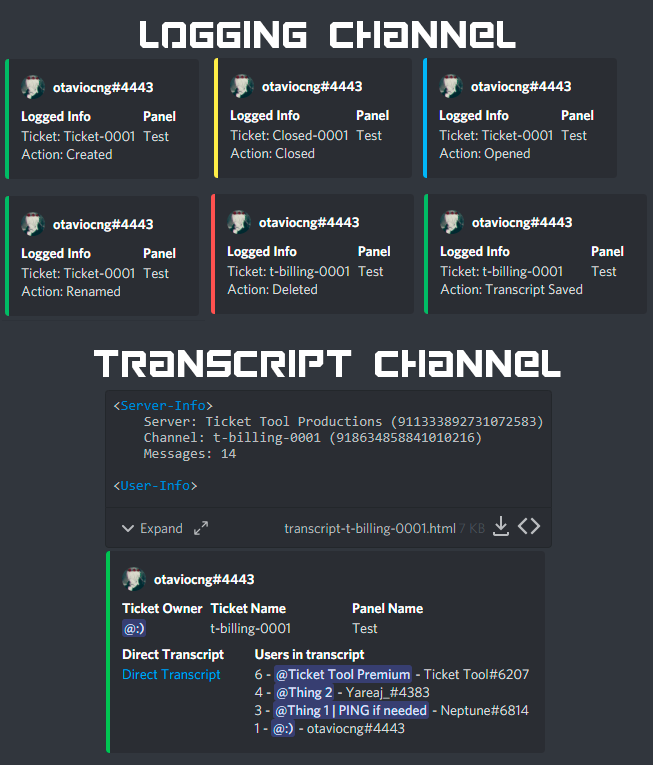 fallow ingot
@jade topaz
 short stump
 placid nimbus
how do i make it so people who ticketinng can upload image
placid nimbus
how do i make it so people who ticketinng can upload image
change the permissions for user opened and check on attachments
jade topaz
Thank you @fallow ingot
iron nightBOT
Gave +1 Rep to @fallow ingot
 deft coral
can you add users to tickets thru command in ticket bot?
full dew
how do you link panels together so when the message is sent in my ticket channel, it will only have to be 1 message?
humble sequoiaBOT
How to add or remove users on tickets
To add a user to a ticket use $add <user>
To remove a user from a ticket use $remove <user>
fallow ingot
@deft coral ^
fallow ingot
full dew
how do you link panels together so when the message is sent in my ticket channel...
Multi panels are a premium feature
 golden owl
can someone help me? How i make the Panels?
 fallow ingot
golden owl
can someone help me? How i make the Panels?
fallow ingot
golden owl
can someone help me? How i make the Panels?
Sure thing!
humble sequoiaBOT
Multipanels are a premium feature that allow for a single panel with multiple buttons to open different tickets.
How to create a Multipanel
Premium users can combine multiple panels into one multipanel.
First, find the IDs of each panel you wish to combine. You can find them in your Panel Configs in the Dashboard
Next, send the multipanel to a channel using $panel [id1] [id2] {id3} ....
e.g. $panel 1 2 4 17 35 to combine panels 1, 2, 4, 17 and 35.
Up to 25 panels may be combined.
For a more convenient use of multipanels, you can now combine panels on the dashboard. This will allow you to directly send the multipanel from the dashboard or via the $panel ID command.
Where can I find this?
You can find this setting on the Dashboard -> Panel Configs -> Settings -> General Options
Note: if you're attaching all the panels to a panel called English, don't include English in the attached panels box (If you do this, it will create duplicate)
This will put all buttons from all of your panels on one message. The message is the panel message from the panel you're combining these panels in.
Note: This is a premium feature
fallow ingot
 golden owl
fallow ingot
<:this:894279341108772914>
golden owl
fallow ingot
<:this:894279341108772914>
But what is Premium Red? :D
fallow ingot
golden owl
But what is Premium Red? :D
Anything with a emoji is a premium feature.
humble sequoiaBOT
Don't see your server in the dashboard?
You will possibly need to relog. Look below to see steps on how to relog.
How to relog in the Dashboard.
First, you will need to go to the dashboard. Once your there, click on your avatar on the top right. after you clicked it, you will see button that says Logout. You must click that. Once you have logged out, you can log back in.
Note:
You need one of these 3 things to access the dashboard.
1. Server Owner (Level: 6)
2. Server Administrator (Level: 4)
3. Dashboard Role (Level: 2)
:warning: You can check your level using $level on your Discord Server
User permission level with Ticket Tool
@User is permission level: 0 (User)
```» *If it shows that your permission is **0**, you don't have any of the above **3 things** to manage the dashboard.*


**See the picture below on how to relog:**@hollow lagoon ^
fallow ingot
yeah?
 hollow lagoon
Thanks a lot!
fallow ingot
Anytime
 red pivot
Ola
 errant laurel
So no one has ever gotten an error when trying to buy premium?
zealous steeple
How do I make my ticket claimable?
 craggy geyser
errant laurel
So no one has ever gotten an error when trying to buy premium?
craggy geyser
errant laurel
So no one has ever gotten an error when trying to buy premium?
Some people get errors. But normally it's due to funds or incorrect information. The majority of people get a subscription with no issues at all
craggy geyser
zealous steeple
How do I make my ticket claimable?
It's a premium feature
zealous steeple
craggy geyser
It's a premium feature
I do have preminum.
craggy geyser
$help claim
humble sequoiaBOT
How does the claim command work?
Ticket Tool claiming is a premium only command that allows your support team to claim tickets and have the ticket renamed, changed permissions or moved to another category
craggy geyser
Hm, less helpful than I thought. There is a section in the dashboard for claiming options
humble sequoiaBOT
Claiming allows you to change the ticket name, category and permissions. To use it you have to enable it first on your Dashboard > Panel Configs > Claiming Options.
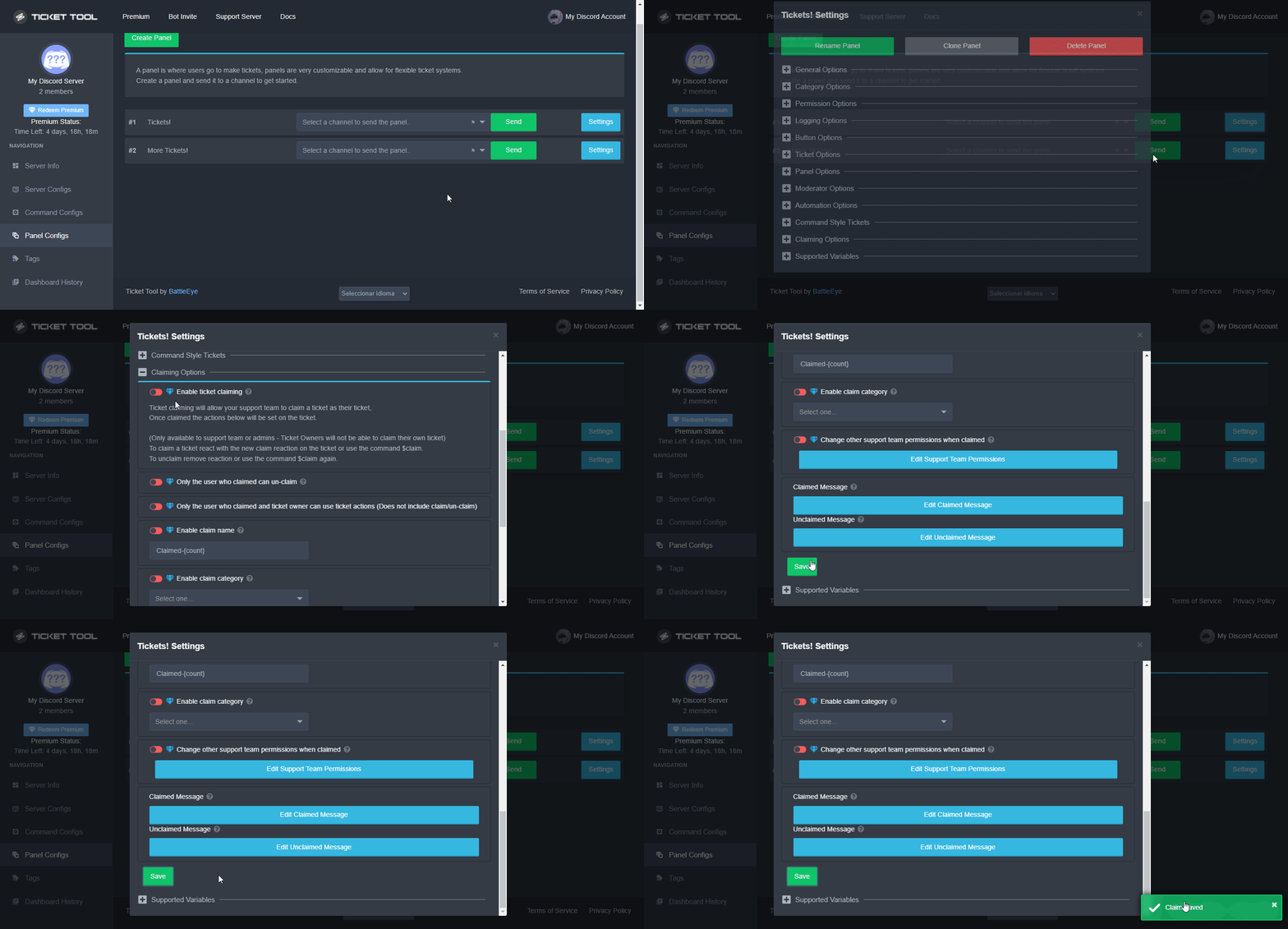
 Note: This is a premium feature
copper owl
Note: This is a premium feature
copper owl
there @craggy geyser @zealous steeple ^^
 honest canopy
if i close my ticket, it will be deleted automatically.. but i want that when i close it, the ticket stays saved in my category and is not deleted.. any help!!
zealous steeple
honest canopy
if i close my ticket, it will be deleted automatically.. but i want that when i ...
go to general options and enable two step delete
 sick egret
Help doesn’t work
humble sequoiaBOT
We would love to help you, but if you don't tell us what you need help with we can't help you :(
sick egret
The $help command doesn’t work
craggy geyser
There are two options. Either the prefix has been changed or the bot doesn't have permission to see the channel
sick egret
he has permissions
craggy geyser
Try pinging the bot instead of using $
craggy geyser
Are you sure the bot has the right permissions? View channel and send messages
sick egret
yup
craggy geyser
What is the server name?
jade topaz
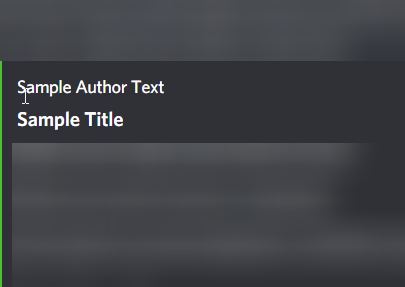
What is the author name?
timber knot

Please provide us with a picture of you, the account owner, holding the ID document next to your face in order to start the validation of your identity.👈👈👈What this does not understand me
 silver hare
timber knot
Please provide us with a picture of you, the account owner, holding the ID docum...
silver hare
timber knot
Please provide us with a picture of you, the account owner, holding the ID docum...
Take a picture of your face with your ID next to your face to prove your identity
slender minnow
jade topaz
What is the **author name**?
Thats like the name of the author
https://i.imgur.com/QTfEpJo.png
 fallow ingot
Bot is down due to a major outbreak on Discord's side.
There's a widespread outrage, with lots of platforms including Spotify etc.
 sturdy holly
fallow ingot
Bot is down due to a major outbreak on Discord's side.
sturdy holly
fallow ingot
Bot is down due to a major outbreak on Discord's side.
When is the Bot gonna be up/online?
 pale pilot
Soon, the dev us currently working on it
sturdy holly
pale pilot
Soon, the dev us currently working on it
Alright, thanks for the fast answer ^^
jade topaz
why the bot is off ?
jade topaz
sturdy holly
Discord problems
other bots is working
sturdy holly
jade topaz
other bots is working
Yeah, they are using other Servers, not the Servers that are down
 gleaming sonnet

 viscid jacinth
yeah bots offline
sturdy holly
yeah
sturdy holly
 delicate ermine
the dev of ticket tool resolve?
delicate ermine
the dev of ticket tool resolve?
He is working on it
delicate ermine
ok thanks
sturdy holly
 spare ingot
Ticket Toll is bot responding.
spare ingot
Ticket Toll is bot responding.
Because the bot is offline
The Devs are working on the problem
spare ingot
Okay
 scenic plinth
My primary bot is down?
Discord has been experiencing API issues for the previous 2 hours, although I don't suspect that's the reasoning for the outage, I've notified the proper people to look into it.
The bot is actively being restarted. The bots dashboard will remain unavailable if you have a standard plan. However, premium is usable
Edit: Developer's have notified it should take around 30 minutes for users with standard access to have access to the bot.
sturdy holly
scenic plinth
__**My primary bot is down?**__
Discord has been experiencing API issues for th...
Alright
jade topaz
 lusty dove
هل اكو عرب؟
robust sandalBOT
lusty dove
عندي مشكلة
lusty dove
هل اكو عرب؟
robust sandalBOT
lusty dove
عندي مشكلة
 ᴼᴰᴺ | 𓆩𝐉𝐎𝐊𝐄𝐑𓆪
I have a problem.
Arabic (ar) → English (en)
scenic plinth
بوتي الأساسي معطل؟
يواجه Discord مشكلات في واجهة برمجة التطبيقات خلال ساعات 2 السابقة ، على الرغم من أنني لا أشك في أن هذا هو سبب انقطاع التيار الكهربائي ، فقد أخطرت الأشخاص المناسبين للنظر فيه.
يتم إعادة تشغيل الروبوت بنشاط. ستظل لوحة معلومات برامج التتبع غير متوفرة إذا كانت لديك خطة قياسية. ومع ذلك ، قسط قابل للاستخدام
تعديل: أبلغ المطورون أنه يجب أن يستغرق الأمر حوالي 30 دقيقة للمستخدمين الذين لديهم حق الوصول القياسي للوصول إلى الروبوت.
 rugged niche
 humble sequoiaBOT
⚠️ Please read the messages previously sent by our team ⚠️
scenic plinth
scenic plinth
__**My primary bot is down?**__
Discord has been experiencing API issues for th...
@jade topaz
scenic plinth
Stop mentioning me for support. Use the command.
 tardy saddle
my ticket is bug
i need help
xd
when i want to send a panel
it tells me that the ticket tool doesnt have the permision to view or send into the channel
and i try to do $debug but it does nothing
shut bolt
Then presumably the bot doesn't have access to see or send messages to that channel
shut bolt
tardy saddle
if the $debug command doesnt respond?
Go into the channel perms, add the bot as an override and mark the View Channel and Send Messages permission as 
tardy saddle
okay lets see
 haughty pecan
I added a bot to my buddies server and I can’t see it on my dashboard
humble sequoiaBOT
Don't see your server in the dashboard?
You will possibly need to relog. Look below to see steps on how to relog.
How to relog in the Dashboard.
First, you will need to go to the dashboard. Once your there, click on your avatar on the top right. after you clicked it, you will see button that says Logout. You must click that. Once you have logged out, you can log back in.
Note:
You need one of these 3 things to access the dashboard.
1. Server Owner (Level: 6)
2. Server Administrator (Level: 4)
3. Dashboard Role (Level: 2)
:warning: You can check your level using $level on your Discord Server
User permission level with Ticket Tool
@User is permission level: 0 (User)
```» *If it shows that your permission is **0**, you don't have any of the above **3 things** to manage the dashboard.*


**See the picture below on how to relog:**Try this
 shut bolt
 last ravine
What is that
last ravine
What is that
A transcript of a ticket
full dew
How do I remove the second General Support?
 tribal cedar
full dew
How do I remove the second General Support?
tribal cedar
full dew
How do I remove the second General Support?
You don't need to include general support in the multipanel setup
So remove general support from the general support multi panel setup in general options and resend the panel.
full dew
Thanks @tribal cedar : D
iron nightBOT
Gave +1 Rep to @tribal cedar
tribal cedar
Anytime
full dew
It worked
tribal cedar
😀
full dew
Does the bot have perms to send messages in the channel?
 plain carbon
البوت البرايم مو شغال في سيرفري
shut bolt
 bold marsh
Yes
bold marsh
Yes
Could you please send us a server invite so we can diagnose what could be wrong?
I meant the id not an invite
A sec please
bold marsh
907195016840114188
shut bolt
Thanks, please bare with me for 2 minutes and I'll help you out
bold marsh
shut bolt
Thanks, please bare with me for 2 minutes and I'll help you out
Thanks
iron nightBOT
Gave +1 Rep to @shut bolt
 split void
I’m unable to open or close any tickets. I’m not sure why, but it says “interaction failed” every time. It doesn’t matter how many times I open or close discord, log out or log in, or even what server I’m in or the roles I have in that server. I’m unable to use it at all. Can someone help?
shut bolt
split void
I’m unable to open or close any tickets. I’m not sure why, but it says “interact...
Is the bot actually invited to that server?
@bold marsh check this mate
humble sequoiaBOT
How to disable the premium bot
To disable the premium bot you will have to go to the Dashboard ➞ Server Configs ➞ Premium bot ➞ And on the right-hand side select the primary free bot in the drop down menu.
Premium features will still work on the normal bot.
 shut bolt
That will fix the problem
bold marsh
shut bolt
That will fix the problem
Fixed , Thankyou
shut bolt
bold marsh
Fixed , Thankyou
Sure
 zealous pine
So I’m new to ticket lol as far as setting it up. I have it set up in the channels I want and it works. But everyone in the server can see so how do I fix that 🙏🏼
shut bolt
zealous pine
So I’m new to ticket lol as far as setting it up. I have it set up in the channe...
Hi mate, check this
$help perms
humble sequoiaBOT
How to set the permissions for tickets
To set a change permissions go to the Dashboard -> Panel Configs -> Settings -> Permission Options
shut bolt
Go into your Everyone Opened Permissions and click on its button
Then make sure the Read Messages one is set to 
And Save changes, that will make new tickets hidden from all users
zealous pine
Thank you so much
shut bolt
Sure
zealous pine
shut bolt
Sure <:smil:936485535403356221>
So the rest of the roles should just be the middle option?
shut bolt
zealous pine
So the rest of the roles should just be the middle option?
You mean the rest of the perms?
zealous pine
Yes sorry
shut bolt
zealous pine
Yes sorry
You can set them as you wish but I suggest keeping them in 
zealous pine
Okay thank you
shut bolt
Sure
 upper raft
Is the "Ticket Tool | Premium Bot" that keeps answering questions in this server automated? How do I make an automated question-answering bot like that?
humble sequoiaBOT
Tags
Tags are used to send a predefined response to your channels using a command. Tags will only respond if the command itself is used, it will not function if you put the tag into a sentence. The prefix is not included.
To create tags, go to: Dashboard > Tags > Create Tag. After creating and naming one, tap on the response button, and you can edit the response.
 shut bolt
We trigger them corresponding to what the situation requires
upper raft
super helpful, thank you 🙏
shut bolt
Sure
zealous pine
Now I keep getting this message and iv enabled everything on permission in dc

 silk swallow
i invited ticket toll but it never join the server
shut bolt
zealous pine
Now I keep getting this message and iv enabled everything on permission in dc
The bot is missing the Manage Messages permission
shut bolt
silk swallow
i invited ticket toll but it never join the server
Check audit logs and see if any other bot or user is kicking it from the server
silk swallow
shut bolt
Check audit logs and see if any other bot or user is kicking it from the server
okk
zealous pine
shut bolt
The bot is missing the Manage Messages permission
On the everyone perm?
silk swallow
zealous pine
On the everyone perm?
the bot
silk swallow
shut bolt
Check audit logs and see if any other bot or user is kicking it from the server
ahh there you go i have too many members sorry xD
shut bolt
It's fine mate
zealous pine
silk swallow
the bot
Where do I find that one? I felt like I did manage messages everywhere
shut bolt
Go into the Server Settings
Head to the Roles Tab
Open the Ticket Tool role and check if it's marked as 
silk swallow
what is the max ticket that can be open for non premium
its just 10 ticket per minute right?
like it can open up till no max right?
shut bolt
silk swallow
its just 10 ticket per minute right?
Indeed
shut bolt
silk swallow
like it can open up till no max right?
What do you mean?
split void
shut bolt
Is the bot actually invited to that server?
Yes. Ticket tool is set up in the servers. I hadn’t had this issue prior to a couple of weeks ago.
shut bolt
split void
Yes. Ticket tool is set up in the servers. I hadn’t had this issue prior to a co...
I'll move the problem to a ticket if that's fine with you
split void
shut bolt
I'll move the problem to a ticket if that's fine with you
Sure.
silk swallow
shut bolt
What do you mean?
like we can open up till 100 of tickets right?
just the limit is 10 per minute
i dont really understand this

is this where like the ticket channels and category be created
and where we claim those ticket?
wait nvm
sorry
didnt read it properly
shut bolt
silk swallow
like we can open up till 100 of tickets right?
You can open 499 tickets per server, 500 is the top limit of channels a server can have, so supposing you got a panel in a different channel you'll be able to stack 499 tickets at once. And you can only create 10 tickets each minute
silk swallow
oh ok thanks
shut bolt
Sure
jade topaz
how do i make it so a diffrent role other then admins can see the tickets?
slender minnow
$help support
humble sequoiaBOT
How to let support team see into a ticket
About support roles
A support role lets your support team see into tickets with out having to add them manually to each and every ticket.
You can add as many support roles as you like per panel.
NOTE that the way discord works all admins can see into tickets regardless of this.
How to set a support role
To set a Support role go to the Dashboard -> Panel Configs -> Settings -> General Options -> Support Team Roles.
NOTE that the support role will not be able to see into tickets that are already created..
slender minnow
@jade topaz refer above ^
jade topaz
thanksss broo
 native cosmos
Hello, I just wondered why can't I select a specific channel to make a panel? For me, it is only limited to 2-3.


 copper owl
Update your discord
copper owl
copper owl
 atomic sluice
can anyone help setup the bot?
atomic sluice
can anyone help setup the bot?
I personally am not gonna do it for you.
atomic sluice
copper owl
I personally am not gonna do it for you.
but how to?
humble sequoiaBOT
You can check our documentation here.
You can also check #573205317870157855 for the basic setup.
Our documentation contains all the info you need about the bot to be able to setup and configure the bot however you like.
copper owl
read ^
atomic sluice
ok
 glacial dock
anyone know what this is?
 glacial dock
thanks.
 dark trench
hi there ive been banned from castle crush discord server and cant get ticket help what should i do?
copper owl
put the role in the Disabled roles section of your close button..
if you set it like that, yeah
if you don't set it like that, no
The buttons have nothing got to do with permissions in the ticket itself
 wintry ruin
Which role u not want to see ?
copper owl
wintry ruin
Which role u not want to see ?
I've already answered their question
wintry ruin
@copper owl ok
@copper owl i want to ask something
Can we set auto made reply in ticket ?
copper owl
wintry ruin
<@548583124062175232> i want to ask something
you Can do so without pinging