
#🆘│community-support
1 messages · Page 387 of 1
 jade topaz
 tribal cedar
Nps. Hf!
tribal cedar
Lol I have so many friends that if I accept you I'll forget who you were really. Sometimes I don't want questions in my dms. 😜
jade topaz
 tribal cedar
But there's always staff here!
jade topaz
tribal cedar
But there's always staff here!
i will never ask questions in dms
 robust sandalBOT
Pour quoi avez-vous besoin d’aide?
 English (en) → French (fr)
tribal cedar
English (en) → French (fr)
tribal cedar
Ah. Figured but had to try.
 delicate yacht
how do i give permission to a player to manage tickets without giving him full permission
 humble sequoiaBOT
━━ moved to ticket ━━
 smoky topaz

 plain surge
Please try updating your Discord and try again
humble sequoiaBOT
Update your discord App
Buttons are a relatively new addition to discord and don't work with some older versions of the app.
Please verify that you have the latest version of discord, by going to the app or play store.
Discord for the  App Store
Discord for the  Play Store
 fallow ingot
plain surge
Please try updating your Discord and try again
fallow ingot
plain surge
Please try updating your Discord and try again
took the words out my mouth Dom lol
 iron nightBOT
Gave +1 Rep to @fallow ingot
plain surge
Have a rep :)
fallow ingot

 woven surge
How to create a ticket in ur sever?
jade topaz
any issues currently with ticket tool?
seems on my server saying impossible to create a ticket
 covert swallow
Are you getting an error message?
covert swallow
Try to update your client
jade topaz
When one of my members create ticket they arent able to view message history anyway to fix this?
jade topaz
Can I put a ticket without using the dishboard?
fallow ingot
jade topaz
Can I put a ticket without using the dishboard?
Like make a ticket for someone?
fallow ingot
 fervent narwhal
I can't create tickets, that say involved form body
fervent narwhal
I can't create tickets, that say involved form body
Update your discord, and try again.
humble sequoiaBOT
Update your discord App
Buttons are a relatively new addition to discord and don't work with some older versions of the app.
Please verify that you have the latest version of discord, by going to the app or play store.
Discord for the App Store
Discord for the Play Store
fallow ingot
@fervent narwhal ^^
 old citrus
How do I set the tickets to open inside a certain category
fallow ingot
$help category
humble sequoiaBOT
How to set the open category
To set a open category go to the Dashboard -> Panel Configs -> Settings -> Category Options -> Category Open
 fallow ingot
@old citrus ^
jade topaz
Hello
Can I make more than one reaction in the message of creating ticket?
What do you mean?
@jade topaz
humble sequoiaBOT
Multipanels are a premium feature  that allow for a single panel with multiple buttons to open different tickets.
How to create a Multipanel
Premium users can combine multiple panels into one multipanel.
First, find the IDs of each panel you wish to combine. You can find them in your Panel Configs in the Dashboard
Next, send the multipanel to a channel using $panel [id1] [id2] {id3} ....
e.g. $panel 1 2 4 17 35 to combine panels 1, 2, 4, 17 and 35.
Up to 25 panels may be combined.

For a more convenient use of multipanels, you can now combine panels on the dashboard. This will allow you to directly send the multipanel from the dashboard or via the $panel ID command.
Where can I find this?
You can find this setting on the Dashboard -> Panel Configs -> Settings -> General Options
Note: if you're attaching all the panels to a panel called English, don't include English in the attached panels box (If you do this, it will create duplicate)
This will put all buttons from all of your panels on one message. The message is the panel message from the panel you're combining these panels in.

 Note: This is a premium feature
 trim shadow
how can i work on my friends tickets? im trying to get the dashboard to have their server open, but nothing works
we added the manage server permission, but it isnt working. do i need admin?
fallow ingot
trim shadow
we added the manage server permission, but it isnt working. do i need admin?
You need admin, or they can add a dashboard role.
 fallow ingot
 lost trout
Are you on phone?
fallow ingot
yeah
humble sequoiaBOT
Update your discord App
Buttons are a relatively new addition to discord and don't work with some older versions of the app.
Please verify that you have the latest version of discord, by going to the app or play store.
Discord for the App Store
Discord for the Play Store
fallow ingot
@lost trout ^
jade topaz
discord fucked up yesterday with nonce, update is mandatory lmao
 violet jungle
Hi everyone, I have encountered some problems with the bot. Practically the people I have given to you or various roles as admin / normal users do not work the buttons, in particular I have noticed that from pc It doesn't work, while on the phone yes, you think it's a bot or discord problem?
jade topaz
violet jungle
Hi everyone, I have encountered some problems with the bot. Practically the peop...
if they dont see them yes
jade topaz
So I made a test server to set all up, how do I copy all settings I've made to the other server?
 dense saddle
what
humble sequoiaBOT
Backup and Restore allows you to transfer your premium status, panels, tags, and all settings to a new server.
You can also use it to keep a backup of your settings incase you need to suddenly move servers. We suggest you keep this backup key somewhere safe, incase your server is deleted. You will want to copy the whole key.
First, go to your dashboard, then Server Configs and generate a new backup key by pressing the green button. Now, a key should be generated in the box above. You may need to refresh the page to see this.
Once you have your backup key, navigate to the same page on the new server. Copy the key on the second field.
Now you can choose what you want to copy. Finally, press the green “Restore Configs” button.

 regal goblet
@jade topaz 
jade topaz
regal goblet
<@456226577798135808> <:this:894279341108772914>
Thanks!
iron nightBOT
Gave +1 Rep to @regal goblet
 marsh wadi
How Do i Clear The History From The Ticket Tool Premuim ?
 shut bolt
What do you mean the history?
marsh wadi
History of Tickets Opened
shut bolt
You mean the count? The transcripts? Or what exactly are you looking to clear
marsh wadi
The count
shut bolt
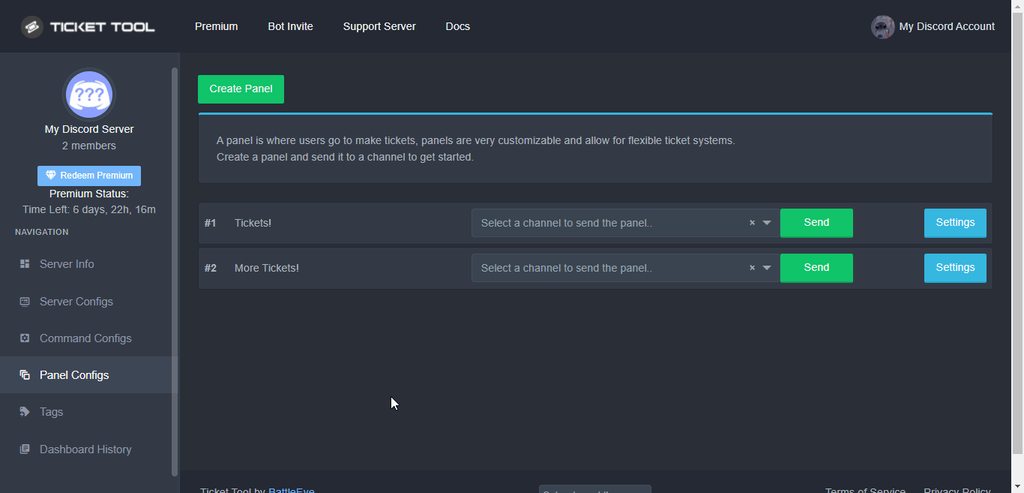
Go into your dashboard
Open the Panel Configs tab
Go to its settings
Open the General Options menu
Scroll down and you'll see the Ticket Count field
Update it, save changes, good to go
 marsh wadi
Thankyou
shut bolt
Sure
 bitter flicker
Hello everyone, my admins are having trouble closing the ticket and it’s saying “invalid form body.” Is this a clamming problem or is this a ticket problem?
shut bolt
bitter flicker
Hello everyone, my admins are having trouble closing the ticket and it’s saying ...
It's been a Discord problem, try to update your app
bitter flicker
shut bolt
It's been a Discord problem, try to update your app
Copy thank you
iron nightBOT
Gave +1 Rep to @shut bolt
shut bolt
Sure
 pseudo escarp
Hi
shut bolt
Hi
 lean sinew
I'm having trouble just finding the bot dashboard for the server enven thought the bot is in my server
pseudo escarp
shut bolt
Hi
You can help me??
humble sequoiaBOT
Don't see your server in the dashboard?
You will possibly need to relog. Look below to see steps on how to relog.
How to relog in the Dashboard.
First, you will need to go to the dashboard. Once your there, click on your avatar on the top right. after you clicked it, you will see button that says Logout. You must click that. Once you have logged out, you can log back in.
Note:
You need one of these 3 things to access the dashboard.
1. Server Owner (Level: 6)
2. Server Administrator (Level: 4)
3. Dashboard Role (Level: 2)
:warning: You can check your level using $level on your Discord Server
User permission level with Ticket Tool
@User is permission level: 0 (User)
```» *If it shows that your permission is **0**, you don't have any of the above **3 things** to manage the dashboard.*
**See the GIF below on how to relog:** shut bolt
Try that Matt
humble sequoiaBOT
We would love to help you, but if you don't tell us what you need help with we can't help you :(
lean sinew
I own it tho
pseudo escarp
shut bolt
Try that Matt
Thx
iron nightBOT
Gave +1 Rep to @shut bolt
shut bolt
lean sinew
I own it tho
And did you try relogging?
shut bolt
So you did exactly what's shown on the GIF, right?
lean sinew
yes
shut bolt
humble sequoia
Run the command indicated on here, come back to us with the bot's response please
lean sinew
it works now
shut bolt
Great
lean sinew
shut bolt
Great
thank u
iron nightBOT
Gave +1 Rep to @shut bolt
shut bolt
Sure
bitter flicker
shut bolt
Sure
Ok so the admin is still having the problem even after updating his discord could it be since he’s not on IOS?
shut bolt
bitter flicker
Ok so the admin is still having the problem even after updating his discord coul...
Ask him to reinstall the app
bitter flicker
Copy will do and thank you
shut bolt
I've seen that bug only on mobile and since yesterday, let's hope that works
iron nightBOT
Gave +1 Rep to @shut bolt
shut bolt
Sure :)
jade topaz
@topaz swift I can help you in here. Just ping me when your here
bitter flicker
shut bolt
Sure :)
Didn’t work so oof
 topaz swift
@jade topaz
shut bolt
Is it only with one of them?
jade topaz
Yeah im here
jade topaz
topaz swift
<@456226577798135808>
Here!
bitter flicker
shut bolt
It usually gets solved by that
There’s a couple of them that been having the issue but it’s only him that’s been having it for a long time
jade topaz
topaz swift
<@456226577798135808>
Make sure your role is listed as a support team role in the dashboard!
shut bolt
bitter flicker
There’s a couple of them that been having the issue but it’s only him that’s bee...
I think it could be likely a client problem, if it's only with a couple could be due to a Discord problem
bitter flicker
Yep well thank you agian
topaz swift
jade topaz
Make sure your role is listed as a support team role in the dashboard!
It’s not that I cannot do anything at all it always says this interaction has failed
bitter flicker
Thanks @shut bolt
iron nightBOT
Gave +1 Rep to @shut bolt
shut bolt
bitter flicker
Thanks <@!518666147441278998>
Sure 
jade topaz
topaz swift
It’s not that I cannot do anything at all it always says this interaction has fa...
It says the interaction has failed? That is strange. How about you go open a support ticket in #🎫│make-a-ticket for proper assistance from support team member!
humble sequoiaBOT
Update your discord App
Buttons are a relatively new addition to discord and don't work with some older versions of the app.
Please verify that you have the latest version of discord, by going to the app or play store.
Discord for the App Store
Discord for the Play Store
shut bolt
Update your app
If it didn't work in here, that's probably cause an outdated version of the app
jade topaz
Pablo what command did you use to pull that up?
shut bolt
$update
jade topaz
Oh sweet
shut bolt
Yup
humble sequoiaBOT
Update your discord App
Buttons are a relatively new addition to discord and don't work with some older versions of the app.
Please verify that you have the latest version of discord, by going to the app or play store.
Discord for the App Store
Discord for the Play Store
shut bolt
@topaz swift ?
jade topaz
bot down? users can't create tickets
shut bolt
jade topaz
bot down? users can't create tickets
Any error being shown?
jade topaz
Might be an issue on his end because I'm able to create one. I'll see what error he's getting
 torn tusk
My members cannot create a ticket. When they click envelope, it tells them they don't have permission. I have given all permissions to the members on the channel and it is still saying same thing. It works perfect for any admin that tries it but will not allow a basic member create ticket????
Any reason why?
humble sequoiaBOT
Any role you assign as a blacklisted role won't be able to use commands or reactions.
Selecting a blacklisted role
Go to your Dashboard ➞ Server Configs. There you will find the option to select blacklisted roles.
Note: Don't forget to save.
 shut bolt
Check your blacklisted roles
torn tusk
Only blacklist role is non-verified @everyone. These are actual members. @everyone cannot even see the ticket channel
shut bolt
I need your server ID
torn tusk
I think I fixed it! I just took @everyone off the blacklist and it works! I guess every member gets assigned @everyone plus the other roles??
torn tusk
So weird
torn tusk
Haha I see. It still worked for admin but thats it
Thanks for your help, that was good advice
shut bolt
Sure
jade topaz
How do i when I make a ticket it sends a specific message?
shut bolt
jade topaz
How do i when I make a ticket it sends a specific message?
You mean you want to edit the default ticket message?
jade topaz
yes
humble sequoiaBOT
The Ticket Message is the first message sent by the bot in a new ticket. To customise it head over to your Dashboard ➞ Panel Configs ➞ Settings ➞ Ticket Options ➞ Edit Ticket Message
 shut bolt
Check this
jade topaz
thanks!
Im having a problem again when a user has as specific role all the other people with the role with him is able to view the ticket channel how do i fix this?
and how do i make the default ticket message ping a specific user whenever i try typing his id it doesnt work
shut bolt
jade topaz
Im having a problem again when a user has as specific role all the other people ...
$help support
humble sequoiaBOT
How to let support team see into a ticket
About support roles
A support role lets your support team see into tickets with out having to add them manually to each and every ticket.
You can add as many support roles as you like per panel.
NOTE that the way discord works all admins can see into tickets regardless of this.
How to set a support role
To set a Support role go to the Dashboard -> Panel Configs -> Settings -> General Options -> Support Team Roles.

NOTE that the support role will not be able to see into tickets that are already created..
shut bolt
jade topaz
and how do i make the default ticket message ping a specific user whenever i tr...
By a specific user you are looking to ping the ticket creator?
jade topaz
shut bolt
By a specific user you are looking to ping the ticket creator?
when you open the ticket it pings a specific moderator and such
shut bolt
jade topaz
when you open the ticket it pings a specific moderator and such
Oh I see
$mentions
humble sequoiaBOT
Mentions
Within all the messages the bot's sends (both embeds and text) you can mention either channels, roles, or even users, these mentions will only send a notification to the user if they are used within a text field, e.g: a role mentioned in an embed won't ping at all the users who have that role.
For mentioning a role you can use one out of three options:
{@Role Name} ➞ Which is Case Sensitive.
{RoleID} ➞ Replace RoleId with the Id of the role you are trying to ping.
<@&RoleID> ➞ Discord's native syntax to ping roles.
<#ChannelID> ➞ Mention a channel by its ID.
<@UserID> ➞ Mention a user by its ID.
 jade topaz
thanks :)
shut bolt
Sure
 shut bolt
jade topaz
shut bolt
jade topaz
You typed exactly Mario37048#3695?
jade topaz
i also tried his id
 shut bolt
jade topaz
i also tried his id
shut bolt
jade topaz
i also tried his id
Give me the server ID please
jade topaz
943145251365871738
shut bolt
jade topaz
i also tried his id
Where did you type this in?
jade topaz
i fixed it 🥲
shut bolt
Great
jade topaz
thanks for the help
shut bolt
humble sequoia
And btw, be aware that pings only work outside embeds, it will mention inside embeds but no notify
jade topaz
does it apply to trigger too?
shut bolt
Trigger?
jade topaz
whats this caused by?
 shut bolt
You probably don't have funds in the paypal you choosed to pay with
jade topaz
got over 6$ in it
humble sequoiaBOT
━━ moved to ticket ━━
 crimson creek
hello
 viscid jacinth
hey, how do i give a certain role access to see the tickets and help out?
crimson creek
you have to be in the support team
viscid jacinth
no im the owner haha but how do i add the role i fotgot where it is
viscid jacinth
my group
crimson creek
what group
crimson creek
what’s that
crimson creek
well you click on a name and u press plus if you have perms
or u left click and click roles and add them from there
i’m waiting for my ticket to be seen
shut bolt
viscid jacinth
hey, how do i give a certain role access to see the tickets and help out?
$help support
humble sequoiaBOT
How to let support team see into a ticket
About support roles
A support role lets your support team see into tickets with out having to add them manually to each and every ticket.
You can add as many support roles as you like per panel.
NOTE that the way discord works all admins can see into tickets regardless of this.
How to set a support role
To set a Support role go to the Dashboard -> Panel Configs -> Settings -> General Options -> Support Team Roles.
NOTE that the support role will not be able to see into tickets that are already created..
shut bolt
Add the role as a support role
shut bolt
viscid jacinth
thanks boss
No problem

 pearl minnow
Is there a way to have the tickets distinguished between the different ticket channels I have when I receive the ticket?
 sharp panther
Where to find Support role in dashboard or permission setting for created channels?
sharp panther
sharp panther
Where to find Support role in dashboard or permission setting for created channe...
allready found sorry ^)
jade topaz
 brisk oar
<@!437728240388276224>
brisk oar
<@!437728240388276224>
No pinging staff rules say
 slender minnow
pearl minnow
Is there a way to have the tickets distinguished between the different ticket ch...
slender minnow
pearl minnow
Is there a way to have the tickets distinguished between the different ticket ch...
You can either rename tickets panels wise (all ticket made from the panel will have a different name, say, support-XXXX) or you can rename that ticket through the $rename command
 severe path
jade topaz
severe path
jade topaz
the panel was deleted. You need to create a new one in the dashboard and resend the message
jade topaz
That happened to me too lol
jade topaz
k
jade topaz
severe path
the panel was deleted. You need to create a new one in the dashboard and resend ...
Alr.
jade topaz
I added the bot to a server but I can't see the server in the manage server section, how can I do?
 rich wadi
how can i add lots off button like this
 jade topaz
rich wadi
how can i add lots off button like this
jade topaz
rich wadi
how can i add lots off button like this
I believe you should have the premium account
pearl minnow
slender minnow
You can either rename tickets panels wise (all ticket made from the panel will h...
Here’s what the tickets look like when I receive them. I’m not sure what this ticket is for. Is there a way to have the panel name on this part?

Or is that a premium feature
 atomic solstice
pearl minnow
Here’s what the tickets look like when I receive them. I’m not sure what this t...
atomic solstice
pearl minnow
Here’s what the tickets look like when I receive them. I’m not sure what this t...
You could add the name into the Embed description
pearl minnow
atomic solstice
You could add the name into the Embed description
Beautiful. Thank you
iron nightBOT
Gave +1 Rep to @atomic solstice
atomic solstice
no problem
 cloud grove
hey how do i make the ticket tool bot allow more than 1 ticket to be created
crimson creek
can someone help@me
slender minnow
pearl minnow
Here’s what the tickets look like when I receive them. I’m not sure what this t...
Thats from an open/closed ticket. You can edit the message.
slender minnow
cloud grove
hey how do i make the ticket tool bot allow more than 1 ticket to be created
Panel config ---> first category
 proud lodge
crimson creek
proud lodge
crimson creek
 next summit
<#571706435449257997>
next summit
<#571706435449257997>
i did about 2 days ago
 long hornet
Guys wtf?
#🆘│community-support
 humble sequoiaBOT

⚠️ You're in the wrong place
We provide support for @pseudo glen discord bot and cannot help you with whatever issue you have.
- Please make sure to contact the appropriate Support Team.
If you don't have any further questions regarding our bot Ticket Tool, please close this ticket
long hornet
Wtf?
 atomic solstice
long hornet
Wtf?
atomic solstice
long hornet
Wtf?
Stop asking the same question, read the embed above. It says that we can't help you with this issue cause we are just a support server for the @pseudo glen bot
next summit
long hornet
Wtf?
what is this bro ?
next summit
crimson creek
i did about 2 days ago
lol i did and they replied me after 10 minutes only
🙂
humble sequoiaBOT
⚠️ You're in the wrong place
We provide support for @pseudo glen discord bot and cannot help you with whatever issue you have.
- Please make sure to contact the appropriate Support Team.
If you don't have any further questions regarding our bot Ticket Tool, please close this ticket
 winged quarry
port is open
 forest goblet
crimson creek
i did about 2 days ago
forest goblet
crimson creek
i did about 2 days ago
Your ticket was closed 9 hours and 20 minutes ago because you did not send any messages in the ticket. If you still need assistance, please open another ticket and state your question in the ticket within 20 minutes.
 mystic hound
and it wasn't made two days ago
 upbeat tartan
I updated my phone to android version 12 about 4 days ago and I haven't been able to access Pixel Gun 3D ever since. It won't even let me get pass the loading screen. What should I do?
jade topaz
upbeat tartan
I updated my phone to android version 12 about 4 days ago and I haven't been abl...
This is channel help for ticket tool
atomic solstice
upbeat tartan
I updated my phone to android version 12 about 4 days ago and I haven't been abl...
you were already told in a ticket that you are in the wrong server
crimson creek
can someone help me set it up
humble sequoiaBOT

You can check our documentation here.
You can also check #573205317870157855 for the basic setup.
Our documentation contains all the info you need about the bot to be able to setup and configure the bot however you like.
fallow ingot
@crimson creek ^
crimson creek
i’m here
fallow ingot
Is their anything in particular that you need help with?
assuming you can’t find it in the documentation
 sharp fulcrum
Hi, can someone please help me what to do with this?
 atomic solstice
sharp fulcrum
Hi, can someone please help me what to do with this?
atomic solstice
sharp fulcrum
Hi, can someone please help me what to do with this?
update your discord app
humble sequoiaBOT
Update your discord App
Buttons are a relatively new addition to discord and don't work with some older versions of the app.
Please verify that you have the latest version of discord, by going to the app or play store.
Discord for the App Store
Discord for the Play Store
sharp fulcrum
atomic solstice
update your discord app
oh, thank you so much
crimson creek
fallow ingot
Is their anything in particular that you need help with?
yes
SO i want to make tickets for my server but i really don’t know how to
humble sequoiaBOT
You can check our documentation here.
You can also check #573205317870157855 for the basic setup.
Our documentation contains all the info you need about the bot to be able to setup and configure the bot however you like.
fallow ingot
^^
 mental mesa
 humble sequoiaBOT
Solved in another channel.
 burnt axle
Hey I would like to put some icons in my tags, how do I do this?
like when i say -payments it should say :
 Coinbase
 Paypal for trusted users only.
 Bitcoin
 Litecoin
 Ethereum
 mental fog
Is there a way to set up transcript logs using a command
 deep thorn
Ticket tool not working rn
fallow ingot
mental fog
Is there a way to set up transcript logs using a command
Unfortunately not. Only through the dashboard you can set it up.
humble sequoiaBOT
We would love to help you, but if you don't tell us what you need help with we can't help you :(
fallow ingot
@vale fern ^
jade topaz
If Ive already deleted a ticket, is there any way to retrieve it or its contents?
 desert summit
jade topaz
If Ive already deleted a ticket, is there any way to retrieve it or its contents...
desert summit
jade topaz
If Ive already deleted a ticket, is there any way to retrieve it or its contents...
No, this would be possible if you transcript your tickets
 noble oar
Today I withdraw my kings through the binance smart chain bep 20 network but the kings did not arrive, is there any possibility of recovering the kings please. help.
humble sequoiaBOT
⚠️ You're in the wrong place
We provide support for @pseudo glen discord bot and cannot help you with whatever issue you have.
- Please make sure to contact the appropriate Support Team.
If you don't have any further questions regarding our bot Ticket Tool, please close this ticket
long hornet
I cant find nowhere decision my problem
i cant play. why?
 humble sequoiaBOT
⚠️ You're in the wrong place
We provide support for @pseudo glen discord bot and cannot help you with whatever issue you have.
- Please make sure to contact the appropriate Support Team.
If you don't have any further questions regarding our bot Ticket Tool, please close this ticket
 carmine furnace
@shut bolt your ticket bot has been awesome but I'm having a little challenge with it right now nd I've tried everything possible to fix it but couldn't... I'm getting this constant error ;please view screenshot
 shut bolt
carmine furnace
<@518666147441278998> your ticket bot has been awesome but I'm having a little c...
shut bolt
carmine furnace
<@518666147441278998> your ticket bot has been awesome but I'm having a little c...
https://i.imgur.com/uwzj7D0.png
Please don't ping any support member
 shut bolt
carmine furnace
<@518666147441278998> your ticket bot has been awesome but I'm having a little c...
shut bolt
carmine furnace
<@518666147441278998> your ticket bot has been awesome but I'm having a little c...
Are you on mobile?
carmine furnace
shut bolt
Are you on mobile?
Yes
carmine furnace
shut bolt
https://i.imgur.com/uwzj7D0.png
Please don't ping any support member
Sorry about that
shut bolt
carmine furnace
Yes
It's a Discord problem that has been happening for a couple days already, try updating your app
shut bolt
carmine furnace
Sorry about that
It's fine, please take it into account for future ocassions
carmine furnace
shut bolt
It's a Discord problem that has been happening for a couple days already, try up...
OK I'll try an update immedi
shut bolt
Sure, if that doesn't work, reinstalling should work
carmine furnace
shut bolt
Sure, if that doesn't work, reinstalling should work
Alright thanks for the swift response... Let me try those two things out now
iron nightBOT
Gave +1 Rep to @shut bolt
shut bolt
carmine furnace
Alright thanks for the swift response... Let me try those two things out now
Sure
long hornet
i cant see on my balance my 0.47sol
help
my phantom wallet D6NfaBGAxP82FzFTkKB2A4qzvTma7Uw1LK4A3Rd3SUPe
humble sequoiaBOT
⚠️ You're in the wrong place
We provide support for @pseudo glen discord bot and cannot help you with whatever issue you have.
- Please make sure to contact the appropriate Support Team.
If you don't have any further questions regarding our bot Ticket Tool, please close this ticket
 terse quarry
How do u open a ticket on ur server?
humble sequoiaBOT
━━ moved to ticket ━━
long hornet
ticket dont responding me
terse quarry
I dont understand how people create tikcets on their servers
carmine furnace
I did an upgrade and The issue has been resolved now, thanks so much
terse quarry
@shut bolt how do i create a ticket in my server?
shut bolt
terse quarry
<@!518666147441278998> how do i create a ticket in my server?
You got a ticket
Wait for it to be taken by an staff
terse quarry
Ok
shut bolt
carmine furnace
I did an upgrade and The issue has been resolved now, thanks so much
Glad to hear that
 lucid stone
helooooo everyone had a question, does anyone know how to make the ticket bot create tickets that are locked to certain roles. have an issue right now where the bot is making ticket channels, but everyone can see them
jade topaz
Create a ticket! Or await support from a support team member!
humble sequoiaBOT
How to hide tickets from everyone
Head over to your Dashboard ➞ Panel Configs ➞ Settings ➞ General Options ➞ Edit Everyone Roles Opened Permissions

NOTE that @everyone can type aswell if it has permissions to send messages
fallow ingot
@lucid stone try this ^
 west pond
i got a corrupt ticket and i've tried many different ways to close it down, but it does not seem to work

this is the only thing visible
west pond
thanks
shut bolt
Sure
 frank trail
I can't see the ticket when I open it { I have the view as role mode on} I'm trying to configure it but nothing seems to work, I have the tickets set to open in specific categories, I also have a verification system which could possibly have something to do with it, I'm unsure what's going on
 humble sequoiaBOT
Using the View as Role feature.
The View as Role discord feature will not work for testing ticket tool. Ticket Tool opens permissions with user permissions & not role permissions.
crimson creek
I lost my ticket but i made it 2 days ago
shut bolt
If you open a ticket and leave it empty, we'll close it

 humble sequoiaBOT
Update your discord App
Buttons are a relatively new addition to discord and don't work with some older versions of the app.
Please verify that you have the latest version of discord, by going to the app or play store.
Discord for the App Store
Discord for the Play Store
 deft eagle
Oh okay thanks

 shut bolt
humble sequoia
shut bolt
humble sequoia
Try updating your app
It's a discord problem that has been happening from a couple days ago
 turbid rain
I have to update my discord app
when I update.
won't it disappear, sir, all the assets and projects that I have worked on?
shut bolt
Then uninstall the application and install it again
 carmine lance
As the owner of my server can I create a ticket myself?
Was just trying to test once myself but it says “this interaction failed”

 wheat torrent
in the dashbored there is one of my server now showing why ?
atomic solstice
 runic osprey
try updating your discord
humble sequoiaBOT
Update your discord App
Buttons are a relatively new addition to discord and don't work with some older versions of the app.
Please verify that you have the latest version of discord, by going to the app or play store.
Discord for the App Store
Discord for the Play Store
atomic solstice
wheat torrent
in the dashbored there is one of my server now showing why ?
log out and log back in
wheat torrent
ok its fixed
humble sequoiaBOT
Don't see your server in the dashboard?
You will possibly need to relog. Look below to see steps on how to relog.
How to relog in the Dashboard.
First, you will need to go to the dashboard. Once your there, click on your avatar on the top right. after you clicked it, you will see button that says Logout. You must click that. Once you have logged out, you can log back in.
Note:
You need one of these 3 things to access the dashboard.
1. Server Owner (Level: 6)
2. Server Administrator (Level: 4)
3. Dashboard Role (Level: 2)
:warning: You can check your level using $level on your Discord Server
User permission level with Ticket Tool
@User is permission level: 0 (User)
```» *If it shows that your permission is **0**, you don't have any of the above **3 things** to manage the dashboard.*


**See the GIF below on how to relog:**Gave +1 Rep to @atomic solstice
runic osprey
atomic solstice
try updating your discord
Is that the only way my phones being buggy and everytime I try updating my apps it says there’s a billing issue and we don’t know how to fix it
atomic solstice
runic osprey
Is that the only way my phones being buggy and everytime I try updating my apps ...
first of all yes that is the only way to fix that at least in ticket tool, but you are using a different bot so I would suggest you ask in the Support server for the Tickets bot
runic osprey
No I am using ticket tool
atomic solstice
runic osprey
based on the photo you are not
runic osprey
Yea I switched back it says the same thing for both
atomic solstice
well then the only way to fix is by updating the discord app on your phone
runic osprey
Ight
 mystic talon
I can't open ticket in all the server.
This the issue, kindly resolve it for me sir.
 atomic solstice
mystic talon
I can't open ticket in all the server.
This the issue, kindly resolve it for...
atomic solstice
mystic talon
I can't open ticket in all the server.
This the issue, kindly resolve it for...
update your discord application
humble sequoiaBOT
Update your discord App
Buttons are a relatively new addition to discord and don't work with some older versions of the app.
Please verify that you have the latest version of discord, by going to the app or play store.
Discord for the App Store
Discord for the Play Store
mystic talon
Thanks
runic osprey
atomic solstice
well then the only way to fix is by updating the discord app on your phone
Updated discord and it still doesn’t work
atomic solstice
runic osprey
Updated discord and it still doesn’t work
then go through your ticket message and make sure you don't have bad characters or empty fields there
 atomic solstice
 torn kiln
<@!601783394334015498>
torn kiln
<@!601783394334015498>
Please stop pinging random people and staff. Read the rules
torn kiln
sorry
humble sequoiaBOT
The Ticket Message is the first message sent by the bot in a new ticket. To customise it head over to your Dashboard ➞ Panel Configs ➞ Settings ➞ Ticket Options ➞ Edit Ticket Message
torn kiln
I just rlly needa know
torn kiln
ty
 fallow ingot
yep, probably best.
atomic solstice
torn kiln
make sure the names are completely the same as in your server, Capitalisation, spaces everything has to be the same if you use the {@RoleName} function
fallow ingot
that as well ^
torn kiln
 atomic solstice
if you don't want to deal with that problem then just use <@&RoleID> instead of the {@RoleName}
torn kiln
I turned it on then made another ticket
fallow ingot
And if didn’t work?
torn kiln
no
atomic solstice
torn kiln
no
did you check if the names of the role is exactly the same as in your server settings?
torn kiln
yep
 atomic solstice
torn kiln
atomic solstice
torn kiln
for the emojis use $id :emojiname: and copy what the bot answers with, then paste that into the embed
fallow ingot
torn kiln
Okay use, 
 eager nimbus
How do I get it to work in my server
torn kiln
easy
fallow ingot
eager nimbus
How do I get it to work in my server
Get what to work?
eager nimbus
Ticket bot
humble sequoiaBOT
You can check our documentation here.
You can also check #573205317870157855 for the basic setup.
Our documentation contains all the info you need about the bot to be able to setup and configure the bot however you like.
fallow ingot
Follow this above. If you can’t find what your looking for you can ask your question here.
torn kiln
fallow ingot
Okay use, `<:strawberrymilk:942662424178335784>`
do I add {} Beside them too?
fallow ingot
torn kiln
do I add {} Beside them too?
Yes.
 torn kiln
how do I make that emoji work too
torn kiln
 fallow ingot
alright bare with me a moment
fallow ingot
torn kiln

torn kiln
tysm
fallow ingot
anytime
 vale fern
atomic solstice
use $id :emoji: and copy what the bot replyes with and you can use that in the messages
jade topaz
alright thanks
 flat cape
How do i make it so the bot gives the user attach files permission when a ticket is created?
 pale pilot
$perms
humble sequoiaBOT
ᅠ
@pseudo glen requires the following permissions:
Add Reactions
Read Channels
Send Messages
Manage Messages
Embed Links
Attach Files
Read History
Manage Roles
To change the role permissions, you can go to your Discord Server ➞ Server Settings ➞ Roles ➞ @Ticket Tool
To change the channel permissions, you can go to your Channel Settings ➞ Permissions ➞ Ticket Tool
ᅠ
Note:
You can give Ticket Tool Administrative Permissions instead of all the permissions listed above, but it's entirely optional and NOT necessary.
 pale pilot
@flat cape
flat cape
pale pilot
<@!530359665889116166>
It has all the permissions already
pale pilot
$help perms
humble sequoiaBOT
How to set the permissions for tickets
To set a change permissions go to the Dashboard -> Panel Configs -> Settings -> Permission Options
 flat cape
Oh thanks
 craggy hearth
$help setup
humble sequoiaBOT
Setting up Ticket Tool
Visit the docs for setup info
General Setup
 tropic axle
Hey all. Hoping someone can help me.
I have ticket tool set up in a category, inside the category is a channel named "book-a-coach", where the ticket tool embed sits.
When you create a ticket, inside the ticket, you can't tag the role "Coach", but you can tag all the other roles that have been given permission.
the "Coach" role is set as a support role, and the role has access to the entire category, and I can see inside the ticket tool channel that "Coach" is able to see inside the ticket, but yet I still can't tag them.
Anyone any ideas?


 copper owl
Make the role tagable
 copper owl
Yup if you want people to tag the role, then that's how
copper owl
tropic axle
I still cant tag them
that's just a discord thing then
copper owl
It doesn't help that you have like 14 people with coach in their nickname either lmao
tropic axle
copper owl
It doesn't help that you have like 14 people with coach in their nickname either...
Well yeah, but even so, the role should still show right
Head coach does
Well restarting and updating Discord didn't work
copper owl
if i type in @Support our roles don't show up
Idk if it's just a permission thing or discord having a tantrum
what are you trying to do exactly?
do you want to ping the role everytime a ticket is opened?
tropic axle
I see
Well, we have head coach and coach, a player opens a ticket, to request coaching (obviously).
Usually a mod would come in and tag either head coach or coach, depending on what the player needs.
But I only found out today that only headcoach can be tagged, and coach cant
tropic axle
If I @, I get this:

Which is everything except coach, even though coach is in the channel permissions:
 tropic axle
How come your support role doesn't come up for you?
But yeah, I'll have to fiddle with Discord's own settings too
copper owl
tropic axle
How come your support role doesn't come up for you?
because discord is being discord
it's just inconsistent
the manager role shows up, the member role shows up but my blue support team one doesn't
tropic axle
copper owl
the manager role shows up, the member role shows up but my blue support team one...
Okay I've just found out, that if I type in "@coach", even though I can't select the role in the list, if I do a space and submit the message anyway, the tag works
Maybe that'll be the same with your support role
copper owl
well im not gonna try doing it just in case it pings haha
but at least it works out, i guess it's just discord being a bit inconsistent
 gentle rose
Hello, I have a problem : I want to manage some of my servers but I can't because the server does not appear on the page to choose the server to manage.
 indigo canopy
How do you add the ticket bot to a channel?
 fresh wind
idk
humble sequoiaBOT
Don't see your server in the dashboard?
You will possibly need to relog. Look below to see steps on how to relog.
How to relog in the Dashboard.
First, you will need to go to the dashboard. Once your there, click on your avatar on the top right. after you clicked it, you will see button that says Logout. You must click that. Once you have logged out, you can log back in.
Note:
You need one of these 3 things to access the dashboard.
1. Server Owner (Level: 6)
2. Server Administrator (Level: 4)
3. Dashboard Role (Level: 2)
:warning: You can check your level using $level on your Discord Server
User permission level with Ticket Tool
@User is permission level: 0 (User)
```» *If it shows that your permission is **0**, you don't have any of the above **3 things** to manage the dashboard.*


**See the GIF below on how to relog:**@gentle rose ^
humble sequoiaBOT
You can check our documentation here.
You can also check #573205317870157855 for the basic setup.
Our documentation contains all the info you need about the bot to be able to setup and configure the bot however you like.
fallow ingot
@indigo canopy for information on how to create tickets and more read the documents above.
gentle rose
fallow ingot
<@!823583481040601088> ^
thanks, I will try it 🙂
iron nightBOT
Gave +1 Rep to @fallow ingot
iron nightBOT
Gave +1 Rep to @fallow ingot
fallow ingot
anytime
gentle rose
It work ! Thanks !!
fallow ingot

jade topaz
I've bought ticket tool premium but why I don't have a role of premium subscriber can someone help me?
plain surge
Please run $pc in #🤖│bot-spam to get the role
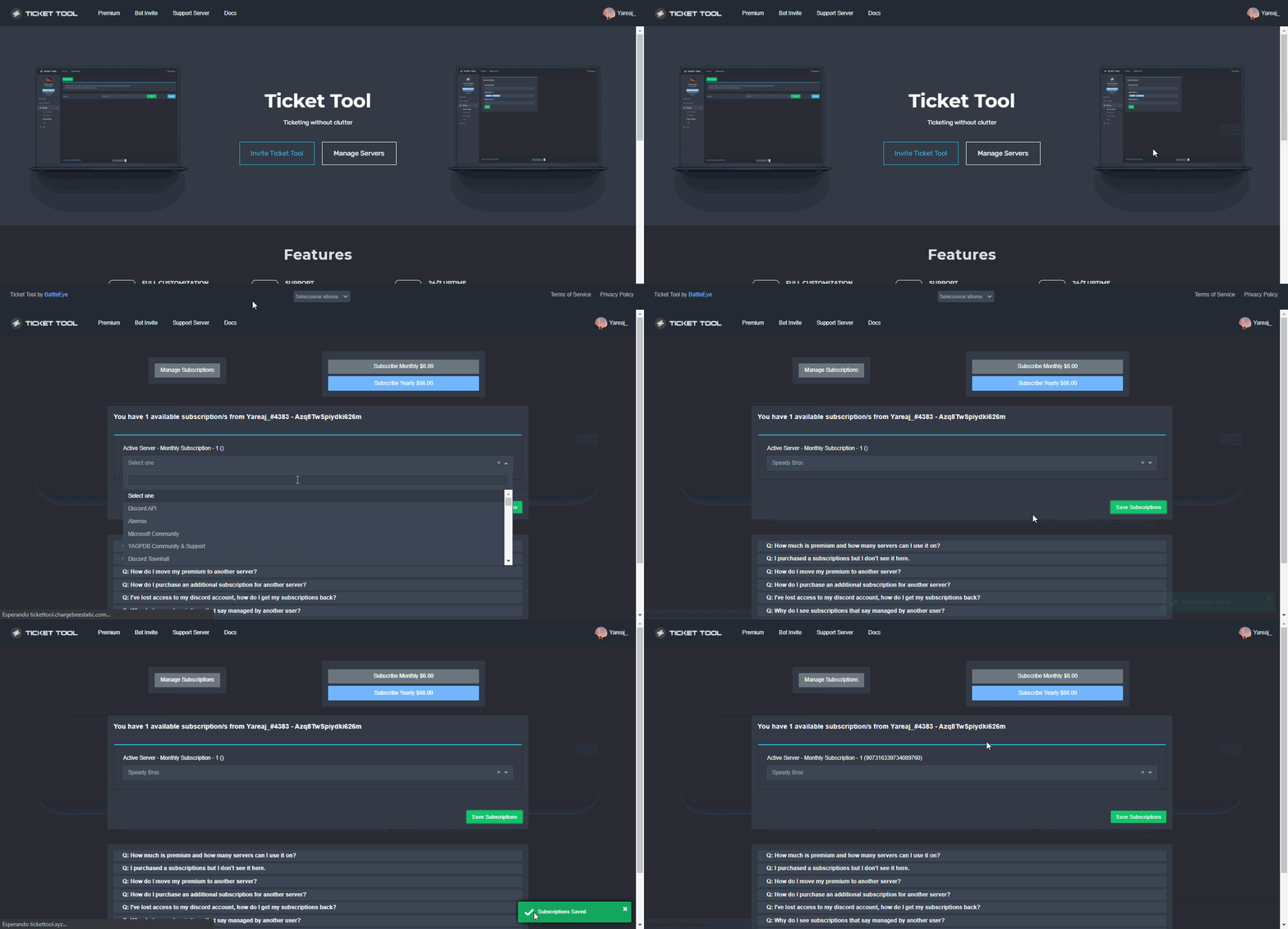
Make sure you've selected a server to apply the premium to like shown below
humble sequoiaBOT
Redeeming premium on your server is really simple. Just head over to your Subscriptions Page. There you can select a server of your choice, which will get premium. You can change the server at any point.
 plain surge
Then try running $pc again
Have you selected a server that you have access to the Dashboard in? @jade topaz
jade topaz
plain surge
Have you selected a server that you have access to the Dashboard in? <@456226577...
Nopes I don't have Administration in that server
plain surge
You need to have Dashboard access on a server that has premium enabled to get the role
It doesn't have to be Administrator
You can have a Dashboard role
humble sequoiaBOT
Any role you put there will have full access to the ticket tool dashboard. The server owner and users with admin permissions already have access to the dashboard.
Be careful of which roles to put here
 jade topaz
plain surge
You need to have Dashboard access on a server that has premium enabled to get th...
jade topaz
plain surge
You need to have Dashboard access on a server that has premium enabled to get th...
Amm like @jade topaz he's my friend I've added the premium in his server but the ticket tool premium is not showing there only the free version is showing
plain surge
Your friend just opened a ticket asking how to add the premium bot 👍
jade topaz
Okay
@` 𝑩 𝒂 𝒄 𝒉 𝒂 𝑪 𝒉 𝒐 𝒓🖤💸#597dn3
Ho gya
Ok
Anyone knows the comand for help
I cant use it
slender minnow
$help
Run it in #🤖│bot-spam if for this server, or in a server where the bot has basic access (read+send message and read mssg history perms) in the channel
@jade topaz
 solemn lantern
Hi guys, is there a way to not send the transcript when the ticket is closed? or it's a mandatory step
slender minnow
solemn lantern
Hi guys, is there a way to not send the transcript when the ticket is closed? or...
Its not necessary.
If you need to save an offline copy of your conversation from the ticket you can save a transcript. Or you can just delete it after it is closed by the ticket owner.
solemn lantern
slender minnow
If you need to save an offline copy of your conversation from the ticket you can...
ok, there is no option to disable sending?
 fickle trout
البوت شغال ؟
slender minnow
solemn lantern
ok, there is no option to disable sending?
Disable sending what?
fickle trout
؟
 slender minnow
fickle trout
؟
slender minnow
fickle trout
؟
Update your discord client
fickle trout
how do ؟
humble sequoiaBOT
Update your discord App
Buttons are a relatively new addition to discord and don't work with some older versions of the app.
Please verify that you have the latest version of discord, by going to the app or play store.
Discord for the App Store
Discord for the Play Store
 neon juniper
 alpine stag
I am trying to figure out how to make the "message text" under "ticket embed settings" ping our moderator role. the @ role isn't working when the ticket comes through
jade topaz
We have to pay for this bot?
slender minnow
$mentions
humble sequoiaBOT
Mentions
Within all the messages the bot's sends (both embeds and text) you can mention either channels, roles, or even users, these mentions will only send a notification to the user if they are used within a text field, e.g: a role mentioned in an embed won't ping at all the users who have that role.
For mentioning a role you can use one out of three options:
{@Role Name} ➞ Which is Case Sensitive.
{RoleID} ➞ Replace RoleId with the Id of the role you are trying to ping.
<@&RoleID> ➞ Discord's native syntax to ping roles.
<#ChannelID> ➞ Mention a channel by its ID.
<@UserID> ➞ Mention a user by its ID.
slender minnow
@alpine stag refer above ^
@jade topaz for certain features, you do other then that its free.
alpine stag
slender minnow
<@368094291224035337> refer above ^
thank you very much
iron nightBOT
Gave +1 Rep to @slender minnow
 eager crystal
Where do u see how to set it up
 alpine stag
slender minnow
<@368094291224035337> refer above ^
alpine stag
slender minnow
<@368094291224035337> refer above ^
Will this also work with emoji IDs?
jade topaz
Is there a way to delete multiple tickets at once using a command?
alpine stag
I am using one category to manage my tickets, open and closed. Is there a way to make the tickets that close go to the bottom of the category so that the open tickets are always on the top?
 robust bluff
Hey guys, i just got a different phone and on this phone the 'create a ticket' Button doesn't show up...
I am the DC owner btw
Can't find a solution on the Internet, maybe someone in here does now how to fix it
 scenic plinth
 ebon gull
اش المشكله؟
ebon gull
اش المشكله؟
من فضلك لا بينغ الموظفين في أي مكان للحصول على الدعم! إذا لم تكن قد فعلت ذلك بالفعل، فاصنع تذكرة عربية في #🎫│make-a-ticket. أيضا بينما كنت في، قراءة المستخدم لدينا #546557408902905896 من فضلك!
scenic plinth
alpine stag
Will this also work with emoji IDs?
Yes, it works the same way as role IDs.
And in response to your other question, you can set individual categories for closed and opened tickets, but the bot doesn't switch the order of the channels.
scenic plinth
robust bluff
Hey guys, i just got a different phone and on this phone the 'create a ticket' B...
Can you try to update your discord application?
scenic plinth
jade topaz
Is there a way to delete multiple tickets at once using a command?
No, if this was a thing there would be a lot of ratelimits, meaning more downtime.
scenic plinth
eager crystal
Where do u see how to set it up
Refer to the setup docs sent below
humble sequoiaBOT
You can check our documentation here.
You can also check #573205317870157855 for the basic setup.
Our documentation contains all the info you need about the bot to be able to setup and configure the bot however you like.
scenic plinth
jade topaz
The bot dont knows the comand $help
Can you ensure the bot can see and send messages in that channel?
robust bluff
scenic plinth
Can you try to update your discord application?
Thx mate, that fixed the problem.
I'm so dumb because i didn't came up with that myself.
Thx man
iron nightBOT
Gave +1 Rep to @scenic plinth
ebon gull
@scenic plinth
scenic plinth
/ar What do you need? You've now pinged me twice and multiple other support, do you need help?
robust sandalBOT
ماذا تحتاج؟ لقد قمت الآن ب الاتصال بي مرتين ودعم آخر متعدد، هل تحتاج إلى مساعدة؟
English (en) → Arabic (ar)
scenic plinth
/ar @ebon gull If you don't need support, please refrain from pinging anyone. If you need further support, go to #make-a-ticket please
robust sandalBOT
@ebon gull إذا لم تكن بحاجة إلى دعم، يرجى الامتناع عن الاتصال بأي شخص. إذا كنت بحاجة إلى مزيد من الدعم، انتقل إلى #make تذكرة من فضلك
English (en) → Arabic (ar)
scenic plinth
 scenic plinth
/ar Dude I'm going to ask one more time for you to stop pinging support. Give me a favor and make sure your discord app is updated to the current version
robust sandalBOT
يا صاح سأطلب منك مرة أخرى أن تتوقف عن دعم الأزيز أعطني معروفا وتأكد من تحديث تطبيق discord الخاص بك إلى الإصدار الحالي
English (en) → Arabic (ar)
humble sequoiaBOT
Update your discord App
Buttons are a relatively new addition to discord and don't work with some older versions of the app.
Please verify that you have the latest version of discord, by going to the app or play store.
Discord for the App Store
Discord for the Play Store
How to make Ticket Tool ping a role
To make ticket tool ping a role when a ticket is opened, go to the Dashboard -> Panel Configs -> Settings -> Ticket Options -> Ticket Message -> Message Text and do this:
{@Role name} This is case sensitive and the role must have @mentions enabled

 austere onyx
Podría alguien ayudarme por favor , intento instalar el bot a mi comunidad y no me deja instalarlo
Se lo pido por favor 🙏
😩
scenic plinth
austere onyx
Podría alguien ayudarme por favor , intento instalar el bot a mi comunidad y no ...
pero te fuiste antes de que alguien pudiera llegar a ti...
scenic plinth
 potent meadow
do you actually put {@Role first
potent meadow
do you actually put {@Role first
{@the role name}
 slim vine
Hi there
potent meadow
thank you
slim vine
How can I make it so that my members can send screenshots into their tickets?
scenic plinth
Panel Options ---> Permission Options ---> User open permissions ---> Attach files to the checkmark ---> save
slim vine
scenic plinth
Panel Options ---> Permission Options ---> User open permissions ---> Attach fil...
Legend, you deserve a raise
jade topaz
Hey, I have exactly one person on my server who can't interact with the ticket buttons.
He can neither open new tickets nor close existing ones.
He has the same discord permissions as everyone. There is nothing limiting users from creating tickets or closing tickets (there is one blacklisted role, but nobody has it).
He keeps getting this error message:
Warning You do not have permissions to use this.
How is that possible and how can I or he fix this? He's updated his discord as well.
oh yeah, pls ping me if you have an idea
shut bolt
jade topaz
Hey, I have exactly __one__ person on my server who can't interact with the tick...
Check your blacklisted roles inside server configs
shut bolt
 strong trout
Can i close all tickets with one command?
strong trout
Can i close all tickets with one command?
Nope
 coral hull
Am i the only one having problems interacting With the Bot right now ?
shut bolt
coral hull
Am i the only one having problems interacting With the Bot right now ?
Which error are you having?
coral hull
It keeps saying invalid Form Body
On my Server ... As Well as Here
humble sequoiaBOT
Update your discord App
Buttons are a relatively new addition to discord and don't work with some older versions of the app.
Please verify that you have the latest version of discord, by going to the app or play store.
Discord for the App Store
Discord for the Play Store
shut bolt
Update your app, it's a Discord problem
coral hull
I See, thanks a Lot ! However my Desktop discord Version wont even Open haha ... Any Tricks for that ? 😂
shut bolt
coral hull
I See, thanks a Lot ! However my Desktop discord Version wont even Open haha ......
What doesn't open exactly? 😅 Discord itself or a ticket?
coral hull
Well its kinda Open ... But i cant click or Type yk ?

I Tried the obvious ... Closing and reopening it ... But i cant really Update it in the current state ... Also i think i Just updated it a few days ago, on my PC 🤔
shut bolt
Rare tbh, you could try to uninstall and install back again, but not sure what could be causing it
coral hull
Hmm i will try to restart my Computer First Just in Case ... But i appreciate the Help Mate ! ♥️
jade topaz
Okay
jade topaz
coral hull
Hmm i will try to restart my Computer First Just in Case ... But i appreciate th...
What's you problem i can help you:)
 surreal hedge
How do I put tickets into a custom message
I have premium
Just wanna put the buttons on a message already sent
shut bolt
surreal hedge
Just wanna put the buttons on a message already sent
Not possible
surreal hedge
whaaaaaa
shut bolt
Edit your panel message
humble sequoiaBOT
The panel message is where people react to make a ticket. To customize it head over to your Dashboard --> Panel Configs -> Settings -> Panel Options -> Edit Panel Message
 shut bolt
And send it
surreal hedge
alr
coral hull
i used task manager to shut it down ... since it seemed like it was stuck in a process ... not really being closed or running ... then opened it via the application not the shortcut ... did the trick, writing from the desktop version now !
thanks for the eager team and the friendly advice ... 10/10 would recommend this support again 😄
surreal hedge
shut bolt
Not possible
What about multiple buttons on one panel?
humble sequoiaBOT
For a more convenient use of multipanels, you can now combine panels on the dashboard. This will allow you to directly send the multipanel from the dashboard or via the $panel ID command.
Where can I find this?
You can find this setting on the Dashboard -> Panel Configs -> Settings -> General Options
Note: if you're attaching all the panels to a panel called English, don't include English in the attached panels box (If you do this, it will create duplicate)
This will put all buttons from all of your panels on one message. The message is the panel message from the panel you're combining these panels in.
Note: This is a premium feature
surreal hedge
Thanks
surreal hedge
Thanks @shut bolt
iron nightBOT
Gave +1 Rep to @shut bolt
 mint sigil
alguen me ayuda porfavor a configurar el bot de ticket?
shut bolt
mint sigil
alguen me ayuda porfavor a configurar el bot de ticket?
$helpes setup
humble sequoiaBOT
Invitando a Ticket Tool
Lo primero que debe hacer es invitar al bot, dando click aquí.
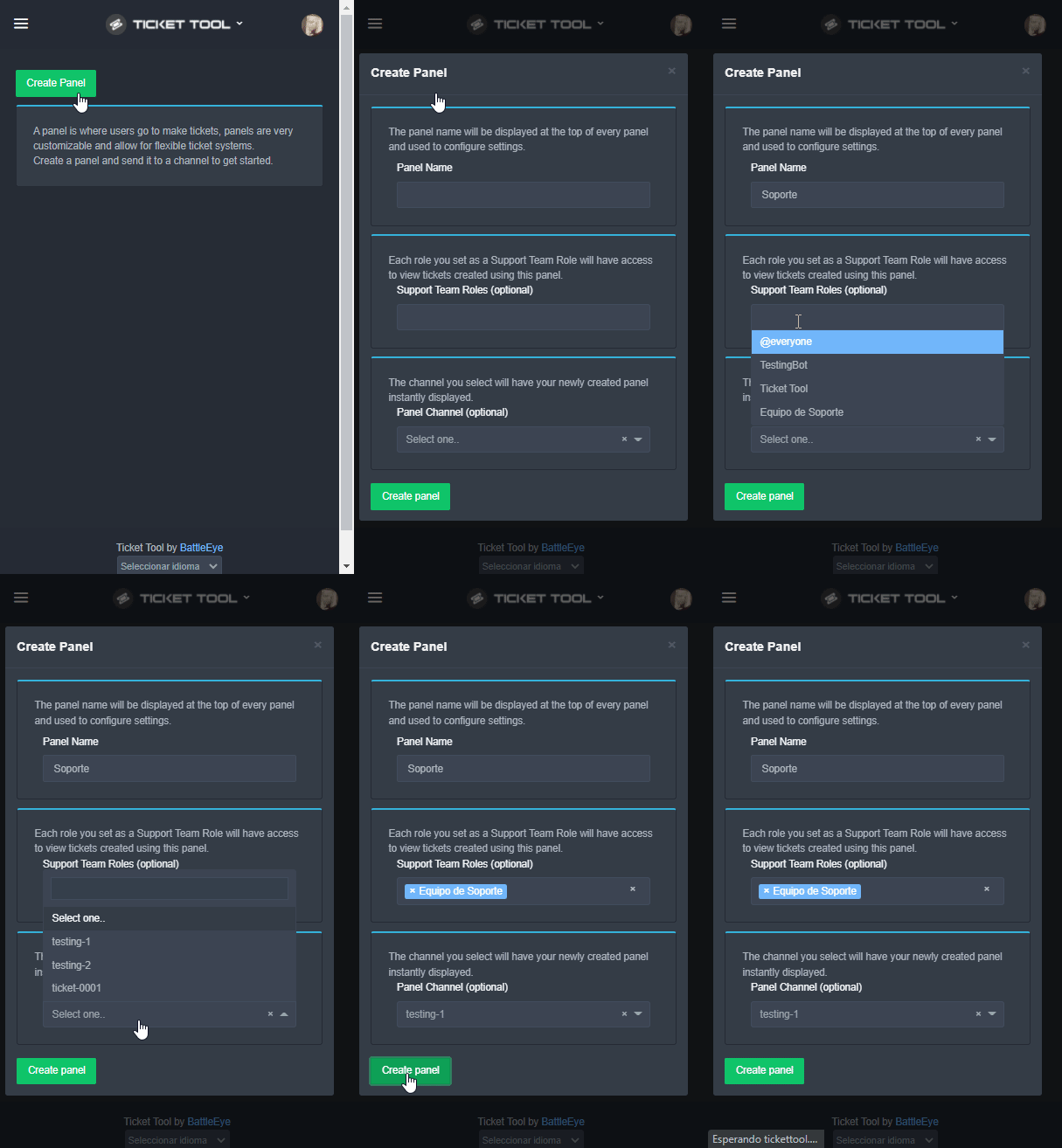
Una vez haya invitado al bot, diríjase al panel de control y cree un panel.
Un panel es usado para definir las configuraciones de un ticket (los usuarios que pueden ver el ticket, los permisos, los nombres, entre otros).
Creando un Panel
Para crear un panel, diríjase a la pestaña de Panel Configs o Configuraciones del Panel en el panel de control de su servidor.
Una vez esté allí, de click en Create Panel / Crear Panel.
Panel Name → Es el nombre que desea que tenga el panel, puede asignar el nombre de su preferencia.
Support Team Roles → Seleccione los roles que deseen que puedan ver los tickets que se creen desde este panel.
Panel Channel → Elija el canal al que quiera que el panel sea enviado al ser creado. (Este campo es opcional, puede reenviar el panel posteriormente si es necesario)
Finalmente de nuevamente click en Create Panel como ilustra el siguiente GIF
 shut bolt
Ahí tienes la guía para hacerlo
mint sigil
grax
shut bolt
👍
shut bolt
jade topaz
Whats the command for the English one?
$help setup
humble sequoiaBOT
Setting up Ticket Tool
Visit the docs for setup info
General Setup
shut bolt
Sure
 sonic wedge
 jade topaz
Hello!
sonic wedge
interaction error, what could be the complexity
jade topaz
sonic wedge
interaction error, what could be the complexity
Update discord
humble sequoiaBOT
Update your discord App
Buttons are a relatively new addition to discord and don't work with some older versions of the app.
Please verify that you have the latest version of discord, by going to the app or play store.
Discord for the App Store
Discord for the Play Store
jade topaz
If anyone needs help just ping me. Always available
$updatedeu
Wow
Sie müssen die Discord-App aktualisieren
Discord is on Google play. update it
Zwietracht ist auf Google Play
Ich spreche kein Deutsch
$supportdeutsch
$updatedeutsch
HELP
shut bolt
$deticket
humble sequoiaBOT

Deutsches Support-Team
Wenn du Hilfe vom Deutschen Support-Team erhalten möchtest gehe in #🎫│make-a-ticket und öffne durch einen Klick auf den :flag_de: Button ein Ticket.
jade topaz
shut bolt
$deticket
The issue is he can't open a ticket
shut bolt
Did he update?
jade topaz
shut bolt
Did he update?
Idk how to tell him to
shut bolt
@severe path remember that one time you told me to ping you for this situations? 😜
jade topaz
I dont speak german
@gloomy jacinth I assume you speak German?
Its not working?
@shut bolt sorry for ping mate but he said its not working. Anything else he can do?
 prime bridgeBOT
 bartosz™#6762 has been warned!

 They were notified via dms.
shut bolt
jade topaz
<@518666147441278998> sorry for ping mate but he said its not working. Anything ...
Mate, I've asked several times for not pinging
It's on #546557408902905896
jade topaz
I'm sorry
robust sandalBOT
 Mr. Ben
To create a ticket there comes only the
German (de) → English (en)
shut bolt
/de @jade topaz Try updating your discord app, or uninstall it and reinstall it back again
robust sandalBOT
@trail adder Versuchen Sie, Ihre Discord-App zu aktualisieren, oder deinstallieren Sie sie und installieren Sie sie erneut und installieren Sie sie erneut
English (en) → German (de)
robust sandalBOT
Czy możemy z tego skorzystać?
English (en) → Polish (pl)
jade topaz
AYY
jade topaz
Woah okay
 thorn flower

🇩🇪
Wenn ich Versuche hier oder bei meinem Server Tickets zu mache geht das nicht wenn's andere machen funktioniert es aber ich kann nichts machen wie behebt man dieses Problem ?
🇬🇧
If I try to make tickets here or on my server it doesn't work if others do it it works but I can't do anything how to fix this problem?
 jade topaz
 fading girder
I'm not able to put the bot commands it's giving error
fading girder
I'm not able to put the bot commands it's giving error
Run $debug, show results
humble sequoiaBOT
Update your discord App
Buttons are a relatively new addition to discord and don't work with some older versions of the app.
Please verify that you have the latest version of discord, by going to the app or play store.
Discord for the App Store
Discord for the Play Store
jade topaz
@thorn flower
 charred geode
I don't understand how to use the bot
humble sequoiaBOT
You can check our documentation here.
You can also check #573205317870157855 for the basic setup.
Our documentation contains all the info you need about the bot to be able to setup and configure the bot however you like.
shut bolt
Check that guide, might be useful
charred geode
ok tysm!
shut bolt
Sure
 gloomy jacinth
jade topaz
<@534109216865124383> I assume you speak German?
gloomy jacinth
jade topaz
<@534109216865124383> I assume you speak German?
Not really
But don't mention support team thanks
thorn flower
jade topaz
<@708651475810648094>
I'll wait, download discord again
jade topaz
thorn flower
I'll wait, download discord again
??
thorn flower
No, I have the latest version of Discord, but it still doesn't work
Now I understand it my fault
jade topaz
thorn flower
Now I understand it my fault
Did you resolve the issue?
thorn flower
Nope
jade topaz
thorn flower
Nope
Okay. What's the issue again?
thorn flower
Wait
jade topaz
Speak in your language if you want
 jade topaz
Okay
thorn flower
I'm from Germany 😹
jade topaz
/de We can speak German if you like?
robust sandalBOT
Wir können Deutsch sprechen, wenn Sie möchten?
English (en) → German (de)
jade topaz
/en
robust sandalBOT
Error while running `en`
message is a required argument that is missing.
 rigid ermine
hey i need some help
jade topaz
rigid ermine
hey i need some help
Go ahead!
thorn flower
/en Ne alles Gut ich übe denn für die Nächte Arbeit
robust sandalBOT
Ne all well I practice because for the nights work
German (de) → English (en)
rigid ermine
So i paid for Perm VIP like a month or two ago and its not poping up anymore in game
jade topaz
rigid ermine
So i paid for Perm VIP like a month or two ago and its not poping up anymore in ...
What do you mean in game?
thorn flower
/en Ne alles Gut ich übe denn für die nächste Arbeit
robust sandalBOT
Ne alles Gut ich übe denn für die nächsten Arbeit
German (de) → English (en)
rigid ermine
Theres no VIP tag with my name
jade topaz
rigid ermine
Theres no VIP tag with my name
What did you buy?
jade topaz
rigid ermine
Perm VIP For the 1000x battlefield
Sir, this is ticket tool support.
thorn flower
But my problem is that I can't create tickets myself and I can't manage them either. I'll do everything again tomorrow afternoon with the bot. I actually know discord well
jade topaz
thorn flower
But my problem is that I can't create tickets myself and I can't manage them eit...
Okay
rigid ermine
so what should i do to get VIP back
thorn flower
because it's very weird because other people can do it except me lol
jade topaz
rigid ermine
so what should i do to get VIP back
Sir, I refuse to help. This is ticket tool support
thorn flower
xD
rigid ermine
well how to i access ticket tool
humble sequoiaBOT
You can check our documentation here.
You can also check #573205317870157855 for the basic setup.
Our documentation contains all the info you need about the bot to be able to setup and configure the bot however you like.
jade topaz
@rigid ermine
rigid ermine
Yes
jade topaz
Check the above document to find out how to set up @pseudo glen
rigid ermine
ok
thorn flower
@jade topaz where are you from ?
jade topaz
thorn flower
<@456226577798135808> where are you from ?
Originally Poland but I live in the uk
premium invite
i need
thorn flower
oh really, my new class teacher is Polish, I've moved and live about 1-1½ hours from the border
jade topaz
jade topaz
premium invite
Okay hold oj
 glossy haven
Hi
thorn flower
Nie mówię dobrze po polsku
jade topaz
jade topaz
premium invite
Just go on the ticket tool premium and look in the about me section
jade topaz
thorn flower
Nie mówię dobrze po polsku
Aha
thorn flower
xD
 dire sedge
Does anyone know if it’s possible to have the ticket tool ping mods when they crate a ticket ?
jade topaz
dire sedge
Does anyone know if it’s possible to have the ticket tool ping mods when they cr...
Yeah!
Want help?
dire sedge
Yes pls
jade topaz
dire sedge
Yes pls
Okay! So. Do you know how to get a role id?
dire sedge
Yep
jade topaz
dire sedge
Yep
Great
jade topaz
dire sedge
Yep
So. If you want a specific ticket to ping staff you can just put it like this. <@&roleid> in the response section. Is that clear or do I need to show an example?
dire sedge
Ahh interesting. I’ll check it out now and if I need help I’ll ask
dire sedge
jade topaz
So. If you want a specific ticket to ping staff you can just put it like this. <...
Tyvm
dire sedge
jade topaz
So. If you want a specific ticket to ping staff you can just put it like this. <...
Do I need to purchase premium to do this?
jade topaz
dire sedge
Do I need to purchase premium to do this?
Nope!
jade topaz
dire sedge
Do I need to purchase premium to do this?
Send any screenshots if needed!
dire sedge
Ok
jade topaz
How's it going? @dire sedge
dire sedge
jade topaz
How's it going? <@392582346135830528>
got busy work work sorry. umm Yeah i couldnt find where to add it
dire sedge
jade topaz
So. If you want a specific ticket to ping staff you can just put it like this. <...
so you're saying that when someone creates a ticket, I can input an automatic response that will ping the mods?
jade topaz
dire sedge
so you're saying that when someone creates a ticket, I can input an automatic re...
Yes
jade topaz
dire sedge
got busy work work sorry. umm Yeah i couldnt find where to add it
I'll show you an example
dire sedge
ok cool
jade topaz
dire sedge
<@456226577798135808>
Its alright!! Ping me if you need any more help!
dire sedge
jade topaz
Its alright!! Ping me if you need any more help!
much appreciated 😄
 queen bison
Hi
So I deleted my ticket by mistake
Without making the transcript
Noq I want to recover it as it is urgent for me to get that data
Can anyone help me out
@scenic plinth
Anyone
@short stump
queen bison
Help me
shut bolt
queen bison
Noq I want to recover it as it is urgent for me to get that data
Not possible, and next time refrain from pinging our support team, read #546557408902905896
 plain quail
guys sorry im so stupid
i just buy a premium on ticket tool, where can i found the dashboard for it
queen bison
plain quail
i just buy a premium on ticket tool, where can i found the dashboard for it
Same dashboard
plain quail
but when i setting it up the free one respond to it
queen bison
shut bolt
Not possible, and next time refrain from pinging our support team, read <#546557...
Can't I recover or backup my tickets..it says only server owner can do..so is it possible
queen bison
plain quail
but when i setting it up the free one respond to it
Did u paid bot to server
Give that bot same perms of line old bot
plain quail
queen bison
Did u paid bot to server
wdym paid bot to server?
slender minnow
plain quail
i just buy a premium on ticket tool, where can i found the dashboard for it
Hi, you can invite the premium bot from the dashboard.
Its the same dashboard from tickettool.xyz
plain quail
i already invite it, it works before, but wicks has quarantine the premium bot so i have to setup it again. and when i use the normal dashboard, only the free bot react to the setup
slender minnow
plain quail
i already invite it, it works before, but wicks has quarantine the premium bot s...
You can just unquarantine tt and if the panel is deleted, you can send it again
Either from the dashboard or using the send panel command
 civic rover
Is there a way to add someone to a ticket
 full pasture
Hello whenever I try to open a ticket it says "Invalid Form Body" can you fix it somehow
And i can't open a ticket
humble sequoiaBOT
How to add or remove users on tickets
To add a user to a ticket use $add <user>
To remove a user from a ticket use $remove <user>
mystic hound
@civic rover ^^
full pasture
mystic hound
Update discord
I already have it updated
mystic hound
Are you able to open a ticket in this server? #🎫│make-a-ticket
 mystic hound
Then it's from your end, double check that your discord app is updated
humble sequoiaBOT
Update your discord App
Buttons are a relatively new addition to discord and don't work with some older versions of the app.
Please verify that you have the latest version of discord, by going to the app or play store.
Discord for the App Store
Discord for the Play Store
 mild light
 jade topaz
ممكن سؤال
 solid orbit
شغال
 jade topaz
بردك نفس المشكله
humble sequoiaBOT
Update your discord App
Buttons are a relatively new addition to discord and don't work with some older versions of the app.
Please verify that you have the latest version of discord, by going to the app or play store.
Discord for the App Store
Discord for the Play Store
copper owl
^^
jade topaz
ايش هاد
copper owl
عمول update للdiscord

 viscid matrix
السلام عليكم محتاج مساعدة
humble sequoiaBOT
━━ moved to ticket ━━
solid orbit
افتح تكت
jade topaz
/en افتح تكت
robust sandalBOT
Open a tack.
Arabic (ar) → English (en)
robust sandalBOT
 polar orchid
/ar افتح تكت
polar orchid
/ar افتح تكت
Trying to translate to Arabic but detected as Arabic.
Please don't waste translations by trying to translate to the same language.
polar orchid
/en افتح تكت
robust sandalBOT
Open a tack.
Arabic (ar) → English (en)
polar orchid
انا عندي مشكله
jade topaz
/en انا عندي مشكله
robust sandalBOT
i have a problem
Arabic (ar) → English (en)
jade topaz
polar orchid
انا عندي مشكله
/ar What is the problem?
robust sandalBOT
ما هي المشكلة؟
English (en) → Arabic (ar)
polar orchid
اني ما اقدر افتح او أغلق تكت en/
jade topaz
/en اني ما اقدر افتح او أغلق تكت
robust sandalBOT
I can't open or close a tkeet
Arabic (ar) → English (en)
jade topaz
/ar Update the discord application
robust sandalBOT
تحديث تطبيق الخلاف
English (en) → Arabic (ar)
humble sequoiaBOT
Update your discord App
Buttons are a relatively new addition to discord and don't work with some older versions of the app.
Please verify that you have the latest version of discord, by going to the app or play store.
Discord for the App Store
Discord for the Play Store
queen bison
@jade topaz
shut bolt
queen bison
Can't I recover or backup my tickets..it says only server owner can do..so is it...
That's not what that feature is for
shut bolt
thorn flower
<@518666147441278998>
Take a look to #546557408902905896 to be specific, rule 4
thorn flower
Oh okay sry
It still doesn't work for me had re-did everything still doesn't work Why is that
shut bolt
I don't know you mate, what doesn't work
 shut bolt
That's a Discord problem going on over the last days, to solve it you'll need to update your app to the latest version or reinstall it if needed.
full pasture
/ge
thorn flower
I actually have the latest version
shut bolt
thorn flower
I actually have the latest version
Then reinstall your app, it's not a bot problem, it's a Discord problem
humble sequoiaBOT

Error 1015 - You are being rate limited
If you get the above error when trying to access our web page, don't be scared. This is just a security feature on our dashboard to mitigate possible attacks to the site. The only way to access the site is to wait for the temporary ban to be lifted automatically. It typically takes around 1 hour but can be quicker or longer.
shut bolt
 white karma
shut bolt
<:this:894279341108772914>
white karma
shut bolt
<:this:894279341108772914>
Oh okay, thanks
iron nightBOT
Gave +1 Rep to @shut bolt
shut bolt
white karma
Oh okay, thanks
Sure
robust sandalBOT
 young field
السلام عليكم
young field
السلام عليكم
 alajmi101
Peace be upon you
Arabic (ar) → English (en)
robust sandalBOT
young field
كيف ادخل اعدادات البوت
alajmi101
How to enter bot settings
Arabic (ar) → English (en)
humble sequoiaBOT
 young field
ar
shut bolt
/ar Use your dashboard to edit its settings
robust sandalBOT
استخدام لوحة المعلومات لتحرير إعداداتها
English (en) → Arabic (ar)
white karma
It looks that I can access the bot again
shut bolt
white karma
It looks that I can access the bot again
Great
robust sandalBOT
shut bolt
Great
 Yareaj_
Nui
 English (en) → Hawaiian (haw)
white karma
English (en) → Hawaiian (haw)
white karma
Oh I didn’t mean to activate the bot
shut bolt
white karma
Oh I didn’t mean to activate the bot
It's fine jajajaja
No one uses that reaction for translating tbh
 tulip whale
can you set up more than one ticket channel in a server? does that require premium?
shut bolt
tulip whale
can you set up more than one ticket channel in a server? does that require premi...
You can have as many panels as you wish
white karma
Hey,
I’m trying to change the button color to green but every time I press save and then hit send, it sends it as grey
shut bolt
white karma
Hey,
I’m trying to change the button color to green but every time I press save ...
Do you have a premium subscription on that server?
shut bolt
white karma
Is that required?
Yup, for changing the color of the button you'll need premium
white karma
Ah, okayy
It would have been easier if it said next to the settings premium required or add like a premium logo next to it and lock that setting


 noble kiln
How do i make it ping a role when a ticket gets opend?
jade topaz
noble kiln
How do i make it ping a role when a ticket gets opend?
Okay
jade topaz
noble kiln
How do i make it ping a role when a ticket gets opend?
Do you know how to get a role id?
noble kiln
Yea
jade topaz
noble kiln
Yea
Okay so I'm going to show you a video now. And you going to type <@&roleid> after you finish watching the video. Your going to do it in the exact same space that I did it
noble kiln
Ok
jade topaz
iron nightBOT
Gave +1 Rep to @sleek bolt
jade topaz
Your welcome!
white karma
shut bolt
That's what the <:premium_red:662032717906444329> stands for
Oh shit, I misunderstood that then I apologize
My fault on that
shut bolt
white karma
Oh shit, I misunderstood that then I apologize
No problem mate, it's fine
white karma
🤙🏼
 solemn oar
hi
shut bolt
Hello there
jade topaz
solemn oar
hi
Do you need any help?
shut bolt
Most likely he's going to ask for someone to answer his ticket
 smoky eagle
Ticket tool doesn't have permission to send panel error? And also, how would I set up the panel like you guys have it here with the reactions?
I'm assuming that's just combining the panels, and if not sorry
jade topaz
Do I have to delete the panel to rename it
copper owl
No there's a rename button right in the same place as the delete button
copper owl
smoky eagle
Ticket tool doesn't have permission to send panel error? And also, how would I s...
yeah the solution is within the error, you'll need to give TT the permissions to send the panel in the channel
also yes, you're right on the money with the multiple buttons. It's just combining the panels under one via Attached panels
jade topaz
Well I renamed it to “affiliate Authorization” but then it still shows “report” on my screen


 copper owl
Have you tried resending the panel after you rename it
copper owl
 vestal siren
Why does this come?
vestal siren
Why does this come?
because you most likely have a ticket opened already
vestal siren
No I haven't I've checked many times
 rancid arrow
What is this?
 copper owl
then contact the staff of that server and make sure
jade topaz
If I resend it will it delete all the tickets I have already
copper owl
No it won't
vestal siren
copper owl
then contact the staff of that server and make sure
Is tht ticket limit only for 1 server or for all server 1 ticket only we can make?
rancid arrow
rancid arrow
What is this?
@copper owl
copper owl
jade topaz
Where do I resend
look before that
copper owl
vestal siren
Is tht ticket limit only for 1 server or for all server 1 ticket only we can ma...
i didnt understand your question because both choices you gave me are the same thing
jade topaz
I have another question
copper owl
rancid arrow
<@548583124062175232>
Try updating your discord
and try following the rules aswell
jade topaz
I have 2 of these are they a way I can find out which one is the one with tickets
 vestal siren
Umm just tell me what should I do coz that ticket is important.. I have to create it!! 🤧
copper owl
rename one of them to some different
copper owl
vestal siren
Umm just tell me what should I do coz that ticket is important.. I have to creat...
i already did
vestal siren
Ok I will try thanks!
rancid arrow
copper owl
Try updating your discord
and try following the rules aswell
Thank you soo much
iron nightBOT
Gave +1 Rep to @copper owl
jade topaz
Do I delete this one now that I resend one @copper owl
 copper owl
jade topaz
Do I delete this one now that I resend one <@!548583124062175232>
copper owl
jade topaz
Do I delete this one now that I resend one <@!548583124062175232>
you can
jade topaz
copper owl
you can
Thanks daddy I got it figured I think
iron nightBOT
Gave +1 Rep to @copper owl
copper owl
jade topaz
Thanks daddy I got it figured I think
Excuse me?
jade topaz
copper owl
Excuse me?
What
copper owl
Talk to me like a normal human being please
and keep "daddy" off the table, thats weird
jade topaz
Sorry I call all my homies that
jade topaz
Are you daddy? @haughty valley
 haughty valley
uhhhh
jade topaz
My pronouns are he/her
haughty valley
idk man i just need help