Help Options
$help commands - Information on commands
$help setup - Information on bot setup
$help faq - Frequently asked questions
1 messages · Page 386 of 1
 humble sequoiaBOT
$help commands - Information on commands
$help setup - Information on bot setup
$help faq - Frequently asked questions
 marble barn
$help commands
humble sequoiaBOT
() = optional
[] = required
_ _
Description: Adding additional users to a ticket
Aliases: none
Description: Removing users from a ticket
Aliases: none
Description: Closing tickets
Aliases: none
Description: Opening closed tickets
Aliases: none
Description: Deleting tickets
Aliases: none
Description: Renaming tickets/channels
Aliases: none
Description: Creating transcripts
Aliases: none
Description: Creating tickets in a monitored channel (when command style is enabled)
Aliases: none
Description: Claiming tickets (when claim is enabled)
Aliases: "unclaim"
_ _
_ _
Description: Help Command
Aliases: none
Description: Debuging issues with running Ticket Tool
Aliases: none
Description: Converting roles, users, channels and emojis to ID
Aliases: "getid"
Description: Checking permission level with Ticket Tool
Aliases: "level"
Description: Checking response time with discord api
Aliases: none
Description: Earn premium by voting on top.gg or Discord.boats
Aliases: "votes"
marble barn
$help setup
humble sequoiaBOT
Visit the docs for setup info
General Setup
 slender minnow
@marble barn
You should use those commands in #🤖│bot-spam
humble sequoiaBOT
━━ moved to ticket ━━
humble sequoiaBOT
We would love to help you, but if you don't tell us what you need help with we can't help you :(
 unique trench
how to fix it?

 shut bolt
Give view channel permission to the bot in the support category
unique trench
shut bolt
Give view channel permission to the bot in the support category
Fixed,thx!
shut bolt
Sure :)
 dire furnace
Is there any way to do this when someone closes a ticket to save Transcript and then auto delete when someone closes the ticket so the ticket would be deleted automatically?
shut bolt
dire furnace
Is there any way to do this when someone closes a ticket to save Transcript and ...
Hey there, yup, you'll need to do two things;
For making it auto delete once closed:
Go into your Dashboard
Open the Panel Configs Tab
Click on the Panel's Settings
Open the General Menu Options
Mark as  the Two Step Ticket option
Save changes
For making the transcript to be automatically saved, make sure you got premium and do this:
In the same Panel's Settings window go to Logging Options
Once there mark as  the Auto Save Transcript feature
Select Close or Delete
And Save
dire furnace
shut bolt
Hey there, yup, you'll need to do two things;
For making it auto delete once cl...
I can't transcript automatically
shut bolt
dire furnace
I can't transcript automatically
Well, there's nothing I can do, I'm only letting you know how you can do it
 upbeat spire
does anyone know how to do this when you like make a ticket???
 shut bolt
upbeat spire
does anyone know how to do this when you like make a ticket???
shut bolt
upbeat spire
does anyone know how to do this when you like make a ticket???
You mean editing the ticket message?
humble sequoiaBOT
The Ticket Message is the first message sent by the bot in a new ticket. To customise it head over to your Dashboard ➞ Panel Configs ➞ Settings ➞ Ticket Options ➞ Edit Ticket Message
 shut bolt
Follow the steps above and that's pretty much it
 iron nightBOT
Gave +1 Rep to @shut bolt
shut bolt
Sure 
 jade topaz
i need help
humble sequoiaBOT
We would love to help you, but if you don't tell us what you need help with we can't help you :(
 fallow ingot
@jade topaz ^
 feral drift
If a ticket has been closed out, but its not stuck and stays , have try to delete the whole channel everything but nothing is working!
can anyone help ?
shut bolt
feral drift
If a ticket has been closed out, but its not stuck and stays , have try to del...
Discord bug then
Contact them to ask the removal of the channel
feral drift
@shut boltthanks pablo i will try that then! but if not i will be back lol 😂
shut bolt
feral drift
<@!518666147441278998>thanks pablo i will try that then! but if not i will be ba...
Sure! And it usually works, I've contact them a couple times cause I had the same problem a time ago
jade topaz
perms are bad
wihtout verification i was able to see the premium sections
but anyways, im trying to invite premium bot and even tho discord says is in, the bot is not joining my server
any idea?
fallow ingot
$pc 941910266583609364
humble sequoiaBOT

Thank you for purchasing Ticket Tool Premium @chilly notch. You have now been given the <@&535595160189403136> role!
fallow ingot
Maybe try refreshing your Discord. And if not try again.
iron nightBOT
Gave +1 Rep to @fallow ingot
fallow ingot
anytime
shut bolt
fallow ingot
$pc 941910266583609364
Commands are meant to be used on #🤖│bot-spam please
fallow ingot
shut bolt
Commands are meant to be used on <#910978476536905738> please
Yeah sorry I forgot for a second
shut bolt
It's fine
 torpid isle
How can i do so when a created ticket shows only for admins and ticket creator. Right now everyone can see a ticket channel
humble sequoiaBOT
━━ moved to ticket ━━
jade topaz
Ticket tool cannot open tickets despite having all permissions in the channel.
Ticket tool only has permissions in a Category, does this affect it?
This channel is not in the Category btw (by the way).
 fallow ingot
jade topaz
Ticket tool cannot open tickets despite having all permissions in the channel.
T...
fallow ingot
jade topaz
Ticket tool cannot open tickets despite having all permissions in the channel.
T...
What are you trying to do exactly?
Add someone to a ticket, or open a ticket for them?
jade topaz
fallow ingot
Add someone to a ticket, or open a ticket for them?
Both.
 slow nova
jade topaz
Ticket tool cannot open tickets despite having all permissions in the channel.
T...
slow nova
jade topaz
Ticket tool cannot open tickets despite having all permissions in the channel.
T...
open only reopens a ticket
you need to have a panel to open it, as far as im aware
slow nova
go to the panel
on the TT website
it will be like this

if you setup the ticket properly
fallow ingot
jade topaz
Both.
To make a ticket for someone you need to Enable Command Style Tickets go to Dashboard > Panel > Command Style Tickets and enable it. Follow the screenshot below.

 wicked swift
cheat on rast started but does not work what to do?
jade topaz
fallow ingot
To make a ticket for someone you need to Enable Command Style Tickets go to Das...
Thanks @fallow ingot
iron nightBOT
Gave +1 Rep to @fallow ingot
fallow ingot
jade topaz
Thanks <@!768144576946110475>
To add a user to a ticket you need to run $add <USER_ID> in the ticket you want to add the user to.
humble sequoiaBOT

We provide support for @pseudo glen discord bot and cannot help you with whatever issue you have.
- Please make sure to contact the appropriate Support Team.
If you don't have any further questions regarding our bot Ticket Tool, please close this ticket
fallow ingot
@wicked swift ^
jade topaz
fallow ingot
To make a ticket for someone you need to Enable Command Style Tickets go to Das...
I enabled the Command Style option.
I get this:
New command not monitoring this channel
To see what channel is monitored visit the Dashboard -> Panel Configs -> Settings -> Command Style Tickets -> Channel to monitor for command $new
help
$mentions
humble sequoiaBOT
Within all the messages the bot's sends (both embeds and text) you can mention either channels, roles, or even users, these mentions will only send a notification to the user if they are used within a text field, e.g: a role mentioned in an embed won't ping at all the users who have that role.
For mentioning a role you can use one out of three options:
{@Role Name} ➞ Which is Case Sensitive.
{RoleID} ➞ Replace RoleId with the Id of the role you are trying to ping.
<@&RoleID> ➞ Discord's native syntax to ping roles.
<#ChannelID> ➞ Mention a channel by its ID.
<@UserID> ➞ Mention a user by its ID.
fallow ingot
jade topaz
I enabled the Command Style option.
I get this:
New command not monitoring this ...
So, run the command in the channel you have set in the screenshot below.
 humble sequoiaBOT
To make ticket tool ping a role when a ticket is opened, go to the Dashboard -> Panel Configs -> Settings -> Ticket Options -> Ticket Message -> Message Text and do this:
{@Role name} This is case sensitive and the role must have @mentions enabled
 fallow ingot
@jade topaz ^
jade topaz
fallow ingot
So, run the command in the channel you have set in the screenshot below.
What does that do? ? doesn't work.
It logs tickets created with $new?
jade topaz
 fallow ingot
Ok what channel did you set here?
 fallow ingot
You can enable it so you can run the command in any channel.

Just enable that, and try running the command again.
jade topaz
Worked. T hx
fallow ingot
anytime have a good one
humble sequoiaBOT
Tags are used to send a predefined response to your channels using a command. Tags will only respond if the command itself is used, it will not function if you put the tag into a sentence. The prefix is not included.
To create tags, go to: Dashboard > Tags > Create Tag. After creating and naming one, tap on the response button, and you can edit the response.
 fallow ingot
@vast atlas ^
 vast atlas
@fallow ingot Thank you
iron nightBOT
Gave +1 Rep to @fallow ingot
fallow ingot
anytime
humble sequoiaBOT
$help commands - Information on commands
$help setup - Information on bot setup
$help faq - Frequently asked questions
 floral juniper
Hi
fallow ingot
floral juniper
Hi
 flat vault
is there a max number of open tickets per discord on the free account?
fallow ingot
flat vault
is there a max number of open tickets per discord on the free account?
No, however each category can only hold 50 channels so tickets won’t be assigned to that category if you have over 50 channels. You can assign an overload channel if that was to happen.
 stark ferry
i dont see the server on https://tickettool.xyz/manage-servers

some know how to fix or some
i have 2 server already and i dont get any problem
(fixed)
 snow wind
Hi! Today my server got raided by some users. I use "lockdown" command of dyno bot to lock the servers so people can't spam messages but the "lockdown" command didn't worked with ticket tool section so they opened tickets and spam their messages to there. Is there any way exist to prevent this happen?
fallow ingot
snow wind
Hi! Today my server got raided by some users. I use "lockdown" command of dyno b...
My suggestion to you is to blacklist the member role if you were to ever go back into lockdown.
you can learn to blacklist role below
humble sequoiaBOT
Any role you assign as a blacklisted role won't be able to use commands or reactions.
Go to your Dashboard ➞ Server Configs. There you will find the option to select blacklisted roles.
Note: Don't forget to save.
 fallow ingot
or you can hide the channel ^
 unborn basin
how do i make a role be pinged when a ticket is opened? ive followed the {927123123} thing and it wont work
btw that aint an actual role I
unborn basin
it aint
humble sequoiaBOT
<@&642118166243311646>
unborn basin
ok thanks
shut bolt
Sure
unborn basin
thanks @shut bolt
iron nightBOT
Gave +1 Rep to @shut bolt
unborn basin
System Failure: Missing Permissions
shut bolt
unborn basin
System Failure: Missing Permissions
$sf
humble sequoiaBOT
- System Failure: @Ticket Tool Missing permission(s): PERMISSION(S)
+ Ticket Tool is missing permissions to work properly, check the mentioned permissions by the bot in the channel, in the category, and in the role. You can use $debug as a help tool.
- System Failure: Panel “XX” not found
+ The panel they are trying to interact with has been deleted.
- Failed: `Invalid Form Body components[X].components[X].emoji.id: Invalid emoji
+ The bot does not have longer access to the emoji (external server) or the emoji has been deleted
- Failed: `Invalid Form Body components[X].components[X]: this is a required field
+ There is a certain necessary field you left blank. You will have to input a valid argument (most likely text) in the required field for ticket tool to continue functioning normally.
- System Failure: allMessages.users.sort is not a function
- System Failure: Unknown Webhook
- System failure: Service unavailable?
- System Failure: Internal Server Error
+ The bot has run into an issue, please try again as these are cases that tend to fail only once, if the problem is persistent, contact our support team
- Warning: Ticket Tool Failed to connect to it's database, please wait or try again.
+ There might be an issue with Ticket Tool, most likely a database issue, you'll have to wait a few minutes before creating another ticket. This is in place to prevent certain bugs to happen with tickets
everytime i try to close a ticket on my server
unborn basin
thanks
shut bolt
Sure
unborn basin
thanks @shut bolt
iron nightBOT
Gave +1 Rep to @shut bolt
shut bolt
What's the ID?
shut bolt
Ticket Tool has no public API
jade topaz
why
shut bolt
¯_(ツ)_/¯
jade topaz

snow wind
fallow ingot
My suggestion to you is to blacklist the member role if you were to ever go back...
thank you
iron nightBOT
Gave +1 Rep to @fallow ingot
fallow ingot
anytime
 chilly ether
Does anyone know a good levelling bot?
humble sequoiaBOT
We provide support for @pseudo glen discord bot and cannot help you with whatever issue you have.
- Please make sure to contact the appropriate Support Team.
If you don't have any further questions regarding our bot Ticket Tool, please close this ticket
 olive anchor
hello anyone here to help out?
humble sequoiaBOT
olive anchor
Ive set up TicketTool and followed the steps. But during testing i kept getting this message (attached)
 shut bolt
$help limit
humble sequoiaBOT
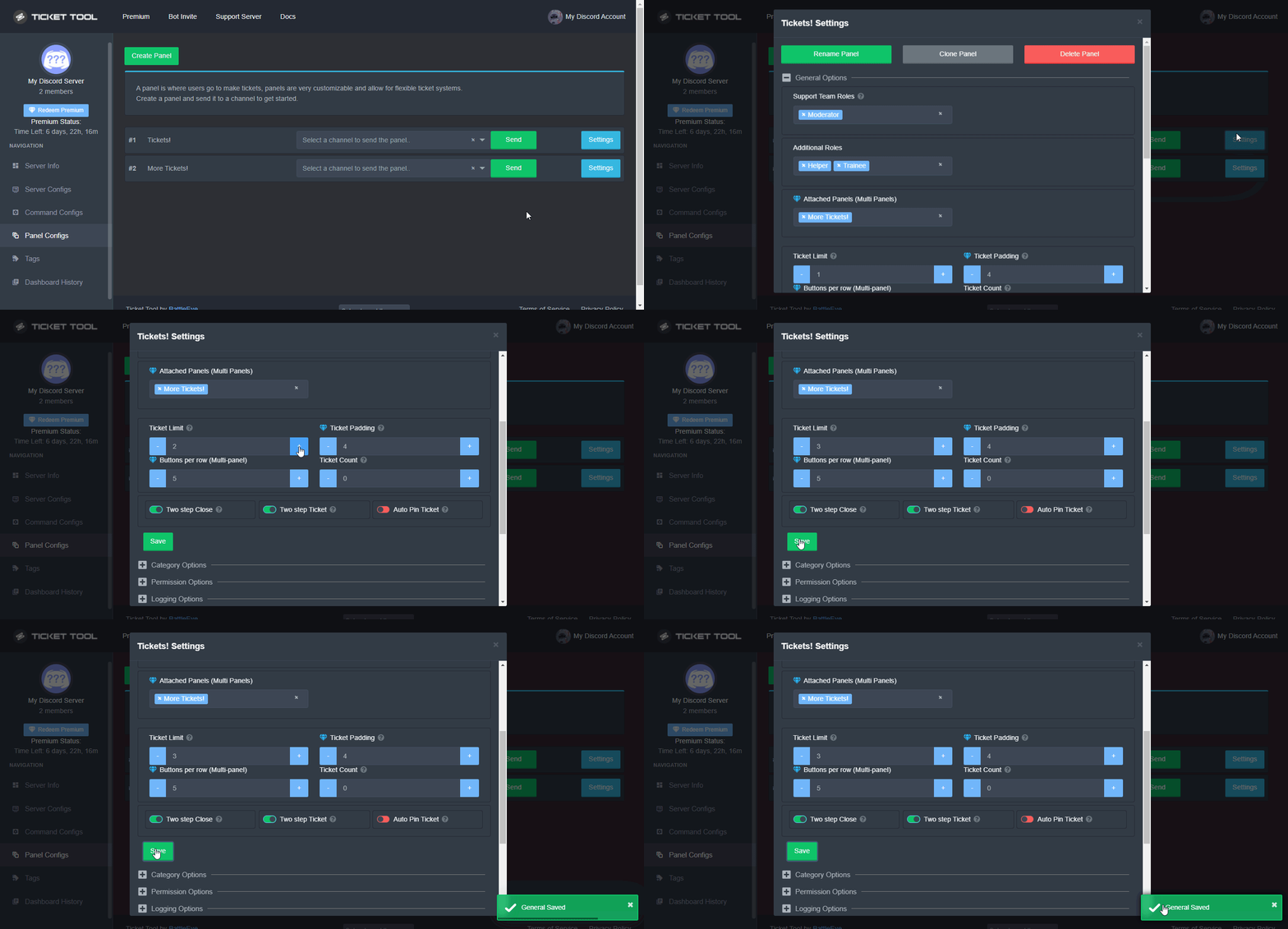
A ticket limit may be set per panel to prevent users from spamming tickets. By default this limit is set to 3. Once a user hits this limit the bot will notify the users that they reached the limit.
To set a ticket limit go to the Dashboard -> Panel Configs -> Settings -> General Options -> Ticket Limit
 shut bolt
Oh wait no
humble sequoiaBOT
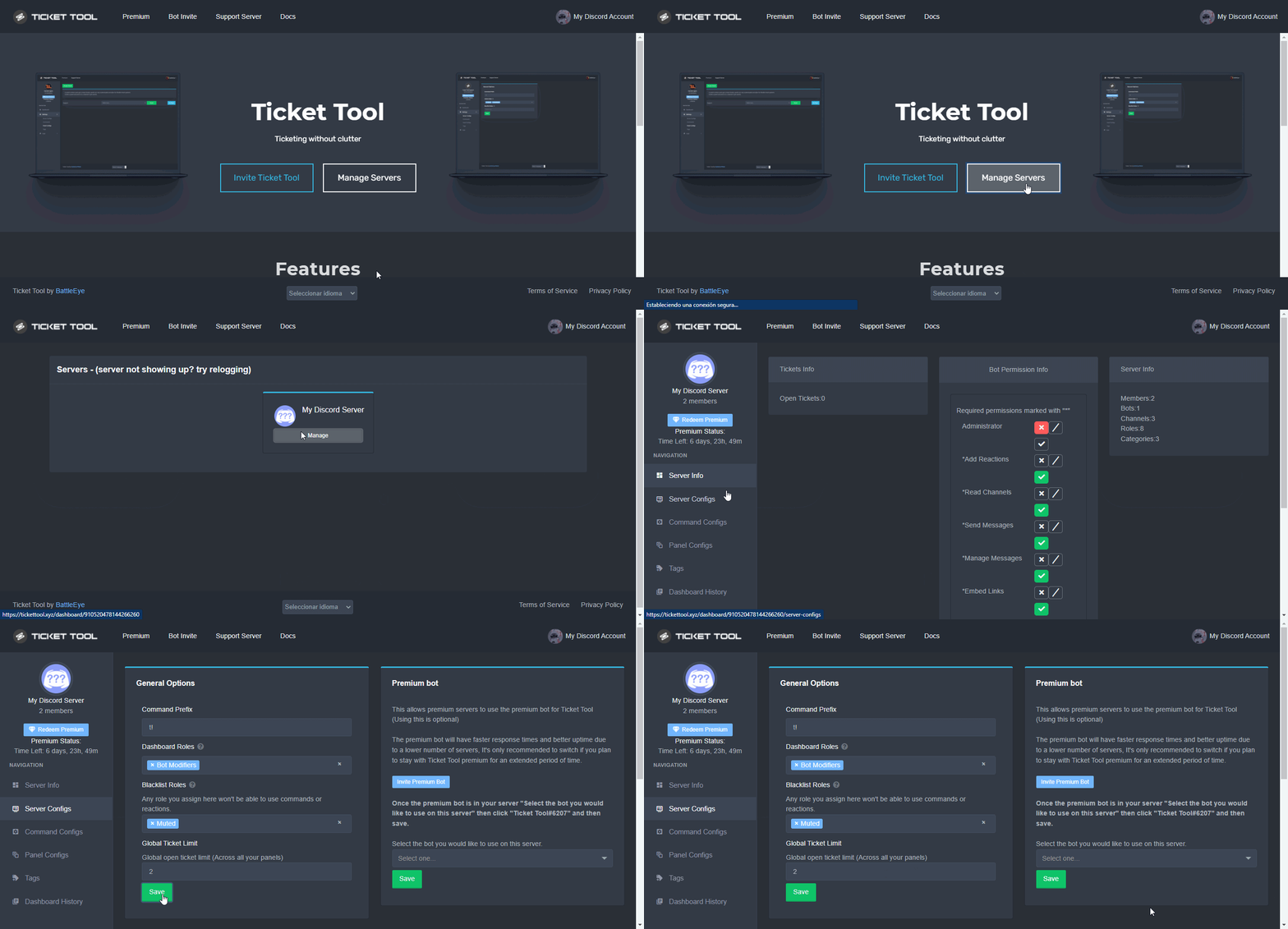
Unlike the regular Ticket Limit, the global limit will limit the amount of tickets a user can create at the same time for ALL Panels. When a ticket is closed again, the limit resets for that user.
To customize it head over to your Dashboard ➞ Server Configs ➞ Global Ticket Limit
Note:
This is not a limit for how many tickets a user can open at all times or how many tickets you can have open on the server in total. This is just a limit per user for open tickets.
 shut bolt
The problem is caused by the global limit, you setted it to 0
olive anchor
shut bolt
The problem is caused by the global limit, you setted it to 0
sweeeeet! thank you lemme try this
iron nightBOT
Gave +1 Rep to @shut bolt
shut bolt
olive anchor
sweeeeet! thank you lemme try this
Sure, let me know
olive anchor
shut bolt
Sure, let me know
what is the global limit usually set to and what does the global limit do and does it reset back to '1' after 100 limits?
shut bolt
olive anchor
what is the global limit usually set to and what does the global limit do and do...
People usually set it to 2, meaning that a user can open up to two tickets across all panels.
What it does is to limit the amount of tickets a user can have opened at the same time in the whole server.
No, it doesn't reset by itself
olive anchor
shut bolt
People usually set it to 2, meaning that a user can open up to two tickets acros...
ahhhhh okay got it! so they are only able to open 2 tickets at any one time correct? so once they close the ticket or support closes the ticket it will set back to 2?
shut bolt
olive anchor
ahhhhh okay got it! so they are only able to open 2 tickets at any one time corr...
Yup! So once the ticket is closed they will have another "spot" for another ticket
olive anchor
shut bolt
Yup! So once the ticket is closed they will have another "spot" for another tick...
oooo amazing this is great help! thank you very much!
Thank you
iron nightBOT
Gave +1 Rep to @shut bolt
shut bolt
Sure
 hallow geode
How add server emojis to panel embed description ?
 plain surge
@wise rapids please use commands in #🤖│bot-spam and not here
jade topaz
hi
humble sequoiaBOT
You will possibly need to relog. Look below to see steps on how to relog.
First, you will need to go to the dashboard. Once your there, click on your avatar on the top right. after you clicked it, you will see button that says Logout. You must click that. Once you have logged out, you can log back in.
You need one of these 3 things to access the dashboard.
1. Server Owner (Level: 6)
2. Server Administrator (Level: 4)
3. Dashboard Role (Level: 2)
:warning: You can check your level using $level on your Discord Server
User permission level with Ticket Tool
@User is permission level: 0 (User)
```» *If it shows that your permission is **0**, you don't have any of the above **3 things** to manage the dashboard.*


**See the GIF below on how to relog:** plain surge
No problem 👍
humble sequoiaBOT
The first thing you will need to do is invite the premium bot, an invite can be found here
Once the bot is in your server we will head to the dashboard and manage your server. When you are managing your server, you want to head into "Server Configs" then click the drop down menu under "Select the bot you would like to use on this server" then click "Ticket Tool#6207" and then save.
 humble sequoiaBOT

 delicate cloak
@humble sequoia
shut bolt
?
 honest barn
Support ar ??
honest barn
What can i do ??

 lilac girder
honest barn
What can i do ??
lilac girder
honest barn
What can i do ??
try relog
humble sequoiaBOT
You will possibly need to relog. Look below to see steps on how to relog.
First, you will need to go to the dashboard. Once your there, click on your avatar on the top right. after you clicked it, you will see button that says Logout. You must click that. Once you have logged out, you can log back in.
You need one of these 3 things to access the dashboard.
1. Server Owner (Level: 6)
2. Server Administrator (Level: 4)
3. Dashboard Role (Level: 2)
:warning: You can check your level using $level on your Discord Server
User permission level with Ticket Tool
@User is permission level: 0 (User)
```» *If it shows that your permission is **0**, you don't have any of the above **3 things** to manage the dashboard.*


**See the GIF below on how to relog:** plain thicket
but i dont know how to activate
plain thicket
but i dont know how to activate
try following the guide below
humble sequoiaBOT
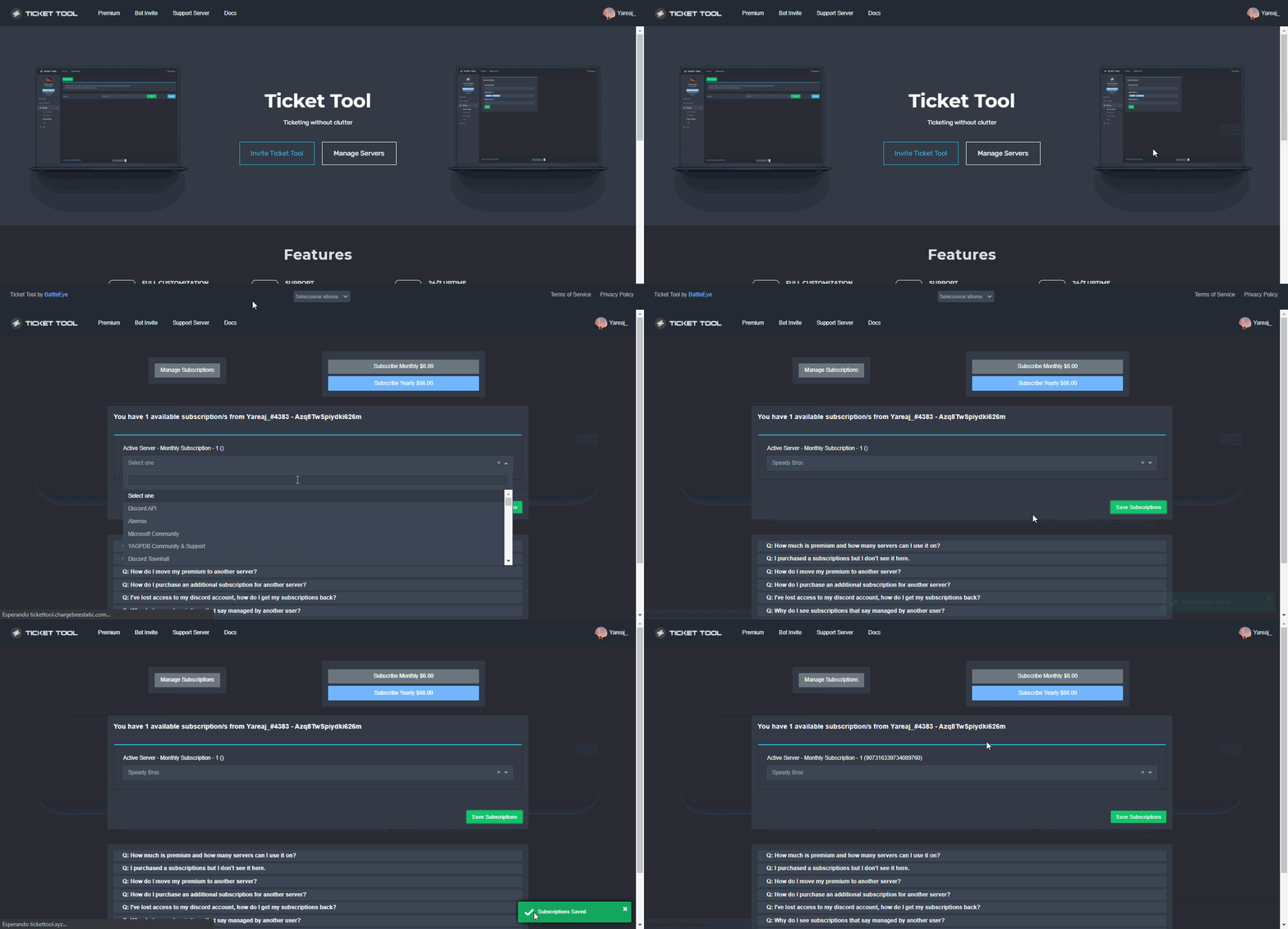
Redeeming premium on your server is really simple. Just head over to your Subscriptions Page. There you can select a server of your choice, which will get premium. You can change the server at any point.
 plain thicket
i should pay for tiket tool ?
can we do it with another way ?
i dont know how should i do that
pls do it like a simple way
shut bolt
What are you looking for exactly?
plain thicket
I was buy a envato element 6 months account
I did a 35 dollar
I pay it
Now i just need my cookie cod
humble sequoiaBOT
We provide support for @pseudo glen discord bot and cannot help you with whatever issue you have.
- Please make sure to contact the appropriate Support Team.
If you don't have any further questions regarding our bot Ticket Tool, please close this ticket
 copper owl
@plain thicket ^
plain thicket
thanks
 cyan sparrow
Is there any Arabic technical support?
 covert swallow
Yes
shut bolt
cyan sparrow
Is there any Arabic technical support?
If you open a ticket and close it
Don't expect a response
cyan sparrow
@covert swallow ok
shut bolt
Next time you open a ticket wait for an arabic member to help you
 robust sandalBOT
 SalhX cool😎
• Okay
 Arabic (ar) → English (en)
cyan sparrow
Arabic (ar) → English (en)
cyan sparrow
ok
 silk glacier
Hm, my tags were working a few days ago, but for the last two they haven't been. Has there been some kind of change to the bot, or maybe discords recent update broke something? I tried searching this discord for answers but I didn't see anyone else having an issue.
copper owl
silk glacier
Hm, my tags were working a few days ago, but for the last two they haven't been....
wdym by "broke"
elaborate on the breaking part
silk glacier
They don't work.
copper owl
So... you're running the tag and it's not responding?
silk glacier
Correct.
copper owl
Show me the tag and how you're running it in a channel
silk glacier
One moment!
copper owl
take your time
silk glacier
This, for instance. I run it as a line by itself with !patreon. It was working last on the 11th.
 copper owl
does ticket tool have all the necessary permissions in the channel you're running it in
silk glacier
Yuppers
Nothing has changed between the time it was working and now. No new permissions made, no new tags, etc etc. Just one day it up and stopped working.
copper owl
Yeah that's a bit impossible
Tags don't just stop working or else that'd be a major issue
can you show me the settings of the tag?
silk glacier
Yeah one moment. I don't know what to tell you other wise, I haven't changed anything about the server and it's only the tag command that doesn't seem to be working.
What other command could I try to test?
copper owl
silk glacier
Still nothing. I tried both just in case $ didn't work.
if debug didn't work, then it doesn't have permissions
debug is a command that cannot be edited in any way, so if it doesn't respond in the same channel, it doesn't have permissions
silk glacier
Hrm... anything else I'm missing?
 copper owl
$perms
humble sequoiaBOT
ᅠ
@pseudo glen requires the following permissions:
Add Reactions
Read Channels
Send Messages
Manage Messages
Embed Links
Attach Files
Read History
Manage Roles
To change the role permissions, you can go to your Discord Server ➞ Server Settings ➞ Roles ➞ @Ticket Tool
To change the channel permissions, you can go to your Channel Settings ➞ Permissions ➞ Ticket Tool
ᅠ
You can give Ticket Tool Administrative Permissions instead of all the permissions listed above, but it's entirely optional and NOT necessary.
 copper owl
All these are needed
silk glacier
Let me check in there
Yup I got that too. Sorry site is being really slow for me today.

See why I'm confused? LOL
copper owl
That doesn't mean it has them in the channel you're running the commands in
check the channel permissions as well
silk glacier
silk glacier
Hrm... anything else I'm missing?
Yeah it does.
It has permission to see and type messages, but I'm wondering if there's something else in there I'm missing.
copper owl
silk glacier
Yup I got that too. Sorry site is being really slow for me today.
there's the list right here...
that's the entire list of permissions it needs
check for them in the channel permissions.
except for administrator ofc
it doesn't need that at all
silk glacier
Alright I double checked, and yeah it has all of those permissions. So I'm still so very confused. Nothing's been changed so I don't know why it would just up and stop working. I checked the channel we use, the channels permissions, the bots permissions, the permissions that the role the bot has.
Going to try scorched earth and remove everything then put it back/turn it off and on again.
copper owl
check the server configs page and make sure no roles are blacklisted
silk glacier
Sure thing
Okay, new development. This is our general main channel, and the bot did not work in here until I added the role.

Now here is where it gets odd.
This is a channel only certain roles can see. The ticket tool isn't in this list, but the bot IS working.
 copper owl
Does it have a role that's listed there
silk glacier
Ticket Tool and Verified. Verified can see both General and Assistance channel (that second screen shot).
copper owl
Ok so that's why it works
don't take my question as negative, but are you aware of how discord perms work exactly?
silk glacier
Nah I don't take it as negative at all. I'm sorta aware? It still confuses me.
copper owl
it doesn't need its personal role to be listed, it just needs perms given. whether it's ticket tools personal role or not
since verified has perms to see the channel, tt can work fine
copper owl
silk glacier
Okay, new development. This is our general main channel, and the bot *did not* w...
since i assume tt didn't have all the necessary perms here, it didn't work
silk glacier
That's what's confusing. Both channels have Verified, right? It didn't work in General, but it worked in Assistance. It didn't work in General until I added the Ticket Tool role, which Assistance still doesn't have but the bot works fine.
I would think that it wouldn't work in Assistance as well since the Ticket Tool role isn't there. Or am I that far off the mark? Sorry, trying to understand how it can have the same Verified perms in both channels, but only works in the other one when I add the bot's secondary role.
copper owl
You're off the mark. There has to be something denying TTs perms in the channel
discord perms are hella confusing so i dont blame you
silk glacier
I'll dig deeper, maybe I can see what's going on. It's just.. really odd that it was working fine a few days ago.
Yeah they really are LOL
copper owl
silk glacier
I'll dig deeper, maybe I can see what's going on. It's just.. really odd that it...
someone must have changed something
If you don't care
you could just give TT administrator
silk glacier
Only I have permissions, that's why I'm really baffled.
copper owl
it would remove all need for this whole discord permission crap
silk glacier
Yeaaah
It's only the tags that's not working and that was just a side project of mine. The tickets are working just fine.
copper owl
silk glacier
It's only the tags that's not working and that was just a side project of mine. ...
from what i saw, the debug command wasn't working either so
silk glacier
Heh yeah that too
copper owl
it seems like it's a lot more than the tags. It might be the channels you're running the commands or tags in
or more accurately, the permissions in the channels you're running the tags / commands in
silk glacier
Could be. I can just add the Ticket Tool role to the channels I want. That seems to make it work (other than Assistance, which is working without it, oddly enough).
copper owl
You can try that, yes
silk glacier
Thank ya for your help and apologies for the loss of any hair you pulled out
silk glacier
Yeah it seems like after this last update, permissions have been weird as hell.
copper owl
I should be pulling my hairs out because of discord LMAO
silk glacier
LOL Yeah
copper owl
silk glacier
Yeah it seems like after this last update, permissions have been weird as hell.
yeah.. kinda fucked everything up
upbeat spire
how do we get the link for the groups
 unique anvil
No
jade topaz
when i make a ticket everyone can see it how do i just make it so the person who made the ticket can see it
sorry im new to the bot
i fixed
 jovial narwhal
how do you reset the ticket count?
fallow ingot
jovial narwhal
how do you reset the ticket count?
Head to Dashboard > Your server > Panel Config > Your panel > General Options > Ticket count
Change to whatever you want your ticket count to be, if you want to reset it simply just replace the current count with1

Looks like something above.
humble sequoiaBOT

The new Discord Buttons allow for a much smoother and convenient experience. They reduce lag and work much better than emojis. With ticket tool you can edit all the buttons however you like! Buttons can show emojis, text and can have 4 different colors.
Dashboard ➞ Panel Configs ➞ Settings ➞ Button Options ➞ Setting
 fallow ingot
@foggy void You can no longer use reactions to open tickets, instead we use buttons witch are much more effective.
view information above
shut bolt
I think he meant how to do a multipanel
shut bolt
 foggy void
how i can put many reaction roles to have many options to create a ticket?
foggy void
how i can put many reaction roles to have many options to create a ticket?
Do you mean how to do something like #🎫│make-a-ticket ?
fallow ingot
shut bolt
I think he meant how to do a multipanel
yeah I see I miss read lol
shut bolt
fallow ingot
yeah I see I miss read lol
It's fine :)
humble sequoiaBOT
For a more convenient use of multipanels, you can now combine panels on the dashboard. This will allow you to directly send the multipanel from the dashboard or via the $panel ID command.
You can find this setting on the Dashboard -> Panel Configs -> Settings -> General Options
Note: if you're attaching all the panels to a panel called English, don't include English in the attached panels box (If you do this, it will create duplicate)
This will put all buttons from all of your panels on one message. The message is the panel message from the panel you're combining these panels in.

 Note: This is a premium feature
shut bolt
Note: This is a premium feature
shut bolt
Sure
 solar fable
huh?
 fallow ingot
solar fable
huh?
fallow ingot
solar fable
huh?
Any blacklisted roles set?
solar fable
fallow ingot
Any blacklisted roles set?
how can I check that
humble sequoiaBOT
Any role you assign as a blacklisted role won't be able to use commands or reactions.
Go to your Dashboard ➞ Server Configs. There you will find the option to select blacklisted roles.
Note: Don't forget to save.
fallow ingot
@solar fable ^
Make sure there’s none set. Or if you want to have one set make sure you don’t have the role.
fallow ingot
solar fable
remove at everyone, correct?
Correct.
Once removed you’ll be able to open tickets and use commands. :)
solar fable
fallow ingot
Once removed you’ll be able to open tickets and use commands. :)
uuuuh there is something still preventing members opening tickets.....
fallow ingot
solar fable
uuuuh there is something still preventing members opening tickets.....
Have you clicked save?
Refresh page and check if the @everyone role is still there
solar fable
checking-
90% complete.... still a few bugs tickets open, working on transcript saving
fallow ingot
Alrighty, if u need anything else just come back :)
solar fable
hmmmmmmmm

 lilac girder
solar fable
hmmmmmmmm
lilac girder
solar fable
hmmmmmmmm
yes?
solar fable
transcripts don't save
fallow ingot
solar fable
transcripts don't save
On two step close, are you clicking save transcript?
automatically saving transcripts are for premium users
solar fable
fallow ingot
On two step close, are you clicking save transcript?
yep
fallow ingot
Does Ticket Tool have permissions to send messages and view the channel?
 noble grotto
How do I move a Transcript to a specific room?
jade topaz
Relog
humble sequoiaBOT
You will possibly need to relog. Look below to see steps on how to relog.
First, you will need to go to the dashboard. Once your there, click on your avatar on the top right. after you clicked it, you will see button that says Logout. You must click that. Once you have logged out, you can log back in.
You need one of these 3 things to access the dashboard.
1. Server Owner (Level: 6)
2. Server Administrator (Level: 4)
3. Dashboard Role (Level: 2)
:warning: You can check your level using $level on your Discord Server
User permission level with Ticket Tool
@User is permission level: 0 (User)
```» *If it shows that your permission is **0**, you don't have any of the above **3 things** to manage the dashboard.*


**See the GIF below on how to relog:**@gray cloak ^
 gray cloak
ty <3
fallow ingot
anytime
gray cloak
thanks @fallow ingot
iron nightBOT
Gave +1 Rep to @fallow ingot
 fallow surge
Repost due to messages filling up mine...
Does Ticket Tool have slash commands? Will it be added in the near future?
fallow ingot
fallow surge
Repost due to messages filling up mine...
Does Ticket Tool have slash commands? ...
They will be added sooner or later most likely. At this time tho there are no slash commands.
fallow ingot
solar fable
transcripts don't save
resolved^^
fallow surge
Huh... I am just concerned tbh due to slash commands by Discord being implemented in the near future. Especially that to those bots who are not into that feature will get deleted.
And yes. custom prefix will not work iirc in April.
jade topaz
Oh yeah captcha bot is now using slash cmd
fallow ingot
fallow surge
Huh... I am just concerned tbh due to slash commands by Discord being implemente...
We have a big update soon, it may possibly be coming out with that update not sure.
fallow surge
Ohhhh. Noice.
fallow ingot
Again not sure, but I’d like to think it will be added soon.
iron nightBOT
Gave +1 Rep to @fallow ingot
fallow ingot
anytime
solar fable
thanks @fallow ingot
iron nightBOT
Gave +1 Rep to @fallow ingot
solar fable
👍
fallow ingot
anytime
humble sequoiaBOT
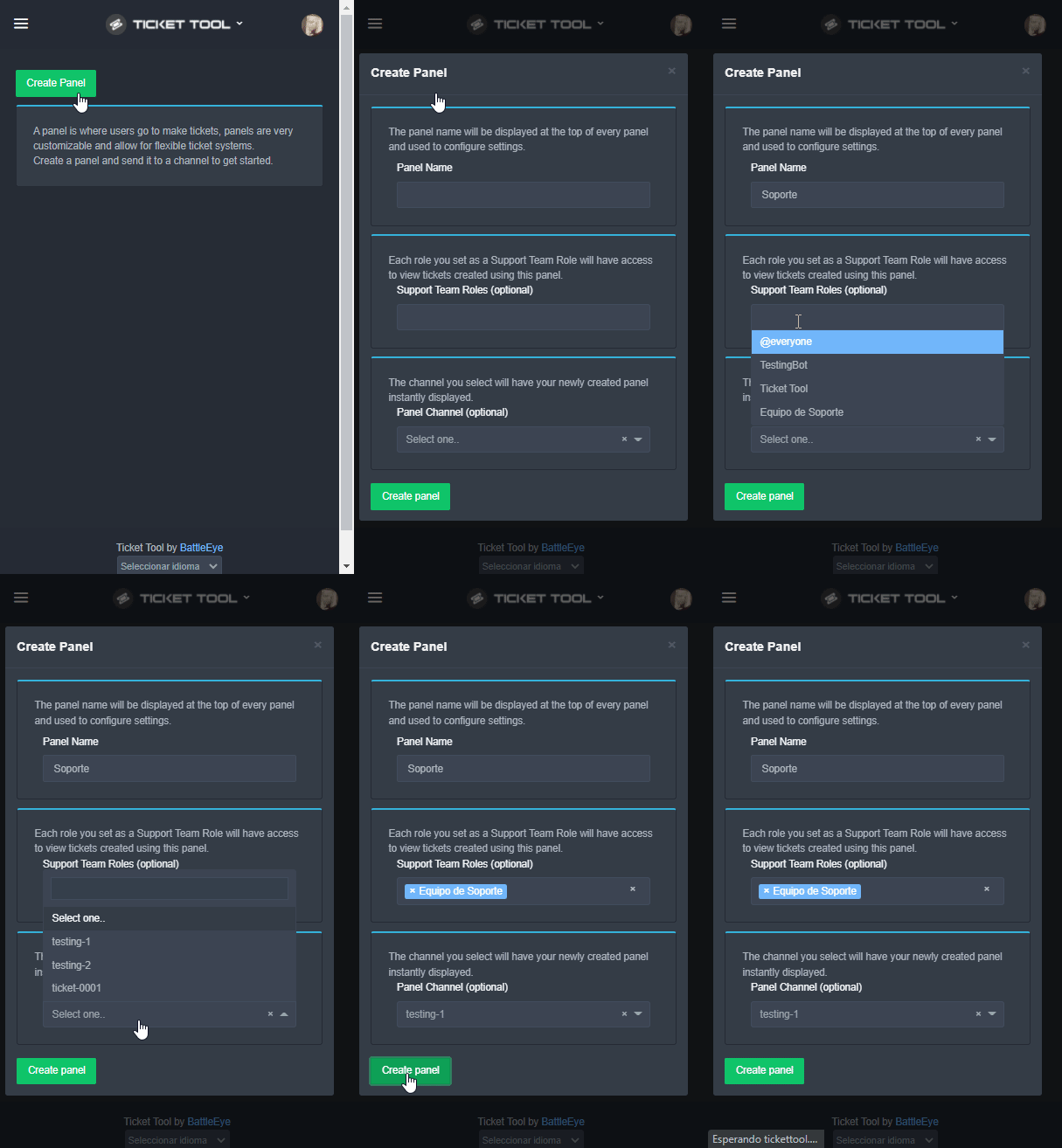
To create a panel we are going to need to head over to the panel configs on the dashboard
Once at the dashboard we will need to click Create Panel
Enter a panel name (Fill in any optional settings you want)
Click Create Panel and your ready to get started with configuring your panel
An example of a creating a panel is shown below.
 fallow ingot
@reef edge follow the instructions above ^
 quartz willow
Boa noite, acabei de comprar 3k de POLY,fiz a transferência para as moedas do jogo, montei a fazenda, gastei 2k e os outros 1k sumiu, como resolver???
humble sequoiaBOT
Nós oferecemos suporte para o bot de Discord @pseudo glen, então não podemos ajudá-lo com qualquer outro problema que você tenha.
- Certifique-se de entrar em contato com a equipe de suporte apropriada para solucionar seu problema.
Se você não possui nenhuma dúvida sobre o nosso bot de tickets, por favor feche este ticket.
 mystic hound
fallow surge
Huh... I am just concerned tbh due to slash commands by Discord being implemente...
mystic hound
fallow surge
Huh... I am just concerned tbh due to slash commands by Discord being implemente...
Ticket Tool already has approval for message intent, but we will most likely move to slash commands in the near future.
 viscid hill
is it me or ticket tool (and almost all other bots in my server) are offline?
jade topaz
Um something like that has happened also in another server
viscid hill
is there anything that I can do about it?
mystic hound
viscid hill
is it me or ticket tool (and almost all other bots in my server) are offline?
Can you send a screenshot
Of the bot being offline
viscid hill
mystic hound
Can you send a screenshot
server id: 861899949465665537
all of my bots went offline
 mystic hound
Try restarting discord, nothing on the system here seems to indicate an outage
viscid hill
mystic hound
Try restarting discord, nothing on the system here seems to indicate an outage
tried it several times; it has been 6 hours
mystic hound
Weird, can you create a ticket and send me a server invite
viscid hill
mystic hound
Weird, can you create a ticket and send me a server invite
sure
jade topaz
viscid hill
server id: 861899949465665537
all of my bots went offline
That also happend in Belugang
viscid hill
jade topaz
That also happend in Belugang
looks like it's from discord, re-inviting make them appear online again
jade topaz
Ohh
 visual badge
its not letting me log into cosmic with my microsoft account it just keeps refreshing. what do i do?
jade topaz
?
copper owl
visual badge
any suggestions?
find the correct support
that's a good first step since we can't do much for you
visual badge
have u got a link for the support disc? i cant find it anywhere
copper owl
i have no idea what you're talking about so no i dont
 quartz pagoda
how do I make it to where it changes the ticket name to the category..
For example instead of ticket-0001 it would be report-0001
i have been trying to figure this out for some time now but I cant seem to figure it out
please help lol
 craggy geyser
quartz pagoda
how do I make it to where it changes the ticket name to the category..
For exa...
craggy geyser
quartz pagoda
how do I make it to where it changes the ticket name to the category..
For exa...
It's a premium feature
humble sequoiaBOT
The ticket name is the default channel name of all tickets. To edit it, go to your Dashboard > Panel Configs > Settings > Ticket Options. There you can edit the channel name of opened and closed tickets. You can also use variables in there.
 Note: This is a premium feature
quartz pagoda
craggy geyser
It's a premium feature
Note: This is a premium feature
quartz pagoda
craggy geyser
It's a premium feature
and premium is how much a month?
craggy geyser
$6
 wary ivy
hello everyone, please tell me, the player in the ticket does not show the close button, what do I need to do?
thanks
plain surge
Go to the Dashboard > Panel configs > Settings > Button options > Close ticket > Enable button
@wary ivy
wary ivy
plain surge
Go to the Dashboard > Panel configs > Settings > Button options > Close ticket >...
thanks for the answer, I checked, but the button is on, the problem remains😕
iron nightBOT
Gave +1 Rep to @plain surge
plain surge
Can you please send a screenshot of a ticket @wary ivy
 analog apex
            ^

DiscordAPIError: Unknown Channel```

does anyone know how to fix this?what is this..?
fallow ingot
code
copper owl
fallow ingot
code
yeah.. ive gathered that much lol
fallow ingot
lol
copper owl
but if it doesnt have to do with anything related to ticket tool, then theyre asking in the wrong server.
and I highly doubt that has anything connected to TT.
fallow ingot
yes
 silk bluff
is it possible to give players (with a role which doesnt have 'administrator') permission to close tickets?
fallow ingot
silk bluff
is it possible to give players (with a role which doesnt have 'administrator') p...
Just add them to your support team
humble sequoiaBOT
A support role lets your support team see into tickets with out having to add them manually to each and every ticket.
You can add as many support roles as you like per panel.
NOTE that the way discord works all admins can see into tickets regardless of this.
To set a Support role go to the Dashboard -> Panel Configs -> Settings -> General Options -> Support Team Roles.
 fallow ingot
Or if you only want them to be able to close tickets you can do that to. Follow this path Dashboard > Panel Config > Settings > Button Options > Close ticket > Allowed Roles and add the role you want to be able to close the ticket
silk bluff
okay tnxx
fallow ingot
anytime
fallow ingot
feral drift
You can only have 50 channels to each category. Add a overflow channel to the category open.
feral drift
fallow ingot
You can only have 50 channels to each category. Add a overflow channel to the ca...
i only have like 20 open tickets, they are opening above my ticket category

they are not opening under tickets its going above and then the member who open the ticket can not see it or write in it
fallow ingot
Not tickets it’s a discord thing. Only 50 channels per category
feral drift
fallow ingot
Not tickets it’s a discord thing. Only 50 channels per category
i do not have 50 open, the tickets are opening about the ticket category, could this be a setting?
fallow ingot
Check that you still have that category set in dashboard
feral drift
fallow ingot
Check that you still have that category set in dashboard
ok i will try this and get back to you
thanks
feral drift
fallow ingot
Check that you still have that category set in dashboard
setting is set to Tickets channel.... is there something else i can look at to why they are going above it
fallow ingot
feral drift
setting is set to Tickets channel.... is there something else i can look at to ...
Ticket tool has permissions?
To view the category
feral drift
fallow ingot
Ticket tool has permissions?
yes
fallow ingot
Double check, just in case someone’s changed it
feral drift
fallow ingot
Double check, just in case someone’s changed it
i did, it is skipping because it says limit, but there is not 50 tickets open
humble sequoiaBOT
━━ moved to ticket ━━
 plush turtle
Ya
solar fable
great question....If i view the server as the assigned auto role given to members.
why can i not see it, only when i remove "view server as role"
humble sequoiaBOT
The View as Role discord feature will not work for testing ticket tool. Ticket Tool opens permissions with user permissions & not role permissions.
 regal goblet
@solar fable 
jade topaz
Can i change the colour of the little line in the panel? @atomic solstice
 atomic solstice
jade topaz
Can i change the colour of the little line in the panel? <@!601783394334015498>
atomic solstice
jade topaz
Can i change the colour of the little line in the panel? <@!601783394334015498>
yes with premium
jade topaz
atomic solstice
yes with premium
broo💀
solar fable
regal goblet
<@!588892165036572673> <:this:894279341108772914>
thank you, kindly
iron nightBOT
Gave +1 Rep to @regal goblet
silk bluff
fallow ingot
Or if you only want them to be able to close tickets you can do that to. Follow ...
weird... but somehow it still doesnt work
humble sequoiaBOT
We would love to help you, but if you don't tell us what you need help with we can't help you :(
fallow ingot
Yep?
 frail glen
Can u help me
humble sequoiaBOT
We would love to help you, but if you don't tell us what you need help with we can't help you :(
fallow ingot
^
fallow ingot
Can you elaborate on what you need?
frail glen
But if i click on manage servers there are not any but i am admin in a server
humble sequoiaBOT
You will possibly need to relog. Look below to see steps on how to relog.
First, you will need to go to the dashboard. Once your there, click on your avatar on the top right. after you clicked it, you will see button that says Logout. You must click that. Once you have logged out, you can log back in.
You need one of these 3 things to access the dashboard.
1. Server Owner (Level: 6)
2. Server Administrator (Level: 4)
3. Dashboard Role (Level: 2)
:warning: You can check your level using $level on your Discord Server
User permission level with Ticket Tool
@User is permission level: 0 (User)
```» *If it shows that your permission is **0**, you don't have any of the above **3 things** to manage the dashboard.*


**See the GIF below on how to relog:**@frail glen ^
 delicate folio
Can I get an automatic message sent in the ticket when people open them up?
frail glen
Ahhh you have to be lvl 6
fallow ingot
frail glen
Ahhh you have to be lvl 6
Or a server admin.
fallow ingot
delicate folio
Can I get an automatic message sent in the ticket when people open them up?
Ticket message?
delicate folio
fallow ingot
Ticket message?
So when someone opens a ticket it tells them that basically we have 24 hours to reply... We have people who dont realise people have jobs lmao
Only thing i can see is changing the small message inside the box. But no one is reading that.
fallow ingot
You can create a tag
humble sequoiaBOT
Tags are used to send a predefined response to your channels using a command. Tags will only respond if the command itself is used, it will not function if you put the tag into a sentence. The prefix is not included.
To create tags, go to: Dashboard > Tags > Create Tag. After creating and naming one, tap on the response button, and you can edit the response.
fallow ingot
@delicate folio ^
delicate folio
❤️ thank you
fallow ingot
anytime
 solid cradle
Anyone spanish staff?
shut bolt
solid cradle
El caso es que soy nuevo con este bot y no sé cómo iniciar nada
$helpes setup
humble sequoiaBOT
Lo primero que debe hacer es invitar al bot, dando click aquí.
Una vez haya invitado al bot, diríjase al panel de control y cree un panel.
Un panel es usado para definir las configuraciones de un ticket (los usuarios que pueden ver el ticket, los permisos, los nombres, entre otros).
Para crear un panel, diríjase a la pestaña de Panel Configs o Configuraciones del Panel en el panel de control de su servidor.
Una vez esté allí, de click en Create Panel / Crear Panel.
Panel Name → Es el nombre que desea que tenga el panel, puede asignar el nombre de su preferencia.
Support Team Roles → Seleccione los roles que deseen que puedan ver los tickets que se creen desde este panel.
Panel Channel → Elija el canal al que quiera que el panel sea enviado al ser creado. (Este campo es opcional, puede reenviar el panel posteriormente si es necesario)
Finalmente de nuevamente click en Create Panel como ilustra el siguiente GIF
 shut bolt
Aquí te dejo la guía paso a paso para que empieces a utilizarlo bro
solid cradle
Gracias tío, está todo en español?
shut bolt
solid cradle
Gracias tío, está todo en español?
Hmmm, de esta mini guía si, la documentación del bot está casi toda traducida pero nos faltan unas 3 páginas https://docs.tickettool.xyz/v/ticket-tool-docs-spanish/

Sistema de Tickets sin desorden
shut bolt
jade topaz
Why Spanish
Because he is a spanish speaker .-.
jade topaz
He doesn't speak English wtf
shut bolt
jade topaz
He doesn't speak English wtf
What's wrong with it?
jade topaz
Just asking dude ._.
shut bolt
jade topaz
Just asking dude ._.
I'm asking too lol
solid cradle
shut bolt
Hmmm, de esta mini guía si, la documentación del bot está **casi** toda traducid...
Tk xd
shut bolt
solid cradle
Tk xd
Dale
Todo menos https://i.imgur.com/qBtFe6v.png
De resto todo ya está en español
Que es un 75 - 80%
solid cradle
D sobra
shut bolt
solid cradle
D sobra
Cualquier cosa que necesites puedes ir a #🎫│make-a-ticket y abrir un ticket con el equipo en español
solid cradle
Bua perfecto 
jade topaz
i added ticket tool to my discord, i see it in my discord but its not showing my server on the ticket toll website
any solutions?
humble sequoiaBOT
You will possibly need to relog. Look below to see steps on how to relog.
First, you will need to go to the dashboard. Once your there, click on your avatar on the top right. after you clicked it, you will see button that says Logout. You must click that. Once you have logged out, you can log back in.
You need one of these 3 things to access the dashboard.
1. Server Owner (Level: 6)
2. Server Administrator (Level: 4)
3. Dashboard Role (Level: 2)
:warning: You can check your level using $level on your Discord Server
User permission level with Ticket Tool
@User is permission level: 0 (User)
```» *If it shows that your permission is **0**, you don't have any of the above **3 things** to manage the dashboard.*


**See the GIF below on how to relog:**Try that
jade topaz
i have admin privileges in the server, im guessing thats not enough can only the server owner adjust perms on ticket tool?
jade topaz
i have server adminm
shut bolt
jade topaz
i have server adminm
Run $level in your server and send us the response of the bot
jade topaz
i removed ticket tool then re invited it, i also left it alone usually i assign bots roles but i left it solo
and it works
shut bolt
jade topaz
and it works
What works, the bot? Can you now access the Dashboard?
jade topaz
yes, i see it on my dashboard now
shut bolt
Great
shut bolt
 velvet matrix
How do i add member so they can see the ticket
velvet matrix
How do i add member so they can see the ticket
Are you looking to set a role to be able to see all tickets?
velvet matrix
shut bolt
Are you looking to set a role to be able to see all tickets?
Yes so my staff can see the ticket
shut bolt
$help support
humble sequoiaBOT
A support role lets your support team see into tickets with out having to add them manually to each and every ticket.
You can add as many support roles as you like per panel.
NOTE that the way discord works all admins can see into tickets regardless of this.
To set a Support role go to the Dashboard -> Panel Configs -> Settings -> General Options -> Support Team Roles.
shut bolt
Add their role as a support role
 dreamy grail
How to change the color of the embed?
jade topaz
is it possible to make the tickets go into a category?
of below the rest of the channels?
lilac girder
$help category
humble sequoiaBOT
To set a open category go to the Dashboard -> Panel Configs -> Settings -> Category Options -> Category Open
 lilac girder
@jade topaz
jade topaz
ty
lilac girder
np
humble sequoiaBOT
To set a open category go to the Dashboard -> Panel Configs -> Settings -> Category Options -> Category Open
 harsh wigeon
How can I get the Premium Subscriber rank?
copper owl
run $pc in #🤖│bot-spam
 spring bay
Hey, I want to know who my opponent is in round one.
copper owl
you won't find it here unfortunately
I could try guessing for you but i dont think that'd be much help
spring bay
I apologize for the inconvenience.
copper owl
not at all
humble sequoiaBOT
To make ticket tool ping a role when a ticket is opened, go to the Dashboard -> Panel Configs -> Settings -> Ticket Options -> Ticket Message -> Message Text and do this:
{@Role name} This is case sensitive and the role must have @mentions enabled
fallow ingot
@granite cedar ^^
 granite cedar
fallow ingot
<@!707184583816511508> ^^
granite cedar
fallow ingot
<@!707184583816511508> ^^
Tysm
fallow ingot
granite cedar
Tysm
anytime
 tardy moon
hwo do you archive a ticket
 halcyon hollow
hi
tardy moon
it’s not xlosing ???

 patent lotus
@copper owl اعتذر غلقت تكت بالغلط اقدر افتح تكت ثاني
copper owl
ولا يهمك ح افتحاك يه انا
jade topaz
help plz?
humble sequoiaBOT
We would love to help you, but if you don't tell us what you need help with we can't help you :(
copper owl
are you a staff member or just a normal member?
copper owl
Check the dashboard and make sure you have no blacklisted roles in Server Configs
jade topaz
thxx
 limber nimbus
help plz?
humble sequoiaBOT
We would love to help you, but if you don't tell us what you need help with we can't help you :(
 fair widget
can somebody fix my ticket bot in my own server? if you want dm me pls
slender minnow
fair widget
can somebody fix my ticket bot in my own server? if you want dm me pls
heya, what do you mean by not working?
can you be a bit mroe specific
fair widget
dont know how to install the bot i already looked the video's but i still dont no how
slender minnow
fair widget
dont know how to install the bot i already looked the video's but i still dont n...
make sure that you invite the bot from
https://tickettool.xyz/ and you have admin perm in your role (and not a role named as admin)
for setting up a panel (the message thingy that's used to open a ticket), you can refer the docs
$help setup
humble sequoiaBOT
Visit the docs for setup info
General Setup
 tired stirrup
is there a way to automatically send the ticket panel on a welcome message for each user that joins the server?
slender minnow
tired stirrup
is there a way to automatically send the ticket panel on a welcome message for e...
You cannot, unless you manually send the panel every time a user joins.
tired stirrup
@slender minnow is a there a way to summon the panel with a command?
without hitting the "Send" button in the dashboard i mean
slender minnow
$panel <panel_id>
@tired stirrup you can use this to send the panel in the channel (the old one wont be deleted btw)
slender minnow
Yep, the panel id is from dashboard.
 fast sable
i think i changed my prefix and i cant figure out how to change it back bc i havent used the bot in a while
 thick crystal
Salam, how do I set the ticketool?
In a channel for ticket's.
Like "make-a-ticket".
 honest kraken
fair widget
can somebody fix my ticket bot in my own server? if you want dm me pls
honest kraken
fair widget
can somebody fix my ticket bot in my own server? if you want dm me pls
I can help
humble sequoiaBOT
━━ moved to ticket ━━
plain surge
thick crystal
Salam, how do I set the ticketool?
This
plain surge
fast sable
i think i changed my prefix and i cant figure out how to change it back bc i hav...
$help prefix
humble sequoiaBOT
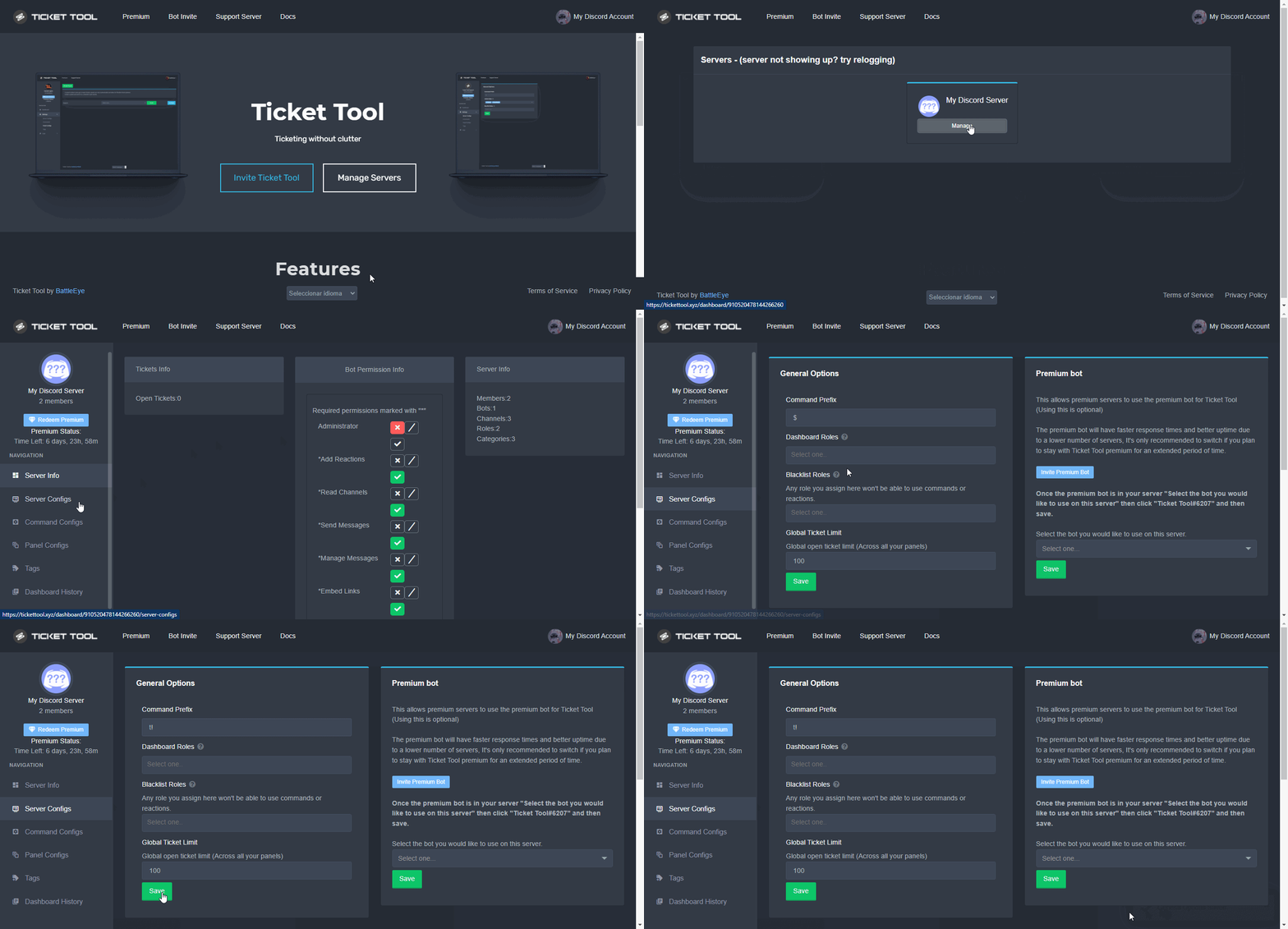
The default prefix for ticket tool is $ and @Ticket Tool#4843 however that can be changed on the Dashboard under Server Configs -> Command Prefix.
 iron nightBOT
Gave +1 Rep to @plain surge
plain surge
No problem 👍
fast sable
it didnt work
tired stirrup
anyone knows if it's possible to change the ticket panel description?
This:
To create a ticket react with 📩
humble sequoiaBOT
The panel message is where people react to make a ticket. To customize it head over to your Dashboard --> Panel Configs -> Settings -> Panel Options -> Edit Panel Message
 slender minnow
@tired stirrup refer above ^
tired stirrup
i've found it is a premium option
tired stirrup
slender minnow
But you can edit the message in the embed btw
you can edit the message without premium?
 wintry isle
je n arrive pas a le mettrtre*
slender minnow
tired stirrup
you can edit the message without premium?
Yep
robust sandalBOT
wintry isle
je n arrive pas a le mettrtre*
 chouchou
I can't get it*
French (fr) → English (en)
tired stirrup
slender minnow
Yep
yeah, I see there is a free character limit to edit this
thanks
wintry isle
I can't get it*
slender minnow
wintry isle
I can't get it*
Can't get?
slender minnow
???
wintry isle
yeah, I see there is a free character limit to edit this
yeah, I see there is a free character limit to edit this
yeah, I see there is a free character limit to edit thisyeah, I see there is a free character limit to edit this
plain surge
fast sable
it didnt work
What didn't work?
fast sable
the bot didnt send anything when i did '' $debug ''
jade topaz
jade topaz
it’s been like 12 hours and no helped me
copper owl
jade topaz
it’s been like 12 hours and no helped me
you dont have a ticket open.
we are not obliged to help you in #🆘│community-support
a lack of response does not mean you can ping. I hope this clears everything up.
fallow ingot
@radiant moss
 scenic plinth
Hey, we give bans. Buy 1 get 1 free.
 fringe barn
Scam?
jade topaz

fringe barn
@vague topaz
scenic plinth
I've already notified moderators but we unfortunately have only 2 online, so it's just a waiting game. I appreciate the concern though
jade topaz
how can i remove this permission?

 tawdry eagle
 real spear
What does that mean
real spear
What does that mean
Are you a member or owner of the server?
real spear
tawdry eagle
Are you a member or owner of the server?
Owner but this photo is from my other acc
tawdry eagle
Ok, the issue may be that the everyone role or the member role doesn’t have the permission to send messages
Try and edit that in your servers role settings and let me know if there is still issues
copper owl
tawdry eagle
Ok, the issue may be that the everyone role or the member role doesn’t have the ...
not the issue.
they dont need to be able to send messages to open tickets
humble sequoiaBOT
- System Failure: @Ticket Tool Missing permission(s): PERMISSION(S)
+ Ticket Tool is missing permissions to work properly, check the mentioned permissions by the bot in the channel, in the category, and in the role. You can use $debug as a help tool.
- System Failure: Panel “XX” not found
+ The panel they are trying to interact with has been deleted.
- Failed: `Invalid Form Body components[X].components[X].emoji.id: Invalid emoji
+ The bot does not have longer access to the emoji (external server) or the emoji has been deleted
- Failed: `Invalid Form Body components[X].components[X]: this is a required field
+ There is a certain necessary field you left blank. You will have to input a valid argument (most likely text) in the required field for ticket tool to continue functioning normally.
- System Failure: allMessages.users.sort is not a function
- System Failure: Unknown Webhook
- System failure: Service unavailable?
- System Failure: Internal Server Error
+ The bot has run into an issue, please try again as these are cases that tend to fail only once, if the problem is persistent, contact our support team
- Warning: Ticket Tool Failed to connect to it's database, please wait or try again.
+ There might be an issue with Ticket Tool, most likely a database issue, you'll have to wait a few minutes before creating another ticket. This is in place to prevent certain bugs to happen with tickets
@real spear ^
jade topaz
@tawdry eagle I want to remove the permission to create topics in the ticket, I removed the react one, but I don't know where to get the topic permission
real spear
Ok thanks@fallow ingot
fallow ingot
real spear
Ok thanks<@768144576946110475>
anytime
fallow ingot
jade topaz
<@!819692093526114366> I want to remove the permission to create topics in the t...
It’s not possible at this time. You would need to do it manually.
It can be suggested
shut bolt
fallow ingot
It can be suggested
Already planned
shut bolt
jade topaz
<@!819692093526114366> I want to remove the permission to create topics in the t...
Remove the create threads permission for your everyone role and all roles that don't needed, that should fix it
fallow ingot
shut bolt
Already planned
Good to know :)
jade topaz
how do I make it so the bot automatically sends out a transcript to the person that opened the tickets DM?
fallow ingot
jade topaz
how do I make it so the bot automatically sends out a transcript to the person t...
You can only send a transcript to them after the tickets closed. But you can send a message to them once they open a ticket just not a transcript.
Is that something you’d want to know how to do?
jade topaz
fallow ingot
You can only send a transcript to them after the tickets closed. But you can sen...
when I have clicked the "transcript" button after closing the ticket
where do i send it?
I cant see a button like that
jade topaz
shut bolt
Remove the create threads permission for your everyone role and all roles that d...
it's no use me taking the permission of the position
I wanted to know if there is a way to remove it from the panel
 shut bolt
As aaron said, not possible as of now
fallow ingot
jade topaz
where do i send it?
Do you mean automatically save a transcript once closed?
jade topaz
fallow ingot
Do you mean automatically save a transcript once closed?
I want it to automatically save transcript and send it to the person who opened the tickets dm
fallow ingot
Ok head to Dashboard > Panel Config > Settings > Logging Options and enable Direct message transcript
jade topaz
thank you
fallow ingot
anytime
 minor ridge
hi how can i add my friend for my premium panel ?
fallow ingot
minor ridge
hi how can i add my friend for my premium panel ?
Can you elaborate?
Add him to your dashboard, or give him premium?
minor ridge
fallow ingot
Add him to your dashboard, or give him premium?
i have a premium , i want to give my friend permission to edit the bot
fallow ingot
minor ridge
i have a premium , i want to give my friend permission to edit the bot
You can give them admin, or setup a dashboard role.
minor ridge
fallow ingot
You can give them admin, or setup a dashboard role.
yes how i can give him admin ?
fallow ingot
Just normal Discord administrator permission on their role.
minor ridge
fallow ingot
Just normal Discord administrator permission on their role.
thank you 
iron nightBOT
Gave +1 Rep to @fallow ingot
fallow ingot
anytime
shut bolt
jade topaz
Why is this message popping up?
Most likely the bot isn't any longer on that server
Can you give us the server ID?
jade topaz
shut bolt
Can you give us the server ID?
i figured out what happend!!
shut bolt
jade topaz
i figured out what happend!!
Oh great! Could you please tell us what was it? 🤔
jade topaz
So i have a security bot because I dont want my server to get nuked and i kicked it because it make to many channels at once !
ima fix the settings on the security bot rn
shut bolt
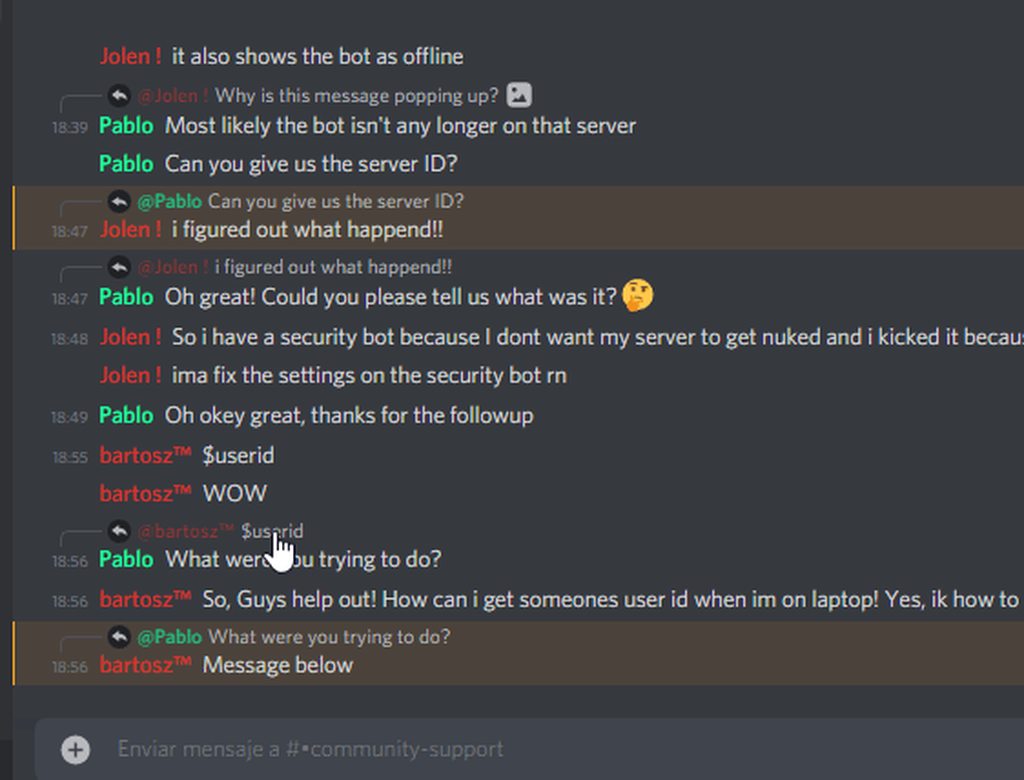
Oh okey great, thanks for the followup
shut bolt
jade topaz
$userid
What were you trying to do?
jade topaz
So, Guys help out! How can i get someones user id when im on laptop! Yes, ik how to do it on mobile. I have developer mode activated!
jade topaz
shut bolt
What were you trying to do?
Message below
shut bolt
jade topaz
So, Guys help out! How can i get someones user id when im on laptop! Yes, ik how...
jade topaz
OH THANKS!!
shut bolt
Sure
jade topaz
thanks @shut bolt
iron nightBOT
Gave +1 Rep to @shut bolt
shut bolt
jade topaz
Do you have premium?
jade topaz
Send a ss of the bots profile you use
shut bolt
Long time no see Gapple 👀
fast sable
yea :o
shut bolt
Good to see you mate
fast sable
good to see you too!
fast sable
 shut bolt
Sorry for the interrumption
jade topaz
Its fine
jade topaz
fast sable
So is this just a random error? Was it working before?
fast sable
people in my server havent really had a reason to create tickets, so idk how long it has been like this
just noticed today
jade topaz
fast sable
people in my server havent really had a reason to create tickets, so idk how lon...
Hmm are you sure you have the normal bot activated?
In the dashboard etc etc
Also, make sure premium bot IS NOT in your server. @fast sable
fast sable
it isnt
fast sable
jade topaz
Hmm are you sure you have the normal bot activated?
yea i think so
jade topaz
fast sable
yea i think so
Would you mind double checking?
fast sable
ok
jade topaz
Also. May you run $debug and send the results!?
fast sable
ok
fast sable
jade topaz
Hmm are you sure you have the normal bot activated?
what exactly do i check for this?
like what setting
jade topaz
Just dash me an invite to your server real quick! Then we can run debug tests. If you dont mind. If you dont want that check your dash board and make sure Premium bot is no where to be seen.
fast sable
ok
jade topaz
Great thankyou!
fast sable
:D
jade topaz
@shut bolt Very weird, prefix doesn't even seem to work. Person changed it and its still not working!
shut bolt
jade topaz
<@518666147441278998> Very weird, prefix doesn't even seem to work. Person chan...
Hm
jade topaz
Hold on
shut bolt
Can you give me the server ID?
shut bolt
jade topaz
<@518666147441278998>
No need to ping me mate, I'm here
jade topaz
shut bolt
No need to ping me mate, I'm here
Oh my bad!
shut bolt
I'll be back on a couple minutes though, let me know how it goes
jade topaz
Yay, I resolved the issue!


'We' resolved the issue, ticket tool support hire me already @shut bolt see how good i am. They had the Premiun bot selected therefore normal one wouldn't respond!
shut bolt
Mate I just asked you to not ping me 😅
shut bolt
jade topaz
'We' resolved the issue, ticket tool support hire me already <@5186661474412789...
Good job
jade topaz
shut bolt
Mate I just asked you to not ping me 😅
Oh god, very sorry :(
shut bolt
No problem
fast sable
thanks @jade topaz
iron nightBOT
Gave +1 Rep to @sleek bolt
fast sable
very helpful
jade topaz
fast sable
thanks <@456226577798135808>
No problem!
jade topaz
fast sable
very helpful
Pablo you seeing this. Get someone to hire me already 😒. Haha on a real note though. Glad I could help. And thanks Pablo for leaving me to deal with it!!
iron nightBOT
Gave +1 Rep to @fast sable
shut bolt
jade topaz
Pablo you seeing this. Get someone to hire me already 😒. Haha on a real note th...
No problem, you took it so I wouldn't interfere 😅
jade topaz
:)
fast sable
#bartoszForHelper
shut bolt
jade topaz
See now. Managers: take notes.
 austere widget
can anyone help me solve this issue 😭
 jade topaz
austere widget
can anyone help me solve this issue 😭
jade topaz
austere widget
can anyone help me solve this issue 😭
Is this random? Or has this been the issue ever since you invited ticket tool?
austere widget
i was on my alt checking if everything looked okay and then i tried the bot and it didn't work properly (it did before)
it also works on my main account
jade topaz
austere widget
i was on my alt checking if everything looked okay and then i tried the bot and ...
So it works on your main account but doesn't work on an alt?
austere widget
exactly
jade topaz
Great, so one way you could attempt to fix this is by deleting it from that channel and then going over to your dashboard on the website and resending the panel to the channel!
austere widget
let me go try that, thanks :)
jade topaz
austere widget
let me go try that, thanks :)
No worries. Let me know the result :)
austere widget
jade topaz
No worries. Let me know the result :)
it gave me the same thing 😭
jade topaz
austere widget
it gave me the same thing 😭
Same thing? @shut bolt lil help? I know some bits abt ticket support but like. Idk anything abt the internal bits
shut bolt
austere widget
i was on my alt checking if everything looked okay and then i tried the bot and ...
What isn't working exactly?
jade topaz
austere widget
can anyone help me solve this issue 😭
^^
shut bolt
austere widget
can anyone help me solve this issue 😭
May we have the server ID please?
humble sequoiaBOT
- System Failure: @Ticket Tool Missing permission(s): PERMISSION(S)
+ Ticket Tool is missing permissions to work properly, check the mentioned permissions by the bot in the channel, in the category, and in the role. You can use $debug as a help tool.
- System Failure: Panel “XX” not found
+ The panel they are trying to interact with has been deleted.
- Failed: `Invalid Form Body components[X].components[X].emoji.id: Invalid emoji
+ The bot does not have longer access to the emoji (external server) or the emoji has been deleted
- Failed: `Invalid Form Body components[X].components[X]: this is a required field
+ There is a certain necessary field you left blank. You will have to input a valid argument (most likely text) in the required field for ticket tool to continue functioning normally.
- System Failure: allMessages.users.sort is not a function
- System Failure: Unknown Webhook
- System failure: Service unavailable?
- System Failure: Internal Server Error
+ The bot has run into an issue, please try again as these are cases that tend to fail only once, if the problem is persistent, contact our support team
- Warning: Ticket Tool Failed to connect to it's database, please wait or try again.
+ There might be an issue with Ticket Tool, most likely a database issue, you'll have to wait a few minutes before creating another ticket. This is in place to prevent certain bugs to happen with tickets
Pablo, number 3 invalid form body
jade topaz
I know lol
jade topaz
shut bolt
I know
I'm taking notes for the future
 dark bluff
Whats it all about interaction failed error?
Works for some people dont work for some
jade topaz
Discord is funky atm yes
 thick umbra
it doesn't work for me, I tried to resend it but it does nothing 😭
 jade topaz
$sf
humble sequoiaBOT
- System Failure: @Ticket Tool Missing permission(s): PERMISSION(S)
+ Ticket Tool is missing permissions to work properly, check the mentioned permissions by the bot in the channel, in the category, and in the role. You can use $debug as a help tool.
- System Failure: Panel “XX” not found
+ The panel they are trying to interact with has been deleted.
- Failed: `Invalid Form Body components[X].components[X].emoji.id: Invalid emoji
+ The bot does not have longer access to the emoji (external server) or the emoji has been deleted
- Failed: `Invalid Form Body components[X].components[X]: this is a required field
+ There is a certain necessary field you left blank. You will have to input a valid argument (most likely text) in the required field for ticket tool to continue functioning normally.
- System Failure: allMessages.users.sort is not a function
- System Failure: Unknown Webhook
- System failure: Service unavailable?
- System Failure: Internal Server Error
+ The bot has run into an issue, please try again as these are cases that tend to fail only once, if the problem is persistent, contact our support team
- Warning: Ticket Tool Failed to connect to it's database, please wait or try again.
+ There might be an issue with Ticket Tool, most likely a database issue, you'll have to wait a few minutes before creating another ticket. This is in place to prevent certain bugs to happen with tickets
what does valid agument (most likely text) into the required field for ticket tool to continue functioning normally mean?
I'm confused on what I have to type
jade topaz
There is a certain necessary field that you have left blank
thick umbra
what- omg I'm sorry I don't understand
jade topaz
Its fine. Somewhere in your dashboard there is a necessary field that MUST be filled out. But it isn't. Therefore the bot isn't functioning normally.
jade topaz
Is that so? @scenic plinth mind helping out here?
@shut bolt Please help them out, if you dont mind
shut bolt
jade topaz
<@518666147441278998> Please help them out, if you dont mind
Mate, please, do not ping support, I've already told you thrice today
If someone requires support from the support team
You can tell them to open a ticket in #🎫│make-a-ticket
 rocky depot
How do I get a ticket from Broome to my father?
jade topaz
shut bolt
Mate, please, do not ping support, I've already told you thrice today
I'm sorry :(
rocky depot
rocky depot
How do I get a ticket from Broome to my father?
?
jade topaz
مرحبا كيف استطيع المساعدة؟ @cedar trail
rocky depot
كيف احط تكت بروم اليي ابيه اعطيك مثال صوره
jade topaz
موافق
jade topaz
أنا لا أتحدث لغتك جيدًا. افتح تذكرة من فضلك
rocky depot
jade topaz
أنا لا أتحدث لغتك جيدًا. افتح تذكرة من فضلك
Mabe here

dad is here

@jade topaz
jade topaz
I dont understand
shut bolt
thick umbra
it doesn't work for me, I tried to resend it but it does nothing 😭
Are you on mobile right?
robust sandalBOT
rocky depot
كيف احط تكت بروم اليي ابيه اعطيك مثال صوره
 ABO ROB シ.♪
How to put a hot bromine which I want to give you an example picture
Arabic (ar) → English (en)
 ashen flume
hey uh, tickets are public to everyone? I've changed nothing
I heard that there were bot api issues on discord's end a while ago but I thought it was fixed
shut bolt
ashen flume
hey uh, tickets are public to everyone? I've changed nothing
By default no they are not
May I have your server ID please
It can be one out of two things, either you picked everyone as support role or the permissions for everyone in opened tickets are granting then permission to see the tickets
 cursive haven
hey, having an issue where tickets say "Warning: You don't have permissions to use this.". I feel like I messed up a permission but not sure what
 balmy fog
Why it shows like this?

 kind sable
@cursive haven idk there's something messed up either in Discord or in the entire bot
I can't open a ticket here either
 cursive haven
kind sable
<@209378534584614912> idk there's something messed up either in Discord or in th...
cursive haven
kind sable
<@209378534584614912> idk there's something messed up either in Discord or in th...
nah worked for me they told me to just remove role blacklists
iron nightBOT
Gave +1 Rep to @cursive haven
jade topaz
help
atomic solstice
balmy fog
Why is it showing like this?
it means there must be some kind of problem with the embed itself
atomic solstice
atomic solstice
it means there must be some kind of problem with the embed itself
or at least it should be that based on the error message
 frozen granite
cursive haven
hey, having an issue where tickets say "Warning: You don't have permissions to u...
frozen granite
cursive haven
hey, having an issue where tickets say "Warning: You don't have permissions to u...
Looks like a wide issue
mystic hound
Please make sure your discord is updated if you're getting interaction failed errors. Also try resending the panel
humble sequoiaBOT
Buttons are a relatively new addition to discord and don't work with some older versions of the app.
Please verify that you have the latest version of discord, by going to the app or play store.
Discord for the  App Store
Discord for the  Play Store
balmy fog
atomic solstice
it means there must be some kind of problem with the embed itself
But he created the ticket and i can't
 atomic solstice
balmy fog
But he created the ticket and i can't
atomic solstice
balmy fog
But he created the ticket and i can't
Try to update Discord, it should help
thick umbra
shut bolt
Are you on mobile right?
yea, sorry for the late reply
let me try updating
OMG IT WORKED TYY
 halcyon ivy
OK, thanks
 atomic barn
if you are in a hurry, #🎫│make-a-ticket a support team will answer when they are available
humble sequoiaBOT
You will possibly need to relog. Look below to see steps on how to relog.
First, you will need to go to the dashboard. Once your there, click on your avatar on the top right. after you clicked it, you will see button that says Logout. You must click that. Once you have logged out, you can log back in.
You need one of these 3 things to access the dashboard.
1. Server Owner (Level: 6)
2. Server Administrator (Level: 4)
3. Dashboard Role (Level: 2)
:warning: You can check your level using $level on your Discord Server
User permission level with Ticket Tool
@User is permission level: 0 (User)
```» *If it shows that your permission is **0**, you don't have any of the above **3 things** to manage the dashboard.*


**See the GIF below on how to relog:**@halcyon ivy ^^
halcyon ivy
I'm sorry, I don't understand English well
mystic hound
what language do you speak?
halcyon ivy
in Russian
halcyon ivy
mystic hound
<@805397642464723005> ^^
thanks everything worked out 🥳
iron nightBOT
Gave +1 Rep to @mystic hound
halcyon ivy
@mystic hound Is there a channel with detailed bot settings?
mystic hound
Are you looking for a setup guide?
halcyon ivy
Something like that
mystic hound
Instructions on setting up Ticket Tool in your server.
that's our documentation
There are GIFs to follow, so even if you have trouble with english it should hopefully be understandable. If you've got any questions you can always ask
halcyon ivy
mystic hound
There are GIFs to follow, so even if you have trouble with english it should hop...
я не могу найти как изменить описание бота
ой
I can't find how to change the description of the bot
where can I find this channel so I can copy and translate
 quiet blade
Hello little question, when a ticket was delete and we don’t save a transcript is it possible to recover the data ?
jade topaz
how to enable claim button?
 smoky topaz
When I try to open a ticket, I get an error message all the time. Is this normal or is there an error in the system?
even if I do it on this discord, there is only an error
fallow ingot
smoky topaz
When I try to open a ticket, I get an error message all the time. Is this normal...
Can you show me a screenshot please?
 foggy vessel
why my server not showing up in dashboard ?
 tribal cedar
jade topaz
how to enable claim button?
tribal cedar
jade topaz
how to enable claim button?
You can go to server configs -> button options and edit the claim button
jade topaz
tribal cedar
You can go to server configs -> button options and edit the claim button
alright
humble sequoiaBOT
You will possibly need to relog. Look below to see steps on how to relog.
First, you will need to go to the dashboard. Once your there, click on your avatar on the top right. after you clicked it, you will see button that says Logout. You must click that. Once you have logged out, you can log back in.
You need one of these 3 things to access the dashboard.
1. Server Owner (Level: 6)
2. Server Administrator (Level: 4)
3. Dashboard Role (Level: 2)
:warning: You can check your level using $level on your Discord Server
User permission level with Ticket Tool
@User is permission level: 0 (User)
```» *If it shows that your permission is **0**, you don't have any of the above **3 things** to manage the dashboard.*


**See the GIF below on how to relog:**lemme try
tribal cedar
Try this @foggy vessel
foggy vessel
ok
jade topaz
how to add more buttons like this
 foggy vessel
👍
tribal cedar
Basically log out completely then log back in
tribal cedar
jade topaz
how to add more buttons like this
There's 2 ways to do that.
humble sequoiaBOT
Multipanels are a premium feature  that allow for a single panel with multiple buttons to open different tickets.
Premium users can combine multiple panels into one multipanel.
First, find the IDs of each panel you wish to combine. You can find them in your Panel Configs in the Dashboard
Next, send the multipanel to a channel using $panel [id1] [id2] {id3} ....
e.g. $panel 1 2 4 17 35 to combine panels 1, 2, 4, 17 and 35.
Up to 25 panels may be combined.

For a more convenient use of multipanels, you can now combine panels on the dashboard. This will allow you to directly send the multipanel from the dashboard or via the $panel ID command.
You can find this setting on the Dashboard -> Panel Configs -> Settings -> General Options
Note: if you're attaching all the panels to a panel called English, don't include English in the attached panels box (If you do this, it will create duplicate)
This will put all buttons from all of your panels on one message. The message is the panel message from the panel you're combining these panels in.
Note: This is a premium feature
jade topaz
ok
tribal cedar
Lemme know if you need more help
jade topaz
tribal cedar
Lemme know if you need more help
when i do this other create a ticket has been comed how to change its name?
 tribal cedar
You can change it's name in button options where we were before
halcyon ivy
who knows how to make a place where it is written - to create ticket react with -your text
tribal cedar
jade topaz
when i do this other create a ticket has been comed how to change its name?
Panel configs -> options -> button options
tribal cedar
halcyon ivy
who knows how to make a place where it is written - to create ticket react with ...
That is set is panel configs -> options -> panel options -> edit panel message
jade topaz
ok
halcyon ivy
tribal cedar
That is set is panel configs -> options -> panel options -> edit panel message
thank you buddy
iron nightBOT
Gave +1 Rep to @tribal cedar
tribal cedar
Nps
jade topaz
tribal cedar
Panel configs -> options -> button options
now which one
sorry for distrubing soo much
 tribal cedar
Not at all
Click settings under create ticket
You can change the name and color there sorry I forgot a step oops but you got there
jade topaz
tribal cedar
You can change the name and color there sorry I forgot a step oops but you got t...
thank you buddy
iron nightBOT
Gave +1 Rep to @tribal cedar
tribal cedar
Anytime
jade topaz
tribal cedar
Anytime
but when i changed name both of it changed name

i wanna that single one change it name
@tribal cedar
tribal cedar
You need to make 2 panels
jade topaz
tribal cedar
You need to make 2 panels
ahh i got it
tribal cedar
Sorry didn't realize you didnt
Then use the multipanel options of your choice from above
tribal cedar
Each panel would be one ticket option
jade topaz
tribal cedar
Each panel would be one ticket option
thanks
iron nightBOT
Gave +1 Rep to @tribal cedar
jade topaz
tribal cedar
The primary panels panel message would be the one used
i used trail preniuam
tribal cedar
$6? I think
jade topaz
foggy vessel
what the prices of premium
Premium Monthly
$6.00
Per Month
humble sequoiaBOT
Get premium at https://tickettool.xyz/premium
Manage your subscriptions at https://tickettool.xyz/subscriptions
Premium lets you customize the bot just how you want it. It also helps keep the bot running.
jade topaz
Premium Annually
$66
per year
jade topaz
foggy vessel
for the claim option
yes i think
foggy vessel
):
tribal cedar
Premium options have the diamond icon near them
jade topaz
not 100% sure
jade topaz
tribal cedar
Premium options have the diamond icon near them
alright lemme see
foggy vessel
but i didin't see a diamond icon near the claim option
jade topaz
foggy vessel
but i didin't see a diamond icon near the claim option
yes it does
foggy vessel
):
jade topaz
foggy vessel
):
you can get 7 day trail
tribal cedar
Kk
jade topaz
tribal cedar
Kk
IT WORKS THANKS A LOT!
iron nightBOT
Gave +1 Rep to @tribal cedar
 lean nest
 coarse stirrup


 wise rapids
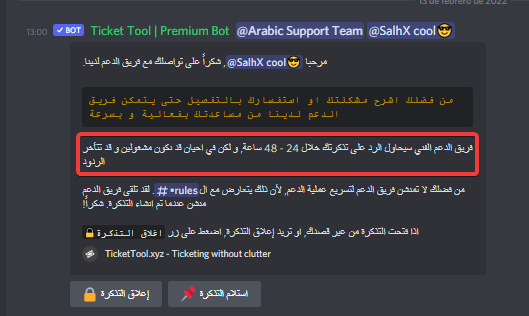


 reef edge



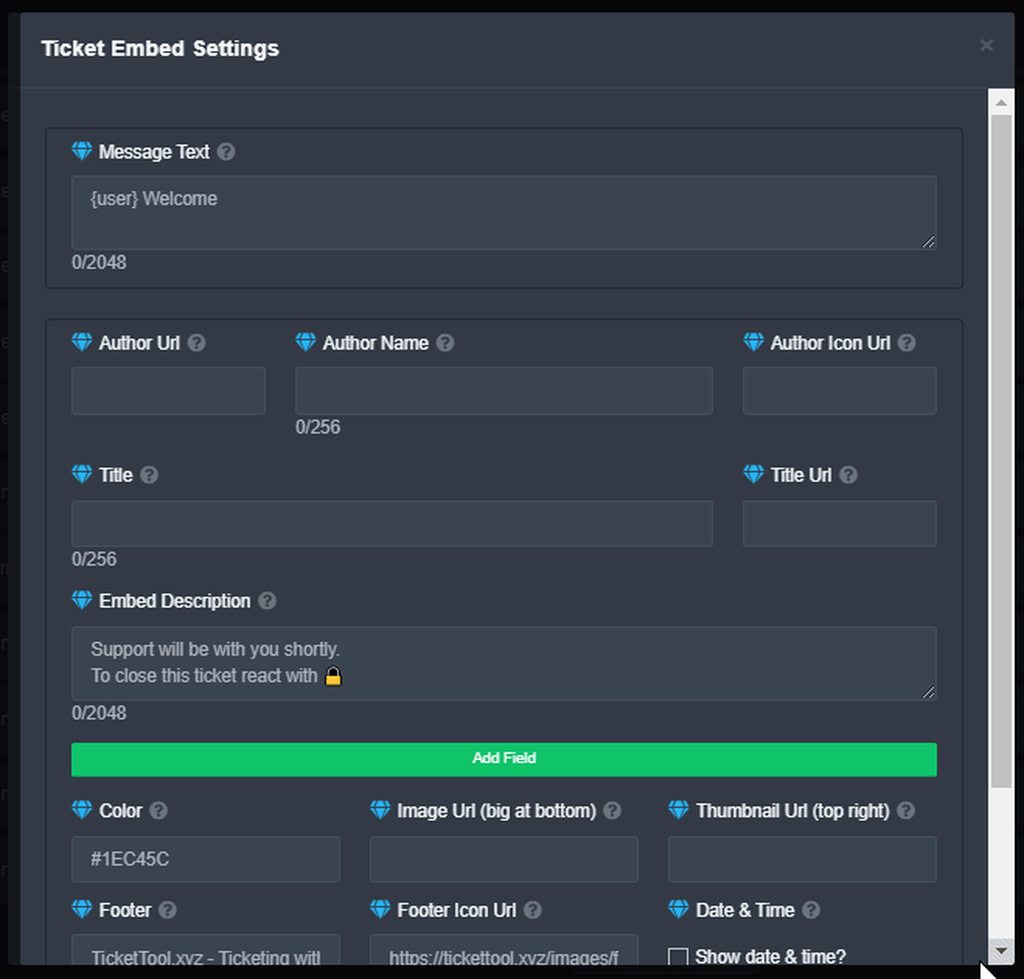
 whole ridge