#🆘│community-support
1 messages · Page 382 of 1
 jade topaz
 forest goblet
jade topaz
how to mention role in ticket ?
forest goblet
jade topaz
how to mention role in ticket ?
$help ping
 humble sequoiaBOT
How to make Ticket Tool ping a role
To make ticket tool ping a role when a ticket is opened, go to the Dashboard -> Panel Configs -> Settings -> Ticket Options -> Ticket Message -> Message Text and do this:
{@Role name} This is case sensitive and the role must have @mentions enabled
 jade topaz
forest goblet
$help ping
jade topaz
forest goblet
$help ping
Thx
 iron nightBOT
Gave +1 Rep to @forest goblet
 grim fossil
pls someone answer my ticket
 humble sequoiaBOT
For a more convenient use of multipanels, you can now combine panels on the dashboard. This will allow you to directly send the multipanel from the dashboard or via the $panel ID command.
Where can I find this?
You can find this setting on the Dashboard -> Panel Configs -> Settings -> General Options
Note: if you're attaching all the panels to a panel called English, don't include English in the attached panels box (If you do this, it will create duplicate)
This will put all buttons from all of your panels on one message. The message is the panel message from the panel you're combining these panels in.

 Note: This is a premium feature
 shut bolt
Follow these steps
iron nightBOT
Gave +1 Rep to @shut bolt
shut bolt
Sure
 wheat torrent
its must be premime bot ?
 copper owl
you must have premium
it doesn't have to be the premium bot but you do have to have premium for this to be possible
 pallid pivot
humble sequoiaBOT
pallid pivot
humble sequoiaBOT
We would love to help you, but if you don't tell us what you need help with we can't help you :(
 covert swallow
Wait till the support team is able to
copper owl
Your issue is one we need to investigate and figure out.
You were told that the dev is currently handling IRL things so it'll take time for him to be available as well.
 visual ingot
Yes sir got it, saw your note in the ticket
copper owl
👍 ** **
 runic turret
$staffapps
humble sequoiaBOT
How do be I become a Support Member?
You can become a support member in 2 ways:
1. You can be really active in #🆘│community-support gain <@&799500225579712543> role and get chosen by a Manager
2. You can apply VIA our applications that would be sent in #📣│server-news
We currently have Support Teams for the following languages:
:flag_us: English
:flag_jo: Arabic
:flag_fr: French
:flag_de: German
:flag_br: Portuguese
:flag_es: Spanish.
 solid stream
Waaasup!
shut bolt
Sup 
 craggy geyser
The sky
 hallow plover
Does anyone know how to let ticket makers send pictures
shut bolt
hallow plover
Does anyone know how to let ticket makers send pictures
Go into your Dashboard
Open the Panel Configs tab
And go into Settings, then move into the Permission Options
Click on Edit User Opened Permissions
Mark as  the
the Attach Files permission
Save changes and you are good to go
hallow plover
Thank you!!!
shut bolt
Sure!
jade topaz
how do i fix system failure missing perms?
shut bolt
$sf
humble sequoiaBOT
FAQ: System Failure
- System Failure: @Ticket Tool Missing permission(s): PERMISSION(S)
+ Ticket Tool is missing permissions to work properly, check the mentioned permissions by the bot in the channel, in the category, and in the role. You can use $debug as a help tool.
- System Failure: Panel “XX” not found
+ The panel they are trying to interact with has been deleted.
- Failed: `Invalid Form Body components[X].components[X].emoji.id: Invalid emoji
+ The bot does not have longer access to the emoji (external server) or the emoji has been deleted
- Failed: `Invalid Form Body components[X].components[X]: this is a required field
+ There is a certain necessary field you left blank. You will have to input a valid argument (most likely text) in the required field for ticket tool to continue functioning normally.
- System Failure: allMessages.users.sort is not a function
- System Failure: Unknown Webhook
- System failure: Service unavailable?
- System Failure: Internal Server Error
+ The bot has run into an issue, please try again as these are cases that tend to fail only once, if the problem is persistent, contact our support team
- Warning: Ticket Tool Failed to connect to it's database, please wait or try again.
+ There might be an issue with Ticket Tool, most likely a database issue, you'll have to wait a few minutes before creating another ticket. This is in place to prevent certain bugs to happen with tickets
can u join my server n help me?
shut bolt
jade topaz
can u join my server n help me?
I won't do it for you
I can guide you but not do it
jade topaz
i just dont know what permission is missing
it was just working earlier
and when i do $debug it wont work
shut bolt
jade topaz
i just dont know what permission is missing
Is it only saying missing permissions?
jade topaz
shut bolt
Is it only saying missing permissions?
System Failure: Missing Permissions
shut bolt
jade topaz
System Failure: Missing Permissions
I'll take you into a ticket if that's fine with you
jade topaz
sure
 iron locust
bot is not working
shut bolt
What's not working?
shut bolt
Is it showing any error?
iron locust
no
shut bolt
I'll need the server ID please
iron locust
its not my server
shut bolt
If I don't have the ID to check the settings there isn't much I can do to help you
shut bolt
Are you staff there?
iron locust
yes
shut bolt
Is it happening with all panels?
iron locust
yes all channels
shut bolt
What's the name of the role you have to see the tickets?
iron locust
Not only in tickets in the chat I write $help and he dot Reply
shut bolt
Then you must check the bot's permissions to read and send messages, try using $debug to see what's wrong
 shut bolt
iron locust
offline
shut bolt
iron locust
offline
Seems the bot is not on that server
iron locust
shut bolt
Don't ping Support Members
Sorry
iron locust
shut bolt
Seems the bot is not on that server
 shut bolt
Okey no the bot is down on your server
 coarse fiber
woh ?
 iron locust
ok
shut bolt
We must 10 minutes, then I'll check on our side the bot's status to see if it's fixed
iron locust
shut bolt
We must 10 minutes, then I'll check on our side the bot's status to see if it's ...
ok thx
iron nightBOT
Gave +1 Rep to @shut bolt
shut bolt
Sure mate
shut bolt
coarse fiber
<@!518666147441278998>
#546557408902905896 don't ping support
You also pinged Neptune on your ticket, please don't
coarse fiber
shut bolt
You also pinged Neptune on your ticket, please don't
I did not understand you, can I retrieve the locked tickets?
shut bolt
Glad to hear that mate
coarse fiber
i's heak
 real quail
why my ticket tool is offline?
 lyric sable
real quail
why my ticket tool is offline?
lyric sable
real quail
why my ticket tool is offline?
it’s in #799695838917820416 !!
heyy i noticed this message doesn’t show up in one of my other servers- does anyone know why?

 untold sonnet
will the support team ticket controls be visible to normal members in the server?
jade topaz
untold sonnet
will the support team ticket controls be visible to normal members in the server...
No. They have the option to Close, then once ticket closes, they are unable to see the ticket. Support team ticket members can now see Support team ticket controls.
untold sonnet
ok thx
iron nightBOT
Gave +1 Rep to @mint moon
 merry shoal
If I have two different types of tickets with different permissions and both have command style tickets enabled, how do I specify which type of ticket to open with $new/ticket
I have one ticket that the support team has access to and another ticket type that allows support team and another role to access it
shut bolt
Choose a different a channel per each panel for TT to look for the command
merry shoal
Makes sense! Thank you!
shut bolt
Sure!
 regal goblet
Please don't randomly tag support team members
jade topaz
ahh okay.
 prime bridgeBOT
good has been timed out for 10m 

 Reason: Posting Discord Server Invites
good#6158 | 675156913389961229
 shrewd dune
How can only ticket creators and supporters see tickets and send messages there
hello
 slender minnow
shrewd dune
hello
slender minnow
shrewd dune
hello
Firstly anyone with admin perm will have access to the tickets. For someone without the perm, they need to be added as support or additional roles (for which changes can be done seperately)
You can add the ones without admin perm to the support cat ^
jade topaz
🥺 I have a question about ticket bot
 atomic barn
Ask away! Support staff or a member will answer your question when they are available
humble sequoiaBOT
Don't see your server in the dashboard?
You will possibly need to relog. Look below to see steps on how to relog.
How to relog in the Dashboard.
First, you will need to go to the dashboard. Once your there, click on your avatar on the top right. after you clicked it, you will see button that says Logout. You must click that. Once you have logged out, you can log back in.
Note:
You need one of these 3 things to access the dashboard.
1. Server Owner (Level: 6)
2. Server Administrator (Level: 4)
3. Dashboard Role (Level: 2)
:warning: You can check your level using $level on your Discord Server
User permission level with Ticket Tool
@User is permission level: 0 (User)
```» *If it shows that your permission is **0**, you don't have any of the above **3 things** to manage the dashboard.*


**See the GIF below on how to relog:**
 atomic solstice
jade topaz
the server doesnt show up
atomic solstice
jade topaz
the server doesnt show up
try this ^^
 fair star
@prime bridge
jade topaz
thanks @atomic solstice
 wispy imp
Is there anyway to remove that transcript long message text? Theres not much use for it well for me (I understand its used for info), and it will be less confusing if its only just the embedded message
 copper owl
wispy imp
Is there anyway to remove that transcript long message text? Theres not much use...
copper owl
wispy imp
Is there anyway to remove that transcript long message text? Theres not much use...
there isnt a way to remove that, no
just dont use the Text File, and only use the embedded message. Usually i just dont even look at the file itself
 pale pilot
copper owl
there isnt a way to remove that, no
pale pilot
copper owl
there isnt a way to remove that, no
ever. not just currently.
jade topaz
why ticket support is offline
copper owl
it isnt
shut bolt
I have a ghost ping .-.
 scenic plinth
I have honestly no idea what to tell you about the ownership, the only way to do that is you transferred ownership of the server to the bot. I don't think there's anything you can do about that...
solid stream
Who transferred ownership lol?
prime bridgeBOT
el_canard has been timed out for 10m
Reason: Posting Discord Server Invites
el_canard#2516 | 924733038519263274
 feral pier
humble sequoiaBOT
feral pier
humble sequoiaBOT
Ticket Tool Premium
Get premium at https://tickettool.xyz/premium
Manage your subscriptions at https://tickettool.xyz/subscriptions
Why Premium?
Premium lets you customize the bot just how you want it. It also helps keep the bot running.
 zenith halo
Is there a way to set up the bot so that an individual member can have more than one ticket open at a time? We're using the bot to create tickets to plan events, and we have more than one event being planned at a time.
copper owl
zenith halo
Is there a way to set up the bot so that an individual member can have more than...
Change the ticket limit in the panel, can be found under General Options of the panel settings
 rapid notch
How do I use the bot, so members may open a ticket?
humble sequoiaBOT

You can check our documentation here.
You can also check #573205317870157855 for the basic setup.
Our documentation contains all the info you need about the bot to be able to setup and configure the bot however you like.
shut bolt
Check this guide out
jade topaz
hello
 sacred ruin
How do i make tickets visible for staff only?
copper owl
jade topaz
I am banned on a bf4 account can you guide me what can I do?
we arent battle field support
copper owl
sacred ruin
How do i make tickets visible for staff only?
Check the permission options and look at the Everyone Role Opened/Closed Permissions
make sure it's ❌'d for Read Channel
jade topaz
where do i find battlefield 4 support?
copper owl
In the battle field server, or on their website
i dont know if they handle these issues in their discord server, i would doubt that
@jade topaz would be appreciated if you dont ask the same question everywhere
this isnt the right spot for battlefield
https://help.ea.com/en/battlefield/battlefield-2042/
try that
or just try googling the correct support
 bronze dragon
how do I open a ticket?
 lapis idol
bronze dragon
how do I open a ticket?
lapis idol
bronze dragon
how do I open a ticket?
Are you talking about in this server, or in your own?
bronze dragon
nevermind discord sucks ass
 molten dagger
How do I setup my ticket bot
humble sequoiaBOT
You can check our documentation here.
You can also check #573205317870157855 for the basic setup.
Our documentation contains all the info you need about the bot to be able to setup and configure the bot however you like.
jade topaz
copper owl
we arent battle field support
@copper owl please unlock my account
shut bolt
jade topaz
<@548583124062175232> please unlock my account
#546557408902905896 don't ping support members, and as Neptune said, we are not Battle field support
jade topaz
blocked me Karek # 5326 talk to him he is the bf4db administrator please
copper owl
jade topaz
<@548583124062175232> please unlock my account
You replied to the message saying we aren't battle field support
that should be more than enough info that we can't unban your account of anything
 still cloak
Greetings, how can i disable the option for specific support roles to delete tickets? So only others can do it
copper owl
add them as an additional role
remove them from support and make them additional roles
or you could just add their roles in "Disabled Roles"
still cloak
Adding them to disabled roles under Command Configs->$delete didnt work for some reason
 humble cloud
So outta curiousity, how did you get this green? What I was given doesn’t seem to work for me
\`\`\`fix
Please explain your issue or query in detail so that our Support Team can assist you promptly and effectively.
\`\`\`
In the ticket we indicated you should remove the \s from it
It should be only ```
humble cloud
Oh, I mustve missed that 
shut bolt
jade topaz
is this correct?
To add a user?
humble cloud
So stupid question, am I allowed to embed a picture in the embeding option of the greeting of the ticket? If so would I just put the links in or is it a special way to get them to view properly
shut bolt
Use the Image URL field in the embed options
humble sequoiaBOT
What are the direct URLs?
A direct access URL is an easy to read URL that users can enter to get to a specific item, document, page, category, or perspective, in which our bot TicketTool can read and get it displayed in your 'Panel Message' or your 'Ticket Message'.
Where can I get them?
The recommended way is to use 'Imgur', you can signup within a few minutes and then upload the image you want, and copy the URL of the uploaded image and paste it into one of the four boxes. There are alternatives to this, such as other image or video storing websites or using 'Open Original' of an image and paste it in (please be aware that if your image is deleted, Discord will automatically delete the link to it in a few days). Please note this requires 'Premium'. Imgur
 humble cloud
It would consist of 2 images, would I be able to do that? And I’m guessing I have to use a website to host the images, I can’t just use a discord link to the said images
shut bolt
Right now it's possible with only one, and you can use either the Discord direct url or a host service such as imgur
shut bolt
Sure
 loud apex
hi i have a question- sorry for bothering but how do mods can have access to ticket? bc my friend is struggling with ticket perms ;-; sorry if my english is bad
humble sequoiaBOT
How to let support team see into a ticket
About support roles
A support role lets your support team see into tickets with out having to add them manually to each and every ticket.
You can add as many support roles as you like per panel.
NOTE that the way discord works all admins can see into tickets regardless of this.
How to set a support role
To set a Support role go to the Dashboard -> Panel Configs -> Settings -> General Options -> Support Team Roles.

NOTE that the support role will not be able to see into tickets that are already created..
shut bolt
Assign the mod role as a support role
loud apex
okie okie ill tell my friend if it dosent still work ill come back ^-^ 👍
shut bolt
Sure :)
humble cloud
Is there away I can change the Persmission message Pablo, from the X role, it will say you don’t have permission, is there away I can edit this message to say something else? I tried looking and not finding that exact message
 glossy bramble
How to add @mod ping , when the ticket is opened
 slender minnow
$mentions
humble sequoiaBOT
Mentions
Within all the messages the bot's sends (both embeds and text) you can mention either channels, roles, or even users, these mentions will only send a notification to the user if they are used within a text field, e.g: a role mentioned in an embed won't ping at all the users who have that role.
For mentioning a role you can use one out of three options:
{@Role Name} ➞ Which is Case Sensitive.
{RoleID} ➞ Replace RoleId with the Id of the role you are trying to ping.
<@&RoleID> ➞ Discord's native syntax to ping roles.
<#ChannelID> ➞ Mention a channel by its ID.
<@UserID> ➞ Mention a user by its ID.
slender minnow
@glossy bramble please see above ^
glossy bramble
slender minnow
<@751343305954033695> please see above ^
cmd to put it
slender minnow
There is no command for that, to mention thr ticket owners you will meed to set it up using the dashboard.
 frosty lantern
help
humble sequoiaBOT
We would love to help you, but if you don't tell us what you need help with we can't help you :(
 gilded basin
wdym?
 gaunt geode
How do u create a ticket
gaunt geode
gilded basin
wdym?
like i want to add it in my server
gilded basin
Discord
Discord is the easiest way to communicate over voice, video, and text. Chat, hang out, and stay close with your friends and communities.
 storm fractal
you.. add it.. to the server.. #573205317870157855
gaunt geode
storm fractal
you.. add it.. to the server.. <#573205317870157855>
then?
gilded basin
then? well run $debug if ness
gaunt geode
what does $debug do?
gaunt geode
ok
humble sequoiaBOT
If Ticket Tool support requested this debug give them this link:
https://discordapp.com/channels/509192800865353738/662692902245498910/934726726112649276
Bot Permissions ឵ ឵឵ ឵ ឵឵ ឵ ឵឵ ឵ ឵឵
✅ - Read Channels
✅ - Send Messages
✅ - Embed Links
✅ - Attach Files
✅ - Add Reactions
✅ - Manage Roles
✅ - Manage Channels
✅ - Manage Messages
✅ - Read History
Channel Permissions ឵ ឵឵ ឵ ឵឵ ឵ ឵឵ ឵ ឵឵
✅ - Read Channels
✅ - Send Messages
✅ - Embed Links
✅ - Attach Files
✅ - Add Reactions
✅ - Manage Roles
✅ - Manage Channels
✅ - Manage Messages
✅ - Read History
Server Information ឵ ឵឵ ឵ ឵឵ ឵ ឵឵ ឵ ឵឵ ឵ ឵឵
Channel name:
•community-support
Channel ID:
776680605517742090
Channel Count:
191/500
Server name:
Ticket Tool Support
Server ID:
509192800865353738
User Information ឵ ឵឵ ឵ ឵឵ ឵ ឵឵ ឵ ឵឵ ឵ ឵឵
User name:
SniperCatJr#2714
User ID:
501045011518062592
Permission Level:
0 - User ()
Bot Information ឵ ឵឵ ឵ ឵឵ ឵ ឵឵ ឵ ឵឵ ឵ ឵឵
Prefix:
$
Premium Status:
Lifetime - ["time"]
Current shard:
1
API Latency:
80
gilded basin
there u go ^
gaunt geode
and then that's it?
gilded basin
i mean read docs and manage it thru the W-E-B (scary place)
good luck!
you could run $help
gaunt geode
no i want how to create ticket
gilded basin
where? here or in your server
slender minnow
Ummm....
 warped rune
Hey I need help, so when I invite Ticket Tool he shows up in the discord but the discord doesn't show up on the dashboard and I've relogged multiply times and it doesn't show
gaunt geode
gilded basin
where? here or in your server
my server like this
 slender minnow
@warped rune you need the admin perm to see your server on the dashboard.
gilded basin
gaunt geode
my server like this
ur gonna have to create a panel
warped rune
slender minnow
<@771660301652983808> you need the admin perm to see your server on the dashboar...
Wym like on the server?
gaunt geode
gilded basin
ur gonna have to create a panel
can u tell me how to do that
gilded basin
gaunt geode
can u tell me how to do that
but im not gonna go into depth with that
slender minnow
@gaunt geode you need to click on the button/react with the reaction provided you have the whitelisted role on the server.
gilded basin
watch a yt tutorial
slender minnow
warped rune
Wym like on the server?
Yep, a role with admin perm if you are not the server owner.
gaunt geode
gilded basin
but im not gonna go into depth with that
can u pls tell
warped rune
slender minnow
Yep, a role with admin perm if you are not the server owner.
K! tysm!
gaunt geode
slender minnow
<@860056851186188309> you need to click on the button/react with the reaction pr...
can u show a screenshot or something
gilded basin
gaunt geode
can u pls tell
just use this https://www.youtube.com/watch?v=rPz5-r4KEgo
slender minnow
Screenshot for?
gaunt geode
slender minnow
Screenshot for?
like the role
gaunt geode
slender minnow
Can you elaborate your query?
i want to create this
 slender minnow
You can create a panel through the tt dashboard.
Head over to your server dashbosrd -> Panel config
You can make panels from there
loud apex
hihi im back my friend wants his moderators have acess to tickets but what will he do next? pls help TwT

 crude reef
isn't this a spam link
loud apex
help-
gaunt geode
loud apex
hihi im back my friend wants his moderators have acess to tickets but **what wil...
can u tell me how did u get this page
gaunt geode
oh
 pseudo fractal
How should you configure your bot so that you can open a ticket via a command?
gaunt geode
 gaunt geode
loud apex
its on dashboard-
gaunt geode
loud apex
its on dashboard-
I am getting this but not panel
loud apex
gaunt geode
why mee6 -
gaunt geode
loud apex
why mee6 -
then?
loud apex
its ticket tool not mee6
gaunt geode
ok
loud apex
loud apex
hihi im back my friend wants his moderators have acess to tickets but **what wil...
support team helppp Tvt pls-
SHSHDHDHF aaah
slender minnow
@gaunt geode access your server dashboard through https://tickettool.xyz/
 slender minnow
loud apex
hihi im back my friend wants his moderators have acess to tickets but **what wil...
slender minnow
loud apex
hihi im back my friend wants his moderators have acess to tickets but **what wil...
Add their role as support team
crude reef
loud apex
hihi im back my friend wants his moderators have acess to tickets but **what wil...
click on settings then input the role like this one

then click save you're good to go don't forget to click send on the category you want to
gaunt geode
slender minnow
<@860056851186188309> access your server dashboard through https://tickettool.xy...
nvm I got it and created
prime bridgeBOT
heck89 has been timed out for 10m
Reason: Similiar-Messages Spam
heck89#2184 | 934409977110593566
humble sequoiaBOT

⚠️ You're in the wrong place
We provide support for @pseudo glen discord bot and cannot help you with whatever issue you have.
- Please make sure to contact the appropriate Support Team.
If you don't have any further questions regarding our bot Ticket Tool, please close this ticket
slender minnow
humble sequoia
@jade topaz ^
 high oyster
How do i ping a role

I have it set to this put it comes out as @lavish crypt not the actual role
slender minnow
$mentions
humble sequoiaBOT
Mentions
Within all the messages the bot's sends (both embeds and text) you can mention either channels, roles, or even users, these mentions will only send a notification to the user if they are used within a text field, e.g: a role mentioned in an embed won't ping at all the users who have that role.
For mentioning a role you can use one out of three options:
{@Role Name} ➞ Which is Case Sensitive.
{RoleID} ➞ Replace RoleId with the Id of the role you are trying to ping.
<@&RoleID> ➞ Discord's native syntax to ping roles.
<#ChannelID> ➞ Mention a channel by its ID.
<@UserID> ➞ Mention a user by its ID.
slender minnow
@high oyster you forgot to add the & btwn the id and @ ^
You can also refer the above response for other ways of mentioning.
high oyster
Thank you
slender minnow
jade topaz
How to start the bot like is it **$start** or what
Heya you need to setup the panel first grom your server dashbosrd server first.
 jade topaz
Ok
slender minnow
 zinc pagoda
Can you run $debug on your server and share the ss of the response?
zinc pagoda
Ok
slender minnow
jade topaz
Then do what
After setting up the panel from the dashboard, you need to send it in the channel you want it to be. After that your server members can start opening tickets and you're good to go
jade topaz
slender minnow
After setting up the panel from the dashboard, you need to send it in the channe...
Ok


 jade topaz
This?
slender minnow
zinc pagoda
Allow the perms marked with red cross
slender minnow
You can ask someone who can.
slender minnow
On your server, you can ask someone who has the perm to change role perms.
slender minnow
You are teying to do it from your discord server settings right?
zinc pagoda
 slender minnow
You dont have to do it from there
slender minnow
Head over to your discord server -> server settings -> role -> role settings
Find the tt role
Go to permission and allow the above denied perms
zinc pagoda
Yeah I already did it but when I give the premisson to the tt role it’s dispare
slender minnow
Disappears?
zinc pagoda
slender minnow
Disappears?
Yeah
slender minnow
You can check your server audit logs for who is changing it.
jade topaz
Hey !
Sorry I got a little message when trying to deleted the ticket

Anyone can help ?
jade topaz
Renewal is automatic but not renewed
any support can help !
 copper owl
Make sure the payment method you used is still valid
and make sure you have sufficient funds
 copper owl
it means youve already opened a ticket and reached the limit
meaning you cant create any more
loud apex
OH SORRY TY TY 😭
 bright abyss
how do i make it so that ticket tool pings a role when a ticket is open
slender minnow
$mentions
humble sequoiaBOT
Mentions
Within all the messages the bot's sends (both embeds and text) you can mention either channels, roles, or even users, these mentions will only send a notification to the user if they are used within a text field, e.g: a role mentioned in an embed won't ping at all the users who have that role.
For mentioning a role you can use one out of three options:
{@Role Name} ➞ Which is Case Sensitive.
{RoleID} ➞ Replace RoleId with the Id of the role you are trying to ping.
<@&RoleID> ➞ Discord's native syntax to ping roles.
<#ChannelID> ➞ Mention a channel by its ID.
<@UserID> ➞ Mention a user by its ID.
lapis idol
bright abyss
how do i make it so that ticket tool pings a role when a ticket is open
{@Role Name} or {roleID}
bright abyss
and how do i make it so that you can only open 1 ticket at a time
 hasty forge
Hey I added the bot to my server, but it doesn't show up on the dashboard
humble sequoiaBOT
Don't see your server in the dashboard?
You will possibly need to relog. Look below to see steps on how to relog.
How to relog in the Dashboard.
First, you will need to go to the dashboard. Once your there, click on your avatar on the top right. after you clicked it, you will see button that says Logout. You must click that. Once you have logged out, you can log back in.
Note:
You need one of these 3 things to access the dashboard.
1. Server Owner (Level: 6)
2. Server Administrator (Level: 4)
3. Dashboard Role (Level: 2)
:warning: You can check your level using $level on your Discord Server
User permission level with Ticket Tool
@User is permission level: 0 (User)
```» *If it shows that your permission is **0**, you don't have any of the above **3 things** to manage the dashboard.*


**See the GIF below on how to relog:**where do i do that
lapis idol
bright abyss
where do i do that
in the ticket message
humble sequoiaBOT
The Ticket Message is the first message sent by the bot in a new ticket. To customise it head over to your Dashboard ➞ Panel Configs ➞ Settings ➞ Ticket Options ➞ Edit Ticket Message
 hasty forge
humble sequoia
hasty forge
humble sequoia
How do I change the level
It currently says I'm level 0 but I have admin perms in the server
bright abyss
can i change the pfp of ticket
copper owl
bright abyss
can i change the pfp of ticket
Not currently no
bright abyss
ok
 compact solar
Hi, I put the setting that a certain role cannot delete the ticket. I saved, but this role can still delete it, is this a possible bot bug?
copper owl
compact solar
Hi, I put the setting that a certain role cannot delete the ticket. I saved, but...
Not possible it's a bot bug
show me what you did please
compact solar
@copper owl
copper owl
you made it support team only ?
just remove all the roles, put @everyone in disabled and put the roles you want to be able to use the command in Allowed Roles and disable Support only
that will work
copper owl
are you an admin
and are you the one testing it
if so, then you bypass the restrictions
compact solar
@copper owl
copper owl
you still have it as "Support Team Only"...
copper owl
copper owl
just remove all the roles, put `@everyone` in disabled and put the roles you wan...
disable Support only
compact solar
aaaah ok, sorry
copper owl
Also you're closing the ticket through the button
you did all of this through the commands
if you wanna do this to the buttons as well, go to panel configs, settings of the panel you want to edit, Button Options, the Close Ticket
and copy the same setup
compact solar
@copper owl okok, now i think i've done everything right but it's still not going 😢
copper owl
show me the roles on the account you're testing this with current
compact solar
 copper owl
please type in the ticket before you close it while you're recording
if it doesn't work, I'll open a ticket for you and we'll solve this out better
compact solar
nope, doesn't work
copper owl
Can I get the ID of the server
compact solar
where can I find it?
copper owl
run $id
compact solar
i can't write it in your dm
compact solar
917119141511589959
copper owl
ok one moment
compact solar
can i delete the id?
copper owl
wdym
this is info literally anyone can get btw
anyone can get the id by just being on the server
compact solar
oh, okok
compact solar
sure
humble sequoiaBOT
━━ moved to ticket ━━
 torpid ledge
I am getting
System Failure: Missing permissions
when I try to close a ticket
shut bolt
$sf
humble sequoiaBOT
FAQ: System Failure
- System Failure: @Ticket Tool Missing permission(s): PERMISSION(S)
+ Ticket Tool is missing permissions to work properly, check the mentioned permissions by the bot in the channel, in the category, and in the role. You can use $debug as a help tool.
- System Failure: Panel “XX” not found
+ The panel they are trying to interact with has been deleted.
- Failed: `Invalid Form Body components[X].components[X].emoji.id: Invalid emoji
+ The bot does not have longer access to the emoji (external server) or the emoji has been deleted
- Failed: `Invalid Form Body components[X].components[X]: this is a required field
+ There is a certain necessary field you left blank. You will have to input a valid argument (most likely text) in the required field for ticket tool to continue functioning normally.
- System Failure: allMessages.users.sort is not a function
- System Failure: Unknown Webhook
- System failure: Service unavailable?
- System Failure: Internal Server Error
+ The bot has run into an issue, please try again as these are cases that tend to fail only once, if the problem is persistent, contact our support team
- Warning: Ticket Tool Failed to connect to it's database, please wait or try again.
+ There might be an issue with Ticket Tool, most likely a database issue, you'll have to wait a few minutes before creating another ticket. This is in place to prevent certain bugs to happen with tickets
Check the bot's permissions for that channel and it's role
torpid ledge
Manage roles?
shut bolt
Yup, the bot needs that one too
To manage the perms of the ticket
Any permission marked with an X means that the bot is missing it
torpid ledge
The bot has the perm in the category
but not in the channel???
I dont know what is wrong with discord but I gave the bot manage role permission in the category but in the created ticket channel it doesn't have the perm
The bot must overwrite it
because when I create one with norm perms it has the perm
shut bolt
You need to give it to the role itself
humble sequoiaBOT
If Ticket Tool support requested this debug give them this link:
https://discordapp.com/channels/509192800865353738/662692902245498910/934881406906167316
Bot Permissions ឵ ឵឵ ឵ ឵឵ ឵ ឵឵ ឵ ឵឵
✅ - Read Channels
✅ - Send Messages
✅ - Embed Links
✅ - Attach Files
✅ - Add Reactions
✅ - Manage Roles
✅ - Manage Channels
✅ - Manage Messages
✅ - Read History
Channel Permissions ឵ ឵឵ ឵ ឵឵ ឵ ឵឵ ឵ ឵឵
✅ - Read Channels
✅ - Send Messages
✅ - Embed Links
✅ - Attach Files
✅ - Add Reactions
✅ - Manage Roles
✅ - Manage Channels
✅ - Manage Messages
✅ - Read History
Server Information ឵ ឵឵ ឵ ឵឵ ឵ ឵឵ ឵ ឵឵ ឵ ឵឵
Channel name:
•community-support
Channel ID:
776680605517742090
Channel Count:
178/500
Server name:
Ticket Tool Support
Server ID:
509192800865353738
User Information ឵ ឵឵ ឵ ឵឵ ឵ ឵឵ ឵ ឵឵ ឵ ឵឵
User name:
Yareaj_#4383
User ID:
518666147441278998
Permission Level:
0 - User (Sr. Support Member)
Bot Information ឵ ឵឵ ឵ ឵឵ ឵ ឵឵ ឵ ឵឵ ឵ ឵឵
Prefix:
$
Premium Status:
Lifetime - ["time"]
Current shard:
1
API Latency:
96
shut bolt
This is how it must look your $debug
Check which are with ❌
And enable them to the bot
torpid ledge
Wait seriously?
shut bolt
Yup
torpid ledge
The bot needs the server perm 🤦♂️
shut bolt
Yup
shut bolt
No worries mate
torpid ledge
Is there any option to auto create a transcript on closing?
shut bolt
Yup, that's part of our Premium System, go into the Logging Options and you can enable it under the Auto Save Transcript option

 upper hatch
How do i set the bot to save ticket transcripts to a specific channel?
shut bolt
upper hatch
How do i set the bot to save ticket transcripts to a specific channel?
$help transcript
humble sequoiaBOT
How do I save transcript to a channel?
To save transcripts to a channel go to the Dashboard -> Panel Configs -> Settings -> Logging Options -> Transcript Channel
 shut bolt
That's how to choose the channel
shut bolt
shut bolt
Yup, that's part of our Premium System, go into the __Logging Options__ and you ...
For making it to happen automatically refer to this
upper hatch
Ty
shut bolt
Sure
upper hatch
I need to be on pc ig
shut bolt
Nope
It can be done on mobile too
Only difference is that to access the Panel Configs you'll have to go into the 
The rest is the same
upper hatch
Yes ik i did it before and it was supposed to work normally but i didnt press the save button
😂😂
shut bolt
Oh jjaaja
 sterile ivy
jade topaz
sterile ivy
jade topaz
Comment on met que on peut crée infie de ticket et pas 1
 serene parrot
Hello
jade topaz
French
 wicked topaz
hi yes question. do i need to re-send my panels after i changed who can open tickets, or does it apply automatically? pls ping me, too many servers :)
also what is the difference between {author.full} & {ticket.user.full}
its letting me open tickets without the role i selcted but it might be because im server owner, clarification would be nice let me know :)
did this and re-sent the panel it's still letting anyone open a ticket even without the role
(tested with someone who isnt a support role and not me.)
 copper owl
wicked topaz
hi yes question. do i need to re-send my panels after i changed who can open tic...
copper owl
wicked topaz
hi yes question. do i need to re-send my panels after i changed who can open tic...
Nope, only time you need to resend it only if you change the create ticket button OR if you change anything about the panel message
copper owl
wicked topaz
also what is the difference between {author.full} & {ticket.user.full}
author = user who initiated the action
ticket user = user who created and opened the ticket
wicked topaz
okay! how do i make it so only a certain role can open tickets
copper owl
wicked topaz
its letting me open tickets without the role i selcted but it might be because i...
server owner bypass these restrictions
copper owl
wicked topaz
did this and re-sent the panel it's still letting anyone open a ticket even with...
but @everyone in Disabled Roles
wicked topaz
copper owl
server owner bypass these restrictions
ah, i tested it with someone who wasnt me
alright ill try that
wicked topaz
so like this?
 copper owl
this is community support, so you're relying on the community to help you
if you want help from the actual staff team, you can #🎫│make-a-ticket
copper owl
wicked topaz
so like this?
correct
wicked topaz
ah okay. wasnt sure
copper owl
wicked topaz
ah okay. wasnt sure
No worries. Im just letting you know because we arent obliged to help you in here
i just did seeing as youve been waiting for a while
copper owl
wicked topaz
so like this?
this should make it so anyone who is verified can open a ticket, and people without the role cant
wicked topaz
it seems to have worked, thanks :D
copper owl
wicked topaz
it seems to have worked, thanks :D
Anytime
wicked topaz
just one more question. any way to edit this message? no big deal if not.
 copper owl
you cant edit that, no
wicked topaz
alright sick thats fine :) thanks a ton!
copper owl
wicked topaz
alright sick thats fine :) thanks a ton!
of course, anytime
jade topaz
is this the ticket?
 copper owl
that's a DM transcript of a ticket
jade topaz
where can i find the ticket
copper owl
If it was DM'd to you, it was closed or most likely deleted
jade topaz
Is there anyway possisable that you can add ModSystemBot to your server?
shut bolt
ModSystem is a VIP version of Wick, you can add Wick https://wickbot.com/
Discord
Discord is the easiest way to communicate over voice, video, and text. Chat, hang out, and stay close with your friends and communities.
copper owl
jade topaz
i'll just buy it then.
the waiting list for the VIP package is not available currently
so you cant really get "modsystem" right now
you can get premium wick tho
jade topaz
i got this
 shut bolt
copper owl
wick good bot
shut bolt
copper owl
wick good bot
Neptune4WickSupport
 pulsar lark
hey Team. I am helping setup a discord but the premium was bought on a different account
how can I invite the premium bot to the server from my account?
shut bolt
pulsar lark
hey Team. I am helping setup a discord but the premium was bought on a different...
Did you assign the bot to your server from that account?
Or do you want to take the subscription into this account?
pulsar lark
shut bolt
Or do you want to take the subscription into this account?
i would prefer the subs taken from the account it was bought from to my account so that I dont disturb the owner too much
i invited the bot before buying premium with my account
thank you for getting back
 worn fox
Yo i literally added the tickettool bot in my server and when i press manage servers, there s no server showing up
shut bolt
pulsar lark
i would prefer the subs taken from the account it was bought from to my account ...
If the person who made the payment is fine with you managing the subscription then follow this steps
$transferacc
humble sequoiaBOT
How do I transfer my premium subscription from one account to another?
First, your subscription is not linked to your Discord account, but rather it is linked to the email that you purchased premium with.
However you will define which Discord account will be able to manage your subscription.
Go manage subscription and sign in using the email you purchased the premium with. Even if your account got disabled or deleted, you should still be able to sign in either way.
Next, head over to Account Details, and change the details there to match your new account details! Now, your subscription should be tied to your new account
See the GIF below the steps:
 shut bolt
worn fox
Yo i literally added the tickettool bot in my server and when i press manage ser...
shut bolt
worn fox
Yo i literally added the tickettool bot in my server and when i press manage ser...
Try this out
humble sequoiaBOT
Don't see your server in the dashboard?
You will possibly need to relog. Look below to see steps on how to relog.
How to relog in the Dashboard.
First, you will need to go to the dashboard. Once your there, click on your avatar on the top right. after you clicked it, you will see button that says Logout. You must click that. Once you have logged out, you can log back in.
Note:
You need one of these 3 things to access the dashboard.
1. Server Owner (Level: 6)
2. Server Administrator (Level: 4)
3. Dashboard Role (Level: 2)
:warning: You can check your level using $level on your Discord Server
User permission level with Ticket Tool
@User is permission level: 0 (User)
```» *If it shows that your permission is **0**, you don't have any of the above **3 things** to manage the dashboard.*


**See the GIF below on how to relog:**Oh great, may I have the server ID to check if the subscription was assigned to the server?
pulsar lark
shut bolt
Oh great, may I have the server ID to check if the subscription was assigned to ...
923023254489296976
shut bolt
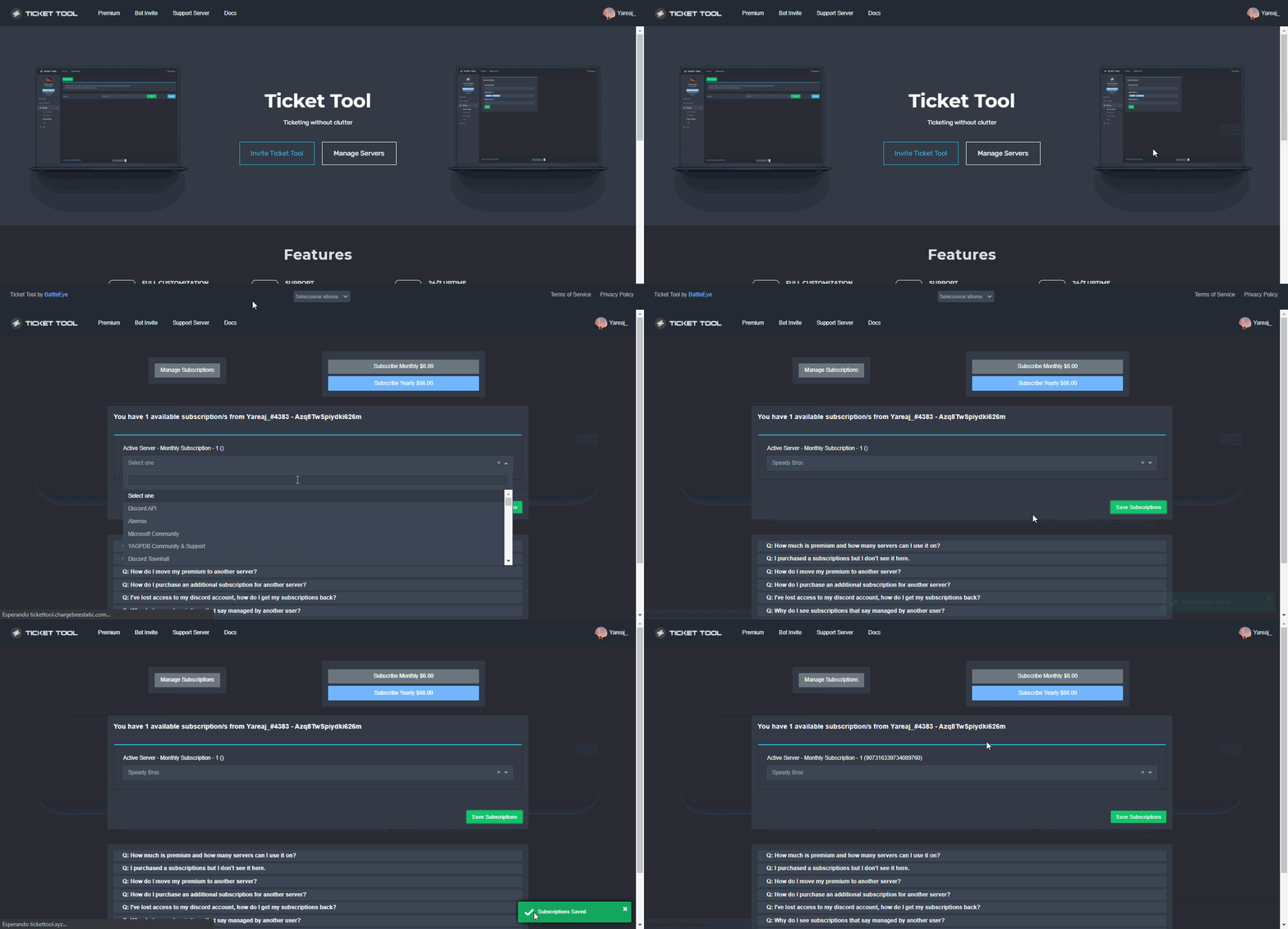
Currently the subscription hasn't been enabled, please ask the owner of the subscription to assign it following this process:
humble sequoiaBOT
Redeeming premium on your server is really simple. Just head over to your Subscriptions Page. There you can select a server of your choice, which will get premium. You can change the server at any point.
 pulsar lark
shut bolt
Currently the subscription hasn't been enabled, please ask the owner of the subs...
pulsar lark
shut bolt
Currently the subscription hasn't been enabled, please ask the owner of the subs...
we just did that
whats the next step?
humble sequoiaBOT
The first thing you will need to do is invite the premium bot, an invite can be found here
Once the bot is in your server we will head to the dashboard and manage your server. When you are managing your server, you want to head into "Server Configs" then click the drop down menu under "Select the bot you would like to use on this server" then click "Ticket Tool#6207" and then save.
 shut bolt
Enable and Invite the bot
worn fox
shut bolt
Try this out
i did that 3 times already. servers still wont show up
shut bolt
worn fox
i did that 3 times already. servers still wont show up
If so, please read the note of that tag I sent
 silk bluff
is it possible to name this button to something else when using the free version?
 shut bolt
With the free version it is not possible
 royal forge
So -- no zapier support. Anyway possible to generate a zoom meeting link when a new ticket is created?
shut bolt
Oof, not possible to do it with the bot by itself you would need a custom bot to make that work
royal forge
Yeah thought so. Know if there are plans to support zapier in the future?
shut bolt
Tbh no clue
 hushed bluff
Hi how would I make the bot so when someone creates a ticket, it then would go into a category instead of creating it at the top of the server?
shut bolt
$help category
humble sequoiaBOT
How to set the open category
To set a open category go to the Dashboard -> Panel Configs -> Settings -> Category Options -> Category Open
 shut bolt
Assign a category as shown above and that's it
hushed bluff
shut bolt
Assign a category as shown above and that's it
I appreciate it thanks.
iron nightBOT
Gave +1 Rep to @shut bolt
 sick meadow
Hai i new to ticket tool so i need help lol. I need help with what command it is to make it where you just have to click a button instead of doing the command. Thanks
Nvm i found it ty anyways
 distant pecan
shut bolt
distant pecan
shut bolt
In the ticket you were told you are in the wrong server mate, we can't do anything
pulsar lark
is there a separate invite link for premium bot?
https://tickettool.xyz/invite link brings me to non premium one
copper owl
It's in the Server Configs page
also make sure to select the premium bot in the dropdown menu so it works
pulsar lark
copper owl
also make sure to select the premium bot in the dropdown menu so it works
ok thank you
iron nightBOT
Gave +1 Rep to @copper owl
copper owl
pulsar lark
ok thank you
Of course, we appreciate you supporting ticket tool by being a premium subscriber 🙂
pulsar lark
copper owl
Of course, we appreciate you supporting ticket tool by being a premium subscribe...
thank you and you all deserve it for making a really useful bot

 feral portal
hey how do I prevent members from closing tickets? I only want admins+ to be able to clsoe tickets
 eager cargo
panel configs > panel settings > button options > disabled roles > @.everyone > save
admin will bypass the @.everyone
and then for the command, just go to command configs > close > settings > disabled roles > @.everyone
feral portal
eager cargo
panel configs > panel settings > button options > disabled roles > @.everyone > ...
hey thank u so much man, I had another question, how do I set it to where the transcript logs of the tickets goes to a channel for the support team instead of it going to my dms?
iron nightBOT
Gave +1 Rep to @eager cargo
eager cargo
$help transcript
humble sequoiaBOT
How do I save transcript to a channel?
To save transcripts to a channel go to the Dashboard -> Panel Configs -> Settings -> Logging Options -> Transcript Channel
feral portal
eager cargo
go to automation options and disable the dm sending
can i set it to where it only dms the ticket creator
eager cargo
yes
eager cargo
humble sequoia
you can see the option for a quick glance here
feral portal
eager cargo
you can see the option for a quick glance here
hey so if i invite premium bot will it undo all the settings I did in non-premium
 lunar viper
how do i change the ticket name from (Ticket-001) to something else such as (Thumbnail-{username})
humble sequoiaBOT
━━ moved to ticket ━━
hasty forge
Ok
copper owl
threads are kind of a handicap because alot of features would be gone
iron nightBOT
Gave +1 Rep to @copper owl
hasty forge
Any way to not have the channel at the top?
copper owl
hasty forge
Any way to not have the channel at the top?
Make a category and input the category under Category Open in the Category Options of your panel settings
hasty forge
thanks @copper owl
iron nightBOT
Gave +1 Rep to @copper owl
jade topaz
can i use ticket tool bot to create a verification system in my server? like someone makes a ticket, i decide if i wanna let them join or not and then give them the verification role
something like that..
like i need to know who is there and who wants to join
instead of just letting them react to some emoji to gain access to my server
jade topaz
hmm oki
copper owl
you can also add the questions you would like to ask in the ticket message, which can be edited under the Ticket Options section of your panel settings
jade topaz
but then how will it manage the role? like do i have to manually give them the role or if i just click on their ticket it somehow gives them the verified role?
ohh
copper owl
jade topaz
but then how will it manage the role? like do i have to manually give them the r...
Ticket tool doesnt give roles yet
you'll have to manually give it to them, or use a moderation bot that has a command that gives roles
jade topaz
i see
oki thanks ill try this out
uh but like
currently im using mee6 as a verification bot.. should i remove it? or i mean
wait lemme see first sdjbjsnsld
copper owl
i mean if you're gonna want to go ahead with this, having 2 verification systems seem kinda redundant
especially when it's a reaction verification system
jade topaz
yeah i only want one
copper owl
well then remove the mee6 one once you setup TT
jade topaz
but uh i will know the username of whoever creates a ticket right?
like who wants to join
copper owl
they have to type in the ticket, it also pings them by default so
yeah you'll most likely figure out who wants to join fairly easily
jade topaz
i see
jade topaz
How can i make something like this
And how do I add emojis in ticket tool dashboard

@copper owl
slender minnow
jade topaz
How can i make something like this
And how do I add emojis in ticket tool dashb...
- Don't ping a support team member.
- Thats multiple button is a premium feature. Even changing the emoji for the button is premium iirc.
jade topaz
slender minnow
1. Don't ping a support team member.
2. Thats multiple button is a premium feat...
Okay, but how do I add emojis in the embed?
slender minnow
$idcommand
humble sequoiaBOT
How do I get the ID of Roles/Channels/Emojis?
Ticket Tool has a useful command that helps you get the ID of various things like channels, roles, emojis and your server.
Just use the command $id <#channel/@role/:emoji:>. Now copy everything, including the brackets <...>, to your dashboard (or wherever you want it)
If you want the server ID, just use $id.
Examples:
Server ID: $id ➝
509192800865353738
Roles: $id @Role ➝@humble sequoia
Channel: $id #channel ➝#🤖│bot-spam
User: $id @user ➝@copper owl
Emoji: $id➝

 slender minnow
Use this and replace the response whereever you want the emoji ^
jade topaz
copper owl
<#546557408902905896> :)
So sorry
slender minnow
Np
jade topaz
Thanks Wolf
humble sequoiaBOT
We would love to help you, but if you don't tell us what you need help with we can't help you :(
 copper owl
<#546557408902905896> :)
copper owl
copper owl
<#546557408902905896> :)
@feral portal
feral portal
oh my bad sorry.
copper owl
feral portal
Check the server configs page and make sure you selected the free bot in the drop down menu under Premium Bot
also there's always #🎫│make-a-ticket if you want help from a support member..
feral portal
my second question is if I swap to the premium bot will everything I did on the free bot get removed?
feral portal
oh sweet sweet thank you. sorry for pinging you again I'll reread the rules.
 edgy moss
All of my server tickets open on the top of my server channels, can I customize it and make it open on specific category? 🙂
copper owl
Yup
copper owl
edgy moss
https://docs.tickettool.xyz/dashboard/panel-configs/category-options
those are the docs, correct
edgy moss
copper owl
those are the docs, correct
thanks for the help!
iron nightBOT
Gave +1 Rep to @copper owl
 shut bolt
/ar You'll need to wait at least an hour for the temporal ban of the website to expire
 robust sandalBOT
ستحتاج إلى الانتظار لمدة ساعة على الأقل حتى ينتهي الحظر الزمني للموقع
 English (en) → Arabic (ar)
 dreamy helm
/en لاكن لماذا تم حظري
robust sandalBOT
But why was I banned?
Arabic (ar) → English (en)
shut bolt
/ar The ddos attack protection bans any potential risk
robust sandalBOT
تحظر حماية هجوم ddos أي خطر محتمل
English (en) → Arabic (ar)
dreamy helm
/en كانت مشكلة عندي في تصميم التكت و ضغطت مرتية على تصميم و بعدها طلعت لي هاكذا
robust sandalBOT
It was a problem for me in designing the tectonics and my wife pressed the design and then it came out to me like this.
Arabic (ar) → English (en)
shut bolt
/ar You'll need to wait for the ban to be automatically lifted by the website
robust sandalBOT
ستحتاج إلى انتظار رفع الحظر تلقائيا من قبل الموقع
English (en) → Arabic (ar)
shut bolt
/ar As told before, it can be at least an hour, or can be more
robust sandalBOT
كما قيل من قبل، يمكن أن يكون على الأقل ساعة، أو يمكن أن يكون أكثر
English (en) → Arabic (ar)
dreamy helm
/en لاكن لقد تم حضري من الحساباتي التاني و من الحاسوب أيضا
robust sandalBOT
But I've been brought in from my second accounts and from the computer, too.
Arabic (ar) → English (en)
shut bolt
/ar Yeah, it's an IP ban, not a device, wait for it to be lifted
robust sandalBOT
نعم، إنه حظر IP، وليس جهازا، انتظر حتى يتم رفعه
English (en) → Arabic (ar)
 lone kettle
/en كيف يمكنني شراء @humble sequoia وماهي افضل مميزاته
robust sandalBOT
How do I buy and what are its best features
Arabic (ar) → English (en)
humble sequoiaBOT
تيكت توول Premium
احصل على البريموم من
https://tickettool.xyz/premium
ادارة اشتراكاتك من
https://tickettool.onfastspring.com/account
لماذا بريميوم؟
يتيح لك الإصدار Premium تخصيص البوت بالطريقة التي تريدها. كما أنه يساعد في الحفاظ على عمل البوت.
robust sandalBOT
Trying to translate to English but detected as English.
Please don't waste translations by trying to translate to the same language.
slender minnow
The bot cannot use voice channel. You should look for another bot incase you want to use the voice channels. Ticket tool uses channels as tickets.
humble sequoiaBOT

 brazen robin
ok
so
i was trying to create a ticket
and this message showed up
Warning: Server at discords channel limit of 500
What do i need to do?
brazen robin
there are only 2 channels 👁️👄👁️
brazen robin
how do i do that
brazen robin
i don't have the permission to write in both channels
copper owl
are you a member or a staff member
brazen robin
normal member
copper owl
then you most likely dont have access to the other 498 channels that might be private
brazen robin
wut
copper owl
Not sure what's confusing
if you're a normal member then you most likely dont have access to the private channels that are filling up the server
brazen robin
i know but i mean
i didn't know that a discord server can have 500+ channels
you know
copper owl
brazen robin
i didn't know that a discord server can have 500+ channels
it cant
thats the thing
it cannot have more than 500
brazen robin
oh ok
like im new sooo
i dunno so much things about discord
thank you btw
thanks @copper owl
iron nightBOT
Gave +1 Rep to @copper owl
copper owl
anytime
brazen robin
it's a shame because I spent money
humble sequoiaBOT
Don't see your server in the dashboard?
You will possibly need to relog. Look below to see steps on how to relog.
How to relog in the Dashboard.
First, you will need to go to the dashboard. Once your there, click on your avatar on the top right. after you clicked it, you will see button that says Logout. You must click that. Once you have logged out, you can log back in.
Note:
You need one of these 3 things to access the dashboard.
1. Server Owner (Level: 6)
2. Server Administrator (Level: 4)
3. Dashboard Role (Level: 2)
:warning: You can check your level using $level on your Discord Server
User permission level with Ticket Tool
@User is permission level: 0 (User)
```» *If it shows that your permission is **0**, you don't have any of the above **3 things** to manage the dashboard.*


**See the GIF below on how to relog:**whatever
upper hatch
PORK
 turbid horizon
I merged the rod from the 2 common rod to be 1 uncommon rod , the system says 100 percent success rate. Why system show faile then the 2 common rod it's disappeared
copper owl
turbid horizon
I merged the rod from the 2 common rod to be 1 uncommon rod , the system says 10...
Not the right place to ask my friend
you're in ticket tool support
 still star
jade topaz
still star
jade topaz
Hello, we have tried to set it so if there’s a ticket open and the person leaves that it closes out the ticket automatically but that hasn’t been happening at all. Does this feature still work?
copper owl
For premium only yeah
jade topaz
Yeah we have premium 🙂
humble sequoiaBOT

Thank you
Thank you for continuing to support Ticket Tool @cerulean pawn.
Found 5 servers in total and 1 with premium and permission
copper owl
also there you go
jade topaz
copper owl
Ok, show me what you did in the dashboard
Okay one moment
Should I provide the screen shot here, @copper owl ?
copper owl
you dont have to ping me, and yes
jade topaz
 copper owl
Ok and this isnt closing the ticket?
jade topaz
Nope
copper owl
Ill open a ticket for you, one minute
 glad yew
Hi can I ask
humble sequoiaBOT
━━ moved to ticket ━━
copper owl
for 404 not found ^
glad yew
@copper owl sir
copper owl
#546557408902905896 read the rules Sir.
 modest rampart
Hello, I have a problem with the exp, I do not get on lvl 59. and I have a problem how to solve a given problem, where to report it exactly.
my English is average.
will you be able to help me or guide me in advance, thank you for your help
humble sequoiaBOT
⚠️ You're in the wrong place
We provide support for @pseudo glen discord bot and cannot help you with whatever issue you have.
- Please make sure to contact the appropriate Support Team.
If you don't have any further questions regarding our bot Ticket Tool, please close this ticket
copper owl
modest rampart
Hello, I have a problem with the exp, I do not get on lvl 59. and I have a probl...
you were told already that this is the wrong server
modest rampart
which server should I enter in such a system that I would get help
modest rampart
no experience only for 1 character
 solar fable
when a user opens a ticket, how can I get the bot to ping staff team?
humble sequoiaBOT
How to make Ticket Tool ping a role
To make ticket tool ping a role when a ticket is opened, go to the Dashboard -> Panel Configs -> Settings -> Ticket Options -> Ticket Message -> Message Text and do this:
{@Role name} This is case sensitive and the role must have @mentions enabled
shut bolt
This is the one 
iron nightBOT
Gave +1 Rep to @shut bolt
solar fable
indeed
shut bolt
Sure 
solar fable
ehehe I'm uh back lol
how did you get the role id ? right clicking ain't working for me??????
wait.....
lemme try this idea
humble sequoiaBOT
<@&642118166243311646>
<@&642118166243311646>
shut bolt
Sure!
solar fable
oh deaaaar
something not riiiiiight

 humble sequoiaBOT
Mentions
Within all the messages the bot's sends (both embeds and text) you can mention either channels, roles, or even users, these mentions will only send a notification to the user if they are used within a text field, e.g: a role mentioned in an embed won't ping at all the users who have that role.
For mentioning a role you can use one out of three options:
{@Role Name} ➞ Which is Case Sensitive.
{RoleID} ➞ Replace RoleId with the Id of the role you are trying to ping.
<@&RoleID> ➞ Discord's native syntax to ping roles.
<#ChannelID> ➞ Mention a channel by its ID.
<@UserID> ➞ Mention a user by its ID.
shut bolt
If you are using ID use {} and inside them place the Number string
jade topaz
hi guys i have a question, i need to use ticket tool in my server and i need that every time a person open a ticket the bot send a message with some question of the reason of the opened ticket. how can i do it?
shut bolt
jade topaz
hi guys i have a question, i need to use ticket tool in my server and i need tha...
Edit the ticket message
Check these steps
humble sequoiaBOT
The Ticket Message is the first message sent by the bot in a new ticket. To customise it head over to your Dashboard ➞ Panel Configs ➞ Settings ➞ Ticket Options ➞ Edit Ticket Message
jade topaz
ty so much you are 🐐
shut bolt
Sure mate
 shut bolt
$help add
humble sequoiaBOT
How to add or remove users on tickets
To add a user to a ticket use $add <user>
To remove a user from a ticket use $remove <user>
 west flare
sweet! thank you
west flare
got it, thank you again
shut bolt
west flare
great bot you guys have!
shut bolt
Thanks mate :)
 boreal crater
So, I'm wondering if you can restrict permissions to close the ticket to the creator of the ticket? It would be really helpful for what I'm trying to do!
 arctic tangle
Does anyone know how to fix server not showing up
if u do pls help
i even tried logging off and logging in
no luck
boreal crater
arctic tangle
Does anyone know how to fix server not showing up
Try checking your permissions for the server. If you don't have permissions to manage server/add bots then it won't show up. If that doesn't help you can try clearing cache and cookies then reloading
Those are things that commonly help me when I ran into that with other bots
 short stump
arctic tangle
didnt work
short stump
arctic tangle
didnt work
you have manage server perms?
you cleared your cache? logged out and logged back in?
 wind shell
jade topaz
wind shell
jade topaz
Roleta też mam
Tak apropo
Ej ja ich słyszałem jak rozkminial co mają robic
Rockets też mam
Ticketa
jade topaz
Is there a Outage?
 upper depot
Is the bot down rn ?
copper owl
We're investigating the issue, please bare with us until we find out what happened
Thankyou for your patience and we sincerely apologize for any inconveniences caused
 ancient jay
Why is the Ticket Tool bot ofline?
copper owl
copper owl
We're investigating the issue, please bare with us until we find out what happen...
prime bridgeBOT
<:notallowed:660789872600285184> #•community-support has been locked!
You will gain access again once the lockdown is lifted.
pale pilot
 Ticket Tool Primary Bot Offline
Please read #📣│bot-news for updates
prime bridgeBOT
<:allowed:660789592647008258> #•community-support has been unlocked!
Everyone now has access to this channel.
 radiant lichen
Peace be upon you
shut bolt
radiant lichen
I need help
humble sequoiaBOT
We would love to help you, but if you don't tell us what you need help with we can't help you :(
 shut bolt
Edit the ticket message
humble sequoiaBOT
The Ticket Message is the first message sent by the bot in a new ticket. To customise it head over to your Dashboard ➞ Panel Configs ➞ Settings ➞ Ticket Options ➞ Edit Ticket Message
radiant lichen
Do and prime
 fallen epoch
How do i make the bot create tickets?
humble sequoiaBOT
You can check our documentation here.
You can also check #573205317870157855 for the basic setup.
Our documentation contains all the info you need about the bot to be able to setup and configure the bot however you like.
shut bolt
Check this guide
 cerulean venture
With the claim option- is it possible to setup the channel to be named "claimer's name-count"?
boreal crater
So, I'm wondering if you can restrict permissions to close the ticket to the creator of the ticket? It would be really helpful for what I'm trying to do!
shut bolt
cerulean venture
With the claim option- is it possible to setup the channel to be named "claimer'...
Yup, use {author.name}-{count}
cerulean venture
shut bolt
Yup, use `{author.name}-{count}`
Awesome, thank you! Thought author was the person opening haha
iron nightBOT
Gave +1 Rep to @shut bolt
shut bolt
cerulean venture
Awesome, thank you! Thought author was the person opening haha
Sure! Author is the user who triggers an action, the variable for the person who created a ticket would be {ticket.user}
shut bolt
boreal crater
So, I'm wondering if you can restrict permissions to close the ticket to the cre...
You can do it with part of our premium claiming options, you can set it so only the user who created the ticket + who claimed the ticket. The other way to do it would be to disable your support roles inside the close button options
 quick patio
how to move the ticket to archive like these
 shut bolt
quick patio
how to move the ticket to archive like these
shut bolt
quick patio
how to move the ticket to archive like these
You mean to save the trasnscript?
shut bolt
You can either click on the Transcript button or make it to happen automatically with our premium bot by going into the Logging Options menu inside he Panel's Settings
quick patio
Okay thanks
shut bolt
Sure
quick patio
Pablo the transcript saved but i want the transcript save in another room
shut bolt
$help transcript
humble sequoiaBOT
How do I save transcript to a channel?
To save transcripts to a channel go to the Dashboard -> Panel Configs -> Settings -> Logging Options -> Transcript Channel
shut bolt
Select a transcript channel inside the Logging Options as shown above and try again
quick patio
Thanks again
shut bolt
Sure mate
jade topaz
my sever is not showing i have added it and it and refeshed it again and it not working
humble sequoiaBOT
Don't see your server in the dashboard?
You will possibly need to relog. Look below to see steps on how to relog.
How to relog in the Dashboard.
First, you will need to go to the dashboard. Once your there, click on your avatar on the top right. after you clicked it, you will see button that says Logout. You must click that. Once you have logged out, you can log back in.
Note:
You need one of these 3 things to access the dashboard.
1. Server Owner (Level: 6)
2. Server Administrator (Level: 4)
3. Dashboard Role (Level: 2)
:warning: You can check your level using $level on your Discord Server
User permission level with Ticket Tool
@User is permission level: 0 (User)
```» *If it shows that your permission is **0**, you don't have any of the above **3 things** to manage the dashboard.*


**See the GIF below on how to relog:**Try this
 carmine zealot
Are tickets up?
shut bolt
carmine zealot
Are tickets up?
Ticket Tool is online and working
jade topaz
shut bolt
Try this
W support Tysm
shut bolt
jade topaz
W support Tysm
Sure mate
carmine zealot
thanks.
shut bolt
Sure
 sharp flint
hey, I have added the ticket tool bot into my server, it wasn't showed up for me and then I relogged and still. Any idea how to fix?
shut bolt
Hi, try running $level on your server and let us know what the bot answers with
sharp flint
shut bolt
Hi, try running `$level` on your server and let us know what the bot answers wit...
0
I need to get higher perms?
shut bolt
 shut bolt
sharp flint
I need to get higher perms?
shut bolt
sharp flint
I need to get higher perms?
Yup
You'll need Administrator permission or a Dashboard Role
sharp flint
shut bolt
You'll need `Administrator` permission or a Dashboard Role
if I will make a dashboard role and will give it to my self will it work?
shut bolt
sharp flint
if I will make a dashboard role and will give it to my self will it work?
If you can't access the dashboard there is no way you can make it a dashboard role
humble sequoiaBOT
Any role you put there will have full access to the ticket tool dashboard. The server owner and users with admin permissions already have access to the dashboard.
Be careful of which roles to put here
 sharp flint
ohhhh from the website
shut bolt
Yup!
sharp flint
shut bolt
Yup!
thanks
iron nightBOT
Gave +1 Rep to @shut bolt
shut bolt
Sure!
jade topaz
shut bolt
Ticket Tool is online and working <:smil:578437846088679427>
no its not
its still offline
shut bolt
I'll need your server ID
jade topaz
shut bolt
I'll need your server ID
901846289606660167
shut bolt
jade topaz
901846289606660167
The bot is not invited to that server, make sure to reinvite it
$invite
humble sequoiaBOT
Ticket Tool Invite & Support
jade topaz
shut bolt
The bot is not invited to that server, make sure to reinvite it
yeah...thanks..maybe its working now
shut bolt
👍
jade topaz
btw...i have taken the premium subscribtions...bt its not showing premium
shut bolt
You mean the premium bot? Or you having the premium sub role?
jade topaz
shut bolt
You mean the premium bot? Or you having the premium sub role?
yeah...i have paid the monthly subscribtion fee...
bt didnot got premium bot
prime bridgeBOT
alan3121p has been timed out for 10m
Reason: Posting Discord Server Invites
alan3121p#2903 | 864967145523249193
 elder cedar
Ticket tool isn’t allowing me to setup the server panels or anything
pale pilot
isn't allowing you means you cant find your server on the dashboard?
humble sequoiaBOT
Don't see your server in the dashboard?
You will possibly need to relog. Look below to see steps on how to relog.
How to relog in the Dashboard.
First, you will need to go to the dashboard. Once your there, click on your avatar on the top right. after you clicked it, you will see button that says Logout. You must click that. Once you have logged out, you can log back in.
Note:
You need one of these 3 things to access the dashboard.
1. Server Owner (Level: 6)
2. Server Administrator (Level: 4)
3. Dashboard Role (Level: 2)
:warning: You can check your level using $level on your Discord Server
User permission level with Ticket Tool
@User is permission level: 0 (User)
```» *If it shows that your permission is **0**, you don't have any of the above **3 things** to manage the dashboard.*


**See the GIF below on how to relog:**Hi, I just got home, were you able to invite it mate?
prime bridgeBOT
JT PRIME has been timed out for 10m
Reason: Posting Discord Server Invites
JT PRIME#2892 | 935378570598027294
jade topaz
shut bolt
.-.
chk the link in my bio
 normal coral
Tengo u. Problema con una de mis cuentas quien me ayuda
 worldly swallow
I need help
 hidden horizon
how i can fix
 jade topaz
shut bolt
But, could you add the bot?
jade topaz
shut bolt
But, could you add the bot?
i can't add the premium bot...
i have got normal bot already
humble sequoiaBOT
The first thing you will need to do is invite the premium bot, an invite can be found here
Once the bot is in your server we will head to the dashboard and manage your server. When you are managing your server, you want to head into "Server Configs" then click the drop down menu under "Select the bot you would like to use on this server" then click "Ticket Tool#6207" and then save.
jade topaz
can you change the embed colour?
 iron nightBOT
Gave +1 Rep to @shut bolt
shut bolt
Sure mate
jade topaz
Also I cant put in the HEX manually

 wind cosmos
can some1 tell me how to ping a specific role in here as well pls? 🙂
 shut bolt
wind cosmos
can some1 tell me how to ping a specific role in here as well pls? 🙂
shut bolt
wind cosmos
can some1 tell me how to ping a specific role in here as well pls? 🙂
Hi, you can either use {@Role name} and replace Role name with the name of the role or using {Role ID} and replacing Role ID with the role you are trying to ping should make it work
 slow hemlock
Can someone help Its been 2 days and still nothing 🥲
 wind cosmos
shut bolt
Hi, you can either use `{@Role name}` and replace `Role name` with the name of t...
wind cosmos
shut bolt
Hi, you can either use `{@Role name}` and replace `Role name` with the name of t...
Oh, never tried {} and @ together. Thank you.
iron nightBOT
Gave +1 Rep to @shut bolt
shut bolt
slow hemlock
Can someone help Its been 2 days and still nothing 🥲
Where did you pay?
shut bolt
wind cosmos
Oh, never tried {} and @ together. Thank you.
Sure
slow hemlock
I paid on web
shut bolt
Paid for what exactly?
slow hemlock
Renegade raider account
slow hemlock
$help
shut bolt
slow hemlock
$help
Use commands in #🤖│bot-spam please
 barren sonnet
oops beauty, I'm not able to create a business that I don't know how to talk about, it's for people to open tickets, but it's not working, what do I do?
is there anyone there?
shut bolt
barren sonnet
oops beauty, I'm not able to create a business that I don't know how to talk abo...
Any error?
barren sonnet
shut bolt
Any error?
I went to the bot's website and tried to create a ticket for people to create a ticket if they had debt, but I couldn't
humble sequoiaBOT
You can check our documentation here.
You can also check #573205317870157855 for the basic setup.
Our documentation contains all the info you need about the bot to be able to setup and configure the bot however you like.
barren sonnet
ok
 surreal musk
$help
 spark junco
$help setup
 fierce forge
$help commands
shut bolt
@surreal musk @spark junco @fierce forge commands must be used in #🤖│bot-spam, not here
fierce forge
sorry
shut bolt
Done
 lucid cosmos
ty :D
shut bolt
Sure
 marble escarp
Is there a way to make it that only staff can create a ticket on behalf of a user?
 unkempt vault
How can I settle the right of someone to see and reply in the tick of the honoree? (𝐎𝐰𝐧𝐞𝐫)
 gritty agate
does anyone know how to fix "Warning: This is not a ticket channel"
?
short stump
gritty agate
does anyone know how to fix "Warning: This is not a ticket channel"
?
are you trying to do "$open"?
humble sequoiaBOT
━━ moved to ticket ━━
gritty agate
short stump
are you trying to do "$open"?
yes
short stump
gritty agate
yes
make sure you're doing it in a ticket
the command is used to re-open a closed ticket
gritty agate
short stump
make sure you're doing it in a ticket
wait no- i meant, how do i make a ticket for my server?
 short glen
Which command can I use that I have ticket tool add to a specific text channel?
jade topaz
Hey uh how can I set all my tickets to go to a specific category
craggy geyser
$help category
humble sequoiaBOT
How to set the open category
To set a open category go to the Dashboard -> Panel Configs -> Settings -> Category Options -> Category Open
 steep willow
Hi
 gilded verge
Hey, one of my users voted for the bot yesterday and he had 3 votes counted, and when he voted today, he didn't have 6 votes, only yesterday's 3 votes. Is this a bug? (pls use reply with ping or mention)
Sorry to interrupt, we managed to fix it 😅
 median scarab
What is this
 craggy geyser
That will be the relog message looking at where it is
 desert gull
median scarab
What is this
desert gull
median scarab
What is this
عربي:
هاذا ولا شي بس يقول لو سيرفرك ماينبان سو لوق اوت بعدين لوق ان!
English:
This is just a note that says if your server(s) doesn't show up you can log out and login again
humble sequoiaBOT
لا ترى سيرفرك في لوحة التحكم؟
ربما ستحتاج إلى إعادة التسجيل. اقرأ الإرشادات التالية لمعرفة كيفية إعادة تسجيل الدخول
كيفية إعادة تسجيل دخول في لوحة التحكم.
اذهب الى لوحة التحكم. اضغط على صورة حسابك الموجودة في أعلى يمين الشاشة, ثم اضغط على زر Logout. عندما تسجل الخروج, يمكنك اعادة تسجيل الدخول مرة أخرى في الموقع.
ملحوظة :
تحتاج إلى أحد هذه الصلاحيات الثلاث للوصول إلى لوحة التحكم:
- مالك السيرفر
- مسؤول السيرفر
- رول لوحة التحكم
⚠️ يمكنك تأكد من صلاحياتك باستعمال الامر $level في سيرفرك.
User permission level with Ticket Tool
@User is permission level: 0 (User)```» اذا استجاب تكت تول أن مستوى صلاحياتك 0,  هذا يعني أن لا يمكنك الدخول على لوحة تحكم سيرفرك.

انظر الGIF التالية لخطوات إعادة تسجيل الدخولSwift the message isn't understandable at all
craggy geyser
desert gull
Swift the message isn't understandable at all
What isn't understandable? My message or the Arabic?
desert gull
craggy geyser
What isn't understandable? My message or the Arabic?
the Arabic
craggy geyser
I don't speak Arabic so I can't help there I'm afraid
 weak oasis
desert gull
**the Arabic**
weak oasis
desert gull
**the Arabic**
جرب تسوي تسجيل خروج و تسجيل دخول
ريلوق يعني
اضغط على صورتك بعدين تسجيل خروج و ارجع سجل
desert gull
weak oasis
جرب تسوي تسجيل خروج و تسجيل دخول
اعرف
weak oasis
ضبط؟
median scarab
desert gull
عربي:
هاذا ولا شي بس يقول لو سيرفرك ماينبان سو لوق اوت بعدين لوق ان!
English:
T...
تمام
 mild nimbus
السلام عليكم.
 rigid sinew
Hi, can I ask regarding how to add more customization buttons on the ticket?
desert gull
rigid sinew
Hi, can I ask regarding how to add more customization buttons on the ticket?
You need to buy premium!
rigid sinew
Thank you
 open sierra
Help french
shut bolt
$frticket
humble sequoiaBOT

L'équipe du support Français
Cher client,
Si vous avez besoin d'aide, ouvriez un ticket pour le support Français s'il vous plaît.
Allez au #🎫│make-a-ticket et tapez sur le button contenant l'emoji 🇫🇷
 lunar kiln
How i can enable Ticket Tool Permissions??? I have premium tho
scenic plinth
Through its role. Doing it through its dashboard doesn't change it.
iron nightBOT
Gave +1 Rep to @scenic plinth
 oak plover
the general ( base ) role in server cannot 'attach files'
how do i give them this permission in tickets they make
thank you
shut bolt
oak plover
the general ( base ) role in server cannot 'attach files'
how do i give them thi...
Hi, go into your dashboard
Open the Panel Configs tab
Click on the Panel's Settings
Go into the Permissions Options
Click on Edit User Opened Permissions
Mark as the Attach Files permission
Save changes
oak plover
thanks @shut bolt