#🆘│community-support
1 messages · Page 381 of 1
 shut bolt
 humble sequoiaBOT
━━ moved to ticket ━━
 random wasp
Gracias
shut bolt
Dale
 blissful nymph
is there a way to disable making a ticket from a certain time? similar to a store being open and closed.
 lapis idol
blissful nymph
is there a way to disable making a ticket from a certain time? similar to a stor...
lapis idol
blissful nymph
is there a way to disable making a ticket from a certain time? similar to a stor...
Once the panel is sent tickets can be created from that panel. However, to answer your question no its not possible. If you wanted to delete and resend the panel manually everytime that would be your only option
blissful nymph
lapis idol
Once the panel is sent tickets can be created from that panel. However, to answe...
thank you Trent. any possibility a feature like that is in the pipelines?
 iron nightBOT
Gave +1 Rep to @lapis idol
lapis idol
blissful nymph
thank you Trent. any possibility a feature like that is in the pipelines?
I currently do not know however you can always suggest it! #💡│suggestions or #premium-suggestions and read the pins
 lethal wigeon
How to get support members pinged when someone create a ticket.
 regal goblet
this should help you
humble sequoiaBOT
How to make Ticket Tool ping a role
To make ticket tool ping a role when a ticket is opened, go to the Dashboard -> Panel Configs -> Settings -> Ticket Options -> Ticket Message -> Message Text and do this:
{@Role name} This is case sensitive and the role must have @mentions enabled
 regal goblet
lethal wigeon
How to create ticket categories
regal goblet
lethal wigeon
How to create ticket categories
Do you mean the categories where tickets go?
lethal wigeon
regal goblet
Do you mean the categories where tickets go?
I mean like section if they want to create ticket on report bug or server bug seperatly
regal goblet
You might be referring to Multiple Buttons like shown below?

 lethal wigeon
Yes
regal goblet
This is a Premium Member Feature, I will leave a guide below on how to create them
humble sequoiaBOT
For a more convenient use of multipanels, you can now combine panels on the dashboard. This will allow you to directly send the multipanel from the dashboard or via the $panel ID command.
Where can I find this?
You can find this setting on the Dashboard -> Panel Configs -> Settings -> General Options
Note: if you're attaching all the panels to a panel called English, don't include English in the attached panels box (If you do this, it will create duplicate)
This will put all buttons from all of your panels on one message. The message is the panel message from the panel you're combining these panels in.

 Note: This is a premium feature
 true adder
Hey, anyone know how to get the bot to ping admins when a ticket is made?
I've tried to use role ID and just typing @__

 copper owl
forgot the &
true adder
ahhh lol
true adder
Well i just figured it was because channels are <# 123456789>
copper owl
you could also use {ID}
copper owl
true adder
Well i just figured it was because channels are <# 123456789>
the way you formatted it is for users not roles
true adder
my bad lol
copper owl
nah common mistake, no worries
true adder
Can you give an example? im just not pickin up what youre laying down lol
copper owl
example of what
 upper linden
We have gladly migrated to ticket tool in our community now 🙂
We want to dabble more into the embed option (hoping to use for information channels also if possible), is it possible to embed images / graphics with the tool?
copper owl
yup! With ticket tool that's possible. You'll just need premium as having images (like in #🎫│make-a-ticket for example) is a premium feature
upper linden
We have premium trial and our lead admin will be paying the premium fee shortly. Im looking for information how to embed these images then. I guees more information on creating and formatting an embed. We have embeds now, but not at this level.
copper owl
Well
it entirely depends on what embed you're talking about
each message you can edit is placed in its respective spot currently
upper linden
example we have images form fonts coloured links, symbols

I removed what identifies our discord

things like this type of formatting
is that possible
copper owl
More than possible, yea
upper linden
Awesome
copper owl
the only issue with this is one thing
upper linden
is there something that will help me I can read
copper owl
and that you'd be restricted to discord's embedded formatting
you csnt really pick or choose where an image goes
upper linden
Oh
copper owl
you have 3 options for where an image would be placed
either top right, bottom, or in the message text
upper linden
can we specify where in the text and have multiples, eg like the second image here
copper owl
what do you mean exactly?
copper owl
upper linden
is there something that will help me I can read
also our documentation is wonderful for this
upper linden
see like gold we have a gold ingot in front of the test
Ill go back over the document, maybe I missed it 🙂
Id love tickettool to be our one stop shop for tickets and information posts 🙂
copper owl
upper linden
see like gold we have a gold ingot in front of the test
you mean the emote?
that's more than possible, hell with premium, you can put that gold ingot emote in the create ticket button itself
all you need to do is actually format everything correctly as discord likes it, otherwise it wouldn't work
upper linden
Im looking at Panel options > Premium User and Supported Variables. I did from a previous question I asked work out how to link Channel Ids.
Yes, like emotes
copper owl
Again, depending on which message you want to edit, you'd be looking at a different part of the dashboard
The message editing all looks the same though
upper linden
I figure we create a new panel for each message we want to update, setup and embed in the channel
copper owl
Unless you want your users to be able to choose from different types of panels, making more than one panel isn't that necessary
really depends on what you want to do of course
upper linden
We have multiple info channels, which we update at different times. They are purely to provide information. I was thinking a panel for each of these channels where we would update the embed, push to the channel and remove the pevious post from the channel as needed.
upper linden
Ah OK
humble sequoiaBOT
<a:StressWarning:607656954105692170> Notice: <a:StressWarning:607656954105692170>
This ticket will be closed if there is no response within <t:1642541979:R> from now.
upper linden
Yes I have some tags in the tickets
copper owl
yup
upper linden
I dont know if you can see our dashboard
copper owl
just make the info tags admin only so only administrators/people with a dashboard role can run it
upper linden
OK, so I just need to workout how to format the tag correctly
copper owl
Correct
humble sequoiaBOT
Tags
Tags are used to send a predefined response to your channels using a command. Tags will only respond if the command itself is used, it will not function if you put the tag into a sentence. The prefix is not included.
To create tags, go to: Dashboard > Tags > Create Tag. After creating and naming one, tap on the response button, and you can edit the response.
 copper owl
here's a simple explanation
I'm fairly certain the documentation goes a bit more in depth
upper linden
Yes, I have 5 tags so far. But not this well formatted. Can I DM an example of what Im looking at replacing
copper owl
you can send it here
upper linden
OK, it will show who our discord is, is that ok
copper owl
we don't care about that dw, it isn't advertising in the slightest
upper linden
I guess you can remove after
copper owl
nah it's fine haha
upper linden
ok ill post some screen shots
copper owl
bet

 copper owl
The only issue would be the images with the funky fonts
since there's no good way of doing that
upper linden
Thats what I was looking at
copper owl
yeah not gonna easy to make
upper linden
could images be added to the dashboard to use in embeds?
copper owl
not really
upper linden
maybe as a future thing
copper owl
not really as well
upper linden
ok
copper owl
these image placement limitations are discord
upper linden
Hmm we were hoping to use this as we think its fantastic, I do get this isnt striclty for a ticket scenario though
copper owl
Tags can be used for whatever scenario, it's just the images you're using with the fonts is hard to implement
wait
maybe you could input the images as a separate tag
send the tag with the image then the one with the info
upper linden
Yes, could it work like a webhook where the post can be push updated instead of replaced, therefore we post the title then the tag / webhook after each
Was thinking that also, can it post multiple tags as a script in an order.
like this would be maybe 6 or 7 tags
upper linden
Hmm, that may work
I would love then a comand that would say post $info1, $info2, $info3, etc in one command
could we do that
copper owl
that isnt a thing, no
copper owl
and that might cause rate limit issues but I'm not too sure
upper linden
OK, this has been very helpful, I just need to workout how to add the emotes and format the text for the colours now
copper owl
you could probably do it with a secondary bot, but ticket tool only listens to 30 commands per minute from other bots
$mentions
wrong thing
$idcommand
humble sequoiaBOT
How do I get the ID of Roles/Channels/Emojis?
Ticket Tool has a useful command that helps you get the ID of various things like channels, roles, emojis and your server.
Just use the command $id <#channel/@role/:emoji:>. Now copy everything, including the brackets <...>, to your dashboard (or wherever you want it)
If you want the server ID, just use $id.
Examples:
Server ID: $id ➝
509192800865353738
Roles: $id @Role ➝@humble sequoia
Channel: $id #channel ➝#🤖│bot-spam
User: $id @user ➝@copper owl
Emoji: $id➝

 copper owl
@upper linden you can use the ID command we offer to get the IDs of emotes
upper linden
thats what I was looking for 🙂
humble sequoiaBOT
<:ttonline:818757771310792704>
copper owl
that would provide the correct formatting to format Emotes into embeds
upper linden
Ill play with this, thankyou so much
I figured it should, just wasnt sure exactly how
 clever wagon
Does anyone know how to make the tickets appear at the bottom of a server instead of the top
upper linden
Do you have them assigned to a categry or categories? I just moved the categories to where I wanted them in the server if that helps
copper owl
upper linden
Ill play with this, thankyou so much
have fun! that's how i got into ticket tool afterall
upper linden
An iskallian Heart for you in thanks 🙂
upper linden
Neptune, is it possible to have Image URL (TOP) we managed to get it to work in Image URL (Bottom)
 upper linden
it worked at bottom
copper owl
which is why i suggested having a tag with just the "BOTTOM" image
copper owl
upper linden
it worked at bottom
yeah..?
upper linden
Ah OK
copper owl
not sure how that correlates, discord allows for the bottom part to have an image
copper owl
Hello scalda 👋
 calm siren
hello
copper owl
what I suggest is the following
have a tag with just the "BOTTOM" image, send the tag with the info
rinse and repeat
this way, the image looks like it's on the top but in actuality its just on the bottom of another tag
copper owl
otherwise, just use webhooks to embed this
upper linden
OK
copper owl
$pc @upper linden
humble sequoiaBOT

Premium Check
I was unable to detect a premium server for @upper linden.
Found 15 servers in total and 0 with premium and permission
upper linden
weird, Im in the one Scalda setup
copper owl
copper owl
are you still on the trial?
?
if you have access to the server dashboard + it's an actual subscription you'd get the role
upper linden
Activating now
calm siren
sorry i hadn't activaed it on the correct server
upper linden
was on trial
calm siren
$pc @upper linden
humble sequoiaBOT
Thank you
Thank you for purchasing Ticket Tool Premium @upper linden. You have now been given the <@&535595160189403136> role!
Found 15 servers in total and 1 with premium and permission
upper linden
Nice
Awesome
Sorry we are newbies at this to some extent 🙂
We are IT admins, not coders
 robust sandalBOT
 hallow cedar
سلام عليكم
hallow cedar
سلام عليكم
 ِeveryone
Peace be upon you
 Arabic (ar) → English (en)
robust sandalBOT
hallow cedar
ما اقدر اسوي Manage لسيرفر 2
ِeveryone
Arabic (ar) → English (en)
robust sandalBOT
hallow cedar
ما اقدر اسوي Manage لسيرفر 2
ِeveryone
I can't make manage for server 2.
Arabic (ar) → English (en)
humble sequoiaBOT
لا ترى سيرفرك في لوحة التحكم؟
ربما ستحتاج إلى إعادة التسجيل. اقرأ الإرشادات التالية لمعرفة كيفية إعادة تسجيل الدخول
كيفية إعادة تسجيل دخول في لوحة التحكم.
اذهب الى لوحة التحكم. اضغط على صورة حسابك الموجودة في أعلى يمين الشاشة, ثم اضغط على زر Logout. عندما تسجل الخروج, يمكنك اعادة تسجيل الدخول مرة أخرى في الموقع.
ملحوظة :
تحتاج إلى أحد هذه الصلاحيات الثلاث للوصول إلى لوحة التحكم:
- مالك السيرفر
- مسؤول السيرفر
- رول لوحة التحكم
⚠️ يمكنك تأكد من صلاحياتك باستعمال الامر $level في سيرفرك.
User permission level with Ticket Tool
@User is permission level: 0 (User)```» اذا استجاب تكت تول أن مستوى صلاحياتك 0,  هذا يعني أن لا يمكنك الدخول على لوحة تحكم سيرفرك.

انظر الGIF التالية لخطوات إعادة تسجيل الدخول
 jade topaz
hey what are premium features
humble sequoiaBOT
Faster Premium Bot
Automatic Transcripts
Full Customization
Custom Buttons
Direct Messages
Ticket Automation
Multipanels
Premium Support
You can purchase premium here:
Price
$6 - Monthly
$66 - Yearly
 Premium
jade topaz
Premium
jade topaz
i have bought yearly subs, just wanted to know extra things i can get thanks
lapis idol
jade topaz
كيف اقدر اسوي تيكت لسيرفري ؟
Hey there! This is english only! If you need help please create a ticket for the designated language!
humble sequoiaBOT
━━ moved to ticket ━━
 pearl wyvern
Raised a ticket what happens next
shut bolt
Now you wait for a support member to respond to it
 manic silo
Hi ! I 'am working on a Ticket Panel And I would like to ensure that we can open only 5 tickets at the same time and no more, how can I do?
 river vigil
هلا
regal goblet
manic silo
Hi ! I 'am working on a Ticket Panel And I would like to ensure that we can open...
Hello, do you mean 5 per user or 5 globally? if its globally, unfortunately that's nots a feature we have at the moment
manic silo
owh... it's globally... Are you working on this feature ? 😄 ^^
 neat birch
regal goblet
manic silo
owh... it's globally... Are you working on this feature ? 😄 ^^
neat birch
regal goblet
manic silo
owh... it's globally... Are you working on this feature ? 😄 ^^
Couldn't confirm if this is being worked on, but you can make the suggestions at #💡│suggestions
regal goblet
 loud belfry
I can't put any dashboard in my server
loud belfry
I can't put any dashboard in my server
what do you mean with "put any dashboard in my server"
you cant see your server in the dashboard?
 grim fossil
what perm shoud i add for : Warning you dont have perm to use this
regal goblet
manic silo
owh... it's globally... Are you working on this feature ? 😄 ^^
There is a global limit, but it applies to all Panels you have, would that work for you?
manic silo
can work yep !
but if it's this option that doesn't work... i don't know why :/

(for the moment i re-send the message without the button ^^)
regal goblet
Ah yes, I was talking about that feature, I would recommend making the suggestion #💡│suggestions
manic silo
Ok thank you !
 rustic gull
Is there any way to customize the message sent when a ticket is created or mention a role automatically?
copper owl
rustic gull
Is there any way to customize the message sent when a ticket is created or menti...
yup, you can edit the ticket message under Ticket Options
rustic gull
copper owl
yup, you can edit the ticket message under __Ticket Options__
where is this located?
Oh I found it... Thanks so much. I appreciate your help!
copper owl
anytime brotha
 fervent spruce
Could someone help me how do i create logins for Adidas confirmed
humble sequoiaBOT

⚠️ You're in the wrong place
We provide support for @pseudo glen discord bot and cannot help you with whatever issue you have.
- Please make sure to contact the appropriate Support Team.
If you don't have any further questions regarding our bot Ticket Tool, please close this ticket
jade topaz
Hey Hey,
i opened a "german" ticket here yesterday, but actually had a billing issue, so my ticket got handled by the correct group of support instead.
Question: In cases like that do you just edit the channel settings and add the other support team's role to the ticket, so they can also see it or is there a "nicer" way of adding an additional support team to an open ticket afterwards? Thanks!
(if that wasn't a good example because the team handling billing ticket's can see all ticket's anyway, just imagine I made a better example :p)
pls ping, thanks!
 bronze comet
jade topaz
Hey Hey,
i opened a "german" ticket here yesterday, but actually had a billing i...
bronze comet
jade topaz
Hey Hey,
i opened a "german" ticket here yesterday, but actually had a billing i...
There is a command to add people or roles to tickets, use $add @role or $add [user ID].
jade topaz
bronze comet
There is a command to add people or roles to tickets, use ``$add @role`` or ``$a...
thanks!
iron nightBOT
Gave +1 Rep to @bronze comet
 craggy geyser
jade topaz
Hey Hey,
i opened a "german" ticket here yesterday, but actually had a billing i...
craggy geyser
jade topaz
Hey Hey,
i opened a "german" ticket here yesterday, but actually had a billing i...
But yeah, for this situation we already can see the ticket. The other option, is using additional roles if you want a role to see all the tickets but have less perms in it than the main support team. The best option is what Shadow said though
 fallow ingot
@radiant moss
 radiant moss
Thank you my friend
fallow ingot
np
fervent spruce
does anyone know how to create logins and what they are used for because I'm confused and i need help
fallow ingot
humble sequoia
Ticket tool support team already answered
fervent spruce
could i get help
copper owl
fervent spruce
could i get help
you were answered already
No you cannot get help with the Adidas issue seeing as we aren't Adidas support
jade topaz
creating a panel and sending it to channel but my button doesnt appear anyone know why?
fervent spruce
do you support Yeezy supply because when making a login there is no option
 half kernel
jade topaz
creating a panel and sending it to channel but my button doesnt appear anyone kn...
half kernel
jade topaz
creating a panel and sending it to channel but my button doesnt appear anyone kn...
Dose ticket tool have perms to send messages in that channel?
One of the main reasons why it dosnt get sent
Ohh button
Is it just you or everyone in your server?
jade topaz
half kernel
Ohh button
i can see button but members cant
half kernel
All members or just one or two?
jade topaz
let me find out
 tawny stirrup
How do you a make log for ticket actions like for deleting or transcripting, etc.
half kernel
tawny stirrup
How do you a make log for ticket actions like for deleting or transcripting, etc...
$logs
humble sequoiaBOT
With Ticket Tool, you can customize the behavior the bot takes when logging your tickets! For editing these options follow these steps:
Dashboard ➞ Panel Configs ➞ Settings ➞ Logging Options
Transcript Channel
Here you will choose the channel where @humble sequoia would send a copy of the transcript to
Logging Channel
Here you will define which channel @humble sequoia will save the Logs in (ticket created/deleted/closed, etc.)
Logs you can save:
➞ Ticket Created ➞ Logs when a ticket is created
➞ Ticket Closed ➞ Log when a ticket is closed
➞ Ticket Opened ➞ Log when a ticket is opened
➞ Ticket Renamed ➞ Log when a ticket is renamed
➞ Ticket Deleted ➞ Log when a ticket is deleted
➞ Transcript Saved ➞ Log when a ticket is saved
Select with  (disable) or
  (enabled) which logs you would like
ᅠ
 Premium Features
Direct Message Transcript ➞ Sends the ticket transcript to the ticket user whenever the ticket is either closed, deleted, or both.
Auto Save Transcript ➞ Saves the ticket transcript into to the transcript channel whenever the ticket is either closed, deleted, or both.
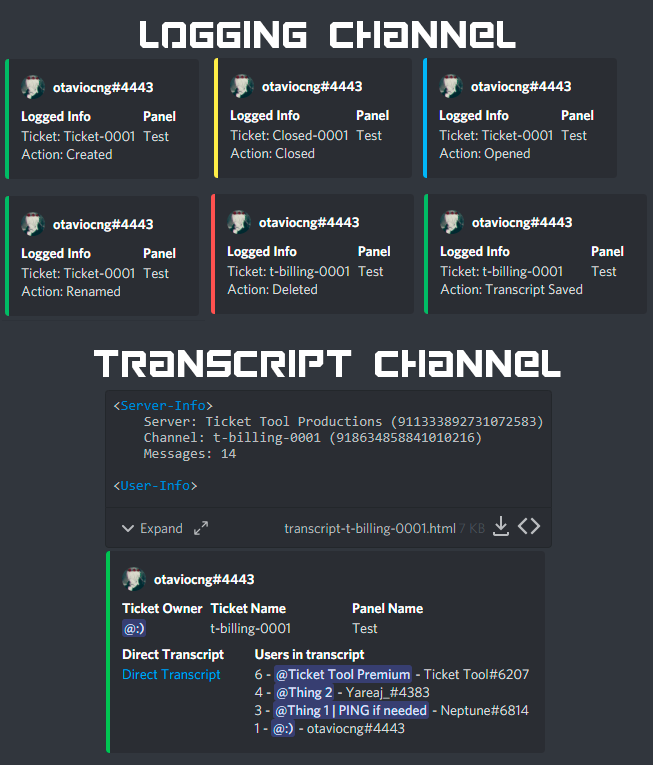
Below you can see an example of what the Logging Channel will look like as well as the Transcript Channel:
 tawny stirrup
thanks
half kernel
Of course
jade topaz
half kernel
All members or just one or two?
its just a couple is there a reason for that?
strange
humble sequoiaBOT
Update your discord App
Buttons are a relatively new addition to discord and don't work with some older versions of the app.
Please verify that you have the latest version of discord, by going to the app or play store.
Discord for the  App Store
Discord for the  Play Store
half kernel
Discord app is more than likely out of date then
jade topaz
half kernel
Discord app is more than likely out of date then
OK G thanks a million
iron nightBOT
Gave +1 Rep to @half kernel
half kernel
Anytime
 vale otter
Hi there,
I'm in the process of setting up your ticket system in the premium version for a Discord server.
However, I'm stuck on one thing at the moment. And when someone claims a ticket, is it possible that the username of the supporter is there?
eg.
Ticket -004 is claimed
which then stands
Commandershadow Ticket-004
Is something like this possible, because until now the user ID was only displayed to me in the ticket name, not the user name written out in full.
sorry for the bad english^^
shut bolt
vale otter
Hi there,
I'm in the process of setting up your ticket system in the premium ve...
Hi, yes, you can do it with our premium subscription
shut bolt
vale otter
sorry for the bad english^^
No worries! What's your first language?
vale otter
shut bolt
No worries! What's your first language?
Germany ^^
vale otter
shut bolt
Hi, yes, you can do it with our premium subscription
how ^^ ?
 shut bolt
/de Have you tried opening a ticket in our german support?
robust sandalBOT
Haben Sie versucht, ein Ticket in unserem deutschen Support zu öffnen?
English (en) → German (de)
 pallid swan
pallid swan
pallid swan
ive been waiting for 10m its legit in my server but still wont work
shut bolt
pallid swan
Did you do what the page tells you to?
pallid swan
yes.
 humble sequoiaBOT
Don't see your server in the dashboard?
You will possibly need to relog. Look below to see steps on how to relog.
How to relog in the Dashboard.
First, you will need to go to the dashboard. Once your there, click on your avatar on the top right. after you clicked it, you will see button that says Logout. You must click that. Once you have logged out, you can log back in.
Note:
You need one of these 3 things to access the dashboard.
1. Server Owner (Level: 6)
2. Server Administrator (Level: 4)
3. Dashboard Role (Level: 2)
:warning: You can check your level using $level on your Discord Server
User permission level with Ticket Tool
@User is permission level: 0 (User)
```» *If it shows that your permission is **0**, you don't have any of the above **3 things** to manage the dashboard.*


**See the GIF below on how to relog:**what
shut bolt
humble sequoia
Read this
vale otter
shut bolt
/de Have you tried opening a ticket in our german support?
Yes ticket de_Ticket-3770 but unfortunately no answer yet and it scares me to continue ^^ That's why I thought to try it here.
i hope this is okay
shut bolt
/de It's fine, I just like to redirect our users so they can speak with an speaker of their language
robust sandalBOT
Es ist in Ordnung, ich mag es nur, unsere Benutzer umzuleiten, damit sie mit einem Sprecher ihrer Sprache sprechen können
English (en) → German (de)
humble sequoiaBOT
The ticket name is the default channel name of all tickets. To edit it, go to your Dashboard > Panel Configs > Settings > Ticket Options. There you can edit the channel name of opened and closed tickets. You can also use variables in there.
 Note: This is a premium feature
shut bolt
Note: This is a premium feature
shut bolt
/de There is no german one for this tag I'm sorry
robust sandalBOT
Es gibt kein deutsches für dieses Tag, es tut mir leid
English (en) → German (de)
vale otter
shut bolt
You want it for claiming right?
yes
shut bolt
Okey, ignore the other tag jajaja
humble sequoiaBOT
Claiming allows you to change the ticket name, category and permissions. To use it you have to enable it first on your Dashboard > Panel Configs > Claiming Options.
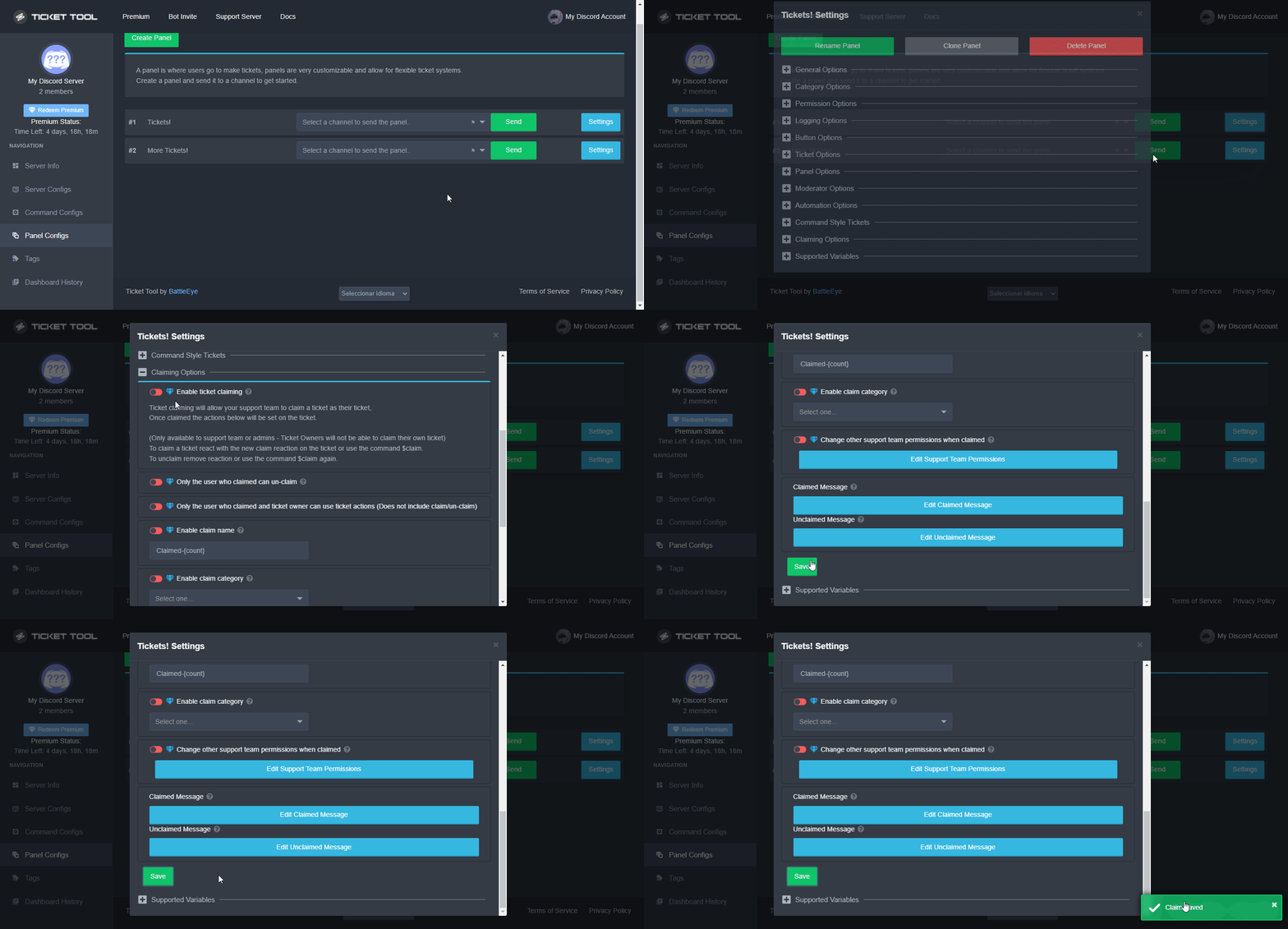
 Note: This is a premium feature
vale otter
Note: This is a premium feature
vale otter
/en geht das so ? ^^
robust sandalBOT
is that how it works? ^^
German (de) → English (en)
vale otter
nice ^^
shut bolt
/de Yes, check this last one I sent
robust sandalBOT
Ja, überprüfen Sie diese letzte, die ich gesendet habe
English (en) → German (de)
shut bolt
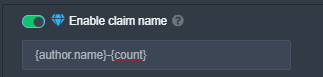
/de Go into "Enable claim name" and use {author.name} so it has the name of your support member
robust sandalBOT
Gehen Sie zu "Anspruchsnamen aktivieren" und verwenden Sie '{author.name}', damit der Name Ihres Support-Mitglieds enthalten ist
English (en) → German (de)
 vale otter
shut bolt
/de Yes, check this last one I sent
vale otter
shut bolt
/de Yes, check this last one I sent
/en Ja so geht diese Funktion an.
Ich möchte aber das aus Ticket 004 wenn man es Claimt commandershadow Ticket wird, damit man sieht wer es bearbeitet.
bzw. mal eine andere frage wofür ist diese Funktion gedacht?
robust sandalBOT
Yes, that's how this function works.
But I want that from ticket 004 if you become it Claimt commandershadow ticket, so you can see who is processing it.
or another question what is this function for?
German (de) → English (en)
vale otter
shut bolt
https://i.imgur.com/jRUJaRD.png
ahh okay wait
shut bolt
/de Sure, take your time and let me know
robust sandalBOT
Sicher, nehmen Sie sich Zeit und lassen Sie es mich wissen
English (en) → German (de)
humble sequoiaBOT
Claimen
Das Claimen von Tickets erlaubt dir und deinem Supportteam den Ticket Namen, die Kategorie und Rechte während der Bearbeitung eines Tickets zu ändern.
Das Claiming aktivierst du im Dashboard > Panel Configs > Claiming Options.
Beachte: Dies ist ein Premium-Feature
shut bolt
/de The german verstion :)
robust sandalBOT
Die deutsche :)
English (en) → German (de)
vale otter
/en test
robust sandalBOT
vale otter
/en test
Trying to translate to English but detected as English.
Please don't waste translations by trying to translate to the same language.
vale otter
/en ja danke es hat Funktioniert ^^
robust sandalBOT
yes thanks it worked ^^
German (de) → English (en)
robust sandalBOT
can you tell me what the claim function itself is for?
German (de) → English (en)
vale otter
/en oder wofür die Funktion Command Style Tickets ist, die verstehe ich leider 0 ^^
robust sandalBOT
or what the Function Command Style Tickets is for, which I unfortunately understand 0 ^^
German (de) → English (en)
shut bolt
/de Sure! The claiming basically allows your members to be assigned to a ticket, this also can make the ticket name to be updated as well as the permissions for the other team whenever a ticket is claimed
robust sandalBOT
Sicher! Die Beanspruchung ermöglicht es grundsätzlich, Ihren Mitgliedern ein Ticket zuzuweisen, dies kann auch dazu führen, dass der Ticketname aktualisiert wird, sowie die Berechtigungen für das andere Team, wenn ein Ticket beansprucht wird
English (en) → German (de)
shut bolt
/de The Command Style tickets basically are a way to create tickets via $new command and you can force create ticket in behalf of others, does that sound clear? Or do you want me to rephrase it?
robust sandalBOT
Die Command Style-Tickets sind im Grunde eine Möglichkeit, Tickets über den Befehl "$new" zu erstellen, und Sie können erzwingen, dass Tickets im Namen anderer erstellt werden, klingt das klar? Oder willst du, dass ich es umformuliere?
English (en) → German (de)
vale otter
shut bolt
/de The Command Style tickets basically are a way to create tickets via `$new` c...
/en yes.. aber kann es mir gerade nicht richtig vorstellen. Glaube das muss man einfach mal testen, damit man es versteht.
robust sandalBOT
yes.. but I can't really imagine it right now. Believe you just have to test it so that you understand it.
German (de) → English (en)
vale otter
/en ich finde es Crazy was Ihr mit diesem Bot geschafft habt, auch diese Video Anleitungen, wow. Mal gucken ob ich den Bot auch so krass gut hinbekomme wie Ihr!
robust sandalBOT
I think it's crazy what you've done with this bot, also these video tutorials, wow. Let's see if I can do the bot as well as you do!
German (de) → English (en)
shut bolt
/de For example, here we use it to create tickets whenever a user is being helped here and we need to take it to a ticket so they don't have to go to #🎫│make-a-ticket and push the button, we do that for them using the Command Style Tickets feature
robust sandalBOT
Zum Beispiel verwenden wir es hier, um Tickets zu erstellen, wenn einem Benutzer hier geholfen wird, und wir müssen es zu einem Ticket bringen, damit er nicht zu #🎫│make-a-ticket gehen und den Knopf drücken muss, wir tun das für ihn mit der Command Style Tickets-Funktion
English (en) → German (de)
vale otter
/en das will ich zb. auch aber aktuell noch keine Ahnung wie ^^ https://prnt.sc/26fcemt
 robust sandalBOT
that's what I want, for example. but also currently no idea how ^^ https://prnt.sc/26fcemt
German (de) → English (en)
humble sequoiaBOT
Für eine einfachere Benutzung der Multipanel können nun auch Panel direkt im Dashboard kombiniert werden.
Das erlaubt dir, ein Multipanel direkt vom Dashboard aus, oder durch den einfacheren Command $panel ID zu senden.
Wie kann ich das einstellen?
Du findest diese Einstellung in deinem Dashboard unter den "Panel Configs".
Dort klickst du auf die "Settings" des Panels, dem du andere Panel anhängen möchtest und öffnest die "General Options".
Hier kannst du die Panel auswählen, die immer an dieses Panel angehängt werden sollen. (Beachte, dass du nicht das Panel, für welches du gerade die Attached Panels einstellst, nochmal auswählst, sonst erscheint der zugehörige Bot Button doppelt.)
Die Panel Message des Panels, bei dem du die weiteren Panel angehängt hast, wird verwendet.
shut bolt
/de This is how to do it, you join several panels into one
robust sandalBOT
So geht's, man verbindet mehrere Panels zu einem
English (en) → German (de)
vale otter
shut bolt
/de For example, here we use it to create tickets whenever a user is being helpe...
ahhh sicher macht sinn, sehr gute sache!
robust sandalBOT
vale otter
ahhh sicher macht sinn, sehr gute sache!
 commandershadow
ahhh sure makes sense, very good thing!
German (de) → English (en)
shut bolt
😄
vale otter
shut bolt
😄
/en Du kannst auch Nachrichten Reagieren und sie werden übersetzt?
robust sandalBOT
You can also react to messages and they will be translated?
German (de) → English (en)
shut bolt
/de Yes! If you use the flag of the country it should translate it
robust sandalBOT
Ja! Wenn Sie die Flagge des Landes verwenden, sollte sie übersetzt werden
English (en) → German (de)
robust sandalBOT
shut bolt
/de Yes! If you use the flag of the country it should translate it
 Yareaj_
/de Ja! Wenn Sie die Flagge des Landes verwenden, sollte sie übersetzt werden
English (en) → German (de)
vale otter
/en kann ich es mal testen ^^?
robust sandalBOT
can I test it ^^?
German (de) → English (en)
shut bolt
Sure! Translate this message 😄
robust sandalBOT
shut bolt
Sure! Translate this message 😄
Yareaj_
Sicher! Diese Nachricht 😄 übersetzen
English (en) → German (de)
vale otter
/en no joke Really Crazy!
Ich fühle mich gerade so als wenn ich das Internet neu entdecke. Ich nutze schon so lange Discord und bots aber eure Bots sind wow wirklich!
robust sandalBOT
no joke Really Crazy!
I just feel like I'm rediscovering the Internet. I've been using Discord and bots for so long but your bots are wow really!
German (de) → English (en)
vale otter
mal schauen ob ich das mit den Video Anleitungen auch hinbekomme ^^
robust sandalBOT
vale otter
mal schauen ob ich das mit den Video Anleitungen auch hinbekomme ^^
commandershadow
let's see if I can do that with the video instructions ^^
German (de) → English (en)
shut bolt
/de I'm glad you are learning more about bots!
robust sandalBOT
Ich freue mich, dass Sie mehr über Bots erfahren!
English (en) → German (de)
shut bolt
/de A question, is it fine if we close your German ticket? So they know we solved your question
robust sandalBOT
Eine Frage, ist es in Ordnung, wenn wir Ihr deutsches Ticket schließen? Sie wissen also, dass wir Ihre Frage gelöst haben
English (en) → German (de)
vale otter
shut bolt
/de A question, is it fine if we close your German ticket? So they know we solve...
/en klar sicher danke!
robust sandalBOT
clearly sure thank you!
German (de) → English (en)
shut bolt
/de Sure! You are welcome
robust sandalBOT
Sicher! Gern geschehen
English (en) → German (de)
jade topaz
Hey, just tried to make a button limited to a few roles and had someone test it, but even without the roles he could still open a ticket. Am I missing something?
 shut bolt
jade topaz
Hey, just tried to make a button limited to a few roles and had someone test it,...
shut bolt
jade topaz
Hey, just tried to make a button limited to a few roles and had someone test it,...
Mark @everyone as a disabled role, save changes and it should work properly
vale otter
/en letze frage ? wie macht Ihr das mit den Video Tutorials ? ^^
robust sandalBOT
last question ? how do you do that with the video tutorials? ^^
German (de) → English (en)
jade topaz
shut bolt
Mark `@everyone` as a disabled role, save changes and it should work properly
Thanks, that did it
iron nightBOT
Gave +1 Rep to @shut bolt
shut bolt
/de Which video tutorials?
robust sandalBOT
Welche Video-Tutorials?
English (en) → German (de)
shut bolt
jade topaz
Thanks, that did it
Sure :)
vale otter
humble sequoia
this
vale otter
iron night
Gave +1 Rep to **<@518666147441278998>**
/en was ist das schon wieder ^^ ?
robust sandalBOT
what is that ^^ again?
German (de) → English (en)
shut bolt
/de Oh! You mean the gifs, we used https://getsharex.com/ to record those videos and incrust them in our tags

ShareX is a free and open source program that lets you capture or record any area of your screen and share it with a single press of a key. It also allows uploading images, text or other types of files to many supported destinations you can choose from.
robust sandalBOT
Oh! Du meinst die Gifs, wir haben https://getsharex.com/ verwendet, um diese Videos aufzunehmen und sie in unsere Tags aufzunehmen
English (en) → German (de)
shut bolt
/de The reputation system gives one point anytime someone says "thanks" to another person
robust sandalBOT
Das Reputationssystem gibt einen Punkt jedes Mal, wenn jemand einer anderen Person "Danke" sagt
English (en) → German (de)
vale otter
shut bolt
/de The reputation system gives one point anytime someone says "thanks" to anoth...
en kann man damit was machen oder ist das nur Prestige ?
robust sandalBOT
vale otter
en kann man damit was machen oder ist das nur Prestige ?
commandershadow
en can you do something with it or is it just prestige?
German (de) → English (en)
vale otter
shut bolt
/de The reputation system gives one point anytime someone says "thanks" to anoth...
dann Big Big thanks!
shut bolt
/de Not much really, that's it jajaja
robust sandalBOT
Nicht wirklich viel, das ist es jajaja
English (en) → German (de)
robust sandalBOT
vale otter
dann Big Big thanks!
@shut bolt Trying to translate to English but detected as English.
Please don't waste translations by trying to translate to the same language.
shut bolt
Oh lol JAJAJA
vale otter
Big Big thanks
shut bolt
You are welcome 😄
iron nightBOT
Gave +1 Rep to @shut bolt
vale otter
/en wirklich vielen dank du hast mir sehr geholfen, mal gucken wie ich weiter voran komme 😉
robust sandalBOT
really thank you very much you helped me a lot, let's see how I can make further progress 😉
German (de) → English (en)
shut bolt
/de Sure! If you get to have any more doubts, feel free to come back and ask
robust sandalBOT
Sicher! Wenn Sie weitere Zweifel haben, können Sie gerne zurückkommen und fragen
English (en) → German (de)
vale otter
/en das wird sicherlich passieren ^^
robust sandalBOT
that will certainly happen ^^
German (de) → English (en)
humble sequoiaBOT

The new Discord Buttons allow for a much smoother and convenient experience. They reduce lag and work much better than emojis. With ticket tool you can edit all the buttons however you like! Buttons can show emojis, text and can have 4 different colors.
Where can I edit them?
Dashboard ➞ Panel Configs ➞ Settings ➞ Button Options ➞ Setting
 shut bolt
Go into the Setttings of your Close Ticket
jade topaz
Thank you SOOOO much, that was so easy!
shut bolt
If you want your support team to be the only ones available to close them, mark the option Support Team Only as
If you want no one to be able to do that
Mark @everyone as disabled role
And Save changes
jade topaz
Absolutely wonderful, thank you!
shut bolt
Sure! Try it out and let me know 😄
shut bolt
/de Did it worked once added there?
robust sandalBOT
Hat es funktioniert, sobald es dort hinzugefügt wurde?
English (en) → German (de)
vale otter
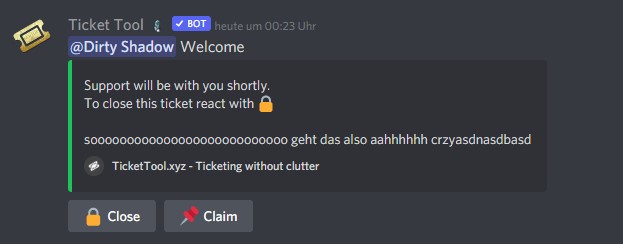
/en ja hat es sieht nur etwas langweilig aus 😅 https://prnt.sc/26fct3y
 robust sandalBOT
yes it just looks a bit boring 😅 https://prnt.sc/26fct3y
German (de) → English (en)
shut bolt
/de Jajaja at least works fine 😎
robust sandalBOT
Jajaja funktioniert zumindest gut 😎
English (en) → German (de)
vale otter
shut bolt
/de Jajaja at least works fine 😎
/en.. darf ich dich weiter stören ? ^^
robust sandalBOT
may I disturb you further? ^^
German (de) → English (en)
shut bolt
/de Sure! No worries
robust sandalBOT
Sicher! Keine Sorge
English (en) → German (de)
vale otter
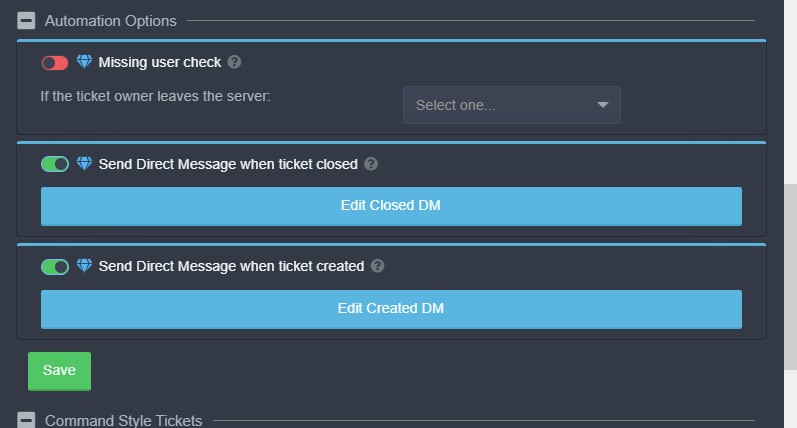
/en wieso bekomme ich keine DM wenn ich das Ticket erstelle oder lösche ? https://prnt.sc/26fcvhb
 robust sandalBOT
why don't I get a DM when I create or delete the ticket? https://prnt.sc/26fcvhb
German (de) → English (en)
shut bolt
/de Do you have your DMs opened?
robust sandalBOT
Haben Sie Ihre DMs geöffnet?
English (en) → German (de)
vale otter
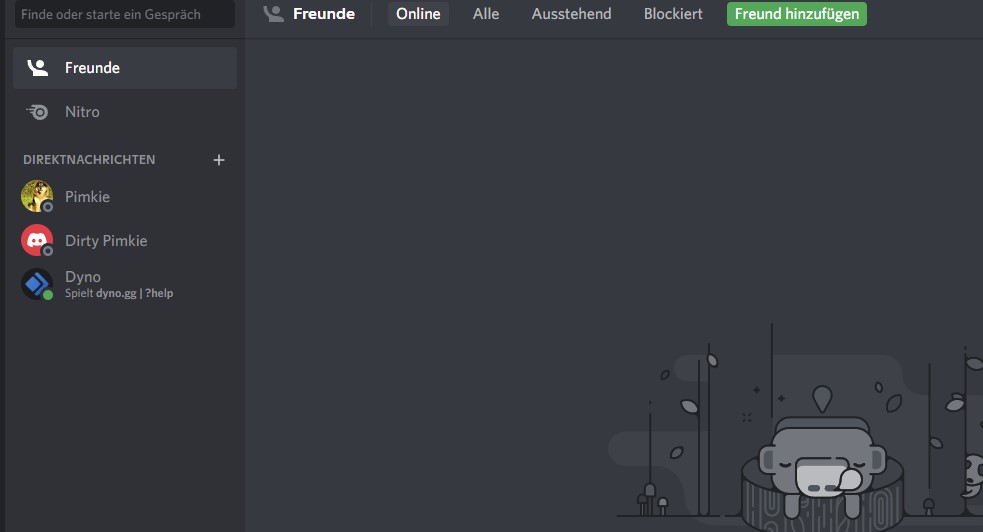
/en ähhh yes ? https://prnt.sc/26fcvst
 robust sandalBOT
uhhh yes ? https://prnt.sc/26fcvst
German (de) → English (en)
vale otter
/en oder was meinst du ?
robust sandalBOT
or what do you think?
German (de) → English (en)
shut bolt
/de Let me try something
robust sandalBOT
Lass mich etwas ausprobieren
English (en) → German (de)
vale otter
Check
shut bolt
/de Okey, you have them opened 🤔
robust sandalBOT
Okey, du hast sie geöffnet 🤔
English (en) → German (de)
jade topaz
/en habe es damit getestet geht auch net ^^
shut bolt
/en habe es damit getestet geht auch net ^^
robust sandalBOT
have tested it with it also net ^^
German (de) → English (en)
vale otter
/en wohl ein bug ^^
robust sandalBOT
probably a bug ^^
German (de) → English (en)
shut bolt
/de Rare, it should send you the DM 🤔, did you saved your settings after enabling that option?
robust sandalBOT
Selten sollte es Ihnen die DM-🤔 senden, haben Sie Ihre Einstellungen gespeichert, nachdem Sie diese Option aktiviert haben?
English (en) → German (de)
vale otter
shut bolt
/de Rare, it should send you the DM 🤔, did you saved your settings after enabli...
yes
shut bolt
/de May you give me the server ID please?
robust sandalBOT
Können Sie mir bitte die Server-ID geben?
English (en) → German (de)
vale otter
lol now its worked
shut bolt
Lol nice
vale otter
/en habe es einfach nochmal gespeichert ^^
robust sandalBOT
just saved it again ^^
German (de) → English (en)
shut bolt
/de Good, that should make it work permanently
robust sandalBOT
Gut, das sollte es dauerhaft funktionieren lassen
English (en) → German (de)
vale otter
/en kann man den Ticket Counter auch resetten wenn ich fertig bin mit testen ?
robust sandalBOT
can I also reset the ticket counter when I'm done with test ?
German (de) → English (en)
shut bolt
/de Yup, go into the General Options category and update to 0 the Ticket Count counter
robust sandalBOT
Yup, gehen Sie in die Kategorie General Options und aktualisieren Sie den __Ticket Count__zähler auf 0
English (en) → German (de)
vale otter
@shut bolt thanks
iron nightBOT
Gave +1 Rep to @shut bolt
shut bolt
vale otter
<@!518666147441278998> thanks
Sure bro! 😄
vale otter
shut bolt
Sure bro! 😄
en wie ist der Befehl wenn Ihr jemanden ein deutsches Ticket zu ordnen wollt?
Weil wenn ich eingebe §ticket @vale otter bla bla
Dann öffnet er das ticket bei den Standard Tickets.
weißt du was ich meine ?
robust sandalBOT
vale otter
en wie ist der Befehl wenn Ihr jemanden ein deutsches Ticket zu ordnen wollt?
...
commandershadow
What is the command if you want to arrange a German ticket for someone?
Because when I enter §ticket @vale otter bla bla
Then he opens the ticket at the standard tickets.
you know what I mean?
German (de) → English (en)
shut bolt
/de Do $new @user and that should make it
robust sandalBOT
Machen Sie "$new @user" und das sollte es schaffen
English (en) → German (de)
vale otter
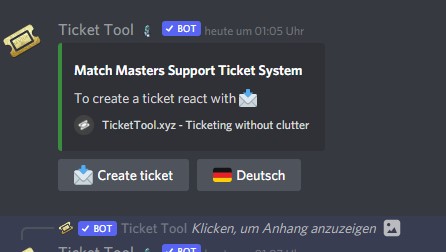
/en yes er öffnet das Ticket dann in Kategorie Create a Ticket not in Deutsch https://prnt.sc/26fd81w
 robust sandalBOT
yes he opens the ticket in category Create a Ticket not in German https://prnt.sc/26fd81w
German (de) → English (en)
shut bolt
/de Do a separate channel for german command style tickets and select it in the command style ticket options
robust sandalBOT
Erstellen Sie einen separaten Kanal für deutsche Befehlsvorlagentickets und wählen Sie ihn in den Befehlsstil-Ticketoptionen aus.
English (en) → German (de)
jade topaz
i dont see a button?
 vale otter
shut bolt
/de Do a separate channel for german command style tickets and select it in the ...
vale otter
shut bolt
/de Do a separate channel for german command style tickets and select it in the ...
/en hmm zur not okay sonst eher unschön, wenn ich das richtig verstanden habe
robust sandalBOT
hmm to the emergency okay otherwise rather unpleasant, if I have understood that correctly
German (de) → English (en)
shut bolt
jade topaz
i dont see a button?
Try adjusting the zoom of the page, if doesn't work try using a different browser
/de I didn't get that part sorry
robust sandalBOT
Ich habe diesen Teil nicht bekommen, sorry
English (en) → German (de)
vale otter
/en was würdest du den jetzt genau machen, wenn du für mich ein deutsches Ticket erstellen würdest ?
robust sandalBOT
what exactly would you do if you created a German ticket for me?
German (de) → English (en)
shut bolt
/de I would create a separate command channel for it, for example here we got one command style ticket channel per each language we offer support for
robust sandalBOT
Ich würde einen separaten Befehlskanal dafür erstellen, zum Beispiel haben wir hier einen Befehlsstil-Ticketkanal für jede Sprache, für die wir Unterstützung anbieten
English (en) → German (de)
vale otter
shut bolt
/de I would create a separate command channel for it, for example here we got on...
kannst du mir ein Beispiel zeigen oder ist das zu Privat ?
robust sandalBOT
vale otter
kannst du mir ein Beispiel zeigen oder ist das zu Privat ?
commandershadow
can you show me an example or is this too private?
German (de) → English (en)
shut bolt
Let me confirm just in case lol
robust sandalBOT
shut bolt
Let me confirm just in case lol
Yareaj_
Lassen Sie mich nur für den Fall lol bestätigen
English (en) → German (de)
vale otter
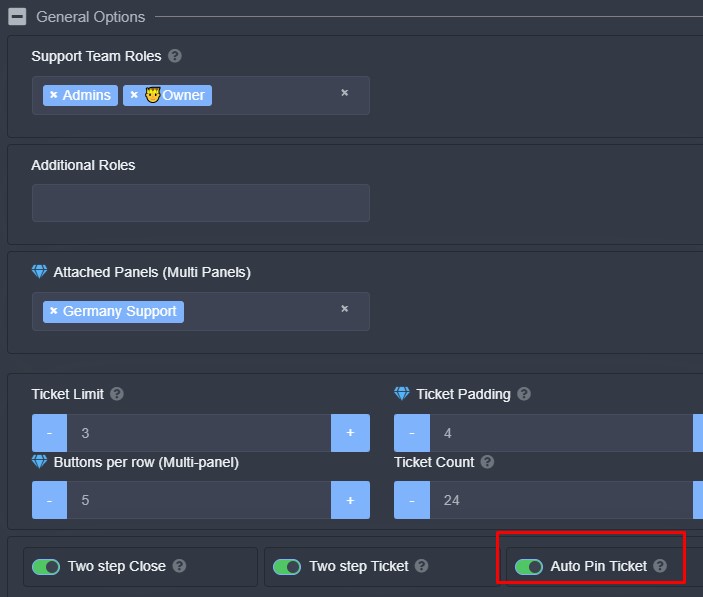
/en die Funktion verstehe ich auch net.. https://prnt.sc/26fdelt wirklich sorry, hätte nie gedacht das man so viel machen kann. Aber ich will es halt perfekt machen und haben ^^
 robust sandalBOT
I also understand the function net.. https://prnt.sc/26fdelt really sorry, never thought you could do so much. But I just want to do it perfectly and have ^^
German (de) → English (en)
 robust sandalBOT
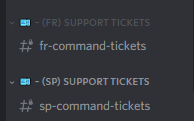
Wir haben einen Befehlskanal für jede Sprache
English (en) → German (de)
shut bolt
/de That function will pin the first message of the bot in the ticket, so you can quickly access the buttons in case the ticket is too long
robust sandalBOT
Diese Funktion pinnt die erste Nachricht des Bots in das Ticket, so dass Sie schnell auf die Schaltflächen zugreifen können, falls das Ticket zu lang ist
English (en) → German (de)
vale otter
shut bolt
https://i.imgur.com/Ff6RsTT.png
hmm.. muss ich mal gucken.. ich weiß gerade nicht wie ich das umsetzen und einstellen soll ehrlich gesagt.
robust sandalBOT
vale otter
hmm.. muss ich mal gucken.. ich weiß gerade nicht wie ich das umsetzen und einst...
commandershadow
Hmm.. I have to take a look.. I just don't know how to implement and set this honestly.
German (de) → English (en)
vale otter
shut bolt
/de That function will pin the first message of the bot in the ticket, so you ca...
ahh this is good 😉
shut bolt
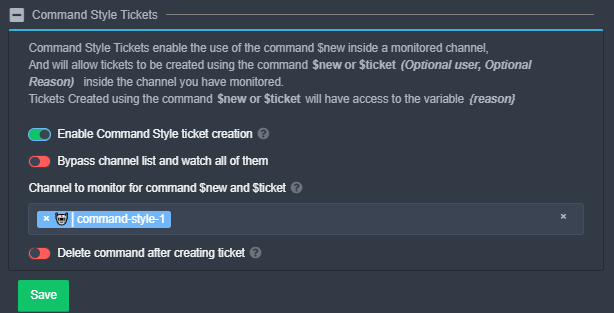
/de Go into the Command Style Tickets for each one of the panels, and select one hidden channel per each panel
robust sandalBOT
Gehen Sie in die Command Style-Tickets für jedes der Bedienfelder und wählen Sie einen ausgeblendeten Kanal pro Bedienfeld aus.
English (en) → German (de)
 robust sandalBOT
So
English (en) → German (de)
vale otter
/en und in den Channel darn $new @vale otter
Und dann erstellt er das Ticket im Deutschen Bereich ?
robust sandalBOT
and in the channel darn $new @vale otter
And then he creates the ticket in the German area?
German (de) → English (en)
shut bolt
/de Yup, make sure to select a different channel per panel
robust sandalBOT
Yup, stellen Sie sicher, dass Sie einen anderen Kanal pro Panel auswählen
English (en) → German (de)
shut bolt
 small canopy
how do i make a welcome thing with ticket tool
small canopy
how do i make a welcome thing with ticket tool
What welcome thing?
small canopy
a welcome catagory when someone joins it welcomes them
shut bolt
That's not possible with Ticket Tool
shut bolt
small canopy
i saw it before on ticket tool but i lost it
You can do a tag for welcome new users
humble sequoiaBOT
Tags
Tags are used to send a predefined response to your channels using a command. Tags will only respond if the command itself is used, it will not function if you put the tag into a sentence. The prefix is not included.
To create tags, go to: Dashboard > Tags > Create Tag. After creating and naming one, tap on the response button, and you can edit the response.
vale otter
shut bolt
/de Yup, make sure to select a different channel per panel
sonst passiert das was ? ^^ https://prnt.sc/26fdj9k
 small canopy
pablo
robust sandalBOT
vale otter
sonst passiert das was ? ^^ https://prnt.sc/26fdj9k
small canopy
@shut bolt
shut bolt
/de It won't work properly, its better to have one channel per each panel for TT to detect the proper panel
robust sandalBOT
Es wird nicht richtig funktionieren, es ist besser, einen Kanal pro Panel zu haben, damit TT das richtige Panel erkennt
English (en) → German (de)
shut bolt
small canopy
can u pls help me with my server im kinda new with it
I can only assist you with Ticket Tool
shut bolt
If you need assistance ask here or open a ticket in #🎫│make-a-ticket
vale otter
/en was mache ich falsch er erstellt das Ticket immer noch bei den Standard Tickets net in Germany https://prnt.sc/26fdn2g
 robust sandalBOT
what am I doing wrong he still creates the ticket at the standard tickets net in Germany https://prnt.sc/26fdn2g
German (de) → English (en)
shut bolt
/de Give me the server ID please
robust sandalBOT
Geben Sie mir bitte die Server-ID
English (en) → German (de)
vale otter
shut bolt
/de Give me the server ID please
hast ne dm oder was meinst ?
robust sandalBOT
vale otter
hast ne dm oder was meinst ?
commandershadow
have ne dm or what do you mean?
German (de) → English (en)
shut bolt
/de That works, please stand by
robust sandalBOT
Das funktioniert, bitte stehen Sie bereit
English (en) → German (de)
vale otter
shut bolt
/de That works, please stand by
ok
 robust sandalBOT
Markieren Sie diese Funktion im englischen Bedienfeld als und wählen Sie einen Kanal dafür aus
English (en) → German (de)
vale otter
shut bolt
/de Mark as <:offswitch:836268364238290954> this feature in the english panel, a...
ohh year thx. Wieso ist das so, was macht die Funktion ?
robust sandalBOT
vale otter
ohh year thx. Wieso ist das so, was macht die Funktion ?
commandershadow
ohh year thx. Why is this so, what does the function do?
German (de) → English (en)
shut bolt
/de That makes the bot to check for the $new command in all the server's channels
robust sandalBOT
Das bringt den Bot dazu, in allen Kanälen des Servers nach dem Befehl "$new" zu suchen
English (en) → German (de)
vale otter
shut bolt
/de That makes the bot to check for the `$new` command in **all** the server's c...
ahhh... also muss ich für jeden dann jetzt einen eigenen Channel machen oder selber ein Ticket machen und dann jemanden hinzufügen.
Etwas umständlich, schade das man das nicht besser trennen kann.
robust sandalBOT
vale otter
ahhh... also muss ich für jeden dann jetzt einen eigenen Channel machen oder se...
commandershadow
ahhh... so now I have to make my own channel for everyone or make a ticket myself and then add someone.
A bit cumbersome, too bad that you can not separate it better.
German (de) → English (en)
shut bolt
/de You can make a hidden channel for english and use the command style from there
robust sandalBOT
Sie können einen versteckten Kanal für Englisch erstellen und den Befehlsstil von dort aus verwenden
English (en) → German (de)
vale otter
shut bolt
/de You can make a hidden channel for english and use the command style from the...
ja das stimmt, aber dann habe ich trotzdem 5 weitere Channels die ich sehe..
robust sandalBOT
vale otter
ja das stimmt, aber dann habe ich trotzdem 5 weitere Channels die ich sehe..
commandershadow
yes that's true, but then I still have 5 more channels that I see.
German (de) → English (en)
vale otter
Und wieso kann ich /en manchmal nicht absenden ?^^^.....
robust sandalBOT
vale otter
Und wieso kann ich /en manchmal nicht absenden ?^^^.....
commandershadow
And why can't I send /en sometimes ?^^^.....
German (de) → English (en)
shut bolt
/de Discord bug lol
robust sandalBOT
Discord Bug lol
English (en) → German (de)
shut bolt
LMAO
robust sandalBOT
vale otter
<@!518666147441278998> You are the best! ich hoffe du bist noch lange wach ^^
commandershadow
@shut bolt You are the best! I hope you are awake for a long time ^^
German (de) → English (en)
robust sandalBOT
shut bolt
I appreciate it tons 😄
Yareaj_
Ich schätze es sehr 😄
English (en) → German (de)
 wary mist
Help my server isn’t showing up in the manage servers
humble sequoiaBOT
Don't see your server in the dashboard?
You will possibly need to relog. Look below to see steps on how to relog.
How to relog in the Dashboard.
First, you will need to go to the dashboard. Once your there, click on your avatar on the top right. after you clicked it, you will see button that says Logout. You must click that. Once you have logged out, you can log back in.
Note:
You need one of these 3 things to access the dashboard.
1. Server Owner (Level: 6)
2. Server Administrator (Level: 4)
3. Dashboard Role (Level: 2)
:warning: You can check your level using $level on your Discord Server
User permission level with Ticket Tool
@User is permission level: 0 (User)
```» *If it shows that your permission is **0**, you don't have any of the above **3 things** to manage the dashboard.*


**See the GIF below on how to relog:**Try that
wary mist
Oh ok
Hey
It said I got banned but I’m trying to get all my tickets done
From accessing the ticket tool website
shut bolt
wary mist
It said I got banned but I’m trying to get all my tickets done
Error 1015?
wary mist
Yea
humble sequoiaBOT

Error 1015 - You are being rate limited
If you get the above error when trying to access our web page, don't be scared. This is just a security feature on our dashboard to mitigate possible attacks to the site. The only way to access the site is to wait for the temporary ban to be lifted automatically. It typically takes around 1 hour but can be quicker or longer.
wary mist
Oh ok I was going to say because I’m trying to do 5 tickets for 5 channels
shut bolt
Whenever the dashboard receives many requests from a single user the ddos protection temp bans them, it fixes itslef
shut bolt
Hi, how is this exactly related to @pseudo glen ?
 mortal geode
hey, trying to figure out how to make the bot ping a certain role when a ticket is opened
I went through the control panel and couldnt find anything
copper owl
You need to use {@Role Name} or {Role Id} in the Message Text of your Ticket Message, where you can edit under the Ticket Options
mortal geode
Does it need to be in brackets?
copper owl
yes because otherwise it wouldn't ping
unless you want to use discords formatting which takes more characters
 copper owl
yup
mortal geode
alrighty
copper owl
if that's exactly how you have the role named, then yes
mortal geode
thanks!
copper owl
Anytime
vale otter
/en gibt es ein Tutorial oder eine Anleitung wie man am besten die Beschreibungen Formatieren kann? Also Farben usw. was es da für befehle gibt?
robust sandalBOT
is there a tutorial or instructions on how to best format the descriptions? So colors etc. what commands are there?
German (de) → English (en)
copper owl
/de it's either the translation or how you worded yourself because the question doesn't make the most amount of sense
robust sandalBOT
es ist entweder die Übersetzung oder wie Sie sich selbst formuliert haben, weil die Frage nicht den meisten Sinn ergibt
English (en) → German (de)
vale otter
oh sorry
copper owl
if you speak English this would be alot easier for me, but if you insist on speaking German (no problem with that), we can have a German team
$deticket
humble sequoiaBOT

Deutsches Support-Team
Wenn du Hilfe vom Deutschen Support-Team erhalten möchtest gehe in #🎫│make-a-ticket und öffne durch einen Klick auf den :flag_de: Button ein Ticket.
vale otter
/en also man kann ja Beschreibungen erstellen für die Tickets zb. hier https://prnt.sc/26fff0k. Wie bekommt man dort Texte Farbig oder Punkte rein, gibt es dafür befehle ?
 robust sandalBOT
so you can create descriptions for the tickets e.g. https://prnt.sc/26fff0k here. How do you get texts colored or dots in there, are there commands for this?
German (de) → English (en)
copper owl
/de there are no commands. it's all just discord formatting or getting an indent on the internet
robust sandalBOT
Es gibt keine Befehle. Es ist alles nur Discord-Formatierung oder ein Einzug im Internet
English (en) → German (de)
jade topaz
hey i bought tt prem but i can't access prem perks
copper owl
did you redeem it
 copper owl
so you didn't redeem it
jade topaz
i have 2 ticket bots in the srvr one prem one normie
copper owl
Go to the subscriptions page and redeem it
humble sequoiaBOT
Ticket Tool Premium
Get premium at https://tickettool.xyz/premium
Manage your subscriptions at https://tickettool.xyz/subscriptions
Why Premium?
Premium lets you customize the bot just how you want it. It also helps keep the bot running.
copper owl
second link and select the server you want
jade topaz
alright

i hope this is premium perks i am using
cuz i am able to toggle premium buttons
copper owl
you can do that without premium
jade topaz
lemme see if working or not
copper owl
you still haven't redeemed it
 kind dove
hi, i made a panel and want it to have different reactions create tickets in different categories but so far can only find out how to put 1 reaction
copper owl
kind dove
hi, i made a panel and want it to have different reactions create tickets in dif...
you need to make mutliple panels. Choose one of the panels and attach all the other panels under Attached panels in your general Options that can be found in your panel settings
that way you'll get more than one button
kind dove
thank you, i'll try that now
copper owl
👍
 mental owl
So ticket tool won’t speak to my discord any longer and I don’t know what to do I tried to resend the panel to creat and it just say fail and to do the debug but I try using commands and nothing happens
 proper nacelle
Hello can i create more ticket after closing previous?
 valid plaza
mental owl
So ticket tool won’t speak to my discord any longer and I don’t know what to do ...
valid plaza
mental owl
So ticket tool won’t speak to my discord any longer and I don’t know what to do ...
having this issue as well
 slender minnow
proper nacelle
Hello can i create more ticket after closing previous?
slender minnow
proper nacelle
Hello can i create more ticket after closing previous?
Depends how the panel was created by the server staff. Ticket limit can be changed from your server dashboard.
proper nacelle
slender minnow
Depends how the panel was created by the server staff. Ticket limit can be chang...
It's can be one right?
If it close, i can't open second ?
 humble cliff
Is there a way to change the ticket name to the person that claimed it? so instead of it saying Claimed-#0000 I want it to say Mewsie-#0000 instead.
humble cliff
Thank you!
jade topaz
can someone pls help me with ticket, I can’t understand how to set him up even with the docs and everything
humble cliff
Is it possible to have it where when a ticket is opened it makes its own category with the staff members name on it?
copper owl
humble cliff
Is it possible to have it where when a ticket is opened it makes its own categor...
No
$help panel
humble sequoiaBOT
Creating a panel
To create a panel we are going to need to head over to the panel configs on the dashboard
Once at the dashboard we will need to click Create Panel
Enter a panel name (Fill in any optional settings you want)
Click Create Panel and your ready to get started with configuring your panel
An example of a creating a panel is shown below.
 copper owl
@jade topaz create a panel ^ and send it to a channel in your server
jade topaz
… I’m sorry this makes no sense to me… 😭
copper owl
there's a gif that explains everything
what part of this didnt you understand exactly
jade topaz
everything, I can’t find where the gif shows
copper owl
it's on the dashboard
have you opened the dashboard
if not, i can give you the link for that
copper owl
what device are you on
jade topaz
iPhone 11
 on the top left
jade topaz
on the top left
jade topaz
I do not 🥲
 jade topaz
OH
jade topaz
OH IM SO SORRY I THOUGHT THAT WAS THE DASHBOARD
copper owl
no worries, common mistake
jade topaz
I did it! I made a ticket panel, thank you so much for ur support!
copper owl
No problem 👍
slender minnow
proper nacelle
It's can be one right?
If it close, i can't open second ?
Like i said, it depends how the panel was setted up by the server staff. You need to confirm regarding this with respective server staff, however, incase you have access to the dashboard you can then increase the limit from the panel configs -> settings -> general settings -> ticket limit
humble cliff
Is there a way to let other players know they have been reported with out the whole ticket showing? Wondering if there is a more of a automatic way for this and not having to make staff reach out manually to the offender.
copper owl
not really no
you could add them to the same ticket
but otherwise, your only other option is to DM them or open a new ticket and then add them to that ticket as well
humble cliff
Ok thank you so much!
jade topaz
Hey uh I have admin in a server but it’s not letting me acces the server
 humble sequoiaBOT
Don't see your server in the dashboard?
You will possibly need to relog. Look below to see steps on how to relog.
How to relog in the Dashboard.
First, you will need to go to the dashboard. Once your there, click on your avatar on the top right. after you clicked it, you will see button that says Logout. You must click that. Once you have logged out, you can log back in.
Note:
You need one of these 3 things to access the dashboard.
1. Server Owner (Level: 6)
2. Server Administrator (Level: 4)
3. Dashboard Role (Level: 2)
:warning: You can check your level using $level on your Discord Server
User permission level with Ticket Tool
@User is permission level: 0 (User)
```» *If it shows that your permission is **0**, you don't have any of the above **3 things** to manage the dashboard.*


**See the GIF below on how to relog:**Follow this. Should help
 hexed canopy
Hello, thus anyone know how to stop ticket-tool?
fallow ingot
What do you mean by that?

 mystic hound
For reference, it wasn't. They just had a lot of members opening tickets
proper nacelle
Does any command to create ticket in discord?
Or it can do only mode/admin server
fallow ingot
proper nacelle
Does any command to create ticket in discord?
Or it can do only mode/admin serv...
You can setup the $new command. If you’d like to make tickets for other users without them doing it.
proper nacelle
fallow ingot
You can setup the `$new` command. If you’d like to make tickets for other users ...
I want create a ticket for not my discord channel
They have bot. I don't create ticket, do you have any command?
fallow ingot
What do you mean?
proper nacelle
fallow ingot
What do you mean?
I am in one discord channel, i just member. A want to create ticket by myself, and talk to mod.
Understand or not?
vale otter
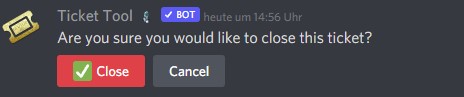
/en das habe ich nur als Admin Funktion gegenzeichnet, kann ich diese Text ausblenden lassen bzw. die Optionen unten nur für Admins anzeigen lassen nicht für die User https://prnt.sc/26fq0vb
 robust sandalBOT
I have only countersigned this as an admin function, I can hide this text or display the options below only for admins not for the users https://prnt.sc/26fq0vb
German (de) → English (en)
shut bolt
@forest goblet 👀
 forest goblet
vale otter
/en das habe ich nur als Admin Funktion gegenzeichnet, kann ich diese Text ausbl...
forest goblet
vale otter
/en das habe ich nur als Admin Funktion gegenzeichnet, kann ich diese Text ausbl...
Das geht leider nicht, aufgrund von Beschränkungen von Discords Seite kann man solche Nachrichten bzw. Buttons nicht für bestimmte Nutzer unsichtbar machen. Entschuldigung für die Unannehmlichkeiten
vale otter
forest goblet
Das geht leider nicht, aufgrund von Beschränkungen von Discords Seite kann man s...
ok Thanks
iron nightBOT
Gave +1 Rep to @forest goblet
vale otter
/en wie kann ich jemanden rechte auf das Dashbord geben und kann man diese einschränken ?
robust sandalBOT
how can I give someone rights to the Dashbord and can I restrict them?
German (de) → English (en)
humble sequoiaBOT
Dashboard Rollen
Jede Rolle, die du in den "Server Configs" als "Dashboard Role" einträgst, hat vollen Zugriff auf dein Dashboard.
Der Server Owner und Administratoren haben bereits Zugriff auf das Dashboard.
Sei vorsichtig, welche Rollen du dort einträgst.
 vale otter
/en Ja aber was können dir alles dort machen wenn ich ne Rolle dort hinzufüge die sonst keine admin rechte hat auf den Server ?
robust sandalBOT
Yes but what can you do there if I add a role there that otherwise has no admin rights to the server?
German (de) → English (en)
shut bolt
@forest goblet 
forest goblet
vale otter
/en Ja aber was können dir alles dort machen wenn ich ne Rolle dort hinzufüge di...
Die können halt das Dashboard bearbeiten. Panels senden und so. Wirklich gefährlich ist das nicht. Auf dem Dashboard sind ja auch Logs, wo man alle Änderungen nachvollziehen kann
vale otter
forest goblet
Die können halt das Dashboard bearbeiten. Panels senden und so. Wirklich gefährl...
Okay, weil ich würde dann Leuten zugriff drauf geben, die die Sachen übersetzen sollen.
forest goblet
vale otter
Okay, weil ich würde dann Leuten zugriff drauf geben, die die Sachen übersetzen ...
Wenn du diesen Personen einigermaßen vertraust, ist das kein großes Problem. Das schlimmste was sie tun können ist alle Panels zu löschen oder Panels senden die @everyone pingen.
vale otter
forest goblet
Wenn du diesen Personen einigermaßen vertraust, ist das kein großes Problem. Das...
ok Thanks
iron nightBOT
Gave +1 Rep to @forest goblet
 pulsar wolf
can u recover closed tickets
copper owl
pulsar wolf
can u recover closed tickets
with transcripts only
if you didnt save the transcript, the only other way is to contact discord to recover the deleted channel
jade topaz
.
 brisk quarry
humble sequoiaBOT
brisk quarry
humble sequoiaBOT

You can check our documentation here.
You can also check #573205317870157855 for the basic setup.
Our documentation contains all the info you need about the bot to be able to setup and configure the bot however you like.
 vocal ivy
how do i make it so differnt roles can see the tickets
 shut bolt
 severe path
<:cryIgnore:795668388001087499>
severe path
<:cryIgnore:795668388001087499>
Felix I have an explanation 
severe path
I hear? 

 steady mango
I have an easy question. When a user clicks on the reaction to create a ticket, they get a message "Warning: You don't have permission to use this.".
copper owl
^ solved in a ticket
steady mango
I'm a premium subscriber, how do I get that role?
copper owl
check the pins in #🤖│bot-spam
iron nightBOT
Gave +1 Rep to @copper owl
jade topaz
Hey guys my transcript button is not adding to the panel for some reason
 pure sinew
yeah
copper owl
you can use $panel 1
pure sinew
the reaction thingy to create it
pure sinew
yeah i want to send again this message because the channel history was deactivated
 copper owl
so if you have one panel, use `$panel 1`
copper owl
copper owl
so if you have one panel, use `$panel 1`
this is the command
you can also do it VIA the dashboard
$help send
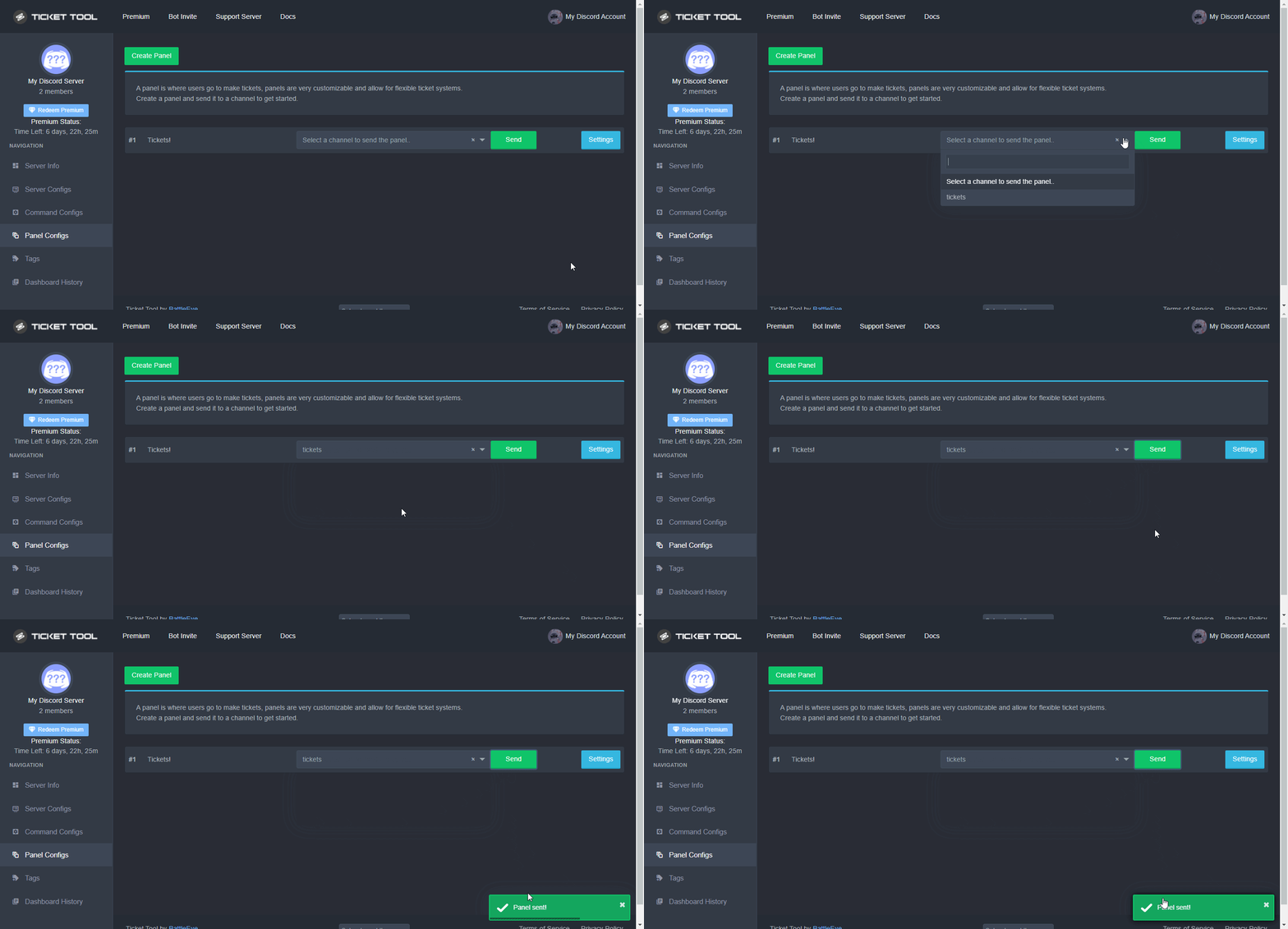
humble sequoiaBOT
Sending a panel
Once you've created a panel on the dashboard you will need to send it to a channel using send on the dashboard
Select the channel you want your panel to be created in and click send.
For other questions checkout $help faq
An example of a sending a panel is shown below.
 copper owl
Like so ^
jade topaz
L
copper owl
anytime
pure sinew
also i have a question
copper owl
go ahead
pure sinew
Are regular members not able to interact with tickets by default?
pure sinew
alright, also how do i config to make it so only certain role is able to go into other tickets?
i have a Ticket Moderator role that i want to give that permission to
copper owl
Define a support role, you can do so in General Options, there's a Support Team Roles section
pure sinew
Okay thanks, that's all i needed to know
humble sequoiaBOT
Faster Premium Bot
Automatic Transcripts
Full Customization
Custom Buttons
Direct Messages
Ticket Automation
Multipanels
Premium Support
You can purchase premium here:
Price
$6 - Monthly
$66 - Yearly
Premium
shut bolt
What's wrong?
 brave crown
does anybody have any problem with dashboard webpage? its to know if it's just me
shut bolt
brave crown
does anybody have any problem with dashboard webpage? its to know if it's just m...
Are you having any specific error?
brave crown
no error, It looks like Ticket Tool isn't online or in any servers you have permission to access,Invite Ticket Tool or check it's status
i rejoined and refreshed the webpage several times already
oh wait. maybe im dumb, what permissions do i need to customize the bot?
shut bolt
brave crown
i rejoined and refreshed the webpage several times already
Try this out please
humble sequoiaBOT
Don't see your server in the dashboard?
You will possibly need to relog. Look below to see steps on how to relog.
How to relog in the Dashboard.
First, you will need to go to the dashboard. Once your there, click on your avatar on the top right. after you clicked it, you will see button that says Logout. You must click that. Once you have logged out, you can log back in.
Note:
You need one of these 3 things to access the dashboard.
1. Server Owner (Level: 6)
2. Server Administrator (Level: 4)
3. Dashboard Role (Level: 2)
:warning: You can check your level using $level on your Discord Server
User permission level with Ticket Tool
@User is permission level: 0 (User)
```» *If it shows that your permission is **0**, you don't have any of the above **3 things** to manage the dashboard.*


**See the GIF below on how to relog:**.
 brave crown
ok that would be all, ty very much
shut bolt
Sure! Have a good one mate
 halcyon flint
Do tickets close automatically ever?
 bronze radish
humble sequoiaBOT
bronze radish
humble sequoiaBOT
We would love to help you, but if you don't tell us what you need help with we can't help you :(
The first thing you will need to do is invite the premium bot, an invite can be found here
Once the bot is in your server we will head to the dashboard and manage your server. When you are managing your server, you want to head into "Server Configs" then click the drop down menu under "Select the bot you would like to use on this server" then click "Ticket Tool#6207" and then save.
 shut bolt

 flat river
shut bolt
<:this:894279341108772914>
flat river
shut bolt
<:this:894279341108772914>
Thought so. Just making sure I didn't jack it up somehow. haha
flat river
shut bolt
Please do $pc in <#910978476536905738>
So now that I've done that, and invited the premium bot, does it automatically transfer everything I've done to the other?
shut bolt
flat river
So now that I've done that, and invited the premium bot, does it automatically t...
Just resend your panels and you are good to go
 frosty thorn
iron nightBOT
frosty thorn
iron nightBOT
Gave +1 Rep to @shut bolt
shut bolt
Sure 😄
flat river
Newest embed to provide support when "eyes on" is needed.
 shut bolt
 eager cargo
ok @jade topaz
jade topaz
yes
eager cargo
you need to delete your current ticket or up ur ticket limit
to create more tickets
$help limit
humble sequoiaBOT
How to set a ticket limit
A ticket limit may be set per panel to prevent users from spamming tickets. By default this limit is set to 3. Once a user hits this limit the bot will notify the users that they reached the limit.
To set a ticket limit go to the Dashboard -> Panel Configs -> Settings -> General Options -> Ticket Limit
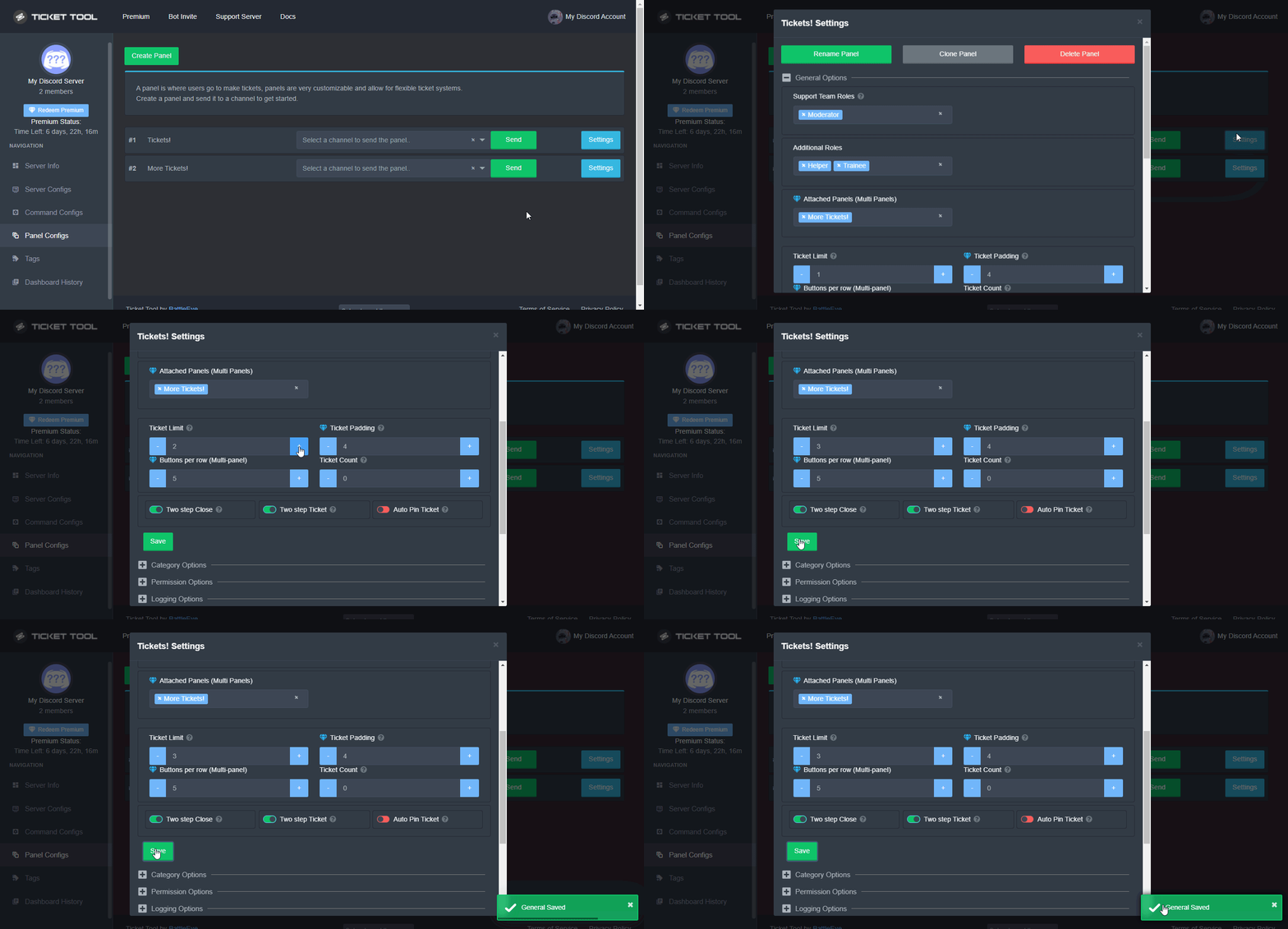 eager cargo
like so
jade topaz
eager cargo
you need to delete your current ticket or up ur ticket limit
i dont have ticket created in one of my server
eager cargo
are you sure there's no channels that are named ticket?
jade topaz
jade topaz
i dont have ticket created in one of my server
that is not my server
eager cargo
oh, so you don't have admin in it?
jade topaz
eager cargo
are you sure there's no channels that are named ticket?
there was but i left but forgot to close ticket
eager cargo
that's the reason why then
jade topaz
jade topaz
there was but i left but forgot to close ticket
left the server
jade topaz
eager cargo
that's the reason why then
so how may i get sort out
eager cargo
contact the server admins and ask them to up the ticket limit or delete your ticket
jade topaz
eager cargo
contact the server admins and ask them to up the ticket limit or delete your tic...
ok
thanks
eager cargo
yeah
 trim hare
its if its a me broblem but all my bots have a bot role which has admin permission turned on, and them all work in the tickets, all but pluralkit. is it a conflict between plural kit and the ticket or something i need to fix from the dashboard?
forest goblet
trim hare
its if its a me broblem but all my bots have a bot role which has admin permissi...
That's not known, please ask in the PluralKit support server. Sorry for the inconvenience.
 cunning sinew
Hi
trim hare
thanks
 random fulcrum
Guys how do I fix "Servers - (server not showing up? try relogging)" when I open manage-servers
bronze comet
Log out of the dashboard and back in again, simply refreshing the page would not work.
 halcyon thorn
where can i find the support ?
 craggy geyser
WTF
 bronze comet
craggy geyser
WTF
bronze comet
craggy geyser
WTF
Please whitelist ticket tool from the security bot
craggy geyser
bronze comet
Please whitelist ticket tool from the security bot
He wanted to delete my server
copper owl
Tickets are created and deleted
thats how it works lol
it wont delete any current channels, just the channels IT makes
craggy geyser
So now how did the discord server want to delete me?
copper owl
craggy geyser
So now how did the discord server want to delete me?
what?
craggy geyser
Bot wanted to delete my Discord server and security was prevented
halcyon thorn
Can someone help me i dont know how to call a support
 errant pilot
craggy geyser
Bot wanted to delete my Discord server and security was prevented
errant pilot
craggy geyser
Bot wanted to delete my Discord server and security was prevented
It wanted to delete a channel on your server, not your entire server
copper owl
also that channel is a ticket channel
a channel it created
it cant delete your server, and it wont delete any of your current channels
copper owl
halcyon thorn
Can someone help me i dont know how to call a support
what's up?
halcyon thorn
i need help for somhing a ban and i want o explain me and talk
copper owl
halcyon thorn
i need help for somhing a ban and i want o explain me and talk
are you sure you're in the right server
where did you get banned
halcyon thorn
LonlyWolfes rus
copper owl
yeah this isnt the right server
halcyon thorn
where can i find the other one =?
copper owl
no idea
im not even sure what you're talking about exactly. i havent personally heard of LonlyWolfies Rus
halcyon thorn
oh
 wanton delta
good evening I put the bot in my channel but I don't get the reaction to open the tickets
copper owl
wanton delta
good evening I put the bot in my channel but I don't get the reaction to open th...
did you make a panel?
$help panel
humble sequoiaBOT
Creating a panel
To create a panel we are going to need to head over to the panel configs on the dashboard
Once at the dashboard we will need to click Create Panel
Enter a panel name (Fill in any optional settings you want)
Click Create Panel and your ready to get started with configuring your panel
An example of a creating a panel is shown below.
 copper owl
update your discord
humble sequoiaBOT
Update your discord App
Buttons are a relatively new addition to discord and don't work with some older versions of the app.
Please verify that you have the latest version of discord, by going to the app or play store.
Discord for the App Store
Discord for the Play Store
wanton delta
ok solved. just had to update discord 😂😂😂
One more thing, I saw that next to the symbol role name, I'd like to know how to put it if you can
wanton delta
👍
 prime bridgeBOT
DS|w҈k҈♥ has been timed out for 10m 

 Reason: Posting Discord Server Invites
DS|w҈k҈♥#3658 | 892305272071155742
 fringe terrace
hello my bot stoped work
Infinity Rp - Ticket
BOT
— Hoje às 13:56
System Failure: Panel "501043870818591197" not found
any1 know how do i fix ?
shut bolt
$sf
humble sequoiaBOT
FAQ: System Failure
- System Failure: @Ticket Tool Missing permission(s): PERMISSION(S)
+ Ticket Tool is missing permissions to work properly, check the mentioned permissions by the bot in the channel, in the category, and in the role. You can use $debug as a help tool.
- System Failure: Panel “XX” not found
+ The panel they are trying to interact with has been deleted.
- Failed: `Invalid Form Body components[X].components[X].emoji.id: Invalid emoji
+ The bot does not have longer access to the emoji (external server) or the emoji has been deleted
- Failed: `Invalid Form Body components[X].components[X]: this is a required field
+ There is a certain necessary field you left blank. You will have to input a valid argument (most likely text) in the required field for ticket tool to continue functioning normally.
- System Failure: allMessages.users.sort is not a function
- System Failure: Unknown Webhook
- System failure: Service unavailable?
- System Failure: Internal Server Error
+ The bot has run into an issue, please try again as these are cases that tend to fail only once, if the problem is persistent, contact our support team
- Warning: Ticket Tool Failed to connect to it's database, please wait or try again.
+ There might be an issue with Ticket Tool, most likely a database issue, you'll have to wait a few minutes before creating another ticket. This is in place to prevent certain bugs to happen with tickets
Refer to the second error, the panel you are trying to create a ticket from was probably deleted
fringe terrace
thanks fixed
 sonic root
hi
lapis idol
sonic root
hi
so what seems to be the issue
sonic root
i just added the bot and im not sure how to use it
humble sequoiaBOT
You can check our documentation here.
You can also check #573205317870157855 for the basic setup.
Our documentation contains all the info you need about the bot to be able to setup and configure the bot however you like.
lapis idol
^
sonic root
got it working thanks
 junior dagger
 dark kraken
How to suggest?
copper owl
dark kraken
How to suggest?
pinned in #💡│suggestions
dark kraken
ok ty
copper owl
use the command in #🤖│bot-spam
copper owl
$rename <new name>
iron nightBOT
Gave +1 Rep to @copper owl
 copper owl
make sure you're using the right prefix
 obsidian ibex
wdym?
copper owl
the prefix
$
your server could have changed it
make sure you're using the right one
obsidian ibex
oh ye nvm its ! i guess ty
humble sequoiaBOT
⚠️ You're in the wrong place
We provide support for @pseudo glen discord bot and cannot help you with whatever issue you have.
- Please make sure to contact the appropriate Support Team.
If you don't have any further questions regarding our bot Ticket Tool, please close this ticket
 silk glacier
I tried looking for the answer to my question, but I might be missing it? When you use t!transcript for a channel, is there a way for the transcript to be sent to an archiving channel instead of being in the one where you're using the command? IE is there an option for t!transcript #archived-channels or something like that?
copper owl
silk glacier
I tried looking for the answer to my question, but I might be missing it? When y...
yes.. thats exactly how you use the command
t!transcript #channel
otherwise, you can just do this with the button
On the dashboard, if you go to Panel Configs, then settings on the panel you want to edit, you can head over to Logging Options and define a Transcript Channel
once you do that and save, whenever you press the Transcript button on a closed ticket, it will get sent to the channel you defined
silk glacier
Well I'll be damned, I was right. This isn't for tickets which is why I was curious/confused. There's several old channels that I didn't want to delete and I just found out that you can make a transcript of it, so I wanted to be able to do the command in the channel and it automatically goes into an archive-channel. Does it work that way without a ticket, or do I have to do the transcript #channel command every time?
copper owl
silk glacier
Well I'll be damned, I was right. This isn't for tickets which is why I was curi...
you need to use the command, and you need premium to be able to use the transcript command outside of tickets
silk glacier
Alright that I do have
copper owl
so just go into the channel
t!transcript #whatever-channel-you-want
and boom, you save a copy
there is a limit, 1000 messages. and I dont think it can save a message over X amount of time.. what is X? Ill find out in a second for you
silk glacier
I just realized I'm being dumb.
copper owl
so any messages over a week old would not get saved within the transcript (credits to big AI @atomic solstice)
silk glacier
Gotcha gotcha. I just realized that typing t!transcript and having it to go to the chosen channel automatically is the exact same thing as typing t!transcript #archived-channel I haven't had my coffee, apologies.
copper owl
no worries
silk glacier
And before I forget... thanks @copper owl ! Give ya some rep there 😄
iron nightBOT
Gave +1 Rep to @copper owl
copper owl
thank you
 drifting pond
I know I was told a while back, but how do I get the icon ID of an emoji?
copper owl
drifting pond
I know I was told a while back, but how do I get the icon ID of an emoji?
you can use the built in $id command
drifting pond
ah
copper owl
$id
humble sequoiaBOT
<:ttonline:818757771310792704>
 shy onyx
is it possible to auto delete a ticket once closed?
 plain surge
Yes, instead of tapping on the delete button, you can set it so that the ticket deletes automatically when it is closed
Go to the Dashboard > Panel configs > settings > General options > Two step ticket
jade topaz
Umm, when you do the message how do you ping a Mod in your server so they can take care of the ticket?
Like when you put it in the channel you wanna put it in.
The ticket btw.
shut bolt
jade topaz
Umm, when you do the message how do you ping a Mod in your server so they can ta...
Hi there
$help ping
humble sequoiaBOT
How to make Ticket Tool ping a role
To make ticket tool ping a role when a ticket is opened, go to the Dashboard -> Panel Configs -> Settings -> Ticket Options -> Ticket Message -> Message Text and do this:
{@Role name} This is case sensitive and the role must have @mentions enabled
shut bolt
Go into your ticket message and in the Message Text field use {@Role name} and replace Role name with the actual name of the role you want to ping
shut bolt
You need to add it yourself
jade topaz
OHHHHHHH i get it now.
shut bolt
😄
iron nightBOT
Gave +1 Rep to @shut bolt
jade topaz
🙂
shut bolt
jade topaz
Thanks <@!518666147441278998>
Sure mate 
 jagged quail
Hi. DO you know what happens when a ticket of this tool gets closed. Does it get deleted or it is saved?
shut bolt
jagged quail
Hi. DO you know what happens when a ticket of this tool gets closed. Does it get...
By default it will stay closed unless you either indicate it to delete or disable the close state. Regarding the saving part, you can save a transcript of it if you are willing to
humble sequoiaBOT
━━ moved to ticket ━━
 gaunt tinsel
humble sequoia
━━ moved to ticket ━━
gaunt tinsel
humble sequoia
━━ moved to ticket ━━
?
flat river
gaunt tinsel
?
Check the channels list. There should be a ticket channel only you can see now.
gaunt tinsel
flat river
Check the channels list. There should be a ticket channel only you can see now.
Yep i made one
flat river
👍
 dim bison
Not sure if I am misremembering this but, isn't there some reaction you can use on a existing panel that makes the bot update the panel? Like if you have edited the panel
shut bolt
dim bison
Not sure if I am misremembering this but, isn't there some reaction you can use ...
No longer possible
But, it can come back 👀
dim bison
That would be great!
shut bolt
Yes! There amazing things coming for the bot 😄
dim bison
😮 !!
shut bolt

 shell rune
It won't let me click create panel.
 dense eagle
 dapper cove
How do I setup up this feature I’m new to this stuff ☺️😅
humble sequoiaBOT
You can check our documentation here.
You can also check #573205317870157855 for the basic setup.
Our documentation contains all the info you need about the bot to be able to setup and configure the bot however you like.
regal goblet
@dapper cove ^^if you need further explanation, I'll be happy to help
regal goblet
Not necessarily, premium bot have extra features but you don't need it to be able to create tickets @dapper cove
dapper cove
Oh
I’m on iPhone so I guess it’s harder to setup 😂😅
??
I dot see the panel on the dashboard
Am I being blind or??
regal goblet
@dapper cove have you already created the panel?
 feral portal
Hey I need some help. my picture on my ticket is not uploading
like it just shows the loading dots
 tranquil pivot
how i can mention a role?

@regal goblet
when i open the ticket i want to the bot mention a role
in the message
bronze comet
Please do not ping support staff. You may use {@role name} (must be exact)


 forest goblet
tranquil pivot
<@!562688786467651585>
forest goblet
tranquil pivot
<@!562688786467651585>
Please leave out role, it's just {@Support}