#🆘│community-support
1 messages · Page 380 of 1
 lapis idol
 modern dagger
yes
 hard cape
And change {}
modern dagger
thanks @lapis idol
 iron nightBOT
Error: You're still on cooldown
modern dagger
thanks @lapis idol
iron nightBOT
@modern dagger :: You can't rep Trent#4594 for 59 minutes and 55 seconds. Try coming back later?
modern dagger
bruh
hard cape
yw
lapis idol
Don’t worry about it bubba, the whole community is here to help 🙂 Create a ticket or find help here if you need anything else
 left steppe
can someone help me
left steppe
How do I make the bot send closed ticket transcripts to
hard cape
You need to set a transcript channel
left steppe
How do i do that
hard cape
Go to dashboard
 humble sequoiaBOT
 left steppe
Ok tysm

 forest goblet
@unreal elbow Please do not trigger the translation bot if you don't need it
 keen phoenix
Is there a way i can close a ticket and have it message that person why the ticket was closed?
hard cape
Hey!
keen phoenix
hey 🙂


 plain surge
@hard cape is right on it being a premium feature, but please keep in mind that DM when ticket is closed only sends a predefined message, set in Edit closed DM.
You would be looking for DM transcript, which DMs the ticket owner the transcript of the ticket. You can have 2 things to achieve what you want
Either state the reason in a message in the ticket so when they open the transcript they see it
Or have the bot rename the channel when closed to the reason, which will show up in the transcript message embed
~
Okay my bad, my colleague @copper owl notified me that you can use the variable {reason} in the Close DM message
So you can use that instead
keen phoenix
Gotcha okay - will look into it and follow up with my team. We just have like 40 open tickets at any given time and would rather people just open one when they've got the right info instead of leaving it open for 4-5 days at a time
thanks for your quick & detailed response!
thanks @plain surge
 rough stirrup
Hello, why is my server not displayed on the site?
humble sequoiaBOT
Don't see your server in the dashboard?
You will possibly need to relog. Look below to see steps on how to relog.
How to relog in the Dashboard.
First, you will need to go to the dashboard. Once your there, click on your avatar on the top right. after you clicked it, you will see button that says Logout. You must click that. Once you have logged out, you can log back in.
Note:
You need one of these 3 things to access the dashboard.
1. Server Owner (Level: 6)
2. Server Administrator (Level: 4)
3. Dashboard Role (Level: 2)
:warning: You can check your level using $level on your Discord Server
User permission level with Ticket Tool
@User is permission level: 0 (User)
```» *If it shows that your permission is **0**, you don't have any of the above **3 things** to manage the dashboard.*


**See the GIF below on how to relog:**
 frigid badger
How do you make a ticket ping someone?
humble sequoiaBOT
{server.name} ➞ Name of the server
{server.id} ➞ ID of the Server

[#🆘│community-support](/guild/509192800865353738/channel/776680605517742090/) = <#channel> ➞ Channel link of the current channel
{channel.name} ➞ Name of the current channel
{channel.id} ➞ ID of the current channel

{author} = <@user> ➞ Mention of the user triggering this message
{author.name} ➞ Name of the user triggering this message
{author.id} ➞ ID of the user triggering this message
{author.nickname} ➞ Nickname of the user triggering this message
{author.icon} ➞ Direct Url of the profile picture of the user triggering this message
{author.tag} ➞ 4 digit tag (discriminator) of the user triggering this message
{author.full} ➞ username + 4 digit discriminator of the user triggering this message

{panel.count} ➞ The current count number of the panel (Tickets only)
{panel.name} ➞ The name of the panel (Tickets Only)
{panel.ticketLimit} ➞ The current limit of the panel (Ticket Only)

{ticket} = <#channel> ➞ Channel mention of the ticket
{ticket.id} ➞ Channel ID of the ticket

{ticket.user} = <@user> ➞ User mention of the ticket user
{ticket.user.name} ➞ Name of the ticket user
{ticket.user.id} ➞ User ID of the ticket user
{ticket.user.nickname} ➞ Nickname of the ticket user
{ticket.user.icon} ➞ Direct Url of the profile picture of the ticket user
{ticket.user.tag} ➞ Tag / Discriminator of the ticket user
{ticket.user.full} ➞ Username + Discirimator of the ticket user```
Roles can be either
{@role name} or {role ID}
_ _
_ _
Additional variables
{reason}
» works on $close <reason>, $delete <reason>, $new <reason>, $claim <reason>
» displays the reason, you can optionally give with some commands
Transcript Variables
{ticket_name}➞ Name of the ticket
{panel_name}➞ Name of the panel
{transcript_url}➞ File link of the transcript
Hide Link under blue text:
[Click me](https://tickettool.xyz)➞ Click me
Time Variable
Sends the current unix time in seconds. Optinally add or remove seconds
<t:{!time+43200}:R>➞ <t:1642244593:R>
<t:{!time+43200}:R>➞ <t:1642158193:R>
<t:{!time+43200}:R>➞ <t:1642201393:R>
» Remove ! before time
_ _
<t:1641006000>➞ <t:1641006000>
<t:1641006000:f>➞ <t:1641006000:f>
<t:1641006000:F>➞ <t:1641006000:F>
<t:1641006000:D>➞ <t:1641006000:D>
<t:1641006000:d>➞ <t:1641006000:d>
<t:1641006000:t>➞ <t:1641006000:t>
<t:1641006000:T>➞ <t:1641006000:T>
<t:1641006000:R>➞ <t:1641006000:R>
» You can use https://hammertime.djdavid98.art/ to create custom dates/times
 bronze comet
Refer to our role variable: {@role name} <- must be exact or alternatively {roleid} which is a string of numbers, it would be best to place this outside of an embed
frigid badger
Ty
 bronze comet
 jade topaz
I don't believe this is related to ticket tool support. This would likely involve the support team in the server you are in with this user.
 cobalt citrus
hey
 shut bolt
Hello there
 reef pendant
Hello, how do you actually see the contents of the ticket someone creates?
the bot just creates the ticket channel and says "Someone will get to you shortly"
Can anyone please help me! It would be greatly appreciated
 regal goblet
Did the user actually submit something in the ticket?
When they touch the button to open a ticket they need to write and send the message, in the ticket that was opened for them
reef pendant
regal goblet
Did the user actually submit something in the ticket?
When they touch the button...
yeah ill verify with them i guess. thank you!
jade topaz
how do i make the ticket's name into the user
 copper owl
you can use the $rename command or with premium, automatically do it via the Ticket Opened channel name that you can find under Ticket Options
 fringe tusk
Hi
For example, someone's opening a ticket, and I want the moderator to turn it off, not the person who opened it.
copper owl
and by turn it off, you mean close it?
fringe tusk
copper owl
and by turn it off, you mean close it?
I just want the moderator to be able to close the Ticket.
copper owl
fringe tusk
I just want the moderator to be able to close the Ticket.
You can do so by going to Button Options, which is found in your Panel Settings. There, you can edit the Close Ticket button and make it Support Team Only. This way, the support team roles you defined are the only ones who can close the ticket
fringe tusk
copper owl
You can do so by going to __Button Options__, which is found in your Panel Setti...
Ok, thank you.
copper owl
No problem
 verbal plinth
Hi there,
is it possible that the nickname is in the subject of tickets? Thanks very much
jade topaz
Hey
It’s possible, but automatically it’s premium feature
{ticket.user.nickname} is the variable for nickname
Or you can rename it by using command $rename
@verbal plinth ^
 icy island
Hello
verbal plinth
Thanks very much.
Unfortunately, it does not resolve the variable. The subject then says "Ticketusernickname"
jade topaz
verbal plinth
Thanks very much.
Unfortunately, it does not resolve the variable. The subject ...
So it’s not working? You have to put the variable to Ticket Opened channel name
jade topaz
icy island
Hello
Hello, do you need help?
 haughty cobalt
hello does anyone know how to close ticket tool in your own server?
copper owl
haughty cobalt
hello does anyone know how to close ticket tool in your own server?
are you looking to stop people from opening tickets?
haughty cobalt
yes!
copper owl
the easiest way is to just delete the panel message
another good way is to remove people's ability to see the channel where the panel message is located
another good option is disable the button entirely in Button Options. You can disable the Create Ticket button there
those are 3 options, choose the one you'd like to go with
haughty cobalt
okay thank u
jade topaz
Hey@solemn lantern ,
every things Marked with  are premium feature.
copper owl
jade topaz
Hey<@765979523337420882> ,
every things Marked with <:premium_blue:880957870236...
they would be marked with a 
not
jade topaz
copper owl
not <:premium_blue:880957870236127253>
Sorry!
copper owl
No worries
 prime bridgeBOT
Uta has been timed out for 10m 

 Reason: Posting Walls Of Text
Uta#4113 | 557603709496983562
 short stump
@pale pilot
copper owl
already reported
short stump
as well as reporting the link for wick not catching it
copper owl
ill delete but we have to wait for mod to ban
prime bridgeBOT
 Successful bans:
 1
 Unsuccessful bans:
 0
 Reason: Nitro Scam
 Moderator: @pale pilot
 wicked bear
I would like some information about a strange event that happened on my server.
Members of my server are saying that they cannot see the Ticket Tool Bot button.
Is there any way to fix this?
wicked bear
wicked bear
I would like some information about a strange event that happened on my server.
...
👇 Here's a picture of the evidence.

👇 Normally, this would happen.
 wicked bear
hard cape
They need to uptade their discord
wicked bear
hard cape
They need to uptade their discord
Thank you.
I'll ask him (a member of the server) if he's updated it.
I had the same problem as the image on my iPhone 12.
I heard it doesn't happen on iPad, so maybe the update is the problem.
hard cape
yw
 stone bear
is there a way to change the permissions of the channel when they open one

 coarse folio
for some reason it will send dm when the user closes ticket then send dm again when i delete the chat

how do i make it to send it only once
coarse folio
hard cape
Pick deleted or closed only
for both of them
 hard cape
If you want to have it like this, its good
But it wont send a trasncript 2 times
Now
coarse folio
okay good thats what i wanted thanks a lot ❤️
hard cape
yw
coarse folio
thanks @hard cape
 desert totem
Hi if i want different options to select what type of support a user want how do i fix that?
desert totem
I mean like if a player has a question or has found a bug within my minecraft server i´d want them to select option 1,2,3
depending on what type of support they need
desert totem
oh oki
hard cape
You can do it like this:
1.) Create 2+ panels
2.) Put them to multi-panels
3.) You're done
desert totem
oki but i dont have premium tho
hard cape
Yea, you can try 7 days trial, or get it by voting - $vote in #🤖│bot-spam
But when premium expires, it wont work
hard cape
yw
desert totem
i see thanks for the support
copper owl
it doesnt look as good, but it still functions fine
desert totem
i cant seem to see the ticket name when i create a ticket
copper owl
are you using view as role
desert totem
am i not suppose to?
copper owl
not really because it doesnt do anything in this situation lol
ticket tool uses User permissisons
not role permissions
desert totem
oh ok i am new to this thing lol
copper owl
so using View As Role wouldnt show you anything
desert totem
could you maybe try it if you have time?
copper owl
you can send me the ID of the server and I can check if it works fine from my end
desert totem
ok
desert totem
like this? :931901217481850903
copper owl
yup
desert totem
ok
desert totem
name is Server Test
copper owl
yup both panels should work perfectly fine
desert totem
ok
desert totem
how do i do so only Support Team roles can close and delete tickets?
desert totem
ok ty
hard cape
yw
desert totem
also do i need to add disabled roles?
desert totem
okay thanks @hard cape
hard cape
yw
 sleek oak
is it normal if the bot is offline on my serrver ?
shut bolt
sleek oak
is it normal if the bot is offline on my serrver ?
Not usually
May I have the server ID please?
shut bolt
Great, please stand a second
sleek oak
okay
shut bolt
Okey, apparently there is a problem with the shard your server is in, I'm notifying our managers so they can take a look
sleek oak
alright, thank you
shut bolt
sleek oak
alright, thank you
It seems that the problem has been fixed, can you please check again?
shut bolt
Same
desert totem
How can i make it so when a user creates a ticket only the creator and Support Team role can see all the msgs?
humble sequoiaBOT
desert totem
i added multi-panels and how to a make it so ppl can react with a emoji depending on what type of support they need?
humble sequoiaBOT
For a more convenient use of multipanels, you can now combine panels on the dashboard. This will allow you to directly send the multipanel from the dashboard or via the $panel ID command.
Where can I find this?
You can find this setting on the Dashboard -> Panel Configs -> Settings -> General Options
Note: if you're attaching all the panels to a panel called English, don't include English in the attached panels box (If you do this, it will create duplicate)
This will put all buttons from all of your panels on one message. The message is the panel message from the panel you're combining these panels in.

 Note: This is a premium feature
desert totem
Note: This is a premium feature
desert totem
And i can add reactions like emojis?
shut bolt
The button itself has an emoji
If you want to edit it
Panel Configs
Settings
Button Options
Choose the Button you want to edit
Settings
desert totem
idk how to explain it further
like there is a server i am a member of and i think they use this bot
like i want it like this : Please select a category that fits your inquiry, and answer all questions until the ticket is opened.
If you leave a question unanswered for 15 minutes your ticket will be deleted automatically
Please respond with a number corresponding to your answer (1-3)
1.
I need help with the alerts.yml
2.
I have a issue/problem with the plugin
3.
I just have a question
Respond with "close" if you would like to cancel making this ticket
shut bolt
The way to do that would be using multipanels, not reactions itself, one panel per number and that's pretty much it
humble sequoiaBOT
How to change Ticket tool's prefix
The default prefix for ticket tool is $ and @Ticket Tool#4843 however that can be changed on the Dashboard under Server Configs -> Command Prefix.
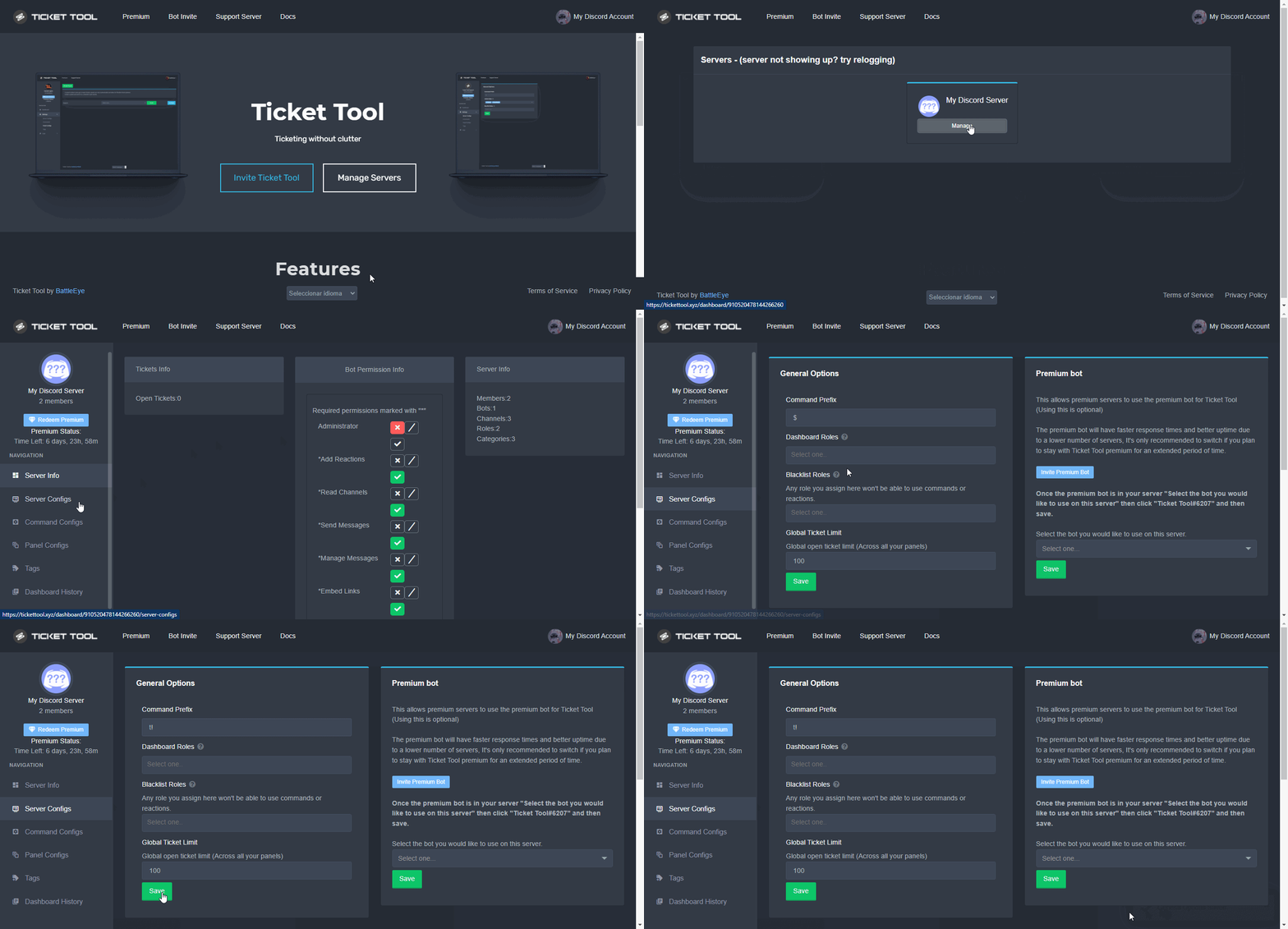
NOTE that @Ticket Tool#4843 will always work as a prefix even if there is a custom prefix.
shut bolt
Go into your Server Configs and that you can update it as shown in this GIF
desert totem
yes i know ive changed the prefix
desert totem
is it possible to add auto deletion?
shut bolt
desert totem
is it possible to add auto deletion?
You can make a ticket to be auto deleted immediately after its closed, but its not possible to do it after X minutes
desert totem
okay thanks @shut bolt
iron nightBOT
Gave +1 Rep to @shut bolt
shut bolt
desert totem
okay thanks <@!518666147441278998>
Sure, if you need help on doing it, let me know
shut bolt
Nice!!
desert totem
yes but i have another question lol
the varible {reason} can i use it only for close ticket command? like i want it to say Your ticket was closed with the following {reason}
 tight helm
The bot is working on one of my servers but not the other. It doesn’t respond when I @pseudo glen help either.
 honest burrow
can you activate the ticket bot in portuguese?
 sullen blaze
How can you find out information on the spoofer. If it's working or not. It says in test. What's that mean?
shut bolt
desert totem
the varible {reason} can i use it only for close ticket command? like i want it ...
Yup, close and command style tickets
shut bolt
tight helm
The bot is working on one of my servers but not the other. It doesn’t respond wh...
what's the server ID?
shut bolt
honest burrow
can you activate the ticket bot in portuguese?
Not currently
honest burrow
Thanks
shut bolt
sullen blaze
How can you find out information on the spoofer. If it's working or not. It says...
Wrong server, we are the support for @pseudo glen
tight helm
shut bolt
what's the server ID?
473197481061122048
shut bolt
Stand by a second please
desert totem
@shut bolt where would i find that?
shut bolt
desert totem
<@!518666147441278998> where would i find that?
#546557408902905896 please don't ping Support Team
desert totem
ok sorry
jade topaz
Hello
shut bolt
tight helm
473197481061122048
Are you sure the bot is still invited to that server?
shut bolt
desert totem
<@!518666147441278998> where would i find that?
Find what?
jade topaz
Ticket limit is the limit of all users ticket al of one user only?
desert totem
The thing you said
shut bolt
jade topaz
Ticket limit is the limit of all users ticket al of one user only?
Ticket Limit is the amount of tickets a single user can open per panel
jade topaz
shut bolt
__Ticket Limit__ is the amount of tickets a single user can open per panel
Can I make limit for tickets..?
shut bolt
Currently you can only set limit per users, not a limit for the whole server
tight helm
shut bolt
Are you sure the bot is still invited to that server?
Yea I see it in members list.
jade topaz
Can I make only specific roles close the ticket?
shut bolt
tight helm
Yea I see it in members list.
Which of the two bots do you have invited, @humble sequoia or @pseudo glen ?
tight helm
Primary
shut bolt
jade topaz
Can I make only specific roles close the ticket?
Yeap, go into your Panel Configs open it's Settings, then go into Button Options and click on the Close Button Settings mark @everyone as denied and your role as enabled
And Save changes
bronze comet
shut bolt
Currently you can only set limit per users, not a limit for the whole server
There is a limit for the whole server
shut bolt
bronze comet
There is a limit for the whole server
Nope
shut bolt
shut bolt
Yeap, go into your __Panel Configs__ open it's __Settings__, then go into __Butt...
Do the same for the command in Command Configs and you are good to go
bronze comet
shut bolt
Nope

 shut bolt
bronze comet
<:ThinkPika:759173180215787550>
shut bolt
bronze comet
<:ThinkPika:759173180215787550>
Yeah, that's the amount of tickets a user can open Across all panels
Not for all users
desert totem
shut bolt
Yup, close and command style tickets
where can i find that?
shut bolt
desert totem
where can i find that?
Command Style ticket options?
desert totem
yes
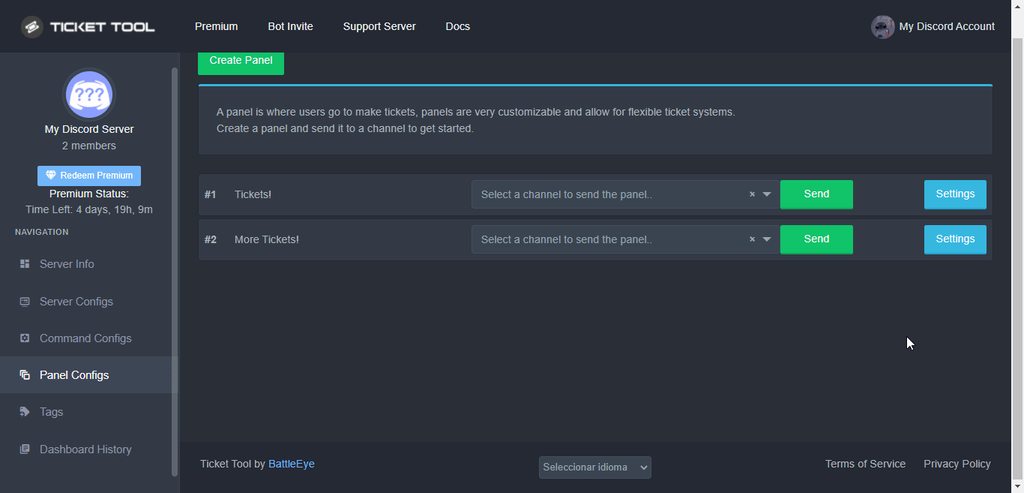 jade topaz
shut bolt
Yeap, go into your __Panel Configs__ open it's __Settings__, then go into __Butt...
jade topaz
shut bolt
Yeap, go into your __Panel Configs__ open it's __Settings__, then go into __Butt...
This will be denied by the reaction too?
shut bolt
jade topaz
This will be denied by the reaction too?
You mean the button?
One is for the button and the other one is for the command
jade topaz
shut bolt
You mean the button?
There is a reaction that when I click it the ticket close or delete or etc
shut bolt
jade topaz
There is a reaction that when I click it the ticket close or delete or etc
A button
We don't support reactions for a couple months now
tight helm
Pablo should I just kick and reinvite it? Will the old tickets still work
jade topaz
shut bolt
We don't support reactions for a couple months now
U mean I cannot make the reaction work only for support roles?
shut bolt
tight helm
Pablo should I just kick and reinvite it? Will the old tickets still work
Could be a good option
shut bolt
jade topaz
U mean I cannot make the reaction work only for support roles?
I've told you already Reaction ≠ Button
And yes, you can make a button or command support team only
There's a slider for that
desert totem
okay thanks @shut bolt
iron nightBOT
Gave +1 Rep to @shut bolt
shut bolt
desert totem
okay thanks <@!518666147441278998>
Sure
desert totem
Great support team you´ve got here i will def keep having this bot 😄
and maybe even buy premium
jade topaz
What is the benefits of the permissions after the ticket close?!

The permissions will make what?
shut bolt
You can set which permissions each group should have once the ticket is closed, for example, removing the user access to see the closed ticket
desert totem
also how can i name a ticket for like Bug report or question or Support
humble sequoiaBOT
The ticket name is the default channel name of all tickets. To edit it, go to your Dashboard > Panel Configs > Settings > Ticket Options. There you can edit the channel name of opened and closed tickets. You can also use variables in there.
 Note: This is a premium feature
shut bolt
Note: This is a premium feature
shut bolt
Go into the Opened Ticket Name
And edit it
That to make it by default, which is a premium feature
You can manually rename a ticket using $rename new name
desert totem
so then it would be ticket {ticket-name} depending on witch ticket it is
shut bolt
It would be ticket-{panel.name}
desert totem
oh
shut bolt
Here you have a list of all variables + an explanation of each one of them
Description of the variables a ticket can count with
tight helm
I reinvited the bot and it’s appearing offline and still not responding.
desert totem
ok thanks @shut bolt
iron nightBOT
Gave +1 Rep to @shut bolt
shut bolt
tight helm
I reinvited the bot and it’s appearing offline and still not responding.
I'll move this into a ticket if that's okey with you
tight helm
Sure
hard cape
Don’t ping staff please
shut bolt
Rule 4
jade topaz
shut bolt
You can set which permissions each group should have once the ticket is closed, ...
OK I got it
 severe lava
hard cape
Don’t ping staff please
severe lava
hard cape
Don’t ping staff please
my bad
jade topaz
What is logging channel?
shut bolt
jade topaz
What is logging channel?
A channel in which the bot logs actions such as open, close, transcript saving etc
$logs
humble sequoiaBOT
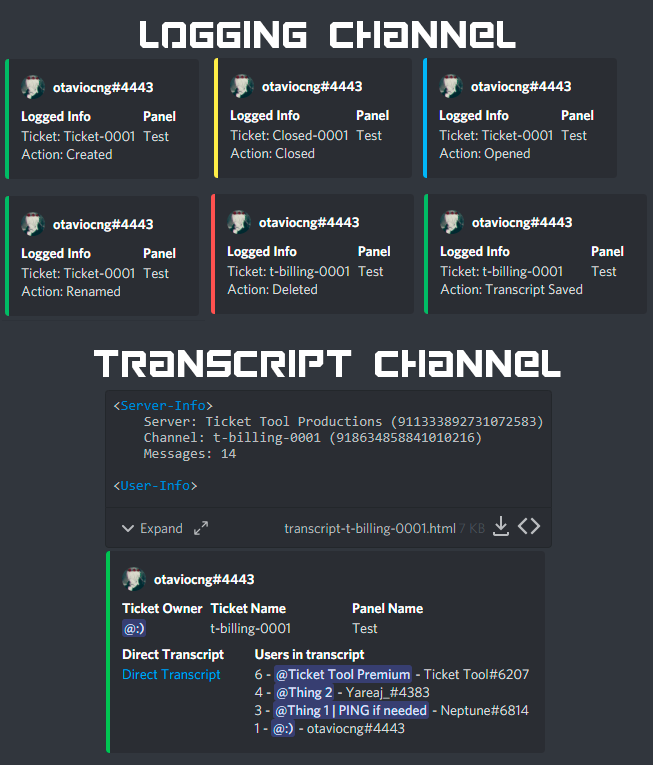
With Ticket Tool, you can customize the behavior the bot takes when logging your tickets! For editing these options follow these steps:
Dashboard ➞ Panel Configs ➞ Settings ➞ Logging Options
Transcript Channel
Here you will choose the channel where @humble sequoia would send a copy of the transcript to
Logging Channel
Here you will define which channel @humble sequoia will save the Logs in (ticket created/deleted/closed, etc.)
Logs you can save:
➞ Ticket Created ➞ Logs when a ticket is created
➞ Ticket Closed ➞ Log when a ticket is closed
➞ Ticket Opened ➞ Log when a ticket is opened
➞ Ticket Renamed ➞ Log when a ticket is renamed
➞ Ticket Deleted ➞ Log when a ticket is deleted
➞ Transcript Saved ➞ Log when a ticket is saved
Select with  (disable) or
  (enabled) which logs you would like
ᅠ
Premium Features
Direct Message Transcript ➞ Sends the ticket transcript to the ticket user whenever the ticket is either closed, deleted, or both.
Auto Save Transcript ➞ Saves the ticket transcript into to the transcript channel whenever the ticket is either closed, deleted, or both.
Below you can see an example of what the Logging Channel will look like as well as the Transcript Channel:
 jade topaz
What is command style tickets?
shut bolt
jade topaz
What is command style tickets?
Creating tickets using the command $new
iron nightBOT
Gave +1 Rep to @shut bolt
shut bolt
jade topaz
Thank u very much <@518666147441278998>
Sure
copper owl
jesus our tags are hella big on mobile
jade topaz
I have another question...how can I write a message with a title like this...Is it for premium only?
 hard cape
Premium only
copper owl
how is it premium only
hard cape
You can edit this in panel message
copper owl
the title can be edited by changing the name of the panel
hard cape
But description cant i think
copper owl
you can edit the panel message for free as well
jade topaz
Can I make a message like in photo (title and description) free?
copper owl
jade topaz
Can I make a message like in photo (title and description) free?
photo is premium
jade topaz
Or premium?
copper owl
title and description you can edit for free
hard cape
oops sorry then
jade topaz
How...in rename panel there is not title...desciption only..
copper owl
jade topaz
How...in rename panel there is not title...desciption only..
the title of the panel is the name of the panel itself
thats how it's configured by default
if you want the title to be دعم عربي فني , you name the panel as such
in other words, the title and the little small description can be edited without premium
jade topaz
So...I can edit description from where?
The title is from rename panel...and description is from where?
copper owl
$arpanelmessage
humble sequoiaBOT
رسألة لوحة التذكره
رسالة لوحه التذكره هو المكان الذى يمكن للاشخاص منه عمل تذكره
لتعديلها وجعلها افضل اذهب الى
Dashboard --> Panel Configs -> Settings -> Panel Options -> Edit Panel Message
 copper owl
here's where you can edit the description ^^
to edit the title, press the Rename Panel button
copper owl
 tardy halo
how can i mass delete tickets
tardy halo
how can i mass delete tickets
not a thing
you need to delete them individually
tardy halo
oh okok
jade topaz
Thanks @copper owl
iron nightBOT
Gave +1 Rep to @copper owl
copper owl
jade topaz
Thanks <@548583124062175232>
اهلا و سهلا
 plain turtle
hello, im trying to send my ticket panel in a channel but it just wont send, an error comes up saying run $debug in the channel for fixing errors, but when i do that the bot doesnt respond me.
shut bolt
plain turtle
hello, im trying to send my ticket panel in a channel but it just wont send, an ...
May I have the server ID please?
plain turtle
shut bolt
May I have the server ID please?
sure
915934173598998558
shut bolt
Thanks, please stand by
humble sequoiaBOT
How to disable the premium bot
To disable the premium bot you will have to go to the Dashboard ➞ Server Configs ➞ Premium bot ➞ And on the right-hand side select the primary free bot in the drop down menu.
Premium features will still work on the normal bot.
 shut bolt
Follow these steps to solve it, you are having an error with the bot as shown
plain turtle
shut bolt
Follow these steps to solve it, you are having an error with the bot as shown
alright, ill try it, thanks for the fast response, appreciate it!
iron nightBOT
Gave +1 Rep to @shut bolt
jade topaz
Can the bot make mention to a role with the message he send when a ticket open?
humble sequoiaBOT
How to make Ticket Tool ping a role
To make ticket tool ping a role when a ticket is opened, go to the Dashboard -> Panel Configs -> Settings -> Ticket Options -> Ticket Message -> Message Text and do this:
{@Role name} This is case sensitive and the role must have @mentions enabled
 shut bolt
Follow these steps and you'll be able to make it work
jade topaz
Messege text is outside the embed true?
shut bolt
Yup
jade topaz
Should I make any thing else?
 shut bolt
Nope
jade topaz
Should I put {}?
shut bolt
jade topaz
Should I put {}?
As you used the native syntax, there is no need to do it
 shut bolt
It adds a number each time a ticket is opened
So if you want to go back to 0, set the number in that picker and Save changes
jade topaz
shut bolt
So if you want to go back to 0, set the number in that picker and **Save** chang...
Sorry, What is the number?
shut bolt
This one here
 plain turtle
shut bolt
Follow these steps and you'll be able to make it work
plain turtle
shut bolt
Follow these steps and you'll be able to make it work
Thanks a lot dude, it worked for me!
shut bolt
plain turtle
Thanks a lot dude, it worked for me!
Sure!
jade topaz
shut bolt
This one here
Should I leave it to go back from 0?
jade topaz
K thanks @shut bolt
iron nightBOT
Gave +1 Rep to @shut bolt
shut bolt
Sure
 hard cape
yw
humble sequoiaBOT
shut bolt
@worn olive for using the bot's commands use them in #🤖│bot-spam
 worn olive
Oh sorry
shut bolt
No problem
 safe basin
ayo why does my server dont pop up when i try to manage it i tryed a few times to refresh or log in again
i am an owner of 2 server and only 1 pops up
bronze comet
safe basin
ayo why does my server dont pop up when i try to manage it i tryed a few times t...
Log out of the dashboard then back in again, simply refreshing will not work.
Also make sure to invite the bot to your server first.
bronze comet
safe basin
where can i find the settings in ticket tool for example. '' closed tickets''
What do you mean by this?
 river carbon
Hey is there a way to move tickets to a category via command
hard cape
Hey
river carbon
or does anyone know of a bot who can do that
river carbon
Ah, theres like 100+ tickets and Im trying to find a more efficient way to move it to their appropriate category
Its hell lol
 leaden horizon
What if my members cant make a ticket becuase they dont have perms even without any restrictions
 delicate jasper
is there a place where i can access my ticket details if it was closed
lapis idol
delicate jasper
is there a place where i can access my ticket details if it was closed
Your transcripts!
delicate jasper
lapis idol
Your transcripts!
is this on the website, where are these?
lapis idol
delicate jasper
is this on the website, where are these?
Basically a receipt of your transcript! You can set it up via our website
delicate jasper
lapis idol
Basically a receipt of your transcript! You can set it up via our website
im a customer from a server, can i still see thhose transcripts even though I havnt signed up yet. Ticket was closed yesterday
lapis idol
delicate jasper
im a customer from a server, can i still see thhose transcripts even though I ha...
Transcripts would only be sent to the servers support team unless they had their permissions set to send transcripts to user after ticket closure
delicate jasper
So there isnt a way for my to obtain it it without the consent of the server owner
😔
 kind hawk
If you didn't receive it in DM from the bot, or it's not available from the person managing the system server-side. Then no.
kind hawk
 junior shadow
I cant get back on the chats for some reason?
junior shadow
I cant get back on the chats for some reason?
You are in the chat.
This is the @pseudo glen support server.
 gaunt carbon
How do i make it where whenever someone makes a ticket, the spefic role can see it
someone made a ticket and it pinged the role but they dont have access to see it
 carmine jungle
 dense ember
i was wondering if its possible to make it so if someone opens a ticket and they have a certain role the ticket is higher up on the list of open tickets? hope that makes sense lmao
 pale pilot
$help support
humble sequoiaBOT
How to let support team see into a ticket
About support roles
A support role lets your support team see into tickets with out having to add them manually to each and every ticket.
You can add as many support roles as you like per panel.
NOTE that the way discord works all admins can see into tickets regardless of this.
How to set a support role
To set a Support role go to the Dashboard -> Panel Configs -> Settings -> General Options -> Support Team Roles.

NOTE that the support role will not be able to see into tickets that are already created..
pale pilot
@carmine jungle @gaunt carbon
pale pilot
dense ember
i was wondering if its possible to make it so if someone opens a ticket and they...
Not possible unfortunately
dense ember
Yeh, I found that out. Is there a way I can suggest it tho?
gaunt carbon
pale pilot
<@389666379256692736> <@315226184768290826>
Appreciate it !!
pale pilot
gaunt carbon
Appreciate it !!
s!suggest
 atomic flicker
how do i make the ticket send a ticket in my server
short stump
atomic flicker
how do i make the ticket send a ticket in my server
hey!
atomic flicker
hii
short stump
are you just wanting to setup ticket tool basically?
atomic flicker
yes
short stump
trying to get tickets to work?
atomic flicker
yes
humble sequoiaBOT

You can check our documentation here.
You can also check #573205317870157855 for the basic setup.
Our documentation contains all the info you need about the bot to be able to setup and configure the bot however you like.
pale pilot
pale pilot
`s!suggest`
@dense ember oops, replied to the wrong comment
dense ember
Lmao thanks
stone bear
Hi, is there anyway to send transcripts to another discord server
 fathom flame
Hello, my issue in within a discord that limited 1 ticket per user. I'm not able to open a new ticket cause one already created somewhere. I don't see it tho, my perms are not enough (I was before), and the title has mostly been rename. I expect that this ticket has become a channel and other user aren't even aware of that. Is there anyway I could find or just close this ticket ?
regal goblet
fathom flame
Hello, my issue in within a discord that limited 1 ticket per user. I'm not able...
If you don't have perms to see your old ticket, then there is probably no way to find it by yourself, best I could suggest is contacting an Admin/Mod from that Discord Server to help you out
fathom flame
Allright, worth a shot to ask in that peculiar case, thank you
stone bear
stone bear
Hi, is there anyway to send transcripts to another discord server
this possible?
lapis idol
stone bear
this possible?
sadly it’s not, you can only send transcripts within your discord server
stone bear
lapis idol
sadly it’s not, you can only send transcripts within your discord server
thanks tho
iron nightBOT
Gave +1 Rep to @lapis idol
jade topaz
Hello, where should I go to find the Pixel Gun 3D account?
copper owl
stone bear
how can I send my transcript to another channel
You can either use $transcript #channel_name or define another channel
copper owl
jade topaz
Hello, where should I go to find the Pixel Gun 3D account?
no idea, you're in the wrong server to ask for this
jade topaz
Ok.. sorry
stone bear
copper owl
You can either use `$transcript #channel_name` or define another channel
ok. no way to make it where when I press the button it does it
copper owl
Well
yeah there is
It's found in the Logging Options
There you can define a Transcript Channel
hard cape
lapis idol
sadly it’s not, you can only send transcripts within your discord server
It’s possible when you do backup metod And still have a transcript channel in the “original” version
copper owl
hard cape
It’s possible when you do backup metod And still have a transcript channel in th...
not really...?
thats like saying the mods on the server that you backed up will get pings because it uses the same role ID
 prime orchid
Is there a function to allow for a ticket to be "switched" to another uh.. I want to say categories but looking at the way things are.. switch to another panel.
(i.e. user picked the wrong kind of support they need)
 ripe bramble
hi, im trying to make a ticket but i cant cus i dont see my server help?
jade topaz
ripe bramble
hi, im trying to make a ticket but i cant cus i dont see my server help?
Hello, try to log out from the dashboard.
jade topaz
Your welcome
ripe bramble
thanks @jade topaz
iron nightBOT
Gave +1 Rep to @queen bluff
copper owl
prime orchid
Is there a function to allow for a ticket to be "switched" to another uh.. I wan...
not a thing as of currently
prime orchid
Hmm. Ok
 velvet crest
Is there a way to make it so that users that open a ticket can only be seen by administration+ ?
kind hawk
velvet crest
Is there a way to make it so that users that open a ticket can only be seen by a...
This is where you setup your support team roles. Settings > General options > Support Team Roles
velvet crest
Ah alright
 void knot
Does online transcripts gets deleted after an amount of time?
Ping ne when you answer me
Ty
jade topaz
@void knot Hey, transcripts in a transcript channel wont be deleted
void knot
jade topaz
<@856775446335324160> Hey, transcripts in a transcript channel **wont be deleted...
Oh ok.
Thank you
jade topaz
Your welcome!
lapis idol
please refrain from pinging staff members if unnecessary! However just help out and answer questions that other users ask when needed
hard cape
copper owl
not really...?
I did backup method and transcripts were sending to the 1st server
jade topaz
Is there any setup guide
humble sequoiaBOT
You can check our documentation here.
You can also check #573205317870157855 for the basic setup.
Our documentation contains all the info you need about the bot to be able to setup and configure the bot however you like.
jade topaz
I have the both roles but the mention does not appear in notification..

And the message must be yellow color when someone mention me or my role
How to make the bot have permission to mention all roles?
In all tickets?
 humble sequoiaBOT
Multipanels are a premium feature that allow for a single panel with multiple buttons to open different tickets.
How to create a Multipanel
Premium users can combine multiple panels into one multipanel.
First, find the IDs of each panel you wish to combine. You can find them in your Panel Configs in the Dashboard
Next, send the multipanel to a channel using $panel [id1] [id2] {id3} ....
e.g. $panel 1 2 4 17 35 to combine panels 1, 2, 4, 17 and 35.
Up to 25 panels may be combined.

For a more convenient use of multipanels, you can now combine panels on the dashboard. This will allow you to directly send the multipanel from the dashboard or via the $panel ID command.
Where can I find this?
You can find this setting on the Dashboard -> Panel Configs -> Settings -> General Options
Note: if you're attaching all the panels to a panel called English, don't include English in the attached panels box (If you do this, it will create duplicate)
This will put all buttons from all of your panels on one message. The message is the panel message from the panel you're combining these panels in.
Note: This is a premium feature

 severe path
jade topaz
How to make the bot have permission to mention all roles?
severe path
jade topaz
How to make the bot have permission to mention all roles?
give the bot role this perms
 severe path
 woven tusk
<@!332594810106150913><@!252364399669542913>
woven tusk
<@!332594810106150913><@!252364399669542913>
stop ping the support team
jade topaz
severe path
give the bot role this perms
From the dashboard?
 humble sequoiaBOT

The new Discord Buttons allow for a much smoother and convenient experience. They reduce lag and work much better than emojis. With ticket tool you can edit all the buttons however you like! Buttons can show emojis, text and can have 4 different colors.
Where can I edit them?
Dashboard ➞ Panel Configs ➞ Settings ➞ Button Options ➞ Setting
 jade topaz
woven tusk
Look how I got
jade topaz
woven tusk
Look how I got
You have to change buttons
severe path
humble sequoia
@woven tusk
jade topaz
Thanks @severe path
iron nightBOT
Gave +1 Rep to @severe path
jade topaz
Is it possible to set up a two-stage ticket with branching conditions? So the first stage ticket opens with the option to choose subsequent type of query, e.g. 'three buttons' and the user clicks on any of the buttons that then generates the 2nd stage ticket. So I don't have to have three separate panels for three different queries - I'd like to merge all three into one through two-stage system.
Also, I want to disable the messy message that appears to the bottom of the channel where the panel lies each time the user clicks on the ticket to open. Possible?
Ping me should this message find you well and you intend to reply.
pale pilot
@jade topaz The first request is currently not possible, however the next major update will allow for you to do something like that. For now all you can do is make a multipanel, so users can decide which panel to open. I don't really see a reason for them to open a ticket for that first.
And the message when opening a ticket cannot be removed. It's only visible to the one who opened the ticket if you weren't aware. In the future you may be able to disable the message, but that's not 100%.
humble sequoiaBOT
Multipanels are a premium feature that allow for a single panel with multiple buttons to open different tickets.
How to create a Multipanel
Premium users can combine multiple panels into one multipanel.
First, find the IDs of each panel you wish to combine. You can find them in your Panel Configs in the Dashboard
Next, send the multipanel to a channel using $panel [id1] [id2] {id3} ....
e.g. $panel 1 2 4 17 35 to combine panels 1, 2, 4, 17 and 35.
Up to 25 panels may be combined.
jade topaz
how long do transcripts remain readable? Cause the ones I wanted to check just say "Invalid Request"
copper owl
transcripts remain as long as the transcript message hasn't been deleted
they're indefinite basically.. As long as you don't delete the transcript message itself
jade topaz
ah rip haha
wanted to have some transcripts in a different channel so I just copied the link and deleted the original
copper owl
jade topaz
ah rip haha
wanted to have some transcripts in a different channel so I just cop...
instead of doing that, you can just use $transcript #channel_name to send it to a different channel than your defined transcript channel
jade topaz
copper owl
instead of doing that, you can just use `$transcript #channel_name` to send it t...
within the ticket?
copper owl
yes within the ticket
just input the channel you want to send it to
I.E the different channel you mentioned
iron nightBOT
Gave +1 Rep to @copper owl
copper owl
👍
 hollow chasm
hello i have a doubt when i go to
manage ticket server tool no server appears
iron nightBOT
Gave +1 Rep to @bronze comet
hollow chasm
 plain surge
You just need to relog on the website
bronze comet
hollow chasm
Please log out of the dashboard and back in again
humble sequoiaBOT
Don't see your server in the dashboard?
You will possibly need to relog. Look below to see steps on how to relog.
How to relog in the Dashboard.
First, you will need to go to the dashboard. Once your there, click on your avatar on the top right. after you clicked it, you will see button that says Logout. You must click that. Once you have logged out, you can log back in.
Note:
You need one of these 3 things to access the dashboard.
1. Server Owner (Level: 6)
2. Server Administrator (Level: 4)
3. Dashboard Role (Level: 2)
:warning: You can check your level using $level on your Discord Server
User permission level with Ticket Tool
@User is permission level: 0 (User)
```» *If it shows that your permission is **0**, you don't have any of the above **3 things** to manage the dashboard.*


**See the GIF below on how to relog:**You relogged or refreshed the page?
hollow chasm
relogged
plain surge
Alright, please run $debug in a channel on your server that Ticket Tool has access to
plain surge
@hollow chasm
 idle raven
Hi
 latent oar
 slender river
How do I make it so the tickets send in a category and not just at the top of the server
hard cape
$help category
humble sequoiaBOT
How to set the open category
To set a open category go to the Dashboard -> Panel Configs -> Settings -> Category Options -> Category Open
 hard cape

slender river
Tysm
hard cape
yw
 graceful wolf
hello! does the bot have anonymous tickets option?
shut bolt
Hi, currently not as the users use their accounts to talk inside tickets
graceful wolf
shut bolt
Hi, currently not as the users use their accounts to talk inside tickets
i see, thanks for the quick answer!
iron nightBOT
Gave +1 Rep to @shut bolt
shut bolt
graceful wolf
i see, thanks for the quick answer!
Sure!
shut bolt
$help support
humble sequoiaBOT
How to let support team see into a ticket
About support roles
A support role lets your support team see into tickets with out having to add them manually to each and every ticket.
You can add as many support roles as you like per panel.
NOTE that the way discord works all admins can see into tickets regardless of this.
How to set a support role
To set a Support role go to the Dashboard -> Panel Configs -> Settings -> General Options -> Support Team Roles.
NOTE that the support role will not be able to see into tickets that are already created..
 short pumice
thank you
shut bolt
Sure
jade topaz
shut bolt
And they will see the new tickets
I dont have a PC or a Laptop -_- i have an Phoneee
copper owl
jade topaz
I dont have a PC or a Laptop -_- i have an Phoneee
it's the same steps
nothing changes except the navigation. To see the Panel Configs page, you need to tap on the  in the top left
jade topaz
But i don't know how
copper owl
$help panel
humble sequoiaBOT
Creating a panel
To create a panel we are going to need to head over to the panel configs on the dashboard
Once at the dashboard we will need to click Create Panel
Enter a panel name (Fill in any optional settings you want)
Click Create Panel and your ready to get started with configuring your panel
An example of a creating a panel is shown below.
 copper owl
here's an explanation + gif of how to do it
jade topaz
Hey
copper owl
 broken verge
<@548583124062175232>
broken verge
<@548583124062175232>
Why are you pinging me?
copper owl
broken verge
I just want an answer to my question
if you want a staff member to answer, #🎫│make-a-ticket
if you waited like 4 extra seconds i was going to claim your ticket lol
dont ping staff, thanks 👍
you cant change the username but you can add a nickname
make sure to include that in your answer since it's a bit different but you arent wrong
yupyup 👍
dont worry you answered correctly
 hushed saddle
humble sequoiaBOT
hushed saddle
humble sequoiaBOT
You can check our documentation here.
You can also check #573205317870157855 for the basic setup.
Our documentation contains all the info you need about the bot to be able to setup and configure the bot however you like.
shut bolt
Check that guide out
 zinc lava
Would be cool if Ticket Tool parsed URL codes...

Hey everyone  (maybe I should've started with the greeting 😅 )
shut bolt
zinc lava
Would be cool if Ticket Tool parsed URL codes...
Works for embeds
zinc lava
shut bolt
Works for embeds
Yea... which are a premium feature, lol.
That's a nice way to put it behind a paywall...
bronze comet
zinc lava
Yea... which are a premium feature, lol.
You have a limited character limit for free in embeds
zinc lava
(btw I'm already paying premium for several servers... but I don't want to do it for all the dozen ones I mange lol)
shut bolt
zinc lava
That's a nice way to put it behind a paywall...
You can have premium for free, which I believe you didn't know
zinc lava
bronze comet
You have a limited character limit for free in embeds
not for the "Tags" feature.
 bronze comet
Ah I see
shut bolt
zinc lava
oh..?
Use $votes in #🤖│bot-spam and read the bot's response
zinc lava
shut bolt
Use $votes in <#910978476536905738> and read the bot's response
ah... so I have to vote every 12h? And that's for a single server?
that would be unfeasible for me... as you can imagine 😅 😂
 copper owl
which is why buying it would be easier
with every 2nd subscription, it becomes $5 rather than 6
zinc lava
copper owl
_which is why buying it would be easier_
Which I am... I have like 5 subscriptions already or something
copper owl
otherwise, you have votes to get premium and giveaways
zinc lava
But not all clients are paying for Premium features.
copper owl
zinc lava
Which I am... I have like 5 subscriptions already or something
run $pc in #🤖│bot-spam for me please
shut bolt
zinc lava
ah... so I have to vote every 12h? And that's for a single server?
As a regular subscription premium, is per server
zinc lava
Interesting, looks like there's only 1 premium now, instead of the 5...
oh... I was thinking of TweetShift 
My bad.
Anyway I'll get some more subscriptions towards ticket tool soon 👌
Thanks for the role @copper owl 
iron nightBOT
Gave +1 Rep to @copper owl
desert totem
how do i get the premium role do have to buy the premium or can i still collect if i have the trail?
copper owl
desert totem
how do i get the premium role do have to buy the premium or can i still collect ...
it's all explained in the pins of #🤖│bot-spam
hollow chasm
plain surge
Alright, please run `$debug` in a channel on your server that Ticket Tool has ac...
I already did that and the servers do not appear again
plain surge
Please send me the link the bot responded with @hollow chasm
 jovial laurel
It wont let me add ticket's to my server why is it?
plain surge
hollow chasm
https://discordapp.com/channels/509192800865353738/662692902245498910/9323737908...
Alright, one moment please
hollow chasm
plain surge
Alright, one moment please
ok
plain surge
@hollow chasm as mentioned in the relog embed i sent you earlier, you require 1 of 3 permissions to be able to access the Dashboard.
- having a role with administrator perm enabled
- having a dashboard role assigned by an admin of the server```
You don't have one of those permissions hollow chasm
I'm admin on the server I'm on and I don't
jovial laurel
Sir.
plain surge
hollow chasm
I'm admin on the server I'm on and I don't
Having a role named admin is different from actually having the Adminstrator permission enabled in the role permissions
jovial laurel
Why can't i add a ticket thing into my server??
plain surge
Please check our setup guide for steps on how to add Ticket Tool to your server
humble sequoiaBOT
You can check our documentation here.
You can also check #573205317870157855 for the basic setup.
Our documentation contains all the info you need about the bot to be able to setup and configure the bot however you like.
jovial laurel
I went through it and evreything
plain surge
hollow chasm
I'm admin on the server I'm on and I don't
Please check in server settings that your role has that permission enabled. A screenshot would be appreciated to confirm it as well
plain surge
jovial laurel
I went through it and evreything
What are you having trouble with then?
jovial laurel
Adding it
hollow chasm
plain surge
Please check in server settings that your role has that permission enabled. A sc...
ok
plain surge
jovial laurel
Adding it
The bot is on your server?
jovial laurel
In yes.
plain surge
And you created a panel on the Dashboard?
jovial laurel
Join a vc so i can show u.
hollow chasm
I will be back in a moment
plain surge
I can't join a VC right now. You can send a screenshot tho
jovial laurel
I cant
plain surge
Well please give me a few moments and I'll be able to join but muted
jovial laurel
only the red background fd one dizzy's are mine i want to add it into one that it dosent show
 plain surge
So the bot is in that other server and visible in the members tab?
jovial laurel
Yes in the thing where u have to click on the group to add a panel.
copper owl
jovial laurel
Yes in the thing where u have to click on the group to add a panel.
you're going to have to elaborate on the issue. Sending a screenshot of the manage server list isnt enough context.
are you missing some servers on that page?
is that what you're asking about?
jovial laurel
I am yes.
copper owl
jovial laurel
only the red background fd one dizzy's are mine i want to add it into one that i...
it seems like you're logged in a different account here
check the top right corner, it doesnt seem like the same account you're using currently
so make sure you're using the correct account, log out, log back in, and if everything works out fine, the remaining servers should show up
jovial laurel
Oh thx it fixed
copper owl
No problem
 primal lark
what are the perms ticket tool needs?
shut bolt
$perms
humble sequoiaBOT
ᅠ
@pseudo glen requires the following permissions:
Add Reactions
Read Channels
Send Messages
Manage Messages
Embed Links
Attach Files
Read History
Manage Roles
To change the role permissions, you can go to your Discord Server ➞ Server Settings ➞ Roles ➞ @Ticket Tool
To change the channel permissions, you can go to your Channel Settings ➞ Permissions ➞ Ticket Tool
ᅠ
Note:
You can give Ticket Tool Administrative Permissions instead of all the permissions listed above, but it's entirely optional and NOT necessary.
 primal lark
appreciate it 🙂
 snow tendon
how do i make a ticket on my server?
humble sequoiaBOT
You can check our documentation here.
You can also check #573205317870157855 for the basic setup.
Our documentation contains all the info you need about the bot to be able to setup and configure the bot however you like.
shut bolt
Check this guide out
jade topaz
humble sequoia
Yeah but
 fervent lantern
Hello ,I can't add ticket tool to any server ,the drop down menu is empty ,can someone help please ?
jade topaz
i want to make that when i close the ticket it doesnt get deleted
and it just removes the person who opened the ticket and it stays there
 azure current
how do i get the free premium one
lapis idol
jade topaz
and it just removes the person who opened the ticket and it stays there
that’s going to be our 2 step ticket close!
 lapis idol
jade topaz
how i can do this
lapis idol
jade topaz
how i can do this
Ill guide you through it!
lapis idol
So you are going to click “Panel Configs” from there you will go to the panel you want to enable it for and click the blue “Settings” Button. Once you get there you should see a grey + that says “General Options”. From that point scroll down all the way till you see “Two step close” and “two step ticket”
iron nightBOT
Gave +1 Rep to @lapis idol
lapis idol
jade topaz
thanks <@!536402184997175296>
Of course!
fervent lantern
Hello ,I can't add ticket tool to any server ,the drop down menu is empty ,can someone help please ?
lapis idol
fervent lantern
Hello ,I can't add ticket tool to any server ,the drop down menu is empty ,can s...
Hey there! Hopefully this helps!
humble sequoiaBOT
You can check our documentation here.
You can also check #573205317870157855 for the basic setup.
Our documentation contains all the info you need about the bot to be able to setup and configure the bot however you like.
 ornate hill
hi there! I was here a few days ago, but i am back with another question

here is the log from a transcript save action
I'd like to access the "ticket owner" field from a custom tag
is this possible? If not, can we file a feature request? it would be very useful
copper owl
didn't understand what you wanted exactly
ornate hill
ticket tool has a Tag feature
copper owl
you want to be able to display the ticket owner using a custom tag?
copper owl
ornate hill
ticket tool has a Tag feature
Yes, i am aware said feature exists
but that wouldn't be possible
Seeing as tags aren't interconnected with tickets
ornate hill
the tag should be able to access a field if it exists
and return NaN or something if it doesn't
is it possible to request a feature?
copper owl
currently that's not how the variable works
copper owl
ornate hill
is it possible to request a feature?
check pins in #💡│suggestions
ornate hill
thanks!@
fervent lantern
lapis idol
Hey there! Hopefully this helps!
I didn't see your answer
humble sequoiaBOT
You can check our documentation here.
You can also check #573205317870157855 for the basic setup.
Our documentation contains all the info you need about the bot to be able to setup and configure the bot however you like.
fervent lantern
lapis idol
Hey there! Hopefully this helps!
I followed the tutorial but when I click invite ticket tool the drop down menu is empty
lapis idol
Do you have the bot added to your server already? If not please invite it! Then from there you can run through the setup!
fervent lantern
lapis idol
Do you have the bot added to your server already? If not please invite it! Then ...
Do you mean step one ?I can't choose nothing from the drop menu " 1 "

 tepid garden
Hi
lapis idol
fervent lantern
Do you mean step one ?I can't choose nothing from the drop menu " 1 "
that means you need to invite the bot to your server still!
 grizzled gull
i opened a ticket on a server by accident, and i left the server, now i cant get rid of it
i cant find the old server anywhere
shut bolt
grizzled gull
i opened a ticket on a server by accident, and i left the server, now i cant get...
The staff of the server must delete
grizzled gull
what should i do?
shut bolt
Nothing really, unless you can go into that server and ask their staff to delete that ticket, nothing much to do
iron nightBOT
Gave +1 Rep to @shut bolt
shut bolt
grizzled gull
thanks <@!518666147441278998>
Sure :)
 robust sandalBOT
 true canopy
السلام عليكم
true canopy
السلام عليكم
 .Abdullah
Peace be upon you
 Arabic (ar) → English (en)
robust sandalBOT
true canopy
كيف اخلي التكت يمنشن رتبة السبورت
.Abdullah
Arabic (ar) → English (en)
robust sandalBOT
true canopy
كيف اخلي التكت يمنشن رتبة السبورت
.Abdullah
How do I make the tects the rank of sport?
Arabic (ar) → English (en)
true canopy
؟
shut bolt
/ar Hi! Go into your dashboard
Open your Panel Configs
Click on Settings
Deploy the General Options menu
And mark the roles you want to be support in the picker Support Team Roles
robust sandalBOT
مرحبا! الانتقال إلى لوحة المعلومات
افتح Panel Configs
انقر على **Settings **
نشر القائمة General Options
ووضع علامة الأدوار التي تريد أن تكون الدعم في فريق Support منتقي Roles
English (en) → Arabic (ar)
true canopy
How do I make the tects mention sport?
shut bolt
/ar Follow this process:
Go into the Ticket Options menu
Click on Edit Ticket Message
In the Message Text use{@Role Name}or{RoleID}replacing the inside value for the name or the ID of the role you want to ping
Save changes
robust sandalBOT
اتبع هذه العملية:
انتقل إلى القائمة Ticket Options
انقر على ** تحرير رسالة تذكرة **
في Message Text استخدم '{@Role الاسم}' أو '{RoleID}' لاستبدال القيمة الداخلية لاسم أو معرف الدور الذي تريد تنفيذ الأمر ping
** حفظ ** التغييرات
English (en) → Arabic (ar)
jade topaz
How do you change the name of the ticket when someone creates a ticket (automatic thing instead of ticket- 0001)
humble sequoiaBOT
The ticket name is the default channel name of all tickets. To edit it, go to your Dashboard > Panel Configs > Settings > Ticket Options. There you can edit the channel name of opened and closed tickets. You can also use variables in there.
Note: This is a premium feature
regal goblet
@jade topaz you can follow this 
 orchid mango
My Crypto.com account sent all my funds to that address does anyone know how to recover it?
bc1qqshml78gz8xuj45urd7ty529ae30vnf5afmhx5
jade topaz
regal goblet
<@456226577798135808> you can follow this <a:8836_up_rainbow:769285391634661467>
thanks
iron nightBOT
Gave +1 Rep to @regal goblet
humble sequoiaBOT

⚠️ You're in the wrong place
We provide support for @pseudo glen discord bot and cannot help you with whatever issue you have.
- Please make sure to contact the appropriate Support Team.
If you don't have any further questions regarding our bot Ticket Tool, please close this ticket
kind hawk
@orchid mango We only provide support with TicketTool here.
 somber niche
Auto Transipt Is Premium Feature?
 dusky wind
How do I make a ticket in a channel using this bot?
short stump
somber niche
Auto Transipt Is Premium Feature?
Yes it is
short stump
somber niche
<@!332594810106150913> Bro
Make sure not to ping support, much less in this channel #546557408902905896
short stump
dusky wind
How do I make a ticket in a channel using this bot?
it should all be covered here i believe
humble sequoiaBOT
You can check our documentation here.
You can also check #573205317870157855 for the basic setup.
Our documentation contains all the info you need about the bot to be able to setup and configure the bot however you like.
dusky wind
short stump
it should all be covered here i believe
Yup I was on the wrong website thanks
iron nightBOT
Gave +1 Rep to @short stump
 cunning halo
How to make ticket?
short stump
cunning halo
How to make ticket?
here?
cunning halo
Hmm idk about ticket
short stump
cunning halo
Hmm idk about ticket
are you trying to create a ticket here? or in your server?
cunning halo
About battles pass
short stump
cunning halo
About battles pass
i'm sorry i'm very confused on what you're looking for
with a little bit more info though i'm sure i can help ((:
cunning halo
Sorry i cant know english well
short stump
that's okay! type in your native langauge
cunning halo
Làm sao để làm một ticket khôi phục battles pass vip
I have bough bp vip in January
robust sandalBOT
cunning halo
Làm sao để làm một ticket khôi phục battles pass vip
 Ahhk_Hoàng Vũ Anh Khoa
How to make a ticket to restore vip passes
Vietnamese (vi) → English (en)
shut bolt
/vi You are in the wrong server, we are the support team for Ticket Tool bot, if you want to do a ticket for that problem make sure to look for the server of the game where you bought your vip game pass
robust sandalBOT
Bạn đang ở trong máy chủ sai, chúng tôi là nhóm hỗ trợ cho bot Ticket Tool, nếu bạn muốn làm vé cho vấn đề đó, hãy chắc chắn tìm máy chủ của trò chơi nơi bạn đã mua thẻ trò chơi VIP của mình
English (en) → Vietnamese (vi)
cunning halo
Bạn có thể nói cho tôi biết máy chủ đó nằm ở đâu chứ ? Và làm sao để báo cáo cho dev?
robust sandalBOT
cunning halo
Bạn có thể nói cho tôi biết máy chủ đó nằm ở đâu chứ ? Và làm sao để báo cáo cho...
Ahhk_Hoàng Vũ Anh Khoa
Can you tell me where the server is? And how do I report to dev?
Vietnamese (vi) → English (en)
shut bolt
/vi I'm not sure which is the server of your game, sorry
robust sandalBOT
Tôi không chắc ai là máy chủ của trò chơi của bạn, xin lỗi
English (en) → Vietnamese (vi)
cunning halo
Ok thx
shut bolt
Sure
 solemn dirge
Hello, we are using this great ticket tool for reporting bugs in our game (Rail Route). I would like to request the reporters to fill the game version they encountered the bug in. We have the kind request in the ticket message but it is frequently ignored.
I would need something like multiple Create Ticket buttons that, one for each version, that create e.g. ticket in different categories or with different names (or just print out the version to the ticket). But I can not configure it.
What would you suggest? Thank you!
 craggy geyser
solemn dirge
Hello, we are using this great ticket tool for reporting bugs in our game (Rail ...
craggy geyser
solemn dirge
Hello, we are using this great ticket tool for reporting bugs in our game (Rail ...
By multiple buttons, do you want something like #🎫│make-a-ticket?
solemn dirge
Yes!
humble sequoiaBOT
Multipanels are a premium feature that allow for a single panel with multiple buttons to open different tickets.
How to create a Multipanel
Premium users can combine multiple panels into one multipanel.
First, find the IDs of each panel you wish to combine. You can find them in your Panel Configs in the Dashboard
Next, send the multipanel to a channel using $panel [id1] [id2] {id3} ....
e.g. $panel 1 2 4 17 35 to combine panels 1, 2, 4, 17 and 35.
Up to 25 panels may be combined.
For a more convenient use of multipanels, you can now combine panels on the dashboard. This will allow you to directly send the multipanel from the dashboard or via the $panel ID command.
Where can I find this?
You can find this setting on the Dashboard -> Panel Configs -> Settings -> General Options
Note: if you're attaching all the panels to a panel called English, don't include English in the attached panels box (If you do this, it will create duplicate)
This will put all buttons from all of your panels on one message. The message is the panel message from the panel you're combining these panels in.
Note: This is a premium feature
craggy geyser
Here are the instructions
iron nightBOT
Gave +1 Rep to @craggy geyser
craggy geyser
No worries
jade topaz
i'm having a doubt, i have added tickettool basic to my server, but it's not showing up on the manage servers area, why?
humble sequoiaBOT
Don't see your server in the dashboard?
You will possibly need to relog. Look below to see steps on how to relog.
How to relog in the Dashboard.
First, you will need to go to the dashboard. Once your there, click on your avatar on the top right. after you clicked it, you will see button that says Logout. You must click that. Once you have logged out, you can log back in.
Note:
You need one of these 3 things to access the dashboard.
1. Server Owner (Level: 6)
2. Server Administrator (Level: 4)
3. Dashboard Role (Level: 2)
:warning: You can check your level using $level on your Discord Server
User permission level with Ticket Tool
@User is permission level: 0 (User)
```» *If it shows that your permission is **0**, you don't have any of the above **3 things** to manage the dashboard.*


**See the GIF below on how to relog:**Follow this
craggy geyser
Good!
somber niche
short stump
Make sure not to ping support, much less in this channel <#546557408902905896>
Ohk
jade topaz
Is there any msg limit in transcript
regal goblet
jade topaz
Is there any msg limit in transcript
Hello, 500 for basic bot and 1000 for premium bot
jade topaz
if I'm using premium feature in basic bot
Also is this discord's limit or just TicketTool's limit
humble sequoiaBOT
We would love to help you, but if you don't tell us what you need help with we can't help you :(
shut bolt
jade topaz
Also is this discord's limit or just TicketTool's limit
1000 is Discord's limit
shut bolt
jade topaz
So can't custom bots have more than 1k 🤔
Probably not
humble sequoiaBOT
⚠️ Please read the messages previously sent by our team ⚠️
regal goblet
Any specific reasons? Or are you just starting out?
 queen surge
Is there a way to create a multi panel without premium?
@hybrid dagger Would u like to help? :D
shut bolt
Not possible
 pastel thorn
 humble sequoiaBOT
━━ moved to ticket ━━
 humble sequoiaBOT
Don't see your server in the dashboard?
You will possibly need to relog. Look below to see steps on how to relog.
How to relog in the Dashboard.
First, you will need to go to the dashboard. Once your there, click on your avatar on the top right. after you clicked it, you will see button that says Logout. You must click that. Once you have logged out, you can log back in.
Note:
You need one of these 3 things to access the dashboard.
1. Server Owner (Level: 6)
2. Server Administrator (Level: 4)
3. Dashboard Role (Level: 2)
:warning: You can check your level using $level on your Discord Server
User permission level with Ticket Tool
@User is permission level: 0 (User)
```» *If it shows that your permission is **0**, you don't have any of the above **3 things** to manage the dashboard.*


**See the GIF below on how to relog:** pine saddle
the owner is more than lvl 6 and still not working
regal goblet
pine saddle
the owner is more than lvl 6 and still not working
But, have you tried Logging Out and Logging In from the account like the Guide above shows?
copper owl
pine saddle
the owner is more than lvl 6 and still not working
also having a higher level than 6 is literally impossible
regal goblet
jade topaz
like that are deleted
Hello, Closed Tickets you can see them only if you have View Channel Perms
For Deleted Tickets, the only way would be through a Transcript
jade topaz
yeah where are the transcripts located
regal goblet
Do you have a Log Channel already set? like the screenshot below
 jade topaz
no
is there not a way to see them if i didnt make a channel for that?
i had alot of important information in one of the tickets
regal goblet
Make your way to the Web Dashboard, then go to Panel Configs --> Select your desired Panel --> Logging Options --> Here you can set a Transcript Channel
regal goblet
jade topaz
i had alot of important information in one of the tickets
If you havent done it before, then no, you wont be able to see them
jade topaz
💀
jade topaz
What happens after the free trial
shut bolt
jade topaz
What happens after the free trial
Any premium setting won't work unless you subscribe
 plush pilot
is ticket tool down? website says its ok but cant open or close any tickets
 mystic shore
yeah it says interaction failed for me
shut bolt
plush pilot
is ticket tool down? website says its ok but cant open or close any tickets
May I have your server ID please?
Oh
Please provide me the IDs of your servers
 random wasp
alguien habla español?
mystic shore

 silk adder
interaction failed error here too
shut bolt
random wasp
alguien habla español?
Dime
shut bolt
mystic shore
I need the server's ID
please
random wasp
shut bolt
Dime
esque no se como configurar el bot
shut bolt
random wasp
esque no se como configurar el bot
$helpes setup
humble sequoiaBOT
Invitando a Ticket Tool
Lo primero que debe hacer es invitar al bot, dando click aquí.
Una vez haya invitado al bot, diríjase al panel de control y cree un panel.
Un panel es usado para definir las configuraciones de un ticket (los usuarios que pueden ver el ticket, los permisos, los nombres, entre otros).
Creando un Panel
Para crear un panel, diríjase a la pestaña de Panel Configs o Configuraciones del Panel en el panel de control de su servidor.
Una vez esté allí, de click en Create Panel / Crear Panel.
Panel Name → Es el nombre que desea que tenga el panel, puede asignar el nombre de su preferencia.
Support Team Roles → Seleccione los roles que deseen que puedan ver los tickets que se creen desde este panel.
Panel Channel → Elija el canal al que quiera que el panel sea enviado al ser creado. (Este campo es opcional, puede reenviar el panel posteriormente si es necesario)
Finalmente de nuevamente click en Create Panel como ilustra el siguiente GIF
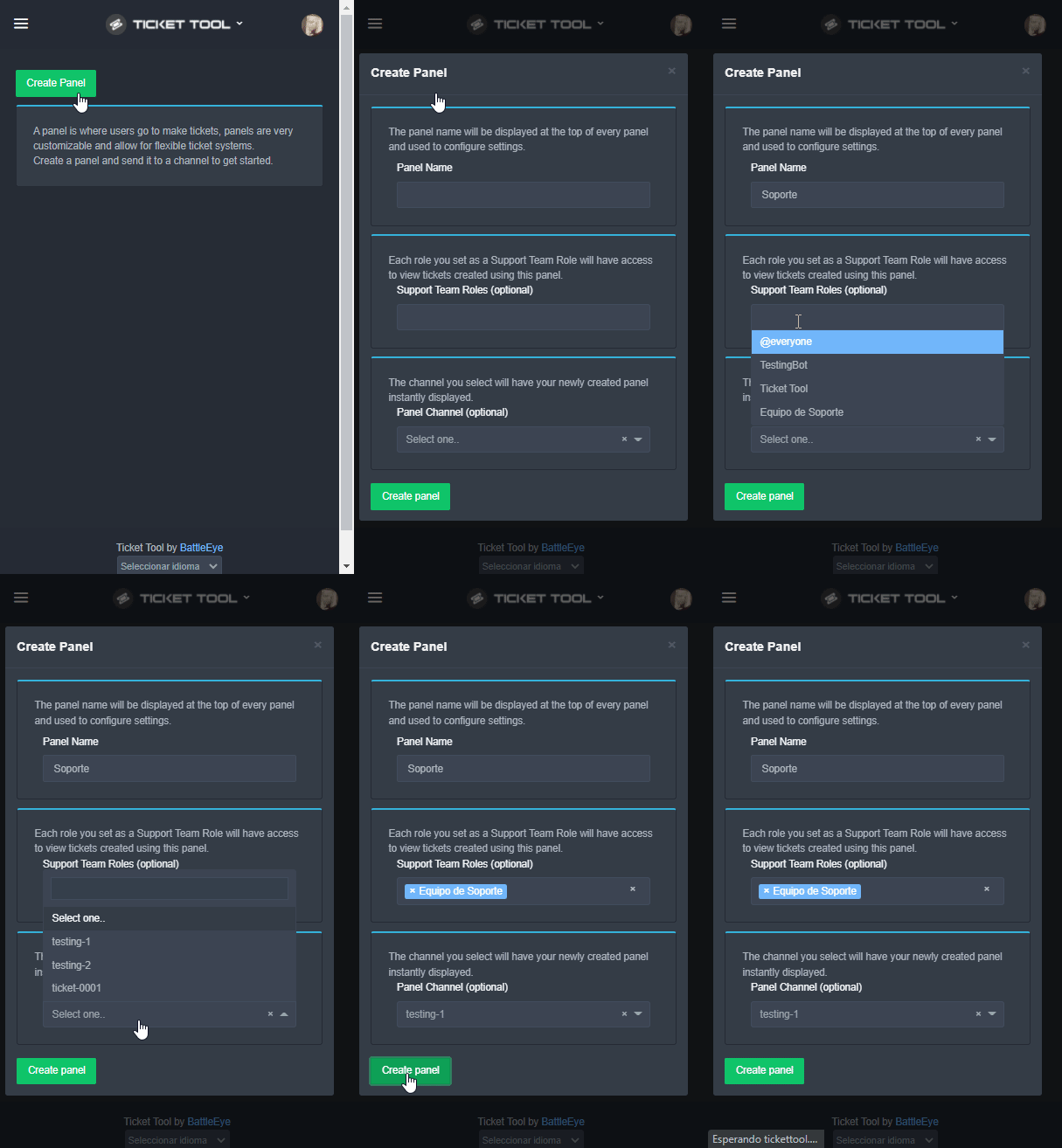 shut bolt
Sigue esos pasos
random wasp
shut bolt
$helpes setup
gracias
shut bolt
Dale
mystic shore
shut bolt
I need the server's ID
please
790459028659896340
shut bolt
Thanks, please stand by
shut bolt
mystic shore
790459028659896340
It seems to be working fine
Hi, go into your Panel Settings, open the Permissions Options and please send me a screenshot of the Everyone Opened Perms
 mystic shore
shut bolt
It seems to be working fine
mystic shore
shut bolt
It seems to be working fine
no unfortunately i just tried again
 silk adder
same error here
jade topaz
ayuda
 green hamlet
it was working 5 minutes ago
shut bolt
We are currently checking, please stand by
green hamlet
👍
silk adder
neither the button nor the reaction work
shut bolt
shut bolt
We are currently checking, please stand by
Please refer to this message
jade topaz
ayuda gente🥶
shut bolt
jade topaz
ayuda gente🥶
Qué pasa?
plush pilot
I think im just blind, but where is the server ID shown, cant find it for the life of me....
shut bolt
plush pilot
I think im just blind, but where is the server ID shown, cant find it for the li...
Try running $id
$id
humble sequoiaBOT
Server id - 509192800865353738
Server id - 509192800865353738
shut bolt
It should show you this
jade topaz
shut bolt
Qué pasa?
en un servidor de un amigo le estoy ayudando con los bots, el tema es que con ticket tool no respone comandos con su preflix o como c diga
y no se le ha cambiado el preflix
shut bolt
Currently we are investigating an outage, please stand by
Estamos investigando una posible caída del bot, por favor esperen
shut bolt
shut bolt
Currently we are investigating an outage, please stand by
Estamos investigando u...
jade topaz
shut bolt
Currently we are investigating an outage, please stand by
Estamos investigando u...
si
plush pilot
shut bolt
It should show you this
nope, doesnt do anything, but neither do any other commands like $close
random wasp
jade topaz
si
xd
jade topaz
calla nub
shut bolt
plush pilot
nope, doesnt do anything, but neither do any other commands like $close
Oh
Let's wait a moment please, our Dev has been notified about this 😄
plush pilot
👍
jade topaz
Can someone help me?
humble sequoiaBOT
We would love to help you, but if you don't tell us what you need help with we can't help you :(
jade topaz
is the bot having problems? It seem to be online but: https://media.discordapp.net/attachments/776680605517742090/932750546882953306/unknown.png
 shut bolt
jade topaz
is the bot having problems? It seem to be online but: https://media.discordapp.n...
shut bolt
jade topaz
is the bot having problems? It seem to be online but: https://media.discordapp.n...
Please refer to the pinned message
jade topaz
Thank you
shut bolt
Sure
 shut bolt
Jajajajajajajaj
 sonic hill
Anyone getting interraction failed when trying to close a ticket?
silk adder
🙂
 rustic marten
sonic hill
Anyone getting interraction failed when trying to close a ticket?
rustic marten
sonic hill
Anyone getting interraction failed when trying to close a ticket?
There is an issue they are looking into see pinned message
jade topaz
I guess this is more a discord buttons related question, but will there always be four buttons in one row?
 crude haven
bot died?
regal goblet
The bot is currently experiencing an outage that is been investigated
 idle haven
refer to pinned messages in here ^
 fathom helm
did someone say something about an outage? 😅
regal goblet
yup, pinned message
regal goblet
jade topaz
I guess this is more a discord buttons related question, but will there always b...
You can edit the amount of buttons in a row (1 to 5), this is a premium feature
 jade topaz
regal goblet
You can edit the amount of buttons in a row (1 to 5), this is a premium feature
jade topaz
regal goblet
You can edit the amount of buttons in a row (1 to 5), this is a premium feature
thank you
iron nightBOT
Gave +1 Rep to @regal goblet
jade topaz

 scenic plinth
jade topaz
scenic plinth
jade topaz
How can i fixed this problem
scenic plinth
Read the announcement please.
 sturdy quartz
Small issue. When I go to $claim it says it isnt enabled even tho it is :/
sturdy quartz
sturdy quartz
Small issue. When I go to $claim it says it isnt enabled even tho it is :/
and I do have a trial of premium so idk
scenic plinth
It's Likely related to the outage then, unless you haven't enabled premium bot in the server settings or just don't have it enabled via the panel.
jade topaz
Is the bot down for anyone else?
scenic plinth
iron nightBOT
Gave +1 Rep to @scenic plinth
jade topaz
thanks @scenic plinth
iron nightBOT
Gave +1 Rep to @scenic plinth
 scenic plinth

jade topaz
I can't fixed my problem
shut bolt
Please everyone refer to the pinned message or #📣│bot-news
 scenic plinth
/ar I've mentioned this a few times, the bot is down, you can't fix it.
robust sandalBOT
لقد ذكرت هذا عدة مرات ، بوت أسفل ، لا يمكنك إصلاحه.
English (en) → Arabic (ar)
 scenic plinth
They'll likely go to general.
shut bolt
Let's handle them too 
jade topaz
منا مش فاهم ي.شبب
 robust sandalBOT
jade topaz
منا مش فاهم ي.شبب
robust sandalBOT
jade topaz
منا مش فاهم ي.شبب
 ! FeR3ON
I don't understand, young man.
Arabic (ar) → English (en)
shut bolt
/ar The bot is down currently, please wait as our Dev looks into it
robust sandalBOT
بوت هو أسفل حاليا، يرجى الانتظار كما ديف لدينا يبحث في ذلك
English (en) → Arabic (ar)
prime bridgeBOT
<:notallowed:660789872600285184> #•community-support has been locked!
You will gain access again once the lockdown is lifted.
prime bridgeBOT
<:allowed:660789592647008258> #•community-support has been unlocked!
Everyone now has access to this channel.
 wary wasp
Is the Bot down?
shut bolt
shut bolt
May we have the server ID please @jade topaz ?
jade topaz
shut bolt
May we have the server ID please <@456226577798135808> ?
yes
849416992715702272
 echo bone
What!!?
 shut bolt
echo bone
What!!?
shut bolt
echo bone
What!!?
Did you spam click while the bot was offline??
shut bolt
jade topaz
849416992715702272
Great, please stand by for a sec
shut bolt
@jade topaz https://i.imgur.com/9Lw1tOz.png



You have blacklisted your member role
Any user with such role won't be able to use the bot
shut bolt
echo bone
NO
Quite strange
jade topaz
shut bolt
You have blacklisted your member role
its not my server
echo bone
shut bolt
Quite strange
Nothing works! I fulfilled the conditions, lags invite and Tiket, what should I do
shut bolt
jade topaz
its not my server
Well, then its nothing you can do about it, besides talking to their staff
shut bolt
echo bone
Nothing works! I fulfilled the conditions, lags invite and Tiket, what should I ...
Restart your app
jade topaz
shut bolt
Well, then its nothing you can do about it, besides talking to their staff
yeah sorry and ty
iron nightBOT
Gave +1 Rep to @shut bolt
echo bone
I tried it, it doesn't help. I can't get to the White List! The ticcket doesn't work...
shut bolt
jade topaz
yeah sorry and ty
No problem
shut bolt
echo bone
I tried it, it doesn't help. I can't get to the White List! The ticcket doesn't ...
Really weird, try reinstalling the app
echo bone
shut bolt
Really weird, try reinstalling the app
:((( Doesn't help