#🆘│community-support
1 messages · Page 378 of 1
 jade topaz
 robust sandalBOT
 2x2Master
Kanalı Bilet Aracı değil , 'Cortex Plus+' oluşturdu. Lütfen destek sunucularını sorun.
 English (en) → Turkish (tr)
jade topaz
English (en) → Turkish (tr)
jade topaz
He okey
 vital crest
Good day TeensNft Community
vital crest
 hard cape
Hey, do you need help?
hard cape
Hey, do you need help?
Yes l do l want to know who do l DM Proof of TEENSNft with Address
vital crest
K
 weary heart
Guys someone knows why even after adding my bot to server and reloading page multiple times, my server didn't showed up?
hard cape
Hey
 humble sequoiaBOT
Don't see your server in the dashboard?
You will possibly need to relog. Look below to see steps on how to relog.
How to relog in the Dashboard.
First, you will need to go to the dashboard. Once your there, click on your avatar on the top right. after you clicked it, you will see button that says Logout. You must click that. Once you have logged out, you can log back in.
Note:
You need one of these 3 things to access the dashboard.
1. Server Owner (Level: 6)
2. Server Administrator (Level: 4)
3. Dashboard Role (Level: 2)
:warning: You can check your level using $level on your Discord Server
User permission level with Ticket Tool
@User is permission level: 0 (User)
```» *If it shows that your permission is **0**, you don't have any of the above **3 things** to manage the dashboard.*
**See the GIF below on how to relog:** hard cape
Check this out
hard cape
Není zač pokud jsi Čech
 lilac jasper
Hi!
I have a bot that doesn't allow to send links in the server.
Is there a way that I can make it so that they can send link in a new support channel that it opens when they open a ticket?
lilac jasper
oh, everyone that opens a ticket gets the "Ticket tool" role?
 atomic solstice
no
hard cape
No
atomic solstice
that role is only for the bot
lilac jasper
that what i thoght
hard cape
If you want to allow links for ticket tool, put his role as whitelisted
hard cape
If for member which created a ticket, that’s not possible I think
lilac jasper
aha
hard cape
@atomic solstice Je to tak, že?
atomic solstice
hard cape
<@601783394334015498> Je to tak, že?
ne
atomic solstice
lilac jasper
aha
it is possible
lilac jasper
oh, how?
atomic solstice
$perms
humble sequoiaBOT
ᅠ
@pseudo glen requires the following permissions:
Add Reactions
Read Channels
Send Messages
Manage Messages
Embed Links
Attach Files
Read History
Manage Roles
To change the role permissions, you can go to your Discord Server ➞ Server Settings ➞ Roles ➞ @Ticket Tool
To change the channel permissions, you can go to your Channel Settings ➞ Permissions ➞ Ticket Tool
ᅠ
Note:
You can give Ticket Tool Administrative Permissions instead of all the permissions listed above, but it's entirely optional and NOT necessary.
 atomic solstice
here is how ^^
lilac jasper
I'll look over it now, thanks!
atomic solstice
select the User opened permissions and then set  for Embed links
lilac jasper
thanks @atomic solstice
hard cape
Ale to bude ten bot furt zakazovat, ne?
atomic solstice
however if you have another bot which autodeletes links then there is still a chance that they get autodoeleted. If that still happens check if the bot has a way for you do select which categories it ignores. Then select the one where ticket tool opens tickets in
@lilac jasper ^^
atomic solstice
hard cape
Ale to bude ten bot furt zakazovat, ne?
^^ 
lilac jasper
atomic solstice
however if you have another bot which autodeletes links then there is still a ch...
ohhh category is a good idea
atomic solstice
@lilac jasper there is also an option that if the bot which autodeletes the links doesn't have administrator, then just go to the category where @pseudo glen opens tickets in and set the view channel for the link deletion bot as 
lilac jasper
Hmm seems like he does have administrator, it doesn' work
Is there a way to grant a role when someone opens a ticket and take it away from them when the ticket is closed maybe?
hard cape
Only manually
jade topaz
Hi i need help that i made a guy trial mod i want to give him access to see tickets he does not have any perms like to ban and all
humble sequoiaBOT
How to let support team see into a ticket
About support roles
A support role lets your support team see into tickets with out having to add them manually to each and every ticket.
You can add as many support roles as you like per panel.
NOTE that the way discord works all admins can see into tickets regardless of this.
How to set a support role
To set a Support role go to the Dashboard -> Panel Configs -> Settings -> General Options -> Support Team Roles.

NOTE that the support role will not be able to see into tickets that are already created..
hard cape
humble sequoia
^^ @jade topaz
jade topaz
hard cape
^^ <@456226577798135808>
ty ^^
 fathom cradle
$help panel
humble sequoiaBOT
Creating a panel
To create a panel we are going to need to head over to the panel configs on the dashboard
Once at the dashboard we will need to click Create Panel
Enter a panel name (Fill in any optional settings you want)
Click Create Panel and your ready to get started with configuring your panel
An example of a creating a panel is shown below.
 hard cape
fathom cradle
$help panel
hard cape
fathom cradle
$help panel
How you need help?
 hard cape
If you want to make something like application button change create ticket settings
$buttons
humble sequoiaBOT

The new Discord Buttons allow for a much smoother and convenient experience. They reduce lag and work much better than emojis. With ticket tool you can edit all the buttons however you like! Buttons can show emojis, text and can have 4 different colors.
Where can I edit them?
Dashboard ➞ Panel Configs ➞ Settings ➞ Button Options ➞ Setting
 fathom cradle
Yeah, all that i know but idk how you can type in that panel and stuff
hard cape
The text?
 hard cape
If you want to change a text, change **panel message - embed description **
fathom cradle
And how do i get it into a box?
Mine just types it randomly without that square around it

it justs looks like this
hard cape
No problem, but sorry for my mistake
fathom cradle
No problem u helped me
fathom cradle
hard cape
No problem, but sorry for my mistake
Can i ask u something else?
hard cape
Go ahead
fathom cradle
So, on the bottom of my text there are now 2 buttons you know how to delete one of them ?
fathom cradle
OHh yes that was the problem thanks !
hard cape
Np
fathom cradle
Can i also let people click the button at the bottom and resend them to a certain link ?
hard cape
No, they will open a ticket, but you can add the link to the ticket message
^^ @fathom cradle
fathom cradle
Oh okay ^^
humble sequoiaBOT
Don't see your server in the dashboard?
You will possibly need to relog. Look below to see steps on how to relog.
How to relog in the Dashboard.
First, you will need to go to the dashboard. Once your there, click on your avatar on the top right. after you clicked it, you will see button that says Logout. You must click that. Once you have logged out, you can log back in.
Note:
You need one of these 3 things to access the dashboard.
1. Server Owner (Level: 6)
2. Server Administrator (Level: 4)
3. Dashboard Role (Level: 2)
:warning: You can check your level using $level on your Discord Server
User permission level with Ticket Tool
@User is permission level: 0 (User)
```» *If it shows that your permission is **0**, you don't have any of the above **3 things** to manage the dashboard.*


**See the GIF below on how to relog:**^^ @jade topaz
 fluid dragon
I’m sorry if this has been asked and answered before, I can’t find anything on it, but is there anyway I can prevent server members from closing the ticket and have it be staff only who can close the ticket?
 copper owl
fluid dragon
I’m sorry if this has been asked and answered before, I can’t find anything on i...
copper owl
fluid dragon
I’m sorry if this has been asked and answered before, I can’t find anything on i...
make the close button Support Team only
fluid dragon
Thank you so much, I wasn’t sure if that was the right one
copper owl
No problem
 severe drift
Hey I need help?
When a user tries to click the “create ticket” it’s says they do not have permission
But the allowed roles is everyone
And it does have support roles
Pls help 
copper owl
make sure you didnt blacklist any roles
severe drift
There isn’t
copper owl
can you send me a screenshot of the blacklist roles?
severe drift
Yes yes
copper owl
alrighty
severe drift
 copper owl
that isnt "Blacklist Roles" though
severe drift
Where can I find that?
copper owl
check your server configs and make sure you dont have any roles in "Blacklist Roles"
copper owl
No problem
severe drift
It helped I was literally gonna have a breakdown
 pulsar bramble
How do i change that?
 copper owl
pulsar bramble
How do i change that?
copper owl
pulsar bramble
How do i change that?
you have a ticket open. you can wait for the staff member.
 dapper grove
@Marti ,SA#0045
 amber bloom

 autumn gate
how can I join last to leave
also I've had people tell me the ticket buttons are visible on mobile
is there a fix to this?
hard cape
Ye, they need to uptade discord on mob
autumn gate
how do I join the event
hard cape
It’s closed now
 covert swallow
autumn gate
how can I join last to leave
covert swallow
autumn gate
how can I join last to leave
The event already started you cant anymore
autumn gate
when did it start
 mystic hound
we'll do another soonish
 shut bolt
👀
humble sequoiaBOT
Don't see your server in the dashboard?
You will possibly need to relog. Look below to see steps on how to relog.
How to relog in the Dashboard.
First, you will need to go to the dashboard. Once your there, click on your avatar on the top right. after you clicked it, you will see button that says Logout. You must click that. Once you have logged out, you can log back in.
Note:
You need one of these 3 things to access the dashboard.
1. Server Owner (Level: 6)
2. Server Administrator (Level: 4)
3. Dashboard Role (Level: 2)
:warning: You can check your level using $level on your Discord Server
User permission level with Ticket Tool
@User is permission level: 0 (User)
```» *If it shows that your permission is **0**, you don't have any of the above **3 things** to manage the dashboard.*


**See the GIF below on how to relog:**Try that
 devout hinge
shut bolt
devout hinge
shut bolt
Sure
 vestal owl
Yo so can't you vote and then they add up and u can get premium or smth?
jade topaz
vestal owl
Yo so can't you vote and then they add up and u can get premium or smth?
I got 11 days premium in just 2 days with 4 alts  . Would recommend
shut bolt
Be constant
jade topaz
Yeah
 fallow ingot
wym by votes
fallow ingot
lol I didn’t read the conversation
shut bolt
Commands here not please
fallow ingot
i just saw votes
jade topaz
shut bolt
Commands here not please
ik i didnt mean to
shut bolt
jade topaz
ik i didnt mean to
No problem, happens
 late wind
Hey , I rented balko & it won’t open on my Mac . It says unable to load Java. Any suggestions?
jade topaz
What is a balko?
 echo summit
i just add ticket bot to my server is very good and useful, but i want to save how many ticket i have like this picture, what i have to settings to get that
 shut bolt
echo summit
i just add ticket bot to my server is very good and useful, but i want to save h...
shut bolt
echo summit
i just add ticket bot to my server is very good and useful, but i want to save h...
Heya, you mean the reaction?
If you mean that, reactions are no longer supported
You can look at the ticket count and that will say the amount of tickets in that panel
shut bolt
jade topaz
<@!518666147441278998>
 humble sequoiaBOT
For a more convenient use of multipanels, you can now combine panels on the dashboard. This will allow you to directly send the multipanel from the dashboard or via the $panel ID command.
Where can I find this?
You can find this setting on the Dashboard -> Panel Configs -> Settings -> General Options
Note: if you're attaching all the panels to a panel called English, don't include English in the attached panels box (If you do this, it will create duplicate)
This will put all buttons from all of your panels on one message. The message is the panel message from the panel you're combining these panels in.

 Note: This is a premium feature
shut bolt
Note: This is a premium feature
shut bolt
@jade topaz check this out
humble sequoiaBOT
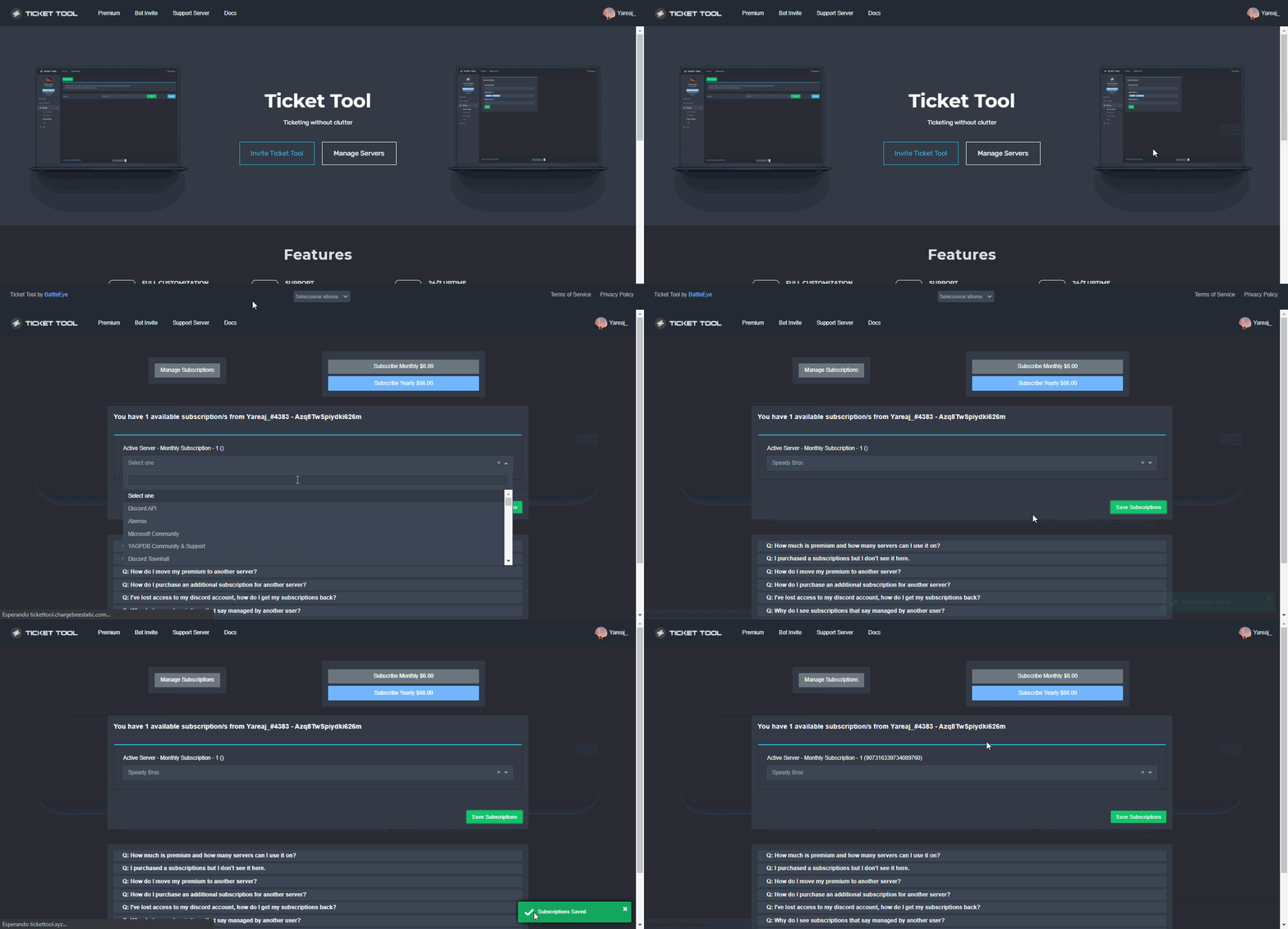
Redeeming premium on your server is really simple. Just head over to your Subscriptions Page. There you can select a server of your choice, which will get premium. You can change the server at any point.
 shut bolt
You can still buy a key if you want
jade topaz
i did
i got the 6 dollar one month thing
but idk what to do now
how do i use the spoofer
shut bolt
Spoofer?
shut bolt
Uh
jade topaz
bruh
shut bolt
No
humble sequoiaBOT

⚠️ You're in the wrong place
We provide support for @pseudo glen discord bot and cannot help you with whatever issue you have.
- Please make sure to contact the appropriate Support Team.
If you don't have any further questions regarding our bot Ticket Tool, please close this ticket
jade topaz
bro?
covert swallow
We arent spoofer support
shut bolt
jade topaz
bro?
Yeah?
shut bolt
For @humble sequoia lol
shut bolt
humble sequoia

 errant grotto
Can anyone help me with my discord bot?
humble sequoiaBOT
We would love to help you, but if you don't tell us what you need help with we can't help you :(
errant grotto
I'm trying to figure out how to set a prefix on my bot.
errant grotto
shut bolt
Or which bot?
My bot
shut bolt
Discord.js?
errant grotto
yes
errant grotto
K
shut bolt
errant grotto
K
errant grotto
Thanks
shut bolt
You can go and have a more accurate help there
errant grotto
Thanks @shut bolt
shut bolt
Sure
 winged estuary
when you look at the direct ticket transcript and it just shows @ and numbers for who closed the ticket, how do you figure out who did?
covert swallow
The user most likely isnt cached on your client
Interacting with that user's account in some way should recache it
covert swallow
Np
shut bolt
winged estuary
when you look at the direct ticket transcript and it just shows @ and numbers fo...
You mean inside the HTML file?
Or the embed inside discord itself?
shut bolt
Ohhhh okey
That exact part of the transcript stores the ID of the user
So you can do <@That Number>
And it will show you who closed it
winged estuary
where would i put the @number?
winged estuary
im assuming if they left the server it will come up blank?
shut bolt
@shut bolt
shut bolt
winged estuary
im assuming if they left the server it will come up blank?
If they are not cached on your client it will say invalid user
Or unknown user
winged estuary
kk
 shut bolt
Indeed
covert swallow
Apparently im not chached funny enough
shut bolt
covert swallow
Apparently im not chached funny enough
Mobile right?
covert swallow
Yeah
shut bolt
Discord being discord once again
covert swallow
Android canary amoled
shut bolt
Sure
winged estuary
and @covert swallow
copper owl
Discord being wonky? Seems normal
covert swallow
Id say even venture to say expected
 coarse spruce
what is different from the premium bot from normal bot
humble sequoiaBOT
 Faster Premium Bot
Automatic Transcripts
Full Customization
Custom Buttons
Direct Messages
Ticket Automation
Multipanels
Premium Support
You can purchase premium here:
Price
$6 - Monthly
$66 - Yearly
 Premium
copper owl
Premium
copper owl
You get a more stable and faster bot. As mentioned above ^^
jade topaz
.
 round cove
How do i make the bot have multiple ticket options and how do i name them
humble sequoiaBOT
For a more convenient use of multipanels, you can now combine panels on the dashboard. This will allow you to directly send the multipanel from the dashboard or via the $panel ID command.
Where can I find this?
You can find this setting on the Dashboard -> Panel Configs -> Settings -> General Options
Note: if you're attaching all the panels to a panel called English, don't include English in the attached panels box (If you do this, it will create duplicate)
This will put all buttons from all of your panels on one message. The message is the panel message from the panel you're combining these panels in.
Note: This is a premium feature
copper owl
round cove
How do i make the bot have multiple ticket options and how do i name them
^^
To name them differently, just go to the Button Options of each panel and edit the Open Ticket button. you'll be able to change the Button Text there
copper owl
anytime
 restive hound
Hello I have sent the RazerGold key .. how long do I have to wait for the access code?
for FiveM
restive hound
oh sorry
round cove
@copper owl Sry for the @ but how do u add an animated emoji for the emoji on the ticket option
copper owl
round cove
<@!548583124062175232> Sry for the @ but how do u add an animated emoji for the ...
just for reference pinging does go against the rules.. so be careful with that..
you have an emoji selector in the Button Emoji section of the Button Settings
you can select the animated emote there
restive hound

 prime bridgeBOT
Pandaaaaa has been timed out for 10m 

 Reason: Mass mentioning members
Pandaaaaa#0001 | 718755659814010910
 copper owl
restive hound
Unfortunately, I didn't understand my english is pretty bad ...
copper owl
restive hound
Unfortunately, I didn't understand my english is pretty bad ...
what didnt you understand?
restive hound
what i have to do now, just wanted to know how long it will take to process! do you have someone who speaks german
copper owl
restive hound
what i have to do now, just wanted to know how long it will take to process! do ...
we have a german team, but you're not in the right server
humble sequoiaBOT
⚠️ Du bist hier falsch
Wir bieten hier ausschließlich Support für den @pseudo glen Discord Bot an und können dir leider nicht mit irgendetwas anderem weiterhelfen.
- Bitte melde dich bei einem, für dein Problem geeigneten, Support Team.
Wenn du keine weiteren Fragen hast, die das Ticket Tool betreffen, schließe bitte dieses Ticket.
restive hound
unfortunately no ... I'm sorry that I don't understand you
how do i get to german support
copper owl
humble sequoia
@restive hound this is in german.. read
copper owl
restive hound
how do i get to german support
Sie sind auf dem falschen Server, wir bieten Support für den Ticket Tool Discord Bot, nicht für FiveM. Bitte wenden Sie sich dafür an das richtige Support-Team.
hard cape
$help category
humble sequoiaBOT
How to set the open category
To set a open category go to the Dashboard -> Panel Configs -> Settings -> Category Options -> Category Open
 hard cape
^^ @carmine zealot
 carmine zealot
thanks.
hard cape
Np
carmine zealot
ok, so I configured this, but the tickets are not populating into the category. they are still going to the top of the channel list.
hard cape
Send a pic
 hard cape
Does it works now?
 carmine zealot
interesting... I will test that, but I think there are fewer.
hard cape
Kk
 carmine zealot
dms?
hard cape
Ye
carmine zealot
server invite?
hard cape
Yep
carmine zealot
thanks.
prime bridgeBOT
loax.eth has been timed out for 10m
Reason: Posting Discord Server Invites
loax.eth#1848 | 927073016125489152
humble sequoiaBOT
Ticket Tool Invite & Support
copper owl
can you try using the second link?
copper owl
it's the bot invite
 coarse stirrup
Says authorized but doesn’t join
humble sequoiaBOT
 copper owl
can you let me know if you see your server here
try logging out and logging back into the website as well and check
copper owl
there's 0 way you can see your server on the dashboard and the bot isnt in the same server
copper owl
coarse stirrup
Even when do $debug
have you made sure that you're using the command in a channel TT can see?
coarse stirrup
Lmao well join my server cuz I promise it’s not in
Yes
I tried all channels
Even in member lost
copper owl
go to server settings, members, and search Ticket Tool
jade topaz
So I invited the bot to my discord but when I go to dashboard the server doesn’t show, all my other servers do though. Confusion 😅
coarse stirrup
Ok
copper owl
jade topaz
So I invited the bot to my discord but when I go to dashboard the server doesn’t...
try relogging in the website
log out and log back in
it should work if you have the necessary permissions
jade topaz
I’ll try again, I did that before I joined this haha
 copper owl
coarse stirrup
Bot has permission to channel i don’t understand
copper owl
coarse stirrup
Bot has permission to channel i don’t understand
which bot did you invite
premium or free
copper owl
Go to the Server Configs page and make sure you have the free bot selected
jade topaz
So I got it… One more thing, how do I set up the transcript channel? Or is that for premium only😅
copper owl
Oh of course not. transcripts are for all users, free or not
You can setup a transcript channel by going to the panel settings, then under the Logging Options
you'll see a Transcript Channel section, where you can define a channel
Just make sure TT has all the required permissions in the transcript channel
jade topaz
Thank you! @copper owl
copper owl
No problem
coarse stirrup
We’re do I go for that because I thought did it but didn’t change

Or can not change with free bot?
copper owl
Whenever you make a change to the panel message, you need to resend the panel so it updates
coarse stirrup
Yea I did that
copper owl
You can edit the panel message under Panel Options in the Panel Settings
Also make sure you didn't name the panel that.. as the title of the panel is used in the Panel Message itself
coarse stirrup
Ok thank you
I can’t seem to change it we’re it says customer support above CLICK/TAP THE BUTTON BELOW TO SPEAK
DIRECTLY WITH A STAFF MEMBER
copper owl
i dont see anywhere where it says "Customer Support"
 copper owl
Send the ID of the server please
copper owl
i still don't see where it says customer support in the screenshot tbh
it just says support in the screenshot
 copper owl
it already says support..
copper owl
coarse stirrup
Mine says customer support I want it changed to just support
"I want it changed to just support"
You already have it as just support
copper owl
I'm not sure if you're conveying what you want incorrectly or if I'm misinterpreting what you want
coarse stirrup
I want it to say support like in that ss but for my server it says customer
copper owl
okay that makes alot more sense
coarse stirrup
Sorry doing a lot at once…
copper owl
Go to your Panel Configs, press on Settings and Rename the panel to Support
then resend it
coarse stirrup
Wow that simple that simple I’m so sorry 🤦🏽♂️
hard cape
Try to turn off cookies and turn on them again
 limpid lagoon
where
hard cape
Search it up on YouTube
jade topaz
how do i put an emoji in the support text

 scenic plinth
Just because I now saw this, for one I'd check your ticket. And for safety reasons, I'd delete you message as you've placed your ip in it, which people can mess with.
hard cape
limpid lagoon
Check YouTube
limpid lagoon
I clear date my cookies
hard cape
jade topaz
how do i put an emoji in the support text
<:NAME:ID>
hard cape
limpid lagoon
I clear date my cookies
Turn on them again
limpid lagoon
done
hard cape
Try refresh the page
limpid lagoon
hard cape
Turn on them again
Servers - (server not showing up? try relogging)
It looks like Ticket Tool isn't online or in any servers you have permission to access,Invite Ticket Toolor check it'sstatus
?
humble sequoiaBOT
Don't see your server in the dashboard?
You will possibly need to relog. Look below to see steps on how to relog.
How to relog in the Dashboard.
First, you will need to go to the dashboard. Once your there, click on your avatar on the top right. after you clicked it, you will see button that says Logout. You must click that. Once you have logged out, you can log back in.
Note:
You need one of these 3 things to access the dashboard.
1. Server Owner (Level: 6)
2. Server Administrator (Level: 4)
3. Dashboard Role (Level: 2)
:warning: You can check your level using $level on your Discord Server
User permission level with Ticket Tool
@User is permission level: 0 (User)
```» *If it shows that your permission is **0**, you don't have any of the above **3 things** to manage the dashboard.*


**See the GIF below on how to relog:**Try this
jade topaz
hard cape
`<:NAME:ID>`
wdym
limpid lagoon
okay
 limpid lagoon
IT WORKING
jade topaz
@hard cape
limpid lagoon
Thank @hard cape
 iron nightBOT
@limpid lagoon :: You can't rep D<3#8894 for 56 minutes and 27 seconds. Try coming back later?
Gave +1 Rep to @hard cape
hard cape
Np
hard cape
jade topaz
like this
$idcommand
humble sequoiaBOT
How do I get the ID of Roles/Channels/Emojis?
Ticket Tool has a useful command that helps you get the ID of various things like channels, roles, emojis and your server.
Just use the command $id <#channel/@role/:emoji:>. Now copy everything, including the brackets <...>, to your dashboard (or wherever you want it)
If you want the server ID, just use $id.
Examples:
Server ID: $id ➝
509192800865353738
Roles: $id @Role ➝@humble sequoia
Channel: $id #channel ➝#🤖│bot-spam
User: $id @user ➝@copper owl
Emoji: $id
 jade topaz
<:NAME:ID>929705171519438878
:frimangeremovebgbluepreview:
<:frimangeremovebgbluepreview:ID>929705171519438878
 silk musk
Can anyone help me bc every time I try to add the ticket into a channel it say to debug it and I run the command but nothing happens and it still says the same thing.
hard cape
:frimangeremovebgbluepreview: @jade topaz
jade topaz
 hard cape
: is missing
hard cape
silk musk
Can anyone help me bc every time I try to add the ticket into a channel it say t...
So bot is not responding?
Or?
silk musk
Basically yeah I can't even run the help command but im not sure if the bot is down or its something on my end
jade topaz

 hard cape
silk musk
Basically yeah I can't even run the help command but im not sure if the bot is d...
hard cape
silk musk
Basically yeah I can't even run the help command but im not sure if the bot is d...
Try to disable prem bot
humble sequoiaBOT
How to disable the premium bot
To disable the premium bot you will have to go to the Dashboard ➞ Server Configs ➞ Premium bot ➞ And on the right-hand side select the primary free bot in the drop down menu.
Premium features will still work on the normal bot.
 silk musk
Okay
hard cape
@jade topaz there is an example

 brittle socket
Hello I was wondering if it is possible to use the ticket tool as a application system like with custom questions that the bot ask the user
silk musk
hard cape
Try to disable prem bot
I got it thanks
jade topaz
<:$idfrimangeremovebgbluepreview:929705171519438878> General Support like this
hard cape
No problem
 wraith harbor
Hi everyone! Sorry for interrupting, but I've got a question- is it possible to setup Tag commands, so that the bot takes user input words and embeds it into the response? Example:
User A types in:
!promote (at)User B RankA
And the bot outpusts
"(at)User A promoted (at)User B to RankA"?
If so, how do I crack on it?
hard cape
jade topaz
<:$idfrimangeremovebgbluepreview:929705171519438878> General Support like this
Yep
jade topaz
not working
hard cape
brittle socket
Hello I was wondering if it is possible to use the ticket tool as a application ...
It will create a ticket
hard cape
jade topaz
not working
Send ss
jade topaz
 hard cape
Remove $id
brittle socket
hard cape
It will create a ticket
yeah I was wondering if it could ask custom questions to the person
hard cape
Ye, u can paste them to a ticket message
jade topaz
 brittle socket
but is there a way for the bot to add it when they make the ticket
hard cape
jade topaz
<> are missing and id is missing too
hard cape
brittle socket
but is there a way for the bot to add it when they make the ticket
When They create a ticket, but automatically send a ticket message
humble sequoiaBOT
The Ticket Message is the first message sent by the bot in a new ticket. To customise it head over to your Dashboard ➞ Panel Configs ➞ Settings ➞ Ticket Options ➞ Edit Ticket Message
 brittle socket
ah alr ty for the help that would make my life way easier instead of having to copy and paste a pre made list of questions into every ticket ty!
hard cape
No problem!
@jade topaz If is it not working, send me a link to you Server and I can help u there
silk musk
@hard cape Do you happen to know how to fix when you try to mention at role but it doesn't work?
humble sequoiaBOT
Mentions
Within all the messages the bot's sends (both embeds and text) you can mention either channels, roles, or even users, these mentions will only send a notification to the user if they are used within a text field, e.g: a role mentioned in an embed won't ping at all the users who have that role.
For mentioning a role you can use one out of three options:
{@Role Name} ➞ Which is Case Sensitive.
{RoleID} ➞ Replace RoleId with the Id of the role you are trying to ping.
<@&RoleID> ➞ Discord's native syntax to ping roles.
<#ChannelID> ➞ Mention a channel by its ID.
<@UserID> ➞ Mention a user by its ID.
silk musk
I di {@Role ID} and {@role Name}
hard cape
I recommend to use <@&RoleID>
silk musk
Ok
hard cape
silk musk
I di {@Role ID} and {@role Name}
It’s {ROLE id} , not {@ROLE id}
So that can be the problem too
silk musk
Ik that's just how i typed it but I got it to work thank you again you have been a huge help
hard cape
No problem
 cosmic oak
i have a problem where everyone in the server gets pinged in a ticket when it is opened even though they cant view it
humble sequoiaBOT
How to hide tickets from everyone
Head over to your Dashboard ➞ Panel Configs ➞ Settings ➞ General Options ➞ Edit Everyone Roles Opened Permissions

NOTE that @everyone can type aswell if it has permissions to send messages
 thorny sky
How do i open a new ticket using a command (as an admin in my server)
 thorny sky
on dashboard?
hard cape
Yep
humble sequoiaBOT
 plain crystal
okie
thorny sky
alright, thxs
jade topaz
logging for transcripts not working ?
humble sequoiaBOT
How do I save transcript to a channel?
To save transcripts to a channel go to the Dashboard -> Panel Configs -> Settings -> Logging Options -> Transcript Channel
 hard cape
@jade topaz
jade topaz
hard cape
<@456226577798135808>
nvm got it working sorry aha but now having trouble removing the footer at the bottum right
 hard cape
Bot needs permission to type to the transcript channel
jade topaz
cant find it
hard cape
What u can’t find?
 jade topaz
 hard cape
No problem again
cosmic oak
hard cape
<@689925719391862879>
no one can see the channel, yet they still get pinged..
 calm vale
how we put the bot in a server because it cannot find my server
hard cape
Did u invite him?
calm vale
I'll try
hard cape
$invite
humble sequoiaBOT
Ticket Tool Invite & Support
 keen ferry
Hey, anyone know how to ping the Mod in the ticket message?
humble sequoiaBOT
How to make Ticket Tool ping a role
To make ticket tool ping a role when a ticket is opened, go to the Dashboard -> Panel Configs -> Settings -> Ticket Options -> Ticket Message -> Message Text and do this:
{@Role name} This is case sensitive and the role must have @mentions enabled
 hard cape
$mentions
humble sequoiaBOT
Mentions
Within all the messages the bot's sends (both embeds and text) you can mention either channels, roles, or even users, these mentions will only send a notification to the user if they are used within a text field, e.g: a role mentioned in an embed won't ping at all the users who have that role.
For mentioning a role you can use one out of three options:
{@Role Name} ➞ Which is Case Sensitive.
{RoleID} ➞ Replace RoleId with the Id of the role you are trying to ping.
<@&RoleID> ➞ Discord's native syntax to ping roles.
<#ChannelID> ➞ Mention a channel by its ID.
<@UserID> ➞ Mention a user by its ID.
hard cape
Check these steps and you will know!
 latent wren
Hello
hard cape
Hai
latent wren
How do i even start and put 1 ticket channel on a server?
already incited, gave high role etc
hard cape
Wdym?
keen ferry
hard cape
Hey!
Thank u very much ❤️
hard cape
No problem!
latent wren
hard cape
Wdym?
i invited the ticket tool bot, gave it premission.
what do do next to have a channel of tickets?
hard cape
$help panel
humble sequoiaBOT
Creating a panel
To create a panel we are going to need to head over to the panel configs on the dashboard
Once at the dashboard we will need to click Create Panel
Enter a panel name (Fill in any optional settings you want)
Click Create Panel and your ready to get started with configuring your panel
An example of a creating a panel is shown below.
hard cape
There is how you can create a panel for tickets
calm vale
thank you D <3 for telling me I managed to put the bot !
hard cape
No problem
latent wren
hard cape
There is how you can create a panel for tickets
thanks. not sure about all the configs inside :/
hard cape
No problem, if u have more questions ask
limpid lagoon
hard cape
Lemme send a pic
I think you Showed be Support team
hard cape
Aw thanks!
limpid lagoon
hard cape
Aw thanks!
np I Think you showed you good
hard cape
Ty! If you want to chat, we can talk in #💬│general-chat
covert swallow
No 5
covert swallow
Rule 4.
 fringe bane
hello, is it possible that users cant close tickets and only staff can do so?
hard cape
Yep
There is a way
Go to Button Options
Then Close ticket
And enable ** Support Team Only**
@fringe bane
fringe bane
Thank you! :D
hard cape
No problem
shut bolt
Do not ping staff for help
humble sequoiaBOT

فريق الدعم الفني العربي
عميلنا العزيز ان كنت تبحث عن مساعدة يرجى فتح تكت خاص بفريق الدعم الفني العربي
اذهب الى#🎫│make-a-ticket
ثم قم بلضغط على الايموجي الاتي (🇯🇴)
echo summit
shut bolt
Heya, you mean the reaction?
i want to see how many time people use that
mean in my server therer is not count on that
i want see number of ticket
copper owl
that's just a reaction people reacted to
if you want to see how many tickets you have opened, just check the "ticket count"
copper owl
echo summit
mean in my server therer is not count on that
thats because it isnt a feature
people just react to the message themselves
echo summit
how to check
copper owl
we already have a {count} variable that you can use, or you can just check the Ticket Count in your General Options and see how many tickets have been opened
echo summit
ticket
copper owl
copper owl
we already have a `{count}` variable that you can use, or you can just check the...
echo summit
i see
 humble sequoiaBOT
━━ moved to ticket ━━
 narrow belfry

in this section is it possible to put the nik discord in the name of the ticket?
{user} gives the id
hard cape
Hey!
humble sequoiaBOT
{server.name} ➞ Name of the server
{server.id} ➞ ID of the Server

[#🆘│community-support](/guild/509192800865353738/channel/776680605517742090/) = <#channel> ➞ Channel link of the current channel
{channel.name} ➞ Name of the current channel
{channel.id} ➞ ID of the current channel

{author} = <@user> ➞ Mention of the user triggering this message
{author.name} ➞ Name of the user triggering this message
{author.id} ➞ ID of the user triggering this message
{author.nickname} ➞ Nickname of the user triggering this message
{author.icon} ➞ Direct Url of the profile picture of the user triggering this message
{author.tag} ➞ 4 digit tag (discriminator) of the user triggering this message
{author.full} ➞ username + 4 digit discriminator of the user triggering this message

{panel.count} ➞ The current count number of the panel (Tickets only)
{panel.name} ➞ The name of the panel (Tickets Only)
{panel.ticketLimit} ➞ The current limit of the panel (Ticket Only)

{ticket} = <#channel> ➞ Channel mention of the ticket
{ticket.id} ➞ Channel ID of the ticket

{ticket.user} = <@user> ➞ User mention of the ticket user
{ticket.user.name} ➞ Name of the ticket user
{ticket.user.id} ➞ User ID of the ticket user
{ticket.user.nickname} ➞ Nickname of the ticket user
{ticket.user.icon} ➞ Direct Url of the profile picture of the ticket user
{ticket.user.tag} ➞ Tag / Discriminator of the ticket user
{ticket.user.full} ➞ Username + Discirimator of the ticket user```
Roles can be either
{@role name} or {role ID}
_ _
_ _
Additional variables
{reason}
» works on $close <reason>, $delete <reason>, $new <reason>, $claim <reason>
» displays the reason, you can optionally give with some commands
Transcript Variables
{ticket_name}➞ Name of the ticket
{panel_name}➞ Name of the panel
{transcript_url}➞ File link of the transcript
Hide Link under blue text:
[Click me](https://tickettool.xyz)➞ Click me
Time Variable
Sends the current unix time in seconds. Optinally add or remove seconds
<t:{!time+43200}:R>➞ <t:1641803895:R>
<t:{!time+43200}:R>➞ <t:1641717495:R>
<t:{!time+43200}:R>➞ <t:1641760695:R>
» Remove ! before time
_ _
<t:1641006000>➞ <t:1641006000>
<t:1641006000:f>➞ <t:1641006000:f>
<t:1641006000:F>➞ <t:1641006000:F>
<t:1641006000:D>➞ <t:1641006000:D>
<t:1641006000:d>➞ <t:1641006000:d>
<t:1641006000:t>➞ <t:1641006000:t>
<t:1641006000:T>➞ <t:1641006000:T>
<t:1641006000:R>➞ <t:1641006000:R>
» You can use https://hammertime.djdavid98.art/ to create custom dates/times
narrow belfry
@hard cape ty mate
hard cape
Np, I’ll send a pic for user n tag only, wait
^^ @narrow belfry

{ticket.user.name}-{ticket.user.tag}
narrow belfry
yeah thanks
hard cape
No problem
 waxen crag
How I use tickets
hard cape
$help panel
humble sequoiaBOT
Creating a panel
To create a panel we are going to need to head over to the panel configs on the dashboard
Once at the dashboard we will need to click Create Panel
Enter a panel name (Fill in any optional settings you want)
Click Create Panel and your ready to get started with configuring your panel
An example of a creating a panel is shown below.
hard cape
^^ @waxen crag
waxen crag
Yes
hard cape
humble sequoia
Check this out
waxen crag
I don’t want to know how i create i wanna how i use
hard cape
Where?
waxen crag
Any where
hard cape
$help send
humble sequoiaBOT
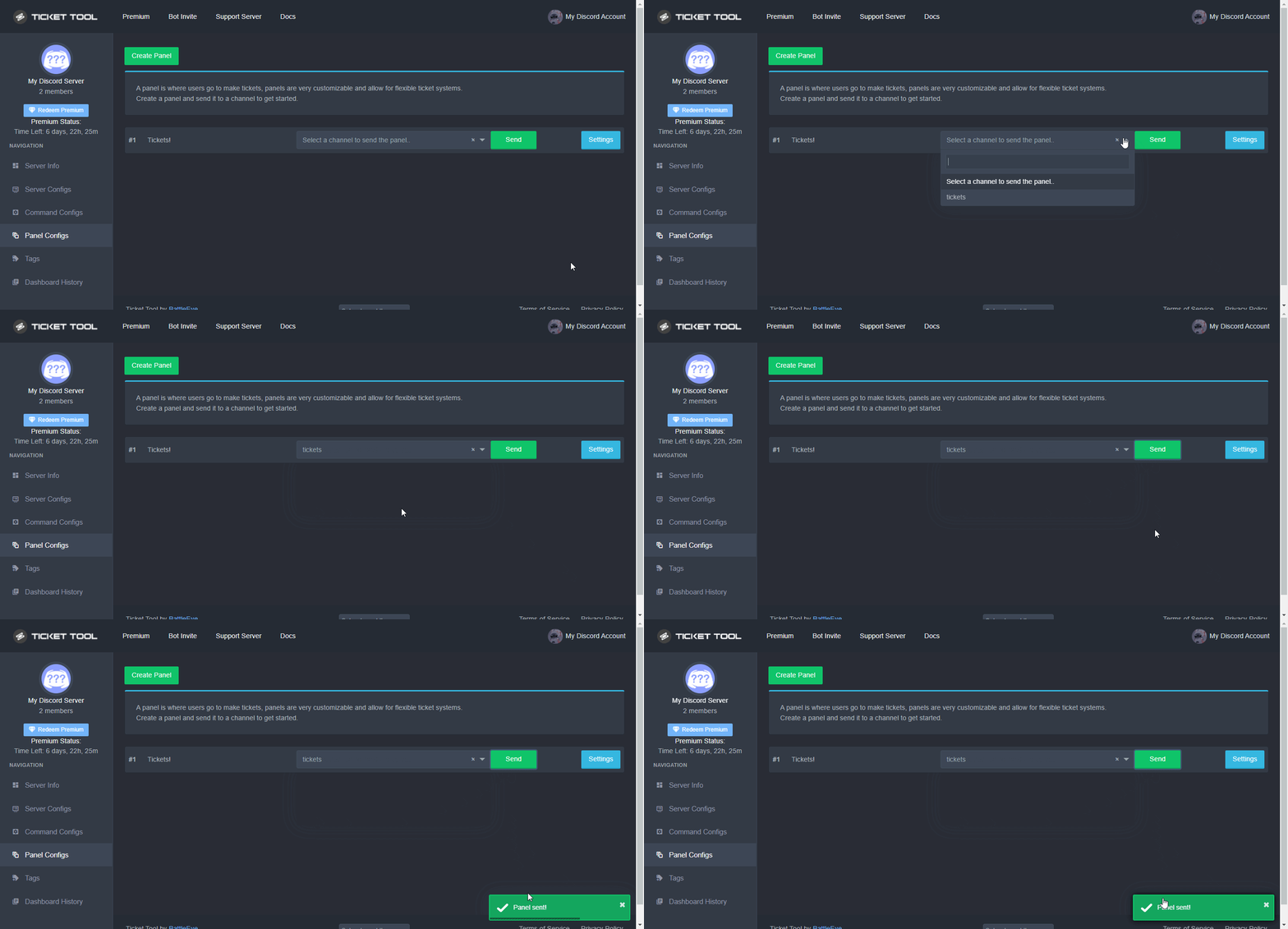
Sending a panel
Once you've created a panel on the dashboard you will need to send it to a channel using send on the dashboard
Select the channel you want your panel to be created in and click send.
For other questions checkout $help faq
An example of a sending a panel is shown below.
 errant bear
Hello
shut bolt
For commands please use #🤖│bot-spam
shut bolt
errant bear
How do i work here
$staffapps
humble sequoiaBOT
How do be I become a Support Member?
You can become a support member in 2 ways:
1. You can be really active in #🆘│community-support gain <@&799500225579712543> role and get chosen by a Manager
2. You can apply VIA our applications that would be sent in #📣│server-news
We currently have Support Teams for the following languages:
:flag_us: English
:flag_jo: Arabic
:flag_fr: French
:flag_de: German
:flag_br: Portuguese
:flag_es: Spanish.
 quick pawn
What do I do if my ticket creator isn’t working
humble sequoiaBOT
━━ moved to ticket ━━
 unkempt cairn
عرب ؟
robust sandalBOT
unkempt cairn
عرب ؟
 yazeed
Arab?
Persian (fa) → English (en)
shut bolt
$articket
humble sequoiaBOT
فريق الدعم الفني العربي
عميلنا العزيز ان كنت تبحث عن مساعدة يرجى فتح تكت خاص بفريق الدعم الفني العربي
اذهب الى#🎫│make-a-ticket
ثم قم بلضغط على الايموجي الاتي (🇯🇴)
 reef elbow
unkempt cairn
عرب ؟
reef elbow
unkempt cairn
عرب ؟
امر
copper owl
unkempt cairn
عشان ادخلهم سيرفري
No advertising :)
unkempt cairn
ها ؟
unkempt cairn
نو نو
copper owl
ممنوع تبعت رابط لسيرفرك كاعلان :)
reef elbow
unkempt cairn
ولا اشي بس بعرف اذا في عرب
في بس قليلين
reef elbow
copper owl
ممنوع تبعت رابط لسيرفرك كاعلان :)
She asking for any Arab here
reef elbow
unkempt cairn
بتفع ادخلهم سيرفوب
لا
unkempt cairn
اها اسف
reef elbow
ممنوع
unkempt cairn
تمت
reef elbow
unkempt cairn
اها اسف
مايهمك
reef elbow
unkempt cairn
قول للازم الانقليزي انه يزيد بحبك
اوكي 😂
unkempt cairn
😂😂
reef elbow
@copper owl Yazeed love u
copper owl
reef elbow
She asking for any Arab here
I understand arabic, but "checking if there are any arabs here to invite them to their server" is not allowed
reef elbow
copper owl
I understand arabic, but "checking if there are any arabs here to invite them to...
Yes I know
copper owl
advertising their server is against the rules.. Just a thing to keep in mind :)
unkempt cairn
copper owl
I understand arabic, but "checking if there are any arabs here to invite them to...
ها يسطا
reef elbow
copper owl
advertising their server is against the rules.. Just a thing to keep in mind :)
Yup I know
reef elbow
unkempt cairn
ها يسطا
بيقولك بيفهم عربي بس ممنوع الاعلانات هنا
copper owl
mhm, just letting them know before they get in trouble 👍
unkempt cairn
اها
reef elbow
او نشر روابط
copper owl
reef elbow
او نشر روابط
مية بالمية
reef elbow
copper owl
مية بالمية
❤️👌🏻
humble sequoiaBOT
لا ترى سيرفرك في لوحة التحكم؟
ربما ستحتاج إلى إعادة التسجيل. اقرأ الإرشادات التالية لمعرفة كيفية إعادة تسجيل الدخول
كيفية إعادة تسجيل دخول في لوحة التحكم.
اذهب الى لوحة التحكم. اضغط على صورة حسابك الموجودة في أعلى يمين الشاشة, ثم اضغط على زر Logout. عندما تسجل الخروج, يمكنك اعادة تسجيل الدخول مرة أخرى في الموقع.
ملحوظة :
تحتاج إلى أحد هذه الصلاحيات الثلاث للوصول إلى لوحة التحكم:
- مالك السيرفر
- مسؤول السيرفر
- رول لوحة التحكم
⚠️ يمكنك تأكد من صلاحياتك باستعمال الامر $level في سيرفرك.
User permission level with Ticket Tool
@User is permission level: 0 (User)```» اذا استجاب تكت تول أن مستوى صلاحياتك 0,  هذا يعني أن لا يمكنك الدخول على لوحة تحكم سيرفرك.

انظر الGIF التالية لخطوات إعادة تسجيل الدخول grand sky
is there a way to check how much days of premium you have using the bot
instead of the website
copper owl
Not entirely no
you can check the website and see when you got the subscription
and then just math your way into an answer
 stark tusk
what do i do my server does not show up on the dashboard
i have tried multiple options such as giving it roles and etc but it still wouldnt work
@copper owl can you help me
copper owl
read the #546557408902905896
copper owl
Not currently no, Im registering for my Uni courses
if you open a ticket, someone might be able to help out before me
stark tusk
okay
copper owl
and dont ping anyone in the ticket either please 🙂 just wait
copper owl
grand sky
is there a way to check how much days of premium you have using the bot
Heya, just gonna pop back in to tell you, if you're using a key (not a subscription), you can run $debug and it should show you the day and year the premium expires
if you're on a sub, it wouldnt show this though
grand sky
copper owl
Heya, just gonna pop back in to tell you, if you're using a key (not a subscript...
kk ty
copper owl
grand sky
kk ty
are you using a sub or key?
 bitter wigeon
This might be a silly question but how do you setup multiple buttons for the same panel, like in #🎫│make-a-ticket 😅
humble sequoiaBOT
Multipanels are a premium feature  that allow for a single panel with multiple buttons to open different tickets.
How to create a Multipanel
Premium users can combine multiple panels into one multipanel.
First, find the IDs of each panel you wish to combine. You can find them in your Panel Configs in the Dashboard
Next, send the multipanel to a channel using $panel [id1] [id2] {id3} ....
e.g. $panel 1 2 4 17 35 to combine panels 1, 2, 4, 17 and 35.
Up to 25 panels may be combined.
 humble sequoiaBOT
How to disable the premium bot
To disable the premium bot you will have to go to the Dashboard ➞ Server Configs ➞ Premium bot ➞ And on the right-hand side select the primary free bot in the drop down menu.
Premium features will still work on the normal bot.
 vocal salmon
'Failed to send panel, Run $debug in the channel to check for errors.'
What should I do in this case? $debug doesn't work either.
hard cape
^^ @vocal salmon
hard cape
humble sequoia
vocal salmon
thx
hard cape
Np
 scarlet rock
bot not working in my server
hard cape
Send a pic here
scarlet rock

 hard cape
Ok, so
humble sequoiaBOT
How to disable the premium bot
To disable the premium bot you will have to go to the Dashboard ➞ Server Configs ➞ Premium bot ➞ And on the right-hand side select the primary free bot in the drop down menu.
Premium features will still work on the normal bot.
scarlet rock
not responding on debug too
hard cape
Try this
hard cape
humble sequoia
^^
scarlet rock
kk wait
scarlet rock
hard cape
Try this
i can click on tick i think becuz i am a free server
hard cape
Try to disable the premium bot
scarlet rock
i dont have it in my server
scarlet rock
so i should add him ?
hard cape
No, pick free one
scarlet rock
i cant pick its not aloowing me to do so


 hard cape
Ok
scarlet rock
can you see ?
hard cape
Ye
scarlet rock
see i am clicking
hard cape
Try to invite premium and then pick free one
 scarlet rock
sure
 peak coral
hi
peak coral
 scarlet rock
hard cape
Check create button options
scarlet rock
hard cape
Check create button options
telling me ?
peak coral
Does not work
hard cape
Yep
humble sequoiaBOT
How to disable the premium bot
To disable the premium bot you will have to go to the Dashboard ➞ Server Configs ➞ Premium bot ➞ And on the right-hand side select the primary free bot in the drop down menu.
Premium features will still work on the normal bot.
scarlet rock
@hard cape but the bot is not responding to cmds too
peak coral
Does not work
 hard cape
Try to disable prem bot @peak coral
hard cape
scarlet rock
<@!832329623596957797> but the bot is not responding to cmds too
Check it on website
@scarlet rock So you’ve checked the audit log?
hard cape
Check bot’s permissions
scarlet rock
wait
hard cape
Ok
scarlet rock
i i did
 opal flame
Hi I have a question, please
hard cape
Go ahead
hard cape
scarlet rock
i i did
Was there something?
scarlet rock
hard cape
Was there something?
it is empty
hard cape
I don’t know yet, sorry, try to open a ticket
opal flame
I used regular ticket tool for a period of time and it's all set up well, now when I upgraded and changed in panel autosave transcripts do I need to delete the old open ticket message in the channel or I can keep using it and transcripts will save in the designated channel ?
hard cape
Wdym?
opal flame
Can I post screenshots?
opal flame
when I use free version button to open the ticket while having a premium bot on the server
 humble sequoiaBOT
The first thing you will need to do is invite the premium bot, an invite can be found here
Once the bot is in your server we will head to the dashboard and manage your server. When you are managing your server, you want to head into "Server Configs" then click the drop down menu under "Select the bot you would like to use on this server" then click "Ticket Tool#6207" and then save.
 opal flame
does it work as a premium or I need to resend panel
 hard cape
U have to enable premium bot
hard cape
humble sequoia
There’s how
hard cape
Check create button
scarlet rock
how
hard cape
$buttons
humble sequoiaBOT
The new Discord Buttons allow for a much smoother and convenient experience. They reduce lag and work much better than emojis. With ticket tool you can edit all the buttons however you like! Buttons can show emojis, text and can have 4 different colors.
Where can I edit them?
Dashboard ➞ Panel Configs ➞ Settings ➞ Button Options ➞ Setting
hard cape
There is where you can find them
scarlet rock
k wait
hard cape
It wont be the problem, But check it
scarlet rock
checked
hard cape
Is there any disabled role?
hard cape
From mine?
scarlet rock
dev team
hard cape
Oh
scarlet rock
tell them to check
hard cape
Im a basic member
hard cape
You can contact them in #🎫│make-a-ticket
scarlet rock
kk
hard cape
But dont Ping them
hard cape
scarlet rock
kk
Did u open a ticket?
scarlet rock
yep
hard cape
Kk, tell me What was the problem Please, i want to learn something new
scarlet rock
they not responding
hard cape
Ping me when it's resolved
 left turret
I don't find my server in ticket toll website
humble sequoiaBOT
Don't see your server in the dashboard?
You will possibly need to relog. Look below to see steps on how to relog.
How to relog in the Dashboard.
First, you will need to go to the dashboard. Once your there, click on your avatar on the top right. after you clicked it, you will see button that says Logout. You must click that. Once you have logged out, you can log back in.
Note:
You need one of these 3 things to access the dashboard.
1. Server Owner (Level: 6)
2. Server Administrator (Level: 4)
3. Dashboard Role (Level: 2)
:warning: You can check your level using $level on your Discord Server
User permission level with Ticket Tool
@User is permission level: 0 (User)
```» *If it shows that your permission is **0**, you don't have any of the above **3 things** to manage the dashboard.*
**See the GIF below on how to relog:** upper mica
Could someone help me set up the ticket tool I have a hard time setting it up because I’m on phone
hard cape
upper mica
Could someone help me set up the ticket tool I have a hard time setting it up be...
Do you still need help?
humble sequoiaBOT

You can check our documentation here.
You can also check #573205317870157855 for the basic setup.
Our documentation contains all the info you need about the bot to be able to setup and configure the bot however you like.
hard cape
There is a guide how to setup
hard cape
It works on mob too
upper mica
I can’t open multiple tabs to do it
hard cape
Send a pic
upper mica
It says I need to open another tab but I can’t because I click the link thru discord
Idk what to send a picture of
humble sequoiaBOT
hard cape
You want to configure tickets? @upper mica
hard cape
I already sent docs, But “It’s not working”
 glad shuttle
I have a question before I start using this bot. Can a specific role that is not a moderator or admin role respond to/close tickets?
if not, is it possible to give mod perms to only the channels this would be used in?
humble sequoiaBOT
How to let support team see into a ticket
About support roles
A support role lets your support team see into tickets with out having to add them manually to each and every ticket.
You can add as many support roles as you like per panel.
NOTE that the way discord works all admins can see into tickets regardless of this.
How to set a support role
To set a Support role go to the Dashboard -> Panel Configs -> Settings -> General Options -> Support Team Roles.
NOTE that the support role will not be able to see into tickets that are already created..
glad shuttle
Ohhh, this might work well then. I'm trying to find a way to set up a craft request system, and I have a specific role set for people I want to take the orders. but just using a channel/threads was getting super cluttered. I know this archives/saves logs, but is there a way to make sure it saves in a specific channel? like posts in a channel once the ticket was completed and who completed it?
Sorry xD I've got a crafting request channel that I want tickets to be able to be made in and an order log channel so I know what's been done/who's actually doing them. I'm trying to find a better way of tracking them.
humble sequoiaBOT
How do I save transcript to a channel?
To save transcripts to a channel go to the Dashboard -> Panel Configs -> Settings -> Logging Options -> Transcript Channel
hard cape
^^
glad shuttle
Thank you very much!
hard cape
No problem
 gilded verge
Hi, Currently, I have 191 days and I am collecting for 202 days and I do not know how many votes I still need. Who can help me?  (pls use reply)
copper owl
gilded verge
Hi, Currently, I have 191 days and I am collecting for 202 days and I do not kno...
what is this in regards to?
gilded verge
It's about votes for the Premium bot.
gilded verge
So if I have 191 days and want 202 Premium days, how many votes do I need? 😳
copper owl
i mean...
 kindred kindle
I added The bot in my server but When I opened The Dashboard I don’t Find My server
What’s The Problem ?
copper owl
gilded verge
So if I have 191 days and want 202 Premium days, how many votes do I need? 😳
you can do the math lol
2 votes = 1 day
11 days = 22 votes
copper owl
kindred kindle
I added The bot in my server but When I opened The Dashboard I don’t Find My ser...
try logging out and back into the website
gilded verge
I am very weak at math, so I asked for help 😅
Thank you so much @copper owl 
kindred kindle
copper owl
try logging out and back into the website
Thx 👍
kindred kindle
Worked With me
 sharp hatch
copper owl
sharp hatch
copper owl
Navigate to Ticket Options and edit the Ticket Message
You can input {@Role Name} or {Role ID} in the Message Text.
you can find the Ticket Options section in your Panel Settings, which can be found in the Panel Configs page
 coral sequoia
So I’ve been with ticket tool for a very long time and think I B would be a great support of you guys need someone
shut bolt
coral sequoia
So I’ve been with ticket tool for a very long time and think I B would be a grea...
#📣│server-news check the last announcement
coral sequoia
Okay thank you.
jade topaz
How i get the code for premium ?
 kind hawk
jade topaz
How i get the code for premium ?
kind hawk
jade topaz
How i get the code for premium ?
when you make the paiement, you should have received instructions.
jade topaz
i dont know what you mean
hard cape
@kind hawk ^^ Someone is calling you
kind hawk
jade topaz
i dont know what you mean
Go there: https://tickettool.xyz/premium follow the instructions 🙂
jade topaz
a friend is createing a ticket on my server but the bot says she dont have permissions to this
i cecked the hole settings of the ticket but i dont see anything wrong
jade topaz
no
hard cape
If she can’t, check create ticket button or blacklisted roles
hard cape
@jade topaz , is it fixed?
jade topaz
Yes ty
hard cape
No problem!
cosmic oak
i have a problem where everyone in the server gets pinged in a ticket when it is opened even though they cant view it, so its obviously pinging them and then making the channel private, is this a bug for the bot?
cosmic oak
what ticket message?
hard cape
Just open a new ticket, And Send a ss
 cosmic oak
?
hard cape
Go to Dashboard
cosmic oak
yes
humble sequoiaBOT
cosmic oak
ik
hard cape
Then Go to ticket message
cosmic oak
yes, i know its got @ here, but i want that as it notifies staff to the ticket quicker. the thing is it used to work fine but now its notifying everyone online not just staff
hard cape
Then create a role for staff like ping role and change it
cosmic oak
i would do that but its just an inconvenience as @ here only pings online members but pinging the role pings everyone. if i have to do it then i will but its just annoying that pinging @ here used to work fine.
hard cape
Ye, but @ here pings every online members
cosmic oak
exactly
hard cape
So I recommend to create ping role for staff
 uneven summit
Hey! I just purchased the premium version and would like to activate it, however, I do not know where to find the activation code for premium
humble sequoiaBOT
━━ moved to ticket ━━
 vale ember
hello
 buoyant bobcat
Hallo. is there a way for me to ping role when someone open a ticket ?
 shut bolt
Use either {@Role name} or {Role ID}
buoyant bobcat
Thanks ❤️
shut bolt
Sure :)
 shut bolt
buoyant bobcat
Not sure i'm doing it righ t:(
shut bolt
buoyant bobcat
Not sure i'm doing it righ t:(
No worries
shut bolt
buoyant bobcat
Do {670....}
shut bolt
No worries jajaja, sorry for my delay
 gloomy jacinth
don't mention support team thx
 quartz fable
gloomy jacinth
don't mention support team thx
quartz fable
gloomy jacinth
don't mention support team thx
ok but can you help me
errant grotto
quartz fable
i have problem when i close the tick it dosent close
send a screenshot
 sturdy quartz
 turbid shell
How do I ping a role? Preferably in the webhook, but I have a team who would preferred to be pinged but not sure how to actually ping a role.

ive done exactly what it says, "{role ID}" and not sure why it isnt working
 shut bolt
turbid shell
ive done exactly what it says, "{role ID}" and not sure why it isnt working
shut bolt
turbid shell
ive done exactly what it says, "{role ID}" and not sure why it isnt working
You are not doing exactly as it says
turbid shell
shut bolt
You are not doing exactly as it says
Oh?

Is this last part not correct?
turbid shell
I tried different versions, and oh sorry for not specifying
shut bolt
Try using the {@Role Name} version
To see if it works
And meanwhile
May I have the server ID?
So I can check what could be wrong?
turbid shell
shut bolt
May I have the server ID?
842063518705385492
and ive also tried using the role name
 shut bolt
Which is the panel?
turbid shell
shut bolt
Which is the panel?
the panel is in eats-inc, and its panel #4
shut bolt
Okey I see a problem
Here where you tried using Discord's native syntax to ping roles <@&ID> it shows a "deleted role" error


This means that ID 930296663388610691
Is not an actual role, or it was deleted
Thus Ticket Tool is not being able to ping it
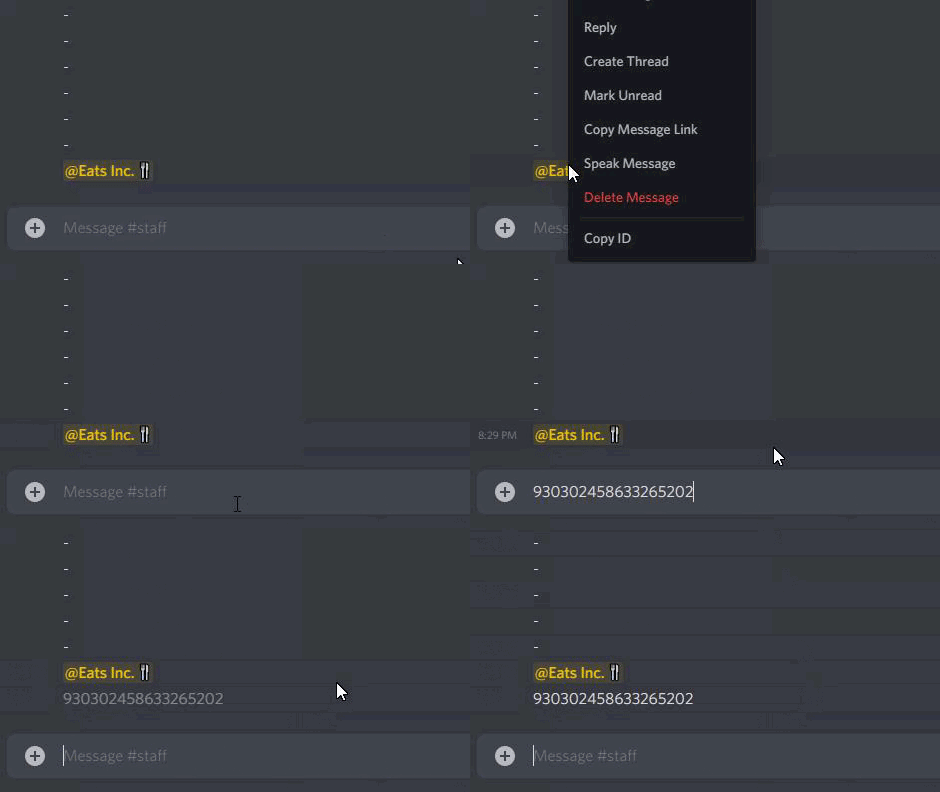

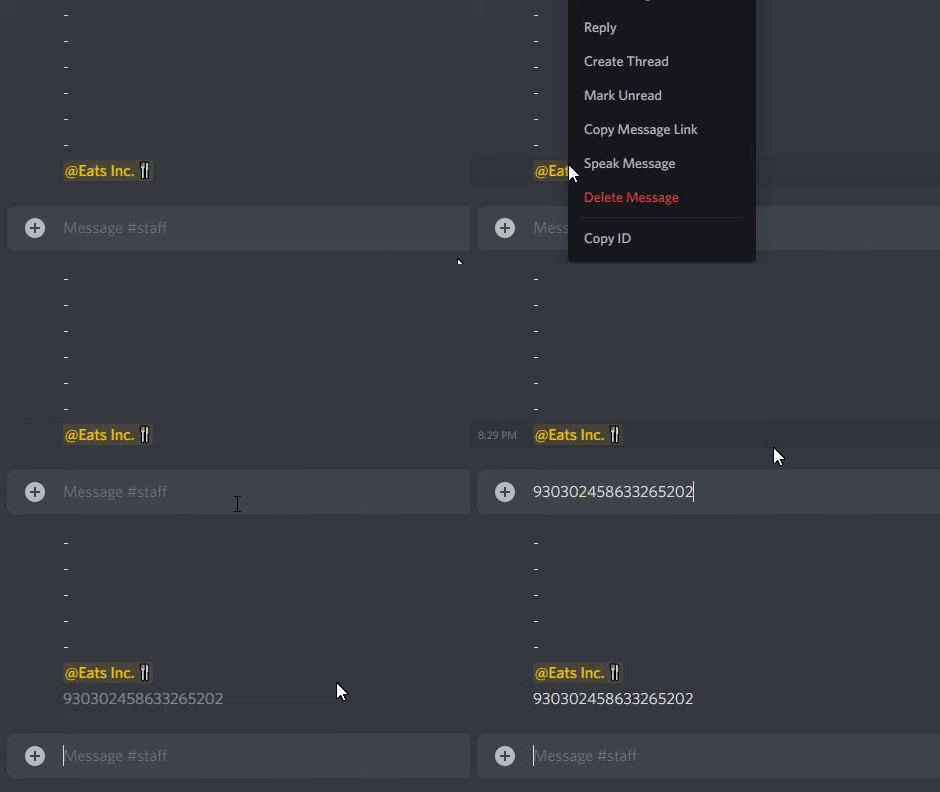 shut bolt
Oh
You copied the message ID
Can you give yourself that role?
Or you can do $id Role
For instance
$id <@&642118166243311646>
humble sequoiaBOT
<@&642118166243311646>
<@&642118166243311646>