#🆘│community-support
1 messages · Page 376 of 1
 jade topaz
Any idea why this isn’t showing up when I send the panel https://imgur.com/a/eCpiHin.jpg

 swift nest
Quick question after I buy a monthly premium for the ticket tool how do I apply it to the server. ( I have no code)
 humble sequoiaBOT
Redeeming premium on your server is really simple. Just head over to your Subscriptions Page. There you can select a server of your choice, which will get premium. You can change the server at any point.
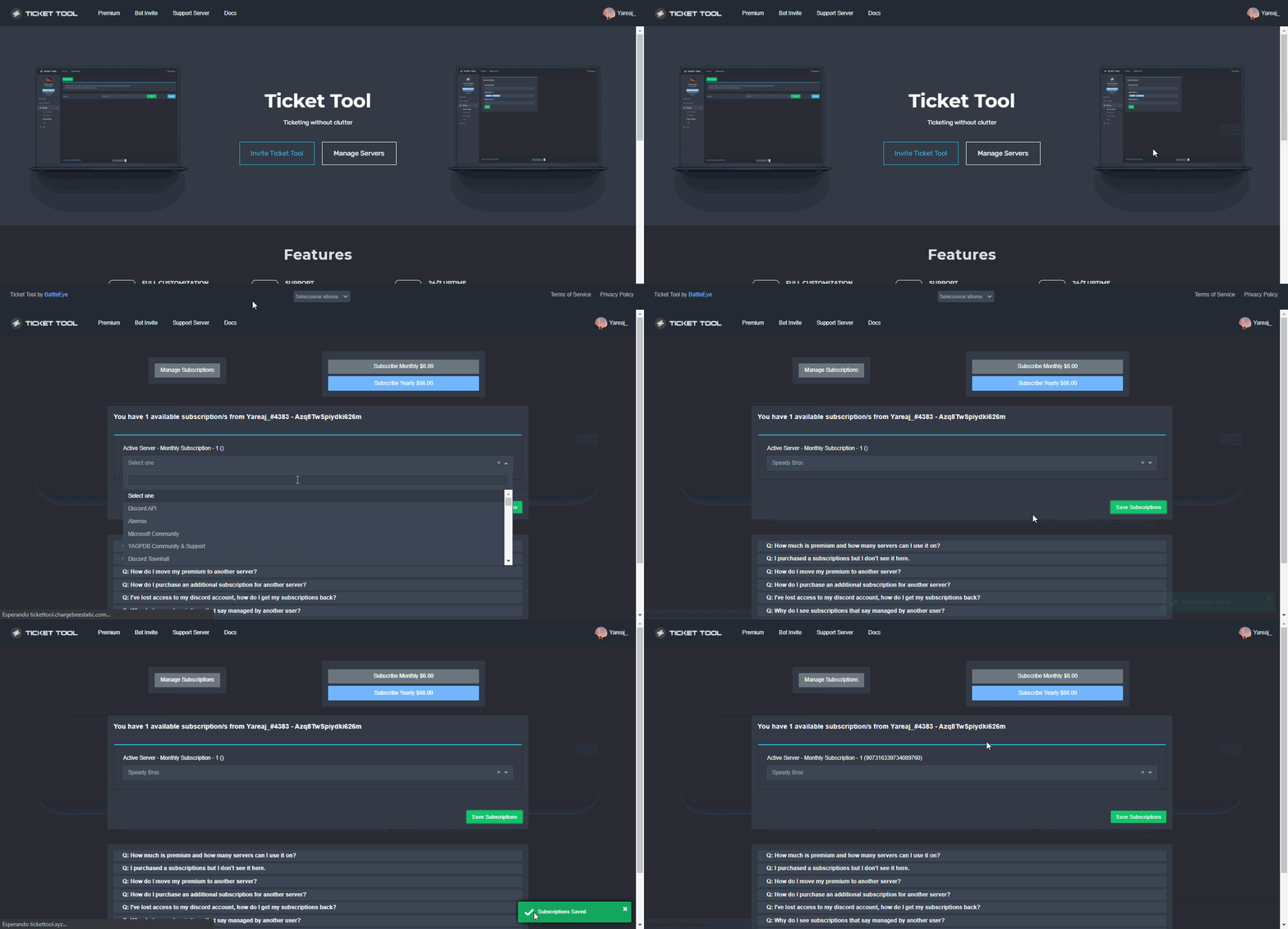
 fallow ingot
@swift nest does this solve your question ^
swift nest
I am just blind thank you so much dude means a lot.
fallow ingot
swift nest
I am just blind thank you so much dude means a lot.
np! have a good new year!
jade topaz
jade topaz
Any idea why this isn’t showing up when I send the panel https://imgur.com/a/eCp...
^
Cant get it to work I’ve tried so many times
 shut bolt
Same server?
jade topaz
Yup😩
shut bolt
Which panel?
jade topaz
I’ve tried loads of different ways even copied the other ones that are working but changed the destination thing
shut bolt
rare
jade topaz
Yeah ik
jade topaz
Just want to let battleeye know (without pinging him) that I got the gifs working:)
shut bolt
jade topaz
Just want to let battleeye know (without pinging him) that I got the gifs workin...
Lord Battle wild read your message 🙏
jade topaz
shut bolt
Lord Battle wild read your message 🙏
Why what’s wrong with it lol
jade topaz
Ohh
 honest storm
If I boost do I get premium
shut bolt
honest storm
If I boost do I get premium
Not currently, you get a income benefit of #924493355805732914
honest storm
Oh will there be in the future?
 silver warren
i want to set up the bot but...
 honest storm
 shut bolt
silver warren
i want to set up the bot but...
shut bolt
silver warren
i want to set up the bot but...
https://docs.tickettool.xyz/general/setup Try this one please
Instructions on setting up Ticket Tool in your server.
shut bolt
honest storm
Oh will there be in the future?
Not sure, you could suggest it via the command in #💡│suggestions
silver warren
hm this one seems to work
shut bolt
silver warren
hm this one seems to work
Nice
 burnt pewter
how do i fix system failure: panel "number" not found?
shut bolt
burnt pewter
how do i fix system failure: panel "number" not found?
Is this error being displayed when a the create button is clicked?
shut bolt
burnt pewter
yes
It means that the panel you are trying to create a ticket for, was deleted
shut bolt
burnt pewter
i fixed it thanks
Sure, was it due to the reason I mentioned?
burnt pewter
yes
shut bolt
Nice
 oblique finch
is there a way to clone a panal from one server to another. I know we can clone a panal within a single server but can we clone it to my other server
shut bolt
oblique finch
is there a way to clone a panal from one server to another. I know we can clone ...
You can't clone a single one, but you can copy all
Using the backup and transfer feature
oblique finch
ok cool ... but now when I have added to the bot on my other (Main) server it showed for a min or so and then vanished?
if I go to roles I do see ticket tool listed there
but the bot is gone ...
$new command is also not working ... I believe since the bot is not there
ok I reinvited the bot and now it shows BUT
$new command says " New command not monitoring this channel"
when I have enabled that radio button
 shut bolt
oblique finch
$new command says " New command not monitoring this channel"
shut bolt
oblique finch
$new command says " New command not monitoring this channel"
The $new command will only work on the channels you select in the __Channel to monitor for command $new and $ticket __
oblique finch
never min I figured it out ..... for some reason ticketing tool created one extra tickets channel with the one I created manually and I gave the wrong one to monitor.... I deleted that and pointed to my own created channel .... and it worked
thanks for the assistance how ever
shut bolt
Sure
oblique finch
Just one more quick q
is there a way to reset the ticket number counter .. that 0011 thing ..
want to reset it to 0000
oblique finch
ok hold
shut bolt
oblique finch
ok hold
Tyt
shut bolt
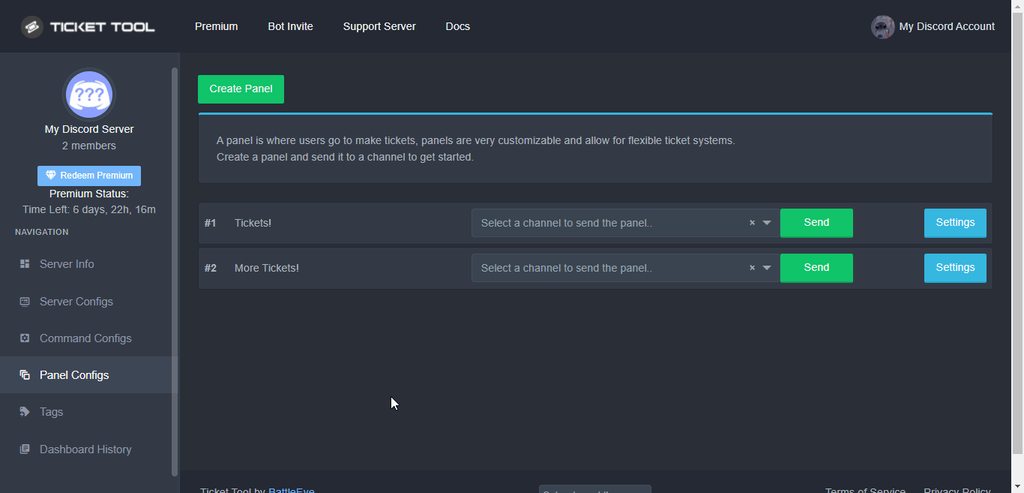 shut bolt
Click on __General Options__
shut bolt
shut bolt
Click on __General Options__
General Options
oblique finch
ok got it
but how would putting 125 reset the counter
is that a command or somethign to reset
shut bolt
oblique finch
but how would putting 125 reset the counter
What?
No, just write there 0 and Save
The GIF is just a reference lol
Is just a random example, we got templates
oblique finch
oh lol
ok put any random number and then put 0 againa and save
that will resetgot it
---- another quick q .. sorry using the tool for the first time ..... its a greate tool
shut bolt
oblique finch
ok put any random number and then put 0 againa and save
You can just put 0 and save
oblique finch
there is no reporting dashboard to show how many tickets were opened , closed, by who and all that
 left mortar
Hey uhh, how do I make specific roles access the tickets?
shut bolt
oblique finch
---- another quick q .. sorry using the tool for the first time ..... its a gre...
Don't be sorry! We are here to help
shut bolt
left mortar
Hey uhh, how do I make specific roles access the tickets?
$help support
humble sequoiaBOT
How to let support team see into a ticket
About support roles
A support role lets your support team see into tickets with out having to add them manually to each and every ticket.
You can add as many support roles as you like per panel.
NOTE that the way discord works all admins can see into tickets regardless of this.
How to set a support role
To set a Support role go to the Dashboard -> Panel Configs -> Settings -> General Options -> Support Team Roles.

NOTE that the support role will not be able to see into tickets that are already created..
left mortar
Ok thank you 👍
shut bolt
oblique finch
there is no reporting dashboard to show how many tickets were opened , closed, b...
Currently you can only check the amount of opened ones, yet the developer is working on a full stats dashboard part
left mortar
Thanks @shut bolt
 iron nightBOT
Gave 1 Rep to Yareaj_ (current: #2 - 285)
shut bolt
left mortar
Thanks <@518666147441278998>
Sure
oblique finch
shut bolt
Don't be sorry! We are here to help
thanks ... so why isnt there a reporting dashboard to see how many were open or closed and by who ... that sort of information you know .... statistics kind of dashbopard
iron nightBOT
Gave 1 Rep to Yareaj_ (current: #2 - 286)
shut bolt
shut bolt
Currently you can only check the amount of opened ones, yet the developer is wor...

oblique finch
shut bolt
Currently you can only check the amount of opened ones, yet the developer is wor...
got it
shut bolt
Our Dev is cooking some good stuff right now
oblique finch
thanks @shut bolt
iron nightBOT
@oblique finch :: You can't rep Yareaj_#4383 for 59 minutes and 20 seconds. Try coming back later?
humble sequoiaBOT

You can check our documentation here.
You can also check #573205317870157855 for the basic setup.
Our documentation contains all the info you need about the bot to be able to setup and configure the bot however you like.
shut bolt
This is the setup guide to make people to be able to create tickets on your server :)
Check it and let me know if you have any doubts
 cunning bronze
Oh ok, ty
shut bolt
Sure
 tropic shale
@pine tulip I won mp5 from the lottery. My steam account has a 7-day trade ban.
What can I do
 woeful quarry
hey
hello i need help
is their any way someone can help me i had a problem in the game not a bot
 green dew
 humble sequoiaBOT

⚠️ You're in the wrong place
We provide support for @pseudo glen discord bot and cannot help you with whatever issue you have.
- Please make sure to contact the appropriate Support Team.
If you don't have any further questions regarding our bot Ticket Tool, please close this ticket
 nova wharf
woeful quarry
is their any way someone can help me i had a problem in the game not a bot
nova wharf
woeful quarry
is their any way someone can help me i had a problem in the game not a bot
This server is for TicketTool questions only, but you can DM me your question.
 solid escarp
Is the Premium a monthly/weekly payment, or a 1 time payment?
 plain surge
There is a monthly plan and a yearly plan
humble sequoiaBOT
 Faster Premium Bot
Automatic Transcripts
Full Customization
Custom Buttons
Direct Messages
Ticket Automation
Multipanels
Premium Support
You can purchase premium here:
Price
$6 - Monthly
$66 - Yearly
 Premium
 unborn mountain
how to setup ticket tool?
humble sequoiaBOT
Setting up Ticket Tool
Visit the docs for setup info
General Setup
 hard cape
Check this out
unborn mountain
hard cape
$help setup
lol the page it's not work
hard cape
Oh ok, do you want to help with tickets in your server?
 still summit
Someone help
unborn mountain
hard cape
Oh ok, do you want to help with tickets in your server?
can you dm me?
with the setup command
hard cape
still summit
Someone help
I can help you
still summit
So like I made a middleman server and then when someone makes a ticket how to make it so the middle man can see the ticket that is made
humble sequoiaBOT
How to let support team see into a ticket
About support roles
A support role lets your support team see into tickets with out having to add them manually to each and every ticket.
You can add as many support roles as you like per panel.
NOTE that the way discord works all admins can see into tickets regardless of this.
How to set a support role
To set a Support role go to the Dashboard -> Panel Configs -> Settings -> General Options -> Support Team Roles.
NOTE that the support role will not be able to see into tickets that are already created..
hard cape
no problem
hard cape
unborn mountain
can you dm me?
do you need help how you can create a panel?
unborn mountain
hard cape
do you need help how you can create a panel?
no i add ticket tool to a server and i can't manage and i'm the founder of the server
unborn mountain
@hard cape
 humble sequoiaBOT
Don't see your server in the dashboard?
You will possibly need to relog. Look below to see steps on how to relog.
How to relog in the Dashboard.
First, you will need to go to the dashboard. Once your there, click on your avatar on the top right. after you clicked it, you will see button that says Logout. You must click that. Once you have logged out, you can log back in.
Note:
You need one of these 3 things to access the dashboard.
1. Server Owner (Level: 6)
2. Server Administrator (Level: 4)
3. Dashboard Role (Level: 2)
:warning: You can check your level using $level on your Discord Server
User permission level with Ticket Tool
@User is permission level: 0 (User)
```» *If it shows that your permission is **0**, you don't have any of the above **3 things** to manage the dashboard.*
**See the GIF below on how to relog:** hard cape
try this!
unborn mountain
hard cape
try this!
ok
unborn mountain
hard cape
try this!
tyy
hard cape
no problem!
still summit
HEy
I need help
So like I need help like what if the middle man wants to add another trader into the ticket, what do i do
still summit
How do you get the id of the trader?
humble sequoiaBOT
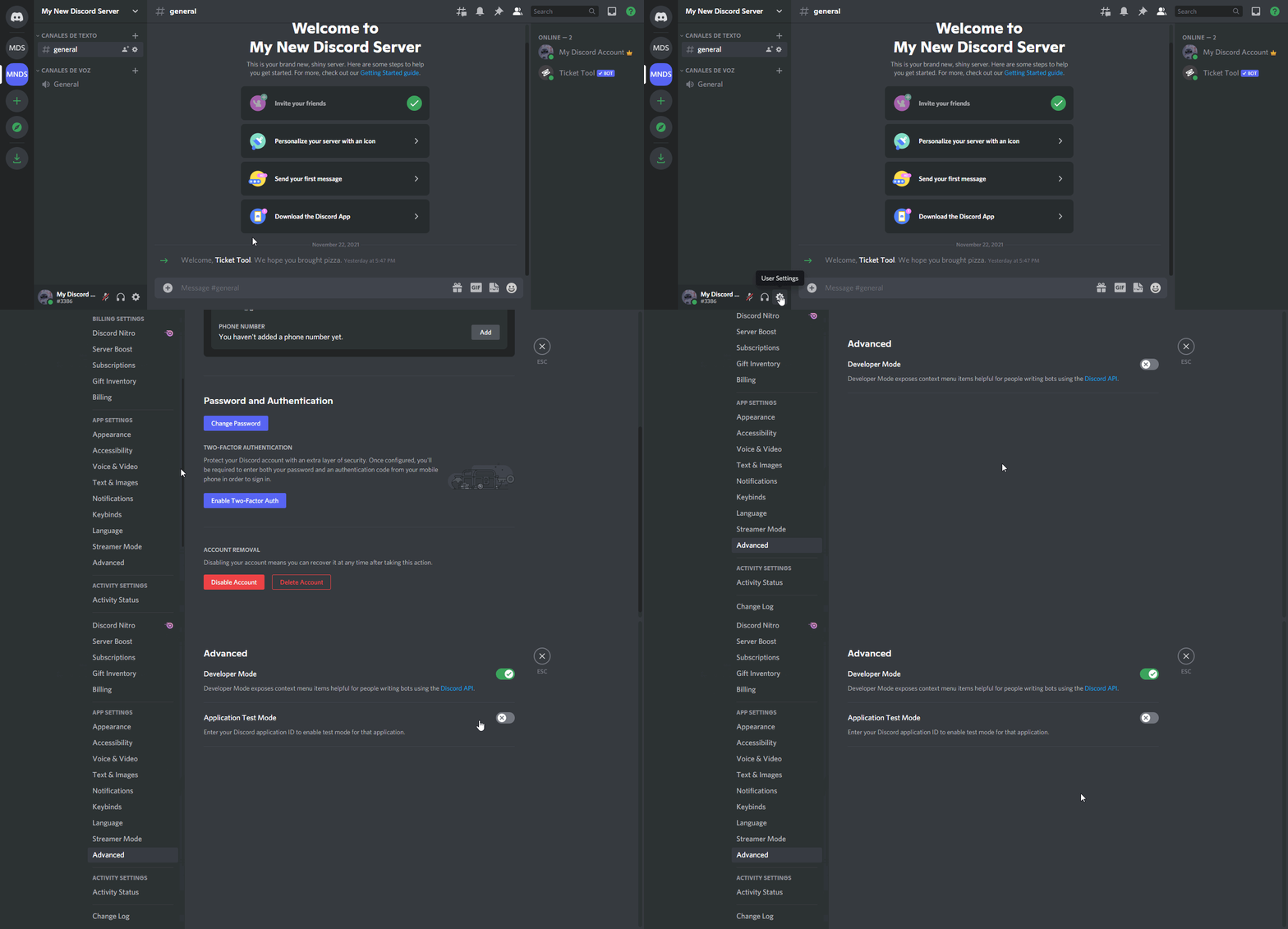
How to turn on developer mode
To enable developer mode do the following:
[:desktop: PC] go to Settings ➞ Advanced ➞ Developer mode
[:mobile_phone: Mobile] go to Settings ➞ Appearance ➞ Developer mode
Developer Mode allows you to get the ID of any channel, user, role, or server.
VIA the ID, you can use them with <> alongside their corresponding format to mention a channel/role/user...
They're mostly used to mention channels, users, or roles in Embeds
Formats
Channels: <#ID> ➝ #🤖│bot-spam
Users: <@ID> ➝ @humble sequoia
Roles: <@&ID> ➝ <@&642118166243311646>
 still summit
ohhh Ok
hard cape
ty @wicked scroll
iron nightBOT
Gave 1 Rep to otaviocng (current: #15 - 83)
still summit
TY
hard cape
np
still summit
ty @hard cape
iron nightBOT
Gave 1 Rep to D<3 (current: #19 - 58)
still summit
wait
hard cape
yea?
still summit
what if there are like so many people like this server
 north nimbus
how can we make this multi ticket option and description?
 humble sequoiaBOT
For a more convenient use of multipanels, you can now combine panels on the dashboard. This will allow you to directly send the multipanel from the dashboard or via the $panel ID command.
Where can I find this?
You can find this setting on the Dashboard -> Panel Configs -> Settings -> General Options
Note: if you're attaching all the panels to a panel called English, don't include English in the attached panels box (If you do this, it will create duplicate)
This will put all buttons from all of your panels on one message. The message is the panel message from the panel you're combining these panels in.

 Note: This is a premium feature
still summit
hard cape
and click on it
Note: This is a premium feature
still summit
hard cape
and click on it
Ok
hard cape
humble sequoia
north nimbus
ok let me try
north nimbus
where do we write the description? like below one
 north nimbus
hard cape
Ok!
north nimbus
hard cape
Ok!
thx it worked
hard cape
It’s in panel options
north nimbus
thanks @hard cape
iron nightBOT
Gave 1 Rep to D<3 (current: #18 - 59)
humble sequoiaBOT
Creating a panel
To create a panel we are going to need to head over to the panel configs on the dashboard
Once at the dashboard we will need to click Create Panel
Enter a panel name (Fill in any optional settings you want)
Click Create Panel and your ready to get started with configuring your panel
An example of a creating a panel is shown below.
 hard cape
Edit panel message
still summit
Ok
fallow ingot
You could manually do it using the channels permissions, however the $add command is a lot more efficient.
 eternal sparrow
can i get help
hard cape
it will be better here for me
eternal sparrow
ok am sorry
hard cape
so where is the problem?
eternal sparrow
Ticket limit reached, You already have 1 tickets open of the 1 allowed for this panel
how can i fix that
eternal sparrow
nerver mind but thanks
hard cape
Oh ok!
 boreal fable
how do i put a ticket in a channel
so people can open the ticket?
humble sequoiaBOT
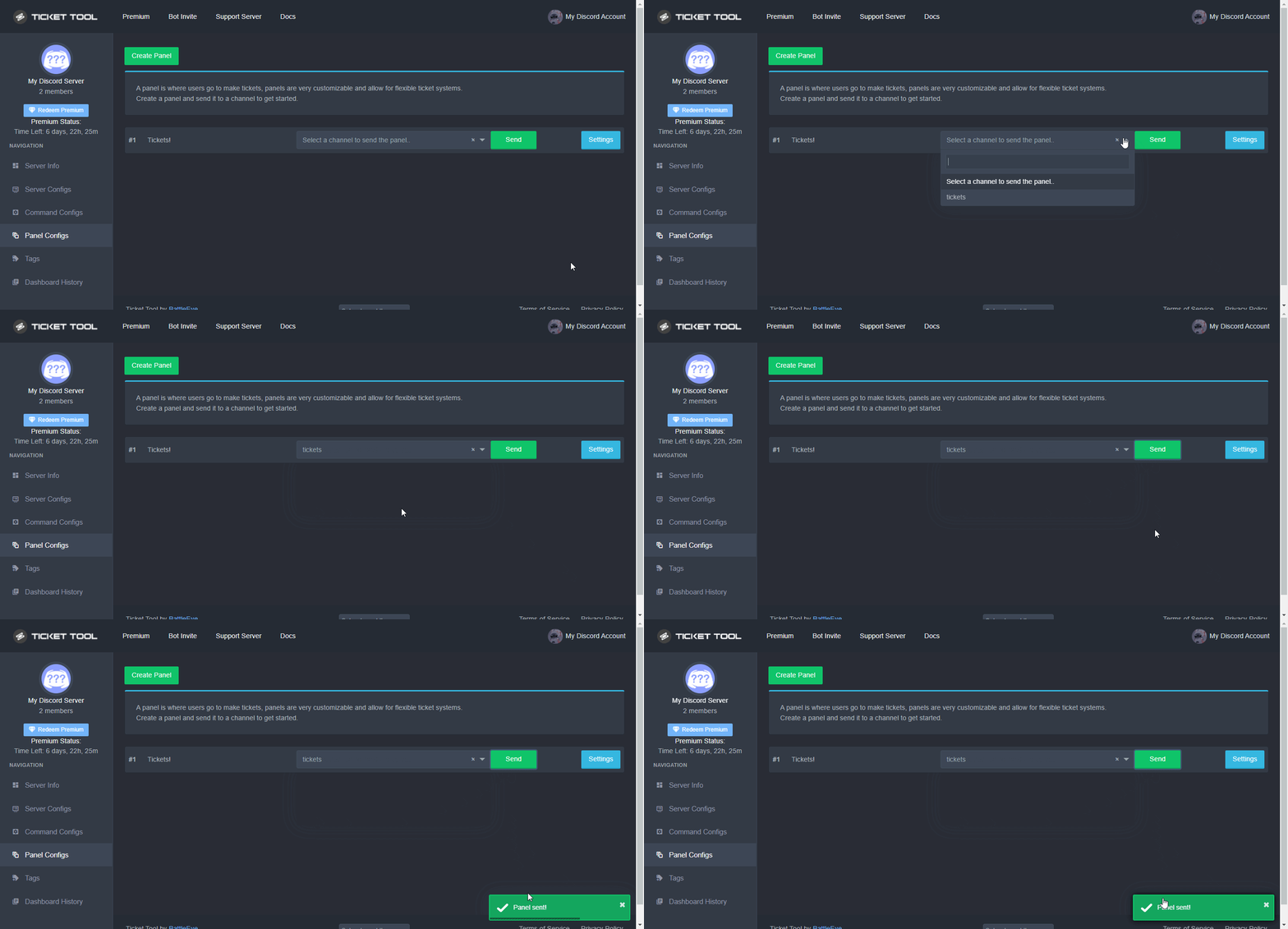
Sending a panel
Once you've created a panel on the dashboard you will need to send it to a channel using send on the dashboard
Select the channel you want your panel to be created in and click send.
For other questions checkout $help faq
An example of a sending a panel is shown below.
 hard cape
 rare scaffold
Hello i pay 2 subscrition incidentaly how can i get 1 refund ???
rare scaffold
@hard cape how can i reddem my first subscrition ?
hard cape
I can't help you with that, cause I don't know how it works, but try to open billing ticket
humble sequoiaBOT
Redeeming premium on your server is really simple. Just head over to your Subscriptions Page. There you can select a server of your choice, which will get premium. You can change the server at any point.
jade topaz
@rare scaffold
rare scaffold
i fixed i wait for my refund on sec purchase
hard cape
Hey!
 robust sandalBOT
 distant ginkgo
Muje unbend karo
distant ginkgo
Muje unbend karo
 savan.st
Muje unbend karo
 Finnish (fi) → Czech (cs)
hard cape
Finnish (fi) → Czech (cs)
hard cape
What?
 mystic hound
distant ginkgo
Muje unbend karo
mystic hound
distant ginkgo
Muje unbend karo
Assuming that's Hindi, i still don't know what you mean by unbend
 copper owl
we finally see light in action? 👀
hard cape
Bahaha lmao
copper owl
i dont think ive ever seen light talk indian with anyone
hard cape
Lmaooo
robust sandalBOT
distant ginkgo
Muje unbend karo
savan.st
Muje unbend karo
Finnish (fi) → English (en)
silver warren
what do we get by donating? lol
copper owl
silver warren
what do we get by donating? lol
donating what to who exactly
 slender minnow
mystic hound
Assuming that's Hindi, i still don't know what you mean by `unbend`
slender minnow
mystic hound
Assuming that's Hindi, i still don't know what you mean by `unbend`
He is making a ban appeal
Probably cant spell 'ban' lol
silver warren
copper owl
donating what to who exactly
donating to this bot
copper owl
the only "donation" you can get is basically buying premium
humble sequoiaBOT
Faster Premium Bot
Automatic Transcripts
Full Customization
Custom Buttons
Direct Messages
Ticket Automation
Multipanels
Premium Support
You can purchase premium here:
Price
$6 - Monthly
$66 - Yearly
Premium
copper owl
these are the perks for buying premium
hard cape
copper owl
these are the perks for buying premium
What is the command for list of tags?
silver warren
ok ^
copper owl
$tagslist
hard cape
tyyy
 dense pendant
Hey, I would like to know how to keep a closed ticket channel when it's moved to a kind of archived channels area ? Because when a ticket is closed the channel get deleted some seconds after being moved
humble sequoiaBOT
Help Options
$help commands - Information on commands
$help setup - Information on bot setup
$help faq - Frequently asked questions
dense pendant
I set a category on where to move the closed tickets.
But right after they get moved to it, they are deleted by the bot itself
hard cape
Can you Send a pic?
dense pendant
How can I send a pic of channels that does not exist anymore lol
lemme try to do a record
as u can see some seconds after it get closed, it just disappear and I'm sent back on the main channel of the server
hard cape
I cant open this file
dense pendant
sorry iPhone always give them in .mov
hard cape
It’s fine
dense pendant
So to explain
hard cape
Be sure bot has all permissions in the closed category
dense pendant
When I press the "Close" button, I see the name going to "closed-001" but then it just disappear
I'm the owner of the serv so the channel can't be hided from me tho
dense pendant
hard cape
Be sure bot has all permissions in the closed category
I gave all perms
hard cape
For category closed?
dense pendant
Ye I have a category for closed tickets and gave the bot all the permissions in it
On the website I can't change much
 hard cape
Take into account that if you have Two Step Ticket feature disabled on your Panel's General Options the ticket will be directly deleted.
dense pendant
Ok
It's the same
I have the message "Ticket closed"
Then the bot says "The ticket will be deleted in a few seconds" and it disappear
hard cape
When u check your audit log, is there something weird?
dense pendant
U mean server logs ?
hard cape
Ye
dense pendant
It just says that Ticket Tool deleted the channel
 pearl river
dense pendant
I have the message "Ticket closed"
Then the bot says "The ticket will be deleted...
pearl river
dense pendant
I have the message "Ticket closed"
Then the bot says "The ticket will be deleted...
Check your TicketTool's configuration and make sure that the "Auto-delete" is turned off.
Wait a sec
dense pendant
Mmh where do I change this ?
hard cape
pearl river
Check your TicketTool's configuration and make sure that the "Auto-delete" is tu...
Where is this feature?
pearl river
Searching for it.
pearl river
hard cape
I think this feature is not available

- should be 'Enabled' so that it doesn't delete it when you close it.
dense pendant
Enabled or not it keep deleting
pearl river
That's strange
dense pendant
Yeah
dense pendant
Okay I'll do that
pearl river
hard cape
Take into account that if you have Two Step Ticket feature disabled on your Pane...
@dense pendant ^^
 hard cape
$esticket
humble sequoiaBOT

Equipo de Soporte Español
Querido usuario, si está buscando ayuda, por favor abra un ticket para contactar al Equipo de Soporte Español. Diríjase a #🎫│make-a-ticket y presione el botón :flag_es:.
hard cape
dense pendant
Set it like me
 dense pendant
Ok trying it
hard cape
It works great for me
hard cape
Nice!
 steady sun
When i open a ticket being a normal user (No admin) i cant see the ticket channel
dense pendant
I saw the bot message, do I have to ping someone while thanking so u get something or idk ?
hard cape
No, It’s ight
humble sequoiaBOT
━━ moved to ticket ━━
 hard cape
Hey!
You can get id by using command $id
And
Yea
 there is an example
 tacit burrow
okay tyy so much ! < 3
hard cape
Np!
hard cape
pearl river
Hey is there a way to see response headers
Wth- it never happened to me
pearl river
welp
hard cape
Try to open a ticket #🎫│make-a-ticket
 median wigeon
pearl river
welp
median wigeon
pearl river
welp
Try to delete cookies and run the site agaib
 strange atlas
how do i make a ticket never done this before
humble sequoiaBOT
Creating a panel
To create a panel we are going to need to head over to the panel configs on the dashboard
Once at the dashboard we will need to click Create Panel
Enter a panel name (Fill in any optional settings you want)
Click Create Panel and your ready to get started with configuring your panel
An example of a creating a panel is shown below.
hard cape
jade topaz
Everytime i try to manage the server it doesnt work since my gf added it, but when i kick him then add him it doesnt show up at manage servers, what do i do?
strange atlas
ok thank you
humble sequoiaBOT
Don't see your server in the dashboard?
You will possibly need to relog. Look below to see steps on how to relog.
How to relog in the Dashboard.
First, you will need to go to the dashboard. Once your there, click on your avatar on the top right. after you clicked it, you will see button that says Logout. You must click that. Once you have logged out, you can log back in.
Note:
You need one of these 3 things to access the dashboard.
1. Server Owner (Level: 6)
2. Server Administrator (Level: 4)
3. Dashboard Role (Level: 2)
:warning: You can check your level using $level on your Discord Server
User permission level with Ticket Tool
@User is permission level: 0 (User)
```» *If it shows that your permission is **0**, you don't have any of the above **3 things** to manage the dashboard.*


**See the GIF below on how to relog:**
hard cape
strange atlas
ok thank you
No problem
jade topaz
ty
hard cape
Np!
tacit burrow
i used the variable {user.full} but i didn't see the user mention
how the fix that plz
tacit burrow
yeah !
hard cape
Try: {user}
tacit burrow
it's mentions ?
tacit burrow
nice ty
hard cape
No problem
tacit burrow
we can edit the color without pick
hard cape
Color of embed?
 tacit burrow
i cant type the code
 tacit burrow
ty
hard cape
Npp
 peak peak
It is saying ‘envelope error’ why are some of my players reciving this and others are fine
shut bolt
peak peak
It is saying ‘envelope error’ why are some of my players reciving this and other...
Screenshot of the error please
peak peak
ill see if they can send it to mwe
shut bolt
Thanks
peak peak

just pops up saying envelope with error. but im able to and others are abke to put in tickets comes up with the stor and help ticket
shut bolt
peak peak
just pops up saying envelope with error. but im able to and others are abke to p...
Ask them to update their discord
peak peak
Okie dokie thank you very much 😄
shut bolt
Sure
shut bolt
@tidal fable open a Billing ticket in #🎫│make-a-ticket, a Billing Member will help you there
 bright pagoda
I'm having some folks on Discord report that they can't see a ticket button. It's worked for a lot of others. Our best guess it is an emoji compatability issue with some operating systems. We're getting no button reports both on some androids.
Is this a known issue?
humble sequoiaBOT
━━ moved to ticket ━━
 scenic plinth
Actually ignore that
scenic plinth
bright pagoda
I'm having some folks on Discord report that they can't see a ticket button. It...
Have them update their discord client. The emoji would appear different for the devices.
bright pagoda
scenic plinth
Have them update their discord client. The emoji would appear different for the ...
Thanks. Will try that!
iron nightBOT
Gave 1 Rep to kitkat zizi (current: #7 - 172)
bright pagoda
Whoa. Cool. That's a smart bot!
bright pagoda
iron night
Gave `1` Rep to **kitkat zizi** (current: `#7` - `172`)
Thanks!
iron nightBOT
Error: You're still on cooldown
bright pagoda
(Sorry, seeing what the bot would do. ;p )
shut bolt
https://docs.tickettool.xyz/general/setup
You can check this guide Ally
Instructions on setting up Ticket Tool in your server.
With which step?
Did you read the guide?
jade topaz
Hi, I need some help. Our premium subscription is over and I would like to switch to the free bot. I invited the free bot. Does that mean I need to set everything up all over again? What about the current tickets i already have? Can I make the free ticket just take over and the premium features just be disabled?

I selected the free one and invited the bot but tickets still wont work
 humble sequoiaBOT
━━ moved to ticket ━━
 white goblet
Hey, I have a question regarding ticket tool. I’m trying to figure out why the reaction button won’t show up on the channel where I put ticket tool in. And I have all the permissions on for the bot.
And I’m not able to open a ticket here either. I have no idea what to do about it
white goblet
I just tested it and my other supports can open them and see them. I can see them but still can’t see the reaction button.
 covert swallow
white goblet
I just tested it and my other supports can open them and see them. I can see the...
covert swallow
white goblet
I just tested it and my other supports can open them and see them. I can see the...
Try to reload your client, it may be a visual bug
 icy shore

The one that says closed won’t close we even went to the settings for it to do delete ticket and it won’t go away anyone know how to remove it please??? We have a ticket in my discord and we cannot close it, I accidentally hit close to many times and now it’s stuck
white goblet
covert swallow
Try to reload your client, it may be a visual bug
What’s a client? (Sorry)
covert swallow
white goblet
What’s a client? (Sorry)
Your discord basically, either ctrl+r or close and reopen the qpp
white goblet
Will try right now. Since I’m on the phone
white goblet
covert swallow
Your discord basically, either ctrl+r or close and reopen the qpp
Well I tried closing app, and re logging but both didn’t work.
Anything else I could do?
covert swallow
You said that other people with the same permissions are able to open it correct?
 sleek lotus
Is there a way to make the global ticket limit infinite?
white goblet
covert swallow
You said that other people with the same permissions are able to open it correct...
Yea
covert swallow
I dont know what else it could be then, sorry
 radiant laurel
Hello, everything that bhaalshad does is free of charge. Also this is for issues with the discord. Please read #tickets. Anything that bhaalshad has and is ready for the public is in his shares files near the bottom of the channels. Any questions about coding please use a support channels, anything u can use #💬│general-chat
shut bolt
No
 feral portal
Hi I need help. is there a way for me to get ticket tool to send a dm of a transcript of the ticket to the person who made the ticket?
 forest goblet
feral portal
Hi I need help. is there a way for me to get ticket tool to send a dm of a trans...
forest goblet
feral portal
Hi I need help. is there a way for me to get ticket tool to send a dm of a trans...
DM transcripts exist, but they are exclusively for premium users.
feral portal
forest goblet
DM transcripts exist, but they are exclusively for premium users.
oh yeah I have premium monthly how do I access this feature?
forest goblet
feral portal
oh yeah I have premium monthly how do I access this feature?
You can enable it via Panel Configs > Settings > Logging Options > Direct Message Transcript.
feral portal
forest goblet
You can enable it via **Panel Configs > Settings > Logging Options > Direct Mess...
oh ok, if I invite the premium bot into my server do I have to redo all the ticket stuff I edited via the pannels?
before I purchased premium.
forest goblet
feral portal
oh ok, if I invite the premium bot into my server do I have to redo all the tick...
No, all the settings will remain if you switch to the premium bot.
feral portal
forest goblet
No, all the settings will remain if you switch to the premium bot.
oh sweet!
feral portal
forest goblet
You can enable it via **Panel Configs > Settings > Logging Options > Direct Mess...
thank you so much super helpful
iron nightBOT
Gave 1 Rep to 2x2Master (current: #17 - 66)
forest goblet
No problem!
jade topaz
Can i get premium for boosting this server ?
hard cape
Hey, i think you cant, But Im not Sure
 iron nightBOT
Gave 1 Rep to D<3 (current: #18 - 60)
jade topaz
🙂
hard cape
No problem
 glossy harness
how long do i have to wait to see my premium key? 
glossy harness
hard cape
Did u bought premium or u get it by voting?
bought it!
humble sequoiaBOT
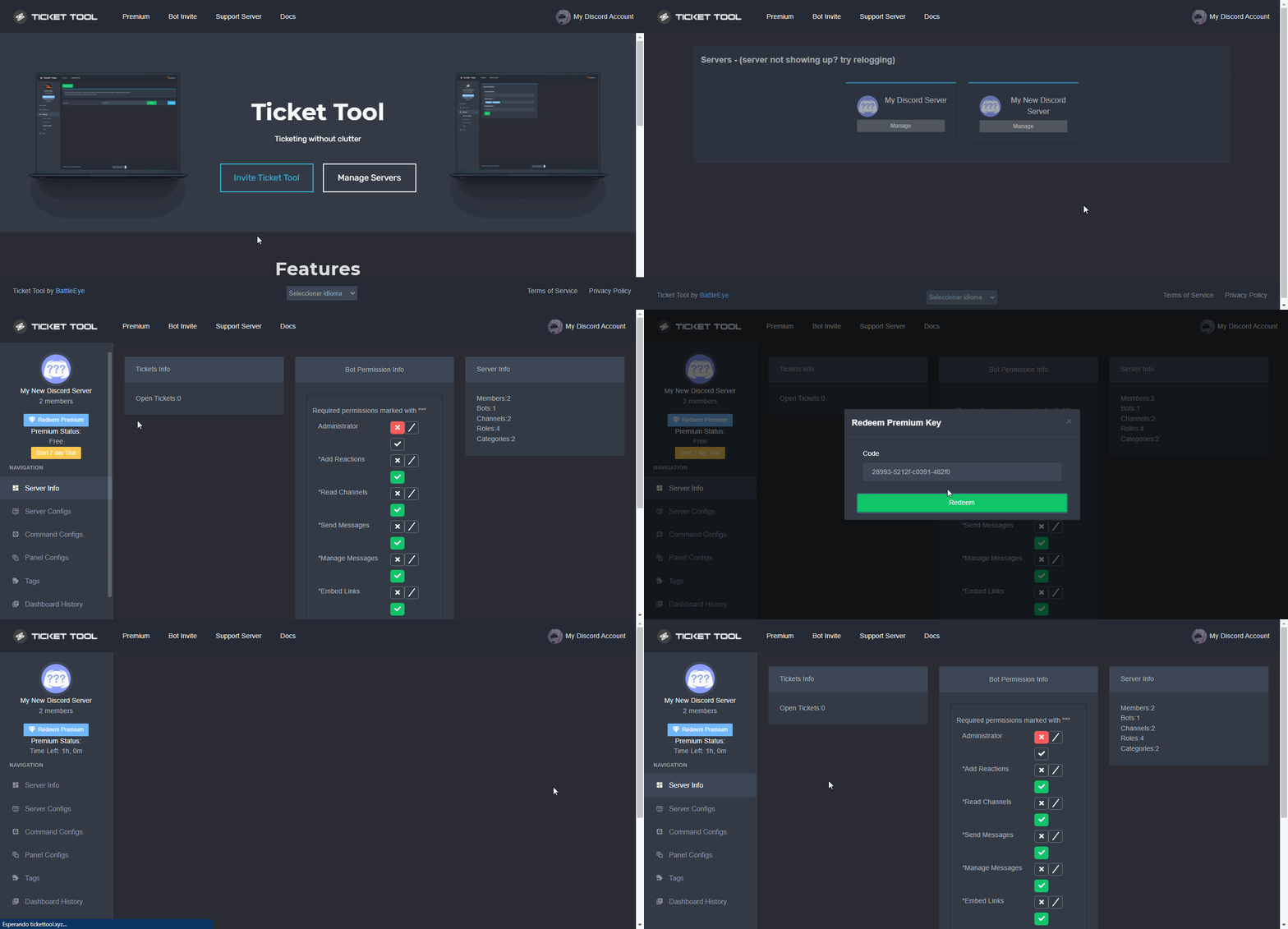
How to redeem premium (Key)
To redeem your premium key, go to the dashboard, select your server, then click " Redeem Premium" under the server's icon and name.
 glossy harness
yeah i don't see any key yet
hard cape
Did u get the code to dms?
glossy harness
hard cape
Did u get the code to dms?
nope
hard cape
 glossy harness
yep i read that too
thought id ask in here before making a ticket
but i guess i should since its been 11 minutes LOL
hard cape
Then open a ticket in #🎫│make-a-ticket (billing one)
 wicked jetty
Can anyone please advise how to renew subscriptions?
shut bolt
Not TT one, moved to a ticket
wicked jetty
TT one? Ticket ?
 grand sky
whats the cmd to suggest smth
 grand sky
ty
hard cape
Np
shut bolt
@grand sky that's already a feature
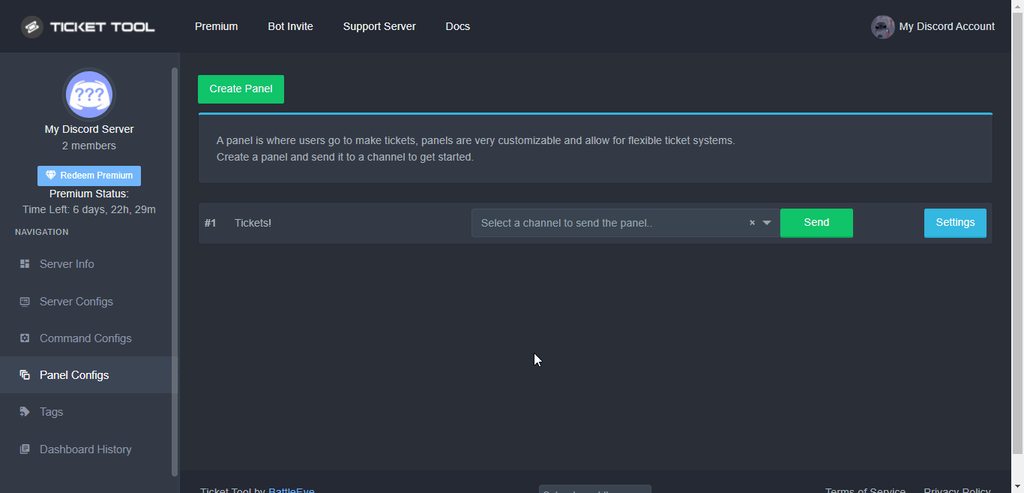
That's how to clone a panel, feature you asked for
hard cape
We pinged him at the Same time
shut bolt
lol
grand sky
shut bolt
That's how to clone a panel, feature you asked for
sry lol im a dumbass
shut bolt
grand sky
sry lol im a dumbass
No worries pal
oblique finch
a question to developer .... right now we as an admin delete the ticket ... is there an option of ticket being autodeleted after a specified time ... like 120sec or something ... after 120 sec ticket gets auto delete
@shut bolt
oblique finch
aa Apologies
shut bolt
oblique finch
a question to developer .... right now we as an admin delete the ticket ... is t...
Not possible as of now
humble sequoiaBOT
Automation disabled
There's currently no ETA for when automation will be enabled again. The issue that's caused it to be disabled, us hitting rate limits, is tied to the increased load on Discord's servers. The situation's currently unpredictable, which makes it so we can't give you a fixed time.
shut bolt
You can make it delete directly after closing but no timed
oblique finch
shut bolt
Not possible as of now
shall I put it as a suggestion ...
humble sequoiaBOT
Multipanels are a premium feature  that allow for a single panel with multiple buttons to open different tickets.
How to create a Multipanel
Premium users can combine multiple panels into one multipanel.
First, find the IDs of each panel you wish to combine. You can find them in your Panel Configs in the Dashboard
Next, send the multipanel to a channel using $panel [id1] [id2] {id3} ....
e.g. $panel 1 2 4 17 35 to combine panels 1, 2, 4, 17 and 35.
Up to 25 panels may be combined.

For a more convenient use of multipanels, you can now combine panels on the dashboard. This will allow you to directly send the multipanel from the dashboard or via the $panel ID command.
Where can I find this?
You can find this setting on the Dashboard -> Panel Configs -> Settings -> General Options
Note: if you're attaching all the panels to a panel called English, don't include English in the attached panels box (If you do this, it will create duplicate)
This will put all buttons from all of your panels on one message. The message is the panel message from the panel you're combining these panels in.
Note: This is a premium feature
 atomic barn
@glacial haven keep in mind it’s a premium feature like it says
shut bolt
oblique finch
shall I put it as a suggestion ...
Please read the embed we sent
 glacial haven
atomic barn
<@780454056161443891> keep in mind it’s a premium feature like it says
glacial haven
atomic barn
<@780454056161443891> keep in mind it’s a premium feature like it says
ah, OK
😦
glacial haven
atomic barn
<@780454056161443891> keep in mind it’s a premium feature like it says
are there other bots that do it?
atomic barn
Uhhhhh I’m not sure
glacial haven
atomic barn
Uhhhhh I’m not sure
okk thanks
iron nightBOT
Gave 1 Rep to neonbladez (current: #59 - 2)
oblique finch
is there an option to use HTML code in any on the message box you have in the panel configuration
so when message is displayed it displays what my code wants to display
copper owl
No there isn't
oblique finch
😦
copper owl
you can't mess with the HTML file on the transcript message
only the embedded message itself
oblique finch
hmmm objective was to display my users a ramdom password eachtime they issue a command
oblique finch
where do I create a bot .... if it requires coding then nops cant do ..... else can give a try
copper owl
Weren't you gonna code anyway..?
Either way, Not a thing with ticket tool. the HTML file at the top isn't something we can edit or disable
jade topaz
anyone here?
median wigeon
jade topaz
anyone here?
Hi how can i help you?
humble sequoiaBOT
━━ moved to ticket ━━
copper owl
for Not Laksh
 solid hinge
I want the ticket to be deleted when it is closed, how to do so?
means automatically get deleted after sometime for get deleted when closed
copper owl
solid hinge
means automatically get deleted after sometime for get deleted when closed
the only way you can do this is turning off Two Step Ticket, meaning it gets deleted immediately once the ticket is closed
there is no X amount of time closed = Deleted feature
solid hinge
thanks
solid hinge
copper owl
the only way you can do this is turning off Two Step Ticket, meaning it gets del...
How to do so?
copper owl
go to general options on your panel settings
hard cape
copper owl
the only way you can do this is turning off Two Step Ticket, meaning it gets del...
solid hinge
bruh
solid hinge
copper owl
go to general options on your panel settings
then?
copper owl
Disable Two Step ticket..
solid hinge
ok and
copper owl
thats it
solid hinge
oh ok
copper owl
now the tickets delete automatically once you close
solid hinge
thanks
hard cape
$help panel
humble sequoiaBOT
Creating a panel
To create a panel we are going to need to head over to the panel configs on the dashboard
Once at the dashboard we will need to click Create Panel
Enter a panel name (Fill in any optional settings you want)
Click Create Panel and your ready to get started with configuring your panel
An example of a creating a panel is shown below.
 paper skiff
iron nightBOT
paper skiff
iron nightBOT
Gave 1 Rep to D<3 (current: #18 - 61)
hard cape
No problem!
 fiery cradle
does anyone know who i talk to if i get wrongfully banned?
fiery cradle
no in the game
humble sequoiaBOT
⚠️ You're in the wrong place
We provide support for @pseudo glen discord bot and cannot help you with whatever issue you have.
- Please make sure to contact the appropriate Support Team.
If you don't have any further questions regarding our bot Ticket Tool, please close this ticket
copper owl
fiery cradle
does anyone know who i talk to if i get wrongfully banned?
you already opened a ticket for this
and you were already told this isnt the server
fiery cradle
WAT DO I DODOODDOD
copper owl
fiery cradle
WAT DO I DODOODDOD
find the correct support
fiery cradle
bruh
hard cape
try to find their support on websites
copper owl
or search the name of the game + discord server on google
 timber lake
Guys how i can make a role can see the tickets but it dont have an admin?
humble sequoiaBOT
How to let support team see into a ticket
About support roles
A support role lets your support team see into tickets with out having to add them manually to each and every ticket.
You can add as many support roles as you like per panel.
NOTE that the way discord works all admins can see into tickets regardless of this.
How to set a support role
To set a Support role go to the Dashboard -> Panel Configs -> Settings -> General Options -> Support Team Roles.
NOTE that the support role will not be able to see into tickets that are already created..
hard cape
timber lake
Thanks^-^
hard cape
np!
 wet grove
How to give a person the opportunity to view tickets? So that he could also write there.
humble sequoiaBOT
How to let support team see into a ticket
About support roles
A support role lets your support team see into tickets with out having to add them manually to each and every ticket.
You can add as many support roles as you like per panel.
NOTE that the way discord works all admins can see into tickets regardless of this.
How to set a support role
To set a Support role go to the Dashboard -> Panel Configs -> Settings -> General Options -> Support Team Roles.
NOTE that the support role will not be able to see into tickets that are already created..
jade topaz
If I buy premium and invite the premium bot if my premium runs out will the bot stop working?
copper owl
yup
 karmic lotus
Is there a way to not show who's handled a ticket? I want to hide it from the person who made the ticket
karmic lotus
I guess its a premium option no?
 karmic lotus
Thank you
hard cape
no problem
jade topaz
How do I invite @humble sequoia
hard cape
$invite
humble sequoiaBOT
Ticket Tool Invite & Support
jade topaz
That’s regular ticket tool
humble sequoiaBOT
The first thing you will need to do is invite the premium bot, an invite can be found here
Once the bot is in your server we will head to the dashboard and manage your server. When you are managing your server, you want to head into "Server Configs" then click the drop down menu under "Select the bot you would like to use on this server" then click "Ticket Tool#6207" and then save.
 hard cape
there is premium one
iron nightBOT
Gave 1 Rep to D<3 (current: #18 - 62)
hard cape
np
jade topaz
Why is my ticket Not showing up with the message that’s meant to be at the top
 humble sequoiaBOT
How to set the permissions for tickets
To set a change permissions go to the Dashboard -> Panel Configs -> Settings -> Permission Options
 copper owl
go to User Opened Permissions, and tick the Read Message History box
jade topaz
Ahh okay Ty
 void scroll
hi so if im trying 2 set up for a user to say $new n create a new ticket how do i set that up
i can only set up panels in the config dashboard
copper owl
Command Style Tickets
in panel settings
Just setup the panel, dont send it. Enable Command Style Tickets and you're good to go
copper owl
run $level and send a screenshot of what it says
 smoky gale
in this server or mine
copper owl
yours
 copper owl
then all I can tell ya is to relog
clear cache, relog, make sure you're logged in the correct account on the dashboard
 white mesa
May I ask why I was welcomed to this?


 radiant moss
white mesa
May I ask why I was welcomed to this?
radiant moss
white mesa
May I ask why I was welcomed to this?
We recently switched and updated our docs. Some things like that are outdated but they will be updated
humble sequoiaBOT
You can check our documentation here.
You can also check #573205317870157855 for the basic setup.
Our documentation contains all the info you need about the bot to be able to setup and configure the bot however you like.
radiant moss
Here is the correct setup
radiant moss
Just a auto message from @iron night
radiant moss
👍
 hollow herald
radiant moss
👍
hollow herald
radiant moss
👍
What is the command to reopen a ticket
That has been already deleted
jade topaz
hollow herald
That has been already deleted
Deleted or closed?
copper owl
there's a little @ indicating it was a ping
 jade topaz
The command to see the transcripts is “$transcript” right?
copper owl
there is no command to see transcripts
you go to the transcript channel and then click on Direct Link to access the transcript of the ticket
 quick ermine
Can i mention channels in the panel embed message?
copper owl
$mentions
humble sequoiaBOT
Mentions
Within all the messages the bot's sends (both embeds and text) you can mention either channels, roles, or even users, these mentions will only send a notification to the user if they are used within a text field, e.g: a role mentioned in an embed won't ping at all the users who have that role.
For mentioning a role you can use one out of three options:
{@Role Name} ➞ Which is Case Sensitive.
{RoleID} ➞ Replace RoleId with the Id of the role you are trying to ping.
<@&RoleID> ➞ Discord's native syntax to ping roles.
<#ChannelID> ➞ Mention a channel by its ID.
<@UserID> ➞ Mention a user by its ID.
copper owl
@quick ermineUse the guide above to mention a channel
quick ermine
Thank you very much sir!
 drifting pond
Taking a look, I've been trying to use the information above to ping the ticket creator within a the message area (not the embed), but it doesn't seem to be working. I'm doing so in a tag. Any suggestions?
Ex. {@ticket_user}, Please read the below information. It contains information....
fallow ingot
drifting pond
Taking a look, I've been trying to use the information above to ping the ticket ...
Are you using {user}
drifting pond
Lemme try that
fallow ingot
Yeah.
drifting pond
Btw, absolutely loving the Premium version of this. How do I get the premium tag?
fallow ingot
Premium tag?
drifting pond
I noticed there was a premium subscriber role. Didn't know if that was based on if you were using the Premium bot or not.
copper owl
$pc in #🤖│bot-spam
fallow ingot
No it’s not, but if you have an active subscription you can check by running $pc
fallow ingot
copper owl
`$pc` in <#910978476536905738>
ahh you bet me.
plain surge
drifting pond
Ex. {@ticket_user}, Please read the below information. It contains information....
This is a list of the variables for the bot
humble sequoiaBOT
{server.name} ➞ Name of the server
{server.id} ➞ ID of the Server

[#🆘│community-support](/guild/509192800865353738/channel/776680605517742090/) = <#channel> ➞ Channel link of the current channel
{channel.name} ➞ Name of the current channel
{channel.id} ➞ ID of the current channel

{author} = <@user> ➞ Mention of the user triggering this message
{author.name} ➞ Name of the user triggering this message
{author.id} ➞ ID of the user triggering this message
{author.nickname} ➞ Nickname of the user triggering this message
{author.icon} ➞ Direct Url of the profile picture of the user triggering this message
{author.tag} ➞ 4 digit tag (discriminator) of the user triggering this message
{author.full} ➞ username + 4 digit discriminator of the user triggering this message

{panel.count} ➞ The current count number of the panel (Tickets only)
{panel.name} ➞ The name of the panel (Tickets Only)
{panel.ticketLimit} ➞ The current limit of the panel (Ticket Only)

{ticket} = <#channel> ➞ Channel mention of the ticket
{ticket.id} ➞ Channel ID of the ticket

{ticket.user} = <@user> ➞ User mention of the ticket user
{ticket.user.name} ➞ Name of the ticket user
{ticket.user.id} ➞ User ID of the ticket user
{ticket.user.nickname} ➞ Nickname of the ticket user
{ticket.user.icon} ➞ Direct Url of the profile picture of the ticket user
{ticket.user.tag} ➞ Tag / Discriminator of the ticket user
{ticket.user.full} ➞ Username + Discirimator of the ticket user```
Roles can be either
{@role name} or {role ID}
_ _
_ _
Additional variables
{reason}
» works on $close <reason>, $delete <reason>, $new <reason>, $claim <reason>
» displays the reason, you can optionally give with some commands
Transcript Variables
{ticket_name}➞ Name of the ticket
{panel_name}➞ Name of the panel
{transcript_url}➞ File link of the transcript
Hide Link under blue text:
[Click me](https://tickettool.xyz)➞ Click me
Time Variable
Sends the current unix time in seconds. Optinally add or remove seconds
<t:{!time+43200}:R>➞ <t:1641202087:R>
<t:{!time+43200}:R>➞ <t:1641115687:R>
<t:{!time+43200}:R>➞ <t:1641158887:R>
» Remove ! before time
_ _
<t:1641006000>➞ <t:1641006000>
<t:1641006000:f>➞ <t:1641006000:f>
<t:1641006000:F>➞ <t:1641006000:F>
<t:1641006000:D>➞ <t:1641006000:D>
<t:1641006000:d>➞ <t:1641006000:d>
<t:1641006000:t>➞ <t:1641006000:t>
<t:1641006000:T>➞ <t:1641006000:T>
<t:1641006000:R>➞ <t:1641006000:R>
» You can use https://hammertime.djdavid98.art/ to create custom dates/times
plain surge
You would be looking for {ticket.user} without an @
drifting pond
"{ticket.user}, Please read the below information. It contains information regarding..."
Doesn't seem to grab. I'm in Tags, under Message Text. I also tried (for S&G) the Embed Text area, neither of which are working using {ticket.user} or {ticket_user} 😦
plain surge
{ticket.user} is to mention the ticket owner
If you are in tags then you should be using {author} or {user}
drifting pond
Yup. When my staff respond to someone with a tag, I'm wanting it to automatically tag the person in the reply
And it's always the ticket owner/creator who would be tagged.
plain surge
There isn't a variable for the targeted user. The staff members can just manually reply to a message from the user with the tag trigger
The user will then get pinged, and if you have auto trigger delete it will be as the tag mentioned them
drifting pond
Ah, gotcha. No way to ping the user in a tag, right?
plain surge
Basically a ghost ping
drifting pond
Ahhhh
plain surge
drifting pond
Ah, gotcha. No way to ping the user in a tag, right?
You can ping the user triggering the tag
Ticket user variables work with functions related to a ticket
Not an outside tag
drifting pond
So @109 | Ops Director | Gramps infotag or infotag @109 | Ops Director | Gramps ?
plain surge
What do you mean?
drifting pond
For example, in a ticket, a user decides they want to be rude. I have a tag set up under Tags in the Dashboard which provides them a text warning stating "Please be respectful blah blah" If I wanted to have that user pinged when the tag is posted using the Tag Command, how would I go about that? I hope I'm explaining sufficiently.
plain surge
You would first set the tag to auto delete the trigger command
Then when you use it you would reply to a message by the user with the tag command in it
plain surge
drifting pond
For example, in a ticket, a user decides they want to be rude. I have a tag set...
[tag trigger]
And then the bot would delete this message and sends the tag
Leaving the ghost ping
drifting pond
That makes sense, I misunderstood what you were saying to begin with. Thank you!
thanks @plain surge
iron nightBOT
Gave 1 Rep to D̸̞̉҉̢̩͠o͛ͫ̚m͈̕͜҉̘̱̟☆̞͈͠҉ͪ̈́͘҉̷̥̐ (current: #21 - 51)
drifting pond
😉
plain surge
No problem 👍
 tulip whale
quick question. so once a ticket is closed i can select transcript. do i have to create a separate channel where the bot sends the transcript link to? or are the transcript links saved somewhere on the tickettool dashboard?
 solid stream
you can do $transcript #channel
tulip whale
beautiful
copper owl
tulip whale
quick question. so once a ticket is closed i can select transcript. do i have to...
also to answer the other question
none of the transcripts are saved on the dashboard
theyre all saved within your server and only there
tulip whale
Thank you for that information! I appreciate the quick response from you both.
copper owl
No worries. If you dont want to use the command every single time, you can do the following
$help transcript
humble sequoiaBOT
How do I save transcript to a channel?
To save transcripts to a channel go to the Dashboard -> Panel Configs -> Settings -> Logging Options -> Transcript Channel
 copper owl
setup a transcript channel, define it in the dashboard and save. Now everytime you press the transcript button when the ticket is closed, it saves in the defined channel
tulip whale
Thank you
fallow ingot
ty @copper owl
iron nightBOT
Gave 1 Rep to Neptune (current: #1 - 492)
fallow ingot
there
copper owl
appreciated even though i dont need it lol
fallow ingot
yes you do, you deserve the credit.
jade topaz
How do I get the ticket thing to show on my server ?
icy shore
I still need help non of the ticket info is telling me how to force close a already closed ticket
 rain swallow
how do you ping in the ticket it wont work fot some reason
icy shore
 copper owl
rain swallow
how do you ping in the ticket it wont work fot some reason
copper owl
rain swallow
how do you ping in the ticket it wont work fot some reason
show us what you did
rain swallow
oh i got it!!! ty so much
copper owl
rain swallow
oh i got it!!! ty so much
No problem
rain swallow
thanks @copper owl
iron nightBOT
Gave 1 Rep to Neptune (current: #1 - 493)
icy shore
copper owl
click in the closed ticket, then save the transcript and delete
Can’t when I click on the closed ticket I can’t type in there or even go to the settings to delete the ticket by force
It’s just stuck there
copper owl
close discord and open it again
it's sometimes a visual bug, other times you need to contact discord to remove it
icy shore
Ok ty
 south hollow
the bot is not showing the list of servers I added the ticket tool to
copper owl
south hollow
the bot is not showing the list of servers I added the ticket tool to
log out and log back into the site
south hollow
I've already tried it, when I go in again it's still the same
copper owl
run $level and let me know what it says
also make sure you're relogging and not just refreshing the page
south hollow
where do i run this?
copper owl
in your server
 copper owl
then make sure you're logged into the correct account, clear your cache and log out and back into the dashboard.
better yet, just try a different browser
copper owl
Anytime
south hollow
thaks @copper owl
 proven ravine
anybody know how I can let a role which is not an administrator see all the open tickets?
please @me when you respond
copper owl
$help support
humble sequoiaBOT
How to let support team see into a ticket
About support roles
A support role lets your support team see into tickets with out having to add them manually to each and every ticket.
You can add as many support roles as you like per panel.
NOTE that the way discord works all admins can see into tickets regardless of this.
How to set a support role
To set a Support role go to the Dashboard -> Panel Configs -> Settings -> General Options -> Support Team Roles.
NOTE that the support role will not be able to see into tickets that are already created..
copper owl
@proven ravine ^^
copper owl
proven ravine
I did it 1 min ago and its still not working
kick in?
proven ravine
work
copper owl
it only applies to tickets after you save the change
not to tickets that are already created before the change was made
proven ravine
oh ok
copper owl
you can add the staff team using the $add RoleID command to the tickets they dont have access to
jade topaz
copper owl
you can add the staff team using the `$add RoleID` command to the tickets they d...
How I can know what the difference between the normal tickettool and the premium?
hollow herald
jade topaz
Deleted or closed?
Deleted.
copper owl
jade topaz
How I can know what the difference between the normal tickettool and the premium...
did you really delete and resend the message only to ping me
jade topaz
hollow herald
Deleted.
There’s no way to get a deleted ticket back, once a channel is deleted there is no way to get it back(unless there’s a mod on discord but that’s illegal)
hollow herald
Ah ok ok
jade topaz
You can always save the transcript of a ticket though, to see what happened there
copper owl
is premium is free. @jade topaz
Dont ping a support member again.
 eager tulip
Hey I had a doubt, is there a method that will open a ticket automatically for the person when the person joins the server.
Help will be appreciated a lot
copper owl
eager tulip
Hey I had a doubt, is there a method that will open a ticket automatically for t...
no there isnt
eager tulip
k thanks
 brisk flume
pablo
 safe thunder
hii
safe thunder
it says that my ticket cant be created and to wait or try again
safe thunder
IT WAS MY FIRST TIME
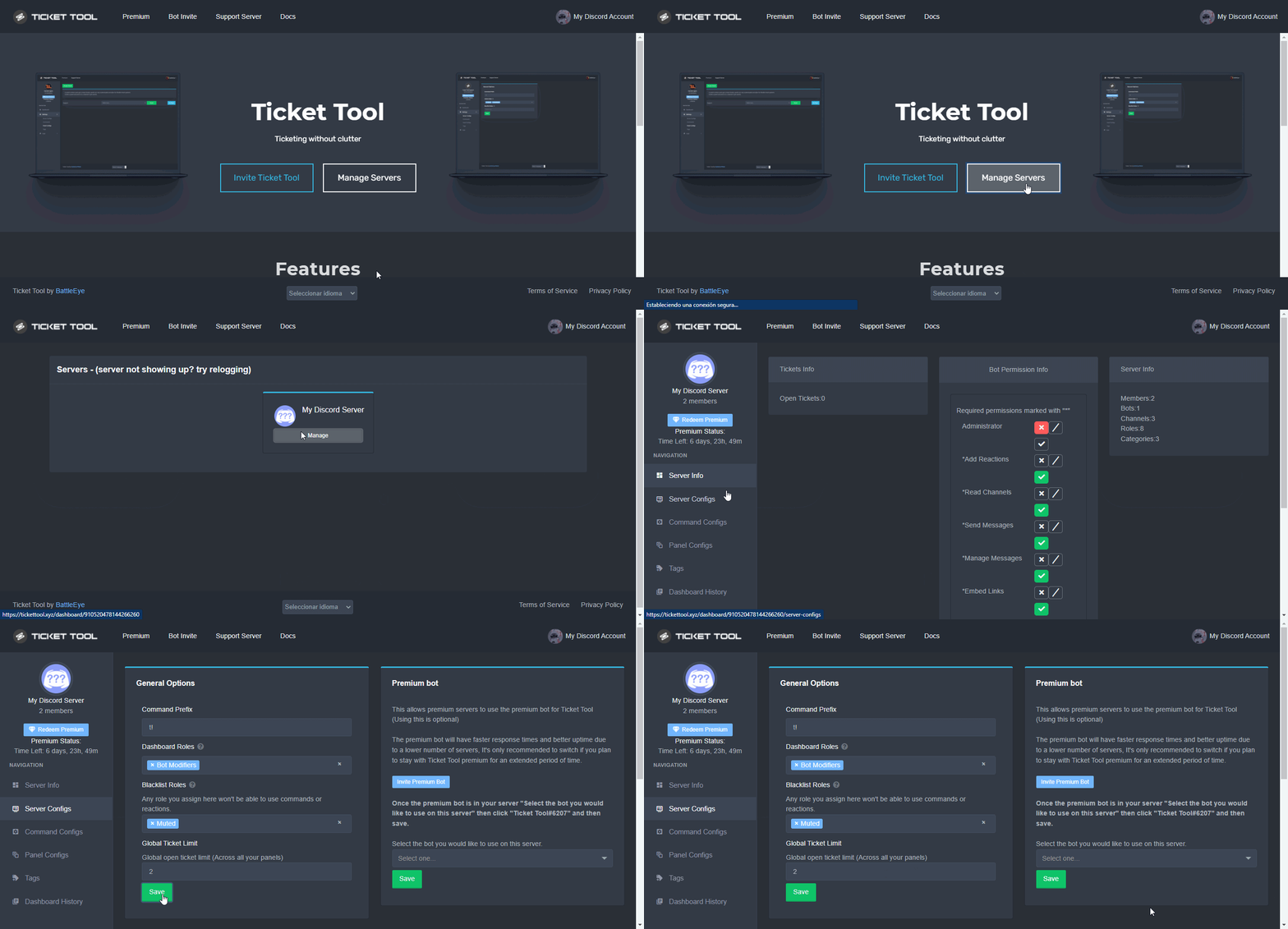
 humble sequoiaBOT
Unlike the regular Ticket Limit, the global limit will limit the amount of tickets a user can create at the same time for ALL Panels. When a ticket is closed again, the limit resets for that user.
To customize it head over to your Dashboard ➞ Server Configs ➞ Global Ticket Limit
Note:
This is not a limit for how many tickets a user can open at all times or how many tickets you can have open on the server in total. This is just a limit per user for open tickets.
 autumn hinge
I redeemed the premium but when does the premium bot come
 unique anvil
Whenever you add it
humble sequoiaBOT
The first thing you will need to do is invite the premium bot, an invite can be found here
Once the bot is in your server we will head to the dashboard and manage your server. When you are managing your server, you want to head into "Server Configs" then click the drop down menu under "Select the bot you would like to use on this server" then click "Ticket Tool#6207" and then save.
 hazy pollen
My from EGYPT
jade topaz
It seems that when I use panel configuration for disabling roles from being able to click on the button and create ticket (see screenshot), I've tested with a volunteer and it appears that volunteer has NO 'Standard' role but still can create the ticket. How do I make 'allowed roles' effective so anyone without that role can't create the ticket?
 jade topaz
Resolved. I forgot to put 'everyone' in disabled.
brisk flume
How to do click able things like this

 prime bridgeBOT
Lightning has been timed out for 10m 

 Reason: Posting Walls Of Text
Lightning#0874 | 897489610001756230
prime bridgeBOT
🇩🇿𝕊𝕦𝕡-_-𝕣𝕒𝕪𝕠𝕚𝕚🇩🇿 has been timed out for 10m
Reason: Posting Walls Of Text
🇩🇿𝕊𝕦𝕡-_-𝕣𝕒𝕪𝕠𝕚𝕚🇩🇿#5447 | 846122018159722557
humble sequoiaBOT
For a more convenient use of multipanels, you can now combine panels on the dashboard. This will allow you to directly send the multipanel from the dashboard or via the $panel ID command.
Where can I find this?
You can find this setting on the Dashboard -> Panel Configs -> Settings -> General Options
Note: if you're attaching all the panels to a panel called English, don't include English in the attached panels box (If you do this, it will create duplicate)
This will put all buttons from all of your panels on one message. The message is the panel message from the panel you're combining these panels in.
Note: This is a premium feature
hard cape
@brisk flume
brisk flume
yes @hard cape
 arctic dawn
how you can add a support role?
copper owl
$help support
humble sequoiaBOT
How to let support team see into a ticket
About support roles
A support role lets your support team see into tickets with out having to add them manually to each and every ticket.
You can add as many support roles as you like per panel.
NOTE that the way discord works all admins can see into tickets regardless of this.
How to set a support role
To set a Support role go to the Dashboard -> Panel Configs -> Settings -> General Options -> Support Team Roles.
NOTE that the support role will not be able to see into tickets that are already created..
smoky gale
Ello
 snow estuary
when players create ticket they cant access the channel
copper owl
$help perms
humble sequoiaBOT
How to set the permissions for tickets
To set a change permissions go to the Dashboard -> Panel Configs -> Settings -> Permission Options
copper owl
check the User Opened Permissions
snow estuary
 shut bolt
snow estuary
when players create ticket they cant access the channel
shut bolt
snow estuary
when players create ticket they cant access the channel
Are you using View As Role?
humble sequoiaBOT
ᅠ
@pseudo glen requires the following permissions:
Add Reactions
Read Channels
Send Messages
Manage Messages
Embed Links
Attach Files
Read History
Manage Roles
To change the role permissions, you can go to your Discord Server ➞ Server Settings ➞ Roles ➞ @Ticket Tool
To change the channel permissions, you can go to your Channel Settings ➞ Permissions ➞ Ticket Tool
ᅠ
Note:
You can give Ticket Tool Administrative Permissions instead of all the permissions listed above, but it's entirely optional and NOT necessary.
 hard cape
oop
 pliant sable
help, my customers cannot view their tickets and everything is setup correctly
 copper owl
nope, they dont need permission to see channels in the category
pliant sable
okay
hard cape
copper owl
nope, they dont need permission to see channels in the category
But if they wont have permission to see the category, what will happend?
copper owl
hard cape
But if they wont have permission to see the category, what will happend?
they dont see the category
hard cape
and the ticket?
pliant sable
It’s like this
 pliant sable
and it doesn’t work anyway
pliant sable
shut bolt
Are you using View As Role?
view
humble sequoiaBOT
Using the View as Role feature.
The View as Role discord feature will not work for testing ticket tool. Ticket Tool opens permissions with user permissions & not role permissions.
copper owl
hard cape
and the ticket?
they'll have access to it
hard cape
ok, thanks
copper owl
if given the pemission to see it
shut bolt
pliant sable
view
That's the problem, try with an alt
pliant sable
so i can remove the category permissions?
shut bolt
Yup
pliant sable
just keep nothing there
copper owl
pliant sable
so i can remove the category permissions?
yeah, they dont need category permissions to see all the channels
shut bolt
Only keep the perms for the bot
pliant sable
okay
snow estuary
shut bolt
Are you using View As Role?
yes
copper owl
humble sequoia
@snow estuary refer to this
jade topaz
hey im not able to add members to my ticket, everytime i do so it deletes my message and sends this instead which is automatically deleted in less than a second (to note i am including the id of the member in the command so im unsure what it means by missing option)
 hard cape
this is probaly new, but try to type it like this: $add <id> #ticketchannel
this is new (i think) so i dont know and im not sure
jade topaz
will try that!
hard cape
kk, lemme know the rusult
jade topaz
ah- still showing the exact same thing
jade topaz
it does, it has been doing this occasinally for some time now (some days it works and some days it doesnt) without us every really changing its perms
hard cape
there is nothing new in docs
 jade topaz
ye- i really dont know why its not working
hard cape
type here the message by what you want to add the person please
jade topaz
mkay, we have the prefix as '=' in my server (using my id instead of the person's)
=add 478594754075164672
shut bolt
hard cape
there is nothing new in docs
That's FAQ?
hard cape
wdym?
shut bolt
The FAQ of the Docs
copper owl
Probably missing some bullshit discord permission that discord forced in some weird unannounced update
@jade topaz can you try giving ticket tool TTS messages and External Emote permissions then try again
copper owl
No worries. For clarification
TT does not need those perms by default
but Discord has unnecessary updates that mess with ticket tool (and other bots)
so for now, they're needed so $add works
jade topaz
ah i see! huh thats weird i never knew that
copper owl
Well, now ya know
hard cape
copper owl
<@456226577798135808> can you try giving ticket tool TTS messages and External E...
Everyone need to do this to make add command working?
copper owl
if there's any other problems you face, you can either come back here, or contact us in #🎫│make-a-ticket
copper owl
hard cape
Everyone need to do this to make add command working?
Not everyone from what ive seen
hard cape
Thanks!
jade topaz
copper owl
if there's any other problems you face, you can either come back here, or contac...
thank you veru much ^^
copper owl
Anytime
 narrow mountain
Hey, how do I get multiple buttons on the ticket open message?
 narrow mountain
yes
 fervent frost
humble sequoiaBOT
fervent frost
humble sequoiaBOT
Ticket Tool Premium
Get premium at https://tickettool.xyz/premium
Manage your subscriptions at https://tickettool.xyz/subscriptions
Why Premium?
Premium lets you customize the bot just how you want it. It also helps keep the bot running.
Faster Premium Bot
Automatic Transcripts
Full Customization
Custom Buttons
Direct Messages
Ticket Automation
Multipanels
Premium Support
You can purchase premium here:
Price
$6 - Monthly
$66 - Yearly
Premium
For a more convenient use of multipanels, you can now combine panels on the dashboard. This will allow you to directly send the multipanel from the dashboard or via the $panel ID command.
Where can I find this?
You can find this setting on the Dashboard -> Panel Configs -> Settings -> General Options
Note: if you're attaching all the panels to a panel called English, don't include English in the attached panels box (If you do this, it will create duplicate)
This will put all buttons from all of your panels on one message. The message is the panel message from the panel you're combining these panels in.
Note: This is a premium feature
narrow mountain
Thanks!
hard cape
np
narrow mountain
is there a way to get the bot to reply to a message sent by the user in the ticket channel?
hard cape
Hey!
narrow mountain
so like if i make a ban appeal and the bot asks "what is the reason you got banned?" and when the user has sent a message the bot sends the new message "are you guilty?" and so on
hard cape
I think it's not possible, but you can create something simmiliar
It's called tags
It's auto-respond from bot
narrow mountain
ya ik
hard cape
Like when the member say "hi", the bot will say: hello, how we can help you?
narrow mountain
but i want it to send an automatic message when someone for example opened a ban appeal ticket the bot automatically sends "What is the reason you got banned?" then waits for a reply, then sends the new message "are you guilty?" and so on
and that's not possible?
narrow mountain
hard cape
Like when the member say "hi", the bot will say: hello, how we can help you?
Ya ik
hard cape
There is only one way to do it, you need to edit ticket message or embed
humble sequoiaBOT
The Ticket Message is the first message sent by the bot in a new ticket. To customise it head over to your Dashboard ➞ Panel Configs ➞ Settings ➞ Ticket Options ➞ Edit Ticket Message
 copper owl
to answer the question, there is no automatic way of responding to messages
hard cape
no problem
copper owl
like a Q&A type thing
narrow mountain
basically
copper owl
yup. not a thing as of now
narrow mountain
copper owl
to answer the question, there is no automatic way of responding to messages
ah ok thanks! I'll leave a suggestion ig
iron nightBOT
Gave 1 Rep to Neptune (current: #1 - 495)
copper owl
Tags would be hard to implement in this situation, and the ticket message wouldnt do exactly what you want
copper owl
read the pins in #💡│suggestions
 blazing frost
where are the robaxes that I ordered? in the pending only 350, not 1050. I'm already tired of it! tell me where to go?
humble sequoiaBOT
⚠️ You're in the wrong place
We provide support for @pseudo glen discord bot and cannot help you with whatever issue you have.
- Please make sure to contact the appropriate Support Team.
If you don't have any further questions regarding our bot Ticket Tool, please close this ticket
 calm marsh
is there a way to it so staff cant message in a ticket until they claim it?
humble sequoiaBOT
You can check our documentation here.
You can also check #573205317870157855 for the basic setup.
Our documentation contains all the info you need about the bot to be able to setup and configure the bot however you like.
 gusty canyon
I can't configure the bot, it gives me an error
scenic plinth
calm marsh
is there a way to it so staff cant message in a ticket until they claim it?
No, but you can make it so they can't typeI, it after they claim if thats what you wish?
jade topaz
so i set this up on my old discord server and was wondering if anyone could refresh my mind as to what the command was.
 calm marsh
scenic plinth
No, but you can make it so they can't typeI, it after they claim if thats what y...
calm marsh
scenic plinth
No, but you can make it so they can't typeI, it after they claim if thats what y...
I’ve already done that
scenic plinth
Alright
humble sequoiaBOT
━━ moved to ticket ━━
scenic plinth
(For jay)
 finite lantern
how can i fix this?
 narrow mountain
Is there a way for premium members to change the avatar of the bot?
 frail remnant
@jade topaz Hey. Can I host my own copy?
shut bolt
narrow mountain
Is there a way for premium members to change the avatar of the bot?
Nope
narrow mountain
ok
shut bolt
 rugged cedar
Do you do offer trial
rugged cedar
Do you do offer trial
Yes, 7 day
rugged cedar
Thanks
shut bolt
Sure
 leaden horizon
@shut bolt bot down?
leaden horizon
Sorry😩
shut bolt
Isn't the bot working?
leaden horizon
But why cant i send my ticket panel not to my channels
It says typ debug in that channel but it doesnt do anything
humble sequoiaBOT
How to disable the premium bot
To disable the premium bot you will have to go to the Dashboard ➞ Server Configs ➞ Premium bot ➞ And on the right-hand side select the primary free bot in the drop down menu.
Premium features will still work on the normal bot.
 shut bolt
Check this, it's mostly that
shut bolt
Sure
leaden horizon
Sorry again for ping
shut bolt
No worries
leaden horizon
Another question is there any variable to ping a role instead of 1 member?
shut bolt
$mentions
humble sequoiaBOT
Mentions
Within all the messages the bot's sends (both embeds and text) you can mention either channels, roles, or even users, these mentions will only send a notification to the user if they are used within a text field, e.g: a role mentioned in an embed won't ping at all the users who have that role.
For mentioning a role you can use one out of three options:
{@Role Name} ➞ Which is Case Sensitive.
{RoleID} ➞ Replace RoleId with the Id of the role you are trying to ping.
<@&RoleID> ➞ Discord's native syntax to ping roles.
<#ChannelID> ➞ Mention a channel by its ID.
<@UserID> ➞ Mention a user by its ID.
leaden horizon
Tyty
 mortal owl
I put my 2 items into the guy that combines your items and i clicked the wrong one so i hit cancel and now i dont have either of my stuff
humble sequoiaBOT
━━ moved to ticket ━━
mortal owl
Anyone know how to get my stuff back or is it just eaten forever bc i had my pathfinder and a star duster and now they both gone
humble sequoiaBOT
⚠️ You're in the wrong place
We provide support for @pseudo glen discord bot and cannot help you with whatever issue you have.
- Please make sure to contact the appropriate Support Team.
If you don't have any further questions regarding our bot Ticket Tool, please close this ticket
brisk flume
jade topaz
so i set this up on my old discord server and was wondering if anyone could refr...
Its an premium bot u need to buy it

 feature
 viscid aurora
😭😭😭😭😭😭😭😭😭😭😭😭
Pls do it for free pls
Devs pls
That's the 1 feature I need and after that I will never look for another
 humble sequoiaBOT
For a more convenient use of multipanels, you can now combine panels on the dashboard. This will allow you to directly send the multipanel from the dashboard or via the $panel ID command.
Where can I find this?
You can find this setting on the Dashboard -> Panel Configs -> Settings -> General Options
Note: if you're attaching all the panels to a panel called English, don't include English in the attached panels box (If you do this, it will create duplicate)
This will put all buttons from all of your panels on one message. The message is the panel message from the panel you're combining these panels in.
Note: This is a premium feature
jade topaz
ty
hard cape
No problem
jade topaz
thanks @hard cape
jade topaz
alr
 storm walrus
Where do we get a refund for the lord society scam hacked discord
humble sequoiaBOT
⚠️ You're in the wrong place
We provide support for @pseudo glen discord bot and cannot help you with whatever issue you have.
- Please make sure to contact the appropriate Support Team.
If you don't have any further questions regarding our bot Ticket Tool, please close this ticket
 pallid sandal
when I view as a role on my server to test the bot the role can open a ticket but cannot see the ticket how to fix
the role's permissions are fine but it just doesnt show the ticket it just opens does it not work for view as role do i need an alt to test the bot
humble sequoiaBOT
Using the View as Role feature.
The View as Role discord feature will not work for testing ticket tool. Ticket Tool opens permissions with user permissions & not role permissions.
 craggy geyser
You do need an alt yes
pallid sandal
okay tysm I was getting annoyed tbh
 lilac canopy
What is this problem and how can I fix it?
 forest goblet
lilac canopy
What is this problem and how can I fix it?
forest goblet
lilac canopy
What is this problem and how can I fix it?
You tried to close the ticket and therefore move it into a different category, but that category was deleted.
 hardy bough
Please help me cute ticket ticket details
hard cape
hardy bough
Please help me cute ticket ticket details
Hey, i think We cant help you with that.
fallow ingot
hardy bough
Please help me cute ticket ticket details
Can you elaborate?
scenic plinth
Are you asking to elaborate on Ticket Tool setup? If so we still need to know what part of the setup.
fallow ingot
scenic plinth
Are you asking to elaborate on Ticket Tool setup? If so we still need to know wh...
I was asking them to elaborate on what they need help with.


 copper owl
 covert fiber
hey mega, go to your ticket count and add 2 to it
it's most likely the ticket count, 1488 is considered a hate word
covert fiber
Oh okay, lemme go and try