#🆘│community-support
1 messages · Page 375 of 1
 copper owl
 humble sequoiaBOT
How to let support team see into a ticket
About support roles
A support role lets your support team see into tickets with out having to add them manually to each and every ticket.
You can add as many support roles as you like per panel.
NOTE that the way discord works all admins can see into tickets regardless of this.
How to set a support role
To set a Support role go to the Dashboard -> Panel Configs -> Settings -> General Options -> Support Team Roles.

NOTE that the support role will not be able to see into tickets that are already created..
copper owl
make their role a support team role (this is if you want to add a role like moderator or helper)
and please dont ping me or anyone else on the team in here again.
you can also use $add <ID> to add them.
copper owl
only the one you use the command in.
 karmic eagle
my bad gdem big up neptune
humble sequoiaBOT
The first thing you will need to do is invite the premium bot, an invite can be found here
Once the bot is in your server we will head to the dashboard and manage your server. When you are managing your server, you want to head into "Server Configs" then click the drop down menu under "Select the bot you would like to use on this server" then click "Ticket Tool#6207" and then save.

 meager charm
@hard cape how do I add people too ticket?
meager charm
Ok ty @hard cape
 iron nightBOT
Gave 1 Rep to D<3 (current: #20 - 52)
 hard cape
No problem!
meager charm
Does it have too be this symbol $
hard cape
Yes, every commands include prefix $
meager charm
Ok ty
hard cape
Np
copper owl
meager charm
Does it have too be this symbol $
it doesnt have to be this
you can change it
 cunning skiff
Hey guys, is this the place I can ask a question re: the ticket tool?
cunning skiff
Thank you so much! Just wondering how I can move tickets to the bottom of the channel list
cunning skiff
 fast sable
What do you need?
fast sable
What do you need?
I did not set it up for the server so I'm a little confused but it looks like it doesn't have a channel specified for the tickets to go into, if that makes sense?
fast sable
You want a channel for open tickets to go to?
Like when someone makes a ticket, it goes to a specific channel, correct?
cunning skiff
fast sable
You want a channel for open tickets to go to?
I want to make them appear at the bottom of the channel list instead of the top when they are created
fast sable
Ok so what you can do is create a category called "open tickets", and then edit your settings so open tickets appear in that category
 steel bramble
can i have multiple ticket tools like one for support and one for trader?
cunning skiff
fast sable
Ok so what you can do is create a category called "open tickets", and then edit ...
ok so i would put the open tickets category here?
 fast sable
Yep!
cunning skiff
It looks like it's not specified to a category now, right?
fast sable
It is not, so you would create the category, then select the category
hard cape
steel bramble
can i have multiple ticket tools like one for support and one for trader?
Yes, but its For premium users. But u can create more panels For free!
fast sable
cunning skiff
It looks like it's not specified to a category now, right?

Thats what it would look like. As you can see, i selected my open category for them to go to
steel bramble
not sure what that means but thanks for your time to answer i will look for more info
hard cape
steel bramble
not sure what that means but thanks for your time to answer i will look for more...
Ok, if you need help, ask me:
cunning skiff
fast sable
Okay great thank you! So it won't get rid of my open tickets to move them right?
iron nightBOT
Gave 1 Rep to Da God Apple (current: #78 - 1)
fast sable
I think the currently open tickets do not get moved, but the ones that get open using the new settings on the panel will be moved there
 glossy barn
Hello, are there any option to do that: if user created ticket and closed in past and he wanted to open a ticket again from his closed ticket when he clicked ticket creating icon?
cunning skiff
fast sable
I think the currently open tickets do not get moved, but the ones that get open ...
Thank you!!
iron nightBOT
@cunning skiff :: You can't rep Da God Apple#9999 for 50 minutes and 7 seconds. Try coming back later?
 jade raft
Hiya does anyone know how I can change a claimed ticket name to the person claiming it?
copper owl
use {author.name} in Claim Name
jade raft
copper owl
use {author.name} in `Claim Name`
Omg awesome. I was looking everywhere hahaha
fast sable
cunning skiff
Thank you!!
No problem!
jade raft
Hiya is there a way if a ticket is created and it is inactive for some time can it be closed automatically.
hard cape
Hey! I’m not sure but I think it’s not possible.
 shut bolt
It is not
humble sequoiaBOT
Automation disabled
There's currently no ETA for when automation will be enabled again. The issue that's caused it to be disabled, us hitting rate limits, is tied to the increased load on Discord's servers. The situation's currently unpredictable, which makes it so we can't give you a fixed time.
jade raft
shut bolt
It is not
Oki doki. Thanks 
iron nightBOT
Gave 1 Rep to Yareaj_ (current: #2 - 276)
shut bolt
humble sequoia
Sure
steel bramble
How can i tell the new panel where to put the newly created ticks as right now they are going to the welcome channel?
hard cape
$help category
humble sequoiaBOT
How to set the open category
To set a open category go to the Dashboard -> Panel Configs -> Settings -> Category Options -> Category Open
 hard cape
Do you mean this?
steel bramble
i will try that thank you
hard cape
No problem
steel bramble
hard cape
Do you mean this?
that was the exact thing i was looking for thank you for the helpful answers!!
iron nightBOT
Gave 1 Rep to D<3 (current: #20 - 53)
 vital arch
$help setup
humble sequoiaBOT
Setting up Ticket Tool
Visit the docs for setup info
General Setup
hard cape
steel bramble
that was the exact thing i was looking for thank you for the helpful answers!!
Glad to hearn that 
hard cape
vital arch
$help setup
Do you need help?
 inner stag
Hello, how can I put the person's name automatically when they open a ticket?
hard cape
Hey!
It’s premium feauture, so if u don’t have premium, you need to set it manually.
@inner stag , do you have premium?

 somber imp
im so confused right now i added the ticket to my server and when i try putting manage servers it says its not there and i know what to do now
humble sequoiaBOT
Don't see your server in the dashboard?
You will possibly need to relog. Look below to see steps on how to relog.
How to relog in the Dashboard.
First, you will need to go to the dashboard. Once your there, click on your avatar on the top right. after you clicked it, you will see button that says Logout. You must click that. Once you have logged out, you can log back in.
Note:
You need one of these 3 things to access the dashboard.
1. Server Owner (Level: 6)
2. Server Administrator (Level: 4)
3. Dashboard Role (Level: 2)
:warning: You can check your level using $level on your Discord Server
User permission level with Ticket Tool
@User is permission level: 0 (User)
```» *If it shows that your permission is **0**, you don't have any of the above **3 things** to manage the dashboard.*
**See the GIF below on how to relog:** hard cape

humble sequoiaBOT
━━ moved to ticket ━━
copper owl
for victor
 indigo blaze
Question, made a new role, how do I get them to see the new tickets, without giving them full access to the server?
 upper flower
$help support
humble sequoiaBOT
How to let support team see into a ticket
About support roles
A support role lets your support team see into tickets with out having to add them manually to each and every ticket.
You can add as many support roles as you like per panel.
NOTE that the way discord works all admins can see into tickets regardless of this.
How to set a support role
To set a Support role go to the Dashboard -> Panel Configs -> Settings -> General Options -> Support Team Roles.
NOTE that the support role will not be able to see into tickets that are already created..
iron nightBOT
Gave 1 Rep to Developerツ (current: #10 - 161)
 rose copper
How do I change the name of the ticket??
humble sequoiaBOT
The ticket name is the default channel name of all tickets. To edit it, go to your Dashboard > Panel Configs > Settings > Ticket Options. There you can edit the channel name of opened and closed tickets. You can also use variables in there.

 Note: This is a premium feature
iron nightBOT
Note: This is a premium feature
iron nightBOT
Gave 1 Rep to D<3 (current: #20 - 54)
 dark shadow
You don't have permissions to use this.
humble sequoiaBOT
Any role you assign as a blacklisted role won't be able to use commands or reactions.
Selecting a blacklisted role
Go to your Dashboard ➞ Server Configs. There you will find the option to select blacklisted roles.
Note: Don't forget to save.
 shut bolt
Check your blacklisted roles
 jade topaz
ye
jade topaz
Hey guys.. how do I get tickets to tag certain roles so they get a notification that a ticket had been opened?
 kind hawk
jade topaz
Hey guys.. how do I get tickets to tag certain roles so they get a notification ...
kind hawk
jade topaz
Hey guys.. how do I get tickets to tag certain roles so they get a notification ...
by putting the role like this {@Support} in the Ticket Options > Ticket Message
jade topaz
kind hawk
by putting the role like this ``{@Support}`` in the **Ticket Options > Ticket Me...
Ahhh awesome!
jade topaz
kind hawk
by putting the role like this ``{@Support}`` in the **Ticket Options > Ticket Me...

Didn't work
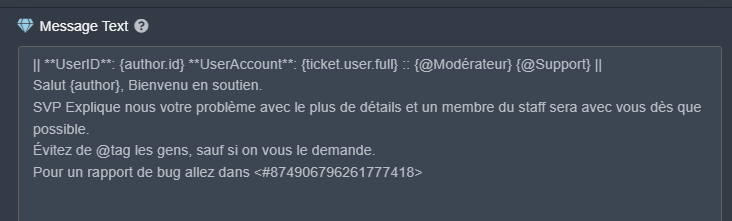
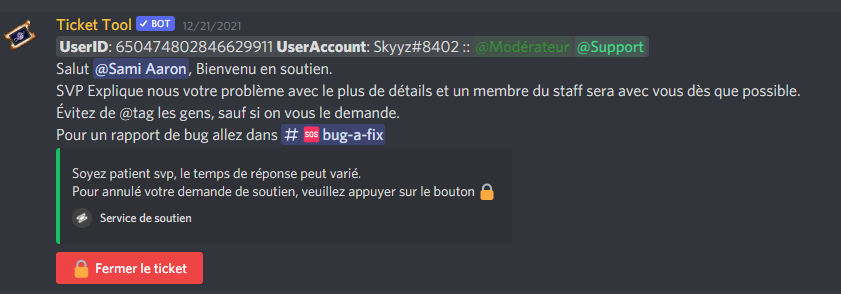 hard cape
kind hawk
by putting the role like this ``{@Support}`` in the **Ticket Options > Ticket Me...
hard cape
kind hawk
by putting the role like this ``{@Support}`` in the **Ticket Options > Ticket Me...
If it doesnt works for him/her, She/he should Use that: <@&ID>
kind hawk
Make sure to have the right name too, (CaPiTaLiZaTiOn is important)
{@staff} is not the same as {@Staff}
hard cape
Ye
kind hawk
$mentions
humble sequoiaBOT
Mentions
Within all the messages the bot's sends (both embeds and text) you can mention either channels, roles, or even users, these mentions will only send a notification to the user if they are used within a text field, e.g: a role mentioned in an embed won't ping at all the users who have that role.
For mentioning a role you can use one out of three options:
{@Role Name} ➞ Which is Case Sensitive.
{RoleID} ➞ Replace RoleId with the Id of the role you are trying to ping.
<@&RoleID> ➞ Discord's native syntax to ping roles.
<#ChannelID> ➞ Mention a channel by its ID.
<@UserID> ➞ Mention a user by its ID.
hard cape
@jade topaz , did u invited ticket tool to your server?
jade topaz
kind hawk
$mentions
Yeah I got that fixed thanks but the message I'm trying to embed won't save now 😩
iron nightBOT
Gave 1 Rep to ÐooubleTap (current: #78 - 1)
hard cape
jade topaz
Yeah I got that fixed thanks but the message I'm trying to embed won't save now ...
You want to Ping someone in embed?
jade topaz
hard cape
You want to Ping someone in embed?
No managed to get the pint working but now my message won't save in the embed
humble sequoiaBOT
How to make Ticket Tool ping a role
To make ticket tool ping a role when a ticket is opened, go to the Dashboard -> Panel Configs -> Settings -> Ticket Options -> Ticket Message -> Message Text and do this:
{@Role name} This is case sensitive and the role must have @mentions enabled
 hard cape
In this part? @jade topaz
 humble sequoiaBOT
━━ moved to ticket ━━
 jade topaz
I'm not trying to ping in the embed.. I'm just trying to apply a message to the embed
jade topaz
hard cape
Try to zoom out


So I'm trying to place that embed description onto the support ticket
hard cape
jade topaz
But you are editing inside ticket
If you want to edit a panel, Go to Panel options
So if you want to Edit this, Go to Panel options

But if you want to Edit this, Go to Ticket options
 jade topaz
hard cape
So if you want to Edit this, Go to **Panel options**
jade topaz
hard cape
So if you want to Edit this, Go to **Panel options**
Jesus 😩 I need sleep.. I didn't even realise which option I was in 😩😂 apologies
hard cape
It’s fine!
jade topaz
hard cape
<@456226577798135808> , did u invited ticket tool to your server?
Yes I did
hard cape
jade topaz
Yes I did
$help panel
humble sequoiaBOT
Creating a panel
To create a panel we are going to need to head over to the panel configs on the dashboard
Once at the dashboard we will need to click Create Panel
Enter a panel name (Fill in any optional settings you want)
Click Create Panel and your ready to get started with configuring your panel
An example of a creating a panel is shown below.
 hard cape
Try this to start with tickets
hard cape
No problem!
 frank walrus
nvm
frank walrus
Nah all good now, thanks
hard cape
Kk!
jade topaz
hi. I would like to know how to change the name of ticket bot and his icon ?!
hard cape
Hey, you can set a nickname for ticket tool, But you can’t change the icon.
jade topaz
hmm... okay.
 true adder
So I run an Ark Survival Evolved cluster and we’ve used ticket tool for a while.
All of a sudden it’s presenting my players with this message

I’ve tried everything in my brainpower to fix it but obviously something isn’t right
true adder
@hard cape nope. I didn’t make and changes to it, we had 3 tickets roll through earlier today and now nothing
hard cape
Check ur website
Someone can change it, or check if u didnt set something with create ticket button
 outer scroll
how do i make a ticket server? for other ppl to creat tickets in my serve
hard cape
$help panel
humble sequoiaBOT
Creating a panel
To create a panel we are going to need to head over to the panel configs on the dashboard
Once at the dashboard we will need to click Create Panel
Enter a panel name (Fill in any optional settings you want)
Click Create Panel and your ready to get started with configuring your panel
An example of a creating a panel is shown below.
hard cape
hard cape
Np
hard cape
true adder
So I run an Ark Survival Evolved cluster and we’ve used ticket tool for a while....
Or try to resend a panel
true adder
hard cape
Or try to resend a panel
I’ll resend the panel and hope for the best lol
 jade topaz
I added the wick bot to my and now getting this errror. I put ticket role over the wick bot though
 hard cape
The Wick bot is probaly blocking it
Try to set ticket tool’s role to whitelisted roles @jade topaz
 jolly burrow
So ticket bot is not responding to my message,is this normal???,if yes how much will it take for him to respond
hard cape
Hey
 hard cape
This is not a problem of ticket tool
jolly burrow
oh
hard cape
Owner of the server set that
jolly burrow
oh
i also made a ticket last day and it didnt respond
so i came here to see what is the problem
hard cape
The support role has to answer you, that’s not ticket tool’s problem
hard cape
What?
hard cape
The owner had to set a support team role which has access to tickets, so they need to respond, not ticket tool
hard cape
jolly burrow
theres no support page on it
Wdym?
jolly burrow
ok but,theres no support page anywhere,r im just dumb
hard cape
Do you need help with ticket tool?
hard cape
Ok, with what do you need help?
@jolly burrow , u want to make a ticket in your server?
jolly burrow
nope
copper owl
jolly burrow
if your issue is that no one answered your ticket in this server
 pulsar wolf
How do I setup the bot?
copper owl
then we cant do anyting about it
humble sequoiaBOT

You can check our documentation here.
You can also check #573205317870157855 for the basic setup.
Our documentation contains all the info you need about the bot to be able to setup and configure the bot however you like.
copper owl
pulsar wolf
How do I setup the bot?
hard cape
jolly burrow
nope
Did u invited him?
jolly burrow
copper owl
then we cant do anyting about it
oh ok
copper owl
hard cape
Did u invited him?
they said they dont want to make a ticket in their server
hard cape
Oh
copper owl
jolly burrow
oh ok
we cant do much since it's their staff that are not answering
hard cape
 copper owl
so yeah they are using ticket tool but nothing we can do anything about
jolly burrow
copper owl
we cant do much since it's their staff that are not answering
they dont even have staff
jolly burrow
copper owl
so yeah they are using ticket tool but nothing we can do anything about
if i dm the admin i get ban
copper owl
jolly burrow
if i dm the admin i get ban
welp
again nothing we can do anything about
thats their staff
jolly burrow
copper owl
thats their staff
true
copper owl
not ours, it's only our bot that theyre using
jolly burrow
copper owl
not ours, it's only our bot that theyre using
true
hard cape
I think I can’t help him when he didn’t said with what he needs help
hard cape
copper owl
not the same person lol
Ikr, but he didn’t asked me
jade topaz
Hello, so how do I make something that the bot shows 2-3 buttons in a single panel?
shut bolt
jade topaz
Hello, so how do I make something that the bot shows 2-3 buttons in a single pan...
Heya
humble sequoiaBOT
For a more convenient use of multipanels, you can now combine panels on the dashboard. This will allow you to directly send the multipanel from the dashboard or via the $panel ID command.
Where can I find this?
You can find this setting on the Dashboard -> Panel Configs -> Settings -> General Options
Note: if you're attaching all the panels to a panel called English, don't include English in the attached panels box (If you do this, it will create duplicate)
This will put all buttons from all of your panels on one message. The message is the panel message from the panel you're combining these panels in.
 Note: This is a premium feature
shut bolt
Note: This is a premium feature
shut bolt
Check that
shut bolt
hard cape
He left-
Nope, they don't have roles but they are still here
hard cape
Oops
iron nightBOT
Gave 1 Rep to Yareaj_ (current: #2 - 278)
shut bolt
jade topaz
Oh ok, thanks for the help :)
Sure
 steady bone
When I try to ping any role in the Ticket Message (Both message & embed), it won't ping. Tagging users still works.
(I have @ Mod role)


Is this a bug or what am I doing wrong?
shut bolt
Check the bot has Mention Everyone permission
And btw, pings in embeds don't work at all
steady bone
shut bolt
Check the bot has Mention Everyone permission
That was it! It worked before so someone changed the bots perms 🤔
shut bolt
Nice
steady bone
Thanks!
shut bolt
Sure :)
jade topaz
I hab a westion
 covert swallow
What's the question?
hard cape
jade topaz
I hab a westion
Is there any problem?
jade topaz
Not anymore
hard cape
Kk
 prime bridgeBOT
可达鸭 has been timed out for 10m 

 Reason: Posting Discord Server Invites
可达鸭#2508 | 843865519953149976
 neon wadi
how do i make the tickets open appear under a specific category
 crimson eagle
neon wadi
how do i make the tickets open appear under a specific category
crimson eagle
neon wadi
how do i make the tickets open appear under a specific category
Go to #🆘│community-support before dev comes at. You
copper owl
crimson eagle
Go to <#776680605517742090> before dev comes at. You
they are in community support lol
$help category
humble sequoiaBOT
How to set the open category
To set a open category go to the Dashboard -> Panel Configs -> Settings -> Category Options -> Category Open
 clear yacht
فيه دعم عربي ولا دخلت على الفاضي؟
copper owl
clear yacht
فيه دعم عربي ولا دخلت على الفاضي؟
لو بس بتقراء #🎫│make-a-ticket
 tardy robin
$help ticket
 limber badger
How I can do ticket ?
humble sequoiaBOT
Creating a panel
To create a panel we are going to need to head over to the panel configs on the dashboard
Once at the dashboard we will need to click Create Panel
Enter a panel name (Fill in any optional settings you want)
Click Create Panel and your ready to get started with configuring your panel
An example of a creating a panel is shown below.
hard cape
limber badger
Ty
hard cape
No problem, if you have any questions, ask me.
neon wadi
How do i add a role to view the support tickets
copper owl
$help support
humble sequoiaBOT
How to let support team see into a ticket
About support roles
A support role lets your support team see into tickets with out having to add them manually to each and every ticket.
You can add as many support roles as you like per panel.
NOTE that the way discord works all admins can see into tickets regardless of this.
How to set a support role
To set a Support role go to the Dashboard -> Panel Configs -> Settings -> General Options -> Support Team Roles.
NOTE that the support role will not be able to see into tickets that are already created..
 whole compass
@hard cape pls
Help me
I Wana grow my server can you ping and tell to join everyone
covert swallow
Hey there! If possible could you refrain from unnecessary pings like that, someone will be around to assist you as soon as possible, a ping wont speed that up. Furthermore advertising your server in anyway is not permitted in any way in this server
 humble sequoiaBOT
For a more convenient use of multipanels, you can now combine panels on the dashboard. This will allow you to directly send the multipanel from the dashboard or via the $panel ID command.
Where can I find this?
You can find this setting on the Dashboard -> Panel Configs -> Settings -> General Options
Note: if you're attaching all the panels to a panel called English, don't include English in the attached panels box (If you do this, it will create duplicate)
This will put all buttons from all of your panels on one message. The message is the panel message from the panel you're combining these panels in.
Note: This is a premium feature
shut bolt
 tropic cloak
how do i make something like this
tropic cloak
how do i make something like this
Check
 buoyant grove
hi how do I enable so a user can send images when a new ticket is made?
 eager cargo
$help perms
humble sequoiaBOT
How to set the permissions for tickets
To set a change permissions go to the Dashboard -> Panel Configs -> Settings -> Permission Options
 eager cargo
go to user opened perms and allow attatch files
hard cape
covert swallow
Hey there! If possible could you refrain from unnecessary pings like that, someo...
$help ping
humble sequoiaBOT
How to make Ticket Tool ping a role
To make ticket tool ping a role when a ticket is opened, go to the Dashboard -> Panel Configs -> Settings -> Ticket Options -> Ticket Message -> Message Text and do this:
{@Role name} This is case sensitive and the role must have @mentions enabled
hard cape
whole compass
I Wana grow my server can you ping and tell to join everyone
This is community Support, not advertising channel.
covert swallow
I wasnt actually asking for help sorry. I was telling that person not to ping/advertise
hard cape
Great job then!
 sly mango
How do I use Tikt
 tepid oyster
$help name
humble sequoiaBOT
Help Options
$help commands - Information on commands
$help setup - Information on bot setup
$help faq - Frequently asked questions
tepid oyster
$help commands
humble sequoiaBOT
() = optional
[] = required
*==================================
Ticket Commands
==================================*
_ _
`$add [User] (channel)`
Description: Adding additional users to a ticket
Aliases: none
`$remove [User] (channel)`
Description: Removing users from a ticket
Aliases: none
`$close`
Description: Closing tickets
Aliases: none
`$open`
Description: Opening closed tickets
Aliases: none
`$delete`
Description: Deleting tickets
Aliases: none
`$rename`
Description: Renaming tickets/channels
Aliases: none
`$transcript (send channel)`
Description: Creating transcripts
Aliases: none
`$new (user) (reason)`
Description: Creating tickets in a monitored channel (when command style is enabled)
Aliases: none
`$claim`
Description: Claiming tickets (when claim is enabled)
Aliases: "unclaim"
_ _
*==================================
General Commands
==================================*
_ _
`$help (Help Options)`
Description: Help Command
Aliases: none
`$debug`
Description: Debuging issues with running Ticket Tool
Aliases: none
`$id (@role/@user/#channel/emoji)`
Description: Converting roles, users, channels and emojis to ID
Aliases: "getid"
`$permlevel`
Description: Checking permission level with Ticket Tool
Aliases: "level"
`$ping`
Description: Checking response time with discord api
Aliases: none
`$vote (link | unlink | redeem) (user)`
Description: Earn premium by voting on top.gg or Discord.boats
Aliases: "votes"
hard cape
sly mango
How do I use Tikt
$help panel
humble sequoiaBOT
Creating a panel
To create a panel we are going to need to head over to the panel configs on the dashboard
Once at the dashboard we will need to click Create Panel
Enter a panel name (Fill in any optional settings you want)
Click Create Panel and your ready to get started with configuring your panel
An example of a creating a panel is shown below.
hard cape
If you want to make a ticket, check it! - in your server
@tepid oyster , if you want to do author name and their tag in ticket, type this: {ticket.user.name}-{ticket.user.tag}
But It’s  feauture.
 neon wadi
$help setup
humble sequoiaBOT
Setting up Ticket Tool
Visit the docs for setup info
General Setup
 median radish
I joint a server for a giveaway but when I joint the giveaway I made a ticket and left the server by mistake and rejoined the server but when I want to make the ticket again it shows that "you already have a ticket avaliable you cannot make more than 1" but when I try to find the ticket (which I made before I left by mistake) it's no where to be found
Please help me with this situation as I do not know how to close the invisible ticket
hard cape
They can have set delete ticket when ticket owner left
They can have transcript of the ticket, But if they not, you can’t open the ticket again, But they can send a request to discord to see all deleted channels or something like that.
jade topaz
Or it could still be ticket opened, regardless if you left or not. And they have max tickets set to 1.
hard cape
jade topaz
Or it could still be ticket opened, regardless if you left or not. And they have...
I said they can
hard cape
median radish
Brb lemme read
Kk
jade topaz
hard cape
They can have set **delete ticket when ticket owner left**
If they have this option then ticket should be deleted & ticket creation should be reset.
If it is the 2nd option, the transcript could be causing an issue.
hard cape
I’m not Sure What you mean
jade topaz
Well you said "they can have set delete ticket when owner left". Thereby if that deletes ticket, it deletes ticket, so there is no ticket & they can now create a new ticket.
If it's for the 2nd statement, the transcript could be causing an issue. (As you said).
hard cape
Ye, i know, But when they said they won a giveaway, it's more important
jade topaz
They did not say they won a giveaway. Even if they did, winning giveaway has nothing to do with ticket creation/deletion.
hard cape
But if they have won and deleted the news of who won, they may not believe them. Do you know What i mean?
hard cape
$help Support role
humble sequoiaBOT
How to let support team see into a ticket
About support roles
A support role lets your support team see into tickets with out having to add them manually to each and every ticket.
You can add as many support roles as you like per panel.
NOTE that the way discord works all admins can see into tickets regardless of this.
How to set a support role
To set a Support role go to the Dashboard -> Panel Configs -> Settings -> General Options -> Support Team Roles.
NOTE that the support role will not be able to see into tickets that are already created..
jolly burrow
hard cape
I think I can’t help him when he didn’t said with what he needs help
sorry to recontinue this,but ticket bot wasnt anwsering
hard cape
Hey
hard cape
Go to Dashboard
humble sequoiaBOT

 hard cape
And go to server configs
jolly burrow
ok
hard cape
jolly burrow
that he still did not respond
But one of Support roles has to answer
 viscid juniper
Hi guys, little question regarding the bot. Is it possible to add a button on the support/ticket screen which if pressed show some informative text for the user only where no ticket will be created?
hard cape
viscid juniper
Hi guys, little question regarding the bot. Is it possible to add a button on th...
No, thats not possible.
jade topaz
$help multipanel
humble sequoiaBOT
Help Options
$help commands - Information on commands
$help setup - Information on bot setup
$help faq - Frequently asked questions
jolly burrow
hard cape
But one of Support roles has to answer
theres no support on there
jade topaz
viscid juniper
Hi guys, little question regarding the bot. Is it possible to add a button on th...
u can
jolly burrow
😐
jade topaz
by multipanel
jolly burrow
so yea
jade topaz
its premium feature
hard cape
jolly burrow
theres no support on there
But the ticket message is Edit by owner of server
hard cape
jade topaz
its premium feature
No, panels are for tickets
viscid juniper
jade topaz
by multipanel
Doesn't this always create a ticket?
hard cape
So It’s not possible
jolly burrow
anyways
hard cape
viscid juniper
Doesn't this always create a ticket?
Yes
jolly burrow
i guess i cant do anything abt this
hard cape
It’s not possible to show text only
jade topaz
viscid juniper
Doesn't this always create a ticket?
ye
jolly burrow
i tried to get support as a last resort
hard cape
jolly burrow
i guess i cant do anything abt this
Yes, thats not ticket tool’s problem.
viscid juniper
So it's not possible then as @hard capementioned? 🙂
hard cape
No
jolly burrow
its the owners problem
jade topaz
ye
hard cape
Ye, they are just slow.
jolly burrow
arso there are other people waiting for a response
hard cape
So It’s not bot’s problem, It’s their problem
jolly burrow
only 7 people claimed a reward for a game
hard cape
?
 hard cape
Wdym?
jolly burrow
i mean that
ticket bot responded after putting their info
didnt u see the screen shot
i also completet all the info yesterday and still no response
hard cape
This is feature called ticket message
 hard cape
You want to make this in your server or What?
jolly burrow
nope
hard cape
Then where’s the problem?
jolly burrow
...
hard cape
?
 tribal falcon
hello, good afternoon
i need help with the input message
the bot no mentionated the rol of ticket support of my server

and if I use the ID this happens
 copper owl
tribal falcon
and if I use the ID this happens
copper owl
tribal falcon
and if I use the ID this happens
that's the wrong way of using the ID
copper owl
tribal falcon
the bot no mentionated the rol of ticket support of my server
you're also missing the {}
for ID <@&ID>
tribal falcon
copper owl
for ID <@&ID>
it was solved, thank you very much <$
iron nightBOT
Gave 1 Rep to Neptune (current: #1 - 487)
copper owl
anytime
 restive frost
Can't i change the color of embed?
 feature.
restive frost
feature.
restive frost
oh okay thanks
hard cape
No problem
 devout badge
haii, how can i configure my ticket bot ?
 forest goblet
devout badge
haii, how can i configure my ticket bot ?
forest goblet
devout badge
haii, how can i configure my ticket bot ?
Hello, a setup guide can be found in #573205317870157855.
 tepid palm
Hi um I have the ticket in one of my servers and I want to use it for my next server but i can't get to setup a ticket ,it's only showing one server (the first server that I used the bot in)
humble sequoiaBOT
Don't see your server in the dashboard?
You will possibly need to relog. Look below to see steps on how to relog.
How to relog in the Dashboard.
First, you will need to go to the dashboard. Once your there, click on your avatar on the top right. after you clicked it, you will see button that says Logout. You must click that. Once you have logged out, you can log back in.
Note:
You need one of these 3 things to access the dashboard.
1. Server Owner (Level: 6)
2. Server Administrator (Level: 4)
3. Dashboard Role (Level: 2)
:warning: You can check your level using $level on your Discord Server
User permission level with Ticket Tool
@User is permission level: 0 (User)
```» *If it shows that your permission is **0**, you don't have any of the above **3 things** to manage the dashboard.*


**See the GIF below on how to relog:**try relogging
tepid palm
I dont know how
copper owl
humble sequoia
it's shown how in the gif
tepid palm
Ty
 slow scaffold
On the dashboard, I don't see an option to create a panel. Could anyone help?
shut bolt
slow scaffold
On the dashboard, I don't see an option to create a panel. Could anyone help?
In which part of the dashboard are you at?
slow scaffold
I just clicked the dashboard link.
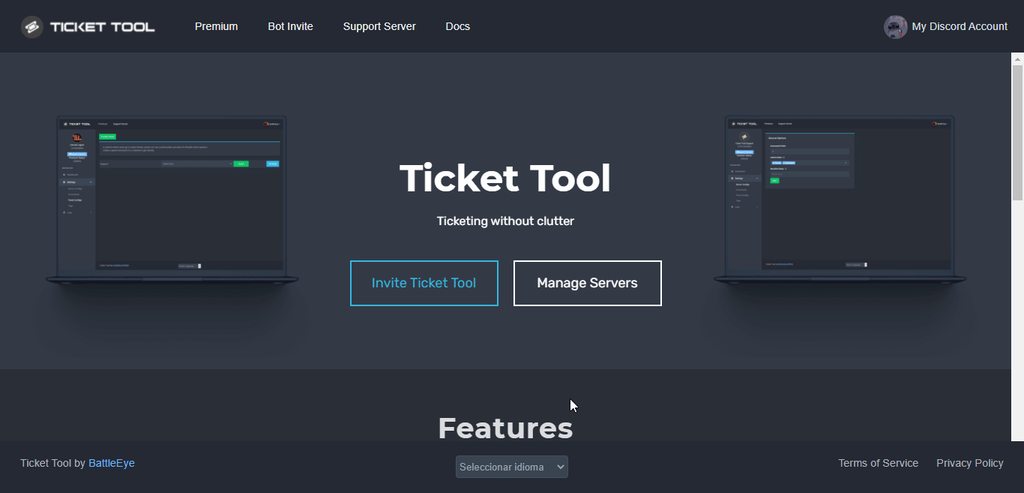 slow scaffold
Oh, thanks a ton!
shut bolt
Sure
 dark thunder
 humble sequoiaBOT
For a more convenient use of multipanels, you can now combine panels on the dashboard. This will allow you to directly send the multipanel from the dashboard or via the $panel ID command.
Where can I find this?
You can find this setting on the Dashboard -> Panel Configs -> Settings -> General Options
Note: if you're attaching all the panels to a panel called English, don't include English in the attached panels box (If you do this, it will create duplicate)
This will put all buttons from all of your panels on one message. The message is the panel message from the panel you're combining these panels in.
Note: This is a premium feature
copper owl
 halcyon ice
How to add premium bot?
hard cape
Hey
humble sequoiaBOT
How to disable the premium bot
To disable the premium bot you will have to go to the Dashboard ➞ Server Configs ➞ Premium bot ➞ And on the right-hand side select the primary free bot in the drop down menu.
Premium features will still work on the normal bot.
 halcyon ice
got it thanks!
hard cape
No problem
humble sequoiaBOT
How to make Ticket Tool ping a role
To make ticket tool ping a role when a ticket is opened, go to the Dashboard -> Panel Configs -> Settings -> Ticket Options -> Ticket Message -> Message Text and do this:
{@Role name} This is case sensitive and the role must have @mentions enabled
hard cape
$mentions
humble sequoiaBOT
Mentions
Within all the messages the bot's sends (both embeds and text) you can mention either channels, roles, or even users, these mentions will only send a notification to the user if they are used within a text field, e.g: a role mentioned in an embed won't ping at all the users who have that role.
For mentioning a role you can use one out of three options:
{@Role Name} ➞ Which is Case Sensitive.
{RoleID} ➞ Replace RoleId with the Id of the role you are trying to ping.
<@&RoleID> ➞ Discord's native syntax to ping roles.
<#ChannelID> ➞ Mention a channel by its ID.
<@UserID> ➞ Mention a user by its ID.
hard cape
Check these tutorials
I can’t, cause there is a risk
But its simple
Just type this for ping: <@&ROLEID>
In ticket message
humble sequoiaBOT
The Ticket Message is the first message sent by the bot in a new ticket. To customise it head over to your Dashboard ➞ Panel Configs ➞ Settings ➞ Ticket Options ➞ Edit Ticket Message
 iron nightBOT
Gave 1 Rep to D<3 (current: #20 - 55)
hard cape
No problem!
Wdym?
If you want to ping a role, type this: <@&ROLEID>
In Ticket Message
hard cape
humble sequoia
I’m on phone too
It’s easy on phone too
I already helped you
I can help u more, but u need to send me screenshots and I’ll be telling you what you need to do
Ok?
humble sequoiaBOT
hard cape
Try to open this link
And if it won’t open, I can’t help you more
It’s link for manage servers too

Go to panel configs, not to server configs


Go to ticket options
Then this

Then type there: <@&ROLEID> for ping
 hard cape
Then type there: `<@&ROLEID>` for ping
hard cape
hard cape
Then type there: `<@&ROLEID>` for ping
<@&ROLEID>
But instead ROLEID type the id of the role which u need to ping
You can get Id by using command $id <role> in your server
Just copy role’s Id
No problem 😄
There is missing &
Oh
Be sure u typed the letters correct
And u need to type this: {@Role name}
For ping
 rotund timber
How do I make it so I can add the message to a channel so people can click it to make a ticket
humble sequoiaBOT
Creating a panel
To create a panel we are going to need to head over to the panel configs on the dashboard
Once at the dashboard we will need to click Create Panel
Enter a panel name (Fill in any optional settings you want)
Click Create Panel and your ready to get started with configuring your panel
An example of a creating a panel is shown below.
rotund timber
Ok thank you
hard cape
Do you mean this?
rotund timber
Yes thanks @hard cape
iron nightBOT
Gave 1 Rep to D<3 (current: #20 - 56)
hard cape
No problem!
@jade topaz , if you want to use role name method, Type this: {@Role name}
Not <@Role name> 
Yes, this
Ye
Send me to dms a link to ur server, I want to see the role, please
Private
Just the link
Type this:
{@TICKET SUPPORT}
Just copy it
@jade topaz
{@TICKET SUPPORT}
Which name?
Go to panel configs
Then go to settings
Ye
After you will be done, resend the panel
Just send it again
jade topaz
The bot ruined all the emojis I typed in the ticket message. Why?!
hard cape
I think you cant use your own emojis, but im not sure
covert swallow
Make sure the bot can actually use the emojis
hard cape
jade topaz
The bot ruined all the emojis I typed in the ticket message. Why?!
Lemme try it, ill tell u
jade topaz
hard cape
I think you cant use your own emojis, but im not sure
i used emojis id there are in my server no out
hard cape
Wait a minute
jade topaz
for info this bot not prime
jade topaz
hard cape
Is the emoji from your server?
yes
covert swallow
Are you sure you used the emoji id, not the message id?
hard cape
covert swallow
Are you sure you used the emoji id, not the message id?
Im already helping him.
covert swallow
Im just throwin out some ideas
hard cape
Kk
@jade topaz , send a screenshoot of the ticket message here please.
You need to type it like this: 
jade topaz
yep i know how to make it and iam already made butself sabotage
@hard cape
thx for help but i could fixed it
thanks @hard cape
iron nightBOT
Gave 1 Rep to D<3 (current: #19 - 57)
hard cape
No problem
 bright depot
How to setup bot
humble sequoiaBOT
You can check our documentation here.
You can also check #573205317870157855 for the basic setup.
Our documentation contains all the info you need about the bot to be able to setup and configure the bot however you like.
shut bolt
 digital topaz
Is it possible to have a ticket close itself if no response is given by the user within a certain time period?
copper owl
Not currently, no
digital topaz
I’ll assume that has already been suggested before?
copper owl
Numerous numerous numerous times
humble sequoiaBOT
Automation disabled
There's currently no ETA for when automation will be enabled again. The issue that's caused it to be disabled, us hitting rate limits, is tied to the increased load on Discord's servers. The situation's currently unpredictable, which makes it so we can't give you a fixed time.
copper owl
and it will most likely not be a thing unless Discord fixes rate limits
 agile sun
Can some1 help me with the commands??
jade topaz
digital topaz
Is it possible to have a ticket close itself if no response is given by the user...
Ticket viewing role can close tickets. So can the ticketee. Not sure why you would want a ticket to close itself. (This would cause more issues than benefits. **For Example:**Say a person wants to report a User, he does so + provide evidence (Screenshot/Video) & doesn't message afterwards & ticket closes b/c the user doesn't respond b/c he/she has already provided sufficient information... The person who he/she wanted to report will be scotfree.)
 jade topaz
agile sun
Can some1 help me with the commands??
jade topaz
agile sun
Can some1 help me with the commands??
What commands do you need help with?
humble sequoiaBOT
You can check our documentation here.
You can also check #573205317870157855 for the basic setup.
Our documentation contains all the info you need about the bot to be able to setup and configure the bot however you like.
agile sun
Oh
shut bolt
You can check our setup guide or #573205317870157855 for the basic one
shut bolt
agile sun
Can u walk me through it by any chance?
Sure, check it and let me know if you have questions of it
agile sun
Thanks
jade topaz
@agile sun Say thanks Pablo (right click his username & click mention)
iron nightBOT
Gave 1 Rep to 🥊🔥—Janson—🔥🥊 (current: #78 - 1)
agile sun
Bruh
jade topaz
lol
iron nightBOT
Gave 1 Rep to USAAmericaUSA (current: #50 - 3)
jade topaz
Thanks @ Username.
iron nightBOT
Error: You're still on cooldown
digital topaz
jade topaz
Ticket viewing role can close tickets. So can the ticketee. Not sure why you wou...
If nobody responds in the ticket at all after X amount of minutes it was opened, then have it automatically close. I don’t want hundreds of blank tickets crowding up my servers.
jade topaz
digital topaz
If nobody responds in the ticket at all after X amount of minutes it was opened,...
If I want to report something (A username breaking the rules or A bug) then I would want the Developer/Support Team know of this. If I were a Developer/Support Team I would want to know this info from ticketees (people who create tickets). If it automatically closes, then there's no point in having a Ticket System.
If you have a problem with blank tickets, you can set a max tickets created per panel.
$help limit
$help limit
humble sequoiaBOT
How to set a ticket limit
A ticket limit may be set per panel to prevent users from spamming tickets. By default this limit is set to 3. Once a user hits this limit the bot will notify the users that they reached the limit.
To set a ticket limit go to the Dashboard -> Panel Configs -> Settings -> General Options -> Ticket Limit
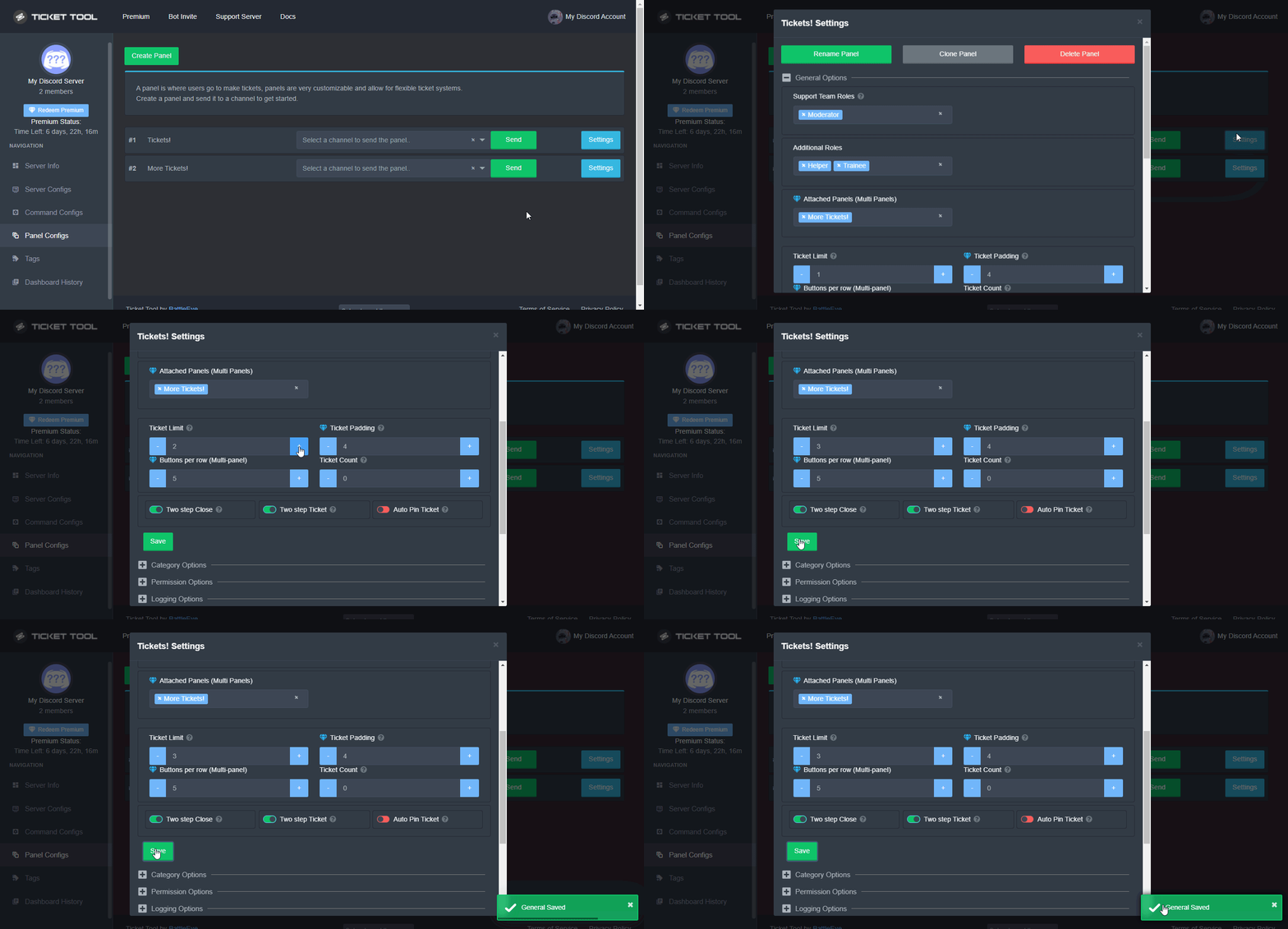 jade topaz
You can also mute/punish users who submit blank tickets. Or there can be an option to auto close blank tickets if not responded with a certain time. If that's what you meant.
I would much prefer that over all tickets being auto closed.
 gilded verge
I agree with my colleague, I would also like to auto-close the ticket if there was no response from the receiving user
copper owl
There's no point in debating whether a specific feature is useful or not as every server that uses ticket tool has their own intentions, uses and topics
I see both perspectives and why that feature would be helpful and not helpful at the same time but honestly, every servers has a different use for a specific feature so ¯\_(ツ)_/¯
gilded verge
So won't this option be here? 
Maybe someday it will be possible 😄
copper owl
gilded verge
So won't this option be here? <:pleading:877970814035689482>
Maybe someday it w...
Trust me if it was possible to add, the dev would've most likely done it due to the amount of requests we've had for it
it's just sadly not possible with ticket tool due to the current rate limits set by discord
gilded verge
I understand, I trust you 
 pastel laurel
Ok so i have the bot in 3 of my own servers, going on 4. I have it going and running very nicely in one, but the server I'm trying to set it up in seems to have something wrong? I read the FAQ and didn't see an answer to my question.
I invited the free boot cuz im broke and when i go to the dashboard to set it up, I get this:
 copper owl
Check which bot is selected on the Server Configs page
 pastel laurel
I saw the premium area and skipped over reading bc it didn't seem relevant
Ok tysm
 grizzled wharf
shut bolt
grizzled wharf
shut bolt
@grizzled wharf #🤖│bot-spam
 alpine spoke
Hello, I saw in a server this type of panel and I would like to know how to do it
 jade topaz
alpine spoke
Hello, I saw in a server this type of panel and I would like to know how to do i...
jade topaz
alpine spoke
Hello, I saw in a server this type of panel and I would like to know how to do i...
You must have Premium to do this. Every server gets 1 week free trial of premium.
alpine spoke
jade topaz
You must have Premium to do this. Every server gets 1 week free trial of premium...
tks
 warm gyro
hi i win a 1 month ticke tool premium
and the host dm me the code alr
now how to add the bot
shut bolt
$invite
humble sequoiaBOT
Ticket Tool Invite & Support
shut bolt
Use the second link
warm gyro
i have this bot in my server already
humble sequoiaBOT
You can check our documentation here.
You can also check #573205317870157855 for the basic setup.
Our documentation contains all the info you need about the bot to be able to setup and configure the bot however you like.
shut bolt
Follow this for its setup
crimson eagle
If you need more help open a ticket 🙂
 eager delta
is there a variable for the user that claimed a ticket
shut bolt
eager delta
is there a variable for the user that claimed a ticket
Yup
{author}
Is the author of the claim action
eager delta
oooh ok thanks
shut bolt
It only works for the ticket though, you can't use it for transcript for example
Would only work for the claim and unclaim action
eager delta
yeah thats all i need it for
shut bolt
Nice
warm gyro
#🎫│make-a-ticket message
how to make like this many buttons
humble sequoiaBOT
For a more convenient use of multipanels, you can now combine panels on the dashboard. This will allow you to directly send the multipanel from the dashboard or via the $panel ID command.
Where can I find this?
You can find this setting on the Dashboard -> Panel Configs -> Settings -> General Options
Note: if you're attaching all the panels to a panel called English, don't include English in the attached panels box (If you do this, it will create duplicate)
This will put all buttons from all of your panels on one message. The message is the panel message from the panel you're combining these panels in.
Note: This is a premium feature
shut bolt
Check this
 errant cosmos
hi friends! I have the logging ooptions enabled to save the transcript, if Ii want to go back to see previous transcripts where should I look for them?
shut bolt
errant cosmos
hi friends! I have the logging ooptions enabled to save the transcript, if Ii wa...
Go into your transcripts channel, there should be the transcripts
 shut bolt
Sure
 cedar hawk
So i cannot see my bot on the dasboard. i tried the ways that the fag said but it still dont show
cedar hawk
yes
hard cape
Be sure you are using correct account
cedar hawk
yes
hard cape
Cause you can have alt with same avatar
cedar hawk
my alt dont have nitro so yea
cedar hawk
ok i will later
hard cape
Oh ok
cedar hawk
oh nvm after i log out for the 5th time it work
hard cape
Nice then!
humble sequoiaBOT
The first thing you will need to do is invite the premium bot, an invite can be found here
Once the bot is in your server we will head to the dashboard and manage your server. When you are managing your server, you want to head into "Server Configs" then click the drop down menu under "Select the bot you would like to use on this server" then click "Ticket Tool#6207" and then save.
hard cape
There is how
 obtuse lintel
ok thanks
hard cape
Np
 humble sequoiaBOT
The panel message is where people react to make a ticket. To customize it head over to your Dashboard --> Panel Configs -> Settings -> Panel Options -> Edit Panel Message

 storm condor
tysm ! @humble sequoia
 severe path

hard cape
humble sequoia
@outer python
 hard cape
Hey
 grand sky
hard cape
Hey
grand sky
hard cape
Hey
hello
grand sky
kk ty
hard cape
 split crest
I have a blocked channel that i cannot delete or modify or even hide, because it automatically modifies even if i kick the Ticket Tool Bot

 jade topaz
split crest
I have a blocked channel that i cannot delete or modify or even hide, because it...
jade topaz
split crest
I have a blocked channel that i cannot delete or modify or even hide, because it...
can u exaplain again
hard cape
split crest
I have a blocked channel that i cannot delete or modify or even hide, because it...
Do you want to hide tickets from everyone?
$kv
humble sequoiaBOT
How to hide tickets from everyone
Head over to your Dashboard ➞ Panel Configs ➞ Settings ➞ General Options ➞ Edit Everyone Roles Opened Permissions

NOTE that @everyone can type aswell if it has permissions to send messages
split crest
I created a panel a few days ago, and yesterday I wanted to test and when I closed the ticket it gave me the message transcrypt or close. so i did close then the chanel had this deleted except that it is not deleted and when i try to delete it it doesn't want and when i withdraw or modify permissions on the chanelle Close-0001 the chanel this re modifies automatically and that even when I kick the bot and it is not on the discord.
@hard cape No i want close it
I try but it doesn't work
fail screen
hard cape
When you close a ticket, you cant close it again.
split crest
 hard cape
When you create a new ticket, it happends again?
 dry stream
How do I add the ticket thing in my server?
hard cape
dry stream
How do I add the ticket thing in my server?
$invite
humble sequoiaBOT
Ticket Tool Invite & Support
humble sequoiaBOT
Creating a panel
To create a panel we are going to need to head over to the panel configs on the dashboard
Once at the dashboard we will need to click Create Panel
Enter a panel name (Fill in any optional settings you want)
Click Create Panel and your ready to get started with configuring your panel
An example of a creating a panel is shown below.
dry stream
wait
hard cape
split crest
1/3 times
Oh, It’s probaly because there will be new things, But try to create a ticket —> #🎫│make-a-ticket
dry stream
is the premium bot for like money or smth?
jade topaz
its easy
jade topaz
dry stream
is the premium bot for like money or smth?
ye
hard cape
dry stream
is the premium bot for like money or smth?
No
dry stream
uhmm ye or No??
hard cape
But you need a premium to Use it
 median wigeon
There is a free version and a premium version
dry stream
i want free version
split crest
hard cape
Oh, It’s probaly because there will be new things, But try to create a ticket —>...
i have, i will wait for an answer
dry stream
how will it find my server??
hard cape
If you need premium one, buy premium and select it
dry stream
uhmm my brain froze
hard cape
You will invite it
humble sequoiaBOT
The first thing you will need to do is invite the premium bot, an invite can be found here
Once the bot is in your server we will head to the dashboard and manage your server. When you are managing your server, you want to head into "Server Configs" then click the drop down menu under "Select the bot you would like to use on this server" then click "Ticket Tool#6207" and then save.
dry stream
oh
hard cape
There is how
dry stream
wait
hard cape
Ok, but you need premium to use it
dry stream
do i need to do "Add to Server"?
hard cape
Ye
dry stream
oh ok
jade topaz
and If U want Premium U Can Vote @pseudo glen daily
hard cape
But when you don’t have premium, don’t use it
dry stream
ok guys tysm!
median wigeon
You can use it without premium?
hard cape
I’m not sure but it makes some problems later
jade topaz
ye
hard cape
Wdym?
jade topaz
ye
hard cape
split crest
i have, i will wait for an answer
Ok!
jade topaz
median wigeon
Yeah i am sure premium has only more functions with this <:premium_red:662032717...
ye
jade topaz
huh?
median wigeon
Can you check your roles?
dry stream
i did
jade topaz
$help setup
humble sequoiaBOT
Setting up Ticket Tool
Visit the docs for setup info
General Setup
hard cape
He don’t need help with set up.
jade topaz
dry stream
i did
hmm u have wick?
jade topaz
hard cape
He don’t need help with set up.
ik
hard cape
So why did u sent this?
jade topaz
jade topaz
hmm u have wick?
?
dry stream
i did it again
hard cape
It can confuse him
jade topaz
hard cape
It can confuse him
oh sorry
dry stream
bro wth
copper owl
yall... make sure to read the pins in this channel
dont interfere when someones already helping
hard cape
copper owl
dont interfere when someones already helping
I know, I sent fist message
dry stream
Ticket Tool
copper owl
hard cape
I know, I sent fist message
that wasnt directed to you specifically
jade topaz
and authorize
hard cape
dry stream
Noo noo
I recommend to use normal one when you don’t have premium one
jade topaz
and verify
dry stream
If its only "Ticket Tool" I have it in my server
hard cape
dry stream
If its only "Ticket Tool" I have it in my server
Just use normal one
Not the premium one
dry stream
i am
hard cape
Ok
jade topaz
hm
dry stream
who?
hard cape
You
dry stream
yes pls
humble sequoiaBOT
Creating a panel
To create a panel we are going to need to head over to the panel configs on the dashboard
Once at the dashboard we will need to click Create Panel
Enter a panel name (Fill in any optional settings you want)
Click Create Panel and your ready to get started with configuring your panel
An example of a creating a panel is shown below.
hard cape
Follow these steps
dry stream
hmm
hard cape
What?
dry stream
how do i get in that thing
jade topaz
wdym
humble sequoiaBOT
hard cape
dry stream
?
hard cape
Click on the blue thing
jade topaz
humble sequoia
https://tickettool.xyz/manage-servers
this
dry stream
im logging in
hard cape
Nice
dry stream
oml my wifi is rlly bad
 dry stream
lol
jade topaz
 for ur internet
hard cape
For what you want to use your tickets?
jade topaz
anything u wnat
hard cape
What you did wrong?
dry stream
The panel name
jade topaz
wht
dry stream
oki
storm condor
hello there can i edit the sentence when open the ticket

the sentence "support will be with..."
humble sequoiaBOT
The Ticket Message is the first message sent by the bot in a new ticket. To customise it head over to your Dashboard ➞ Panel Configs ➞ Settings ➞ Ticket Options ➞ Edit Ticket Message
copper owl
$help support
humble sequoiaBOT
How to let support team see into a ticket
About support roles
A support role lets your support team see into tickets with out having to add them manually to each and every ticket.
You can add as many support roles as you like per panel.
NOTE that the way discord works all admins can see into tickets regardless of this.
How to set a support role
To set a Support role go to the Dashboard -> Panel Configs -> Settings -> General Options -> Support Team Roles.
NOTE that the support role will not be able to see into tickets that are already created..
copper owl
make your staff roles as support roles
 safe zenith
Ok thx ^^
jade topaz
Can somebody help me with my issue? I have changed my antenna to 8db, after that i don‘t getting any witnesses anymore why?
copper owl
jade topaz
Can somebody help me with my issue? I have changed my antenna to 8db, after that...
you're in the wrong server
humble sequoiaBOT

⚠️ You're in the wrong place
We provide support for @pseudo glen discord bot and cannot help you with whatever issue you have.
- Please make sure to contact the appropriate Support Team.
If you don't have any further questions regarding our bot Ticket Tool, please close this ticket
storm condor
humble sequoia
tysm ~~~ i love this bot
 rotund solar
$help
humble sequoiaBOT
Help Options
$help commands - Information on commands
$help setup - Information on bot setup
$help faq - Frequently asked questions
rotund solar
$help setup
humble sequoiaBOT
Setting up Ticket Tool
Visit the docs for setup info
General Setup
 radiant moss
 copper owl
make sure ticket tool has the necessary permissions in those categories
otherwise it wont be able to open tickets in here
storm condor
copper owl
make sure ticket tool has the necessary permissions in those categories
Yes, the categories was not private so i am sure ticket toll has permissions
copper owl
the only way ticket tool doesnt work in those categories is either TT doesnt have permissions, or you didnt save the settings
storm condor
okay thanks , i try again @copper owl
copper owl
storm condor
if not, give permissions, if it did, resave these settings
storm condor
☺️ 👌
storm condor
copper owl
if not, give permissions, if it did, resave these settings
what permmissions should i give ?
copper owl
please dont ping
storm condor
admin its ?
copper owl
$perms
humble sequoiaBOT
ᅠ
@pseudo glen requires the following permissions:
Add Reactions
Read Channels
Send Messages
Manage Messages
Embed Links
Attach Files
Read History
Manage Roles
To change the role permissions, you can go to your Discord Server ➞ Server Settings ➞ Roles ➞ @Ticket Tool
To change the channel permissions, you can go to your Channel Settings ➞ Permissions ➞ Ticket Tool
ᅠ
Note:
You can give Ticket Tool Administrative Permissions instead of all the permissions listed above, but it's entirely optional and NOT necessary.
 copper owl
it's these permissions
 fallow ingot
I can't help you, if you don't tell me..
fallow ingot
Just ask you're questions here, and I'll get a reply to you! 
humble sequoiaBOT
Setting up Ticket Tool
Visit the docs for setup info
General Setup
fallow ingot
^
fallow ingot
No sorry, it's best that you do it for personal development, but also so its the way you like it.
 stark chasm
Please
 plain surge
Liked Dylan said you can check #573205317870157855
 bleak current
?
plain surge
Or follow the setup guide
humble sequoiaBOT
You can check our documentation here.
You can also check #573205317870157855 for the basic setup.
Our documentation contains all the info you need about the bot to be able to setup and configure the bot however you like.
plain surge
Both contain info on how to configure the bot
 shy sparrow
hey, how do I make channels open into a specific channel instead of the top?
fallow ingot
$help category
humble sequoiaBOT
How to set the open category
To set a open category go to the Dashboard -> Panel Configs -> Settings -> Category Options -> Category Open
fallow ingot
@shy sparrow ^
shy sparrow
oooh ty!
fallow ingot
np!
jade topaz
Hey, when I try to send a panel in a server I manage, the server isn’t there in the “manage server” section
fallow ingot
Logout and log back in should fix the issue.
jade topaz
fallow ingot
Logout and log back in should fix the issue.
Yea, I tried that about 5 times already :/
fallow ingot
Is the server yours or a friends?
jade topaz
fallow ingot
Is the server yours or a friends?
A friends
 austere cloud
jade topaz
Hey, when I try to send a panel in a server I manage, the server isn’t there in ...
austere cloud
jade topaz
Hey, when I try to send a panel in a server I manage, the server isn’t there in ...
Make sure you have the right permissions and the bot also has the right permissions, make sure your logged into the correct account etc
fallow ingot
jade topaz
A friends
Do you have the permission Administrator?
In you're friends server.
jade topaz
fallow ingot
Do you have the permission `Administrator`?
Uh nope,I have the “manage server perm”, do I also need that to?
fallow ingot
If not its required to access the dashboard.
jade topaz
Ohhh
fallow ingot
jade topaz
Uh nope,I have the “manage server perm”, do I also need that to?
No you need the Administrator permission. If the owner doesn't feel comfortable given you that permission he can always add your role to the dashboard witch will allow you to mange the dashboard. Server Config > General Options. Hope this helps!
jade topaz
Oh wow, it actually worked. Wow uh thank you so much!
fallow ingot
jade topaz
Oh wow, it actually worked. Wow uh thank you so much!
np!
 solid osprey
how do I add more then on reaction on my ticket
humble sequoiaBOT
Multipanels are a premium feature that allow for a single panel with multiple buttons to open different tickets.
How to create a Multipanel
Premium users can combine multiple panels into one multipanel.
First, find the IDs of each panel you wish to combine. You can find them in your Panel Configs in the Dashboard
Next, send the multipanel to a channel using $panel [id1] [id2] {id3} ....
e.g. $panel 1 2 4 17 35 to combine panels 1, 2, 4, 17 and 35.
Up to 25 panels may be combined.
 upper flower
^^ @solid osprey
iron nightBOT
Gave 1 Rep to Developerツ (current: #8 - 166)
 ripe cape
Ohhhh
Thx, i saw that website earlier but i thought it was just the main page lol
oh. Thanks @upper flower
iron nightBOT
Gave 1 Rep to Developerツ (current: #8 - 167)
upper flower
👍
upper flower
Already done
prime bridgeBOT
 Successful bans:
 1
 Unsuccessful bans:
 0
 Reason: scammy scam scam
 Moderator: @upper flower
 mystic hound
imagine losing your account to scams on new year
upper flower
😆
 green dew
thats sad
jade topaz
What size is the big picture for tickets ? My pics too big so it’s not working
 cloud bluff
في عرب
 solid stream
jade topaz
What size is the big picture for tickets ? My pics too big so it’s not working
solid stream
jade topaz
What size is the big picture for tickets ? My pics too big so it’s not working
Size shouldn't be an issue, but the limit is set by discord and it's not something I've personally looked into.
It's likely a format issue
Any image used needs to be a direct link to it.
jade topaz
solid stream
Size shouldn't be an issue, but the limit is set by discord and it's not somethi...
Oh I’m using ibb.co to get the link it works for my friend but not me
solid stream
Dm me the link, I'll see what's up.
jade topaz
solid stream
Dm me the link, I'll see what's up.
Ok
jade topaz
solid stream
Dm me the link, I'll see what's up.
Done
jade topaz
What’s a good site to get gifs to work for the bot?
solid stream
- good site to host gifs to use in embeds
green dew
How can i host my own private Wick? just wondering cause i saw @prime bridge
solid stream
One of my admins is good friends with the developer, not sure it's possible otherwise.
green dew
oh ight
solid stream
But someone might tell you otherwise
green dew
kk
jade topaz
solid stream
* good site to host gifs to use in embeds
I used the link you said to use and it’s doing this any idea?

Oh crap it’s a ping
Sorry about that
I forgot replying pinged people
 jade topaz
But any idea why it’s doing that
solid stream
Aspect ratio
But actually that's a little confusing as it should work.
I don't, currently I'm traveling otherwise I would try and help more.
jade topaz
Ahh okay
I also tried imgur and it just doesn’t load
Hi i bought 30 days while my free sub was still on and it hasnt given me it. I was wondering if u can put it on my acc if i show proof of everything
shut bolt
jade topaz
Hi i bought 30 days while my free sub was still on and it hasnt given me it. I w...
Heya, you bought it via website or how did you pay for it?
jade topaz
via the website
humble sequoiaBOT
Redeeming premium on your server is really simple. Just head over to your Subscriptions Page. There you can select a server of your choice, which will get premium. You can change the server at any point.
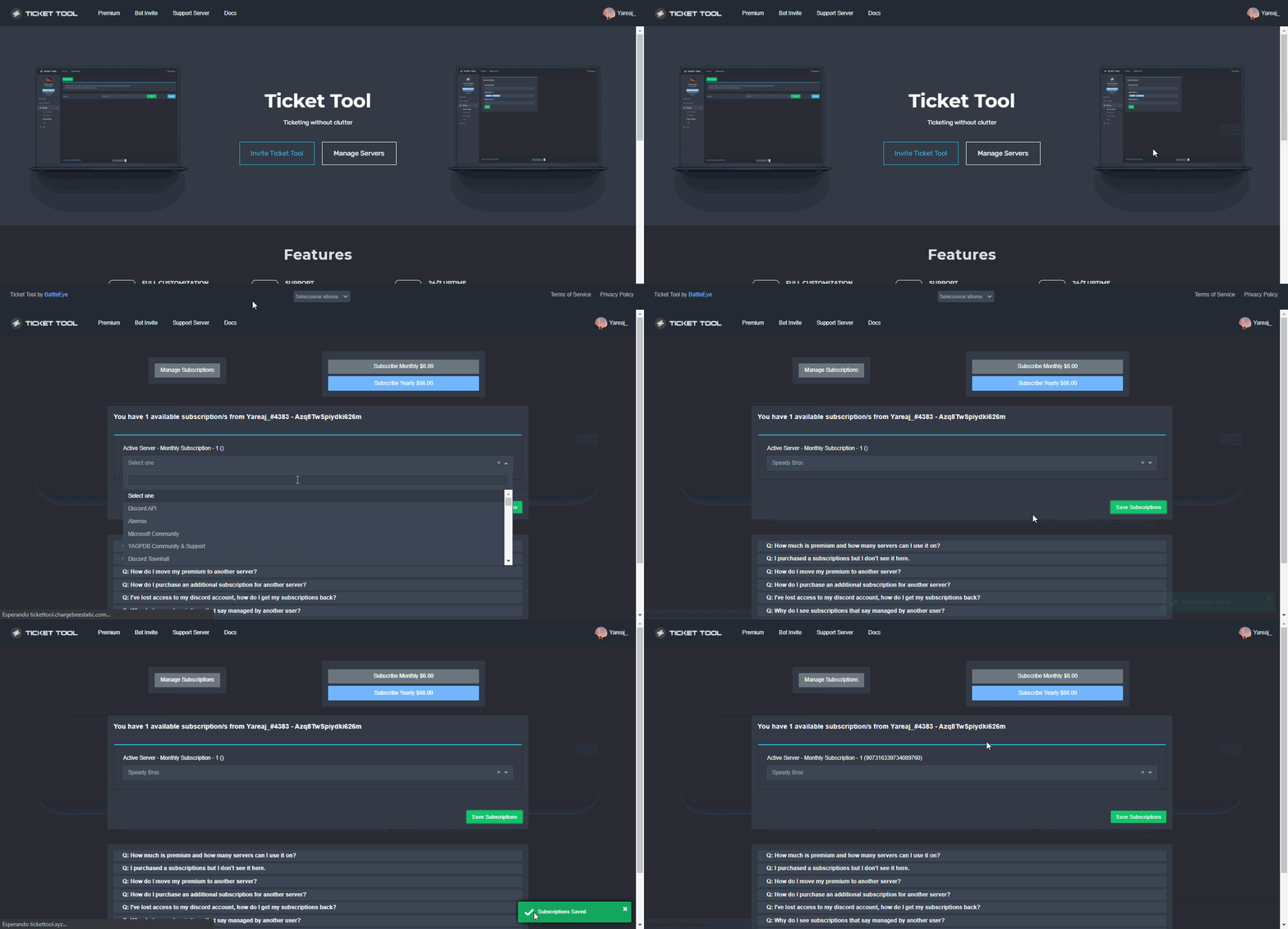 jade topaz
nvm i got it. Just had to activate the sub
shut bolt
Yup
 echo path
I can ticket tool premium free??
shut bolt
echo path
I can ticket tool premium free??
Use $votes in #🤖│bot-spam
jade topaz
Can you make it so when someone opens a ticket it says what ticket it was from ? So like if they use the support ticket it would say something like Support 1
copper owl
jade topaz
Can you make it so when someone opens a ticket it says what ticket it was from ?...
Use the {panel.name} variable in the ticket message
$help panel
humble sequoiaBOT
Creating a panel
To create a panel we are going to need to head over to the panel configs on the dashboard
Once at the dashboard we will need to click Create Panel
Enter a panel name (Fill in any optional settings you want)
Click Create Panel and your ready to get started with configuring your panel
An example of a creating a panel is shown below.
copper owl
@vale sail ^^
 vale sail
Thanks
jade topaz
jade topaz
I used the link you said to use and it’s doing this any idea?
Anyone else can help?
shut bolt
jade topaz
Anyone else can help?
I would use that image as thumbnail image tho
jade topaz
shut bolt
I would use that image as thumbnail image tho
It’s suppose to be a full screen one
It should fill the bottom
shut bolt
jade topaz
It’s suppose to be a full screen one
Seems to be cropped, include more text in the description embed and should work
shut bolt
jade topaz
<@!518666147441278998>
No need to ping me
jade topaz
Sorry
shut bolt
jade topaz
What do you mean??
I mean this, the image looks to be cutted by Discord, for fixing it, try adding text to the panel description
Like a text as in #🎫│make-a-ticket
So it has more space
jade topaz
There is text
shut bolt
Can you give me the server ID please?
jade topaz
Ok
shut bolt
jade topaz
I used the link you said to use and it’s doing this any idea?
Which is the panel?
jade topaz
shut bolt
Which is the panel?
It’s happening on all of them
Like when I make a new one it happens
shut bolt
jade topaz
It’s happening on all of them
Which one is the one you send screenshot of?
jade topaz
shut bolt
Which one is the one you send screenshot of?
Cold War

 jade topaz
Ok
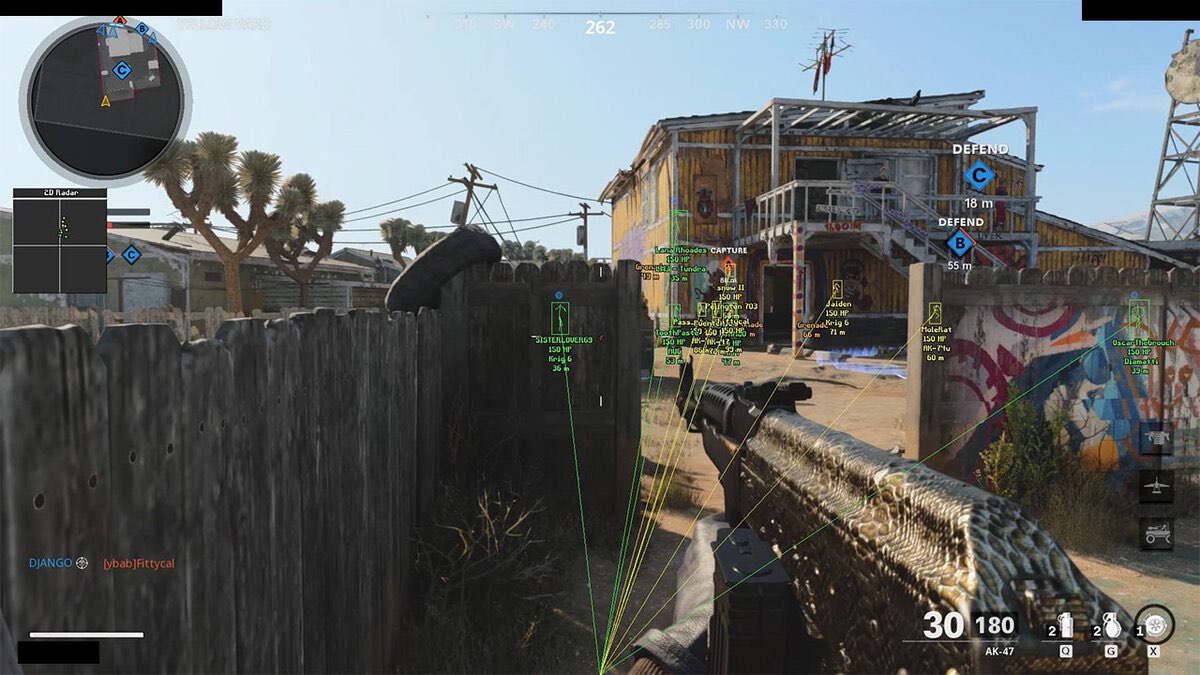


 shut bolt
<https://i.imgur.com/QzDIrfA.jpg>
shut bolt
shut bolt
<https://i.imgur.com/QzDIrfA.jpg>
Use this link instead
And resend your panel
jade topaz
I’ve tried imgur but it don’t even load the photo
Thank you too btw
Thanks @shut bolt
iron nightBOT
Gave 1 Rep to Yareaj_ (current: #2 - 283)
jade topaz
That worked too btw
shut bolt
Sure
jade topaz
But why don’t imgur work for me as I’ve tried and it don’t load the pic
shut bolt
jade topaz
But why don’t imgur work for me as I’ve tried and it don’t load the pic
No clue tbh
jade topaz
Okie
jade topaz
shut bolt
https://i.imgur.com/QzDIrfA.jpg
What did you do to get this link
As mine pops up like this and don’t load when I add to the panel
shut bolt
Right click on the image in the imgur page
Then click on open in new tab
Copy that link
jade topaz
I’m on mobile
shut bolt
Keep pressed on the image then