#🆘│community-support
1 messages · Page 374 of 1
 hard cape
 jade topaz
thank @hard cape
 iron nightBOT
Gave 1 Rep to D<3 (current: #21 - 44)
jade topaz
^_^
hard cape
Thanks!
 copper owl
to answer this as well, you'll have to purchase it for each server. You can get one subscription for $6 and all the other subscriptions you get will be $5
jade topaz
thank @copper owl
iron nightBOT
Gave 1 Rep to Neptune (current: #1 - 480)
jade topaz
❤️
copper owl
Anytime
 meager lichen
Hi! Can you help me
hard cape
Hey
meager lichen
Servers - (server not showing up? try relogging)
My server dont shows up
 humble sequoiaBOT
Don't see your server in the dashboard?
You will possibly need to relog. Look below to see steps on how to relog.
How to relog in the Dashboard.
First, you will need to go to the dashboard. Once your there, click on your avatar on the top right. after you clicked it, you will see button that says Logout. You must click that. Once you have logged out, you can log back in.
Note:
You need one of these 3 things to access the dashboard.
1. Server Owner (Level: 6)
2. Server Administrator (Level: 4)
3. Dashboard Role (Level: 2)
:warning: You can check your level using $level on your Discord Server
User permission level with Ticket Tool
@User is permission level: 0 (User)
```» *If it shows that your permission is **0**, you don't have any of the above **3 things** to manage the dashboard.*
**See the GIF below on how to relog:** hard cape

meager lichen
thanks)) Happy New Year))
hard cape
No problem, have a happy new year too!
 urban solstice
Can you still ask for help in this channel, or?
It says "Support Closed For Holidays"
hard cape
Hey!
urban solstice
?
hard cape
You can ask here for support
urban solstice
mk
I saw this Ticket stuff in another server. I would like to know what command (or how you make this) you use to make these stuff
 hard cape
$help panel
humble sequoiaBOT
Creating a panel
To create a panel we are going to need to head over to the panel configs on the dashboard
Once at the dashboard we will need to click Create Panel
Enter a panel name (Fill in any optional settings you want)
Click Create Panel and your ready to get started with configuring your panel
An example of a creating a panel is shown below.
 hard cape
urban solstice
Thank you
urban solstice
ok thanks
jade topaz
hello. I have an issue. when the @ everyone role (aka unverified people) create a ticket. How do I get it so members (verified people) of the server don't see the newly created ticket from an unverified person?
copper owl
$kv
humble sequoiaBOT
How to hide tickets from everyone
Head over to your Dashboard ➞ Panel Configs ➞ Settings ➞ General Options ➞ Edit Everyone Roles Opened Permissions

NOTE that @everyone can type aswell if it has permissions to send messages
copper owl
Make sure that Read Messages and Send messages is denied for @everyone
jade topaz
ok thank you!
 short echo
Evening Lovely People
Im curious if anyone knows to do this
Im Trying to locate an old ticket in my transcripts that contains a link is there a way of doing this?
 slate furnace
how to make it @ a specific role? when ticket opens
and how to make it @ the user I forgot to do that
copper owl
$help ping
humble sequoiaBOT
How to make Ticket Tool ping a role
To make ticket tool ping a role when a ticket is opened, go to the Dashboard -> Panel Configs -> Settings -> Ticket Options -> Ticket Message -> Message Text and do this:
{@Role name} This is case sensitive and the role must have @mentions enabled
 copper owl
@slate furnace ^
short echo
slate furnace
how to make it @ a specific role? when ticket opens
That was easier than me typing it 😄
copper owl
short echo
Evening Lovely People
Im curious if anyone knows to do this
Im Trying to locat...
use the discord search feature and use the ID
short echo
copper owl
use the discord search feature and use the ID
You meen the snowflake id?
short echo
Discord ID
copper owl
slate furnace
and how to make it @ the user I forgot to do that
if you mean ping the user who opened the ticket, use {user}
copper owl
short echo
Discord ID
The User ID
the ID of the user that was in the ticket
it'll filter out the results, and you'll be able to check the transcripts
short echo
So the person in question has had over 4000 tickets in the server 😄 and i need to find the specific ticket he opened with this specific link in it
slate furnace
it dont work
 copper owl
short echo
So the person in question has had over 4000 tickets in the server 😄 and i need ...
copper owl
short echo
So the person in question has had over 4000 tickets in the server 😄 and i need ...
welp.. that's the only way
short echo
Shizzle Sticks ok ill get looking 😄
copper owl
copper owl
if you mean ping the user who opened the ticket, use `{user}`
@slate furnace i didnt put a @ in {user}
slate furnace
wb the role
copper owl
also seeing as your role name is so intricate, i would suggest using the ID of that role between {}
it's most likely because of how your role name is written, it's too weird to use the role name way. Just use the {ID} way, would be better
 hard cape
U typed it wrong ^^
copper owl
no @
copper owl
copper owl
it's most likely because of how your role name is written, it's too weird to use...
@slate furnace i didnt have a @ in {ID}
copper owl
anytime
hard cape
/ar Já ti mohu pomoci takto, přes překladač, bude Ti to stačit?
 robust sandalBOT
يمكنني مساعدتك هكذا، من خلال المترجم، هل سيكون كافيا لك؟
 Czech (cs) → Arabic (ar)
 turbid jolt
yes
 shut bolt
turbid jolt
i want support arbic
shut bolt
turbid jolt
i want support arbic
Ask here, our arabic support is closed and only the community channels are enabled
hard cape
/ar Dobře, s čím potřebuješ pomoci?
robust sandalBOT
حسنا، ما الذي تحتاجين للمساعدة به؟
Czech (cs) → Arabic (ar)
hard cape
@turbid jolt
turbid jolt
/en اريد معرفة كيف من الممكن اجعل الرتب معينه او محدده يمكنه استخدام اوامر البوت مثل الحذف و الحفط و اريد رتبه يمكنه رؤية التكت ولاكن لا يمكنه حذف او حفط التكت
robust sandalBOT
I want to know how it is possible to make certain or specific grades can use bot orders such as deletion and weave, and I want a rank that can see the tectonics, but it cannot delete or keep the tectonics.
Arabic (ar) → English (en)
turbid jolt
@hard cape
hard cape
/ar A zde je ten problém, překladač překládá věci do jiného významu, tím pádem moc nemohu pomoci. Ale je zde jedna možnost - pošli fotku s čím potřebuješ pomoct.
robust sandalBOT
وهنا تكمن المشكلة، المترجم يترجم الأشياء إلى معنى مختلف، لذلك لا يسعني إلا أن أساعد كثيرا. ولكن هناك خيار واحد - إرسال صورة لما تحتاج إلى مساعدة معه.
Czech (cs) → Arabic (ar)
turbid jolt
/en هل لو فتحت تكت في دعم فني عربي
robust sandalBOT
If I opened a tack in Arabic technical support
Arabic (ar) → English (en)
hard cape
/ar Zkus poslat fotku.
robust sandalBOT
حاول إرسال صورة.
Czech (cs) → Arabic (ar)
turbid jolt
/en الشي الذي اريده لا يمكن ارسال صوره له
robust sandalBOT
The thing I want is you can't send him a picture.
Arabic (ar) → English (en)
hard cape
/ar Dobře, ohledně čeho se ten problém týká?
robust sandalBOT
حسنا، ما الفائدة؟
Czech (cs) → Arabic (ar)
turbid jolt
/en انتبه معي انا اريد انت تعلمني كيف يممكني التحكم في خواص الرتب التي يمكنه استخدام اوامر البوت
robust sandalBOT
I want you to teach me how to control the grade properties that can use bot orders.
Arabic (ar) → English (en)
hard cape
/ar Jelikož to překladač přeložil divně, minimálně pro mě to je nesrozumitelné -Nemůžu Ti bohužel pomoci, omlouvám se.
robust sandalBOT
وبما أن المترجم ترجمها بشكل غريب، على الأقل بالنسبة لي، فهذا أمر غير مفهوم. لسوء الحظ، لا أستطيع مساعدتك، أنا آسف.
Czech (cs) → Arabic (ar)
turbid jolt
i want commands bots $ but role mangmant only use i have server desgin and programming i no want use commands desgin and programming i want only mangmant
hard cape
/ar Myslíš tyhle?

 robust sandalBOT
هل تعني هذه؟
Czech (cs) → Arabic (ar)
hard cape
@turbid jolt
turbid jolt
Yes
 cunning pond
how do you set up a ticket?
jade topaz
How can i add a member to a exsisting ticket?
shut bolt
cunning pond
how do you set up a ticket?
Heya
humble sequoiaBOT
How Do I setup Ticket Tool
You can check our documentation here, you can also check #573205317870157855 for the basic setup.
Our documentation contains all the info you need about the bot to be able to setup and configure the bot however you like.
shut bolt
Check this
turbid jolt
@hard cape
humble sequoiaBOT
How to add or remove users on tickets
To add a user to a ticket use $add <user>
To remove a user from a ticket use $remove <user>
iron nightBOT
Gave 1 Rep to Yareaj_ (current: #2 - 270)
shut bolt
jade topaz
Thanks <@518666147441278998>
Sure
iron nightBOT
Gave 1 Rep to Yareaj_ (current: #2 - 271)
humble sequoiaBOT
How Do I setup Ticket Tool
You can check our documentation here, you can also check #573205317870157855 for the basic setup.
Our documentation contains all the info you need about the bot to be able to setup and configure the bot however you like.
shut bolt
Check out this guide
jade topaz
i have a question
 scenic plinth
Ask it, or we can't help you.
jade topaz
i started a trial for 7 days then bought a month subscription but it only says 4 days left. Will it change to 30 days once that trial is over?
 eager wolf
السلام وعليكم
scenic plinth
jade topaz
i started a trial for 7 days then bought a month subscription but it only says 4...
Yes, assuming you added it to that server, it will add on even if it doesn't show it in the subscription part of your dashboard.
If it for whatever reason doesn't do this when your premium trial ends and you are sure you have placed the subscription for that server, you will need to provide your purchase transcript to the billing team and they presumably will take it from there for you.
robust sandalBOT
eager wolf
السلام وعليكم
 「𝐀𝐁𝐎 3𝐓𝐁⁵ ¹ ¹」
Peace be upon you
Arabic (ar) → English (en)
jade topaz
scenic plinth
Yes, assuming you added it to that server, it will add on even if it doesn't sho...
alr i will notify u guys once the trial has finished thank u for your help
iron nightBOT
Gave 1 Rep to kitkat (current: #7 - 171)
humble sequoiaBOT
How to make Ticket Tool ping a role
To make ticket tool ping a role when a ticket is opened, go to the Dashboard -> Panel Configs -> Settings -> Ticket Options -> Ticket Message -> Message Text and do this:
{@Role name} This is case sensitive and the role must have @mentions enabled
shut bolt
Check that
 austere cloud
jade topaz
um how do u ping roles in panels
austere cloud
jade topaz
um how do u ping roles in panels
For more Detail >
 jade topaz
Ok
jade topaz
austere cloud
For more Detail >
but I don’t have the diamond thing
account got disabled so I can’t make a config key, any idea on how I can get one ?
jade topaz
austere cloud
For more Detail >
Wait it worked tysm
austere cloud
jade topaz
Wait it worked tysm
No worries!
 lost star
I saved transcript and it didn’t show up in the transcript channel. It also didn’t log the previous closed ticket. Some help pls?
 sand walrus
eager wolf
sand walrus
eager wolf
السلام
 deft wing
Does Ticket Tool support a single user making multiple tickets at the same time?
shut bolt
jade topaz
account got disabled so I can’t make a config key, any idea on how I can get one...
You should reach the support team, open a ticket in #premium-tickets and we'll help you
shut bolt
lost star
I saved transcript and it didn’t show up in the transcript channel. It also didn...
Rare, are you sure no one deleted it?
shut bolt
deft wing
Does Ticket Tool support a single user making multiple tickets at the same time?
It supports is, it depends on the settings you give to it for it allow it or not
lost star
No. It doesn’t exist anymore. I watched my admin respond to the ticket and saved transcript then closed ticket.
But it didn’t appear in any of the channels set for logs. No one changed settings and the last ticket was fine. It was just this one yesterday.
shut bolt
There are many possible causes, main one is the bot didn't have the perms in the transcript channel, or someone deleted the transcript after ticket tool sent it. If it only happened with this ticket probably a one time bug or just something got messed there
lost star
It seems like it’s a one time bug which is annoying cos I was going to use the transcript for something 😅 how unfortunate. Thank you anyways. If another ticket is open and faces the same issue, I’ll ask again. Tysm.
shut bolt
Sure, please let us know
 rigid chasm
My new sever is not showing up to access dashboard
humble sequoiaBOT
Don't see your server in the dashboard?
You will possibly need to relog. Look below to see steps on how to relog.
How to relog in the Dashboard.
First, you will need to go to the dashboard. Once your there, click on your avatar on the top right. after you clicked it, you will see button that says Logout. You must click that. Once you have logged out, you can log back in.
Note:
You need one of these 3 things to access the dashboard.
1. Server Owner (Level: 6)
2. Server Administrator (Level: 4)
3. Dashboard Role (Level: 2)
:warning: You can check your level using $level on your Discord Server
User permission level with Ticket Tool
@User is permission level: 0 (User)
```» *If it shows that your permission is **0**, you don't have any of the above **3 things** to manage the dashboard.*
**See the GIF below on how to relog:** desert moss
@rigid chasm
rigid chasm
So reinvite bot?
shut bolt
rigid chasm
So reinvite bot?
No
Read what the message Cyclone sent says
It talks about relogging rather than reinvting
shut bolt
Didn't work?
rigid chasm
I just re invited the bot. It works now
 bright reef
If I delete the original ticket tool bot since I now have the premium one, will it ruin anything?
 upper flower
It will not ruin anything
shut bolt
bright reef
If I delete the original ticket tool bot since I now have the premium one, will ...
Just make sure to resend your panels
If you haven't done it yet
 elder current

 safe wharf
elder current
safe wharf
elder current
How many channels you have in the server
elder current
idk its not my server
shut bolt
elder current
The server has reached the top amount of channels allowed per server by Discord
 tacit yoke
Hello, good morning, I would like to know if I could recover my resources that I lost by cutting the path of my anthill, I have proof of the resources that I had
elder current
damn that mf must have hella $
humble sequoiaBOT

⚠️ You're in the wrong place
We provide support for @pseudo glen discord bot and cannot help you with whatever issue you have.
- Please make sure to contact the appropriate Support Team.
If you don't have any further questions regarding our bot Ticket Tool, please close this ticket
 sterile slate
can someone pls help me
shut bolt
What do you need help with?
sterile slate
i would like to add ticket tool to my server but i am having trouble with setting it up
shut bolt
Instructions on setting up Ticket Tool in your server.
Have you checked our setup guide?
sterile slate
i did $ help setup and this is what it comes up with
 shut bolt
Yeah, that link is outdated
shut bolt
shut bolt
https://docs.tickettool.xyz/general/setup
Use this one instead
sterile slate
ok thanks, do i jjust follow the steps on that?
sterile slate
ok thanks!
shut bolt
Sure
 stuck nexus
Why won't the tickets let me add people to them?
hard cape
Hey
You need to say their ID: $add <ID>
Be sure you are using the right prefix
@stuck nexus
ID of the member what you want to add to the ticket
jade topaz
Ñ
hard cape
What?
 prisma atlas
Who to get this in my server ?
 prisma atlas
Yes
hard cape
$help panel
humble sequoiaBOT
Creating a panel
To create a panel we are going to need to head over to the panel configs on the dashboard
Once at the dashboard we will need to click Create Panel
Enter a panel name (Fill in any optional settings you want)
Click Create Panel and your ready to get started with configuring your panel
An example of a creating a panel is shown below.
prisma atlas
Done ty
hard cape
No problem!
 north crow
I request assistance- this bot is giving me a heart attack
 nova wharf
north crow
I request assistance- this bot is giving me a heart attack
nova wharf
north crow
I request assistance- this bot is giving me a heart attack
I can help. What's the problem?
north crow
THANK YOU- I am struggling to get the "make a ticket" to pop up.
nova wharf
north crow
THANK YOU- I am struggling to get the "make a ticket" to pop up.
It's easy. Just create a panel and select a channel to send it in.
north crow
How would I do that?
nova wharf
Go to the dashboard first.
north crow
Okay
humble sequoiaBOT
Creating a panel
To create a panel we are going to need to head over to the panel configs on the dashboard
Once at the dashboard we will need to click Create Panel
Enter a panel name (Fill in any optional settings you want)
Click Create Panel and your ready to get started with configuring your panel
An example of a creating a panel is shown below.
jade topaz
north crow
I dont know if that effects anything
It worked by mobile too
north crow
Alright ill be back with updates in a second
nova wharf
Great.
jade topaz
north crow
Alright ill be back with updates in a second
Lovely
north crow
???
 nova wharf
Press Manage Servers
north crow

 jade topaz
north crow
???
jade topaz
north crow
???
Push manage server and then add a channel
nova wharf
Press the 3 lines
jade topaz
north crow
Let me help you
north crow
Which three lines-
nova wharf
north crow
Which three lines-
Should I set it up for you?
north crow
That would be nice, only if you have time
jade topaz


 nova wharf
I do, just send me an server invite into my PM's
jade topaz
Do this
north crow
jade topaz
Do this
Those 3 lines aren't on my screen
jade topaz
@north crow
Go to panel confings and then create panel and add a channel
jade topaz
north crow
Those 3 lines aren't on my screen
You must to hit
_
_
_
jade topaz
jade topaz
You must to hit
_
_
_
Hit the three line one your left
 forest goblet
@nova wharf Please do not join servers for support as per this channel's topic.
@north crow You can see information on how to set up a panel below. Also, can you please provide a screenshot?
$help panel
humble sequoiaBOT
Creating a panel
To create a panel we are going to need to head over to the panel configs on the dashboard
Once at the dashboard we will need to click Create Panel
Enter a panel name (Fill in any optional settings you want)
Click Create Panel and your ready to get started with configuring your panel
An example of a creating a panel is shown below.
north crow
I got it, thank you!
jade topaz
north crow
I got it, thank you!
lovely
nova wharf
forest goblet
<@489099275846942732> Please do not join servers for support as per this channel...
I'm very sorry, just wanted to set it up. Can I continue?
jade topaz
nova wharf
I'm very sorry, just wanted to set it up. Can I continue?
what is job
support is too easy
forest goblet
nova wharf
I'm very sorry, just wanted to set it up. Can I continue?
Since you started already, you may. Please just don't do it again.
north crow
Thanks @nova wharf
iron nightBOT
Gave 1 Rep to xDevoidx (current: #77 - 1)
 timid knoll
Can i ask somthing
jade topaz
forest goblet
Since you started already, you may. Please just don't do it again.
oh
can i do it to ?
 radiant gulch
how do i get the ticket tool to send that link so you can press on it and it bring us to a special place that he can talk to a mod?
jade topaz
radiant gulch
how do i get the ticket tool to send that link so you can press on it and it bri...
i say it know
jade topaz
radiant gulch
how do i get the ticket tool to send that link so you can press on it and it bri...
with phone or pc ?
radiant gulch
pc
jade topaz
humble sequoia
here
radiant gulch
i have a sever and i-
 honest kite
Hi guys
forest goblet
jade topaz
oh
can i do it to ?
Please do not.
jade topaz
forest goblet
Please do not.
why it fun
honest kite
i have the premium bot trial, where do i pay for premium
jade topaz
honest kite
Hi guys
chat in #💬│general-chat
radiant gulch
 forest goblet
jade topaz
why it fun
forest goblet
jade topaz
why it fun
Please read this channel's topic.
radiant gulch
what i do now
forest goblet
honest kite
i have the premium bot trial, where do i pay for premium
See information on how to get premium below. Thanks in advance for considering to buy premium!
humble sequoiaBOT
Ticket Tool Premium
Get premium at https://tickettool.xyz/premium
Manage your subscriptions at https://tickettool.xyz/subscriptions
Why Premium?
Premium lets you customize the bot just how you want it. It also helps keep the bot running.
jade topaz
forest goblet
See information on how to get premium below. Thanks in advance for considering t...
i don't need help
i want to help
forest goblet
radiant gulch
what i do now
You can create a panel under Panel Configs.
forest goblet
jade topaz
i don't need help
i want to help
If it is ever necessary to join a server for support, please notify a staff member and they will decide.
forest goblet
radiant gulch
just tell me
As I said, you can click Panel Configs on the left. Here's a guide:
$help panel
humble sequoiaBOT
Creating a panel
To create a panel we are going to need to head over to the panel configs on the dashboard
Once at the dashboard we will need to click Create Panel
Enter a panel name (Fill in any optional settings you want)
Click Create Panel and your ready to get started with configuring your panel
An example of a creating a panel is shown below.
jade topaz
forest goblet
If it is ever necessary to join a server for support, please notify a staff memb...
can say it to you ?
forest goblet
jade topaz
can say it to you ?
Yes, you can tell me, but do not join servers to give support.
jade topaz
forest goblet
Yes, you can tell me, but do not join servers to give support.
i don't send a promes
forest goblet
jade topaz
i don't send a promes
What do you mean?
jade topaz
forest goblet
What do you mean?
you say don't support because i don'thave the roll and i say i not promise sorry was my ky false
forest goblet
jade topaz
you say don't support because i don'thave the roll and i say i not promise sorry...
You can give support, just don't join servers for support.
jade topaz
forest goblet
What do you mean?
hi i sent request to say i want to be a supporter
hard cape
jade topaz
hi i sent request to say i want to be a supporter
They dont need new supporters atm.
forest goblet
jade topaz
hi i sent request to say i want to be a supporter
Please read below
$staffapps
humble sequoiaBOT
How do be I become a Support Member?
You can become a support member in 2 ways:
1. You can be really active in #🆘│community-support gain <@&799500225579712543> role and get chosen by a Manager
2. You can apply VIA our applications that would be sent in #📣│server-news
We currently have Support Teams for the following languages:
:flag_us: English
:flag_jo: Arabic
:flag_fr: French
:flag_de: German
:flag_br: Portuguese
:flag_es: Spanish.
jade topaz
forest goblet
Please read below
i read that
jade topaz
humble sequoia
lovely
forest goblet
jade topaz
i read that
Please exit this channel then unless you want to give or ask for support.
jade topaz
forest goblet
Please exit this channel then unless you want to give or ask for support.
i never ask for support
hard cape
@deep drum , ask here for support!
stuck nexus
hard cape
You need to say their ID: $add <ID>
its still not letting me
humble sequoiaBOT
How to change Ticket tool's prefix
The default prefix for ticket tool is $ and @Ticket Tool#4843 however that can be changed on the Dashboard under Server Configs -> Command Prefix.
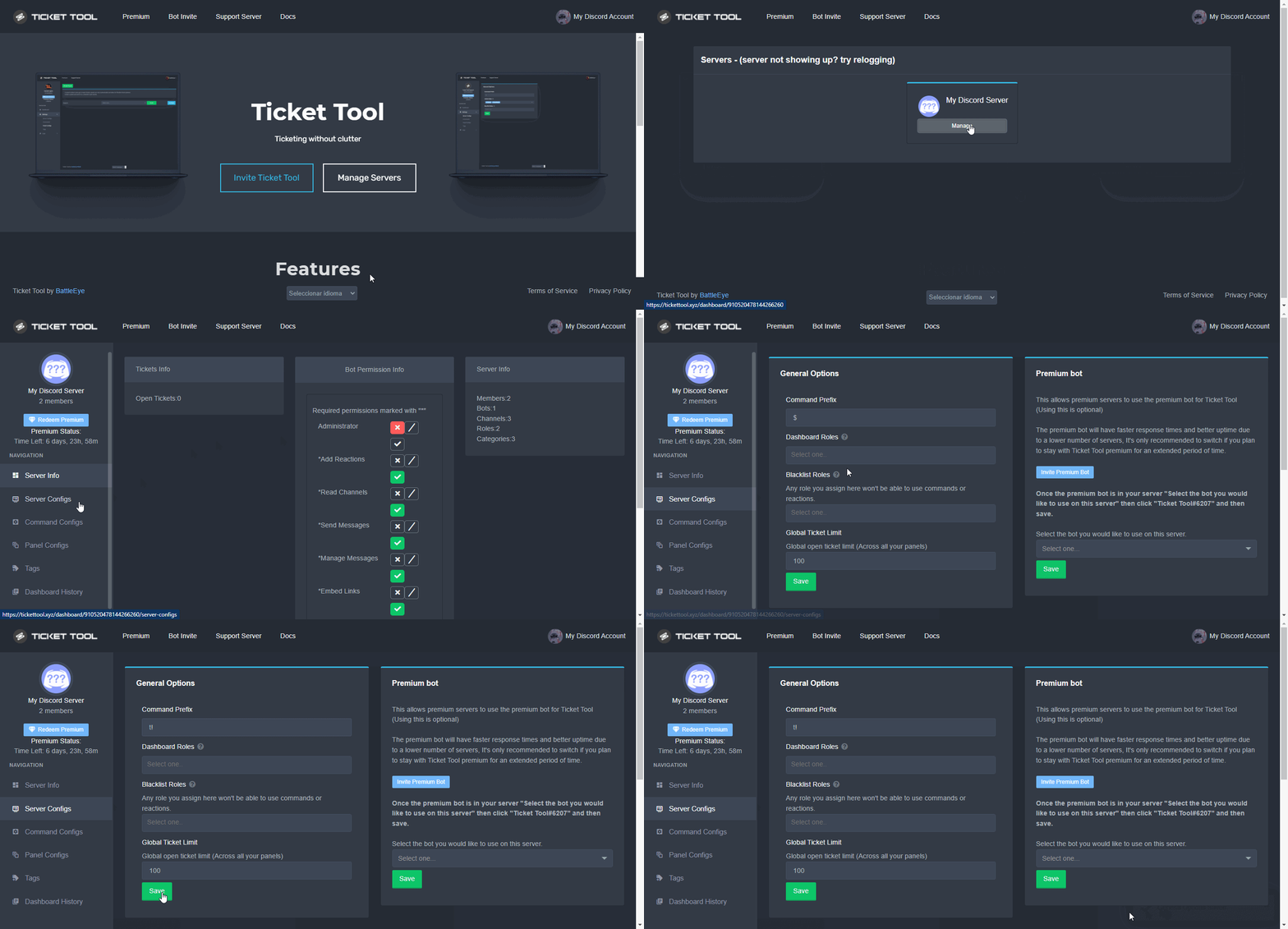
NOTE that @Ticket Tool#4843 will always work as a prefix even if there is a custom prefix.
 deep drum
Someone can help me?
hard cape
deep drum
Someone can help me?
I can!
deep drum
Alr
hard cape
What’s ur problem?
stuck nexus
hard cape
What’s ur server prefix?
Fixed
hard cape
I can help you.
hard cape
Yes you can
deep drum
But how you change the place where that goes in?
hard cape
$help transcript
humble sequoiaBOT
How do I save transcript to a channel?
To save transcripts to a channel go to the Dashboard -> Panel Configs -> Settings -> Logging Options -> Transcript Channel
 deep drum
Bc now it goes in the ticket but I want in a specific channel
hard cape
humble sequoia
hard cape
 deep drum
 hard fox
to what channel
hard fox
to what channel
Do like transcript logs or so
 gilded verge
Hello, one of the users most likely made a mistake as he first voted for the bot and only then linked the votes to my account. There are voices in his account, but when he used the command to merge voices, it didn't come to me. Can it be fixed somehow? 
forest goblet
gilded verge
Hello, one of the users most likely made a mistake as he first voted for the bot...
Unfortunately, votes can not be transferred to other users if they weren't linked already.
hard cape
But I have an idea, he can redeem the premium key and after he can give u the code.
gilded verge
😮
forest goblet
Yes, that's possible if they have 6 or more votes.
 remote bluff
does anybody know why people in the server have access to other peoples tickets they make
humble sequoiaBOT
How to hide tickets from everyone
Head over to your Dashboard ➞ Panel Configs ➞ Settings ➞ General Options ➞ Edit Everyone Roles Opened Permissions
NOTE that @everyone can type aswell if it has permissions to send messages
hard cape
gilded verge
okay, thanks @hard cape 
iron nightBOT
Gave 1 Rep to D<3 (current: #21 - 45)
iron nightBOT
Gave 1 Rep to 2x2Master (current: #17 - 60)
gilded verge
thanks too @forest goblet
iron nightBOT
Error: You're still on cooldown
gilded verge
ay >.<
forest goblet
No problem!
hard cape
humble sequoia
@remote bluff
Check this out to know how to hide tickets from everyone!
remote bluff
THANKS IT WORKED
hard cape
No problem!
remote bluff
thanks @hard cape
iron nightBOT
Gave 1 Rep to D<3 (current: #21 - 46)
hard fox
deep drum
Do like transcript logs or so
kk
hard cape
Panel configs
hard fox
ok thx
hard fox
yep thanks!!!
hard cape
No problem!
 brisk rivet
Hello everyone. I have a questions. I invited ticket tool on my server and did all settings but when many people take a ticket, a have a warning : this server has made too many ticket and i have to wait 30 sec. How can i fix that please ?
hard cape
Send a pic for me please:>
Cause I don’t understand
Try to explain it or send a pic please
@brisk rivet
jade topaz
brisk rivet
Hello everyone. I have a questions. I invited ticket tool on my server and did a...
That means too much people made a ticket
You need to close a ticket it’s all full
brisk rivet
hard cape
<@498249363928383499>
Okay ill try
jade topaz
The whole server has a ticket limit
hard cape
You probably have reached any limit choosed by you
brisk rivet
jade topaz
You need to close a ticket it’s all full
Why ? Many other server can create ticket at same time. Why for me it doesnt work
hard cape
brisk rivet
Why ? Many other server can create ticket at same time. Why for me it doesnt wor...
Send a pic ;D
jade topaz
brisk rivet
Why ? Many other server can create ticket at same time. Why for me it doesnt wor...
So let me explain
How many tickets you have open?
hard cape
jade topaz
So let me explain
I’m already helping him.
jade topaz
What’s wrong helping more?
brisk rivet
hard cape
Send a pic ;D
Okay 1min
hard cape
brisk rivet
Okay 1min
Okai!
jade topaz
Illegal? No!
brisk rivet
jade topaz
How many tickets you have open?
3
hard cape
You can set the max
 wicked scroll
brisk rivet
Why ? Many other server can create ticket at same time. Why for me it doesnt wor...
wicked scroll
brisk rivet
Why ? Many other server can create ticket at same time. Why for me it doesnt wor...
When many tickets are opened simultaneously, the bot has a temporary protection that limits the amount of tickets that can be created at the moment.
brisk rivet
hard cape
Okai!
Waiting for my friends. Sorry
jade topaz
Why not add them into a ticket?
hard cape
brisk rivet
Waiting for my friends. Sorry
It’s fine, u probably just have reached a limit
brisk rivet
wicked scroll
When many tickets are **opened simultaneously**, the bot has a __temporary__ pro...
Created by different people. Each one has created one and the max is 3 before ill have the warning
brisk rivet
hard cape
It’s fine, u probably just have reached a limit
In the setting its max 10 per person
jade topaz
How to setup multiple buttons ?
humble sequoiaBOT
For a more convenient use of multipanels, you can now combine panels on the dashboard. This will allow you to directly send the multipanel from the dashboard or via the $panel ID command.
Where can I find this?
You can find this setting on the Dashboard -> Panel Configs -> Settings -> General Options
Note: if you're attaching all the panels to a panel called English, don't include English in the attached panels box (If you do this, it will create duplicate)
This will put all buttons from all of your panels on one message. The message is the panel message from the panel you're combining these panels in.

 Note: This is a premium feature
hard cape
Note: This is a premium feature
hard cape
hard cape
brisk rivet
In the setting its max 10 per person
You can set a limit per each person
 wicked scroll
brisk rivet
Created by different people. Each one has created one and the max is 3 before il...
wicked scroll
brisk rivet
Created by different people. Each one has created one and the max is 3 before il...
Yup... However @humble sequoia, has a higher rate of the number of tickets that can be opened simultaneously
wicked scroll
hard cape
You can set a limit per each person
He is saying that 3 different people create a ticket, and he got the warning, that the server had created too many tickets simultaneously, and that he waits 30s to create a new ticket.
hard cape
wicked scroll
He is saying that 3 different people create a ticket, and he got the warning, th...
Then we can’t fix that, right?
wicked scroll
hard cape
Then we can’t fix that, right?
Yup
wicked scroll
wicked scroll
Yup... However <@!722196398635745312>, has a higher rate of the number of ticket...
hard cape
wicked scroll
Yup
Ok, tyyy :>
brisk rivet
hard cape
You can set a limit per each person
I put it to 10
hard cape
brisk rivet
I put it to 10
K, but the person can open 10 tickets
brisk rivet
hard cape
K, but the person can open 10 tickets
Yes but juste one person. Not many people at the same time
hard cape
Ye, this limit is for 1 person
So they can create 10 tickets in the same time
Do you understand?
@brisk rivet So i dont recommended to have set the limit to 10
brisk rivet
hard cape
Do you understand?
yes
hard cape
brisk rivet
yes
Nice, as otaviocng said, We cant help you with that, sorry.
brisk rivet
okay don't worry
hard cape
Ok!
jade topaz
brisk rivet
okay don't worry
Just make sure to up how many people can open multiple tickets in the server or just close them.
hard cape
jade topaz
Just make sure to up how many people can open multiple tickets in the server or ...
When real support team said something, I think the support team has true, and what you mean by multiple tickets?
jade topaz
hard cape
When real support team said something, I think the support team has true, and wh...
Like 3 of them if it is the max make 1 ticket each
hard cape
jade topaz
Like 3 of them if it is the max make 1 ticket each
I don’t know what you mean, sorry.
 flint hemlock
What are ticket tool transcripts?
hard cape
Transcript is a record of ticket.
flint hemlock
Aight thanks mate
hard cape
No problem.
 hallow cedar
السلام عليكم
robust sandalBOT
hallow cedar
السلام عليكم
 شيماتسكا
Mír s tebou
Arabic (ar) → Czech (cs)
hard cape
/ar Potřebuješ s něčím pomoci?
robust sandalBOT
هل تحتاج إلى مساعدة في أي شيء؟
Czech (cs) → Arabic (ar)
hallow cedar
نعم
robust sandalBOT
hallow cedar
نعم
شيماتسكا
Ano
Arabic (ar) → Czech (cs)
hard cape
/ar S čím?
robust sandalBOT
مع ماذا؟
Czech (cs) → Arabic (ar)
hallow cedar
في bot ticket
robust sandalBOT
hallow cedar
في bot ticket
شيماتسكا
V bot lístku
Arabic (ar) → Czech (cs)
hard cape
/ar Už je na tvém serveru?
robust sandalBOT
بالفعل على الخادم الخاص بك؟
Czech (cs) → Arabic (ar)
jade topaz
@hard cape Shouldn’t be this in BCMDS?
hallow cedar
هي ليست مشكله لكني اريد معلومة فقط 😁
hard cape
jade topaz
<@832329623596957797> Shouldn’t be this in BCMDS?
What is BCMDS?
jade topaz
#🤖│bot-spam
robust sandalBOT
hallow cedar
هي ليست مشكله لكني اريد معلومة فقط 😁
شيماتسكا
Není to problém, ale chci jen informace 😁.
Arabic (ar) → Czech (cs)
hard cape
/ar Jaké informace?
robust sandalBOT
أي معلومات؟
Czech (cs) → Arabic (ar)
hard cape
jade topaz
<#910978476536905738>
I don't know, but I want to help him.
jade topaz
/ar bonjour salut c'est ta journée
robust sandalBOT
مرحبا مرحبا انه يومك
French (fr) → Arabic (ar)
hallow cedar
كيف افعل الMention مثل هذا
 jade topaz
Oh.
hallow cedar
في رتبة
hard cape
/ar Vím jak to udělat, ale bude to v angličtině, ale podle videa se to dá udělat, ok?
robust sandalBOT
أنا أعرف كيف أفعل ذلك، ولكن سيكون باللغة الإنجليزية، ولكن وفقا للفيديو يمكن القيام به، حسنا؟
Czech (cs) → Arabic (ar)
robust sandalBOT
hallow cedar
كيف افعل الMention مثل هذا
شيماتسكا
Jak mohu takto zmínit?
Arabic (ar) → Czech (cs)
hallow cedar
hard cape
/ar Vím jak to udělat, ale bude to v angličtině, ale podle videa se to dá udělat...
حسنا لكن اذا كان بالإنجليزية فاريدك ان تترجم ، بذلك ال bot
robust sandalBOT
hallow cedar
حسنا لكن اذا كان بالإنجليزية فاريدك ان تترجم ، بذلك ال bot
شيماتسكا
Dobře, ale pokud je to v angličtině, chci, abyste přeložili, s tím botem.
Arabic (ar) → Czech (cs)
hard cape
/ar Pokusím se, ale jak říkám, dá se to zvládnout podle videa.
robust sandalBOT
سأحاول ، ولكن كما أقول ، يمكن القيام به وفقا للفيديو.
Czech (cs) → Arabic (ar)
hallow cedar
Ok
hard cape
$help ping
humble sequoiaBOT
How to make Ticket Tool ping a role
To make ticket tool ping a role when a ticket is opened, go to the Dashboard -> Panel Configs -> Settings -> Ticket Options -> Ticket Message -> Message Text and do this:
{@Role name} This is case sensitive and the role must have @mentions enabled
hard cape
/ar To make ticket tool ping a role when a ticket is opened, go to the Dashboard -> Panel Configs -> Settings -> Ticket Options -> Ticket Message -> Message Text and do this:
{@Role name} This is case sensitive and the role must have @mentions enabled
robust sandalBOT
لجعل أداة التذاكر ping دور عند فتح تذكرة، انتقل إلى لوحة > -> إعدادات -> خيارات التذاكر -> رسالة تذكرة -> نص الرسالة والقيام بذلك:
{@Role الاسم} هذه تحسس حالة الأحرف ويجب تمكين الدور @mentions
English (en) → Arabic (ar)
hallow cedar
شكرا لك
hard cape
/ar Doporučuji, to použít tak, že použijete ID metodu - podle mě nejlepší, nejvíce ověřená.
robust sandalBOT
أوصي باستخدام طريقة معرف -- في رأيي أفضل ، والأكثر التحقق منها.
Czech (cs) → Arabic (ar)
robust sandalBOT
hallow cedar
شكرا لك
شيماتسكا
Děkujeme
Arabic (ar) → Czech (cs)
hallow cedar
حسنا
robust sandalBOT
hallow cedar
حسنا
شيماتسكا
Dobře
Arabic (ar) → Czech (cs)
hard cape
/ar Není zač, pokud máš dotaz ptej se!
robust sandalBOT
لا شك، إذا كان لديك سؤال!
Czech (cs) → Arabic (ar)
jade topaz
/ar Salut! Comment puis-je aider?
robust sandalBOT
مرحبًا! كيف يمكنني المساعدة؟
French (fr) → Arabic (ar)
hard cape
/fr právě teď se mu snažím pomoci já, doopravdy máš zapotřebí toto dělat? neber to zle
robust sandalBOT
J’essaie de l’aider en ce moment, avez-vous vraiment besoin de le faire? ne le prenez pas mal
Czech (cs) → French (fr)
hard cape
use cs to translate it to my language
jade topaz
/cs Tapilah Aku mau Bantu cuga.
robust sandalBOT
Ale já pomůžu cuga.
Malay (ms) → Czech (cs)
hard cape
/fr Tak to je hezké, ale neslušné.
robust sandalBOT
Donc, c’est bien, mais impoli.
Czech (cs) → French (fr)
jade topaz
/cs Omong di Malay Aja ma oke? Berarti “/ma”.
robust sandalBOT
Mluvit v malajštině Aja ma v pořádku? To znamená "/ma".
Indonesian (id) → Czech (cs)
hard cape
/ma Už se hádat nebudeme, prostě přestaň tohle dělat, nebo se zeptej, ahoj.
robust sandalBOT
hard cape
/ma Už se hádat nebudeme, prostě přestaň tohle dělat, nebo se zeptej, ahoj.
 D<3
D<3
/ma Kita tidak akan berdebat lagi, hanya berhenti melakukan ini atau bertanya, halo.
Czech (cs) → Malay (ms)
jade topaz
/cs Orangnya mana Pertaanya? Udah kabur kan?
robust sandalBOT
Který chlap je pertaanya? Utekl jsi, že?
Indonesian (id) → Czech (cs)
hard cape
/id Mě už to moc nezájímá, co si budem.
robust sandalBOT
Aku benar-benar tidak peduli apa yang akan kulakukan lagi.
Czech (cs) → Indonesian (id)
jade topaz
/cs Saya maap banget saya sekarang merasa salah, nga usah jawab.
robust sandalBOT
Myslím, že se teď cítím špatně, musím odpovědět.
Indonesian (id) → Czech (cs)
hard cape
/id Je to v pořádku, jenom si příště zeptej zda můžeš pomoci, prosím.
robust sandalBOT
Tidak apa-apa, tanyakan saja lain kali apakah Anda dapat membantu, silakan.
Czech (cs) → Indonesian (id)
hard cape
/ar funguje to?
robust sandalBOT
funguje إلى؟
English (en) → Arabic (ar)
hallow cedar
هلا
robust sandalBOT
hallow cedar
هلا
شيماتسكا
Ahoj
Arabic (ar) → Czech (cs)
hard cape
/ar Už ti to jde? Jako to pingování
robust sandalBOT
هل أنت تفعل ذلك بالفعل؟ مثل ذلك الأزيز
Czech (cs) → Arabic (ar)
hallow cedar
ان كان قصدك تلك المعلومه فنعم لقد تفعلت معي
robust sandalBOT
hallow cedar
ان كان قصدك تلك المعلومه فنعم لقد تفعلت معي
شيماتسكا
Pokud jste měli na mysli tuto informaci, ano, udělali jste to.
Arabic (ar) → Czech (cs)
hard cape
/ar Tak to gratuluji!
robust sandalBOT
لذا تهانينا!
Czech (cs) → Arabic (ar)
hallow cedar

jade topaz
tried running the cmnd several times and nothing is happening
 hard cape
Try to use $debugin your server and send me a screenshot - to this channel please
 hard cape
Be sure you are using correct bot
jade topaz
yes i am
hard cape
 jade topaz
OHHHH
hard cape
pick free version on the website
humble sequoiaBOT

 smoky shoal
how to add multiple buttons on 1 ticket?
jade topaz
thanks
hard cape
smoky shoal
how to add multiple buttons on 1 ticket?
Thats for premium users
smoky shoal
we have premium
hard cape
jade topaz
thanks
No problem!
smoky shoal
how to do it?
hard cape
Use command $pcin #🤖│bot-spam
humble sequoiaBOT
For a more convenient use of multipanels, you can now combine panels on the dashboard. This will allow you to directly send the multipanel from the dashboard or via the $panel ID command.
Where can I find this?
You can find this setting on the Dashboard -> Panel Configs -> Settings -> General Options
Note: if you're attaching all the panels to a panel called English, don't include English in the attached panels box (If you do this, it will create duplicate)
This will put all buttons from all of your panels on one message. The message is the panel message from the panel you're combining these panels in.
Note: This is a premium feature
jade topaz
.
hard cape
smoky shoal
thanks @hard cape
iron nightBOT
Gave 1 Rep to D<3 (current: #20 - 47)
jade topaz
hard cape
What?
Oop wrong server.
hard cape
Kk
jade topaz
how do you get the photo at the top of the panel?
jade topaz
i thinged the free prem trial for 7 days
hard cape
Use command $pc in #🤖│bot-spam for premium role btw
copper owl
They dont get the role if they're using the trial
hard cape
Oh, sorry!
jade topaz
jade topaz
how do you get the photo at the top of the panel?
but ye how do you do this
copper owl
You can check the pins in #🤖│bot-spam for all the info regarding $pc
hard cape
U cant put big image to top
jade topaz
i got it last time?
 jade topaz
okay thank you
humble sequoiaBOT
What are the direct URLs?
A direct access URL is an easy to read URL that users can enter to get to a specific item, document, page, category, or perspective, in which our bot TicketTool can read and get it displayed in your 'Panel Message' or your 'Ticket Message'.
Where can I get them?
The recommended way is to use 'Imgur', you can signup within a few minutes and then upload the image you want, and copy the URL of the uploaded image and paste it into one of the four boxes. There are alternatives to this, such as other image or video storing websites or using 'Open Original' of an image and paste it in (please be aware that if your image is deleted, Discord will automatically delete the link to it in a few days). Please note this requires 'Premium'. Imgur
 hard cape
There is how to get url of the image
copper owl
hard cape
U probaly mean this, try it!
this is the only correct method of getting an image on the top
hard cape
Yea
copper owl
you can't really get a big image on the top. I guess you could try using an Imgur link and putting it in the message text
Let me try that actually lol
hard cape
I know
copper owl
i was explaining further for the other person, dw
copper owl
hard cape
I know
also if you know you should probably explain it aswell
it's always better to give people all the possibilities and allowing them to choose
hard cape
Kk
copper owl
copper owl
you can't really get a big image on the top. I guess you could try using an Imgu...
also for the record this doesnt work, just displays the link but no image
just tried it lol
hard cape
lol
 dry silo
سويت تكت لاكن منشن مقدر
robust sandalBOT
dry silo
سويت تكت لاكن منشن مقدر
 NGM
NGM
Sweet Tech, ale neoceněný
Arabic (ar) → Czech (cs)
 compact badger
Hey guys,
Is there a way to make tickets transcript automatically after they get deleted etc. ?
 feature
hard cape
feature
hard cape
No problem!
nova wharf
compact badger
Hey guys,
Is there a way to make tickets transcript automatically after they ge...
If you're a new user, you even can get 7 days premium for free!
compact badger
Ok 👌
 crisp rune
hey guys wanna ask, how can we close tickets? im lacking the permissions to do so
jade topaz
crisp rune
hey guys wanna ask, how can we close tickets? im lacking the permissions to do s...
Do You own the server or have premission?
Should be allowed
crisp rune
jade topaz
Do You own the server or have premission?
yes i do own the server
jade topaz
Show a picture
crisp rune
this is what i got!
 crisp rune
jade topaz
Show a picture
crisp rune
jade topaz
Show a picture
thank u so much
iron nightBOT
Gave 1 Rep to Iphonexr (current: #77 - 1)
jade topaz
How did You set up the bot?
 jade topaz
crisp rune
hmm what do you mean?
jade topaz
crisp rune
hmm what do you mean?
Might be an issue When You setted up.
crisp rune
these are my stats
jade topaz
crisp rune
It was no administrator permissions.
crisp rune
jade topaz
It was no administrator permissions.
nowonder. thank you very much
iron nightBOT
@crisp rune :: You can't rep Iphonexr#6107 for 58 minutes and 18 seconds. Try coming back later?
copper owl
jade topaz
It was no administrator permissions.
and that's not the issue
it doesnt need admin
crisp rune
copper owl
and that's not the issue
oh i see!
copper owl
crisp rune
this is what i got!
the system failure here isnt that you dont have permissions, it's the fact that ticket tool doesnt have permissions
copper owl
crisp rune
instead of giving it admin, try giving it Manage Roles
admin sure makes life easier for you but it 100% is not necessary
crisp rune
copper owl
admin sure makes life easier for you but it 100% is not necessary
thank you very much!
iron nightBOT
Gave 1 Rep to Neptune (current: #1 - 483)
copper owl
crisp rune
this is what i got!
i also noticed that ticket tool is missing permissions within the Misc category, so give it permissions there as well. (or you could give it admin and wouldnt have to worry about anything permissions related)
crisp rune
copper owl
i also noticed that ticket tool is missing permissions within the Misc category,...
i see let me try! thank you very much 🙂
iron nightBOT
@crisp rune :: You can't rep Neptune#6814 for 59 minutes and 22 seconds. Try coming back later?
copper owl
I assume the misc category is either your category closed or category opened.
copper owl
crisp rune
so it would need the permissions marked by * here (everything but admin), and it should work in all categories and channels it has these permissions in
crisp rune
copper owl
so it would need the permissions marked by `*` here (everything but admin), and ...
let me try. im unable to click the button not sure why lolol
 rain marsh
i cant access the dashboard even tho i invited the bot to the server
 young widget
Hi, Can anyone help me? I am not getting an option of create panel and how to add ticket to a channel?
hard cape
Hey
humble sequoiaBOT
Don't see your server in the dashboard?
You will possibly need to relog. Look below to see steps on how to relog.
How to relog in the Dashboard.
First, you will need to go to the dashboard. Once your there, click on your avatar on the top right. after you clicked it, you will see button that says Logout. You must click that. Once you have logged out, you can log back in.
Note:
You need one of these 3 things to access the dashboard.
1. Server Owner (Level: 6)
2. Server Administrator (Level: 4)
3. Dashboard Role (Level: 2)
:warning: You can check your level using $level on your Discord Server
User permission level with Ticket Tool
@User is permission level: 0 (User)
```» *If it shows that your permission is **0**, you don't have any of the above **3 things** to manage the dashboard.*


**See the GIF below on how to relog:**@rain marsh
hard cape
young widget
Hi, Can anyone help me? I am not getting an option of create panel and how to ad...
What do you mean? You can't create a panel, send a panel or?
rain marsh
hard cape
<@!570954213404835864> <:this:894279341108772914>
It showed as 0 but i have server Admin
hard cape
Be sure you don't have alt with same avatar
rain marsh
I just have 1 acc tho all the other servers are showing up but the one i need
hard cape
Do you have dashboard role?
humble sequoiaBOT
Any role you put there will have full access to the ticket tool dashboard. The server owner and users with admin permissions already have access to the dashboard.
Be careful of which roles to put here
 rain marsh
ive just invited the bot again
hard cape
You need dashboard role to manage panels
hard cape
The owner probaly removed your role from the dashboard roles
copper owl
you can use $level to see what level of permissions you have in the discord
hard cape
copper owl
_you can use $level to see what level of permissions you have in the discord_
@rain marsh try this 😄
rain marsh
as i said i did it and it said 0 but i have server admin
copper owl
rain marsh
as i said i did it and it said 0 but i have server admin
if it says 0 then you probably dont have server admin
rain marsh
I genuinely apologise both of u he told me he gave me server admin but he hasn't
It's fixed now as I gave myself the bot role
And cam now acces the dashboard
copper owl
rain marsh
I genuinely apologise both of u he told me he gave me server admin but he hasn't
No worries, this issue is more common than you'd think
rain marsh
I feel sooo stupid lol
hard cape
Don't worry, you aren't stupid!
rain marsh
Sorry, 1 last thing how do I create a command so it brings up a bunch of text (rp job application)
hard cape
Do you mean tags?
copper owl
if you dont have premium, it would be fairly hard to do that
rain marsh
No so like if I do a custom command like
!job-app
It would bring up the text that I want
copper owl
rain marsh
No so like if I do a custom command like
!job-app
It would bring up the text t...
yeah the only way to do that is through tags
hard cape
Yep, that's a tag
copper owl
but if you dont have premium, then it would be hard to do that because of the character limit
hard cape
copper owl
if you dont have premium, it would be fairly hard to do that
@rain marsh
copper owl
i suggest having a 3rd party bot with custom commands, and not Ticket Tool, unless you're going to get premium
rain marsh
Ok thx
 rocky saffron
i want to make a bot with a command who is random picking for example 2 teams
how can i do it
copper owl
you cant make custom commands with ticket tool so you're not wrong
hard cape
Tyy ;D
jade topaz
Help to use tiket tool pls
 bronze comet
jade topaz
Help to use tiket tool pls
bronze comet
jade topaz
Help to use tiket tool pls
What can we help you with today?
jade topaz
To use tiket tool in my server
humble sequoiaBOT
How Do I setup Ticket Tool
You can check our documentation here, you can also check #573205317870157855 for the basic setup.
Our documentation contains all the info you need about the bot to be able to setup and configure the bot however you like.
hard cape
jade topaz
To use tiket tool in my server
$help panel
humble sequoiaBOT
Creating a panel
To create a panel we are going to need to head over to the panel configs on the dashboard
Once at the dashboard we will need to click Create Panel
Enter a panel name (Fill in any optional settings you want)
Click Create Panel and your ready to get started with configuring your panel
An example of a creating a panel is shown below.
 lilac girder
Are demo tickets removed forever? #🎫│make-a-ticket
shut bolt
Possibly
lilac girder

 humble anchor
hello
humble sequoiaBOT
Don't see your server in the dashboard?
You will possibly need to relog. Look below to see steps on how to relog.
How to relog in the Dashboard.
First, you will need to go to the dashboard. Once your there, click on your avatar on the top right. after you clicked it, you will see button that says Logout. You must click that. Once you have logged out, you can log back in.
Note:
You need one of these 3 things to access the dashboard.
1. Server Owner (Level: 6)
2. Server Administrator (Level: 4)
3. Dashboard Role (Level: 2)
:warning: You can check your level using $level on your Discord Server
User permission level with Ticket Tool
@User is permission level: 0 (User)
```» *If it shows that your permission is **0**, you don't have any of the above **3 things** to manage the dashboard.*


**See the GIF below on how to relog:**Try this out
humble anchor
kk
copper owl
lilac girder
Are demo tickets removed forever? <#571706435449257997>
they were so useless and no one used them as intended lol
shut bolt
We used them for emoji chat!
copper owl
we literally used them to fuck around with barb
nova wharf
👀
 willow parcel
Hello! I would like to know why they deleted my ticket and did not add me to the white list, because I am not a bot and I did not violate the rules, I fulfilled all the conditions point by point! Thanks in advance!
shut bolt
copper owl
we literally used them to fuck around with barb
Yeah lmao
copper owl
willow parcel
Hello! I would like to know why they deleted my ticket and did not add me to the...
wrong server
we're ticket tool support
not a server where you get whitelisted for anything like that
 nova wharf
willow parcel
Hello! I would like to know why they deleted my ticket and did not add me to the...
nova wharf
willow parcel
Hello! I would like to know why they deleted my ticket and did not add me to the...
You should contact an admin from the server wherever that happened
humble anchor
shut bolt
Try this out <:this:894279341108772914>
still doesnt work
im owner so I shouldnt have perms problems
relogged twice
hard cape
@shut bolt , he can has an alt acc with same avatar
humble anchor
shut bolt
Check the note, run the command
what note
shut bolt
humble anchor
what note
The note of the embed
shut bolt
humble sequoia
This embed
humble anchor
i ran the commands and my perms are 6
nova wharf
humble anchor
i ran the commands and my perms are 6
Has the Bot all perms it wanted when inviting it?
shut bolt
humble anchor
i ran the commands and my perms are 6
Send me the screenshot of it
humble anchor
yeah i relogged
humble anchor
nova wharf
Has the Bot all perms it wanted when inviting it?
yup has admin
shut bolt
nova wharf
Has the Bot all perms it wanted when inviting it?
This problem it's not related with the bot's permissions
nova wharf
shut bolt
This problem it's not related with the bot's permissions
I had that too, gave it all permissions because I left some not marked, then it worked
shut bolt
nova wharf
I had that too, gave it all permissions because I left some not marked, then it ...
Yeah, still that's not the cause
copper owl
guys if there's already someone helping just dont interfere please
humble anchor
huh weird, I relogged for the third time lol and it worked
ty anyway
hard cape
@shut bolt , he can has an alt acc with same avatar
shut bolt
humble anchor
huh weird, I relogged for the third time lol and it worked
ty anyway
Sure, it can be due to the web's cache
shut bolt
hard cape
<@!518666147441278998> , he can has an alt acc with same avatar
I know, you just resent the same message as before 😅
nova wharf
Or maybe it was a error
hard cape
i know 😂😂
nova wharf
That came up twice
 delicate coyote
i bought the luna tool and i need help getting my key.. i have order number and everything
humble sequoiaBOT
⚠️ You're in the wrong place
We provide support for @pseudo glen discord bot and cannot help you with whatever issue you have.
- Please make sure to contact the appropriate Support Team.
If you don't have any further questions regarding our bot Ticket Tool, please close this ticket
hard cape
That's ticket tool support.
 slender minnow
@delicate coyote ^
slender minnow
hard cape
That's ticket tool support.
idr luna tool being a part of tt?
hard cape
I'm answering to Fuseeee, where's the problem?
delicate coyote
i bought the tool online and it says to come to discord for my key
hard cape
delicate coyote
i bought the tool online and it says to come to discord for my key
Are you talking about TicketTool?
delicate coyote
nah the tool for cold war
copper owl
delicate coyote
nah the tool for cold war
you're in the wrong server. youve been told this already
stop asking about luna tool, please and thank you.
hard cape
copper owl
you're in the wrong server. youve been told this already
4 times now ;D
 iron lotus
Wie geb ich mir Geld? Kann mir da einer helfen?
robust sandalBOT
iron lotus
Wie geb ich mir Geld? Kann mir da einer helfen?
 MarcelBlace
Jak si mohu dát peníze? Může mi někdo pomoci?
German (de) → Czech (cs)
hard cape
/de Týká se tato otázka TicketToolu?
robust sandalBOT
Gilt diese Frage für TicketTool?
Czech (cs) → German (de)
hard cape
@iron lotus
copper owl
you dont need to ping btw
hard cape
kk
copper owl
Hey Y'all!
This is our #🆘│community-support chat. This is where you guys can try helping each other to the best of your abilities! Since this is community support, our support team is not obliged to help you out in here, so please do not ping anyone. (You still may see some of them helping out!)
Here's some common etiquette for this chat:
- Don't interfere if someone else is already helping someone, it confuses both parties and will make it less convenient. (You can intervene if the person who was helping hasn't answered in 5 mins)
- If there's someone who's speaking in a language you don't understand, no problem! You can react to the message using your country's flag, and @robust sandal will translate. ( https://docs.mrtranslate.xyz/languages here are the language codes. use
/code <Text>to translate) - If you can't figure out how to help someone, that's no issue! Just redirect them to #🎫│make-a-ticket and we'll sort it out for them.
- There's no need to ping users to check if it worked! You can ping them once but after that, if they don't respond then their issue is most likely resolved
We thank all of you for helping each other out! It means the world to us seeing you guys attempt to help people. <3
copper owl
copper owl
Hey Y'all!
This is our <#776680605517742090> chat. This is where you guys can t...
nova wharf
iron lotus
Wie geb ich mir Geld? Kann mir da einer helfen?
Ich glaube du bist im falschen Server gelandet. Geht es um TicketTool?
robust sandalBOT
nova wharf
Ich glaube du bist im falschen Server gelandet. Geht es um TicketTool?
 xDevoidx
Myslím, že jste skončili na špatném serveru. Je to o TicketTool?
German (de) → Czech (cs)
hard cape
nova wharf
Ich glaube du bist im falschen Server gelandet. Geht es um TicketTool?
I already told her/him if is this a question about ticket tool, but I think too it’s a wrong server.
copper owl
they opened a ticket and it's not the right server
hard cape
Oh-
nova wharf
Maybe he means the @tepid island money
hard cape
Probaly, but they didnt answered to me
copper owl
nova wharf
Maybe he means the <@356950275044671499> money
nah i checked his ticket, nothing related to this server
 snow vale
Can an Admin help me out im a little lost for getting the midnight mod menu
snow vale
hey, i recently bought the midnight gta 5 mod menu. How do i download it onto my pc so i can run it on gta 5
humble sequoiaBOT
⚠️ You're in the wrong place
We provide support for @pseudo glen discord bot and cannot help you with whatever issue you have.
- Please make sure to contact the appropriate Support Team.
If you don't have any further questions regarding our bot Ticket Tool, please close this ticket
hard cape
this is ticket tool support, not gta support
snow vale
my b
 proper jasper
hey I can't find how to change this embed
 humble sequoiaBOT
The Ticket Message is the first message sent by the bot in a new ticket. To customise it head over to your Dashboard -> Panel Configs -> Settings -> Ticket Options -> Edit Ticket Message
 copper owl
@proper jasper ^^
proper jasper
oh yes i'm dumb ty very much
 long night
Hu
hard cape
Hey!
long night
Yo, why the button not save
hard cape
Which buttons?
long night
Yep
hard cape
Send a pic please!
 hard cape
Try to refresh only
 long berry
Moscow Moscow is a beautiful land full of ice
 thorn whale
Any way i can tag a role in a ticket opening message?
long berry
You've been trolled
hard cape
You have a ban from ticket tool
long night
?
long berry
Ok master
hard cape
thorn whale
Any way i can tag a role in a ticket opening message?
Hey, you can!
long night
hard cape
You have a ban from ticket tool
Why????
hard cape
$mentions
humble sequoiaBOT
Mentions
Within all the messages the bot's sends (both embeds and text) you can mention either channels, roles, or even users, these mentions will only send a notification to the user if they are used within a text field, e.g: a role mentioned in an embed won't ping at all the users who have that role.
For mentioning a role you can use one out of three options:
{@Role Name} ➞ Which is Case Sensitive.
{RoleID} ➞ Replace RoleId with the Id of the role you are trying to ping.
<@&RoleID> ➞ Discord's native syntax to ping roles.
<#ChannelID> ➞ Mention a channel by its ID.
<@UserID> ➞ Mention a user by its ID.
hard cape
$help Ping
thorn whale
oh thats helpful thanks
humble sequoiaBOT
How to make Ticket Tool ping a role
To make ticket tool ping a role when a ticket is opened, go to the Dashboard -> Panel Configs -> Settings -> Ticket Options -> Ticket Message -> Message Text and do this:
{@Role name} This is case sensitive and the role must have @mentions enabled
thorn whale
so always a cursive bracket?
long berry
We will play move green light
hard cape
Thats all What you need For it! If u have more questions, ask me here!
long berry
Ñ
hard cape
thorn whale
so always a cursive bracket?
Wdym with that?
hard cape
long night
Why????
I dont know, try to create a ticket in #🎫│make-a-ticket
thorn whale
all good, i have no more questions 😄
hard cape
Okai, if you want to Ping a role, use role’s id method, i recommend that!
thorn whale
@hard cape could you tell me what the white crystal means? is it a premium feature i can always use?
 long berry
Ñ
hard cape
thorn whale
<@!832329623596957797> could you tell me what the white crystal means? is it a p...
White diamond means it’s a free feature, but colored one means it’s premium feature
thorn whale
thanks
hard cape
No problem!
shut bolt
Heya
humble sequoiaBOT
For a more convenient use of multipanels, you can now combine panels on the dashboard. This will allow you to directly send the multipanel from the dashboard or via the $panel ID command.
Where can I find this?
You can find this setting on the Dashboard -> Panel Configs -> Settings -> General Options
Note: if you're attaching all the panels to a panel called English, don't include English in the attached panels box (If you do this, it will create duplicate)
This will put all buttons from all of your panels on one message. The message is the panel message from the panel you're combining these panels in.
Note: This is a premium feature
shut bolt
Check that
jade topaz
Ok
Um, how to (I'm on phone)

It shows like that
I have 3days premium
Bc of voting
shut bolt
What's the problem being?
 visual gull
I think that my boyfriend doesn’t love me anymore, not like before
I think I feel bad, idk is hard for me to know my feelings
shut bolt
jade topaz
Creating it properly
You want to rename the buttons?
jade topaz
Yes and put some desc
shut bolt
jade topaz
Yes and put some desc
Regarding the button text: https://i.imgur.com/5rrNPVI.gif

For editing the description: https://i.imgur.com/0E8Q7Hi.gif
 shut bolt
visual gull
I think that my boyfriend doesn’t love me anymore, not like before
shut bolt
visual gull
I think that my boyfriend doesn’t love me anymore, not like before
Sorry to hear that
jade topaz
Ok
jade topaz
Thx
jade topaz
Oh
 fathom kiln
hi
hard cape
Hello
shut bolt
@wraith glade https://docs.tickettool.xyz/general/setup
Instructions on setting up Ticket Tool in your server.
Check that guide
 wraith glade
thanks
shut bolt
Sure
 meager charm
How do I make tickets?
hard cape
$help panel
humble sequoiaBOT
Creating a panel
To create a panel we are going to need to head over to the panel configs on the dashboard
Once at the dashboard we will need to click Create Panel
Enter a panel name (Fill in any optional settings you want)
Click Create Panel and your ready to get started with configuring your panel
An example of a creating a panel is shown below.
meager charm
hard cape
<@691505303363125259> there is how
Ty
iron nightBOT
Gave 1 Rep to D<3 (current: #20 - 48)
hard cape
No problem, sorry for ping!
meager charm
No ty for ping or else I wouldn't have seen it lol
hard cape
No problem! 😄
gilded verge
Hey, how can I make exactly the buttons in the panel like in the screenshot below? Can anyone help me?
 humble sequoiaBOT
For a more convenient use of multipanels, you can now combine panels on the dashboard. This will allow you to directly send the multipanel from the dashboard or via the $panel ID command.
Where can I find this?
You can find this setting on the Dashboard -> Panel Configs -> Settings -> General Options
Note: if you're attaching all the panels to a panel called English, don't include English in the attached panels box (If you do this, it will create duplicate)
This will put all buttons from all of your panels on one message. The message is the panel message from the panel you're combining these panels in.
Note: This is a premium feature
hard cape
gilded verge
oo thank you @hard cape
iron nightBOT
Gave 1 Rep to D<3 (current: #20 - 49)
meager charm
With non premium we can only make 1 ticket?
hard cape
No problem!
hard cape
meager charm
With non premium we can only make 1 ticket?
If you mean the button, yes, only 1
Do you mean this?
 meager charm
Can I do it like this with non premium
 hard cape
Yes, just create more panels
meager charm
We're do I go too crate them
hard cape
Ok!
meager charm
Is there a website or a link I click?
humble sequoiaBOT
hard cape
meager charm
Ty @hard cape
iron nightBOT
@meager charm :: You can't rep D<3#8894 for 49 minutes and 5 seconds. Try coming back later?
hard cape
Np!
hard cape
$invite
humble sequoiaBOT
Ticket Tool Invite & Support
 amber bloom
how
amber bloom
Ok , Thanks
hard cape
No problem
 zinc oasis
Help?
humble sequoiaBOT
We would love to help you, but if you don't tell us what you need help with we can't help you :(
zinc oasis
how can i remember that under the bot it says d make a ticket and immediately open an example # ticket-9887
hard cape
Send a ss cause i dont understand to you Please
zinc oasis
Wait
hard cape
Kk
jade topaz
how to fix MANAGE_CHANNELS, MANAGE_MESSAGES can´t get it working
hard cape
$perms
humble sequoiaBOT
ᅠ
@pseudo glen requires the following permissions:
Add Reactions
Read Channels
Send Messages
Manage Messages
Embed Links
Attach Files
Read History
Manage Roles
To change the role permissions, you can go to your Discord Server ➞ Server Settings ➞ Roles ➞ @Ticket Tool
To change the channel permissions, you can go to your Channel Settings ➞ Permissions ➞ Ticket Tool
ᅠ
Note:
You can give Ticket Tool Administrative Permissions instead of all the permissions listed above, but it's entirely optional and NOT necessary.
 zinc oasis

 hard cape
Ticket tool need these perms
hard cape
zinc oasis
Whats wrong with it?
amber bloom
Done ?
 hard cape
amber bloom
Done ?
hard cape
amber bloom
Done ?
Yes, now Go to Dashboard
zinc oasis
how do i set it up on my server i'm an invite bot and i don't know how to set it up like that
amber bloom
hard cape
Yes, now Go to Dashboard
where is she
humble sequoiaBOT
amber bloom

hard cape
hard cape
zinc oasis
how do i set it up on my server i'm an invite bot and i don't know how to set it...
What you want to set up? Send 1 ss please

 hard cape
$help panel
humble sequoiaBOT
Creating a panel
To create a panel we are going to need to head over to the panel configs on the dashboard
Once at the dashboard we will need to click Create Panel
Enter a panel name (Fill in any optional settings you want)
Click Create Panel and your ready to get started with configuring your panel
An example of a creating a panel is shown below.
hard cape
amber bloom
humble sequoia
tickt ?
hard cape
Yep, thats a panel, panel is for tickets
amber bloom
Thank you very much
hard cape
No problem!
zinc oasis
how to make a panel over the phone
hard cape
Im on mob too, lemme Send you pics
humble sequoiaBOT

 zinc oasis
Done thanks @hard cape
iron nightBOT
Gave 1 Rep to D<3 (current: #20 - 50)
hard cape
No problem
nova wharf
I'm so surprised how many users still use this channel instead creating a ticket
 mystic hound
This channel is pretty frequently used regardless of us having tickets open
hard cape
mystic hound
This channel is pretty frequently used regardless of us having tickets open
Thats good

 jade topaz
Yes. When I open panel config it leads me to a page with an option named Create Panel in a green box. When I click that it brings to the page that I sent as ss.
hard cape
$help send panel
humble sequoiaBOT
Sending a panel
Once you've created a panel on the dashboard you will need to send it to a channel using send on the dashboard
Select the channel you want your panel to be created in and click send.
For other questions checkout $help faq
An example of a sending a panel is shown below.
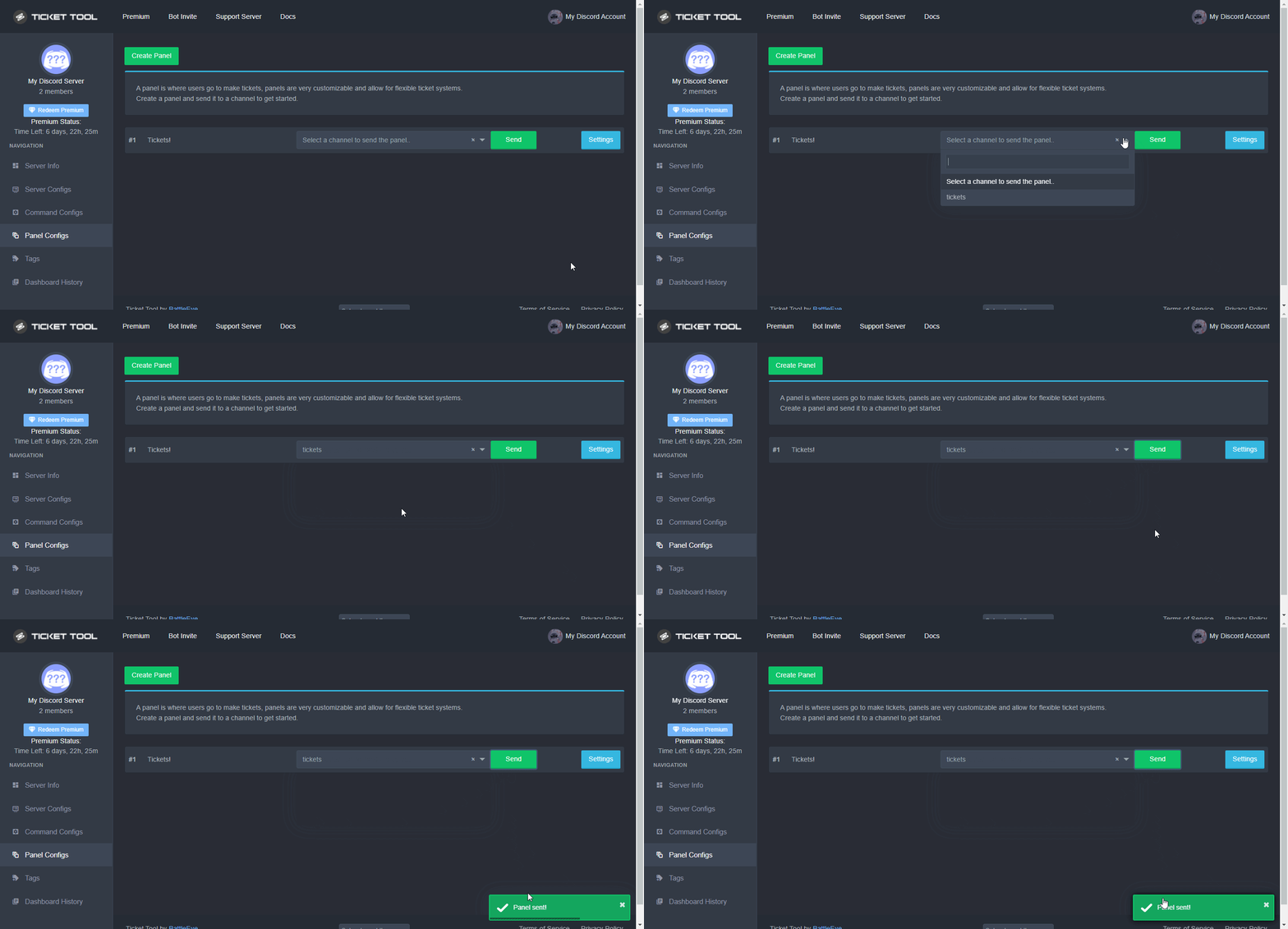 hard cape
You should check this out, it explains how to Send a panel
hard cape
jade topaz
So this panel channel is optional, it doesnt metter
jade topaz
Oh ok Thank you
hard cape
No problem
 waxen citrus
Hi how to create ticket I sorry I from poland and not good speaking English
Plase help😞
hard cape
$help panel
humble sequoiaBOT
Creating a panel
To create a panel we are going to need to head over to the panel configs on the dashboard
Once at the dashboard we will need to click Create Panel
Enter a panel name (Fill in any optional settings you want)
Click Create Panel and your ready to get started with configuring your panel
An example of a creating a panel is shown below.
waxen citrus
Ok :)
hard cape
Ok, hodně štěstí!
 empty kiln
If the bot enters the server, it will be disconnected from the server, what is the reason?
humble sequoiaBOT
Don't see your server in the dashboard?
You will possibly need to relog. Look below to see steps on how to relog.
How to relog in the Dashboard.
First, you will need to go to the dashboard. Once your there, click on your avatar on the top right. after you clicked it, you will see button that says Logout. You must click that. Once you have logged out, you can log back in.
Note:
You need one of these 3 things to access the dashboard.
1. Server Owner (Level: 6)
2. Server Administrator (Level: 4)
3. Dashboard Role (Level: 2)
:warning: You can check your level using $level on your Discord Server
User permission level with Ticket Tool
@User is permission level: 0 (User)
```» *If it shows that your permission is **0**, you don't have any of the above **3 things** to manage the dashboard.*


**See the GIF below on how to relog:**Yes


 empty kiln
ok
The bot has been added to the server. It will be removed from the server. what is the reason?
@hard cape
hard cape
Check your dashboard please
empty kiln
Why?
hard cape
.
hard cape
I can’t
empty kiln
plz @hard cape
hard cape
I can’t
forest goblet
@empty kiln Apparently, another bot is kicking Ticket Tool when it joins. Please disable that and stop constantly pinging the same person.
empty kiln
forest goblet
<@689876330807951435> Apparently, another bot is kicking Ticket Tool when it joi...
Thank you thank you thank you thank you
iron nightBOT
Gave 1 Rep to 2x2Master (current: #17 - 62)
 empty plank
hello peeps, i need some help with something if someone can give me a hand
jade topaz
empty plank
hello peeps, i need some help with something if someone can give me a hand
i
whts problem
empty plank
so i basically have been trying to understand a mod for dayz and im having troubles with it, so i did some searching around google and i ended up here. is this the right place?
jade topaz
empty plank
so i basically have been trying to understand a mod for dayz and im having troub...
sorry this platform is related to ticket tool
iron nightBOT
Gave 1 Rep to Not Laksh (current: #78 - 1)
long night
Help , when I change any thing in button option no thing save
Before: i Edited it now

When I left and entered again:
 humble sequoiaBOT
━━ moved to ticket ━━
jade topaz
Hey can anyone help me i will write FiveM for a maybe unban i have can somebody say where i can write FiveM thanks.
hard cape
This is ticket tool support
jade topaz
hard cape
This is ticket tool support
oh ok sorry
hard cape
Its fine
jade topaz
can i write this in #💬│general-chat ?
hard cape
Sure
copper owl
@jade topaz you've been told before that this is the wrong server
jade topaz
copper owl
<@456226577798135808> you've been told before that this is the wrong server
yes but maybe can somebody where i must write FiveM for my unban
copper owl
this isn't the right place to ask for your unban
This server has nothing got to do with FiveM, sorry
jade topaz
oh ok i really sorry
 broken geode
Hi! So I just added the ticket tool to the server, everything is going good its all setup except that it creates the ticket at the top of the server instead of where its suppose to go. How do I change this? Btw ping me if you answer :D
nova wharf
broken geode
Hi! So I just added the ticket tool to the server, everything is going good its ...
You can select where to send the ticket!
Just go to the dashboard, panel options and there you can select the channel the panel should be sent to.
hard cape
$help category
humble sequoiaBOT
How to set the open category
To set a open category go to the Dashboard -> Panel Configs -> Settings -> Category Options -> Category Open
 nova wharf
That's not the right
amber bloom
What is the benefit plus?
 brazen burrow
how do i make it so open tickets are going into a certian category
 daring bough
Is there a way to recover deleted tickets?
copper owl
daring bough
Is there a way to recover deleted tickets?
if you havent saved the transcript, then your best bet is to contact discord and request a recovery on the deleted channel
hard cape
brazen burrow
how do i make it so open tickets are going into a certian category
$help category
humble sequoiaBOT
How to set the open category
To set a open category go to the Dashboard -> Panel Configs -> Settings -> Category Options -> Category Open
hard cape
 fossil garnet
is there a way to save transcripts of each ticket or post transcripts to a specific channel
humble sequoiaBOT
How do I save transcript to a channel?
To save transcripts to a channel go to the Dashboard -> Panel Configs -> Settings -> Logging Options -> Transcript Channel
fossil garnet
Thank you
hard cape
No problem!
fossil garnet
thanks @hard cape
iron nightBOT
Gave 1 Rep to D<3 (current: #20 - 51)
hard cape

 karmic eagle
can i have some help with adding a member to see the tickets without making them admin?
karmic eagle
done