#🆘│community-support
1 messages · Page 371 of 1
 hard cape
 shut bolt
Tags don't work lmao
hard cape
Ohhh
shut bolt
hard cape
My tickets doesnt work rn
The bot is currently having some trouble
hard cape
When it will be fixed?
hard cape
shut bolt
Please refer to this message
Ok
 topaz wedge
My bot wont open tickets ..
 forest goblet
The development team is now actively working to fix the issue.
topaz wedge
Premium
shut bolt
 iron nightBOT
We are aware of the issues affecting both bots.
Please be patient. The development team has been notified.
topaz wedge
Bruh ...
hard cape
Is the problem with both bots?
shut bolt
Yup
hard cape
Oof okk
 mystic hound
No one reads huh
shut bolt
No lmao
mystic hound
The bot is currently unavailable due to an update being made to our database. The channel will remain locked until issues are resolved
 solid stream
I'm working on it.
Database is having issues.
Shouldn't be more than an hour or so.
Things should be running alot faster after though.
This is fixing alot of database bloat.
Just moved 86,236,136 database items..
hard cape
Hello!
mystic hound
 upper flower
Come get support.
upper flower
Come get support.
Hi is this the bakery
 grand urchin
someone know why ticket creator doesnt see the ticket channel even with see channel permission?
shut bolt
grand urchin
someone know why ticket creator doesnt see the ticket channel even with see chan...
How are you testing this? Using and Alt account, the View As Role feature, or was told by another user from your server?
grand urchin
view as role
 humble sequoiaBOT
Using the View as Role feature.
The View as Role discord feature will not work for testing ticket tool. Ticket Tool opens permissions with user permissions & not role permissions.
grand urchin
oh ok
shut bolt
That's probably the cause, we recommend using an alt account to test it, if your perms are set properly, you should be good to go
iron nightBOT
Gave 1 Rep to Yareaj_ (current: #2 - 249)
shut bolt
Sure!
 errant cosmos
hello! do you guys know if auto-save of support ticket transcripts is possible?
shut bolt
Hey hey! @errant cosmos
It is possible
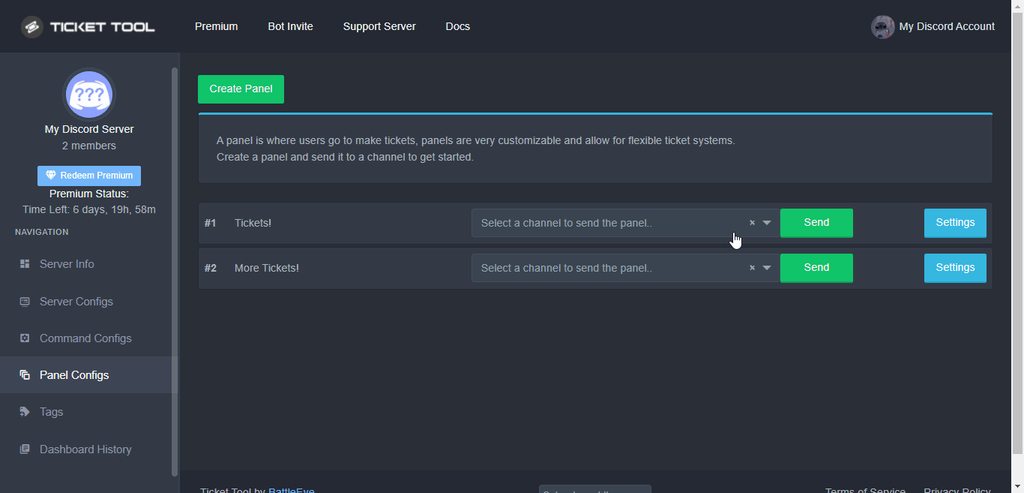
You should go into the Panel Configs of your server, then open the Settings of the Panel, open the Logging Options menu, and there mark as  the Auto Save Transcript feature, make sure to select an action, and finally Save changes
 rich kelp
how do i add ticket tool to my friends server?
shut bolt
rich kelp
how do i add ticket tool to my friends server?
$invite
humble sequoiaBOT
Ticket Tool Invite & Support
shut bolt
Second link
 oak tinsel
Hey, i just bought the premium bot and im having trouble set it up. Can anyone help?
 shut bolt
oak tinsel
Hey, i just bought the premium bot and im having trouble set it up. Can anyone h...
shut bolt
oak tinsel
Hey, i just bought the premium bot and im having trouble set it up. Can anyone h...
Hey
humble sequoiaBOT
Redeeming premium
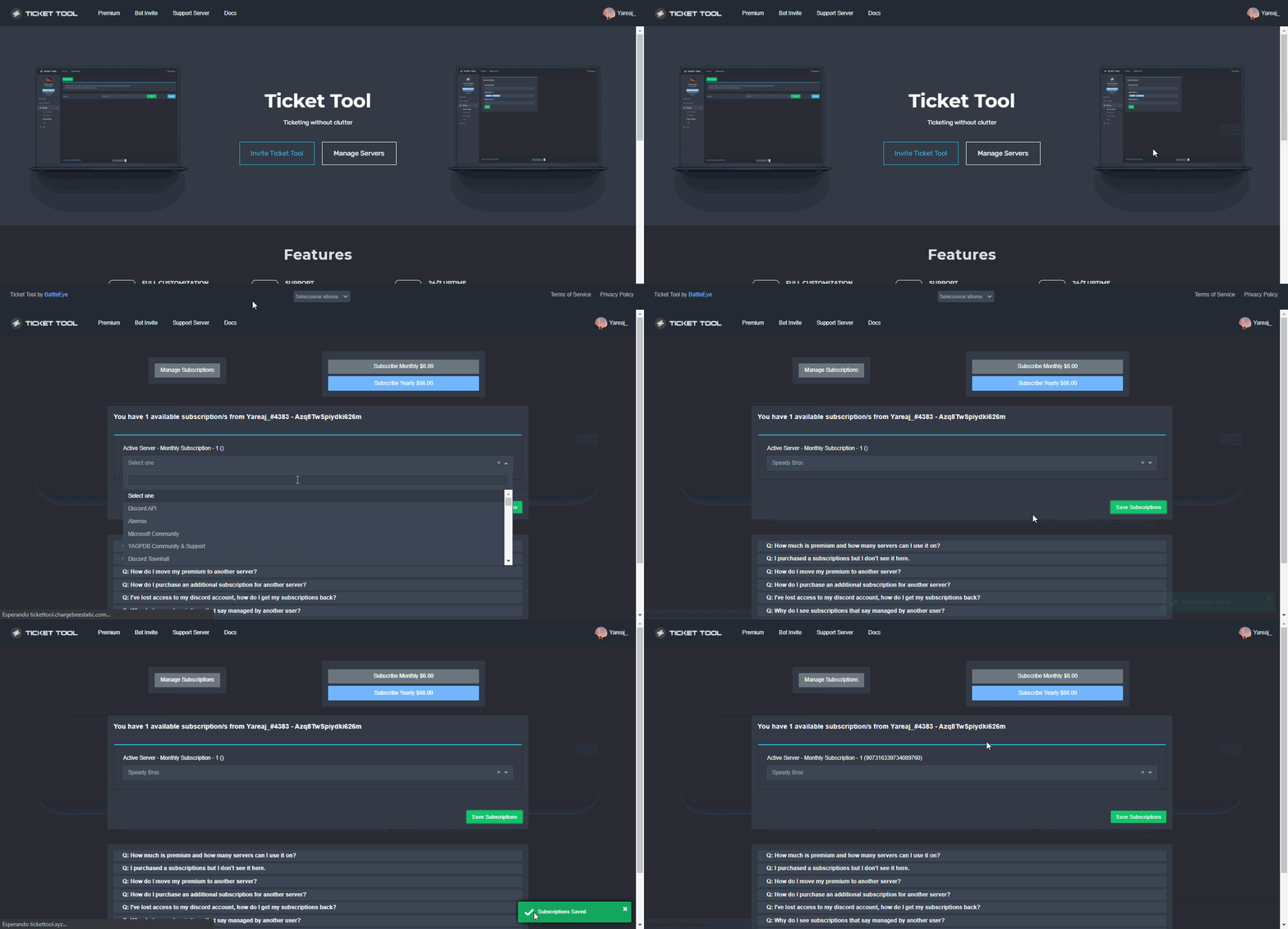
Redeeming premium on your server is really simple. Just head over to your Subscriptions Page. There you can select a server of your choice, which will get premium. You can change the server at any point.
 shut bolt
Make sure you redeemed the subscription as shown above
oak tinsel
humble sequoia
Done, now do u need to remove the free one?
shut bolt
oak tinsel
Done, now do u need to remove the free one?
Yup, you are fine only using the premium one
oak tinsel
ok
shut bolt
You must resend your panels if used the free ones
 jade topaz
Hiw do i create a ticket
forest goblet
jade topaz
Hiw do i create a ticket
See #573205317870157855 for a guide.
jade topaz
forest goblet
See <#573205317870157855> for a guide.
Just figured out how

 red hinge
 copper owl
that's our DDOS protection, you'll have to wait an hour and try again
copper owl
that's our DDOS protection, you'll have to wait an hour and try again
Oh Ok i think it got triggered bcs i was using zoom i think
copper owl
im not sure how you triggered it, might be some other reasons
either way no issue
you'll gain access to your dashboard within an hour or so
 odd quiver
Anyone know when the partner thing will be back?
copper owl
odd quiver
Anyone know when the partner thing will be back?
Nope
I dont even know when theyd be back
#📣│server-news we'll post it in there once partnerships are back opened

 wintry creek
copper owl
i dont speak french
wintry creek
copper owl
i dont speak french
Yes
wintry creek
Okay
copper owl
$frticket
humble sequoiaBOT

L'équipe du support Français
Cher client,
Si vous avez besoin d'aide, ouvriez un ticket pour le support Français s'il vous plaît.
Allez au #🎫│make-a-ticket et tapez sur le button contenant l'emoji 🇫🇷
wintry creek
I would like to do the same on my server
 humble sequoiaBOT
How Do I setup Ticket Tool
You can check our documentation here, you can also check #573205317870157855 for the basic setup.
Our documentation contains all the info you need about the bot to be able to setup and configure the bot however you like.
copper owl
look through the setup guide
 hollow chasm
What's the variable to ping the user who created the ticket?
copper owl
copper owl
{ticket.user}
but this is usually more preferred
 prime bridgeBOT
<:notallowed:660789872600285184> #community-support has been locked!
You will gain access again once the lockdown is lifted.
<:allowed:660789592647008258> #community-support has been unlocked!
Everyone now has access to this channel.
upper flower
testing
 thick tinsel
كيف احول البوت الي عربي
 robust sandalBOT
thick tinsel
كيف احول البوت الي عربي
robust sandalBOT
thick tinsel
كيف احول البوت الي عربي
 ! 𝐅𝐊𝐓𝐑
How to turn the bot into Arabic
 Arabic (ar) → English (en)
thick tinsel
Arabic (ar) → English (en)
thick tinsel
عربي
robust sandalBOT
thick tinsel
عربي
! 𝐅𝐊𝐓𝐑
Arabština
Arabic (ar) → Czech (cs)
hard cape
Ugh
hard cape
thick tinsel
عربي
لا يمكنك ترجمتها إلى العربية
إذا كنت بحاجة إلى مزيد من المساعدة -> #🎫│make-a-ticket
$articket
humble sequoiaBOT

فريق الدعم الفني العربي
عميلنا العزيز ان كنت تبحث عن مساعدة يرجى فتح تكت خاص بفريق الدعم الفني العربي
اذهب الى#🎫│make-a-ticket
ثم قم بلضغط على الايموجي الاتي (🇯🇴)
copper owl
hard cape
$arcommands
this doesnt help anyone btw, it just shows the list of tags
hard cape
why?
copper owl
use all the $lan_commands in #🤖│bot-spam
hard cape
kk
copper owl
hard cape
why?
because it's the same as using $commands whenever someone asks for any help
youre just showing em a list of tags
it also just floods the channel
hard cape
copper owl
because it's the same as using `$commands` whenever someone asks for any help
kk
Did he/she moved to ticket?
copper owl
yes
hard cape
Nice
 pure thicket
Hey there :) quick question:
is it possible to set a limit on tickets that can be created and notify the user that they have to wait until we closed the active tickets first? I have set up the global ticket limit, but the bot then creates the tickets on the top of the server. Am I missing something or is it not possible?
 hard cape
@pure thicket
 median wigeon
Global ticketlimit is for 1 user. But in a Category is the limit 50 channels ( 1 ticket is 1 channel)
pure thicket
We have set up a category to for open and closed ticket (see screenshot) so they should all go in this category. This is working fine, but for some reason they appear on top of the server when they pile up over the ticket limit (see second screenshot)

 hard cape
@median wigeon Can i try answer?
median wigeon
Go ahead
hard cape
Tyyy
hard cape
pure thicket
We have set up a category to for open and closed ticket (see screenshot) so they...
Is the ticket old? Or you just created it for the screenshot?
And be sure you have saved the categories.
@pure thicket
pure thicket
hard cape
Is the ticket old? Or you just created it for the screenshot?
No we are using your bot now for a few days and it just happened today because we got many tickets. So i wanted to set up a limit for total open tickets so out team can handle them better. But then it started to add them on the top of our server. We have solved already some tickets and this one was left on the top after changing the limit to 100 again
The only thing i changed was the global ticket limit in the server configuration
hard cape
How many pannels do you have in total?
On your server
Or on the server where the problem is
pure thicket
We have one panel
hard cape
Oh ok, whats the global limit?
pure thicket
The global limit is set to 100 now. But the moment I reduced it to 50 they started to appear not in the category but on top of the server, i changed it back again after that.
median wigeon
I know the answer of the problem:
-You have 1 panel thats gets 100 tickets
- You have 1 category there fits 50 tickets
- You haven't add a second category thats the reason why the tickets end at the top of the server!
If the limit of 50 reaches in the category
pure thicket
Oh so 50 channels is a general discord limit of tickets in a category?
median wigeon
In a category is the limit 50 channels
If you add a second category it will start again there
if the first is full
Is that the answer of your problem?
hard cape
So he can just create second category for opened tickets
pure thicket
Aaah that's the reason :) good to know. Thanks you both.
Also my second question, if i limit it to 50 for example, are the user still be able to open new tickets?
median wigeon
Nope if you set it to 50
no one is able to create a new ticket
and the user can be notifed in DM
if so
pure thicket
Set the global limit to 50 i mean 😅
pure thicket
Sorry messages came late, because i am on the run right now.
Thank you very much for your help. I will test it out now :)
pure thicket
Thanks @hard cape @median wigeon . You were both very helpful
iron nightBOT
Gave 1 Rep to D<3 (current: #26 - 18)
hard cape
Thanks @median wigeon
iron nightBOT
Gave 1 Rep to Rickerd (current: #24 - 26)
copper owl
hard cape
So only 50 tickets can be opened at once
global limit is not the same as ticket limit
pure thicket
Thanks @median wigeon
median wigeon
Global Limit is all across the panels
and ticket limit is ticket limit for one user
pure thicket
copper owl
global limit is not the same as ticket limit
Not ticket limit per user, i mean total open ticket limit 👀
This would be the global for all panels, right ?
copper owl
median wigeon
Global Limit is all across the panels
and ticket limit is ticket limit for one u...
global limit still is for one user btw 👀
hard cape
median wigeon
Global Limit is all across the panels
and ticket limit is ticket limit for one u...
So Global is for everyone?
median wigeon
pure thicket
This would be the global for all panels, right ?
Yes
copper owl
hard cape
So Global is for everyone?
No
hard cape
Kk
copper owl
Global limit is limit across all panels per user
meaning if global limit is 2, you can open 2 tickets on 2 different panels
pure thicket
copper owl
global limit still is for one user btw 👀
So am I able to set a limit for total open tickets?
copper owl
pure thicket
So am I able to set a limit for total open tickets?
not a thing yet, no
pure thicket
copper owl
not a thing yet, no
Damn, okay. Thank you guys anyway :)
iron nightBOT
Gave 1 Rep to Neptune (current: #1 - 467)
hard cape
copper owl
not a thing yet, no
How much do you recommend? as the amount of global ...
I have set 3 on my server
I have more pannels then 3 btw
copper owl
hard cape
How much do you recommend? as the amount of global ...
depends on the server
 lyric pond
Is there a way to make the tickets anonymous?
median wigeon
I am not sure, but i think there was no way to do that (correct me if i am wrong)
lyric pond
Ok thanks
copper owl
median wigeon
I am not sure, but i think there was no way to do that (correct me if i am wrong...
you are not wrong
currently there's no way to have tickets be anonymous through ticket tool
what you could do is the following
@lyric pond use a bot or a webhook to communicate with the user
lyric pond
How would I do that?
copper owl
well i dont have a guide here.. you should definitely watch a YT tutorial (i can provide one) for the webhooks
or just use a bot that allows you to send a message through it
i dont know of any bots with a mimic command but yeah
lyric pond
Ok
 feral echo
if i buy a premium key how can i disable reoccurring subscriptions
hard cape
How did u bought it?
feral echo
on the site on tickettool.xyz/premium
hard cape
It can be cancelled Im subscriptions
And try to use $pc in #🤖│bot-spam
You will get a premium role
@feral echo
median wigeon
Please block and rapport him
Is he in this server?
Maybe its a good idee to make a report ticket in #🎫│make-a-ticket
 cold pond
The bot become offline in my server
jade topaz
what does this mean?
 copper owl
cold pond
The bot become offline in my server
copper owl
cold pond
The bot become offline in my server
can you send a screenshot?
cold pond
copper owl
jade topaz
what does this mean?
it means your server has 500 channels
and you need to delete some so tt can create tickets
jade topaz
it has 11
jade topaz
wheres the id?
 jade topaz
bruh😭 its my friends server and theres no talking channel
 solar chasm
.
jade topaz
so rip
copper owl
cold pond
https://media.discordapp.net/attachments/918852894894206996/922972672047079444/u...
okay one moment
copper owl
jade topaz
bruh😭 its my friends server and theres no talking channel
literally any channel, doesnt have to be talking
cold pond
copper owl
okay one moment
Ok
copper owl
okay this is being looked into, one moment
 copper owl
you dont need to ping me after every message
copper owl
cold pond
It become online
it's online now?
cold pond
Yes
copper owl
okay, great. ill still check in with why it was offline
cold pond
Yeah it become working
 smoky viper
Haaaalp frenz... I'm trying to mention a specific user every time a ticket is created (myself) instead of just a role... how do I do that?
smoky viper
That's the super long jumble of numbers, not my username#0000 right?
OH
I'm silly
GOT IT... thank you!
copper owl
anytime
feral echo
how do i add the emojis underneath a panel to open a different type of ticket
im stuck
 tribal cedar
You mean multi panels?
Or just how do you change the emoji to open a ticket
I'm going to guess multi panels
humble sequoiaBOT
Multipanels are a premium feature  that allow for a single panel with multiple buttons to open different tickets.
How to create a Multipanel
Premium users can combine multiple panels into one multipanel.
First, find the IDs of each panel you wish to combine. You can find them in your Panel Configs in the Dashboard
Next, send the multipanel to a channel using $panel [id1] [id2] {id3} ....
e.g. $panel 1 2 4 17 35 to combine panels 1, 2, 4, 17 and 35.
Up to 25 panels may be combined.

For a more convenient use of multipanels, you can now combine panels on the dashboard. This will allow you to directly send the multipanel from the dashboard or via the $panel ID command.
Where can I find this?
You can find this setting on the Dashboard -> Panel Configs -> Settings -> General Options
Note: if you're attaching all the panels to a panel called English, don't include English in the attached panels box (If you do this, it will create duplicate)
This will put all buttons from all of your panels on one message. The message is the panel message from the panel you're combining these panels in.

 Note: This is a premium feature
tribal cedar
Note: This is a premium feature
tribal cedar
You can use one of those methods
 forest maple
is there a way to add a ticket cooldown
shut bolt
Currently not
forest maple
thanks
shut bolt
Sure
humble sequoiaBOT
Don't see your server in the dashboard?
You will possibly need to relog. Look below to see steps on how to relog.
How to relog in the Dashboard.
First, you will need to go to the dashboard. Once your there, click on your avatar on the top right. after you clicked it, you will see button that says Logout. You must click that. Once you have logged out, you can log back in.
Note:
You need one of these 3 things to access the dashboard.
1. Server Owner (Level: 6)
2. Server Administrator (Level: 4)
3. Dashboard Role (Level: 2)
:warning: You can check your level using $level on your Discord Server
User permission level with Ticket Tool
@User is permission level: 0 (User)
```» *If it shows that your permission is **0**, you don't have any of the above **3 things** to manage the dashboard.*


**See the GIF below on how to relog:**
 lilac girder
try follow the steps above
 fast sable
Thank you Pablo
shut bolt
Sure
shut bolt
No worries jajaja
fast sable
:)
 daring lodge
shut bolt
Que ayuda necesitas?
daring lodge
shut bolt
Que ayuda necesitas?
no sé como crear un ticket
shut bolt
$helpes setup
humble sequoiaBOT
Invitando a Ticket Tool
Lo primero que debe hacer es invitar al bot, dando click aquí.
Una vez haya invitado al bot, diríjase al panel de control y cree un panel.
Un panel es usado para definir las configuraciones de un ticket (los usuarios que pueden ver el ticket, los permisos, los nombres, entre otros).
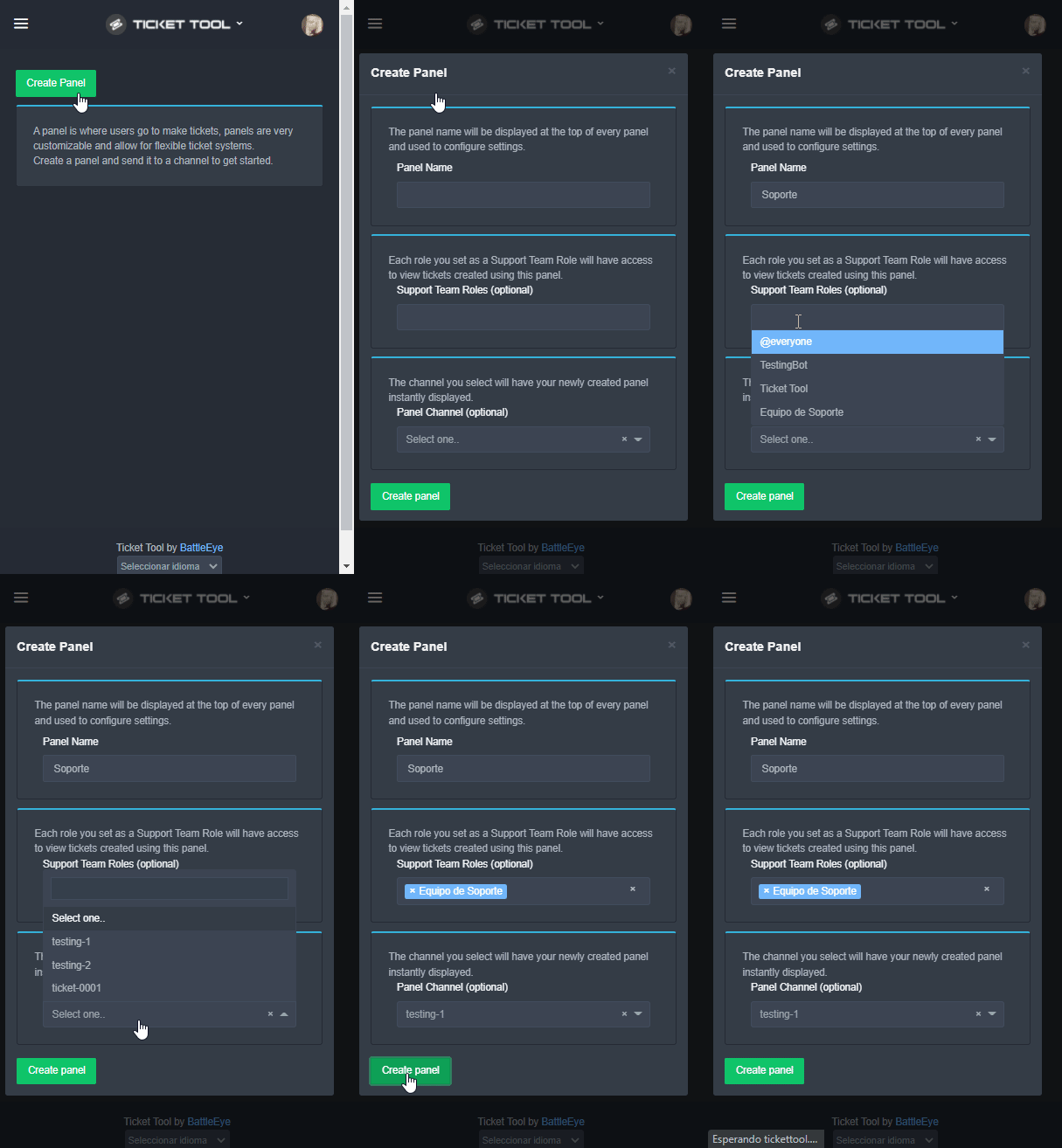
Creando un Panel
Para crear un panel, diríjase a la pestaña de Panel Configs o Configuraciones del Panel en el panel de control de su servidor.
Una vez esté allí, de click en Create Panel / Crear Panel.
Panel Name → Es el nombre que desea que tenga el panel, puede asignar el nombre de su preferencia.
Support Team Roles → Seleccione los roles que deseen que puedan ver los tickets que se creen desde este panel.
Panel Channel → Elija el canal al que quiera que el panel sea enviado al ser creado. (Este campo es opcional, puede reenviar el panel posteriormente si es necesario)
Finalmente de nuevamente click en Create Panel como ilustra el siguiente GIF
 shut bolt
Sigue esos pasos
shut bolt
Dale
feral echo
is there a way to set the starting count number to a specific number
instead of 0000 can i start it at like.. 0100 yk what im saying
 wicked scroll
feral echo
instead of 0000 can i start it at like.. 0100 yk what im saying
wicked scroll
feral echo
instead of 0000 can i start it at like.. 0100 yk what im saying
Hey!
Yes! Go to Dahboard -> Panel Configs -> Settings -> General Options -> Ticket Count
Change to "100"
hard cape
@feral echo
feral echo
ok
copper owl
there's a whole help category so please dont go asking for help in #💬│general-chat
jade topaz
hello, i need to configure a panel into a sort of suggestion panel for members to send in ideas (not problems)
jade topaz
copper owl
there's a whole help category so please dont go asking for help in <#5092388315...
sorry for that
copper owl
$help panel
humble sequoiaBOT
Creating a panel
To create a panel we are going to need to head over to the panel configs on the dashboard
Once at the dashboard we will need to click Create Panel
Enter a panel name (Fill in any optional settings you want)
Click Create Panel and your ready to get started with configuring your panel
An example of a creating a panel is shown below.
 copper owl
follow this ^^^
jade topaz
i did this, now its saying i cant send to the channel
but all ''*'' permissions are checked out
copper owl
then make sure it isnt missing any permissions in the channel
 dull crest
Is there any bot I can link up with ticketing to autoclose?
After a given period of time?
copper owl
i dont know of any bot that does that
best bet is coding something with YAG probably, or making a custom bot
jade topaz
copper owl
then make sure it isnt missing any permissions in the channel
okay sorry to bother, the panel is in the channel i want. but now i need people to click the ticket button and like write their ticket(in our case suggestion)
now it just opens a ticket
copper owl
yeah thats it...
they press the button, open a ticket, and send their suggestion in the ticket
jade topaz
a okay yes thats what i want. but where does the ticket open? i cant find it (again sorry total noob here)
copper owl
open a ticket and it should ping you
jade topaz
yes it diddnt ping me
copper owl
check the top of the server
copper owl
$help panel
humble sequoiaBOT
Creating a panel
To create a panel we are going to need to head over to the panel configs on the dashboard
Once at the dashboard we will need to click Create Panel
Enter a panel name (Fill in any optional settings you want)
Click Create Panel and your ready to get started with configuring your panel
An example of a creating a panel is shown below.
copper owl
@orchid geyser ^
 orchid geyser
K
jade topaz
copper owl
check the top of the server
okay everything worked, thank you bro for helping me out
iron nightBOT
Gave 1 Rep to Neptune (current: #1 - 469)
copper owl
no problem
jade topaz
btw, it works 100 times better than suggestion bot. so maybe you guys could use this as a new feature? i already got a lot of ideas from our members
copper owl
use what as a new feature?
i dont think ticket tool will have a built i suggestions feature (like other suggestions bots out there)
except the panels yknow, which can be used for a lot of things, like suggestions
 gilded verge
Hi, If I received and activated a premium code, does it mean that I will have access to a premium bot? 😳
copper owl
yes
gilded verge
I have 2 bots, one regular and one premium on my server. Can I ask for help how to activate this premium to work? My point is that the premium bot does not speak when I send the panel to channel, but the regular bot one does.
hard cape
I know the answer, but I don't want to steal you 
humble sequoiaBOT
Inviting and Enabling Premium Bot
The first thing you will need to do is invite the premium bot, an invite can be found here
Once the bot is in your server we will head to the dashboard and manage your server. When you are managing your server, you want to head into "Server Configs" then click the drop down menu under "Select the bot you would like to use on this server" then click "Ticket Tool#6207" and then save.
 copper owl
gilded verge
I have 2 bots, one regular and one premium on my server. Can I ask for help how ...
copper owl
gilded verge
I have 2 bots, one regular and one premium on my server. Can I ask for help how ...

gilded verge
OMG I'm blind xD Thank you so much! 
copper owl
anytime
gilded verge
Okay, I have a problem again xD
I just tried to add "Delete Ticket" but after receiving the ticket it doesn't show up. What could have happened?
gilded verge
thanks again 😅
wait, so as the bot wrote, I have to write 'thanks' and use the mention, right?
I don't know how to react to it 😳
copper owl
yeah but it's not necessary
humble sequoiaBOT
Creating a panel
To create a panel we are going to need to head over to the panel configs on the dashboard
Once at the dashboard we will need to click Create Panel
Enter a panel name (Fill in any optional settings you want)
Click Create Panel and your ready to get started with configuring your panel
An example of a creating a panel is shown below.
hard cape
I know
humble sequoiaBOT
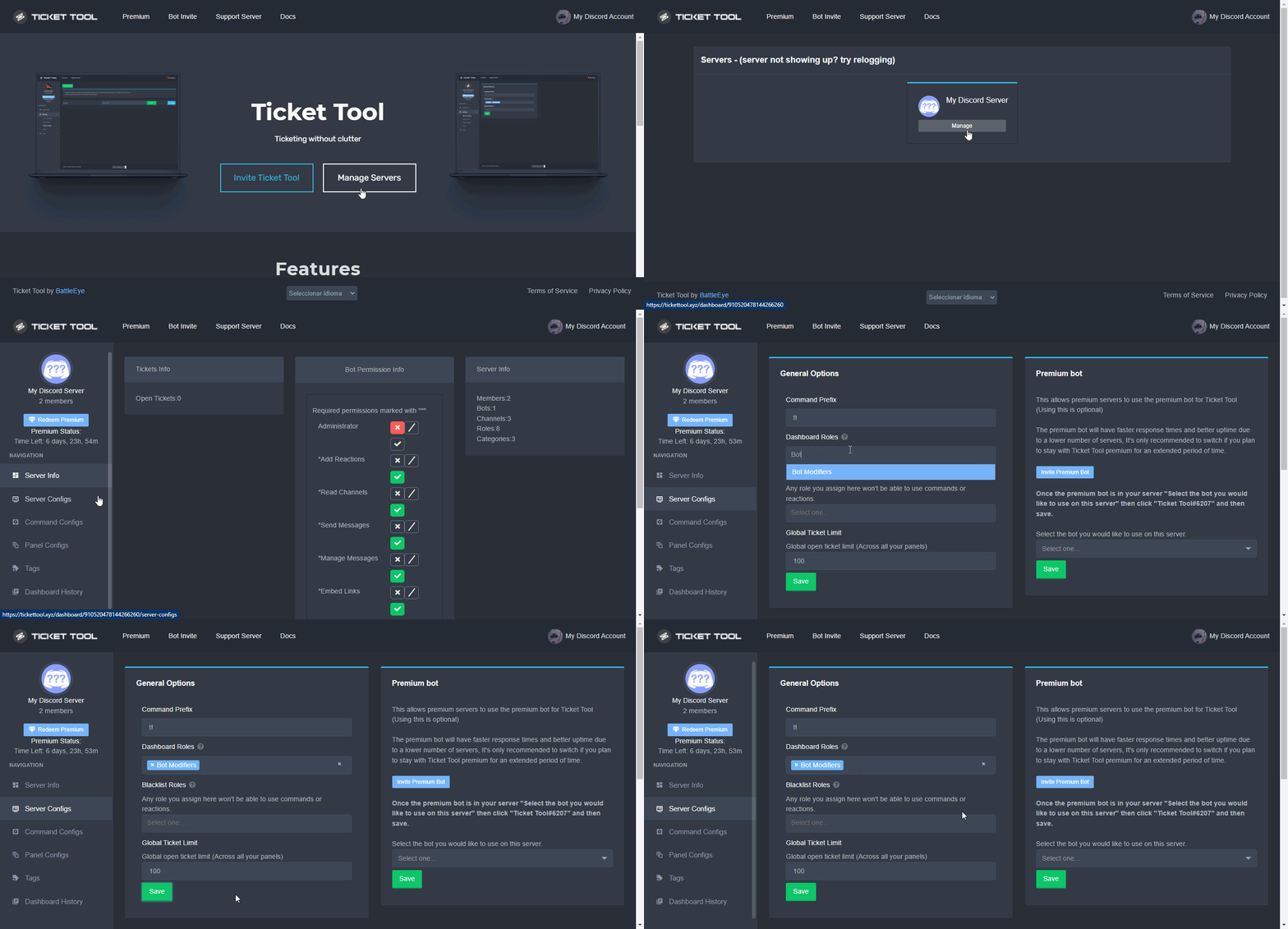
Dashboard Roles
Any role you put there will have full access to the ticket tool dashboard. The server owner and users with admin permissions already have access to the dashboard.
Be careful of which roles to put here
 hard cape
@unique isle
 unique isle
hard cape
<@688364174807662593>
unique isle
hard cape
<@688364174807662593>
is not this
shut bolt
unique isle
my problem is : where is for add "support role"?
$help support
humble sequoiaBOT
How to let support team see into a ticket
About support roles
A support role lets your support team see into tickets with out having to add them manually to each and every ticket.
You can add as many support roles as you like per panel.
NOTE that the way discord works all admins can see into tickets regardless of this.
How to set a support role
To set a Support role go to the Dashboard -> Panel Configs -> Settings -> General Options -> Support Team Roles.

NOTE that the support role will not be able to see into tickets that are already created..
shut bolt
That's how to add a support role pal
humble sequoiaBOT
Don't see your server in the dashboard?
You will possibly need to relog. Look below to see steps on how to relog.
How to relog in the Dashboard.
First, you will need to go to the dashboard. Once your there, click on your avatar on the top right. after you clicked it, you will see button that says Logout. You must click that. Once you have logged out, you can log back in.
Note:
You need one of these 3 things to access the dashboard.
1. Server Owner (Level: 6)
2. Server Administrator (Level: 4)
3. Dashboard Role (Level: 2)
:warning: You can check your level using $level on your Discord Server
User permission level with Ticket Tool
@User is permission level: 0 (User)
```» *If it shows that your permission is **0**, you don't have any of the above **3 things** to manage the dashboard.*


**See the GIF below on how to relog:** humble sequoiaBOT
Don't see your server in the dashboard?
You will possibly need to relog. Look below to see steps on how to relog.
How to relog in the Dashboard.
First, you will need to go to the dashboard. Once your there, click on your avatar on the top right. after you clicked it, you will see button that says Logout. You must click that. Once you have logged out, you can log back in.
Note:
You need one of these 3 things to access the dashboard.
1. Server Owner (Level: 6)
2. Server Administrator (Level: 4)
3. Dashboard Role (Level: 2)
:warning: You can check your level using $level on your Discord Server
User permission level with Ticket Tool
@User is permission level: 0 (User)
```» *If it shows that your permission is **0**, you don't have any of the above **3 things** to manage the dashboard.*
**See the GIF below on how to relog:** plain surge
humble sequoia
plain surge
humble sequoia
Try the steps above
 blazing kraken
tj
jade topaz
my problem is : Aim hava a server and aim owner how can i opens ticket and set in ticket channel.
humble sequoiaBOT
Panel Name is just a name like "Support", "Help Desk" or even something like "test" or even "Report a User". Name it whatever you want. 
jade topaz
Ehm i think yes.
hard cape
U need to create one at first
jade topaz
How i have the bot.
hard cape
$invite
humble sequoiaBOT
Ticket Tool Invite & Support
jade topaz
İ dont know how i can do that.
jade topaz
Oke i have now the bot.
 jade topaz
Ok.
hard cape
Then press “Create panel”
 jade topaz
Ok.
 jade topaz
Yes sir.
jade topaz
Thx for helpng sir.
hard cape
No problem!
 vivid arch
Does anyone happen to know why when a ticket is created the person who creates it cannot see message history, even the close ticket option etc?
hard cape
I know
He just don’t see the history of messages?
You need to give him permissions to see history of messages
U can set it in your server
@vivid arch
But we are not sure if we understood each other correctly
vivid arch
Yeah, do I have to do that manually everytime? idk why it's turning them off
hard cape
vivid arch
Yeah, do I have to do that manually everytime? idk why it's turning them off
No, there is any problem
vivid arch
They can't see any message history in the tickets
hard cape

Be sure u have it like this

Permission options —> User opened permissions
And the same with User closed permissions
@vivid arch , did it worked?
vivid arch
No its really weird
hard cape
Did u saved the settings?
vivid arch
I have yeah
hard cape
U should test it on a new ticket
 acoustic marsh
hello can i ask question, do i have to be administrator/owner of discord server to be able to use the ticket tool? cuz its not showing on our discord
humble sequoiaBOT

⚠️ You're in the wrong place
We provide support for @pseudo glen discord bot and cannot help you with whatever issue you have.
- Please make sure to contact the appropriate Support Team.
If you don't have any further questions regarding our bot Ticket Tool, please close this ticket
humble sequoiaBOT
Dashboard Roles
Any role you put there will have full access to the ticket tool dashboard. The server owner and users with admin permissions already have access to the dashboard.
Be careful of which roles to put here
hard cape
U need to own dashboard role
acoustic marsh
yeah sorry its ticket tool
hard cape
It’s fine!
acoustic marsh
hard cape
U need to own dashboard role
how to get that sir?
vivid arch
hard cape
U should test it on a new ticket
Works now! Thank you so much ❤️
iron nightBOT
Gave 1 Rep to D<3 (current: #26 - 20)
hard cape
vivid arch
Works now! Thank you so much ❤️
No problem!
And if u want to be a supporter, u need to have support team role
@acoustic marsh
Dashboard role -
humble sequoiaBOT
Dashboard Roles
Any role you put there will have full access to the ticket tool dashboard. The server owner and users with admin permissions already have access to the dashboard.
Be careful of which roles to put here

 humble sequoiaBOT
Don't see your server in the dashboard?
You will possibly need to relog. Look below to see steps on how to relog.
How to relog in the Dashboard.
First, you will need to go to the dashboard. Once your there, click on your avatar on the top right. after you clicked it, you will see button that says Logout. You must click that. Once you have logged out, you can log back in.
Note:
You need one of these 3 things to access the dashboard.
1. Server Owner (Level: 6)
2. Server Administrator (Level: 4)
3. Dashboard Role (Level: 2)
:warning: You can check your level using $level on your Discord Server
User permission level with Ticket Tool
@User is permission level: 0 (User)
```» *If it shows that your permission is **0**, you don't have any of the above **3 things** to manage the dashboard.*


**See the GIF below on how to relog:**U need to relog
humble sequoiaBOT
Dashboard Roles
Any role you put there will have full access to the ticket tool dashboard. The server owner and users with admin permissions already have access to the dashboard.
Be careful of which roles to put here
hard cape
@acoustic marsh
gilded verge
Hi, I have a bot voting question. More precisely, I mean the BotsForDiscord link. When I click "Authorize", I get an error like in the screenshot.
 gilded verge
Okay, so I haven't broken anything? 😳
gilded verge
uff, yes worked... thank you @hard cape
hard cape
No problem!
jade topaz
Hey
fast sable
You can invite the bot to your server at
https://tickettool.xyz/

Then just click invite ticket tool
And you can set up panels that go in your "support" channel
shut bolt
$invite
humble sequoiaBOT
Ticket Tool Invite & Support
fast sable
O sorry
shut bolt
Using the second link you can invite too
fast sable
I forgot the command lel
shut bolt
fast sable
O sorry
No worries pal, you are doing great!
fast sable
Haha ty he's my friend
shut bolt
Nice
fast sable
Ye
So then once you create your support channel, you create the panel and adjust the settings and message to your liking and then you save the panel and it should work
The member just clicks a button and a ticket is created so they can talk with your staff/support team
 stoic hawk
Hey everyone! Just got this bot set up today but I've got a bit of a (maybe strange) need for all users of the discord to be able to provide support on a ticket category. The dilemma I've run into is that it seems like anyone can close the ticket. Is there no way to restrict it to just the owner of the ticket & certain roles? It seems I can set up allowed roles for buttons, but I theres no way to include the owner of the ticket too. Thanks in advance 🙂
jade topaz
Hey everybody! Quick question - Is there a way to export data to a spreadsheet? I have a team of mods that work on tickets and I was hoping there's a way to track how many tickets each user has closed
jade topaz
Hey !, I wanted to know how I make a certain role see the Tickets, they can see the channel where the panel is but not see the Ticket they create @radiant moss
 scenic plinth
stoic hawk
Hey everyone! Just got this bot set up today but I've got a bit of a (maybe stra...
scenic plinth
stoic hawk
Hey everyone! Just got this bot set up today but I've got a bit of a (maybe stra...
Yep, go to button options on your panel configuration and click options for "close", there you will see the list of configuration options you can do.
humble sequoiaBOT
━━ moved to ticket ━━
shut bolt
Last one
scenic plinth
jade topaz
Hey everybody! Quick question - Is there a way to export data to a spreadsheet? ...
Nothing supports that option, and I have no confirmation on if anything is planned to do so.
stoic hawk
scenic plinth
Yep, go to button options on your panel configuration and click options for "clo...
Yeah I was looking there, but I dont seem to be able to allow the creator of the ticket with that because it is not a role.
 stoic grail
The server i want to add ticket dosen’t show in the dashboard I don’t know why
hard cape
Hey
U want to manage tickets?
@stoic grail
And your server It’s not showing up?
Or something else?
If yes, try this:
humble sequoiaBOT
Don't see your server in the dashboard?
You will possibly need to relog. Look below to see steps on how to relog.
How to relog in the Dashboard.
First, you will need to go to the dashboard. Once your there, click on your avatar on the top right. after you clicked it, you will see button that says Logout. You must click that. Once you have logged out, you can log back in.
Note:
You need one of these 3 things to access the dashboard.
1. Server Owner (Level: 6)
2. Server Administrator (Level: 4)
3. Dashboard Role (Level: 2)
:warning: You can check your level using $level on your Discord Server
User permission level with Ticket Tool
@User is permission level: 0 (User)
```» *If it shows that your permission is **0**, you don't have any of the above **3 things** to manage the dashboard.*


**See the GIF below on how to relog:**@stoic grail
hard cape
What? @jade topaz
jade topaz
no i got ty
 rare steeple
I have a question
how do i make my support tickets go to a specific category in my own server?
mystic hound
$help category
humble sequoiaBOT
How to set the open category
To set a open category go to the Dashboard -> Panel Configs -> Settings -> Category Options -> Category Open

 radiant solstice
kann mir wer helfen?
robust sandalBOT
radiant solstice
kann mir wer helfen?
 Mörschel
Kdo mi může pomoci?
German (de) → Czech (cs)
hard cape
radiant solstice
kann mir wer helfen?
Me, but speak english please! It will be better
@radiant solstice
radiant solstice
hard cape
Me, but speak english please! It will be better
can you help me with creating the ticket i can't get it
humble sequoiaBOT
How Do I setup Ticket Tool
You can check our documentation here, you can also check #573205317870157855 for the basic setup.
Our documentation contains all the info you need about the bot to be able to setup and configure the bot however you like.
humble sequoiaBOT
Creating a panel
To create a panel we are going to need to head over to the panel configs on the dashboard
Once at the dashboard we will need to click Create Panel
Enter a panel name (Fill in any optional settings you want)
Click Create Panel and your ready to get started with configuring your panel
An example of a creating a panel is shown below.
hard cape
@radiant solstice
 proper flame
so with premium, is it only for one server? So I'd need to purchase premium for each server I wish to use it on? or can I use premium features on a set amount of servers?
proper flame
ok, thanks
plain surge
@proper flame when you buy premium for 2 servers you get a $1 discount.
So you pay $11 instead of $12, for the monthly plan
And the same goes for more servers
hard cape
But its 1 premium for 1 server, right?
plain surge
Yes, you were correct. I'm just adding on what you said 👍
hard cape
Thank you, I stopped for a moment
 vital musk
how to change where the bot saves the transcript?
plain surge
$help transcript
humble sequoiaBOT
How do I save transcript to a channel?
To save transcripts to a channel go to the Dashboard -> Panel Configs -> Settings -> Logging Options -> Transcript Channel
 plain surge
@vital musk
vital musk
ty :)
plain surge
No problem
 stuck sphinx
 copper owl
@stuck sphinx you just opened a ticket and I just told you that this isnt the right server to ask for that help
im not sure what that even is, so we can't help you (not in this server anyway). Apoloigies
 bleak patio
Pls help
I need help.
I added the bot to my server, but the panel doesn't show up.
copper owl
the panel? you mean the server or ?
bleak patio
Server not visible
humble sequoiaBOT
Don't see your server in the dashboard?
You will possibly need to relog. Look below to see steps on how to relog.
How to relog in the Dashboard.
First, you will need to go to the dashboard. Once your there, click on your avatar on the top right. after you clicked it, you will see button that says Logout. You must click that. Once you have logged out, you can log back in.
Note:
You need one of these 3 things to access the dashboard.
1. Server Owner (Level: 6)
2. Server Administrator (Level: 4)
3. Dashboard Role (Level: 2)
:warning: You can check your level using $level on your Discord Server
User permission level with Ticket Tool
@User is permission level: 0 (User)
```» *If it shows that your permission is **0**, you don't have any of the above **3 things** to manage the dashboard.*


**See the GIF below on how to relog:**try relogging
iron nightBOT
Gave 1 Rep to Neptune (current: #1 - 470)
 slow meteor
Hello, I would like to know if there is a feature to change the name of a created ticket (give the name of the person who opened it)?
copper owl
slow meteor
Hello, I would like to know if there is a feature to change the name of a create...
yeah, if you want to do that automatically, it's a premium option
or you can just rename the ticket yourself using $rename
 marble berry
How do I make it so after a ticket is done it sends the details/transcript to a channel?
Nevermind.
hard cape
$help transcript
humble sequoiaBOT
How do I save transcript to a channel?
To save transcripts to a channel go to the Dashboard -> Panel Configs -> Settings -> Logging Options -> Transcript Channel
shut bolt
Btw, he left the server
He probably figured out by himselft, that's why he said nvm and left
Just so you don't ping him cause he won't see it
 left cloud
Hi guys tags don't seem to work for me, anyone has an idea what I may be missing? I created one called test, I've added some test message as response, and , my command prefix is ., but nothing happens when I type .test
copper owl
left cloud
Hi guys tags don't seem to work for me, anyone has an idea what I may be missing...
thats because the prefix isnt included
to activate your current tag, type test
left cloud
Okay got it thanks!
copper owl
if you want the prefix, rename the tag to .test
 jaunty orbit
Hello so I have a closed ticket and I would like to know how to take the transcript message and send it in a separate channel like this

Right now my ticket is like this so just how do I send a message like that including the file thing
 hard cape
Then choose transcript channel
jaunty orbit
wdym
jaunty orbit
I'm here
You said you we're gonna send me a screenshot so I was waiting lol
@hard cape
 hard cape
$help transcript
humble sequoiaBOT
How do I save transcript to a channel?
To save transcripts to a channel go to the Dashboard -> Panel Configs -> Settings -> Logging Options -> Transcript Channel
jaunty orbit
But then how did the guy send the message and not the bot
hard cape
wdym?
jaunty orbit
iron nightBOT
Gave 1 Rep to D<3 (current: #26 - 21)
hard cape
kk, lemme know the result!
copper owl
jaunty orbit
But then how did the guy send the message and not the bot
probably just downloaded it and sent it
and they left
jaunty orbit
I'm still here
hard cape
jaunty orbit
Right now my ticket is like this so just how do I send a message like that inclu...
but there is the command used i think
hard cape
jaunty orbit
I'm still here
did it worked?
hard cape
nice!
hard cape
jaunty orbit
Right now my ticket is like this so just how do I send a message like that inclu...
if u want to make bot send this, type $transcript
@jaunty orbit
hard cape
frr
jaunty orbit
idk
hard cape
that is why i though he left
jaunty orbit
i don't think i verified
hard cape
jaunty orbit
I tried that too but it said I needed premium i think
u dont need premium
but wait
jaunty orbit
do i have to verify to get a role?
hard cape
no, u dont need premium to use command $transcript
jaunty orbit
hard cape
no, u dont need premium to use command `$transcript`
Ok I see. I need premium to use the command outside of a ticket
hard cape
You can't use that command
jaunty orbit
so the command only transcripts it inside the ticket
hard cape
in tickets only
jaunty orbit
thanks @hard cape
iron nightBOT
@jaunty orbit :: You can't rep D<3#8894 for 53 minutes and 1 second. Try coming back later?
jaunty orbit
:((
jaunty orbit
you too
hard cape
tyy!
mystic hound
jaunty orbit
Ok I see. I need premium to use the command outside of a ticket
That's correct actually, with premium you can create transcripts of channels that aren't tickets
hard cape
mystic hound
That's correct actually, with premium you can create transcripts of channels tha...
I've never heard that how it works?
copper owl
just use $transcript #channel
hard cape
jaunty orbit
Right now my ticket is like this so just how do I send a message like that inclu...
but this was ticket, right?
copper owl
whether it was or wasnt isnt important, we're just saying
it's possible to use the command outside of tickets if you have premium
mystic hound
hard cape
I've never heard that how it works?
It's not something people really use that's probably why you haven't heard of it
It's one of those lesser used features but certain communities find it really helpful
hard cape
ty both
But thats good, cause im collecting vouches, so thats easy way how i can know how many vouches i've got
And when i type $commands, why it didnt type help commands too?
copper owl
because $commands sends all the tags we have in this server
if you want the help commands, use $help commands
hard cape

tyyyyyy
what are the help options?

is there any command for list of them?
Or i just need to type with What i need help?
copper owl
typing out $help will give you the options you can use with $help
hard cape
Kk
 valid pollen
Hi there! What would be the invite for the Premium Bot?
I paid for premium and I don't have the role here.
humble sequoiaBOT
Inviting and Enabling Premium Bot
The first thing you will need to do is invite the premium bot, an invite can be found here
Once the bot is in your server we will head to the dashboard and manage your server. When you are managing your server, you want to head into "Server Configs" then click the drop down menu under "Select the bot you would like to use on this server" then click "Ticket Tool#6207" and then save.
hard cape
@valid pollen
iron nightBOT
Gave 1 Rep to Neptune (current: #1 - 471)
copper owl
anytime
humble sequoiaBOT
Don't see your server in the dashboard?
You will possibly need to relog. Look below to see steps on how to relog.
How to relog in the Dashboard.
First, you will need to go to the dashboard. Once your there, click on your avatar on the top right. after you clicked it, you will see button that says Logout. You must click that. Once you have logged out, you can log back in.
Note:
You need one of these 3 things to access the dashboard.
1. Server Owner (Level: 6)
2. Server Administrator (Level: 4)
3. Dashboard Role (Level: 2)
:warning: You can check your level using $level on your Discord Server
User permission level with Ticket Tool
@User is permission level: 0 (User)
```» *If it shows that your permission is **0**, you don't have any of the above **3 things** to manage the dashboard.*


**See the GIF below on how to relog:**@jade topaz ⬆️
 desert musk
 why bot says that whenever a ticket is created
 copper owl
are you still using reactions?
desert musk
 they were working pretty fine until recently
ok then will switch to buttons thx 
thanks @copper owl
iron nightBOT
Gave 1 Rep to Neptune (current: #1 - 472)
copper owl
no problem. just resend your panel and it should work fine
desert musk

hard cape
$help prefix
humble sequoiaBOT
How to change Ticket tool's prefix
The default prefix for ticket tool is $ and @Ticket Tool#4843 however that can be changed on the Dashboard under Server Configs -> Command Prefix.
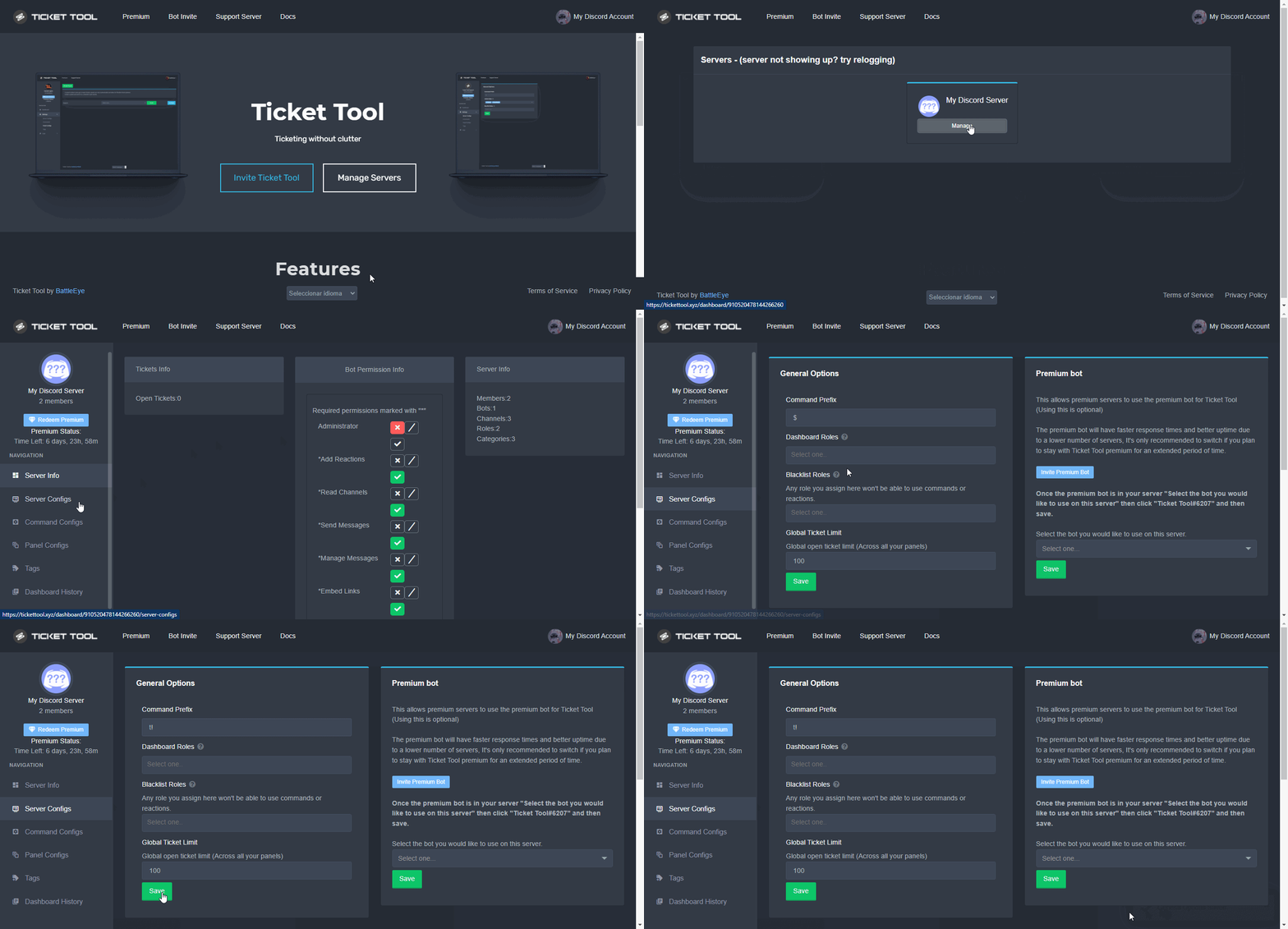
NOTE that @Ticket Tool#4843 will always work as a prefix even if there is a custom prefix.
hard cape
for the guy, who send $prefix
 waxen helm
I have premium, but what is the even the premium bot for?
waxen helm
So why is it a bot then?
hard cape
Idk but its more cool 😎😎
copper owl
premium bot is more stable
whenever the free bot goes offline during an outage, the premium one is almost always still online and semi functional
waxen helm
Oh wow.
humble sequoiaBOT
Inviting and Enabling Premium Bot
The first thing you will need to do is invite the premium bot, an invite can be found here
Once the bot is in your server we will head to the dashboard and manage your server. When you are managing your server, you want to head into "Server Configs" then click the drop down menu under "Select the bot you would like to use on this server" then click "Ticket Tool#6207" and then save.
 wispy whale
Como se configura el bot?
robust sandalBOT
wispy whale
Como se configura el bot?
 raulllll
Jak je robot nakonfigurovaný?
Spanish (es) → Czech (cs)
hard cape
wispy whale
Como se configura el bot?
Will u try speak english please?
I can help u then
wispy whale
No
hard cape
$esticket
humble sequoiaBOT

Equipo de Soporte Español
Querido usuario, si está buscando ayuda, por favor abra un ticket para contactar al Equipo de Soporte Español. Diríjase a #🎫│make-a-ticket y presione el botón :flag_es:.
hard cape
¿Aún necesitas ayuda? @wispy whale
shut bolt
hard cape
Will u try speak english please?
I mean, if they don't speak english it's hard
@wispy whale hola, pudiste configurarlo?
hard cape
shut bolt
I mean, if they don't speak english it's hard
Is english hard for spanish people?
shut bolt
hard cape
Is english hard for spanish people?
If they don't speak it, yeah
copper owl
i dont think it depends on where the person is or what language they speak lmfao
it's if they speak english or not, which not everyone does
copper owl
ikik was just adding onto it
hard cape
lmao, but he didnt respond to us 😭
shut bolt
hard cape
lmao, but he didnt respond to us 😭
Basically because they left
hard cape
.
 nimble ether
how do i make the ticket logger log closed tickets to a specific channel
copper owl
$logs
humble sequoiaBOT
Logging Options
With Ticket Tool, you can customize the behavior the bot takes when logging your tickets! For editing these options follow these steps:
Dashboard ➞ Panel Configs ➞ Settings ➞ Logging Options
Transcript Channel
Here you will choose the channel where @humble sequoia would send a copy of the transcript to
Logging Channel
Here you will define which channel @humble sequoia will save the Logs in (ticket created/deleted/closed, etc.)
Logs you can save:
Ticket Created ➞ Logs when a ticket is created
Ticket Closed ➞ Log when a ticket is closed
Ticket Opened ➞ Log when a ticket is opened
Ticket Renamed ➞ Log when a ticket is renamed
Ticket Deleted ➞ Log when a ticket is deleted
Transcript Saved ➞ Log when a ticket is daved
Select with  (disable) or (enabled) which logs you would like
ᅠ
Premium Features
Direct Message Transcript ➞ Sends the ticket transcript to the ticket user whenever the ticket is either closed, deleted, or both.
Auto Save Transcript ➞ Saves the ticket transcript into to the transcript channel whenever the ticket is either closed, deleted, or both.
Below you can see an example of what the Logging Channel will look like as well as the Transcript Channel:
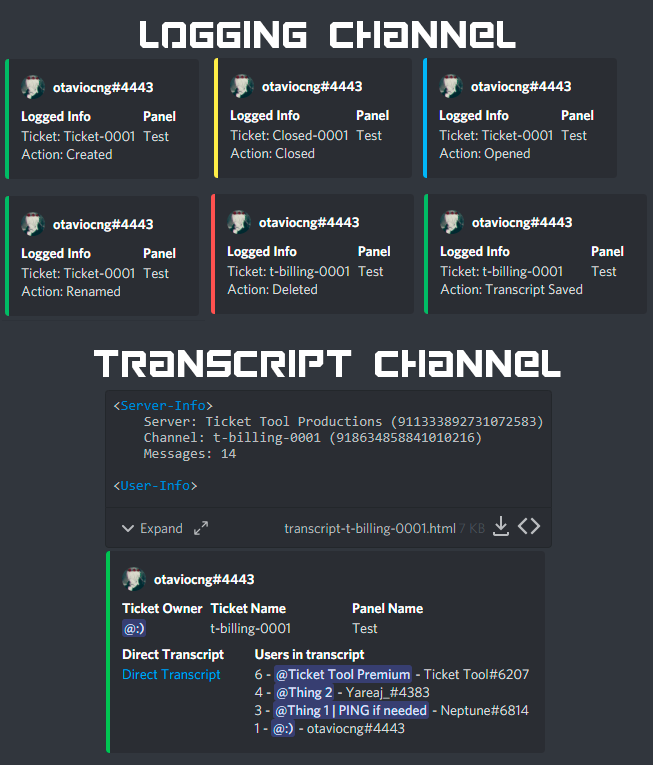 copper owl
@nimble ether here's everything you need to know about logs
nimble ether
thanks
jade topaz
debug isnt workin
copper owl
make sure you're using the right prefix
also make sure ticket tool has all the necessary permissions
humble sequoiaBOT
If Ticket Tool support requested this debug give them this link:
https://discordapp.com/channels/509192800865353738/662692902245498910/923661401334108190
Bot Permissions ឵ ឵឵ ឵ ឵឵ ឵ ឵឵ ឵ ឵឵
✅ - Read Channels
✅ - Send Messages
✅ - Embed Links
✅ - Attach Files
✅ - Add Reactions
✅ - Manage Roles
✅ - Manage Channels
✅ - Manage Messages
✅ - Read History
Channel Permissions ឵ ឵឵ ឵ ឵឵ ឵ ឵឵ ឵ ឵឵
✅ - Read Channels
✅ - Send Messages
✅ - Embed Links
✅ - Attach Files
✅ - Add Reactions
✅ - Manage Roles
✅ - Manage Channels
✅ - Manage Messages
✅ - Read History
Server Information ឵ ឵឵ ឵ ឵឵ ឵ ឵឵ ឵ ឵឵ ឵ ឵឵
Channel name:
community-support
Channel ID:
776680605517742090
Channel Count:
135/500
Server name:
Ticket Tool Support
Server ID:
509192800865353738
User Information ឵ ឵឵ ឵ ឵឵ ឵ ឵឵ ឵ ឵឵ ឵ ឵឵
User name:
Tiptop_YT#0001
User ID:
915971500119564368
Permission Level:
0 - User ()
Bot Information ឵ ឵឵ ឵ ឵឵ ឵ ឵឵ ឵ ឵឵ ឵ ឵឵
Prefix:
$
Premium Status:
Lifetime - ["subV2","time"]
Current shard:
1
API Latency:
76
jade topaz
...
 atomic solstice
jade topaz
...
atomic solstice
jade topaz
...
what is the Id of your server?
atomic solstice
jade topaz
or 923653075640680459
your prefix is ! so you have to type !debug
copper owl
^ you also have everyone blacklisted
atomic solstice

 atomic solstice
you have the everyone role on the blacklisted section in the dashboard
that means the bot is ignoring everyone in your server
jade topaz
yea
atomic solstice
even you
which means that as long as you have that there then the bot won't answer
copper owl
we cant do it for you, not something that's allowed
btw. you selected the premium bot in the dashboard but have the free one in the server
either select the free bot or invite the premium
jade topaz
idk how to inv preium
humble sequoiaBOT
Inviting and Enabling Premium Bot
The first thing you will need to do is invite the premium bot, an invite can be found here
Once the bot is in your server we will head to the dashboard and manage your server. When you are managing your server, you want to head into "Server Configs" then click the drop down menu under "Select the bot you would like to use on this server" then click "Ticket Tool#6207" and then save.
copper owl
just go to server configs and press "invite premium bot"
jade topaz
i did it
jade topaz
i just did
copper owl
okay then it should work now
mystic hound
$invite
humble sequoiaBOT
Ticket Tool Invite & Support
shut bolt
lol
 smoky sapphire
What command are players supposed to type to create a ticket
hard cape
Hey
U want to know how to create tickets with commands?
@smoky sapphire
Or something else?
smoky sapphire
Yea
smoky sapphire
Like when they players used the ticket command what do they type out
$create
!create
!ticket
$new
None of them are working
hard cape
Ye
 safe wharf
smoky sapphire
Like when they players used the ticket command what do they type out
safe wharf
smoky sapphire
Like when they players used the ticket command what do they type out
Did you try !open?
hard cape
safe wharf
Did you try !open?
I’m helping rn
hard cape
smoky sapphire
None of them are working
U want to use them on ur server?
smoky sapphire
Yea
 smoky sapphire
I did it just says this channel is not a ticket
hard cape
There
hard cape
Ur server is not showing up?


 hard cape
 gilded verge
Hey, what's going on? She voted on 3 sites 

 gilded verge
okay, thanks @hard cape
hard cape
No problem
copper owl
so they wont get any votes themselves
hard cape
copper owl
also keep in mind
@gilded verge
smoky sapphire
Okay I think I got it now thanks my dumb ass wasn’t opening the side panel
hard cape
No problem!
gilded verge
Yes, she connected the voices to me first. Then she went to the site and voted, but there is no third vote in sight.
hard cape
It happens to me too, so she will obtain 4votes next time
gilded verge
oh oki, thanks again @hard cape
iron nightBOT
Gave 1 Rep to D<3 (current: #25 - 22)
gilded verge
iron night
Gave `1` Rep to **D<3** (current: `#25` - `22`)
so this is how it works 
 karmic owl
d
hard cape
karmic owl
d
What?
jade topaz
How do I set it up!
shut bolt
jade topaz
How do I set it up!
Heya
Instructions on setting up Ticket Tool in your server.
Check out setup guide and you'll have all done
jade topaz
I tried but I can’t figure it out.
shut bolt
You tried the guide?
jade topaz
Yea idk how
shut bolt
Are you 100% sure you actually read it? The guide was literally updated an hour ago...
Like it was 100% redone
jade topaz
The codes ain’t working. I legit tried all bro
shut bolt
What codes?
jade topaz
To like set it up in discord !!
shut bolt
There are no codes to use when setting the bot
shut bolt
shut bolt
https://docs.tickettool.xyz/general/setup
Open this page
shut bolt
jade topaz
So how do I like make it setup
Read the guide we sent you, it has the step by step
jade topaz
I tried that
shut bolt
Really?
jade topaz
But it didn’t send it in the discord if that makes sense?
shut bolt
Did you click on the send button?
jade topaz
Yea
shut bolt
Send me a screenshot of where are you at in your dashboard to see what you have done
jade topaz
It’s harder since I’m on mobile
jade topaz
Okay it’s been done now. My friend helped
shut bolt
Nice
 drifting forum
is there a way to change where your tickets go to once they are opened? idk if that made sense sorry  my friend set the bot up, not me
humble sequoiaBOT
How to set the open category
To set a open category go to the Dashboard -> Panel Configs -> Settings -> Category Options -> Category Open
shut bolt
Choose a Category opened as shown and you'll be fine
 drowsy basalt
why won't my server show up in the dashboard ?
humble sequoiaBOT
Don't see your server in the dashboard?
You will possibly need to relog. Look below to see steps on how to relog.
How to relog in the Dashboard.
First, you will need to go to the dashboard. Once your there, click on your avatar on the top right. after you clicked it, you will see button that says Logout. You must click that. Once you have logged out, you can log back in.
Note:
You need one of these 3 things to access the dashboard.
1. Server Owner (Level: 6)
2. Server Administrator (Level: 4)
3. Dashboard Role (Level: 2)
:warning: You can check your level using $level on your Discord Server
User permission level with Ticket Tool
@User is permission level: 0 (User)
```» *If it shows that your permission is **0**, you don't have any of the above **3 things** to manage the dashboard.*


**See the GIF below on how to relog:**omg thank you, I think I lost that page because I changed the name of the channel it originally was set up to so the bot stopped opening tickets as well, is it because I changed the name?
shut bolt
drifting forum
omg thank you, I think I lost that page because I changed the name of the channe...
It should still work but rechoosing it should fix it
drifting forum
shut bolt
It should still work but rechoosing it should fix it
hm weird okay thank you! I’ll probably reset it up once I’m done changing names and stuff just in case it happens again
iron nightBOT
Gave 1 Rep to Yareaj_ (current: #2 - 255)
shut bolt
drifting forum
hm weird okay thank you! I’ll probably reset it up once I’m done changing names ...
Sure :)
iron nightBOT
Gave 1 Rep to Yareaj_ (current: #2 - 256)
drowsy basalt
👍
jade topaz
Create panel not appearing on website
shut bolt
jade topaz
Create panel not appearing on website
Send screenshot
jade topaz
Button
 jade topaz
Ok

 shut bolt
Sure
 arctic oak
hi there I keep getting this message
Category #Tickets is missing or blocking permissions VIEW_CHANNEL for @humble sequoia
the ticket won't go to the category i set up
wicked scroll
$perms
humble sequoiaBOT
What permissions should I give to Ticket Tool?
ᅠ
@pseudo glen requires the following permissions:
Add Reactions
Read Channels
Send Messages
Manage Messages
Embed Links
Attach Files
Read History
Manage Roles
To change the role permissions, you can go to your Discord Server ➞ Server Settings ➞ Roles ➞ @Ticket Tool
To change the channel permissions, you can go to your Channel Settings ➞ Permissions ➞ Ticket Tool
ᅠ
Note:
You can give Ticket Tool Administrative Permissions instead of all the permissions listed above, but it's entirely optional and NOT necessary.
 hard cape
arctic oak
the ticket won't go to the category i set up
hard cape
arctic oak
the ticket won't go to the category i set up
Use command $debug
hard cape
Hey
What do you mean? @urban root
Do you mean role which can manage tickets, panels,…?
Oh
Or role which can type into tickets?
$help support role
humble sequoiaBOT
How to let support team see into a ticket
About support roles
A support role lets your support team see into tickets with out having to add them manually to each and every ticket.
You can add as many support roles as you like per panel.
NOTE that the way discord works all admins can see into tickets regardless of this.
How to set a support role
To set a Support role go to the Dashboard -> Panel Configs -> Settings -> General Options -> Support Team Roles.
NOTE that the support role will not be able to see into tickets that are already created..
scenic plinth
Believe they mean support roles and then roles that can't make tickets.
 magic wasp
 urban root
how can set a role that can see the tickets
urban root
how can set a role that can see the tickets
.
 hard cape
Kk
hard cape
magic wasp
.
On napsal že která uvidí tickety
magic wasp
nooo tak to taky nvm
hard cape
xD
scenic plinth
For when it comes up again, a better tag to use would be $blacklist
hard cape
Já ano
humble sequoiaBOT
Blacklist Roles
Any role you assign as a blacklisted role won't be able to use commands or reactions.
Selecting a blacklisted role
Go to your Dashboard ➞ Server Configs. There you will find the option to select blacklisted roles.
Note: Don't forget to save.
 magic wasp
hard cape
Já ano
magic wasp
hard cape
Já ano
ale už jsem to jednou dělal
hard cape
magic wasp
ale už jsem to jednou dělal
Co myslíš?
magic wasp
podobnou věc
hard cape
Nevim co myslíš xD
magic wasp
koukni na náš server
hard cape
@urban root
humble sequoiaBOT
Blacklist Roles
Any role you assign as a blacklisted role won't be able to use commands or reactions.
Selecting a blacklisted role
Go to your Dashboard ➞ Server Configs. There you will find the option to select blacklisted roles.
Note: Don't forget to save.
hard cape
$help Support role
humble sequoiaBOT
How to let support team see into a ticket
About support roles
A support role lets your support team see into tickets with out having to add them manually to each and every ticket.
You can add as many support roles as you like per panel.
NOTE that the way discord works all admins can see into tickets regardless of this.
How to set a support role
To set a Support role go to the Dashboard -> Panel Configs -> Settings -> General Options -> Support Team Roles.
NOTE that the support role will not be able to see into tickets that are already created..
hard cape
scenic plinth
For when it comes up again, a better tag to use would be `$blacklist`
Thanks for telling me about new command btw - new for me
iron nightBOT
Gave 1 Rep to kitkat (current: #7 - 170)
jade topaz
Give me a redeem code plz
hard cape
U can get it by voting command - $vote then use command $vote redeem and the bot will send u the code
@jade topaz
jade topaz
here?
hard cape
No, in #🤖│bot-spam use the command $vote
hard cape
You can vote every 12 hours, 1 vote = 12 hours of premium, you need atleast 6 votes to redeem
hard cape
okok
copper owl
you can't buy lifetime premium
and it's not given out anymore, lifetime will most likely not be a thing
hard cape
oop i didnt read she/he means lifetime
sorry
But u can get premium for 999 years
😉
jade topaz
ye i dont xd
hard cape

there enable support team only
so this is the final look

Button options --> Close ticket
jade topaz
oh ye i didnt search for it in button options xD thank you so much man
hard cape
no problem!
jade topaz
and Merry Christmas man
hard cape
You too!
jade topaz
one more thing, how can i insert my server emojis to ticket name and description?
hard cape
wait, lemme take a ss
You want to change the button when are people creating the ticket?
like this?

@jade topaz
jade topaz
ut thats can be done only when i buy premium right?
hard cape
yea
hard cape
hard cape
like this?
this?


 jade topaz
lol
hard cape
XD
jade topaz
:D:D:D:
humble sequoiaBOT
Creating a panel
To create a panel we are going to need to head over to the panel configs on the dashboard
Once at the dashboard we will need to click Create Panel
Enter a panel name (Fill in any optional settings you want)
Click Create Panel and your ready to get started with configuring your panel
An example of a creating a panel is shown below.
jade topaz
okay dobrý vědět xD chci proste dat svoje server emojis do názvu toho ticket panelu a do toho popisu co je pod tim
hard cape
$panelname
jade topaz
jakoby v te zprave kterou se dela ticket
humble sequoiaBOT
Panel Name is just a name like "Support", "Help Desk" or even something like "test" or even "Report a User". Name it whatever you want.
hard cape
tak já ti pošlu screen
jade topaz
okay
hard cape
Ahaa
jinak to je v: Panel options --> Panel message
ale jde to jenom s prémiem
@jade topaz
jade topaz
ajo, oki
hard cape
jinak prémium můžeš získat že budeš pro ně votovat, command je $vote
jade topaz
takze nejde nejak vlozit jako treba :smajlik: nebo id:smajlik:
jade topaz
hard cape
jinak prémium můžeš získat že budeš pro ně votovat, command je `$vote`
yo a kdyz budu mit premium, zmenim si ty panely a pak mi premium vyprsi tak to zustane zmeneny jo
iron nightBOT
Gave 1 Rep to D<3 (current: #25 - 23)
hard cape
Ono to je takhle, když máš prémium, tak věci jdou, ale jak to vyprší, věci přestanou fungovat
 graceful stream
How can I make a channel so that it says like react to create a ticket
hard cape
$help panel
humble sequoiaBOT
Creating a panel
To create a panel we are going to need to head over to the panel configs on the dashboard
Once at the dashboard we will need to click Create Panel
Enter a panel name (Fill in any optional settings you want)
Click Create Panel and your ready to get started with configuring your panel
An example of a creating a panel is shown below.
hard cape
there
graceful stream
thx
hard cape
no problem!
jade topaz
hard cape
Ono to je takhle, když máš prémium, tak věci jdou, ale jak to vyprší, věci přest...
yo to sem myslel no, takze i ty smajlici by nefungovali
iron nightBOT
@jade topaz :: You can't rep D<3#8894 for 58 minutes and 2 seconds. Try coming back later?