#🆘│community-support
1 messages · Page 370 of 1
 rustic pollen
 shut bolt
Sure
 tiny sparrow
yoyoyoy
 tribal cedar
Yo?
 random meteor
ello
 charred widget
Thank you @copper owl and @mystic hound for answer my question in the ticket. I was stuck at work until just a few minutes ago.
 iron nightBOT
Gave 1 Rep to Neptune (current: #1 - 447)
 shadow crow
I have a server but on the dashboard it doesnt show up
 humble sequoiaBOT
Don't see your server in the dashboard?
You will possibly need to relog. Look below to see steps on how to relog.
How to relog in the Dashboard.
First, you will need to go to the dashboard. Once your there, click on your avatar on the top right. after you clicked it, you will see button that says Logout. You must click that. Once you have logged out, you can log back in.
Note:
You need one of these 3 things to access the dashboard.
1. Server Owner (Level: 6)
2. Server Administrator (Level: 4)
3. Dashboard Role (Level: 2)
:warning: You can check your level using $level on your Discord Server
User permission level with Ticket Tool
@User is permission level: 0 (User)
```» *If it shows that your permission is **0**, you don't have any of the above **3 things** to manage the dashboard.*
**See the GIF below on how to relog:** shut bolt
Try this
shut bolt
Sure!
shadow crow
thanks @shut bolt
iron nightBOT
Gave 1 Rep to Yareaj_ (current: #2 - 240)
shut bolt

shadow crow
shut bolt
<:LightLovesCookies:894703841520541757>
it worked :>
shut bolt
shadow crow
it worked :>
Glad to know that :)
 candid canopy
why i cant make a ticket?

 radiant moss
The bot needs permissions to create tickets. Run $debug to find what permissions it is missing
 shut bolt
Do you have selected a category for new tickets to be placed at?
shut bolt
candid canopy
thanks you so much:D
The bot was missing perms there right? 😅
shut bolt
candid canopy
<@!518666147441278998>
Sure sure :)
shut bolt
Great, glad you could fix it
 hard cape
@cobalt girder By voting you can get free premium.
 cobalt girder
hard cape
<@810515091090571264> By voting you can get free premium.
cobalt girder
hard cape
<@810515091090571264> By voting you can get free premium.
how ?
 forest goblet
cobalt girder
how ?
forest goblet
cobalt girder
how ?
You can use the command $vote in #🤖│bot-spam to see more information.
 jade topaz
is there a way I can check if a fellow mod is voting or not?
I need Help
The Bot is Showing
- This interaction failed
@gilded veldt @gloomy jacinth @safe prairie @radiant moss
pls help me
 gloomy jacinth
Don't mention support team @jade topaz
Just open a #🎫│make-a-ticket and wait in it
 scarlet mango
hi i need help on claiming my staked safe earn on a pool long time ago
humble sequoiaBOT

⚠️ You're in the wrong place
We provide support for @pseudo glen discord bot and cannot help you with whatever issue you have.
- Please make sure to contact the appropriate Support Team.
If you don't have any further questions regarding our bot Ticket Tool, please close this ticket
 lean pulsar
Hello people!
not sure if its reported but it seems like the bot doesnt want to remove the ticket when I have clicked the "delete" reaction. Anyone else has it?
lean pulsar
hard cape
<@98468376409550848>
Nope, in discord application. Windows 10 to be exact 😄
lean pulsar
Basically when you use the $close - the remove in 5s does display but does not delete the channel.
lean pulsar
hard cape
Is the problem in your server?
Correct
lean pulsar
Np, I got all time for you 😄
 lean pulsar
@hard cape Checking!
lean pulsar
hard cape
I mean its been working for many months. It just happend just now (without changing any settings) were the issue happend
 hard cape
lean pulsar
I mean its been working for many months. It just happend just now (without chang...
hard cape
lean pulsar
I mean its been working for many months. It just happend just now (without chang...
Try to Send the pannel again
lean pulsar
hard cape
Try to Send the pannel again
What do you mean? you dont see the image or
lean pulsar
what did you meant with send the panel again?
lean pulsar
@hard cape Hold on, let me re-try again to create new ticket
hard cape
Will u Send the link?
 flat monolith
HELP PLS
hard cape
With what?
flat monolith
i have premium and i cant use $claim
jade topaz
hhhhhhhhhhhhhhhhhhh
flat monolith
yes i already
jade topaz
hhhhhhhhhhhhh
flat monolith
 jade topaz
hhhhhh
hard cape
 jade topaz
haaaaaaaaaaaaaaaaaaaaaaaaaaaaaaaa
hard cape
Enable claiming
jade topaz
hhhhhhhhhhhhhhhhhhhhhh noooooooooooooooooooooooooooooooo
 mystic hound
@jade topaz what exactly are you doing
 robust sandalBOT
jade topaz
scusa
robust sandalBOT
jade topaz
scusa
 classh20
excuse
 Italian (it) → English (en)
mystic hound
Italian (it) → English (en)
mystic hound
/it do you need help with anything?
robust sandalBOT
hai bisogno di aiuto per qualcosa?
English (en) → Italian (it)
hard cape
flat monolith
Enable claiming
jade topaz
mystic hound
/it do you need help with anything?
yes i need spport
mystic hound
What do you need help with?
mystic hound
Well, i know that.. i mean what exactly is the issue you're facing
flat monolith
hard cape
Enable claiming
 humble sequoiaBOT
If the bot is not working properly, try the following steps:
-
Run the $debug command in your server, to check the permissions of the bot. Send the link you get to us.
-
Check if you have any Blacklisted Roles in your Server Configs. Any roles listed there will not be able to use the bot / create tickets.
-
While you're in your Server Configs , make sure that you don't have the premium bot enabled, without actually having premium or the bot on the server.
These are the most common issues. If your problem still exists, you can go to our Troubleshooting Page for more fixes.
hard cape
flat monolith
Go to claiming options
mystic hound
humble sequoia
Try that @jade topaz
flat monolith
hard cape
Go to claiming options
where?
jade topaz
siuuuuuuuuuuuuuuuuuuuuuuuuuuuuu
hard cape
flat monolith
where?
 jade topaz
Bjr
jade topaz
Comment faire pour config le bot
robust sandalBOT
jade topaz
Comment faire pour config le bot
 bloxsibeurg yt 🍫
How to configure the bot
French (fr) → English (en)
humble sequoiaBOT
How Do I setup Ticket Tool
You can check our documentation here, you can also check #573205317870157855 for the basic setup.
Our documentation contains all the info you need about the bot to be able to setup and configure the bot however you like.
hard cape
flat monolith
waitt
Okai
lean pulsar
ty @hard cape
iron nightBOT
Gave 1 Rep to D<3 (current: #35 - 7)
jade topaz
Du coup
flat monolith
hard cape
Okai
OMG THANKS GOD BLESS YOU
hard cape
flat monolith
OMG THANKS GOD BLESS YOU
No problem!
jade topaz
Comment faire pour configurer le bot
flat monolith
hard cape
No problem!
Merry chrismas man
hard cape
flat monolith
Merry chrismas man
You too!
hard cape
jade topaz
Comment faire pour configurer le bot
With What u need help?
hard cape
jade topaz
Comment faire pour configurer le bot
pour quoi avez-vous besoin d'aide exactement ?
flat monolith
hard cape
You too!
btw i dont do chrismas sorry
jade topaz
hard cape
pour quoi avez-vous besoin d'aide exactement ?
Pour configurer le bot ect je c'est pas comment sa marche
hard cape
jade topaz
Pour configurer le bot ect je c'est pas comment sa marche
L'as-tu invité sur ton serveur ?
jade topaz
Oui
flat monolith
i'm islamic dude, but im still saying to non- islamic ppl
jade topaz
hard cape
L'as-tu invité sur ton serveur ?
Oui
hard cape
jade topaz
Oui
Ensuite, allez à la page principale - https://tickettool.xyz/manage-servers
 jade topaz
hard cape
Ensuite, allez à la page principale - https://tickettool.xyz/manage-servers
jade topaz
hard cape
Ensuite, allez à la page principale - https://tickettool.xyz/manage-servers
Ol
jade topaz
hard cape
Ensuite, allez à la page principale - https://tickettool.xyz/manage-servers
Ok
hard cape
jade topaz
Ok
Créez ensuite un panneau et configurez la façon dont vous voulez que vos billets fonctionnent ou ressemblent.
hard cape
flat monolith
i'm islamic dude, but im still saying to non- islamic ppl
Oof ok 😄
jade topaz
hard cape
Créez ensuite un panneau et configurez la façon dont vous voulez que vos billets...
On fait comment
hard cape
jade topaz
On fait comment
?
jade topaz
hard cape
Créez ensuite un panneau et configurez la façon dont vous voulez que vos billets...
Pour créer un panneau ect on fait comment
hard cape
jade topaz
Pour créer un panneau ect on fait comment

Ensuite

Tu sais déjà? @jade topaz
jade topaz
Nn
hard cape
?
 mighty light
friends I added the bot but I can't find my server why??
hard cape
Ask them if they can Send u a link
Cause it glitches sometimes
And you need to have Dashboard role!
mighty light
Ok
mighty light
No, I'm talking about my server
 hard cape
Send me a link to your server
mighty light
in the chat here
hard cape
Is the server Showing up now?
mighty light
wait a moment
hard cape
Kk
 mighty light
What is the use of the link you gave me?
mighty light
hard cape
Try to Use $debug in your server
Ok
hard cape
Can you manage the server now?
mighty light
wait a moment
hard cape
Ok
mighty light
No I don't understand why I can't find my server If you don't understand, thank you. Don't worry too much
tribal cedar
Try $level in your server
mighty light
Ok
 plain surge
hard cape
Then restart the page
plain surge
hard cape
Then restart the page
They should relog and not refresh the page
There's a tag explaining how to relog $relog
humble sequoiaBOT
Don't see your server in the dashboard?
You will possibly need to relog. Look below to see steps on how to relog.
How to relog in the Dashboard.
First, you will need to go to the dashboard. Once your there, click on your avatar on the top right. after you clicked it, you will see button that says Logout. You must click that. Once you have logged out, you can log back in.
Note:
You need one of these 3 things to access the dashboard.
1. Server Owner (Level: 6)
2. Server Administrator (Level: 4)
3. Dashboard Role (Level: 2)
:warning: You can check your level using $level on your Discord Server
User permission level with Ticket Tool
@User is permission level: 0 (User)
```» *If it shows that your permission is **0**, you don't have any of the above **3 things** to manage the dashboard.*


**See the GIF below on how to relog:**😮
plain surge
humble sequoia
Try this @mighty light
hard cape
Does it works now? @mighty light
 arctic trellis
HEllo, our ticket bot suddently stopped to move the claimed tickets in the right section

any idea?
ah I just noticed this with a test account

wasn't 100 the limit?
plain surge
Discord has a category channels limit.
You can only have 50 channels in a category and 500 in a server
arctic trellis
but corrently we have 33 channels
hard cape
arctic trellis
wasn't 100 the limit?
U can also set the limit in the website
mighty light
plain surge
Try this <@775069149214408715>
ok
arctic trellis
hard cape
U can also set the limit in the website
where?
 hard cape
But if u have reached 99 tickets, u need to close/delete them
plain surge
hard cape
Set the limit to 99
That's how many tickets a user can have opened at once
hard cape
And the global limit is?
plain surge
arctic trellis
but corrently we have 33 channels
Please make sure that under the category itself there isn't 50 channels, not the tickets count
plain surge
hard cape
And the global limit is?
How many tickets can be opened across all panels at once
hard cape
Per 1 person?
plain surge
No, just in general, if you have it set to 5, you can only have 5 tickets opened only
Can be 2 from English, 1 from French and 2 from Spanish.
If you have the ticket limit in Panel configs set to 1, then the user can only open 1 ticket in English, but can still open a ticket in Spanish
hard cape
Oh, then He needs to set the limit?
plain surge
No, he needs to either delete tickets to make room or move the channels manually somewhere else.
plain surge
hard cape
Oh, then He needs to set the limit?
Again the limit in "panel settings" is per person.
And the global limit is for all panels.
This is a discord limit that you can't change. You can only have 5p channels under 1 category and 500 channels in a server
hard cape
Kk, which limit is best? (Global one)
 slow hatch
Hi
plain surge
hard cape
Kk, which limit is best? (Global one)
Depends on what you want to prevent.
I personally find 1 ticket per user in each category is better
hard cape
plain surge
Depends on what you want to prevent.
I personally find 1 ticket per user in each...
Ok, ty! And can i see all Tags What are in this server?
By a command
plain surge
All the tags are pinned in #🤖│bot-spam
hard cape
Ty @plain surge
iron nightBOT
Gave 1 Rep to D̸̞̉҉̢̩͠o͛ͫ̚m͈̕͜҉̘̱̟☆̞͈͠҉ͪ̈́͘҉̷̥̐ (current: #20 - 45)
plain surge
No problem
arctic trellis
hard cape
no wait
that is not the ticket limit a user can raise?
it's not the ticket limit of a channel
 hard cape
I did a mistake, sorry
plain surge
You need to either delete tickets from under that category or move channels manually outside the category @arctic trellis
A category can only has 50 channels under it
And you can only have 500 channels in a server
plain surge
You counted the channels?
arctic trellis
yes
hard cape
arctic trellis
yes
What is the limit for your tickets?
humble sequoiaBOT
━━ moved to ticket ━━
arctic trellis
what limit
plain surge
hard cape
What is the limit for your tickets?
The problem they are having is that when someone claims a ticket, it doesn't get moved to the category they selected and they get an error that the category is at limit. This has nothing to do with tickets limit.
hard cape
plain surge
The problem they are having is that when someone claims a ticket, it doesn't get...
oh ok
hard cape
humble sequoia
━━ moved to ticket ━━
How i can set this message on my server?
 copper owl
it's a tag
hard cape
😮 nice, tyyyy
plain surge
That's a tag
humble sequoiaBOT
Tags
Tags are used to send a predefined response to your channels using a command. Tags will only respond if the command itself is used, it will not function if you put the tag into a sentence. The prefix is not included.
To create tags, go to: Dashboard > Tags > Create Tag. After creating and naming one, tap on the response button, and you can edit the response.
 hard cape
I know them
plain surge
@hard cape sorry internet died, there you go ^
hard cape
But tyy 😄
plain surge
So yh, that's a tag that we send
hard cape
That's a good thing!
I'm actually dumb, but how i can send a text with a dark frame and bg - I don't know how should i call it, sorry
hard cape
plain surge
There's a tag explaining how to relog `$relog`
like the $relog there
hard cape
ty
plain surge
Np 👍
plain surge
Yes you can
hard cape
ok
copper owl
hard cape
Can i use tags in demo-tickets?
if you're solely opening a demo ticket to test tags in, then #🤖│bot-spam is the better place to do it
#🤖│bot-spam also has all the tags pinned + all the $help commands
hard cape
copper owl
<#910978476536905738> also has all the tags pinned + all the `$help` commands
Ye, Dom told me! But ty for responding.
iron nightBOT
Gave 1 Rep to Neptune (current: #1 - 448)
hard cape
And can i see the leadboard of reps by a command?
copper owl
i dont think you have permissions to use yag commands
i can use the command in #🤖│bot-spam
hard cape
😮 U have 448 reps, I have 7 reps XD
And how I can get the role Ticket Tool Proficient?
hard cape
hello
 spare knoll
nao tem nenhum brasileiro aqui ne
hard cape
They are, but u can speak portugês here, I'll translate it.
spare knoll
que
hard cape
São, mas vc pode falar portugês lá, vou traduzir.
hard cape
spare knoll
que
Então, com o que você precisa de ajuda?
humble sequoiaBOT

Equipe de Suporte │ Português
Caro usuário,
Se você está procurando por ajuda, abra um ticket para entrar em contato com a Equipe de Suporte em Português. Vá para o canal: #🎫│make-a-ticket e pressione o botão: :flag_br:
shut bolt
@spare knoll 
hard cape
shut bolt
<@!687348015765127189> <:this:894279341108772914>
Did she opened a ticket?
shut bolt
No
hard cape
Oop
spare knoll
shut bolt
<@!687348015765127189> <:this:894279341108772914>
is premium
is free or not
shut bolt
/pt What thing?
robust sandalBOT
Que coisa é isso?
English (en) → Portuguese (Brazil) (pt)
 scenic plinth
Ugh I hate autocorrect...
/pt No premium is not free unless you use a 7 day free trial on a server or you vote, which information can be found in #🤖│bot-spam for.
robust sandalBOT
Nenhum prêmio não é gratuito a menos que você use uma avaliação gratuita de 7 dias em um servidor ou você vote, quais informações podem ser encontradas em #🤖│bot-spam.
English (en) → Portuguese (Brazil) (pt)
humble sequoiaBOT
━━ moved to ticket ━━
humble sequoiaBOT
Don't see your server in the dashboard?
You will possibly need to relog. Look below to see steps on how to relog.
How to relog in the Dashboard.
First, you will need to go to the dashboard. Once your there, click on your avatar on the top right. after you clicked it, you will see button that says Logout. You must click that. Once you have logged out, you can log back in.
Note:
You need one of these 3 things to access the dashboard.
1. Server Owner (Level: 6)
2. Server Administrator (Level: 4)
3. Dashboard Role (Level: 2)
:warning: You can check your level using $level on your Discord Server
User permission level with Ticket Tool
@User is permission level: 0 (User)
```» *If it shows that your permission is **0**, you don't have any of the above **3 things** to manage the dashboard.*


**See the GIF below on how to relog:**Try doing this
 humble sequoiaBOT
Don't see your server in the dashboard?
You will possibly need to relog. Look below to see steps on how to relog.
How to relog in the Dashboard.
First, you will need to go to the dashboard. Once your there, click on your avatar on the top right. after you clicked it, you will see button that says Logout. You must click that. Once you have logged out, you can log back in.
Note:
You need one of these 3 things to access the dashboard.
1. Server Owner (Level: 6)
2. Server Administrator (Level: 4)
3. Dashboard Role (Level: 2)
:warning: You can check your level using $level on your Discord Server
User permission level with Ticket Tool
@User is permission level: 0 (User)
```» *If it shows that your permission is **0**, you don't have any of the above **3 things** to manage the dashboard.*


**See the GIF below on how to relog:**Try it!
 marble path
Not Working
hard cape
Still?
hard cape
And are the owner of the server?
marble path
hard cape
And are the owner of the server?
Not Owner Ship
I have administriator
administrator
forest goblet
marble path
I have administriator
Can you please run the command $debug in your server?
 marble path
yes
hard cape
It works?
marble path
ييب
robust sandalBOT
marble path
ييب
 PisToL.
Yip
Arabic (ar) → English (en)
hard cape
Nice!
marble path
Nice bot
hard cape
Ikr
 hard cape
Does the bot has permissions?
 ocean island
yes
hard cape
Send a screen shoot please
ocean island

 humble sequoiaBOT
:flag_fr: French Commands (tags) list for Support Team
$frrelog - Relog the dashboard
$frnoresponse - 12 hours will be waited for a ticket to be closed if the user doesn't respond
$frtts - Inform a user that they are in a wrong server
$QFR - Confirmation if a ticket has been resolved (Same as the Close Ask Message)
hard cape
$frticket
humble sequoiaBOT

L'équipe du support Français
Cher client,
Si vous avez besoin d'aide, ouvriez un ticket pour le support Français s'il vous plaît.
Allez au #🎫│make-a-ticket et tapez sur le button contenant l'emoji 🇫🇷
hard cape
@ocean island
ocean island
ty
copper owl
thanks
forest goblet
I don't know...
hard cape
Weird
copper owl
need to ping and input a number
forest goblet
y!+ @hard cape
iron nightBOT
Gave 1 Rep to D<3 (current: #34 - 8)
hard cape
TY
jade topaz
well i want to send the transcripts to a different channel how can i do it?
copper owl
$help transcript
humble sequoiaBOT
How do I save transcript to a channel?
To save transcripts to a channel go to the Dashboard -> Panel Configs -> Settings -> Logging Options -> Transcript Channel
 copper owl
@jade topaz ^
jade topaz
thanks a lot and one more thing i want to know if someone created a ticket like sending those transcripts to is there a way?
copper owl
jade topaz
thanks a lot and one more thing i want to know if someone created a ticket like ...
i didnt understand your question exactly
jade topaz
well let me send a ss of one of the server im working for how it is
copper owl
the way to send a transcript to your transcript channel is by pressing the transcript button once a ticket is closed
copper owl
copper owl
the way to send a transcript to your transcript channel is by pressing the trans...
(you can also automate saving the transcript with premium)
 copper owl
those are logs
jade topaz
right logs i forgot the name
copper owl
you want to have those as well?
jade topaz
yep
copper owl
$logs
humble sequoiaBOT
Logging Options
With Ticket Tool, you can customize the behavior the bot takes when logging your tickets! For editing these options follow these steps:
Dashboard ➞ Panel Configs ➞ Settings ➞ Logging Options
Transcript Channel
Here you will choose the channel where @humble sequoia would send a copy of the transcript to
Logging Channel
Here you will define which channel @humble sequoia will save the Logs in (ticket created/deleted/closed, etc.)
Logs you can save:
Ticket Created ➞ Logs when a ticket is created
Ticket Closed ➞ Log when a ticket is closed
Ticket Opened ➞ Log when a ticket is opened
Ticket Renamed ➞ Log when a ticket is renamed
Ticket Deleted ➞ Log when a ticket is deleted
Transcript Saved ➞ Log when a ticket is daved
Select with  (disable) or
  (enabled) which logs you would like
ᅠ
 Premium Features
Direct Message Transcript ➞ Sends the ticket transcript to the ticket user whenever the ticket is either closed, deleted, or both.
Auto Save Transcript ➞ Saves the ticket transcript into to the transcript channel whenever the ticket is either closed, deleted, or both.
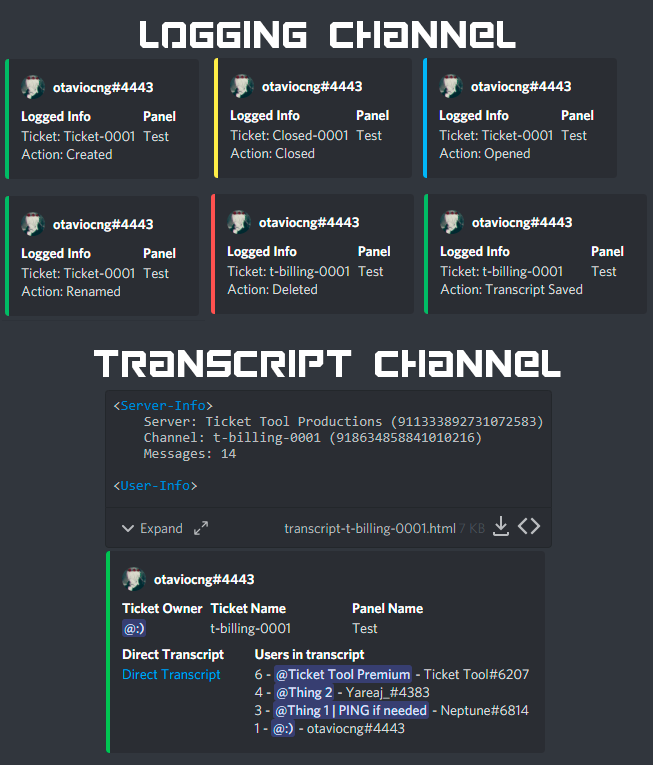
Below you can see an example of what the Logging Channel will look like as well as the Transcript Channel:
 copper owl
here's everything you need to know
iron nightBOT
Gave 1 Rep to Neptune (current: #1 - 454)
copper owl
Anytime
hard cape
jade topaz
well i want to send the transcripts to a different channel how can i do it?
If u want auto-transcript, u need premium
copper owl
hard cape
If u want auto-transcript, u need premium
Just an FYI, if you see someone already helping / that already help, dont interfere with it. It'll confuse everyone
copper owl
copper owl
(you can also automate saving the transcript with premium)
ive mentioned that here too btw, just to make everything smooth
hard cape
Sorry
rustic pollen
D<Neptune>
jade topaz
not really looking for auto-transcripts but thanks
hard cape
jade topaz
not really looking for auto-transcripts but thanks
Np, but u can get free premium by voting! So there’s a tip
jade topaz
thanks for your tip
rustic pollen
do u have any votes d
jade topaz
thanks @hard cape
iron nightBOT
Gave 1 Rep to D<3 (current: #34 - 9)
hard cape
jade topaz
thanks <@!832329623596957797>
Np
robust sandalBOT
hard cape
Np, but u can get free premium by voting! So there’s a tip
 D<3
D<3
Np, ale możesz uzyskać darmową premię głosując! Więc jest wskazówka
English (en) → Polish (pl)
robust sandalBOT
hard cape
Np, but u can get free premium by voting! So there’s a tip
D<3
Np, ale můžete získat prémii zdarma hlasováním! Takže je tu tip
English (en) → Czech (cs)
 fair rain
can someone help me set up a ticket bot please (:
plain surge
Hello @fair rain
You can follow this guide to setup Ticket Tool
humble sequoiaBOT
How Do I setup Ticket Tool
You can check our documentation here, you can also check #573205317870157855 for the basic setup.
Our documentation contains all the info you need about the bot to be able to setup and configure the bot however you like.
fair rain
ive done all that but it keeps saying it doesn't have permission to send messages even though its an open channel
plain surge
Can you run $debug in any channel that the bot has access to and send me the response
humble sequoiaBOT
What permissions should I give to Ticket Tool?
@pseudo glen requires the following permissions:
Add Reactions
Read Channels
Send Messages
Manage Messages
Embed Links
Attach Files
Read History
Manage Roles
To change the role permissions, you can go to your Discord Server -> Server Settings -> Roles -> @Ticket Tool
To change the channel permissions, you can go to your Channel Settings -> Permissions -> Ticket Tool
Note:
you can give Ticket Tool Administrative Permissions instead of all the permissions listed above, but it's entirely optional and NOT necessary.
 plain surge
Follow the part for "To change the channel permissions"
fair rain
thankyou (:
plain surge
No problem 👍
jade topaz
how to stop premium trial on ticket tool bot
hard cape
Hello, is there any problem?
jade topaz
how to stop premium trial on ticket tool bot
hard cape
U can’t
hard cape
I think
humble sequoiaBOT
Ticket Tool Premium
Get premium at https://tickettool.xyz/premium
Manage your subscriptions at https://tickettool.xyz/subscriptions
Why Premium?
Premium lets you customize the bot just how you want it. It also helps keep the bot running.
jade topaz
LOL
hard cape
😄
hard cape
U won’t have the premium when it expires
humble sequoiaBOT
Ticket Tool Premium (old)
Get premium at https://tickettool.xyz/premium
Manage your subscriptions at https://tickettool.onfastspring.com/account
Why premium?
Premium lets you customize the bot just how you want it. It also helps keep the bot running.
jade topaz
hard cape
U won’t have the premium when it expires
will there be any problem?
hard cape
No
jade topaz
nic
jade topaz
hard cape
U won’t have the premium when it expires
Will i get back the free?
hard cape
Wdym?
hard cape
Ye
hard cape
Is there any other problem?
jade topaz
nah
hard cape
Okk
 vagrant wagon
Have an amazing weekend everyone
hard cape
U too!
 harsh fossil
Same to you
 swift imp
Thre a bot issues right now?
hard cape
I don't know, but if u have any problem, tell me
 half mesa
Can I know why I got banned to main in server CNDBLOOD SOLO ONLY
hard cape
to this one?
copper owl
half mesa
Can I know why I got banned to main in server CNDBLOOD SOLO ONLY
you opened a ticket
half mesa
Yes
copper owl
and were told this is the wrong server
asking in this channel will not change the answer
hard cape
half mesa
Yes
There is a reason why u get banned
copper owl
Ill be closing your ticket now, please stop asking that question as we are not the correct support server for that question
 humble lantern
question why does tt so often complain abt channels not being ticket (while they are) or it just failing to edit the channel name correctly it just changes the counter to #0000
(ping when you reply)
copper owl
humble lantern
question why does tt so often complain abt channels not being ticket (while they...
are you using the claiming feature?
humble lantern
yes
humble lantern
it just started happening like 5 days ago again it didnt occure for months
copper owl
yes that's how bugs work
humble lantern
its ~ since the last ticket tool restart on the 13th
copper owl
they dont occur, then they suddenly happen with changes
humble lantern
copper owl
yes that's how bugs work
yea obv but like its just weird its after the restart
(im a dev myself no need to nooby talk)
copper owl
humble lantern
yea obv but like its just weird its after the restart
(im a dev myself no need ...
i mean if you're a dev yourself you should know that these occurrences are normal right?
humble lantern
was just wondering if it the typical bugs again or just an issue since the restarr on certain shard etc
copper owl
humble lantern
was just wondering if it the typical bugs again or just an issue since the resta...
typical bug
not an issue from the restart
humble lantern
copper owl
i mean if you're a dev yourself you should know that these occurrences are norma...
yes but my bot isnt running into issues latley (i beg it stays hahah)
copper owl
it's been happening here a lot too
copper owl
copper owl
not an issue from the restart
(from what I know anyway)
humble lantern
yea i just remember the bug not happening since ages
and now its back so i just wanted to check by and ask
copper owl
dev knows about it, it's been happening here for a bit too. Hopefully it gets fixed soon, all i can tell you that it'll be fixed at some point
humble lantern
yea fixed at some point is obv as its annoying as hell
lmao
anyways heads up they gonna get it fixed and it shall never come back can pray
have a good one any ty for the fast reply.
thanks @copper owl
iron nightBOT
Gave 1 Rep to Neptune (current: #1 - 457)
humble lantern
ofc will do 👍
robust sandalBOT
humble lantern
question why does tt so often complain abt channels not being ticket (while they...
 Baltraz
Otázka, proč si tt tak často stěžuje, že abt kanály nejsou lístkem (zatímco jsou) nebo že jen nedokáže správně upravit název kanálu, změní počítadlo na #0000
(ping při odpovědi)
English (en) → Czech (cs)
 empty panther
I’m only in 10 servers
copper owl
empty panther
I’m only in 10 servers
that isnt the issue
the issue is there's 500 channels within the server you're trying to open a ticket in
jade topaz
chcípni
 harsh elm
How do I tell the ticket bot what channel to be in?
shut bolt
harsh elm
How do I tell the ticket bot what channel to be in?
Hey there
harsh elm
Hello
shut bolt
$help send
humble sequoiaBOT
Sending a panel
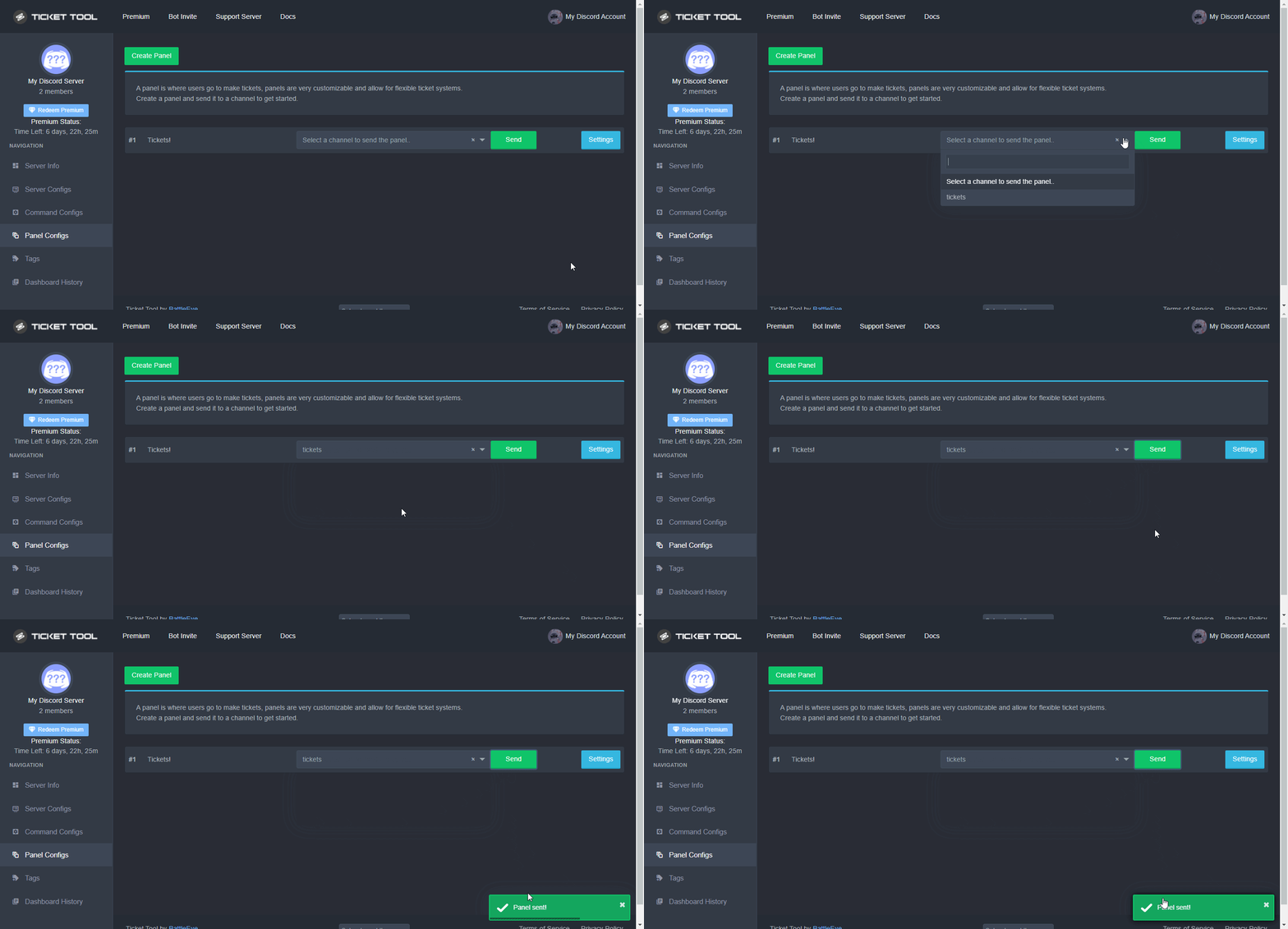
Once you've created a panel on the dashboard you will need to send it to a channel using send on the dashboard
Select the channel you want your panel to be created in and click send.
For other questions checkout $help faq
An example of a sending a panel is shown below.
 shut bolt
Choose the channel you want the panel to be sent and that's it
harsh elm
Thanks
shut bolt
Sure
 shrewd thicket
dumb question can i use ticket tool to make a channel for a individual apon joining a certain channel?
shut bolt
shrewd thicket
dumb question can i use ticket tool to make a channel for a individual apon join...
Hey there
shrewd thicket
yesh?
shut bolt
Please re explain it, I didn't get the idea
shrewd thicket
so lets say i make a channel and i want people to join that channel so it will move that person into their own custom channel apon jumping into said channel
shut bolt
It won't automatically create it, they must click on the create ticket button
 wide marsh
Hmm
shut bolt
jade topaz
warning you cant use this
One out of two
Option 1 you have a blacklisted role
Option 2, you have a blacklisted role for that specific button or command
hard cape
@jade topaz , u can get free premium 7 days trial, or u can get it by voting
humble sequoiaBOT
Ticket Tool Premium
Get premium at https://tickettool.xyz/premium
Manage your subscriptions at https://tickettool.xyz/subscriptions
Why Premium?
Premium lets you customize the bot just how you want it. It also helps keep the bot running.
 grave rapids
I'm probably dumb But, when making a ticket how do you change the support role? Been looking for awhile and can only change the reaction panel where ticket is made.
 hard cape
@grave rapids , do yk how to change it now?
grave rapids
Yes, ty xD
 foggy storm
No thanks
hard cape
Okok
 versed elk
hh
hard cape
With What can i help u?
versed elk
I want to ask where to inquire about the invitation.
humble sequoiaBOT
Ticket Tool Invite & Support
hard cape
If u want premium one, there:
humble sequoiaBOT
Inviting and Enabling Premium Bot
The first thing you will need to do is invite the premium bot, an invite can be found here
Once the bot is in your server we will head to the dashboard and manage your server. When you are managing your server, you want to head into "Server Configs" then click the drop down menu under "Select the bot you would like to use on this server" then click "Ticket Tool#6207" and then save.
 hard cape
@versed elk , do you know how to invite the bot now?
grave rapids
.... Hi... Again xD
Transcripts aren't sending to a log channel but the bot can talk there etc settings look fine
hard cape
Use command $debug And check if ticket tool has everything What he needs
@grave rapids
grave rapids
Ttyy
Welp all perms are green, still not sending transcripts, it's logged to that channel we're sure everything is set right

 grave rapids
hard cape
grave rapids
hard cape
Yea,,, we missed doing this lol basically all our issues can be solved from the same page in panel settings, next time we'll check that first, ty xD
iron nightBOT
Gave 1 Rep to D<3 (current: #31 - 10)
hard cape
Np!
 fickle cove
i need help
robust sandalBOT
grave rapids
Yea,,, we missed doing this lol basically all our issues can be solved from the ...
 Fluffy Cow
Ano,,, jsme to zmeškali lol v podstatě všechny naše problémy lze vyřešit ze stejné stránky v nastavení panelu, příště to zkontrolujeme jako první, ty xD
English (en) → Czech (cs)
fickle cove
With What?
@hard cape I have invited 10 people and the level has risen to level 5. How do I get the whitelist?
humble sequoiaBOT
⚠️ You're in the wrong place
We provide support for @pseudo glen discord bot and cannot help you with whatever issue you have.
- Please make sure to contact the appropriate Support Team.
If you don't have any further questions regarding our bot Ticket Tool, please close this ticket
hard cape
fickle cove
> With What?
<@832329623596957797> I have invited 10 people and the level has r...
Ticket tool doesnt care about this, Sorry
 inner vector
How do i get to see the invites from oxya?
humble sequoiaBOT
⚠️ You're in the wrong place
We provide support for @pseudo glen discord bot and cannot help you with whatever issue you have.
- Please make sure to contact the appropriate Support Team.
If you don't have any further questions regarding our bot Ticket Tool, please close this ticket
 unborn mountain
inner vector
How do i get to see the invites from oxya?
unborn mountain
inner vector
How do i get to see the invites from oxya?
wrong place
 quick ermine
How do I (temporary) disable opening tickets for a specific or all roles?
hard cape
Lemme tell u, Wait

Put into disabled roles the role which wont have permission to create the ticket
@quick ermine
quick ermine
Which section in the config exactly?
hard cape
Button options - Create ticket
quick ermine
Thanks!
hard cape
No problem!
 grand sky
Is there anyway, I can get premium without voting or buying ( a friend of mine said his server had it, but wouldn't tell me how )
grand sky
hard cape
I don’t think so
pretty sure theres another way
hard cape
I think there’s on 90% not
grand sky
kk lemme ask in #🎫│make-a-ticket
grand sky
hard cape
Let me know the result!
sure
hard cape
Kk
Ye, there are 2 more ways, u can won a giveaway or any special events, but it’s rare
grand sky
nah he said it was something related to the server size
( the server he moderates has 16k members )
hard cape
They can be partners or something like that
grand sky
hard cape
They can be partners or something like that
are there any reqs set for that
hard cape
grand sky
are there any reqs set for that
Idk, but I think partnerships are closed now, but I’m not sure
 median wigeon
Partnerships are still closed at the moment,
hard cape
copper owl
thanks to the both of you for helping out
Do u mean me? 😮
copper owl
i mean you and rickerd
 supple pecan
هل من هنا عربي
robust sandalBOT
supple pecan
هل من هنا عربي
 شاهي التحذيرات لا يهاب الموت نع
Is there an Arab here?
Arabic (ar) → English (en)
shut bolt
$articket
humble sequoiaBOT

فريق الدعم الفني العربي
عميلنا العزيز ان كنت تبحث عن مساعدة يرجى فتح تكت خاص بفريق الدعم الفني العربي
اذهب الى#🎫│make-a-ticket
ثم قم بلضغط على الايموجي الاتي (🇯🇴)
robust sandalBOT
supple pecan
وط ذس<@722196398635745312>
شاهي التحذيرات لا يهاب الموت نع
Ts
Arabic (ar) → English (en)
 spark parcel
hello how can i set so the tickets are created on the bottom of all channels and categories?
copper owl
$help category
humble sequoiaBOT
How to set the open category
To set a open category go to the Dashboard -> Panel Configs -> Settings -> Category Options -> Category Open
 spark parcel
thanks @copper owl
iron nightBOT
Gave 1 Rep to Neptune (current: #1 - 459)
copper owl
anytime
 potent glade
How do I get the bot to do like this?
 copper owl
you need premium for autosaving transcripts
potent glade
copper owl
you need premium for autosaving transcripts
Ok, how do I get the customer to be able to delete the ticket?
 brisk flume
$help
potent glade
unable
copper owl
you need to give them perms to see the ticket after it's closed, and give them perms to delete
or
you can disable Two Step Ticket so the ticket automatically deletes after you close
copper owl
brisk flume
$help
#🤖│bot-spam
brisk flume
how to setup
copper owl
brisk flume
how to setup
you opened a ticket and asked the same question. if your question wasnt answered 100%, why'd you close it?
brisk flume
idk the reason
potent glade
potent glade
unable
I meant @copper owl
brisk flume
i tried all the stepts @copper owl
median wigeon
Please dont ping the support team member, but did you go to the site
copper owl
yall dont have to ping me
copper owl
potent glade
I meant <@!548583124062175232>
what do you mean "unable"
brisk flume
sory
humble sequoiaBOT
Ticket Tool Invite & Support
median wigeon
or click on this link
brisk flume
Wait
potent glade
copper owl
what do you mean "unable"
I understand thank you
iron nightBOT
Gave 1 Rep to Neptune (current: #1 - 460)
brisk flume
ok
median wigeon
is it in your server?
brisk flume
median wigeon
is it in your server?
me
median wigeon
Is the bot in your server?
brisk flume
yea
brisk flume
look


 brisk flume
 brisk flume
 median wigeon
Click on the green button with create panel
brisk flume
now
 median wigeon
Choose a name for the panel
brisk flume
like?
brisk flume
jack
median wigeon
and than select a channel
 hard cape
Send the panel
copper owl
hard cape
Send the panel
again, please dont interfere when someone's already helping
hard cape
Kkk
median wigeon
@brisk flume now the panel is in the right channel.
Next step is to change the settings of the panel, by hitting the blue button with Edit on it.
iron nightBOT
Gave 1 Rep to Rickerd (current: #24 - 25)
median wigeon
No problem have a nice day.
brisk flume
Bye
 copper owl
Huh..?
that isnt something i can fix lol
thats either from their end
or your end
they can either resend the panel, or you can restart discord and update it
jade topaz
copper owl
or your end
your bot is fine then?
copper owl
jade topaz
your bot is fine then?
just make sure everythings working on your end pal
copper owl
check if there's a discord update, or restart your client
jade topaz
copper owl
check if there's a discord update, or restart your client
Its a shitty server tbh
🦕
thats why the bot wont work lol
copper owl
Lol
jade topaz
copper owl
Lol
thanks for helping dude!!
iron nightBOT
Gave 1 Rep to Neptune (current: #1 - 461)
jade topaz
lol
jade topaz
copper owl
just dont ask in general lol
yeahhh
 short dove
how to add a ticket
short dove
like you know when i want to add it a message apears and dissapears
i want to do it on my server
and it dont works
humble sequoiaBOT
**Ticket Message**
The Ticket Message is the first message sent by the bot in a new ticket. To customise it head over to your Dashboard -> Panel Configs -> Settings -> Ticket Options -> Edit Ticket Message
 hard cape
This?
iron nightBOT
Gave 1 Rep to D<3 (current: #30 - 11)
hard cape
Np
jade topaz
hello
how can i make the bot ping roles
i tried whatever the faq said
this thing

but still not working
shut bolt
Hey @jade topaz
jade topaz
hellllo
shut bolt
Please give me the ID of your server
jade topaz
882860052669673472
shut bolt
The name of the role you are trying to ping is ^Staff Roles^ ?
jade topaz
yes
shut bolt
Due to possible wrong spaces I would suggest you use the ID version:
{Id}
That will make it easier
jade topaz
ok ty
shut bolt
Sure, try it out and let me know
jade topaz
very will thank you it works
shut bolt
Sure :)
 lilac jasper
hi, is there a setup coo=mmand for the ticket tool?
struggling to make the first step
humble sequoiaBOT
How Do I setup Ticket Tool
You can check our documentation here, you can also check #573205317870157855 for the basic setup.
Our documentation contains all the info you need about the bot to be able to setup and configure the bot however you like.
How Do I setup Ticket Tool
You can check our documentation here, you can also check #573205317870157855 for the basic setup.
Our documentation contains all the info you need about the bot to be able to setup and configure the bot however you like.
hard cape
XDD
lilac jasper
thanks!
hard cape
Np!
lilac jasper
thanks @hard cape
iron nightBOT
Gave 1 Rep to D<3 (current: #30 - 12)
short dove
How to answear on a ticket? I mean what if someone created a ticket and i want to check it
short dove
Yes
humble sequoiaBOT
**Ticket Message**
The Ticket Message is the first message sent by the bot in a new ticket. To customise it head over to your Dashboard -> Panel Configs -> Settings -> Ticket Options -> Edit Ticket Message
hard cape
Do u mean this?
short dove
Nvm look when a person want to create ticket so it crates a channel example ticket 0001 and i want to answear on that ticket
So how i can do this?
short dove
Ok.
short dove
Ok wait
 gloomy mulch
is there a way to blacklist someone from the bot
humble sequoiaBOT
Blacklist Roles
Any role you assign as a blacklisted role won't be able to use commands or reactions.
Selecting a blacklisted role
Go to your Dashboard -> Server Configs. There you will find the option to select blacklisted roles.
Note: Don't forget to save.
 copper owl
@gloomy mulch you can set a blacklist role and give it to them
gloomy mulch
what ab a specific person?
gloomy mulch
aight
copper owl
for now
jade topaz
Is there a default limit to amount of tickets created?
copper owl
with the free bot, 10 per min
jade topaz
Ty.
hard cape
And with premium?
copper owl
also you can check the limit of tickets allowed to be created per user here
$help limit
humble sequoiaBOT
How to set a ticket limit
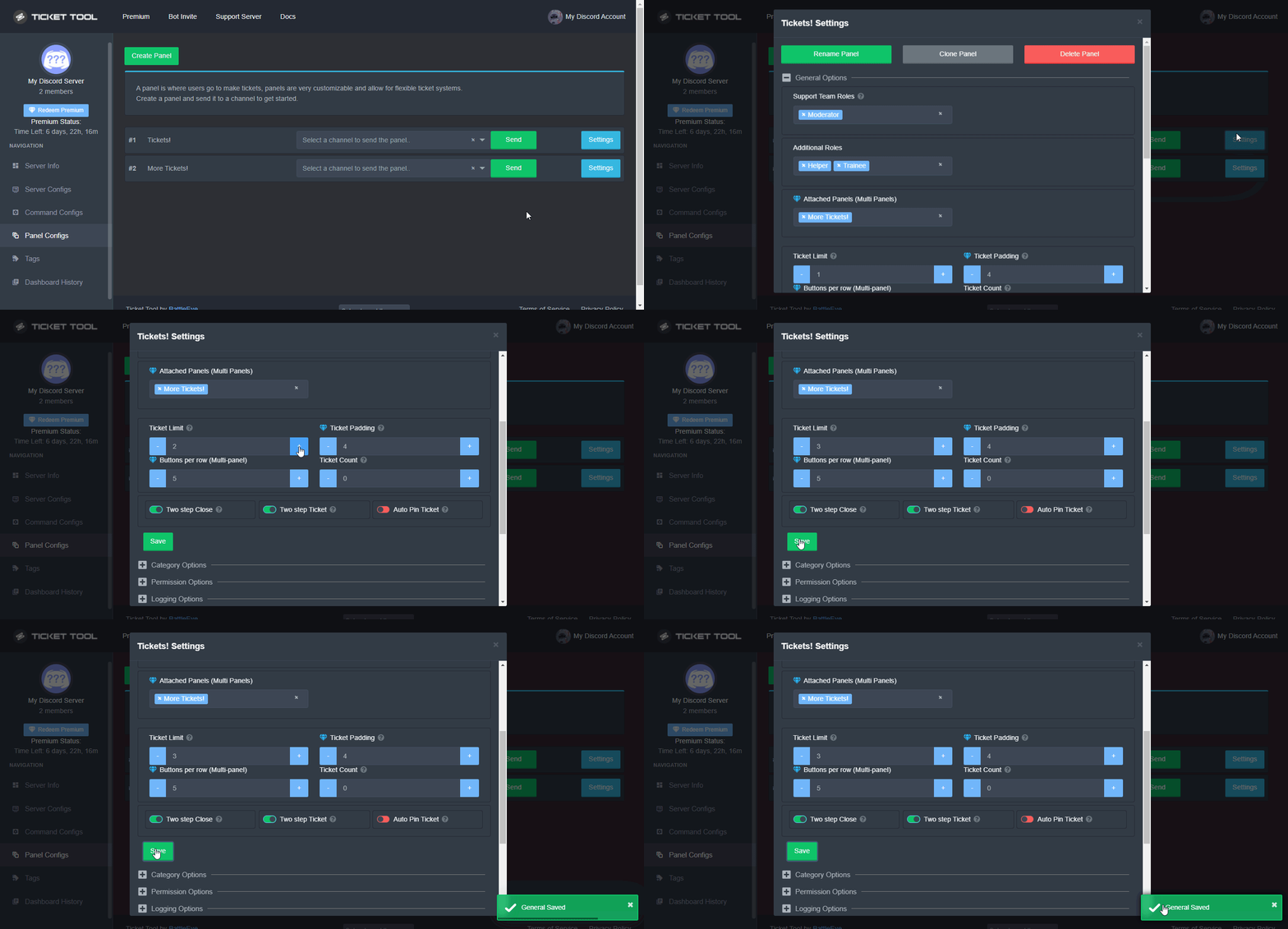
A ticket limit may be set per panel to prevent users from spamming tickets. By default this limit is set to 3. Once a user hits this limit the bot will notify the users that they reached the limit.
To set a ticket limit go to the Dashboard -> Panel Configs -> Settings -> General Options -> Ticket Limit
 copper owl
hard cape
And with premium?
copper owl
hard cape
And with premium?
no limit from what I know
hard cape
Tyyy
jade topaz
thanks @copper owl
iron nightBOT
Gave 1 Rep to Neptune (current: #1 - 465)
 zealous bough
How can I get a new ticket to ping my mods?
I have the bot set to administrator (and have made sure it can ping roles).
The embed links the mod role into the message, but it doesn't actually tag the mods when a ticket is created.
radiant moss
$help ping
humble sequoiaBOT
How to make Ticket Tool ping a role
To make ticket tool ping a role when a ticket is opened, go to the Dashboard -> Panel Configs -> Settings -> Ticket Options -> Ticket Message -> Message Text and do this:
{@Role name} This is case sensitive and the role must have @mentions enabled
 zealous bough
I've done that. It shows the linked tag, but it does not show the ping for the admin role, nor does it actually show the username (just the id)

I have also ensured the mod role is mentionable by any role.
radiant moss
zealous bough
I've done that. It shows the linked tag, but it does not show the ping for the a...
Put it in the Message Text roles cannot be pinged in embed
 radiant moss
 tulip dawn
Try to refresh and relog on the dashboard
tulip dawn
K
tulip dawn
radiant moss
Try to refresh and relog on the dashboard
thank you
iron nightBOT
Gave 1 Rep to Tinyy (current: #13 - 104)
radiant moss
Of course!
tulip dawn
@radiant moss
radiant moss
?
 snow trench
uhhh im not on ios im on a windows computer?

discord doesnt need an update already checked
shut bolt
snow trench
discord doesnt need an update already checked
Re install it
humble sequoiaBOT
We would love to help you, but if you don't tell us what you need help with we can't help you :(
mystic hound
$help category
humble sequoiaBOT
How to set the open category
To set a open category go to the Dashboard -> Panel Configs -> Settings -> Category Options -> Category Open
 craggy geyser
There is a discord limit of 50 channels in a category but other than that the tickets will go there
You can also set up a transcript channel for records
$help transcript
humble sequoiaBOT
How do I save transcript to a channel?
To save transcripts to a channel go to the Dashboard -> Panel Configs -> Settings -> Logging Options -> Transcript Channel
 buoyant igloo
$help embed
humble sequoiaBOT
Help Options
$help commands - Information on commands
$help setup - Information on bot setup
$help faq - Frequently asked questions
buoyant igloo
$help faq
humble sequoiaBOT
====== FAQ ======
If a question interests you run the command to see the answer.
Q: What is the prefix and how do I change it?
A: $help prefix
Q: How do I let my support team see into a ticket?
A: $help support
Q: How do I make a ticket ping my support when it's created?
A: $help ping
Q: How do I set a transcript channel?
A: $help transcript
Q: How do I limit the number of tickets a user can create?
A: $help limit
Q: How do I set what category tickets are created in?
A: $help category
Q: How do I set what category tickets are moved to when closed?
A: $help closed
Q: How do I set a custom reaction?
A: $help reaction
Q: How do I set the permissions for the tickets?
A: $help perms
Q: How do I create a panel?
A: $help panel
Q: How do I get the panel in my discord?
A: $help send
Q: How do I add or remove users from a ticket?
A: $help add
Q: Ticket Tool isn't responding to my commands, How do I fix it?
A: $help offline
Q: How does the claim command work?
A: $help claim
buoyant igloo
$help commands
humble sequoiaBOT
() = optional
[] = required
*==================================
Ticket Commands
==================================*
_ _
`$add [User] (channel)`
Description: Adding additional users to a ticket
Aliases: none
`$remove [User] (channel)`
Description: Removing users from a ticket
Aliases: none
`$close`
Description: Closing tickets
Aliases: none
`$open`
Description: Opening closed tickets
Aliases: none
`$delete`
Description: Deleting tickets
Aliases: none
`$rename`
Description: Renaming tickets/channels
Aliases: none
`$transcript (send channel)`
Description: Creating transcripts
Aliases: none
`$new (user) (reason)`
Description: Creating tickets in a monitored channel (when command style is enabled)
Aliases: none
`$claim`
Description: Claiming tickets (when claim is enabled)
Aliases: "unclaim"
_ _
*==================================
General Commands
==================================*
_ _
`$help (Help Options)`
Description: Help Command
Aliases: none
`$debug`
Description: Debuging issues with running Ticket Tool
Aliases: none
`$id (@role/@user/#channel/emoji)`
Description: Converting roles, users, channels and emojis to ID
Aliases: "getid"
`$permlevel`
Description: Checking permission level with Ticket Tool
Aliases: "level"
`$ping`
Description: Checking response time with discord api
Aliases: none
`$vote (link | unlink | redeem) (user)`
Description: Earn premium by voting on top.gg or Discord.boats
Aliases: "votes"
buoyant igloo
$help setup
humble sequoiaBOT
Setting up Ticket Tool
Visit the docs for setup info
General Setup
craggy geyser
@slate trellis, to continue it here as the automatic premium checker removed your premium role as it no longer includes free trial:
I would recommend not adding the premium bot unless you get premium longer, as it will stop working when the free trial ends
 outer girder
How can I costume my own message when someone opens the ticket
humble sequoiaBOT
**Ticket Message**
The Ticket Message is the first message sent by the bot in a new ticket. To customise it head over to your Dashboard -> Panel Configs -> Settings -> Ticket Options -> Edit Ticket Message
 slate trellis
craggy geyser
<@793374332432678922>, to continue it here as the automatic premium checker remo...
slate trellis
craggy geyser
<@793374332432678922>, to continue it here as the automatic premium checker remo...
I just want to know how to add it
humble sequoiaBOT
Inviting and Enabling Premium Bot
The first thing you will need to do is invite the premium bot, an invite can be found here
Once the bot is in your server we will head to the dashboard and manage your server. When you are managing your server, you want to head into "Server Configs" then click the drop down menu under "Select the bot you would like to use on this server" then click "Ticket Tool#6207" and then save.
craggy geyser
There is also a link to invite it on the dashboard where you select which bot
Anyone can invite the bot, but it will only respond to commands if you have premium
 static remnant
hey
the max tickets across all panels thing does not work
i set it to 50, and 2 weeks later people are still creating new ones and now its at 60
someone please help
craggy geyser
It's per person not total
static remnant
oh

then the whole point is gone
it says global ticket limit across all your panels
craggy geyser
It's per person across all panels
static remnant
What do I do now?
I need to set the limit to 20 because it is christmas time and I am overworking the team with all the tickets
craggy geyser
So here for example we can have it set to two. So you can open two tickets from different categories
An option is to just close the panel down temporarily
static remnant
Yes OK. Most of the team will go on a vacation now so it is a big problem
Do you have any suggestion on how i can fix it?
craggy geyser
craggy geyser
An option is to just close the panel down temporarily
This
If it is in its own panel, just remove people from seeing it unless you are happy with tickets created, otherwise delete it and resend it when ready
static remnant
craggy geyser
An option is to just close the panel down temporarily
I do that often but I still have some people that wants to work in christmas
craggy geyser
You can do command style tickets, and allow those staff members to create tickets manually for people who want it
static remnant
Yes maybe, but that would break the point. I think I need to get a custom ticket bot anyways so I'll do that.
Thanks for helping out though!
jade topaz
How do I make multiple buttons in 1 ticket?
jade topaz
jade topaz
How do I make multiple buttons in 1 ticket?
multipanel 1:
#🆘│community-support message
multipanel 2:
#🆘│community-support message
 feral echo
if i buy ticket tool premium do i get to add it to any server that im a admin in
and use it as premium
bc what if i wanna use my premium for my friends server
mystic hound
You can apply it to any server you have dashboard access to
Any 1 server that is, unless you have multiple servers you paid for
humble sequoiaBOT
For a more convenient use of multipanels, you can now combine panels on the dashboard. This will allow you to directly send the multipanel from the dashboard or via the $panel ID command.
Where can I find this?
You can find this setting on the Dashboard -> Panel Configs -> Settings -> General Options
Note: if you're attaching all the panels to a panel called English, don't include English in the attached panels box (If you do this, it will create duplicate)
This will put all buttons from all of your panels on one message. The message is the panel message from the panel you're combining these panels in.

 Note: This is a premium feature
hard cape
Note: This is a premium feature
hard cape
@jade topaz
jade topaz
Got it ty
hard cape
Np
jade topaz
thanks @hard cape
iron nightBOT
Gave 1 Rep to D<3 (current: #29 - 13)
hard cape
Do you have ticket tool on your server?
rustic pollen
no I need to add it but I can't find the server I want to add it to
it's not showing up
hard cape
Do you own Dashboard role?
 lilac girder
$invite
humble sequoiaBOT
Ticket Tool Invite & Support
short dove
Hello my member of my discord trying to make a ticket but its saying you dont have a permission can you help me?
hard cape
Where?
lilac girder
humble sequoia
click the link, then invite @rustic pollen
short dove
hard cape
Where?
in my channel report ticket.
hard cape
On your server?
rustic pollen
lilac girder
click the link, then invite <@!811577252646092801>
got it thanks mate
iron nightBOT
Gave 1 Rep to Pandaaaaa (current: #47 - 4)
lilac girder
np
short dove
hard cape
On your server?
yes
short dove
yes
hard cape
Hmm
short dove
and other members cant create it
hard cape
What i sends when u create a ticket?
short dove
its saying to my members you dont have a permission
hard cape
Oh
I know where is the problem
Lemme send u ss
Im helping him
And It’s not this
He needs to change create ticket options
short dove
can you send this again pls
lilac girder
okie sorry
 forest goblet
short dove
can you send this again pls
forest goblet
short dove
can you send this again pls
This was not the right command so it wouldn't help you.
 forest goblet
short dove
and other members cant create it
forest goblet
short dove
and other members cant create it
Can you please have your member run the $debug command?
hard cape
@short dove , send me a link to ur server please
short dove
Thanks @hard cape
iron nightBOT
Gave 1 Rep to D<3 (current: #29 - 14)
hard cape
Hmm does it works now?
rustic pollen
did the owner of this server make this bot
forest goblet
rustic pollen
did the owner of this server make this bot
Yes, the owner of Ticket Tool is BattleEye (@solid stream).
rustic pollen
so like some smart as dude
makes a bot like Carl
and then becomes popular
and he makes a server with the bot and him
and then everyone uses it?
 robust sandalBOT
 buoyant mountain
سلام عليكم
كيف اسوي كثر
من زر
في تكت نفسه
مثال
buoyant mountain
سلام عليكم
كيف اسوي كثر
من زر
في تكت نفسه
مثال
 ! Troye ,
Mír s tebou
Jak mohu udělat více?
Z tlačítka.
ve vlastní tektonice
příklad
Arabic (ar) → Czech (cs)
humble sequoiaBOT
For a more convenient use of multipanels, you can now combine panels on the dashboard. This will allow you to directly send the multipanel from the dashboard or via the $panel ID command.
Where can I find this?
You can find this setting on the Dashboard -> Panel Configs -> Settings -> General Options
Note: if you're attaching all the panels to a panel called English, don't include English in the attached panels box (If you do this, it will create duplicate)
This will put all buttons from all of your panels on one message. The message is the panel message from the panel you're combining these panels in.
Note: This is a premium feature
humble sequoiaBOT
فريق الدعم الفني العربي
عميلنا العزيز ان كنت تبحث عن مساعدة يرجى فتح تكت خاص بفريق الدعم الفني العربي
اذهب الى#🎫│make-a-ticket
ثم قم بلضغط على الايموجي الاتي (🇯🇴)
buoyant mountain
@hard cape شكرا
robust sandalBOT
buoyant mountain
<@!832329623596957797> شكرا
! Troye ,
▸ Děkuji
Arabic (ar) → Czech (cs)
hard cape
No problem!
buoyant mountain
hard cape
No problem!
😉 انت مسلم
robust sandalBOT
buoyant mountain
😉 انت مسلم
! Troye ,
😉 jsi muslim
Arabic (ar) → Czech (cs)
rustic pollen
d
hard cape
I’m not, but I don’t hate them!
buoyant mountain
hard cape
I’m not, but I don’t hate them!
ويش دينك
robust sandalBOT
buoyant mountain
ويش دينك
! Troye ,
Jaké je vaše náboženství
Arabic (ar) → Czech (cs)
buoyant mountain
hard cape
I’m not, but I don’t hate them!

rustic pollen
what's a good automod bot
hard cape
buoyant mountain
ويش دينك
Christianity
hard cape
rustic pollen
what's a good automod bot
#💬│general-chat ask there
hard cape
buoyant mountain
<:837038688022036501:919958834611626114>
We can talk in #💬│general-chat
buoyant mountain
hard cape
Christianity
: لكم دينكم ولي دين
robust sandalBOT
buoyant mountain
<:837038688022036501:919958834611626114> : لكم دينكم ولي دين
! Troye ,
• : Vy máte své náboženství a já mám náboženství
Arabic (ar) → Czech (cs)
jade topaz
which are the different perm levels when I use $permlevel?
jade topaz
ah thank you
rustic pollen
I can't find levels for dyno
humble sequoiaBOT
⚠️ You're in the wrong place
We provide support for @pseudo glen discord bot and cannot help you with whatever issue you have.
- Please make sure to contact the appropriate Support Team.
If you don't have any further questions regarding our bot Ticket Tool, please close this ticket
rustic pollen
$close
humble sequoiaBOT
Warning: This channel isn't a ticket
rustic pollen
but it says close this ticket
hard cape
Ye
rustic pollen
Lmao
hard cape
XD
hard cape
Go to #💬│general-chat
 prime bridgeBOT
dony♥#8816 has been banned 
dony♥#8816 | 272870847113330688
 visual coyote
Hello Zooba and Zooba creators!
My name i's Murodjon Ermamatov
My Zooba name is ツsorryᵁᴺᵀ
I have a problem and I want to tell you that! About 2 weeks ago I was blocked. the reason I used obscene words in the chat, but I didn’t write anything in the chat. now when I go to my page they tell me so and i can’t play. what can i do now. please help correct this error!
humble sequoiaBOT
⚠️ You're in the wrong place
We provide support for @pseudo glen discord bot and cannot help you with whatever issue you have.
- Please make sure to contact the appropriate Support Team.
If you don't have any further questions regarding our bot Ticket Tool, please close this ticket
visual coyote
copper owl
because this is ticket tool support
how can i contact you with in-game help please help me. Thanks beforehand!
iron nightBOT
Gave 1 Rep to Neptune (current: #1 - 466)
copper owl
visual coyote
how can i contact you with in-game help please help me. Thanks beforehand!
we dont know
this isnt the game help support
also you cant contact me in game, cuz i probably dont even play the game you got blocked from
visual coyote
copper owl
we dont know
Yeah i don't know
rustic pollen
Brain cells aftermath = - 1
copper owl
@vapid sequoia to answer your question
ticket tool is limited by discord
discord has a limit, 500 channels per server and 50 channels per category
 vapid sequoia
ty
 digital fern
Hey
hard cape
Hi @digital fern
shut bolt
@jade topaz if you mean the bot, the bot is currently not offline, are you having any troubles with it?
jade topaz
Warning: Ticket Tool Failed to connect to it's database, please wait or try again.
Idk if I didn't do things right
 floral pollen
jade topaz
Warning: Ticket Tool Failed to connect to it's database, please wait or try agai...
floral pollen
jade topaz
Warning: Ticket Tool Failed to connect to it's database, please wait or try agai...
Same here
We need it ASAP
 uncut hearth
same
shut bolt
I believe the dev is increasing the size of the database and that may be causing the problem
 feral mortar
Oh okay
floral pollen
shut bolt
I believe the dev is increasing the size of the database and that may be causing...
He needs to work asap, I have an NFT project that needs to start flowing again.
shut bolt
floral pollen
He needs to work asap, I have an NFT project that needs to start flowing again.
He's on it
floral pollen
You got an ETA? I know you're not the person I should be asking for times and stuff but it wouldn't hurt.
floral pollen
Great
jade topaz
Having Gateway time-out on the website
floral pollen
jade topaz
Having Gateway time-out on the website
Same here
iron nightBOT
We are aware of the issues affecting both bots.
Please be patient. The development team has been notified.
shut bolt
We are aware of the problems the bot is currently presenting, the development team has been notified, we believe this is due to an upgrade that the database is currently undergoing so we must wait for this change to be fully implemented in order to everything go back to the regular state. The Developer has notified us that the problem should be solved soon.