#🆘│community-support
1 messages · Page 368 of 1
 copper owl
Just a fair note, in almost all cases, you wouldn't need access to the dashboard or their panels to help out
since sometimes, the issue isn't in the dashboard but rather channel/category permissions
 bronze depot
hi Neptune, i know this but in this case i guess it is some permission in channels that are missing
wait this server lost lvl 2 boost?
copper owl
I wont interfere seeing as this is community support. I'll just be watching
copper owl
bronze depot
wait this server lost lvl 2 boost?
Yup
 void cloak
So the server I'm setting up has a general "member" role with some "specialty" roles; the @ everyone role hasn't been changed at all. The entire server is made up of private categories tied to roles, whether it's the general member role or one of the specialty roles. I figured it had to do with server permissions, so I changed the support category to public and synced the permissions of the channels inside that category, problem still persists though.
copper owl
@jade topaz Are you in here to just write bad reviews even though you've never opened a ticket?
This is the second time big man, find something else to do you're just gonna get yourself kicked or banned
LMAOOOO
copper owl
void cloak
So the server I'm setting up has a general "member" role with some "specialty" r...
@bronze depot would you like to assist them 👀
bronze depot
yeah, i would 🙂
void cloak
I know that he is at work, so there is no rush at all my friend!
bronze depot
i sit at discord at work as well so i don't mind give advice 😉
 past patrol
how do i give this "create ticket" thing a name?
 bronze depot
past patrol
how do i give this "create ticket" thing a name?
bronze depot
past patrol
how do i give this "create ticket" thing a name?
you need premium for this function
bronze depot
who?
bronze depot
then throw them out?....
void cloak
bronze depot
i sit at discord at work as well so i don't mind give advice 😉
What would be your suggestion on how to fix the the permissions issue? The ticket opener cannot see the ticket.
bronze depot
void cloak
What would be your suggestion on how to fix the the permissions issue? The ticke...
i am researching an answer for you 🙂 Be patient please 😄
void cloak
bronze depot
i am researching an answer for you 🙂 Be patient please 😄
Thank you, I appreciate you.
 iron nightBOT
Gave 1 Rep to BennyBeast (current: #70 - 1)
copper owl
we'd rather have people assist eachother here
void cloak
Either way, others might have the same issue and would like to see this.
copper owl
just so we can overlook what's being said alongside correct any mistakes
bronze depot
alright
copper owl
void cloak
Either way, others might have the same issue and would like to see this.
also this is a good point
bronze depot
i can show how i did set it up for my own server.
bronze depot
copper owl
also this is a good point
true
first of all, i have made some roles with correct perms:

some roles here are unimportant
but support team are important in this case and up
 void cloak
So in the server I'm setting up, I have the Owner, Head Admin, Admin, and Moderator roles as the support team.
bronze depot
bronze depot
this is similar to support
more than this is nothing you should need to do.
but channel perms ofc
make sure you have an own category for the ticket module with following perms:
 void cloak
Yeah, I thought that, so I set the support ticket category to public, minus the transcripts and logbook channels.
void cloak
I'm grabbing some screenshots for you
void cloak
Not sure if it would affect anything, but the @ everyone role in the server has 0 permissions, they are all set to neutral. Could that cause this issue?
This is the settings for the support category. I have it set to a public channel for all to view.

(sorry to double post photos) This is the user settings on the panel.
 copper owl
void cloak
(sorry to double post photos) This is the user settings on the panel.
copper owl
void cloak
(sorry to double post photos) This is the user settings on the panel.
dw about it
can you send an image of the everyone opened permissions
Or just check it out as it may be the issue
void cloak
 copper owl
and people still see tickets?
void cloak
No, so either everyone sees the tickets or nobody does (minus the admin team that sees everything).
copper owl
okay I'll open a ticket for you because this is a bit peculiar
void cloak
Thank you @copper owl & @bronze depot, I appreciate you.
iron nightBOT
Gave 1 Rep to Neptune (current: #1 - 418)
copper owl
y!+ @bronze depot 1
iron nightBOT
Gave 1 Rep to BennyBeast (current: #53 - 2)
copper owl
$help transcript
 humble sequoiaBOT
How do I save transcript to a channel?
To save transcripts to a channel go to the Dashboard -> Panel Configs -> Settings -> Logging Options -> Transcript Channel
 copper owl
@crude mango logging channel instead of transcript ^
 crude mango
copper owl
<@758685182030774293> logging channel instead of transcript ^
crude mango
copper owl
<@758685182030774293> logging channel instead of transcript ^
oh ok tysm
 keen frost
Help pls
 bronze depot
check if you have administrator permission on your administrator role on discord server @keen frost
 vale sail
How do you make a ticket in your own server?
humble sequoiaBOT
How Do I setup Ticket Tool
You can check our documentation here, you can also check #573205317870157855 for the basic setup.
Our documentation contains all the info you need about the bot to be able to setup and configure the bot however you like.
 bronze comet
This should help you with what you need in order to make tickets in your own server
keen frost
bronze depot
check if you have administrator permission on your administrator role on discord...
ive alrdy
still same
 bronze comet
keen frost
Help pls
bronze comet
keen frost
Help pls
Log out of the dashboard and back in again
bronze comet
no problem
 tender idol
how do i invite the premium bot? ive seen it somewhere and done it loads of times before but hitting a brick wall right now 🤦♀️
copper owl
tender idol
how do i invite the premium bot? ive seen it somewhere and done it loads of time...
do you have premium?
tender idol
yup
copper owl
$pc 694544172115427359
humble sequoiaBOT
Inviting and Enabling Premium Bot
The first thing you will need to do is invite the premium bot, an invite can be found here
Once the bot is in your server we will head to the dashboard and manage your server. When you are managing your server, you want to head into "Server Configs" then click the drop down menu under "Select the bot you would like to use on this server" then click "Ticket Tool#6207" and then save.
 copper owl
@tender idol there ya go ^^
tender idol
thanksssss!!!
 zenith fossil
Hey guys, I have a custom discord bot and I want to get the button click interaction event in my own bot when someone clicks the open ticket button but currently it does not trigger a event interaction
any thoughts?
copper owl
zenith fossil
Hey guys, I have a custom discord bot and I want to get the button click interac...
you're asking for coding help regarding your own bot?
zenith fossil
copper owl
you're asking for coding help regarding your own bot?
Yes, I want my bot to pick up the ticket open button interaction
copper owl
this is the wrong server to ask for that help
zenith fossil
I know how to code lol its just not picking up the interaction event for some strange reason
copper owl
youre better off going to a server thats surrounded around the language your bot is coded in
 copper owl
zenith fossil
Yes, I want my bot to pick up the ticket open button interaction
copper owl
zenith fossil
Yes, I want my bot to pick up the ticket open button interaction
also im no coder, but if im not mistaken, your bot wont pick up on anything ticket tool sends. Not commands, not an interaction, nothing (if thats what you mean)
zenith fossil
copper owl
also im no coder, but if im not mistaken, your bot wont pick up on anything tick...
Why not? Is it not just a general button click interaction?
copper owl
ticket tool doesnt respond to any other bots, which is what most big bot devs do these days due to security risks
copper owl
Yeah that's where my knowledge falls apart
probably best to again, ask a server revolved around the language your bot is coded in
zenith fossil
would have thought on_button_click event would pick up
copper owl
Not a coder so can't help out here lol
 shut bolt
Hi there @jade topaz
humble sequoiaBOT
Don't see your server in the dashboard?
You will possibly need to relog. Look below to see steps on how to relog.
How to relog the Dashboard.
First, you will need to go to the dashboard. Once your there, click on your avatar on the top right. after you clicked it, you will see button that says Logout. You must click that. Once you have logged out, you can log back in.
Note:
You need one of these 3 things to access the dashboard.
1. Server Owner (Level: 6)
2. Server Administrator (Level: 4)
3. Dashboard Role (Level: 2)
You can check your level using $level on your Discord Server
See the GIF below on how to relog:
 humble sequoiaBOT
User permission level with Ticket Tool
@trail quest is permission level: 0 (User)
shut bolt
In your server sorry
So
You actually need the Administrator permission
Not all, but just the admin one
 lone carbon
need to be lvl3 tho
lone carbon
ah ok ty
 solid stream
You need nothing over level 1 to use everything
level 1 = Dashboard access
Level 2 = Admin of the server
level 4 = Another admin check?
level 6 = guild owner
shut bolt
Sure! You can ask him to for a dashboard role
iron nightBOT
Gave 1 Rep to Yareaj_ (current: #3 - 223)
shut bolt
Sure!
shut bolt
solid stream
You need nothing over level 1 to use everything
level 1 = Dashboard access
Leve...
But, dashboard wasn't level 2?
copper owl
dashboard 2
Admin 4
owner 6
shut bolt
That's why I have understand, but Battle just said it another way
solid stream
{
            "-1": 'Blacklisted',
            "0": 'User',
            "1": 'Has A Support Team Role',
            "2": 'Ticket Tool Admin',
            "4": 'Guild Administrator',
            "6": 'Guild Owner',
            "7": 'Ticket Tool Support Team',
            "8": 'Ticket Tool Support Team Admin',
            "10": 'Bot Owner'
        };
that's the old one right?
solid stream
¯_(ツ)_/¯
humble sequoiaBOT
How do be I become a Support Member?
You can become a support member in 2 ways:
1. You can be really active in #🆘│community-support gain <@&799500225579712543> role and get chosen by a Manager
2. You can apply VIA our applications that would be sent in #📣│server-news
We currently have Support Teams for the following languages:
:flag_us: English
:flag_jo: Arabic
:flag_fr: French
:flag_de: German
:flag_br: Portuguese
:flag_es: Spanish.
solid stream
copper owl
that's the old one right?
I think I know the correct one.. I'm looking at my bots source lol
shut bolt
Glad to hear that!!
solid stream
copper owl
my bad i thought you were saying it's that
And you were correct.. level 2 is dashboard
shut bolt

 autumn gust
How do I get the ticket tool set yup???
humble sequoiaBOT
How Do I setup Ticket Tool
You can check our documentation here, you can also check #573205317870157855 for the basic setup.
Our documentation contains all the info you need about the bot to be able to setup and configure the bot however you like.
bronze comet
@autumn gust ^^
autumn gust
Thx
 jade topaz
Hi, can i somehow disable that ticket creator (nomral user) cant close the ticket?
shut bolt
Hey there
You should make the close button support only
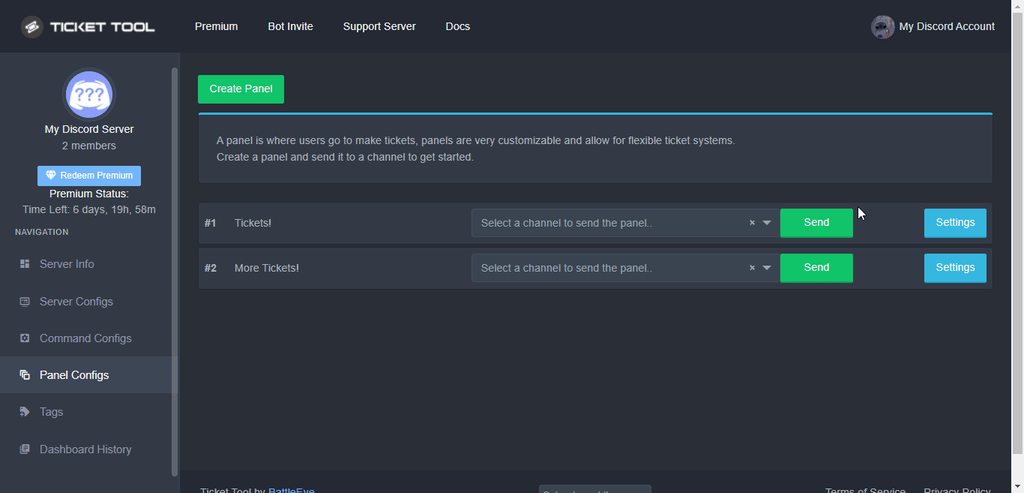
That way the ticket creator wouldn't be able to close it
 slender sky
How do I get a server emoji to show up in an embed for a ticket panel? I've tried the name:id, but it won't work.
Also how do I get the Premium Sub role lol
shut bolt
slender sky
How do I get a server emoji to show up in an embed for a ticket panel? I've trie...
Hey there!
Regarding your first question
$idcommand
humble sequoiaBOT
How do I get the ID of Roles/Channels/Emojis?
Ticket Tool has a useful command that helps you get the ID of various things like channels, roles, emojis and your server.
Just use the command $id <#channel/@role/:emoji:>. Now copy everything, including the brackets <...>, to your dashboard (or wherever you want it)
If you want the server ID, just use $id.
Examples:
Server ID: $id ➝
509192800865353738
Roles: $id @Role ➝@humble sequoia
Channel: $id #channel ➝#🤖│bot-spam
User: $id @user ➝@copper owl
Emoji: $id➝

 humble sequoiaBOT
<:mike:914179028997505125>

 humble sequoiaBOT

Thank you
Thank you for purchasing Ticket Tool Premium @slender sky. You have now been given the <@&535595160189403136> role!
Found 5 servers in total and 1 with premium and permission
shut bolt
There you go
 fast sable
I can't redeem my votes for premium
What am I doing wrong?


It says I need at least 6 votes but I have 7
shut bolt
You don't actually have votes for that account, your votes are available to be redeemed on the account with ID 8910...
slender sky
Thank you! do I need the < > as well?
shut bolt
slender sky
Thank you! do I need the < > as well?
Yup
slender sky
Ah, thats what I did wrong. Thank you for the speedy reply
shut bolt
Sure man
fast sable
I have voted on this account also but they don't register
shut bolt
They have been registered
fast sable
I think I misunderstood something before
shut bolt
But those votes have been linked to the account with ID 8910...
shut bolt
Nope
shut bolt
You need to redeem the vote from that account, the key will be sent to your DMs and you should redeem that key via the dashboard
fast sable
Ah alright thank you
shut bolt
Sure
fast sable
Thanks @shut bolt
iron nightBOT
Gave 1 Rep to Yareaj_ (current: #3 - 225)
shut bolt
slender sky
I tried the <>'s and it still hasn't worked unfortunately :/ Not sure what I'm doing wrong here.
slender sky
I've also tried the bot, it didn't work either. $id [emoji] correct?
humble sequoiaBOT
<:TicketTool:557318988783419453>

shut bolt
Just like that
slender sky
$id 
shut bolt
Try it on your server 🤔
shut bolt
No success?
slender sky
Unfortunately
shut bolt
Sure
fast sable
There is a premium bot I need to invite before I redeem my premium, correct?
shut bolt
fast sable
There is a premium bot I need to invite before I redeem my premium, correct?
You can invite it after redeeming or before, it's up to you
humble sequoiaBOT
Inviting and Enabling Premium Bot
The first thing you will need to do is invite the premium bot, an invite can be found here
Once the bot is in your server we will head to the dashboard and manage your server. When you are managing your server, you want to head into "Server Configs" then click the drop down menu under "Select the bot you would like to use on this server" then click "Ticket Tool#6207" and then save.
iron nightBOT
Gave 1 Rep to Yareaj_ (current: #3 - 226)
slender sky
Yes!
shut bolt
Nice!
slender sky
Now I don't look like a total dork in front of 700 people 
shut bolt
JAJAJA no worries man, happens to all of us
fast sable
What does claiming a ticket do?
shut bolt
It sends a message that ticket was claimed, you can also make it to automatically change the name o the ticket or also the permissions of the support team
fast sable
But what does the claim do?
Just says that this person wants the ticket to themselves?
shut bolt
fast sable
Just says that this person wants the ticket to themselves?
It sends a message that a certain user claimed it as I told you before, you can use it for making a member of your team to take charge of a ticket
fast sable
Oh ok I'm sorry but thank you!
shut bolt
No worries man
fast sable
Uh it doesn't let me claim the ticket
I did the command and it said claiming wasn't enabled, but that was the normal ticket tool bot that said it, not the premium one

That is the regular ticket tool bot
Not the premium one
The premium one didn't do anything
 plain surge
You can use premium features on the free bot, you don't necessarily have to use the premium bot
fast sable
How?
plain surge
To enable the claiming function, the server needs to have premium activated on it
fast sable
Oh where do I enable it
humble sequoiaBOT
Votes
Current Votes: 0
Lifetime Votes: 0
Linked Votes: 0
Vote Links
Linking Info
Linked User: Not Linked
You can give your future votes to another user by linking with that user.
To link use $vote link (@user or userId)
To unlink use $vote unlink
Redeeming
Each vote is worth 12 hours of premium and can be redeemed once you have atleast 6 votes.
Your current votes are worth 0m
To redeem your current votes use $vote redeem
fast sable
I did and I redeemed it
plain surge
You used the key here?
humble sequoiaBOT
How to redeem premium
To redeem your premium key, go to the dashboard, select your server, then click "Redeem Premium" under the server's icon and name.
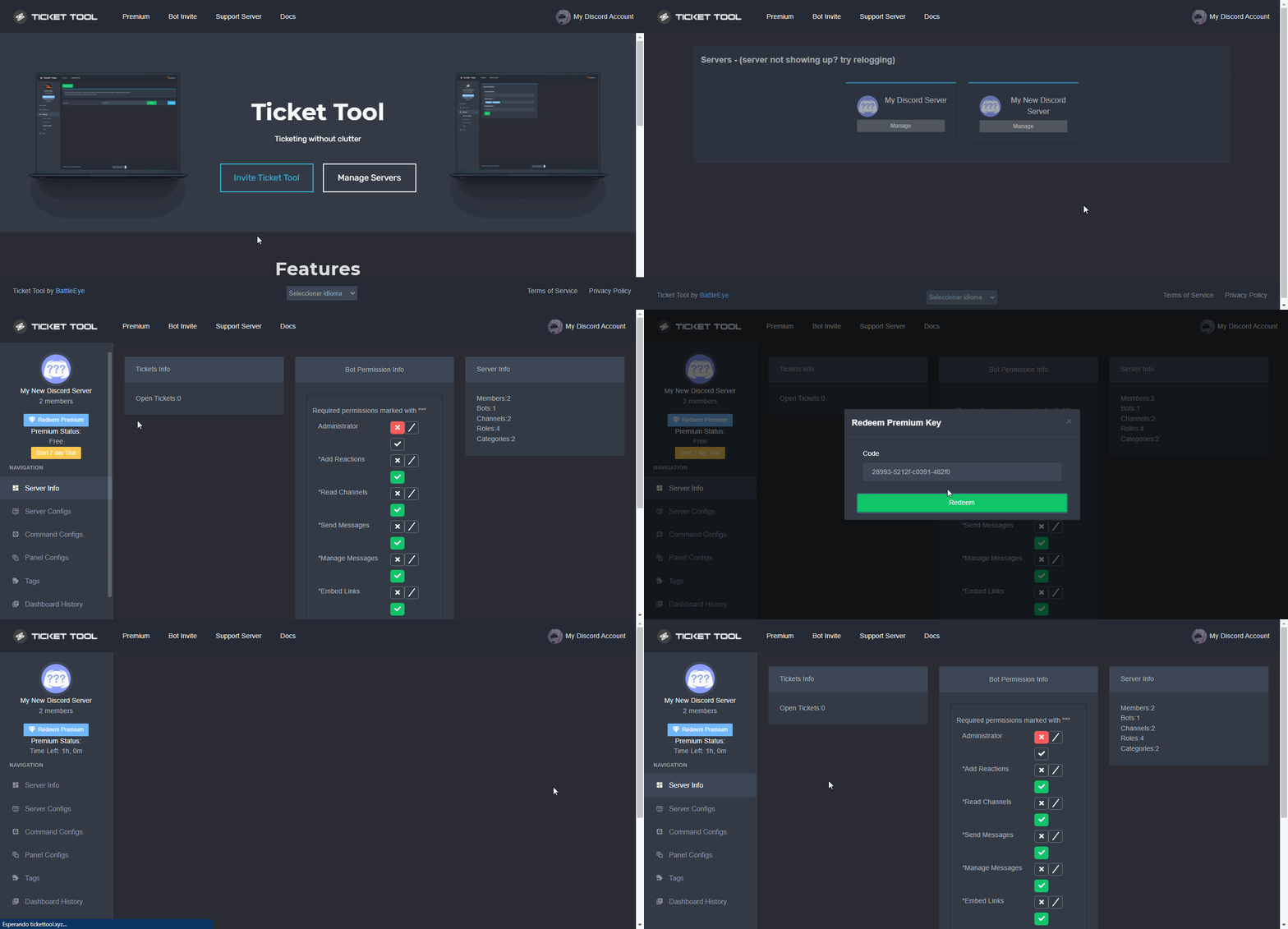 fast sable
I went to the dashboard and redeemed the key
humble sequoiaBOT
Claiming Options
Claiming allows you to change the ticket name, category and permissions. To use it you have to enable it first on your Dashboard > Panel Configs > Claiming Options.
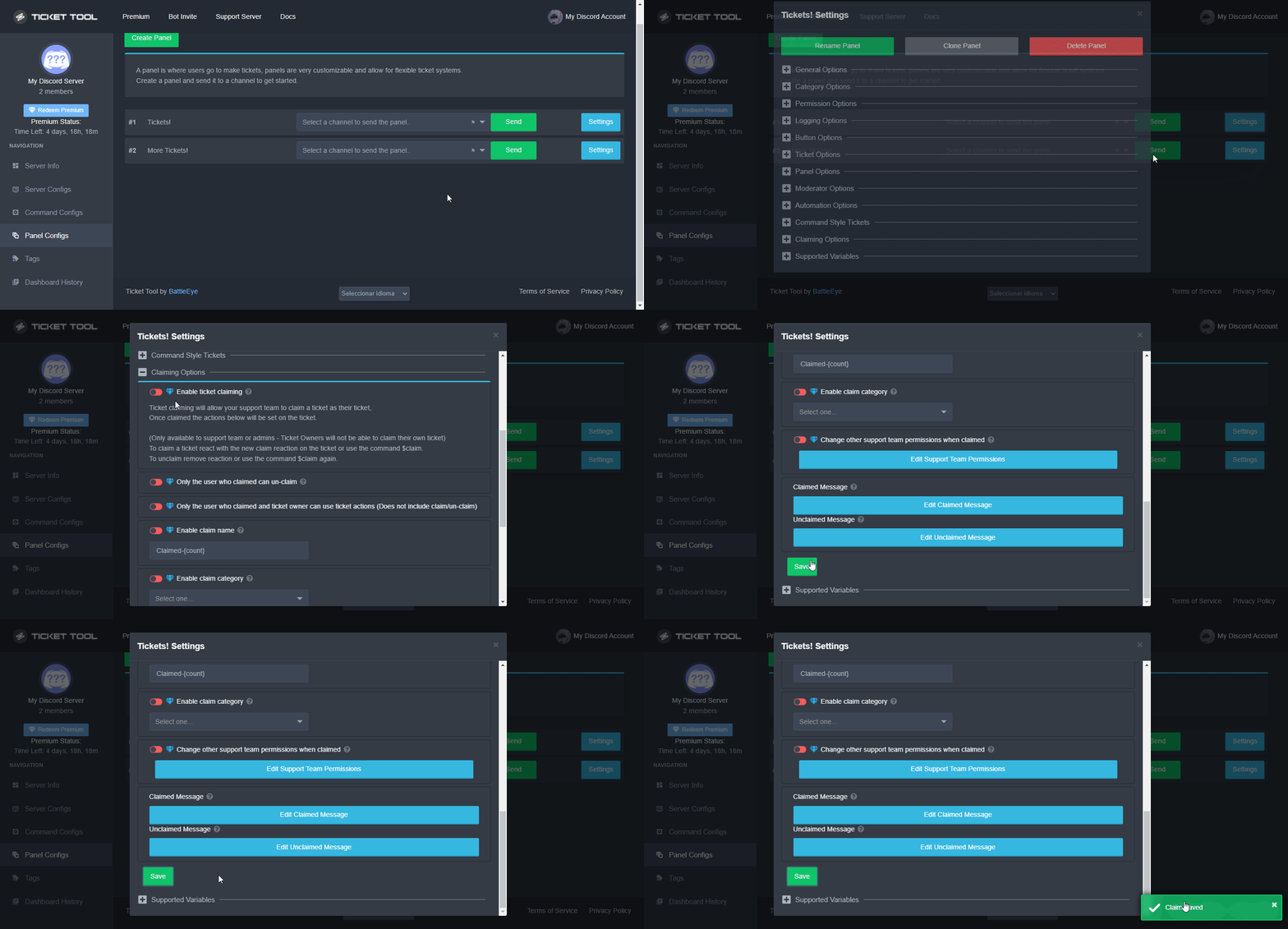
 Note: This is a premium feature
plain surge
Note: This is a premium feature
plain surge
You can enable the function here
Do you want to use the premium bot or the free bot?
fast sable
I have both in the server sp I don't care; whatever is easier
humble sequoiaBOT
Inviting and Enabling Premium Bot
The first thing you will need to do is invite the premium bot, an invite can be found here
Once the bot is in your server we will head to the dashboard and manage your server. When you are managing your server, you want to head into "Server Configs" then click the drop down menu under "Select the bot you would like to use on this server" then click "Ticket Tool#6207" and then save.
fast sable
Ok I edited the settings, brb to try it
plain surge
If you want to continue using the free bot then just continue without editing anything mentioned in the above embed
fast sable
Ok
plain surge
@fast sable How did it go?
fast sable
It still won't let me claim a ticket
I don't know what I did but I think I messed up
humble sequoiaBOT
━━ moved to ticket ━━
fast sable
Thanks @plain surge
iron nightBOT
Gave 1 Rep to D̸̞̉҉̢̩͠o͛ͫ̚m͈̕͜҉̘̱̟☆̞͈͠҉ͪ̈́͘҉̷̥̐ (current: #20 - 38)
plain surge
No problem 👍
vale sail
How do I make the ticket in my desired channel?
humble sequoiaBOT
How Do I setup Ticket Tool
You can check our documentation here, you can also check #573205317870157855 for the basic setup.
Our documentation contains all the info you need about the bot to be able to setup and configure the bot however you like.
copper owl
@vale sail ^
vale sail
Tks
 smoky scaffold
Is there a way for closed tickets to auto delete after a certain time frame?
shut bolt
Nope
humble sequoiaBOT
Automation disabled
There's currently no ETA for when automation will be enabled again. The issue that's caused it to be disabled, us hitting rate limits, is tied to the increased load on Discord's servers. The situation's currently unpredictable, which makes it so we can't give you a fixed time.
shut bolt
What's exactly wrong?
shut bolt
Did you pick a category in the dashboard?
humble sequoiaBOT
How to set the open category
To set a open category go to the Dashboard -> Panel Configs -> Settings -> Category Options -> Category Open
 shut bolt
Sure
 echo ruin
¿Cómo consigo que la herramienta Ticket te pregunte qué idioma hablas en el canal donde la persona hará su ticket?
shut bolt
echo ruin
¿Cómo consigo que la herramienta Ticket te pregunte qué idioma hablas en el cana...
De momento el bot no tiene una opción para hacer preguntas al usuario y crear un ticket dependiendo de ello. Lo que si que puedes hacer es tener varios paneles como tenemos en #🎫│make-a-ticket para que el usuario elija el idioma que habla y de allí cree el ticket que corresponda
echo ruin
shut bolt
De momento el bot no tiene una opción para hacer preguntas al usuario y crear un...
¡Muchas gracias! : D
shut bolt
Con gusto!
jade topaz
hi
shut bolt
Hi
jade topaz
is there a way to know the time of subscription in command not in dashboard ?
shut bolt
Nope
jade topaz
ok 👌
echo ruin
shut bolt
De momento el bot no tiene una opción para hacer preguntas al usuario y crear un...
¿Cómo agrego un panel y cómo hago para que el nombre del boleto (según el idioma que elijan) se nombre de cierta manera?
shut bolt
echo ruin
¿Cómo agrego un panel y cómo hago para que el nombre del boleto (según el idioma...
Para poner varios paneles en uno necesitas hacer esto
humble sequoiaBOT
Multipaneles
Los multipaneles son una función premium  que permite que un solo panel tenga múltiples botones para abrir distintos tickets.
Cómo crear un Multipanel?
Los usuarios premium pueden combinar multiples paneles en un solo multipanel.
Primero encuentre las IDs de cada panel que desea combinar. Las puede encontrar en sus Panel Configs del Panel de Control.
Luego, envía el multipanel usando $panel [id1] [id2] {id3} ....
Ejemplo: $panel 1 2 4 17 35 (Para combinar los paneles 1, 2, 4, 17 y 35.)
Se pueden combinar hasta 25 paneles en un solo multipanel.
 humble sequoiaBOT
Nombre del Ticket
El nombre del ticket es el nombre por defecto de todos los tickets. Para editarlo diríjase a su [Panel de Control] → Panel Configs → Settings → Ticket Options. Allí podrá editar el nombre de los canales de los tickets abiertos y cerrados. También podrá usar variables en dichos nombres.
 Nota: Esta es una función premium
shut bolt
Nota: Esta es una función premium
shut bolt
Editar esto :)
 lone carbon
where can i view all my bots ? its a website
shut bolt
echo ruin
Gracias!
Con gusto!
shut bolt
lone carbon
where can i view all my bots ? its a website
You mean the servers? Or the amount of bots in a server?
echo ruin
Me redirigieron a Amazon cuando intenté ir a ticketool.xyz
lone carbon
shut bolt
You mean the servers? Or the amount of bots in a server?
the server i think
humble sequoiaBOT
 shut bolt

shut bolt
echo ruin
Me redirigieron a Amazon cuando intenté ir a ticketool.xyz
Intenta con tickettool.xyz te faltó una T
jade topaz
Hi.. I would like some important help on the game
lone carbon
nah bro its a website that i can view all the bots in the server and there id ?
lone carbon
jade topaz
Hi.. I would like some important help on the game
whats up
shut bolt
jade topaz
Hi.. I would like some important help on the game
Which game?
shut bolt
lone carbon
nah bro its a website that i can view all the bots in the server and there id ?
Wrong place man, we are @pseudo glen support team
jade topaz
dragon raja
humble sequoiaBOT

⚠️ You're in the wrong place
We provide support for @pseudo glen discord bot and cannot help you with whatever issue you have.
- Please make sure to contact the appropriate Support Team.
If you don't have any further questions regarding our bot Ticket Tool, please close this ticket
 barren oasis
this is a dumbass question but how do you add someone to a ticket
because I've been fiddling with it and it's not friggin working
I'm about to pull my hair out
humble sequoiaBOT
━━ moved to ticket ━━
 brittle wind
hello, is there any plans to add "use application commands" to the Permissions Options for tickets?
copper owl
brittle wind
hello, is there any plans to add "use application commands" to the Permissions O...
No talks about it yet.
You can give the roles that you want to use those commands access to using them
brittle wind
Yea, I’ll most likely end up doing that. We use ticket tool for private channels for certain members and I just wanted them to be able to use them there.
Slash commands will get more present in the next month though so I’ll just have to enable them for the roles sooner or later anyways.
Thanks for the info :)
copper owl
Anytime
There might have been talks btw, just from what i know, nothing yet
this time of the year is usually slow
 main elbow
If a thread is opened with a channel that is opened by tickettool, is that thread included in the archived channel when the ticket is closed?
copper owl
main elbow
If a thread is opened with a channel that is opened by tickettool, is that threa...
No
transcripts are of the ticket itself
Im fairly certain that it wont transcript the thread as well
I will check tho, there's an interesting experiment to be done here
main elbow
What my team is interested in doing is having a thread hanging off of tickets that would be private to a subset of individuals; so that they can discuss the ticket without having to lose context in other channels over time.
copper owl
main elbow
What my team is interested in doing is having a thread hanging off of tickets th...
well that wont work unfortunately
ticket tool doesnt consider a thread created within the ticket as a ticket
the best you can do is setup a ticket transcripting channel
main elbow
transcripting channel?
copper owl
a transcript channel
a channel where ticket tool would send a copy of the ticket into the channel where you can view everything that was said in the ticket by clicking on a link
$help transcript
humble sequoiaBOT
How do I save transcript to a channel?
To save transcripts to a channel go to the Dashboard -> Panel Configs -> Settings -> Logging Options -> Transcript Channel
copper owl
this
main elbow
That is what creates logs like this, correct?
 copper owl
Uh can i get a better screenshot?
i guess so, if under that file it has a direct link
main elbow
 humble sequoiaBOT
━━ moved to ticket ━━
 glossy sundial
Hello guys
i want to ask you
is it doable to setup auto ticket opening when a new member joins the server?
copper owl
glossy sundial
Hello guys
i want to ask you
is it doable to setup auto ticket opening when a n...
Thats not possible and I highly doubt it ever will be
that will just rate limit the bot more than any other automation feature depending on the server
glossy sundial
I was thinking of this since it would be a nice way to introduce especially newcomers to the team behind the server
jade topaz


glossy sundial
especially when the serveris new
copper owl
glossy sundial
I was thinking of this since it would be a nice way to introduce especially newc...
then why not make a channel with staff intros?
not only will the feature rate limit the bot, it'll just fill your server up with channels
and discord has a limitation on those. 50 per category and 500 per server
glossy sundial
yes true
thanx for the tip
 pale garnet
@copper owl hey Neptune, sorry for the ping, but can you have more than 3 types of things like for the tickets here there are all those language options
copper owl
just FYI, it's against the rules to ping us in here
#🎫│make-a-ticket was created so you can open a ticket to contact us
pale garnet
Oh
 hard cape
pale garnet
<@548583124062175232> hey Neptune, sorry for the ping, but can you have more tha...
hard cape
pale garnet
<@548583124062175232> hey Neptune, sorry for the ping, but can you have more tha...
Do you mean multi-pannels?
pale garnet
Sorry
humble sequoiaBOT
For a more convenient use of multipanels, you can now combine panels on the dashboard. This will allow you to directly send the multipanel from the dashboard or via the $panel ID command.
Where can I find this?
You can find this setting on the Dashboard -> Panel Configs -> Settings -> General Options
Note: if you're attaching all the panels to a panel called English, don't include English in the attached panels box (If you do this, it will create duplicate)
This will put all buttons from all of your panels on one message. The message is the panel message from the panel you're combining these panels in.

 Note: This is a premium feature
humble sequoiaBOT
Note: This is a premium feature
humble sequoiaBOT

Buttons
The new Discord Buttons allow for a much smoother and convenient experience. They reduce lag and work much better than emojis. With ticket tool you can edit all the buttons however you like! Buttons can show emojis, text and can have 4 different colors.
Where can I edit them?
Dashboard -> Panel Configs -> <Settings> -> Button Options -> <Setting>
 copper owl
here's where to edit the buttons
pale garnet
Like these
 copper owl
humble sequoia
copper owl
humble sequoia
pale garnet
Just wanted to make sure we were talking about the same thing
and do you need premium for it
copper owl
yes
hard cape
copper owl
<:this:894279341108772914>
Neptune, can i use too commands like $multipannels to see how to do it?
copper owl
hard cape
Neptune, can i use too commands like $multipannels to see how to do it?
check #🤖│bot-spam
hard cape
Do yk what i mean?
hard cape
kk
pale garnet
Is whitelable worth it
hard cape
it works, ty
copper owl
pale garnet
Is whitelable worth it
whitelable?
pale garnet
Also do I need to be the owner to have premium on the server
copper owl
you mean premium?
copper owl
pale garnet
Also do I need to be the owner to have premium on the server
no. as long as you have access to the dashboard, you can buy and assign the premium
pale garnet
The 3rd one
copper owl
this isnt ours..?
pale garnet
I see
copper owl
is that our website?
pale garnet
Ignore me
pale garnet
copper owl
is that our website?
Thank you for the help though
iron nightBOT
Gave 1 Rep to Neptune (current: #1 - 421)
copper owl
im afraid you may be asking the wrong server.. haha
copper owl
pale garnet
Thank you for the help though
No problem
 high bear
$vote link @jade topaz
copper owl
high bear
$vote link <@456226577798135808>
#🤖│bot-spam there's a channel for this.
you can also use your own servers. the vote commands are global
 civic mirage
hello guys
please, if i have muted user, how do i make him see and be able to message in tickets? cause the muted role is by default never able to send messages to even new created channels
hope yall understand xd, anyone knows?
copper owl
$help perms
humble sequoiaBOT
How to set the permissions for tickets
To set a change permissions go to the Dashboard -> Panel Configs -> Settings -> Permission Options
 copper owl
User Opened Permissions -> Send Message + Read Messages 
copper owl
civic mirage
that doesnt solve my problem
how doesnt that solve your problem..?
it's literally giving the user permissions to talk and see the channel
regardless of the roles
isnt that what you asked for or did I misunderstand the question?
civic mirage
copper owl
isnt that what you asked for or did I misunderstand the question?
it iis
but it doesnt work, somehow -.- w8
oh wait
theres the thing you can view server as some role, and of course i wont see the channel as other role 🤦♀️ thx for help tho
copper owl
civic mirage
theres the thing you can view server as some role, and of course i wont see the ...
yeah thats because ticket tool doesnt work on role permissions..
but rather user permissions.
civic mirage
yeaah
copper owl
if it worked on role permissions, everyone with the muted role would see the ticket
humble sequoiaBOT
Using the View as Role feature.
The View as Role discord feature will not work for testing ticket tool. Ticket Tool opens permissions with user permissions & not role permissions.
civic mirage
ofc, u right, sorry for yo time 
 pseudo dome
Hello! I cant find my server on the ticket tool.
We've added the bot into the server, and it isn't showing?
humble sequoiaBOT
Don't see your server in the dashboard?
You will possibly need to relog. Look below to see steps on how to relog.
How to relog in the Dashboard.
First, you will need to go to the dashboard. Once your there, click on your avatar on the top right. after you clicked it, you will see button that says Logout. You must click that. Once you have logged out, you can log back in.
Note:
You need one of these 3 things to access the dashboard.
1. Server Owner (Level: 6)
2. Server Administrator (Level: 4)
3. Dashboard Role (Level: 2)
:warning: You can check your level using $level on your Discord Server
User permission level with Ticket Tool
@User is permission level: 0 (User)
```» *If it shows that your permission is **0**, you don't have any of the above **3 things** to manage the dashboard.*


**See the GIF below on how to relog:**@pseudo dome ^
pseudo dome
Thank you!
 uneven heath
Hello everyone. I opened a ticket in a server but i can’t find the ticket anymore with the server channels. What can i do to close it because its still open and i can’t open a second ticket.
humble sequoiaBOT
━━ moved to ticket ━━
jade topaz
Is there a way to view closed ticket history?
 upper finch
mmn i need help, kinda, so. i did the setup and put the category thing. the regular. but- when i tested it out it didnt popup under the category. so. uhm i dunno if i did something wrong orr ;^;
jade topaz
@upper finchEnable the bot to only create channels in that Category, under Edit Category. Don't give it Server Setting role permissions, just Edit Category role permissions.
To Edit Category, right click the category.
humble sequoiaBOT
How to set the open category
To set a open category go to the Dashboard -> Panel Configs -> Settings -> Category Options -> Category Open
upper finch
thats what i did ;w;
plain surge
Do you mind trying again? And for good measures hit the save button like twice
Also nake sure that the bot has access to that category @upper finch
upper finch
i made sure the bot has access to the category and everything i also pressed save a few times it still does the same thing ;w;
jade topaz
Make sure the bot only has access to the category through Edit Category Role permissions & not Server Settings Role permissions.
upper finch
it doessss
humble sequoiaBOT
━━ moved to ticket ━━
jade topaz
How can I view closed ticket history?
copper owl
$help transcript
humble sequoiaBOT
How do I save transcript to a channel?
To save transcripts to a channel go to the Dashboard -> Panel Configs -> Settings -> Logging Options -> Transcript Channel
jade topaz
Which settings should I enable to be able to view chat conversation of closed tickets?

 daring saddle
Hoe i c
jade topaz
^spam
I see, transcripts do not automatically save, only save when clicking Transcript. Did I do something wrong?
copper owl
nope, thats how it is
jade topaz
Ok. Thanks @copper owl
iron nightBOT
Gave 1 Rep to Neptune (current: #1 - 424)
copper owl
auto saving transcripts is for premium only
jade topaz
Hey, is it possible to assign a role to someone that creates a ticket?
plain surge
No unfortunately, Ticket Tool can't give/remove roles. @jade topaz
jade topaz
Ty dom @plain surge
iron nightBOT
Gave 1 Rep to D̸̞̉҉̢̩͠o͛ͫ̚m͈̕͜҉̘̱̟☆̞͈͠҉ͪ̈́͘҉̷̥̐ (current: #20 - 41)
jade topaz
@jade topazDyno bot can auto give roles apon joining or you can self assign roles.
https://wiki.dyno.gg/en/modules/autoroles
Dyno
Ye, wanted just to assign it when they create ticket, ill do it myself np, ty
 austere holly
Where is the user manual?
jade topaz
Ticket Tool Docs
austere holly
jade topaz
Docs: https://docs.tickettool.xyz/en/home
thank you!
iron nightBOT
Gave 1 Rep to USAAmericaUSA (current: #53 - 2)
 nova scaffold
jade topaz
nova scaffold
jade topaz
.
 pulsar anchor
Error why
 wheat torrent


why is not mention the role ?
also it not writing the } at the end of the role name
 wicked scroll
wheat torrent
can someone help me ?
wicked scroll
wheat torrent
can someone help me ?
What do you need help with?
wicked scroll
wheat torrent
why is not mention the role ?
Is the role name correct?
wicked scroll
Alright :P
wheat torrent
it was becouse i dont have space to wirte
humble sequoiaBOT
<@&642118166243311646>
<@&642118166243311646>
wheat torrent
ohhh
wicked scroll
So <@&642118166243311646>
wheat torrent
ok thx ❤️
pulsar anchor
Screenshot (11 Dec. 2021 12:45:30 pm)

Why this error
Pls tell me why this is don't send create ticket message and this error show
Hello pls ticket tool
$help
humble sequoiaBOT
Help Options
$help commands - Information on commands
$help setup - Information on bot setup
$help faq - Frequently asked questions
pulsar anchor
$help setup
humble sequoiaBOT
Setting up Ticket Tool
Visit the docs for setup info
General Setup
wheat torrent
@wicked scroll
yo can i ask something ?
if i want the support role can type $rename in the ticket
How ?
i just want them to close/open/Transcript and do $rename
but without mange the ticket room
wicked scroll
pulsar anchor
Hello pls ticket tool
Use $debug on the channel you are trying to send the panel to
wicked scroll
wheat torrent
<@!261346621369876501>
Dont ping uspport team :p
wheat torrent
ohh sorry
wicked scroll
wheat torrent
i just want them to close/open/Transcript and do $rename
but without mange the...
Could you explain better?
wheat torrent
ill try my best
i just want the support who can see the ticket room
i want them to have the perms to close or open the ticket
also to Transcript and rename the ticket
wicked scroll
wheat torrent
i just want the support who can see the ticket room
$help support
humble sequoiaBOT
How to let support team see into a ticket
About support roles
A support role lets your support team see into tickets with out having to add them manually to each and every ticket.
You can add as many support roles as you like per panel.
NOTE that the way discord works all admins can see into tickets regardless of this.
How to set a support role
To set a Support role go to the Dashboard -> Panel Configs -> Settings -> General Options -> Support Team Roles.

NOTE that the support role will not be able to see into tickets that are already created..
 humble sequoiaBOT
How to set the permissions for tickets
To set a change permissions go to the Dashboard -> Panel Configs -> Settings -> Permission Options
wicked scroll
Support Team Opened Permissions
wheat torrent
ok i have to open active this ?
 wicked scroll
So:  Manage Channel
iron nightBOT
Gave 1 Rep to otaviocng (current: #15 - 73)
 fair river
anyone know if you're able to get rid of the 30 second cooldown for people making tickets? I'm only getting 2 tickets every 30 seconds and its annoying
wheat torrent
can i choose a role cant open a ticket ?
humble sequoiaBOT
Blacklist Roles
Any role you assign as a blacklisted role won't be able to use commands or reactions.
Selecting a blacklisted role
Go to your Dashboard -> Server Configs. There you will find the option to select blacklisted roles.
Note: Don't forget to save.
 wheat torrent
thx
jade topaz
how to enable
pulsar anchor
I am click send but shoe error
 faint pike
Hey
 median wigeon
Hey
median wigeon
pulsar anchor
I am click send but shoe error
Than the bot doesn't have the permission in the channel / server to send messages and embeds
jade topaz
median wigeon
Than the bot doesn't have the permission in the channel / server to send message...
Idk how to set up mine i triwd everything but im mobile
median wigeon
jade topaz
Idk how to set up mine i triwd everything but im mobile
Mobile is different but stil working, go to the site tickettool.xyz and log in with your discord account
jade topaz
Ok ty
 rustic pollen
anyone help me to set up the bot
median wigeon
How can i help you today?
please go to the website tickettool.xyz
and than log in with your discord account
@rustic pollen
rustic pollen
right yes I think I've done it
I'll come back shorrly
shortly
@median wigeon
how do I make it after the ticket is closed it deleted the new channel
plain surge
@median wigeon you can also have the bot auto delete the ticket after it is closed by disabling "Two step ticket" in General options
median wigeon
Yes i know
plain surge
Then you should let the user know about this feature as well 👍
rustic pollen
plain surge
<@373199304577384448> you can also have the bot auto delete the ticket after it ...
oh thank you
iron nightBOT
Gave 1 Rep to D̸̞̉҉̢̩͠o͛ͫ̚m͈̕͜҉̘̱̟☆̞͈͠҉ͪ̈́͘҉̷̥̐ (current: #20 - 42)
rustic pollen
where do u find that tho
 rustic pollen
on mobile
plain surge
Same steps, just a different zoom view
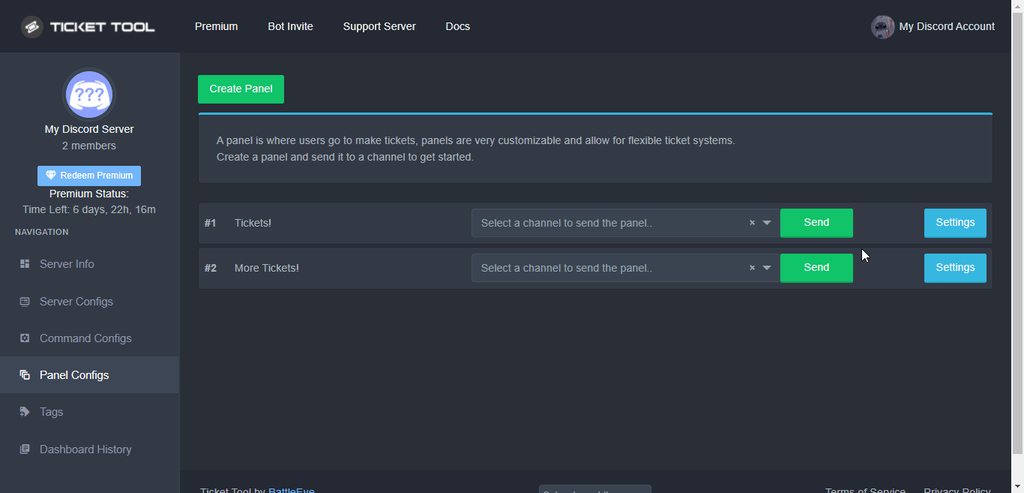
Panel configs > Settings > General options > Two step ticket
Then Save
plain surge
You can test it by just opening a ticket and then pressing the close button. It should then get deleted
plain surge
No problem 👍
rustic pollen
thanks @plain surge
iron nightBOT
@rustic pollen :: You can't rep D̸̞̉҉̢̩͠o͛ͫ̚m͈̕͜҉̘̱̟☆̞͈͠҉ͪ̈́͘҉̷̥̐#5201 for 49 minutes and 7 seconds. Try coming back later?
rustic pollen
oh
 dull crest
I’m getting so many tickets on the server its hard to be closing them all manually... is there still no automation solution or something else?
Can I limit the number of people seeing the open tickets?
copper owl
dull crest
I’m getting so many tickets on the server its hard to be closing them all manual...
Nope. No automation for closing tickets.
As for your second question, you'll have to elaborate a bit as I dont see how limiting the amount of people who can see open tickets could solve your issue
dull crest
copper owl
Nope. No automation for closing tickets.
As for your second question, you'll ha...
Have other people in the team viewing all open tickets
Id rather only view myself and close
copper owl
Ah. you worded your question weird at first. Yeah you can just add more support roles or better yet, make one universal "staff" role and make that a support role, then assign the role to your staff members
copper owl
dull crest
Id rather only view myself and close
yeah well that's kinda just shooting yourself in the foot there
depending on how many tickets youre getting, you'd have to close and handle tickets almost every minute of the hour
dull crest
Hm okok. Jesus thats a lot of work
copper owl
what is a lot of work? handling the tickets or assigning more support roles?
dull crest
Handling ticket closing
copper owl
i mean yeah.. if you're going to limit closing tickets to a singular person, then you should be ready to getting backed up with tickets
dull crest
Can I change the position of where the tickets open?
copper owl
We'd love to add more automation options since they're really desired, but discord's rate limiting as of now is one of the only things holding us back
dull crest
Like now they are being added to the top of the server
copper owl
dull crest
Like now they are being added to the top of the server
yeah thats most likely because you have 50 channels in your open category..
which is another issue.. discord has limits for channels
50 per category and 500 per server
you can just assign another secondary category as an open category, or delete channels
$help category
humble sequoiaBOT
How to set the open category
To set a open category go to the Dashboard -> Panel Configs -> Settings -> Category Options -> Category Open
dull crest
Okay thanks. I added a category for tickets. Didn’t have one before. I wish there was at least a way to close many tickets together all at once
copper owl
dull crest
Okay thanks. I added a category for tickets. Didn’t have one before. I wish ther...
I dont think there ever will be, sorry
Unless discord fixes the rate limits, closing multiple channels at once is most likely not going to happen.
jade topaz
Can I make it so specific roles are pinged for specific tickets with premium?
humble sequoiaBOT
━━ moved to ticket ━━
 wise karma
so my server had it free version of ticket tool now we bought premium but how do we get the premium bot to our server? 🤔
humble sequoiaBOT
Inviting and Enabling Premium Bot
The first thing you will need to do is invite the premium bot, an invite can be found here
Once the bot is in your server we will head to the dashboard and manage your server. When you are managing your server, you want to head into "Server Configs" then click the drop down menu under "Select the bot you would like to use on this server" then click "Ticket Tool#6207" and then save.
copper owl
@wise karma ^
wise karma
copper owl
<@!603072968033173577> ^
Thank you 🙏
iron nightBOT
Gave 1 Rep to Neptune (current: #1 - 425)
copper owl
anytime
rustic pollen
thank you @copper owl
iron nightBOT
Gave 1 Rep to Neptune (current: #1 - 426)
wise karma
Stupid question, i see in some servers they can put in a custom image on the Premium ticket tool but how 🤔
 tribal cedar
You mean in the ticket message? You would just put the url in the image section of the embedded
wise karma
tribal cedar
You mean in the ticket message? You would just put the url in the image section ...
Nono, the actual picture instead of it being a profile picture of a ticket it's for example the server logo 🤔 they have done it in servers such as "Sinful 18+" and other big servers 🤔
oh no, my mistake i was looking at a different bot 😅 sorry about that 👐
tribal cedar
Nps I was just starting to scratch my head
jade topaz
I need help with ticket tool in my own server
tribal cedar
What's the issue?
jade topaz
Idk how to like do that i have it in my own server but dont know how to
I have it in my server but dont jnow hoe to create one
You know what i mean
tribal cedar
You mean set it up?
jade topaz
Yehhhh
humble sequoiaBOT
How Do I setup Ticket Tool
You can check our documentation here, you can also check #573205317870157855 for the basic setup.
Our documentation contains all the info you need about the bot to be able to setup and configure the bot however you like.
tribal cedar
You should follow that and ask any specific questions here
tribal cedar
What's your language?
jade topaz
Dutch
Can you do it for me in my server i dont know how to get it
The words are too hard for me you know
@tribal cedar
 humble sequoiaBOT
━━ moved to ticket ━━
rustic pollen
guys
jade topaz
Yooo
rustic pollen
why is making a server so hard
jade topaz
Idk lol
jade topaz
I need someone who can do ticket tool for me
shut bolt
Once you practice on that, it's easy
humble sequoiaBOT
How Do I setup Ticket Tool
You can check our documentation here, you can also check #573205317870157855 for the basic setup.
Our documentation contains all the info you need about the bot to be able to setup and configure the bot however you like.
jade topaz
I got banned
shut bolt
Check this guide and do it all by yourself, it's easy
jade topaz
Idk why
shut bolt
Oh
jade topaz
And im not english
shut bolt
The cloudfare protection
jade topaz
So thats why
shut bolt
jade topaz
And im not english
What's your native language?
shut bolt
$deticket
humble sequoiaBOT

Deutsches Support-Team
Wenn du Hilfe vom Deutschen Support-Team erhalten möchtest gehe in #🎫│make-a-ticket und öffne durch einen Klick auf den :flag_de: Button ein Ticket.
shut bolt
/nl My bad I misread your message, and you got a ticket opened and you were told we can't set the bot for you, so please wait for the ddos protection ban to timeout so you can set it
 robust sandalBOT
Mijn slechte ik heb je bericht verkeerd gelezen, en je hebt een ticket geopend en je kreeg te horen dat we de bot niet voor je kunnen instellen, dus wacht alsjeblieft tot het ddos-beschermingsverbod een time-out krijgt, zodat je het kunt instellen
 English (en) → Dutch (nl)
 safe ibex
How do I add someone to a ticket
shut bolt
$help add
humble sequoiaBOT
How to add or remove users on tickets
To add a user to a ticket use $add <user>
To remove a user from a ticket use $remove <user>
safe ibex
Ty
shut bolt
Sure
safe ibex
Thanks @shut bolt
iron nightBOT
Gave 1 Rep to Yareaj_ (current: #3 - 228)
shut bolt
safe ibex

iron nightBOT
Gave 1 Rep to Enigma (current: #14 - 82)
 severe path
shut bolt
$deticket
severe path
shut bolt
$deticket

shut bolt
severe path
<:KEKW:737283806683463763>
SAJASJASJAS don't you dare to do what you always do
shut bolt
You traitor
severe path
jade topaz
how do you make a ticket for youe sever
humble sequoiaBOT
How Do I setup Ticket Tool
You can check our documentation here, you can also check #573205317870157855 for the basic setup.
Our documentation contains all the info you need about the bot to be able to setup and configure the bot however you like.
humble sequoiaBOT
⚠️ You're in the wrong place
We provide support for @pseudo glen discord bot and cannot help you with whatever issue you have.
- Please make sure to contact the appropriate Support Team.
If you don't have any further questions regarding our bot Ticket Tool, please close this ticket
 swift monolith
Not workin
shut bolt
What isn't working?
shut bolt
swift monolith
Support team page
You mean the bot's dashboard?
swift monolith
I meant after log in

I didn’t receive any code
Where do I go to solve this problem?
humble sequoiaBOT
⚠️ Please read the messages previously sent by our team ⚠️
 dire lotus
How do I set up the roles to who can talk within the tickets and stuff?
So who can answer I mean
shut bolt
$help support
humble sequoiaBOT
How to let support team see into a ticket
About support roles
A support role lets your support team see into tickets with out having to add them manually to each and every ticket.
You can add as many support roles as you like per panel.
NOTE that the way discord works all admins can see into tickets regardless of this.
How to set a support role
To set a Support role go to the Dashboard -> Panel Configs -> Settings -> General Options -> Support Team Roles.
NOTE that the support role will not be able to see into tickets that are already created..
shut bolt
Check this
dire lotus
K
humble sequoiaBOT
⚠️ You're in the wrong place
We provide support for @pseudo glen discord bot and cannot help you with whatever issue you have.
- Please make sure to contact the appropriate Support Team.
If you don't have any further questions regarding our bot Ticket Tool, please close this ticket
 split owl
Hi do you create a ticket in your own server?
rustic pollen
split owl
Hi do you create a ticket in your own server?
for what
rustic pollen
may I help you
split owl
Yes
rustic pollen
first do you have the bot in your server?
split owl
Yes
shut bolt
split owl
Hi do you create a ticket in your own server?
Hi there! Check what Badluck31 said
Or
humble sequoiaBOT
How Do I setup Ticket Tool
You can check our documentation here, you can also check #573205317870157855 for the basic setup.
Our documentation contains all the info you need about the bot to be able to setup and configure the bot however you like.
shut bolt
Use this guide too if you would like too
 atomic barn
Um, you ok there?
shut bolt
?
rustic pollen
shut bolt
Hi there! Check what Badluck31 said
last user said
I have a name
im offended
no thank you
rustic pollen
it's ok I'm only messing bro I'm dieing of bordem
but serious talk here
I need discord server making hell
help
shut bolt
rustic pollen
I need discord server making hell
What do you need help with?
rustic pollen
basically
I want it so when you join you have to read the rules and only the rules and support channel are available to use and when they react with emoji on the rules they access all of the channels
shut bolt
It's not that hard, trust me, look out for YT tutorials with Dyno, or Zira or Carlbot, I can't do much rather than telling you that
shut bolt
Sure
rustic pollen
have this
oh wait
also
can I have this feature in my server
thanks @shut bolt
iron nightBOT
Gave 1 Rep to Yareaj_ (current: #3 - 231)
rustic pollen
can I please have a link to the server or to the internet or?
shut bolt
Sure
 sleek creek
that was my first wipe and those lazy devs ruined it gg anyway
shut bolt
Sup
 shut bolt
Probably they have a verification level that you don't have yet, probably 2AF or email verification, not sure which could be the exact one
rustic pollen
soo what do I have to do like
shut bolt
rustic pollen
soo what do I have to do like
Check your account and enable 2AF
And check if you have your email verified
rustic pollen
alrighty it's the 2 af
shut bolt
There you go, enable and then try again
rustic pollen
do I need to have it enabled to use the bot?
shut bolt
Nope
 weary rampart
 humble sequoiaBOT
━━ moved to ticket ━━
rustic pollen
what this server only got one lady admin
copper owl
rustic pollen
what this server only got one lady admin
are you referring to kenzie being our only staff member who is a woman?
rustic pollen
yes
copper owl
rustic pollen
yes
yup.. we dont recruit people based on identity..
copper owl
rustic pollen
i know lmao and Ive heard ur like the best on the support team
I see, the way your worded it seemed like it was a bad thing that we only have one female support member lol
which is why i was confused
jade topaz
How do I ping 2 people when a ticket is opened?
copper owl
jade topaz
How do I ping 2 people when a ticket is opened?
use <@ID> or ping a role they both have
rustic pollen
why is making server so hard
jade topaz
copper owl
use `<@ID>` or ping a role they both have
How
humble sequoiaBOT
How to make Ticket Tool ping a role
To make ticket tool ping a role when a ticket is opened, go to the Dashboard -> Panel Configs -> Settings -> Ticket Options -> Ticket Message -> Message Text and do this:
{@Role name} This is case sensitive and the role must have @mentions enabled
 copper owl
Instead of using the {}
use <@ID> and get their respective IDs, it will ping em
jade topaz
Tysm
rustic pollen
thank you @copper owl
iron nightBOT
Gave 1 Rep to Neptune (current: #1 - 429)
rustic pollen
u are cool
 vast cedar
.
 patent sonnet
 boreal lotus
Hey.. Will there be an option to auto close tickets after X hours if noone replies?
humble sequoiaBOT
Automation disabled
There's currently no ETA for when automation will be enabled again. The issue that's caused it to be disabled, us hitting rate limits, is tied to the increased load on Discord's servers. The situation's currently unpredictable, which makes it so we can't give you a fixed time.
boreal lotus
.. thats not good.. But other Ticket systems can do it too
copper owl
boreal lotus
.. thats not good.. But other Ticket systems can do it too
because other ticket systems offer different things with premium
it all depends on the bots features and whats available for free
boreal lotus
i mean im using premium bot since months
copper owl
that's great, but with the current rate limits, we cant enable automation again
boreal lotus
maybe there should be a Premium+ Plan where you get those specific features
i guess not every server needs automation
But for Hosting Provider its pretty awesome
copper owl
People already complain about $6 a month, so im not sure about increasing it for automated features.
copper owl
boreal lotus
i guess not every server needs automation
trust me, what you want? every server wants. almost every server at that.
boreal lotus
i mean .. just go to 5$ with the normal plan and 7 / 8$ for automation stuff included
copper owl
Either way, whatever workaround there is, it might be a while until it happens
boreal lotus
i honestly would buy it
humble sequoiaBOT
How Do I setup Ticket Tool
You can check our documentation here, you can also check #573205317870157855 for the basic setup.
Our documentation contains all the info you need about the bot to be able to setup and configure the bot however you like.
 pale sonnet
I read it then i did all steps
boreal lotus
How can i get the Premium Subscriber role?
copper owl
okay so what isnt working? because if you did all the steps, you should have a panel sent to a channel\
jade topaz
urge me to add a help ticket or question to my RP server for SA-MP
copper owl
boreal lotus
How can i get the Premium Subscriber role?
run $pc in #🤖│bot-spam
boreal lotus
awesome! ❤️
jade topaz
urge me to add a help ticket or question to my RP server for SA-MP ?
pale sonnet
@copper owl Can u get on my server and set it up?
copper owl
you dont need to spam
jade topaz
Sorry
copper owl
pale sonnet
<@548583124062175232> Can u get on my server and set it up?
No. I can be here and help you out step by step though
jade topaz
I need help
copper owl
humble sequoia
@jade topaz look at the guides for help regarding the setup
pale sonnet
@copper owl how do i make the bot say the create a ticket button on a channel
jade topaz
How do I have more than 1 button?
pale sonnet
@copper owl @copper owl
copper owl
Why are you pinging me btw?
this is community support
#🎫│make-a-ticket is a thing :D
humble sequoiaBOT
Multipanels are a premium feature that allow for a single panel with multiple buttons to open different tickets.
How to create a Multipanel
Premium users can combine multiple panels into one multipanel.
First, find the IDs of each panel you wish to combine. You can find them in your Panel Configs in the Dashboard
Next, send the multipanel to a channel using $panel [id1] [id2] {id3} ....
e.g. $panel 1 2 4 17 35 to combine panels 1, 2, 4, 17 and 35.
Up to 25 panels may be combined.
 mystic hound
@jade topaz
 plain aspen
hey, I'm just wondering on how to reset the ticket numbers as I was opening some for testing and would like to reset that number back down to 0
copper owl
plain aspen
hey, I'm just wondering on how to reset the ticket numbers as I was opening some...
Ticket Count is in General Options of your panel settings
plain aspen
thank you!
 hasty idol
 bold scaffold
what
rustic pollen
guys
 pliant sun
.
jade topaz
$vote redeem
shut bolt
jade topaz
$vote redeem
#🤖│bot-spam
jade topaz
shut bolt
<#910978476536905738>
Ow, is that new?
shut bolt
jade topaz
Ow, is that new?
Relatively, it was reopen recently 😄
jade topaz
shut bolt
Relatively, it was reopen recently 😄
Ah oke nice, i have done it more times in this channel, becease there was not another channel for commands
shut bolt
jade topaz
Ah oke nice, i have done it more times in this channel, becease there was not an...
No worries, now you know where you can go and test all commands :)
jade topaz
shut bolt
No worries, now you know where you can go and test all commands :)
Ticket Tool premium is not working...
jade topaz
jade topaz
Ticket Tool premium is not working...
i was editing it, lol, website is down as whole
 flat wraith
hm
jade topaz
jade topaz
i was editing it, lol, website is down as whole
Ow, i have vote a minute ago, but now it isn't working 😉
flat wraith
bot is rip?
jade topaz
flat wraith
bot is rip?
Yes
copper owl
Alright we know the drill.
Ticket Tool may be experiencing issues currently. We will alert the dev and the management team about this. We appreciate your patience and we apologize deeply for any inconveniences that occur.
copper owl
copper owl
Alright we know the drill.
Ticket Tool may be experiencing issues currently. W...
flat wraith
ty
jade topaz
Ticket tool does work, but very slow for me, it only sends a response after 2 minutes.
 winter bone
is the website down?
jade topaz
winter bone
is the website down?
Yes, the bot as whale.
copper owl
copper owl
Alright we know the drill.
Ticket Tool may be experiencing issues currently. W...
@jade topaz@winter bone
winter bone
ok, thanks
jade topaz
copper owl
<@456226577798135808><@!499601623161765888>
Yes, i have read it, but i have send a react to you: "Ticket tool does work, but very slow for me, it only sends a response after 2 minutes.
"
 dapper flame
i just subscribed to billing and crashed it
winter bone
and me too @dapper flame
jade topaz
dapper flame
i just subscribed to billing and crashed it
Alright we know the drill.
Ticket Tool may be experiencing issues currently. We will alert the dev and the management team about this. We appreciate your patience and we apologize deeply for any inconveniences that occur.
winter bone
is working now
 willow talon
How to have creator ticket in my serv
humble sequoiaBOT
How Do I setup Ticket Tool
You can check our documentation here, you can also check #573205317870157855 for the basic setup.
Our documentation contains all the info you need about the bot to be able to setup and configure the bot however you like.
copper owl
@willow talon ^^
 balmy warren
Anyone else having an issue where a ticket is created and then the ticket tool bot is kicked out of the server?
copper owl
balmy warren
Anyone else having an issue where a ticket is created and then the ticket tool b...
Nope, most likely your security bots
balmy warren
Will check on that. thank you.
rustic pollen
Neptune
copper owl
rustic pollen
Neptune
Yes?
rustic pollen
your sweet
copper owl
Uh thanks lol
hard cape
U want to help with something?
rustic pollen
what do you mean
 frail vortex
Mine keeps saying I don’t have the bot in any of my severs, I trying everything and it wont work…
shut bolt
frail vortex
Mine keeps saying I don’t have the bot in any of my severs, I trying everything ...
Hey there
humble sequoiaBOT
Don't see your server in the dashboard?
You will possibly need to relog. Look below to see steps on how to relog.
How to relog in the Dashboard.
First, you will need to go to the dashboard. Once your there, click on your avatar on the top right. after you clicked it, you will see button that says Logout. You must click that. Once you have logged out, you can log back in.
Note:
You need one of these 3 things to access the dashboard.
1. Server Owner (Level: 6)
2. Server Administrator (Level: 4)
3. Dashboard Role (Level: 2)
:warning: You can check your level using $level on your Discord Server
User permission level with Ticket Tool
@User is permission level: 0 (User)
```» *If it shows that your permission is **0**, you don't have any of the above **3 things** to manage the dashboard.*


**See the GIF below on how to relog:**Have you tried this??
frail vortex
Yeah…
shut bolt
frail vortex
Yeah…
Check the note and try the $level command
shut bolt
Sure!
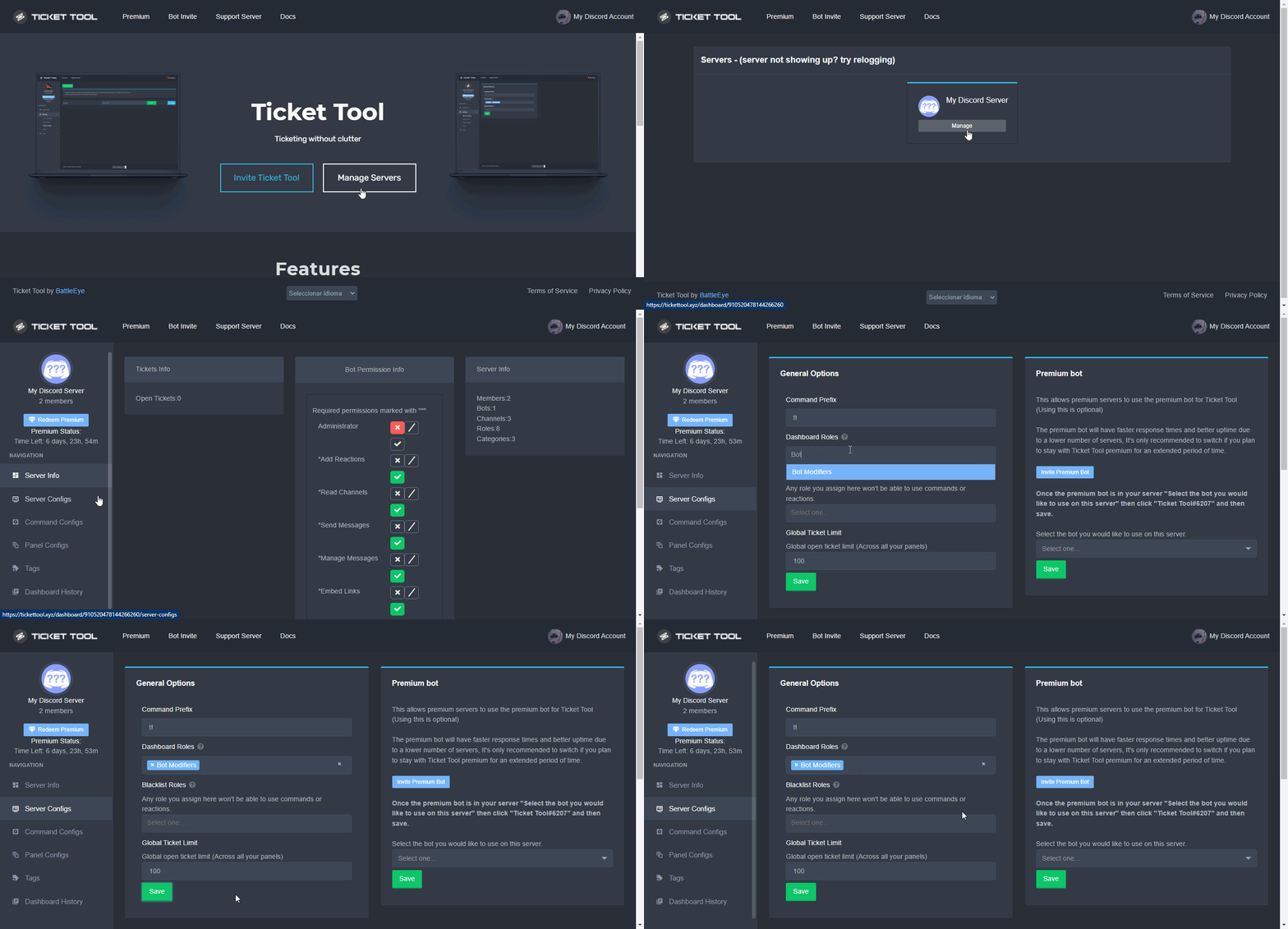
Btw, you can ask your server admins giving you a dashboard role with these steps:
humble sequoiaBOT
Dashboard Roles
Any role you put there will have full access to the ticket tool dashboard. The server owner and users with admin permissions already have access to the dashboard.
Be careful of which roles to put here
 cobalt shell
hi there, is there by any chance that i can check my invalid ticket?
i mean the ticket that was being deleted
 soft bloom
Will Ticket Tool get slash commands?
 scenic plinth
soft bloom
Will Ticket Tool get slash commands?
scenic plinth
soft bloom
Will Ticket Tool get slash commands?
I believe it's planned for the future but not anytime soon. Dont quote me on this.
scenic plinth
cobalt shell
hi there, is there by any chance that i can check my invalid ticket?
If a transcript was saved, yes, view the transcript channel or dms with the bot. If not, unfortunately there is no way to view it without the transcript.
soft bloom
Will message commands be removed after april 2022?
scenic plinth
I don't know what you're referring to, but I don't believe we're removing anything.
 buoyant falcon

 jade topaz
What is that ?
 smoky scaffold
Heya all I'm having an issue with ticket overflow, we are getting so many tickets that it overflows and creates multiple open ticket sections and the closed section gets overrun and starts mixing with the closed tickets, can someone please help!
jade topaz
new user here. can anyone hellp me set it up
humble sequoiaBOT
How Do I setup Ticket Tool
You can check our documentation here, you can also check #573205317870157855 for the basic setup.
Our documentation contains all the info you need about the bot to be able to setup and configure the bot however you like.
bronze comet
Refer to this guide
humble sequoiaBOT
Solved in another channel.
copper owl
smoky scaffold
Heya all I'm having an issue with ticket overflow, we are getting so many ticket...
for this ^
jade topaz
nothing happens after "authentication successful"
humble sequoiaBOT
━━ moved to ticket ━━
rustic pollen
hello what's it mean when I press create ticket it says channel verification is too high
copper owl
rustic pollen
hello what's it mean when I press create ticket it says channel verification is ...
it means you need to verify in the server before you can open a ticket
copper owl
some servers need you to verify your email, others need you to verify your phone
depends on their moderation level
copper owl
rustic pollen
I have another question
go ahead
copper owl
Are you pressing the transcript button when you close the ticket?
copper owl
once you close a ticket, there should be a transcript button you press to save the transcript
copper owl
rustic pollen
I only have a close
once you close the ticket, does it get deleted?
rustic pollen
yes