#🆘│community-support
1 messages · Page 367 of 1
 fast sable
fast sable
fast sable
Cool
fast sable
 shut bolt
ID is better as if you change the name of the role it will still work
shut bolt
ID is better as if you change the name of the role it will still work
Ah makes sense
Ima go do it rq, brb
shut bolt
Sure, let me know
fast sable
Alright
Ok well I was doing it and it is late at night and I screwed everything up 🥲 but I am fixing it
shut bolt
fast sable
Ok well I was doing it and it is late at night and I screwed everything up 🥲 b...
Oh F, hope you can fix it
 iron nightBOT
Gave 1 Rep to Yareaj_ (current: #4 - 212)
shut bolt
fast sable
Aye I think I got it
YAY!!
shut bolt
fast sable
Thanks <@518666147441278998>
Sure!
fast sable
Ya luckily my old panel saved so I just updated the settings I wanted and used it again 😂
shut bolt

 fluid harbor
how to make tickets
 humble sequoiaBOT
━━ moved to ticket ━━
 quasi juniper
hi
 queen isle
humble sequoiaBOT
queen isle
humble sequoiaBOT
━━ moved to ticket ━━
 jade topaz
Tu madre me la chupa puyo ticket tool
 vestal owl
tipo
 gritty rune
I’ve paid for this months subscription can my account be restored please
 robust sandalBOT
jade topaz
Tu madre me la chupa puyo ticket tool
robust sandalBOT
jade topaz
Tu madre me la chupa puyo ticket tool
 TOTALE_NERF™(FULL REBIRTH)
Your mother sucks it on me puyo ticket tool
 Spanish (es) → English (en)
 slate furnace
How do I make ticket tool @ a specific role when ticket is opened
humble sequoiaBOT
How to make Ticket Tool ping a role
To make ticket tool ping a role when a ticket is opened, go to the Dashboard -> Panel Configs -> Settings -> Ticket Options -> Ticket Message -> Message Text and do this:
{@Role name} This is case sensitive and the role must have @mentions enabled
 shut bolt
Check out this
 wet phoenix
.
 copper owl
@mint cargo
0/10 because we didnt do it for you? You were asked to take a video of the issue, and were given a solution (to try another browser), to which you replied "i dont think that will work"
Sorry that you expected us to do it for you, but that's not how it works here. Apologies ! 🙂
jade topaz
what
shut bolt
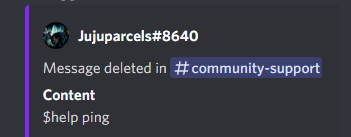
You just sent $help ping out here
jade topaz
i don't writte the commandes
jade topaz
shut bolt
You just sent $help ping out here
no, i don't
copper owl
 shut bolt
 copper owl
thank god we have logs
shut bolt
Yes you did lmao
jade topaz
sorry but my friend hack me
shut bolt
Xd
copper owl
jade topaz
sorry but my friend hack me
damn you probably got the world record for getting back your account
jade topaz
sorry i don't speak english
 boreal lotus
Hey Hey.. Will there be a Feature where the ticket system can ask the user certain predefined questions before the ticket is getting opened? It would be pretty nice if the user can give important questions so our support team doesnt have to ask
copper owl
boreal lotus
Hey Hey.. Will there be a Feature where the ticket system can ask the user certa...
you could just input them into the ticket message
or use tags
boreal lotus
nahh.. The users mostly ignore it
copper owl
Not sure if that feature is planned but it has been suggested
copper owl
boreal lotus
nahh.. The users mostly ignore it
people could just throw in random answers too ¯\_(ツ)_/¯
also i misunderstood your suggestion
that has been suggested before ages ago, but not sure on the devs stance on it
only time will tell whether it gets implemented
 mystic hound
@bright ruin I'm not sure how you expect us to help you when you provide no details and leave multiple tickets unresponsive for 10-12 hours.
If you have specific queries you'd like answered feel free to reach back out to us when you've got the time
jade topaz
Yesterday i startt s4..
Today when i wake up and try to log in game i see my acc is banned... Idk why..
Please help me.. My acc is Jaz
humble sequoiaBOT

⚠️ You're in the wrong place
We provide support for @pseudo glen discord bot and cannot help you with whatever issue you have.
- Please make sure to contact the appropriate Support Team.
If you don't have any further questions regarding our bot Ticket Tool, please close this ticket
copper owl
@jade topaz ^^
jade topaz
I dont know english can tell me what to do?
jade topaz
can i get premium role?
copper owl
jade topaz
can i get premium role?
you can run $pc in #🤖│bot-spam
jade topaz
ight thx
copper owl
No worries
 compact hawk
How do I make it so when you clic kclose ticket the ticket is deleted automatically? I forgot how to do it.
copper owl
turn off Two Step Ticket in General Options of your panel settings
compact hawk
done
Also is there a way to clear the ticket data so like when a person creates a new ticket it starts back from 1 again
copper owl
not automatically no
you'd have to go to the ticket count in general options and restart it yourself
 fickle minnow
So I cant log in it says this every time
 copper owl
if you have premium, you could just remove the number from the ticket name automatically
humble sequoiaBOT
Ticket names
The ticket name is the default channel name of all tickets. To edit it, go to your Dashboard > Panel Configs > Settings > Ticket Options. There you can edit the channel name of opened and closed tickets. You can also use variables in there.

 Note: This is a premium feature
copper owl
fickle minnow
So I cant log in it says this every time
Note: This is a premium feature
copper owl
fickle minnow
So I cant log in it says this every time
youre on the documentation
thats the wrong website to log into
humble sequoiaBOT
 copper owl
try that one ^
fickle minnow
Thanks so much
Also how would I use the Category settings for tickets because I would like to have tickets in categories
shut bolt
$help category
humble sequoiaBOT
How to set the open category
To set a open category go to the Dashboard -> Panel Configs -> Settings -> Category Options -> Category Open
 shut bolt
You should select a category in Category Open
fickle minnow
Thanks @shut bolt
iron nightBOT
Gave 1 Rep to Yareaj_ (current: #4 - 213)
shut bolt
Sure
fickle minnow
Also it seems its not working
fickle minnow
 tribal cedar
Refresh the page? Is the category open still set?
tribal cedar
Refresh the page? Is the category open still set?
Its set and I refreshed
tribal cedar
It will only affect new tickets
fickle minnow
I made a couple new ones and they dont go into the catagorey
tribal cedar
Can you screenshot us the dashboard?
 tribal cedar
And the tickets are just going on the top of the channels list?
fickle minnow
yes
tribal cedar
Try saving again and opening a new ticket
fickle minnow
I have several times
fickle minnow
Is it possible to kick and have the bot join again
copper owl
check if ticket tool has perms in the category
copper owl
fickle minnow
Is it possible to kick and have the bot join again
that wont do anything
tribal cedar
Duh
copper owl
copper owl
check if ticket tool has perms in the category
check this 
tribal cedar
Im a moron
fickle minnow
copper owl
check if ticket tool has perms in the category
it does
copper owl
here's the thing.
It either doesnt have permissions, or you need to set the category again and save
fickle minnow
doesn't work still
copper owl
okay so
create a channel in the tickets category
and run $debug in that channel you created
fickle minnow
understood
copper owl
let me know if TT responds, and if it does, send the message link here please
 copper owl
isnt there a ticket right there?
fickle minnow
I moved it
copper owl
okay one second
tribal cedar
Now Im curious
fickle minnow
Probably just a bug
copper owl
not really
you have 3 panels
are you sure youre opening tickets from the panel that has the category options saved?
fickle minnow
maybe I dont
copper owl
because i just opened a ticket and it's working fine
tribal cedar
Happens
 prime bridgeBOT
Xx 𝗘𝗟𝗜𝗧𝗘 xX has been silenced for 10m 

 Reason: Posting Discord Server Invites
Xx 𝗘𝗟𝗜𝗧𝗘 xX#6999 | 824207874971795506
 spring sparrow
what should i do

 surreal narwhal
I cant seem to get the transcripts to save to the channel I have selected
That channel does have the proper bot permissions
humble sequoiaBOT
━━ moved to ticket ━━
 scenic plinth
For both
prime bridgeBOT
Xx 𝗘𝗟𝗜𝗧𝗘 xX has been silenced for 10m
Reason: Posting Walls Of Text
Xx 𝗘𝗟𝗜𝗧𝗘 xX#6999 | 824207874971795506
 eager cargo
@bright ruin Regarding your statement in #📈│reviews, was there something you needed further help with?
jade topaz
Hi lads - simple one but username and password invalid as of this morning i.e. "Login failed. Please Check server address, username and password". This is TV solutions. I'm covered for a year's subscription and have been with you for the last month. Any need to update VPN/password? Great service I should add
humble sequoiaBOT
⚠️ You're in the wrong place
We provide support for @pseudo glen discord bot and cannot help you with whatever issue you have.
- Please make sure to contact the appropriate Support Team.
If you don't have any further questions regarding our bot Ticket Tool, please close this ticket
 deep relic
hello
deep relic
 silver hatch
Please ping me if someone replied.
silver hatch
Please ping me if someone replied.
Go to panel config and
Click the manage thingy
And then you will see transcript
deep relic
Neptune tryna explain 
tribal cedar
Panel configs -> settings -> logging options
deep relic
.
deep relic
tribal cedar
Panel configs -> settings -> logging options
yes
tribal cedar
It's a premium feature
silver hatch
tribal cedar
Panel configs -> settings -> logging options
Thanks!
copper owl
deep relic
Go to panel config and
@silver hatch press on settings for your panel, then logging options
deep relic
copper owl
<@!868815351750746152> press on settings for your panel, then logging options
Ik
copper owl
tribal cedar
It's a premium feature
no it isnt
silver hatch
Can I have the link?
copper owl
$help transcript
humble sequoiaBOT
How do I save transcript to a channel?
To save transcripts to a channel go to the Dashboard -> Panel Configs -> Settings -> Logging Options -> Transcript Channel
 deep relic
YES
silver hatch
Thank you so much!
tribal cedar
Oh mb
copper owl
deep relic
Ik
well it would be appreciated to let them know about it
deep relic
how to partner server
copper owl
directions are always a plus
deep relic
humble sequoiaBOT

Our partnership program is currently closed.
We appreciate you being interested in partnering with Ticket Tool! Unfortunately the program for partnering is closed as of now. Currently, there are no plans to open applications again either.
» You can check #📣│server-news for our announcement whenever partnerships open up again!
 TicketTool.xyz - Ticketing without clutter
copper owl
TicketTool.xyz - Ticketing without clutter
copper owl
@deep relic ^
iron nightBOT
Gave 1 Rep to Neptune (current: #1 - 399)
copper owl
Np
silver hatch
😭 where is the settings
copper owl
silver hatch
😭 where is the settings
do you have a panel created?
silver hatch
Like this?
 copper owl
yeah, you set a transcript channel on the website
humble sequoiaBOT
copper owl
select your server ^^
go to panel configs
then press on settings for the panel you want to set transcripts in
then go to Logging Options
you'll find it there
copper owl
humble sequoia
refer to this
 upbeat timber
Is there a way I can set a certain reaction to open a ticket?
For example react to the rules that opens a ticket to being whitelisting process
copper owl
just make a panel
you can set your rules into the panel message
but you cant set an already existing message to have a button (that wasnt even sent by TT)
 neat cobalt
how can I add more support roles to be moderating tickets? Cuz I have Trial Admins and another role that aren't able to view tickets.
copper owl
$help support
humble sequoiaBOT
How to let support team see into a ticket
About support roles
A support role lets your support team see into tickets with out having to add them manually to each and every ticket.
You can add as many support roles as you like per panel.
NOTE that the way discord works all admins can see into tickets regardless of this.
How to set a support role
To set a Support role go to the Dashboard -> Panel Configs -> Settings -> General Options -> Support Team Roles.

NOTE that the support role will not be able to see into tickets that are already created..
copper owl
@neat cobalt right there ^
neat cobalt
copper owl
<@!279022878345658368> right there ^
I love u, ur a life saver
upbeat timber
Can you configure the bot to give options.
For example
Open the ticket then it gives you option to click.
Admin help
Coding issues
Whitelisting
Then that to ping certain role type to deal with the ticket
copper owl
yeah that's not possible
you can either have 3 different panels which are configured differently to ping a different role
or have one panel which everyone can see in
copper owl
copper owl
you can either have 3 different panels which are configured differently to ping ...
i would advise this as it's a lot more organized and clean
so technically, what you want is possible, not in the way you think though.
upbeat timber
Ah so just use different tabs for different issues then that pings the role type I configure to
humble sequoiaBOT
How to make Ticket Tool ping a role
To make ticket tool ping a role when a ticket is opened, go to the Dashboard -> Panel Configs -> Settings -> Ticket Options -> Ticket Message -> Message Text and do this:
{@Role name} This is case sensitive and the role must have @mentions enabled
copper owl
humble sequoia
you follow these instructions to ping the role you want in their respective panels
also
$help support
humble sequoiaBOT
How to let support team see into a ticket
About support roles
A support role lets your support team see into tickets with out having to add them manually to each and every ticket.
You can add as many support roles as you like per panel.
NOTE that the way discord works all admins can see into tickets regardless of this.
How to set a support role
To set a Support role go to the Dashboard -> Panel Configs -> Settings -> General Options -> Support Team Roles.
NOTE that the support role will not be able to see into tickets that are already created..
upbeat timber
Thank you, I shall have a little play with it.
Got it set up to ping admins already 👍🏼
copper owl
assign the correct support roles so the other staff teams dont unnecessarily have access to the tickets (if you'd like)
copper owl
upbeat timber
Thank you, I shall have a little play with it.
Got it set up to ping admins alre...
Anytime
copper owl
deep relic
+100000 social credit
uh alright lmao
 dry spindle
is it allowed to copy an emoji e.g  to a privat server?
copper owl
dry spindle
is it allowed to copy an emoji e.g <:reddit:823385643932975144> to a privat se...
i mean yeah
dry spindle
or are they copyrighted
dry spindle
copper owl
i mean yeah
thx
iron nightBOT
Gave 1 Rep to Neptune (current: #1 - 400)
copper owl
i dont think you can copyright emotes lmao
dry spindle
copper owl
i dont think you can copyright emotes lmao
many servers deny it to copy their emojis
if they find it out you'll get banned
copper owl
dry spindle
many servers deny it to copy their emojis
yeah but they cant copyright their own emotes
dry spindle
yes
anyways im asking bc i dont wanna risk a ban xD
(im using them in dc bots (the emojis))
copper owl
nah im fairly certain no one cares here
iron nightBOT
@dry spindle :: You can't rep Neptune#6814 for 58 minutes and 2 seconds. Try coming back later?
 safe barn
Please, can I put more than one button, meaning that I put buttons, and each button opens a different section for you, meaning that a certain button makes me open a book with my help, and another button with its helpers, understand?
 pure kelp
hello ive had a look around but i cant seem to figure out how to make new/open tickets have a prefix with the user that opened the ticket
jade topaz
k
 red plinth
Hello how can I do tikt
copper owl
red plinth
Hello how can I do tikt
هلا صديقي
humble sequoiaBOT
How Do I setup Ticket Tool
You can check our documentation here, you can also check #573205317870157855 for the basic setup.
Our documentation contains all the info you need about the bot to be able to setup and configure the bot however you like.
copper owl
humble sequoia
تأكد المعلومات هون
copper owl
نعم, عنا سوبورت عربي هون
red plinth
 tender wind
why does the @ not work?
i do it as <@role name>
copper owl
tender wind
why does the @ not work?
i do it as <@role name>
because you either do {@role name} or <@&ID>
or {role id}
 bright ruin
thanks @half kernel
iron nightBOT
Gave 1 Rep to Jayson G | UBP (current: #25 - 17)
 dull crest
do we have a solution on automatic ticket closes/deletions ?
copper owl
dull crest
do we have a solution on automatic ticket closes/deletions ?
You can have TT automatically close/delete the ticket is a user leaves the server in the middle of their ticket
you can also have TT immediately delete the ticket once you close
otherwise, there's not much automation for those
humble sequoiaBOT
Automation disabled
There's currently no ETA for when automation will be enabled again. The issue that's caused it to be disabled, us hitting rate limits, is tied to the increased load on Discord's servers. The situation's currently unpredictable, which makes it so we can't give you a fixed time.
copper owl
explains more on why ^
 grizzled thicket
How do I make a ticket on my server?
humble sequoiaBOT
How Do I setup Ticket Tool
You can check our documentation here, you can also check #573205317870157855 for the basic setup.
Our documentation contains all the info you need about the bot to be able to setup and configure the bot however you like.
shut bolt
Check out this guide
dull crest
copper owl
You can have TT automatically close/delete the ticket is a user leaves the serve...
how can I enable this? TT immediately delete the ticket once you close
copper owl
Turn off Two Step Ticket in general options
mind you, this wont allow you to get the Moderator message, which has the transcript, reopen, and delete button
dull crest
okay thanks
copper owl
meaning you wont be able to save the transcripts if you enable this, unless you have premium and you enable auto-save transcript
dull crest
thanks @copper owl
iron nightBOT
Gave 1 Rep to Neptune (current: #1 - 401)
copper owl
anytime
 next ibex
Hi Guys, i'm trying to set up ticketbot on a server, but on my tickettool dashboard it keeps saying i don't have any servers to manage, even after logging out & in several times. (And yes, I've got root & server admin on the server, which the bot has been added to). Is there an obvious step i'm missing?
shut bolt
Please run $level in that server and send us the response of the bot
next ibex
Hi Pablo. thanks for the response - Bot is saying i'm just a User
User permission level with Ticket Tool
@next ibex is permission level: 0 (User)
iron nightBOT
@next ibex :: You can't give rep to yourself, silly.
shut bolt
Oh
Then you don't actually have server admin
The bot will check if you got the Administrator permission within one of your roles
Having a role named admin, or a role that has all perms except for administrator won't work
tribal cedar
@next ibex you can have someone with actual admin on the server add your role to dashboard perms in server configs
tender wind
copper owl
because you either do {@role name} or <@&ID>
i did {role id}
next ibex
Sorry, is this on Discord or on your Ticket Tool site? I'm in the root group on discord server, and i'm definitely not a user
humble sequoiaBOT
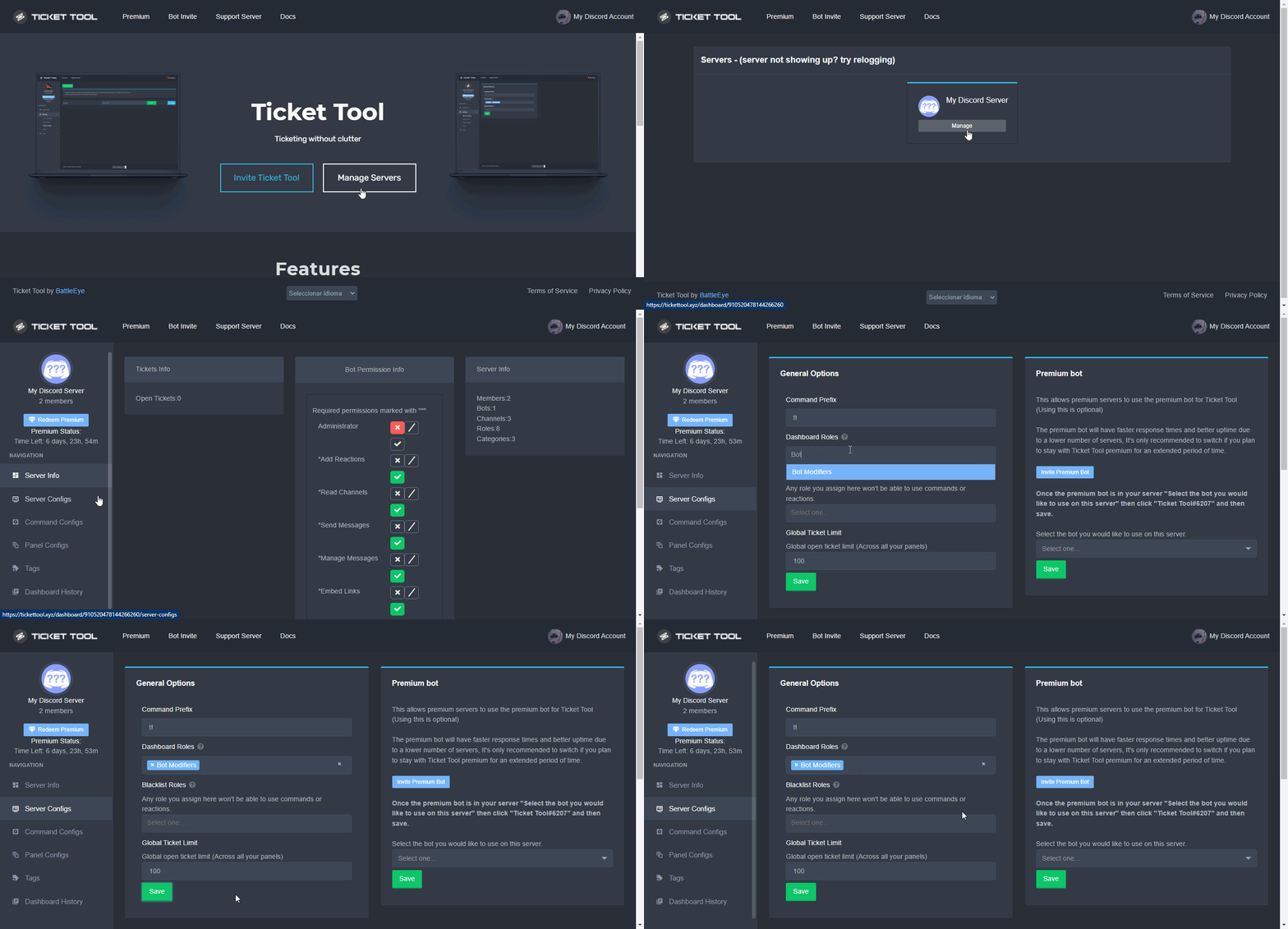
Dashboard Roles
Any role you put there will have full access to the ticket tool dashboard. The server owner and users with admin permissions already have access to the dashboard.
Be careful of which roles to put here
 iron nightBOT
Gave 1 Rep to DanJayTay (current: #70 - 1)
tribal cedar
Ty
next ibex
This is what i'm seeing at the moment on the Dashboard page 😦
 humble sequoiaBOT
Don't see your server in the dashboard?
You will possibly need to relog. Look below to see steps on how to relog.
How to relog the Dashboard.
First, you will need to go to the dashboard. Once your there, click on your avatar on the top right. after you clicked it, you will see button that says Logout. You must click that. Once you have logged out, you can log back in.
Note:
You need one of these 3 things to access the dashboard.
1. Server Owner (Level: 6)
2. Server Administrator (Level: 4)
3. Dashboard Role (Level: 2)
You can check your level using $level on your Discord Server
See the GIF below on how to relog:
 shut bolt
Please read the note of this message
shut bolt
shut bolt
Then you don't actually have server admin
As we told you previously in response to you saying you have Admin, you need to actually have the Administrator permission
Check with the server owner
And if he isn't willing to give the perm
Ask him to add the role as a dashboard role
next ibex
I'm in the root group which has server administration permissions, so i have full access to manage the server. So shouldn't be a permissions issue. I'll check and get back to you
Thanks though Pablo!
shut bolt
Sure
Whenever you confirm you have the perms, run $level
And it should show you Level 4 if you have the admin perm
next ibex
Thanks @shut bolt
iron nightBOT
Gave 1 Rep to Yareaj_ (current: #4 - 215)
shut bolt
next ibex
Thanks <@!518666147441278998>
Did it work?
next ibex
No. 😦 We're trying to work out why the bot thinks i'm still level 0. I had permissions to add the bot in the first place, but now it's convinced i'm level 0. Our admin is showing as level 6 though
shut bolt
next ibex
No. 😦 We're trying to work out why the bot thinks i'm still level 0. I had perm...
That Level 6 admin is the server owner. And even though you can add the bot having the Manage Server permission it won't let you manage it
tribal cedar
Just have him add your role to dashboard perms ez pz
iron nightBOT
Gave 1 Rep to Enigma (current: #14 - 81)
shut bolt
Sure bro
tribal cedar
Anytime
tender wind
copper owl
because you either do {@role name} or <@&ID>
doesn’t work
 copper owl
shut bolt
It's <@&ID>
copper owl
shut bolt
It's <@&ID>
tender wind
copper owl
not a role
alright thanks!
iron nightBOT
Gave 1 Rep to Neptune (current: #1 - 402)
dull crest
hi, so I have added a photo to be displayed and it is only visible through my PC but not through mobile
 shut bolt
Could you please send us a screenshot of mobile too?
dull crest
 copper owl
update discord
dull crest
i think its updated let me see
copper owl
if it is, just reinstall it on your phone
deep relic
+1000000000 social credit
 fair sentinel
Hey am i able to open a ticket on support out of ticket tool
like things to do with my server?
 proven adder
The server I put the ticket tool wont show on the manage server thing
fair sentinel
logout and login again
proven adder
fair sentinel
logout and login again
I tried it didnt work.
Nobody know how to fix it?
 plain surge
You tried doing it like this?
fair sentinel
open a ticket
humble sequoiaBOT
Don't see your server in the dashboard?
You will possibly need to relog. Look below to see steps on how to relog.
How to relog the Dashboard.
First, you will need to go to the dashboard. Once your there, click on your avatar on the top right. after you clicked it, you will see button that says Logout. You must click that. Once you have logged out, you can log back in.
Note:
You need one of these 3 things to access the dashboard.
1. Server Owner (Level: 6)
2. Server Administrator (Level: 4)
3. Dashboard Role (Level: 2)
You can check your level using $level on your Discord Server
See the GIF below on how to relog:
proven adder
Yep I tried that
plain surge
Try to clear the site cookies
proven adder
Already did. The first thing I did was that and it didn't work.
plain surge
Ok, please send $debug on your server and send me the link
proven adder
plain surge
fair sentinel
Hey am i able to open a ticket on support out of ticket tool
like things to do w...
Can you explain your problem a bit more?
@proven adder try using a different browser
proven adder
plain surge
<@828363892820017192> try using a different browser
Such as?
plain surge
If you are using Chrome, try Firefox or Edge
fair sentinel
plain surge
Can you explain your problem a bit more?
Like how do i get someone banned from discord because they hacked my server and deleted it
plain surge
fair sentinel
Like how do i get someone banned from discord because they hacked my server and ...
You report them to Discord.
https://support.discord.com/hc/en-us
proven adder
plain surge
If you are using Chrome, try Firefox or Edge
I can't find firefox or edge on my computer or anywhere :/
plain surge
Do you have a Windows or Mac?
plain surge
Umm, how about your phone?
plain surge
Trying accessing the Dashboard from your phone
plain surge
fair sentinel
how
In the Trust and Safety section, there's an article on how to report issues
jade topaz
hello.
plain surge
Hi 👋
proven adder
Tried, failed.
proven adder
jade topaz
hello.
Hello.
jade topaz
can someone please provide me with a command to insert emojis into panel messages and names?
plain surge
There's no command for that. You need to add them through the Dashboard.
You can do so by copy pasting the Emoji ID in the field you want.
You can get the Emoji ID from using the ID command
$idcommand
humble sequoiaBOT
How do I get the ID of Roles/Channels/Emojis?
Ticket Tool has a useful command that helps you get the ID of various things like channels, roles, emojis and your server.
Just use the command $id <#channel/@role/:emoji:>. Now copy everything, including the brackets <...>, to your dashboard (or wherever you want it)
If you want the server ID, just use $id.
Examples:
Server ID: $id ➝
509192800865353738
Roles: $id @Role ➝@humble sequoia
Channel: $id #channel ➝#🤖│bot-spam
User: $id @user ➝@copper owl
Emoji: $id➝

 plain surge
proven adder
Tried, failed.
plain surge
proven adder
Tried, failed.
Can you kick and reinvite the bot on your server, then relog on the Dashboard
proven adder
plain surge
Can you kick and reinvite the bot on your server, then relog on the Dashboard
I'll try.
plain surge
plain surge
There's no command for that. You need to add them through the Dashboard.
You ca...
@jade topaz ^
jade topaz
plain surge
<@456226577798135808> ^
thank you hun, i'll try it !
iron nightBOT
Gave 1 Rep to D̸̞̉҉̢̩͠o͛ͫ̚m͈̕͜҉̘̱̟☆̞͈͠҉ͪ̈́͘҉̷̥̐ (current: #20 - 35)
plain surge
No problem 👍
proven adder
plain surge
Can you kick and reinvite the bot on your server, then relog on the Dashboard
Failed.
What did I break?
humble sequoiaBOT
━━ moved to ticket ━━
dull crest
copper owl
if it is, just reinstall it on your phone
I did it really has the same issue...
copper owl
most likely discord being discord then
 flint coyote
I scrolled a bit and didn't see it. I'm having an issue with tickets not pinging roles anymore. I used both variables to get it to work, but nothing. I did {@therole} and also {roleID}.
Has there been a change?
 pale pilot
$help ping
humble sequoiaBOT
How to make Ticket Tool ping a role
To make ticket tool ping a role when a ticket is opened, go to the Dashboard -> Panel Configs -> Settings -> Ticket Options -> Ticket Message -> Message Text and do this:
{@Role name} This is case sensitive and the role must have @mentions enabled
shut bolt
flint coyote
I scrolled a bit and didn't see it. I'm having an issue with tickets not pinging...
Would you mind if I ask for the server ID?
To check what could be wrong
flint coyote
So the answer is no? Nothing has changed? I have had these roles working for a long time then a couple of days ago it stopped.
Yeah one sec.
755183922526158948
shut bolt
flint coyote
So the answer is no? Nothing has changed? I have had these roles working for a l...
Nothing has changed, role pinging has been kept as regular
Great, give me a sec
brb
flint coyote
Thank you!
 ivory pawn
Can someone please help me
shut bolt
flint coyote
So the answer is no? Nothing has changed? I have had these roles working for a l...
In which of the panels are you having this problem?
humble sequoiaBOT
We would love to help you but, if you don't tell us what you need help with we can't help you :(
shut bolt
ivory pawn
So i need help with setup, I don't know how to so if someone can..
shut bolt
Sure
flint coyote
Admin shop and donations
humble sequoiaBOT
How Do I setup Ticket Tool
You can check our documentation here, you can also check #573205317870157855 for the basic setup.
Our documentation contains all the info you need about the bot to be able to setup and configure the bot however you like.
shut bolt
humble sequoia
Check this @ivory pawn
flint coyote
I changed the donation one to the roleID
ivory pawn
shut bolt
Check this <@!837006003772981349>
It's hard idk how :(
shut bolt
ivory pawn
It's hard idk how :(
I sent you the guide that explains every step
shut bolt
flint coyote
Admin shop and donations
Okey, I'll check, brb
ivory pawn
I wi add you
dull crest
copper owl
most likely discord being discord then
Is there any way I can go around this? I really need a solution for displaying an image
flint coyote
shut bolt
Okey, I'll check, brb
Thank you.
iron nightBOT
Gave 1 Rep to Yareaj_ (current: #4 - 217)
shut bolt
dull crest
Is there any way I can go around this? I really need a solution for displaying a...
If it's working on PC but not mobile, it's a mobile problem and there is nothing we can do, sorry
flint coyote
Oh my co owner said she may have figured it out. lol I'll refresh and see what she did.
shut bolt
ivory pawn
<@518666147441278998> Can you set up it?
No, as told before, I sent you the required information
ivory pawn
Okay..
shut bolt
flint coyote
Oh my co owner said she may have figured it out. lol I'll refresh and see what s...
Oh
shopkeeper
shut bolt
shut bolt
`shopkeeper`
Is that the exact name of the role you are trying to ping @flint coyote ?
flint coyote
Yes sir
shut bolt
ivory pawn
I don't understand it..
Which specific step don't you get
shut bolt
flint coyote
Yes sir
Hmmm rare
ivory pawn
shut bolt
Which specific step don't you get
I dont understand everything..
shut bolt
ivory pawn
I dont understand everything..
Have you even read the guide?
ivory pawn
Yes
shut bolt
flint coyote
Yes sir
Do you mind if I open a ticket to see the problem?
ivory pawn
I'we read it before
shut bolt
ivory pawn
I'we read it before
In which step are you stuck?
ivory pawn
1st one
shut bolt
ivory pawn
1st one
Haven't you been able to invite the bot?
flint coyote
shut bolt
Do you mind if I open a ticket to see the problem?
She said she copied the role and pasted it in. It looks exactly the same as it did before. Let me make sure it's working now.
shut bolt
flint coyote
She said she copied the role and pasted it in. It looks exactly the same as it d...
Sure, I'm on your server if you need me to test it out
flint coyote
shut bolt
Sure, I'm on your server if you need me to test it out
I just tested on both and they are now working. No idea what was going on. It has been fine like that for like a year then stopped working then she did that to get it working again. lol
flint coyote
shut bolt
Sure, I'm on your server if you need me to test it out
Thank you for your time!
iron nightBOT
@flint coyote :: You can't rep Yareaj_#4383 for 54 minutes and 33 seconds. Try coming back later?
shut bolt
flint coyote
I just tested on both and they are now working. No idea what was going on. It ha...
Oh, do you mind if I ask, what change did she made?
shut bolt
flint coyote
Thank you for your time!
Sure!
shut bolt
Sure
flint coyote
 shut bolt
flint coyote
shut bolt
flint coyote
Truly rare
If this get's to happen again feel free to reach us in #🎫│make-a-ticket
flint coyote
Thank you very much!
shut bolt
Sure!
jade topaz
hello, I wanted to know if there is any possibility of recovering some objects that I have sold to a merchant and when I realized I could not recover them
shut bolt
Hey there
humble sequoiaBOT
⚠️ You're in the wrong place
We provide support for @pseudo glen discord bot and cannot help you with whatever issue you have.
- Please make sure to contact the appropriate Support Team.
If you don't have any further questions regarding our bot Ticket Tool, please close this ticket
shut bolt
Wrong place man, sorry
jade topaz
hello, I wanted to know if there is any possibility of recovering some objects that I have sold in the merchant and when I realized I could not recover, thanks
humble sequoiaBOT
⚠️ Please read the messages previously sent by our team ⚠️
shut bolt
@jade topaz
 austere barn
wont even work ong
humble sequoiaBOT
━━ moved to ticket ━━
 torn beacon
how to make it ping me when ticket created
shut bolt
Ping you? Or a role?
torn beacon
a role
shut bolt
torn beacon
a role
$help ping
humble sequoiaBOT
How to make Ticket Tool ping a role
To make ticket tool ping a role when a ticket is opened, go to the Dashboard -> Panel Configs -> Settings -> Ticket Options -> Ticket Message -> Message Text and do this:
{@Role name} This is case sensitive and the role must have @mentions enabled
torn beacon
shut bolt
$help ping
thank you sir\
iron nightBOT
Gave 1 Rep to Yareaj_ (current: #4 - 218)
shut bolt
Sure
 hushed onyx
how to make different buttons like #🎫│make-a-ticket ? Is it available to non-premium users?
torn beacon
shut bolt
Oh yeah, we got a reputation system
thanks\
iron nightBOT
@torn beacon :: You can't rep Yareaj_#4383 for 56 minutes and 27 seconds. Try coming back later?
torn beacon
oh
shut bolt
hushed onyx
how to make different buttons like <#571706435449257997> ? Is it available to no...
It is a premium feature called multipanels, more information on that below
humble sequoiaBOT
For a more convenient use of multipanels, you can now combine panels on the dashboard. This will allow you to directly send the multipanel from the dashboard or via the $panel ID command.
Where can I find this?
You can find this setting on the Dashboard -> Panel Configs -> Settings -> General Options
Note: if you're attaching all the panels to a panel called English, don't include English in the attached panels box (If you do this, it will create duplicate)
This will put all buttons from all of your panels on one message. The message is the panel message from the panel you're combining these panels in.

 shut bolt
torn beacon
https://tenor.com/view/sad-cry-crying-tears-broken-gif-15062040
shut bolt
torn beacon
https://tenor.com/view/sad-cry-crying-tears-broken-gif-15062040
Appreciate it man :)
hushed onyx
tank u :>
shut bolt
Sure
jade topaz
I’m not able to make it so certain users with a role aren’t able to create a ticket. It still lets them do so.
 dawn warren
روبوت التذاكر كيف أجعله يرسل كمية كبيرة إلى ذلك المستخدم في قناة التذاكر
robust sandalBOT
dawn warren
روبوت التذاكر كيف أجعله يرسل كمية كبيرة إلى ذلك المستخدم في قناة التذاكر
 ألعاب SPDM TIM متعددة
How do I get him to send a lot of that user to the ticket channel?
Arabic (ar) → English (en)
humble sequoiaBOT
Blacklist Roles
Any role you assign as a blacklisted role won't be able to use commands or reactions.
Selecting a blacklisted role
Go to your Dashboard -> Server Configs. There you will find the option to select blacklisted roles.
Note: Don't forget to save.
 shut bolt
@jade topaz
shut bolt
dawn warren
روبوت التذاكر كيف أجعله يرسل كمية كبيرة إلى ذلك المستخدم في قناة التذاكر
$arabic
Oops
$articket
humble sequoiaBOT

فريق الدعم الفني العربي
عميلنا العزيز ان كنت تبحث عن مساعدة يرجى فتح تكت خاص بفريق الدعم الفني العربي
اذهب الى#🎫│make-a-ticket
ثم قم بلضغط على الايموجي الاتي (🇯🇴)
shut bolt
Better
torn beacon
thanks
shut bolt
Sure
jade topaz
thanks, I previously tried to do it a different way but it didn't work.
shut bolt
No worries :)
hushed onyx
is there a lifetime plan for premium?
i'd be interested to figure something out. (Would i dm bot dev?)
 covert musk
.
 atomic barn
hushed onyx
i'd be interested to figure something out. (Would i dm bot dev?)
atomic barn
hushed onyx
i'd be interested to figure something out. (Would i dm bot dev?)
you can always create a ticket #🎫│make-a-ticket by clicking the "Billing" button and someone can answer there :)
 ruby jay
Anybody have anything to help me with, this is my first bot and I cant find and up to date guide 😫
already created a ticket
humble sequoiaBOT
━━ moved to ticket ━━
jade topaz
how do i make hyperlink in ticket?
plain surge
To make a hyperlink you do this [text](url)
This only works in embeds tho, and in decreption fields, so it won't work in a field name for example
@jade topaz
iron nightBOT
Gave 1 Rep to D̸̞̉҉̢̩͠o͛ͫ̚m͈̕͜҉̘̱̟☆̞͈͠҉ͪ̈́͘҉̷̥̐ (current: #20 - 37)
plain surge
@jade topaz I just checked, and actually you can have a hyperlink in the Author or Title section. You just add the text to the Author name or Title section, and add the URL in the sections which says URL.
But for a field you add there's only title and message, so you can use the method I mentioned above in the field's body

An example of Author URL
humble sequoiaBOT
Make sure to stay tuned to #📣│bot-news for status updates.
Ticket Tool Bot Outage
At this time we are experiencing technical difficulties with the bot. Please be patient with us as we discover the problem and push a fix.
plain surge
And an example of Description URL
humble sequoiaBOT
How Do I setup Ticket Tool
You can check our documentation here, you can also check #573205317870157855 for the basic setup.
Our documentation contains all the info you need about the bot to be able to setup and configure the bot however you like.
 honest kite
Hi
i would love to speak to someone
i want to strart using the bot in my discord channel and buy the premium one
humble sequoiaBOT
━━ moved to ticket ━━
 cosmic oak

humble sequoiaBOT
How Do I setup Ticket Tool
You can check our documentation here, you can also check #573205317870157855 for the basic setup.
Our documentation contains all the info you need about the bot to be able to setup and configure the bot however you like.
copper owl
@red plinth ^
 hard cape
What are the advantages of a premium ticket tool bot compared to the normal one?
humble sequoiaBOT
Faster Premium Bot
Automatic Transcripts
Full Customization
Custom Buttons
Direct Messages
Ticket Automation
Multipanels
Premium Support
You can purchase premium here:
Price
$6 - Monthly
$66 - Yearly
 Premium
copper owl
Premium
copper owl
@hard cape ^^
hard cape
I mean if Ill add premium bot on my server
copper owl
it's a more stable bot
 humble sequoiaBOT
Tags
Tags are used to send a predefined response to your channels using a command. Tags will only respond if the command itself is used, it will not function if you put the tag into a sentence. The prefix is not included.
To create tags, go to: Dashboard > Tags > Create Tag. After creating and naming one, tap on the response button, and you can edit the response.
 hard cape
And What global ticket limit means?
 craggy geyser
How many tickets each person can have open at once
iron nightBOT
Gave 1 Rep to Swift (current: #5 - 208)
hard cape
Wth
craggy geyser
So if we had a panel limit of 1 on each option in #🎫│make-a-ticket, and a global limit set at 2, then you could have 2 open tickets at a time but only 1 per category so it would need to be 2 different tickets
hard cape
Ty, Ill create a premium ticket, So claim it cause u can explain very well
jade topaz
How do I make so a role have access to all tickets?
copper owl
$help support
humble sequoiaBOT
How to let support team see into a ticket
About support roles
A support role lets your support team see into tickets with out having to add them manually to each and every ticket.
You can add as many support roles as you like per panel.
NOTE that the way discord works all admins can see into tickets regardless of this.
How to set a support role
To set a Support role go to the Dashboard -> Panel Configs -> Settings -> General Options -> Support Team Roles.
NOTE that the support role will not be able to see into tickets that are already created..
 median wigeon
Has the bot the right perms in the channel?
Can you try use the command $debug
Did you invite the premium or the free bot?
scenic plinth
Server id?
median wigeon
Thanx Kenzy
scenic plinth
Can it see the channel? Go to the members list on the right side of your screen and tell me if you see the bot.
Alright
median wigeon
Alright no problem 🙂
mystic hound
median wigeon
Did you invite the premium or the free bot?
Rick 👀
median wigeon
Yes thats me
mystic hound
How come you don't have your former staff role
median wigeon
mystic hound
How come you don't have your former staff role
I deleted a lot of server and this one to, but now i got more time, i am looking in this server a lot.
 proven void
what are the changes we'll see any slash commands to create new tickets for folks?
proven void
fair enough, thanks!
 spark patio
помогите пожалуйста
mystic hound
proven void
what are the changes we'll see any slash commands to create new tickets for folk...
Slash commands being introduced wouldn't change the ticket creation process I believe
Should only effect command style tickets
median wigeon
mystic hound
Slash commands being introduced wouldn't change the ticket creation process I be...
no it don't
proven void
mystic hound
Should only effect command style tickets
That’s what I’m actually inquiring about. Vs <prefix>new|ticket user_id
It’s no big deal though.
median wigeon
spark patio
помогите пожалуйста
Чем могу помочь?
mystic hound
proven void
That’s what I’m actually inquiring about. Vs <prefix>new|ticket user_id
As far as I'm aware it wouldn't change much, just that it'd be a slash command instead of $new.. although we have nothing set in stone yet
proven void
yeah, it's really just a wish, it literally would save zero time. Just a wonder on my part
humble sequoiaBOT
How Do I setup Ticket Tool
You can check our documentation here, you can also check #573205317870157855 for the basic setup.
Our documentation contains all the info you need about the bot to be able to setup and configure the bot however you like.
shut bolt
Check this
copper owl
@tiny sparrow not sure if you noticed but we have a help category
not sure why you went to #📈│reviews
copper owl
jade topaz
$help
#🤖│bot-spam please
jade topaz
But i need help with moderator
copper owl
not sure what you mean but if you want to use commands, #🤖│bot-spam
humble sequoiaBOT
How Do I setup Ticket Tool
You can check our documentation here, you can also check #573205317870157855 for the basic setup.
Our documentation contains all the info you need about the bot to be able to setup and configure the bot however you like.
copper owl
look at the documentation ^
copper owl
you make it yourself
copper owl
the setup takes no more than 5 mins
and thats if you dont know anything about the bot
 glad tundra
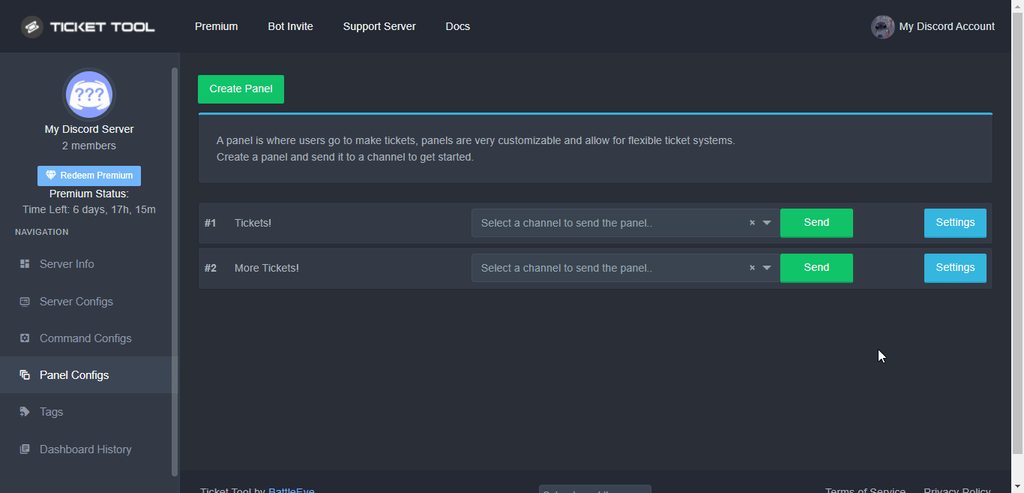
im trying to create new roles on my discord and give them permissions to help with the ticket bot. but im unable to get them to view it im not sure where i havent looked. ive been on the dashboard nothing there. and ive been on discord nothing that stands out to me. how do i give a role permission to view tickets the bot creates?
humble sequoiaBOT
How to let support team see into a ticket
About support roles
A support role lets your support team see into tickets with out having to add them manually to each and every ticket.
You can add as many support roles as you like per panel.
NOTE that the way discord works all admins can see into tickets regardless of this.
How to set a support role
To set a Support role go to the Dashboard -> Panel Configs -> Settings -> General Options -> Support Team Roles.
NOTE that the support role will not be able to see into tickets that are already created..
 iron nightBOT
Gave 1 Rep to Yareaj_ (current: #4 - 219)
shut bolt
glad tundra
thanks <@!518666147441278998>
Sure bro
 novel lintel
What are the limits to tickets? I made 2 tickets and got a warning saying tickets are being made too quickly. I plan to use these tickets for NFT whitelisting, which is usually fast paced, so do I need premium to handle this?
shut bolt
novel lintel
What are the limits to tickets? I made 2 tickets and got a warning saying ticket...
While having the free bot you can do 10 tickets per minute
Now, that warning is that you are probably spam clicking the button and trying to create several tickets at once
This is the bot's way to prevent hitting rate limits
novel lintel
Does it have a limit to how many tickets I can have open at a time, etc? Thank you btw that helps a lot
thanks @shut bolt
iron nightBOT
Gave 1 Rep to Yareaj_ (current: #3 - 220)
shut bolt
novel lintel
Does it have a limit to how many tickets I can have open at a time, etc? Thank y...
You can actually set it
There are two limits
The panel limit
$help limit
humble sequoiaBOT
How to set a ticket limit
A ticket limit may be set per panel to prevent users from spamming tickets. By default this limit is set to 3. Once a user hits this limit the bot will notify the users that they reached the limit.
To set a ticket limit go to the Dashboard -> Panel Configs -> Settings -> General Options -> Ticket Limit
 novel lintel
Ohhhh thank you
shut bolt
And the global limit, that is all the amount of tickets a user can have at the time in your server
humble sequoiaBOT
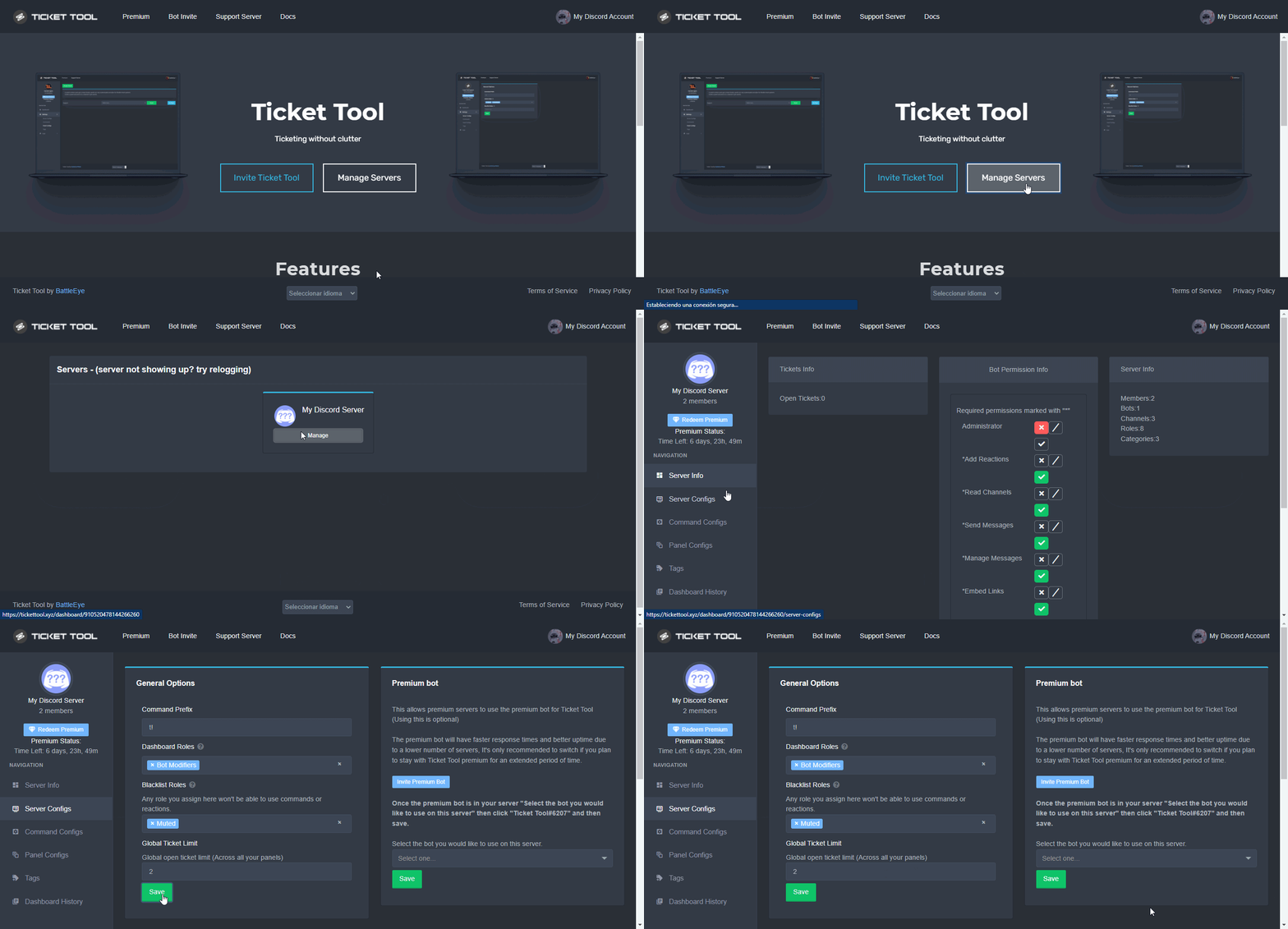
Global Ticket Limit
Unlike the regular Ticket Limit, the global limit will limit the amount of tickets a user can create at the same time for ALL Panels. When a ticket is closed again, the limit resets for that user.
To customize it head over to your Dashboard --> Server Configs --> Global Ticket Limit
Note:
This is not a limit for how many tickets a user can open at all times or how many tickets you can have open on the server in total. This is just a limit per user for open tickets.
 shut bolt
Sure :)
novel lintel
Thank you! For the free plan I can do as many as I like right? just clarifying
shut bolt
novel lintel
Thank you! For the free plan I can do as many as I like right? just clarifying
Yup, you can create as many tickets as you want, the only limit is Discord's channels per server limit, that allows each server to have only 500 channels
novel lintel
Understood, my limit was 250 anyways lol thanks
Is it possible to create private threads with this bot if I have the server boost?
shut bolt
Currently TT doesn't support threads, apologies
novel lintel
No problem
 honest plume
hello!! my ticket tool won’t show me other servers to put my ticket thing in do you know what i can do about that?
humble sequoiaBOT
Don't see your server in the dashboard?
You will possibly need to relog. Look below to see steps on how to relog.
How to relog the Dashboard.
First, you will need to go to the dashboard. Once your there, click on your avatar on the top right. after you clicked it, you will see button that says Logout. You must click that. Once you have logged out, you can log back in.
Note:
You need one of these 3 things to access the dashboard.
1. Server Owner (Level: 6)
2. Server Administrator (Level: 4)
3. Dashboard Role (Level: 2)
You can check your level using $level on your Discord Server
See the GIF below on how to relog:
iron nightBOT
Gave 1 Rep to Ticket Tool (current: #6 - 200)
 edgy rock
Hi there. I only finished setting up ticket tool yesterday and it seems we have had bots join: they seem to go straight to open a ticket I just had like 20 open. Any advice? I don’t know how those bots work but assume the designed to add reactions or click on any buttons as they enter?
humble sequoiaBOT
━━ moved to ticket ━━
 lofty quarry
Hello everyone! Is there a way to sync the ticket that the bot has created with the category perms? Seems like it always creates an unsynced thread
 burnt roost
hi! i was wondering why emotes from servers wasnt working in ticket message embeds?
mystic hound
burnt roost
hi! i was wondering why emotes from servers wasnt working in ticket message emb...
Hey, you have to input the emote ID in the required field, you can use $id :emoji to get the ID
burnt roost
mystic hound
Hey, you have to input the emote ID in the required field, you can use `$id :emo...
ok! ill try that ty
iron nightBOT
Gave 1 Rep to Light (current: #2 - 232)
mystic hound
lofty quarry
Hello everyone! Is there a way to sync the ticket that the bot has created with ...
rather than attempting to sync with a category, can set the permissions you want roles to have in newly created tickets under permission options of your panel configs
lofty quarry
mystic hound
rather than attempting to sync with a category, can set the permissions you want...
So I tried doing that but some of the permission options are missing.
My ideal scenario would be a mod would create a ticket for the supported user then grant him permission to view and interact the ticket thread. This is so we avoid tickets creation that aren't actually worth of escalation. Is there an alternative?
burnt roost
mystic hound
Hey, you have to input the emote ID in the required field, you can use `$id :emo...
wait so in the embed is it {the emote id} or like?
mystic hound
burnt roost
wait so in the embed is it {the emote id} or like?
<emoteID>, when you run the ID command, it gives you the exact output to copy paste; for instance
$id 
humble sequoiaBOT
<:LightLovesCookies:894703841520541757>
mystic hound
so you'd then copy paste  to your embed field
mystic hound
lofty quarry
So I tried doing that but some of the permission options are missing.
My ideal...
you want only the moderator creating the ticket and the user being assisted to view the channel?
burnt roost
mystic hound
<emoteID>, when you run the ID command, it gives you the exact output to copy pa...
ty!
lofty quarry
mystic hound
you want only the moderator creating the ticket and the user being assisted to ...
The mod will create the ticket then grant perms for the assisted user to be able to interact with the thread.
As to avoid ticket spam and tickets not worthy of escalation 🙂
mystic hound
Do you want the other support members in your server to also view the ticket, or just the mod creating the ticket?
lofty quarry
The former! So all support members.
mystic hound
Alright then, you could make use of our command style ticket option. Have the bot monitor a staff only channel for commands, then run $new ID of the user in said channel, this will create a ticket for the user (I can explain in detail if required)
lofty quarry
😮 yes please that would really solve all my issues!
mystic hound
Alright, so under your panel settings; you'll find an option called Command Style Tickets, like so

just set the channel to monitor for command... field to a channel viewable only to staff, then instruct your moderators to run $new userID whenever they want to create a ticket for a user
 wooden basalt
Guys I’ve ticket tool premium invite link but I didn’t buy it how’s that possible?
And it works can someone explain it
copper owl
yeah no it most likely doesnt work with premium
you can invite the bot
but it wont do anything without premium
 copper owl
$epmessage
humble sequoiaBOT
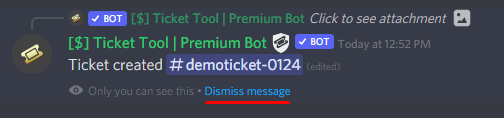
How can I edit/disable the ephemeral message?
These pop ups can only be seen by the user who triggered a certain action, like creating a ticket. They cannot be edited or disabled, as they are a discord requirement that is set by the developer of any bot. The ephemeral messages can be removed by pressing the little blue Dismiss message text, or by restarting your discord client.
 copper owl
@empty swan ^^
 empty swan
copper owl
<@!393794195187564545> ^^
empty swan
copper owl
<@!393794195187564545> ^^
Thank you, I would like to change the nomenclature from ticket to commission
iron nightBOT
Gave 1 Rep to Neptune (current: #1 - 411)
copper owl
humble sequoia
well, as explained here, changing it is not possible
empty swan
=/
 pale garnet
Would this be a good place to ask about premium features?
copper owl
pale garnet
Would this be a good place to ask about premium features?
this would be the perfect place, or even #🎫│make-a-ticket if you want a support member to directly answer you
pale garnet
copper owl
this would be the perfect place, or even <#571706435449257997> if you want a sup...
Is there like a list of features
 is premium
humble sequoiaBOT
is premium
humble sequoiaBOT
Faster Premium Bot
Automatic Transcripts
Full Customization
Custom Buttons
Direct Messages
Ticket Automation
Multipanels
Premium Support
You can purchase premium here:
Price
$6 - Monthly
$66 - Yearly
Premium
copper owl
this is a short list ^^
empty swan
copper owl
well, as explained here, changing it is not possible
Thanks for the quick response
iron nightBOT
@empty swan :: You can't rep Neptune#6814 for 56 minutes and 27 seconds. Try coming back later?
pale garnet
copper owl
this is a short list ^^
Thank you
iron nightBOT
Gave 1 Rep to Neptune (current: #1 - 412)
 delicate grove
shut bolt
delicate grove
shut bolt
?
jade topaz
How can I change this text?
 humble sequoiaBOT
**Panel Message**
The panel message is where people react to make a ticket. To customize it head over to your Dashboard --> Panel Configs -> Settings -> Panel Options -> Edit Panel Message
 copper owl
@jade topaz ^^
copper owl
$buttons
humble sequoiaBOT

Buttons
The new Discord Buttons allow for a much smoother and convenient experience. They reduce lag and work much better than emojis. With ticket tool you can edit all the buttons however you like! Buttons can show emojis, text and can have 4 different colors.
Where can I edit them?
Dashboard -> Panel Configs -> <Settings> -> Button Options -> <Setting>
 copper owl
make the close ticket button support only, or disable @everyone and enable the roles you want to be able to close tickets
 vapid apex
how i can make a ticket ?
humble sequoiaBOT
━━ moved to ticket ━━
pale garnet
Oh Neptune does any other bot mess with channel perms that would effect this one
jade topaz
Nothing putting in Allowed or Disabled means all roles?
 copper owl
pale garnet
Oh Neptune does any other bot mess with channel perms that would effect this one
copper owl
pale garnet
Oh Neptune does any other bot mess with channel perms that would effect this one
unless you set it as that, it shouldnt
copper owl
jade topaz
Nothing putting in Allowed or Disabled means all roles?
i dont understand your question
if you dont input anything in those boxes, then everyone can close tickets
wooden basalt
copper owl
but it wont do anything without premium
It works premium
Everything in premium worked!
copper owl
Again, it most likely won't work unless you have premium
not sure if you have the free trial activated
wooden basalt
Bro I’m telling it is working idk how I didn’t pay or anything
wooden basalt
copper owl
not sure if you have the free trial activated
Nope I didn’t
My friend invited it to the server and IT WORKS
R u making me a lier?
copper owl
i cant physically make you a liar
only thing i can tell you is that premium features require premium
not sure what youve tried to do, and what your friend has done, but thats what I know
wooden basalt
Uhm okay at least I’ve premium bot that works for free
copper owl
which server is this?
wooden basalt
Jendeukie’s Shop Server
copper owl
yeah youre using the free bot
wooden basalt
Why did u join its private server excuse me!
wooden basalt
copper owl
yeah youre using the free bot
Nah it works
copper owl
yeah it works because it's the free bot
it has the white pfp
so glad to hear everything is working fine
wooden basalt
No
I had the golden pfp
But I’ve kicked it before u join minute ago
I’ll show u wait
pale garnet
I’m enjoying this ngl
copper owl
wooden basalt
But I’ve kicked it before u join minute ago
im serious not sure why you're persistent on this
like
even if you do have the premium bot working for free
why would you even tell us? we can just fix that issue immediately and your premium bot stops working
copper owl
wooden basalt
Jendeukie’s Shop Server
you even gave us the server name
wooden basalt
That’s what I want to stop
wooden basalt
copper owl
you even gave us the server name
BUT I DID NOT ONOW U WILL JOIN SHUSH
copper owl
All i can tell you is that if youre using the premium bot

it would say so here
So yeah. Ill stop going back and forth because frankly you dont have the premium bot without premium
copper owl
im not sure if you know but you can invite the premium bot without premium
but it literally wont do anything
you also cant use any premium features unless you have premium
copper owl
Well thankfully that's incorrect but we can agree to disagree
scenic plinth
Ok
copper owl
I understood what you said multiple times already
wooden basalt
Ok bye
copper owl
copper owl
im not sure if you know but you can invite the premium bot without premium
Ive also noticed that you may have skipped over this
and theyre gone
pale garnet
copper owl
and theyre gone
So is there actually a trial
pale garnet
That’s a first
copper owl
it's 7 days
prime bridgeBOT
 Successful bans:
 1
 Unsuccessful bans:
 0
 Reason: scammer
 Moderator: @unique junco
scenic plinth
That's tragic.
hard cape
What is tragic?
copper owl
the ban
shut bolt
And the mod
copper owl
shut bolt
And the mod
the question would be "who is tragic" tho 👀
hard cape
Lol
hard cape
And a mod get banned?
 formal jewel
Hi
 velvet geode
humble sequoiaBOT
velvet geode
humble sequoiaBOT
We would love to help you but, if you don't tell us what you need help with we can't help you :(
 eager monolith
Hello, sorry i'm french and I have a problème whith bot, i have a really dificulty for english and i dont enderstend the chose....
What is a command fort french explication please ?
humble sequoiaBOT

L'équipe du support Français
Cher client,
Si vous avez besoin d'aide, ouvriez un ticket pour le support Français s'il vous plaît.
Allez au #🎫│make-a-ticket et tapez sur le button contenant l'emoji 🇫🇷
eager monolith
😭🤣 MERCI !
mystic hound
We don't have an Italian support team, but you can make a ticket in #🎫│make-a-ticket and our team can try helping you via a translator
 wind carbon
humble sequoiaBOT
wind carbon
humble sequoiaBOT
━━ moved to ticket ━━
copper owl
pablito 👀
shut bolt
copper owl
pablito 👀
You are lurking the ticket aren't you 👀
shut bolt
copper owl
i totally understand spanish 👀
Yes you do 👀
copper owl
👀
 slender sky
To go from the free bot to the premium do I need to kick the bot and re-invite it? I'm not finding a way to invite the premium one, or is it just one bot now that can recognize if the server has premium or not?
 smoky scaffold
can admins of the server all see the dashboard and customise it or is it tied to the user who added it
sorry for the @ s but need help ASAP @scenic plinth @radiant moss
 radiant moss
smoky scaffold
can admins of the server all see the dashboard and customise it or is it tied to...
radiant moss
smoky scaffold
can admins of the server all see the dashboard and customise it or is it tied to...
Anyone with dashbaord role, administrative, or owner
and please dont ping support memebers
smoky scaffold
radiant moss
Anyone with dashbaord role, administrative, or owner
perfect also when you buy premium do you kick and re-invite the bot (also sorry for the @ )
radiant moss
You can invite the premium bot if you want. But you don't have to re-invite the bot
slender sky
Does the free bot work with premium features if you have bought the premium subscription?
I know before it didn't, but that was like a year or two ago I last had to deal with this
Just trying to understand correctly, so forgive me if I'm not understanding something obvious lol
I don't want to ping or make a ticket but this is an answer I do need somewhat posthaste.
radiant moss
slender sky
Does the free bot work with premium features if you have bought the premium subs...
Yes it does
radiant moss
slender sky
I know before it didn't, but that was like a year or two ago I last had to deal ...
From my knowledge it always did work, even before the premium bot was even a thing
slender sky
Awhile ago it didn't let me use premium features with the "free' bot. It would fail to update everything and not let me send panels that had premium features toggled to a chat. Thank you though. I appreciate it.
 golden shoal
i forgot how to add multiple buttons to embedded panel
any help would be greatly appreciated it
found it sorry...
 subtle crest
Owner
 balmy skiff
I am trying to use the bot I am trying to us the command $new (user) (reason) but it isnt working can someone tell me what I am doing wrong?
humble sequoiaBOT
━━ moved to ticket ━━
shut bolt
Hey there @young bay, a member of the billing team will be with you as soon as they see the ticket, please be patient :)
 pale perch
Hello uh
Im admin in a server and I want to add role(Moderator) to be able to check tickets and that
But idk how
 open spire
Hello
I have a problem with your bot
I don't know if I put him in the ticket room
What do I do?
 bronze depot
pale perch
Hello uh
Im admin in a server and I want to add role(Moderator) to be able to ch...
bronze depot
pale perch
Hello uh
Im admin in a server and I want to add role(Moderator) to be able to ch...
Do you first of all have access to the bot thru website?
bronze depot
open spire
I don't know if I put him in the ticket room
What perms does the bot have? image preview please
 rare tapir
is their any way i can see all transcripts online on the dashboard?
copper owl
rare tapir
is their any way i can see all transcripts online on the dashboard?
Not a thing no, theyre all stored within the discord server and only the server
we dont store them anywhere in the bot, or the website. It's all within your servers basically
bronze depot
Since the transcripts are private for the server, it also means that TicketTool staff don't have anything to do with it on the website.
copper owl
bronze depot
Since the transcripts are private for the server, it also means that TicketTool ...
Basically yeah
 toxic musk
My bot says "BOT ERROR" I won't let me send panels to a channel, what do i do?
shut bolt
Hey there
humble sequoiaBOT
How to disable the premium bot
To disable the premium bot you will have to go to the Dashboard -> Server Configs -> Premium bot -> And on the right-hand side select the primary free bot in the drop down menu.
Premium features will still work on the normal bot.

TicketTool.xyz - Ticketing without clutter
shut bolt
Try this
prime bridgeBOT
Successful bans: 1
Unsuccessful bans: 0
Reason: super original nitro scam
Moderator: @mystic hound
jade topaz
I feel annoying asking so many questions.... Is there any way to change what this says?
 shut bolt
Nop
jade topaz

novel lintel
Is it possible to have a notification sent to a channel every time a ticket is created?
copper owl
novel lintel
Is it possible to have a notification sent to a channel every time a ticket is c...
Not really.
You can either have the ticket ping a role or user once it opens, or you can set logs
I guess you could set logs and then have your notifications set to "all messages" but i guess that'd be shooting yourself in the foot, since you'd restrict yourself to only one type of log, unless you want to get spammed
iron nightBOT
Gave 1 Rep to Neptune (current: #1 - 415)
copper owl
novel lintel
I will have the tickets tag the support team, thank you!
No problem, do you need help with this?
if so, just run $help ping in your server. should explain it pretty thoroughly
 inland horizon
Hello, I am Spanish and I have a problem with the bot that does not allow me to delete the channels that it has created. But I don't know much English, is there any Spanish?
copper owl
inland horizon
Hello, I am Spanish and I have a problem with the bot that does not allow me to ...
we have a spanish support team if you want.
novel lintel
Thank you
copper owl
$esticket
humble sequoiaBOT

Equipo de Soporte Español
Querido usuario, si está buscando ayuda, por favor abra un ticket para contactar al Equipo de Soporte Español. Diríjase a #🎫│make-a-ticket y presione el botón :flag_es:.
novel lintel
Can I tag a role in the embed message?
inland horizon
copper owl
we have a spanish support team if you want.
Okay thanks
iron nightBOT
Gave 1 Rep to Neptune (current: #1 - 416)
copper owl
novel lintel
Can I tag a role in the embed message?
yeah but it wont send a notification to anyone
novel lintel
I was asking if i can put it in here
novel lintel
But it sent late as hell
copper owl
alright makes sense
novel lintel
lovely AT&T
copper owl
yeah no it has to be in message text to actually notify your staff
novel lintel
Kk thanks a lot
copper owl
otherwise it would just look nice in the embed without any purpose
novel lintel
Yeah true I just forgot that's what embeds do lol
 autumn pike
is the bot open source?
copper owl
autumn pike
is the bot open source?
Nope
autumn pike
why not
copper owl
autumn pike
why not
let me answer this with a question, why should it be open source?
autumn pike
because you can customize it by yourself and make it an all in one bot
copper owl
yeah but the dev doesnt want it to be open source
there's plenty of open source ticket bots out there, like modmail
autumn pike
yeah but that's not so cool as @pseudo glen
copper owl
sorry, that's the option you have currently (that im aware of)
 cosmic vigil
Hello
I have a problem with the robot
When I send a message ticket Do not reach the chat I want
Do you have a solution?
cosmic vigil
Yes
copper owl
cosmic vigil
Yes
that doesnt really answer my question
copper owl
copper owl
premium or free?
it's either premium or free
yes isnt really an answer there
cosmic vigil
Does anyone know the solution?
copper owl
Me
If you could just answer the question I asked you
I could most likely, probably, help you out
cosmic vigil
Do you mean the free version or the premium version?
copper owl
Yup
copper owl
first off no need to ping. do you speak arabic?
cosmic vigil
Yes
copper owl
$arprembot
humble sequoiaBOT
كيفية تعطيل بوت البريميوم
لتعطيل بوت البريميوم ، سيتعين عليك الانتقال إلى
Dashboard -> Server Configs -> Premium bot
ستظل ميزات البريميوم تعمل على البوت المجاني.
 copper owl
تأكد الارشادات هون @cosmic vigil
cosmic vigil
آسف والله
copper owl
نعم بعرف اتكلم عربي
cosmic vigil
شوف مشكلتي هي
من ارسل كلام التكت ما يوصل للشات
الي ابيه
كنت استخدم نسخه البريميوم التجريبيه و وقفتها
بس من رجعت للنسخه المجانيه
ما يوصل الكلام
copper owl
في شي رسالة error ؟
cosmic vigil
لا كل شي ما يوصل
copper owl
يعني في رسالة error اذا ما عم يرسل
 copper owl
صديقي لزم تختار روم ت ترسل اللوحة
 copper owl
ممكن ID السيرفر
copper owl
فيك تبعته هون
cosmic vigil
طيب
 waxen reef
.
 analog cove
hey
shut bolt
Hi
analog cove
Does anyone know if Ticket Tool can have a custom Avatar and/or name with the premium purchase?
humble sequoiaBOT

Ticket Tool avatar/status Customisation
@pseudo glen is like another discord user; you can't control its avatar icon or status, and we cannot change it for a specific server.
However, on your server, you can change the bot's nickname

 cerulean sparrow
how do i add a support role so others can see the tickets?
humble sequoiaBOT
How to let support team see into a ticket
About support roles
A support role lets your support team see into tickets with out having to add them manually to each and every ticket.
You can add as many support roles as you like per panel.
NOTE that the way discord works all admins can see into tickets regardless of this.
How to set a support role
To set a Support role go to the Dashboard -> Panel Configs -> Settings -> General Options -> Support Team Roles.
NOTE that the support role will not be able to see into tickets that are already created..
cerulean sparrow
wow that was fast thanks
shut bolt
Sure bro
 solid stream
$help support
humble sequoiaBOT
How to let support team see into a ticket
About support roles
A support role lets your support team see into tickets with out having to add them manually to each and every ticket.
You can add as many support roles as you like per panel.
NOTE that the way discord works all admins can see into tickets regardless of this.
How to set a support role
To set a Support role go to the Dashboard -> Panel Configs -> Settings -> General Options -> Support Team Roles.

NOTE that the support role will not be able to see into tickets that are already created..
solid stream
I've updated the support commands to include the correct gifs.
fast sable
What does premium bot do that normal bot doesnt?
humble sequoiaBOT
Faster Premium Bot
Automatic Transcripts
Full Customization
Custom Buttons
Direct Messages
Ticket Automation
Multipanels
Premium Support
You can purchase premium here:
Price
$6 - Monthly
$66 - Yearly
Premium
shut bolt
@fast sable
fast sable
Thanks @shut bolt
iron nightBOT
Gave 1 Rep to Yareaj_ (current: #3 - 222)
shut bolt
Sure :)
 azure ocean
slender sky
azure ocean
slender sky
Is there a way to make a panel with multiple buttons to other panels through the dashboard? Or do I need to use the commands through discord
 slender sky
bake a cake is a joke by discord.


 slender sky
Have you logged out on the website and back in
prime bridgeBOT
Successful bans: 1
Unsuccessful bans: 0
Reason: scam
Moderator: @mystic hound
bronze depot
 lone carbon
still need help?
lone carbon
nah mate i need server admin to give me lvl 4 role thanks anyway
jade topaz
I from Brasil I no speak english
mystic hound
$ptticket
humble sequoiaBOT

Equipe de Suporte │ Português
Caro usuário,
Se você está procurando por ajuda, abra um ticket para entrar em contato com a Equipe de Suporte em Português. Vá para o canal: #🎫│make-a-ticket e pressione o botão: :flag_br:
 void cloak
Hello everyone, I'm trying to setup the bot in my communities discord server. I've got it all configured the way we'd like, except we've hit a snag... When a member creates a ticket, they and everyone else in the server can see their open ticket. I configured some more and I thought I resolved the issue, but now when they create a ticket, the user that created it cannot see it, thankfully nobody else can either! lol. Any input would be greatly appreciated.
bronze depot
void cloak
Hello everyone, I'm trying to setup the bot in my communities discord server. I'...
If you let me take a look at it, i would be more than happy to help you
void cloak
bronze depot
If you let me take a look at it, i would be more than happy to help you
Would you have any ideas as to why that would be occurring? I won't be able to grant access to the panel or anything, it's not my server. Just setting it up for a community.
bronze depot
i have an idea it isn't the bot that is the issue here
but i want to take a look before i can say for sure what the issue is
@void cloak
void cloak
If you'd like, you can call me on Discord and I can screen share?