#🆘│community-support
1 messages · Page 365 of 1
 copper owl
 neat vigil
 jade topaz
Thank you! For typing Hello!
 iron nightBOT
Gave 1 Rep to Neptune (current: #1 - 365)
copper owl
youre welcome!
 forest ledge
who i resolve this?

 humble sequoiaBOT
How to disable the premium bot
To disable the premium bot you will have to go to the Dashboard -> Server Configs -> Premium bot -> And on the right-hand side select the primary free bot in the drop down menu.
Premium features will still work on the normal bot.
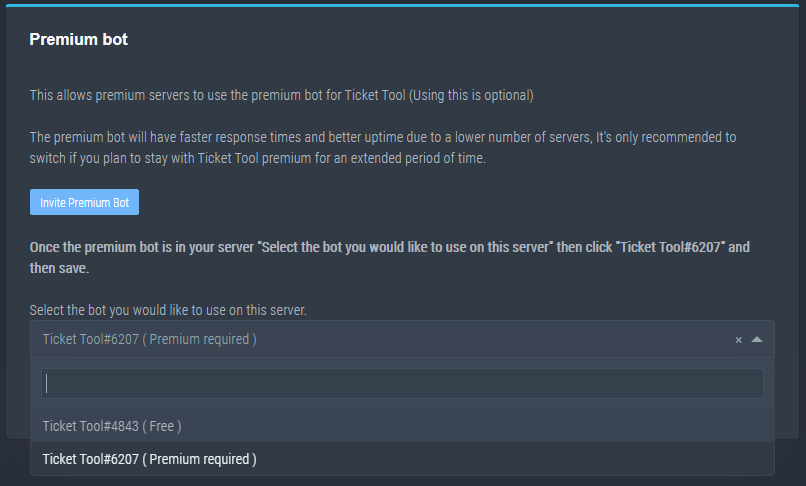
TicketTool.xyz - Ticketing without clutter


 distant holly
 scarlet apex
i saw this bot can do suggestions ( top.gg)says it how i can set up it?
scarlet apex
i saw this bot can do suggestions ( top.gg)says it how i can set up it?
Search youtube brother
copper owl
scarlet apex
i saw this bot can do suggestions ( top.gg)says it how i can set up it?
just have a normal ticket panel
and people can open tickets to suggest, then you can save the transcript
 tacit elk
Hey all, setting up the ticket bot and it says to use a support role for those who are able to manage tickets - however I don't see an option to designate a specific role that can manage tickets - does this mean to literally create a role called "Support" and it will automatically pick it up? Thanks.
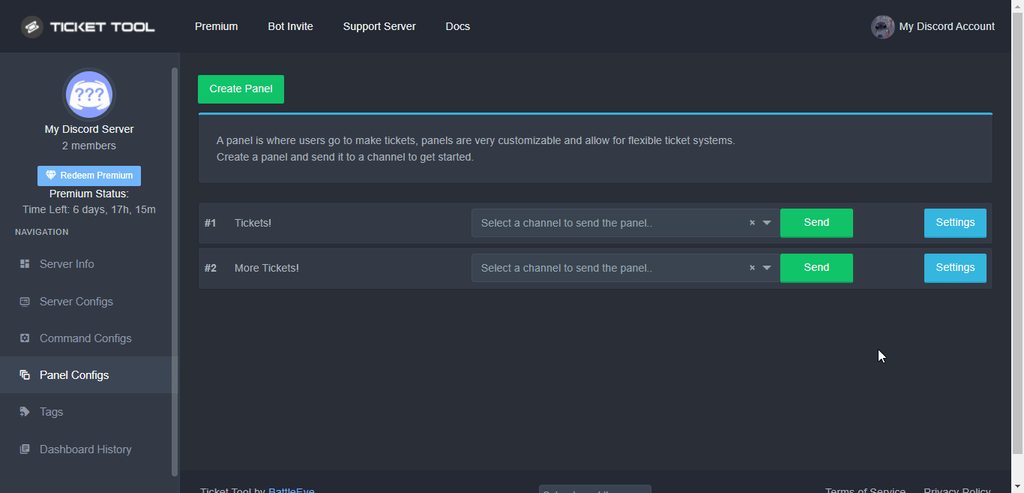 tacit elk
Thanks @shut bolt
iron nightBOT
Gave 1 Rep to Yareaj_ (current: #5 - 186)
 shut bolt
Sure
humble sequoiaBOT
Don't see your server in the dashboard?
You will possibly need to relog. Look below to see steps on how to relog.
How to relog the Dashboard.
First, you will need to go to the dashboard. Once your there, click on your avatar on the top right. after you clicked it, you will see button that says Logout. You must click that. Once you have logged out, you can log back in.
Note:
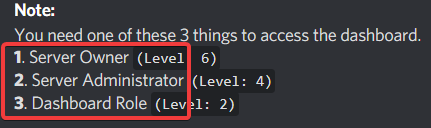
You need one of these 3 things to access the dashboard.
1. Server Owner (Level: 6)
2. Server Administrator (Level: 4)
3. Dashboard Role (Level: 2)
You can check your level using $level on your Discord Server
See the GIF below on how to relog:

 scenic plinth
Try this^
 woven swan
Thank you for that 🙂
woven swan
scenic plinth
Try this^
Thank you 🙂
iron nightBOT
Gave 1 Rep to kitkat (current: #6 - 169)
woven swan
is there a way to force levels on my user
 light flower
How to we add a description to our ticket
copper owl
woven swan
is there a way to force levels on my user
force levels..? can you elaborate
copper owl
light flower
How to we add a description to our ticket
you mean the ticket message or panel message?
woven swan
copper owl
force levels..? can you elaborate
Note:
You need one of these 3 things to access the dashboard.
- Server Owner (Level: 6)
- Server Administrator (Level: 4)
- Dashboard Role (Level: 2)
In order to access the dashboard
woven swan
humble sequoia
I need help with this @copper owl I am level 0
copper owl
That's not something i can do
woven swan
Correct
copper owl
you'll have to talk with a server admin or the owner
woven swan
So I am here for support
copper owl
You're asking the wrong people
we can't give you permissions to the dashboard
you'll have to ask the admin of your server or the owner to provide you with the permissions
jade topaz
why do i do so when a ticket is opened it tags a role i have
copper owl
$help ping
humble sequoiaBOT
How to make Ticket Tool ping a role
To make ticket tool ping a role when a ticket is opened, go to the Dashboard -> Panel Configs -> Settings -> Ticket Options -> Ticket Message -> Message Text and do this:
{@Role name} This is case sensitive and the role must have @mentions enabled
 copper owl
@jade topaz
jade topaz
copper owl
<@456226577798135808>
Thanks
iron nightBOT
Gave 1 Rep to Neptune (current: #1 - 366)
copper owl
anytime
 tawny furnace
Anyone else notice that the markdown formatting for inline code blocks isn't working correctly with :emoji: tags?
For example: 🛡️
I typed {backtick colon shield colon backtick}
 solid stream
It's showing the Unicode version of the emoji, if you do a full block with 3 backticks it will show what you want.
tawny furnace
That's a bother
solid stream
if you're using your phones emoji keyboard it would place the unicode emoji
tawny furnace
It also breaks if I do :this:
tawny furnace
solid stream
if you're using your phones emoji keyboard it would place the unicode emoji
No, text only
tawny furnace
tawny furnace
It also breaks if I do :`this`:
This is the one that really jumps out as a bug
 tawny furnace
Anyways, not really on-topic here but it seemed like a good place to ask
solid stream
Windows desktop seems to be working 🙂
 copper owl
you cannot unfortunately
solid stream
At this point in time that message can't be changed, in the future I'll be looking into allowing every message to be changed. ( even errors )
 heady nova
Okeyyy.... thaanx
jade topaz
Are you doing any discount on Black Friday?
shut bolt
jade topaz
Are you doing any discount on Black Friday?
No clue tbh
 elder bear
!help user
 bronze comet
?
jade topaz
If a transcript has been sent to me but the bot's DM history has been cleared, is there any form of retrieving that transcript?
shut bolt
jade topaz
If a transcript has been sent to me but the bot's DM history has been cleared, i...
Hmmm
Yup
Use Ctrl K (Quick Switcher)
And then open the bot's DMs
The transcript will be there
jade topaz
I did not describe it well, apologies.
After going into the bot's DMs, there is no message there however I do not remember deleting the transcript
shut bolt
Oh, I see
Two options
Option #1
You are looking in the wrong bot, both bots could have send you the transcript
So check both DMs
jade topaz
What would the second option be?
shut bolt
jade topaz
What would the second option be?
That you had your DMs closed and that's why you didn't received the transcript
jade topaz
Ah I see, the issue lies where I remember having the DM, but after a while the message history has been deleted. But thank you for the help, I think it might just be gone
shut bolt
Rare, sure man
Well, there is a third option...
That the DM transcript option was disabled for that panel
 tribal cedar
 hushed linden
can i ask some
hushed linden
can i ask some
Just ask away and anyone active will answer.
 orchid owl
Sir , For me I am refreshing the Ticket Tool .xyz / manage server but nothing is coming I added it in my server also pls help
@weak oasis ? Can you help pls
@radiant moss ?Can you pls help
@eager cargo Sir can you help?
humble sequoiaBOT
Don't see your server in the dashboard?
You will possibly need to relog. Look below to see steps on how to relog.
How to relog the Dashboard.
First, you will need to go to the dashboard. Once your there, click on your avatar on the top right. after you clicked it, you will see button that says Logout. You must click that. Once you have logged out, you can log back in.
Note:
You need one of these 3 things to access the dashboard.
1. Server Owner (Level: 6)
2. Server Administrator (Level: 4)
3. Dashboard Role (Level: 2)
You can check your level using $level on your Discord Server
See the GIF below on how to relog:
 prime bridgeBOT
 KnightZasGang#0048 has been warned!

 They were notified via dms.
 eager cargo
humble sequoia
eager cargo
humble sequoia
^^
orchid owl
eager cargo
^^
Thank you so much sir
iron nightBOT
Gave 1 Rep to Quo (current: #3 - 219)
hushed linden
eager cargo
^^
how to metion roles when people make ticket?
eager cargo
$help ping
humble sequoiaBOT
How to make Ticket Tool ping a role
To make ticket tool ping a role when a ticket is opened, go to the Dashboard -> Panel Configs -> Settings -> Ticket Options -> Ticket Message -> Message Text and do this:
{@Role name} This is case sensitive and the role must have @mentions enabled
hushed linden
thanks
 mortal bolt
the bot isn’t responding at all anymore in my server. i had switched from premium ticket to regular and now i can’t use the standard one at all. nothing when i do a ?help. i kicked it and brought it back, i’ve checked all the permissions and i’m pretty certain they’re right. not sure what to try next?
 mortal bolt
is that page only accessible by the one who paid for the premium?
mortal bolt
oh alright great. thanks!
prime bridgeBOT
Successful bans: 1
 Unsuccessful bans:
 0
 Reason: ad
 Moderator: @mystic hound
 coral arrow
hey, for my server i want people to verify through tickets and i want everyone to be able to message in the tickets but people with a certain role (aka "verified") cannot message
but i just cant seem to make a ticket so i can see it when im @/everyone
yk?
heres what i mean

i hope that makes sense T-T
humble sequoiaBOT
Using the View as Role feature.
The View as Role discord feature will not work for testing ticket tool. Ticket Tool opens permissions with user permissions & not role permissions.
 plain surge
You will need am actual person to test it out, or you can just look at the members tab
It should show who can see the ticket, (make sure you can also see offline users)
coral arrow
okay got it ^^ thank u sm! 

humble sequoiaBOT
How to hide tickets from everyone
Head over to your Dashboard -> Panel Configs -> Settings --> General Options -> Edit Everyone Roles Opened Permissions

NOTE that @everyone can type aswell if it has permissions to send messages
plain surge
@coral arrow in here are the permissions that Ticket tool gives when a ticket is made
coral arrow
plain surge
<@433698133805891594> in here are the permissions that Ticket tool gives when a ...
^-^ thank u !!
iron nightBOT
Gave 1 Rep to D̸̞̉҉̢̩͠o͛ͫ̚m͈̕͜҉̘̱̟☆̞͈͠҉ͪ̈́͘҉̷̥̐ (current: #23 - 24)
plain surge
It assigns permission per user, so "Verified" role won't be able to view or type in the ticket if you have the "everyone role opened" permissions set
coral arrow
okayy let me try that
plain surge
They are set up correctly as default
You can try using $new [user] and create a ticket for a not verified user.
You should then see the admins, and that user in the members tab
coral arrow
alrightyy
plain surge
$help commands
humble sequoiaBOT
() = optional
[] = required
*==================================
Ticket Commands
==================================*
_ _
`$add [User] (channel)`
Description: Adding additional users to a ticket
Aliases: none
`$remove [User] (channel)`
Description: Removing users from a ticket
Aliases: none
`$close`
Description: Closing tickets
Aliases: none
`$open`
Description: Opening closed tickets
Aliases: none
`$delete`
Description: Deleting tickets
Aliases: none
`$rename`
Description: Renaming tickets/channels
Aliases: none
`$transcript (send channel)`
Description: Creating transcripts
Aliases: none
`$new (user) (reason)`
Description: Creating tickets in a monitored channel (when command style is enabled)
Aliases: none
`$claim`
Description: Claiming tickets (when claim is enabled)
Aliases: "unclaim"
_ _
*==================================
General Commands
==================================*
_ _
`$help (Help Options)`
Description: Help Command
Aliases: none
`$debug`
Description: Debuging issues with running Ticket Tool
Aliases: none
`$id (@role/@user/#channel/emoji)`
Description: Converting roles, users, channels and emojis to ID
Aliases: "getid"
`$permlevel`
Description: Checking permission level with Ticket Tool
Aliases: "level"
`$ping`
Description: Checking response time with discord api
Aliases: none
`$vote (link | unlink | redeem) (user)`
Description: Earn premium by voting on top.gg or Discord.boats
Aliases: "votes"
plain surge
A list of commands for Ticket Tool


 craggy geyser
Were those tickets created before you added the settings on the dashboard?
 nocturne spruce
craggy geyser
Were those tickets created before you added the settings on the dashboard?
nocturne spruce
craggy geyser
Were those tickets created before you added the settings on the dashboard?
i waited a bit and it worked, sorry
i prob was too quick xd

this will only allow admins to close tickets right?
copper owl
Correct
nocturne spruce
thxxxx
copper owl
anytime
 white geyser
im having issues with the bot
i go tot he dashboard it says its nots inviteds to my server or something wrong with the statues
humble sequoiaBOT
Don't see your server in the dashboard?
You will possibly need to relog. Look below to see steps on how to relog.
How to relog the Dashboard.
First, you will need to go to the dashboard. Once your there, click on your avatar on the top right. after you clicked it, you will see button that says Logout. You must click that. Once you have logged out, you can log back in.
Note:
You need one of these 3 things to access the dashboard.
1. Server Owner (Level: 6)
2. Server Administrator (Level: 4)
3. Dashboard Role (Level: 2)
You can check your level using $level on your Discord Server
See the GIF below on how to relog:
copper owl
try that
 pseudo shoal
One message removed from a suspended account.
copper owl
humble sequoia
@white geyser
copper owl
pseudo shoal
One message removed from a suspended account.
you want to invite the bot or set it up?
white geyser
copper owl
<@!735499548398714880>
ill try that
pseudo shoal
copper owl
you want to invite the bot or set it up?
One message removed from a suspended account.
white geyser
@copper owl thanks it worled
iron nightBOT
Gave 1 Rep to Neptune (current: #1 - 369)
pseudo shoal
One message removed from a suspended account.
One message removed from a suspended account.
copper owl
yeah no can do
if you dont understand english 100% thats no issue
you can open a spanish ticket in #🎫│make-a-ticket and wait for our spanish team to help you
pseudo shoal
One message removed from a suspended account.
copper owl
otherwise you can check the following
pseudo shoal
One message removed from a suspended account.
humble sequoiaBOT
How Do I setup Ticket Tool
You can check our documentation here, you can also check #573205317870157855 for the basic setup.
Our documentation contains all the info you need about the bot to be able to setup and configure the bot however you like.
pseudo shoal
One message removed from a suspended account.
 proven veldt
How do i create ticket
humble sequoiaBOT
How Do I setup Ticket Tool
You can check our documentation here, you can also check #573205317870157855 for the basic setup.
Our documentation contains all the info you need about the bot to be able to setup and configure the bot however you like.
copper owl
look at this ^^
 honest helm
,.
 old knoll
Hey guys, does anybody whether it's currently possible to not only send the **transcript **of a closed ticket to the user via DM (which works lovely), but also **include **the last written message? Often that last message is the most important piece of information next to the ticket being closed, but I neither find a variable nor an option for it. Cheers
 unreal elbow
old knoll
Hey guys, does anybody whether it's currently possible to not only send the **tr...
unreal elbow
old knoll
Hey guys, does anybody whether it's currently possible to not only send the **tr...
ich glaub nicht
old knoll

 cyan urchin
quick question, when generating a transcript is there a msg limit? or can I generate a transcript no matter how long the channel was?
copper owl
cyan urchin
quick question, when generating a transcript is there a msg limit? or can I gene...
1k messages if im not mistaken
 severe path
old knoll
Hey guys, does anybody whether it's currently possible to not only send the **tr...
severe path
old knoll
Hey guys, does anybody whether it's currently possible to not only send the **tr...
Es wird alles bis zum schließen des Ticket mit gesendet normaler weise
cyan urchin
I thought I recalled a msg limit but I can’t seem to find info on it in the faq
unreal elbow
severe path
Es wird alles bis zum schließen des Ticket mit gesendet normaler weise
i thought there would be a 100 or 1000 message limit? comes up my mind rn lol
old knoll
severe path
Es wird alles bis zum schließen des Ticket mit gesendet normaler weise
Danke euch schon mal für die schnellen Antworten. Der Chatverlauf/Das Transkript ist vollständig, jedoch wäre es sehr praktisch die allerletzte Nachricht direkt zu sehen da viele nicht den Chatverlauf öffnen
iron nightBOT
Gave 1 Rep to Schlafendes24 (current: #22 - 29)
severe path
old knoll
Danke euch schon mal für die schnellen Antworten. Der Chatverlauf/Das Transkript...
Das ist nicht möglich, tut mir Leid 😅
cyan urchin
scenario, thinking of using ticket tool for hosting debates in my server, and it’d be really great to save the transcripts of the debates for later reviewing, so I’m worried about msg limits
unreal elbow
old knoll
Danke euch schon mal für die schnellen Antworten. Der Chatverlauf/Das Transkript...
verständlich 
naja, wenns einen interessiert dann klickt man drauf 😛
old knoll
severe path
Das ist nicht möglich, tut mir Leid 😅
Wie kann ich aktuell Feedback einreichen? Per Support Ticket fühlt sich falsch an :D
severe path
unreal elbow
i thought there would be a 100 or 1000 message limit? comes up my mind rn lol
Soweit ich weiß nicht. du kannst übrigens auch Deutsch schreiben
unreal elbow
cyan urchin
scenario, thinking of using ticket tool for hosting debates in my server, and it...
if there is one, its very high so you won‘t reach it xD
unreal elbow
severe path
Soweit ich weiß nicht. du kannst übrigens auch Deutsch schreiben
mache das nur weil die ursprüngliche frage halt englisch war xD
old knoll
 Dieser Chat ist jetzt deutsch
severe path
old knoll
Wie kann ich aktuell Feedback einreichen? Per Support Ticket fühlt sich falsch a...
normale user nicht, kann ich aber für dich gerne machen
unreal elbow
old knoll
<:SMOrc:268475618721660928> Dieser Chat ist jetzt deutsch <:SMOrc:2684756187216...
germanifiziert
 old knoll
severe path
normale user nicht, kann ich aber für dich gerne machen
old knoll
severe path
normale user nicht, kann ich aber für dich gerne machen
Das wäre super!!!
severe path

unreal elbow
old knoll
Wie kann ich aktuell Feedback einreichen? Per Support Ticket fühlt sich falsch a...
severe path
Ja, die verstehen alle den Kanal net
old knoll
unreal elbow
verständlich <:Doggolike:906631433165078528>
naja, wenns einen interessiert dan...
Stimme dir zu, aber wäre halt schon bequemer ;)
unreal elbow
severe path
Ja, die verstehen alle den Kanal net
verstehe reviews auch eher allgemein als bewertung für alles was das tickettool projekt betrifft xD
da wäre vllt support-reviews passender 
severe path

old knoll
unreal elbow
verstehe reviews auch eher allgemein als bewertung für alles was das tickettool ...
support-feedback fänd ich zb auch passender
Wie ging dieses $thank (username)? Ich hatte da kurz eine Info eingeblendet bekommen als ich geschrieben hatte
 old knoll
thanks @severe path
iron nightBOT
@old knoll :: You can't rep Schlafendes24#1234 for 53 minutes and 41 seconds. Try coming back later?
old knoll

severe path
iron night
Gave `1` Rep to **Schlafendes24** (current: `#22` - `29`)
Hast du schon gemacht 🙂
old knoll
🥳
severe path

old knoll
Dann danke nochmal vielmals, vielleicht darf ich mich bald über oben genanntes Feature freuen hehe Mein Wunsch bzgl. anpassbarem Transcript DM wurde bereits erhört 
severe path
old knoll
 dim pagoda
severe path
dim pagoda
severe path
Как в роли сделать этот значок?
 robust sandalBOT
dim pagoda
Как в роли сделать этот значок?
robust sandalBOT
dim pagoda
Как в роли сделать этот значок?
 skat_tttt
How do I make this icon in a role?
 Russian (ru) → English (en)
copper owl
Russian (ru) → English (en)
copper owl
/ru you need level 2 boosts in the server, then you'd get the option to add an icon in a role in Server Settings -> Roles
robust sandalBOT
Вам нужны усиления уровня 2 на сервере, затем вы получите возможность добавить значок в роли в Настройках сервера -> Роли
English (en) → Russian (ru)
copper owl
 scenic plinth
Hello
jade topaz
v
prime bridgeBOT
adamomannino1 has been silenced for 10m 
Reason: Posting Discord Server Invites
adamomannino1#1836 | 837717244204548216
scenic plinth
Hey you tried I'll give you that
 minor lagoon
is there a way to edit the panel message without sending it again?
 stuck storm
what does rate limited mean?
I keep getting this when I go to the ticket tool website

Never mind
It's back again
shut bolt
stuck storm
It's back again
That error is our Ddos attack protection
Basically if you spam click
You'll get temp banned from the website
It can be either spam clicking or just the filter detecting you as a not a human
shut bolt
stuck storm
How do I get unbanned>
Waiting, it can take from 1 hour up to a day, most cases I've seen are around 2 hours
stuck storm
I haven't been spam clicking anything
shut bolt
stuck storm
I haven't been spam clicking anything
Well, then just the filter catching you
shut bolt
Sure bro
humble sequoiaBOT
Don't see your server in the dashboard?
You will possibly need to relog. Look below to see steps on how to relog.
How to relog the Dashboard.
First, you will need to go to the dashboard. Once your there, click on your avatar on the top right. after you clicked it, you will see button that says Logout. You must click that. Once you have logged out, you can log back in.
Note:
You need one of these 3 things to access the dashboard.
1. Server Owner (Level: 6)
2. Server Administrator (Level: 4)
3. Dashboard Role (Level: 2)
You can check your level using $level on your Discord Server
See the GIF below on how to relog:
jade topaz
Hello I was wondering if tickettool has an automatically close system? I sometime find it annoying that sometime people opens a ticket and doesn't respond back within hours.
 spark kestrel
?
aiwiwi wjjwjw?
Did you actually relogged or just refreshed?
الأحيان قد نكون مشغولين للغاية وقد تتأخر الاستجابات. إذا فتحت تذكرة عن طريق الخطأ أو
robust sandalBOT
spark kestrel
الأحيان قد نكون مشغولين للغاية وقد تتأخر الاستجابات. إذا فتحت تذكرة عن طريق الخط...
 ZF CLIENT
Sometimes we may be too busy and responses may be delayed. If you open a ticket by mistake or
Arabic (ar) → English (en)
humble sequoiaBOT
Automation disabled
There's currently no ETA for when automation will be enabled again. The issue that's caused it to be disabled, us hitting rate limits, is tied to the increased load on Discord's servers. The situation's currently unpredictable, which makes it so we can't give you a fixed time.
craggy geyser
jade topaz
Hello I was wondering if tickettool has an automatically close system? I sometim...
See this. It used to be a feature but currently isn't
prime bridgeBOT
Successful bans: 1
Unsuccessful bans: 0
Reason: scam
Moderator: @mystic hound
prime bridgeBOT
Successful bans: 1
Unsuccessful bans: 0
Reason: scam
Moderator: @mystic hound
 atomic barn
quick feet :)
 near oasis
سلام عليكم

بدي اسويها هيك كيف ؟
بس بدي اسوي العربي و انقلش
بس
@copper owl
@safe prairie
near oasis
no
copper owl
@jade topaz asking people to join your server isn't allowed :)
Sorry to hear that but we don't allow advertising here
If you continue, you'll most likely just be banned
So im just warning ya, you'll only get yourself banned
copper owl
 gentle socket
<@548583124062175232>
gentle socket
<@548583124062175232>
why are you pinging me exactly?
this is community support, not #🎫│make-a-ticket
gentle socket
Oh sorry didn't know
 quick inlet
ننن
humble sequoiaBOT
━━ moved to ticket ━━
copper owl
for ahoy ^^
 raw garnet
is it possible to have tickettool allow people to send images inside the ticket 
copper owl
$help perms
humble sequoiaBOT
How to set the permissions for tickets
To set a change permissions go to the Dashboard -> Panel Configs -> Settings -> Permission Options
 copper owl
@raw garnet Enable Attach Files here
If you want the user who opened the ticket to be able to send images, then enable it for User Opened Permissions
raw garnet
copper owl
<@!508455796783317002> Enable `Attach Files` here
thank you :)
iron nightBOT
Gave 1 Rep to Neptune (current: #1 - 373)
copper owl
Anytime
raw garnet
is there also a way of allowing users to open more than one ticket?
copper owl
$help limit
humble sequoiaBOT
How to set a ticket limit
A ticket limit may be set per panel to prevent users from spamming tickets. By default this limit is set to 3. Once a user hits this limit the bot will notify the users that they reached the limit.
To set a ticket limit go to the Dashboard -> Panel Configs -> Settings -> General Options -> Ticket Limit
 copper owl
increase the limit
raw garnet
copper owl
increase the limit
gotcha, thanks again :)
iron nightBOT
@raw garnet :: You can't rep Neptune#6814 for 58 minutes and 16 seconds. Try coming back later?
copper owl
no problem
raw garnet
iron night
<@508455796783317002> **::** You can't rep **Neptune#6814** for 58 minutes and 1...
should let me rep more!
raw garnet

copper owl
i also have enough rep so dw haha
copper owl
raw garnet
<a:DA_damnletmesimp:907607717835862036>
LMFAOOOO
copper owl
y!+ @copper owl 1
iron nightBOT
You can't modify your own Rep... Silly
copper owl
😔
raw garnet

copper owl
there's nothing we can do
raw garnet
it doing you bad
copper owl
these bots hate me ong 😭
iron nightBOT
@raw garnet :: No user provided - syntax is -giverep <user> where user can be either a mention or an ID.
 raw garnet
iron night
<@508455796783317002> **::** No user provided - syntax is `-giverep <user>` wher...
raw garnet
iron night
<@508455796783317002> **::** No user provided - syntax is `-giverep <user>` wher...

copper owl
LMFAO
 near igloo
copper owl
near igloo
copper owl
well
there is no good way
if you see that theyre using a premium feature, or have a functional premium botm then they most likely have premium
if you have access to the servers dashboard, you can check there
 digital vale
Any know how to find a active ticket it says I hav one and I can't find it
copper owl
digital vale
Any know how to find a active ticket it says I hav one and I can't find it
check all the whole server and check the channels
if you cant find it, contact the server staff and let them know
craggy geyser
Yep
copper owl
got both IDs
craggy geyser
Good
jade topaz
Can help me
humble sequoiaBOT
We would love to help you but, if you don't tell us what you need help with we can't help you :(
jade topaz
@craggy geyser
craggy geyser
Two things, firstly read the message above the ping. Secondly read #546557408902905896, where rule 4 says don't ping staff
copper owl
3rd they opened an arabic ticket so ill handle it LMAO
prime bridgeBOT
로건 has been silenced for 10m
Reason: Posting Discord Server Invites
로건#7245 | 894138393221533756
jade topaz
guys can you help me to understand what i have to do with babylon ticket?
shut bolt
jade topaz
guys can you help me to understand what i have to do with babylon ticket?
Babylon ticket?
copper owl
Babylon? isnt that an empire
jade topaz
you have to fill it with correct answer
shut bolt
$tts
humble sequoiaBOT
You're in the wrong place
We provide support for @pseudo glen discord bot and cannot help you with whatever issue you have.
Please make sure to contact the appropriate support team.
If you don't have any further questions regarding our bot Ticket Tool, please close this ticket
_ _
shut bolt
Wrong server man
copper owl
Man i was gonna open my history book to check Babylonians 😭
shut bolt
LMAO
 dawn warren
the prize was good while it lasted pity he ended up today unfortunately
 frozen badge
hola, alguien que me diga como implemento algo asi para mi server?
 vernal scaffold
@everyone
copper owl
vernal scaffold
@everyone
just said that it wont work
and again, you have a ticket opened
frozen badge
 robust sandalBOT
frozen badge
hola, alguien que me diga como implemento algo asi para mi server?
robust sandalBOT
frozen badge
hola, alguien que me diga como implemento algo asi para mi server?
 HUESOSS
hello, someone to tell me how I implement something like that for my server?
Spanish (es) → English (en)
frozen badge
como hago algoa si
humble sequoiaBOT
Multipaneles
Los multipaneles son una función premium  que permite que un solo panel tenga múltiples botones para abrir distintos tickets.
Cómo crear un Multipanel?
Los usuarios premium pueden combinar multiples paneles en un solo multipanel.
Primero encuentre las IDs de cada panel que desea combinar. Las puede encontrar en sus Panel Configs del Panel de Control.
Luego, envía el multipanel usando $panel [id1] [id2] {id3} ....
Ejemplo: $panel 1 2 4 17 35 (Para combinar los paneles 1, 2, 4, 17 y 35.)
Se pueden combinar hasta 25 paneles en un solo multipanel.
 copper owl
@frozen badge
frozen badge
muchas gracias
jade topaz
If the bot's premium runs out, does what is already configured is deactivated?
copper owl
jade topaz
If the bot's premium runs out, does what is already configured is deactivated?
yup
shut bolt
jade topaz
If the bot's premium runs out, does what is already configured is deactivated?
The premium features yep
jade topaz
thanks!
copper owl
anytime
 keen lynx
hi, can someone help me creating a category for the tickets... if a visitor uses the ticket he cant see the channel how can i change this? (Just see Ticket-User and Ticket-Supporter no one else)
shut bolt
keen lynx
hi, can someone help me creating a category for the tickets... if a visitor uses...
Hi
How are you testing the user can't see its ticket?
keen lynx
I use the Role via Server Settings and try it
humble sequoiaBOT
Using the View as Role feature.
The View as Role discord feature will not work for testing ticket tool. Ticket Tool opens permissions with user permissions & not role permissions.
keen lynx
oh thank you 😄
shut bolt
Sure!
keen lynx
great support thanks ❤️
dawn warren
shut bolt
Sure!
ticket as I do to be a beta of the tool to be able to test my servers and others
dawn warren
ticket bot tester
shut bolt
No clue what you are talking about
dawn warren
ticket tour i want to become a bot tester of yours to help testing it sorry for the cell phone broker but this broker is good enough
shut bolt
Oh, if you mean beta tester, the applications for that aren't currently open
 fast sable
Is it possible to create panels when on my mobile device? Or is it only possible on pc?
shut bolt
fast sable
Is it possible to create panels when on my mobile device? Or is it only possible...
It is possible in both mobile and computer
humble sequoiaBOT
 fast sable
Ok thank you
shut bolt
The only difference is that on mobile you should click on the left upper corner three line menu to see the options
The rest will work the same as in a computer
shut bolt
fast sable
Ok thank you
Sure :)
fast sable
Ok pog
fast sable
I just got ticket tool in my server and I was wondering 2 things.
- How do you make it so when someone creates a ticket, you get pinged that they made one?
- How do you make it so when someone created a ticket, the ticket shows up under your ticket category and not the top of your server?
When my alt was testing out tickets, it was showing up at the top of my server categories
fast sable
Nevermind, it has been figured out
 patent cave
Just had subscription money for further year, taken by PayPal , but my subscription doesn’t expire till 28/12
craggy geyser
patent cave
Just had subscription money for further year, taken by PayPal , but my subscript...
Is that for ticket tool?
patent cave
Not sure
craggy geyser
Do you use ticket tool premium? Or is the subscription for a different service?
patent cave
It’s premium tv I have
craggy geyser
$tts
humble sequoiaBOT
You're in the wrong place
We provide support for @pseudo glen discord bot and cannot help you with whatever issue you have.
Please make sure to contact the appropriate support team.
If you don't have any further questions regarding our bot Ticket Tool, please close this ticket
_ _
patent cave
So who do I contact as I’ve paid for next year of subscription but it hasn’t changed on tv screen , still says expires 28/12
craggy geyser
I don't know. Try and Google the company you have it with and find a contact information
We are the support for a discord bot. I don't know anything about premium TV services
patent cave
Don’t understand but thanks
 rose hare
hi whats command bot??
unreal elbow
aaand he’s gone
 sour finch
im currently having the problem that the bot does not give himself permissions (channel) to edit permissions when creating a ticket
so it cant add new users to a ticket...
the bot already has permissions to edit permissions in the category
unreal elbow
sour finch
im currently having the problem that the bot does not give himself permissions (...
give the perm to the role itself in the server settings
 vital karma
unreal elbow
vital karma
unreal elbow

sour finch
unreal elbow
give the perm to the role itself in the server settings
the bot role does have permissions to edit channels and roles
hmm so closing the ticket updates the permission as defined in panel config...
but adding a user gives me Missing permissions error
unreal elbow
sour finch
hmm so closing the ticket updates the permission as defined in panel config...
...
try putting ticket tools role above all other roles
sour finch
unreal elbow
try putting ticket tools role above all other roles
the only roles that are above is owner and developer  I dont think it has to be above them to edit normal user (only everyone-role) channel permissions
sour finch
i can try xD well that has to work
even tho I don't like giving bots admin perms
unreal elbow
also wenn das nicht geht dann liegt’s am bot
plain surge
@sour finch Try giving Ticket Tool role the "Send TTS messages" permission in server settings
Then try $add again
sour finch
lol how has that something to do with editing perms wtf xD
tell me ur kidding me?
sour finch
it actually worked
plain surge
¯_(ツ)_/¯
unreal elbow

plain surge
Send $debug in that ticket channel and send me the link please. Just as a final check up
sour finch
wait.. gotta check in all categories real quick
plain surge
If you gave it to the role, it shouldn't matter in the categories, but sure 👍
copper owl
unreal elbow
at least u could try giving ticket tool role the administrator perm
Not everyone likes to give bots admin, so it's better if we don't immediately go to that as a solution
We don't want it make it seem that Administrator Permissions is a requirement, rather than an option.
sour finch
plain surge
Send `$debug` in that ticket channel and send me the link please. Just as a fina...
https://discordapp.com/channels/509192800865353738/662692902245498910/913749697368326154
so the bot role does have server wide tts perms
also the category does allow the bot to send tts messages (allowed by role)
but still, $add command gives me a Missing permissions error
copper owl
Sorry for the ghost ping, ill open a ticket for you since this issue is a bit out of the ordinary @sour finch
humble sequoiaBOT
━━ moved to ticket ━━
 torpid scroll
hallo admin plz. we are 3 guys in deffrend sction more than 1h30mints or more we didnt find any car... any biscle any transportion..
and anther problem no animals if i need to craft a arrow for the xbow and we are always hangry if have mor birds we can hunt them and eat
30 mints i only see 2 birds
its important things
craggy geyser
$tts
humble sequoiaBOT
You're in the wrong place
We provide support for @pseudo glen discord bot and cannot help you with whatever issue you have.
Please make sure to contact the appropriate support team.
If you don't have any further questions regarding our bot Ticket Tool, please close this ticket
_ _
copper owl
torpid scroll
hallo admin plz. we are 3 guys in deffrend sction more than 1h30mints or more we...
you opened a ticket yesterday too
copper owl
humble sequoia
please read this, we arent the support youre looking for
dawn warren
@plain surge well as you said my award ran out it was good while it lasted using the premium services too good
torpid scroll
so complicated i dont know where
tribal cedar
torpid scroll
so complicated i dont know where
Do you need help with something specific?
copper owl
tribal cedar
Do you need help with something specific?
not related to TT
copper owl
torpid scroll
hallo admin plz. we are 3 guys in deffrend sction more than 1h30mints or more we...

tribal cedar
Ah gotcha just woke up and saw that
copper owl
no worries haha
dawn warren

jade topaz
hi
 vernal sparrow
jade topaz
vernal sparrow
jade topaz
I have registered my Epic account wrong. Now i can’t registerd my real epic acc for 7 days what can I do 😕🙏
craggy geyser
$tts
humble sequoiaBOT
You're in the wrong place
We provide support for @pseudo glen discord bot and cannot help you with whatever issue you have.
Please make sure to contact the appropriate support team.
If you don't have any further questions regarding our bot Ticket Tool, please close this ticket
_ _
 manic token
hola
copper owl
manic token
hola
Hola 👋
manic token
como puedo ser support? o algo de staff?
copper owl
$staffapps
humble sequoiaBOT
How do be I become a Support Member?
You can become a support member in 2 ways:
1. You can be really active in #🆘│community-support gain <@&799500225579712543> role and get chosen by a Manager
2. You can apply VIA our applications that would be sent in #📣│server-news
We currently have Support Teams for the following languages:
:flag_us: English
:flag_jo: Arabic
:flag_fr: French
:flag_de: German
:flag_br: Portuguese
:flag_es: Spanish.
copper owl
Puedes convertirte en miembro de apoyo cuando abramos las solicitudes para el Equipo Español.
También puedes ser activo en este canal y ayudar, y puede que te elija un manager
manic token
a ok
manic token
copper owl
Puedes convertirte en miembro de apoyo cuando abramos las solicitudes para el Eq...
y cuando abririais las solicitudes de el equipo español?
mas o mesnos cuando?
copper owl
No tenemos ni idea de cuándo los abriremos. Cuando necesitemos más miembros de apoyo en español, enviaremos un mensaje en #📣│server-news
manic token
ok
copper owl
@shut bolt look i did a spanish
 rare sinew
âÏê
jade topaz
Hey guys!
does anyone know how I can insert a channel into my ticket text/embed?
for example like this: #🆘│community-support
I tried a few things but none of them worked :/
humble sequoiaBOT
━━ moved to ticket ━━
 earnest delta
Hola, habláis español?
earnest delta
Como se hace para crear un sitio de Tikets?
shut bolt
$helpes setup
earnest delta
shut bolt
Hola :)
Holaaaa
humble sequoiaBOT
Invitando a Ticket Tool
Lo primero que debe hacer es invitar al bot, dando click aquí.
Una vez haya invitado al bot, diríjase al panel de control y cree un panel.
Un panel es usado para definir las configuraciones de un ticket (los usuarios que pueden ver el ticket, los permisos, los nombres, entre otros).
Creando un Panel
Para crear un panel, diríjase a la pestaña de Panel Configs o Configuraciones del Panel en el panel de control de su servidor.
Una vez esté allí, de click en Create Panel / Crear Panel.
Panel Name → Es el nombre que desea que tenga el panel, puede asignar el nombre de su preferencia.
Support Team Roles → Seleccione los roles que deseen que puedan ver los tickets que se creen desde este panel.
Panel Channel → Elija el canal al que quiera que el panel sea enviado al ser creado. (Este campo es opcional, puede reenviar el panel posteriormente si es necesario)
Finalmente de nuevamente click en Create Panel como ilustra el siguiente GIF
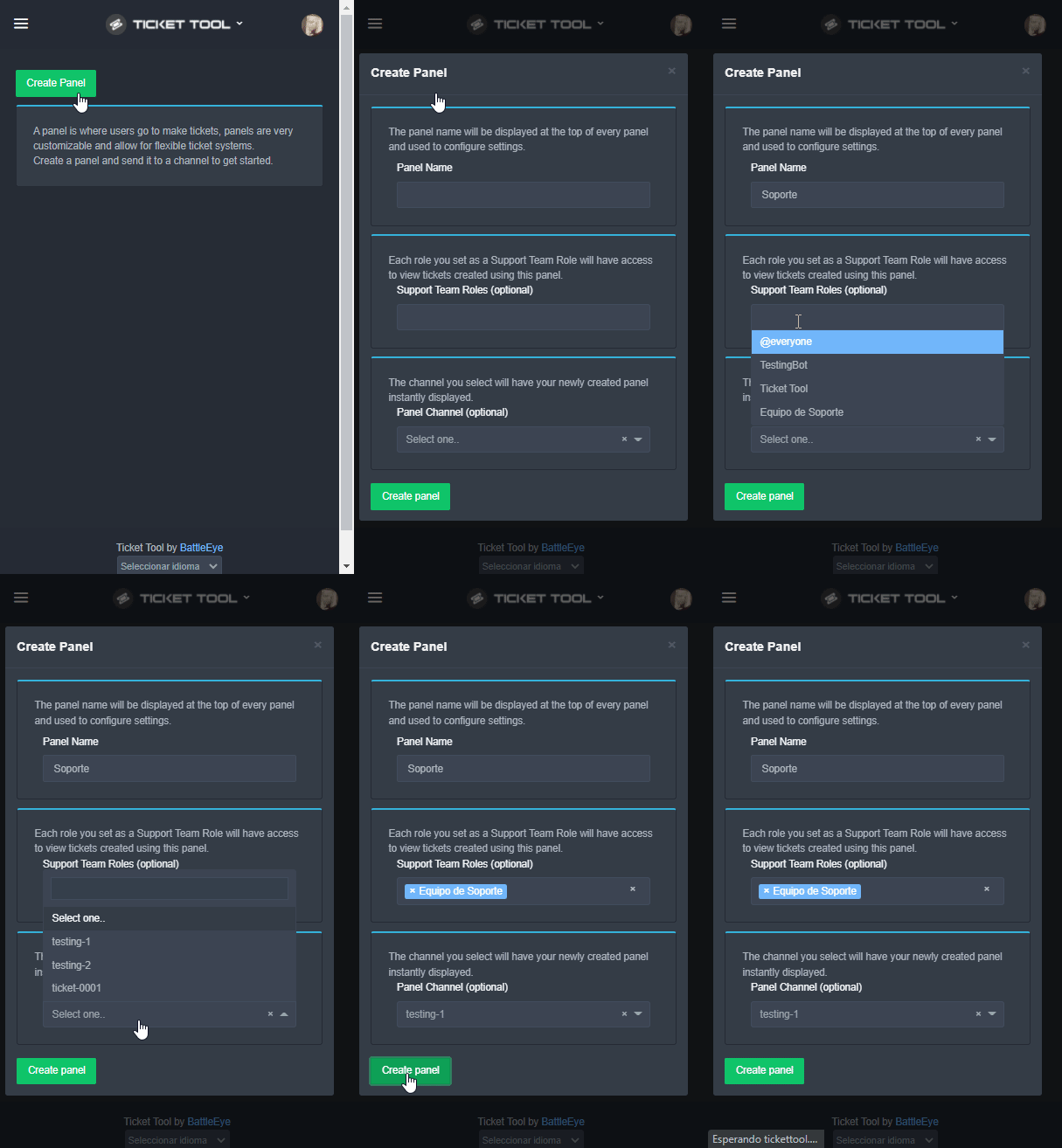 earnest delta
:D
shut bolt
Así puedes montar los tickets para tu server :)
copper owl
@shut bolt hola eres una persona genial y agradable
shut bolt
copper owl
<@!518666147441278998> hola eres una persona genial y agradable
Gracias bro, tú también 😊
copper owl
B)
shut bolt
$help send
humble sequoiaBOT
Sending a panel
Once you've created a panel on the dashboard you will need to send it to a channel using send on the dashboard
Select the channel you want your panel to be created in and click send.
For other questions checkout $help faq
An example of a sending a panel is shown below.
 shut bolt
Con gusto
earnest delta
Una cosa
Tengo muchos bots pero ns cual hace poner un rango a todos
Me dices alguno?
shut bolt
earnest delta
Tengo muchos bots pero ns cual hace poner un rango a todos
Hmmmmmmm
@iron night
Yagpdb te puede ayudar
shut bolt
Pero el método fácil, sería con Dyno
shut bolt
copper owl
yag still going mad everytime we ping?
Yeah lmao, cc7
copper owl
shut bolt
Yeah lmao, cc7
there's 3 CCs that are just empty
earnest delta
Con dyno?
shut bolt
earnest delta
Con dyno?
Sip, usando el comando role
shut bolt
copper owl
there's 3 CCs that are just empty
Yup
earnest delta
Espera
shut bolt
Sip
shut bolt
earnest delta
Vale ya lo tengo, ahora que comando uso?
role humans
shut bolt
role humans + y el rol
earnest delta
Con / o como?
shut bolt
Depende del prefijo del bot
earnest delta
A
earnest delta
Ok, gracias
shut bolt
Dalep
shut bolt
Que vaya bien
prime bridgeBOT
ManyDreams has been silenced for 10m
Reason: Posting Discord Server Invites
ManyDreams#9162 | 798618907207401522
jade topaz
I tried to make a ticket on my alt to test it and it said i dont have permission. How do i fix this?
shut bolt
Check your blacklisted roles
humble sequoiaBOT
Blacklist Roles
Any role you assign as a blacklisted role won't be able to use commands or reactions.
Selecting a blacklisted role
Go to your Dashboard -> Server Configs. There you will find the option to select blacklisted roles.
Note: Don't forget to save.
 shut bolt
jade topaz
I tried to make a ticket on my alt to test it and it said i dont have permission...
shut bolt
jade topaz
I tried to make a ticket on my alt to test it and it said i dont have permission...
If this doesn't work let me know 
shut bolt
No worries :)
jade topaz
🤦♂️
shut bolt
Any other help you may need?
jade topaz
Nope! thanks!
shut bolt

 wind turret
same thing lol
wind turret
XD
 drowsy wadi
ok
humble sequoiaBOT
Ticket Tool Invite & Support
 brittle needle
I buy premium ticket tool how Golden Bot Invitation
humble sequoiaBOT
Inviting and Enabling Premium Bot
The first thing you will need to do is invite the premium bot, an invite can be found here
Once the bot is in your server we will head to the dashboard and manage your server. When you are managing your server, you want to head into "Server Configs" then click the drop down menu under "Select the bot you would like to use on this server" then click "Ticket Tool#6207" and then save.
 copper owl
Don't ping support members
dawn warren
can someone give me the link to that server for my friend to join
 opal tapir
لما احط تكت ما ينحط
plain surge
 jade hull
how to add some1 to ticket
jade hull
how to add some1 to ticket
You can use $add [user]
plain surge
opal tapir
لما احط تكت ما ينحط
$arabic
humble sequoiaBOT
فريق الدعم الفني العربي
عميلنا العزيز ان كنت تبحث عن مساعدة يرجى فتح تكت خاص بفريق الدعم الفني العربي
اذهب الى#🎫│make-a-ticket
ثم قم بلضغط على الايموجي الاتي (🇯🇴)
plain surge
dawn warren
can someone give me the link to that server for my friend to join
You mean this server? Ticket Tool Support ?
plain surge
You can find Portuguese support in #🎫│make-a-ticket @jade topaz
copper owl
 vapid glacier
How to fix Server at discords channel limit of 500
vapid glacier
How to fix Server at discords channel limit of 500
delete channels
that's the only way

 copper owl
vapid glacier
it said Unlimited Tickets
copper owl
vapid glacier
it said Unlimited Tickets
yeah, and thats what you get
but that's discords limitation, not ours
a discord server can only have 500 channels
just because discord has that limitation, that doesn't necessarily mean that TT doesnt provide infinite amounts of tickets
vapid glacier
Ok i got it
 dull burrow
How do you even have 500 tickets open 😭
copper owl
dull burrow
How do you even have 500 tickets open 😭
might not be tickets only
staff channels, public channels, vcs, ect
dull burrow
But 500 is insane amount
copper owl
dull burrow
But 500 is insane amount
in my 6ish months here, ive joined servers with 500 and let me tell you
some of them, it makes sense to why they have that many (language specific channels for support), and others its just 
copper owl
dull burrow
I woul just make a whole diffrent support discord in that case
or delete all channels and use Ticket Tool 😉
dull burrow
copper owl
or delete all channels and use Ticket Tool 😉
Huh?
I would use ticket tool anyways
copper owl
yeah thats what im saying lmfao
dull burrow
Just a brand new discord to separate the community and information
copper owl
dull burrow
Just a brand new discord to separate the community and information
i mean.. how much info would people have to display that would require more than 6 channels yknow LMAO
500 channels is a pretty generous amount of channels. still insane how people reach it
dull burrow
Thats what i'm saying, rn i have a server with like 15 channels (text(5), premium users(3), important like rules ect.(7)
Max amount tickets i had where 200
copper owl
dull burrow
Max amount tickets i had where 200
200? jesus
i would start panicking once we get over 15 Eng tickets here LMAO
dull burrow
copper owl
i would start panicking once we get over 15 Eng tickets here LMAO
I always panick at 50
copper owl
we've been at a steady under 10 tickets for a while, with the occasional 11/12 for a few hours
dull burrow
But its just the poeple that take long to respond
copper owl
dull burrow
But its just the poeple that take long to respond
yeah i feel that
thats the main issue always
timezones and all that
dull burrow
And than they wanna get mad because we didn't answer for 30 minutes 🥱
copper owl
dull burrow
And than they wanna get mad because we didn't answer for 30 minutes 🥱
LMFAO
dull burrow
I can't wait till ticket automation is back because like i have so many suggestions for that like
copper owl
dull burrow
I can't wait till ticket automation is back because like i have so many suggesti...
gotta wait until discord gets its shit together with rate limits
dull burrow
I always tried to have less humans more automations
My tickets now had an auto repsone system with dyno but like that doesn't get the job done sometimes
Doesn't delete tickets or anything
 mystic hound
copper owl
i would start panicking once we get over 15 Eng tickets here LMAO
mystic hound
copper owl
i would start panicking once we get over 15 Eng tickets here LMAO
I wonder how you survive outages
 finite fable
@thorn cradle el mejor jefe xD
 thorn cradle
Jajjajaja
 timber wedge
humble sequoiaBOT
timber wedge
humble sequoiaBOT
How Do I setup Ticket Tool
You can check our documentation here, you can also check #573205317870157855 for the basic setup.
Our documentation contains all the info you need about the bot to be able to setup and configure the bot however you like.
 manic vessel
how do i setup transcripts
humble sequoiaBOT
━━ moved to ticket ━━
prime bridgeBOT
K TOXIC XI has been silenced for 10m
Reason: Posting Discord Server Invites
K TOXIC XI#6704 | 383370749064249346
vapid glacier
dull burrow
How do you even have 500 tickets open 😭
so crazy 🤣

 fathom sentinel
Hi guys i need an info, is there any limit (about discord) on how many ticket are there? I mean, can like be created 5000 tickets opened?
Or there is a limit about discord?
bronze comet
discord has a limit of 500 channels for the entire server
fathom sentinel
Okay so there can be 500 tickets max
copper owl
fathom sentinel
Okay so there can be 500 tickets max
nope
499
you still need a channel for the ticket panel
fathom sentinel
Yea i mean - my channels
copper owl
so there goes one channel at the very least
bronze comet
copper owl
so there goes one channel at the _very_ least
what if the ticket had the panel
bronze comet
a very great evil
copper owl
because then only the person who sees the ticket can open tickets
fathom sentinel
Btw got it, max 500 channels in discord
copper owl
fathom sentinel
Btw got it, max 500 channels in discord
yup, and 50 per category
fathom sentinel
Thanks
fathom sentinel
copper owl
yup, and 50 per category
Can i ask you a question a bit OT?
copper owl
OT?
fathom sentinel
Off topic but about discord
fathom sentinel
So i want do a text channel in my server, BUT, i want that one member can see only his messages and not messages form other peaple
Is there any way?
copper owl
not really
the closest youll get is removing read message history
but even then, if someone is typing at the same time, theyll see it
fathom sentinel
But you can see the messages after your
copper owl
fathom sentinel
But you can see the messages after your
not really
if they click off, they wont see anything
and again, there's no way to do what you want, thats the closest youll get
fathom sentinel
Awesome, I'll try thank you
fathom sentinel
copper owl
not really
Yea they can see the messages sent after 😕 ty anyway
iron nightBOT
Gave 1 Rep to Neptune (current: #1 - 379)
mystic hound
copper owl
because then only the person who sees the ticket can open tickets
keep visible intensifies
copper owl
mystic hound
*keep visible intensifies*
did you read the whole chat 👀 ?
mystic hound
i did yes
mystic hound

jade topaz
How do you give permission for a role to view tickets
shut bolt
$help support
humble sequoiaBOT
How to let support team see into a ticket
About support roles
A support role lets your support team see into tickets with out having to add them manually to each and every ticket.
You can add as many support roles as you like per panel.
NOTE that the way discord works all admins can see into tickets regardless of this.
How to set a support role
To set a Support role go to the Dashboard -> Panel Configs -> Settings -> General Options -> Support Team Roles.

NOTE that the support role will not be able to see into tickets that are already created..
humble sequoiaBOT
How to add or remove users on tickets
To add a user to a ticket use $add <user>
To remove a user from a ticket use $remove <user>
shut bolt
Add them manually
fathom sentinel
is possible to add a timer to a ticked? when timer ends, ticket will be delated
shut bolt
Nope
humble sequoiaBOT
Automation disabled
There's currently no ETA for when automation will be enabled again. The issue that's caused it to be disabled, us hitting rate limits, is tied to the increased load on Discord's servers. The situation's currently unpredictable, which makes it so we can't give you a fixed time.
jade topaz
shut bolt
$help support
How do you make the ticket ping the middleman role everytime a ticket is made
shut bolt
jade topaz
How do you make the ticket ping the middleman role everytime a ticket is made
$help ping
humble sequoiaBOT
How to make Ticket Tool ping a role
To make ticket tool ping a role when a ticket is opened, go to the Dashboard -> Panel Configs -> Settings -> Ticket Options -> Ticket Message -> Message Text and do this:
{@Role name} This is case sensitive and the role must have @mentions enabled
jade topaz
shut bolt
$help ping
I dont see a settings
shut bolt
jade topaz
I dont see a settings
Where are you looking at?
jade topaz
Panel configs
shut bolt
Send a screenshot of it
jade topaz
 shut bolt
Adjust the zoom of the page, the button will be on the right of the channel selector
 humble sequoiaBOT
jade topaz
humble sequoiaBOT
jade topaz
Ok
I did
But uh what next
Ok ill read it
Thanks for ur help
thanks @shut bolt
iron nightBOT
Gave 1 Rep to Yareaj_ (current: #5 - 192)
shut bolt
Sure
copper owl
$claim and $unclaim
$transcript outside of tickets
 weak portal
anybody know why my server doesnt show in the dashboard
humble sequoiaBOT
Don't see your server in the dashboard?
You will possibly need to relog. Look below to see steps on how to relog.
How to relog the Dashboard.
First, you will need to go to the dashboard. Once your there, click on your avatar on the top right. after you clicked it, you will see button that says Logout. You must click that. Once you have logged out, you can log back in.
Note:
You need one of these 3 things to access the dashboard.
1. Server Owner (Level: 6)
2. Server Administrator (Level: 4)
3. Dashboard Role (Level: 2)
You can check your level using $level on your Discord Server
See the GIF below on how to relog:
copper owl
try the steps above ^^
fathom sentinel
guys the ticket will appear always on top if i dont insert it in a category?
copper owl
$help category
humble sequoiaBOT
How to set the open category
To set a open category go to the Dashboard -> Panel Configs -> Settings -> Category Options -> Category Open
 fathom sentinel
yes but i dont wanna insert it in a category
any way to show it down and not above?
copper owl
there's no way to have it open at the bottom without a category
 cosmic path
hoña
manic token
hello!
shut bolt
Hi!
dull burrow
vapid glacier
so crazy 🤣
Thats crawzy dawg
eager cargo
$help category
humble sequoiaBOT
How to set the open category
To set a open category go to the Dashboard -> Panel Configs -> Settings -> Category Options -> Category Open
 twilit tide
Yo
jade topaz
how do i add a role to view tickets?
plain surge
@jade topaz you can add additional roles that aren't a support role in General options

Then you can edit additional roles permissions in "Additional role open" and "closed" permissions
humble sequoiaBOT
How to hide tickets from everyone
Head over to your Dashboard -> Panel Configs -> Settings --> General Options -> Edit Everyone Roles Opened Permissions
NOTE that @everyone can type aswell if it has permissions to send messages
jade topaz
ok, Thanks!
plain surge
Np 👍
jade topaz
Thanks @plain surge
iron nightBOT
Gave 1 Rep to D̸̞̉҉̢̩͠o͛ͫ̚m͈̕͜҉̘̱̟☆̞͈͠҉ͪ̈́͘҉̷̥̐ (current: #23 - 26)
plain surge
It's just a rep system. Nothing major tho dw
 tiny sparrow
humble sequoiaBOT
tiny sparrow
humble sequoiaBOT
How Do I setup Ticket Tool
You can check our documentation here, you can also check #573205317870157855 for the basic setup.
Our documentation contains all the info you need about the bot to be able to setup and configure the bot however you like.
━━ moved to ticket ━━
 icy kernel
shouldn't a button appear here?
 copper owl
yes
try turning off your browser extensions, refresh the page and try adjusting the zoom level
 copper owl
icy kernel
you just solved problem
copper owl
icy kernel
you just solved problem
Anytime pal
icy kernel
thanks @copper owl
iron nightBOT
Gave 1 Rep to Neptune (current: #1 - 380)
 unborn breach
hi can someone tell me the prefix of the bot 
copper owl
unborn breach
hi can someone tell me the prefix of the bot <a:mariovaquero:889737262189912064>
by default, it's $
$help
humble sequoiaBOT
Help Options
$help commands - Information on commands
$help setup - Information on bot setup
$help faq - Frequently asked questions
humble sequoiaBOT
How to change Ticket tool's prefix
The default prefix for ticket tool is $ and @Ticket Tool#4843 however that can be changed on the Dashboard under Server Configs -> Command Prefix.

NOTE that @Ticket Tool#4843 will always work as a prefix even if there is a custom prefix.
iron nightBOT
Gave 1 Rep to Neptune (current: #1 - 381)
copper owl
anytime
unborn breach
hmmm how can i create a format ticket like in #🎫│make-a-ticket
humble sequoiaBOT
For a more convenient use of multipanels, you can now combine panels on the dashboard. This will allow you to directly send the multipanel from the dashboard or via the $panel ID command.
Where can I find this?
You can find this setting on the Dashboard -> Panel Configs -> Settings -> General Options
Note: if you're attaching all the panels to a panel called English, don't include English in the attached panels box (If you do this, it will create duplicate)
This will put all buttons from all of your panels on one message. The message is the panel message from the panel you're combining these panels in.
 mystic hound
did they...forget the scam link and add a wick link instead?
mystic hound
6 PM on november 30 2021..wish I knew what timezone
copper owl
mystic hound
6 PM on november 30 2021..wish I knew what timezone
stay up for 24h and wait
 pastel spruce
How to do the Add To Server buttons ?
 copper owl
pastel spruce
How to do the Add To Server buttons ?
copper owl
pastel spruce
How to do the Add To Server buttons ?
not something you can do as a user
the developer of a bot has to do that
severe path
pastel spruce
How to do the Add To Server buttons ?

 dull crest
Hey guys, I got a question: Is there a way to push a picture instead of text or an embed when you open.a ticket?
shut bolt
Well, yes
You could obtain the direct URL
And then place that link in the Message Text field
And that will make the image appear
dull crest
hmm okok thank you
shut bolt
Sure
shut bolt
Hmmm
Not directly

Upload it to Imgur
Copy direct link
And place it in Message Text field
dull crest
Okay perfect!
dull crest
shut bolt
Hmmm
Thanks again. Last q: is there a way for the tickets to autclose after like 4h
iron nightBOT
Gave 1 Rep to Yareaj_ (current: #5 - 195)
shut bolt
dull crest
Thanks again. Last q: is there a way for the tickets to autclose after like 4h
No man sorry :(
$auot
oops
humble sequoiaBOT
Automation disabled
There's currently no ETA for when automation will be enabled again. The issue that's caused it to be disabled, us hitting rate limits, is tied to the increased load on Discord's servers. The situation's currently unpredictable, which makes it so we can't give you a fixed time.
dull crest
shut bolt
No man sorry :(
Hm okok
 marble sun
I've Refreshed It 5 Times, But My Server Still Doesn't Appear ? @shut bolt
shut bolt
marble sun
I've Refreshed It 5 Times, But My Server Still Doesn't Appear ? <@!5186661474412...
Don't ping support members please
And regarding your problem
humble sequoiaBOT
Don't see your server in the dashboard?
You will possibly need to relog. Look below to see steps on how to relog.
How to relog the Dashboard.
First, you will need to go to the dashboard. Once your there, click on your avatar on the top right. after you clicked it, you will see button that says Logout. You must click that. Once you have logged out, you can log back in.
Note:
You need one of these 3 things to access the dashboard.
1. Server Owner (Level: 6)
2. Server Administrator (Level: 4)
3. Dashboard Role (Level: 2)
You can check your level using $level on your Discord Server
See the GIF below on how to relog:
shut bolt
Try this
marble sun
thx
jade topaz
how to make ticket logggers
shut bolt
jade topaz
how to make ticket logggers
What do you mean loggers?
You mean the logging options?
jade topaz
shut bolt
What do you mean loggers?
channel
jade topaz
shut bolt
You mean the logging options?
yes
shut bolt
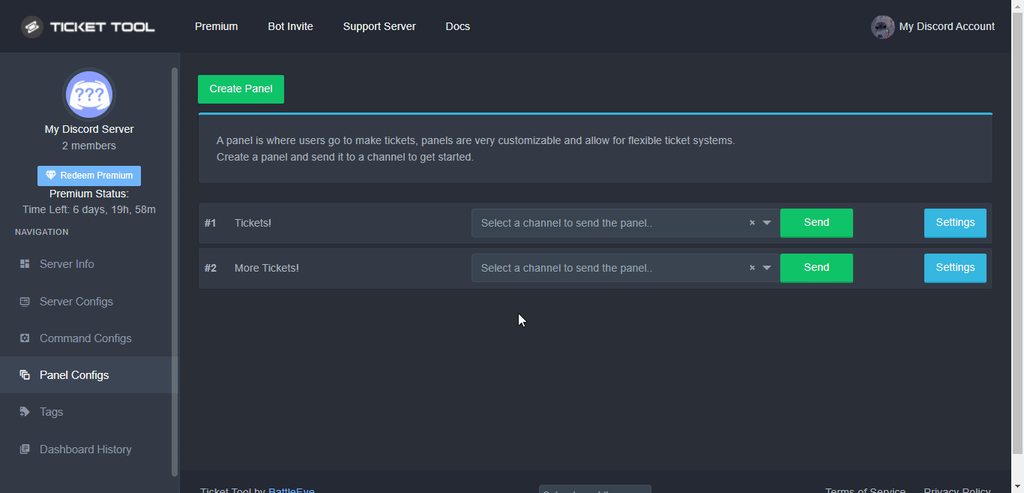
You should select the actions you want to be logged for the panel
And a channel to log them in
jade topaz
shut bolt
https://i.imgur.com/IVzso4a.gif
thank you so much
iron nightBOT
Gave 1 Rep to Yareaj_ (current: #5 - 196)
shut bolt
jade topaz
thank you so much
Sure :)
 round loom
I have a problem with the ticket tool, I already closed the session and reopened the session with the ticket tool but the server where I want to moderate it does not appear, what do I do d :?

 bleak fossil
hello i got some problems to load in to the server it always say i cant join cause im not high enough on steam lvl but im lvl 9 on steam
jade topaz
Hi, can i somehow change the name of every ticket?
Like every ticket i create will have my custom name
humble sequoiaBOT
Don't see your server in the dashboard?
You will possibly need to relog. Look below to see steps on how to relog.
How to relog the Dashboard.
First, you will need to go to the dashboard. Once your there, click on your avatar on the top right. after you clicked it, you will see button that says Logout. You must click that. Once you have logged out, you can log back in.
Note:
You need one of these 3 things to access the dashboard.
1. Server Owner (Level: 6)
2. Server Administrator (Level: 4)
3. Dashboard Role (Level: 2)
You can check your level using $level on your Discord Server
See the GIF below on how to relog:
shut bolt
Check the note @round loom
shut bolt
bleak fossil
hello i got some problems to load in to the server it always say i cant join cau...
Wrong place pal
humble sequoiaBOT
Ticket names
The ticket name is the default channel name of all tickets. To edit it, go to your Dashboard > Panel Configs > Settings > Ticket Options. There you can edit the channel name of opened and closed tickets. You can also use variables in there.

 Note: This is a premium feature
shut bolt
Note: This is a premium feature
shut bolt

round loom
humble sequoia
i need level 4?
shut bolt
jade topaz
im gonna buy premium soon :D

shut bolt
round loom
i need level 4?
2 4 or 6, one of them
round loom
shut bolt
2 4 or 6, one of them
And how i can get level for that?
shut bolt
round loom
And how i can get level for that?
It's explained right besides the level number
https://i.imgur.com/Rkp48CH.png
 round loom
shut bolt
It's explained right besides the level number
https://i.imgur.com/Rkp48CH.png
round loom
shut bolt
It's explained right besides the level number
https://i.imgur.com/Rkp48CH.png
yea but how i can get level.
shut bolt
round loom
yea but how i can get level.
It's explained right there, please read
round loom
oh. ok.
jade topaz
round loom
oh. ok.
those are discord role permisions you need to have them
round loom
jade topaz
those are discord role permisions you need to have them
really?
jade topaz
round loom
really?
yea
round loom
wow. ty
jade topaz
np
 remote peak
Hey,
I asked a while back about confirm to create ticket and was wondering if there was news on it?
 proud ocean
How to add someone to see every ticket ?
shut bolt
$help support
humble sequoiaBOT
How to let support team see into a ticket
About support roles
A support role lets your support team see into tickets with out having to add them manually to each and every ticket.
You can add as many support roles as you like per panel.
NOTE that the way discord works all admins can see into tickets regardless of this.
How to set a support role
To set a Support role go to the Dashboard -> Panel Configs -> Settings -> General Options -> Support Team Roles.
NOTE that the support role will not be able to see into tickets that are already created..
shut bolt
You should mark a role as support team role
And then add that role to the user
Option 2
$help add
humble sequoiaBOT
How to add or remove users on tickets
To add a user to a ticket use $add <user>
To remove a user from a ticket use $remove <user>
shut bolt
Using the add command
proud ocean
shut bolt
Using the add command
Thanks i'll try!
iron nightBOT
Gave 1 Rep to Yareaj_ (current: #5 - 197)
shut bolt
Sure! Let me know if you need further help
proud ocean
Its not showing up for me Support Team Roles
tribal cedar
Refresh the page.
shut bolt
proud ocean
Its not showing up for me **Support Team Roles**
Where are you exactly looking at?
remote peak
copper owl
not a thing yet
Any idea when any of these updates will be happening then?
copper owl
remote peak
Any idea when any of these updates will be happening then?
Also no
it's a pretty busy time of the year rn, and there's other things in the works
remote peak
Seems to have been a lack of updates that are publicly announced.. Are they waiting on something
Ah so they are :p
copper owl
remote peak
Seems to have been a lack of updates that are publicly announced.. Are they wait...
there's one developer for TT
Said developer has a lot of things going on
remote peak
Kk
copper owl
one of them is actually needing to provide for his family
so yeah, updates might take a bit as of now
remote peak

jade topaz
How can I create a ticket?
humble sequoiaBOT
━━ moved to ticket ━━
fast sable
shut bolt
$help add
I tried that and it isn't working
I can't @ the user because they aren't already in the ticket
And ID isn't working
shut bolt
Use their ID
fast sable
I tried
shut bolt
fast sable
And ID isn't working
One out of two
You copied the wrong ID
Or the user isn't in the server any longer
Option 3, the bot lacks perms to adjust perms of the channel
shut bolt
fast sable
Idk it's not working
What isn't working? The command?
fast sable
I did $add <their ID> and it didn't work
shut bolt
Is the bot displaying an error after sending the command?
fast sable
And $debug didn't do anything
fast sable
shut bolt
Is the bot displaying an error after sending the command?
No, just nothing happens
shut bolt
Please indicate me your server ID
fast sable
Ok DM?
shut bolt
It's fine if you send it here, there isn't much people can do with that data, is a public information anyone on your server could obtain
shut bolt
Great, give me a sec
fast sable
Alright
shut bolt
Try !add UserID the prefix in your server is ! instead of $
iron nightBOT
Gave 1 Rep to Yareaj_ (current: #5 - 198)
shut bolt
No worries man :)
fast sable
:D
 slow violet
I can’t create a panel
copper owl
slow violet
I can’t create a panel
what is happening when you try?
slow violet
Like I can’t even see the create panel button
fast sable
Aye it worked, @shut bolt !
shut bolt
fast sable
Aye it worked, <@518666147441278998> !
Niceeeeee, glad we could find it out bro
copper owl
slow violet
Like I can’t even see the create panel button
turn off your extensions, refresh the page and adjust the zoom level
slow violet
Ok let me try it
fast sable
shut bolt
Niceeeeee, glad we could find it out bro
:D
slow violet
copper owl
turn off your extensions, refresh the page and adjust the zoom level
It works now ty
iron nightBOT
Gave 1 Rep to Neptune (current: #1 - 384)
copper owl
anytime
slow violet
How did you even get to the support team
copper owl
I personally applied
I know arabic, and applied when they had arabic applications open
slow violet
Ok
 lone vapor
how can i make ticket tool add certain roles to it to handle it
shut bolt
lone vapor
how can i make ticket tool add certain roles to it to handle it
Hi there!
lone vapor
hi
shut bolt
By handling, do you mean they can edit the settings in the dashboard?
shut bolt
Handle what? The tickets? Or the Bot's configurations in the dahsboard?
lone vapor
like only my mods can handle it not admin or other roles iwant
the tickets
the people who can see it
shut bolt
$help support
humble sequoiaBOT
How to let support team see into a ticket
About support roles
A support role lets your support team see into tickets with out having to add them manually to each and every ticket.
You can add as many support roles as you like per panel.
NOTE that the way discord works all admins can see into tickets regardless of this.
How to set a support role
To set a Support role go to the Dashboard -> Panel Configs -> Settings -> General Options -> Support Team Roles.
NOTE that the support role will not be able to see into tickets that are already created..
shut bolt
Add them as support roles
shut bolt
What thing?
humble sequoiaBOT
 shut bolt
No
shut bolt
humble sequoia
Read this please


 shut bolt
Yup
lone vapor
thank u very much im sry for annoying u
shut bolt
No worries man, you are welcome :)
jade topaz
Anyone here
mystic hound
Yeah, need help with something?
jade topaz
how do I add someone to a ticket?
jade topaz
mystic hound
Yeah, need help with something?
Go #📈│reviews
mystic hound
jade topaz
Go <#509775046848282677>
I see you gave a support member a 0/10 review, then edited the name to someone else
Any particular reason?
mystic hound
jade topaz
how do I add someone to a ticket?
You can use $add userID
jade topaz
mystic hound
Any particular reason?
Being rude
mystic hound
How so