#🆘│community-support
1 messages · Page 360 of 1
 copper owl
 formal spire
oooh ok ty
formal spire
😔
formal spire
ty
 plain surge
Np
 jade topaz
hey so basically i would like to know how to make a panel like this, where there are more than 1 reaction options that give you a different ticket message each but im not sure how, any tips?

 humble sequoiaBOT
For a more convenient use of multipanels, you can now combine panels on the dashboard. This will allow you to directly send the multipanel from the dashboard or via the $panel ID command.
Where can I find this?
You can find this setting on the Dashboard -> Panel Configs -> Settings -> General Options
This will put all buttons from all of your panels on one message. The message is the panel message from the panel you're combining these panels in.
 copper owl
@jade topaz you need premium
 iron nightBOT
Gave 1 Rep to Neptune (current: #1 - 296)
copper owl
jade topaz
have premiumx thanks a ton <3
you do? run $pc in here
 shut bolt

jade topaz
copper owl
you do? run `$pc` in here
its the week trial hehe, ill buy the premium after tho
copper owl
ooo 👀
shut bolt
Niceeeee
copper owl
well once you do buy it and redeem it, feel free to run that command to get the premium role
jade topaz
i sure will, ty!
copper owl
anytime
jade topaz
Ty. But none of these options have worked. Also, sorry for late response.
shut bolt
jade topaz
Ty. But none of these options have worked. *Also, sorry for late response.*
Hey there
I can help if you want
🤔
What have you tried so far?
jade topaz
{@Role} <@ numbers> & {@Role} again.
It seemed to have worked only for the ticketee, person who started the ticket. But not for Admin/Staff.
shut bolt
jade topaz
It seemed to have worked only for the ticketee, person who started the ticket. B...
Okey I see
The ping isn't being sent but the role is mentioned right?
jade topaz
Yes.
also sorry to bother you guys again but i cant get the bot to mention roles, even with <@RoleID>
 copper owl
jade topaz
also sorry to bother you guys again but i cant get the bot to mention roles, eve...
copper owl
jade topaz
also sorry to bother you guys again but i cant get the bot to mention roles, eve...
Seems you copied the wrong ID
wait
it's <@&ID>
for roles
iron nightBOT
Gave 1 Rep to Neptune (current: #1 - 297)
copper owl
anytime
jade topaz
(again)
jade topaz
copper owl
it's <@&ID>
So it's < @ & ID >?
jade topaz
shut bolt
And check it has mention everyone
Ok ty. This seemed to have worked! thanks @shut bolt
iron nightBOT
Gave 1 Rep to Pablo. (current: #10 - 127)
jade topaz
copper owl
the & is included
Ok, ty.
jade topaz
I set all tickets to #support category yet the tickets do not show up in the #support category. Also get this weird msg.
 shut bolt
jade topaz
I set all tickets to #support category yet the tickets do not show up in the #su...
shut bolt
jade topaz
I set all tickets to #support category yet the tickets do not show up in the #su...
Check the bot's role permissions
It's missing the View Channels
 gaunt moth
Can you make a ticket without the Panel?
shut bolt
gaunt moth
Can you make a ticket without the Panel?
Nope
All tickets are linked to a panel
gaunt moth
Ok
Do you know of any good ticket bots that don't use a panel?
nm I'll just use this
shut bolt
gaunt moth
nm I'll just use this
Ticket Tool is awesome man
jade topaz
Is this correct?
 jade topaz
shut bolt
Check the bot's role permissions
jade topaz
shut bolt
Check the bot's role permissions
thanks! @shut bolt
iron nightBOT
Gave 1 Rep to Pablo. (current: #10 - 128)
shut bolt
jade topaz
Is this correct?
Depends
gaunt moth
Yeah I'm going to try it
shut bolt
jade topaz
Is this correct?
Is the role named "Discord Staff" with those cap letters?
shut bolt
jade topaz
thanks! <@!518666147441278998>
Sure
 cold anchor
I don't see the "transcript" button in a ticket, even though I have the button turned on.
Is there a way to add it back in?
shut bolt
gaunt moth
What is the category open and closed for?
You can set the bot to open the tickets on a category
gaunt moth
ok
shut bolt
cold anchor
I don't see the "transcript" button in a ticket, even though I have the button t...
Send a screenshot please
 shut bolt
cold anchor
The close button is there, but the transcript one is not.
shut bolt
cold anchor
The close button is there, but the transcript one is not.
As told, please send a screenshot
gaunt moth
Can the new channel be a thread of the channel I choose instead of an entirely new channel?
shut bolt
gaunt moth
Can the new channel be a thread of the channel I choose instead of an entirely n...
It's not a feature so far
gaunt moth
Ok
That is probably the only thing I would complain about
otherwise this is a great bot
lol sorry about the mistype
shut bolt
gaunt moth
lol sorry about the mistype
No worries 😅
shut bolt
gaunt moth
That is probably the only thing I would complain about
Yeah, the thing is that many servers do not have Nitro boosts for making private threads
cold anchor
shut bolt
As told, please send a screenshot
I did send a screenshot.
cold anchor
cold anchor
Is this not the screenshot you meant?
 worn stag
 gaunt moth
Is the bot online in your server?
 gaunt moth
Ok
cold anchor
When I close a ticket, the bot says:
System Failure: Missing Permissions
Which permissions might cause that?
gaunt moth
You can try giving the bot all chat permissions
Or you can try giving the bot administrator privileges
cold anchor
Thanks. I will try that.
shut bolt
cold anchor
Is this not the screenshot you meant?
Yeap, I meant the one of the button not being shown
shut bolt
cold anchor
When I close a ticket, the bot says:
System Failure: Missing Permissions
Which p...
The bot missing permissions
Run $debug
cold anchor
I'm not sure what that would show. Aside from it shows the button isn't there.
cold anchor
shut bolt
Run $debug
In that ticket?
gaunt moth
You could try just giving the bot admin privileges
shut bolt
cold anchor
I'm not sure what that would show. Aside from it shows the button isn't there.
Okey, then try using the command $transcript as a replacement
shut bolt
cold anchor
In that ticket?
Yeap
shut bolt
gaunt moth
You could try just giving the bot admin privileges
It works but it's not necessary
cold anchor
shut bolt
Yeap
It shows green checks for everything.
shut bolt
cold anchor
It shows green checks for everything.
Give me the server ID please
cold anchor
It works now.
shut bolt
Oh, great
cold anchor
I think it was adding the permission to manage channels.
Because now it closes the ticket and when it closes it sends the transcript to the channel I had told it to on the web site.
Still no transcript button though, but maybe that's related to it not having had that Manage Channel permission.
 lean hemlock
What do I put before and after the @ to work for the ticket?
shut bolt
cold anchor
Still no transcript button though, but maybe that's related to it not having had...
could be
shut bolt
lean hemlock
What do I put before and after the @ to work for the ticket?
$help ping
humble sequoiaBOT
How to make Ticket Tool ping a role
To make ticket tool ping a role when a ticket is opened, go to the Dashboard -> Panel Configs -> Settings -> Ticket Options -> Ticket Message -> Message Text and do this:
{@Role name} This is case sensitive and the role must have @mentions enabled
 jade topaz
I think I may have changed the role name.
jade topaz
That's it. Ty.
shut bolt
Sure
 crimson prawn
how to fix dis ??? help
 humble sequoiaBOT
Don't see your server in the dashboard?
You will possibly need to relog. Look below to see steps on how to relog.
How to relog the Dashboard.
First, you will need to go to the dashboard. Once your there, click on your avatar on the top right. after you clicked it, you will see button that says Logout. You must click that. Once you have logged out, you can log back in.
Note:
You need one of these 3 things to access the dashboard.
1. Server Owner (Level: 6)
2. Server Administrator (Level: 4)
3. Dashboard Role (Level: 2)
You can check your level using $level on your Discord Server
copper owl
try this out
jade topaz
Which permission is required for tickets?
 humble sequoiaBOT
Blacklist Roles
Any role you assign as a blacklisted role won't be able to use commands or reactions.
Selecting a blacklisted role
Go to your Dashboard -> Server Configs. There you will find the option to select blacklisted roles.
Note: Don't forget to save.
 copper owl
check if you have any roles here
jade topaz
copper owl
check if you have any roles here
Oh sorry, by mistakely i put @everyone as a blacklisted role
copper owl
That's your issue, also don't apologize
iron nightBOT
Gave 1 Rep to Neptune (current: #1 - 298)
copper owl
No problem
jade topaz
Hello
Is there a way to show which kits a user has access to in the kits menu?
copper owl
$tts
humble sequoiaBOT
You're in the wrong place
We provide support for @pseudo glen discord bot and cannot help you with whatever issue you have.
Please make sure to contact the appropriate support team.
If you don't have any further questions regarding our bot Ticket Tool, please close this ticket
_ _
copper owl
jade topaz
Hello
Is there a way to show which kits a user has access to in the kits menu?
^^
jade topaz
I open a ticket right?
copper owl
jade topaz
I open a ticket right?
no you dont
there's nothing related to kits when talking about ticket tool
jade topaz
So where can I get that help?
jade topaz
I'm sorry, I was in the wrong group
 karmic fog
why does the bot send code instead of transcript?
I used to send the link
@gloomy jacinth@copper owl@radiant moss@safe prairie?????????????
karmic fog
ok
copper owl
also this is community support, if you want help from the support team, #🎫│make-a-ticket
copper owl
karmic fog
why does the bot send code instead of transcript?
send a screenshot of what you see
karmic fog
 copper owl
why are you looking at that file
there should be an embedded message under that
with a link
karmic fog
is it possible to change the channel where it will be sent?
copper owl
$help transcript
humble sequoiaBOT
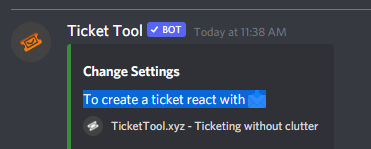
How do I save transcript to a channel?
To save transcripts to a channel go to the Dashboard -> Panel Configs -> Settings -> Logging Options -> Transcript Channel

 humble sequoiaBOT
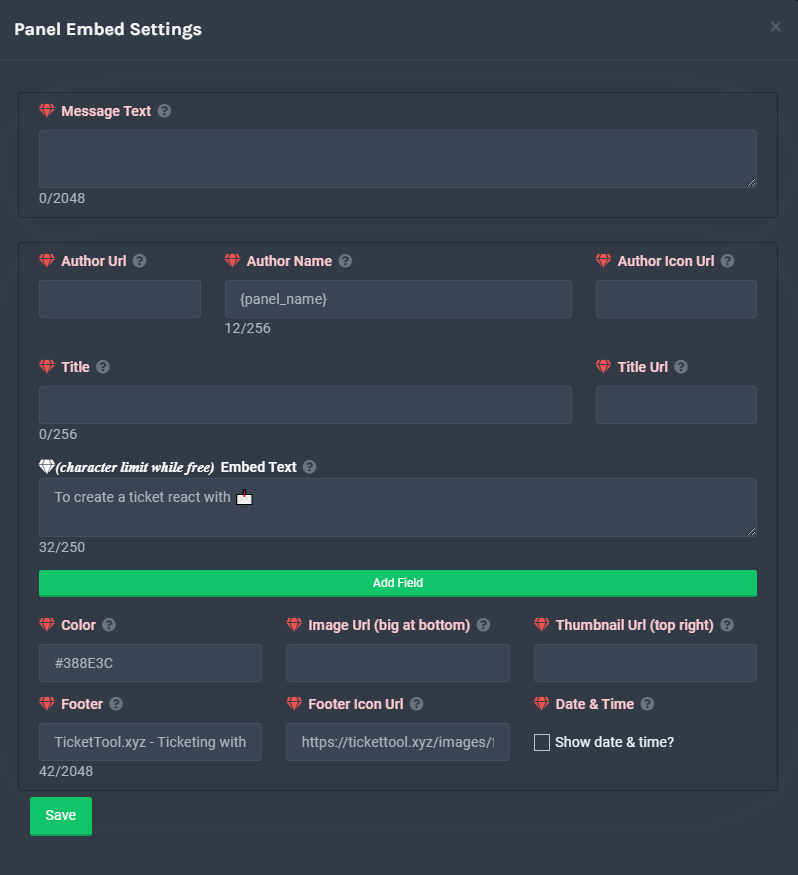
**Panel Message**
The panel message is where people react to make a ticket. To customize it head over to your Dashboard --> Panel Configs -> Settings -> Panel Options -> Edit Panel Message
 karmic fog
Thank you, I'm Russian:)
copper owl
@dim pawn ^^
 dim pawn
thanks. been searching for 30mins
copper owl
@red coral first off dont ping support members
second off, halloween is over, we dont need halloween themed pfps anymore
 red coral
wow ok
 edgy pulsar
 is that right?

 untold arch
I’m getting that too xD

 craggy geyser
Avatar did just update. Not sure why you have it multiple times
 visual marlin
me too
 calm sky
I got like 50 pings
visual marlin
i'm still getting pings
craggy geyser
Alerted the dev, not sure why it is doing it
edgy pulsar
I got over 100 pings now 
 weak geyser
Hi, carl-bot had the same issue some days ago.
craggy geyser
Has it stopped yet?
 solid stream
edgy pulsar
<a:Lurkin:833771462716031017> is that right?
solid stream
edgy pulsar
<a:Lurkin:833771462716031017> is that right?
I changed the bots details 3 times, Once for the logo and twice for the About Me
I wonder, is your bot pinging you for each server it updates in? (that it's also in)
Either way, That's a discord bug or a you bug, because I only changed it once
weak geyser
It's not a user bug
 visual marlin
i still get pinged in just one server
 keen linden
I think it might be a Carl-bot thing - they have some issues on their end at the moment it seems
craggy geyser
It is likely a Carl-bot issue. Maybe check with them
 inner wasp
Would make sense, just had an announcement from the main server
craggy geyser
Yep. Carl-bot is having issues
weak geyser
craggy geyser
It is likely a Carl-bot issue. Maybe check with them
i said they had the same issue some days ago not yet
i don't use carl-bot for logging so it seems not to be a carl-bot issue
 misty ginkgo
inner wasp
Can confirm, just joined to investigate as I'm still receiving a bunch of pings
misty ginkgo
inner wasp
Can confirm, just joined to investigate as I'm still receiving a bunch of pings
Same 
inner wasp
I've removed logging of avatar changes in the meantime, it'll get sorted out eventually I'm sure :)
copper owl

Almost 20 mins ago
if you use carl bot for logging and are getting a constant loop of Ticket Tool changing its avatar, disable logging until Carl Bot devs figure out the issue.
solid stream
But it seems other bots are also having the same issue.
But.. they might have the same issue
copper owl
solid stream
But it seems other bots are also having the same issue.
that, im not sure of actually
solid stream
Discord likes to break things early in the morning..
copper owl
lmao true
solid stream
Devs arrive at work, push last nights changes.. watch it all burn!!
copper owl
Either way, if anyone here is experiencing major logging issues because of Ticket Tool changing it's avatar, it's not from us.
copper owl
solid stream
Devs arrive at work, push last nights changes.. watch it all burn!!
they do like to push out updates that break things ¯_(ツ)_/¯
 sharp robin
is ther something wrong with the bot?
copper owl
sharp robin
is ther something wrong with the bot?
what's the issue?
sharp robin
its spam changing its avatar like mad
copper owl
copper owl
Either way, if anyone here is experiencing major logging issues because of Ticke...

@sharp robin
sharp robin
yikes
 unreal elbow
copper owl
if you use carl bot for logging and are getting a constant loop of Ticket Tool c...
unreal elbow
copper owl
if you use carl bot for logging and are getting a constant loop of Ticket Tool c...
thank u. its about 100 log messages by now.
iron nightBOT
Gave 1 Rep to Neptune (current: #1 - 299)
sharp robin
thanks for that
copper owl
unreal elbow
thank u. its about 100 log messages by now.
No worries, and sorry for the inconvenience.
unreal elbow
not?
unreal elbow
its other bots too lol
copper owl
or whoever you guys use for logging
 terse dagger
thanks for the info! my server is having the same issue, i’m sure carl bot will be sorted soon haha
copper owl
unreal elbow
its other bots too lol
Yeah, then that means there's something broken with logging
unreal elbow
mhm
jade topaz
Same guys came here with this problem
unreal elbow
copper owl
Yeah, then that means there's something broken with logging
but it seems to have stopped by now lol
copper owl
unreal elbow
but it seems to have stopped by now lol
Good to know
unreal elbow
yea but it did stop 3 times now and started again xD

 summer shard
 jade topaz
Do I remove ticket bot from the server and make it rejoin will that make it stop?
copper owl
Im not sure if that'll work
you can go ahead and try but this isn't an issue from our end
unreal elbow
jade topaz
Do I remove ticket bot from the server and make it rejoin will that make it stop...
just disable avatar logging for a few hours
or a day
it will get fixed
jade topaz
unreal elbow
just disable avatar logging for a few hours
I'll see how I can do that thank you
iron nightBOT
Gave 1 Rep to Onyx (current: #67 - 1)
unreal elbow
jade topaz
I'll see how I can do that thank you
what bot u using?
jade topaz
unreal elbow
what bot u using?
Some owner gave me an other person this server I am then left so the last owner set everything up we didn't so I don't know which bot it is
unreal elbow
u don’t see the bots name above the message? 
jade topaz
unreal elbow
u don’t see the bots name above the message? <:xD:730045465940459610>
it just says ticket tool lol
unreal elbow
thats not a logging bot
jade topaz
unreal elbow
thats not a logging bot
wanna see what I see
jade topaz
 unreal elbow
that is carl bot
jade topaz
Oh lol
 buoyant heron
that was my question too, so thanks.
jade topaz
Okay thanks
copper owl
Logging Spam
If anyone's experiencing any logging spam regarding Ticket Tool changing its avatar, this is not an issue from our end. Disable Avatar Logging and wait until the devs of the logging bot you use say it's okay to enable again
 unreal elbow
u guys r welcome
 river dove
jade topaz
river dove
jade topaz
Same lol
 craggy geyser

 real topaz

 prime bridgeBOT
✔ مكافحه تعلم الصبر has been silenced for 10m 

 Reason: Posting Discord Server Invites
✔ مكافحه تعلم الصبر#6977 | 818849663092260904
 wary flame
Könnt ihr euch bitte einigen welchen Profil Bild der bot nu hat!!!!!! Es nervt langsam, bekomme ständig Benachrichtigungen wenn der bott sein Profilbild ändert
 robust sandalBOT
wary flame
Könnt ihr euch bitte einigen welchen Profil Bild der bot nu hat!!!!!! Es nervt l...
robust sandalBOT
wary flame
Könnt ihr euch bitte einigen welchen Profil Bild der bot nu hat!!!!!! Es nervt l...
 Tobias-Jacob
Can you please agree on which profile picture the bot nu has!!!!!! It gets annoying slowly, constantly get notifications when the bott changes his profile picture
 German (de) → English (en)
unreal elbow
wary flame
Könnt ihr euch bitte einigen welchen Profil Bild der bot nu hat!!!!!! Es nervt l...
German (de) → English (en)
unreal elbow
wary flame
Könnt ihr euch bitte einigen welchen Profil Bild der bot nu hat!!!!!! Es nervt l...
das ist ein fehler der bots
wary flame

 wary flame
unreal elbow
das ist ein fehler der bots
wary flame
unreal elbow
das ist ein fehler der bots
🙄🙄🙄
unreal elbow
das sollte mittlerweile behoben sein
der fehler lag nicht an tickettool
robust sandalBOT
unreal elbow
das sollte mittlerweile behoben sein
der fehler lag nicht an tickettool
 Onyx
Onyx
this should be fixed by now
the error was not due to tickettool
German (de) → English (en)
unreal elbow
oh it isn’t fixed yet
 swift imp
its spamming logs
unreal elbow
yes it is. what bot are u using?
swift imp
prei
 desert summit
Guys just mute you’re logs or setup it right?
unreal elbow
try to disable avatar logging until it gets fixed
 scenic plinth
copper owl
**Logging Spam**
If anyone's experiencing any logging spam regarding Ticket Too...
scenic plinth
copper owl
**Logging Spam**
If anyone's experiencing any logging spam regarding Ticket Too...
Refer to this please.
Nothing we can do about it.
unreal elbow
desert summit
Guys just mute you’re logs or setup it right?
has nothing to do with that, its some weird issue that many logging bots suddenly have
desert summit
Yeah but there no reason to send many pics of it in this channel just wait for one answer lmao
unreal elbow

 lethal chasm
I was about to ask till I saw people were asking about it I will await response this ain't the first time its spamming my logs
unreal elbow
copper owl
**Logging Spam**
If anyone's experiencing any logging spam regarding Ticket Too...
^
- Not a ticket tool issue
- there’s nothing the devs of ticket tool can do about it

 steep hornet
hello, how do i solve this error about embed not picking up on the words above ?
 scenic plinth
The matter is its not affecting anything with the bots operations, just a simple loop nobody has an explanation for.
scenic plinth
steep hornet
hello, how do i solve this error about embed not picking up on the words above ?
Assuming I am understanding right, you are wanting the text outside the embed in the embed?
unreal elbow
i think so lol
steep hornet
scenic plinth
Assuming I am understanding right, you are wanting the text outside the embed in...
Insideq
 lavish marten
Hello how can i see who deleted tickets?
copper owl
lavish marten
Hello how can i see who deleted tickets?
make a logging channel
$help transcript
humble sequoiaBOT
How do I save transcript to a channel?
To save transcripts to a channel go to the Dashboard -> Panel Configs -> Settings -> Logging Options -> Transcript Channel
copper owl
humble sequoia
Under these boxes, you should be able to select which things to log
 balmy ice
why the avatar change every minute?
copper owl
lavish marten
Any other way i can see it?
Not reallyt
copper owl
balmy ice
why the avatar change every minute?
check the pins in this channel
lavish marten
copper owl
Not reallyt
Bruh
jade topaz
How come ticket tool has been changing its pfp constantly for an hour straight
lavish marten
Okay thnx
copper owl
jade topaz
How come ticket tool has been changing its pfp constantly for an hour straight
check pins in this channel
scenic plinth
steep hornet
Insideq
You need to go ahead and edit the message embed settings for the ticket message. You put in the plain text message, so therefore its placing it there.
Just note it will not ping the roles, as in users with the role will not get notified.
jade topaz
Thank You
steep hornet
Another problem is that the bot didn't mention the channel I gave me, what happened?
copper owl
$idcommand
humble sequoiaBOT
How do I get the ID of Roles/Channels/Emojis?
Ticket Tool has a useful command that helps you get the ID of various things like channels, roles, emojis and your server.
Just use the command $id <#channel/@role/:emoji:>. Now copy everything, including the brackets <...>, to your dashboard (or wherever you want it)
If you want the server ID, just use $id.
copper owl
humble sequoia
follow this @steep hornet, and insert it into the messages
steep hornet
Okay, thanks
copper owl
copper owl
Check the pins in this channel
 charred flume
btw i checked carl bot news it said that it is carlbot issue not the bot
and is happening to every bot+user btw
copper owl
it's pinned, so if anyone asks, feel free to direct them to the pins
 crystal void
Thanks!
 distant mural
ty!
 bitter stirrup
does ticket tool make avatar update to everyone else
unreal elbow
bitter stirrup
does ticket tool make avatar update to everyone else
 Please check the pins in this channel
- This is not a Ticket Tool issue
- There is nothing Ticket Tool devs can do about it
#🆘│community-support message
humble sequoiaBOT
copper owl
look at the documentation ^^
you can also check #573205317870157855 for the basic setup
yes?
oh, youre welcome
:]
copper owl
scenic plinth
Rep
shame, wouldve been my 300th
scenic plinth
Would it though
 ornate drum
Yoo I have question that
scenic plinth
Is it about logging issues?
unreal elbow
ornate drum
WHy does it changes it avatar every min ?
Please check the pins in this channel
- This is not a Ticket Tool issue
- There is nothing Ticket Tool devs can do about it
#🆘│community-support message
copper owl
ornate drum
WHy does it changes it avatar every min ?
So it is about logging issues
 copper owl
that's a log
unreal elbow

ornate drum
yeah ik
copper owl
unreal elbow
<a:alert:775073590469984306> **Please check the pins in this channel** <a:alert:...
Refer to this message by Onyx
unreal elbow
it is a carl bot issue
unreal elbow
ornate drum
yeah ik
the solution is in the pins
charred flume
why not use any other bot for avatar updates instead?
if this issue is only with carl
copper owl
charred flume
why not use any other bot for avatar updates instead?
because i think multiple bots are having this issue
charred flume
k
copper owl
im not 100% sure on that though
ornate drum
unreal elbow
the solution is in the pins
Ok thxs
unreal elbow
copper owl
im not 100% sure on that though
i think so, heard that from multiple people
but im confused
why right now and not before xD
 warm socket
Hey so in a server I help moderate our ticket bot seems to be constantly changing its pfp
copper owl
warm socket
Hey so in a server I help moderate our ticket bot seems to be constantly changin...
Check the pins for an explanation
warm socket
 unreal elbow
warm socket
Hey so in a server I help moderate our ticket bot seems to be constantly changin...
unreal elbow
warm socket
Hey so in a server I help moderate our ticket bot seems to be constantly changin...
Please check the pins in this channel
- This is not a Ticket Tool issue
- There is nothing Ticket Tool devs can do about it
#🆘│community-support message
warm socket
Sweet thank you!
unreal elbow
u r welcome
 winter shale
In my panel I used <#channelID> but it just shows as deleted-channel
copper owl
winter shale
In my panel I used <#channelID> but it just shows as deleted-channel
Then you most likely used the wrong ID
 cyan yew
Ticket Tool Avatar Changed is spamming in my Discord Community Server all the time and got over 5000 messages? What's going on there?
unreal elbow
cyan yew
Ticket Tool Avatar Changed is spamming in my Discord Community Server all the ti...
Please check the pins in this channel
- This is not a Ticket Tool issue
- There is nothing Ticket Tool devs can do about it
#🆘│community-support message
cyan yew
is that a hacker attack?
copper owl
No
copper owl
just a carl bot bug
winter shale
copper owl
Then you most likely used the wrong ID
I’ve checked and double checked the ID and re-sent it but it still shows up the same way
cyan yew
copper owl
just a carl bot bug
ohh okay
copper owl
winter shale
I’ve checked and double checked the ID and re-sent it but it still shows up the ...
send a screenshot
unreal elbow
winter shale
I’ve checked and double checked the ID and re-sent it but it still shows up the ...
hm @copper owl maybe its because ticket tool can’t see the channel?
idk im a noob tho xD
cyan yew
okay Thanks
scenic plinth
With an ID it would do it regardless.
winter shale
copper owl
send a screenshot
 copper owl
Ill open a ticket for you
humble sequoiaBOT
-- moved to ticket --
crystal void
Interesting thing is we had this issue for another bot and it randomly went away
 tepid berry
Hey, what’s been causing the problem with the avatar keep switching?
unreal elbow
tepid berry
Hey, what’s been causing the problem with the avatar keep switching?
Please check the pins in this channel
- This is not a Ticket Tool issue
- There is nothing Ticket Tool devs can do about it
#🆘│community-support message
copper owl
tepid berry
Hey, what’s been causing the problem with the avatar keep switching?
check the pins
 unreal elbow
it is.
copper owl
crystal void
Might be useful to pin?
check the pins
tepid berry
copper owl
check the pins
Ok thank you
copper owl
everything related to the issue is pinned
unreal elbow
crystal void
I swear it wasn’t pinned before lmao
takes its time to load in 
crystal void

 ornate sail
is there a reason why the primary ticket tool wants to change its avatar literally every minute...
ornate drum
ornate sail
is there a reason why the primary ticket tool wants to change its avatar literal...
Check pin
ornate sail
k thx
ornate drum
Np
 queen gyro
i joined the server just to know why tf this was happening
ornate drum
Logging Spam
If anyone's experiencing any logging spam regarding Ticket Tool changing its avatar, this is not an issue from our end. Disable Avatar Logging and wait until the devs of the logging bot you use say it's okay to enable again
 hybrid river
Same
queen gyro
so thanks
ornate drum
yeah Happened with me too
shut bolt
copper owl
**Logging Spam**
If anyone's experiencing any logging spam regarding Ticket Too...
hybrid river
Yeah, going to inform the owner of the server i am noticing it in about it. Can't change it myself
shut bolt

humble sequoiaBOT
You need atleast 6 votes to redeem
formal spire
i got a problem my premium went back to the basic logo
scenic plinth
Try your own server please @jade topaz
scenic plinth
formal spire
i got a problem my premium went back to the basic logo
Are you sure it's actually the premium bot?
formal spire
yup i bought it and neptune helped me out with it now its just basic again
humble sequoiaBOT
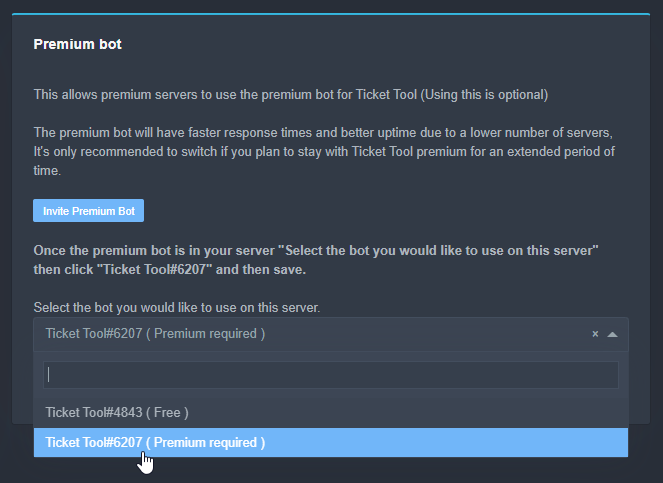
Inviting and Enabling Premium Bot
The first thing you will need to do is invite the premium bot, an invite can be found here
Once the bot is in your server we will head to the dashboard and manage your server. When you are managing your server, you want to head into "Server Configs" then click the drop down menu under "Select the bot you would like to use on this server" then click "Ticket Tool#6207" and then save.
 formal spire
done that
scenic plinth
Can you send a picture of the bot that's in your server?
ornate drum
Maybe the time has ended
formal spire
;/ i bought it yesterday
scenic plinth
It wouldn't automatically switch for you.
 tribal cedar
Yes you vote on the sites listed
tribal cedar
The links are displayed in the $vote cmd
ornate drum
This maybe
shut bolt
That's not a link to vote for our bot...
ornate drum
that is on the discord.gg ...?
shut bolt
$vote
humble sequoiaBOT
Votes
Current Votes: 3
Lifetime Votes: 9
Linked Votes: 0
Vote Links
Linking Info
Linked User: Not Linked
You can give your future votes to another user by linking with that user.
To link use $vote link (@user or userId)
To unlink use $vote unlink
Redeeming
Each vote is worth 12 hours of premium and can be redeemed once you have atleast 6 votes.
Your current votes are worth 1 day, 12h, 0m
To redeem your current votes use $vote redeem
shut bolt
There are the 3 links to vote
ornate drum
ooooh
 terse wren
How many more times will the bot update its logo X.x;
shut bolt
terse wren
How many more times will the bot update its logo X.x;

It is not an error from our side
It's a Carl-bot's bug
ornate drum
terse wren
How many more times will the bot update its logo X.x;
pins
terse wren
log avatar and any version thereof doesn't work.. Imma just kick it for now.. its flooded our logs.
ornate drum
terse wren
log avatar and any version thereof doesn't work.. Imma just kick it for now.. it...
Check pins
 terse wren
ornate drum
Check pins
terse wren
ornate drum
Check pins
jeeze, thanks. Telling me three times is kinda overkill, aint it?
iron nightBOT
Gave 1 Rep to Typer (current: #67 - 1)
ornate drum
terse wren
jeeze, thanks. Telling me three times is kinda overkill, aint it?
I told you one time idk before..
terse wren
and the other guy told me once. More than once isn't necessary.
ornate drum
Sorry
 unique pewter
terse wren
and the other guy told me once. More than once isn't necessary.
unique pewter
terse wren
and the other guy told me once. More than once isn't necessary.
Chill bro they jus tryna help u
tribal cedar
terse wren
jeeze, thanks. Telling me three times is kinda overkill, aint it?
You'll have to forgive them the questions been asked a few dozen times already
 floral fable
We don't have a certain time for when the Avatar Duplications will be fixed do we?
plain surge
It's not a problem from our end, please check the pinned messages in this channel
ornate drum
floral fable
We don't have a certain time for when the Avatar Duplications will be fixed do w...
Pins
 mighty flicker
$pc
humble sequoiaBOT

Thank you
Thank you for purchasing Ticket Tool Premium @mighty flicker. You have now been given the <@&535595160189403136> role!
Found 11 servers in total and 1 with premium and permission
craggy geyser
mighty flicker
$pc
Thanks for subscribing!
iron nightBOT
Gave 1 Rep to Jessica 💍 (current: #67 - 1)
humble sequoiaBOT
Premium Check
I was unable to detect a premium server for @vestal owl.
Found 6 servers in total and 0 with premium and permission
shut bolt
 vestal owl
$pc
vestal owl
$pc
Send us a debug link within the server you have premium
I'll check it out
jade topaz
my server is not showing on the website
tribal cedar
Do this
humble sequoiaBOT
Don't see your server in the dashboard?
You will possibly need to relog. Look below to see steps on how to relog.
How to relog the Dashboard.
First, you will need to go to the dashboard. Once your there, click on your avatar on the top right. after you clicked it, you will see button that says Logout. You must click that. Once you have logged out, you can log back in.
Note:
You need one of these 3 things to access the dashboard.
1. Server Owner (Level: 6)
2. Server Administrator (Level: 4)
3. Dashboard Role (Level: 2)
You can check your level using $level on your Discord Server
jade topaz
Why is ticket tool changing pfps so many times
tribal cedar
jade topaz
Why is ticket tool changing pfps so many times
Check out pinned msgs here
 jade topaz
I see sorry
shut bolt
No worries
 last flint
wait nvm I read the pins 😂 (ignore me)
ornate drum
last flint
wait nvm I read the pins 😂 (ignore me)
sus
jade topaz
i want the bot to mention a channel when a ticket is open how can i do it?
tribal cedar
Use the $id cmd
 rotund matrix
Hello, who in the right mind of fuck keeps changing the logo for ticket tool?? It keeps getting spammed constantly and im about to smack someones head!
tribal cedar
rotund matrix
Hello, who in the right mind of fuck keeps changing the logo for ticket tool?? I...
Check pinned msgs in this channel
jade topaz
no
rotund matrix
Thank fuck for that, I was about to commit LOL
copper owl
rotund matrix
Hello, who in the right mind of fuck keeps changing the logo for ticket tool?? I...
Lmao calm down
just turn off avatar logging
jade topaz
like it will automatically mentions the room
copper owl
jade topaz
like it will automatically mentions the room
Enigma explained it
$idcommand
humble sequoiaBOT
How do I get the ID of Roles/Channels/Emojis?
Ticket Tool has a useful command that helps you get the ID of various things like channels, roles, emojis and your server.
Just use the command $id <#channel/@role/:emoji:>. Now copy everything, including the brackets <...>, to your dashboard (or wherever you want it)
If you want the server ID, just use $id.
 errant storm
 errant storm
errant storm
errant storm
what is going on
copper owl
Nope
copper owl
errant storm
check pins in this channel
jade topaz
 tribal cedar
jade topaz
its just writes the id
tribal cedar
jade topaz
its just writes the id
Did you surround it with <>?
tribal cedar
Cool
jade topaz
ty
tribal cedar
Anytime
jade topaz
thanks @tribal cedar
iron nightBOT
Gave 1 Rep to Enigma (current: #14 - 78)
tribal cedar
Ty ❤
 wooden olive
why is this bot changing its pfp every 5 seconds?
shut bolt
wooden olive
why is this bot changing its pfp every 5 seconds?
It is not, it's a carlbot's problem
Please check out this message
wooden olive
oh?
shut bolt
copper owl
**Logging Spam**
If anyone's experiencing any logging spam regarding Ticket Too...
wooden olive
got it. thanks
shut bolt
Sure
copper owl
Imagine this whole time, the dev's been messing with the pfp
plain surge
plot twist
 copper owl
Carl bot bug? nah.. just battle up to his usual shenanigans
 mystic hound
Not even Josiah is that crazy

 viscid hatch
how to fix this? was going for last 12h non stop
 viscid hatch
mmm i see

 jade topaz
are yall constantly changing @pseudo glens pfp
vestal owl
Please read pins
 eager cargo
check the pins
jade topaz
ok
vestal owl
It clearly states its carl bot
jade topaz
ty
shut bolt
@livid hound
shut bolt
copper owl
**Logging Spam**
If anyone's experiencing any logging spam regarding Ticket Too...
Please check this message
And refrain from pinging staff users #546557408902905896
 crude axle
Pleaseeee figure out what is going on with ur PFP; my server logging has been going off for hourssss with tickettool’s PFP changes; its been nonstop
shut bolt
crude axle
Pleaseeee figure out what is going on with ur PFP; my server logging has been go...
Hey there
shut bolt
copper owl
**Logging Spam**
If anyone's experiencing any logging spam regarding Ticket Too...
Please check this message
It's a Carl-bot's side bug
crude axle
sigh gracias
shut bolt
crude axle
*sigh* gracias
Con gusto
 woeful notch
fix the logo shit
 queen locust
The bug is still going on? Kek
 potent scaffold
Yeah the bug is with Carlbot not ticket tool
queen locust
I hope carl bot resolves it soon
solid stream
Same, the number of tickets about this is kinda annoying.. Especially since there's no way for me to stop it.
potent scaffold
solid stream
Same, the number of tickets about this is kinda annoying.. Especially since ther...
Shit man. Im sorry
Also would it be weird to hang out in the vc here or is that not a thing to do?
solid stream
You can, nobody ever joins me so I stopped lol
But the server is a little more active these days
potent scaffold
Hey ping me and if im free ill always join up cause I actually love Vcs. But don't ask me to call on a phone.
solid stream
Lol, soo many people have a strange aversion to "phone calls"
potent scaffold
Honestly don't understand it myself. Cause while I will call on a phone, I'd just rather not for who knows what reason
solid stream
These days I don't have a ton of free to to just hang out and wait for people to chat, well.. I have the time.. But use it elsewhere.
solid stream
potent scaffold
Honestly don't understand it myself. Cause while I will call on a phone, I'd jus...
I have a brother who has/had a legit fear of calling people
potent scaffold
Also your PFP is adorable by the way
solid stream
I've run a version of stitch for over a year now, I change it every few months
Pushing near 2 years
potent scaffold
Thats genuinely Awesome
potent scaffold
Do you remember the lilo and stitch show itself? And not just the movies?
solid stream
Hmm, can't say that I remember it specifically
potent scaffold
Honestly same it feels like a fever dream but i think its up on disney +
potent scaffold
Holy shit it does exist on disney+
 potent scaffold
solid stream
It's a decent time to re-watch them all honestly.
potent scaffold
solid stream
It's a decent time to re-watch them all honestly.
It really is
solid stream
I'm heading off discord for the night, I'll possibly catch ya later (I'm always watching the chats, and almost always in offline mode)
potent scaffold
solid stream
I'm heading off discord for the night, I'll possibly catch ya later (I'm always ...
Later and sleep well
mystic hound
solid stream
Same, the number of tickets about this is kinda annoying.. Especially since ther...
It's funny when people hop in tickets and go like "fix your shit, stop changing the pfp so much" and don't listen to anything we say lol
potent scaffold
mystic hound
It's funny when people hop in tickets and go like "fix your shit, stop changing ...
cries in having worked for spectrum getting fucking amazon fire stick chats
mystic hound
We have a few fire stick requests in here too
potent scaffold
I- Tell me its because discord can be on kindle fire sticks
And not that fire sticks don't support the app and they think its a you issue like how they did with spectrums app
mystic hound
potent scaffold
I- Tell me its because discord can be on kindle fire sticks
I don't even know it's usually just "can you help me purchase a firestick" or "my firestick doesn't work"
potent scaffold
I-
 inland rapids
Why when I post a panel sometimes the images don't show, they've worked before but now it's just not working

This is what I've been getting trying to update my tickets
eager cargo
most likely having to do with an invalid image link
 unreal elbow
try reloading
 pine raptor
i have
unreal elbow
is the bot on ur server?
pine raptor
yep
pine raptor
still nothing
the bot is online and responding to the commands but the dashboard isnt working


 craggy geyser
So you should be able to see. Relog (don't just refresh the page, it doesn't work) and you should see it
Log out from the top right where your name is
 open harness
Hi guys, is this bot can support a multi-language server?
unreal elbow
yes
you can create multiple panels and customise the text of them, so it can be used in different channels in different languages
iron nightBOT
Gave 1 Rep to Onyx (current: #51 - 2)
 cloud drift
Hi guys , I cant add a panel and $debug does nothing ... any ideas ?
its set as Admin etc
everything works great in the dashboard ... then get a red error alert whenever I try send a panel
anyone else had this ?
 sacred bronze
Wallet 0x10fe00e0571b379360ec018e3cd398ab99b2dada
Gems Antes: 8.000
Gems Depois: 4.000
Falta: 4000
Discord ou telegram: Alexandre Rocha#7193
Descrição: boa dia, venho por meio desta pedir alguma orientação, pois ao entrar no jogo notei que quase 4 mil gemas minha sumiram.
Desde já agradeço e aguardo contato
robust sandalBOT
sacred bronze
Wallet 0x10fe00e0571b379360ec018e3cd398ab99b2dada
Gems Antes: 8.000
Gems Depois:...
 Alexandre Rocha
Wallet 0x10fe00e0571b379360ec018e3cd398ab99b2dada
Gems Before: 8,000
Gems After: 4,000
Missing: 4000
Discord or telegram: Alexandre Rocha#7193
Description: good day, I come through this ask for some guidance, because when Entering the game I noticed that almost 4,000 of mine gems are gone.
I thank you and look forward to contact
Portuguese (Brazil) (pt) → English (en)
plain surge
@sacred bronze This is a support server for Ticket tool bot, please make sure you contact the right support team
humble sequoiaBOT
You're in the wrong place
We provide support for @pseudo glen discord bot and cannot help you with whatever issue you have.
Please make sure to contact the appropriate support team.
If you don't have any further questions regarding our bot Ticket Tool, please close this ticket
_ _
copper owl
@rough pine any reason you gave a negative review? anything we can improve on?
Oh nvm, they left. Welp
jade topaz
I would like to know how it works
copper owl
jade topaz
I would like to know how it works
how the bot works?
humble sequoiaBOT
copper owl
here's our documentation
copper owl
jade topaz
I would like to know how do I play cod to make the various camouflages
This is not the server to ask that type of question
We're ticket tool support. Nothing related to COD unless you're using the service in a COD related server
copper owl
Link to what?
jade topaz
Cod server
copper owl
I dont have one
 royal root
how long are the logs saved for?
shut bolt
royal root
how long are the logs saved for?
Which logs?
The transcript or the logging ones?
royal root
transcripts
shut bolt
The transcript will last as long as you do not delete the message where the file was sent or it's channel
If you delete one of them, the link will work for 30 days more as it's kept on Discord's servers cloudfare
royal root
ahhh i see, thanks
shut bolt
royal root
ahhh i see, thanks
Sure
 dry burrow
i’ve tried everything and i can’t get the open a ticket message to appear in the channel, can anybody help me please? i’ve looked through the help stuff and i don’t understand
 bronze stratus
I want to go to the dashboard, but I get an error
unreal elbow
dry burrow
i’ve tried everything and i can’t get the open a ticket message to appear in the...
tried giving the @ Ticket Tool role the administrator right?
copper owl
admin isnt needed for the bot to work
copper owl
bronze stratus
I want to go to the dashboard, but I get an error
send an image of the error
dry burrow
unreal elbow
tried giving the @ Ticket Tool role the administrator right?
it ended up being this for some reason
even though it’s not required
unreal elbow
ok…
copper owl
dry burrow
it ended up being this for some reason
then there's an issue with the perms
make sure ticket tool has all the necessary perms in the channel
copper owl
Administrative permissions give all the permissions to the person
copper owl
unreal elbow
there is nothing else to change with perms lol
Some people don't like giving admin to bots
which is why we don't advise people to give admin as a solution
bronze stratus
copper owl
send an image of the error
It is german
 copper owl
Can you translate?
bronze stratus
Sure
humble sequoiaBOT
-- moved to ticket --
unreal elbow
bronze stratus
It is german
it says can’t connect to the site, connection declined by discordapp.com
@copper owl
bronze stratus
Hmmm ... this page is unfortunately not available
discordapp.com refused to connect.
copper owl
what link did you try using?
humble sequoiaBOT
 copper owl
try this one instead
dry burrow
also, how do i choose where tickets go after someone opens one?
like which category
cause i’m stuck on that
copper owl
$help category
humble sequoiaBOT
How to set the open category
To set a open category go to the Dashboard -> Panel Configs -> Settings -> Category Options -> Category Open

 copper owl
Yeah, and that isn't working?
copper owl
are you on wifi or data
bronze stratus
bronze stratus
I click on it
 copper owl
there must be something wrong with discord..? Im not entirely sure..
the reroute goes to discord's login
bronze stratus
Okay
copper owl
it's not something we control I think
shut bolt
Probably a antivirus, a firewall, or a extension
 modest sierra
I'm trying to configure the ticket tool for the server I Admin on? The biggest issue is getting the ticket log/transcript sent to a channel afterward?
copper owl
modest sierra
I'm trying to configure the ticket tool for the server I Admin on? The biggest i...
so the issue is you don't know how to have the log and transcripts be sent?
modest sierra
copper owl
so the issue is you don't know how to have the log and transcripts be sent?
Correct. I found it in the settings, after using help commands. I selected the channel as well, but afterward the summary and "log" appeared in the ticket itself instead?
copper owl
$help transcript
humble sequoiaBOT
How do I save transcript to a channel?
To save transcripts to a channel go to the Dashboard -> Panel Configs -> Settings -> Logging Options -> Transcript Channel
copper owl
Make sure you actually did it, and make sure ticket tool has all the necessary permissions in the channels you selected
modest sierra
Do I need two separate channels then?
modest sierra
copper owl
Make sure you actually did it, and make sure ticket tool has all the necessary p...
The channel was setup by someone previously, so I doubt it had the permissions, thanks.
iron nightBOT
Gave 1 Rep to Neptune (current: #1 - 301)
copper owl
anytime
 severe path
copper owl
<@!282818086418251776> any reason you gave a negative review? anything we can im...
severe path
copper owl
<@!282818086418251776> any reason you gave a negative review? anything we can im...
look at his ticket (german)
humble sequoiaBOT
Help Options
$help commands - Information on commands
$help setup - Information on bot setup
$help faq - Frequently asked questions
 tall fog
$invite
humble sequoiaBOT
Ticket Tool Invite & Support
 cobalt epoch
Bonjour sa m'affiche sa alors qu'il et bien dans mon serveur !
 robust sandalBOT
cobalt epoch
Bonjour sa m'affiche sa alors qu'il et bien dans mon serveur !
robust sandalBOT
cobalt epoch
Bonjour sa m'affiche sa alors qu'il et bien dans mon serveur !
 night
night
Hello his shows me his while he and well in my server!
French (fr) → English (en)
cobalt epoch
robust sandal
?
 half kernel
Bonjor, avez-vous essayé de vous déconnecter à nouveau du site et de vous reconnecter ?
cobalt epoch
half kernel
Bonjor, avez-vous essayé de vous déconnecter à nouveau du site et de vous reconn...
oui plusieur fois
half kernel
Ok, vous pouvez lancer $level et m'envoyer une capture d'écran.
 half kernel
C'est bizarre, tu peux m'envoyer l'identifiant du serveur ?
cobalt epoch
oui
 magic pelican
Ola,bom estou precisando de ajuda com a seguinte coisa,eu preciso fazer um chat onde os membros do meu servidor abriram um ticket e será aberto um "ticket/chat" estou com problemas para entender o bot
cobalt epoch
892701011548995594
half kernel
cobalt epoch
892701011548995594
Ok une seconde
cobalt epoch
d'accord
half kernel
 agile quest
so how do i make a channel to get ticekts
agile quest
so how do i make a channel to get ticekts
$help setup
humble sequoiaBOT
Setting up Ticket Tool
Visit the docs for setup info
General Setup
half kernel
View above
cobalt epoch
^^
half kernel
cobalt epoch
d'accord
pouvez-vous essayer d'utiliser un autre navigateur
cobalt epoch
half kernel
pouvez-vous essayer d'utiliser un autre navigateur
je vais essaye merci
half kernel
Oui, fais-moi savoir comment ça se passe !
scenic plinth
magic pelican
Ola,bom estou precisando de ajuda com a seguinte coisa,eu preciso fazer um chat ...
/pt Have you viewed the setup documents, or are you still confused?
robust sandalBOT
Você já viu os documentos de configuração ou ainda está confuso?
English (en) → Portuguese (Brazil) (pt)
sacred bronze
Wallet 0x10fe00e0571b379360ec018e3cd398ab99b2dada
Gems Antes: 8.000
Gems Depois: 4.000
Falta: 4000
Discord ou telegram: Alexandre Rocha#7193
Descrição: boa tarde, venho por meio desta pedir alguma orientação, pois ao entrar no jogo notei que quase 4 mil gemas minha sumiram.
shut bolt
$tts
humble sequoiaBOT
You're in the wrong place
We provide support for @pseudo glen discord bot and cannot help you with whatever issue you have.
Please make sure to contact the appropriate support team.
If you don't have any further questions regarding our bot Ticket Tool, please close this ticket
_ _
half kernel
scenic plinth
/pt Have you viewed the setup documents, or are you still confused?
$m2t
shut bolt
scenic plinth
/pt Have you viewed the setup documents, or are you still confused?
He opened a ticket
scenic plinth
half kernel
$m2t
m2t
half kernel
oh
humble sequoiaBOT
-- moved to ticket --
unreal elbow
shut bolt
$tts
this alexandre did that like 3 times now idk what he doesnt understand
shut bolt
unreal elbow
this alexandre did that like 3 times now idk what he doesnt understand
Welcome to a common situation at support servers jajaja
 cobalt epoch
/fr je vais voir sa charge
robust sandalBOT
cobalt epoch
/fr je vais voir sa charge
Trying to translate to French but detected as French.
Please don't waste translations by trying to translate to the same language.
shut bolt
/pt Hey @magic pelican, I just sent you the portuguese setup information in the ticket, please check it out
robust sandalBOT
Ei @magic pelican, acabei de te enviar as informações de configuração portuguesa no bilhete, por favor, confira
English (en) → Portuguese (Brazil) (pt)
magic pelican
scenic plinth
/pt Have you viewed the setup documents, or are you still confused?
Então é que essa é a primeira vez que mexo com esse bot e estou um pouco confuso para fazer o bot fhncionar
humble sequoiaBOT
-- moved to ticket --
sacred bronze
Wallet 0x10fe00e0571b379360ec018e3cd398ab99b2 given
Gems before: 8,000
After jewelry: 4,000
Missing: 4000
Discord or telegram: Alexandre Rocha # 7193
Description: good night, I come here to ask for some guidance, because when entering the game I noticed that almost 4 thousand gems of mine are missing.
half kernel
$tts
humble sequoiaBOT
You're in the wrong place
We provide support for @pseudo glen discord bot and cannot help you with whatever issue you have.
Please make sure to contact the appropriate support team.
If you don't have any further questions regarding our bot Ticket Tool, please close this ticket
_ _
half kernel
sacred bronze
Wallet 0x10fe00e0571b379360ec018e3cd398ab99b2 given
Gems before: 8,000
After jew...
you are in the wrong place sir/ ma'am
shut bolt
@sacred bronze it's the fourth time you send this message, we are not able to help you as this is not related to ticket tool, please read the responses we have given you here and in your ticket
cobalt epoch
sa marche avec un autre navigateur
shut bolt
Great
cobalt epoch
mais pourquoi sa marche pas avec google ?
half kernel
cobalt epoch
sa marche avec un autre navigateur
Super, je suis content d'avoir pu vous aider aujourd'hui.
shut bolt
/fr It's a problem from the browser then, try clearing cookies and cache
robust sandalBOT
C’est un problème du navigateur alors, essayez d’effacer les cookies et le cache
English (en) → French (fr)
half kernel
Il peut s'agir d'un problème de cookies ou autre, mais c'est hors de portée.
cobalt epoch
/pt merci
robust sandalBOT
Obrigado
French (fr) → Portuguese (Brazil) (pt)
agile quest
what does transcript mean because it tells me Transcript Channel and i dont know what it is or does
shut bolt
agile quest
what does transcript mean because it tells me Transcript Channel and i dont know...
The transcript is a html file with the messages from your ticket
agile quest
ohhhh
shut bolt
@rich flower hey, the bot isn't down, any problem with it on your server?
agile quest
shut bolt
The transcript is a html file with the messages from your ticket
so message logs?
unreal elbow
yea
shut bolt
agile quest
so message logs?
Yeap, basically


 agile quest
so if i tap transcript, when i delete the ticket then a transcript will go to my messagelogs?
shut bolt
Indeed, it will go to the Transcript Channel
shut bolt
$help claim
humble sequoiaBOT
How does the claim command work?
Ticket Tool claiming is a premium only command that allows your support team to claim tickets and have the ticket renamed, changed permissions or moved to another category
shut bolt
You can enable your team members to claim the tickets
humble sequoiaBOT
Claiming Options
Claiming allows you to change the ticket name, category and permissions. To use it you have to enable it first on your Dashboard > Panel Configs > Claiming Options.

 Note: This is a premium feature
agile quest
Note: This is a premium feature
agile quest
sop i dont need to worry abtthat since i got no premium
shut bolt
Yeap, premium feature but it's really useful 👀
cobalt epoch
je voulai savoir comment faire pour que dans mais ticket sa ping le staff ?
plain surge
$help ping
humble sequoiaBOT
How to make Ticket Tool ping a role
To make ticket tool ping a role when a ticket is opened, go to the Dashboard -> Panel Configs -> Settings -> Ticket Options -> Ticket Message -> Message Text and do this:
{@Role name} This is case sensitive and the role must have @mentions enabled
plain surge
Vous pouvez aussi utiliser {Role ID}
cobalt epoch
merci ^^
plain surge
Derien
plain surge
Dans votre message du ticket
Dashboard -> Panel Configs -> Settings -> Ticket Options -> Ticket Message -> Message Text
Message du ticket, pardon @cobalt epoch


 humble sequoiaBOT
How do I get the ID of Roles/Channels/Emojis?
Ticket Tool has a useful command that helps you get the ID of various things like channels, roles, emojis and your server.
Just use the command $id <#channel/@role/:emoji:>. Now copy everything, including the brackets <...>, to your dashboard (or wherever you want it)
If you want the server ID, just use $id.
plain surge
Après ça, copiez le numéro dans le message du ticket avec { }
plain surge
Utiliser $id @role dans votre serveur
jade topaz
how do you make certain roles see tickets without giving the role too much power to ruin ur server?
like if i want to make a role called "helper" how can i make it to have limited access but still be able to chat in tickets
humble sequoiaBOT
How to let support team see into a ticket
About support roles
A support role lets your support team see into tickets with out having to add them manually to each and every ticket.
You can add as many support roles as you like per panel.
NOTE that the way discord works all admins can see into tickets regardless of this.
How to set a support role
To set a Support role go to the Dashboard -> Panel Configs -> Settings -> General Options -> Support Team Roles.

NOTE that the support role will not be able to see into tickets that are already created..
plain surge
@jade topaz
iron nightBOT
Gave 1 Rep to D̸̞̉҉̢̩͠o͛ͫ̚m͈̕͜҉̘̱̟☆̞͈͠҉ͪ̈́͘҉̷̥̐ (current: #34 - 6)
plain surge
No problem
plain surge
plain surge
Utiliser $id @role dans votre serveur
@cobalt epoch ça va?
agile quest
is there a way to automatically change the ticket channel name everytime somebody creates a ticket?
plain surge
That's a premium feature

Any option marked with a red diamond  is a premium feature
agile quest
ok, and is there anyway to change the permission auto each time they create a ticket
plain surge
$help perms
humble sequoiaBOT
How to set the permissions for tickets
To set a change permissions go to the Dashboard -> Panel Configs -> Settings -> Permission Options
 plain surge
You can set the user open permissions yes
agile quest
oh thx
agile quest
thanks @plain surge
iron nightBOT
Gave 1 Rep to D̸̞̉҉̢̩͠o͛ͫ̚m͈̕͜҉̘̱̟☆̞͈͠҉ͪ̈́͘҉̷̥̐ (current: #31 - 7)
agile quest
hehe
plain surge
Lol ty 
plain surge
Comment permettre votre équipe du support de voir les tickets ?
plain surge
humble sequoia
Celà est la réponse pour cette question
cobalt epoch
javais compris mais je veu que quand quelque ouvre un ticket sa mentionne mais staff
plain surge
Quel est le nom du rôle de votre équipe du support ?
cobalt epoch
plain surge
Quel est le nom du rôle de votre équipe du support ?
@・📛 ・ haut staff
plain surge
D'accord.
Envoyer dans votre serveur :
$id @・📛・ haut staff
cobalt epoch
plain surge
D'accord.
Envoyer dans votre serveur :
$id @・📛・ haut staff
déjà fait
cobalt epoch
<@&905080778864607302>
cobalt epoch
<@&905080778864607302>
plain surge
D'accord, copiez ça sans parenthèses dans votre message du ticket
Comme cela avec les < >
Sans { }
plain surge
Envoyer que vous avez écrit dans le message du ticket sur le Dashboard s'il vous plaît
Comme une image
cobalt epoch
je vous envoi ici ?
plain surge
Non, ouvrez un ticket pour le support français dans #🎫│make-a-ticket
humble sequoiaBOT
-- moved to ticket --
 muted isle
whats the dash?
humble sequoiaBOT
muted isle
why this appears?
Servers - (server not showing up? try relogging)
It looks like Ticket Tool isn't online or in any servers you have permission to access,Invite Ticket Tool or check it's status
humble sequoiaBOT
Don't see your server in the dashboard?
You will possibly need to relog. Look below to see steps on how to relog.
How to relog the Dashboard.
First, you will need to go to the dashboard. Once your there, click on your avatar on the top right. after you clicked it, you will see button that says Logout. You must click that. Once you have logged out, you can log back in.
Note:
You need one of these 3 things to access the dashboard.
1. Server Owner (Level: 6)
2. Server Administrator (Level: 4)
3. Dashboard Role (Level: 2)
You can check your level using $level on your Discord Server
plain surge
Try reloging if your server isn't appearing on the Dashboard
muted isle
i relog again same thing
tribal cedar
Do you have one of the 3 accesses listed above?
muted isle
i have server owner
plain surge
Did you invite Ticket tool to your server?
plain surge
Alright, try logging in on the Dashboard from another browser
 long geode
Hey guys it's possible to create a second button to enable different types of ticket?
humble sequoiaBOT
For a more convenient use of multipanels, you can now combine panels on the dashboard. This will allow you to directly send the multipanel from the dashboard or via the $panel ID command.
Where can I find this?
You can find this setting on the Dashboard -> Panel Configs -> Settings -> General Options
This will put all buttons from all of your panels on one message. The message is the panel message from the panel you're combining these panels in.
copper owl
you need premium for it
long geode
copper owl
you need premium for it
oh really?
copper owl
Well
long geode
ripps
copper owl
you need premium to have it under the same panel message
you can always make multiple panels and send them individually
long geode
big rips
long geode
copper owl
you can always make multiple panels and send them individually
pretty much ugly
copper owl
Pretty much yeah
tribal cedar
Individual channels
copper owl
Premium would unlock almost all possible customization options
scenic plinth
 stark dagger
Ah... Tout le monde parle anglais...
stark dagger
Ah... Tout le monde parle anglais...
Si vous avez besoin d’aide pour créer un billet dans Français, nous avons quelques Français soutien qui, je le sais, vous aideront certainement!
humble sequoiaBOT
-- moved to ticket --
plain surge
DO NOT CLICK ON THE ABOVE LINK, IT'S A SCAM
stark dagger
Faut pas cliquer si je comprend bien ?
plain surge
Oui, ne cliquer pas
stark dagger
Pourquoi ?
shut bolt
Deleted
plain surge
C'est ne pas un vraie link
plain surge
stark dagger
Et même pourquoi tlm à le droit de mettre des liens ?
Pour que quand quelqu'un est en besoin du support et nous avons besoin d'une image, ils peuvent envoyer
plain surge
stark dagger
Mais il est aussi dans <#509775046848282677>
Deleted
stark dagger
plain surge
Pour que quand quelqu'un est en besoin du support et nous avons besoin d'une ima...
Mais vous pouvez autoriser au staff de mettre des liens et ne pas autorisé au membre
plain surge
stark dagger
Mais vous pouvez autoriser au staff de mettre des liens et ne pas autorisé au me...
J'avais informé l'équipe du support. Merci pour votre opinion
stark dagger
Derien
tribal cedar
Don't click!
shut bolt
Deleted, will report on a sec
stark dagger
Oui a compris tkt
 finite aspen
Hello I have a problem with the bot
shut bolt
vestal owl
Please state the problem
finite aspen
I can't see my server on the bot site
finite aspen
Ok thanks you bro
vestal owl
My pleasure
finite aspen
It worked
shut bolt
Yeap
shut bolt
F
shut bolt

vestal owl

vestal owl
Yes
stark dagger
Enfin ça pourrais être un serveur normal avec ça en +
shut bolt
/fr We used to have a general chat but it was quite misused, and as this is a support server it was removed
robust sandalBOT
Nous avions l’habitude d’avoir un chat général, mais il était assez mal utilisé, et comme il s’agit d’un serveur de support, il a été supprimé
English (en) → French (fr)
stark dagger
Stylé
shut bolt
Oui
stark dagger
robust sandal
Ah rip, baaaahhh faudrais faire un auto-react et tu coche ton pays puis t'a accesyau general de ton pays
Enfin après je sais pas
shut bolt
/fr It would be a lot of channels, yet in a community server could be done
robust sandalBOT
Ce serait beaucoup de canaux, mais dans un serveur communautaire pourrait être fait
English (en) → French (fr)
stark dagger
Oui c'est vrai
shut bolt
Oui, pour a serveur du communauté est une bonne idea
shut bolt
/fr I used to have french classes but I haven't take more jajajaja, I tried my best