
#🆘│community-support
1 messages · Page 358 of 1
 alpine anvil
what if ticket channel number thing surpasses #ticket-9999
 safe prairie
It goes on with 10000
 unborn harbor
hey
i have a problem and i need support
the problem is that when i make it comes up but i want to make it down how do i do that
 finite prism
Thanks for the response! When I close the ticket it gets moved then deleted quickly. Do I maybe need to adjust another settings for that to work? Or to keep the ticket open?
 pale pilot
Enable two step ticket in general options @finite prism
 tribal sigil
unborn harbor
hey
i have a problem and i need support
the problem is that when i make it comes...
tribal sigil
unborn harbor
hey
i have a problem and i need support
the problem is that when i make it comes...
Hey
unborn harbor
?
tribal sigil
@unborn harbor just make a category of tickets down and set that category
finite prism
pale pilot
Enable two step ticket in general options <@94262975698837504>
Oooo! Awesome, thank you! I'll give that a shot real quick.
unborn harbor
how
tribal sigil
unborn harbor
how
Server configs
unborn harbor
u mean server settings
tribal sigil
Closed and open ticket same category
tribal sigil
unborn harbor
u mean server settings
Wait
unborn harbor
iam confused can i have a screen shot
finite prism
pale pilot
Enable two step ticket in general options <@94262975698837504>
Omg that was it! Thank you so much ❤️
 iron nightBOT
Gave 1 Rep to Simple (current: #7 - 154)
 unborn harbor
?
tribal sigil

Settings
Create panel and go to settings category options then done
Create that category down

Like this @unborn harbor

 unborn harbor
no only 3
tribal sigil
@unborn harbor in 3 panel just change settings
tribal sigil
tribal sigil
Like this
@unborn harbor understood?
I am not staff but still working to get staff
unborn harbor
tribal sigil
<@885910952732684298> in 3 panel just change settings
i didnt understand iam kind confused plus idk how to do it
tribal sigil
unborn harbor
i didnt understand iam kind confused plus idk how to do it
1st step go in panel settings
unborn harbor
tribal sigil
1st step go in panel settings
ok
tribal sigil
2nd step go in category optionz
unborn harbor
 tribal sigil
2nd step go in category optionz
tribal sigil
tribal sigil
2nd step go in category optionz
3rd step create a category in ur server down
Then in category option just select that channel in closed and opened also @unborn harbor
@unborn harbor are u there?
Hey staff u seeing 👀
tribal sigil
unborn harbor
i meant in this screen where do i go
Category options
unborn harbor
then where
tribal sigil
Create a category in ur server down
unborn harbor
 tribal sigil
Create a category in ur server down
tribal sigil
tribal sigil
Create a category in ur server down
@unborn harbor
unborn harbor
i did
tribal sigil
And then in both options just select that category
And save and create ticket and see
@unborn harbor getting me ?
Hey staff please take me
unborn harbor
look i made a categoery
tribal sigil
Ok
unborn harbor
 unborn harbor
i made that catgoery but i cant find it
tribal sigil
Try
 tribal sigil
Ur category is up?
unborn harbor
its down
tribal sigil
Can i have screenshot of ur panel settings?
@unborn harbor u created new ticket or old?
unborn harbor
new one
tribal sigil
What
tribal sigil
tribal sigil
Can i have screenshot of ur panel settings?
Give
unborn harbor
if u could come in my server and help me beacuse iam confused
unborn harbor
ok
unborn harbor
tribal sigil
Ok fine
thx
iron nightBOT
Gave 1 Rep to Umesh✨ (current: #66 - 1)
tribal sigil
I helped someone
Hey staff u saw 👀
unborn harbor
tribal sigil
I helped someone
Hey staff u saw 👀
u did
tribal sigil
@pale pilot
unborn harbor
and thx for that
tribal sigil
unborn harbor
and thx for that
Ok
pale pilot
I saw, no need to ping
tribal sigil
Ok u can think
 prime bridgeBOT
 Successful bans:
 1
 Unsuccessful bans:
 0
 Reason: scam
 Moderator: @mystic hound
 jade topaz
oop
all good
i just had to reinvite the bot and refresh dashboard
all's well now, thanks
 wooden roost
How do I put the ticket in the ticket room?
 shut bolt
wooden roost
How do I put the ticket in the ticket room?
shut bolt
wooden roost
How do I put the ticket in the ticket room?
What do you mean by "ticket room"? A category?
wooden roost
shut bolt
What do you mean by "ticket room"? A category?
Technical support room that complains about members
shut bolt
wooden roost
Technical support room that complains about members
You mean like a channel as #🎫│make-a-ticket ?
 unique junco
thanks @shut bolt
iron nightBOT
Gave 1 Rep to Pablo. (current: #11 - 95)
shut bolt
unique junco
thanks <@!518666147441278998>
Parp
unique junco
poblio
shut bolt
Poblio
jade topaz
@shut bolt + Respect 
 potent quest
can I get help
shut bolt
You mean the
Support team ticket controls?
It's the default message sent by the bot, we don't have access to none of your tickets
Sure
 humble sequoiaBOT
We would love to help you but, if you don't tell us what you need help with we can't help you :(
shut bolt
humble sequoia
We would love to help you but, if you don't tell us what you need help with we c...
@potent quest
He left?
lol
 plain surge
@shut bolt This message is still there
shut bolt
Done
plain surge
I thought messages by someone gets deleted when they are banned
plain surge
Could have been lag or something, all good now. Ty
plain surge
No problem 😊
 copper owl
plain surge
I thought messages by someone gets deleted when they are banned
copper owl
plain surge
I thought messages by someone gets deleted when they are banned
depends on the bot or the settings 👀
i dont think modsystem deletes the messages in here
shut bolt
copper owl
i dont think modsystem deletes the messages in here
Tragic asked for that tho
copper owl
well then it's out of our hands B)
 light field
How long does applications take to get read?
shut bolt
light field
How long does applications take to get read?
If you get accepted you should receive a response between a couple of weeks as stated in the application ticket
shut bolt
light field
What if I fail?
You wont receive any type of response
light field
Okay.
plain surge
Weren't applications only open till 5 days after that message was posted?
shut bolt
plain surge
Weren't applications only open till 5 days after that message was posted?
Read again Light's message
plain surge
Oh I didn't see the edit bit
 vestal owl
light field
Okay.
vestal owl
light field
Okay.
BTW at the first part there's two stages if u complete the phase 1 where u just apply I got a response a day after and now I'm waiting after that
shut bolt
vestal owl
BTW at the first part there's two stages if u complete the phase 1 where u just ...
He isn't longer in the server btw
shut bolt
vestal owl
Why would he leave if he just replied lol
Well, users simply leave lol
vestal owl
Not replied I ment he proby applied
 vestal owl
Ikr
 sinful pasture
Hi! On my server, only these roles can see tickets:

Whereas I'm trying to make all of these see it:
shut bolt
Yeap, want more people to see them?
sinful pasture
 sinful pasture
Too many roles?
humble sequoiaBOT
How to let support team see into a ticket
About support roles
A support role lets your support team see into tickets with out having to add them manually to each and every ticket.
You can add as many support roles as you like per panel.
NOTE that the way discord works all admins can see into tickets regardless of this.
How to set a support role
To set a Support role go to the Dashboard -> Panel Configs -> Settings -> General Options -> Support Team Roles.

NOTE that the support role will not be able to see into tickets that are already created..
shut bolt
sinful pasture
Too many roles?
Not too many, but, placed in the wrong spot
You are giving access to all of those roles to edit everything in your dashboard
sinful pasture
Oh no
sinful pasture
Ah, I see it now
shut bolt
And after that
sinful pasture
Thanks!
shut bolt
humble sequoia
Add them here
shut bolt
sinful pasture
Thanks!
Sure!
sinful pasture
thanks @shut bolt
iron nightBOT
Gave 1 Rep to Pablo. (current: #11 - 98)
shut bolt
Sure :)
jade topaz
Where do I have a list of {} to use with the bot?
humble sequoiaBOT
Supported Variables
{server.id} --> ID of the Server

[#🆘│community-support](/guild/509192800865353738/channel/776680605517742090/) = <#channel> --> Channel link of the current channel
{channel.name} --> Name of the current channel
{channel.id} --> ID of the current channel

{author} = <@user> --> Mention of the user triggering this message
{author.name} --> Name of the user triggering this message
{author.id} --> ID of the user triggering this message
{author.nickname} --> Nickname of the user triggering this message
{author.icon} --> Direct Url of the profile picture of the user triggering this message
{author.tag} --> 4 digit tag (discriminator) of the user triggering this message
{author.full} --> username + 4 digit discriminator of the user triggering this message

{panel.count} --> The current count number of the panel (Tickets only)
{panel.name} --> The name of the panel (Tickets Only)
{panel.ticketLimit} --> The current limit of the panel (Ticket Only)

{ticket} = <#channel> --> Channel mention of the ticket
{ticket.id} --> Channel ID of the ticket

{ticket.user} = <@user> --> User mention of the ticket user
{ticket.user.name} --> Name of the ticket user
{ticket.user.id} --> User ID of the ticket user
{ticket.user.nickname} --> Nickname of the ticket user
{ticket.user.icon} --> Direct Url of the profile picture of the ticket user
{ticket.user.tag} --> Tag / Discriminator of the ticket user
{ticket.user.full} --> Username + Discirimator of the ticket user```
Roles can be either
{@role name} or {role ID}Also, at the end of the Settings of a panel you will find a menu named Supported Variable
jade topaz
Thank you! @shut bolt
iron nightBOT
Gave 1 Rep to Pablo. (current: #11 - 99)
shut bolt
Sure!
jade topaz
Which should I use for having their name be the ticket name?
shut bolt
{ticket.user.name}
shut bolt
Dígame
 fallen bloom
soy jugador de wow
shut bolt
Okey
fallen bloom
y bueno me cambio de nombre pague 2 creditos espere 10 dias y volvi a pagar 2 creditos cambie el nombre en la pagina de warsages y al entrar sigo con el mismo nombre}
humble sequoiaBOT
Está en el lugar equivocado
Brindamos soporte para el bot de Discord @pseudo glen y no le podemos ayudar con el problema que presenta.
Por favor asegúrese de contactar al equipo de soporte adecuado.
_ _
Si no tiene alguna duda relacionada a nuestro bot, Ticket Tool, por favor cierre este ticket.
shut bolt
Estás en el servidor equivocado amigo
shut bolt
humble sequoia
Lee esto por favor
 coral kestrel
how do you make it so some people can't open tickets
shut bolt
coral kestrel
how do you make it so some people can't open tickets
There are two options mainly
Number one
You could blacklist a role that won't have access to any command at all and give that role to the users you want to not be able to use the create button
humble sequoiaBOT
Blacklist Roles
Any role you assign as a blacklisted role won't be able to use commands or reactions.
Selecting a blacklisted role
Go to your Dashboard -> Server Configs. There you will find the option to select blacklisted roles.
Note: Don't forget to save.
 coral kestrel
ok
shut bolt
The other option would be make a role for those users and mark that role as forbidden for the create button in its settings
$buttons
humble sequoiaBOT

Buttons
The new Discord Buttons allow for a much smoother and convenient experience. They reduce lag and work much better than emojis. With ticket tool you can edit all the buttons however you like! Buttons can show emojis, text and can have 4 different colors.
Where can I edit them?
Dashboard -> Panel Configs -> <Settings> -> Button Options -> <Setting>
 shut bolt
In Disabled Roles
shut bolt
Sure
jade topaz
How to buy the premium?
shut bolt
jade topaz
How to buy the premium?
Hey there
humble sequoiaBOT
Ticket Tool Premium
Get premium at https://tickettool.xyz/premium
Manage your subscriptions at https://tickettool.xyz/subscriptions
Why Premium?
Premium lets you customize the bot just how you want it. It also helps keep the bot running.
shut bolt
Check the first link
jade topaz
How do I know how much is the admin got claimed a tickets?
shut bolt
jade topaz
How do I know how much is the admin got claimed a tickets?
You mean how to know the amount of times a user has claimed tickets?
jade topaz
Yes
shut bolt
We currently have no feature as that, indeed has been suggested but only time will say if it gets implemented, apologies
shut bolt
Run this command in this channel $pc
jade topaz
$pc
humble sequoiaBOT

Thank you
Thank you for purchasing Ticket Tool Premium @tough vessel. You have now been given the <@&535595160189403136> role!
Found 5 servers in total and 1 with premium and permission
shut bolt
There you go
 half kernel
When it dosnt actually give the role
half kernel
ohh rip
shut bolt
It's one of the most common bugs
Visually you can't see the role
Yet if you refresh
It will show up
jade topaz
How can I invite the premium in my anther server
humble sequoiaBOT
Inviting and Enabling Premium Bot
The first thing you will need to do is invite the premium bot, an invite can be found here
Once the bot is in your server we will head to the dashboard and manage your server. When you are managing your server, you want to head into "Server Configs" then click the drop down menu under "Select the bot you would like to use on this server" then click "Ticket Tool#6207" and then save.
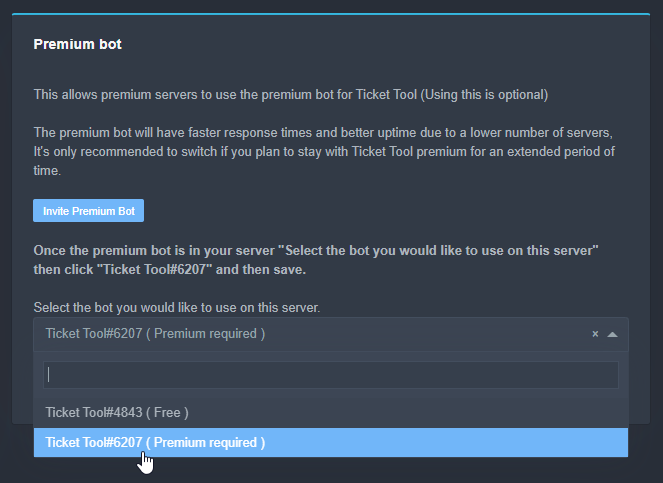 jade topaz
Yes thx
shut bolt
jade topaz
Yes thx
Sure
 humble sequoiaBOT
Premium Check
I was unable to detect a premium server for @wraith relic.
Found 11 servers in total and 0 with premium and permission
shut bolt
F
 wraith relic

shut bolt
$pc
humble sequoiaBOT
Thank you
Thank you for continuing to support Ticket Tool @shut bolt.
Found 30 servers in total and 2 with premium and permission
shut bolt
I don't know which are the 2 servers LMFAO
wraith relic
you got it for free 
shut bolt
I had it before for I server I recently resigned from
wraith relic
OHHH
shut bolt
Oh nvm I just found which are the 2 servers
wraith relic
haha
shut bolt
Didn't remember those two had premium lol
 shut bolt
Did you selected the premium bot?
jade topaz
How 
shut bolt
$help send
humble sequoiaBOT
Sending a panel
Once you've created a panel on the dashboard you will need to send it to a channel using send on the dashboard
Select the channel you want your panel to be created in and click send.
For other questions checkout $help faq
An example of a sending a panel is shown below.
 shut bolt
Send again your panels and delete the old ones
humble sequoiaBOT
Premium Check
I was unable to detect a premium server for @lilac girder.
Found 19 servers in total and 0 with premium and permission
 twin jolt
So this is less of a problem and more of a question: Which tool do you use to make the HTML files after a ticket is closed?

GitHub
Exports Discord chat logs to a file. Contribute to Tyrrrz/DiscordChatExporter development by creating an account on GitHub.
humble sequoiaBOT
-- moved to ticket --
 honest anchor
What is the problem?
 sand arch
Do i need to turn on admin perm for the bot to work?
copper owl
sand arch
Do i need to turn on admin perm for the bot to work?
nope

The bot needs these permissions
admin isnt necessary
you can pay via paypal, bitcoin, and VISA
humble sequoiaBOT
Ticket Tool Premium
Get premium at https://tickettool.xyz/premium
Manage your subscriptions at https://tickettool.xyz/subscriptions
Why Premium?
Premium lets you customize the bot just how you want it. It also helps keep the bot running.
copper owl
the first link
plain surge
copper owl
The bot needs these permissions
Plus the send TTS messages, no?
copper owl
plain surge
Plus the send TTS messages, no?
Not really. The TTS thing happens on a server by server basis.
plain surge
I've drawn a short straw there lol
 bitter river
what to do if the server is not showing in the manage servers page?
humble sequoiaBOT
Don't see your server in the dashboard?
You will possibly need to relog. Look below to see steps on how to relog.
How to relog the Dashboard.
First, you will need to go to the dashboard. Once your there, click on your avatar on the top right. after you clicked it, you will see button that says Logout. You must click that. Once you have logged out, you can log back in.
Note:
You need one of these 3 things to access the dashboard.
1. Server Owner (Level: 6)
2. Server Administrator (Level: 4)
3. Dashboard Role (Level: 2)
You can check your level using $level on your Discord Server
copper owl
try this
bitter river
thanks, I forgot to do this
 desert summit
DONT CLICK ITS SCAM
prime bridgeBOT
Successful bans: 1
Unsuccessful bans: 0
Reason: Scam
Moderator: @pale pilot
 hollow basin
الووو
 orchid pollen
Anyone know why ticket tool is making the text channels public in a private category?
shut bolt
orchid pollen
Anyone know why ticket tool is making the text channels public in a private cate...
Check your permissions
$help perms
humble sequoiaBOT
How to set the permissions for tickets
To set a change permissions go to the Dashboard -> Panel Configs -> Settings -> Permission Options
 shut bolt
orchid pollen
Anyone know why ticket tool is making the text channels public in a private cate...
shut bolt
orchid pollen
Anyone know why ticket tool is making the text channels public in a private cate...
Ticket tool creates each channel with a set of permissions as you indicate it, it is separate from the category perms
shut bolt
orchid pollen
Anyone know why ticket tool is making the text channels public in a private cate...
So you must indicate it in the Permissions Options category
orchid pollen
I'll try that. Thank you.
shut bolt
Sure
orchid pollen
Did not work
shut bolt
orchid pollen
Did not work
Would you like if we move into a ticket?
 plucky tundra
Ok so, i dont want the one who created ticket to be able to clock the ticket and give ONLY STAFF permission to close all the tickets no one else
how can i do that?
humble sequoiaBOT
Buttons
The new Discord Buttons allow for a much smoother and convenient experience. They reduce lag and work much better than emojis. With ticket tool you can edit all the buttons however you like! Buttons can show emojis, text and can have 4 different colors.
Where can I edit them?
Dashboard -> Panel Configs -> <Settings> -> Button Options -> <Setting>
shut bolt
Head into the Create Ticket Button Settings and mark as  the Support Team Only switch
Then Save changes are you are good to go
iron nightBOT
Gave 1 Rep to Pablo. (current: #11 - 101)
shut bolt
humble sequoia
Depends, if you want to make it for ALL panels, yes. If you want to edit it for just one, then this
Oh
Great!
shut bolt
plucky tundra
Thanks <@!518666147441278998>
Sure
 somber peak
Hey guys, I get a lot of people opening up tickets and just not saying anything in them - is there a way to automatically clear them out without me having to individually close/delete them?
shut bolt
somber peak
Hey guys, I get a lot of people opening up tickets and just not saying anything ...
Hey there, it is not an option, it could cause the bot to hit rate limits, apologies
humble sequoiaBOT
Automation disabled
There's currently no ETA for when automation will be enabled again. The issue that's caused it to be disabled, us hitting rate limits, is tied to the increased load on Discord's servers. The situation's currently unpredictable, which makes it so we can't give you a fixed time.
somber peak
@shut bolt maybe there is a third party bot that 'detects' ticket channels and after X amount of time, they send a '$delete' message for example?
shut bolt
somber peak
<@!518666147441278998> maybe there is a third party bot that 'detects' ticket ch...
Ticket Tool ignores any message sent by bots, wouldn't work
copper owl
Well
i guess you could have the bot manually delete the channel
instead of typing out $delete
but i wouldnt suggest it, it might break things
copper owl
somber peak
I get too many tickets
Well there's a lot of things you could do
Blacklist people who keep opening tickets
Get more support members if you do have any
Close down the channel that contains the ticket message if theres too many tickets to handle
be more strict with the x amount of time = close (maybe like 10-15 mins)
I do understand that if you're using ticket tool for a business, that some of these options arent feasible, but discord just wouldnt allow automation due to the rate limits
somber peak
Understandable. Thanks for the help
jade topaz
hey can anyone drop the invite to the premium bot plz
humble sequoiaBOT
Inviting and Enabling Premium Bot
The first thing you will need to do is invite the premium bot, an invite can be found here
Once the bot is in your server we will head to the dashboard and manage your server. When you are managing your server, you want to head into "Server Configs" then click the drop down menu under "Select the bot you would like to use on this server" then click "Ticket Tool#6207" and then save.
jade topaz
thanks
shut bolt
Sure

 twilit kernel
Everybody is gay
vestal owl
Like you? @twilit kernel
 tribal cedar
jade topaz
then $debug on the channel does nothing
tribal cedar
jade topaz
then $debug on the channel does nothing
Are you using the free bot? Also does ticket tool have read perms in the channel your trying $debug in?
jade topaz
tribal cedar
Are you using the free bot? Also does ticket tool have read perms in the channel...
Yeh i got it, i forgot to choose which bot to run, if pro or free.
Thanks
iron nightBOT
Gave 1 Rep to Enigma (current: #13 - 75)
 vital comet
hello guys
how do I make the ticket low show which staff member closed the ticket?
jade topaz
Hello I was wondering if the ticket bot on any Holiday sale?
 potent locust
Hi I’m trying to access the dashboard but when I click login and enter my info it starts to load in then blips back to the discord login page again. Over and over. It just keeps taking me back to the empty login page. Any ideas?
 mystic hound
jade topaz
Hello I was wondering if the ticket bot on any Holiday sale?
mystic hound
jade topaz
Hello I was wondering if the ticket bot on any Holiday sale?
there is not currently a discount, if there is, it'll probably be announced in #📣│bot-news or #📣│server-news
jade topaz
ah I see.
mystic hound
potent locust
Hi I’m trying to access the dashboard but when I click login and enter my info i...
can you make sure you're trying to login to the link below
humble sequoiaBOT
 potent locust
I tried it there and doing the same thing
jade topaz
how to setup some roles to view ticket other that admin roles
potent locust
I can dm you a screen cast of what it’s doing
mystic hound
potent locust
I can dm you a screen cast of what it’s doing
you can open a ticket and send it there
potent locust
Ok
mystic hound
jade topaz
how to setup some roles to view ticket other that admin roles
your ticket is being handled by a staff member
potent locust
mystic hound
you can open a ticket and send it there
Hi. Sorry. Having another issue. I’m trying to add it to another server but it just takes me to that login page. Even when I use the link you gave me and I’m able to access the dashboard if I go to the bot invite it just takes me back to that infinite login screen -.-
iron nightBOT
Gave 1 Rep to Light (current: #3 - 206)
mystic hound

 dull imp
Hi question about premium subscription?
I have convinced the org that runs my server to get premium but due to accounting they can't buy it for a few days. I would like to avoid interruption of service. Is there a way to get a coupon or anything to get another week of trial?
I would personally buy it but I don't want to cause confusion for the accountants
Or is there a way I can buy a coupon code?
humble sequoiaBOT
-- moved to ticket --
humble sequoiaBOT
Votes
Current Votes: 0
Lifetime Votes: 0
Linked Votes: 0
Vote Links
Linking Info
Linked User: Not Linked
You can give your future votes to another user by linking with that user.
To link use $vote link (@user or userId)
To unlink use $vote unlink
Redeeming
Each vote is worth 12 hours of premium and can be redeemed once you have atleast 6 votes.
Your current votes are worth 0m
To redeem your current votes use $vote redeem
dull imp
$vote redeem
humble sequoiaBOT
You need atleast 6 votes to redeem
copper owl
you can use these commands in your server, they're global
i also wouldnt suggest redeeming in a public chat
dull imp
I voted on all 3 but it is only showing me as two votes
copper owl
it takes time to register some of the votes
how long? Im not sure. I dont use this feature. I think the one that takes time is Top.gg but Im not positive
dull imp
can I have another user link their votes to me?
copper owl
yeah
dull imp
and or there any more sites I can vote for?
copper owl
dull imp
can I have another user link their votes to me?
This
you can only vote on 3 websites that would count to the $vote command
dull imp
lame that they have the 6 min
ok so I got a user to link
do they vote or do I vote again?
copper owl
you can only vote every 12h
humble sequoiaBOT
Votes
Current Votes: 0
Lifetime Votes: 0
Linked Votes: 0
Vote Links
Linking Info
Linked User: Not Linked
You can give your future votes to another user by linking with that user.
To link use $vote link (@user or userId)
To unlink use $vote unlink
Redeeming
Each vote is worth 12 hours of premium and can be redeemed once you have atleast 6 votes.
Your current votes are worth 0m
To redeem your current votes use $vote redeem
 craggy geyser
Please use commands in your own servers and leave this for support only
prime bridgeBOT
🧊𝔻𝕣𝕠𝕠𝔾𝕀𝕁𝕊_²🧊 has been silenced for 10m 

 Reason: Posting Discord Server Invites
🧊𝔻𝕣𝕠𝕠𝔾𝕀𝕁𝕊_²🧊#8294 | 846404276359135313
 arctic trellis
Hello, there is a way to get some insights on the tickets? like average response time, etc?
copper owl
Nope
 mighty storm
How I can create message where people can open ticket?
copper owl
arctic trellis
Hello, there is a way to get some insights on the tickets? like average response...
That type of data collection is not a feature as of now
humble sequoiaBOT
copper owl
@mighty storm check the documentation
mighty storm
ok
 jolly cradle
is it normal that the bot is updating its avatar every day as i can see its updating 6-12 times a day
half kernel
jolly cradle
is it normal that the bot is updating its avatar every day as i can see its upda...
It shouldnt be updating
craggy geyser
Are you sure it is ticket tool? The avatar updated once for Halloween and that is it
jolly cradle
u use another bot that logs everything that happens with people/bots in my server and can see its updating
yes @craggy geyser defo ticket tool
i have 3 bots thats updating the avatar alot recently
craggy geyser
Do you mind sending a screenshot of those logs (feel free to do it in a ticket for more pricivay)
jolly cradle
our discord admin delete anything from the bot so wanted to come and ask but when it does it again i can take screen shot and send it through
 rain swallow
So do {channel(the id)}
rain swallow
Ok
iron nightBOT
Gave 1 Rep to Jayson G | UBP (current: #30 - 7)
half kernel
Yep
rain swallow
Is it the id?
rain swallow
Yep tysm guys
plain surge
No problem
dull imp
Hi, I just got the votes to get 4 days of premium and I did $votes redeem and it said I was good. What do I need to do to actually get the functionality to work? my bot won't transcript for me. It was working previously during the premium trial
nm I found the PM with a premium key
 graceful rover
How can I put different tickets in the same panel?
dull imp
question, is it ok to use the voting system to essentially get premium for free over time? or is that against terms of service?
half kernel
graceful rover
How can I put different tickets in the same panel?
Refer below
humble sequoiaBOT
Multipanels are a premium feature  that allow for a single panel with multiple buttons to open different tickets.
How to create a Multipanel
Premium users can combine multiple panels into one multipanel.
First, find the IDs of each panel you wish to combine. You can find them in your Panel Configs in the Dashboard
Next, send the multipanel to a channel using $panel [id1] [id2] {id3} ....
e.g. $panel 1 2 4 17 35 to combine panels 1, 2, 4, 17 and 35.
Up to 25 panels may be combined.

For a more convenient use of multipanels, you can now combine panels on the dashboard. This will allow you to directly send the multipanel from the dashboard or via the $panel ID command.
Where can I find this?
You can find this setting on the Dashboard -> Panel Configs -> Settings -> General Options
This will put all buttons from all of your panels on one message. The message is the panel message from the panel you're combining these panels in.
 half kernel
dull imp
question, is it ok to use the voting system to essentially get premium for free ...
half kernel
dull imp
question, is it ok to use the voting system to essentially get premium for free ...
It is fine. I personally have premium from voting until i was able to pay
dull imp
half kernel
It is fine. I personally have premium from voting until i was able to pay
I actually got a question from Admins/Accounting of "why not just not pay and use voting instead forever?"
graceful rover
humble sequoia
where i can find the id?
humble sequoiaBOT
-- moved to ticket --
jade topaz
how to disable auto delete ticket after closing ticket?
shut bolt
jade topaz
how to disable auto delete ticket after closing ticket?
Hello there!
Go into your dashboard
humble sequoiaBOT
shut bolt
Then get into the Panel Configs page
And open the Settings of the panel
Now, open the General Options menu
mystic hound
dull imp
I actually got a question from Admins/Accounting of "why not just not pay and us...
That's perfectly fine, and we have had communities that have survived off of voting for years
shut bolt
jade topaz
how to disable auto delete ticket after closing ticket?
And at the bottom of that section you should see mark as the Two Step Ticket to prevent automatic deletion
And Save changes
jade topaz
thank you
shut bolt
Sure
craggy geyser
mystic hound
That's perfectly fine, and we have had communities that have survived off of vot...
Like mine did
prime bridgeBOT
Successful bans: 1
Unsuccessful bans: 0
Reason: scam
Moderator: @mystic hound
copper owl
got it
 plush pumice
Hilo
tribal cedar
Hi @plush pumice
jade topaz
there is a big problem because I'm on a server where there are 11k people and it's not real that they set the range wrong and I can normally create tickets for myself, fix it quickly !!! @humble sequoia
@eager cargo @shut bolt @radiant moss
shut bolt
Hey
shut bolt
jade topaz
<@437728240388276224> <@518666147441278998> <@513792641016659971>
#546557408902905896 please refrain to ping staff members
shut bolt
jade topaz
there is a big problem because I'm on a server where there are 11k people and it...
Develop your problem please, what's the error the bot is displaying?
jade topaz
shut bolt
Develop your problem please, what's the error the bot is displaying?
I mean, I'm not an admin and I can create new tickets and I don't even have permission to do so
wraith relic
Oops, wrong command.
shut bolt
jade topaz
I mean, I'm not an admin and I can create new tickets and I don't even have perm...
Well, then you should ask to an admin to restrict that from the dashboard
jade topaz
damn but I don't mean your server
jade topaz
shut bolt
Well, then you should ask to an admin to restrict that from the dashboard
only that it is your bot's mistake because this server is right, they have 11k people and they would not make such a mistake
shut bolt
jade topaz
only that it is your bot's mistake because this server is right, they have 11k p...
It's not a bot mistake, if the user who set up the bot marked for everyone be able to create tickets, it's a client problem
jade topaz
shut bolt
It's not a bot mistake, if the user who set up the bot marked for everyone be ab...
Okay, I don't know, we all have the same rights there and I can only create new ones
Bye
 radiant moss

shut bolt

jade topaz
Are you allowed to vote for Ticket Tool on alts and link it to a single account for premium? (I'm assuming the answer is no)
 solid stream
jade topaz
Are you allowed to vote for Ticket Tool on alts and link it to a single account ...
solid stream
jade topaz
Are you allowed to vote for Ticket Tool on alts and link it to a single account ...
Yes you can
90% of the people using link do it that way.
jade topaz
oh ok
solid stream
If the vote counts then I'm not too picky with where it comes from.
 shut bolt
 late pier
https://gyazo.com/53008e7c6fb7694d0e49f7a634ee8db6
late pier
https://gyazo.com/53008e7c6fb7694d0e49f7a634ee8db6
That's a Discord Limit, any server is restricted to have maximum 500 channels, you should delete channels that are not being used, for example if you have closed tickets, you can save their transcripts and then delete them, that will free spaces from your server
late pier
so if I save the transcript I can delete the ticket channels
where would the transcripts go if so
thanks for the quick reply by the way
thanks @shut bolt
iron nightBOT
Gave 1 Rep to Pablo. (current: #11 - 105)
shut bolt
late pier
so if I save the transcript I can delete the ticket channels
Indeed
shut bolt
late pier
where would the transcripts go if so
You should set a transcript channel
$help transcript
humble sequoiaBOT
How do I save transcript to a channel?
To save transcripts to a channel go to the Dashboard -> Panel Configs -> Settings -> Logging Options -> Transcript Channel
 shut bolt
After setting that channel
Click on the Transcript button
And the bot will send it to the defined channel
shut bolt
late pier
thanks for the quick reply by the way
We try our best for your experience with Ticket Tool to be as great as possible ^^
late pier
sorry if I sound dumb just a bit confused so
all the tickets I have closed/hit the transcript button for so far had no transcript channel
so what would happen to those if deleted
shut bolt
late pier
sorry if I sound dumb just a bit confused so
No worries, there are no dumb questions
shut bolt
late pier
all the tickets I have closed/hit the transcript button for so far had no transc...
The transcript sent to the ticket itself right?
 tawdry wyvern
shut bolt
The transcript sent to the ticket itself right?
tawdry wyvern
shut bolt
The transcript sent to the ticket itself right?
yes
it send it self
but why there have a download link?
late pier
like I close a ticket and just hit transcript but I didn't do anything after
what do you mean sorry
tawdry wyvern
it send like this tome
 shut bolt
late pier
so what would happen to those if deleted
shut bolt
late pier
so what would happen to those if deleted
Well, if you delete those channels the HTML file of the transcript will be gone, still you could use the link that says Direct Transcript and that link will work for approximately 30 days, that file is kept in Discord's servers, they delete that data after 30 days
shut bolt
tawdry wyvern
but why there have a download link?
Cause you can access the file via Discord's server
shut bolt
tawdry wyvern
it send like this tome
Indeed
That's the DM transcript
You can also set a channel to keep the channels in the server
tawdry wyvern
when you download,you can see all the history
shut bolt
Indeed
You can download the file
But you don't want to download all the transcripts of the ticket
shut bolt
tawdry wyvern
what did indeed mean?
Indeed is like, yeah
shut bolt
tawdry wyvern
I am chinese
Oh, my bad, is like a "yes"
tawdry wyvern
shut bolt
Indeed is like, yeah
oh I see
tawdry wyvern
shut bolt
Oh, my bad, is like a "yes"
I need to learn more
late pier
sorry im lagging will respond in a moment ty for the help
shut bolt
late pier
sorry im lagging will respond in a moment ty for the help
No worries ^^
tawdry wyvern
I went to so many server,and all the server member and staff are rude to me but pablo isnt rude but kind to me
shut bolt
late pier
so after 30 days the links will be deleted then ro
If you delete the message, yes
shut bolt
tawdry wyvern
I went to so many server,and all the server member and staff are rude to me but ...
I'm glad you are enjoying here ^^
late pier
you mean delete the channel right
tawdry wyvern
what is the roles premium subscriber?
tawdry wyvern
shut bolt
I'm glad you are enjoying here ^^
I will
shut bolt
late pier
you mean delete the channel right
Or the message where the bot sent the HTML file
shut bolt
tawdry wyvern
what is the roles premium subscriber?
We have a premium version of the bot, if you subscribe to it you can have it
 azure plover
Anyone help every time I try to spoof my shit it keeps restarting my pc
tawdry wyvern
shut bolt
We have a premium version of the bot, if you subscribe to it you can have it
oh i see
shut bolt
azure plover
Anyone help every time I try to spoof my shit it keeps restarting my pc
Hello there, how is this related with Ticket Tool?
azure plover
Shit idk I’m new to this g
shut bolt
azure plover
Shit idk I’m new to this g
I think you should check your computer with a professional, here we can't help with that, apologies
shut bolt
azure plover
Good looks
Could be a bad update maybe
azure plover
Prob
tawdry wyvern
can I promote my group?
shut bolt
tawdry wyvern
can I promote my group?
Sorry, we don't do ads here
 eager cargo
It's a VIP version of https://wickbot.com

Discord
Discord is the easiest way to communicate over voice, video, and text. Chat, hang out, and stay close with your friends and communities.
tawdry wyvern
what can it does?
 void magnet
How do you make a ticket on iPad
shut bolt
Check out this guide
humble sequoiaBOT
shut bolt
Wait, you mean how to setup the bot on iPad or how to create a ticket here from iPad?
void magnet
Create a ticket
eager cargo
tawdry wyvern
what can it does?
Mainly used for moderation
void magnet
No buttons
shut bolt
void magnet
No buttons
If you do not see the buttons, then you should update your Discord Client
humble sequoiaBOT
Update your discord App
Buttons are a relatively new addition to discord and don't work with some older versions of the app.
Please verify that you have the latest version of discord, by going to the app or play store.
_ _
Discord for the App Store
_ _
Discord for the Play Store
void magnet
shut bolt
If you do not see the buttons, then you should update your Discord Client
Omg thank you sooo much
iron nightBOT
Gave 1 Rep to Pablo. (current: #11 - 106)
shut bolt
void magnet
Omg thank you sooo much
Sure!
void magnet
I had to update it 2 times
shut bolt
void magnet
I had to update it 2 times
Oh
Probably you haven't update it in a long time
shut bolt
Have a good one :)
potent locust
Hi! Im wondering if it’s possible to add a clickable channel name to a ticket message?
plain surge
Yes, you can do that by mentioning the channel in the message. Use <#channelID>
With the arrows
potent locust
Tysm
plain surge
No problem
potent locust
Tysm @plain surge
plain surge
👍
potent locust
Op xD it told me to. Sorry xD
plain surge
Lol it's okay
 versed gyro
هلا
 robust sandalBOT
versed gyro
هلا
robust sandalBOT
versed gyro
هلا
 ! 『K』kingsami28✨
Hi
 Arabic (ar) → English (en)
craggy geyser
Arabic (ar) → English (en)
craggy geyser
$arabic
humble sequoiaBOT
فريق الدعم الفني العربي
عميلنا العزيز ان كنت تبحث عن مساعدة يرجى فتح تكت خاص بفريق الدعم الفني العربي
اذهب الى#🎫│make-a-ticket
ثم قم بلضغط على الايموجي الاتي (🇯🇴)
versed gyro
Ar
rain swallow
is there a way to give a role to the person who make a ticket
craggy geyser
There isn't. It's been suggested but it's unlikely to be implemented as adding roles make it more likely to hit rate limits
craggy geyser
Firstly, check #546557408902905896 (rule 4 in particular). Don't ping staff members. You will get help without pinging us.
Secondly, the answer is below
humble sequoiaBOT
Multipanels are a premium feature that allow for a single panel with multiple buttons to open different tickets.
How to create a Multipanel
Premium users can combine multiple panels into one multipanel.
First, find the IDs of each panel you wish to combine. You can find them in your Panel Configs in the Dashboard
Next, send the multipanel to a channel using $panel [id1] [id2] {id3} ....
e.g. $panel 1 2 4 17 35 to combine panels 1, 2, 4, 17 and 35.
Up to 25 panels may be combined.
For a more convenient use of multipanels, you can now combine panels on the dashboard. This will allow you to directly send the multipanel from the dashboard or via the $panel ID command.
Where can I find this?
You can find this setting on the Dashboard -> Panel Configs -> Settings -> General Options
This will put all buttons from all of your panels on one message. The message is the panel message from the panel you're combining these panels in.
 coral coral
can the ticket-tool use threads ?
copper owl
not as of now, no
 boreal glen
how can i enable auto mention moderators when u open the ticket?
craggy geyser
$help ping
humble sequoiaBOT
How to make Ticket Tool ping a role
To make ticket tool ping a role when a ticket is opened, go to the Dashboard -> Panel Configs -> Settings -> Ticket Options -> Ticket Message -> Message Text and do this:
{@Role name} This is case sensitive and the role must have @mentions enabled
 craggy geyser
(just beat you Neptune)
craggy geyser
My screen I beat you. And yours deleted as it was below
craggy geyser
copper owl
i deleted it smh
Yes, but the lower two messages deleted
 brittle wind
hello, so I have a ticket with attached panels and would like to restrict one of the panels (buttons) to require a specific role to create a ticket.
I added the role to the "allowed roles" for the "create" button but that doesn't prevent members without the role from opening a ticket. Does that not feature not work with attached panels?
craggy geyser
You can add everyone as a role for the disabled role, and the allowed role will override that
brittle wind
aahhh...alright, enables override disables. Thank you very much! :)
 fleet citrus
Hey, just wanted to quickly ask because unless I'm blind (which I could be), there's nothing about this on the site documentation
Is it possible to move a ticket within categories? If that's not a thing, is it planned to be added down the line?
craggy geyser
It's not possible currently. Think it has been suggested before but I don't know if it is planned or rejected
You can manually change it through discord settings but can't do it through the bot
fleet citrus
craggy geyser
You can manually change it through discord settings but can't do it through the ...
but once the ticket is closed, it will go through the flow set up on the panel AFAIK, right? If so then it wouldn't work for me at all, sadly
craggy geyser
fleet citrus
but once the ticket is closed, it will go through the flow set up on the panel A...
It would do unfortunately. I can resuggest the feature to the dev for you, but I can't promise if or when it will get implemented
 winter mist
Heya, just a question, I can add a reason when I close tickets, yes? Or is that like a premium version thingy? 
 cunning ibex
Hi just a question how to do I make it so all new ticket made go under 1 category
plain surge
$help category
humble sequoiaBOT
How to set the open category
To set a open category go to the Dashboard -> Panel Configs -> Settings -> Category Options -> Category Open
 plain surge
@cunning ibex ^
cunning ibex
Thanks so much
plain surge
No problem
plain surge
winter mist
Heya, just a question, I can add a reason when I close tickets, yes? Or is that ...
If you are asking about having the reason added to the bot logs then no that's not possible.
But you can still edit for example the channel name in the dashboard to include the reason using the variable {reason}. It should include the reason you provide when you use the close command $close (reason)
shut bolt
The variable you talk about is {reason}, not {close}
copper owl
plain surge
If you are asking about having the reason added to the bot logs then no that's n...
Not any.
- it's {reason}
- it works in certain areas, not all
copper owl
7 months ago sheesh
shut bolt
plain surge
And the {close} i found here
The variable you refer to is {reason} tho
copper owl
yeah it's {reason} now
copper owl
shut bolt
The variable you refer to is `{reason}` tho
i think it used to be {close}
plain surge
Best thing i could find ¯_(ツ)_/¯
 remote frigate
hello i have a question, can I set a timer so the ticket will automatically closed at a certain time?
plain surge
Thanks for the correction ☺️
shut bolt
Sure
shut bolt
remote frigate
hello i have a question, can I set a timer so the ticket will automatically clos...
Not possible, apologies
remote frigate
shut bolt
Not possible, apologies
thanks for the answer 
iron nightBOT
Gave 1 Rep to Pablo. (current: #11 - 107)
shut bolt
Sure
jade topaz
How do I get the Premium role?
plain surge
run $pc and the bot checks if you have premium set in any of your servers
jade topaz
$pc
humble sequoiaBOT
Thank you
Thank you for purchasing Ticket Tool Premium @lime umbra. You have now been given the <@&535595160189403136> role!
Found 17 servers in total and 1 with premium and permission
craggy geyser
plain surge
run $pc and the bot checks if you have premium set in any of your servers
It's as long as you have premium redeemed in a server you have dashboard access to. So you don't have to own the server, but can be an admin too
jade topaz
I can't login on docs to add panels, I've reload it many times on both my laptops but it always say "error". I even removed the bot from my server and added it back.
shut bolt
jade topaz
I can't login on docs to add panels, I've reload it many times on both my laptop...
Hey there
You are login in the wrong site
humble sequoiaBOT
shut bolt
humble sequoia
https://tickettool.xyz/manage-servers

Try to login here
That should fix it
jade topaz
Thanks @shut bolt :)
shut bolt
Sure!
 quick ermine
How do i temporary disable creating tickets for all members?
shut bolt
quick ermine
How do i temporary disable creating tickets for all members?
You could blacklist the everyone role in the dashboard, and then remove it from there
humble sequoiaBOT
Blacklist Roles
Any role you assign as a blacklisted role won't be able to use commands or reactions.
Selecting a blacklisted role
Go to your Dashboard -> Server Configs. There you will find the option to select blacklisted roles.
Note: Don't forget to save.
quick ermine
Thanks!
shut bolt
Sure!
 merry vale
i am making a ticket and want to @ a Sertin person in the panel i tried just doing there @Cow but it doesnt @ them can someone help me
eager cargo
Use their id
merry vale
how do i get there id
eager cargo
$devmode
humble sequoiaBOT
How to turn on developer mode
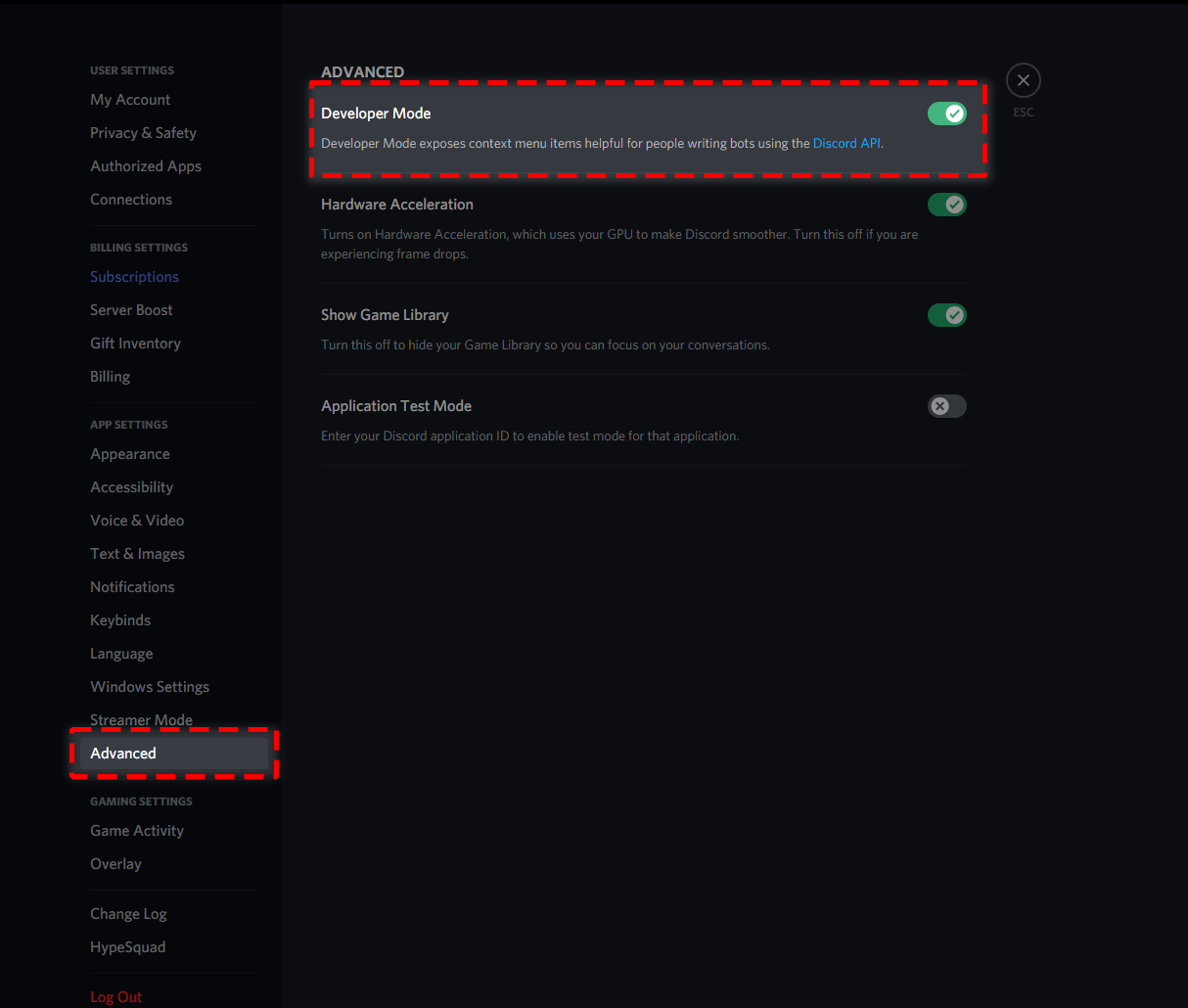
To enable developer mode do the following:
[PC] go to Settings -> Advanced -> Developer mode
[Mobile] go to Settings -> Appearance -> Developer mode
 eager cargo
Turn on dev mode and right click their name
merry vale
thanks
eager cargo
merry vale
how do i get there id
<@ID>
merry vale
thanks
merry vale
what does there id look like is it just dydydumb#7728?
vestal owl
If you right click thee name and press copy id
That's if ur on pc
If yr on mobile hold there name down and scroll down
 merry vale
what do i do if i want to @ a role?
vestal owl
Tahts what u do I belive
1 sec
Or u could try {user}
Like don't write there name write user
vestal owl
Ok what do u want to @ a role or a member
shut bolt
merry vale
how do i @ a role
<@&ID>
vestal owl
Ok so go to a role
 merry vale
yea i got it tysm
vestal owl
My pleasure
 proper cave
How i do ticket
shut bolt
proper cave
How i do ticket
Hello there
You mean how to create tickets on your own server?
humble sequoiaBOT
 shut bolt
Go into the channel you want top open the ticket and run $debug, send us the result
 shut bolt
Check the bot has send message permissions and view channel
proper cave
Not working
shut bolt
Let's check this on a ticket if you want
proper cave
Can u come and do it
shut bolt
proper cave
Can u come and do it
I can help you out but I can't do the work for you
humble sequoiaBOT
-- moved to ticket --
humble sequoiaBOT
-- moved to ticket --
 tawdry wyvern
you cant delete
 leaden violet
how to change this text?
 humble sequoiaBOT
Solved in another channel.
 autumn cradle
help @shut bolt
 craggy geyser
Don't ping support team. It's against the #546557408902905896 (rule 4). You just have to wait. That's part of our ddos protection and we have no control over it
Cloudflare just thought you were doing things too quickly
craggy geyser
The message right above your ping was me telling someone else that pinging support is against the rules....
 gritty tree
I'm Turkish I want to be the TR support team what should I do I wonder if you can help me on this issue I would appreciate it
@craggy geyser What should I do?
craggy geyser
For a start, stop pinging. I have said multiple times it's against the rules.
But we have no Turkish support team so there is nothing for you to join
gritty tree
But there are Turkish people, I want to be the support team
@pale pilot hello, can you help
copper owl
gritty tree
But there are Turkish people, I want to be the support team
The mere fact that turkish people are in the server doesn't constitute enough of a reason to make a Turkish Support team
and please, for the last time, stop pinging support members
it'll only cause you to get warned
Once the team decides that Turkish support is needed, you'll most likely hear about it in #📣│server-news
gritty tree
Ok
copper owl
For the time being, we have french, arabic, and spanish applications open
gritty tree
Ok
mystic hound
Breaking the rules also ruins your chances of getting into the team soo
 crude frost
Oh, um, I need to know what Josiah pinged me about on a support ticket
The ticket closed when I wasn't online, so I didn't see it.
pale pilot
@crude frost he said he's looking into it, but will close the ticket and move it to a private category. Spiral reacted with an Emoji
craggy geyser
It's a category on the server that is private to team (maybe managers but all I know is I can't see it). So he has the channel still so can continue working on it but it is hidden from most people for neatness
crude frost
Ahhhhh great!
So, basically, it was moved to a "live archive" so he can check the provided evidence on the issue with easy looksie?
craggy geyser
Pretty much
 merry nova
Hi. I cant get the bot to respond on commands. In dashboard it says BOT ERROR
craggy geyser
The smaller text by bot error should explain the issue. You have the premium bot selected but don't have premium
humble sequoiaBOT
Inviting and Enabling Premium Bot
The first thing you will need to do is invite the premium bot, an invite can be found here
Once the bot is in your server we will head to the dashboard and manage your server. When you are managing your server, you want to head into "Server Configs" then click the drop down menu under "Select the bot you would like to use on this server" then click "Ticket Tool#6207" and then save.
craggy geyser
Do the reverse of that image to select the free bot
merry nova
Ahh im stupid... Tysm
copper owl
We told you not to ping support members..
craggy geyser
You have been answered already multiple times
copper owl
that too..
gritty tree
Ok, I already tried you.
copper owl
gritty tree
Ok, I already tried you.
the answer wont change
craggy geyser
Your answer won't change
copper owl
you can go try everyone, they'll tell you the same thing
you're just getting yourself in more trouble the more you ping and the more you ask
craggy geyser
mystic hound
Breaking the rules also ruins your chances of getting into the team soo
There is also this. So by continuing to ping you probably won't be support even if we start a Turkish support team
prime bridgeBOT
☾ Mert#5612 has been warned!
They were notified via dms.
pale pilot
Next time you're gone
craggy geyser
We aren't hiring for Turkish so there is nothing you can do
The more you ask, the less likely you will be to get anything
 flint fjord
Hello, I cannot configure TicketTool on my server because of this
 humble sequoiaBOT
Don't see your server in the dashboard?
You will possibly need to relog. Look below to see steps on how to relog.
How to relog the Dashboard.
First, you will need to go to the dashboard. Once your there, click on your avatar on the top right. after you clicked it, you will see button that says Logout. You must click that. Once you have logged out, you can log back in.
Note:
You need one of these 3 things to access the dashboard.
1. Server Owner (Level: 6)
2. Server Administrator (Level: 4)
3. Dashboard Role (Level: 2)
You can check your level using $level on your Discord Server
craggy geyser
 rich bay
sample <#571706435449257997>
rich bay
sample <#571706435449257997>
Each one of those is a separate panel, combined in a multipanel which is a premium feature
humble sequoiaBOT
Multipanels are a premium feature that allow for a single panel with multiple buttons to open different tickets.
How to create a Multipanel
Premium users can combine multiple panels into one multipanel.
First, find the IDs of each panel you wish to combine. You can find them in your Panel Configs in the Dashboard
Next, send the multipanel to a channel using $panel [id1] [id2] {id3} ....
e.g. $panel 1 2 4 17 35 to combine panels 1, 2, 4, 17 and 35.
Up to 25 panels may be combined.
jade topaz
premium invite?
rich bay
craggy geyser
Each one of those is a separate panel, combined in a multipanel which is a premi...
how is that meaning?
craggy geyser
rich bay
how is that meaning?
Each language is its own panel. We could show them all on separate embeds as default. But having premium allows them to be combined
$pc 902585803648159875
humble sequoiaBOT
Thank you
Thank you for purchasing Ticket Tool Premium @autumn parrot. You have now been given the <@&535595160189403136> role!
Found 3 servers in total and 1 with premium and permission
Inviting and Enabling Premium Bot
The first thing you will need to do is invite the premium bot, an invite can be found here
Once the bot is in your server we will head to the dashboard and manage your server. When you are managing your server, you want to head into "Server Configs" then click the drop down menu under "Select the bot you would like to use on this server" then click "Ticket Tool#6207" and then save.
craggy geyser
jade topaz
premium invite?
See above
rain swallow
what is the + of having premuim? is it worth it?
humble sequoiaBOT
 Faster Premium Bot
Automatic Transcripts
Full Customization
Custom Buttons
Direct Messages
Ticket Automation
Multipanels
Premium Support
You can purchase premium here:
Price
$6 - Monthly
$66 - Yearly
 Premium
rich bay
craggy geyser
Each language is its own panel. We could show them all on separate embeds as def...
Premium
rich bay
craggy geyser
Each language is its own panel. We could show them all on separate embeds as def...
I mean, I open a panel, I write in English, then I open another panel, I write different information to it, and I explain more than a bot, is it?
rain swallow
can you buy it once
craggy geyser
rich bay
I mean, I open a panel, I write in English, then I open another panel, I write d...
Effectively. On the dashboard you just create a new panel. The different panels can be whatever you like. And then with premium you can combine the buttons onto one embed
craggy geyser
rain swallow
can you buy it once
We don't offer a lifetime purchase. We used to but it was removed (I don't know the reasons). If you mean buying a limited time you can do that. You can also cancel the sub at any time, and if you cancel mid subscription you get a refund for the remaining time
rain swallow
ok beacuse the mee6 is 88 for lifetime and after a year and a few moths it makes up for a life time you know
thanks for your help
craggy geyser
When we did have lifetime it cost the same as 3 years
iron nightBOT
Gave 1 Rep to Swift (current: #4 - 194)
rain swallow
have a good day!
craggy geyser
You too!
jade topaz
craggy geyser
See above
yes sir.
thanks
iron nightBOT
Gave 1 Rep to Swift (current: #4 - 195)
 azure furnace
Would it be possible for a staff to join my server and sort the bot for me I’m really struggling
 scenic plinth
Yes, they must either have administrative privileges or a dashboard role. The setup in how to set a dashboard role is below:
humble sequoiaBOT
Dashboard Roles
Any role you put there will have full access to the ticket tool dashboard. The server owner and users with admin permissions already have access to the dashboard.
Be careful of which roles to put here
 rich bay
craggy geyser
Effectively. On the dashboard you just create a new panel. The different panels ...
rich bay
craggy geyser
Effectively. On the dashboard you just create a new panel. The different panels ...
I couldn't do it, if I send my server to you, would you do it?
shut bolt
rich bay
I couldn't do it, if I send my server to you, would you do it?
We won't do the work for you, yet we can assist you in the process of you doing it
unique junco
Thank you @shut bolt
iron nightBOT
Gave 1 Rep to Pablo. (current: #11 - 108)
rich bay
shut bolt
We won't do the work for you, yet we can assist you in the process of you doing ...
I choose Attached Panels (Multi Panels) BUT the save button doesn't appear so I can't save it or I did something wrong.
shut bolt
unique junco
Thank you <@!518666147441278998>
plarp
shut bolt
rich bay
I choose Attached Panels (Multi Panels) BUT the save button doesn't appear so I ...
Send me an screenshot of what you see please

 vagrant minnow
How many different panels Ican make without premium?
half kernel
vagrant minnow
How many different panels Ican make without premium?
To my knowledge it is unlimited i could be wrong though
 blazing frost
I need help when someone opens a ticket for some reason everyone see the ticket
humble sequoiaBOT
-- moved to ticket --
rain swallow
blazing frost
I need help when someone opens a ticket for some reason everyone see the ticket
Did you figure it out?
blazing frost
rain swallow
Did you figure it out?
Yes the support helped me
rain swallow
Ok, great!
 still dust
How can i get my Premium Role?
shut bolt
still dust
How can i get my Premium Role?
Please run the command $pc here, and it will check
azure furnace
$pc
humble sequoiaBOT
Thank you
Thank you for continuing to support Ticket Tool @azure furnace.
Found 6 servers in total and 1 with premium and permission
jade topaz
what's the problem?
 shut bolt
jade topaz
what's the problem?
shut bolt
jade topaz
what's the problem?
Run the $debug command on the channel
shut bolt
Send $debug to the channel you are having this problem with
still dust
$pc
humble sequoiaBOT
Thank you
Thank you for purchasing Ticket Tool Premium @still dust. You have now been given the <@&535595160189403136> role!
Found 43 servers in total and 1 with premium and permission
jade topaz
shut bolt
Send $debug to the channel you are having this problem with
Nothing happened
shut bolt
jade topaz
Nothing happened
I'll open a ticket so we can look forward into this problem
humble sequoiaBOT
-- moved to ticket --
 undone delta
is it possible to get ticket tool to only give out one ticket (or a set number of tickets) and then no one else can grab a ticket
 tight sable
How 2 set ticket tool?
scenic plinth
undone delta
is it possible to get ticket tool to only give out one ticket (or a set number o...
No, there is no claim limit.
scenic plinth
tight sable
How 2 set ticket tool?
$help setup
humble sequoiaBOT
Setting up Ticket Tool
Visit the docs for setup info
General Setup
scenic plinth
View that
 weak lake
Hey guys, I can't login to the ticket tool dashboard
tribal cedar
Why not? You login with discord credentials. What's happening?
Do you mean your servers not showing up @weak lake ?
weak lake
Now it says this
 weak lake
tribal cedar
Do you mean your servers not showing up <@703687753493250118> ?
weak lake
tribal cedar
Do you mean your servers not showing up <@703687753493250118> ?
No, just can't login in any way
It used to say 'Invalid credentials' or something
tribal cedar
Anytime
weak lake
thanks @tribal cedar
iron nightBOT
Gave 1 Rep to Enigma (current: #13 - 76)
 primal verge
is there anyway to make it so that specific roles can use tag cmds without giving them a dashboard role
shut bolt
primal verge
is there anyway to make it so that specific roles can use tag cmds without givin...
Hello there
shut bolt
primal verge
is there anyway to make it so that specific roles can use tag cmds without givin...
You can make the tags to be only usable by Admin users, we currently do not count with a feature to restrict the tags to roles yet it has been suggested and only time will tell if get's implemented
primal verge
oof thanks anyways
shut bolt
Sure
humble sequoiaBOT
Multipanels are a premium feature that allow for a single panel with multiple buttons to open different tickets.
How to create a Multipanel
Premium users can combine multiple panels into one multipanel.
First, find the IDs of each panel you wish to combine. You can find them in your Panel Configs in the Dashboard
Next, send the multipanel to a channel using $panel [id1] [id2] {id3} ....
e.g. $panel 1 2 4 17 35 to combine panels 1, 2, 4, 17 and 35.
Up to 25 panels may be combined.
 surreal badge
nvm
tawdry wyvern
$pc
humble sequoiaBOT
Premium Check
I was unable to detect a premium server for @tawdry wyvern.
Found 25 servers in total and 0 with premium and permission
humble sequoiaBOT
Pong! Latency is 562ms. API Latency is 76ms [-]
 wispy cave
no..
fleet citrus
craggy geyser
It would do unfortunately. I can resuggest the feature to the dev for you, but I...
That'd be awesome, thank you very much 😊 (sorry for the delay btw.. busy life 😩 )
iron nightBOT
Gave 1 Rep to Swift (current: #4 - 196)
craggy geyser
fleet citrus
That'd be awesome, thank you very much 😊 (sorry for the delay btw.. busy life ...
Dome
unborn harbor
have a problem and i need support
the problem is that when i make it comes up but i want to make it down how do i do that
can somone help me
so can someone help me
unborn harbor
i am having trouble is that i want the tickets to come down
plain surge
When a ticket is created, it automatically goes to the top of the channels list. And you want it to go down
unborn harbor
plain surge
When a ticket is created, it automatically goes to the top of the channels list....
yes
plain surge
You can do that by setting a category for the ticket channels to go under
$help category
humble sequoiaBOT
How to set the open category
To set a open category go to the Dashboard -> Panel Configs -> Settings -> Category Options -> Category Open
plain surge
You create a new category from server settings, then you move it to the place where you wat your tickets to go
plain surge
humble sequoia
Then go to Ticket tool website, find your server and follow these steps
unborn harbor
can i have screen shots so i can understand
plain surge
Are you on phone or computer?
unborn harbor
pc
desert summit
 plain surge
unborn harbor
pc
plain surge
unborn harbor
pc
I'm currently on phone, so can't take the same screenshots.
You just head to your server, there you will find 3 dots at the top next to the server's name.
Press it, and you'll find "Create new category"
unborn harbor
plain surge
I'm currently on phone, so can't take the same screenshots.
You just head to yo...
i have a categoery already
humble sequoiaBOT
How to set the open category
To set a open category go to the Dashboard -> Panel Configs -> Settings -> Category Options -> Category Open
plain surge
And select your category name in that box
plain surge
humble sequoia
The word "Dashboard" in the embed is highlighted. Press on it and it will take you to the website
plain surge
unborn harbor
iam there what do i do
Ok on the left you will find "Panel Configs"
unborn harbor
 plain surge
Ok on the left you will find "Panel Configs"
plain surge
plain surge
Ok on the left you will find "Panel Configs"
Do you see this on the website?
 unborn harbor
what do i do in that
plain surge
Select your category and press save
plain surge
Category open, is where Open tickets will go. Once you close a ticket you can decide if it goes to a seperate category or stays in the same category.
If you want it to be moved somewhere else, pick a category in that box.
If you want it to stay in the same place, just leave it empty
unborn harbor
i want in the same place
plain surge
Then only choose a category in the "Category open" box
unborn harbor
k
 bronze scroll
hey! qq, I am setting up a mod role, and trying to hide our internal support tickets from that role... but everytime I create a new ticket it adds the mod role, how can I turn it off?
copper owl
bronze scroll
hey! qq, I am setting up a mod role, and trying to hide our internal support tic...
if you want to hide the mod role from the internal ticket, why set it up in the first place?
bronze scroll
the mods are just for one category within our discord
copper owl
okay, so dont setup the mod role for the other categories
are you using a singular panel?
or multiple?
bronze scroll
one panel
copper owl
well the issue is, the panel will always follow the same setup
the bot cant decide whether to remove the role or not depending on what the ticket was opened for
you'll have to remove the role yourself using the $remove <RoleID> command.
Something like $remove 540295656720302081
I suggest just making multiple panels and setting it up however you want
 gleaming portal
is there a way to keep people from deleting tickets ?
copper owl
People as in members?
gleaming portal
yes
humble sequoiaBOT
Buttons
The new Discord Buttons allow for a much smoother and convenient experience. They reduce lag and work much better than emojis. With ticket tool you can edit all the buttons however you like! Buttons can show emojis, text and can have 4 different colors.
Where can I edit them?
Dashboard -> Panel Configs -> <Settings> -> Button Options -> <Setting>
copper owl
wait
how are non-support members deleting tickets? Do they still see the channel after it closes?
gleaming portal
Im wanting to have all the tickets created saved that way no one can delete tickets
copper owl
gleaming portal
Im wanting to have all the tickets created saved that way no one can delete tick...
just make a transcript channel
you cant just keep all closed tickets, discord has a 50 channel limit per category and 500 per server
copper owl
Alright, so the issue now is that users can delete tickets?
do they do it via the command or the button
gleaming portal
yes how to I take that away
copper owl
copper owl
do they do it via the command or the button
..
copper owl
humble sequoia
For the button, just go to the Delete Ticket button, and make it support only (it should be like that already iirc)
for the command, go to Command Configs and make the $delete command support only
gleaming portal
got thanks for your help
copper owl
no problem
jade topaz
humble sequoia
-- moved to ticket --
How to make something like this
humble sequoiaBOT
Tags
Tags are used to send a predefined response to your channels using a command. Tags will only respond if the command itself is used, it will not function if you put the tag into a sentence. The prefix is not included.
To create tags, go to: Dashboard > Tags > Create Tag. After creating and naming one, tap on the response button, and you can edit the response.
 copper owl
@jade topaz
jade topaz
Like a tag for new?
copper owl
if you name it new, anyone who types new would trigger it
jade topaz
So $new ?
copper owl
same thing
doesnt matter what you name it
if you name it new, the tag would be new
if you name it $new, then to trigger it, youd have to type $new
jade topaz
But do I need to run cmd twice? Like one cmd for making ticket and second for replying that msg?
copper owl
i wouldnt suggest calling the tag $new
jade topaz
Like i do $new @user and it creates ticket and also says moved to ticket
copper owl
jade topaz
Like i do `$new @user` and it creates ticket and also says `moved to ticket`
No it wouldnt
jade topaz
So when u guys do it here, then u run 2 cmds?
copper owl
no we dont
jade topaz
Then