#🆘│community-support
1 messages · Page 353 of 1
 tall prism
 keen falcon
Guys..
I have a Question..
Since the Emoticon doesn't works anymore..
Should I remove it and replace it with button instead..?
 shut bolt
keen falcon
Since the Emoticon doesn't works anymore..
Should I remove it and replace it wit...
shut bolt
keen falcon
Since the Emoticon doesn't works anymore..
Should I remove it and replace it wit...
Yeap, you can resend your panels and that would fix it
keen falcon
shut bolt
Yeap, you can resend your panels and that would fix it
By resending the panels, the emoticon will works again..?
shut bolt
keen falcon
By resending the panels, the emoticon will works again..?
No, I mean, resend them and the new ones will have the buttons by default
The reactions are no longer supported sorry :(
keen falcon
Can I also rename the buttons in Panel Configs..??
 shut bolt
keen falcon
Can I also rename the buttons in Panel Configs..??
shut bolt
keen falcon
Can I also rename the buttons in Panel Configs..??
Yeap, follow this steps
Go into you Dashboard
Panel Configs
Settings
Button Options
Create > Settings
And there you can change what the button says
Edit the Button Text box
 keen falcon
shut bolt
Go into you Dashboard
`Panel Configs`
`Settings`
`Button Options`
`Create` > `Se...
keen falcon
shut bolt
Go into you Dashboard
`Panel Configs`
`Settings`
`Button Options`
`Create` > `Se...
Will try, thanks @shut bolt
 iron nightBOT
Gave 1 Rep to Yareaj_ (current: #18 - 42)
shut bolt
keen falcon
Will try, thanks <@!518666147441278998>
Sure :)
 paper moth
hii
 severe path
hi
shut bolt
paper moth
hii
Hello there
severe path

shut bolt

shut bolt
@unique junco missclick, my bad sorry 
 unique junco
What
shut bolt
The demo ticket
 rancid belfry

 humble sequoiaBOT
Sending a panel
Once you've created a panel on the dashboard you will need to send it to a channel using send on the dashboard
Select the channel you want your panel to be created in and click send.
For other questions checkout $help faq
An example of a sending a panel is shown below.
 shut bolt
That should fix it
humble sequoiaBOT
-- moved to ticket --
 small topaz
Hi we are seeing this problem in our server: -- I have removed the panel and added it back, still problem conginues
 humble sequoiaBOT
-- moved to ticket --
severe path
shut bolt
Re send the panel
$onlybuttons
shut bolt
severe path
`$onlybuttons`
Thank you 
iron nightBOT
@shut bolt :: You can't rep Schlafendes24#1234 for 4 minutes and 49 seconds. Try coming back later?
shut bolt
lmao
severe path
iron night
<@518666147441278998> **::** You can't rep **Schlafendes24#1234** for 4 minutes ...
keen falcon
keen falcon
Can I also rename the buttons in Panel Configs..??
Btw guys..
I forget how to summon this multiple panel 😦
humble sequoiaBOT
Multipanels are a premium feature  that allow for a single panel with multiple buttons to open different tickets.
How to create a Multipanel
Premium users can combine multiple panels into one multipanel.
First, find the IDs of each panel you wish to combine. You can find them in your Panel Configs in the Dashboard
Next, send the multipanel to a channel using $panel [id1] [id2] {id3} ....
e.g. $panel 1 2 4 17 35 to combine panels 1, 2, 4, 17 and 35.
Up to 25 panels may be combined.
 shut bolt
Or if you prefer
humble sequoiaBOT
For a more convenient use of multipanels, you can now combine panels on the dashboard. This will allow you to directly send the multipanel from the dashboard or via the $panel ID command.
Where can I find this?
You can find this setting on the Dashboard -> Panel Configs -> Settings -> General Options
This will put all buttons from all of your panels on one message. The message is the panel message from the panel you're combining these panels in.
 keen falcon
humble sequoia
keen falcon
humble sequoia
This is what I need exactly.
Thanks again, Cheers
iron nightBOT
Gave 1 Rep to Ticket Tool (current: #8 - 141)
shut bolt
keen falcon
This is what I need exactly.
Thanks again, Cheers
Sure
 jade topaz
why cant i find my server on the website
humble sequoiaBOT
-- moved to ticket --
 azure sail
How do I get up all transcripts of a user?
 copper owl
azure sail
How do I get up all transcripts of a user?
copper owl
azure sail
How do I get up all transcripts of a user?
You search their ID in your transcript channel
use the search feature
in:#ticket-transcript-channel <ID>
 alpine anvil
how do I buy the premium with votes?
shut bolt
alpine anvil
how do I buy the premium with votes?
Hi there!
First you must have at least 6 votes
$votes
humble sequoiaBOT
Votes
Current Votes: 3
Lifetime Votes: 9
Linked Votes: 0
Vote Links
Linking Info
Linked User: Not Linked
You can give your future votes to another user by linking with that user.
To link use $vote link (@user or userId)
To unlink use $vote unlink
Redeeming
Each vote is worth 12 hours of premium and can be redeemed once you have atleast 6 votes.
Your current votes are worth 1 day, 12h, 0m
To redeem your current votes use $vote redeem
shut bolt
Then you can use $vote redeem
alpine anvil
after?
shut bolt
The the bot will guide you with what your votes are equivalent to
alpine anvil
do linked votes apply to current votes?
shut bolt
The votes that are linked to you account yes, the ones you link to another one, not
alpine anvil
@shut bolt is there any way I can like add time on the premium with voting?
 brittle canopy
alpine anvil
<@518666147441278998> is there any way I can like add time on the premium with v...
brittle canopy
alpine anvil
<@518666147441278998> is there any way I can like add time on the premium with v...
Yes, by redeeming your votes to get your key, use that key and it shall add the time to your current time.
jade topaz
How i can customize my premium bot ?
alpine anvil
brittle canopy
Yes, by redeeming your votes to get your key, use that key and it shall add the ...
so redeeming the key just adds time?
humble sequoiaBOT
How to redeem premium
To redeem your premium key, go to the dashboard, select your server, then click "Redeem Premium" under the server's icon and name.
 brittle canopy
alpine anvil
so redeeming the key just adds time?
brittle canopy
alpine anvil
so redeeming the key just adds time?
Mhm
brittle canopy
jade topaz
How i can customize my premium bot ?
What exactly you want to customize?
jade topaz
jade topaz
How i can customize my premium bot ?
.
jade topaz
brittle canopy
What exactly you want to customize?
Avatar and name ?
brittle canopy
alpine anvil
thank u
You're more than welcome!
humble sequoiaBOT

Ticket Tool avatar/status Customisation
@pseudo glen is like another discord user; you can't control its avatar icon or status, and we can't change it for one server, just as you cannot change your avatar for just one server.
However, on your server, you can change the bot's nickname
 brittle canopy
@jade topaz ^
jade topaz
And avatar?
jade topaz
Okey
alpine anvil
whats difference between both Ticket Tools if the normal one has premium code applied to?
brittle canopy
Nothing but the premium bot uptime, both gives the same perks
humble sequoiaBOT
 Faster Premium Bot
Automatic Transcripts
Full Customization
Custom Reactions
Direct Messages
Ticket Automation
Multipanels
Premium Support
You can purchase premium here:
Price
$6 - Monthly
$66 - Yearly
 Premium
 finite dove
How do I get premium for free?
humble sequoiaBOT
Votes
Current Votes: 4
Lifetime Votes: 99
Linked Votes: 95
Vote Links
Linking Info
Linked User: 414262796222595073
You can give your future votes to another user by linking with that user.
To link use $vote link (@user or userId)
To unlink use $vote unlink
Redeeming
Each vote is worth 12 hours of premium and can be redeemed once you have atleast 6 votes.
Your current votes are worth 2 days, 0h, 0m
To redeem your current votes use $vote redeem
brittle canopy
Every 6 votes can be redeemed for a 3 days of premium
finite dove
Wow
brittle canopy
Yep 😄
finite dove
$vote
humble sequoiaBOT
Votes
Current Votes: 2
Lifetime Votes: 2
Linked Votes: 0
Vote Links
Linking Info
Linked User: Not Linked
You can give your future votes to another user by linking with that user.
To link use $vote link (@user or userId)
To unlink use $vote unlink
Redeeming
Each vote is worth 12 hours of premium and can be redeemed once you have atleast 6 votes.
Your current votes are worth 1 day, 0h, 0m
To redeem your current votes use $vote redeem
 tender imp
$vote
humble sequoiaBOT
Votes
Current Votes: 0
Lifetime Votes: 0
Linked Votes: 0
Vote Links
Linking Info
Linked User: Not Linked
You can give your future votes to another user by linking with that user.
To link use $vote link (@user or userId)
To unlink use $vote unlink
Redeeming
Each vote is worth 12 hours of premium and can be redeemed once you have atleast 6 votes.
Your current votes are worth 0m
To redeem your current votes use $vote redeem
copper owl
tender imp
$vote
you can use this in your own server
so please refrain from flooding the chat with the command
tender imp
sorry
copper owl
it's no problem!
 rapid tartan
How do i make it so only one person + people with admin role can be in the ticket? It just came to my attention that EVREYONE in my server can see them. and message in them
shut bolt
rapid tartan
How do i make it so only one person + people with admin role can be in the ticke...
Hello there!
Let me help you with that
rapid tartan
Hi!
rapid tartan
thank you
rapid tartan
alright
shut bolt
And then click on Settings of the panel you want to edit
rapid tartan
ok
shut bolt
After that open the General Options menu
rapid tartan
alright
shut bolt
In the box that says Support Team Roles, there you must select the roles you want that have access to your tickets
rapid tartan
ok, i did that
rapid tartan
ok
shut bolt
Now, go the the Permission Options menu
rapid tartan
okay
shut bolt
Under Everyone Role Permissions click on Edit Everyone Role Permissions
Mark the Read Messages perm as denied  then
then Save changes
rapid tartan
done
rapid tartan
alirhgt perfect, thank you!
shut bolt
rapid tartan
alirhgt perfect, thank you!
Sure!
shut bolt
 verbal sundial
BRO YOUR A MONSTER YOUR JUST LIKE WHAT I GET MY GF ALMOST EVERYDAY
verbal sundial
BRO YOUR A MONSTER YOUR JUST LIKE WHAT I GET MY GF ALMOST EVERYDAY
Wait what

Kachoow?
 tulip raptor
I don't know what to do with the ticket I got in a server
I opened one I think but now I don't know what to do next
brittle canopy
tulip raptor
I opened one I think but now I don't know what to do next
Can you explain what seems to be the issue?
verbal sundial
@tulip raptor tf PLEASE FUCKING ELABORATE WE CAN NOT HELP IF YOU DON'T TELL US THE PROBLEM
shut bolt
verbal sundial
<@885485545483042846> tf PLEASE FUCKING ELABORATE WE CAN NOT HELP IF YOU DON'T T...
Hey hey, chill .-.
verbal sundial
wat
shut bolt
verbal sundial
wat
Take it easy
Hey @vagrant zinc !
Just saw your review
Need any help on setting up the bot?
shut bolt
 vagrant zinc
im fine, ty for the offer!
vagrant zinc
im fine, ty for the offer!
Sure!
vagrant zinc
thanks @shut bolt
iron nightBOT
Gave 1 Rep to Yareaj_ (current: #18 - 43)
shut bolt
vagrant zinc
thanks <@!518666147441278998>

verbal sundial
@shut bolt WHY R U STILL UP
verbal sundial
lol
verbal sundial
bro a server with 20 people is more active then my 77 member server
shut bolt
verbal sundial
bro a server with 20 people is more active then my 77 member server
Lol
You've got to make the 77 to be more active
verbal sundial
I can't
verbal sundial
I can't control them
shut bolt
True lol
 wild whale
some members of my discord are getting this error when trying to open tickets.
Failed: Unknown Member
[8:09 PM]
Failed: Cannot edit a message authored by another user
shut bolt
wild whale
some members of my discord are getting this error when trying to open tickets.
Hello there!
humble sequoiaBOT

Reactions Update
Since a while we don't support reactions anymore and switched to buttons.
To enable buttons you have to resend the panel message.
 shut bolt
Please resend your panels
wild whale
where do i go to set that?
shut bolt
wild whale
where do i go to set that?
First go into your Dashboard https://tickettool.xyz/manage-servers

Then Panel Configs
shut bolt
humble sequoia
And there you will see this screen
The other option is to use the $panel command, but for that you must know the ID of the Panel you want to send
wild whale
okay all good now
shut bolt

 atomic barn
Read rule 5.1 #546557408902905896
 craggy geyser
Well done for actually asking. Lots of people do it without asking and get punished by the automod
Social network (invite in #📣│server-news just above the application) does have a channel for self advertising though
 lost jay
bot is not responding
humble sequoiaBOT
-- moved to ticket --
jade topaz
.
 dusky rivet
brittle canopy
dusky rivet
brittle canopy
Hey
 hasty dune
how do i stop my tickets from being automatically deleted after i close them?
i have two step close enabled but it still deletes itself
severe path
hasty dune
i have two step close enabled but it still deletes itself
You need to activate two step ticket
 safe barn
severe path
You need to activate two step ticket
safe barn
severe path
You need to activate two step ticket
How can i do a normal member can delete ticket ???
 safe barn
severe path
safe barn
severe path
Where it is ?
severe path
Look at the upper part of the screenshot

 split epoch
how u make a ticket thingo
humble sequoiaBOT
copper owl
@split epoch this is our documentation 
iron nightBOT
Gave 1 Rep to Neptune (current: #1 - 198)
copper owl
Np
split epoch
198
copper owl
yeah sadly i no life this server lmao
split epoch
lol
 karmic obsidian
I have added a category for open tickets and added it in the website, i have moved all existing tickets to the category but now users who created the user can't view their tickets, what permissions should I add to the category (I guess) to solve this
copper owl
karmic obsidian
I have added a category for open tickets and added it in the website, i have mov...
you dont add the permission to the category
just remove all permissions that are restricting users to see channels
You set permissions for users in the dashboard itself
$help perms
humble sequoiaBOT
How to set the permissions for tickets
To set a change permissions go to the Dashboard -> Panel Configs -> Settings -> Permission Options
 copper owl
humble sequoia
copper owl
humble sequoia
Follow the guide and provide the permissions you want your users to have in the server. You can also provide permissions for other things like your Support Roles, Additional Roles (if you have any), and the @everyone role
karmic obsidian
If i set read messages permission in category to Neutral (/) literally all members can see all tickets idk how
copper owl
karmic obsidian
If i set read messages permission in category to Neutral (/) literally all membe...
then restrict @everyone in the dashboard to read messages
doing it VIA the category will mess things up
karmic obsidian
I guess the problem is with existing tickets? because I can't get it working
copper owl
karmic obsidian
I guess the problem is with existing tickets? because I can't get it working
all changes will apply to tickets done after the change
youll have to have someone open another ticket after you finish changing things around
split epoch
help me
severe path
split epoch
help me
yes? 👀
split epoch
how do i setup
humble sequoiaBOT
split epoch
k thanks
severe path
😄
karmic obsidian
I can't get it working fml
split epoch
thanks @severe path
iron nightBOT
Gave 1 Rep to Schlafendes24 (current: #23 - 18)
karmic obsidian
Everyone role has Read messages as X in ticket tool dashboard
I have created a category for opened tickets, the moment i move a ticket inside my new category all users can see the ticket
for new created tickets seem to work just fine
copper owl
karmic obsidian
Everyone role has Read messages as X in ticket tool dashboard
I have created a ...
why are you moving the tickets yourself?
karmic obsidian
ye i may have fucked up maybe?
copper owl
Also, when you're moving the tickets, are you syncing the permissions?
copper owl
karmic obsidian
ye i may have fucked up maybe?
nah it's all fine, im just confused why you're moving them yourself
$help category
humble sequoiaBOT
How to set the open category
To set a open category go to the Dashboard -> Panel Configs -> Settings -> Category Options -> Category Open
 copper owl
just define a category yourself and give Ticket Tool all the permissions in the category
severe path
split epoch
23
Yes, I get very few reps 
copper owl
severe path
Yes, I get very few reps <a:Sadge:847177121306771477>
get good
karmic obsidian
that's done https://i.imgur.com/G4SN8Eq.png
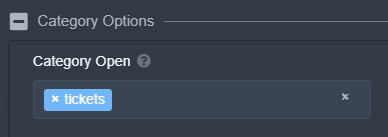
now what should i do with currently open tickets 😦
copper owl
karmic obsidian
now what should i do with currently open tickets 😦
you cant do much unforuntately
from now on tho, your tickets should be fine
for your current tickets, you can just edit the channel permissions one by one, which would be annoying
 glad sluice
Is there a way to set a ticket start number? For example, we're having to rebuild a server from an old server. We already have tickets open on that server. Is it possible to start a transfer ticket with the number 40 instead of 1?
copper owl
glad sluice
Is there a way to set a ticket start number? For example, we're having to rebui...
Go to General Options in the panel settings
you should be able to see a Ticket Count setting
you can add a number there, for example, 40
glad sluice
copper owl
Go to `General Options` in the panel settings
Thank you, I don't know how I missed that!
iron nightBOT
Gave 1 Rep to Neptune (current: #1 - 200)
copper owl
np
karmic obsidian
copper owl
for your current tickets, you can just edit the channel permissions one by one, ...
i did that, thank you
iron nightBOT
Gave 1 Rep to Neptune (current: #1 - 202)
 obtuse violet
anyone know how to stop ticket tool from creating two tickets with the same number?

hello?
humble sequoiaBOT
-- moved to ticket --
jade topaz
Hey
A member in my server is unable to see any buttons in any server on mobile - any idea why?
humble sequoiaBOT
Update your discord App
Buttons are a relatively new addition to discord and don't work with some older versions of the app.
Please verify that you have the latest version of discord, by going to the app or play store.
_ _
Discord for the App Store
_ _
Discord for the Play Store
 half kernel
humble sequoia
half kernel
humble sequoia
@jade topaz try this
jade topaz
Thank you1
half kernel
yep
 timid juniper
i payed for premium...but i dont think the premium bot is in my discord
as premium options arent working.... do i have to 'redeem' premium?
in which case....whats my serial number
humble sequoiaBOT
Redeeming premium
Redeeming premium on your server is really simple. Just head over to your Subscriptions Page. There you can select a server of your choice, which will get premium. You can change the server at any point.
 copper owl
humble sequoia
copper owl
humble sequoia
Follow this and the premium should be active
timid juniper
cool thanks, secondary qusetion, why do i have 2 active subscriptions? lol
copper owl
timid juniper
cool thanks, secondary qusetion, why do i have 2 active subscriptions? lol
most likely because you bought 2
copper owl
you can cancel one
 surreal storm
In the setup documentation, what do I do after I created a panel?
shut bolt
surreal storm
In the setup documentation, what do I do after I created a panel?
Hey there!
$help send
humble sequoiaBOT
Sending a panel
Once you've created a panel on the dashboard you will need to send it to a channel using send on the dashboard
Select the channel you want your panel to be created in and click send.
For other questions checkout $help faq
An example of a sending a panel is shown below.
surreal storm
how do i designate members of my team to be on a ticket ?
shut bolt
surreal storm
how do i designate members of my team to be on a ticket ?
Hey there!
Check this
$help support
humble sequoiaBOT
How to let support team see into a ticket
About support roles
A support role lets your support team see into tickets with out having to add them manually to each and every ticket.
You can add as many support roles as you like per panel.
NOTE that the way discord works all admins can see into tickets regardless of this.
How to set a support role
To set a Support role go to the Dashboard -> Panel Configs -> Settings -> General Options -> Support Team Roles.

NOTE that the support role will not be able to see into tickets that are already created..
 north sky
hello I just tested ticket but suddenly I opened 3 tickets on my server how I can go back to 0 tickets
copper owl
north sky
hello I just tested ticket but suddenly I opened 3 tickets on my server how I ca...
General Options in your panel settings
there's a ticket count
you can put the number back to 0
severe path

 safe hollow
Hey @anyone. I am having trouble with permissions. I can click to start a ticket but none of my members can. Can anyone shed some light/
 mystic hound
light 👀
safe hollow
lol
mystic hound
anyways, its possible you've got a member role blacklisted, see below
safe hollow
Didn't even realize
humble sequoiaBOT
Blacklist Roles
Any role you assign as a blacklisted role won't be able to use commands or reactions.
Selecting a blacklisted role
Go to your Dashboard -> Server Configs. There you will find the option to select blacklisted roles.
Note: Don't forget to save.
 safe hollow
Hey I havent blacklisted anything but I just double checked cause who knows
And I dont see alist
mystic hound
what's your server ID please?
safe hollow
Wym ? and post that here?
mystic hound
you can type $id and the bot will tell you your server ID, and yes send it here
mystic hound
Which panel are you having the issue on?
safe hollow
trader ticket
I stand corrected
Its the one for current positions open all the other tickets are working
mystic hound
you have create ticket set to support team only for that panel

once you click this, you'll see the option to toggle support team only
safe hollow
ah @mystic hound Thank you much.
iron nightBOT
Gave 1 Rep to Light (current: #3 - 187)
 wise raft
hey, is there any way the user can get a transcript of a closed ticket please? thanks!
verbal sundial
@wise raft so you can get a transcript and I believe you can get it to send it when you close the ticket somewhere in the settings
jade topaz
I have premium how do I get premium bot im sure this is asked a lot first time ive had a hard time with this
verbal sundial
YES PABLO HELP
shut bolt
wise raft
hey, is there any way the user can get a transcript of a closed ticket please? t...
Hey there! Indeed it is, for making it to happen automatically you must have premium
shut bolt
verbal sundial
YES PABLO HELP
Hello there
verbal sundial
@jade topaz just invite the premium one to your server
jade topaz
I cant find it 😦
shut bolt
jade topaz
I have premium how do I get premium bot im sure this is asked a lot first time i...
Hey there!
Check this
jade topaz
I looked all over the website lol
humble sequoiaBOT
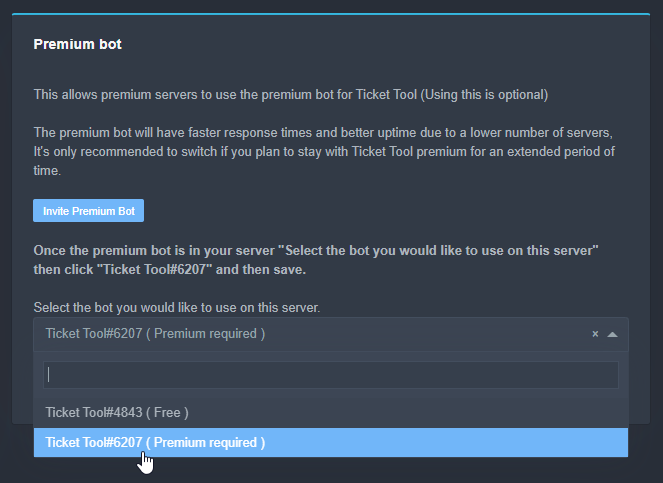
Inviting and Enabling Premium Bot
The first thing you will need to do is invite the premium bot, an invite can be found here
Once the bot is in your server we will head to the dashboard and manage your server. When you are managing your server, you want to head into "Server Configs" then click the drop down menu under "Select the bot you would like to use on this server" then click "Ticket Tool#6207" and then save.
 shut bolt

wise raft
jade topaz
I have premium how do I get premium bot im sure this is asked a lot first time i...
this will be a big list though right? premium needed for individual ones?
verbal sundial
yeah what he said
jade topaz
How do I rep?
wise raft
verbal sundial
<@806620543259770880> yes it is $6 for your first server then $5 per server
thanks!
iron nightBOT
Gave 1 Rep to ninja (current: #30 - 7)
jade topaz
thanks @shut bolt
iron nightBOT
Gave 1 Rep to Yareaj_ (current: #18 - 44)
shut bolt
jade topaz
thanks <@!518666147441278998>
Sure 
shut bolt

wise raft
how long do the transcript log links last for please?
shut bolt
wise raft
how long do the transcript log links last for please?
It will work for 30 days more after you delete the message of the original transcript
wise raft
shut bolt
It will work for 30 days more after you delete the message of the original trans...
nice, thanks 🙂
iron nightBOT
Gave 1 Rep to Yareaj_ (current: #18 - 45)
shut bolt
wise raft
nice, thanks 🙂
Sure :)
 pine junco
@iron night hi...I have needed to switch to crazytv and can't find my log in details. can you please help?
@iron night
pine junco
I have lost my log in details and recently had to switch from LTQ to crazy TV.... I am unable to log in as I cant find the email with my log in....can you help please?
copper owl
$tts
humble sequoiaBOT
You're in the wrong place
We provide support for @pseudo glen discord bot and cannot help you with whatever issue you have.
Please make sure to contact the appropriate support team.
If you don't have any further questions regarding our bot Ticket Tool, please close this ticket
_ _
copper owl
no we cannot help, you're in the wrong place
pine junco
can you tell me which is the appropriate support team?
copper owl
I cannot as I have no idea what crazy TV is

 dusky kite
shut bolt
verbal sundial
<@252295449816465409> do you own premium
dusky kite
shut bolt
verbal sundial
<@252295449816465409> do you own premium
It's not cause of that
Check this @dusky kite
humble sequoiaBOT
Reactions Update
Since a while we don't support reactions anymore and switched to buttons.
To enable buttons you have to resend the panel message.
shut bolt
It's due to the most recent update the bot had #📣│bot-news
verbal sundial
oh fuck i forgot about that tehe
shut bolt
No worries :)
dusky kite
okay
shut bolt
 solid stream
I really like these new role icons
solid stream
I really like these new role icons
They are great
shut bolt
solid stream
Makes it really easy to find staff
Indeed
mystic hound
also means we can get rid of the ugly " | Manager / | Support Team" from our names
shut bolt
True
 tardy orchid
I'm sure its been asked, but how do you get ticket tool to ping a role when a ticket is opened?
shut bolt
tardy orchid
I'm sure its been asked, but how do you get ticket tool to ping a role when a ti...
Hello there bro!
tardy orchid
hi!
shut bolt
$help ping
humble sequoiaBOT
How to make Ticket Tool ping a role
To make ticket tool ping a role when a ticket is opened, go to the Dashboard -> Panel Configs -> Settings -> Ticket Options -> Ticket Message -> Message Text and do this:
{@Role name} This is case sensitive and the role must have @mentions enabled
 shut bolt
Check this little embed
tardy orchid
Awesome, thanks!
tardy orchid
I had {@roleID} instead of the name
shut bolt
If you want to do it by ID skip the @
tardy orchid
ohhhhh okay
shut bolt
For the name is {@Role Name} for id {ID}
Try it out and if you got any doubt please let me know ^^
tardy orchid
that worked great! Thanks!
shut bolt
tardy orchid
that worked great! Thanks!
Sure!!
tardy orchid
shut bolt
Try it out and if you got any doubt please let me know ^^
Thanks! (for the rep haha)
umm thanks @shut bolt
iron nightBOT
Gave 1 Rep to Yareaj_ (current: #18 - 46)
tardy orchid
there we go
tardy orchid
YAGPDB in a nutshell
tardy orchid
you too, thanks!
shut bolt
Reacted to the wrong message lmao
 plush pumice
@shut bolt
shut bolt
plush pumice
<@518666147441278998>
Yeah?
plush pumice
Hi
shut bolt
Hi
plush pumice
Hru
shut bolt
Fine, hbu?
plush pumice
I'm ok
shut bolt
Great
severe path

 uncut forge
arbak?
humble sequoiaBOT
-- moved to ticket --
jade topaz
Check the #📈│reviews 0/10
craggy geyser
jade topaz
Check the <#509775046848282677> 0/10
Could you please explain why you have given such a low review
jade topaz
craggy geyser
Could you please explain why you have given such a low review
Ticket is broken!
craggy geyser
Please explain what is broken and we can guide you through steps to fix it
jade topaz
craggy geyser
Please explain what is broken and we can guide you through steps to fix it
Wdym
guys, how can i setup the ticket panel like this?
 craggy geyser
jade topaz
Wdym
craggy geyser
jade topaz
Wdym
You say it is broken. What doesn't work?
craggy geyser
jade topaz
guys, how can i setup the ticket panel like this?
Premium feature
humble sequoiaBOT
Multipanels are a premium feature that allow for a single panel with multiple buttons to open different tickets.
How to create a Multipanel
Premium users can combine multiple panels into one multipanel.
First, find the IDs of each panel you wish to combine. You can find them in your Panel Configs in the Dashboard
Next, send the multipanel to a channel using $panel [id1] [id2] {id3} ....
e.g. $panel 1 2 4 17 35 to combine panels 1, 2, 4, 17 and 35.
Up to 25 panels may be combined.
For a more convenient use of multipanels, you can now combine panels on the dashboard. This will allow you to directly send the multipanel from the dashboard or via the $panel ID command.
Where can I find this?
You can find this setting on the Dashboard -> Panel Configs -> Settings -> General Options
This will put all buttons from all of your panels on one message. The message is the panel message from the panel you're combining these panels in.
jade topaz
oh ok, thank you
 sterile harbor
$vote
humble sequoiaBOT
Votes
Current Votes: 0
Lifetime Votes: 0
Linked Votes: 0
Vote Links
Linking Info
Linked User: Not Linked
You can give your future votes to another user by linking with that user.
To link use $vote link (@user or userId)
To unlink use $vote unlink
Redeeming
Each vote is worth 12 hours of premium and can be redeemed once you have atleast 6 votes.
Your current votes are worth 0m
To redeem your current votes use $vote redeem
sterile harbor
$vote redeem
humble sequoiaBOT
You need atleast 6 votes to redeem
severe path

sterile harbor
$vote
humble sequoiaBOT
Votes
Current Votes: 2
Lifetime Votes: 2
Linked Votes: 0
Vote Links
Linking Info
Linked User: Not Linked
You can give your future votes to another user by linking with that user.
To link use $vote link (@user or userId)
To unlink use $vote unlink
Redeeming
Each vote is worth 12 hours of premium and can be redeemed once you have atleast 6 votes.
Your current votes are worth 1 day, 0h, 0m
To redeem your current votes use $vote redeem
copper owl
@sterile harbor you can use these commands in your own server
so please refrain from flooding this channel with the commands
 golden shoal
hi, how can I copy this format so that I can categorize my tickets better

 delicate vault
does the bot have a feature to delete all closed tickets
copper owl
delicate vault
does the bot have a feature to delete all closed tickets
at once? no
$help category
humble sequoiaBOT
How to set the open category
To set a open category go to the Dashboard -> Panel Configs -> Settings -> Category Options -> Category Open
copper owl
@golden shoal
golden shoal
thank you @copper owl
iron nightBOT
Gave 1 Rep to Neptune (current: #1 - 205)
copper owl
of course, anytime
 vernal niche
هاي
 clever falcon
@copper owl took forever to reply like he was watching a vid
copper owl
clever falcon
<@!548583124062175232> took forever to reply like he was watching a vid
first off, this is #🆘│community-support, not #📈│reviews
second off, your ticket is still opened and you havent even answered it
vernal niche
@brittle canopy
copper owl
and if i look at the ticket currently, there's no more than 2-3 minutes of response time.
copper owl
vernal niche
do you speak Arabic ?
how can I help?
vernal niche
copper owl
how can I help?
do you speak Arabic ?
craggy geyser
copper owl
first off, this is <#776680605517742090>, not <#509775046848282677>
second off,...
This is in response to a review in #📈│reviews.
But yes, @clever falcon there is not that long a response time. Seeing as we are volunteers giving our time for this. And if you read the ticket message at the top it can take 24 hours so you have got good service.
copper owl
vernal niche
do you speak Arabic ?
Yes.
clever falcon
shut bolt
Could we know how to improve your experience?
he asked
shut bolt
Just for you to know, the embed the bot sends includes that we take 24 to 48 hours to answer, we all got lives here
copper owl
clever falcon
he asked
and still, you havent answered your ticket.
vernal niche
copper owl
Yes.
كيف اخلي ناس محددين يحذفون التكت ؟..
 vernal niche
طيب وبعد

 copper owl
صحيح
vernal niche
مشكور ي قلبي
بس بعدين مابيهم يشوفوه يعني اذا سوو قفل خلاص تختفي من عندهم ؟ @copper owl
copper owl
vernal niche
بس بعدين مابيهم يشوفوه يعني اذا سوو قفل خلاص تختفي من عندهم ؟ <@!548583124062175...
لا, بس ت يقفلوا التكت, فيون يشوفوها, بس ما فيون يحذفوها
copper owl
اختر المرتبات الي بدك يهون ما يشوفوا التكت في Support
اختر المرتبات الي بدك يهون يشوفوا التكت في Additional

غير بالصلاحيات هون
 copper owl
Support Closed: Read and Send Messages ❌
Additional Closed: Read and Send Messages 
هيك, المرتبات الadditional فيون يوشفوا التكت المقفول, و السوبورت ما فيون
vernal niche
ليش مايفتح ابي اجرب ؟
 copper owl
اعطيه الصلاحيات للبوت
copper owl
vernal niche
ليش مايفتح ابي اجرب ؟
كلشي مكتوب هون
vernal niche
copper owl
اعطيه الصلاحيات للبوت
عنده صلاحيات
vernal niche
copper owl
كلشي مكتوب هون
؟
copper owl
vernal niche
عنده صلاحيات
لا ما عنده
copper owl
vernal niche
ليش مايفتح ابي اجرب ؟
مكتوب هون انو ما عنده الصلاحيات
اعطيه الصلاحيات المكتوبه في الرسالة
vernal niche
بس خلاص شكرا
 bitter flicker
What are the problems if the emote isn’t showing up to make a ticket ?

And also is the the right channel for this ?
shut bolt
bitter flicker
What are the problems if the emote isn’t showing up to make a ticket ?
Hello there!
shut bolt
bitter flicker
And also is the the right channel for this ?
Yeap, or if you prefer #🎫│make-a-ticket
shut bolt
bitter flicker
Check out this please
humble sequoiaBOT
Reactions Update
Since a while we don't support reactions anymore and switched to buttons.
To enable buttons you have to resend the panel message.
bitter flicker
shut bolt
Check out this please
Ok awesome and I’ll make sure to do that next time and thank you
iron nightBOT
Gave 1 Rep to Yareaj_ (current: #17 - 47)
 proper sable
Ok
 mystic scaffold
ticket tools started spamming ticket embeds
shut bolt
mystic scaffold
ticket tools started spamming ticket embeds
Could you develop the problem please?
mystic scaffold
oh ok
shut bolt
Anyways, if you don't have a problem would like to see the ss
For making sure it isn't any type of bug
mystic scaffold
One staff got hacked and it happened
shut bolt
mystic scaffold
One staff got hacked and it happened
Oh
mystic scaffold
Thanks fo your support
shut bolt
mystic scaffold
One staff got hacked and it happened
Sorry to hear that
shut bolt
mystic scaffold
Thanks fo your support
Sure :)
 pastel laurel
Hi, I want to ask something about ticket panel permission, especially multipanel ones since I use premium version of the bot.
Is there any way to prevent users with certain roles from clicking on the button?
Like for example, there are two buttons, with button A being for Indonesian role, and B being for English role, and prevent roles other than I mentioned from clicking the button? Like, something that shows error instead of creating a ticket but the one who did using different role can't see anything?
 eager cargo
Of course there is
pastel laurel
How do I do that? ._.
eager cargo
You can head into your panel settings, click on the button options drop down. Then click the create ticket settings and set your allow/disallowed roles there. Then click save
pastel laurel
I tried, but when I tried clicking on the button, it still creates tickets for me.  do I need to have another people testing it out instead? Because I planned to separate each ticket for different languages so my staffs can better help when they know which language the ticket maker chose.

as in the screenshot's case, I already removed english role from myself, and then tried clicking the english button ones, and it still creates the ticket 😅 or is it because I'm the one with admin permission? 😅
aka, I need to test it out with alts or something?
eager cargo
Were you using the view as role feature?
eager cargo
That won't work for Ticket Tool as it uses user permissions, not role permissions
eager cargo
You'll need to use alternate accounts or have a friend or someone test it for ya
pastel laurel
Ahh, okay. Thanks for the info.
I'll make another test alt without email to see if that works 😁
thanks @eager cargo
iron nightBOT
Gave 1 Rep to Quo (current: #2 - 195)
eager cargo
Yep
jade topaz
invite bot Premium?
humble sequoiaBOT
Inviting and Enabling Premium Bot
The first thing you will need to do is invite the premium bot, an invite can be found here
Once the bot is in your server we will head to the dashboard and manage your server. When you are managing your server, you want to head into "Server Configs" then click the drop down menu under "Select the bot you would like to use on this server" then click "Ticket Tool#6207" and then save.
jade topaz
where are the buttons?
 humble sequoiaBOT
Update your discord App
Buttons are a relatively new addition to discord and don't work with some older versions of the app.
Please verify that you have the latest version of discord, by going to the app or play store.
_ _
Discord for the App Store
_ _
Discord for the Play Store
severe path
jade topaz
where are the buttons?
try this
severe path
Did you perhaps deactivate it here: https://schlafendes24.ban.rip/kj1kbyVf

 boreal lotus
Hey. For some reason i cant add a image on the bottom of the panel.. i added the link but its not showing
i have multiple panels so i merge them with $ panel 1 2 3 4 5 6
severe path
boreal lotus
Hey. For some reason i cant add a image on the bottom of the panel.. i added the...
witch url do you use?
You must use Discord links. So upload image on Discord and then: https://schlafendes24.ban.rip/fE2iwqk2
 boreal lotus
Is that new?
severe path
no
boreal lotus
thanks! its working ^-^
severe path
oh, du kannst ja auch Deutsch 
severe path
boreal lotus
thanks! its working ^-^

jade topaz
when we type Big W it ping helper role
 mystic hound
You probably have a tag that's set to ping the role
humble sequoiaBOT
Tags
Tags are used to send a predefined response to your channels using a command. Tags will only respond if the command itself is used, it will not function if you put the tag into a sentence. The prefix is not included.
To create tags, go to: Dashboard > Tags > Create Tag. After creating and naming one, tap on the response button, and you can edit the response.
 jade topaz
ty it helped
jade topaz
@humble sequoia t
shut bolt
jade topaz
<@!722196398635745312> t
Hello there, may we help you?
jade topaz
Is there a limit with the free version on how many tickets can be opened and closed?
I have my opened limit at 1500 (don't think I will ever need)
But im just wondering total tickets as a whole, as i am closing in on 100.
shut bolt
jade topaz
Is there a limit with the free version on how many tickets can be opened and clo...
Hi there! With the free version you can open up to 10 tickets per minute
shut bolt
jade topaz
I have my opened limit at 1500 (don't think I will ever need)
But im just wonder...
You mean to close 100 tickets at the same time?
Anyways, you can open they amount of tickets you require, yet, remember you got a 50 channel limit per each category, so try not to get there, and also a 500 global channel limit per server
 sour flare
Hello can somebody help me?
shut bolt
Sure!
humble sequoiaBOT
-- moved to ticket --
 pale pilot

pale pilot
I don't see it
shut bolt
pale pilot
I don't see it
Now you should be able to
unique junco
Lmfao what
 slender minnow
Lol
 azure copper
Hey all, is there a way to have two panels that create tickets that are mostly the same in setup, share a {count} variable, and are otherwise identical? The use case is that we want different opening text for our tickets depending on if they are opened by a user, or by staff. I was thinking of doing this by making two different panels that just use the same categories for their ticket channels, but I want to make sure the indices are coherent (ie monotonically increasing) between tickets created by both panels
humble sequoiaBOT
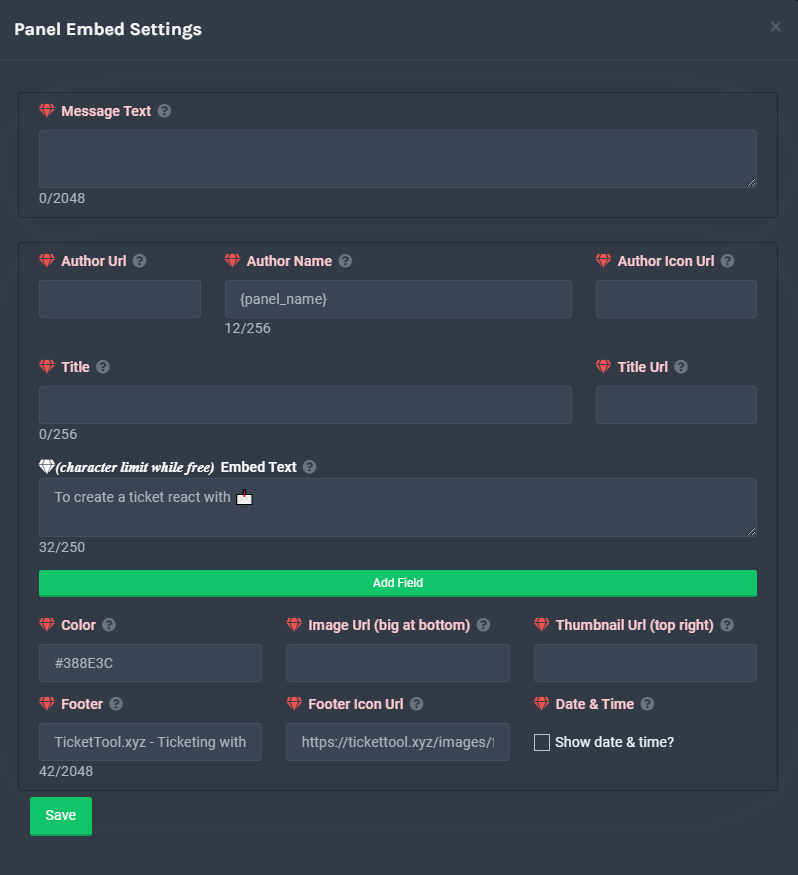
**Panel Message**
The panel message is where people react to make a ticket. To customize it head over to your Dashboard --> Panel Configs -> Settings -> Panel Options -> Edit Panel Message
 desert summit
There by Embed Text you can change it and then idk said another message or in the open ticket message
Dashboard > Panel Configs > Ticket Options > Edit Ticket Message
 azure copper
I know how to edit the ticket message, what I want to accomplish is an automatically conditional ticket message depending on who opened the ticket
My idea for getting that to work is two different panels that feed into the same ticket creation so to speak, but rn it seems like each of my panels maintains its own separate {count}, so the indices for the tickets created by the two different panels would be out of order
 dense ridge
is it possible for me to make it so a certain role cannot make a ticket?
azure copper
it would also work if I could make tickets display a different message depending on if they were opened via command or panel
Basically what I want is two ways to open tickets which share this count field:
 shut bolt
dense ridge
is it possible for me to make it so a certain role cannot make a ticket?
shut bolt
dense ridge
is it possible for me to make it so a certain role cannot make a ticket?
Yeap, blacklist roles
azure copper
but have unique values for this field:
 copper owl
azure copper
Basically what I want is two ways to open tickets which share *this* count field...
copper owl
azure copper
Basically what I want is two ways to open tickets which share *this* count field...
there is none
you either use the same panel, or two different ones
azure copper
👍
shut bolt
dense ridge
is it possible for me to make it so a certain role cannot make a ticket?
Go into the Dashboard, Server Configs, and then select blacklist roles, Save changes
Or
You could edit the allowed roles to use the create button
azure copper
copper owl
you either use the same panel, or two different ones
Is there a way to have variable embed text for a single panel then? Based on who opened it, how it was opened, or anything else?
copper owl
azure copper
Is there a way to have variable embed text for a single panel then? Based on who...
yeah actually.
Go to your Edit Ticket Message
You can add the following variables: {panel.name} / {ticket.user}
dense ridge
shut bolt
Yeap, blacklist roles
just tried it isnt working for some reason
shut bolt
dense ridge
just tried it isnt working for some reason
Did you save changes?
dense ridge
yeah
copper owl
the first one will display the name of the panel, so you know which panel it was opened from, the other will be {ticket.user}, which is somewhat redundant since the ticket should ping the user once they opens a ticket
shut bolt
dense ridge
yeah
Please comment it on the ticket you opened so the Support Member who is with your ticket can help you :)
azure copper
copper owl
yeah actually.
Go to your `Edit Ticket Message`
You can add the following varia...
I know about variables, but is there a way to have like, if statements using variables? I want one paragraph of static text if a user opened the ticket, and one paragraph of static text if staff opened the ticket
copper owl
No there is not
azure copper
Gotcha
 wet ferry

shut bolt
wet ferry
<:space:547918350563541002>
Good space I must admit
jade topaz
Hi there, Just wondering if it is possible to change it from Ticker - 0010 to say 'customer word' - 0010?
Thanks
shut bolt
Hi there!
jade topaz
Hey Pablo
shut bolt
Check this
humble sequoiaBOT
Ticket names
The ticket name is the default channel name of all tickets. To edit it, go to your Dashboard > Panel Configs > Settings > Ticket Options. There you can edit the channel name of opened and closed tickets. You can also use variables in there.

 Note: This is a premium feature
shut bolt
Note: This is a premium feature
shut bolt
This is how you can edit the name of the ticket
jade topaz
You sir are a legend!
shut bolt
jade topaz
You sir are a legend!
jade topaz
Ohhh its premium, right i need that sorted then
shut bolt
jade topaz
Ohhh its premium, right i need that sorted then
Yeap
jade topaz
shut bolt
Yeap
Thanks so much!
iron nightBOT
Gave 1 Rep to Yareaj_ (current: #17 - 48)
shut bolt
jade topaz
Thanks so much!
You are welcome ^^
shut bolt
FFFFF
 severe path

shut bolt

 vestal owl
How would j become support staff?
eager cargo
Applications for French, Arabic, and Spanish support are open right now.
eager cargo
eager cargo
Yep
vestal owl
Applied!
eager cargo
Great!
vestal owl
Also if I apply for the French support team would I still be able to answer English support tickets?
shut bolt
vestal owl
Also if I apply for the French support team would I still be able to answer Engl...
Indeed, you can answer to both type of tickets
vestal owl
Ok thx
shut bolt
Sure
 shut swift
Hello, I have a problem with the bot. When I put it on the server and I try to go to "my servers" it doesn't show my server even though I'm the administrator and I kick the bot and put it back, it doesn't change anything
humble sequoiaBOT
Don't see your server in the dashboard?
You will possibly need to relog. Look below to see steps on how to relog.
How to relog the Dashboard.
First, you will need to go to the dashboard. Once your there, click on your avatar on the top right. after you clicked it, you will see button that says Logout. You must click that. Once you have logged out, you can log back in.
Note:
You need one of these 3 things to access the dashboard.
1. Server Owner (Level: 6)
2. Server Administrator (Level: 4)
3. Dashboard Role (Level: 2)
You can check your level using $level on your Discord Server
severe path
@shut swift ^
shut swift
Yes thanks 😃
 lunar oasis
What does this mean
 shut bolt
lunar oasis
What does this mean
shut bolt
lunar oasis
What does this mean
You have reached the maximum amount of channels allowed by Discord, 500
vestal owl
Fast fingers
vestal owl
I'm talking to Pablo btw
lunar oasis
Is it servers
vestal owl
Delete some channels
shut bolt
vestal owl
I'm talking to Pablo btw
Thank you
iron nightBOT
Gave 1 Rep to Snapz (current: #61 - 1)
shut bolt
vestal owl
Delete some channels
Yeap, just that
vestal owl
Maybe delete some less important channels
shut bolt
Yes
lunar oasis
On what bc im not the server owner on that server
vestal owl
Tell the owner so they know i guess
shut bolt
lunar oasis
On what bc im not the server owner on that server
Must talk to the Staff and tell them they've reached the limit of channels
Actually is the first time I see someone reach 500 channels bro
lunar oasis
Theres only one
 shut bolt
lunar oasis
Theres only one
shut bolt
lunar oasis
Theres only one
Only one channel?
lunar oasis
 vestal owl
I've got a promotion server with 156 channels and I think that's alot
vestal owl
There's probaly some channels that u can't see and the owner can
shut bolt
I get why they reached the limit
vestal owl
Or other tickets
lunar oasis
The owner never responds
shut bolt
vestal owl
I was abt to say open a ticket but...
lol
Yeah, the only way to open a ticket is to them to delete channels, there's nothing else we can do
 kindred nymph
is ticket tool premium for 1 or all servers
eager cargo
One
vestal owl
Do u get much tickets?
shut bolt
vestal owl
Do u get much tickets?
Well, it depends on the day but kind of
And also depends on what do you understand for much
vestal owl
Like now do u have many
shut bolt
In all the languages I guess probably 15+
 nova scaffold
?vote
 prime bridgeBOT
<:wick:660790096504815616> Upvote Wick!
<:upvoter:660790094839414804> Your Upvotes (0) :
 top.gg:
 0 (+0)
botlist.space: 0 (+0)
botsfordiscord.com: 0 (+0)
nova scaffold
$vote
humble sequoiaBOT
Votes
Current Votes: 10
Lifetime Votes: 10
Linked Votes: 0
Vote Links
Linking Info
Linked User: Not Linked
You can give your future votes to another user by linking with that user.
To link use $vote link (@user or userId)
To unlink use $vote unlink
Redeeming
Each vote is worth 12 hours of premium and can be redeemed once you have atleast 6 votes.
Your current votes are worth 5 days, 0h, 0m
To redeem your current votes use $vote redeem
vestal owl
$vote
humble sequoiaBOT
Votes
Current Votes: 0
Lifetime Votes: 0
Linked Votes: 0
Vote Links
Linking Info
Linked User: Not Linked
You can give your future votes to another user by linking with that user.
To link use $vote link (@user or userId)
To unlink use $vote unlink
Redeeming
Each vote is worth 12 hours of premium and can be redeemed once you have atleast 6 votes.
Your current votes are worth 0m
To redeem your current votes use $vote redeem
nova scaffold
$vote
humble sequoiaBOT
Votes
Current Votes: 13
Lifetime Votes: 13
Linked Votes: 0
Vote Links
Linking Info
Linked User: Not Linked
You can give your future votes to another user by linking with that user.
To link use $vote link (@user or userId)
To unlink use $vote unlink
Redeeming
Each vote is worth 12 hours of premium and can be redeemed once you have atleast 6 votes.
Your current votes are worth 6 days, 12h, 0m
To redeem your current votes use $vote redeem
nova scaffold
$vote redeem
vestal owl
Verify what @void talon
 void talon
I want to check in counter blox but it won't let me
Más
vestal owl
Just say more information about what u need help with
humble sequoiaBOT
You're in the wrong place
We provide support for @pseudo glen discord bot and cannot help you with whatever issue you have.
Please make sure to contact the appropriate support team.
If you don't have any further questions regarding our bot Ticket Tool, please close this ticket
_ _
shut bolt
I guess so
void talon
I want to verify my account but it won't let me write
 fathom sierra
Hi 👋
shut bolt
humble sequoia
Please read this @void talon
vestal owl
Hey
shut bolt
fathom sierra
Hi 👋
Hello there
vestal owl
Dude
fathom sierra
Okay...
shut bolt
void talon
ha sorry pls forgive me
No worries bro
fathom sierra
How yall doing?
vestal owl
Good wby
shut bolt
fathom sierra
How yall doing?
Fine, how are you?
fathom sierra
Great.
void talon
I am from Peru and I speak English very well :v
shut bolt
void talon
I am from Peru and I speak English very well :v
No pasa nada jajaja, aquí también puedes pedir ayuda en español
fathom sierra
That's cool man. ^^
shut bolt
Jajajaja tal cual
void talon
xd
fathom sierra
Wha~
vestal owl
Spanish
void talon
yes
fathom sierra
Okay 👌
shut bolt
fathom sierra
Wha~
He was telling me that his nickname is completely in english while he's a native spanish speaker
Basically that
vestal owl
Supongo que sé un poco de español jajaja
void talon
exactly
shut bolt
vestal owl
Supongo que sé un poco de español jajaja
En efecto jajaja
shut bolt
fathom sierra
Chat seems dead. So I wanted to say hi.
Yeah, people don't look for support at this hours that much
void talon
and what is this chat for?
fathom sierra
Yeah.
shut bolt
void talon
and what is this chat for?
Support
void talon
haaa okey
fathom sierra
How does it feel being staff?
shut bolt
fathom sierra
How does it feel being staff?
Quite nice
fathom sierra
^^^^
vestal owl
How does it feel having a 0.01 second response rate
shut bolt
vestal owl
How does it feel having a 0.01 second response rate
Jajajaja
fathom sierra
Okay..
vestal owl
en serio, ¿cómo escribes tan rápido?
vestal owl
I like how in jajajajaja means hahahaha in Spanish
shut bolt
Yeah JAJAJA, I really tend to use more JAJAJA than LMAO but it's quite nice use both of them
fathom sierra
Do you guys play vid games and what are they?
fathom sierra
vestal owl
Fortnite, GTA5 and rec room
I play gta5, fortnite,roblox.
I like online more for gta though.
vestal owl
Rec room is like VR
fathom sierra
Yup I know.
fathom sierra
vestal owl
Rec room is like VR
Do you play story mod or fivem or online for gta?
vestal owl
PC
fathom sierra
Nice, I play on xbox.
kindred nymph
How do I get the premium role if I own premium
 trail sphinx
هلا
 robust sandalBOT
trail sphinx
هلا
robust sandalBOT
trail sphinx
هلا
 Ho - 👑YASSEN👑
Hi
 Arabic (ar) → English (en)
 strange remnant
Ok so I just got the premium for Ticket Tool, and our server has been using the free version for a couple months. We invited the premium bot to the server, do we need to get rid of the other bot or do we keep it around?
shut bolt
strange remnant
Ok so I just got the premium for Ticket Tool, and our server has been using the ...
Hello there
humble sequoiaBOT
Inviting and Enabling Premium Bot
The first thing you will need to do is invite the premium bot, an invite can be found here
Once the bot is in your server we will head to the dashboard and manage your server. When you are managing your server, you want to head into "Server Configs" then click the drop down menu under "Select the bot you would like to use on this server" then click "Ticket Tool#6207" and then save.
shut bolt
Check this
strange remnant
Oh... I did that before I invited it. Ill do it again and get back to you
shut bolt
strange remnant
Oh... I did that before I invited it. Ill do it again and get back to you
Sure, tell me if any doubts arise
iron nightBOT
Gave 1 Rep to Yareaj_ (current: #17 - 50)
shut bolt
strange remnant
thanks <@!518666147441278998>
Sure :)
jade topaz
how to put animated emoji in embed?
verbal sundial
uhhhh. . .
eager cargo
jade topaz
how to put animated emoji in embed?
Get the syntax ID of the emoji
$idcommand
humble sequoiaBOT
How do I get the ID of Roles/Channels/Emojis?
Ticket Tool has a useful command that helps you get the ID of various things like channels, roles, emojis and your server.
Just use the command $id <#channel/@role/:emoji:>. Now copy everything, including the brackets <...>, to your dashboard (or wherever you want it)
If you want the server ID, just use $id.
eager cargo
Then paste it in the embed
 compact kelp
How do I put the reaction where someone can claim the ticket?
humble sequoiaBOT
-- moved to ticket --
 outer python
Hello 😄 Is there any cmd that allows me to send a close ticket request for the one who created the ticket?
copper owl
No, I'm assuming you mean to activate the "are you use you want to close this ticket" message
there's no command for it unfortunately
you can however, press the close button yourself and have the prompt send in the ticket
outer python
Thanks!
copper owl
anytime
 bright abyss
my server isn't showing up in dashboard
vestal owl
try relogging @bright abyss
bright abyss
k
 ember thunder
Hi, Can I translate this sentence somewhere please?
"Warning: Ticket limit reached, You already have 1 tickets open of the 1 allowed for this panel"
https://i.imgur.com/PYp5n6X.png
 ember thunder
=/
copper owl
All messages that have "Dismiss Message" under them are non-editable messages
so you cant edit or disable them
ember thunder
I'll go with it, thanks!
jade topaz
Hi there, Closed tickets are not currently going into the chosen channel. Can i please get help with this as it is clogging up my server.
thanks!
craggy geyser
jade topaz
Hi there, Closed tickets are not currently going into the chosen channel. Can i ...
Is your chosen channel full? Discord have a limit of 50 channels in a category
jade topaz
craggy geyser
Is your chosen channel full? Discord have a limit of 50 channels in a category
Ohhh thank you sooo much! i didn't know that
iron nightBOT
Gave 1 Rep to Swift (current: #4 - 179)
craggy geyser
No worries
jade topaz
so i can just add closed channel 2 and add more closed tickets to that?
craggy geyser
Yep. If you put multiple categories it will move to the second after the first is full
Though also worth noting that discord has a total limit for a server of 500 channels so at some point you will need to delete some
jade topaz
Hey! Is there any way to set a timer for a chat to be automatically deleted if nobody types in it after a period of time passes?
humble sequoiaBOT
Automation disabled
There's currently no ETA for when automation will be enabled again. The issue that's caused it to be disabled, us hitting rate limits, is tied to the increased load on Discord's servers. The situation's currently unpredictable, which makes it so we can't give you a fixed time.
copper owl
There is no way of doing so as of currently
jade topaz
Alright ty so much!!
copper owl
Anytime
jade topaz
How do I make the ticket automatically set the name to the user that created it?
Can't seem to find the correct placeholder./
 copper owl
use {ticket.user.name}
iron nightBOT
Gave 1 Rep to Neptune (current: #1 - 208)
iron nightBOT
Gave 1 Rep to Neptune (current: #1 - 209)
copper owl
Np barb
desert summit
Neptune where is you’re old Profilepic :c
unique junco
It’s spooky time
copper owl
desert summit
Neptune where is you’re old Profilepic :c
Spooky Scary Skeletons c:<
just for the month
desert summit
Oh True Halloween is this month :s
jade topaz
How I can know who sending this to me pls?
 copper owl
that's most likely your tag
jade topaz
copper owl
that's most likely your tag
so i well go to website tag?
copper owl
you can have a tag send the response as a DM
humble sequoiaBOT
Tags
Tags are used to send a predefined response to your channels using a command. Tags will only respond if the command itself is used, it will not function if you put the tag into a sentence. The prefix is not included.
To create tags, go to: Dashboard > Tags > Create Tag. After creating and naming one, tap on the response button, and you can edit the response.
copper owl
jade topaz
ok i well bc i well banned him
copper owl
you banned ticket tool?
jade topaz
no
copper owl
it was you who was sending it to yourself
jade topaz
really?
copper owl
let me get a screenshot one moment
jade topaz
bruuh
copper owl
 jade topaz
😂 its was me
copper owl
You can have a tag send you the response to yourself
since you ran the command, it sent a dm to you
since that setting was on
jade topaz
sorry bro
copper owl
no problem
 urban root
why does my members can close a ticket. i wanna cancel this
humble sequoiaBOT

Buttons
The new Discord Buttons allow for a much smoother and convenient experience. They reduce lag and work much better than emojis. With ticket tool you can edit all the buttons however you like! Buttons can show emojis, text and can have 4 different colors.
Where can I edit them?
Dashboard -> Panel Configs -> <Settings> -> Button Options -> <Setting>
 copper owl
go to Close Ticket, and set it as support only
or disable any roles you want to disable
fathom sierra
Hi!
copper owl
fathom sierra
Hi!
hey
fathom sierra
Olla!
jade topaz
question for you guys, when i upgrade to TicketTool Premium - will it effect any of my current tickets?
desert summit
jade topaz
question for you guys, when i upgrade to TicketTool Premium - will it effect any...
I’m not to 100% Prozent sure but ig not
 oblique storm
copper owl
go to `Close Ticket`, and set it as support only
oblique storm
copper owl
go to `Close Ticket`, and set it as support only
does ADMINISTRATOR perms bypass it?
prime bridgeBOT
 Successful bans:
 1
 Unsuccessful bans:
 0
 Reason: happy halloween!! (Scam)
 Moderator: @mystic hound
iron nightBOT
Gave 1 Rep to Ymaster2000 (current: #24 - 16)
desert summit
Np
half kernel
jade topaz
question for you guys, when i upgrade to TicketTool Premium - will it effect any...
Hi i recently upgraded to premium and no it did not affect my current ones or the numbers. You are fine to switch
 ember depot
Hallo
 hazy elk
Hi can anyone poi t me in the right direction to renew subscription for LTQ please
shut bolt
This is not the server for it, sorry
 cedar marsh
Hii the bot is in my server but in your website for set the ticket, my server doesn't appear
(sorry if my english is bad, I'm french)
humble sequoiaBOT
Don't see your server in the dashboard?
You will possibly need to relog. Look below to see steps on how to relog.
How to relog the Dashboard.
First, you will need to go to the dashboard. Once your there, click on your avatar on the top right. after you clicked it, you will see button that says Logout. You must click that. Once you have logged out, you can log back in.
Note:
You need one of these 3 things to access the dashboard.
1. Server Owner (Level: 6)
2. Server Administrator (Level: 4)
3. Dashboard Role (Level: 2)
You can check your level using $level on your Discord Server
copper owl
try this
cedar marsh
okay and how we level up for this 3 things?
 open sinew
C
shut bolt
cedar marsh
okay and how we level up for this 3 things?
You mean the three levels you need for accessing the dashboard?
cedar marsh
yes
copper owl
Theyre not level ups as in a game or XP
shut bolt
/fr For level 6 you need to be the owner, for level 4 you need the admin perm in one of your roles, and level 2 requires a role you've got to be in the dashboard roles
robust sandalBOT
Pour le niveau 6, vous devez être le propriétaire, pour le niveau 4, vous avez besoin de la permanence d’administrateur dans l’un de vos rôles, et le niveau 2 nécessite un rôle que vous devez être dans les rôles de tableau de bord
English (en) → French (fr)
 shut bolt
No JAJAJAJAJA
 shut bolt
He will kill me
copper owl
mystic hound
<:This:866074913563869204>
it's not in here
mystic hound
I just added it :/
 copper owl
mystic hound
<:This:866074913563869204>
copper owl
mystic hound
<:This:866074913563869204>
you used a different one LMAO
it says the server private or unavailable 😔
shut bolt
Thanks @mystic hound
iron nightBOT
Gave 1 Rep to Light (current: #3 - 188)
shut bolt
copper owl
it says the server private or unavailable 😔
Indeed
mystic hound
o lol its the exact emoji anyawy
shut bolt
Yeah
copper owl
indeed
shut bolt
Yeah exactly
 stone frost
hello the help command is not working
shut bolt
stone frost
hello the help command is not working
$help
humble sequoiaBOT
Help Options
$help commands - Information on commands
$help setup - Information on bot setup
$help faq - Frequently asked questions
copper owl
stone frost
hello the help command is not working
check your prefix
copper owl
send a screenshot of this then please
copper owl
No problem
 stiff mauve
Thank you Neptune and pablo your work is amazing will be rating!🥇
copper owl
stiff mauve
Thank you Neptune and pablo your work is amazing will be rating!🥇

me and pablo fighting for #1 activity at this point 👀
stiff mauve
Hahah
shut bolt
copper owl
me and pablo fighting for #1 activity at this point 👀
LMAO indeed
copper owl
shut bolt
LMAO indeed
youre going down 

shut bolt
When I got in I told you I was going to run for tickets
stiff mauve
Oh dear I’ve started something now
shut bolt

copper owl
stiff mauve
Oh dear I’ve started something now
It's BEEN started


 stiff mauve
Ima just go….
shut bolt
stiff mauve
Oh dear I’ve started something now
No worries, we have been on this for 2 weeks almost
Since I got in actually
shut bolt
copper owl
youre going down <a:peepoEvil:815985379165208626> <:peepoKnife:82398684819095553...
We'll see that 
lmao passive agresiveness be like
copper owl
LMAO
hazy elk
cedar marsh
Hii the bot is in my server but in your website for set the ticket, my server do...
Hi sorry, I don't understand. Not up to date with this technology. 🤷
jade topaz
Welp
vestal owl
how much phases are there of applying for support team
shut bolt
vestal owl
how much phases are there of applying for support team
I believe 2
finite dove
$vote
humble sequoiaBOT
Votes
Current Votes: 2
Lifetime Votes: 2
Linked Votes: 0
Vote Links
Linking Info
Linked User: Not Linked
You can give your future votes to another user by linking with that user.
To link use $vote link (@user or userId)
To unlink use $vote unlink
Redeeming
Each vote is worth 12 hours of premium and can be redeemed once you have atleast 6 votes.
Your current votes are worth 1 day, 0h, 0m
To redeem your current votes use $vote redeem
shut bolt
finite dove
$vote
You can use this command in your own server, this channel is for support :)
finite dove
shut bolt
You can use this command in your own server, this channel is for support :)
I don't have the premium bot In my server so where else should I do it then
shut bolt
finite dove
I don't have the premium bot In my server so where else should I do it then
The command runs with the free bot
finite dove
Ok
humble sequoiaBOT
-- moved to ticket --
jade topaz
hello
shut bolt
Hi there
vestal owl
Hi
 slate ridge
someone gained access to our tickettool dashboard, and deleted all our panels, subsequently making a new panel
i am just curious, how did he gain access to our dashboard
https://cdn.discordapp.com/attachments/778944640350683145/894207928771432498/unknown.png

 eager cargo
They either had to have Admin or a dashboard role
humble sequoiaBOT
Dashboard Roles
Any role you put there will have full access to the ticket tool dashboard. The server owner and users with admin permissions already have access to the dashboard.
Be careful of which roles to put here
 eager cargo
They either had to have Admin or a dashboard role
eager cargo
eager cargo
They either had to have Admin or a dashboard role
The person with server ownership has access too.
prime bridgeBOT
beef cake has been silenced for 10m 
 Reason: Posting Discord Server Invites
beef cake#3758 | 791018417473847337
 spring grove
i want to make it so where when i do /ticket it opens a ticket you think you can help me
 dreamy isle
suport arabic?
eager cargo
$arabic
humble sequoiaBOT
فريق الدعم الفني العربي
عميلنا العزيز ان كنت تبحث عن مساعدة يرجى فتح تكت خاص بفريق الدعم الفني العربي
اذهب الى#🎫│make-a-ticket
ثم قم بلضغط على الايموجي الاتي (🇯🇴)
eager cargo
spring grove
i want to make it so where when i do /ticket it opens a ticket you think you can...
Enable command style tickets in your panel settings
humble sequoiaBOT
-- moved to ticket --
jade topaz
what does it mean to have role mentions on ?
eager cargo
 jade topaz
eager cargo
jade topaz
eager cargo
Ahh much thanks good sir
iron nightBOT
Gave 1 Rep to Quo (current: #2 - 203)
jade topaz
is there a way to reset the tickets ?
shut bolt
jade topaz
is there a way to reset the tickets ?
You can indeed reset the count of a panel if that's what you mean
jade topaz
shut bolt
You can indeed reset the count of a panel if that's what you mean
yes yes, that is what i mean
shut bolt
jade topaz
yes yes, that is what i mean
Sure, go into your Dashboard, then Panel Configs, General Options, and there you should see the Ticket Count box, mark it down to 0, and Save changes
 jade topaz
shut bolt
Sure, go into your Dashboard, then `Panel Configs`, `General Options`, and there...
jade topaz
shut bolt
Sure, go into your Dashboard, then `Panel Configs`, `General Options`, and there...
Ah, thank you pablo c:
iron nightBOT
Gave 1 Rep to Yareaj_ (current: #17 - 52)
shut bolt
jade topaz
Ah, thank you pablo c:
You are welcome :) have a good one
jade topaz
shut bolt
You are welcome :) have a good one
You too !
verbal sundial
i like how I can look away from my phone for 1 second and the server has a new logo lmao
jade topaz
Hello I have a small problem
its doing 24 hours I added bot to my second server I've tryed to kick it and invite again he is not showing in my server manager
 nocturne marten
jade topaz
Hello I have a small problem
its doing 24 hours I added bot to my second server ...
nocturne marten
jade topaz
Hello I have a small problem
its doing 24 hours I added bot to my second server ...
Try to log out and log In again
nocturne marten
Good to hear 🙂