#🆘│community-support
1 messages · Page 350 of 1
 copper owl
 dim inlet
Hi guys . I have a problem with my server
copper owl
you want support team help? #🎫│make-a-ticket
dim inlet
Thanks
 prime bridgeBOT
 Successful bans:
 1
 Unsuccessful bans:
 0
 Reason: nsfw
 Moderator: @mystic hound
 scenic plinth
Um... ok
prime bridgeBOT
Successful kicks: 1
Unsuccessful kicks: 0
Reason: ticket tool support is not the place to find a girlfriend
Moderator: @mystic hound
 half kernel
Umm

 mystic hound
LOL @unique junco i removed myself 😂

 humble sequoiaBOT
Multipanels are a premium feature  that allow for a single panel with multiple buttons to open different tickets.
How to create a Multipanel
Premium users can combine multiple panels into one multipanel.
First, find the IDs of each panel you wish to combine. You can find them in your Panel Configs in the Dashboard
Next, send the multipanel to a channel using $panel [id1] [id2] {id3} ....
e.g. $panel 1 2 4 17 35 to combine panels 1, 2, 4, 17 and 35.
Up to 25 panels may be combined.
 mystic hound
@maiden shore ^
 iron nightBOT
Gave 1 Rep to Light (current: #3 - 169)
 maiden shore
@unique junco nice to see you around here 
 unique junco
Haha yes I’m friends with the people here
mystic hound
friends
maiden shore
No need to explain, I was just surprised to see you here 😄
unique junco
mystic hound
*friends*
You want to be more than friends?
maiden shore
ooow, that looks sensitive.
unique junco
HAHA
mystic hound
unique junco
You want to be more than friends?
I'm not dev
unique junco
True
 mystic hound
Back to the demo ticket kids, can't be scaring the public
mystic hound
Impersonation? Might have to ban
unique junco
mystic hound
Impersonation? Might have to ban
I’ll ban ur mum
maiden shore
Can I rename the ticket tool?
unique junco
maiden shore
Can I rename the ticket tool?
Like change the nickname? Yes
Change the actual bots name, nope
maiden shore
Oki. I'll come up with something creative.
humble sequoiaBOT

Ticket Tool avatar/status Customisation
@pseudo glen is like another discord user; you can't control its avatar icon or status, and we can't change it for one server, just as you cannot change your avatar for just one server.
However, on your server, you can change the bot's nickname
 unique junco
^
maiden shore
Nice.
 fathom steppe
copper owl
fathom steppe
copper owl
first off, if you want support from the support team, go open a ticket in #🎫│make-a-ticket
second off
$help ping
humble sequoiaBOT
How to make Ticket Tool ping a role
To make ticket tool ping a role when a ticket is opened, go to the Dashboard -> Panel Configs -> Settings -> Ticket Options -> Ticket Message -> Message Text and do this:
{@Role name} This is case sensitive and the role must have @mentions enabled
 copper owl
this is how you ping a role
iron nightBOT
Gave 1 Rep to Neptune (current: #2 - 173)
unique junco
Hey I was gonna help them
 eager prism
Question: is there a way to make the bot open tickets in threads instead of channels?
scenic plinth
eager prism
Question: is there a way to make the bot open tickets in threads instead of chan...
No, Ticket Tool hasn't been updated to function with thread permissions.
eager prism
Ok, thank you
 verbal sundial
there ya go
 jade topaz
is there a way to transfer premium to another account?
 mellow pumice
What up all
 flint coyote
Howdy 🙂
 light field
How the hell do they get that review permission?
 maiden swan
Hi, I am new to the bot. I do not know how to add a bot message, and so on, and I need your help in this matter
@copper owl bro you are online?
jade topaz
Anyone else having issues loading the website?
maiden swan
@atomic solstice bro
 atomic solstice
maiden swan
<@601783394334015498> bro
atomic solstice
maiden swan
<@601783394334015498> bro
plsease don't ping support, read the rules. If you want to setup the bot make sure you read our setup guide
humble sequoiaBOT
maiden swan
@atomic solstice No, I don't know him at all, brother
maiden swan
maiden swan
Hi, I am new to the bot. I do not know how to add a bot message, and so on, and ...
in this
@atomic solstice I need help only
atomic solstice
maiden swan
<@601783394334015498> I need help only
which bot message are you trying to setup?
maiden swan
@atomic solstice
It is a message that brings others to open a ticket
humble sequoiaBOT
atomic solstice
read this guide from step 3
there is explains how to create a Panel
the panel is the message you are looking for
maiden swan
okay bro thanks
atomic solstice
np
jade topaz
I bought premium on an account that got termed today, can i transfer it to another acocunt or do i have ot buy it again?
verbal sundial
@jade topaz there is a transfer system i believe but you would have to contact a staff member to figure out how to do it
jade topaz
verbal sundial
<@456226577798135808> there is a transfer system i believe but you would have to...
thanks for the reply
iron nightBOT
Gave 1 Rep to ninja (current: #58 - 1)
verbal sundial
yooooo yets go
 eager cargo
jade topaz
I bought premium on an account that got termed today, can i transfer it to anoth...
eager cargo
jade topaz
I bought premium on an account that got termed today, can i transfer it to anoth...
You can login at https://tickettool.xyz/subscriptions with your email, enter the One-Time-Password and then you can access their subscription. You can then change the Discord ID, so it's tied to your new account.
 jade topaz
eager cargo
You can login at https://tickettool.xyz/subscriptions with your email, enter the...
jade topaz
eager cargo
You can login at https://tickettool.xyz/subscriptions with your email, enter the...
thank you.
iron nightBOT
Gave 1 Rep to Quo (current: #1 - 183)
eager cargo
Yep
jade topaz
Hey! How whould I make it so the maker of the ticket can also Delete, Transcript, Reopen and all that?
flint coyote
Panel configs, ticket permissions
jade topaz
flint coyote
Panel configs, ticket permissions
Let me try that!
flint coyote
There is an option for user permissions
jade topaz
flint coyote
There is an option for user permissions
What cateory is it in?
flint coyote
I should say Panel configs > settings> permissions
You can edit the user open permissions
Manage channels I believe will allow them to do that. You'll have to test it.
If the opened doesn't do it, then try user closed perms
 steady swift
$help
humble sequoiaBOT
Help Options
$help commands - Information on commands
$help setup - Information on bot setup
$help faq - Frequently asked questions
 thin finch
How do I setup a channel where transcripts auto save to?
 desert summit
thin finch
How do I setup a channel where transcripts auto save to?
desert summit
thin finch
How do I setup a channel where transcripts auto save to?
$help transcript
humble sequoiaBOT
How do I save transcript to a channel?
To save transcripts to a channel go to the Dashboard -> Panel Configs -> Settings -> Logging Options -> Transcript Channel
 thin finch
Ty
desert summit
And autotranscript ist Premium feature
thin finch
Thanks @desert summit
iron nightBOT
Gave 1 Rep to Ymaster2000 (current: #23 - 15)
desert summit
Nvm was the wrong here is the right one:
Look here you can enable auto transcript (but you need premium for this)

@thin finch
thin finch
Where do I set it up where the transcript saves to a specific channel?
verbal sundial
@thin finch i don't think you can change that and if you can it would be in the panel settings after you created the panel
thin finch
I've seen it done in another server
verbal sundial
@thin finch let me go look and then i will tell you
@thin finch ok so go to the panel settings find logging settongs and then transcript channel
 iron nightBOT
@thin finch :: You can't rep Ymaster2000#2516 for 8 minutes and 26 seconds. Try coming back later?
thin finch
Thanks @verbal sundial
iron nightBOT
Gave 1 Rep to ninja (current: #45 - 2)
 surreal badge
can someone explain to me what transcripts are for?
desert summit
surreal badge
can someone explain to me what transcripts are for?
Transcripts are files, where you can read the chat again. It saves the chat und you can have a look on it whenever you want
surreal badge
how do i look at it?
 atomic barn
There would be a channel you have allocated it for it to see the transcripts
desert summit
surreal badge
like the ticket channel?
You can choose a transcript channel and there you can see the file or by premium in dms Looks like this
surreal badge
ohhh ok
how do i choose a transcripchannel?
for do i just type $ transcript in the channel?
atomic barn
on the website under a category you can made the transcripts go into a channel
im not on my laptop so i cant show you, and its getting late sorry.
atomic barn
i mean if you need it in a hurry, you could alwasy open a ticket #🎫│make-a-ticket and a support team can answer to it
surreal badge
theres only close and open category?
surreal badge
atomic barn
i mean if you need it in a hurry, you could alwasy open a ticket <#5717064354492...
okk tysm
desert summit
surreal badge
theres only close and open category?
Yes just Close and Open and Look here:
$help category
humble sequoiaBOT
How to set the open category
To set a open category go to the Dashboard -> Panel Configs -> Settings -> Category Options -> Category Open
 surreal badge
I opened a ticket and every thing is done tysm tho!
 rancid jacinth
$help
humble sequoiaBOT
Help Options
$help commands - Information on commands
$help setup - Information on bot setup
$help faq - Frequently asked questions
rancid jacinth
$help commands
humble sequoiaBOT
() = optional
[] = required
*==================================
Ticket Commands
==================================*
_ _
`$add [User] (channel)`
Description: Adding additional users to a ticket
Aliases: none
`$remove [User] (channel)`
Description: Removing users from a ticket
Aliases: none
`$close`
Description: Closing tickets
Aliases: none
`$open`
Description: Opening closed tickets
Aliases: none
`$delete`
Description: Deleting tickets
Aliases: none
`$rename`
Description: Renaming tickets/channels
Aliases: none
`$transcript (send channel)`
Description: Creating transcripts
Aliases: none
`$new (user) (reason)`
Description: Creating tickets in a monitored channel (when command style is enabled)
Aliases: none
`$claim`
Description: Claiming tickets (when claim is enabled)
Aliases: "unclaim"
_ _
*==================================
General Commands
==================================*
_ _
`$help (Help Options)`
Description: Help Command
Aliases: none
`$debug`
Description: Debuging issues with running Ticket Tool
Aliases: none
`$id (@role/@user/#channel/emoji)`
Description: Converting roles, users, channels and emojis to ID
Aliases: "getid"
`$permlevel`
Description: Checking permission level with Ticket Tool
Aliases: "level"
`$ping`
Description: Checking response time with discord api
Aliases: none
`$vote (link | unlink | redeem) (user)`
Description: Earn premium by voting on top.gg or Discord.boats
Aliases: "votes"
rancid jacinth
$invite
humble sequoiaBOT
Ticket Tool Invite & Support
desert summit
rancid jacinth
$invite
For Config you need to go to Dashboard
You have to search for it in the internet or you goes this link https://tickettool.xyz
 severe tundra
some people can see the react but others cant
its just one person though... and they are in the same role as everyone else..
humble sequoiaBOT
Update your discord App
Buttons are a relatively new addition to discord and don't work with some older versions of the app.
Please verify that you have the latest version of discord, by going to the app or play store.
_ _
Discord for the App Store
_ _
Discord for the Play Store
 severe path
@severe tundra ^
severe tundra
severe path
<@!265585365794947074> ^
hes on desktop?
i think.. ill check!
turns out he is on a phone...
thank hou so much 🙂
prime bridgeBOT
Reyy has been silenced for 10m 

 Reason: Posting NSFW Websites
Reyy#4989 | 755620250367688777
 kind steppe
One of our members hasn’t been able to Open a ticket since he has joined
The button to open the ticket doesn’t pop up for him
flint coyote
He needs to update discord.
kind steppe
He’s been in our server for over a month
flint coyote
Doesn't matter. He needs to update discord. Buttons will then show.
kind steppe
He’s done that
flint coyote
That is the only reason.
If there's something else wrong with his discord, you'll need to talk to Discord support. Nothing to do with this bot.
 flint coyote
I'm telling you though, it's discord update. lol
humble sequoiaBOT
How update a panel manually
To update a panel manually; react to it with :tools: - :tools:
 mystic hound
humble sequoia
mystic hound
humble sequoia
this doesn't work anymore since we don't use reactions.. was a nice feature though.
if you're looking for the discord update tag, its $update
 humble quail
.
humble sequoiaBOT
Update your discord App
Buttons are a relatively new addition to discord and don't work with some older versions of the app.
Please verify that you have the latest version of discord, by going to the app or play store.
_ _
Discord for the App Store
_ _
Discord for the Play Store
maiden shore
I have two questions.
- Can I auto-remove closed tickets?
- Can I auto-close inactive tickets after a few days?
mystic hound
you don't need premium to auto-delete closed tickets, just disable two step ticket under general options
and as for auto-closing inactive tickets, see below
humble sequoiaBOT
Automation disabled
There's currently no ETA for when automation will be enabled again. The issue that's caused it to be disabled, us hitting rate limits, is tied to the increased load on Discord's servers. The situation's currently unpredictable, which makes it so we can't give you a fixed time.
mystic hound
@maiden shore
light field
How do I add people to the to tickets?
humble sequoiaBOT
-- moved to ticket --
 wraith holly
$add (id here) I am pretty sure
 quick glade
how do i MAKE a ticket
like i know i press the little letter reaction but what do i do after
 tame heart
hey when will the partnership witll open
tame heart
quick glade
like i know i press the little letter reaction but what do i do after
it will make a ticket if u click the reaction
copper owl
tame heart
hey when will the partnership witll open
we don't have an ETA, once they're open, we'll announce them in #📣│server-news
tame heart
copper owl
we don't have an ETA, once they're open, we'll announce them in <#50977053805130...
k
quick glade
tame heart
it will make a ticket if u click the reaction
how do i put something in the ticket so it isnt empty
verbal sundial
@quick glade please elaborate more
 stable estuary
the dashboard isn't working. it won't show up my server
humble sequoiaBOT
Don't see your server in the dashboard?
You will possibly need to relog. Look below to see steps on how to relog.
How to relog the Dashboard.
First, you will need to go to the dashboard. Once your there, click on your avatar on the top right. after you clicked it, you will see button that says Logout. You must click that. Once you have logged out, you can log back in.
Note:
You need one of these 3 things to access the dashboard.
1. Server Owner (Level: 6)
2. Server Administrator (Level: 4)
3. Dashboard Role (Level: 2)
You can check your level using $level on your Discord Server
copper owl
try that
 wheat torrent
@copper owl سؤال اخير لا هنت
copper owl
تفضل صديقي
verbal sundial
wtf
wheat torrent
من يقدر يكتب امر ال $add لتكت
copper owl
verbal sundial
wtf
what?
wheat torrent
لازم ادمنستريتور ؟
verbal sundial
i am not going to ask how you know Arabic
copper owl
wheat torrent
لازم ادمنستريتور ؟
لا, في كمان السوبورت
wheat torrent
او الي معه برمشن يشوف التكتات يقدر يضيف حد ل تكت
copper owl
verbal sundial
i am not going to ask how you know Arabic
i live in the middle east
copper owl
wheat torrent
او الي معه برمشن يشوف التكتات يقدر يضيف حد ل تكت
انت فيك تختار مين في يستخدم الامر
شوف Command Configs
wheat torrent
تمام
verbal sundial
and i am required to have class credits in a foreign language
copper owl
which language did you choose?
copper owl
ah, i couldve done spanish, chinese or some other language
but i opted for basketball for my general elective
verbal sundial
hey at least you had options
mystic hound
On the bright side, you can apply for Spanish support
verbal sundial
idk spanish
copper owl
verbal sundial
hey at least you had options
i had plenty LOL
copper owl
mystic hound
On the bright side, you can apply for Spanish support
BRB, gonna take chinese and form chinese support 
jade topaz
hi guys, can anyone help me? how is a server account able to spam in my restricted channels? its spamming everyday and i cant seem to find it in my members list
this one.
 copper owl
that doesnt look like a member to me
jade topaz
yes
copper owl
that looks like a webhook
jade topaz
how do i stop it?
copper owl
check your webhooks
verbal sundial
yeah
jade topaz
oh okay
copper owl
or followed channels
verbal sundial
i was about to say that
copper owl
jade topaz
this one.
it seems to me that you followed an announcement channel in the "Rell Games Hub" server
verbal sundial
the only thing i follow is your dick lol jk
jade topaz
where do i check my followed channels
iron nightBOT
Gave 1 Rep to ninja (current: #39 - 3)
mystic hound
He has plenty
copper owl
mystic hound
He has plenty
ok??? dont forget me 🙄
verbal sundial
thanks @copper owl
iron nightBOT
Gave 1 Rep to Neptune (current: #2 - 174)
copper owl
Ninja 
verbal sundial
oh nice yoyr #2
copper owl
yeah im trynna get #1 but quo is being stoopid and keeps getting rep LMAo
verbal sundial
Neptune
copper owl
ninja
verbal sundial
bro i wish there was a general chat bro
jade topaz
!thanks @copper owl
verbal sundial
no !
jade topaz
!rep @copper owl
verbal sundial
just thanks @copper owl
iron nightBOT
@verbal sundial :: You can't rep Neptune#6814 for 57 minutes and 15 seconds. Try coming back later?
jade topaz
thanks @copper owl
iron nightBOT
Gave 1 Rep to Neptune (current: #2 - 175)
copper owl
LMAO
jade topaz
bruh
mystic hound
verbal sundial
bro i wish there was a general chat bro
We would but it's literally just a second support chat because no one knows how to read
verbal sundial
lol i mean
mystic hound
i still want it but that's besides the point
copper owl
same here, i wanna talk to some people here but eh
verbal sundial
fairly true tbh
mystic hound
I was here back when there used to be a general chat, there were always more questions than actual chat
And the bot's grown about 400k servers since then sooo
copper owl
mystic hound
I was here back when there used to be a general chat, there were always more que...
maybe have automod? 👀
mystic hound
Then the chat would just be automod lmaoo
jade topaz
how do i add the rep system in my server
copper owl
mystic hound
Then the chat would just be automod lmaoo
LMAO, just yag constantly telling people to go to #🆘│community-support
copper owl
jade topaz
how do i add the rep system in my server
thats a yag thing, add the yag bot and turn on rep
jade topaz
thanks @copper owl
prime bridgeBOT
Successful bans: 1
Unsuccessful bans: 0
Reason: scam
Moderator: @mystic hound
verbal sundial
what r people scamming
copper owl
verbal sundial
what r people scamming
they send a link that "gives you free nitro" when in reality the link is a token grabber
they take over your account, and use your account to continue spreading the scam
verbal sundial
omfg bro
maiden shore
mystic hound
<@!387036506646249473>
Thank you!
iron nightBOT
Gave 1 Rep to Light (current: #3 - 171)
 halcyon sleet
hey guys is there a way for a user to check the ticket created by the tool if they close the conversation/server? when they try to make a new ticket it says they cant have more than 1
@here
 craggy geyser
If it is closed then it doesn't count towards the limit. Check they haven't got an open ticket and if they definitely don't have an open ticket, then open a ticket here and we can look deeper into the issue
halcyon sleet
im the user actually
XD
there is no ticket conversation i probably do have an open ticket
 muted egret

 humble sequoiaBOT
-- moved to ticket --
 hallow bough
how do i make a ticket that looks like this? I wanna make a ticket that looks smth like this

HELP?
humble sequoiaBOT
Multipanels are a premium feature that allow for a single panel with multiple buttons to open different tickets.
How to create a Multipanel
Premium users can combine multiple panels into one multipanel.
First, find the IDs of each panel you wish to combine. You can find them in your Panel Configs in the Dashboard
Next, send the multipanel to a channel using $panel [id1] [id2] {id3} ....
e.g. $panel 1 2 4 17 35 to combine panels 1, 2, 4, 17 and 35.
Up to 25 panels may be combined.
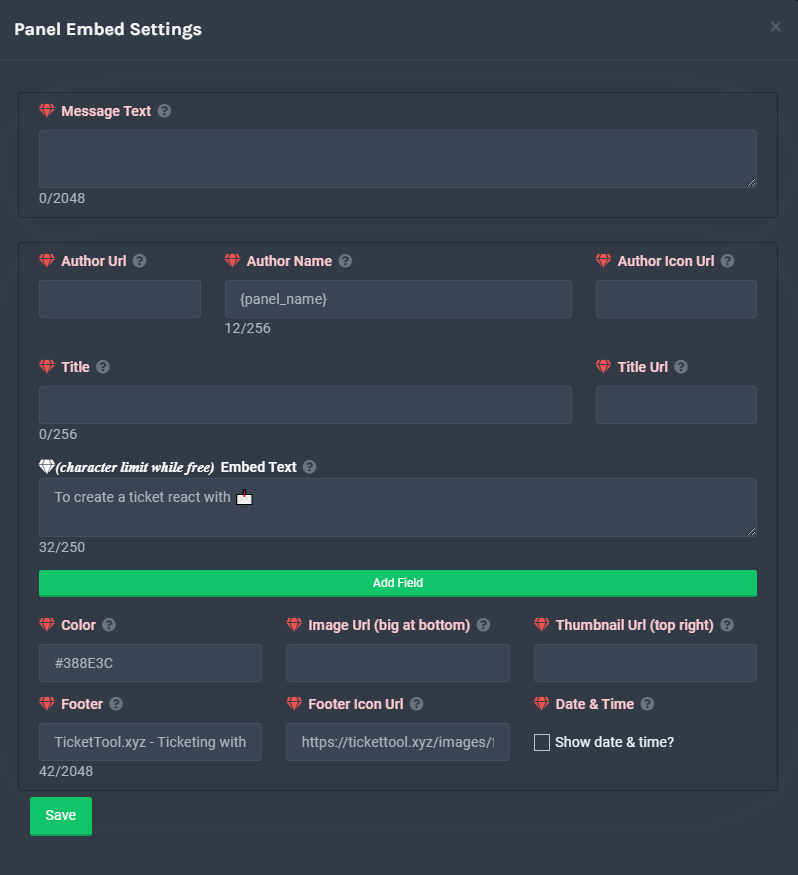
**Panel Message**
The panel message is where people react to make a ticket. To customize it head over to your Dashboard --> Panel Configs -> Settings -> Panel Options -> Edit Panel Message
 severe path
@hallow bough ^
hallow bough
Oh ok
quick glade
verbal sundial
<@262762225016635393> please elaborate more
oh sorry, its that im trying to make a ticket in a server and mods said my ticket was empty after i clicked the reaction, i dont know how this works
does anybody know how i could make it not empty?
 potent locust
Just checking roles
flint coyote
 swift ore
Help why it didn't chow up in manig server
swift ore
Help why it didn't chow up in manig server
If you're admin on the discord, refresh the page and it should show.
 craggy geyser
flint coyote
If you're admin on the discord, refresh the page and it should show.
craggy geyser
flint coyote
If you're admin on the discord, refresh the page and it should show.
Refreshing won't work. You have to relog. Log out and back in
@swift ore, as I informed Ivysixx above, relog, by logging out from the top right of the page, and logging back in again
humble sequoiaBOT
Don't see your server in the dashboard?
You will possibly need to relog. Look below to see steps on how to relog.
How to relog the Dashboard.
First, you will need to go to the dashboard. Once your there, click on your avatar on the top right. after you clicked it, you will see button that says Logout. You must click that. Once you have logged out, you can log back in.
Note:
You need one of these 3 things to access the dashboard.
1. Server Owner (Level: 6)
2. Server Administrator (Level: 4)
3. Dashboard Role (Level: 2)
You can check your level using $level on your Discord Server
copper owl
flint coyote
You need to invite the bot to your discord.
also the bot is in the server
 desert summit
Send $debug
And Doublecheck the perms of the bot bc it’s possible the bot has no perms to see this channel
 mystic hound
If you could tell me what doesn't work I can probably help better
 craggy geyser
As I told you to do, relog. Don't just refresh
 south dew
/en hallo hoe is het?
 robust sandalBOT
hello how is it?
 Dutch (nl) → English (en)
 tawdry oracle
Is it possible to automatically give a user a role while they currently have a ticket open?
And remove it after?
mystic hound
Unfortunately, no.
swift ore
desert summit
Send $debug in your channel
How?
desert summit
swift ore
How?
Just send in your panel channel $debug
 desert summit
And what doesn’t work now?
swift ore
I don't know
desert summit
???
 desert summit
GG ^^
 atomic solstice
swift ore
Everything seems normal but it note working
atomic solstice
swift ore
Everything seems normal but it note working
you have to log out and log back in to the dashboard
desert summit
$help Panel
humble sequoiaBOT
Creating a panel
To create a panel we are going to need to head over to the panel configs on the dashboard
Once at the dashboard we will need to click Create Panel
Enter a panel name (Fill in any optional settings you want)
Click Create Panel and your ready to get started with configuring your panel
An example of a creating a panel is shown below.
 flint coyote
craggy geyser
Refreshing won't work. You have to relog. Log out and back in
flint coyote
craggy geyser
Refreshing won't work. You have to relog. Log out and back in
Thank you
iron nightBOT
Gave 1 Rep to Swift (current: #4 - 168)
 simple hollow
Is there a command that will open a ticket rather than using the button? I can't seem to see it
$open
humble sequoiaBOT
Warning: This channel isn't a ticket
copper owl
simple hollow
Is there a command that will open a ticket rather than using the button? I can't...
Command Style Tickets in your panel settings
the command would be $new, you just have to set it up
simple hollow
Thanks very much! I completely missed it
copper owl
no problem
 minor sparrow
Hello .
 shut bolt
minor sparrow
Hello .
shut bolt
minor sparrow
Hello .
Hi there

 lean elk
minor sparrow
how can i edit the premium bot?
lean elk
minor sparrow
how can i edit the premium bot?
Edit what?
shut bolt
minor sparrow
how can i edit the premium bot?
By editing the premium bot yo refer to edit the color? The nickname? Or exactly what?
humble sequoiaBOT
 Faster Premium Bot
Automatic Transcripts
Full Customization
Custom Reactions
Direct Messages
Ticket Automation
Multipanels
Premium Support
You can purchase premium here:
Price
$6 - Monthly
$66 - Yearly
 Premium
minor sparrow
shut bolt
By editing the premium bot yo refer to edit the color? The nickname? Or exactly ...
Premium
minor sparrow
shut bolt
By editing the premium bot yo refer to edit the color? The nickname? Or exactly ...
yes
like the name so i can or not?
 minor sparrow
and this from where can i do it ?
shut bolt
For example you could mention the bot, right click on its name and click on change nickname
minor sparrow
and up ?
shut bolt
Oh, you refer to edit the name of the buttons?
shut bolt
minor sparrow
Do you want to change the names of the buttons that create the ticket?
minor sparrow
shut bolt
Do you want to change the names of the buttons that create the ticket?
yes i want that
how can i add some buttons
about the tickets that are they up .
shut bolt
minor sparrow
how can i add some buttons
First of all make sure to have more than one panel in the server, after setting up the message per each button and the emoji, you can use the multipanel command for sending them all in one
Ticket Tool Docs
You can check the last part of this page
minor sparrow
thx.
shut bolt
minor sparrow
thx.

 severe path
...
minor sparrow
yes.
severe path
 minor sparrow
oh i didnt saw it
severe path
$buttons
minor sparrow
ok
humble sequoiaBOT

Buttons
The new Discord Buttons allow for a much smoother and convenient experience. They reduce lag and work much better than emojis. With ticket tool you can edit all the buttons however you like! Buttons can show emojis, text and can have 4 different colors.
Where can I edit them?
Dashboard -> Panel Configs -> <Settings> -> Button Options -> <Setting>
 minor sparrow
thx.
prime bridgeBOT
! KeNaN#6591 has been warned!
They were notified via dms.
light field
Hello. How do I claim tickets?
humble sequoiaBOT
Claiming Options
Claiming allows you to change the ticket name, category and permissions. To use it you have to enable it first on your Dashboard > Panel Configs > Claiming Options.

 Note: This is a premium feature
light field
Note: This is a premium feature
light field
You guys hiring support team?
light field
I speak English and espaniol
craggy geyser
Spanish support team is hiring. The application tickets are in #📣│server-news too
 foggy pewter
I can't customize the bot
shut bolt
foggy pewter
I can't customize the bot
Exactly what do you want to customize?
foggy pewter
shut bolt
Exactly what do you want to customize?
I need him to appear on the channel I want
shut bolt
foggy pewter
I need him to appear on the channel I want
For appearing do you refer to the panel message for creating tickets?
shut bolt
foggy pewter
he doesn't even let me access the panel
You mean the Dashboard?
foggy pewter
yes
shut bolt
foggy pewter
yes
Enter the web https://tickettool.xyz/
If you are logged in already, try login out and in again
Now that should show you the server you are looking for
foggy pewter
ok
foggy pewter
shut bolt
Enter the web https://tickettool.xyz/
If you are logged in already, try login o...
thanks
iron nightBOT
Gave 1 Rep to Pablo. (current: #39 - 3)
shut bolt
foggy pewter
thanks
Did it work?
foggy pewter
shut bolt
Did it work?
yes
shut bolt
foggy pewter
yes
Nice 
 heavy wren
I have a new server that entered Bot in Server and Mesh Bainley programming Btaat Serviced input
 brittle falcon
Hi there! Is there a way to move an open ticket to an other category? I mean, i have 3 categories(panels) each of them with certain access roles, I want to move a ticket to other panel so other staff members can access it
heavy wren
I have a server and I want to say in an error
shut bolt
brittle falcon
Hi there! Is there a way to move an open ticket to an other category? I mean, i ...
Hello there! Yes it is, so for that do the following:
- Open the Dashboard of the server you want to edit
- Go the
Panel Configssection. - Select the panel you want to edit and click on
Settings. - Go to
Category Options. - Select the category you want them to be below
Category Open. - Click on the
Savebutton.

 tribal cedar
Automatically moving a ticket from one panel to another panel settings is not possible
But would be a pretty cool suggestion
shut bolt
brittle falcon
Hi there! Is there a way to move an open ticket to an other category? I mean, i ...
You could make that when claimed the permissions of the rest of the support team are changed
brittle falcon
shut bolt
You could make that when claimed the permissions of the rest of the support team...
So you mean with the claim option configuring the perms… Ok i will try that, thank you!
iron nightBOT
Gave 1 Rep to Pablo. (current: #37 - 4)
shut bolt
brittle falcon
So you mean with the claim option configuring the perms… Ok i will try that, tha...
Yeap, you could mark in  the
the Read Messages of Support Team Permissions when claimed and that should hide it from the rest of the staff :)
 glass estuary
Would anyone be so kind as to point me in the direction to fix this issue? When a user creates a ticket, they only see this in the ticket with the message "you do not have permission to view the message history of ticket" and furthermore do not have the ability to close their own ticket.
 shut bolt
glass estuary
Would anyone be so kind as to point me in the direction to fix this issue? When ...
shut bolt
glass estuary
Would anyone be so kind as to point me in the direction to fix this issue? When ...
Hello there! Follow this steps:
- Open the Dashboard and go to the server the problem is presenting on
- Go to
Panel Configs - Click the
Settingsbutton for the panel you have the problem with. - Go to the
Permission Optionsmenu. - Click in
Edit User Opened Permissionsbutton - Mark the
Read Message Historyin
- Click the
Savebutton
The tickets that are opened from that panel, now on won't have that problem :)
glass estuary
shut bolt
Hello there! Follow this steps:
1. Open the Dashboard and go to the server the p...
You're a real one. Thank you for the timely support 
iron nightBOT
Gave 1 Rep to Pablo. (current: #35 - 5)
glass estuary

shut bolt
glass estuary
You're a real one. Thank you for the timely support <a:SEheartbeat:4442435630695...
You are welcome 🤝
 delicate vault
pretty sure ticket tool is dead in our servr
i think about 200 people tried to open tickets at once
shut bolt
delicate vault
pretty sure ticket tool is dead in our servr
Doesn't it respond to any command?
delicate vault
pretty sure we gonna need tt prem
shut bolt
shut bolt
Probably a shard is down
I guess
delicate vault
we actually had it but decided not to use it
delicate vault
shut bolt
Probably a shard is down
oh rip
shut bolt
delicate vault
pretty sure we gonna need tt prem
A good solution
shut bolt
delicate vault
we actually had it but decided not to use it
It's a really good
delicate vault
yeah
 warm glacier
why does it say system failure: missing permissions when the bot has manage channel permission on that category?
copper owl
because that's not the only permission that's required for the bot to work
most likely missing some other permissions
warm glacier
such as?
it happened when i tried to close my ticket so i assume that manage channel was the one causing it
this is the ticket channel, the bot has manage channel permission but it wont delete it

it turns out that the bot needed the manage permissions permission in that channel, but why didnt the bot just enabled the permission for itself when creating the ticket?
copper owl
warm glacier
it turns out that the bot needed the manage permissions permission in that chann...
because a bot that can enable permissions for itself at any moment is a security risk
warm glacier
turns out that i forgot to gave it manage roles permission
btw how do i blacklist roles from creating a ticket
humble sequoiaBOT
Blacklist Roles
Any role you assign as a blacklisted role won't be able to use commands or reactions.
Selecting a blacklisted role
Go to your Dashboard -> Server Configs. There you will find the option to select blacklisted roles.
Note: Don't forget to save.
 warm glacier
aight ty
jade topaz
how to like set it like that a certain role is the support team
craggy geyser
jade topaz
how to like set it like that a certain role is the support team
$help support
humble sequoiaBOT
How to let support team see into a ticket
About support roles
A support role lets your support team see into tickets with out having to add them manually to each and every ticket.
You can add as many support roles as you like per panel.
NOTE that the way discord works all admins can see into tickets regardless of this.
How to set a support role
To set a Support role go to the Dashboard -> Panel Configs -> Settings -> General Options -> Support Team Roles.

NOTE that the support role will not be able to see into tickets that are already created..
humble sequoiaBOT
Setting up Ticket Tool
Visit the docs for setup info
General Setup
 finite fable
Ya nada ya está creado y me va bien
Esto se puede
Lo de que el número de tickets creados se reinicie
?
finite fable
Voy
shut bolt
Luego Panel Configs
Busca el panel al que quieres reiniciarle el conteo
Y le das en el botón azul de Settings
Abres el desplegable que se llama General Options
Y en el campo de Ticket Count pon el número desde que quieres que el bot haga el conteo de ese panel
Luego le das en Save
Y el próximo ticket ya tendrá ese número :)
shut bolt
finite fable
Muchas gracias
Con gusto, si necesitas algo más nos avisas por acá 🤝
finite fable
shut bolt
Con gusto, si necesitas algo más nos avisas por acá 🤝
Ok
 strange locust
Hola
shut bolt
Hola qué tal
strange locust
Soy nuevo
shut bolt
Cómo te podemos ayudar?
shut bolt
Okey
jade topaz
.
 whole viper
not able to setup bot at a specific channel
shut bolt
$help setup
humble sequoiaBOT
Setting up Ticket Tool
Visit the docs for setup info
General Setup
 royal cedar
very good afternoon, I need help, what happens is that they used the bot and opened a ticket but that channel got bugged and does not allow to delete the channel, can someone help me please?
$help setup
humble sequoiaBOT
Setting up Ticket Tool
Visit the docs for setup info
General Setup
royal cedar
@shut bolt
shut bolt
Hey there
shut bolt
royal cedar
very good afternoon, I need help, what happens is that they used the bot and ope...
Have you used the command $delete for deleting it?
royal cedar
no i will try
shut bolt
royal cedar
no i will try
Sure, tell me if it works
royal cedar
shut bolt
Sure, tell me if it works
the command is put in the channel that is bugged?
shut bolt
royal cedar
the command is put in the channel that is bugged?
Yeap, now the thing is that if it's a Discord bug there's nothing we can do
royal cedar
shut bolt
Yeap, now the thing is that if it's a Discord bug there's nothing we can do

you already use the command
finite fable
@shut bolt otra cosa mas
shut bolt
finite fable
<@518666147441278998> otra cosa mas
Dime
finite fable
Como se hace pasar que cuando abra la gente de mi grupo de discord ticket solo les llegue el ticket a ciertos rangos
shut bolt
finite fable
Como se hace pasar que cuando abra la gente de mi grupo de discord ticket solo l...
Tienes que editar los Support Team Roles del panel
Ya te muestro donde
Abre el Dashboard
Panel Configs
Settings del panel
Y una vez allí abres el desplegable de General Options
shut bolt
finite fable
Como se hace pasar que cuando abra la gente de mi grupo de discord ticket solo l...
Y seleccionas los roles que quieres que tengan acceso a tus tickets
 finite fable
Ok muchas gracias
shut bolt
finite fable
Ok muchas gracias
Con gusto
royal cedar
shut bolt
Try refreshing Discord
ya y no pude 😦
no hay otro comando o algo para eliminarlo ?
shut bolt
royal cedar
ya y no pude 😦
Por probabilidad
Estoy casi seguro
Que es fallo de Discord
Suele quedar congelado en eso a veces
Tienes dos opciones
Esperar a que se elimine por cuenta propia
O escribir al soporte de Discord
shut bolt
@glossy zinc do you need any assistance with the bot? I say it for the #📈│reviews you left
 glossy zinc
shut bolt
<@!802380746601398302> do you need any assistance with the bot? I say it for the...
glossy zinc
shut bolt
<@!802380746601398302> do you need any assistance with the bot? I say it for the...
Yea
shut bolt
glossy zinc
Yea
How may I help you
shut bolt
$help setup
humble sequoiaBOT
Setting up Ticket Tool
Visit the docs for setup info
General Setup
glossy zinc
shut bolt
$help setup
Yea I know
shut bolt
This is the general setup for the bot
glossy zinc
But still
shut bolt
What is the specific thing you need help with?
glossy zinc
Nevermind I got it
shut bolt
glossy zinc
Nevermind I got it
Nice, if you need anything you can ask us here or in #🎫│make-a-ticket
half kernel
$help ping
humble sequoiaBOT
How to make Ticket Tool ping a role
To make ticket tool ping a role when a ticket is opened, go to the Dashboard -> Panel Configs -> Settings -> Ticket Options -> Ticket Message -> Message Text and do this:
{@Role name} This is case sensitive and the role must have @mentions enabled
half kernel
^^ This isnt working for me
shut bolt
half kernel
^^ This isnt working for me
Hello
half kernel
Hi
shut bolt
Could you pls send me a screenshot of the embed message you are using, the role you want to mention, and the result pls?


 desert summit
half kernel
thats everything
desert summit
half kernel
thats everything
Copy the id of the role and write it in {}
shut bolt
half kernel
thats everything
Try replacing for this {@role PM Staff Team}
half kernel
shut bolt
Try replacing for this `{@role PM Staff Team}`
nope
shut bolt
Hmmm well you could do it the old fashion way
<@&>
And inside replace the ID of the role
shut bolt
half kernel
nope
Let me try something for looking what it is
half kernel
shut bolt
<@&>
nope
shut bolt
half kernel
nope
<@&ID>
shut bolt
shut bolt
`<@&ID>`
This must work
 shut bolt
Not even with <@&ID>?
half kernel
yep

 half kernel
Still no
humble sequoiaBOT
<@&642118166243311646>
<@&642118166243311646>
half kernel
Thats what i have been trying
half kernel
Just tryed again


 scenic plinth
Which panel is that? The panel I just viewed only has <@id> and not <@&id>
half kernel
shut bolt
Do you have the premium bot?
No
I thought you can change the open text even without premium
 clever kiln
Hello @pseudo glen won't join my server I'm having problems with it
humble sequoiaBOT
-- moved to ticket --
scenic plinth
half kernel
I thought you can change the open text even without premium
Yes you can, what panel is having that issue? (Number wise)
half kernel
1
scenic plinth
half kernel
1
Have you saved it? This is what I'm seeing for that
 half kernel
I have saved it
clever kiln
@half kernel try opening a new ticket?
scenic plinth
Yeah I just refreshed it too, its not showing me that there is a & symbol anywhere.
clever kiln
clever kiln
Hello <@557628352828014614> won't join my server I'm having problems with it
Can someone help me?
clever kiln
Oh ok
half kernel
clever kiln
<@330473378790113280> try opening a new ticket?
Nah i haved like 20 times
half kernel
scenic plinth
Yeah I just refreshed it too, its not showing me that there is a `&` symbol anyw...
Where is it supposed to go?
clever kiln
Thanks @scenic plinth
iron nightBOT
Gave 1 Rep to Lixツ (current: #6 - 153)
scenic plinth
half kernel
Nah i haved like 20 times
Before the numbers, so for example <@&889166455583670312>
scenic plinth
clever kiln
Thanks <@615207454443044904>
Np
 scenic plinth
Yes
scenic plinth
Hm
half kernel
I feel so stupid
shut bolt
He's editing the embed text?
half kernel
I tried to edit the wrong section
half kernel
I got it to work now
shut bolt
You can't edit the message of the embed
iron nightBOT
Gave 1 Rep to Lixツ (current: #6 - 154)
scenic plinth
Thanks @shut bolt
iron nightBOT
Gave 1 Rep to Pablo. (current: #30 - 6)
shut bolt
scenic plinth
Thanks <@518666147441278998>

 muted cargo
Hello, so I have 2 doubts if it is not such an inconvenience.
The first is, from where, when someone clicks the button, another question comes up?
Second question is, can you ask multiple-choice questions?
Thanks!
shut bolt
muted cargo
Hello, so I have 2 doubts if it is not such an inconvenience.
The first is, fro...
Hello there!
For question number 1
In the case of closing tickets, indeed you can enable the bot to confirm the action
muted cargo
I can't do it, for example, I click on the "buys" button, and below comes another question, with multiple choices?
shut bolt
Hmmmm, you can't make the bot to answer to a button with questions
You could create a tag with those questions and use it when it's needed
jade topaz
while adding someone to a ticket do i paste the user and tag or the id of the person?
shut bolt
jade topaz
while adding someone to a ticket do i paste the user and tag or the id of the pe...
You have two options, either you mention the user of you copy it's ID
jade topaz
shut bolt
You have two options, either you mention the user of you copy it's ID
ah alr ty
iron nightBOT
Gave 1 Rep to Yareaj_ (current: #27 - 8)
shut bolt
jade topaz
ah alr ty
shut bolt
@foggy sable
Could you explain more the problem you are presenting with the bot?
Btw remember to use the adequate channel for looking for support
 humble sequoiaBOT
Don't see your server in the dashboard?
You will possibly need to relog. Look below to see steps on how to relog.
How to relog the Dashboard.
First, you will need to go to the dashboard. Once your there, click on your avatar on the top right. after you clicked it, you will see button that says Logout. You must click that. Once you have logged out, you can log back in.
Note:
You need one of these 3 things to access the dashboard.
1. Server Owner (Level: 6)
2. Server Administrator (Level: 4)
3. Dashboard Role (Level: 2)
You can check your level using $level on your Discord Server
shut bolt
Because if it doesn't appear
Maybe you don't have access to the dashboard, but if it's your server you should have
 foggy sable
yea my server have ticket tool and all command
shut bolt
foggy sable
yea my server have ticket tool and all command
Please try running $debug
Okey what I see is the following
shut bolt
Yeap
You don't have access to the dashboard since in that specific server you are just an user
foggy sable
I spended alote of hours in ticket tools since my friend said it good lel
prime bridgeBOT
Successful bans: 1
Unsuccessful bans: 0
Reason: scams
Moderator: @shadow axle
shut bolt
foggy sable
I spended alote of hours in ticket tools since my friend said it good lel
The thing is that you can't configure the bot if you don't have the required perms
shut bolt
foggy sable
is that a scam
yes it is
foggy sable
admin thingy?
shut bolt
humble sequoia
For accessing the dashboard you need one of the 3 perms we mention here
humble sequoiaBOT
Dashboard Roles
Any role you put there will have full access to the ticket tool dashboard. The server owner and users with admin permissions already have access to the dashboard.
Be careful of which roles to put here
 shut bolt
 unkempt cove
is there a way to view open tickets from dashboard
unkempt cove
is there a way to view open tickets from dashboard
Nope
unkempt cove
Warning: Ticket limit reached, You already have 1 tickets open of the 1 allowed for this panel
shut bolt
humble sequoia
@foggy sable this is what Dasboard Roles refer to
Oh i read wrong
You can see how many tickets are open in the dashboard
unkempt cove
i closed this ticket
shut bolt
But you can't close them from there
shut bolt
unkempt cove
but it's showing still open
Refresh the dashboard
unkempt cove
yes still
Warning: Ticket limit reached, You already have 1 tickets open of the 1 allowed for this panel
 hot compass
i cant see the server i invited it to
unkempt cove
this is the message im getting from the ticket tool bot in my disc
shut bolt
unkempt cove
Warning: Ticket limit reached, You already have 1 tickets open of the 1 allowed ...
Was that the only ticket you have for that panel?
shut bolt
hot compass
i cant see the server i invited it to
Do you refer at the Dashboard?
hot compass
i think
unkempt cove
shut bolt
Was that the only ticket you have for that panel?
yes the only ticket
hot compass
shut bolt
Do you refer at the Dashboard?
it worked before
shut bolt
unkempt cove
yes the only ticket
Hmmmm did You delete the chan nel or used the command to delete it?
unkempt cove
@shut bolt i manually deleted the channel
foggy sable
how to get to dashboard
shut bolt
foggy sable
how to get to dashboard
shut bolt
unkempt cove
<@!518666147441278998> i manually deleted the channel
Ou, You closed it before right?
unkempt cove
i did
shut bolt
hot compass
it worked before
Try logging out and in
unkempt cove
of dashboard or discord?
humble sequoiaBOT
Don't see your server in the dashboard?
You will possibly need to relog. Look below to see steps on how to relog.
How to relog the Dashboard.
First, you will need to go to the dashboard. Once your there, click on your avatar on the top right. after you clicked it, you will see button that says Logout. You must click that. Once you have logged out, you can log back in.
Note:
You need one of these 3 things to access the dashboard.
1. Server Owner (Level: 6)
2. Server Administrator (Level: 4)
3. Dashboard Role (Level: 2)
You can check your level using $level on your Discord Server
shut bolt
unkempt cove
of dashboard or discord?
No no, I'm talking to dan
unkempt cove
ah
shut bolt
In your case I'm thinking what it could be
shut bolt
foggy sable
how to get to dashboard i forgot
Click on manage servers
foggy sable
it have nothing stil
shut bolt
unkempt cove
ah
Try relogging into the dashboard, I'm not sure if it will sort any effect but we can try
unkempt cove
i have tried
shut bolt
foggy sable
it have nothing stil
Do you have one of the required perms?
foggy sable
shut bolt
Do you have one of the required perms?
i gave ticket tool adminestration
idk how to speel
and
wdym by this Server Owner (Level: 6)
shut bolt
foggy sable
i gave ticket tool adminestration
Not the bot, but do you have the permissions to access the dashboard?
shut bolt
foggy sable
wdym by this Server Owner (Level: 6)
That's the level of you are the owner of the guild
shut bolt
foggy sable
ticket tool leve?
No, the level at your server
foggy sable
nitro
shut bolt
unkempt cove
i have tried
I'm not sure what's causing this, as a last chance you could resend the panel to try opening a ticket
shut bolt
foggy sable
nitro
No, the inside bot level you have
unkempt cove
@shut bolt ill keep trying but i have another issue
shut bolt
foggy sable
ohh like mee6
No no, inside ticket tool you have a level in each server, this level is the level of permissions you have there
unkempt cove
open ticket channel name is ticket-{username}
closed ticket name is closed-{username}
foggy sable
ticket tool have level?
unkempt cove
but when i close a ticket it uses my username in the closed ticket channel
shut bolt
unkempt cove
but when i close a ticket it uses my username in the closed ticket channel
Go to the dashboard, panel configs, settings, then open ticket options
There you should change the ticket closed channel name
unkempt cove
if i want it to be "closed-(username)"
what would it be
because closed-{username} is using the username of the person that closed it
shut bolt
unkempt cove
because closed-{username} is using the username of the person that closed it
You want the username of the user who opened the ticket, right?
shut bolt
foggy sable
ticket tool have level?
Of permissions, yes
shut bolt
unkempt cove
yes
Try with closed-{author.name}
iron nightBOT
Gave 1 Rep to Yareaj_ (current: #27 - 9)
shut bolt
You are welcome :)
shut bolt
Would you do me a favor?
Send me a screenshot of server info and server config
If you prefer we can move this to a ticket at #🎫│make-a-ticket
foggy sable
shut bolt
Of permissions, yes
its ok im using other tickets sorry
shut bolt
foggy sable
its ok im using other tickets sorry
Okey
foggy sable
Thx for ur service
shut bolt
foggy sable
Thx for ur service
unkempt cove
@shut bolt last question, how can i edit the bot profile pic
and the status message if possible?
shut bolt
unkempt cove
<@!518666147441278998> last question, how can i edit the bot profile pic
You can't :(
unkempt cove
ah fair enough
verbal sundial
wtf why would that be a thing
humble sequoiaBOT
Ticket Tool avatar/status Customisation
@pseudo glen is like another discord user; you can't control its avatar icon or status, and we can't change it for one server, just as you cannot change your avatar for just one server.
However, on your server, you can change the bot's nickname
shut bolt
verbal sundial
wtf why would that be a thing
There are selfhosted versions of bots in which you can do that
shut bolt
verbal sundial
but what if we are on mobile
For selfhositng? Or for editing the bot's nickname?
shut bolt
verbal sundial
you spelt selfhosting wrong btw
My bad, on mobile I suck at typing, thanks for letting me know
iron nightBOT
Gave 1 Rep to ninja (current: #38 - 4)
verbal sundial
same bro i would type every single letter except for the spacebar lol
shut bolt
verbal sundial
editing bots nickname
You click on the user then manage user and there it should be a space to change the nickame
iron nightBOT
Gave 1 Rep to Yareaj_ (current: #26 - 10)
shut bolt
verbal sundial
same bro i would type every single letter except for the spacebar lol
You are welcome :)
Answered to the wrong message
Lol
verbal sundial
yeah and the only language they offer is spanish
shut bolt
Good luck!
shut bolt
verbal sundial
¿Puedo solicitar ayuda en español?
Si, en #🎫│make-a-ticket seleccionas español y listo
 sweet sedge
A question for claiming a ticket: when i want rename the channel in the nickname from the claimed user, what variable set in the enable claim name ? i take {user} but the result is not as expected
 desert summit
sweet sedge
A question for claiming a ticket: when i want rename the channel in the nickname...
desert summit
sweet sedge
A question for claiming a ticket: when i want rename the channel in the nickname...
Look in Your Panel Config the last one there are all variables
craggy geyser
$variables
humble sequoiaBOT
Supported Variables
{server.id} --> ID of the Server

[#🆘│community-support](/guild/509192800865353738/channel/776680605517742090/) = <#channel> --> Channel link of the current channel
{channel.name} --> Name of the current channel
{channel.id} --> ID of the current channel

{author} = <@user> --> Mention of the user triggering this message
{author.name} --> Name of the user triggering this message
{author.id} --> ID of the user triggering this message
{author.nickname} --> Nickname of the user triggering this message
{author.icon} --> Direct Url of the profile picture of the user triggering this message
{author.tag} --> 4 digit tag (discriminator) of the user triggering this message
{author.full} --> username + 4 digit discriminator of the user triggering this message

{panel.count} --> The current count number of the panel (Tickets only)
{panel.name} --> The name of the panel (Tickets Only)
{panel.ticketLimit} --> The current limit of the panel (Ticket Only)

{ticket} = <#channel> --> Channel mention of the ticket
{ticket.id} --> Channel ID of the ticket

{ticket.user} = <@user> --> User mention of the ticket user
{ticket.user.name} --> Name of the ticket user
{ticket.user.id} --> User ID of the ticket user
{ticket.user.nickname} --> Nickname of the ticket user
{ticket.user.icon} --> Direct Url of the profile picture of the ticket user
{ticket.user.tag} --> Tag / Discriminator of the ticket user
{ticket.user.full} --> Username + Discirimator of the ticket user```
Roles can be either
{@role name} or {role ID}Is there anyway to edit a panel that was already sent to a channel without editing then resending the panel?
copper owl
jade topaz
Is there anyway to edit a panel that was already sent to a channel without editi...
no
the thing is
the only time you have to resend is if you change anything related to the panel message
anything else, it will autoupdate to all tickets opened after you save the changes
iron nightBOT
Gave 1 Rep to Neptune (current: #2 - 179)
copper owl
np
jade topaz
أبغى رابط السيرفر لو سمحت@copper owl
copper owl
$invite
humble sequoiaBOT
Ticket Tool Invite & Support
copper owl
الرابط الاول
 copper owl
$help ping
humble sequoiaBOT
How to make Ticket Tool ping a role
To make ticket tool ping a role when a ticket is opened, go to the Dashboard -> Panel Configs -> Settings -> Ticket Options -> Ticket Message -> Message Text and do this:
{@Role name} This is case sensitive and the role must have @mentions enabled
copper owl
@fresh edge ^^

 copper owl
$help category
humble sequoiaBOT
How to set the open category
To set a open category go to the Dashboard -> Panel Configs -> Settings -> Category Options -> Category Open
copper owl
@fresh edge^^
 fresh edge
lmao ok
clever kiln
How do I enter the dashboard
humble sequoiaBOT
scenic plinth
Try that
iron nightBOT
Gave 1 Rep to Lixツ (current: #5 - 156)
clever kiln
Question @scenic plinth
How do I add a message to the start to ping my support team like "Hey @clever kiln @support Team will be with you soon!"
scenic plinth
$help ping
humble sequoiaBOT
How to make Ticket Tool ping a role
To make ticket tool ping a role when a ticket is opened, go to the Dashboard -> Panel Configs -> Settings -> Ticket Options -> Ticket Message -> Message Text and do this:
{@Role name} This is case sensitive and the role must have @mentions enabled
clever kiln
Thanks @scenic plinth
iron nightBOT
@clever kiln :: You can't rep Lixツ#1430 for 48 minutes and 4 seconds. Try coming back later?
mystic hound
@marble snow
in regards to your review, do you think eye reactions improved your support experience? We are constantly looking to improve the quality of our support
 marble snow
mystic hound
<@689843806270652428>
in regards to your review, do you think eye reactions imp...
marble snow
mystic hound
<@689843806270652428>
in regards to your review, do you think eye reactions imp...
tremendously  /j
/j
mystic hound
marble snow
tremendously <a:remyes:840279166602838047> /j
Thank you! Unfortunately we don't always have support agents to spare for lurking in tickets, I'll try to do what I can though. appreciate the feedback 
iron nightBOT
Gave 1 Rep to sand (current: #60 - 1)
copper owl
mystic hound
Thank you! Unfortunately we don't always have support agents to spare for lurkin...
if i get a promotion, i can lurk B)
ill do extra B)
craggy geyser
copper owl
if i get a promotion, i can lurk B)
A demotion gives more time to lurk
copper owl
craggy geyser
A demotion gives more time to lurk
in tickets? ill lose access
mystic hound
probie works fine
craggy geyser
Just need a role that gives view access to tickets but not send messages
mystic hound
oh yes
copper owl
smh
shut bolt
copper owl
smh
The positive thing about that is that you could have a role just for you

copper owl
shut bolt
The positive thing about that is that you could have a role just for you
:0
i didnt think of it like that
might take that offer now LMAO
shut bolt

 solid stream
Don't let the toaster bite you
shut bolt
solid stream
Don't let the toaster bite you
I won't, thanks
iron nightBOT
Gave 1 Rep to BattleEye (current: #11 - 85)
 fluid coyote
is there anyway to check previous tickets you made
i didnt close them and im not staff on the server i just made them
shut bolt
fluid coyote
is there anyway to check previous tickets you made
If you have a transcript channel, yes
fluid coyote
shut bolt
If you have a transcript channel, yes
im not staff on that server. does that mean i cant ?
shut bolt
fluid coyote
im not staff on that server. does that mean i cant ?
Ok, let me correct my intervention, the previous tickets are the ones you opened right?
fluid coyote
yes
shut bolt
Because you can check your DMs with the bot
And probably if the staff configured it
There should be the transcripts
fluid coyote
shut bolt
Because you can check your DMs with the bot
the bot didnt send me anything
shut bolt
fluid coyote
the bot didnt send me anything
Hmmmm then the only way would be reaching out to the staff :(
fluid coyote
ok thanks
shut bolt
fluid coyote
ok thanks
Sure :)
shut bolt
$help support
humble sequoiaBOT
How to let support team see into a ticket
About support roles
A support role lets your support team see into tickets with out having to add them manually to each and every ticket.
You can add as many support roles as you like per panel.
NOTE that the way discord works all admins can see into tickets regardless of this.
How to set a support role
To set a Support role go to the Dashboard -> Panel Configs -> Settings -> General Options -> Support Team Roles.
NOTE that the support role will not be able to see into tickets that are already created..
shut bolt
Ups sorry
robust sandalBOT
 astral steppe
السلام ج
astral steppe
السلام ج
 𝐅𝐙𝐀3 𖠋
peace c
Arabic (ar) → English (en)
robust sandalBOT
astral steppe
عليكم
𝐅𝐙𝐀3 𖠋
You
Arabic (ar) → English (en)
prime bridgeBOT
i do drugs has been silenced for 10m
Reason: Posting Discord Server Invites
i do drugs#1762 | 714348139116756993
 zenith anvil
A guy on my server is trying to create a ticket but this appears, what can I do? The permission of the button and the configuration is correct

 eager cargo
Check if you've got blacklist roles set
humble sequoiaBOT
Blacklist Roles
Any role you assign as a blacklisted role won't be able to use commands or reactions.
Selecting a blacklisted role
Go to your Dashboard -> Server Configs. There you will find the option to select blacklisted roles.
Note: Don't forget to save.
eager cargo

 mental wraith
i need help
can anyone help me
its not showing my server on the list but i have the bot added
 humble sequoiaBOT
Don't see your server in the dashboard?
You will possibly need to relog. Look below to see steps on how to relog.
How to relog the Dashboard.
First, you will need to go to the dashboard. Once your there, click on your avatar on the top right. after you clicked it, you will see button that says Logout. You must click that. Once you have logged out, you can log back in.
Note:
You need one of these 3 things to access the dashboard.
1. Server Owner (Level: 6)
2. Server Administrator (Level: 4)
3. Dashboard Role (Level: 2)
You can check your level using $level on your Discord Server
copper owl
@mental wraith read this ^^
mental wraith
copper owl
<@!829461449222127697> read this ^^
thank you it worked
iron nightBOT
Gave 1 Rep to Neptune (current: #2 - 180)
copper owl
youre welcome
jade topaz
Can I check the past logs? The logs I used to be able to see have disappeared. I am a customer, not a server administrator.
 eternal pagoda
Hi, can i anonymously reply in ticket?
copper owl
jade topaz
Can I check the past logs? The logs I used to be able to see have disappeared. I...
No you're not. Not sure what logs you mean, but if you mean the ticket logs, then you can only see them if you have access to the logs channel
copper owl
eternal pagoda
Hi, can i anonymously reply in ticket?
No, you cannot. it's a private discord channel and behaves as such. You won't be able to do it anonymously
iron nightBOT
Gave 1 Rep to Neptune (current: #2 - 181)
copper owl
Np
jade topaz
copper owl
No you're not. Not sure what logs you mean, but if you mean the ticket logs, the...
Can only server administrators see the log channel?
The log I am referring to is a ticket that has already been closed.
copper owl
Not sure, depends on the server. Usually admins and staff members can see the ticket logging channel.
iron nightBOT
Gave 1 Rep to Neptune (current: #2 - 182)
copper owl
np
jade topaz
Does the ticket tool log?
copper owl
$help transcript
humble sequoiaBOT
How do I save transcript to a channel?
To save transcripts to a channel go to the Dashboard -> Panel Configs -> Settings -> Logging Options -> Transcript Channel
copper owl
jade topaz
Does the ticket tool log?
choose a logging channel and the logging options you want
humble sequoiaBOT
Update your discord App
Buttons are a relatively new addition to discord and don't work with some older versions of the app.
Please verify that you have the latest version of discord, by going to the app or play store.
_ _
Discord for the App Store
_ _
Discord for the Play Store
 proper bronze
if its a long ticket, is there a way to drop the embed back down to the bottom
minor sparrow
Cant open with phone but they can with pc
copper owl
proper bronze
if its a long ticket, is there a way to drop the embed back down to the bottom
nope, it's a message so you cant do that
proper bronze
cmd? /display?
shut bolt
proper bronze
if its a long ticket, is there a way to drop the embed back down to the bottom
You can make the bot to pin the message to easy get there
copper owl
humble sequoia
@minor sparrow... if they cant see the button, this is why
minor sparrow
OK
proper bronze
@shut bolt good thinking batman 
shut bolt
proper bronze
<@!518666147441278998> good thinking batman <:Stuntys_Batty:873393442997305345>

shut bolt
proper bronze
<@!518666147441278998> good thinking batman <:Stuntys_Batty:873393442997305345>

proper bronze
why am i red 😛
shut bolt
proper bronze
why am i red 😛
It's the color for the Member role
proper bronze
i am prem supporter
shut bolt
Ou
proper bronze
but np makes no odds to me, tnx for help
craggy geyser
$pc
humble sequoiaBOT

How to get premium role
Until the automatic premium check is fixed run the command $debug on your server and send us the link in a ticket.
shut bolt
craggy geyser
$pc
Thanks
iron nightBOT
Gave 1 Rep to Swift (current: #4 - 170)
proper bronze
shut bolt
Thanks
thanks both of you but not that important
iron nightBOT
Gave 1 Rep to Yareaj_ (current: #25 - 11)
shut bolt
proper bronze
thanks both of you but not that important
Sure :)
proper bronze
bot taking your rep lol
 dusky wind
Tengo un problema
dusky wind
En la pagina de Ticket no me aparece mi servidor
humble sequoiaBOT
Don't see your server in the dashboard?
You will possibly need to relog. Look below to see steps on how to relog.
How to relog the Dashboard.
First, you will need to go to the dashboard. Once your there, click on your avatar on the top right. after you clicked it, you will see button that says Logout. You must click that. Once you have logged out, you can log back in.
Note:
You need one of these 3 things to access the dashboard.
1. Server Owner (Level: 6)
2. Server Administrator (Level: 4)
3. Dashboard Role (Level: 2)
You can check your level using $level on your Discord Server
shut bolt
Intenta cerrar sesión y abrirla de nuevo
shut bolt
Eres owner del servidor?
 silver bane
This is why Pablo is the best.
shut bolt
silver bane
This is why Pablo is the best.
Thanks :)
iron nightBOT
Gave 1 Rep to gxxybestie (current: #60 - 1)
shut bolt
dusky wind
Solo admin
Por fa ejecuta este comando en el servidor y envíame el link que te va a dar $debug
dusky wind
Ok
dusky wind
shut bolt
Por fa ejecuta este comando en el servidor y envíame el link que te va a dar `$d...
shut bolt
Dame un momento por fa
dusky wind
Ok