#🆘│community-support
1 messages · Page 348 of 1
 halcyon herald
I thought there was a way to see ticket transcripts in a channel but can't find it
 eager cargo
$help transcript
 humble sequoiaBOT
How do I save transcript to a channel?
To save transcripts to a channel go to the Dashboard -> Panel Configs -> Settings -> Logging Options -> Transcript Channel
 eager cargo
If you set a transcript channel, they'd be there.
If you haven't already, and the ticket is deleted, there's no way to retrieve the transcript. Apologies.
halcyon herald
What is the difference between logging and transcript channels?
eager cargo
Logging would log actions took in the ticket.. i.e created, closed, deleted
Transcript would log the content of the ticket.. i.e messages & images.
eager cargo
Whatever floats your boat.
halcyon herald
When I close the ticket, is there a way it auto saves to my channel because what if one my support staff forget to click transcript?
eager cargo
Yes, just go back to where you set the transcript channel & scroll down to the automated options. Please note these are premium only.
halcyon herald
Okay, are they any lifetime deals for premium or is it a weekly/monthly payment?
eager cargo
No lifetime deals are available. We offer a monthly & yearly subscription (credit & paypal). (prepaying/btc is available as well)
 iron nightBOT
Gave 1 Rep to Quo (current: #1 - 177)
eager cargo
Yup
 flint coyote
halcyon herald
Okay, are they any lifetime deals for premium or is it a weekly/monthly payment?
flint coyote
halcyon herald
Okay, are they any lifetime deals for premium or is it a weekly/monthly payment?
It's totally worth it. Promise!
eager cargo
Like I said, monthly subscriptions are available as well ( $6 ).
 south lake
How come there is no button when you look on the tablet?


Not my tablet, just had someone point it out
halcyon herald
If I have the premium bot do I need the primary bot as well?
 unique anvil
No, you only need one or the other
humble sequoiaBOT
Update your discord App
Buttons are a relatively new addition to discord and don't work with some older versions of the app.
Please verify that you have the latest version of discord, by going to the app or play store.
_ _
Discord for the App Store
_ _
Discord for the Play Store
 rotund kite
@south lake
 indigo plover
How do I get the premium bot to say things instead of the normal bot @rotund kite
humble sequoiaBOT
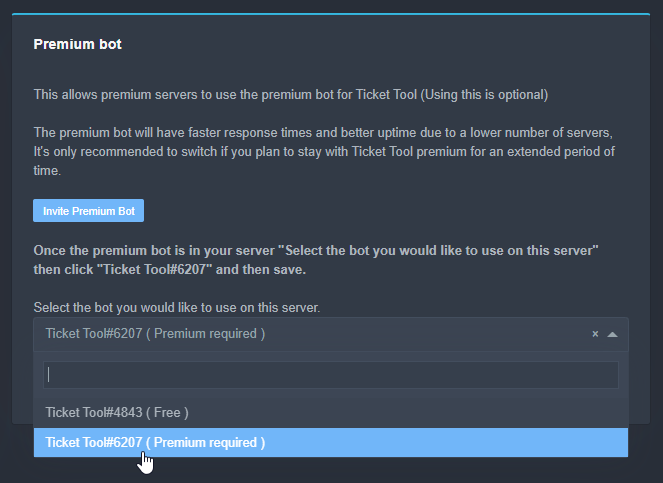
Inviting and Enabling Premium Bot
The first thing you will need to do is invite the premium bot, an invite can be found here
Once the bot is in your server we will head to the dashboard and manage your server. When you are managing your server, you want to head into "Server Configs" then click the drop down menu under "Select the bot you would like to use on this server" then click "Ticket Tool#6207" and then save.
 rotund kite
@indigo plover
You are required to have premium to invite and enable the premium bot.
rotund kite
Dashboard > Manage Servers > Your server > Server configs > Premium bot
south lake
rotund kite
<@!234782674189942784>
thank you. I forgot about it, thought maybe some kind of bug
iron nightBOT
Gave 1 Rep to Logix™ (current: #20 - 26)
 odd quiver
I need some help, my server is not showing up on the website and I am the owner of the server
and i have refreshed ect
and the bot is not responding to commands
wait i sorted it
 edgy pulsar
When somebody open a ticket the bot send that message, can i enable that?
 edgy pulsar
 So there is no way that the bot stop sending that?
Sorry btw for my bad english haha
edgy pulsar
 Oki ty for the help!
 copper owl
np
 jade topaz
Can anyone help me?
I want to set that when a user opens a ticket, no message is sent. The ticket will close automatically after a period of time
humble sequoiaBOT
Automation disabled
There's currently no ETA for when automation will be enabled again. The issue that's caused it to be disabled, us hitting rate limits, is tied to the increased load on Discord's servers. The situation's currently unpredictable, which makes it so we can't give you a fixed time.
 craggy geyser
jade topaz
Can anyone help me?
I want to set that when a user opens a ticket, no message is...
craggy geyser
jade topaz
Can anyone help me?
I want to set that when a user opens a ticket, no message is...
Unfortunately you can't. It used to be a feature a while ago. But it's no longer possible
craggy geyser
No worries
 leaden sundial
هلا@copper owl
leaden sundial
خوي بدي مساعدة ضرورية! بليز؟ @copper owl
 wise sand
I've paid, but why didn't the message reply to my ticket?
 jade topaz
Hey could I get some help trying to get it to where people can make tickets
 desert summit
jade topaz
Hey could I get some help trying to get it to where people can make tickets
desert summit
jade topaz
Hey could I get some help trying to get it to where people can make tickets
What kind of help?
humble sequoiaBOT
Update your discord App
Buttons are a relatively new addition to discord and don't work with some older versions of the app.
Please verify that you have the latest version of discord, by going to the app or play store.
_ _
Discord for the App Store
_ _
Discord for the Play Store
copper owl
@leaden sundial ^^
copper owl
تفضل

 covert moss
can i remove the close button for ppl that arent staff?
 leaden sundial
خوي@copper owl
copper owl
leaden sundial
هيك وش معناها يعني بحصل علي بوت التيكت الذهبي لمدة ايام ولا وش؟
صديقي،هيدي اذا عندك كود للبريميوم
ليست للبريمويم المجاني اللي بينتهي بعد ٧ ايام
copper owl
انت استعملت البريميوم المجاني؟
leaden sundial
لا..
copper owl
@leaden sundial في ؟ عندك هيدا الزر
Start 7 Day Free Trial؟

اذا عندك يه، فيك تستعمل البريميوم المجاني لمدة ٧ ايام
leaden sundial
عادي لو عملت حساب جديد فيني استخدم البريميوم؟
leaden sundial
طيب منا اسخدمت البريميوم قبل كدا في سيرفر تاني غير ده
انا بقا بدي استخدمو في سيرفر اخر
craggy geyser
wise sand
I've paid, but why didn't the message reply to my ticket?
Did you get a reply?
craggy geyser
covert moss
can i remove the close button for ppl that arent staff?
You can't hide it. But you can stop them being able to use it by setting the button options to support team only
 mystic hound
he did get a reply
copper owl
leaden sundial
انا بقا بدي استخدمو في سيرفر اخر
اوكي، شو بدك تعمل يعني؟
covert moss
Ty
copper owl
اذا مستخدم الtrial، بعد ٧ ايام، بيروح اليريميوم و بيروح الزر
copper owl
leaden sundial
ينفع تدددخلهولي مجاني؟
نعطيك بريميوم مجاني؟
leaden sundial
انا لو عملت تيكت بالبريميوم وعملت الزر وكل حاجه لما يروح البريميوم التيكت يفضل زي ما هوا ولا يروح؟؟
copper owl
ما بيروح التكت
leaden sundial
بيفضل زي ما هوا؟ يعني؟
copper owl
leaden sundial
بيفضل زي ما هوا؟ يعني؟
صديقي مش فاهم عليك
leaden sundial
يعني لو انا عملت تيكتات بالبريميوم وشوي والبريميوم خلص التيكت بيروح ولا بيضل زي ما هوا؟ بالزر وبالبريميوم وكل حاجه؟
copper owl
التكتات بيضل زي ما هوا، بس الزر للبريميوم المجاني بيروح. بس ت ينتهي البريميوم، البوت الذهبي ما بيشتغل و لزم تستبدلو بالبوت المجاني
copper owl
البريميوم المجاني هي تجربة للبريميوم. في ناس بجربوا البريميوم قبل ما يشتروا
leaden sundial
وش الفرق بين البريميوم والذهبي؟
copper owl
شو؟ البريميوم هو البوت الذهبي صديقي
copper owl
leaden sundial
هل في بوت ذهبي دائم؟
مجاني؟ لا
لزم تشتري بريميوم تيكون دائم
6$ شيهري
او
66$ سنوي
leaden sundial
يعمل كم كرديت؟
leaden sundial
ما في دفع كرديت؟
 inland hamlet
hello
leaden sundial
@copper owl
نبتون
الكتابة هون تحتاج الي خاصية بريميوم ولا عادي اعملها من البوت العادي؟؟
 copper owl
leaden sundial
الكتابة هون تحتاج الي خاصية بريميوم ولا عادي اعملها من البوت العادي؟؟
copper owl
leaden sundial
الكتابة هون تحتاج الي خاصية بريميوم ولا عادي اعملها من البوت العادي؟؟
خاصية عادي
$arpanelmessage
humble sequoiaBOT
رسألة لوحة التذكره
رسالة لوحه التذكره هو المكان الذى يمكن للاشخاص منه عمل تذكره
لتعديلها وجعلها افضل اذهب الى
Dashboard --> Panel Configs -> Settings -> Panel Options -> Edit Panel Message

 copper owl
لا, هيدي ليست الرسالة
 copper owl
leaden sundial
الكتابة هون تحتاج الي خاصية بريميوم ولا عادي اعملها من البوت العادي؟؟
copper owl
leaden sundial
الكتابة هون تحتاج الي خاصية بريميوم ولا عادي اعملها من البوت العادي؟؟
صديقي انت بدك هيدي؟؟
copper owl
humble sequoia
شوف هون ^^^

 mystic hound
@azure scarab refer to #573205317870157855 or the guide below for setup instructions. Please use #📈│reviews only to review support members
humble sequoiaBOT
leaden sundial
leaden sundial
هي؟ @copper owl
 scenic plinth
leaden sundial
هي؟ <@548583124062175232>
scenic plinth
leaden sundial
هي؟ <@548583124062175232>
يرجى التوقف عن الاتصال بأعضاء الدعم، وسوف يستجيبون عندما يستطيعون ذلك.
leaden sundial
هل فيك تساعدني؟ @scenic plinth
scenic plinth
leaden sundial
هل فيك تساعدني؟ <@615207454443044904>
لا، انتظر الدعم العربي لمساعدتك، إن لم يكن يمكنني أن أصنع تذكرة لك ولكن عليك أن تتوقف عن الاتصال بالناس. آخر مرة سأخبرك بها
 fluid dove
Hi!
Can maybe somebody tell me, what languages the bot supports? I am looking for Hungarian language.
Thank you!
craggy geyser
Hey there. The default messages are always going to be in English. As will error messages. You can customise most messages yourself however to put it in Hungarian
humble sequoiaBOT
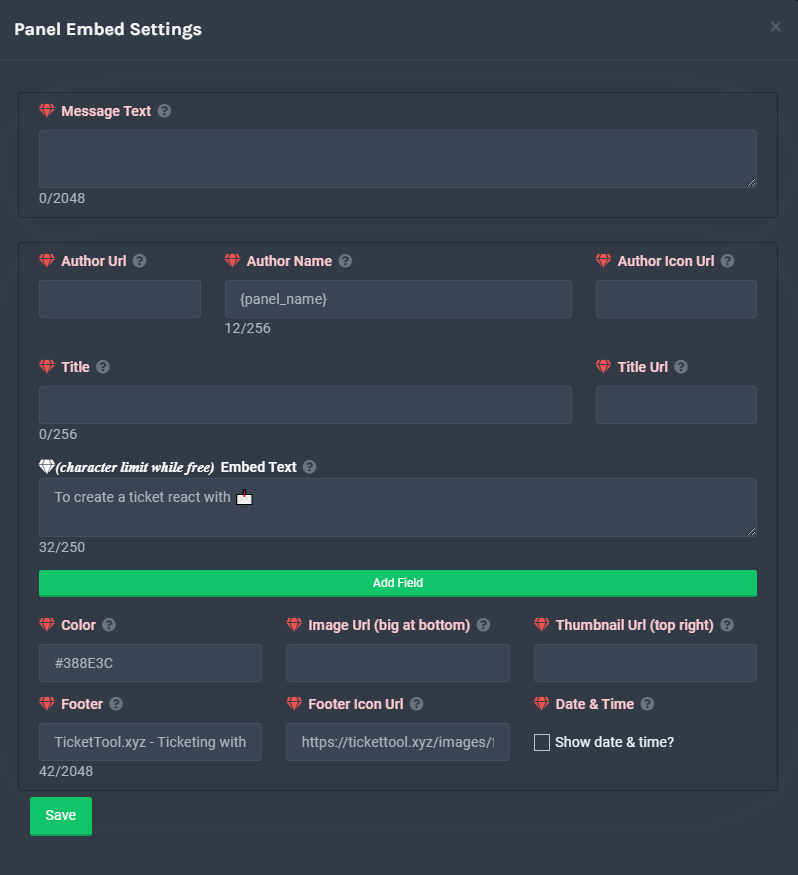
**Panel Message**
The panel message is where people react to make a ticket. To customize it head over to your Dashboard --> Panel Configs -> Settings -> Panel Options -> Edit Panel Message
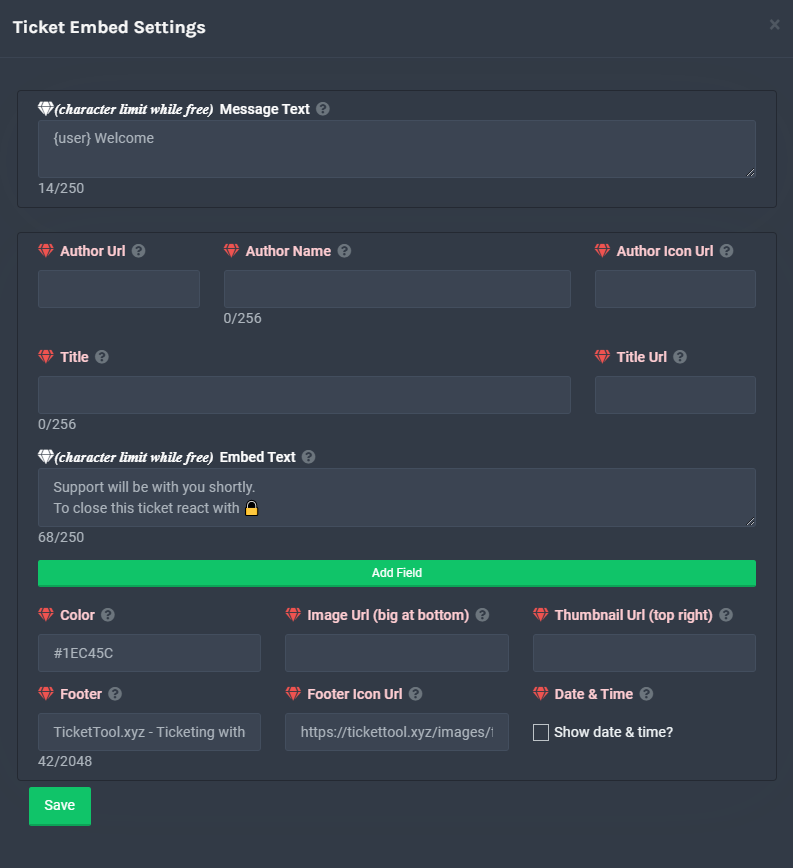
**Ticket Message**
The Ticket Message is the first message sent by the bot in a new ticket. To customise it head over to your Dashboard -> Panel Configs -> Settings -> Ticket Options -> Edit Ticket Message
 fluid dove
Thank you! Hm... not so optimal, but maybe it will work!
 crystal needle
Can somebody help? My ticket says missing permission and none of my members can make a ticket how can I fix it?
@copper marsh
Can someone answer pls
crystal needle
Nvm I fixed it
 tribal cedar
Awesome
 unique kraken
Was just wondering if anyone can explain how to set up multipanels in a little but more detail, the documentation confuses me. I get the part to link them, but how do you set up the reactions, I can not see any options in the panel settings.
tribal cedar
Set the reactions by the button options and the create ticket section
So each panel go panel configs -> settings -> button options -> create ticket
Then follow this procedure
humble sequoiaBOT
Multipanels are a premium feature  that allow for a single panel with multiple buttons to open different tickets.
How to create a Multipanel
Premium users can combine multiple panels into one multipanel.
First, find the IDs of each panel you wish to combine. You can find them in your Panel Configs in the Dashboard
Next, send the multipanel to a channel using $panel [id1] [id2] {id3} ....
e.g. $panel 1 2 4 17 35 to combine panels 1, 2, 4, 17 and 35.
Up to 25 panels may be combined.
 unique kraken
I see, and I assume the first id submitted acts as the message embed? So any content I want displayed from the multipanel needs to be in the panel I use as the first ID
tribal cedar
Yes sir. The panel messages goes from the first ID in the $panel cmd
unique kraken
Okay, im with you now. Appreciate it
tribal cedar
Anytime
copper owl
$help transcript
humble sequoiaBOT
How do I save transcript to a channel?
To save transcripts to a channel go to the Dashboard -> Panel Configs -> Settings -> Logging Options -> Transcript Channel
copper owl
choose a logging channel and choose what you want to log
jade topaz
OK thanks
is it possible to rename the "ticket name" in the panel so it adds the user that created the tickets name ?
copper owl
jade topaz
is it possible to rename the "ticket name" in the panel so it adds the user that...
yes, but it's a premium feature
humble sequoiaBOT
Ticket names
The ticket name is the default channel name of all tickets. To edit it, go to your Dashboard > Panel Configs > Settings > Ticket Options. There you can edit the channel name of opened and closed tickets. You can also use variables in there.

 Note: This is a premium feature
jade topaz
Note: This is a premium feature
jade topaz
ahh i see thanks sir 😄
copper owl
np
jade topaz
better get prem then 😛
flint coyote
Totally worth
humble sequoiaBOT

How to get premium role
Until the automatic premium check is fixed run the command $debug on your server and send us the link in a ticket.
 burnt tangle
My ticket tool dashboard won't let me get into it so I can mange server's it says it's offline or not in a server but it's online on my server.
 bitter sierra
hey im wondering how i would make it so only certain roles can close tickets nvm i got it
jade topaz
Are you able to make tickets close after a certain amount of inactivity?
humble sequoiaBOT
Automation disabled
There's currently no ETA for when automation will be enabled again. The issue that's caused it to be disabled, us hitting rate limits, is tied to the increased load on Discord's servers. The situation's currently unpredictable, which makes it so we can't give you a fixed time.
 bitter crescent
Is there a bug where ticket tool is treating threads as channels? It's saying my server has 500 channels when it only has 420
rotund kite
bitter crescent
Is there a bug where ticket tool is treating threads as channels? It's saying my...
Yes, that's a bug, I believe it counts threads as channels :|
rotund kite
I'm not too sure, but you can count it up on your server.
 hardy gulch
burnt tangle
hardy gulch
burnt tangle
My ticket tool dashboard won't let me get into it so I can mange server's it says it's offline or not in a server but it's online on my server.
bitter crescent
rotund kite
I'm not too sure, but you can count it up on your server.
I'll try closing as many as possible

 humble sequoiaBOT
Don't see your server in the dashboard?
You will possibly need to relog. Look below to see steps on how to relog.
How to relog the Dashboard.
First, you will need to go to the dashboard. Once your there, click on your avatar on the top right. after you clicked it, you will see button that says Logout. You must click that. Once you have logged out, you can log back in.
Note:
You need one of these 3 things to access the dashboard.
1. Server Owner (Level: 6)
2. Server Administrator (Level: 4)
3. Dashboard Role (Level: 2)
You can check your level using $level on your Discord Server
jade topaz
how can i set a message which pings ticket handeler role
@copper marsh pls help
i am in a hurry
ignore ping
craggy geyser
jade topaz
how can i set a message which pings ticket handeler role
$help ping
humble sequoiaBOT
How to make Ticket Tool ping a role
To make ticket tool ping a role when a ticket is opened, go to the Dashboard -> Panel Configs -> Settings -> Ticket Options -> Ticket Message -> Message Text and do this:
{@Role name} This is case sensitive and the role must have @mentions enabled

 shy hill
morden warship
craggy geyser
$tts
humble sequoiaBOT
You're in the wrong place
We provide support for @pseudo glen discord bot and cannot help you with whatever issue you have.
Please make sure to contact the appropriate support team.
If you don't have any further questions regarding our bot Ticket Tool, please close this ticket
_ _
 idle terrace
i dont take again the rewards for special mission 29
craggy geyser
idle terrace
i dont take again the rewards for special mission 29
We have told you at least 3 times that we can't help with that. See the message directly above yours. We aren't a general help for everything
 main hinge
shy hill
morden warship
main hinge
shy hill
morden warship
what's your problem with modern warships?
jade topaz
Why is there random tickets being made that i can’t delete in my server?
desert summit
jade topaz
Why is there random tickets being made that i can’t delete in my server?
How do you can’t Delete?
humble sequoiaBOT
-- moved to ticket --
 noble sonnet
I’m having the same problem as well, the first two test tickets I made won’t delete. When I press the delete button or any other channel config, nothing happens
 sleek lotus
copper owl
noble sonnet
I’m having the same problem as well, the first two test tickets I made won’t del...
sleek lotus
copper owl
noble sonnet
I’m having the same problem as well, the first two test tickets I made won’t del...
either a visual bug, or a channel bug
i suggest you restart discord (CTRL + R)
copper owl
copper owl
i suggest you restart discord (CTRL + R)
or contact discord if the issue persists after you restart discord
noble sonnet
I’m on mobile and have tried that multiple times.
copper owl
then contact discord
noble sonnet
Alright thanks
copper owl
or check if you can see the channels on a PC
 hexed thicket
it's already happened to me and yes, i resolved it with discord support
 upper mango
How come there isn't a Claimed Opened Permissions under the panel permission options category, as of rn the bot isn't giving the "Claimed" user/moderator permissions to speak
mystic hound
all claiming related options are under the claiming options category
you can find support team permissions for claimed members in there
upper mango
that's support team permissions, it used to give permissions to the claimed user allowing them to send messages, although now it doesn't?
lemme try fixing it
mystic hound
ah, my bad. The staff member that claims the ticket will continue to have all permissions you define under support opened permissions in the permission options category, the option under the claiming option tab can be used to take away permissions from other staff, once someone claims the ticket
upper mango
Ok I see how it works now, kinda weirdly made but it works now.
Yeah I thought it worked differently
mystic hound
Yeah I can see why it'd be confusing
upper mango
Works though now, would be nicer to have individual perms for more control
mystic hound
What individual perm would you want a staff member to have once they claim a ticket, that they can't have before claiming?
upper mango
I was trying to make it so a ticket has to be claimed before any support staff can speak
mystic hound
Ah
upper mango
although that's not possible because the Support Team opened permissions requires you to have Send Messages enabled
mystic hound
Yeah, unfortunately that's the way it is set right now
For now best bet would just be to instruct your staff members to claim tickets
iron nightBOT
Gave 1 Rep to Light (current: #3 - 161)
 nova scaffold
Okay, I need a bit of help
If I purchase premium for 1 month, will I get a premium key that I can give to someone else to use on there server.
I want to buy it to use as a gift, is that possible? @mystic hound
$vote
humble sequoiaBOT
Votes
Current Votes: 0
Lifetime Votes: 0
Linked Votes: 0
Vote Links
Linking Info
Linked User: Not Linked
You can give your future votes to another user by linking with that user.
To link use $vote link (@user or userId)
To unlink use $vote unlink
Redeeming
Each vote is worth 12 hours of premium and can be redeemed once you have atleast 6 votes.
Your current votes are worth 0m
To redeem your current votes use $vote redeem
nova scaffold
$vote
humble sequoiaBOT
Votes
Current Votes: 2
Lifetime Votes: 2
Linked Votes: 0
Vote Links
Linking Info
Linked User: Not Linked
You can give your future votes to another user by linking with that user.
To link use $vote link (@user or userId)
To unlink use $vote unlink
Redeeming
Each vote is worth 12 hours of premium and can be redeemed once you have atleast 6 votes.
Your current votes are worth 1 day, 0h, 0m
To redeem your current votes use $vote redeem
-- moved to ticket --
humble sequoiaBOT
Votes
Current Votes: 2
Lifetime Votes: 2
Linked Votes: 0
Vote Links
Linking Info
Linked User: Not Linked
You can give your future votes to another user by linking with that user.
To link use $vote link (@user or userId)
To unlink use $vote unlink
Redeeming
Each vote is worth 12 hours of premium and can be redeemed once you have atleast 6 votes.
Your current votes are worth 1 day, 0h, 0m
To redeem your current votes use $vote redeem
mystic hound
please use the vote commands in your own servers so they don't flood the chat here, the command works everywhere
 alpine laurel
Stuff still don’t work
tribal cedar
Like what sir?
alpine laurel
It won’t work I’m trying create a ticket like the thing
desert summit
alpine laurel
It won’t work I’m trying create a ticket like the thing
Like what,
alpine laurel
I’m making a gta milsim thing and if some one have a question they press the ticket but idk how to get the bot to like tell them press it
tribal cedar
Have you made a panel?
You may be talking about the panel message which is the message that displays above the button to create a ticket
 willow obsidian
what are we doing wrong? 🥺
 tribal cedar
Are you trying to use the premium bot?
Its either that or perms
Can ticket tool view send and all that stuff in the channel?
willow obsidian
yea
tribal cedar
What bot are you using?
willow obsidian
ticket tool?
willow obsidian
tribal cedar
Can ticket tool view send and all that stuff in the channel?
i meant yes to this, im not trying to use premium
tribal cedar
Kk. Try pinging your bot and using the debug command like this
humble sequoiaBOT
If Ticket Tool support requested this debug give them this link:
https://discordapp.com/channels/509192800865353738/662692902245498910/883089911794794566
Bot Permissions ឵ ឵឵ ឵ ឵឵ ឵ ឵឵ ឵ ឵឵
✅ - Read Channels
✅ - Send Messages
✅ - Embed Links
✅ - Attach Files
✅ - Add Reactions
✅ - Manage Roles
✅ - Manage Channels
✅ - Manage Messages
✅ - Read History
Channel Permissions ឵ ឵឵ ឵ ឵឵ ឵ ឵឵ ឵ ឵឵
✅ - Read Channels
✅ - Send Messages
✅ - Embed Links
✅ - Attach Files
✅ - Add Reactions
✅ - Manage Roles
✅ - Manage Channels
✅ - Manage Messages
✅ - Read History
Server Information ឵ ឵឵ ឵ ឵឵ ឵ ឵឵ ឵ ឵឵ ឵ ឵឵
Channel name:
community-support
Channel ID:
776680605517742090
Channel Count:
151/500
Server name:
Ticket Tool Support
Server ID:
509192800865353738
User Information ឵ ឵឵ ឵ ឵឵ ឵ ឵឵ ឵ ឵឵ ឵ ឵឵
User name:
Enigma#0007
User ID:
297419611350106133
Permission Level:
0 - User ()
Bot Information ឵ ឵឵ ឵ ឵឵ ឵ ឵឵ ឵ ឵឵ ឵ ឵឵
Prefix:
$
Premium Status:
Lifetime - ["subV2","subV1","time"]
Current shard:
1
API Latency:
83
tribal cedar
@ticket tool debug
 desert summit
And TicketTool can see this channel ?
tribal cedar
It should have the channel perms listed above@willow obsidian
desert summit
@vapid swallow
humble sequoiaBOT
Multipanels are a premium feature that allow for a single panel with multiple buttons to open different tickets.
How to create a Multipanel
Premium users can combine multiple panels into one multipanel.
First, find the IDs of each panel you wish to combine. You can find them in your Panel Configs in the Dashboard
Next, send the multipanel to a channel using $panel [id1] [id2] {id3} ....
e.g. $panel 1 2 4 17 35 to combine panels 1, 2, 4, 17 and 35.
Up to 25 panels may be combined.
tribal cedar
Whats listed as your command prefix in server config?
Double check that the premium bot is not being used as well. This is typically what that looks like.
jade topaz
do i have to delete the old ticket tool when i added premium ticket tool bot to my discord?
bitter sierra
hey how would i close i ticket with a custom message?
 merry basin
How do i get this with premium
 humble sequoiaBOT
Multipanels are a premium feature that allow for a single panel with multiple buttons to open different tickets.
How to create a Multipanel
Premium users can combine multiple panels into one multipanel.
First, find the IDs of each panel you wish to combine. You can find them in your Panel Configs in the Dashboard
Next, send the multipanel to a channel using $panel [id1] [id2] {id3} ....
e.g. $panel 1 2 4 17 35 to combine panels 1, 2, 4, 17 and 35.
Up to 25 panels may be combined.
desert summit
bitter sierra
hey how would i close i ticket with a custom message?
Dashboard >> Panel Configs >> Settings >> Ticket Options >> Edit Close Option
 bitter sierra
Okay
desert summit
Or do you mean the button?
bitter sierra
uh yea
desert summit
Dashboard >> Panel Configs >> Settings >> Button Options >> Close Ticket

There you Go
But you need premium
bitter sierra
oh 
desert summit
What do you mean
bitter sierra
desert summit
What do you mean
in a server i saw, they were able to do "-close [reason]" and i would get a dm saying that the ticket was closed and the reason
desert summit
Wait let’s switch on dm pls won’t Spam this Chat
mystic hound
It's fine, this channel is meant for people to assist each other, and there's always tickets if private information needs to be shared
desert summit
Oki Doki sorry
nova scaffold
$premiu,
humble sequoiaBOT
Ticket Tool Premium
Get premium at https://tickettool.xyz/premium
Manage your subscriptions at https://tickettool.xyz/subscriptions
Why Premium?
Premium lets you customize the bot just how you want it. It also helps keep the bot running.
 vapid relic
If premium tickets is in my server, do I use normal ticket tool for anything?
 nimble urchin
When I go to find my server on the manage server page, I do not see my server. I have removed the bot and re added it. Relogged the page.
tribal cedar
nimble urchin
When I go to find my server on the manage server page, I do not see my server. I...
Fully logoff then back on
humble sequoiaBOT
Don't see your server in the dashboard?
You will possibly need to relog. Look below to see steps on how to relog.
How to relog the Dashboard.
First, you will need to go to the dashboard. Once your there, click on your avatar on the top right. after you clicked it, you will see button that says Logout. You must click that. Once you have logged out, you can log back in.
Note:
You need one of these 3 things to access the dashboard.
1. Server Owner (Level: 6)
2. Server Administrator (Level: 4)
3. Dashboard Role (Level: 2)
You can check your level using $level on your Discord Server
tribal cedar
vapid relic
If premium tickets is in my server, do I use normal ticket tool for anything?
I do not believe so. I could be wrong sorry
I kept both.
nimble urchin
tribal cedar
Fully logoff then back on
Worked. Thanks!
iron nightBOT
Gave 1 Rep to Enigma (current: #12 - 71)
tribal cedar
Anytime
nova scaffold
vapid relic
If premium tickets is in my server, do I use normal ticket tool for anything?
Nope, literally just kick normal ticket tool.
In dashboard you can see an option that lets you select which bot your using on that server, select premium and all settings will move over to that bot.
jade topaz
How to I customize the tools' message and ticket icon?
flint coyote
Oh ok. In the panel configs go to button options.
You can customize what the button looks like.
flint coyote
I think the options you're looking for are premium options.
Are you using the dashboard?
jade topaz
yup I have it all
but how do I get an image url?
thats the last step for me
@flint coyote
flint coyote
That I don't know. Sorry. Someone else will probably be able to answer that for you.
humble sequoiaBOT
What are the direct URLs?
A direct access URL is an easy to read URL that users can enter to get to a specific item, document, page, category, or perspective, in which our bot TicketTool can read and get it displayed in your 'Panel Message' or your 'Ticket Message'.
Where can I get them?
The recommended way is to use 'Imgur', you can signup within a few minutes and then upload the image you want, and copy the URL of the uploaded image and paste it into one of the four boxes. There are alternatives to this, such as other image or video storing websites or using 'Open Original' of an image and paste it in (please be aware that if your image is deleted, Discord will automatically delete the link to it in a few days). Please note this requires 'Premium'. Imgur
 rotund kite
@jade topaz
flint coyote
I think or thought he meant how to get an image url. I know nothing about that. lol
flint coyote
But, I've figured it out now. 😂
flint coyote
Nice
 solid stream
Dashboard seems to be running a little slowly
 mint hornet
Does anyone know how to make a panel like this with no button
 solid stream
They likely used a tag or just disabled the button in the options
mint hornet
how do you disable the button
solid stream
Under the button options you can toggle it.
Panel settings > settings > button options
 twin nacelle
can this happen? or no? The ticketing without clutter sentence
 flint coyote
twin nacelle
can this happen? or no? The ticketing without clutter sentence
flint coyote
twin nacelle
can this happen? or no? The ticketing without clutter sentence
It can be removed if you have premium.
copper owl
that's because partnerships are closed as of right now
 restive solar
Is premium role not auto synced?
desert summit
restive solar
Is premium role not auto synced?
You have to make a ticket in #🎫│make-a-ticket ^^
 desert summit
Dont ping
desert summit
 vapid pecan
Doublecheck all perms also in Category Options
vapid pecan
desert summit
Doublecheck all perms also in Category Options
I didn't understand
desert summit
Has TicketTool all perms in server and does he have in the panel channel all needed perms?
desert summit
vapid pecan
I didn't understand
. Pls double check it
vapid pecan
yes he has administration
desert summit
Did you run $debug yet?
vapid pecan
i type $debug but No response
desert summit
Second
vapid pecan
@Ymaster2000#٢٥١٦

yes
yes look man
how to use the free bot and i have premium? @jade topaz
 mint pivot
He can't even spell "months" 😂
scenic plinth
Yeah well
tribal cedar
Ty
 rare dock
yo
I got a good feature suggestion for the bot
but there’s no suggestions channel
so imma just put it here, a separate command to clear closed tickets because sometimes it’s time-taking to close them all

im lazy as fuck sorry
mystic hound
mass close / mass deletion has been suggested before, unfortunately due to rate limit issues this cannot be a feature as of now
jade topaz
mystic hound
mass close / mass deletion has been suggested before, unfortunately due to rate ...
what about tickets auto close after a user does not reply after a set amount of time?
humble sequoiaBOT
Automation disabled
There's currently no ETA for when automation will be enabled again. The issue that's caused it to be disabled, us hitting rate limits, is tied to the increased load on Discord's servers. The situation's currently unpredictable, which makes it so we can't give you a fixed time.
jade topaz
humble sequoia
ooof
craggy geyser
@upper mango in response to your review, all suggestions given in here or tickets are passed onto the devs. If you have a long list feel free to make a ticket and post them in there
desert summit
 young dagger
ammmm
young dagger
ammmm
What’s your Problem ? ^^
young dagger
desert summit
What’s your Problem ? ^^
My server does not flicker when I want to add a bot
young dagger
I can't see my servant about the invit @desert summit
humble sequoiaBOT
Help Options
$help commands - Information on commands
$help setup - Information on bot setup
$help faq - Frequently asked questions
desert summit
Try $level on your server
 shadow pike
how can i see a history on tickets
tribal cedar
You can't see a history but if you have premium you can setup ticket transcripts
 chilly summit
Is there a dashboard command?
tribal cedar
For transcripts no
chilly summit
But to enter dashboard?
chilly summit
So that means no command?
tribal cedar
No command for what? Sorry thought you were just looking for the dashboard
What is it your trying to figure out?
 lone horizon
How do I fix Warning: Ticket limit reached, You already have 0 tickets across all panels of the global limit set for this server
tribal cedar
Go to server configs and change the global limit
lone horizon
thanks
tribal cedar
Anytime
lone horizon
thanks @tribal cedar
iron nightBOT
Gave 1 Rep to Enigma (current: #12 - 72)
 late grail
where do i find the premium only faster bot
 gleaming nest
hey guys, hope this isn't too much of a noob question but is there a way to rename the bot? or can I just right click > rename in Discord? (or shouldn't I change its name at all? lol) tia 🙂
humble sequoiaBOT

Ticket Tool avatar/status Customisation
@pseudo glen is like another discord user; you can't control its avatar icon or status, and we can't change it for one server, just as you cannot change your avatar for just one server.
However, on your server, you can change the bot's nickname
 rotund kite
@gleaming nest, you can nickname them ^^
humble sequoiaBOT
Inviting and Enabling Premium Bot
The first thing you will need to do is invite the premium bot, an invite can be found here
Once the bot is in your server we will head to the dashboard and manage your server. When you are managing your server, you want to head into "Server Configs" then click the drop down menu under "Select the bot you would like to use on this server" then click "Ticket Tool#6207" and then save.
rotund kite
@late grail
iron nightBOT
Gave 1 Rep to Logix™ (current: #20 - 27)
gleaming nest
Ohhhhh, thats cool 😄
 summer crag
hey guys! is there any way for ticket tool to send a custom message after someone opens a ticket?
humble sequoiaBOT
**Ticket Message**
The Ticket Message is the first message sent by the bot in a new ticket. To customise it head over to your Dashboard -> Panel Configs -> Settings -> Ticket Options -> Edit Ticket Message
rotund kite
@summer crag, you can customise the first message sent by tickettool in a new ticket
 digital crest
How do you go about adding multiple button options for the ticket tool? Something like this https://gyazo.com/03feed106e29476a105ee84cf80bab0a instad of just this https://gyazo.com/754d8bc3f272d5c387446bbb187689b7

 flint coyote
digital crest
How do you go about adding multiple button options for the ticket tool? Somethin...
flint coyote
digital crest
How do you go about adding multiple button options for the ticket tool? Somethin...
Do you have premium?
That would be multipanel. In one panel, you can add the other two.
$help
humble sequoiaBOT
Help Options
$help commands - Information on commands
$help setup - Information on bot setup
$help faq - Frequently asked questions
flint coyote
$help setup
humble sequoiaBOT
Setting up Ticket Tool
Visit the docs for setup info
General Setup
flint coyote
$help commands
humble sequoiaBOT
() = optional
[] = required
*==================================
Ticket Commands
==================================*
_ _
`$add [User] (channel)`
Description: Adding additional users to a ticket
Aliases: none
`$remove [User] (channel)`
Description: Removing users from a ticket
Aliases: none
`$close`
Description: Closing tickets
Aliases: none
`$open`
Description: Opening closed tickets
Aliases: none
`$delete`
Description: Deleting tickets
Aliases: none
`$rename`
Description: Renaming tickets/channels
Aliases: none
`$transcript (send channel)`
Description: Creating transcripts
Aliases: none
`$new (user) (reason)`
Description: Creating tickets in a monitored channel (when command style is enabled)
Aliases: none
`$claim`
Description: Claiming tickets (when claim is enabled)
Aliases: "unclaim"
_ _
*==================================
General Commands
==================================*
_ _
`$help (Help Options)`
Description: Help Command
Aliases: none
`$debug`
Description: Debuging issues with running Ticket Tool
Aliases: none
`$id (@role/@user/#channel/emoji)`
Description: Converting roles, users, channels and emojis to ID
Aliases: "getid"
`$permlevel`
Description: Checking permission level with Ticket Tool
Aliases: "level"
`$ping`
Description: Checking response time with discord api
Aliases: none
`$vote (link | unlink | redeem) (user)`
Description: Earn premium by voting on top.gg or Discord.boats
Aliases: "votes"
jade topaz
flint coyote
That would be multipanel. In one panel, you can add the other two.
So your saying to create multiple panels for each individual button?
flint coyote
Create all panels separately. Then on the first panel(or any panel really), just add the other two.
I think there is a command to bring up the full explanation, but I don't know what it is. I'll do my best to help. lol
jade topaz
Not sure what u mean by "Just add the other two"
flint coyote
I'm opening my dashboard so I can tell you exactly where. One sec.
 flint coyote
Panel configs, General Options, then Attached panels
Yes. So only on one panel, click that and add the other panels.
jade topaz
Ohh I understand now
flint coyote
Then you still configure each one in their own panel.
But, when you send from the one that is attached, it will have them all. So you only need to do that in one panel.
jade topaz
I understand now
So I'm having a slight issue here

What would be the cause of this?
flint coyote
That I don't know. I've had it happen, but don't remember why.
flint coyote
Go to the channel in your discord that the panel is supposed to go into, then type $debug
See what it says
jade topaz
flint coyote
Go to the channel in your discord that the panel is supposed to go into, then ty...
So I added new buttons
How do I get it to update to reflect the new buttons?
flint coyote
On the panel configs, just click on the green "send"
Select the channel you want it to go to.
digital crest
thank you @flint coyote
One more question if possible, I believe I've set up the multi-panel properly, but the message isn't updating. How do I resend the webhook / long message looking to update it with the second button now
iron nightBOT
Gave 1 Rep to Ivysixx (current: #44 - 2)
flint coyote
You're welcome 🙂 When you say it's not updating, what do you mean exactly?
Is it not sending a new panel?
jade topaz
Got it
flint coyote
Awesome!
 short ruin
Is there any way i can open ticket transcripts on a iphone
 teal sequoia
.new
eager cargo
short ruin
Is there any way i can open ticket transcripts on a iphone
Use the direct links in the transcript message

 wicked topaz
is there a way to make it so mobile/etc users can see the create ticket button? ive had this issue twice now where the button jsut doesnt exist for some users
 unique anvil
Have them make sure their Discord app is completely updated
wicked topaz
that's it? because it keeps happening
desert summit
wicked topaz
that's it? because it keeps happening
Yes but some User don’t get the updates so they have to look every day ig
flint coyote
Yep if they don't see the buttons then they need to update discord.
wicked topaz

jade topaz
how to change the message that is marked for image?
 desert summit
Go to: „Dashboard“ >> „Panel Configs“ >> „Settings“>> „Panel Option“ >> „Edit Panel Message“ >> Scroll to „Embed Discription“
There you Go
jade topaz
desert summit
Go to: „Dashboard“ >> „Panel Configs“ >> „Settings“>> „Panel Option“ >> „Edit Pa...
thanks
iron nightBOT
Gave 1 Rep to Ymaster2000 (current: #27 - 7)
desert summit
Np
 prime bridgeBOT
 Ymaster2000#2516 has been warned!

 They were notified via dms.
 wide marsh
how to stop auto delete of tickets after closing?
can't even ping any support team member for helping 🥲 ig need to wait till someone comes

@gloomy jacinth sorry for the ping. ik i should not but i am getting late : (
 atomic barn
Rule 4.5. You could always open a ticket instead in #🎫│make-a-ticket if you don’t need a quick reply
wide marsh
atomic barn
Rule 4.5. You could always open a ticket instead in <#571706435449257997> if you...
:O
k
humble sequoiaBOT
-- moved to ticket --
jade topaz
Hello everyone.
I bought the premium but i think i removed it from my server and cant figure out how to add it again :/
any help will be really appreciated it
humble sequoiaBOT
Inviting and Enabling Premium Bot
The first thing you will need to do is invite the premium bot, an invite can be found here
Once the bot is in your server we will head to the dashboard and manage your server. When you are managing your server, you want to head into "Server Configs" then click the drop down menu under "Select the bot you would like to use on this server" then click "Ticket Tool#6207" and then save.
jade topaz
humble sequoia
tysm
jade topaz
is there a way to mass delete all tickets?
jade topaz
thanks
tribal cedar
Anytime
 gloomy jacinth
wide marsh
<@!534109216865124383> sorry for the ping. ik i should not but i am getting late...
gloomy jacinth
wide marsh
<@!534109216865124383> sorry for the ping. ik i should not but i am getting late...
Open a ticket, it will be quickly
wide marsh
gloomy jacinth
Open a ticket, it will be quickly
ok : ) | solved
jade topaz
Hey can someone help please? I got the bot but idk how to activate it like add it to a server snd stuff
 signal girder
You have to get the bot invite link in order to use it in a server
 jade topaz
signal girder
You have to get the bot invite link in order to use it in a server
jade topaz
signal girder
You have to get the bot invite link in order to use it in a server
See its in my server
signal girder
Go in the ticket tool dashboard and set up a panel there
jade topaz
What
 signal girder
https://tickettool.xyz/
Try this website then
 jade topaz
Still no
 harsh dune
How do I make ticket tool ping support role on ticket create?
desert summit
harsh dune
How do I make ticket tool ping support role on ticket create?
$help ping
humble sequoiaBOT
How to make Ticket Tool ping a role
To make ticket tool ping a role when a ticket is opened, go to the Dashboard -> Panel Configs -> Settings -> Ticket Options -> Ticket Message -> Message Text and do this:
{@Role name} This is case sensitive and the role must have @mentions enabled
desert summit
maybe you have to {roleid}
harsh dune
Okay thanks
desert summit
Np ^^
jade topaz
can someone help me with naming the ticket
i am trying to make it where the channel says ticket-username
humble sequoiaBOT
-- moved to ticket --
 arctic pagoda
Dimmi
jade topaz
arctic pagoda
Dimmi
Dall'ultima volta che ho usato Ticket tool per i ticket ho notato delle modificazioni che non riesco a capirle
Non si più co e mettere la descrizione nel titolo sul ticket
arctic pagoda
jade topaz
Non si più co e mettere la descrizione nel titolo sul ticket
Non riesci a modificare il titolo o la descrizione?
jade topaz
arctic pagoda
Non riesci a modificare il titolo o la descrizione?
Precisamente intendo creare
Settare il ticket
arctic pagoda
Per creare un panel puoi trovare info in #573205317870157855
arctic pagoda
jade topaz
Settare il ticket
Per settare specifiche cose dimmi cosa ti serve in particolare
jade topaz
arctic pagoda
Per settare specifiche cose dimmi cosa ti serve in particolare
Ad esempio, solo lo staff può chiudere il ticket
arctic pagoda
Vai nelle impostazioni del panel in Panel Configs -> Button Options -> Close Ticket -> Support Teams Only
jade topaz
arctic pagoda
Vai nelle impostazioni del panel in Panel Configs -> Button Options -> Close Tic...
Ok
 odd arrow
which variable for the claim names should i use if i want it to be the user who created the ticket
humble sequoiaBOT
-- moved to ticket --
jade topaz
Bot down for anyone else ?
humble sequoiaBOT
-- moved to ticket --
 naive pecan
humble sequoia
-- moved to ticket --
naive pecan
humble sequoia
-- moved to ticket --
how can we do this?
humble sequoiaBOT
Pong! Latency is 270ms. API Latency is 81ms [-]

 dense ridge
naive pecan
how can we do this?
dense ridge
naive pecan
how can we do this?
staff only command i believe
tribal cedar
 hollow gorge
can someone help me i dont know how to use this HWID reset system
hollow gorge
can someone help me i dont know how to use this HWID reset system
I believe youre at the wrong discord. This is ticket tool support. A discord bot. Nothing to do with HW IDs
$tts
humble sequoiaBOT
You're in the wrong place
We provide support for @pseudo glen discord bot and cannot help you with whatever issue you have.
Please make sure to contact the appropriate support team.
If you don't have any further questions regarding our bot Ticket Tool, please close this ticket
_ _
 nova kayak
is there a way i can find my deleted tickets?
flint coyote
Not if there is no transcript.
 golden shoal
Hi. Is there a way to auto-close a ticket if there's no response for x amount minutes?
 severe path
No
golden shoal
is there a feature request channel?
tribal cedar
Used to be $suggest
But afaik and last I heard they were taking suggestion on the community based channel.
prime bridgeBOT
Enigma has been silenced for 10m 
Reason: Posting Discord Server Invites
Enigma#0007 | 297419611350106133
 opal snow
I would like to invite the premium bot again. how???
humble sequoiaBOT
Inviting and Enabling Premium Bot
The first thing you will need to do is invite the premium bot, an invite can be found here
Once the bot is in your server we will head to the dashboard and manage your server. When you are managing your server, you want to head into "Server Configs" then click the drop down menu under "Select the bot you would like to use on this server" then click "Ticket Tool#6207" and then save.
eager cargo
golden shoal
is there a feature request channel?
I can pass along a suggestion for you
golden shoal
eager cargo
I can pass along a suggestion for you
Thank you. Appreciate you.
iron nightBOT
Gave 1 Rep to Quo (current: #1 - 179)
eager cargo
Yup
 visual escarp
hello i paid for $50 dash week key its says i should contact discord customer
can you please help me out
atomic barn
$tts
humble sequoiaBOT
You're in the wrong place
We provide support for @pseudo glen discord bot and cannot help you with whatever issue you have.
Please make sure to contact the appropriate support team.
If you don't have any further questions regarding our bot Ticket Tool, please close this ticket
_ _
visual escarp
how do i do thst
atomic barn
Wrong server.
atomic barn
visual escarp
hello i paid for $50 dash week key its says i should contact discord customer
This isn't isn't a ticket tool issue, get in contact with the team that deals with that
visual escarp
whats the name of the team please
flint coyote
visual escarp
whats the name of the team please
What do you mean?
flint coyote
jade topaz
I accidentally deleted my ticket message
Just go to ticket options and edit the message.
jade topaz
How? @flint coyote
jade topaz
Ty! @flint coyote
I did that it's still not showing up in my server
The ticket option @flint coyote
flint coyote
Did you resend the panel?
I'm not sure, but just guessing that might do the trick.
Theoretically, it shouldn't matter, but just throwing that out as an option.
Oh did you click save after?
flint coyote
On the main part of panel configs. Select the channel then send.
jade topaz
Ah okay ty! @flint coyote
flint coyote
You're welcome 🙂
 restive estuary
Hey guys, does anyone here know if ticket tool has a pre-screening type system
Where it can ask them a couple questions before the ticket actually gets created/
humble sequoiaBOT
-- moved to ticket --
 kind steppe
Hello
Is there any way to ping staff when someone open a ticket?
I do that in “edit ticket message”?
copper owl
@jade topaz psssst you can use $help ping next time to make it easier for ya
iron nightBOT
Gave 1 Rep to Neptune (current: #4 - 150)
copper owl
np
 warm latch
دعم عربي؟
copper owl
warm latch
دعم عربي؟
تفضل
warm latch
كيف اخلي البوت حقي عربي
copper owl
بدك تغير لغة البوت؟
warm latch
يب
copper owl
ما فيك، الأمر بدل بالانجليزي
warm latch
اك
copper owl
فيك تغير رسالة البوت، بس الcommands بدلو بالانجليزي
warm latch
طيب كيف اخلي خيارات كثير
copper owl
warm latch
طيب كيف اخلي خيارات كثير
كيف يعني؟ مثل #🎫│make-a-ticket؟
warm latch
يعني زي كذا
 humble sequoiaBOT
Multipanels are a premium feature that allow for a single panel with multiple buttons to open different tickets.
How to create a Multipanel
Premium users can combine multiple panels into one multipanel.
First, find the IDs of each panel you wish to combine. You can find them in your Panel Configs in the Dashboard
Next, send the multipanel to a channel using $panel [id1] [id2] {id3} ....
e.g. $panel 1 2 4 17 35 to combine panels 1, 2, 4, 17 and 35.
Up to 25 panels may be combined.
For a more convenient use of multipanels, you can now combine panels on the dashboard. This will allow you to directly send the multipanel from the dashboard or via the $panel ID command.
Where can I find this?
You can find this setting on the Dashboard -> Panel Configs -> Settings -> General Options
This will put all buttons from all of your panels on one message. The message is the panel message from the panel you're combining these panels in.
 copper owl
الاثنين بيشتغلو
warm latch
وانا ايش افهم انجليزي
iron nightBOT
Gave 1 Rep to shuja (current: #58 - 1)
kind steppe
You’re staff you know better 
copper owl
warm latch
وانا ايش افهم انجليزي
فيك تستخدم الامر
$panel ID ID ID ID ID
مثل
$panel 1 3 2 5 4
warm latch
copper owl
فيك تستخدم الامر
`$panel ID ID ID ID ID`
مثل
`$panel 1 3 2 5 4`
فهمني اكثر
copper owl
warm latch
فهمني اكثر
ما في شي فهمك اكثر صديقي، هو امر بتستخدمه لتعمل لوحة فيها أكثر من زر
مثل #🎫│make-a-ticket
warm latch
اوك شكرا
kind steppe
سلام عليكم
copper owl
hm, alright. We do have arabic apps currently open so that's why I was asking
kind steppe
I leave before I get banned
copper owl
kind steppe
سلام عليكم
عليكم السلام
 warm latch
ممكن تجي لسيرفري تسويها وربي ما فهمت شي
copper owl
لا ما فيني
copper owl
Panel Configs -> Settings - > Create Panel
تتسوي لوحة
warm latch
طيب ابغا اغير الي موجودة في خيارات الازرار
 loud marsh
Kann jemanden hier deutsch reden und helfen?😅
loud marsh
kann ich die nachricht ändern was steht in eine neue ticket? (Sorry meine deutsch auch nicht sehr gut 😂)
humble sequoiaBOT
Ticket Message
Die Ticket Message ist die erste Nachricht, die von Ticket Tool in einem neuen Ticket gesendet wird.
Um diese zu personalisieren gehe auf deinem Dashboard auf die "Panel Configs". Dort klickst du in den Panel Settings unter "Ticket Options" auf "Edit Ticket Message".
 severe path
Ja, kannst du machen, aber die Nachricht darf max. 250 Zeichen enthalten
loud marsh
Vielen dank🙏🏻 hab es nicht gefunden🤦🏻♀️
severe path
 jade inlet
Hi, Whats the difference between Support Team Roles and Additional Roles ?
copper owl
You can edit each permissions
in all fairness there is no difference
additional roles are only there if you want a specific role to have different permissions than support team
example:
I don't want mods to be able to manage messages but I do want head moderators to be able to manage messages
So i add mod to support, give it specific perms
I add head mod to additional and provide them with more perms
jade inlet
oh ok thanks 🙂
copper owl
no problemo
 hearty goblet
Hey guys is their a way of the ticket bot auto naming the channel. Perhapes the channel it create can be the title. So for example if I wrote -new player lost their items the bot would create a new channel called "Play lost their items" rather then "ticket 145"
desert summit
hearty goblet
Hey guys is their a way of the ticket bot auto naming the channel. Perhapes the ...
With premium yes
Dashboard >> Panel Configs >> Ticket Options >> Picture
 hearty goblet
and I would change {count} to {title} or something like that?
desert summit
How do you mean ?
hearty goblet
Well the name would be different depending on the issue, how would I edit that to make sure the ticket channel is named the title.
tribal cedar
I use multipanels for that and customize each panels channel name
leaden sundial
@copper owl هلا؟
بالله عليك ممكن تفتح تيكت وتضيفني فية بدي مساعدة ضرورية لاني مايظهر عندي فتح تيكتات؟ يظهر عندي مشكلة ممكن؟ @copper owl
 limber estuary
how can i ping a role with the opening message inside of a ticket? (ping me)
jade topaz
limber estuary
how can i ping a role with the opening message inside of a ticket? (ping me)
<@&role-id>
Put it in the message, not the embed
desert summit
limber estuary
how can i ping a role with the opening message inside of a ticket? (ping me)
$help ping
humble sequoiaBOT
How to make Ticket Tool ping a role
To make ticket tool ping a role when a ticket is opened, go to the Dashboard -> Panel Configs -> Settings -> Ticket Options -> Ticket Message -> Message Text and do this:
{@Role name} This is case sensitive and the role must have @mentions enabled
desert summit
Or {roleid}
limber estuary
how can i find the role id?
humble sequoiaBOT
<@&642118166243311646>
<@&642118166243311646>
limber estuary
ty
leaden sundial
How to activate a roll and a person in the automatic reply from the regular bot ticket?
tribal cedar
Ping a role?
leaden sundial
leaden sundial
How to activate a roll and a person in the automatic reply from the regular bot ...
؟؟؟؟
tribal cedar
$help ping
humble sequoiaBOT
How to make Ticket Tool ping a role
To make ticket tool ping a role when a ticket is opened, go to the Dashboard -> Panel Configs -> Settings -> Ticket Options -> Ticket Message -> Message Text and do this:
{@Role name} This is case sensitive and the role must have @mentions enabled
leaden sundial
leaden sundial
How to activate a roll and a person in the automatic reply from the regular bot ...
؟؟؟
leaden sundial
نبتون @copper owl
 hexed chasm
Can someone help me ?
 humble sequoiaBOT
Blacklist Roles
Any role you assign as a blacklisted role won't be able to use commands or reactions.
Selecting a blacklisted role
Go to your Dashboard -> Server Configs. There you will find the option to select blacklisted roles.
Note: Don't forget to save.
 eager cargo
You might have a blacklist role in that server
Judging by the screenshot, you don't have proper permissions to edit the blacklist roles and or remove it from yourself. This might be intentional for that server or it might not. If you really need to make a ticket there. I would recommend contacting a server administrator so they can assist you further.
leaden sundial
اسف يانبتون
leaden sundial
leaden sundial
بالله عليك ممكن تفتح تيكت وتضيفني فية بدي مساعدة ضرورية لاني مايظهر عندي فتح تيك...
مممكن يا نبتون؟
رد علي بالله عليك@copper owl
copper owl
 copper owl
عمول ابدايت لdiscord
leaden sundial
ومحدث كل شيئ
humble sequoiaBOT
Update your discord App
Buttons are a relatively new addition to discord and don't work with some older versions of the app.
Please verify that you have the latest version of discord, by going to the app or play store.
_ _
Discord for the App Store
_ _
Discord for the Play Store
leaden sundial
محدث كل شيئ
copper owl
ما في حل ثاني صديقي
humble sequoiaBOT
-- moved to ticket --
 tall sun
How to edit the message bot will send after ticket is created?
humble sequoiaBOT
**Ticket Message**
The Ticket Message is the first message sent by the bot in a new ticket. To customise it head over to your Dashboard -> Panel Configs -> Settings -> Ticket Options -> Edit Ticket Message
eager cargo
^
tall sun
thx
eager cargo
yep
prime bridgeBOT
Successful bans: 1
 Unsuccessful bans:
 0
 Reason: scam
 Moderator: @mystic hound
tribal cedar
Tyvm hope you didn't mind the ping
mystic hound
Wouldn't be a complete day without a 2 am ping 
tribal cedar
Lol sorry m8
copper owl
tribal cedar
Lol sorry m8
dont be, i was about to ping him too
tribal cedar
:p
mystic hound
Yes these people love pinging me at 2 am, it's almost like a ritual at this point..
tribal cedar
I'll ping simple next time. ;)
 pale pilot
@pale pilot
copper owl
@pale pilot
jade topaz
$vote
humble sequoiaBOT
Votes
Current Votes: 1
Lifetime Votes: 50
Linked Votes: 0
Vote Links
Linking Info
Linked User: Not Linked
You can give your future votes to another user by linking with that user.
To link use $vote link (@user or userId)
To unlink use $vote unlink
Redeeming
Each vote is worth 12 hours of premium and can be redeemed once you have atleast 6 votes.
Your current votes are worth 12h, 0m
To redeem your current votes use $vote redeem
jade topaz
$vote redeem
humble sequoiaBOT
You need atleast 6 votes to redeem
 thorn sonnet
is there a way to make it so a specific role can open more tickets then a diff role
copper owl
thorn sonnet
is there a way to make it so a specific role can open more tickets then a diff r...
Nope
thorn sonnet
ah oki
copper owl
all people are subjected to the same limits
thorn sonnet
ty!!
scenic plinth
jade topaz
My Public IPv4 is:
87.223.159.112
Why... are you showing this...?
jade topaz
Hello. I subscribed to the robot, but I didn't see the increase of time.

Try it for 7 days. I just subscribed to Premium robots.
humble sequoiaBOT
-- moved to ticket --
humble sequoiaBOT
Help Options
$help commands - Information on commands
$help setup - Information on bot setup
$help faq - Frequently asked questions
jade topaz
$help setup
humble sequoiaBOT
Setting up Ticket Tool
Visit the docs for setup info
General Setup
flint coyote
Nvm I was too slow. lol
jade topaz
flint coyote
Nvm I was too slow. lol
can I change?
flint coyote
Only the messages you put in, you can put whatever language you want.
As far as I understand it, the rest cannot be changed.
 wanton path
How do I have the ticket delete itself when the person closes it?
This way, we don't have to do it manually.
humble sequoiaBOT
-- moved to ticket --
wanton path
?
wanton path
@eager cargo Sorry for the ping, but I disabled 2 step ticket and yet it still closes it instead of deleting it-
But this is the surprising part
it was working at first
and then suddenly stopped
eager cargo
Whats your server ID?
wanton path
eager cargo
Whats your server ID?
821408417998176256
at least, i think so 😛
ye i think it is
eager cargo
Which panel are you having trouble with
eager cargo
Yep, I'm going to open a ticket for you so I can assist you further
humble sequoiaBOT
-- moved to ticket --
 wheat solstice
how to i add more option to one panel
humble sequoiaBOT
Multipanels are a premium feature that allow for a single panel with multiple buttons to open different tickets.
How to create a Multipanel
Premium users can combine multiple panels into one multipanel.
First, find the IDs of each panel you wish to combine. You can find them in your Panel Configs in the Dashboard
Next, send the multipanel to a channel using $panel [id1] [id2] {id3} ....
e.g. $panel 1 2 4 17 35 to combine panels 1, 2, 4, 17 and 35.
Up to 25 panels may be combined.
wheat solstice
how do you change the icon of the ticket
humble sequoiaBOT
Ticket Tool avatar/status Customisation
@pseudo glen is like another discord user; you can't control its avatar icon or status, and we can't change it for one server, just as you cannot change your avatar for just one server.
However, on your server, you can change the bot's nickname
craggy geyser
wheat solstice
how do you change the icon of the ticket
See above
jade topaz
question, how can i put the transcript message in a specific channel instead of it being in the ticket channel when it closes.
 copper owl
$help transcript
humble sequoiaBOT
How do I save transcript to a channel?
To save transcripts to a channel go to the Dashboard -> Panel Configs -> Settings -> Logging Options -> Transcript Channel
copper owl
@jade topaz ^
copper owl
np
 drifting compass
$help give ppl permission
humble sequoiaBOT
Help Options
$help commands - Information on commands
$help setup - Information on bot setup
$help faq - Frequently asked questions
drifting compass
$help setup
humble sequoiaBOT
Setting up Ticket Tool
Visit the docs for setup info
General Setup
copper owl
leaden sundial
<@548583124062175232>
صديقي، ممنوع تعملي منشن هون. بدك سوبورت؟ فتاح تكت. ما في ازرار؟ عمول ابدايت او طلاع من السيرفر او إرجاع فوت
ما فيك تعملي منشن كل يوم في الشانل
leaden sundial
طيب كيف لما اعمل اي امر زي $rename abdo مثلا اخلية يقولي كلام زي كدا انا اعملو كيف؟

 candid prairie
Anyone has any idea how to add custom emojis in my ticket?
pale pilot
$idcommand
humble sequoiaBOT
How do I get the ID of Roles/Channels/Emojis?
Ticket Tool has a useful command that helps you get the ID of various things like channels, roles, emojis and your server.
Just use the command $id <#channel/@role/:emoji:>. Now copy everything, including the brackets <...>, to your dashboard (or wherever you want it)
If you want the server ID, just use $id.
 blissful beacon
$help invite
humble sequoiaBOT
Help Options
$help commands - Information on commands
$help setup - Information on bot setup
$help faq - Frequently asked questions
blissful beacon
Does Anyone Know This Problem?
I login in the website And then the server I want to Set up was not showing up
humble sequoiaBOT
Don't see your server in the dashboard?
You will possibly need to relog. Look below to see steps on how to relog.
How to relog the Dashboard.
First, you will need to go to the dashboard. Once your there, click on your avatar on the top right. after you clicked it, you will see button that says Logout. You must click that. Once you have logged out, you can log back in.
Note:
You need one of these 3 things to access the dashboard.
1. Server Owner (Level: 6)
2. Server Administrator (Level: 4)
3. Dashboard Role (Level: 2)
You can check your level using $level on your Discord Server
blissful beacon
I try to refresh But it still didn't work
What should I do?
arctic pagoda
humble sequoia
Try relogging ^
blissful beacon
Ok
desert summit
blissful beacon
I try to refresh But it still didn't work
What should I do?
You maybe have to relog 2-3 times and wait 5 minutes until you relog again ^^
tribal cedar
Everything I have to do it I logoff then logon and it works
 fathom steppe
hello.
 raven moat
hi team , let me know when someone is available to help me. i want to use ticketool outside of discord, my company in interested in adopting the system on our website.
fathom steppe
can i know how to make a mention to a role when a ticket is opened?
raven moat
@upper flower your DMs are not open 🙂
humble sequoiaBOT
How to make Ticket Tool ping a role
To make ticket tool ping a role when a ticket is opened, go to the Dashboard -> Panel Configs -> Settings -> Ticket Options -> Ticket Message -> Message Text and do this:
{@Role name} This is case sensitive and the role must have @mentions enabled
tribal cedar
raven moat
hi team , let me know when someone is available to help me. i want to use ticket...
Please don't ping staff. Idk what your requesting. Ticket tool is a discord bot that facilitates tickets
raven moat
i read in support that he said , If my DMs are closed please ping me
tribal cedar
It has very little to do with web based tickets
raven moat
so i just did that
i understand ticketool is a discord based bot , but wanted to chat to the devs about hosting a project between them and my company
tribal cedar
#🎫│make-a-ticket might be a better place to go about looking into this however
raven moat
thank you
tribal cedar
Nps
candid prairie
humble sequoia
So if I want to add a custom emoji on my description I use <:emoji:> ?
desert summit
candid prairie
So if I want to add a custom emoji on my description I use <:emoji:> ?
Yes ig
 candid prairie
includes : emoji :?
tribal cedar

See everything above the thumb
From < to >
You can use that $id command in your server too
candid prairie
Can I use it in my bot description?
candid prairie
Still doesn't work
 quick prawn
Hi there, our ticket support system is down at the moment, and im not to sure what the error is
humble sequoiaBOT
-- moved to ticket --
leaden sundial
My friend is a buyer of the premium ticket bot for a month and they entered my server and made a premium ticket. Will the ticket be preferred for life even if the ticket bot is gone??
tribal cedar
candid prairie
Still doesn't work
Can you screen shot me what your trying to do?
leaden sundial
@severe path
leaden sundial
leaden sundial
My friend is a buyer of the premium ticket bot for a month and they entered my s...
please؟؟؟؟
tribal cedar
leaden sundial
My friend is a buyer of the premium ticket bot for a month and they entered my s...
Sorry I don't understand your question
And please don't ping staff
candid prairie
 arctic pagoda
leaden sundial
<@252364399669542913>
arctic pagoda
leaden sundial
<@252364399669542913>
Please do not ping staff
 candid prairie
The emoji id?
tribal cedar
See the ID command there?
severe path
leaden sundial
My friend is a buyer of the premium ticket bot for a month and they entered my s...
How do you mean preferred?
tribal cedar
Do the command in your server $id your emoji here
And get the code like I did in my above screen shot
candid prairie
So the full code will be?
 tribal cedar
Whats the id
tribal cedar
candid prairie
Ok I got my id
You said you got the ID
tribal cedar
Ok copy paste the whole ID string from < to >
Into your panel message
How did that work for you @candid prairie?
tribal cedar
Awesome. Anytime
That ID can be used for other things in panel messages too like linking channels or roles
candid prairie
And can I add like a gif at the bottom of the text?
tribal cedar
Yep. Enter the url into image url at the bottom of the embedded window
severe path
@jade topaz what are you looking for in the dashboard?
severe path
 👍
👍
humble sequoiaBOT
If Ticket Tool support requested this debug give them this link:
https://discordapp.com/channels/509192800865353738/662692902245498910/884441705963745371
Bot Permissions ឵ ឵឵ ឵ ឵឵ ឵ ឵឵ ឵ ឵឵
✅ - Read Channels
✅ - Send Messages
✅ - Embed Links
✅ - Attach Files
✅ - Add Reactions
✅ - Manage Roles
✅ - Manage Channels
✅ - Manage Messages
✅ - Read History
Channel Permissions ឵ ឵឵ ឵ ឵឵ ឵ ឵឵ ឵ ឵឵
✅ - Read Channels
✅ - Send Messages
✅ - Embed Links
✅ - Attach Files
✅ - Add Reactions
✅ - Manage Roles
✅ - Manage Channels
✅ - Manage Messages
✅ - Read History
Server Information ឵ ឵឵ ឵ ឵឵ ឵ ឵឵ ឵ ឵឵ ឵ ឵឵
Channel name:
community-support
Channel ID:
776680605517742090
Channel Count:
148/500
Server name:
Ticket Tool Support
Server ID:
509192800865353738
User Information ឵ ឵឵ ឵ ឵឵ ឵ ឵឵ ឵ ឵឵ ឵ ឵឵
User name:
Zero.#8362
User ID:
497782477906116609
Permission Level:
0 - User ()
Bot Information ឵ ឵឵ ឵ ឵឵ ឵ ឵឵ ឵ ឵឵ ឵ ឵឵
Prefix:
$
Premium Status:
Lifetime - ["subV2","time"]
Current shard:
1
API Latency:
84
copper owl
o7
humble sequoiaBOT
If Ticket Tool support requested this debug give them this link:
https://discordapp.com/channels/509192800865353738/662692902245498910/884459063486844968
Bot Permissions ឵ ឵឵ ឵ ឵឵ ឵ ឵឵ ឵ ឵឵
✅ - Read Channels
✅ - Send Messages
✅ - Embed Links
✅ - Attach Files
✅ - Add Reactions
✅ - Manage Roles
✅ - Manage Channels
✅ - Manage Messages
✅ - Read History
Channel Permissions ឵ ឵឵ ឵ ឵឵ ឵ ឵឵ ឵ ឵឵
✅ - Read Channels
✅ - Send Messages
✅ - Embed Links
✅ - Attach Files
✅ - Add Reactions
✅ - Manage Roles
✅ - Manage Channels
✅ - Manage Messages
✅ - Read History
Server Information ឵ ឵឵ ឵ ឵឵ ឵ ឵឵ ឵ ឵឵ ឵ ឵឵
Channel name:
community-support
Channel ID:
776680605517742090
Channel Count:
145/500
Server name:
Ticket Tool Support
Server ID:
509192800865353738
User Information ឵ ឵឵ ឵ ឵឵ ឵ ឵឵ ឵ ឵឵ ឵ ឵឵
User name:
GAZETOX#4444
User ID:
794918114331590667
Permission Level:
0 - User ()
Bot Information ឵ ឵឵ ឵ ឵឵ ឵ ឵឵ ឵ ឵឵ ឵ ឵឵
Prefix:
$
Premium Status:
Lifetime - ["subV2","time"]
Current shard:
1
API Latency:
180
 candid lily
.
desert summit
candid lily
.
?
 coral bronze
Hi guys, I have a question. How to disable this message under Create Ticket panel?
 copper owl
coral bronze
Hi guys, I have a question. How to disable this message under Create Ticket pane...
copper owl
coral bronze
Hi guys, I have a question. How to disable this message under Create Ticket pane...
you cannot disable or edit that message
coral bronze
Ok Ty
 fallen palm
heyhey, i have a channel.send command that pushes '$add ......' to a ticket but the tickettool doesnt recognize this as a command. anyone know a fix maby? ❤️
copper owl
that command only works in tickets that the bot has created
fallen palm
okay thanks
i tried that out, it only sends the message to the ticket. but does not pick it up as a command :S
copper owl
then make sure ticket tool has all the necessary permissions
you can do that by checking your Server Settings -> Roles -> Ticket Tool
you should also check the permissions in the category you have the tickets open in (if you have a category defined that is)
fallen palm
if i enter the $add manually it adds the person. just when my bot sends the text it doesnt
copper owl
yeah that's how discord bots work
most, if not all, discord bots can't catch messages sent by other bots
youll have to add people yourself
fallen palm
aight thankyou:)
copper owl
np
leaden sundial
@copper owl
leaden sundial
leaden sundial
My friend is a buyer of the premium ticket bot for a month and they entered my s...
???
severe path

copper owl
this is community support, if you want a support member's help, please open a ticket in #🎫│make-a-ticket and refrain from pinging support members here
severe path
 copper owl
this is community support, if you want a support member's help, please open a ti...
copper owl
copper owl
this is community support, if you want a support member's help, please open a ti...
@leaden sundial.
jade topaz
Any tips on ticket tool, I have the panels setup for ticket tool under our Create-a-ticket channel but it appears that It only show's on PC, On the mobile device there is no open a ticket icon.
mystic hound
The users that cannot see the button need to update discord
humble sequoiaBOT
Update your discord App
Buttons are a relatively new addition to discord and don't work with some older versions of the app.
Please verify that you have the latest version of discord, by going to the app or play store.
_ _
Discord for the App Store
_ _
Discord for the Play Store
jade topaz
Gotcha, Thanks for the info
 wet ferry
jade topaz
Aye
flint coyote
Hi
 arctic pagoda
candid lily
<@!261346621369876501>
arctic pagoda
candid lily
<@!261346621369876501>
Please don't ping staff
arctic pagoda
candid lily
Does anyone know how to solve this
Run $debug in the channel to check for errors, as stated in the error message
candid lily
arctic pagoda
Run $debug in the channel to check for errors, as stated in the error message
but on which channel on which server
arctic pagoda
candid lily
but on which channel on which server
In the channel where you want to send the panel.
candid lily
arctic pagoda
In the channel where you want to send the panel.
so I put it on the channel but nothing appears
arctic pagoda
Have you changed the bot's prefix?
candid lily
arctic pagoda
Have you changed the bot's prefix?
look, I put the new prefix, it won't
arctic pagoda
You will receive a DM by Ticket Tool bot with debug informations
arctic pagoda
First you have to run the debug command. Then Ticket Tool bot will send you debug information for the channel where you ran the command in
candid lily
arctic pagoda
First you have to run the debug command. Then Ticket Tool bot will send you debu...
Ae Irmao I managed to fix it here I created another account and I did it and it worked Valew
 quiet vessel
hi i was wondering how can i edit or make a message on a ticket panel?
nvm i found it
 unique linden
everytime somebody opens a ticket in my server its pings everybody i have went through multiple making sure my @community role has no perms and it just doesnt stop
i am having people leave due to this issue if i could have somebody help asap that would help tremendously
atomic barn
$help ping
humble sequoiaBOT
How to make Ticket Tool ping a role
To make ticket tool ping a role when a ticket is opened, go to the Dashboard -> Panel Configs -> Settings -> Ticket Options -> Ticket Message -> Message Text and do this:
{@Role name} This is case sensitive and the role must have @mentions enabled
atomic barn
Oops wrong one. You have to manually disable pinging. That’s for making a pinging role
atomic barn
Let me check
unique linden
okay thanks g
atomic barn
Check your keep visible section? Dunno if that might be the case
Erm I’d suggest opening a ticket in #🎫│make-a-ticket @unique linden I’m not sure how to do what you wanted to sorry….
unique linden
okay g
 cyan turtle
@white harness
 real walrus
radits u still in URP?
 hard jay
guys
pls help
I can't Invite the Bot to my server
look
This Can Anyone Help me?

pls?
Never mind
jade topaz
How can I deactivate that message when creating a ticket?
 flint coyote
jade topaz
How can I deactivate that message when creating a ticket?
flint coyote
jade topaz
How can I deactivate that message when creating a ticket?
You can't. It's a discord thing.
jade topaz
jade topaz
How can I deactivate that message when creating a ticket?
No one can see that anyways so don't worry
 crisp kestrel
hi, how can i add a mod role to also see tickets?
copper owl
$help support