#🆘│community-support
1 messages · Page 342 of 1
 jade topaz
 copper owl
@jade topaz category closed
jade topaz
thx
copper owl
NO ONE click this link. It's a scam
 tribal cedar
You alert mods already?
tribal cedar
Awesome
 radiant moss
Not today
copper owl
thanks tiny
radiant moss
 tribal cedar
Not anyday! Lol
radiant moss
Dont have perms there
copper owl
well shit
 severe path

severe path
xd
 forest goblet
No, I thought you were talking about this channel
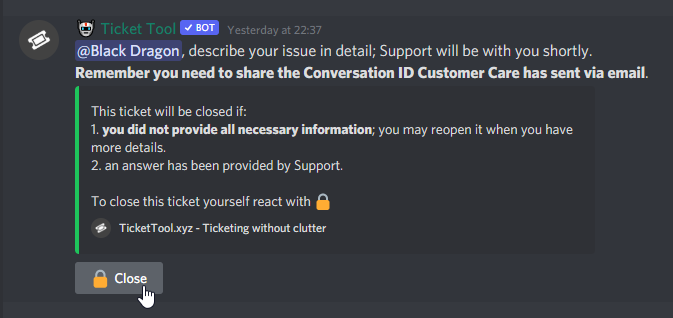
 dawn mirage
Is that new? 😮
copper owl
Yes, buttons are a new addition to discord
 copper owl
 normal pike
Anyone know what’s up with that?
normal pike
Anyone know what’s up with that?
Update your discord, or dont spam the button
make sure your discord is updated to the latest update
copper owl
copper owl
make sure your discord is updated to the latest update
if it is, just dont spam the button
dawn mirage
copper owl
Yes, buttons are a new addition to discord
is there a blog about it?
How many buttons can you add to a message?
copper owl
dawn mirage
is there a blog about it?
Im not too sure, but you could probably find something
normal pike
Ty it’s fixed
copper owl
normal pike
Ty it’s fixed
No problem
 craggy geyser
dawn mirage
How many buttons can you add to a message?
craggy geyser
dawn mirage
How many buttons can you add to a message?
To save you reading that if you haven't. The max is 25. It's a 5x5 grid. Ticket tool gives the option to change the number of buttons per row, however you can go past 5 rows. So if you set it to 1 button per row, you set yourself a max of 5 buttons for example
dawn mirage
Thanks @craggy geyser
 iron nightBOT
Gave 1 Rep to Swift (current: #6 - 131)
 rose ermine
The Bot is showing up on my server but not on the dashboard so I can set it up. Why would that be?
 humble sequoiaBOT
Don't see your server in the dashboard?
You will possibly need to relog. Look below to see steps on how to relog.
How to relog the Dashboard.
First, you will need to go to the dashboard. Once your there, click on your avatar on the top right. after you clicked it, you will see button that says Logout. You must click that. Once you have logged out, you can log back in.
Note:
You need one of these 3 things to access the dashboard.
1. Server Owner (Level: 6)
2. Server Administrator (Level: 4)
3. Dashboard Role (Level: 2)
You can check your level using $level on your Discord Server
copper owl
humble sequoia
Follow these steps, and it should pop up on the dashboard
rose ermine
And how can I get more than 1 ticket open at a time?
copper owl
rose ermine
And how can I get more than 1 ticket open at a time?
You need to increase the ticket limit.
This can be done by going to your dashboard -> panel configs -> settings -> general options -> ticket limit
rose ermine
I have that on 100 but it only lets me open 1 at a time.
copper owl
rose ermine
I have that on 100 but it only lets me open 1 at a time.
What do you have your global ticket limit set as?
copper owl
copper owl
What do you have your global ticket limit set as?
can be found in server configs
rose ermine
It is 100
copper owl
rose ermine
It is 100
So your global ticket limit and your panel ticket limit are both 100..?
there's another ticket limit that might be affecting your ability to open multiple tickets
 copper owl
there's another ticket limit that might be affecting your ability to open multip...
copper owl
copper owl
there's another ticket limit that might be affecting your ability to open multip...
Dashboard -> Panel Configs -> Settings -> General Options -> Ticket Limit @rose ermine
rose ermine
So that one right there thats for each user.
copper owl
rose ermine
So that one right there thats for each user.
Yes
rose ermine
Or the whole server at a time.
copper owl
rose ermine
Or the whole server at a time.
Global Ticket Limit = Limit across all your panels.
Ticket Limit within a panel (General Options) = Limit on said panel (Meaning you can only open X amount of tickets, depending on what the number is set in the "Ticket Limit" found in general options)
copper owl
copper owl
Dashboard -> Panel Configs -> Settings -> General Options -> Ticket Limit <@!768...
If you want to open more than 1 ticket, follow these instructions and increase the ticket limit
$help limit
humble sequoiaBOT
How to set a ticket limit
A ticket limit may be set per panel to prevent users from spamming tickets. By default this limit is set to 3. Once a user hits this limit the bot will notify the users that they reached the limit.
To set a ticket limit go to the Dashboard -> Panel Configs -> Settings -> General Options -> Ticket Limit
 copper owl
this might clear things up ^^
rose ermine
I got that. Now when I hit create a ticket it says it failed.
copper owl
can you send a screenshot ?

 copper owl
All the permissions labeled with the * are necessary for the bot to have it work properly
 copper owl
All the permissions labeled with the * are necessary for the bot to have it work...
copper owl
copper owl
All the permissions labeled with the * are necessary for the bot to have it work...
Enabled "View Channel" in server settings for the Ticket Tool Role
copper owl
rose ermine
According to the picture, the "View Channel" permission is missing, therefore hindering the bot's abilities to function properly
rose ermine
Everything is checked green and it still wont work.
copper owl
rose ermine
then check the permissions for the category
rose ermine
I did and nothing
 remote peak
Where is there a list of premium features?
humble sequoiaBOT
 Faster Premium Bot
Automatic Transcripts
Full Customization
Custom Reactions
Direct Messages
Ticket Automation
Multipanels
Premium Support
You can purchase premium here:
Price
$6 - Monthly
$66 - Yearly
 Premium
copper owl
Premium
copper owl
@remote peak ^
copper owl
remote peak
Couldn't find the command to show it
support members have a list on hand
remote peak
Ahh okay
BTW what are the plans for when message intents are changed?
Will some features be removed?
copper owl
remote peak
Will some features be removed?
I am not entirely sure, that would be a question for the Dev team to answer.
remote peak
Would that be a ticket?
 arctic pagoda
rose ermine
I did and nothing
arctic pagoda
rose ermine
I did and nothing
Try going to the role list in server settings, go to "Ticket Tool" role and check if "View Channels" permission is enabled, if not enable it.
This solved my friend's problem which was the same as yours.
 twilit mason
e
 robust otter

 willow plover
So the server I’m in atm has like 30 open tickets and don’t would like to avoid closing down the conversations. But is there a good way to store the conversations without having to keep the tickets open? Any ideas how to handle an overflow of tickets?
copper owl
$help transcripts
humble sequoiaBOT
Help Options
$help commands - Information on commands
$help setup - Information on bot setup
$help faq - Frequently asked questions
humble sequoiaBOT
How do I save transcript to a channel?
To save transcripts to a channel go to the Dashboard -> Panel Configs -> Settings -> Logging Options -> Transcript Channel
 copper owl
humble sequoia
copper owl
humble sequoia
defining a transcript channel will be beneficial because it allows you to save the conversations, and also allows for you to delete the tickets to not cause overflow @willow plover
willow plover
I’ll try it out and see if it can make things a bit cleaner, cheers👍
twilit mason
o
 mystic hound
@jade topaz
you were already verified 😂
there isn't
used to be, then moved to the community server and now its under revamp soo
👋 get premium and talk in premium chat
no you don't

 languid pasture
Yo is premium support a seperate channel
 livid heart
how to make this tickit style
الإدارة = 📨
طلبات المتجر = 💸
المنظمات = 💀
الشرطة = 🚔
الإسعاف = 🚑
العقارات = 🏠
الرقابة = 🕵️
الباند = 🚫
humble sequoiaBOT
Multipanels are a premium feature  that allow for a single panel with multiple buttons to open different tickets.
How to create a Multipanel
Premium users can combine multiple panels into one multipanel.
First, find the IDs of each panel you wish to combine. You can find them in your Panel Configs in the Dashboard
Next, send the multipanel to a channel using $panel [id1] [id2] {id3} ....
e.g. $panel 1 2 4 17 35 to combine panels 1, 2, 4, 17 and 35.
Up to 25 panels may be combined.
 craggy geyser
$pc
humble sequoiaBOT

How to get premium role
Until the automatic premium check is fixed run the command $debug on your server and send us the link in a ticket.
mystic hound
o right, cate has the premium role for the server
mystic hound
humble sequoia
its fine, follow this and you'll get your role
livid heart
livid heart
how to make this tickit style
الإدارة = 📨
طلبات المتجر = 💸
المنظمات = 💀
ال...
does this ticket style need primium ??
mystic hound
if you want it under one panel, like in #🎫│make-a-ticket then yes
languid pasture
yo sorry but we've got ticket tool premium in server I'm an admin just have a question any way we can get premium support even though i'm not the one paying for it
humble sequoiaBOT
How to get premium role
Until the automatic premium check is fixed run the command $debug on your server and send us the link in a ticket.
languid pasture
mystic hound
o, one moment
livid heart
languid pasture
yo sorry but we've got ticket tool premium in server I'm an admin just have a qu...
i need answer please
livid heart
livid heart
does this ticket style need primium ??
.
livid heart
 mystic hound
I answered you @livid heart
mystic hound
mystic hound
if you want it under one panel, like in <#571706435449257997> then yes
^^
livid heart
they do it wwhitch means its posible
mystic hound
firstly that's not our bot. We do have that feature, called multipanels, however its restricted to premium only
livid heart
sry my qwition is .. does the ticket tool bot con do it or other bots ?
mystic hound
Ticket Tool can do it, yes. See below
humble sequoiaBOT
Multipanels are a premium feature that allow for a single panel with multiple buttons to open different tickets.
How to create a Multipanel
Premium users can combine multiple panels into one multipanel.
First, find the IDs of each panel you wish to combine. You can find them in your Panel Configs in the Dashboard
Next, send the multipanel to a channel using $panel [id1] [id2] {id3} ....
e.g. $panel 1 2 4 17 35 to combine panels 1, 2, 4, 17 and 35.
Up to 25 panels may be combined.
mystic hound
(if you want reactions instead of buttons, we won't be supporting reactions moving forward as it only slows us down)
livid heart
humble sequoia
hhh 🤦♂️ my bad
mystic hound
thing is, most bots will just move towards buttons sooner or later as it reduces limits. Only way reactions are sustainable without compromising features is if you're running a bot dedicated for 1-2 servers
livid heart
humble sequoia
how can i do this
languid pasture
So to use a feature not intended for bots in the first place you need to self-host?
mystic hound
livid heart
how can i do this
the embed tells you how, if you have any questions after reading it let me know
livid heart
languid pasture
So to use a feature not intended for bots in the first place you need to self-ho...
i dont understand
languid pasture
Nah that wasn't intended for you
mystic hound
languid pasture
So to use a feature not intended for bots in the first place you need to self-ho...
depends really, but in this case, especially given how widely Ticket Tool is used, if we continue to use reactions we'll be restricted more by rate limits and we'll have to bring back certain restrictions (like for instance, transcripts were raised to 1k messages when buttons were introduced)
livid heart
mystic hound
the embed tells you how, if you have any questions after reading it let me know
does there a video or explanation about it ?
mystic hound
We do not currently have tutorial videos. You can just ask questions here or make a ticket and a support member will assist you
languid pasture
Yes the explanation is
"First, find the IDs of each panel you wish to combine. You can find them in your Panel Configs in the Dashboard
Next, send the multipanel to a channel using $panel [id1] [id2] {id3} ....
e.g. $panel 1 2 4 17 35 to combine panels 1, 2, 4, 17 and 35."
rose ermine
Ticket tool is not working view channel permission is set and the panel is set up. Need some help
humble sequoiaBOT
If the bot is not working properly, try the following steps:
-
Run the $debug command in your server, to check the permissions of the bot. Send the link you get to us.
-
Check if you have any Blacklisted Roles in your Server Configs. Any roles listed there will not be able to use the bot / create tickets.
-
While you're in your Server Configs , make sure that you don't have the premium bot enabled, without actually having premium or the bot on the server.
These are the most common issues. If your problem still exists, you can go to our Troubleshooting Page for more fixes.
mystic hound
you've denied read channels for the bot
humble sequoiaBOT
-- moved to ticket --
jade topaz
Is there any way with Premium for staff to initiate opening a ticket with a user besides opening the ticket then using $adduser?
craggy geyser
jade topaz
Is there any way with Premium for staff to initiate opening a ticket with a user...
Yes (doesn't require premium). Enable command style tickets and you can do $new <user id>
jade topaz
craggy geyser
Yes (doesn't require premium). Enable command style tickets and you can do `$new...
Thank you, I missed that
iron nightBOT
Gave 1 Rep to Swift (current: #6 - 132)
jade topaz
Where's the options for logging command tickets or did I miss them?
craggy geyser
If they don't show up when logging ticket created they might not log
 analog breach
Hi, can we see how many tickets each support has claimed ?
craggy geyser
Not really. You can count the transcripts that a support member has spoken in but they might speak in other tickets anyway so it just an estimate
 tacit canyon
Can I change the panel embed colour?
iron nightBOT
Gave 1 Rep to Swift (current: #6 - 133)
analog breach
youhou
craggy geyser
analog breach
ok, ty ^^ they should add this feature
Been suggested in the past. Lots of people think it would be handy, I just don't know how easy it is to add
craggy geyser
tacit canyon
Can I change the panel embed colour?
Yes with premium
jade topaz
craggy geyser
If they don't show up when logging ticket created they might not log
I'm thinking I could make a staff-only channel to open tickets via $new <user id> with a panel that isn't actually sent anywhere would work.
craggy geyser
That would work yes
craggy geyser
jade topaz
I'm thinking I could make a staff-only channel to open tickets via $new <user id...
We have the staff only channel here so we can make tickets for people we feel they need one and they are asking in here. But that is for the same ones as the #🎫│make-a-ticket panel. Though it would work even if that panel is deleted
 night vale
84.2.191.247
craggy geyser
?
 potent glade
هل يمكنني شراء شيء واحد من خصائص النسخة المدفوعة؟؟
 robust sandalBOT
potent glade
هل يمكنني شراء شيء واحد من خصائص النسخة المدفوعة؟؟
robust sandalBOT
potent glade
هل يمكنني شراء شيء واحد من خصائص النسخة المدفوعة؟؟
 Thief
Thief
Can I buy one of the properties of the paid version?
 Arabic (ar) → English (en)
humble sequoiaBOT
Arabic (ar) → English (en)
humble sequoiaBOT
Ticket Tool Premium
Get premium at https://tickettool.xyz/premium
Manage your subscriptions at https://tickettool.xyz/subscriptions
Why Premium?
Premium lets you customize the bot just how you want it. It also helps keep the bot running.
potent glade
شكرا
robust sandalBOT
potent glade
شكرا
Thief
Thank you
Arabic (ar) → English (en)
 primal parrot
$vote
humble sequoiaBOT
Votes
Current Votes: 7
Lifetime Votes: 880
Linked Votes: 151
Vote Links
Linking Info
Linked User: 208663804970532866
You can give your future votes to another user by linking with that user.
To link use $vote link (@user or userId)
To unlink use $vote unlink
Redeeming
Each vote is worth 12 hours of premium and can be redeemed once you have atleast 6 votes.
Your current votes are worth 3 days, 12h, 0m
To redeem your current votes use $vote redeem
primal parrot
$vote redeem
potent glade
هل يمكنني تغيير لغة البوت الي العربية؟
robust sandalBOT
potent glade
هل يمكنني تغيير لغة البوت الي العربية؟
Thief
Can I change the bot language to Arabic?
Arabic (ar) → English (en)
craggy geyser
/ar not the whole bot. Though you can customise most of the text yourself and make it Arabic
robust sandalBOT
ليس البوت بأكمله على الرغم من أنه يمكنك تخصيص معظم النص بنفسك وجعله عربيا
English (en) → Arabic (ar)
craggy geyser
$articketmessage
humble sequoiaBOT
رسالة التذكرة
رسالة التذكرة هي أول رسالة يرسلها البوت في تذكرة جديدة
لتعديلها اذهب الي
Dashboard -> Panel Configs -> Settings -> Ticket Options -> Edit Ticket Message
 craggy geyser
$arpanelmessage
humble sequoiaBOT
رسألة لوحة التذكره
رسالة لوحه التذكره هو المكان الذى يمكن للاشخاص منه عمل تذكره
لتعديلها وجعلها افضل اذهب الى
Dashboard --> Panel Configs -> Settings -> Panel Options -> Edit Panel Message
 potent glade
حسنا شكرا
robust sandalBOT
potent glade
حسنا شكرا
Thief
Ok thank you
Arabic (ar) → English (en)
robust sandalBOT
jade topaz
Can someone in a server of mine make ticket tools clean so set up? Pls
 Lamabre.gmz
يمكن لشخص ما في خادم من الألغام جعل أدوات التذاكر نظيفة حتى إعداد؟ المتنقله
English (en) → Arabic (ar)
potent glade
🙂
humble sequoiaBOT
**Ticket Message**
The Ticket Message is the first message sent by the bot in a new ticket. To customise it head over to your Dashboard -> Panel Configs -> Settings -> Ticket Options -> Edit Ticket Message
craggy geyser
$help ping
humble sequoiaBOT
How to make Ticket Tool ping a role
To make ticket tool ping a role when a ticket is opened, go to the Dashboard -> Panel Configs -> Settings -> Ticket Options -> Ticket Message -> Message Text and do this:
{@Role name} This is case sensitive and the role must have @mentions enabled
 craggy geyser
Here you go. Both answers
iron nightBOT
Gave 1 Rep to Swift (current: #5 - 134)
craggy geyser
No worries
It's case sensitive. So if the role is "Support", {@support} won't work. Also make sure that the role has @mentions enabled
Oh, emojis might not work. There is another method if that doesn't fix it
Use the role id instead of the name
Still in {}
No @ needed for id
If those are the role ids and not a user id it should work
And they are definitely the right id?
If so, I suggest making a ticket and seeing if someone else knows why it doesn't work
mystic hound
<@&roleID> should work
 humble anchor
hey
 light condor
How do i make a ticket or a complaint about a scammer
craggy geyser
If they scammed on this sever, we likely noticed and banned them already. If they are not on this sever, we can't do anything so report them to discord support
 wanton crag
I need help
craggy geyser
With what? We can't help unless you tell us the problem
wanton crag
Im new to this so im trying to figure out how to cook
humble sequoiaBOT
You're in the wrong place
We provide support for @pseudo glen discord bot and cannot help you with whatever issue you have.
Please make sure to contact the appropriate support team.
If you don't have any further questions regarding our bot Ticket Tool, please close this ticket
_ _
arctic pagoda
wanton crag
Im new to this so im trying to figure out how to cook
I'm sorry but we cannot help you here, probably you sent the message to the wrong server
arctic pagoda
Oh...is there a ticket channel on the server related to the question you asked here before?
craggy geyser
wanton crag
Im new to this so im trying to figure out how to cook
What are you trying to cook on? A game? Real life? A discord bot?
mystic hound
id love to see how you cook on a discord bot
copper owl
craggy geyser
What are you trying to cook on? A game? Real life? A discord bot?
they should try cooking on a stove, i heard it's effective 
mystic hound
arctic pagoda
Oh...is there a ticket channel on the server related to the question you asked h...
craggy geyser
mystic hound
id love to see how you cook on a discord bot
Well there are bots that let you fish so likely ones that "cook"
mystic hound
imagine opening a discord channel and whipping up a medium rare steak
arctic pagoda
mystic hound
<#799695838917820416>
Yes...it's not for me I know TT, I was asking Janks
tribal cedar
Medium well tyvm
craggy geyser
I'm veggie. So no thanks
copper owl
Ticket Tool Restaurant Server when?? 😳
craggy geyser
We will suggest it to the dev team
copper owl
Wow the bot can't cook?? Bad bot wtf?!?!1! 1! 😱 😡 🤬
radiant moss
mystic hound
ah, probably coming in the next update
Make sure you raise that to high priority for the dev team

 humble sequoiaBOT
How to redeem premium
To redeem your premium key, go to the dashboard, select your server, then click "Redeem Premium" under the server's icon and name.
 mystic hound
@jade topaz
iron nightBOT
Gave 1 Rep to Light (current: #3 - 142)
 weary stratus
$help ping
humble sequoiaBOT
How to make Ticket Tool ping a role
To make ticket tool ping a role when a ticket is opened, go to the Dashboard -> Panel Configs -> Settings -> Ticket Options -> Ticket Message -> Message Text and do this:
{@Role name} This is case sensitive and the role must have @mentions enabled
languid pasture
Sorry just checking can we have the ticket bot make us breakfast
craggy geyser
As long as you want a cold breakfast yes. We are still waiting on the cooking update
 wicked robin
if i make a panel how do i change the text where normally is: to create a ticket react with📩
humble sequoiaBOT
**Panel Message**
The panel message is where people react to make a ticket. To customize it head over to your Dashboard --> Panel Configs -> Settings -> Panel Options -> Edit Panel Message
copper owl
this should help you out ^^
wicked robin
oh so its for premium
copper owl
Nope!
wicked robin
huh
copper owl
The embed text is for free users
 tribal cedar
$help ping
humble sequoiaBOT
How to make Ticket Tool ping a role
To make ticket tool ping a role when a ticket is opened, go to the Dashboard -> Panel Configs -> Settings -> Ticket Options -> Ticket Message -> Message Text and do this:
{@Role name} This is case sensitive and the role must have @mentions enabled
iron nightBOT
Gave 1 Rep to Enigma (current: #11 - 67)
tribal cedar
Anytime
jade topaz
hi its still isnt showing up and telling me i need to re log in but when i did it like 20 times still nothing worked
humble sequoiaBOT
-- moved to ticket --
 astral crag
$help set reaction
humble sequoiaBOT
How to change reactions
To set a custom reaction Dashboard -> Panel Configs -> Settings -> Reaction Options -> <Reaction to change> -> Reaction

NOTE you need premium to do this.
 humble sequoiaBOT
Update your discord App
Buttons are a relatively new addition to discord and don't work with some older versions of the app.
Please verify that you have the latest version of discord, by going to the app or play store.
_ _
Discord for the App Store
_ _
Discord for the Play Store
 eager cargo
^
astral crag
OK ty
eager cargo
yup
tribal cedar
Whats the trigger for that?
copper owl
$update
tribal cedar
copper owl
``$update``
Tyvm
copper owl
Np!
jade topaz
How do I get the bot to tag my ticket support rule when it opens?
copper owl
$help ping
humble sequoiaBOT
How to make Ticket Tool ping a role
To make ticket tool ping a role when a ticket is opened, go to the Dashboard -> Panel Configs -> Settings -> Ticket Options -> Ticket Message -> Message Text and do this:
{@Role name} This is case sensitive and the role must have @mentions enabled
copper owl
Like that ^
jade topaz
Where should I write the tag?
 copper owl
Message Text
If you write it in the embed, it wont send out a notification to your staff team
jade topaz
So I cancel it so it does not write in embed?
copper owl
tribal cedar
Neptune.. give the proficients some.. geesh. :p
Sorry, am stealing all the tickets and all the community support LMAO
 keen rapids
Hello, so I just moved over to ticket tool premium and it’s been create. Just last night I closed a ticket and press delete and the same message always pops up saying this ticket will be deleted in a few seconds. It’s been over 10 hours and the ticket is still there, it says closed and when I click on the channel it’s all grey. I even tried right clicking the channel and it won’t delete. Any idea?
copper owl
tribal cedar
Jk ofc great job.
yeah ik dw, thank you !
iron nightBOT
Gave 1 Rep to Enigma (current: #11 - 68)
copper owl
keen rapids
Hello, so I just moved over to ticket tool premium and it’s been create. Just la...
can you see the messages in the ticket?
keen rapids
No I can’t
copper owl
This might be one of those rare bugs with discord.
If you can't manually delete it, or delete it using ticket tool, or any other means, that means it's a bug
keen rapids
This is the first time it’s happen, it’s been great
copper owl
youll have to contact discord for them to remove it
this isnt an issue with the bot BTW
This is discord just being discord
keen rapids
Ah okay I understand. We’ll thanks for the fast support!
copper owl
keen rapids
Ah okay I understand. We’ll thanks for the fast support!
No worries, good luck with this bug, it's one of those shitty annoying bugs
keen rapids
Ah it’s all good 🙂
jade topaz
copper owl
If you write it in the embed, it wont send out a notification to your staff team
how do i cancel the embed?
copper owl
jade topaz
how do i cancel the embed?
cancel? just delete all of it
jade topaz
copper owl
cancel? just delete all of it
It does not allow me to tag there roles .. what to do?
copper owl
you shouldnt put the role mention in the embed
{@Role name} should be typed in the Message Text
jade topaz
It shows me like this
 copper owl
jade topaz
It shows me like this
copper owl
jade topaz
It shows me like this
What is the role called? the one youre trying to ping
jade topaz
 copper owl
jade topaz
copper owl
jade topaz
The emoji might cause a problem
to fix that, use the following:
<@&RoleID>
so if the role ID is 548583124062175232,
write: <@&548583124062175232> and it should ping the role
jade topaz
Thnaks For the help!
copper owl
no problem
iron nightBOT
Gave 1 Rep to Swift (current: #5 - 135)
 flint coyote
jade topaz
It shows me like this
flint coyote
jade topaz
It shows me like this
I see the word "role" on there. It should just be @ then the role name
copper owl
theyre not in the server anymore haha
copper owl
@hardy gazelle regarding your message in #📈│reviews , what's the bug? if they cant see the button to create a ticket, then they need to update their discord app
 hardy gazelle
I cant make a ticket and if i am right my discord is up to date
copper owl
do you not see the button?
if so, check your discord version. 99% of the time when users cant see the button to create tickets, their discord is not up to date
hardy gazelle
It is i just looked
copper owl
what does it say when you try to create a ticket?
hardy gazelle
Wait let me send ss
copper owl
Please do!
hardy gazelle
 copper owl
Have you tried just resending the panel?
hardy gazelle
Other members can make ticket but some cant
copper owl
up to you if you dont want to fix it
I just noticed that you mentioned a bug so i thought i'd help out
hardy gazelle
Ty for it!
copper owl
np
hardy gazelle
Thanks @copper owl
iron nightBOT
Gave 1 Rep to Neptune (current: #14 - 53)
hardy gazelle
@copper owl idk if this is made with ur bot but look it doesnt work on other servers
 copper owl
that's not our bot
hardy gazelle
I tougt maybe it is made with like premium bot
copper owl
nope, @humble sequoia is our premium bot
hardy gazelle
But cant you change the profile picture of the premium bot i tought u could
humble sequoiaBOT

Ticket Tool avatar/status Customisation
@pseudo glen is like another discord user; you can't control its avatar icon or status, and we can't change it for one server, just as you cannot change your avatar for just one server.
However, on your server, you can change the bot's nickname
 copper owl
you cant ^
hardy gazelle
Okay ty
 warm cedar
.
 rough moth
hardy gazelle
Other members can make ticket but some cant
rough moth
hardy gazelle
Other members can make ticket but some cant
Tell them to update their discord client
humble sequoiaBOT
Update your discord App
Buttons are a relatively new addition to discord and don't work with some older versions of the app.
Please verify that you have the latest version of discord, by going to the app or play store.
_ _
Discord for the App Store
_ _
Discord for the Play Store
copper owl
rough moth
Tell them to update their discord client
was already handled dw
rough moth
Just read a little higher, mb
copper owl
No worries!
rose ermine
Can I change the ticket name for when the ticket is created?
humble sequoiaBOT
Ticket names
The ticket name is the default channel name of all tickets. To edit it, go to your Dashboard > Panel Configs > Settings > Ticket Options. There you can edit the channel name of opened and closed tickets. You can also use variables in there.

 Note: This is a premium feature
eager cargo
Note: This is a premium feature
eager cargo
Yup, premium only feature though
If you would like to do it manually use the $rename command
ex. $rename quos ticet
 main turtle
how do i make a ticket ping the owner when it’s opened
eager cargo
Put {user} in the ticket message message text
main turtle
I could not comprehend that..
main turtle
yeah.. like how do i edit that
eager cargo
Head to your panel settings
Click the ticket options drop down menu
Click Ticket Message
Then put {user} in the message text
main turtle
so it’ll ping the owners when a ticket is made?
eager cargo
Yes.
main turtle
alright thank you i’ll try that
eager cargo
Yup
 eager cargo
You wanted it to ping the ticket owner correct?
flint coyote
Probably server owner
main turtle
eager cargo
You wanted it to ping the ticket owner correct?
yeah sorry for late response
eager cargo
No worries
main turtle
she and i are the owners and we have the owner role
main turtle
the owner role
eager cargo
$help ping
humble sequoiaBOT
How to make Ticket Tool ping a role
To make ticket tool ping a role when a ticket is opened, go to the Dashboard -> Panel Configs -> Settings -> Ticket Options -> Ticket Message -> Message Text and do this:
{@Role name} This is case sensitive and the role must have @mentions enabled
main turtle
according to her that’s what she did, but i’ll go to the panel and see if i can do it
main turtle
eager cargo
ex. `{@Demo Role}`
tysm ur hot 😭 she was being dumb by not pinging owner role
eager cargo
yup
 timid fiber
Hiii needs a control panel
@eager cargo
@copper owl موجود
Can you answer
@mystic hound
You can give a warning, but you don't answer.
timid fiber
Thank you, I don't want anything
eager cargo
also don't ping support please
mystic hound
timid fiber
You can give a warning, but you don't answer.
if you can break rules we can give warnings 
 solid stream
Mass pinging people like that makes none of us want to help you..
also.. this is #🆘│community-support.. eg.. staff is under no obligation to help you in this channel.. true.. we more often than not do help people here, but none of them are asked to or required to.
 zinc flare
solid stream
Mass pinging people like that makes none of us want to help you..
zinc flare
solid stream
Mass pinging people like that makes none of us want to help you..
Make it to were people can't mass ping and only staff can
mystic hound
we can't stop a user from pinging another user, now if he'd pinged 1 or two more people automod would've triggered
languid pasture
Wondering if filtering <@ would cause all pings to be automatically deleted by a bot's automod
 stray condor
when making a ticket
and a person closes the ticket, how do i move the closed ticket to another channel
mystic hound
you can't move a ticket to a channel since, well.. a ticket is a channel in itself. If you mean category; see below
$help category
humble sequoiaBOT
How to set the open category
To set a open category go to the Dashboard -> Panel Configs -> Settings -> Category Options -> Category Open
 mystic hound
edit the category closed field
twilit mason
oj
mystic hound

 inner shuttle
i cant send the ticket to the channel is says to use $debug but that doesnt work either
mystic hound
you probably haven't given the bot enough permissions, take a look at the server info part of your dashboard to check
inner shuttle
it has all perms
humble sequoiaBOT
If the bot is not working properly, try the following steps:
-
Run the $debug command in your server, to check the permissions of the bot. Send the link you get to us.
-
Check if you have any Blacklisted Roles in your Server Configs. Any roles listed there will not be able to use the bot / create tickets.
-
While you're in your Server Configs , make sure that you don't have the premium bot enabled, without actually having premium or the bot on the server.
These are the most common issues. If your problem still exists, you can go to our Troubleshooting Page for more fixes.
mystic hound
check the 3rd step
inner shuttle
nope doesnt work
mystic hound
server ID?
inner shuttle
872268369645150219
mystic hound
Alright so what happens when you try to send the panel, just no response?
inner shuttle
doesnt send and it has an error message on the dashboard
mystic hound
what's the error message?
inner shuttle
use $debug
mystic hound
alright, can you open a ticket and send a server invite there please, ill take a look
( #🎫│make-a-ticket )
humble sequoiaBOT
-- moved to ticket --
 amber rapids
.
jade topaz
How i make it so other roles can see the ticket??
humble sequoiaBOT
-- moved to ticket --
jade topaz
Hello guys I don't know what Im doing wrong but I cannot use the bot to create a ticket from phone
humble sequoiaBOT
Update your discord App
Buttons are a relatively new addition to discord and don't work with some older versions of the app.
Please verify that you have the latest version of discord, by going to the app or play store.
_ _
Discord for the App Store
_ _
Discord for the Play Store
 scenic plinth
^
humble sequoiaBOT
-- moved to ticket --
scenic plinth
Apologies. Didn't realize one was made.
remote peak
Is there any way to send logs to a user without premium?
severe path

jade topaz
$invite
humble sequoiaBOT
Ticket Tool Invite & Support
 manic silo
hey so i have this panel from a couple of months ago, is there any way of changing it from a reaction to a button without deleting it and making another one?
 arctic pagoda
manic silo
hey so i have this panel from a couple of months ago, is there any way of changi...
arctic pagoda
manic silo
hey so i have this panel from a couple of months ago, is there any way of changi...
Resend the panel to the same channel and it'll update to buttons
arctic pagoda
 somber ibex
I have a problem
somber ibex
I have a problem
Ok, you can say it here or you can #🎫│make-a-ticket
craggy geyser
manic silo
hey so i have this panel from a couple of months ago, is there any way of changi...
To add to the answer from markswrld. No. You have to delete and resend
arctic pagoda
craggy geyser
To add to the answer from markswrld. No. You have to delete and resend
Forgot the deleting part in the channel it's in😅
craggy geyser
I only added that as they asked if it was possible to do it without deleting
 fresh gulch
Hello @craggy geyser
I need help
I bought the Premium and I don't know how to invite.
craggy geyser
Please don't ping support. It is against the #546557408902905896
humble sequoiaBOT
Inviting and Enabling Premium Bot
The first thing you will need to do is invite the premium bot, an invite can be found here
Once the bot is in your server we will head to the dashboard and manage your server. When you are managing your server, you want to head into "Server Configs" then click the drop down menu under "Select the bot you would like to use on this server" then click "Ticket Tool#6207" and then save.
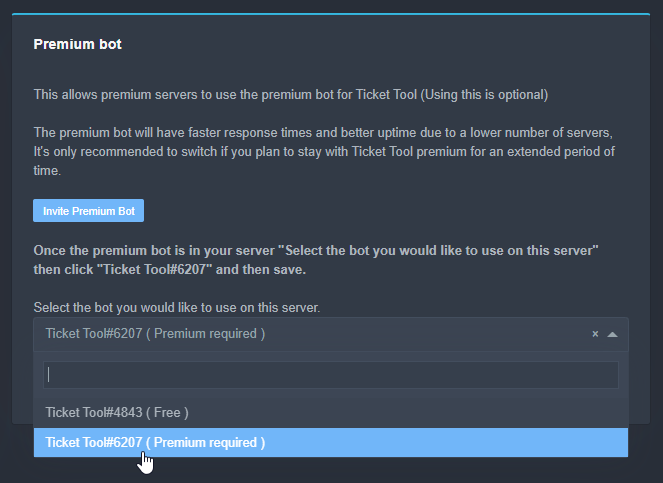 fresh gulch
Sorry!!
craggy geyser
Follow this. The link is in there
iron nightBOT
Gave 1 Rep to Swift (current: #5 - 136)
manic silo
craggy geyser
To add to the answer from markswrld. No. You have to delete and resend
ah ok, ty!
 sturdy scaffold
@craggy geyser i have question
fresh gulch
Bro?
Is the bot ok?
Captura de pantalla
Hecha por jimmy#5555 el 06/08/2021 a las 13:59

And I run debug
And it doesn't appear anything...
severe path
fresh gulch
And it doesn't appear anything...
Did you select the right bot in the dashboard?
 fresh gulch
yep
 humble sequoiaBOT
-- moved to ticket --
jade topaz
J
 severe path
 lost vine
i want rections
lost vine
i want rections
Do $oldpanel <PanelNumber> in the chat
But reactions don't work so well anymore because we switched to buttons
lost vine
ok
craggy geyser
lost vine
ok
And some point soon will stop working altogether
They are being phased out
 neon sentinel
how do i make it @ support when someone starts a ticket
lost vine
when i click on the button
craggy geyser
neon sentinel
how do i make it @ support when someone starts a ticket
$help ping
lost vine
not open ticket
humble sequoiaBOT
How to make Ticket Tool ping a role
To make ticket tool ping a role when a ticket is opened, go to the Dashboard -> Panel Configs -> Settings -> Ticket Options -> Ticket Message -> Message Text and do this:
{@Role name} This is case sensitive and the role must have @mentions enabled
lost vine
severe path
Do `$oldpanel <PanelNumber>` in the chat
how i get panel number
severe path
lost vine
how i get panel number
 iron nightBOT
Gave 1 Rep to Schlafendes24 (current: #31 - 5)
severe path

 agile crown
bro
severe path

craggy geyser
What's the issue that you are sharing that for?
jade topaz
are we allowed to ping staff for major security breach on the bot?
 cloud kiln
How to i re-name the ticket?
E.G someone makes a ticket and all it says it ticket-004
humble sequoiaBOT
-- moved to ticket --
 deep hare
i can find where we can make the bot ping the staff where a ticket is created ?
mystic hound
$help ping
humble sequoiaBOT
How to make Ticket Tool ping a role
To make ticket tool ping a role when a ticket is opened, go to the Dashboard -> Panel Configs -> Settings -> Ticket Options -> Ticket Message -> Message Text and do this:
{@Role name} This is case sensitive and the role must have @mentions enabled
jade topaz
mystic hound
just make a ticket, we all get notified when one is made
okey, it's done (#873202273839378472) 
 fluid bridge
how do i do that?
solid stream
on mobile check your app updates
on desktop you should have a green arrow on the top right of discord.
 sage verge
some closed tickets are refusing to be deleted, bugged and stuck in category, any fixes?
rough moth
sage verge
some closed tickets are refusing to be deleted, bugged and stuck in category, an...
Does $delete work
sage verge
nope, stays stuck
rough moth
Channel may be bugged, try deleting it manually
sage verge
all deleting doesn't work
sage verge
thx
rough moth
Np
 sweet tulip
Just iplemented and when i go to close a ticket i get this error, cant find where to properly set this permission

What i am attempted to do is have all mods have access to close tickets, and when they close a ticket it automatically moves to a closed ticket category (from normal ticket category)
Nevermind i figured it out, was related to bot not having manage permissions role
solid stream
sweet tulip
Nevermind i figured it out, was related to bot not having manage permissions rol...
Happy you figured it out, I'll look into why it didn't tell you that and just said Missing Permissions
solid stream
solid stream
Happy you figured it out, I'll look into why it didn't tell you that and just sa...
hmm.. seems it might be an error from discord.. that's why it didn't have alot of detail.
sweet tulip
Great thanks for taking it under consideration. Definitely a bit of a cryptic message
I was looking all over to set permissions, and in the end it was at the highest level of configuration haha
solid stream
Using $debug should have shown you this.
I might want to add that to my general System Failure message.
 worn pollen
Is it just me or is it taking a significantly longer time for the website to load the panel page as compared to the other pages?
rough moth
worn pollen
Is it just me or is it taking a significantly longer time for the website to loa...
Works fine for me
 sand finch
buenas
sweet tulip
solid stream
Using $debug should have shown you this.
This is exactly how I figured it out
Had just installed so was still poking through documentation
 wanton flint
$help close
humble sequoiaBOT
Help Options
$help commands - Information on commands
$help setup - Information on bot setup
$help faq - Frequently asked questions
 crisp granite
hi i need help
@gilded veldthi i need a help, how i can edit the message when a user open a ticket?
@severe pathu can help me? how i can edit the message when a user open a ticket
humble sequoiaBOT
**Ticket Message**
The Ticket Message is the first message sent by the bot in a new ticket. To customise it head over to your Dashboard -> Panel Configs -> Settings -> Ticket Options -> Edit Ticket Message
 crisp granite
severe path
<@!708113828063477760> ^
crisp granite
severe path
<@!708113828063477760> ^
but is premium, and after was free
severe path
Up to 250 characters are free
crisp granite
a ok
 bitter canopy
is there a way to send transcripts to the members dms? i know some other ticket bots do that
flint coyote
Yes that is an option
 jaunty trench
.
tribal cedar
bitter canopy
is there a way to send transcripts to the members dms? i know some other ticket ...
panel configs -> settings -> logging options it is a premium feature
 devout musk
@humble sequoia
jade topaz
How do I respond to ticket I’m confused
 fresh gulch
hi i need help
i had put that when i open a ticket
it has the user name
but when i close it
it gets renamed to the staff that closes the ticket
 scenic mulch
Im trying to set up the tickettool and no matter how many times i log out, clear cookies etc, its not showing up in my server list for managing servers
rough moth
jade topaz
How do I respond to ticket I’m confused
User left
rough moth
fresh gulch
it gets renamed to the staff that closes the ticket
You must be using the wrong variable
humble sequoiaBOT
Don't see your server in the dashboard?
You will possibly need to relog. Look below to see steps on how to relog.
How to relog the Dashboard.
First, you will need to go to the dashboard. Once your there, click on your avatar on the top right. after you clicked it, you will see button that says Logout. You must click that. Once you have logged out, you can log back in.
Note:
You need one of these 3 things to access the dashboard.
1. Server Owner (Level: 6)
2. Server Administrator (Level: 4)
3. Dashboard Role (Level: 2)
You can check your level using $level on your Discord Server
rough moth
@scenic mulch read this, make sure u are one of those 3 things
scenic mulch
rough moth
<@441381719686512640> read this, make sure u are one of those 3 things
i am a server administrator
i already use this bot in 3 other servers
rough moth
scenic mulch
i am a server administrator
Make sure the bot is in the server, double check that ur actually an admin, and if you are all of that log out of that site and log back in
scenic mulch
rough moth
Make sure the bot is in the server, double check that ur actually an admin, and ...
welp it was the admin thing my apologies 
rough moth
No worries, we are here to help
scenic mulch

jade topaz
I remember when this server had a general channel
scenic plinth
Nobody click that please
 tulip tartan
How can I change the text inside of this? https://i.imgur.com/Ge2CMCK.png
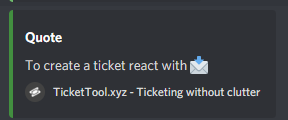
Can't find the setting anywhere
 rain junco
is there a way to have a specific role able to add members to a ticket?
to be more specific, a role without moderator
 lofty turret
tulip tartan
How can I change the text inside of this? https://i.imgur.com/Ge2CMCK.png
lofty turret
tulip tartan
How can I change the text inside of this? https://i.imgur.com/Ge2CMCK.png
Go to the settings of that panel, and then go to “Panel Options” and edit panel message.
eager cargo
rain junco
is there a way to have a specific role able to add members to a ticket?
to be m...
Go to your command configs and select the settings for the $add command. Once done you can select allowed roles to use the command
 rain junco
tysm!!
eager cargo
Yup
 prime bridgeBOT
 Successful kicks:
 1
 Unsuccessful kicks:
 0
 Reason: ghost spamming gifs
 Moderator: @mystic hound
prime bridgeBOT
Successful bans: 1
Unsuccessful bans: 0
Reason: hasn't learned from the kick - perm
Moderator: @mystic hound
jade topaz
Sorry for talking in here Light, but general is off limits to me
mystic hound
General is off limits to everyone
jade topaz
ah, ok
mystic hound
It was closed when we had a community server, then the community server rebranded but we haven't updated this server yet
jade topaz
oh, i was not aware of this occurrence happening i just got here for some help lol
mystic hound
Ah I see, I'll look at your ticket now...just woke up
 royal cosmos
How do i ping a member? not just the {user}
mystic hound
$help ping
humble sequoiaBOT
How to make Ticket Tool ping a role
To make ticket tool ping a role when a ticket is opened, go to the Dashboard -> Panel Configs -> Settings -> Ticket Options -> Ticket Message -> Message Text and do this:
{@Role name} This is case sensitive and the role must have @mentions enabled
royal cosmos
Thank you!
mystic hound
if you're looking to ping a specific member just do <@!userID> in that field
royal cosmos
Thanks @mystic hound
iron nightBOT
Gave 1 Rep to Light (current: #2 - 143)
royal cosmos
Wait, is it case sensitive?
mystic hound
if its for a role, yeah
it has to be typed exactly the way it is in your discord server. ( or you can use <@&roleid>)
royal cosmos
Okay, thanks!
iron nightBOT
@royal cosmos :: You can't rep Light#1591 for 55 minutes and 52 seconds. Try coming back later?
 pearl sorrel
Why the bot didn't react?
pearl sorrel
@mystic hound
 rotund kite
pearl sorrel
<@413723907619684352>
rotund kite
pearl sorrel
<@413723907619684352>
Please don't ping staff members, can you elaborate a little more on your issue?
rotund kite
 wheat kiln
I need help
wheat kiln
I need help
What's the issue?
wheat kiln
I have invited the bot to my server
If I login to server with diff account
I can't see that react button
@rotund kite

It's like this
rotund kite
wheat kiln
If I login to server with diff account
Another user?
wheat kiln
Yeah
humble sequoiaBOT
Update your discord App
Buttons are a relatively new addition to discord and don't work with some older versions of the app.
Please verify that you have the latest version of discord, by going to the app or play store.
_ _
Discord for the App Store
_ _
Discord for the Play Store
pearl sorrel
rotund kite
Please don't ping staff members, can you elaborate a little more on your issue?
 rotund kite
Make sure to tell them to update their Discord app
humble sequoiaBOT
Update your discord App
Buttons are a relatively new addition to discord and don't work with some older versions of the app.
Please verify that you have the latest version of discord, by going to the app or play store.
_ _
Discord for the App Store
_ _
Discord for the Play Store
rotund kite
wheat kiln
I myself logined from another account
So it works on the normal account?
Or it doesn't work on both?
wheat kiln
Yeah it works on the account from which I created the server
If I login with another account it didn't work
rotund kite
If it works fine on your normal account, the panel should work fine. I don't think Discord is meant for multiple accounts to be used at the same time.
wheat kiln
No bro
rotund kite
Discord may be bugging on its end.
wheat kiln
I logged out from that server owner account
Then I logged in with another account
Joined my server
rotund kite
Same device?
wheat kiln
And I can't see the ticket to react
wheat kiln
rotund kite
Same device?
Yeah
rotund kite
I heard Discord had some trouble with messages recently, can you try re-sending the panel(s)?
If it still doesn't work, create a ticket in #🎫│make-a-ticket. And send in the ticket, the server invite.
wheat kiln
I will try 🤔🤔🤔
wheat kiln
rotund kite
If it still doesn't work, create a ticket in <#571706435449257997>. And send in ...
And I have another doubt bro
rotund kite
wheat kiln
And I have another doubt bro
?
wheat kiln
Sorry bro it's my fault
I haven't updated discord
Now I did it
And I can see from my phonr
Thank u
 shadow marlin
help
 ionic wadi
Hello, could someone tell me where to see the bills?
jade topaz
is it possible to create multiple questions the bot will ask the player? for example please write your username, after that please provide your problem etc?
 zenith coral
 cold hearth
 mystic hound
@twin pagoda i deleted your message since you really shouldn't be putting your IP in a public channel
also, we won't whitelist IPs usually
@quick pagoda please don't ping support members, see below for your question
$help support
humble sequoiaBOT
How to let support team see into a ticket
About support roles
A support role lets your support team see into tickets with out having to add them manually to each and every ticket.
You can add as many support roles as you like per panel.
NOTE that the way discord works all admins can see into tickets regardless of this.
How to set a support role
To set a Support role go to the Dashboard -> Panel Configs -> Settings -> General Options -> Support Team Roles.

NOTE that the support role will not be able to see into tickets that are already created..
 quick pagoda
mystic hound
<@!799404868149837864> please don't ping support members, see below for your qu...
quick pagoda
mystic hound
<@!799404868149837864> please don't ping support members, see below for your qu...
ok
 blazing lava
ممكن دعم فني عربب
mystic hound
$arabic
humble sequoiaBOT
فريق الدعم الفني العربي
عميلنا العزيز ان كنت تبحث عن مساعدة يرجى فتح تكت خاص بفريق الدعم الفني العربي
اذهب الى#🎫│make-a-ticket
ثم قم بلضغط على الايموجي الاتي (🇯🇴)
 old patio
$help support
humble sequoiaBOT
How to let support team see into a ticket
About support roles
A support role lets your support team see into tickets with out having to add them manually to each and every ticket.
You can add as many support roles as you like per panel.
NOTE that the way discord works all admins can see into tickets regardless of this.
How to set a support role
To set a Support role go to the Dashboard -> Panel Configs -> Settings -> General Options -> Support Team Roles.
NOTE that the support role will not be able to see into tickets that are already created..
 wanton path
Name: Tickety
Reason: I think there is a bot copying ticket tool! It's name is tickety and I think it is copying off of ticket tool and may be impersonating it.

Top.gg
The perfect and most customizable ticket bot for your server! Manage tickets easier than ever with this ticket tool!
Someone is copying ticket tool
scenic plinth
wanton path
**Name:** Tickety
**Reason:** I think there is a bot copying ticket tool! It's ...
We appreciate your concern, but there doesn't seem to be a copy, as well as Ticket Tool is not open source, hence the bot isn't copied.
 red breach
Where is the command to show all commands?
prime bridgeBOT
x_Choco#0006 has been warned!

 They have dms disabled however.
 safe prairie
red breach
Where is the command to show all commands?
safe prairie
red breach
Where is the command to show all commands?
$help commands
humble sequoiaBOT
() = optional
[] = required
*==================================
Ticket Commands
==================================*
_ _
`$add [User] (channel)`
Description: Adding additional users to a ticket
Aliases: none
`$remove [User] (channel)`
Description: Removing users from a ticket
Aliases: none
`$close`
Description: Closing tickets
Aliases: none
`$open`
Description: Opening closed tickets
Aliases: none
`$delete`
Description: Deleting tickets
Aliases: none
`$rename`
Description: Renaming tickets/channels
Aliases: none
`$transcript (send channel)`
Description: Creating transcripts
Aliases: none
`$new (user) (reason)`
Description: Creating tickets in a monitored channel (when command style is enabled)
Aliases: none
`$claim`
Description: Claiming tickets (when claim is enabled)
Aliases: "unclaim"
_ _
*==================================
General Commands
==================================*
_ _
`$help (Help Options)`
Description: Help Command
Aliases: none
`$debug`
Description: Debuging issues with running Ticket Tool
Aliases: none
`$id (@role/@user/#channel/emoji)`
Description: Converting roles, users, channels and emojis to ID
Aliases: "getid"
`$permlevel`
Description: Checking permission level with Ticket Tool
Aliases: "level"
`$ping`
Description: Checking response time with discord api
Aliases: none
`$vote (link | unlink | redeem) (user)`
Description: Earn premium by voting on top.gg or Discord.boats
Aliases: "votes"
 limber sail
Hello. In my tickets The people who opened the tickets can't see them. how to fix?
 carmine pawn
Hello is there any support agent ?
 tawny trout
you can make a support ticket in #🎫│make-a-ticket
 dry light
limber sail
Hello. In my tickets The people who opened the tickets can't see them. how to fi...
dry light
limber sail
Hello. In my tickets The people who opened the tickets can't see them. how to fi...
You'll have to check the permissions on the TicketTool dashboard.
limber sail
dry light
You'll have to check the permissions on the TicketTool dashboard.
Ok. What Perms to check?
tawny trout
go to the dashboard and there is a list with the perms you need to check
you need to check every perm but the administrator perm (that are unchecked on the dashboard)
dry light
I'd check the "Panel Configs" and then "User Opened Permissions" under "Permissions Options" first
limber sail
Ok ty\
 rough moth
 upbeat gate
Could someone assist?
upbeat gate
Could someone assist?
wdym by categories? you mean multi panels?
 vivid rose
Hi. Can anyone help. I want to top up my xtreme TV account as its expired. Thanks robdecember
arctic pagoda
upbeat gate
I cannot seem to find where to make these categories
If you meant multipanels, it's a premium feature and the explanation it's below in this message:
First, find the IDs of each panel you wish to combine. You can find them in your Panel Configs in the Dashboard
Next, send the multipanel to a channel using $panel [id1] [id2] {id3} ....
e.g. $panel 1 2 4 17 35 to combine panels 1, 2, 4, 17 and 35.
humble sequoiaBOT
You're in the wrong place
We provide support for @pseudo glen discord bot and cannot help you with whatever issue you have.
Please make sure to contact the appropriate support team.
If you don't have any further questions regarding our bot Ticket Tool, please close this ticket
_ _
arctic pagoda
vivid rose
Hi. Can anyone help. I want to top up my xtreme TV account as its expired. Tha...
I'm sorry robdecember but in this server we provide support for Ticket Tool only. ^
upbeat gate
arctic pagoda
If you meant multipanels, it's a premium feature and the explanation it's below ...
Awesome, thank you for your help
iron nightBOT
Gave 1 Rep to markswrld (current: #39 - 2)
arctic pagoda
upbeat gate
Awesome, thank you for your help
No problem!
vivid rose
To much hassle I will just forget using xtreme TV. Thanks for your help.
robdecember
arctic pagoda
No problem I guess...😅
 fast surge
Hey, how do I set it here to mean another rank?
 arctic pagoda
fast surge
Hey, how do I set it here to mean another rank?
arctic pagoda
fast surge
Hey, how do I set it here to mean another rank?
You mean ping another role? Or...I didn't understand sorry
fast surge
yes
arctic pagoda
$help ping
humble sequoiaBOT
How to make Ticket Tool ping a role
To make ticket tool ping a role when a ticket is opened, go to the Dashboard -> Panel Configs -> Settings -> Ticket Options -> Ticket Message -> Message Text and do this:
{@Role name} This is case sensitive and the role must have @mentions enabled
fast surge
thx
arctic pagoda
humble sequoia
Here is how you can do^
arctic pagoda
fast surge
thx
You're welcome
upbeat gate
$pc
humble sequoiaBOT
How to get premium role
Until the automatic premium check is fixed run the command $debug on your server and send us the link in a ticket.
languid pasture
sorry I need some help ticket bot burnt my turkey
well not so much burnt more of
incinerated? vaporized?
tawny trout
I'm really impressed by the bot so far, you guys did great work and the dashboard is 
 snow hornet
I am trying to setup my Ticket Support for my server and I am making a pannel but It doesn't show the desired Group/server I am confused.
tawny trout
are you the server owner, admin or moderator?
snow hornet
tawny trout
are you the server owner, admin or moderator?
Moderator.
Head Moderator.
tawny trout
then you might not be able to add bots at all, you should ask the server owner or admin about that
snow hornet
tawny trout
then you might not be able to add bots at all, you should ask the server owner o...
I can add bots but It doesn't show the server.
Shall I kick bot then ivite it back?
tawny trout
that's usually because you don't have the appropriate role to view the dashboard
are you able to view dashboards of other bots on your server?
humble sequoiaBOT
Don't see your server in the dashboard?
You will possibly need to relog. Look below to see steps on how to relog.
How to relog the Dashboard.
First, you will need to go to the dashboard. Once your there, click on your avatar on the top right. after you clicked it, you will see button that says Logout. You must click that. Once you have logged out, you can log back in.
Note:
You need one of these 3 things to access the dashboard.
1. Server Owner (Level: 6)
2. Server Administrator (Level: 4)
3. Dashboard Role (Level: 2)
You can check your level using $level on your Discord Server
snow hornet
tawny trout
that's usually because you don't have the appropriate role to view the dashboard
What do you mean?
tawny trout
humble sequoia
just try this out and let us know if it worked
tawny trout
you should ask the admin or server owner if they can give you a dashboard role then
snow hornet
tawny trout
you should ask the admin or server owner if they can give you a dashboard role t...
How do they give dashboard role?
They are new and don't understand.
tawny trout
let me check
maybe someone else that is lurking here can help too :P
go to the dashboard, then click on server config in the left menu, there you can add dashboard roles
flint coyote
I think you need to have the admin role to add a bot to the discord.
snow hornet
flint coyote
I think you need to have the admin role to add a bot to the discord.
I am Head Moderator.
flint coyote
If you can't see the server, you don't have the proper role to add it.
humble sequoiaBOT
Dashboard Roles
Any role you put there will have full access to the ticket tool dashboard. The server owner and users with admin permissions already have access to the dashboard.
Be careful of which roles to put here
 tawny trout
go to the dashboard, then click on server config in the left menu, there you can...
tawny trout
tawny trout
go to the dashboard, then click on server config in the left menu, there you can...
dashboard roles can be assigned by just adding existing roles from your server that you would like to be able to view the dashboard
flint coyote
I understand you are head moderator but do you have admin perms?
flint coyote
tawny trout
dashboard roles can be assigned by just adding existing roles from your server t...
Yes and this
snow hornet
flint coyote
I understand you are head moderator but do you have admin perms?
I'll check.
flint coyote
If you don't, like Justin said, they have to add your role to the dashboard roles.
snow hornet
flint coyote
If you don't, like Justin said, they have to add your role to the dashboard role...
so does the Head Mod role have to have the Administrator Permission?
tawny trout
ok lemme make a screenshot for you so its more clear
mystic hound
can you type $debug in your server and send the link?
it'll make this a lot quicker
snow hornet
mystic hound
can you type $debug in your server and send the link?
okay
tawny trout
that would help haha
mystic hound
You don't have the required permissions to view the dashboard
snow hornet
The bot sad send it
tawny trout
if you guys cant figure it out still, then just add the head moderator role to this. (outlined in green)
ask you server owner to do that
 snow hornet
mystic hound
You don't have the required permissions to view the dashboard
snow hornet
mystic hound
You don't have the required permissions to view the dashboard
How do I get perms?
mystic hound
please ask the server admins or owner to either give you the administrator permission in the server, or add your role in the dashboard role field in the dashboard
mystic hound
tawny trout
if you guys cant figure it out still, then just add the head moderator role to t...
this screenshot here shows how to add a dashboard role
snow hornet
tawny trout
if you guys cant figure it out still, then just add the head moderator role to t...
The server I am trying to do it fro doesn't show up. So I cant.
snow hornet
Okay, hold on.
snow hornet
tawny trout
to do that
Wait so the Administrator Permission for that role?
flint coyote
No. Ok 1 of 2 things need to happen....
In the discord, you need to be given admin perms. Or...
The owner or an admin in that discord needs to go onto ticket tool to add YOUR role to the dashboard permissions.
..........
How do I get the premium subscriber role?
 pale pilot
$pc
humble sequoiaBOT
How to get premium role
Until the automatic premium check is fixed run the command $debug on your server and send us the link in a ticket.
flint coyote
Thanks
snow hornet
It works now thank you eveybody!
tawny trout
Hey guys,
I would like to become a partner but I can't find the Ticket Tool Server Partnership Request panel in #🎫│make-a-ticket.
Is this only meant for premium users?
mystic hound
partnership applications are currently closed
tawny trout
alright thanks for letting me know
 light glacier
Is a mass ticket delete command available?
 mystic hound
light glacier
Is a mass ticket delete command available?
mystic hound
light glacier
Is a mass ticket delete command available?
Nope.
jade topaz
yeah ppl would abuse that, also bot ping
mystic hound
oh nvm i saw the ticket
humble sequoiaBOT
-- moved to ticket --
 errant mason
if i subscribe to the premium bot, will all of my tickets on the standard bot disappear or not be able to be closed? will i have to redo the initial panel message?
flint coyote
That wasn't an issue for me but I subscribed to premium ages ago. I think it only opens more options and not start you over.
flint coyote
Howdy
craggy geyser
errant mason
if i subscribe to the premium bot, will all of my tickets on the standard bot di...
So due to buttons, yes and no. Buttons sent by the free bot won't work on the premium one so you cant close existing tickets with buttons. But you can close them with commands. Nothing in the settings needs redoing, but you will need to send the panel again
flint coyote
@light glacier may I ask why you have that many tickets every week? I just use it for my ark discords an we close them as they are completed. Just curious what you do. It's none of my business so no worries if don't want to answer.
errant mason
craggy geyser
So due to buttons, yes and no. Buttons sent by the free bot won't work on the pr...
awesome, thank you so much! very appreciated 😄
iron nightBOT
Gave 1 Rep to Swift (current: #5 - 137)
light glacier
flint coyote
<@259988337010409472> may I ask why you have that many tickets every week? I jus...
i use it as an application system for a game called axie infinity, the server hasnt been up for more than a week and a half but already at 2.5k members
flint coyote
Ah! Makes sense. Thanks for answering.
light glacier
no worries mate
flint coyote
We use Google docs for apps. I find it a bit less user friendly than I would like though.
light glacier
yeah i was thinking about that, but just because of the sheer numbers, i dont think google docs would work for me
flint coyote
I agree. It probably wouldn't. You can't just select one and go to it. You'd have to scroll through the numbers and having that many would be worse than what you're already doing. Lol
light glacier
i usually just end up deleting them manually not through the bot just to save a few clicks
craggy geyser
One thing that works well is just copy the $delete command and paste it in each channel
flint coyote
Good idea!
I have mine set that all I have to do is the delete command and it sends transcripts automatically. Not sure if this is a premium feature or not
craggy geyser
It is yes
tawny trout
is there a way to get notified with each new ticket without having to mute channels 1 by 1? (instead of the entire server)
 dusky cargo
ok
 flint coyote
tawny trout
is there a way to get notified with each new ticket without having to mute chann...
flint coyote
tawny trout
is there a way to get notified with each new ticket without having to mute chann...
You can have the ticket ping a role. Is that what you mean?
 jade bobcat
my resolved tickets aren't self deleting anymore
dusky cargo
jade bobcat
my resolved tickets aren't self deleting anymore
same
dusky cargo
dusky cargo
ok
^^
tribal cedar
dusky cargo
ok
I let devs know.
tawny trout
flint coyote
You can have the ticket ping a role. Is that what you mean?
I think so, how would I do that exactly? is that a function for premium members only?
 spring tulip
What could be causing one person to not see the button, but everyone else including me can see it


 raw widget
$vote
humble sequoiaBOT
Votes
Current Votes: 0
Lifetime Votes: 0
Linked Votes: 0
Vote Links
Linking Info
Linked User: Not Linked
You can give your future votes to another user by linking with that user.
To link use $vote link (@user or userId)
To unlink use $vote unlink
Redeeming
Each vote is worth 12 hours of premium and can be redeemed once you have atleast 6 votes.
Your current votes are worth 0m
To redeem your current votes use $vote redeem
Pong! Latency is 243ms. API Latency is 80ms [-]
humble sequoiaBOT
How to make Ticket Tool ping a role
To make ticket tool ping a role when a ticket is opened, go to the Dashboard -> Panel Configs -> Settings -> Ticket Options -> Ticket Message -> Message Text and do this:
{@Role name} This is case sensitive and the role must have @mentions enabled
flint coyote
@tawny trout
 deep yew
Am I able to change the TicketTool's avatar with premium?
flint coyote
No
deep yew
humble sequoia
Why does this one have?
tawny trout
thanks for the help Ivysixx!
 grave pollen
Hey
tawny trout
man that works awesome, I can't praise this bot enough.
really good work guys
flint coyote
tawny trout
thanks for the help Ivysixx!
No problem!
It's one of the most useful boys for my ark discords.
jade topaz
ahh does anyone know what to do when the server wont show up on the dashboard? ive added the bot and im setting it up atm but its not showing up
ive had this issue before but no idea how i solved it
 burnt hornet
What's up until I open a ticket
jade topaz
huh
burnt hornet
؟؟
burnt hornet
jade topaz
wdym
Ok give it to me
jade topaz
give what??
burnt hornet
it's up
jade topaz
what is
burnt hornet
You did not understand me
burnt hornet
How do I do like her?
 jade topaz
go to tickettool.xyz and add the bot to your server, run the command $help
jade topaz
what are you even saying...?
type tickettool.xyz into google
and add the bot ur server
then run the command: $help
and follow the directions from there
flint coyote
jade topaz
ahh does anyone know what to do when the server wont show up on the dashboard? i...
You added the bot yourself?
 long cobalt
I've been struggling to find this answer searching old comments, so I apologize if this has been asked before!
Is there a way to change the emote in Panel Embed Settings > Embed Description?
As seen in the screenshot, I'd like to change the default one to a custom one on my server.
Thanks in advance ^^ 💜
 lofty turret
long cobalt
I've been struggling to find this answer searching old comments, so I apologize ...
lofty turret
long cobalt
I've been struggling to find this answer searching old comments, so I apologize ...
On windows, press the windows button and the period button at the same time.
Then you have access to emojis and whatnot and are able to put the desired emoji.
long cobalt
lofty turret
Then you have access to emojis and whatnot and are able to put the desired emoji...
Oh man, brilliant. Thanks so much for your help!
iron nightBOT
Gave 1 Rep to Hawky96 (current: #55 - 1)
lofty turret
Np!
jade topaz
Is it normal for the -rename -delete commands to work on all channels and not ticket channels only?
scenic plinth
jade topaz
Is it normal for the -rename -delete commands to work on all channels and not ti...
No. Just tested it to be sure, it would give an error when attempting outside of tickets.
jade topaz
scenic plinth
No. Just tested it to be sure, it would give an error when attempting outside of...
alr if isn't normal ill record a video for ticket
 craggy kite
is there a way to blacklist everyone from using the bot unless they have a certain role?
pls ping on response
jade topaz
craggy kite
is there a way to blacklist everyone from using the bot unless they have a certa...
Blacklist a role

And in the panel theres how to set a support role

also you can set support role permissions
 craggy kite
jade topaz
also you can set support role permissions
craggy kite
jade topaz
also you can set support role permissions
are those the people that the bot will respond to when they run commands?
jade topaz
craggy kite
are those the people that the bot will respond to when they run commands?
blacklist is to avoid people to create ticket, but in permissions you can edit perms of user open or support team
if you want avoid people to open ticket, just hide the channel for them
and only display for the certain role you want
jade topaz
jade topaz
Blacklist a role
as i understand, bot just allow to ignore people with roles, is a blacklist, not a whitelist
my $help does not work
is there steps to go through to make sure i am doing it right
i am using the premium tool
 unique anvil
Does $debug work
jade topaz
no
unique anvil
Is the bot able to see the channel (read messages permission, shows in member list)
 marble spruce
this triggers me so much: https://i.imgur.com/GhPpsga.png
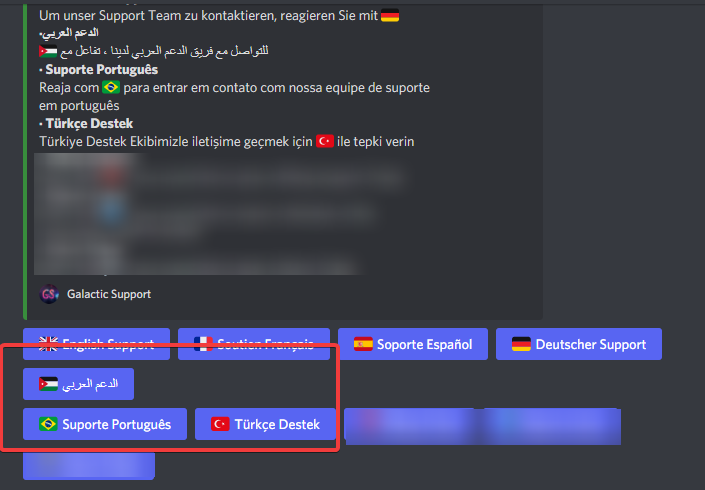
is there a way to fix this?
jade topaz
unique anvil
Is the bot able to see the channel (read messages permission, shows in member li...
yes
craggy geyser
marble spruce
is there a way to fix this?
You can set in the general settings of the first panel in your multipanel the number of buttons per row. If you set that to 4 you will have two rows of 4 and a row of 2 instead of how it currently is
craggy geyser
jade topaz
yes
And if you are using the correct prefix, makd sure you have enabled the premium bot
humble sequoiaBOT
Inviting and Enabling Premium Bot
The first thing you will need to do is invite the premium bot, an invite can be found here
Once the bot is in your server we will head to the dashboard and manage your server. When you are managing your server, you want to head into "Server Configs" then click the drop down menu under "Select the bot you would like to use on this server" then click "Ticket Tool#6207" and then save.
 cunning jetty
/invite
 thick socket
With regards to the premium bot, is there any issues if I switch the bot while I still have tickets open?
Also, what are the message limits for transcripts for free/ premium? And is there any message age limit (eg. msgs older than 2 wks cannot be saved)?


 glass yoke
jade topaz
glass yoke
jade topaz
Check your server authorization (ticket tool group) and give the permission to send and view this channel
burnt hornet
How do I make a ticket
scenic plinth
burnt hornet
How do I make a ticket
humble sequoiaBOT
scenic plinth
thick socket
Also, what are the message limits for transcripts for free/ premium? And is ther...
There shouldn't be issues, although already open tickets will not recieve the features you change with premium. The only issue I can think of that could occur is transcripts not saving to the channel, but that shouldn't happen.
I believe free recieved 100-200, and premium is around 1000, I would have to check with someone else to be 100% clear.
With the 2 weeks, that is a discord limitation. For example if you try to delete messages older than 2 weeks with a bot, say @tepid island, you can only delete messages up to two weeks, and up to 1000 messages a time.
 ashen idol
humble sequoiaBOT
ashen idol
humble sequoiaBOT
Inviting and Enabling Premium Bot
The first thing you will need to do is invite the premium bot, an invite can be found here
Once the bot is in your server we will head to the dashboard and manage your server. When you are managing your server, you want to head into "Server Configs" then click the drop down menu under "Select the bot you would like to use on this server" then click "Ticket Tool#6207" and then save.
mystic hound
better to ask your question so whoever sees it can respond quick
 wraith galleon
How do I fix failed to locate send panel
I checked debug and all marks were green so Im not sure what else. It seems like Ive tried it all
jade topaz
Bonjour,
Je cherche à modifier les textes des tickets
Quelqu’un saurait m’expliquer comment faire?
robust sandalBOT
jade topaz
Bonjour,
Je cherche à modifier les textes des tickets
 ɓ n ɥ ʇ ſ ǝ ɯ ſ ǝ ɯ
Hello
I am looking to modify the texts of the tickets
French (fr) → English (en)
robust sandalBOT
jade topaz
Quelqu’un saurait m’expliquer comment faire?
ɓ n ɥ ʇ ſ ǝ ɯ ſ ǝ ɯ
Anyone could explain to me how to do it?
French (fr) → English (en)
wraith galleon
Panel Configs > Settings > Ticket Options
mystic hound
wraith galleon
How do I fix failed to locate send panel
can you screenshot the error?
arctic pagoda
wraith galleon
How do I fix failed to locate send panel
The error message appears like this in the dashboard?


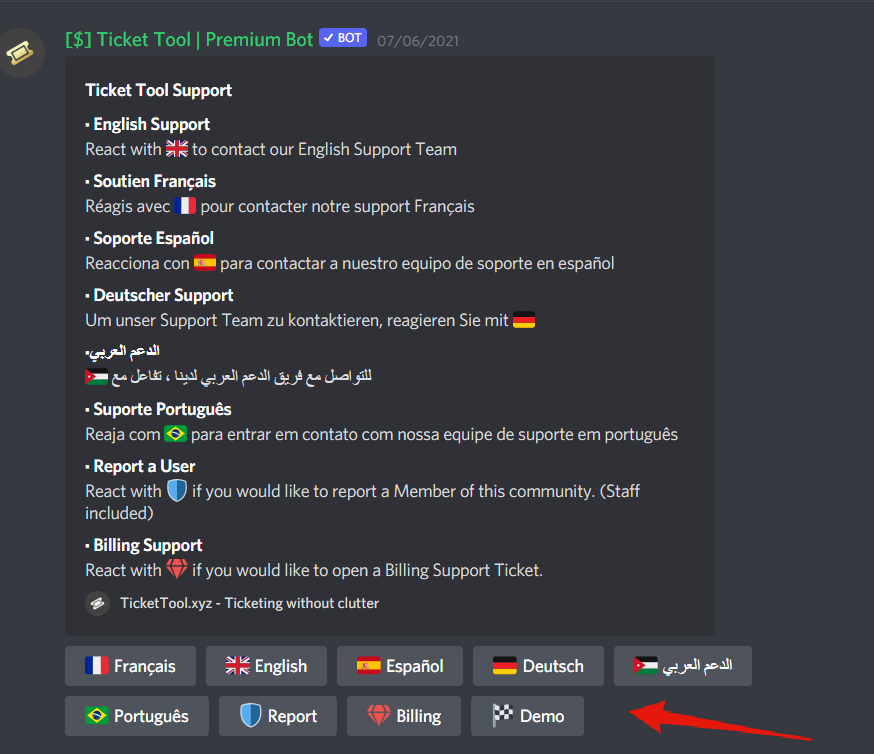
 mystic hound
server ID?
wraith galleon
I was able to create a new panel and send one, I guess you are unable to edit old ones and re-send a new panel?
mystic hound
you are able to do that, yes.
can you try with the $panel command? so if its panel 1 that's having the issue, try typing $panel 1 and see if it sends
jade topaz
craggy geyser
And if you are using the correct prefix, makd sure you have enabled the premium ...
I had to enable the bot thank you for your help.
iron nightBOT
Gave 1 Rep to Swift (current: #4 - 139)
wheat kiln
I have a question
How to make the bot automatically ping a role if anyone creates a ticket
 topaz solar

Hey how do i get this to work?
I tried {#channelname} and {channelname}
but both don't come out as a link
scenic plinth
They aren't supposed to be a link
scenic plinth
wheat kiln
How to make the bot automatically ping a role if anyone creates a ticket
$help ping
humble sequoiaBOT
How to make Ticket Tool ping a role
To make ticket tool ping a role when a ticket is opened, go to the Dashboard -> Panel Configs -> Settings -> Ticket Options -> Ticket Message -> Message Text and do this:
{@Role name} This is case sensitive and the role must have @mentions enabled
topaz solar
scenic plinth
They aren't supposed to be a link
whats the difference between typing {community-support} or community-support
then?
assuming u wan't to see #🆘│community-support
why is it a variable if it doesn't do anything
scenic plinth
It is possible they haven't been updated, I myself have not played around with the variables so I don't know which ones work and which don't.
The one you highlighted is supposed to be such as #🆘│community-support, displayed as is, but the other is the tickets / channels name, with no "link" to the channel.
topaz solar
i mean yeh i can read
i highlighted it for a reason
im asking how its supposed to work
I tried {#channelname} and {channelname}
and they both return {#channelname} and {channelname}
instead of the blue clickable channel thing
scenic plinth
{channel_name}
topaz solar
 scenic plinth
Or you can do the channels ID, like [#🆘│community-support](/guild/509192800865353738/channel/776680605517742090/)
topaz solar
 scenic plinth
What is your server ID?
topaz solar
872932426777788468
scenic plinth
topaz solar
Which panel is this?
topaz solar
#2 Sovereign trial
but its the same for #1 bipolar trial
I can not get it to work
got it to work
without the variable
scenic plinth
scenic plinth
Or you can do the channels ID, like `<#776680605517742090>`
Try the channels ID like I showed you here
Without {}
topaz solar
yeh i did
scenic plinth
Are you sure you did the channels ID in the right format? Exactly like that?
topaz solar
topaz solar
got it to work
.
scenic plinth
Read that wrong, apologies.
topaz solar
np ty
humble sequoiaBOT
-- moved to ticket --
 slow oxide
is there a way to assign a user that doesn't open a ticket as the owner of the ticket? for example, if i'm an admin and create a ticket to pull someone into to handle an issue, by default i'm the owner of the ticket. i'd like to assign that user as the owner so they get the transcript and it also might make it a bit easier to search the log channel when searching for a specific owner rather than having to recall the admin that originally opened it. i've looked through the docs but i don't see anything immediately obvious here
mystic hound
slow oxide
is there a way to assign a user that doesn't open a ticket as the owner of the t...
You can use the $new command (has to be enabled under command style tickets in your panel settings) and then use the command to create tickets for a user, using $new @ user. This would assign them as the ticket owner
but there's no way to change the owner of an existing ticket
slow oxide
ah interesting. thanks 🙂
 warped raft
I can't figure out how to respond to a ticket.
rough moth
warped raft
I can't figure out how to respond to a ticket.
wdym?
warped raft
Can I only create or close a ticket? Is there no interface to respond to the ticket? I can claim it and I can close it, but how to I address the ticket directly?
warped raft
Ya I figured it out, but this wasn't helpful lol
 thick axle
hey could someone help me with something
tribal cedar
Just ask away
 glass marsh
So.
I've added Tickettool to an Un-ban server, But its not showing up, I refreshed and Re-logged and nothing happend, And I have perms all the perms, Whats going on?
tribal cedar
Have admin?
humble sequoiaBOT
Don't see your server in the dashboard?
You will possibly need to relog. Look below to see steps on how to relog.
How to relog the Dashboard.
First, you will need to go to the dashboard. Once your there, click on your avatar on the top right. after you clicked it, you will see button that says Logout. You must click that. Once you have logged out, you can log back in.
Note:
You need one of these 3 things to access the dashboard.
1. Server Owner (Level: 6)
2. Server Administrator (Level: 4)
3. Dashboard Role (Level: 2)
You can check your level using $level on your Discord Server
iron nightBOT
Gave 1 Rep to Enigma (current: #11 - 69)
 night acorn
Hey! Can someone help me?
thick axle
ok so basically whenever renaming tickets permission is on, people with the permissions to access tickets could also change other channels name like general which isnt a ticket
https://cdn.discordapp.com/attachments/874021353404104754/874021786835091556/unknown.png

ive tried to use this but it doesn't work
 tribal cedar
It means the can use $rename command
thick axle
??
tribal cedar
night acorn
Hey! Can someone help me?
Ask..
night acorn
tribal cedar
Ask..
I have already asked a question in the ticket
tribal cedar
thick axle
i know im talking about the disabled channels
Disabled channels?
night acorn
in the english part