
#🆘│community-support
1 messages · Page 340 of 1
 humble sequoiaBOT
 chilly summit
Is it possible to use custom emojis rather than global emojis?
 rough moth
U can use custom if they are in your server
Just do $id {emoji}
 toxic kernel
Help My pls
rough moth
toxic kernel
Help My pls
What’s up
toxic kernel
🤖
rough moth
Please state what you need help with for assistance
 wild compass
Is it possible to temporarily "lock" a ticket panel? Like for example, I want to temporarily stop anyone from creating tickets. Is this possible?
rough moth
Just make creating a ticket support only
Or just hide the channel the panel is in from people
 iron nightBOT
Gave 1 Rep to DisguisedBaby (current: #9 - 110)
chilly summit
rough moth
U can use custom if they are in your server
Just do $id {emoji}
Sorry for late response, but can you clarify? It just shows me some sort of embed with emoji id and that's it.
rough moth
chilly summit
Sorry for late response, but can you clarify? It just shows me some sort of embe...
U use that emoji id
If ur are trying to add a custom emoji to a text
chilly summit
rough moth
If ur are trying to add a custom emoji to a text
Not to a text, to a reaction when creating tickets.
rough moth
chilly summit
Not to a text, to a reaction when creating tickets.
U can use custom ones too as long as it’s in your server
chilly summit
rough moth
U can use custom ones too as long as it’s in your server
Yeah, but I can't figure it out how to do that.
I do have emoji id, but I'm not sure how do I put that in the ticket's reaction system
rough moth
chilly summit
Yeah, but I can't figure it out how to do that.
Search for the emoji
By the name
chilly summit
I'll try.
rough moth
It might be case sensitive
chilly summit
I have another issue. How do I make buttons say different text? All of the 5 buttons I've got shows the same thing. I want to rename each of it.
 tribal cedar
chilly summit
I have another issue. How do I make buttons say different text? All of the 5 but...
tribal cedar
chilly summit
I have another issue. How do I make buttons say different text? All of the 5 but...
Panel configs -> settings -> button options
For each panel you can set a different text
chilly summit
Awesome!
tribal cedar
Anymore issues @chilly summit just ask here. Lots of ppl willing to help
chilly summit
tribal cedar
Anymore issues <@484609714693472256> just ask here. Lots of ppl willing to help
Thanks. For some reason first 2 buttons shows the same text, I have created 2 different multipanels and both things are happening.
iron nightBOT
Gave 1 Rep to Enigma (current: #11 - 65)
tribal cedar
Well each button has a panel config associated to it
chilly summit
I don't get it. I have done 4 panels, but it shows 5 instead.
tribal cedar
Well the 1st panel is the one where your setting up the multi panel in
So you have 4 attached plus the primary panel which makes 5
Show me a screen shot of your panel configs screen?
Oh wait yea if you have 4 you might be attaching the primary panel in the attached multi panels.
You don't need to
chilly summit
Yes. I assume I have to create a new panel and then put all of these 4 panels in it?
tribal cedar
Well the panel where your adding to above the multi panels
The one your attaching to doesn't need to be listed
So take out the cs faceit from where it says multi panels
chilly summit
It worked. Thanks!
chilly summit
I do have one more question though. I did have the 2nd multipanel with 6 roles, I did deselect that one as well, but it does only show 5 buttons, even though I have selected all panels.
tribal cedar
6 roles?
tribal cedar
Can you show me your panels list and the multi panel section for the primary
With multipanels theres always a primary for which the panel message also comes from when you post it.
So which isn't getting added?
chilly summit
"Iron"
tribal cedar
I see. Check the iron button options?
It may be disabled? Or otherwise no button info?
Hmm
Resend the primary panel?
chilly summit
The primary you mean the multipanel?
tribal cedar
Yes sir.
chilly summit
I tried it but the same thing.
tribal cedar
I can't see why it wouldn't work do me a favor show me your panels listing?
chilly summit
1st and 10th are the multipanels for me
chilly summit
Still shows 5 buttons
tribal cedar
Can I see the multipanel panel or the primary panel general options?
Panel #10
See where it says buttons per row?
We may need to change that to at least 2
tribal cedar
Or 25 buttons 5 per row
iron nightBOT
Gave 1 Rep to Swift (current: #8 - 116)
tribal cedar
Just what I thought thanks @craggy geyser
 jade topaz
my security bot ban my premium ticket tool bot how do i get the premium bot back my tickets dont work without it
 craggy geyser
It is the 5x5 that matters. You can't have 25 buttons unless you have 5 rows as you can thage more than 5 columns
iron nightBOT
@chilly summit :: You can't rep Enigma#0007 for 38 minutes and 38 seconds. Try coming back later?
tribal cedar
Anytime mate
iron nightBOT
Gave 1 Rep to Swift (current: #8 - 117)
tribal cedar
jade topaz
my security bot ban my premium ticket tool bot how do i get the premium bot back...
Reinvite it through your server configs @jade topaz
craggy geyser
jade topaz
my security bot ban my premium ticket tool bot how do i get the premium bot back...
Can you add a whitelist to the security bot? I would help more (and there is a ticket for this) but my phone is about to die
jade topaz
tribal cedar
Reinvite it through your server configs <@456226577798135808>
ok ill try
tribal cedar
Add whitelist already?
chilly summit
Hi. Last question. If premium expires, does it mean that premium panels that are posted within Discord won't work? I understand that dashboard's premium features won't work, but will things like multipanels with multiple tickets - will that still work?
tribal cedar
chilly summit
Hi. Last question. If premium expires, does it mean that premium panels that are...
Afaik yes. You just won't be able to manipulate the panels further
chilly summit
Got it.
tribal cedar
Iirc I've never had it happen to me but I asked i think Simple once and he said that to me.
jade topaz
.
tribal cedar
@jade topaz need help?
 tired gyro
This is how I take the support team roll. What do they get their tickets for if I close?
rough moth
Can u reword that so I can better understand what you are trying to say
tired gyro
rough moth
Can u reword that so I can better understand what you are trying to say
It's hard for me to translate. I speak Arabic
rough moth
/ar Feel free to say it in Arabic
 robust sandalBOT
لا تتردد في قولها باللغة العربية
 English (en) → Arabic (ar)
tired gyro
English (en) → Arabic (ar)
tired gyro
شلون اخلي رول Support Team ما يطلع لهم التكت اذا تقفلت؟
robust sandalBOT
tired gyro
شلون اخلي رول Support Team ما يطلع لهم التكت اذا تقفلت؟<:taif:706951936204603443...
 BAV
BAV
How can I make support team roll not show them the ticker if it is closed?
Arabic (ar) → English (en)
tired gyro
robust sandal
tickets *
rough moth
/ar Go to your dashboard -> panel configs -> panel settings -> permission options -> Support Team Ticket Closed Permissions -> Remove view channel permissions
robust sandalBOT
انتقل إلى لوحة > -> إعدادات لوحة خيارات الإذن > -> أذونات مغلقة بطاقة فريق الدعم -> إزالة أذونات قناة العرض
English (en) → Arabic (ar)
tired gyro
thanks
rough moth
Np
 rugged rain
How can i make a ticket have more then one option to open a ticket, like how it is here

 outer sleet
rugged rain
outer sleet
rugged rain
 gilded herald
Hello! How do I make a ticket on mobile? I've been trying and it's not letting me.
rough moth
gilded herald
Hello! How do I make a ticket on mobile? I've been trying and it's not letting m...
Update your discord client
gilded herald
All updated
rough moth
gilded herald
All updated
Can u create tickets now?
gilded herald
Nope
 high flare
Is there a way to rename the ticket name in the dashboard example have it auto make Email-001 instead of Ticket-001?
 radiant moss
high flare
Is there a way to rename the ticket name in the dashboard example have it auto m...
radiant moss
high flare
Is there a way to rename the ticket name in the dashboard example have it auto m...
Premium Option - Panel Settings --> Ticket Options --> And you will see opened ticket name
radiant moss
🙂
high flare
Is there a way to make it print the username instead of {count}
radiant moss
$variables
humble sequoiaBOT
Note: Remove The $ From The Variables
Supported Variables
{$server.name} --> Name of the server
{$server.id} --> ID of the Server
{$channel} = <#channel> --> Channel link of the current channel
{$channel.name} --> Name of the current channel
{$channel.id} --> ID of the current channel
{$author} = <@user> --> Mention of the user triggering this message
{$author.name} --> Name of the user triggering this message
{$author.id} --> ID of the user triggering this message
{$author.nickname} --> Nickname of the user triggering this message
{$author.icon} --> Direct Url of the profile picture of the user triggering this message
{$author.tag} --> 4 digit tag (discriminator) of the user triggering this message
{$author.full} --> username + 4 digit discriminator of the user triggering this message
{$panel.count} --> The current count number of the panel (Tickets only)
{$panel.name} --> The name of the panel (Tickets Only)
{$panel.ticketLimit} --> The current limit of the panel (Ticket Only)
{$ticket} = <#channel> --> Channel mention of the ticket
{$ticket.id} --> Channel ID of the ticket
{$ticket.user} = <@user> --> User mention of the ticket user
{$ticket.user.name} --> Name of the ticket user
{$ticket.user.id} --> User ID of the ticket user
{$ticket.user.nickname} --> Nickname of the ticket user
{$ticket.user.icon} --> Direct Url of the profile picture of the ticket user
{$ticket.user.tag} --> Tag / Discriminator of the ticket user
{$ticket.user.full} --> Username + Discirimator of the ticket user
Roles can be either
{@role name} or {role ID}
Note: Remove The $ From The Variables
high flare
THANKS so much for such a fast response 🙂
radiant moss
No problem! Glad I could help
 novel dagger
Is there a way to set tickets so that only one ticket can be opened per support team role associated with a ticket? For example, if I have 5 tickets with "staff" as the support team role, is there a way that only one of those 5 tickets can be opened at a time?
rough moth
novel dagger
Is there a way to set tickets so that only one ticket can be opened per support ...
Not possible, you can set a global limit, but that will be among all panels
 grand sleet
Ticketbot is down in the server I'm in
novel dagger
Thanks for the response
humble sequoiaBOT
 scenic plinth
grand sleet
Ticketbot is down in the server I'm in
scenic plinth
grand sleet
Ticketbot is down in the server I'm in
How is it down? Is it offline?
grand sleet
scenic plinth
How is it down? Is it offline?
It was offline
grand sleet
scenic plinth
Is it... online now?
Yes its back online now.
 mild shoal
Is there a way to disable these messages?

 mystic hound
nope
its only visible to the ticket creator and disappears when discord is restarted
mild shoal
Yeah i know, sucks tho bc it's just a tad bit unneeded. Ty anyway.
 gloomy escarp
i need help
high flare
humble sequoia
Is it possible to make your own version of this or is that custom for here?
humble sequoiaBOT
Tags
Tags are used to send a predefined response to your channels using a command. Tags will only respond if the command itself is used, it will not function if you put the tag into a sentence. The prefix is not included.
To create tags, go to: Dashboard > Tags > Create Tag. After creating and naming one, tap on the response button, and you can edit the response.
 mystic hound
@high flare ^^
 thick socket
if I claim my free premium from voting, can I still claim the free 7 day trial later?
craggy geyser
Yes. The free trial is a one time use thing, regardless of if you have had premium before
iron nightBOT
Gave 1 Rep to Swift (current: #7 - 118)
 north oak
Hi
So the bot is not able to add users to tickets
The bot has manage permissions in the category we want ticket to be created in
 subtle spade
Is bot working ??
humble sequoiaBOT
If the bot is not working properly, try the following steps:
-
Run the $debug command in your server, to check the permissions of the bot. Send the link you get to us.
-
Check if you have any Blacklisted Roles in your Server Configs. Any roles listed there will not be able to use the bot / create tickets.
-
While you're in your Server Configs , make sure that you don't have the premium bot enabled, without actually having premium or the bot on the server.
These are the most common issues. If your problem still exists, you can go to our Troubleshooting Page for more fixes.
north oak
Is there a way i can make the bot send transcripts in a channel when ticket is delete
 pale pilot
with premium, yes. You can find it in your logging options
craggy geyser
jade topaz
Do I get anything for voting the bot on top.gg?
I think it is one of the options for $vote to get free premium time
jade topaz
Is there a way to auto close ticket after 12 hours?
 north spade
I see some servers with multiple reaction buttons depending what the user is looking to do, how do I configer that option for my server?
Oh and how do I get the premium role
$vote
humble sequoiaBOT
Votes
Current Votes: 0
Lifetime Votes: 0
Linked Votes: 0
Vote Links
Linking Info
Linked User: Not Linked
You can give your future votes to another user by linking with that user.
To link use $vote link (@user or userId)
To unlink use $vote unlink
Redeeming
Each vote is worth 12 hours of premium and can be redeemed once you have atleast 6 votes.
Your current votes are worth 0m
To redeem your current votes use $vote redeem
You can't link to yourself.. sillypants. =)
north spade
$vote
humble sequoiaBOT
Votes
Current Votes: 2
Lifetime Votes: 2
Linked Votes: 0
Vote Links
Linking Info
Linked User: Not Linked
You can give your future votes to another user by linking with that user.
To link use $vote link (@user or userId)
To unlink use $vote unlink
Redeeming
Each vote is worth 12 hours of premium and can be redeemed once you have atleast 6 votes.
Your current votes are worth 1 day, 0h, 0m
To redeem your current votes use $vote redeem
north spade
north spade
I see some servers with multiple reaction buttons depending what the user is loo...
Sorry back to this
humble sequoiaBOT
Multipanels are a premium feature  that allow for a single panel with multiple buttons to open different tickets.
How to create a Multipanel
Premium users can combine multiple panels into one multipanel.
First, find the IDs of each panel you wish to combine. You can find them in your Panel Configs in the Dashboard
Next, send the multipanel to a channel using $panel [id1] [id2] {id3} ....
e.g. $panel 1 2 4 17 35 to combine panels 1, 2, 4, 17 and 35.
Up to 25 panels may be combined.

For a more convenient use of multipanels, you can now combine panels on the dashboard. This will allow you to directly send the multipanel from the dashboard or via the $panel ID command.
Where can I find this?
You can find this setting on the Dashboard -> Panel Configs -> Settings -> General Options
This will put all buttons from all of your panels on one message. The message is the panel message from the panel you're combining these panels in.
 craggy geyser
$pc
humble sequoiaBOT

How to get premium role
Until the automatic premium check is fixed run the command $debug on your server and send us the link in a ticket.
craggy geyser
north spade
I see some servers with multiple reaction buttons depending what the user is loo...
That should answer all 3 questions. Also, please don't use here for vote in future, keep this channel for support. To add to the premium role, it requires a subscription and not a free premium (like the free trial or voting)
north spade
I do have one already
Just got it like ahalf hour ago since it ended up stopping some how
jade topaz
craggy geyser
That should answer all 3 questions. Also, please don't use here for vote in futu...
can i get the premium role i send in the ticket en_ticket22392
craggy geyser
Read #546557408902905896. Especially rule 4.5
 wanton path
Where can I make suggestions?
I am premium and I vote for ticket tool almost everyday! 😄
I love this bot..
But, anyway where can I make suggestion features for the bot?
craggy geyser
You can make them here or in a ticket, we pass them on to the devs
craggy geyser
wanton path
I am premium and I vote for ticket tool almost everyday! 😄
Also, run $vote quickly. We don't typically give out the premium role for voted premium, but if you have lots of votes, the managers might make an exception
humble sequoiaBOT
For a more convenient use of multipanels, you can now combine panels on the dashboard. This will allow you to directly send the multipanel from the dashboard or via the $panel ID command.
Where can I find this?
You can find this setting on the Dashboard -> Panel Configs -> Settings -> General Options
This will put all buttons from all of your panels on one message. The message is the panel message from the panel you're combining these panels in.
wanton path
$vote
humble sequoiaBOT
Votes
Current Votes: 0
Lifetime Votes: 135
Linked Votes: 0
Vote Links
Linking Info
Linked User: Not Linked
You can give your future votes to another user by linking with that user.
To link use $vote link (@user or userId)
To unlink use $vote unlink
Redeeming
Each vote is worth 12 hours of premium and can be redeemed once you have atleast 6 votes.
Your current votes are worth 0m
To redeem your current votes use $vote redeem
craggy geyser
You aren't missing out on too much without the role. It basically gives you access to another version of this channel and a differnt ticket category both of which are just premium only. You can get premium support anyway though
 silent heart
What are all of the different ways of obtaining Ticket Tool Premium? I wasn't aware of the voting giving premium for some time. Are there any programs for Partnered Discord Servers? I did a quick search but it lead me to a dead end.
craggy geyser
silent heart
What are all of the different ways of obtaining Ticket Tool Premium? I wasn't aw...
Yes and no. We aren't currently accepting new partnerships but that is a way of getting premium if we accepted more. You can also get premium with giveaways (such as the one advertised in #📣│server-news)
Main way is subscribing/direct payments with PayPal/bitcoin though
iron nightBOT
Gave 1 Rep to Swift (current: #7 - 119)
 mint pivot
Is there a bug with the server's not showing up?
I've logged out and in a few times and only 1 server is showing up
Nvm the bot wasn't in the server 😂
pale pilot
🙈
 coarse nebula
is this doable with the bot?
 tribal cedar
coarse nebula
is this doable with the bot?
tribal cedar
coarse nebula
is this doable with the bot?
Yes
coarse nebula
tribal cedar
Yes
oh, with those kinds of buttons aswell?
tribal cedar
Sorry?
tribal cedar
coarse nebula
oh, with those kinds of buttons aswell?
Yep
coarse nebula
is there a limit on how many?
tribal cedar
Thags just 4 multipanels. Ofc premium is required
coarse nebula
oop nevermind
tribal cedar
25 buttons per panel
coarse nebula
tribal cedar
Thags just 4 multipanels. Ofc premium is required
so i need premium to do button panels?
coarse nebula
ah nevermind then
wanton path
Hey uh
When a user claims the ticket, how do I have ticket tool say the users name in the ticket channel name?
Like if I claimed a ticket, it would say Zai and not my full user
jade topaz
How do I invite premium bot
wanton path
Like Ticket-Zai-(ticket name of the person who opened it)
jade topaz
Please help
humble sequoiaBOT
Inviting and Enabling Premium Bot
The first thing you will need to do is invite the premium bot, an invite can be found here
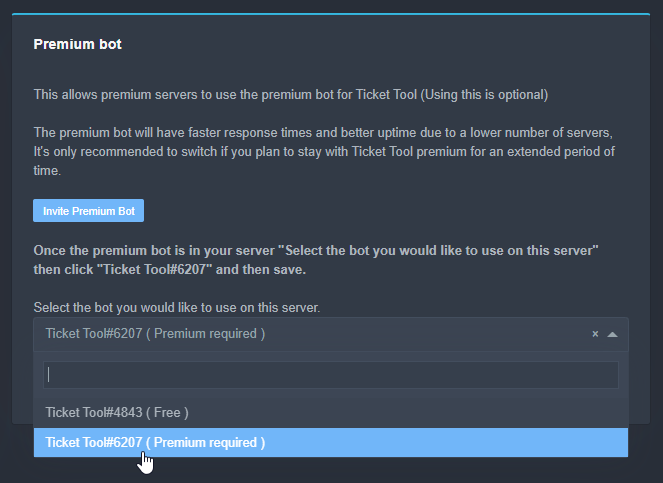
Once the bot is in your server we will head to the dashboard and manage your server. When you are managing your server, you want to head into "Server Configs" then click the drop down menu under "Select the bot you would like to use on this server" then click "Ticket Tool#6207" and then save.
 craggy geyser
jade topaz
How do I invite premium bot
craggy geyser
jade topaz
How do I invite premium bot
Link in that message
wanton path
Um
craggy geyser
wanton path
Like `Ticket-Zai-(ticket name of the person who opened it)`
$variables
humble sequoiaBOT
Note: Remove The $ From The Variables
Supported Variables
{$server.name} --> Name of the server
{$server.id} --> ID of the Server
{$channel} = <#channel> --> Channel link of the current channel
{$channel.name} --> Name of the current channel
{$channel.id} --> ID of the current channel
{$author} = <@user> --> Mention of the user triggering this message
{$author.name} --> Name of the user triggering this message
{$author.id} --> ID of the user triggering this message
{$author.nickname} --> Nickname of the user triggering this message
{$author.icon} --> Direct Url of the profile picture of the user triggering this message
{$author.tag} --> 4 digit tag (discriminator) of the user triggering this message
{$author.full} --> username + 4 digit discriminator of the user triggering this message
{$panel.count} --> The current count number of the panel (Tickets only)
{$panel.name} --> The name of the panel (Tickets Only)
{$panel.ticketLimit} --> The current limit of the panel (Ticket Only)
{$ticket} = <#channel> --> Channel mention of the ticket
{$ticket.id} --> Channel ID of the ticket
{$ticket.user} = <@user> --> User mention of the ticket user
{$ticket.user.name} --> Name of the ticket user
{$ticket.user.id} --> User ID of the ticket user
{$ticket.user.nickname} --> Nickname of the ticket user
{$ticket.user.icon} --> Direct Url of the profile picture of the ticket user
{$ticket.user.tag} --> Tag / Discriminator of the ticket user
{$ticket.user.full} --> Username + Discirimator of the ticket user
Roles can be either
{@role name} or {role ID}
Note: Remove The $ From The Variables
wanton path
Ive seen the variables-
craggy geyser
So the ones that are ticket.user will be the person who opened, the author ones will be the person claiming
wanton path
Ok but uh
I don't want it to say my full user
How can I make the username shorter?
Like Zai instead of Zai_master12
craggy geyser
You have to change your nickname for that. There is no way the bot could know how much to shorten names
 ruby chasm

 hardy remnant
 weary plank
Hi, I need help.
I want to know how to change the description of the panels, I don't like it to say: To create a ticket react with 📩
humble sequoiaBOT
**Panel Message**
The panel message is where people react to make a ticket. To customize it head over to your Dashboard --> Panel Configs -> Settings -> Panel Options -> Edit Panel Message

 vapid grail
shard 232 seems to not be working?
 sacred mulch
ouch
pale pilot
All shards are up and running
humble sequoiaBOT
If the bot is not working properly, try the following steps:
-
Run the $debug command in your server, to check the permissions of the bot. Send the link you get to us.
-
Check if you have any Blacklisted Roles in your Server Configs. Any roles listed there will not be able to use the bot / create tickets.
-
While you're in your Server Configs , make sure that you don't have the premium bot enabled, without actually having premium or the bot on the server.
These are the most common issues. If your problem still exists, you can go to our Troubleshooting Page for more fixes.
weary plank
humble sequoia
I already tried, when I give it to add field it creates a loop and always asks me to add more field. When I don't click add field nothing happens but neither is a change made.
If anyone knows Spanish to help me here please, I'm using translator and I don't know if I'm expressing myself well.
mystic hound
We have a Spanish support team, you can reach out to them via #🎫│make-a-ticket
vapid grail
 tribal cedar
Resend your panels @vapid grail ticket tool updated to buttons a couple weeks ago
subtle spade
Why i can’t close any ticket or start another one??
Even here #🎫│make-a-ticket I can’t
 mystic hound
Update discord
 low cobalt
How come I cannot see the other servers? I am Administrator on the other servers.
I can't seem to get other servers besides these.

Nevermind!
 terse sentinel
Hi, is there a way when a ticket is closed this send the transcript to the user?
 indigo plover
why when i open a ticket on this one channel does the new channel pop up but with nothing in it|?


help?#
craggy geyser
Does ticket tool have permissions to send messages in that category?
craggy geyser
terse sentinel
Hi, is there a way when a ticket is closed this send the transcript to the user?
There is. Its a premium feature
terse sentinel
craggy geyser
There is. Its a premium feature
Ohh ty
iron nightBOT
Gave 1 Rep to Swift (current: #7 - 120)
indigo plover
craggy geyser
Does ticket tool have permissions to send messages in that category?
yea
craggy geyser
Run $debug in the ticket and see if that works
(unless you changed the prefix then use that)
craggy geyser
indigo plover
https://discordapp.com/channels/509192800865353738/662692902245498910/8696772837...
Might have been a glitch. Try making a second ticket?
 granite mango
i have my server Linked and it shows I have no servers connected
craggy geyser
craggy geyser
Might have been a glitch. Try making a second ticket?
You can't get help unless you tell us what with
indigo plover
craggy geyser
Might have been a glitch. Try making a second ticket?
Same again nothing
humble sequoiaBOT
Don't see your server in the dashboard?
You will possibly need to relog. Look below to see steps on how to relog.
How to relog the Dashboard.
First, you will need to go to the dashboard. Once your there, click on your avatar on the top right. after you clicked it, you will see button that says Logout. You must click that. Once you have logged out, you can log back in.
Note:
You need one of these 3 things to access the dashboard.
1. Server Owner (Level: 6)
2. Server Administrator (Level: 4)
3. Dashboard Role (Level: 2)
You can check your level using $level on your Discord Server
craggy geyser
indigo plover
Same again nothing
What is the sever id?
indigo plover
craggy geyser
What is the sever id?
wheres that say
craggy geyser
As I said (though it replied to my message) you have to say your issue or we can't help
craggy geyser
indigo plover
wheres that say
You can run $id to get it easily
indigo plover
craggy geyser
You can run `$id` to get it easily
867550328840912907
rough moth
$help ping
humble sequoiaBOT
How to make Ticket Tool ping a role
To make ticket tool ping a role when a ticket is opened, go to the Dashboard -> Panel Configs -> Settings -> Ticket Options -> Ticket Message -> Message Text and do this:
{@Role name} This is case sensitive and the role must have @mentions enabled
 rough moth
dont ping support team members please
craggy geyser
indigo plover
867550328840912907
I will take a look? If you have multiple panels, which one causes issues?
indigo plover
craggy geyser
I will take a look? If you have multiple panels, which one causes issues?
Vehicles (copy)
granite mango
This is what keeps popping up and I already relogged
 humble sequoiaBOT
Don't see your server in the dashboard?
You will possibly need to relog. Look below to see steps on how to relog.
How to relog the Dashboard.
First, you will need to go to the dashboard. Once your there, click on your avatar on the top right. after you clicked it, you will see button that says Logout. You must click that. Once you have logged out, you can log back in.
Note:
You need one of these 3 things to access the dashboard.
1. Server Owner (Level: 6)
2. Server Administrator (Level: 4)
3. Dashboard Role (Level: 2)
You can check your level using $level on your Discord Server
craggy geyser
Run $level
rough moth
read this @granite mango
You must also be on one of these levels
- Server Owner (Level: 6)
- Server Administrator (Level: 4)
- Dashboard Role (Level: 2)
and have the bot in your server
craggy geyser
indigo plover
Vehicles (copy)
I'm not sure, but I think your link for the image url might be causing issues unless it is meant to be a small white square
indigo plover
craggy geyser
I'm not sure, but I think your link for the image url might be causing issues un...
ill try that
was that
thanks @craggy geyser +1
craggy geyser
No worries!
wanton path
if I were to switch to the primary bot, would I still be allowed to access premium features? Or do I have to use the premium bot in order to use its premium features-
pale pilot
Premium features work on either bot @wanton path
wanton path
Ok
but
How do I build my premium?
Like for example,
keep stacking up my premium until I can use it? Like keep redeeming without using the premium and then activate it when I want?
wanton path
So once redeemed it activates?
pale pilot
Yes
but the subscription is starting from the point you subscribe. No matter if you redeemed it or not
wanton path
Ok-
craggy geyser
Unless you mean premium from votes, they build up
 dull crater
Hey there,
i use TicketTool on 2 Discord Servers of 1 Network (Team Discord & Public Discord) - if i buy Premium do i have to buy Premium for each Server?
 humble iris
Hi, is there a way to make the ticket tool channel with 2 members NOT A CERTAIN ROLE, if so how?
Ping me if you know ASAP
tribal cedar
dull crater
Hey there,
i use TicketTool on 2 Discord Servers of 1 Network (Team Discord & Pu...
Yes sir unless its tied to the server not the user
tribal cedar
humble iris
Hi, is there a way to make the ticket tool channel with 2 members NOT A CERTAIN ...
Give the 2 members the same role?
humble iris
tribal cedar
Give the 2 members the same role?
Got the help thx
iron nightBOT
Gave 1 Rep to Enigma (current: #11 - 66)
 swift valve
hello, I had help previously from Senior, to set up ticket tool, but now we seem to have a problem where we cannot use tickets as it says interaction failed.
scenic plinth
Is this when you attempt a ticket creation?
swift valve
yes
and also some sort of issue where members who are not Admins could only create one ticket even after their last was close
closed*
scenic plinth
You can attempt to resend the panel, however it could be something where discord isn't fully updated for them.
Hm, I haven't heard of the last issue. Was it after they deleted it or after just closure?
swift valve
closed and deleted
scenic plinth
Hm, are they able to now or is there still an issue with it?
swift valve
i am waiting the members response who reported this problem to seek more information, most are uk based and are asleep now.
scenic plinth
I'm assuming they had all the same issue with interaction fails?
swift valve
no only myself when testing it to see what might have been the issue.
scenic plinth
Make sure your discord is fully up to date as that seems to be the problem sometimes, however it could likely be solved if you resend the panel.
scenic plinth
Alright
jade topaz
Quiero que los canales de entradas estén en una categoría, ¿cómo?
o not global ok
I want tickets to be in one channel blah blah how
humble sequoiaBOT
Help Options
$help commands - Information on commands
$help setup - Information on bot setup
$help faq - Frequently asked questions
rough moth
$help category
humble sequoiaBOT
How to set the open category
To set a open category go to the Dashboard -> Panel Configs -> Settings -> Category Options -> Category Open
 rough moth
@jade topaz ^
 golden wyvern
I cant seem to be able to get the bot to send a emoji reaction to the channel panel...
users cant create a ticket...
 unique anvil
^ fake, don't fall for it everyone
rough moth
Don’t ping
unique anvil
its ok to ping for that
rough moth
Nope
jade topaz
Is there a way to auto delete the ticket when the user didn’t respond in 12 hours?
rough moth
#🎫│make-a-ticket and wait for a moderator to handle it
rough moth
jade topaz
Is there a way to auto delete the ticket when the user didn’t respond in 12 hour...
Nope
 spare moss
help, a ticket got dupped, original is deleted but dupe isn't
will it affect if we delete it manually?
scenic plinth
Hm, does it register as a ticket being open?
scenic plinth
No idea at the moment.
 young knoll
can anyone join
 proper sigil
Help me I can't play with friends and no global chat. My account is always offline when my friends invite me to play together please What is the solution
humble sequoiaBOT
You're in the wrong place
We provide support for @pseudo glen discord bot and cannot help you with whatever issue you have.
Please make sure to contact the appropriate support team.
If you don't have any further questions regarding our bot Ticket Tool, please close this ticket
_ _
 prime bridgeBOT
 Successful bans:
 1
 Unsuccessful bans:
 0
 Reason: Nitro Scam
 Moderator: @pale pilot
golden wyvern
I cant seem to be able to get the bot to send a emoji reaction to the channel panel...
users cant create a ticket...
 deft coral
I'm in General Options and when adding many Multi Panels, it hides the Save Button below
mystic hound
deft coral
I'm in General Options and when adding many Multi Panels, it hides the Save Butt...
Collapse and reopen the category
humble sequoiaBOT
If the bot is not working properly, try the following steps:
-
Run the $debug command in your server, to check the permissions of the bot. Send the link you get to us.
-
Check if you have any Blacklisted Roles in your Server Configs. Any roles listed there will not be able to use the bot / create tickets.
-
While you're in your Server Configs , make sure that you don't have the premium bot enabled, without actually having premium or the bot on the server.
These are the most common issues. If your problem still exists, you can go to our Troubleshooting Page for more fixes.
mystic hound
@golden wyvern try these steps
 lean herald
can i buy premium and not be server owner ??
mystic hound
Yes
 rough onyx
Yoo hello guys,if i voted to bot i will have premium ticket tool!?
rough onyx
rough onyx
Yoo hello guys,if i voted to bot i will have premium ticket tool!?
@mystic hound
Srry for ping
mystic hound
Yes you will, you can use the $vote command to see details. (Please run it in your server, not here)
Oh and please don't ping us
 obtuse anchor
hey anyone know how i can add a person to an existing ticket?
 forest goblet
obtuse anchor
hey anyone know how i can add a person to an existing ticket?
forest goblet
obtuse anchor
hey anyone know how i can add a person to an existing ticket?
Try the following:
$help add
humble sequoiaBOT
How to add or remove users on tickets
To add a user to a ticket use $add <user>
To remove a user from a ticket use $remove <user>
rough onyx
Sorry i lagged
forest goblet
rough onyx
Yoo hello guys,if i voted to bot i will have premium ticket tool!?
Yes, you get 12 hours of premium for each vote, and you can redeem it once you have 6 votes. To check how many votes you have use $vote. To redeem votes use $vote redeem.
 faint linden
whe can change this ? WARNING
Your server has been blacklisted
REASON
PayPal chargeback attempt
 lofty cedar
I keep getting this errors l

I tried closing it with 3 different people all of them faced the same issue
 strange ridge
lofty cedar
I tried closing it with 3 different people all of them faced the same issue
strange ridge
lofty cedar
I tried closing it with 3 different people all of them faced the same issue
Ticket tool has no permissions to delete channels maybe
lofty cedar
It does
craggy geyser
Run $debug in the ticket a second then
lofty cedar
Ok
craggy geyser
faint linden
whe can change this ? WARNING
Your server has been blacklisted
REASON
PayPal cha...
Make a ticket for it
strange ridge
lofty cedar
https://discordapp.com/channels/509192800865353738/662692902245498910/8699297655...
For this link to work, you must be on this server and have permissions to this channel
craggy geyser
Try giving it manage roles and seeing if that fixes it. Sometimes they work
craggy geyser
strange ridge
For this link to work, you must be on this server and have permissions to this c...
Nope. That links to here for somewhere proficients and support see
lofty cedar
strange ridge
For this link to work, you must be on this server and have permissions to this c...
That's my server and I am an admin
craggy geyser
We get a copy of all debug reports, and that links to our copy
lofty cedar
craggy geyser
Try giving it manage roles and seeing if that fixes it. Sometimes they work
Ok
strange ridge
Nevermind then 😄
craggy geyser
The bot sometimes needs permissions you don't think it does due to an obscure thing it does. Like it might need that permission to change what access certain roles get when you close the ticket
craggy geyser
No worries!
 deft flare
Is there a way to make the tickets that open have its own category for the open tickets instead of them being just random channels like I want them all to open under a category
strange ridge
deft flare
Is there a way to make the tickets that open have its own category for the open ...
u mean this?
 deft flare
Maybe I guess I explained that right. Where do I or how do I do that
tribal cedar
Panel configs -> settings -> category options @deft flare
deft flare
I fixed it
tribal cedar
Gj!
 bleak cloud
My bot panel isn’t working. https://youtube.com/shorts/2P-njUgVLiA?feature=share

I don’t know why.
 nimble nest
Isn't the bot supposed to be down right now?
tribal cedar
Update your discord @bleak cloud
tribal cedar
nimble nest
Isn't the bot supposed to be down right now?
Premium bots working fine
humble sequoiaBOT
Pong! Latency is 284ms. API Latency is 88ms [-]
tribal cedar
Whats going on with your bot @nimble nest
nimble nest
tribal cedar
Whats going on with your bot <@126473945787531264>
Nothing, we just saw a notice on the dashboard saying that the bot will be undergoing maintenance today from 9:15 to 9:45 and planned around that.
 tribal cedar
I've heard nothing about it honestly. So I can't give any info
craggy geyser
Might be delayed
I remeber I saw something some point about planned maintenance. Couldn't tell you when it was but it being now but delayed is entirely possible
In fact #📣│bot-news says it so yep. Just delayed
 solid stream
tribal cedar
Premium bots working fine
solid stream
tribal cedar
Premium bots working fine
I was busy and missed my window
but I'm doing the restart now.
eta 15 minutes
tribal cedar
Oops should have seen that
craggy geyser
solid stream
but I'm doing the restart now.
Surprised we weren't being flooded with people complaining the bot is down.
tribal cedar
Well afaik it hasn't happened yet?
tribal cedar
Gotcha
 tribal cedar
Yea they were talking about adding the server invite to it. Smart idea.
solid stream
sec
craggy geyser
I saw it go down and come back here. And it is still down in my test sever
solid stream
200/512 shards
 rain comet
yeah still down in my server 
 gray silo
Also down in my server
rain comet
Let us know when it’s back up. I think y’all do that
strange ridge
maintenance.
 royal lodge
I just bought premium but I dont see the server in my dashboard
humble sequoiaBOT
Redeeming premium
Redeeming premium on your server is really simple. Just head over to your Subscriptions Page. There you can select a server of your choice, which will get premium. You can change the server at any point.
 mystic hound
oh wait, you don't see the server
humble sequoiaBOT
Don't see your server in the dashboard?
You will possibly need to relog. Look below to see steps on how to relog.
How to relog the Dashboard.
First, you will need to go to the dashboard. Once your there, click on your avatar on the top right. after you clicked it, you will see button that says Logout. You must click that. Once you have logged out, you can log back in.
Note:
You need one of these 3 things to access the dashboard.
1. Server Owner (Level: 6)
2. Server Administrator (Level: 4)
3. Dashboard Role (Level: 2)
You can check your level using $level on your Discord Server
 torn stream
Ticket Tool is offline in my server
strange ridge
torn stream
Ticket Tool is offline in my server
maintenance
royal lodge
I logged out and logged a couple times
rain comet

torn stream
strange ridge
maintenance
Oh okie, ty
iron nightBOT
Gave 1 Rep to x4ngg (current: #53 - 1)
mystic hound
royal lodge
I logged out and logged a couple times
make a ticket ( #🎫│make-a-ticket ) we'll sort out the issue
 tribal canyon
 craggy geyser
Normally they need to update discord. Currently it could also be because the bot just restarted for scheduled maintenance and while the bot was offline thay happens
solid stream
We should be 100% online as of a few minutes ago.
 rigid pilot
 humble sequoiaBOT
-- moved to ticket --
 lament frigate
How do I set up the premium bot in my server?
 humble sequoiaBOT
-- moved to ticket --
jade topaz
I don’t know how to set up the bot
humble sequoiaBOT
jade topaz
How do I change what ticket tool says when a ticket is opened
humble sequoiaBOT
**Ticket Message**
The Ticket Message is the first message sent by the bot in a new ticket. To customise it head over to your Dashboard -> Panel Configs -> Settings -> Ticket Options -> Edit Ticket Message

 narrow kite
How do you make it so when you close the ticket is auto transcript?
 vale laurel
If I invite the premium bot will I have to redo all my panels?
I paid for premium last week.
unique anvil
No
vale laurel
Now this is happening. Please help.
 unique anvil
Resend, yes. Recreate in the dashboard? No
vale laurel
Ok
unique anvil
vale laurel
Now this is happening. Please help.
Can you try to use the commands instead, for those tickets that started with the free bot
vale laurel
Yes what are?
lament frigate
vale laurel
Now this is happening. Please help.
Having the same issue and I've been waiting for 3 hours now for help. It's going great.
vale laurel
Should it should ticket tool premium as the bot? It didn’t seem to join.
@eager cargo don’t kill me for tagging you! 😅💕 can you help please? We did a big launch today and I have tons of people wanting to Verify & I’m dead in the water. 😭
lament frigate
Can always #🎫│make-a-ticket and wait.
narrow kite
It is like that? @vale laurel
 lament frigate
Same here. Nothing happened.
unique anvil
vale laurel
Yes what are?
$close, $delete, etc
vale laurel
I’ve tried twice
narrow kite
do invite premium bot
lament frigate
The premium bot is in my server but I still get the error when someone tries to make a ticket
unique anvil
Then I would suggest heading to #🎫│make-a-ticket and they can directly help you better there
lament frigate
My members that are trying to verify get this:
 narrow kite
lament frigate
The premium bot is in my server but I still get the error when someone tries to ...
narrow kite
lament frigate
The premium bot is in my server but I still get the error when someone tries to ...
I just deleted the channel and resend the panel
lament frigate
I have.
narrow kite
invite me to the server
lament frigate
Are you part of their staff?
narrow kite
No but i know what to do.
lament frigate
Can you tell me in here then?
narrow kite
I just had the same problem.
send me a picture of this

is it your premium bot or normal bot?
lament frigate
I've ended up going back to the old normal bot and it's working.
narrow kite
Ok.
lament frigate
But here
 lament frigate
I know this.
I've been trying to get it to send as the premium bot, but it remains as the free one.
 graceful crystal
humble sequoiaBOT
graceful crystal
humble sequoiaBOT
Multipanels are a premium feature that allow for a single panel with multiple buttons to open different tickets.
How to create a Multipanel
Premium users can combine multiple panels into one multipanel.
First, find the IDs of each panel you wish to combine. You can find them in your Panel Configs in the Dashboard
Next, send the multipanel to a channel using $panel [id1] [id2] {id3} ....
e.g. $panel 1 2 4 17 35 to combine panels 1, 2, 4, 17 and 35.
Up to 25 panels may be combined.
scenic plinth
Let's not start threads to get help, I know that wasn't you disguised but it's not going to get anyone help any faster.
rough moth
scenic plinth
Let's not start threads to get help, I know that wasn't you disguised but it's n...
I made the thread to respond to a user
I was just testing it out
I unarchived it to show u if u want to see
unique anvil
everyone can see archived threads
humble sequoiaBOT
Inviting and Enabling Premium Bot
The first thing you will need to do is invite the premium bot, an invite can be found here
Once the bot is in your server we will head to the dashboard and manage your server. When you are managing your server, you want to head into "Server Configs" then click the drop down menu under "Select the bot you would like to use on this server" then click "Ticket Tool#6207" and then save.
solid stream
@lament frigate ^
lament frigate
Yeah that was the bs that was sent to me in my ticket I made.
I then was ignored.
 thorny heron
anyone know how to fix it?
 solid stream
thorny heron
anyone know how to fix it?
solid stream
thorny heron
anyone know how to fix it?
Buttons need to have either a label or emoji
seems like you removed both and made it angry
rough moth
lament frigate
Yeah that was the bs that was sent to me in my ticket I made.
Do you not understand it?
lament frigate
Bro. I did everything in their docs.
rough moth
What’s the current problem?
lament frigate
The same problem I've been complaining about from the start.
scenic plinth
You have to understand we can't consistently be at our devices to assist you. If you give me your server ID I can look into it to see if I can find the error.
rough moth
Which is? Sorry I wasn’t around to see.
Well they left…

Pretty sure they selected the wrong bot tho..
 nimble lintel
why is ticket tool not online on my server?
 calm steeple
my dashboard is not online
nimble lintel
same
solid stream
I'm looking into it
 dusky shoal
servers down ?
nimble lintel
solid stream
I'm looking into it
Alright
 smoky vale
I bought a premium
scenic plinth
dusky shoal
servers down ?
One moment, it seems it went down. Josiah is looking into it
smoky vale
@scenic plinth
scenic plinth
Don't ping me. Also I can't help you without you asking your question.
scenic plinth
Yep, its being looked at.
smoky vale
premium subscriber plz
 static dirge
is ticket tool down
smoky vale
 scenic plinth
static dirge
is ticket tool down
scenic plinth
static dirge
is ticket tool down
Yes it is down, Josiah is looking at it.
smoky vale
okay
solid stream
Found the issue
 cobalt creek
can i have an eta
solid stream
Will have it back online in about 15 minutes.
calm steeple
lets go
scenic plinth
cobalt creek
can i have an eta
^
cobalt creek
thank you
calm steeple
thanks @scenic plinth
iron nightBOT
Gave 1 Rep to 𝑉𝑢𝑥𝑖𝑎♡ (current: #6 - 127)
scenic plinth
smoky vale
okay
When its online make a ticket and use $debug in your server, provide the link there and someone will give you the role.
cobalt creek
premium is back up
solid stream
Starting back up
jade topaz
ty boi
solid stream
cobalt creek
premium is back up
premium is about 50% back
scenic plinth
Dolphin, its starting back up, please read above.
 mossy zodiac
am i the millionth person to say its down
 eternal mortar
Make me the millionth and 1 person to say its down
scenic plinth
Yes, it's being started again.
 robust lion
eternal mortar
Make me the millionth and 1 person to say its down
robust lion
eternal mortar
Make me the millionth and 1 person to say its down
Do I get a prize for being the millionth and second?
Thanks for the update
 eternal mortar
scenic plinth
Yes, it's being started again.
eternal mortar
scenic plinth
Yes, it's being started again.
How long will this take
scenic plinth
Josiah has said 15 minutes.
eternal mortar
scenic plinth
Josiah has said 15 minutes.
 solid stream
The outage has been moved a little more back, as I'm going to run the update that lets Threads work
thorny heron
solid stream
Buttons need to have either a label or emoji
i put label and emoji but it seems that doesnt work
eternal mortar
Battleeye is a female?
 calm steeple
my dashboard is not working
solid stream
thorny heron
I'll look into once we're back online
eternal mortar
calm steeple
my dashboard is not working
Its restarting rn
calm steeple
ok
 eternal mortar
lean herald
And still has this
eternal mortar
lean herald
And still has this
Bot and website are restarting
scenic plinth
It's down so you won't be able to access anything
eternal mortar
Bot= all website(besides 3rd party ones) associated with the bot
And the bot itself ofc
thorny heron
solid stream
I'll look into once we're back online
so, it seems that is a internal problem, right?
 lofty delta
bot's down
eternal mortar
lofty delta
bot's down
Correct
scenic plinth
Yes were aware
lean herald
How long till back online ?
lofty delta
scenic plinth
Yes were aware
ok
eternal mortar
lean herald
How long till back online ?
15 mins minimum(now its about 10)
 crude hedge
Is server down?
scenic plinth
⚠️ The bot is offline and it is noticed. The developers are aware, the outage has been pushed back for an update.
scenic plinth
scenic plinth
⚠️ __**The bot is offline and it is noticed. The developers are aware, the outag...
@crude hedge
solid stream
eternal mortar
15 mins minimum(now its about 10)
It's going to take a little more than 15 minites.
crude hedge
Ty
eternal mortar
scenic plinth
⚠️ __**The bot is offline and it is noticed. The developers are aware, the outag...
The bot being down also means the website is probably down aswell, or it's not working as it is intended to
 slender mauve
Uh is bot down
scenic plinth
scenic plinth
⚠️ __**The bot is offline and it is noticed. The developers are aware, the outag...
@slender mauve
slender mauve
Ty
jade topaz
scenic plinth
⚠️ __**The bot is offline and it is noticed. The developers are aware, the outag...
Is that why my server isn't showing up on the tickettool website for me?
scenic plinth
jade topaz
Is that why my server isn't showing up on the tickettool website for me?
Yes
lofty delta
scenic plinth
⚠️ __**The bot is offline and it is noticed. The developers are aware, the outag...
thanks
 dry light
 sullen grove
<#571104498483986466> why wasn't that outage published?
sullen grove
<#571104498483986466> why wasn't that outage published?
They did post it at 10:24est.
sullen grove
i'm following that channel my server never got the message :(
solid stream
Hmm.. seems like we're going to have some fun with these new updates.
reverting the changes and starting the old one back up
sullen grove
dry light
https://discord.com/channels/509192800865353738/571104498483986466/8701297474248...
yea when i say publish i mean it publishes to all servers following that channel
not sending a message
solid stream
we're 3/4 online
Ofc I'm too late to push the update now..
Meh, Time to do some more testing anyways.
 tranquil nacelle
Will an announcement be made when the bot is fully online? I don’t want to attempt to use it if it’s not fixed yet :)
 compact pine
It’s good enough to fix. They are just monitoring how it runs.
compact pine
tranquil nacelle
Will an announcement be made when the bot is fully online? I don’t want to attem...
Resolved
This incident has been resolved.
Posted 2 minutes ago. Jul 28, 2021 - 21:56 CDT
tranquil nacelle
Thank you!
solid stream
Woop woop!
humble sequoiaBOT
Pong! Latency is 243ms. API Latency is 77ms [-]
 pliant geode
$help
humble sequoiaBOT
Help Options
$help commands - Information on commands
$help setup - Information on bot setup
$help faq - Frequently asked questions
pliant geode
$invite
humble sequoiaBOT
Ticket Tool Invite & Support
 torn gyro
uh, how do I change this to a reaction? instead of a button
 unique anvil
torn gyro
uh, how do I change this to a reaction? instead of a button
unique anvil
torn gyro
uh, how do I change this to a reaction? instead of a button
You can’t. Ticket tool doesn’t do reactions anymore
torn gyro

 little heron
why doesnt my server show up on the bot dashboard
humble sequoiaBOT
Don't see your server in the dashboard?
You will possibly need to relog. Look below to see steps on how to relog.
How to relog the Dashboard.
First, you will need to go to the dashboard. Once your there, click on your avatar on the top right. after you clicked it, you will see button that says Logout. You must click that. Once you have logged out, you can log back in.
Note:
You need one of these 3 things to access the dashboard.
1. Server Owner (Level: 6)
2. Server Administrator (Level: 4)
3. Dashboard Role (Level: 2)
You can check your level using $level on your Discord Server
 old galleon
The ticket tool bot won't react with 📩 when sending the panel
craggy geyser
old galleon
The ticket tool bot won't react with 📩 when sending the panel
Try updating your discord and see if you can see it
craggy geyser
 late wedge
That Im banned From the Site why it maybe ?
late wedge
That Im banned From the Site why it maybe ?
You might have failed a captcha. It should let you try again after a short while, or try in incognito
late wedge
Oh Ok
humble sequoiaBOT
-- moved to ticket --
 chilly bolt
How can i give access to users to attach files?
Mainly the users don't have perms for that. But when they open a ticket, i want them to be able to send
 severe path
chilly bolt
How can i give access to users to attach files?
severe path
chilly bolt
How can i give access to users to attach files?
You can set it up in the permission settings


 latent jolt
Ho ! My too
scenic plinth
Its possible that there is a few shards offline at the moment. We're looking into it. It can be a bit before they come back online.
latent jolt
Ok, so we wait
craggy geyser
If anyone has an offline bot and happens to know what shard the bot is on, let us know (like if you have a screenshot of when it was online)
 crisp summit
craggy geyser
If anyone has an offline bot and happens to know what shard the bot is on, let u...
crisp summit
craggy geyser
If anyone has an offline bot and happens to know what shard the bot is on, let u...
Hello, i recently joined to this server and our ticket tool is offline right now what we can not debug.
latent jolt
But it's drunk. On another server of mine, it works..
craggy geyser
crisp summit
Hello, i recently joined to this server and our ticket tool is offline right now...
Just wait. We are working on getting it back
scenic plinth
It could be offline in which you can't see it
latent jolt
just wait, they work on it
crisp summit
craggy geyser
Just wait. We are working on getting it back
Thank you! 🙂
iron nightBOT
Gave 1 Rep to Swift (current: #7 - 124)
 willow sleet
wait it's offline
Why Ticket Tool is offline?
A customer want to create a ticket because he is having a problems but he can't
craggy geyser
mystic hound
⚠️ Primary Bot Outage ⚠️
We are aware of the bot being down on multiple shards.
 The Development Team has been alerted and is looking into the issue. refer to #📣│bot-news to stay updated
willow sleet
mystic hound
⚠️ **Primary Bot Outage** ⚠️
We are aware of the bot being down on multiple s...
Okay, thanks
iron nightBOT
Gave 1 Rep to Light (current: #3 - 138)
 heavy pond
mystic hound
⚠️ **Primary Bot Outage** ⚠️
We are aware of the bot being down on multiple s...
heavy pond
mystic hound
⚠️ **Primary Bot Outage** ⚠️
We are aware of the bot being down on multiple s...
okay thanks
iron nightBOT
Gave 1 Rep to Light (current: #3 - 139)
crisp summit
mystic hound
⚠️ **Primary Bot Outage** ⚠️
We are aware of the bot being down on multiple s...
Thanks for your infos!
iron nightBOT
Gave 1 Rep to Light (current: #3 - 140)
jade topaz
i dont see my server on manage
 shut bolt
jade topaz
i dont see my server on manage
shut bolt
jade topaz
i dont see my server on manage
Log out and log in
jade topaz
and offline on my serv
jade topaz
shut bolt
Log out and log in
already make
 crisp summit
We need to wait they said. They are working on it.
 woeful vapor
OFFLINE
 thorny heron
anyone knows how to fix it?
 mystic hound
⚠️ **Primary Bot Outage** ⚠️
We are aware of the bot being down on multiple s...
mystic hound
mystic hound
⚠️ **Primary Bot Outage** ⚠️
We are aware of the bot being down on multiple s...
 brisk dawn
 jade topaz
ye
 spark hound
brisk dawn
spark hound
brisk dawn
Read the pinned message please
 raw fable
Yes me too
jade topaz
my server too
brisk dawn
I need the bot 😐
spark hound
All of you
heavy pond
brisk dawn
I need the bot 😐
me too
heavy pond
latent jolt
AND WAIT
yeah
brisk dawn
This sucks only the support server got working bot >:|
 spark hound
brisk dawn
This sucks only the support server got working bot >:|
spark hound
brisk dawn
This sucks only the support server got working bot >:|
Please go to #📣│bot-news . The bot is only down on the last 128 shards
They're trying their best. Please be patient
brisk dawn
I know
 merry otter
when i do $help in my server it doesn’t respond
brisk dawn
I will use Tickety until this is fixed
heavy pond
merry otter
when i do `$help` in my server it doesn’t respond
the bot it's off
heavy pond
merry otter
it’s not off in other servers
yeah
 vast sky
ticket bot isn't working on my server
it's status is offline but when i invited it to a temp server it was working fine
 onyx dust
On my server too it dosent work
jade topaz
So the ticket Tool bot has been down for the last 24 hours?
 next path
vast sky
ticket bot isn't working on my server
it's status is offline but when i invited ...
next path
vast sky
ticket bot isn't working on my server
it's status is offline but when i invited ...
its because of the shard
vast sky
next path
its because of the shard
what's that
next path
where the bot is running
jade topaz
vast sky
what's that
Let's say it's the part of it your server is located
vast sky
bruh
next path
i'm french so i can't explain you properly what's a shard 
next path
lmaoo
merry otter
vast sky
ticket bot isn't working on my server
it's status is offline but when i invited ...
the shards are different, it’s basically a server where the bot runs
next path
yeah just like me and most of us
merry otter
its to like split the amount of servers up so it doesn’t overload or smth like that idk i’m not a discord mod 
i’m on shard 224
spark hound
merry otter
i’m on shard 224
I'm on 76
onyx dust
how do i see the shard?
next path
idk
merry otter
onyx dust
how do i see the shard?
click on the bot and look in where it says “playing…”

 boreal stirrup
Ours is just showing offline

 glacial oxide
 merry otter
it won’t show if it’s offline
mystic hound
**⚠️ Primary Bot Outage ⚠️ **
We are aware of the bot being down on multiple shards.
The Development Team has been alerted and is looking into the issue. refer to #📣│bot-news to stay updated
The channel will remain locked until the outage is resolved. You may use #🎫│make-a-ticket to reach our staff team if your issue is not related to the bot being offline
solid stream
Bot is starting up
The server these shards are hosted on is not responding, I've have a few emails from my server provider saying it's currently undergoing emergency maintenance so I've moved it to a new server
solid stream
mystic hound
**⚠️ Primary Bot Outage ⚠️ **
We are aware of the bot being down on multiple s...
All good to go
mystic hound
unlocked
 unique junco
dev team so cute
solid stream
mystic hound
unique junco
dev team so cute
management team aint too bad either
unique junco
mystic hound
~~management team aint too bad either~~
i disagree
mystic hound


 craggy geyser
You can pay for premium and have somewhere to chat
unique junco
craggy geyser
You can pay for premium and have somewhere to chat
me broke
thorny heron
thorny heron
anyone knows how to fix it?
anyone?
craggy geyser
unique junco
me broke
Be very helpful then and see if you get proficient
 craggy geyser
jade topaz
Luckily, got fixed my shard
craggy geyser
jade topaz
Luckily, got fixed my shard
All shards are fixed now
craggy geyser
thorny heron
anyone?
You are missing a required field
thorny heron
which?
craggy geyser
I don't know. It doesn't say which one just says you are. What is the sever id and panel that doesn't work and I will take a look.
 craggy geyser
There is other places that might have issues too. Those are fine. Make a ticket ( #🎫│make-a-ticket) and we can look in more detail
brisk dawn
YAY
jade topaz
I have a question about the bot, but I don't know if it goes here.
its about the bot and the new threads feature
mystic hound
we do not support threads currently, if that's what your question is.
jade topaz
is support for it planned?
mystic hound
at the moment, its not a priority
jade topaz
okay
 stone thicket
Helllo, i got premium and i am confused
jade topaz
Can someone help help me please with commands?
rough moth
stone thicket
Helllo, i got premium and i am confused
with?
rough moth
jade topaz
Can someone help help me please with commands?
what commands?

 tribal night
But I do not get that message on ANY other server that uses TicketTool
Literally no server
tribal night
Some people said something about a command to activate "old style"
But I have no idea about that
strange ridge
.
$help commands - Information on commands
$help setup - Information on bot setup
$help faq - Frequently asked questions
Type it and look for something about style, but I think it's impossible
 small rune
I have invited the bot to my server and it wont show up in the manage server. Can i please have somehelp
i fixed it
 kindred blaze
I need help.
How can The owner of the server give administration? I was trying to set it up and I didn’t have administration.
craggy geyser
What they mean is it is impossible to stop it appearing in the first place
Restarting your discord client also removes the messages, so even if you don't click the button they go. However button presses needed to have some form of output in the channel hence that message being required
 frank wren
?!
 severe path
frank wren
?!
severe path
frank wren
?!
The bot cannot see the channel / write into it
 livid tundra
Where is the emoji to react?
 severe path
livid tundra
Where is the emoji to react?
severe path
livid tundra
Where is the emoji to react?
There are no more emojis to react. Only buttons. If you don't see the buttons, check if you already have the latest Discord version
rough moth
you can still have emojis by doing $oldpanel {panel id} but it wont be supported permanently
 signal widget
Hi! I don't know why, but the reactions are still there since one week, more or less. Would you know how to solve this? we have the premium version. Thanks in advance 😉
 rough moth
signal widget
Hi! I don't know why, but the reactions are still there since one week, more or ...
rough moth
signal widget
Hi! I don't know why, but the reactions are still there since one week, more or ...
resend your panel and start using buttons :)
signal widget
like restarting the bot?
rough moth
signal widget
like restarting the bot?
nono just resending the panel
$panel 1
or whatever panel(s) u want to use
signal widget
I use the official dashboard, but I do not know how to do that 😣
rough moth
signal widget
I use the official dashboard, but I do not know how to do that 😣
u can do it from dashboard to
go to panel configs, and then select the channel u want to send ur panel to
signal widget
I'll try! thanks for your help 🙂
 undone scarab
how to do like this ?

 fast goblet
Whats the command to move the embedded.
jade topaz
How do I have multiple options to open a ticket from one message?
 rustic elbow
why ticket tool keep leaving in my discord server?
humble sequoiaBOT
-- moved to ticket --
craggy geyser
jade topaz
How do I have multiple options to open a ticket from one message?
Premium feature. See below
humble sequoiaBOT
Multipanels are a premium feature that allow for a single panel with multiple buttons to open different tickets.
How to create a Multipanel
Premium users can combine multiple panels into one multipanel.
First, find the IDs of each panel you wish to combine. You can find them in your Panel Configs in the Dashboard
Next, send the multipanel to a channel using $panel [id1] [id2] {id3} ....
e.g. $panel 1 2 4 17 35 to combine panels 1, 2, 4, 17 and 35.
Up to 25 panels may be combined.
For a more convenient use of multipanels, you can now combine panels on the dashboard. This will allow you to directly send the multipanel from the dashboard or via the $panel ID command.
Where can I find this?
You can find this setting on the Dashboard -> Panel Configs -> Settings -> General Options
This will put all buttons from all of your panels on one message. The message is the panel message from the panel you're combining these panels in.
craggy geyser
undone scarab
how to do like this ?
See below
humble sequoiaBOT
**Ticket Message**
The Ticket Message is the first message sent by the bot in a new ticket. To customise it head over to your Dashboard -> Panel Configs -> Settings -> Ticket Options -> Edit Ticket Message
undone scarab
craggy geyser
See below
uh , should i use premium for this or no need?
craggy geyser
Premoim let's you do more, but you can edit it (with a character limit) without premium
 fresh bison
Hello
 tawdry galleon
the bot suddenly just stopped moving tickets to the closed category
I am using the premium trial
humble sequoiaBOT
-- moved to ticket --
 nimble mantle
 craggy geyser
It is telling you what to do to fix it
Go to sever configs and check premium bot settings
You have the premium bot selected, but don't have premium
craggy geyser
 Primary bot shards restarted
If you were affected by the outage yesterday, your bot may have been offline. But should be back online now

 plucky osprey
im trying to make it to where members cant send messages in the channel with the create ticket embed. Members cant send messages, but then they cant access the ticket after its created. how do i fix this issue?
craggy geyser
You can set the channel permissions to not have send messages permission while still having view channel permission. You then need to make sure that the user opened permissions on the dashboard have the correct permissions ticked to see messages
$help perms
humble sequoiaBOT
How to set the permissions for tickets
To set a change permissions go to the Dashboard -> Panel Configs -> Settings -> Permission Options
 plucky osprey
ok i will try that now
it didnt work
i synced the permissions with the channel to the dashboards user opened permissions, and nothing happened
i have it to where when a user joins the server, they cant do or see anything, besides the rules. once they react to a message, they gain the member role and are then able to see and read and type in certain channels
if that affects anything
 tame isle
Hello can someone help me
craggy geyser
plucky osprey
it didnt work
So they can see the chanel with the panel, but not the ticket they created?
plucky osprey
correct
craggy geyser
tame isle
Hello can someone help me
We only know if we can help if you tell us your problem
craggy geyser
plucky osprey
correct
What is the server id? (or name if easier)
tame isle
craggy geyser
We only know if we can help if you tell us your problem
I buy two tickets from someone and he sent me the ID number and wanted to know whether they were real or not
plucky osprey
869652495650136116
craggy geyser
tame isle
I buy two tickets from someone and he sent me the ID number and wanted to know w...
Then no we can't help you
$tts
humble sequoiaBOT
You're in the wrong place
We provide support for @pseudo glen discord bot and cannot help you with whatever issue you have.
Please make sure to contact the appropriate support team.
If you don't have any further questions regarding our bot Ticket Tool, please close this ticket
_ _
plucky osprey
craggy geyser
What is the server id? (or name if easier)
the server id is 869652495650136116
craggy geyser
Looking at your settings, the user open settings should let them see the ticket (though not let them type in it) so not sure why it isn't working. I might recommend making a ticket and a support member (not me as I'm about to go) can take a closer look
plucky osprey
ok thank you, and how would i have a support member take a closer look?
just create a ticket?
craggy geyser
Create a ticket, just summarise the issue again and give the sever id. They might want an invite to the sever to look at permissions there but you can't give sever invites unless in a ticket as the automod will prevent it
plucky osprey
ok thank you
Also, how do i make it to where a ticket is deleted if nothing has been said for the past 10 minutes?
while im waiting for someone to respond to the ticket
hello?
craggy geyser
plucky osprey
Also, how do i make it to where a ticket is deleted if nothing has been said for...
You can't unfortunately
humble sequoiaBOT
Automation disabled
There's currently no ETA for when automation will be enabled again. The issue that's caused it to be disabled, us hitting rate limits, is tied to the increased load on Discord's servers. The situation's currently unpredictable, which makes it so we can't give you a fixed time.
plucky osprey
I’ve seen it done before, unless someone just closes it
I think someone just closes it actually
 jade topaz
Why added bot to server but it still not showing on dashboard?
Btw, I have reloaded the web.
craggy geyser
 lime zealot
How do you add multiple reactions to one message?
lime zealot
How do you add multiple reactions to one message?
Premium feature
humble sequoiaBOT
Multipanels are a premium feature that allow for a single panel with multiple buttons to open different tickets.
How to create a Multipanel
Premium users can combine multiple panels into one multipanel.
First, find the IDs of each panel you wish to combine. You can find them in your Panel Configs in the Dashboard
Next, send the multipanel to a channel using $panel [id1] [id2] {id3} ....
e.g. $panel 1 2 4 17 35 to combine panels 1, 2, 4, 17 and 35.
Up to 25 panels may be combined.
craggy geyser
jade topaz
Btw, I have reloaded the web.
Relog not reload. If you don't log out of the dashboard it doesn't update
jade topaz
craggy geyser
Relog not reload. If you don't log out of the dashboard it doesn't update
Okey, i"ll try
jade topaz
A server logged my ticket (transcript) and I didn't want them to. Is there a way to delete the ticket? (the server has ticket premium thing)
craggy geyser
If they have premium, they likely have it set up to auto save transcripts. The only way to delete it is to delete the message that it is attached to in the transcript channel. I do not know if we can delete it our end
 vivid vale
i have ticket tool in my server and working im just wondering if anyone can help me figure out how to move the tickets so that they automatically go into this ticket category i made instead of the top of the server.
humble sequoiaBOT
-- moved to ticket --
 obsidian barn
Hello, how can I make the bot to tag support role when ticket has been created?

my bad, found in faq
 visual cloud
If I add a role to support team, can I force old tickets to add them to the channel?
 formal heron
I have no clue to be honest
scenic plinth
visual cloud
If I add a role to support team, can I force old tickets to add them to the chan...
No, but you can add the role via a command. Making the change only changes it for tickets made after changing it.
You can add a role by doing one of the two commands:
$add {@role}
$add {roleid}
 next surge
is there anyone to help me rn
solid stream
 thick sundial
Hi
thick sundial
Hi
I have no history of that user on this server
humble sequoiaBOT
You're in the wrong place
We provide support for @pseudo glen discord bot and cannot help you with whatever issue you have.
Please make sure to contact the appropriate support team.
If you don't have any further questions regarding our bot Ticket Tool, please close this ticket
_ _
jade topaz
Hey
where can i find my key for premium
i got the email saying my subscription is active
but im not sure where my key is
humble sequoiaBOT
Redeeming premium
Redeeming premium on your server is really simple. Just head over to your Subscriptions Page. There you can select a server of your choice, which will get premium. You can change the server at any point.
jade topaz
ty
woeful vapor
How can I make any tichet that has been deleted automatically go down?
humble sequoiaBOT
-- moved to ticket --
 velvet shard
is this bot going to be remade to use the new threads feature in the future
 craggy geyser
velvet shard
is this bot going to be remade to use the new threads feature in the future
craggy geyser
velvet shard
is this bot going to be remade to use the new threads feature in the future
Unless they remove the private threads from needing boost level 2 then no
 final forum
Like I’ve got the ticket making down it’s when I react to it
craggy geyser
final forum
Hi I need help so when making a ticket and this pops up how do I get rid of this
You can't stop it happening, but it goes when you click dismiss message in the bottom, or whne you restart your discord
final forum
craggy geyser
You can't stop it happening, but it goes when you click dismiss message in the b...
Thx
iron nightBOT
Gave 1 Rep to Swift (current: #7 - 126)
 humble sequoiaBOT
Don't see your server in the dashboard?
You will possibly need to relog. Look below to see steps on how to relog.
How to relog the Dashboard.
First, you will need to go to the dashboard. Once your there, click on your avatar on the top right. after you clicked it, you will see button that says Logout. You must click that. Once you have logged out, you can log back in.
Note:
You need one of these 3 things to access the dashboard.
1. Server Owner (Level: 6)
2. Server Administrator (Level: 4)
3. Dashboard Role (Level: 2)
You can check your level using $level on your Discord Server
 honest pecan
%level
jade topaz
umm
i have a problem
i tried using ticket tool for my server, and i got banned from the site
but idk why
 mystic hound

 flint vapor
i have ticket bot in my server but it is no showing up on the dashboard
humble sequoiaBOT
Don't see your server in the dashboard?
You will possibly need to relog. Look below to see steps on how to relog.
How to relog the Dashboard.
First, you will need to go to the dashboard. Once your there, click on your avatar on the top right. after you clicked it, you will see button that says Logout. You must click that. Once you have logged out, you can log back in.
Note:
You need one of these 3 things to access the dashboard.
1. Server Owner (Level: 6)
2. Server Administrator (Level: 4)
3. Dashboard Role (Level: 2)
You can check your level using $level on your Discord Server
 sage verge
Ive ran out of room in closed ticket category. Is there a way to expand it without deleting them?
 spring tulip
How many different ticket.. panel... buttons things can a person make (without premium)
severe path
spring tulip
How many different ticket.. panel... buttons things can a person make (without p...
1
severe path
sage verge
Ive ran out of room in closed ticket category. Is there a way to expand it witho...
no
mystic hound
spring tulip
How many different ticket.. panel... buttons things can a person make (without p...
if you mean panels there's no limit, but if you want to combine them ( like in #🎫│make-a-ticket ) then you need premium
 hexed turtle
How Make this

 tawdry roost

 atomic solstice
 obtuse zealot
I can't assign it to where my server's channel is
obtuse zealot
I can't assign it to where my server's channel is
check if the bot has permission to view that channel and send messages in that channel
obtuse zealot
atomic solstice
check if the bot has permission to view that channel and send messages in that c...
bot sees channel
managar there is
atomic solstice
obtuse zealot
bot sees channel
can it send messages in that chnanel?
type $debug in that channel
obtuse zealot
atomic solstice
can it send messages in that chnanel?
yep
bot not working on server
atomic solstice
obtuse zealot
bot not working on server
what happens when you type $debug in that channel?
 atomic solstice
obtuse zealot
atomic solstice
obtuse zealot
check the server settings, click the members tab and there search for Ticket Tool
tell me if the bot shows up there or not
atomic solstice
obtuse zealot
looks like the bot has been removed from your server, please try to invite the bot again
obtuse zealot
atomic solstice
looks like the bot has been removed from your server, please try to invite the b...
I threw it from the server, got it again, didn't work

waht?
 wet drift
hi, can someone help me real quick
when a certain user create a ticket, he cannt see it
 lunar patrol
دعم فني ؟
formal heron
Hey guys, my $claim doesn't work
jade topaz
obtuse zealot
delete this you leaking your ip
robust sandalBOT
lunar patrol
دعم فني ؟
 Frame
Frame
Technical support?
Arabic (ar) → English (en)
scenic plinth
/ar Do you still need help @lunar patrol