#🆘│community-support
1 messages · Page 326 of 1
 primal fjord
 mystic hound
blacklisted, reasoning is provided to administration
primal fjord
mk then
 hidden tundra
mystic hound
blacklisted, reasoning is provided to administration
hidden tundra
mystic hound
blacklisted, reasoning is provided to administration
oof
 jade topaz
how does the tags feature work
primal fjord
10-4
 humble sequoiaBOT
Tags
Tags are used to send a predefined response to your channels using a command. Tags will only respond if the command itself is used, it will not function if you put the tag into a sentence. The prefix is not included.
To create tags, go to: Dashboard > Tags > Create Tag. After creating and naming one, tap on the response button, and you can edit the response.

 eager cargo
@jade topaz ^
jade topaz
so basically like a custom command
eager cargo
In a way yes
jade topaz
also dashboard history isn’t loading it says error
jade topaz
how does the premium by votes work @marble spruce i voted but didn’t get it
mystic hound
 marble spruce
so if i have used premium by votes it doesnt work or what?
marble spruce
so if i have used premium by votes it doesnt work or what?
any premium works, if you voted you get a key that can be redeemed on a single server
mystic hound
jade topaz
how does the premium by votes work <@!692547231873499227> i voted but didn’t get...
make sure you were logged into the correct account, also make sure you're only voting on sites we support. it also takes a while for votes to register
marble spruce
jade topaz
how does the premium by votes work <@!692547231873499227> i voted but didn’t get...
use $votes u can use $vote redeem if u have 6 or more votes
jade topaz
oh okay
 tame tree
What the usage for the add command
mystic hound
$help add
humble sequoiaBOT
How to add or remove users on tickets
To add a user to a ticket use $add <user>
To remove a user from a ticket use $remove <user>
tame tree
Thanks
marble spruce
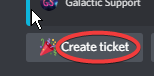
https://i.imgur.com/IpZNV3U.png is there a way to customize this text yet?
 simple igloo
Hi i have a question
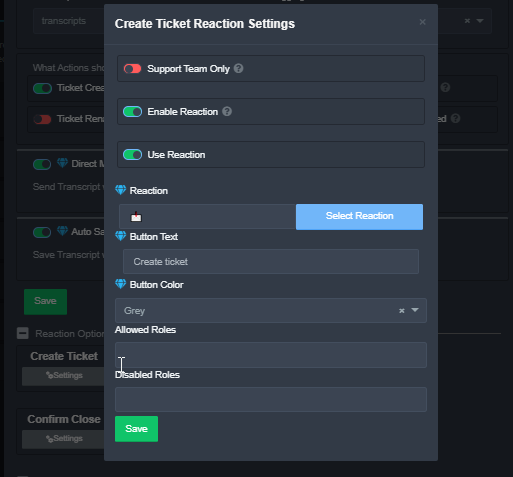
can i do that tickettool doesnt allow to open a ticket with a Specific Role
so if the click the reaction it doesnt open a ticket
marble spruce
simple igloo
so if the click the reaction it doesnt open a ticket
yes, under reaction optionshttps://i.imgur.com/jjxseM1.png
np
simple igloo
thx @marble spruce
 iron nightBOT
Gave 1 Rep to StormyGalaxy (current: #47 - 1)
jade topaz
Hallo brauche hilfe
hidden tundra
jade topaz
Hallo brauche hilfe
ja wobei denn?
jade topaz
Ich wurde ohne grund bei der nita gekit
hidden tundra
jade topaz
Ich wurde ohne grund bei der nita gekit
Wenn ich fragen darf.... Was hat das mit TicketTool zu tun?
jade topaz
Mir wirde gesagt ich soll hier hin
hidden tundra
jade topaz
Mir wirde gesagt ich soll hier hin
Also du wurdest von einem Server gekickt oder wie?
 shadow axle
@jade topaz Dies ist der Support-Server für den Bot "Ticket Tool". Wenn Sie keine Fragen zum Bot haben, beenden Sie bitte diese Konversation jetzt
 rapid finch
hi i cant pay my suscription, need help please
shadow axle
open a billing ticket from #🎫│make-a-ticket
 frigid pollen
how to automatically set a name to the tickets we open
 rough moth
frigid pollen
how to automatically set a name to the tickets we open
rough moth
frigid pollen
how to automatically set a name to the tickets we open
Do you have premium
rough moth
Yes
hidden tundra
 kind nymph
I don't seem to be able to use $delete
kind nymph
I don't seem to be able to use $delete
Did you enable the $delete command?
frigid pollen
and how do we make all tickets spawn in a certain category
 atomic solstice
$help category
humble sequoiaBOT
How to set the open category
To set a open category go to the Dashboard -> Panel Configs -> Settings -> Category Options -> Category Open
 atomic solstice
frigid pollen
and how do we make all tickets spawn in a certain category
atomic solstice
frigid pollen
and how do we make all tickets spawn in a certain category
here ^^
frigid pollen
tysm man
atomic solstice
np
frigid pollen
thanks @atomic solstice
iron nightBOT
Gave 1 Rep to Satisfy (current: #3 - 122)
 desert umbra
How do you set custom emojis for the open ticket, close etc? I can see a spot for custom emojis but none of my servers or other servers emojis appear
rough moth
desert umbra
How do you set custom emojis for the open ticket, close etc? I can see a spot fo...
Just to make sure, do you have premium
And if you do try searching for the emoji you are looking for in the search bar
desert umbra
Yeah I do, and yeah I am but I also tried scrolling through the options for emojis but only see discords default
I did only just get premium if that matters?
rough moth
desert umbra
I did only *just* get premium if that matters?
It shouldn’t, so you can’t see any of your custom emojis?
Even when you search for them?
desert umbra
Nope 😦
I'll give it a bit, I have to head out now anyway so I'll try again in a bit. Thanks for your help anyway 🙂
desert umbra
rough moth
It shouldn’t, so you can’t see any of your custom emojis?
It's fixed now, starting to see them all. Thanks mate
iron nightBOT
Gave 1 Rep to JustSomeone (current: #18 - 16)
jade topaz
Hello, I want to know what reward I get when booting the server
 tribal cedar
jade topaz
tribal cedar
jade topaz
Hi I would like that when opening a ticket everyone is mentioned (in the open ticket lounge)
How to do ?
atomic solstice
$help ping
humble sequoiaBOT
How to make Ticket Tool ping a role
To make ticket tool ping a role when a ticket is opened, go to the Dashboard -> Panel Configs -> Settings -> Ticket Options -> Ticket Message -> Message Text and do this:
{@Role name} This is case sensitive and the role must have @mentions enabled
 atomic solstice
jade topaz
Hi I would like that when opening a ticket everyone is mentioned (in the open ti...
atomic solstice
jade topaz
Hi I would like that when opening a ticket everyone is mentioned (in the open ti...
here is how ^^

 craggy geyser
$help ping
humble sequoiaBOT
How to make Ticket Tool ping a role
To make ticket tool ping a role when a ticket is opened, go to the Dashboard -> Panel Configs -> Settings -> Ticket Options -> Ticket Message -> Message Text and do this:
{@Role name} This is case sensitive and the role must have @mentions enabled
 lone bobcat
 jade topaz
why did you ping ?
 molten delta
Can you help me?
hidden tundra
molten delta
<@279639060996292609> <@132147174212501504>
Stop mention staff unnecessarily
molten delta
Sorry
I want to change the new, for example, write a hello, open a ticket for me.
Can I?
hidden tundra
molten delta
I want to change the new, for example, write a hello, open a ticket for me.
do you mean the text in the ticket?
molten delta
I don't want to open a ticket from chat.
It's$new
i know him
But I want to change it for something else.
Or another word.
molten delta
Take your time
hidden tundra
I don't think that will work
molten delta
hidden tundra
I don't think that will work
You're on the support team, right?
hidden tundra
This is also currently in beta
hidden tundra
molten delta
You're on the support team, right?
Nope
molten delta
I want someone from technical support, but no one answers.
jade topaz
molten delta
I want someone from technical support, but no one answers.
you did not open a ticket. and no you cant change it
hidden tundra
molten delta
I want someone from technical support, but no one answers.
Have you tried opening a ticket?
jade topaz
hidden tundra
Have you tried opening a ticket?
he just opened a ticket
hidden tundra
jade topaz
he just opened a ticket
Okay 
humble sequoiaBOT
-- moved to ticket --
 rough moth
jade topaz
Just got this
rough moth
jade topaz
Just got this
Does ticket tool have the correct permissions
jade topaz
Yep, has always been perfectly fine up until today
rough moth
Try resending the panel and making a ticket
jade topaz
Will try now, thanks!
Worked but with no button. No problem though
Thanks @rough moth
iron nightBOT
Gave 1 Rep to JustSomeone (current: #18 - 17)
rough moth
The button doesn’t work for you?
jade topaz
the button doesn't appear
 solid stream
I'm guessing that's an old panel
rough moth
jade topaz
the button doesn't appear
At all?
solid stream
server id?
jade topaz
Fairly old panel, but we did the newpanel command and nothing
jade topaz
solid stream
server id?
743224358989856838
rough moth
Do you have premium
jade topaz
Yep
rough moth
Wait for BattleEye to do something
jade topaz
Thanks 🙂
rough moth
He shall have your answer
solid stream
what panel is having the issue?
jade topaz
Panel 1
solid stream
What happens when you do $newpanel 1
jade topaz
Just creates a regular panel with reactions
 Sorry
iron nightBOT
Sorry
iron nightBOT
Gave 1 Rep to BattleEye (current: #10 - 48)
 formal mural
What is this ? News ? Dont work
 rough moth
formal mural
What is this ? News ? Dont work
rough moth
formal mural
What is this ? News ? Dont work
You need premium
formal mural
I have
formal mural
ok try thx
rough moth
Np
solid stream
formal mural
What is this ? News ? Dont work
Still beta testing, started a few days ago
 dire ibex
Hey guys, so... my server is bug in some ticket channels that it's impossible to delete, what to do?
rough moth
dire ibex
Hey guys, so... my server is bug in some ticket channels that it's impossible to...
Try manually deleting it
dire ibex
That's what I just said, you can't delete it
 rough moth
Looks like a broken channel
dire ibex
Messages do not load
rough moth
I don’t think ticket tool has the ability to help with that, but wait for support and make sure
dire ibex
^^ thx
hidden tundra
@dire ibextry to refresh your discord
dire ibex
i try
hidden tundra
dire ibex
i try
Did it work?
rough moth
It won’t work the channel is corrupted
 uncut sphinx
is there a way to deal w/ ticket overflow?
mystic hound
dire ibex
<@!813459470168227851>
Make sure it's not a visual bug (refresh and restart discord), if you're not the server owner ask the owner to try deleting and if nothing works contact discord
rough moth
uncut sphinx
is there a way to deal w/ ticket overflow?
Wdym
uncut sphinx
rough moth
Wdym
uhh like discord has a limit of how many channels you can have /category, wondering if theres a way to deal with that once that max is reached?
im assuming its more involved than that, but wondering if im missing anything
rough moth
If it reaches the limit you can’t do anything about it
Besides close excess channels
Delete*
rough moth
Isn’t the channel limit 500 tho?
uncut sphinx
thanks @rough moth
iron nightBOT
Gave 1 Rep to JustSomeone (current: #17 - 18)
uncut sphinx
uhhh
rough moth
I’ll look it up
rough moth
uncut sphinx
50 looks like
I think so
But if you use different types of tickets to the same category, you can probably create another category for them
uncut sphinx
its all the same type of ticket (each member opens a ticket for a service so it can get messy and overflow)
rough moth
I see
Maybe make another panel for ticket overflow
Members can use that once the main one is full
uncut sphinx
lmao i think you overestimate the general population's intelligence level to be able to do that
rough moth
Nah, discord limits are a big thing
mystic hound
You can have more than 1 category for the same panel by the way
 tiny girder
light could u look at my ticket
mystic hound
Nope it's 1 am and I'm more or less already asleep, would rather not
 arctic crest
Hey how do i make custom commands with ticket tool ?
hidden tundra
arctic crest
Hey how do i make custom commands with ticket tool ?
You Can create Tags
hidden tundra
humble sequoia
Here
iron nightBOT
Gave 1 Rep to Fabio3323 (current: #35 - 2)
hidden tundra
No Problem 😉
rough moth
mystic hound
You can have more than 1 category for the same panel by the way
How would that work, once one category is full does it move on to the next?
Or does it just split evenly
craggy geyser
Fills the first and then goes to the next
 manic elbow
is bot still offline?
because it does not appear to be working at all in my server still
rough moth
does the bot have the correct permissions
manic elbow
yes we use it pretty much 24/7 so I know it works just fine. I"m just either at the total number of tickets allowed
or it's still down, cause we have been having more frequent outages recently it seems like
manic elbow
also do I have to switch and invite the premium ticket tool bot
once I purchase premium?
rough moth
manic elbow
once I purchase premium?
no, but its better to have the prem bot
rough moth
 arctic geode
but yet its not on the panel
arctic geode
but yet its not on the panel
have u set it up?
rough moth
manic elbow
yes we use it pretty much 24/7 so I know it works just fine. I"m just either at ...
50 channels are allowed per category
arctic geode
How can I if it's not visibale on my servers
rough moth
you cant see ticket tool on ur server?
manic elbow
rough moth
50 channels are allowed per category
is there a way to increase this?
manic elbow
@arctic geode did you invite the ticket tool into the panels
rough moth
manic elbow
is there a way to increase this?
no discord limit, but u can add multiple categories, once one is full itll go to the next
manic elbow
you want it in
arctic geode
 manic elbow
 arctic geode
Bot is here
rough moth
arctic geode
yes <@!813459470168227851>
the bot is online tho right?
manic elbow
have to go online to panel config
arctic geode
but not here
 manic elbow
and invite it to each channel
rough moth
u did it that fast?
arctic geode
it's two buttons
manic elbow
if I name two categories the same name, will this prioritize category overflow into the new category with the same name as opposed to other categories?
arctic geode
 rough moth
manic elbow
if I name two categories the same name, will this prioritize category overflow i...
rough moth
manic elbow
if I name two categories the same name, will this prioritize category overflow i...
can u reword that a bit
 rough moth
hmm make a ticket in #🎫│make-a-ticket and ask a support team member @arctic geode
manic elbow
can I control where the tickets are going to overflow to
rough moth
yes
manic elbow
how 😄
rough moth
u can add an extra category
its in category options
add the other category u would want overflow tickets to go to
rough moth
np
 waxen patio
I have a bug with the bot he does not want to download yet I have downloaded a dozen times thank you for helping me cordially
jade topaz
waxen patio
I have a bug with the bot he does not want to download yet I have downloaded a d...
wdym with " does not want to download"?
 late ocean
Hey guys! Are we allowed to make more than 1 ticket? I’ve been false banned in Tower of Hell twice and already used one
I just wanted to know if I could still be unbanned using the ticket tool
shadow axle
$tts
humble sequoiaBOT
You're in the wrong place
We provide support for @pseudo glen discord bot and cannot help you with whatever issue you have.
Please make sure to contact the appropriate support team.
If you don't have any further questions regarding our bot Ticket Tool, please close this ticket
_ _
shadow axle
you should ask the moderators of that server
late ocean
Okay
rough moth
we dont know what the other servers staff enforce
rough moth
late ocean
Wait are y oh allowed to delete a ticket?
yes?
rough moth
late ocean
Ok
r u talking about your server or another
rough moth
cause a server can remove the permission from you
late ocean
Ok
 inner aurora
@robust sandal quota
 robust sandalBOT
Quotas for Ticket Tool Support
<:azure_translate:734169289787179109> Azure
7,525 / 412,000 characters (1% used)
<:google_translate:734169097700376618> Google
53 / 1,000 characters (5% used)
William_CTO Azure Quotas
0 / 10,000 characters (0% used)
Each quota resets on the first of the month.
 scenic plinth
...
rough moth
What
 willow escarp
Can i give specfic roles access to see the ticket or do they have to have adminstator
willow escarp
how do i do it
willow escarp
in server info?
rough moth
Panel configs
jade topaz
if you use multi panels can you remove access in one of the panels for roles to enter it?
willow escarp
i opened the settings for the panel
rough moth
jade topaz
if you use multi panels can you remove access in one of the panels for roles to ...
Are you talking about roles to create the ticket or see it
rough moth
willow escarp
i opened the settings for the panel
Now click the first category
And you should see support team roles and additional roles
Add whatever roles you would like there
jade topaz
so i have a staff team and want make another panel but only give my trial staff access to view it or talk in it as it’s for my trial staff not my other staff but then i want my main panel to stsy how it is where all of em can talk is that possible
rough moth
jade topaz
so i have a staff team and want make another panel but only give my trial staff ...
It is
You would have to change the support team roles for each panel
To whatever you would want
For example, put trial staff as support team role for one panel and don’t add the other staff roles
jade topaz
oh okay thanks
rough moth
If you have any complications lmk
willow escarp
Thanks got it to work
rough moth
Np
 eternal jewel
 bright crescent
Are tags used to respond to specific messages that people say? And if so, is there an area that tell me how to do that?
Nvm, figured it out
Actually, is there a way to make the bot register a specific word and generate a tag?
rough moth
bright crescent
Actually, is there a way to make the bot register a specific word and generate a...
ticket tool has a tag feature
bright crescent
Im trying to use the tag system to register specific words to generate the phrase I want set
rough moth
yeah thats possible
bright crescent
So would $ be the symbol to use to have the bot register anytime someone says a trigger word?
rough moth
no
the tag is whatever u set it as
so if the trigger is hi, all u need to say is hi
bright crescent
I understand that
I want the bot to recognize any specific words to generate the phrase so I don't have to make 30 different tags
bright crescent
rough moth
so if the trigger is hi, all u need to say is hi
Yup, already got that part
rough moth
bright crescent
I want the bot to recognize any specific words to generate the phrase so I don't...
could u give me an example?
bright crescent
Like something extremely basic as "Hello, I need help". I would want the bot to recognize "help" without having to register a bunch of different tags
rough moth
oh i see
let me check
unfortunately ticket tool can only do exactly what the user said
it cant take out a key word
rough moth
you can probably suggest that to the devs on the community server
humble sequoiaBOT

Discord
This server is a community server where members can come relax, with the ability to get tutored in school, or play games | 2,804 members
bright crescent
Also, where is the verify resource for premium tag on here?
bright crescent
Already am
rough moth
alright, then make the ticket and wait for someone to assist u
bright crescent
Thanks for the help bud
rough moth
np
solid stream
bright crescent
Also, where is the verify resource for premium tag on here?
For a more advanced tag system I would recommend carl bot.
I unfortunately haven't had the time or desire to revamp that system yet.
bright crescent
Oh lol, no was asking about premium tags for here on the server
solid stream
bright crescent
I want the bot to recognize any specific words to generate the phrase so I don't...
I was talking about this
rough moth
solid stream
For a more advanced tag system I would recommend carl bot.
or dyno
i prefer dyno
solid stream
I'm pretty sure Carl has a more extensive tag/custom command system
bright crescent
For tickets?
bright crescent
Does it add onto the ticket system? Or do I just add the different tags to the tickets somehow?
Oh
solid stream
Its another bot entirely
rough moth
solid stream
I'm pretty sure Carl has a more extensive tag/custom command system
not sure never tried carl, but dyno has an auto responder that works well
u can use a key word or a specific word
all comes to preference ig
solid stream
Carl's can add roles delete messages remove roles it's system is actually pretty intense.
bright crescent
Dyno does too
solid stream
We also used dyno
bright crescent
But Idk if I can get either of them to hook into the tickets?
rough moth
i dont see myself switching to carl, dyno works very well, andi think its better
bright crescent
this is what I'm reffering to about catching words or a string of words to be able to respond to instead of just singular word messages, or having to type out a bunch of tags to get the responder to work
Like being able to use {General sentence here} and everything in the brackets gets looked at in the sentences to respond to whatever is defined
rough moth
Why are you pinging?
rough moth
bright crescent
But Idk if I can get either of them to hook into the tickets?
Pretty sure you can
As long as the bot can see the tickets
bright crescent
rough moth
Why are you pinging?
He likes the funny red squares
 mental needle
@bright crescent @bright crescent
rough moth
Squares?
mental needle
@mental needle @bright crescent
bright crescent
Now he's just being an annoying ass
bright crescent
rough moth
Squares?
The pings
mental needle
@rough moth
 south dawn
i want to change $new to custom text can i ?
 bronze dust
Hello can someone help me please?
solid stream
bronze dust
Hello can someone help me please?
What's up?
 heavy summit
hey, brought premium but how do i add the premium bot to my server
humble sequoiaBOT
Inviting and Enabling Premium Bot
The first thing you will need to do is invite the premium bot, an invite can be found here
Once the bot is in your server we will head to the dashboard and manage your server. When you are managing your server, you want to head into "Server Configs" then click the drop down menu under "Select the bot you would like to use on this server" then click "Ticket Tool#6207" and then save.
heavy summit
thanks bro
bronze dust
So i got a new pc and got everything gdownloaded but it keeps coming up and saying hardware id needs reset i believe, is this the case since its a new pc?
solid stream
bronze dust
So i got a new pc and got everything gdownloaded but it keeps coming up and sayi...
$tts
humble sequoiaBOT
You're in the wrong place
We provide support for @pseudo glen discord bot and cannot help you with whatever issue you have.
Please make sure to contact the appropriate support team.
If you don't have any further questions regarding our bot Ticket Tool, please close this ticket
_ _
rough moth
Stop doing that here
Can a support team member do something
This dude keeps pinging himself the bot, and me
 zealous wedge
Hey, Is there a way to track who has the most $claims
rough moth
zealous wedge
Hey, Is there a way to track who has the most $claims
No
Not with ticket tool
solid stream
$tts
humble sequoiaBOT
You're in the wrong place
We provide support for @pseudo glen discord bot and cannot help you with whatever issue you have.
Please make sure to contact the appropriate support team.
If you don't have any further questions regarding our bot Ticket Tool, please close this ticket
_ _
 low goblet
solid stream
$tts
low goblet
solid stream
$tts
Can you write it to translate from google?
willow escarp
Is there a way for the ticket to be automatically opened when a new member join the discord?
rough moth
willow escarp
Is there a way for the ticket to be automatically opened when a new member join ...
No
jade topaz
willow escarp
Is there a way for the ticket to be automatically opened when a new member join ...
I do not think so
willow escarp
damn alright
jade topaz
willow escarp
damn alright
You never know, someday maybe
south dawn
i want to change $new to custom text can i ?
 uncut ivy
humble sequoiaBOT
uncut ivy
humble sequoiaBOT
Ticket Tool Premium
Get premium at https://tickettool.xyz/premium
Manage your subscriptions at https://tickettool.xyz/subscriptions
Why Premium?
Premium lets you customize the bot just how you want it. It also helps keep the bot running.
rough moth
@uncut ivy
 deft coral
I have multiple panels up and running in the same channel but this particular panel I created recently gives me this error.

 prime bridgeBOT
Fynn has been silenced for 10m 

 Reason: Posting Discord Server Invites
Fynn#7338 | 641244155976089600
 fallow ingot
deft coral
I have multiple panels up and running in the same channel but this particular pa...
fallow ingot
deft coral
I have multiple panels up and running in the same channel but this particular pa...
Does ticket tool have the correct permissions to talk or manage the channel you want the panel in?
 twin nacelle
how can we make this that when a person reacts to ticket tool to open a ticket, there reaction immediately gets deleted and a ticket opens, rather than stay there
fallow ingot
twin nacelle
how can we make this that when a person reacts to ticket tool to open a ticket, ...
It should automatically delete and open the ticket.
twin nacelle
fallow ingot
It should automatically delete and open the ticket.
no it doesn't
twin nacelle
fallow ingot
Can you resend the panel.
i have done it multiple times
fallow ingot
Ok, hold on please.
Does ticket tool have administrator?
what’s confusing is this happened to me and by simply sending the panel again it worked
twin nacelle
fallow ingot
Does ticket tool have administrator?
no, i don't want it to be in every single channel
i mean, i don't want the bot in every single channel
fallow ingot
Okay so it should definitely work I just tested it myself and it worked. I don’t know what your issue is therefor I will leave you with the lovely support team . Sorry I couldn’t help.
twin nacelle
😐
deft coral
fallow ingot
Does ticket tool have the correct permissions to talk or manage the channel you ...
yes and it works for other panels
fallow ingot
^
fallow ingot
deft coral
yes and it works for other panels
Try sending the panel using $panel [ID].
 azure stag
Hello, i put the ticket tool on my discord server but on the dashboard the server is not showing up
atomic solstice
azure stag
Hello, i put the ticket tool on my discord server but on the dashboard the serve...
hi, please try to log out and log back in to the dashboard. That reloads the server list
azure stag
it works thanks you !
atomic solstice
azure stag
it works thanks you !
no problem
 bold trail
Hi how to make when people open a ticket it will ping role
shadow axle
$help ping
humble sequoiaBOT
How to make Ticket Tool ping a role
To make ticket tool ping a role when a ticket is opened, go to the Dashboard -> Panel Configs -> Settings -> Ticket Options -> Ticket Message -> Message Text and do this:
{@Role name} This is case sensitive and the role must have @mentions enabled
iron nightBOT
Gave 1 Rep to nance (current: #19 - 16)
shadow axle

fallow ingot
fallow ingot
Try sending the panel using $panel [ID].
Any luck @deft coral ?
 cold silo
Does configure bot to NOT auto delete tickets requiere premium version? cannot find the option.
deft coral
fallow ingot
Any luck <@197636638023614465> ?
Did that before and nothing happened
I just cloned my existing one
jade topaz
ddos again???? website not working
 left solar
jade topaz
ddos again???? website not working
left solar
jade topaz
ddos again???? website not working
I can use it
solid stream
It's working fine
I mean, someone did just try a 33k ddos attack and it got handled by cloudflare.
rough moth
 rich stream
I want to manage
rich stream
I want to manage
Manage what?
rough moth
solid stream
I mean, someone did just try a 33k ddos attack and it got handled by cloudflare.
Damn wtf, but how did he know
solid stream
likely the one who did it, had this a few times..
rough moth
Interesting
solid stream
One of the morons actually posted a SS of cloudflare ban that had their IP and it was one of the blocked ones for a ddos attack
They ddos for attention and if nobody knows it's going on then that doesn't get them anything.
rough moth
solid stream
One of the morons actually posted a SS of cloudflare ban that had their IP and i...
Lmao
rough moth
jade topaz
ddos again???? website not working
How did u know there was a ddos attempt?
solid stream
3k requests in around a minute.
rough moth
solid stream
3k requests in around a minute.
Friend requests?
shadow axle
site requests
rich stream
The ticket is not working
rough moth
rich stream
The ticket is not working
Does ticket tool have the correct permissions
rich stream
Well I will do that + Is there Arabic support
rough moth
rich stream
<@813459470168227851> does not work
If you want Arabic support u can #🎫│make-a-ticket
So you can communicate better
mystic hound
if you're talking about the premium bot specifically, you need to buy premium, then enable the bot. if you're referring to ticket tool in general, see below
humble sequoiaBOT
If the bot is not working properly, try the following steps:
-
Run the $debug command in your server, to check the permissions of the bot. Send the link you get to us.
-
Check if you have any Blacklisted Roles in your Server Configs. Any roles listed there will not be able to use the bot / create tickets.
-
While you're in your Server Configs , make sure that you don't have the premium bot enabled, without actually having premium or the bot on the server.
These are the most common issues. If your problem still exists, you can go to our Troubleshooting Page for more fixes.
 jade sparrow
Do I just submit a ticket here to get premium role?
humble sequoiaBOT
Inviting and Enabling Premium Bot
The first thing you will need to do is invite the premium bot, an invite can be found here
Once the bot is in your server we will head to the dashboard and manage your server. When you are managing your server, you want to head into "Server Configs" then click the drop down menu under "Select the bot you would like to use on this server" then click "Ticket Tool#6207" and then save.
jade sparrow
I have the bot, I have had it for awhile
solid stream
Do you have premium and did you enable the premium bot on the dashboard?
jade sparrow
I definitely have premium, it comes out of my bank account 😄 I also have the premium features on my server and active premium status in the dashboard
solid stream
Let me look it over, what's the name or id of your server?
jade sparrow
761260754506088468 This the ID? Pandamonium Applications
humble sequoiaBOT
How to fix Ticket Tool not responding
If ticket tool is not responding, please follow these troubleshooting steps:
Check Ticket Tool's permissions
Make sure that Ticket Tool can read and write in the channel you are attempting to run commands in. Run the command @Ticket Tool#4843 debug to see Ticket Tools list of permissions in that given channel.
Check Ticket Tool's prefix
Make sure you're using the correct prefix for Ticket Tool, Ticket Tools default prefix is $ Run the command @Ticket Tool#4843 debug to see Ticket Tools prefix for your server
Check if Ticket Tool is offline
If ticket tool is offline please contact Ticket Tool support with your server ID so we can fix it asap.
jade sparrow
I'm very confused, I just want premium rank in this discord
my bot is working fine.
 jade sparrow
❤️
 drifting axle
jade sparrow
I'm very confused, I just want premium rank in this discord
drifting axle
jade sparrow
I'm very confused, I just want premium rank in this discord
you too ? :p
solid stream
The bot's broken and doesn't auto give out the role, hasn't for awhile..
 rocky wing
Hi, I'm sorry to bother you, but I urgently needed help, could I open another ticker, but in another language, or, for example, remove a question right here? It's simple.
drifting axle
hello ^^ i have the same request too
jade sparrow
That's all good, appreciate you helping either way!
solid stream
drifting axle
hello ^^ i have the same request too
Run $debug and send me your link so I can verify premium
In your server lol
drifting axle
sorry :3
solid stream
rocky wing
Hi, I'm sorry to bother you, but I urgently needed help, could I open another ti...
I don't understand what's wrong
cold silo
Does configure bot to NOT auto delete tickets requiere premium version? cannot find the option.
solid stream
Tickets don't auto delete.
cold silo
Mines does.
drifting axle
solid stream
Run $debug and send me your link so I can verify premium
when you ask the link you need this from the ticket tool message ?
solid stream
drifting axle
when you ask the link you need this from the ticket tool message ?
Checked my logs, you're good.
drifting axle
 thx
thx
solid stream
cold silo
Mines does.
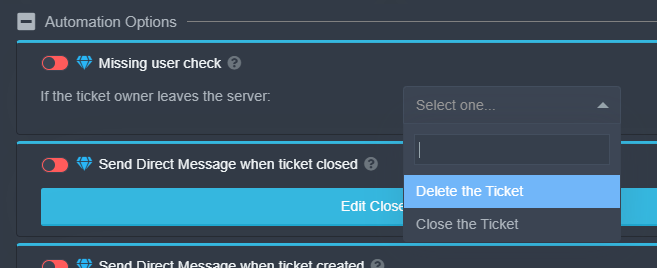
This is the only place that auto deletes tickets
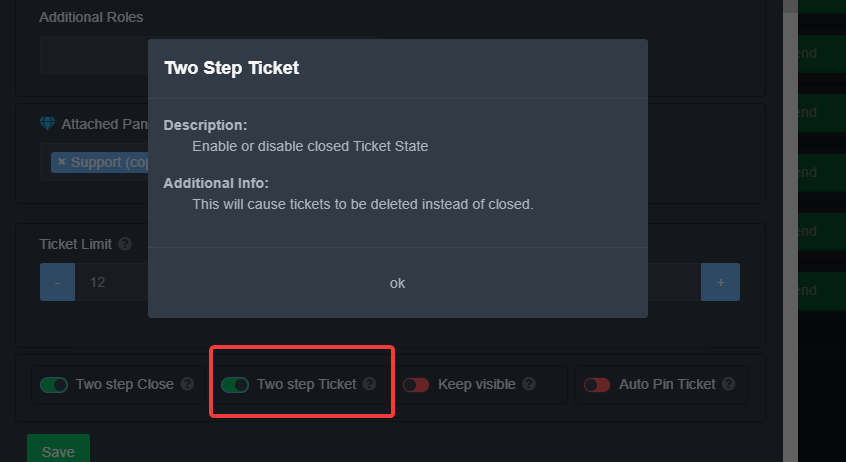
Or this I guess
cold silo
I have saw that option for Premium Users, but for real, when you click on close ticket, it closes,and deletes in a few seconds.
solid stream
cold silo
I have saw that option for Premium Users, but for real, when you click on close ...
Check my 2nd image
That's your issue.
solid stream
 glacial mulch
hello
glacial mulch
hello

rocky wing
I don't know if I can ask here, but how do I get non-support team members to see the ticket?
glacial mulch
hello mi question is how did I make the ticket message?
solid stream
rocky wing
I don't know if I can ask here, but how do I get non-support team members to see...
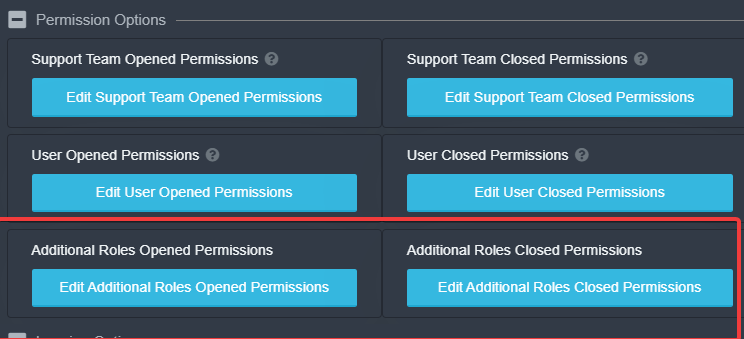
You can use the Additional Roles option
https://i.imgur.com/1AcVhrW.png
https://i.imgur.com/Lcb3UZH.png

 rough moth
glacial mulch
hello mi question is how did I make the ticket message?
rough moth
glacial mulch
hello mi question is how did I make the ticket message?
The panel message or when u open message?
glacial mulch
wel nothing thanks mi friend is doing that
rough moth
Ok
glacial mulch
bye
rough moth
Np
 solid stream
rocky wing
I don't know if I can ask here, but how do I get non-support team members to see...
solid stream
rocky wing
I don't know if I can ask here, but how do I get non-support team members to see...
or you can use $add
humble sequoiaBOT
rocky wing
@solid stream Sorry for the mention, though, I saved the options, as you taught, but they weren't applied.
Thx for help
thanks @solid stream
iron nightBOT
Gave 1 Rep to BattleEye (current: #9 - 50)
rocky wing
thanks @wicked scroll
iron nightBOT
Error: You're still on cooldown
 solid stream
 sly wraith
 sly wraith
solid stream
https://i.imgur.com/BJsvvpu.png
sly wraith
solid stream
https://i.imgur.com/BJsvvpu.png
okey ?
I did not understand and explain more
solid stream
sly wraith
okey ?
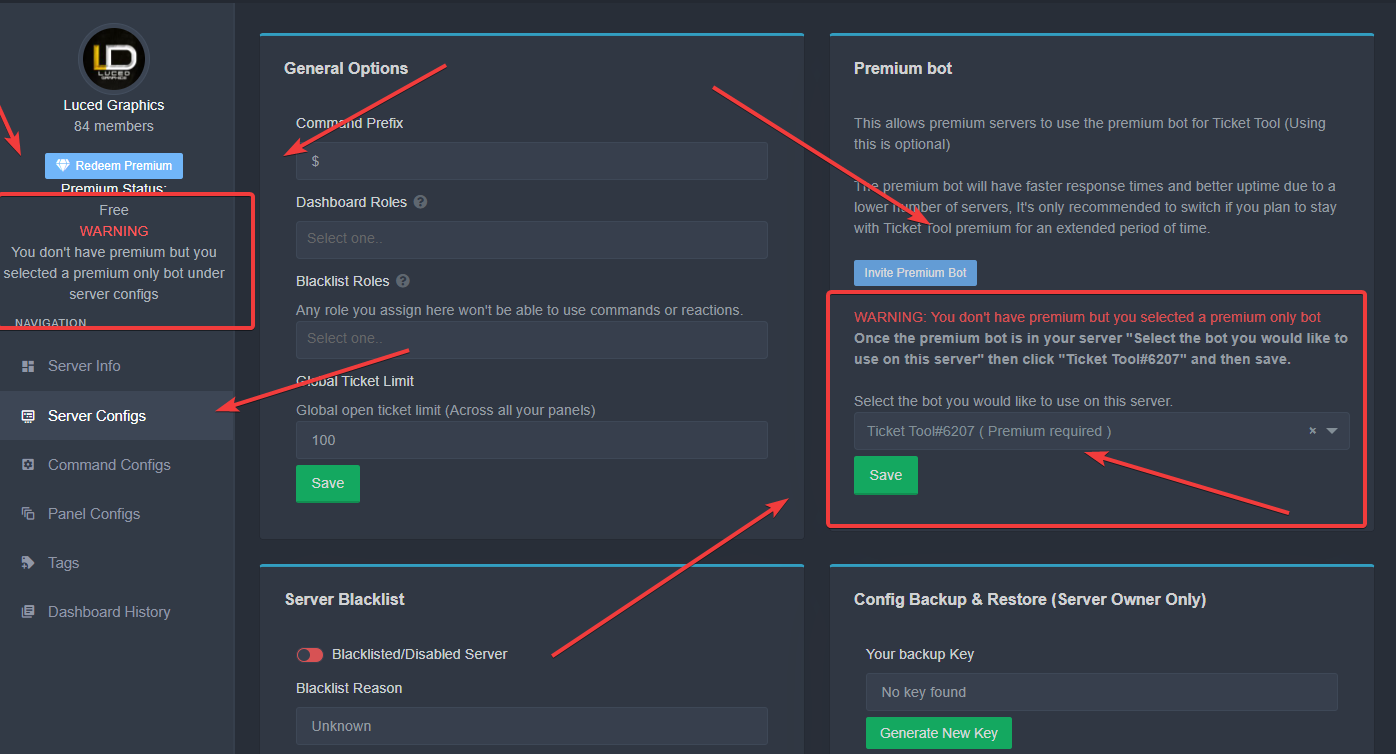
The error is pretty simple
 pale pilot
it is
sly wraith
how do i solve i ?
solid stream
 humble sequoiaBOT
How to disable the premium bot
To disable the premium bot you will have to go to the Dashboard -> Server Configs -> Premium bot -> And on the right-hand side disable the "Use Premium Bot" setting.
Premium features will still work on the normal bot.

TicketTool.xyz - Ticketing without clutter
sly wraith
okey thank you
 craggy geyser
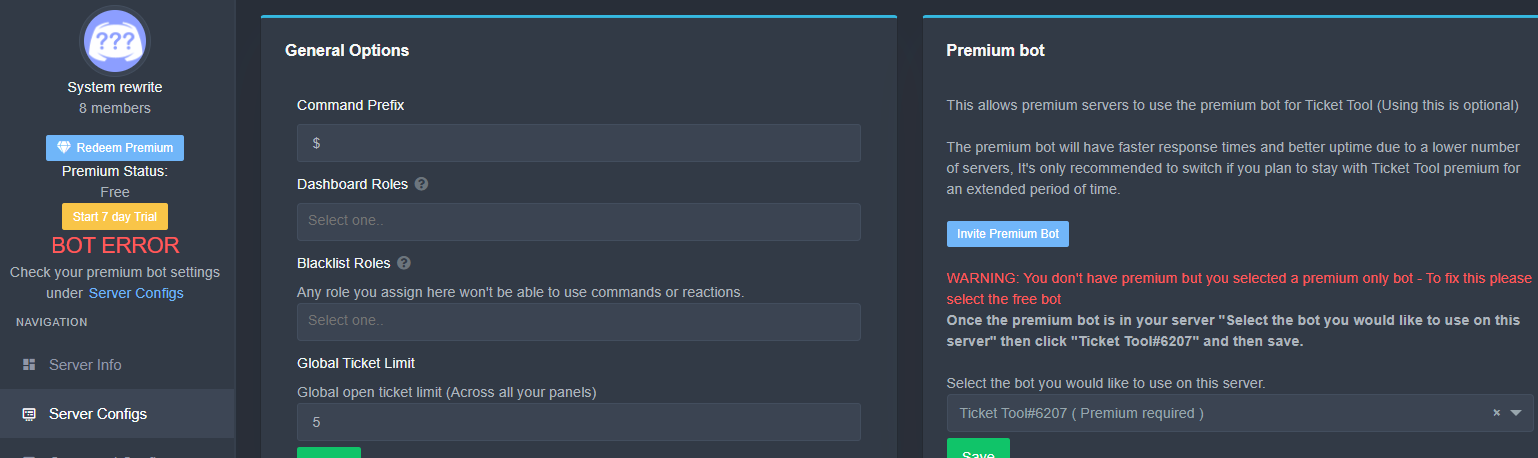
That's better
mystic hound
solid stream
https://i.imgur.com/GPjXQ8Z.png
that looks a lot better
well, not aesthetically, but hopefully it'll get people to notice
pale pilot
craggy geyser
That's better
that's what I thought the last time. But... it can't be big enough for people to miss it
craggy geyser
At least now the error is in more than one place
craggy geyser
So it had
 drifting walrus
Can anyone help me? I have admin on a server and am able to invite the bot. It shows up in server but once that happens it vanishes from the dashboard. I'm not able to manage it.
humble sequoiaBOT
Don't see your server in the dashboard?
You will possibly need to relog. Look below to see steps on how to relog.
How to relog the Dashboard.
First, you will need to go to the dashboard. Once your there, click on your avatar on the top right. after you clicked it, you will see button that says Logout. You must click that. Once you have logged out, you can log back in.
Note:
You need one of these 3 things to access the dashboard.
1. Server Owner (Level: 6)
2. Server Administrator (Level: 4)
3. Dashboard Role (Level: 2)
You can check your level using $level on your Discord Server
fallow ingot
drifting walrus
Can anyone help me? I have admin on a server and am able to invite the bot. It s...
hi try to log back in.
jade topaz
I try to make the ticket bot
humble sequoiaBOT
fallow ingot
@jade topaz follow this above ^^
drifting walrus
fallow ingot
hi try to log back in.
I did that. Although I have "manage server" permission on the server I'm showing as access lvl 0 (User). I'm trying to locate the dashboard role now to get that assigned to me but so far no luck
fallow ingot
drifting walrus
I did that. Although I have "manage server" permission on the server I'm showing...
Then unfortunately until you have that you won't be able to see the dashboard try contacting the owner for the role.
drifting walrus
How can I get "Dashboard Role (Level:2") I don't see this permission anywhere?
NM I found it ty all
 near slate
$help
humble sequoiaBOT
Help Options
$help commands - Information on commands
$help setup - Information on bot setup
$help faq - Frequently asked questions
near slate
$help setup
humble sequoiaBOT
Setting up Ticket Tool
Visit the docs for setup info
General Setup
fallow ingot
drifting walrus
How can I get "Dashboard Role (Level:2") I don't see this permission anywhere?
...
Anytime
fallow ingot
near slate
$help setup
you can run they commands in your own server…
 jade topaz
How i can set the board in a text channel i want that people can make som tickets
Pls i need help
fallow ingot
 wide ore
We are currently testing buttons they have not been released as they are in BETA
fallow ingot
jade topaz
How i can set the board in a text channel i want that people can make som ticket...
$help panel
humble sequoiaBOT
Creating a panel
To create a panel we are going to need to head over to the panel configs on the dashboard
Once at the dashboard we will need to click Create Panel
Enter a panel name (Fill in any optional settings you want)
Click Create Panel and your ready to get started with configuring your panel
An example of a creating a panel is shown below.
 fallow ingot
@jade topaz ^^
wide ore
fallow ingot
We are currently testing buttons they have not been released as they are in BETA
but did i do it the right way?
fallow ingot
wide ore
but did i do it the right way?
Click select emoji and pick a emoji.
wide ore
fallow ingot
Click select emoji and pick a emoji.
i did
fallow ingot
So it did not make the emoji you selected.
fallow ingot
Yes it should.
 fallow ingot
Is that the emoji I’d you placed in the emoji section?
And do you have a active premium subscription?
@wide ore
fallow ingot
oh your using multiple panels?
wide ore
yea
fallow ingot
sorry i did not acknowledge that.
if i was aware of it I would have said to you that exact thing…
anyways have a good one!
wide ore
you too
 slender minnow
Idk if its a bug but the transcripts are not going to the channel they were supposed to go.
I setted transcripts as the channel where the bot was supposed to send the transcripts. But its just saving them in the ticket. I tried checking the dashboard but it seemed all was ok there.
And i have a bad habit of deleting tickets right after i send the transcript command😐 😑
pale pilot
@slender minnow for the transcript to go in your chosen channel you need to use the reaction. When you save the transcript with the command, it saves the transcript in the same channel, unless you specify a channel in the command
slender minnow
Oh i use the command everytime i close/delete/save the transcript
Bcz thats more convenient for me
So i should use the reactions instead?
pale pilot
that would be easier
rough moth
Or if u have premium, save it automatically when channel is deleted/closed
rough moth
Np
slender minnow
Thnx @pale pilot
Thnx @rough moth
Two rep points? im simple is trying to take over dev XD
rough moth
That didn’t work as rep
pale pilot
you didn't give any rep, but okay lol
rough moth
FYI
slender minnow
Rip
pale pilot

shadow axle
ty
rough moth
It’s ty, thanks, thank you, and a few others I think
slender minnow
I can rep two users at a time?
slender minnow
Oof
I was planning on doing that while giving the feedback in #📈│reviews idk if it counts there
pale pilot
it does
slender minnow
Ah ok
shadow axle
ty @rough moth
iron nightBOT
Gave 1 Rep to JustSomeone (current: #17 - 19)
shadow axle
rep simple
pale pilot
I also don't need to go over dev, because I know I'm over dev 
He just cheated himself up there
slender minnow
I pinged you but idk why lol
slender minnow
No it might not he bcz of that as i can ping you
jade topaz
So when I signed up for premium, I selected the option of 2 (thinking it would pay for 2 months of service) but it actually gave me 2 servers to use it on, which I don't need.
Any chance of refund, or moving that to my 1 server? Or am I just out of 5 bucks lol
 trim pasture
There will be 10000 tickets but there is a limit of up to 4 figures
solid stream
jade topaz
So when I signed up for premium, I selected the option of 2 (thinking it would p...
If you change it back to 1 subscription you will be credited the pro rated credit
jade topaz

 mint hedge
هلا
robust sandalBOT
Hi
 Arabic (ar) → English (en)
هذه قناة دعم مجتمعي تمتنع عن الكلام هنا.
English (en) → Arabic (ar)
fallow ingot
@mint hedge ^^
 mystic moss
why i can't open Tickets with the Premium Bot of Ticket tool?
craggy geyser
Do you have premium?
mystic moss
yes
 craggy geyser
Did you recently get premium?
mystic moss
i have moved the Premium Status to an new server
craggy geyser
Have you made sure to enable the premium bot on the server in the server configs?
 tough sluice
Are buttons still in beta? I've stopped using them for the time being due to the user not cached glitch and this interaction failed
mystic moss
craggy geyser
Have you made sure to enable the premium bot on the server in the server configs...
ah, no. Thank you
craggy geyser
tough sluice
Are buttons still in beta? I've stopped using them for the time being due to the...
Yes they are. But a recent update has happened so if you want you can resend the panel with the $newpanel command and it might work (old buttons won't work anymore)
tough sluice
Will any of those glitches still occur that I stated?
craggy geyser
They possibly will, however a lot of the bugs have been sorted out. If you get any bug, feel free to post it here
mystic hound
You can follow progress and report bugs in relation to beta if you have the premium role
$pc
humble sequoiaBOT

How to get premium role
Until the automatic premium check is fixed run the command $debug on your server and send us the link in a ticket.
jade topaz
whenever I try to make it so that the bot names the channel something whenever someone opens the ticket. like to make it say @user - Support
but whenever I config the panel in the dashboard. it just resets itself.
rough moth
jade topaz
whenever I try to make it so that the bot names the channel something whenever s...
Did u save it?
jade topaz
yes
rough moth
Do u have premium?
rough moth
That’s a premium feature
jade topaz
aw man
rough moth
Yes
rough moth
All good
eager cargo
If its marked with  it's premium
eager cargo
You won't.
rough moth
Np
 high quail
In my server when people react on the ticket nothing happens and the reaction get removed, Only I can make a ticket
rough moth
high quail
In my server when people react on the ticket nothing happens and the reaction ge...
Do users have permission to make tickets?
Or is it support only?
solid stream
high quail
In my server when people react on the ticket nothing happens and the reaction ge...
Check your blacklist roles
humble sequoiaBOT
Blacklist Roles
Any role you assign as a blacklisted role won't be able to use commands or reactions.
Selecting a blacklisted role
Go to your Dashboard -> Server Configs. There you will find the option to select blacklisted roles.
Note: Don't forget to save.
 rough moth
Could also be blacklist roles
high quail
Thanks that fixed it, I dont know why all members were on the blacklist
rough moth
Lol
 serene echo
i cant create tickrt with the bot i added to my server
gave him all perms except adminstrator but cant create tickrt when i resct to its reaction
rough moth
Does he have permissions in that channel
serene echo
yes
rough moth
Can anyone create a ticket?
 rough moth
Go on your dashboard and check if you gave him all the required permissions
humble sequoiaBOT

How to fix Ticket Tool not responding
If ticket tool is not responding, please follow these troubleshooting steps:
Check Ticket Tool's permissions
Make sure that Ticket Tool can read and write in the channel you are attempting to run commands in. Run the command @Ticket Tool#4843 debug to see Ticket Tools list of permissions in that given channel.
Check Ticket Tool's prefix
Make sure you're using the correct prefix for Ticket Tool, Ticket Tools default prefix is $ Run the command @Ticket Tool#4843 debug to see Ticket Tools prefix for your server
Check if Ticket Tool is offline
If ticket tool is offline please contact Ticket Tool support with your server ID so we can fix it asap.
rough moth
humble sequoia
What’s the command for this
solid stream
rough moth
What’s the command for this
- $help offline
solid stream
serene echo
doesent work
server name or id
I'll give it a quick once over before I got to bed.

@serene echo I think this is your issue..
solid stream
k
jade topaz
hi how can i request a ban for a player?
eager cargo
$tts
humble sequoiaBOT
You're in the wrong place
We provide support for @pseudo glen discord bot and cannot help you with whatever issue you have.
Please make sure to contact the appropriate support team.
If you don't have any further questions regarding our bot Ticket Tool, please close this ticket
_ _
jade topaz
how can i chk
historylike who create tag , change prefix etc
<@&735932334699708490>
humble sequoiaBOT
-- moved to ticket --
 blissful crypt
Hi
 undone nest
How to I get button instead of reaction to open a ticket?
seems like no one's checking the channel
undone nest
pale pilot
you are very impatient lol
ik 
I thought you guys are only responding to tickets now since the upper ones hasn't been assisted
pale pilot
in tickets we reply faster
community support is mainly there for the community to help out too
undone nest
oh okay
undone nest
pale pilot
You can get it with the `$newpanel` command
One of the support team told me that I need premium For now
 undone nest
pale pilot
**new**
undone nest
pale pilot
**new**
 pale pilot
tnewpanel 1
undone nest
oh bruh it worked,, thanks lol
 quartz creek
Hi for some odd reason it says to try relogging when I try to manage my servers and when I do it still doesn’t show me server
undone nest
quartz creek
Hi for some odd reason it says to try relogging when I try to manage my servers ...
Did you by any chance login to your alt by mistake?
humble sequoiaBOT
If the bot is not working properly, try the following steps:
-
Run the $debug command in your server, to check the permissions of the bot. Send the link you get to us.
-
Check if you have any Blacklisted Roles in your Server Configs. Any roles listed there will not be able to use the bot / create tickets.
-
While you're in your Server Configs , make sure that you don't have the premium bot enabled, without actually having premium or the bot on the server.
These are the most common issues. If your problem still exists, you can go to our Troubleshooting Page for more fixes.
pale pilot
Make sure you have admin permissions or a dashboard role in the server
fallow ingot
If the bots invited to your server, then run $level in the server and check your permissions within that server.
undone nest
also how do I make it so that the tickets spawns in the same category when someone uses one?
 scenic plinth
$help category
humble sequoiaBOT
How to set the open category
To set a open category go to the Dashboard -> Panel Configs -> Settings -> Category Options -> Category Open
undone nest

 hard zodiac
Hey how can someone get the panel id to do panel all
jade topaz
hi, so my panels and everything are all set up fine and everything is working except for when you press the emoji to close the tickets it doesn't put the confirm check and x emojis and we can't close the tickets using the reactions only with the $close command, any ideas what might be going wrong?
scenic plinth
hard zodiac
Hey how can someone get the panel id to do panel all
If you are talking about multipanels, you will find the panel ID on the left of the select channel. You can find more information below.
humble sequoiaBOT
Multipanels are a premium feature that allow for a single panel with multiple reactions to open different tickets.
How to create a Multipanel
Premium users can combine multiple panels into one multipanel.
First of all you will need to assign a different Create Ticket Reaction for each Panel. Run $help reaction to learn how to do it.
Next, find the IDs of each panel you wish to combine. You can find them in your Panel Configs in the Dashboard
Next, send the multipanel to a channel using $panel [id1] [id2] {id3} ....
e.g. $panel 1 2 4 17 35 to combine panels 1, 2, 4, 17 and 35.
Up to 20 panels may be combined.
 scenic plinth
I don't believe so, all variables would be displayed on the bottom of the panel menu.
scenic plinth
jade topaz
hi, so my panels and everything are all set up fine and everything is working ex...
Do you have two step ticket enabled?
jade topaz
yes
scenic plinth
jade topaz
yes
Make sure the "confirm close" reaction is enabled in the panel menu.
Reaction settings ---> Confirm Close
jade topaz
yep it's enabled on every panel
scenic plinth
jade topaz
yep it's enabled on every panel
Alrigth sorry for last response, please make a ticket and provide them your $debug link and server ID / Name.
craggy geyser
The debug link contains the id/name so only the link is needed. Plus repeat your problem so we don't have to search here for it
humble sequoiaBOT

Buttons
The new Discord Buttons allow for a much smoother and convenient experience. They reduce lag and work much better than emojis. With ticket tool you can edit all the buttons however you like! Buttons can show emojis, text and can have 4 different colors.
Where can I edit them?
Dashboard -> Panel Configs -> <Settings> -> Button Options -> <Setting>
 craggy geyser
They are not just premium but premium gets more customisation
 tawdry yew
craggy geyser
They are not just premium but premium gets more customisation
tawdry yew
craggy geyser
They are not just premium but premium gets more customisation
i can't make it post an embed with a button
craggy geyser
Use $newpanel
tawdry yew
do i need to create a new panel
formal mural
Hi, I want to ask. Is it possible to do something at the closing of the ticket to send the ticket owner from the right to the DM and what will be written as a reason?
craggy geyser
So $newpanel 1 if you only have one panel
tawdry yew
craggy geyser
So `$newpanel 1` if you only have one panel
it works thanks
craggy geyser
No problem
formal mural
formal mural
Hi, I want to ask. Is it possible to do something at the closing of the ticket t...
Does anyone know please?
pale pilot
It's just the regular {user} variable for claimed messages.
If you want to have it displayed somewhere else that is not possible. Only when the action is taken by claiming
Channel name can be renamed too
marble spruce
Can I suggest we add a Turkish language in #🎫│make-a-ticket
mystic hound
marble spruce
Can I suggest we add a Turkish language in <#571706435449257997>
It's been suggested before, we'll consider it
jade topaz
hola
jade topaz
So, I simply can't see my server on the dashboard. It def is in the server because I see it, but my server isn't on the dashboard. Help pls
humble sequoiaBOT
Don't see your server in the dashboard?
You will possibly need to relog. Look below to see steps on how to relog.
How to relog the Dashboard.
First, you will need to go to the dashboard. Once your there, click on your avatar on the top right. after you clicked it, you will see button that says Logout. You must click that. Once you have logged out, you can log back in.
Note:
You need one of these 3 things to access the dashboard.
1. Server Owner (Level: 6)
2. Server Administrator (Level: 4)
3. Dashboard Role (Level: 2)
You can check your level using $level on your Discord Server
 safe prairie
@jade topaz
iron nightBOT
Gave 1 Rep to Tizian (current: #18 - 18)
safe prairie
You're welcome 🙂
wide ore
hey um My members can't open a ticket
it always tell them you don't have perms to open one
how can I fix this
please ping me because i have to do something
rough moth
wide ore
it always tell them you don't have perms to open one
Did u blacklist their role?
humble sequoiaBOT
Blacklist Roles
Any role you assign as a blacklisted role won't be able to use commands or reactions.
Selecting a blacklisted role
Go to your Dashboard -> Server Configs. There you will find the option to select blacklisted roles.
Note: Don't forget to save.
wide ore
rough moth
Did u blacklist their role?
no
fallow ingot
wide ore
no
Does ticket tool respond to commands?
 rough moth
wide ore
it does repond to command but user are geting this
rough moth
wide ore
it does repond to command but user are geting this
Is it support team only?
 abstract wigeon
^^
humble sequoiaBOT
How to let support team see into a ticket
About support roles
A support role lets your support team see into tickets with out having to add them manually to each and every ticket.
You can add as many support roles as you like per panel.
NOTE that the way discord works all admins can see into tickets regardless of this.
How to set a support role
To set a Support role go to the Dashboard -> Panel Configs -> Settings -> General Options -> Support Team Roles.

NOTE that the support role will not be able to see into tickets that are already created..
abstract wigeon
wrong command
safe prairie
He means this @abstract wigeon
 abstract wigeon
Oh, it's the button
 sick void
Hey, I accidentally turned on the premium trial period, but i don't have it in subscriptions can it be turned off somehow?
 humble sequoiaBOT
-- moved to ticket --
abstract wigeon
humble sequoia
-- moved to ticket --
^^
 lusty sky
If the free premium end it will start charging me money?
iron nightBOT
Gave 1 Rep to Quo (current: #4 - 121)
eager cargo
My pleasure
abstract wigeon
Try login out and login back in again.
And, please do NOT ping Support Team Members.
 wind pulsar
Sorry
abstract wigeon
abstract wigeon
Try login out and login back in again.
Try this ^^
wind pulsar
abstract wigeon
Try login out and login back in again.
I do it, but nothing
abstract wigeon
Run @Ticket Tool#4843 debug in your server
tawdry yew
why there is no russian and turkish help, which i believe are widely spoken on discord, in #🎫│make-a-ticket
abstract wigeon
Make a suggestion
humble sequoiaBOT
Suggestions for Ticket Tool
Suggestions for the bot have been moved to our Ticket Tool Community Server.
See Suggestions in #824021828704010315
Make a Suggestion
Use ^suggest <suggestion> in #825359982534721546
tawdry yew
Use ^suggest <suggestion> in #deleted-channel
that's what it outputs for me
wind pulsar
Nothing
jade topaz
you need to join the community server
 eternal storm
Ello! Quick question. How does one close a ticket? It tells me I have reached my limit.
Never mind!
abstract wigeon
You may need to wait couple of minutes.
 remote peak
So if I have the premium trial it will work
jade topaz
yes
remote peak
Is there a public changelog to see these updates as they happen
jade topaz
oh sorry no
its only for the premium users
bec it's still in beta
but when we publish any new update to all users we send it in #📣│bot-news
 radiant bobcat
hi there everyone
 languid zenith
Hello there
radiant bobcat
i have tried to log in several times, but the website keeps telling me "server not showing up, try reloging#
does anyone know what am i doing wrong?
 covert plume
Hi! the tickets we have open won't save, but all the perms seem to be in order, what could be the issue?
 copper owl
covert plume
Hi! the tickets we have open won't save, but all the perms seem to be in order, ...
copper owl
covert plume
Hi! the tickets we have open won't save, but all the perms seem to be in order, ...
you need to actually save the transcripts yourself, and you have to define a channel for the trancripts to go to
$help transcript
humble sequoiaBOT
How do I save transcript to a channel?
To save transcripts to a channel go to the Dashboard -> Panel Configs -> Settings -> Logging Options -> Transcript Channel
 covert plume
we have that set up, it's just been failing to save for the last 4 days
copper owl
covert plume
we have that set up, it's just been failing to save for the last 4 days
does the bot have all the necessary perms to send the transcript in the channel?
rough moth
Sorry to interrupt but if u don’t have premium the bot can’t auto save the tickets. So you would have to save them yourself with a command or a reaction
covert plume
as far as i can see, and we've tried both reaction and using the transcript command
 rough moth
Does ticket tool see the transcript channel?
Can it access it?
Nvm I see it has admin (or not)
covert plume
I'll get someone to reset the perms to the log channel to see if that helps
rough moth
It won’t change anything if ticket tool has admin
eager cargo
it doesnt have Admin btw
rough moth
It doesn’t?
eager cargo
no
rough moth
How do I find out if it Does
eager cargo
be support
rough moth
Lmao
rough moth
covert plume
as far as i can see, and we've tried both reaction and using the transcript comm...
Did u run this command in the transcript channel?
covert plume
resetting it seemed to work, don't know why it didn't wanna see the log channel even though it was in it 
 warm glen
How do I make the bot send the close ask message?
 rotund kite
It can be found in ticket options in the panel settings in the dashboard.
warm glen
rotund kite
It can be found in ticket options in the panel settings in the dashboard.
I set it up, but how do I make it send it in a ticket channel?
 fair knoll
Is there a new feature when someone leaves the server their ticket is auto deleted? Because no one is deleting the tickets they just keep auto deleting
(Ping upon response)
jade topaz
How do I get my ticket tool to workk? I cant find dashboard.
(Ping if i dont respond)
craggy geyser
fair knoll
Is there a new feature when someone leaves the server their ticket is auto delet...
It's not a new feature. It's a premium feature however so if you recently got premium it would be new for you. You can change it in automation options on the panel configs
craggy geyser
jade topaz
How do I get my ticket tool to workk? I cant find dashboard.
Is it that your server doesn't show up on the dashboard, or you need the dashboard link? Solution for both below
humble sequoiaBOT
Don't see your server in the dashboard?
You will possibly need to relog. Look below to see steps on how to relog.
How to relog the Dashboard.
First, you will need to go to the dashboard. Once your there, click on your avatar on the top right. after you clicked it, you will see button that says Logout. You must click that. Once you have logged out, you can log back in.
Note:
You need one of these 3 things to access the dashboard.
1. Server Owner (Level: 6)
2. Server Administrator (Level: 4)
3. Dashboard Role (Level: 2)
You can check your level using $level on your Discord Server
eager cargo
warm glen
I set it up, but how do I make it send it in a ticket channel?
$help send
humble sequoiaBOT
Sending a panel
Once you've created a panel on the dashboard you will need to send it to a channel using send on the dashboard
Select the channel you want your panel to be created in and click send.
For other questions checkout $help faq
An example of a sending a panel is shown below.
 jade topaz
Is there a way to make a ticket with out adding me or anyone to it unless I do $add user
eager cargo
All users with Administrative permissions will be automatically added
No way around that
jade topaz
no when i do $new It just says my name and makes it my ticket the issue is I can't do any ticket commands when i have it claim
i mean when I have it add me to the ticket

Like that
craggy geyser
You can do $new <user> to make it for someone else.
You can use their id, so if I did $new 166819063258021888 it would make a ticket that was as if you made it (as that is your id)
 sudden nexus
Can I close all tickets in one command ?
mystic hound
Nope
wind pulsar
Once I invite the bot to my server it don´t apperars me to manage it
How I fixed it?
humble sequoiaBOT
Don't see your server in the dashboard?
You will possibly need to relog. Look below to see steps on how to relog.
How to relog the Dashboard.
First, you will need to go to the dashboard. Once your there, click on your avatar on the top right. after you clicked it, you will see button that says Logout. You must click that. Once you have logged out, you can log back in.
Note:
You need one of these 3 things to access the dashboard.
1. Server Owner (Level: 6)
2. Server Administrator (Level: 4)
3. Dashboard Role (Level: 2)
You can check your level using $level on your Discord Server
 harsh cradle
Hey!My ticket tool is not working 
mystic hound
I'll need a bit more detail, for instance what exactly isn't working?
harsh cradle
mystic hound
I'll need a bit more detail, for instance what exactly isn't working?
Its not replying : (
It has the bot role too 
humble sequoiaBOT
If the bot is not working properly, try the following steps:
-
Run the $debug command in your server, to check the permissions of the bot. Send the link you get to us.
-
Check if you have any Blacklisted Roles in your Server Configs. Any roles listed there will not be able to use the bot / create tickets.
-
While you're in your Server Configs , make sure that you don't have the premium bot enabled, without actually having premium or the bot on the server.
These are the most common issues. If your problem still exists, you can go to our Troubleshooting Page for more fixes.
mystic hound
harsh cradle
Its not replying : (
If it's not responding at all it either doesn't have permissions to do so, or you have the premium bot enabled without having premium
harsh cradle
mystic hound
If it's not responding at all it either doesn't have permissions to do so, or yo...
Well its not premium bot and it has bot admin role
mystic hound
Server ID?

 mystic hound
you've enabled the premium bot though, I'm not talking about what's in the server, if you go over to your dashboard and select server configs you'll see this towards the right
 iron nightBOT
Gave 1 Rep to Light (current: #5 - 100)
mystic hound
no worries
harsh cradle
Done ty 
 minor portal


 mystic hound
$help setup
humble sequoiaBOT
Setting up Ticket Tool
Visit the docs for setup info
General Setup
mystic hound
Read the above doc, and please refrain from pinging staff.
 spark cosmos
yo i edited this and clicked on save. but it doesnt show up in my server
 craggy geyser
It won't update the panel if it already exists. You need to resend it
jade topaz
My discord server and account have been closed, how can I transfer the ticket tool premium bot to my new account?
craggy geyser
$transfer
humble sequoiaBOT

Premium Transfer
If you would like to move premium, panels, & tags to another server, please provide your old servers ID and your new servers ID or you can use our transfer feature yourself, learn more here
How do I find my server ID.
Open your Discord server, right-click on the server name, then select Copy ID or you can do $id in your server.
Server deleted? Can’t find the server ID?
If the server is deleted, please go into your search history and find the last time you were managing that server. At the end of the website, it should show a ID. That is your server ID.
I can't find either of them
Please notify a Support Team member that you can not find any of your Server IDs & they will assist you.
jade topaz
my old discord is closed, i dont have old discord ID
craggy geyser
The end of the embed says about what to do if you don't have it
jade topaz
okey, i create ticket for this problem
jade topaz
Hi, I'm having trouble putting the ticket in my server I knew how to put it but I forgot and I'm having difficulties, can someone help me?
humble sequoiaBOT
craggy geyser
$invite
humble sequoiaBOT
Ticket Tool Invite & Support
fair knoll
craggy geyser
It's not a new feature. It's a premium feature however so if you recently got pr...
Well I don’t have premium, it just does it automatically anyway…so how do I fix it?
jade topaz
How do I add words to the reactions and make multiple reactions under one panel? like this
#🎫│make-a-ticket message
humble sequoiaBOT
For a more convenient use of multipanels, you can now combine panels on the dashboard. This will allow you to directly send the multipanel from the dashboard (not yet available) or via the $panel ID ($newpanel ID) command.
Where can I find this?
You can find this setting on the Dashboard -> Panel Configs -> Settings -> General Options
This will put all buttons from all of your panels on one message. The message is the panel message from the panel you're combining these panels in.
 jade topaz
$buttons
humble sequoiaBOT
Buttons
The new Discord Buttons allow for a much smoother and convenient experience. They reduce lag and work much better than emojis. With ticket tool you can edit all the buttons however you like! Buttons can show emojis, text and can have 4 different colors.
Where can I edit them?
Dashboard -> Panel Configs -> <Settings> -> Button Options -> <Setting>
 sage mortar
.
 cold bay
Hello, if I take the ticket tool, can I use it for several servers? (prenuim)