#🆘│community-support
1 messages · Page 325 of 1
 iron nightBOT
 vale laurel
One more question. I need a role on some of my tickets but not others. I don’t want my staff seeing every ticket only some. Is there a way to add them? I’m trying to do it manually in the channel with channel permissions but it’s not working.
 eager cargo
$help support
 humble sequoiaBOT
How to let support team see into a ticket
About support roles
A support role lets your support team see into tickets with out having to add them manually to each and every ticket.
You can add as many support roles as you like per panel.
NOTE that the way discord works all admins can see into tickets regardless of this.
How to set a support role
To set a Support role go to the Dashboard -> Panel Configs -> Settings -> General Options -> Support Team Roles.

NOTE that the support role will not be able to see into tickets that are already created..
eager cargo
Just add said role as a support role and give it to the users who you want seeing tickets when they are opened
 jade topaz
eager cargo
Just add said role as a support role and give it to the users who you want seein...
jade topaz
eager cargo
Just add said role as a support role and give it to the users who you want seein...
hey
vale laurel
eager cargo
Just add said role as a support role and give it to the users who you want seein...
Right I did that and they could see each one. I only need them on certain tickets.
eager cargo
vale laurel
Right I did that and they could see each one. I only need them on certain ticket...
$help add
humble sequoiaBOT
How to add or remove users on tickets
To add a user to a ticket use $add <user>
To remove a user from a ticket use $remove <user>
jade topaz
plz
eager cargo
Add them to the current tickets you want them to see
jade topaz
eager cargo
Add them to the current tickets you want them to see
u can help me
eager cargo
Use the ID command
jade topaz
how
eager cargo
$id (emoji)
jade topaz
u can teach
eager cargo
$idcommand
humble sequoiaBOT
How do I get the ID of Roles/Channels/Emojis?
Ticket Tool has a useful command that helps you get the ID of various things like channels, roles, emojis and your server.
Just use the command $id <#channel/@role/:emoji:>. Now copy everything, including the brackets <...>, to your dashboard (or wherever you want it)
If you want the server ID, just use $id.
jade topaz
where
jade topaz
i have teitket tool more
vale laurel
eager cargo
$help add
I need to add a whole role not just one user. 😅
vale laurel
Ok got it
vale laurel
eager cargo
Then do so
Ty
iron nightBOT
Gave 1 Rep to Quo (current: #4 - 114)
eager cargo
My pleasure
 west heath
any idea how to get more than one emoji on the embed message for creating a ticket?
jade topaz
now ia add ???
humble sequoiaBOT
Multipanels are a premium feature  that allow for a single panel with multiple reactions to open different tickets.
How to create a Multipanel
Premium users can combine multiple panels into one multipanel.
First of all you will need to assign a different Create Ticket Reaction for each Panel. Run $help reaction to learn how to do it.
Next, find the IDs of each panel you wish to combine. You can find them in your Panel Configs in the Dashboard
Next, send the multipanel to a channel using $panel [id1] [id2] {id3} ....
e.g. $panel 1 2 4 17 35 to combine panels 1, 2, 4, 17 and 35.
Up to 20 panels may be combined.
 eager cargo
@west heath ^
 jade topaz
what me coppy
jade topaz
number 1 or number 2
eager cargo
1, top part
 scenic plinth
Top part
 short echo
Is there a way to count how many tickets one person has done?
jade topaz
@eager cargo not work
eager cargo
Send a screenshot
jade topaz
 eager cargo
Emojis don't work in the author name field
 eager cargo
because that's not the the author name field.
jade topaz
u can help me
eager cargo
I can't do it for you apologies.
 sterile cape
I
 tight lion
Hey I'm having issues getting the discord server to be detected on the tool ticket site, it won't show me on the dashboard. Any help would be much appreciated
@eager cargo

 craggy geyser
Please don't ping the support team
humble sequoiaBOT
Don't see your server in the dashboard?
You will possibly need to relog. Look below to see steps on how to relog.
How to relog the Dashboard.
First, you will need to go to the dashboard. Once your there, click on your avatar on the top right. after you clicked it, you will see button that says Logout. You must click that. Once you have logged out, you can log back in.
Note:
You need one of these 3 things to access the dashboard.
1. Server Owner (Level: 6)
2. Server Administrator (Level: 4)
3. Dashboard Role (Level: 2)
You can check your level using $level on your Discord Server
eager cargo
jade topaz
<@!437728240388276224>
Yessss?
jade topaz
jade topaz
.
craggy geyser
tight lion
Hey I'm having issues getting the discord server to be detected on the tool tick...
Follow this
eager cargo
jade topaz
.
What about it?
 tight lion
Sorry for the ping
eager cargo
I don't mind
tight lion
But I need a little help to get the ticket tool to work on the discord if you don't mind
eager cargo
I don't at all
tight lion
Brand new to this discord stuff lol
 eager cargo
You're trying to put emojis as the panel name on the dashboard.
jade topaz
$id 😀
eager cargo
Either put it as a title or message text, or embed text in the panel message
tight lion
I know once you invite the bot, you need to go on to dashboard to set it up on the website, but when I send an invite to the discord I want to add it to, it won't show me its on the list so I can open the panel
eager cargo
The author name field will not work with emojis
jade topaz
i want to put title
jade topaz
eager cargo
The author name field will not work with emojis
there are server ue this emoji watch
humble sequoiaBOT
Don't see your server in the dashboard?
You will possibly need to relog. Look below to see steps on how to relog.
How to relog the Dashboard.
First, you will need to go to the dashboard. Once your there, click on your avatar on the top right. after you clicked it, you will see button that says Logout. You must click that. Once you have logged out, you can log back in.
Note:
You need one of these 3 things to access the dashboard.
1. Server Owner (Level: 6)
2. Server Administrator (Level: 4)
3. Dashboard Role (Level: 2)
You can check your level using $level on your Discord Server
eager cargo
@tight lion ^
tight lion
I have tried all of the above
eager cargo
Can you explain how you're re-logging?
tight lion
Through my profile in the right hand corner above
eager cargo
and you press logout then log back in?
tight lion
Yes
eager cargo
Run the $level command in your server and send a screenshot please
eager cargo
There is no webhooking.
tight lion
I was just allowing it to be able to do everything so it could work but it doesn't haha
jade topaz
@eager cargo u cant help me
eager cargo
I can't do it for you, no.
eager cargo
tight lion
I was just allowing it to be able to do everything so it could work but it doesn...
What doesnt work?
tight lion
eager cargo
Run the `$level` command in your server and send a screenshot please
Where would I do this? Sorry I'm new to setting up a discord haha
tight lion
Ahh give me a few and I'll get back to yiu

 forest goblet
Please don't randomly ping me, do you have a question?
 pulsar nymph
how do i upgrade my level (of the $level)
eager cargo
You either ask an administrator for a dashboard role:
humble sequoiaBOT
Dashboard Roles
Any role you put there will have full access to the ticket tool dashboard. The server owner and users with admin permissions already have access to the dashboard.
Be careful of which roles to put here
 eager cargo
or ask the owner for administrative permissions
pulsar nymph
ok thx
forest goblet
@jade topaz Emojis don't work in embed titles, authors or footers.
 pulsar nymph
how do we do a ticket with more than one reaction ?
humble sequoiaBOT
Multipanels are a premium feature that allow for a single panel with multiple reactions to open different tickets.
How to create a Multipanel
Premium users can combine multiple panels into one multipanel.
First of all you will need to assign a different Create Ticket Reaction for each Panel. Run $help reaction to learn how to do it.
Next, find the IDs of each panel you wish to combine. You can find them in your Panel Configs in the Dashboard
Next, send the multipanel to a channel using $panel [id1] [id2] {id3} ....
e.g. $panel 1 2 4 17 35 to combine panels 1, 2, 4, 17 and 35.
Up to 20 panels may be combined.
eager cargo
^
forest goblet
jade topaz
That's in the description.
pulsar nymph
thx
tight lion
I'm booting the server up, give me a few
jade topaz
forest goblet
That's in the description.
how to put this emoji
forest goblet
Put it in the description:
humble sequoiaBOT
**Panel Message**
The panel message is where people react to make a ticket. To customize it head over to your Dashboard --> Panel Configs -> Settings -> Panel Options -> Edit Panel Message
 jade topaz
where write
forest goblet
In the embed text
tight lion
Hey Quo
tight lion
where do i run that command again? sorry lol
 atomic solstice
tight lion
where do i run that command again? sorry lol
atomic solstice
tight lion
where do i run that command again? sorry lol
which command?
eager cargo
tight lion
where do i run that command again? sorry lol
In your server
Then send a screenshot
tight lion
in the actual game server correct
eager cargo
The discord server
tight lion
ok one sec
atomic solstice
jade topaz
name ticket
if you are looking for how to change the panel message then its here:
humble sequoiaBOT
**Panel Message**
The panel message is where people react to make a ticket. To customize it head over to your Dashboard --> Panel Configs -> Settings -> Panel Options -> Edit Panel Message
tight lion
$levels?
eager cargo
Just $level
tight lion
hmm nothing is showing up
jade topaz
atomic solstice
if you are looking for how to change the panel message then its here:
who to make this
 eager cargo
tight lion
hmm nothing is showing up
eager cargo
tight lion
hmm nothing is showing up
May you open a ticket so I can assist you further from there?
tight lion
yes i will
eager cargo
Thank you
 wise sorrel
hello
jade topaz
jade topaz
https://cdn.discordapp.com/attachments/776680605517742090/854422790894387220/unk...
how to cnage name my tickt to this name in this title
 mystic bison
eager cargo
mystic bison
eager cargo
$help add
humble sequoiaBOT
How to add or remove users on tickets
To add a user to a ticket use $add <user>
To remove a user from a ticket use $remove <user>
jade topaz

HOW TO MAKE THIS
مثلي
@hybrid dagger
علي ايش
ههههههه

في واحد كمان شكلو زينا
 shadow axle
@jade topaz @jade topaz open arabic tickets from #🎫│make-a-ticket and dont ping staff members
 robust sandalBOT
jade topaz
<a:hhhhh:839760006839795742>
robust sandalBOT
jade topaz
<a:hhhhh:839760006839795742>
@eager cargo Trying to translate to English but detected as English.
Please don't waste translations by trying to translate to the same language.
jade topaz

 violet halo
How i can program bot for mentioning a role when a new ticket is created?
robust sandalBOT
jade topaz
في واحد كمان شكلو زينا
 ahmed147147
there's also one who looks like us
 Arabic (ar) → English (en)
shadow axle
violet halo
How i can program bot for mentioning a role when a new ticket is created?
Arabic (ar) → English (en)
shadow axle
violet halo
How i can program bot for mentioning a role when a new ticket is created?
$help ping
humble sequoiaBOT
How to make Ticket Tool ping a role
To make ticket tool ping a role when a ticket is opened, go to the Dashboard -> Panel Configs -> Settings -> Ticket Options -> Ticket Message -> Message Text and do this:
{@Role name} This is case sensitive and the role must have @mentions enabled
 violet halo
Thx baby
jade topaz
thanks @turbid moon
iron nightBOT
Gave 1 Rep to user (current: #34 - 2)
 shadow axle
<@456226577798135808> <@456226577798135808> open arabic tickets from <#571706435...
shadow axle
shadow axle
<@456226577798135808> <@456226577798135808> open arabic tickets from <#571706435...
@jade topaz
jade topaz
وانا معاه
violet halo
this will mention user and staff role? or not?

Cause i made a test and de {user} is ok, but it don't tag the staff role
craggy geyser
Is your staff role called "staff"
 tribal cedar
The staff role should work. Is that exactly how it appears?
violet halo
craggy geyser
Is your staff role called "staff"
Yeah, it is
craggy geyser
It is case sensitive. So if your role is actually Staff it won't work
 dreamy talon
Is there an reason as to why my transcripts would be double saving 
I have auto transcript on when the ticket is closed/deleted
tribal cedar
Make it one or the other
 swift imp
Is tag down at the momet?
 mystic hound
Tags aren't working on the free bot the development team has been alerted and is working on the issue
jade topaz
swift imp
I have premium and its not working
are you using the premium bot?
swift imp
yes
jade topaz
it should work
 jade topaz
server id?
swift imp
367349616418750465
jade topaz
1 min please
swift imp
jade topaz
send me a server invite please
swift imp
done
 shell vigil
jade topaz
<a:hhhhh:839760006839795742>
shell vigil
jade topaz
<a:hhhhh:839760006839795742>

 chilly heart
how do i add the premium ticket bot to my discord server?
Please ping me to continue the conversation
 forest tide
can you make anonymous tickets with this bot?
forest tide
forest tide
can you make anonymous tickets with this bot?
@hybrid dagger
humble sequoiaBOT
Inviting and Enabling Premium Bot
The first thing you will need to do is invite the premium bot, an invite can be found here
Once the bot is in your server we will head to the dashboard and manage your server. When you are managing your server, you want to head into "Server Configs" then click the drop down menu under "Select the bot you would like to use on this server" then click "Ticket Tool#6207" and then save.
forest tide
sorry for the ping, but you are a support team after all 
 solid stream
forest tide
can you make anonymous tickets with this bot?
solid stream
forest tide
can you make anonymous tickets with this bot?
in what way anonymous?
forest tide
solid stream
in what way anonymous?
that when you make a ticket, it would be completely anonymous, no one would know who made this ticket.
solid stream
nope
forest tide
thank you for answering!
 candid sandal
Hey!
candid sandal
How do i enable multi ticket?
tribal cedar
Panels?
candid sandal
Like multi-reactions i meant
humble sequoiaBOT
Multipanels are a premium feature that allow for a single panel with multiple reactions to open different tickets.
How to create a Multipanel
Premium users can combine multiple panels into one multipanel.
First of all you will need to assign a different Create Ticket Reaction for each Panel. Run $help reaction to learn how to do it.
Next, find the IDs of each panel you wish to combine. You can find them in your Panel Configs in the Dashboard
Next, send the multipanel to a channel using $panel [id1] [id2] {id3} ....
e.g. $panel 1 2 4 17 35 to combine panels 1, 2, 4, 17 and 35.
Up to 20 panels may be combined.
candid sandal
Thanks!
tribal cedar
Anytime
candid sandal
$help reaction
humble sequoiaBOT
How to change reactions
To set a custom reaction Dashboard -> Panel Configs -> Settings -> Reaction Options -> <Reaction to change> -> Reaction

NOTE you need premium to do this.
solid stream
Open a panel setting window and the button is right at the top of it.
tribal cedar
Theres no stupid questions @candid sandal
The bots not complex right? But its extensive.
solid stream
||~~only stupid people 😉 ~~||
scenic plinth
Doesn't work through emojis.
solid stream
~~This 😉😕😋 ~~
 unkempt barn
Question; I'm reading up on the multipanel, and anytime I type out the command **$panel 3 4 5 ** (combining those panels) it just resends the third panel  Am I doing something wrong?
solid stream
$panel
humble sequoiaBOT
Send panel
How to send a panel?
To send a panel use the command $panel <id>
How do I find the ID?
The ID is located on the dashboard just before your panels name.
How to combine panels? (premium only)
Add multiple ID's $panel <id1> <id2> <id..>
The first ID will have its message and reaction sent while the others will have only reactions sent.
You can combine up to 20 panels (Reactions will be slowly added)
premium only
tribal cedar
Oh
unkempt barn
solid stream
premium only
I have premium
solid stream
Are all your panels the same reaction?
tribal cedar
It should send the panel message of panel 3
unkempt barn
solid stream
Are all your panels the same reaction?
Nope
tribal cedar
But emojis of all 3 panels
solid stream
$panel 1 2 3
humble sequoiaBOT

Soutien Français :flag_fr:
Pour contacter notre équipe de support, réagissez avec :envelope_with_arrow:
Ne pas ouvrir un ticket à des fins de test. Rejoignez notre serveur de démonstration, Ici.
 TicketTool.xyz - BattleEye#9668
solid stream
TicketTool.xyz - BattleEye#9668
solid stream
^ as you can see it only sends one panel, but all of the reactions.
tribal cedar
@unkempt barn wana give us a screen shot
unkempt barn
So it works, but I might need to edit the F outta the embedded text
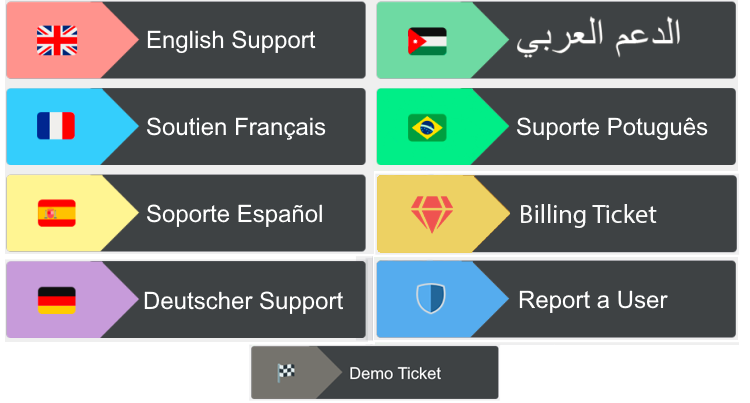
I'm wanting to create something looking a little similar to this #🆘│community-support message
tribal cedar
Just keep in mind the first panel number you send will be the panel message used
Here's was i do
Forgive mobile view

Normally those 2 sections of emojis in the panel message are next to each other
I have them in fields
unkempt barn
Ah, so you made that initial panel - with all the embedded stuff, then just combined all into the same one?
If yeah, it makes sense now 
tribal cedar
Yea thats what I was trying to explain but you got it
I also have panel messages that are stand alone incase I use $panel # in a public channel to help a user out
If that makes sense
But I may be confusing you by now
 tribal cedar
Couple ways
candid sandal
I mean if there is an emtpy design of that
tribal cedar
I do fields in mine they seemed to make an img in something and listed the url in the embedded
unkempt barn
Pretty sure you can edit the image stuff in the "image URL" field in the panel embed settings
solid stream
 tribal cedar
But you need to make and host the img
unkempt barn
Yep, just need a little bit of photoshop magic and you can make it work
solid stream
When buttons come we can just place text right on them.
unkempt barn
solid stream
When buttons come we can just place text right on them.
buttons would be so nice
i really dislike using emojis as reactions
solid stream
should only be a few more days.
tribal cedar
Sexy af
unkempt barn
candid sandal
https://i.gyazo.com/a10e09935ac4d8d830f2cbc2064418e5.png
Oh BTW, you can actually click the image in #🎫│make-a-ticket and open the link, save the image, and edit it to your liking

tribal cedar
Ps magic. Photoshop
candid sandal
solid stream
I like this more 😛
As its less reading and more simple
To to that
i need to upload the emoji to my server ?
unkempt barn
Will all that stuff be available to edit via the dashboard or will it just be limited to commands in channels?
eager cargo
It’ll be available to edit via dashboard, yes
unkempt barn

eager cargo
I’d imagine premium only and this and that but that’s a conversation for another day
unkempt barn
Yeah  All good ~ premium is great
vale laurel
Hey is there a way to change the message from the bot when you use $add
I’d like it to say please hold while we connect you with support staff.
eager cargo
You can’t change that message, apologies. I would say you can create a tag and just say the key word to trigger it and it would say what you want it to but those aren’t working properly at the moment
 timid fiber
hey I need the control panel
timid fiber
Yes
candid sandal
unkempt barn
Oh BTW, you can actually click the image in <#571706435449257997> and open the l...
But the image is with the content
 rough moth
candid sandal
But the image is with the content
rough moth
candid sandal
But the image is with the content
What are you trying to do?
candid sandal
rough moth
What are you trying to do?
I want to use that image but chaning the flag and the text
to my own needs
rough moth
candid sandal
I want to use that image but chaning the flag and the text
You will need to make that yourself
That image was custom made by one of the devs i presume
candid sandal
ohh
rough moth
There might be some sort of template online
Not sure tho
won’t be the same one as this one
rough moth
Not sure
Banner templates, multiple banner templates
I’m not too sure, I don’t know much about that
unkempt barn
candid sandal
https://i.imgur.com/NMGCzs2.png
Just gotta work some photoshop magic and you can make it whatever you want
rough moth
Yeah u can probably save the image and put whatever u want on top of it
May take some time tho
vale laurel
eager cargo
You can’t change that message, apologies. I would say you can create a tag and j...
That’s ok. Ty for for responding.
iron nightBOT
Gave 1 Rep to Quo (current: #4 - 115)
rough moth
 visual trout
I have a question about the ticket bot
visual trout
I have a question about the ticket bot
What’s up
visual trout
How do I like set it up like I added it to my server but I have no idea how to start it
rough moth
visual trout
How do I like set it up like I added it to my server but I have no idea how to s...
Check this out
Hmm the command seems to be broken
Give me on second I’ll find the website page
Here you’ll find the general setup for the bot
jade topaz
how do i get access to the dashboard
rough moth
jade topaz
how do i get access to the dashboard
By going to the website https://tickettool.xyz you can find it through here
 jade topaz
it does not show in manage servers
rough moth
jade topaz
it does not show in manage servers
Do u not see your server on the dashboard?
If not try logging out and then back in
vale laurel
eager cargo
You can’t change that message, apologies. I would say you can create a tag and j...
I wonder if I used another bot to trigger when I say $add would that work. Hmmmm
tribal cedar
Bots normally won't trigger off each other
At least I know the bot i used primarily won't work for that
vale laurel
In such case my plan is stupid 😅 nvm lol
tribal cedar
Well its worth a try
vale laurel
It might have been if I had any slots left hahaha. No triggers left fml
 misty trail
when a member reacts with the emoji, no channel is created, what could it be?
rough moth
misty trail
when a member reacts with the emoji, no channel is created, what could it be?
Does the bot have the correct permissions
misty trail
it has admin
rough moth
Necessary permissions in other words
rough moth
misty trail
it has admin
Does it make a ticket if you react to the message
misty trail
and anybody with admin can create the ticket
tribal cedar
Are you using premium bot? When you don't have premium @misty trail
Oh
Check blacklist
misty trail
its empty
tribal cedar
And ensure the create ticket isn't support only perms
misty trail
I've already tried it
 marble spruce
Why is #💬│general-chat locked?
rough moth
marble spruce
Why is <#509238831547940885> locked?
Join the community server instead
That’s why they locked it
misty trail
well, it seems that the bot is making fun of me, I've just tried it again and it now works
rough moth
Np
eager cargo
vale laurel
I wonder if I used another bot to trigger when I say $add would that work. Hmmmm
Ticket Tool doesn’t respond to other bots
Tags with an embed should work now
robust sandalBOT
humble sequoia
 Ticket Tool
English (en) → Arabic (ar)
tribal cedar
Ticket Tool
English (en) → Arabic (ar)
tribal cedar
Weird
candid sandal
Hey!
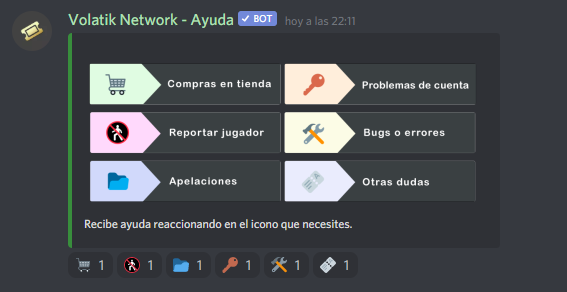
Is there any reason why the "tools" icon reaction doesnt work? The other does work.
eager cargo
Yes
candid sandal
I tried creating a panel with only the tool and its working
But in multi ppanel it doesnt
eager cargo
That is reaction that manually updates panels
you're unable to use that emoji for creating tickets, apologies.
eager cargo
My pleasure
eager cargo
Yes
jade topaz
Oi
rough moth
 wild snow
How can i make punnel ?
wild snow
How can i make punnel ?
Yes u can on your dashboard
humble sequoiaBOT
rough moth
Here you can find the general setup for the bot
wild snow
Thx i made it this last 30 minute
 rough moth
Later
 rough moth
 harsh cradle
Is the ticket tool ded ? Premium
harsh cradle
Is the ticket tool ded ? Premium
Ticket tool premium seems to be working fine
humble sequoiaBOT
Pong! Latency is 945ms. API Latency is 78ms [-]
rough moth
Are you having issues?
harsh cradle
 Why aint working then
eager cargo
Ping spikes
rough moth
Hmm 🤔 works for me not sure
rough moth
As Quo said before the ping spiked, so that may be part of the issue
Give it a few minutes and see if it works
iron nightBOT
Gave 1 Rep to JustSomeone (current: #20 - 12)
rough moth
Np
humble sequoiaBOT
Pong! Latency is 255ms. API Latency is 78ms [-]
rough moth
Seems to be doing better now
 deft coral
I changed from normal bot to premium bot and this happened. For some reason my settings aren't being detected by the bot
 solid stream
deft coral
I changed from normal bot to premium bot and this happened. For some reason my s...
solid stream
deft coral
I changed from normal bot to premium bot and this happened. For some reason my s...
I'm guessing you didn't give the premium bot access to save into your transcript channel.
deft coral
solid stream
I'm guessing you didn't give the premium bot access to save into your transcript...
Bots have an administrator permission
deft coral
Actually the channel name did reset too. It stays as ticket-{count} and closed-{count}.
deft coral
solid stream
server id?
840922927770763314
solid stream
$t shard 840922927770763314 10
humble sequoiaBOT
solid stream
$t shard 840922927770763314 10
Server 840922927770763314 should be on shard 3 - checked using 10 shards
deft coral
I figured it is because I deleted the previous panel configs
Settings nowhere to be found
Thanks for the help @solid stream
iron nightBOT
Gave 1 Rep to BattleEye (current: #10 - 47)
 vocal pawn
I have a friend that want to setup tickets but he's level 0 how can he level up?
eager cargo
He either gains administrative permissions, gets a dashboard role or has ownership of the server transferred to him.
 tulip jolt
is there any way i can ban users with a specific role in doing the command $new?
tulip jolt
ah tyty!
eager cargo
My pleasure
 sharp cradle
Hi, my server is not showing in Manage Servers tab, what can i do?
Ticket Tool is already in my server
I kicked him and invited again and nothing :/
sharp cradle
Fixed it, i loged out and then log in
 shadow axle
don't ping staff members
jade topaz
Hello, my server does not appear in the dashboard and I have updated the page a lot and it does not appear, what do I do?
eager cargo
$help ping
humble sequoiaBOT
How to make Ticket Tool ping a role
To make ticket tool ping a role when a ticket is opened, go to the Dashboard -> Panel Configs -> Settings -> Ticket Options -> Ticket Message -> Message Text and do this:
{@Role name} This is case sensitive and the role must have @mentions enabled
Don't see your server in the dashboard?
You will possibly need to relog. Look below to see steps on how to relog.
How to relog the Dashboard.
First, you will need to go to the dashboard. Once your there, click on your avatar on the top right. after you clicked it, you will see button that says Logout. You must click that. Once you have logged out, you can log back in.
Note:
You need one of these 3 things to access the dashboard.
1. Server Owner (Level: 6)
2. Server Administrator (Level: 4)
3. Dashboard Role (Level: 2)
You can check your level using $level on your Discord Server
eager cargo
@jade topaz ^
 surreal hedge
eager cargo
$help ping
surreal hedge
eager cargo
$help ping
Thank you!
iron nightBOT
Gave 1 Rep to Quo (current: #4 - 116)
eager cargo
My pleasure
 drifting shoal
Hi, can I put gif banners beneath the text panel? I tried it and for some reason it didnt appear
atomic solstice
drifting shoal
Hi, can I put gif banners beneath the text panel? I tried it and for some reason...
you can, but it's based on the link you are using. Are you using a gif from imgur?
drifting shoal
atomic solstice
you can, but it's based on the link you are using. Are you using a gif from imgu...
Yes, but I ve tried other platforms too and it doesn't change
 fallow ingot
drifting shoal
Yes, but I ve tried other platforms too and it doesn't change
fallow ingot
drifting shoal
Yes, but I ve tried other platforms too and it doesn't change
Try adding .png and the end of the link.
shadow axle
png wont work for gifs
fallow ingot
idk anyways not too sure then.
 muted egret
humble sequoiaBOT
muted egret
humble sequoiaBOT
-- moved to ticket --
 graceful crown
Hey, I setup the bot but my "users" can't create a ticket but "mods" can. What did I screw up?
fallow ingot
graceful crown
Hey, I setup the bot but my "users" can't create a ticket but "mods" can. What d...
Did you activate the create ticket option for support team only?
Or do you have any blacklisted roles set?
graceful crown
Where can I check the create ticket option?
I do have 2 blacklisted roles but it's not the role trying to create a ticket.

 prime bridgeBOT
 Type: Messages that come after a certain message
 Moderator: @shadow axle

 Messages Fetched:
 100
 Purge Request:
 10
 Messages Identified:
 10
 ** Messages Purged:**
 10
iron nightBOT
Gave 1 Rep to aaron_law (current: #13 - 38)
fallow ingot
anytime
graceful crown
I'm being told people still can't create tickets tho
drifting shoal
So how do I put gifts at as the image url and make the visibile?
Still havent got an answear
graceful crown
 fallow ingot
graceful crown
fallow ingot
graceful crown
Can you check for sure that you don’t have the wrong blacklisted role set?
graceful crown
It's blank now. - on Server Configs right?
 graceful crown
Ok, yeah I'm dumb.
fallow ingot
By the sounds of things this is your issue.
graceful crown
The people that I wanted to create tickets also had the blacklisted role...multiple roles. I'm dumb. Thanks again.
fallow ingot

 misty karma
im trying to add ticket tool to my server but it isn't working :/
fallow ingot
misty karma
im trying to add ticket tool to my server but it isn't working :/
How so?
humble sequoiaBOT
Ticket Tool Invite & Support
tribal cedar
Happens
 vagrant bane
Hi, a question about the ticket limit - does this refer to how many tickets a user can open at one time or how many tickets they can open ever (even if they close)?
tribal cedar
At a time
vagrant bane
Ok brilliant thanks
tribal cedar
It ofc if set to 3 and they have 3 open and you close one they will be able to open another
Nps
 remote peak
What happened to the buttons?
rough moth
I got ghost pinged?
fallow ingot
Same.
rough moth
Possibly some guy that ghost pinged multiple users, not sure tho
fallow ingot
Perhaps
solid stream
I'm online, Fear my wrath!
rough moth
👀
solid stream
(I set my status to online lol)
 wide summit
I have the Premium Ticket Tool and we have a ticket open in our server which cant be closed for some reason. It just shows the loading screen at the bottom of the screen. When trying to delete the channel it then says 'Unknown Channel'.
atomic solstice
wide summit
I have the Premium Ticket Tool and we have a ticket open in our server which can...
hi, could you send a screenshot?
 solid stream
ah, then you will need to open a ticket with discord.
wide summit
It's doing it for all the other members as well.
solid stream
they will have it fixed pretty quick, it's a corrupted channel.
wide summit
Ah okay. Thanks!
 young folio
Hello
I can't get the bot to come to my Discord, what should I do?
PS: I speak French and English
atomic solstice
young folio
Hello
I can't get the bot to come to my Discord, what should I do?
PS: I speak ...
did you try to invite it from the website?
young folio
Yes
atomic solstice
can you go to the discord server settings
to the member tab and there try to search for Ticket Tool?
young folio
Yes
atomic solstice
young folio
Yes
does the bot appear there or not?
 atomic solstice
well the welcome message not always announces bot joins
go to the server settings
and try to search for the bot manually in the member menu
young folio
I found it, thank you!
atomic solstice
young folio
I found it, thank you!
no problem
young folio
👍
jade topaz
website 
solid stream
looking into it
jade topaz
Hi when I make a ticket with the correct configuration and click on the ticket reaction, the ticket does not open.
What do I do ?
atomic solstice
jade topaz
Hi when I make a ticket with the correct configuration and click on the ticket r...
so when you press the emoji it does not open?
does the number go back to 1 after you press it?
or does it stay on 2?
jade topaz
atomic solstice
so when you press the emoji it does not open?
Yes
 drifting axle
hi guys ! first of all sorry for my english. I have some trouble with ticket chanel, messages don't charge and i really can't delete this f**** chanel :D anyone can maybe help me please ? :p
jade topaz
atomic solstice
or does it stay on 2?
2
atomic solstice
drifting axle
hi guys ! first of all sorry for my english. I have some trouble with ticket cha...
does an error message of some sort pop up when you try to delete the channel?
atomic solstice
jade topaz
2
do you use the free bot or the premium bot?
drifting axle
atomic solstice
does an error message of some sort pop up when you try to delete the channel?
nothing like that i try to change some setting on chanel but he always go at normal
atomic solstice
drifting axle
nothing like that i try to change some setting on chanel but he always go at nor...
is the channel you are trying to configure a Ticket made by @pseudo glen ?
drifting axle
atomic solstice
is the channel you are trying to configure a Ticket made by <@!55762835282801461...
yep
i think the bot remade the autorization
atomic solstice
drifting axle
yep
if it goes back to normal then that may be because ticket tool makes sure the permission stays the same as it is configured in the dashboard
so when you change something the bot then overwrites it back
drifting axle
ok so i can try to go to dashboard delete the bot permision go to chanel try to delete or something
jade topaz
atomic solstice
do you use the free bot or the premium bot?
free
atomic solstice
drifting axle
ok so i can try to go to dashboard delete the bot permision go to chanel try to ...
you should be able to delete the channel with the bot
drifting axle
yes i try to search this but i'm not able to
atomic solstice
@drifting axle what is the prefix you have set for Ticket Tool?
atomic solstice
drifting axle
the prefix is $
then you should be able to just type $delete inside the ticket
atomic solstice
jade topaz
free
the website is currently down so there is not much that I can help you with at the moment. I suggest that you open an english ticket and just send your Server name and Server ID inside it. I will claim the ticket and when the dashboard is back up I will take a look and check if there is something wrong with the bot setup
drifting axle
that the probleme i try this but (can i put some screenshot link here ?) the chanel not charging messages
and i can't write anything on this chanel
atomic solstice
drifting axle
that the probleme i try this but (can i put some screenshot link here ?) the cha...
yes you can send a screenshot here
jade topaz
atomic solstice
the website is currently down so there is not much that I can help you with at t...
that is to say
drifting axle
atomic solstice
yes you can send a screenshot here
(i have (french) support team on ticket i will return to you later thx for the hand)
iron nightBOT
Gave 1 Rep to Satisfy (current: #3 - 121)
atomic solstice
drifting axle
(i have (french) support team on ticket i will return to you later thx for the h...
np
atomic solstice
jade topaz
<@!601783394334015498>
Like I said above please open a ticket and send your Server name or Server ID there
 rough moth
Lol
 hot fox
my bots reactions are not working anymore
jade topaz


atomic solstice
hot fox
my bots reactions are not working anymore
the bot is down at the moment, will be fixed soon
solid stream
Something is still wrong with the dashboard, but the bot is coming online.
rough moth
Premiums online tho right?
rough moth
It is for me

 misty totem
why the bot detects me as offline
jade topaz
misty totem
why the bot detects me as offline
down rn
solid stream
now I my pc would stop being angry with me I would be able to get this fixed..
misty totem
jade topaz
down rn
down not up
?
atomic solstice
yes it is offline but is currently going back online
misty totem
atomic solstice
yes it is offline but is currently going back online
and for how much like what writes with google translate
solid stream
It will be back up in around 20 minutes.
 halcyon coral
is the ticket down?
rough moth
Yes
halcyon coral
i see
misty totem
why so long?
misty totem
ModSystemᵇᵒᵗ how to have this bot?
atomic solstice
misty totem
why so long?
because it doesn't start back up instantly, it by shards, starting with shard 1 all the was to shard 400+ one by one
solid stream
I overwrote a config file I need to fix.. need to hunt down all the misc info I need to put back.
misty totem
ModSystemᵇᵒᵗ how to have this bot?
rough moth
Idk might be wick
atomic solstice
misty totem
ModSystemᵇᵒᵗ how to have this bot?
wick bot VIP
misty totem
atomic solstice
wick bot VIP
it is not public and free
 coarse wedge
misty totem
ModSystemᵇᵒᵗ how to have this bot?
coarse wedge
misty totem
ModSystemᵇᵒᵗ how to have this bot?

The official website for Wick, the best Discord security bot.
rough moth
It’s public but not free
misty totem
rough moth
It’s public but not free
ok
rough moth
But why we talking about wick if this is ticket tool support
atomic solstice
wick has a free version premium version and a VIP version which is the ModSystem bot
tribal cedar
Right
atomic solstice
rough moth
But why we talking about wick if this is ticket tool support
¯_(ツ)_/¯
rough moth
Bots down 🤦♂️
 pale pilot
Bot is down. remember? 😄
pale pilot
$cat
atomic solstice
$banall
tribal cedar
lol
pale pilot
@solid stream take @robust sandal permissions out of #📣│bot-news ^^
misty totem
/english hej
robust sandalBOT
hello
Swedish (sv) → English (en)
mystic hound
Hej
misty totem
/english kiedy naprawicie bota proszę i jak dostać bota @prime bridge
robust sandalBOT
when you fix the bot please and how to get a bot @prime bridge
Polish (pl) → English (en)
misty totem
tribal cedar
This is ticket tool support
pls /poland
 wintry saddle
Bot down?
rough moth
Oh damn I know polish
mystic hound
jade topaz
wintry saddle
Bot down?
Seems so
 wispy hornet
wintry saddle
Bot down?
wispy hornet
wintry saddle
Bot down?
Yeah
 naive pecan
rss.help
 elder apexBOT
You are missing one or more of the following permissions:
MANAGE_CHANNELS
rough moth
It is down
tribal cedar
/pl this is ticket tool support. Google wick bot
robust sandalBOT
jest to obsługa narzędzi biletowych. Google wick bot
English (en) → Polish (pl)
wispy hornet
Read #📣│bot-news
misty totem
/english okej rozumiem a da się dostać do administracji jako helper z polski
robust sandalBOT
okay I understand and you can get into administration as a helper with Polish
Polish (pl) → English (en)
tribal cedar
/pl supporter here you mean?
robust sandalBOT
kibic tutaj masz na myśli?
English (en) → Polish (pl)
rough moth
/pl you want to become an administrator for polish here?
robust sandalBOT
chcesz zostać administratorem polskiego tutaj?
English (en) → Polish (pl)
misty totem
rough moth
/pl you want to become an administrator for polish here?
/english tak zgadza się dużo rozumiem oraz osobom z polski nie musi być potrzebny @robust sandal tylko mógłbym ja pomóc
robust sandalBOT
yes agrees i understand a lot and people with Polish not need it @robust sandal I could help me
Polish (pl) → English (en)
rough moth
/pl I don’t think they are looking for a polish support member atm, you’d have to ask a superior
robust sandalBOT
Nie sądzę, że szukają polskiego członka wsparcia atm, trzeba by zapytać przełożonego
English (en) → Polish (pl)
misty totem
/english kogo
robust sandalBOT
whom
Polish (pl) → English (en)
shadow axle
jade topaz
A
?
tribal cedar
Hi
misty totem
rough moth
/pl I don’t think they are looking for a polish support member atm, you’d have t...
/english kogo
jade topaz
My server have +350 tickets
mystic hound
/pl we don't need polish support right now
robust sandalBOT
whom
Polish (pl) → English (en)
nie potrzebujemy teraz polskiego wsparcia
English (en) → Polish (pl)
tribal cedar
Ld
jade topaz
and the bot is offline
shadow axle
yes
jade topaz

shadow axle
misty totem
mystic hound
/pl we don't need polish support right now
😦
jade topaz

 radiant moss
tribal cedar
radiant moss
tribal cedar
Ld?
tribal cedar
Lock down?
rough moth
Possibly
misty totem
/poland I fluent in polish but I can’t really type with it too well lol
 wide urchin
Hi, is Ticket Tool down???
misty totem
/poland I fluent in polish but I can’t really type with it too well lol
rough moth
wide urchin
Hi, is Ticket Tool down???
Yes #📣│bot-news
misty totem
/pl I fluent in polish but I can’t really type with it too well lol
robust sandalBOT
Biegle posługuję się polskim, ale nie mogę naprawdę wpisać z nim zbyt dobrze lol
English (en) → Polish (pl)
tribal cedar
Can we stop?
wide urchin
rough moth
Yes <#571104498483986466>
Thank you.
iron nightBOT
Gave 1 Rep to JustSomeone (current: #19 - 13)
misty totem
tribal cedar
Can we stop?
/english hej wiem czy nie chcecie mnie we wsparciu ale zawołajcie mnie jak ktoś z polski będzie okej proszę
robust sandalBOT
hey I know if you do not want me in support but call me like someone with Polish be okay please
Polish (pl) → English (en)
shadow axle
ok that's enough
tribal cedar
Ty
shadow axle
we are not looking for polish support members
misty totem
shadow axle
we are not looking for polish support members
???
rough moth
/pl Please stop chatting, if you have questions go ahead and ask, but don’t try to have conversations
robust sandalBOT
Proszę przestać rozmawiać, jeśli masz pytania śmiało i zapytać, ale nie próbuj prowadzić rozmowy
English (en) → Polish (pl)
shadow axle
/englist we are not looking for polish support members. End of conversation
or that^
shadow axle
if things get heated up too fast, maaaaaaybe
misty totem
rough moth
/pl Please stop chatting, if you have questions go ahead and ask, but don’t try ...
/english okej a jak z regulaminem można przetłumaczyć bo nie rozumiem proszę
robust sandalBOT
okay and how the rules can be translated because I do not understand please
Polish (pl) → English (en)
misty totem
/english wogóle jak mija wam dzień?
robust sandalBOT
how does the day pass?
Polish (pl) → English (en)
tribal cedar
Google's free service instantly translates words, phrases, and web pages between English and over 100 other languages.
 muted scarab
hello
tribal cedar
misty totem
tribal cedar
http://translate.google.com
thanks
muted scarab
why the bot is off
iron nightBOT
Gave 1 Rep to Enigma (current: #12 - 40)
misty totem
tribal cedar
<#571104498483986466>
/english wogóle jak mija ci dzień?
robust sandalBOT
how does the day pass?
Polish (pl) → English (en)
tribal cedar
tribal cedar
<#571104498483986466>
@muted scarab
muted scarab
tribal cedar
<@594150667300634624>
thanks
iron nightBOT
Gave 1 Rep to Enigma (current: #12 - 41)
misty totem
tribal cedar
<@594150667300634624>
/english czemu masz polski nick?
robust sandalBOT
why do you Polish a nickname?
Polish (pl) → English (en)
prime bridgeBOT
 Successful Mutes:
 1
 Unsuccessful Mutes:
 0
 Reason: repeatedly using the translation bot for convos not related to tt
Moderator: @shadow axle
wintry saddle
rekt
tribal cedar
My hero
shadow axle

shadow axle

mystic hound
@upper flower why bot down? Pls fix
rough moth

shadow axle
how did it go?
 upper flower
My whole mouth is swore
shadow axle
f
mystic hound
Nance ban him for having a conversation
tribal cedar
Right
rough moth
Lol
shadow axle
yes!
tribal cedar
Go to community server say hello 40x a day
 wanton drift
Why is the bot offline?
upper flower
?ban @upper flower
 plush lantern
Tickettool down?
prime bridgeBOT
upper flower
?ban <@771750914616852490>

Developerツ, an error happened!
The member(s) you provided can't be banned! Try again!
Developerツ#1234

 Immune/Staff!
shadow axle
rough moth
wanton drift
Why is the bot offline?
upper flower
plush lantern
Tickettool down?
No u
mystic hound
plush lantern
Tickettool down?
Yes
jade topaz
bot offline why?
upper flower
No u
rough moth
It’s being fixed
upper flower
Go away
shadow axle
mystic hound
jade topaz
Big sad
tribal cedar
Wonder how many times thats been typed
wanton drift
Do you support the Arabic language?
tribal cedar
Yes
mystic hound
Yes we do
wanton drift
tribal cedar
Yes
Where is she?
tribal cedar
I'm sorry?
shadow axle
make an arabic ticket from #🎫│make-a-ticket when it's back up
upper flower
Read #📣│bot-news
humble sequoiaBOT
Pong! Latency is 174ms. API Latency is 96ms [-]
upper flower
oi @tiny ferry, how bout u actually read #📣│bot-news and deal with it. dont come in my servers and ping me and demand me to turn on the bot when we have no control over it cuz of discord.
rough moth
Welcome back
 terse wren
Thank you for all your hard work! 😄
I have a strange question - A bit before the Tickettool went down, one of my server staff members msged me and said someone was deleting the tickets.. We are definitely missing tickets but I don't see what happened to them?
rough moth
terse wren
Thank you for all your hard work! 😄
I have a strange question - A bit before t...
If it happened during the outage I don’t think u can trade the transcripts
Trace*
terse wren
rough moth
If it happened during the outage I don’t think u can trade the transcripts
Ooo. Good point. Crazy timing to lose tickets!
rough moth
Haha yeah
radiant moss
terse wren
Ooo. Good point. Crazy timing to lose tickets!
Check the audit logs. You will be able to see who deleted the channel.
terse wren
radiant moss
Check the audit logs. You will be able to see who deleted the channel.
I did. It's the first place I looked, and it isn't there either.
radiant moss
Interesting
 queen mirage
why is general shut?
 tardy yacht
k
scenic plinth
queen mirage
why is general shut?
If you would like to talk with others, please check out Ticket Tool Lounge.
$invite
humble sequoiaBOT
Ticket Tool Invite & Support
 median nest
does someone need administrator to set the bot panel up?
rough moth
median nest
does someone need administrator to set the bot panel up?
It doesn’t need admin
But u can give it admin
To set it up faster ig
tribal cedar
Nope
tribal cedar
median nest
does someone need administrator to set the bot panel up?
You don't need admin to set it up or invite it. To invite it you need manage server role. To edit the dashboard you need to have an admin add your role to dashboard perms
Then you can set it up.
 gleaming charm
hello
i wanna ask u if i buy premium bot , can i change the name tag and the avatar ?
also the premium bot could make more than one reaction to open many kind of helping or order ?
tribal cedar
The answr to your first questions is no
rough moth
No for the first part
tribal cedar
Second is yes
humble sequoiaBOT
Multipanels are a premium feature that allow for a single panel with multiple reactions to open different tickets.
How to create a Multipanel
Premium users can combine multiple panels into one multipanel.
First of all you will need to assign a different Create Ticket Reaction for each Panel. Run $help reaction to learn how to do it.
Next, find the IDs of each panel you wish to combine. You can find them in your Panel Configs in the Dashboard
Next, send the multipanel to a channel using $panel [id1] [id2] {id3} ....
e.g. $panel 1 2 4 17 35 to combine panels 1, 2, 4, 17 and 35.
Up to 20 panels may be combined.
gleaming charm
@rough moth@tribal cedar Thx 
iron nightBOT
Gave 1 Rep to JustSomeone (current: #18 - 15)
tribal cedar
Anytime
jade topaz
is this an error on my side?

 sour mist
I ran the panel command with the multiple numbers and it did not combine
humble sequoiaBOT
Multipanels are a premium feature that allow for a single panel with multiple reactions to open different tickets.
How to create a Multipanel
Premium users can combine multiple panels into one multipanel.
First of all you will need to assign a different Create Ticket Reaction for each Panel. Run $help reaction to learn how to do it.
Next, find the IDs of each panel you wish to combine. You can find them in your Panel Configs in the Dashboard
Next, send the multipanel to a channel using $panel [id1] [id2] {id3} ....
e.g. $panel 1 2 4 17 35 to combine panels 1, 2, 4, 17 and 35.
Up to 20 panels may be combined.
radiant moss
jade topaz
is this an error on my side?
Yes run $debug in your server and make sure you have all of the needed permissions
jade topaz
radiant moss
Yes run $debug in your server and make sure you have all of the needed permissio...
keeps going offline and online, offline rn on my server should i reinvite or something
radiant moss
Server ID?
jade topaz
radiant moss
Server ID?
844365818624081980
radiant moss
One sec
 rough moth
Oh
tribal cedar
Thags something new
rough moth
Basically it makes making a panel easier
rough moth
Instead of doing $panel 1 2 3 you can just do $panel 1
radiant moss
So if all of those are on panel 5 just do
$newpanel 5
radiant moss
jade topaz
keeps going offline and online, offline rn on my server should i reinvite or som...
What bot are you using?
jade topaz
radiant moss
What bot are you using?
ticket tool 
tribal cedar
Premium or free?

 radiant moss
Can you DM me a server invite
jade topaz
radiant moss
Can you DM me a server invite
yus says i have to add u
 dull orchid
after purchasing premium , should i need to add @humble sequoia bot?
or those wil be activated in my bot ?
eager cargo
You don't need to add the premium bot as premium features work on the free bot
To redeem the premium check below
humble sequoiaBOT
Redeeming premium
Redeeming premium on your server is really simple. Just head over to your Subscriptions Page. There you can select a server of your choice, which will get premium. You can change the server at any point.
 dull orchid
eager cargo
To redeem the premium check below
dull orchid
eager cargo
To redeem the premium check below
how does discord coupan works?
where i can get one
 fallen badger
is there a possible way to remove the embed when a new ticket is made?
eager cargo
No, apologies.
fallen badger
oh ok
 heavy gulch
hello
I actually need a help
How do I edit my embed in The Ticket Tool?
Please help
heavy gulch
mystic hound
stop ghost pinging people ._.
Im sorry 😦
heavy gulch
mystic hound
which embed do you want to edit panel or ticket?
Panel
humble sequoiaBOT
**Panel Message**
The panel message is where people react to make a ticket. To customize it head over to your Dashboard --> Panel Configs -> Settings -> Panel Options -> Edit Panel Message
mystic hound
resend it or use 🛠️ to update the panel
heavy gulch
mystic hound
resend it or use 🛠️ to update the panel
Is that a bug?
heavy gulch
eager cargo
It's just a way to manually update the panel
Yeah before I did, it was automatically being edited when I update the panel.Now it isn't
craggy geyser
The panel message doesn't automatically edit. Changes to the ticket settings will but not panel message and you need to do one if the methods Light said
heavy gulch
craggy geyser
The panel message doesn't automatically edit. Changes to the ticket settings wil...
Yeah I meant the changes
It isn't working
😦
craggy geyser
Have you reacted with 🛠️
heavy gulch
Umm.. where is it btw? In the website?

 solid stream
craggy geyser
Have you reacted with 🛠️
solid stream
craggy geyser
Have you reacted with 🛠️
🛠️ doesn't do anything anymore that I know of lol
 exotic spoke
can you make a quota with the claim command through ticket tool
heavy gulch
solid stream
🛠️ doesn't do anything anymore that I know of lol
Could you please help me with the panel message edit?
exotic spoke
or like is there somewhere that defines all premium perks specifically
the ones on the purchase screen are general
craggy geyser
solid stream
🛠️ doesn't do anything anymore that I know of lol
Is it just resend the panel then?
humble sequoiaBOT
 Faster Premium Bot
Automatic Transcripts
Full Customization
Custom Reactions
Direct Messages
Ticket Automation
Multipanels
Premium Support
You can purchase premium here:
Price
$6 - Monthly
$66 - Yearly
 Premium
solid stream
craggy geyser
Is it just resend the panel then?
Premium
solid stream
craggy geyser
Is it just resend the panel then?
Did at some point
jade topaz
not open ticket
 craggy geyser
exotic spoke
or like is there somewhere that defines all premium perks specifically
craggy geyser
exotic spoke
or like is there somewhere that defines all premium perks specifically
I think this is all that there is for premium perks. If you want more specifics about any of them just ask
jade topaz
help me please
solid stream
jade topaz
help me please
Have you checked your dashboard?
what's your server name or id?
exotic spoke
well i just wanna know if you can set a quota via ticket tool with the claim command
or like track claimed tickets by staff members
jade topaz
solid stream
Have you checked your dashboard?
The parameters of the panel?
solid stream
 jade topaz
yes



 craggy geyser
exotic spoke
or like track claimed tickets by staff members
craggy geyser
exotic spoke
or like track claimed tickets by staff members
You can't do the first. But you kind of can do the second. You can search a transcript channel for the number of times a given name is in the transcript. Especially if you have the staff member who claimed a ticket become the channel name
jade topaz
can't we have a ticket without a premium?
heavy gulch
solid stream
Could you pls provide a lifetime plan for premium please
craggy geyser
jade topaz
can't we have a ticket without a premium?
You can. But your dashboard is set to use the premium bot
humble sequoiaBOT
How to disable the premium bot
To disable the premium bot you will have to go to the Dashboard -> Server Configs -> Premium bot -> And on the right-hand side disable the "Use Premium Bot" setting.
Premium features will still work on the normal bot.

TicketTool.xyz - Ticketing without clutter
craggy geyser
Hmm. Message is out of date
 queen yew
Any idea why my tickets all of a sudden started showing at the top of my discord channels? It looks like it is still set to create under the same header as in the past but it doesn't seem to be following that parameter anymore.
mystic hound
solid stream
🛠️ doesn't do anything anymore that I know of lol
worked a month ago, is it broken now? 👀
craggy geyser
queen yew
Any idea why my tickets all of a sudden started showing at the top of my discord...
Have you got 50 channels in the category?
jade topaz
It's good it works thank you I put the premium version
solid stream
mystic hound
worked a month ago, is it broken now? 👀
¯_(ツ)_/¯
queen yew
craggy geyser
Have you got 50 channels in the category?
Oh, very well could be. Didn't know there was a cap on that.
 rancid belfry
Do i need both regular and premium bots in my server?
eager cargo
No
craggy geyser
queen yew
Oh, very well could be. Didn't know there was a cap on that.
Discord have a limit of 50 tickets per category. You can put more than one category into the dashboard so if one is full it will use the next
queen yew
craggy geyser
Discord have a limit of 50 tickets per category. You can put more than one categ...
Awesome, thank you!
iron nightBOT
Gave 1 Rep to Swift (current: #8 - 69)
craggy geyser
No problem
jade topaz
It's best bot
 strong matrix
i tried to save transcript but it says "Transcript Failed to save", how to fix this?
atomic solstice
strong matrix
i tried to save transcript but it says "Transcript Failed to save", how to fix t...
make sure the bot has the View Channel & Send Messages on  in the channel that you set as the transcript channel in the logs
strong matrix

 slender minnow
the dashboard is working fine, the ping is a bit weird but thats bcz of my connection
but i can still access my dashboard
atomic solstice
 dire glacier
and the website to
dire glacier
and the website to
do you get an error when you are trying to go to the dashboard? If yes could you send a screenshot?
humble sequoiaBOT
Pong! Latency is 171ms. API Latency is 81ms [-]
 dusk ravine
is that it commands for the member to add a ticket?
craggy geyser
$help add
humble sequoiaBOT
How to add or remove users on tickets
To add a user to a ticket use $add <user>
To remove a user from a ticket use $remove <user>
dusk ravine
yes but how THE MEMBER does to ask a question
craggy geyser
You can set up command style tickets to be able to use $new for the user to make a new ticket
dusk ravine
Okay, thanks
marble spruce
newpanel is now back?
eager cargo
Yes
marble spruce
yay!
craggy geyser
Still in beta testing. Expect bugs and changes
solid stream
We're beta testing so use at your own risk
premium is only valid for a single server, but you can use the free bot on any number of servers.
dusk ravine
how to put in French?
 abstract wigeon
You will have to translate the messages.
craggy geyser
You can translate some things by editing the message. But you can't translate the default messages
abstract wigeon
You can change all the messages inside the dashboard
dusk ravine
Ok thanks
humble sequoiaBOT
**Panel Message**
The panel message is where people react to make a ticket. To customize it head over to your Dashboard --> Panel Configs -> Settings -> Panel Options -> Edit Panel Message
exotic spoke
if you use the free trial for premium, do you not get access to the premium discord bot?
solid stream
trail is full premium
 primal fjord
Bot down rn? I cant open tickets
 hidden tundra
primal fjord
Bot down rn? I cant open tickets
hidden tundra
primal fjord
Bot down rn? I cant open tickets
Actually not
mystic hound
primal fjord
Bot down rn? I cant open tickets
server ID?
humble sequoiaBOT
Pong! Latency is 216ms. API Latency is 78ms [-]