#🆘│community-support
1 messages · Page 313 of 1
 scenic plinth
 robust sandalBOT
تسجيل الدخول إلى الرابط أنا فقط قدمت لك أعلاه من فضلك، كنت تحاول تسجيل الدخول إلى مستندات.
 English (en) → Arabic (ar)
 lone nymph
لا أستطيع تسجيل الدخول لماذا
robust sandalBOT
lone nymph
لا أستطيع تسجيل الدخول لماذا
 مــــستر لوفـــــ
I can't sign in.
Arabic (ar) → English (en)
 last magnet
معرفه الخادم إلى هو كوبي ايدي سيرفري صحيح؟؟
robust sandalBOT
last magnet
معرفه الخادم إلى هو كوبي ايدي سيرفري صحيح؟؟
 𝐓𝐇𝐄 𝐊𝐈𝐍𝐆𝐒
Knowing the server to kobe Eddie Serfrey right?
Arabic (ar) → English (en)
lone nymph
كيف أضيف هذا الألي في سيرفري لم أفهم
scenic plinth
robust sandal
/ar Yes, if that is the server you are having problems with. I will try to get a Support Member to help you as soon as I can, they have tools to help you that I don't have access to.
robust sandalBOT
نعم، إذا كان هذا هو الخادم الذي تواجه مشاكل معه. سأحاول الحصول على عضو دعم لمساعدتك في أقرب وقت ممكن ، لديهم أدوات لمساعدتك لا يمكنني الوصول إليها.
English (en) → Arabic (ar)
robust sandalBOT
lone nymph
كيف أضيف هذا الألي في سيرفري لم أفهم
مــــستر لوفـــــ
How to add this robot to Cervery.
Arabic (ar) → English (en)
lone nymph
أقصد
scenic plinth
robust sandal
Invite it through the dashboard link I sent.
lone nymph
كيف أضيف تذكرة
last magnet
حسننا اسرع في لقاء شخص لمساعدتي @scenic plinth
scenic plinth
robust sandal
/ar Invite it through the dashboard link I sent.
robust sandalBOT
دعوته من خلال رابط لوحة القيادة التي أرسلتها.
English (en) → Arabic (ar)
robust sandalBOT
last magnet
حسننا اسرع في لقاء شخص لمساعدتي <@615207454443044904>
𝐓𝐇𝐄 𝐊𝐈𝐍𝐆𝐒
Well, hurry up and meet someone to help me @scenic plinth.
Arabic (ar) → English (en)
scenic plinth
robust sandal
/ar I know, please be patient with me.
robust sandalBOT
أعلم، أرجوك كن صبورا معي.
English (en) → Arabic (ar)
robust sandalBOT
lone nymph
كيف أضيف تذكرة في خادمي
مــــستر لوفـــــ
How to add a ticket in my server
Arabic (ar) → English (en)
scenic plinth
$help setup
 humble sequoiaBOT
Setting up Ticket Tool
Visit the docs for setup info
General Setup
lone nymph
نعم دخلت وبعد ذالك
scenic plinth
robust sandal
/ar Follow that guide please.
robust sandalBOT
اتبع هذا الدليل من فضلك.
English (en) → Arabic (ar)
robust sandalBOT
lone nymph
نعم دخلت وبعد ذالك
مــــستر لوفـــــ
Yes, I went in and after that.
Arabic (ar) → English (en)
 scenic plinth
/ar Please sign into this link: https://tickettool.xyz/manage-servers
The link you are trying is the documents, you can't manage servers through that.
 robust sandalBOT
يرجى تسجيل الدخول إلى هذا الرابط: https://tickettool.xyz/manage-servers
الرابط الذي تحاول هو الوثائق ، لا يمكنك إدارة الخوادم من خلال ذلك.
English (en) → Arabic (ar)
last magnet
أخبر صديقك في مشكلتي @scenic plinth #841696865175339068
robust sandalBOT
last magnet
أخبر صديقك في مشكلتي <@615207454443044904> <#841696865175339068>
𝐓𝐇𝐄 𝐊𝐈𝐍𝐆𝐒
Tell your friend about my problem@scenic plinth #841696865175339068
Arabic (ar) → English (en)
lone nymph
والآن ماذا أفضل حتى أضيف تذكرة في خادمي
robust sandalBOT
lone nymph
والآن ماذا أفضل حتى أضيف تذكرة في خادمي
مــــستر لوفـــــ
Now what's better until I add a ticket to my server?
Arabic (ar) → English (en)
lone nymph
ارجوكم ساعدوني
robust sandalBOT
lone nymph
ارجوكم ساعدوني
مــــستر لوفـــــ
Please help me.
Arabic (ar) → English (en)
scenic plinth
robust sandal
/ar Yes, you have to add Ticket Tool to your server, there you will be able to access the bot settings.
robust sandalBOT
نعم، لديك لإضافة أداة تذكرة إلى الخادم الخاص بك، وهناك سوف تكون قادرة على الوصول إلى إعدادات بوت.
English (en) → Arabic (ar)
 hot walrus
Hello, when I try to open a ticket tin my server. The bot does not make a new channel
can someone help me with this?
 fluid hawk
tf?
scenic plinth
hot walrus
Hello, when I try to open a ticket tin my server. The bot does not make a new ch...
Run $debug in the server.
humble sequoiaBOT
Reaction disappeared
This problem is not directly related to Ticket Tool.
That's a known Discord bug. Unfortunately, all you can do is be patient while they are trying to fix the issue.
_ _
_ _
Temporary Solution
You can resend the panel by going to your dashboard or using the command $panel ID
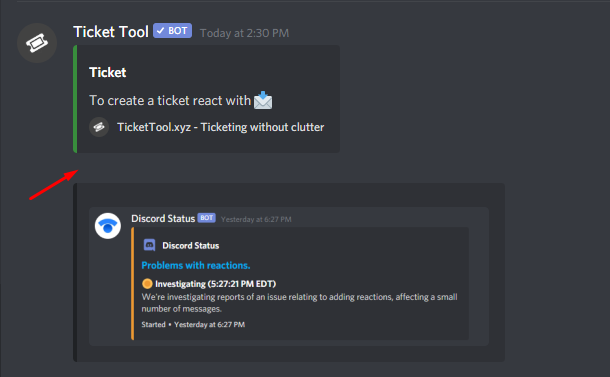
 abstract wigeon
hot walrus
Still cant use the 📩 to open a ticket
abstract wigeon
hot walrus
Still cant use the 📩 to open a ticket
^^
hot walrus
ID as in the channel name?
scenic plinth
The panel ID, example $panel 1
hot walrus
Alright the command worked the panel doesn't ill be patient and incase it is still happening in a few days i'll ask for an opdate
update*
scenic plinth
You can also be sure the bot has permissions to "add reactions", this could be another thing as the discord readtion issue is only happening to some servers.
 jade topaz
Is there a way to change the ticket tool profile pic and name?
scenic plinth
jade topaz
Is there a way to change the ticket tool profile pic and name?
You can't change the picture, but you can change the nickname yes.
jade topaz
damn, alright thank you
 iron nightBOT
Gave 1 Rep to zlyzzツ (current: #6 - 51)
scenic plinth
Your welcome Theo :) Have a nice day!
hot walrus
You to! :)
jade topaz
is there a way i can change the $new command to a different word? and is it possible to have more than 1 prefix?
scenic plinth
You can only have one prefix and no you cannot change it to another word.
 fathom mountain
I was trying to make the ticket message ping a role but it didn't work, figured out it could've been because the embed was sent too but i can't figure out how to delete the embed entirely, it stays there
Is there a way to remove the embed entirely?
 safe prairie
$help ping
humble sequoiaBOT
How to make Ticket Tool ping a role
To make ticket tool ping a role when a ticket is opened, go to the Dashboard -> Panel Configs -> Settings -> Ticket Options -> Ticket Message -> Message Text and do this:
{@Role name} This is case sensitive and the role must have @mentions enabled
 safe prairie
@fathom mountain can this help you?
fathom mountain
it pinged the role but it didn't mention, the role has access to the channel too
safe prairie
Do you have the Role Mention wrote in the Message Text and not in the Embed? Pings in Embeds doesn't work
fathom mountain
yep, it isn't in the embed, it's on the plain message
safe prairie
Interesting, can you try to use the role ID?
If you activate the Developer Mode by Advanced in the Discord Settings you can right click at a role and copy the ID. In the Ticket Message Text you have to write <@&ID>
fathom mountain
ive done that, but it's still the same
 pale pilot
Make sure the bot has permissions to mention @ everyone @fathom mountain
fathom mountain
let me try that
ah, now it does, i should've checked the permissions in the first place
thank you for helping me
jade topaz
when using the command $new can you ping a specific role? such as Ex: $new @role reason i've tried it and it doesnt show the role being pinged and doesnt show the reason
 deft coral
how to transfer subscription to other server?
jade topaz
how do i do a ticket?
 wicked scroll
jade topaz
when using the command $new can you ping a specific role? such as Ex: $new @role...
wicked scroll
jade topaz
when using the command $new can you ping a specific role? such as Ex: $new @role...
you can ping a role when the ticket is created
$help ping
humble sequoiaBOT
How to make Ticket Tool ping a role
To make ticket tool ping a role when a ticket is opened, go to the Dashboard -> Panel Configs -> Settings -> Ticket Options -> Ticket Message -> Message Text and do this:
{@Role name} This is case sensitive and the role must have @mentions enabled
Redeeming premium
Redeeming premium on your server is really simple. Just head over to your Subscriptions Page. There you can select a server of your choice, which will get premium. You can change the server at any point.
 wicked scroll
@deft coral ^ just select your new server
deft coral
wicked scroll
<@!197636638023614465> ^ just select your new server
Thanks!
iron nightBOT
Gave 1 Rep to otaviocng (current: #11 - 26)
jade topaz
wicked scroll
you can ping a role when the ticket is created
is there no way to have the ticket ping a role upon creation. as in like if i open a ticket and want to ping a specific role for it at a certain time
wicked scroll
jade topaz
how do i do a ticket?
Are you referring to creating tickets on this server? Read more at #🎫│make-a-ticket
If you want to configure it on your server, check #573205317870157855 or
humble sequoiaBOT
last magnet
ممكن مساعده
jade topaz
jade topaz
is there no way to have the ticket ping a role upon creation. as in like if i op...
yes, on my server. for instance. i make a ticket using $new and want to ping the role (technical support) when the ticket is created but then afterwards i make another ticket and want to ping the role (Help) when the ticket is created. How would i do that? how would i ping a specific role upon creation?
wicked scroll
jade topaz
yes, on my server. for instance. i make a ticket using $new and want to ping the...
you can ping a role when you use $new, but it will have no effect on the ticket when created
$help ping
humble sequoiaBOT
How to make Ticket Tool ping a role
To make ticket tool ping a role when a ticket is opened, go to the Dashboard -> Panel Configs -> Settings -> Ticket Options -> Ticket Message -> Message Text and do this:
{@Role name} This is case sensitive and the role must have @mentions enabled
wicked scroll
follow the instructions above to ping a role when the ticket is created ^
jade topaz
ok so it wont show that you pinged that role, but anyone with that role will be pinged in the channel created?
wicked scroll
For example, if the user uses $new <@&642118166243311646> (the "demo role" will be pinged) on the channel, and the ticket will be created
in this case, the ticket will be opened to the person who used the command
jade topaz
who i will disable this
 humble sequoiaBOT
How do I save transcript to a channel?
To save transcripts to a channel go to the Dashboard -> Panel Configs -> Settings -> Logging Options -> Transcript Channel
 jade topaz
but he send on my dm
wicked scroll
Dashboard -> Panel Configs -> Settings -> Logging Options --->  Direct Message Transcript
 real tangle
Do anyone want to do bulk sales?
 gloomy robin
How do I invite the premium ticket bot?
humble sequoiaBOT
Ticket Tool Premium
Get premium at https://tickettool.xyz/premium
Manage your subscriptions at https://tickettool.xyz/subscriptions
Why Premium?
Premium lets you customize the bot just how you want it. It also helps keep the bot running.
scenic plinth
Try that :)
gloomy robin
I purchased premium, but theres no invite link for the premium bot that I can find 
humble sequoiaBOT
Inviting and Enabling Premium Bot
The first thing you will need to do is invite the premium bot, an invite can be found here
Once the bot is in your server we will head to the dashboard and manage your server. When you are managing your server, you want to head into "Server Configs" then click the drop down menu under "Select the bot you would like to use on this server" then click "Ticket Tool#6207" and then save.
 radiant moss
Press on here
iron nightBOT
Gave 1 Rep to Tinyy (current: #9 - 28)
radiant moss
No problem
 quaint crystal
hey how do i add mods to the tickets
so when im not available the mods can handle the situation
anyone????
radiant moss
$help support
humble sequoiaBOT
How to let support team see into a ticket
About support roles
A support role lets your support team see into tickets with out having to add them manually to each and every ticket.
You can add as many support roles as you like per panel.
NOTE that the way discord works all admins can see into tickets regardless of this.
How to set a support role
To set a Support role go to the Dashboard -> Panel Configs -> Settings -> General Options -> Support Team Roles.

NOTE that the support role will not be able to see into tickets that are already created..
radiant moss
@quaint crystal add there role here
radiant moss
No
gloomy robin
So I have premium in my server but when you click to open a ticket it doesnt do anything. Any fix?
gloomy robin
 tranquil idol
When is the ticket tool bot gonna be fixed
tranquil idol
When is the ticket tool bot gonna be fixed
oh its down?
tranquil idol
In my server its down
gloomy robin
Not working in mine as well
gloomy robin
Yep same problem
tranquil idol
Tinny when its going to be fixed
jade topaz
iis it possiblle to delete multiple tickets at once?
 atomic sage
radiant moss
No
atomic sage
radiant moss
No
How does the premium bot not work even though the bot is on the server and online ?
 radiant moss
Do you have the bot enabled?
atomic sage
radiant moss
Do you have the bot enabled?
Look
 gloomy robin
Mine doesnt have a time it just says Active
scenic plinth
Did you invite and enable the bot for that server?
gloomy robin
Where is the enable option? The subscription is saved to my server already.
humble sequoiaBOT
Inviting and Enabling Premium Bot
The first thing you will need to do is invite the premium bot, an invite can be found here
Once the bot is in your server we will head to the dashboard and manage your server. When you are managing your server, you want to head into "Server Configs" then click the drop down menu under "Select the bot you would like to use on this server" then click "Ticket Tool#6207" and then save.
scenic plinth
Invite it through there, the premium and regular bot are two different bot.
 tidal wedge
I cannot figure out where or how to give a role with no mod the ability to see the tickets.
radiant moss
tidal wedge
I cannot figure out where or how to give a role with no mod the ability to see t...
$help support
humble sequoiaBOT
How to let support team see into a ticket
About support roles
A support role lets your support team see into tickets with out having to add them manually to each and every ticket.
You can add as many support roles as you like per panel.
NOTE that the way discord works all admins can see into tickets regardless of this.
How to set a support role
To set a Support role go to the Dashboard -> Panel Configs -> Settings -> General Options -> Support Team Roles.
NOTE that the support role will not be able to see into tickets that are already created..
gloomy robin
When a ticket is opened is there an option to have a different ticket name show up instead of ex ticket-129
tidal wedge
Thank you, also the tickets we're glitching and not working. Though I may have fixed it and need to test it out. I'll come back if it doesn't.
humble sequoiaBOT
Ticket names
The ticket name is the default channel name of all tickets. To edit it, go to your Dashboard > Panel Configs > Settings > Ticket Options. There you can edit the channel name of opened and closed tickets. You can also use variables in there.

 Note: This is a premium feature

 eager cargo
Do you and that user have any mutual servers?
jade topaz
Yes
 tame tree
How do I get the premium bot to my server!
humble sequoiaBOT
Inviting and Enabling Premium Bot
The first thing you will need to do is invite the premium bot, an invite can be found here
Once the bot is in your server we will head to the dashboard and manage your server. When you are managing your server, you want to head into "Server Configs" then click the drop down menu under "Select the bot you would like to use on this server" then click "Ticket Tool#6207" and then save.
eager cargo
^
tame tree
Thanks
eager cargo
jade topaz
Yes
Is this the only server you have in common? If so please provide proof.
jade topaz
eager cargo
Is this the only server you have in common? If so please provide proof.
No im namy servers , not only this
eager cargo
Alrighty, then unfortunately we cannot take action.
jade topaz
Ok thanks
eager cargo
My pleasure
eager cargo
tame tree
Thanks
My pleasure
eager cargo
When did you pay
jade topaz
10 mins ago
humble sequoiaBOT
Redeeming premium
Redeeming premium on your server is really simple. Just head over to your Subscriptions Page. There you can select a server of your choice, which will get premium. You can change the server at any point.
Ticket Tool Premium
Get premium at https://tickettool.xyz/premium
Manage your subscriptions at https://tickettool.xyz/subscriptions
Why Premium?
Premium lets you customize the bot just how you want it. It also helps keep the bot running.
eager cargo
humble sequoia
Go to the second link then follow these steps
jade topaz
Thanks for instant support
eager cargo
Anytime
jade topaz
so i made a panel and when i make it create a tick it says "support will be with you shortly" what do i do?
humble sequoiaBOT
**Ticket Message**
The Ticket Message is the first message sent by the bot in a new ticket. To customise it head over to your Dashboard -> Panel Configs -> Settings -> Ticket Options -> Edit Ticket Message
 eager cargo
You can change the ticket message there ^
jade topaz
i just want to claim the ticket though
humble sequoiaBOT
Claiming Options
Claiming allows you to change the ticket name, category and permissions. To use it you have to enable it first on your Dashboard > Panel Configs > Claiming Options.
 Note: This is a premium feature
eager cargo
Note: This is a premium feature
eager cargo
There ya go
jade topaz
thanks!
eager cargo
My pleasure
jade topaz
ok so when i did that, now when i do $claim it just deletes my message
eager cargo
You can't claim your own tickets
jade topaz
oh
 covert saddle
like the command of it
covert saddle
covert saddle
like the command of it
anyone?
scenic plinth
You can't change the name of the command no
covert saddle
scenic plinth
You can't change the name of the command no
mhm why?
scenic plinth
@jade topaz @jade topaz Sure I can help, just state the issue!
jade topaz
when i make a ticket
jade topaz
scenic plinth
<@456226577798135808> <@456226577798135808> Sure I can help, just state the issu...
how can i get notification when someone creates a ticket
others can see it too
humble sequoiaBOT
**How to turn off Keep Visible**
**About Keep Visible**
"Keep Visible" will disable any permission changes to the @everyone role, allowing everyone to see into tickets.
**How to disable/enable it**
Head over to your Dashboard -> Panel Configs -> Settings --> General Options -> Keep Visible

NOTE that @everyone can type aswell if it has permissions to send messages
jade topaz
ty
scenic plinth
jade topaz
how can i get notification when someone creates a ticket
You can make the bot ping roles, this will be shown in the message below this.
$help ping
humble sequoiaBOT
How to make Ticket Tool ping a role
To make ticket tool ping a role when a ticket is opened, go to the Dashboard -> Panel Configs -> Settings -> Ticket Options -> Ticket Message -> Message Text and do this:
{@Role name} This is case sensitive and the role must have @mentions enabled
scenic plinth
jade topaz
ty
Your welcome, have a great night!
scenic plinth
Odd, make sure ticket tool has permisions to manage permissions and manage channels
jade topaz
scenic plinth
You can make the bot ping roles, this will be shown in the message below this.
thanks
iron nightBOT
Gave 1 Rep to zlyzzツ (current: #6 - 52)
jade topaz
scenic plinth
Odd, make sure ticket tool has permisions to `manage permissions` and `manage ch...
can u join my server and help
scenic plinth
jade topaz
thanks
Your welcome, have a great rest of your night!
jade topaz
the servfer im trying to make a ticket thing wont pop up
every other one of my server do but not the one im trying to work on
humble sequoiaBOT
Don't see your server in the dashboard?
You will possibly need to relog. Look below to see steps on how to relog.
How to relog the Dashboard.
First, you will need to go to the dashboard. Once your there, click on your avatar on the top right. after you clicked it, you will see button that says Logout. You must click that. Once you have logged out, you can log back in.
Note:
You need one of these 3 things to access the dashboard.
1. Server Owner (Level: 6)
2. Server Administrator (Level: 4)
3. Dashboard Role (Level: 2)
You can check your level using $level on your Discord Server
jade topaz
i have 2
scenic plinth
Tey relogging into the dashboard
jade topaz
scenic plinth
Tey relogging into the dashboard
can u join my server and help me
cuz idk what to do 😦
scenic plinth
jade topaz
can u join my server and help me
I don't know if I can, run $debug and show me what it sends you.
scenic plinth
Ok, so I am realizing quite a few issues here.
scenic plinth
Please manage your role permissions for the "Ticket Tool" role, the bot should be able to read messages, manage roles, manage channels, and manage messages for it to function properly.
jade topaz
k
scenic plinth
Once done try to open a ticket again and see what happens
jade topaz
@scenic plinth the problem is i already gave ticket tool the roles when it first joined
scenic plinth
Ok, can you try managing the category for me please and give the bot those same permissions through the category?
jade topaz
category?
scenic plinth
Your channel permissions are "bad", therefore ticket topl cannot see the channels made within the category.
scenic plinth
jade topaz
category?
Like channel groups. Like how above this channel it says "Need Help?"
scenic plinth
Can ticket tool see the channel?
jade topaz
which
scenic plinth
The ticket, or any.
So uh, question, are you saving what I am telling you to do? Because that can also cause this were it isn't working.
scenic plinth
Sure do that, as well as resend the panel when you reinvite.
jade topaz
k
 rocky sandal
ticket tool randomly isn't working, it wont create any new channels.
scenic plinth
rocky sandal
ticket tool randomly isn't working, it wont create any new channels.
Make sure you haven't hit 500 channels within your server.
eager cargo
rocky sandal
i don't believe i have
Are your tickets in a category?
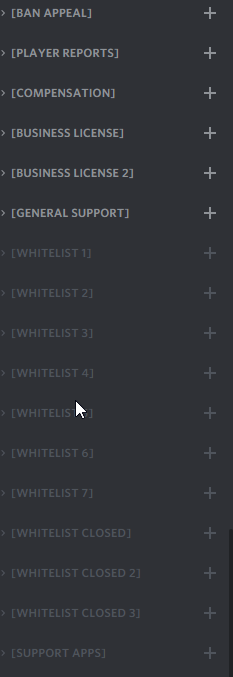 rocky sandal
it hasn't been met.
and even when it was, it was putting them to the top of my discord instead of the category.
now it's not just creating channels.
scenic plinth
jade topaz
i cant invite ticket tool
Whats the issue with inviting it?
eager cargo
rocky sandal
now it's not just creating channels.
Can I have a server invite please? ( In DM's so you don't get muted )
Which panel are you having trouble with?
jade topaz
scenic plinth
Whats the issue with inviting it?
nvm i invited it
eager cargo
rocky sandal
all of them
Ay caramba
Go into the category settings and make sure Ticket Tool has all of the following permissions
✅ - Read Channels
✅ - Send Messages
✅ - Embed Links
✅ - Attach Files
✅ - Add Reactions
✅ - Manage Roles
✅ - Manage Channels
✅ - Manage Messages
✅ - Read History
- TTS Message permission
rocky sandal
actually some of them work now.
even if the bot has administrator?
i have to do that, or?
eager cargo
rocky sandal
even if the bot has administrator?
Yup, Discord made it weird
rocky sandal
interesting okay i'll give it a shot
scenic plinth
jade topaz
this is debug
This is showing me the bot still does not have permissions, please make sure you give it the correct permissions to operate correctly.
The bot will need permission to "read channels" to have any action within any channel. Please make sure the bot can do that.
eager cargo
rocky sandal
interesting okay i'll give it a shot
I also noticed some of your panel reactions are missing, go ahead and re-send them
rocky sandal
which one of them are missing?
eager cargo
General Support
rocky sandal
i just re-sent them for that reason
not even 15 minutes ago, do you know what causes that?
humble sequoiaBOT
Reaction disappeared
This problem is not directly related to Ticket Tool.
That's a known Discord bug. Unfortunately, all you can do is be patient while they are trying to fix the issue.
_ _
_ _
Temporary Solution
You can resend the panel by going to your dashboard or using the command $panel ID
rocky sandal
oooh it's known, okay good.
eager cargo
Discord does! Sucks.. I know. I hope they fix it soon.
rocky sandal
i thought it was just me, it was driving me crazy.
i have no idea
now the ones that worked before aren't working
eager cargo
Did you give it all the permissions it needs?
rocky sandal
i did for the player report category and it still didn't send it
jade topaz
i need help
eager cargo
rocky sandal
i did for the player report category and it still didn't send it
Can you count the ticket channels in that category please?
Then tell me how many there are
jade topaz
i cannot see the ticket emoji when i try to make a ticket on my alt
humble sequoiaBOT
Reaction disappeared
This problem is not directly related to Ticket Tool.
That's a known Discord bug. Unfortunately, all you can do is be patient while they are trying to fix the issue.
_ _
_ _
Temporary Solution
You can resend the panel by going to your dashboard or using the command $panel ID
eager cargo
^
rocky sandal
it's like 16
jade topaz
ty
eager cargo
Well heres your problem Cody
 rocky sandal
oh
i checked the panel and it said 460 whoops
uhhhh. well.
shit.
was this a recent addition?
jade topaz
hi the ticket tool is not loading new discords in the dashborad
eager cargo
rocky sandal
was this a recent addition?
Nope, this has been in Discord for ages.
humble sequoiaBOT
Don't see your server in the dashboard?
You will possibly need to relog. Look below to see steps on how to relog.
How to relog the Dashboard.
First, you will need to go to the dashboard. Once your there, click on your avatar on the top right. after you clicked it, you will see button that says Logout. You must click that. Once you have logged out, you can log back in.
Note:
You need one of these 3 things to access the dashboard.
1. Server Owner (Level: 6)
2. Server Administrator (Level: 4)
3. Dashboard Role (Level: 2)
You can check your level using $level on your Discord Server
jade topaz
how do i make ticket tool ping me when someone make a ticket
eager cargo
humble sequoia
@jade topaz
eager cargo
jade topaz
how do i make ticket tool ping me when someone make a ticket
$help ping
humble sequoiaBOT
How to make Ticket Tool ping a role
To make ticket tool ping a role when a ticket is opened, go to the Dashboard -> Panel Configs -> Settings -> Ticket Options -> Ticket Message -> Message Text and do this:
{@Role name} This is case sensitive and the role must have @mentions enabled
rocky sandal
discords as a whole only can have 500 channels?
eager cargo
eager cargo
<@456226577798135808>
Click on your avatar on the top right. after you clicked it, you will see button that says Logout. You must click that. Once you have logged out, you can log back in.
eager cargo
rocky sandal
discords as a whole only can have 500 channels?
Yes
iron nightBOT
Gave 1 Rep to Quo (current: #2 - 79)
eager cargo
My pleasure, have a good day.
jade topaz
@eager cargocheers man
eager cargo
Best of luck
eager cargo
jade topaz
<@!437728240388276224>cheers man
My pleasure
rocky sandal
quo followup question, do you know if its ticket tool that is constantly moving my channels around?
eager cargo
Only channels Ticket Tool will move are if you have them set to categories after said action is done to them ( i.e create, close, claim ).
rocky sandal
ty ty, one more for ya. Is there an easy way to lookup someone in the transcripts? Searching their @ doesn’t really work.
eager cargo
rocky sandal
ty ty, one more for ya. Is there an easy way to lookup someone in the transcript...
Search bar ( top right corner screen ) then search " <@ID> "
eager cargo
My pleasure
eager cargo
rocky sandal
it’s ID based? kk.
Since it's in a embed yeah
 gentle root
hey guys could use some help.... so i set up a mod roll in discord so my mods could help with tickets. The can see the catagory now where the tickts go but they cant see the actual tickets....? any ideas?
scenic plinth
$help support
humble sequoiaBOT
How to let support team see into a ticket
About support roles
A support role lets your support team see into tickets with out having to add them manually to each and every ticket.
You can add as many support roles as you like per panel.
NOTE that the way discord works all admins can see into tickets regardless of this.
How to set a support role
To set a Support role go to the Dashboard -> Panel Configs -> Settings -> General Options -> Support Team Roles.
NOTE that the support role will not be able to see into tickets that are already created..
scenic plinth
Try that :)
 mystic hound
@jade topaz you're in the wrong place, this is ticket tool support.
 autumn solstice
would recommend deleting that since the link looks fishy lol
 clear pebble
Hi
The ticket reaction from the bot dissapears after someone spammed it.
How can I prevent that?
humble sequoiaBOT
Reaction disappeared
This problem is not directly related to Ticket Tool.
That's a known Discord bug. Unfortunately, all you can do is be patient while they are trying to fix the issue.
_ _
_ _
Temporary Solution
You can resend the panel by going to your dashboard or using the command $panel ID
mystic hound
@clear pebble ^^
clear pebble
thx
thanx @mystic hound
but wouldn't it be possible to check more often if a reaction is still there and if not to replace it?
mystic hound
clear pebble
but wouldn't it be possible to check more often if a reaction is still there and...
only way to ''replace'' a reaction right now is resending the panel
its unfortunately not something we can help with, its an issue from discord and they're working on it
clear pebble
ok thx
 craggy geyser
clear pebble
but wouldn't it be possible to check more often if a reaction is still there and...
craggy geyser
clear pebble
but wouldn't it be possible to check more often if a reaction is still there and...
You can technically replace it by removing ticket tools permission to view the channel, and then adding the reaction yourself. Then add ticket tool back as it doesn't matter if ticket tool has reacted as long as the correct reaction is done
But it is a lot more complicated so resending it is easier
clear pebble
clear pebble
but wouldn't it be possible to check more often if a reaction is still there and...
but why isnt that possible?
craggy geyser
It is possible if you wish. I do it on my server
clear pebble
But why isnt this intigrated in the bot
craggy geyser
Because the issue is on discords end and they have claimed to be working on a fix. Changing the bot to fix something like that is not a great use of time as by the time that is done, discord might have resolved the issue
clear pebble
ok makes sense
 jagged belfry
I paid for the server North said contact y’all
 brittle canopy
Why the server isn't showing up on manage servers tab on dashboard? I've relogged multiple times and still the same.
 forest goblet
Can you run $debug in your server please? @brittle canopy
brittle canopy
Sure
 upbeat copper
Sorry for the bother, But a server which I use ticket tool up doesn't show up anymore in the dashboard, I have tried emptying cache different device and re inviting the bot didn't work either.
 forest goblet
brittle canopy
Sure
forest goblet
brittle canopy
Sure
You don't have sufficient permissions to see your server on the dashboard. You need the administrator permission or a dashboard role.
forest goblet
upbeat copper
Sorry for the bother, But a server which I use ticket tool up doesn't show up an...
Try this:
humble sequoiaBOT
Don't see your server in the dashboard?
You will possibly need to relog. Look below to see steps on how to relog.
How to relog the Dashboard.
First, you will need to go to the dashboard. Once your there, click on your avatar on the top right. after you clicked it, you will see button that says Logout. You must click that. Once you have logged out, you can log back in.
Note:
You need one of these 3 things to access the dashboard.
1. Server Owner (Level: 6)
2. Server Administrator (Level: 4)
3. Dashboard Role (Level: 2)
You can check your level using $level on your Discord Server
brittle canopy
Administrator? I have every other single permission such like manage server and all the other perms except the admin one, is that the problem?
forest goblet
Yes it is. Please ask someone with this permission to give you a dashboard role:
humble sequoiaBOT
Dashboard Roles
Any role you put there will have full access to the ticket tool dashboard. The server owner and users with admin permissions already have access to the dashboard.
Be careful of which roles to put here
 iron nightBOT
Gave 1 Rep to 2x2Master (current: #7 - 47)
 shadow axle
kick it
jade topaz
or how can i look who can see the tickets
jade topaz
shadow axle
kick it
just shut up
shadow axle
?
autumn solstice
jade topaz
how can i give roles the ability to see the tickets?
 iron nightBOT
Gave 1 Rep to OUTBACK (current: #40 - 1)
jade topaz
bruh where can i find that?
jade topaz
autumn solstice
https://media.discordapp.net/attachments/776680605517742090/839904329179463710/u...
this
@autumn solstice ?
autumn solstice
It's in the settings somewhere exactly, I can't send another screenshot because the xyz domain is blocked by my current wifi :/
craggy geyser
$help support
humble sequoiaBOT
How to let support team see into a ticket
About support roles
A support role lets your support team see into tickets with out having to add them manually to each and every ticket.
You can add as many support roles as you like per panel.
NOTE that the way discord works all admins can see into tickets regardless of this.
How to set a support role
To set a Support role go to the Dashboard -> Panel Configs -> Settings -> General Options -> Support Team Roles.
NOTE that the support role will not be able to see into tickets that are already created..
craggy geyser
jade topaz
cant find it ._.
Here you go
iron nightBOT
Gave 1 Rep to Swiftgale (current: #11 - 26)
craggy geyser
No worries
 restive nimbus
Hey
Is it possible to add custom reactions with a custom command?
I want to add a reaction to change the name of the ticket to "waiting" instead of writing #rename waiting (ticket number)
mystic hound
@hasty oxide that's not our bot.
We're the support team for @humble sequoia @pseudo glen
 hasty oxide
OHH APOLOGIES
humble sequoiaBOT
Don't see your server in the dashboard?
You will possibly need to relog. Look below to see steps on how to relog.
How to relog the Dashboard.
First, you will need to go to the dashboard. Once your there, click on your avatar on the top right. after you clicked it, you will see button that says Logout. You must click that. Once you have logged out, you can log back in.
Note:
You need one of these 3 things to access the dashboard.
1. Server Owner (Level: 6)
2. Server Administrator (Level: 4)
3. Dashboard Role (Level: 2)
You can check your level using $level on your Discord Server
mystic hound
@jade topaz
iron nightBOT
Gave 1 Rep to Light (current: #3 - 62)
 dreamy grove
hi there... i just purchased... how do i install?
 patent jacinth
Is it possible to make this? >> when you claim a ticket, it sends a message in another channel?
jade topaz
Hello - for the last 1 hour I have been trying to edit the reacting emoji and it keeps changing it back to the default reaction emote for some reason. Why is that happening?
 rotund kite
patent jacinth
Is it possible to make this? >> when you claim a ticket, it sends a message in a...
rotund kite
patent jacinth
Is it possible to make this? >> when you claim a ticket, it sends a message in a...
That's not possible, but you can make a claim message in the claim options section, where a message displays after a ticket is claimed/unclaimed.
humble sequoiaBOT
Reaction disappeared
This problem is not directly related to Ticket Tool.
That's a known Discord bug. Unfortunately, all you can do is be patient while they are trying to fix the issue.
_ _
_ _
Temporary Solution
You can resend the panel by going to your dashboard or using the command $panel ID
rotund kite
@jade topaz
jade topaz
I see...thank you.
patent jacinth
rotund kite
That's not possible, but you can make a claim message in the **claim options sec...
No worries, would this be something that would potentially be added? Super useful for logging who claimed the tickets, since there's no option for "Claimed" in the Logging Options.
jade topaz
@rotund kite ty
iron nightBOT
Gave 1 Rep to ツ Logik™ (current: #23 - 6)
jade topaz
But the problem is the reaction is not updating to a emoji I added
rotund kite
patent jacinth
No worries, would this be something that would potentially be added? Super usefu...
Yes, I'll send this suggestion to the developers.
patent jacinth
rotund kite
Yes, I'll send this suggestion to the developers.
Thanks!
iron nightBOT
Gave 1 Rep to ツ Logik™ (current: #21 - 7)
rotund kite
jade topaz
But the problem is the reaction is not updating to a emoji I added
As far as I'm aware of, reactions are bugging on bots, but try reacting to the 🛠️ emoji on the panel.
Also, it's a premium feature, without premium it will not work, and make sure that tickettool has a mutual server with the emoji you are wanting to have in the panel.
jade topaz
I have done that a few times...I has it set up from dashboard and after I clicked save and went back to it, it changed to the default one
jade topaz
rotund kite
Also, it's a premium feature, without premium it will not work, and make sure th...
Ohh makes sense!
If I do the 7 day trial, will the custom reaction permanently stay? Unless you edit it back again?
rotund kite
Yes, if you use it on the primary bot yes.
But changes applied later after on premium features in the panel will not work, after the premium expires.
jade topaz
understood! tysm @rotund kite!
rotund kite
np
jade topaz
ty @rotund kite sorry for the ping!
iron nightBOT
@jade topaz :: You can't rep ツ Logik™#0001 for 54 minutes and 51 seconds. Try coming back later?
rotund kite
Glad to help 🙂
patent jacinth
When you close a ticket, is there a way for it not to change the name to "Closed-XXXX" but instead keep the original name?
craggy geyser
If you have premium yes
Changing ticket names is a premium feature, and can be done here:
 patent jacinth
ty!
 chrome plank
hi the phrase in the ticket message was suddenly deleted. We opened a new panel, but the expression there was also deleted.

@forest goblet@hybrid dagger@gloomy jacinth@radiant moss
 gloomy jacinth
chrome plank
hi the phrase in the ticket message was suddenly deleted. We opened a new panel,...
gloomy jacinth
chrome plank
hi the phrase in the ticket message was suddenly deleted. We opened a new panel,...
Don't ping support team
!!
chrome plank
okay
 torpid agate
can somone walk me throung on making a ticket for a channel
shadow axle
create a demo ticket in #🎫│make-a-ticket it was removed
chrome plank
is this a joke?
it's been 2 hours and still no help
 fallow ingot
chrome plank
is this a joke?
it's been 2 hours and still no help
fallow ingot
chrome plank
is this a joke?
it's been 2 hours and still no help
What with?
@chrome plank sorry to hear that no one responded however please let me assist you?
fallow ingot
 dull flicker
how to delete the standart reaction
dull flicker
how to delete the standart reaction
Reaction to open a ticket is a premium feature do you have if?
chrome plank
chrome plank
hi the phrase in the ticket message was suddenly deleted. We opened a new panel,...
@fallow ingot
fallow ingot
It*
 broken jay
Hello I need help
dull flicker
i have 7 days free
fallow ingot
broken jay
Hello I need help
With?
radiant moss
dull flicker
hi how to get the gold premium ticket bot
Do you have premium?
humble sequoiaBOT
**Panel Message**
The panel message is where people react to make a ticket. To customize it head over to your Dashboard --> Panel Configs -> Settings -> Panel Options -> Edit Panel Message

 humble sequoiaBOT
Creating a panel
To create a panel we are going to need to head over to the panel configs on the dashboard
Once at the dashboard we will need to click Create Panel
Enter a panel name (Fill in any optional settings you want)
Click Create Panel and your ready to get started with configuring your panel
An example of a creating a panel is shown below.
 fallow ingot
humble sequoia
fallow ingot
humble sequoia
@broken jay
broken jay
Confused
dull flicker
radiant moss
Do you have premium?
no I don't but I have first 7 days free premium
broken jay
Wait
fallow ingot
What with?
humble sequoiaBOT
Inviting and Enabling Premium Bot
The first thing you will need to do is invite the premium bot, an invite can be found here
Once the bot is in your server we will head to the dashboard and manage your server. When you are managing your server, you want to head into "Server Configs" then click the drop down menu under "Select the bot you would like to use on this server" then click "Ticket Tool#6207" and then save.
fallow ingot
Stop spamming
Sending the same message is still spamming and it’s extremely annoying
fallow ingot
chrome plank
<@!768144576946110475>
Could you explain a little better?
chrome plank
fallow ingot
Could you explain a little better?
No because suddenly the reaction was erased and nothing else
dull flicker
how to add the standart reaction
humble sequoiaBOT
Reaction disappeared
This problem is not directly related to Ticket Tool.
That's a known Discord bug. Unfortunately, all you can do is be patient while they are trying to fix the issue.
_ _
_ _
Temporary Solution
You can resend the panel by going to your dashboard or using the command $panel ID
radiant moss
dull flicker
how to add the standart reaction
Multi panels?
fallow ingot
@chrome plank ^
radiant moss
Or change the reaction?
chrome plank
fallow ingot
<@773260264530378752> ^
thanks
iron nightBOT
Gave 1 Rep to aaron J (current: #13 - 24)
dull flicker
radiant moss
Or change the reaction?
If I do that I add reactions but the old stya
fallow ingot
chrome plank
thanks
No worries
radiant moss
$help reaction
humble sequoiaBOT
How to change reactions
To set a custom reaction Dashboard -> Panel Configs -> Settings -> Reaction Options -> <Reaction to change> -> Reaction

NOTE you need premium to do this.
Help Options
$help commands - Information on commands
$help setup - Information on bot setup
$help faq - Frequently asked questions
radiant moss
@jade topaz please stop
radiant moss
Resend the panel
broken jay
Thank you so much @fallow ingot everything is working now
iron nightBOT
Gave 1 Rep to aaron J (current: #13 - 25)
fallow ingot
broken jay
Thank you so much <@!768144576946110475> everything is working now
No worries have a awesome day 
broken jay
U too
fallow ingot
always
dull flicker
radiant moss
Resend the panel
I have the premium bot but how can i use it
humble sequoiaBOT
Ticket Tool Premium
Get premium at https://tickettool.xyz/premium
Manage your subscriptions at https://tickettool.xyz/subscriptions
Why Premium?
Premium lets you customize the bot just how you want it. It also helps keep the bot running.
Inviting and Enabling Premium Bot
The first thing you will need to do is invite the premium bot, an invite can be found here
Once the bot is in your server we will head to the dashboard and manage your server. When you are managing your server, you want to head into "Server Configs" then click the drop down menu under "Select the bot you would like to use on this server" then click "Ticket Tool#6207" and then save.
radiant moss
@dull flicker follow this
dull flicker
ty
radiant moss
Ya no problem
 frosty badger
@fleet lantern hello when a member reacts to the emoji how do i make it so it will ping staff role for the staff to help them
fallow ingot
Do NOT ping support team
frosty badger
sorry
humble sequoiaBOT
How to make Ticket Tool ping a role
To make ticket tool ping a role when a ticket is opened, go to the Dashboard -> Panel Configs -> Settings -> Ticket Options -> Ticket Message -> Message Text and do this:
{@Role name} This is case sensitive and the role must have @mentions enabled
fallow ingot
Follow above^
frosty badger
fallow ingot
Follow above^
ok im sorry
fallow ingot
frosty badger
ok im sorry
No worries however I suggest reading #546557408902905896
frosty badger
ok
 dense pond
I dont know how i can allow that my Supporters can See Tickets?
humble sequoiaBOT
How to let support team see into a ticket
About support roles
A support role lets your support team see into tickets with out having to add them manually to each and every ticket.
You can add as many support roles as you like per panel.
NOTE that the way discord works all admins can see into tickets regardless of this.
How to set a support role
To set a Support role go to the Dashboard -> Panel Configs -> Settings -> General Options -> Support Team Roles.
NOTE that the support role will not be able to see into tickets that are already created..
fallow ingot
^
abstract wigeon
dense pond
I dont know how i can allow that my Supporters can See Tickets?
Follow the instructions shown above 👆
dense pond
Thank you 
dull flicker
hi how to add more reactions
humble sequoiaBOT
Multipanels are a premium feature  that allow for a single panel with multiple reactions to open different tickets.
How to create a Multipanel
Premium users can combine multiple panels into one multipanel.
First of all you will need to assign a different Create Ticket Reaction for each Panel. Run $help reaction to learn how to do it.
Next, find the IDs of each panel you wish to combine. You can find them in your Panel Configs in the Dashboard
Next, send the multipanel to a channel using $panel [id1] [id2] {id3} ....
e.g. $panel 1 2 4 17 35 to combine panels 1, 2, 4, 17 and 35.
Up to 20 panels may be combined.
 dull flicker
ty
abstract wigeon
Anytime
dull flicker
!help reaction
radiant moss
$
abstract wigeon
$help reaction
humble sequoiaBOT
How to change reactions
To set a custom reaction Dashboard -> Panel Configs -> Settings -> Reaction Options -> <Reaction to change> -> Reaction
NOTE you need premium to do this.
dull flicker
ty
abstract wigeon
No problem at all
 weary wigeon
Can anyone help me rq so in my server I made a ticket place to open one and it worked fine for like 4 5 months and yesterday I noticed that it didnt react and when other people reacted other than me it didnt work for them
humble sequoiaBOT
If the bot is not working properly, try the following steps:
-
Run the $debug command in your server, to check the permissions of the bot. Send the link you get to us.
-
Check if you have any Blacklisted Roles in your Server Configs. Any roles listed there will not be able to use the bot / create tickets.
-
While you're in your Server Configs , make sure that you don't have the premium bot enabled, without actually having premium or the bot on the server.
These are the most common issues. If your problem still exists, you can go to our Troubleshooting Page for more fixes.
abstract wigeon
weary wigeon
Can anyone help me rq so in my server I made a ticket place to open one and it w...
Go through the list and check if any of the issues shown above is your problem.
weary wigeon
k
 hasty scarab
can you help me?
How do I place a ticket where if it reacts to one thing a different ticket is opened than if it reacts to something else?
humble sequoiaBOT
Multipanels are a premium feature that allow for a single panel with multiple reactions to open different tickets.
How to create a Multipanel
Premium users can combine multiple panels into one multipanel.
First of all you will need to assign a different Create Ticket Reaction for each Panel. Run $help reaction to learn how to do it.
Next, find the IDs of each panel you wish to combine. You can find them in your Panel Configs in the Dashboard
Next, send the multipanel to a channel using $panel [id1] [id2] {id3} ....
e.g. $panel 1 2 4 17 35 to combine panels 1, 2, 4, 17 and 35.
Up to 20 panels may be combined.
 flint stag
I just wanted to ask if I can do the name of a ticket with name.
Means:
Ticket-Frosty
Ticket-Princess
Ticket-Albert
...
And not Ticket-{count}
humble sequoiaBOT
Help Options
$help commands - Information on commands
$help setup - Information on bot setup
$help faq - Frequently asked questions
Ticket names
The ticket name is the default channel name of all tickets. To edit it, go to your Dashboard > Panel Configs > Settings > Ticket Options. There you can edit the channel name of opened and closed tickets. You can also use variables in there.
Note: This is a premium feature
 zealous bolt
How do I find the id
flint stag
Ah thank u
 atomic solstice
$idcommand
humble sequoiaBOT
How do I get the ID of Roles/Channels/Emojis?
Ticket Tool has a useful command that helps you get the ID of various things like channels, roles, emojis and your server.
Just use the command $id <#channel/@role/:emoji:>. Now copy everything, including the brackets <...>, to your dashboard (or wherever you want it)
If you want the server ID, just use $id.
autumn solstice
$help ping role
humble sequoiaBOT
How to make Ticket Tool ping a role
To make ticket tool ping a role when a ticket is opened, go to the Dashboard -> Panel Configs -> Settings -> Ticket Options -> Ticket Message -> Message Text and do this:
{@Role name} This is case sensitive and the role must have @mentions enabled
atomic solstice
confused with what?
to find the Id you can just use the inbuilt $id command that ticket tool has
so for example
humble sequoiaBOT
<#776680605517742090>
zealous bolt
Oh
 ornate wedge
How to set ticket tool with iphone?
humble sequoiaBOT
atomic solstice
 rough moth
Like auto response or something
rough moth
Like auto response or something
here is a guide on them https://docs.tickettool.xyz/en/dashboard/tags
jade topaz
hey initially one of our former staff has made a panel when he was given the premium for 2d ig and bot stored the default settings i need to change the default settings like embed title which are premium how can i do that?
ornate wedge
atomic solstice
the same as on pc
Eeehhh but is diff with in guide
mystic hound
jade topaz
hey initially one of our former staff has made a panel when he was given the pre...
Where did he get 2 days of premium
mystic hound
To change the embed title simply edit the panel message
humble sequoiaBOT
**Panel Message**
The panel message is where people react to make a ticket. To customize it head over to your Dashboard --> Panel Configs -> Settings -> Panel Options -> Edit Panel Message
robust sandalBOT
jade topaz
ich brauche ein Ticket
 boy10090
I need a ticket
German (de) → English (en)
jade topaz
i did edited the message but it didnt changed 
humble sequoiaBOT
Multipanels are a premium feature that allow for a single panel with multiple reactions to open different tickets.
How to create a Multipanel
Premium users can combine multiple panels into one multipanel.
First of all you will need to assign a different Create Ticket Reaction for each Panel. Run $help reaction to learn how to do it.
Next, find the IDs of each panel you wish to combine. You can find them in your Panel Configs in the Dashboard
Next, send the multipanel to a channel using $panel [id1] [id2] {id3} ....
e.g. $panel 1 2 4 17 35 to combine panels 1, 2, 4, 17 and 35.
Up to 20 panels may be combined.
jade topaz
his id: 674648258391441421 if you have ticket logs
atomic solstice
humble sequoia
here @upbeat nimbus
mystic hound
jade topaz
i did edited the message but it didnt changed <:animethink:840652314980777994>
Did you press save
jade topaz
ofc i did
mystic hound
Was the premium active when you made the change
jade topaz
we dont have prem now
but i need to revert the changes he made when we was given premium for a couple of days
mystic hound
jade topaz
but i need to revert the changes he made when we was given premium for a couple ...
You can't edit premium only fields when you don't have active premium
jade topaz
but i dont need to edit all i wanted is to revert the changes it saved before
atomic solstice
please come to #841696865175339068 and tell me there what is your main language
mystic hound
jade topaz
but i dont need to edit all i wanted is to revert the changes it saved before
It would still count as editing a field which is why you're unable to do it
jade topaz
so no way we can revert those changes to keep empty?
mystic hound
You could use the vote feature to get a small amount of premium so you can make the changes
jade topaz
we can get prem by voting the bot?
mystic hound
Yeah (type $vote)
jade topaz
here?
mystic hound
Anywhere, but sure
 mystic hound
Probably disabled in here, you can run it in your server
jade topaz
yes we need 6 votes so i need to wait 3d to edit the panel?
mystic hound
You can have multiple people link their votes to your acc so just ask Ur staff to do it as well
And you'll have the required amount in a day
atomic solstice
you can get 3 votes at once
 sand smelt
Bot is down, why
atomic solstice
because all 3 websites count
 eager magnet
The bot is not active on my server it says its down idk what to do..
mystic hound
eager magnet
The bot is not active on my server it says its down idk what to do..
Can you send a screenshot of where it says it's down
eager magnet
it doesnt say its down its just that when u click on a ticket emoji it does nothing
mystic hound
._.
humble sequoiaBOT
If the bot is not working properly, try the following steps:
-
Run the $debug command in your server, to check the permissions of the bot. Send the link you get to us.
-
Check if you have any Blacklisted Roles in your Server Configs. Any roles listed there will not be able to use the bot / create tickets.
-
While you're in your Server Configs , make sure that you don't have the premium bot enabled, without actually having premium or the bot on the server.
These are the most common issues. If your problem still exists, you can go to our Troubleshooting Page for more fixes.
mystic hound
Try those steps
iron nightBOT
Gave 1 Rep to Light (current: #3 - 63)
 hidden copper
¿And the reaction?
 humble sequoiaBOT
Reaction disappeared
This problem is not directly related to Ticket Tool.
That's a known Discord bug. Unfortunately, all you can do is be patient while they are trying to fix the issue.
_ _
_ _
Temporary Solution
You can resend the panel by going to your dashboard or using the command $panel ID
hidden copper
Just fixed wtf xD
 bitter girder
Where do I actually buy premium? On the website to renew mine and can't see an option. It just wants the key itself
It ran out while I was on vacation
humble sequoiaBOT
Ticket Tool Premium
Get premium at https://tickettool.xyz/premium
Manage your subscriptions at https://tickettool.xyz/subscriptions
Why Premium?
Premium lets you customize the bot just how you want it. It also helps keep the bot running.
bitter girder
ty
 humble sequoiaBOT
Ticket Tool Premium
Get premium at https://tickettool.xyz/premium
Manage your subscriptions at https://tickettool.xyz/subscriptions
Why Premium?
Premium lets you customize the bot just how you want it. It also helps keep the bot running.
 fallow ingot
Did you buy it?
 cinder berry
yes in the photo above is the payment of my bank statement
23.76 Soles = 6.00 dolars
 scenic plinth
Did you get a key when you bought it?
cinder berry
español
alguie habla
I did not receive anything made me the discount from my bank account but I have not received anything
I have the transaction that was made from my bank to the page
humble sequoiaBOT
How to redeem premium
To redeem your premium key, go to the dashboard, select your server, then click "Redeem Premium" under the server's icon and name.
 scenic plinth
Tell me if it gives you the option for collecting a key.
 scenic plinth
Ok, redeeem the key and copy and paste it. (Don't show it in a screenshot)
cinder berry
but no key has come to me
to my mail or to any place but I repeat again I have received the ticketol charge
scenic plinth
So it gave you no key upon purchase?
 viscid fjord
how to check if a server is premium or not?
cinder berry
no
cinder berry
scenic plinth
So it gave you no key upon purchase?
And the truth is, I don't like the idea of seeing it canceled and it doesn't give me my key
scenic plinth
cinder berry
And the truth is, I don't like the idea of seeing it canceled and it doesn't giv...
Ok, I will see if I can get someone from the billing team to help you. One second.
cinder berry
Okay thanks Kenzie
scenic plinth
viscid fjord
how to check if a server is premium or not?
It will say in the server management where you have the "server navigation", it should say "Premium Status" at the top and say "free" or the date you have until it expires.
viscid fjord
ok ty
scenic plinth
cinder berry
Okay thanks Kenzie
@jade topaz Can you help him please?
cinder berry
hello sk3leton <3
jade topaz
how can i help you?
cinder berry
yes
Well, the payment was made from my bank account and I deducted the money and did not give me a password or anything I bought the product for 1 month 6 dollars = 23 soles in my currency
then I entered the discord to request help
humble sequoiaBOT
Redeeming premium
Redeeming premium on your server is really simple. Just head over to your Subscriptions Page. There you can select a server of your choice, which will get premium. You can change the server at any point.
jade topaz
can you see your subscription here>
cinder berry
nothing appears to me
humble sequoiaBOT
-- moved to ticket --
cinder berry
but I deduct everything from my bank the 6 dollars
 marble spruce
How can i make the ticket "force create" a ticket for a user?
humble sequoiaBOT
atomic solstice
marble spruce
How can i make the ticket "force create" a ticket for a user?
the user can click on the reaction, which makes the ticket, or if you use the $new command then you can make a ticket for others by doing $new userid <-use the Id of the user you want the ticket to be open for
atomic solstice
marble spruce
ok ty
np
 glass otter
Hey !
A friend can't create a ticket because of the ticket limitation but he doesn't have any ticket open for now. I think there was a little bug and Ticket tool saved that there are an invisible ticket. Is there any possibilities to reset the ticket count for the user ?
 humble sequoiaBOT
Don't see your server in the dashboard?
You will possibly need to relog. Look below to see steps on how to relog.
How to relog the Dashboard.
First, you will need to go to the dashboard. Once your there, click on your avatar on the top right. after you clicked it, you will see button that says Logout. You must click that. Once you have logged out, you can log back in.
Note:
You need one of these 3 things to access the dashboard.
1. Server Owner (Level: 6)
2. Server Administrator (Level: 4)
3. Dashboard Role (Level: 2)
You can check your level using $level on your Discord Server
safe prairie
Hey @jade topaz,
yes, you can change the prefix in the dashboard in the Server Configs.
atomic solstice
glass otter
Hey !
A friend can't create a ticket because of the ticket limitation but he doe...
make sure to check if the last ticket the friend opened isn't renamed, and if not then make sure it was deleted
glass otter
atomic solstice
make sure to check if the last ticket the friend opened isn't renamed, and if no...
This problem still exist for to many days. Staff on the serveur don't renamed tickets. I think this one has been deleted
scenic plinth
glass otter
This problem still exist for to many days. Staff on the serveur don't renamed ti...
Make sure it wasn't deleted via the channel options and actually through the reaction / command, wothout ticket tool using these options it will register that the ticket is open until prompt to close the ticket with the said actions.
glass otter
scenic plinth
Make sure it wasn't deleted via the channel options and actually through the rea...
It's been a long time but I really think that it was deleted by the channel options.
You said me that the bot not count if the channel was deleted by channels options. It can be the case here. But how can I resolve this problem ? There are any tickets by this user now... How can I reset the ticket count for this user ?
scenic plinth
glass otter
You said me that the bot not count if the channel was deleted by channels option...
I don't believe there is neccessarily a way to do it via anything neccessarily.
The easiest thing to do is clone the panel, delete the one you have and send the cloned one. This or you can change the ticket limit from 1 to 2 but this would change it for everyone.
glass otter
scenic plinth
I don't believe there is neccessarily a way to do it via anything neccessarily.
...
Oh... Ok... I will see for that
dull flicker
Hi I have a question how to send a message by tickets if a admin is serving you ‘your served by @cystummer service like this
Because not all the time there is a admin member online but if he is online you get a mess
Message
craggy geyser
You can't set it to send if someone is online. But you can set it to do it always
$help ping
humble sequoiaBOT
How to make Ticket Tool ping a role
To make ticket tool ping a role when a ticket is opened, go to the Dashboard -> Panel Configs -> Settings -> Ticket Options -> Ticket Message -> Message Text and do this:
{@Role name} This is case sensitive and the role must have @mentions enabled
glass otter
craggy geyser
You can't set it to send if someone is online. But you can set it to do it alway...
Maybe with an here mention no ?
craggy geyser
Probably will work yes
 lusty walrus
is there any way to make a reaction trigger a tag?
craggy geyser
I'm not aware of one
lusty walrus
rip, that would be extremely useful
 fallow pine
am i allowed to ask what hosting you guys use? i am creating my own bot. sorry if thats not allowed btw
dull flicker
I was making a panel and now I am banned from the webside what did i wrong
can someone help me
scenic plinth
dull flicker
I was making a panel and now I am banned from the webside what did i wrong
Can you show me what it shows you?
scenic plinth
fallow pine
am i allowed to ask what hosting you guys use? i am creating my own bot. sorry i...
I don't know what they use to host, if a developer decides to respond I am sure they can answer it for you!
 scenic plinth
You likely made too many changes within a certain period of time, like how Discord Rate Limits people for changing profile pictures or discord usernames. The only thing you can do is wait it out, or if it is still showing in the next few hours to come back and let someone here know.
lusty walrus
because you're rate limited on this bot
dull flicker
oh okay so i have to wait any hours
lusty walrus
how long has it been like that
dull flicker
5 min
lusty walrus
wait like 10 more minutes
dull flicker
okay thank you for you help
lusty walrus
it shouldnt last too long
fallow pine
scenic plinth
I don't know what they use to host, if a developer decides to respond I am sure ...
thank you 👍
iron nightBOT
Gave 1 Rep to zlyzzツ (current: #6 - 53)
 solid stream
Unless you're doing something really wrong the rate limit should only be a minute.
scenic plinth
fallow pine
thank you 👍
Your welcome, have a nice day! :)
solid stream
fallow pine
am i allowed to ask what hosting you guys use? i am creating my own bot. sorry i...
We host on OVH, but not because it's the best, but because it's just what I've used before. (it's ping is in the high 60-100ms)
fallow pine
solid stream
We host on OVH, but not because it's the best, but because it's just what I've u...
ah thank you, i'll look into them
iron nightBOT
Gave 1 Rep to BattleEye (current: #15 - 22)
solid stream
dull flicker
Judging by the ddos attack email I just got I'm guessing you know why it's rate limited..
But the rate limits caught it


scenic plinth

 tepid rivet
Anyone see a mistake?
 lusty walrus
are you talking about the username#usertag thing
tepid rivet
lusty walrus
are you talking about the username#usertag thing
Yes
lusty walrus
that happens when someone leaves the discord server when they have a ticket open
iron nightBOT
Gave 1 Rep to etan (current: #27 - 3)
jade topaz
how do i put more than one emoji?
 humble sequoiaBOT
Send panel
How to send a panel?
To send a panel use the command $panel <id>
How do I find the ID?
The ID is located on the dashboard just before your panels name.
How to combine panels? (premium only)
Add multiple ID's $panel <id1> <id2> <id..>
The first ID will have its message and reaction sent while the others will have only reactions sent.
You can combine up to 20 panels (Reactions will be slowly added)
i did than what
 craggy geyser
You to use the conmand with the panel id (the 1, 2, 3 etc from the left of the panel name on the dashbaord)
jade topaz
craggy geyser
You to use the conmand with the panel id (the 1, 2, 3 etc from the left of the p...
i dont get it
can you call me
pls
craggy geyser
I can't, as I'm literally here for a couple of seconds in between being busy. Someone else might be able to
humble sequoiaBOT
Multipanels are a premium feature that allow for a single panel with multiple reactions to open different tickets.
How to create a Multipanel
Premium users can combine multiple panels into one multipanel.
First of all you will need to assign a different Create Ticket Reaction for each Panel. Run $help reaction to learn how to do it.
Next, find the IDs of each panel you wish to combine. You can find them in your Panel Configs in the Dashboard
Next, send the multipanel to a channel using $panel [id1] [id2] {id3} ....
e.g. $panel 1 2 4 17 35 to combine panels 1, 2, 4, 17 and 35.
Up to 20 panels may be combined.
craggy geyser
That might have better help
iron nightBOT
Gave 1 Rep to Swiftgale (current: #10 - 27)
jade topaz
Hey guys, basically when i would make a ticket, it would go to a certain category. Recently it stopped doing that. In the settings of my dashboard i made it to my ticket category, and it seemed to work fine but now it just ignores it and goes to the top. What happened? It broke after like 50-ish tickets.
mystic hound
jade topaz
Hey guys, basically when i would make a ticket, it would go to a certain categor...
Discord limits channels per category to 50
jade topaz
really? damn alright
mystic hound
You can set secondary categories so when the first one is full it goes into the second one
iron nightBOT
Gave 1 Rep to Light (current: #3 - 64)
scenic plinth
Make sure the bot can send messages in that channel and can see it.
Double check please
brittle canopy
$vote
humble sequoiaBOT
Votes
Current Votes: 0
Lifetime Votes: 55
Linked Votes: 55
Vote Links
Linking Info
Linked User: 414262796222595073
You can give your future votes to another user by linking with that user.
To link use $vote link (@user or userId)
To unlink use $vote unlink
Redeeming
Each vote is worth 12 hours of premium and can be redeemed once you have atleast 6 votes.
Your current votes are worth 0m
To redeem your current votes use $vote redeem
brittle canopy
$vote
humble sequoiaBOT
Votes
Current Votes: 3
Lifetime Votes: 58
Linked Votes: 58
Vote Links
Linking Info
Linked User: 414262796222595073
You can give your future votes to another user by linking with that user.
To link use $vote link (@user or userId)
To unlink use $vote unlink
Redeeming
Each vote is worth 12 hours of premium and can be redeemed once you have atleast 6 votes.
Your current votes are worth 1 day, 12h, 0m
To redeem your current votes use $vote redeem
 forest sentinel
Hey, my main discord account got banned along with the servers I owned including ticket tool premium sub
- Can i get the subscription cancelled for my old main?
- Any way I can access any old configs that I had set up on the old main?
humble sequoiaBOT
-- moved to ticket --
 fresh temple
Hi
Does ticket tools have any sort of API that I can send request?
I need to access my Dashboard History with my discord bot
pale pilot
There is not
 errant turret
i dont see the place to create a panel
eager cargo
$help panel
humble sequoiaBOT
Creating a panel
To create a panel we are going to need to head over to the panel configs on the dashboard
Once at the dashboard we will need to click Create Panel
Enter a panel name (Fill in any optional settings you want)
Click Create Panel and your ready to get started with configuring your panel
An example of a creating a panel is shown below.
eager cargo
@errant turret ^
errant turret
ty I found it
eager cargo
My pleasure
 rough fox
A question, the bot has been removing its own reaction under the panel message recently
any idea why that is or how to stop it?
humble sequoiaBOT
Reaction disappeared
This problem is not directly related to Ticket Tool.
That's a known Discord bug. Unfortunately, all you can do is be patient while they are trying to fix the issue.
_ _
_ _
Temporary Solution
You can resend the panel by going to your dashboard or using the command $panel ID
scenic plinth
@rough fox ^
rough fox
ah that explains why the reactions under giveaway messages were disappearing too
thank you @scenic plinth
iron nightBOT
Gave 1 Rep to zlyzzツ (current: #5 - 54)
scenic plinth
No probs, have a nice day! :)
rough fox
you too
 icy goblet
Hey, I have an issue with a multipanel. One of our user report they didn't see the images from the panel. How can I fix this
humble sequoiaBOT
Reaction disappeared
This problem is not directly related to Ticket Tool.
That's a known Discord bug. Unfortunately, all you can do is be patient while they are trying to fix the issue.
_ _
_ _
Temporary Solution
You can resend the panel by going to your dashboard or using the command $panel ID
eager cargo
You can resend the panel by going to your dashboard or using the command $panel ID
Temp solution ^
@icy goblet ^
icy goblet
Didn't work for the user i tried. I'm not missing the reaction but the actual images inside the embed
eager cargo
Ah, the images, can you give me your server ID please?
icy goblet
820165016400429067

 eager cargo
Okay, which panel is that?
icy goblet
This is a multipanel of 1 2 3 4 5 6
eager cargo
( Which panel is your multi panel message )
Ah okay
Can you invite me to the server? ( IN DM's so you don't get muted. )
icy goblet
The reaction miss match is because i tried to spawn a new panel to see if that would resolve the issue
yes
eager cargo
icy goblet
The reaction miss match is because i tried to spawn a new panel to see if that w...
No worries, reactions out of order is Discords fault.
Hopefully they fix em soon!

I can see them fine, odd that, that one user can't see them.
icy goblet
Yes i find it very odd too, you never heard of any issue with select user not seeing the panel images ?
eager cargo
I don't believe so, images load fine in browser too.
Does that user have the default role? or a different one
icy goblet
They have the member role like you
eager cargo
Ask them to restart their Discord client, I can see the images just fine. Tried on the app and the site.
 icy goblet
Ok, I'll try that. If that doesn't work I'll try to find other user with the same issue 🙂
Thanks for the help
eager cargo
My absolute pleasure, have a good day.
icy goblet
ty, Good day to you too 😉
jade topaz
is there any way to recover a ticket after its been closed for a week + the number is unknown
eager cargo
Transcripts work wonders! If you saved the transcript in a transcript channel, DM, it'll be there!
jade topaz
i dont have a transcript all i have is the date and time that it happened
eager cargo
Dang! Unfortunately, you can't retrieve the transcript if it wasn't saved before the ticket was deleted.
jade topaz
awh ok thanks anyways
jade topaz
you too
eager cargo
 hollow prism
Um I need help with a ticket for divine factions Minecraft server
hollow prism
Um I need help with a ticket for divine factions Minecraft server
Watcha need help with specifically?
eager cargo
hollow prism
Hello Quo
Hi.
eager cargo
hollow prism
Um I don't know exactly how to submit the ticket for divine craft server
Just head to their ticket channel & press the reaction.
humble sequoiaBOT
Reaction disappeared
This problem is not directly related to Ticket Tool.
That's a known Discord bug. Unfortunately, all you can do is be patient while they are trying to fix the issue.
_ _
_ _
Temporary Solution
You can resend the panel by going to your dashboard or using the command $panel ID
eager cargo
Probably because of that bug, nothing we can do at the moment. Resending the panel is a temp. fix.
hollow prism
Ok so when can I try agin
eager cargo
Whenever it's fixed
eager cargo
 hidden escarp
**The bot does not enter the premium bot server**
hidden escarp
**The bot does not enter the premium bot server**
Can you explain a bit more?
scenic plinth
I don't necessarily know what you mean by that, but make sure you have paid for the bot and have invited it.
hidden escarp
eager cargo
Can you explain a bit more?
When I want to invite the premium bot, it doesn't enter the server
eager cargo
Do you not see it in the server or is it giving you an error?
hidden escarp
eager cargo
Do you not see it in the server or is it giving you an error?
He comes to me like this and does not enter the servant
 eager cargo
Can I have an invite in DM's please?
hidden escarp
eager cargo
Can I have an invite in DM's please?
Well yours
eager cargo
Yes mine.
hidden escarp
eager cargo
Yes mine.
I gave you a private server
eager cargo
I saw. I'm not seeing your server come up. This means that Ticket Tool is not in your server. Are you sure your not selecting the wrong server or logged into the wrong account?
 hidden escarp
eager cargo
I saw. I'm not seeing your server come up. This means that Ticket Tool is not in...
hidden escarp
eager cargo
I saw. I'm not seeing your server come up. This means that Ticket Tool is not in...
I want to put the premium version into the server, do you understand me?
eager cargo
Yes I understand you. I'm saying that the bot is not in your server. Follow the steps below to invite it to your server.
humble sequoiaBOT
Inviting and Enabling Premium Bot
The first thing you will need to do is invite the premium bot, an invite can be found here
Once the bot is in your server we will head to the dashboard and manage your server. When you are managing your server, you want to head into "Server Configs" then click the drop down menu under "Select the bot you would like to use on this server" then click "Ticket Tool#6207" and then save.
eager cargo
If you are referring to the server invite that it gives you when you enter the server you sent me, the premium bot is already in there.
hidden escarp
eager cargo
If you are referring to the server invite that it gives you when you enter the ...
I called him and he didn't get into what the problem was

@eager cargo ?
eager cargo
Are you sure your not selecting the wrong server?
hidden escarp
eager cargo
Are you sure your not selecting the wrong server?
Yes, I did not choose
@eager cargo What do you think of entering my server and giving you a Permission and enter it yourself
eager cargo
I can't do stuff for you. Are you logged into the right account when inviting the bot?
hidden escarp
Yes, I did
eager cargo
Okay. At this point. This isn't a Ticket Tool problem. I suggest contacting either another server administrator and having them try. If that doesn't work... well I don't know what to tell ya as I've never had this issue.
rough moth
When I redeem my vote premium, does it go on all my servers?
eager cargo
You need to apply it.
rough moth
Wdym?
humble sequoiaBOT
How to redeem premium
To redeem your premium key, go to the dashboard, select your server, then click "Redeem Premium" under the server's icon and name.
rough moth
eager cargo
You need to apply it.
No not that type of premium
When you vote you get some premium time
eager cargo
Yeah, 12 hours.
rough moth
When I redeem it does it go on multiple servers
eager cargo
No. It goes on one server.
rough moth
Can I redeem a certain amount at a time?
eager cargo
No, unfortunately.
eager cargo
Yes we do, in our community server.
humble sequoiaBOT
Ticket Tool Invite & Support
eager cargo
2nd link.
 tough sluice
does anyone elses message just lose the reaction randomly?
eager cargo
eager cargo
Yes we do, in our community server.
We also have a Twitter giveaway going on right now: https://twitter.com/Ticket_Tool/status/1392162932826558467

Hey! HRU? I am good, thanks for asking!
I wanna giveaway some Ticket Tool Premium, sooooooo if this we reach 201 followers here, we will giveaway 2 months of TT Premium to someone who comments "Done" on this post. Good luck!
 Twitter
·
humble sequoiaBOT
Twitter
·
humble sequoiaBOT
Reaction disappeared
This problem is not directly related to Ticket Tool.
That's a known Discord bug. Unfortunately, all you can do is be patient while they are trying to fix the issue.
_ _
_ _
Temporary Solution
You can resend the panel by going to your dashboard or using the command $panel ID
eager cargo
@tough sluice ^
tough sluice
great thanks
eager cargo
My pleasure.
 scarlet comet
I bought the 30 day pack for spores and ants and it shut off restarted my game and it was on my farm account
Not sure why this happened?
humble sequoiaBOT
You're in the wrong place
We provide support for @pseudo glen discord bot and cannot help you with whatever issue you have.
Please make sure to contact the appropriate support team.
This Ticket is being deleted in 5 minutes.
_ _
eager cargo
^
jade topaz
how do I make it so anothe rrole can see tickets that are made on a certain panel?
like I can make a support member be able to see tickets without giving him admin perms
eager cargo
$help support
humble sequoiaBOT
How to let support team see into a ticket
About support roles
A support role lets your support team see into tickets with out having to add them manually to each and every ticket.
You can add as many support roles as you like per panel.
NOTE that the way discord works all admins can see into tickets regardless of this.
How to set a support role
To set a Support role go to the Dashboard -> Panel Configs -> Settings -> General Options -> Support Team Roles.
NOTE that the support role will not be able to see into tickets that are already created..
jade topaz
alright
Hey
I bought 1 month premium for ticket tools but it still shows up that I'm still free, does anybody know if it takes a while to be available? I paid through paypal two days ago
humble sequoiaBOT
Redeeming premium
Redeeming premium on your server is really simple. Just head over to your Subscriptions Page. There you can select a server of your choice, which will get premium. You can change the server at any point.
atomic solstice
jade topaz
I bought 1 month premium for ticket tools but it still shows up that I'm still f...
you have to redeem and apply it to a server like explained here ^^
 atomic solstice
jade topaz
the last email i've got is this
atomic solstice
jade topaz
the last email i've got is this
yes that is the confirmation if you read the embed above it says that you have to go to the subscription page, log in and click manage subscriptions there you will be able to select a server
 sour solstice
I am having trouble seeing my server on the panel it says to relog and I have multipool times and it has not worked. then I would go and delete one of the servers and I would still show up
humble sequoiaBOT
Don't see your server in the dashboard?
You will possibly need to relog. Look below to see steps on how to relog.
How to relog the Dashboard.
First, you will need to go to the dashboard. Once your there, click on your avatar on the top right. after you clicked it, you will see button that says Logout. You must click that. Once you have logged out, you can log back in.
Note:
You need one of these 3 things to access the dashboard.
1. Server Owner (Level: 6)
2. Server Administrator (Level: 4)
3. Dashboard Role (Level: 2)
You can check your level using $level on your Discord Server
 lilac girder
sour solstice
I am having trouble seeing my server on the panel it says to relog and I have mu...
lilac girder
sour solstice
I am having trouble seeing my server on the panel it says to relog and I have mu...
check your perms too

 limber sail
Hello! 1 question. How long does Ticket Transcripts last for?
scenic plinth
limber sail
Hello! 1 question. How long does Ticket Transcripts last for?
As long as you don't delete the channel, delete the transcript message or wipe the memory for that server, they last as long as you save them.
limber sail
Oh ok! Thanks for the help!
eager cargo
sour solstice
both me and the bot have admin perms
Can you explain how you are logging in and out?
scenic plinth
limber sail
Oh ok! Thanks for the help!
No probs, have a great night! :)
eager cargo
eager cargo
Can you explain how you are logging in and out?
Ah user left server
 reef echo
Hello, @eager cargo sorry if I'm not supposted to ping you, but I have no idea on how to put tickets onto my server, may I get help?
Im kinda new
eager cargo
No worries about the ping, I don't mind them.
Go ahead and read over #573205317870157855 for a simple setup guide on how to setup Ticket Tool.
eager cargo
If you'd like a more in-depth explanation you can read the documents.
humble sequoiaBOT
Setting up Ticket Tool
Visit the docs for setup info
General Setup
eager cargo
reef echo
Ty.
My pleasure.
iron nightBOT
Gave 1 Rep to Quo (current: #2 - 81)
reef echo
for that)
eager cargo
:) Appreciate it
reef echo
Np. :D
eager cargo
Have a good day
reef echo
You too.
 pale coyote
Hi
eager cargo
Hiya.
jade topaz
atomic solstice
yes that is the confirmation if you read the embed above it says that you have t...
Thanks, it worked
iron nightBOT
Gave 1 Rep to Satisfy (current: #5 - 55)
hidden escarp
When I invite the premium version to my server, it goes in and out
 agile turtle
hello
i have problem the bot not joining at my server
<@&540295656720302081>
@glad ingot
any suppert ?
mystic hound
@agile turtle please don't ping support members.
mystic hound
hidden escarp
When I invite the premium version to my server, it goes in and out
It joins and then leaves automatically?
agile turtle
Sorry , can you fix my problem ?
mystic hound
agile turtle
i have problem the bot not joining at my server
What happens when you try to invite it?
 mystic hound
Okay, it probably doesn't have permissions to view channels and that's why you can't see it
agile turtle
no its not in server
mystic hound
Go to your server settings, under user management click "members" and search for the bot


 mystic hound
Are you the server owner?
agile turtle
no i have role
mystic hound
Administrator permission?
agile turtle
yeah
mystic hound
$invite
humble sequoiaBOT
Ticket Tool Invite & Support
agile turtle
 mystic hound
humble sequoia
mystic hound
humble sequoia
Try from the third link here
mystic hound
👍
agile turtle
Thanks  .
.
 dreamy lodge
Hey how do I set a panel in a specific text channel? I have already given all the permissions to the bot (except admin) but can't figure out how to set it up. @Support Team
mystic hound
$help setup
humble sequoiaBOT
Setting up Ticket Tool
Visit the docs for setup info
General Setup
mystic hound
#573205317870157855 also has some instructions. @dreamy lodge
dreamy lodge
@mystic hound I can't find the create panel button, that's the issue. And yeah also I am on Mobile.
humble sequoiaBOT
mystic hound
Once here, select your server, click on "panel configs" and you'll find the create panel button
dreamy lodge
Thanks
 north vector
Hello, can anyone explain me how I get Premium by voting the bot? I’m confused
rotund kite
north vector
Hello, can anyone explain me how I get Premium by voting the bot? I’m confused
You can use $vote to check how many votes you have, and the links to upvote our bot, for every upvote, you receive 12 hours of TicketTool Premium.
$vote (using this command, and the instructions on it is pretty self explanatory)
humble sequoiaBOT
Votes
Current Votes: 0
Lifetime Votes: 52
Linked Votes: 16
Vote Links
Linking Info
Linked User: Not Linked
You can give your future votes to another user by linking with that user.
To link use $vote link (@user or userId)
To unlink use $vote unlink
Redeeming
Each vote is worth 12 hours of premium and can be redeemed once you have atleast 6 votes.
Your current votes are worth 0m
To redeem your current votes use $vote redeem
rotund kite
jade topaz
Help
How can I help?
jade topaz
rotund kite
How can I help?
can 2 different panels be created?
rotund kite
You can create infinite panels, as much as you want. But the multipanels are pretty buggy due to Discord's reaction bug.
Up to 6 or 7 reactions can be made with multipanel now, I think.
jade topaz
and how they are created?
rotund kite
$help setup
humble sequoiaBOT
Setting up Ticket Tool
Visit the docs for setup info
General Setup
rotund kite
This should give an in-depth guide on it.
jade topaz
jade topaz
and how they are created?
@rotund kite
rotund kite
humble sequoia
https://docs.tickettool.xyz/en/general/setup
^^
jade topaz
eh but I can not understand
rotund kite
If you don't want to read, you can head to the dashboard straight away, setting it up should be pretty straight forward
 rocky thunder
Hey guys, question.. How would I set up the ticket system if I have a verified role?
rotund kite
rocky thunder
Hey guys, question.. How would I set up the ticket system if I have a verified r...
You can blacklist the unverified role from creating a ticket.
jade topaz
I set it up and now?
rotund kite
$help reaction
humble sequoiaBOT
How to change reactions
To set a custom reaction Dashboard -> Panel Configs -> Settings -> Reaction Options -> <Reaction to change> -> Reaction
NOTE you need premium to do this.
rotund kite
rocky thunder
Hey guys, question.. How would I set up the ticket system if I have a verified r...
below the reaction should have an option to put allowed or disabled roles
from creating tickets
if you want it default for every panel, you can set it up from command configs in the dashboard
rocky thunder
So the everyone roll is the role is the blacklist
rotund kite
jade topaz
eh but I can not understand
which bit do you not understand?
rotund kite
rocky thunder
So the everyone roll is the role is the blacklist
yes, and put in allowed roles, the verified role
rocky thunder
rotund kite
yes, and put in allowed roles, the verified role
Is this within General Options? I only see cmd pex, dash roles, blacklist roles
rotund kite
If you are doing it for all panels, head to command configs
My bad, head from here, below
 jade topaz
@rotund kite TNK
rocky thunder
Essentially I want to stop the "@ everyone" role from being able to create tickets and only "@ verified" to be able to do so
rotund kite
yes
Well, if that's what you want to have, then ofc.
Make sure that you do it in the Create Reaction settings

Because that's where you'll allow and blacklist who's creating the ticket
not for closing tickets or anything else, because, if that is the case the blacklisted role will be already able to open one