#🆘│community-support
1 messages · Page 311 of 1
 remote finch
 scenic plinth
remote finch
Hey, recently my tickets stopped going into a specific category when opened and ...
scenic plinth
remote finch
Hey, recently my tickets stopped going into a specific category when opened and ...
Make sure the bot has permissions, as well if there is 50 channels in that category it will stop doing so, as discord limits 50 channels per category.
remote finch
ah that's probably it. Thanks!
 limber spade
Fixed thanks
 little nimbus
 kindred frost
@abstract wigeon Hellou
 abstract wigeon
Hey
kindred frost
Can you help me with what happened the other time, pls
abstract wigeon
I don't remember. What happened?
kindred frost
You help me to join some tickets to only 1 so that it is not separated
abstract wigeon
Ohhh, multipanels.
kindred frost
Yes
 humble sequoiaBOT
Multipanels are a premium feature  that allow for a single panel with multiple reactions to open different tickets.
How to create a Multipanel
Premium users can combine multiple panels into one multipanel.
First of all you will need to assign a different Create Ticket Reaction for each Panel. Run $help reaction to learn how to do it.
Next, find the IDs of each panel you wish to combine. You can find them in your Panel Configs in the Dashboard
Next, send the multipanel to a channel using $panel [id1] [id2] {id3} ....
e.g. $panel 1 2 4 17 35 to combine panels 1, 2, 4, 17 and 35.
Up to 20 panels may be combined.
 abstract wigeon
Here are the instructions for multipanels ^^
kindred frost
Thanks @abstract wigeon
 iron nightBOT
Gave 1 Rep to Daniel Harrison (current: #10 - 19)
kindred frost
xd -w- Bay
abstract wigeon
My pleasure. Bye
 white harness
why always my settings deleting on Ticket tools website
i adding support role. and saved but my settings always turning back
 safe prairie
It shows that your changes have been saved successfully?
 safe prairie
Perfect
 river wing
$help panel
humble sequoiaBOT
Creating a panel
To create a panel we are going to need to head over to the panel configs on the dashboard
Once at the dashboard we will need to click Create Panel
Enter a panel name (Fill in any optional settings you want)
Click Create Panel and your ready to get started with configuring your panel
An example of a creating a panel is shown below.
 river wing
Can someone help me with creating a multi panel
i tried to put the commands in discord but its not creating the panel
humble sequoiaBOT
Multipanels are a premium feature that allow for a single panel with multiple reactions to open different tickets.
How to create a Multipanel
Premium users can combine multiple panels into one multipanel.
First of all you will need to assign a different Create Ticket Reaction for each Panel. Run $help reaction to learn how to do it.
Next, find the IDs of each panel you wish to combine. You can find them in your Panel Configs in the Dashboard
Next, send the multipanel to a channel using $panel [id1] [id2] {id3} ....
e.g. $panel 1 2 4 17 35 to combine panels 1, 2, 4, 17 and 35.
Up to 20 panels may be combined.
-- moved to ticket --
iron nightBOT
Edit this to change the output of the command!
Edit this to change the output of the command!
 scenic imp
@iron night commands
iron nightBOT
Edit this to change the output of the command!
Edit this to change the output of the command!
 carmine sparrow
I am trying to make a ticket (React to the message to make one) and it just deletes my reactions. What is happening?
@iron night
iron nightBOT
Edit this to change the output of the command!
Edit this to change the output of the command!
scenic plinth
scenic imp
How do I look at commands
$help commands
humble sequoiaBOT
() = optional
[] = required
*==================================
Ticket Commands
==================================*
_ _
`$add [User] (channel)`
Description: Adding additional users to a ticket
Aliases: none
`$remove [User] (channel)`
Description: Removing users from a ticket
Aliases: none
`$close`
Description: Closing tickets
Aliases: none
`$open`
Description: Opening closed tickets
Aliases: none
`$delete`
Description: Deleting tickets
Aliases: none
`$rename`
Description: Renaming tickets/channels
Aliases: none
`$transcript (send channel)`
Description: Creating transcripts
Aliases: none
`$new (user) (reason)`
Description: Creating tickets in a monitored channel (when command style is enabled)
Aliases: none
`$claim`
Description: Claiming tickets (when claim is enabled)
Aliases: "unclaim"
_ _
*==================================
General Commands
==================================*
_ _
`$help (Help Options)`
Description: Help Command
Aliases: none
`$debug`
Description: Debuging issues with running Ticket Tool
Aliases: none
`$id (@role/@user/#channel/emoji)`
Description: Converting roles, users, channels and emojis to ID
Aliases: "getid"
`$permlevel`
Description: Checking permission level with Ticket Tool
Aliases: "level"
`$ping`
Description: Checking response time with discord api
Aliases: none
`$vote (link | unlink | redeem) (user)`
Description: Earn premium by voting on top.gg or Discord.boats
Aliases: "votes"
scenic plinth
Try that please
scenic plinth
carmine sparrow
I am trying to make a ticket (React to the message to make one) and it just dele...
Run $debug and ensure the bot has permissions.
 coarse topaz
I NEED SOME HELP. I BOUGHT RPLL YESTERDAY AND IT WENT THTOUGH WITH ORBX CENTRAL. IT SAID IT DOWNLOADE TO MSFS COMMUNTI BUT WHEN I OPEN THE CONTENT MANASGER IN MSFS IT SAYS NOT INSTALLED. I HAVE BEEN TRYING TO ASK CLOUDSURF ASIA BUT THEY HAVE NOT HELPED
AND ALL MY PRCHASES ALSO SAY NOT INSTALLED
scenic plinth
coarse topaz
I NEED SOME HELP. I BOUGHT RPLL YESTERDAY AND IT WENT THTOUGH WITH ORBX CENTRAL....
$tts
humble sequoiaBOT
You're in the wrong place
We provide support for @pseudo glen discord bot and cannot help you with whatever issue you have.
Please make sure to contact the appropriate support team.
This Ticket is being deleted in 5 minutes.
_ _
 upper solstice
humble sequoiaBOT
upper solstice
humble sequoiaBOT
You're in the wrong place
We provide support for @pseudo glen discord bot and cannot help you with whatever issue you have.
Please make sure to contact the appropriate support team.
This Ticket is being deleted in 5 minutes.
_ _
 brittle canopy
$vote
humble sequoiaBOT
Votes
Current Votes: 4
Lifetime Votes: 46
Linked Votes: 46
Vote Links
Linking Info
Linked User: 414262796222595073
You can give your future votes to another user by linking with that user.
To link use $vote link (@user or userId)
To unlink use $vote unlink
Redeeming
Each vote is worth 12 hours of premium and can be redeemed once you have atleast 6 votes.
Your current votes are worth 2 days, 0h, 0m
To redeem your current votes use $vote redeem
brittle canopy
$vote
humble sequoiaBOT
Votes
Current Votes: 5
Lifetime Votes: 47
Linked Votes: 47
Vote Links
Linking Info
Linked User: 414262796222595073
You can give your future votes to another user by linking with that user.
To link use $vote link (@user or userId)
To unlink use $vote unlink
Redeeming
Each vote is worth 12 hours of premium and can be redeemed once you have atleast 6 votes.
Your current votes are worth 2 days, 12h, 0m
To redeem your current votes use $vote redeem
brittle canopy
$vote
humble sequoiaBOT
Votes
Current Votes: 7
Lifetime Votes: 49
Linked Votes: 49
Vote Links
Linking Info
Linked User: 414262796222595073
You can give your future votes to another user by linking with that user.
To link use $vote link (@user or userId)
To unlink use $vote unlink
Redeeming
Each vote is worth 12 hours of premium and can be redeemed once you have atleast 6 votes.
Your current votes are worth 3 days, 12h, 0m
To redeem your current votes use $vote redeem
brittle canopy
$vote redeem
humble sequoiaBOT
If Ticket Tool support requested this debug give them this link:
https://discordapp.com/channels/509192800865353738/662692902245498910/839694656547455016
Bot Permissions ឵ ឵឵ ឵ ឵឵ ឵ ឵឵ ឵ ឵឵
✅ - Read Channels
✅ - Send Messages
✅ - Embed Links
✅ - Attach Files
✅ - Add Reactions
✅ - Manage Roles
✅ - Manage Channels
✅ - Manage Messages
✅ - Read History
Channel Permissions ឵ ឵឵ ឵ ឵឵ ឵ ឵឵ ឵ ឵឵
✅ - Read Channels
✅ - Send Messages
✅ - Embed Links
✅ - Attach Files
✅ - Add Reactions
✅ - Manage Roles
✅ - Manage Channels
✅ - Manage Messages
✅ - Read History
Server Information ឵ ឵឵ ឵ ឵឵ ឵ ឵឵ ឵ ឵឵ ឵ ឵឵
Channel name:
community-support
Channel ID:
776680605517742090
Channel Count:
125/500
Server name:
Ticket Tool Support
Server ID:
509192800865353738
User Information ឵ ឵឵ ឵ ឵឵ ឵ ឵឵ ឵ ឵឵ ឵ ឵឵
User name:
Invertido#2214
User ID:
792091626830168074
Permission Level:
0 - User ()
Bot Information ឵ ឵឵ ឵ ឵឵ ឵ ឵឵ ឵ ឵឵ ឵ ឵឵
Prefix:
$
Premium Status:
Lifetime - ["subV2","subV1","time"]
Current shard:
1
API Latency:
83
 wicked scroll
 thick bramble
pode me ajudar ?
thick bramble
pode me ajudar ?
Se você precisar de ajuda, você pode fazer um ticket em #🎫│make-a-ticket
thick bramble
wicked scroll
Se você precisar de ajuda, você pode fazer um ticket em <#571706435449257997>
mano n ta dando pra configurar o server, manege n está funcionando apenas para fazer o convit
humble sequoiaBOT
Não vê seu servidor no painel?
Você possivelmente precisará relogar. Veja abaixo as etapas sobre como relogar.
Como relogar o painel.
Primeiro, você precisa ir para o painel. Quando estiver lá, clique no seu avatar no canto superior direito. depois de clicar nele, você verá o botão Logout. Você deve clicar nisso. Depois de fazer logout, você pode fazer login novamente.
Observação:
Você precisa de uma dessas três coisas para acessar o painel.
- Proprietário do servidor
- Administrador do servidor
- Função do painel
humble sequoiaBOT
 atomic solstice
 dense halo
I need help to setup the ticket bot please
dense halo
I need help to setup the ticket bot please
follow this ^^
dense halo
Some how my other server didn't show up
humble sequoiaBOT
Don't see your server in the dashboard?
You will possibly need to relog. Look below to see steps on how to relog.
How to relog the Dashboard.
First, you will need to go to the dashboard. Once your there, click on your avatar on the top right. after you clicked it, you will see button that says Logout. You must click that. Once you have logged out, you can log back in.
Note:
You need one of these 3 things to access the dashboard.
1. Server Owner (Level: 6)
2. Server Administrator (Level: 4)
3. Dashboard Role (Level: 2)
You can check your level using $level on your Discord Server
 jade topaz
hey
dense halo
Hi
 twin haven

humble sequoiaBOT
Ticket Tool Premium
Get premium at https://tickettool.xyz/premium
Manage your subscriptions at https://tickettool.xyz/subscriptions
Why Premium?
Premium lets you customize the bot just how you want it. It also helps keep the bot running.
 shadow axle
dense halo
And an admin role
shadow axle
dense halo
And an admin role
type $debug in your server
atomic solstice
dense halo
And an admin role
please type $level in the server
shadow axle
or that^
jade topaz
hey
atomic solstice
dense halo
How to make more level?
there are 3 levels which give you access
level 6 which is the Owner of the server
level 4 which is if you have the Administrator permissions
level 2 which is through the dashboard role
humble sequoiaBOT
Dashboard Roles
Any role you put there will have full access to the ticket tool dashboard. The server owner and users with admin permissions already have access to the dashboard.
Be careful of which roles to put here
 atomic solstice
please tell the owner to add your role to the dashboard roles like shown above ^^
that will make it so you can see the server and manage the settings
 fallow ingot
dense halo
But my level 0
fallow ingot
dense halo
But my level 0
You have to have administrator permissions to a be able to see the servers dashboard. Or ask the person with ownership permissions to add your role to the dashboard.
 main delta
$vote
humble sequoiaBOT
Votes
Current Votes: 10
Lifetime Votes: 10
Linked Votes: 0
Vote Links
Linking Info
Linked User: Not Linked
You can give your future votes to another user by linking with that user.
To link use $vote link (@user or userId)
To unlink use $vote unlink
Redeeming
Each vote is worth 12 hours of premium and can be redeemed once you have atleast 6 votes.
Your current votes are worth 5 days, 0h, 0m
To redeem your current votes use $vote redeem
Votes
Current Votes: 1
Lifetime Votes: 1
Linked Votes: 0
Vote Links
Linking Info
Linked User: Not Linked
You can give your future votes to another user by linking with that user.
To link use $vote link (@user or userId)
To unlink use $vote unlink
Redeeming
Each vote is worth 12 hours of premium and can be redeemed once you have atleast 6 votes.
Your current votes are worth 12h, 0m
To redeem your current votes use $vote redeem
dense halo
fallow ingot
You have to have administrator permissions to a be able to see the servers dashb...
Yes he did already gave me colead and admin role. Maybe he need to set the general setup adding for colead.
fallow ingot
dense halo
Yes he did already gave me colead and admin role. Maybe he need to set the gener...
Ask him to show you a screenshot of the role in the dashboard.
dense halo
Ok will do. Thanks
fallow ingot
dense halo
Ok will do. Thanks
Np
jade topaz
How do I get the commands list thing to pop up. Iv gave ticket tool admin.
Iv tried the !help etc. On the website it just says use $
humble sequoiaBOT
Help Options
$help commands - Information on commands
$help setup - Information on bot setup
$help faq - Frequently asked questions
fallow ingot
What issue are you trying to resolve?
jade topaz
shadow axle
$help
Thanks
iron nightBOT
Gave 1 Rep to es (current: #22 - 4)
 subtle fable
Can a Transcvript be returned back to an active ticket?
fallow ingot
subtle fable
Can a Transcvript be returned back to an active ticket?
Instead of going to channel?
atomic solstice
subtle fable
Can a Transcvript be returned back to an active ticket?
No, it cannot, transcript is just a "screenshot" of the Last messages, it cannot be opened again
subtle fable
@atomic solstice thanks
iron nightBOT
Gave 1 Rep to Satisfy (current: #4 - 46)
atomic solstice
no problem
fallow ingot
I don’t believe so. However it’s a suggestion you could suggest.
humble sequoiaBOT
Suggestions for Ticket Tool
Suggestions for the bot have been moved to our Ticket Tool Community Server.
See Suggestions in #824021828704010315
Make a Suggestion
Use ^suggest <suggestion> in #825359982534721546
 atomic solstice
 jade dove
Can you use discord custom emojis in your panels to create tickets?
jade dove
Can you use discord custom emojis in your panels to create tickets?
yes
make sure they are in your server and then you can set them up from the dashboard
$help reaction
humble sequoiaBOT
How to change reactions
To set a custom reaction Dashboard -> Panel Configs -> Settings -> Reaction Options -> <Reaction to change> -> Reaction

NOTE you need premium to do this.
humble sequoiaBOT
How do I get the ID of Roles/Channels/Emojis?
Ticket Tool has a useful command that helps you get the ID of various things like channels, roles, emojis and your server.
Just use the command $id <#channel/@role/:emoji:>. Now copy everything, including the brackets <...>, to your dashboard (or wherever you want it)
If you want the server ID, just use $id.
iron nightBOT
Gave 1 Rep to Satisfy (current: #4 - 47)
atomic solstice
no problem
jade topaz
Still not showing up
humble sequoiaBOT
Blacklist Roles
Any role you assign as a blacklisted role won't be able to use commands or reactions.
Selecting a blacklisted role
Go to your Dashboard -> Server Configs. There you will find the option to select blacklisted roles.
Note: Don't forget to save.
 shadow axle
@upper light ^
fallow ingot
jade topaz
Still not showing up
What’s not showing up?
jade topaz
Hold up Let me do something
 upper light
shadow axle
<@!515280677747425285> ^
upper light
shadow axle
<@!515280677747425285> ^
But only for one specific panel
 sly zealot
Hey all i am quite new to this, helping someone moderate their server, the envelope emoji that you gotta click to verify disappeared on the verification message box so newcomers can't open tickets for verification. How do i get that back?
fallow ingot
upper light
But only for one specific panel
Go to reactions options > Create Ticket
 upper light
fallow ingot
Go to reactions options > Create Ticket
upper light
fallow ingot
Go to reactions options > Create Ticket
Ty!
fallow ingot
Put the role in there.
fallow ingot
upper light
Ty!
Np 😉
fallow ingot
sly zealot
Hey all i am quite new to this, helping someone moderate their server, the envel...
Make sure this is set to off.
 sly zealot
fallow ingot
sly zealot
fallow ingot
I cannot find this
fallow ingot
sly zealot
I cannot find this
Go to reactions options > Create Ticket
sly zealot
ok it is off, sorry really new to this
fallow ingot
sly zealot
ok it is off, sorry really new to this
Don’t worry, and don’t hesitate to come back if your issues consists.
 wraith kite
hi, how to get a premium sub role ?
shadow axle
wraith kite
hi, how to get a premium sub role ?
$pc
humble sequoiaBOT

How to get premium role
Until the automatic premium check is fixed run the command $debug on your server and send us the link in a ticket.
wraith kite
$pc
humble sequoiaBOT
How to get premium role
Until the automatic premium check is fixed run the command $debug on your server and send us the link in a ticket.
fallow ingot
wraith kite
hi, how to get a premium sub role ?
Hello, If you have purchased premium we thank you! However to get premium role please open a ticket in #🎫│make-a-ticket with your language. Again thanks!
iron nightBOT
Gave 1 Rep to ! WS (current: #38 - 1)
wraith kite
iron night
Gave `1` Rep to **! WS** (current: `#38` - `1`)
ha ?

I am not good at the language, I translate it for you
fallow ingot
Ahh ok..
fallow ingot
iron night
Gave `1` Rep to **! WS** (current: `#38` - `1`)
The bots complicated.
humble sequoiaBOT
Pong! Latency is 191ms. API Latency is 81ms [-]
 edgy kernel
xd
 restive summit
is the ticket tool down?
 young wigeon
is it down
scenic plinth
$help
humble sequoiaBOT
Help Options
$help commands - Information on commands
$help setup - Information on bot setup
$help faq - Frequently asked questions
scenic plinth
@young wigeon @restive summit
It shouldn't be, is there an issue?
 delicate patrol
bot is offline.. discord is broken again
scenic plinth
Do you have premium or regular?
delicate patrol
regular
delicate patrol
i mean its kinda normal since the last 2 weeks or so, many bots are broken
yesterday carl bot was down and that day before dyno or so
 rose flame
Oh that sucks
scenic plinth
Is the bot online in any other server you share with it?
rose flame
It's up again
fallow ingot
Make sure to read https://status.tickettool.xyz
Welcome to Ticket Tool's home for real-time and historical data on system performance.
delicate patrol
rose flame
It's up again
it was on my but only for some minutes
scenic plinth
Might've been / be a small bug with discord, nothing has been reported on its sites yet / ticket tools site.
fallow ingot
Sometimes the bot may go down unexpectedly. This could relate to a bug with discord unfortunately we don’t know.
restive summit
working again
delicate patrol
i know, many bots have problems in the last weeks
humble sequoiaBOT
Pong! Latency is 238ms. API Latency is 81ms [-]
delicate patrol
fallow ingot
Sometimes the bot may go down unexpectedly. This could relate to a bug with disc...
the bug with discord, could this be the reason why so many bots aren't working correctly since the last days/weeks?
i dont understand it, I've never had any problems with bots but now daily some bots are offline
restive summit
i've been on discord daily this is the first time
a bot has had problem, i run a discord service server, we use ticket tool
fallow ingot
delicate patrol
the bug with discord, could this be the reason why so many bots aren't working c...
It could be but again we don’t know for sure. So we can’t actually know if this is true.
restive summit
(within the last 1.5 month), and it's solved so no biggy 🙂 ticket tool back working
scenic plinth
There has been pasr incidents where Discord API have had those issues causing multiple issues. There was an outage a bit ago that caused all discord bots to go down and some servers to not show up.
Discord might have had an issue with a certain guild causing the bot(s) to do what they just did, which is why it looks to have worked for some people but not others.
delicate patrol
Okay thank you!
 radiant moss
delicate patrol
bot is offline.. discord is broken again
radiant moss
delicate patrol
bot is offline.. discord is broken again
Is it showing offline?
Nvm they left
 midnight verge
our bot unreacted from our message how do i get it to react again
 slow flower
If someone claims a ticket how do you make it that other support can't see the ticket anymore?
How to recreate this in #🎫│make-a-ticket
I have premium
humble sequoiaBOT
Multipanels are a premium feature that allow for a single panel with multiple reactions to open different tickets.
How to create a Multipanel
Premium users can combine multiple panels into one multipanel.
First of all you will need to assign a different Create Ticket Reaction for each Panel. Run $help reaction to learn how to do it.
Next, find the IDs of each panel you wish to combine. You can find them in your Panel Configs in the Dashboard
Next, send the multipanel to a channel using $panel [id1] [id2] {id3} ....
e.g. $panel 1 2 4 17 35 to combine panels 1, 2, 4, 17 and 35.
Up to 20 panels may be combined.
scenic plinth
slow flower
If someone claims a ticket how do you make it that other support can't see the t...
This is under claiming options, make sure this is enabled first.
Go to the bottom of the "section" to where it says "edit support team permissions". If you get to the variables, you've gone too far. Scroll up.
Edit the permissions ticket tool will set when the $claim command is used, this will overwrite the permissions you have defined as a "support team" role. They will be restored when the command is used again.
Note: Administrators automatically have access to all channels in a server, therefore this will not affect them.
scenic plinth
midnight verge
our bot unreacted from our message how do i get it to react again
This usually means you have invalid permssions for the bot. Run $debug in your server.
midnight verge
scenic plinth
This usually means you have invalid permssions for the bot. Run `$debug` in your...
i added it myself and it worked and its been working for like 2 years with the same permissions
scenic plinth
midnight verge
i added it myself and it worked and its been working for like 2 years with the s...
Resend the panel if it is old, that could be another issue. If the server has reached 500 channels, the tickets will no longer be created. Many 3rd party bots will support a command to see your total channel count
midnight verge
scenic plinth
Resend the panel if it is old, that could be another issue. If the server has re...
there are not 500 channels i have admin i would know
theres an older panel that works fine
& its like a month old
 scenic plinth
Oh you removed the reaction, only option is to resend the panel, your emoji reaction doesn't work.
midnight verge
i didnt tho
scenic plinth
From the screenshot it looks like it, it doesn't respond to other reactions or reactions you add without it's initial reaction.
midnight verge
well its a lot more work to resend it so ill just keep it like that
someone should really add a button for that
scenic plinth
There isn't anything the bot developers can do about that, they can't control the bot like a normal account to add the reaction. You can change the reaction and re-add it, but that requires premium.
 autumn solstice
whats the difference actually?
 scenic plinth
autumn solstice
whats the difference actually?
scenic plinth
autumn solstice
whats the difference actually?
You can specify another group of roles here, that can be assigned different permissions than your support team and the user who opened a ticket.
Basically the same, just used if you'd prefer two roles to have different permisisons for open /closed tickets.
autumn solstice
scenic plinth
You can specify another group of roles here, that can be assigned different perm...
thanks 🙂
iron nightBOT
Gave 1 Rep to zlyzzツ (current: #5 - 45)
scenic plinth
Your welcome! Have a great rest of your day! :)
 ember laurel
https://media.discordapp.net/attachments/763726836827684904/839911292172369950/image0.png
Bot keeps bugging out idk why
 fallow ingot
ember laurel
https://media.discordapp.net/attachments/763726836827684904/839911292172369950/i...
fallow ingot
ember laurel
https://media.discordapp.net/attachments/763726836827684904/839911292172369950/i...
What’s the bug I can’t see it?
ember laurel
Its supposed to have the 4 reactions shows above
fallow ingot
Ah
ember laurel
all day today ive been resending the panels to fix
also why dont i have the premium role? i bought it and the dashboard saying its still active
fallow ingot
Ok. Hold on to I think of the issue please.
 fallow ingot
ember laurel
also why dont i have the premium role? i bought it and the dashboard saying its ...
fallow ingot
ember laurel
also why dont i have the premium role? i bought it and the dashboard saying its ...
Please open a ticket #🎫│make-a-ticket and run $debug send the link to support team please.
That will allow them to role you.
ember laurel
fallow ingot
Please open a ticket <#571706435449257997> and run $debug send the link to suppo...
ok thanks, just ping me if/when u find the issue, thanks again
iron nightBOT
Gave 1 Rep to aaron J (current: #17 - 8)
 fallow ermine
My server is popping up on the manage server but it says "invite" and I already have the bot inside of my server
humble sequoiaBOT
Don't see your server in the dashboard?
You will possibly need to relog. Look below to see steps on how to relog.
How to relog the Dashboard.
First, you will need to go to the dashboard. Once your there, click on your avatar on the top right. after you clicked it, you will see button that says Logout. You must click that. Once you have logged out, you can log back in.
Note:
You need one of these 3 things to access the dashboard.
1. Server Owner (Level: 6)
2. Server Administrator (Level: 4)
3. Dashboard Role (Level: 2)
You can check your level using $level on your Discord Server
fallow ingot
fallow ermine
My server is popping up on the manage server but it says "invite" and I already ...
Read load the dashboard. If still nothing logout and log back in.
Hopefully your issue resolves.
fallow ermine
fallow ingot
Read load the dashboard. If still nothing logout and log back in.
ok thanks!
iron nightBOT
Gave 1 Rep to aaron J (current: #17 - 9)
slow flower
humble sequoia
All the emojis show but not the panel messages. How do configure this?
scenic plinth
slow flower
All the emojis show but not the panel messages. How do configure this?
Only 1 shows, I learned this as well.
Using $panel 1 2 3 will place panel 1 panel messages first, using $panel 2 1 3 will place panel 2's panel message first. Whatever you want it to say, you must place it on the panel you define first. Ex "Panel 1"
slow flower
Alright, thanks for the answer @scenic plinth
iron nightBOT
Gave 1 Rep to zlyzzツ (current: #5 - 46)
scenic plinth
Your welcome! Have a great rest of your day! :)
slow flower
How do you get premium role?
scenic plinth
$pc
humble sequoiaBOT
How to get premium role
Until the automatic premium check is fixed run the command $debug on your server and send us the link in a ticket.
 tribal idol
Does anyone know the variables for ticket tool in the panel, im trying to @ an admin in the ticket message but i dont know what variable to use
 mystic hound
$help ping
humble sequoiaBOT
How to make Ticket Tool ping a role
To make ticket tool ping a role when a ticket is opened, go to the Dashboard -> Panel Configs -> Settings -> Ticket Options -> Ticket Message -> Message Text and do this:
{@Role name} This is case sensitive and the role must have @mentions enabled
 iron nightBOT
Gave 1 Rep to Light (current: #2 - 54)
 normal robin
Hello, qq is it possible to change the avatar of the ticketbot in the premium version?
shadow axle
no
normal robin
shadow axle
no
thanks for the quick reply!
iron nightBOT
Gave 1 Rep to es (current: #21 - 5)
shadow axle

humble sequoiaBOT

Ticket Tool avatar/status Customisation
@pseudo glen is like another discord user; you can't control its avatar icon or status, and we can't change it for one server, just as you cannot change your avatar for just one server.
However, on your server, you can change the bot's nickname

 lilac flame
Tickets aren't closing in my server. I have active premium, is there an outage?
scenic plinth
lilac flame
Tickets aren't closing in my server. I have active premium, is there an outage?
What is it doing when you attempt to close it?
fallow ingot
Are you the owner of the server?
scenic plinth
Is it responding to any commands.
 prime bridgeBOT
 Moderator: @mystic hound


 Messages Fetched:
 100
 Purge Request:
 100
 Messages Identified:
 99
 ** Messages Purged:**
 99
 hybrid chasm
Hoe kan ik iemand Taggen in een ticket als meteen als iemand een ticket aan maakt dat je meteen staff word getagd.
 robust sandalBOT
hybrid chasm
Hoe kan ik iemand Taggen in een ticket als meteen als iemand een ticket aan maak...
robust sandalBOT
hybrid chasm
Hoe kan ik iemand Taggen in een ticket als meteen als iemand een ticket aan maak...
 BesteGamers
How can I tag someone in a ticket if immediately when someone creates a ticket that you are immediately tagged staff.
 Dutch (nl) → English (en)
abstract wigeon
Dutch (nl) → English (en)
abstract wigeon
$help ping
humble sequoiaBOT
How to make Ticket Tool ping a role
To make ticket tool ping a role when a ticket is opened, go to the Dashboard -> Panel Configs -> Settings -> Ticket Options -> Ticket Message -> Message Text and do this:
{@Role name} This is case sensitive and the role must have @mentions enabled
abstract wigeon
hybrid chasm
Hoe kan ik iemand Taggen in een ticket als meteen als iemand een ticket aan maak...
/nl Follow the instructions show above ^^
robust sandalBOT
Volg de bovenstaande instructies ^^
English (en) → Dutch (nl)
 bleak glenBOT
✅ Click here for a list of commands
❓ New to Rythm? Check out our FAQ
📄 Still need help? Click here to join our Discord server
abstract wigeon
Umm
fallow ingot
Oops
abstract wigeon
lol
mystic hound
ticket tool doesn't support slash commands currently
abstract wigeon
Do NOT ping staff for that.
humble sequoiaBOT
If the bot is not working properly, try the following steps:
-
Run the $debug command in your server, to check the permissions of the bot. Send the link you get to us.
-
Check if you have any Blacklisted Roles in your Server Configs. Any roles listed there will not be able to use the bot / create tickets.
-
While you're in your Server Configs , make sure that you don't have the premium bot enabled, without actually having premium or the bot on the server.
These are the most common issues. If your problem still exists, you can go to our Troubleshooting Page for more fixes.
prime bridgeBOT
 JaKuBiXoN__#6765 has been warned!

 They were notified via dms.
jade topaz
Okay i am sorry
main delta
$vote
humble sequoiaBOT
Votes
Current Votes: 10
Lifetime Votes: 10
Linked Votes: 0
Vote Links
Linking Info
Linked User: Not Linked
You can give your future votes to another user by linking with that user.
To link use $vote link (@user or userId)
To unlink use $vote unlink
Redeeming
Each vote is worth 12 hours of premium and can be redeemed once you have atleast 6 votes.
Your current votes are worth 5 days, 0h, 0m
To redeem your current votes use $vote redeem
main delta
$vote
humble sequoiaBOT
Votes
Current Votes: 12
Lifetime Votes: 12
Linked Votes: 0
Vote Links
Linking Info
Linked User: Not Linked
You can give your future votes to another user by linking with that user.
To link use $vote link (@user or userId)
To unlink use $vote unlink
Redeeming
Each vote is worth 12 hours of premium and can be redeemed once you have atleast 6 votes.
Your current votes are worth 6 days, 0h, 0m
To redeem your current votes use $vote redeem
mystic hound
@main delta you can run the command in your own server
main delta
Uhh hi, i have a question, I have a server with a friend, and we'd like to combine our votes
jade topaz
I invite the bot to the server and he does not enter
mystic hound
main delta
Uhh hi, i have a question, I have a server with a friend, and we'd like to combi...
ask him to type $vote link 786231949777567755
main delta
Oh! I think that answer my question 😂
mystic hound
jade topaz
I invite the bot to the server and he does not enter
it probably doesn't have perms to view channels
main delta
I was gonna ask if my friend needed to be in this server to make the votes count
Ty!!
mystic hound
it works in any server dw
jade topaz
but he doesn't get on the server at all
mystic hound
jade topaz
but he doesn't get on the server at all
are you sure it isn't joining
if it doesn't have view channel permissions you probably can't see it in the server
brittle canopy
$vote
humble sequoiaBOT
Votes
Current Votes: 0
Lifetime Votes: 49
Linked Votes: 49
Vote Links
Linking Info
Linked User: 414262796222595073
You can give your future votes to another user by linking with that user.
To link use $vote link (@user or userId)
To unlink use $vote unlink
Redeeming
Each vote is worth 12 hours of premium and can be redeemed once you have atleast 6 votes.
Your current votes are worth 0m
To redeem your current votes use $vote redeem
 toxic anchor
$vote
humble sequoiaBOT
Votes
Current Votes: 0
Lifetime Votes: 0
Linked Votes: 0
Vote Links
Linking Info
Linked User: Not Linked
You can give your future votes to another user by linking with that user.
To link use $vote link (@user or userId)
To unlink use $vote unlink
Redeeming
Each vote is worth 12 hours of premium and can be redeemed once you have atleast 6 votes.
Your current votes are worth 0m
To redeem your current votes use $vote redeem
 supple ice
How can we get our tickets to look like this?
 humble sequoiaBOT
Multipanels are a premium feature that allow for a single panel with multiple reactions to open different tickets.
How to create a Multipanel
Premium users can combine multiple panels into one multipanel.
First of all you will need to assign a different Create Ticket Reaction for each Panel. Run $help reaction to learn how to do it.
Next, find the IDs of each panel you wish to combine. You can find them in your Panel Configs in the Dashboard
Next, send the multipanel to a channel using $panel [id1] [id2] {id3} ....
e.g. $panel 1 2 4 17 35 to combine panels 1, 2, 4, 17 and 35.
Up to 20 panels may be combined.
scenic plinth
Try that, if you have premium.
 mortal pelican
Is anyone having the same problem, when you open a ticket it shows up to the user that it’s empty?
humble sequoiaBOT
Don't see your server in the dashboard?
You will possibly need to relog. Look below to see steps on how to relog.
How to relog the Dashboard.
First, you will need to go to the dashboard. Once your there, click on your avatar on the top right. after you clicked it, you will see button that says Logout. You must click that. Once you have logged out, you can log back in.
Note:
You need one of these 3 things to access the dashboard.
1. Server Owner (Level: 6)
2. Server Administrator (Level: 4)
3. Dashboard Role (Level: 2)
You can check your level using $level on your Discord Server
 lilac girder
@somber shale ^^
mortal pelican
Does anyone know anything about the tickets being empty?
 somber shale
lilac girder
<@!754260784695214080> ^^
somber shale
lilac girder
<@!754260784695214080> ^^
I just started my server I am not level 6
What to do
lilac girder
if you are the owner you are level 6 at permission @somber shale
do $level in your server to see your permission level for tickettool
 humble sequoiaBOT
**Ticket Message**
The Ticket Message is the first message sent by the bot in a new ticket. To customize it head over to your Dashboard -> Panel Configs -> Settings -> Ticket Options -> Edit Ticket Message
 atomic solstice
 wintry mesa
How to add text in the top and the in description also
wintry mesa
How to add text in the top and the in description also
here is how ^^
wintry mesa
Need premium?
atomic solstice
you can change the text which shows the White symbol but it has some character limits
if you want to have full customisation then yes that is premium
wintry mesa
Okay Thanks
atomic solstice
no problem
wintry mesa
And how to make the ticket gets deleted automatically with the uses click the lock emoji
atomic solstice
wintry mesa
And how to make the ticket gets deleted automatically with the uses click the lo...
you can disable the two step Ticket from the general Options on the panel itslef
iron nightBOT
Gave 1 Rep to Satisfy (current: #4 - 48)
 atomic solstice
wintry mesa
How to remove this 5 second timer
atomic solstice
wintry mesa
How to remove this 5 second timer
There is no setting for that, it cannot be disabled
wintry mesa
I have seen some servers, they do have this
atomic solstice
it is there so the bot can save everything, the transcripts and logs
wintry mesa
How to do that?
atomic solstice
you mean how to save transcripts?
wintry mesa
No, I want to delete that ticket without any delay
I created a demo ticket from #🎫│make-a-ticket and I closed it, it didn't show 5 second delay, it gets closed instantly
I want that
atomic solstice
It still does send the Delete after 5 seconds it just removes your view perms first
but that is the two step ticket setting
atomic solstice
atomic solstice
but that is the two step ticket setting
in the general options of the panel itself

If the Two Step Ticket is disabled then the ticket won't close it will delete right when someone clicks the Lock icon
wintry mesa
So I need to disable it?
atomic solstice
yes
wintry mesa
atomic solstice
yes
after disabling it, the 5 seconds is coming only
atomic solstice
yes, that's what I meant it will still say deleting after 5 seconds
there is no setting to disable that
now the tickets just delete instead of closing
wintry mesa
But how some server have that?
atomic solstice
are you staff in a server which has that?
wintry mesa
Yes
atomic solstice
Its still the same even then because the support team and the user permissions get deleted first before the ticket
so the ticket disappears for you as staff but the Server Owner can still see it for 5 seconds
iron nightBOT
Gave 1 Rep to Satisfy (current: #4 - 49)
atomic solstice
no problem
 opaque dome
What the presufix for ticketool
atomic solstice
opaque dome
What the presufix for ticketool
default prefix for Ticket Tool is $ but you can also mention the bot as a prefix
 peak rose
Hey is ticket tool premium down entirely or it's just a single server that I'm in having his problem
it's been happening for nrly half a week now (the non premium one works still tho)
humble sequoiaBOT
Pong! Latency is 248ms. API Latency is 76ms [-]
mystic hound
seems fine, there's not been any large scale outages either
Does the bot display as offline?
 mellow sage
Hello, I have a small problem, on one of my servers the bot has problems. I explain, the staff members can open a ticket but the others can't, why? However on other servers, no problem... sorry for my english...
 craggy geyser
peak rose
but the non premium one does somehow :/
craggy geyser
peak rose
but the non premium one does somehow :/
If the non premium one responds you need to switch which one you use
humble sequoiaBOT
Inviting and Enabling Premium Bot
The first thing you will need to do is invite the premium bot, an invite can be found here
Once the bot is in your server we will head to the dashboard and manage your server. When you are managing your server, you want to head into "Server Configs" then click the drop down menu under "Select the bot you would like to use on this server" then click "Ticket Tool#6207" and then save.
craggy geyser
The second half of that message
iron nightBOT
Gave 1 Rep to Swiftgale (current: #14 - 15)
craggy geyser
mellow sage
Hello, I have a small problem, on one of my servers the bot has problems. I expl...
Two potential options. One is blacklisted roles. And the other is reaction permissions
humble sequoiaBOT
Blacklist Roles
Any role you assign as a blacklisted role won't be able to use commands or reactions.
Selecting a blacklisted role
Go to your Dashboard -> Server Configs. There you will find the option to select blacklisted roles.
Note: Don't forget to save.
craggy geyser
The reaction bit I don't know if there is a command to show. But in create reaction settings make sure that support team only is not ticked
 mellow sage
I didn't put a blacklist and I didn't check the fact that only the support can open the ticket, that's strange..
craggy geyser
It works for staff though?
Not sure why else it would work for some and not others
mellow sage
Yes, that's why it's strange. It works very well for the staff but not for the other members
 ashen dragon
How to make sure that the number of reactions is not deleted when a request is deleted ...
humble sequoiaBOT
-- moved to ticket --
fallow ingot
ashen dragon
How to make sure that the number of reactions is not deleted when a request is d...
Reactions automatically delete when clicked on.
mystic hound
mellow sage
Yes, that's why it's strange. It works very well for the staff but not for the o...
Were you able to fix it? If not make a ticket and someone will be with you shortly
mellow sage
No I did not succeed, I will create a ticket
fallow ingot
What’s your issue?
mellow sage
that's the issue : #🆘│community-support message
 mellow sage
No, it's actually disabled
fallow ingot
Wired, does it respond to commands?
mellow sage
No, I didn't activate them I think
humble sequoiaBOT
How to disable the premium bot
To disable the premium bot you will have to go to the Dashboard -> Server Configs -> Premium bot -> And on the right-hand side disable the "Use Premium Bot" setting.
Premium features will still work on the normal bot.

TicketTool.xyz - Ticketing without clutter
fallow ingot
^
 vague lichen
he
hey
i have a server in which when i react to the bot it does the channel creation and stuff
but when i do it from my alt it does not work ( as in it doesnt create the channel) can someone help?
mellow sage
@fallow ingot I fix the problem, thanks a lot x)
iron nightBOT
Gave 1 Rep to aaron J (current: #16 - 10)
fallow ingot
vague lichen
<@!768144576946110475>
With?
vague lichen
i have a server in which when i react to the bot it does the channel creation and stuff
but when i do it from my alt it does not work ( as in it doesnt create the channel) can someone help?
fallow ingot
Do you have any blacklisted roles. Or do you have the premium bot active when you don’t have a subscription? 
 fallow ingot
Hopefully they can help u.
vague lichen
how can i make the ping for a role like that on my server
humble sequoiaBOT
How to make Ticket Tool ping a role
To make ticket tool ping a role when a ticket is opened, go to the Dashboard -> Panel Configs -> Settings -> Ticket Options -> Ticket Message -> Message Text and do this:
{@Role name} This is case sensitive and the role must have @mentions enabled
vague lichen
fallow ingot
Hopefully they can help u.
they cleared the doubt, thanks
iron nightBOT
Gave 1 Rep to aaron J (current: #15 - 11)
fallow ingot
No worries have a awesome day!
vague lichen
thanks a lot @fallow ingot
iron nightBOT
@vague lichen :: You can't rep aaron J#7784 for 59 minutes and 38 seconds. Try coming back later?
vague lichen
ok sure
 sterile hornet
!help
jade topaz
how to make it so it sends custom message when ticket is opened?
humble sequoiaBOT
**Ticket Message**
The Ticket Message is the first message sent by the bot in a new ticket. To customize it head over to your Dashboard -> Panel Configs -> Settings -> Ticket Options -> Edit Ticket Message
shadow axle
@jade topaz ^
jade topaz
ty
 blissful beacon
I want to Get Ticket Panel But I still relogging But It Still Doest Show? Anyone can help? Thanks
The Server Doest Show I mean And I refresh 10 Times but it still doesn't show
atomic solstice
refreshing won't help
you have to log out and log back in
to the dashboard
that reloads the servers
iron nightBOT
Gave 1 Rep to Satisfy (current: #4 - 50)
atomic solstice
no problem
jade topaz
Is it possible to give other people access to your premium
Only for your server
I mean so they can add multi panels etc and can use premium features
atomic solstice
what do you mean? Like give access to the staff to make new multipanels?
jade topaz
Yeah
atomic solstice
I think as long as a user has a role which is a dashboard role, or the user has Administrator permission then they should be able to use the command in the server
jade topaz
Alright thanks, Is premium only for one server?
atomic solstice
Yes it is only for one server
iron nightBOT
Gave 1 Rep to Satisfy (current: #4 - 51)
atomic solstice
no problem
atomic solstice
jade topaz
Can premium be transferred between servers
Yes, with the backup feature
humble sequoiaBOT
Backup and Restore allows you to transfer your premium status, panels, tags, and all settings to a new server.
You can also use it to keep a backup of your settings incase you need to suddenly move servers. We suggest you keep this backup key somewhere safe, incase your server is deleted. You will want to copy the whole key.
First, go to your dashboard, then Server Configs and generate a new backup key by pressing the green button. Now, a key should be generated in the box above. You may need to refresh the page to see this.
Once you have your backup key, navigate to the same page on the new server. Copy the key on the second field.
Now you can choose what you want to copy. Finally, press the green “Restore Configs” button.
 atomic solstice
jade topaz
Spanish?
atomic solstice
jade topaz
Spanish?
you can open a Spanish ticket from #🎫│make-a-ticket
jade topaz
Ok
 safe prairie
Maybe the Bot hasn't permissions to add reactions? You can check it with $debug
 vapid cargo
 jade topaz
Shit sorry
 forest goblet
no worries
craggy geyser
vapid cargo
wheres the reaction thing
If this isn't solved yet, I suggest deleting the message and send the panel again incase the reaction was accidentally deleted
robust sandalBOT
jade topaz
Alguien español q me responda ticket?
 😈JuanDemonio👌
Someone Spanish to answer my ticket?
Spanish (es) → English (en)
craggy geyser
Good :)
atomic solstice

 quasi carbon
how do u see what support team roles are set
atomic solstice
$help support
humble sequoiaBOT
How to let support team see into a ticket
About support roles
A support role lets your support team see into tickets with out having to add them manually to each and every ticket.
You can add as many support roles as you like per panel.
NOTE that the way discord works all admins can see into tickets regardless of this.
How to set a support role
To set a Support role go to the Dashboard -> Panel Configs -> Settings -> General Options -> Support Team Roles.

NOTE that the support role will not be able to see into tickets that are already created..
quasi carbon
k
wintry mesa
How to make a demo ticket?
scenic plinth
wintry mesa
How to make a demo ticket?
Click the 🏁 reaction in #🎫│make-a-ticket.
atomic solstice
Well what we do is just a ticket with the default messages, where the two step close and two step ticket is disabled so if you press the 🔒 this ticket imediately deletes, we also don't log or save transcripts of those
wintry mesa
So like I don't want to add any support team in demo ticket
wintry mesa
Ok Thanks @atomic solstice
iron nightBOT
Gave 1 Rep to Satisfy (current: #3 - 52)
atomic solstice
no problem
 split arch
How do I give my mods access to the bot
humble sequoiaBOT
Dashboard Roles
Any role you put there will have full access to the ticket tool dashboard. The server owner and users with admin permissions already have access to the dashboard.
Be careful of which roles to put here
scenic plinth
Try that Summer :)
scenic plinth
They can't access the dadhboard? Have they relogged in?
scenic plinth
Make sure the command is enabled in your server.
scenic plinth
split arch
Plus the person that set up the bot passed away
I'm sorry to here that, can they try relogging into the dashbaord (I will send a link below) and see if the server pops up?
split arch
I don’t know how to get to dash board
humble sequoiaBOT
 scenic plinth
You can try blacklisting the additional roles from using the command in its settings.
Command configs ---> Settings ---> Blacklisted roles
iron nightBOT
Gave 1 Rep to zlyzzツ (current: #5 - 47)
scenic plinth
Your fine, have a great rest of your day! :)
Summer if you're still confused let me know.
split arch
Yup
Not ever pinging my staff when a ticket is made was working fine
Last few weeks it messing up
humble sequoiaBOT
How to make Ticket Tool ping a role
To make ticket tool ping a role when a ticket is opened, go to the Dashboard -> Panel Configs -> Settings -> Ticket Options -> Ticket Message -> Message Text and do this:
{@Role name} This is case sensitive and the role must have @mentions enabled
split arch
Not going to help sorry
fallow ingot
Make sure you never changed your role. Make sure it looks exactly like the format above.
split arch
I tried and it wouldn’t let me
fallow ingot
Ticket tools offers there website on all platforms.
split arch
ISO as well
fallow ingot
IOS yes.
atomic solstice
make sure you are logged in with the correct discord account
if you cannot see the server then just log out and log back in
fallow ingot
I would love to help you however. You should try yourself first.
craggy geyser
I do it on mobile. It works exactly the same
split arch
I’ve tried I have problems that are not easy
craggy geyser
Any issues you have are nothing to do with mobile
fallow ingot
I will help you. But i don't want anything for it!
split arch
How about if I bump the server
 upper flower
$help ping
humble sequoiaBOT
How to make Ticket Tool ping a role
To make ticket tool ping a role when a ticket is opened, go to the Dashboard -> Panel Configs -> Settings -> Ticket Options -> Ticket Message -> Message Text and do this:
{@Role name} This is case sensitive and the role must have @mentions enabled
 jovial hollow
ty
fallow ingot
jovial hollow
ty
you can use that by doing {@role} or <@&id>
jovial hollow
fallow ingot
you can use that by doing `{@role}` or `<@&id>`
yes i know, ty again
iron nightBOT
Gave 1 Rep to aaron J (current: #15 - 12)
fallow ingot
awesome!
 glass herald
Need help please I am told I’m not authorized to log on when I sign in wit discord
fallow ingot
glass herald
Need help please I am told I’m not authorized to log on when I sign in wit disco...
Logout and log back in.
Then send me a screenshot if it consists 
glass herald
Ok thanks will do
fallow ingot
pleasure 

 scenic plinth
glass herald
scenic plinth
glass herald
You can't login to the docs.... use the dashboard...
humble sequoiaBOT
fallow ingot
glass herald
Explains it. To invite/manage the bot use the link above.
 storm finch
h
fallow ingot
storm finch
h
Hello, Welcome to ticket tool support! How may i assist you!
 hidden ibex
I need help
fallow ingot
hidden ibex
I need help
Issue?
hidden ibex
Ticket tool is like dead
fallow ingot
How so?
fallow ingot
Does it have permissions?
hidden ibex
Yes
fallow ingot
hidden ibex
Yes
Type up, On your members list Ticket tool.
storm finch
arbc
fallow ingot
If that does not work try to re invite the bot.
storm finch
help
hidden ibex
fallow ingot
Type up, On your members list Ticket tool.
It shows up
scenic plinth
storm finch
help
What language do you speak, Arabic?
storm finch
yas
scenic plinth
storm finch
yas
$arabic
humble sequoiaBOT
فريق الدعم الفني العربي
عميلنا العزيز ان كنت تبحث عن مساعدة يرجى فتح تكت خاص بفريق الدعم الفني العربي
اذهب الى#🎫│make-a-ticket
ثم قم بلضغط على الايموجي الاتي (🇯🇴)
fallow ingot
hidden ibex
It shows up
The bot must not have the right permissions, Go to the Ticket Tool role then give it Administrator .
hidden ibex
fallow ingot
The bot must not have the right permissions, Go to the Ticket Tool role then giv...
I kicked it and let it rejoin
I think it'll work
Ok nope it doesn't work
fallow ingot
Send a screenshot of ticket tools permissions?
 regal plank
How do I make it so it pings a role when a ticket is made @fallow ingot
hidden ibex
fallow ingot
Send a screenshot of ticket tools permissions?
I got it fixed
humble sequoiaBOT
How to make Ticket Tool ping a role
To make ticket tool ping a role when a ticket is opened, go to the Dashboard -> Panel Configs -> Settings -> Ticket Options -> Ticket Message -> Message Text and do this:
{@Role name} This is case sensitive and the role must have @mentions enabled
regal plank
Ok.
fallow ingot
hidden ibex
I got it fixed
awesome! keep using ticket tool!
hidden ibex
Yes Yes
regal plank
@fallow ingot it's not pinging
 atomic solstice
make sure the bot has permission to mention @ everyone, @ here and all roles
in the settings
regal plank
Mk.
fallow ingot
Yes. again make sure ticket tool has the correct permissions.
storm finch
؟؟؟؟
regal plank
Still not working..?
 storm finch
No one's answering.
 obsidian coral
its cuz ur using betterdiscord
obsidian coral
thats an app that u can see deleted messages and how old accounts are
i mean it could be the only way
fallow ingot
storm finch
؟؟؟؟
What language do you talk?
atomic solstice
check if you have the role
also open a new ticket
if the message was sent before you added the perms then you have to open a new ticket
regal plank
atomic solstice
check if you have the role
I do. and i did
storm finch
fallow ingot
What language do you talk?
arabic
humble sequoiaBOT
فريق الدعم الفني العربي
عميلنا العزيز ان كنت تبحث عن مساعدة يرجى فتح تكت خاص بفريق الدعم الفني العربي
اذهب الى#🎫│make-a-ticket
ثم قم بلضغط على الايموجي الاتي (🇯🇴)
fallow ingot
^
storm finch
??
obsidian coral
question
fallow ingot
storm finch
??
Aubin a Tekt for Sport
fallow ingot
obsidian coral
question
Yes?
obsidian coral
i have a week of premium for the ticket tool and if it expires does all ticket delete or?
because my friend is planning on buying after the trial ends after 1 week
storm finch
fallow ingot
Yes?
I went there.
fallow ingot
obsidian coral
i have a week of premium for the ticket tool and if it expires does all ticket d...
Yes all premium features return to normal. The ticket won't delete but will disable any premium features.
obsidian coral
k
fallow ingot
storm finch
I went there.
It's four subports.
storm finch
؟؟
jade topaz
aye
how do i add
the reaction back
📩
i accidentally deleted it
from where u create a ticket
scenic plinth
obsidian coral
i have a week of premium for the ticket tool and if it expires does all ticket d...
When your premium expires, the bot leaves as it is two seperate bots. When purchased, the server chosen is whitelisted for premium.
Like Aaron mentioned everything would return to normal, however you might need to resend panels.
robust sandalBOT
storm finch
؟؟
@scenic plinth Trying to translate to English but detected as English.
Please don't waste translations by trying to translate to the same language.
fallow ingot
storm finch
I went there.
ات دو أنت نيد ثن
scenic plinth
jade topaz
from where u create a ticket
You will have to resend it, you can only change reactions through premium.
fallow ingot
^
fallow ingot
obsidian coral
because my friend is planning on buying after the trial ends after 1 week
I 100% Recommend it. Lot of awesome features no other bots offer.
jade topaz
@upper flower REMOVE MISTLETOE DEPRIVATION FEATURE NOW, TERRIBLE TERRIBLE
how do i add audit logs on ticket tool
prime bridgeBOT
lzeuch-1#1165 has been warned!
They were notified via dms.
mystic hound
this is ticket tool support.
jade topaz
mystic hound
this is ticket tool support.
when are they gonna take my ticket
mystic hound
No idea, I'm not taking it rn as im doing something IRL idk about the others, it won't take long dw
fallow ingot
jade topaz
when are they gonna take my ticket
Have they replied?
jade topaz
fallow ingot
Have they replied?
ye
 gentle lynx
I haven’t been ranked in 4 days what do I do
wicked scroll
$tts
humble sequoiaBOT
You're in the wrong place
We provide support for @pseudo glen discord bot and cannot help you with whatever issue you have.
Please make sure to contact the appropriate support team.
This Ticket is being deleted in 5 minutes.
_ _
wicked scroll
@gentle lynx ^
gentle lynx
Where do I go
fallow ingot
gentle lynx
Where do I go
Unfortunately we don't know we only provided support for @pseudo glen
gentle lynx
Ok
 weary lodge
someone help
fallow ingot
weary lodge
someone help
How can i help?
humble sequoiaBOT
Ticket Tool avatar/status Customisation
@pseudo glen is like another discord user; you can't control its avatar icon or status, and we can't change it for one server, just as you cannot change your avatar for just one server.
However, on your server, you can change the bot's nickname
fallow ingot
@weary lodge Sorry i was unable to provide you with the document above however this explains it better.
 sly halo
hello, when I open a ticket it appears above all channels, how can I make it appears at the bottom?
fallow ingot
sly halo
hello, when I open a ticket it appears above all channels, how can I make it app...
Category options - Put the category you want your tickets to open at.
Do you understand what i mean?
fallow ingot
Server Support Settings is what you open your dashboard up at.
Just head to Category options

 lusty void
Hey just a quick question, is there a way to ping a certain role when a ticket is opened?
fallow ingot
sly halo
i got only these
No premium is not required
humble sequoiaBOT
How to make Ticket Tool ping a role
To make ticket tool ping a role when a ticket is opened, go to the Dashboard -> Panel Configs -> Settings -> Ticket Options -> Ticket Message -> Message Text and do this:
{@Role name} This is case sensitive and the role must have @mentions enabled
fallow ingot
^^
lusty void
Thanks
fallow ingot
No worried thanks for using ticket tool
fallow ingot
sly halo
i got only these
You only need premium with anything marked with
sly halo
okok but I can't find category options

 eager cargo
$help category
humble sequoiaBOT
How to set the open category
To set a open category go to the Dashboard -> Panel Configs -> Settings -> Category Options -> Category Open
 fallow ingot
I have been trying that. It did not work went old school xd.
sly halo
fallow ingot
https://gyazo.com/c8c2198d76cd66e4247640d2d8fa95f8
i think yes
fallow ingot
sly halo
i think yes
Alright out the channel Category you want the tickets to open at.
Make sure you click save and you will be popping.
sly halo
I found it, thank you so much!!
fallow ingot
No worries keep using ticket tool.
 wheat horizon
Opa beleza
Eu paguei vip era 4 da tarde por transferência e até agora não caiu no jogo , pode me enviar vip
robust sandalBOT
wheat horizon
Opa beleza
 yOreiaMHF
Oops beauty
Portuguese (Brazil) (pt) → English (en)
robust sandalBOT
wheat horizon
Eu paguei vip era 4 da tarde por transferência e até agora não caiu no jogo , po...
yOreiaMHF
I paid vip was 4 pm by transfer and so far has not fallen into the game , can send me vip
Portuguese (Brazil) (pt) → English (en)
wheat horizon

 robust sandalBOT
Isso é apoio para @pseudo glen. Por favor, leia o embed abaixo.
English (en) → Portuguese (Brazil) (pt)
Você está no lugar errado.
Nós fornecemos suporte para o bot de discórdia da Ferramenta de Bilhetes @[$] e não podemos ajudá-lo com qualquer problema que você tenha.
Por favor, certifique-se de entrar em contato com a equipe de suporte apropriada.
English (en) → Portuguese (Brazil) (pt)
eager cargo
^
scenic plinth
$help commands
humble sequoiaBOT
() = optional
[] = required
*==================================
Ticket Commands
==================================*
_ _
`$add [User] (channel)`
Description: Adding additional users to a ticket
Aliases: none
`$remove [User] (channel)`
Description: Removing users from a ticket
Aliases: none
`$close`
Description: Closing tickets
Aliases: none
`$open`
Description: Opening closed tickets
Aliases: none
`$delete`
Description: Deleting tickets
Aliases: none
`$rename`
Description: Renaming tickets/channels
Aliases: none
`$transcript (send channel)`
Description: Creating transcripts
Aliases: none
`$new (user) (reason)`
Description: Creating tickets in a monitored channel (when command style is enabled)
Aliases: none
`$claim`
Description: Claiming tickets (when claim is enabled)
Aliases: "unclaim"
_ _
*==================================
General Commands
==================================*
_ _
`$help (Help Options)`
Description: Help Command
Aliases: none
`$debug`
Description: Debuging issues with running Ticket Tool
Aliases: none
`$id (@role/@user/#channel/emoji)`
Description: Converting roles, users, channels and emojis to ID
Aliases: "getid"
`$permlevel`
Description: Checking permission level with Ticket Tool
Aliases: "level"
`$ping`
Description: Checking response time with discord api
Aliases: none
`$vote (link | unlink | redeem) (user)`
Description: Earn premium by voting on top.gg or Discord.boats
Aliases: "votes"
Multipanels are a premium feature that allow for a single panel with multiple reactions to open different tickets.
How to create a Multipanel
Premium users can combine multiple panels into one multipanel.
First of all you will need to assign a different Create Ticket Reaction for each Panel. Run $help reaction to learn how to do it.
Next, find the IDs of each panel you wish to combine. You can find them in your Panel Configs in the Dashboard
Next, send the multipanel to a channel using $panel [id1] [id2] {id3} ....
e.g. $panel 1 2 4 17 35 to combine panels 1, 2, 4, 17 and 35.
Up to 20 panels may be combined.
scenic plinth
jade topaz
What’s the commands
Try the above :)
jade topaz
i need help,
for some reason the server isnt showing up on manages ervers
Hola
I need help me. Necesito ayuda
humble sequoiaBOT
Don't see your server in the dashboard?
You will possibly need to relog. Look below to see steps on how to relog.
How to relog the Dashboard.
First, you will need to go to the dashboard. Once your there, click on your avatar on the top right. after you clicked it, you will see button that says Logout. You must click that. Once you have logged out, you can log back in.
Note:
You need one of these 3 things to access the dashboard.
1. Server Owner (Level: 6)
2. Server Administrator (Level: 4)
3. Dashboard Role (Level: 2)
You can check your level using $level on your Discord Server
scenic plinth
Try that Ivann
scenic plinth
jade topaz
I need help me. Necesito ayuda
¿Cómo puedo ayudarle?
scenic plinth
Lo siento, no puedo ayudarte con Omegacraft, a ver si tienen un servidor de discordia o a Google.
jade topaz
When i try to login from my discord account it says this. What do I do?
 fallow ingot
jade topaz
When i try to login from my discord account it says this. What do I do?
fallow ingot
jade topaz
When i try to login from my discord account it says this. What do I do?
That’s not the ticket tool dashboard. Use the link bellow
humble sequoiaBOT
Ticket Tool Invite & Support
humble sequoiaBOT
jade topaz
fallow ingot
That’s not the ticket tool dashboard. Use the link bellow
Oh , Thanks!
iron nightBOT
Gave 1 Rep to aaron J (current: #15 - 13)
fallow ingot
No worries keep using ticket tool
jade topaz
It's not showing the server I need though.
humble sequoiaBOT
Don't see your server in the dashboard?
You will possibly need to relog. Look below to see steps on how to relog.
How to relog the Dashboard.
First, you will need to go to the dashboard. Once your there, click on your avatar on the top right. after you clicked it, you will see button that says Logout. You must click that. Once you have logged out, you can log back in.
Note:
You need one of these 3 things to access the dashboard.
1. Server Owner (Level: 6)
2. Server Administrator (Level: 4)
3. Dashboard Role (Level: 2)
You can check your level using $level on your Discord Server
fallow ingot
^
jade topaz
fallow ingot
^
I tried relogging but it's showing the same servers as before. I'm the Server Owner of that Server.
mystic hound
Are you sure you've relogged as per the steps shown above, instead of simply refreshing
fallow ingot
^
jade topaz
mystic hound
Are you sure you've relogged as per the steps shown above, instead of simply ref...
Yes , I'm Sure.
fallow ingot
Did you try logging out and back in?
jade topaz
fallow ingot
Did you try logging out and back in?
2 times.
fallow ingot
It usually works
eager cargo
jade topaz
Yes , I'm Sure.
Run $level in your server and show a screenshot please.
eager cargo
Sorry to break it to ya, but if it says level 0, you're level 0. ( User with no permissions to manage Ticket Tool. )
jade topaz
So , How do I fix it?
eager cargo
I suggest contacting a server administrator or the user with ownership so they can give you permissions.
jade topaz
Brb.
fallow ingot
Alrighty.
eager cargo
They can also add a dashboard role which gives you access to the dashboard.
humble sequoiaBOT
Dashboard Roles
Any role you put there will have full access to the ticket tool dashboard. The server owner and users with admin permissions already have access to the dashboard.
Be careful of which roles to put here
eager cargo
No worries, you can invite the bot if you manage server permissions, but can't manage it without a dashboard role, admin, or ownership.
jade topaz
Thank you for the Support!
jade topaz
mystic hound
Are you sure you've relogged as per the steps shown above, instead of simply ref...
Thanks!
iron nightBOT
Gave 1 Rep to Light (current: #2 - 57)
jade topaz
eager cargo
No worries, you can invite the bot if you manage server permissions, but can't m...
Thanks!
iron nightBOT
Error: You're still on cooldown
eager cargo
My absolute please. ( @fallow ingot & @mystic hound helped too. )
jade topaz
eager cargo
No worries, you can invite the bot if you manage server permissions, but can't m...
Thanks!
iron nightBOT
@jade topaz :: You can't rep Quo#9999 for 59 minutes and 33 seconds. Try coming back later?
jade topaz
I'll do it later.
eager cargo
Haha, don't worry about it.
jade topaz
Okay. Bye!
eager cargo
Sayonara
mystic hound
thanks @eager cargo
iron nightBOT
Gave 1 Rep to Quo (current: #1 - 76)
mystic hound
there
abstract wigeon
Ty @fallow ingot
iron nightBOT
Gave 1 Rep to aaron J (current: #15 - 14)
abstract wigeon
There we go
fallow ingot

 neat roost
Hi people can see into my tickets. Why? They don’t have the support role.
humble sequoiaBOT
**How to turn off Keep Visible**
**About Keep Visible**
"Keep Visible" will disable any permission changes to the @everyone role, allowing everyone to see into tickets.
**How to disable/enable it**
Head over to your Dashboard -> Panel Configs -> Settings --> General Options -> Keep Visible

NOTE that @everyone can type aswell if it has permissions to send messages
fallow ingot
@neat roost this is your issue above.
neat roost
fallow ingot
<@774291340087001130> this is your issue above.
That works thanks so much
iron nightBOT
Gave 1 Rep to aaron J (current: #14 - 15)
fallow ingot
No worries!
craggy geyser
It also isn't possible. You can't edit other people's messages regardless of permissions
 winter monolith
ok tnx lol 🙂
craggy geyser
It would be handy. But basically the only way to do it is to delete their message and type a new version
winter monolith
ah ok
 distant monolith
There is a Keep visible option. But what to do to prevent everyone from deleting the ticket?
humble sequoiaBOT
How to change reactions
To set a custom reaction Dashboard -> Panel Configs -> Settings -> Reaction Options -> <Reaction to change> -> Reaction
NOTE you need premium to do this.
abstract wigeon
distant monolith
There is a Keep visible option. But what to do to prevent everyone from deletin...
Follow the instructions show above and turn on  the Support Team Only function.
distant monolith
Thanks
abstract wigeon
My pleasure, glad I could help you out
iron nightBOT
Gave 1 Rep to Daniel Harrison (current: #10 - 21)
fallow ingot
There
kindred frost
 One question is there permanent premium?
fallow ingot
Life plan?
 Yes o nou ?
fallow ingot
Yes o nou ?
fallow ingot
No, you get two types of premium subscriptions, premium annually witch is $66 per year. and premium witch is $6 a monthly
It would be good tho.
kindred frost
Thanks
fallow ingot
No worries!
 copper solstice
I dont want the member close and delete the ticket, only support can. how to do it
humble sequoiaBOT
Help Options
$help commands - Information on commands
$help setup - Information on bot setup
$help faq - Frequently asked questions
copper solstice
ok ty
fallow ingot
Go to your panel and go to Reaction Options >> Close ticket settings & enable support team only.
@copper solstice
copper solstice
yes i alr did it
fallow ingot
And they can still close it?
copper solstice
i mean, the problem solved
fallow ingot
Oh awesome
neat roost
Slight problem, the bots not letting anyone open any tickets and won respond to commands??
humble sequoiaBOT
Blacklist Roles
Any role you assign as a blacklisted role won't be able to use commands or reactions.
Selecting a blacklisted role
Go to your Dashboard -> Server Configs. There you will find the option to select blacklisted roles.
Note: Don't forget to save.
mystic hound
see if you have any roles on there
Also make sure bot has permissions to make tickets ( you can check using $debug)
iron nightBOT
Gave 1 Rep to aaron J (current: #13 - 16)
fallow ingot
neat roost
Slight problem, the bots not letting anyone open any tickets and won respond to ...
If what light said does not work please try the tag bellow. Witch should hopefully fix your issue.
humble sequoiaBOT
How to disable the premium bot
To disable the premium bot you will have to go to the Dashboard -> Server Configs -> Premium bot -> And on the right-hand side disable the "Use Premium Bot" setting.
Premium features will still work on the normal bot.
TicketTool.xyz - Ticketing without clutter
jade topaz
Hello RL craft is randomly shutting down can someone hlep me?
humble sequoiaBOT
You're in the wrong place
We provide support for @pseudo glen discord bot and cannot help you with whatever issue you have.
Please make sure to contact the appropriate support team.
This Ticket is being deleted in 5 minutes.
_ _
neat roost
fallow ingot
If what light said does not work please try the tag bellow. Witch should hopeful...
It’s not really working. Ima try what you said to try because there was not roles for what the other guy said
It’s working now it’s wired tho because I had premium for like 8 days then nothing worked.
Thanks @fallow ingot
iron nightBOT
Gave 1 Rep to aaron J (current: #13 - 17)
fallow ingot
No worries
fallow ingot
neat roost
It’s working now it’s wired tho because I had premium for like 8 days then nothi...
You most likely were using the free trial witch you only get 7 days of then it expires.
 timid hemlock
Can users with premium change ticket tools name and profile picture?
humble sequoiaBOT
Ticket Tool avatar/status Customisation
@pseudo glen is like another discord user; you can't control its avatar icon or status, and we can't change it for one server, just as you cannot change your avatar for just one server.
However, on your server, you can change the bot's nickname
fallow ingot
Hi there what’s up?
fallow ingot
timid hemlock
Can users with premium change ticket tools name and profile picture?
It might come in the future
 silent heath
i want to make it like my players can make unlimited tickets instead of 99 per panel how to do that ?
For free tickettool
fallow ingot
Unfortunately that’s up to discord you can only have 500 channels in your server.
craggy geyser
Why would you need more than 99 tickets for a single person?
fallow ingot
Unless I’m wrong as I have tested this myself.
fallow ingot
craggy geyser
Why would you need more than 99 tickets for a single person?
I was thinking the same thing...
craggy geyser
fallow ingot
Unless I’m wrong as I have tested this myself.
Not wrong. And only 50 channels in a category
silent heath
can you clear me if i delete ticket insed of close does it counts?
abstract wigeon
fallow ingot
Unfortunately that’s up to discord you can only have 500 channels in your server...
500 channels*
craggy geyser
Oh, I read 500...
And yes. It is only active tickets. If you delete the tickets you can create more as long as you delete them using ticket tool
fallow ingot
Yes,
timid hemlock
fallow ingot
It might come in the future
Ok it would be nice thanks for your help!
iron nightBOT
Gave 1 Rep to aaron J (current: #12 - 18)
Gave 1 Rep to Swiftgale (current: #14 - 16)
fallow ingot
timid hemlock
Ok it would be nice thanks for your help!
No worries
jade topaz
Hey is there any setting so that we can manage that the ticket opens in a particular category
abstract wigeon
Yes
humble sequoiaBOT
How to set the open category
To set a open category go to the Dashboard -> Panel Configs -> Settings -> Category Options -> Category Open
jade topaz
Is it in free variant?
abstract wigeon
jade topaz
Hey is there any setting so that we can manage that the ticket opens in a partic...
Follow the instructions shown above ^^
fallow ingot
jade topaz
Is it in free variant?
Yes it’s free
abstract wigeon
^^
jade topaz
fallow ingot
Yes it’s free
Ohh thnks guys
fallow ingot
Premium is anything marked with
abstract wigeon
Our pleasure.
fallow ingot
Indeed
 alpine ember
what’s th𝚎 bots prefix?
abstract wigeon
$
alpine ember
thanks
abstract wigeon
No problem at all. Glad I could help
alpine ember
when i opened a test ticket i could see th𝚎 open ticket on my alt with no perms, is that supposed to happen??
abstract wigeon
You can turn that off.
humble sequoiaBOT
**How to turn off Keep Visible**
**About Keep Visible**
"Keep Visible" will disable any permission changes to the @everyone role, allowing everyone to see into tickets.
**How to disable/enable it**
Head over to your Dashboard -> Panel Configs -> Settings --> General Options -> Keep Visible
NOTE that @everyone can type aswell if it has permissions to send messages
abstract wigeon
alpine ember
when i opened a test ticket i could see th𝚎 open ticket on my alt with no perms...
Follow the instructions shown above ^^
alpine ember
it didn’t work😭
alpine ember
yeah, could it be because of my verification system?
abstract wigeon
Do you have a special role?
alpine ember
i do but my alt doesn’t, only a verified one
abstract wigeon
@mystic hound Do you have any solutions?
mystic hound
lil preoccupied rn, #🎫│make-a-ticket someone will help you out
 hollow geyser
Hello! I have my transcript saving settings set to Autosave Transcript when ticket is closed and/or deleted. Lately, ticket tool has been giving me a "Transcript failed to save." I have a transcript channel set, and premium active. How do I fix this?
abstract wigeon
Check so that the bot has all the required permissions.
abstract wigeon
hollow geyser
Hello! I have my transcript saving settings set to Autosave Transcript when tick...
Run @Ticket Tool#4843 debug in your server.
 Thank you!
iron nightBOT
Thank you!
iron nightBOT
Gave 1 Rep to Daniel Harrison (current: #10 - 22)
abstract wigeon
My pleasure. Glad it worked out.
abstract wigeon
What do you need assistance with?
 eager cargo
Dashboard ( Link below ) > Manage Servers > Select Server > Panel Configs > Settings > Automation Options > Send Direct Message when ticket is closed.
humble sequoiaBOT
 abstract wigeon
You can change the name via the Dashboard
obsidian coral
how?
abstract wigeon
Dashboard ( Link below ) > Manage Servers > Select Server > Panel Configs > Settings > Rename Panel
humble sequoiaBOT
 humble sequoiaBOT
**Panel Message**
The panel message is where people react to make a ticket. To customize it head over to your Dashboard --> Panel Configs -> Settings -> Panel Options -> Edit Panel Message
 abstract wigeon
Change the emoji in Embed Text.
humble sequoiaBOT
How to change reactions
To set a custom reaction Dashboard -> Panel Configs -> Settings -> Reaction Options -> <Reaction to change> -> Reaction
NOTE you need premium to do this.
abstract wigeon
And then change the emoji here ^^
 remote ferry
If I have the premium bot on my server, can I kick the normal one or do I need to keep that one too?
humble sequoiaBOT
Inviting and Enabling Premium Bot
The first thing you will need to do is invite the premium bot, an invite can be found here
Once the bot is in your server we will head to the dashboard and manage your server. When you are managing your server, you want to head into "Server Configs" then click the drop down menu under "Select the bot you would like to use on this server" then click "Ticket Tool#6207" and then save.
eager cargo
^
remote ferry
Okay thank you!
eager cargo
My pleasure
 solid stream
Symptom: reaction(s) vanish/get removed for no reason.
Issue: Discord is bugged.. Not a lot we can do but resend the panel
Fix: resend the $panel, sometimes reloading discord works.
 trail loom
Does anyone know why when I react to the ticket, the ticket does not open?
fallow ingot
trail loom
Does anyone know why when I react to the ticket, the ticket does not open?
Does ticket tool respond to commands?
trail loom
fallow ingot
Does ticket tool respond to commands?
no, the bot is already on the server and configured, but when someone will react to the emoji, it does not open a chat. But on another server it worked
fallow ingot
trail loom
no, the bot is already on the server and configured, but when someone will react...
So it does not respond to commands?
Can you attempt to see if this is your issue
trail loom
fallow ingot
So it does not respond to commands?
no don't respond
humble sequoiaBOT
How to disable the premium bot
To disable the premium bot you will have to go to the Dashboard -> Server Configs -> Premium bot -> And on the right-hand side disable the "Use Premium Bot" setting.
Premium features will still work on the normal bot.
TicketTool.xyz - Ticketing without clutter
mystic hound
solid stream
**Symptom:** reaction(s) vanish/get removed for no reason.
**Issue:** Discord is...
trail loom
fallow ingot
<@510559037390061568> can you do that?
thanks! I achieved!
iron nightBOT
Gave 1 Rep to aaron J (current: #11 - 19)
fallow ingot
trail loom
thanks! I achieved!
awesome, have a good one!
fallow ingot
Hi there, How can i help?
 fallow ingot
This is a bug, We are working to resolve it.
 shut otter
How to get it back
fallow ingot
Your going to have to resend the panel.
shut otter
So have to delete it and resend it
 iron nightBOT
Gave 1 Rep to aaron J (current: #11 - 20)
fallow ingot
No worries have a good one.
forest goblet
@shut otter Please don't ghost ping me
shut otter
forest goblet
<@!151854572619563008> Please don't ghost ping me
Sorry
jade topaz
Is ticket tool made by battleeye siege anti cheat?
forest goblet
jade topaz
Is ticket tool made by battleeye siege anti cheat?
No, it's a discord bot. @pseudo glen

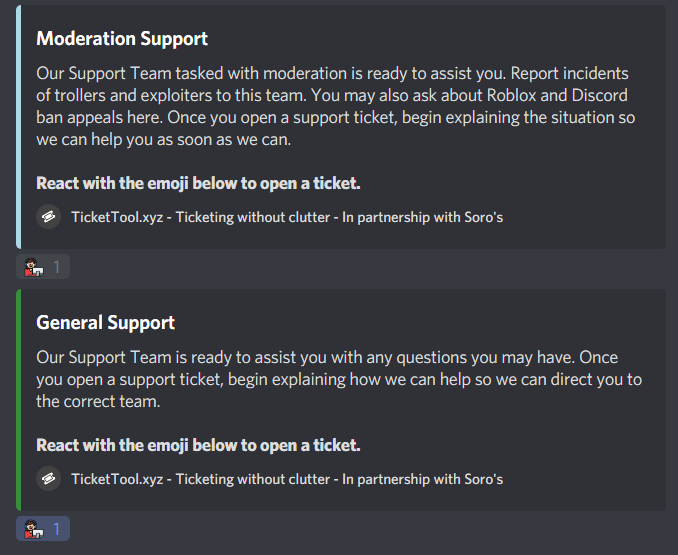
 forest goblet
jade topaz
this just confuses me
forest goblet
jade topaz
this just confuses me
BattleEye is the owner of ticket tool.
 jade topaz
ty
jade topaz
Hello, can you please help me?
scenic plinth
jade topaz
Hello, can you please help me?
What can I help you with?
jade topaz
I can’t figure out how to add a channel to the participant for the reaction
I do not know English, but I am writing to you through a translator
I know Russian
scenic plinth
What language do you speak?
Russian, I see. Would you prefer to speak russian? There's a bot here to make translating easier for you.
robust sandalBOT
scenic plinth
Russian, I see. Would you prefer to speak russian? There's a bot here to make tr...
 zlyzzツ
Русский, я вижу. Вы предпочитаете говорить по-русски? Здесь есть бот, чтобы облегчить перевод.
English (en) → Russian (ru)
jade topaz
Все?
robust sandalBOT
jade topaz
Все?
 Rocket wave
all?
Russian (ru) → English (en)
jade topaz
А я понял
robust sandalBOT
jade topaz
А я понял
Rocket wave
I get it.
Russian (ru) → English (en)
 icy grail
Russian Dud3
jade topaz
Я бы хотел добавить такое сообщение с реакцией, на которую нажимаешь и тебе открывается какой-то канал, или роль
icy grail
No Offence
robust sandalBOT
jade topaz
Я бы хотел добавить такое сообщение с реакцией, на которую нажимаешь и тебе откр...
Rocket wave
I'd like to add a message with a reaction that you click on and you're opening some kind of channel, or a role.
Russian (ru) → English (en)
scenic plinth
/ru Your in luck, that's how ticket tool works!
Have you invited it to a server yet?
robust sandalBOT
Ваша удача, вот как билет инструмент работает!
Вы уже пригласили его на сервер?
English (en) → Russian (ru)
robust sandalBOT
scenic plinth
/ru Your in luck, that's how ticket tool works!
Have you invited it to a server...
zlyzzツ
/ru Ваше в удачу, вот как билет инструмент работает!
Вы уже пригласили его на сервер?
English (en) → Russian (ru)
jade topaz
Да
robust sandalBOT
jade topaz
Да
Rocket wave
yes I do
Serbian (Cyrillic) (sr-Cyrl) → English (en)
Великий в чем проблема?
English (en) → Russian (ru)
jade topaz
Я хочу добавить роль за реакцию, если простыми словами
scenic plinth
/en Я хочу добавить роль за реакцию, если простыми словами
robust sandalBOT
I want to add a role for the reaction, if in simple words
Russian (ru) → English (en)
scenic plinth
/ru Ticket Tool doesn't neccesarily add roles to users (Not a function) when Tickets are created.
If you wish, you can leave a suggestion in the #827209540671111210!
robust sandalBOT
Инструмент билетов не не добавляет роли пользователям (не функция), когда билеты создаются.
При желании вы можете оставить предложение в #827209540671111210!
English (en) → Russian (ru)
jade topaz
Просто на сервере я нашел это:
Категория: Информация
Для чего нужны тикеты?
1)Вы можете предложить идею для сервера 💡
2)Вы можете пожаловатся на участника сервера, если он нарушил правила ❌
3)Вы можете задать вопрос ❓
4)Вы можете получить роль 🎈
Категория: информация
Без причины не используйте тикет мьют на 5 часов на сервере!
⊰🤖⊱ • Ticket Tool
БОТ
— Сегодня, в 20:01
Служба поддержки.
Чтобы создать тикет нужно просто нажать на реакцию " 📩 " сообщения ниже.
robust sandalBOT
jade topaz
Просто на сервере я нашел это:
Категория: Информация
Для чего нужны тикеты?
1)В...
Rocket wave
Just on the server I found this:
Category: Information
What are the tickets for?
-
You can suggest an idea for a server 💡
-
You can complain about a member of the server if he has violated the rules ❌
-
You can ask a question ❓
-
You can get the role 🎈
Category: information
For no reason, don't use a 5-hour ticket on the server!
⊰🤖⊱ • Ticket Tool
bot
Today, at 8:01 p.m.
Support.
To create a ticket you just need to click on the reaction "📩" message below.
Brawl Stars TV! Supercell.
Russian (ru) → English (en)
jade topaz
И хотел бы это добавить
robust sandalBOT
jade topaz
И хотел бы это добавить
Rocket wave
And I would like to add that
Russian (ru) → English (en)
scenic plinth
/ru I don't know how they have their server setup, I believe they might have it where the moderators / support add that role.
robust sandalBOT
Я не знаю, как они имеют свои настройки сервера, я считаю, что они могут иметь его, где модераторы / поддержка добавить эту роль.
English (en) → Russian (ru)
jade topaz
эх... ну ладно спасибо, удачи
robust sandalBOT
jade topaz
эх... ну ладно спасибо, удачи
Rocket wave
eh... Well, thank you, good luck.
Russian (ru) → English (en)
jade topaz
/ru I think it works that you make a ticket and ask for a role and the Moderators provide it instead of ticket tool auto giving it
robust sandalBOT
Я думаю, что это работает, что вы делаете билет и попросить роль и модераторы предоставить его вместо билета инструмент авто придав ему
English (en) → Russian (ru)
jade topaz
/en в точку
robust sandalBOT
to the point
Russian (ru) → English (en)
abstract wigeon
/ru There are also bots which allow you to add reaction roles to a message. I’ll get the link to the bot I used to use.
robust sandalBOT
Есть также боты, которые позволяют добавлять роли реакции к сообщению. Я получу ссылку на бота я использовал для использования.
English (en) → Russian (ru)
jade topaz
/en Попробую
robust sandalBOT
Try
Russian (ru) → English (en)
abstract wigeon
/ru Here is the link to the bot I used to use. The instructions on the website are in English but you can use ‘Google Translate’ to translate it to Russian.