#🆘│community-support
1 messages · Page 309 of 1
 acoustic oak
 humble sequoiaBOT
Don't Just Say "Hello" in Chat.
 humble iris
Is there a way I could get a notification when someone opens a ticket?
 subtle fable
is that above (the hello response) created in the bot?
 forest goblet
humble iris
Is there a way I could get a notification when someone opens a ticket?
forest goblet
humble iris
Is there a way I could get a notification when someone opens a ticket?
$help ping
humble sequoiaBOT
How to make Ticket Tool ping a role
To make ticket tool ping a role when a ticket is opened, go to the Dashboard -> Panel Configs -> Settings -> Ticket Options -> Ticket Message -> Message Text and do this:
{@Role name} This is case sensitive and the role must have @mentions enabled
 subtle fable
yes king you can add text to the top of the ticket message to ping you or a role. how is in channel avove or im sure someone will screenshot shortly
there you go
forest goblet
subtle fable
is that above (the hello response) created in the bot?
It's a tag, you can see this on the dashboard under Tags.
subtle fable
@forest goblet thanks
 iron nightBOT
Gave 1 Rep to 2x2Master (current: #3 - 44)
humble iris
subtle fable
yes king you can add text to the top of the ticket message to ping you or a role...
Huh
I want to get a ping when someone opens a ticket
I thought that is something on discord
 atomic solstice
Yeah but with the bot you have to setup which role it is supposed to ping
atomic solstice
humble sequoia
by following this ^
humble sequoiaBOT
 Faster Premium Bot
Automatic Transcripts
Full Customization
Custom Reactions
Direct Messages
Ticket Automation
Multipanels
Premium Support
You can purchase premium here:
Price
$6 - Monthly
$66 - Yearly
 Premium
atomic solstice
Premium
atomic solstice
 urban tundra
How to I get ticket tool premium
urban tundra
How to I get ticket tool premium
you can purchase it by using the link above ^^
 coarse sand
how do i get multiple reactions on a single panel
so every reaction opens a ticket with different ticket name
humble sequoiaBOT
Multipanels are a premium feature  that allow for a single panel with multiple reactions to open different tickets.
How to create a Multipanel
Premium users can combine multiple panels into one multipanel.
First of all you will need to assign a different Create Ticket Reaction for each Panel. Run $help reaction to learn how to do it.
Next, find the IDs of each panel you wish to combine. You can find them in your Panel Configs in the Dashboard
Next, send the multipanel to a channel using $panel [id1] [id2] {id3} ....
e.g. $panel 1 2 4 17 35 to combine panels 1, 2, 4, 17 and 35.
Up to 20 panels may be combined.
 atomic solstice
@coarse sand here ^^
 bleak viper
i still cant use the reactions in tickets
 loud saddle
How many tickets can I open without ticket tool premium
 craggy geyser
loud saddle
How many tickets can I open without ticket tool premium
craggy geyser
loud saddle
How many tickets can I open without ticket tool premium
There is no limit to the number of tickets
humble sequoiaBOT
Ticket Tool Premium
Get premium at https://tickettool.xyz/premium
Manage your subscriptions at https://tickettool.xyz/subscriptions
Why Premium?
Premium lets you customize the bot just how you want it. It also helps keep the bot running.
craggy geyser
$premiumperk
 craggy geyser
$premiumperk
craggy geyser
humble sequoia
Hmm.. not working. Should do this. @loud saddle this is the list of what premium does
craggy geyser
coarse sand
anyone encountering a problem with ticket tool creating a blank ticket
Have you checked the ticekt message?
humble sequoiaBOT
**Ticket Message**
The Ticket Message is the first message sent by the bot in a new ticket. To customize it head over to your Dashboard -> Panel Configs -> Settings -> Ticket Options -> Edit Ticket Message
 craggy geyser
Also, check that ticket tool has send message permissions in the channel
coarse sand
yup, its filled, ill check if they have permission
yeah has every permission
it works in other category though
craggy geyser
Run $debug in the empty ticket
coarse sand
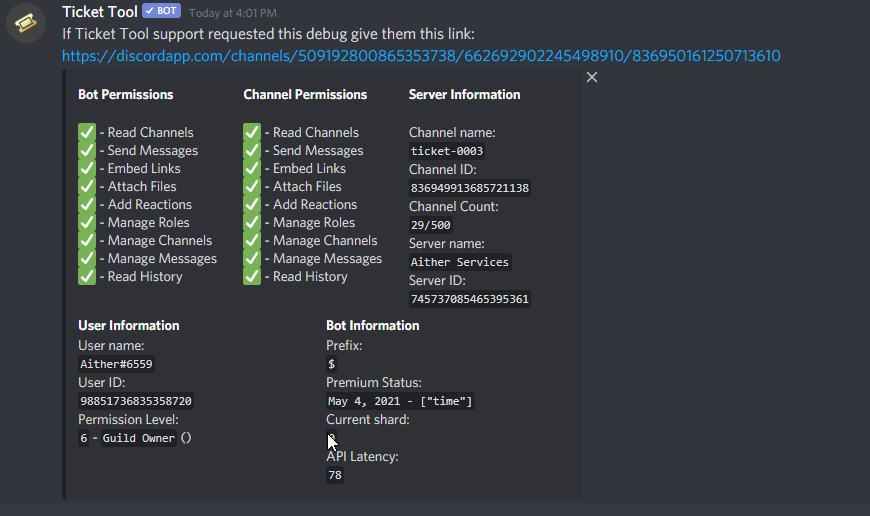 craggy geyser
Yeah, looks fine. Not sure why it isn't working
I don't get why it would work in one category and not another. Especially if both have the ticket message set up in the same sort of way
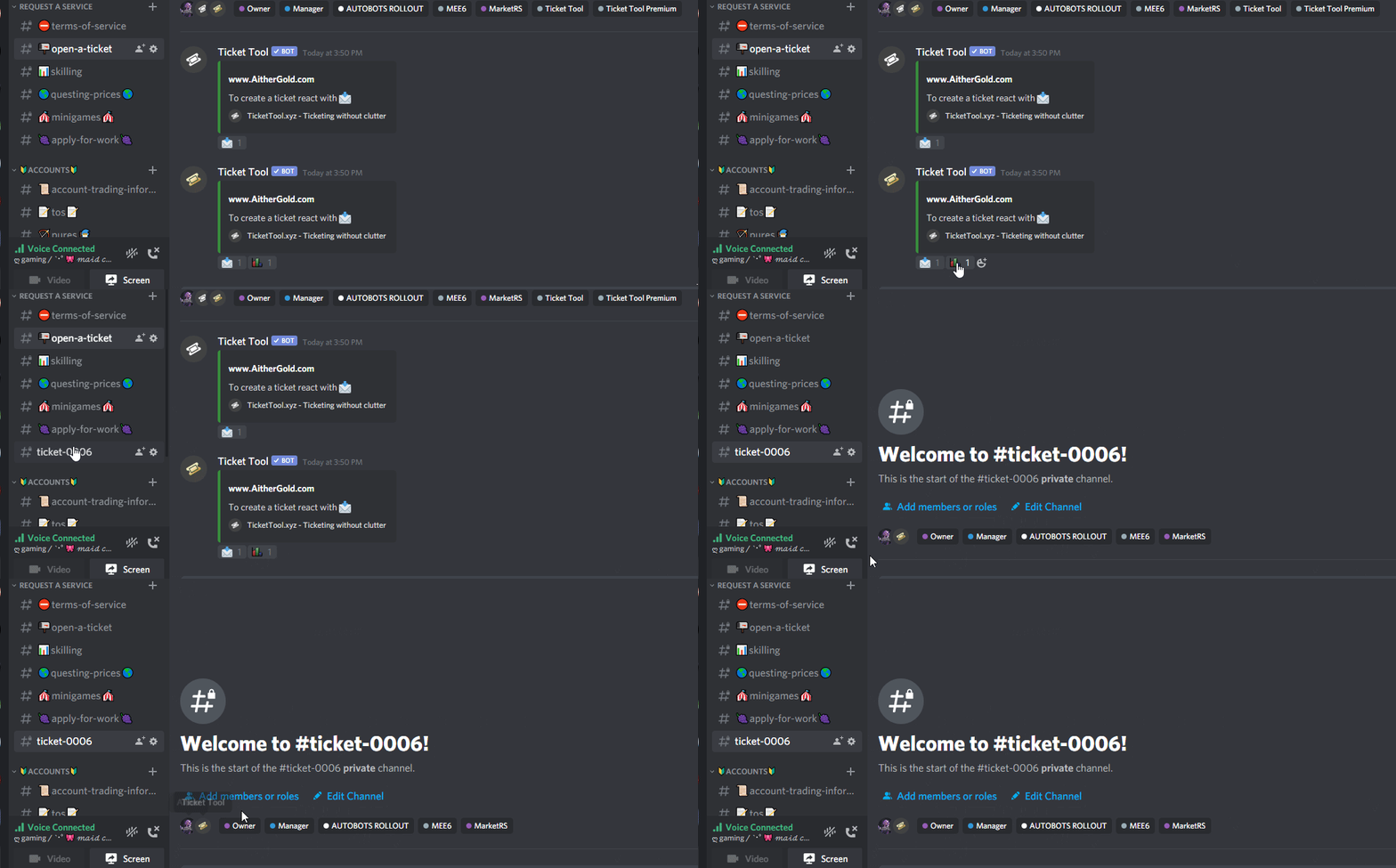 craggy geyser
What I will say, is the panel message will be the first one, so you will want to updae that to explain what the different emojis do. Maybe open up a ticket to get someone who knows more to help
 marble spruce
how do i get rid of the two - -
 humble sequoiaBOT
**Panel Message**
The panel message is where people react to make a ticket. To customize it head over to your Dashboard --> Panel Configs -> Settings -> Panel Options -> Edit Panel Message
 forest goblet
It should be there, try editing it
marble spruce
i did {empty} for the author name
forest goblet
Don't put anything there, then it should work.
marble spruce
yep ty
 mystic hound
coarse sand
https://i.imgur.com/d297h6c.gif
mystic hound
coarse sand
https://i.imgur.com/d297h6c.gif
try resending the panel, if it doesn't work #🎫│make-a-ticket and we'll take a look
coarse sand
mystic hound
try resending the panel, if it doesn't work <#571706435449257997> and we'll tak...
i got it fixed
can't use author urls or title urls
or nothing will appear
coarse sand
nvm got em to work
coarse sand
how can i use my own emojis in panel embed text?
humble sequoiaBOT
How do I get the ID of Roles/Channels/Emojis?
Ticket Tool has a useful command that helps you get the ID of various things like channels, roles, emojis and your server.
Just use the command $id <#channel/@role/:emoji:>. Now copy everything, including the brackets <...>, to your dashboard (or wherever you want it)
If you want the server ID, just use $id.
 mossy crystal
How to add someone in the ticket using a command
 scenic plinth
mossy crystal
How to add someone in the ticket using a command
scenic plinth
mossy crystal
How to add someone in the ticket using a command
$add {userid}
craggy geyser
$help add
humble sequoiaBOT
How to add or remove users on tickets
To add a user to a ticket use $add <user>
To remove a user from a ticket use $remove <user>
iron nightBOT
Gave 1 Rep to zlyzzツ (current: #5 - 35)
scenic plinth
Your welcome, have a great rest of your day! :)
marble spruce
how do i make a embed use a emoji from another server? like it does it for the create ticket reaction, but I dont know how to put it in a embed(if you know what i mean
 abstract wigeon
$idcommand
humble sequoiaBOT
How do I get the ID of Roles/Channels/Emojis?
Ticket Tool has a useful command that helps you get the ID of various things like channels, roles, emojis and your server.
Just use the command $id <#channel/@role/:emoji:>. Now copy everything, including the brackets <...>, to your dashboard (or wherever you want it)
If you want the server ID, just use $id.
marble spruce
so if it was notabug:748376714073210902 how would i put that?
humble sequoiaBOT
**Panel Message**
The panel message is where people react to make a ticket. To customize it head over to your Dashboard --> Panel Configs -> Settings -> Panel Options -> Edit Panel Message
craggy geyser
"copy everything, including the brackets <...>"
abstract wigeon
Put this in the message: <notabug:748376714073210902>
marble spruce
ty
abstract wigeon
Our pleasure
marble spruce
it didnt work :/
 abstract wigeon
marble spruce
it didnt work :/
abstract wigeon
marble spruce
it didnt work :/
I forgot a symbol, paste this: <: notabug:748376714073210902>
But without the space
marble spruce
perfect tysm
abstract wigeon
My pleasure
marble spruce
Also is there a way to make the bot create a ticket for a user when they do -new or something?
abstract wigeon
Yes
Ticket Tool Docs
Dashboard > Panel Configs > Settings (of the desired panel) > Command Style Tickets

 marble spruce
also is there a way to make it to where if only support roles have access to close a ticket, it sends a message in the ticket saying you need the @jolly ginkgo Representative role to use that(in like a embed)?
omg
im sorry for the ping
abstract wigeon
You can add that message in the ticket message and you can make the reaction Support Team Only
humble sequoiaBOT
**Ticket Message**
The Ticket Message is the first message sent by the bot in a new ticket. To customize it head over to your Dashboard -> Panel Configs -> Settings -> Ticket Options -> Edit Ticket Message
How to change reactions
To set a custom reaction Dashboard -> Panel Configs -> Settings -> Reaction Options -> <Reaction to change> -> Reaction

NOTE you need premium to do this.
marble spruce
abstract wigeon
You can add that message in the ticket message and you can make the reaction *Su...
like i mean if they used the $delete or $close
abstract wigeon
marble spruce
like i mean if they used the $delete or $close
By default it's Support Team Only
marble spruce
ik, but i was wanting a message saying that once a user that doesnt have the role does $close, it says:
You need the @ Support Role to close a ticket(but this would be a embed)
or something like that
abstract wigeon
Oh, you can't do that.
marble spruce
oh ok
abstract wigeon
It just doesn't do anything
marble spruce
ok ty
abstract wigeon
Np
scenic plinth
 lilac fractal
Speak you German
lilac fractal
Speak you German
If you would like help in specifically German, your best idea is to make a ticket in #🎫│make-a-ticket with the correct reaction, it will say it in the picture.
Wenn Sie Hilfe in spezifisch Deutsch wünschen, ist es am besten, ein Ticket in #🎫│make-a-ticket mit der richtigen Reaktion zu erstellen, das auf dem Bild angezeigt wird.
abstract wigeon
Or you can just type what you need help with in German and we can use our translation bot to translate to English.
 robust sandalBOT
abstract wigeon
Or you can just type what you need help with in German and we can use our transl...
robust sandalBOT
abstract wigeon
Or you can just type what you need help with in German and we can use our transl...
 Daniel Harrison
Oder Sie können einfach eingeben, was Sie Hilfe in deutsch brauchen und wir können unseren Übersetzungsbot verwenden, um ins Englische zu übersetzen.
 English (en) → German (de)
abstract wigeon
lilac fractal
Speak you German
English (en) → German (de)
abstract wigeon
lilac fractal
Speak you German
^^
Hej, detta är ett test!
Try here
@scenic plinth
robust sandalBOT
abstract wigeon
Hej, detta är ett test!
Daniel Harrison
Hey, this is a test!
Swedish (sv) → English (en)
abstract wigeon
Now it's working
 hidden ibex
humble sequoiaBOT
hidden ibex
humble sequoiaBOT
How to make Ticket Tool ping a role
To make ticket tool ping a role when a ticket is opened, go to the Dashboard -> Panel Configs -> Settings -> Ticket Options -> Ticket Message -> Message Text and do this:
{@Role name} This is case sensitive and the role must have @mentions enabled
marble spruce
why does it create 2 panels?

 solid stream
A bug we've been seeing when you have both bots in your server.
marble spruce
solid stream
A bug we've been seeing when you have both bots in your server.
bot bots?
oh ok
solid stream
You can just delete the extra panel
marble spruce
also why isnt this emoji working, even though its in my server

 humble sequoiaBOT
<a:ablobwavereverse:552927522824781834>
:ablobwavereverse:
 solid stream
Only works on your own server
marble spruce
oh lol ok
solid stream
to prevent abuse 🙂
marble spruce
on this, it only says the users id, not the actual name. How do i fix this?
 abstract wigeon
$idcommand
humble sequoiaBOT
How do I get the ID of Roles/Channels/Emojis?
Ticket Tool has a useful command that helps you get the ID of various things like channels, roles, emojis and your server.
Just use the command $id <#channel/@role/:emoji:>. Now copy everything, including the brackets <...>, to your dashboard (or wherever you want it)
If you want the server ID, just use $id.
 abstract wigeon
$variables
humble sequoiaBOT
Note: Remove The $ From The Variables
Supported Variables
{$server_name} -The server name
{$@Role Name} -The role name you want to mention (role names are case sensitive.)
{$empty} -Use this if you want to send nothing in a required field.
{$channel_name} -The channel name this message is used in/from
{$channel} -The channel this message is used in/from
{$user_nickname} -The users nickname (if set)
{$user_tag} -The users tag
{$user_name} -The users username
{$userfull} -The users username and usertag combined
{$user} -The users @user
{$user_icon} -The url for the users icon
{$ticket_limit} -The current ticket limit
{$panel_name} -The panels name
{$ticket_name} -The tickets name
{$ticket_category} -The category tickets are created in (if set)
{$count}The current count for tickets
{$ticket_channel} -The #channel for the ticket you created
{$ticket_user} -The @user who is assigned to the Ticket
{$ticket_user_nickname} -The nickname of the user who is assigned to the Ticket (if set)
{$ticket_user_tag} -The tag of the user who is assigned to the Ticket
{$ticket_user_name} -The username of the user who is assigned to the Ticket
Note: Remove The $ From The Variables
marble spruce
which one should i use to make it ping them or if not thats fine too
since {user} doesnt work
abstract wigeon
{$user}
scenic plinth
It should automatically ping the user, however I have realized there is an issue with discord I think with a new lines where it won't ping channels / roles, like when I make a role list, it will use the role name, but won't ping.
This is what I mean

 autumn solstice
what is ment with this?

"character limit while free"
it means now I can only put 250 characters, otherwise unlimited?
scenic plinth
It's a new lines thing, there has to be something above it.
scenic plinth
autumn solstice
it means now I can only put 250 characters, otherwise unlimited?
Correct. Whilst free, you can only have 250 characters. Premium allows you to bypass 250.
iron nightBOT
Gave 1 Rep to zlyzzツ (current: #5 - 36)
scenic plinth
Your welcome, have a great rest of your day! :)
 devout sun
humble sequoiaBOT
devout sun
humble sequoiaBOT
-- moved to ticket --
autumn solstice
Not sure why but when I put a space between the with and the emoji, the emoji dissapears

e.g

got it, fyi: Adding new lines by pressing enter may occur in there being too much text. Removing a space between two lines fixed it
 violet sun
Is there a way to have a ticket automaticly closed if there is no activity in it ?
humble sequoiaBOT
Automation disabled
There's currently no ETA for when automation will be enabled again. The issue that's caused it to be disabled, us hitting rate limits, is tied to the increased load on Discord's servers. The situation's currently unpredictable, which makes it so we can't give you a fixed time.
scenic plinth
@violet sun^
 gentle musk
That explains that...
violet sun
Cheers @scenic plinth
scenic plinth
Your welcome, have a great rest of your day! :)
 tidal ocean
How do i make the ticket on a channel?
humble sequoiaBOT
abstract wigeon
tidal ocean
How do i make the ticket on a channel?
Follow the instructions shown above ^^
 torn drift
Hey, is there a way to ping the staff role every time a ticket is made ?
abstract wigeon
Yes
humble sequoiaBOT
How to make Ticket Tool ping a role
To make ticket tool ping a role when a ticket is opened, go to the Dashboard -> Panel Configs -> Settings -> Ticket Options -> Ticket Message -> Message Text and do this:
{@Role name} This is case sensitive and the role must have @mentions enabled
abstract wigeon
torn drift
Hey, is there a way to ping the staff role every time a ticket is made ?
Follow the instructions shown above ^^
torn drift
Amazing thank you so much for the quick reply
abstract wigeon
My pleasure
 jade topaz
hey guys , i just installed TicketTool , how do i add this to a channel ? i try it but i failed
humble sequoiaBOT
abstract wigeon
jade topaz
hey guys , i just installed TicketTool , how do i add this to a channel ? i try ...
Follow the instructions shown above ^^
abstract wigeon
Click on the link and follow the instructions
jade topaz
kk
jade topaz
is anyone else's ticket tool lagging for a couple seconds before showing that the ticket is closing? It didn't do that before
subtle fable
we use the tool for processing new recruits into 3 gaming teams sharing a single discord server. Each team have their own panel and process. Is there a way of shifting a ticket from one panels process mid stream to another? Doesn't seem to be but checking :-(
scenic plinth
jade topaz
is anyone else's ticket tool lagging for a couple seconds before showing that th...
It will every once and a while do this, its more commonly someones internet / discord issue.
It does that to me every once and a while, but it should still work. If it gets to the point it doesn't do anything for anyone, you should let the support know about an issue in #make-a-ticket.
scenic plinth
subtle fable
we use the tool for processing new recruits into 3 gaming teams sharing a single...
No, once a ticket is created it sticks with the panel settings it was created from. It's sort of like how you can't change panel settings mid ticket and expect it to change. Sorry.
subtle fable
@scenic plinth thanks
iron nightBOT
Gave 1 Rep to zlyzzツ (current: #5 - 37)
scenic plinth
Your welcome, have a great rest of your day! :)
 ashen dragon
How to configure a bot so that the configuration of the channels that the participant opens (requests) is specific, for example. So that in a standard way, always in the open channel, a person can attach images
scenic plinth
ashen dragon
How to configure a bot so that the configuration of the channels that the partic...
Change the "user open settings", this will be under the "permissions" dropdown on the panel, and configure the options you want. You will likely have to resend the panel. This is the permissions ticket tool will give the user when it is opened.
 static arch
hello i can't access the dashboard. When i try it doesnt show my server. no matter how many times i invite the bot
humble sequoiaBOT
Don't see your server in the dashboard?
You will possibly need to relog. Look below to see steps on how to relog.
How to relog the Dashboard.
First, you will need to go to the dashboard. Once your there, click on your avatar on the top right. after you clicked it, you will see button that says Logout. You must click that. Once you have logged out, you can log back in.
Note:
You need one of these 3 things to access the dashboard.
1. Server Owner (Level: 6)
2. Server Administrator (Level: 4)
3. Dashboard Role (Level: 2)
You can check your level using $level on your Discord Server
scenic plinth
Try that :)
static arch
it didnt reply when i typed "!level" but im the owner
scenic plinth
$level, not !level
static arch
oop
scenic plinth
If you are server owner, relog into the dashboard and see what it does.
static arch
You right lol thx so much i was logged in other the wrong me
scenic plinth
No probs, have a great rest of your day! :)
static arch
you too
 rich fox
!invite
 bleak glenBOT
 Links!
 brisk halo
Can anyone tell me how to stop tickets from being auto deleted after they are closed?
scenic plinth
brisk halo
Can anyone tell me how to stop tickets from being auto deleted after they are cl...
Try enabling "two step ticket" or "two step close", this should allow you to save a transcript.
brisk halo
Two Step Ticket did the trick! Thanks @scenic plinth
scenic plinth
Your welcome! Have a nice day!
jade topaz
Someone can help me?
I click on the reaction as a server administrator account and the ticket opens normally, but when I open with a member without administrator fees, the ticket does not open, but the bot removes the reaction
humble sequoiaBOT
-- moved to ticket --
 jolly quail
Can you set permissions so only admins can close and delete tickets? If so. I cant find it. Lol
atomic solstice
jolly quail
Can you set permissions so only admins can close and delete tickets? If so. I ca...
Yes, in the reaction options and Command options you can set Allowed Roles, that means only the roles in that field will be permitted to use the command/Reaction
jolly quail
Ok ty
atomic solstice
no problem
 fervent mural
Can someone help me?
I followed all the steps in Making My Ticket bot work but it doesnt make any ticket for my members when they click on the reaction
Pls help i really need help
humble sequoiaBOT
-- moved to ticket --
 muted seal
Hi, I have a problem, when our players make tickets they can't see the message history for some reason.
atomic solstice
$help perms
humble sequoiaBOT
How to set the permissions for tickets
To set a change permissions go to the Dashboard -> Panel Configs -> Settings -> Permission Options
 atomic solstice
please go to the User Opened permissions and make sure the Read message history is on 
 waxen grail
i set the ticket bot up to the instructions but it will not let anyone create a ticket. how do i fix this?
atomic solstice
waxen grail
i set the ticket bot up to the instructions but it will not let anyone create a ...
Please check that you didn't put the @ everyone role or the member role in the blacklist roles in the dashboard
humble sequoiaBOT
Blacklist Roles
Any role you assign as a blacklisted role won't be able to use commands or reactions.
Selecting a blacklisted role
Go to your Dashboard -> Server Configs. There you will find the option to select blacklisted roles.
Note: Don't forget to save.
 waxen grail
ok i got the ticket to create but it only shows lock under the created ticket not where anyone can open it to see what they are requesting.
 tepid crown
how do i take off these extra two messages?? and how do i send the user have a transcript of like who closed the ticket and who opened the ticket to their dms? ping me!

 lilac girder
tepid crown
how do i take off these extra two messages?? and how do i send the user have a t...
lilac girder
tepid crown
how do i take off these extra two messages?? and how do i send the user have a t...
I think it requires premium for the second feature you mentioned. You may go to panel settings and check under logging options, there is an option called direct message transcript, and you may enable it
tepid crown
lilac girder
I think it requires premium for the second feature you mentioned. You may go to ...
any idea for the first msg?
lilac girder
tepid crown
any idea for the first msg?
I think it also requires premium for the first one. You will need to panel settings and check under moderator options, change the settings embed for closed message to blank
scenic plinth
It does require premium, if you yourself want to send it to someones DM you can send the "direct link" it sends to your transcript channel.
mystic hound
tepid crown
how do i take off these extra two messages?? and how do i send the user have a t...
You can disable two step ticket if you want to immediately delete a ticket. (So the "ticket closed" message won't appear)
 neon kiln
how to @ a role here
 scenic plinth
neon kiln
how to @ a role here
scenic plinth
neon kiln
how to @ a role here
$help ping
humble sequoiaBOT
How to make Ticket Tool ping a role
To make ticket tool ping a role when a ticket is opened, go to the Dashboard -> Panel Configs -> Settings -> Ticket Options -> Ticket Message -> Message Text and do this:
{@Role name} This is case sensitive and the role must have @mentions enabled
scenic plinth
There you go :)
 slim leaf
Hey guys; I’m trying to figure out how to stop a ticket automatically being created when someone joins my server but I can’t figure it out
humble sequoiaBOT
Automation disabled
There's currently no ETA for when automation will be enabled again. The issue that's caused it to be disabled, us hitting rate limits, is tied to the increased load on Discord's servers. The situation's currently unpredictable, which makes it so we can't give you a fixed time.
scenic plinth
Sorry, but even if that is a feature automation is disabeled, the member actually has to go and create the ticket.
slim leaf
Oh thats weird
It autocreated it for someone in my server when testing
Ok. What about the ticket when its closed? We have around 10 people a day that will be opening tickets. I dont want a list of closed tickets
Is there anyway to archive them all in one channel?
craggy geyser
$help closed
slim leaf
When they are closed
humble sequoiaBOT
How to set the closed category
To set a closed category go to the Dashboard -> Panel Configs -> Settings -> Category Options -> Category Closed
 craggy geyser
Here ^
slim leaf
But thats a catagory
craggy geyser
Oh, you said channel. Yeah
slim leaf
I dont want 1000s of tickets in a catagory on my server lol
craggy geyser
$help transcripts
humble sequoiaBOT
Help Options
$help commands - Information on commands
$help setup - Information on bot setup
$help faq - Frequently asked questions
slim leaf
If its not possible thats fine but that would be really annoying lol
craggy geyser
$help transcript
humble sequoiaBOT
How do I save transcript to a channel?
To save transcripts to a channel go to the Dashboard -> Panel Configs -> Settings -> Logging Options -> Transcript Channel
 craggy geyser
You can save the transcript and then delete the channel. And that channel is just full of transcripts
slim leaf
So I can have the channels autodelete when closed?
craggy geyser
Each ticket ends up as one message that you can acess the transcripts for
slim leaf
Oh thats cool
craggy geyser
You can't autodelete when closing. But you can use $close
Or react for deleting on the closed tickets
craggy geyser
Same part as earlier with automation I assume. I know you can autosave transcripts upon closing tickets (I do it on my server, but it might be a premium feature) but not sure if autoclose would be a thing
Yeah, it is premium feature
craggy geyser
slim leaf
Is there a time when a feature will be added to auto close?
You can skip closing and go to delete
Turn off two step ticket
mystic hound
craggy geyser
Same part as earlier with automation I assume. I know you can autosave transcrip...
There's no real ETA on when we'll get automation back, its a discord rate limit issue. Even when its back it'll most likely be premium only ^^^
slim leaf
I closed the ticket then pressed the green X and it didnt delete it
craggy geyser
That is part of two step close. The tick and cross are to confirm if you close the ticket. The tick would close it and then you get a new option for save/delete
If you turn off two step close, and turn of two step ticket, the reaction would just delete the ticket straight away. But would also do that if accidentally pressed
craggy geyser
Here, the two at the bottom of general
 slim leaf
Ok thanks. BTW I understand 2 step close but whats 2 step ticket again?
thanks @craggy geyser
iron nightBOT
Gave 1 Rep to Swiftgale (current: #15 - 10)
craggy geyser
2 step ticket is the auto close one
slim leaf
Oh
craggy geyser
If you turn it off, tickets won't close but will just delete
craggy geyser
You don't want that one if you don't have premium as you don't get autosave transcript without premium
So you probably want to close a ticket, then save and delete
 hexed warren
Anyone know how to make ticket permissions on or off like members allowed to ping roles with ticket panels
craggy geyser
slim leaf
Hmm its not saving in the channel I set
Does Ticket tool have permissions in that channel?
craggy geyser
hexed warren
Anyone know how to make ticket permissions on or off like members allowed to pin...
$help perms
humble sequoiaBOT
How to set the permissions for tickets
To set a change permissions go to the Dashboard -> Panel Configs -> Settings -> Permission Options
slim leaf
Yeah
hexed warren
thx
craggy geyser
slim leaf
Yeah
Try it in a new ticket created after saving the panel
slim leaf
I just tried again
I have 2 step close off and 2 step ticket on like you said
Since I dont have premium
hexed warren
humble sequoia
mentions arent included
slim leaf
Oh nvm it works now
But it doesnt auto save and delete when I press close
I need premium for that?
craggy geyser
Yeah. Premium is needed for auto save. And the 2 step ticket makes it auto delete
craggy geyser
I don't know of a lifetime one, but there might be
humble sequoiaBOT
Ticket Tool Premium
Get premium at https://tickettool.xyz/premium
Manage your subscriptions at https://tickettool.xyz/subscriptions
Why Premium?
Premium lets you customize the bot just how you want it. It also helps keep the bot running.
craggy geyser
That has information about it
iron nightBOT
@slim leaf :: You can't rep Swiftgale#4167 for 48 minutes and 7 seconds. Try coming back later?
slim leaf
Ugh why cant I link a channel
In the ticket it says get the format from #applications but its not lit up like a channel normally is
 timber peak
humble sequoiaBOT
timber peak
humble sequoiaBOT
Don't Just Say "Hello" in Chat.
craggy geyser
slim leaf
In the ticket it says get the format from #applications but its not lit up like ...
$help id
humble sequoiaBOT
Help Options
$help commands - Information on commands
$help setup - Information on bot setup
$help faq - Frequently asked questions
humble sequoiaBOT
How do I get the ID of Roles/Channels/Emojis?
Ticket Tool has a useful command that helps you get the ID of various things like channels, roles, emojis and your server.
Just use the command $id <#channel/@role/:emoji:>. Now copy everything, including the brackets <...>, to your dashboard (or wherever you want it)
If you want the server ID, just use $id.
craggy geyser
There we go @slim leaf
slim leaf
Ok great thanks
 wispy coral
the tool is fucked up
humble sequoiaBOT
Pong! Latency is 340ms. API Latency is 81ms [-]
solid stream
What doesn't seem to be working?
wispy coral
is just not working
solid stream
$help offline
humble sequoiaBOT
How to fix Ticket Tool not responding
If ticket tool is not responding, please follow these troubleshooting steps:
Check Ticket Tool's permissions
Make sure that Ticket Tool can read and write in the channel you are attempting to run commands in. Run the command @Ticket Tool#4843 debug to see Ticket Tools list of permissions in that given channel.
Check Ticket Tool's prefix
Make sure you're using the correct prefix for Ticket Tool, Ticket Tools default prefix is $ Run the command @Ticket Tool#4843 debug to see Ticket Tools prefix for your server
Check if Ticket Tool is offline
If ticket tool is offline please contact Ticket Tool support with your server ID so we can fix it asap.
slim leaf
Ok. Also it says like ticket-007 when a ticket is opened
We have different types of tickets. Can we change that name to be like whitelist-ticket-007?
humble sequoiaBOT
Creating a panel
To create a panel we are going to need to head over to the panel configs on the dashboard
Once at the dashboard we will need to click Create Panel
Enter a panel name (Fill in any optional settings you want)
Click Create Panel and your ready to get started with configuring your panel
An example of a creating a panel is shown below.

 hasty thicket
Hello can someone help me with claim tickets? I follow dashboard settings but this function still not work for me
solid stream
$help claim
humble sequoiaBOT
How does the claim command work?
Ticket Tool claiming is a premium only command that allows your support team to claim tickets and have the ticket renamed, changed permissions or moved to another category
Claiming Options
Claiming allows you to change the ticket name, category and permissions. To use it you have to enable it first on your Dashboard > Panel Configs > Claiming Options.

 Note: This is a premium feature
hasty thicket
Note: This is a premium feature
hasty thicket
i have all this on green and i have category where its possible to move but not working
 broken fern
$help
humble sequoiaBOT
Help Options
$help commands - Information on commands
$help setup - Information on bot setup
$help faq - Frequently asked questions
broken fern
$help setup
humble sequoiaBOT
Setting up Ticket Tool
Visit the docs for setup info
General Setup
solid stream
hasty thicket
i have all this on green and i have category where its possible to move but not ...
do you have premium?
hasty thicket
yes
solid stream
If the category isn't moving make sure it has the permissions.
hasty thicket
solid stream
If the category isn't moving make sure it has the permissions.
on both catgeory i have full permission for native bot role
but nothing
solid stream
Hmm, what's your servers name or id?
hasty thicket
solid stream
yes
i cant send you because of clyde
 hasty thicket
i have it
hasty thicket
ok
 sweet frigate
i cant have my ticket appear in a certain category, and i think its because the administration is off, how do i turn that on
slim leaf
Is there any way to give someone a role based on a reaction?
I want for when someone makes a ticket, it gives a second box that says pick a reaction for your role!
craggy geyser
Not with ticket tool
slim leaf
Ok. Is there a way ticket tool can trigger another bot to post that in the chat?
craggy geyser
Not as far as I know
solid stream
If you had a custom bot you could have it look for the ticket created message and do stuff
but most of not all normal large bots ignore commands from other bots.
slim leaf
Oh
 jovial shell
(dm me if u want to help me with my server)
robust sandalBOT
 junior tree
De l'aide en francais possible ?
junior tree
De l'aide en francais possible ?
 CAxPrånå
Help in French possible?
French (fr) → English (en)
scenic plinth
If you wish, you can try here. You can try #🎫│make-a-ticket under the reaction that suits you best.
robust sandalBOT
scenic plinth
If you wish, you can try here. You can try <#571706435449257997> under the react...
 zlyzzツ
Si vous le souhaitez, vous pouvez essayer ici. Vous pouvez essayer #🎫│make-a-ticket la réaction qui vous convient le mieux.
English (en) → French (fr)
scenic plinth
@junior tree^
 spring glade
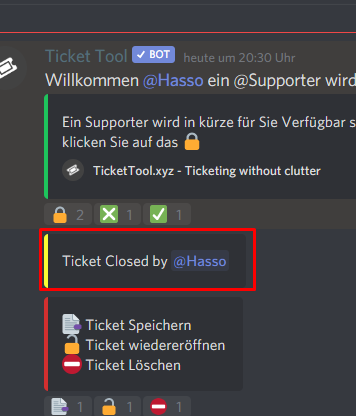
how can i change the message to other language
on this tab right

i changed it but the bot the bot doesnt change it
junior tree
Merci 🙂
 steel sail
I have a question. Im understanding the ticket tool and how to create tickets ect but is it possible to add more than 1 emoji to a ticket? example say i wanted a support ticket with multiple actions in one, and i put in the description this is a support ticket to report a person react with ♥ to ask a question open a ticket with 😫 could both those emojis be an option to click to minimize having multiple open its all in one?
solid stream
$panel
humble sequoiaBOT
Send panel
How to send a panel?
To send a panel use the command $panel <id>
How do I find the ID?
The ID is located on the dashboard just before your panels name.
How to combine panels? (premium only)
Add multiple ID's $panel <id1> <id2> <id..>
The first ID will have its message and reaction sent while the others will have only reactions sent.
You can combine up to 20 panels (Reactions will be slowly added)
thank you okay so basically i have to make seperate panels and then just combine them is what your saying?
iron nightBOT
Gave 1 Rep to BattleEye (current: #13 - 14)
solid stream
yes
steel sail
awesome ! im going to give that a try thanks again!!
 upper flower
Wow thanks @solid stream
iron nightBOT
Gave 1 Rep to BattleEye (current: #12 - 15)
jade topaz
@upper flower what is the project
spring glade
need help
 rugged solstice
Is it possible to have the bot assign a role when opening a ticket?
 glacial merlin
How do I make it so when I close the ticket it dms the person saying ‘Claimed’ or ‘Done’
 pale pilot
rugged solstice
Is it possible to have the bot assign a role when opening a ticket?
pale pilot
rugged solstice
Is it possible to have the bot assign a role when opening a ticket?
Nope
rugged solstice
pale pilot
Nope
dang, ty
iron nightBOT
Gave 1 Rep to Simple (current: #2 - 50)
pale pilot
glacial merlin
How do I make it so when I close the ticket it dms the person saying ‘Claimed’ o...
If you have premium, you can enable it under automation options
glacial merlin
So we need premium?
pale pilot
For the bot to DM users, yes
glacial merlin
F
 karmic heath
so who can guess what the new project is?
 shadow axle
what?
abstract wigeon
Please use this channel for it's intended use, which is community support. If you want to hang out with other Ticket Tool users then your welcome to join the Ticket Tool Lounge. Link will be found below:
humble sequoiaBOT
Ticket Tool Invite & Support
jade topaz
Why is chat locked
scenic plinth
jade topaz
Why is chat locked
Chats are locked for a reason. If you would like to communicate with others, you can join the community server here: #827209540671111210
abstract wigeon
Head over to our community server to chat with us, get to know us better and have fun!
jade topaz
I have to join a whole new server?
abstract wigeon
Yes.
jade topaz
scenic plinth
Chats are locked for a reason. If you would like to communicate with others, you...
"Locked for a reason" yeah exactly I was asking what the reason was fool 🤨
abstract wigeon
Read the announcement: #📣│server-news message
scenic plinth
jade topaz
I have to join a whole new server?
Correct, the developers believe this server should be used for strictly support. Also please avoid disrespect :)
jade topaz
Oh shush
abstract wigeon
Please respect all members of this server, or action will be taken.
mystic hound
jade topaz
Oh shush
If you could be respectful to people trying to help you that'd be great.
jade topaz
abstract wigeon
Please respect all members of this server, or action will be taken.
Ooo scary
scenic plinth
Fred, please.
abstract wigeon
Will be.
 prime bridgeBOT
 Successful Mutes:
 1
 Unsuccessful Mutes:
 0
 Reason: No reason.
 Moderator: @mystic hound
mystic hound
Oh pft forgot the variable
gentle musk
Hey
Is it possible to undelete a ticket once it's closed, deleted and the transcript has been saved?
abstract wigeon
Ofc
 odd dove
Did something happen to the server? I'm unable to chat in general anymore
abstract wigeon
odd dove
Did something happen to the server? I'm unable to chat in general anymore
Read the announcement: #📣│server-news message
You will find all the information there.
odd dove
abstract wigeon
You will find all the information there.
Perfect. Makes sense.
 slow maple
$help
humble sequoiaBOT
Help Options
$help commands - Information on commands
$help setup - Information on bot setup
$help faq - Frequently asked questions
 scenic plinth
slow maple
Pls help
scenic plinth
slow maple
Pls help
Please make sure ticket tool can see / send messages in that channal.
slow maple
It didn't work
scenic plinth
$help offline
humble sequoiaBOT
How to fix Ticket Tool not responding
If ticket tool is not responding, please follow these troubleshooting steps:
Check Ticket Tool's permissions
Make sure that Ticket Tool can read and write in the channel you are attempting to run commands in. Run the command @Ticket Tool#4843 debug to see Ticket Tools list of permissions in that given channel.
Check Ticket Tool's prefix
Make sure you're using the correct prefix for Ticket Tool, Ticket Tools default prefix is $ Run the command @Ticket Tool#4843 debug to see Ticket Tools prefix for your server
Check if Ticket Tool is offline
If ticket tool is offline please contact Ticket Tool support with your server ID so we can fix it asap.
prime bridgeBOT
cheap has been silenced for 10m 

 Reason: Mass mentioning members
cheap#9487 | 276158676228636672
scenic plinth
@mild zodiac, if you need help please state it when you are unmuted. Please do not ping staff / members.
 versed nacelle
cant seem to access invite link
 abstract wigeon
Please open a ticket and let the Support Team know of this issue.
abstract wigeon
Here is the direct link to invite the bot: https://discord.com/oauth2/authorize?client_id=557628352828014614&scope=applications.commands+bot&permissions=2952915024 @versed nacelle

Discord
Discord is the easiest way to communicate over voice, video, and text. Chat, hang out, and stay close with your friends and communities.
versed nacelle
abstract wigeon
Here is the direct link to invite the bot: https://discord.com/oauth2/authorize?...
thank you
iron nightBOT
Gave 1 Rep to Daniel Harrison (current: #11 - 16)
abstract wigeon
My pleasure
jade topaz
versed nacelle
thank you
by the way you still need site to set it up
abstract wigeon
Sadly you do
jade topaz
Hope site going to work soo I really need that bot rn
scenic plinth
jade topaz
Hope site going to work soo I really need that bot rn
Do try restarting your device you are trying to access it on if it becomes frequent, sometimes it can be a user error.
jade topaz
scenic plinth
Do try restarting your device you are trying to access it on if it becomes frequ...
I have question is site working for you?
My friend tried to open it too but its not working for him too
 strange sorrel
how to activate premium ?
humble sequoiaBOT
Inviting and Enabling Premium Bot
The first thing you will need to do is invite the premium bot, an invite can be found here
Once the bot is in your server we will head to the dashboard and manage your server. When you are managing your server, you want to head into "Server Configs" then click the drop down menu under "Select the bot you would like to use on this server" then click "Ticket Tool#6207" and then save.
scenic plinth
jade topaz
I have question is site working for you?
The site it working for me yes, if it becomes a frequent issue the dev will be notified about the issue.
abstract wigeon
strange sorrel
how to activate premium ?
Follow the instructions shown above ^^
jade topaz
scenic plinth
The site it working for me yes, if it becomes a frequent issue the dev will be n...
If you can tell me in dms where are you from so I can turn VPN on to maybe try it
If you dont want to its okay too
scenic plinth
strange sorrel
Dosent work
Please open a ticket in #🎫│make-a-ticket if the tutorial doesn't work for you.
slim leaf
Is there any way to change settings on the ticket bot from multiple discord accounts?
scenic plinth
slim leaf
Is there any way to change settings on the ticket bot from multiple discord acco...
As long as the account has a a dsshboard role / administrator perms they can access the dashboard and manage it all they want.
abstract wigeon
(Was just typing that out.)
scenic plinth
For dashboard roles, follow this:
humble sequoiaBOT
Dashboard Roles
Any role you put there will have full access to the ticket tool dashboard. The server owner and users with admin permissions already have access to the dashboard.
Be careful of which roles to put here
 iron nightBOT
Gave 1 Rep to zlyzzツ (current: #5 - 38)
slim leaf
Thanks @abstract wigeon
iron nightBOT
Error: You're still on cooldown
scenic plinth
slim leaf
Thanks <@!615207454443044904>
No probs, have a nice day! :)
Thanks @abstract wigeon
iron nightBOT
Gave 1 Rep to Daniel Harrison (current: #11 - 17)
abstract wigeon
slim leaf
Thanks <@!546305697130872833>
Our pleasure
scenic plinth
There we go :)
abstract wigeon
Ty
versed nacelle
anyone else getting double responses?

 shadow bear
the bot isnt responding to anny commands. also on the dashboard its telling me to invite the bot (even though ive had it for a few weeks now) and when i try to it doesnt work?
 eternal raptor
Anyone else can't close the ticket ?
humble sequoiaBOT
If the bot is not working properly, try the following steps:
-
Run the $debug command in your server, to check the permissions of the bot. Send the link you get to us.
-
Check if you have any Blacklisted Roles in your Server Configs. Any roles listed there will not be able to use the bot / create tickets.
-
While you're in your Server Configs , make sure that you don't have the premium bot enabled, without actually having premium or the bot on the server.
These are the most common issues. If your problem still exists, you can go to our Troubleshooting Page for more fixes.
Don't see your server in the dashboard?
You will possibly need to relog. Look below to see steps on how to relog.
How to relog the Dashboard.
First, you will need to go to the dashboard. Once your there, click on your avatar on the top right. after you clicked it, you will see button that says Logout. You must click that. Once you have logged out, you can log back in.
Note:
You need one of these 3 things to access the dashboard.
1. Server Owner (Level: 6)
2. Server Administrator (Level: 4)
3. Dashboard Role (Level: 2)
You can check your level using $level on your Discord Server
abstract wigeon
shadow bear
the bot isnt responding to anny commands. also on the dashboard its telling me t...
Follow the instructions shown above ^^
shadow bear
abstract wigeon
Follow the instructions shown above ^^
hmm the debug command isnt working. i may have changed my prefix and dont remember? also the bot shows online but isnt in the member list
versed nacelle
im getting double responses, ive kicked the bot already and invited back
 abstract wigeon
shadow bear
hmm the debug command isnt working. i may have changed my prefix and dont rememb...
abstract wigeon
shadow bear
hmm the debug command isnt working. i may have changed my prefix and dont rememb...
Type @Ticket Tool#4843 debug
shadow bear
not working :/ if you kick the bot do you have to redo the panels?
abstract wigeon
You can back up your configuration
humble sequoiaBOT
Backup and Restore allows you to transfer your premium status, panels, tags, and all settings to a new server.
You can also use it to keep a backup of your settings incase you need to suddenly move servers. We suggest you keep this backup key somewhere safe, incase your server is deleted. You will want to copy the whole key.
First, go to your dashboard, then Server Configs and generate a new backup key by pressing the green button. Now, a key should be generated in the box above. You may need to refresh the page to see this.
Once you have your backup key, navigate to the same page on the new server. Copy the key on the second field.
Now you can choose what you want to copy. Finally, press the green “Restore Configs” button.
 abstract wigeon
Follow the instructions above^^
shadow bear
only thing is i cant get into my dashboard
abstract wigeon
What seems to be the issue?
eternal raptor
The bot suddenly don't answer to the commands lol someone know why ?
eternal raptor
No one ?
 echo maple
I have the same problem
abstract wigeon
The bot might be down or having some small issues. Please be patient while the Development Team likes into the matter.
 solar quiver
ح
eternal raptor
abstract wigeon
The bot might be down or having some small issues. Please be patient while the D...
Yeah no problem!!
eternal raptor
Goodnight i guess
 proud agate
I was just about to ask why the bot was down
 radiant moss
solid stream
radiant moss
solid stream
yeah, part of it fudged up and we started to get duplicate events...
radiant moss
Dang. Now we wait for everyone to come and ask why it’s down 😂
solid stream
I think the restart is quick enough to not cause alot of issues.
15 minutes vs our old 1-2 hours..
eternal raptor
Lmao
proud agate

solid stream
last set, 5 minute to go.
jade topaz
nice
hey ticket tool isn't opening tickets when people choose to open tickets the admin of the server isn't on to fix it anything i can do
 fickle galleon
read
 ocean lotus
why is the bot off on my server? On my friend’s server he’s online.
proud agate
Thank you all for fixing the ticket tool
 rancid otter
radiant moss
Should me online momentarily
rancid otter
radiant moss
Should me online momentarily
👑 ✅
proud agate
I have a Quick question that does not need a Ticket
rancid otter
which one?
proud agate
?
rancid otter
proud agate
I have a Quick question that does not need a Ticket
.
proud agate
Well I need to make it so when i create a ticket is goes to a Category and not just the top of the discord, is there a way to do this
lilac girder
$help category
humble sequoiaBOT
How to set the open category
To set a open category go to the Dashboard -> Panel Configs -> Settings -> Category Options -> Category Open
 lilac girder
@proud agate
proud agate
Thank you so much
 drowsy fossil
so i invited the bot to my server, and ticket tool is there, but when i get to manage servers the server doesnt show up, i tried multiple times, can anyone help?
lilac girder
drowsy fossil
so i invited the bot to my server, and ticket tool is there, but when i get to m...
try log out and log in again
drowsy fossil
lilac girder
try log out and log in again
ive tried 😭
lilac girder
humble sequoia
Make sure you have the require perms @drowsy fossil
drowsy fossil
lilac girder
Make sure you have the require perms <@!733113274975125546>
oh, tysm!! @lilac girder
jade topaz
Hello , I have a problem
On my Discord server when I invite the Ticket Tool it won't let me open a Ticket or let me put the $help
But when I try it on a test server if it lets me use it
What can I do to make it work on my server?
Thanks for your attention
brisk halo
Not letting me currently open any tickets either, was working fine, without changing anything suddenly theres no response
jade topaz
Maybe it is in maintenance or it fell?
scenic plinth
$help offline
humble sequoiaBOT
How to fix Ticket Tool not responding
If ticket tool is not responding, please follow these troubleshooting steps:
Check Ticket Tool's permissions
Make sure that Ticket Tool can read and write in the channel you are attempting to run commands in. Run the command @Ticket Tool#4843 debug to see Ticket Tools list of permissions in that given channel.
Check Ticket Tool's prefix
Make sure you're using the correct prefix for Ticket Tool, Ticket Tools default prefix is $ Run the command @Ticket Tool#4843 debug to see Ticket Tools prefix for your server
Check if Ticket Tool is offline
If ticket tool is offline please contact Ticket Tool support with your server ID so we can fix it asap.
jade topaz
The bot does not respond to me
scenic plinth
What shard are you on? (Refer to the bots status)
jade topaz
Says $ help l TicketTool.xyz l Shard: 168
scenic plinth
Try giving the bot administrative if it doesn't already and see what it does
@brisk halo Are you still having the same issue? If so, what shard are you on? (Refer to the bots status)
jade topaz
You already have it but it doesn't work
scenic plinth
Ok, do you know how to get your server ID?
jade topaz
Yes I have
scenic plinth
jade topaz
Yes I have
Ok, since it still fails to respond as you said please #🎫│make-a-ticket and provide your server ID and explain the bot is failing to respond after checking permissions and is online, I'm sorry I can't be much more of help with this.
iron nightBOT
Gave 1 Rep to zlyzzツ (current: #5 - 39)
scenic plinth
jade topaz
Thanks <@!615207454443044904>
You're welcome, have a nice day / night!
scenic plinth
jade topaz
Bruh it won'tlet
Is it giving you an error when you send them?
@noble hazel What do you need help with? (Reference #📈│reviews)
jade topaz
Hey can you rename the bot in your server?
 noble hazel
?
noble hazel
yes
jade topaz
how🤨
lilac girder
jade topaz
how🤨
jade topaz
im trying to change the ticket tools name to like my discord name then Support
lilac girder
you can just set a nickname but not a username
jade topaz
lilac girder
you can just set a nickname but not a username
I got it thanks!
iron nightBOT
Gave 1 Rep to Pandа ^^ (current: #36 - 1)
lilac girder
np
jade topaz
Hedrex tried charging me money to help me
what a bum
oh okay hes just a scammer nice
scenic plinth
noble hazel
in my server
$help offline
humble sequoiaBOT
How to fix Ticket Tool not responding
If ticket tool is not responding, please follow these troubleshooting steps:
Check Ticket Tool's permissions
Make sure that Ticket Tool can read and write in the channel you are attempting to run commands in. Run the command @Ticket Tool#4843 debug to see Ticket Tools list of permissions in that given channel.
Check Ticket Tool's prefix
Make sure you're using the correct prefix for Ticket Tool, Ticket Tools default prefix is $ Run the command @Ticket Tool#4843 debug to see Ticket Tools prefix for your server
Check if Ticket Tool is offline
If ticket tool is offline please contact Ticket Tool support with your server ID so we can fix it asap.
scenic plinth
Try that
noble hazel
$help offline
humble sequoiaBOT
How to fix Ticket Tool not responding
If ticket tool is not responding, please follow these troubleshooting steps:
Check Ticket Tool's permissions
Make sure that Ticket Tool can read and write in the channel you are attempting to run commands in. Run the command @Ticket Tool#4843 debug to see Ticket Tools list of permissions in that given channel.
Check Ticket Tool's prefix
Make sure you're using the correct prefix for Ticket Tool, Ticket Tools default prefix is $ Run the command @Ticket Tool#4843 debug to see Ticket Tools prefix for your server
Check if Ticket Tool is offline
If ticket tool is offline please contact Ticket Tool support with your server ID so we can fix it asap.
subtle fable
Odd problem. In the Ticket Message I have the person creating ticket pinged by this message text "{user} Welcome. "
Yet in trying to create a Closed Message, the same text doesn't work in message text......yet the same text in the Closed Message Embed Text seems to work.
Confused. I want to DM the ticket creator when the ticket is closed (?)
lilac girder
subtle fable
Odd problem. In the Ticket Message I have the person creating ticket pinged b...
It requires premium if you wish the bot auto DMs the ticket creator when a ticket is closed. You may go to panel settings, under automation options, find send direct message when ticket closed
subtle fable
yeah I have premium. But in testing it's not sending them the DM....I assumed it was because the @X had to be in message text to ping them, but using the same as in the Ticket Message itself doesn't work (creator isn't receiving DM's). I'll go back throug privaledges again
I'm an idiot I was putting it in the Closed Message not DM Closed Embed 😦 lol
lilac girder
lol
subtle fable
yep comnfirmed
 undone socket
support
pls
i have created a server i need to setup my ticket toll
how shall i setup
pls tell
@subtle fable tell
@atomic solstice pls tell
humble sequoiaBOT
atomic solstice
undone socket
<@!601783394334015498> pls tell
Please don't randomly ping people, here is how you setup the bot ^^
jade topaz
i wonder what's happening to ticket tool website
shadow axle
it seems to be down/very slow, the devs have been notified of it. Please remain patient
forest goblet
.
Website outage
 It seems like the ticket tool website is having trouble at the moment. The developers have been alerted, so please be patient.
upper flower
Fixed.
 minor owl
upper flower
Fixed.
minor owl
upper flower
Fixed.
still cant load the website
upper flower
Yeah now read #📣│bot-news
 eager grove
it's still v slow
shadow axle
ever tried reading #📣│bot-news ?
abstract wigeon
Information regarding the Ticket Tool website
#📣│bot-news message
minor owl
shadow axle
ever tried reading <#571104498483986466> ?
who
minor owl
shadow axle
ever tried reading <#571104498483986466> ?
who tf was even speaking to you
abstract wigeon
Hey, be respectful to everyone in this server.
shadow axle
minor owl
who tf was even speaking to you
i was talking to the milan person and not you?
minor owl
shadow axle
i was talking to the milan person and not you?
still no one asked you
are u a dev
shadow axle
minor owl
are u a dev
what if i'm not?
minor owl
abstract wigeon
Hey, be respectful to everyone in this server.
no one is speaking to you
minor owl
shadow axle
what if i'm not?
ur not u dumb fuck so dont respond
shadow axle
this channel says community support fyi
abstract wigeon
@mystic hound
shadow axle
ok tata
mystic hound
If you don't have a question or concern, leave chat instead of harassing people trying to help.
minor owl
mystic hound
If you don't have a question or concern, leave chat instead of harassing people ...
ur a random wtf
lol
prime bridgeBOT
Successful Mutes: 1
Unsuccessful Mutes: 0
Reason: No reason.
Moderator: @mystic hound
forest goblet
smh
eager grove
lmao, pog
lilac girder
"ur a random" 
abstract wigeon
Information regarding the Ticket Tool website
#📣│bot-news message
abstract wigeon
We don't know yet. It usually takes around 20 minutes or so for it to come back.
abstract wigeon
 glossy widget
can i setup from discord?
glossy widget
can i setup from discord?
No sorry. Dashboard is needed for the setup process.
 tame burrow
When i try to setup ticket tool its not working :/
shadow axle
abstract wigeon
Updated information regarding the Ticket Tool website
#📣│bot-news message
eager grove
hey uh
how do I mention a channel in the ticket text?
the weird braces and then the #channel or?
humble sequoiaBOT
How do I get the ID of Roles/Channels/Emojis?
Ticket Tool has a useful command that helps you get the ID of various things like channels, roles, emojis and your server.
Just use the command $id <#channel/@role/:emoji:>. Now copy everything, including the brackets <...>, to your dashboard (or wherever you want it)
If you want the server ID, just use $id.
abstract wigeon
eager grove
how do I mention a channel in the ticket text?
Follow the instructions shown above ^^
eager grove
hm
but the role was just a '{@Support}'
how do I mention a channel in the ticket embed text?
humble sequoiaBOT
Note: Remove The $ From The Variables
Supported Variables
{$server_name} -The server name
{$@Role Name} -The role name you want to mention (role names are case sensitive.)
{$empty} -Use this if you want to send nothing in a required field.
{$channel_name} -The channel name this message is used in/from
{$channel} -The channel this message is used in/from
{$user_nickname} -The users nickname (if set)
{$user_tag} -The users tag
{$user_name} -The users username
{$userfull} -The users username and usertag combined
{$user} -The users @user
{$user_icon} -The url for the users icon
{$ticket_limit} -The current ticket limit
{$panel_name} -The panels name
{$ticket_name} -The tickets name
{$ticket_category} -The category tickets are created in (if set)
{$count}The current count for tickets
{$ticket_channel} -The #channel for the ticket you created
{$ticket_user} -The @user who is assigned to the Ticket
{$ticket_user_nickname} -The nickname of the user who is assigned to the Ticket (if set)
{$ticket_user_tag} -The tag of the user who is assigned to the Ticket
{$ticket_user_name} -The username of the user who is assigned to the Ticket
Note: Remove The $ From The Variables
iron nightBOT
Gave 1 Rep to Daniel Harrison (current: #10 - 18)
eager grove
haha, nice
abstract wigeon
My pleasure
tame burrow
Finally the Ticket tool worked
mystic hound
uh..no if you want to mention a channel inside an embed use <#channelID>
$idcommand
humble sequoiaBOT
How do I get the ID of Roles/Channels/Emojis?
Ticket Tool has a useful command that helps you get the ID of various things like channels, roles, emojis and your server.
Just use the command $id <#channel/@role/:emoji:>. Now copy everything, including the brackets <...>, to your dashboard (or wherever you want it)
If you want the server ID, just use $id.
mystic hound
the {channel} variable is to tag the current channel I believe. (so if it was run in here, it'd display #🆘│community-support )
eager grove
the $id #735589367027859457 doesn't give me an id
 mystic hound
eager grove
the $id <#735589367027859457> doesn't give me an id
mystic hound
eager grove
the $id <#735589367027859457> doesn't give me an id
you can alternatively enable developer mode and right click the channel to get its ID, though the ID command should be working for you
 humble sequoiaBOT
How to turn on developer mode
To enable developer mode do the following:
[pc] go to settings -> Appearance -> developer mode
[Mobile] go to settings -> Behavior -> developer mode
 abstract wigeon
Okay. Perfect!
mystic hound
eager grove
https://gyazo.com/b004d03a308763e15a01ae764d2ce3c1
is the prefix of your bot correct? does the bot have permissions to send messages to that channel? these are two common reasons why it wouldn't work. although if you used devmode to get the ID that's fine too
abstract wigeon
You can run @Ticket Tool#4843 debug in your server.
 vapid iris
Hey, I'm posting a panel prior, and it puts the 3 reacts in place, i've added a 4th panel option, but it now only posts 1 of the 4 reacts
never mind
 I got it
vapid iris
yeah 😂 I realized that after
abstract wigeon
Perfect 😂
 atomic solstice
 strange wing
help pls
strange wing
help pls
what is the problem?
strange wing
admşnşstrator not opened
atomic solstice
you don't need it for the bot to work, if your permissions are setup correctly then it works without it as well. But if you want to turn it on then go to the the Server Settings of your server
and add the administrator permission to the Ticket Tool role
atomic solstice
$help
iron nightBOT
Gave 1 Rep to Satisfy (current: #6 - 38)
atomic solstice
np
 barren vector
aahahahah
I would like to make a ticket where, by clicking on the reaction, a role is given which commands should I use ??
atomic solstice
barren vector
I would like to make a ticket where, by clicking on the reaction, a role is give...
That is not possible, @pseudo glen doesn't give roles it only creates a new channel which is visible by the user who opened and the support team
barren vector
oh yes sorry im confusion
ahhaha i think an other bot XD yes my idea is to make them see a channel
humble sequoiaBOT
atomic solstice
if you follow this then it will do that ^^
barren vector
thank @atomic solstice
iron nightBOT
@barren vector :: You can't rep Satisfy#4339 for 55 minutes and 52 seconds. Try coming back later?
barren vector
oh yeah bro ahahah
what should i do to select in which category to open the ticket ??
@atomic solstice can u help me??
atomic solstice
$help category
humble sequoiaBOT
How to set the open category
To set a open category go to the Dashboard -> Panel Configs -> Settings -> Category Options -> Category Open
atomic solstice
barren vector
<@!601783394334015498> can u help me??
here ^^
barren vector
thanks 1000 bro
the bot send me this message: Ticket limit reached. 1/1
ehm ahha
atomic solstice
that means you have 1 ticket already opened
this means that you can open another ticket after the first one was closed/deleted
you can set the limit per panel
$help limit
humble sequoiaBOT
How to set a ticket limit
A ticket limit may be set per panel to prevent users from spamming tickets. By default this limit is set to 3. Once a user hits this limit the bot will notify the users that they reached the limit.
To set a ticket limit go to the Dashboard -> Panel Configs -> Settings -> General Options -> Ticket Limit
 barren vector
ok now i try thx
the bot work wow
opens the ticket in the correct category, has the descriptions chosen by me, has the message chosen by me ... can you tell me what else I might not have set? sorry i'm ignorant about it ahha
atomic solstice
well if everything works, closing and deleting as well
then thats the whole setup
you can just edit messages if you want thats pretty much it
barren vector
ast question, since I am the founder, will I see ALL the tickets that my members will open? or is there a setting for this ??
lilac girder
barren vector
ast question, since I am the founder, will I see ALL the tickets that my members...
if you are the owner you should have admin perms which means you got access to all channels
atomic solstice
^^
owners cannot hide tickets from themselves, bots also cannot hide channels from you
atomic solstice
Yes, the member who opened the ticket and the support team can also do it
barren vector
a member of mine said that the reaction of the green tick disappeared, obviously he was wrong hahaha
what is the ticket padding and ticket count??
atomic solstice
ticket padding is how many numbers are shown in the ticket name
so the padding 4 means the name will be ticket-0001
padding 5 would mean ticket-00001
padding 2 would be ticket-01
Ticket Count means the number increase, it gets increased by 1 with every new ticket
the number there now shows how many tickets from that panel have been already opened
barren vector
ooh yess
ehm i think of wrong the setting, my member cant close the tickets is possible?
 plucky hazel
Is anyone else having problems in there server? My members can’t open tickets
atomic solstice
it can happen if you added a role to the blacklist
or if you made the close reaction support team only
atomic solstice
plucky hazel
Is anyone else having problems in there server? My members can’t open tickets
can you please send here your server name or server ID?
plucky hazel
Yep one moment
barren vector
may be, what is the setting to ensure that anyone can close the ticket ??
atomic solstice
$help reaction
humble sequoiaBOT
How to change reactions
To set a custom reaction Dashboard -> Panel Configs -> Settings -> Reaction Options -> <Reaction to change> -> Reaction
NOTE you need premium to do this.
atomic solstice
you can go to the create ticket reaction and add the @ everyone role to the allowed roles section
if you want
atomic solstice
humble sequoia
if you follow this from the dashboard to the Reaction Options
there click the settings for create a ticket reaction
barren vector
i dont found
atomic solstice
Dashboard -> Panel Configs -> Settings -> Reaction Options -> create ticket
barren vector
the support team only was disabled
atomic solstice
if you enabled support team only for create a ticket this means that only the roles you added to the support team can use the reaction
if you want everyone to open tickets then disable that
barren vector
perfect i do
 gray thistle
Please....
atomic solstice
gray thistle
Please....
please check the categories again and look if the bot still has view channels and manage channels permission
gray thistle
He has
But without "manage role" permission, he create the channel but without the perm to manage channel for him
He do it for others but not for him
@atomic solstice
atomic solstice
then also check if the bot has manage permissions permission
 solid stream
jade topaz
solid stream
jade topaz
Make sure TIcket Tool has permission to send reactions in that channel.
use $debug
jade topaz
solid stream
Make sure TIcket Tool has permission to send reactions in that channel.
thanks, im dumb xd
iron nightBOT
Gave 1 Rep to BattleEye (current: #12 - 17)
jade topaz
its working
 terse wren
🤔 Bot will not join my server.. We have Carl and Rover, but Ticket bot will not even attempt to join?
terse wren
🙄 Thank you. The one thing I did not check.
 pine island
i have an issue
craggy geyser
pine island
i have an issue
If you give your issue you get help sooner
 wise walrus
i need help. i've set up everything, and it still won't open a ticket. i'm not sure what i did wrong.
 unique sluice
How to make the tick bot, allowing the administration to automatically open the tick in discord
abstract wigeon
wise walrus
i need help. i've set up everything, and it still won't open a ticket. i'm not s...
Check so the bot has all the necessary permissions.
Run $debug
wise walrus
abstract wigeon
Check so the bot has all the necessary permissions.
it does, so i'm not sure what's wrong.
jade topaz
I have a question. Is there a way to configure Ticket Tool to automatically put tickets into a specific category?
solid stream
jade topaz
I have a question. Is there a way to configure Ticket Tool to automatically put ...
$help category
humble sequoiaBOT
How to set the open category
To set a open category go to the Dashboard -> Panel Configs -> Settings -> Category Options -> Category Open
jade topaz
solid stream
$help category
Thank you!
iron nightBOT
Gave 1 Rep to BattleEye (current: #10 - 18)
scenic plinth
unique sluice
How to make the tick bot, allowing the administration to automatically open the ...
The bot doesn't "automatically" do it, without running the command / using the reaction no ticket is made.
scenic plinth
wise walrus
it does, so i'm not sure what's wrong.
Can you show what it shows when you run $debug?
 scenic plinth
wise walrus
scenic plinth
wise walrus
Do you know how to get your server ID?
wise walrus
scenic plinth
Do you know how to get your server ID?
yes
pine island
I have a problem where all the tickets are visible to @ everyone even if they arent in the ticket. The category denies all roles from viewing tickets as well
scenic plinth
wise walrus
yes
Get that and provide it to them in a ticket - #🎫│make-a-ticket. The support team has access to tools I do not so they can help you fix it. Sorry I couldn't help you further!
scenic plinth
pine island
I have a problem where all the tickets are visible to @ everyone even if they ar...
$kv
humble sequoiaBOT
**How to turn off Keep Visible**
**About Keep Visible**
"Keep Visible" will disable any permission changes to the @everyone role, allowing everyone to see into tickets.
**How to disable/enable it**
Head over to your Dashboard -> Panel Configs -> Settings --> General Options -> Keep Visible

NOTE that @everyone can type aswell if it has permissions to send messages
wise walrus
scenic plinth
Get that and provide it to them in a ticket - <#571706435449257997>. The support...
wbcqvbaw, thank you!!
iron nightBOT
Gave 1 Rep to zlyzzツ (current: #5 - 40)
scenic plinth
Try that, it's a common issue Humming.
scenic plinth
wise walrus
wbcqvbaw, thank you!!
You're very much welcome, have a nice day!
humble iris
Can you members see how many ppl used to tickettool
Under the ticket it will say like 5
scenic plinth
humble iris
Can you members see how many ppl used to tickettool
Do you mean how many members are in the ticket?
 craggy geyser
Reactions are removed normally when the ticket is created. If it isn't removed someone can't create a new one for themselves
humble iris
So why is it like that there
scenic plinth
humble iris
Like swiftgale said. However, if this issue happens try allowing the bot to "manage messages", it would need permisisons to remove those reactions.
craggy geyser
The bot might also have been down when someone reacted
 torn cosmos
i there i am not the best with tools on discord but since the last upate i get this msg:
Failed to set category #TICKETS Missing permissions on the category
["VIEW_CHANNEL"]
This i get when someone send ticket or wanna join the discord. How to solf it. Can some one send me this at Privat?
scenic plinth
torn cosmos
i there i am not the best with tools on discord but since the last upate i get t...
The error says it, give the bot permissions to view the category, or it cannot manage that category.
torn cosmos
it works normal as always .... where can i do this
scenic plinth
Via it's role in the category, the "ticket tool" role needs access to the category. Go to category ---> Permissions ---> Add Role (If on mobile) ---> Look for role "Ticket Tool" ---> Set the View channelspermission to green or a checkmark (Varying your client) ---> Save (Save option varies Client)
 gaunt fjord
my server has recently run into an issue, when using the reactions to send the transcript to the channel we use for transcript saving, the bot tries to save the transcript and fails. i've gone over the logging permissions in the dashboard and channel permissions in both ticket channel and transcript channel and i'm kinda confused at this point
 scenic plinth
gaunt fjord
my server has recently run into an issue, when using the reactions to send the t...
scenic plinth
gaunt fjord
my server has recently run into an issue, when using the reactions to send the t...
Run $debug in the transcript channel
gaunt fjord
scenic plinth
Run $debug in the transcript channel
it's happened in more than one channel but this is the output for the first channel it happened in
 scenic plinth
And you're sure you have the transcript channel set to that?
gaunt fjord
actually wait-
ah sorry, channel perms got messed with, thanks for your time!
thanks @scenic plinth :)
iron nightBOT
Gave 1 Rep to zlyzzツ (current: #5 - 41)
scenic plinth
No probs, have a great rest of your day! :)
prime bridgeBOT
°¯🎀 𝓎🌺𝓊𝓇 𝑔𝒾𝓇𝓁 𝑒𝓂𝒾𝓁𝓎 🎀`¯° has been silenced for 10m
Reason: Posting Discord Server Invites
°¯🎀 𝓎🌺𝓊𝓇 𝑔𝒾𝓇𝓁 𝑒𝓂𝒾𝓁𝓎 🎀`¯°#5317 | 773196710138609700
scenic plinth
Not the place to advertise, sorry bud! Try an advertising server, those work better.
 proven cape
the help command doesnt work for me in my server btw premium
scenic plinth
proven cape
the help command doesnt work for me in my server btw premium
Run @pseudo glen debug
scenic plinth
proven cape
what the command
The command shows you your prefix, if the prefix was changed it will show you.
craggy geyser
The help command is the same for premium. $help
proven cape
still
craggy geyser
If it doesn't work, check that the premium bot has permission to send messages and view channel in the channel you are asking for help
proven cape
look
 craggy geyser
It has view channel as I can see it in the members list. Check it has send messages
proven cape
still
 craggy geyser
Has the premium bot been used for anything else on the server yet? If not it might not be set up fully
proven cape
not a single command
scenic plinth
What shard are you on if I may ask?
proven cape
just h command
humble sequoiaBOT
Inviting and Enabling Premium Bot
The first thing you will need to do is invite the premium bot, an invite can be found here
Once the bot is in your server we will head to the dashboard and manage your server. When you are managing your server, you want to head into "Server Configs" then click the drop down menu under "Select the bot you would like to use on this server" then click "Ticket Tool#6207" and then save.
craggy geyser
The second half of that bit, make sure it is set to use the premium bot and not the default one
Even if you only have the premium in the server that needs changing
scenic plinth
If you were wondering what I meant it can be found in the bots status.
proven cape
scenic plinth
What shard are you on if I may ask?
1
scenic plinth
humble sequoia
Follow this and make sure it's setup this way, obviuosly the bot is working because this server is on Shard 1.
 raven hamlet
so i just got the bot, and ive set everything up with proper directions, and I have a transcript channel set but it doesnt send the transcript there. Instead the transcript only works in the ticket itself, which obviously deletes itself after closing, and I'm not sure how to fix it lol
scenic plinth
raven hamlet
so i just got the bot, and ive set everything up with proper directions, and I h...
-
Ensure the transcript channel is still saved.
-
Make sure the bot has permissions to that channel. (Run
$debugin the channel) -
If you made the change when thr panel was already sent, you will have to resend it as it would basically have a duplication of the panel.
 gaunt pumice
i speak spanish
I would like to know how to configure the ticket tool so that when opening a ticket they put @ everyone or @ here
the space is to avoid pigging
 eager cargo
Open a Spanish ticket in #🎫│make-a-ticket & our Spanish Speaking Support Team will further assist you.
gaunt pumice
eager cargo
Open a Spanish ticket in <#571706435449257997> & our Spanish Speaking Support Te...
ok thx
iron nightBOT
Gave 1 Rep to Quo (current: #1 - 68)
eager cargo
My pleasure
 fast gate
Do you need ticket tool premium to do the msg when someone first makes a ticket
eager cargo
No. If you'd like it for the message that sends out of the embed, yes.
humble sequoiaBOT
**Panel Message**
The panel message is where people react to make a ticket. To customize it head over to your Dashboard --> Panel Configs -> Settings -> Panel Options -> Edit Panel Message
raven hamlet
scenic plinth
1. Ensure the transcript channel is still saved.
2. Make sure the bot has permi...
i have all that set up, and it should work, but i tried it again and it wasnt working. Anything else i could try?
also tysm for helping :D
 viral ferry
eager cargo
raven hamlet
i have all that set up, and it should work, but i tried it again and it wasnt wo...
viral ferry
eager cargo
raven hamlet
i have all that set up, and it should work, but i tried it again and it wasnt wo...
Give Ticket Tool all of the permissions below in the transcripts category. Then make sure the transcript channel is synced with the category.:


 raven hamlet
eager cargo
Give Ticket Tool all of the permissions below in the transcripts category. Then ...
raven hamlet
eager cargo
Give Ticket Tool all of the permissions below in the transcripts category. Then ...
i just did all that, and it still doesnt show up in the channel
 dire parrot
I am the admin on my discord server, I just installed the ticket tool and i can make tickets and it works properly, but the users in my discord cannot. im checked permissions like 1000 times and dont understand. any help?
 somber zephyr
I made a ticket but it didn't allow the support role I created to see the hidden ticket, please help ^^
So basically, I just want the support role we have to only be the ones to see the ticket along with the ticket opener.
fast gate
humble sequoia
@eager cargo so is all this premium
eager cargo
raven hamlet
i just did all that, and it still doesnt show up in the channel
Open a ticket please
eager cargo
fast gate
<@437728240388276224> so is all this premium
Things marked with are premium only.
fast gate
Rip so I can't make it ping me without premium
scenic plinth
fast gate
Rip so I can't make it ping me without premium
$help ping
humble sequoiaBOT
How to make Ticket Tool ping a role
To make ticket tool ping a role when a ticket is opened, go to the Dashboard -> Panel Configs -> Settings -> Ticket Options -> Ticket Message -> Message Text and do this:
{@Role name} This is case sensitive and the role must have @mentions enabled
scenic plinth
dire parrot
I am the admin on my discord server, I just installed the ticket tool and i can ...
Make sure the member role is not blacklisted in the server configs on the dashboard, as well make sure you did not blacklist a role from the ticket creation reaction.
scenic plinth
somber zephyr
So basically, I just want the support role we have to only be the ones to see th...
$help support
humble sequoiaBOT
How to let support team see into a ticket
About support roles
A support role lets your support team see into tickets with out having to add them manually to each and every ticket.
You can add as many support roles as you like per panel.
NOTE that the way discord works all admins can see into tickets regardless of this.
How to set a support role
To set a Support role go to the Dashboard -> Panel Configs -> Settings -> General Options -> Support Team Roles.

NOTE that the support role will not be able to see into tickets that are already created..
scenic plinth
The ticket opener will be able to see the ticket by default, as well as anyone with administrative role permissions.
somber zephyr
scenic plinth
The ticket opener will be able to see the ticket by default, as well as anyone w...
but what if I want it to ping specific roles upon opening a ticket?
scenic plinth
somber zephyr
but what if I want it to ping specific roles upon opening a ticket?
$help ping
humble sequoiaBOT
How to make Ticket Tool ping a role
To make ticket tool ping a role when a ticket is opened, go to the Dashboard -> Panel Configs -> Settings -> Ticket Options -> Ticket Message -> Message Text and do this:
{@Role name} This is case sensitive and the role must have @mentions enabled
somber zephyr
oh okay
 upbeat verge
I have a problem that when, for example, I create a ticket from 0 without any changes, it blocks a role in a ticket and removes the permissions to be able to write and add reactions
eager cargo
Ticket Tool automatically overrides all role permissions when a new ticket is created
Ticket Tool opens permissions with user permissions & not role permissions.
Except for users with Administrator permissions.
or Support Roles.
scenic plinth
upbeat verge
I have a problem that when, for example, I create a ticket from 0 without any ch...
Edit the "support role open permissions" (Or user open permissions) and ensure the correct permissions are given within the server configs.


 eager cargo
upbeat verge
ok, but the problem is that this is a support role but it blocks that
eager cargo
upbeat verge
ok, but the problem is that this is a support role but it blocks that
Can I have your server ID please?
fast gate
How much is premium
humble sequoiaBOT
Ticket Tool Premium
Get premium at https://tickettool.xyz/premium
Manage your subscriptions at https://tickettool.xyz/subscriptions
Why Premium?
Premium lets you customize the bot just how you want it. It also helps keep the bot running.
Faster Premium Bot
Automatic Transcripts
Full Customization
Custom Reactions
Direct Messages
Ticket Automation
Multipanels
Premium Support
You can purchase premium here:
Price
$6 - Monthly
$66 - Yearly
Premium
 versed finch
انا شريت بوت برميوم بس كيف ادخله السيرفر
eager cargo
humble sequoia
$6 USD Monthly, $66 USD Yearly.
humble sequoiaBOT
Inviting and Enabling Premium Bot
The first thing you will need to do is invite the premium bot, an invite can be found here
Once the bot is in your server we will head to the dashboard and manage your server. When you are managing your server, you want to head into "Server Configs" then click the drop down menu under "Select the bot you would like to use on this server" then click "Ticket Tool#6207" and then save.
eager cargo
^
humble sequoiaBOT

How to get premium role
Until the automatic premium check is fixed run the command $debug on your server and send us the link in a ticket.
eager cargo
I'd gladly give you the premium role if you follow the steps above so I can confirm you have premium.
upbeat verge
.
eager cargo
versed finch
Why can't you enter the premium server bot?
Please don't ping staff, also it's not my server so I can't enter it.
versed finch
@eager cargo
scenic plinth
versed finch
<@!437728240388276224>
Please refrain from pinging staff / members.
scenic plinth
upbeat verge
So, what happened with my problem?
Open a ticket and provide them your server ID so they can look into it please.
prime bridgeBOT
! 亗 𝐍.𝐄 | 『𝟑𝐳𝐱』.#1833 has been warned!
They were notified via dms.
jade topaz
السلام عليكم
robust sandalBOT
jade topaz
السلام عليكم
 ! LN - Omar
Peace be upon you
Arabic (ar) → English (en)
 velvet solar
how do i change the prefix for the premium version
lilac girder
$help prefix
humble sequoiaBOT
How to change Ticket tool's prefix
The default prefix for ticket tool is $ and @Ticket Tool#4843 however that can be changed on the Dashboard under Server Configs -> Command Prefix.

NOTE that @Ticket Tool#4843 will always work as a prefix even if there is a custom prefix.
lilac girder
@velvet solar
velvet solar
But is the same for both bots?
lilac girder
Yes the same method
velvet solar
ty
lilac girder
np
humble sequoiaBOT
 dawn topaz
{ticket_limit}
 rocky hedge
Is there a way to have tickets close automatically after a certain amount of time with no response?
craggy geyser
$automation
Hmm.. Not that command
Short answer. Not at the moment. Long answer I will find the command with detail
rocky hedge
i got it np xD
humble sequoiaBOT
Automation disabled
There's currently no ETA for when automation will be enabled again. The issue that's caused it to be disabled, us hitting rate limits, is tied to the increased load on Discord's servers. The situation's currently unpredictable, which makes it so we can't give you a fixed time.
-- moved to ticket --
lilac girder
yes
lilac girder
jade topaz
how can i set a moderator role
$help support
humble sequoiaBOT
How to let support team see into a ticket
About support roles
A support role lets your support team see into tickets with out having to add them manually to each and every ticket.
You can add as many support roles as you like per panel.
NOTE that the way discord works all admins can see into tickets regardless of this.
How to set a support role
To set a Support role go to the Dashboard -> Panel Configs -> Settings -> General Options -> Support Team Roles.
NOTE that the support role will not be able to see into tickets that are already created..
eager cargo
I swear you just opened a ticket about this, lol. Please be patient while the issue is investigated.
jade topaz
lol i thought it was my problem as another ticket bot website is also not loading
eager cargo
interesting, while I'm having trouble loading the website too so let's all just be patient
 unreal cliff
@eager cargo if I want to create a custom ticket with another user, what command do I say?
eager cargo
Are you referring to the command-style tickets?
unreal cliff
yeah, I just need to have a private convo with someone in my server, but not sure how to set up a ticket with just me and them via commands
 slate breach
is that me or the city has planted
eager cargo
unreal cliff
yeah, I just need to have a private convo with someone in my server, but not sur...
I would assist you but since the dashboard is having issues, I can't really do much atm.
jade topaz
not for me 😦
unreal cliff
eager cargo
I would assist you but since the dashboard is having issues, I can't really do m...
okay no worries
 gentle tartan
I have a question, is it possible that the bot saves a transcript of any text channel in the server?
lilac girder
$help transcript
humble sequoiaBOT
How do I save transcript to a channel?
To save transcripts to a channel go to the Dashboard -> Panel Configs -> Settings -> Logging Options -> Transcript Channel
gentle tartan
I meant, not only for the tickets
 earnest quail
is the ticket tool browser down for yall
eager cargo
⚠️ IF YOU ARE GETTING AN ERROR WHILE TRYING TO LOAD THE TICKETTOOL.XYZ WEBSITE, PLEASE BE PATIENT WHILE THE ISSUE IS INVESTIGATED. THANK YOU. ⚠️
gentle tartan
lilac girder
$help transcript
If I went to another channel not created by the bot, can I use a command or something to save a transcript of the chat?
eager cargo
eager cargo
⚠️ **__IF YOU ARE GETTING AN ERROR WHILE TRYING TO LOAD THE TICKETTOOL.XYZ WEBSI...
Nothing has been confirmed yet, so please bare with us & be patient.
earnest quail
ofc ticket tool goes down the one time i make a server
eager cargo
The bot itself isn't down
lilac girder
gentle tartan
If I went to another channel not created by the bot, can I use a command or some...
try $transcript in that channel
eager cargo
You're referring to the website, it's having issues loading at the moment