#🆘│community-support
1 messages · Page 307 of 1
 craggy geyser
Shouldn't be. Do you have admin perms? If so the issue is that the ticket hasn't created
Anyone with admin perms will see all tickets regardless of settings. If it isn't creating then check ticket tool has manage channels permission in the catergory you have set for tickets
 wise raft
craggy geyser
Anyone with admin perms will see all tickets regardless of settings. If it isn't...
wise raft
craggy geyser
Anyone with admin perms will see all tickets regardless of settings. If it isn't...
thanks 🙂
 iron nightBOT
Gave 1 Rep to Swiftgale (current: #16 - 8)
craggy geyser
No problem
wise raft
craggy geyser
No problem
unfortunately its still not working
the bot has access to all permissions
thoughts please? 🙂
craggy geyser
So the bot has all permissions, and the panel was set up on the dashboard but nothing is created upon reacting?
$help perms
 humble sequoiaBOT
How to set the permissions for tickets
To set a change permissions go to the Dashboard -> Panel Configs -> Settings -> Permission Options
 craggy geyser
Oops, wrong one....
Well, not the output I wanted from the command
In reaction settings, there are options to turn of reacting to certain things. Have you accidentally set it so that the reaction won't work?
wise raft
its fixed i think, but I just want to make the ticket appear under a certain category
is that possible? 🙂
humble sequoiaBOT
How to set the open category
To set a open category go to the Dashboard -> Panel Configs -> Settings -> Category Options -> Category Open
 wise raft
thanks so much 😄
craggy geyser
No worries. Any other issues feel free to ping me and I will try and help if I am still around
wise raft
will do, cheers 🙂
wise raft
craggy geyser
No worries. Any other issues feel free to ping me and I will try and help if I a...
so this may be more of a discord question, but is there any way i can enable members to send pictures in the open tickets whilst its still disabled elsewhere in the server?
thanks 🙂
 atomic solstice
$help perms
humble sequoiaBOT
How to set the permissions for tickets
To set a change permissions go to the Dashboard -> Panel Configs -> Settings -> Permission Options
craggy geyser
wise raft
so this may be more of a discord question, but is there any way i can enable mem...
There is no way to do it automatically as far as I'm aware. You would have to manually edit their permission within the ticket but it can be done
Oh, or that
Ignore me
wise raft
humble sequoia
thank you @atomic solstice @craggy geyser !!!!
iron nightBOT
Gave 1 Rep to Ticket Tool (current: #34 - 1)
 valid rose
why does my transprict fail to save
atomic solstice
valid rose
why does my transprict fail to save
It can be for a few reasons:
ticket Tool cannot see the channel you are trying to save it into
Ticket Tool doesn't have permission to send messages
 errant folio
Hello, how come when I try to make a ticket the reaction gets deleted and the ticket doesn’t open
humble sequoiaBOT
If the bot is not working properly, try the following steps:
-
Run the $debug command in your server, to check the permissions of the bot. Send the link you get to us.
-
Check if you have any Blacklisted Roles in your Server Configs. Any roles listed there will not be able to use the bot / create tickets.
-
While you're in your Server Configs , make sure that you don't have the premium bot enabled, without actually having premium or the bot on the server.
These are the most common issues. If your problem still exists, you can go to our Troubleshooting Page for more fixes.
 valid geode
Is there a way, a command or panel edits to make make a closing message? (before the ticket gets closed and the ticket user leaves) If I have like 10 tickets open and responding to all 10 tickets with the exact same message to make a closing statement is kind of tedious and I have to ping them manually. Hope that explains my question.
atomic solstice
valid geode
Is there a way, a command or panel edits to make make a closing message? (before...
the most you can do is create a custom tag where you just type one word and it sends the embed for you
valid geode
Can it include their name in that embed and ping them?
Typing just one word instead of a message every time works better.
 boreal marsh
Hi, if a ticket opens, somehow the right for everyone to use external emoji is disabled. How do I fix it permanently?
atomic solstice
valid geode
Can it include their name in that embed and ping them?
for now, no, but there should be a {ticket_user} variable coming in the future which will make it possible for the embed to also ping. Since with the variables now you can only ping the user who ran the tag
$help perms
humble sequoiaBOT
How to set the permissions for tickets
To set a change permissions go to the Dashboard -> Panel Configs -> Settings -> Permission Options
atomic solstice
boreal marsh
Hi, if a ticket opens, somehow the right for everyone to use external emoji is d...
here ^^
valid geode
atomic solstice
for now, no, but there should be a `{ticket_user}` variable coming in the future...
Ah ok, that's fine. I don't get LOT of tickets, but being able to type a command, a message pops up and pings them would be nice indeed. I will do it manually... hmm... I can still use the embed message and ping them manually, so I atleast don't have to write the message. How do I do that?
 lone arch
Hello my friend, I want to help. I want to open his ticket. It indicates rank, not person
boreal marsh
atomic solstice
here ^^
Nice thanks
iron nightBOT
Gave 1 Rep to Satisfy (current: #11 - 14)
atomic solstice
valid geode
Ah ok, that's fine. I don't get LOT of tickets, but being able to type a command...
you can make a custom tag from the dashboard:
Dashboard > manage servers > your server >on the left click tags at the bottom > create tag
you can either have it just as a word
or also with a prefix
iron nightBOT
Gave 1 Rep to Satisfy (current: #9 - 15)
atomic solstice
lone arch
Hello my friend, I want to help. I want to open his ticket. It indicates rank, n...
can you please explain what you mean by open his (whose) ticket and with the rank?
lone arch
atomic solstice
can you please explain what you mean by open `his` (whose) ticket and with the r...
When opening the ticket, I don't want to indicate who opened the ticket, rather I want to indicate a specific rank
atomic solstice
then you can simply use the {@Role Name} variable or the normal <@&ID>
$help support
humble sequoiaBOT
How to let support team see into a ticket
About support roles
A support role lets your support team see into tickets with out having to add them manually to each and every ticket.
You can add as many support roles as you like per panel.
NOTE that the way discord works all admins can see into tickets regardless of this.
How to set a support role
To set a Support role go to the Dashboard -> Panel Configs -> Settings -> General Options -> Support Team Roles.

NOTE that the support role will not be able to see into tickets that are already created..
atomic solstice
this is how you use the Role name variable ^^
boreal marsh
Hi there, on premium is it possible to have the opened channel with the user name from who opened it?
Like {user.name}-{count}
atomic solstice
yes it is
humble sequoiaBOT
Ticket names
The ticket name is the default channel name of all tickets. To edit it, go to your Dashboard > Panel Configs > Settings > Ticket Options. There you can edit the channel name of opened and closed tickets. You can also use variables in there.

 Note: This is a premium feature
atomic solstice
Note: This is a premium feature
atomic solstice
$variables
humble sequoiaBOT
Note: Remove The $ From The Variables
Supported Variables
{$server_name} -The server name
{$@Role Name} -The role name you want to mention (role names are case sensitive.)
{$empty} -Use this if you want to send nothing in a required field.
{$channel_name} -The channel name this message is used in/from
{$channel} -The channel this message is used in/from
{$user_nickname} -The users nickname (if set)
{$user_tag} -The users tag
{$user_name} -The users username
{$userfull} -The users username and usertag combined
{$user} -The users @user
{$user_icon} -The url for the users icon
{$ticket_limit} -The current ticket limit
{$panel_name} -The panels name
{$ticket_name} -The tickets name
{$ticket_category} -The category tickets are created in (if set)
{$count}The current count for tickets
{$ticket_channel} -The #channel for the ticket you created
{$ticket_user} -The @user who is assigned to the Ticket
{$ticket_user_nickname} -The nickname of the user who is assigned to the Ticket (if set)
{$ticket_user_tag} -The tag of the user who is assigned to the Ticket
{$ticket_user_name} -The username of the user who is assigned to the Ticket
Note: Remove The $ From The Variables
atomic solstice
@boreal marsh ^^ here it is
boreal marsh
atomic solstice
<@!783235239400046623> ^^ here it is
Thanks!
iron nightBOT
Gave 1 Rep to Satisfy (current: #9 - 16)
 tender isle
$arblacklist
humble sequoiaBOT
رولات المحضورين
لن يتمكن أي رول تقوم بتعيينه كرول في قائمة المحضورين من استخدام الأوامر أو الرياكشن.

 inner aurora
$arabic
humble sequoiaBOT
فريق الدعم الفني العربي
عميلنا العزيز ان كنت تبحث عن مساعدة يرجى فتح تكت خاص بفريق الدعم الفني العربي
اذهب الى#🎫│make-a-ticket
ثم قم بلضغط على الايموجي الاتي (🇯🇴)
tender isle
thats me william sk3leton lol
inner aurora
I’m testing it
tender isle
ah ok
humble sequoiaBOT
Ticket Tool Invite & Support
 final frost
Help
 oblique fjord
is ticket bot down?
 scenic plinth
oblique fjord
is ticket bot down?
scenic plinth
oblique fjord
is ticket bot down?
Discord issue
oblique fjord
cool
scenic plinth
⚠️ Before anyone else asks, there was an issue with discord guilds so your bot may be down, it should be being fixed. It's a discord issue.
 solid stream
I'll continue to monitor the outage and get things back online once discord fixes things on their end.
 narrow grotto
ticket tool is down actually ?
solid stream
Welcome to Discord's home for real-time and historical data on system performance.
Discord had an outage
narrow grotto
oh ok thx 😉
 upper flower
what
 jade topaz
my tickit bot
 upper flower
Our status page...
solid stream
Fail!
jade topaz
@upper flower
humble sequoiaBOT
Pong! Latency is 229ms. API Latency is 80ms [-]
jade topaz
can u dm me
upper flower
no
solid stream
Premium bot back onlkine
 coarse rain
solid stream
coarse rain
solid stream
Primary bot eta 15 minutes.
upper flower
upper flower
correct.
 pure crypt
why the restart? new features or just because discord was acting up
solid stream
1/4 of the servers are online
Discord api went down/bugged out and caused the connection to get stuck and loose connection to discord.
They would have fixed themselves at somepoint, but a restart gets them all back online now.
also the bots nice and shiny fresh
upper flower

 rancid rock
ohh ticket tool is back up
solid stream
50% back up
solid stream

solid stream
Discord glitch, also please don't ping
 winter chasm
Okay, thank you.
solid stream
It will be back online for all servers in the next few minutes.
 pulsar zealot
I was very sad when went to add the bot and it was down T^T can someone ping me when its back up?
Oh yay!
solid stream
75-80% online
jade topaz
Can someone tell me how I can open the ticket that people then press on it if they have a problem
 lofty minnow
any idea why i keep getting transcript failed to save
upper flower
Give bot perms to channel
 thorny marten
I already add bot in discord but why bot in discord cant show in manager website
humble sequoiaBOT
Don't see your server in the dashboard?
You will possibly need to relog. Look below to see steps on how to relog.
How to relog the Dashboard.
First, you will need to go to the dashboard. Once your there, click on your avatar on the top right. after you clicked it, you will see button that says Logout. You must click that. Once you have logged out, you can log back in.
Note:
You need one of these 3 things to access the dashboard.
- Server Owner
- Server Administrator
- Dashboard Role
jade topaz
@thorny marten ^
jade topaz
hello so how do i get ticket tool to ping the server owner when someone creates a new ticket
 robust minnow
I would also love to know the answer to this im trying to get a ticket to ping a certain group of people depending on origin of ticket
 abstract garden
 analog dust
the bot wont ping my staff role
 surreal yacht
 jade topaz
I created a ticket need support

 covert saddle
can i change the command?
 jade topaz
Can user A initiate an embed command with reactions included (like the ticket requester), but then user B reacts it auto DMs user A?
 silent reef
good morning i cant join the server it say wornge password but if i join other servers it say corrcet passwprd and i join what should i do to join the server?
craggy geyser
covert saddle
can i change the command?
I don't think so. You can change the prefix but I'm not aware of changing the rest
 nova hatch
Although I refreshed the page, my newly opened server does not appear in the manage servers section. What should I do
humble sequoiaBOT
Don't see your server in the dashboard?
You will possibly need to relog. Look below to see steps on how to relog.
How to relog the Dashboard.
First, you will need to go to the dashboard. Once your there, click on your avatar on the top right. after you clicked it, you will see button that says Logout. You must click that. Once you have logged out, you can log back in.
Note:
You need one of these 3 things to access the dashboard.
- Server Owner
- Server Administrator
- Dashboard Role
atomic solstice
@nova hatch please follow this ^^
jade topaz
@upper flower are u the owner who made the bot
upper flower
jade topaz
<@!771750914616852490> are u the owner who made the bot
Not owner. Second “in command”. Do u need something?
jade topaz
jade topaz
<@!771750914616852490> are u the owner who made the bot
Do you need help
no thank
just asking
 misty atlas
hello someone help me
atomic solstice
misty atlas
hello someone help me
What do you need help with?
misty atlas
I wanted to ask why in the ticket tool panel I get a server that already deletes it and invites the bot to my new server but it doesn't appear in the panel
atomic solstice
what doesn't appear in the panel
oh you mean in the dashboard
the new server doesn't show?
@misty atlas ^^
humble sequoiaBOT
Don't see your server in the dashboard?
You will possibly need to relog. Look below to see steps on how to relog.
How to relog the Dashboard.
First, you will need to go to the dashboard. Once your there, click on your avatar on the top right. after you clicked it, you will see button that says Logout. You must click that. Once you have logged out, you can log back in.
Note:
You need one of these 3 things to access the dashboard.
- Server Owner
- Server Administrator
- Dashboard Role
atomic solstice
try this ^^
 umbral swallow
Hey yall how do i set ticket tool to send tickets to a specific channel
atomic solstice
$help category
humble sequoiaBOT
How to set the open category
To set a open category go to the Dashboard -> Panel Configs -> Settings -> Category Options -> Category Open
atomic solstice
@umbral swallow you can make the tickets open in a category by following this ^^
 tribal cedar
Huh my proficient roles gone..
umbral swallow
Thank you
atomic solstice
tribal cedar
Huh my proficient roles gone..
it isn't, I can still see that you have it

 forest goblet
tribal cedar
Huh my proficient roles gone..
forest goblet
tribal cedar
Huh my proficient roles gone..
No?
forest goblet
#proficient-chat is gone though :((
tribal cedar
Its there
forest goblet
Oh my proficient role got removed
tribal cedar
I'm actually going on vacation next week to drive back to Florida and get my stuff
craggy geyser
Surprised support team don't get auto access to proficient
 earnest bloom
Hi
 lilac girder
Hi.
 lethal quartz
$help category
humble sequoiaBOT
How to set the open category
To set a open category go to the Dashboard -> Panel Configs -> Settings -> Category Options -> Category Open
 lavish timber
Hey So I tried to add ticket tool to my server and when i sent a panel it didnt show the choice for reactions so no one can use it
scenic plinth
lavish timber
Hey So I tried to add ticket tool to my server and when i sent a panel it didnt ...
Make sure it has access to the channel to send messages, read messages, and add reactions,
iron nightBOT
Gave 1 Rep to ᴍᴀʏ s. | ᴀᴍʙᴇʀ ɴᴇᴛᴡᴏʀᴋ (current: #5 - 29)
analog dust
lethal quartz
$help category
?
why does ticket tool need manage roles perms n crap
just to close/delete a ticket
jade topaz
I think so
jade topaz
analog dust
why does ticket tool need manage roles perms n crap
just to close/delete a ticke...
But if u need help
$commands
humble sequoiaBOT
Commands (tags) list for Support Team
$setup - Link to setup page on docs
$prembot - Why do you have to disable premium bot.
$premiumbot - How to invite and enable the premium bot.
$transfer - To move premium to another server.
$direct - Direct Payment
$relog - Relog the dashboard
$auto - Automation Disabled
$redeem - How to redeem premium.
$redeemkey - How to redeem the premium key
$devmode - Show how to enable the devmode to your account.
$premium - Premium information and management
$variables - List usable variables
$mp - Info about multi panels
$status - Directs to Status Page
$suggest - Redirect members to Community Server for suggestions
$kv - How to turn on/off "Keep Visible"
$ticketmessage - How to edit their ticket message
$panelmessage - How to edit their panel message
$directurl - Explanation on Direct URLS and how to get them
$color - Explanation on inserting a HexCode and a website to find them
$dbrole - Managing dashboard roles
$var - Explanation the View as Role feature will not help when testing Ticket Tool
$blacklist - Blacklisting roles in Server Configs
$idcommand - How to get the ID of some things
$tag - How to create a tag
$ticketname - Changing the default Ticket name
$claiming - Explains how to enable and configure claiming
$premiumperks - Shows all premium perks
$backup - Explains how to use the Backup & Restore Feature
$ts - Troubleshooting
$arabic - Explains how to open an Arabic ticket (in Arabic)
lone arch
Hey, I have a problem when i lock the ticket user can talk
analog dust
jade topaz
But if u need help
? im asking why the bot needs every perm
its stupid as hell why does it need manage roles
wtf is it doing that it needs to give people roles
stressed now cause its been going on for weeks
jade topaz
analog dust
? im asking why the bot needs every perm
To make it work
analog dust
...why
jade topaz
 analog dust
i gave it every perm in its categories..
jade topaz
jade topaz
You can read here for help
lone arch
Is there a solution to my problem
jade topaz
It says Our team will endeavor to respond to your ticket within 24 - 48 hours
jade topaz
lone arch
Is there a solution to my problem
Do you need help
But if u want to more help
$help
humble sequoiaBOT
Help Options
$help commands - Information on commands
$help setup - Information on bot setup
$help faq - Frequently asked questions
lone arch
sad 
jade topaz
hi
scenic plinth
lone arch
Hey, I have a problem when i lock the ticket user can talk
Change the "user closed" permissions on the panel, make sure you deny the permissions to that user "read messages"
Oh if you want them to see it but not message just deny "send messages"
humble sequoiaBOT
-- moved to ticket --
 scenic plinth
Alr :)
humble sequoiaBOT
 glacial lynx
Hello, how do I disable closing ticket for everyone?
I only want my staff to be able to close the tickety
craggy geyser
Change the reaction settings
(guve me a second to grab a screenshot as not sure if a command goes through this)

 craggy geyser
glacial lynx
I only want my staff to be able to close the tickety
craggy geyser
glacial lynx
I only want my staff to be able to close the tickety
Clicking settings on the first screenshot brings up the second. Just check the support team only on close ticket and only the people in the support team (so staff for you) can close it
 bronze ether
Hello, how can I do when someone opens a ticket pingie the rank staff
humble sequoiaBOT
-- moved to ticket --
 mystic orbit
Hello, is there a way to save a full transciption?? not just the last 200 messages?
scenic plinth
mystic orbit
Hello, is there a way to save a full transciption?? not just the last 200 messag...
I believe it's a discord limitation actually, it's like how some bots can only purge (delete) up to so many messages at a time so therefore the transcript doesn't save all the messages
robust minnow
Unless im blind , Is there a way to change/upload custom reaction icons? I cant see it on dashboard
 near hamlet
how do i set him up?
 frozen fulcrum
How do we get premium so we can get Ticket Tool Premium?
robust minnow
frozen fulcrum
How do we get premium so we can get Ticket Tool Premium?
Its on the dashboard and once you have it you can invite the premium bot also
 jade topaz
There's wrong writing #🎫│make-a-ticket
تفاعل = interaction

@upper flower
Contact = تواصل
inner aurora
jade topaz
تفاعل = interaction
<@&711729027018129486> can you confirm this?
inner aurora
inner aurora
<@&711729027018129486> can you confirm this?
<@&711729027018129486> please confirm this
 urban vortex
How do o make it so certain people can see the messages from ticket tool but don’t have admin perms
 wicked scroll
$help perms
humble sequoiaBOT
How to set the permissions for tickets
To set a change permissions go to the Dashboard -> Panel Configs -> Settings -> Permission Options
urban vortex
Also is there a way I can change the prefix?
humble sequoiaBOT
How to change Ticket tool's prefix
The default prefix for ticket tool is $ and @Ticket Tool#4843 however that can be changed on the Dashboard under Server Configs -> Command Prefix.

NOTE that @Ticket Tool#4843 will always work as a prefix even if there is a custom prefix.
urban vortex
Ok thx
wicked scroll
$help claim
humble sequoiaBOT
How does the claim command work?
Ticket Tool claiming is a premium only command that allows your support team to claim tickets and have the ticket renamed, changed permissions or moved to another category
Claiming Options
Claiming allows you to change the ticket name, category and permissions. To use it you have to enable it first on your Dashboard > Panel Configs > Claiming Options.
 Note: This is a premium feature
jade topaz
Note: This is a premium feature
jade topaz
If anyone needs help tell me or anyone here
 inland rapids
I bought premium but it says I need a key
and I don't got a customer role
@jade topaz
humble sequoiaBOT
Ticket Tool Premium
Get premium at https://tickettool.xyz/premium
Manage your subscriptions at https://tickettool.xyz/subscriptions
Why Premium?
Premium lets you customize the bot just how you want it. It also helps keep the bot running.
 eager cargo
^^
humble sequoiaBOT
Redeeming premium
Redeeming premium on your server is really simple. Just head over to your Subscriptions Page. There you can select a server of your choice, which will get premium. You can change the server at any point.
 eager cargo
Just go ahead and select a server you want premium to be applied to
inland rapids
I selected it but when I try and redeem it
it needs a key
I could just be an idiot give me a second
on my dashboard it says "redeem premium" and i need a key
I can't find the key though
eager cargo
Yeah you don't press that. Go to this link https://tickettool.xyz/subscriptions
 eager cargo
humble sequoia
eager cargo
humble sequoia
Then follow these steps
eager cargo
Dashboard > Manage Servers > Desired Server > Manage > Panel Configs > Panel Settings > Claiming Options > Support team perms when claimed > voila
 iron nightBOT
Gave 1 Rep to Quo (current: #1 - 59)
eager cargo
My pleasure
Just turn off send messages ( tts too ) manage messages, and manage channels
mhmmm
My pleasure
 hidden ibex
How do you make it so that it pings a certain role when a ticket is created
eager cargo
$help ping
humble sequoiaBOT
How to make Ticket Tool ping a role
To make ticket tool ping a role when a ticket is opened, go to the Dashboard -> Panel Configs -> Settings -> Ticket Options -> Ticket Message -> Message Text and do this:
{@Role name} This is case sensitive and the role must have @mentions enabled
 eager cargo
there ya go boss
hidden ibex
eager cargo
there ya go boss
Tanks
eager cargo
Anytime
 sand socket
Hey I need help, I have created the Goal server for my self and I have invited the bot, but when I want to set up the ticket thing, it does not let me go and set up, idk the hibye xd is for what, but when I press that it just lead me to invite bot.

 jade topaz
sand socket
Hey I need help, I have created the Goal server for my self and I have invited t...
jade topaz
sand socket
Hey I need help, I have created the Goal server for my self and I have invited t...
We wish we can join and help but here is a guide help
$help
humble sequoiaBOT
Help Options
$help commands - Information on commands
$help setup - Information on bot setup
$help faq - Frequently asked questions
jade topaz
$commands
humble sequoiaBOT
Commands (tags) list for Support Team
$setup - Link to setup page on docs
$prembot - Why do you have to disable premium bot.
$premiumbot - How to invite and enable the premium bot.
$transfer - To move premium to another server.
$direct - Direct Payment
$relog - Relog the dashboard
$auto - Automation Disabled
$redeem - How to redeem premium.
$redeemkey - How to redeem the premium key
$devmode - Show how to enable the devmode to your account.
$premium - Premium information and management
$variables - List usable variables
$mp - Info about multi panels
$status - Directs to Status Page
$suggest - Redirect members to Community Server for suggestions
$kv - How to turn on/off "Keep Visible"
$ticketmessage - How to edit their ticket message
$panelmessage - How to edit their panel message
$directurl - Explanation on Direct URLS and how to get them
$color - Explanation on inserting a HexCode and a website to find them
$dbrole - Managing dashboard roles
$var - Explanation the View as Role feature will not help when testing Ticket Tool
$blacklist - Blacklisting roles in Server Configs
$idcommand - How to get the ID of some things
$tag - How to create a tag
$ticketname - Changing the default Ticket name
$claiming - Explains how to enable and configure claiming
$premiumperks - Shows all premium perks
$backup - Explains how to use the Backup & Restore Feature
$ts - Troubleshooting
$arabic - Explains how to open an Arabic ticket (in Arabic)
sand socket
What should I do
humble sequoiaBOT
Multipanels are a premium feature  that allow for a single panel with multiple reactions to open different tickets.
How to create a Multipanel
Premium users can combine multiple panels into one multipanel.
First of all you will need to assign a different Create Ticket Reaction for each Panel. Run $help reaction to learn how to do it.
Next, find the IDs of each panel you wish to combine. You can find them in your Panel Configs in the Dashboard
Next, send the multipanel to a channel using $panel [id1] [id2] {id3} ....
e.g. $panel 1 2 4 17 35 to combine panels 1, 2, 4, 17 and 35.
Up to 20 panels may be combined.

 Faster Premium Bot
Automatic Transcripts
Full Customization
Custom Reactions
Direct Messages
Ticket Automation
Multipanels
Premium Support
You can purchase premium here:
Price
$6 - Monthly
$66 - Yearly
 Premium
sand socket
Premium
sand socket
It does not work, leading me to image below via the link
 jade topaz
Open a ticket in #🎫│make-a-ticket and ask for help or go to https://tickettool.xyz/ and see
sand socket
Ok
jade topaz
If u need help tell me
sand socket
Ok
jade topaz
Ok i will be here waiting
sand socket
It just lead me to the image below

No matter what link you give me
I just can't set up
jade topaz
Did you invite it
eager cargo
Are you trying to access the dashboard?
sand socket
jade topaz
Did you invite it
Yes
jade topaz
Go to the manage in the first one
eager cargo
re-login into the dashboard, it'll take away the Invite tag and it'll say Manage
humble sequoiaBOT
Don't see your server in the dashboard?
You will possibly need to relog. Look below to see steps on how to relog.
How to relog the Dashboard.
First, you will need to go to the dashboard. Once your there, click on your avatar on the top right. after you clicked it, you will see button that says Logout. You must click that. Once you have logged out, you can log back in.
Note:
You need one of these 3 things to access the dashboard.
- Server Owner
- Server Administrator
- Dashboard Role
jade topaz
eager cargo
re-login into the dashboard, it'll take away the `Invite` tag and it'll say `Man...
Yea that's an idea try doing it or press manage in the first one
sand socket
jade topaz
Go to the manage in the first one
That's my main server, now I am trying to create another server for another topic but it does not let me set up
OK
sand socket
Nah is still didn't work
jade topaz
And scroll down if u didn't see it
sand socket
Is this a bug?
jade topaz
Here is the link
eager cargo
sand socket
Nah is still didn't work
What didn't?
sand socket
eager cargo
What didn't?
Yes
humble sequoiaBOT
sand socket
It didn't work
eager cargo
What didn't work?
jade topaz
humble sequoia
https://docs.tickettool.xyz/en/general/setup
Press this link
hidden ibex
How do you enable claiming so I can use the $claim command
sand socket
eager cargo
What didn't work?
It didn't refresh to my newest server called goal server but instead at the buttom it says hibye xd???? and I press that it take me to invite bot thing but I have invited the bot to my newest server called goal server
eager cargo
sand socket
It didn't refresh to my newest server called goal server but instead at the butt...
Okay, re-login into the dashboard, press your profile picture, logout, log back in
sand socket
humble sequoia
https://docs.tickettool.xyz/en/general/setup
This link neither help me is still the same problem staying there
jade topaz
sand socket
It didn't refresh to my newest server called goal server but instead at the butt...
Are you the owner of the server
sand socket
Yes
eager cargo
hidden ibex
How do you enable claiming so I can use the $claim command
$help claim
humble sequoiaBOT
How does the claim command work?
Ticket Tool claiming is a premium only command that allows your support team to claim tickets and have the ticket renamed, changed permissions or moved to another category
sand socket
OK guys so what should I do
eager cargo
humble sequoia
panel configs > panel > claiming options > then just switch it on
sand socket
To solve this issue
eager cargo
sand socket
OK guys so what should I do
re-login into the dashboard, press your profile picture, logout, log back in
it will fix it.
sand socket
OK let me try
jade topaz
Ok
sand socket
Yoooo, is fix already, thanks guys for your help
 inland rapids
is there a way I can get the settings from the old one to tranfer
since I upgraded I can't get the other tickets to work
 sick cape
Oi
humble sequoiaBOT
Backup and Restore allows you to transfer your premium status, panels, tags, and all settings to a new server.
You can also use it to keep a backup of your settings incase you need to suddenly move servers. We suggest you keep this backup key somewhere safe, incase your server is deleted. You will want to copy the whole key.
First, go to your dashboard, then Server Configs and generate a new backup key by pressing the green button. Now, a key should be generated in the box above. You may need to refresh the page to see this.
Once you have your backup key, navigate to the same page on the new server. Copy the key on the second field.
Now you can choose what you want to copy. Finally, press the green “Restore Configs” button.
 eager cargo
@inland rapids ^
inland rapids
@eager cargo is there a way to transfer all of the tickets we're using?
we've got 45 open so I'm just wondering
inland rapids
Okay
eager cargo
and the tags
inland rapids
eager cargo
and the tags
Thanks for the support
iron nightBOT
Gave 1 Rep to Quo (current: #1 - 60)
eager cargo
my pleasure
 red pier
Hi there ! I was wondering how you mention a role in a ticket :)
Also how do i redeem my premium role? :]
eager cargo
red pier
Hi there ! I was wondering how you mention a role in a ticket :)
$help ping
humble sequoiaBOT
How to make Ticket Tool ping a role
To make ticket tool ping a role when a ticket is opened, go to the Dashboard -> Panel Configs -> Settings -> Ticket Options -> Ticket Message -> Message Text and do this:
{@Role name} This is case sensitive and the role must have @mentions enabled
Redeeming premium
Redeeming premium on your server is really simple. Just head over to your Subscriptions Page. There you can select a server of your choice, which will get premium. You can change the server at any point.
eager cargo
If your looking just for the role, run $debug in your server and give me the link it gives you please
I've actually got to go right now, go ahead and open a ticket in #🎫│make-a-ticket and send them the debug link & ask for the premium role, then you'll be all set
 last magnet
 short crypt
In elite console the bot doesnt close/delete tickets
jade topaz
short crypt
In elite console the bot doesnt close/delete tickets
What do you mean do you need help
short crypt
jade topaz
What do you mean do you need help
Is the bot down cause it isnt closing tickets are doing the command
 lunar pawn
Hello,how can i add people to a Ticket?
atomic solstice
$help add
humble sequoiaBOT
How to add or remove users on tickets
To add a user to a ticket use $add <user>
To remove a user from a ticket use $remove <user>
atomic solstice
here is how you can add people to tickets @lunar pawn ^^
 ionic lotus
when a user with no roles creates a ticket, they cant see it. i just added this bot to my server and, how can i fix this?
atomic solstice
$help perms
humble sequoiaBOT
How to set the permissions for tickets
To set a change permissions go to the Dashboard -> Panel Configs -> Settings -> Permission Options
 plucky gust
Bot is now really dangerous
ionic lotus
thats what i have
plucky gust
you can break into dashboard
atomic solstice
do you ahve the User oppened permissions on Green as well? @ionic lotus
ionic lotus
user opened?
lunar pawn
humble sequoia
Have i add the member with @ in the Ticket channel or have i to write his Name?
atomic solstice
lunar pawn
Have i add the member with @ in the Ticket channel or have i to write his Name?
no just follow the directions in the embed and when you are in the permission options go to the User opened permissions and there make sure the read messages is on green
lunar pawn
Ok thanks
ionic lotus

this is what i have
and, they cannot see it
the ticket
anything i should change?
atomic solstice
Can you please screenshot the permissions of the ticket?
atomic solstice
yes that is the reason
humble sequoiaBOT
Using the View as Role feature.
The View as Role discord feature will not work for testing ticket tool. Ticket Tool opens permissions with user permissions & not role permissions.
atomic solstice
^^
ionic lotus
okay then
jade topaz
my server is not popping up on the website after 23 refresh's i dont think it will pop up so now im here
humble sequoiaBOT
Don't see your server in the dashboard?
You will possibly need to relog. Look below to see steps on how to relog.
How to relog the Dashboard.
First, you will need to go to the dashboard. Once your there, click on your avatar on the top right. after you clicked it, you will see button that says Logout. You must click that. Once you have logged out, you can log back in.
Note:
You need one of these 3 things to access the dashboard.
- Server Owner
- Server Administrator
- Dashboard Role
atomic solstice
@jade topaz try this ^^
jade topaz
oh okay i transferred ownership to another person maybe thats why ill see if it works after i get ownership of the server back thanks for the help
 sweet widget
how can i change the prefix?
 mystic hound
$help prefix
humble sequoiaBOT
How to change Ticket tool's prefix
The default prefix for ticket tool is $ and @Ticket Tool#4843 however that can be changed on the Dashboard under Server Configs -> Command Prefix.
NOTE that @Ticket Tool#4843 will always work as a prefix even if there is a custom prefix.
mystic hound
@sweet widget
sweet widget
Thanks!
 spark pond
How can i make a ticket ?
humble sequoiaBOT
atomic solstice
here is the guide @spark pond ^^
 red granite
Someone can tell me which bot can give autoatics roles when a month or two months pass, it is that all the bots that I have known only let me put minutes and not months or more of that.
spark pond
Ok thnk
red granite
please
red granite
atomic solstice
here is the guide <@!760602925357203457> ^^
can you answer my question please ):
atomic solstice
red granite
can you answer my question please ):
You can use Yagpdb, I didn't really test if it works but you can put a month in minutes there with no problem (43830 minutes)
red granite
oh thanks
humble sequoiaBOT
Pong! Latency is 562ms. API Latency is 81ms [-]
 undone dune
How can i make these appear in my multipanels?
 humble sequoiaBOT
**Ticket Message**
The Ticket Message is the first message sent by the bot in a new ticket. To customize it head over to your Dashboard -> Panel Configs -> Settings -> Ticket Options -> Edit Ticket Message
 atomic solstice
its a custom image which you can add in the Image url (big at bottom) fiels ^^ @undone dune
undone dune
Okay 🙂
 icy sapphire
$multipanel
@atomic solstice Can you send the multipanel instructions? I can't figure out the command.
humble sequoiaBOT
Multipanels are a premium feature that allow for a single panel with multiple reactions to open different tickets.
How to create a Multipanel
Premium users can combine multiple panels into one multipanel.
First of all you will need to assign a different Create Ticket Reaction for each Panel. Run $help reaction to learn how to do it.
Next, find the IDs of each panel you wish to combine. You can find them in your Panel Configs in the Dashboard
Next, send the multipanel to a channel using $panel [id1] [id2] {id3} ....
e.g. $panel 1 2 4 17 35 to combine panels 1, 2, 4, 17 and 35.
Up to 20 panels may be combined.
icy sapphire
Thank you.
atomic solstice
@icy sapphire here ^^
icy sapphire
thanks @atomic solstice
iron nightBOT
Gave 1 Rep to Satisfy (current: #9 - 18)
atomic solstice
no problem
craggy geyser
(command is $mp if you need them again in the future)
 buoyant cedar
How would i make a ticket have multiple parts? (they open the ticket, it welcomes them with the normal welcome message, they can close ticket if they want, but it also sends a second message asking what type of ticket it is, somehting like this
(ticket bot)
React with:
Emoji - for suggestions
Emoji - for other
Emoji - for ___
 abstract wigeon
You can create a multipanel.
humble sequoiaBOT
Multipanels are a premium feature that allow for a single panel with multiple reactions to open different tickets.
How to create a Multipanel
Premium users can combine multiple panels into one multipanel.
First of all you will need to assign a different Create Ticket Reaction for each Panel. Run $help reaction to learn how to do it.
Next, find the IDs of each panel you wish to combine. You can find them in your Panel Configs in the Dashboard
Next, send the multipanel to a channel using $panel [id1] [id2] {id3} ....
e.g. $panel 1 2 4 17 35 to combine panels 1, 2, 4, 17 and 35.
Up to 20 panels may be combined.
abstract wigeon
^^
buoyant cedar
How does that work?
i dont need different supports, i just need the person to tell support what type of channel it is?
craggy geyser
They can just tell them in the channel. The only automatic way would be to have different set ups
buoyant cedar
idk what your meaning, im sorry. I just started using the bot maybe 20 mins ago
lol
atomic solstice
So the only way you can do this is to just write in the initial message in the ticket a question: What type of ticket is this?
because if zou want it reaction based then the only way is with a multipanel
which is in a channel not in a ticket
humble sequoiaBOT
**Ticket Message**
The Ticket Message is the first message sent by the bot in a new ticket. To customize it head over to your Dashboard -> Panel Configs -> Settings -> Ticket Options -> Edit Ticket Message
abstract wigeon
Use this guide to write the question in the initial message.
abstract wigeon
By following the guide shown above ^^
You can change the initial ticket message.
buoyant cedar
ok, well how would i get it to say the emoji? i have no idea how to make them react to their own message as well
i see the reaction options
craggy geyser
Getting them to do an emoji in the ticket won't change anything. You are better off just getting them to state it. You change the default message to something like "Please say if you issue relates to A, B or C" and then you know
icy sapphire
How do I add emojis to my embed text?
buoyant cedar
craggy geyser
Getting them to do an emoji in the ticket won't change anything. You are better ...
ok
craggy geyser
I think you can just write them. Like  is
is :TicketTool:
icy sapphire
That was the first thing I tried.
atomic solstice
use the emoji in the chat and write a \ before it
then hit send
you will get something like this
copy the entire thing and add it to the message
this will make it appear in the embed
only works with custom emojis
the default ones justuse the :name:
:thumbsup:
with the default ones just this
icy sapphire
atomic solstice
use the emoji in the chat and write a `\` before it
Thank you! I almost gave up on it. Lmao.
iron nightBOT
@icy sapphire :: You can't rep Satisfy#4339 for 28 minutes and 43 seconds. Try coming back later?
atomic solstice
np
craggy geyser
Thanks @atomic solstice
iron nightBOT
Gave 1 Rep to Satisfy (current: #9 - 19)
craggy geyser
(there we go. Have your rep)
atomic solstice

 grim creek
So uhm I added ticket tool to my server but when I go to the ticket tool dashboard my server doesnt show up and ofc I need that to set the bot up, is there like something Im doing wrong?
humble sequoiaBOT
Don't see your server in the dashboard?
You will possibly need to relog. Look below to see steps on how to relog.
How to relog the Dashboard.
First, you will need to go to the dashboard. Once your there, click on your avatar on the top right. after you clicked it, you will see button that says Logout. You must click that. Once you have logged out, you can log back in.
Note:
You need one of these 3 things to access the dashboard.
- Server Owner
- Server Administrator
- Dashboard Role
atomic solstice
@grim creek follow this ^^
if you are the owner then just log out and log back in to the dashboard
that should fix it
craggy geyser
Just refreshing the page doesn't work
grim creek
okay thank you !
 tribal yoke
So I have gone through the initial setup and hard to tell if this is the tool I need. I want community members to be able to fill out multiple sectionssuch as (gamer name), (date/time), (task name), etc. Is this a tool for that? Basically I am trying to track user requests for help in a game
 fickle agate
How do I change a support team role for the tickets
humble sequoiaBOT
Don't see your server in the dashboard?
You will possibly need to relog. Look below to see steps on how to relog.
How to relog the Dashboard.
First, you will need to go to the dashboard. Once your there, click on your avatar on the top right. after you clicked it, you will see button that says Logout. You must click that. Once you have logged out, you can log back in.
Note:
You need one of these 3 things to access the dashboard.
- Server Owner
- Server Administrator
- Dashboard Role
humble sequoiaBOT
How to let support team see into a ticket
About support roles
A support role lets your support team see into tickets with out having to add them manually to each and every ticket.
You can add as many support roles as you like per panel.
NOTE that the way discord works all admins can see into tickets regardless of this.
How to set a support role
To set a Support role go to the Dashboard -> Panel Configs -> Settings -> General Options -> Support Team Roles.
NOTE that the support role will not be able to see into tickets that are already created..
atomic solstice
@fickle agate here is how you change that ^^
jade topaz
atomic solstice
<@!775395811257221140> here is how you change that ^^
thanks
iron nightBOT
Gave 1 Rep to Satisfy (current: #9 - 20)
atomic solstice
np
atomic solstice
tribal yoke
So I have gone through the initial setup and hard to tell if this is the tool I ...
You can just type that in the Ticket Message and they just answer like
- their name
- date/time
etc.
 carmine dagger
can someone help me with with my bot
 cold cipher
I need help, I added the bot in a server, and it doesnt show up in the dashboard website. So i cant set it up
humble sequoiaBOT
Don't see your server in the dashboard?
You will possibly need to relog. Look below to see steps on how to relog.
How to relog the Dashboard.
First, you will need to go to the dashboard. Once your there, click on your avatar on the top right. after you clicked it, you will see button that says Logout. You must click that. Once you have logged out, you can log back in.
Note:
You need one of these 3 things to access the dashboard.
- Server Owner
- Server Administrator
- Dashboard Role
cold cipher
atomic solstice
<@!701872779603214429> please try to log out and log back in
oh alright, thank you
iron nightBOT
Gave 1 Rep to Satisfy (current: #8 - 21)
 spare parrot
yo so when someone clicks on it a ticket doesnt pop up?
like i see the reaction go in then out but no ticket for them
atomic solstice
Make sure you don't have any roles you don't want in the blacklisted roles section
also make sure the create ticket reaction is not mod only
humble sequoiaBOT
Blacklist Roles
Any role you assign as a blacklisted role won't be able to use commands or reactions.
Selecting a blacklisted role
Go to your Dashboard -> Server Configs. There you will find the option to select blacklisted roles.
Note: Don't forget to save.
spare parrot
How do i see if creater ticket reaction is mod only
atomic solstice
$help reaction
humble sequoiaBOT
How to change reactions
To set a custom reaction Dashboard -> Panel Configs -> Settings -> Reaction Options -> <Reaction to change> -> Reaction

NOTE you need premium to do this.
atomic solstice
follow this and make sure the Support team only is turned off
spare parrot
Do I have to allow every role
 bold imp
Is this a premium feature?
 forest goblet
bold imp
Is this a premium feature?
forest goblet
bold imp
Is this a premium feature?
Editing the footer and color is a premium feature, but the title and description are not
 past hatch
humble sequoiaBOT
past hatch
humble sequoiaBOT
-- moved to ticket --
bold imp
forest goblet
Editing the footer and color is a premium feature, but the title and description...
titorial?
tut*
jade topaz
hello, if my server got termed, can I put my premium on another server?
Termed?
yes
discord deleted it
I had premium ticket tool
Damn that sucks
5 thousand servers got terminated the other day.
craggy geyser
$transfer
humble sequoiaBOT

Premium Transfer
If you would like to move premium, panels, & tags to another server, please provide your old servers ID and your new servers ID or you can use our transfer feature yourself, learn more here
How do I find my server ID.
Open your Discord server, right-click on the server name, then select Copy ID or you can do $id in your server.
Server deleted? Can’t find the server ID?
If the server is deleted, please go into your search history and find the last time you were managing that server. At the end of the website, it should show a ID. That is your server ID.
I can't find either of them
Please notify a Support Team member that you can not find any of your Server IDs & they will assist you.
craggy geyser
jade topaz
hello, if my server got termed, can I put my premium on another server?
Check ^
 pale pilot
open a ticket for this
jade topaz
i had a problem yesterday about my server not popping up on your website and you said to get ownership of the server and i did and its still not showing up for manage servers
but the bot is in my server
and everything is setup right
humble sequoiaBOT
Don't see your server in the dashboard?
You will possibly need to relog. Look below to see steps on how to relog.
How to relog the Dashboard.
First, you will need to go to the dashboard. Once your there, click on your avatar on the top right. after you clicked it, you will see button that says Logout. You must click that. Once you have logged out, you can log back in.
Note:
You need one of these 3 things to access the dashboard.
- Server Owner
- Server Administrator
- Dashboard Role
jade topaz
nvm i needed to log out and log in again
 leaden rose
Am I able to use custom emojis in the Panel Embed text? I tried :emojiname: in the embed name but it doesnt show
wicked scroll
leaden rose
Am I able to use custom emojis in the Panel Embed text? I tried :emojiname: in ...
Yes, u can, use $id  in your server
$idcommand
humble sequoiaBOT
How do I get the ID of Roles/Channels/Emojis?
Ticket Tool has a useful command that helps you get the ID of various things like channels, roles, emojis and your server.
Just use the command $id <#channel/@role/:emoji:>. Now copy everything, including the brackets <...>, to your dashboard (or wherever you want it)
If you want the server ID, just use $id.
humble sequoiaBOT
<:william:731306051785326634>
wicked scroll
So you use 
leaden rose
how do I get the ID from a custom emoji? Just right click copy ID on one?
sorry my discord was shrunk didnt see the instructions above example. thanks
 warm hare
I was wondering is there a way to change the name of the ticket when it gets created?
 rustic flame
my tickets transcripts saving in their channels. what do i do?
 fast gate
how do i make it so when someon makes a ticket it sends a msg with it
scenic plinth
$help message
humble sequoiaBOT
Help Options
$help commands - Information on commands
$help setup - Information on bot setup
$help faq - Frequently asked questions
scenic plinth
fast gate
how do i make it so when someon makes a ticket it sends a msg with it
Edit the ticket message, this will be the only message the bot will send when a ticket is opened.
fast gate
whats the commnad
humble sequoiaBOT
**Ticket Message**
The Ticket Message is the first message sent by the bot in a new ticket. To customize it head over to your Dashboard -> Panel Configs -> Settings -> Ticket Options -> Edit Ticket Message
fast gate
@scenic plinth is there a command couse the server im trying to use it for i see it even tho i have admiastraer powers
scenic plinth
fast gate
<@!615207454443044904> is there a command couse the server im trying to use it f...
I dont exactly know what you mean by "command"? The ticket message will be sent when the ticket opens automatically, there isn't exactly a command for it. If you want you can add a "tag" but you would have to execute that yourself.
It can only be change through the dahsboard, if you can't see it in the dashboard you need to try relogging into the dashboard.
fast gate
i did but its not showing up
scenic plinth
You can't manage the server still?
scenic plinth
fast gate
i did but its not showing up
Run $level in the server and send a screenshot of what it says.
fast gate
it says lvl 0
humble sequoiaBOT
Multipanels are a premium feature that allow for a single panel with multiple reactions to open different tickets.
How to create a Multipanel
Premium users can combine multiple panels into one multipanel.
First of all you will need to assign a different Create Ticket Reaction for each Panel. Run $help reaction to learn how to do it.
Next, find the IDs of each panel you wish to combine. You can find them in your Panel Configs in the Dashboard
Next, send the multipanel to a channel using $panel [id1] [id2] {id3} ....
e.g. $panel 1 2 4 17 35 to combine panels 1, 2, 4, 17 and 35.
Up to 20 panels may be combined.
eager cargo
:)
 safe cradle
thanks
eager cargo
My pleasure
scenic plinth
fast gate
it says lvl 0
Have the server owner add your role to the dashboard role in "server configs", refresh your page and then you can manage it
 fossil silo
Is there a way to export our servers current tags?
eager cargo
you can transfer them to another server
humble sequoiaBOT
Backup and Restore allows you to transfer your premium status, panels, tags, and all settings to a new server.
You can also use it to keep a backup of your settings incase you need to suddenly move servers. We suggest you keep this backup key somewhere safe, incase your server is deleted. You will want to copy the whole key.
First, go to your dashboard, then Server Configs and generate a new backup key by pressing the green button. Now, a key should be generated in the box above. You may need to refresh the page to see this.
Once you have your backup key, navigate to the same page on the new server. Copy the key on the second field.
Now you can choose what you want to copy. Finally, press the green “Restore Configs” button.
eager cargo
^
 real herald
Can everyone me help with my code?
jade topaz
real herald
Can everyone me help with my code?
code?
real herald
jade topaz
code?
Can you send me a dm?
real herald
jade topaz
why
i need help with programming, i have a bug but i don't know where
real herald
Okay thanks :D
 whole spear
I need help with something, when i invite the bbot, it authorizes and then it doesnt show the panel stuff and things. and i cant log into my account, it just says username and password wrong when i just clicked discord forr a log in!
i tried my email as well it wouldnt budge
the bot didnt respond either
humble sequoiaBOT
-- moved to ticket --
whole spear
oops sorry quo!
i didnt mean to close the ticket on you!
eager cargo
No worries, have a good day!
whole spear
Thank you, you too!
eager cargo
My pleasure
mystic hound
 vast oar
<@!413723907619684352>
vast oar
<@!413723907619684352>
?
mystic hound
Yeah im aware, you can talk to me in there if you need anything
vast oar
mystic hound
Yeah im aware, you can talk to me in there if you need anything
Ok come there
I just came here to Verify you
mystic hound
Kk
 leaden lily
Curious how do i set tickets to go to certain categories
atomic solstice
$help category
humble sequoiaBOT
How to set the open category
To set a open category go to the Dashboard -> Panel Configs -> Settings -> Category Options -> Category Open
atomic solstice
@leaden lily here ^^
humble sequoiaBOT
-- moved to ticket --

 copper inlet
Hey, ticket not opening when reacting why ?
 supple ocean
You need make something

 humble sequoiaBOT
Don't see your server in the dashboard?
You will possibly need to relog. Look below to see steps on how to relog.
How to relog the Dashboard.
First, you will need to go to the dashboard. Once your there, click on your avatar on the top right. after you clicked it, you will see button that says Logout. You must click that. Once you have logged out, you can log back in.
Note:
You need one of these 3 things to access the dashboard.
- Server Owner
- Server Administrator
- Dashboard Role
 viral axle
Thanks ❤️
humble sequoiaBOT
User permission level with Ticket Tool
@vast oar is permission level: 0 (User)
atomic solstice
What do you mean by autoticketing?
Well the most you can do with Ticket Automation is make the ticket autodelete when the user leaves your server and make the Transcript be sent to the Dm of the user who opened the ticket
Claiming of tickets
humble sequoiaBOT
Faster Premium Bot
Automatic Transcripts
Full Customization
Custom Reactions
Direct Messages
Ticket Automation
Multipanels
Premium Support
You can purchase premium here:
Price
$6 - Monthly
$66 - Yearly
Premium
atomic solstice
and multipannels also
then the biggest part is the full message customization
np
 covert falcon
I need help setting up the bot how do we do that? I also looked at the instructions but I can’t do it!
icy sapphire
Trying to create a multipanel. How do I get a panels ID?
Whoever answers this ping me in your answer. Please.
abstract wigeon
You can find them in the dashboard, on the left side of the panel name.

@icy sapphire
jade topaz
How do i add a admin so whenever a person makes a ticket the admin will see
wicked scroll
$help support
humble sequoiaBOT
How to let support team see into a ticket
About support roles
A support role lets your support team see into tickets with out having to add them manually to each and every ticket.
You can add as many support roles as you like per panel.
NOTE that the way discord works all admins can see into tickets regardless of this.
How to set a support role
To set a Support role go to the Dashboard -> Panel Configs -> Settings -> General Options -> Support Team Roles.
NOTE that the support role will not be able to see into tickets that are already created..
abstract wigeon
I was just typing that
 tawny vine
Can anyone here tell me how i can remove someone from a ticket with the ticket command
 uncut sphinx
how would i go about creating two separate channels where tickets can be created?
abstract wigeon
uncut sphinx
how would i go about creating two separate channels where tickets can be created...
You just make the channels and then send the messages to them separately.
uncut sphinx
i gotcha i wasnt looking at the panels thing
abstract wigeon
tawny vine
Can anyone here tell me how i can remove someone from a ticket with the ticket c...
Use $remove @
uncut sphinx
thank you
eager cargo
tawny vine
Can anyone here tell me how i can remove someone from a ticket with the ticket c...
$remove (id)
uncut sphinx
thanks @abstract wigeon
iron nightBOT
Gave 1 Rep to Daniel Harrison (current: #13 - 11)
abstract wigeon
You can use a command to rename the ticket
eager cargo
dasboard > manage servers > manage > panel configs > panel settings > ticket options > ticket name
prem only ^
or like Daniel said, you can use the $rename command
abstract wigeon
$rename [text]
jade topaz
Thank you 😄
abstract wigeon
Our pleasure
eager cargo
the variables for it are down below
humble sequoiaBOT
Note: Remove The $ From The Variables
Supported Variables
{$server_name} -The server name
{$@Role Name} -The role name you want to mention (role names are case sensitive.)
{$empty} -Use this if you want to send nothing in a required field.
{$channel_name} -The channel name this message is used in/from
{$channel} -The channel this message is used in/from
{$user_nickname} -The users nickname (if set)
{$user_tag} -The users tag
{$user_name} -The users username
{$userfull} -The users username and usertag combined
{$user} -The users @user
{$user_icon} -The url for the users icon
{$ticket_limit} -The current ticket limit
{$panel_name} -The panels name
{$ticket_name} -The tickets name
{$ticket_category} -The category tickets are created in (if set)
{$count}The current count for tickets
{$ticket_channel} -The #channel for the ticket you created
{$ticket_user} -The @user who is assigned to the Ticket
{$ticket_user_nickname} -The nickname of the user who is assigned to the Ticket (if set)
{$ticket_user_tag} -The tag of the user who is assigned to the Ticket
{$ticket_user_name} -The username of the user who is assigned to the Ticket
Note: Remove The $ From The Variables
eager cargo
so if you just wanted their name, do ticket-{user_name}
 sterile yacht
someone nows how to create a ticket with multiple reactions that can help me pls
humble sequoiaBOT
Multipanels are a premium feature that allow for a single panel with multiple reactions to open different tickets.
How to create a Multipanel
Premium users can combine multiple panels into one multipanel.
First of all you will need to assign a different Create Ticket Reaction for each Panel. Run $help reaction to learn how to do it.
Next, find the IDs of each panel you wish to combine. You can find them in your Panel Configs in the Dashboard
Next, send the multipanel to a channel using $panel [id1] [id2] {id3} ....
e.g. $panel 1 2 4 17 35 to combine panels 1, 2, 4, 17 and 35.
Up to 20 panels may be combined.
eager cargo
Premium only ^
abstract wigeon
 rose forge
support is here ?
rose forge
this is my problem dude and my name is not in banned list
 humble sequoiaBOT
You're in the wrong place
We provide support for @pseudo glen discord bot and cannot help you with whatever issue you have.
Please make sure to contact the appropriate support team.
This Ticket is being deleted in 5 minutes.
_ _
rose forge
where i can call for help ?
 umbral nymph
Is it possible for the Bot to add a temporary role to the person who opened the ticket? And it is also possible that I remove a role? please remove this doubt from me
 radiant moss
umbral nymph
Is it possible for the Bot to add a temporary role to the person who opened the ...
radiant moss
umbral nymph
Is it possible for the Bot to add a temporary role to the person who opened the ...
Ticket Tool does not support adding or removing roles upon ticket creation
iron nightBOT
Gave 1 Rep to Tinyy (current: #6 - 25)
radiant moss
Of course!
 mint gale
can someone tell me why i cant see my server on the website
humble sequoiaBOT
Don't see your server in the dashboard?
You will possibly need to relog. Look below to see steps on how to relog.
How to relog the Dashboard.
First, you will need to go to the dashboard. Once your there, click on your avatar on the top right. after you clicked it, you will see button that says Logout. You must click that. Once you have logged out, you can log back in.
Note:
You need one of these 3 things to access the dashboard.
- Server Owner
- Server Administrator
- Dashboard Role
scenic plinth
@mint gale ^
humble sequoiaBOT
Dashboard Roles
Any role you put there will have full access to the ticket tool dashboard. The server owner and users with admin permissions already have access to the dashboard.
Be careful of which roles to put here
 mint gale
i am server co owner
so i can invite to all servers but once i invite it doesent shwo manage it just shows invite to other servers im admin on
scenic plinth
Run $level in the server
mint gale
where
humble sequoiaBOT
User permission level with Ticket Tool
@mint gale is permission level: 0 (User)
mint gale
:0
scenic plinth
In your server
 cobalt bluff
Why isn't ticket bot not making ticket channels when i click the mail reaction
 glossy sluice
Is there any way to allow non-support users to use the $add command?
We have a weird case where we want people of a certain role to be able to add people to tickets they've created, but we don't want them to be a support role that can see all tickets of that type.
supple ocean
$add
eager cargo
glossy sluice
Is there any way to allow non-support users to use the `$add` command?
We have ...
dashboard > manage servers > manage > command configs > enable support team only for $add command like so:

you may also add allowed / disallowed roles and channels
abstract wigeon
You can’t.
jade topaz
FUCK
abstract wigeon
Both the bot and Discord have there limits.
A server can have 500 total channels and tickets combined.
Each category can have 50 channels inside before it overflows.
glossy sluice
eager cargo
dashboard > manage servers > manage > command configs > enable support team only...
Perfect, thank you!
iron nightBOT
Gave 1 Rep to Quo (current: #1 - 61)
 pliant wren
Hi
tribal cedar
Hi
 umbral coveBOT
has been silenced for 10m 

 Reason: Posting Discord Server Invites
#2789 | 780524718398636033
 odd dove
hey thanks lol
omg i love yag thanks @abstract wigeon
lol guess yag doesnt want to work
odd dove
thanks @abstract wigeon
iron nightBOT
Gave 1 Rep to Daniel Harrison (current: #13 - 12)
odd dove
there we go, now it worked lol
odd dove
being a decent human lol. saying hello.
abstract wigeon
♥️
forest goblet
Yag is a great bot, but the ticket system is rather weak.
craggy geyser
Whereas ticket tool is a great bot. And the ticket system is amazing
abstract wigeon
Yeah, you can combine them and use both.
craggy geyser
I do on my server. And wick
odd dove
Wick is a good bot but the staff are borderline shameful
pale pilot
you know some of them are here too? 😂
but this here isn't for talking, it's for community support ^^
craggy geyser
#🎫│make-a-ticket for arabic
abstract wigeon
You can just send the message here and we can translate it.
 robust sandalBOT
abstract wigeon
You can just send the message here and we can translate it.
robust sandalBOT
abstract wigeon
You can just send the message here and we can translate it.
 Daniel Harrison
يمكنك فقط إرسال الرسالة هنا ويمكننا ترجمتها.
 English (en) → Arabic (ar)
 wraith sluice
اوكي
 fair oasis
How do you do this?
 wraith sluice
اريد ان اغير صورة البوت اقدر ام لا
fair oasis
With the icons and colored backgrounds
humble sequoiaBOT
Multipanels are a premium feature that allow for a single panel with multiple reactions to open different tickets.
How to create a Multipanel
Premium users can combine multiple panels into one multipanel.
First of all you will need to assign a different Create Ticket Reaction for each Panel. Run $help reaction to learn how to do it.
Next, find the IDs of each panel you wish to combine. You can find them in your Panel Configs in the Dashboard
Next, send the multipanel to a channel using $panel [id1] [id2] {id3} ....
e.g. $panel 1 2 4 17 35 to combine panels 1, 2, 4, 17 and 35.
Up to 20 panels may be combined.
craggy geyser
The coloured pannels are a custom image added at the bottom
The image url field in ticket message options
 wraith sluice
im open ticket no answer
craggy geyser
Probably waiting for an arabic support team member to be available
wraith sluice
Ok
robust sandalBOT
wraith sluice
اريد ان اغير صورة البوت اقدر ام لا
 ❄𓆩𓅓D̶R̺͆E̸G͎O̾🇮🇶⃤𓆪🤍
I want to change the bot picture.
Arabic (ar) → English (en)
wraith sluice
what does he say @robust sandal
abstract wigeon
wraith sluice
اريد ان اغير صورة البوت اقدر ام لا
You can sadly not change the profile (avatar) picture of the bot.
robust sandalBOT
abstract wigeon
You can sadly not change the profile (avatar) picture of the bot.
Daniel Harrison
يمكنك للأسف عدم تغيير صورة الملف الشخصي (الصورة الرمزية) للبوت.
English (en) → Arabic (ar)
 dense fractal
how do i rename a ticket
abstract wigeon
It's just how it is. That feature is not likely to be added in the near future either.
robust sandalBOT
abstract wigeon
It's just how it is. That feature is not likely to be added in the near future e...
Daniel Harrison
هذا ما هو عليه الأمر ومن غير المرجح أن تتم إضافة هذه الميزة في المستقبل القريب أيضا.
English (en) → Arabic (ar)
dense fractal
abstract wigeon
It's just how it is. That feature is not likely to be added in the near future e...
how do i rename a ticket
craggy geyser
Use $rename
abstract wigeon
^^
wraith sluice
Oh really @abstract wigeon
abstract wigeon
wraith sluice
Oh really <@546305697130872833>
Yes
wraith sluice
I use the translator @abstract wigeon
abstract wigeon
Oh, okay. We have @robust sandal who translate the messages for us.
wraith sluice
I do not have an interpreter in Kebordi for mobile @abstract wigeon
abstract wigeon
Oh
wraith sluice
I do not know how to use @robust sandal
abstract wigeon
You react with an emoji. Ex: 🇺🇸 for English
wraith sluice
Yeah @abstract wigeon
robust sandalBOT
abstract wigeon
You react with an emoji. Ex: 🇺🇸 for English
@safe osprey Trying to translate to English but detected as English.
Please don't waste translations by trying to translate to the same language.
wraith sluice
I am an Iraqi
robust sandalBOT
robust sandal
<@324730195863011328> Trying to translate to English but detected as English.
Pl...
 Mr. Translate
@safe osprey tentando traduzir para o inglês, mas detectado como inglês.
Por favor, não desperdice traduções tentando traduzir para a mesma língua.
English (en) → Portuguese (Brazil) (pt)
 brazen ridge
is there anyway i can make tickettool send a message in which he pings staff and delets it again?
when a new ticket has been opened
wraith sluice
عراقي لو شنو@brazen ridge
robust sandalBOT
wraith sluice
عراقي لو شنو<@509651479859298304>
❄𓆩𓅓D̶R̺͆E̸G͎O̾🇮🇶⃤𓆪🤍
Irakisch oder was@brazen ridge
Arabic (ar) → German (de)
wraith sluice
انت عراقي يول@brazen ridge
abstract wigeon
brazen ridge
is there anyway i can make tickettool send a message in which he pings staff and...
You can make TT send a message where the bot pings staff, but you can't have it delete the message after sending it.
brazen ridge
abstract wigeon
You can make TT send a message where the bot pings staff, but you can't have it ...
how can i do that?
abstract wigeon
$help ping
humble sequoiaBOT
How to make Ticket Tool ping a role
To make ticket tool ping a role when a ticket is opened, go to the Dashboard -> Panel Configs -> Settings -> Ticket Options -> Ticket Message -> Message Text and do this:
{@Role name} This is case sensitive and the role must have @mentions enabled
robust sandalBOT
wraith sluice
انت عراقي يول<@509651479859298304>
❄𓆩𓅓D̶R̺͆E̸G͎O̾🇮🇶⃤𓆪🤍
You're An Iraqi@brazen ridge
Arabic (ar) → English (en)
brazen ridge
abstract wigeon
$help ping
thx a lot
iron nightBOT
Gave 1 Rep to Daniel Harrison (current: #12 - 13)
wraith sluice
are you Iraqi @brazen ridge
abstract wigeon
brazen ridge
thx a lot
My pleasure
brazen ridge
abstract wigeon
My pleasure

brazen ridge
wraith sluice
are you Iraqi <@509651479859298304>
yes but i am just here to fix my tt
wraith sluice
هلا@brazen ridge
abstract wigeon
Only use the #🆘│community-support channel for support. If you want to chat and hang out with other TT users, join our community server. Link can be found in #💬│general-chat
 river python
@abstract wigeon can u setup ticket tool in my server
humble sequoiaBOT
abstract wigeon
Follow the instructions shown above ^^
craggy geyser
This message is one of the first bit on that doc
 abstract wigeon
Just found a YouTube tutorial which may help you.

Struggling to setup ticket tool in your discord server? By the end of today you will be able to have a working ticket system in your own discord server. Ticket's can make sorting issues out with your members so much easier and allows decisions to be dealt with correctly and in one place.
If you found the video useful, consider dropping a like!
...
abstract wigeon

 languid drum
https://i.imgur.com/C0gOLZC.png We have multiple category open categories, but to me it looks like you can't set multiple claim categories? 🤔 Does anybody knows a solution or workaround for this? (aand yes, we have so many tickets that we definitely really need more categories 🤯)
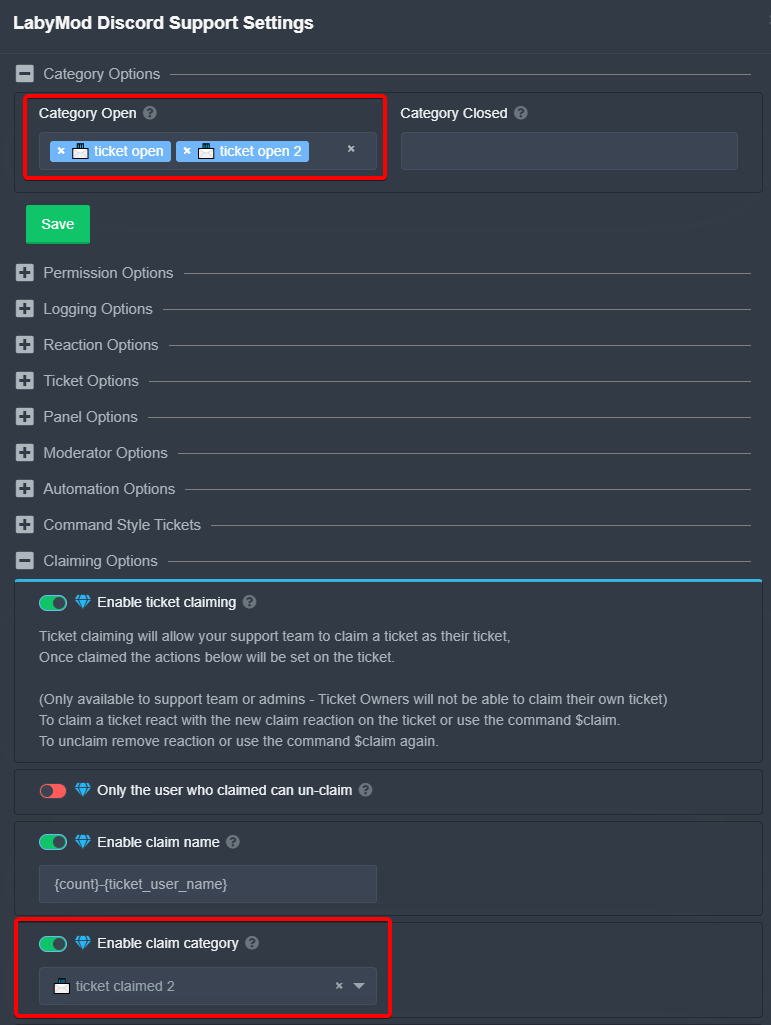 abstract wigeon
Yeah, it seems like you can only set one category for claiming tickets.
Do you have one general panel for all kinds of tickets?
languid drum
Currently yes! Yeah, I also already thought about creating multiple panels for different types of requests
abstract wigeon
Yeah, I was going to suggest that. Cuz you can have different open, close and claim categories for every panel.
Which would hopefully make it easier for you and your team to handle them quicker and easier.
languid drum
Yeah I think so too! Thanks so far ✌️
abstract wigeon
No problem at all, my pleasure.
 uncut pulsar
@jade topaz
 limber spade
Hi, How come my ticket system says ticket limit reached each time I open a new one?
abstract wigeon
You may need to adjust your ticket limit in the panel config.
$help ticket limit
humble sequoiaBOT
How to set a ticket limit
A ticket limit may be set per panel to prevent users from spamming tickets. By default this limit is set to 3. Once a user hits this limit the bot will notify the users that they reached the limit.
To set a ticket limit go to the Dashboard -> Panel Configs -> Settings -> General Options -> Ticket Limit
 abstract wigeon
Follow the instructions shown above ^^
limber spade
Thanks will do, appreciate it
abstract wigeon
Ofc, my pleasure!
limber spade
Fixed 🙂
abstract wigeon
Glad I could help!
 uncut trail
I need help I had spawners and servers went down and they are gone while I was selling on auction what do I do?
abstract wigeon
What?
uncut trail
Nothing wrong server lol my bad
abstract wigeon
Oh, okay.
 obsidian kayak
abstract wigeon
obsidian kayak
abstract wigeon
We are glad to hear that! Thank you for using Ticket Tool!
 floral wolf
I can’t seem to make a ticket on my server. Everything is set up the way the instructions say they need to be but the ticket can’t seem to be created
jade topaz
i can’t make a ticket i am not owner of the server
abstract wigeon
floral wolf
I can’t seem to make a ticket on my server. Everything is set up the way the ins...
Run $debug in your server.
 upper pollen
How can I mention a role on the Ticket Mention, when oppened?
 delicate patrol
Hello, when i try to send the panel this message
appears "Failed to send: Access Denied (Ticket Tool doesn't have permission to view or send into this channel)" but one minute ago it worked and i didnt changed anything?
 rose palm
Hey how do i make the ticket limitless ?
abstract wigeon
$help ping
humble sequoiaBOT
How to make Ticket Tool ping a role
To make ticket tool ping a role when a ticket is opened, go to the Dashboard -> Panel Configs -> Settings -> Ticket Options -> Ticket Message -> Message Text and do this:
{@Role name} This is case sensitive and the role must have @mentions enabled
abstract wigeon
upper pollen
How can I mention a role on the Ticket Mention, when oppened?
Follow the instructions shown above ^^
upper pollen
And Support marks every role of the Support Team configured?
Oh, I got it, my bad
Thanks! :D
abstract wigeon
$help ticket limit
humble sequoiaBOT
How to set a ticket limit
A ticket limit may be set per panel to prevent users from spamming tickets. By default this limit is set to 3. Once a user hits this limit the bot will notify the users that they reached the limit.
To set a ticket limit go to the Dashboard -> Panel Configs -> Settings -> General Options -> Ticket Limit
abstract wigeon
rose palm
Hey how do i make the ticket limitless ?
Follow the instructions shown above ^^
abstract wigeon
upper pollen
Thanks! :D
My pleasure
abstract wigeon
delicate patrol
Hello, when i try to send the panel this message
appears "Failed to send: Acces...
Run $level and $debug in your server.
jade topaz
how do i put a ticket
abstract wigeon
What do you mean?
jade topaz
like in the servers i am in i can’t add a reaction to the ticket
so am i doing it right or?
abstract wigeon
Try to resend the panel message
jade topaz
im not the server owner
abstract wigeon
Oh
jade topaz
tho
rose palm
I can't find where the tickets should be made
abstract wigeon
jade topaz
im not the server owner
Run $level in the server.
 abstract wigeon
I don't understand what you are trying to do?
What role do you have in the server?
humble sequoiaBOT
abstract wigeon
rose palm
I can't find where the tickets should be made
Follow the instructions shown above ^^
rose palm
ok thanks
jade topaz
abstract wigeon
What role do you have in the server?
i have the default role when you join a server
abstract wigeon
jade topaz
i have the default role when you join a server
And what is your problem?
abstract wigeon
rose palm
ok thanks
My pleasure!
jade topaz
i cannot add a reaction to the bot
rose palm
$help ticket_category
abstract wigeon
$help ticket category
humble sequoiaBOT
How to set the open category
To set a open category go to the Dashboard -> Panel Configs -> Settings -> Category Options -> Category Open
abstract wigeon
^^
abstract wigeon
jade topaz
i cannot add a reaction to the bot
What reaction are you trying to add?
jade topaz
📩
abstract wigeon
Then ask the owner of the server to take a look at his setup.
jade topaz
alright
abstract wigeon
The server owner maybe has the default role blacklisted.
rose palm
It keeps on making the ticket in a different category
abstract wigeon
You need to resend the panel message.
rose palm
i did
abstract wigeon
Are you sure you clicked on the save button?
rose palm
Yes
abstract wigeon
Run $debug in your server
rose palm
ok
abstract wigeon
Hmm. I can't see any problems.
rose palm
i did now what ?
tribal cedar
I would go a step further i think and delete cookies and cache then try refreshing the page
if nothing else works.
 hollow sun
Hey, sorry if I'm interrupting anything, I added the tool to my server and I'd like to be able to have only closed tickets viewable on a designated channel for all people to see the response(s) that the support role people gave. Is this possible, and if so, could someone please help walk me through it? Thanks in advance
abstract wigeon
$help Transcript Channel
humble sequoiaBOT
How do I save transcript to a channel?
To save transcripts to a channel go to the Dashboard -> Panel Configs -> Settings -> Logging Options -> Transcript Channel
 hollow sun
Are transcripts what I was thinking of?
abstract wigeon
You can save ticket transcripts and have them saved in one channel. Transcripts save every message sent in the ticket.
hollow sun
Ok. Can they be seen by everyone or only the support people in my server? I want them to be viewable to everyone as a sort of FAQ.
abstract wigeon
You can make the channel be open to everyone.
hollow sun
Ok. I just wanted to make sure that there wasn't a part of the tool where I had to allow a certain role to be able to view transcripts.
abstract wigeon
Nope. You only choose a channel.
hollow sun
Ok, cool. Thank you.
humble sequoiaBOT
**How to turn off Keep Visible**
**About Keep Visible**
"Keep Visible" will disable any permission changes to the @everyone role, allowing everyone to see into tickets.
**How to disable/enable it**
Head over to your Dashboard -> Panel Configs -> Settings --> General Options -> Keep Visible

NOTE that @everyone can type aswell if it has permissions to send messages
abstract wigeon
^^
hollow sun
I saw that function, but I was just looking for having the closed tickets visible.
hollow sun
Thanks!
 wicked zealot
lol
 desert crescent
it's have bug if reopen ticket
then it dont have close prefix , next if push reaction 2 times ( example push cancel and after that push again to close)
bot ignore it
abstract wigeon
Run $debug in your server
desert crescent
desert crescent
if i am from user create - open tiket - then close it ( permission for user see ticket )
abstract wigeon
You don't want the user to see the ticket after it's closed?
desert crescent
it will have no close prefix , next bug it i push no mater from user or from support reaction ( as example i push cancel , or after reopen push close , bot not react if i not go away from chat chanel and not return )
but it no clear confirm reactions
abstract wigeon
I don't really understand what you mean. Do you speak another language?
desert crescent
5 seconds .
scenic plinth
Turn on two step close and two step ticket. This should give you the option to save transcripts. (Make sure you have a transcript channel saved and the bot can send, read, and embed links in that channel)
To make it so the user can no longer see the ticket after closure confirmation, change the "user closed permisisons" and make it so they cannot "read messages"
desert crescent
scenic plinth
Oh that's a common bug, I don't know exactly if there is a fix for that. Many people have found that and have seen it's annoying. If someone has a fix I don't know I'm sure they'll let you know.
abstract wigeon
I suggest using $close when that happens.
desert crescent
Yes that bug make necessary to hide ticket after close and disable confirm 🙂
then now who not see that bug)
 long talon
How can i invite the Ticket bot
desert crescent
i think need for rename need add extra code for check name of closed tikect , for reaction add check for clear it after command send .
- as default you need add disable reactions for users for prevent this
abstract wigeon
long talon
How can i invite the Ticket bot

Discord
Discord is the easiest way to communicate over voice, video, and text. Chat, hang out, and stay close with your friends and communities.

 abstract wigeon
Did you add those emojis?
abstract wigeon
You have admin
desert crescent
i understand, i was say when some server add bot , better if it be disabled at default - for prevent add users own add at channel own reactions and confuse users 😆
for users.
abstract wigeon
You can send a suggestion in the community server.
humble sequoiaBOT
Suggestions for Ticket Tool
Suggestions for the bot have been moved to our Ticket Tool Community Server.
See Suggestions in #824021828704010315
Make a Suggestion
Use ^suggest <suggestion> in #825359982534721546
abstract wigeon
@desert crescent ^^
desert crescent
about bug , need do somting like that
If detect user click to reaction ( then we call force clear function and function recreate again reactions )
for another bug
We we else check at at if function close ticket name of channel if it have don't have prefix closed or for premium user chosen , we force call rename function before add rules for roles ( something like that most fix it )
sorry if my eng litile bad 🙂
glacial lynx
Hello, how can I see how many tickets one closed?
desert crescent
create another directory for closed tickets.
glacial lynx
And if I wanna see someone specific?
desert crescent
and at panel add send them + i recommend create log folders .
glacial lynx
Like for example if I wanna check how much tickets I closed
Or if I want to find a specific transcript with specific users in it
I have logs enabled
But there's too much of them
Is there any chance I could easily find them?
desert crescent
use discord search by name . How i understand this is only way to do it .
abstract wigeon
^^


 warm jetty
I need help with setting up bot
humble sequoiaBOT
abstract wigeon
warm jetty
I need help with setting up bot
Follow the instructions shown above ^^
 fossil spoke
the website isnt working for me
humble sequoiaBOT
Don't see your server in the dashboard?
You will possibly need to relog. Look below to see steps on how to relog.
How to relog the Dashboard.
First, you will need to go to the dashboard. Once your there, click on your avatar on the top right. after you clicked it, you will see button that says Logout. You must click that. Once you have logged out, you can log back in.
Note:
You need one of these 3 things to access the dashboard.
1. Server Owner (Level: 6)
2. Server Administrator (Level: 4)
3. Dashboard Role (Level: 2)
You can check your level using $level on your Discord Server
fossil spoke
 abstract wigeon
fossil spoke
the website isnt working for me
abstract wigeon
fossil spoke
the website isnt working for me
Follow the instructions shown above ^^
Oh, the service may be down.