#🆘│community-support
1 messages · Page 294 of 1
 stoic dirge
 tepid plank
@here
 hybrid dagger
tepid plank
hybrid dagger
tepid plank
bonjour
 spare gale
?
tepid plank
croissant
spare gale
Nice
tepid plank
baguette
spare gale
Pour le support français, allez sur #🎫│make-a-ticket et cliquez sur le drapeau français
 gusty mesa
For some time - after an upgrade, it seems - Ticket Tool was not creating ticket channels despite having the permissions to do so in the appropriate categories.
I fixed the issue by, against best practices, giving the bot additional server-wide permissions (Manage Roles and Manage [All] Channels). It seems the bot's programming was updated to check to see if it has these server-wide permissions before creating or closing channels.
Previously, we were able to deny server-wide permissions and just grant the bot permissions in the ticket categories. I hope this self-check change is reverted.
 pale pilot
@gusty mesa it was no update on our end. Discord updated their permissions system for bots a while ago. For channel creations it needs additional permissions
gusty mesa
Ok, thanks for the info.
pale pilot
no problem
#📣│bot-news message here are all permissions listed that ticket tool needs to function properly
gusty mesa
Got it. Thanks for that link. I will update the permissions accordingly and have followed the channel. I agree with the "Discord decided to do some great 😉 updates to their permissions system" part 😄
tepid plank
Baguette.
 solid stream
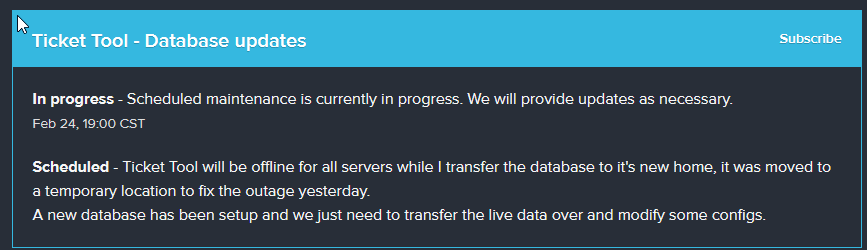
 jade topaz
Hello, I have a problem, what happens is that I invite a bot ticket toll to my server, it appears on my server, but when I go to the bot page, it appears as if it were not there on my server, it appears only one section "invite", and I can not configure the bor, what do I do?
solid stream
jade topaz
Hello, I have a problem, what happens is that I invite a bot ticket toll to my s...
the bot was offline, it should be working now.
jade topaz
ouh... thanks
 onyx jewel
Is there a way to blacklist a role from creating tickets?
 rotund kite
$help reaction
 humble sequoiaBOT
How to change reactions
To set a custom reaction Dashboard -> Panel Configs -> Settings -> Reaction Options -> <Reaction to change> -> Reaction

NOTE you need premium to do this.
rotund kite
Scroll below and you can select your blacklisted roles.
Below the reaction selector.
onyx jewel
Thanks a lot :)
 worthy merlin
anyone know how you'd go about making tickets able to be reopened by the person who made them?
humble sequoiaBOT
Redeeming premium (New)
Redeeming premium on your server is really simple. Just head over to your Subscriptions Page. There you can select a server of your choice, which will get premium. You can change the server at any point.

 wicked scroll
@lost perch ^
 upper flower
U invite the premium bot
humble sequoiaBOT
Inviting and Enabling Premium Bot
The first thing you will need to do is invite the premium bot, an invite can be found here
Once the bot is in your server we will head to the dashboard and manage your server. When you are managing your server, you want to head into "Server Configs" then click the drop down menu under "Select the bot you would like to use on this server" then click "Ticket Tool#6207" and then save.
 lost perch
ok thats the part i was having issues with
 nova tide
You can go here #🎫│make-a-ticket and open ticket so they will help
Link to the message
#🎫│make-a-ticket message
 rocky sand
Hey why when someone react, the bot dont create a ticket?
 humble sequoiaBOT
If Ticket Tool support requested this debug give them this link:
https://discordapp.com/channels/509192800865353738/662692902245498910/814407692201885696
Bot Permissions ឵ ឵឵ ឵ ឵឵ ឵ ឵឵ ឵ ឵឵
✅ - Read Channels
✅ - Send Messages
✅ - Embed Links
✅ - Attach Files
✅ - Add Reactions
✅ - Manage Roles
✅ - Manage Channels
✅ - Manage Messages
✅ - Read History
Channel Permissions ឵ ឵឵ ឵ ឵឵ ឵ ឵឵ ឵ ឵឵
✅ - Read Channels
✅ - Send Messages
✅ - Embed Links
✅ - Attach Files
✅ - Add Reactions
✅ - Manage Roles
✅ - Manage Channels
✅ - Manage Messages
✅ - Read History
Server Information ឵ ឵឵ ឵ ឵឵ ឵ ឵឵ ឵ ឵឵ ឵ ឵឵
Channel name:
community-support
Channel ID:
776680605517742090
Channel Count:
165/500
Server name:
Ticket Tool Support
Server ID:
509192800865353738
User Information ឵ ឵឵ ឵ ឵឵ ឵ ឵឵ ឵ ឵឵ ឵ ឵឵
User name:
Onjel#1234
User ID:
214373795706830848
Permission Level:
0 - User
Bot Information ឵ ឵឵ ឵ ឵឵ ឵ ឵឵ ឵ ឵឵ ឵ ឵឵
Prefix:
$
Premium Status:
Lifetime - ["subV2","subV1","time"]
Current shard:
1
API Latency:
77
 kind hollow
How do I settle for a class in which they meet all tickets
 forest goblet
What do you mean by that? Do you want to set roles who can see all tickets?
forest goblet
@jade topaz I'm on phone, can you help out
kind hollow
jade topaz
كيف بقدر اساعدك
كيف اسوي Category يجون فيها كل التكتات
jade topaz
$help category
humble sequoiaBOT
How to set the open category
To set a open category go to the Dashboard -> Panel Configs -> Settings -> Category Options -> Category Open
 jade topaz
هي من هون
kind hollow
اوك شكراٌ
jade topaz
ولا يهمك
kind hollow
شوف .
 jade topaz
؟
kind hollow
اوكي اوكي لقيتها
 worn pollen
Is it possible to stack the premium trail with my voting premium thing
wow my spelling... **trial
 vernal sedge
when you add a reactions is there a way to have a custom text for every different reactions selected @me if someone can help
humble sequoiaBOT
**Panel Message**
The panel message is where people react to make a ticket. To customize it head over to your Dashboard --> Panel Configs -> Settings -> Panel Options -> Edit Panel Message
 forest goblet
@vernal sedge ⬆️
vernal sedge
so you have to do () with the emoji in it
forest goblet
Do you want to have multiple reactions on one panel? @vernal sedge
vernal sedge
yeah i wont 🆘 🙋♂️ ⛓️ with different text when they open a certain emoji
humble sequoiaBOT
Multipanels are a premium feature  that allow for a single panel with multiple reactions to open different tickets.
How to create a Multipanel
Premium users can combine multiple panels into one multipanel.
First of all you will need to assign a different Create Ticket Reaction for each Panel. Run $help reaction to learn how to do it.
Next, find the IDs of each panel you wish to combine. You can find them in your Panel Configs in the Dashboard
Next, send the multipanel to a channel using $panel [id1] [id2] {id3} ....
e.g. $panel 1 2 4 17 35 to combine panels 1, 2, 4, 17 and 35.
Up to 10 panels may be combined.

 prime gull
how can i make the tickets come in catogery not like that
 humble sequoiaBOT
How to set the open category
To set a open category go to the Dashboard -> Panel Configs -> Settings -> Category Options -> Category Open
prime gull
thanks boss
forest goblet
No problem :)
vernal sedge
@forest goblet thank you ill give it a crack tomorrow and let you know if i need anymore
forest goblet
Okay 👍 No problem
jade topaz
Can someone set it up for me
forest goblet
You may try it yourself first. A guide can be found in #573205317870157855. If you encounter problems, please ping me so I can help you.
jade topaz
It doesn't happen @forest goblet
forest goblet
What doesn't happen?
jade topaz
The setup
humble sequoiaBOT
Setting up Ticket Tool
Visit the docs for setup info
General Setup
forest goblet
A guide can be found on the link above.
forest goblet
What do you need help with?
humble sequoiaBOT
Inviting and Enabling Premium Bot
The first thing you will need to do is invite the premium bot, an invite can be found here
Once the bot is in your server we will head to the dashboard and manage your server. When you are managing your server, you want to head into "Server Configs" then click the drop down menu under "Select the bot you would like to use on this server" then click "Ticket Tool#6207" and then save.
forest goblet
See above
forest goblet
No problem
forest goblet
Yes, you can kick it once it works.
 forest goblet
Do you have Ticket Tool Premium?
jade topaz
@forest goblet i have 7 day trial
forest goblet
$help claim
humble sequoiaBOT
How does the claim command work?
Ticket Tool claiming is a premium only command that allows your support team to claim tickets and have the ticket renamed, changed permissions or moved to another category
forest goblet
This explains how to claim a ticket.
jade topaz
Bruh can u explain in short
@forest goblet i use this cmd there but this thing coming
Only coming
forest goblet
Use $claim
 spare moss
o/ I have a question, the payment failed (didn't have enough money, but now I have), will it retry automatically or I have to re-purchase premium?
humble sequoiaBOT
Help Options
$help commands - Information on commands
$help setup - Information on bot setup
$help faq - Frequently asked questions
 karmic fox
$help faq
humble sequoiaBOT
====== FAQ ======
If a question interests you run the command to see the answer.
Q: What is the prefix and how do I change it?
A: $help prefix
Q: How do I let my support team see into a ticket?
A: $help support
Q: How do I make a ticket ping my support when it's created?
A: $help ping
Q: How do I set a transcript channel?
A: $help transcript
Q: How do I limit the number of tickets a user can create?
A: $help limit
Q: How do I set what category tickets are created in?
A: $help category
Q: How do I set what category tickets are moved to when closed?
A: $help closed
Q: How do I set a custom reaction?
A: $help reaction
Q: How do I set the permissions for the tickets?
A: $help perms
Q: How do I create a panel?
A: $help panel
Q: How do I get the panel in my discord?
A: $help send
Q: How do I add or remove users from a ticket?
A: $help add
Q: A panel of mine won't update with the new settings, How do I fix it?
A: $help update
Q: Ticket Tool isn't responding to my commands, How do I fix it?
A: $help offline
Q: How does the claim command work?
A: $help claim
forest goblet
karmic fox
How do I make it tag a role?
$help ping
humble sequoiaBOT
How to make Ticket Tool ping a role
To make ticket tool ping a role when a ticket is opened, go to the Dashboard -> Panel Configs -> Settings -> Ticket Options -> Ticket Message -> Message Text and do this:
{@Role name} This is case sensitive and the role must have @mentions enabled
 forest goblet
Please use #655832608835502080 next time.
karmic fox
Sorry
worn pollen
worn pollen
Is it possible to stack the premium trail with my voting premium thing
Hi can someone answer my this question ^
Also ignore my terrible spelling i spelled trial wrongly
forest goblet
I'm not sure, but you can try putting the code from your votes into the "Redeem premium" field.
 radiant moss
It should work as it’s not a subscription
 worn pollen
Whats the glitch
jade topaz
Ok 1min
solid stream
The 2 glitch is discord visual bug
solid stream
also discord rate limits reactions so it's hard to always get them removed.
(if one is actually stuck)

 worn pollen
Maybe try restart discord... works for me... or apparently sending a msg below it works too
jade topaz
@radiant moss it can not be fixed?
forest goblet
jade topaz
<@513792641016659971> it can not be fixed?
Try to close your Discord and Open it again.
And please don't ping us all the time.
tepid plank
How muck wood could a wood cuck chuck if i wood chuck could chuck wood?
forest goblet
@tepid plank #💬│general-chat maybe?
tepid plank
forest goblet
<@!526139832171495425> <#509238831547940885> maybe?
maybe so
tepid plank
Hello?
 smoky trail
tepid plank
Hello?
smoky trail
tepid plank
Hello?
Do you speak Arabic?
forest goblet
ما الذي تحتاج إلى المساعدة به؟
tepid plank
I can not..
smoky trail
forest goblet
ما الذي تحتاج إلى المساعدة به؟
لما ادخل عشان اعدل على البوت ما احصل السيرفر الي ابي اعدل البوت فيه
forest goblet
تسجيل الخروج في لوحة المعلومات وتسجيل الدخول مرة أخرى
humble sequoiaBOT
لا ترى سيرفرك في لوحة التحكم؟
ربما ستحتاج إلى إعادة التسجيل. انظر أدناه لمعرفة الخطوات الخاصة بكيفية إعادة التسجيل.
كيفية إعادة تسجيل لوحة التحكم.
ملحوظة :
تحتاج إلى أحد هذه الأشياء الثلاثة للوصول إلى لوحة التحكم.
- مالك السيرفر
- مسؤول السيرفر
- رول لوحة التحكم
 smoky trail
forest goblet
تسجيل الخروج في لوحة المعلومات وتسجيل الدخول مرة أخرى
smoky trail
forest goblet
تسجيل الخروج في لوحة المعلومات وتسجيل الدخول مرة أخرى
حسنا
 ember nexus
anyone knows something about the new slash commands for bots?
forest goblet
https://cdn.discordapp.com/attachments/667560445975986190/814205014125969478/commands.mov You can see a little there
 scenic plinth
ember nexus
anyone knows something about the new slash commands for bots?
scenic plinth
ember nexus
anyone knows something about the new slash commands for bots?
It's only implemented for some bots as I believe the developer of one bot has the option to make them.
jade topaz
What does the bot mean by logging?
Do you know with which variable the user who has taken the ticket with the $claim tool can be put in the name of the channel?
Thanks for the help 🙂
channel_name
jade topaz
jade topaz
channel_name
But when you set this variable, you get the name of the channel, what I want is to put the name of the user who has taken the ticket with the $claim.
user
It only says who has the ticket; none of the variables are for who $claim the ticket.
 strong jolt
can someone help it will not let me save transcripts
jade topaz
strong jolt
can someone help it will not let me save transcripts
Have you tested or checked that you have set up a channel or method for saving transcripts?
strong jolt
yes
 fickle sparrow
Hey, does anyone know how to make the bot ping a specific role when someone has made a ticket?
jade topaz
$help ping
humble sequoiaBOT
How to make Ticket Tool ping a role
To make ticket tool ping a role when a ticket is opened, go to the Dashboard -> Panel Configs -> Settings -> Ticket Options -> Ticket Message -> Message Text and do this:
{@Role name} This is case sensitive and the role must have @mentions enabled
fickle sparrow
Okay thanks
strong jolt
$help transcript
humble sequoiaBOT
How do I save transcript to a channel?
To save transcripts to a channel go to the Dashboard -> Panel Configs -> Settings -> Logging Options -> Transcript Channel
 strong jolt
i did that
 rose turret
strong jolt
i did that
rose turret
strong jolt
i did that
What seems to be the issue?
 slate nymph
How can I do that when opening the ticket tag to a role. Already being created the option to open it
forest goblet
I can't send images in #💬│general-chat so here you go @cursive phoenix
 jade topaz
erm, how do you edit the description of the ticket - when you open it?
humble sequoiaBOT
**Ticket Message**
The Ticket Message is the first message sent by the bot in a new ticket. To customize it head over to your Dashboard -> Panel Configs -> Settings -> Ticket Options -> Edit Ticket Message
 forest goblet
@jade topaz ⬆️
jade topaz
ty
 opal anvil
$help ping
humble sequoiaBOT
How to make Ticket Tool ping a role
To make ticket tool ping a role when a ticket is opened, go to the Dashboard -> Panel Configs -> Settings -> Ticket Options -> Ticket Message -> Message Text and do this:
{@Role name} This is case sensitive and the role must have @mentions enabled
 tame sapphire
is there a way to see what channel someone created when you only have their id?
 eager cargo
I don't think so, you can check your server audit logs though
tame sapphire
ok ty
 gaunt topaz
how do you make it so there are multiple ticket reactions in one message?
 river coral
any idea why, since one month the ticket tool stopped logging the event in my ticket-logs channel ?
https://shiraya.s-ul.eu/g3DnG1E0even tho everything is still enabled in the settings

i'm no longer getting the transcript :x
 turbid rose
it gets stuck at saving the transcripts
 humble sequoiaBOT
Multipanels are a premium feature that allow for a single panel with multiple reactions to open different tickets.
How to create a Multipanel
Premium users can combine multiple panels into one multipanel.
First of all you will need to assign a different Create Ticket Reaction for each Panel. Run $help reaction to learn how to do it.
Next, find the IDs of each panel you wish to combine. You can find them in your Panel Configs in the Dashboard
Next, send the multipanel to a channel using $panel [id1] [id2] {id3} ....
e.g. $panel 1 2 4 17 35 to combine panels 1, 2, 4, 17 and 35.
Up to 10 panels may be combined.
scenic plinth
Only way I can think of what is happening Hika is that you edited the panel and never resent it so therefore it does that, or your permissions were messed with so the bot can't Embed Links or Attach Files in the channel.
jade topaz
Hi, how do I change the box like message text in panel when people click the reaction mail.
 hasty falcon
My server has ticket tool premium, how do we make it use the premium bot instead of the normal one
humble sequoiaBOT
Inviting and Enabling Premium Bot
The first thing you will need to do is invite the premium bot, an invite can be found here
Once the bot is in your server we will head to the dashboard and manage your server. When you are managing your server, you want to head into "Server Configs" then click the drop down menu under "Select the bot you would like to use on this server" then click "Ticket Tool#6207" and then save.
river coral
Oh i might have edited the panel, i'll try by doing a new one
river coral
rip still not working
worn pollen
@small cliff yes?
 small cliff
How to setup the bot
worn pollen
In the dashboard (tickettool.xyz) @small cliff
jade topaz
Hello?? How do I change the message text on the box with bottom of reaction to emote
worn pollen
you will require premium for that.
jade topaz
......premium?
river coral
scenic plinth
Only way I can think of what is happening Hika is that you edited the panel and ...
nvm i found out why, i never close the tickets with reaction, but with $delete instead, so even when i do $transcript, it doesnt send it to the ticket logs channel :x
jade topaz
How do I get premium?
worn pollen
you can buy it or vote at least 6 times for the bot or on @unbelivaboat
however u spell that bot’s name
jade topaz
Ah how do u vote on bots? From the website or dm on bot?
worn pollen
$vote
humble sequoiaBOT
Votes
Current Votes: 83
Lifetime Votes: 83
Linked Votes: 0
Vote Links
Linking Info
Linked User: Not Linked
You can give your future votes to another user by linking with that user.
To link use $vote link (@user or userId)
To unlink use $vote unlink
Redeeming
Each vote is worth 12 hours of premium and can be redeemed once you have atleast 6 votes.
Your current votes are worth 41 days, 12h, 0m
To redeem your current votes use $vote redeem
worn pollen
What do you mean by combining the panels?
gaunt topaz
like multipanel
worn pollen
Like sending 2 panels into 1 channel?
gaunt topaz
nono sending 2 panels in 1 message
worn pollen
Oh that i never tried that sorry cant help
jade topaz
Why it set up premium btw?
scenic plinth
gaunt topaz
nono sending 2 panels in 1 message
That's mutli panel, a premium feature.
rotund kite
nono sending 2 panels in 1 message
$mp
humble sequoiaBOT
Multipanels are a premium feature that allow for a single panel with multiple reactions to open different tickets.
How to create a Multipanel
Premium users can combine multiple panels into one multipanel.
First of all you will need to assign a different Create Ticket Reaction for each Panel. Run $help reaction to learn how to do it.
Next, find the IDs of each panel you wish to combine. You can find them in your Panel Configs in the Dashboard
Next, send the multipanel to a channel using $panel [id1] [id2] {id3} ....
e.g. $panel 1 2 4 17 35 to combine panels 1, 2, 4, 17 and 35.
Up to 10 panels may be combined.
jade topaz
How much cost for premium?
gaunt topaz
6 a month
 runic frigate
Is there a way to set up multiple ticket responses?
Reacting with Emoji1 prompts Ticket 1, reacting with Emoji2 prompts Ticket 2 ? Idk if that makes sense
gaunt topaz
Do you mean if they react with a emoji it creates a ticket, but in the same message there’s another reaction that creates a different ticket?
runic frigate
gaunt topaz
Do you mean if they react with a emoji it creates a ticket, but in the same mess...
Yeah, that's a much better way of explaining it 😅
 cedar gust
I need some help
gaunt topaz
runic frigate
Yeah, that's a much better way of explaining it 😅
That’s multi panel, it’s only for premium users.
humble sequoiaBOT
Multipanels are a premium feature that allow for a single panel with multiple reactions to open different tickets.
How to create a Multipanel
Premium users can combine multiple panels into one multipanel.
First of all you will need to assign a different Create Ticket Reaction for each Panel. Run $help reaction to learn how to do it.
Next, find the IDs of each panel you wish to combine. You can find them in your Panel Configs in the Dashboard
Next, send the multipanel to a channel using $panel [id1] [id2] {id3} ....
e.g. $panel 1 2 4 17 35 to combine panels 1, 2, 4, 17 and 35.
Up to 10 panels may be combined.
runic frigate
gaunt topaz
That’s multi panel, it’s only for premium users.
I have premium, must have overlooked this then!
Thank you kindly 
gaunt topaz
No problem!
gaunt topaz
cedar gust
I need some help
Whats up?
cedar gust
Sry it’s all good now
gaunt topaz
Ok, good.
 mint peak
Hi
gaunt topaz
hey!
 lime flint
Ticket tool is appearing offline as a bot and not working when reacting to the start ticket emoji.
upper flower
Can u open a ticket pls and ping me
gaunt topaz
Click on the reaction that you want.
like the buttons on the bottom of the message, there is one for english support.
 glass rose
i need help
 hollow shadow
how to change the prefix
humble sequoiaBOT
How to change Ticket tool's prefix
The default prefix for ticket tool is $ and @Ticket Tool#4843 however that can be changed on the Dashboard under Server Configs -> Command Prefix.

NOTE that @Ticket Tool#4843 will always work as a prefix even if there is a custom prefix.
gaunt topaz
hollow shadow
how to change the prefix
^
jade topaz
why wont my custom tag work?
example
rules
{dosent do anything}
forest goblet
What do you mean by "Custom tag"? Where did you input it?
jade topaz
forest goblet
What do you mean by "Custom tag"? Where did you input it?
in tags
 forest goblet
Did you set a response?
jade topaz
forest goblet
Did you set a response?
yes
forest goblet
Remember that these only work in ticket channels, and you don't need to use a prefix. Try to make a ticket in your server and type "abuse" there, and tell me if it works.
jade topaz
forest goblet
Remember that these only work in ticket channels, and you don't need to use a pr...
nope
it deletes my command
forest goblet
Please show me the tag response.
jade topaz
 forest goblet
Did you get a DM from ticket tool when sending the tag?
jade topaz
forest goblet
Did you get a DM from ticket tool when sending the tag?
nope
oh im dumb nvm my dms are closed
forest goblet
Please also check if your DMs are enabled on the server.
jade topaz
im so sorry
forest goblet
No worries. Enjoy using Ticket Tool.
 pallid latch
I just joined after buying premium, will I automatically get the role or does it need to be assigned manually?
forest goblet
Please open a ticket in #🎫│make-a-ticket so a staff member can give you the role. @pallid latch
pallid latch
Thanks
forest goblet
No problem. Enjoy Ticket Tool.
 static vessel
do i need premium to make the bot ping a role when a ticket opens
jade topaz
Hello
How can I make a new ticket?
 river pivot
I dont see my channels in panel
 plush trail
where is a pannel??
forest goblet
static vessel
do i need premium to make the bot ping a role when a ticket opens
$help ping
humble sequoiaBOT
How to make Ticket Tool ping a role
To make ticket tool ping a role when a ticket is opened, go to the Dashboard -> Panel Configs -> Settings -> Ticket Options -> Ticket Message -> Message Text and do this:
{@Role name} This is case sensitive and the role must have @mentions enabled
plush trail
how do i get tickets?
forest goblet
plush trail
how do i get tickets?
What do you mean by that?
Have you selected the correct server?
forest goblet
jade topaz
Hello
How can I make a new ticket?
You can make a new ticket by reacting under the panel.
Please log out and log in again.
plush trail
@forest goblet what command should I use to put the assistance ticket ??
forest goblet
plush trail
<@!765994339565699083> what command should I use to put the assistance ticket ??
React with a flag of your choice in #🎫│make-a-ticket.
plush trail
thank you so much
forest goblet
No problem
plush trail
to use the tickets do I have to have the premium bot?
forest goblet
What do you mean by "use tickets"?
plush trail
can I send you a picture here to make you understand ??
forest goblet
Yes
 tough summit
What is the cmd to ping the bot
 silk orbit
 plush trail
this is the server of a friend of mine could you explain me with which command I can do it ??
because I didn't understand which command to use
forest goblet
tough summit
What is the cmd to ping the bot
$ping
forest goblet
plush trail
because I didn't understand which command to use
You don't need a command, just press on 📩
tough summit
Thanks
forest goblet
No problem
plush trail
and if i wanted to put in my server how should i do ??
forest goblet
$help setup
humble sequoiaBOT
Setting up Ticket Tool
Visit the docs for setup info
General Setup
forest goblet
Here's a tutorial ⬆️
plush trail
ok thanks a lot and sorry if i bothered you
forest goblet
No problem
forest goblet
No
forest goblet
Please run $debug in your server @tough summit
tough summit
What dose that do
humble sequoiaBOT
If Ticket Tool support requested this debug give them this link:
https://discordapp.com/channels/509192800865353738/662692902245498910/814816553248751617
Bot Permissions ឵ ឵឵ ឵ ឵឵ ឵ ឵឵ ឵ ឵឵
✅ - Read Channels
✅ - Send Messages
✅ - Embed Links
✅ - Attach Files
✅ - Add Reactions
✅ - Manage Roles
✅ - Manage Channels
✅ - Manage Messages
✅ - Read History
Channel Permissions ឵ ឵឵ ឵ ឵឵ ឵ ឵឵ ឵ ឵឵
✅ - Read Channels
✅ - Send Messages
✅ - Embed Links
✅ - Attach Files
✅ - Add Reactions
✅ - Manage Roles
✅ - Manage Channels
✅ - Manage Messages
✅ - Read History
Server Information ឵ ឵឵ ឵ ឵឵ ឵ ឵឵ ឵ ឵឵ ឵ ឵឵
Channel name:
community-support
Channel ID:
776680605517742090
Channel Count:
173/500
Server name:
Ticket Tool Support
Server ID:
509192800865353738
User Information ឵ ឵឵ ឵ ឵឵ ឵ ឵឵ ឵ ឵឵ ឵ ឵឵
User name:
Ducky#3279
User ID:
760198096041803806
Permission Level:
0 - User
Bot Information ឵ ឵឵ ឵ ឵឵ ឵ ឵឵ ឵ ឵឵ ឵ ឵឵
Prefix:
$
Premium Status:
Lifetime - ["subV2","subV1","time"]
Current shard:
1
API Latency:
81
worn pollen
why debug this server
forest goblet
Not here
forest goblet
tough summit
What dose that do
I can see the response time in your server when you do it
worn pollen
Wait what how
tough summit
okey ty
forest goblet
worn pollen
Wait what how
I can see every response to this command in #debug-spam
worn pollen
wait omg u have perms there?
forest goblet
@tough summit Response time should not be higher than usual, there is nothing out of the ordinary
worn pollen
unless something happens to the bot that will be announced in #📣│bot-news but if that happens and the bot goes offline there wont be any response time at all, when bot goes offline there isnt a response
 obtuse elm
Can I help too or r u guys good
tough summit
Okey because when we open a tickets it send 3 output of us opening the ticket
forest goblet
obtuse elm
Can I help too or r u guys good
We're fine
forest goblet
tough summit
Okey because when we open a tickets it send 3 output of us opening the ticket
Seems to be a bug, please #🎫│make-a-ticket
tough summit
okey ty
forest goblet
Np
 austere ferry
Is there a way to make ticket tool print the whole transcript into an embed instead of or in addition to creating the html file?
forest goblet
austere ferry
Is there a way to make ticket tool print the whole transcript into an embed inst...
Not possible, sorry.
 grim yarrow
How do you inject the Key? I can't find an actual step by step video guide anywhere.
 nimble turtle
Hi
 mystic hound
Hello, need help with anything?
jade topaz
The website isnt showing the server i have the bot in, both the bot and myself have administrator its just not appearing on manage servers
mystic hound
try relogging
humble sequoiaBOT
Don't see your server in the dashboard?
You will possibly need to relog. Look below to see steps on how to relog.
How to relog the Dashboard.
First, you will need to go to the dashboard. Once your there, click on your avatar on the top right. after you clicked it, you will see button that says Logout. You must click that. Once you have logged out, you can log back in.
Note:
You need one of these 3 things to access the dashboard.
- Server Owner
- Server Administrator
- Dashboard Role
mystic hound
np 🙂
jade topaz
There thats worked thank you so much
mystic hound
enjoy the bot 😄
jade topaz
Can someone help me because I don't know what I did wrong?
a ticket is generated only if it is done by the owner
humble sequoiaBOT
Blacklist Roles
Any role you assign as a blacklisted role won't be able to use commands or reactions.
Selecting a blacklisted role
Go to your Dashboard -> Server Configs. There you will find the option to select blacklisted roles.
Note: Don't forget to save.
 pale pilot
Check if you have any roles there
 pale pilot
check reaction options permissions then @jade topaz
 jade topaz

when the user reacts to this envelope, it automatically withdraws, I don't have the strength to do it anymore. I've been trying to do it for the 3rd day and I still don't know what's wrong
forest goblet
Do you have the allowed role?
jade topaz
yes..
everyone who enters the server gets a role that is set to the ticket tool
this is my 4th approach, I did with the tutorials and it didn't work out either, I don't know what to think anymore. Maybe my server is enchanted
mystic hound
So every user gets the allowed role, and the bot deletes the reaction but doesn't create the ticket?
jade topaz
funnier I introduced another bot to help but gui is limping and doesn't want to use it
mystic hound
mystic hound
So every user gets the allowed role, and the bot deletes the reaction but doesn'...
If this is the case run $debug to see if the bot has all necessary permissions
jade topaz
just like a user who has a role assigned to a bot, the reaction is removed and nothing appears, and as the founder / moderator does, everything works
the bot is assigned an additional role on the server that has access to everything.
something like a founder

this is crazy, because I understand if I did everything myself, I could be wrong, but I did it with the guides and then nothing
mystic hound
Did you perhaps accidentally blacklist the role or set the ticket limit to 0 or something?

 upper flower
whats the problem?
jade topaz
user cannot create a ticket, because it disappears immediately and the rank of founder / moderator can already
and I can't figure out what kind of error I'm making, because I'm all set up as it should be
 forest goblet
Uhh what
worn pollen
Omg wow wrong ticket bot
jade topaz
nooo that was an old ticket bot I threw away, go it all the way down and see where I tagged you.
 upper flower
I cant see message history in that channel
jade topaz
@upper flower creates miracles, thank you
upper flower
👍 Happy to help.
 kindred raft
Hello ! Ticket tool is online on my server, I have 3 ticket tool panels: one for staff contacts that work and two for registrations to our tournaments that don't work. However I just looked at they have the same parameters so I don't understand: / when I do $debug it tells me this: ❌ - Manage Roles
❌ - Manage Channels. Anyone know what I need to change to make this ✅ ? (I asked someone from support but it hurts aha)
forest goblet
Donner l’autorisation Administrator devrait résoudre le problème.
kindred raft
Maintenant tout est en ✅ mais ça ne fonctionne toujours pas... le ticket ne s'ouvre pas
jade topaz
kindred raft
Hello ! Ticket tool is online on my server, I have 3 ticket tool panels: one for...
make a bot role and give it all permissions, then assign this role to the ticket bot.
@kindred raft est ce que la réaction s'enlève quand tu cliques dessus?
kindred raft
jade topaz
<@764882734736343070> est ce que la réaction s'enlève quand tu cliques dessus?
Je peux vous envoyer en mp la vidéo que je viens de faire pour vous montrer ce que ça fait quand je clique ?
jade topaz
oui :)
forest goblet
$transcript
 rigid totem
hello I don't know why but the commande doesn't work. like $help doesn't do anything.
forest goblet
Yes it does.
humble sequoiaBOT
How to fix Ticket Tool not responding
If ticket tool is not responding, please follow these troubleshooting steps:
Check Ticket Tool's permissions
Make sure that Ticket Tool can read and write in the channel you are attempting to run commands in. Run the command @Ticket Tool#4843 debug to see Ticket Tools list of permissions in that given channel.
Check Ticket Tool's prefix
Make sure you're using the correct prefix for Ticket Tool, Ticket Tools default prefix is $ Run the command @Ticket Tool#4843 debug to see Ticket Tools prefix for your server
Check if Ticket Tool is offline
If ticket tool is offline please contact Ticket Tool support with your server ID so we can fix it asap.
forest goblet
@rigid totem ⬆️
rigid totem
thank you
forest goblet
No problem
rigid totem
Ahhh les permissions
 fringe dove
Is there a way to reset the number counter for ticket ID?
so it starts from 0001 again
forest goblet
At the panel configs > General settings, set the Ticket Count to "0".
fringe dove
forest goblet
At the panel configs > General settings, set the Ticket Count to "0".
Thank you so much! I was looking for quite a while, and you saved me so much time 😄
forest goblet
No problem
 plush plover
Hee hello a question how can I change the language to the bot?
jade topaz
@forest goblet man i can make ticket but normal ppl with no power cant, even clicking on it
grim yarrow
I need help with loader
jade topaz
how to mark xyz role in embeds
{user} - creator, but i want mention the adminsitrator e.g.
mystic hound
jade topaz
<@765994339565699083> man i can make ticket but normal ppl with no power cant, e...
can you make sure the role regular users have are in the allowed role section of your server configs, also make sure @ everyone or any member role that all users have isn't blacklisted
mystic hound
grim yarrow
I need help with loader
not sure what you mean by loader
grim yarrow
I was banned after just one game:(
mystic hound
plush plover
Hee hello a question how can I change the language to the bot?
you can change the language of the dashboard using the select language option, not sure on if that effects the entire bot though
mystic hound
grim yarrow
I was banned after just one game:(
uh..is it anything ticket tool related? this server is only for support with the @humble sequoia bot
mystic hound
jade topaz
{user} - creator, but i want mention the adminsitrator e.g.
i believe you're asking on how to make the bot ping a role, for instance your support role?
$help ping
humble sequoiaBOT
How to make Ticket Tool ping a role
To make ticket tool ping a role when a ticket is opened, go to the Dashboard -> Panel Configs -> Settings -> Ticket Options -> Ticket Message -> Message Text and do this:
{@Role name} This is case sensitive and the role must have @mentions enabled
 wicked scroll
 mental cave
any idea what went wrong?
mental cave
any idea what went wrong?
the bot is not allowed to see/send messages on the channel you have defined
wicked scroll
mental cave
So i need to change it in the cathegory?
In this case, on the channel
and not ping support team, #546557408902905896
 rich lava
oop-sorry
mental cave
wicked scroll
the bot is not allowed to see/send messages on the channel you have defined
you mean the channel where the panel exists?
gaunt topaz
The channel that your transcripts are saved.
mental cave
oh, i did not define this, but i thought the transcripts log is only for vips?
wicked scroll
@mental cave Send me the name of your server in the DM
jade topaz

why do i get something like ^, bots are set the same
when I click on one channel, it works normally, and on the other, something like this appears
You are not authorized to view message histories
wicked scroll
jade topaz
You are not authorized to view message histories
Panel Configs -> Settings -> Permission Options -> Edit User Opened Permissions --> Check: Read Message History
wicked scroll
mental cave
Panel Configs -> Settings -> Logging Options -> you defined the channel "overwatch" and the bot has no permissions on that channel
 wicked scroll
mental cave
oh, i did not define this, but i thought the transcripts log is only for vips?
wicked scroll
mental cave
oh, i did not define this, but i thought the transcripts log is only for vips?
Auto transcript is for premium only, however you can save the transcript manually
humble sequoiaBOT
Automation disabled
There's currently no ETA for when automation will be enabled again. The issue that's caused it to be disabled, us hitting rate limits, is tied to the increased load on Discord's servers. The situation's currently unpredictable, which makes it so we can't give you a fixed time.
forest goblet
@mental cave At the moment it's forever.
mystic hound
Until deleted.
mental cave
i see
plush plover
mystic hound
you can change the language of the dashboard using the `select language` option,...
en donde esta esa parte?
mystic hound
plush plover
en donde esta esa parte?
 plush plover
mystic hound
plush plover
mystic hound
y una pregunta hay una manera de cuando se cerrar el ticket con una razon por ejemplo s!close Duda resuelta
and a question is there a way to close the ticket with a reason for example s! close Doubt resolved
mystic hound
plush plover
y una pregunta hay una manera de cuando se cerrar el ticket con una razon por ej...
No lo creo, pero puedes configurar el bot enviar la transcripción en dm
plush plover
mystic hound
No lo creo, pero puedes configurar el bot enviar la transcripción en dm
y como lo ago?
mystic hound

en las opciones de registro en la configuración del pane
(not sure if this translation is accurate since im using google, you can get spanish support in #🎫│make-a-ticket if im not being clear enough)
plush plover
mystic hound
deve estar desactivado? o activado ajsjdjads
mystic hound
plush plover
deve estar desactivado? o activado ajsjdjads
activado
 robust sandalBOT
plush plover
y una pregunta hay una manera de cuando se cerrar el ticket con una razon por ej...
robust sandalBOT
plush plover
y una pregunta hay una manera de cuando se cerrar el ticket con una razon por ej...
 Sr.Victo
and a question there's a way when you close the ticket with a reason for example s!close Doubt resolved
and a question is there a way to close the ticket with a reason for example s! close Doubt resolved
 Spanish (es) → English (en)
mystic hound
Spanish (es) → English (en)
mystic hound
(i took care of this already, directed user to spanish support if further assistance was needed)
jade topaz
how do I make the bot to show that message with to aopen a ticket react
mystic hound
jade topaz
how do I make the bot to show that message with to aopen a ticket react
as i said in general chat, refer to #573205317870157855 see instructions on basic setup including sending your panel, feel free to ask if you have any questions after reading it
humble sequoiaBOT
Creating a panel
To create a panel we are going to need to head over to the panel configs on the dashboard
Once at the dashboard we will need to click Create Panel
Enter a panel name (Fill in any optional settings you want)
Click Create Panel and your ready to get started with configuring your panel
An example of a creating a panel is shown below.
 mystic hound
or that
jade topaz
ty so much
 viscid granite
Hello there, How can i make the bot @ support when a ticket is created?
radiant moss
$help ping
humble sequoiaBOT
How to make Ticket Tool ping a role
To make ticket tool ping a role when a ticket is opened, go to the Dashboard -> Panel Configs -> Settings -> Ticket Options -> Ticket Message -> Message Text and do this:
{@Role name} This is case sensitive and the role must have @mentions enabled
radiant moss
@viscid granite ^
jade topaz
Hey there I have a question, is there any way to get a transcript of a ticket that was deleted by a staff member who forgot to click on the transcript reaction before they deleted the ticket?
forest goblet
No, not possible unfortunately.
 coarse drift
Starting about 2 hours ago, our ticket bot stopped respecting categories and is now placing all new tickets at the top of discord? Anyone seen anything like this before?
mystic hound
coarse drift
Starting about 2 hours ago, our ticket bot stopped respecting categories and is ...
There is a limit to how many channels can be in a category, I believe its 50
eager cargo
haven't had that issue before, might want to try moving said tickets to the respected category
coarse drift
mystic hound
There is a limit to how many channels can be in a category, I believe its 50
that may do it, checking
eager cargo
awesome
coarse drift
coarse drift
that may do it, checking
Confirmed, that was it, time to start yelling at people to close tickets!
mystic hound
coarse drift
that may do it, checking
If that's the case, you can set a "secondary category" for your tickets to move into once the primary is full
coarse drift
Thx
mystic hound
Anytime
static vessel
hey i have ticket tool premium on the panel but when a ticket opens it opens with just the normal ticket tool bot, can anyone help?
humble sequoiaBOT
Inviting and Enabling Premium Bot
The first thing you will need to do is invite the premium bot, an invite can be found here
Once the bot is in your server we will head to the dashboard and manage your server. When you are managing your server, you want to head into "Server Configs" then click the drop down menu under "Select the bot you would like to use on this server" then click "Ticket Tool#6207" and then save.
forest goblet
You have to enable the premium bot
forest goblet
You can do $rename New name here
static vessel
is there not an automated way of doing it?
instead of doing the command in the ticket
upper flower
do u have premium?
static vessel
yeah
rotund kite
Panel configs > Your panel settings > Ticket options > You can type in the name you want
In the ticket open and ticket close names.
static vessel
thanks
austere ferry
Why are people so against this idea?
This would be searchable within discord which would present big benefits for my community.
forest goblet
Because it floods channels. Also, please don't complain about your suggestion getting downvoted, everyone has their own opinion.
austere ferry
I was not complaining, I was asking
I was curious if there's a technical reason it would not work well. It seems like anything that is outside of the most typical use of this bot is seen as a bad idea even if it would be really useful in some case. Anyway, I mean basically I guess I'll need to make my own tool because even though this one is very very close to my needs, the slight changes to functionality I want are not supported and the community seems very against them.
forest goblet
An embed description can have 10000 characters at most, which can sometimes be insufficient.
 raven nimbus
How do I access the ticket tool dashboard?
austere ferry
That's a good point! So if I implement this myself I may need to split across multiple descriptions. Oh well. I obviously am trying to do things that are slightly out of the intended scope of this app and even though it gets really close, it's just not quite sufficient for my needs.
forest goblet
raven nimbus
How do I access the ticket tool dashboard?
Dashboard is at https://tickettool.xyz/manage-servers .
 raven nimbus
Thanks lol
One more question how do u open a ticket I’ve used many boys but not this one yet
forest goblet
Just click the reaction below the message from Ticket Tool.
raven nimbus
Ah ok
viscid granite
radiant moss
<@!698368309997076490> ^
ty sir

how to properly do the braket and @
got it
nvm
 tight tapir
There is some place where I can see the last closed tickets (transcripts) since yesterday I closed a ticket but I did not download the file and I require it :/
wicked scroll
viscid granite
how to properly do the braket and @
you need to write the name of the identical role (case sensitive)
wicked scroll
tight tapir
There is some place where I can see the last closed tickets (transcripts) since ...
In your server discord?
tight tapir
wicked scroll
In your server discord?
yup
wicked scroll
$help transcript
humble sequoiaBOT
How do I save transcript to a channel?
To save transcripts to a channel go to the Dashboard -> Panel Configs -> Settings -> Logging Options -> Transcript Channel
wicked scroll
If you already have the transcript configured, it will show on the channel
tight tapir
ouch, so that transcript is already lost?
 heady turret
if you didn't have the option set before or didnt manually save the transcript before closing, then you've lost it
 cursive thorn
Hello tech. support and how to do it once created a ticket bot immediately pings the role example of a modernization or admin
eager cargo
$help ping
humble sequoiaBOT
How to make Ticket Tool ping a role
To make ticket tool ping a role when a ticket is opened, go to the Dashboard -> Panel Configs -> Settings -> Ticket Options -> Ticket Message -> Message Text and do this:
{@Role name} This is case sensitive and the role must have @mentions enabled
cursive thorn
✅
eager cargo
Anytime
jade topaz
Hey. When people mak ea ticket in my server, how do I make it so their name shows up in the new channel/ticket created?
 timid maple
Is there away to blacklist like a muted role from making a ticket?
eager cargo
timid maple
Is there away to blacklist like a muted role from making a ticket?
Go to your Dashboard -> Server Configs. There you will find the option to select blacklisted roles.
Note: Don't forget to save.
jade topaz
Quo any idea bro
eager cargo
Hmmm
jade topaz
it just shows Ticket-0003
eager cargo
Like this?
 jade topaz
yeah
eager cargo
That's a premium feature I believe
jade topaz
im premium
eager cargo
Panel configs > Your panel settings > Ticket options > You can type in the name you want

As always, save.
 feral scroll
How do I make it to where the bot will ping a role?
eager cargo
$help ping
humble sequoiaBOT
How to make Ticket Tool ping a role
To make ticket tool ping a role when a ticket is opened, go to the Dashboard -> Panel Configs -> Settings -> Ticket Options -> Ticket Message -> Message Text and do this:
{@Role name} This is case sensitive and the role must have @mentions enabled
eager cargo
Dashboard -> Panel Configs -> Settings -> Ticket Options -> Ticket Message -> Message Text and do this:
{@Role name} This is case sensitive and the role must have @mentions enabled
feral scroll
Is it possible for me to just give the bot admin permissions in order for it to ping a role that doesn’t have mentions enabled?
eager cargo
feral scroll
Is it possible for me to just give the bot admin permissions in order for it to ...
Yup
I had to check that out myself, seems like it works
 gentle falcon
I purchased the whitelable and set up the bot but when I added it to a sever and went to create more than 3 tickets, it wouldn't let me. Is it because I'm not the server owner?
gentle falcon
Similar to premium
feral scroll
eager cargo
I had to check that out myself, seems like it works
It didn’t work for me
humble sequoiaBOT
Inviting and Enabling Premium Bot
The first thing you will need to do is invite the premium bot, an invite can be found here
Once the bot is in your server we will head to the dashboard and manage your server. When you are managing your server, you want to head into "Server Configs" then click the drop down menu under "Select the bot you would like to use on this server" then click "Ticket Tool#6207" and then save.
feral scroll
Did you do anything specific?
eager cargo
feral scroll
It didn’t work for me
It worked fine for me... I simply gave ticket tool administrative privileges, it then pinged the support team role while the @mentions were off
eager cargo
humble sequoia
@gentle falcon
eager cargo
eager cargo
It worked fine for me... I simply gave ticket tool administrative privileges, it...
Check if you saved your ticket message with the {@rolename}
 solid stream
$id <@&642118166243311646>
humble sequoiaBOT
<@&642118166243311646>
<@&642118166243311646>
eager cargo
Smart

 feral scroll
Ohhh! It worked now! Thanks so much!
eager cargo
Anytime
gentle falcon
eager cargo
<@!339989247195086849>
Whitelable is a essentially a custom bot. I can customize its name, picture, and status but has all the functions that premium offers.
solid stream
If you give the bot this permission you should be able to disable the ping on the role itself.
 eager cargo
gentle falcon
Whitelable is a essentially a custom bot. I can customize its name, picture, and...
eager cargo
gentle falcon
Whitelable is a essentially a custom bot. I can customize its name, picture, and...
So your not using ticket tool..?
If your not using TT can't help you on that one
solid stream
Ticket Tool doesn't currently offer a whitelabel version.
It's something I'm working on and It's really close to being added.
eager cargo
Awesome
gentle falcon
Nope. I'm a tired idiot and thought it was this bot when its another... I'm so sorry
solid stream
No problem
eager cargo
LOL, no problem man! Get some sleep!
solid stream
🙂
feral scroll
Sorry for all the questions, 😭 but how do I make it to wear a transcript is send to the logging channel? Is that possible?
eager cargo
Why wouldn't it be?

:)
Dashboard > Panel Configs > Edit the desired panel > logging options
feral scroll
Thanks so much!!
eager cargo
Anytime
solid stream
Quo - Enjoy the new role.
solid stream

grim yarrow
Anyone know if you are banned is it necessary to windows reinstall or can I just purchase a Spoofer?
eager cargo
I don't think that's TT related
rotund kite
mhmm, we're not windows spoofer support.
grim yarrow
Ok so i was banned. I made sure I followed all the steps this time, purchased a new RB6 game, but I was told to purchase HWID SPOOFER
eager cargo
yet again, we aren't windows spoofer support lol
rotund kite
Please head to the correct support for windows spoofer support
grim yarrow
Man this is what someone in your chat recommended to me earlier
rotund kite
We are unavailable to assist you here.
eager cargo
if ya got any TT questions, I'll be more than happy to answer them
grim yarrow
what is TT
grim yarrow
well that is a question. I am new here but not everything is as simple as you guys are used to lol. I am not very comp savy and maybe ADD didn't allow me to read any instructions on asking a question w'/o having to go through a long process.
eager cargo
I'm quite confused
grim yarrow
Me2
eager cargo
this channel is for ticket tool support only :)
Let's move this convo to #💬│general-chat
grim yarrow
so i have to go there to ask my question?
solid stream
This is for #🆘│community-support
It could be for any bot I guess
It all depends on if you can get someone to help you.
grim yarrow
Ticket max reached...
eager cargo
Idk anything abt windows sppofers so sorry man can't help you
solid stream
$help limit
humble sequoiaBOT
How to set a ticket limit
A ticket limit may be set per panel to prevent users from spamming tickets. By default this limit is set to 3. Once a user hits this limit the bot will notify the users that they reached the limit.
To set a ticket limit go to the Dashboard -> Panel Configs -> Settings -> General Options -> Ticket Limit

 eager cargo
Not to my knowledge, I don't think TT supports custom emojis.
 obsidian canyon
okok 😕 thank you

 covert blade
Hello I just added the not to my server and I was wondering how to add multi0le reactions to the support embed
Sorry about the spelling
eager cargo
I'm a bit confused, so you added the bot but you want more reactions..?
Do you mean panels?
eager cargo
So you want to make new ticket panels
covert blade
Such as report someone or ask a question
eager cargo
Ohhh
covert blade
But all I'm one panel
eager cargo
So like this?
 covert blade
Yes
rotund kite
obsidian canyon
okok 😕 thank you
It's possible, just do $id <your emoji> and paste the id inside your panel, then it'll appear as a custom emoji, but make sure tickettool has a mutual server with your custom emoji, it's best you upload it in your server.
 pseudo elbow
how to use ticket bot???
eager cargo
oop
eager cargo
pseudo elbow
how to use ticket bot???
There's the dashboard, if ya need some help setting it up lmk
humble sequoiaBOT
Multipanels are a premium feature that allow for a single panel with multiple reactions to open different tickets.
How to create a Multipanel
Premium users can combine multiple panels into one multipanel.
First of all you will need to assign a different Create Ticket Reaction for each Panel. Run $help reaction to learn how to do it.
Next, find the IDs of each panel you wish to combine. You can find them in your Panel Configs in the Dashboard
Next, send the multipanel to a channel using $panel [id1] [id2] {id3} ....
e.g. $panel 1 2 4 17 35 to combine panels 1, 2, 4, 17 and 35.
Up to 10 panels may be combined.
pseudo elbow
eager cargo
There's the dashboard, if ya need some help setting it up lmk
yes I do, in fact I'm very confused
 pseudo elbow
make a ticket setup..? sorry I'm new TT
eager cargo
haha np
pseudo elbow
so what does ticketing do exactly???
rotund kite
rotund kite
It's possible, just do $id <your emoji> and paste the id inside your panel, then...
@obsidian canyon sorry for ping, hope this gets to you.
eager cargo
pseudo elbow
so what does ticketing do exactly???
So you'll have a ticket panel embed message, users will react to it the panel message and it will open a private channel with them & whatever support roles you choose to have
rotund kite
You can check #🎫│make-a-ticket as reference.
Use demo ticket if you want, and yes, it works exactly like Quo explains.
obsidian canyon
rotund kite
<@!400218413483556864> sorry for ping, hope this gets to you.
this is what I get :/
 pseudo elbow
so, a private channel...?
eager cargo
exactly what it is
obsidian canyon
i have ticket tool in the server where the emoji come from
rotund kite
Make sure tickettool has a mutual server with the emoji
can you send the emoji here?
eager cargo
pseudo elbow
so, a private channel...?
Once your on your dashboard & logged in you can head to panel configs
 obsidian canyon
rotund kite
can you send the emoji here?
obsidian canyon
rotund kite
can you send the emoji here?
nope, don't have nitro man
pseudo elbow
u use ticket tool for server support right?
rotund kite
obsidian canyon
nope, don't have nitro man
Ok, head to #🎫│make-a-ticket, create an English support ticket, and I'll assist you there.
eager cargo
pseudo elbow
u use ticket tool for server support right?
It can be used for anything you desire, whether its a ban appeal, staff application, general support questions, partnership requests
anything you want
covert blade
covert blade
I want to add multiple reactions to one panel
Sorry I missed what someone said if they did can you repeat?
obsidian canyon
rotund kite
Ok, head to <#571706435449257997>, create an English support ticket, and I'll as...
I'm french if you prefer
pseudo elbow
aaa I see, I'm actually doing it for server support TT
eager cargo
covert blade
Sorry I missed what someone said if they did can you repeat?
I believe that's a premium only feature
covert blade
I have premium
pseudo elbow
btw quick question, can you make your own message embed and then the ticket tool applies there? If I make sense
eager cargo
covert blade
I have premium
Awesome, allow me a second
covert blade
eager cargo
Awesome, allow me a second
Ok thanks!
eager cargo
pseudo elbow
btw quick question, can you make your own message embed and then the ticket tool...
a bit confused on what you mean
eager cargo
covert blade
Ok thanks!
np
If your just getting started on creating tickets with multi panels this should help you out
humble sequoiaBOT
Multipanels are a premium feature that allow for a single panel with multiple reactions to open different tickets.
How to create a Multipanel
Premium users can combine multiple panels into one multipanel.
First of all you will need to assign a different Create Ticket Reaction for each Panel. Run $help reaction to learn how to do it.
Next, find the IDs of each panel you wish to combine. You can find them in your Panel Configs in the Dashboard
Next, send the multipanel to a channel using $panel [id1] [id2] {id3} ....
e.g. $panel 1 2 4 17 35 to combine panels 1, 2, 4, 17 and 35.
Up to 10 panels may be combined.
covert blade
Thank you so much! Really helped me put
eager cargo
No problemo!
covert blade
If they had serveys i'd be going off lol
eager cargo
Lol
eager cargo
pseudo elbow
oh okok! I'll let ya know if it improved^^
Awesome, have fun using ticket tool!
 crystal rapids
Everytime I try to open ticket with the @pseudo glen in another server it doesn't create a ticket for me, it just takes my reactions then remove it.
humble sequoiaBOT
If the bot is not working properly, try the following steps:
-
Run the $debug command in your server, to check the permissions of the bot. Send the link you get to us.
-
Check if you have any Blacklisted Roles in your Server Configs. Any roles listed there will not be able to use the bot / create tickets.
-
While you're in your Server Configs , make sure that you don't have the premium bot enabled, without actually having premium or the bot on the server.
These are the most common issues. If your problem still exists, you can go to our Troubleshooting Page for more fixes.
crystal rapids
It's not my server though.
eager cargo
So your having trouble opening a ticket in an individual guild that isn't yours?
crystal rapids
Well, I'm trying to create a ticket, and everytime I do it just doesn't open a #ticket-####.

That's what it is doing.
eager cargo
Alrighty, so you'd have to contact a guild administrator or someone who has access to the TT dashboard in said guild
crystal rapids
What do I tell them to do?
eager cargo
humble sequoia
Screenshot this or copy & paste it and send it to them
You may also send them the troubleshooting site
crystal rapids
Alright thanks.
eager cargo
Ticket Tool Docs
Go through these steps to solve the most common issues people have with the bot.
eager cargo
crystal rapids
Alright thanks.
Anytime
covert blade
One more thing
Can you change the name and the color of the embed message for tt?
The name of the bot*
humble sequoiaBOT
How do I pick the 'Color' I put in a Colour Name, but it doesn't work?
The 'Color' for your Embed/Ticket message has to be in 'HEX' format.
Where do I get the 'HEX' of my color(s)? You can go to any 'HEX' color picker website, then you pick the color you want, and copy and paste the 'HEX' into the 'Color' box, and then you're done, here's a website if you want to go straight away: https://htmlcolorcodes.com/
 rotund kite
covert blade
The name of the bot*
rotund kite
covert blade
The name of the bot*
You can nickname the bot.
rotund kite
np
 umbral coveBOT
Teo-0815#2425 has been silenced for 10m 
Teo-0815#2425 | 631378914597666816
mystic hound
that moment when you think someone needs help but its just a rule breaker
humble sequoiaBOT
How does the claim command work?
Ticket Tool claiming is a premium only command that allows your support team to claim tickets and have the ticket renamed, changed permissions or moved to another category
forest goblet
This @worn pollen
worn pollen
Wait but cant the support team just use $rename etc?
 humble sequoiaBOT
Multipanels are a premium feature that allow for a single panel with multiple reactions to open different tickets.
How to create a Multipanel
Premium users can combine multiple panels into one multipanel.
First of all you will need to assign a different Create Ticket Reaction for each Panel. Run $help reaction to learn how to do it.
Next, find the IDs of each panel you wish to combine. You can find them in your Panel Configs in the Dashboard
Next, send the multipanel to a channel using $panel [id1] [id2] {id3} ....
e.g. $panel 1 2 4 17 35 to combine panels 1, 2, 4, 17 and 35.
Up to 10 panels may be combined.
forest goblet
@jade topaz ⬆️
jade topaz
oka thanks
forest goblet
No problem
worn pollen
worn pollen
Wait but cant the support team just use `$rename` etc?
@forest goblet
forest goblet
Yeah but if they claim it's more automated because you can set the pattern how the channel should be called when claimed
jade topaz
now i did the panels but how do i send using $panel
 median wigeon
if you want to combine them use $panel 1 2
worn pollen
$panel <panel id> <panel id>
 old lotus
anyone knows if the bot has a feature to automatically save a transcript upon closing a ticket?
nvm
median wigeon
old lotus
anyone knows if the bot has a feature to automatically save a transcript upon cl...
You can automatically save a transcript
old lotus
I found it, im just silly
forest goblet
This is a premium only feature, do you have premium?
median wigeon
but thats a premium feautuere
old lotus
yeah, thanks for the quick response bois
forest goblet
No problem
old lotus
this feature premium too?
 humble sequoiaBOT
**Panel Message**
The panel message is where people react to make a ticket. To customize it head over to your Dashboard --> Panel Configs -> Settings -> Panel Options -> Edit Panel Message
worn pollen
old lotus
this feature premium too?
Yes. Except description
old lotus
👍
forest goblet
worn pollen
Yes. Except description
Not entirely, you can edit the description of the embed

 worn pollen
The hex code
old lotus
just look up color picker on google
forest goblet
#0000FF
old lotus
and then copy the HEX value
 worn pollen
forest goblet
Not entirely, you can edit the description of the embed
worn pollen
forest goblet
Not entirely, you can edit the description of the embed
Yes but his example had custom footer
mystic hound
its very worth it i assure you
old lotus

 lean yacht
Hello tech support and how to make the bot write with the formatted text example >>>
 humble sequoiaBOT
**Panel Message**
The panel message is where people react to make a ticket. To customize it head over to your Dashboard --> Panel Configs -> Settings -> Panel Options -> Edit Panel Message
forest goblet
@lean yacht ⬆️
mystic hound
I believe you can find details on the trial here
humble sequoiaBOT
Ticket Tool Premium
Get premium at https://tickettool.xyz/premium
Manage your subscriptions at https://tickettool.onfastspring.com/account
Why Premium?
Premium lets you customize the bot just how you want it. It also helps keep the bot running.
lean yacht
I mean how to make the bot write the text with a design example > to create a ticket click on 📩
hello
mystic hound
if you can't find your way to a start trial link in there, go to the dashboard of a server you want to redeem premium for, and you'll find the option like this
 lean yacht
✅
mystic hound
lean yacht
I mean how to make the bot write the text with a design example > to create a t...
you should just be able to format text by typing in the panel message ( dashboard ---> panel configs --> settings --> panel options --> edit panel message)
old lotus
ye its on the site (panel)
forest goblet
I don't think quotes are possible in embeds.
lean yacht
 old lotus
yeah they're probably not
forest goblet
new works though.
mystic hound
quotes don't work, no. you can use most other formats though
you don't have a start free trial option on your server dashboard?
old lotus
used it before?
mystic hound
https://tickettool.xyz/manage-servers go to this, click manage for the server you want to start the trial for, and it should be visible there
if it isn't, you've probably used it before
lean yacht
I have activated a Premium ticket
mystic hound
old lotus
btw is the premium status per server?
you can buy it per server, or at a discounted rate for multiple servers, free trials are per server
jade topaz
how do I put my tickets under a category
median wigeon
jade topaz
how do I put my tickets under a category
$help category
humble sequoiaBOT
How to set the open category
To set a open category go to the Dashboard -> Panel Configs -> Settings -> Category Options -> Category Open
 tame citrus
how to make a ticket
mystic hound
@weak rover ask your question, oh and please don't ping support members
mystic hound
tame citrus
how to make a ticket
Refer to #573205317870157855 for basic setup instructions
 weak rover
when ticket tool was made
mystic hound
I don't know it off the top of my head but its probably in their doc ( tickettool.xyz)
I can check to see if I can find it
forest goblet
Ticket Tool was created Mar 19, 2019.
weak rover
ok thanks
jade topaz
someone tell me, if Guest generate a ticket and ticketool send a message after it is generated, is it possible to add another message?
Extra Message down.
 forest goblet
That is not possible unfortunately.
jade topaz
and is it possible to do so that when a ticket is created, another bot will see it and automatically send messages?
forest goblet
This is possible, I'll DM you on that.
 native apex
Lol how do I setup the ticket
mystic hound
native apex
Lol how do I setup the ticket
Refer to #573205317870157855
 orchid surge
hello,
is it possible for the bot to change the ticket channel name to the username of the person who opened it?
like if I do it it should say #ticket-Lalib9090 instead of #ticket-0001
mystic hound
I believe that feature is restricted to the premium bot only
orchid surge
im using the premium version

 orchid surge
oh alright thankyou
mystic hound
np
mystic hound
it should automatically transfer from your primary bot, if it doesn't its the same setup procedure as the main bot
unless you're asking how to buy premium?
alright so does my above statement answer your question or do you need help with anything else?
alright have a good day
 ionic willow
Quick question, where do I find my Premium Key once I subscribed?
humble sequoiaBOT
Redeeming premium (New)
Redeeming premium on your server is really simple. Just head over to your Subscriptions Page. There you can select a server of your choice, which will get premium. You can change the server at any point.
ionic willow
oh so it's already active after doing that, I read that you also have to click redeem premium once you manage you server
pale pilot
that's for our old system (or if you are given a premium key)
ionic willow
I see! No problem then
ionic willow
Under settings in the panel Configs Tab
Ticket options, should be able to edit the message 🙂
 rapid nymph
Is there a way to have one panel have two reactions for two separate types of tickets?
median wigeon
rapid nymph
Is there a way to have one panel have two reactions for two separate types of ti...
Its a premium feature
Its named
humble sequoiaBOT
Multipanels are a premium feature that allow for a single panel with multiple reactions to open different tickets.
How to create a Multipanel
Premium users can combine multiple panels into one multipanel.
First of all you will need to assign a different Create Ticket Reaction for each Panel. Run $help reaction to learn how to do it.
Next, find the IDs of each panel you wish to combine. You can find them in your Panel Configs in the Dashboard
Next, send the multipanel to a channel using $panel [id1] [id2] {id3} ....
e.g. $panel 1 2 4 17 35 to combine panels 1, 2, 4, 17 and 35.
Up to 10 panels may be combined.
 maiden kite
How do I make it so people can only see their ticket
 compact stump
"transcript failed to save"
what to do
 glass otter
maiden kite
How do I make it so people can only see their ticket
glass otter
maiden kite
How do I make it so people can only see their ticket
With disable "Keep Visible" in general settings in the panel options
glass otter
compact stump
"transcript failed to save"
what to do
Run $debug in the ticket and in the transcript channel
mystic hound
compact stump
"transcript failed to save"
what to do
you either haven't set a transcript channel or the bot doesn't have permissions within those channels
 prisma silo
Question, i've been scratching my head on making a pingable role when a ticket has been made. Yet when i just casually add at.rank it doesnt seem to work like that?
eager cargo
$help ping
humble sequoiaBOT
How to make Ticket Tool ping a role
To make ticket tool ping a role when a ticket is opened, go to the Dashboard -> Panel Configs -> Settings -> Ticket Options -> Ticket Message -> Message Text and do this:
{@Role name} This is case sensitive and the role must have @mentions enabled
eager cargo
There ya go! :D
forest goblet
Dang you were faster 😂
eager cargo
Lol
 amber ibex
how do I get the id of a panel with premium?
mystic hound
(answered in general)
lean yacht
Why the bot does not ping the role that the person created he has administrator rights

 forest goblet
Did you save your settings?
lean yacht
Yes
forest goblet
Please #🎫│make-a-ticket, this looks like a bug to me.
prisma silo
Thanks for the help!
jade topaz
@lean yacht are you sure that your opening the ticket from the same panel you edit it?
mystic hound
jade topaz
<@!751089509394808974> are you sure that your opening the ticket from the same p...
((it was dealt with in a ticket))
jade topaz
oh ok
eager cargo
$help ping
humble sequoiaBOT
How to make Ticket Tool ping a role
To make ticket tool ping a role when a ticket is opened, go to the Dashboard -> Panel Configs -> Settings -> Ticket Options -> Ticket Message -> Message Text and do this:
{@Role name} This is case sensitive and the role must have @mentions enabled
 wicked rivet
Hello
 worn surge
wicked rivet
Hello
worn surge
wicked rivet
Hello
Hey! Is there something you need help with
 marsh jetty
How do i redeem my premium key i got from voting?
humble sequoiaBOT
How to redeem premium
To redeem your premium key, go to the dashboard, select your server, then click "Redeem Premium" under the server's icon and name.
 marsh jetty
how do i edit ticket messages with premium?
eager cargo
Dashboard > Panel configs > Settings of desired panel > Ticket options > Edit ticket message

Make sure you've enabled the premium bot
humble sequoiaBOT
Inviting and Enabling Premium Bot
The first thing you will need to do is invite the premium bot, an invite can be found here
Once the bot is in your server we will head to the dashboard and manage your server. When you are managing your server, you want to head into "Server Configs" then click the drop down menu under "Select the bot you would like to use on this server" then click "Ticket Tool#6207" and then save.
eager cargo
You can also head to #🎫│make-a-ticket if your having further troubles :)
 opal heart
Hey! I have a temporary admin role that I have added to the panel settings as able to claim the tickets. But while they can claim the ticket it won't rename the ticket
any ideas?
eager cargo
Hey! I've never had that problem before, you could try renaming it manually but the rename command is $rename [desired name]
You can head to #🎫│make-a-ticket if your having further troubles
😄
opal heart
I'll get the temp admin to try the command and at least that should let me know if its an issue with Discord permissions or Ticket Tool permissions 🙂
Thanks!
eager cargo
Anytime!
opal heart
Awesome fixed it 😄
eager cargo
Happy to help
jade topaz
Hi there! nothing happens when a user reacts to open a ticket. How can I fix that?
eager cargo
Interesting... try running $debug in your server
humble sequoiaBOT
If the bot is not working properly, try the following steps:
-
Run the $debug command in your server, to check the permissions of the bot. Send the link you get to us.
-
Check if you have any Blacklisted Roles in your Server Configs. Any roles listed there will not be able to use the bot / create tickets.
-
While you're in your Server Configs , make sure that you don't have the premium bot enabled, without actually having premium or the bot on the server.
These are the most common issues. If your problem still exists, you can go to our Troubleshooting Page for more fixes.
jade topaz
does the user need a specific permission?
eager cargo
As long as the user doesn't have any blacklisted role... it should be working fine
If you don't have premium, make sure it's not enabled in Dashboard > Server Configs
I'd suggest opening up a ticket in #🎫│make-a-ticket :) Support members will be with you shortly
jade topaz
thank you
eager cargo
No problem
jade topaz
@eager cargo where can I find Dashboard - Server Configs?
eager cargo
jade topaz
I am on the trial, is that an issue^
eager cargo
Then you can go ahead, log into your discord account, have it automatically authorize with Ticket Tool, then click the server you want to manage, you'll then be in that servers dashboard!
jade topaz
Should I invite the premium bot?
humble sequoiaBOT
Inviting and Enabling Premium Bot
The first thing you will need to do is invite the premium bot, an invite can be found here
Once the bot is in your server we will head to the dashboard and manage your server. When you are managing your server, you want to head into "Server Configs" then click the drop down menu under "Select the bot you would like to use on this server" then click "Ticket Tool#6207" and then save.
eager cargo
Go ahead and follow those steps if you have TT premium
eager cargo
If you'd like to use the premium features, you'd need to invite the premium bot
If you already have premium*
eager cargo
jade topaz
I am on the trial, is that an issue^
Shouldn't be
 wanton geode
hey is it okay if I share screenshots of the problems I’m having with ticket tool?
ok so I joined a server where i have to verify by making a ticket. I had to enter a password but then I made a mistake and now I cannot retry making a ticket

Idk what to do about this
eager cargo
That means you've reached the ticket limit for said guild
wanton geode
ik that but I haven’t been able to access the server
rotund kite
wanton geode
ok so I joined a server where i have to verify by making a ticket. I had to ente...
You'll have to wait, the ticket limit of the server is set as 1
wanton geode
eager cargo
Elaborate
More channels need to appear here
 rotund kite
Until the ticket is closed/deleted, you'll not be able to create another one.
eager cargo
wanton geode
More channels need to appear here
That doesn't seem like a ticket tool problem, unfortunately I can't help you
rotund kite
Yes, that seems to be a server issue.
You'll have to probably contact the owner.
Or administrators in that server.
eager cargo
np
wanton geode
eager cargo
That doesn't seem like a ticket tool problem, unfortunately I can't help you
its alright
 runic ferry
i’m unable to find my server to manage
i already invited the bot
though i relogged
runic ferry
i am going to try one more time
eager cargo
Alrighty
runic ferry
no difference
humble sequoiaBOT
Don't see your server in the dashboard?
You will possibly need to relog. Look below to see steps on how to relog.
How to relog the Dashboard.
First, you will need to go to the dashboard. Once your there, click on your avatar on the top right. after you clicked it, you will see button that says Logout. You must click that. Once you have logged out, you can log back in.
Note:
You need one of these 3 things to access the dashboard.
- Server Owner
- Server Administrator
- Dashboard Role
rotund kite
make sure you have one of the three things^^
If you have mange server permissions, it will not work, you need either one of the three.
runic ferry
i have this bot in many other of my servers though it will not show this certain server wanted. i did not edit the permissions it asked for i gave it full access
i’ve relogged 4 times
no difference shown, though the bot is in my server with my verification system role so it has channel access as well
wait
i see the issue
eager cargo
humble sequoia
Make sure you have one of these three permissions
rotund kite
Ok, glad to hear that you have solved your issue.
eager cargo
runic ferry
let me adjust that
Awesome
runic ferry
thankyou! my apologies i was not aware of that requirement as i was not thinking into it when it asked for the requirements
eager cargo
Haha, no worries. Have a good day!
jade topaz
are you allowed to link your alternate accounts to your normal account, and use those to vote for the bot multiple times to redeem more premium time ?
if not , please show me a source to support your answer ! ( unless you're support team )
eager cargo
hiya, I'd like to direct you to a #🎫│make-a-ticket so support team members can help you further :)
jade topaz
i asked in a ticket already !
but they didn't answer my question but helped me out with other questions i had !
how do you customize the message tickettool sends when a ticket is created?
eager cargo
It's quite easy!
Dashboard > Panel configs > Settings for desired panel > ticket options > edit ticket messages > Voila!

 echo wharf
Hello, how i mention a role in the message text please
wicked scroll
$help ping
humble sequoiaBOT
How to make Ticket Tool ping a role
To make ticket tool ping a role when a ticket is opened, go to the Dashboard -> Panel Configs -> Settings -> Ticket Options -> Ticket Message -> Message Text and do this:
{@Role name} This is case sensitive and the role must have @mentions enabled
wicked scroll
@echo wharf ^
echo wharf
oh ok thanks
feral scroll
Hello! I have transcript logs turned on, but it never actually sends a transcript to channel. What do I do?
eager cargo
Interesting... make sure you've saved :D
rotund kite
feral scroll
Hello! I have transcript logs turned on, but it never actually sends a transcrip...
Did you set it to a transcript channel?
Make sure it has permissions to do everything it needs in the saving channel.
Use $debug in the logging channel for reference.
feral scroll
Yes. It’s the same channel that logs when a ticket is opened or deleted (that part works fine), but it never sends me the transcripts.
eager cargo
Try running the $debug command in the channel
rotund kite
It doesn't auto save unless you have premium and has enabled the feature.
To save, react to the save transcript reaction after closing.
feral scroll
Ohhh, I see!
eager cargo
Awesome
eager cargo
If you've got premium you can follow the steps below :)
humble sequoiaBOT
Inviting and Enabling Premium Bot
The first thing you will need to do is invite the premium bot, an invite can be found here
Once the bot is in your server we will head to the dashboard and manage your server. When you are managing your server, you want to head into "Server Configs" then click the drop down menu under "Select the bot you would like to use on this server" then click "Ticket Tool#6207" and then save.
jade topaz
Done now what to do
eager cargo
Now you can enjoy your ticket tool premium!
jade topaz
Oh ok
I also need acess to prenium channels in this server
Wait I will send a screenshot
See this
 eager cargo
I believe the premium claim command isn't working atm, you can the $debug command in your server and copy that link, then open a ticket in #🎫│make-a-ticket and send that link in there
Support members will further assist you from there :)
jade topaz
Ok
 cold jackal
is there an option that only allows one mod to respond to a ticket or would that be a premium function?
eager cargo
Sooo... just allowing one person to handle tickets?
cold jackal
yes
eager cargo
Alrighty, your gonna want to make a desired role for that person & add it to the support roles in the dashboard
that way you can have it so they just have access to said tickets
 cold jackal
okay, but what if i have a team of people who have that certain role, but i only want one person to respond to a certain ticket without having all the others being able to see into the ticket/type in it
eager cargo
Like I said, you can make a desired role for that one person e.g "Support" so only they can see the tickets created in said panel
cold jackal
oh okay, thanks for the help : )
eager cargo
Anytime!
jade topaz
hello, so i added the bot to my server and i tested, but i was wondering how to get in contact with the person who started the ticket, i have an alt acount and when i make a ticket it doesnt do anything, on my admin acc it makes a new text channel that only staff can see
median wigeon
jade topaz
hello, so i added the bot to my server and i tested, but i was wondering how to ...
Do you have the right perms
Normally he has to add the person automatically
jade topaz
the right perms for my self or the bot?
median wigeon
For the bot
 potent nacelle
is there verify reaction for ticket tool
forest goblet
@potent nacelle What are you trying to do?