#🆘│community-support
1 messages · Page 292 of 1
 ocean spear
 humble sequoiaBOT
Don't see your server in the dashboard?
You will possibly need to relog. Look below to see steps on how to relog.
How to relog the Dashboard.
First, you will need to go to the dashboard. Once your there, click on your avatar on the top right. after you clicked it, you will see button that says Logout. You must click that. Once you have logged out, you can log back in.
Note:
You need one of these 3 things to access the dashboard.
- Server Owner
- Server Administrator
- Dashboard Role
 rotund kite
You need one of the three things below to have access to the dashboard.
- Server Owner
- Server Administrator
- Dashboard Role
ocean spear
Here is the thing... We've relogged but nothing happened.
ocean spear
admin
rotund kite
Have you accessed the dashboard before?
ocean spear
with that server no
rotund kite
You have to make sure you are an admin.
Or you can tell your owner to get the admin role as a dashboard role.
ocean spear
Yea... Lemme check vq
Ok. We got it to work... We put admin access on the dashboard instead. Currently working on seeing what's going on via Server
 jade topaz
I need help
I added all the requirements for the ticket but it will not show up in the channel
 radiant moss
Can you run $debug?
 split basin
Is the bot working or is just mine offline
 solid stream
It should all be working
 knotty light
is ticket tool offline?\
jade topaz
no
is it offline in your server?
knotty light
yeah
 fallen river
offline in mine too
jade topaz
@knotty light @fallen river server id please
knotty light
jade topaz
<@!192432215483744256> <@!143211928347475969> server id please
409110937128271888
fallen river
170926101739208705
fallen river
np, ty 🙂
jade topaz
np
knotty light
jade topaz
np
appreciate it, any idea what cused it
jade topaz
no sorry i dont have any idea about it
solid stream
@knotty light is it still offline for you?
knotty light
solid stream
<@!192432215483744256> is it still offline for you?
yes, its showing offline, but premium is online
solid stream
can I get an invite to your server?
I would like to runs some tests to see why my dashboard isn't detecting it as offline.
knotty light
sending it
fallen river
Mine looked like it was up, showed shards but then went back to offline
jade topaz
knotty light
yes, its showing offline, but premium is online
yo bot off in my shard
dw
knotty light
jade topaz
yo bot off in my shard
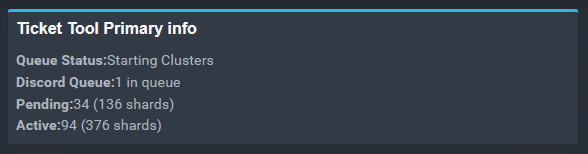
Yeah I see that, looks like 1 of the shards is having a hickup, luckily we have the premium one that I swapped to so everyone can keep going
jade topaz
knotty light
Yeah I see that, looks like 1 of the shards is having a hickup, luckily we have ...
hmm
@jade topaz the bot will work in a few minutes
knotty light
Awesome, @solid stream @jade topaz Thank you guys for looking into it
jade topaz
lol
 knotty light
 solid stream
I think it actually just found all the shards having issues and restarted them lol
strange
knotty light
might be the weather, could be having an affect on the host
jade topaz
yah thats a good reaason
knotty light
solid stream
nah, the same server is running 128 other shards
Must have been a bad segment then
fallen river
Programs work in weird ways, sometimes they decide to actually do work randomly xD
solid stream
It's possible, It had some funky errors when logging in last time.
knotty light
yeah, especially with all the servers using it, it happens sometimes
humble sequoiaBOT
Ticket Tool is 82.03% online. Estimated to be back online in 10 Minutes, 44 Seconds for the remaining 92 (17.97%) shards
knotty light
not bad
solid stream
It wasn't a rate limit this time so it can all just boot up as it wants.
humble sequoiaBOT
Ticket Tool is 86.13% online. Estimated to be back online in 8 Minutes, 17 Seconds for the remaining 71 (13.87%) shards
solid stream
the eta seems about correct.
knotty light
That's good, good to see no more issues for now
Again, appreciate ya coming out to check what was up
knotty light
I'll let ya know if it goes down again
jade topaz
lol
solid stream
at this point I think they're all going to be online after it finishes booting.
knotty light
Yeah, it probably was just a hickup
solid stream
over the last 2-3 hours I was restarting each shard to apply an update to the discord module.
about 90 restarted without an issue (if the crashed shards were indeed the ones having problems)
knotty light
Might have been the update didn't push properly to the ones that went down
had a start failure
solid stream
Ahhhh... now I know why the bot restarted itself
jade topaz
why
solid stream
It hit the one error I programmed it to force restart on lol.
knotty light
lol
jade topaz
lol
solid stream
failing to send a packet due to a closed websocket with discord.
aka... offline bot.
knotty light
That makes a lot of sense
solid stream
My systems page has a TON of stats but apparently not one telling me if the WS is closed..
knotty light
obs not something important right 😛
solid stream
I guess it sorta does, I noticed a number of servers with a zero ws ping
not that, nevemind




knotty light
 solid stream


knotty light

solid stream
all shards are online
 knotty light

solid stream
if any of you have an offline bot let me know.
 iron veldt
solid stream
if any of you have an offline bot let me know.
iron veldt
solid stream
if any of you have an offline bot let me know.
i got one
jade topaz
@iron veldt open a ticket and send me the server id please
iron veldt
k
 north nest
hello
rotund kite
greetings
north nest
I want to ask are the changes that I do with trial premium will be permanent
jade topaz
yay
rotund kite
🙂
solid stream
our last update allowed the bot to become stuck in a state of reconnecting forever.
not actually reconnecting, but stuck..
 analog prairie
idk whats going on 😄 but you guys are great for caring so much about your users
 upper flower

rotund kite
north nest
I want to ask are the changes that I do with trial premium will be permanent
The premium bot will become unfunctional after its expiry.
It will stop working after your server loses your 'Premium Status'.
analog prairie
about how long will it take to get the update out?
solid stream
It depends, if you need it now I can force update your shard now.
It could take upto an hour as i'm slowly restarting on servers.
rotund kite
If your bot is offline in your server, it is a known issue.
jade topaz
its online
rotund kite
If it is not offline, try:
humble sequoiaBOT
Don't see your server in the dashboard?
You will possibly need to relog. Look below to see steps on how to relog.
How to relog the Dashboard.
First, you will need to go to the dashboard. Once your there, click on your avatar on the top right. after you clicked it, you will see button that says Logout. You must click that. Once you have logged out, you can log back in.
Note:
You need one of these 3 things to access the dashboard.
- Server Owner
- Server Administrator
- Dashboard Role
jade topaz
k
jade topaz
EYYY THX
upper flower
If bot is down in server = u can not manage.
jade topaz
THX THX THX IT WORED
rotund kite
Oh, they have deleted servers on their dashboard page.
jade topaz
WORKED
north nest
rotund kite
The premium bot will become unfunctional after its expiry.
I'm not using premium bot tho, I'm using premium features on regular bot, by using free trial
humble sequoiaBOT
Ticket Tool Premium
Get premium at https://tickettool.xyz/premium
Manage your subscriptions at https://tickettool.onfastspring.com/account
Why Premium?
Premium lets you customize the bot just how you want it. It also helps keep the bot running.
north nest
oof
so even if I set the panel message and everything, I will not be able to use those panels after the trial expires?
that's sadge moment
rotund kite
I'm not too sure, but expect it to become unusable, you can get premium from upvoting, or from giveaways, and you can always purchase tickettool premium.
rotund kite
Your welcome, have a nice day 🙂
north nest

 mild geyser
My ticket tool didn't stay online
humble sequoiaBOT
Ticket Tool is 3.91% online. Estimated to be back online in 57 Minutes, 24 Seconds for the remaining 492 (96.09%) shards
 gloomy bay
same here
upper flower
We have restarted the bot completely
gloomy bay
really
 boreal kelp
Is there a way we can see what shard we are
jade topaz
by the $debug command
or click on the bot you will see your shard
solid stream
but that's not actually your shard, it's more the cluster ID.
anyway, it works the same for us.
humble sequoiaBOT
If Ticket Tool support requested this debug give them this link:
https://discordapp.com/channels/509192800865353738/662692902245498910/810405431578198037
Bot Permissions ឵ ឵឵ ឵ ឵឵ ឵ ឵឵ ឵ ឵឵
✅ - Read Channels
✅ - Send Messages
✅ - Embed Links
✅ - Attach Files
✅ - Add Reactions
✅ - Manage Roles
✅ - Manage Channels
✅ - Manage Messages
✅ - Read History
Channel Permissions ឵ ឵឵ ឵ ឵឵ ឵ ឵឵ ឵ ឵឵
✅ - Read Channels
✅ - Send Messages
✅ - Embed Links
✅ - Attach Files
✅ - Add Reactions
✅ - Manage Roles
✅ - Manage Channels
✅ - Manage Messages
✅ - Read History
Server Information ឵ ឵឵ ឵ ឵឵ ឵ ឵឵ ឵ ឵឵ ឵ ឵឵
Channel name:
community-support
Channel ID:
776680605517742090
Channel Count:
217/500
Server name:
Ticket Tool Support
Server ID:
509192800865353738
User Information ឵ ឵឵ ឵ ឵឵ ឵ ឵឵ ឵ ឵឵ ឵ ឵឵
User name:
razu#3704
User ID:
809944114719752203
Permission Level:
0 - User
Bot Information ឵ ឵឵ ឵ ឵឵ ឵ ឵឵ ឵ ឵឵ ឵ ឵឵
Prefix:
$
Premium Status:
Lifetime - ["subV2","subV1","time"]
Current shard:
1
API Latency:
79
 native sierra
ticket tool is offline i cant register my company
jade topaz
we are restarting the bot
native sierra
when it gonna online?
humble sequoiaBOT
Ticket Tool is 11.72% online. Estimated to be back online in 52 Minutes, 44 Seconds for the remaining 452 (88.28%) shards
gloomy bay
max 57 mins
solid stream
If you're lucky and in the lower shard count it will be sooner.
upper flower
lol
analog prairie
is
boreal kelp
I only added the bot yesterday so I'm gonna be one of the last bots added
analog prairie
68 low ....
boreal kelp
68 apparently
upper flower
If bot offline = u cant manage
boreal kelp
I was 68 apparently but I'm still offline
analog prairie
it says online
 ivory stump
؟
analog prairie
but its not online online
upper flower
@boreal kelp how do know ur shard 68
jade topaz
click on view latest updates
analog prairie
andddd its out
boreal kelp
I came up with 68 for a sec
upper flower
oh lol
solid stream
It was online for a second?
boreal kelp
Tho I think I'll be wrong
analog prairie
for a second
it wasnt online online it still was in the offline section , but it said online
boreal kelp
solid stream
It was online for a second?
No I could see it for a second when i clicked on the bot
solid stream
it shouldn't be doing that..
analog prairie
that is what it has been doing
ivory stump
ivory stump
؟
.
solid stream
ahh..
boreal kelp
ok
upper flower
Looks like its going to be another long night Josiah... grab some coffee
mild geyser
Hi
jade topaz
ivory stump
.
click on view latest updates
upper flower
 mild geyser
My ticket tool didn't online
analog prairie
it could be
humble sequoiaBOT
Ticket Tool is 19.14% online. Estimated to be back online in 48 Minutes, 18 Seconds for the remaining 414 (80.86%) shards
boreal kelp
upper flower
Looks like its going to be another long night Josiah... grab some coffee
Is there a way you could check my shard if I tell you my server name
analog prairie
i'm not meaning to add stress , you guys are already working hard
ivory stump
jade topaz
click on view latest updates
Not set
analog prairie
i'm just giving ya a heads up
solid stream
i want last month when it ran without any issues..
upper flower
lol
gloomy bay
damm
solid stream
then discord went and changed some crap and now it's buggy AF
upper flower
ban discord!
analog prairie
i was just about to say that
upper flower
lolll
analog prairie
delete your message !!!
gloomy bay
is there a way to check what shard you are
 analog prairie
i want credit for saying that ._.
humble sequoiaBOT
Ticket Tool is 19.53% online. Estimated to be back online in 48 Minutes, 4 Seconds for the remaining 412 (80.47%) shards
boreal kelp
is there a way to check what shard you are while the bot is offline
analog prairie
well
gloomy bay
^^
upper flower
Not while offline
analog prairie
my shard is now 124
gloomy bay
wshat bout online?
analog prairie
not pog
upper flower
did u know, if we just delete the bot, we wouldnt have a problem 👀
analog prairie
now we're offline
 rustic girder
Seems like a lot of bots have been having problems cause of discord related problems
analog prairie
honestly
boreal kelp
upper flower
did u know, if we just delete the bot, we wouldnt have a problem 👀
NOOOOOOOO
analog prairie
just sell the bot to discord . and make it their problem

 boreal kelp
🤣
gloomy bay
\🎫🎫
solid stream
$t token
humble sequoiaBOT
solid stream
$t token
Recommended shards: 8
Total Sessions: 1000
Remaining Sessions: 990
Max Concurrent: 1
Time to reset: 11 Hours, 43 Minutes, 10 Seconds
solid stream
I won't be able to keep up these restarts all night..
upper flower
mhmm
solid stream
oh wait..
analog prairie
bots up
solid stream
That's the premium bot ol
analog prairie
and now its down
upper flower
LOL
gloomy bay
can you do the status thing
analog prairie
now no one has a bot 😄
jade topaz
Huh
gloomy bay
the $t eta thing can you do that
upper flower
did u know!
jade topaz
My ticket tool commands is not working
humble sequoiaBOT
Ticket Tool is 24.22% online. Estimated to be back online in 45 Minutes, 16 Seconds for the remaining 388 (75.78%) shards
jade topaz
Oooooo
upper flower
did u know
analog prairie
yes?
rotund kite
?
upper flower
idk lol
rotund kite
lol
 copper marsh
there gonna know
 analog prairie
i've been staring in there
jade topaz
Look
upper flower
lol
jade topaz
jade topaz
NOR WORKIKG
rotund kite
...
humble sequoiaBOT
Ticket Tool is 25.78% online. Estimated to be back online in 44 Minutes, 20 Seconds for the remaining 380 (74.22%) shards
rotund kite
^^
upper flower
People who trigger me:
- People who dont read the room. (or in this case, the channel)
upper flower
BAN!
jade topaz
hahahahha
solid stream
Ok... This is really getting on my nerve...
upper flower
DOUBLE BAN!
jade topaz
no no jk
analog prairie
JHQEJQWHQWKJEHQWE
solid stream
The issues I'm having just getting the bot to actually fully TURN ON....
jade topaz
Why me
rotund kite
Oh, slowmode, why?!?!!
jade topaz
ew slowmode
jade topaz
so you dont spamm
analog prairie
make it a 10 minute slowmode
upper flower
how about.. a 10000000000 second cooldown?
rotund kite
if it is 6h, I'm never going to chat here
jade topaz
upper flower
how about.. a 10000000000 second cooldown?
no
analog prairie
just shut down the server
upper flower
BET!
rotund kite
shut down the server!?!?!?!?
analog prairie
change every developers name and role so no one knows who to contact and spam for help
upper flower
SHUT DOWN TICKET TOOL!
rotund kite
Shut down discord XDDD
upper flower
YEAHHH!!!!
jade topaz
Why aren´t you guys helping people haha
analog prairie
meanwhile i'm chilling the founder of tickettool in my discord kinda pog
jade topaz
In ticket
rotund kite
jade topaz
Why aren´t you guys helping people haha
we aren't doctors XD
upper flower
jade topaz
Why aren´t you guys helping people haha
ok read the room.. the bot is starting up, NOTHING WE CAN DO
its called being patient
jade topaz
---ban @analog prairie
analog prairie
i love you im kiddin im kiddin
upper flower
hmmm
jade topaz
hahhahahaha
upper flower
im thining a ban, then unban, then ban again
rotund kite
I get triggered when people get mad that they cannot read the channel, that happens sometimes in my server.
jade topaz
and btw why are we in the #🆘│community-support lets go to #💬│general-chat
upper flower
eew
rotund kite
yea
analog prairie
who knows 😄
rotund kite
lol, I hate slowmode anyways
analog prairie
yall ever just ...
 drifting trailBOT
Channel Locked
🔒 oh did u know the bot is restarting?
jade topaz
hi
 pale pilot
Channel unlocked again
upper flower
no
 forest goblet
yes
pale pilot
maybe
 warm sail
hi
 median wigeon
Hi
 charred ruin
Bye
 slate swallow
forest goblet
slate swallow
forest goblet
$help setup
humble sequoiaBOT
Setting up Ticket Tool
Visit the docs for setup info
General Setup
 spare bay
الو
spare bay
ايوا
forest goblet
@spare bay هل تتحدث الإنجليزية؟
spare bay
لا
 shadow axle
is it possible to have multiple prefixes at once? 
forest goblet
Nope, unfortunately not
 dense brook
is the bot still down?
solid stream
no
dense brook
Thanks..
humble sequoiaBOT
How to set a ticket limit
A ticket limit may be set per panel to prevent users from spamming tickets. By default this limit is set to 3. Once a user hits this limit the bot will notify the users that they reached the limit.
To set a ticket limit go to the Dashboard -> Panel Configs -> Settings -> General Options -> Ticket Limit
 forest goblet
@split shore ⬆️
 brisk thorn
Bot not responding to commands?
 light quarry
If someone does -new My X isn't working. in my general chat, this will open a ticket for them, is there a way to have it display a message in general chat like, '{user} opened a ticket in {ticket_channel}.'?
brisk thorn
wait someone changes it to - why just why
light quarry
I have another bot that uses $
and that's what our old bot used, so keeping users happy.
pale pilot
light quarry
If someone does `-new My X isn't working.` in my general chat, this will open a ...
this is not possible, sorry
light quarry
pale pilot
this is not possible, sorry
But I can have it DM them the ticket channel with Automation Opions -> Edit Created DM?
pale pilot
light quarry
But I can have it DM them the ticket channel with Automation Opions -> Edit Crea...
correct
light quarry
pale pilot
correct
OK, thank you, I got that setup and it should work fine for our use.
pale pilot
👍
 strong talon
Do you guys know why the bot isn't deleting the reactions after the ticket has been opened?
It does it on my other server
knotty light
strong talon
Do you guys know why the bot isn't deleting the reactions after the ticket has b...
looks like the bot lost its admin perms
strong talon
Gotcha, tysm
 ornate fulcrum
Howdy, Currently the Bot is not creating Tickets at all in any of the Category within my discord, its got the Admin perms to correctly make the channel for the tickets, but still does not, was wondering if anyone had any suggestions or ideas
 azure bronze
It is not showing a server.
Help
 dense basalt
mulitpanel only showing 2/3 reactions. all three create reactions are different
any one know what im doing =\
 royal hound
Hello it is not showing My server?
Help please
humble sequoiaBOT
Don't see your server in the dashboard?
You will possibly need to relog. Look below to see steps on how to relog.
How to relog the Dashboard.
First, you will need to go to the dashboard. Once your there, click on your avatar on the top right. after you clicked it, you will see button that says Logout. You must click that. Once you have logged out, you can log back in.
Note:
You need one of these 3 things to access the dashboard.
- Server Owner
- Server Administrator
- Dashboard Role
dense basalt
is there a {user_count} support or just the over all count
north nest
@charred ruin hello  earlier I created a ticket and used this channel to ask about expiring premium features
forest goblet
Don't ping staff
north nest
I brought monthly subscription and tested which one features will remain as I set them, some premium features remains even after premium trial/sub expires
charred ruin
Oh were you that person that asked if the features would still work after it expires?
charred ruin
So like your premium expired and you have been using the free bot but you were able to keep the features?
charred ruin
Sure, although I’ll probably have developer look at your panel.
north nest
I was not able to use most of the features, and the ones that I'm still able to use were set before the subscription expires...
I can not do any change on them
charred ruin
Alright ty I will have someone look into it.
north nest
I did not cancel my subscription, I just moved it to another server
I added it back to my main server after I tested it
I can remove the premium if you let me know when you want to test it
the panel name is [1%] All-Star
charred ruin
Remove it and try.
north nest
oaky
north nest
I tested it, and some pre edited premium features are still usable @charred ruin
those are custom reactions, and custom panel
rotund kite
 wary island
Bot all i press emoji does not respond what solution?
wary island
Bot all i press emoji does not respond what solution?
Try send $debug and the link attached to it in your server.
charred ruin
Skeleton is gonna look.
north nest
also custom ticket padding did not change back to default, it remains as how I set it up
forest goblet
Not enough permissions most likely
charred ruin
@north nest open a ticket and we will continue it in there
north nest
oaky
rotund kite
wary island
Okay, open up a ticket, it's a little crowded here, go to #🎫│make-a-ticket and I'll assist you there.
wary island
There is ADMINISTRATOR with it
north nest
but to be honest, I'm not complaining for being able to use custom panel and reactions 
please don't remove them
humble sequoiaBOT
How to disable the premium bot
To disable the premium bot you will have to go to the Dashboard -> Server Configs -> Premium bot -> And on the right-hand side disable the "Use Premium Bot" setting.
Premium features will still work on the normal bot.

TicketTool.xyz - Ticketing without clutter
jade topaz
Hello, i made a ticket before in the server
Than i got banned from that server
Now they unbanned and i came back
And the bot had 1/1 ticket limit
How can i get my ticket back 😭😢
@SUPPORT TEAM
@MANAGER
forest goblet
You need to ask a Server Admin of the server you are in. They can delete the ticket so you can make a new one. @jade topaz
jade topaz
forest goblet
You need to ask a Server Admin of the server you are in. They can delete the tic...
Pls ask them to do they aren't 😔
 coarse wedge
jade topaz
Hello, i made a ticket before in the server
Than i got banned from that server
N...
coarse wedge
jade topaz
Hello, i made a ticket before in the server
Than i got banned from that server
N...
Ask a admin/manager of the server to give you permissions to the ticket
you got banned then the user permission gets deleted
They need to add them again and give you permissions to see this channel
jade topaz
jade topaz
Pls ask them to do they aren't 😔
@Martin B. ツ#2128
@jade topaz we are sorry we cant help you with this
😔
 split shore
Anyone else having a problem with the website crashing? Like when I go in it, it logs me out of the dashboard and makes me reinvite the bot..
 dire geyser
Yup i am having the same problem rn @split shore
split shore
ahh alright glad to know its not just something on my end
split shore
Yea same
jade topaz
how do I fix this?
jade topaz
@jade topaz @split shore open a ticket with your server id please
Hi, my bot is bugged, people can’t create tickets anymore and I can’t close them anymore, he is just ignoring the reacts
 languid moss
me to
jade topaz
😫😫😫
split shore
Yup
languid moss
 sick wedge
am invite the bot in my server and am go to web and told me invite the bot
 misty skiff
sick wedge
am invite the bot in my server and am go to web and told me invite the bot
misty skiff
sick wedge
am invite the bot in my server and am go to web and told me invite the bot
same here
 woeful vector
is the bot not letting you open tickets rn?
its not working on both servers it is on ;-;
 white fjord
woeful vector
white fjord
woeful vector
@white fjord just broken :p
 thorn apex
sick wedge
am invite the bot in my server and am go to web and told me invite the bot
thorn apex
sick wedge
am invite the bot in my server and am go to web and told me invite the bot
i guess,i have same problem with this
i kicked the bot from server cuz of not working then when i tried to go dasboard this happened
pale pilot
A few shards have unfortunately hit the rate limit. Unfortunately we can only wait. It should be back soon
jade topaz
Alright How can I create logs with commands?
Like how do I setup a log channel for ticket tool?
pale pilot
jade topaz
Like how do I setup a log channel for ticket tool?
Ticket Tool Docs
Dashboard > Panel Configs > Settings (of the desired panel) > Logging
jade topaz
Thanks Simple
pale pilot
 distant lynx
$kv
humble sequoiaBOT
**How to turn off Keep Visible**
**About Keep Visible**
"Keep Visible" will disable any permission changes to the @everyone role, allowing everyone to see into tickets.
**How to disable/enable it**
Head over to your Dashboard -> Panel Configs -> Settings --> General Options -> Keep Visible

NOTE that @everyone can type aswell if it has permissions to send messages
distant lynx
i already did but everyone still can look
pale pilot
Do they have admin permissions or a support team role?
distant lynx
distant lynx
pale pilot
Do they have admin permissions or a support team role?
no
pale pilot
Can you run the $level @user command with a regular member on your server?
jade topaz
@distant lynx most probably you made a role which has default perms [not talking about @everyone] to see channels available check again with all roles and remove the perms hope it helps
pale pilot
jade topaz
<@724568937362358315> most probably you made a role which has default perms [not...
Only administrator would affect this
jade topaz
ye
distant lynx
?
 round temple
hi, is there any update on ticket tool bot? because the bot on my server wont working even when i grant it administrator perms
distant lynx
i still dont understand
because i have one for support and one for calim
claim works just fine
 cosmic leaf
The reaction isn’t opening tickets for me at the moment. Been fine all tipping the last through. Is there an internal issue right now?
 reef musk
jade topaz
reef musk
jade topaz
Can anyone help me set up the bot @humble sequoia
 dreamy silo
Is there a feature to delete closed tickets automatically after a certain amount of time?
I've looked around, asking before I make a suggestion in case I missed it.
 wild ferry
Well it is possible
 nova moat
Hi
 rough shale
Hi the bot doesn't reply to commands and when I try to use the dashboard it bugs out and says the bot has to be invited again when its already in the server.
nova moat
Do you have Arab support?
wild ferry
Does it respond when you do $ping
rough shale
it might be because there's too many tickets open, is there a way to reset and delete all the tickets at once?
rough shale
wild ferry
Does it respond when you do $ping
let me check
wild ferry
nova moat
Do you have Arab support?
dreamy silo
rough shale
it might be because there's too many tickets open, is there a way to reset and d...
Good question, would also like to know that.
rough shale
no it doesn't
 wild siren
I’m having issues with the bot rn too. Can’t open any tickets or ping
rough shale
it doesn't reply to any command rn
dreamy silo
We're alright on the premium bot.
 obtuse summit
hello is ticket tool working?
obtuse summit
ohh okay thanks
 marble moat
is not working
rough shale
 sullen veldt
Hello, I'm contacting you today because I have a small problem with the bot ticket tools. Everything worked fine until today but around 12h when you click on the reaction the ticket doesn't open or close. So I kick the bot and reinvite, except that I can't manage it anymore even if it's on the server, I put the admin perms on it to make sure it's not coming from that but nothing has changed (I let it have the admin perms). So I don't see how to do it. I hope you'll answer me quickly. Good day/evening
Bonjour, je vous contacte aujourd'hui car j'ai un petit problème avec le bot ticket tools. Tout marché très bien jusqu’à aujourd'hui mais au alentour de 12h quand on clique sur la réaction le ticket ne s'ouvre pas ou ne se ferme pas. J'ai donc kick le bot et réinviter, sauf que je ne peut plus le gérer même si il est sur le serveur, je lui ai mis les perms admin pour être sur que ca ne vienne pas de ça mais rien n'a changé (je lui ai laissé les perms admin). Je ne vois donc pas comment faire. J’espère que vous me répondriez vite. Bonne journée/soirée
rough shale
marble moat
me too @rough shale
 clear flicker
i think its clear everyone that the bot is down lol
rough shale
There should be a way to reset everything or delete all the tickets, I think the problem I have rn is that there's too many tickets opened at once, bc im mod another sever where there's just 5 opened and the bot works just fine
 gusty grail
rough shale
There should be a way to reset everything or delete all the tickets, I think the...
gusty grail
rough shale
There should be a way to reset everything or delete all the tickets, I think the...
Since you're not the only one having issues with the bot right now, this is probably just the bot having problems on some shards.
Nothing to worry about, this will probably be fixed soon and you'll receive updates through #689208572806299799
rough shale
thank you
jade topaz
some shard hit Discord Rate Limits , No ETA for now!
some shard hit Discord Rate Limits , No ETA for now!
 tiny lance
@sullen veldt j'ai le même soucis, on m'a dit que ca venait du bot et non du serveur
sullen veldt
okok
jade topaz
Umm hey is the bot down?
some shard hit Discord Rate Limits , No ETA for now!
some shard hit Discord Rate Limits , No ETA for now!
some shard hit Discord Rate Limits , No ETA for now!
some shard hit Discord Rate Limits , No ETA for now!
some shard hit Discord Rate Limits , No ETA for now!
some shard hit Discord Rate Limits , No ETA for now!
OK OK
FFS
I purchased the premium bot, do I need to set it up again or will it inherit the permissions?
humble sequoiaBOT
Inviting and Enabling Premium Bot
The first thing you will need to do is invite the premium bot, an invite can be found here
Once the bot is in your server we will head to the dashboard and manage your server. When you are managing your server, you want to head into "Server Configs" then click the drop down menu under "Select the bot you would like to use on this server" then click "Ticket Tool#6207" and then save.
jade topaz
you need just to invite the premium bot and enable it
thats it
Thanks
and for the premium role
$pc
humble sequoiaBOT

How to get premium role
Until the automatic premium check is fixed run the command $debug on your server and send us the link in a ticket.
jade topaz
np!
jade topaz
ok i will close this chaneln
 astral beacon
My tickets are no longer working and I'm premium
Please help me
drifting trailBOT
 Meglis_UG#0101 was banned | posting NSFW pictures
 velvet blade
... tickets doesn't works
astral beacon
Why?
gusty grail
As Sk3leton said : some shard hit Discord Rate Limits , No ETA for now!
velvet blade
astral beacon
Why?
idk
astral beacon
gusty grail
As Sk3leton said : some shard hit Discord Rate Limits , No ETA for now!
Can you link me the message please?
gusty grail
scroll up 10-20 messages
drifting trailBOT
Channel Locked
🔒
 Primary Bot - Outage
some shards hit Discord Rate Limits , No ETA for now!
if you need any help you can open a ticket here! #🎫│make-a-ticket
solid stream
?unlock #🆘│community-support
drifting trailBOT
Unlocked channel #🆘│community-support
solid stream
The bot should be back online in all shards.
 vague yacht
While the bot was down (I didn't know it was at first), I manually deleted a ticket channel that was empty, and now the web panel shows 1 open ticket too many. How can I fix this ?
solid stream
The dashboard stats are currently outdated, that issue won't affected the bot and will fix itself next time a ticket is opened by the bot.
vague yacht
I did just open a ticket to check if the bot was online, though
solid stream
Then it should show as 1
The dashboard stats are a work in progress and sometimes aren't accurate.
vague yacht
ah, it's working now. It was just someone who opened a new ticket right after I alt-tabed to the browser, sorry ^^
thanks :)
vague yacht
Well, nevermind, there is still a ghost opened ticket.
There are no more opened tickets in the server but the web panel shows one.
solid stream
yeah, that's often an issue
The stats page is really outdated and is on my todo list for future updates.
jade topaz
Ooo
 winged kiln
ayo someone knows if I can put the created tickets on a specific category? and if that is possible, how?
humble sequoiaBOT
How to set the open category
To set a open category go to the Dashboard -> Panel Configs -> Settings -> Category Options -> Category Open

 queen hinge
@winged kiln ⬆️ ⬆️
queen hinge
Np
 deft forge
How do I stop a ticket from closing?
median wigeon
enable two step close
deft forge
That's what's on, but what do I do to stop it?
solid stream
deft forge
Ok, thank you!
 sterile wyvern
is it possible to make it that normal players cant react with ❌ to close a ticket and only staff can react to the ❌
 robust sandalBOT
tiny lance
<@!614072209647861770> j'ai le même soucis, on m'a dit que ca venait du bot et n...
robust sandalBOT
tiny lance
<@!614072209647861770> j'ai le même soucis, on m'a dit que ca venait du bot et n...
 Barenn
@sullen veldt I have the same worries, I was told that it came from the bot and not from the server
 French (fr) → English (en)
 drowsy jay
 wild whale
@drowsy jay what's the problem?
 sweet anvil
Our bot shard is online, the bot is monitoring and responding to commands, however, it's not allowing new tickets to be created. Any ideas?
Shard 6 for reference.
 thorny steeple
how i can fix it Transcript Failed to save
forest goblet
thorny steeple
how i can fix it Transcript Failed to save
Do you have a transcript channel set up?
humble sequoiaBOT
How do I save transcript to a channel?
To save transcripts to a channel go to the Dashboard -> Panel Configs -> Settings -> Logging Options -> Transcript Channel
 rotund kite
thorny steeple
how i can fix it Transcript Failed to save
rotund kite
thorny steeple
how i can fix it Transcript Failed to save
Make sure the bot isn't missing perms.
 runic halo
rotund kite
Make sure the bot isn't missing perms.
runic halo
rotund kite
Make sure the bot isn't missing perms.
thank you... I wouldve totally missed that
 obtuse gust
Is there a certain role that I need to create that I can give people so they automatically have access to tickets?
forest goblet
obtuse gust
Is there a certain role that I need to create that I can give people so they aut...
Nope, you can set up the permissions the user gets when creating a ticket like this:
humble sequoiaBOT
How to set the permissions for tickets
To set a change permissions go to the Dashboard -> Panel Configs -> Settings -> Permission Options
 forest goblet
No problem.
 grave sedge
My admins don't get a ping when a new ticket is opened, how do i fix that?
humble sequoiaBOT
How to make Ticket Tool ping a role
To make ticket tool ping a role when a ticket is opened, go to the Dashboard -> Panel Configs -> Settings -> Ticket Options -> Ticket Message -> Message Text and do this:
{@Role name} This is case sensitive and the role must have @mentions enabled
 rotund kite
It is case sensitive, and must have @mentions enabled, please note you need {}, and if there's an emoji in it, use the emoji ID
grave sedge
Thanks
forest goblet
jade topaz
when its made go a caregtory
$help category
humble sequoiaBOT
How to set the open category
To set a open category go to the Dashboard -> Panel Configs -> Settings -> Category Options -> Category Open
jade topaz
ok thx
forest goblet
np
jade topaz
@forest goblet
forest goblet
yes?
jade topaz
كيف أخلي كل التكتات
الساف بتاعها في شانل معينه
how to save it in a channel ?
@forest goblet
forest goblet
$help transcript
humble sequoiaBOT
How do I save transcript to a channel?
To save transcripts to a channel go to the Dashboard -> Panel Configs -> Settings -> Logging Options -> Transcript Channel
jade topaz
ألف شكر
forest goblet
لا توجد مشكلة
forest goblet
عندما يتم إغلاق التذكرة، لديك للرد على "Save transcript".
jade topaz
forest goblet
The bot is down in some shards. Please be patient. @jade topaz
jade topaz
OK
 eager apex
Hi I need a help my bot for Ticket not work ??
forest goblet
The bot is down in some servers, please wait until it works again.
 odd birch
Simple question: If I am subbed to TT Prmium. and I invite TT premium to my server. can i then kick TT free?
jade topaz
yah if you want
odd birch
ok ty
 wild tulip
Sup nerds
pale pilot
I heard my name
odd birch
hai simple, sorry my fault,
wild tulip
Is there any way to customize which category is the ticket going to be created in?
pale pilot
$help category
humble sequoiaBOT
How to set the open category
To set a open category go to the Dashboard -> Panel Configs -> Settings -> Category Options -> Category Open
pale pilot
it's the same on mobile
 zealous igloo
When bot will come online
wild tulip
Dunno how to save it on mobile I see no option 2 save.when I close it it doesn't save
I just cannot save it
It just didn't show it when I'm writing
odd birch
ok, so its not me going insane, cause i just redid all the perimssions in my server.
 mighty fern
The bot has a problem. My server is not working, why would you want an admin to fix it
Helloooo
who can help me
odd birch
Not sure if anyone can, im having the same issue on my server. Thought it was a permissions problem
 cedar orchid
Bot won't show up as in my server just keeps telling me to re-invite it but it was working earlier? Is there a server issue?
forest goblet
cedar orchid
Bot won't show up as in my server just keeps telling me to re-invite it but it w...
The bot doesn't work properly at the moment, please be patient.
odd birch
@cedar orchid Yea I was having that issue like 10 minutes ago. I logged out, cleared cache n cookies n it did work again so i was able to use the dashboard, but that mightve been good timing
 stark nova
I invited him to my Discord server but now I can't manage him, who can help me??
humble sequoiaBOT
Inviting and Enabling Premium Bot
The first thing you will need to do is invite the premium bot, an invite can be found here
Once the bot is in your server we will head to the dashboard and manage your server. When you are managing your server, you want to head into "Server Configs" then click the drop down menu under "Select the bot you would like to use on this server" then click "Ticket Tool#6207" and then save.
forest goblet
⬆️ ⬆️ ⬆️
 halcyon cedar
@violet granite if i try to change settings for a server it keeps saying missing permission and sometimes it says its saved ut much times it says missing permissions
jade topaz
@halcyon cedar dont ping staff team!!!
drifting trailBOT
Channel Locked
🔒
Primary Bot - Outage
some shards hit Discord Rate Limits , No ETA for now!
if you need any help you can open a ticket here! #🎫│make-a-ticket
 dusk knoll
how do i make it so the bot only works in certain channels
humble sequoiaBOT
-- moved to ticket --
jade topaz
can we put the private ticket
jade topaz
Hi, I just accidentally deleted the channel that tickettool was storing the transcriptions. Is there any way to recover them? I had close to 100 and don't want to lose them forever.
 light geode
Hello !
I have a problem with my ticket message, the word "Close" at the end of the message doesn't show up
jade topaz
im sorry but what's the command again to do the panel with multiple reactions
found it nvm
 tribal cedar
I think you need premium dunno if you have it
jade topaz
tribal cedar
I think you need premium dunno if you have it
i do, but also how do i add my own reactions i only see reaction availability that they added
 summer fjord
you know where you can use the view server as role, well im using that to 'create a ticket' but its not allowing me to see the ticket channel as a member, however its allowing me and my staff members too
summer fjord
summer fjord
you know where you can use the view server as role, well im using that to 'creat...
if u make a demo ticket, like that
so technically i wanna make a demo ticket but for my server, it allows my staff team to see it but not the person who created the ticket, i dont know why
tribal cedar
jade topaz
i do, but also how do i add my own reactions i only see reaction availability th...
I found that using the words of the emoji doesnt show up unless you save then go back into the reaction settings. Last time I did it my emojis did show up though. May have to scroll
odd birch
Hey all, TTP here, After the server issue earlier, my TT still isnt opening tickets when users react with 📩
solid stream
@odd birch open a ticket and ping me
odd birch
sure thing.
 rigid halo
hello, I need help. It won't let me invite ticketool that I can not pull down the menu.
odd birch
hey, popped a ticket open and gave the starting info.
 mellow basin
Is there a way to have a ticket open and be visible to everyone?
mellow basin
nvm I realized how to do it!
 spark vigil
hi ich habe den bot eingeladen er ist auch auf meinen server aber ich kann nichts einstellen da er sgat das ich ihn einladen soll
humble sequoiaBOT
Don't see your server in the dashboard?
You will possibly need to relog. Look below to see steps on how to relog.
How to relog the Dashboard.
First, you will need to go to the dashboard. Once your there, click on your avatar on the top right. after you clicked it, you will see button that says Logout. You must click that. Once you have logged out, you can log back in.
Note:
You need one of these 3 things to access the dashboard.
- Server Owner
- Server Administrator
- Dashboard Role
forest goblet
@spark vigil ⬆️ Das bitte einmal lesen
queen hinge
Junge alter @forest goblet , wie viele Sprachen sprichst du bitte xD
forest goblet
Die meisten mit dem Übersetzer lol, aber Deutsch ist meine Muttersprache
queen hinge
Uff...
jade topaz
hi
in the ticket save its not working
i made all that
and the transipt failed to save in every ticket
forest goblet
Please run $debug in the channel #saves.
jade topaz
ok 1 min
@forest goblet
stilll nothing
@forest goblet @forest goblet is there an answer
humble sequoiaBOT
How do I save transcript to a channel?
To save transcripts to a channel go to the Dashboard -> Panel Configs -> Settings -> Logging Options -> Transcript Channel
forest goblet
Mmh
jade topaz
1 min
forest goblet
Give it permission to send and read messages in #saves
forest goblet
Ok run $debug again
 wise nymph
في سبورت عرب؟
forest goblet
wise nymph
في سبورت عرب؟
إذا كنت بحاجة إلى الدعم باللغة العربية، يرجى الذهاب إلى #🎫│make-a-ticket وانتظر Sk3leton
 thin torrent
@queen hinge
forest goblet
thin torrent
<@305647724986892288>
Don't ping
thin torrent
Im lil but this my onther acc
I have problem in ticket I can’t create anyy ticket why?
thin torrent
forest goblet
Don't ping
Oky help me
 worn surge
thin torrent
Im lil but this my onther acc
I have problem in ticket I can’t create anyy tick...
worn surge
thin torrent
Im lil but this my onther acc
I have problem in ticket I can’t create anyy tick...
Does the bot have permissions to make channels etc?
thin torrent
worn surge
Does the bot have permissions to make channels etc?
Sure
jade topaz
Hey
forest goblet
Enable "Two step ticket" in the Panel options > General settings.
 midnight slate
Staff helped me already, thanks though @forest goblet
forest goblet
no problem
 vast fulcrum
Hey I need help, 2 people clicked the lock at the same time and it disappeared, now the bot isn't functioning...
 mystic hound
Use $close and see if it works
vast fulcrum
i managed to manually react with the lock and it fixed the issue but now people cant make new tickets?
mystic hound
vast fulcrum
i managed to manually react with the lock and it fixed the issue but now people ...
Did any of the permissions on the bot change? And could you confirm if its online in your server
You can check permissions by running $debug I believe.
vast fulcrum
Has all perms and is online currently
forest goblet
Please run $debug in your server so I can see it
jade topaz
halp, why can't I add ticket bot to my server? I invited it and it showed the authorized screen but no ticket bot
humble sequoiaBOT
Don't see your server in the dashboard?
You will possibly need to relog. Look below to see steps on how to relog.
How to relog the Dashboard.
First, you will need to go to the dashboard. Once your there, click on your avatar on the top right. after you clicked it, you will see button that says Logout. You must click that. Once you have logged out, you can log back in.
Note:
You need one of these 3 things to access the dashboard.
- Server Owner
- Server Administrator
- Dashboard Role
forest goblet
@jade topaz ⬆️
jade topaz
forest goblet
<@456226577798135808> ⬆️
oh mkay, ty
forest goblet
np
 bronze agate
Hello, can anyone tell me how to set a support team member react a emoji and he will be the only one in the channel
solid stream
$help claim
humble sequoiaBOT
How does the claim command work?
Ticket Tool claiming is a premium only command that allows your support team to claim tickets and have the ticket renamed, changed permissions or moved to another category
solid stream
That's not very helpful..
bronze agate
Thanks!
pale pilot
Lol
 tulip orchid
$help offline
humble sequoiaBOT
How to fix Ticket Tool not responding
If ticket tool is not responding, please follow these troubleshooting steps:
Check Ticket Tool's permissions
Make sure that Ticket Tool can read and write in the channel you are attempting to run commands in. Run the command @Ticket Tool#4843 debug to see Ticket Tools list of permissions in that given channel.
Check Ticket Tool's prefix
Make sure you're using the correct prefix for Ticket Tool, Ticket Tools default prefix is $ Run the command @Ticket Tool#4843 debug to see Ticket Tools prefix for your server
Check if Ticket Tool is offline
If ticket tool is offline please contact Ticket Tool support with your server ID so we can fix it asap.
 inland spear
upper flower
inland spear
upper flower
$help limit
humble sequoiaBOT
How to set a ticket limit
A ticket limit may be set per panel to prevent users from spamming tickets. By default this limit is set to 3. Once a user hits this limit the bot will notify the users that they reached the limit.
To set a ticket limit go to the Dashboard -> Panel Configs -> Settings -> General Options -> Ticket Limit
upper flower
^^ @inland spear
 past marsh
Hey, does anyone know how to have the bot link to a different channel once the ticket opens?
upper flower
<#CHANNELID>
solid stream
$id #🎫│make-a-ticket
humble sequoiaBOT
<#571706435449257997>
solid stream
@past marsh Have a look here.
past marsh
Alright, thanks
 scarlet apex
how i can allow more peoples ( discord moderator) allow to log into dashboard? so he can edit messages etc
humble sequoiaBOT
Dashboard Roles
Any role you put there will have full access to the ticket tool dashboard. The server owner and users with admin permissions already have access to the dashboard.
Be careful of which roles to put here
 upper flower
^^ @scarlet apex
scarlet apex
when trying add panel embed settings icon to it should i add link to image url big at bottom or author url? which one better iwant try add this image
https://gyazo.com/edd9727be8581cb3ca0a715a0ff67ec8

 split pond
how do you make the bot @ a specific role to support ticket when its opened?
upper flower
$help ping
humble sequoiaBOT
How to make Ticket Tool ping a role
To make ticket tool ping a role when a ticket is opened, go to the Dashboard -> Panel Configs -> Settings -> Ticket Options -> Ticket Message -> Message Text and do this:
{@Role name} This is case sensitive and the role must have @mentions enabled
 humble sequoiaBOT
How to change reactions
To set a custom reaction Dashboard -> Panel Configs -> Settings -> Reaction Options -> <Reaction to change> -> Reaction

NOTE you need premium to do this.
jade topaz
bruh
pale pilot
Please don't ping the support team
jade topaz
oh ok
humble sequoiaBOT
Multipanels are a premium feature  that allow for a single panel with multiple reactions to open different tickets.
How to create a Multipanel
Premium users can combine multiple panels into one multipanel.
First of all you will need to assign a different Create Ticket Reaction for each Panel. Run $help reaction to learn how to do it.
Next, find the IDs of each panel you wish to combine. You can find them in your Panel Configs in the Dashboard
Next, send the multipanel to a channel using $panel [id1] [id2] {id3} ....
e.g. $panel 1 2 4 17 35 to combine panels 1, 2, 4, 17 and 35.
Up to 10 panels may be combined.
 humble sequoiaBOT
How to change reactions
To set a custom reaction Dashboard -> Panel Configs -> Settings -> Reaction Options -> <Reaction to change> -> Reaction
NOTE you need premium to do this.
 vocal vector
When I react to the panel it doesn't create the ticket. Any clue on what I could be doing wrong?
humble sequoiaBOT
If the bot is not working properly, try the following steps:
-
Run the $debug command in your server, to check the permissions of the bot. Send the link you get to us.
-
Check if you have any Blacklisted Roles in your Server Configs. Any roles listed there will not be able to use the bot / create tickets.
-
While you're in your Server Configs , make sure that you don't have the premium bot enabled, without actually having premium or the bot on the server.
These are the most common issues. If your problem still exists, you can go to our Troubleshooting Page for more fixes.
scarlet apex
humble sequoia
can someone help me properly setup this? i dont understand it 😦
vocal vector
Just type $panel (id) (id) (id) and it will bring up whichever panels you wish to include afaik.
scarlet apex
Just this? Not need setup it by some roles etc?
vocal vector
Well you setup the panels as normal, and I believe it takes the first panels information to create the description, footer, etc.
jade topaz
why would my transcripts not be showing up in the logs
i have auto save
and logging in an existing channel
 hybrid dagger
jade topaz
why would my transcripts not be showing up in the logs
hybrid dagger
jade topaz
why would my transcripts not be showing up in the logs
$help transcript
humble sequoiaBOT
How do I save transcript to a channel?
To save transcripts to a channel go to the Dashboard -> Panel Configs -> Settings -> Logging Options -> Transcript Channel
hybrid dagger
Also use $debug to double check permissions
 pastel cradle
hi anyone know how i change the Ticket Opened channel name from "count" to the username of the person that created it
hybrid dagger
pastel cradle
hi anyone know how i change the Ticket Opened channel name from "count" to the u...
Do you have premium?
hybrid dagger
pastel cradle
no i do not
it is not possible with the free version.
pastel cradle
ok thanks
jade topaz
hybrid dagger
it is not possible with the free version.
ticket tool changed it so it auto saves when the ticket is closed, i had it before when it deletes and it worked but ig you need have it when it closes if it auto deletes when you close
hybrid dagger
jade topaz
ticket tool changed it so it auto saves when the ticket is closed, i had it befo...
sorry, i don't understand what you are saying, also you are replying to a message not intended for you.
jade topaz
hybrid dagger
sorry, i don't understand what you are saying, also you are replying to a messag...
its just to ping im not gonna scroll up, but ok
copper marsh
We have no knowledge of Ticket Tool being offline, so this is most likely a permissions issue
$help offline
humble sequoiaBOT
How to fix Ticket Tool not responding
If ticket tool is not responding, please follow these troubleshooting steps:
Check Ticket Tool's permissions
Make sure that Ticket Tool can read and write in the channel you are attempting to run commands in. Run the command @Ticket Tool#4843 debug to see Ticket Tools list of permissions in that given channel.
Check Ticket Tool's prefix
Make sure you're using the correct prefix for Ticket Tool, Ticket Tools default prefix is $ Run the command @Ticket Tool#4843 debug to see Ticket Tools prefix for your server
Check if Ticket Tool is offline
If ticket tool is offline please contact Ticket Tool support with your server ID so we can fix it asap.
 vital axle
 humble sequoiaBOT
Creating a panel
To create a panel we are going to need to head over to the panel configs on the dashboard
Once at the dashboard we will need to click Create Panel
Enter a panel name (Fill in any optional settings you want)
Click Create Panel and your ready to get started with configuring your panel
An example of a creating a panel is shown below.

 topaz wedge
How to let the bot mention everyone when a ticket is opened
forest goblet
topaz wedge
How to let the bot mention everyone when a ticket is opened<:announce:7993352269...
$help ping
humble sequoiaBOT
How to make Ticket Tool ping a role
To make ticket tool ping a role when a ticket is opened, go to the Dashboard -> Panel Configs -> Settings -> Ticket Options -> Ticket Message -> Message Text and do this:
{@Role name} This is case sensitive and the role must have @mentions enabled
forest goblet
Just use @everyone instead
topaz wedge
Thank you
forest goblet
No problem
jade topaz
How to do something like , when a user creates a ticket , it creates the ticket in a specific cateogory.
humble sequoiaBOT
Creating a panel
To create a panel we are going to need to head over to the panel configs on the dashboard
Once at the dashboard we will need to click Create Panel
Enter a panel name (Fill in any optional settings you want)
Click Create Panel and your ready to get started with configuring your panel
An example of a creating a panel is shown below.
forest goblet
@jade topaz ⬆️
jade topaz
not that
Ive done that
Like when someone opens a ticket i want it to open in a different category.
humble sequoiaBOT
How to set the open category
To set a open category go to the Dashboard -> Panel Configs -> Settings -> Category Options -> Category Open
jade topaz
oh ty
 stray condor
having issues with the bot having a reaction already on it. only works when i add manual reaction. any help?
 scarlet violet
Hey is the transcript service dow
queen hinge
stray condor
having issues with the bot having a reaction already on it. only works when i ad...
Do you have an Active Premium Status?
humble sequoiaBOT
-- moved to ticket --
 fluid bolt
how to make a ticket?
queen hinge
fluid bolt
how to make a ticket?
On this server? or do you mean how to setup the bot?
forest goblet
I can't see it either!
jade topaz
hi i see that the prime state is free how to invite the bot
@forest goblet
@humble sequoia
forest goblet
It is not free...?
jade topaz
@forest goblet ?
 forest goblet
That just means you do not have premium.
jade topaz
ok
light geode
Hello!
Is this related to open tickets only ?
 forest goblet
light geode
Hello!
Is this related to open tickets only ?
forest goblet
light geode
Hello!
Is this related to open tickets only ?
Yes.
light geode
Thanks!
forest goblet
No problem.
scarlet apex
when i close ticket by command is there possible write reason? like ticket has been closed by @scarlet apex reason - not enough informations
forest goblet
Nope, unfortunately not. But it has been suggested already.
scarlet apex
😦
uh bad.i hope there is this feature!
is possible add animated emojis for reaction to make/close ticket?
queen hinge
Hey @scarlet apex , yes thats Possible.
scarlet apex
queen hinge
Hey <@760208948539686955> , yes thats Possible.
how? @forest goblet says its not so
i have premium
forest goblet
We're talking about different things
queen hinge
Use the "$id 🙃 " Command and add the Emoji after "$id"
And the thing with the adding a Reason after Closing or something is also possible.
queen hinge
queen hinge
Use the "$id 🙃 " Command and add the Emoji after "$id"
@scarlet apex ⬆️
 tropic star
Is it possible to create a panel with multiple reactions (all of which open a different ticket)? For example:
🛠️ Help
⚠️ Report
🪙 Balance
❓ Suggest
and each reaction, would open a different named ticket
humble sequoiaBOT
Multipanels are a premium feature that allow for a single panel with multiple reactions to open different tickets.
How to create a Multipanel
Premium users can combine multiple panels into one multipanel.
First of all you will need to assign a different Create Ticket Reaction for each Panel. Run $help reaction to learn how to do it.
Next, find the IDs of each panel you wish to combine. You can find them in your Panel Configs in the Dashboard
Next, send the multipanel to a channel using $panel [id1] [id2] {id3} ....
e.g. $panel 1 2 4 17 35 to combine panels 1, 2, 4, 17 and 35.
Up to 10 panels may be combined.
queen hinge
@tropic star ⬆️ ⬆️ ⬆️
tropic star
LEGEND
forest goblet
Oh wow
 balmy scarab
queen hinge
balmy scarab
queen hinge
Hey, if you need any assistance with the Bot, feel free to #🎫│make-a-ticket

 humble sequoiaBOT

 weary onyx
 green oar
forest goblet
Don't ping staff though <@!579062881073496077>
green oar
forest goblet
Don't ping staff though <@!579062881073496077>
ok, but help me plsss
weary onyx
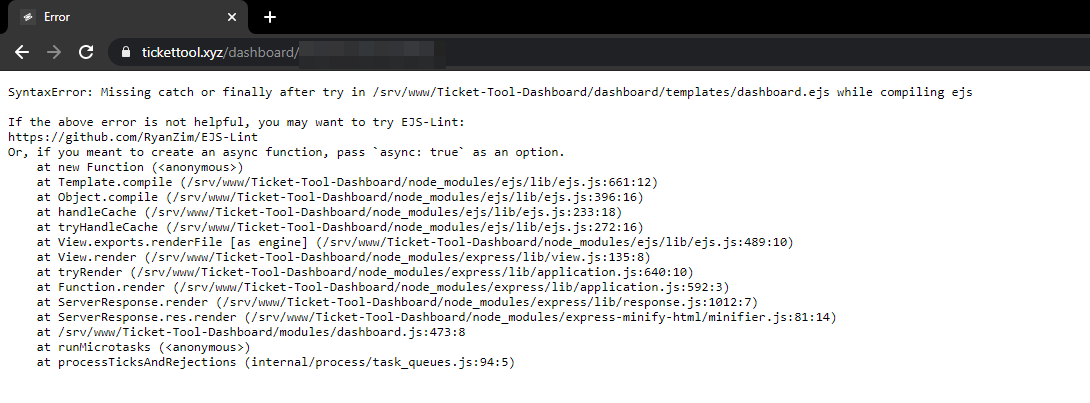
Problems accessing the dashboard.
green oar
weary onyx
Problems accessing the dashboard.
yes
forest goblet
These problems seem to affect everyone. Please be patient until they are fixed!
weary onyx
Okay.
green oar

jade topaz
okay
solid stream
Dashboard is fixed

 cedar sage
 median wigeon
$help transcript
humble sequoiaBOT
How do I save transcript to a channel?
To save transcripts to a channel go to the Dashboard -> Panel Configs -> Settings -> Logging Options -> Transcript Channel
jade topaz
:new
jade topaz
$help panel
humble sequoiaBOT
Creating a panel
To create a panel we are going to need to head over to the panel configs on the dashboard
Once at the dashboard we will need to click Create Panel
Enter a panel name (Fill in any optional settings you want)
Click Create Panel and your ready to get started with configuring your panel
An example of a creating a panel is shown below.
 storm gale
 humble sequoiaBOT
**Panel Message**
The panel message is where people react to make a ticket. To customize it head over to your Dashboard --> Panel Configs -> Settings -> Panel Options -> Edit Panel Message

**Ticket Message**
The Ticket Message is the first message sent by the bot in a new ticket. To customize it head over to your Dashboard -> Panel Configs -> Settings -> Ticket Options -> Edit Ticket Message
 jade topaz
transcripts arent saving/being sent in dms - is there an outage? bot has admin perms in server
solid stream
No issues that I know of, possible your premium subscription ran out? Or you have your dms closed?
 novel cradle
hello i had a question, how do i disable the ones who are in the ticket from closing the ticket, like only me and the support roles can do it but not the user
forest goblet
Panel configs > Your panel > Reaction options > Close ticket > Enable "Support team only" @novel cradle
novel cradle
forest goblet
Panel configs > Your panel > Reaction options > Close ticket > Enable "Support t...
tysm!
forest goblet
No problem
 prisma hawk
can i change the ticket opening location?
like when a user opens a ticket it opens it on the top, can i put it in a categorY?
humble sequoiaBOT
How to set the open category
To set a open category go to the Dashboard -> Panel Configs -> Settings -> Category Options -> Category Open
forest goblet
@prisma hawk ⬆️
prisma hawk
ty
forest goblet
np
 glacial kindle
forest goblet
glacial kindle
forest goblet
Please run $debug in your server. @glacial kindle
jade topaz
Wie kann man ein ot in die Gruppe holen
forest goblet
Welchen Bot möchtest du denn haben?
tiny lance
hi ! am I the only one where tickers are not deleted when closed ?


 pseudo talon
Hi, my ticket tool was working fine, but since couple of days, whenI close a ticket, the bot successfully change permission and ticket name, but it doesnt move the ticket anymore. What could be wrong?
solid stream
I fixed the bug with two step being disabled.
I updated how it worked a day ago and it had a bug that it no longer deleted tickets.
@pseudo talon @tiny lance ^^
what I changed was, it now runs the close action before it does delete so you always have access to both events.
eg.. dm on close will now work if two step is disabled.
pseudo talon
Why cant I keep the two step??
solid stream
You can if you wanted.
I fixed the issue with it.
oh, you had another isssue
my bad.
@pseudo talon
Discord has a limit of 50 channels per category.
you will either need to create another category or delete/move some tickets.
Ticket Tool supports setting multiple fallback categories.
pseudo talon
Ah! Ok ill do another category
tribal cedar
I was curious Josiah. My tt will close the ticket send the transcript save the transcript then say who closed the ticket in the ticket channel
That last actions not included in the transcripts on either side I assume because of the order the actions are taken. This is intended? Since I use my manager-log channel it doesnt matter much to me but sometimes a user might want to know in their transcript who closed their ticket
solid stream
Just happens to work like that, I've applied a change to my code and it will be pushed next time I update.
tribal cedar
kk whatever works for me but was curious for other tt users/servers and my own users transcripts
 manic reef
:emoji_328:
forest goblet
Please only use this channel if you need help. @manic reef
manic reef
Sorry.
 rancid bear
I have a suggestion....I think you should offer a lifetime plan option for $90. Another server does it for their bot.
forest goblet
rancid bear
I have a suggestion....I think you should offer a lifetime plan option for $90. ...
You can submit suggestion using s!suggest Your suggestion here in #655832608835502080
rancid bear
Thank you!
forest goblet
No problem.
 cloud perch
how im adding reations like #🎫│make-a-ticket i have premium
tribal cedar
you mean multiple reactions for one panel?
cloud perch
yes
tribal cedar
Use the $panel 1 2 3 command where the numbers represent the numbers of the panels
humble sequoiaBOT
Multipanels are a premium feature that allow for a single panel with multiple reactions to open different tickets.
How to create a Multipanel
Premium users can combine multiple panels into one multipanel.
First of all you will need to assign a different Create Ticket Reaction for each Panel. Run $help reaction to learn how to do it.
Next, find the IDs of each panel you wish to combine. You can find them in your Panel Configs in the Dashboard
Next, send the multipanel to a channel using $panel [id1] [id2] {id3} ....
e.g. $panel 1 2 4 17 35 to combine panels 1, 2, 4, 17 and 35.
Up to 10 panels may be combined.
cloud perch
how i can check panel id
radiant moss
When you are under panel configs tab
To the left of the name, there is a number


 cloud perch
radiant moss
When you are under panel configs tab
To the left of the name, there is a number
cloud perch
radiant moss
When you are under panel configs tab
To the left of the name, there is a number
can you send screenshot?
jade topaz
 radiant moss
@cloud perch ^
cloud perch
oh im dump
 lone arrow
hey guys does anyone know how to refer to a channel in the panel embed settings?
forest goblet
@lone arrow <#CHANNEL-ID-GOES-HERE>
cloud perch
can i disable ticket limit?
forest goblet
cloud perch
can i disable ticket limit?
$help limit
humble sequoiaBOT
How to set a ticket limit
A ticket limit may be set per panel to prevent users from spamming tickets. By default this limit is set to 3. Once a user hits this limit the bot will notify the users that they reached the limit.
To set a ticket limit go to the Dashboard -> Panel Configs -> Settings -> General Options -> Ticket Limit
forest goblet
Just set it to a very high ammount
cloud perch
ok
jade topaz
@cloud perch its not a good idea the users will spam your tickets!
 merry sentinel
Hi