#🆘│community-support
1 messages · Page 289 of 1
 robust notch
 median wigeon
what was the problem
robust notch
I have no idea but it works now
 light geode
Hello !
Is it possible to add an argument for a tag ?
Like if i execute $test [user] it will mention the user I set in the argument where i place the argument placeholder
 solid stream
Not at this time
I would like to get the tabs updated to be more advanced, but currently it's incredibly basic.
light geode
solid stream
I would like to get the tabs updated to be more advanced, but currently it's inc...
Ok, are you planning this kind of update sooner or later ?
solid stream
Few months at the soonest.
If you want a more advanced tag I can recommend Carl bot.
 forest goblet
solid stream
If you want a more advanced tag I can recommend `Carl` bot.
forest goblet
solid stream
If you want a more advanced tag I can recommend `Carl` bot.
...or YAGPDB, that can do much more than evern Carl
 jade topaz
So, whenever I try to login
it says this
@fleet lantern
What do I do? i'm trying to set the bot up...
-warn @jade topaz ping staff team in #🆘│community-support
 rose geyserBOT
:ok_hand: warned m.a#0001 (ping staff team in [#🆘│community-support](/guild/509192800865353738/channel/776680605517742090/)) User was not notified
jade topaz
you cant log in in to the docs
 humble sequoiaBOT
 jade topaz
thanks.
 nova jackal
do you guys have a one time purchase option for premium or just the monthly reoccuring payments?
median wigeon
you can create a premium account and after the completion of the payment you can cancel it and keep it for 1 month
 unkempt badger
Hi, moderator options under a panel config don't seem to do anything. Am I missing something here?
median wigeon
unkempt badger
Hi, moderator options under a panel config don't seem to do anything. Am I missi...
can you send a screen of the problem
unkempt badger
Is this supposed to send a message somewhere notifying that a ticket has been opened?
median wigeon
$help update
humble sequoiaBOT
How update a panel manually
To update a panel manually; react to it with :tools: - :tools:
 median wigeon
Have you tried this after saving the settings
jade topaz
is there anyway to save what was said in the ticket?
humble sequoiaBOT
How do I save transcript to a channel?
To save transcripts to a channel go to the Dashboard -> Panel Configs -> Settings -> Logging Options -> Transcript Channel

 spare gale
A transcript is saving (for non premium) the last 200 messages. And for Premium members unlimited.
jade topaz
ok thx 🙏
spare gale
You’re welcome.
spare gale
unkempt badger
nothings happened
Be sure to click the save button in the popup where you can edit the message.
median wigeon
$help ping
humble sequoiaBOT
How to make Ticket Tool ping a role
To make ticket tool ping a role when a ticket is opened, go to the Dashboard -> Panel Configs -> Settings -> Ticket Options -> Ticket Message -> Message Text and do this:
{@Role name} This is case sensitive and the role must have @mentions enabled
 median wigeon
unkempt badger
I'm not getting any moderator messages in any channels
median wigeon
unkempt badger
I'm not getting any moderator messages in any channels
i think you need this
spare gale
median wigeon
i think you need this
Nope. He doesn’t...
spare gale
unkempt badger
I'm not getting any moderator messages in any channels
Check if the premium bot is disabled.
humble sequoiaBOT
How to disable the premium bot
To disable the premium bot you will have to go to the Dashboard -> Server Configs -> Premium bot -> And on the right-hand side disable the "Use Premium Bot" setting.
Premium features will still work on the normal bot.

TicketTool.xyz - Ticketing without clutter
unkempt badger
We're using the premium bot
spare gale
And also check the permissions for TT serverwide and channel related.
spare gale
unkempt badger
has full perms
Also in the channel?
unkempt badger
yeah
spare gale
What do you want the bot to do? Log something?
Log when a ticket is created?
No need to.
unkempt badger
I thought that opened message under moderator options would send a message when a ticket was opened
spare gale
Please don’t make it any more confusing.
spare gale
unkempt badger
I thought that opened message under moderator options would send a message when ...
Uhm. I honestly don’t know what that is for, but if you want it to log when a ticket is opened, set up the logging channel.
$help transcript
humble sequoiaBOT
How do I save transcript to a channel?
To save transcripts to a channel go to the Dashboard -> Panel Configs -> Settings -> Logging Options -> Transcript Channel
spare gale
It’s next to the round bordered setting.
unkempt badger
I can always have it ping staff as well
just thought that was what that setting was for
guess not
thank you anyway
spare gale
unkempt badger
I can always have it ping staff as well
You mean when the ticket is created, to ping a staff role in the ticket?
unkempt badger
yeah
humble sequoiaBOT
How to make Ticket Tool ping a role
To make ticket tool ping a role when a ticket is opened, go to the Dashboard -> Panel Configs -> Settings -> Ticket Options -> Ticket Message -> Message Text and do this:
{@Role name} This is case sensitive and the role must have @mentions enabled
spare gale
Got it?
unkempt badger
yeah thats what I was gonna do
spare gale
Alright. You’re welcome 🙂
unkempt badger
np, thanks again
spare gale
Any time 😉
humble sequoiaBOT
Help Options
$help commands - Information on commands
$help setup - Information on bot setup
$help faq - Frequently asked questions
() = optional
[] = required
*==================================
Ticket Commands
==================================*
_ _
`$add [User] (channel)`
Description: Adding additional users to a ticket
Aliases: none
`$remove [User] (channel)`
Description: Removing users from a ticket
Aliases: none
`$close`
Description: Closing tickets
Aliases: none
`$open`
Description: Opening closed tickets
Aliases: none
`$delete`
Description: Deleting tickets
Aliases: none
`$rename`
Description: Renaming tickets/channels
Aliases: none
`$transcript (send channel)`
Description: Creating transcripts
Aliases: none
`$new (user) (reason)`
Description: Creating tickets in a monitored channel (when command style is enabled)
Aliases: none
`$claim`
Description: Claiming tickets (when claim is enabled)
Aliases: "unclaim"
_ _
*==================================
General Commands
==================================*
_ _
`$help (Help Options)`
Description: Help Command
Aliases: none
`$debug`
Description: Debuging issues with running Ticket Tool
Aliases: none
`$id (@role/@user/#channel/emoji)`
Description: Converting roles, users, channels and emojis to ID
Aliases: "getid"
`$permlevel`
Description: Checking permission level with Ticket Tool
Aliases: "level"
`$ping`
Description: Checking response time with discord api
Aliases: none
`$vote (link | unlink | redeem) (user)`
Description: Earn premium by voting on top.gg or Discord.boats
Aliases: "votes"
 warm thistle
rlly love the bot
 swift scaffold
Hello c: I'm trying this bot in my server. We're just testing out the make ticket function and a notification says "Channel verification level is too high"; I was wondering what that meant
humble sequoiaBOT
User permission level with Ticket Tool
@median wigeon is permission level: 0 (User)
median wigeon
swift scaffold
Hello c: I'm trying this bot in my server. We're just testing out the make ticke...
whats your permlevel?
using $ permlevel
swift scaffold
median wigeon
whats your permlevel?
it was set at high and it worked after changing it to medium c:
the server security setting
median wigeon
The bot is working now?
 robust sandalBOT
spare gale
I guess...
robust sandalBOT
spare gale
I guess...
Azure Quota Exceeded
Cannot translate 10 characters because this server's Azure quota has been exceeded.
Azure Quota Remaining
2
Azure Quota Total
4000
 queen hinge
You can create a ticket for the arabical support.
#🎫│make-a-ticket
robust sandalBOT
spare gale
Ok
 Jarvo
Jarvo
OK
 English (en) → Dutch (nl)
spare gale
English (en) → Dutch (nl)
spare gale
Lol
 inner aurora
Fixed!!!!
 charred ruin
 cyan wedge
Wait, what is Mr Translate?
cyan wedge
Wait, what is Mr Translate?
Mr. Translate is a translate bot (hence the name), and premium is for a single server but you can buy the subscription multiple times for the servers.
 radiant moss
/quota
robust sandalBOT
Quotas for Ticket Tool Support
<:azure_translate:734169289787179109> Azure
4,008 / 5,000 characters (80% used)
<:google_translate:734169097700376618> Google
0 / 1,000 characters (0% used)
Each quota resets on the first of the month.
radiant moss
!!
 weary smelt
can you make multiple ticket thingys or nah
like i want one for support and i want one for something else
humble sequoiaBOT
Multipanels are a premium feature  that allow for a single panel with multiple reactions to open different tickets.
How to create a Multipanel
Premium users can combine multiple panels into one multipanel.
First of all you will need to assign a different Create Ticket Reaction for each Panel. Run $help reaction to learn how to do it.
Next, find the IDs of each panel you wish to combine. You can find them in your Panel Configs in the Dashboard
Next, send the multipanel to a channel using $panel [id1] [id2] {id3} ....
e.g. $panel 1 2 4 17 35 to combine panels 1, 2, 4, 17 and 35.
Up to 10 panels may be combined.
 queen hinge
Its a Premium Feature!
weary smelt
ok also
what about renaming tickets to something else
and how do i make it so tickets go into a sub category instead of at the very top
like instead of saying ticket 0001
humble sequoiaBOT
Help Options
$help commands - Information on commands
$help setup - Information on bot setup
$help faq - Frequently asked questions
How to set the open category
To set a open category go to the Dashboard -> Panel Configs -> Settings -> Category Options -> Category Open
 weary smelt
my channel doesnt appear there
my category i mean
is there like a delay in how long it takes to show up there since i just made it?
queen hinge
Just try to reload the site.
cyan wedge
So, I just added the bot in my second server, and configured it exactly the same. However, the second server, despite it being set to send closed tickets to a designated category, when a user pressed close ticket, it actually deletes it. Why is that. Also, it's a server with 10376 members, if that matters, compared to my first one with 188.
queen hinge
You may have to enable "Two step Ticket"
To enable "Two step Ticket go to the Dashboard -> Panel Configs -> Settings -> General Options
@cyan wedge ⬆️ ⬆️ ⬆️
cyan wedge
Oh wow, thank you. I accidentially disabled that earlier thinking that was part of Two Step Close. Thank you!
queen hinge
No problem, if you need any other assistance, just ask.
 strong urchin
I have premium bot but it's not working!
humble sequoiaBOT
Inviting and Enabling Premium Bot
The first thing you will need to do is invite the premium bot, an invite can be found here
Once the bot is in your server we will head to the dashboard and manage your server. When you are managing your server, you want to head into "Server Configs" then click the drop down menu under "Select the bot you would like to use on this server" then click "Ticket Tool#6207" and then save.
jade topaz
how much premium cost
median wigeon
jade topaz
how much premium cost
5,50 a month or 60 for a year
median wigeon
Go to the website and click on premium
Yes you can pay with paypall
Ore creditcard
inner aurora
 fathom berry
usd
fathom berry
usd
Yes USD
 coarse tartan
How do I cancel my subscription
humble sequoiaBOT
Ticket Tool Premium
Get premium at https://tickettool.xyz/premium
Manage your subscriptions at https://tickettool.onfastspring.com/account
Why Premium?
Premium lets you customize the bot just how you want it. It also helps keep the bot running.
inner aurora
You can move it to another sever or use the second link to manage it
jade topaz
queen hinge
Its a Premium Feature!
damn thats good never knew it lol
 fair tendon
How do I change the prefix?
jade topaz
fair tendon
How do I change the prefix?
$help prefix
humble sequoiaBOT
How to change Ticket tool's prefix
The default prefix for ticket tool is $ and @Ticket Tool#4843 however that can be changed on the Dashboard under Server Configs -> Command Prefix.

NOTE that @Ticket Tool#4843 will always work as a prefix even if there is a custom prefix.
 faint tree
Hs söhne
 fluid hollow
humble sequoiaBOT
fluid hollow
humble sequoiaBOT
How to let support team see into a ticket
About support roles
A support role lets your support team see into tickets with out having to add them manually to each and every ticket.
You can add as many support roles as you like per panel.
NOTE that the way discord works all admins can see into tickets regardless of this.
How to set a support role
To set a Support role go to the Dashboard -> Panel Configs -> Settings -> General Options -> Support Team Roles.

NOTE that the support role will not be able to see into tickets that are already created..
jade topaz
how do i sign up it errors if i try use my discord account
median wigeon
jade topaz
how do i sign up it errors if i try use my discord account
What do you mean?
jade topaz
on the ticket tool website thing
median wigeon
jade topaz
on the ticket tool website thing
Whats the error
Can you make a screen of the error
jade topaz
queen hinge
Try to log in here: https://tickettool.xyz/login

Discord
Discord is the easiest way to communicate over voice, video, and text. Chat, hang out, and stay close with your friends and communities.
@jade topaz ⬆️ ⬆️ ⬆️
queen hinge
No Problem, thats my Job 🙃
median wigeon
Ehm really😂
jade topaz
lmaoaoa
nova jackal
hello! i'm interesting in purchasing premium but i noticed there is a 7 day free trial, if i purchase premium with the 7 days stack on top of the month?
jade topaz
I don't know but id tell you to start your free trial and when it ends, start paying it
queen hinge
@nova jackal , normally it should be added to the Trial, you can try it out, if not, i will make sure that you will get the 7 Days back, i promise that.
nova jackal
queen hinge
<@219601784388190219> , normally it should be added to the Trial, you can try it...
i just purchased premium, but on my receipt it says the subscription will continue to renew at the date (without the 7 additional trial days)
the 6 days trial text disappeared
queen hinge
Hmm okay.
nova jackal
is there any way you can extend 7 days onto my subscription and have the reoccurring payment renew then?
queen hinge
I'm not 100% sure, if its okay, we would handle this out in a ticket.
jade topaz
@queen hinge peut tu look mon ticket stp ? 1613
nova jackal
queen hinge
I'm not 100% sure, if its okay, we would handle this out in a ticket.
sure thing, just opened one
jade topaz
??
queen hinge
-warn @jade topaz pinging Staff
rose geyserBOT
:ok_hand: warned ŽΞnŤax#0001 (pinging Staff) User was not notified
robust sandalBOT
jade topaz
Rawé bravo le support quoi
 ŽΞnŤax
Rawé kudos the support what
French (fr) → English (en)
 chilly oracle
Hello! Is there a way to configure the bot to deal with filled categories? It’s currently just putting the tickets at the top of the Discord
Just read this
humble sequoiaBOT
Help Options
$help commands - Information on commands
$help setup - Information on bot setup
$help faq - Frequently asked questions
radiant moss
$help category
humble sequoiaBOT
How to set the open category
To set a open category go to the Dashboard -> Panel Configs -> Settings -> Category Options -> Category Open
radiant moss
@chilly oracle ^^^ is this something you are looking for?
chilly oracle
I think I’m good. I provided a screenshot of the resolution I found. Testing it now.
radiant moss
I think you should be able to add multiple not 100% sure
chilly oracle
Confirmed it worked! We max out the category limits a lot so really happy this works!
 iron beacon
The bot does not work with regular Roman members, it does not appear to them
median wigeon
iron beacon
The bot does not work with regular Roman members, it does not appear to them
Ehm, do you mean the channel
jade topaz
So I have a ticket set to only allow the "18+" role to react and yet people without that role are still opening the tickets. Any ideas?
median wigeon
Can you try to put al the roles where you didn't want to open in the disable roles
median wigeon
jade topaz
So I have a ticket set to only allow the "18+" role to react and yet people with...
Maybe you can try this
$help update
humble sequoiaBOT
How update a panel manually
To update a panel manually; react to it with :tools: - :tools:
jade topaz
Ah okay so you think the panel is out of date?
So I couldn’t get that to work so I removed the panel. Using the send button adds two copies of the panel to the channel now.
iron beacon
median wigeon
Ehm, do you mean the channel
yes
median wigeon
Delete the old panel and make a new one
iron beacon
median wigeon
Delete the old panel and make a new one
Here in my original account
Here's my other account
median wigeon
Try $add {member}
 quiet cave
Can I have a code of ticket bot
iron beacon
median wigeon
Try $add {member}
I do not understand
median wigeon
$add @median wigeon
median wigeon
iron beacon
I do not understand
Like that but then in your server
iron beacon
median wigeon
Like that but then in your server
But this is tiring. Members cannot open a ticket
 late whale
how can i bind the ticket tool bot to a category where all the tickets will come
median wigeon
$help category
humble sequoiaBOT
How to set the open category
To set a open category go to the Dashboard -> Panel Configs -> Settings -> Category Options -> Category Open
iron beacon
@median wigeon I want you to enter my server, and I will give you a rank so that you can enter the bot settings and solve my problem .. Can you?
median wigeon
yes thats no problem
 tender pivot
Hi
median wigeon
tender pivot
Hi
Hi can i help you with something
tender pivot
No
iron beacon
I want members to not be able to delete the ticket
median wigeon
iron beacon
I want members to not be able to delete the ticket
^^
iron beacon
median wigeon
^^
premium?
iron beacon
dashboard
median wigeon
The dashboard is not premium
iron beacon
median wigeon
The dashboard is not premium
no i want link dashboard
median wigeon
iron beacon
Thx
spare gale
Is there a way to move a ticket to a different category with a command?
jade topaz
spare gale
Is there a way to move a ticket to a different category with a command?
Sadly, no but u can define a category in wich the panel will place the ticket in
You could suggest that !
jade topaz
spare gale
I was just wondering if I could move the ticket.
Well technically, if youre an administrator you can do it manually
 fluid rose
radiant moss
fluid rose
radiant moss
Hey @fluid rose check out #573205317870157855
 wispy cloak
is it possible to enable auto claiming
jade topaz
wispy cloak
is it possible to enable auto claiming
Wdym
wispy cloak
like, first support agent to type it will claim it
jade topaz
Oh, sadly it isn't a feature yet. You could suggest it by typing s!suggest <your suggestion> in #655832608835502080
 rotund kite
But automatic claiming is not an option, it is manual claiming currently.
jade topaz
Hello there, i need help cause I'm new using this Bot.
I setted a new role "Support" for the ticket tool and I gave it the same permission as the bot but i removed "read text channel and see vocal channel".
I gave to "Support" the permission to "read text channel and see vocal channel" only in the category that I wanted to use as Support, but it doesn't create a new ticket in my category.
What Am I doing wrong?
median wigeon
jade topaz
Hello there, i need help cause I'm new using this Bot.
I setted a new role "Supp...
Can you do $ debug in the server
 sudden solstice
Hi
sudden solstice
Brother, how do I open a tick
median wigeon
sudden solstice
Brother, how do I open a tick
Touch your language
@jade topaz your bot misses the read channel permission
sudden solstice
median wigeon
Touch your language
My language is Arabic, I speak to you from a translator
jade topaz
@median wigeonexactly, but I gave to the bot this permission in that category
median wigeon
sudden solstice
My language is Arabic, I speak to you from a translator
There is a arabic support ticket
 vocal stump
sudden solstice
My language is Arabic, I speak to you from a translator
vocal stump
sudden solstice
My language is Arabic, I speak to you from a translator
بتقدر تحكي مع دعم عربي
median wigeon
jade topaz
<@!373199304577384448>exactly, but I gave to the bot this permission in that cat...
The bot need that permission to
jade topaz
@median wigeon basically I would like use ticket tool bot only in a specific category, not in every category.
i gave to bot the permission to read channel, I gave it to the role I created above the bot too, I really can't understand why is not working
vocal stump
sudden solstice
<@461536279872667678> كيف افتح تكت؟
اضغط ع الريكاشن
sudden solstice
في (سيرفري)
vocal stump
sudden solstice
في (سيرفري)
يب اضغط ع الرياكشن
jade topaz
@median wigeon I want to set up my role, without reading permission on the role settings, and set it up on the specific category. Is it possible?
median wigeon
If the bot gets basically not the reading permission it wil not work.
If you will that the bot only get permission just add the bot rol in that channel
$help category
humble sequoiaBOT
How to set the open category
To set a open category go to the Dashboard -> Panel Configs -> Settings -> Category Options -> Category Open
median wigeon
Maybe this will help?
jade topaz
@median wigeon I setted category open and closed in the same category.
I gave to my bot permission to read in same category as well. But it's not working
median wigeon
Is it not opening a ticket
jade topaz
@median wigeon exactly
median wigeon
Ah oke and in your server settings is at the bot role the reading message on?
jade topaz
@median wigeon in server role settings I have bot role and support role, both got "read text channel and see vocal channel" OFF, because I want Ticket tool working only in a specific category
median wigeon
Ah oke than the bot wil not be able to work
jade topaz
I undertand, thank you very much for your help 🙂 @median wigeon
sudden solstice
Link🙂
median wigeon
jade topaz
I undertand, thank you very much for your help 🙂 <@!373199304577384448>
No problem man, have a nice day.
median wigeon
sudden solstice
Link🙂
Can i help you with something?
jade topaz
@median wigeon thank you very, i'm good. I hoped to find a solution about that permission, never mind. I'll try in a different way. Thank you again
median wigeon
No problem 😀
 oak raven
Hii, how do I redeem the Premium role here? I just bought one month of premium. 🙂
rotund kite
oak raven
Hii, how do I redeem the Premium role here? I just bought one month of premium. ...
Please open up a ticket, thanks!!
oak raven
Thank you c:
Woops, I forgot to ask a curious question: Can I invite the premium bot and having all the current data saved?
rotund kite
Oh, yes, but you have to resend the panels.
So that its the premium bot doing the panel stuff.
rotund kite
Umm, it won't function if the premium is not paid for.
You can kick out and re-invite the normal bot back in.
 sleek yarrow
If I want to add a role to ping when opening a ticket, can I just do @jolly ginkgo Team for example?
 jolly ginkgo

rotund kite
sleek yarrow
If I want to add a role to ping when opening a ticket, can I just do <@592471476...
$help ping
humble sequoiaBOT
How to make Ticket Tool ping a role
To make ticket tool ping a role when a ticket is opened, go to the Dashboard -> Panel Configs -> Settings -> Ticket Options -> Ticket Message -> Message Text and do this:
{@Role name} This is case sensitive and the role must have @mentions enabled
 fathom pendant
hi
 modest rivet
Hey there, so I'm trying to enter a custom hex code for a tag on the dashboard, but it seems that it will only let me use the color picker, and it will immediately delete my input for a custom hex code. Is there any way to get around this, or do I have to use the color picker?
And yes, I have TT Premium.
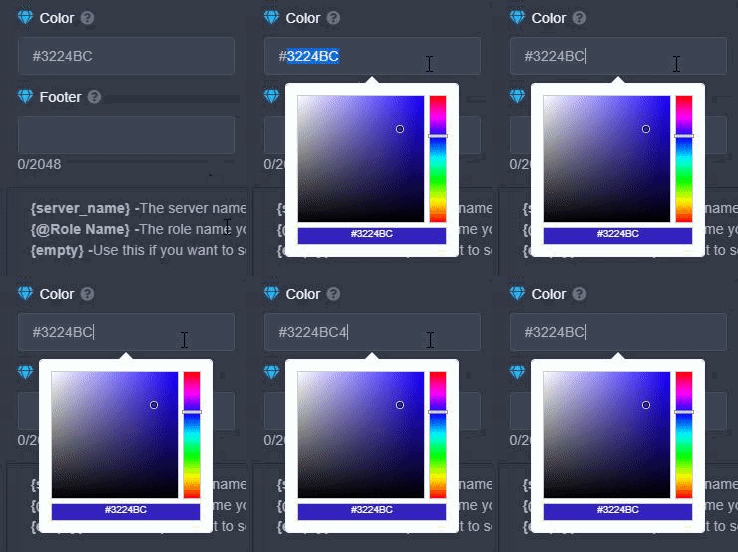
Here's a GIF example, super frustrating.
 wild vessel
Um guys
I need help
So basically, I invited the bot to my server but then the server won't show up. Please help me
humble sequoiaBOT
Don't see your server in the dashboard?
You will possibly need to relog. Look below to see steps on how to relog.
How to relog the Dashboard.
First, you will need to go to the dashboard. Once your there, click on your avatar on the top right. after you clicked it, you will see button that says Logout. You must click that. Once you have logged out, you can log back in.
Note:
You need one of these 3 things to access the dashboard.
- Server Owner
- Server Administrator
- Dashboard Role
 clear idol
how do i set it up like this?
 near merlin
In image of embed there is a image
And a thumbnail btw he have premium
The image of the embed is an line
With short resolution
clear idol
@near merlin thats only for premium tho, they dont have premium
 clear idol
how did they get it like that without premium thenn😂
near merlin
They have premium...
clear idol
it doesnt show as premium but alr, still answers my question so ty 😂😂😂
near merlin
Not needed premium bot to have premium ticket tool
They maybe do the 7 trial day
And maybe the panel stay like that
clear idol
ahh kk
jade topaz
so uh someone in this server has an issue and how do i set the ticket limit to smth else?
oh wait nvm i fixed it
 frosty wolf
everyone in my server can view all tickets created, i wanna make only admins to view them. how?
jade topaz
any1 know how to make the bot ping roles?
jade topaz
frosty wolf
everyone in my server can view all tickets created, i wanna make only admins to ...
go to the panel
go on the side and go to the panel settings
frosty wolf
ok
jade topaz
oh uh idk then
median wigeon
frosty wolf
Ive done that
Where is the rol in the general settings in your server
Above the member roles?
frosty wolf
I fixed it nvm lol
jade topaz
does no one know how to ping roles??
median wigeon
jade topaz
does no one know how to ping roles??
$help ping
humble sequoiaBOT
How to make Ticket Tool ping a role
To make ticket tool ping a role when a ticket is opened, go to the Dashboard -> Panel Configs -> Settings -> Ticket Options -> Ticket Message -> Message Text and do this:
{@Role name} This is case sensitive and the role must have @mentions enabled
sudden solstice
Hi
near merlin
Hi
near merlin
Nkt possible to put bit in other language only by buying premium and editing message of tickets and panel
Btw , you can suggest it on #655832608835502080 by typing s!suggest {your suggestion}
sudden solstice
How do I switch board language
near merlin
Dashboard?
sudden solstice
Thanks
near merlin
 past lava
hi, I put the tool on my server, I would like to know how to put the name of the users in the room that is created when you open the ticket
ticket-[username]
past lava
Thanks
near merlin
No problem
 wild acorn
Hello everyone, I have some problems with the bot ... When I want to add someone to a ticket the boat responds that I add it but it is not true
Please help
near merlin
Is the user u want to add inside server?
 limpid raptor
Same problem here. Already created a ticket for that. It's under investigation.
I'll keep you posted.
near merlin
It works for me
limpid raptor
Some days ago it worked after two or three times trying.
Now it's not working anymore.
wild acorn
no works
limpid raptor
I'm happy it works for you 😉
wild acorn
noooooo
wild acorn
limpid raptor
I'm happy it works for you 😉
it does not work
the bot responds that I add it, but it is not true
limpid raptor
Thats the same problem as I have.
wild acorn
Maybe they deactivated it for those who do not use it vip
limpid raptor
We will see
wild acorn
hopefully if support responds
wild acorn
I see 5 from the support team and no one can clarify the doubt?
@agile hawk
@hybrid dagger hola puedes ayudar ?
near merlin
They will help when they are able to help
 sage stratus
Hi, I would like to see how I can solve this problem: Yesterday the ticket bot worked perfectly, but today it does not allow anyone but the staff to create a ticket. I apologize for the ignorance, but I have already created several test panels and cannot find what the problem is. Can somebody help me?
radiant moss
sage stratus
Hi, I would like to see how I can solve this problem: Yesterday the ticket bot w...
Hey, under reaction options once you press settings. Press create ticket. Then check if "Support Team Only" is checked. If it is turn it off and try
 wintry condor
I can’t add a panel when I go to mange servers it just takes me to the invite bot page. Could anyone help please?
median wigeon
wintry condor
I can’t add a panel when I go to mange servers it just takes me to the invite bo...
Try this link
Or delete de cach from your browsers in jour setting
wintry condor
Ty I got it
median wigeon
Oh oke
wintry condor
I also another question. I made the ticket panel and when the people make a ticket it doesn’t open a messaging chat. What do I do? Please help
humble sequoiaBOT
If the bot is not working properly, try the following steps:
-
Run the $debug command in your server, to check the permissions of the bot. Send the link you get to us.
-
Check if you have any Blacklisted Roles in your Server Configs. Any roles listed there will not be able to use the bot / create tickets.
-
While you're in your Server Configs , make sure that you don't have the premium bot enabled, without actually having premium or the bot on the server.
These are the most common issues. If your problem still exists, you can go to our Troubleshooting Page for more fixes.
 hot fox
Is the bot down?
 sharp charm
I have problem too.
hot fox
I gave it administrator perms too and it didnt work
 paper wind
Mines down too
sharp charm
It doesn't seem to work in #🎫│make-a-ticket #premium-tickets either
paper wind
@inner aurora Bot down brother
paper wind
@thin marlin @hybrid dagger @hushed lake @radiant moss @copper marsh , sorry for the pings, but the bot is down, some of us got big servers we gotta keep running.
paper wind
Yea premium down for me too
 maiden fiber
I got 6,280+ people :/ its hurtin a bit lol
hot fox
same
 copper marsh
Discord is experiencing some issues on their end with Message Embeds and Message sending, it could be affecting Ticket Tool. I'd have to check in with the devs though
inner aurora
@paper wind also, don't ping our support members. Pinging one manager is fine.
jade topaz
Is anyone having the same problem where I command does not want to work?
@thin marlin
 pale pilot
Don't ping support team members
humble sequoiaBOT
If the bot is not working properly, try the following steps:
-
Run the $debug command in your server, to check the permissions of the bot. Send the link you get to us.
-
Check if you have any Blacklisted Roles in your Server Configs. Any roles listed there will not be able to use the bot / create tickets.
-
While you're in your Server Configs , make sure that you don't have the premium bot enabled, without actually having premium or the bot on the server.
These are the most common issues. If your problem still exists, you can go to our Troubleshooting Page for more fixes.
 stoic minnow
humble sequoiaBOT
stoic minnow
humble sequoiaBOT
Invite Ticket Tool
Bot Invite
Ticket Tool Support Server
This command only works in the Ticket Tool Support Server
jade topaz
how do i add bots to my own server?
queen hinge
Check #573205317870157855
queen hinge
jade topaz
nvm
Does it work now?
jade topaz
ya but like does it automatically have perms in the channel when u create a ticket
median wigeon
jade topaz
ya but like does it automatically have perms in the channel when u create a tick...
If the the bot get perms in the channel of the pannel and in the roles. Than the bot can create the channel
median wigeon
Hi
median wigeon
Dashboard is on internet
 covert dagger
But it's not coming
median wigeon
covert dagger
I given all permission
median wigeon
Can you do $debug
median wigeon
median wigeon
https://tickettool.xyz/
Try to log in and out on this link
median wigeon
Its working?
 wraith spire
Bot is offline
 marsh tiger
wraith spire
Bot is offline
marsh tiger
wraith spire
Bot is offline
The Developers are aware, looking into it (I know that from a ticket)
wraith spire
oh, ok
rotund kite
Yes, it is currently offline, we have notified our developers and managers about this situation, we'll ping you back when the issue is resolved.
We are aware about this issue, for now, please be patient with us, thanks!!
 surreal geyser
How do i add a support role? I always forget and have issues finding it on the dashboard 😆
median wigeon
$help support
humble sequoiaBOT
How to let support team see into a ticket
About support roles
A support role lets your support team see into tickets with out having to add them manually to each and every ticket.
You can add as many support roles as you like per panel.
NOTE that the way discord works all admins can see into tickets regardless of this.
How to set a support role
To set a Support role go to the Dashboard -> Panel Configs -> Settings -> General Options -> Support Team Roles.
NOTE that the support role will not be able to see into tickets that are already created..
surreal geyser
Thank you!
jade topaz
Why nobody in my serv can open a ticket ?? (and me), at the beginnning, all were working well but now, it's broken
 candid hull
how do i set it up
 wanton patio
GUYS TICKET TOOL IS OFFLINE
median wigeon
Bot is currently down
 fluid ivy
It is offline at the moment, they will ping you when it is fixed
candid hull
how do i go to dashboard
queen hinge
The bot is currently offline, we have notified our developers and managers about this situation, we'll ping you back when the issue is resolved.
jade topaz
ah ok thank yuou
read #💬│general-chat
read #💬│general-chat
read #💬│general-chat
read #💬│general-chat
read #💬│general-chat
wanton patio
support team lock all chats
candid hull
how much time can it take to bring back the bot?
wanton patio
they will keep spamming
queen hinge
PLEASE CALM DOWN AND JUST ASK NORMAL QUESTIONS.
IN OTHER CASE WE HAVE TO CLOSE THIS CHANNEL TOO!
jade topaz
queen hinge
The bot is currently offline, we have notified our developers and managers about...
......
jade topaz
hi
candid hull
candid hull
how much time can it take to bring back the bot?
...
queen hinge
We can't say that exactly.
candid hull
We can't say that exactly.
just a rough idea
median wigeon
🤖 Yes the bot is currently down 🤖
Developers are been notified, you will know when it works when they say that its done 🙂
Please ask question other then the bot is down, otherwise the support team need to close this channel to!
 still jolt
How to make a greeting when you have a ticket channel like "Welcome, support team will be with you shortly!"
 crystal drum
Wtf?
queen hinge
The bot is currently offline, we have notified our developers and managers about this situation, we'll ping you back when the issue is resolved.
humble sequoiaBOT
**Ticket Message**
The Ticket Message is the first message sent by the bot in a new ticket. To customize it head over to your Dashboard -> Panel Configs -> Settings -> Ticket Options -> Edit Ticket Message

 little hedge
thx I was having the same problems...
 chilly summit
Bot offline for entire day
jade topaz
bot for me has a shard: 250
queen hinge
Check #💬│general-chat
 tough bobcat
does anyone know when the bot comes back on?
jade topaz
thx
queen hinge
No, but I'm sure that the Developers will give their best to solve the problem.
 limpid stump
Hello so I have a problem with the Ticket Tool not showing me the Manage option after I invite it.
I tried to log off and log in, but nothing changed. the option for invite is still there.
The bot shows online, perfectly healthy, but does not respond to that it has been invited. I am the server owner of the server.
Any ideas? It does not need to be solved the quickest way I can wait for it, but it is frustrating.
I will add a screen once I can of the Manage servers page. But I tried to relogin several times, nothing changed. "Invite" button is still there.
humble sequoiaBOT
Don't see your server in the dashboard?
You will possibly need to relog. Look below to see steps on how to relog.
How to relog the Dashboard.
First, you will need to go to the dashboard. Once your there, click on your avatar on the top right. after you clicked it, you will see button that says Logout. You must click that. Once you have logged out, you can log back in.
Note:
You need one of these 3 things to access the dashboard.
- Server Owner
- Server Administrator
- Dashboard Role
limpid stump
I have logged out several times, nothing has changed. I did CTRL+F5 few times and F5 few times, to refresh page. Everything seems to be hooked normally.
jade topaz
do you have any of these 3 things?
- Server Owner
- Server Administrator
- Dashboard Role
 fleet flax
When i enter the bot and program it and put it The day I enter the bot and program it and put it to open the text click reaction not to open a tick what a problem
limpid stump
jade topaz
do you have any of these 3 things?
1. Server Owner
2. Server Administrator
3. Da...
I am Server owner, Server Administrator.
jade topaz
your using the free bot?
limpid stump
jade topaz
your using the free bot?
Yes. I would like to set up the channels and tickets. But so far I have been unable as there is no "Manage" Button
fleet flax
limpid stump
I am Server owner, Server Administrator.
Yes, but I have a day to program. yes I have a day to program and i don't want to open a tick
jade topaz
limpid stump
Yes. I would like to set up the channels and tickets. But so far I have been una...
read #💬│general-chat
jade topaz
limpid stump
Yes. I would like to set up the channels and tickets. But so far I have been una...
I have the same issue
fleet flax
jade topaz
your using the free bot?
Yes
jade topaz
jade topaz
read <#509238831547940885>
.....
fleet flax
Thank you and you're wasting your time with me.
 fleet violet
yo everyone which permission I need to manage the ticket tool?
jade topaz
- Server Owner
- Server Administrator
- Dashboard Role
 vagrant pelican
yep not showing in my server either. worked fine until this morning
tickettool bot is in my server
 old coral
i can not make $help
vagrant pelican
but says invite in the list
fleet violet
what is Dashboard Role? @jade topaz
fleet violet
I think it is
fleet violet
I need to open Dashboard role?
jade topaz
is the bot down because he is offline on my server#
vagrant pelican
yep same here
median wigeon
The bot is currently down thats the reason why thats not working at the moment,
vagrant pelican
right, nothing on the status is all?
jade topaz
Hello guys, i need some help, i have given my ticket tool all the permissions and when i create one in panel it says panel failed to send, check $debug
queen hinge
@jade topaz , do you use the Free bot?
jade topaz
yes
queen hinge
Yeah, in case that the bot is offline he's unable to send the Panel.
Please wait until he's back
 lunar shale
hello ticket tool is unavailable, what should i do?
queen hinge
Wait until our developers solved this problem.
median wigeon
Only the premium bot works at the moment
jade topaz
This is getting annoying
median wigeon
Only the premium bot works at the moment
jade topaz
to my channel
lunar shale
Thanks for information 🙂
jade topaz
I've had no one see to my help request
queen hinge
jade topaz
This is getting annoying
We know that, we're also not that glad with the current situation.
jade topaz
so how do i fix this cause i dont see anything online abouyt it
 raw ocean
@jade topaz just wait. the free bot is not working at the moment.
jade topaz
o ok i will say to my people in discord that you guys are trying to get it working
queen hinge
That would be good yeah.
jade topaz
Premium time 
raw ocean
Thanks for working so hard to get it back up and running :))
queen hinge
raw ocean
Thanks for working so hard to get it back up and running :))
Thanks
jade topaz
Please ping me when it's fixed
queen hinge
We will.
chilly summit
So Premium is online, but it doesn't even work because of freemium ticket bot? Doesn't make sense
 wheat turtle
how i invite the premium ticket tool to mi server?
 undone plover
hello, what's wrong with the bot?
jade topaz
chilly summit
So Premium is online, but it doesn't even work because of freemium ticket bot? D...
the premium bot is working!
humble sequoiaBOT
Inviting and Enabling Premium Bot
The first thing you will need to do is invite the premium bot, an invite can be found here
Once the bot is in your server we will head to the dashboard and manage your server. When you are managing your server, you want to head into "Server Configs" then click the drop down menu under "Select the bot you would like to use on this server" then click "Ticket Tool#6207" and then save.
queen hinge
undone plover
hello, what's wrong with the bot?
#💬│general-chat , check this.
 hard basin
Hi, the robot stopped working, don't you know why?
chilly summit
jade topaz
the premium bot is working!
It doesn't respond to me because Freemium is offline. I had the same issue a few weeks ago when freemium bot got offline, too.
median wigeon
hard basin
Hi, the robot stopped working, don't you know why?
#💬│general-chat read this
hard basin
Ok thank you
jade topaz
chilly summit
It doesn't respond to me because Freemium is offline. I had the same issue a few...
if you have the premium bot enabled it should work

 median wigeon
Yes
jade topaz
but when the normal bot works?
median wigeon
Check #💬│general-chat
jade topaz
and I see that the bot DONT create the ticket channel? how?
wild acorn
hello go to the bot that does not create a ticket
median wigeon
The bot is down at the moment
 lunar iris
When is the bot going to come back online?
 fossil moon
oh nl
wild acorn
Do you have to pay for the bot to work?
jade topaz
but the bot dont create the ticket channel
jade topaz
wild acorn
Do you have to pay for the bot to work?
Pretty much
median wigeon
wild acorn
Do you have to pay for the bot to work?
For premium yes
For normal not but its down at the moment
fossil moon
for how long is it offline?
wild acorn
median wigeon
For premium yes
Example do you have to pay for the tickets to work?
lunar iris
Why did the bot go down?
median wigeon
Than you get more acces in the dashboard
wild acorn
Why is it not working now?
median wigeon
The bot is down
marsh tiger
lunar iris
Why did the bot go down?
median wigeon
Read #💬│general-chat
jade topaz
hey the bot dont create me the ticket channel for help somneone can help me?
marsh tiger
jade topaz
hey the bot dont create me the ticket channel for help somneone can help me?
Bot is down, #💬│general-chat
wild acorn
median wigeon
The bot is down
When do they turn it on again?
marsh tiger
wild acorn
When do they turn it on again?
That can't be said at this moment as they don't really know the issue
wild acorn
I thought that I had a bad configuration that I had made is that the bot is not online now
 grizzled escarp
is the bot not working?
jade topaz
jade topaz
hey the bot dont create me the ticket channel for help somneone can help me?
There are workarounds like creating a channel and doing manually and some other ways.
median wigeon
Dont make a ticket for it the developers are working on itn
jade topaz
jade topaz
There are workarounds like creating a channel and doing manually and some other ...
what?
wild acorn
Ok .... Thanks, I saw that the bot is not online. Hope they fix it soon ... I have a 100k server I need it.
jade topaz
me too
 unique blaze
me too
jade topaz
i have a 35k server
I will get kicked out if I say here. Sorry.
and the owners CANT turn on the dm messages
wild acorn
For now the bot is not working. Is turned off ...
raw ocean
man can people just be patient damn
jade topaz
raw ocean
man can people just be patient damn
+1
jade topaz
raw ocean
man can people just be patient damn
ok
wild acorn
Ok, let's wait, they put it back online .. yesterday the add user command didn't work.
raw ocean
Like as expressed a hundred times already, yes the devs know the bot is down, yes they are working on it. It doesn't matter if you have a 500 people, 1k people, 100k people in your server. All we can do as users right now is either wait for the free bot to be back up OR you pay for premium
wild acorn
Ok
jade topaz
if you keep asking about the free bot in here
i will lock the channel
read #💬│general-chat
The threat worked.
old coral
the bot is offline on my server
 vague yacht
same for me
jade topaz
same
Hello, good day, my bot already authorized my discord and it does not allow me the modification panel
 kindred sinew
Uptime of the premium bot vs. the free bot? Planning to subscribe soon to avoid this.
jade topaz
@kindred sinew 24/7
kindred sinew
jade topaz
<@!571737495084073011> 24/7
All data from free bot will automatically be transferred?
wild acorn
Friends the bot is still off ... They are adjusting ... Be patient
jade topaz
yah
jade topaz
np man
wild acorn
@jade topaz One questions do you speak Spanish?
jade topaz
no
jade topaz
the free bot?
old coral
jade topaz
the free bot?
yes
jade topaz
read #💬│general-chat
wild acorn
@jade topaz how much does it cost to get the premium ticket tool
 restive nova
bot is offline
wild acorn
Yes
 crimson summit
Hi
old coral
oh yeah
 near kestrel
why bot is offline
crimson summit
shard list ?
 foggy rivet
offline?
queen hinge
wild acorn
<@456226577798135808> how much does it cost to get the premium ticket tool
$5,50 monthly/ $60 Year
vague yacht
Shouldn't there be an update in #689208572806299799 ?
wild acorn
near kestrel
why bot is offline
you're fixing it, that's why it's not online.
queen hinge
Please dont ping Staff members!
wild acorn
@queen hinge I think I'll use that Bot .. does he ever have problems?
rose geyserBOT
:ok_hand: warned Bots#6887 (Pinging Staff Member!) User was not notified
queen hinge
You can use the "Reply" feature.
 dry stone
Ticket tool was offline in my server, and the status said that it's working. Why in my server the ticket tool bot is offline?
wild acorn
But that's why they gave me an alert, I answered your message ..
queen hinge
dry stone
Ticket tool was offline in my server, and the status said that it's working. Why...
Check #💬│general-chat
dry stone
queen hinge
Check <#509238831547940885>
Ok
queen hinge
wild acorn
But that's why they gave me an alert, I answered your message ..
This is how an Reply looks like.
jade topaz
Hello, good day, my bot already authorized my discord and it does not allow me the modification panel
 slender oxide
Any idea when will the ticket tool be online again?
vague yacht
Check #💬│general-chat
 willow sleet
why tickettool is offline?
 shadow copper
how to setup ticket tool on your discord server?
jade topaz
Invite me
shadow copper
ok
willow sleet
why the bot is offline? what happend?
median wigeon
Check #💬│general-chat
jade topaz
Eeee problems
vague yacht
 old zealot
You wont be able to setup the BOT, if the bot is offline guys.
 solid belfry
Check #💬│general-chat
vague yacht
I guess we'll have to wait for a post-mortem to know the reason
vague yacht
go on the web UI and create one
queen hinge
 ocean bough
How do I create a panel
ocean bough
How do I create a panel
Check this: #573205317870157855
willow sleet
the premium bot is online and is it pretty working fine?
ocean bough
queen hinge
Check this: <#573205317870157855>
Yeah I did
 weak spade
The bot is showing as offline on my server, and is not reacting to anything no more, it worked fine for months. Is there a problem?
willow sleet
weak spade
The bot is showing as offline on my server, and is not reacting to anything no m...
wait for official response
queen hinge
weak spade
The bot is showing as offline on my server, and is not reacting to anything no m...
weak spade
oh I see thanks
willow sleet
and idk tho why its online for some reason
vague yacht
Because of sharding it may show online, but not responsive, possibly
willow sleet
ima wait for response rn
ocean bough
Why is it offline
 polar kraken
when did he go offline?
solid belfry
vague yacht
since 3 hours ago, according to the first messages that said it was offline ^^
 blissful dune
and why is the ticket tool premium not working with tickets ?
vague yacht
Please people, read the last 20-ish messages before asking, there's a 90% chance someone else asked the exact same thing.
 reef copper
Why the bot is offline?
 grim narwhal
guys
median wigeon
#💬│general-chat please read
queen hinge
reef copper
Why the bot is offline?
#💬│general-chat , non specific reason.
grim narwhal
why is the bot offline? anyone
reef copper
queen hinge
<#509238831547940885> , non specific reason.
Oh, i'm sorry I didn't notice it.
queen hinge
No Problem.
jade topaz
Why is the ticket tool offline?
 fickle vortex
 tame plaza
jade topaz
tame plaza
jade topaz
Hey i have a problem, the bot on the server i work on is turned off
 blazing robin
Same
jade topaz
It is just unavailable/offline
median wigeon
queen hinge
OFFLINE
 twin lance
is the premium bot offline too?
 worn surge
twin lance
is the premium bot offline too?
worn surge
twin lance
is the premium bot offline too?
No.
twin lance
it aint working for me
 copper plover
why the bot doesn't respond to commands
jade topaz
Okay hopefully the bot will be back to " work" soon
 silk dirge
Bot offline???
blazing robin
jade topaz

 coral thicket
Why is my tickettool down?
 tough wedge
the bot is offline
coral thicket
oh
blazing robin
Read #💬│general-chat
jade topaz

coral thicket
premium is on?
copper plover
bot off .d
vague yacht
Bot is currently offline, check #💬│general-chat.
We don't know why yet, wait and see.
Please read the previous messages before asking questions
jade topaz
premium bot isnt working either
vague yacht
that's new then
jade topaz
i made a ticket about it, no rush
median wigeon
jade topaz
i made a ticket about it, no rush
Can you do $debug?
 cold sky
 jade topaz
median wigeon
Can you do $debug?
jade topaz
median wigeon
Can you do $debug?
cant do anything
median wigeon
jade topaz
cant do anything
In my server is it not down
jade topaz
failure with the bot is nothing new, it happens often and in my opinion some of us will wait calmly before the bot is repaired
tried all that, contacted the support team. Thanks anyway
 uncut oyster
Why is the ticket bot offline in my server?
jade topaz
uncut oyster
The bot doesnt work ether
raw ocean
uncut oyster
The bot doesnt work ether
read
uncut oyster
raw ocean
read
i just did
median wigeon
The free bot is not working at the moment, the only way is to buy premium or wait.
The Developers are aware that you no longer need to create a ticket for that matter.
For other question, you will be free to ask, If the bot is online than the support or developers ping us.
grim narwhal
instead of asking why the bot is down, how long shall we wait to get it back online?
 jovial osprey
Is the bot offline or sth?
jade topaz
Will prob take 2-24 hours
raw ocean
Every time someone asks if the bot is down will add 30 mins of downtime
jade topaz
it’s already been 2-3 hours
vague yacht
it's been at least 3 hours and 40 minutes
grim narwhal
i see
jade topaz
not the end of the world, it’ll be back up soon
grim narwhal
everybody ask why the bot offline, but nobody ask how is the bot 😦
 grave slate
Well for my server its urgent
 silent flicker
Is ticket tool offline?
vague yacht
Same on my side (28k members), but we can't do anything and I don't think the devs are delaying on purpose so no need to get angry ^^
vague yacht
that's kinda off-topic, so not sure if we should continue that conversation
jade topaz
grim narwhal
everybody ask why the bot offline, but nobody ask how is the bot 😦
damn feels
 hexed linden
premium bot are online?
blissful dune
hexed linden
premium bot are online?
no but hes not responding
grim narwhal
jade topaz
damn feels
yeah
queen hinge
The bot is currently offline, we'll ping you back when the issue is resolved.
we dont know why the bot goes offline, also we don't know how long the Developers need to fix it!
Please Stop Asking anything about the Availability of the Bot!
The Premium Bot is Still working!
Also don't ping Staff members!
blissful dune
queen hinge
The bot is currently offline, we'll ping you back when the issue is resolved.
w...
premium is not working!
jade topaz
The premium bot isn’t working
queen hinge
ℹ️ ⬆️
blissful dune
hes not responding
grim narwhal
the premium bot is working
jade topaz
It’s not on my server
grim narwhal
uhmm
blissful dune
grim narwhal
the premium bot is working
hes not responding
jade topaz
He died
blissful dune
jade topaz
He died
ye
grim narwhal
ah yeah hes online but not responding to commands
jade topaz
I think he’s being reborn
grim narwhal
same here
queen hinge
Please Open a Ticket if you use the Premium bot and still have issues!
blissful dune
i cant
jade topaz
LOL
blissful dune
it doesnt open
jade topaz
cos the bot is down? xD
grim narwhal
do the premium bot still respond to command even the monthly subscription is ended?
jade topaz
No
grim narwhal
ok
 sturdy garden
queen hinge
The bot is currently offline, we'll ping you back when the issue is resolved.
w...
sturdy garden
queen hinge
The bot is currently offline, we'll ping you back when the issue is resolved.
w...
thanks for answering. if we have a free trial running, will we get the time back? 
raw ocean
grave slate
Well for my server its urgent
upgrade to premium if it's urgent
blissful dune
grim narwhal
do the premium bot still respond to command even the monthly subscription is end...
i have subscription but he doesnt respond
grave slate
raw ocean
upgrade to premium if it's urgent
good point
jade topaz
That’s not a good point because premium isn’t working either lol
grim narwhal
blissful dune
i have subscription but he doesnt respond
maybe both bots are in maintenance
jade topaz
So don’t buy premium if it’s urgent cos it still isn’t working.
You’ll just regret it
premium is worth tho i’m just saying if it’s urgent no point cos it still won’t work
grim narwhal
yeah
blissful dune
jade topaz
So don’t buy premium if it’s urgent cos it still isn’t working.
he was always active and responding. but not today
jade topaz
both bots went down same time for me
 bitter valve
Hello I am having a problem with my bot, is this normal? And the premiums have the same problem?
vague yacht
Bot is currently offline, check #💬│general-chat.
- When will it come back online ?
We don't know
- Why is it offline ?
We don't know yet
- Is the premium bot working ?
Not sure, possibly online but unresponsive. Open a ticket if you use the premium bot and have an issue with it.
(Please read the previous messages before asking questions)
jade topaz
Why did the chicken cross the road?
We don’t know
grim narwhal
seblor... u forgot -How is the bot? the bot is not feeling well because nobody cares about the bot
sturdy garden
i wish i was rich
vague yacht
The goal is to avoid people asking again and again the same questions, so I'd avoid including unnecessary info ^^
jade topaz
I wish I was alive
blissful dune
jade topaz
both bots went down same time for me
i was working with normal ticket and then he went offline. premium just started ignoring me 😦
grim narwhal
U are alive now
jade topaz
That’s what you think
grim narwhal
Your dead inside but outside were alive is that what u meant
all the best to ticket tool bot hope he recover soon
undone plover
when the bot starts working
jade topaz
dead inside? dark outside
queen hinge
Guys, This Channel is not for Smalltalk!!!!
undone plover
when the bot starts working
 graceful epoch
umm guys why when i invite the bot its says to invate him again and i cant open the dashboard someone pls help
queen hinge
graceful epoch
umm guys why when i invite the bot its says to invate him again and i cant open ...
jade topaz
I keep my fingers crossed that there will be no big problem with the bot returning to different servers
 dreamy wing
the bot is offline and wont come online
jade topaz
This is a major inconvenience and spam from my users lol
graceful epoch
dreamy wing
the bot is offline and wont come online
why
jade topaz
Any update on the reason why its offline?
pale pilot
jade topaz
Any update on the reason why its offline?
none unfortunately. Sorry. All those who can fix this are unavailable at the moment
jade topaz
I see
dreamy wing
idk
grim narwhal
what possibly time that the bot will get fix
graceful epoch
lol
graceful epoch
dreamy wing
its just offline
and when will be online again
 vestal swallow
Hi same thing for our server
jade topaz
I wish ticket tool had a backup so if it went down, you just use the 2nd bot and your good
vestal swallow
did it ever happen before and if so for how long did that persist?
graceful epoch
lol so many servers are ruined becouse of this
vestal swallow
our entire verification/approval is based on it ^^
grim narwhal
If you wanted a bot that does the same thing as ticket tool.
Perhaps u guys can start making your own bot
Case solved
 severe tendon
jade topaz
I wish ticket tool had a backup so if it went down, you just use the 2nd bot and...
severe tendon
jade topaz
I wish ticket tool had a backup so if it went down, you just use the 2nd bot and...
And use a bunch of resources unnecessarily for 99% of the time
dreamy wing
idk how
graceful epoch
jade topaz
I wish ticket tool had a backup so if it went down, you just use the 2nd bot and...
and whats the bots name
dreamy wing
im slow
vestal swallow
@grim narwhal not complaining, I just asked two questions
 coral island
anyone see my ticket
vestal swallow
the bot worked just fine and hence that's why we used it
grim narwhal
Karam that message isn't supposed to refer to you lol I'm just giving suggestion to people who kept asking the same thing
jade topaz
grim narwhal
If you wanted a bot that does the same thing as ticket tool.
Perhaps u guys can...
Thanks for your idea but that doesn’t help
we just have to wait patiently for the situation to develop and find out what to do next. We have to wait calmly 🙂
pale pilot
We are sorry for this guys. It's just a random guess, but I hope the bot will be back within 2 hours
It really depends
graceful epoch
pale pilot
We are sorry for this guys. It's just a random guess, but I hope the bot will be...
lol thats fast
pale pilot
I'm sorry. Our developers need sleep lol
dreamy wing
your good
pale pilot
It's early morning for them
dreamy wing
i can wait
grim narwhal
Here to speed up the fix progress, buying monthly subscription for premium ticket tool and that will help it faster to get fix ? Money talks u know
jade topaz
Its fine 2 hours ish is reasonable
graceful epoch
jade topaz
Its fine 2 hours ish is reasonable
yeah
pale pilot
grim narwhal
Here to speed up the fix progress, buying monthly subscription for premium ticke...
this will only give you an alternative solution that works lol
jade topaz
pale pilot
It really depends
We understand. Bot problems are nothing new
severe tendon
grim narwhal
Here to speed up the fix progress, buying monthly subscription for premium ticke...
Money doesnt wake people up though
vague yacht
it's been 4 hours, but it happens, no need to get mad about it
vestal swallow
Yes thank you for giving us information on how long it would take!
jade topaz
Yo Simple, could you hook me up with some of that premium premium? 👀
vestal swallow
and for the bot, we used it and it's awesome
humble sequoiaBOT
Ticket Tool Premium
Get premium at https://tickettool.xyz/premium
Manage your subscriptions at https://tickettool.onfastspring.com/account
Why Premium?
Premium lets you customize the bot just how you want it. It also helps keep the bot running.
jade topaz
hi there i run a discord server for gta and you bot inst creating ticke
pale pilot
You need to pay for it lol
jade topaz
Bruh
pale pilot
jade topaz
hi there i run a discord server for gta and you bot inst creating ticke
it's offline right now. Sorry for the inconvenience
jade topaz
ok
 keen linden
Why is the bot offline
vague yacht
Bot is currently offline, check #💬│general-chat.
- When will it come back online ?
We don't know, probably in 2 hours-ish
- Why is it offline ?
We don't know yet
- Is the premium bot working ?
Not sure, possibly online but unresponsive. Open a ticket if you use the premium bot and have an issue with it.
(Please read the previous messages before asking questions and avoid off-topic discussions)
grim narwhal
pale pilot
Money is not the problem, time is ^^
That make sense I'm sorry haha
 shadow topaz
شباب
 sacred wave
نعم
shadow topaz
تعرف كيف تسويلي تكت
sacred wave
اه
jade topaz
just my members are flooding my dms it annoying sitting inonlice class and ping ping ping ill put an anncoment uop in my server thanks for the help
shadow topaz
انا ولله ما اعرف
 wet prairie
hm
shadow topaz
@sacred wave تعرف
jade topaz
vague yacht
**Bot is currently offline, check <#509238831547940885>.**
**- When will it com...
premium = work
vague yacht
jade topaz
just my members are flooding my dms it annoying sitting inonlice class and ping ...
just block your DMs temporarily. I know it's inconvenient, but it's only for a couple of hours.
vague yacht
jade topaz
premium = work
many people reported it unresponsive a few minutes ago
sacred wave
shadow topaz
<@805816117008138300> تعرف
روح علي MAKE A TICKET وبعديها اضغط علي ايموجي العلم العربي او النجليزي هيتعمل التيكيت
pale pilot
If you have premium, you can invite the premium bot
jade topaz
idk how to block my dms
vague yacht
I PMed you the solution
 pseudo bolt
simple is simply the best just sayin
jade topaz
Pay to win 🤣
shadow topaz
@sacred wave طيب يمديك تسويه ليه اعطيك رتبه
sacred wave
مش فاهم؟
 zenith pier
jade topaz
Pay to win 🤣
zenith pier
jade topaz
Pay to win 🤣
pay to ticket
shadow topaz
@sacred wave يب
grim narwhal
I
 drifting trailBOT
Channel Locked
🔒 ⚠️Primary Bot offline ⚠️
Right now the primary bot is offline. We are sorry for the inconvenience! Unfortunately we don't know when it will be back. The premium bot is unaffected by this.
drifting trailBOT
Channel Unlocked
🔓 Outage resolved.
jade topaz
i made a ticket thingy on my server but i dont know how to enter the ticket when someone else starts there on and im the owner
 flat spear
One question, currently the bot connection is currently stable in the cluster that has connected? And thanks for your work and speed in this incidence

forest goblet
flat spear
One question, currently the bot connection is currently stable in the cluster th...
The bot is now completely stable again from what I've tried.
flat spear
Thanks you so much!
 lofty talon
hey, im having trouble making it so that everyone cant see the opened tickets
i have the categorys that the tickets to go set so that everyone cant view channels but when tickets get opened it sets the view permission on for everyone in the individual channel
humble sequoiaBOT
How to let support team see into a ticket
About support roles
A support role lets your support team see into tickets with out having to add them manually to each and every ticket.
You can add as many support roles as you like per panel.
NOTE that the way discord works all admins can see into tickets regardless of this.
How to set a support role
To set a Support role go to the Dashboard -> Panel Configs -> Settings -> General Options -> Support Team Roles.
NOTE that the support role will not be able to see into tickets that are already created..
radiant moss
$kv
humble sequoiaBOT
**How to turn off Keep Visible**
**About Keep Visible**
"Keep Visible" will disable any permission changes to the @everyone role, allowing everyone to see into tickets.
**How to disable/enable it**
Head over to your Dashboard -> Panel Configs -> Settings --> General Options -> Keep Visible

NOTE that @everyone can type aswell if it has permissions to send messages
radiant moss
@lofty talon ^^^ check this
radiant moss
No problem!
wild acorn
The bot still does not add the person when I write and does not add it,
spare gale
Make sure the bot has the permission to manage the channel.
queen hinge
How many Users does your server has?
wild acorn
That server is test, it has 3
I don't want to disturb the user. That's why I have that test server
That command worked days ago, but now it doesn't work .. does it work for you?
I just tried it on my big server, and it still doesn't work
?
median wigeon
Did you get the role of tickettool above the one he has to manage?
wheat turtle
the premium ticket tool is working?