
#🆘│community-support
1 messages · Page 288 of 1
 humble sequoiaBOT
 merry rivet
can someone tell me why my cmd isn’t working I used the cmd $help it’s not working smfh
 queen hinge
Watch out which prefix you've set in the dashboard.
humble sequoiaBOT
 queen hinge
https://tickettool.xyz/manage-servers (just Login and then click "Manage" on the server you've added Tickettool)
queen hinge
Now go to "Server Configs" and see which prefix you've set.
queen hinge
Check if the Bot can see messages in the Channel you're sending the commands.
merry rivet
wym?
 sand pebble
Oo I am sorry I thought that was to ask question or help. Once again sorry to disturb.
queen hinge
sand pebble
Oo I am sorry I thought that was to ask question or help. Once again sorry to di...
You're Welcome 🙃
queen hinge
merry rivet
wym?
Check the Channel Permissions.
queen hinge
Ayjo, @merry rivet , Lets Continue this in the DM's
queen hinge
@merry rivet's Problem has been solved. Thanks for choosing the #🆘│community-support .
merry rivet
Thanks! 😄
 idle elm
Salut, @gloomy jacinth, j'ai deux questions pour vous :
- Si j'ai une License Premium du bot, je peux l'envoyer sur un autre serveur genre la donner à quelqu'un d'autre ?
- Pour les réactions qui servent à fermer/ouvrir etc des tickets, c'est possible d'utiliser des émojis du serveur ?
Merci de me ping pour répondre, s'il te plaît.
 gloomy jacinth
@idle elm Hey bienvenue 😉
-
Oui, il faut demander a l'équipe de facturation de délier la clé premium pour pouvoir l'utiliser dans un autre serveur
-
Oui je crois que c'est possible, laissez moi vérifier
idle elm
Merci pour votre réponse, vous pouvez me tutoyer. ^^
gloomy jacinth
@idle elm D'accord 🙂
Pour la réaction, c'est la petite étoile pour avoir accès aux réactions custom :
 jade topaz
Can someone help me, when someone makes a ticket they can’t see it
idle elm
@gloomy jacinth Merci beaucoup !
 cyan olive
i want the bot to ping a role when a ticket is one how do i do this
also want the ticket to show up in a category
 charred ruin
$help ping
humble sequoiaBOT
How to make Ticket Tool ping a role
To make ticket tool ping a role when a ticket is opened, go to the Dashboard -> Panel Configs -> Settings -> Ticket Options -> Ticket Message -> Message Text and do this:
{@Role name} This is case sensitive and the role must have @mentions enabled
charred ruin
$help category
humble sequoiaBOT
How to set the open category
To set a open category go to the Dashboard -> Panel Configs -> Settings -> Category Options -> Category Open
 cyan olive
thx
charred ruin
You want the ticket to move to a certain category when the ticket is closed?
cyan olive
no
charred ruin
So what do you need help with?
cyan olive
i was put in the deep end and i am trying to get a server up with know next to nothing about some of the bot the own added so just try to everything working it doing what i need it to now so thx @charred ruin
charred ruin
Oh ok then
 bronze quarry
can i ask for help here?
queen hinge
Sure@bronze quarry
 forest goblet
ofc
bronze quarry
Is it possible to allow the person who opened the ticket to add other users without giving them mod permisions?
queen hinge
You can enable the Command "$add" for the Users in the Dashboard. Category: Command Config
Sometimes it works if you just change the "Support Team Only" to red
bronze quarry
thanks
 terse shore
how do you open tickets
cyan olive
@charred ruin it ist working i got {@support team}
and that is the role i have but it ist ping the role
nvm fixed
i think
fixed
charred ruin
Lol ok
 brazen rain
I have a ticket but the tickets won’t open and last night when I was asleep the bot changed all of the tickets into the name of the person opening it (?) is the bot down or smth?
It just deletes my reaction
 vapid steeple
@brazen rain The bot is still online and works brilliant. Make shure the bot has still got his perms to create channels
jade topaz
help
 radiant moss
jade topaz
help
radiant moss
jade topaz
help
Please state what you need help with
merry rivet
Hey question how do I get the Diamond role?
radiant moss
merry rivet
Hey question how do I get the Diamond role?
It should be under one of the role options for boosting
charred ruin
 willow wedge
I am having the same issue as JYZY, last night the ability to create tickets seemed to have stopped even though we didn't change permissions on any of the channels or bots.
You can click on the react emoji and it will increase by 1 for a second and then go right back. I tried readding and have the same results. Any additional suggestions?
 upper flower
Read #📣│bot-news
willow wedge
I'm so sorry I missed that, thank you.
 toxic copper
So I see there was a fix so the bot can create channels, but it still is not creating ticket channels
humble sequoiaBOT
-- moved to ticket --
 lime forum
why are my ticket channels private by default? People can make tickets but they can't view the channel
I've tried everything I feel like
radiant moss
lime forum
why are my ticket channels private by default? People can make tickets but they ...
Make sure they have the ability to read message history
 swift snow
umm, why Ticket Tool is answering with "Good night (user)" everytime someone says Good night? is there some way to disable that?
 urban plaza
🆘🇩🇪🆘
**Hey. Spricht jemand deutsch?!
Ich brauche DRINGEND Hilfe.**
😭 🙏🏽
Mein Server wurde gehackt bzw. geklaut und ich habe seit ja ein premium Ticket toll besessen. Nun habe ich mit großer Mühen alles neu gebaut. Habe Ticket toll installier aber bekomme es auf dem neuen. Ich in den Status premium. Der Code wird schon verwendet. (Ja für den kaputten Server den ich löschen will)
Ich bekomme ich das auf meinen neuen Server.
(Bitte eine PM an mich oder mich erwähnen)
 sweet steeple
Is premium only for one server?
 rotund kite
Yes, you have to pay individually for each server.
sweet steeple
Thank you 🙂
urban plaza
yes is only for one server. I ONLY have to do it for my new server
I need urgent help.**
😭 🙏🏽
My server was hacked / stolen and I have had the premium ticket tool for about 1 month. Now I have rebuilt everything with great effort. I installed ticket great but didn't get it in the premium status on the new server. error message: The code is already in use. (Yes for the broken server I want to delete)
how do I get the premium switched to the new server?
rotund kite
urban plaza
I need urgent help.**
😭 🙏🏽
My server was hacked / stolen and I have had th...
We’ll assist you there.
urban plaza
rotund kite
<#571706435449257997>
opened a help ticket. wait since yesterday. but urgently need help.
rotund kite
Can you give me the channel of it?
urban plaza
De_ticket_2102
rotund kite
Okey
Oh, can you close the ticket and create an English ticket? Thanks
@urban plaza
Then I’ll be able to assist you.
jade topaz
then wait for the de support to help you
humble sequoiaBOT

Premium Transfer
To move premium to another server we will need either your premium key or Order id.
How do I find my premium key?
The premium key was emailed to you from mailer@fastspring.com when you signed up for the subscription.
Premium key format: xxxxx-xxxxx-xxxxx-xxxxx
How do I find my Order Id?
Your order id is located in an email from mailer@fastspring.com
Order ID format: TICKETTOOLxxxxxx-xxxx-xxxxx
I can't find either of them
If you can't find either the key or order id we will need the server ID it's currently on,
This requires more verification and will take longer than simply using the key or id.
jade topaz
Dont send your key or order id HERE
urban plaza
@rotund kite Ticket in english is open: en_Ticket_15047
 reef umbra
what does claim ticket command do
 thin shard
I just dont seem to get the mention of my support role right. Does anyone know how to get it so that it pings a role?
 glass otter
$help ping
humble sequoiaBOT
How to make Ticket Tool ping a role
To make ticket tool ping a role when a ticket is opened, go to the Dashboard -> Panel Configs -> Settings -> Ticket Options -> Ticket Message -> Message Text and do this:
{@Role name} This is case sensitive and the role must have @mentions enabled
thin shard
I already did that but ill try again.
Oh it worked i guess i did something wrong. Thank you for the help :>
reef umbra
how do i make it so tickets are made under this category
^^^^^ i got to go to bed please dm me or ping me the answer thanks
humble sequoiaBOT
How to set the open category
To set a open category go to the Dashboard -> Panel Configs -> Settings -> Category Options -> Category Open
 rich plover
Attempting to use the Clock in Function but it does not seem operational
As the Bot is refusing to listen to the commands and not responding I have tried to $customs change the channel and roles
humble sequoiaBOT
How to make Ticket Tool ping a role
To make ticket tool ping a role when a ticket is opened, go to the Dashboard -> Panel Configs -> Settings -> Ticket Options -> Ticket Message -> Message Text and do this:
{@Role name} This is case sensitive and the role must have @mentions enabled
jade topaz
Do anybody know how when i text ¨!close¨ it will say 5 seconds to the tickets close - can i change to fx. ¨10 minutes¨ ?
 sick trout
I already set Ticket Tool with Admin right but i still cannot open/close tickets.
 weary smelt
hey i was just wondering if you guys had anyway to automatically delete tickets
cuz ppl in my server sometimes make tickets for no reason and i wake up to like 30+ empty tickets
so is there anyway to set up like a timer so if they don’t write a message in the ticket it automatically deletes?
 surreal geyser
Does anybody know how to ping roles in the initial ticket message
e.g. moderator
I keep trying but it wont work
weary smelt
surreal geyser
Does anybody know how to ping roles in the initial ticket message
$help ping
humble sequoiaBOT
How to make Ticket Tool ping a role
To make ticket tool ping a role when a ticket is opened, go to the Dashboard -> Panel Configs -> Settings -> Ticket Options -> Ticket Message -> Message Text and do this:
{@Role name} This is case sensitive and the role must have @mentions enabled
weary smelt
just change that @ to whatever role u want
surreal geyser
Okay thank you 🙂
weary smelt
i need to somehow figure out a way to enforce people not pressing the ticket button
without actually needing to make a ticket
jade topaz
Do anybody know how when i text ¨!close¨ it will say 5 seconds to the tickets close - can i change to fx. ¨10 minutes¨ ?
radiant moss
jade topaz
Do anybody know how when i text ¨!close¨ it will say 5 seconds to the tickets cl...
I do not believe there is an option to do that currently
jade topaz
It could be nice..
jade topaz
What's prefix of ticket tool premium
When I do $help Ticket tool premium doesn't respond
charred ruin
The starting prefix is $, but you can change that in the dashboard.
radiant moss
Possibly a different prefix
jade topaz
But the premium one doesn't
charred ruin
Oh, you need to enable premium.
jade topaz
Ohh
humble sequoiaBOT
Inviting and Enabling Premium Bot
The first thing you will need to do is invite the premium bot, an invite can be found here
Once the bot is in your server we will head to the dashboard and manage your server. When you are managing your server, you want to head into "Server Configs" then click the drop down menu under "Select the bot you would like to use on this server" then click "Ticket Tool#6207" and then save.
jade topaz
Cuz I got it from a server from event but even he said it's not being enabled
charred ruin
There^^
jade topaz
Alr I will try ty
jade topaz
Hi, my Ticket tool bot isn't responding in my server
What can i do about it?
queen hinge
Hey Demon, maybe first of all, Check if TicketTool has enough Perms.
jade topaz
Ok, Thx
 meager ivy
hi is it possible to ticket tool with my own bot rather than the ticket tool bots?
btw im a -premium member as well
radiant moss
meager ivy
hi is it possible to ticket tool with my own bot rather than the ticket tool bot...
What do you mean? Like that the bot create tickets off other messages?
meager ivy
for example
i am using the premium bot rather than the regular bot in my server, however can i use my own bot by providing my bot token?
radiant moss
Currently that is not a option
meager ivy
ok thanks
queen hinge
Where do you want to set up a ticket?
forest goblet
See #573205317870157855.
 tulip prism
can someone tell me why the bot ticket tool doesn't have permission to add a panel anymore without me even touching its permissions?
radiant moss
tulip prism
can someone tell me why the bot ticket tool doesn't have permission to add a pan...
Do you get an error?
jade topaz
why bot dont creating tickets anymore ?
tulip prism
access denied, ticket tool doesn't have permission to view....
I tried to do it on a random server and it worked. I don't understand.
radiant moss
Can you run $debug
radiant moss
Can you send a picture of the error?
tulip prism
radiant moss
Ticket Tool cant access that channel you will have to add permissions to it
Unless you already have
jade topaz
how can i transfer the ownership of the bot ?
tulip prism
he already has them
radiant moss
jade topaz
how can i transfer the ownership of the bot ?
?
radiant moss
So you are wanting to switch the premium to a different server?
jade topaz
yeah
radiant moss
tulip prism
can you invite me to the server in dms? if you dont mind
jade topaz
Can I choose a hex for the ticket embed with premium?
radiant moss
jade topaz
Can I choose a hex for the ticket embed with premium?
Yes
tulip prism
it works
I had to catch up on someone else's work and I did it all by myself, everything works the way I want it to.
radiant moss
yay
jade topaz
@radiant moss
radiant moss
?
 humble sequoiaBOT
Invite Ticket Tool
Bot Invite
Ticket Tool Support Server
This command only works in the Ticket Tool Support Server
humble sequoiaBOT
Inviting and Enabling Premium Bot
The first thing you will need to do is invite the premium bot, an invite can be found here
Once the bot is in your server we will head to the dashboard and manage your server. When you are managing your server, you want to head into "Server Configs" then click the drop down menu under "Select the bot you would like to use on this server" then click "Ticket Tool#6207" and then save.
radiant moss
@jade topaz ^
jade topaz
There is a command for premium information's ?
Uhh even tho I changed the hex color it doesn't change- @radiant moss
radiant moss
make sure it has a # in the beginning
jade topaz
I did that
jade topaz
Please help
 granite otter
charred ruin
granite otter
charred ruin
Follow the instructions on the page listed.
humble sequoiaBOT
jade topaz
Hey
how do I hidew other users from seering my tickets
Im so stuck lol
I only want the customer and mods to see the ticket
Hey, you can set that up in the panel management section of your dashboard
humble sequoiaBOT
jade topaz
Panel configs?
jade topaz
jade topaz
Panel configs?
Yes
where exactly do I go
hella confused lol
One second
charred ruin
@jade topaz make sure to turn Keep Visible off
jade topaz
where is keep visible
charred ruin
$kv
humble sequoiaBOT
**How to turn off Keep Visible**
**About Keep Visible**
"Keep Visible" will disable any permission changes to the @everyone role, allowing everyone to see into tickets.
**How to disable/enable it**
Head over to your Dashboard -> Panel Configs -> Settings --> General Options -> Keep Visible

NOTE that @everyone can type aswell if it has permissions to send messages
charred ruin
Alright you want it off.
jade topaz
yeah its off but nothing has changed
Did you set up the staff role when you created the panel @jade topaz
yes
ok i fixed it it was the support team roles
Yes
that was enabled
Ue
Well to change the staff that can see the ticket ,you just change je support team role
 spare gale
$help roles
humble sequoiaBOT
Help Options
$help commands - Information on commands
$help setup - Information on bot setup
$help faq - Frequently asked questions
humble sequoiaBOT
How to let support team see into a ticket
About support roles
A support role lets your support team see into tickets with out having to add them manually to each and every ticket.
You can add as many support roles as you like per panel.
NOTE that the way discord works all admins can see into tickets regardless of this.
How to set a support role
To set a Support role go to the Dashboard -> Panel Configs -> Settings -> General Options -> Support Team Roles.

NOTE that the support role will not be able to see into tickets that are already created..
spare gale
@jade topaz
 elder zealot
Is the bot down?
humble sequoiaBOT
elder zealot
I invited it to my server its was showing up., Now its not
I go to the website and i cant manage it. I refreshed the page aswell
charred ruin
Is it offline in your server? Also did you try logging out of the dashboard and logging back in?
elder zealot
Im still having this issue
Nevermind im an idiot
I was in a channel the bot didnt have access to...
jade topaz
how do I give permissions to a role for it to view all tickets
charred ruin
--Answered in ticket--
 wild island
is ticket tool on github
rotund kite
Discord bots can only stay on discord.
wild island
i mean is the source on github
wild island
is the source of ticket tool on github
ok who are the developeres
do i make a ticket
wild island
can i get all of the links
charred ruin
The source is completely custom, it is nowhere on the internet and is fully custom made.
wild island
then why did logik say "its not in one place"
wouldnt that mean its not in one place but all over the internet
upper flower
Okay whats the hells goin on in here
wild island
hey no swearing, dont say the h word
upper flower
Okay well im sick of you already. I told MY staff to say that to you when they came to me about this.
And NO there is no source code of Ticket Tool. We have built the bot from scratch and people like to copy us.
swift snow
aight asking again here
why Ticket Tool is answering with "Good night (user)" everytime someone says Good night? is there some way to disable that?
rotund kite
Can you take a screenshot of it?
swift snow
he's answering in PT-BR, idk why still
Boa noite = Good night
rotund kite
Okey
I’ll ask other staff regarding that, we’ll ping you once we have sorted it out, sorry for any inconvenience caused.
upper flower
Is there a tag that says that
rotund kite
Can you check your dashboard, if there’s a tag with that?
swift snow
I'll check it out, it's in a server I moderate for (atm asking for permissions to see the dashboard)
 wind garden
can i edit the ticket emb? like can i change the color, add image, thumbnail etc.
please ping me if you know imma do smthin rq
 sour finch
$help
humble sequoiaBOT
Help Options
$help commands - Information on commands
$help setup - Information on bot setup
$help faq - Frequently asked questions
**Panel Message**
The panel message is where people react to make a ticket. To customize it head over to your Dashboard --> Panel Configs -> Settings -> Panel Options -> Edit Panel Message
 rotund kite
wind garden
can i edit the ticket emb? like can i change the color, add image, thumbnail etc...
rotund kite
wind garden
can i edit the ticket emb? like can i change the color, add image, thumbnail etc...
There^^
wind garden
oooo oki thank you ^^
sour finch
$help setup
humble sequoiaBOT
Setting up Ticket Tool
Visit the docs for setup info
General Setup
rotund kite
sour finch
$help setup
Please do that in #655832608835502080
 blissful nymph
should I keep premium and non premium bot in the server? no right?
I've already done this:
 night sleet
charred ruin
night sleet
charred ruin
—Answered in ticket—
jade topaz
You go in to panel settings, settings, permission settings, edit user opend permissons and attach file on green
@night sleet
rotund kite
blissful nymph
should I keep premium and non premium bot in the server? no right?
I've alread...
If you are paying for premium for a long time thing, I recommend keeping the premium bot, if not don’t.
Because it will be annoying inviting and reinviting and re-doing the panels.
queen hinge
wind garden
i added image, thumbnail, and changed the color but nothing changed
These are Premium features and not available in the Free Version. Make sure you've premium and turned on the right bot.
rotund kite
Once you have it, resend the panels or react to the toolbox in your panel to make it work, but yes, as said above, make sure you have premium.
wind garden
queen hinge
These are Premium features and not available in the Free Version. Make sure you'...
o oki
 nimble wolf
how can i change the text and language?
humble sequoiaBOT
Don't see your server in the dashboard?
You will possibly need to relog. Look below to see steps on how to relog.
How to relog the Dashboard.
First, you will need to go to the dashboard. Once your there, click on your avatar on the top right. after you clicked it, you will see button that says Logout. You must click that. Once you have logged out, you can log back in.
Note:
You need one of these 3 things to access the dashboard.
- Server Owner
- Server Administrator
- Dashboard Role
rotund kite
First try relogging in, but make sure you have the at least one of the 3 things above to access.
Oh, the website is tickettool.xyz
#573205317870157855 should have the info.
Did you try logging out.
And back in?
rotund kite
nimble wolf
how can i change the text and language?
For the dashboard, scroll to the bottom and press select language and choose the most preferred language.
Np
 spring socket
Hello, quick question, is there anyway to embed a channel ping in the ticket text field
spring socket
Sorry message
rotund kite
$help ping
humble sequoiaBOT
How to make Ticket Tool ping a role
To make ticket tool ping a role when a ticket is opened, go to the Dashboard -> Panel Configs -> Settings -> Ticket Options -> Ticket Message -> Message Text and do this:
{@Role name} This is case sensitive and the role must have @mentions enabled
spring socket
yeah but I want it to ping a channel like #some-channel
rotund kite
$variables
humble sequoiaBOT
Note: Remove The $ From The Variables
Supported Variables
{$server_name} -The server name
{$@Role Name} -The role name you want to mention (role names are case sensitive.)
{$empty} -Use this if you want to send nothing in a required field.
{$channel_name} -The channel name this message is used in/from
{$channel} -The channel this message is used in/from
{$user_nickname} -The users nickname (if set)
{$user_tag} -The users tag
{$user_name} -The users username
{$userfull} -The users username and usertag combined
{$user} -The users @user
{$user_icon} -The url for the users icon
{$ticket_limit} -The current ticket limit
{$panel_name} -The panels name
{$ticket_name} -The tickets name
{$ticket_category} -The category tickets are created in (if set)
{$count}The current count for tickets
{$ticket_channel} -The #channel for the ticket you created
{$ticket_user} -The @user who is assigned to the Ticket
{$ticket_user_nickname} -The nickname of the user who is assigned to the Ticket (if set)
{$ticket_user_tag} -The tag of the user who is assigned to the Ticket
{$ticket_user_name} -The username of the user who is assigned to the Ticket
Note: Remove The $ From The Variables
spring socket
i.e {user} please wait for our {@support} or visit #546557408902905896
rotund kite
^^ {channel} should work
spring socket
it looks like {channel} and {channel_name} return the name of the current channel, which would be the ticket, ie ticket-001
and {ticket-channel} does the same thing
rotund kite
Oh, I think you can just do #channelname without any special stuff.
If it is not the ticket.
spring socket
okay ill try
pretty sure it will just paste in the plain text even if you surround with { }
spring socket
rotund kite
Oh, I think you can just do #channelname without any special stuff.
solved it <# channel id > but without spaces worked
rotund kite
Glad to hear, you have solved it, I was busy before.
rotund kite
Yw
 stray hawk
hey is it possible to blacklist people from using the bot?
queen hinge
Sure.
Watch this:
Dashboard (https://tickettool.xyz/manage-servers) -> Server Configs -> Blacklisted Roles
stray hawk
thank you!
queen hinge
No Problem 🙃
jade topaz
I have tried deleting and recreating the panel. Even started from scratch. And the panels create and send to the server just fine, we have premium, and the bot has admin function, but the reaction doesn't create a ticket and the counter doesn't revert back to 1.
I have also tried to create it in server via commands but still nothing. They bot isn't being triggered by prefix commands
humble sequoiaBOT
Inviting and Enabling Premium Bot
The first thing you will need to do is invite the premium bot, an invite can be found here
Once the bot is in your server we will head to the dashboard and manage your server. When you are managing your server, you want to head into "Server Configs" then click the drop down menu under "Select the bot you would like to use on this server" then click "Ticket Tool#6207" and then save.
 pale pilot
Check if you have the correct bot enabled and if it's on your server
jade topaz
The bot was working last night before I went to sleep which is why I'm perplexed
Bot is in the server but the drop-down menus isn't allowing me to select anything
Well my owner said we had premium but now we don't so that's obviously why the premium features aren't working.. thanks for the help
queen hinge
 ivory plover
How to make reaction Tickets?
ivory plover
How to make reaction Tickets?
What do you exactly mean with "Reation Ticket"? Do you mean how to change the Reaction?:thinking:
queen hinge
Like more reactions on 1 Message?
humble sequoiaBOT
ivory plover
Is this needed premium?
queen hinge
No.
 marsh gale
Guys im clicking the emoji to create a ticket on my server but nothings happened what do i do
queen hinge
Check the Permissions of the Bot.
Try to use the "$debug" command and make sure that all the recommended permission have an :white_check_mark:
marsh gale
@queen hinge For some reason its not responding to the command
marsh gale
queen hinge
Then give the Bot temporary the Administrator permission.
It does have admin
queen hinge
Try again to use the command $debug
marsh gale
queen hinge
Try again to use the command `$debug`
I did, the prefix is ! but still nothing happens
would you like me to inv you to the server
queen hinge
Yeah, but inv me pls via DM
queen hinge
Problem has been Solved...
 sage stratus
Anyone who is on my server, entering from the page, can change the permissions to view tickets according to the roles they have. And he has no administrator role. What I do? Can somebody help me? It's a huge crack and it's bothering me too much
 solid stream
sage stratus
Anyone who is on my server, entering from the page, can change the permissions t...
solid stream
sage stratus
Anyone who is on my server, entering from the page, can change the permissions t...
You have everyone as a dashboard role.
sage stratus
Xd. Sorry and thank you so much
 hidden raft
Hey, sorry if this has been asked before, had a quick search and could only find info on immediate auto delete.
Is there a way to auto-delete a ticket after a set period of time from it being closed unless it has been re-opened?
charred ruin
Not not at this time, but it is being talked about currently so this may be something in the future.
hidden raft
charred ruin
Not not at this time, but it is being talked about currently so this may be some...
ok brilliant, thanks for the reply
charred ruin
No problem.
 surreal sapphire
hey there, i have a problem, that the users on my discord cant open a ticket by reaction to the panel. how ever, i cant open a ticket by using the $new command. two days ago it worked well
 sweet goblet
Got the same problem atm
 high cairn
Ticket bot wont even work for me ;-;
 earnest thorn
same
 cedar patio
when will the bot be live again?
 foggy rivet
doesnt work
 finite arrow
Bots down?
 brittle kayak
i think so
 glad thorn
radiant moss
glad thorn
radiant moss
Please be patient while the devs look into it
finite arrow
ty 
jade topaz
hi guys
brittle kayak
hi
jade topaz
is there a way to reset bot?
brittle kayak
read
radiant moss
Welcome to Ticket Tool's home for real-time and historical data on system performance.
jade topaz
when i click on letter i can't open ticket in my server
radiant moss
jade topaz
when i click on letter i can't open ticket in my server
Currently the bot is experiencing issues. Once these are resolved you should be able to manage your server
 vague bough
??? WHY
radiant moss
Before typing please refer to https://status.tickettool.xyz and #689208572806299799 the Devs are looking into this issue. This is regarding the bot being offline or unresponsive
Welcome to Ticket Tool's home for real-time and historical data on system performance.
vague bough
radiant moss
Before typing please refer to https://status.tickettool.xyz and <#68920857280629...
Why is it not connected
 hybrid dagger
vague bough
Why is it not connected
hybrid dagger
vague bough
Why is it not connected
Please read #689208572806299799 , the reasons are posted there.
 digital sigil
help
 drifting trailBOT
Channel Locked
🔒 READ #689208572806299799 BEFORE ANTYHING!
solid stream
?unlock
drifting trailBOT
**Command:** ?unlock
Description: Unlock a previously locked channel.
Cooldown: 5 seconds
Usage: ?unlock [channel] (message)
Example:
?unlock #general
?unlock #support We're back everyone!
solid stream
?unlock #🆘│community-support
drifting trailBOT
 Unlocked channel #🆘│community-support
upper flower
spare gale
It is because the bot checks if the bot has permission to manage channels in the category. As the bot creates channels in a category, it needs permissions to make channels. Just like us, humans. @turbid sierra
queen hinge
 cyan citrus
;-; dashboard went nuts
cyan citrus
;-; dashboard went nuts
Try to reload the side. Otherwise try to renew the Tab and open the site again.
spare gale
Because it should be able to manage your logging channel as well...
It’s just mandotory to follow the steps serverwide as category wide to prevent the bot to break.
queen hinge
The new Discord Update may the reason.
spare gale
As said in #📣│bot-news, Discord made an amazing change to their permissions system.
It’s still safer than just giving the bot the Administrator permission...
With the Administrator permission, the bot can do whatever it wants in your server...
It’s up to Discord. They regularly change stuff that break bots...
I had to sell my project because of a Discord update...
Called Discord Gateway Intents.
You can never get banned out of your own server... That is something guaranteed. But on the 2nd part you’re not right as well. Since the API update (as shown in the screenshot), the bot checks the permissions in the channel as well. If it doesn’t has perms to manage messages in a channel, it will just do nothing.
No.
The bot can’t give hisself permissions in channels nor categories. This is something that has to be done by a human with the permissions to do it.
 hard torrent
the bot isnt tagging/pinging me when it opens a ticket?
I tried the brackets and it dont let me
solid stream
hard torrent
the bot isnt tagging/pinging me when it opens a ticket?
$help ping
humble sequoiaBOT
How to make Ticket Tool ping a role
To make ticket tool ping a role when a ticket is opened, go to the Dashboard -> Panel Configs -> Settings -> Ticket Options -> Ticket Message -> Message Text and do this:
{@Role name} This is case sensitive and the role must have @mentions enabled
 alpine hamlet
how do I make it so that the ticket @ my support
humble sequoiaBOT
How to make Ticket Tool ping a role
To make ticket tool ping a role when a ticket is opened, go to the Dashboard -> Panel Configs -> Settings -> Ticket Options -> Ticket Message -> Message Text and do this:
{@Role name} This is case sensitive and the role must have @mentions enabled
jade topaz
Hey there! When participants open a ticket I have standards questions I want to ask them all. Is there a way to do that?
humble sequoiaBOT
**Ticket Message**
The Ticket Message is the first message sent by the bot in a new ticket. To customize it head over to your Dashboard -> Panel Configs -> Settings -> Ticket Options -> Edit Ticket Message
 rotund kite
^^ you can edit the embed text for questions.
 lilac reef
Where can I set in the settings which roles have access to a ticket for editing?
jade topaz
How could I do Ticket Tool mentions an especific role in the Ticket message?
في دعم فني عربيي
!!!!!!
 honest mauve
أتوقع في
honest mauve
jade topaz
في دعم فني عربيي
ها أتوقع في
queen hinge
jade topaz
How could I do Ticket Tool mentions an especific role in the Ticket message?
$help ping
humble sequoiaBOT
How to make Ticket Tool ping a role
To make ticket tool ping a role when a ticket is opened, go to the Dashboard -> Panel Configs -> Settings -> Ticket Options -> Ticket Message -> Message Text and do this:
{@Role name} This is case sensitive and the role must have @mentions enabled
jade topaz
في دعم فني عربيي
!!!!!!
jade topaz
queen hinge
$help ping
not that
I meant in the Ticket Message, when u create a ticket
queen hinge
humble sequoia
Thats it...
humble sequoiaBOT
How to make Ticket Tool ping a role
To make ticket tool ping a role when a ticket is opened, go to the Dashboard -> Panel Configs -> Settings -> Ticket Options -> Ticket Message -> Message Text and do this:
{@Role name} This is case sensitive and the role must have @mentions enabled
jade topaz
yes
queen hinge
@jade topaz , first of all, pls write English in puplic chats, also we aren't the Support for any games or something, cannot help you with your problem.
queen hinge
Sure
If you need any help with Ticket Tool then just open a Ticket here: #🎫│make-a-ticket
jade topaz
if there is so much ticket's the bot will close some of it ?
radiant moss
Hello, please do not ping member
jade topaz
if there is so much ticket's the bot will close some of it ?
radiant moss
jade topaz
if there is so much ticket's the bot will close some of it ?
There is no current way to mass delete. You will have to do ticket by tickete
jade topaz
ok thank's
radiant moss
np
 opal bobcat
 naive brook
The bot can't create tickets since Jan 23, 2021.
forest goblet
Please read the 2 latest messages in #📣│bot-news. @naive brook
naive brook
forest goblet
Please read the 2 latest messages in <#571104498483986466>. <@!19075703751114752...
Thank you.
 serene mesa
Bot has same permissions in the same category but still unable to create tickets
upper flower
 maiden sky
Oops, something went wrong...
Invalid email / username or password.
I'm getting the error
please help me
 pure monolith
how do i make it so that whenever a member creates a ticket, it names the ticket channel to their name
serene mesa
upper flower
<#571104498483986466>
Yep, @pale pilot helped me out on setting it globally instead of per channel/category! Many thanks!
charred ruin
pure monolith
how do i make it so that whenever a member creates a ticket, it names the ticket...
You do need premium to do this, but you go to your panel settings, then go to Ticket Options, then go to Ticket Opened, then put “{user_name}” in the text box for it to include the person’s username, or “{nick_name}” for it to include the person’s nickname on the server.
pure monolith
so I need premium to do that?
charred ruin
Yes, you need ticket tool premium for that.
pure monolith
rip, okay tysm for helping out
charred ruin
No problem
hybrid dagger
 cedar sphinx
so members on my server can create more?
cedar sphinx
so members on my server can create more?
$help limit
humble sequoiaBOT
How to set a ticket limit
A ticket limit may be set per panel to prevent users from spamming tickets. By default this limit is set to 3. Once a user hits this limit the bot will notify the users that they reached the limit.
To set a ticket limit go to the Dashboard -> Panel Configs -> Settings -> General Options -> Ticket Limit
 cedar sphinx
@hybrid dagger is it only for premium?
hybrid dagger
cedar sphinx
<@!332594810106150913> is it only for premium?
only features with  , are premium.
humble sequoiaBOT
Inviting and Enabling Premium Bot
The first thing you will need to do is invite the premium bot, an invite can be found here
Once the bot is in your server we will head to the dashboard and manage your server. When you are managing your server, you want to head into "Server Configs" then click the drop down menu under "Select the bot you would like to use on this server" then click "Ticket Tool#6207" and then save.
cedar sphinx
can I get a role in here?
queen hinge
Do you use the the 7 Days Free Trial?
hybrid dagger
cedar sphinx
can I get a role in here?
open a ticket for that please. #🎫│make-a-ticket
humble sequoiaBOT
-- moved to ticket --
spare gale
cedar sphinx
can I get a role in here?
If you use the 7-days trial, you won’t get the role.
 rugged grail
jade topaz
rugged grail
jade topaz
@rugged grail what do u need help with ??
spare gale
jade topaz
why when i put rec bot dont open ticket?
Give the bot role the permissions in the server and in the categories/channels it posts in. Check #📣│bot-news
surreal sapphire
surreal sapphire
hey there, i have a problem, that the users on my discord cant open a ticket by ...
Still that problem 🧐
queen hinge
surreal sapphire
Still that problem 🧐
Hey Tammo, you're from germany right? Open a ticket here : #🎫│make-a-ticket and i will take it over.🙃
sweet steeple
hi, is there a way to disable the !delete command for everyone
it doesn't work when i set it up
 fiery flicker
help
how do you choose the category that Ticket toll will create the ticket chat for?
hybrid dagger
fiery flicker
how do you choose the category that Ticket toll will create the ticket chat for?
$help category
humble sequoiaBOT
How to set the open category
To set a open category go to the Dashboard -> Panel Configs -> Settings -> Category Options -> Category Open
fiery flicker
thanks
queen hinge
Please dont ping the staff team.
fiery flicker
ok
hybrid dagger
fiery flicker
have to choose which name of the chat he will create too?
you need to create channel first then select it there. Bot need all permisions in the newly created channel.
humble sequoiaBOT
Help Options
$help commands - Information on commands
$help setup - Information on bot setup
$help faq - Frequently asked questions
 indigo dome
$Help category
humble sequoiaBOT
How to set the open category
To set a open category go to the Dashboard -> Panel Configs -> Settings -> Category Options -> Category Open
 muted zephyr
$help
humble sequoiaBOT
Help Options
$help commands - Information on commands
$help setup - Information on bot setup
$help faq - Frequently asked questions
muted zephyr
$help setup
humble sequoiaBOT
Setting up Ticket Tool
Visit the docs for setup info
General Setup
 robust sandalBOT
humble sequoia
robust sandalBOT
humble sequoia
 Ticket Tool
 English (en) → Spanish (es)
 elder hare
surreal sapphire
Still that problem 🧐
elder hare
surreal sapphire
Still that problem 🧐
have you tried reseting the reactions?
elder hare
sweet steeple
hi, is there a way to disable the !delete command for everyone
in the commands you can choose with roles can use them
sweet steeple
elder hare
in the commands you can choose with roles can use them
Thanks, I tried that, but it still bypasses it
elder hare
have you tried disabling everyone and only allowing roles?
sweet steeple
elder hare
have you tried disabling everyone and only allowing roles?
I will try it. I was doing it in the pannel settings. I found what you said earlier. I didn't set it up in the correct place. Thank you so much!
Do I leave disabled roles blank, and it will disable it for everyone except allowed roles?
elder hare
I think it works like that, yes, but please don't take my word for it and try it yourself as I may be wrong.
sweet steeple
elder hare
I think it works like that, yes, but please don't take my word for it and try it...
Thanks, I will.
Only more thing do I make a ticket for premium role?
elder hare
Yup, go to #🎫│make-a-ticket and they will help
queen hinge
Of course we will 🙃
sweet steeple
elder hare
Yup, go to <#571706435449257997> and they will help
Thank you!
sweet steeple
queen hinge
Of course we will 🙃
Thank you!
 elder geyser
$help commands
humble sequoiaBOT
() = optional
[] = required
*==================================
Ticket Commands
==================================*
_ _
`$add [User] (channel)`
Description: Adding additional users to a ticket
Aliases: none
`$remove [User] (channel)`
Description: Removing users from a ticket
Aliases: none
`$close`
Description: Closing tickets
Aliases: none
`$open`
Description: Opening closed tickets
Aliases: none
`$delete`
Description: Deleting tickets
Aliases: none
`$rename`
Description: Renaming tickets/channels
Aliases: none
`$transcript (send channel)`
Description: Creating transcripts
Aliases: none
`$new (user) (reason)`
Description: Creating tickets in a monitored channel (when command style is enabled)
Aliases: none
`$claim`
Description: Claiming tickets (when claim is enabled)
Aliases: "unclaim"
_ _
*==================================
General Commands
==================================*
_ _
`$help (Help Options)`
Description: Help Command
Aliases: none
`$debug`
Description: Debuging issues with running Ticket Tool
Aliases: none
`$id (@role/@user/#channel/emoji)`
Description: Converting roles, users, channels and emojis to ID
Aliases: "getid"
`$permlevel`
Description: Checking permission level with Ticket Tool
Aliases: "level"
`$ping`
Description: Checking response time with discord api
Aliases: none
`$vote (link | unlink | redeem) (user)`
Description: Earn premium by voting on top.gg or Discord.boats
Aliases: "votes"
forest goblet
What is Ticket Tool's prefix in your server?
alright, you probably saw general chat.
humble sequoiaBOT
Don't see your server in the dashboard?
You will possibly need to relog. Look below to see steps on how to relog.
How to relog the Dashboard.
First, you will need to go to the dashboard. Once your there, click on your avatar on the top right. after you clicked it, you will see button that says Logout. You must click that. Once you have logged out, you can log back in.
Note:
You need one of these 3 things to access the dashboard.
- Server Owner
- Server Administrator
- Dashboard Role
charred ruin
Follow those instructions^
 sweet sentinel
Is there a way to set an auto-close time on the tickets? I wasn't able to find this in the FAQ. (premium sub)
charred ruin
sweet sentinel
Is there a way to set an auto-close time on the tickets? I wasn't able to find t...
There is currently no way to at this moment, but it is being looked at and may be a feature in the future.
sweet sentinel
Thanks, Sean!
charred ruin
Are you the server owner or have the administrator permission?
 brisk oasis
yes
 median wigeon
Do you have the settings in de roles and the chats?
You can find them in #📣│bot-news
This message
 sturdy gate
how can i make him talkj
median wigeon
sturdy gate
how can i make him talkj
What do you mean make the bot talk?
 vale lark
Hello, how can I bot have the envelope reaction to create the ticket always stay on
Whenever I add the reaction, its automatically deleted
Whenever I add the reaction, its automatically deleted
median wigeon
Ah did you read the #573205317870157855 ?
And can you send a screen?
Normaly if you make a panel in the dashboard it has to stay
median wigeon
Yes that's the best thing you can do
Do you have created a panel in the dashboard
If you need more help you can tag me
vale lark
Fixed after redoing it
 buoyant mortar
Hey how do I setup the bot?
median wigeon
You can look in #573205317870157855
median wigeon
buoyant mortar
Hey how do I setup the bot?
If you need help i will help you
buoyant mortar
Want me to invite u to my server 030
median wigeon
buoyant mortar
Want me to invite u to my server 030
Me as person?
median wigeon
Ah oke
buoyant mortar
I’m blind >~<
buoyant mortar
What now
 verbal shore
هوا انا شريت البوت البريميوم وجاني كود ويش اسوي ؟ @glad ingot
buoyant mortar
How can I do a description?
 iron mortar
how to activate my premium membership i already paid it
median wigeon
iron mortar
how to activate my premium membership i already paid it
You can find your premium in the dashboard of tickettool
median wigeon
buoyant mortar
How can I do a description?
You can go to your dashboard and panel settings
and than panel options
You only need premium for that
median wigeon
iron mortar
how to activate my premium membership i already paid it
Go tho your dashboard and click on Server configs and than invite premium bot
 midnight walrus
Could someone help me with an issue?
median wigeon
midnight walrus
Could someone help me with an issue?
What's the problem
midnight walrus
I am trying to get the ticket tool to actuall get the ticket system up but I don't know how to do the final steps. I have got him in my server but my server is not in the dashboard and I cannot figure out how to get a channel to have the ticket tool system in place. What shall I do?
midnight walrus
I am the owner of the server yes.
median wigeon
Have you give ticket-tool and the channel the recommended settings from #📣│bot-news ?
midnight walrus
Yeah he has all of those stuff!
I dunno how to get a channel to have the ticket tool in place and stuff.
median wigeon
and you want to make a panel?
midnight walrus
Yeah to a channel please.
The server I want to have the ticket tool will not come up on the dashboard.
Thats what Im stuck on.
@median wigeon
 timid basin
Hello, I'm trying to find my server on the "my servers page" and I can't find it. I've already tried re logging.
median wigeon
timid basin
Hello, I'm trying to find my server on the "my servers page" and I can't find it...
Hi try $ debug
midnight walrus
median wigeon
and than log out and log in on your dashboard
Thank you
timid basin
median wigeon
Hi try $ debug
How do I do that?
median wigeon
do you have a channel?
timid basin
Yes
timid basin
Yes
jade topaz
When I go on the dashboard it doesn’t show any panel whatever
median wigeon
jade topaz
When I go on the dashboard it doesn’t show any panel whatever
can you send a screen?
midnight walrus
median wigeon
and than log out and log in on your dashboard
It worked, thank you ever so much
median wigeon
Nice no problem man
jade topaz
So what am I supposed to do
median wigeon
jade topaz
Oh ok ty
median wigeon
and than 'Panel Configs'
jade topaz
Oh ok tyvm
median wigeon
timid basin
Yes
do you need my help or is it fixed?
median wigeon
one moment
median wigeon
timid basin
what do I do with my debug link
can you login and log out on your dashboard
jade topaz
hey, is there a way you can add someone to a ticket without them reacting?
timid basin
Yes
jade topaz
what command?
median wigeon
jade topaz
what command?
he was reacting to me i think
timid basin
It's fixed, thanks.
median wigeon
no problem mate
median wigeon
jade topaz
hey, is there a way you can add someone to a ticket without them reacting?
one moment
i will help you
(prefix)add [user] (channel)
@honest halo here are the commands and if you need more help i will be there for you 🙂
jade topaz
Can someone join my server and help me set up ticket tool
median wigeon
Yes sure
jade topaz
Thnx so shall I dm an invite
median wigeon
No problem
midnight walrus
@jade topaz What do you need help with?
@vital torrent What do you need help with?
 vital torrent
im good
jade topaz
thanks anyway but i've solved everything
 cold cloud
hey, I deleted the ticket channel instead of using the command... will this cause a problem?
queen hinge
No, it should not be a problem.
 icy pine
hey how do i make it were people can actually see there tickets
when my freinds click the emoji it doesnt make the ticket
humble sequoiaBOT
-- moved to ticket --
 hollow grove
Ok so on the website it won’t pull up the discord I have the bot in and it said to relog if the server didn’t show ive done it three times and nothing
humble sequoiaBOT
Don't see your server in the dashboard?
You will possibly need to relog. Look below to see steps on how to relog.
How to relog the Dashboard.
First, you will need to go to the dashboard. Once your there, click on your avatar on the top right. after you clicked it, you will see button that says Logout. You must click that. Once you have logged out, you can log back in.
Note:
You need one of these 3 things to access the dashboard.
- Server Owner
- Server Administrator
- Dashboard Role
jade topaz
wait when you make a panel it saays at the bottom it says
The channel you select will have your newly created panel instantly displayed.
Panel Channel (optional)
what does tht mean
radiant moss
send a picture please
radiant moss
oh okay so that will be the default panel
You dont have to send it thats just optional
radiant moss
So if you press that it will send the default panel to your channel
this is what you will get
jade topaz
ahhhh i see
jade topaz
how many panels can you make
queen hinge
jade topaz
how many panels can you make
You can make infinite panels, its unlimited.
jade topaz
o good good
 mortal bronze
is there a way to control where the ticket channels are created?
charred ruin
$help category
humble sequoiaBOT
How to set the open category
To set a open category go to the Dashboard -> Panel Configs -> Settings -> Category Options -> Category Open
charred ruin
Follow those instructions, ping me if you need any help.
mortal bronze
alright thanks I'll try it
@charred ruin so that worked. I was exploring panel settings and under ticket settings it said I could edit the ticket message. Well I typed in what I wanted and saved it but when I re-sent the ticket it didn't send with the text I had written. I tried refreshing the page and doing it again and still no change
charred ruin
Do you have the premium bot?
mortal bronze
no but it says that changing the message is free up until the character limit then I'd have to pay for extra
charred ruin
Right, and you didn’t go over that limit right?
charred ruin
That is premium only.
You can change the embed text for free with the limit.
So when you try and change the message text it will say saved, but it won’t update the panel.
mortal bronze
Yeah that’s why I need to send a new panel and it’ll have the new message?
charred ruin
@mortal bronze can you actually send me a picture with the text in the place you are trying to change?
mortal bronze
alright well thank you for your help. the last part wasn't all that important it would've just been cleaner
charred ruin
@mortal bronze Sorry for not responding, the reason it’s not updating your panel judging on the picture is you’re trying to update the ticket embed settings, so it says that when someone opens a ticket. You need to go to Panel Options. I will have instructions below as well.
humble sequoiaBOT
**Panel Message**
The panel message is where people react to make a ticket. To customize it head over to your Dashboard --> Panel Configs -> Settings -> Panel Options -> Edit Panel Message
charred ruin
(That is also why I said message text is premium only, you can change the embed text though)
mortal bronze
Thank you
charred ruin
Yeah no problem.
median wigeon
whats the problem?
jade topaz
I can't invite the bot.
median wigeon
Do you tried in another browser
jade topaz
look the bar is too long..
Not yet.
@median wigeon it's still the same.
now i can't invite bots..
DUDE no support team
median wigeon
Do you have your discord on your phone
there is a app, discord bots
maybe you can invite him at phone
charred ruin
The screen must be glitched.
 tulip edge
Why does the bot not send a tick?
tulip edge
no
median wigeon
Can you send a screen
tulip edge
yes
 surreal pier
can someone come vc pls
median wigeon
Ah
tulip edge
median wigeon
tulip edge
yes
Look to the settings from #📣│bot-news
that has to be in de roles and the setings from the channel
This settings
median wigeon
surreal pier
can someone come vc pls
where can i help you with
tulip edge
 @median wigeon
median wigeon
Fixed?
tulip edge
yes
median wigeon
nice
 bleak surge
i need help
median wigeon
Whats the problem
median wigeon
Ah oke and the settings in #📣│bot-news
this settings need the roles of the bot and the channel
bleak surge
k
median wigeon
otherwise its not working after the update of discord
bleak surge
still doesnt work
median wigeon
try $ debug
 copper marsh
Do you not see the server in your dashboard ?
median wigeon
in the channel
median wigeon
copper marsh
Do you not see the server in your dashboard ?
yes
humble sequoiaBOT
Don't see your server in the dashboard?
You will possibly need to relog. Look below to see steps on how to relog.
How to relog the Dashboard.
First, you will need to go to the dashboard. Once your there, click on your avatar on the top right. after you clicked it, you will see button that says Logout. You must click that. Once you have logged out, you can log back in.
Note:
You need one of these 3 things to access the dashboard.
- Server Owner
- Server Administrator
- Dashboard Role
median wigeon
No retry to log in
bleak surge
where
bleak surge
weorked thatnks
median wigeon
No problem
jade topaz
hello
glass otter
#💬│general-chat if you havn't any questions please
 harsh elk
No matter how many times I kick and re invite ticket tool to a server, it’s not showing up on the website.
Any idea why?
median wigeon
Do you have get the right settings?
median wigeon
harsh elk
No matter how many times I kick and re invite ticket tool to a server, it’s not ...
You can look for the right settings for your bot and channel in #📣│bot-news
If you do that than typ $ debug
And login and logout on your dashboard if you need more help ping me
harsh elk
Logging in and out worked, thank you 
median wigeon
No problem
 subtle arrow
need help
subtle arrow
the bot
spare gale
Yeh. What part?
subtle arrow
i created the panel
spare gale
Yes...
subtle arrow
and sent it into the channel
spare gale
Yes...
subtle arrow
when i try and create a ticket i click on the emoji and it doesnt create a ticket
spare gale
#573205317870157855 might help you.
subtle arrow
i tried everything on there
subtle arrow
yep
 prisma flicker
Did you make categories for your ticket?
spare gale
Ensure the bot has the permissions
spare gale
$help faq
humble sequoiaBOT
====== FAQ ======
If a question interests you run the command to see the answer.
Q: What is the prefix and how do I change it?
A: $help prefix
Q: How do I let my support team see into a ticket?
A: $help support
Q: How do I make a ticket ping my support when it's created?
A: $help ping
Q: How do I set a transcript channel?
A: $help transcript
Q: How do I limit the number of tickets a user can create?
A: $help limit
Q: How do I set what category tickets are created in?
A: $help category
Q: How do I set what category tickets are moved to when closed?
A: $help closed
Q: How do I set a custom reaction?
A: $help reaction
Q: How do I set the permissions for the tickets?
A: $help perms
Q: How do I create a panel?
A: $help panel
Q: How do I get the panel in my discord?
A: $help send
Q: How do I add or remove users from a ticket?
A: $help add
Q: A panel of mine won't update with the new settings, How do I fix it?
A: $help update
Q: Ticket Tool isn't responding to my commands, How do I fix it?
A: $help offline
Q: How does the claim command work?
A: $help claim
subtle arrow
i created a category for it
prisma flicker
spare gale
$help category
humble sequoiaBOT
How to set the open category
To set a open category go to the Dashboard -> Panel Configs -> Settings -> Category Options -> Category Open
subtle arrow
did that
spare gale
$help support
humble sequoiaBOT
How to let support team see into a ticket
About support roles
A support role lets your support team see into tickets with out having to add them manually to each and every ticket.
You can add as many support roles as you like per panel.
NOTE that the way discord works all admins can see into tickets regardless of this.
How to set a support role
To set a Support role go to the Dashboard -> Panel Configs -> Settings -> General Options -> Support Team Roles.
NOTE that the support role will not be able to see into tickets that are already created..
spare gale
Also did this?
prisma flicker
Send how your panel looks like (discord)
spare gale
prisma flicker
Send how your panel looks like (discord)
I might know the issue...
humble sequoiaBOT
How to disable the premium bot
To disable the premium bot you will have to go to the Dashboard -> Server Configs -> Premium bot -> And on the right-hand side disable the "Use Premium Bot" setting.
Premium features will still work on the normal bot.

TicketTool.xyz - Ticketing without clutter
spare gale
@subtle arrow Be sure to check if the premium bot is disabled.
spare gale
You have premium?
spare gale
humble sequoia
This.
subtle arrow
k
subtle arrow
alr ty
spare gale
Else, I suggest you make a ticket.
prisma flicker
Is there any way to create a webhook when ticket was created?
spare gale
prisma flicker
Is there any way to create a webhook when ticket was created?
No. You can make the bot log the creation of the ticket.
$help transcript
humble sequoiaBOT
How do I save transcript to a channel?
To save transcripts to a channel go to the Dashboard -> Panel Configs -> Settings -> Logging Options -> Transcript Channel
 prisma flicker
Yeah i know,but wanted to introduce some auto webhooks,that can be used ingame
Just wrote plugin for that
subtle arrow
@spare gale it worked ty
spare gale
prisma flicker
Yeah i know,but wanted to introduce some auto webhooks,that can be used ingame
Sorry, webhooks don’t work with Ticket Tool.
spare gale
subtle arrow
<@!480779413311455252> it worked ty
You’re welcome 🙂
radiant moss
I dont think TT has an option for webhooks that i am aware of
radiant moss
Yep and i sent that as you sent yours
spare gale
Alright... Thanks for confirming something I already knew 😂
radiant moss
.....
jade topaz
how do i make it @admins when someones opens a ticket
charred ruin
$help ping
humble sequoiaBOT
How to make Ticket Tool ping a role
To make ticket tool ping a role when a ticket is opened, go to the Dashboard -> Panel Configs -> Settings -> Ticket Options -> Ticket Message -> Message Text and do this:
{@Role name} This is case sensitive and the role must have @mentions enabled
jade topaz
Can someone help me with the ticket tool?
I cant add the bot to my server there is no button
queen hinge
Try to zoom out by holding "STRG/CTRL" and scroll down your mousewheel.
jade topaz
queen hinge
Try to zoom out by holding "STRG/CTRL" and scroll down your mousewheel.
what is STRG?
also I cant scroll
on the page
charred ruin
Click the 3 dots on top right and click the - next to 100%
Click it 2 times.
@jade topaz
jade topaz
Ok thanks guys
charred ruin
jade topaz
This is very confusing though I woud appriciate someones help
jade topaz
yes
jade topaz
Can you help me set it up tough
I need my members to be able to open a ticket, and get a mod to help them verify
charred ruin
You can read through #573205317870157855 and go to docs and it walks you through.
humble sequoiaBOT
charred ruin
That's the setup walkthrough.
 somber shard
Ticket tool has been down in our server we have over 20k members can someone help me fix this issue? Our staff team needs the support.
humble sequoiaBOT
-- moved to ticket --
 silver grail
when I close a ticket, anyone that was added to the ticket and even the person who opened the tkt can no longer see the tkt in the closed category, the permissions on the open and closed tkt categories are the same so not sure why that would be different
humble sequoiaBOT
-- moved to ticket --
jade topaz
Hello, I am trying to invite the bot (thru chrome) and the button isnt there to agree to bring it into my server could i have some advice or help 🙂
median wigeon
 late jay
How to put a Ticket post on a particular channel?
late jay
How to put a Ticket post on a particular channel?
What do you mean? You can choose a channel in your dashboard from your server
charred ruin
jade topaz
~~Hello, I am trying to invite the bot (thru chrome) and the button isnt there t...
Follow what I did in the video.
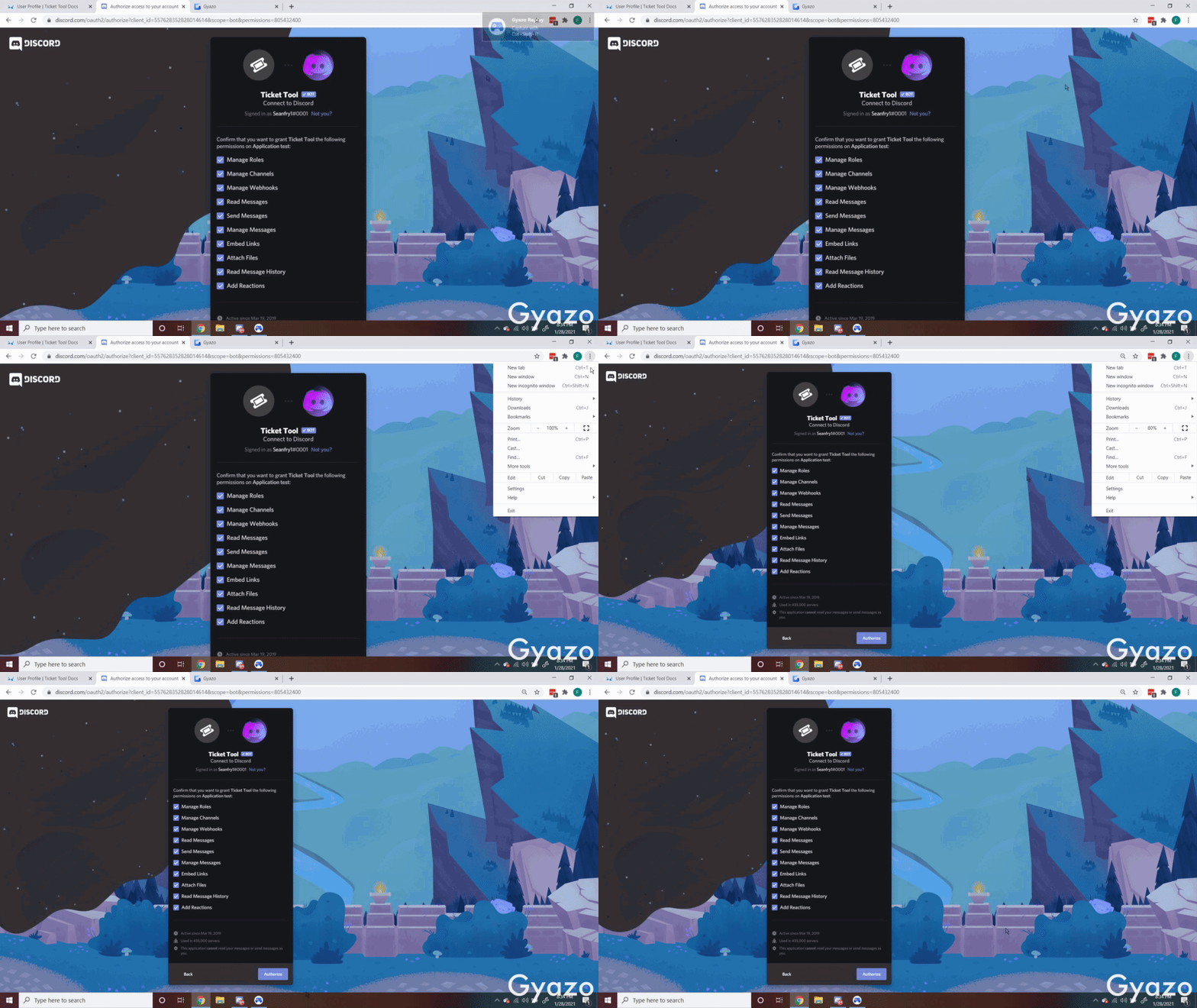
 cunning otter
Hey, i have a little problem, when i try to Manage a serveur using Ticket Tool, i don't find my new server, there are deleted server, but not my new created server.
median wigeon
cunning otter
Hey, i have a little problem, when i try to Manage a serveur using Ticket Tool, ...
Do you got al the right settings in #📣│bot-news
In the channel and the roles from the bot
If you need more help ping me
cunning otter
It's ok, i found the solution, it works
median wigeon
Oke thats nice have a nice day 😀
cunning otter
Thanks same for you 😉
 near cedar
how do i invte the premium bot
humble sequoiaBOT
How to disable the premium bot
To disable the premium bot you will have to go to the Dashboard -> Server Configs -> Premium bot -> And on the right-hand side disable the "Use Premium Bot" setting.
Premium features will still work on the normal bot.
TicketTool.xyz - Ticketing without clutter
Inviting and Enabling Premium Bot
The first thing you will need to do is invite the premium bot, an invite can be found here
Once the bot is in your server we will head to the dashboard and manage your server. When you are managing your server, you want to head into "Server Configs" then click the drop down menu under "Select the bot you would like to use on this server" then click "Ticket Tool#6207" and then save.
rotund kite
near cedar
how do i invte the premium bot
^^
rotund kite
Make sure to enable the premium bot before inviting, and that you have paid for premium.
Or else, it will not function.
rotund kite
oh, you can just boot out the normal bot.
near cedar
kk
rotund kite
If you plan on using the premium bot for a long time, I suggest just using it, since it has more uptime.
median wigeon
Maybe you can delete the ticket panel in your dashboard and make a new one?
near cedar
nvm it was server antinuke
median wigeon
Ah oke
 near merlin
Lol
 lime gyro
how do you increase/decrease the ticket limit 
 fathom berry
how can i do like
there are people i dont want to see the opened tickets
only me and my friend's roles
median wigeon
fathom berry
only me and my friend's roles
you can make a setting for that
in your dashboard
fathom berry
so only the suport team roles will see the tickets
median wigeon
yes
fathom berry
i have the higher managament init but someother roles can also see it
@median wigeon
median wigeon
and the settings of your channel and roles?
fathom berry
ok wait
median wigeon
fathom berry
ok wait
maybe i join your server than can i take a look
fathom berry
for eg. this role can see the tickets tho his roles are not mod related prems, this role has normal perms but he still can see it
median wigeon
where is the tickettool rol?
median wigeon
drag ticket-tool to the top
fathom berry
kk
median wigeon
above everyone you dont want to see the tickets
median wigeon
off
fathom berry
ok yes
 pale delta
I need some help. The reactions of my ticket stay saved. How can I do so that every time I react they are automatically deleted?
median wigeon
pale delta
I need some help. The reactions of my ticket stay saved. How can I do so that ev...
do you use $ new?
ore automatic? by pressing the emoticon?
pale delta
yes, when you press the emoticon it saves those who opened ticket
median wigeon
pale delta
yes, when you press the emoticon it saves those who opened ticket
ah oke, maybe you can try to make a new panel?
pale delta
median wigeon
ah oke, maybe you can try to make a new panel?
I will, but there is no option to enable or disable that?
median wigeon
what are the settings, of your bot
in my own server, it will deleted automatically
Sometimes if you typ $ debug than is the issue solved
median wigeon
pale delta
I will, but there is no option to enable or disable that?
Try this ^^
if it not worked i can join your server
you can send a link in my DM
pale delta
median wigeon
Try this ^^
Oh, I will try it. Thanks 
 turbid bear
hey
median wigeon
Hey
turbid bear
how do i remove the dutch language on !verify
median wigeon
turbid bear
how do i remove the dutch language on !verify
where?
turbid bear
when i type !verify on my server it shows botch in dutch and english
turbid bear
i havent changed anything
median wigeon
can you send a screen
turbid bear
i sent wrong
median wigeon
this is the tickettool support server
 robust notch
Hey guys I'm trying to let my Support Role use the $add command and such, it doesnt seem to be working. Any way to assign the roles to be used in the tickets?
median wigeon
Maybe this settings
robust notch
median wigeon
$help update
humble sequoiaBOT
How update a panel manually
To update a panel manually; react to it with :tools: - :tools:
 robust notch
I think its because its not an allowed channel?? is there a way to assign it a category ;o