#🆘│community-support
1 messages · Page 287 of 1
 spare gale
 humble sequoiaBOT
 spare gale
Go there. Select your server and click on panels
 fast wigeon
Yea
Thx
Is there a way I can configure what the ticket says? (Not including the title)
 humble sequoiaBOT
**Ticket Message**
The Ticket Message is the first message sent by the bot in a new ticket. To customize it head over to your Dashboard -> Panel Configs -> Settings -> Ticket Options -> Edit Ticket Message
 spare gale
@fast wigeon
humble sequoiaBOT
**Panel Message**
The panel message is where people react to make a ticket. To customize it head over to your Dashboard --> Panel Configs -> Settings -> Panel Options -> Edit Panel Message
 fast wigeon
Ye thx
 novel trail
hello, i asked a mod if i could have a copy of a closed ticket (bc im a dumbass who forgot to screenshot for my own reference) and they told me this, but idk how to do it :(
 queen hinge
novel trail
hello, i asked a mod if i could have a copy of a closed ticket (bc im a dumbass ...
queen hinge
novel trail
hello, i asked a mod if i could have a copy of a closed ticket (bc im a dumbass ...
was it on this server?
queen hinge
then ask the Moderator/Admin of the other server, if they have "save transcripts" turned on.
in that case you should have get an message from @pseudo glen with an Transcript.
novel trail
i didnt get a message like how i did in another server, so ig they dont have that on :(
novel trail
sigh that's sad
thanks for helping me !!
 jade topaz
i need help with adding another role to see all open and closed tickets
like how do u add a role using a cmd or the dashboard so that the specific role can see all the tickets
the role is ticket manager in the server
Go on the dashboard
and go to the panel settings
yep i’m there
add the role as support role
idk what the name is exactly
wdym
gimme a sec
alr
there
ah yes
now so i just press save?
ye
Alright tyy
np
it worked tyy
 hushed dragon
I'm having a problem with the bot, they're not going to show me my server so i can't set it up
humble sequoiaBOT
Don't see your server in the dashboard?
You will possibly need to relog. Look below to see steps on how to relog.
How to relog the Dashboard.
First, you will need to go to the dashboard. Once your there, click on your avatar on the top right. after you clicked it, you will see button that says Logout. You must click that. Once you have logged out, you can log back in.
Note:
You need one of these 3 things to access the dashboard.
- Server Owner
- Server Administrator
- Dashboard Role
spare gale
@hushed dragon
 royal locust
#ping
humble sequoiaBOT
Pong! Latency is 369ms. API Latency is 79ms [-]
jade topaz
maybe im being a dummy and missed this in faq but how do i make it such that when i open a ticket it tags certain roles
 charred ruin
$help ping
humble sequoiaBOT
How to make Ticket Tool ping a role
To make ticket tool ping a role when a ticket is opened, go to the Dashboard -> Panel Configs -> Settings -> Ticket Options -> Ticket Message -> Message Text and do this:
{@Role name} This is case sensitive and the role must have @mentions enabled
 charred ruin
@jade topaz ^
jade topaz
danke!
 young cargo
Hey I have a couple of questions
young cargo
If i upgrade to premium can I change the bots name?
spare gale
You can change the bot's server name, not the original name.
But that is always possible 😉
young cargo
Its nickname
spare gale
Yeh. Some people don't know what that is...
spare gale
You can't change the application name, you can change the nickname. But that is always possible 😉
Next question.
@young cargo You had more questions?
 copper haven
hey how can i delete the ticket automaticly when its closed
copper haven
i have prmium
spare gale
copper haven
hey how can i delete the ticket automaticly when its closed
I just have seen that it can't be automatically deleted...
 radiant moss
just turn off two step closing
jade topaz
How do I create a ticket on my server please Talk in German or russia
spare gale
/de Make a panel.
 robust sandalBOT
Erstellen Sie ein Panel.
 English (en) → German (de)
humble sequoiaBOT
jade topaz
English (en) → German (de)
humble sequoiaBOT
jade topaz
I habe the bot in my server i will creat ticket
spare gale
/de Check #573205317870157855
robust sandalBOT
Überprüfen Sie #573205317870157855
English (en) → German (de)
 steel badger
Hi, So after i send my panel and reactor the the message - No ticket is being crated.
The bot i premium and i have already tried to kick the bot and add it again.
radiant moss
steel badger
Hi, So after i send my panel and reactor the the message - No ticket is being cr...
Make sure it has the manage channels perm
and run $debug please
steel badger
I was just blind.. Forgot to invite the actual premium bot back to the server, and trying to use the premium server.. Sorry for the inconvenience 😄
Is there a way to add custom server emotes in the panel message fields? Right now it just goes :emoji: instead of actually displaying the emoji
steel badger
Ahh okay - So if could also take it from the reactions options right?
radiant moss
steel badger
Ahh okay - So if could also take it from the reactions options right?
wdym? like a custom reaction?
steel badger
So under the panel settings - reaction options - If i choose one of my servers emoji's - It will also show the name:numbers - That would be the same right
spare gale
steel badger
Ahh okay - So if could also take it from the reactions options right?
Yes. You can open tickets by clicking the reaction added to the panel.
radiant moss
can you send a picture
steel badger
 spare gale
steel badger
So under the panel settings - reaction options - If i choose one of my servers e...
spare gale
steel badger
So under the panel settings - reaction options - If i choose one of my servers e...
No. It will show the emoji instead. If you do it like:
<:emojiname:emoji ID>
And for animated emojis:
<a:emojiname:emoji ID>
radiant moss
steel badger
https://gyazo.com/fe7946e29a8f0555d5035385bea68223
What happens when you send it?
steel badger
 spare gale
\<:no:764892579019620372>
spare gale
spare gale
\<:no:764892579019620372>
For normal (change name and ID)
spare gale
spare gale
No. It will show the emoji instead. If you do it like:
<:emojiname:emoji ID>
An...
For animated (change name and ID)
@steel badger
Got it?
steel badger
I get the idea of it yeah - But for some reason i am not able to get the ID when i do :emoji: - It just puts :emoji: in the chat
radiant moss
do \<your emoji>
 digital lotus
steel badger
I get the idea of it yeah - But for some reason i am not able to get the ID when...
digital lotus
steel badger
I get the idea of it yeah - But for some reason i am not able to get the ID when...
You have to type $id :emoji: to get the id of the emoji.
radiant moss
$id 
spare gale
Hahahaha
radiant moss
$id
spare gale
\:emojiname:
radiant moss
There is a command for this
digital lotus
radiant moss
$id william
digital lotus
It sends response like this.
spare gale
It doesn’t works in titles...
radiant moss
now add that to the embed text
steel badger
Hmm, so it works here but not in my own discord channel..
spare gale
digital lotus
It sends response like this.
It only works in embed descriptions, fields, and footers.
spare gale
steel badger
Hmm, so it works here but not in my own discord channel..
There it should also work...
spare gale
digital lotus

steel badger
Well i got it working with the emoji in the message! Thank you so much for the support guys!
Have a great day 🙂
digital lotus
Who can $add and $remove users from the ticket? Support team role only? Or ticket user and additional support roles too?
radiant moss
Should be support team only
spare gale
What you pick... I guess...
spare gale
/es So you invited the bot. Ran the $debug command and nothing happens?
robust sandalBOT
Así que invitaste al bot. ¿Corrió el comando $debug y no pasa nada?
English (en) → Spanish (es)
spare gale
@jade topaz
jade topaz
Hi
spare gale
Hi
radiant moss
jade topaz
/en exacto
robust sandalBOT
Exactly
Spanish (es) → English (en)
spare gale
/es There are no issues with your settings.
robust sandalBOT
No hay problemas con la configuración.
English (en) → Spanish (es)
jade topaz
/en Puse ese comando y no se ejecutaba
robust sandalBOT
I put that command in and it didn't run.
Spanish (es) → English (en)
jade topaz
/en Antes si
robust sandalBOT
Before, if
Spanish (es) → English (en)
radiant moss
@jade topaz would you mind inviting me to your server?
jade topaz
/es would you mind inviting me to your server?
robust sandalBOT
¿Le importaría invitarme a su servidor?
English (en) → Spanish (es)
spare gale
/es DM @radiant moss a invite of your server.
robust sandalBOT
DM @radiant moss una invitación de su servidor.
English (en) → Spanish (es)
jade topaz
/en Le envié solicitud de amistad
robust sandalBOT
I sent him a friend request.
Spanish (es) → English (en)
spare gale
/es I’m on phone so I can’t go further than just text messages 😅
robust sandalBOT
Estoy en el teléfono, así que no puedo ir más allá de los mensajes de texto 😅
English (en) → Spanish (es)
radiant moss
Issue solved
radiant moss
Premium bot enabled when they didnt have it
spare gale
Oof.
radiant moss
No perms were all correct
spare gale
He never mentioned that.
radiant moss
Its a common issue most people dont notice.
radiant moss
Or have them send a pic and it says premium lol
spare gale
Yeh 😂
spare gale
Sure!
jade topaz
So I added the botbto my sever, but when I go to dashboard its not coming up.
humble sequoiaBOT
Don't see your server in the dashboard?
You will possibly need to relog. Look below to see steps on how to relog.
How to relog the Dashboard.
First, you will need to go to the dashboard. Once your there, click on your avatar on the top right. after you clicked it, you will see button that says Logout. You must click that. Once you have logged out, you can log back in.
Note:
You need one of these 3 things to access the dashboard.
- Server Owner
- Server Administrator
- Dashboard Role
jade topaz
Lemme try that
spare gale
And?
jade topaz
@spare gale worked, thanks!
spare gale
You’re welcome 🙂
 bleak kite
@everyone
radiant moss
...
spare gale

 rotund kite
bleak kite
@everyone
rotund kite
bleak kite
@everyone
Anything you need help with??
bleak kite
rotund kite
Anything you need help with??
umm the dashboard not coming
humble sequoiaBOT
rotund kite
humble sequoia
There^^
spare gale
Here ya go.
rotund kite
Invite first, if you havent then try the methods there.
rotund kite
Please no spam.
spare gale
This is channel meant for support, not for general chatting 😉
rotund kite
You’ll only find yourself muted if you continue to do so, as the managers don’t like spam.
spare gale
That’s true. ^
 hollow tide
if i made a support role, how do i give access to people with the support role to view tickets?
 hollow tide
ight thanks, and i assume thats in the dashboard?
hollow tide
alrighty, thanks
 analog ether
/de my name jeff
robust sandalBOT
mein Name jeff
English (en) → German (de)
analog ether
/dn yes
 buoyant owl
@analog ether if ppl cretsr a ticket they aren't able to create tocket
buoyant owl
Mo
buoyant owl
 honest mauve
Are you need nitro
honest mauve
Are you need nitro
@small wyvern he is pro ting
buoyant owl

buoyant owl
honest mauve
Y reply le
I need ur help
Ppl aren't able to type when they create ticket
And can we reset ticket number
jade topaz
buoyant owl
Ppl aren't able to type when they create ticket
looks like a permission issue on your side
buoyant owl
Meams
buoyant owl
@Herr Katze#6969 wbag
Help me plzz
Anykne
Ppl aren't able to type when they create ticket
jade topaz
read what I said
jade topaz
$help perms
humble sequoiaBOT
How to set the permissions for tickets
To set a change permissions go to the Dashboard -> Panel Configs -> Settings -> Permission Options
 buoyant owl
Ok
jade topaz
did you change anything there
buoyant owl
No
jade topaz
invite me to your server so I can check it out
jade topaz
So i have a issue, when they react it doesnt open a ticket. Whats that?
but if i react it opens one
can you invite me?
does it create a ticket or absolutely nothing when reacting?
Nothing
if a normal person reacts
did you try to send a new panel
no wait
gimme a sec

31.84 KB | uHwmq8k5i0.png
Wasted 31.84 KB of storage to show you this.
paste.host is trash
@jade topaz Is any role in there?
on the dashboard
Ill have a look
its in server configs
Yeah lmao, I wasnt the one who set it up. Thank you
no problem
 forest goblet
buoyant owl
<@338413405805346816> he is pro ting
forest goblet
buoyant owl
<@338413405805346816> he is pro ting
You are not allowed to ping staff
radiant moss

buoyant owl
@forest goblet k
charred ruin
Hmmmm
 oblique sand
So I added the bot to my server and it isnt showing up and the dashboard. I've reloaded the page multiple times and still nothing.
jade topaz
relog
oblique sand
already did
jade topaz
you mean logged out and back in?
oblique sand
yep
jade topaz
CTRL + F5
And try switching browser
if it doesn't help #🎫│make-a-ticket
Maybe the unfriendly Developerツ#1234 will help you
even tho he has no idea how to provide support
oblique sand
Ok thanks
jade topaz
np
radiant moss
Are you admin or do you have the admin role @oblique sand
humble sequoiaBOT
Don't see your server in the dashboard?
You will possibly need to relog. Look below to see steps on how to relog.
How to relog the Dashboard.
First, you will need to go to the dashboard. Once your there, click on your avatar on the top right. after you clicked it, you will see button that says Logout. You must click that. Once you have logged out, you can log back in.
Note:
You need one of these 3 things to access the dashboard.
- Server Owner
- Server Administrator
- Dashboard Role
spare gale
@×.^ 𝘺/𝘯 ;; ❜❜#5056 Do you have any of the 3 things above?
forest goblet
spare gale
@×.^ 𝘺/𝘯 ;; ❜❜#5056 Do you have any of the 3 things above?
They left the server
buoyant owl
@forest goblet how to reset ticket nikber
spare gale
I see...
forest goblet
What do you mean by "nikber"?
spare gale
buoyant owl
<@765994339565699083> how to reset ticket nikber
Make a copy of the panel, and delete the original panel.
Be sure to rename the cloned panel
buoyant owl
I wnat to reset all ticket to starting
queen hinge
buoyant owl
<@765994339565699083> how to reset ticket nikber
Go to your Panel Setting, Category "General Options" and then Just reset the "Ticket Count"
forest goblet
buoyant owl
I wnat to reset all ticket to starting
^ Just set it to 0
And PLEASE stop pinging me all the time
 rose geyserBOT
:ok_hand: Herr Katze#6969 is now muted (telling members to break the rules.) User was notified
:ok_hand: Jarvo#0001 is now muted (telling members to break the rules.) User was notified
 inner aurora
-warn @jade topaz encouraging members to annoy staff
rose geyserBOT
:ok_hand: warned Herr Katze#6969 (encouraging members to annoy staff) User was notified
inner aurora
-warn @spare gale encouraging members to annoy staff
rose geyserBOT
:ok_hand: warned Jarvo#0001 (encouraging members to annoy staff) User was notified
 upper flower
 shut flare
Damn
shut flare
Damn

 inner aurora
The above behavior is unacceptable
We have lives of our own and don't need a server of 10k+ members pinging us directly for no reason - and especially encouraging others to do so. Please be respectful and use common sense.
shut flare
 radiant moss
= OP
 potent blade
Hello,
Our server has a muted role where they cannot talk. However, I want to use ticket tool as a place where muted people can appeal to be unmuted. I set the muted role in discord category to can send messages, but ticket tool overrides this and disables that role from sending and viewing the channel.
Is there anyway to allow my muted role (if they open a support ticket via panel) to be able to send messages in their own ticket?
I can screenshot my perms or dashboard perms if it helps!
Pls ping me if you have a solution
 tribal cedar
Is there anyway to signify if I ticket is opened and not messaged to within a certain time frame the ticket gets closed/deleted?
tribal cedar
potent blade
Pls ping me if you have a solution
Have you tried adding the muted role permissions inside the dashboard for tickets?
queen hinge
@tribal cedar Nononono...., he should not do this!
radiant moss
tribal cedar
Is there anyway to signify if I ticket is opened and not messaged to within a ce...
Currently not at the moment
tribal cedar
queen hinge
<@297419611350106133> Nononono...., he should not do this!
Is there any specific reason? I'll eventually run into this as well.
 fervent terrace
How do I make it so the react is there to pressed on already instead of members having to find the react and add it themselves?
I've seen it in other servers but I just can't figure it out in mine
potent blade
tribal cedar
Have you tried adding the muted role permissions inside the dashboard for ticket...
No I have not, how would that look like?
tribal cedar
Husky says bad idea so I'm waiting for any alternative ideas
radiant moss
For what?
tribal cedar
I haven't run into a muted member making a ticket yet but it will happen
queen hinge
potent blade
No I have not, how would that look like?
I always trying to find a way to bypass your problem. Give me just a bit more time.
tribal cedar
radiant moss
For what?
Saber asked how to make the servers muted role be able to create tickets and dispute the mute
radiant moss
Ohhhhmmm
tribal cedar
Idk how adding muted role to perms for view read send is a bad idea
radiant moss
Wait can they make a ticket @potent blade
queen hinge
@potent blade , have you already tried to take some permissions from your Moderations bot and deny him from your ticket category? So he won't edit your new ticket channels?
potent blade
queen hinge
I always trying to find a way to bypass your problem. Give me just a bit more ti...
okayy
potent blade
radiant moss
Wait can they make a ticket <@524002223181660167>
They can see the channel, they should be able to react? Unless ticket tool blocks people that cant send messages from recting
potent blade
queen hinge
<@524002223181660167> , have you already tried to take some permissions from you...
Ohh hmm no I have not
That is a good idea, but won't there be consequences?
fervent terrace
radiant moss
Run $debug
Thank you very much that helped me to figure it out. I had a melted brain moment with it haha
potent blade
To close a ticket I believe it needs certain perms
radiant moss
Yes
queen hinge
Indirectly, just 1 click to turn it on or off..
potent blade
I'm confused sorry
tribal cedar
Tinyy I'm also wondering how to accomplish giving the muted users rights to speak in tickets they open
radiant moss
Alright so let me just clear this up. When someone with the muted role makes a ticket it makes it but they dont have permission to type correct?
tribal cedar
This is all theory for me as I haven't attempted or had to attempt it yet but I will have to eventually
radiant moss
Would you mind inviting me to the server?
tribal cedar
Well I haven't tried it. Soon as I attempt it (prolly tonight) I can get back to you for more testing but ill invite now
radiant moss
Alright
It should work just make sure the muted role is not blacklisted in general settings and it can type
tribal cedar
Kk just gotta finish this shift lol
radiant moss
I think I am wrong about the blacklist it might be a server thing one sec
fervent terrace
Is there a way to make it so only the support staff that claimed the ticket can see the channel?
tribal cedar
Don't go too crazy im not going to be able to test much rn
fervent terrace
I know admins will be able to anyway but so the other support members can't see it
radiant moss
I dont think so. I think the only thing you can do is only the support team member who claimed can unclaim
fervent terrace
Ah ok no worries. Thought it would be a little thing that would make the ticket thing more private but it still seems like a very good bot to have regardless
queen hinge
Hey Guys, i solved @potent blade's problem, it works now.
potent blade
Thanks Husky!
 agile kernel
How do I make it so that when a user opens a ticket, the ticket tool automatically tags them in newly made ticket
charred ruin
$help ping
humble sequoiaBOT
How to make Ticket Tool ping a role
To make ticket tool ping a role when a ticket is opened, go to the Dashboard -> Panel Configs -> Settings -> Ticket Options -> Ticket Message -> Message Text and do this:
{@Role name} This is case sensitive and the role must have @mentions enabled
charred ruin
@agile kernel ^
 south ice
hello guys it is possible to this bot to create a ticket send the guy to the ticket room, here all normal, but then to make the people who have create the ticket to be only able to see the ticket and not the rest of the server
agile kernel
@charred ruin so it's the "{user}" part that tags the person who opened it?
charred ruin
Correct
agile kernel
Thank you
queen hinge
south ice
hello guys it is possible to this bot to create a ticket send the guy to the tic...
Go to the Panel Settings , Category "General Options" and just click on "Keep visible" until its red.
south ice
nono i want to the person who have create the ticket only see the ticket part not the whole server.
or maybe its possible to this bot to give an role already create to the person creating the ticket ?
queen hinge
Oh okay, thats a bit difficult 😅
south ice
indeed thanks a lot anyways 😄
 neon breach
Hello guys,
i got a short question: Our Ticket Tool is working fine except of one thing: The User who opened the ticket can't see it. I don't know if this is a problem of general permissions on the discord or if it is a problem of my settings in the Ticket Tool.
Thanks for help 🙂
rotund kite
Go to panel configs > your panel > permission options > user opened options > and now make sure they have permissions to view the opened ticket.
Ping me if that doesn’t work, but have a good day anyway 😄
neon breach
They got the permissions of "Read Messages" and "Send Messages" @rotund kite
Is there sth else needed?
neon breach
Nothing changed so far for me. But sth. strange happened: Like right in the moment when i was writing my first message a user of our discord could use the ticket tool and saw the message and also were able to write sth.
But when i am in the mode of the user role i cant see my tickets i opened. @rotund kite
rotund kite
I think that is a permission error, hmm, can you resend the panels??
Try doing that, and if you don’t give tickettool full perms it can cause some issues. Try run $debug in your server.
Change your member roles perms.
neon breach
Ok, just for information, it isn't my server, it is the dc of some friends and i should help them.
The Ticket Tool doesn't got the Administration perm from the beginning, may thats the issue?
rotund kite
Try giving the admin perm. And drag the tickettool role above the member role.
neon breach
I gave it to him from the beginning, should i try to include the tool again?
rotund kite
Give the admin perm first, if it doesn’t work, head to #🎫│make-a-ticket
Oh, and make sure the tickettool role is above the member role, it may not able to manage how they see tickets or how they can’t.
neon breach
so i gave it the admin role, i put it above and nth changed. May i try to start from beginning, new category and including the tool again.
If this also doesn't work i will write u tomorrow , if it is ok 4u? @rotund kite
rotund kite
Oh, also check, if you are not paying for the premium, you use the free bot.
Otherwise the bot will not function.
neon breach
rotund kite
Oh, also check, if you are not paying for the premium, you use the free bot.
The Ticket Tool#4843 is used, thats right? Or is there a option on the settings panel?
rotund kite
Ok, I think it is best that you go to #🎫│make-a-ticket the professionals can deal with that better than me.
neon breach
I will, but thanks for ur support
 verbal sentinel
Hi there, i'm having some problems with the bot.
It doesn't want to open new tickets.
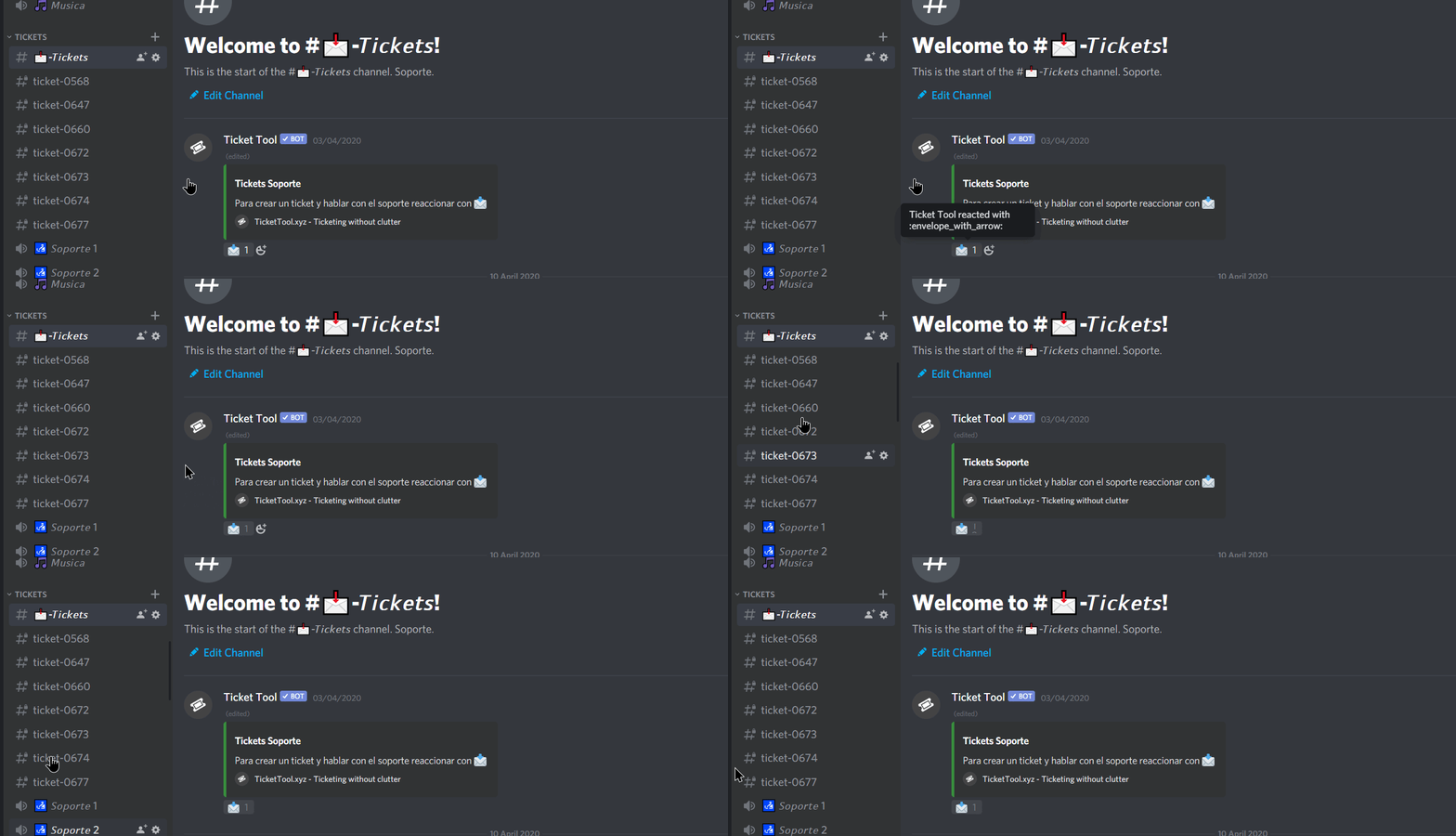
(cursor offset is because of my recording software, i'm clicking the envelope)
upper flower
do $debug
verbal sentinel
Ready
It looks like the channel count is a little bit too, well, high haha
Well, i have my answer haha, thanks
jade topaz
hey is there any way to make it that the ticket gets named after the category ?
and is there any way i could put the ticket in the same category it was opened in
upper flower
$help category
humble sequoiaBOT
How to set the open category
To set a open category go to the Dashboard -> Panel Configs -> Settings -> Category Options -> Category Open

 scarlet violet
Hey guys, nice bot you've made. I'm planning on getting the premium version, but had a few questions, 1) is it possible to whitelable the bot? Doesn't seem like it its an option yet. 2) Is it possible to add more reaction emojis in a ticket pannel? i.e some one opened a ticket and they will have more options to react on instead of the 🔓 ?
rotund kite
scarlet violet
Hey guys, nice bot you've made. I'm planning on getting the premium version, but...
- yes
$help reaction
humble sequoiaBOT
How to change reactions
To set a custom reaction Dashboard -> Panel Configs -> Settings -> Reaction Options -> <Reaction to change> -> Reaction

NOTE you need premium to do this.
rotund kite
scarlet violet
Hey guys, nice bot you've made. I'm planning on getting the premium version, but...
Whiteable?
scarlet violet
whitelabel*
rotund kite
Oh, you mean create labels?
scarlet violet
with more I mean more than one, nota different icon
no I mean change the bot's name
scarlet violet
so 1 can be changed or 2?
rotund kite
Both
scarlet violet
nice
rotund kite
1, you can change the nickname of the bot, 2, you can change the panel name, or authors name title.
If you need help doing so, come back here and ping me, or if I’m offline, somebody else will help you. And you can always go ahead to #🎫│make-a-ticket
rotund kite
Okay
scarlet violet
third question, is it possible to limit the amount of tickets a users can make per day?
humble sequoiaBOT
How to set a ticket limit
A ticket limit may be set per panel to prevent users from spamming tickets. By default this limit is set to 3. Once a user hits this limit the bot will notify the users that they reached the limit.
To set a ticket limit go to the Dashboard -> Panel Configs -> Settings -> General Options -> Ticket Limit
 scarlet violet
alright, but not per day? That shouldn't be to much of a problem. Thanks
rotund kite
But I don’t think there’s an option for per day, but that should keep users from not spamming tickets at you.
scarlet violet
As for multiple emojis for the opened ticket, that isn't possible I assume? so like 🔒 1️⃣ 2️⃣ 3️⃣
scarlet violet
Hey another quick question, how can I close a ticket where the channel has been deleted
rotund kite
scarlet violet
As for multiple emojis for the opened ticket, that isn't possible I assume? so l...
You can change them, but, you can’t add anymore with the bot.
rotund kite
scarlet violet
Hey another quick question, how can I close a ticket where the channel has been ...
If the ticket is deleted then you cannot close it.
rotund kite
rotund kite
You can change them, but, you can’t add anymore with the bot.
$help reaction
humble sequoiaBOT
How to change reactions
To set a custom reaction Dashboard -> Panel Configs -> Settings -> Reaction Options -> <Reaction to change> -> Reaction
NOTE you need premium to do this.
scarlet violet
rotund kite
If the ticket is deleted then you cannot close it.
Is there a fix for this?
rotund kite
Oh, if it is deleted you cannot retrieve it back, but a transcript should be saved.
scarlet violet
I opened up a ticket, instead of closing the normal way I used our old way of closing tickets ( was checking which commands work) but it deleted the ticket.
rotund kite
Oh, deleting it cannot retrieve it back sadly.
scarlet violet
I don't want the transcript, but just a way of closing the ticket, either via the dashboard of some other way
because now I can not make another ticket
rotund kite
Oh, you can react to close or use $close
React to the lock button and then confirm the the checkboxes
scarlet violet
rotund kite
Oh, you can react to close or use $close
yea I know, but was testing out our previous bot's commands, and that just deletes the ticket.
Is there a way to reset the ticket status on the dashboard?
rotund kite
You can react to create a new one, but deleted tickets cannot come back
scarlet violet
rotund kite
You can react to create a new one, but deleted tickets cannot come back
I can't because it's limited to one, and I don't want to raise the limit
 spark ember
Hello!
With premium can i change the bot's name and icon? and if yes how?
@thin marlin
spark ember
ok
 wild patio
Hi,
I succeeded setting up the tickettool, but i would like it so that in the textchannel that we are using for it, users can't write messages in that textchannel, is that possible?
 light sinew
Hello
charred ruin
wild patio
Hi,
I succeeded setting up the tickettool, but i would like it so that in the t...
Make sure the ticket tool role has permissions to send messages in that channel (I recommend the administrator permission), then you can set the channel to @ everyone cannot send messages and anyone with the administrator permission on their role will be able to, but everyone else will not.
 native temple
how to set a channel to save ticket text
native temple
charred ruin
Make sure the ticket tool role has permissions to send messages in that channel ...
this
radiant moss
$help transcript
humble sequoiaBOT
How do I save transcript to a channel?
To save transcripts to a channel go to the Dashboard -> Panel Configs -> Settings -> Logging Options -> Transcript Channel
 radiant moss
@native temple
native temple
radiant moss
<@694183913425207390>
ty it worked
radiant moss
Sweet!
 deep igloo
When I type the command $transcript It send the transcript to the ticket channel, and not to the transcripts channel.
I have set the transcripts channel in dashboard.
If I type $transcript #transcripts It sends it to that channel.
https://gyazo.com/374f59e976c783c5fca68377e93ec2df
 forest goblet
Did you save the setting?
radiant moss
deep igloo
When I type the command `$transcript` It send the transcript to the ticket chann...
That should do it automatically if you have the channel
deep igloo
apparently it doesnt, As I typed, if I do $transcript #transcripts
it works, but just $transcript does not work
radiant moss
Did you close the ticket?
deep igloo
If I enable logging, It sends the logmessage that it has been closed, to transcripts.
But the transcript ends up in the ticket
radiant moss
Can you send a pic of the logging and transcript
deep igloo

 radiant moss
Dashboard too please they should be next to each other
deep igloo
was already on it ^^
https://gyazo.com/4298b5cad11a0f4006d331f913c3de01

but I have disabled the logging for the moment
radiant moss
Can you invite me to the discord?
deep igloo
I could, But I dont have sufficient permissions to give you any higher roles tho,
If that is what you would need
radiant moss
Ah alright. So when you close a ticket with out running the transcript command does it send to the channel?
deep igloo
Dont have the automatic saving of transcripts, so it doesnt save any transcript
radiant moss
Ohhh crap I totally forgot hmmm
deep igloo
No worries 🙂
radiant moss
There should be a reaction I think
Yea this should work if you have it set just less the first reaction and have two step close on
deep igloo
I will try it out, gimme a bit
radiant moss
deep igloo
yeah, Two-Step worked
radiant moss
Sweet!
deep igloo
Many thanks!
radiant moss
 robust crystal
how should i set it up in my server
robust crystal
how should i set it up in my server
Come back here if you have any questions
robust crystal
i did $help setup
radiant moss
Did that help?
robust crystal
no, all the way confused
i created the panel but when I click on it, it doesn't create a room
 runic marten
i have a new server but i cant manege the ticket tool in it
queen hinge
runic marten
i have a new server but i cant manege the ticket tool in it
Open the Ticket Tool Dashboard (https://tickettool.xyz/manage-servers), and log in with Discord if you haven’t already.
Click on the server you invited the bot to, then click “Panel Configs” on the sidebar.
runic marten
i fix it
jade topaz
hey
how can i get multiple reaction on one panel ? like the image below
humble sequoiaBOT
Multipanels are a premium feature  that allow for a single panel with multiple reactions to open different tickets.
How to create a Multipanel
Premium users can combine multiple panels into one multipanel.
First of all you will need to assign a different Create Ticket Reaction for each Panel. Run $help reaction to learn how to do it.
Next, find the IDs of each panel you wish to combine. You can find them in your Panel Configs in the Dashboard
Next, send the multipanel to a channel using $panel [id1] [id2] {id3} ....
e.g. $panel 1 2 4 17 35 to combine panels 1, 2, 4, 17 and 35.
Up to 10 panels may be combined.
 radiant moss
Premium required @jade topaz
queen hinge
Tinyy#3205 , r u a Bot 😂 😂
radiant moss
If only
 deft citrus
Well, that answered the question I came here to ask... can I send a panel to a channel from the server itself 🙂
 frosty hollow
testing out premium + setting up for a hackathon and can't get mentor ticket claiming to work! tried turning "support staff only" on and off and adding the "mentors" role to close and claim functions, now mentors can claim tickets but cannot unclaim or close them, any ideas for what is wrong?
radiant moss
Make sure for the claim that you dont have it set to only the person who claimed can unclaim
frosty hollow
it's disabled and still doesn't work!
frosty hollow
in particular we are having problems with claimiming then unclaiming a ticket, and trying to claim it again
(or trying to get someone else to claim it again)
 elder zealot
How can we make it tag a person in the server in the Ticket message?
Does {@UserID} work?
rotund kite
elder zealot
How can we make it tag a person in the server in the Ticket message?
$help ping
humble sequoiaBOT
How to make Ticket Tool ping a role
To make ticket tool ping a role when a ticket is opened, go to the Dashboard -> Panel Configs -> Settings -> Ticket Options -> Ticket Message -> Message Text and do this:
{@Role name} This is case sensitive and the role must have @mentions enabled
elder zealot
Darn so it has to be the role name
rotund kite
frosty hollow
testing out premium + setting up for a hackathon and can't get mentor ticket cla...
rotund kite
elder zealot
Darn so it has to be the role name
No, {user} works
 tough bolt
Hello I need help plzz urgent
rotund kite
That”Ll tag the user who opened the ticket.
rotund kite
tough bolt
Hello I need help plzz urgent
Explain
elder zealot
That mentions the person that makes the ticket
rotund kite
Yes, {user} does
elder zealot
I want it to mention a specific admin
rotund kite
Not a role?
elder zealot
if thats possible
rotund kite
Uhh, try doing {@theadmin}
I’m not sure if it works, but I know pinging roles does, I’ve never done a ping user before.
You can make that user have a role no one has
tough bolt
i'm used ticket tool bot my customer make 0031 ticker. my brother is my server admin he is deleted my customer ticket channel. my customer's account email pw on it channel how can i get back it channel or msg list
rotund kite
If you saved a transcript, it should be saved.
If it has auto-saved onto a channel, $help transcript
Otherwise, I’m afraid I cannot retrieve it back.
elder zealot
That didnt work
rotund kite
Yes
rotund kite
I’m not too sure, but #🎫│make-a-ticket
tough bolt
it need me for my business urgent
tough bolt
I already created ticket
tough bolt
Ok
rotund kite
Hopefully they can help you get it back.
tough bolt
Really 
rotund kite
I’m not too sure, but they’ve made this new backup function, I haven’t ever used it though.
rotund kite
Just wait patiently
rotund kite
I’m sad to say, but I don’t think there’s a way.
tough bolt
i dont use ticket tool anyway
digital lotus
If I put a role in "allowed roles" in ticket reactions option, will that role alone would be able to use the reaction?
 light geode
Hello !
Is there a way to close a ticket automatically after no message were sent ?
jade topaz
Why All People Added To Ticket And How To Fix It?
rotund kite
jade topaz
Why All People Added To Ticket And How To Fix It?
Turn keep visible off
$kv
humble sequoiaBOT
**How to turn off Keep Visible**
**About Keep Visible**
"Keep Visible" will disable any permission changes to the @everyone role, allowing everyone to see into tickets.
**How to disable/enable it**
Head over to your Dashboard -> Panel Configs -> Settings --> General Options -> Keep Visible

NOTE that @everyone can type aswell if it has permissions to send messages
rotund kite
light geode
Hello !
Is there a way to close a ticket automatically after no message were sen...
No
light geode
Okk thanks !
 fading quail
I have a question
rotund kite
digital lotus
If I put a role in "allowed roles" in ticket reactions option, will that role al...
Support roles can see it and type as well as help in it, it can use reactions unless you blacklist roles from doing so.
fading quail
Nu,
rotund kite
Ask, do not ask to ask
fading quail
How, do you ping a role?
rotund kite
fading quail
How, do you ping a role?
$help ping
humble sequoiaBOT
How to make Ticket Tool ping a role
To make ticket tool ping a role when a ticket is opened, go to the Dashboard -> Panel Configs -> Settings -> Ticket Options -> Ticket Message -> Message Text and do this:
{@Role name} This is case sensitive and the role must have @mentions enabled
fading quail
what if
rotund kite
digital lotus
If I put a role in "allowed roles" in ticket reactions option, will that role al...
$help reaction
humble sequoiaBOT
How to change reactions
To set a custom reaction Dashboard -> Panel Configs -> Settings -> Reaction Options -> <Reaction to change> -> Reaction
NOTE you need premium to do this.
fading quail
The role has a space, in it will you have to do the same?
rotund kite
Below it has roles you don’t want to react with, you can block it.
rotund kite
fading quail
The role has a space, in it will you have to do the same?
Umm, yea, it should work, if not, remove the space.
fading quail
rotund kite
Umm, yea, it should work, if not, remove the space.
Mk
rotund kite
Use an _ instead if you need
digital lotus
I was asking, If I add a particular role to 'allowed roles'. Will that role alone be able to use it?
rotund kite
If it can view in the ticket, it can always react.
Anyone who is in the ticket can close it, you can change the settings though
digital lotus
For example I want only one role to be able to delete the ticket.
digital lotus
I am adding 3 support roles. But I want only 1 support role out of 3 to have powers to delete ticket.
rotund kite
Oh, you just blacklist the other 2 from using it, the (blacklist, meaning it won’t function if they have the 2 roles.)
It’s is directly below here:
$help reaction
humble sequoiaBOT
How to change reactions
To set a custom reaction Dashboard -> Panel Configs -> Settings -> Reaction Options -> <Reaction to change> -> Reaction
NOTE you need premium to do this.
rotund kite
Below the reaction is blacklist.
digital lotus
Okay. Thank you.
rotund kite
Ticket message or panel message?
humble sequoiaBOT
**Ticket Message**
The Ticket Message is the first message sent by the bot in a new ticket. To customize it head over to your Dashboard -> Panel Configs -> Settings -> Ticket Options -> Edit Ticket Message
rotund kite
^^
Go in dashboard -> panel configs -> your panel -> ticket options -> edit ticket message
If you have trouble managing your server, make sure you have invited in the bot, and if servers don’t appear as manage, relogging in yourself.
forest goblet
$help ping
humble sequoiaBOT
How to make Ticket Tool ping a role
To make ticket tool ping a role when a ticket is opened, go to the Dashboard -> Panel Configs -> Settings -> Ticket Options -> Ticket Message -> Message Text and do this:
{@Role name} This is case sensitive and the role must have @mentions enabled
forest goblet
there you go
fading quail
I have a question,
rotund kite
Don’t ask to ask, just ask
fading quail
So, how do you just type something like “?Close” to close the ticket.
fading quail
Mk,
humble sequoiaBOT
Help Options
$help commands - Information on commands
$help setup - Information on bot setup
$help faq - Frequently asked questions
forest goblet
Panel settings > Panel Options > edit panel message
 strong ermine
guys
how do i get the ticket tool to @ my staff when someone opens it?
please help
humble sequoiaBOT
How to make Ticket Tool ping a role
To make ticket tool ping a role when a ticket is opened, go to the Dashboard -> Panel Configs -> Settings -> Ticket Options -> Ticket Message -> Message Text and do this:
{@Role name} This is case sensitive and the role must have @mentions enabled
 humble sequoiaBOT
How to make Ticket Tool ping a role
To make ticket tool ping a role when a ticket is opened, go to the Dashboard -> Panel Configs -> Settings -> Ticket Options -> Ticket Message -> Message Text and do this:
{@Role name} This is case sensitive and the role must have @mentions enabled
Help Options
$help commands - Information on commands
$help setup - Information on bot setup
$help faq - Frequently asked questions
strong ermine
ohh
forest goblet
Please send a screenshot
 craggy urchin
Hello
I can't see my server
On the manage-servers
forest goblet
craggy urchin
Hello
I can't see my server
On the manage-servers
See the very first message in #799695838917820416
 hot osprey
here is screenshot
forest goblet
hot osprey
here is screenshot
You need to select your server first
hot osprey
i selected and invited bot and nothing happened
forest goblet
Is the bot in your server?
hot osprey
yes
forest goblet
Then try to log out and log in again
forest goblet
There should be a button below your server saying "Manage"
Click on it and you should see panel configs
hot osprey
ok i see it thanks for help
forest goblet
np
 viral geyser
Not visible
Discord nope
Help me
Servers - (server not visible? Try logging again)
Where
forest goblet
viral geyser
Thank yo
 crisp veldt
the tool doesnt work in my server please help it doesnt say anything when i type $help or $setup
humble sequoiaBOT
Help Options
$help commands - Information on commands
$help setup - Information on bot setup
$help faq - Frequently asked questions
spare gale
Help command there is...
spare gale
crisp veldt
the tool doesnt work in my server please help it doesnt say anything when i type...
Make sure the bot has access to view the channel, embed links, send messages and read message history.
humble sequoiaBOT
() = optional
[] = required
*==================================
Ticket Commands
==================================*
_ _
`$add [User] (channel)`
Description: Adding additional users to a ticket
Aliases: none
`$remove [User] (channel)`
Description: Removing users from a ticket
Aliases: none
`$close`
Description: Closing tickets
Aliases: none
`$open`
Description: Opening closed tickets
Aliases: none
`$delete`
Description: Deleting tickets
Aliases: none
`$rename`
Description: Renaming tickets/channels
Aliases: none
`$transcript (send channel)`
Description: Creating transcripts
Aliases: none
`$new (user) (reason)`
Description: Creating tickets in a monitored channel (when command style is enabled)
Aliases: none
`$claim`
Description: Claiming tickets (when claim is enabled)
Aliases: "unclaim"
_ _
*==================================
General Commands
==================================*
_ _
`$help (Help Options)`
Description: Help Command
Aliases: none
`$debug`
Description: Debuging issues with running Ticket Tool
Aliases: none
`$id (@role/@user/#channel/emoji)`
Description: Converting roles, users, channels and emojis to ID
Aliases: "getid"
`$permlevel`
Description: Checking permission level with Ticket Tool
Aliases: "level"
`$ping`
Description: Checking response time with discord api
Aliases: none
`$vote (link | unlink | redeem) (user)`
Description: Earn premium by voting on top.gg or Discord.boats
Aliases: "votes"
jade topaz
hallo
ich hab ein problem wurde in bs gehackt und dann gebannt was soll ich jetzt machen
spare gale
/en ich hab ein problem wurde in bs gehackt und dann gebannt was soll ich jetzt machen
robust sandalBOT
I got a problem was hacked into bs and then banished what should I do now
German (de) → English (en)
spare gale
/de I don’t know... But this seems like it’s not a Ticket Tool question...
robust sandalBOT
Ich weiß es nicht... Aber das scheint, als ob es keine Ticket-Tool-Frage ist...
English (en) → German (de)
spare gale
@jade topaz
spare gale
 stark jacinth
Hi how todo make on mi server for Open a ticket
stark jacinth
Hi how todo make on mi server for Open a ticket
Uhm, what?
forest goblet
Little hint Jarvo, you can react to a message with the flag you want it translated to, that will automatically send the translation message
Beispiel
robust sandalBOT
forest goblet
Beispiel
 2x2Master
Example
German (de) → English (en)
 quasi arch
testing sound systems
robust sandalBOT
quasi arch
testing sound systems
 Unknown User
Testen von Soundsystemen
English (en) → German (de)
robust sandalBOT
quasi arch
gefällt mir
Trying to translate to German but detected as German.
Please don't waste translations by trying to translate to the same language.
Like me
German (de) → English (en)
robust sandalBOT
quasi arch
gefällt mir
Unknown User
Like me
German (de) → English (en)
forest goblet
robust sandal
Trying to translate to German but detected as German.
Please don't waste transla...
Does that mean there's a limited ammount of translations you can make?
digital lotus
How many tags can be created?
spare gale
forest goblet
Little hint Jarvo, you can react to a message with the flag you want it translat...
Thanks!
spare gale
digital lotus
How many tags can be created?
Unlimited.
spare gale
forest goblet
Does that mean there's a limited ammount of translations you can make?
It means it can’t translate German to German 😂
Ik kan dus gewoon Nederlands praten...
robust sandalBOT
spare gale
Ik kan dus gewoon Nederlands praten...
 Jarvo
Jarvo
So I can just speak Dutch...
Dutch (nl) → English (en)
spare gale
Lol.
crisp veldt
spare gale
Make sure the bot has access to view the channel, embed links, send messages and...
oh ok
spare gale
You’re welcome 🙂
crisp veldt
🙂
spare gale
Changing the reaction needed to create a ticket on a panel is a Premium feature.
 copper marsh
You're referring to multipanels
spare gale
That is a premium feature as well. Having multiple panels in 1 message. It’s like #🎫│make-a-ticket...
copper marsh
If I do recall that is a premium feature
spare gale
You’re welcome 🙂
crisp veldt
spare gale
Make sure the bot has access to view the channel, embed links, send messages and...
it didnt worl
humble sequoiaBOT
How to disable the premium bot
To disable the premium bot you will have to go to the Dashboard -> Server Configs -> Premium bot -> And on the right-hand side disable the "Use Premium Bot" setting.
Premium features will still work on the normal bot.

TicketTool.xyz - Ticketing without clutter
 dark cosmos
how do i check and answer tickets??
 vapid steeple
@dark cosmos you want to describe a ticket?
Sorry, I don‘t unterstand what you mean
spare gale
Me neither...
spare gale
dark cosmos
Someone creates a ticket and I want to describe it, how should I do it?
You mean the first message sent by the bot?
humble sequoiaBOT
**Ticket Message**
The Ticket Message is the first message sent by the bot in a new ticket. To customize it head over to your Dashboard -> Panel Configs -> Settings -> Ticket Options -> Edit Ticket Message
 sterile ferry
what do I do so that each new ticket is created under a category, not on top of all of the channels?
??
upper flower
$help category @sterile ferry
humble sequoiaBOT
How to set the open category
To set a open category go to the Dashboard -> Panel Configs -> Settings -> Category Options -> Category Open
spark ember
Hello
spare gale
Hi
spark ember
can i make it like when some1 makes a ticket and then posts a message the bot to automatically send a message in the channel?
spare gale
No.
spark ember
Ok thanks
fading quail
So, the premium subscriber role is that for people who have premium?
Because I have premium..
fading quail
Mk
radiant moss
Make a ticket and give the link from the command $debug
 pure minnow
How do I add the ticket tool channel to my server
radiant moss
pure minnow
How do I add the ticket tool channel to my server
The bot?
pure minnow
Yeah but how do I add the react to make a ticket thing
radiant moss
 narrow lance
Is there a way to make the ticket responders show up as anonymous in the ticket, so that people don't know which team member they're talking to?
rotund kite
Umm, currently, no.
spare gale
narrow lance
Is there a way to make the ticket responders show up as anonymous in the ticket,...
For that, I suggest you invite modmail.
narrow lance
Yeah i was looking into modmail. I really like the setup tickettool has..bummer there's no anon option though.
radiant moss
That would be hard to do not sure if that is even something that can be done with @pseudo glen to have users show up anonymous
rotund kite
Umm, I think you need the bot to message in the ticket then. But tickettool doesn’t have that feature.
 clear kettle
Hi, I keep getting a message that the ticket limit has been reached whenever I try to open one. I've got the premium version and I've invited and selected the premium bot. I've checked the FAQ's but can't see this issue appearing. Is it a common thing I've missed or do I need to provide more info?
radiant moss
$help limit
humble sequoiaBOT
How to set a ticket limit
A ticket limit may be set per panel to prevent users from spamming tickets. By default this limit is set to 3. Once a user hits this limit the bot will notify the users that they reached the limit.
To set a ticket limit go to the Dashboard -> Panel Configs -> Settings -> General Options -> Ticket Limit
radiant moss
@clear kettle ^^^^^^
clear kettle
Oh thank you, let me look into that. Much appreciated
radiant moss
Of course!
clear kettle
Would a 0 value = unlimited? Or should I just enter a very high number to achieve the same?
 vast needle
I'd like to ask a question about how to get into "Panel Configs" ?
radiant moss
Um that is a good question i am not too sure
clear kettle
I will set it high 😄 And test later 😄
rotund kite
vast needle
I'd like to ask a question about how to get into "Panel Configs" ?
Go to the dashboard
radiant moss
On the left side for PC
rotund kite
tickettool.xyz
radiant moss
not sure on mobile
humble sequoiaBOT
vast needle
Ok thank you very much
rotund kite
Then, there is a menu, on mobile it is also like a bar on the left.
clear kettle
Very professional, quick and helpful Discord. I think I'll actually stay in this one just in case 😄
vast needle
Another question
I'm trying to add some custom commands to my server
How exactly do I do that?
@rotund kite
rotund kite
Umm, I don’t think you can add custom commands.
But you can add custom tags.
It is the option on the bottom of the left slider bar menu
So if somebody used $something then text will appear, like an auto responder
spare gale
rotund kite
So if somebody used $something then text will appear, like an auto responder
That is a custom reply...
 restive cargo
Hi there!
I'm making a category for tickets to be sent in when reports are made. Will everyone in server be able to see a user's ticket or just the user and admins/mods?
Is there a way to make it only viewable by the reporter and admin/mods if it can be seen by all?
spare gale
$help perms
humble sequoiaBOT
How to set the permissions for tickets
To set a change permissions go to the Dashboard -> Panel Configs -> Settings -> Permission Options
spare gale
@restive cargo
restive cargo
Thank you I'll give that a look
spare gale
You’re welcome 🙂
restive cargo
would you uncheck read/send messages for Additional roles?
spare gale
No.
@restive cargo That is only needed when you have set up additional roles.
You can leave those settings unchecked.
restive cargo
thank you very much
spare gale
You’re welcome 
 blissful nymph
hey guys. I had the free ticket tool and was playing around with it, and it worked fine. then I got the premium version bot in and kicked the old one and now it doesn't work.
Should both be in the same server?
radiant moss
You have to switch under the server config
humble sequoiaBOT
Inviting and Enabling Premium Bot
The first thing you will need to do is invite the premium bot, an invite can be found here
Once the bot is in your server we will head to the dashboard and manage your server. When you are managing your server, you want to head into "Server Configs" then click the drop down menu under "Select the bot you would like to use on this server" then click "Ticket Tool#6207" and then save.
blissful nymph
radiant moss
You have to switch under the server config
thank you
radiant moss
Np!
 peak void
Question how do you set up the ticket bot
humble sequoiaBOT
Setting up Ticket Tool
Visit the docs for setup info
General Setup
peak void
Thank you
 cursive phoenix
I turned off the transcript reaction from being added when the ticket is closed, is there a way i can edit the message that shows the save transcript part?
just kinda looks dumb to me
radiant moss
mhmmm
cursive phoenix
where
radiant moss
I dont think you can let me look around on the dashboard tho
cursive phoenix
oh i thought you were saying yes as in yes i could
radiant moss
Sadly i dont think there is something like that :/ but you can always suggest it for #•suggestions that would be something cool to have
cursive phoenix
ok thank you for your time
found a slight issue clicking the help ? thingy for Channel to monitor for command $new doesn't do anything but if I click the other ? icons it does show the help
radiant moss
Thats odd
 idle monolith
i mean its self explainatory anyways
 verbal shore
ياخوي ابي شرح ل Ticket Tool Premium شرح فيديو او فهمني المميزات
 fluid coyote
hello
fluid coyote
how do i make it so tickets get opened in a certain category
rotund kite
fluid coyote
how do i make it so tickets get opened in a certain category
$help category
humble sequoiaBOT
How to set the open category
To set a open category go to the Dashboard -> Panel Configs -> Settings -> Category Options -> Category Open
fluid coyote
tyty
jade topaz
@fluid coyote u had a server right/
fluid coyote
jade topaz
<@!534551919654600734> u had a server right/
?
jade topaz
or something like that?
fluid coyote
not my server
jade topaz
k
 reef oak
I have 2 F1 discord servers setup with a ticket tool on each. Older one (SDG) tickets work perfect. New server tickets (CRL) are viewable to all despite using EXACT same ticket tool settings. Can anyone help? It's driving me mad
I must of messed up permissions in the new server?
spare gale
$help perms
humble sequoiaBOT
How to set the permissions for tickets
To set a change permissions go to the Dashboard -> Panel Configs -> Settings -> Permission Options
reef oak
these settings are identical to mine 😑, as I said I have the ticket tool on another server and its working perfectly, settings are identical
spare gale
...
Run $debug
And check if the bot has the permission to manage channels in the category as well.
reef oak
run debug in the dashboard?
spare gale
No. In your server.
reef oak
spare gale
Hmmm... It should work fine tho...
Strange. Check your server settings.
Just the settings of your server. The permissions...
What exactly is the issue?
reef oak
yeah, it must be that. all members can see the ticket, I only want staff to see the ticket
spare gale
Ah. Should just be a server issue...
reef oak
ok I'll get digging, thanks!
jade topaz
reef oak
yeah, it must be that. all members can see the ticket, I only want staff to see ...
hey its ez
When u make a panel
u can get configs
like the settings u can change
or go to ur server
then Panel Configs
click the panel u want to edit
when u click one of them
u see this
Click General Options
there u can add ur staff roles
like that support team roles
if that dont work u can add additional roles and add everyone or roles of the users who shouldn't see the tickets
reef oak
gonna delete my panel and start from scratch. As I said it works perfectly on my other server, panel settings on both servers are identical
jade topaz
reef oak
gonna delete my panel and start from scratch. As I said it works perfectly on my...
there is a new feature u can use to copy configs I presume
spare gale
jade topaz
there is a new feature u can use to copy configs I presume
 That is not true.
 jade topaz
spare gale
<:stop:447094375655145472> That is not true.
jade topaz
spare gale
<:stop:447094375655145472> That is not true.
I **presume **
peak void
Where is the application to be support team
spare gale
@peak void #📣│server-news message
And click on the 🆕 reaction
 peak radish
rotund kite
If you saved a transcript, it should be saved.
peak radish
rotund kite
If you saved a transcript, it should be saved.
do you know if Premium saves full transcripts? this morning I discovered that the free version only saves the last 200 messages in a ticket and I am frustrated
radiant moss
peak radish
do you know if Premium saves full transcripts? this morning I discovered that th...
Yes it does. Premium should save the whole ticket
peak radish
radiant moss
Yes it does. Premium should save the whole ticket
is there a documentation link somewhere that confirms this? I'm happy to pay but I don't want to spend the money and later discover that it doesn't log the full transcript
spare gale
Premium saves the whole transcript
humble sequoiaBOT
Ticket Tool Premium
Get premium at https://tickettool.xyz/premium
Manage your subscriptions at https://tickettool.onfastspring.com/account
Why Premium?
Premium lets you customize the bot just how you want it. It also helps keep the bot running.
charred ruin
It sends this to DMs to the creator after it gets closed, or something like it.
And the link sends you to a page like this to scroll through the whole chat
peak radish
the premium page makes no mention of transcript size limits
charred ruin
peak radish
that's the reason I was asking
charred ruin
That’s the link it sends^^
radiant moss
peak radish
the premium page makes no mention of transcript size limits
If you would like to reach out to support to confirm you can make a ticket #🎫│make-a-ticket
peak radish
ehh it's fine. if the consensus here is that it does then that's good enough for me
I appreciate the quick responses
charred ruin
Hey do you wanna try premium @peak radish
radiant moss
Yep I have pretty long transcripts and they always work
charred ruin
I’ll dm you a key for free premium I got plenty
spare gale
charred ruin
I’ll dm you a key for free premium I got plenty
Can you DM me one as well? 
charred ruin
Lol I had a hard time finding my keys
spare gale
...
jade topaz
Anyone know why tickets keep you going public?
 near merlin



 jade topaz
How do I get it so my mod can see the tickets that are opened?
radiant moss
$help support
humble sequoiaBOT
How to let support team see into a ticket
About support roles
A support role lets your support team see into tickets with out having to add them manually to each and every ticket.
You can add as many support roles as you like per panel.
NOTE that the way discord works all admins can see into tickets regardless of this.
How to set a support role
To set a Support role go to the Dashboard -> Panel Configs -> Settings -> General Options -> Support Team Roles.

NOTE that the support role will not be able to see into tickets that are already created..
radiant moss
@jade topaz ^
radiant moss
The give them that role
radiant moss
jade topaz
Anyone know why tickets keep you going public?
Check to make sure they dont have a support team role
queen hinge
jade topaz
Anyone know why tickets keep you going public?
Maybe the "Keep Visible" Option is always on in your panel. (General Options)
jade topaz
radiant moss
Check to make sure they dont have a support team role
Checked already
jade topaz
queen hinge
Maybe the "Keep Visible" Option is always on in your panel. (General Options)
I'll have a look
radiant moss
That is mostlikely the issue what husky said
queen hinge
Wait, am i wrong?
radiant moss
No i think you are right lol
radiant moss
yay!
 merry rivet
Hey I have a question
what do I do if my Ticket Tool isn´t working whenever I do the cmd $ it doesn´t work why is that?
radiant moss
can you run $debug
radiant moss
Do you have all permissions correct?
 vast ridge
TT Premium is no longer working on any of the servers i've employed it on
no configs have changed. so it's not just frostyy
merry rivet
Yes
vast ridge
rather... bad time for it too, i'm gonna have to make a manual channel for someone ig
merry rivet
but I already payed for premium it just won’t give my premium back
radiant moss
merry rivet
but I already payed for premium it just won’t give my premium back
So your server currently has premium ?
merry rivet
it won´t let me
vast ridge
oh, maybe frosty's issue is somewhat different than mine. sorry abou tthat.
merry rivet
I already payed for it, it won´t let me add the premium bot
vast ridge
i'll make a ticket instead
merry rivet
vast ridge
oh, maybe frosty's issue is somewhat different than mine. sorry abou tthat.
wym??
vast ridge
oh, i have the premium bot in the servers i work on but creating tickets isn't working
 compact idol
think its down for free/premium
radiant moss
hmmm that is odd
merry rivet
oh how do I add the premium bot??
humble sequoiaBOT
Inviting and Enabling Premium Bot
The first thing you will need to do is invite the premium bot, an invite can be found here
Once the bot is in your server we will head to the dashboard and manage your server. When you are managing your server, you want to head into "Server Configs" then click the drop down menu under "Select the bot you would like to use on this server" then click "Ticket Tool#6207" and then save.
radiant moss
@merry rivet ^
merry rivet
Thanks!
 sweet steeple
Is premium ticket down?
radiant moss
sweet steeple
Is premium ticket down?
It is a issue being looked into
 buoyant bobcat
Yes the are working on it
SimpleToday at 03:40
Okay, seems to be an issue on both bots
sweet steeple
Thank you
 gloomy heart
the tool is not working when you click the emoji button nothing happens
 somber kernel
gloomy heart
the tool is not working when you click the emoji button nothing happens
somber kernel
gloomy heart
the tool is not working when you click the emoji button nothing happens
try giving admin roll it should work because it work in my server
 tame olive
I am not giving it admin lol.
 teal mesa
Worked in my server as well
tame olive
the only perm it doesnt have is kick and ban, why tf isnt it working
theres no reason in hell for it to have kick and ban
 feral urchin
Is the ticket bot down or nonfunctional right now?
It was working yesterday and now the $new and react commands aren't working.
 pale pilot
We are aware
feral urchin
Ah okay, so this is a known problem to the staff team? just wanted to be sure it wasn't just me
rotund kite
Uhh, currently, I think very few staff know of, but they are reaching out to the developers and stuff.
feral urchin
Gotcha, thanks!
 fleet beacon
hi why bot is not open the ticket for member ?
I'm tired of not being able to adjust
any one help me ?
teal mesa
The bot is down, they are working on it
fleet beacon
i can open ticket by owner ship role but by member role can not open a ticket
fleet beacon
teal mesa
Try giving the bot admin, this temp fix worked for my server
bot have adminastaitor
teal mesa
It works for some servers but not others. Be patient
fleet beacon
teal mesa
It works for some servers but not others. Be patient
okwy thanks
teal mesa
fleet beacon
okwy thanks
Np I had the same issues 👍
pale pilot
jade topaz
I’m trying to make it so that customers can’t close a ticket by themselves, I’ve configured command configs to only enable certain roles to be able to do that but it’s not working , any suggestions?
I’ve given admin permissions to, it doesn’t seem to be working
 hot fox
My bot fully works but I cant make tickets randomly
My players react with the emoji and nothing happens but I can still delete old tickets and stuff
 civic relic
 solid stream
After giving it admin it might take a few moments to start working
Either the bots bogged down with failed discord requests or discord is being slow..
hot fox
ill just see if it fixes itself within an hour or 2
solid stream
Hopefully, because there's nothing I can do personally to fix it.
hot fox
i understand, didnt know if the bot was down or if discord was being dumb
merry rivet
is the ticket backup?
and also the $help cmd is not working for me smh I said $help, it didn´t say anything but whenever I did it on my other server like a tests server the $cmd works why is that?
solid stream
$help prefix
humble sequoiaBOT
How to change Ticket tool's prefix
The default prefix for ticket tool is $ and @Ticket Tool#4843 however that can be changed on the Dashboard under Server Configs -> Command Prefix.

NOTE that @Ticket Tool#4843 will always work as a prefix even if there is a custom prefix.
merry rivet
I said the $cmd help and it didn´t work smfh
can I invite you to my server, you can see what is wrong with it I am not self-promoting I was just asking if you could see if you could fix the problem with the bot
rotund kite
There’s already an issue with the bot, if your bot is unresponsive, then that is the issue we are fixing currently.
merry rivet
oh mk
rotund kite
We are waiting for the Discord API to fix their bugs and issues.
merry rivet
when will it be back up?
rotund kite
I have no idea, but check #689208572806299799
merry rivet
how did you get that status bot??
jade topaz
Can I change the bot's name and photo with premium or something?
 storm turtle
hello. I have invited the the ticket tool into my server and done various configuration settings. However, when someone reacts to the ticket, no ticket is created. What could be the issue?
storm turtle
okay. Thank you
upper flower
#📣│bot-news explains in further detail 🙂
merry rivet
I did that but it didn´t work smfh
upper flower
open a ticket
jade topaz
something wrong with my tick creation panel lol when i click the envelope the count goes from 1 to 2 and then back to 1 again without anything happening, few hours ago it worked perfectly fine
upper flower
hmm, open a ticket
jade topaz
wow now it works again
upper flower
lol
solid stream
$cmd isn't even a command
If you created a custom tag then it doesn't use a prefix. Please check your bots prefix.
rotund kite
Tags are tags, it’s like an auto-responder.
queen hinge
@sand pebble , in case of your suggestion, watch this: