#🆘│community-support
1 messages · Page 286 of 1
 worn wagon
I mean i have them like that
So the point is when you presenta the red emoji when the user open the ticket ,they can see the Red colour and like discription
Someonw
 lone flare
عندي مشكله لم اضغط الريشكن مايصير ولا شيء @glad ingot
 drifting trailBOT
 𝒀𝑨𝒁𝑬𝑫#2021 has been warned. || pinging staff team in #🆘│community-support
 jade topaz
يا ريت لا تمنشن اي حد
هاي الروم للناس الي بتحب تساعدك
ادا بدك مساعدة ومستعجل
افتح تكت عربي من هون
#🎫│make-a-ticket
@lone flare
lone flare
jade topaz
يا ريت لا تمنشن اي حد
اعتذار احسب انه شات الدعم الرسمي
jade topaz
لا عادي ولا يهمك
 stable mauve
is there a way to auto-send transcripts to other channels?
 inner aurora
$help transcript
 humble sequoiaBOT
How do I save transcript to a channel?
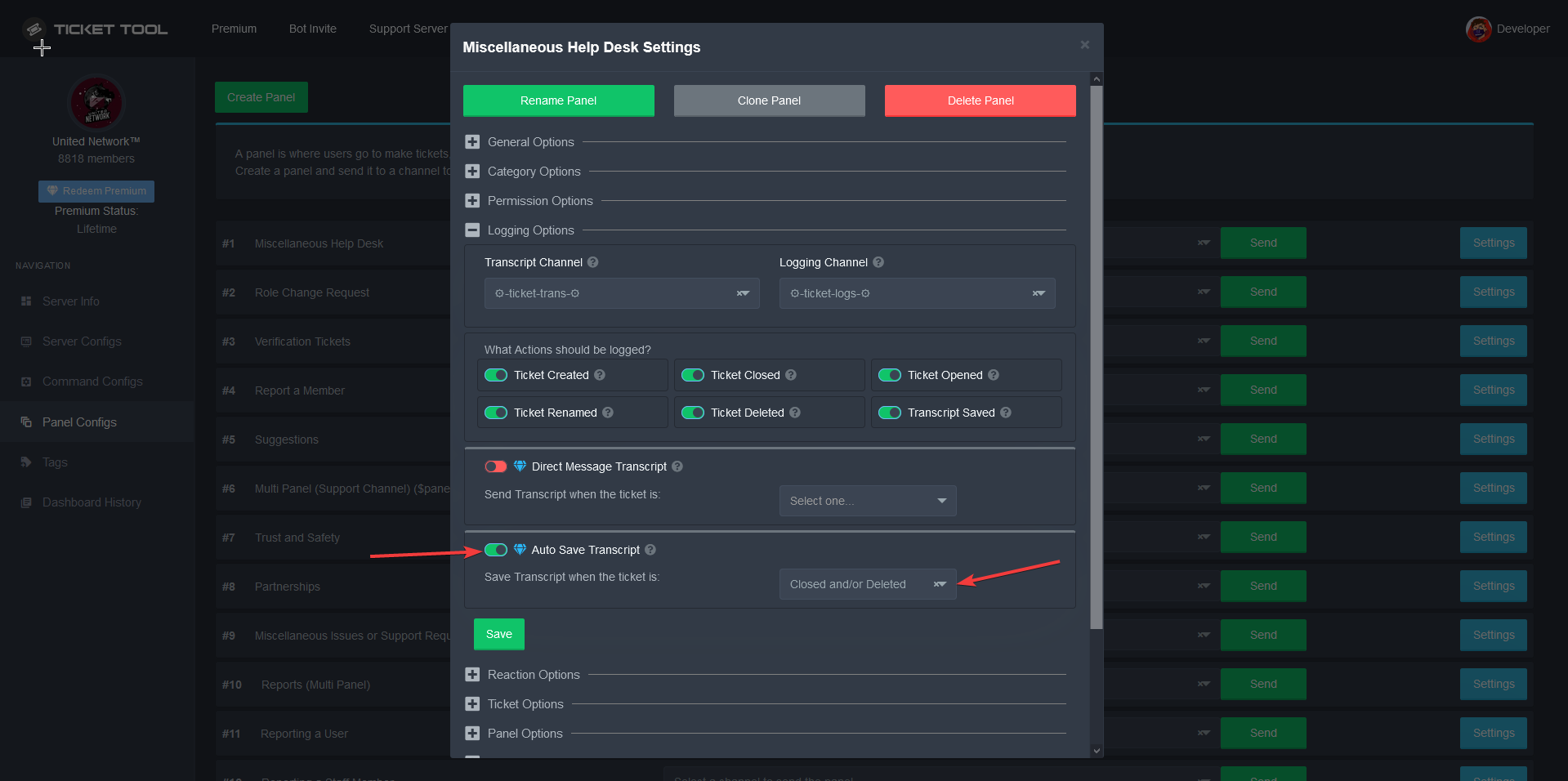
To save transcripts to a channel go to the Dashboard -> Panel Configs -> Settings -> Logging Options -> Transcript Channel

 vapid steeple
yes
 devout musk
check what i send befor
i already did this
and from today
and still there is no reactions under this panel
jade topaz
I don't speak polish
devout musk
?
devout musk
what does this have to do with my problem?
devout musk
jade topaz
I don't speak polish
^?
 devout musk
dude u dont have to know what is on my panel lol
jade topaz
what does it mean
devout musk
this panel dont have reactions and this is my problem
devout musk
i send all my panels on 1 channel to create multipanels
but when i create multipanel
he has no reaction
jade topaz
screenshot the reaction settings of one of the panels
devout musk
this panel should have reactions 1️⃣ 2️⃣ 3️⃣ and 4️⃣
jade topaz
gimme a sec
devout musk
all of this panels had different reactions
from 1️⃣ to 4️⃣
First time when i testing this multipanels on another channel everything work good. Multipanel was creatingand had reactions
devout musk
and this (i send this debug yesterday)
devout musk
@rotund kite sorry for ping but when i use {user} (we talking about ticket names with user nick) i have User ID nod User Nick. There is an option to "repair" it or not?
 compact stump
hey, i bought premium , how do i invite the golden ticket bot to my server?
compact stump
found it, thx
 primal lily
What is The price of Premium bot?
 mild island
primal lily
What is The price of Premium bot?
mild island
primal lily
What is The price of Premium bot?
It's $5.50/month or $60/year
primal lily
It's Only for 1 Server ?
 shut flare
I think it's for as many as you like, as you get the access to the bot to use in any server, However I may be wrong.
Correct me if I am wrong, so take my answer with a grain of salt.
 shy sleet
Hello..
how can i set the bot to mention the support team when ticket opens
sorry about my bad english
humble sequoiaBOT
====== FAQ ======
If a question interests you run the command to see the answer.
Q: What is the prefix and how do I change it?
A: $help prefix
Q: How do I let my support team see into a ticket?
A: $help support
Q: How do I make a ticket ping my support when it's created?
A: $help ping
Q: How do I set a transcript channel?
A: $help transcript
Q: How do I limit the number of tickets a user can create?
A: $help limit
Q: How do I set what category tickets are created in?
A: $help category
Q: How do I set what category tickets are moved to when closed?
A: $help closed
Q: How do I set a custom reaction?
A: $help reaction
Q: How do I set the permissions for the tickets?
A: $help perms
Q: How do I create a panel?
A: $help panel
Q: How do I get the panel in my discord?
A: $help send
Q: How do I add or remove users from a ticket?
A: $help add
Q: A panel of mine won't update with the new settings, How do I fix it?
A: $help update
Q: Ticket Tool isn't responding to my commands, How do I fix it?
A: $help offline
Q: How does the claim command work?
A: $help claim
jade topaz
$help ping
humble sequoiaBOT
How to make Ticket Tool ping a role
To make ticket tool ping a role when a ticket is opened, go to the Dashboard -> Panel Configs -> Settings -> Ticket Options -> Ticket Message -> Message Text and do this:
{@Role name} This is case sensitive and the role must have @mentions enabled
 shy sleet
ty
 minor agate
any function that allows us to transfer claimed tickets to another member of support ?
jade topaz
$unclaim?
minor agate
nah, that wil just unclaim it right? i want to be able to transfer the claim to another support staff member. so if i claim it first but think you need to answer it. i wanna use a command like $transfer @jade topaz and then the ticket wil be "claimed" by you..
if possible..
jade topaz
do $claim @staffmember
minor agate
thanks
jade topaz
np
shut flare
You can just do $unclaim then $claim @ another member
 pale pilot
there is no $unclaim command. You unclaim by using $claim again
 cobalt lance
Is there a way for when a User reacts to the Close Message, it moved the Channel instead of Deletes it
jade topaz
nvm
cobalt lance
So like this would move it into the Closed Tickets - but not actually delete the channel.
jade topaz
it shouldnt delete it
check the dashboard
and there should be something like "2 step delete"
cobalt lance
cobalt lance
keep that on?
cobalt lance
It was Two step Ticket.
cobalt lance
Now, when I toggle that, can I set it so the Bot revokes the ticket creators perms, and doesn't count towards their ticket limit?
jade topaz
wdym
two step ticket?
cobalt lance
Ye
jade topaz
if you close it the creator cant see it anymore
and he can create another ticket
it doesnt affect the limit if its closed
 grave drum
support team #798896436258799626 pls
jade topaz
its a demo ticket
pale pilot
We don't do support in demo tickets. It says that in the ticket too
jade topaz
pale pilot
there is no ``$unclaim`` command. You unclaim by using ``$claim`` again
$unclaim does the same thing as $claim I noticed
pale pilot
Oh lol. Never used it before
jade topaz
same lmao
grave drum
@pale pilot please help #798905378397880340
jade topaz
dont ping here
grave drum
sorry
 rapid parrot
hey guys, first time i setup a discord server, how to setup the bot? i he is on my server but i cant find the command to manage him
 queen hinge
rapid parrot
hey guys, first time i setup a discord server, how to setup the bot? i he is on ...
queen hinge
rapid parrot
hey guys, first time i setup a discord server, how to setup the bot? i he is on ...
Hey, try this: https://docs.tickettool.xyz/en/general/setup
rapid parrot
tyvm!
 thick cobalt
hi , when i press the delete button in a ticket it doesn't not get deleted any solutions??
 hardy grotto
Some of my tickets are populating into the correct category and others are populating into no category at all. It seems like they’re deciding where to go arbitrarily. Any ideas?
 radiant moss
hardy grotto
Some of my tickets are populating into the correct category and others are popul...
radiant moss
hardy grotto
Some of my tickets are populating into the correct category and others are popul...
Could possibly be due to too many tickets in a category. There is a limit of 50 channels per category and a 500 server limit
 solid stream
^ This is a discord related limit
hardy grotto
Thank you
 tribal cedar
I have the bot set to dm a transcript of the ticket on close however it says failed to send dm
Anyone have an idea as to why?
radiant moss
Do you have premium @tribal cedar
tribal cedar
Yes
radiant moss
And make sure the person has there dms open
tribal cedar
Good call im an idiot
radiant moss
simple mistake
tribal cedar
For sure. Thanks ❤
radiant moss
Let me know if that doesnt work
tribal cedar
I'm sure it will as soon as we close another I will though.
jade topaz
i have a question, can i edit so that when someone creates a ticket the bot first asks for the username of the persone and can i add issues they can have?
if anyone knows please ping me @
radiant moss
jade topaz
i have a question, can i edit so that when someone creates a ticket the bot firs...
Like a 2 step ticket type thing?
jade topaz
yes for example someone creates a ticket and the bot first asks: whats ur username
radiant moss
then it unlocks the rest?
jade topaz
or what issue they have, like in #🎫│make-a-ticket
radiant moss
like muti panel?
humble sequoiaBOT
Multipanels are a premium feature  that allow for a single panel with multiple reactions to open different tickets.
How to create a Multipanel
Premium users can combine multiple panels into one multipanel.
First of all you will need to assign a different Create Ticket Reaction for each Panel. Run $help reaction to learn how to do it.
Next, find the IDs of each panel you wish to combine. You can find them in your Panel Configs in the Dashboard
Next, send the multipanel to a channel using $panel [id1] [id2] {id3} ....
e.g. $panel 1 2 4 17 35 to combine panels 1, 2, 4, 17 and 35.
Up to 10 panels may be combined.
 radiant moss
you do need premium for this ^^
radiant moss
of course!
tribal cedar
That was ofc the issue sorry forgot to get back to you. Keep up the good work!
 chilly lion
i put @owner on my ticket but it dosent ping me help????
 upper flower
$help ping
humble sequoiaBOT
How to make Ticket Tool ping a role
To make ticket tool ping a role when a ticket is opened, go to the Dashboard -> Panel Configs -> Settings -> Ticket Options -> Ticket Message -> Message Text and do this:
{@Role name} This is case sensitive and the role must have @mentions enabled
chilly lion
ty dude
inner aurora
 lucid blade
Can somebody help me?
lucid blade
Can somebody help me?
If you ask a question, plenty of people are able and willing to help
lucid blade
I solved it, thanks
jade topaz
Ok I'm really confused. I have Ticket Tool on both my servers and on one it works completely fine while on the other, which I made yesterday, it doesn't work at all except for me as the owner. All the permissions are exactly the same as well as the settings.
upper flower
remove @ everyone from the blacklist in server configs
humble sequoiaBOT
Blacklist Roles
Any role you assign as a blacklisted role won't be able to use commands or reactions.
Selecting a blacklisted role
Go to your Dashboard -> Server Configs. There you will find the option to select blacklisted roles.
Note: Don't forget to save.
 jade topaz
cries it was that easy i- thank you sm
upper flower
haha thats what I do! Happy to help
jade topaz
ok that was an issue- i did have to do that
but it still doesnt work fdhj
i have a separate role called members since i have a manual verif system, that role is not in the blacklist- or any other role now- yet they cant make a ticket
it adds the reaction, takes it away but makes no channel for the ticket
i checked and it says it has an open ticket
so
it made the ticket but not the channel? im unsure
upper flower
Do $debug in the channel. Make sure the bot has permissions in the category (if set) and the channels
jade topaz
it has perms and i did the debug
told me to send this: https://discordapp.com/channels/509192800865353738/662692902245498910/798981598988337183
apparently still doesnt work qwq
 cold knot
Is there a way to have transcripts saved on the website?
jade topaz
i did that and now it didnt even make a channel for me now uhm- im sorry btw hfdk this is confusing
 forest goblet
@upper flower I think someone is advertising in #💬│general-chat (sry to interrupt)
upper flower
jade topaz
i did that and now it didnt even make a channel for me now uhm- im sorry btw hfd...
make a ticket here
upper flower
forest goblet
<@771750914616852490> I think someone is advertising in <#509238831547940885> (s...
Handled thx
 frozen finch
$help set up
humble sequoiaBOT
Help Options
$help commands - Information on commands
$help setup - Information on bot setup
$help faq - Frequently asked questions
frozen finch
$help setup
humble sequoiaBOT
Inviting Ticket Tool
The first thing you will need to do is invite the bot, an invite can be found here.
Once the bot is in your server we will head to the dashboard and create panel
A panel is used to configure each tickets settings and is were people react to make a ticket.
An example of a panel sent to a channel is shown below.

Creating a panel
To create a panel we are going to need to head over to the panel configs on the dashboard
Once at the dashboard we will need to click Create Panel
Enter a panel name (Fill in any optional settings you want)
Click Create Panel and your ready to get started with configuring your panel
An example of a creating a panel is shown below.

Sending a panel
Once you've created a panel on the dashboard you will need to send it to a channel using send on the dashboard
Select the channel you want your panel to be created in and click send.
For other questions checkout $help faq
An example of a sending a panel is shown below.

 azure fractal
Can I give access to view closed tickets to the entire server, except for 2 roles? If so, how?
 spare gale
I would not prefer that...
azure fractal
spare gale
I would not prefer that...
Why?
spare gale
And it's not possible as well... except if the whole server has a role...
spare gale
azure fractal
Why?
Why would you even make it visible to the whole server?
Is there a purpose?
You know you're stuck with Privacy issues...
azure fractal
spare gale
Is there a purpose?
Of course. It is very important
spare gale
And why?
azure fractal
azure fractal
Can I give access to view closed tickets to the entire server, except for 2 role...
Like with open tickets
spare gale
But why is it important...
azure fractal
I want to do it like a complaint, and the punished should understand what they were punished for
spare gale
Ah. Like that. But then you can make it so it will be visible for that person as well...
$add <user>
spare gale
?
azure fractal
The complaints refer to the game.
discord server as a forum where you can submit a complaint
humble sequoiaBOT
How to set the permissions for tickets
To set a change permissions go to the Dashboard -> Panel Configs -> Settings -> Permission Options
 humble sequoiaBOT
Help Options
$help commands - Information on commands
$help setup - Information on bot setup
$help faq - Frequently asked questions
spare gale
$help roles
humble sequoiaBOT
Help Options
$help commands - Information on commands
$help setup - Information on bot setup
$help faq - Frequently asked questions
spare gale
Damnit. Add the role who everyone has, to the additional roles.

And then do the perms thing for the additional roles.
@azure fractal
azure fractal
spare gale
Does everyone in the server has a role?
Yes!
spare gale
Alright. Do what I told you.
azure fractal
spare gale
And then do the perms thing for the additional roles.
How?
spare gale
$help perms
humble sequoiaBOT
How to set the permissions for tickets
To set a change permissions go to the Dashboard -> Panel Configs -> Settings -> Permission Options
azure fractal
@spare gale this one?
spare gale
You're welcome 🙂
 glad vessel
yo how do i change the ticket limit
spare gale
Ticket limit?
glad vessel
number of tickets
spare gale
The limit of tickets a user can make?
glad vessel
yes
spare gale
$help limit
humble sequoiaBOT
How to set a ticket limit
A ticket limit may be set per panel to prevent users from spamming tickets. By default this limit is set to 3. Once a user hits this limit the bot will notify the users that they reached the limit.
To set a ticket limit go to the Dashboard -> Panel Configs -> Settings -> General Options -> Ticket Limit
 glad vessel
cheers
spare gale
😉
glad vessel
is there a way to change the cooldown between making another ticket
 empty apex
No
spare gale
Nope, there is no cooldown...
humble sequoiaBOT
Help Options
$help commands - Information on commands
$help setup - Information on bot setup
$help faq - Frequently asked questions
inner aurora
there is a short cooldown for ticket tool free
spare gale
@glad vessel
jade topaz
Why wont a ticket open whenever I react?
jade topaz
Yes and yes
spare gale
Alright. Do you have a role you added to the ignored roles?
jade topaz
no I left that blank
spare gale
@upper flower Are server owners exempt for making tickets?
jade topaz
I tried it on an alt and it still didn't work
spare gale
Does that alt has a dashboard role?
jade topaz
no
upper flower
Give the bot permissions in category (if category is set)
upper flower
Do $debug in channel to view what permissions it has and needs
jade topaz
The bot wont even respond
upper flower
So it needs permissions in the channel
jade topaz
it has Administration Perms so it should have every permission to anything it wants
 vapid mauve
Hello,
I have a question.... My ticket tool doesn't work on my server. Its just one server. If i add it to another one it workt. Can anyone help me?
 glass otter
$help offline
humble sequoiaBOT
How to fix Ticket Tool not responding
If ticket tool is not responding, please follow these troubleshooting steps:
Check Ticket Tool's permissions
Make sure that Ticket Tool can read and write in the channel you are attempting to run commands in. Run the command @Ticket Tool#4843 debug to see Ticket Tools list of permissions in that given channel.
Check Ticket Tool's prefix
Make sure you're using the correct prefix for Ticket Tool, Ticket Tools default prefix is $ Run the command @Ticket Tool#4843 debug to see Ticket Tools prefix for your server
Check if Ticket Tool is offline
If ticket tool is offline please contact Ticket Tool support with your server ID so we can fix it asap.
spare gale
@vapid mauve
vapid mauve
Thanks i will check
jade topaz
Oh I had Premuim on without having it 🤦♂️ 😂 😂
spare gale
Lol
 keen nimbus
I have an open ticket but I don't see the channel. How do I delete it. Also, how do I clear the previous tickets?
spare gale
You have to close the tickets, and once closed, you can delete them.
If you’re the server owner or have Admin perms, you can always talk in a channel and see the channel.
The server owner might have set it up that you are no longer able to see the ticket after closure if you’re not the server owner nor have the administrator permission.
For more information, check the embed below.
$help perms
humble sequoiaBOT
How to set the permissions for tickets
To set a change permissions go to the Dashboard -> Panel Configs -> Settings -> Permission Options
spare gale
Lol. He left.
jade topaz
i have ticket tool all set up but when i try to save a ticket it says that the transcript saving failed, is there a way i can fix this??
spare gale
Make sure the bot has permissions in the transcript channel to embed links, add attachments, read messages, send messages, view the channel.
@jade topaz
After you gave the bot the perks, it should work.
jade topaz
Thank you, this is my first time setting it up
spare gale
Alright. Always remember a bot needs permissions in channels when they don’t have the administrator permission. The administrator permission is dangerous to grant because it makes you be able to access everything. It will even overwrite channel permissions.
@jade topaz
 maiden fog
why is the ticket not opening up

spent quite abit of time
ticket doesnt seem to pop up which sucks
 modest rivet
Run $debug in that channel @maiden fog
maiden fog
ighty
https://gyazo.com/adad21ac05cabb3501072040ea988fd2 @modest rivet

doesnt seem to be reacting it has perms to everything
modest rivet
Is it offline in your server?
And make sure your prefix hasn’t changed or anything like that
maiden fog
https://gyazo.com/7cb2f2c9a74a81bdafb7aed1e5b5ff4a perfectly online


command prefix is okay to
weird
fixed bot wasnt set to work after kicking and bringing back
it worked gotta redo everything ugh
radiant moss
your panels should still work
maiden fog
yup <33
 untold ermine
 split crane
how can I set the bot to send the ticket transcript at the md of the user who opened that same ticket? like here.
huh?
pale pilot
@untold ermine dont ping support staff
humble sequoiaBOT
If the bot is not working properly, try the following steps:
-
Run the $debug command in your server, to check the permissions of the bot. Send the link you get to us.
-
Check if you have any Blacklisted Roles in your Server Configs. Any roles listed there will not be able to use the bot / create tickets.
-
While you're in your Server Configs , make sure that you don't have the premium bot enabled, without actually having premium or the bot on the server.
These are the most common issues. If your problem still exists, you can go to our Troubleshooting Page for more fixes.
pale pilot
split crane
how can I set the bot to send the ticket transcript at the md of the user who op...
you can find that under logging options, but it's a premium feature
split crane
sad
 potent schooner
Any time I hit dashboard to finish setting up my bot (I already invited it to my server) it keeps bring me to this page and I cant click on anything. Same thing if I try to run trouble shooting on here to fix it
radiant moss
possibly try on a different broweser
solid stream
This could be an issue with our new api
potent schooner
@radiant moss Its annoying I opening it in discord tho
radiant moss
hmmm
 thin valve
Does anyone know why when in General Options on the Panel config I can add a role to the support team roles and it removes it once I close the settings?
potent schooner
Why did my comment get deleted
radiant moss
thin valve
Does anyone know why when in General Options on the Panel config I can add a rol...
did you save it?
 bronze python
thin valve
Does anyone know why when in General Options on the Panel config I can add a rol...
bronze python
thin valve
Does anyone know why when in General Options on the Panel config I can add a rol...
cz u need to push 'save' on each category, and then u have to tap 'save' in the general
radiant moss
potent schooner
Why did my comment get deleted
wdym?
potent schooner
I was saying something and someone deleted it
radiant moss
not sure
bronze python
I have just a question but I opened a ticket, should I wait ticket or put the question here and close ticket?
radiant moss
You can put the question here and I can try and help you
bronze python
okay, can I do a 'cooldown' when creating a ticket?
radiant moss
$help limit
humble sequoiaBOT
How to set a ticket limit
A ticket limit may be set per panel to prevent users from spamming tickets. By default this limit is set to 3. Once a user hits this limit the bot will notify the users that they reached the limit.
To set a ticket limit go to the Dashboard -> Panel Configs -> Settings -> General Options -> Ticket Limit
potent schooner
potent schooner
Any time I hit dashboard to finish setting up my bot (I already invited it to my...
Only problem I have
radiant moss
like on how quick someone can open a ticket?
bronze python
yeah^
potent schooner
No it wont let me set up the ticket system
radiant moss
potent schooner
Only problem I have
like BattleEye said, it may be an issue with the new api. Maybe try on pc if you have on
radiant moss
bronze python
yeah^
i dont think there is a feature currently like that. You can double check in your ticket tho
bronze python
when one user open a ticket and it is closed; the time u need to 'wait' to react again
Oh sad xD
solid stream
potent schooner
Any time I hit dashboard to finish setting up my bot (I already invited it to my...
I'm going to try and work this out with you over the next few minutes.
can you open a ticket?
upper flower
close the "general options" category then open again
thin valve
Thank you!
solid stream
It's a visual bug with how the dashboard is currently setup.
thin valve
it worked
potent schooner
Ugh this bot
Now I cant even create a ticket it won't open one each time I click the envelope
Think the bot hates me
 toxic breach
Hey, so I was trying to claim a ticket today for my server, it wouldn't go in the claim category, everything is setup correctly, it is just the bot's being slow, or is it just me, because it's doing the same thing in my friends server as well...
potent schooner
@toxic breach So it's not just me
 jolly prawn
I need help with the bot, on one server it does not open tickets I tried it, they see another server and there they have no problem
toxic breach
potent schooner
<@529900486904643585> So it's not just me
I guess so... 🤔
jolly prawn
Uhm, ok?
radiant moss
toxic breach
Hey, so I was trying to claim a ticket today for my server, it wouldn't go in th...
How many channels are currently in the category?
toxic breach
None...
potent schooner
Is there a way to reset the settings on the panel configs?
radiant moss
jolly prawn
I need help with the bot, on one server it does not open tickets I tried it, the...
Make sure it has the manage channels permission
And make sure the @ everyone role is not blacklisted
jolly prawn
radiant moss
Make sure it has the manage channels permission
I'm testing it on 2 servers with the same permissions on everything and the one I need it to work on, it doesn't work
radiant moss
on the one it doesnt work does it respond to any commands?
jolly prawn
radiant moss
on the one it doesnt work does it respond to any commands?
It does not respond to $help, it does not open tickets but it sends the panel to create tickets
radiant moss
hmmmmmm not sure
jolly prawn
Could it be some configuration of the text channel or the server?
 sand prism
hai
how to send ticket transcript to #ticket-transcript chanel automatically when close ticket ?
 copper marsh
 burnt plover
Hi! I am having trouble setting up the support roles to enable my support teams claim their tickets.
How exactly do i do this if i already added the role as a support role under the general settings
 rotund kite
$help support
humble sequoiaBOT
How to let support team see into a ticket
About support roles
A support role lets your support team see into tickets with out having to add them manually to each and every ticket.
You can add as many support roles as you like per panel.
NOTE that the way discord works all admins can see into tickets regardless of this.
How to set a support role
To set a Support role go to the Dashboard -> Panel Configs -> Settings -> General Options -> Support Team Roles.

NOTE that the support role will not be able to see into tickets that are already created..
burnt plover
That is set
rotund kite
Then they should be able to claim tickets.
burnt plover
My one team do have the perms correct. But the new team does not want to work
rotund kite
But it is a premium feature.
burnt plover
So my superior is the one that needs to save the perms? For it to recognise?
Sorry i am having a foggy morning.
rotund kite
If you turned claiming just on, try resending the panels for the claiming to take effect.
burnt plover
Thank you, but that did not work either unfortunately
rotund kite
azure fractal
How you did this role like “————member ————“
rotund kite
It’s a role to categorise other roles under member, staff ranks, etc.
I believe you need some special symbols to make it exactly like that.
 near mesa
Is there a way to make it so users can't close their own ticket?
forest goblet
near mesa
Is there a way to make it so users can't close their own ticket?
You need to choose "Close Ticket"
and then enable this
near mesa
forest goblet
You need to choose "Close Ticket"
Thank you!!
forest goblet
no problem
 tight gust
Is there a way to auto close a ticket after X time without a response?
tight gust
Damn, would be a good feature to have
spare gale
Feel free to suggest it.
radiant moss
That has already. been suggested
forest goblet
yes, I suggested that
upper flower
no. u didnt say anything
say what u need help with when u open a ticket. dont just wait
radiant moss
jade topaz
What can i become when i boost the Server?
- If you boost 4 times, you get the chance to get 20 days of @pseudo glen premium.
 agile holly
does anybody response on ticket
 oak gull
hello I have a slight problem on my discord server with your bot I listen to several videos and nothing has helped me I am the only one able to create tickets any person not having the role of modo on my server can not do it and in addition it sees the archives and when I my the chanel archive that nobody can read except the mods when I come to archive a message its telling me impossible can you help me for that?
 summer tinsel
oak gull
hello I have a slight problem on my discord server with your bot I listen to sev...
summer tinsel
oak gull
hello I have a slight problem on my discord server with your bot I listen to sev...
Make sure that the everyone role isn't in the blacklist
radiant moss
agile holly
does anybody response on ticket
Yes
 tardy gust
can someone help me?
i was wondering if it was possible to tell the ticket tool to make a ticket in a certain category
 digital lotus
Manage server is not working. Tried to log in and log out. Only my own manage server is working and not in the ones where I have dashboard role. I got premium and last 5 days things like this are happening. One day bot was not working, now I cannot configure it.
solid stream
--Ticket
mild island
It's not public
 supple sail
May I join @support team please
drifting trailBOT
𝓣𝓨𝓜𝓞#0729 has been warned. || Begging for roles. Read rule 4.3
 rose geyserBOT
:ok_hand: 𝓣𝓨𝓜𝓞#0729 is now muted for an hour (Multiple requests for role. Spam) User was notified
jade topaz
ahaha
upper flower
meh
spare gale
-clean 40
forest goblet
wtf
upper flower
lol
 light geode
Hello !
I need a little help with the Command Style Tickets.
If i understand well, anyone that will type $new in the monitored channels I have setup will create a new ticket, right ?
pale pilot
Yes
light geode
Ok, so it is really anyone, no matter the roles I setup in the "create channel" reaction settings
pale pilot
If you only want certain roles to be able to create a ticket that way, just deny them access to the channel
If you don't want them to create any ticket on any panel, then you can put their roles on the blacklist too
light geode
Understood
Now let's imagine i want 3 panels to have Command Style Tickets, but they have the same Channel to monitor for command $new, does it will work ?
pale pilot
it will then create a ticket for the first panel, not for all of them
queen hinge
Try (prefix) transcript
Example: !transcript
queen hinge
Will send to the Ticket Creater
To get the Logs from any Ticket on a Specific Channel you have to be an Premium Member
spare gale
@jade topaz What is your original question? Won’t it save, or do you want to know how to save a transcript?
spare gale
The bot might have the permission in the dashboard, but you need to give it perms in the channel.
queen hinge
jade topaz
i want the is send in the log channel
Only Available as a Premium Member...
queen hinge
He wants to save all Ticket Transcripts but its only for Premiums.
spare gale
But you need to make it send manually. So when clicking the 🔒 and ✅, the bot will ask if you want to save the transcript, delete the ticket, or re-opens the tickets.
^^^
jade topaz
ok wait
spare gale
To edit the channel name using the bot (rename command) the bot needs Manage Channel permission
spare gale
You’re welcome 🙂
 surreal bramble
In the ticket panel (not in the ticket itself - but the panel, where you react to make a ticket), I know you can use {user}, {user_name} or {user_nickname} to tag the creator of the ticket. But are you able to tag a specific Discord member in the panel? Such as the owner?
surreal bramble
A specific user
vapid steeple
If you want to ping a user use
<@userid>
for example <@125254303802851328 >
without the space
surreal bramble
Oh so thats the variable. I tried many different variables. Couldn't find the one 😅
vapid steeple
no that is no variable
thats a possibility from discord to ping users
u can also ping a user this way
look
@surreal bramble
surreal bramble
Got it working! Thanks
vapid steeple
<@125254303802851328 > use that without the space and you'll be pinged in every ticket
Or in a panel
vapid steeple
surreal bramble
Got it working! Thanks
pro tipp:
instead of @ you can use @& to ping a role
pale pilot
Welcome to Ticket Tool's home for real-time and historical data on system performance.
lucid blade
the bot is inactive?
 mystic socket
humble sequoiaBOT
mystic socket
humble sequoiaBOT
Ticket Tool is 54.69% online. Estimated to be back online in 13 Minutes, 32 Seconds for the remaining 116 (45.31%) shards
Ticket Tool is 64.06% online. Estimated to be back online in 10 Minutes, 44 Seconds for the remaining 92 (35.94%) shards
 chrome juniper
Hello, someone doesn't know how to use the ticket toool website because I can't find the server settings to set the help zone
 stable night
upper flower
stable night
upper flower
The ETA is a dev command lol
devout musk
Can i block permission to close ticket for not administration persons?
 upbeat palm
@jade topaz That means your not putting in a valid key
Make sure it's the exact key that you got
upbeat palm
@jade topaz I would make a support ticket maybe as it's hard to really figure it out for community-support. Regular support can like make sure it's a valid code and stuff while we can't.
jade topaz
@upbeat palm I'm sorry I didn't get it. If you're telling me to communicate another type of support?
spare gale
@jade topaz What's ya issue?
jade topaz
spare gale
<@456226577798135808> What's ya issue?
my License Key is giving invalidates when I try to activate it on my Discord server
 jade topaz
spare gale
Make a Support Ticket in <#571706435449257997>
jade topaz
spare gale
Make a Support Ticket in <#571706435449257997>
How long does it take?
spare gale
Depends
tribal cedar
This is kind of a unique situation. The discord Im a support member for has 2 game servers. So my tickets right now are setup with both the server emoji icons to make a ticket in the format of #ticket-servername-username.
What I want to do is either make a command that would somehow add additional words to the channel name. Like #ticket-servername-username-additional-info
The way I can think to do this is to make commands like silk, general, tech and they would change the channel name to #ticket-servername-silk or #ticket-servername-general for instance.
The other way would be to change my emojis in the $panel command to be the emojis I choose for the categories and not include the servername part which would not really be an option. Servername needs to be included.
Any suggestions or not possible the way I wish to do this?
spare gale
You know the section where you can edit the ticket opened and closed name on the panel?
Look in there.
@tribal cedar
tribal cedar
Ill take a look ty
spare gale
You’re welcome 🙂
tribal cedar
Hmm Im not sure youre understanding exactly what I mean though
This would edit the name within the ticket by a support member when they can categorize the tickets reason
spare gale
Hmmm... That is not really a function...
 wooden zinc
anyone know what could be the problem?
spare gale
There is a $rename command...
wooden zinc
I have the channel set up in dashboard
spare gale
wooden zinc
anyone know what could be the problem?
Give the bot perms in the transcript log channel
spare gale
Embed links and attach files as well @wooden zinc
pale pilot
@tribal cedar try the variable {reason}
tribal cedar
Yea rn I'm using the $rename command but maybe a $topic cmd might work
How do I set the variable? $reason ?
pale pilot
The thing is... I'm not sure this variable works in the channel name.
Go to you panel configs, settings and then ticket options. There you can edit the default ticket name
tribal cedar
Ok ill give that a try but I'm not sure how reason would be populated in the ticket name
Like how do I change the ticket reason
pale pilot
If you don't give a reason, it just says "reason" in the channel name
tribal cedar
Kk lemme try ill come back should I have more questions
pale pilot
Oh... Well
If you're creating a ticket by using the $new command you can give a reason
tribal cedar
Gotcha
pale pilot
You're probably letting your members create tickets by reactions right?
tribal cedar
Yes and command because you know some users its easier to do it for them etc
pale pilot
I suggest making multiple panels and then choosing a different channel name for each panel
Whatever you want, it's your choice ^^
humble sequoiaBOT
Multipanels are a premium feature that allow for a single panel with multiple reactions to open different tickets.
How to create a Multipanel
Premium users can combine multiple panels into one multipanel.
First of all you will need to assign a different Create Ticket Reaction for each Panel. Run $help reaction to learn how to do it.
Next, find the IDs of each panel you wish to combine. You can find them in your Panel Configs in the Dashboard
Next, send the multipanel to a channel using $panel [id1] [id2] {id3} ....
e.g. $panel 1 2 4 17 35 to combine panels 1, 2, 4, 17 and 35.
Up to 10 panels may be combined.
tribal cedar
The servername would be the only issue at that point
pale pilot
That would be a good option I think (if you have premium)
tribal cedar
Thats the main issue
pale pilot
What about the server name?
pale pilot
What needs to be in the server name?
tribal cedar
The servername
So we don't need to guess what server their payment or general issue is related to
Without asking I suppose
I know I'm complex
Would be great if I could use reason in the channel name. When its undefined display unknown or somesuch and define it by $reason reason here
pale pilot
$reason is not a command
tribal cedar
Idk ill fiddle with it a bit more but I'm in no way putting down the bot uts great
I know
pale pilot
I think the best option for you would be to create multiple panels. Each panel is for a different problem and also for a different server. If you have premium you can even combine all panels into one panel message
tribal cedar
Yea I was thinking that as a last ditch effort
Its a pretty good usable suggestion by all users imo another added feature.
pale pilot
What exactly?
tribal cedar
Out of curiosity does $new username reason here put the reason in the ticket channels tooic?
pale pilot
The $reason command?
pale pilot
tribal cedar
Out of curiosity does $new username reason here put the reason in the ticket cha...
It should, but I'm not sure if it's working or not
tribal cedar
Ok gonna do some checking thanks for working it out with me
pale pilot
The {reason} variable definitely works in the ticket message though
tribal cedar
Kk awesome thanks again
jade topaz
bot is just randomly spamming tickets
horribly spamming tickets
no one is opening these
upper flower
back to work!
radiant moss
lmao
spare gale
What ‘work’ 😂
upper flower
me work
spare gale
I don’t work for you...
upper flower
I need to work
spare gale
upper flower
me work
Whatcha doing here. Go code or something...
upper flower
lol
upper flower
the heck
pale pilot
The heck you are!
upper flower
Im the father in TT
upper flower
WHO HAS BAN POWERS
spare gale
pale pilot
The heck you are!
Your father as well...
pale pilot
What about my father?
spare gale
upper flower
WHO HAS BAN POWERS
DON’T TALK TO ME LIKE THAT! I STILL REMAIN YOUR FATHER!
upper flower
pale pilot
Before we ban anyone, I like to remind everyone that this is #🆘│community-support
spare gale
pale pilot
What about my father?
I’m here.
Oh yeh 😂
Do I get warned again for distracting you again?
 rustic apex
Does Ticket Tool have a /say command?
Or a command that lets the bot say something with a command
radiant moss
i dont think so
spare gale
No.
@radiant moss @rustic apex
Ticket Tool doesn’t has that. But consider using YAGPDB, or any other bot that covers it. With YAGPDB you can make your own Custom Commands...
radiant moss
yea ik unbeliva has one
spare gale
Possible...
radiant moss
@tepid island
radiant moss
yea it does i think a few others
spare gale
But if you want it to be embedded etc, you better can use YAGPDB because you can adjust it yourself.
Custom Commands 😉
rustic apex
That's great
radiant moss
or a simple self hosted bot
spare gale
radiant moss
or a simple self hosted bot
Is possible, but needs some technical experience...
radiant moss
quick youtube video all you need is the bot token and a prefab embed command
spare gale
YAGPDB has many documentations, and there are some people with experience on how to make custom commands in their Discord server. (Just saying)
spare gale
radiant moss
quick youtube video all you need is the bot token and a prefab embed command
Can be done with YAGPDB as well, and it will only take at least 5 minuted because it’s easy.
I know how...
But I am on phone now 😂
radiant moss
can you customize the footer image and all that?
spare gale
Yeh... If you make a custom command...
 cinder violet
Every transcript after the first time fails to save. Is this a premium feature or am I missing something?
spare gale
cinder violet
Every transcript after the first time fails to save. Is this a premium feature o...
Give the bot perms in the channel
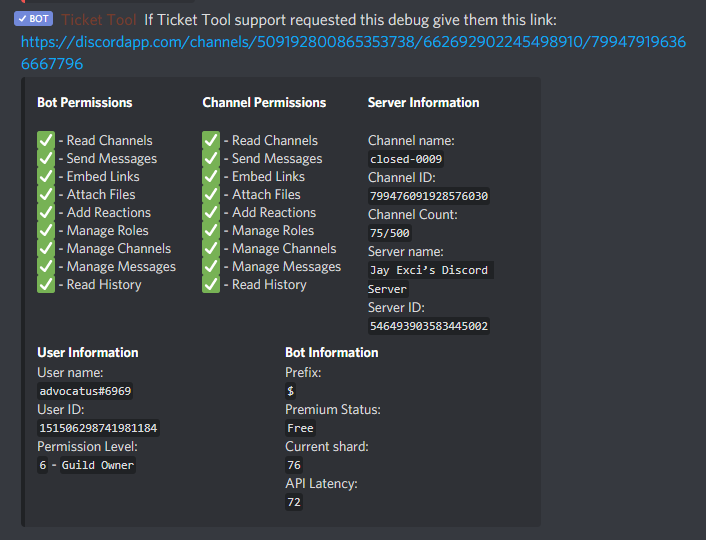
Add attachments, embed links, view channel, read history, send messages
That’s all.
cinder violet
Ok the Discord side or the dashboard side?
spare gale
What he said.
cinder violet
It has all these permissions.
spare gale
...
cinder violet
 radiant moss
and make sure you have the right channel on the dashboard
cinder violet
Saved what?
cinder violet
I haven't changed anything on the dashboard.
spare gale
...
cinder violet
Not for at least a few days, probably a week.
radiant moss
did this just start happening?
spare gale
You should select a channel where the transcripts should be placed in...
It doesn’t just places them in a channel named transcripts or something...
cinder violet
I was able to save the transcript for the first ticket opened, which was a test. I've made changes to the panels since but nothing permissions related, I believe, and it only worked the first time.
I have a transcript channel selected.
Let me check the permissions there, sorry.
spare gale
If it worked the first time, and then it didn’t, it isn’t a ticket tool issue... I suggest checking your discord channel permissions and your dashboard settings.
You should check the channel permissions of the channel the bot shouls post the transcripts in.
cinder violet
Got it, thanks.
spare gale
You’re welcome 🙂
tribal cedar
I have an idea but the discord server Im in has quite a few ppl so I want to ask if its possible first before I proceed
To do with my previous query.
If I do 2 channels for 2 different panels one for one server and one for another with different reactions for the category names in the ticket name... I believe thats a way to accomplish what I need. My question is can I do the $panel command in the 2 different channels like $panel 1 2 3 and $panel 4 5 6 in another?
radiant moss
tribal cedar
If I do 2 channels for 2 different panels one for one server and one for another...
I would assume yes as long as they are different panels
tribal cedar
Gotcha got it half done 2 with 7 categories each but tired now thanks!
wooden zinc
Does anyone know where I can change the max amount of tickets available to be opened at once? It only lets me open 4 at once currently
upper flower
$help limit
humble sequoiaBOT
How to set a ticket limit
A ticket limit may be set per panel to prevent users from spamming tickets. By default this limit is set to 3. Once a user hits this limit the bot will notify the users that they reached the limit.
To set a ticket limit go to the Dashboard -> Panel Configs -> Settings -> General Options -> Ticket Limit
 vale shard
is there any ways to change a ticket to another panel while it's opened?
split crane
why the bot is disconecting so much?
radiant moss
split crane
why the bot is disconecting so much?
wdym?
split crane
radiant moss
wdym?
In my server the bot is offline idk why
and last day the same happened too
humble sequoiaBOT
How to fix Ticket Tool not responding
If ticket tool is not responding, please follow these troubleshooting steps:
Check Ticket Tool's permissions
Make sure that Ticket Tool can read and write in the channel you are attempting to run commands in. Run the command @Ticket Tool#4843 debug to see Ticket Tools list of permissions in that given channel.
Check Ticket Tool's prefix
Make sure you're using the correct prefix for Ticket Tool, Ticket Tools default prefix is $ Run the command @Ticket Tool#4843 debug to see Ticket Tools prefix for your server
Check if Ticket Tool is offline
If ticket tool is offline please contact Ticket Tool support with your server ID so we can fix it asap.
spare gale
@split crane
radiant moss
split crane
In my server the bot is offline idk why
put a ticket in i would suggest #🎫│make-a-ticket
 golden slate
 narrow belfry
hi, can i set times between the bot should be active and the bot shouldnt be active
 hollow basin
Hello! Can someone direct me to the website?
humble sequoiaBOT

 odd trellis
if i do $transript it will says: transcript command is limited to tickets only for non premium servers
but i don't even have premium
can someone help?
upbeat palm
narrow belfry
hi, can i set times between the bot should be active and the bot shouldnt be act...
No.
upbeat palm
odd trellis
if i do $transript it will says: transcript command is limited to tickets only f...
Your reading it wrong. It means you can't use $transcript and make it go to any other channels besides the ticket channel without premium
odd trellis
well okay. But if i do $close nothing will happen
@upbeat palm
is that an bug or something?
 proper abyss
Is there a way to buy premium without credit card ? Thanks
humble sequoiaBOT
Votes
Current Votes: 36
Lifetime Votes: 36
Linked Votes: 32
Vote Links
Linking Info
Linked User: 480779413311455252
You can give your future votes to another user by linking with that user.
To link use $vote link (@user or userId)
To unlink use $vote unlink
Redeeming
Each vote is worth 12 hours of premium and can be redeemed once you have atleast 6 votes.
Your current votes are worth 18 days, 0h, 0m
To redeem your current votes use $vote redeem
spare gale
You can also vote on top.gg
Also, be sure to first link by doing $vote link 795311495595687957 (This is already your User-ID)
@proper abyss
solid stream
You don't need to link yourself
That's only to have other people like your admins to send you votes.
$vote link 279639060996292609
humble sequoiaBOT
You can't link to yourself.. sillypants. =)
humble sequoiaBOT
Linked to user: 480779413311455252
solid stream
$vote unlink
humble sequoiaBOT
Unlinked
solid stream
Who said you did?
solid stream
Were you linked to another user?
spare gale
No
humble sequoiaBOT
Votes
Current Votes: 17
Lifetime Votes: 100023
Linked Votes: 1337
Vote Links
Linking Info
Linked User: Not Linked
You can give your future votes to another user by linking with that user.
To link use $vote link (@user or userId)
To unlink use $vote unlink
Redeeming
Each vote is worth 12 hours of premium and can be redeemed once you have atleast 6 votes.
Your current votes are worth 8 days, 12h, 0m
To redeem your current votes use $vote redeem
humble sequoiaBOT
Unlinked
spare gale
$vote
humble sequoiaBOT
Votes
Current Votes: 36
Lifetime Votes: 36
Linked Votes: 32
Vote Links
Linking Info
Linked User: Not Linked
You can give your future votes to another user by linking with that user.
To link use $vote link (@user or userId)
To unlink use $vote unlink
Redeeming
Each vote is worth 12 hours of premium and can be redeemed once you have atleast 6 votes.
Your current votes are worth 18 days, 0h, 0m
To redeem your current votes use $vote redeem
solid stream
$vote
humble sequoiaBOT
Votes
Current Votes: 21
Lifetime Votes: 100027
Linked Votes: 1337
Vote Links
Linking Info
Linked User: Not Linked
You can give your future votes to another user by linking with that user.
To link use $vote link (@user or userId)
To unlink use $vote unlink
Redeeming
Each vote is worth 12 hours of premium and can be redeemed once you have atleast 6 votes.
Your current votes are worth 10 days, 12h, 0m
To redeem your current votes use $vote redeem
spare gale
$vote
humble sequoiaBOT
Votes
Current Votes: 37
Lifetime Votes: 37
Linked Votes: 32
Vote Links
Linking Info
Linked User: Not Linked
You can give your future votes to another user by linking with that user.
To link use $vote link (@user or userId)
To unlink use $vote unlink
Redeeming
Each vote is worth 12 hours of premium and can be redeemed once you have atleast 6 votes.
Your current votes are worth 18 days, 12h, 0m
To redeem your current votes use $vote redeem
humble sequoiaBOT
Votes
Current Votes: 39
Lifetime Votes: 39
Linked Votes: 32
Vote Links
Linking Info
Linked User: Not Linked
You can give your future votes to another user by linking with that user.
To link use $vote link (@user or userId)
To unlink use $vote unlink
Redeeming
Each vote is worth 12 hours of premium and can be redeemed once you have atleast 6 votes.
Your current votes are worth 19 days, 12h, 0m
To redeem your current votes use $vote redeem
solid stream
The sites are often slow, like top.gg often just never sends the votes.. it's one of the reasons we stopped using them (that and the new video ads they had for a bit)
spare gale
Ah... Because I had the linked votes 😂
spare gale
solid stream
The sites are often slow, like top.gg often just never sends the votes.. it's on...
Yeh. I was informed.
I still vote on top.gg...
solid stream
That's all cool
spare gale
Just to get extra votes 
spare gale
I have collected 19 days of premium. Waiting to get a month, or if I can, 3 months...
You cheated.
You made the bot set your linked votes to 1500 
solid stream
All my vote stats are wonky.. I played with them manually lol
@spare gale check your votes

spare gale
$vote
humble sequoiaBOT
Votes
Current Votes: 83
Lifetime Votes: 83
Linked Votes: 32
Vote Links
Linking Info
Linked User: Not Linked
You can give your future votes to another user by linking with that user.
To link use $vote link (@user or userId)
To unlink use $vote unlink
Redeeming
Each vote is worth 12 hours of premium and can be redeemed once you have atleast 6 votes.
Your current votes are worth 41 days, 12h, 0m
To redeem your current votes use $vote redeem
spare gale
$vote
humble sequoiaBOT
Votes
Current Votes: 100
Lifetime Votes: 100
Linked Votes: 32
Vote Links
Linking Info
Linked User: Not Linked
You can give your future votes to another user by linking with that user.
To link use $vote link (@user or userId)
To unlink use $vote unlink
Redeeming
Each vote is worth 12 hours of premium and can be redeemed once you have atleast 6 votes.
Your current votes are worth 50 days, 0h, 0m
To redeem your current votes use $vote redeem
spare gale

 rustic drift
Will jemand mit mir among us zocken
 robust sandalBOT
rustic drift
Will jemand mit mir among us zocken
robust sandalBOT
rustic drift
Will jemand mit mir among us zocken
 LEON
LEON
Does anyone want to gamble with me among us
 German (de) → English (en)
forest goblet
German (de) → English (en)
forest goblet
nein
robust sandalBOT
forest goblet
nein
 2x2Master
No
German (de) → English (en)
 hybrid vessel
for some reason it doesnt let anyone in my server create a ticket not even server owner
anyone know why or how to fix?
vapid steeple
What happens with the reaction? If you click on the reaction:
- Does the reaction stay or
- Will the reaction bw removed by the bot?
(he left the server)
solid stream
The reactions are auto removed when a new user reacts, sometimes discord bugs out and doesn't, but the bot tries to do it each time.
have a look at #🎫│make-a-ticket and try the demo
vapid steeple
I wanted to ask if the bot works like "did they delete the panel" or sth like is.
If the reaction isn't removed, there is another problem like bot off etc.
solid stream
You can always resend the panel anytime since the configs are all saved.
vapid steeple
Yes
solid stream
I'm not sure I understand the question .
vapid steeple
You don't get my point xd
solid stream

vapid steeple
vapid steeple
What happens with the reaction? If you click on the reaction:
1) Does the reacti...
this was an answer to a question above
vapid steeple
hybrid vessel
for some reason it doesnt let anyone in my server create a ticket not even serve...
an answer to this question
solid stream
if they can't create it's possible they blacklisted everyone role or they could be at max channels(discord limit).. or.. early this morning we had an issue with 2-3 shards and they went offline.
vapid steeple
yeah, thats what I wanted to find out if the bot removes the reaction or if does not
jade topaz
$help faq
humble sequoiaBOT
====== FAQ ======
If a question interests you run the command to see the answer.
Q: What is the prefix and how do I change it?
A: $help prefix
Q: How do I let my support team see into a ticket?
A: $help support
Q: How do I make a ticket ping my support when it's created?
A: $help ping
Q: How do I set a transcript channel?
A: $help transcript
Q: How do I limit the number of tickets a user can create?
A: $help limit
Q: How do I set what category tickets are created in?
A: $help category
Q: How do I set what category tickets are moved to when closed?
A: $help closed
Q: How do I set a custom reaction?
A: $help reaction
Q: How do I set the permissions for the tickets?
A: $help perms
Q: How do I create a panel?
A: $help panel
Q: How do I get the panel in my discord?
A: $help send
Q: How do I add or remove users from a ticket?
A: $help add
Q: A panel of mine won't update with the new settings, How do I fix it?
A: $help update
Q: Ticket Tool isn't responding to my commands, How do I fix it?
A: $help offline
Q: How does the claim command work?
A: $help claim
jade topaz
$help premium
humble sequoiaBOT
Help Options
$help commands - Information on commands
$help setup - Information on bot setup
$help faq - Frequently asked questions
 inland otter
$help ticket
humble sequoiaBOT
Help Options
$help commands - Information on commands
$help setup - Information on bot setup
$help faq - Frequently asked questions
inland otter
$help setup
humble sequoiaBOT
Setting up Ticket Tool
Visit the docs for setup info
General Setup
jade topaz
how does ticket panel exactly look like
rotund kite
jade topaz
how does ticket panel exactly look like
#🎫│make-a-ticket it looks like that.
rotund kite
inland otter
$help setup
#655832608835502080 please
jade topaz
ok thx
 strange glen
$help setup
humble sequoiaBOT
Setting up Ticket Tool
Visit the docs for setup info
General Setup
 slim prairie
How to i make a ticket logs?
humble sequoiaBOT
How do I save transcript to a channel?
To save transcripts to a channel go to the Dashboard -> Panel Configs -> Settings -> Logging Options -> Transcript Channel
 hushed dagger
$help support
humble sequoiaBOT
How to let support team see into a ticket
About support roles
A support role lets your support team see into tickets with out having to add them manually to each and every ticket.
You can add as many support roles as you like per panel.
NOTE that the way discord works all admins can see into tickets regardless of this.
How to set a support role
To set a Support role go to the Dashboard -> Panel Configs -> Settings -> General Options -> Support Team Roles.
NOTE that the support role will not be able to see into tickets that are already created..
mild island
Hello. You are right, that's the wrong place to ask. There are many developmemt Discord Server where you can ask your questions
vapid mauve
mild island
Hello. You are right, that's the wrong place to ask. There are many developmemt ...
Thanks for the reaction 👌🤘
 stark kite
hello, the $ panel command no longer works in my discord. Anyone know what this will come from?
humble sequoiaBOT
If the bot is not working properly, try the following steps:
-
Run the $debug command in your server, to check the permissions of the bot. Send the link you get to us.
-
Check if you have any Blacklisted Roles in your Server Configs. Any roles listed there will not be able to use the bot / create tickets.
-
While you're in your Server Configs , make sure that you don't have the premium bot enabled, without actually having premium or the bot on the server.
These are the most common issues. If your problem still exists, you can go to our Troubleshooting Page for more fixes.
upbeat palm
@rustic drift Nein, dieser Kanal ist nicht dafür.
robust sandalBOT
upbeat palm
<@!708694679973265458> Nein, dieser Kanal ist nicht dafür.
 Akrav
Akrav
@rustic drift No, this channel is not for it.
German (de) → English (en)
upbeat palm
It's meant to be that google translate has failed me but whatever
spare gale
/de This channel is not meant for it.
robust sandalBOT
Dieser Kanal ist nicht dafür gedacht.
English (en) → German (de)
 upbeat palm
I mean yeah
forest goblet
Microsoft translator works better than the google one
jade topaz
no
spare gale
Well... 
 narrow sierra
hi guys I must be dumb - how can users create a ticket without using the panel?
I was assuming they could just do something like /create anywhere in the server... or do they always need to go to the channel where the panels are located first?
 sonic adder
Are there APIs for this bot?
upper flower
Not public
sonic adder
what programming language did you use for the bot?
upper flower
Discord.js
 severe hearth
is it possible to have the bot @ a support member whne a ticket is created?
jade topaz
Hey
how do I make the ticket bot have more than one reaction emote, and is it possible in the free version
upper flower
$help ping
humble sequoiaBOT
How to make Ticket Tool ping a role
To make ticket tool ping a role when a ticket is opened, go to the Dashboard -> Panel Configs -> Settings -> Ticket Options -> Ticket Message -> Message Text and do this:
{@Role name} This is case sensitive and the role must have @mentions enabled
upper flower
^^ @severe hearth
severe hearth
oh awesome thanks!
upper flower
Not at this time.
By increasing the ticket limit
or if you want to open a ticket on behalf of someone
 gilded dirge
Hi
Can anyone help me find a planet similar to the earth?
radiant moss
gilded dirge
Hi
Can anyone help me find a planet similar to the earth?
Have you tried googling any?
jade topaz
@gilded dirge please dont jock here
if you need help with @pseudo glen we will help you with it
gilded dirge
Sorry
But I asked that in general and they told me to come here
jade topaz
yah i though you need help with @pseudo glen
gilded dirge
radiant moss
Have you tried googling any?
I searched on reddit, I didn't search on Google
gilded dirge
jade topaz
yah i though you need help with <@!557628352828014614>
It's not
Sorry
jade topaz
ok then back to #💬│general-chat
 urban flame
Hello I have an issue with my server and the ticket tool
Randomly the reactions have disappeared, and when I try to resend the pannel the emoji to create a ticket doesnt pop up
forest goblet
Make sure Ticket tool has the permission to add reactions
urban flame
it does
pale pilot
Did you change the reaction emoji? @urban flame
urban flame
I have not, all reactions randomly disappeared
pale pilot
Do you see the emoji I just added to your message?
urban flame
yes
pale pilot
Okay. Run the $debug command in your server please
urban flame
alright
spare gale
Nothing to do here 😢
pale pilot
😦
radiant moss
@jade topaz run $debug and make sure it has manage channels perms
devout musk
can i block permission to closing ticket for users? Not kick them from channel after click 🔒 but take away the possibility of clicking that reaction
?
radiant moss
yes
rotund kite
Oh you mean only staff can close the ticket?
radiant moss
go ahead and inv
rotund kite
Do $debug in your server, and then we can see what is the issue.
devout musk
Only click close reaction for staff
rotund kite
Panel confirms > your panel > reaction options > close ticket reaction settings > support team only enabled @devout musk
^^
 crude sinew
how do you gift ticket tool to someone?
crude sinew
tyy
humble sequoiaBOT
Help Options
$help commands - Information on commands
$help setup - Information on bot setup
$help faq - Frequently asked questions
How to redeem premium
To redeem your premium key, go to the dashboard, select your server, then click "Redeem Premium" under the server's icon and name.
 rotund kite
Yes, that, you can tell whoever you are gifting to do that.
spare gale
$vote
humble sequoiaBOT
Votes
Current Votes: 100
Lifetime Votes: 100
Linked Votes: 32
Vote Links
Linking Info
Linked User: Not Linked
You can give your future votes to another user by linking with that user.
To link use $vote link (@user or userId)
To unlink use $vote unlink
Redeeming
Each vote is worth 12 hours of premium and can be redeemed once you have atleast 6 votes.
Your current votes are worth 50 days, 0h, 0m
To redeem your current votes use $vote redeem
spare gale
OOPS wrong channel, my bad. I'm so sorry.
 karmic heath
Is it possible to make tags not case sensitive? Like if the first letters caps or not?
humble sequoiaBOT
Don't see your server in the dashboard?
You will possibly need to relog. Look below to see steps on how to relog.
How to relog the Dashboard.
First, you will need to go to the dashboard. Once your there, click on your avatar on the top right. after you clicked it, you will see button that says Logout. You must click that. Once you have logged out, you can log back in.
 tawdry sage
Is there any way to stop the "everyone" role from seeing the tickets even when they're locked?
 wary jay
I need help logging into my account to connect with Discord. For some odd reason it doesn't let me sign in.
 cyan epoch
i want to ping a role, how?
rotund kite
cyan epoch
i want to ping a role, how?
$help ping
humble sequoiaBOT
How to make Ticket Tool ping a role
To make ticket tool ping a role when a ticket is opened, go to the Dashboard -> Panel Configs -> Settings -> Ticket Options -> Ticket Message -> Message Text and do this:
{@Role name} This is case sensitive and the role must have @mentions enabled
cyan epoch
alright thank you
rotund kite
wary jay
I need help logging into my account to connect with Discord. For some odd reason...
Try using incognito mode on your browser.
rotund kite
tawdry sage
Is there any way to stop the "everyone" role from seeing the tickets even when t...
They should be able to, otherwise, edit user permissions when viewing closed or opened tickets.
 past kelp
Hey guys. What could be the reason for Ticket Tool not moving closed tickets to its supposed category? It was working a few months ago, now we're using it actively again and nothing it happening.
radiant moss
past kelp
Hey guys. What could be the reason for Ticket Tool not moving closed tickets to ...
Is there 50 channels in the category? If so that is the mix
Max*
inland otter
Dd
 fair ingot
Why it give me like this
 winged lynx
Cant understand how works Channel and Channel_name, when i creating Tag. and how i should write to make a tag to a certain channel
 raw field
I accidently deleted one channel and after that the ticket tool didnt work
 fickle linden
Yesterday, I subscribed for Premium, and configured the bot.
I created the panel, the ticket, sent panel to the desired channel.
Does not work.
Supposedly, I should be able to use ?help faq
...but this doesn't work either
I seriously don't know whether somehow I made a configuration error,
...or whether Ticket Tool is busted.
jade topaz
hi there, how do i change the bot from 1 server to another?
 graceful halo
Is there a "Known Issues" before I report stuff that's already known?
spare gale
Uhm... What do you mean @graceful halo
 shrewd musk
 half plover
bot offline?
graceful halo
spare gale
Uhm... What do you mean <@398888228045717515>
Stuff like
- permissions rarely not updating completely when claiming
- tickets rarely unable to get deleted with
*delete: Runs countdown, transcripts, and stops
jade topaz
I don't know how to activate the ticket bot
half plover
just me? or is it known offline? just to make sure i didnt fck up 😄
upper flower
If your bot is offline. Please make a ticket and ping me
spare gale
graceful halo
Stuff like
- permissions rarely not updating completely when claiming
- tickets ...
No. There are no issues. Be sure to make a ticket if you find any of these issues occur.
 elder zealot
Is there a way to make it where only certain roles can close tickets?
spare gale
Yes
Dashboard - server - panels - settings - reactions - $close (edit reaction) - allowed roles
@elder zealot
elder zealot
sweet
spare gale
You’re welcome 🙂
 cyan veldt
how do i make it so every new ch for tickets will have a permission i want
like lets say X role doesnt normally have sending photos perm but for tickets i wanna give them
pale pilot
$help perms
humble sequoiaBOT
How to set the permissions for tickets
To set a change permissions go to the Dashboard -> Panel Configs -> Settings -> Permission Options
 hollow kernel
Hey, somehow my Mods don't have any permissions. For example closing the ticket
 graceful pilot
I'm doing the command to re-open a ticket, but it won't re-open.
 gritty bay
My server wont show up.
 dusky helm
For some reason, when i go to the manage servers page, I can invite the bot to my server. However, after the bot's there, I can no longer seem to manage it. The server doesn't show up on the manage servers page at all.
figured it out
hollow kernel
gritty bay
My server wont show up.
You need the Admin permission
gritty bay
hollow kernel
You need the Admin permission
what do you mean
hollow kernel
Need to be checked
spare gale
@gritty bay If your server is not showing up, try re-logging in.
gritty bay
ok
spare gale
@gritty bay Are you having a dashboard role or are you the server owner?
spare gale
hollow kernel
Hey, somehow my Mods don't have any permissions. For example closing the ticket
They should be able to close the ticket if you saved those settings...
spare gale
gritty bay
i am second highest
So you have administrator permission?
gritty bay
yes
spare gale
Alright...
As I was informed earlier (just remembered) I was told that your role should be a dashboard role in order to manage the server.
So ask the server owner to add your role as a dashboard role in the server settings
humble sequoiaBOT
spare gale
hollow kernel
You need the Admin permission
No you don’t. Developer told me that the role should be set as a Dashboard role on the dashboard.
spare gale
graceful pilot
I'm doing the command to re-open a ticket, but it won't re-open.
Are you sure you have permission to run that command?
hollow kernel
In order to invite the bot?
spare gale
No. To manage the server...
spare gale
gritty bay
My server wont show up.
You were referring to this message.
He didn’t asked to invite the bot. He is not the owner of the server, so the owner should set his role as a dashboard role. @hollow kernel
He said his server isn’t showing up, which is because he don’t have a dashboard role 😉
hollow kernel
Calm down dude
radiant moss
If they have admin they can access the dashboard
spare gale
@gritty bay You can also do it by having the administrator permission on Discord.
 thick condor
How do you have like pre set emoji
spare gale
@thick condor You can set it. But it requires premium.
thick condor
Oh thanks
humble sequoiaBOT
Ticket Tool Premium
Get premium at https://tickettool.xyz/premium
Manage your subscriptions at https://tickettool.onfastspring.com/account
Why Premium?
Premium lets you customize the bot just how you want it. It also helps keep the bot running.
radiant moss
$help reaction
humble sequoiaBOT
How to change reactions
To set a custom reaction Dashboard -> Panel Configs -> Settings -> Reaction Options -> <Reaction to change> -> Reaction

NOTE you need premium to do this.
humble sequoiaBOT
Setting up Ticket Tool
Visit the docs for setup info
General Setup
 indigo lichen
yeah but there is no settings tab
queen hinge
Top Right Corner is a Login Button, Login and Try it out by yourself.
indigo lichen
i am logged in
queen hinge
Then Click on the Server you want to Manage.
indigo lichen
ok thanks
queen hinge
No Probs, if you need any help, just ask
jade topaz
Is there arab support?
 wicked arrow
I need help
jade topaz
@jade topaz #🎫│make-a-ticket
 paper basin
Hello, I have a premium code for ticket tool, where do I claim it?
humble sequoiaBOT
How to redeem premium
To redeem your premium key, go to the dashboard, select your server, then click "Redeem Premium" under the server's icon and name.
paper basin
ok thx
jade topaz
np
so i dont know if this is a bug but after closing a ticket, members can still be in the channel and talk...
pale pilot
$help perms
humble sequoiaBOT
How to set the permissions for tickets
To set a change permissions go to the Dashboard -> Panel Configs -> Settings -> Permission Options
pale pilot
check this
spare gale
jade topaz
so i dont know if this is a bug but after closing a ticket, members can still be...
Disable the Send Messages one.
jade topaz
spare gale
Disable the **Send Messages** one.
oh right i have it set up so that its under one category so i'd need to seperate right?
pale pilot
the category has nothing to do with that
spare gale
jade topaz
oh right i have it set up so that its under one category so i'd need to seperate...
It’s within the ticket panel settings. Not the category settings.
jade topaz
oh okay thanks
 rigid elm
hi support
spare gale
Hi
 fast wigeon


