#🆘│community-support
1 messages · Page 282 of 1
 primal path
 cloud perch
i need help
i tried the premium trail and i changed the open ticket reaction the trail is finished and i can't open ticket
help please
 humble sequoiaBOT
Inviting and Enabling Premium Bot
The first thing you will need to do is invite the premium bot, an invite can be found here
Once the bot is in your server we will head to the dashboard and manage your server. When you are managing your server, you want to head into "Server Configs" then click the drop down menu under "Select the bot you would like to use on this server" then click "Ticket Tool#6207" and then save.
 pale pilot
Disable the premium bot @cloud perch
 digital lotus
Can we integrate this ticket tool bot under another bot?
pale pilot
no
cloud perch
pale pilot
Disable the premium bot <@!600653750876766220>
how ?
humble sequoiaBOT
Inviting and Enabling Premium Bot
The first thing you will need to do is invite the premium bot, an invite can be found here
Once the bot is in your server we will head to the dashboard and manage your server. When you are managing your server, you want to head into "Server Configs" then click the drop down menu under "Select the bot you would like to use on this server" then click "Ticket Tool#6207" and then save.
humble sequoiaBOT
If the bot is not working properly, try the following steps:
-
Run the $debug command in your server, to check the permissions of the bot. Send the link you get to us.
-
Check if you have any Blacklisted Roles in your Server Configs. Any roles listed there will not be able to use the bot / create tickets.
-
While you're in your Server Configs , make sure that you don't have the premium bot enabled, without actually having premium or the bot on the server.
These are the most common issues. If your problem still exists, you can go to our Troubleshooting Page for more fixes.
humble sequoiaBOT
Inviting and Enabling Premium Bot
The first thing you will need to do is invite the premium bot, an invite can be found here
Once the bot is in your server we will head to the dashboard and manage your server. When you are managing your server, you want to head into "Server Configs" then click the drop down menu under "Select the bot you would like to use on this server" then click "Ticket Tool#6207" and then save.
 serene escarp
@pale pilot
 radiant moss
Please dont ping support team
serene escarp
Okay
pale pilot
@digital lotus use the $id command to find out the ID and insert that in the dashboard. Example: $id 
humble sequoiaBOT
<:premium:662032717906444329>
digital lotus
Thank you
 icy galleon
commands pls
radiant moss
$help
humble sequoiaBOT
Help Options
$help commands - Information on commands
$help setup - Information on bot setup
$help faq - Frequently asked questions
radiant moss
@icy galleon
icy galleon
k
 jagged beacon
my servers not showing up on my dashboard
humble sequoiaBOT
Don't see your server in the dashboard?
You will possibly need to relog. Look below to see steps on how to relog.
How to relog the Dashboard.
First, you will need to go to the dashboard. Once your there, click on your avatar on the top right. after you clicked it, you will see button that says Logout. You must click that. Once you have logged out, you can log back in.
 mild island
@jagged beacon ⤴️
 umbral mural
hi guys i need to talk with Arabs support plez
 glass otter
digital lotus
glass otter
digital lotus
Is it possible to automatically move the user to the opened ticket channel after he/she has reacted to the create ticket?
 solid stream
You would want to ping them
otherwise there's no option to force them into that channel.
 dusk robin
With the ticket limit is it the the amount of tickets they can open per day or is it forever. So if the open it once and the ticket limit is set 1, then they can never open another one?
solid stream
The limit is: currently open tickets
so they can only have 1 ticket open at a time
(Per panel)
dusk robin
oh ok thank you
 cyan epoch
is there a way for when the ticket opens to ping a role beside just the user? like i want it to say: @staff will be with you shortly, or is that a premium feature?
 inner aurora
$help ping
humble sequoiaBOT
How to make Ticket Tool ping a role
To make ticket tool ping a role when a ticket is opened, go to the Dashboard -> Panel Configs -> Settings -> Ticket Options -> Ticket Message -> Message Text and do this:
{@Role name} This is case sensitive and the role must have @mentions enabled
 cyan epoch
alright thanks mate
hmm small bug
every time i go into the panel, it logs me to the servers, where i invite/manage
mkay ive reached the point to edit it, but the websites buggy, ill update if anything goes on
 manic cradle
Hi got a problem with !add @user to my tickets. I cant mention users that cant see the ticket in the first place and the bot only gives me a Wrong syntax error? Have i screwed up a discord server setting that i am not able to mention users in channels they cant see and if so where is that option i cant seem to find it
 fluid abyss
Is there away I can make it so that new a ticket is made everyone can see they ticket but can’t send messages useless their the one how made it. I want to use this for a bug report system
 hybrid dagger
manic cradle
Hi got a problem with !add @user to my tickets. I cant mention users that cant s...
hybrid dagger
manic cradle
Hi got a problem with !add @user to my tickets. I cant mention users that cant s...
You need to copy their full tag, for example: my full tag is @Darkedu#1137 then you can tag people that do not see the channel.
glass otter
What do you say with "not work" ?
humble sequoiaBOT
If the bot is not working properly, try the following steps:
-
Run the $debug command in your server, to check the permissions of the bot. Send the link you get to us.
-
Check if you have any Blacklisted Roles in your Server Configs. Any roles listed there will not be able to use the bot / create tickets.
-
While you're in your Server Configs , make sure that you don't have the premium bot enabled, without actually having premium or the bot on the server.
These are the most common issues. If your problem still exists, you can go to our Troubleshooting Page for more fixes.
 midnight narwhal
If you purchase Premium for the bot is it for unlimited servers or is there a limit?
glass otter
It's for only one server I think
humble sequoiaBOT
Help Options
$help commands - Information on commands
$help setup - Information on bot setup
$help faq - Frequently asked questions
 split gorge
$help commands
humble sequoiaBOT
() = optional
[] = required
*==================================
Ticket Commands
==================================*
_ _
`$add [User] (channel)`
Description: Adding additional users to a ticket
Aliases: none
`$remove [User] (channel)`
Description: Removing users from a ticket
Aliases: none
`$close`
Description: Closing tickets
Aliases: none
`$open`
Description: Opening closed tickets
Aliases: none
`$delete`
Description: Deleting tickets
Aliases: none
`$rename`
Description: Renaming tickets/channels
Aliases: none
`$transcript (send channel)`
Description: Creating transcripts
Aliases: none
`$new (user) (reason)`
Description: Creating tickets in a monitored channel (when command style is enabled)
Aliases: none
`$claim`
Description: Claiming tickets (when claim is enabled)
Aliases: "unclaim"
_ _
*==================================
General Commands
==================================*
_ _
`$help (Help Options)`
Description: Help Command
Aliases: none
`$debug`
Description: Debuging issues with running Ticket Tool
Aliases: none
`$id (@role/@user/#channel/emoji)`
Description: Converting roles, users, channels and emojis to ID
Aliases: "getid"
`$permlevel`
Description: Checking permission level with Ticket Tool
Aliases: "level"
`$ping`
Description: Checking response time with discord api
Aliases: none
`$vote (link | unlink | redeem) (user)`
Description: Earn premium by voting on top.gg or Discord.boats
Aliases: "votes"
 opaque estuary
why can everyone in my server can see the tiket that someone makes
solid stream
$help support
humble sequoiaBOT
How to let support team see into a ticket
About support roles
A support role lets your support team see into tickets with out having to add them manually to each and every ticket.
You can add as many support roles as you like per panel.
NOTE that the way discord works all admins can see into tickets regardless of this.
How to set a support role
To set a Support role go to the Dashboard -> Panel Configs -> Settings -> General Options -> Support Team Roles.

NOTE that the support role will not be able to see into tickets that are already created..
Don't see your server in the dashboard?
You will possibly need to relog. Look below to see steps on how to relog.
How to relog the Dashboard.
First, you will need to go to the dashboard. Once your there, click on your avatar on the top right. after you clicked it, you will see button that says Logout. You must click that. Once you have logged out, you can log back in.
 limber egret
opaque estuary
why can everyone in my server can see the tiket that someone makes
limber egret
opaque estuary
why can everyone in my server can see the tiket that someone makes
LOOK UP
 hasty musk
Hello, so I am unable to see when I create a ticket, I react to the panel, but nothing happens. I have channels that people can use the Panels in , but neither of the panels I have work
glass otter
Have @pseudo glen the create channel permissions ? Run $debug
 tall hill
 vernal wagon
Why Is Giving This Error Can Help
humble sequoiaBOT
If Ticket Tool support requested this debug give them this link:
https://discordapp.com/channels/509192800865353738/662692902245498910/786165033641705473
Bot Permissions ឵ ឵឵ ឵ ឵឵ ឵ ឵឵ ឵ ឵឵
✅ - Read Channels
✅ - Send Messages
✅ - Embed Links
✅ - Attach Files
✅ - Add Reactions
✅ - Manage Roles
✅ - Manage Channels
✅ - Manage Messages
✅ - Read History
Channel Permissions ឵ ឵឵ ឵ ឵឵ ឵ ឵឵ ឵ ឵឵
✅ - Read Channels
✅ - Send Messages
✅ - Embed Links
✅ - Attach Files
✅ - Add Reactions
✅ - Manage Roles
✅ - Manage Channels
✅ - Manage Messages
✅ - Read History
Server Information ឵ ឵឵ ឵ ឵឵ ឵ ឵឵ ឵ ឵឵ ឵ ឵឵
Channel name:
community-support
Channel ID:
776680605517742090
Channel Count:
150/500
Server name:
Ticket Tool Support
Server ID:
509192800865353738
User Information ឵ ឵឵ ឵ ឵឵ ឵ ឵឵ ឵ ឵឵ ឵ ឵឵
User name:
Yujie#1237
User ID:
725680411694596136
Permission Level:
0 - User
Bot Information ឵ ឵឵ ឵ ឵឵ ឵ ឵឵ ឵ ឵឵ ឵ ឵឵
Prefix:
$
Premium Status:
Lifetime
Current shard:
1
API Latency:
77
 summer tinsel
vernal wagon
Why Is Giving This Error Can Help
summer tinsel
vernal wagon
Why Is Giving This Error Can Help
run $debug in your server
vernal wagon
@summer tinsel so how can i do that
summer tinsel
vernal wagon
<@!725680411694596136> so how can i do that
This is what it will look like when you do it in your server...
 rancid rampart
مميزات البريموم ؟
 civic surge
how to let bot ping someone ?
 upper flower
$help ping
humble sequoiaBOT
How to make Ticket Tool ping a role
To make ticket tool ping a role when a ticket is opened, go to the Dashboard -> Panel Configs -> Settings -> Ticket Options -> Ticket Message -> Message Text and do this:
{@Role name} This is case sensitive and the role must have @mentions enabled
civic surge
thx
upper flower
If you are trying to get it to ping a user, you would do
<@discordID>
Ex.
@upper flower
civic surge
thx a lot man
upper flower
Yup np
civic surge
🙂
 vivid depot
$help
humble sequoiaBOT
Help Options
$help commands - Information on commands
$help setup - Information on bot setup
$help faq - Frequently asked questions
vivid depot
$help setup
humble sequoiaBOT
Inviting Ticket Tool
The first thing you will need to do is invite the bot, an invite can be found here.
Once the bot is in your server we will head to the dashboard and create panel
A panel is used to configure each tickets settings and is were people react to make a ticket.
An example of a panel sent to a channel is shown below.

Creating a panel
To create a panel we are going to need to head over to the panel configs on the dashboard
Once at the dashboard we will need to click Create Panel
Enter a panel name (Fill in any optional settings you want)
Click Create Panel and your ready to get started with configuring your panel
An example of a creating a panel is shown below.

Sending a panel
Once you've created a panel on the dashboard you will need to send it to a channel using send on the dashboard
Select the channel you want your panel to be created in and click send.
For other questions checkout $help faq
An example of a sending a panel is shown below.

 pastel nimbus
i have a question is there anyone here
solid stream
maybe 
pastel nimbus
so I'm adding it to my server and when i make a ticket in the everyone role they don't get added to the ticket
like the person that made it doesn't get added
humble sequoiaBOT
How to make Ticket Tool ping a role
To make ticket tool ping a role when a ticket is opened, go to the Dashboard -> Panel Configs -> Settings -> Ticket Options -> Ticket Message -> Message Text and do this:
{@Role name} This is case sensitive and the role must have @mentions enabled
pastel nimbus
so when i make it on my other account it will make the ticket and tag me in it but you cant see the message, only the owner can
i might have figured it out hang on
 spare gale
Enable the Read Message History 😉
pastel nimbus
i fixed it thank you 🙂
digital lotus
Can I add someone outside the support role to the ticket created automatically? I see that {@Role Name} can mention a role but how can you add an individual automatically who does not have that support role? Also I know that $add [@User#1234] command can be used but it has to done manually. Is there a way to do it automatically?
solid stream
digital lotus
Can I add someone outside the support role to the ticket created automatically? ...
You want to add a single user to a ticket as a support member?
$help support
humble sequoiaBOT
How to let support team see into a ticket
About support roles
A support role lets your support team see into tickets with out having to add them manually to each and every ticket.
You can add as many support roles as you like per panel.
NOTE that the way discord works all admins can see into tickets regardless of this.
How to set a support role
To set a Support role go to the Dashboard -> Panel Configs -> Settings -> General Options -> Support Team Roles.
NOTE that the support role will not be able to see into tickets that are already created..
digital lotus
solid stream
You want to add a single user to a ticket as a support member?
I want to automatically add a single member who does not have support role.
solid stream
digital lotus
I want to automatically add a single member who does not have support role.
You're best option to do that is to create a role for that user and add that as a support team role.
digital lotus
solid stream
You're best option to do that is to create a role for that user and add that as ...
Okay. Thanks.
spare gale
pastel nimbus
i fixed it thank you 🙂
You're welcome.
 jade topaz
I need help
spare gale
jade topaz
I need help
With...
spare gale
0_0
jade topaz
send the script into the dms and saving it automatically when i close the ticket
How do I do that ?
spare gale
jade topaz
send the script into the dms and saving it automatically when i close the ticket
Premium function.
spare gale
Go to panel configs.
jade topaz
uhm
spare gale
Logging function.
 rapid coral
how do i change the embed color
spare gale
Logging Options
rapid coral
k
spare gale
What embed?
rapid coral
o
jade topaz
spare gale
Logging Options
then
rapid coral
like the embed of the bot
jade topaz
so DM transcript on ?
spare gale
And same for Auto Save Transcript. Enable it.
rapid coral
Jarvo how do i change the color of the embed for the ticket?
jade topaz
Both when closed right ?
rapid coral
honestly
spare gale
Because else you get them twice.
 vague fern
can someone help me set up the ticket bot? im needing it to be used in a support help room type of way
glass otter
$help setup
humble sequoiaBOT
Inviting Ticket Tool
The first thing you will need to do is invite the bot, an invite can be found here.
Once the bot is in your server we will head to the dashboard and create panel
A panel is used to configure each tickets settings and is were people react to make a ticket.
An example of a panel sent to a channel is shown below.
Creating a panel
To create a panel we are going to need to head over to the panel configs on the dashboard
Once at the dashboard we will need to click Create Panel
Enter a panel name (Fill in any optional settings you want)
Click Create Panel and your ready to get started with configuring your panel
An example of a creating a panel is shown below.
Sending a panel
Once you've created a panel on the dashboard you will need to send it to a channel using send on the dashboard
Select the channel you want your panel to be created in and click send.
For other questions checkout $help faq
An example of a sending a panel is shown below.
 worthy flint
How do i set up my premium ticket tool bot to have multiple reaction like #🎫│make-a-ticket
worthy flint
 wise crag
i cant close my ticket
wise crag
i cant close my ticket
press the lock icon
worthy flint
wise crag
i did
edit the ticket tool to allow you to use the commands
worthy flint
wise crag
permissions are 
 narrow obsidian
Hey y’all is there a way to change the color to the side when you click send a ticket like rn it showed up dark green but I would like to make it a different color <3
wise crag
bot role color
 rotund kite
narrow obsidian
Hey y’all is there a way to change the color to the side when you click send a t...
rotund kite
narrow obsidian
Hey y’all is there a way to change the color to the side when you click send a t...
You need premium for it.
Go to panel settings>the panel you are using>panel embed settings>color.
rotund kite
wise crag
permissions are <:TickYes_Night:721115302695403550>
do $debug
Send it over.
 willow mortar
how do i add my mods who dont have admin permss to view tickets?
 unborn viper
I made a ticket room and set it from the dashboard, but the emoji was not clicked. Help me ❤️
 lofty zodiac
Uhm hi ^^
So does somone have an idea how to automate tickets with reactions?
Like the ticket posts a small text and gives the user 5 things to chose from and when he reacts he gets a new automated text wich lets him chose things. It would help us to automate our support system by alot since we always have to ask the same questions to help people 😄
inner aurora
That’s a good idea that’s hard to implement in a user friendly way for the person who has to configure it
That being said we have a basic version of that with multi panels as seen in #🎫│make-a-ticket
humble sequoiaBOT
Multipanels are a premium feature that allow for a single panel with multiple reactions to open different tickets.
How to create a Multipanel
Premium users can combine multiple panels into one multipanel.
First of all you will need to assign a different Create Ticket Reaction for each Panel. Run $help reaction to learn how to do it.
Next, find the IDs of each panel you wish to combine. You can find them in your Panel Configs in the Dashboard
Next, send the multipanel to a channel using $panel [id1] [id2] {id3} ....
e.g. $panel 1 2 4 17 35 to combine panels 1, 2, 4, 17 and 35.
Up to 10 panels may be combined.
 lofty zodiac
oh uh nice thanks alot :3
lofty zodiac
A userfriendly version is kinda "easy".
My massive gimp skills made a visual, when you click settings it would take you to the same thing but with "Edit message Path 1-1" for example 😄 To keep an overview you could use a system to show where you are like with windows folders 😄
I bet you find a way <3
 craggy turtle
hey, i setup the bot, but i don't know how to enter text to my ticket. bot just says, "to oppen ticket react with 🔒 " I want to set text in ticket, eg. "ticket-0005. I want to make upgrade on this server, do you think is it ok admin?"
 fleet lantern
I'm not sure what you mean
do you want users to set a reason which is then put in the ticket they open?
craggy turtle
yes
fleet lantern
The normal way would be for them to react on the panel, which then creates the ticket channel. Then they can just post their question in there
craggy turtle
ok
craggy turtle
fleet lantern
The normal way would be for them to react on the panel, which then creates the t...
thank you
ill test it now...
fleet lantern
But if you really want, you can use https://docs.tickettool.xyz/en/dashboard/panel-configs/command-style-tickets and the reason variable to automatically put the ticket reason in the ticket message
TicketTool Docs
Dashboard > Panel Configs > Settings (of the desired panel) > Command Style Tickets
That means you can't use the reaction system to open tickets though, people would have to use $new Reason Here
craggy turtle
ok
inner aurora
@summer lantern using reactions or commands?
 analog thistleBOT
@jade topaz (! 3skr#9998) has been warned for: pinging and DMing staff
humble sequoiaBOT
Invite Ticket Tool
Bot Invite
Ticket Tool Support Server
This command only works in the Ticket Tool Support Server
inner aurora
Please don’t randomly DM people
jade topaz
thanks
 summer lantern
inner aurora
<@296155961230622720> using reactions or commands?
summer lantern
inner aurora
<@296155961230622720> using reactions or commands?
reactions mate
its okay i figured out what was wrong, thanks anyway! @inner aurora
mild island
 inner aurora
 restive sluice
What are the limitations of the bot if you dont have premium?
restive sluice
What are the limitations of the bot if you dont have premium?
there aren't really any limitations - you can have unlimited tickets and unlimited panels. However some of the customization and automation isn't available to non-premium servers
 inner aurora
That means that you can only create 10 tickets in a 1 minute timespan ; i.e. if you want to create an 11th ticket you'd have to wait a bit. The other 10 tickets can still be open and active
restive sluice
Oh, alright thank you.
jade topaz
When someone opens a ticket I want the bot to mention the guy who opened the ticket and I want it to mention a specific role, how can I do that ?
upper flower
$help ping
humble sequoiaBOT
How to make Ticket Tool ping a role
To make ticket tool ping a role when a ticket is opened, go to the Dashboard -> Panel Configs -> Settings -> Ticket Options -> Ticket Message -> Message Text and do this:
{@Role name} This is case sensitive and the role must have @mentions enabled
upper flower
@jade topaz
{user} pings person opened ticket.
{@rolename} to ping the role you would like
 heady spruce
sorry this panel has disappeared from the dashboard, how can i change the text under "Supporto" ?
 rustic apex
Am I able to have the channels open in a category instead of just opening by itself in no category?
rustic apex
Thanks!
 slow echo
Not a problem.
 drowsy dagger
One message removed from a suspended account.
One message removed from a suspended account.
One message removed from a suspended account.
One message removed from a suspended account.
humble sequoiaBOT
New command not monitoring this channel
To see what channel is monitored visit the Dashboard -> Panel Configs -> Settings -> Command Style Tickets -> Channel to monitor for command $new
digital lotus
The reactions are not appearing when I am sending the panel to the channel. They were appearing properly earlier.
radiant moss
digital lotus
The reactions are not appearing when I am sending the panel to the channel. They...
Please make sure it has the ability to add reactions.
digital lotus
radiant moss
Please make sure it has the ability to add reactions.
Thanks.
radiant moss
yep
 low ginkgo
How can I get premium ticket tool?
humble sequoiaBOT
Ticket Tool Premium
Get premium at https://tickettool.xyz/premium
Manage your subscriptions at https://tickettool.onfastspring.com/account
Why Premium?
Premium lets you customize the bot just how you want it. It also helps keep the bot running.
radiant moss
@low ginkgo
upper flower
low ginkgo
How can I get premium ticket tool?
We also have a coupon in #📣│server-news
 lean gust
i need help
 devout musk
Ok i need help
i think i dont understand something
i pay for Premium
for 1 month
but now...on tickettool webstie
when i try change some settings(need premium to do this) nothing happens
why its not work?
From mail:
IM stupid or its not work?
humble sequoiaBOT
How to redeem premium
To redeem your premium key, go to the dashboard, select your server, then click "Redeem Premium" under the server's icon and name.

 bright wagon
You need to redeem the premium key you got in your email.
 bright wagon
No problem
solid stream

spare gale
lean gust
i need help
With?
lean gust
spare gale
With?
not anymore
radiant moss
mhmmm
pale pilot
bold
radiant moss
very lol
 jade plaza
Hi
Hello, I have a problem with the Ticket Tool bot, how can I do to make others create Ticket?
Hello, I have a problem with the Ticket Tool bot, how can I do to make others create Ticket?
jade topaz
i have a question, so i know ticket tool has a 7 day trial for premium, if i were to use my 7 day premium, and create ticket panels with images in them(premium feature) will the images get deleted after my 7 day trial is over?
radiant moss
jade topaz
i have a question, so i know ticket tool has a 7 day trial for premium, if i wer...
Panels will stay the same i think but when tickets are created premium features will be removed.
 ionic current
So I am trying to do tickets for server verification and I would like a custom ticket name where it uses the user's discord tag, when I put {user} in the settings though, it uses the ID of the user instead of the discord tag. Is there a way to get the discord tag instead?
hybrid dagger
ionic current
So I am trying to do tickets for server verification and I would like a custom t...
With premium you can do those customizations.
ionic current
I have premium.
humble sequoiaBOT
Note: Remove The $ From The Variables
Supported Variables
{$server_name} -The server name
{$@Role Name} -The role name you want to mention (role names are case sensitive.)
{$empty} -Use this if you want to send nothing in a required field.
{$channel_name} -The channel name this message is used in/from
{$channel} -The channel this message is used in/from
{$user_nickname} -The users nickname (if set)
{$user_tag} -The users tag
{$user_name} -The users username
{$userfull} -The users username and usertag combined
{$user} -The users @user
{$user_icon} -The url for the users icon
{$ticket_limit} -The current ticket limit
{$panel_name} -The panels name
{$ticket_name} -The tickets name
{$ticket_category} -The category tickets are created in (if set)
{$count}The current count for tickets
{$ticket_channel} -The #channel for the ticket you created
{$ticket_user} -The @user who is assigned to the Ticket
{$ticket_user_nickname} -The nickname of the user who is assigned to the Ticket (if set)
{$ticket_user_tag} -The tag of the user who is assigned to the Ticket
{$ticket_user_name} -The username of the user who is assigned to the Ticket
Note: Remove The $ From The Variables
ionic current
Thank you ❤️
hybrid dagger
Np!
jade topaz
radiant moss
Panels will stay the same i think but when tickets are created premium features ...
Got it thx!
 pearl violet
hello, i am needing help. How do i create a cap limit for how many times the ticket can be used daily?
 leaden schooner
Is there a way to change the portrait of the bot with the premium package? I think I have seen a server that has done that
 glass frigate
Is there a way to enable "two-step open ticket"? We've had 10 tickets so far, all of them were misclicks.
 gusty thistle
fleet lantern
gusty thistle
fleet lantern
If you need help, #🎫│make-a-ticket
Don't ping staff here, like it says in the message right above where you pinged me 😛
 sonic mauve
jade topaz
sonic mauve
jade topaz
Could you do a command where it closes after a certain time like for example if I did $close 24h, it’ll automatically close within 24h
radiant moss
jade topaz
Could you do a command where it closes after a certain time like for example if ...
Not a thing atm
jade topaz
Alrighty
 dusty stirrup
Can someone tell me if I'm doing something wrong please... I can't for the life of me get this working...
radiant moss
dusty stirrup
Can someone tell me if I'm doing something wrong please... I can't for the life ...
Please make sure it has permission to type in the channel
 tired mango
devout musk
tired mango
devout musk
after u buy premium on your e-mail tickettool will send an Code
this code u must prescribe to redemee
humble sequoiaBOT
How to redeem premium
To redeem your premium key, go to the dashboard, select your server, then click "Redeem Premium" under the server's icon and name.
devout musk
Question about Claimed Ticket.
After Moderator claim ticket can i block writing on this chanel for others ranks?
only Person who create ticket and claime ticket can write on channel
hybrid dagger
devout musk
Question about Claimed Ticket.
After Moderator claim ticket can i block writing...
Under Claiming Options, Edit were it says, Other support members permissions.
hybrid dagger
hmmm, first big blue button.
hybrid dagger
devout musk
and yes person who claimed ticket can writhe
turn off send messages
hybrid dagger
wiat the claimed one cant write?
devout musk
Only person who claimed ticket can write. Thx
hybrid dagger
ahhh perfect.
jade topaz
Is. True you can get a couple hours of premium for upvoting ?
Is there a way to bring back a ticket after you deleted it?
I assume not because it would be deleted but worth asking

radiant moss
jade topaz
Is. True you can get a couple hours of premium for upvoting ?
Everyone upvote is 12 hours. And you can vote every 12 hours
jade topaz
How do I give ticket permissions to a role in my discord server?
Any help is appreciated
humble sequoiaBOT
Help Options
$help commands - Information on commands
$help setup - Information on bot setup
$help faq - Frequently asked questions
pale pilot
$help support
humble sequoiaBOT
How to let support team see into a ticket
About support roles
A support role lets your support team see into tickets with out having to add them manually to each and every ticket.
You can add as many support roles as you like per panel.
NOTE that the way discord works all admins can see into tickets regardless of this.
How to set a support role
To set a Support role go to the Dashboard -> Panel Configs -> Settings -> General Options -> Support Team Roles.
NOTE that the support role will not be able to see into tickets that are already created..
jade topaz
radiant moss
Everyone upvote is 12 hours. And you can vote every 12 hours
So I just go on top.gg and vote 6 times in 3 days?
And how would the boy know that I voted, and where would I get the redeem code
humble sequoiaBOT
Help Options
$help commands - Information on commands
$help setup - Information on bot setup
$help faq - Frequently asked questions
 rancid fable
how do I set it to have the tickets go to my ticket transcript channel instead of making its own channel each time someone opens a ticket?
jade topaz
Alr
rancid fable
??
radiant moss
$help categories
humble sequoiaBOT
Help Options
$help commands - Information on commands
$help setup - Information on bot setup
$help faq - Frequently asked questions
radiant moss
$help category
humble sequoiaBOT
How to set the open category
To set a open category go to the Dashboard -> Panel Configs -> Settings -> Category Options -> Category Open
 radiant moss
@rancid fable
rancid fable
thank you @radiant moss
radiant moss
np
 primal lily
How To Create Support Role In Ticket
& When Create Ticket Tag Support role also
Anyone here
@radiant moss
radiant moss
$help support
humble sequoiaBOT
How to let support team see into a ticket
About support roles
A support role lets your support team see into tickets with out having to add them manually to each and every ticket.
You can add as many support roles as you like per panel.
NOTE that the way discord works all admins can see into tickets regardless of this.
How to set a support role
To set a Support role go to the Dashboard -> Panel Configs -> Settings -> General Options -> Support Team Roles.
NOTE that the support role will not be able to see into tickets that are already created..
radiant moss
@primal lily
primal lily
Kk ty
radiant moss
$help ping
humble sequoiaBOT
How to make Ticket Tool ping a role
To make ticket tool ping a role when a ticket is opened, go to the Dashboard -> Panel Configs -> Settings -> Ticket Options -> Ticket Message -> Message Text and do this:
{@Role name} This is case sensitive and the role must have @mentions enabled
 crimson hamlet
Hi, looking for the premium bot invite please
crimson hamlet
mild island
<https://discord.com/oauth2/authorize?client_id=722196398635745312&scope=bot&per...
many thanks
 warm socket
hello, I have a question: under Command Configs whet I allow a role for a specific command (to close the ticket in my case), all others are automatically disabled or do I have to set one by one all the disabled roles?
 quasi viper
yo
i have a question
so we are using ticket tool premium as a modmail sulution
but we have run into a problem
People cant attach links as our dyno automod deletes it
Is there anyway to overrule this?
upper flower
Ignore ur ticket category under the Dyno auto mod
 unkempt mirage
my ticket panels aren't adding reactions anymore.
radiant moss
unkempt mirage
my ticket panels aren't adding reactions anymore.
Please make sure it has the ability to add reaction in the specific channel
humble sequoiaBOT
-- moved to ticket --
cloud perch
$help
humble sequoiaBOT
Help Options
$help commands - Information on commands
$help setup - Information on bot setup
$help faq - Frequently asked questions
cloud perch
wrong channel sorry
 reef shard
is the bot offline
 smoky finch
Der Bot ist schon auf den Discord Server doch es wird das immernoch angezeigt habe auch schon den 2mal gekickt und das so oft versucht aber es klappt nicht
Habe mich auch schon ausgeloggt und neu eingeloggt
radiant moss
reef shard
is the bot offline
Please see #689208572806299799
 drifting trailBOT
Channel Locked
🔒 Locked due to bot outage.
jade topaz
humble sequoiaBOT
Make sure to stay tuned to #689208572806299799 for status updates.
Ticket Tool Bot Outage
At this time we are experiencing technical difficulties with the bot. Please be patient with us as we discover the problem and push a fix.
drifting trailBOT
Channel Unlocked
🔓 Welcome back
 peak lagoon
Hello, I am trying to do mulitple reactions doing the command -panel 1 2 3 6 and it only is doing the 1st one.
humble sequoiaBOT
-- moved to ticket --
jade topaz
hello i don't see my servers in manager servers after invite to my serveur
humble sequoiaBOT
Don't see your server in the dashboard?
You will possibly need to relog. Look below to see steps on how to relog.
How to relog the Dashboard.
First, you will need to go to the dashboard. Once your there, click on your avatar on the top right. after you clicked it, you will see button that says Logout. You must click that. Once you have logged out, you can log back in.
 graceful lintel
When will website be working?
Also, the ticket bot isn't working.
I can't invite it
 dense estuary
bot isnt open ticket
graceful lintel
I can't make one in #🎫│make-a-ticket
dense estuary
me toooo
graceful lintel
And i can't invite the bot to my server.
drifting trailBOT
Channel Locked
🔒 Locked due to the technical outages. READ #689208572806299799
upper flower
Welcome..
 dim crown
Hello, I can't edit my bot in my group, it's just says that I can invite him again.
Should I ask this question in one of the tickets to make or in this one?
humble sequoiaBOT
Don't see your server in the dashboard?
You will possibly need to relog. Look below to see steps on how to relog.
How to relog the Dashboard.
First, you will need to go to the dashboard. Once your there, click on your avatar on the top right. after you clicked it, you will see button that says Logout. You must click that. Once you have logged out, you can log back in.
upper flower
Welcome back
 hasty vapor
So I added the bot to my server, but can't give it roles nor see my server in the dashboard?
I guess this has to do with the outages.
It added the role but bot not showing up as online and still can't see it in the dashboard.
upper flower
@hasty vapor Do u need to verify to gain access to channels in ur server
hasty vapor
How do you mean exactly?
It's now showing.
Only thing I can't do is get in the dashboard for it.
humble sequoiaBOT
Don't see your server in the dashboard?
You will possibly need to relog. Look below to see steps on how to relog.
How to relog the Dashboard.
First, you will need to go to the dashboard. Once your there, click on your avatar on the top right. after you clicked it, you will see button that says Logout. You must click that. Once you have logged out, you can log back in.
 pearl cairn
Hey, I can't put ticket tool on my server
 trim wave
I can't create a ticket I try to react to the thing and it just adds a reaction then does nothing
rotund kite
Ofc
I can’t create a ticket I try to react to the thing and it just adds a reaction then does nothing
@trim wave mmm run $debug and make sure your using the free version if you are not using premium.
 dapper schooner
For some reason commands aren't working at all for the bot
radiant moss
dapper schooner
For some reason commands aren't working at all for the bot
Make sure you have the free bot check off
humble sequoiaBOT
dapper schooner
I figured it out, I had to give the bot Admin permissions
jade topaz
Is the auto ticket closer free now?
 crystal drum
how to ping a role as in the screenshot?
jade topaz
when someone send msg in ticket channel, the messages keep getting deleted
radiant moss
crystal drum
how to ping a role as in the screenshot?
{@Role Name}
 tawdry hill
If i were to buy premium, I would be able to customize the bot with a custom profile pic, custom username custom code correct?
radiant moss
tawdry hill
If i were to buy premium, I would be able to customize the bot with a custom pro...
No to profile, no to user name
You can change the nickname and prefix tho no nprem
non prem*
Profile Picture and Usernames are global
tawdry hill
pog merci
digital lotus
If premium expires, will the settings get back upon reactivating premium or will I need to configure everything again?
rotund kite
Umm, I think it would stay, but if it expires, you cannot edit, nor will the bot function in the sevrer.
*server
 toxic ginkgo
Somehow my logs arent working, anyone got any solution? It does not logs anything even the transcipt wont work.
inner aurora
@toxic ginkgo make sure the bot still has perms in those channels
toxic ginkgo
Ohhh thanks xD
inner aurora
yeah that's the leading cause of transcripts/logs not appearing
jade topaz
hello, can i make it so the member can’t close the ticket and only the staff (support role) can?
please ping me
humble sequoiaBOT
-- moved to ticket --
 pure crypt
digital lotus
If premium expires, will the settings get back upon reactivating premium or will...
pure crypt
digital lotus
If premium expires, will the settings get back upon reactivating premium or will...
I would like to know this as well
 dapper yew
قولوا الله
jade topaz
Hi guys
jade topaz
Who knows how I can tag my support with the bot when a ticket is created?
dapper yew
You love god
upper flower
$help ping
humble sequoiaBOT
How to make Ticket Tool ping a role
To make ticket tool ping a role when a ticket is opened, go to the Dashboard -> Panel Configs -> Settings -> Ticket Options -> Ticket Message -> Message Text and do this:
{@Role name} This is case sensitive and the role must have @mentions enabled
upper flower
@jade topaz
jade topaz
Well thats how to ping the support team with the bot
@upper flower I can't have only an embed like that and my staff pinged ?
upper flower
Well no embed will actually ping people
radiant moss
Put it in the text that is the first text box
pale pilot
$help support
humble sequoiaBOT
How to let support team see into a ticket
About support roles
A support role lets your support team see into tickets with out having to add them manually to each and every ticket.
You can add as many support roles as you like per panel.
NOTE that the way discord works all admins can see into tickets regardless of this.
How to set a support role
To set a Support role go to the Dashboard -> Panel Configs -> Settings -> General Options -> Support Team Roles.
NOTE that the support role will not be able to see into tickets that are already created..
pale pilot
$help transcript
humble sequoiaBOT
How do I save transcript to a channel?
To save transcripts to a channel go to the Dashboard -> Panel Configs -> Settings -> Logging Options -> Transcript Channel

 thick mulch
upper flower
thick mulch
upper flower
$help category
humble sequoiaBOT
How to set the open category
To set a open category go to the Dashboard -> Panel Configs -> Settings -> Category Options -> Category Open
 modest rivet
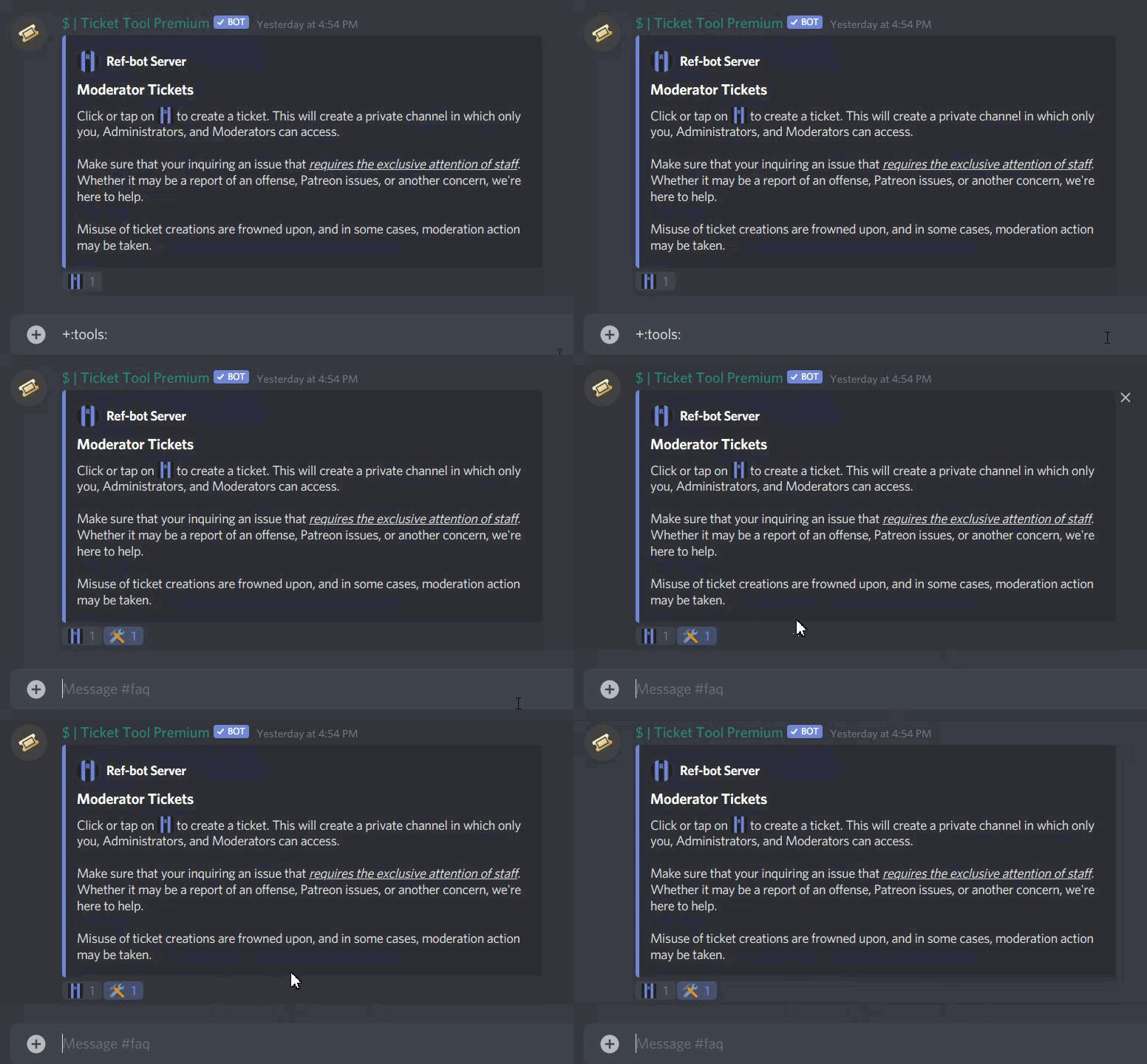
Hello. For some reason Ticket Tool is not responding to the 🛠️ reaction (see below). I saved my changes on the dashboard. Is this still a thing, or is there another way to do it?
humble sequoiaBOT
How update a panel manually
To update a panel manually; react to it with :tools: - :tools:
 pale pilot
@modest rivet the 🛠️ emoji just updates the panel. What are you trying to do?
 limpid sandal
i want the normal bot invite link please
humble sequoiaBOT
Invite Ticket Tool
Bot Invite
Ticket Tool Support Server
This command only works in the Ticket Tool Support Server
modest rivet
pale pilot
<@!555478993994907650> the 🛠️ emoji just updates the panel. What are you trying...
I want to update the panel but it’s not updating. Made some changes to the panel on the dashboard but nothing changes when I react.
 cerulean stag
is the tag feature broken?
pale pilot
@modest rivet do you have premium?
modest rivet
Yes, I’m on premium using the ticket tool pro bot.
pale pilot
does resending the panel update it?
modest rivet
Yes, but having to delete/resend every time I want to make a change would be annoying
It seems that it doesn’t recognize the reaction though — it doesn’t remove the reaction or do anything at all when I react on the panel
jade topaz
i have a question, with premium, could i make a control panel on one of my messages that i sent out?, or a webhook that i sent out
 stiff chasm
jade topaz
stiff chasm
jade topaz
does anyone know how to do multiple reactions, like they have multiple languages reactions in one panel?
humble sequoiaBOT
Multipanels are a premium feature that allow for a single panel with multiple reactions to open different tickets.
How to create a Multipanel
Premium users can combine multiple panels into one multipanel.
First of all you will need to assign a different Create Ticket Reaction for each Panel. Run $help reaction to learn how to do it.
Next, find the IDs of each panel you wish to combine. You can find them in your Panel Configs in the Dashboard
Next, send the multipanel to a channel using $panel [id1] [id2] {id3} ....
e.g. $panel 1 2 4 17 35 to combine panels 1, 2, 4, 17 and 35.
Up to 10 panels may be combined.
upper flower
@jade topaz
jade topaz
thank you!
rotund kite
It's sad that people leave the server, no matter if their problem is solved.
 candid spire
 faint tartan
The bot need perms to send messages in the channel
 loud moon
how would i make its so when the ticket is opened it says (name)(tag)
pale pilot
$variables
humble sequoiaBOT
Note: Remove The $ From The Variables
Supported Variables
{$server_name} -The server name
{$@Role Name} -The role name you want to mention (role names are case sensitive.)
{$empty} -Use this if you want to send nothing in a required field.
{$channel_name} -The channel name this message is used in/from
{$channel} -The channel this message is used in/from
{$user_nickname} -The users nickname (if set)
{$user_tag} -The users tag
{$user_name} -The users username
{$userfull} -The users username and usertag combined
{$user} -The users @user
{$user_icon} -The url for the users icon
{$ticket_limit} -The current ticket limit
{$panel_name} -The panels name
{$ticket_name} -The tickets name
{$ticket_category} -The category tickets are created in (if set)
{$count}The current count for tickets
{$ticket_channel} -The #channel for the ticket you created
{$ticket_user} -The @user who is assigned to the Ticket
{$ticket_user_nickname} -The nickname of the user who is assigned to the Ticket (if set)
{$ticket_user_tag} -The tag of the user who is assigned to the Ticket
{$ticket_user_name} -The username of the user who is assigned to the Ticket
Note: Remove The $ From The Variables
pale pilot
@loud moon {userfull} is what you're looking for
loud moon
Thank You
 haughty tendon
hey can anyone possibly help me set this up
i have changes stuff in the dashboard but its not working with the bot im confused
radiant moss
haughty tendon
i have changes stuff in the dashboard but its not working with the bot im confus...
Elaborate on the change stuff. What exactly did you change so I can try and hep you better
haughty tendon
ugh like in the dashboard i changed panel options the message text doesnt do nothing ? and the ticket embeded options for the message and i cant use my full message its capping it yet i went and looked at someones elses and theres huge, also have a ticket open and i deletd the ticket but on dashboard says i have one ticket and idk how to get rid of that
pale pilot
You have the free version, where you can't use every field and have a character limit.
 exotic ginkgo
Hi anyone can help? Trying to invite the bot into my server, but it won't join
I tried other servers where I am admin and it works fine
radiant moss
I would open a ticket @exotic ginkgo #🎫│make-a-ticket
modest rivet
modest rivet
It seems that it doesn’t recognize the reaction though — it doesn’t remove the r...
This is a GIF demonstration on what's happening -- trying to update the panel, but nothing happens. I realize that I can just delete and resend, but it gets annoying having to do that every time.
 jade topaz
is it possible to change the reaction on the panel menu with a emote from your server?
radiant moss
$help reaction
humble sequoiaBOT
How to change reactions
To set a custom reaction Dashboard -> Panel Configs -> Settings -> Reaction Options -> <Reaction to change> -> Reaction

NOTE you need premium to do this.
pale pilot
@modest rivet do you still have premium?
jade topaz
thx
modest rivet
Yep, I had premium and still have
 ionic yacht
umm my server that i want it in ist there and ive added the bot to the server
humble sequoiaBOT
If Ticket Tool support requested this debug give them this link:
https://discordapp.com/channels/509192800865353738/662692902245498910/788866016021053451
Bot Permissions ឵ ឵឵ ឵ ឵឵ ឵ ឵឵ ឵ ឵឵
✅ - Read Channels
✅ - Send Messages
✅ - Embed Links
✅ - Attach Files
✅ - Add Reactions
✅ - Manage Roles
✅ - Manage Channels
✅ - Manage Messages
✅ - Read History
Channel Permissions ឵ ឵឵ ឵ ឵឵ ឵ ឵឵ ឵ ឵឵
✅ - Read Channels
✅ - Send Messages
✅ - Embed Links
✅ - Attach Files
✅ - Add Reactions
✅ - Manage Roles
✅ - Manage Channels
✅ - Manage Messages
✅ - Read History
Server Information ឵ ឵឵ ឵ ឵឵ ឵ ឵឵ ឵ ឵឵ ឵ ឵឵
Channel name:
community-support
Channel ID:
776680605517742090
Channel Count:
147/500
Server name:
Ticket Tool Support
Server ID:
509192800865353738
User Information ឵ ឵឵ ឵ ឵឵ ឵ ឵឵ ឵ ឵឵ ឵ ឵឵
User name:
iloveu#1805
User ID:
781542288127557683
Permission Level:
0 - User
Bot Information ឵ ឵឵ ឵ ឵឵ ឵ ឵឵ ឵ ឵឵ ឵ ឵឵
Prefix:
$
Premium Status:
Lifetime
Current shard:
1
API Latency:
86
radiant moss
@jade topaz make sure it can type in that channel
 narrow knot
I need help
radiant moss
jade topaz
the admin can make everything 🙂
Do you still have an issue or is it still giving that error?
radiant moss
narrow knot
I need help
Please elaborate on your needings.
jade topaz
! still
radiant moss
invite to discord in dms if you would like
jade topaz
sure
narrow knot
so when I try to change the reaction to open the ticket it says "reaction saved" but when I send pannel it is the same envelope
radiant moss
That is premium only
narrow knot
oh
radiant moss
$help reaction
humble sequoiaBOT
How to change reactions
To set a custom reaction Dashboard -> Panel Configs -> Settings -> Reaction Options -> <Reaction to change> -> Reaction
NOTE you need premium to do this.
 queen lily
how can i make to user go automatically to his ticket when he create it
pale pilot
that's impossible
radiant moss
queen lily
how can i make to user go automatically to his ticket when he create it
It should do that by default. When someone presses the reaction it makes a ticket under their name and add them to their ticket. If you are wanting support team members to go into that ticket you have to adjust those settings.
 next epoch
Is it possible to pull up a transcript that was not saved? I have the ticket number but dont know if that does anyhting
radiant moss
Was it sent as a dm to the person?
next epoch
I dont think so
radiant moss
i dont think so then
next epoch
We use to have autosave transcripts but looks like it stopped
 remote moss
@radiant moss do you know how to ping a role in a ticket,do you need to do that with commands or on site and how?
radiant moss
$help ping
humble sequoiaBOT
How to make Ticket Tool ping a role
To make ticket tool ping a role when a ticket is opened, go to the Dashboard -> Panel Configs -> Settings -> Ticket Options -> Ticket Message -> Message Text and do this:
{@Role name} This is case sensitive and the role must have @mentions enabled
radiant moss
yea lmao
 errant bluff
When using premium version of the bot do you need to keep the normal bot also or just premium?
radiant moss
errant bluff
When using premium version of the bot do you need to keep the normal bot also or...
You dont need the normal but you can keep both for safe keepings
errant bluff
I removed the normal and now no commands seem to work
errant bluff
solved
 hushed moss
I can't rename my channels
errant bluff
hushed moss
I can't rename my channels
just do $rename name or whatever prefix you use
hushed moss
It doesn't work
jade topaz
do i need the ticket tool bot if i have the premium bot in my server?
rn i have 2 bots
 atomic eagle
I need support, but My language is korean
 wooden glade
Uh, whenever one ticket is made it's impossible to make another ticket. Help pls.
glass otter
hushed moss
It doesn't work
It's a discord ratelimit. Wait 10 minutes (now it's good idea think) an make the command again
glass otter
jade topaz
do i need the ticket tool bot if i have the premium bot in my server?
If you have a premium subscription, only on bot is necessary, here, it's better to use the premium bot. But if you have any subscription, you must use the classic
wise crag
jade topaz
Lol
 modest turtle
how it possible ?
 vapid sonnet
Hi, I have a question.
Can I add other members to the ticket?
 formal wadi
Is it possible
if someone opens ticket, than leaves the discord server
his ticket to get deleted
 short sorrel
Hey there @upper flower, I just wanted to let you know that these giveaway "reminders" random messages violate the Developer Terms of Service since the user did NOT opt for this, thus against the Terms of Service. The "reminder" seems to be at random time she the bot sends a message to you which seems really unsolicited and might also be considered as spam.
short sorrel
?
 random lava
?
jade topaz
But it was full white
random lava
Nice
jade topaz
😂
it worked for me now i need to wait to be premium activated
seems to be taking ages 😄
Lol 😂
upper flower
What are you, the discord police?
upper flower
short sorrel
Hey there <@771750914616852490>, I just wanted to let you know that these giveaw...
Those "giveawway reminders" are set by the server and its for the ticket panel they choose. It does not break discord TOS as when you open a ticket, u "opt" in and agree to all terms of service that Ticket Tool provides.
short sorrel
Ticket messages are different from the random "giveaway reminder"
Anyway, I'll let Kady know
upper flower
GO AHEAD
if ur here to cause problem. bye bye
@short sorrel But what server is that from?
as if u didnt open a ticket, u probably ran a command
radiant moss
Farewell
short sorrel
I did open the ticket and then it was closed, the "giveaway reminder" was sent 2 minutes after
upper flower
bruhhh. They can choose what to send in the DM message when the ticket is closeed. Maybe the bot lagged or smthing like that for why the message was sent later.
short sorrel
the ticket close message was sent right when it closed
upper flower
Okay, send me the server ID
 upper flower
LOL. Server name?
and do u know the owner of the server? if they are in this server
short sorrel
"a crumb of serotonin pls 15x Nitro Gw", it's in the screenshot. I'm not sure about the owner but doesn't seem like any of the admins are here
 upper flower

Its the close ticket embed.
So it DMS u when the ticket is closed.
as thats the only place I see it in their server.
short sorrel
hmm, maybe have the server name in the embed? Kady sugested to have the user/server's name in the embed that the user can set, for example for a say command or stuff like that
short sorrel
but the content is still user generated 
upper flower
As they have premium, so its more customization. But that closed ticket message, DOES say a channel, because ur not in the server anymore, it does not lead to the server/channel inside the server for which the message was customized from.
But within this case, u did open a ticket, which triggered a ticket to be opened, which triggered a DM saying u have opened a ticket. Then your ticket was closed, that triggered a DM saying your ticket has been closed. Now it might not say "ticket has been closed' in the embed, but that is up to the server admins for what they choose to put in there as they do have premium, and that means they can customize it for how ever they'd like.
jade topaz
Hey everyone, is it possible to add a user to a ticket?
I can just add the permission manually right?
upper flower
$help add
humble sequoiaBOT
How to add or remove users on tickets
To add a user to a ticket use $add <user>
To remove a user from a ticket use $remove <user>
upper flower
@jade topaz
upper flower
Glad you like it!
 silent pike
 low ermine
Hi,
I have some doubts on the config.
1st: Can i name the ticket like: ticket-(discord-name)?
2nd: Can i introduce a default message everytime someone create a ticket?
Thanks
upper flower
u change the ticket name to
{user_nickname} in the channel created option.
humble sequoiaBOT
**Ticket Message**
The Ticket Message is the first message sent by the bot in a new ticket. To customize it head over to your Dashboard -> Panel Configs -> Settings -> Ticket Options -> Edit Ticket Message
 upper flower
correct
low ermine
ok, thx for helping
wooden glade
Hey is there a way to ping my support team when a new ticket comes out?
I kinda need to do that but I can't figure out how to do that.
upper flower
$help ping
humble sequoiaBOT
How to make Ticket Tool ping a role
To make ticket tool ping a role when a ticket is opened, go to the Dashboard -> Panel Configs -> Settings -> Ticket Options -> Ticket Message -> Message Text and do this:
{@Role name} This is case sensitive and the role must have @mentions enabled
wooden glade
ah, ty
upper flower
yes?
upper flower
$help support
jade topaz
i have to make support have admin perms in order to see them
humble sequoiaBOT
How to let support team see into a ticket
About support roles
A support role lets your support team see into tickets with out having to add them manually to each and every ticket.
You can add as many support roles as you like per panel.
NOTE that the way discord works all admins can see into tickets regardless of this.
How to set a support role
To set a Support role go to the Dashboard -> Panel Configs -> Settings -> General Options -> Support Team Roles.
NOTE that the support role will not be able to see into tickets that are already created..
 bold glade
Hi, when i type $help the bot isnt reacting atall, ive kicked the bot and re invited it but still no joy
wooden glade
What is your prefix? Did you change it?
And make sure the bot can acces the channel you're in. If you have a verification, the bot may not have a valid role to answer in the channel you're trying to get it to respond in.
glass otter
wooden glade
What is your prefix? Did you change it?
$help prefix
humble sequoiaBOT
How to change Ticket tool's prefix
The default prefix for ticket tool is $ and @Ticket Tool#4843 however that can be changed on the Dashboard under Server Configs -> Command Prefix.

NOTE that @Ticket Tool#4843 will always work as a prefix even if there is a custom prefix.
wooden glade
Sorry, I was answering @bold glade
glass otter
Oh, ok, I didn't understand
jade topaz
anyway to change the colour of the embed?
glass otter
It's possible via the premium subscription
jade topaz
k
 indigo lichen
what does full customisation mean?
radiant moss
indigo lichen
what does full customisation mean?
You can change colors, saves, and other things that are limited by the free version
That would be premium i assume you are referring too
indigo lichen
yes i am
indigo lichen
radiant moss
You can change colors, saves, and other things that are limited by the free vers...
can you customise the bot so like the profile picture and all of that?
radiant moss
prefix is included with free. At this currently moment you cannot do per server profile pictures, names, or status. The only real thing you can do is change the nickname and the status.
Besides all the features on the dashboard
 wild lava
smh why does changing colors have to b premium ://
literally im broke asf
dont yall have a 7 day trial?
 thorn nimbus
I have the bot in my server and I’m Not Finding
humble sequoiaBOT
Don't see your server in the dashboard?
You will possibly need to relog. Look below to see steps on how to relog.
How to relog the Dashboard.
First, you will need to go to the dashboard. Once your there, click on your avatar on the top right. after you clicked it, you will see button that says Logout. You must click that. Once you have logged out, you can log back in.
thorn nimbus
Ok
radiant moss
what did you need help with? @wild lava
wild lava
wild lava
dont yall have a 7 day trial?
^
radiant moss
Yes there should be per server
 noble lion
Anyone know how I stop other bots from being added to tickets?
radiant moss
noble lion
Anyone know how I stop other bots from being added to tickets?
They most-likely have admin which overrides all permissions or they have a support team role. You have to remove one or the other.
noble lion
radiant moss
They most-likely have admin which overrides all permissions or they have a suppo...
thank you!
 torn stream
how do i ping A role again?
upper flower
$help ping
humble sequoiaBOT
How to make Ticket Tool ping a role
To make ticket tool ping a role when a ticket is opened, go to the Dashboard -> Panel Configs -> Settings -> Ticket Options -> Ticket Message -> Message Text and do this:
{@Role name} This is case sensitive and the role must have @mentions enabled
torn stream
Ty
 mighty stratus
$help
humble sequoiaBOT
Help Options
$help commands - Information on commands
$help setup - Information on bot setup
$help faq - Frequently asked questions
mighty stratus
$help setup
humble sequoiaBOT
Inviting Ticket Tool
The first thing you will need to do is invite the bot, an invite can be found here.
Once the bot is in your server we will head to the dashboard and create panel
A panel is used to configure each tickets settings and is were people react to make a ticket.
An example of a panel sent to a channel is shown below.
Creating a panel
To create a panel we are going to need to head over to the panel configs on the dashboard
Once at the dashboard we will need to click Create Panel
Enter a panel name (Fill in any optional settings you want)
Click Create Panel and your ready to get started with configuring your panel
An example of a creating a panel is shown below.
Sending a panel
Once you've created a panel on the dashboard you will need to send it to a channel using send on the dashboard
Select the channel you want your panel to be created in and click send.
For other questions checkout $help faq
An example of a sending a panel is shown below.
 void vale
Hey y’all. Just set up ticket bot in my server and trying to figure out how I could create a ticket and add someone to it. Make make it their ticket.
Posted in wrong place I apologize
Also how do I view what was said in a ticket after its been deleted?
 real mango
$help claim
humble sequoiaBOT
How does the claim command work?
Ticket Tool claiming is a premium only command that allows your support team to claim tickets and have the ticket renamed, changed permissions or moved to another category
void vale
Not claim. I’m talking about if you can’t get “bob” to make a ticket you make one and the usual message would read {bob}, please wait for support. but I made the ticket for him. Possible or no?
@thin marlin or @violet granite ?
 violet granite
 humble sequoiaBOT
Help Options
$help commands - Information on commands
$help setup - Information on bot setup
$help faq - Frequently asked questions
 supple sail
$help setup
humble sequoiaBOT
Inviting Ticket Tool
The first thing you will need to do is invite the bot, an invite can be found here.
Once the bot is in your server we will head to the dashboard and create panel
A panel is used to configure each tickets settings and is were people react to make a ticket.
An example of a panel sent to a channel is shown below.
Creating a panel
To create a panel we are going to need to head over to the panel configs on the dashboard
Once at the dashboard we will need to click Create Panel
Enter a panel name (Fill in any optional settings you want)
Click Create Panel and your ready to get started with configuring your panel
An example of a creating a panel is shown below.
Sending a panel
Once you've created a panel on the dashboard you will need to send it to a channel using send on the dashboard
Select the channel you want your panel to be created in and click send.
For other questions checkout $help faq
An example of a sending a panel is shown below.
jade topaz
I'm trying to buy the premium but I'm getting only a white page
wild lava
radiant moss
Yes there should be per server
it doesnt show
doesnt tht mean i already used it
humble sequoiaBOT
Ticket Tool Premium
Get premium at https://tickettool.xyz/premium
Manage your subscriptions at https://tickettool.onfastspring.com/account
Why Premium?
Premium lets you customize the bot just how you want it. It also helps keep the bot running.
candid spire
@jade topaz
 wary needle
I have a really weired problem
When i want to invite Ticket Tool it joins the server but when i want to configure it isnt on the server list.
wild lava
refresh/login again?
wary needle
Tried already 5 Times or Sth.
I found the Problem
I havent been Admin on that Server
wild lava
ah
radiant moss
Yes you either need admin or a role that allows you access to the dashboard
jade topaz
hello i need help with closing ticket
should i ask here or should i make a ticket for it?;/
pale pilot
Just ask your question here
 errant summit
$help
humble sequoiaBOT
Help Options
$help commands - Information on commands
$help setup - Information on bot setup
$help faq - Frequently asked questions
humble sequoiaBOT
Inviting Ticket Tool
The first thing you will need to do is invite the bot, an invite can be found here.
Once the bot is in your server we will head to the dashboard and create panel
A panel is used to configure each tickets settings and is were people react to make a ticket.
An example of a panel sent to a channel is shown below.
Creating a panel
To create a panel we are going to need to head over to the panel configs on the dashboard
Once at the dashboard we will need to click Create Panel
Enter a panel name (Fill in any optional settings you want)
Click Create Panel and your ready to get started with configuring your panel
An example of a creating a panel is shown below.
Sending a panel
Once you've created a panel on the dashboard you will need to send it to a channel using send on the dashboard
Select the channel you want your panel to be created in and click send.
For other questions checkout $help faq
An example of a sending a panel is shown below.
jade topaz
when we want to close tickets it is showing like this everytime we have to click reactions to close and then save the ticket transcript.
so.. when i do [close bot is sending me this message Save transcript, Re-open Ticket, Delete Ticket
When i press Save transcript it will say transcript saving then i have to press Delete Ticket to close ticket completely
errant summit
$help setup
humble sequoiaBOT
Inviting Ticket Tool
The first thing you will need to do is invite the bot, an invite can be found here.
Once the bot is in your server we will head to the dashboard and create panel
A panel is used to configure each tickets settings and is were people react to make a ticket.
An example of a panel sent to a channel is shown below.
Creating a panel
To create a panel we are going to need to head over to the panel configs on the dashboard
Once at the dashboard we will need to click Create Panel
Enter a panel name (Fill in any optional settings you want)
Click Create Panel and your ready to get started with configuring your panel
An example of a creating a panel is shown below.
Sending a panel
Once you've created a panel on the dashboard you will need to send it to a channel using send on the dashboard
Select the channel you want your panel to be created in and click send.
For other questions checkout $help faq
An example of a sending a panel is shown below.
jade topaz
i just tried it still shows the same thing.
i have to press Transcript again then press Delete in order to delete the ticket.
What i want is "when i press lock icon or do [close it has to save the ticket transcript + delete ticket"
 pallid juniper
Why I can't make a support panel
wild lava
u do tht on the website
 quasi iron
how is it possible to create a support ticket message with 2 or more reactions
radiant moss
pallid juniper
Why I can't make a support panel
Make sure you can type in the channel
radiant moss
quasi iron
how is it possible to create a support ticket message with 2 or more reactions
Multiple panels. It is premium only
humble sequoiaBOT
Multipanels are a premium feature that allow for a single panel with multiple reactions to open different tickets.
How to create a Multipanel
Premium users can combine multiple panels into one multipanel.
First of all you will need to assign a different Create Ticket Reaction for each Panel. Run $help reaction to learn how to do it.
Next, find the IDs of each panel you wish to combine. You can find them in your Panel Configs in the Dashboard
Next, send the multipanel to a channel using $panel [id1] [id2] {id3} ....
e.g. $panel 1 2 4 17 35 to combine panels 1, 2, 4, 17 and 35.
Up to 10 panels may be combined.
radiant moss
pallid juniper
Yo i fix it
Sweet!
 lean pulsar
Hello guys! Does anyone have issue with opening tickets? Atm for me whenever I react on the 📧 emote, it removes it but doesnt create a new ticket for me
 sick pebble
$help
humble sequoiaBOT
Help Options
$help commands - Information on commands
$help setup - Information on bot setup
$help faq - Frequently asked questions
sick pebble
$help setup
humble sequoiaBOT
Inviting Ticket Tool
The first thing you will need to do is invite the bot, an invite can be found here.
Once the bot is in your server we will head to the dashboard and create panel
A panel is used to configure each tickets settings and is were people react to make a ticket.
An example of a panel sent to a channel is shown below.
Creating a panel
To create a panel we are going to need to head over to the panel configs on the dashboard
Once at the dashboard we will need to click Create Panel
Enter a panel name (Fill in any optional settings you want)
Click Create Panel and your ready to get started with configuring your panel
An example of a creating a panel is shown below.
Sending a panel
Once you've created a panel on the dashboard you will need to send it to a channel using send on the dashboard
Select the channel you want your panel to be created in and click send.
For other questions checkout $help faq
An example of a sending a panel is shown below.
 cyan ether
Whenever i go to the dashboard and open up manage on my server, it just crashes and sends me back to the main page, so at this point i cant even manage things for my server since i cant get in. Any ideas how to fix this?
humble sequoiaBOT
Don't see your server in the dashboard?
You will possibly need to relog. Look below to see steps on how to relog.
How to relog the Dashboard.
First, you will need to go to the dashboard. Once your there, click on your avatar on the top right. after you clicked it, you will see button that says Logout. You must click that. Once you have logged out, you can log back in.
cyan ether
Didnt work 😢
upper flower
Are u still in the server? Do u have admin permission in the server?
cyan ether
yeah, im the owner
upper flower
Okayy, open a ticket
 worn surge
cyan ether
Whenever i go to the dashboard and open up manage on my server, it just crashes ...
worn surge
cyan ether
Whenever i go to the dashboard and open up manage on my server, it just crashes ...
This is also happening to me.
upper flower
hm
cyan ether
Ight i made a ticket
worn surge
Should I make a ticket too, or is one report enough?
upper flower
U can make a ticket too
worn surge
If I wanted a specific panel to open a channel and name it application-NUMBER for example, is this premium only?
humble sequoiaBOT
Help Options
$help commands - Information on commands
$help setup - Information on bot setup
$help faq - Frequently asked questions
remote moss
$help ping
humble sequoiaBOT
How to make Ticket Tool ping a role
To make ticket tool ping a role when a ticket is opened, go to the Dashboard -> Panel Configs -> Settings -> Ticket Options -> Ticket Message -> Message Text and do this:
{@Role name} This is case sensitive and the role must have @mentions enabled
 ornate portal
does anyone know how to make custom commands with ticket tool like /prioritystart
 grizzled fiber
HOW CAN WE MAKE THE BOT ONLY WRITE ON A SINGLE CHANNEL
 acoustic patrol
Imposssible.
worn surge
ornate portal
does anyone know how to make custom commands with ticket tool like /prioritystar...
Hi there. Are you talking about canned/tagged messages where you say something and then the bot replies with a message?
ornate portal
@worn surge no so what I mean is for example if i type /Prioritystart it would say a priority has been started.
worn surge
ornate portal
<@!432234718860148749> no so what I mean is for example if i type /Prioritystart...
I don't believe that is possible. You could create another panel (and lock it in a different channel with different permissions). That way its technically "priority" as it could ping a specific role
upper flower
grizzled fiber
HOW CAN WE MAKE THE BOT ONLY WRITE ON A SINGLE CHANNEL
U make it only have perms to one channel
upper flower
ornate portal
does anyone know how to make custom commands with ticket tool like /prioritystar...
U put it as a tag
ornate portal
so is there no way to do a custom command
upper flower
A custom command is a TAG
$botoutage this is our custom command / TAG
@ornate portal
ornate portal
how do I make that
upper flower
In the dashboard under tags
 still crest
Bot Offline
radiant moss
still crest
Bot Offline
Should not be. If it is i would put a ticket in #🎫│make-a-ticket
still crest
Ok
worn surge
Is it possible to get the bot to do an @ here ping at the start of a ticket?
pale pilot
Yes. I'm actually not sure what works, but it's either {@ here} or @ here. Without the space of course
worn surge
Also. When I do $transcript in a ticket, it doesn't actually send the attachment to the log channel. Is it meant to?
pale pilot
You need to specify the channel it saves to. $transcript #channel @worn surge
jade topaz
hi, noob question but is there a way to temporarily disable the ticket function
without having to remove anything
i guess for now, i put the ticket limit to 0 😛
pale pilot
There are multiple way to do it. You can deny the user permissions to see the channel with the panel message. You can but the @ everyone role on the blacklist role on your dashboard. You can delete the panel message and resend it later or you can do what you did with the ticket limit
whatever you like the most
void vale
Not claim. I’m talking about if you can’t get “bob” to make a ticket you make one and the usual message would read {bob}, please wait for support. but I made the ticket for him. Possible or no?
upper flower
U wanna make a ticket for bob?
void vale
Yes hold up
Instead of it saying my name it says (bob) but I made him the ticket.
Like $create-ticket @bob
Or something
jade topaz
radiant moss
Multiple panels. It is premium only
Bruh
 earnest grail
mild island
void vale
Like *$create-ticket @bob*
earnest grail
mild island
void vale
Like *$create-ticket @bob*
You can enable Command Syle Tickets at your panel settings. Then you can run $new @bob
radiant moss
 plain rock
what do i do?
plain rock
what do i do?
Relog
radiant moss
Log out and try and log back in on the dashboard
plain rock
okay
jade topaz
The bot doesn’t create a new channel
upper flower
do $debug
jade topaz
i can create log for delete ticket only ?
 lunar inlet
eh hi guys.
i kind of understand the bot, but is it possible to create 2 different tickets at the same time?
I tried to do 1 for bug reports, and 1 for player reports, but it only allows me to do have 1 active at them time
(so when i have an ative bug report, i can not do one for the players)
pale pilot
loud moon
how do i change the ticket name like when its open **ticket-0001** to **niky-999...
that is a premium feature and can be found under ticket options
loud moon
yea i noticed
pale pilot
jade topaz
i can create log for delete ticket only ?
no, you can log anything
pale pilot
lunar inlet
eh hi guys.
i kind of understand the bot, but is it possible to create 2 differe...
Have you tried creating these tickets 1 minute apart from each other? There is a limit on how many tickets you can open in one minute on all servers
lunar inlet
oh, no i did not try this. I will now, thanks.
yeah ok, just had to wait, thanks you!
 hushed jackal
been having an issue for the last few days, when someone clicks the envelope to create a ticket it adds 1 to the emoji count then rolls back and no ticket is created. any ideas?
jade topaz
Can I do multiple reaction for opening different ticket from a single msg
Like this
 chrome quartz
when someone opens a ticket, is there a way to change it from saying #ticket-3182 to #their name, maybe?
pale pilot
hushed jackal
been having an issue for the last few days, when someone clicks the envelope to ...
run the $debug command in your server and give me the link that you get
humble sequoiaBOT
Multipanels are a premium feature that allow for a single panel with multiple reactions to open different tickets.
How to create a Multipanel
Premium users can combine multiple panels into one multipanel.
First of all you will need to assign a different Create Ticket Reaction for each Panel. Run $help reaction to learn how to do it.
Next, find the IDs of each panel you wish to combine. You can find them in your Panel Configs in the Dashboard
Next, send the multipanel to a channel using $panel [id1] [id2] {id3} ....
e.g. $panel 1 2 4 17 35 to combine panels 1, 2, 4, 17 and 35.
Up to 10 panels may be combined.
pale pilot
@jade topaz
hushed jackal
@pale pilot Here ya go
https://discordapp.com/channels/509192800865353738/662692902245498910/790003879173423115
pale pilot
looks like a permission issue to me. Give the bot some more permissions. Easiest way is to give it admin perms
pale pilot
🙂
 chrome spear
Hey where do I find the feature to stop the bot adding the muted role to all channels?
 fickle flint

 vivid orchid
pale pilot
vivid orchid
pale pilot
I believe that's Impossible
 frail trail
heelo
hello
i need help
about help
about when open ticket
i need when open ticket and bot send ticket massage i set in site
like this
humble sequoiaBOT
**Ticket Message**
The Ticket Message is the first message sent by the bot in a new ticket. To customize it head over to your Dashboard -> Panel Configs -> Settings -> Ticket Options -> Edit Ticket Message
pale pilot
$help ping
humble sequoiaBOT
How to make Ticket Tool ping a role
To make ticket tool ping a role when a ticket is opened, go to the Dashboard -> Panel Configs -> Settings -> Ticket Options -> Ticket Message -> Message Text and do this:
{@Role name} This is case sensitive and the role must have @mentions enabled
 dapper moth
how do i cancel my premium ticket tool sub?
 simple cradle
How could I make the tickets open in a separate category instead of them opening at the top of the discord?
pale pilot
$help category
humble sequoiaBOT
How to set the open category
To set a open category go to the Dashboard -> Panel Configs -> Settings -> Category Options -> Category Open
 sterile wyvern
where can I find my premium codes?
pale pilot
If you bought it via fastspring, you should have gotten an email @sterile wyvern
sterile wyvern
lemme check
 proven charm
$help
humble sequoiaBOT
Help Options
$help commands - Information on commands
$help setup - Information on bot setup
$help faq - Frequently asked questions
simple cradle
Thank you @pale pilot
pale pilot
You can find it under moderator options, but it's a premium feature
jade topaz
Can we include a channel tag inside msg in embed
pale pilot
Do $id #channel to find out the ID of a channel. Put everything including the brackets in the embed message @jade topaz
pale pilot
No
humble sequoiaBOT
<#776680605517742090>
sterile wyvern
is it possible to remove the embeds? since im not using that option
pale pilot
It is not possible to remove the embed
 light seal
my ticket categories are locked behind a role , is it possible to temporary add someone to a certain role so he can see the ticket without having the role
upper flower
$help add
humble sequoiaBOT
How to add or remove users on tickets
To add a user to a ticket use $add <user>
To remove a user from a ticket use $remove <user>
light seal
im looking for a way to make this happen automaticly when someone creates a ticket
 brazen lynx
humble sequoiaBOT
brazen lynx
humble sequoiaBOT
Invite Ticket Tool
Bot Invite
Ticket Tool Support Server
This command only works in the Ticket Tool Support Server
 pearl raptor
I WAB-NT TO SUPPORT PLEASE
ı ınvıtıng tıcket bot but your websıtes not see in my server
why
please fdast
 fleet crystal
Hi, I want a little help
The bot I have in the server does not respond to me I put it in the conversation, but it does not respond and I have tried this block not only in one server, but more than one server, but it also does not respond I want help in that please
jade topaz
Hey
The moment I send a ticket in a channel, the bot sends a nice embed, just no response.
Because of this it is not possible to create a ticket
I looked at the settings and there is a nice envelope. You can only adjust it at premium.
So I'd like to hear what's wrong.
Greetings
worn surge
fleet crystal
Hi, I want a little help
The bot I have in the server does not respond to me I ...
What do you mean by it "does not respond"? What command are you running, that you want it to respond to?
worn surge
jade topaz
Hey
The moment I send a ticket in a channel, the bot sends a nice embed, just n...
What do you mean by "no response" when someone tries to make a ticket?
jade topaz
worn surge
What do you mean by "no response" when someone tries to make a ticket?
No response in here (see screenshot)
People cant click the emoji, its not there
worn surge
jade topaz
People cant click the emoji, its not there
Ah. I believe that can be changed as a permission. Under here, I think if you click on Settings under Close Ticket, and then make sure Enable Reaction is enabled.
If you only want the reaction to work for your Support Team roles, you can enable that in the same place too.
worn surge
jade topaz
but its still not working
Could you send a screenshot of your panel's close ticket settings?
jade topaz
worn surge
Do you have multiple panels setup or just one?
jade topaz
ive got more because I test this with different panels. No one works.
I just want to use 1 panel
worn surge
@jade topaz You're in Create Ticket Reaction Settings on that screenshot you sent above. Go to the Close Ticket one instead.
It should say this at the top.
worn surge
I'm not sure why it's not working. I'm not part of the Support Team so perhaps #🎫│make-a-ticket and they might know how to fix.
jade topaz
Thanx, Ill do that:)
worn surge
No worries
 eternal halo
hello
when I try to change the ticket open channel name or the ticket close channel name, the bot doesn't change it. can you help me please?
worn surge
eternal halo
hello
when I try to change the `ticket open channel name` or the `ticket close c...
That might be a premium feature, does the box have a diamond next to it?
EDIT: Just checked. That is a premium feature.
eternal halo
worn surge
That might be a premium feature, does the box have a diamond next to it?
**EDIT...
yes, it does
thanks
worn surge
No worries
 signal bane
Hi, how can I add a role (support) on every tickets automatically ?
worn surge
signal bane
Hi, how can I add a role (support) on every tickets automatically ?
Panel Settings -> General Options -> Support Team Roles.
signal bane
You mean this ? @worn surge
worn surge
Yep. And then go to the settings of the panel.
Then General Options -> Support Team Roles.
signal bane
Ohh yeah thank you
 round edge
$help faq
humble sequoiaBOT
====== FAQ ======
If a question interests you run the command to see the answer.
Q: What is the prefix and how do I change it?
A: $help prefix
Q: How do I let my support team see into a ticket?
A: $help support
Q: How do I make a ticket ping my support when it's created?
A: $help ping
Q: How do I set a transcript channel?
A: $help transcript
Q: How do I limit the number of tickets a user can create?
A: $help limit
Q: How do I set what category tickets are created in?
A: $help category
Q: How do I set what category tickets are moved to when closed?
A: $help closed
Q: How do I set a custom reaction?
A: $help reaction
Q: How do I set the permissions for the tickets?
A: $help perms
Q: How do I create a panel?
A: $help panel
Q: How do I get the panel in my discord?
A: $help send
Q: How do I add or remove users from a ticket?
A: $help add
Q: A panel of mine won't update with the new settings, How do I fix it?
A: $help update
Q: Ticket Tool isn't responding to my commands, How do I fix it?
A: $help offline
Q: How does the claim command work?
A: $help claim
round edge
$help transcript
humble sequoiaBOT
How do I save transcript to a channel?
To save transcripts to a channel go to the Dashboard -> Panel Configs -> Settings -> Logging Options -> Transcript Channel
round edge
$help prefix
humble sequoiaBOT
How to change Ticket tool's prefix
The default prefix for ticket tool is $ and @Ticket Tool#4843 however that can be changed on the Dashboard under Server Configs -> Command Prefix.
NOTE that @Ticket Tool#4843 will always work as a prefix even if there is a custom prefix.
 south trail
Does anyone know how to increase ticket limit on multipanel?
jade topaz
oh
radiant moss
south trail
Does anyone know how to increase ticket limit on multipanel?
That is a premium option Im not sure what the limit is
humble sequoiaBOT
Multipanels are a premium feature that allow for a single panel with multiple reactions to open different tickets.
How to create a Multipanel
Premium users can combine multiple panels into one multipanel.
First of all you will need to assign a different Create Ticket Reaction for each Panel. Run $help reaction to learn how to do it.
Next, find the IDs of each panel you wish to combine. You can find them in your Panel Configs in the Dashboard
Next, send the multipanel to a channel using $panel [id1] [id2] {id3} ....
e.g. $panel 1 2 4 17 35 to combine panels 1, 2, 4, 17 and 35.
Up to 10 panels may be combined.
radiant moss
10 Panels is the limit
 tough viper
ive been struggling with this whenever i tried making a panel but do you know how to get hex color number thing because i entered my hex color and it didnt turn out as how i wanted it-
and ive seen other people have a different reaction instead of the 📩 thing
glass otter
Have you the premium subscription ?
 teal ridge
Is it possible to have Ticket Tool dm a user when they react to create a ticket, but they don't have the required role?
 weary onyx
tough viper
weary onyx
tough viper
wait to the red diamond means premium
glass otter
Yes, that show that this setting require premium
 ember laurel
for claiming, once a ticket is claimed u can edit support perms but is there a way to choose the perms for each support role individually
 normal kayak
Hey!
I had a question about the bot.
It does this whenever attempt to set up the tickets.
upper flower
Not our bot @normal kayak
 glad meadow
Bonjour, je voulais savoir quel commande fallait il faire pour ajouter quelqu’un dans un ticket
glass otter
$help add
humble sequoiaBOT
How to add or remove users on tickets
To add a user to a ticket use $add <user>
To remove a user from a ticket use $remove <user>
 arctic cloud
is it possible to see who closed a ticket?
humble sequoiaBOT
Help Options
$help commands - Information on commands
$help setup - Information on bot setup
$help faq - Frequently asked questions
jade topaz
$help commands
humble sequoiaBOT
() = optional
[] = required
*==================================
Ticket Commands
==================================*
_ _
`$add [User] (channel)`
Description: Adding additional users to a ticket
Aliases: none
`$remove [User] (channel)`
Description: Removing users from a ticket
Aliases: none
`$close`
Description: Closing tickets
Aliases: none
`$open`
Description: Opening closed tickets
Aliases: none
`$delete`
Description: Deleting tickets
Aliases: none
`$rename`
Description: Renaming tickets/channels
Aliases: none
`$transcript (send channel)`
Description: Creating transcripts
Aliases: none
`$new (user) (reason)`
Description: Creating tickets in a monitored channel (when command style is enabled)
Aliases: none
`$claim`
Description: Claiming tickets (when claim is enabled)
Aliases: "unclaim"
_ _
*==================================
General Commands
==================================*
_ _
`$help (Help Options)`
Description: Help Command
Aliases: none
`$debug`
Description: Debuging issues with running Ticket Tool
Aliases: none
`$id (@role/@user/#channel/emoji)`
Description: Converting roles, users, channels and emojis to ID
Aliases: "getid"
`$permlevel`
Description: Checking permission level with Ticket Tool
Aliases: "level"
`$ping`
Description: Checking response time with discord api
Aliases: none
`$vote (link | unlink | redeem) (user)`
Description: Earn premium by voting on top.gg or Discord.boats
Aliases: "votes"
glass otter
arctic cloud
is it possible to see who closed a ticket?
Yes, there is a message on ticket close. Or in the logs
glass otter
jade topaz
$help commands
#655832608835502080 please
arctic cloud
okay do i need to enable that because i cant find it anywhere
a staff member closed a ticket that shouldnt have been closed 😅
arctic cloud
how do i set up the logs with this bot like do i need to go to the pannel of the ticket?
glass otter
Yes, in the logging option
 frozen finch
@glass otter
I CAN'T DO IT
restive sluice
How do you make it so people with a specefic role can’t make a ticket?
humble sequoiaBOT
Blacklist Roles
Any role you assign as a blacklisted role won't be able to use commands or reactions.
Selecting a blacklisted role
Go to your Dashboard -> Server Configs. There you will find the option to select blacklisted roles.
Note: Don't forget to save.
 jade topaz
imhaving a issue finding where the option is to have the ticket ping the support team on open
so it pings the person that opens the ticket, but is there an option on the dashboard that will ping the support team to each ticket that opens
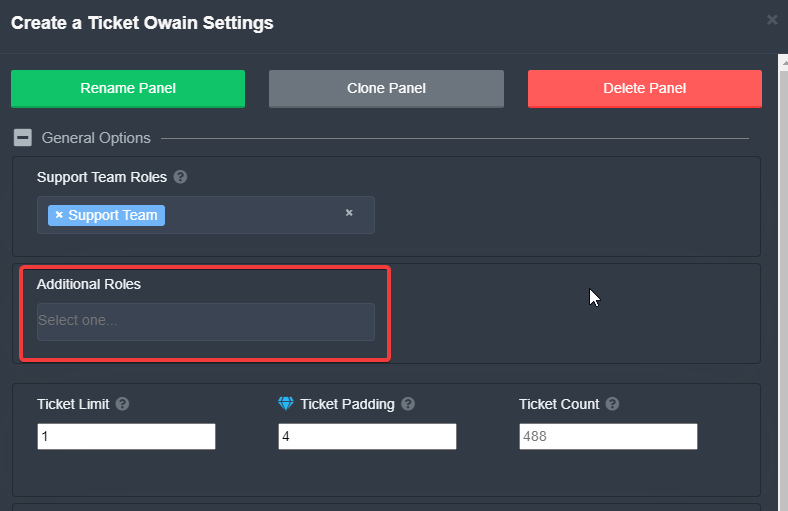

 iron hare
hey, is there a way to make the bot do the tickets in a certain category?
nevermind, i figured it ouy
out
 mystic flint
👍 Just for reference for others here, it is in panel settings under category options.
jade topaz
i try relogging but the server dont showing me
radiant moss
jade topaz
i try relogging but the server dont showing me
Make sure you are admin if so create a ticket #🎫│make-a-ticket
pale pilot
 frozen adder
What does additional roles do?
frozen adder
What does additional roles do?
It's a separate permissions group, aside from the support team
 hasty flint
hi so i need help
how can i make it so the person who opened a ticket can add other people to the ticket?
like say i opened a ticket and i wanted to add somebody else how would i make it so people can do that?
pale pilot
$help add