#🆘│community-support
1 messages · Page 276 of 1
 worldly helm
 uncut jolt
Hello. I am an admin in a server that uses this bot. Would anyone be able to offer me information regarding if purchasing premium access will save images within the transcripts? Or does this bot just not allow image saving in general?
 blazing jasper
sryy
blazing jasper
worldly helm
Don‘t ping for support.
i just want help
worldly helm
Please stop pinging me.
 crimson silo
What's the process for DMing users transcripts?
blazing jasper
worldly helm
Please stop pinging me.
who made you supporter lol
im not ppinging you now
go enjoy
worldly helm
I‘m on LOA. Stop pinging me or I will get our moderators involved.
blazing jasper
LOA?
uncut jolt
uncut jolt
Hello. I am an admin in a server that uses this bot. Would anyone be able to off...
Please reply with ping when giving an answer. Thanks.
worldly helm
blazing jasper
LOA?
Leave of Absence
 foggy sparrow
worldly helm
Leave of Absence
foggy sparrow
worldly helm
Leave of Absence
Enjoy your leave lias!!
Gutten ruhe!!
foggy sparrow
uncut jolt
Hello. I am an admin in a server that uses this bot. Would anyone be able to off...
Yes, if you buy premium, it will save images in transcript
 timber timber
can members that opened the ticket, be able to close the ticket?
or only mods?
 gilded needle
someone help
 unkempt viper
Is there a way for me to ping a role when someone were to open a ticket like I want to ping a certain role when someone opens a ticket but I don't understand I tried to do <@roleid> @rolename and other ways but I can't figure it out please help
 humble sequoiaBOT
1. Open your Panel Configs tab in your server's dashboard
2. Select the panel you want to ping your support team on
3. Open the Ticket options menu
4. Click on Edit Ticket Message
5. In the Message Content use one of the role mention syntax ({@Role Name}/{Role ID})
6. Save changes
Note: For this to work properly, Ticket Tool requires the Mention Everyone permission. Or the role must have the Allow anyone to @mention this role setting enabled 

 restive condor
unkempt viper
Is there a way for me to ping a role when someone were to open a ticket like I w...
restive condor
unkempt viper
Is there a way for me to ping a role when someone were to open a ticket like I w...
Hey there! See above please ^
Hey there! Please try the steps below
humble sequoiaBOT
Don't see your server in the dashboard?
Try using the Sync Servers button on your top center of the Dashboard page
If this doesn't work
You should relog from the dashboard, you can do this by clicking here to log out immediately, and then log back in
Note:
You need one of these 3 things to access the dashboard.
1. Server Owner (Level: 6)
2. Server Administrator (Level: 4)
3. Dashboard Role (Level: 2)
:warning: You can check your level using the </permissionlevel:1029797400174399542> command on your Discord Server
If the bot's response is:
- @User is permission level: 0 (User)
You don't have any of the 3 levels required to access the server's dashboard

 vapid jasper
Guys I can't see my server on the website
 silent lava
humble sequoia
silent lava
humble sequoia
@vapid jasper
vapid jasper
Hi
 icy night
"Hi Team, sorry to bother you. I have a question regarding a ban that was marked as 'non-appealable', but I'm 100% sure it's a false positive. Is there any staff member I could briefly talk to or DM about this? I just want to provide context. Thanks!"
 wintry valley
someone has scammed me, and they deleted the Ticket, I'm currently reporting him in Scammer Alert, is it possible to recover / acquire the ticket transcript?
 latent dawn
icy night
"Hi Team, sorry to bother you. I have a question regarding a ban that was marked...
latent dawn
icy night
"Hi Team, sorry to bother you. I have a question regarding a ban that was marked...
Is this a ban from this ticket tool server?
latent dawn
wintry valley
someone has scammed me, and they deleted the Ticket, I'm currently reporting him...
If you have transcripts option enabled, yes. If not, its not possible.
gilded needle
restive condor
Hey there! Please try the steps below
thanks 🙏
 iron nightBOT
Gave +1 Rep to @restive condor (current: #1 - 3074)
 burnt canopy
hi all, just started playing around with the bot and had a question regarding the bot. is this a different bot from ticket tool or the same but for premium users only?

 grizzled summit
burnt canopy
hi all, just started playing around with the bot and had a question regarding th...
grizzled summit
burnt canopy
hi all, just started playing around with the bot and had a question regarding th...
That is the same bot. We just allow premium users to change the PFP and Banner background in their own servers.
 burnt canopy
oh okay got it, thank you
 noble cloud
How do I like set up the tickets in the channel I want
restive condor
noble cloud
How do I like set up the tickets in the channel I want
Hey there! Here's a setup guide for you
 stark runeBOT
1. Invite Ticket Tool to your server
First you will want to invite the bot to your server. Once the bot is in your server, you can manage your server in the dashboard.

2. Create a Panel
To create a panel we are going to need to head over to the panel configs on the dashboard.
Once at the dashboard we will need to click Create Panel.
Enter a panel name (Fill in any optional settings you want).
Click Create Panel and your ready to get started with configuring your panel.
An example of a creating a panel is shown below.

3. Send the Panel to a Channel
Once you've created a panel on the dashboard you will need to send it to a channel using send on the dashboard.
Select the channel you want your panel to be created in and click send.
For other questions checkout $help faq.
An example of a sending a panel is shown below.
Having a Problem Sending the Panel?
Do $debug in a channel with Ticket Tool and make sure it has all the necessary Discord permissions.

 wise python
I'm having a problem with the bot. I basically can't create any more tickets. I'm going crazy. Users can't, but I, the server owner, can. It keeps telling users they don't have permission to do this. I, um, am going crazy. Can you help me? Because I really don't know what I'm doing wrong. I'm going crazy.
 royal abyss
can I specify a category where closed tickets should be moved?
humble sequoiaBOT
━━ User's inquiry has been moved to a ticket ━━
restive condor
wise python
I'm having a problem with the bot. I basically can't create any more tickets. I'...
Hi there! Please check:
Dashboard > Panel Configs > Buttons > Create Ticket Button
- Check that support Team Only is disabled
 and that you didn't accidentally disable any roles
Dashboard > Server Configs > Blacklist Roles
- Make sure you didn't accidentally blacklist any roles
wise python
restive condor
Hi there! Please check:
Dashboard > Panel Configs > Buttons > Create Ticket Butt...
I can check tomorrow, but I'm pretty sure it's up and running and I've set it so members can open tickets
I step away from my phone for a second when I go to do something and I'm there right away
I was right, I just have to test with a second account to see if the problem is solved, also because I'm going crazy trying to find the solution

 carmine scarab
I need help with my ticket 1497001392613752902
 arctic plover
my users keep getting this error but i dont have a lock on who can make a ticket

 long oriole
👋
Is there a way I can make it so only the staff who claims the ticket can view and help the ticket owner
burnt canopy
does the website not like firefox or a vpn? under my dashboard i cant see the server i have the bot in but i can see it on brave browser which bypasses vpn. but at the same time, if i take the link when im in the actual server settings and paste it into firefox, it works?
 wanton edge
Boa noite.
Aqui tem suporte para Português (Brasil)?
 pseudo warren
Even after I invited my ticket tool to the server I'm making, I still don't see it on the dashboard in the website for ticket tool only old servers and a server I left
 green star
The people on my server cant see what was wrote in the server even throught i allowed them
icy night
@latent dawn Hi everyone! I’m sorry to bother the staff, but I was recently banned and my appeal was automatically denied. I am 100% sure it’s a false positive as I only use vanilla Minecraft (oder: 'only use Sodium/Iris'). Is there any way I could get a manual review from a moderator? I really value my time on the server and would appreciate any help. Thanks!
 high pulsar
Does anyone know how to fix the
'channel limit reached of 500'
'clear channels to continue creating tickets'
 radiant valve
icy night
<@1340323274453815317> Hi everyone! I’m sorry to bother the staff, but I w...
radiant valve
icy night
<@1340323274453815317> Hi everyone! I’m sorry to bother the staff, but I w...
⚠️ You're in the wrong place ⚠️
We provide support for the Discord Bot Ticket Tool and cannot help you with whatever issue you have.
- We don't know which Support Team you should contact to get this issue resolved, and unfortunately we won't be able to accurately tell you.
Discord has a limit of how many channels can you have in the discord server. You will have to wait until some tickets are deleted.
humble sequoiaBOT

⚠️ You're in the wrong place
We provide support for Ticket Tool Discord bot and cannot help you with whatever issue you have.
- We don't know which Support Team you should contact to get this issue resolved, and unfortunately we won't be able to accurately tell you.
If you don't have any further questions regarding our bot Ticket Tool, please close this ticket
latent dawn
green star
The people on my server cant see what was wrote in the server even throught i al...

latent dawn
pseudo warren
Even after I invited my ticket tool to the server I'm making, I still don't see ...
Your server will appear soon, if by the time I'm sending this your server doesnt appear, please use $perms, if the bot doesnt answer you will need to give the necessary permissions to the bot to fix it, if it appears a 4 or a 6, it is supposed to appear correctly.
arctic plover
arctic plover
my users keep getting this error but i dont have a lock on who can make a ticket
.
timber timber
is there a way to make a ticket close after x period of inactivity?
high pulsar
latent dawn
Discord has a limit of how many channels can you have in the discord server. You...
I just wait and do nothing?
 plain cove
Hii
 fast cypress
Can I get someone on this because this guy is being a troll while mass rdming me and there's lots of proof of him killing me over and over and over
 humble sequoiaBOT
⚠️ You're in the wrong place
We provide support for Ticket Tool Discord bot and cannot help you with whatever issue you have.
- We don't know which Support Team you should contact to get this issue resolved, and unfortunately we won't be able to accurately tell you.
If you don't have any further questions regarding our bot Ticket Tool, please close this ticket
 whole tinsel
Im looking at a transcript from a week and a half ago and As im scrolling the media/videos are not saved. why? we have premium. :/
whats the point if media and videos arent even transcripted
just shows a question mark
very misleading
 warped furnace
how do i set a message when you make a ticket channel
for example:
"Title:
Description:
YT/Drive link:
YT Channel: "
grizzled summit
whole tinsel
Im looking at a transcript from a week and a half ago and As im scrolling the me...
Hey there, as we do not store any content from tickets, the media files are not stored anywhere. Once the ticket channel is deleted, it is removed from Discord’s servers. Our transcripts we provide are just html files that show the text content of a ticket. Even this text content is NOT stored on our servers. It is contained within individual Discord servers that use Ticket Tool.
We do not assume the risk of potentially illegal content on our servers by storing media files that people upload in a ticket.
 shrewd tinsel
Hi quick question, is there a easy way to change the ticket tools Server name on my server? I changed the server name from Jesters Fools to the Refuge, but the bot still says "Welcome to Jester Fools Support"
 slim remnant
Oie, algum brasileiro que é mais experiente com o Ticket tool pra me ajudar com um "bug"?
arctic plover
arctic plover
my users keep getting this error but i dont have a lock on who can make a ticket
hello, my question seems to be getting overlooked
 silent yarrow
i cant get my ticket bot assigned to my certain channel
restive condor
silent yarrow
i cant get my ticket bot assigned to my certain channel
Hey there! See below how to set it up
stark runeBOT
1. Invite Ticket Tool to your server
First you will want to invite the bot to your server. Once the bot is in your server, you can manage your server in the dashboard.
2. Create a Panel
To create a panel we are going to need to head over to the panel configs on the dashboard.
Once at the dashboard we will need to click Create Panel.
Enter a panel name (Fill in any optional settings you want).
Click Create Panel and your ready to get started with configuring your panel.
An example of a creating a panel is shown below.
3. Send the Panel to a Channel
Once you've created a panel on the dashboard you will need to send it to a channel using send on the dashboard.
Select the channel you want your panel to be created in and click send.
For other questions checkout $help faq.
An example of a sending a panel is shown below.
Having a Problem Sending the Panel?
Do $debug in a channel with Ticket Tool and make sure it has all the necessary Discord permissions.
restive condor
slim remnant
Oie, algum brasileiro que é mais experiente com o Ticket tool pra me ajudar com ...
Olá, como posso ajudar?
silent yarrow
I did that but my panel isn’t popping up
restive condor
shrewd tinsel
Hi quick question, is there a easy way to change the ticket tools Server name on...
Hey there! Where exactly is that? The ticket message?
restive condor
silent yarrow
I did that but my panel isn’t popping up
Are you getting any error messages?
restive condor
warped furnace
for example:
"Title:
Description:
YT/Drive link:
YT Channel: "
Hey there! Would that be a form? Or just added to the ticket message?
restive condor
arctic plover
hello, my question seems to be getting overlooked
Hi there! Please check:
Dashboard > Panel Configs > Buttons > Create Ticket Button
- Check that support Team Only is disabled and that you didn't accidentally disable any roles
Dashboard > Server Configs > Blacklist Roles
- Make sure you didn't accidentally blacklist any roles
shrewd tinsel
restive condor
Hey there! Where exactly is that? The ticket message?

the welcoming part
i may just be slow but i didn't see where i could change it on configuration
slim remnant
restive condor
Olá, como posso ajudar?
oi bomdia! Já consegui resolver o problema, era uma coisa bem besta na realidadeksksksk mas agradeço de qualquer forma!!
restive condor
shrewd tinsel
See below please
humble sequoiaBOT
The panel message is where people react to make a ticket. To customize it head over to your Dashboard --> Panel Configs -> Panel -> Edit Panel Message

 uncut sandal
hi needhelp, why arent new servers showing up on the dashboard when i add ticket tool?
the bot has admin but wont show up

 marble oracle
uncut sandal
the bot has admin but wont show up
marble oracle
uncut sandal
the bot has admin but wont show up
I am also having this problem
radiant valve
You need admin/owner to view the dashboard unless if you have been whitelisted to view it
uncut sandal
radiant valve
You need admin/owner to view the dashboard unless if you have been whitelisted t...
Yeah it doesn’t matter, I took server ownership and it doesn’t show up, it’s even the top role
marble oracle
radiant valve
You need admin/owner to view the dashboard unless if you have been whitelisted t...
I own the server and it doesn’t show up
radiant valve
Try clicking the sync servers button
uncut sandal
radiant valve
Try clicking the sync servers button
I do that and it instantly says “oops, you’re doing this too fast!”
I even reload the page, kick and invite the bot, manually give the bot permissions in the server, it doesn’t do anything
 keen hound
hello guys. can somebody help me setup the ticket tool in my server?
marble oracle
uncut sandal
I do that and it instantly says “oops, you’re doing this too fast!”
Same
uncut sandal
Maybe it’s a bug? Idk hopefully someone can help us
radiant valve
Can you run $perms and see if it is level 4 or 6
And maybe try signing out and back in to the dashboard
uncut sandal
It’s 4
uncut sandal
radiant valve
Can you run `$perms` and see if it is level 4 or 6
And maybe try signing out and...
I’ve tried signing in and out aswell as using different browsers
 tranquil heath
Why isn't my ticket tool syncing with my current servers?
arctic plover
restive condor
Hi there! Please check:
Dashboard > Panel Configs > Buttons > Create Ticket Butt...
thank you!
iron nightBOT
Gave +1 Rep to @restive condor (current: #1 - 3075)
humble sequoiaBOT
Don't see your server in the dashboard?
Try using the Sync Servers button on your top center of the Dashboard page
If this doesn't work
You should relog from the dashboard, you can do this by clicking here to log out immediately, and then log back in
Note:
You need one of these 3 things to access the dashboard.
1. Server Owner (Level: 6)
2. Server Administrator (Level: 4)
3. Dashboard Role (Level: 2)
:warning: You can check your level using the </permissionlevel:1029797400174399542> command on your Discord Server
If the bot's response is:
- @User is permission level: 0 (User)
You don't have any of the 3 levels required to access the server's dashboard
silent lava
humble sequoia
@tranquil heath
silent lava
humble sequoia
@ember wave
 ember wave
iron nightBOT
ember wave
iron nightBOT
Gave +1 Rep to @silent lava (current: #52 - 65)
 drifting hinge
anyone knows why Ticket Tool won't respect the config? I have it set to create a channel in a category and it won't do that nor will it assign the Support Team Roles I gave it
it just creates a ticket in no category (at the top of the server)
silent lava
$help
humble sequoiaBOT
silent lava
$help
1. Open your Panel Configs tab in the server's dashboard
2. Select the panel you want to grant access to
3. Open the Category options menu
4. Select the categories of your preference
5. Save changes
 drifting hinge
Yup I have that set up
silent lava
humble sequoia
@drifting hinge to make sure it goes under the right category jt resend it ticket
drifting hinge
None of the roles nor category is respected
 silent lava
Yeah resend it ticket to make sure
silent lava
drifting hinge
None of the roles nor category is respected
Btw u gotta do that for all panels
drifting hinge
I did that
 marble mauve
Hi
drifting hinge
silent lava
Yeah resend it ticket to make sure
wdym by resend it, like reset the config?
marble mauve
I need help setting up the bot.
silent lava
drifting hinge
wdym by resend it, like reset the config?
No yk how to send teh bot again ?
drifting hinge
nope, like delete and send again?
silent lava
drifting hinge
nope, like delete and send again?
When u go to dash then panels configs u gotta see a green button up screen named send
Click it
$help
humble sequoiaBOT
silent lava
$help
First you will want to invite the bot to your server. Once the bot is in your server, you can manage your server in the dashboard.
To create a panel we are going to need to head over to the Panel Configs Tab on the Dashboard.
Once at the dashboard we will need to click Create Panel.
Enter a panel name (Fill in any optional settings you want).
Click Create Panel and you are ready to get started with configuring your panel.
An example of a creating a panel is shown below.
Once the panel has been created, use the blue Send button and select the channel you want the panel to be sent to.
The Panel wasn't send
Use the </debug:1029783024264564765> command to diagnose possible permission issues with the bot.
silent lava
humble sequoia
@marble mauve hereis a quick set up for ya
silent lava
humble sequoia
And u @drifting hinge check the last pic. The send button
drifting hinge
I have 3 panels but I sent it all in 1 somehow but forgot how, as the dropdown is one of 3
I did it but it sends just 1 of them
drifting hinge
it's odd my main one has 3 panels, actually all of them do, but any panel I send is the same and is just 1 which isn't even in the config
 slate flare
Can I have some help? im trying to add ticket tool to another one of my servers but its not showing up on "un-added servers" and "added servers" anywhere, like it's frozen, and it's been like this for a week
heyyy haha nevermind i just refreshed loll good talk

 earnest nest
slate flare
**Can I have some help?** im trying to add ticket tool to another one of my serv...
earnest nest
slate flare
**Can I have some help?** im trying to add ticket tool to another one of my serv...
yoo
hey july
Anyways, how can I configure the bot and go to the dashboard?
Please help..
slate flare
YOO XFINITY
earnest nest
slate flare
YOO XFINITY
yooo
slate flare
Do u know how to create a panel?
earnest nest
slate flare
Do u know how to create a panel?
no idea whats the website?
slate flare

Ticket Tool - Ticketing without clutter - The #1 Discord support bot
iron nightBOT
Gave +1 Rep to @slate flare (current: #452 - 1)
slate flare
earnest nest
thanks <@1328219816267350026>
Lol also create a panel so u can actually use a ticket system and go to category to customize stuff
thanks @slate flare
bruh
earnest nest
thanks @slate flare
iron nightBOT
Gave +1 Rep to @slate flare (current: #267 - 2)
earnest nest
double thanks
 cyan oxide
is there a way to see previous claimed tickets?
warped furnace
restive condor
Hey there! Would that be a form? Or just added to the ticket message?
panel message?
shrewd tinsel
restive condor
See below please
thank you!
iron nightBOT
Gave +1 Rep to @restive condor (current: #1 - 3076)
warped furnace
nvm, i forgot i have to follow everything via the ticket tool website, and i meant for a ticket message. thx again @restive condor
 marble onyx
can someone tell me which perms the bot needs to add someone into a channel
 undone pawn
Can someone tell me what I’m doing wrong
I have premium and everything and when I use a command it just says this application did not respond
radiant valve
undone pawn
I have premium and everything and when I use a command it just says this applica...
Can you run /debug
if that does not work make sure the bot has the following permissions in that channel:View Channel, Send Message and Embed Links
 mental crystal
Guys is there a limit to the number of tickets you can create in the free plan
 white forge
Hello, Is there a way i can see my past/closed tickets?
please tag me if someone replies
restive condor
white forge
Hello, Is there a way i can see my past/closed tickets?
Hey there! That's not possible unfortunately
You will need to request it from server staff
white forge
Ah okay that’s fine. Thankyou!
 gentle carbon
how do I create ticket I need support
restive condor
gentle carbon
how do I create ticket I need support
 frail remnant
Hi guys
 safe forum
how do i make it so that when someone else opens a ticket, only certain roles get access?
 sly elk
this bug will be fixed or not
humble sequoiaBOT
⚠️ You're in the wrong place
We provide support for Ticket Tool Discord bot and cannot help you with whatever issue you have.
- We don't know which Support Team you should contact to get this issue resolved, and unfortunately we won't be able to accurately tell you.
If you don't have any further questions regarding our bot Ticket Tool, please close this ticket
safe forum
sly elk
this bug will be fixed or not
why are u sending rivals gameplay son
 wild heath
Can we use Ticket and Tickety toagather
cuz i want ticket tool for the main ticket part
and for dms and stuff i want tickety
is that possible???
latent dawn
wild heath
is that possible???
No, and ticket tool also has that option. #TicketToolForLife❤️
wild heath
latent dawn
No, and ticket tool also has that option. #TicketToolForLife❤️
Is it free?
 fair cairn
idk
 alpine fjord
hello i want it so that when someone opens a ticket it will ping me or smbdy else, is that possible?
 timber juniper
Hello, I was wondering if someone could help? I've made categories and assigned certain tickets to be sent to them but they wont send to any channels. I followed the /help guide and deleted and resent it all but it still wont work
alpine fjord
sly elk
this bug will be fixed or not
broski wrong type of support
 raven lodge
(found where to open the ticket, but without creating extra work for mods i still have the below question!)
Can anyone share with me an example.confirmation that tickettool can support the following use case:
1 Ticket Panel (start)
3+ #s of prompts (ticket types) per panel
each "prompt" or ticket type selected by the opener has it's OWN message when the ticket channel is created
We're trying to simplify our tickets from Mee6, creating individual panels for each ticket type and have ONE landing spot for the user
 loud drum
i cant see my server in dashboard
 merry grotto
Hello. Please fucking Upgrade your fucking bot,i wanna know how it pings my Support when someone opens a ticket and then it Shows me this
 humble sequoiaBOT
━━ User's inquiry has been moved to a ticket ━━
restive condor
raven lodge
(found where to open the ticket, but without creating extra work for mods i stil...
Hey there! Yes, each panel can have its own configuration
humble sequoiaBOT
The Ticket Message is the first message sent by the bot on a new ticket. To customize it head over to your Dashboard ➞ Panel Configs ➞ Ticket ➞ Edit Ticket Message
restive condor
loud drum
i cant see my server in dashboard
Hey there! Please try the steps below
humble sequoiaBOT
Don't see your server in the dashboard?
Try using the Sync Servers button on your top center of the Dashboard page
If this doesn't work
You should relog from the dashboard, you can do this by clicking here to log out immediately, and then log back in
Note:
You need one of these 3 things to access the dashboard.
1. Server Owner (Level: 6)
2. Server Administrator (Level: 4)
3. Dashboard Role (Level: 2)
:warning: You can check your level using the </permissionlevel:1029797400174399542> command on your Discord Server
If the bot's response is:
- @User is permission level: 0 (User)
You don't have any of the 3 levels required to access the server's dashboard
restive condor
timber juniper
Hello, I was wondering if someone could help? I've made categories and assigned ...
Hey there! #🎫│make-a-ticket please
restive condor
alpine fjord
hello i want it so that when someone opens a ticket it will ping me or smbdy els...
Hey there! Of course, see below
humble sequoiaBOT
1. Open your Panel Configs tab in your server's dashboard
2. Select the panel you want to ping your support team on
3. Open the Ticket options menu
4. Click on Edit Ticket Message
5. In the Message Content use one of the role mention syntax ({@Role Name}/{Role ID})
6. Save changes
Note: For this to work properly, Ticket Tool requires the Mention Everyone permission. Or the role must have the Allow anyone to @mention this role setting enabled
loud drum
restive condor
Hey there! Please try the steps below
i can see my anothers servers but my new server i cant see
timber juniper
restive condor
Hey there! <#571706435449257997> please
I'll do that now
raven lodge
restive condor
Hey there! Yes, each panel can have its own configuration
Thank you! I bought a month of premium to check out the configuration. Assuming it's easy to upgrade to annual - thanks!
iron nightBOT
Gave +1 Rep to @restive condor (current: #1 - 3080)
restive condor
raven lodge
Thank you! I bought a month of premium to check out the configuration. Assuming ...
It is indeed! I’ve given you the premium role
You can use #premium-tickets if you need anything else
restive condor
loud drum
i can see my anothers servers but my new server i cant see
Did you try the steps I showed you?
uncut jolt
restive condor
Did you try the steps I showed you?
Hi. I asked a question a few days ago and a member answered but I think I would feel better asking someone in support. If I buy premium, when I open the transcript will I be able to view the attachments from the ticket? Currently it does not let us open the attachments and this is a feature we are in need of now.
This is currently what appears when we try to view attachments from transcripted tickets
 restive condor
uncut jolt
Hi. I asked a question a few days ago and a member answered but I think I would ...
restive condor
uncut jolt
Hi. I asked a question a few days ago and a member answered but I think I would ...
Hey there! Yes! Attachments are saved in transcripts (up to 8MB per transcript) for premium users 
uncut jolt
restive condor
Hey there! Yes! Attachments are saved in transcripts (up to 8MB per transcript) ...
Thank you so much!
iron nightBOT
Gave +1 Rep to @restive condor (current: #1 - 3081)
 spiral saddle
I don't see my server on the dashboard
I refreshed the page 6 times
I rebooted my phone
And still notfing
humble sequoiaBOT
Don't see your server in the dashboard?
Try using the Sync Servers button on your top center of the Dashboard page
If this doesn't work
You should relog from the dashboard, you can do this by clicking here to log out immediately, and then log back in
Note:
You need one of these 3 things to access the dashboard.
1. Server Owner (Level: 6)
2. Server Administrator (Level: 4)
3. Dashboard Role (Level: 2)
:warning: You can check your level using the </permissionlevel:1029797400174399542> command on your Discord Server
If the bot's response is:
- @User is permission level: 0 (User)
You don't have any of the 3 levels required to access the server's dashboard
silent lava
humble sequoia
@spiral saddle @vivid flax
 vivid flax
ohh ty
silent lava
Read up pls
long oriole
hi
is it possible to ban someone from creating tickets\
long oriole
restive condor
Hey there! Yes! Attachments are saved in transcripts (up to 8MB per transcript) ...
hi
 feral radish
Why is claiming disabled?
foggy sparrow
long oriole
hi
is it possible to ban someone from creating tickets\
Yes, make a role, assign them and put the role on a blacklist
foggy sparrow
feral radish
Why is claiming disabled?
Is for premium users
feral radish
foggy sparrow
Is for premium users
Really? Damn that’s stupid
Thanks!
iron nightBOT
Gave +1 Rep to @foggy sparrow (current: #92 - 15)
foggy sparrow
Is just business, but YW
 little osprey
how do i claim the weekly
 wary summit
Oigan me pasa un bug
No me deja ver anuncios para tener fichas
El anuncio solo se queda cargando y nunca sale
 civic ledge
How do I open a ticket to request a new key for the division 2 axis ?
 fleet mason
como hago para reportar a un exploiter??
foggy sparrow
To everyone
humble sequoiaBOT
⚠️ You're in the wrong place
We provide support for Ticket Tool Discord bot and cannot help you with whatever issue you have.
- We don't know which Support Team you should contact to get this issue resolved, and unfortunately we won't be able to accurately tell you.
If you don't have any further questions regarding our bot Ticket Tool, please close this ticket
 thorn gazelle
snowey
wild heath
Um so like yk how when we create a ticket, the ticket name thingy appears right with the number
How do i change the name of the ticket and add the user's username so it becomes smth like "User's Ticket'
Can we do smth like that?
 tawdry meteor
My account for the ticketing tool subscription has been deleted, but I have the receipt. Is there any way to transfer my subscription?
 wild heath
tawdry meteor
My account for the ticketing tool subscription has been deleted, but I have the ...
wild heath
tawdry meteor
My account for the ticketing tool subscription has been deleted, but I have the ...
Can i get a big mac
 wide dragon
why can't i edit the message content?
 tawdry meteor
wide dragon
why can't i edit the message content?
tawdry meteor
wide dragon
why can't i edit the message content?
premium only
wide dragon
oh :/


 fallen talon
 humble sequoiaBOT
━━ User's inquiry has been moved to a ticket ━━
 grim wind
i got banned for no reason
humble sequoiaBOT
⚠️ You're in the wrong place
We provide support for Ticket Tool Discord bot and cannot help you with whatever issue you have.
- We don't know which Support Team you should contact to get this issue resolved, and unfortunately we won't be able to accurately tell you.
If you don't have any further questions regarding our bot Ticket Tool, please close this ticket
 mystic forge
hi, im having a problem about allowing certain roles to create a ticket. It used to work perfectly fine for months before today, I have a Giveaway Winner role that is allowed to create a ticket for a specific panel, but it keeps saying "You don't have permissions to use this.". No I don't have multiple roles named Giveaway Winner, and yes I tried removing the role and putting it again, and even tried to update the panel's message. Can someone help please ?
 lilac junco
mystic forge
hi, im having a problem about allowing certain roles to create a ticket. It used...
lilac junco
mystic forge
hi, im having a problem about allowing certain roles to create a ticket. It used...
Hey there!
«You don't have permissions to use this»
👉 Server Configs -> Blacklist Roles
Any roles there will be unable to interact with the bot in any way, including creating tickets.👉 Panel Configs -> Buttons -> Create Ticket -> Support team only
If this is enabled👉 Panel Configs -> Buttons -> Create Ticket -> Disabled Roles
Any roles there will be unable to use the button.
mystic forge
lilac junco
Hey there!
**__«You don't have permissions to use this»__**
> 👉 **Server Conf...

Hey, so I've got to disable Support Team Only, and add the everyone role in Disabled Roles instead ?
I haven't modified the bot on this server for over a week and I don't get why the problem occurs only today
lilac junco
mystic forge
Hey, so I've got to disable Support Team Only, and add the everyone role in Disa...
Just disable Support Team Only.
mystic forge
lilac junco
Just disable Support Team Only.
Alright lemme try, thanks, do I need to update the panel ?
iron nightBOT
Gave +1 Rep to @lilac junco (current: #35 - 132)
mystic forge
The message
lilac junco
mystic forge
Alright lemme try, thanks, do I need to update the panel ?
Yes either update or resend the panel.
mystic forge
lilac junco
Yes either update or resend the panel.
Nope it still doesn't work, and yes I updated the message


 lilac junco
mystic forge
Nope it still doesn't work, and yes I updated the message
lilac junco
mystic forge
Nope it still doesn't work, and yes I updated the message
Check if that role is blacklisted.
mystic forge
lilac junco
Check if that role is blacklisted.
Earlier I blacklisted the everyone role from using the bot's commands, I didn't know it would also remove that, it's fixed now thank you
iron nightBOT
Gave +1 Rep to @lilac junco (current: #35 - 133)
mystic forge
lilac junco
Check if that role is blacklisted.
I should say thank you every message so it gives you "+1 Rep" whatever that is lol
Noo it doesn't work anymore lol
lilac junco
mystic forge
Noo it doesn't work anymore lol
There's a cooldown. It's basically how many people has thanked you for helping them
mystic forge
I count as 2 people then lets go, have a nice day, thanks for the help
thanks @lilac junco
lilac junco
mystic forge
I count as 2 people then lets go, have a nice day, thanks for the help
Appreciate it, you also have a nice day! 
mystic forge
doesnt work sadly
lilac junco
mystic forge
doesnt work sadly
Yes, cooldown
 fossil leaf
i added the ticket to my server and made the support role as google said to do, but i'm not sure how to truly get it set up. i want to add a way for people to request to be mod thru the ticket system how do i do it
lilac junco
fossil leaf
i added the ticket to my server and made the support role as google said to do, ...
Could you elaborate?
fossil leaf
well i genuinly dont know how to add the ticket system to my server, ive seen others use it and can't figure out how
humble sequoiaBOT
First you will want to invite the bot to your server. Once the bot is in your server, you can manage your server in the dashboard.
To create a panel we are going to need to head over to the Panel Configs Tab on the Dashboard.
Once at the dashboard we will need to click Create Panel.
Enter a panel name (Fill in any optional settings you want).
Click Create Panel and you are ready to get started with configuring your panel.
An example of a creating a panel is shown below.
Once the panel has been created, use the blue Send button and select the channel you want the panel to be sent to.
The Panel wasn't send
Use the </debug:1029783024264564765> command to diagnose possible permission issues with the bot.
lilac junco
humble sequoia
@fossil leaf Refer to this embed
fossil leaf
How do I access the dashboard?
humble sequoiaBOT
Ticket Tool - Ticketing without clutter - The #1 Discord support bot
lilac junco
@fossil leaf
fossil leaf
That server isn’t popping up, do I need to be the owner?
humble sequoiaBOT
Don't see your server in the dashboard?
Try using the Sync Servers button on your top center of the Dashboard page
If this doesn't work
You should relog from the dashboard, you can do this by clicking here to log out immediately, and then log back in
Note:
You need one of these 3 things to access the dashboard.
1. Server Owner (Level: 6)
2. Server Administrator (Level: 4)
3. Dashboard Role (Level: 2)
:warning: You can check your level using the </permissionlevel:1029797400174399542> command on your Discord Server
If the bot's response is:
- @User is permission level: 0 (User)
You don't have any of the 3 levels required to access the server's dashboard
lilac junco
fossil leaf
That server isn’t popping up, do I need to be the owner?
Refer to the embed above me.
fossil leaf
 lilac junco
fossil leaf
lilac junco
fossil leaf
Not here, in the server you're trying to setup ticket tool.
fossil leaf
 lilac junco
fossil leaf
lilac junco
fossil leaf
Does the bot have the following permissions in that channel?
Make sure the bot has the following permissions in the channel you're using the command in.
Bot Permissions ឵ ឵឵ ឵ ឵឵ ឵ ឵឵ ឵ ឵឵
- Read Channels
- Send Messages
- Embed Links
- Attach Files
- Manage Roles
- Manage Channels
- Manage Messages
- Read History
Channel Permissions ឵ ឵឵ ឵ ឵឵ ឵ ឵឵ ឵ ឵឵
- Read Channels
- Send Messages
- Embed Links
- Attach Files
- Manage Roles
- Manage Channels
- Manage Messages
- Read History
fossil leaf
I redid it and it said 0, but I have administrator
lilac junco
fossil leaf
I redid it and it said 0, but I have administrator
Try again
 ripe whale
can someone help me

i try to send panels from the command and dashboard and it shows this
fossil leaf
lilac junco
Try again
Same thing
humble sequoiaBOT
This error indicates you have selected an invalid emoji, i.e. an emoji the bot isn't capable of using, in a button field
Which Emoji?
This depends upon which action the error is appearing, the most common cases are the Create Ticket button or one of your Dropdown emojis. You can visit your Button's List to find all available buttons and find the conflicting one by yourself.
Why doesn't the bot accept it as valid?
- You selected an emoji that doesn't exist anymore, i.e. that has been deleted
- You wrote text there, instead of an emoji (or in addition to an emoji)
- You entered a code for a custom emoji from a server that the bot is not a member of
- You entered a custom emoji code incorrectly
- You're on iPhone and entered an emoji using the phone's emoji pad (use the emoji selector in the website instead)
 lilac junco
humble sequoia
lilac junco
humble sequoia
@ripe whale refer to this
lilac junco
fossil leaf
Same thing
Are you sure your role has administrator perms?
fossil leaf
I thought it was but apparently not, I’m getting it changed now
I got it working, what should I change on the panel or is it better to keep it as it is
ripe whale
lilac junco
<@1473427491887648851> refer to this
how do i get an emoji id from my server
lilac junco
fossil leaf
I got it working, what should I change on the panel or is it better to keep it a...
Your choice if you want to change it or not.
lilac junco
ripe whale
how do i get an emoji id from my server
You can use the command $id [emoji] in your server.
E.g: $id
The bot will give you the emoji's ID.
ripe whale
ok
 burnt apex
lilac junco
You can use the command ``$id [emoji]`` in your server.
E.g: $id <:PabloTiphat:...
burnt apex
lilac junco
You can use the command ``$id [emoji]`` in your server.
E.g: $id <:PabloTiphat:...
whys my server not showing in dash board when i invited it?
 stone cairn
When ever I try to appeal my ban, it says this. Ive waited the right amount of time but it won't let me appeal
 burnt apex
i dont see the server in my dashboard when i already invited the bot
restive condor
stone cairn
When ever I try to appeal my ban, it says this. Ive waited the right amount of t...
Hey there! Unfortunately there's nothing you can do.
Please contact that server's staff - there's an error in their configuration
restive condor
burnt apex
i dont see the server in my dashboard when i already invited the bot
Hey there! Please see below
humble sequoiaBOT
Don't see your server in the dashboard?
Try using the Sync Servers button on your top center of the Dashboard page
If this doesn't work
You should relog from the dashboard, you can do this by clicking here to log out immediately, and then log back in
Note:
You need one of these 3 things to access the dashboard.
1. Server Owner (Level: 6)
2. Server Administrator (Level: 4)
3. Dashboard Role (Level: 2)
:warning: You can check your level using the </permissionlevel:1029797400174399542> command on your Discord Server
If the bot's response is:
- @User is permission level: 0 (User)
You don't have any of the 3 levels required to access the server's dashboard
stone cairn
restive condor
Please contact that server's staff - there's an error in their configuration
I can't, I only see one staff member posting and they have dms off and it's been like that for awhile
 fallen birch
I can make it so that a person with a certain position cannot create a ticket?
 vernal ibex
How can this be solved?

 golden inlet
 restive condor
fallen birch
I can make it so that a person with a certain position cannot create a ticket?
restive condor
fallen birch
I can make it so that a person with a certain position cannot create a ticket?
Hey there! Are you trying to block them from one panel specifically or the entire server?
restive condor
vernal ibex
How can this be solved?
Hey there! That server has reached the channel list. There's nothing you can do.
Please reach out to that server's staff for them to clear channels or re-try later
 wicked perch
I can't access the ticket dashboard of the channel I want. It shows all the channels I own and some others I did but not the one I want. How do I fix this issue? Also I have all the permissions needed and same with the bot and I tried reloading the website and nothing.
 gaunt totem
wicked perch
I can't access the ticket dashboard of the channel I want. It shows all the chan...
gaunt totem
wicked perch
I can't access the ticket dashboard of the channel I want. It shows all the chan...
I logged out and logged back in, If you just made the channel
vernal ibex
restive condor
Hey there! That server has reached the channel list. There's nothing you can do....
Who should I DM? Supervisor?Moderator?
restive condor
vernal ibex
Who should I DM? Supervisor?Moderator?
No one here. That specific server's staff, where you're facing that error
vernal ibex
OK
wicked perch
gaunt totem
I logged out and logged back in, If you just made the channel
I’ll try it!
gaunt totem
wicked perch
I’ll try it!
If it doesn’t work I do suggest making a #🎫│make-a-ticket , They helped me very fast!
Thank you to Dan ♥️
tawdry meteor
restive condor
tawdry meteor
https://discord.com/channels/509192800865353738/776680605517742090/1497929981592...
Hey there! Of course, see below please
humble sequoiaBOT
<:TicketToolOnline:1018980634498187324> Transfer your subscription
To transfer your Ticket Tool Premium Subscription, head over to your Billing Page. Once there, click Manage for the subscription you wish to transfer, and press the transfer button as shown below. You can then choose the new server to apply premium to in the selection menu.
-# Alternatively, you can press the red button  to revoke your premium from the existing server without cancelling the subscription.
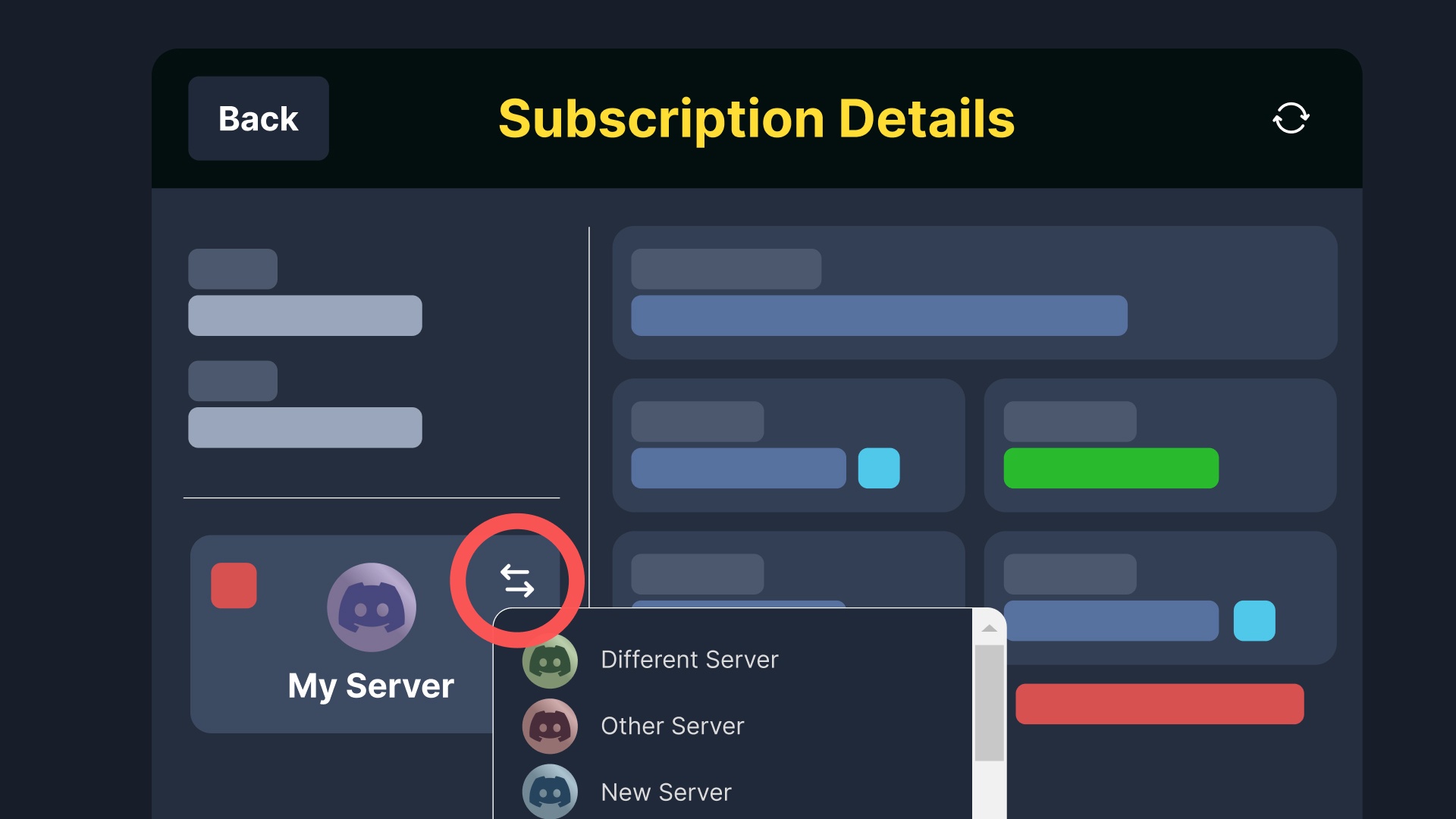
Dashboard > Premium > Manage Subscription > Transfer
 nocturne quest
How do I make another ticket for a game
 iron trellis
En sorpote de forsaken cuando quiero aser un apelacion me dice qje no tengo permiso para utilizar esto , que hafo
 drifting oracle
is there any way to remove bot from server if i lost my account with crown but i still have the admin perms role but the bot role is higher
tawdry meteor
restive condor
Hey there! Of course, see below please
I can't do that because my account has been deleted.
 wild girder
wicked perch
I can't access the ticket dashboard of the channel I want. It shows all the chan...
wild girder
wicked perch
I can't access the ticket dashboard of the channel I want. It shows all the chan...
I can't access the ticket dashboard of the channel I want. It shows all the channels I own and some others I did but not the one I want. How do I fix this issue? Also I have all the permissions needed and same with the bot and I tried reloading the website and nothing.
 steel compass
I don't know why when someone created ticket on My server. After sending some messages it will automatically delete from there ticket and everything will clear from there ticket
What should I do to stop that
 fast kelp
@humble sequoia @humble sequoia
 indigo tartan
guys i added ticket tool in my server but it still showing to invite bot in server not showing server dashboard
 quasi lava
Is it possible to add an automated message like a FAQ that pops up when someone opens a ticket?
humble sequoiaBOT
Don't see your server in the dashboard?
Try using the Sync Servers button on your top center of the Dashboard page
If this doesn't work
You should relog from the dashboard, you can do this by clicking here to log out immediately, and then log back in
Note:
You need one of these 3 things to access the dashboard.
1. Server Owner (Level: 6)
2. Server Administrator (Level: 4)
3. Dashboard Role (Level: 2)
:warning: You can check your level using the </permissionlevel:1029797400174399542> command on your Discord Server
If the bot's response is:
- @User is permission level: 0 (User)
You don't have any of the 3 levels required to access the server's dashboard
lilac junco
humble sequoia
@indigo tartan Please follow these steps.
indigo tartan
lilac junco
<@1184123388134953050> Please follow these steps.
i have administrator
but my friend setup he do ss and i tell him
lilac junco
quasi lava
Is it possible to add an automated message like a FAQ that pops up when someone ...
You can do that by going to Panel Configs > Ticket > Edit Ticket Message then write your message you wish for the ticket owner to see.
 ocean brook
Do you mean ticket tool premium?
Even so,staff can’t help if u open
 loud plover
hey guys, is there an issue with auto-pinning the ticket message?
i went through all the permission but it doesnt pin it
getting frustrated now 😅
 analog sleet
I created a panel.
When ppl click at the button. A new channel created for a ticket.
But the problem is, idk how to make the bot ping me. I want it ping staff in my server
 prime flint
Eu
 sterile glacier
I got a ticket and dont know how to put it on
lilac junco
analog sleet
I created a panel.
When ppl click at the button. A new channel created for a tic...
1. Open your Panel Configs tab in your server's dashboard
2. Select the panel you want to ping your support team on
3. Open the Ticket options menu
4. Click on Edit Ticket Message
5. In the Message Content use one of the role mention syntax ({@Role Name}/{Role ID})
6. Save changes
Note: For this to work properly, Ticket Tool requires the Mention Everyone permission. Or the role must have the Allow anyone to @mention this role setting enabled
analog sleet
lilac junco
> **1.** Open your **Panel Configs tab** in your server's dashboard
> **2.** Sel...
Thank you for the information ❕
iron nightBOT
Gave +1 Rep to @lilac junco (current: #34 - 134)
 rustic olive
It says I dont have a transcript channel but I do

 silent lava
rustic olive
It says I dont have a transcript channel but I do
silent lava
rustic olive
It says I dont have a transcript channel but I do
And for every panel it got its channel ?
And resend ur ticket jt to make sure
rustic olive
silent lava
And resend ur ticket jt to make sure
I'll try.
rustic olive
silent lava
And for every panel it got its channel ?
It worked thx.
iron nightBOT
Gave +1 Rep to @silent lava (current: #52 - 66)
rustic olive
Is it possible to make the ticket delete after it transcripts?
wild heath
3
guys how do i get more prefixes other than $
I wanna add prefix like + how do i do that ALONG with $
silent lava
rustic olive
Is it possible to make the ticket delete after it transcripts?
Automation is a premium feature
rustic olive
Oh
steel compass
steel compass
I don't know why when someone created ticket on My server. After sending some me...
??
 cinder sorrel
Does anyone know if there's a variable to retrieve the id of the team member who escalated a ticket?
{author} seems to direct to the ticket creator instead of the person doing the action
restive condor
cinder sorrel
Does anyone know if there's a variable to retrieve the id of the team member who...
Hey there! There’s currently no variable for that unfortunately
restive condor
 exotic mica
Partner Ship
exotic mica
Partner Ship
Sorry?
restive condor
tawdry meteor
I can't do that because my account has been deleted.
Please make a ticket #🎫│make-a-ticket and we’ll transfer it for you
 whole heron
Guys where can I find the weights of sun and syphan at winght have already bought both?
sterile glacier
i just purchased a one on one car amd the car package
humble sequoiaBOT
⚠️ You're in the wrong place
We provide support for Ticket Tool Discord bot and cannot help you with whatever issue you have.
- We don't know which Support Team you should contact to get this issue resolved, and unfortunately we won't be able to accurately tell you.
If you don't have any further questions regarding our bot Ticket Tool, please close this ticket
 true harbor
Eu fui banido da cidade Quero resolver HSOT
sterile glacier
I got a car I bought and a car package
humble sequoiaBOT
⚠️ You're in the wrong place
We provide support for Ticket Tool Discord bot and cannot help you with whatever issue you have.
- We don't know which Support Team you should contact to get this issue resolved, and unfortunately we won't be able to accurately tell you.
If you don't have any further questions regarding our bot Ticket Tool, please close this ticket
 normal needle
when I try getting transcript for the bot it says this interaction failed and bots offline for me
 novel maple
Uhm I tried changing one of the tickets categories, it only shows one of the tickets and not the rest… How do I fix that…
 tawny knoll
Why is this name allowed... "jew eliminator"
on his awp springtide.
Please do something about this genocide esc statement.
We are trying to have fun in this game, not shove our beliefs on people.
Let alone make such an evil statement about any people group, nation or party.
-Thanks for yalls time!
 humble sequoiaBOT
⚠️ You're in the wrong place
We provide support for Ticket Tool Discord bot and cannot help you with whatever issue you have.
- We don't know which Support Team you should contact to get this issue resolved, and unfortunately we won't be able to accurately tell you.
If you don't have any further questions regarding our bot Ticket Tool, please close this ticket
humble sequoiaBOT
⚠️ Está en el lugar equivocado
Brindamos soporte para el bot de Discord Ticket Tool y no le podemos ayudar con el problema que presenta.
- No sabemos a que equipo de soporte debería contactar para solucionar este problema, y desafortunadamente no podremos ayudarle acertadamente.
Si no tiene alguna duda relacionada a nuestro bot, Ticket Tool, por favor cierre este ticket.
grizzled summit
@true harbor ☝️
humble sequoiaBOT
Você está no lugar errado
Fornecemos suporte para Ticket Tool Discord bot e não podemos ajudá-lo com qualquer problema que você tenha.
- Não sabemos qual equipe de suporte você deve entrar em contato para resolver esse problema e, infelizmente, não poderemos informar com precisão.
Se você não tiver mais dúvidas sobre nossa ferramenta de ticket de bot, feche este ticket
grizzled summit
☝️
sterile glacier
Need a ticket made
grizzled summit
 restive rampart
true harbor
Alguém pode me ajudar se desbanido no five m
restive rampart
true harbor
Alguém pode me ajudar se desbanido no five m
Isso aqui não é FiveM
true harbor
restive rampart
Isso aqui não é FiveM
Eu sei que não é né
Só que a mulher mandou eu brincar da cidade
 south jackal
Hola
Cual el usuario abre ticket todo el staff con el rol soporte puede verlo, pero cuando alguien lo reclama, solo lo pueden ver los admnistradores mas no el resto del staff.
Donde puedo cambiar esos permisos?
hello
When the user opens a ticket, all staff with the support role can see it, but when someone claims it, only the administrators can see it, but not the rest of the staff.
Where can I change those permissions?
Como se puede evitar eso?
true harbor
A mulher mandou eu ficar comprar um kit para tentar desgano e outra cidade entendeu
restive rampart
@covert swallow Could that be deleted?
true harbor
Eu só tava querendo resolver o BO
restive rampart
true harbor
Eu só tava querendo resolver o BO
Entendi, mas aqui é suporte do bot Ticket tool
true harbor
Tá falando a cidade que eu tava que eu fui banido
restive rampart
por isso falei.
true harbor
Sim eu entendi aí ela só mandou complicar e comprar um kit tá ligado
É o que eu quero saber como que faz para comprar para desbloqueio da cidade para mim conversar com os cara na real
restive rampart
south jackal
Como se puede evitar eso?
Esos tipos de mensajes son gente que ya fueron hackeados, si descargas la imagen también lo serás, por eso es bueno no descargar ni nada al estilo.
true harbor
Ok
 chrome granite
Can I get unbanned i didn't join the discord in time
Im banned on the sahkal pve server
(╯°□°)╯︵ ┻━┻
humble sequoiaBOT
⚠️ You're in the wrong place
We provide support for Ticket Tool Discord bot and cannot help you with whatever issue you have.
- We don't know which Support Team you should contact to get this issue resolved, and unfortunately we won't be able to accurately tell you.
If you don't have any further questions regarding our bot Ticket Tool, please close this ticket
 daring ocean
The appeal server in VBL is not submitting my appeal
 mental prism
hey where can I pick where the new ticket will be opened?
Cuz right now it opens on some random place
sterile glacier
I need help trying to add a one of one car
humble sequoiaBOT
⚠️ You're in the wrong place
We provide support for Ticket Tool Discord bot and cannot help you with whatever issue you have.
- We don't know which Support Team you should contact to get this issue resolved, and unfortunately we won't be able to accurately tell you.
If you don't have any further questions regarding our bot Ticket Tool, please close this ticket
 drowsy cypress
Hi! I have a question: How can I configure the ‘escalate’ option?

 red jacinth
when im trying to manage the server it coms up that i need a verified e-mail or phone number what do i do for it to work
sterile glacier
 humble sequoiaBOT
⚠️ You're in the wrong place
We provide support for Ticket Tool Discord bot and cannot help you with whatever issue you have.
- We don't know which Support Team you should contact to get this issue resolved, and unfortunately we won't be able to accurately tell you.
If you don't have any further questions regarding our bot Ticket Tool, please close this ticket
For more convenient use of multipanels, you can now combine panels on the dashboard. This will allow you to directly send the multipanel from the dashboard or via the $panel ID command.
Where can I find this?
You can find this setting on the Dashboard -> Panel Configs -> Panel -> Attached Panels
Note: if you're attaching all the panels to a panel called English, don't include English in the attached panel's box (If you do this, it will create a duplicate)
This will put all buttons from all of your panels on one message. The message is the panel message from the panel you're combining these panels in.
 silent lava
@woven ember refer to the embed above
 loud pebble
when i create a ticket it just instantly closes without a transscruiot
wild heath
Guys
I have a question
Can we dm the user with sapphire once ticket tool ticket is closed?
restive condor
wild heath
Can we dm the user with sapphire once ticket tool ticket is closed?
Hey there! That’s something you’ll need to ask in Sapphire support server
loud pebble
wait dan
loud pebble
restive condor
Hey there! That’s something you’ll need to ask in Sapphire support server
how cna i just make it so i just say /delete and the ticket gets deleted? cuase i cant anymore
restive condor
loud pebble
how cna i just make it so i just say /delete and the ticket gets deleted? cuase ...
What do you mean you can’t anymore? Does the command not show up?
loud pebble
well i can do /delete but it says command isnt enabled
restive condor
drowsy cypress
Hi! I have a question: How can I configure the ‘escalate’ option?
Hey there! Here’s the information for you - let me know if you have any questions
humble sequoiaBOT
Located in your Dashboard ➞ Panel Configs ➞ Escalate.
You can use the /escalate command to escalate a ticket, which will transfer a ticket between different panels.
Panel List
You can select up to 25 possible panels for which a ticket can be transferred to.
Update Options
Here you will be able to select which options are to be updated once the ticket is transferred:
 Category: By enabling this option, the ticket will be moved to the category for opened tickets for the selected target panel.
 Name: By enabling this option, the ticket will be renamed following the Ticket Name options of the selected target panel.
 Permissions: All Permission Options will be set as new, as if the ticket was opened via the selected target panel.
 Automatically unclaim ticket: Tickets must be unclaimed in order to be escalated. Enabling this option would automatically unclaim the ticket before escalating it.
Additional Settings
- Send Custom Message: Allows you to create a custom message to be sent in the ticket. Supports special escalation variables.
- Send Ticket Message: This will send the Ticket Message of the selected target panel in the ticket channel.
 Note: Thread Style tickets cannot be escalated
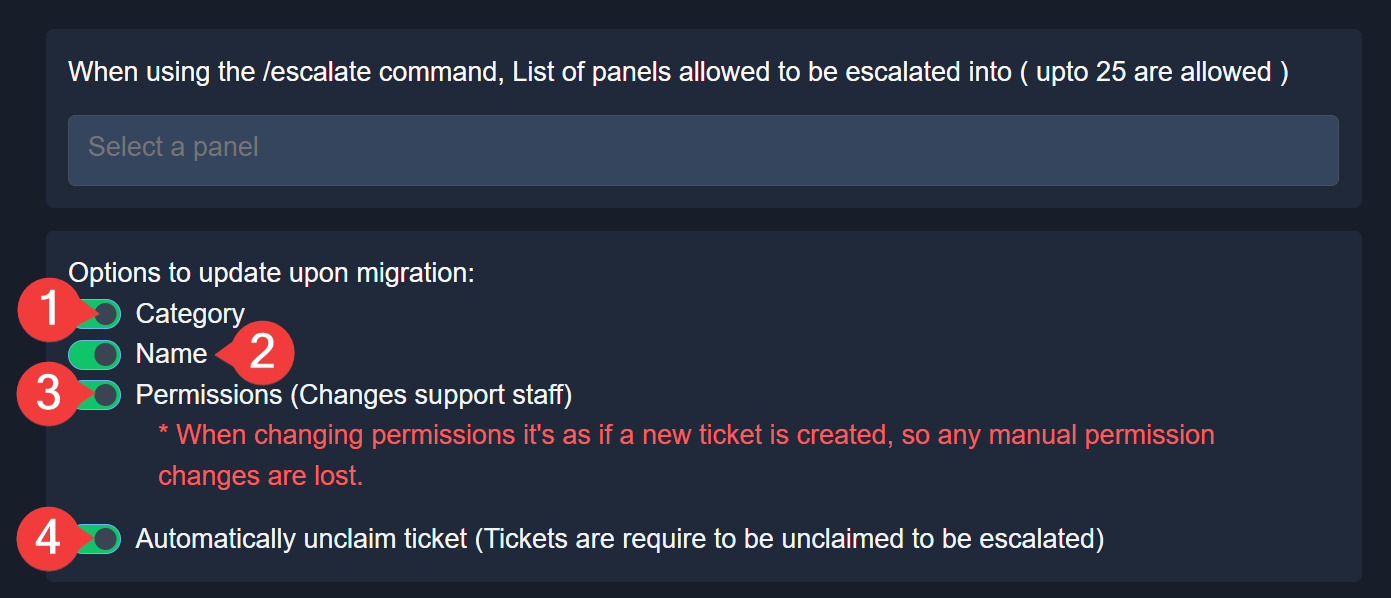
$escalation
restive condor
loud pebble
well i can do /delete but it says command isnt enabled
Dashboard > Command Configs > Delete >  Enabled
loud pebble
ty
drowsy cypress
restive condor
Hey there! Here’s the information for you - let me know if you have any question...
R: Thanks!
iron nightBOT
Gave +1 Rep to @restive condor (current: #1 - 3090)
restive condor
 woven ember
How do i make multiple panel like this?
woven ember
How do i make multiple panel like this?
Hey there! You will need to create one panel per button option (so if you'd like 5 buttons, you will 5 different panels).
Please see below how to combine all your panels
humble sequoiaBOT
For more convenient use of multipanels, you can now combine panels on the dashboard. This will allow you to directly send the multipanel from the dashboard or via the $panel ID command.
Where can I find this?
You can find this setting on the Dashboard -> Panel Configs -> Panel -> Attached Panels
Note: if you're attaching all the panels to a panel called English, don't include English in the attached panel's box (If you do this, it will create a duplicate)
This will put all buttons from all of your panels on one message. The message is the panel message from the panel you're combining these panels in.
 fading carbon
grizzled summit
fading carbon
grizzled summit
Hey there. Our staff team is volunteer based and are under zero requirement to reply to messages in this channel. It is called "community" support for a reason.
You can review our rules regarding this in #📂│information . Continuing to violate our rules will result in moderation action.
If you ask a question and remain patient, someone will answer your question, or you can #🎫│make-a-ticket, and again... remain patient. Our staff are more than happy to assist, but it is on their timeline.
 floral marlin
Hi
I’d like to copy paste a ticket tool full config from a server to an other. I’m owner / admin in both. Do you know if I can do that ?
Server IDs : 1498628315945242814 and 1474019269296656528
humble sequoiaBOT
━━ User's inquiry has been moved to a ticket ━━
 cold hollow
how can i make it so admin can remove other admin or people with ticket roles from a ticket
 thick plaza
I am banned from a game roblox so i need a ticket
humble sequoiaBOT
⚠️ You're in the wrong place
We provide support for Ticket Tool Discord bot and cannot help you with whatever issue you have.
- We don't know which Support Team you should contact to get this issue resolved, and unfortunately we won't be able to accurately tell you.
If you don't have any further questions regarding our bot Ticket Tool, please close this ticket
grizzled summit
@thick plaza ☝️
thick plaza
yeah ?
 deep forge
@grizzled summit How can I gift someone a premium bot?
restive condor
cold hollow
how can i make it so admin can remove other admin or people with ticket roles fr...
Hey there! Please ensure you're using the revoke option set to true, if you're trying to remove someone with support team access
 restive condor
deep forge
<@233775910761922560> How can I gift someone a premium bot?
restive condor
deep forge
<@233775910761922560> How can I gift someone a premium bot?
Hey there! Yes, #🎫│make-a-ticket
cold hollow
restive condor
Hey there! Please ensure you're using the `revoke` option set to true, if you're...
thank you didnt know that was a thing 🙂
iron nightBOT
Gave +1 Rep to @restive condor (current: #1 - 3093)
sterile glacier
Need help with an order
 steady sky
Application not responding when I use /setup. Has been going on for the past 16 hours
foggy sparrow
steady sky
Application not responding when I use /setup. Has been going on for the past 16 ...
Make usre the bot has perms
$permissions
humble sequoiaBOT
When first invited to your server, Ticket Tool should have the permissions shown below in order to ensure an appropriate functioning:
When customizing permissions for the different ticket participants, you must make sure Ticket Tool has the permissions you want it to grant to others, you can learn more about this here.
Missing Permissions
This error is a direct outcome of the bot missing permissions as depicted above. When troubleshooting this error we suggest you go through these steps:
- Use the </debug:1029783024264564765> command to check if the bot is lacking core role or channel permissions.
- Compare the category/channel's overrides and contrast them with the bot's roles to identify any permission denial that is breaking the functioning
- If you can't still figure it out, let our <@&540295656720302081> know so they can guide you through
Additional Resources
- If you are a server administrator and would like to understand more how to set up your server's permissions, we suggest checking the Discord Support Knowledge Base
- If you are a bot developer and are interested in the internal permission hierarchy we suggest you this part of the Discord Developer Docs
Important Note
- Giving Administrator permissions is NOT required and we do NOT encourage you to do unless you are trying to troubleshoot your permissions setup.

 jagged jewel
Hello, I already have a ticket open but I can't find it or access it.
Can you please help me reopen it or close it so I can create a new one?
My ID: #1D219F69FB1D
Username: LO-_-Casx01
Issue: My account was hacked
humble sequoiaBOT
⚠️ You're in the wrong place
We provide support for Ticket Tool Discord bot and cannot help you with whatever issue you have.
- We don't know which Support Team you should contact to get this issue resolved, and unfortunately we won't be able to accurately tell you.
If you don't have any further questions regarding our bot Ticket Tool, please close this ticket
jagged jewel
Hello Support Team,
My account has been hacked and I no longer have access to it. The hacker has changed all the login details.
Account ID: #1D219F69FB1D
Username: LO-_-Casx01
Previous Email: ibrahimaitbihi579@gmail.com
This account is very important to me and contains my progress and possibly purchases.
I can provide proof of ownership such as screenshots, videos, or any verification you require.
Please help me recover my account as soon as possible.
Thank you.
foggy sparrow
jagged jewel
Hello Support Team,
My account has been hacked and I no longer have access to...
You are in the WRONG PLACE
humble sequoiaBOT
⚠️ أنت في المكان الخطأ
نحن نقدم دعمًا لـTicket Tool ديسكورد بوت ولا يمكننا مساعدتك في المشكلة التي تواجهها.
- يرجى التأكد من الاتصال بفريق الدعم المناسب.
إذا لم يكن لديك أي أسئلة أخرى بخصوص بوت تيكت توول ، يرجى إغلاق هذه التذكرة
foggy sparrow
@jagged jewel 🔼
jagged jewel
Give me a room
foggy sparrow
We don't know which server is it, but I can 100% asure you this is not the server
jagged jewel
Sorry
 ancient storm
People are trying to make a ticket in my server but it gives them interaction failed
is there a way to fix it? or is the bot down?
jagged jewel
 wanton oriole
when i search up the channel that i want transcripts to go to it doesnt show up at all?
 little sky
jagged jewel
little sky
jagged jewel
where did you find this ticket thing
radiant valve
little sky
where did you find this ticket thing
For making a ticket for this server, refer to #🎫│make-a-ticket
 supple vapor
hi! the ticket bot is saying we are at the channel limit even though we arent
also, the category that the ticket channels go into arent at max


 maiden hawk
Hola estoy intentando crear un panel de tickets con el bot pero no responde

 radiant valve
 past haven
You need staff at that server to remove some channels, as discord only allows 500 channels per server
past haven
How to remove
radiant valve
past haven
How to remove
The staff in the server that has that issue needs to do that
past haven
Oh ok
 bright peak
Im an admin but it weirdly doesn't let me set it up

 keen hull
anyone know the reason why the bot refuses to respond to me

 wise ice
 soft delta
keen hull
anyone know the reason why the bot refuses to respond to me
soft delta
keen hull
anyone know the reason why the bot refuses to respond to me
Missing permissions, it's the most common to be.
soft delta
Try giving it administrator permissions.
keen hull
soft delta
Try giving it administrator permissions.
ty
iron nightBOT
Gave +1 Rep to @soft delta (current: #177 - 4)
soft delta
keen hull
ty
No worries! Did it work?
keen hull
soft delta
No worries! Did it work?
yep it did! tysm man
humble sequoiaBOT
 umbral ice
$help
umbral ice
$help
The prefix is what goes before any command, by default the prefix is $ but you can customize it following these steps:
1. Open the Server Configs tab in your server's dashboard
2. Update the prefix editing the Command Prefix field
3. Save changes
Note: Ticket Tool also supports slash commands which you can check by using the/operator on the chat box.
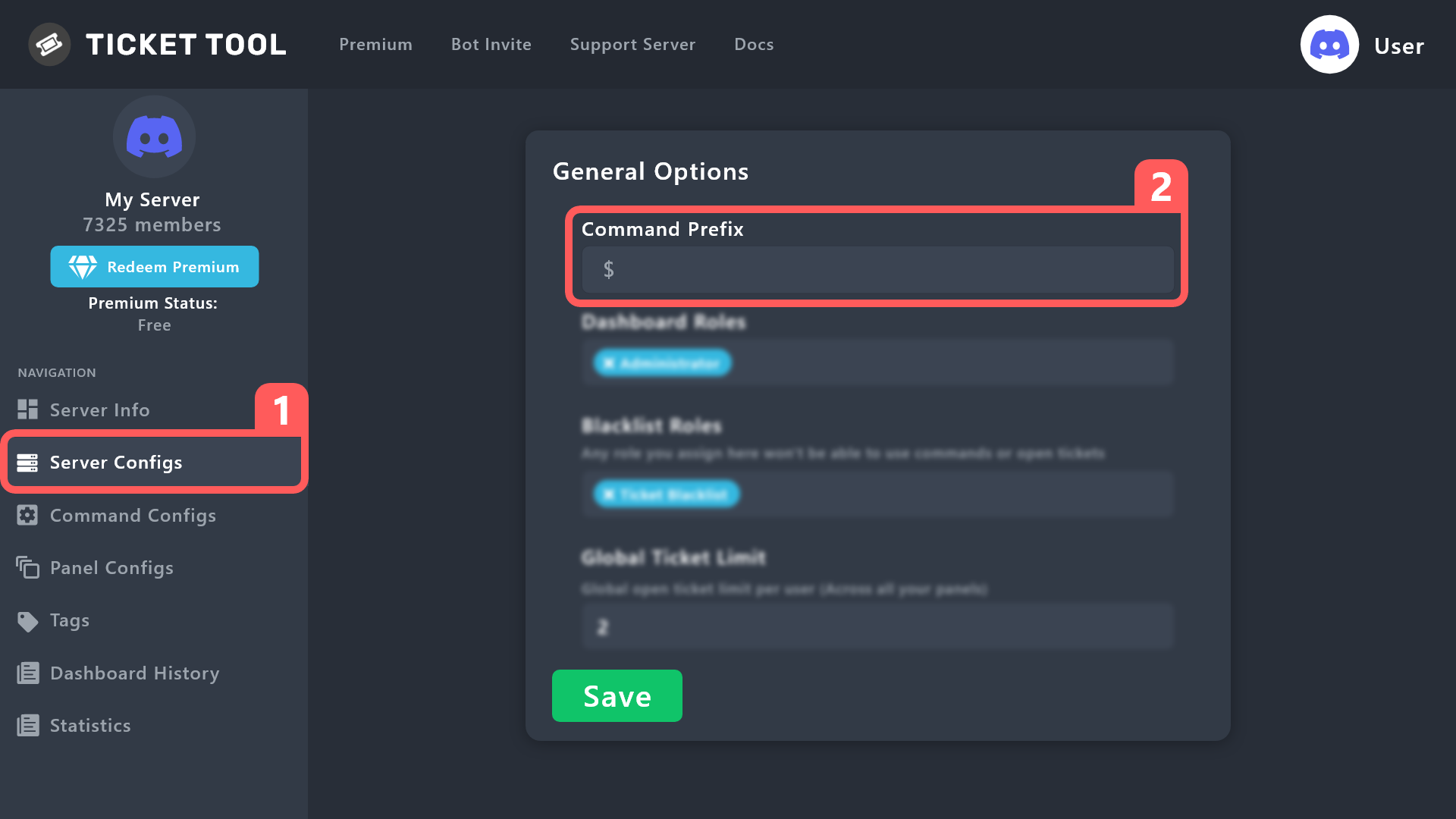
 strange void
Pls help
humble sequoiaBOT
━━ User's inquiry has been moved to a ticket ━━
strange void
How to fix failed to create missing permission even the bot has no missing permission
$help
humble sequoiaBOT
strange void
$help
First you will want to invite the bot to your server. Once the bot is in your server, you can manage your server in the dashboard.
To create a panel we are going to need to head over to the Panel Configs Tab on the Dashboard.
Once at the dashboard we will need to click Create Panel.
Enter a panel name (Fill in any optional settings you want).
Click Create Panel and you are ready to get started with configuring your panel.
An example of a creating a panel is shown below.
Once the panel has been created, use the blue Send button and select the channel you want the panel to be sent to.
The Panel wasn't send
Use the </debug:1029783024264564765> command to diagnose possible permission issues with the bot.
 agile remnant
strange void
How to fix failed to create missing permission even the bot has no missing permi...
agile remnant
strange void
How to fix failed to create missing permission even the bot has no missing permi...
Same issue
soft delta
How to invite bot to my other server
humble sequoiaBOT
1. Open your Panel Configs tab in your server's dashboard
2. Select the panel you want to ping your support team on
3. Open the Ticket options menu
4. Click on Edit Ticket Message
5. In the Message Content use one of the role mention syntax ({@Role Name}/{Role ID})
6. Save changes
Note: For this to work properly, Ticket Tool requires the Mention Everyone permission. Or the role must have the Allow anyone to @mention this role setting enabled
 silent python
Hello, I need procedure on how handle ticket issues, my account got paused
humble sequoiaBOT
⚠️ You're in the wrong place
We provide support for Ticket Tool Discord bot and cannot help you with whatever issue you have.
- We don't know which Support Team you should contact to get this issue resolved, and unfortunately we won't be able to accurately tell you.
If you don't have any further questions regarding our bot Ticket Tool, please close this ticket
lilac junco
strange void
How to fix failed to create missing permission even the bot has no missing permi...
Make sure the bot has the following permissions in the channel you're using the command in.
Bot Permissions ឵ ឵឵ ឵ ឵឵ ឵ ឵឵ ឵ ឵឵
- Read Channels
- Send Messages
- Embed Links
- Attach Files
- Manage Roles
- Manage Channels
- Manage Messages
- Read History
Channel Permissions ឵ ឵឵ ឵ ឵឵ ឵ ឵឵ ឵ ឵឵
- Read Channels
- Send Messages
- Embed Links
- Attach Files
- Manage Roles
- Manage Channels
- Manage Messages
- Read History
 faint totem
can the free version add persons name to the opened ticket? or only premium
 hazy moth
lilac junco
faint totem
can the free version add persons name to the opened ticket? or only premium
hazy moth
lilac junco
faint totem
can the free version add persons name to the opened ticket? or only premium
Like this?
ticket-djembe
faint totem
lilac junco
Like this?
``ticket-djembe``
Yes
humble sequoiaBOT
The ticket name is the default channel name of all tickets. To edit it, go to your Dashboard > Panel Configs > Ticket. There you can edit the channel name of opened and closed tickets. You can also use variables in there.

 Note: This is a premium feature
 gaunt kettle
What happened?
 lilac junco
gaunt kettle
What happened?
lilac junco
gaunt kettle
What happened?
The server has reached the channel limit.
gaunt kettle
I can't join the server. It says ‘The server has reached the channel limit’. Could you please check it?
lilac junco
gaunt kettle
I can't join the server. It says ‘The server has reached the channel limit’. Cou...
I can't check it. Inform the staff of that server.
gaunt kettle
Oh ok
 west walrus
Im on phone how to add it onto my server
 violet knoll
Hi
silent lava
$invite
humble sequoiaBOT
silent lava
$invite
Ticket Tool Invite & Support
silent lava
humble sequoia
@west walrus
west walrus
?
 vernal quartz
Ограничение канала ╰ Сервер при ограничении канала 500
╰ Очистите каналы для продолжения создания тикетов
Страница документации по этой ошибке
4f11290a-f4d3-11ed-a05b-0242ac120003
 haughty hare
how can i fix it when it says you dont have permission to do that when trying to open a ticket?
restive condor
haughty hare
how can i fix it when it says you dont have permission to do that when trying to...
Hi there! Please check:
Dashboard > Panel Configs > Buttons > Create Ticket Button
- Check that support Team Only is disabled and that you didn't accidentally disable any roles
Dashboard > Server Configs > Blacklist Roles
- Make sure you didn't accidentally blacklist any roles
iron nightBOT
Gave +1 Rep to @restive condor (current: #1 - 3096)
haughty hare
the bot told me to tag
violet knoll
@haughty hare Hi
haughty hare
Yo
violet knoll
How are you feeling
haughty hare
Good, u?
silent lava
thats a helping channel go there#💬│general-chat
haughty hare
Fine
 fiery sun
Cant find my ticket and can't make a new 1
 sand cloud
 radiant valve
 forest blaze
pls
forest blaze
pls
There are too many tickets open from that emeb/button
staff for that server has to fix it
 void salmon
Ich würde eine rückerstatten gerne haben ich habe falsche Angaben drinnen und es stornieren da es sehr viel Geld ist und ich das Risiko nicht haben will mit falschen Angaben ich würde es neu machen aber dafür müsste ich die rückerstattung gerne haben ich habe Ticket eingereicht und es wurde noch nicht gemacht darum ist die zeit noch da
 slender minnow
Wrong server
 tough nebula
Ich brauche Hilfe bei ein Ticket für mein dc zu erstellen
 sterile rampart
hey
I wanna ask
can I edit the messages of the ticket panel and add a custom emotes?
ocean brook
 willow gulch
two things
you can reference things in forms, not sure if thats an exploit and if there is anything to be gained from it
other thing
I can't do a closerequest without it instantly closing
i've tried turning two step close off and on, neither have changed the outcome
 fluid marlin
Is there a command where we can see all the current users in a ticket?
 ember crow
Hey i need help i tried making a ticket right but when i go to the dashboard it doesnt show me the server i invited ticket tool to and i tried elaving it overnight but it didnt work it still wont show me the server. i tired reinviting the bot but it didnt work neither.

 humble sequoiaBOT
Don't see your server in the dashboard?
Try using the Sync Servers button on your top center of the Dashboard page
If this doesn't work
You should relog from the dashboard, you can do this by clicking here to log out immediately, and then log back in
Note:
You need one of these 3 things to access the dashboard.
1. Server Owner (Level: 6)
2. Server Administrator (Level: 4)
3. Dashboard Role (Level: 2)
:warning: You can check your level using the </permissionlevel:1029797400174399542> command on your Discord Server
If the bot's response is:
- @User is permission level: 0 (User)
You don't have any of the 3 levels required to access the server's dashboard
silent lava
humble sequoia
@ember crow refer up here
 sudden otter
ليش البوت مو شغال ؟
lilac junco
$articket
humble sequoiaBOT

فريق الدعم الفني العربي
عميلنا العزيز ان كنت تبحث عن مساعدة يرجى فتح تكت خاص بفريق الدعم الفني العربي
اذهب الى#🎫│make-a-ticket
ثم قم بلضغط على الايموجي الاتي (🇯🇴)
lilac junco
humble sequoia
@sudden otter
 fast sand
How do I use my ticket in obsidian
 unborn burrow
Getting 451 error coming up on all channels how do I fix please
 errant hemlock
How do I make more than one ticket at a time
 obtuse palm
tickettool is down?
 boreal fractal
How do i put ticket tool in my dc server
grizzled summit
$invite
humble sequoiaBOT
grizzled summit
$invite
Ticket Tool Invite & Support
grizzled summit
@boreal fractal ☝️
boreal fractal
tysm
 shrewd siren
Hi
How do i make it so there is 1 panel and when u want to make a ticket with report and claim giveaways but is it premium if it isnt how do i do it?
Is it premium or not?
 static barn
How do I see closed tickets for a server that I do not own? I need to look back at a ticket for proof of something
sterile glacier
im trying to open a ticket
sterile glacier
02832_DB85parisienne.rar
 grave shore
How can people Open multiple Tickets at once?
 queen pike
How do you open a ticket
 jade robin
Hey, is Two step Close not working i am not able to disable it it still does two step after turning it off
humble sequoiaBOT
━━ User's inquiry has been moved to a ticket ━━
 covert swallow
queen pike
How do you open a ticket
covert swallow
queen pike
How do you open a ticket
Are you referring to creating a ticket system on your server, or opening a ticket in a a server?
covert swallow
static barn
How do I see closed tickets for a server that I do not own? I need to look back ...
Unless you have access to the transcript already, you will need to contact that server's staff team
humble sequoiaBOT
A Discord Form lets the user answer individual questions in a pop-up Form, which then displays the answers in the ticket message. This can save time if you already know what you want to ask the user.
Setup Forms
Forms can be enabled under Panel Settings > Form Options > Edit Forms Options. In the new pop-up window, you can now enable and edit your own Form.
Form Options
You can add up to 5 questions in the Discord form. This is a Discord limitation. Each question can have a placeholder in the input field, a minimum and maximum input, multi-line, and also the option to have the answer required.
Options
Question Title ➞ Your Question goes here
Question Placeholder ➞ The placeholder text in the input field
Required ➞ If enabled, the user has to answer this question, to submit the form
Multi-Line Input ➞ Allows the user to input multiple lines
Minimum and Maximum Input ➞ Set a minimum and maximum input value for the user
Displaying the Answer
To display the answers from the user, you need to enable Auto display form results on the ticket message as an additional embed
If you don't want a second embed, go into your Panel Configs > Ticket Options > Edit Ticket Message. You use the variable {create.form.x} and replace x with the number of your question. For example, the response to Question 5 can be displayed with {create.form.5}.
 lilac junco
humble sequoia
lilac junco
humble sequoia
@rotund tree
 rotund tree
K
rotund tree
Why not working

I made the form questions I put {create.form.4} in the message do I have to skip a line or something
lilac junco
rotund tree
I made the form questions I put {create.form.4} in the message do I have to skip...
Enable this on the forms option in the dashboard
 rotund tree
I did..
lilac junco
rotund tree
I did..
Update your panel.
rotund tree

 lilac junco
rotund tree
lilac junco
rotund tree
Your forgot to enable forms.
Enable form
rotund tree
K
What if I enabled both and have {create.form.4} there in the message will that mess it up?
rotund tree
rotund tree
How..
dw I found it
 still ice
When I send a panel
The bot say
Failed:
Invalid Form Body components[0].components[0].emoji.name[COMPONENT_INVALID_EMOJI]: Invalid emoji components[0].components[1].emoji.name[COMPONENT_INVALID_EMOJI]: Invalid emoji
 frozen token
I need help...
 covert nacelle
I need help
ocean brook
frozen token
I need help...
with what
ocean brook
covert nacelle
I need help
with what
ocean brook
still ice
When I send a panel
The bot say
> Failed: `Invalid Form Body
components[0].com...
Try deleting the emoji and adding it again
 split cape
frozen token
ocean brook
with what
split cape
frozen token
ocean brook
with what
I'm doing setup but this showing [this application did not response] how to solve this problem?
grave shore
How can people Open multiple Tickets at once?
 night meteor
how to give perms to person to access tickets and close delete and transcript
grave shore
night meteor
how to give perms to person to access tickets and close delete and transcript
Are you on Desktop?
night meteor
grave shore
Are you on Desktop?
Yes
lilac junco
frozen token
I'm doing setup but this showing [this application did not response] how to solv...
Make sure the bot has the following permissions in the channel you're using the command in.
Bot Permissions ឵ ឵឵ ឵ ឵឵ ឵ ឵឵ ឵ ឵឵
- Read Channels
- Send Messages
- Embed Links
- Attach Files
- Manage Roles
- Manage Channels
- Manage Messages
- Read History
Channel Permissions ឵ ឵឵ ឵ ឵឵ ឵ ឵឵ ឵ ឵឵
- Read Channels
- Send Messages
- Embed Links
- Attach Files
- Manage Roles
- Manage Channels
- Manage Messages
- Read History
humble sequoiaBOT
Any role you put there will have full access to the ticket tool dashboard. The server owner and users with admin permissions already have access to the dashboard.
Be careful of which roles to put here
 lilac junco
humble sequoia
lilac junco
humble sequoia
@night meteor refer to this embed
night meteor
Ok
 shell summit
ticket tool not showing in dashboard
 lilac mango
 sonic falcon
where i can find variables list
sonic falcon
where i can find variables list

Description of the variables you can use across your ticket system
shell summit
shell summit
ticket tool not showing in dashboard
pls help
lilac mango
How do I add buttons to the ticket
humble sequoiaBOT
Don't see your server in the dashboard?
Try using the Sync Servers button on your top center of the Dashboard page
If this doesn't work
You should relog from the dashboard, you can do this by clicking here to log out immediately, and then log back in
Note:
You need one of these 3 things to access the dashboard.
1. Server Owner (Level: 6)
2. Server Administrator (Level: 4)
3. Dashboard Role (Level: 2)
:warning: You can check your level using the </permissionlevel:1029797400174399542> command on your Discord Server
If the bot's response is:
- @User is permission level: 0 (User)
You don't have any of the 3 levels required to access the server's dashboard
lilac junco
humble sequoia
@shell summit Refer to the embed.
shell summit
How to add the bot back if I purged the channel
silent lava
Send the bot
lilac mango
How do I add buttons to the ticket
 sick marlin
 frail ledge
How do i make the ticket bot to auto save transcripts if it’s possible
And to see who deleted certain tickets
 tall crow
 humble sequoiaBOT
━━ User's inquiry has been moved to a ticket ━━
restive condor
frail ledge
How do i make the ticket bot to auto save transcripts if it’s possible
And to ...
Hey there! Saving transcripts automatically is a premium feature
To see who deleted tickets, please enable ticket logging
humble sequoiaBOT
With Ticket Tool, you can customize the behavior the bot takes when logging your tickets! For editing these options follow these steps:
Dashboard ➞ Panel Configs ➞ Logging Options
Logging Channel
Here you will define which channel @humble sequoia will save the Logs in (ticket created/deleted/closed, etc.)
Logs you can save:
➞ Ticket Created ➞ Logs when a ticket is created
➞ Ticket Closed ➞ Logs when a ticket is closed
➞ Ticket Opened ➞ Logs when a ticket is opened
➞ Ticket Renamed ➞ Logs when a ticket is renamed
➞ Ticket Deleted ➞ Logs when a ticket is deleted
➞ Transcript Saved ➞ Logs when a ticket is saved
Select with  (disable) or (enabled) which logs you would like
Below you can see an example of what the Logging Options will look like:
 restive condor
lilac mango
How do I add buttons to the ticket
restive condor
lilac mango
How do I add buttons to the ticket
Hey there! What exactly do you mean?
lilac mango
restive condor
Hey there! What exactly do you mean?
oh wait well how do I make it so when they wanna create a ticket they have to click from options like for example support , partnership ect
restive condor
lilac mango
oh wait well how do I make it so when they wanna create a ticket they have to cl...
See below please
humble sequoiaBOT
The Drop-down menu or Select Menu replaces the buttons on your panel message and uses a drop-down menu with all of your panels. To set this up, go to your Panel Configs and select your main Panel.
<:Numbericons1:1018864164032225340> Enable Select Style
First you enable Select Style. Then you add an item in the Dropdown Editor. Now you can start editing your dropdown!
<:Numbericons2:1018864168041971712> Dropdown Editor
Each line in the dropdown editor represents a line in the drop down menu on discord. You can add more "Items", by clicking on 

First you select a panel. That's the panel this option will open a ticket for.  DONT select the same panel twice. Each option should have a different Panel
After that, you can put a Display. This is the title of this option and will appear in the drop down menu. The *Description can be set right after that, which will be below the title in grey.
Additionally you can select an emoji, that will be shown in front of each option. You can either manually input the ID of an emoji or select it in the selector.
Common Issues ⚠️
- Panel doesn't send? Make sure you have a valid emoji selected
- Option doesn't show up? Check if two options have the same panel in the DropDown Editor

$dropdown
lilac mango
restive condor
See below please
Do u have to put an emoji
“Using select style will replace the buttons on the panel will this dropdown instead.” Does this mean you dont have to have buttons
restive condor
lilac mango
“Using select style will replace the buttons on the panel will this dropdown ins...
It means you won't have buttons, yes
restive condor
lilac mango
Do u have to put an emoji
No
lilac mango
restive condor
No
So if they press support the dropdown will come with the options I’ve added
restive condor
lilac mango
So if they press support the dropdown will come with the options I’ve added
No, there will be a dropdown there in the first place
And when they click it, the options will be displayed
lilac mango
restive condor
And when they click it, the options will be displayed
okay ty
iron nightBOT
Gave +1 Rep to @restive condor (current: #1 - 3099)
grave shore
How can people Open multiple Tickets at once?
unborn burrow
Still no joy coming up error 451 can’t watch anything is there any easy fix can’t get help?🙏🏻
humble sequoiaBOT
⚠️ You're in the wrong place
We provide support for Ticket Tool Discord bot and cannot help you with whatever issue you have.
- We don't know which Support Team you should contact to get this issue resolved, and unfortunately we won't be able to accurately tell you.
If you don't have any further questions regarding our bot Ticket Tool, please close this ticket
 flat crater
how to do a panel like this ?
humble sequoiaBOT
The Drop-down menu or Select Menu replaces the buttons on your panel message and uses a drop-down menu with all of your panels. To set this up, go to your Panel Configs and select your main Panel.
<:Numbericons1:1018864164032225340> Enable Select Style
First you enable Select Style. Then you add an item in the Dropdown Editor. Now you can start editing your dropdown!
<:Numbericons2:1018864168041971712> Dropdown Editor
Each line in the dropdown editor represents a line in the drop down menu on discord. You can add more "Items", by clicking on
First you select a panel. That's the panel this option will open a ticket for. DONT select the same panel twice. Each option should have a different Panel
After that, you can put a Display. This is the title of this option and will appear in the drop down menu. The *Description can be set right after that, which will be below the title in grey.
Additionally you can select an emoji, that will be shown in front of each option. You can either manually input the ID of an emoji or select it in the selector.
Common Issues ⚠️
- Panel doesn't send? Make sure you have a valid emoji selected
- Option doesn't show up? Check if two options have the same panel in the DropDown Editor
$dropdown
silent lava
@flat crater refer to embed above
 azure drift
@humble sequoia
 subtle frost
yo guys
can anyone help me its says that my ticket tool doesnt have permission to view or send in channels but it does i gave every perm i can think of
humble sequoiaBOT
━━ User's inquiry has been moved to a ticket ━━
 gentle nebula
hi, accidently deleted the panel name section, what do i do
 soft delta
gentle nebula
hi, accidently deleted the panel name section, what do i do
soft delta
gentle nebula
hi, accidently deleted the panel name section, what do i do
Hey there, just change it.
 hybrid sparrow
Hey guys, when i want to make my ticket tool ping a role, and when i go to the dashboard, it only shows up with 1 server, not my own server
hybrid sparrow
soft delta
Hey there, just change it.
Can you help me?
@drifting island @sudden eagle
soft delta
hybrid sparrow
Hey guys, when i want to make my ticket tool ping a role, and when i go to the d...
Oh, do you mind me helping you with the dashboard? Like you make me administrator, I'll help.
soft delta
hybrid sparrow
<@994057257245483141> <@817389483598151740>
Please do not ping for support.
hybrid sparrow
soft delta
Oh, do you mind me helping you with the dashboard? Like you make me administrato...
Ik how, i googled it
I logged out and logged back in
soft delta
Have a wonderful day!
lilac junco
hybrid sparrow
Hey guys, when i want to make my ticket tool ping a role, and when i go to the d...
1. Open your Panel Configs tab in your server's dashboard
2. Select the panel you want to ping your support team on
3. Open the Ticket options menu
4. Click on Edit Ticket Message
5. In the Message Content use one of the role mention syntax ({@Role Name}/{Role ID})
6. Save changes
Note: For this to work properly, Ticket Tool requires the Mention Everyone permission. Or the role must have the Allow anyone to @mention this role setting enabled
That to ping a role
lilac junco
 elfin pecan
<@1086519848999329903> hello sir help me
elfin pecan
<@1086519848999329903> hello sir help me
Please don't ping for support. What's the issue?
 lilac junco
elfin pecan
Setup is not plz help me reason now to ticket
lilac junco
elfin pecan
Setup is not plz help me reason now to ticket
What do you mean?
lilac junco
elfin pecan
Hindi aata
I'm afraid I can't understand your language.
elfin pecan
@lilac junco My server ticket setup plz help me
humble sequoiaBOT
First you will want to invite the bot to your server. Once the bot is in your server, you can manage your server in the dashboard.
To create a panel we are going to need to head over to the Panel Configs Tab on the Dashboard.
Once at the dashboard we will need to click Create Panel.
Enter a panel name (Fill in any optional settings you want).
Click Create Panel and you are ready to get started with configuring your panel.
An example of a creating a panel is shown below.
Once the panel has been created, use the blue Send button and select the channel you want the panel to be sent to.
The Panel wasn't send
Use the </debug:1029783024264564765> command to diagnose possible permission issues with the bot.
lilac junco
humble sequoia
@elfin pecan
gentle nebula
soft delta
Hey there, just change it.
How?
 soft delta
 limber ginkgo
how to fix this
limber ginkgo
how to fix this
Hey there, I'm indrafan and will be helping you today.
You can't fix / troubleshoot it as you are not a administrator / the server owner. Please request the owner to give you administrator permissions to access. Will that be all?
soft delta
gentle nebula
How?
Embed editor
 lethal carbon
Hello, Id like to give my members the option to pick between 3 different required reasons when opening a ticket, with a button. Is this possible ? Or would I need 3 seperate panels?
unborn burrow
Error 451 how can I fix this nothing playing on stick?
lilac mango
oh
For dropdown panel what do I do because the first option is tickets and then the other one I want to do doesn’t come up with tickets
 proven schooner
hi so when i go to the dashboard, i cant find my server
restive condor
lethal carbon
Hello, Id like to give my members the option to pick between 3 different require...
Hey there! Yes, you will need to create one panel per button option (so if you'd like 3 buttons, you will 3 different panels).
Please see below how to combine all your panels
humble sequoiaBOT
For more convenient use of multipanels, you can now combine panels on the dashboard. This will allow you to directly send the multipanel from the dashboard or via the $panel ID command.
Where can I find this?
You can find this setting on the Dashboard -> Panel Configs -> Panel -> Attached Panels
Note: if you're attaching all the panels to a panel called English, don't include English in the attached panel's box (If you do this, it will create a duplicate)
This will put all buttons from all of your panels on one message. The message is the panel message from the panel you're combining these panels in.
restive condor
lilac mango
For dropdown panel what do I do because the first option is tickets and then the...
Hey there! Each dropdown option needs its own panel
restive condor
proven schooner
hi so when i go to the dashboard, i cant find my server
Hey there! Please try the steps below
humble sequoiaBOT
Don't see your server in the dashboard?
Try using the Sync Servers button on your top center of the Dashboard page
If this doesn't work
You should relog from the dashboard, you can do this by clicking here to log out immediately, and then log back in
Note:
You need one of these 3 things to access the dashboard.
1. Server Owner (Level: 6)
2. Server Administrator (Level: 4)
3. Dashboard Role (Level: 2)
:warning: You can check your level using the </permissionlevel:1029797400174399542> command on your Discord Server
If the bot's response is:
- @User is permission level: 0 (User)
You don't have any of the 3 levels required to access the server's dashboard
lilac mango
restive condor
Hey there! Each dropdown option needs its own panel
How do I make my own panel
humble sequoiaBOT
A panel is the core of Ticket Tool, so its important to do the adequate process:
1. Open your Panel Configs tab in your server's dashboard
2. Click on the+or in theCreatebutton
3. Fill in the blanks
4. Create the panel
restive condor
lilac mango
How do I make my own panel
^
proven schooner
im the servers administrator tho
restive condor
proven schooner
im the servers administrator tho
Did you try all of the steps above?
proven schooner
yes and it didnt work
restive condor
which level are you?
proven schooner
6
restive condor
Did you try logging out and back in?
proven schooner
5 times
restive condor
Please screenshot you using the /permissionlevel command
proven schooner
what?
restive condor
Please use the /permissionlevel on your server and screenshot
proven schooner
oh wait 4
lilac mango
restive condor
^
So everytime I want to do a dropdown panel I have to create one
 lethal carbon
restive condor
Hey there! Yes, you will need to create one panel per button option (so if you'd...
lethal carbon
restive condor
Hey there! Yes, you will need to create one panel per button option (so if you'd...
Perfect!!! Thanks Dan!
iron nightBOT
Gave +1 Rep to @restive condor (current: #1 - 3104)
proven schooner
hello?
restive condor
It's been a total of 35 seconds, please be patient
proven schooner
ok
restive condor
lilac mango
So everytime I want to do a dropdown panel I have to create one
That's right, each dropdown option needs to be connected to its own panel
So it should look something like this
 restive condor
proven schooner
restive condor
proven schooner
Now please provide a full screenshot of what you see on the Dashboard
proven schooner
 restive condor
proven schooner
restive condor
proven schooner
You are logged onto the wrong account
proven schooner
nope thats my only account thats just my usename
restive condor
Please log out and try to log back in, but before you authorise, screenshot
 twin bridge
#🆘│community-support i need help to unpause my account
wild heath
restive condor
You are logged onto the wrong account
Yo mod dude
restive condor
twin bridge
<#776680605517742090> i need help to unpause my account
You're in the wrong server
twin bridge
what server should i be in
restive condor
We don't know, but this is not it unfortunately
twin bridge
okay thanks
wild heath
restive condor
You're in the wrong server
How do i make it so that people get an role when they create a ticket and upon loosing it, the ticket will close. Is that possible???
twin bridge
how do i create a ticket
lethal carbon
Can other bots not utilize ticket tool commands?
 novel raven
twin bridge
how do i create a ticket
novel raven
twin bridge
how do i create a ticket
#🎫│make-a-ticket - yet you have already been told that this is not the server you are looking for.
novel raven
lethal carbon
Can other bots not utilize ticket tool commands?
You can, however you need to include the bot's ID in Server Configs -> Bot
lethal carbon
Just found that !! Thank you
sterile glacier
I ordered 3 one of one cars and have yet to receive them
humble sequoiaBOT
⚠️ You're in the wrong place
We provide support for Ticket Tool Discord bot and cannot help you with whatever issue you have.
- We don't know which Support Team you should contact to get this issue resolved, and unfortunately we won't be able to accurately tell you.
If you don't have any further questions regarding our bot Ticket Tool, please close this ticket
novel raven
sterile glacier
I ordered 3 one of one cars and have yet to receive them
Please see the above.
sterile glacier
How do I do that
 pseudo ravine
You have been told numerous times you're in the wrong place. We cannot help you with your issue
restive condor
wild heath
How do i make it so that people get an role when they create a ticket and upon l...
Hey there! It is possible grant someone a role when a ticket is opened or created (Premium ), but it’s not possible to close a ticket based on someone losing a role
wild heath
restive condor
Hey there! It is possible grant someone a role when a ticket is opened or create...
sad
lilac mango
@restive condor tysm
 rich chasm
my ticket are closed what should i do
they send me a transcript i mistakely deleted it
 timber rose
How do I raise a ticket I keep getting error 4 and freezing in the game or disconnected, this is only since update
 obtuse marsh
Can I somehow remove the option from my support team to delete the ticket?
 bleak moth
Can you transfer the bot from the old Discord to the new one with all panels and permissions?
humble sequoiaBOT
The Backup and Restore feature allows you to transfer your panels, tags, and all settings to a new server, even if the server the settings were created has been deleted! You will want to copy the whole key.
First, go to your server's Dashboard ➞ then Server Configs ➞ under Config Backup & Restore (Server Owner Only) click on Old version can be found here and generate a new backup key by pressing the green button. Now, a key should be generated in the box above. You may need to refresh the page to see this.
Once you have your backup key, navigate to the same page on the new server. Copy the key on the Restore from backup key field.
Now you can choose what you want to copy. Finally, press the green Restore Configs button.
IMPORTANT NOTE
- We suggest you keep this backup key somewhere safe, in case your server is deleted so you are able to recover your panel's settings.
- This feature is only usable by the server's owner
$backup
lilac junco
humble sequoia
@bleak moth
restive condor
obtuse marsh
Can I somehow remove the option from my support team to delete the ticket?
Hey there! Dashboard > Panel Configs > Buttons > Delete Ticket Button
- Please disable Support Team Only and add the everyone role to the disabled roles field
Only the server owner and those with administrator permissions will be able to delete tickets
 stuck comet
sterile glacier
How do I do that
stuck comet
sterile glacier
How do I do that
How many times do you need to be told man???
limber ginkgo
soft delta
Hey there, I'm indrafan and will be helping you today.
> You can't fix / trouble...
i do jhave admin perms
yes


 restive condor
limber ginkgo
restive condor
limber ginkgo
Hey there! You most likely enabled the premium bot but didn’t invite it yet
humble sequoiaBOT
The first thing you will need to do is invite the premium bot, an invite can be found here
Once the bot is in your server we will head to the dashboard and manage your server. When you are managing your server, you want to head into "Server Configs" then click the drop down menu under "Select the bot you would like to use on this server" then click "Ticket Tool#6207" and then save.
 restive condor
Please click on “here” above for a direct invite - you should regain Dashboard access then
iron nightBOT
Gave +1 Rep to @soft delta (current: #164 - 5)
Gave +1 Rep to @restive condor (current: #1 - 3107)
 worthy field
How can I create a ticket on blushcrunch studio?
obtuse marsh
restive condor
Hey there! Dashboard > Panel Configs > Buttons > Delete Ticket Button
- Please d...
Thank you
iron nightBOT
Gave +1 Rep to @restive condor (current: #1 - 3108)
 tardy shard
Please 🙏 anyone send me server 5 link
humble sequoiaBOT
⚠️ You're in the wrong place
We provide support for Ticket Tool Discord bot and cannot help you with whatever issue you have.
- We don't know which Support Team you should contact to get this issue resolved, and unfortunately we won't be able to accurately tell you.
If you don't have any further questions regarding our bot Ticket Tool, please close this ticket
 deft tendon
my ticket bot isnt working
 lilac junco
deft tendon
my ticket bot isnt working
lilac junco
deft tendon
my ticket bot isnt working
Hey there!
Could you check that Ticket Tool has the following permissions inside the channel you're running commands in.
View Channel
Send Messages
Embed Links
 elfin oxide
It has all permissions and won’t seem to work

 restive condor
elfin oxide
It has all permissions and won’t seem to work
restive condor
elfin oxide
It has all permissions and won’t seem to work
Hey there! Ticket Tool seems to be missing the VIEW CHANNEL permission for that channel
Right click on the channel's name (from the channel list) > Edit Channel > Permissions > Add Ticket Tool >
View Channel
Hold down instead of right clicking, if on mobile
Hey there! Please #🎫│make-a-ticket and we can take a look
haughty hare
how can i close my ticket when i opened one and rejoined the discord server? or even see my ticket again
restive condor
haughty hare
how can i close my ticket when i opened one and rejoined the discord server? or ...
Hey there! Unfortunately, you can't. You will need to contact that server's staff for them to close it
haughty hare
how do i do this?
restive condor
Talk to them
haughty hare
in make a ticket ?
restive condor
No
haughty hare
dm them?
restive condor
The staff of the server where you want to close a ticket
Talk to them
In a channel, ping them, DM them
haughty hare
Ok ima dm them
restive condor
@haughty hare Contact the staff of that server so that THEY can close your ticket
NOBODY in this server, that is
haughty hare
YEAH SORRY I WAS SLOW
IN MIND
the server btw is too big to get a reply of the staff
 blazing wyvern
I'm really confused. I set this up in my server and had a staff create a fake-prompt ticket and it shows the ticket channel when created. However, it does not show me the information they put in the ticket. All it tells them is support will be there soon. How can staff help if all they know is there's a ticket?
humble sequoiaBOT
━━ User's inquiry has been moved to a ticket ━━
 twin light
blazing wyvern
I'm really confused. I set this up in my server and had a staff create a fake-pr...
twin light
blazing wyvern
I'm really confused. I set this up in my server and had a staff create a fake-pr...
sorry about that
 primal fulcrum
how do i config that shit 🤦
 wild spire
primal fulcrum
how do i config that shit 🤦
wild spire
primal fulcrum
how do i config that shit 🤦
can u be more specific? 
primal fulcrum
i try to config ticket tool to have a rolling menu where we can select differe t kind of tickets and when you selected it it send it automaticly in the good categories
humble sequoiaBOT
Drop-down / Menu Déroulant
Le Drop-down menu (menu déroulant) remplace les boutons du message sur votre panneau et crée un menu déroulant avec tous vos panneaux. Pour le mettre en place, allez à Panel Configs et sélectionnez votre panneau principal. Alors, allez à DropDown style.
<:Numbericons1:1018864164032225340> Activer 'Select style'
Premièrement vous devez activer Select Style. Ensuite, vous ajoutez un élément dans l'éditeur de menu Drop-down. Vous pouvez maintenant commencer à éditer votre menu Drop-down!
<:Numbericons2:1018864168041971712> Personnalisez votre menu Drop-down
Chaque ligne de l'éditeur de menu Drop-down représente une ligne du menu Drop-down sur discord. Vous pouvez ajouter d'autres "éléments" en cliquant sur
Commencez par sélectionner un panneau dans select a panel. C'est le panneau pour lequel cette option ouvrira un ticket. NE sélectionnez PAS deux fois le même panneau. Chaque option doit avoir un panneau différent. (obligatoire)
Ensuite, vous pouvez mettre un titre dans Display. C'est le titre de cette option et il apparaît dans le menu Drop-down. (obligatoire)
La Description peut être définie, elle apparaît en gris sous le titre et donne une description supplémentaire. (optionnel)
Finalement, vous pouvez sélectionner un emoji dans emoji, qui sera affiché devant chaque option. Vous pouvez entrer manuellement l'ID d'un emoji ou le sélectionner avec le sélecteur. (optionnel)
⚠️ Problèmes courants
- Le panneau n'a pas envoyé ? Vérifiez que vous avez choisis un emoji valide.
- Une option ne s'affiche pas? Vérifiez que vous n'avez pas choisis le même panneau pour deux options
wild spire
voici
 stark stone
The website is down; it says I don't have access to the server, but I do have access?
 sinful apex
Is there a way on how to see tickets you made that didn’t save the transcript
restive condor
sinful apex
Is there a way on how to see tickets you made that didn’t save the transcript
Hey there! Unfortunately not. If a ticket was deleted without saving a transcript, it's gone
 old kindle

 bronze folio
what happend?
 humble sequoiaBOT
User's issue has been solved in another channel.
restive condor
 zinc jungle
Help
zinc jungle
Help
Hey there! Please use the /debug command in that same channel
zinc jungle
 restive condor
zinc jungle
restive condor
zinc jungle
Ticket Tool is missing the SEND MESSAGES permission for that channel
 marsh wolf
did soemthing change with the ticket tool? it used to auto pin the message whenever someone opens a ticket, but now it doesnt auto pin?
restive condor
marsh wolf
did soemthing change with the ticket tool? it used to auto pin the message whene...
Hey there! Discord recently separated that permission and made it its own permission. The pin feature is temporarily disabled while our developer accounts for that. It will back as soon as possible 🙏
 real stratus
hey how i can report someone?
 cedar moss
Hi, I am a moderator in a server and I accidentally deleted a ticket instead of transcripting it. Is there any way to retrieve the ticket or get the messages back? Thanks!
silent lava
cedar moss
Hi, I am a moderator in a server and I accidentally deleted a ticket instead of ...
Nope without a transcript the ticket cant be restored
restive condor
real stratus
hey how i can report someone?
Hey there! Report them how or for what exactly?
cedar moss
silent lava
Nope without a transcript the ticket cant be restored
Okay! Thanks for the reply
iron nightBOT
Gave +1 Rep to @silent lava (current: #52 - 67)
real stratus
restive condor
Hey there! Report them how or for what exactly?
how. thanks
iron nightBOT
Gave +1 Rep to @restive condor (current: #1 - 3109)
real stratus
restive condor
Hey there! Report them how or for what exactly?
they were teaming and be toxic
i have some video,if you want
restive condor
real stratus
they were teaming and be toxic
You're in the wrong server
real stratus
Oh,how I can find the other one?
restive condor
We don't know
real stratus
Ok,thanks for the help.
marsh wolf
restive condor
Hey there! Discord recently separated that permission and made it its own permis...
oh i see! i saw previous people mentioned it before too so i figured something must've happened. thanks so much.
iron nightBOT
Gave +1 Rep to @restive condor (current: #1 - 3110)
 night juniper
I can't submit a ticket to my server.
 cunning cipher
How do I add a mod role to access the tickets
lilac junco
cunning cipher
How do I add a mod role to access the tickets
panel configs > General > Support Team roles
No need to repeat.
 wraith herald
Is there a way to untie the van?
 slow fjord
Question
Is this where I ask for support if uh
So this is what happened as below.


 halcyon dust
The tutorial shows how to do it, with categories so can select the problem to report I want to do that, but I don't know how
 lilac junco
slow fjord
Is this where I ask for support if uh
lilac junco
slow fjord
Is this where I ask for support if uh
Wrong place. But that is most likely a scam.
humble sequoiaBOT
For more convenient use of multipanels, you can now combine panels on the dashboard. This will allow you to directly send the multipanel from the dashboard or via the $panel ID command.
Where can I find this?
You can find this setting on the Dashboard -> Panel Configs -> Panel -> Attached Panels
Note: if you're attaching all the panels to a panel called English, don't include English in the attached panel's box (If you do this, it will create a duplicate)
This will put all buttons from all of your panels on one message. The message is the panel message from the panel you're combining these panels in.
lilac junco
humble sequoia
@halcyon dust refer to this embed
 eager girder
Hello, I don’t know why, but on my server Ticket Tool is no longer responding. Is that normal?
 torpid ridge
how do i make it to where i can see multiple categories through the dropbox
for where they tickets are being created
my ticket bot is only creating one category of tickets
torpid ridge
i figured it out thx
 tribal ingot
can somone help me please?? in the ticket tool website it doesnt appear my server, even if ticket tool is in it, idk what to do
yeah, gimme a sec


i need it in sartoshopp 😭
yeah
thx
it have the administrator permissions, ill try to log out and retry
i logged out and in and i got it
thanks youu
 swift forum
hi all question...
every time i go to setup the ticket system it does not work


i want to make a ticket in the support channel and for staff to get them in the tickets section


i done that it done it again

ty
thank you @soft delta
iron nightBOT
Gave +1 Rep to @soft delta (current: #148 - 6)
swift forum


still not working...
does ticket tool need to be above admin rank?

it is the correct panel because i had to delete everything, can you please help me just start it again?
I want it to so i have a seperate category to "create a ticket" then i want a channel for only, mods, support and the other admins to see the tickets to respond to
swift forum
i cannot give you perms as it's a big server and i am not the owner.
 crystal sable
How to configure the bot so the panel would have options such as help and support, bug reports, player reports and etc?
Ah
 unborn viper
How do I make the tag play a certain role when creating a ticket?
crystal sable
Can I DM you
lilac junco
unborn viper
How do I make the tag play a certain role when creating a ticket?
Ping a certain role?
unborn viper
lilac junco
Ping a certain role?
Yes
lilac junco
unborn viper
Yes
1. Open your Panel Configs tab in your server's dashboard
2. Select the panel you want to ping your support team on
3. Open the Ticket options menu
4. Click on Edit Ticket Message
5. In the Message Content use one of the role mention syntax ({@Role Name}/{Role ID})
6. Save changes
Note: For this to work properly, Ticket Tool requires the Mention Everyone permission. Or the role must have the Allow anyone to @mention this role setting enabled
restive condor
Absolutely not. Please do not provide support in DMs - read the support guidelines pinned.
@crystal sable Do not give random users permissions in your server - they can cause irreparable harm. Please #🎫│make-a-ticket so we can take a look
 humble sequoiaBOT
For more convenient use of multipanels, you can now combine panels on the dashboard. This will allow you to directly send the multipanel from the dashboard or via the $panel ID command.
Where can I find this?
You can find this setting on the Dashboard -> Panel Configs -> Panel -> Attached Panels
Note: if you're attaching all the panels to a panel called English, don't include English in the attached panel's box (If you do this, it will create a duplicate)
This will put all buttons from all of your panels on one message. The message is the panel message from the panel you're combining these panels in.
lilac junco
humble sequoia
@crystal sable refer to this embed.
crystal sable
Got it
 humble sequoiaBOT
Ticket Tool Invite & Support
Custom Commands for the Support Team
$cmds-misc→ Staff Miscellaneous Commands$cmds-info→ General Information Commands$cmds-server→ Commands for the Server Configs and the non-panel configs tabs$cmds-ticket→ Panel Configs - Ticket Settings Commands$cmds-panel→ Panel Configs - Panel Settings Commands$cmds-advanced→ Panel Configs - Advanced Settings Commands$cmds-premium→ Premium Related Commands$cmds-billing→ Billing Related Commands$cmds-partner→ Partner Related Commands$cmds-debugging→ Debugging and Troubleshooting Commands
$commands
Panel Settings Commands
$commandstyle→[ES, PT]Command Style Tickets and their usage$dropdown→[🌎]Dropdown Style Panels and their configuration$form→[🌎]Enabling and using forms$mp2→[🌎]How to create multipanels$panelmessage→[🌎]Editing the panel message$threadstyle→[FR, ES, PT]Thread Style Tickets and their usage
$cmds-panel
lilac junco
@soft delta to test commands go to #🤖│bot-spam
 trim wing
Only the person who created the Discord server can use the invite command in the ticket tool—no other admins or moderators are able to use it.
@soft delta
They can't that's the problem
Alright
No I only want to the the ticket owner invites
grizzled summit
Hi there. We do not allow users to provide support via DMs. Attempting to gain elevated permissions in another users server will result in permanent removal from Ticket Tool Support.
If a users needs that level of support and you are unable to provide it, as is this case. Direct them to #🎫│make-a-ticket .
crystal sable
How to get panel id
lilac junco
crystal sable
How to get panel id
The number next to the panel's name is the panel ID.
 crystal sable
Oh alr
 molten oracle
Hi, sorry, I can't log in to Meridians. Is there still maintenance going on?
humble sequoiaBOT
⚠️ You're in the wrong place
We provide support for Ticket Tool Discord bot and cannot help you with whatever issue you have.
- We don't know which Support Team you should contact to get this issue resolved, and unfortunately we won't be able to accurately tell you.
If you don't have any further questions regarding our bot Ticket Tool, please close this ticket
crystal sable
How do I make it so when users create tickets the ticket name will be changed
So it’s not just ticket-0001 but something like Support-0001
humble sequoiaBOT
The ticket name is the default channel name of all tickets. To edit it, go to your Dashboard > Panel Configs > Ticket. There you can edit the channel name of opened and closed tickets. You can also use variables in there.
Note: This is a premium feature
lilac junco
humble sequoia
@crystal sable
crystal sable
Do I need to pay for that ?
lilac junco
crystal sable
Do I need to pay for that ?
Yes, it's a premium feature.
lilac junco
crystal sable
How do I make it so that when users open tickets the bot sends a message
Message like this?
 crystal sable
Is it also a premium feature
crystal sable
lilac junco
Message like this?
I want to make it so that when they open it for example panel to apply for staff
When they open it the bot will send the questions so that they won’t have to wait for a moderator to claim the ticket
lilac junco
crystal sable
I want to make it so that when they open it for example panel to apply for staff...
I'd suggest to #🎫│make-a-ticket since it's complicated and I may be wrong.
pseudo ravine
Please do not interrupt while someone is assisting
crystal sable
I tried that one but I think it has a word limit
 umbral dock
is there a question limit for forms? it won't let me add anymore so i'm guessing the limit is 5?
 lilac junco
umbral dock
is there a question limit for forms? it won't let me add anymore so i'm guessing...
lilac junco
umbral dock
is there a question limit for forms? it won't let me add anymore so i'm guessing...
I think so, does the same for me too.
umbral dock
dang that sucks
why is there a question title limit too 😭
like everything has a limit...
 sage bough
Hi I am making a server and I decide to make ticket I created but I want only staff can close the ticket not everyone. What I do
?
 stone sandal
is it possible i can make it so tickets auto rename with custom commands?
say i type $transcript
that'll trigger $rename done
lilac junco
sage bough
Hi I am making a server and I decide to make ticket I created but I want only st...
Panel configs > Buttons > Close Ticket > Support Team Only
lilac junco
stone sandal
is it possible i can make it so tickets auto rename with custom commands?
say i...
I'm not sure about that, I'd suggest to #🎫│make-a-ticket for a more clear answer.
stone sandal
sweet i'll try that
 vast hedge
Why has it randomly started saying this on the ticket tool website?

as soon as i switched to premium
 jade field
Hi
humble sequoiaBOT
Hello, we would love to help you, but if you don't tell us what you need help with we can't help you :(
restive condor
vast hedge
Why has it randomly started saying this on the ticket tool website?
Hey there! You most likely enabled the premium bot but didn't invite it yet
humble sequoiaBOT
The first thing you will need to do is invite the premium bot, an invite can be found here
Once the bot is in your server we will head to the dashboard and manage your server. When you are managing your server, you want to head into "Server Configs" then click the drop down menu under "Select the bot you would like to use on this server" then click "Ticket Tool#6207" and then save.
restive condor
Please click on 'here' above for a direct invite - you should regain Dashboard access then
restive condor
wild heath
a ticket with sapphire
Hey there! Please make sure to add that bot's ID as a bot Ticket Tool can react to, from your Dashboard > Server Configs > Bot

 vocal prism
how can i go in the Staff Team?
 pure zealot
Why is the bot not responding /setup doesnt work
When I try to access the dashboard, it says I don't own the server, even though I do.
restive condor
 shrewd turret
#🆘how to make appeals
shrewd turret
#🆘how to make appeals
Hi there! What exactly do you mean?
restive condor
pure zealot
When I try to access the dashboard, it says I don't own the server, even though ...
Hey there! Could I get your server name or ID please
restive condor
vocal prism
how can i go in the Staff Team?
Hey there! You can apply whenever applications open
humble sequoiaBOT
How do be I become a Support Member?
You can become a support member in 2 ways:
1. You can be really active in #🆘│community-support gain <@&799500225579712543> role and get chosen by a Manager
2. You can apply VIA our applications that would be sent in #📣│server-news
We currently have Support Teams for the following languages:
:flag_us: English
:flag_jo: Arabic
:flag_fr: French
:flag_de: German
:flag_es: Spanish
:flag_br: Portuguese
shrewd turret
I don't know
shrewd turret
restive condor
Hey there! You can apply whenever applications open
Okay
vocal prism
restive condor
Hey there! You can apply whenever applications open
okay
humble sequoiaBOT
⚠️ You're in the wrong place
We provide support for Ticket Tool Discord bot and cannot help you with whatever issue you have.
- We don't know which Support Team you should contact to get this issue resolved, and unfortunately we won't be able to accurately tell you.
If you don't have any further questions regarding our bot Ticket Tool, please close this ticket
vast hedge
How to rename ticket tool on my server?
humble sequoiaBOT
User's issue has been solved in another channel.
azure drift
Hi, I need help creating a ticket, can anyone help me?
wicked perch
azure drift
Hi, I need help creating a ticket, can anyone help me?
Like a format?
 magic trail
I can't setup ticket tool
 fallow dirge