#🆘│community-support
1 messages · Page 275 of 1
 smoky meadow
 humble sequoiaBOT

⚠️ You're in the wrong place
We provide support for Ticket Tool Discord bot and cannot help you with whatever issue you have.
- We don't know which Support Team you should contact to get this issue resolved, and unfortunately we won't be able to accurately tell you.
If you don't have any further questions regarding our bot Ticket Tool, please close this ticket
 molten harness
How can i have a panel include multiple buttons, instead of a dropdown?
humble sequoiaBOT
For more convenient use of multipanels, you can now combine panels on the dashboard. This will allow you to directly send the multipanel from the dashboard or via the $panel ID command.
Where can I find this?
You can find this setting on the Dashboard -> Panel Configs -> Panel -> Attached Panels
Note: if you're attaching all the panels to a panel called English, don't include English in the attached panel's box (If you do this, it will create a duplicate)
This will put all buttons from all of your panels on one message. The message is the panel message from the panel you're combining these panels in.

 silent lava
humble sequoia
silent lava
humble sequoia
@molten harness
 iron nightBOT
Gave +1 Rep to @silent lava (current: #57 - 46)
 primal niche
“Can you become a game moderator, and how many followers do you need to be an influencer on TikTok?”
 past wraith
i have all permissions at server but it wont appear on my dashboard
humble sequoiaBOT
Don't see your server in the dashboard?
Try using the Sync Servers button on your top center of the Dashboard page
If this doesn't work
You should relog from the dashboard, you can do this by clicking here to log out immediately, and then log back in
Note:
You need one of these 3 things to access the dashboard.
1. Server Owner (Level: 6)
2. Server Administrator (Level: 4)
3. Dashboard Role (Level: 2)
:warning: You can check your level using the </permissionlevel:1029797400174399542> command on your Discord Server
If the bot's response is:
- @User is permission level: 0 (User)
You don't have any of the 3 levels required to access the server's dashboard
 silent lava
humble sequoia
silent lava
humble sequoia
@past wraith check
iron nightBOT
Gave +1 Rep to @silent lava (current: #57 - 47)
 dense pilot
Quero ajudar pra ser desbanido alguém pode me dizer como fasso pra ser desbanido?
humble sequoiaBOT
⚠️ You're in the wrong place
We provide support for Ticket Tool Discord bot and cannot help you with whatever issue you have.
- We don't know which Support Team you should contact to get this issue resolved, and unfortunately we won't be able to accurately tell you.
If you don't have any further questions regarding our bot Ticket Tool, please close this ticket
 mighty steeple
Please explain this.. this isn't making sesne.


 ashen harness
this bot is open source? i would like to see how it works
 sudden eagle
mighty steeple
Please explain this.. this isn't making sesne.
sudden eagle
mighty steeple
Please explain this.. this isn't making sesne.
Hey there, hit 
 sudden eagle
ashen harness
this bot is open source? i would like to see how it works
sudden eagle
ashen harness
this bot is open source? i would like to see how it works
No, it is not open source
 granite seal
Me and my friend are doing a discord server, he is owner and he gave me "manage server" but the ticket bot still considers me lvl 0, how can we fix?
silent lava
granite seal
Me and my friend are doing a discord server, he is owner and he gave me "manage ...
U need admin perms to mange the dashboard or he add a dashboard roles
granite seal
silent lava
U need admin perms to mange the dashboard or he add a dashboard roles
oh okay, ty
iron nightBOT
Gave +1 Rep to @silent lava (current: #57 - 48)
granite seal
ok, how do i create a custom msg for new ppl to create a verify ticket? is thera a tutorial anywhere?
silent lava
granite seal
ok, how do i create a custom msg for new ppl to create a verify ticket? is thera...
Premium feature
🙏
granite seal
silent lava
Premium feature
Oh okay
And can i do something simple like ppl sending a mssg in a ticket and that msg getting sent to a staff channel?
silent lava
Smth like forms
 haughty island
I wanna just check this F tikket work 🙄🤡 some F answer? With L
 feral radish
Why is mine saying it needs manage channel permissions despite having it?

 haughty island
feral radish
Why is mine saying it needs manage channel permissions despite having it?
haughty island
feral radish
Why is mine saying it needs manage channel permissions despite having it?
C F IA
feral radish
haughty island
C F IA
Umm… o…k
granite seal
question, if i have a panel that creates a ticket on a category that by default the newly joined cannot see, does that person become able to see the specific ticket channel for them?
 soft delta
granite seal
question, if i have a panel that creates a ticket on a category that by default ...
soft delta
granite seal
question, if i have a panel that creates a ticket on a category that by default ...
Yes, the person will be able to see the specific ticket channel. In Ticket Tool, when a user clicks a panel button, the bot automatically creates a new channel within the designated category and explicitly grants that user the View Channel permission. The user's inability to see the category generally does not override the specific, direct channel permission given by the bot.
@granite seal
 candid egret
Hi. I have tickets with image URLs and they have been working just fine until today - for some reason now pictures do not show on new tickets/posts in the Discord channels but I can see pictures on the Message Preview. Also the tickets/posts from before still have visible pictures and perms are enabled for "Attach Files" as well. Anyone have an idea what can I do about this? 
 ocean brook
candid egret
Hi. I have tickets with image URLs and they have been working just fine until to...
ocean brook
candid egret
Hi. I have tickets with image URLs and they have been working just fine until to...
try to paste the url again ig
 lusty tide
hi how do i set up this claim button and what does it do? like if i claim it can my mods still see the ticket and dont text or how does it work?
 candid egret
ocean brook
try to paste the url again ig
candid egret
ocean brook
try to paste the url again ig
I did, didn't work. And tickets I created the other day still have pictures but if I send them to the same channel today, they don't have pictures 😭
 mighty tartan
does anyone know how to make a ticket verification system? i already got the ticket working, however i want to be able to verify someone into my server inside the ticket verification
 devout crystal
mighty tartan
does anyone know how to make a ticket verification system? i already got the tic...
devout crystal
mighty tartan
does anyone know how to make a ticket verification system? i already got the tic...
I cant get to manage server when i go to dashboard i cant see the server i wna manage can some1 help me with this
soft delta
devout crystal
I cant get to manage server when i go to dashboard i cant see the server i wna m...
To fix this, first ensure you are logged into the Ticket Tool website using the correct Discord account that has Manage Server or Administrator permissions. If the server still doesn't appear, try refreshing your browser, logging out and back in, or re-inviting the bot to the server.
soft delta
mighty tartan
does anyone know how to make a ticket verification system? i already got the tic...
Create a "Verified" Role: Go to Server Settings > Roles, create a role named Verified (or similar), and set its color.
Configure Channel Permissions:
Ensure everyone cannot view the main server channels.
Ensure the Verified role can view the main server channels.
Position the Ticket Bot: Ensure your ticket bot role is higher than the Verified role in the role hierarchy.
 formal pawn
I keep getting "application did not respond" for every command I use, even Debug. I have already moved the role to the top and gave all permissions possible
mighty tartan
soft delta
Create a "Verified" Role: Go to Server Settings > Roles, create a role named Ver...
is there any like custom command i need to add?
devout crystal
soft delta
To fix this, first ensure you are logged into the Ticket Tool website using the ...
Ty
iron nightBOT
Gave +1 Rep to @soft delta (current: #451 - 1)
soft delta
devout crystal
Ty
Ofcc!
devout crystal
soft delta
Ofcc!
How do i make dropdown 😭
soft delta
mighty tartan
is there any like custom command i need to add?
Yes, a custom command.
soft delta
devout crystal
How do i make dropdown 😭
Go to the dashboard and scroll down, click drop-down style. Then, make sure it's enabled. Now, go back and click the send button on top.
iron nightBOT
Gave +1 Rep to @ocean brook (current: #451 - 1)
 flint lichen
hey how do i fix this ive done everything the doc says
 soft delta
flint lichen
hey how do i fix this ive done everything the doc says
soft delta
flint lichen
hey how do i fix this ive done everything the doc says
Your channel limit. Change it.
 last quartz
devout crystal
How do i make dropdown 😭
last quartz
devout crystal
How do i make dropdown 😭
click dropdown style and turn on
soft delta
last quartz
click dropdown style and turn on
+rep @last quartz
iron nightBOT
Gave +1 Rep to @last quartz (current: #451 - 1)
last quartz
soft delta
+rep <@1478458832144564345>
what?
soft delta
last quartz
what?
I've reped you
soft delta
last quartz
what?
For helping.
soft delta
last quartz
oh ok thanks
Ofcc
 white ferry
can somone help me
humble sequoiaBOT
Hello, we would love to help you, but if you don't tell us what you need help with we can't help you :(
 obsidian rune
Hello, I bought a 1-week cheat for Rainbow two weeks ago. Everything worked then, and I just had to put the key in the loader and could get started. Now, however, I have to log in to the loader with the key and create a password like an account, and when I try to do that with my key, it just says failed. Can someone help me?
i buy it yesterday and cant play
soft delta
obsidian rune
Hello, I bought a 1-week cheat for Rainbow two weeks ago. Everything worked then...
Is that related to ticket tool?
soft delta
 dusky jungle
How do I read responses from form type panels?
soft delta
dusky jungle
How do I read responses from form type panels?
Wym
dusky jungle
soft delta
Wym
I didn't have this ticked before, and I'd like to see the response
 soft delta
dusky jungle
I didn't have this ticked before, and I'd like to see the response
soft delta
dusky jungle
I didn't have this ticked before, and I'd like to see the response
Untick.
dusky jungle
soft delta
Untick.
And then where do I find the responses?
soft delta
dusky jungle
And then where do I find the responses?
What responses?
dusky jungle
soft delta
What responses?
The responses to the questions from the form panel in question
Like someone filled out the form. Where do I see what they answered?
soft delta
dusky jungle
Like someone filled out the form. Where do I see what they answered?
@silent lava
silent lava
dusky jungle
Like someone filled out the form. Where do I see what they answered?
Hai in the ticket message itself type this {create.form.x}
 fickle cipher
i am new to using this app with discord and have been kinda teaching myself in another server i am a part of that has it. when i am done with a ticket, how do i close it out?
soft delta
fickle cipher
i am new to using this app with discord and have been kinda teaching myself in a...
Click close. Is that all?
dusky jungle
silent lava
Hai in the ticket message itself type this {create.form.x}
I did, nothing happened?
I need instructions like you were telling your grandma how 😂
silent lava
dusky jungle
I did, nothing happened?
I need instructions like you were telling your grandma...
Show me ur ticket message
fickle cipher
soft delta
Click close. Is that all?
it was hiding at the top of thread. i appreciate the help, even if it was kinda my own stupidity
soft delta
fickle cipher
it was hiding at the top of thread. i appreciate the help, even if it was kinda ...
Ofcc! Have a wonderful day! ❤️
dusky jungle
silent lava
Show me ur ticket message
 silent lava
dusky jungle
silent lava
dusky jungle
Is it enabled for that panel u gotta set for every panel a form thingy
dusky jungle
It is enabled to have the response in the message now, yes. But if it wasn't, how do you see them?
silent lava
dusky jungle
It is enabled to have the response in the message now, yes. But if it wasn't, ho...
I mean for every panel u enable the form type in the ticket message itself{create.form.x} and save and try to send the ticket again
dusky jungle
OH in the dashboard
dusky jungle
#oldpeopleproblems
dusky jungle
silent lava
I mean for every panel u enable the form type in the ticket message itself{crea...
How do I send the ticket again?
silent lava
dusky jungle
How do I send the ticket again?
In the panels configs u gotta see a greed button up there named send
Click on it
 white sluice
why i am not able to select or type in the ticket panel contents ? while having adminstartor perm ?
soft delta
white sluice
why i am not able to select or type in the ticket panel contents ? while having ...
Please provide a screenshot.
white sluice
soft delta
Please provide a screenshot.
i cant edit in this , i also have adminstrator perm
 soft delta
white sluice
i cant edit in this , i also have adminstrator perm
soft delta
white sluice
i cant edit in this , i also have adminstrator perm
Mhmm....
soft delta
white sluice
i cant edit in this , i also have adminstrator perm
Are you a premium subscriber? I can see that the field editor needs premium.
white sluice
soft delta
Are you a premium subscriber? I can see that the field editor needs premium.
no
but
soft delta
white sluice
no
Are you trying to use the embed editor / field editor?
white sluice
editing emdeds require premium ?
soft delta
white sluice
but
Yeah?
white sluice
soft delta
Are you trying to use the embed editor / field editor?
both aint working
i just cant select them
soft delta
white sluice
editing emdeds require premium ?
Field editor
soft delta
white sluice
both aint working
Oh.
soft delta
white sluice
i just cant select them
Oh
soft delta
white sluice
i just cant select them
I'm not sure about this so please create a support ticket so they can help you further!
white sluice
soft delta
I'm not sure about this so please create a support ticket so they can help you f...
alright
 scenic forum
white sluice
i just cant select them
scenic forum
white sluice
i just cant select them
The darkened fields require premium to edit
Your server does not have premium therefor you cannot click them
soft delta
white sluice
alright
Have a wonderful day!
white sluice
scenic forum
Your server does not have premium therefor you cannot click them
so i can only edit one thing , and also of one embed ?
scenic forum
white sluice
so i can only edit one thing , and also of one embed ?
The embed editor is highly limited in the free version, yes
white sluice
scenic forum
The embed editor is highly limited in the free version, yes
i see
and thanks for you support
scenic forum
 meager oak
Hiii
 dry wren
Is the bot down
silent lava
Nah
dry wren
Why does it say appilication dint respond
humble sequoiaBOT
When first invited to your server, Ticket Tool should have the permissions shown below in order to ensure an appropriate functioning:
When customizing permissions for the different ticket participants, you must make sure Ticket Tool has the permissions you want it to grant to others, you can learn more about this here.
Missing Permissions
This error is a direct outcome of the bot missing permissions as depicted above. When troubleshooting this error we suggest you go through these steps:
- Use the </debug:1029783024264564765> command to check if the bot is lacking core role or channel permissions.
- Compare the category/channel's overrides and contrast them with the bot's roles to identify any permission denial that is breaking the functioning
- If you can't still figure it out, let our <@&540295656720302081> know so they can guide you through
Additional Resources
- If you are a server administrator and would like to understand more how to set up your server's permissions, we suggest checking the Discord Support Knowledge Base
- If you are a bot developer and are interested in the internal permission hierarchy we suggest you this part of the Discord Developer Docs
Important Note
- Giving Administrator permissions is NOT required and we do NOT encourage you to do unless you are trying to troubleshoot your permissions setup.

 silent lava
dry wren
I'm on pc how can i check
silent lava
dry wren
I'm on pc how can i check
Can u run this /debug

 silent lava
dry wren
bro im on pc
silent lava
dry wren
bro im on pc
Jt go in the channel ticket tool is in and go settings and look for the ticket tool role and. Give it the req perms

In the channel itself
silent lava
dry wren
Bro i gave it all perms IT isnt responding
Could u give admin u will remove it afterward
Jt to make sure
scenic forum
dry wren
silent lava
Jt to make sure
no commands work
scenic forum
dry wren
yeah thats my server
The bot is missing the Send Message permission inside that channel
dry wren
scenic forum
The bot is missing the ``Send Message`` permission inside that channel
Ohh
How can i fix it?
silent lava
Bro Rock u won’t cooperate
dry wren
silent lava
Bro Rock u won’t cooperate
?
scenic forum
dry wren
Everything is different.
If the bot isn't responding when doing /debug
Its lacking these 3 permissions inside the channel it has been used in View Channel, Send Message and Embed Links.
silent lava
There
dry wren
Ok
dry wren
scenic forum
If the bot isn't responding when doing ``/debug``
Its lacking these 3 permission...
Ok it work

🌝
 hardy fiber
hey i was setting up a ticket system but i had some issue firguring out things so i called a friend to help me but when i give him the perms on the website he can't see the server
anyone know why ?
humble sequoiaBOT
Don't see your server in the dashboard?
Try using the Sync Servers button on your top center of the Dashboard page
If this doesn't work
You should relog from the dashboard, you can do this by clicking here to log out immediately, and then log back in
Note:
You need one of these 3 things to access the dashboard.
1. Server Owner (Level: 6)
2. Server Administrator (Level: 4)
3. Dashboard Role (Level: 2)
:warning: You can check your level using the </permissionlevel:1029797400174399542> command on your Discord Server
If the bot's response is:
- @User is permission level: 0 (User)
You don't have any of the 3 levels required to access the server's dashboard
silent lava
@hardy fiber read above
hardy fiber
silent lava
<@1437827283678134302> read above
the ticket tool gold message ?
silent lava
hardy fiber
the ticket tool gold message ?
Yup
hardy fiber
silent lava
Yup
k
hardy fiber
silent lava
Yup
tysm it worked !
silent lava
hardy fiber
tysm it worked !
Gotchu
 sonic briar
Hello, I changed a few things in the bot settings like on the dashboard and pressed update and put this link and all the other things updated but then the "create ticket" button just disappeared. I've been trying to get it back for about 3 hours but I just can't. I've tried updating again, sending again, setting all permissions but the button still doesn't come back. Can anyone help?
 foggy flame
humble sequoiaBOT
foggy flame
humble sequoiaBOT
Hello, we would love to help you, but if you don't tell us what you need help with we can't help you :(
 restive condor
sonic briar
Hello, I changed a few things in the bot settings like on the dashboard and pres...
restive condor
sonic briar
Hello, I changed a few things in the bot settings like on the dashboard and pres...
Hey there! Please #🎫│make-a-ticket so we can take a closer look
sonic briar
alr
lusty tide
hi how do i set up this claim button and what does it do? like if i claim it can my mods still see the ticket and dont text or how does it work?
 silent lava
$help
humble sequoiaBOT
silent lava
$help
1. Open your Panel Configs tab in your server's dashboard
2. Select the panel you want to ping your support team on
3. Open the Ticket options menu
4. Click on Edit Ticket Message
5. In the Message Content use one of the role mention syntax ({@Role Name}/{Role ID})
6. Save changes
Note: For this to work properly, Ticket Tool requires the Mention Everyone permission. Or the role must have the Allow anyone to @mention this role setting enabled 
 silent lava
humble sequoia
silent lava
humble sequoia
@lusty tide
lusty tide
silent lava
<@1093772647260749904>
wth where is that
silent lava
lusty tide
wth where is that
That’s a premium tho
lusty tide
silent lava
That’s a premium tho
ah nvm
lusty tide
silent lava
That’s a premium tho
and how do i make like if sm1 opens a ticket that a role gets pinged
silent lava
humble sequoia
@lusty tide
lusty tide
silent lava
<@1093772647260749904>
yh but how do i mention the role
in the msg
@roleid ?
silent lava
lusty tide
@roleid ?
{roleid} or {@rolename}
lusty tide
silent lava
{roleid} or {@rolename}
like that?
 silent lava
lusty tide
like that?
silent lava
lusty tide
like that?
Yup
lusty tide
silent lava
Yup
okok ty
iron nightBOT
Gave +1 Rep to @silent lava (current: #56 - 49)
 woven geode
I want ticket to my server
 inner nexus
every time I want to do /setup it says Die Anwendung reagiert nicht
lusty tide
inner nexus
every time I want to do /setup it says Die Anwendung reagiert nicht
kurz sprache gewechselt
lusty tide
inner nexus
jap
kann dir maybe helfen
lusty tide
inner nexus
kennst du den fix
kannst du ss schicken
inner nexus
was ist ss
lusty tide
inner nexus
was ist ss
screenshot
inner nexus
 lusty tide
inner nexus
lusty tide
inner nexus
geh doch zum dashboard
inner nexus
und zu welchem tab
silent lava
All good now ?
inner nexus
no i still ned help
humble sequoiaBOT
When first invited to your server, Ticket Tool should have the permissions shown below in order to ensure an appropriate functioning:
When customizing permissions for the different ticket participants, you must make sure Ticket Tool has the permissions you want it to grant to others, you can learn more about this here.
Missing Permissions
This error is a direct outcome of the bot missing permissions as depicted above. When troubleshooting this error we suggest you go through these steps:
- Use the </debug:1029783024264564765> command to check if the bot is lacking core role or channel permissions.
- Compare the category/channel's overrides and contrast them with the bot's roles to identify any permission denial that is breaking the functioning
- If you can't still figure it out, let our <@&540295656720302081> know so they can guide you through
Additional Resources
- If you are a server administrator and would like to understand more how to set up your server's permissions, we suggest checking the Discord Support Knowledge Base
- If you are a bot developer and are interested in the internal permission hierarchy we suggest you this part of the Discord Developer Docs
Important Note
- Giving Administrator permissions is NOT required and we do NOT encourage you to do unless you are trying to troubleshoot your permissions setup.
Überprüfen Sie Ihre tt-Permen
inner nexus
thank you it is fixed
silent lava
Gotchu
inner nexus
thanks @silent lava
iron nightBOT
Gave +1 Rep to @silent lava (current: #56 - 50)
granite seal
soft delta
Yes, the person will be able to see the specific ticket channel. In Ticket Tool,...
ty
iron nightBOT
Gave +1 Rep to @soft delta (current: #265 - 2)
soft delta
granite seal
ty
Ofcc
 muted holly
guys my members cant claim a ticket for some reason
 ancient mantle
is there a way that i can do like a "tree" stemming from a ticket so for example i am using the ticketool in a server for magazine contributors/workers and we have a ticket system to "request" articles they want to write. at the moment we have 1 ticket option where i have used the form option for them to put details into the ticket, however we would like to be able to have separate tickets for different types of requests that only that specific editor can see, eg if they are requesting a live review, that only themselves and the live editor can see the ticket,rather than all editors (which is how it is right now) is this possible? i hope i made sense! if not i can insert screenshots?
silent lava
ancient mantle
is there a way that i can do like a "tree" stemming from a ticket so for example...
Could u pls do
ancient mantle
so this is what it currenlty looks like, wed like to be able to make it so that they can sort of "select" the type of article they want and itll put them in a ticket which only that editor can access


 spark sun
Transcript channel #transcript missing permission
humble sequoiaBOT
A Discord Form lets the user answer individual questions in a pop-up Form, which then displays the answers in the ticket message. This can save time if you already know what you want to ask the user.
Setup Forms
Forms can be enabled under Panel Settings > Form Options > Edit Forms Options. In the new pop-up window, you can now enable and edit your own Form.
Form Options
You can add up to 5 questions in the Discord form. This is a Discord limitation. Each question can have a placeholder in the input field, a minimum and maximum input, multi-line, and also the option to have the answer required.
Options
Question Title ➞ Your Question goes here
Question Placeholder ➞ The placeholder text in the input field
Required ➞ If enabled, the user has to answer this question, to submit the form
Multi-Line Input ➞ Allows the user to input multiple lines
Minimum and Maximum Input ➞ Set a minimum and maximum input value for the user
Displaying the Answer
To display the answers from the user, you need to enable Auto display form results on the ticket message as an additional embed
If you don't want a second embed, go into your Panel Configs > Ticket Options > Edit Ticket Message. You use the variable {create.form.x} and replace x with the number of your question. For example, the response to Question 5 can be displayed with {create.form.5}.
 spark sun
Transcript channel #transcript missing permission
spark sun
spark sun
Transcript channel #transcript missing permission
What the problem
spark sun
spark sun
What the problem
yo @silent lava
ancient mantle
ahh see so weve got that, is there a way that we can make it so what they answer will determine who can see their ticket? for example like in a microsoft forms there is an option that depending on their answer itll move them to a different question
instead of having multiple ticket request options with different roles we can streamline it to just one?
 obtuse marsh
how do i make ticket like this
 humble sequoiaBOT
For more convenient use of multipanels, you can now combine panels on the dashboard. This will allow you to directly send the multipanel from the dashboard or via the $panel ID command.
Where can I find this?
You can find this setting on the Dashboard -> Panel Configs -> Panel -> Attached Panels
Note: if you're attaching all the panels to a panel called English, don't include English in the attached panel's box (If you do this, it will create a duplicate)
This will put all buttons from all of your panels on one message. The message is the panel message from the panel you're combining these panels in.
silent lava
humble sequoia
@obtuse marsh
spark sun
@silent lava Transcript channel #transcript missing permission ? The bot have adminstrator why he doesn’t want to transcript , I already setted The Channel in the dashboard
obtuse marsh
ok
silent lava
spark sun
<@1333448368781000774> Transcript channel #transcript missing permission ? The b...
please try doing the /debug command in the transcript channel.
spark sun
silent lava
please try doing the /debug command in the transcript channel.
Ok wait
@silent lava choose what
 silent lava
ancient mantle
ahh see so weve got that, is there a way that we can make it so what they answer...
silent lava
ancient mantle
ahh see so weve got that, is there a way that we can make it so what they answer...
#🎫│make-a-ticket they can direct u tbh and yeah ty for using tt
iron nightBOT
Gave +1 Rep to @ancient mantle (current: #452 - 1)
silent lava
U can still make sure tho
silent lava
spark sun
<:mike:914179028997505125>
Clean channel
spark sun
silent lava
Clean channel
No dead channels found in the cache.
ancient mantle
thank you !!
silent lava
ancient mantle
thank you !!
Nws
spark sun
spark sun
No dead channels found in the cache.
@silent lava
silent lava
spark sun
<@1333448368781000774>
That means the bot is lacking a perm at the channel you mentioned, please check it has the required perms, send messages, files, read messages...
 swift compass
@iron night
i made a ticket and then i left the server then when i again join the server i cant see the ticket and also cant make a new ticket
how do i delete that ticket
spark sun
silent lava
Done but still don’t want
spark sun
spark sun
Done but still don’t want
@silent lava
silent lava
spark sun
Done but still don’t want
Still and after u give it perms In that transcript channel
obtuse marsh
why is this showing up instead of the names i selected
 silent lava
obtuse marsh
why is this showing up instead of the names i selected
silent lava
obtuse marsh
why is this showing up instead of the names i selected
Check the what panel u sent it
silent lava
spark sun
Yes
#🎫│make-a-ticket that’s weird ngl
obtuse marsh
silent lava
Check the what panel u sent it
i sent the main thing
like where i connected the panels
 silent lava
obtuse marsh
silent lava
obtuse marsh
And for the dropdown is it enabled ?
spark sun
silent lava
<#571706435449257997> that’s weird ngl
Ok
 signal terrace
Hi! Whenever someone makes a ticket in my server, the ticket is public to everyone - how do I change that?
 dusk prairie
obtuse marsh
<@1333448368781000774> how
dusk prairie
obtuse marsh
<@1333448368781000774> how
On panel settings tab, select "DropDown Style".
Then, Enable "Enable Select Style"
Then, press "Add Item" and fill in the information - Repeat for the number of options you wish to have.
FYI: "MultiPanels" does NOT affect "DropDown Style", as long as "DropDown Style" is enabled.
dusk prairie
signal terrace
Hi! Whenever someone makes a ticket in my server, the ticket is public to everyo...
Create a Private Category to send the tickets to.
Make sure to configure "Everyone Role Permissions" - Disable their ability to view the ticket.
"Everyone Role Permissions" is accessible via General Ticket Options > Permissions.
Also ensure you have a support team role chosen.
To set a support team role, General Ticket Options > General > Support Team Roles.
signal terrace
dusk prairie
Create a Private Category to send the tickets to.
Make sure to configure "Everyo...
Tyty lifesaver
dusk prairie
nws
 exotic ruin
Ticket tool is in my server but the dashboard won’t let me sync check bot status or manage servers
humble sequoiaBOT
Don't see your server in the dashboard?
Try using the Sync Servers button on your top center of the Dashboard page
If this doesn't work
You should relog from the dashboard, you can do this by clicking here to log out immediately, and then log back in
Note:
You need one of these 3 things to access the dashboard.
1. Server Owner (Level: 6)
2. Server Administrator (Level: 4)
3. Dashboard Role (Level: 2)
:warning: You can check your level using the </permissionlevel:1029797400174399542> command on your Discord Server
If the bot's response is:
- @User is permission level: 0 (User)
You don't have any of the 3 levels required to access the server's dashboard
silent lava
dusk prairie
bro stole my rep
+rep
iron nightBOT
Gave +1 Rep to @dusk prairie (current: #452 - 1)
dusk prairie
ty 😄
 silver aurora
It's 100% legal and doesn't require software.
obtuse marsh
dusk prairie
On panel settings tab, select "DropDown Style".
Then, Enable "Enable Select Styl...
Still the thing I was is not working
muted holly
one of my buttons isnt working on the panel
 honest drum
Can someone help please? I don't understand how to make it so moderators can also see the tickets.
restive condor
muted holly
one of my buttons isnt working on the panel
Hey there! How exactly is it not working? Are you getting any error messages?
restive condor
honest drum
Can someone help please? I don't understand how to make it so moderators can als...
Hey there! See below please
humble sequoiaBOT
1. Open your Panel Configs tab in your server's dashboard
2. Select the panel you want to grant access to
3. Open the General options menu
4. Select your Support Team Roles
5. Save changes
 honest drum
Thank you!
obtuse marsh
Help me please
humble sequoiaBOT
Hello, we would love to help you, but if you don't tell us what you need help with we can't help you :(
 humble sequoiaBOT
For more convenient use of multipanels, you can now combine panels on the dashboard. This will allow you to directly send the multipanel from the dashboard or via the $panel ID command.
Where can I find this?
You can find this setting on the Dashboard -> Panel Configs -> Panel -> Attached Panels
Note: if you're attaching all the panels to a panel called English, don't include English in the attached panel's box (If you do this, it will create a duplicate)
This will put all buttons from all of your panels on one message. The message is the panel message from the panel you're combining these panels in.
silent lava
Pls read the requirements pls
obtuse marsh
silent lava
Pls read the requirements pls
I have done this but like the names are not coming that I set to
 silent lava
obtuse marsh
I have done this but like the names are not coming that I set to
silent lava
obtuse marsh
I have done this but like the names are not coming that I set to
Note: if you're attaching all the panels to a panel called test , don't include test in the attached panel's box (If you do this, it will create a duplicate)
obtuse marsh
silent lava
Note: if you're attaching all the panels to a panel called test , don't include ...
Look

I didn't put the main panel
silent lava
obtuse marsh
Look
And for the other panels did u attach also for em?
obtuse marsh
silent lava
And for the other panels did u attach also for em?
Like I need to put the main purchase ticket in each of the panels?
obtuse marsh
silent lava
And for the other panels did u attach also for em?
Please reply
 nova nimbus
Guys when i delete a ticked as a staff member it copied again with "closed" name again and u can only delete it by delete room
 stark apex
I have a ticket and I want it to be automatically deleted when it's closed. How?
nova nimbus
nova nimbus
Guys when i delete a ticked as a staff member it copied again with "closed" name...
Pls help me
silent lava
stark apex
I have a ticket and I want it to be automatically deleted when it's closed. How?
Automation that’s a premium feature
nova nimbus
@silent lava bro
obtuse marsh
silent lava
Yup
Only this came do I need to put all panels in all the panels?
 silent lava
stark apex
I have
silent lava
stark apex
I have
Hey there! Auto delete can be enabled by going to Panel Configs > General > Two Step Close 
obtuse marsh
obtuse marsh
Only this came do I need to put all panels in all the panels?
Or only the main thing
stark apex
silent lava
Hey there! Auto delete can be enabled by going to ``Panel Configs > General > Tw...
Auto delete?
restive condor
obtuse marsh
Only this came do I need to put all panels in all the panels?
Hey there! No, do not attach it to other panels.
What you need to do is customise the create ticket button for each panel, as that's the default text. Dashboard > Panel Configs > Buttons > Create Ticket Button
silent lava
stark apex
Auto delete?
Yup
restive condor
nova nimbus
Guys when i delete a ticked as a staff member it copied again with "closed" name...
Hey there! How exactly did you try to delete it the first time?
stark apex
silent lava
Hey there! Auto delete can be enabled by going to ``Panel Configs > General > Tw...
Isn't working
nova nimbus
@restive condor ye when i delete its automatically created with" closed" again up
Can i send u how
restive condor
Yes
silent lava
stark apex
Isn't working
Do u have the premium bot
 obtuse marsh
restive condor
Hey there! No, do not attach it to other panels.
What you need to do is customi...
obtuse marsh
restive condor
Hey there! No, do not attach it to other panels.
What you need to do is customi...
Omg tysm dude it worked thank you so much
iron nightBOT
Gave +1 Rep to @restive condor (current: #1 - 3059)
restive condor
nova nimbus
Dashboard > Server Configs > Please disable  Server Storage Mode
 stark apex
I have a ticket and I want it to be automatically deleted when it's closed. How?
stark apex
stark apex
I have a ticket and I want it to be automatically deleted when it's closed. How?
@restive condor Do you have any idea about this?
restive condor
stark apex
<@795710289425334303> Do you have any idea about this?
Dashboard > Panel Configs > General > Please disable Two Step Ticket
You can re-enable two step close if you'd like
nova nimbus
@restive condor its already enabled
restive condor
nova nimbus
<@795710289425334303> its already enabled
Please stop pinging me, I'm right here & clearly typing
nova nimbus
Okay sorry
stark apex
restive condor
Dashboard > Panel Configs > General > Please disable <:Switch_disabled:104173462...
Isn't working 🙏🏻
restive condor
nova nimbus
If it's already disabled, please head over to your Server Settings > Audit Log, and check if another bot is re-creating the channel
restive condor
stark apex
Isn't working 🙏🏻
Are you testing this with a brand new ticket?
Please also make sure you disable that option for the correct panel
stark apex
Sec
 stable vale
I do have a question?
nova nimbus
restive condor
If it's already disabled, please head over to your Server Settings > Audit Log, ...
Wwwww its versa how i can disable it
nova nimbus
nova nimbus
Wwwww its versa how i can disable it
Without disable the bot
restive condor
nova nimbus
Wwwww its versa how i can disable it
You will need to ask their support team
I unfortunately don't know how to disable it 🙏
nova nimbus
restive condor
You will need to ask their support team
Tysmmmmmm
restive condor
stable vale
I do have a question?
Hey there! How can I help?
nova nimbus
Wwwww supoort tean
restive condor

stable vale
restive condor
Hey there! How can I help?
Okay so, I'm a mod in a fandom server. Lately my server has been getting a lot of scammers. When the other members of the server point the scammers out, the scammers threaten them. I want to add the ticket bot to my server so they have a safe place to voice their concerns. However I'm having trouble setting it up.
stark apex
restive condor
Are you testing this with a brand new ticket?
Should I send another message or just update the message?
stable vale
stable vale
Okay so, I'm a mod in a fandom server. Lately my server has been getting a lot o...
I'm on my phone so that's why this is probably difficult.
restive condor
stark apex
Should I send another message or just update the message?
Neither, it should be applied automatically to new tickets
You could resend your panel though, to ensure you've edited the right panel
restive condor
stable vale
Okay so, I'm a mod in a fandom server. Lately my server has been getting a lot o...
Here's a setup guide for you
 stark runeBOT
1. Invite Ticket Tool to your server
First you will want to invite the bot to your server. Once the bot is in your server, you can manage your server in the dashboard.

2. Create a Panel
To create a panel we are going to need to head over to the panel configs on the dashboard.
Once at the dashboard we will need to click Create Panel.
Enter a panel name (Fill in any optional settings you want).
Click Create Panel and your ready to get started with configuring your panel.
An example of a creating a panel is shown below.

3. Send the Panel to a Channel
Once you've created a panel on the dashboard you will need to send it to a channel using send on the dashboard.
Select the channel you want your panel to be created in and click send.
For other questions checkout $help faq.
An example of a sending a panel is shown below.
Having a Problem Sending the Panel?
Do $debug in a channel with Ticket Tool and make sure it has all the necessary Discord permissions.
 restive condor
It's the same for mobile too. Let me know if you have any questions please 🙏
stark apex
Same problem
stable vale
restive condor
It's the same for mobile too. Let me know if you have any questions please 🙏
Thank you!
iron nightBOT
Gave +1 Rep to @restive condor (current: #1 - 3060)
stark apex
Any setup?
restive condor
stark apex
Same problem
Can I get your server ID please
stark apex
restive condor
Can I get your server ID please
Ok 1 min
stark apex
restive condor
Can I get your server ID please
Oh, thank you. It was my mistake. Thank you again.
iron nightBOT
Gave +1 Rep to @restive condor (current: #1 - 3061)
restive condor
No problem!
 left moss
@restive condor im the server owner its been an hr its not comin in dashboard
humble sequoiaBOT
Don't see your server in the dashboard?
Try using the Sync Servers button on your top center of the Dashboard page
If this doesn't work
You should relog from the dashboard, you can do this by clicking here to log out immediately, and then log back in
Note:
You need one of these 3 things to access the dashboard.
1. Server Owner (Level: 6)
2. Server Administrator (Level: 4)
3. Dashboard Role (Level: 2)
:warning: You can check your level using the </permissionlevel:1029797400174399542> command on your Discord Server
If the bot's response is:
- @User is permission level: 0 (User)
You don't have any of the 3 levels required to access the server's dashboard
silent lava
@left moss read up
iron nightBOT
Gave +1 Rep to @silent lava (current: #56 - 51)
 fluid smelt
My animal company wont log in like the loading screen says LOGGING IN and thats it wont load yall know how to fix it?
#🆘│community-support My animal company wont log in like the loading screen says LOGGING IN and thats it wont load yall know how to fix it?
i want to play ac so muchh
humble sequoiaBOT
⚠️ You're in the wrong place
We provide support for Ticket Tool Discord bot and cannot help you with whatever issue you have.
- We don't know which Support Team you should contact to get this issue resolved, and unfortunately we won't be able to accurately tell you.
If you don't have any further questions regarding our bot Ticket Tool, please close this ticket
 twin pulsar
Why won't it show up on the dashboard?


I have it in my server. But It wont show up on the dash board.
humble sequoiaBOT
Don't see your server in the dashboard?
Try using the Sync Servers button on your top center of the Dashboard page
If this doesn't work
You should relog from the dashboard, you can do this by clicking here to log out immediately, and then log back in
Note:
You need one of these 3 things to access the dashboard.
1. Server Owner (Level: 6)
2. Server Administrator (Level: 4)
3. Dashboard Role (Level: 2)
:warning: You can check your level using the </permissionlevel:1029797400174399542> command on your Discord Server
If the bot's response is:
- @User is permission level: 0 (User)
You don't have any of the 3 levels required to access the server's dashboard
silent lava
humble sequoia
@twin pulsar
haughty island
Everybodsy here in discord wanna help? who can help them with there problems🥴 Ticket don’t help! are we just nummber? Like 1-2
And 3? In uber eats in amsterdam?
WORLD?
humble sequoiaBOT
⚠️ You're in the wrong place
We provide support for Ticket Tool Discord bot and cannot help you with whatever issue you have.
- We don't know which Support Team you should contact to get this issue resolved, and unfortunately we won't be able to accurately tell you.
If you don't have any further questions regarding our bot Ticket Tool, please close this ticket
 inland pond
I've already installed the app, but it doesn't appear on the dashboard; it's running on the server.
humble sequoiaBOT
Don't see your server in the dashboard?
Try using the Sync Servers button on your top center of the Dashboard page
If this doesn't work
You should relog from the dashboard, you can do this by clicking here to log out immediately, and then log back in
Note:
You need one of these 3 things to access the dashboard.
1. Server Owner (Level: 6)
2. Server Administrator (Level: 4)
3. Dashboard Role (Level: 2)
:warning: You can check your level using the </permissionlevel:1029797400174399542> command on your Discord Server
If the bot's response is:
- @User is permission level: 0 (User)
You don't have any of the 3 levels required to access the server's dashboard
silent lava
humble sequoia
@inland pond
iron nightBOT
Gave +1 Rep to @humble sequoia (current: #18 - 432)
Gave +1 Rep to @silent lava (current: #56 - 52)
 past quarry
Hi
My account is paused due to unreviewed work from march how can I get help it's taking too long
humble sequoiaBOT
⚠️ You're in the wrong place
We provide support for Ticket Tool Discord bot and cannot help you with whatever issue you have.
- We don't know which Support Team you should contact to get this issue resolved, and unfortunately we won't be able to accurately tell you.
If you don't have any further questions regarding our bot Ticket Tool, please close this ticket
obtuse marsh
How do I edit panel message it won't let me edit

 pallid loom
Hey @sudden eagle and @oak fern I need help setting up ticket tool in my server i have added a support role but the role is still not being able to view the ticket
 wild spire
obtuse marsh
How do I edit panel message it won't let me edit
wild spire
obtuse marsh
How do I edit panel message it won't let me edit
you can edit the text “to create a ticket use the create ticket button”.
Other options require premium
wild spire
pallid loom
Hey <@817389483598151740> and <@903959016030470145> I need help setting up ticke...
Where did you add them?
obtuse marsh
wild spire
you can edit the text “to create a ticket use the create ticket button”.
Other o...
Oh alr
Thanks
Thanks @wild spire
iron nightBOT
Gave +1 Rep to @wild spire (current: #24 - 337)
wild spire
no worries 
pallid loom
wild spire
Where did you add them?
IN a panel cn u join the server and help me ?
wild spire
pallid loom
IN a panel cn u join the server and help me ?
I can guide you through it, I cannot do it for you.
I can help in english french or arabic via #🎫│make-a-ticket
obtuse marsh
wild spire
I can guide you through it, I cannot do it for you.
I can help in english french...
Where do I go inorder to change the panel msste
Mssge*
wild spire
obtuse marsh
Where do I go inorder to change the panel msste
messages > edit panel message
obtuse marsh
Kk
wild spire
Once you have edited it, save it and re-send your panel
obtuse marsh
wild spire
Once you have edited it, save it and re-send your panel
It don't let me edit it
obtuse marsh
wild spire
can you show me?
Okay
obtuse marsh
wild spire
make a video
wild spire
obtuse marsh
and the text underneath embed editor? the box I told u before
obtuse marsh
wild spire
and the text underneath embed editor? the box I told u before
That require premium to add embed ?
obtuse marsh
wild spire
and the text underneath embed editor? the box I told u before
Not working
Could you send me a short video how to do it
obtuse marsh
wild spire
It works thank you so much
iron nightBOT
Gave +1 Rep to @wild spire (current: #24 - 338)
soft delta
+rep @wild spire
iron nightBOT
Gave +1 Rep to @wild spire (current: #24 - 339)
 next pagoda
How to close all tickets
next pagoda
next pagoda
How to close all tickets
@wild spire
wild spire
next pagoda
<@822579606074032178>
you can delete all tickets with /purge if you’re the server owner
 shut stone
Why can't I see the server dashboard even though the bot has been inserted into my server?
humble sequoiaBOT
Don't see your server in the dashboard?
Try using the Sync Servers button on your top center of the Dashboard page
If this doesn't work
You should relog from the dashboard, you can do this by clicking here to log out immediately, and then log back in
Note:
You need one of these 3 things to access the dashboard.
1. Server Owner (Level: 6)
2. Server Administrator (Level: 4)
3. Dashboard Role (Level: 2)
:warning: You can check your level using the </permissionlevel:1029797400174399542> command on your Discord Server
If the bot's response is:
- @User is permission level: 0 (User)
You don't have any of the 3 levels required to access the server's dashboard
shut stone
Is it me or the bot that relogged?
next pagoda
wild spire
you can **delete** all tickets with /purge if you’re the server owner
Somebody told me that is a premium feature
wild spire
shut stone
Is it me or the bot that relogged?
you need to try to relog in the dashboard
wild spire
next pagoda
Somebody told me that is a premium feature
no, purge is available without premium
soft delta
+rep @wild spire
iron nightBOT
Gave +1 Rep to @wild spire (current: #24 - 340)
soft delta
+rep @humble sequoia
iron nightBOT
Gave +1 Rep to @humble sequoia (current: #18 - 433)
soft delta
+rep @stark rune
iron nightBOT
Gave +1 Rep to @stark rune (current: #64 - 34)
 pseudo ravine
soft delta
+rep <@818750612204290089>
pseudo ravine
soft delta
+rep <@818750612204290089>
There’s no need for mass giving random reps
soft delta
pseudo ravine
There’s no need for mass giving random reps
Lol
 proper anvil
why does it keep saying invalid request when I try to access the direct link of a transcript that another user requested or a transcript link that I created a while back
 soft delta
proper anvil
why does it keep saying invalid request when I try to access the direct link of ...
soft delta
proper anvil
why does it keep saying invalid request when I try to access the direct link of ...
 grave shore
Question: A User has a role with everything enabled except manage server and admin rights. Why can’t they use the Bot and make new giveaways
grave shore
Still havent figured this out
restive condor
grave shore
Question: A User has a role with everything enabled except manage server and adm...
New Giveaways? Are you sure you’re in the right server?
grave shore
Oh Shit I’m Not mb, have a good one
 golden turret
Hi, does anybody knows how to check any tickets history that have been opened on server and closed lately? Is there any kind of archive in dashboards? Mostly interested in content of those tickets
 silver wharf
Hello
 fluid geyser
nvalid SSL certificate Error code 526
 spark matrix
guys im trying the download bo7 script after ive purchased but nothing id downloading ? anyhelp please
 covert swallow
golden turret
Hi, does anybody knows how to check any tickets history that have been opened on...
covert swallow
golden turret
Hi, does anybody knows how to check any tickets history that have been opened on...
If you have transcripts set up you can look through those, but if no trasncript was taken, the tickets are gone forever
 stiff torrent
when i do /setup in my server, it says the application did not respond.
covert swallow
Make sure the bot can send and read messages in the channel
stiff torrent
covert swallow
Make sure the bot can send and read messages in the channel
in the permissions section?
covert swallow
Of the channel yes
stiff torrent
I fixed it tysm
 short forge
Hello! Id like to ask, how to make the panels this form?

 fleet nova
How do i get it to say what the ticket is? (Example: after the ticket is made it would say “hello welcome to server support state what you need help with ” for one ticket but for a different ticket it say “hello welcome to mod applications please wait for staff to assist”)
restive condor
fleet nova
How do i get it to say what the ticket is? (Example: after the ticket is made it...
Hey there! You can edit the ticket message for each panel individually
humble sequoiaBOT
The Ticket Message is the first message sent by the bot on a new ticket. To customize it head over to your Dashboard ➞ Panel Configs ➞ Ticket ➞ Edit Ticket Message
fleet nova
restive condor
Hey there! You can edit the ticket message for each panel individually
Omg thank you i’ve been looking for tutorials forever
iron nightBOT
Gave +1 Rep to @restive condor (current: #1 - 3064)
restive condor
short forge
Hello! Id like to ask, how to make the panels this form?
Hey there! You will need to create one panel per button option (so if you'd like 5 buttons, you will 5 different panels).
Please see below how to combine all your panels
humble sequoiaBOT
For more convenient use of multipanels, you can now combine panels on the dashboard. This will allow you to directly send the multipanel from the dashboard or via the $panel ID command.
Where can I find this?
You can find this setting on the Dashboard -> Panel Configs -> Panel -> Attached Panels
Note: if you're attaching all the panels to a panel called English, don't include English in the attached panel's box (If you do this, it will create a duplicate)
This will put all buttons from all of your panels on one message. The message is the panel message from the panel you're combining these panels in.
restive condor
Hi there @fluid geyser,
Could you screenshot that error message you're facing please
short forge
restive condor
Hey there! You will need to create one panel per button option (so if you'd like...
Thank you so much for the help!
iron nightBOT
Gave +1 Rep to @restive condor (current: #1 - 3065)
fluid geyser
restive condor
Hi there <@182628345635274753>,
Could you screenshot that error message you're f...
Invalid SSL certificate Error code 526 at https://dash.ticket-tool.app/
restive condor
fluid geyser
Invalid SSL certificate Error code 526 at https://dash.ticket-tool.app/
That's not our website, where did you get from?

Ticket Tool - Ticketing without clutter - The #1 Discord support bot
restive condor
No worries, please let me know if you have any questions!
spark matrix
What settings shall I use for bo7 guys ?
humble sequoiaBOT
⚠️ You're in the wrong place
We provide support for Ticket Tool Discord bot and cannot help you with whatever issue you have.
- We don't know which Support Team you should contact to get this issue resolved, and unfortunately we won't be able to accurately tell you.
If you don't have any further questions regarding our bot Ticket Tool, please close this ticket
short forge
restive condor
Hey there! You will need to create one panel per button option (so if you'd like...
Hi sorry another question how do remove the thing that i circled (idk whats its called sorry im kind of new to this)
 restive condor
short forge
Hi sorry another question how do remove the thing that i circled (idk whats its ...
restive condor
short forge
Hi sorry another question how do remove the thing that i circled (idk whats its ...
Removing the embed message completely is a premium feature 
short forge
restive condor
Removing the embed message completely is a premium feature <:Premium:11924030741...
Okayy thank you so much
iron nightBOT
Gave +1 Rep to @restive condor (current: #1 - 3066)
 rain whale
why does my ticket tool not work at all? I try to use it and get this
 humble sequoiaBOT
When first invited to your server, Ticket Tool should have the permissions shown below in order to ensure an appropriate functioning:
When customizing permissions for the different ticket participants, you must make sure Ticket Tool has the permissions you want it to grant to others, you can learn more about this here.
Missing Permissions
This error is a direct outcome of the bot missing permissions as depicted above. When troubleshooting this error we suggest you go through these steps:
- Use the </debug:1029783024264564765> command to check if the bot is lacking core role or channel permissions.
- Compare the category/channel's overrides and contrast them with the bot's roles to identify any permission denial that is breaking the functioning
- If you can't still figure it out, let our <@&540295656720302081> know so they can guide you through
Additional Resources
- If you are a server administrator and would like to understand more how to set up your server's permissions, we suggest checking the Discord Support Knowledge Base
- If you are a bot developer and are interested in the internal permission hierarchy we suggest you this part of the Discord Developer Docs
Important Note
- Giving Administrator permissions is NOT required and we do NOT encourage you to do unless you are trying to troubleshoot your permissions setup.
@rain whale check ur bots perms
 safe gate

 topaz adder
So I am helping my friend with ticket tool and for some reason I cant see it in the dashboard and I have all roles
safe gate
topaz adder
So I am helping my friend with ticket tool and for some reason I cant see it in ...
same
topaz adder
how do we fix this
humble sequoiaBOT
Don't see your server in the dashboard?
Try using the Sync Servers button on your top center of the Dashboard page
If this doesn't work
You should relog from the dashboard, you can do this by clicking here to log out immediately, and then log back in
Note:
You need one of these 3 things to access the dashboard.
1. Server Owner (Level: 6)
2. Server Administrator (Level: 4)
3. Dashboard Role (Level: 2)
:warning: You can check your level using the </permissionlevel:1029797400174399542> command on your Discord Server
If the bot's response is:
- @User is permission level: 0 (User)
You don't have any of the 3 levels required to access the server's dashboard
silent lava
humble sequoia
@topaz adder @safe gate there u go
topaz adder
didnt work
 twilit pilot
Why is this popping up, I have given the discord bot the correct permssion and everything


 sudden river
@humble sequoia
 peak reef
Why cant I edit my ticket panel for this server on the dashboard it only shows my other server and the one I can add
 haughty axle
My ticket got closed or something, but I cant see the transcript. How am I able to see it?
 elfin solar
I want to make a ticket that has a image at the top then what each support does and then they can chose the support they need like that in the image

I want it to have a drop down menu
can someone help
humble sequoiaBOT
Don't see your server in the dashboard?
Try using the Sync Servers button on your top center of the Dashboard page
If this doesn't work
You should relog from the dashboard, you can do this by clicking here to log out immediately, and then log back in
Note:
You need one of these 3 things to access the dashboard.
1. Server Owner (Level: 6)
2. Server Administrator (Level: 4)
3. Dashboard Role (Level: 2)
:warning: You can check your level using the </permissionlevel:1029797400174399542> command on your Discord Server
If the bot's response is:
- @User is permission level: 0 (User)
You don't have any of the 3 levels required to access the server's dashboard
silent lava
humble sequoia
@peak reef
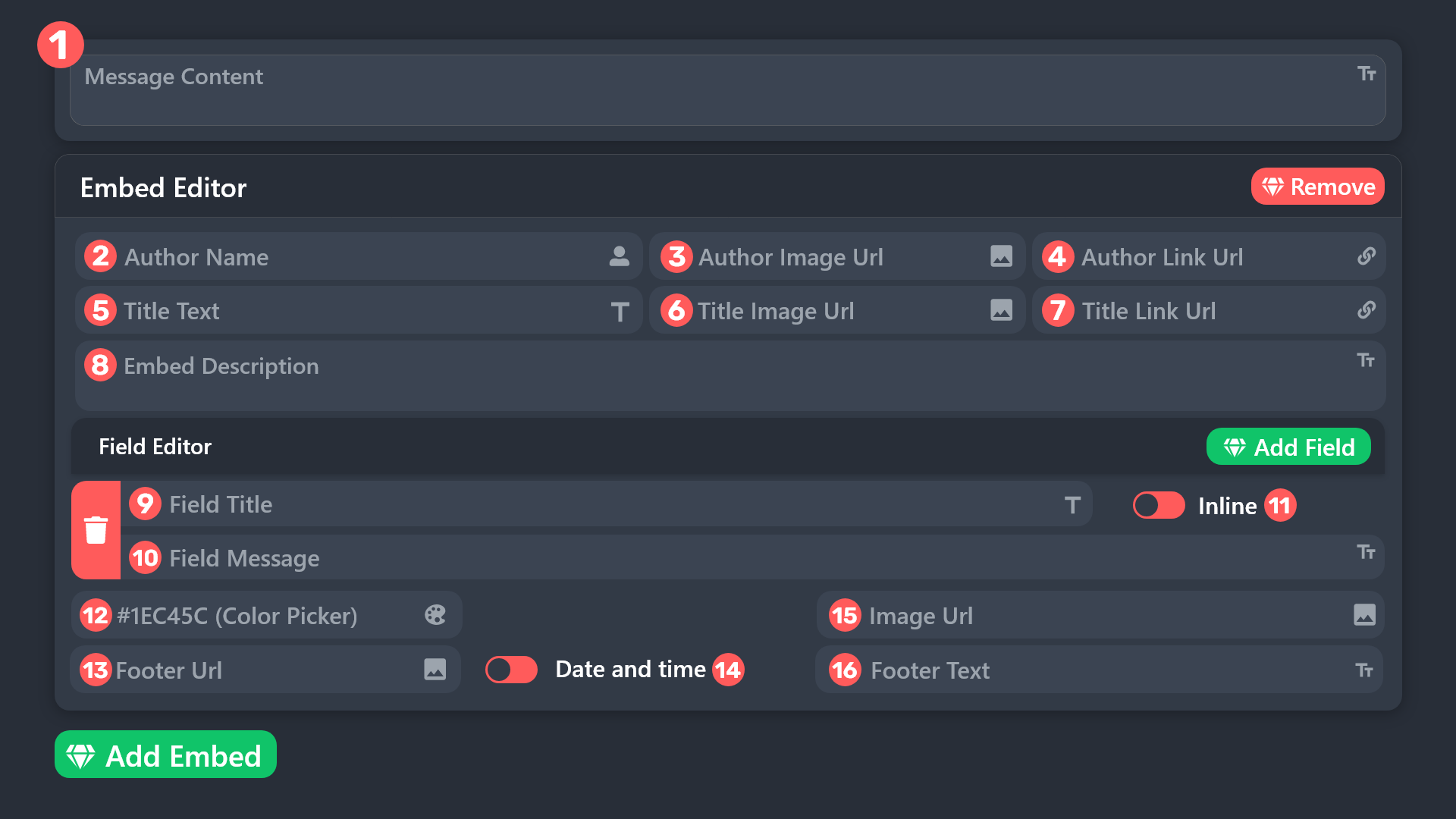
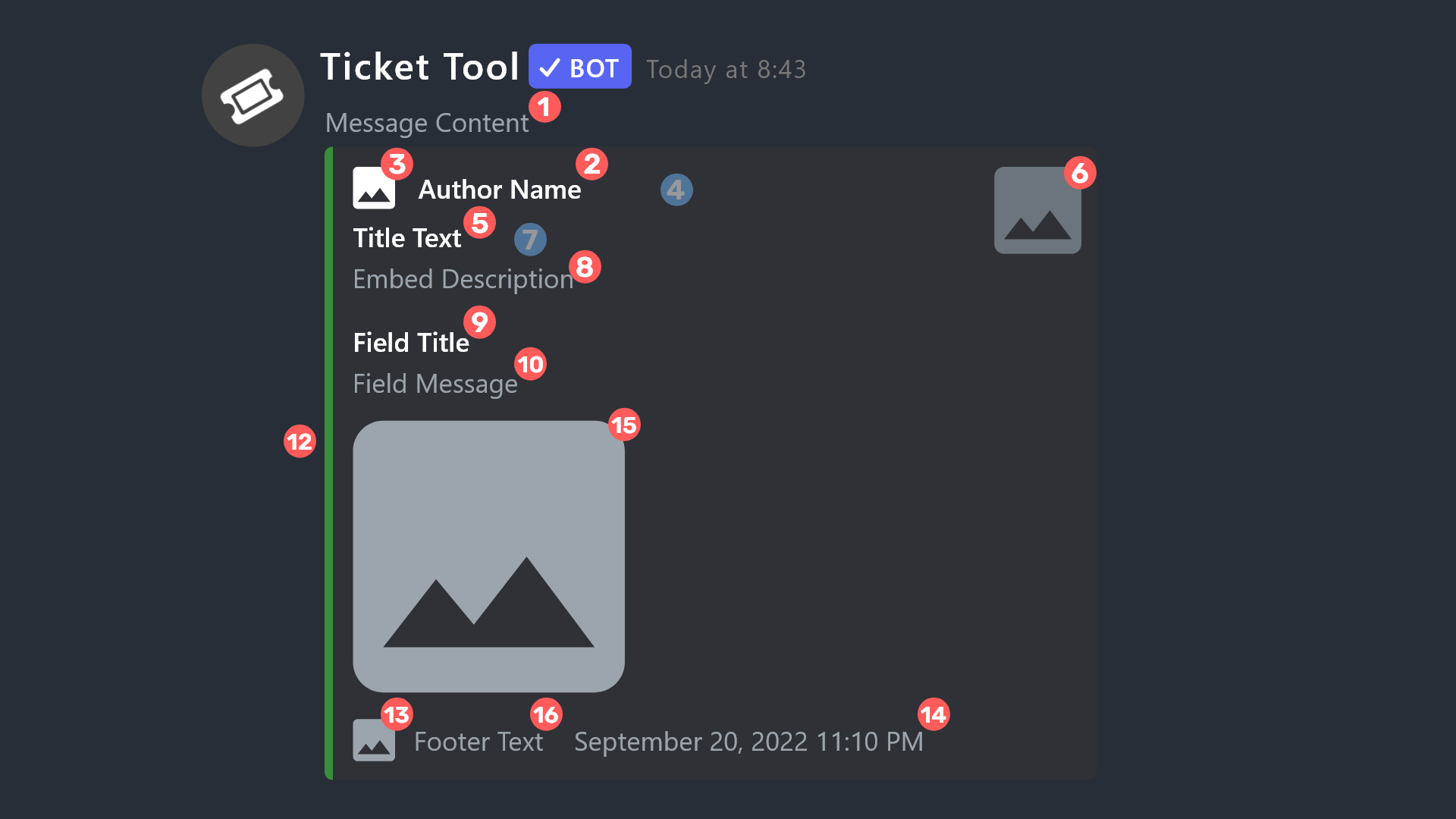 elfin solar
where is this located?
silent lava
elfin solar
So how can i find this at
Dashboard message editor
elfin solar
?
 elfin solar
ok I did
silent lava
Now message editor
silent lava
humble sequoia
.
silent lava
Gotchu
elfin solar
Thanks @silent lava
iron nightBOT
Gave +1 Rep to @silent lava (current: #55 - 53)
silent lava
Get the url of it and paste
 peak igloo
my discord server does not show up on the dashboard
elfin solar
In which url section
humble sequoiaBOT
Don't see your server in the dashboard?
Try using the Sync Servers button on your top center of the Dashboard page
If this doesn't work
You should relog from the dashboard, you can do this by clicking here to log out immediately, and then log back in
Note:
You need one of these 3 things to access the dashboard.
1. Server Owner (Level: 6)
2. Server Administrator (Level: 4)
3. Dashboard Role (Level: 2)
:warning: You can check your level using the </permissionlevel:1029797400174399542> command on your Discord Server
If the bot's response is:
- @User is permission level: 0 (User)
You don't have any of the 3 levels required to access the server's dashboard
silent lava
humble sequoia
@peak igloo
silent lava
humble sequoia
Check this
elfin solar
 peak igloo
ttsm
elfin solar
I cant find where that embed is at only this one
silent lava
That’s how it only works
elfin solar
Ok so where do I put that image at
silent lava
elfin solar
U see the feild editor there it called image
iron nightBOT
Gave +1 Rep to @silent lava (current: #55 - 54)
elfin solar
LAST Question how do I add a seperator
silent lava
Ion think there is cuz it’s not a open embed as other bots
elfin solar
also my image isnt showing does it show after I post it?
silent lava
No resend the ticket
elfin solar
Umm Heyyyyyy @silent lava
silent lava
Yes
elfin solar
How do I make the letters BIG
like this ## test
For the embed title
i meant field title
elfin solar
silent lava
Yes
Can I not make the words big
 grave elbow
Hey I don't see my server where i invited the bot in the my dashboard
 lilac vector
How do i set it up?
\
 full quest
lilac vector
How do i set it up?
\
full quest
lilac vector
How do i set it up?
\
/setup
full quest
How to make the tickets like the first picture instead of the second

 humble sequoiaBOT
The Drop-down menu or Select Menu replaces the buttons on your panel message and uses a drop-down menu with all of your panels. To set this up, go to your Panel Configs and select your main Panel.
<:Numbericons1:1018864164032225340> Enable Select Style
First you enable Select Style. Then you add an item in the Dropdown Editor. Now you can start editing your dropdown!
<:Numbericons2:1018864168041971712> Dropdown Editor
Each line in the dropdown editor represents a line in the drop down menu on discord. You can add more "Items", by clicking on 

First you select a panel. That's the panel this option will open a ticket for.  DONT select the same panel twice. Each option should have a different Panel
After that, you can put a Display. This is the title of this option and will appear in the drop down menu. The *Description can be set right after that, which will be below the title in grey.
Additionally you can select an emoji, that will be shown in front of each option. You can either manually input the ID of an emoji or select it in the selector.
Common Issues ⚠️
- Panel doesn't send? Make sure you have a valid emoji selected
- Option doesn't show up? Check if two options have the same panel in the DropDown Editor

$dropdown
silent lava
humble sequoia
@full quest
full quest
silent lava
<@1406514454383820891>
Thanks
iron nightBOT
Gave +1 Rep to @silent lava (current: #55 - 55)
humble sequoiaBOT
Don't see your server in the dashboard?
Try using the Sync Servers button on your top center of the Dashboard page
If this doesn't work
You should relog from the dashboard, you can do this by clicking here to log out immediately, and then log back in
Note:
You need one of these 3 things to access the dashboard.
1. Server Owner (Level: 6)
2. Server Administrator (Level: 4)
3. Dashboard Role (Level: 2)
:warning: You can check your level using the </permissionlevel:1029797400174399542> command on your Discord Server
If the bot's response is:
- @User is permission level: 0 (User)
You don't have any of the 3 levels required to access the server's dashboard
silent lava
@goqzxy
full quest
silent lava
@goqzxy
Whats this

 full quest
silent lava
Instead of make a selection u can named it
full quest
silent lava
Instead of make a selection u can named it
Ohh thanks
iron nightBOT
Gave +1 Rep to @silent lava (current: #55 - 56)
 full quest
silent lava
And resend the ticket
full quest
silent lava
And resend the ticket
How to do that
 covert basin
How I can the bot mention the Support Team??
silent lava
$help
humble sequoiaBOT
silent lava
$help
1. Open your Panel Configs tab in your server's dashboard
2. Select the panel you want to ping your support team on
3. Open the Ticket options menu
4. Click on Edit Ticket Message
5. In the Message Content use one of the role mention syntax ({@Role Name}/{Role ID})
6. Save changes
Note: For this to work properly, Ticket Tool requires the Mention Everyone permission. Or the role must have the Allow anyone to @mention this role setting enabled
silent lava
humble sequoia
@covert basin
full quest
covert basin
I cant see it
 silent lava
full quest
How to do that
silent lava
full quest
How to do that
When u click on panel configs u gotta see a green button named send
covert basin
full quest
how to make it mentions my team support
humble sequoiaBOT
Within all the messages the bot sends (both embeds and text) you can mention either channels, roles, or even users, these mentions will only send a notification to the user if they are used within a text field, e.g: a role mentioned in an embed won't ping at all the users who have that role.
For mentioning a role you can use one out of three options:
{@Role Name} ➞ Which is Case Sensitive.
{RoleID} ➞ Replace RoleId with the Id of the role you are trying to ping.
<@&RoleID> ➞ Discord's native syntax to ping roles.
<#ChannelID> ➞ Mention a channel by its ID.
<@UserID> ➞ Mention a user by its ID.
full quest
covert basin
how to make it mentions my team support
Look at the picture bro
silent lava
Use fgaf format
silent lava
covert basin
المهم انا فهمت ما يحتاج
So all good
full quest
How to add more then 1 option, it only allows me to use one panel
 humble sequoiaBOT
The Drop-down menu or Select Menu replaces the buttons on your panel message and uses a drop-down menu with all of your panels. To set this up, go to your Panel Configs and select your main Panel.
<:Numbericons1:1018864164032225340> Enable Select Style
First you enable Select Style. Then you add an item in the Dropdown Editor. Now you can start editing your dropdown!
<:Numbericons2:1018864168041971712> Dropdown Editor
Each line in the dropdown editor represents a line in the drop down menu on discord. You can add more "Items", by clicking on
First you select a panel. That's the panel this option will open a ticket for. DONT select the same panel twice. Each option should have a different Panel
After that, you can put a Display. This is the title of this option and will appear in the drop down menu. The *Description can be set right after that, which will be below the title in grey.
Additionally you can select an emoji, that will be shown in front of each option. You can either manually input the ID of an emoji or select it in the selector.
Common Issues ⚠️
- Panel doesn't send? Make sure you have a valid emoji selected
- Option doesn't show up? Check if two options have the same panel in the DropDown Editor
$dropdown
full quest
silent lava
But u gotta create panels for every option
Cant make it like this?
 silent lava
full quest
Cant make it like this?
silent lava
full quest
Cant make it like this?
Have u read the message I sent
humble sequoiaBOT
The Drop-down menu or Select Menu replaces the buttons on your panel message and uses a drop-down menu with all of your panels. To set this up, go to your Panel Configs and select your main Panel.
<:Numbericons1:1018864164032225340> Enable Select Style
First you enable Select Style. Then you add an item in the Dropdown Editor. Now you can start editing your dropdown!
<:Numbericons2:1018864168041971712> Dropdown Editor
Each line in the dropdown editor represents a line in the drop down menu on discord. You can add more "Items", by clicking on
First you select a panel. That's the panel this option will open a ticket for. DONT select the same panel twice. Each option should have a different Panel
After that, you can put a Display. This is the title of this option and will appear in the drop down menu. The *Description can be set right after that, which will be below the title in grey.
Additionally you can select an emoji, that will be shown in front of each option. You can either manually input the ID of an emoji or select it in the selector.
Common Issues ⚠️
- Panel doesn't send? Make sure you have a valid emoji selected
- Option doesn't show up? Check if two options have the same panel in the DropDown Editor
$dropdown
full quest
Idk
full quest
silent lava
But u gotta create panels for every option
I dont wna make new panels
I dont rlly understand
@sudden eagle how do i make it like the first picture instead of the second 🙏


Failed:
Invalid Form Body components[0].components[0].options[1].emoji.name[COMPONENT_INVALID_EMOJI]: Invalid emoji
humble sequoiaBOT
This error indicates you have selected an invalid emoji, i.e. an emoji the bot isn't capable of using, in a button field
Which Emoji?
This depends upon which action the error is appearing, the most common cases are the Create Ticket button or one of your Dropdown emojis. You can visit your Button's List to find all available buttons and find the conflicting one by yourself.
Why doesn't the bot accept it as valid?
- You selected an emoji that doesn't exist anymore, i.e. that has been deleted
- You wrote text there, instead of an emoji (or in addition to an emoji)
- You entered a code for a custom emoji from a server that the bot is not a member of
- You entered a custom emoji code incorrectly
- You're on iPhone and entered an emoji using the phone's emoji pad (use the emoji selector in the website instead)
 silent lava
Read above
silent lava
Same goes to phone
 calm briar
I cant see my server which I have crown of in my server list
It has the every permission etc
 drowsy vector
How can i change the panel Name?
 willow elk
full quest
willow elk
full quest
$help
humble sequoiaBOT
full quest
$help
1. Open your Panel Configs tab in your server's dashboard
2. Select the panel you want to ping your support team on
3. Open the Ticket options menu
4. Click on Edit Ticket Message
5. In the Message Content use one of the role mention syntax ({@Role Name}/{Role ID})
6. Save changes
Note: For this to work properly, Ticket Tool requires the Mention Everyone permission. Or the role must have the Allow anyone to @mention this role setting enabled
full quest
Wot
full quest
calm briar
Bro I cant see my server in the list
$help
humble sequoiaBOT
full quest
$help
Identifiy the number of your question and select it using the menu at the end of the message
 - How do I create a panel?
 - How do I send a panel?
 - How can I grant my team access to tickets?
 - How do I add/remove users from a ticket?
 - How to automatically ping my support team on a ticket?
 - How do I set what category tickets are created in?
 - How does claiming work?
 - What is the prefix and how do I change it?
 - How do I limit the number of tickets a user can create?
 - How do I set a transcript channel?
 - How do I set permissions for tickets?
full quest
$help
humble sequoiaBOT
full quest
$help
First you will want to invite the bot to your server. Once the bot is in your server, you can manage your server in the dashboard.
To create a panel we are going to need to head over to the Panel Configs Tab on the Dashboard.
Once at the dashboard we will need to click Create Panel.
Enter a panel name (Fill in any optional settings you want).
Click Create Panel and you are ready to get started with configuring your panel.
An example of a creating a panel is shown below.
Once the panel has been created, use the blue Send button and select the channel you want the panel to be sent to.
The Panel wasn't send
Use the </debug:1029783024264564765> command to diagnose possible permission issues with the bot.
full quest
humble sequoia
@calm briar
 still sparrow
$help
humble sequoiaBOT
still sparrow
$help

Ticket Tool is the only ticketing bot you'll ever need! Explore its features and set the best ticket system for your server!
<:CommandIcon:1018980659064221746> Commands
Browse through Ticket Tool's commands list and find new utilities!
<:TextIcon:1018980662881030144> FAQ
Solutions for the most frequent questions our users have when implementing the bot on their server.
<:Setup:1034174646788030664> Setup
The steps to follow when setting the bot for the first time on any server
still sparrow
humble sequoia
https://discord.gg/tickettool
Fahh !!
pseudo ravine
Please use #🤖│bot-spam for random commands
still sparrow
pseudo ravine
Please use <#910978476536905738> for random commands
Not random I wanted help but I was new here
 worthy cloud
Hello, I was working on a task and accidentally closed the ticket before attaching the Drive link. How can I edit it and attach the link?
 final mica
I can't access the management section; it says "Not active, Click to enable this bot."
restive condor
final mica
I can't access the management section; it says "Not active, Click to enable this...
Hey there! Please screenshot that
restive condor
worthy cloud
Hello, I was working on a task and accidentally closed the ticket before attachi...
Hey there1 If you're not a staff member at that server, please contact that server's staff
worthy cloud
I'm trying to contact them, but no one is responding.
restive condor
We can't help you here unfortunately. We don't know who they are in the first place
It seems like the premium bot is enabled but isn't in the server. Were you trying to enable it or disable it?
restive condor
restive condor
It seems like the premium bot is enabled but isn't in the server. Were you tryin...
^
I’m sorry what?
Clear it how exactly?
 frail ledge
Hello i would like to get some help on how to set up the ticket bot
I want the tickets to only be closed by the mod team but i cant seem to find an option and any person who’s not a mod and inside that ticket is able to close it
@restive condor ^ 🙏🏻
 smoky gazelle
Ticket
 vestal lark
Hi Guys, Ive encountered a frustrating problem. I cant create a ticket for my Discord server: it says it doesnt have enough permissions, even though Ive given it ABSOLUTELY all the permissions. Please help


 restive condor
frail ledge
Hello i would like to get some help on how to set up the ticket bot
I want the...
restive condor
frail ledge
Hello i would like to get some help on how to set up the ticket bot
I want the...
Hey there! 👋
Dashboard > Panel Configs > Buttons > Close Ticket Button
- Please enable
 Support Team Only, or disable the everyone role & set allowed roles
restive condor
vestal lark
Hi Guys, Ive encountered a frustrating problem. I cant create a ticket for my Di...
Hey there! 👋
Dashboard > Panel Configs > Buttons > Create Ticket Button
- You have text in the 'Button Emoji' field - please remove it. You can only have 1 emoji there. Please use the ''Button Text'' field for text
vestal lark
restive condor
Hey there! 👋
``Dashboard`` > ``Panel Configs`` > ``Buttons`` > ``Create Ticket ...
its really work, thanks Dan
iron nightBOT
Gave +1 Rep to @restive condor (current: #1 - 3068)
restive condor
No problem!
silent lava
Dan
restive condor
What's up?
restive condor
Thanks!! 🫶
frail ledge
restive condor
Hey there! 👋
``Dashboard`` > ``Panel Configs`` > ``Buttons`` > ``Close Ticket B...
Worked thank you
iron nightBOT
Gave +1 Rep to @restive condor (current: #1 - 3069)
restive condor
Of course!
 crisp plinth
GPA.3385-9046-7438-71360
humble sequoiaBOT
⚠️ You're in the wrong place
We provide support for Ticket Tool Discord bot and cannot help you with whatever issue you have.
- We don't know which Support Team you should contact to get this issue resolved, and unfortunately we won't be able to accurately tell you.
If you don't have any further questions regarding our bot Ticket Tool, please close this ticket
crisp plinth

Proqrama girenmirem pullu necə edim bu açarı alanmiram pulum çıxıb
@humble sequoia?
crisp plinth
humble sequoia
Mene kömek ele
 small silo
Hello , i was js wondering that if i bought premium can i changes its name & pic?
 near notch
Hola
Yo hoy subí 4 vídeos y estaban con los carritos y fue a mirar y ya no están más
silent lava
small silo
Hello , i was js wondering that if i bought premium can i changes its name & pic...
Yup
small silo
woha nice , do u know how? like from the dashboard or using cmds?
humble sequoiaBOT
<:NewIcon1:1018858809541804124><:NewIcon2:1018858813266333706> Ticket Tool Custom Avatar <:Premium:1192403074157912144>
You can now change: Ticket Tool's profile picture; nickname; banner; and bio, to make it your own!
To further customize the bot's appearance, please head over to your Dashboard ➞ Customize Bot, from there, you will be able to upload a profile picture and banner, and edit the bot's biography.
You can change the bot's nickname by right-clicking on the bot's profile, in the user list, on your server, and clicking Change Nickname.
 Note: This is not a whitelabel, but rather a personalized instance of Ticket Tool for your server only. It is not an individual bot for your server, and it will behave and appear like Ticket Tool outside of it (i.e. in DMs). Our Development Team continues to explore ways to release white labels, this is your own custom bot!
$avatar
 finite raptor
Where is the channel to create a ticket
restive condor
finite raptor
Where is the channel to create a ticket
Hi there, #🎫│make-a-ticket
finite raptor
Okay thanks because this is what I see

 restive condor
It's a bug with Discord onboarding - you must have show all channels enabled
finite raptor
Oh ok
 tawny mica
Can we see how much tickets are moderators do?
humble sequoiaBOT
━━ User's inquiry has been moved to a ticket ━━
 rain kestrel
do i need to pay to change the embed color for my ticket? its green right now since that's the default color, but i changed to another color a month or two ago.
silent lava
rain kestrel
do i need to pay to change the embed color for my ticket? its green right now si...
Yup u gotta have premium to change ur embed color image
rain kestrel
ahh okay okay thank you !!
 glass lichen
Hi what was the steps needed ifI don't see my server in the Ticket Tool website?
I've already kicked the bot. Readded the bot...
Gave it admin permissions
 pine solar
Is it possible to have only one role open a ticket?
humble sequoiaBOT
━━ User's inquiry has been moved to a ticket ━━
 heavy garden
Hello, I need help with my overtime pay. I worked extra hours but did not receive my overtime payment. Can someone please assist me?
humble sequoiaBOT
⚠️ You're in the wrong place
We provide support for Ticket Tool Discord bot and cannot help you with whatever issue you have.
- We don't know which Support Team you should contact to get this issue resolved, and unfortunately we won't be able to accurately tell you.
If you don't have any further questions regarding our bot Ticket Tool, please close this ticket
heavy garden
I need to open a ticket about my overtime pay. I worked extra hours but did not get paid. Please help.
pseudo ravine
You're in the wrong place
heavy garden
Okay
I need to open a ticket about my overtime pay. I worked extra hours but did not get paid. Please help.
humble sequoiaBOT
⚠️ Please read the messages previously sent by our team ⚠️
pseudo ravine
You're in the wrong place
heavy garden
Where can I create a ticket?
pseudo ravine
As previously mentioned, we don't know
heavy garden
I need to open a ticket about my overtime pay. I worked extra hours but did not get paid. Please help.
humble sequoiaBOT
⚠️ Please read the messages previously sent by our team ⚠️
heavy garden
open ticket
pseudo ravine
You have been told multiple times you're in the wrong place. We cannot help you here. We do not know where you need to go. This is not where you need to go
heavy garden
Okay 😭
glass lichen
This might be your bosses DM's but it is certainly not here.
pseudo ravine
Please do not interrupt, especially if it's a support member assisting
heavy garden
Okay thanks 🙏🏻
pseudo ravine
@soft delta They are very clearly not in the correct place. Please stop telling them to make a ticket here. We cannot help them
soft delta
pseudo ravine
<@1452289697912062132> They are very clearly not in the correct place. Please st...
Oh, sorry. I misunderstood.
pseudo ravine
Please ensure you understand what's happening before trying to assist. But if a support member is already there, please do not try to intervene
soft delta
pseudo ravine
Please ensure you understand what's happening before trying to assist. But if a ...
Okay!
glass lichen
So back to my original question...
Hi what was the steps needed ifI don't see my server in the Ticket Tool website?
I've already kicked the bot. Readded the bot...
Gave it admin permissions
pseudo ravine
Please refer to the embed below!
humble sequoiaBOT
Don't see your server in the dashboard?
Try using the Sync Servers button on your top center of the Dashboard page
If this doesn't work
You should relog from the dashboard, you can do this by clicking here to log out immediately, and then log back in
Note:
You need one of these 3 things to access the dashboard.
1. Server Owner (Level: 6)
2. Server Administrator (Level: 4)
3. Dashboard Role (Level: 2)
:warning: You can check your level using the </permissionlevel:1029797400174399542> command on your Discord Server
If the bot's response is:
- @User is permission level: 0 (User)
You don't have any of the 3 levels required to access the server's dashboard
glass lichen
That did it. I only need ONE of those roles right?
pseudo ravine
Yep
glass lichen
Do I have to give the bot Administrator perms?
pseudo ravine
It's not required most of the time
glass lichen
Got ya
 brisk knoll
Hii
 agile island
Hi, I’m trying to make a ticket but it says “I don’t have permission to use this.” Could someone help me and guide me please.
 crude holly
agile island
Hi, I’m trying to make a ticket but it says “I don’t have permission to use this...
crude holly
agile island
Hi, I’m trying to make a ticket but it says “I don’t have permission to use this...
Hi
Go Dashboard then Permission and check if didn't have a permission i will help you
agile island
Ok
 devout drum
hey if I want to restrict messages that can be seen in a opened ticket how can I do that.. more specifically when I do the /add command those who are added cant see anything before the time they were added?
 old apex
 uncut hedge
Hola buenas noches quería saber quien me podría ayudar a canjear mi orden ya lo intente bastante y no e podido
agile island
crude holly
Go Dashboard then Permission and check if didn't have a permission i will help y...
I tried to check the dashboard many times and it keeps saying “Whoops, too fast.” I think it might be a bug, and I also don’t have permission to access it. Could you help me or check it for me?
crude holly
agile island
I tried to check the dashboard many times and it keeps saying “Whoops, too fast....
Ok i can
crisp plinth
Hello, I downloaded 8ball poll and also downloaded home league but I can't play it. Please help me, it doesn't matter if it's the paid or free version🥹
humble sequoiaBOT
⚠️ You're in the wrong place
We provide support for Ticket Tool Discord bot and cannot help you with whatever issue you have.
- We don't know which Support Team you should contact to get this issue resolved, and unfortunately we won't be able to accurately tell you.
If you don't have any further questions regarding our bot Ticket Tool, please close this ticket
 dire trout
It doesn't link with Digimon Reboot World, does it?
 prime glade
Opa
 eternal basalt
'
 violet vessel
Can u make questions on this bot and ppl need to answer on them or nah?
 grand furnace
How do I change my bank account to deduct my annual premium From?
humble sequoiaBOT
⚠️ You're in the wrong place
We provide support for Ticket Tool Discord bot and cannot help you with whatever issue you have.
- We don't know which Support Team you should contact to get this issue resolved, and unfortunately we won't be able to accurately tell you.
If you don't have any further questions regarding our bot Ticket Tool, please close this ticket
violet vessel
Can i make more character for question or no?
 tame hemlock
how can i set a channel for ticket logs
 jaunty tartan
Why is the bot offline?
covert swallow
It isnt
 winter viper
how do i make ticket tool ping roles with the message it puts when a ticket is created
silent lava
$help
humble sequoiaBOT
silent lava
$help
1. Open your Panel Configs tab in your server's dashboard
2. Select the panel you want to ping your support team on
3. Open the Ticket options menu
4. Click on Edit Ticket Message
5. In the Message Content use one of the role mention syntax ({@Role Name}/{Role ID})
6. Save changes
Note: For this to work properly, Ticket Tool requires the Mention Everyone permission. Or the role must have the Allow anyone to @mention this role setting enabled
silent lava
humble sequoia
@winter viper
 dusk bolt
humble sequoiaBOT
dusk bolt
humble sequoiaBOT
Você está no lugar errado
Fornecemos suporte para Ticket Tool Discord bot e não podemos ajudá-lo com qualquer problema que você tenha.
- Não sabemos qual equipe de suporte você deve entrar em contato para resolver esse problema e, infelizmente, não poderemos informar com precisão.
Se você não tiver mais dúvidas sobre nossa ferramenta de ticket de bot, feche este ticket
 vocal harbor
How do I make the claim button show up only for certain roles?
restive condor
vocal harbor
How do I make the claim button show up only for certain roles?
Hey there! That's not possible as per Discord limitations
Buttons are either shown or not shown, but they can't unfortunately be hidden for some
 analog kernel
Help me create a bot so that they can select roles based on request and need to be approved. Can anyone help?
 urban ginkgo
Hi
How can I make claim button
I am doing from panel
But it's not working
Please help
humble sequoiaBOT
Claiming allows you to change the ticket name, category and permissions. To use it you have to enable it first on your Dashboard > Panel Configs > Claiming

 Note: This is a premium feature
silent lava
Note: This is a premium feature
silent lava
@urban ginkgo read up
urban ginkgo
It's enabled
silent lava
Then enable it for all panels and resend it ticket
silent lava
….
silent lava
humble sequoia
Note: this is a premium feature
 sick tangle
I have setup ticket tool where u click a button and it creates the chat for u
im curious if i can have this buttin in another category and tickets opened on that button opens a chat in that category? basically to split type of ticket between 2 different categories
silent lava
$help
humble sequoiaBOT
silent lava
$help
1. Open your Panel Configs tab in the server's dashboard
2. Select the panel you want to grant access to
3. Open the Category options menu
4. Select the categories of your preference
5. Save changes
 silent lava
@sick tangle read above
sick tangle
nice stuff
 thin heron


 edgy orchid
boa tarde
humble sequoiaBOT
Don't see your server in the dashboard?
Try using the Sync Servers button on your top center of the Dashboard page
If this doesn't work
You should relog from the dashboard, you can do this by clicking here to log out immediately, and then log back in
Note:
You need one of these 3 things to access the dashboard.
1. Server Owner (Level: 6)
2. Server Administrator (Level: 4)
3. Dashboard Role (Level: 2)
:warning: You can check your level using the </permissionlevel:1029797400174399542> command on your Discord Server
If the bot's response is:
- @User is permission level: 0 (User)
You don't have any of the 3 levels required to access the server's dashboard
 modern flare
hi
 bitter fern
Hi
restive condor
modern flare
when i create a ticket, the claim button doesn't appear
Hi there, claiming is a premium feature
humble sequoiaBOT
Claiming allows you to change the ticket name, category and permissions. To use it you have to enable it first on your Dashboard > Panel Configs > Claiming
Note: This is a premium feature
bitter fern
restive condor
Hi there, claiming is a premium feature <:Premium:1192403074157912144>
My massege?
Why you delete it
modern flare
restive condor
Hi there, claiming is a premium feature <:Premium:1192403074157912144>
why it's premium now 😭
restive condor
bitter fern
Why you delete it
Because it was wrong
modern flare
I'm pretty sure it was actually free
bitter fern
restive condor
Because it was wrong
Naa
restive condor
modern flare
why it's premium now 😭
It's always been premium
restive condor
Yet irrelevant
Please keep this channel for support only. Also ensure you are providing accurate & correct support
bitter fern
Ok
 novel swift
Quick question, is there a way I can set it up for a pannel to @ a role when the ticket is opened?
silent lava
$help
humble sequoiaBOT
silent lava
$help
1. Open your Panel Configs tab in your server's dashboard
2. Select the panel you want to ping your support team on
3. Open the Ticket options menu
4. Click on Edit Ticket Message
5. In the Message Content use one of the role mention syntax ({@Role Name}/{Role ID})
6. Save changes
Note: For this to work properly, Ticket Tool requires the Mention Everyone permission. Or the role must have the Allow anyone to @mention this role setting enabled
silent lava
humble sequoia
@novel swift read tgis pls
novel swift
silent lava
<@891211824782012456> read tgis pls
Thank you so much!!
iron nightBOT
Gave +1 Rep to @silent lava (current: #55 - 59)
 lost solar
Good evening everyone, I'd like to add the Ticket Tool to submit tickets as if they were complaints, but I'm having trouble configuring it to have the complaint option and other features to make it user-friendly and practical.
humble sequoiaBOT
silent lava
$help
First you will want to invite the bot to your server. Once the bot is in your server, you can manage your server in the dashboard.
To create a panel we are going to need to head over to the Panel Configs Tab on the Dashboard.
Once at the dashboard we will need to click Create Panel.
Enter a panel name (Fill in any optional settings you want).
Click Create Panel and you are ready to get started with configuring your panel.
An example of a creating a panel is shown below.
Once the panel has been created, use the blue Send button and select the channel you want the panel to be sent to.
The Panel wasn't send
Use the </debug:1029783024264564765> command to diagnose possible permission issues with the bot.
silent lava
humble sequoia
@lost solar this should help
lost solar
I've already followed these steps, I saw a server using the Ticket Tool very effectively and I'd like to have the same model on mine, but I'm having trouble configuring it or understanding some of the functions.
 potent island
Hey
 restive dust
need help cuz im like why didnt it mentioned me but it says {@vivy} im a bit confused what did i do wrong im tryna mention my role

@silent lava could u help me / somebody pls tysm
humble sequoiaBOT
Within all the messages the bot sends (both embeds and text) you can mention either channels, roles, or even users, these mentions will only send a notification to the user if they are used within a text field, e.g: a role mentioned in an embed won't ping at all the users who have that role.
For mentioning a role you can use one out of three options:
{@Role Name} ➞ Which is Case Sensitive.
{RoleID} ➞ Replace RoleId with the Id of the role you are trying to ping.
<@&RoleID> ➞ Discord's native syntax to ping roles.
<#ChannelID> ➞ Mention a channel by its ID.
<@UserID> ➞ Mention a user by its ID.
restive dust
silent lava
<@1249852400890810471> there
do i not hv to do like {@roleid} or just {roleid}
silent lava
restive dust
do i not hv to do like {@roleid} or just {roleid}
{@rolename } not for id u would use {roleid }
restive dust
i see okay
restive dust
silent lava
{@rolename } not for id u would use {roleid }
and another too actually when i close the ticket is there a way that the bot will dm them and like say tysm for blah blah blah .etc
silent lava
restive dust
and another too actually when i close the ticket is there a way that the bot wil...
Yeah but that’s a premium feature
restive dust
silent lava
Yeah but that’s a premium feature
i see ok ok tysm
thank u for ur help tho
silent lava
restive dust
i see ok ok tysm
Nws anyways did ut work?
 silent lava
restive dust
yup i tried it and it did !
silent lava
restive dust
yup i tried it and it did !
I’m glad do u need any futher assistance tho
restive dust
silent lava
I’m glad do u need any futher assistance tho
all good for now ill def lyk ! and permission to ping u when in eed help?
silent lava
restive dust
all good for now ill def lyk ! and permission to ping u when in eed help?
Yes ofc 
novel swift
silent lava
<@891211824782012456> read tgis pls
Got it to work! Thanks so much!
iron nightBOT
Gave +1 Rep to @silent lava (current: #55 - 60)
 cinder magnet
Yo chat how to add bot to my server? I cant invite it causr there is no server
 orchid wharf
Is it possible to view transcripts
 silk cargo
Guys, how do I become a staff member??
 scenic plinth
silk cargo
Guys, how do I become a staff member??
scenic plinth
silk cargo
Guys, how do I become a staff member??
You apply when applications are open and stop spamming every channel to ask.
 azure needle
is there a setting to add a two-step OPEN? like an additional, "are you sure you want to open a ticket" message after the initial emoji press? i have a lot of people opening tickets thinking it's a role assign (even with the ticket message clarifying that it wont, its just annoying)
or if anyone knows of a bot that can do this. or even a setting to type a custom word in a channel to open a ticket that way
 hallow dragon
I want to buy premium yearly, but does premium allow me to customize the bot with my own logo and change its name?
devout drum
If I am making forms in my ticket is there a way that I can make it yes or no with a check box or a radial??
devout drum
or make it multiple choice
still sparrow
How to fix :-
Warning: Claiming isn't enabled
 vernal tundra
Hello, my computer crashes to a blue screen and restarts every time I turn it on. Could you please help me solve this problem?"
 agile cipher
 mental cairn
Hey why can't I edit panel messages?

Does nothing clicking edit raw or message content
mental cairn
 sour plinth
open embed editor
sour plinth
open embed editor
Is this not a premium feature?
 gilded tinsel
Question, is the closing DM a premium thing? Since much of the feedback I have seen is that the bot is not giving the a reason for ticket closure.
 rugged lynx
.
 elfin needle
Hello Guys,
I purchased one of ur offers inserted the ticket and closed it after it immeadiatly unintentionally and support hasnt contacted me…
humble sequoiaBOT
A Discord Form lets the user answer individual questions in a pop-up Form, which then displays the answers in the ticket message. This can save time if you already know what you want to ask the user.
Setup Forms
Forms can be enabled under Panel Settings > Form Options > Edit Forms Options. In the new pop-up window, you can now enable and edit your own Form.
Form Options
You can add up to 5 questions in the Discord form. This is a Discord limitation. Each question can have a placeholder in the input field, a minimum and maximum input, multi-line, and also the option to have the answer required.
Options
Question Title ➞ Your Question goes here
Question Placeholder ➞ The placeholder text in the input field
Required ➞ If enabled, the user has to answer this question, to submit the form
Multi-Line Input ➞ Allows the user to input multiple lines
Minimum and Maximum Input ➞ Set a minimum and maximum input value for the user
Displaying the Answer
To display the answers from the user, you need to enable Auto display form results on the ticket message as an additional embed
If you don't want a second embed, go into your Panel Configs > Ticket Options > Edit Ticket Message. You use the variable {create.form.x} and replace x with the number of your question. For example, the response to Question 5 can be displayed with {create.form.5}.
silent lava
humble sequoia
@azure needle
humble sequoiaBOT
Claiming allows you to change the ticket name, category and permissions. To use it you have to enable it first on your Dashboard > Panel Configs > Claiming
Note: This is a premium feature
silent lava
humble sequoia
@still sparrow
silent lava
mental cairn
Hey why can't I edit panel messages?
For the edit raw it’s a premium feature to change there but for msg content it ain’t
elfin needle
So nobody gonna answer my question…?
still sparrow
silent lava
<@1408496348327579679>
Hm
 magic solstice
Can anyone tell me that ticket tool has dropdown menu or not?
humble sequoiaBOT
The Drop-down menu or Select Menu replaces the buttons on your panel message and uses a drop-down menu with all of your panels. To set this up, go to your Panel Configs and select your main Panel.
<:Numbericons1:1018864164032225340> Enable Select Style
First you enable Select Style. Then you add an item in the Dropdown Editor. Now you can start editing your dropdown!
<:Numbericons2:1018864168041971712> Dropdown Editor
Each line in the dropdown editor represents a line in the drop down menu on discord. You can add more "Items", by clicking on
First you select a panel. That's the panel this option will open a ticket for. DONT select the same panel twice. Each option should have a different Panel
After that, you can put a Display. This is the title of this option and will appear in the drop down menu. The *Description can be set right after that, which will be below the title in grey.
Additionally you can select an emoji, that will be shown in front of each option. You can either manually input the ID of an emoji or select it in the selector.
Common Issues ⚠️
- Panel doesn't send? Make sure you have a valid emoji selected
- Option doesn't show up? Check if two options have the same panel in the DropDown Editor
$dropdown
silent lava
humble sequoia
@magic solstice
magic solstice
silent lava
<@1474718560130699355>
Done after that? how can I edit my current panel
silent lava
magic solstice
Done after that? how can I edit my current panel
U see in that pic I sent there is “your panel” choose what panel u want to edit
So what u want now
Like send it ?
magic solstice
yup
silent lava
magic solstice
yup
Ok now choose ur main panel and click on panel configs u should see a button named send
magic solstice
silent lava
Ok now choose ur main panel and click on panel configs u should see a button nam...
Um how can I add more options
 gilded needle
i have a server with the ticket bot but for some reason it isnt showing up here

i gave it all the perms it needs
 idle jewel
Why cant i close tickets?

 frozen garden
i have a server with the ticket bot but for some reason all closed tickets and new tickets are just one ticket reopening every time
 swift rivet
Comprei diamante, mais não caiu
 gentle wing
hi I have a problem with the bot and on the discord for the site it doesn't appear that other discords appear

 humble sequoiaBOT
⚠️ You're in the wrong place
We provide support for Ticket Tool Discord bot and cannot help you with whatever issue you have.
- We don't know which Support Team you should contact to get this issue resolved, and unfortunately we won't be able to accurately tell you.
If you don't have any further questions regarding our bot Ticket Tool, please close this ticket
 foggy sparrow
swift rivet
Comprei diamante, mais não caiu
foggy sparrow
swift rivet
Comprei diamante, mais não caiu
Lea arriba
foggy sparrow
gentle wing
hi I have a problem with the bot and on the discord for the site it doesn't appe...
Yo padrino!!
humble sequoiaBOT
Don't see your server in the dashboard?
Try using the Sync Servers button on your top center of the Dashboard page
If this doesn't work
You should relog from the dashboard, you can do this by clicking here to log out immediately, and then log back in
Note:
You need one of these 3 things to access the dashboard.
1. Server Owner (Level: 6)
2. Server Administrator (Level: 4)
3. Dashboard Role (Level: 2)
:warning: You can check your level using the </permissionlevel:1029797400174399542> command on your Discord Server
If the bot's response is:
- @User is permission level: 0 (User)
You don't have any of the 3 levels required to access the server's dashboard
foggy sparrow
Read up!!
gentle wing
foggy sparrow
Yo padrino!!
Yo
foggy sparrow
humble sequoia
Read this
 next mirage
commen mettre le bot en français sivouplait ?
humble sequoiaBOT

L'équipe du support Français
Cher client,
Si vous avez besoin d'assistance, veuillez contacter le support Français en ouvrant un ticket.
Allez dans le canal #🎫│make-a-ticket et appuyez sur le bouton contenant l'emoji 🇫🇷
restive condor
next mirage
commen mettre le bot en français sivouplait ?
^^
next mirage
restive condor
^^
mercii
 vagrant violet
I'm having trouble setting up the escalation... We want the panel to be accessible by higher staff. but when I tried that, it says that the mods don't have permission to escalate
does anyone has any idea on how to do that?
humble sequoiaBOT
 grizzled summit
$invite
grizzled summit
$invite
Ticket Tool Invite & Support
 fathom field
I'm having trouble managing a server from the Ticket tool dashboard. I have the bot added in my server and I even tried to reload the website and sync my servers but everytime I try to do that it says "Try again in a few seconds".

 humble sequoiaBOT
Don't see your server in the dashboard?
Try using the Sync Servers button on your top center of the Dashboard page
If this doesn't work
You should relog from the dashboard, you can do this by clicking here to log out immediately, and then log back in
Note:
You need one of these 3 things to access the dashboard.
1. Server Owner (Level: 6)
2. Server Administrator (Level: 4)
3. Dashboard Role (Level: 2)
:warning: You can check your level using the </permissionlevel:1029797400174399542> command on your Discord Server
If the bot's response is:
- @User is permission level: 0 (User)
You don't have any of the 3 levels required to access the server's dashboard
silent lava
humble sequoia
@fathom field
fathom field
silent lava
<@1174432598630608917>
alright thank you I will try that now
iron nightBOT
Gave +1 Rep to @silent lava (current: #55 - 61)
fathom field
That did the job thank you again @silent lava
iron nightBOT
Gave +1 Rep to @silent lava (current: #54 - 62)
gentle wing
gentle wing
hi I have a problem with the bot and on the discord for the site it doesn't appe...
.?
 covert edge
ive invited ticket tool to my server and it is there but when i go to the dashboard my server isnt in servers with ticket tool or servers without
can anyone help
also ive used the bot before in another server but idk why this is happening now and not then
humble sequoiaBOT
Don't see your server in the dashboard?
Try using the Sync Servers button on your top center of the Dashboard page
If this doesn't work
You should relog from the dashboard, you can do this by clicking here to log out immediately, and then log back in
Note:
You need one of these 3 things to access the dashboard.
1. Server Owner (Level: 6)
2. Server Administrator (Level: 4)
3. Dashboard Role (Level: 2)
:warning: You can check your level using the </permissionlevel:1029797400174399542> command on your Discord Server
If the bot's response is:
- @User is permission level: 0 (User)
You don't have any of the 3 levels required to access the server's dashboard
silent lava
humble sequoia
@gentle wing @covert edge
covert edge
silent lava
<@1481106376452472993> <@1286738747978813537>
ah thanks
iron nightBOT
Gave +1 Rep to @silent lava (current: #54 - 63)
gentle wing
Okk good
 inland halo
السلام عليكم
silent lava
$articket
humble sequoiaBOT

فريق الدعم الفني العربي
عميلنا العزيز ان كنت تبحث عن مساعدة يرجى فتح تكت خاص بفريق الدعم الفني العربي
اذهب الى#🎫│make-a-ticket
ثم قم بلضغط على الايموجي الاتي (🇯🇴)
 frosty finch
Hello
I was wondering how edit the message when you first open a ticket and have it ping a certain role
silent lava
$help
humble sequoiaBOT
silent lava
$help
1. Open your Panel Configs tab in your server's dashboard
2. Select the panel you want to ping your support team on
3. Open the Ticket options menu
4. Click on Edit Ticket Message
5. In the Message Content use one of the role mention syntax ({@Role Name}/{Role ID})
6. Save changes
Note: For this to work properly, Ticket Tool requires the Mention Everyone permission. Or the role must have the Allow anyone to @mention this role setting enabled
silent lava
humble sequoia
@frosty finch
frosty finch
silent lava
<@782076981792866316>
Thank you
iron nightBOT
Gave +1 Rep to @silent lava (current: #54 - 64)
 scenic marsh
Is there a way to fix the ticket bot? It has owner role and admin perms but my support team and additional team configs refuse to work no matter what
frosty finch
silent lava
<@782076981792866316>
It is showing the ID rather then the ping
Do I have to put it in a certain code?
@1496018167221456996 will be with you shortly.
That's how its showing
silent lava
frosty finch
It is showing the ID rather then the ping
What format u used
humble sequoiaBOT
Within all the messages the bot sends (both embeds and text) you can mention either channels, roles, or even users, these mentions will only send a notification to the user if they are used within a text field, e.g: a role mentioned in an embed won't ping at all the users who have that role.
For mentioning a role you can use one out of three options:
{@Role Name} ➞ Which is Case Sensitive.
{RoleID} ➞ Replace RoleId with the Id of the role you are trying to ping.
<@&RoleID> ➞ Discord's native syntax to ping roles.
<#ChannelID> ➞ Mention a channel by its ID.
<@UserID> ➞ Mention a user by its ID.
silent lava
Use this
frosty finch
Thank you
frosty finch
silent lava
Use this
Can you add custom emojis to tickets
humble sequoiaBOT
This error indicates you have selected an invalid emoji, i.e. an emoji the bot isn't capable of using, in a button field
Which Emoji?
This depends upon which action the error is appearing, the most common cases are the Create Ticket button or one of your Dropdown emojis. You can visit your Button's List to find all available buttons and find the conflicting one by yourself.
Why doesn't the bot accept it as valid?
- You selected an emoji that doesn't exist anymore, i.e. that has been deleted
- You wrote text there, instead of an emoji (or in addition to an emoji)
- You entered a code for a custom emoji from a server that the bot is not a member of
- You entered a custom emoji code incorrectly
- You're on iPhone and entered an emoji using the phone's emoji pad (use the emoji selector in the website instead)
silent lava
Ngl it’s missing
 jolly terrace
How to reply in the help ticket?
Service agent replying in embeddings but i cannot ?
 pseudo elbow
 worthy oracle
hii, im having issues with the bot sending tickets to the top of the channels, despite having it configured to go to a specific category, the bot has all permissions so idk what im doing wrong :')
cinder magnet
is there a required specific hashtag to use?
foggy sparrow
Hashtag for what?
 final kettle
Boa noite!
Tem alguns ADM abusando de poder
Dando ban sem motivos algum
Gostaria de abrir tikit contra-o
 signal inlet
I was unfairly banned! I don't use scripts or anything. I believe the problem is that someone used cheats on the same internet network as me, and the system blocked the IP address of the entire house/internet connection. I don't have any...
silk cargo
Oi boa noite gostaria de saber como faço para me inscrever como staff
 south jackal
hello
When the user opens a ticket, all staff with the support role can see it, but when someone claims it, only the administrators can see it, but not the rest of the staff.
Where can I change those permissions?
soft delta
frosty finch
Can you add custom emojis to tickets
Yes
soft delta
south jackal
hello
When the user opens a ticket, all staff with the support role can see it,...
Dashboard - Panel configs. Then, change it.
 lime karma
yall im tryna add ticket logging. I added the new channel, gave the bot perms and set it up correctly in the dashboard i think but no tickets are showing up
 proper chasm
I added Ticket Tool to my discord but its not showing up within the dashboard. It is within the server and I have administrator permission as well. It is just the dashboard not showing the server I invited it to, even if i hit sync servers or refresh the page itself.
 near tangle
Man I got ban yesterday.. I created a ticket but didn't show up from the bot that "send"
frosty finch
soft delta
Yes
Hello
soft delta
frosty finch
Hello
Heyy
soft delta
frosty finch
How are you
Sad 😢
frosty finch
@lunar solar
frosty finch
soft delta
Sad 😢
Whyy
soft delta
frosty finch
Whyy
I got scammed 😭
 slate spruce

 torpid crystal
guys someone help me when i like try to delete one of my panel like when i try to save it it says major config mismatch and when i type commands like /panel or anything it says the application did not respond plz help
hello someone there?
help plz
is there anybody here?
where is evryone?
bro why is there nobody here
y there nobody here
bruh
lusty tide
torpid crystal
guys someone help me when i like try to delete one of my panel like when i try t...
can u show a screenshot
torpid crystal
lusty tide
can u show a screenshot
okay
but its not liek a screenshot thing it kight take a video for u to understand
 blazing jasper
