#🆘│community-support
1 messages · Page 274 of 1
 iron nightBOT
 lilac totem

 autumn wedge
I am one of those who win the giveaway sir
 scenic forum
autumn wedge
I am one of those who win the giveaway sir
scenic forum
autumn wedge
I am one of those who win the giveaway sir
⚠️ You're in the wrong place ⚠️
We provide support for the Discord Bot Ticket Tool and cannot help you with whatever issue you have.
- We don't know which Support Team you should contact to get this issue resolved, and unfortunately we won't be able to accurately tell you.
 languid scarab
 scenic forum
languid scarab
scenic forum
languid scarab
If the bot isn't responding when doing /debug
Its lacking these 3 permissions inside the channel it has been used in View Channel, Send Message and Embed Links.
 rugged solar
peeps how do i enable claiming..
 humble sequoiaBOT
Claiming allows you to change the ticket name, category and permissions. To use it you have to enable it first on your Dashboard > Panel Configs > Claiming

 Note: This is a premium feature
scenic forum
Note: This is a premium feature
scenic forum
@rugged solar read above
rugged solar
scenic forum
<@1162748306716373084> read above
@scenic forum do i need to pay for this feature ?
scenic forum
rugged solar
<@186523978729259009> do i need to pay for this feature ?
yes
rugged solar
scenic forum
yes
another question, I want to like make it that when someone opens a ticket, it pings a certaint role to come check, how do i do that.
scenic forum
rugged solar
another question, I want to like make it that when someone opens a ticket, it pi...
How to automatically ping my support team on a ticket?
1. Open your Panel Configs tab in your server's dashboard
2. Select the panel you want to ping your support team on
3. Open the Ticket options menu
4. Click on Edit Ticket Message
5. In the Message Content use one of the role mention syntax ({@Role Name}/{Role ID})
6. Save changes
Note: For this to work properly, Ticket Tool requires the Mention Everyone permission. Or the role must have the Allow anyone to @mention this role setting enabled 
 bronze ermine
Heyo,
I was wondering how I assign all tickets to specific roles, for example I have a admin rank who doesn't have full admin permissons on my server, but I do want them to access the tickets without having to manually add them each time. Is this possible with the free plan?
humble sequoiaBOT
1. Open your Panel Configs tab in your server's dashboard
2. Select the panel you want to grant access to
3. Open the General options menu
4. Select your Support Team Roles
5. Save changes

 restive condor
bronze ermine
Heyo,
I was wondering how I assign all tickets to specific roles, for example I...
restive condor
bronze ermine
Heyo,
I was wondering how I assign all tickets to specific roles, for example I...
Hi there! Of course, see above please ^
bronze ermine
Thanks for the quick response Dan, have a lovely Sunday!
restive condor
You too! 
rugged solar
quick question, i have 2 different pannels in my server, is there a way that for example one is player reports, when that specifc ticket opens it says player-report ticket 002 or smth along the lines so its clear which ticket it was for
restive condor
rugged solar
quick question, i have 2 different pannels in my server, is there a way that for...
Hey there! Yes, but custom ticket names are a premium feature 
humble sequoiaBOT
The ticket name is the default channel name of all tickets. To edit it, go to your Dashboard > Panel Configs > Ticket. There you can edit the channel name of opened and closed tickets. You can also use variables in there.

 Note: This is a premium feature
rugged solar
restive condor
Hey there! Yes, but custom ticket names are a premium feature <:Premium:11924030...
Note: This is a premium feature
rugged solar
restive condor
Hey there! Yes, but custom ticket names are a premium feature <:Premium:11924030...
another question, when a ticket is opened, how do i make it go to a different category, for example when its opened its in a different place if you know what i mean.
 scenic forum
 rocky heart
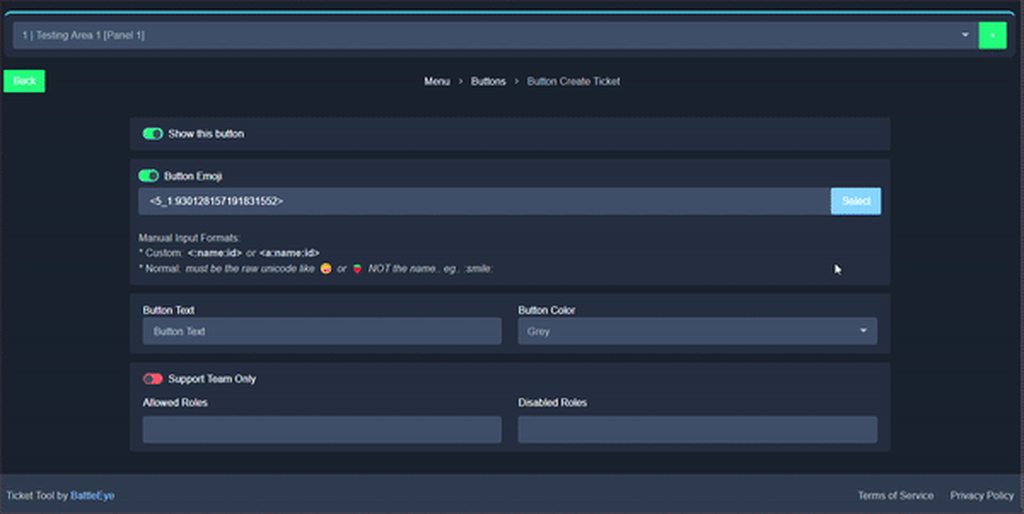
Invalid Form Body: Invalid emoji
This error indicates you have selected an invalid emoji, i.e. an emoji the bot isn't capable of using, in a button field
Which Emoji?
This depends upon which action the error is appearing, the most common cases are the Create Ticket button or one of your Dropdown emojis. You can visit your Button's List to find all available buttons and find the conflicting one by yourself.
Why doesn't the bot accept it as valid?
- You selected an emoji that doesn't exist anymore, i.e. that has been deleted
- You wrote text there, instead of an emoji (or in addition to an emoji)
- You entered a code for a custom emoji from a server that the bot is not a member of
- You entered a custom emoji code incorrectly
- You're on iPhone and entered an emoji using the phone's emoji pad (use the emoji selector in the website instead)
 scenic forum
rugged solar
another question, when a ticket is opened, how do i make it go to a different ca...
scenic forum
rugged solar
another question, when a ticket is opened, how do i make it go to a different ca...
How do I set what category tickets are created in?
1. Open your Panel Configs tab in the server's dashboard
2. Select the panel you want to grant access to
3. Open the Category options menu
4. Select the categories of your preference
5. Save changes
rocky heart
I put some dropdowns but when someone opens the ticket the staff can't see which option they have chosen
rugged solar
scenic forum
### [How to automatically ping my support team on a ticket?](<https://docs.ticke...
@scenic forum i rlly dont understand this bit
scenic forum
rugged solar
<@186523978729259009> i rlly dont understand this bit
Not sure what confuses you
its a step by step guide
humble sequoiaBOT
━━ User's inquiry has been moved to a ticket ━━
restive condor
rocky heart
I put some dropdowns but when someone opens the ticket the staff can't see which...
Hey there! 👋
You could include which ticket option they used in the ticket message
Dashboard > Panel Configs > Messages > Edit Ticket Message
You could also make one category for each ticket option and have each ticket type go to a different category. (Dashboard > Panel Configs > Category)
With premium you can have even have custom ticket names, so each ticket option has something indentifiable in the ticket name (eg. report-ticket-###) , or even colour code each option with emojis
 pine tide
Hello! What are the benefits for ticket tool premium?
restive condor
pine tide
Hello! What are the benefits for ticket tool premium?
Hi there, see below please
humble sequoiaBOT
 Faster Premium Bot
Automatic Transcripts
Full Customization
Direct Messages
Ticket Automation
Thread Style Ticketing
Premium Support
Scheduled Panel Availability
Integrations
Claiming
Advanced Ticket Statistics
You can purchase premium here:
Price
$7.99 - Monthly
$66 - Yearly
rugged solar
scenic forum
Not sure what confuses you
its a step by step guide
like the variable.
when i enter it, it doesent acctually do the ping
scenic forum
rugged solar
like the variable.
You have opened a ticket therefor im not allowed to assist you anymore
Please be patient inside your ticket
 zinc sand
Can anyone help me by making a ticket in my server
 slender minnow
Sure
humble sequoiaBOT

You can check our documentation here;
You can also check #📂│information for the basic setup, or run the </setup:1025379472167403530> command within #🤖│bot-spam to find information on how to setup Ticket Tool.
Alternatively, you can use the /setup command with Ticket Tool in your own server to setup the basics of Ticket Tool!
Our documentation contains all the info you need about the bot to be able to setup and configure the bot however you like.
slender minnow
@zinc sand go through the resources ^
 desert zephyr
It says application not found when I do /setup
scenic forum
desert zephyr
It says application not found when I do /setup
If the bot isn't responding when doing /debug
Its lacking these 3 permissions inside the channel it has been used in View Channel, Send Message and Embed Links.
 dusty vapor
How do I make it so ticket tool automatically closes the ticket after 10m of inactivity
 silent lava
dusty vapor
How do I make it so ticket tool automatically closes the ticket after 10m of ina...
silent lava
dusty vapor
How do I make it so ticket tool automatically closes the ticket after 10m of ina...
That’s a premium feature
Wanan know how
dusty vapor
silent lava
That’s a premium feature
Okay how do I add moderator to the ticket so they have access to all the tickets and they can close open and delete
humble sequoiaBOT
1. Open your Panel Configs tab in your server's dashboard
2. Select the panel you want to grant access to
3. Open the General options menu
4. Select your Support Team Roles
5. Save changes
silent lava
humble sequoia
@dusty vapor
dusty vapor
silent lava
<@1141428114627498014>
Okay and how do I make the prefix $
silent lava
dusty vapor
Okay and how do I make the prefix $
It’s by default $ for all servers no?
dusty vapor
Let me try
dusty vapor
silent lava
It’s by default $ for all servers no?
Okay how do I make it so after ticket automatically closes it automatically deletes the ticket as well
I run a server where so many people open tickets and closed tickets start popping up on open ticket category
silent lava
dusty vapor
Okay how do I make it so after ticket automatically closes it automatically dele...
As I told ya it’s a premium feature called automation
dusty vapor
silent lava
As I told ya it’s a premium feature called automation
I know i wanna buy premium but does it contain that as well? Where after closes 5m of inactivity it automatically deletes too
silent lava
dusty vapor
I know i wanna buy premium but does it contain that as well? Where after closes ...
U set everything by urself
dusty vapor
silent lava
U set everything by urself
U will help me if I buy premium? Cause its complicated on panel
silent lava
dusty vapor
U will help me if I buy premium? Cause its complicated on panel
Gotchu
dusty vapor
silent lava
Gotchu
I got premium now
so what's the first step to setting it to 5 minutes of ticket open it automatically closes
@silent lava
restive condor
dusty vapor
I got premium now
Dashboard > Panel Configs > Automations
Please create an advanced automation, using the ''Check for Message' trigger
- If a message is NOT found
- from: Ticket Owner
- for: 5min
- Once & Stop
- Close Ticket as the action
That will close the ticket automatically if there are no messages from the ticket owner during the first 5 minutes
dusty vapor
Okay i disabled two step close which means if ticket gets closed it automatically deletes right?
restive condor
That's right
dusty vapor
restive condor
Dashboard > Panel Configs > Automations
Please create an advanced automation, us...
What do I press
 restive condor
The green ''Add Automation'' button please
 restive condor
Dashboard > Panel Configs > Automations
Please create an advanced automation, us...
restive condor
restive condor
Dashboard > Panel Configs > Automations
Please create an advanced automation, us...
Now follow here ^
dusty vapor
restive condor
Now follow here ^
I wanted to make it like if someone opens a ticket and doesnt say anything in it for 5 minutes then it automatically closes the ticket
restive condor
dusty vapor
I wanted to make it like if someone opens a ticket and doesnt say anything in it...
Yep, please follow my instructions to configure that
 restive condor
dusty vapor
Ok so trigger set to owner leave?
restive condor
dusty vapor
Ok so trigger set to owner leave?
Trigger: Check for Message
- Check to see if a message: a message is NOT found
- from: Anyone/Everyone
- for: 5min
- it should check: Once & Stop
- if a message is NOT found: Close Ticket as the action
dusty vapor
dusty vapor
Did i do it correctly?
restive condor
restive condor
Trigger: Check for Message
- Check to see if a message: a message is NOT found
-...
No, see here what to select for each line ^
dusty vapor
Oh but thats for ticket owner I want it so when people open ticket it closes cause they didnt say anything in it
restive condor
Ah, so if your staff says something but the ticket owner doesn't, you'd still want to keep it opened?
dusty vapor
restive condor
Ah, so if your staff says something but the ticket owner doesn't, you'd still wa...
Yes
restive condor
restive condor
Trigger: Check for Message
- Check to see if a message: a message is NOT found
-...
Alrighty, then see here once again for the updated version
dusty vapor
As long as before 5 minute the staff or guy opening talks it remains open
restive condor
You still have incorrect fields
dusty vapor
 restive condor
Perfect
dusty vapor
restive condor
Perfect
Okay thanks so much brother
iron nightBOT
Gave +1 Rep to @restive condor (current: #1 - 3044)
restive condor
No problem!
 red stratus
How do I renew my stick
humble sequoiaBOT

⚠️ You're in the wrong place
We provide support for Ticket Tool Discord bot and cannot help you with whatever issue you have.
- We don't know which Support Team you should contact to get this issue resolved, and unfortunately we won't be able to accurately tell you.
If you don't have any further questions regarding our bot Ticket Tool, please close this ticket
 finite merlin
How do you close a ticket that’s been opened and not have it count like kind of if can it somehow end up being like a test ticket?
 sick knot
Why

 radiant valve
sick knot
Why
radiant valve
sick knot
Why
Can you run /debug please
 uncut trellis
hii! can you please make your website more clearer by adding some colors or something like that to make it easier to see whether it's a win or a lose, I often get confused because you have win and lose on opposite sides of the page than other websites do and then I accidentally accept a pet even though it's lose because it confuses me.
sick knot
radiant valve
Can you run /debug please
Ok eait
sick knot
radiant valve
Can you run /debug please

 plush frigate
How to fix this i get this always when i try to create the ticket
 sick knot
Guys...

 daring mantle
Hey do you thinks its possible to close multiples ticket at same time ? Or make a timer .. like 2 days after ticket opened he auto delete
silent lava
plush frigate
How to fix this i get this always when i try to create the ticket
Youre discord rate limited
So you gotta wait to wait
plush frigate
silent lava
Youre discord rate limited
So you gotta wait to wait
I waited like 2h alredy
silent lava
daring mantle
Hey do you thinks its possible to close multiples ticket at same time ? Or make ...
Dashboard > Panel Configs > Automations
Please create an advanced automation
Trigger: Check for Message
- Check to see if a message: a message is NOT found
- from: Anyone/Everyone
- for: time u want
- it should check: Once & Stop
- if a message is NOT found: delete Ticket as the action
Btw that’s a premium feature
silent lava
plush frigate
I waited like 2h alredy
It’s not up to me jt wait for ur discord comes up
humble sequoiaBOT
When first invited to your server, Ticket Tool should have the permissions shown below in order to ensure an appropriate functioning:
When customizing permissions for the different ticket participants, you must make sure Ticket Tool has the permissions you want it to grant to others, you can learn more about this here.
Missing Permissions
This error is a direct outcome of the bot missing permissions as depicted above. When troubleshooting this error we suggest you go through these steps:
- Use the </debug:1029783024264564765> command to check if the bot is lacking core role or channel permissions.
- Compare the category/channel's overrides and contrast them with the bot's roles to identify any permission denial that is breaking the functioning
- If you can't still figure it out, let our <@&540295656720302081> know so they can guide you through
Additional Resources
- If you are a server administrator and would like to understand more how to set up your server's permissions, we suggest checking the Discord Support Knowledge Base
- If you are a bot developer and are interested in the internal permission hierarchy we suggest you this part of the Discord Developer Docs
Important Note
- Giving Administrator permissions is NOT required and we do NOT encourage you to do unless you are trying to troubleshoot your permissions setup.
 daring mantle
silent lava
Dashboard > Panel Configs > Automations
Please create an advanced automation
Tr...
daring mantle
silent lava
Dashboard > Panel Configs > Automations
Please create an advanced automation
Tr...
It will be automaticly added to all different ticket ?
silent lava
daring mantle
It will be automaticly added to all different ticket ?
No set every panel
daring mantle
silent lava
No set every panel
I changed panel but config is already done in all
silent lava
daring mantle
I changed panel but config is already done in all
I mean u gotta change for every ticket u got
daring mantle
But if i change in one it change to every other ?
sick knot
silent lava
<@1490440997858054274>
tyyyyyyyyy brooo
silent lava
daring mantle
But if i change in one it change to every other ?
Nah jt for that ticket
daring mantle
Oh ok thank you bro
silent lava
Nws mate
daring mantle
And for my current ticket do you know what will happening ?
daring mantle
silent lava
Nws mate
If i do /automation stop on the ticket it will be only stop it for the current ticket ?
radiant valve
sick knot
Make sure it has the View Channel, Send Message and Embed Links permissions in that channel
silent lava
daring mantle
If i do /automation stop on the ticket it will be only stop it for the current t...
Automations can be stopped, by running the / automation stop command inside the ticket you want it to stop in.
silent lava
radiant valve
Make sure it has the ``View Channel``, ``Send Message`` and ``Embed Links`` per...
He’s alr been helped btw
 cosmic magnet
Привет 👋
 tardy wagon
hello, what variable do I input when i create a custom command made to close the ticket on its own?
humble sequoiaBOT
⚠️ You're in the wrong place
We provide support for Ticket Tool Discord bot and cannot help you with whatever issue you have.
- We don't know which Support Team you should contact to get this issue resolved, and unfortunately we won't be able to accurately tell you.
If you don't have any further questions regarding our bot Ticket Tool, please close this ticket
restive condor
tardy wagon
hello, what variable do I input when i create a custom command made to close the...
Hey there1 You can't close tickets with custom commands unfortunately. Use the /close command please
radiant valve
silent lava
He’s alr been helped btw
I was helping him btw
 wanton leaf
how do i set it up like this with the free ticket tool
 humble sequoiaBOT
For more convenient use of multipanels, you can now combine panels on the dashboard. This will allow you to directly send the multipanel from the dashboard or via the $panel ID command.
Where can I find this?
You can find this setting on the Dashboard -> Panel Configs -> Panel -> Attached Panels
Note: if you're attaching all the panels to a panel called English, don't include English in the attached panel's box (If you do this, it will create a duplicate)
This will put all buttons from all of your panels on one message. The message is the panel message from the panel you're combining these panels in.
 silent lava
humble sequoia
silent lava
humble sequoia
@wanton leaf
wanton leaf
thank you
 void zinc
humble sequoiaBOT
void zinc
humble sequoiaBOT

فريق الدعم الفني العربي
عميلنا العزيز ان كنت تبحث عن مساعدة يرجى فتح تكت خاص بفريق الدعم الفني العربي
اذهب الى#🎫│make-a-ticket
ثم قم بلضغط على الايموجي الاتي (🇯🇴)
 uneven lance
How do I become a part of the staff team?
humble sequoiaBOT
How do be I become a Support Member?
You can become a support member in 2 ways:
1. You can be really active in #🆘│community-support gain <@&799500225579712543> role and get chosen by a Manager
2. You can apply VIA our applications that would be sent in #📣│server-news
We currently have Support Teams for the following languages:
:flag_us: English
:flag_jo: Arabic
:flag_fr: French
:flag_de: German
:flag_es: Spanish
:flag_br: Portuguese
scenic forum
uneven lance
How do I become a part of the staff team?
Read above
uneven lance
Thanks
 rose rune
How to edit ticket questions when someone tries to open one
humble sequoiaBOT
A Discord Form lets the user answer individual questions in a pop-up Form, which then displays the answers in the ticket message. This can save time if you already know what you want to ask the user.
Setup Forms
Forms can be enabled under Panel Settings > Form Options > Edit Forms Options. In the new pop-up window, you can now enable and edit your own Form.
Form Options
You can add up to 5 questions in the Discord form. This is a Discord limitation. Each question can have a placeholder in the input field, a minimum and maximum input, multi-line, and also the option to have the answer required.
Options
Question Title ➞ Your Question goes here
Question Placeholder ➞ The placeholder text in the input field
Required ➞ If enabled, the user has to answer this question, to submit the form
Multi-Line Input ➞ Allows the user to input multiple lines
Minimum and Maximum Input ➞ Set a minimum and maximum input value for the user
Displaying the Answer
To display the answers from the user, you need to enable Auto display form results on the ticket message as an additional embed
If you don't want a second embed, go into your Panel Configs > Ticket Options > Edit Ticket Message. You use the variable {create.form.x} and replace x with the number of your question. For example, the response to Question 5 can be displayed with {create.form.5}.
 silent lava
humble sequoia
silent lava
humble sequoia
@witz.pt
 haughty acorn
Comprei um pacote no jogo e n recebi os itens
humble sequoiaBOT
Você está no lugar errado
Fornecemos suporte para Ticket Tool Discord bot e não podemos ajudá-lo com qualquer problema que você tenha.
- Não sabemos qual equipe de suporte você deve entrar em contato para resolver esse problema e, infelizmente, não poderemos informar com precisão.
Se você não tiver mais dúvidas sobre nossa ferramenta de ticket de bot, feche este ticket
dusty vapor
How do I check how many $claims did the person do for tickets
Like if someone did $claim i wanna see how many tickets he completed
 solid fog
how can i add a panel to a pre-existing embed ?
 scenic forum
dusty vapor
How do I check how many $claims did the person do for tickets
scenic forum
dusty vapor
How do I check how many $claims did the person do for tickets
On the dashboard via the statistic page
scenic forum
solid fog
how can i add a panel to a pre-existing embed ?
With the update button on the dashboard that should be possible, yes
solid fog
scenic forum
With the update button on the dashboard that should be possible, yes
yay! do you know how?
scenic forum
solid fog
yay! do you know how?
Update the panel on the dashboard config
Once that's done go to the main panel config page and press update at the very top
solid fog
scenic forum
Update the panel on the dashboard config
Once that's done go to the main panel c...
like this?

sorry i dont know much about this bot 😓
scenic forum
solid fog
like this?
Like this yes
 carmine pawn
Uh can anyone help me with this

Why can’t I appeal
It says I have no permission but for what
solid fog
scenic forum
Like this yes
when i tried it, it looked like this
 scenic forum
solid fog
when i tried it, it looked like this
scenic forum
solid fog
when i tried it, it looked like this
Because thats how your ticket panel is setup
solid fog
i'm confused 💔
scenic forum
solid fog
i'm confused 💔
Elaborate what EXACTLY youre trying to do or want it too look like
solid fog
i'm trying to make it so the drop down menu is on a seperate embed, not a panel by ticket tool. like this server has
 humble sequoiaBOT
The Drop-down menu or Select Menu replaces the buttons on your panel message and uses a drop-down menu with all of your panels. To set this up, go to your Panel Configs and select your main Panel.
<:Numbericons1:1018864164032225340> Enable Select Style
First you enable Select Style. Then you add an item in the Dropdown Editor. Now you can start editing your dropdown!
<:Numbericons2:1018864168041971712> Dropdown Editor
Each line in the dropdown editor represents a line in the drop down menu on discord. You can add more "Items", by clicking on 

First you select a panel. That's the panel this option will open a ticket for.  DONT select the same panel twice. Each option should have a different Panel
After that, you can put a Display. This is the title of this option and will appear in the drop down menu. The *Description can be set right after that, which will be below the title in grey.
Additionally you can select an emoji, that will be shown in front of each option. You can either manually input the ID of an emoji or select it in the selector.
Common Issues ⚠️
- Panel doesn't send? Make sure you have a valid emoji selected
- Option doesn't show up? Check if two options have the same panel in the DropDown Editor

$dropdown
scenic forum
@solid fog read above for the dropdown setup
carmine pawn
What kind of permission do I need to use it?
 solid fog
scenic forum
<@1082355073855803532> read above for the dropdown setup
solid fog
scenic forum
<@1082355073855803532> read above for the dropdown setup
i'm sorry it doesn't really help💔 that's for adding it to a new panel / embed, i would like to put it on a pre-existing one
scenic forum
carmine pawn
What kind of permission do I need to use it?
Are you staff on the server?
carmine pawn
No
scenic forum
carmine pawn
No
Then theres nothing we can assist you with
scenic forum
carmine pawn
So it needs to be a staff for permission to close the ticket?
No idea what their staff has setup
carmine pawn
Thanks for the help anyways though
scenic forum
solid fog
i'm sorry it doesn't really help💔 that's for adding it to a new panel / embed, ...
To have it directly attached you need to have the embed be done by ticket tool
However you can just send the dropdown with the embed removed but that would ALSO require you to setup a dropdown menu
solid fog
scenic forum
To have it directly attached you need to have the embed be done by ticket tool
H...
with the server i showed they used Sapphire for the embed
humble sequoiaBOT
Integrating an External Bot x Ticket Tool <:TicketToolGold:1073948897673748490>
Integrating Ticket Tool with an external bot allows you to customize your server's Ticket System further!
- The external bot must output the
$newor$ticketcommands with the user's ID to start a ticket. Preferably in a private channel.
Eg.
$new 12345678901234567890
-
Your ticket panel must be Command Style enabled
-
You must whitelist that bot's ID in your Dashboard ➞ Server Configs ➞ Bot section.
Otherwise Ticket Tool will not react to the command and a ticket will not be created.
- If you'd like to include a reason in the command usage, feel free to do so after the user ID.
Eg.
$new 12345678901234567890 Your reason goes here
This reason can then be shown anywhere in the Ticket Message with the{create.reason}variable
**  Note:** If you have changed Ticket Tool's default prefix (
$) please ensure to amend the prefix for the $new or $ticket commands.
Eg. If your prefix is
-, then what you're looking for the bot to use is-newor-ticket

$botintegration
scenic forum
@solid fog refer to the embed above
Fair warning its going to become really complicated if youre planning to use multiple ticket types
 lament oriole
Why can’t I update my age verification
scenic forum
lament oriole
Why can’t I update my age verification
⚠️ You're in the wrong place ⚠️
We provide support for the Discord Bot Ticket Tool and cannot help you with whatever issue you have.
- We don't know which Support Team you should contact to get this issue resolved, and unfortunately we won't be able to accurately tell you.
 graceful kelp
scenic forum
⚠️ **You're in the wrong place** ⚠️
We provide support for the Discord Bot **Ti...
graceful kelp
scenic forum
⚠️ **You're in the wrong place** ⚠️
We provide support for the Discord Bot **Ti...
Hey bro what perms do I need to see the dashboard of ticket tool
I am an administrator of that server then also I can't see the server in the list at the website
scenic forum
graceful kelp
Hey bro what perms do I need to see the dashboard of ticket tool
I am an admini...
Don't see your server in the dashboard?
Try using the Sync Servers button on your top center of the Dashboard
If this doesn't work
You should relog from the dashboard, you can do this by clicking here to log out immediately, and then log back in page
You need one of these 3 things to access the dashboard.
Note:
- Server Owner
(Level: 6) - Server Administrator
(Level: 4) - Dashboard Role
(Level: 2)
⚠️ You can check your level using the </permissionlevel:1029797400174399542> command on your Discord Server
You don't have access to the dashboard if the bot's response is:
- @User is permission level: 0 (User)
K
 bright storm
can I give someone else access to edit the bot if I own the server
graceful kelp
scenic forum
### Don't see your server in the dashboard?
Try using the **Sync Servers** butto...
I am level 4
scenic forum
bright storm
can I give someone else access to edit the bot if I own the server
Dashboard Roles
Any role you put there will have full access to the ticket tool dashboard.
The server owner and users with admin permissions already have access to the dashboard.
Be careful of which roles to put here
 scenic forum
graceful kelp
I am level 4
scenic forum
graceful kelp
I am level 4
then relog
graceful kelp
K
 normal lava
scenic forum
### [Dashboard Roles](<https://docs.tickettool.xyz/dashboard/server-configs#dash...
normal lava
scenic forum
### [Dashboard Roles](<https://docs.tickettool.xyz/dashboard/server-configs#dash...
Hey how can I give permission to use the commands of the bot to others ?
scenic forum
normal lava
Hey how can I give permission to use the commands of the bot to others ?
Dashboard -> Command configs
Setup the commands as you like
normal lava
Alright
scenic forum
Anyway i will SLEEP now
So if you require further help
Please be patient until someone else arrives or #🎫│make-a-ticket
bright storm
login with discord isn't working but that just might be my wifi
bright storm
normal lava
Alright
only I can
normal lava
bright storm
only I can
Do it
bright storm
normal lava
Do it
go to server
graceful kelp
scenic forum
Anyway i will **SLEEP** now
So if you require further help
Please be patient unt...
How can I make the ticket bot to dm the users when the ticket is closed with reason if specified
 queen magnet
how do i add ticket tool to my server
humble sequoiaBOT
Ticket Tool Invite & Support
silent lava
humble sequoia
@queen magnet
 ocean brook
 tired moat
Any person her who can help me
tired moat
Any person her who can help me
Hi
 viscid briar

 abstract copper
If my ticket premium was gone, would it change the ticket tool profile?
silent lava
abstract copper
If my ticket premium was gone, would it change the ticket tool profile?
U could use /botswitcher jt to check ur status and yeah it would change
abstract copper
silent lava
U could use /botswitcher jt to check ur status and yeah it would change
Oh alright, thank you
iron nightBOT
Gave +1 Rep to @silent lava (current: #60 - 41)
 merry cargo
erm for some reason every command i run except for /premium returns with "the application did not respond"
scenic forum
merry cargo
erm for some reason every command i run except for /premium returns with "the ap...
Show a screenshot of what premium returns
merry cargo
scenic forum
Show a screenshot of what premium returns

its normal but every other command just doesnt work
scenic forum
merry cargo
If the bot isn't responding when doing /debug
Its lacking these 3 permissions inside the channel it has been used in View Channel, Send Message and Embed Links.
merry cargo
scenic forum
If the bot isn't responding when doing ``/debug``
Its lacking these 3 permission...
o ok thx
iron nightBOT
Gave +1 Rep to @scenic forum (current: #8 - 914)
 paper yacht
I keep adding the bot but when I go back to the website it says I haven't added it
scenic forum
paper yacht
I keep adding the bot but when I go back to the website it says I haven't added ...
Don't see your server in the dashboard?
Try using the Sync Servers button on your top center of the Dashboard
If this doesn't work
You should relog from the dashboard, you can do this by clicking here to log out immediately, and then log back in page
You need one of these 3 things to access the dashboard.
Note:
- Server Owner
(Level: 6) - Server Administrator
(Level: 4) - Dashboard Role
(Level: 2)
⚠️ You can check your level using the </permissionlevel:1029797400174399542> command on your Discord Server
You don't have access to the dashboard if the bot's response is:
- @User is permission level: 0 (User)
 scenic forum
 urban phoenix
Why i cant mention the role
urban phoenix
Why i cant mention the role
<@&RoleID>
 snow bramble
This happened to me yesterday any help?
 humble sequoiaBOT
This error indicates you have selected an invalid emoji, i.e. an emoji the bot isn't capable of using, in a button field
Which Emoji?
This depends upon which action the error is appearing, the most common cases are the Create Ticket button or one of your Dropdown emojis. You can visit your Button's List to find all available buttons and find the conflicting one by yourself.
Why doesn't the bot accept it as valid?
- You selected an emoji that doesn't exist anymore, i.e. that has been deleted
- You wrote text there, instead of an emoji (or in addition to an emoji)
- You entered a code for a custom emoji from a server that the bot is not a member of
- You entered a custom emoji code incorrectly
- You're on iPhone and entered an emoji using the phone's emoji pad (use the emoji selector in the website instead)
 scenic forum
snow bramble
This happened to me yesterday any help?
scenic forum
snow bramble
This happened to me yesterday any help?
Read above
 lament warren
@scenic forum help me
humble sequoiaBOT
@lament warren, we would love to help you, but if you don't tell us what you need help with we can't help you :(
scenic forum
Also don't ping me.
lament warren
oh ok
humble sequoiaBOT
━━ User's inquiry has been moved to a ticket ━━
lament warren
help me to creat a ticket bc i always go to link only go to my old server
 pseudo ravine
Please stay in your ticket
 steel kraken
Je vais prendre un boost pour bo7 multi c'est possible d'avoir une session quand s'il vous plaît ? Je vais prendre le boost sur captainboost.app
humble sequoiaBOT
⚠️ Vous n'êtes pas au bon endroit
Nous offrons un support pour le bot Ticket Tool et nous ne pouvons pas vous aider avec d'autres problèmes hors du bot.
- Assurez-vous de contacter l'équipe d'assistance appropriée, s'il vous plaît.
S'il n'y a pas d'autres éléments en lien avec Ticket Tool en quoi nous pouvons vous être utiles, veuillez fermer le ticket.
haughty acorn
#sos comprei um pacote no rio Rise e n recebi os itens pode me ajudar
 misty gazelle
How to change bot Profile?
humble sequoiaBOT
<:NewIcon1:1018858809541804124><:NewIcon2:1018858813266333706> Ticket Tool Custom Avatar <:Premium:1192403074157912144>
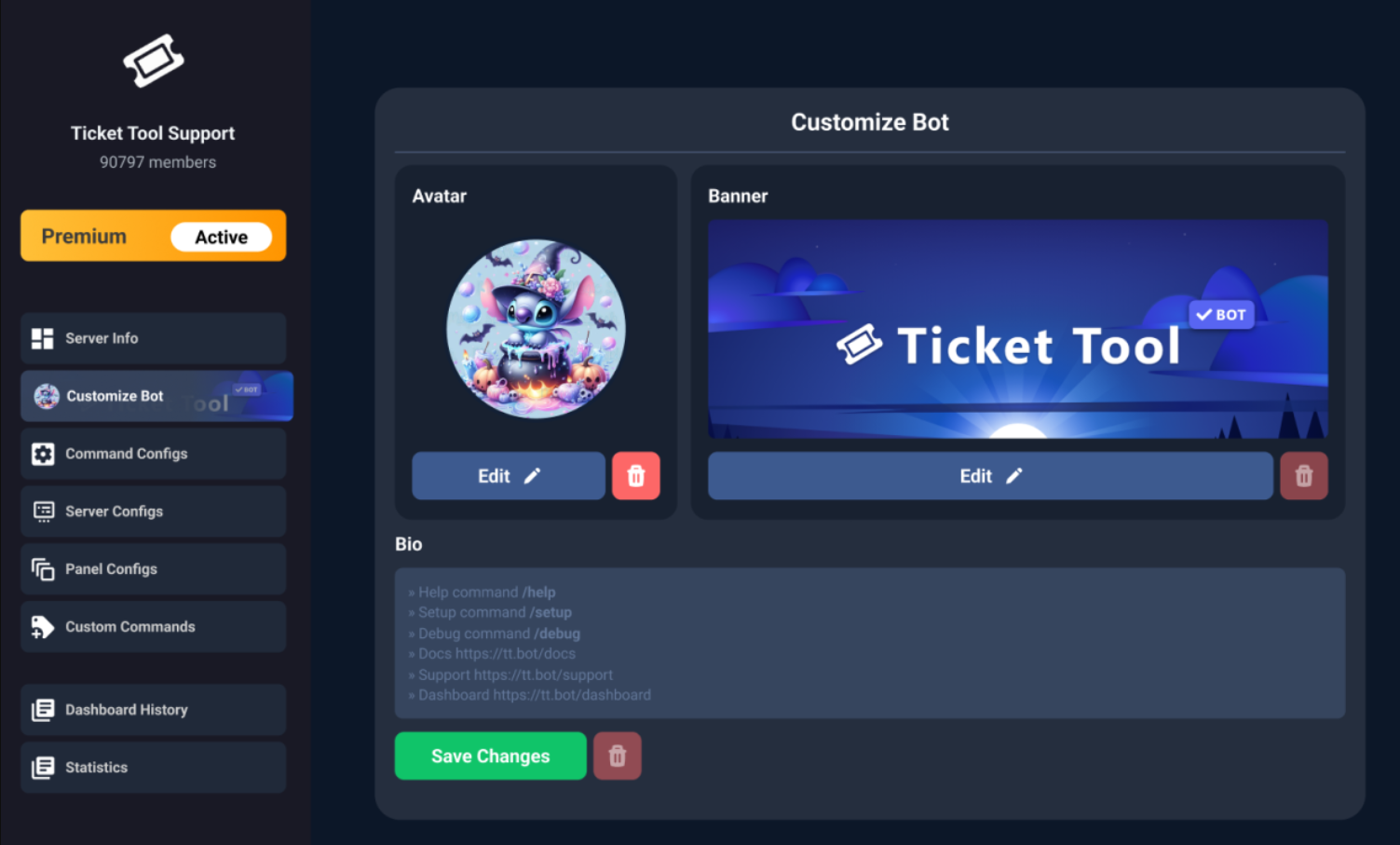
You can now change: Ticket Tool's profile picture; nickname; banner; and bio, to make it your own!
To further customize the bot's appearance, please head over to your Dashboard ➞ Customize Bot, from there, you will be able to upload a profile picture and banner, and edit the bot's biography.
You can change the bot's nickname by right-clicking on the bot's profile, in the user list, on your server, and clicking Change Nickname.
Note: This is not a whitelabel, but rather a personalized instance of Ticket Tool for your server only. It is not an individual bot for your server, and it will behave and appear like Ticket Tool outside of it (i.e. in DMs). Our Development Team continues to explore ways to release white labels, this is your own custom bot!
$avatar
misty gazelle
Where to get the redeem code?
scenic forum
misty gazelle
Where to get the redeem code?
You dont via normal means
Codes are primarly used for crypto premium purchases
misty gazelle
Okay.
haughty acorn
#📣│social-media-posts comprei um pacote no rio Rise e n recebi os itens me ajuda ou devolve o dinheiro
 alpine sorrel
i cant setup the bot
humble sequoiaBOT
First you will want to invite the bot to your server. Once the bot is in your server, you can manage your server in the dashboard.

To create a panel we are going to need to head over to the Panel Configs Tab on the Dashboard.
Once at the dashboard we will need to click Create Panel.
Enter a panel name (Fill in any optional settings you want).
Click Create Panel and you are ready to get started with configuring your panel.
An example of a creating a panel is shown below.

Once the panel has been created, use the blue Send button and select the channel you want the panel to be sent to.
The Panel wasn't send
Use the </debug:1029783024264564765> command to diagnose possible permission issues with the bot.

 latent dawn
alpine sorrel
i cant setup the bot
latent dawn
alpine sorrel
i cant setup the bot
Refer to the embed above 
 amber bay
How do i use the bot to create like a server application quiz kind of this?
humble sequoiaBOT
A Discord Form lets the user answer individual questions in a pop-up Form, which then displays the answers in the ticket message. This can save time if you already know what you want to ask the user.
Setup Forms
Forms can be enabled under Panel Settings > Form Options > Edit Forms Options. In the new pop-up window, you can now enable and edit your own Form.
Form Options
You can add up to 5 questions in the Discord form. This is a Discord limitation. Each question can have a placeholder in the input field, a minimum and maximum input, multi-line, and also the option to have the answer required.
Options
Question Title ➞ Your Question goes here
Question Placeholder ➞ The placeholder text in the input field
Required ➞ If enabled, the user has to answer this question, to submit the form
Multi-Line Input ➞ Allows the user to input multiple lines
Minimum and Maximum Input ➞ Set a minimum and maximum input value for the user
Displaying the Answer
To display the answers from the user, you need to enable Auto display form results on the ticket message as an additional embed
If you don't want a second embed, go into your Panel Configs > Ticket Options > Edit Ticket Message. You use the variable {create.form.x} and replace x with the number of your question. For example, the response to Question 5 can be displayed with {create.form.5}.
scenic forum
@amber bay read above thats the closest thing
amber bay
Okay I think I got it. How do I make sure the application has to be filled out immediately for anyone joining the server, and a requirement for anyone wanting access to the channels?
humble sequoiaBOT
Creating a verification system with Ticket Tool <:TicketToolWhite:1073948900056105060>
Using Discord's permission system you can create a setup that allows your team to manually verify new server members while keeping the rest of the server hidden!
Please configure the permissions of your server's channel as depicted below:
Category Permissions
- Go to your category permissions, or channel permissions in case they are not synced with the category.
- Set the View Channels permission to
 for the @everyone role.
 - Set the View Channels permission to
 for your
 @Memberor@Verifiedrole. - Repeat this process for all of your server's categories.
Ticket Panel Channel
- Set the View Channel permission to for the @everyone role.
- (Optional) If you'd like for verified members to not be able to see that ticket channel anymore, set the View Channel permission to for your
@Memberor@Verifiedrole.
-# Note: Your staff team will still need to grant a verification role. If you have premium, you can check our Ticket Closed Roles feature
$manualverification
scenic forum
@amber bay read above
amber bay
Yeah i dont think i did it right. I had a server member test it, but nothing happened when he pressed "create ticket"
scenic forum
amber bay
Yeah i dont think i did it right. I had a server member test it, but nothing hap...
Its impossible for nothing to happen
What error do they receive
amber bay
Its just a small block that says "Support will be with you shortly. To close this press the close button"
 candid sentinel
added the bot to a discord im admin in. keeps saying i dont hav epermission to access the server on the dashboard. only this server
humble sequoiaBOT
Don't see your server in the dashboard?
Try using the Sync Servers button on your top center of the Dashboard page
If this doesn't work
You should relog from the dashboard, you can do this by clicking here to log out immediately, and then log back in
Note:
You need one of these 3 things to access the dashboard.
1. Server Owner (Level: 6)
2. Server Administrator (Level: 4)
3. Dashboard Role (Level: 2)
:warning: You can check your level using the </permissionlevel:1029797400174399542> command on your Discord Server
If the bot's response is:
- @User is permission level: 0 (User)
You don't have any of the 3 levels required to access the server's dashboard
 silent lava
humble sequoia
silent lava
humble sequoia
@candid sentinel
candid sentinel
bot says its not responsive. have readded and tried several times
 grizzled summit
Hey there @candid sentinel I am going to direct you to our support team to provide assistance in #premium-tickets.
We are more than happy to help.
humble sequoiaBOT
━━ User's inquiry has been moved to a ticket ━━
queen magnet
where are the tickets
restive condor
queen magnet
where are the tickets
Hi there, what exactly do you mean?
queen magnet
setting my thing up where they hsve to write why they are opening tickets and what ticket they sre opening
restive condor
queen magnet
setting my thing up where they hsve to write why they are opening tickets and wh...
Are you trying to configure that?
queen magnet
to be honest i dont know what configure mean
restive condor
queen magnet
to be honest i dont know what configure mean
set up
restive condor
Sure, that can help
 restive condor
queen magnet
restive condor
queen magnet
Perfect, and then you're looking to have a form after they have selected which option?
restive condor
queen magnet
do i need premium for it?
Nope. So firstly, you will need to create one different panel for each dropdown option
Then see below how to make your dropdown menu
humble sequoiaBOT
The Drop-down menu or Select Menu replaces the buttons on your panel message and uses a drop-down menu with all of your panels. To set this up, go to your Panel Configs and select your main Panel.
<:Numbericons1:1018864164032225340> Enable Select Style
First you enable Select Style. Then you add an item in the Dropdown Editor. Now you can start editing your dropdown!
<:Numbericons2:1018864168041971712> Dropdown Editor
Each line in the dropdown editor represents a line in the drop down menu on discord. You can add more "Items", by clicking on
First you select a panel. That's the panel this option will open a ticket for. DONT select the same panel twice. Each option should have a different Panel
After that, you can put a Display. This is the title of this option and will appear in the drop down menu. The *Description can be set right after that, which will be below the title in grey.
Additionally you can select an emoji, that will be shown in front of each option. You can either manually input the ID of an emoji or select it in the selector.
Common Issues ⚠️
- Panel doesn't send? Make sure you have a valid emoji selected
- Option doesn't show up? Check if two options have the same panel in the DropDown Editor
$dropdown
restive condor
Let me know if you have any questions & when that's done!
restive condor
Of course
rocky heart
After authorizing the form and updating the message, the form does not start.
queen magnet
yes i do not get it
restive condor
rocky heart
After authorizing the form and updating the message, the form does not start.
Hey there! Please ensure you enabled the form for the correct panel(s)
restive condor
queen magnet
yes i do not get it
No worries, is it ok if I move you to a ticket?
humble sequoiaBOT
━━ User's inquiry has been moved to a ticket ━━
 worn tendon
hi
so uhh... i got ticket tool in one of my servers so that i can age verify people by sending them a ticketed channel where a mod can check their ID to amke sure they're an adult. but my new members cant see the tool despite being able to view the channel. how do i fix this?
restive condor
worn tendon
so uhh... i got ticket tool in one of my servers so that i can age verify people...
Hey there! Please give the everyone role the READ MESSAGES HISTORY permission in that channel's permissions
worn tendon
ok
 tropic magnet
Hello everyone, I have a problem with the ticket tool bot, it is on the server and has all the permissions, but I can't see the server where the bot is on the dashboard.
I am the server owner.
 vale agate
tropic magnet
Hello everyone, I have a problem with the ticket tool bot, it is on the server a...
vale agate
tropic magnet
Hello everyone, I have a problem with the ticket tool bot, it is on the server a...
وش
restive condor
vale agate
help
Hi, what's wrong?
restive condor
tropic magnet
Hello everyone, I have a problem with the ticket tool bot, it is on the server a...
Hey there! Please try the steps below
humble sequoiaBOT
Don't see your server in the dashboard?
Try using the Sync Servers button on your top center of the Dashboard page
If this doesn't work
You should relog from the dashboard, you can do this by clicking here to log out immediately, and then log back in
Note:
You need one of these 3 things to access the dashboard.
1. Server Owner (Level: 6)
2. Server Administrator (Level: 4)
3. Dashboard Role (Level: 2)
:warning: You can check your level using the </permissionlevel:1029797400174399542> command on your Discord Server
If the bot's response is:
- @User is permission level: 0 (User)
You don't have any of the 3 levels required to access the server's dashboard
vale agate
ماعرف انجليزي
humble sequoiaBOT
فريق الدعم الفني العربي
عميلنا العزيز ان كنت تبحث عن مساعدة يرجى فتح تكت خاص بفريق الدعم الفني العربي
اذهب الى#🎫│make-a-ticket
ثم قم بلضغط على الايموجي الاتي (🇯🇴)
vale agate
@restive condor How do I activate the ticket?
restive condor
Please wait on your ticket to be replied to
vale agate
restive condor
Please wait on your ticket to be replied to
What is the command to activate it?
humble sequoiaBOT
⚠️ Please read the messages previously sent by our team ⚠️
 tardy grotto
How to make a ticket tool to get unban in a game ???
humble sequoiaBOT
⚠️ You're in the wrong place
We provide support for Ticket Tool Discord bot and cannot help you with whatever issue you have.
- We don't know which Support Team you should contact to get this issue resolved, and unfortunately we won't be able to accurately tell you.
If you don't have any further questions regarding our bot Ticket Tool, please close this ticket
worn tendon
restive condor
Hey there! Please give the everyone role the ``READ MESSAGES HISTORY`` permissio...
it still didn’t work for my newcomer friend. is there anything i can do?
restive condor
worn tendon
it still didn’t work for my newcomer friend. is there anything i can do?
Could you screenshot what exactly does it show for them
 arctic flame
Hello I Wanne get a Deluxe packet but no one answet me
humble sequoiaBOT
⚠️ You're in the wrong place
We provide support for Ticket Tool Discord bot and cannot help you with whatever issue you have.
- We don't know which Support Team you should contact to get this issue resolved, and unfortunately we won't be able to accurately tell you.
If you don't have any further questions regarding our bot Ticket Tool, please close this ticket
 cobalt yew
Why is the ticket support so slow?
restive condor
You've waited a whole 1 minute 30seconds mate
humble sequoiaBOT
━━ User's inquiry has been moved to a ticket ━━
 nova nimbus
Why i cant claim ticket
 foggy sparrow
What do you mean?
 wary marlin
i have a question
how do i give someone perms to see every ticet without doing it individuall
y
 pulsar ridge
alr I am dumb how do I change this text
 restive condor
wary marlin
how do i give someone perms to see every ticet without doing it individuall
restive condor
wary marlin
how do i give someone perms to see every ticet without doing it individuall
Moved to Ticket
restive condor
pulsar ridge
alr I am dumb how do I change this text
Hey there! See below please
humble sequoiaBOT
The panel message is where people react to make a ticket. To customize it head over to your Dashboard --> Panel Configs -> Panel -> Edit Panel Message

 whole mica
I've been getting this message in my server ever since I've added the bot, I've moved it higher on roles, readded it, changed perms and this still keeps happening. Can anyone help me
 pulsar ridge
restive condor
Hey there! See below please
pulsar ridge
restive condor
Hey there! See below please
Thank u btw haha so many buttons I just got lost.
iron nightBOT
Gave +1 Rep to @restive condor (current: #1 - 3046)
 sharp trail
what can i do if i dint receive mypay from january
humble sequoiaBOT
⚠️ You're in the wrong place
We provide support for Ticket Tool Discord bot and cannot help you with whatever issue you have.
- We don't know which Support Team you should contact to get this issue resolved, and unfortunately we won't be able to accurately tell you.
If you don't have any further questions regarding our bot Ticket Tool, please close this ticket
wary marlin
could some of the mods please check my ticket im really confused on what to do #1493361191412695182
grizzled summit
Hey there. Our Support Team will be with you in a reasonable amount of time. It has been seen and will be replied to.
humble sequoiaBOT
Message from Grandpa Devツ
__Reminder: Our Ticket Tool Support Team is volunteer-based. __
The Ticket Tool Management Team is offered a monthly stipend as independent contractors for their management areas of Ticket Tool but the Ticket Tool Support Team is offered a gift each year as a token of our appreciation for volunteering their time.
Our dedicated staff team works hard to address your queries and concerns, but please remember that they respond as and when they are available.
We understand that you might need prompt assistance, and we strive to provide timely support. However, given the volunteer nature of our team, there may be times when responses are not immediate.
Your patience and understanding in this matter are greatly appreciated. We are here to help, and we will get to your queries as quickly as we can. Thank you for your continued support and for being a part of our community.
Best regards,
@upper flower
Ticket Tool Support
·
grizzled summit
I understand. Please see this message from our CEO. A Support Team member will be with you in a reasonable amount of time.
 next prawn
hii!! working on implementing a better ticket system (using this bot ofc), and came in a problem. i came here to ask for some help; is there a way to make the tickets continuously? without setting the panel set count.
a for example is basically i do want the new panels to count up the ticket number the old panel is using (for example, ticket 671 in old panel, I'd like to the new panel to keep counting to ticket 672 and up if that makes sense)... since the new panels starts on 0 and theres no way to continue up from the old panel's counting. Or is it not possible?
we would like to keep the reports and the logs on check.
restive condor
next prawn
hii!! working on implementing a better ticket system (using this bot ofc), and c...
Hey there! You can use the "SET COUNT" button on the Dashboard for that
 next prawn
restive condor
Hey there! You can use the "SET COUNT" button on the Dashboard for that
next prawn
restive condor
Hey there! You can use the "SET COUNT" button on the Dashboard for that
oh no, I think i explained a bit too wrong. Apologies.
yea, i do get that by setting up the set count, but i mean isnt there a way to have it counting up automatically? for example, if there is like, 3 panels, two of them being 0, other being 238. since we are working on changing on the ticketing system in a server, can the new panels count up without having the channel count being the same?
like..
ticket 371 in category 1
ticket 371 in category 2
this is what I mean, and id like to have it continuously count up in different category like;
ticket 371 in category 1
ticket 372 in category 2
if there isnt any a way to automate the counting up other than using SET COUNT, thats understandable.
restive condor
next prawn
oh no, I think i explained a bit too wrong. Apologies.
yea, i do get that by se...
Oh, no, that's not possible unfortunately. Each panel has its own count
With premium you can do custom ticket names so each panel has a different formatting/name before the count
next prawn
okay, thank you for the help!
 fluid wasp
hello!
is there any tutorial on how to set up the bot?
not even the bot wants to help me😭
 fluid wasp
im watching a tutorial rn ty all for the help couldn t have done it without you!
thank @fluid wasp
 fluid wasp
nah but seriously why did i get no help from anyone yall just hate me like that?
grizzled summit
fluid wasp
nah but seriously why did i get no help from anyone yall just hate me like that?
Hey there. This is our community support channel where community members can provide assistance at their own discretion.
Getting mad for someone not doing something they don’t have to do will not entice someone to assist.
If you would like assistance from our support team you may #🎫│make-a-ticket but you will need to be patient as they are volunteer based and will help when they are available.
fluid wasp
grizzled summit
Hey there. This is our community support channel where community members can pro...
okay I just thought that if a staff member responded to the other guy i can get one to
sorry for any trouble-i thought making a ticket was a bit too much for a problem this small😝
grizzled summit
fluid wasp
okay I just thought that if a staff member responded to the other guy i can get ...
All good. Our support team assists in here periodically, but our primary means of contacting our team is via our ticket system. We want to help you with what you will be using so you see it in action 🔥
 fluid wasp
grizzled summit
All good. Our support team assists in here periodically, but our primary means o...
fluid wasp
grizzled summit
All good. Our support team assists in here periodically, but our primary means o...
yes thank you have a nice day (it s 3am for me...)
iron nightBOT
Gave +1 Rep to @grizzled summit (current: #42 - 106)
fluid wasp
 prisma sigil
anybody knows why it’s doing this
prisma sigil
anybody knows why it’s doing this
happened to me too
are tou sure the bot has acces to the channel?
or right to speak?
fluid wasp
prisma sigil
yes
go to the dashboard edit somethings and go to the "send" button
thingy
that usually works
 light void
WHAT DO I DO

 worldly aurora
Hello admin I need help
humble sequoiaBOT
Hello, we would love to help you, but if you don't tell us what you need help with we can't help you :(
solid fog
where is the monitor channel setting on the dashboard?
 wild spire
solid fog
where is the monitor channel setting on the dashboard?
wild spire
solid fog
where is the monitor channel setting on the dashboard?
do you mean for the command style?
lament warren
how can i fix my ticket please someone help me
 spring isle
prisma sigil
anybody knows why it’s doing this
spring isle
prisma sigil
anybody knows why it’s doing this
You must have all permissions enabled in roles
 copper creek

 humble sequoiaBOT
⚠️ You're in the wrong place
We provide support for Ticket Tool Discord bot and cannot help you with whatever issue you have.
- We don't know which Support Team you should contact to get this issue resolved, and unfortunately we won't be able to accurately tell you.
If you don't have any further questions regarding our bot Ticket Tool, please close this ticket
 obtuse marsh
I can help I can make you full system as you like
 warm drum
CAN YOU UNBANN ME FOR ELITE SCRIMS SERVER PLS I AM SORRY TO GREEFING
solid fog
wild spire
do you mean for the command style?
yes- i was watching a tutorial and i ran into an issue similar to the one described in this persons comment. i did however look for the monitor channel setting and it's on, but it's still not creating tickets.

 devout jungle
does anyone else get "The application did not respond" when using /panel on their server? Is it broken rn?
humble sequoiaBOT
When first invited to your server, Ticket Tool should have the permissions shown below in order to ensure an appropriate functioning:
When customizing permissions for the different ticket participants, you must make sure Ticket Tool has the permissions you want it to grant to others, you can learn more about this here.
Missing Permissions
This error is a direct outcome of the bot missing permissions as depicted above. When troubleshooting this error we suggest you go through these steps:
- Use the </debug:1029783024264564765> command to check if the bot is lacking core role or channel permissions.
- Compare the category/channel's overrides and contrast them with the bot's roles to identify any permission denial that is breaking the functioning
- If you can't still figure it out, let our <@&540295656720302081> know so they can guide you through
Additional Resources
- If you are a server administrator and would like to understand more how to set up your server's permissions, we suggest checking the Discord Support Knowledge Base
- If you are a bot developer and are interested in the internal permission hierarchy we suggest you this part of the Discord Developer Docs
Important Note
- Giving Administrator permissions is NOT required and we do NOT encourage you to do unless you are trying to troubleshoot your permissions setup.
@devout jungle
 earnest forge
Ive invited the bot to my server but its still displaying "invite" on the dashboard even after refereshing
silent lava
Refer from the embed above
humble sequoiaBOT
Don't see your server in the dashboard?
Try using the Sync Servers button on your top center of the Dashboard page
If this doesn't work
You should relog from the dashboard, you can do this by clicking here to log out immediately, and then log back in
Note:
You need one of these 3 things to access the dashboard.
1. Server Owner (Level: 6)
2. Server Administrator (Level: 4)
3. Dashboard Role (Level: 2)
:warning: You can check your level using the </permissionlevel:1029797400174399542> command on your Discord Server
If the bot's response is:
- @User is permission level: 0 (User)
You don't have any of the 3 levels required to access the server's dashboard
silent lava
humble sequoia
@earnest forge
 muted mason
I cant get access to the dashboard for the bot but the owner gave me the perm that is higer
humble sequoiaBOT
Don't see your server in the dashboard?
Try using the Sync Servers button on your top center of the Dashboard page
If this doesn't work
You should relog from the dashboard, you can do this by clicking here to log out immediately, and then log back in
Note:
You need one of these 3 things to access the dashboard.
1. Server Owner (Level: 6)
2. Server Administrator (Level: 4)
3. Dashboard Role (Level: 2)
:warning: You can check your level using the </permissionlevel:1029797400174399542> command on your Discord Server
If the bot's response is:
- @User is permission level: 0 (User)
You don't have any of the 3 levels required to access the server's dashboard
silent lava
humble sequoia
@muted mason
 red spindle
yall i already gave permission to the bot to my discord acc and the server but the server doesnt appear on my dashboard
and i already have the owner role but the bot says permission level 0
<@&1041059309561323560>

 foggy sparrow
Please do not ping staff, that is a surefire way to get warned
humble sequoiaBOT
Don't see your server in the dashboard?
Try using the Sync Servers button on your top center of the Dashboard page
If this doesn't work
You should relog from the dashboard, you can do this by clicking here to log out immediately, and then log back in
Note:
You need one of these 3 things to access the dashboard.
1. Server Owner (Level: 6)
2. Server Administrator (Level: 4)
3. Dashboard Role (Level: 2)
:warning: You can check your level using the </permissionlevel:1029797400174399542> command on your Discord Server
If the bot's response is:
- @User is permission level: 0 (User)
You don't have any of the 3 levels required to access the server's dashboard
foggy sparrow
And follow the indications above!
scenic forum
 glad dawn
I need help
glad dawn
I need help
By pressing delete on the dashboard at panel config
glad dawn
Huh
 cosmic moth
yo can someone help me
scenic forum
glad dawn
Huh
which part is confusing you?
glad dawn
Config
cosmic moth
so like I made a drop down style and added everything on the main panel but when I create a ticket by drop down method i need it to create the ticket on the category i want
for every drop-down variables is that possible
now when i open its comming to the top saying not arranged somthing
humble sequoiaBOT
━━ User's inquiry has been moved to a ticket ━━
 mental prism
hey, I enabled 7 day free trial for the bot but it wont let me do anything that is behind the paywall
scenic forum
mental prism
hey, I enabled 7 day free trial for the bot but it wont let me do anything that ...
Press  at the top left
mental prism
scenic forum
Press <:sync:1265738463534387301> at the top left
legend
thank you happy
thanks @scenic forum
iron nightBOT
Gave +1 Rep to @scenic forum (current: #8 - 915)
glad dawn
I need help
humble sequoiaBOT
@glad dawn, we would love to help you, but if you don't tell us what you need help with we can't help you :(
glad dawn
Like how to add why do you want ti create a ticket
scenic forum
glad dawn
Like how to add why do you want ti create a ticket
Via panel message?
VIa Forms?
glad dawn
- How to delete panrl. Let do that first
scenic forum
glad dawn
1. How to delete panrl. Let do that first
By pressing the Delete button at the panel config screen
glad dawn
Where
scenic forum
At the dashboard
scenic forum
No
We can only guide you
 kind wing
how do i give someone permission to see tickets? i want my moderator to be able to see them but idk how
scenic forum
kind wing
how do i give someone permission to see tickets? i want my moderator to be able ...
How can I grant my team access to tickets?
1. Open your Panel Configs tab in your server's dashboard
2. Select the panel you want to grant access to
3. Open the General options menu
4. Select your Support Team Roles
5. Save changes.
kind wing
ty
muted mason
How deos my permissions level change
scenic forum
muted mason
How deos my permissions level change
By receiving a dashboard role or administrator
kind wing
thanks @scenic forum
iron nightBOT
Gave +1 Rep to @scenic forum (current: #8 - 916)
muted mason
How my owner need help it l
scenic forum
Dashboard Roles
Any role you put there will have full access to the ticket tool dashboard.
The server owner and users with admin permissions already have access to the dashboard.
Be careful of which roles to put here
muted mason
@simple coyote here
 simple coyote
?
muted mason
Above me
simple coyote
I am gonna eat now@muted mason .I will see later
 formal dirge
foggy sparrow
formal dirge
foggy sparrow
Please don't ping staff, nor happy
muted mason
I got the the role but still don't have acces
 muted mason
Yea
glad dawn
Uhh
glad dawn
Kk
muted mason
glad dawn
Kk
Any luck?
glad dawn
Can u do it
muted mason

Ticket Tool - Ticketing without clutter - The #1 Discord support bot
 scenic forum
muted mason
Help i got the role for it
scenic forum
muted mason
Help i got the role for it
you dont
muted mason
...
scenic forum
They need to give you administrator or a dashboard role

 scenic forum
I did
scenic forum
scenic forum
### [Dashboard Roles](<https://docs.tickettool.xyz/dashboard/server-configs#dash...
right here
muted mason
Thx
 iron verge
عرب؟
mental prism
one more question, when someone creates a ticket it doesnt automatically add the support staff in the ticket, any ideas?
@scenic forum I count on you xD
scenic forum
mental prism
one more question, when someone creates a ticket it doesnt automatically add the...
How can I grant my team access to tickets?
1. Open your Panel Configs tab in your server's dashboard
2. Select the panel you want to grant access to
3. Open the General options menu
4. Select your Support Team Roles
5. Save changes.
mental prism
scenic forum
### [How can I grant my team access to tickets?](<https://docs.tickettool.xyz/ge...

they are there but it wont add us to the ticket
scenic forum
test it with new tickets
mental prism
i did, doesnt work sadly
mental prism
ahaaa, lemme see
mental prism
scenic forum
and didnt add it to the right one
nope just 1 panel
scenic forum
mental prism
nope just 1 panel
Can you show
 scenic forum
youre using normal tickets or threads
mental prism
scenic forum
youre using normal tickets or threads
ummm it opens a new thread when u create a ticket
yea its a thread
 iron nightBOT
Gave +1 Rep to @scenic forum (current: #8 - 917)
 jovial dragon
hi everyone. can someone please assist me with setup on Shxdow BO6/BO7. i am new here
foggy sparrow
Wrong server
jovial dragon
which server do i need to go to
foggy sparrow
We don't know; but not here
 surreal tusk
is the bot down
silent lava
No
surreal tusk
 humble sequoiaBOT
When first invited to your server, Ticket Tool should have the permissions shown below in order to ensure an appropriate functioning:
When customizing permissions for the different ticket participants, you must make sure Ticket Tool has the permissions you want it to grant to others, you can learn more about this here.
Missing Permissions
This error is a direct outcome of the bot missing permissions as depicted above. When troubleshooting this error we suggest you go through these steps:
- Use the </debug:1029783024264564765> command to check if the bot is lacking core role or channel permissions.
- Compare the category/channel's overrides and contrast them with the bot's roles to identify any permission denial that is breaking the functioning
- If you can't still figure it out, let our <@&540295656720302081> know so they can guide you through
Additional Resources
- If you are a server administrator and would like to understand more how to set up your server's permissions, we suggest checking the Discord Support Knowledge Base
- If you are a bot developer and are interested in the internal permission hierarchy we suggest you this part of the Discord Developer Docs
Important Note
- Giving Administrator permissions is NOT required and we do NOT encourage you to do unless you are trying to troubleshoot your permissions setup.
@surreal tusk check above
glad dawn
How to delete a panel
silent lava
glad dawn
How to delete a panel
Either by the button after closing or in the ticket $delete
glad dawn
K dint see it
 covert swallow
Thats how you delete a ticket not a panel
To delete a panel go to your dashboard, then to panel configs and select the panel in the dropdown, and then click the red "delete" button
 tawny marlin
How to this like exact ticket
 humble sequoiaBOT
A Discord Form lets the user answer individual questions in a pop-up Form, which then displays the answers in the ticket message. This can save time if you already know what you want to ask the user.
Setup Forms
Forms can be enabled under Panel Settings > Form Options > Edit Forms Options. In the new pop-up window, you can now enable and edit your own Form.
Form Options
You can add up to 5 questions in the Discord form. This is a Discord limitation. Each question can have a placeholder in the input field, a minimum and maximum input, multi-line, and also the option to have the answer required.
Options
Question Title ➞ Your Question goes here
Question Placeholder ➞ The placeholder text in the input field
Required ➞ If enabled, the user has to answer this question, to submit the form
Multi-Line Input ➞ Allows the user to input multiple lines
Minimum and Maximum Input ➞ Set a minimum and maximum input value for the user
Displaying the Answer
To display the answers from the user, you need to enable Auto display form results on the ticket message as an additional embed
If you don't want a second embed, go into your Panel Configs > Ticket Options > Edit Ticket Message. You use the variable {create.form.x} and replace x with the number of your question. For example, the response to Question 5 can be displayed with {create.form.5}.
tawny marlin
Ty
 halcyon oak
Hi how am I able to see the tickets that have been made
Everytime someone makes a ticket I am unable to view it
silent lava
halcyon oak
Everytime someone makes a ticket I am unable to view it
R u server owner
halcyon oak
Yes
silent lava
halcyon oak
Yes
#🎫│make-a-ticket they can lead u
tawny marlin
What do they meant by "> Failed: Invalid Form Body components[0].components[3].emoji.name[COMPONENT_INVALID_EMOJI]: Invalid emoji"
humble sequoiaBOT
This error indicates you have selected an invalid emoji, i.e. an emoji the bot isn't capable of using, in a button field
Which Emoji?
This depends upon which action the error is appearing, the most common cases are the Create Ticket button or one of your Dropdown emojis. You can visit your Button's List to find all available buttons and find the conflicting one by yourself.
Why doesn't the bot accept it as valid?
- You selected an emoji that doesn't exist anymore, i.e. that has been deleted
- You wrote text there, instead of an emoji (or in addition to an emoji)
- You entered a code for a custom emoji from a server that the bot is not a member of
- You entered a custom emoji code incorrectly
- You're on iPhone and entered an emoji using the phone's emoji pad (use the emoji selector in the website instead)
silent lava
humble sequoia
@tawny marlin
tawny marlin
silent lava
<@879014226952327239>
Ty
iron nightBOT
Gave +1 Rep to @silent lava (current: #60 - 42)
 sweet hazel
يا اخوان لما اسوي امر يطلعلي كلام احمر وعلامة تعجب شالحل؟
humble sequoiaBOT
عند دعوة Ticket Tool لأول مرة إلى خادمك، يجب أن يمتلك الصلاحيات الموضحة أدناه لضمان عمله بشكل صحيح:
عند تخصيص الصلاحيات للمشاركين المختلفين في التذاكر، تأكد من أن Ticket Tool لديه نفس الصلاحيات التي تريد أن يمنحها للآخرين. يمكنك معرفة المزيد حول ذلك من هنا.
صلاحيات مفقودة
هذا الخطأ يحدث بشكل مباشر نتيجة فقدان البوت لبعض الصلاحيات كما هو موضح أعلاه. عند مواجهة هذه المشكلة يفضل إتباع الخطوات التالية:
- استخدم أمر </debug:1029783024264564765> للتحقق مما إذا كان البوت يفتقد إلى صلاحيات أساسية للرتبة أو القناة.
- قارن بين الإعدادات الخاصة بالكتاجوري/القنوات وبين صلاحيات رتب البوت للتأكد من عدم وجود صلاحية مرفوضة تُعيق عمله.
- إذا لم تستطع حل المشكلة بنفسك، تواصل مع <@&540295656720302081> ليقوموا بإرشادك خطوة بخطوة.
مصادر إضافية
- إذا كنت ادمنستريتور في الخادم وتريد أن تفهم أكثر كيفية إعداد صلاحيات الخادم، ننصحك بزيارة قاعدة معرفة دعم ديسكورد
- إذا كنت مطور بوت وتهتم بالهيكل الداخلي لصلاحيات ديسكورد، ننصحك بقراءة هذا الجزء من وثائق مطوري ديسكورد
ملاحظة هامة
- إعطاء صلاحية Administrator للبوت ليس مطلوبًا، ولا ننصحك بذلك إطلاقًا إلا إذا كنت تحاول فقط استكشاف مشكلة في إعدادات الصلاحيات الخاصة بك.```@sweet hazel
 weary needle
i need help of ticket tool not responding
humble sequoiaBOT
━━ User's inquiry has been moved to a ticket ━━
 west hinge
My WeChat account is verified, but the verification came back as if I were underage. I didn't know this and made in-game purchases, resulting in a facial recognition ban! I'm looking for help. Can anyone tell me where to go and who can help me?
humble sequoiaBOT
⚠️ You're in the wrong place
We provide support for Ticket Tool Discord bot and cannot help you with whatever issue you have.
- We don't know which Support Team you should contact to get this issue resolved, and unfortunately we won't be able to accurately tell you.
If you don't have any further questions regarding our bot Ticket Tool, please close this ticket
 vivid wasp
I put Ticket Tool on a server but even if I refresh the servers I don't see it.
 humble sequoiaBOT
Don't see your server in the dashboard?
Try using the Sync Servers button on your top center of the Dashboard page
If this doesn't work
You should relog from the dashboard, you can do this by clicking here to log out immediately, and then log back in
Note:
You need one of these 3 things to access the dashboard.
1. Server Owner (Level: 6)
2. Server Administrator (Level: 4)
3. Dashboard Role (Level: 2)
:warning: You can check your level using the </permissionlevel:1029797400174399542> command on your Discord Server
If the bot's response is:
- @User is permission level: 0 (User)
You don't have any of the 3 levels required to access the server's dashboard
silent lava
humble sequoia
@vivid wasp
 peak palm
Hello everyone 👋
I’m reaching out here because I added the bot to my server, but it simply doesn’t show up in the dashboard for configuration. I’m not sure why.
Can anyone help me with this?
 humble sequoiaBOT
Don't see your server in the dashboard?
Try using the Sync Servers button on your top center of the Dashboard page
If this doesn't work
You should relog from the dashboard, you can do this by clicking here to log out immediately, and then log back in
Note:
You need one of these 3 things to access the dashboard.
1. Server Owner (Level: 6)
2. Server Administrator (Level: 4)
3. Dashboard Role (Level: 2)
:warning: You can check your level using the </permissionlevel:1029797400174399542> command on your Discord Server
If the bot's response is:
- @User is permission level: 0 (User)
You don't have any of the 3 levels required to access the server's dashboard
silent lava
humble sequoia
@peak palm
peak palm
humble sequoia
I’ve already tried that, but it still doesn’t work.
 little yoke
We've set up ticket tool with the support role being @staff, and only the support role is given permission to use commands such as /rename or /closerequest
However, I have someone who is able to use these commands despite not having the staff role?
Any ideas?
peak palm
little yoke
We've set up ticket tool with the support role being @staff, and only the suppor...
not work bro
´´O DONO´´ its lv6
silent lava
peak palm
´´O DONO´´ its lv6
can u try to relog again
humble sequoiaBOT
Ticket Tool - Ticketing without clutter - The #1 Discord support bot
glad dawn
How to delete a panel can someone send me a vid on how
silent lava
glad dawn
How to delete a panel can someone send me a vid on how
To delete a panel go to your dashboard, then to panel configs and select the panel in the dropdown, and then click the red "delete" button
glad dawn
Wdym dropdown
humble sequoiaBOT
The Drop-down menu or Select Menu replaces the buttons on your panel message and uses a drop-down menu with all of your panels. To set this up, go to your Panel Configs and select your main Panel.
<:Numbericons1:1018864164032225340> Enable Select Style
First you enable Select Style. Then you add an item in the Dropdown Editor. Now you can start editing your dropdown!
<:Numbericons2:1018864168041971712> Dropdown Editor
Each line in the dropdown editor represents a line in the drop down menu on discord. You can add more "Items", by clicking on
First you select a panel. That's the panel this option will open a ticket for. DONT select the same panel twice. Each option should have a different Panel
After that, you can put a Display. This is the title of this option and will appear in the drop down menu. The *Description can be set right after that, which will be below the title in grey.
Additionally you can select an emoji, that will be shown in front of each option. You can either manually input the ID of an emoji or select it in the selector.
Common Issues ⚠️
- Panel doesn't send? Make sure you have a valid emoji selected
- Option doesn't show up? Check if two options have the same panel in the DropDown Editor
$dropdown
silent lava
humble sequoia
@glad dawn
glad dawn
Cab u send me a video how
 fierce osprey
im creating a panel and when i try to send the ticket link it says the channel dose not have permission to veiw or speak
silent lava
glad dawn
Cab u send me a video how
Can u jt go into ur dashboard and then panels config and click on the dropdown then the panel u want to delete
fierce osprey
where do i find its permissions
silent lava
fierce osprey
where do i find its permissions
glad dawn
silent lava
Can u jt go into ur dashboard and then panels config and click on the dropdown t...
I need a video tho
glad dawn
@silent lava
silent lava
glad dawn
I need a video tho
Delete what panel u want


 glad dawn
K
 silent lava
glad dawn
How to do this
silent lava
glad dawn
How to do this
That’s a premium feature
glad dawn
Oh
 river kestrel
oi eu aqui escreve no chat com as pessoas ou é no outro lugar
 stone spade
Hello. When the person who created the ticket leaves the server, the ticket is closed and the messages disappear. How can I prevent the channel from being automatically closed? I couldn't find the setting for this on the dashboard.
silent lava
stone spade
Hello. When the person who created the ticket leaves the server, the ticket is c...
It can’t be closed automatically unless ur u have the premium bot
river kestrel
eu nao entendo inglês so falo português
stone spade
silent lava
It can’t be closed automatically unless ur u have the premium bot
I'm not a premium subscriber. However, the channel is deleted when the person who opened the ticket leaves the server. We can't recover the messages either.
Is there a setting for this? Can you send a screenshot? I've searched but couldn't find one.
humble sequoiaBOT
With Ticket Tool's automation, you'll be able to customize your ticket system workflow! Using the Automation Editor you can:
- Chose out of 6 different triggers
- Set a Message Watcher to wait for a message for a given time, or to wait for the absence of them
- Add delays on the execution of actions after the trigger or watcher finds a message!
Automation Command
Automations can be stopped, by running the /automation stop command inside the ticket you want it to stop in. Restart it with /automation start You'll also be able to view the current status of the automations with /automation.
__Important Notes__
- Automation is on ALPHA TESTING PHASE, things might work unexpectedly or not at all.
- Any automation will run for a maximum of 7 days or until the ticket is closed, afterward, it will stop checking
+ You can have 5 automations per panel

$auto
silent lava
stone spade
Is there a setting for this? Can you send a screenshot? I've searched but couldn...
Dashboard > Panel Configs > Automations > Missing User Check
Disable it
If it’s enabled
stone spade
Haha. Thanks a lot. I think I enabled this feature years ago, back when it wasn't yet Premium exclusive.
 silent lava
stone spade
Haha. Thanks a lot. I think I enabled this feature years ago, back when it wasn'...
silent lava
stone spade
Haha. Thanks a lot. I think I enabled this feature years ago, back when it wasn'...
So all fixed mow?
stone spade
Oh no, I can't turn it off.
silent lava
stone spade
Oh no, I can't turn it off.
Well that’s not up to me now #🎫│make-a-ticket they will redirect ya
stone spade
Okay thank you
humble sequoiaBOT
Equipa de Apoio Portuguesa
Se você está procurando ajuda, abra um ticket para entrar em contato com a equipe de suporte em português. Vá para #🎫│make-a-ticket e pressione o botão :flag_br:.
foggy sparrow
Lea arriba
 exotic mulch
Desperately need help asap guys. I keep having my customers complaining that the tickets they open the chat history is deleting
even though their role permissions allow for them to see chat history
if a customer closes discord and opens it back up he has 0 chat history from the ticket and can’t even see it.


what he sees vs what I see
humble sequoiaBOT
━━ User's inquiry has been moved to a ticket ━━
queen magnet
.
 blazing verge
Como coloco o bot em português?
 heavy ledge
Can someone help me to make a ticket
 quasi valve
I updated my ticket name but it won't update
quasi valve
quasi valve
I updated my ticket name but it won't update
And yes I did save and made sure I did
 hollow rover
Who can help me file an appeal?
 craggy spear
I know we can set how many open tickets we can have per user but is there a way to do it so that it only is for specific roles? And then keep everyone else as 1?
 fair valve
ok so i want my server to be so that people have to verify before they can see the whole server, that part I did but now people who just join cant create a ticket, it says they dont have the permissions and im stuck. Does anyone know what to do?
 storm ether
When I use any command the bot says interaction failed?
I want to set up the tickets etc and even /help or /setup commands doesn't work
 warm gyro
is there a way I can make a category for tickets are made like this?

 south timber

Everytime I try to do commands with the bot it comes up that how do I fix it it has roles and stuff can someone help??
humble sequoiaBOT
When first invited to your server, Ticket Tool should have the permissions shown below in order to ensure an appropriate functioning:
When customizing permissions for the different ticket participants, you must make sure Ticket Tool has the permissions you want it to grant to others, you can learn more about this here.
Missing Permissions
This error is a direct outcome of the bot missing permissions as depicted above. When troubleshooting this error we suggest you go through these steps:
- Use the </debug:1029783024264564765> command to check if the bot is lacking core role or channel permissions.
- Compare the category/channel's overrides and contrast them with the bot's roles to identify any permission denial that is breaking the functioning
- If you can't still figure it out, let our <@&540295656720302081> know so they can guide you through
Additional Resources
- If you are a server administrator and would like to understand more how to set up your server's permissions, we suggest checking the Discord Support Knowledge Base
- If you are a bot developer and are interested in the internal permission hierarchy we suggest you this part of the Discord Developer Docs
Important Note
- Giving Administrator permissions is NOT required and we do NOT encourage you to do unless you are trying to troubleshoot your permissions setup.
@south timber
 astral blade
I got scammed and i need my chat
does ticket tool have my vhat history from the ticket?
restive condor
astral blade
does ticket tool have my vhat history from the ticket?
Hey there! Unfortunately not
astral blade
restive condor
Hey there! Unfortunately not
But i have the server id
humble sequoiaBOT
━━ User's inquiry has been moved to a ticket ━━
 celest flint
hey guys so i am the owner of my server can isomehow give acess to dashboard to someone?
grizzled summit
celest flint
hey guys so i am the owner of my server can isomehow give acess to dashboard to ...
Hey there!
Yes, you can go to https://tickettool.xyz/dashboard -> Manage -> Server Configs -> Dashboard Roles
Note that these roles will have full access to managing Ticket Tool.
Ticket Tool - Ticketing without clutter - The #1 Discord support bot
celest flint
yo thanks but its still stuck
i gave roles but still doesnt work
thanks @grizzled summit
iron nightBOT
Gave +1 Rep to @grizzled summit (current: #42 - 107)
 fallow ingot
What do you need help with ?
 upbeat dagger
I placed an order at the cut off time
I sent the money and still got the message that I was too late
fallow ingot
What was the order for
upbeat dagger
Chipotle bowl
fallow ingot
This is the support server for the bot @pseudo glen
upbeat dagger
I have no idea how discord works ngl I tried talking to support on the other server and it brought be here
fallow ingot
Yeah sorry but no one here can help you with your issue :/
 nocturne mantle
@iron night
 leaden sorrel
@nocturne mantle @fallow ingot
I need help there is ticket private category and my mods can see theme until I set them to adminstrator perms
grizzled summit
leaden sorrel
<@1479924478308782193> <@768144576946110475>
Hey there, please do not ping for support. If you need help simply ask and someone here can reply at their discretion.
nocturne mantle
leaden sorrel
<@1479924478308782193> <@768144576946110475>
Why is my user moderated Nickname
How do I do my ticket it is not working
 lusty tide
grizzled summit
Hey there, please do not ping for support. If you need help simply ask and someo...
lusty tide
grizzled summit
Hey there, please do not ping for support. If you need help simply ask and someo...
How can I switch my linked Roblox account?
humble sequoiaBOT
⚠️ You're in the wrong place
We provide support for Ticket Tool Discord bot and cannot help you with whatever issue you have.
- We don't know which Support Team you should contact to get this issue resolved, and unfortunately we won't be able to accurately tell you.
If you don't have any further questions regarding our bot Ticket Tool, please close this ticket
lusty tide
oh
lusty tide
humble sequoia
where do u want me to go sir
 main atlas
/login
 ivory bone
Says i dont have access to this server but i own the discord
 humble sequoiaBOT
Don't see your server in the dashboard?
Try using the Sync Servers button on your top center of the Dashboard page
If this doesn't work
You should relog from the dashboard, you can do this by clicking here to log out immediately, and then log back in
Note:
You need one of these 3 things to access the dashboard.
1. Server Owner (Level: 6)
2. Server Administrator (Level: 4)
3. Dashboard Role (Level: 2)
:warning: You can check your level using the </permissionlevel:1029797400174399542> command on your Discord Server
If the bot's response is:
- @User is permission level: 0 (User)
You don't have any of the 3 levels required to access the server's dashboard
silent lava
humble sequoia
@ivory bone
ivory bone
Its cause i had ticket tool gold so i needed to switch the bot back to white
 heavy tulip
How many limits do we have to join other people's ticket tools on the dashboard
fallow ingot
heavy tulip
How many limits do we have to join other people's ticket tools on the dashboard
Pretty sure there aren’t any restrictions - as long as you’re the owner, an admin, or have the Dashboard role, it should appear under “Manage Servers”
heavy tulip
i am the co-owner but its not showing
fallow ingot
Can you run $level in the server and let me know what it says
heavy tulip
in here?
fallow ingot
No, in the server that is not showing on the dashboard
heavy tulip
ok
heavy tulip
fallow ingot
heavy tulip
Try to logout of the dashboard and log back in, that should fix your issue
heavy tulip
with what command
heavy tulip
got it ty
 marble lily
guys i just buy the month pass n i don t get on the e mail
humble sequoiaBOT
━━ User's inquiry has been moved to a ticket ━━
 brisk berry
bonjour quand je fait send il se passe sa
j'ai mis le all perm au bot
je les mis tout en haut
mais sa marche pas pq ?
 heavy tulip
Entra en Discord y otórgale los permisos que te solicite; si eso no funciona, hazlo desde el panel de control de tu herramienta de tickets.
silent lava
brisk berry
bonjour quand je fait send il se passe sa
j'ai mis le all perm au bot
je les m...
 warped furnace
I can't setup a ticket channel
 scenic forum
warped furnace
I can't setup a ticket channel
scenic forum
warped furnace
I can't setup a ticket channel
If the bot isn't responding when doing /debug
Its lacking these 3 permissions inside the channel it has been used in View Channel, Send Message and Embed Links.
warped furnace
scenic forum
If the bot isn't responding when doing ``/debug``
Its lacking these 3 permission...
Ok thank you
iron nightBOT
Gave +1 Rep to @scenic forum (current: #8 - 918)
warped furnace
 leaden sorrel
nocturne mantle
Why is my user moderated Nickname
leaden sorrel
nocturne mantle
Why is my user moderated Nickname
Can u help Hey there, please do not ping for support. If you need help simply ask and someone here can reply at their discretion.
warped furnace
warped furnace
it works
leaden sorrel
Anyone help me
leaden sorrel
warped furnace
it works
Can u help
humble sequoiaBOT
@leaden sorrel, we would love to help you, but if you don't tell us what you need help with we can't help you :(
leaden sorrel
@humble sequoia Hey there, please do not ping for support. If you need help simply ask and someone here can reply at their discretion.
$help Hey there, please do not ping for support. If you need help simply ask and someone here can reply at their discretion.
humble sequoiaBOT
leaden sorrel
$help Hey there, please do not ping for support. If you need help simply ask and...
Identifiy the number of your question and select it using the menu at the end of the message
 - How do I create a panel?
 - How do I send a panel?
 - How can I grant my team access to tickets?
 - How do I add/remove users from a ticket?
 - How to automatically ping my support team on a ticket?
 - How do I set what category tickets are created in?
 - How does claiming work?
 - What is the prefix and how do I change it?
 - How do I limit the number of tickets a user can create?
 - How do I set a transcript channel?
 - How do I set permissions for tickets?
scenic forum
leaden sorrel
<@722196398635745312> Hey there, please do not ping for support. If you need hel...
Stop spamming
scenic forum
leaden sorrel
Atleast give reply dudw
You've said absolutely nothing on what you need help with
leaden sorrel
leaden sorrel
<@722196398635745312> Hey there, please do not ping for support. If you need hel...
?
What's this then?
Oh sorry
scenic forum
You copying a staffs message from above
leaden sorrel
My fault
scenic forum
:)
leaden sorrel
I need help there is ticket private category and my mods can see theme until I set them to adminstrator perms
leaden sorrel
leaden sorrel
I need help there is ticket private category and my mods can see theme until I s...
Help me
scenic forum
You want your mods to see tickets?
humble sequoiaBOT
1. Open your Panel Configs tab in your server's dashboard
2. Select the panel you want to grant access to
3. Open the General options menu
4. Select your Support Team Roles
5. Save changes
scenic forum
leaden sorrel
Without admin perms
Read above

 scenic forum
leaden sorrel
<@186523978729259009>
scenic forum
leaden sorrel
<@186523978729259009>
Did you test it with a new ticket?
leaden sorrel
scenic forum
Did you test it with a new ticket?
Like delete the old panel and create another one?
scenic forum
No
Opening a new ticket to check if it works
leaden sorrel
Bro it's the same not showing
leaden sorrel
scenic forum
No
Opening a new ticket to check if it works
No it's not
scenic forum
leaden sorrel
No it's not
Then #🎫│make-a-ticket
leaden sorrel
scenic forum
Then <#571706435449257997>
Should I ping in ticket someone @scenic forum
scenic forum
leaden sorrel
Should I ping in ticket someone <@186523978729259009>
No. You shouldn't ping anyone at all
Be patient please
leaden sorrel
scenic forum
No. You shouldn't ping anyone at all
Be patient please
Fine thanks for helping me
iron nightBOT
Gave +1 Rep to @scenic forum (current: #8 - 919)
humble sequoiaBOT
Hello, we would love to help you, but if you don't tell us what you need help with we can't help you :(
 steep cliff
humble sequoia
steep cliff
humble sequoia
I really wanna have multiple options in a server when creating a ticket, for example: 1. support
and
2. game
humble sequoiaBOT
For more convenient use of multipanels, you can now combine panels on the dashboard. This will allow you to directly send the multipanel from the dashboard or via the $panel ID command.
Where can I find this?
You can find this setting on the Dashboard -> Panel Configs -> Panel -> Attached Panels
Note: if you're attaching all the panels to a panel called English, don't include English in the attached panel's box (If you do this, it will create a duplicate)
This will put all buttons from all of your panels on one message. The message is the panel message from the panel you're combining these panels in.
silent lava
humble sequoia
@steep cliff there
humble sequoiaBOT
The Drop-down menu or Select Menu replaces the buttons on your panel message and uses a drop-down menu with all of your panels. To set this up, go to your Panel Configs and select your main Panel.
<:Numbericons1:1018864164032225340> Enable Select Style
First you enable Select Style. Then you add an item in the Dropdown Editor. Now you can start editing your dropdown!
<:Numbericons2:1018864168041971712> Dropdown Editor
Each line in the dropdown editor represents a line in the drop down menu on discord. You can add more "Items", by clicking on
First you select a panel. That's the panel this option will open a ticket for. DONT select the same panel twice. Each option should have a different Panel
After that, you can put a Display. This is the title of this option and will appear in the drop down menu. The *Description can be set right after that, which will be below the title in grey.
Additionally you can select an emoji, that will be shown in front of each option. You can either manually input the ID of an emoji or select it in the selector.
Common Issues ⚠️
- Panel doesn't send? Make sure you have a valid emoji selected
- Option doesn't show up? Check if two options have the same panel in the DropDown Editor
$dropdown
silent lava
That’s for opinions
And for like in #🎫│make-a-ticket the multipanels
The one up there
 silent lava
steep cliff
<@1333448368781000774> how do i fix this
silent lava
steep cliff
<@1333448368781000774> how do i fix this
It’s the multi panels jt do teh dropdown for now then do ur multi panels
humble sequoiaBOT
The Drop-down menu or Select Menu replaces the buttons on your panel message and uses a drop-down menu with all of your panels. To set this up, go to your Panel Configs and select your main Panel.
<:Numbericons1:1018864164032225340> Enable Select Style
First you enable Select Style. Then you add an item in the Dropdown Editor. Now you can start editing your dropdown!
<:Numbericons2:1018864168041971712> Dropdown Editor
Each line in the dropdown editor represents a line in the drop down menu on discord. You can add more "Items", by clicking on
First you select a panel. That's the panel this option will open a ticket for. DONT select the same panel twice. Each option should have a different Panel
After that, you can put a Display. This is the title of this option and will appear in the drop down menu. The *Description can be set right after that, which will be below the title in grey.
Additionally you can select an emoji, that will be shown in front of each option. You can either manually input the ID of an emoji or select it in the selector.
Common Issues ⚠️
- Panel doesn't send? Make sure you have a valid emoji selected
- Option doesn't show up? Check if two options have the same panel in the DropDown Editor
$dropdown
steep cliff
silent lava
It’s the multi panels jt do teh dropdown for now then do ur multi panels
will it look like this
 steep cliff
Alright
steep cliff
silent lava
Up the dropdown
Im sorry im still a bit new to this how do i enable select style
wait nvm
i figured it out
 scenic copper
good afternoon, i want to add an role when someones opening a ticket automatically the bot tag the role i selected
can someone help me?
$help
 unborn glacier
I need to make a panel help
humble sequoiaBOT
You can check our documentation here;
You can also check #📂│information for the basic setup, or run the </setup:1025379472167403530> command within #🤖│bot-spam to find information on how to setup Ticket Tool.
Alternatively, you can use the /setup command with Ticket Tool in your own server to setup the basics of Ticket Tool!
Our documentation contains all the info you need about the bot to be able to setup and configure the bot however you like.
 young wedge
how do I fix ticket transcripts wont save even if the bot already has the highest role & administrator role ?
fallow ingot
What do you mean by wont save?where do you want transcripts to go to a channel or user?
hollow rover
Guys, if anyone has the opportunity, could you please submit a ban appeal for me in Greenville?
scenic forum
hollow rover
Guys, if anyone has the opportunity, could you please submit a ban appeal for me...
⚠️ You're in the wrong place ⚠️
We provide support for the Discord Bot Ticket Tool and cannot help you with whatever issue you have.
- We don't know which Support Team you should contact to get this issue resolved, and unfortunately we won't be able to accurately tell you.
Thanks
iron nightBOT
Gave +1 Rep to @scenic forum (current: #8 - 920)
brisk berry
silent lava
le bot a all perm est aussi sur la salon mais sa marche toujours pas
fallow ingot
brisk berry
le bot a all perm est aussi sur la salon mais sa marche toujours pas
Est-ce que ticket tool a un administrateur ?
Vous pouvez courir $debug dans le canal et vérifiez les perms.
young wedge
fallow ingot
What do you mean by wont save?where do you want transcripts to go to a channel o...
to a channel, all the perms are fixed even with /debug everything seems okay but it keeps on saying that it lacks permission - ive tried creating a new category - channel - and new ticket but it gives the same response that permissions are lacking
 scenic forum
 woeful estuary
You're doing that too quickly, Try again in 1 second
 scenic forum
woeful estuary
scenic forum
woeful estuary
That image does not change what i said

 scenic forum
woeful estuary
when i again create
scenic forum
woeful estuary
when i again create
Since you arent staff
We cannot assist you in that matter
You need to contact their staff
woeful estuary
scenic forum
Since you arent staff
We cannot assist you in that matter
You need to contact th...
where&
 scenic forum
woeful estuary
where&
scenic forum
woeful estuary
where&
Youre wrong on THIS Server
You need to contact THEIR servers staff
woeful estuary
scenic forum
You need to contact *THEIR* servers staff
how? only waiting?
 tight birch
Hey so I just added ticket tool to a server and none of the commands are working
restive condor
tight birch
Hey so I just added ticket tool to a server and none of the commands are working
Hi there, please try the /debug command in that same channel
tight birch
restive condor
Hi there, please try the ``/debug`` command in that same channel

See nothing is working
restive condor
tight birch
Ticket Tool seems to be missing the SEND MESSAGES permission for that channel
Right click on the channel's name (from the channel list) > Edit Channel > Permissions > Add Ticket Tool >
Hold down instead of right clicking, if on mobile
tight birch
restive condor
Ticket Tool seems to be missing the ``SEND MESSAGES`` permission for that channe...
Thank you it’s fixed
iron nightBOT
Gave +1 Rep to @restive condor (current: #1 - 3049)
restive condor
No problem!
 jade bison
Subject: Ban Appeal - Error Code [BAC-2493]
Message:
"Hello Support Team,
I am writing to appeal a permanent ban on my account. Recently, I left my account with a friend, and upon logging back in, I was shocked to find that I had been banned for 'cheating' with Error Code: [BAC-2493].
I want to clarify that I have never used any cheats or exploits myself. The unauthorized activity happened while someone else had access to my account. I truly value this experience and the time I’ve spent on it, and I assure you that I will take full responsibility for my account security moving forward to ensure this never happens again.
Could you please review my case? I am happy to provide any further information needed to prove my ownership of the account.
Thank you for your time and for everything you do for the community.
Roblox Username: Youssefhhh39938". Pls
humble sequoiaBOT
⚠️ You're in the wrong place
We provide support for Ticket Tool Discord bot and cannot help you with whatever issue you have.
- We don't know which Support Team you should contact to get this issue resolved, and unfortunately we won't be able to accurately tell you.
If you don't have any further questions regarding our bot Ticket Tool, please close this ticket
jade bison
Ok
Subject: Ban Appeal - Error Code [BAC-2493]
Message:
"Hello Support Team,
I am writing to appeal a permanent ban on my account. Recently, I left my account with a friend, and upon logging back in, I was shocked to find that I had been banned for 'cheating' with Error Code: [BAC-2493].
I want to clarify that I have never used any cheats or exploits myself. The unauthorized activity happened while someone else had access to my account. I truly value this experience and the time I’ve spent on it, and I assure you that I will take full responsibility for my account security moving forward to ensure this never happens again.
Could you please review my case? I am happy to provide any further information needed to prove my ownership of the account.
Thank you for your time and for everything you do for the community.
Roblox Username: Youssefhhh39938". Pls
humble sequoiaBOT
⚠️ Please read the messages previously sent by our team ⚠️
 dreamy hill
Is the any chance to get a transcript if i didn’t saved the transcript any where?
scenic forum
dreamy hill
Is the any chance to get a transcript if i didn’t saved the transcript any where...
if the ticket is deleted without a transcript
its gone for good
dreamy hill
scenic forum
if the ticket is deleted without a transcript
its gone for good
ok thanks!
iron nightBOT
Gave +1 Rep to @scenic forum (current: #8 - 921)
 reef iris
Hi, just a question is there an issue with the bot? Cant manage to close, claim open any tickets
restive condor
reef iris
Hi, just a question is there an issue with the bot? Cant manage to close, claim...
Hey there! No, could I get your server name or ID please
reef iris
restive condor
Hey there! No, could I get your server name or ID please
EAPESCLUB
restive condor
reef iris
EAPESCLUB
I can't seem to see your server. Is the bot still in the server?
reef iris
restive condor
I can't seem to see your server. Is the bot still in the server?
Yes
Can I post the link or how to do it?
restive condor
Please provide the server ID
reef iris
restive condor
Please provide the server ID
Just a minute please
reef iris
restive condor
Please provide the server ID
901163627833348156
restive condor
reef iris
901163627833348156
It seems like your premium subscription has expired
You can renew it from the 'Premium' tab of your server Dashboard
or https://tickettool.xyz/premium-purchase directly
humble sequoiaBOT
You can purchase Ticket Tool Premium here! Buying it on our website allows you to have full control over your subscription:
 Cancel your subscription at any time
Change your billing interval (yearly/monthly)
Change your payment method
Add or remove server slots to your subscription
 Transfer the subscription between servers
Note: This level of control is only available when purchasing the subscription from our website.
You can manage your current subscriptions here, any billing questions or concerns, feel free to create a Billing Ticket via #🎫│make-a-ticket
 restive condor
Alternatively, you will need to switch it back to the white bot & re-send all your panels
reef iris
restive condor
Alternatively, you will need to switch it back to the white bot & re-send all yo...
Sorted now. Thanks a lot for your help @restive condor
iron nightBOT
Gave +1 Rep to @restive condor (current: #1 - 3051)
 dire onyx
How to make the ticket have the name of the panel?
humble sequoiaBOT
The Drop-down menu or Select Menu replaces the buttons on your panel message and uses a drop-down menu with all of your panels. To set this up, go to your Panel Configs and select your main Panel.
<:Numbericons1:1018864164032225340> Enable Select Style
First you enable Select Style. Then you add an item in the Dropdown Editor. Now you can start editing your dropdown!
<:Numbericons2:1018864168041971712> Dropdown Editor
Each line in the dropdown editor represents a line in the drop down menu on discord. You can add more "Items", by clicking on
First you select a panel. That's the panel this option will open a ticket for. DONT select the same panel twice. Each option should have a different Panel
After that, you can put a Display. This is the title of this option and will appear in the drop down menu. The *Description can be set right after that, which will be below the title in grey.
Additionally you can select an emoji, that will be shown in front of each option. You can either manually input the ID of an emoji or select it in the selector.
Common Issues ⚠️
- Panel doesn't send? Make sure you have a valid emoji selected
- Option doesn't show up? Check if two options have the same panel in the DropDown Editor
$dropdown
silent lava
humble sequoia
@dire onyx
 broken kernel

 humble sequoiaBOT
━━ User's inquiry has been moved to a ticket ━━
 crude agate
can a staff member help me in a vc pls or dm me
dire onyx
silent lava
<@1257609062317817960>
huh? I do not understand.
 daring charm
Hi, I want to know how to get the support role users pinged when a user creates a ticket
silent lava
$help
humble sequoiaBOT
silent lava
$help
1. Open your Panel Configs tab in your server's dashboard
2. Select the panel you want to ping your support team on
3. Open the Ticket options menu
4. Click on Edit Ticket Message
5. In the Message Content use one of the role mention syntax ({@Role Name}/{Role ID})
6. Save changes
Note: For this to work properly, Ticket Tool requires the Mention Everyone permission. Or the role must have the Allow anyone to @mention this role setting enabled
 silent lava
humble sequoia
silent lava
humble sequoia
@daring charm
crude agate
how do i fix this chill that i havent activated windows

 steel moth
Is there a suggestions channel or anything?
steel moth
crude agate
how do i fix this chill that i havent activated windows
Activate Windows
silent lava
crude agate
how do i fix this chill that i havent activated windows
U can’t delete a panel when u got only one
You cannot have 0 panels
You'd need atleast 2 panels to delete 1
crude agate
silent lava
U can’t delete a panel when u got only one
how do i like reset it. i resetup the ticket style i want then it goes wrong bc that report it my main panel or am i wrong idk
silent lava
crude agate
how do i like reset it. i resetup the ticket style i want then it goes wrong bc ...
U jt wanna reset ur panels and everything and do form scratch ?
From
crude agate
silent lava
U jt wanna reset ur panels and everything and do form scratch ?
can u dm me pls
humble sequoiaBOT
The Drop-down menu or Select Menu replaces the buttons on your panel message and uses a drop-down menu with all of your panels. To set this up, go to your Panel Configs and select your main Panel.
<:Numbericons1:1018864164032225340> Enable Select Style
First you enable Select Style. Then you add an item in the Dropdown Editor. Now you can start editing your dropdown!
<:Numbericons2:1018864168041971712> Dropdown Editor
Each line in the dropdown editor represents a line in the drop down menu on discord. You can add more "Items", by clicking on
First you select a panel. That's the panel this option will open a ticket for. DONT select the same panel twice. Each option should have a different Panel
After that, you can put a Display. This is the title of this option and will appear in the drop down menu. The *Description can be set right after that, which will be below the title in grey.
Additionally you can select an emoji, that will be shown in front of each option. You can either manually input the ID of an emoji or select it in the selector.
Common Issues ⚠️
- Panel doesn't send? Make sure you have a valid emoji selected
- Option doesn't show up? Check if two options have the same panel in the DropDown Editor
$dropdown
silent lava
humble sequoia
@crude agate
steel moth
Is there a way to create nicknames / regex things out of the ticket renaming? for instance, we have long server nicknames with an emoji at the end. it would be nice that it could be [🔊 ]-[ticketcreator]-1 rather than [boogaard🔊 ]-[ticketcreator]-1. would make our lives a lot easier
silent lava
steel moth
Is there a way to create nicknames / regex things out of the ticket renaming? fo...
Premium fields
steel moth
silent lava
Premium fields
I dont think its an option
silent lava
steel moth
I dont think its an option
I mean to change the ticket creator is
steel moth
silent lava
I mean to change the ticket creator is
I'm more so making a suggestion for a feature that would be helpful as its not possible with tickettool currently
We just hit 15k tickets and it feels like a mess sometimes so it'd be nice to have this option
warm gyro
Is it possible to make a category that tickets can be sent to so they dont get jumbled up?
 silent lava
$help
humble sequoiaBOT
silent lava
$help
1. Open your Panel Configs tab in the server's dashboard
2. Select the panel you want to grant access to
3. Open the Category options menu
4. Select the categories of your preference
5. Save changes
 silent lava
humble sequoia
silent lava
humble sequoia
@warm gyro
warm gyro
tyty
silent lava
There that
 tight surge
My Bloxlink integration is not working
 steady eagle
Hi, I'm wondering if anyone can help me. The other day I was playing and when I went down to the mine, I got stuck and it sent me to another server. I started walking through walls and I quit because I thought it was bugged. Since then, every time I log in, there are only hackers running around, and I just want to be on the normal server playing with my friends.
Could you please help me?
humble sequoiaBOT
⚠️ You're in the wrong place
We provide support for Ticket Tool Discord bot and cannot help you with whatever issue you have.
- We don't know which Support Team you should contact to get this issue resolved, and unfortunately we won't be able to accurately tell you.
If you don't have any further questions regarding our bot Ticket Tool, please close this ticket
brisk berry
fallow ingot
Est-ce que ticket tool a un administrateur ?
ouii
wild spire
brisk berry
??
pouvez vous faire /debug dans le salon ou vous voulez envoyer le panel
 hushed spoke
Ticket setup is not working!
humble sequoiaBOT
When first invited to your server, Ticket Tool should have the permissions shown below in order to ensure an appropriate functioning:
When customizing permissions for the different ticket participants, you must make sure Ticket Tool has the permissions you want it to grant to others, you can learn more about this here.
Missing Permissions
This error is a direct outcome of the bot missing permissions as depicted above. When troubleshooting this error we suggest you go through these steps:
- Use the </debug:1029783024264564765> command to check if the bot is lacking core role or channel permissions.
- Compare the category/channel's overrides and contrast them with the bot's roles to identify any permission denial that is breaking the functioning
- If you can't still figure it out, let our <@&540295656720302081> know so they can guide you through
Additional Resources
- If you are a server administrator and would like to understand more how to set up your server's permissions, we suggest checking the Discord Support Knowledge Base
- If you are a bot developer and are interested in the internal permission hierarchy we suggest you this part of the Discord Developer Docs
Important Note
- Giving Administrator permissions is NOT required and we do NOT encourage you to do unless you are trying to troubleshoot your permissions setup.
@hushed spoke
hushed spoke
 silent lava
hushed spoke
silent lava
hushed spoke
silent lava
hushed spoke
silent lava
hushed spoke
Even after giving perms?
silent lava
Check the vid I send
silent lava
Nws
hushed spoke
@silent lava can you dm me
 gray sedge
Anyone know how to fix tickets not moving to closed? Used to work now it just randomly stopped
pseudo ravine
hushed spoke
<@1333448368781000774> can you dm me
Please keep all support to this channel
pseudo ravine
gray sedge
Anyone know how to fix tickets not moving to closed? Used to work now it just ra...
Hey there! How many channels are in your closed category?
pseudo ravine
No worries, thanks for choosing Ticket Tool!
 lone saffron
I added Ticket Tool to my server, but I can't find it in the Ticket Tool dashboard.
humble sequoiaBOT
Don't see your server in the dashboard?
Try using the Sync Servers button on your top center of the Dashboard page
If this doesn't work
You should relog from the dashboard, you can do this by clicking here to log out immediately, and then log back in
Note:
You need one of these 3 things to access the dashboard.
1. Server Owner (Level: 6)
2. Server Administrator (Level: 4)
3. Dashboard Role (Level: 2)
:warning: You can check your level using the </permissionlevel:1029797400174399542> command on your Discord Server
If the bot's response is:
- @User is permission level: 0 (User)
You don't have any of the 3 levels required to access the server's dashboard
silent lava
humble sequoia
@lone saffron
lone saffron
silent lava
<@985175419441528843>
Thanks
iron nightBOT
Gave +1 Rep to @silent lava (current: #60 - 43)
lone saffron
It's good now
 ember gull
 broken parcel
how do i give image perms in tickets like it's level 5 for media perms in chat but i have to slide level 5 manually and I don't want that
 lime talon
how to make suppport ticket?
obtuse marsh
Ban ts guy
silent lava
broken parcel
how do i give image perms in tickets like it's level 5 for media perms in chat ...
Dashboard > Panel Configs > Permissions > Ticket Owner Permissions - Edit Opened >  Attach files
And enjoy
 sick steppe
Not all my ticket tool servers are showing up on the dashboard?
humble sequoiaBOT
Don't see your server in the dashboard?
Try using the Sync Servers button on your top center of the Dashboard page
If this doesn't work
You should relog from the dashboard, you can do this by clicking here to log out immediately, and then log back in
Note:
You need one of these 3 things to access the dashboard.
1. Server Owner (Level: 6)
2. Server Administrator (Level: 4)
3. Dashboard Role (Level: 2)
:warning: You can check your level using the </permissionlevel:1029797400174399542> command on your Discord Server
If the bot's response is:
- @User is permission level: 0 (User)
You don't have any of the 3 levels required to access the server's dashboard
silent lava
humble sequoia
@sick steppe
 tough geode
how to make the bot send another message after the ticket message
silent lava
sick steppe
None of it worked.
It’s common issue jt relog
sick steppe
How do i make it so before the ticket opens u must answer questions?
humble sequoiaBOT
A Discord Form lets the user answer individual questions in a pop-up Form, which then displays the answers in the ticket message. This can save time if you already know what you want to ask the user.
Setup Forms
Forms can be enabled under Panel Settings > Form Options > Edit Forms Options. In the new pop-up window, you can now enable and edit your own Form.
Form Options
You can add up to 5 questions in the Discord form. This is a Discord limitation. Each question can have a placeholder in the input field, a minimum and maximum input, multi-line, and also the option to have the answer required.
Options
Question Title ➞ Your Question goes here
Question Placeholder ➞ The placeholder text in the input field
Required ➞ If enabled, the user has to answer this question, to submit the form
Multi-Line Input ➞ Allows the user to input multiple lines
Minimum and Maximum Input ➞ Set a minimum and maximum input value for the user
Displaying the Answer
To display the answers from the user, you need to enable Auto display form results on the ticket message as an additional embed
If you don't want a second embed, go into your Panel Configs > Ticket Options > Edit Ticket Message. You use the variable {create.form.x} and replace x with the number of your question. For example, the response to Question 5 can be displayed with {create.form.5}.
silent lava
humble sequoia
@sick steppe
sick steppe
cheers
silent lava
Gotchu mate
sick steppe
silent lava
<@1333339251483349024>
U should be support team icll
u are really helpful
silent lava
sick steppe
U should be support team icll
Ah man
silent lava
sick steppe
u are really helpful
I gotchu anytime ping if needed
 soft delta
Help
humble sequoiaBOT
Hello, we would love to help you, but if you don't tell us what you need help with we can't help you :(
 dense sail
soft delta
dense sail
soft delta
My channel is nuked and how do I add the panel?
 dire onyx
How to make the tickets have the name of the panel
humble sequoiaBOT
The Drop-down menu or Select Menu replaces the buttons on your panel message and uses a drop-down menu with all of your panels. To set this up, go to your Panel Configs and select your main Panel.
<:Numbericons1:1018864164032225340> Enable Select Style
First you enable Select Style. Then you add an item in the Dropdown Editor. Now you can start editing your dropdown!
<:Numbericons2:1018864168041971712> Dropdown Editor
Each line in the dropdown editor represents a line in the drop down menu on discord. You can add more "Items", by clicking on
First you select a panel. That's the panel this option will open a ticket for. DONT select the same panel twice. Each option should have a different Panel
After that, you can put a Display. This is the title of this option and will appear in the drop down menu. The *Description can be set right after that, which will be below the title in grey.
Additionally you can select an emoji, that will be shown in front of each option. You can either manually input the ID of an emoji or select it in the selector.
Common Issues ⚠️
- Panel doesn't send? Make sure you have a valid emoji selected
- Option doesn't show up? Check if two options have the same panel in the DropDown Editor
$dropdown
soft delta
dire onyx
How to make the tickets have the name of the panel
Drop-down panel.
dire onyx
soft delta
Drop-down panel.
what is it?
silent lava
So
dire onyx
silent lava
He’s alr been helped
but I don't understand
soft delta
dire onyx
what is it?
Are you trying to send it or create another panel?
dire onyx
soft delta
Are you trying to send it or create another panel?
for example:
I create a Claim Rewardds ticket and I want its name to be "#rewards-tickets-number"
soft delta
dire onyx
for example:
I create a Claim Rewardds ticket and I want its name to be "#reward...
Mhm... Let me see.
soft delta
dire onyx
for example:
I create a Claim Rewardds ticket and I want its name to be "#reward...
Click the blue send button.
dire onyx
soft delta
Click the blue send button.
the blue send button?
soft delta
dire onyx
the blue send button?
Yes!
dire onyx
soft delta
Yes!
which one 😭
soft delta
dire onyx
which one 😭
Blue send button.
dire onyx
soft delta
Blue send button.
where do you find it
soft delta
dire onyx
where do you find it
Dashboard.
dire onyx
soft delta
Dashboard.
Ok so I send the panel to a channel?
soft delta
dire onyx
Ok so I send the panel to a channel?
Yes.
dire onyx
soft delta
Yes.
ok and?
 jovial tide
soft delta
dire onyx
ok and?
jovial tide
soft delta
dire onyx
ok and?
You try.
dire onyx
soft delta
You try.
it just creates a ticket
soft delta
Oh.
soft delta
dire onyx
it just creates a ticket
Just create a ticket so they can help you further. #🎫│make-a-ticket message
dire onyx
soft delta
Just create a ticket so they can help you further. https://discord.com/channels/...
ok
soft delta
dire onyx
ok
Have a great day / night!
 atomic beacon
What's the maximum amount of panels I can have without premium
soft delta
atomic beacon
What's the maximum amount of panels I can have without premium
You can combine up to 25 separate panels into a single "multi-panel" message.

 worldly helm
atomic beacon
What's the maximum amount of panels I can have without premium
worldly helm
atomic beacon
What's the maximum amount of panels I can have without premium
There is no limit of panels you can have 😄
 dusk onyx
i want to send the ticket button to my channel but it says it isnt allowed to do it , what can i do
worldly helm
dusk onyx
i want to send the ticket button to my channel but it says it isnt allowed to do...
Hey! 👋
Please send a screenshot of the error message.
dusk onyx
worldly helm
Hey! 👋
Please send a screenshot of the error message.
are you german
worldly helm
Yes I am.
dusk onyx

ich habe schon alles probiert aber kriege die Berechtigung nicht so hin das er es verschicken kann
worldly helm
dusk onyx
ich habe schon alles probiert aber kriege die Berechtigung nicht so hin das er e...
Hat Ticket Tool schon alle benötigten Berechtigung?
dusk onyx
ja also habe alles angeklickt was sie wollten.
 crimson sequoia
Hi guys from where I can add multi button on panel
humble sequoiaBOT
For more convenient use of multipanels, you can now combine panels on the dashboard. This will allow you to directly send the multipanel from the dashboard or via the $panel ID command.
Where can I find this?
You can find this setting on the Dashboard -> Panel Configs -> Panel -> Attached Panels
Note: if you're attaching all the panels to a panel called English, don't include English in the attached panel's box (If you do this, it will create a duplicate)
This will put all buttons from all of your panels on one message. The message is the panel message from the panel you're combining these panels in.
silent lava
There
worldly helm
silent lava
There
They were already told to open a ticket.
Which they did, please do not provide support if the user has opened a ticket or recieves support from another person
silent lava
worldly helm
They were already told to open a ticket.
Ik I was wrong but they jt sent their msg first i was typing btw
Ik but yeah it was jt abt WiFi atp
 tulip mango
how do i make it so people cant close tickets
silent lava
tulip mango
how do i make it so people cant close tickets
Dashboard —> Panel Configs —> Buttons —> Close Button —> Allowed roles
and
Dashboard —> Command Configs —> /close —> Allowed roles
And add ur support roles
silent lava
Gitchu
 dusky jungle
Is anyone else having an issue loading the dashboard?
humble sequoiaBOT
Don't see your server in the dashboard?
Try using the Sync Servers button on your top center of the Dashboard page
If this doesn't work
You should relog from the dashboard, you can do this by clicking here to log out immediately, and then log back in
Note:
You need one of these 3 things to access the dashboard.
1. Server Owner (Level: 6)
2. Server Administrator (Level: 4)
3. Dashboard Role (Level: 2)
:warning: You can check your level using the </permissionlevel:1029797400174399542> command on your Discord Server
If the bot's response is:
- @User is permission level: 0 (User)
You don't have any of the 3 levels required to access the server's dashboard
silent lava
@dusky jungle read above
dusky jungle
silent lava
<@706559201584873483> read above
No, like the dashboard won’t even load for me
silent lava
dusky jungle
No, like the dashboard won’t even load for me
Jt use vpn or smth or check ur connection
dusky jungle
Perms level 6.
The logout link won’t even load
 signal terrace
Hi! Is there a way to change the green line on the side of this message? I've been trying to figure it out, but can't find it anywhere

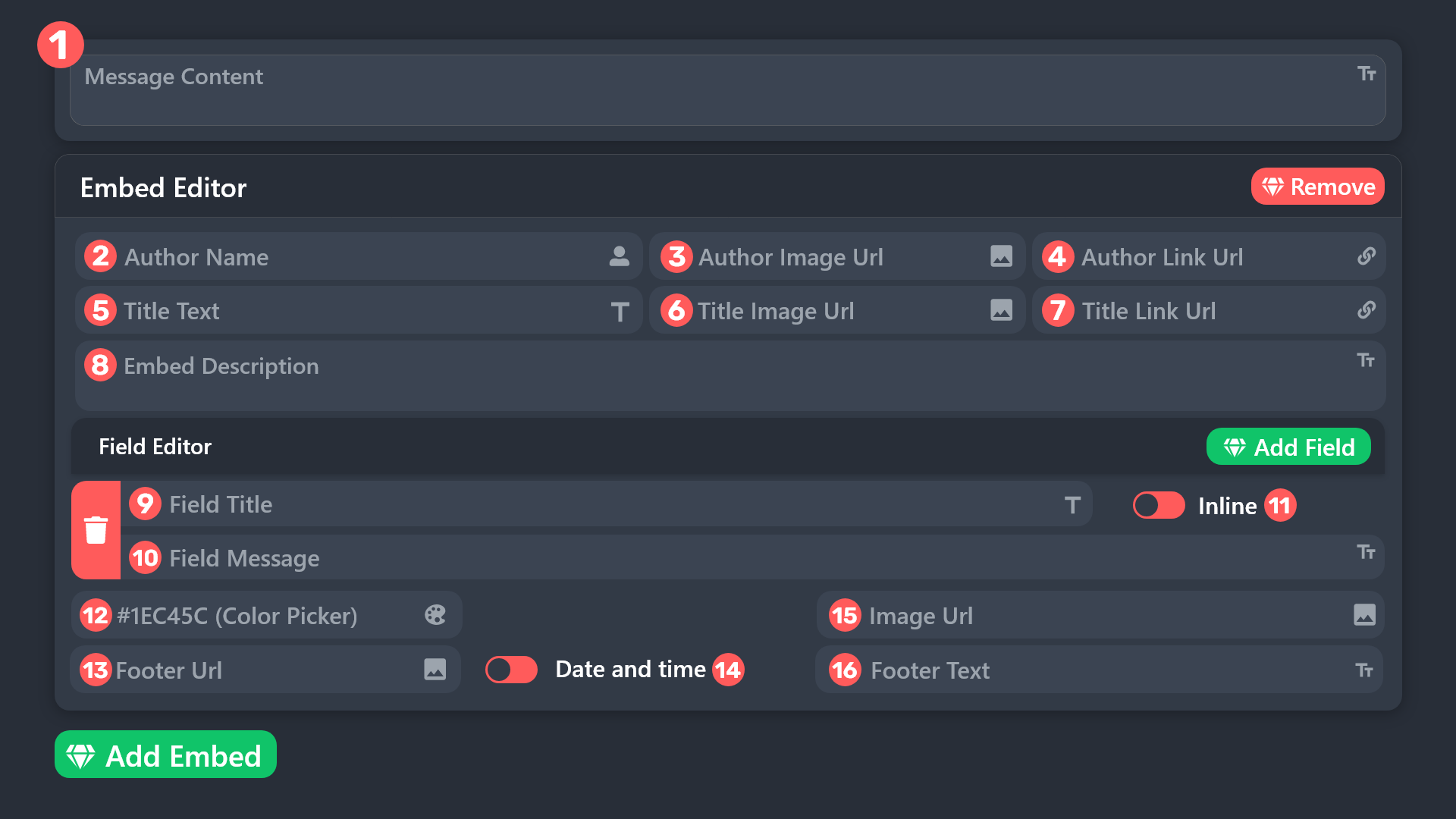
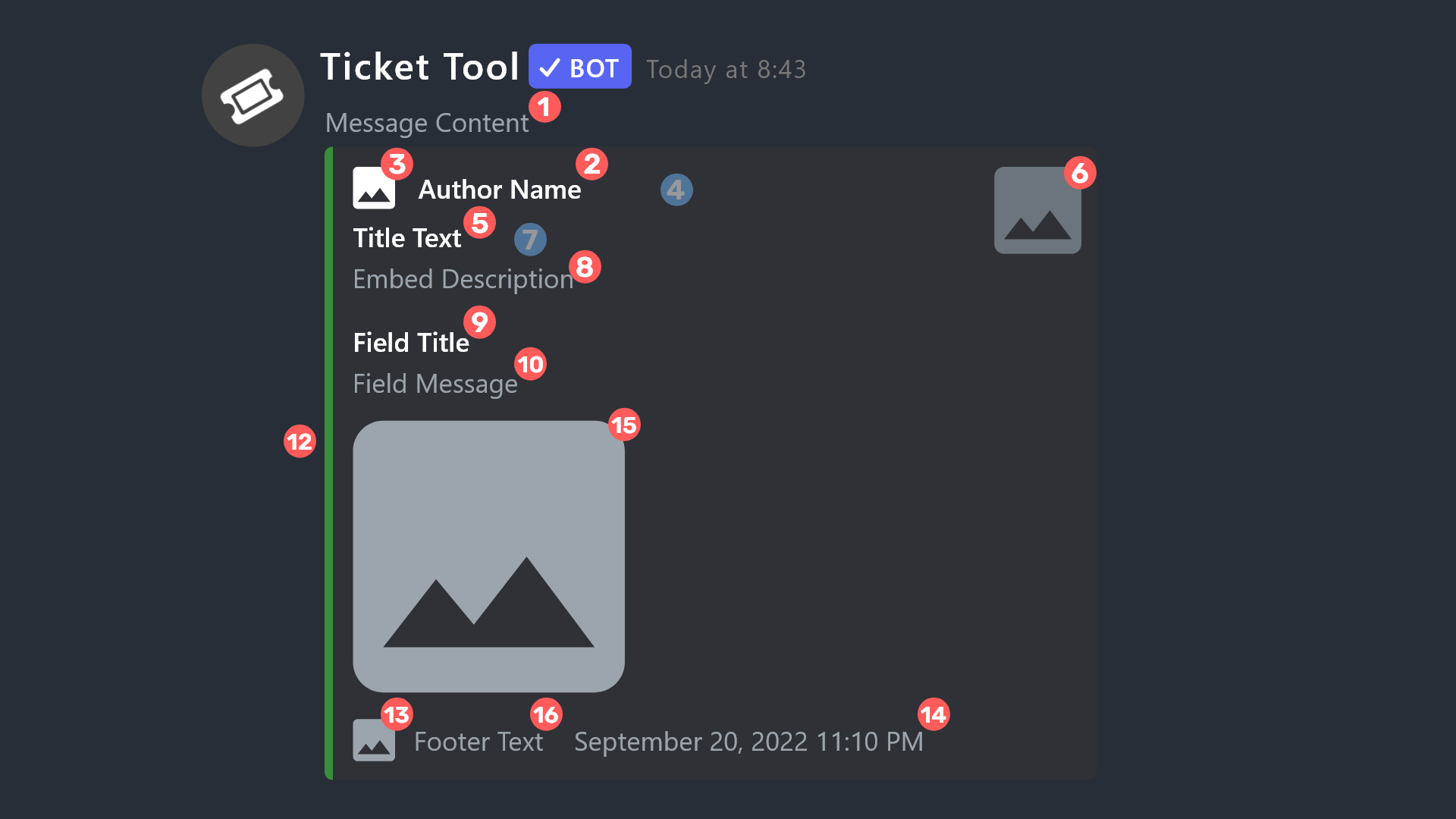 silent lava
@signal terrace
signal terrace
silent lava
<@1229803885900861500>
Thank you!! Is it a premium addition? I can't seem to click it?
iron nightBOT
Gave +1 Rep to @silent lava (current: #57 - 44)
signal terrace
Sorry for all the questions
silent lava
signal terrace
Thank you!! Is it a premium addition? I can't seem to click it?
Exactly yeah that’s a premium feature
silent lava
signal terrace
Sorry for all the questions
Dw I gotchu
signal terrace
silent lava
Exactly yeah that’s a premium feature
ohh okay tyty
 primal niche
I bought gold for 53 PLN and I didn’t receive it.
humble sequoiaBOT
⚠️ You're in the wrong place
We provide support for Ticket Tool Discord bot and cannot help you with whatever issue you have.
- We don't know which Support Team you should contact to get this issue resolved, and unfortunately we won't be able to accurately tell you.
If you don't have any further questions regarding our bot Ticket Tool, please close this ticket
primal niche
 humble sequoiaBOT
⚠️ You're in the wrong place
We provide support for Ticket Tool Discord bot and cannot help you with whatever issue you have.
- We don't know which Support Team you should contact to get this issue resolved, and unfortunately we won't be able to accurately tell you.
If you don't have any further questions regarding our bot Ticket Tool, please close this ticket
primal niche
I bought gold for 53 PLN and I didn’t receive it.
scenic forum
primal niche
I bought gold for 53 PLN and I didn’t receive it.
Youve been told NUMEROUS times now that youre wrong here
 tulip trellis
ازاي اعمل خيارات كثيره ب تكت مثل المساعده
البلاغ
رفع حساب
humble sequoiaBOT
تحل قائمة الخيارات محل الأزرار الموجودة في رسالة لوحة التذاكر الخاصة بك وتستخدم القائمة مع جميع اللوحات الخاصة بك. لإعداد هذا، توجّه الى إعدادات اللوحة، وحدد لوحة التذاكر الرئيسية.
<:Numbericons1:1018864164032225340> تمكين نمط الخيارات
أولًا، عليك تفعيل نمط الخيارات. وبعدها يجب عليك إضافة عناصر في محرّر الخيارات. الآن يمكنك البدء بتعديل الخيارات الخاصة بك!
<:Numbericons2:1018864168041971712> محرر الخيارات
كل سطر في محرر الخيارات يمثّل سطر من قائمة الخيارات على الدسكورد. يمكنك إضافة المزيد من الخيارات، بواسطة الضغط على
أولًا، عليك إختيار لوحة تذاكر. هذه هي اللوحة التي سيفتح لها هذا الخيار تذكرة.
لا تقم بتحديد نفس اللوحة مرتين. يجب أن يكون لكل خيار لوحة مختلفة
وبعد ذلك يمكنك وضع عرض. هذا هو عنوان هذا الخيار وسيظهر في قائمة الخيارات. يمكن تعيين الوصف مباشرة بعد ذلك، والذي سيكون أسفل العنوان باللون الرمادي.
بالإضافة إلى ذلك، يمكنك تحديد رمز تعبيري (إيموجي) سيتم عرضه أمام كل خيار. يمكنك إما إدخال معرف الرمز التعبيري يدويًا أو تحديده في أداة التحديد.
المشاكل الشائعة ⚠️
- اللوحة لا تعمل؟ تأكد أنك قمت بإدخال رمز تعبيري صحيح.
- الخيار لا يظهر؟ تحقق مما إذا كان هناك خياران لهما نفس اللوحة في محرر الخيارات.
$ardropdown
silent lava
humble sequoia
@tulip trellis gotchu u up
silent lava
humble sequoia
.
tulip trellis
i dont understand anything
silent lava
Ggs
 valid ridge
silent lava
valid ridge
silent lava
$help
humble sequoiaBOT
silent lava
$help

Ticket Tool is the only ticketing bot you'll ever need! Explore its features and set the best ticket system for your server!
<:CommandIcon:1018980659064221746> Commands
Browse through Ticket Tool's commands list and find new utilities!
<:TextIcon:1018980662881030144> FAQ
Solutions for the most frequent questions our users have when implementing the bot on their server.
<:Setup:1034174646788030664> Setup
The steps to follow when setting the bot for the first time on any server
dusky jungle
silent lava
Jt use vpn or smth or check ur connection
That’s annoying af. It’s not connecting to the server. Not connecting in Orion, chrome, safari. Internet is fine.
I can’t do a vpn. I need it to be easy for those that are not as literate with stuff. =.=
silent lava
dusky jungle
That’s annoying af. It’s not connecting to the server. Not connecting in Orion, ...
Ah woah #🎫│make-a-ticket ig u need that
celest flint
hey guys everytime non administrator tries to open ticket he get this message

how to fix
scenic forum
celest flint
hey guys everytime non administrator tries to open ticket he get this message
Hey there!
«You don't have permissions to use this»
👉 Server Configs -> Blacklist Roles
Any roles there will be unable to interact with the bot in any way, including creating tickets.👉 Panel Configs -> Buttons -> Create Ticket -> Support team only
If this is enabled** 👉 Panel Configs -> Buttons -> Create Ticket -> Disabled Roles**
Any roles there will be unable to use the button.
celest flint
thank you verym uch @scenic forum
iron nightBOT
Gave +1 Rep to @scenic forum (current: #8 - 922)


 silent lava
$help
humble sequoiaBOT
silent lava
$help
1. Open your Panel Configs tab in your server's dashboard
2. Select the panel you want to grant access to
3. Open the General options menu
4. Select your Support Team Roles
5. Save changes
silent lava
humble sequoia
@tulip trellis
tulip trellis
ok thanks
 granite seal
hi, i just invited the bot to a server in which i have "Manage server", but in the web dashboard it tells me there is no server that "It looks like Ticket Tool isn't online or in any servers you have permission to access"
humble sequoiaBOT
Don't see your server in the dashboard?
Try using the Sync Servers button on your top center of the Dashboard page
If this doesn't work
You should relog from the dashboard, you can do this by clicking here to log out immediately, and then log back in
Note:
You need one of these 3 things to access the dashboard.
1. Server Owner (Level: 6)
2. Server Administrator (Level: 4)
3. Dashboard Role (Level: 2)
:warning: You can check your level using the </permissionlevel:1029797400174399542> command on your Discord Server
If the bot's response is:
- @User is permission level: 0 (User)
You don't have any of the 3 levels required to access the server's dashboard
silent lava
humble sequoia
@granite seal
granite seal
silent lava
<@690536583774076958>
ty
iron nightBOT
Gave +1 Rep to @silent lava (current: #57 - 45)