#🆘│community-support
1 messages · Page 273 of 1
 primal pumice
 humble sequoiaBOT

⚠️ You're in the wrong place
We provide support for Ticket Tool Discord bot and cannot help you with whatever issue you have.
- We don't know which Support Team you should contact to get this issue resolved, and unfortunately we won't be able to accurately tell you.
If you don't have any further questions regarding our bot Ticket Tool, please close this ticket
 restive condor
Hi there! Is that what you’re looking to do in your server? Or are you trying to fix that?
 gilded trench
restive condor
Hi there! Is that what you’re looking to do in your server? Or are you trying to...
gilded trench
restive condor
Hi there! Is that what you’re looking to do in your server? Or are you trying to...
fix that
restive condor
gilded trench
fix that
Dashboard > Panel Configs > Ticket > Ticket Owner Roles
Please ensure you didn’t accidentally add your admin role there
 echo basin
I can't figure out how to get a post with options like this one from another server I am on? Help please?
I assumed it was the DropDown Style on the website but it didn't do anything??


found it: needed to enable the toggle

 raw glacier
How do I claim a giveaway ticket
humble sequoiaBOT
⚠️ You're in the wrong place
We provide support for Ticket Tool Discord bot and cannot help you with whatever issue you have.
- We don't know which Support Team you should contact to get this issue resolved, and unfortunately we won't be able to accurately tell you.
If you don't have any further questions regarding our bot Ticket Tool, please close this ticket
 hollow dust
bot is down ? or am i dumb ?

 scenic forum
hollow dust
bot is down ? or am i dumb ?
scenic forum
hollow dust
bot is down ? or am i dumb ?
If the bot isn't responding when doing /debug
Its lacking these 3 permissions inside the channel it has been used in View Channel, Send Message and Embed Links.
hollow dust
scenic forum
If the bot isn't responding when doing ``/debug``
Its lacking these 3 permission...
what permissions do I need to set in the categories I am getting the category error
humble sequoiaBOT
When first invited to your server, Ticket Tool should have the permissions shown below in order to ensure an appropriate functioning:
When customizing permissions for the different ticket participants, you must make sure Ticket Tool has the permissions you want it to grant to others, you can learn more about this here.
Missing Permissions
This error is a direct outcome of the bot missing permissions as depicted above. When troubleshooting this error we suggest you go through these steps:
- Use the </debug:1029783024264564765> command to check if the bot is lacking core role or channel permissions.
- Compare the category/channel's overrides and contrast them with the bot's roles to identify any permission denial that is breaking the functioning
- If you can't still figure it out, let our <@&540295656720302081> know so they can guide you through
Additional Resources
- If you are a server administrator and would like to understand more how to set up your server's permissions, we suggest checking the Discord Support Knowledge Base
- If you are a bot developer and are interested in the internal permission hierarchy we suggest you this part of the Discord Developer Docs
Important Note
- Giving Administrator permissions is NOT required and we do NOT encourage you to do unless you are trying to troubleshoot your permissions setup.
 scenic forum
@hollow dust check above
 brazen wigeon
Hello, I purchased a 12K account but I can’t log in and it’s not showing in my dashboard. Please help.
scenic forum
brazen wigeon
Hello, I purchased a 12K account but I can’t log in and it’s not showing in my d...
⚠️ You're in the wrong place ⚠️
We provide support for the Discord Bot Ticket Tool and cannot help you with whatever issue you have.
- We don't know which Support Team you should contact to get this issue resolved, and unfortunately we won't be able to accurately tell you.
 ocean brook
⚠️ You're in the wrong place ⚠️
We provide support for the Discord Bot Ticket Tool and cannot help you with whatever issue you have.
- We don't know which Support Team you should contact to get this issue resolved, and unfortunately we won't be able to accurately tell you.
 vagrant cradle
How to setup that ping Ticket Manager roles automatically after creating tickets?
humble sequoiaBOT
Within all the messages the bot sends (both embeds and text) you can mention either channels, roles, or even users, these mentions will only send a notification to the user if they are used within a text field, e.g: a role mentioned in an embed won't ping at all the users who have that role.
For mentioning a role you can use one out of three options:
{@Role Name} ➞ Which is Case Sensitive.
{RoleID} ➞ Replace RoleId with the Id of the role you are trying to ping.
<@&RoleID> ➞ Discord's native syntax to ping roles.
<#ChannelID> ➞ Mention a channel by its ID.
<@UserID> ➞ Mention a user by its ID.
 silent lava
humble sequoia
silent lava
humble sequoia
@vagrant cradle read above
vagrant cradle
silent lava
<@1472981878108590133> read above
Can you explain me the difference between {@Role Name}
{RoleID}
<@&RoleID}
vagrant cradle
vagrant cradle
Can you explain me the difference between {@Role Name}
{RoleID}
<@&RoleID}
@silent lava
silent lava
vagrant cradle
Can you explain me the difference between {@Role Name}
{RoleID}
<@&RoleID}
All works u could use both
vagrant cradle
silent lava
All works u could use both
Ok
Claim Button not Showing in my tickets. What to do?
silent lava
vagrant cradle
Claim Button not Showing in my tickets. What to do?
It’s a premium feature
To claim a ticket
vagrant cradle
Oh
humble sequoiaBOT
When first invited to your server, Ticket Tool should have the permissions shown below in order to ensure an appropriate functioning:
When customizing permissions for the different ticket participants, you must make sure Ticket Tool has the permissions you want it to grant to others, you can learn more about this here.
Missing Permissions
This error is a direct outcome of the bot missing permissions as depicted above. When troubleshooting this error we suggest you go through these steps:
- Use the </debug:1029783024264564765> command to check if the bot is lacking core role or channel permissions.
- Compare the category/channel's overrides and contrast them with the bot's roles to identify any permission denial that is breaking the functioning
- If you can't still figure it out, let our <@&540295656720302081> know so they can guide you through
Additional Resources
- If you are a server administrator and would like to understand more how to set up your server's permissions, we suggest checking the Discord Support Knowledge Base
- If you are a bot developer and are interested in the internal permission hierarchy we suggest you this part of the Discord Developer Docs
Important Note
- Giving Administrator permissions is NOT required and we do NOT encourage you to do unless you are trying to troubleshoot your permissions setup.
@spring isle give tye bot these perms
 spring isle
where?
silent lava
spring isle
where?
In role itself
 quasi idol
I don't know how to get my moderators to see the tickets.ive viewed the permissions and nothing is wrong.Is there a step by step tutorial or video?
silent lava
quasi idol
I don't know how to get my moderators to see the tickets.ive viewed the permissi...
Add a support role
quasi idol
silent lava
Add a support role
How
 quasi idol
silent lava
Panel config -> General -> Support team -> Add role
quasi idol
silent lava
Panel config -> General -> Support team -> Add role
Thank you 
 iron nightBOT
Gave +1 Rep to @silent lava (current: #73 - 27)
ocean brook
thank @ocean brook
 hexed quartz
so i made a ticket tool thingy but if i open a ticket normally there needs to stand ''ticket support team'' (its a role) but if i open a ticket there stands unknown how do i fix this
silent lava
hexed quartz
so i made a ticket tool thingy but if i open a ticket normally there needs to st...
Panel config -> General -> Support team -> Add role

And for mentioning roles or users
hexed quartz
silent lava
Panel config -> General -> Support team -> Add role
alr did
humble sequoiaBOT
When first invited to your server, Ticket Tool should have the permissions shown below in order to ensure an appropriate functioning:
When customizing permissions for the different ticket participants, you must make sure Ticket Tool has the permissions you want it to grant to others, you can learn more about this here.
Missing Permissions
This error is a direct outcome of the bot missing permissions as depicted above. When troubleshooting this error we suggest you go through these steps:
- Use the </debug:1029783024264564765> command to check if the bot is lacking core role or channel permissions.
- Compare the category/channel's overrides and contrast them with the bot's roles to identify any permission denial that is breaking the functioning
- If you can't still figure it out, let our <@&540295656720302081> know so they can guide you through
Additional Resources
- If you are a server administrator and would like to understand more how to set up your server's permissions, we suggest checking the Discord Support Knowledge Base
- If you are a bot developer and are interested in the internal permission hierarchy we suggest you this part of the Discord Developer Docs
Important Note
- Giving Administrator permissions is NOT required and we do NOT encourage you to do unless you are trying to troubleshoot your permissions setup.
Within all the messages the bot sends (both embeds and text) you can mention either channels, roles, or even users, these mentions will only send a notification to the user if they are used within a text field, e.g: a role mentioned in an embed won't ping at all the users who have that role.
For mentioning a role you can use one out of three options:
{@Role Name} ➞ Which is Case Sensitive.
{RoleID} ➞ Replace RoleId with the Id of the role you are trying to ping.
<@&RoleID> ➞ Discord's native syntax to ping roles.
<#ChannelID> ➞ Mention a channel by its ID.
<@UserID> ➞ Mention a user by its ID.
silent lava
I mean this
hexed quartz
huh?
silent lava
humble sequoia
That’s for mentioning in the right format
hexed quartz
oh i gave my ticket tool administrator
 plucky oxide
Help, it only showing 2/4 servers the bot is it (that I have manage server perms) in and refresh servers comes out with whoops too fast, can anyone help?

 humble sequoiaBOT
Don't see your server in the dashboard?
Try using the Sync Servers button on your top center of the Dashboard page
If this doesn't work
You should relog from the dashboard, you can do this by clicking here to log out immediately, and then log back in
Note:
You need one of these 3 things to access the dashboard.
1. Server Owner (Level: 6)
2. Server Administrator (Level: 4)
3. Dashboard Role (Level: 2)
:warning: You can check your level using the </permissionlevel:1029797400174399542> command on your Discord Server
If the bot's response is:
- @User is permission level: 0 (User)
You don't have any of the 3 levels required to access the server's dashboard
 silent lava
humble sequoia
silent lava
humble sequoia
@plucky oxide
plucky oxide
silent lava
<@1067859293812047952>
TYSM!!!
silent lava
plucky oxide
TYSM!!!
Nws
ocean brook
dashboard
hexed quartz
and then?
ocean brook
try
hexed quartz
@silent lava how do i get to bot permissions
hexed quartz
silent lava
i need to come to here
hexed quartz
ocean brook
just go on discord,give the bot a role
i did
silent lava
hexed quartz
i need to come to here
Jt run /debug and check its perms
And u can give it perms by the role itself
hexed quartz
alr
humble sequoiaBOT
━━ User's inquiry has been moved to a ticket ━━
silent lava
Hm DMs helped also
restive condor
Please do not help users in DMs. Support is to take place in this server only
 humble sequoiaBOT
When first invited to your server, Ticket Tool should have the permissions shown below in order to ensure an appropriate functioning:
When customizing permissions for the different ticket participants, you must make sure Ticket Tool has the permissions you want it to grant to others, you can learn more about this here.
Missing Permissions
This error is a direct outcome of the bot missing permissions as depicted above. When troubleshooting this error we suggest you go through these steps:
- Use the </debug:1029783024264564765> command to check if the bot is lacking core role or channel permissions.
- Compare the category/channel's overrides and contrast them with the bot's roles to identify any permission denial that is breaking the functioning
- If you can't still figure it out, let our <@&540295656720302081> know so they can guide you through
Additional Resources
- If you are a server administrator and would like to understand more how to set up your server's permissions, we suggest checking the Discord Support Knowledge Base
- If you are a bot developer and are interested in the internal permission hierarchy we suggest you this part of the Discord Developer Docs
Important Note
- Giving Administrator permissions is NOT required and we do NOT encourage you to do unless you are trying to troubleshoot your permissions setup.
 sand anchor
silent lava
Yeah
sand anchor
silent lava
Yeah
oh 🙁
sand anchor
silent lava
<@868806485336031263>
but I can't, I remove admin, and I cant
silent lava
sand anchor
but I can't, I remove admin, and I cant
Admin is not required jt run /debug and see what the ticket tool is missing
sand anchor
 silent lava
sand anchor
silent lava
sand anchor
Bot is missing the send message permission in that channel
Do yk how to edit channels permission
silent lava
Do it
 grave seal
how do i send the transcript to a persons dms
silent lava
grave seal
how do i send the transcript to a persons dms
It should be possible if you use /transcript cmd and tell it to dm the user
However the automation is a premium feature
However to do this Dashboard > Panel Configs > Transcript > DM transcript to ticket owner
Automatic DM transcripts are a premium feature 
 alpine arch
Is there anyway I can make a custom command response send to a specific channel
scenic forum
alpine arch
Is there anyway I can make a custom command response send to a specific channel
It can only respond in the same channel/Ticket owners DMS' or the DM's of the one that used it
alpine arch
scenic forum
It can only respond in the same channel/Ticket owners DMS' or the DM's of the on...
Thank you
iron nightBOT
Gave +1 Rep to @scenic forum (current: #8 - 907)
 wispy atlas
I need help
humble sequoiaBOT
@wispy atlas, we would love to help you, but if you don't tell us what you need help with we can't help you :(
primal pumice
Hey I can’t see my profit and it’s 2 days now I still trade but I can’t see my parfomanc on my account
scenic forum
primal pumice
Hey I can’t see my profit and it’s 2 days now I still trade but I can’t see my p...
Day 2 of telling you
YOURE WRONG HERE
primal pumice
Send me their support account
scenic forum
primal pumice
Send me their support account
We dont know
attempt reading the message i have given you
numerous of times
⚠️ You're in the wrong place ⚠️
We provide support for the Discord Bot Ticket Tool and cannot help you with whatever issue you have.
- We don't know which Support Team you should contact to get this issue resolved, and unfortunately we won't be able to accurately tell you.
How do I connect support teams
scenic forum
primal pumice
How do I connect support teams
attempt reading my message
Theres a nice block which is saying this
- We don't know which Support Team you should contact to get this issue resolved, and unfortunately we won't be able to accurately tell you.
 pallid wharf
spanish

 “
humble sequoiaBOT
“
humble sequoiaBOT
The Drop-down menu or Select Menu replaces the buttons on your panel message and uses a drop-down menu with all of your panels. To set this up, go to your Panel Configs and select your main Panel.
<:Numbericons1:1018864164032225340> Enable Select Style
First you enable Select Style. Then you add an item in the Dropdown Editor. Now you can start editing your dropdown!
<:Numbericons2:1018864168041971712> Dropdown Editor
Each line in the dropdown editor represents a line in the drop down menu on discord. You can add more "Items", by clicking on 

First you select a panel. That's the panel this option will open a ticket for.  DONT select the same panel twice. Each option should have a different Panel
After that, you can put a Display. This is the title of this option and will appear in the drop down menu. The *Description can be set right after that, which will be below the title in grey.
Additionally you can select an emoji, that will be shown in front of each option. You can either manually input the ID of an emoji or select it in the selector.
Common Issues ⚠️
- Panel doesn't send? Make sure you have a valid emoji selected
- Option doesn't show up? Check if two options have the same panel in the DropDown Editor

$dropdown
silent lava
humble sequoia
@subtle garnet there u can put ur emoji
For that u gottta do $id (emoji) so it works
 subtle garnet
do i need to use a special thing like <:2937493933939>
silent lava
In ur server
subtle garnet
so like $id
silent lava
subtle garnet
do i need to use a special thing like <:2937493933939>
Exactly do in ur server $id emoji
silent lava
subtle garnet
so like $374843929229<a:GideonSpecial:553728624893624366>
$id (emoji)
 silent lava
Do that$id EMOJI in ur server and when u get the code jt copy and paste in the emoji place
 subtle garnet
subtle garnet
subtle garnet
oh i mean in the description
where it says welcome to social
and stuff
silent lava
Oh gotchu
subtle garnet
subtle garnet
would i do this tho?
silent lava
subtle garnet
would i do this tho?
From there u can edit ur ticket msg
 subtle garnet
yes that’s what i’m doing but to do a emoji would i use that
 silent lava
subtle garnet
yes that’s what i’m doing but to do a emoji would i use that
silent lava
subtle garnet
yes that’s what i’m doing but to do a emoji would i use that
Yes use tha same form do $id EMOJI and the emoji code paste it their
subtle garnet
um
subtle garnet
subtle garnet
yes that’s what i’m doing but to do a emoji would i use that
so like that ????


i’m sorry i’m confused fr😭😭😭
silent lava
subtle garnet
so like that ????
Yes before the emoji $id
subtle garnet
ok so the first picture is right then
silent lava
Ima do a vid for
subtle garnet
$:angelAWstaff:
subtle garnet
silent lava
Ima do a vid for
omg seriously thank you
iron nightBOT
Gave +1 Rep to @silent lava (current: #73 - 28)
subtle garnet
i appreciate you doing that lolll
silent lava
subtle garnet
i appreciate you doing that lolll
Now that code that popped up use it in ur ticket msg
 silent lava
Nws now that code use it in the ticket msg
silent lava
subtle garnet
ur good at knowing all that
Well I’m jt helping you and I’m glad doing that
Have fun
subtle garnet
lollll
subtle garnet
silent lava
Well I’m jt helping you and I’m glad doing that
heyy i have another question
silent lava
Go on
 subtle garnet
silent lava
Or jt <#channelid>
subtle garnet
silent lava
Or jt <#channelid>
wait how do i get the channel id
silent lava
subtle garnet
wait how do i get the channel id
R u on pc right
subtle garnet
yes
 white venture
Is there any way to retrieve a deleted ticket or to see the details of it?
scenic forum
white venture
Is there any way to retrieve a deleted ticket or to see the details of it?
if no transcript has been made before the ticket got deleted its gone for good
white venture
thanks for the fast response!
How is a transcript made? (For future reference)
scenic forum
white venture
thanks for the fast response!
How is a transcript made? (For future reference)
You can use the command $transcript anytime
You can also enable Two step ticket so before the ticket gets deleted it will get moderator controls in which you can open/delete/Transcript (Panel config -> General -> Two Step Ticket)
Or have automatic transcripts (Premium only)
 tired storm
كيف أحوّله لغه عربيه
silent lava
tired storm
كيف أحوّله لغه عربيه
It’s not currently a feature
white venture
Thank you @scenic forum you are a great help
iron nightBOT
Gave +1 Rep to @scenic forum (current: #8 - 908)
humble sequoiaBOT
⚠️ You're in the wrong place
We provide support for Ticket Tool Discord bot and cannot help you with whatever issue you have.
- We don't know which Support Team you should contact to get this issue resolved, and unfortunately we won't be able to accurately tell you.
If you don't have any further questions regarding our bot Ticket Tool, please close this ticket
 mossy hull
hey erm how do i make my ticket bot make tickets but only i can open an close the tickets?
silent lava
mossy hull
hey erm how do i make my ticket bot make tickets but only i can open an close th...
Dashboard > Panel Configs > Permissions > Everyone Permissions - Edit Opened > 
VIEW CHANNEL
 lean bay
hello, is there a way to keep users from closing tickets themselves, so like when they press close nothing happens
silent lava
lean bay
hello, is there a way to keep users from closing tickets themselves, so like whe...
Panel config -> Buttons -> Close ticket
Disabled role
everyone
Allowed roles (role u want)
if you only want support staff
Support team only 
lean bay
silent lava
Panel config -> Buttons -> Close ticket
Disabled role
everyone
Allowed roles (r...
thanks, appreciate it
iron nightBOT
Gave +1 Rep to @silent lava (current: #71 - 29)
subtle garnet
is there a thing where if a member creates a ticket and then if they leave the server the ticket automatically deletes
silent lava
subtle garnet
is there a thing where if a member creates a ticket and then if they leave the s...
That’s a premium feature
subtle garnet
Oh
silent lava
Automation
 eager inlet
humble sequoiaBOT
eager inlet
humble sequoiaBOT

فريق الدعم الفني العربي
عميلنا العزيز ان كنت تبحث عن مساعدة يرجى فتح تكت خاص بفريق الدعم الفني العربي
اذهب الى#🎫│make-a-ticket
ثم قم بلضغط على الايموجي الاتي (🇯🇴)
 rotund cairn
Am tying to get to the atlas funded server
humble sequoiaBOT
⚠️ You're in the wrong place
We provide support for Ticket Tool Discord bot and cannot help you with whatever issue you have.
- We don't know which Support Team you should contact to get this issue resolved, and unfortunately we won't be able to accurately tell you.
If you don't have any further questions regarding our bot Ticket Tool, please close this ticket
 candid pecan
Am tying to get to the atlas funded server
 glass lichen
Question. What permissions on Discord are needed for me to see the server I wish to modify on my Dashboard when logged in?
I've kicked the bot and reinvited it. I'm an admin with the Administrator Permission. But can't see the server on my dashboard
humble sequoiaBOT
Don't see your server in the dashboard?
Try using the Sync Servers button on your top center of the Dashboard page
If this doesn't work
You should relog from the dashboard, you can do this by clicking here to log out immediately, and then log back in
Note:
You need one of these 3 things to access the dashboard.
1. Server Owner (Level: 6)
2. Server Administrator (Level: 4)
3. Dashboard Role (Level: 2)
:warning: You can check your level using the </permissionlevel:1029797400174399542> command on your Discord Server
If the bot's response is:
- @User is permission level: 0 (User)
You don't have any of the 3 levels required to access the server's dashboard
glass lichen
Just did that, does work thank you.
 foggy sparrow
Awesome glad to help!!
glass lichen
Thanks @foggy sparrow
iron nightBOT
Gave +1 Rep to @foggy sparrow (current: #100 - 13)
 proper wharf
hey how do i find my panel id i cant seem to find it
 dusty thorn
Please ban this person who is camping with black skin
 humble sequoiaBOT
⚠️ You're in the wrong place
We provide support for Ticket Tool Discord bot and cannot help you with whatever issue you have.
- We don't know which Support Team you should contact to get this issue resolved, and unfortunately we won't be able to accurately tell you.
If you don't have any further questions regarding our bot Ticket Tool, please close this ticket
 sick wharf
i need help putting it in a server im a owner but never made the server but im the highest role and when i go to sync for servers its not there
humble sequoiaBOT
━━ User's inquiry has been moved to a ticket ━━
 fathom star
 smoky sequoia
Yo I need help finishing my order with X6RR. Anyone got advice
humble sequoiaBOT
⚠️ You're in the wrong place
We provide support for Ticket Tool Discord bot and cannot help you with whatever issue you have.
- We don't know which Support Team you should contact to get this issue resolved, and unfortunately we won't be able to accurately tell you.
If you don't have any further questions regarding our bot Ticket Tool, please close this ticket
 radiant valve
smoky sequoia
Yo I need help finishing my order with X6RR. Anyone got advice
radiant valve
smoky sequoia
Yo I need help finishing my order with X6RR. Anyone got advice
Refer above
 mighty parrot
I only can see 8 panels? Is there a reason?
 eternal night
Ticket tool #4843 open ticket fast 💨
 proper shuttle
Hello! Im using another bot to create tickets with tickettool using command style but the problem is forms doesnt show to the users creating the ticket when its command style so is there any variable or command that will show the forms?
scenic forum
proper shuttle
Hello! Im using another bot to create tickets with tickettool using command styl...
Forms cannot work with command style
proper shuttle
scenic forum
Forms cannot work with command style
Oh 💔
proper shuttle
scenic forum
Forms cannot work with command style
how does it work exactly? like lets say ticket tool is not in command style and someone clicked the button to create ticket so then what happends next if theres forms enabled?
scenic forum
proper shuttle
how does it work exactly? like lets say ticket tool is not in command style and ...
They will receive a pop up with the forms questions and they fill it out inside the popup
proper shuttle
scenic forum
They will receive a pop up with the forms questions and they fill it out inside ...
Yeah but what I mean is what happens in the backend
what does it execute
scenic forum
The submit of the forms creates the ticket?
proper shuttle
No what i mean is like to show the forms question, what does ticketool execute? like something needs to be executed for a action right so what does ticketool do
scenic forum
proper shuttle
No what i mean is like to show the forms question, what does ticketool execute? ...
I have absolutely no idea what you're trying to ask here
Could you rephrase that?
proper shuttle
Uhm for example lets say I clicked a button to create a ticket but if forms are enabled then it have to show the questions right so after I click the button, What does ticketool executes like a code/command to show the questions to users in discord
scenic forum
proper shuttle
Uhm for example lets say I clicked a button to create a ticket but if forms are ...
They receive a popup with discords built in moral variants?
Modal*
proper shuttle
Alright got it
 sinful swan
Open ticket I need help immediately
sinful swan
Hello
humble sequoiaBOT
@sinful swan, we would love to help you, but if you don't tell us what you need help with we can't help you :(
silent lava
Hey let’s not ping staff
 oak fern
 haughty crater
How to use the name to remember it
haughty crater
How to use the name to remember it
do you mean the ticket name?
haughty crater
oak fern
do you mean the ticket name?
Yes
oak fern
if you mean it kindly refer to the guide below
humble sequoiaBOT
The ticket name is the default channel name of all tickets. To edit it, go to your Dashboard > Panel Configs > Ticket. There you can edit the channel name of opened and closed tickets. You can also use variables in there.

 Note: This is a premium feature
haughty crater
humble sequoia
Note: This is a premium feature
haughty crater
humble sequoia
thx
iron nightBOT
Gave +1 Rep to @humble sequoia (current: #18 - 430)
haughty crater
oak fern
if you mean it kindly refer to the guide below
And how do you determine which roles will handle the ticket?
silent lava
Do I help
oak fern
haughty crater
And how do you determine which roles will handle the ticket?
to set it head to panel configs > general > support team roles
 balmy night
for me it says u do not have permission to play
but i didnt do the ticket thing
someone help
 prisma glacier
@iron night ماذا افعل
humble sequoiaBOT
فريق الدعم الفني العربي
عميلنا العزيز ان كنت تبحث عن مساعدة يرجى فتح تكت خاص بفريق الدعم الفني العربي
اذهب الى#🎫│make-a-ticket
ثم قم بلضغط على الايموجي الاتي (🇯🇴)
 viral belfry
someone help me pls
how do i make my ticket where only a certain role can create a ticket
like anyone without that certain role can only view it but not create the ticket
scenic forum
viral belfry
how do i make my ticket where only a certain role can create a ticket
panel config -> Buttons -> Create ticket
Disabled roles
@ everyone
Allowed roles
Any role you want it to be able to open tickets
viral belfry
scenic forum
panel config -> Buttons -> Create ticket
Disabled roles
@ everyone
Allowed ro...
enable support roles? then disable @ everyone role, then put the specific role?
scenic forum
viral belfry
enable support roles? then disable @ everyone role, then put the specific role?
Support team only stays OFF
Disabled roles
@ everyone
Allowed roles
All roles you want allowed to open tickets
 frail raptor
Excuse why was my discord banned
humble sequoiaBOT
⚠️ You're in the wrong place
We provide support for Ticket Tool Discord bot and cannot help you with whatever issue you have.
- We don't know which Support Team you should contact to get this issue resolved, and unfortunately we won't be able to accurately tell you.
If you don't have any further questions regarding our bot Ticket Tool, please close this ticket
 proud kestrel
How do I save tickets
 dusty wing
Bot not responding currently; just us or?
 scenic forum
dusty wing
Bot not responding currently; just us or?
scenic forum
dusty wing
Bot not responding currently; just us or?
Can you access your dashboard?
plucky oxide
dusty wing
Bot not responding currently; just us or?
Does it have the correct perms, I made that mistake!
scenic forum
plucky oxide
Does it have the correct perms, I made that mistake!
Its not a permission issue in this case
Premium likely expired
plucky oxide
scenic forum
Its not a permission issue in this case
Oh.. mb sorry for interfering.
scenic forum
plucky oxide
Oh.. mb sorry for interfering.
All good was no bad intent
dusty wing
scenic forum
Premium likely expired
Will have a look shortly but that’s likely the cause
scenic forum
dusty wing
Will have a look shortly but that’s likely the cause
Its either that or the active bot got switched to white
Not a permission issue as the debug didnt come through on our end either
dusty wing
scenic forum
Its either that or the active bot got switched to white
Not a permission issue a...
Thanks for your assistance; you were spot on that the premium had expired 😅
iron nightBOT
Gave +1 Rep to @scenic forum (current: #8 - 909)
 astral tree
I dont know how to make ticket 0004 just available to see by support and the person that needs help

Other people in the server can also see it, I dont want that
foggy sparrow
You possibly have everyone set in the permissions to see
Please check
👉 Panel configs -> Permissions -> Everyone Role Permissions
Click on Edit opened and make sureView Channelis desactivated

 alpine sonnet
my support team can't see the tickets
oak fern
alpine sonnet
my support team can't see the tickets
Make sure to select the roles from Dashboard → Panel Configs → General → Support Team Roles to grant them access to tickets.
alpine sonnet
oak fern
Make sure to select the roles from Dashboard → Panel Configs → General → Support...
how
 humble sequoiaBOT
⚠️ You're in the wrong place
We provide support for Ticket Tool Discord bot and cannot help you with whatever issue you have.
- We don't know which Support Team you should contact to get this issue resolved, and unfortunately we won't be able to accurately tell you.
If you don't have any further questions regarding our bot Ticket Tool, please close this ticket
 lunar granite
how do this
 silent lava
lunar granite
how do this
silent lava
lunar granite
how do this
From there u can edit ur ticket msg

 shell ruin
**is there a way to allow members to click the "open ticket" button and view the questions/form, but not be able to submit it? **
i have a "report user" ticket button but we've moved to /report slash commands so i want to let them know in the form that we no longer support reporting through tickets.
humble sequoiaBOT
A Discord Form lets the user answer individual questions in a pop-up Form, which then displays the answers in the ticket message. This can save time if you already know what you want to ask the user.
Setup Forms
Forms can be enabled under Panel Settings > Form Options > Edit Forms Options. In the new pop-up window, you can now enable and edit your own Form.
Form Options
You can add up to 5 questions in the Discord form. This is a Discord limitation. Each question can have a placeholder in the input field, a minimum and maximum input, multi-line, and also the option to have the answer required.
Options
Question Title ➞ Your Question goes here
Question Placeholder ➞ The placeholder text in the input field
Required ➞ If enabled, the user has to answer this question, to submit the form
Multi-Line Input ➞ Allows the user to input multiple lines
Minimum and Maximum Input ➞ Set a minimum and maximum input value for the user
Displaying the Answer
To display the answers from the user, you need to enable Auto display form results on the ticket message as an additional embed
If you don't want a second embed, go into your Panel Configs > Ticket Options > Edit Ticket Message. You use the variable {create.form.x} and replace x with the number of your question. For example, the response to Question 5 can be displayed with {create.form.5}.
 silent lava
humble sequoia
silent lava
humble sequoia
@shell ruin
 mighty osprey
For some reason when someone makes a ticket in my discord server It puts the ticket at the top of the server list instead of inside the catagory I assigned. How do I fix this

 silent lava
mighty osprey
For some reason when someone makes a ticket in my discord server It puts the tic...
silent lava
mighty osprey
For some reason when someone makes a ticket in my discord server It puts the tic...
Can u jt save what u did and resend the ticket
 covert swallow
That is most likely a permission issue, make sure the bot can manage channels in the category
 ionic siren
I'm still not able to message in any group during hours 😭
scenic forum
ionic siren
I'm still not able to message in any group during hours 😭
⚠️ You're in the wrong place ⚠️
We provide support for the Discord Bot Ticket Tool and cannot help you with whatever issue you have.
- We don't know which Support Team you should contact to get this issue resolved, and unfortunately we won't be able to accurately tell you.
 weak ridge
why does my ticket tool bot say the application cannot respond even though it has access
humble sequoiaBOT
When first invited to your server, Ticket Tool should have the permissions shown below in order to ensure an appropriate functioning:
When customizing permissions for the different ticket participants, you must make sure Ticket Tool has the permissions you want it to grant to others, you can learn more about this here.
Missing Permissions
This error is a direct outcome of the bot missing permissions as depicted above. When troubleshooting this error we suggest you go through these steps:
- Use the </debug:1029783024264564765> command to check if the bot is lacking core role or channel permissions.
- Compare the category/channel's overrides and contrast them with the bot's roles to identify any permission denial that is breaking the functioning
- If you can't still figure it out, let our <@&540295656720302081> know so they can guide you through
Additional Resources
- If you are a server administrator and would like to understand more how to set up your server's permissions, we suggest checking the Discord Support Knowledge Base
- If you are a bot developer and are interested in the internal permission hierarchy we suggest you this part of the Discord Developer Docs
Important Note
- Giving Administrator permissions is NOT required and we do NOT encourage you to do unless you are trying to troubleshoot your permissions setup.
@weak ridge
weak ridge
it has all the permissions
silent lava
weak ridge
it has all the permissions
Can u show me what does it say ss
weak ridge
 silent lava
weak ridge
silent lava
weak ridge
Can u check the channel permission witinn ticket tool
weak ridge
???
silent lava
weak ridge
???
Can u Check the channel permission
silent lava
U need to adjust the channel the bot is missing all permissions with a ❌ inside the image below
 silent lava
weak ridge
you mean /debug?
silent lava
weak ridge
you mean /debug?
R u on pc or mobile
silent lava
Ima do a vid
weak ridge
iron nightBOT
Gave +1 Rep to @silent lava (current: #69 - 30)
weak ridge
it worked tysm @silent lava
silent lava
Nws mate
 sick imp
silent lava
sick imp
silent lava
how did you do the make selection bit? (sorry for the @)
humble sequoiaBOT
The Drop-down menu or Select Menu replaces the buttons on your panel message and uses a drop-down menu with all of your panels. To set this up, go to your Panel Configs and select your main Panel.
<:Numbericons1:1018864164032225340> Enable Select Style
First you enable Select Style. Then you add an item in the Dropdown Editor. Now you can start editing your dropdown!
<:Numbericons2:1018864168041971712> Dropdown Editor
Each line in the dropdown editor represents a line in the drop down menu on discord. You can add more "Items", by clicking on
First you select a panel. That's the panel this option will open a ticket for. DONT select the same panel twice. Each option should have a different Panel
After that, you can put a Display. This is the title of this option and will appear in the drop down menu. The *Description can be set right after that, which will be below the title in grey.
Additionally you can select an emoji, that will be shown in front of each option. You can either manually input the ID of an emoji or select it in the selector.
Common Issues ⚠️
- Panel doesn't send? Make sure you have a valid emoji selected
- Option doesn't show up? Check if two options have the same panel in the DropDown Editor
$dropdown
silent lava
humble sequoia
@sick imp ?
sick imp
thank you!
weak ridge
how do you add multiple options
humble sequoiaBOT
For more convenient use of multipanels, you can now combine panels on the dashboard. This will allow you to directly send the multipanel from the dashboard or via the $panel ID command.
Where can I find this?
You can find this setting on the Dashboard -> Panel Configs -> Panel -> Attached Panels
Note: if you're attaching all the panels to a panel called English, don't include English in the attached panel's box (If you do this, it will create a duplicate)
This will put all buttons from all of your panels on one message. The message is the panel message from the panel you're combining these panels in.
 silent lava
humble sequoia
silent lava
humble sequoia
@weak ridge
subtle garnet
heyy i’m having trouble
subtle garnet
silent lava
<@1427977467540275262>
my trial mods can’t give roles out idk why please help
 silent lava
subtle garnet
my trial mods can’t give roles out idk why please help
silent lava
subtle garnet
my trial mods can’t give roles out idk why please help
Wym give roles out
silent lava
subtle garnet
like give a member verified role
Then ur staff don’t have the perms to do so
 silent lava
subtle garnet
silent lava
subtle garnet
Panel config -> Ticket -> There should be a "Add roles to ticket owner" section
silent lava
I mean ping me whenever u want
silent lava
Yes it’s fine

 junior patrol
is there a way to view the transcript of closed tickets?
subtle garnet
subtle garnet
@silent lava
silent lava
subtle garnet
<@1333448368781000774>
Do they have to do it manually or u do have bots to use
subtle garnet
silent lava
Do they have to do it manually or u do have bots to use
manually
😭😭😭
use /setup
like type it in a channel
lol
subtle garnet
silent lava
Do they have to do it manually or u do have bots to use
like idk what to do
they cant give roles when they have the perms
 stone ember
Sorry if someone already asked this , as staff I can see the bot but members can’t , is it missing a permission??


 humble sequoiaBOT
⚠️ You're in the wrong place
We provide support for Ticket Tool Discord bot and cannot help you with whatever issue you have.
- We don't know which Support Team you should contact to get this issue resolved, and unfortunately we won't be able to accurately tell you.
If you don't have any further questions regarding our bot Ticket Tool, please close this ticket
 dark herald
the customize bot option keeps coming back with " bad request " ?
sinful swan
Please this permission on

 slender minnow
Wrong server, we are support for Ticket Tool.
slender minnow
sinful swan
Please this permission on
What do you mean?
slender minnow
dark herald
the customize bot option keeps coming back with " bad request " ?
Share a screenshot please.
sinful swan
Hey, I'm trying to set up the Ticket Bot in the server, but I’m getting a permission error. Could you please enable the 'Manage Server', 'Manage Roles', and 'Manage Channels' permissions for my role? Without these, the bot won't be able to create tickets or function properly. Thanks!"
slender minnow
sinful swan
Hey, I'm trying to set up the Ticket Bot in the server, but I’m getting a permis...
Those permissions are enabled through your server settings.
sinful swan
Please provide server
slender minnow
sinful swan
Please provide server
I suppose, you are new to Discord?
sinful swan
I am a beginner and I’m facing difficulty creating a ticket. Could you please assist me or create the ticket on my behalf?”
sinful swan
slender minnow
I suppose, you are new to Discord?
Yaaaa
slender minnow
https://support.discord.com/hc/en-us/articles/360045138571-Beginner-s-Guide-to-Discord
https://support.discord.com/hc/en-us/articles/360033931551-Getting-Started
Discord
Welcome to the comprehensive beginner's guide to Discord!
What this article covers:
What is Discord?
Account Setup and Troubleshooting
What is a Discord Server?
What are Text and Voice Channels?
...
Discord
Hello weary traveler and welcome to Discord! If you are here, you must be wondering how you can get started on Discord.
What this article covers:
Get the app
Create your account
Claim your acc...
Refer to these two blogs ^
humble sequoiaBOT
The Drop-down menu or Select Menu replaces the buttons on your panel message and uses a drop-down menu with all of your panels. To set this up, go to your Panel Configs and select your main Panel.
<:Numbericons1:1018864164032225340> Enable Select Style
First you enable Select Style. Then you add an item in the Dropdown Editor. Now you can start editing your dropdown!
<:Numbericons2:1018864168041971712> Dropdown Editor
Each line in the dropdown editor represents a line in the drop down menu on discord. You can add more "Items", by clicking on
First you select a panel. That's the panel this option will open a ticket for. DONT select the same panel twice. Each option should have a different Panel
After that, you can put a Display. This is the title of this option and will appear in the drop down menu. The *Description can be set right after that, which will be below the title in grey.
Additionally you can select an emoji, that will be shown in front of each option. You can either manually input the ID of an emoji or select it in the selector.
Common Issues ⚠️
- Panel doesn't send? Make sure you have a valid emoji selected
- Option doesn't show up? Check if two options have the same panel in the DropDown Editor
$dropdown
slender minnow
@velvet jetty 
 velvet jetty
Kk
velvet jetty
slender minnow
<@1073978377268101220> <a:aTHIS6:897123186339102751>
Thx
iron nightBOT
Gave +1 Rep to @slender minnow (current: #16 - 503)
velvet jetty
 vagrant lintel
<@204255221017214977> can you help me pass my KYC
vagrant lintel
<@204255221017214977> can you help me pass my KYC
That's a bot.....
slender minnow
vagrant lintel
Hello I need help on kyc verification
wrong server
and i wouldnt trust someone with a kyc on discord tbh
velvet jetty
slender minnow
and i wouldnt trust someone with a kyc on discord tbh
Btw when I tryed makeing more then 1 ticket it said there's a limit of 1
velvet jetty
slender minnow
and i wouldnt trust someone with a kyc on discord tbh
What's kyc?
Eh
slender minnow
Update the panel limit from limits option in your panel config
velvet jetty
$limits
slender minnow
velvet jetty
What's kyc?
its an abbv for know your customer mostly done by banks
velvet jetty
slender minnow
its an abbv for know your customer mostly done by banks
Oh k
 velvet jetty
slender minnow
Scroll up
velvet jetty
slender minnow
Scroll up
Thxx
 primal nest
hi just wondering i have invited the bot to the discord it has joined but on the website for configuration the discord is not showing
humble sequoiaBOT
Don't see your server in the dashboard?
Try using the Sync Servers button on your top center of the Dashboard page
If this doesn't work
You should relog from the dashboard, you can do this by clicking here to log out immediately, and then log back in
Note:
You need one of these 3 things to access the dashboard.
1. Server Owner (Level: 6)
2. Server Administrator (Level: 4)
3. Dashboard Role (Level: 2)
:warning: You can check your level using the </permissionlevel:1029797400174399542> command on your Discord Server
If the bot's response is:
- @User is permission level: 0 (User)
You don't have any of the 3 levels required to access the server's dashboard
silent lava
humble sequoia
@primal nest
 fleet bison
السلام عليكم
humble sequoiaBOT
⚠️ You're in the wrong place
We provide support for Ticket Tool Discord bot and cannot help you with whatever issue you have.
- We don't know which Support Team you should contact to get this issue resolved, and unfortunately we won't be able to accurately tell you.
If you don't have any further questions regarding our bot Ticket Tool, please close this ticket
scenic forum
 royal coral
does enybodey know how to get crowns?
royal coral
does enybodey know how to get crowns?
Read above
 opaque ingot
Como saber minha punição
 humble sequoiaBOT
Você está no lugar errado
Fornecemos suporte para Ticket Tool Discord bot e não podemos ajudá-lo com qualquer problema que você tenha.
- Não sabemos qual equipe de suporte você deve entrar em contato para resolver esse problema e, infelizmente, não poderemos informar com precisão.
Se você não tiver mais dúvidas sobre nossa ferramenta de ticket de bot, feche este ticket
opaque ingot
Sou do servidor 34
Sou do servidor 34 como saber o motivo da punição e o tempo ?

?
humble sequoiaBOT
Você está no lugar errado
Fornecemos suporte para Ticket Tool Discord bot e não podemos ajudá-lo com qualquer problema que você tenha.
- Não sabemos qual equipe de suporte você deve entrar em contato para resolver esse problema e, infelizmente, não poderemos informar com precisão.
Se você não tiver mais dúvidas sobre nossa ferramenta de ticket de bot, feche este ticket
foggy sparrow
opaque ingot
Sou do servidor 34 como saber o motivo da punição e o tempo ?
Read the message...
 steep plank
Eii
 obtuse frost
can i make the bot auto forward a message from a different channel to the ticket channel?
i wanna change that forwarded message to be related to the panel
scenic forum
obtuse frost
can i make the bot auto forward a message from a different channel to the ticket...
no
obtuse frost
alr ty
 grizzled badge
How can i do a ticket
silent lava
$help
humble sequoiaBOT
silent lava
$help
First you will want to invite the bot to your server. Once the bot is in your server, you can manage your server in the dashboard.

To create a panel we are going to need to head over to the Panel Configs Tab on the Dashboard.
Once at the dashboard we will need to click Create Panel.
Enter a panel name (Fill in any optional settings you want).
Click Create Panel and you are ready to get started with configuring your panel.
An example of a creating a panel is shown below.

Once the panel has been created, use the blue Send button and select the channel you want the panel to be sent to.
The Panel wasn't send
Use the </debug:1029783024264564765> command to diagnose possible permission issues with the bot.
 grizzled badge
Thx
silent lava
@grizzled badge here is a quick setup for ya
 hollow karma
Guys does anything bad happen if you delete Ticket tool?
 stray sorrel
Dear Project Fibula Support Team,
I am writing to formally request the deletion of my user account and the removal of all my personal data associated with it.
In recent days, I have attempted to complete this process independently using the account deletion option available on your website. However, the system consistently returns an error, preventing me from finalizing the action.
Given my inability to proceed through the available self-service method, I kindly ask that you proceed with the permanent deletion of my account and the removal of my personal information from your databases.
Please confirm once the deletion has been completed, or provide me with alternative instructions to resolve this issue.
Thank you for your assistance.
Sincerely,
scenic forum
stray sorrel
Dear Project Fibula Support Team,
I am writing to formally request the deletion...
⚠️ You're in the wrong place ⚠️
We provide support for the Discord Bot Ticket Tool and cannot help you with whatever issue you have.
- We don't know which Support Team you should contact to get this issue resolved, and unfortunately we won't be able to accurately tell you.
 somber birch
I've been using Ticket Tool for a couple of weeks on my server. Things are mostly working as expected. But how can I hide the server owner/admins from the member list in the ticket channel? It would be less intimidating for users not to see a list of people that are added to every channel by default.
Ideally I would want it to appear more like a private thread where a support team member opts-in to access a ticket. Then the user can have a 1-on-1 conversation with the added benefit of transcripts and logging if needed.
 bleak smelt
somber birch
Ideally I would want it to appear more like a private thread where a support tea...
bleak smelt
somber birch
Ideally I would want it to appear more like a private thread where a support tea...
Ticket tool cannot directly manage your servers member list. Though to discover how to manage thread style tickets & set them up, please head here; https://docs.tickettool.xyz/dashboard/panel-configs/thread-style
somber birch
Ah, premium only. That explains it.
Thanks for pointing it out, is there a roundabout way to arrive at the same destination?
bleak smelt
somber birch
Ah, premium only. That explains it.
Sadly that is true, though ticket tool offers a feature to manage which roles have access to view tickets if that would be more on the side you look for.
somber birch
Yeah, I have that set up. But in addition to the selected role, the server owner and admins are also automatically part of the ticket and the user can see them all in the member list.
bleak smelt
somber birch
Yeah, I have that set up. But in addition to the selected role, the server owner...
Correct, there wouldn't be a way to further remove them unless you were to remove their administrator permissions.
somber birch
Thanks for confirming.
 cosmic totem
Hey so im trying to make a ticket panel for my server and i cant figure out how to rename the individual tickets on the panel, can someone help me with this?
humble sequoiaBOT
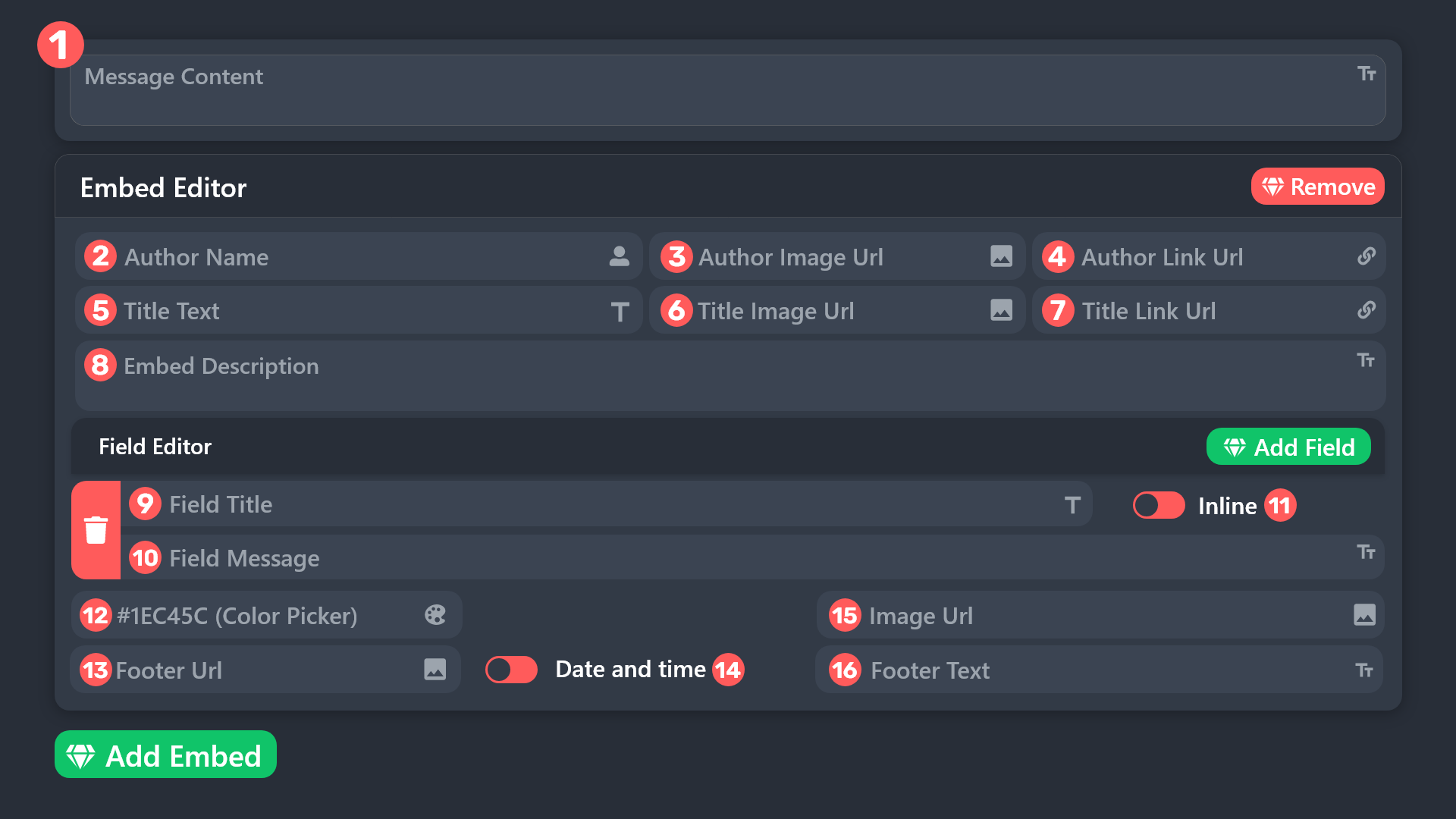 silent lava
humble sequoia
silent lava
humble sequoia
@cosmic totem
 pliant creek
can someone help me
scenic forum
pliant creek
can someone help me
Hello, we would love to help you, but if you don't tell us what you need help with we can't help you :(
pliant creek
i have the ticket ready but how do i make it so they can't see the other chanels and the can only see the tryouts and the ticket tool ?
cosmic totem
silent lava
<@1177348030941368365>
So i got it to change the name of the panel but i still cant figure out how to change the name of the individual tickets on the panel
humble sequoiaBOT
Creating a verification system with Ticket Tool <:TicketToolWhite:1073948900056105060>
Using Discord's permission system you can create a setup that allows your team to manually verify new server members while keeping the rest of the server hidden!
Please configure the permissions of your server's channel as depicted below:
Category Permissions
- Go to your category permissions, or channel permissions in case they are not synced with the category.
- Set the View Channels permission to for the @everyone role.
- Set the View Channels permission to
 for your
 @Memberor@Verifiedrole. - Repeat this process for all of your server's categories.
Ticket Panel Channel
- Set the View Channel permission to for the @everyone role.
- (Optional) If you'd like for verified members to not be able to see that ticket channel anymore, set the View Channel permission to for your
@Memberor@Verifiedrole.
-# Note: Your staff team will still need to grant a verification role. If you have premium, you can check our Ticket Closed Roles feature
$manualverification
scenic forum
pliant creek
i have the ticket ready but how do i make it so they can't see the other chanels...
You can use the embed above for reference
silent lava
cosmic totem
So i got it to change the name of the panel but i still cant figure out how to c...
U can change the name of ur panel from here
 cosmic totem
I already changed the name of the panel, i just need to change the name of the tickets and i dont know how to
silent lava
cosmic totem
I already changed the name of the panel, i just need to change the name of the t...
U can change a tickets name by going to panel configs > ticket
Use the variable {count} to show the number of ticket made in the corresponding panel.
 honest pollen
when someone opens a ticket how do i make it ping me ?
scenic forum
honest pollen
when someone opens a ticket how do i make it ping me ?
How to automatically ping my support team on a ticket?
1. Open your Panel Configs tab in your server's dashboard
2. Select the panel you want to ping your support team on
3. Open the Ticket options menu
4. Click on Edit Ticket Message
5. In the Message Content use one of the role mention syntax ({@Role Name}/{Role ID})
6. Save changes
Note: For this to work properly, Ticket Tool requires the Mention Everyone permission. Or the role must have the Allow anyone to @mention this role setting enabled
honest pollen
scenic forum
### [How to automatically ping my support team on a ticket?](<https://docs.ticke...
ur goated it worked
cosmic totem
silent lava
U can change a tickets name by going to panel configs > ticket
Use the variable...
I dont have premium so its not letting me do that
silent lava
Ticket names
The ticket name is the default channel name of all tickets.
To edit it, go to your Dashboard > Panel Configs > Ticket.
There you can edit the channel name of opened and closed tickets. You can also use variables in there.
Your Panel
Back
Ticket
• Ticket Opened channel name ticket-(ticket.user.name)-{count}
Ticket Closed channel name closed-(ticket.user.name)-{count}
Note: This is a premium feature
 silent lava
Ticket names
The ticket name is the default channel name of all tickets.
To edit...
silent lava
silent lava
Ticket names
The ticket name is the default channel name of all tickets.
To edit...
@cosmic totem
humble sequoiaBOT
Within all the messages the bot sends (both embeds and text) you can mention either channels, roles, or even users, these mentions will only send a notification to the user if they are used within a text field, e.g: a role mentioned in an embed won't ping at all the users who have that role.
For mentioning a role you can use one out of three options:
{@Role Name} ➞ Which is Case Sensitive.
{RoleID} ➞ Replace RoleId with the Id of the role you are trying to ping.
<@&RoleID> ➞ Discord's native syntax to ping roles.
<#ChannelID> ➞ Mention a channel by its ID.
<@UserID> ➞ Mention a user by its ID.
foggy sparrow
@honest pollen Read up^^
 cedar gorge
I'm getting the error that a category doesnt have 'EmbedLinks & AttachFiles', for ticket creation/opening, however it does. Is there a time period in how long the bot needs to wait for any updates to register to it?
silent lava
cedar gorge
I'm getting the error that a category doesnt have 'EmbedLinks & AttachFiles', fo...
Then give the bot the these perms
humble sequoiaBOT
When first invited to your server, Ticket Tool should have the permissions shown below in order to ensure an appropriate functioning:
When customizing permissions for the different ticket participants, you must make sure Ticket Tool has the permissions you want it to grant to others, you can learn more about this here.
Missing Permissions
This error is a direct outcome of the bot missing permissions as depicted above. When troubleshooting this error we suggest you go through these steps:
- Use the </debug:1029783024264564765> command to check if the bot is lacking core role or channel permissions.
- Compare the category/channel's overrides and contrast them with the bot's roles to identify any permission denial that is breaking the functioning
- If you can't still figure it out, let our <@&540295656720302081> know so they can guide you through
Additional Resources
- If you are a server administrator and would like to understand more how to set up your server's permissions, we suggest checking the Discord Support Knowledge Base
- If you are a bot developer and are interested in the internal permission hierarchy we suggest you this part of the Discord Developer Docs
Important Note
- Giving Administrator permissions is NOT required and we do NOT encourage you to do unless you are trying to troubleshoot your permissions setup.
#🆘│community-support message > "However, it does".
silent lava
humble sequoia
Up
cedar gorge
Appreciate it.
Yet Bot wasn't identifying correct category so had to do some shifting around
Have a good day 🙂
 plain marsh
Can someone help me setup the dropdown style thing i got the buttons its the form i need help with
humble sequoiaBOT
The Drop-down menu or Select Menu replaces the buttons on your panel message and uses a drop-down menu with all of your panels. To set this up, go to your Panel Configs and select your main Panel.
<:Numbericons1:1018864164032225340> Enable Select Style
First you enable Select Style. Then you add an item in the Dropdown Editor. Now you can start editing your dropdown!
<:Numbericons2:1018864168041971712> Dropdown Editor
Each line in the dropdown editor represents a line in the drop down menu on discord. You can add more "Items", by clicking on
First you select a panel. That's the panel this option will open a ticket for. DONT select the same panel twice. Each option should have a different Panel
After that, you can put a Display. This is the title of this option and will appear in the drop down menu. The *Description can be set right after that, which will be below the title in grey.
Additionally you can select an emoji, that will be shown in front of each option. You can either manually input the ID of an emoji or select it in the selector.
Common Issues ⚠️
- Panel doesn't send? Make sure you have a valid emoji selected
- Option doesn't show up? Check if two options have the same panel in the DropDown Editor
$dropdown
plain marsh
I already did all of this
silent lava
U need the forms
humble sequoiaBOT
A Discord Form lets the user answer individual questions in a pop-up Form, which then displays the answers in the ticket message. This can save time if you already know what you want to ask the user.
Setup Forms
Forms can be enabled under Panel Settings > Form Options > Edit Forms Options. In the new pop-up window, you can now enable and edit your own Form.
Form Options
You can add up to 5 questions in the Discord form. This is a Discord limitation. Each question can have a placeholder in the input field, a minimum and maximum input, multi-line, and also the option to have the answer required.
Options
Question Title ➞ Your Question goes here
Question Placeholder ➞ The placeholder text in the input field
Required ➞ If enabled, the user has to answer this question, to submit the form
Multi-Line Input ➞ Allows the user to input multiple lines
Minimum and Maximum Input ➞ Set a minimum and maximum input value for the user
Displaying the Answer
To display the answers from the user, you need to enable Auto display form results on the ticket message as an additional embed
If you don't want a second embed, go into your Panel Configs > Ticket Options > Edit Ticket Message. You use the variable {create.form.x} and replace x with the number of your question. For example, the response to Question 5 can be displayed with {create.form.5}.
plain marsh
Yes im struggling
silent lava
There mate
plain marsh
Thanks
 dapper apex
is there a way to make it so that transcripted media never expires?
silent lava
dapper apex
is there a way to make it so that transcripted media never expires?
Depends if ur a premium user u can save up to 8mp
dapper apex
silent lava
Depends if ur a premium user u can save up to 8mp
where does it save the media at
i know that discord links can expire
silent lava
dapper apex
where does it save the media at
You could use the command $transcript anytime
You can also enable Two step ticket so before the ticket gets deleted it will get moderator controls in which you can open/delete/Transcript (Panel config -> General -> Two Step Ticket)
Or have automatic transcripts (Premium only)
dapper apex
silent lava
You could use the command ``$transcript`` anytime
You can also enable Two step ...
bro
sorry mate but thats not what im asking
silent lava
dapper apex
sorry mate but thats not what im asking
Do u wanna set a channel for it
Dashboard > panel configs > transcripts > Transcript channel
dapper apex
i know how transcripts work
my question is does media in transcripts ever expire?
and if it doesnt expire then where does it get saved to
silent lava
dapper apex
i know how transcripts work
Did u open a ticket
?
However they do not , the transcript link will expire, but you can click direct transcript again to refresh the url
 humble sequoiaBOT
For more convenient use of multipanels, you can now combine panels on the dashboard. This will allow you to directly send the multipanel from the dashboard or via the $panel ID command.
Where can I find this?
You can find this setting on the Dashboard -> Panel Configs -> Panel -> Attached Panels
Note: if you're attaching all the panels to a panel called English, don't include English in the attached panel's box (If you do this, it will create a duplicate)
This will put all buttons from all of your panels on one message. The message is the panel message from the panel you're combining these panels in.
silent lava
Read up
humble sequoiaBOT
The Drop-down menu or Select Menu replaces the buttons on your panel message and uses a drop-down menu with all of your panels. To set this up, go to your Panel Configs and select your main Panel.
<:Numbericons1:1018864164032225340> Enable Select Style
First you enable Select Style. Then you add an item in the Dropdown Editor. Now you can start editing your dropdown!
<:Numbericons2:1018864168041971712> Dropdown Editor
Each line in the dropdown editor represents a line in the drop down menu on discord. You can add more "Items", by clicking on
First you select a panel. That's the panel this option will open a ticket for. DONT select the same panel twice. Each option should have a different Panel
After that, you can put a Display. This is the title of this option and will appear in the drop down menu. The *Description can be set right after that, which will be below the title in grey.
Additionally you can select an emoji, that will be shown in front of each option. You can either manually input the ID of an emoji or select it in the selector.
Common Issues ⚠️
- Panel doesn't send? Make sure you have a valid emoji selected
- Option doesn't show up? Check if two options have the same panel in the DropDown Editor
$dropdown
silent lava
Can u check ur dropdown. Style
plain marsh
oh i do that for every panel
silent lava
Yup
plain marsh
ohh
silent lava
Lmk still if it doesn’t work
 elfin elm
Hi I’m trying to get unbanned for something I didn’t do I texted a mod or the admin whatever they called can someone help me
humble sequoiaBOT
⚠️ You're in the wrong place
We provide support for Ticket Tool Discord bot and cannot help you with whatever issue you have.
- We don't know which Support Team you should contact to get this issue resolved, and unfortunately we won't be able to accurately tell you.
If you don't have any further questions regarding our bot Ticket Tool, please close this ticket
 ruby stone
Hola quien habla español? Lo que pasa es que yo pague el premium de ticket tool y yo tenia un pago pendiente pero me estan cobrando pero ya yo lo compre entonces no se porque me sigues cobrando
 formal peak
Hi, how to get paid for clips?
ruby stone
Hello, who speaks Spanish? What happens is that I paid the ticket tool premium and I had a pending payment but they are charging me but I already bought it so I don’t know why you keep charging me
 mellow cedar
Hey, my server doesnt pop up on the dashboard. Ive waited 8 hours and still not here
humble sequoiaBOT
Don't see your server in the dashboard?
Try using the Sync Servers button on your top center of the Dashboard page
If this doesn't work
You should relog from the dashboard, you can do this by clicking here to log out immediately, and then log back in
Note:
You need one of these 3 things to access the dashboard.
1. Server Owner (Level: 6)
2. Server Administrator (Level: 4)
3. Dashboard Role (Level: 2)
:warning: You can check your level using the </permissionlevel:1029797400174399542> command on your Discord Server
If the bot's response is:
- @User is permission level: 0 (User)
You don't have any of the 3 levels required to access the server's dashboard
silent lava
humble sequoia
@mellow cedar
iron nightBOT
Gave +1 Rep to @silent lava (current: #69 - 31)
foggy sparrow
formal peak
Hi, how to get paid for clips?
Wrong server
 echo flare
how do i find the id for the panel
 thorn halo
echo flare
how do i find the id for the panel
thorn halo
echo flare
how do i find the id for the panel
hey there, the panels in your dashboard server list are shown as [panelID] | [panelName]

the panel id for the Support panel above is 1
 alpine smelt
 prisma rapids
Why does my server not show up on the ticket tool dashboard when it's in my server?
nevermind i saw this answer aboe
humble sequoiaBOT
⚠️ You're in the wrong place
We provide support for Ticket Tool Discord bot and cannot help you with whatever issue you have.
- We don't know which Support Team you should contact to get this issue resolved, and unfortunately we won't be able to accurately tell you.
If you don't have any further questions regarding our bot Ticket Tool, please close this ticket
 lone mauve
Yo
 sharp raptor
Hello, I'd like to know how to add multiple buttons, and where to do it.
@iron night

Could you help me take a look at the circled part in the picture?
@humble sequoia
 vital iron

 lusty tide
im on the dashboard rn and my server isnt showing up for an hour, can u anyone tell me why?
 faint stone
السلام عليكم
humble sequoiaBOT
Don't see your server in the dashboard?
Try using the Sync Servers button on your top center of the Dashboard page
If this doesn't work
You should relog from the dashboard, you can do this by clicking here to log out immediately, and then log back in
Note:
You need one of these 3 things to access the dashboard.
1. Server Owner (Level: 6)
2. Server Administrator (Level: 4)
3. Dashboard Role (Level: 2)
:warning: You can check your level using the </permissionlevel:1029797400174399542> command on your Discord Server
If the bot's response is:
- @User is permission level: 0 (User)
You don't have any of the 3 levels required to access the server's dashboard
silent lava
humble sequoia
@lusty tide
lusty tide
silent lava
<@1093772647260749904>
got it
 muted scaffold
سلام عليكم
 honest vine
How do I get unbanned?
muted scaffold
How do I register for an incubator?
honest vine
How do I chat?
 latent talon
is it possible for the $new command to open a specific ticket panel?
or would i have to make separate private channels for each ticket panel to monitor for $new
honest vine
I got banned a few weeks ago due to "exploiting". I dunno how to make a support ticket via to get unbanned.
humble sequoiaBOT
⚠️ You're in the wrong place
We provide support for Ticket Tool Discord bot and cannot help you with whatever issue you have.
- We don't know which Support Team you should contact to get this issue resolved, and unfortunately we won't be able to accurately tell you.
If you don't have any further questions regarding our bot Ticket Tool, please close this ticket
 swift compass
i am in the roblox event server it says to make tickets but when i made one by reaching the requirements it said category issue how do i slove it
$new
honest vine
How to make support ticket via
humble sequoiaBOT
⚠️ You're in the wrong place
We provide support for Ticket Tool Discord bot and cannot help you with whatever issue you have.
- We don't know which Support Team you should contact to get this issue resolved, and unfortunately we won't be able to accurately tell you.
If you don't have any further questions regarding our bot Ticket Tool, please close this ticket
 humble sequoiaBOT
Don't see your server in the dashboard?
Try using the Sync Servers button on your top center of the Dashboard page
If this doesn't work
You should relog from the dashboard, you can do this by clicking here to log out immediately, and then log back in
Note:
You need one of these 3 things to access the dashboard.
1. Server Owner (Level: 6)
2. Server Administrator (Level: 4)
3. Dashboard Role (Level: 2)
:warning: You can check your level using the </permissionlevel:1029797400174399542> command on your Discord Server
If the bot's response is:
- @User is permission level: 0 (User)
You don't have any of the 3 levels required to access the server's dashboard
silent lava
humble sequoia
@limber cedar
silent lava
 limber cedar
? <@1333448368781000774>
limber cedar
? <@1333448368781000774>
Jt check ur server level
 silent lava
limber cedar
Where to check?
silent lava
limber cedar
Where to check?
In ur server
silent lava
limber cedar
What to check there
You can check your level using the /permissionlevel
command on your Discord Server
limber cedar
What to check there
silent lava
Ur sever level to get acces to the dashboard
 humble sequoiaBOT
Don't see your server in the dashboard?
Try using the Sync Servers button on your top center of the Dashboard page
If this doesn't work
You should relog from the dashboard, you can do this by clicking here to log out immediately, and then log back in
Note:
You need one of these 3 things to access the dashboard.
1. Server Owner (Level: 6)
2. Server Administrator (Level: 4)
3. Dashboard Role (Level: 2)
:warning: You can check your level using the </permissionlevel:1029797400174399542> command on your Discord Server
If the bot's response is:
- @User is permission level: 0 (User)
You don't have any of the 3 levels required to access the server's dashboard
silent lava
From that link
limber cedar
How to reconnect
humble sequoiaBOT
Don't see your server in the dashboard?
Try using the Sync Servers button on your top center of the Dashboard page
If this doesn't work
You should relog from the dashboard, you can do this by clicking here to log out immediately, and then log back in
Note:
You need one of these 3 things to access the dashboard.
1. Server Owner (Level: 6)
2. Server Administrator (Level: 4)
3. Dashboard Role (Level: 2)
:warning: You can check your level using the </permissionlevel:1029797400174399542> command on your Discord Server
If the bot's response is:
- @User is permission level: 0 (User)
You don't have any of the 3 levels required to access the server's dashboard
silent lava
 limber cedar
It still doesn't show me the server I'm on.
@silent lava
humble sequoiaBOT

Ticket Tool - Ticketing without clutter - The #1 Discord support bot
limber cedar
Thank you very much
silent lava
Nws mate
 orchid horizon
Deme permiso por favor
foggy sparrow
Permiso pa que o que?
 wanton hamlet
Guys if done setup what next?
humble sequoiaBOT
Hello, we would love to help you, but if you don't tell us what you need help with we can't help you :(
foggy sparrow
wanton hamlet
Guys if done setup what next?
I believe you should try the ticket tool, see if you got all the necessary things to run your server, any questions you got let us know
 shrewd siren
So I have a ticket tool and i set it in my server but when i go to dashboard it doesnt say that the ticket tool is in my server help
humble sequoiaBOT
Don't see your server in the dashboard?
Try using the Sync Servers button on your top center of the Dashboard page
If this doesn't work
You should relog from the dashboard, you can do this by clicking here to log out immediately, and then log back in
Note:
You need one of these 3 things to access the dashboard.
1. Server Owner (Level: 6)
2. Server Administrator (Level: 4)
3. Dashboard Role (Level: 2)
:warning: You can check your level using the </permissionlevel:1029797400174399542> command on your Discord Server
If the bot's response is:
- @User is permission level: 0 (User)
You don't have any of the 3 levels required to access the server's dashboard
silent lava
@shrewd siren
shrewd siren
/permissionlevel
 pseudo ravine
silent lava
<@1284881428714356779>
pseudo ravine
silent lava
<@1284881428714356779>
They were already being assisted. Please do not interrupt while someone else is helping
silent lava
pseudo ravine
They were already being assisted. Please do not interrupt while someone else is ...
Btw they weren’t
He jt said $helpme
shrewd siren
humble sequoia
Thanks it worked!
iron nightBOT
Gave +1 Rep to @humble sequoia (current: #18 - 431)
silent lava
Nws mate
pseudo ravine
silent lava
He jt said $helpme
That's still assisting them. They initiated the command, which means they started to help them
silent lava
pseudo ravine
That's still assisting them. They initiated the command, which means they starte...
Wtv booos I gotchu
pseudo ravine
Make sure you actually not interrupt next time, as you've been told numerous times regarding this
foggy sparrow
That is the second or third time it happened with me...
 summer parcel
hey can anyone help me please
humble sequoiaBOT
Hello, we would love to help you, but if you don't tell us what you need help with we can't help you :(
summer parcel


so starting on first picture is what i wanted an so is the second. it would show my questions for people to answer every thing was fine....
now on the third photo, this is what people get when trying to create a ticket insted of the questions
humble sequoiaBOT
A Discord Form lets the user answer individual questions in a pop-up Form, which then displays the answers in the ticket message. This can save time if you already know what you want to ask the user.
Setup Forms
Forms can be enabled under Panel Settings > Form Options > Edit Forms Options. In the new pop-up window, you can now enable and edit your own Form.
Form Options
You can add up to 5 questions in the Discord form. This is a Discord limitation. Each question can have a placeholder in the input field, a minimum and maximum input, multi-line, and also the option to have the answer required.
Options
Question Title ➞ Your Question goes here
Question Placeholder ➞ The placeholder text in the input field
Required ➞ If enabled, the user has to answer this question, to submit the form
Multi-Line Input ➞ Allows the user to input multiple lines
Minimum and Maximum Input ➞ Set a minimum and maximum input value for the user
Displaying the Answer
To display the answers from the user, you need to enable Auto display form results on the ticket message as an additional embed
If you don't want a second embed, go into your Panel Configs > Ticket Options > Edit Ticket Message. You use the variable {create.form.x} and replace x with the number of your question. For example, the response to Question 5 can be displayed with {create.form.5}.
silent lava
humble sequoia
There if u want em to answer ur questions
summer parcel
i have no idea how the above works.. im extreme new to making a discord never own a laptop before a few weeks ago
i have the questions working fine from myside
i can see everything an so can member, but unverified can not see the questions an when making the ticket it states this....

 atomic drift
hii guys i’m making a server and using an alt to test everything out, i can’t seem to open a ticket on the alt ?? i’m not sure what permissions i need to fix this!!
 silent lava
summer parcel
i can see everything an so can member, but unverified can not see the questions ...
silent lava
summer parcel
i can see everything an so can member, but unverified can not see the questions ...
Hey there! Dashboard > Panel Configs > Permissions > Ticket Owner Permissions - Edit Opened > READ MESSAGE HISTORY
summer parcel
okay thank you i shall look now at this
silent lava
atomic drift
hii guys i’m making a server and using an alt to test everything out, i can’t se...
can you u go to the https://tickettool.xyz/dashboard/server_id/configs#pc-menu/pc-buttons/pc-button_create and ensure the create button isnt marked as Support Team Only, or have any conflicting disabled role(s)
atomic drift
silent lava
can you u go to the <https://tickettool.xyz/dashboard/server_id/configs#pc-menu...
thank you!!
iron nightBOT
Gave +1 Rep to @silent lava (current: #63 - 33)
 pallid chasm
Hello, I'm having a problem with the bot sending the wrong ticket message to my server. There's currently a verification and support button, the message prompt for verification is being sent for the support ticket.
restive condor
pallid chasm
Hello, I'm having a problem with the bot sending the wrong ticket message to my ...
Hey there! Could you #🎫│make-a-ticket including your server ID, so we can take a closer look please
 graceful epoch
for some reason on the tickettool website, it isnt showing me my most recent server, and its also showing my name and pfp as my old name and pfp
 humble sequoiaBOT
Don't see your server in the dashboard?
Try using the Sync Servers button on your top center of the Dashboard page
If this doesn't work
You should relog from the dashboard, you can do this by clicking here to log out immediately, and then log back in
Note:
You need one of these 3 things to access the dashboard.
1. Server Owner (Level: 6)
2. Server Administrator (Level: 4)
3. Dashboard Role (Level: 2)
:warning: You can check your level using the </permissionlevel:1029797400174399542> command on your Discord Server
If the bot's response is:
- @User is permission level: 0 (User)
You don't have any of the 3 levels required to access the server's dashboard
silent lava
humble sequoia
@graceful epoch
graceful epoch
humble sequoia
i did already
like 3 times
now a 4th time
lemme try logging out
graceful epoch
silent lava
<@1187918752323485776>
thanks logging out worked
iron nightBOT
Gave +1 Rep to @silent lava (current: #63 - 34)
 sturdy mantle
I’ve had Ticket Tool for years now and have never had a problem, however today:
- a user was able to “close” and “delete” a ticket on their own without admin approval.
I thought I had it set up to only a specific admin role was able to control those options. How can I go about checking the permissions for those commands
silent lava
sturdy mantle
I’ve had Ticket Tool for years now and have never had a problem, however today:
...
Panel config -> Buttons -> close ticket -> support team only
restive condor
@jade bison You have been told numerous times that you are in the wrong server. We cannot help you
 hollow pebble
is there anyway i can do a ticket for blox fruits server unban me? i got banned for nothing
humble sequoiaBOT
⚠️ You're in the wrong place
We provide support for Ticket Tool Discord bot and cannot help you with whatever issue you have.
- We don't know which Support Team you should contact to get this issue resolved, and unfortunately we won't be able to accurately tell you.
If you don't have any further questions regarding our bot Ticket Tool, please close this ticket
summer parcel
silent lava
Hey there! ``Dashboard`` > ``Panel Configs`` > ``Permissions`` > ``Ticket Owner ...
just popping back to say thank you again for the help this was the problem i appreciate you
iron nightBOT
Gave +1 Rep to @silent lava (current: #63 - 35)
 leaden wharf
I download it how do I make it show up to make one in a Chanel
restive condor
leaden wharf
I download it how do I make it show up to make one in a Chanel
Hi there, here's a setup guide for you
 stark runeBOT
1. Invite Ticket Tool to your server
First you will want to invite the bot to your server. Once the bot is in your server, you can manage your server in the dashboard.
2. Create a Panel
To create a panel we are going to need to head over to the panel configs on the dashboard.
Once at the dashboard we will need to click Create Panel.
Enter a panel name (Fill in any optional settings you want).
Click Create Panel and your ready to get started with configuring your panel.
An example of a creating a panel is shown below.
3. Send the Panel to a Channel
Once you've created a panel on the dashboard you will need to send it to a channel using send on the dashboard.
Select the channel you want your panel to be created in and click send.
For other questions checkout $help faq.
An example of a sending a panel is shown below.
Having a Problem Sending the Panel?
Do $debug in a channel with Ticket Tool and make sure it has all the necessary Discord permissions.
leaden wharf
Ty
 wanton harbor
Can anyone help me in the community
Ticket tool won’t send my custom panel message despite having perms
scenic forum
wanton harbor
Can anyone help me in the community
Ticket tool won’t send my custom panel mess...
Which error do you receive
wanton harbor
No error my message just doesn’t show
Like if i make a ticket
It just shows the default text, not the one i want

 scenic forum
wanton harbor
scenic forum
wanton harbor
then thats not the same panel
wanton harbor
how can i pick the right one
scenic forum
By selecting the panel corresponding to the ticket
wanton harbor
how do i do that im a noob
scenic forum
Select the right panel here.
 wanton harbor
i want to change the ticket message not the panel
scenic forum
wanton harbor
i want to change the ticket message not the panel
You still gotta select the CORRECT panel
wanton harbor
Bro i dont know how to select a panel
scenic forum
scenic forum
Select the right panel here.
There as shown before
wanton harbor
I’m on it
 wanton harbor
I have only that panel and no other panel and already editted the ticket message
 candid juniper
ქართ ლინკს ჩააგდებთ
scenic forum
wanton harbor
I have only that panel and no other panel and already editted the ticket message
Click on the panel at the very top and show me that there isnt another one
wanton harbor
 scenic forum
Did you test with a new ticket?
scenic forum
wanton harbor
Yes
Add the embed back and try to edit again
You cannot remove the embed without premium
wanton harbor
Nothing happened
scenic forum
 fickle leaf
I can't find the make a ticket tab
 worldly helm
fickle leaf
I can't find the make a ticket tab
worldly helm
fickle leaf
I can't find the make a ticket tab
Hey! 👋
What exactly do you mean?
fickle leaf
I'm trying to make a ticket on this server
worldly helm
#🎫│make-a-ticket - I'll support you there.
fickle leaf
I need to see the accual tab, when I click on someone doing the # i can't click on it
worldly helm
Click on the server name and enable Show All CHannels

 uncut violet
Everytime I try to show my panel it just does this, with every command actually
 scenic forum
uncut violet
Everytime I try to show my panel it just does this, with every command actually
scenic forum
uncut violet
Everytime I try to show my panel it just does this, with every command actually
If the bot isn't responding when doing /debug
Its lacking these 3 permissions inside the channel it has been used in View Channel, Send Message and Embed Links.
uncut violet
Thanks
echo flare
does this just allow who is able to make ticket and who isnt??
 silent lava
Yeah keep in mind the disabled roles won’t even open a ticket they can’t .
echo flare
silent lava
Yeah keep in mind the disabled roles won’t even open a ticket they can’t .
thanks
iron nightBOT
Gave +1 Rep to @silent lava (current: #62 - 36)
 candid agate
I want to send my Panel in my Channel but it Doesnt working. I give the bot all permissions.

 analog holly
Hello, having issues with ./add (user) command. says "Failed to add Missing Permissions". I'm Guild Owner (lvl 6) and made sure that my bot has permissions on dashboard and on server. What am I missing?
 analog holly
i understand that. i am struggling to understand what permissions exactly. it's not a new addition to my server, it's been setup for a couple of years already, so i am confused.
pseudo ravine
No. All support must stay within the support channels
pseudo ravine
analog holly
Hello, having issues with ./add (user) command. says "Failed to add Missing Perm...
Hey there! What's the server ID? I'll take a quick look at your dashboard
analog holly
pseudo ravine
Hey there! What's the server ID? I'll take a quick look at your dashboard
Hi Jstitch, thanks for the assistance ! server id is : 1227387893014728836
iron nightBOT
Gave +1 Rep to @pseudo ravine (current: #2 - 1737)
pseudo ravine
The channel description and pins clearly state that all support must stay within support channels. It may not be listed in #📂│information under the Rules section, but you still need to follow it
pseudo ravine
analog holly
Hi Jstitch, thanks for the assistance ! server id is : `1227387893014728836`
Which panel was the ticket created on?
analog holly
pseudo ravine
Which panel was the ticket created on?
I believe 5 : support
 pseudo ravine
And that's not allowed
pseudo ravine
analog holly
I believe 5 : support
You will have to make this permission neutral ( )
)
Please head to the Dashboard > Permissions > Support Team Permissions > Edit opened
Dashboard > Permissions > Ticket Owner Permissions > Edit opened

As previously mentioned, it's listed in the channel description along with in the pinned messages. I won't be continuing this argument. Next time, please ensure you keep all support to the support channels. Do not ask anyone to DM you an invite or ask for permissions to view their dashboard
analog holly
pseudo ravine
You will have to make this permission neutral (<:neutral:836268295778467840>)
P...
It works, ty for the help ! :)
iron nightBOT
Gave +1 Rep to @pseudo ravine (current: #2 - 1738)
pseudo ravine
analog holly
It works, ty for the help ! :)
You're welcome, glad I could help! Thanks for choosing Ticket Tool!
 naive raven
Can the transcript channel store on other server ?
Ex
Server A transcript channel saved at server B
At server A didnot have trascript channel
pseudo ravine
Hey there! Unfortunately not
swift compass
catagory issue how to solve
 graceful wedge
help how do i set it up
we are having a very rough time on our server and trying to set up ticketing and using the tickets for us to verify people before they can get in, we had bots come in and spam phishing stuff and some people got hacked
foggy sparrow
$setup
 wicked sapphire
Guys why won’t the bot respond
graceful wedge
foggy sparrow
$setup
it says the application did not respond
foggy sparrow
Secondly, it lacks permissions
humble sequoiaBOT
When first invited to your server, Ticket Tool should have the permissions shown below in order to ensure an appropriate functioning:
When customizing permissions for the different ticket participants, you must make sure Ticket Tool has the permissions you want it to grant to others, you can learn more about this here.
Missing Permissions
This error is a direct outcome of the bot missing permissions as depicted above. When troubleshooting this error we suggest you go through these steps:
- Use the </debug:1029783024264564765> command to check if the bot is lacking core role or channel permissions.
- Compare the category/channel's overrides and contrast them with the bot's roles to identify any permission denial that is breaking the functioning
- If you can't still figure it out, let our <@&540295656720302081> know so they can guide you through
Additional Resources
- If you are a server administrator and would like to understand more how to set up your server's permissions, we suggest checking the Discord Support Knowledge Base
- If you are a bot developer and are interested in the internal permission hierarchy we suggest you this part of the Discord Developer Docs
Important Note
- Giving Administrator permissions is NOT required and we do NOT encourage you to do unless you are trying to troubleshoot your permissions setup.
Read up
 pliant pulsar
Hello is it possible to check a 8 month old ticket
naive raven
its that posbbile rename tagged channel at panel message?

 wild spire
pliant pulsar
Hello is it possible to check a 8 month old ticket
wild spire
pliant pulsar
Hello is it possible to check a 8 month old ticket
a transcript? normally yes
pliant pulsar
wild spire
a transcript? normally yes
How can I get that
wild spire
naive raven
its that posbbile rename tagged channel at panel message?
you want to give it a different text but keep the same link you mean?
wild spire
pliant pulsar
How can I get that
if you saved it on your server, you‘ll have to use the discord search function and search by user id etc
pliant pulsar
wild spire
if you saved it on your server, you‘ll have to use the discord search function a...
What do you mean saved it on server ?
The ticket was closed almost 8 months ago
And the user doesn't have transcript of it
wild spire
pliant pulsar
What do you mean saved it on server ?
The ticket was closed almost 8 months ago ...
are you a regular person in said server where this ticket was made or an admin?
pliant pulsar
wild spire
are you a regular person in said server where this ticket was made or an admin?
Admin
wild spire
then you need to look for it in your server by searching the user id of the person who is asking, but that is if you have saved the transcript. if you didn’t, its gone forever
naive raven
wild spire
you want to give it a different text but keep the same link you mean?
Yes , can?
pliant pulsar
wild spire
then you need to look for it in your server by searching the user id of the pers...
Is there no way if isn't saved
Like from user side or anyelse
wild spire
naive raven
Yes , can?
yes if u long press the channel in your server and do copy link
then u use the same format as any other link (name)[link]
wild spire
pliant pulsar
Is there no way if isn't saved
Like from user side or anyelse
sadly not
 limber patio
i added the bot to my sever went back to the website went to the dashbord and the sever aint up on the dash bord
humble sequoiaBOT
Don't see your server in the dashboard?
Try using the Sync Servers button on your top center of the Dashboard page
If this doesn't work
You should relog from the dashboard, you can do this by clicking here to log out immediately, and then log back in
Note:
You need one of these 3 things to access the dashboard.
1. Server Owner (Level: 6)
2. Server Administrator (Level: 4)
3. Dashboard Role (Level: 2)
:warning: You can check your level using the </permissionlevel:1029797400174399542> command on your Discord Server
If the bot's response is:
- @User is permission level: 0 (User)
You don't have any of the 3 levels required to access the server's dashboard
 low turret
wild spire
low turret
wild spire
pinging me and then leaving 
 small python
do yall know why my dashboard aint syncing with my server
candid agate
Not working
candid agate
candid agate
Not working
Failed:
Invalid Form Body components[0].components[0].options[4].emoji.name[COMPONENT_INVALID_EMOJI]: Invalid emoji
candid agate
candid agate
> Failed: `Invalid Form Body
components[0].components[0].options[4].emoji.name[C...
This is my Problem
restive condor
candid agate
> Failed: `Invalid Form Body
components[0].components[0].options[4].emoji.name[C...
Hey there! Dashboard > Panel Configs > Dropdown Style
The emoji for your 5th dropdown option is invalid
Please make sure you didn't include text, additional spaces or more than 1 emoji
If you're using a custom emoji, please make sure it's in the correct format. You can use the $id command on your server to obtain it
$id 
humble sequoiaBOT
restive condor
$id <:smil:936485535403356221>
!smil
<:smil:936485535403356221>
restive condor
Like so ^
candid agate
restive condor
Hey there! Dashboard > Panel Configs > Dropdown Style
Ty it works
iron nightBOT
Gave +1 Rep to @restive condor (current: #1 - 3041)
candid agate
restive condor
Hey there! Dashboard > Panel Configs > Dropdown Style
But when I select a dropdown it will opened but I cant See which one I selected
leaden wharf
I do /setup but it just comes up with this every time any 1 know?
 restive condor
candid agate
But when I select a dropdown it will opened but I cant See which one I selected
restive condor
candid agate
But when I select a dropdown it will opened but I cant See which one I selected
You will need to edit the panel message for each panel to know which dropdown option it is or have each ticket option go to a different category.
With premium you can also do custom channel names and colour code the names
restive condor
leaden wharf
I do /setup but it just comes up with this every time any 1 know?
Hey there! Please try the /debug command in that same channel
leaden wharf
Idk whats going on
 restive condor
leaden wharf
Idk whats going on
restive condor
leaden wharf
Idk whats going on
Ticket Tool seems to be missing the SEND MESSAGES, EMBED LINKS & READ MESSAGE HISTORY permissions for that channel
leaden wharf
Kk
leaden wharf
restive condor
Ticket Tool seems to be missing the ``SEND MESSAGES``, ``EMBED LINKS`` & ``READ ...
Tysmmm
 south karma
i'm making a ticket system and i've seen in another server they have this "category system"
how do you do that
and as you can see they sent a msg via embed, how do you send using embeds
 humble sequoiaBOT
The Drop-down menu or Select Menu replaces the buttons on your panel message and uses a drop-down menu with all of your panels. To set this up, go to your Panel Configs and select your main Panel.
<:Numbericons1:1018864164032225340> Enable Select Style
First you enable Select Style. Then you add an item in the Dropdown Editor. Now you can start editing your dropdown!
<:Numbericons2:1018864168041971712> Dropdown Editor
Each line in the dropdown editor represents a line in the drop down menu on discord. You can add more "Items", by clicking on
First you select a panel. That's the panel this option will open a ticket for. DONT select the same panel twice. Each option should have a different Panel
After that, you can put a Display. This is the title of this option and will appear in the drop down menu. The *Description can be set right after that, which will be below the title in grey.
Additionally you can select an emoji, that will be shown in front of each option. You can either manually input the ID of an emoji or select it in the selector.
Common Issues ⚠️
- Panel doesn't send? Make sure you have a valid emoji selected
- Option doesn't show up? Check if two options have the same panel in the DropDown Editor
$dropdown
 barren orchid
I need help. I sent a ticket on ticket support on the original discord channel other than this is there a way someone can help me with the cash out issue
humble sequoiaBOT
⚠️ You're in the wrong place
We provide support for Ticket Tool Discord bot and cannot help you with whatever issue you have.
- We don't know which Support Team you should contact to get this issue resolved, and unfortunately we won't be able to accurately tell you.
If you don't have any further questions regarding our bot Ticket Tool, please close this ticket
 mighty hinge
Subject: Inquiry regarding Creator Base Application Status - [1802220684]
Dear Creator Base Team,
I hope this message finds you well.
I am writing to follow up on my application for the Mobile Legends: Bang Bang Creator Base, which I submitted more than a week ago. I haven’t received a response yet, and I wanted to ensure that my application was received correctly and is still under consideration.
Here are my account details for your reference:
In-game Name: [Fantastic]
Game ID: [1802220684]
Server ID: [6907]
Platform (TikTok/YouTube/FB): [Tiktok]
Application Date: [2026_4_4]
I am very excited to contribute to the MLBB community and showcase my content. Thank you for your time and for the effort you put into supporting creators.
Best regards,
humble sequoiaBOT
⚠️ You're in the wrong place
We provide support for Ticket Tool Discord bot and cannot help you with whatever issue you have.
- We don't know which Support Team you should contact to get this issue resolved, and unfortunately we won't be able to accurately tell you.
If you don't have any further questions regarding our bot Ticket Tool, please close this ticket
scenic forum
mighty hinge
Subject: Inquiry regarding Creator Base Application Status - [1802220684]
Dear C...
Read above
mighty hinge
How do I solve my problem?
scenic forum
mighty hinge
How do I solve my problem?
Read it again
mighty hinge
@humble sequoia
scenic forum
mighty hinge
<@722196398635745312>
Don't ping it
Read what it's saying
mighty hinge
no
scenic forum
Yes
mighty hinge
?
scenic forum
mighty hinge
?
It tells you all the info you need
mighty hinge
Subject: Inquiry regarding Creator Base Application Status - [1802220684]
Dear Creator Base Team,
I hope this message finds you well.
I am writing to follow up on my application for the Mobile Legends: Bang Bang Creator Base, which I submitted more than a week ago. I haven’t received a response yet, and I wanted to ensure that my application was received correctly and is still under consideration.
Here are my account details for your reference:
In-game Name: [Fantastic]
Game ID: [1802220684]
Server ID: [6907]
Platform (TikTok/YouTube/FB): [Tiktok]
Application Date: [2026_4_4]
I am very excited to contribute to the MLBB community and showcase my content. Thank you for your time and for the effort you put into supporting creators.
Best regards,
humble sequoiaBOT
⚠️ You're in the wrong place
We provide support for Ticket Tool Discord bot and cannot help you with whatever issue you have.
- We don't know which Support Team you should contact to get this issue resolved, and unfortunately we won't be able to accurately tell you.
If you don't have any further questions regarding our bot Ticket Tool, please close this ticket
scenic forum
@mighty hinge read above
AGAIN
mighty hinge
what the right place
scenic forum
mighty hinge
what the right place
As the message tells you aswell
We provide support for Ticket Tool Discord bot and cannot help you with whatever issue you have.
- We don't know which Support Team you should contact to get this issue resolved, and unfortunately we won't be able to accurately tell you.
If you don't have any further questions regarding our bot Ticket Tool, please close this ticket
The block in the middle.
 warm heron
I need help, my frend said to help with tickets in his server and he gave me owner but i cant access that server's dashboard
What do i do
How do i do
humble sequoiaBOT
Don't see your server in the dashboard?
Try using the Sync Servers button on your top center of the Dashboard page
If this doesn't work
You should relog from the dashboard, you can do this by clicking here to log out immediately, and then log back in
Note:
You need one of these 3 things to access the dashboard.
1. Server Owner (Level: 6)
2. Server Administrator (Level: 4)
3. Dashboard Role (Level: 2)
:warning: You can check your level using the </permissionlevel:1029797400174399542> command on your Discord Server
If the bot's response is:
- @User is permission level: 0 (User)
You don't have any of the 3 levels required to access the server's dashboard
silent lava
humble sequoia
@warm heron
warm heron
silent lava
<@1469265367129129003>
Yes?
humble sequoiaBOT
Don't see your server in the dashboard?
Try using the Sync Servers button on your top center of the Dashboard page
If this doesn't work
You should relog from the dashboard, you can do this by clicking here to log out immediately, and then log back in
Note:
You need one of these 3 things to access the dashboard.
1. Server Owner (Level: 6)
2. Server Administrator (Level: 4)
3. Dashboard Role (Level: 2)
:warning: You can check your level using the </permissionlevel:1029797400174399542> command on your Discord Server
If the bot's response is:
- @User is permission level: 0 (User)
You don't have any of the 3 levels required to access the server's dashboard
silent lava
U can’t see this
humble sequoiaBOT
Don't see your server in the dashboard?
Try using the Sync Servers button on your top center of the Dashboard page
If this doesn't work
You should relog from the dashboard, you can do this by clicking here to log out immediately, and then log back in
Note:
You need one of these 3 things to access the dashboard.
1. Server Owner (Level: 6)
2. Server Administrator (Level: 4)
3. Dashboard Role (Level: 2)
:warning: You can check your level using the </permissionlevel:1029797400174399542> command on your Discord Server
If the bot's response is:
- @User is permission level: 0 (User)
You don't have any of the 3 levels required to access the server's dashboard
silent lava
warm heron
<@1333448368781000774>
Don't see your server in the dashboard?
Try using the Sync Servers button on your top center of the Dashboard page
If this doesn't work
You should relog from the dashboard, you can do this by clicking here to log out immediately, and then log back in Note:
You need one of these 3 things to access the dashboard.
- Server Owner (Level: 6)
- Server Administrator (Level: 4)
- Dashboard Role (Level: 2)
A You can check your level using the /permissionlevel command on your Discord Server
If the bot's response is:
- @User is permission level: 0 (User)
You don't have any of the 3 levels required to access the server's dashboard
warm heron
silent lava
Don't see your server in the dashboard?
Try using the Sync Servers button on you...
Thanks very much
iron nightBOT
Gave +1 Rep to @silent lava (current: #61 - 37)
 real scroll
Guys I'm having problems in closing the ticket the channel is saying that the app didn't responded what should I do?


 vast wind
دلوقتي أنا مش عارف أعمل بانلز في السيرفر الخاص بيا والسيرفر مش ظاهر إطلاقًا
humble sequoiaBOT
لا تستطيع رؤية سيرفرك في لوحة التحكم؟
غالبا ستحتاج إلى إعادة التسجيل. انظر أدناه لمعرفة الخطوات الخاصة بكيفية إعادة تسجيل الدخول
كيفية إعادة التسجيل في لوحة التحكم.
اولا، يجب ان تذهب الى لوحة التحكم. اضغط على صورتك الشخصية في الجهة اليمنى اعلى الصفحة. بعد الضغط عليها، ستجد زر بمسمى Logout يجب ان تضغط على هذا الزر. ثم سجل دخولك مرة اخرى.
ملاحظة:
تحتاج ٣ اشياء لتستطيع الدخول الى لوحة التحكم
اونر السيرفر (المستوى: 6) .1
صلاحية الادمن (المستوى: 4) .2
رتبة لوحة التحكم (المستوى: 2) .3
تحذير: تستطيع معرفة مستواك بأمر </permissionlevel:1029797400174399542> في سيرفرك
مستوى صلاحيات المستخدم مع تكت تول
مستوى صلاحية المستخدم: 0 (User)
```» اذا ظهر ان مستوى صلاحيتك **0**, ليس لديك اي من ال**3** مستويات المذكورة اعلاه للوصول الى لوحة التحكم
**انظر الى الصورة ادناه لشرح كيفية اعادة تسجيل الدخول**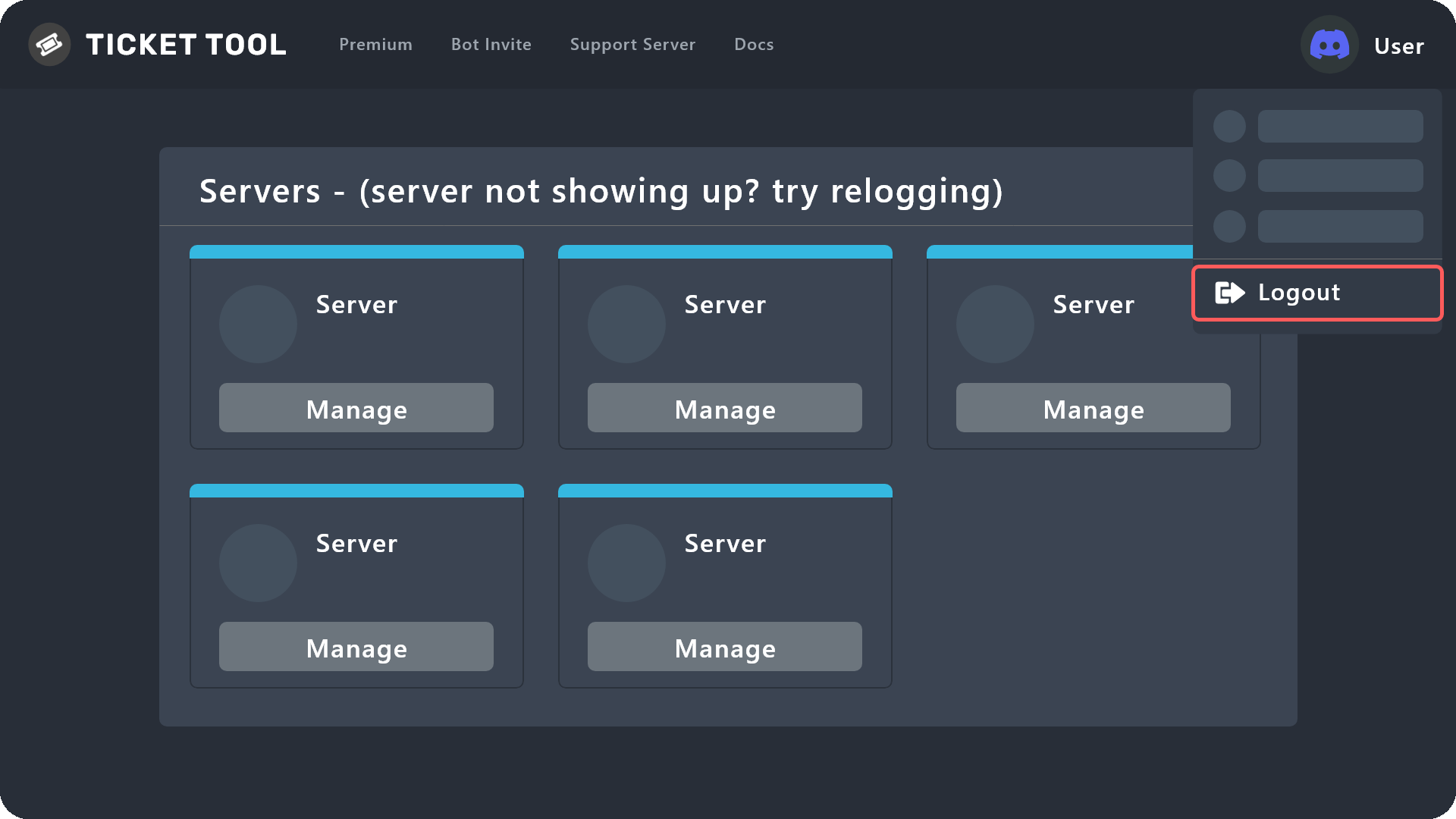 silent lava
humble sequoia
silent lava
humble sequoia
@vast wind
vast wind
silent lava
<@997936560584536114>
شكرًا جدًا اتحلت
silent lava
vast wind
شكرًا جدًا اتحلت <:kinspikalove:1166562062558838894>
Habibi dw I gotchu
scenic forum
 sudden crater
I'VE BLOCKED HIM
sudden crater
I'VE BLOCKED HIM
?
 gray arrow
Hi so I’m really not very good at discord stuff. I wanna add tickets in this format to my server but I’m not entirely sure how

Like where it has the multiple questions
humble sequoiaBOT
A Discord Form lets the user answer individual questions in a pop-up Form, which then displays the answers in the ticket message. This can save time if you already know what you want to ask the user.
Setup Forms
Forms can be enabled under Panel Settings > Form Options > Edit Forms Options. In the new pop-up window, you can now enable and edit your own Form.
Form Options
You can add up to 5 questions in the Discord form. This is a Discord limitation. Each question can have a placeholder in the input field, a minimum and maximum input, multi-line, and also the option to have the answer required.
Options
Question Title ➞ Your Question goes here
Question Placeholder ➞ The placeholder text in the input field
Required ➞ If enabled, the user has to answer this question, to submit the form
Multi-Line Input ➞ Allows the user to input multiple lines
Minimum and Maximum Input ➞ Set a minimum and maximum input value for the user
Displaying the Answer
To display the answers from the user, you need to enable Auto display form results on the ticket message as an additional embed
If you don't want a second embed, go into your Panel Configs > Ticket Options > Edit Ticket Message. You use the variable {create.form.x} and replace x with the number of your question. For example, the response to Question 5 can be displayed with {create.form.5}.
silent lava
humble sequoia
@gray arrow
gray arrow
Thank you ☺️
 torn iris
guys, i add ticket tool to my server but when i want manage it in dashboard here nothing
 sturdy apex
I’m not a support mod or anything but I think u need to log out of ticket tool and log back in, that usually works for me 🙂
torn iris
thx
sturdy apex
torn iris
thx
Yw!
 mental lantern
Ticket Tool
APP
— 4:35 PM
Failed: Invalid Form Body components[0].components[0].emoji.name[COMPONENT_INVALID_EMOJI]: Invalid emoji
help? this comes up on my server when I hit send in panel configs
humble sequoiaBOT
This error indicates you have selected an invalid emoji, i.e. an emoji the bot isn't capable of using, in a button field
Which Emoji?
This depends upon which action the error is appearing, the most common cases are the Create Ticket button or one of your Dropdown emojis. You can visit your Button's List to find all available buttons and find the conflicting one by yourself.
Why doesn't the bot accept it as valid?
- You selected an emoji that doesn't exist anymore, i.e. that has been deleted
- You wrote text there, instead of an emoji (or in addition to an emoji)
- You entered a code for a custom emoji from a server that the bot is not a member of
- You entered a custom emoji code incorrectly
- You're on iPhone and entered an emoji using the phone's emoji pad (use the emoji selector in the website instead)
 silent lava
humble sequoia
silent lava
humble sequoia
@mental lantern
 last quartz
humble sequoiaBOT
last quartz
humble sequoiaBOT
━━ User's inquiry has been moved to a ticket ━━
hollow pebble
hey guys, i can do a ticket for blox fruits server without enter on they server? I got banned for no reason
foggy sparrow
hollow pebble
hey guys, i can do a ticket for blox fruits server without enter on they server?...
No, you may not since this is the wrong server
 pale python
Hey uhm does ticket tool only work for owners? Cause I'm a co owner of a server and when I go to the website to create like the ticket, the server doesn't show up. What's even more confusing is that I'm not a co owner of most of these servers

 humble sequoiaBOT
Don't see your server in the dashboard?
Try using the Sync Servers button on your top center of the Dashboard page
If this doesn't work
You should relog from the dashboard, you can do this by clicking here to log out immediately, and then log back in
Note:
You need one of these 3 things to access the dashboard.
1. Server Owner (Level: 6)
2. Server Administrator (Level: 4)
3. Dashboard Role (Level: 2)
:warning: You can check your level using the </permissionlevel:1029797400174399542> command on your Discord Server
If the bot's response is:
- @User is permission level: 0 (User)
You don't have any of the 3 levels required to access the server's dashboard
silent lava
humble sequoia
@pale python
pale python
Oh okayy ty!
 brittle sequoia
I need help
humble sequoiaBOT
Hello, we would love to help you, but if you don't tell us what you need help with we can't help you :(
brittle sequoia
It says my ticket is not synced with server but i have one in my server
humble sequoiaBOT
Don't see your server in the dashboard?
Try using the Sync Servers button on your top center of the Dashboard page
If this doesn't work
You should relog from the dashboard, you can do this by clicking here to log out immediately, and then log back in
Note:
You need one of these 3 things to access the dashboard.
1. Server Owner (Level: 6)
2. Server Administrator (Level: 4)
3. Dashboard Role (Level: 2)
:warning: You can check your level using the </permissionlevel:1029797400174399542> command on your Discord Server
If the bot's response is:
- @User is permission level: 0 (User)
You don't have any of the 3 levels required to access the server's dashboard


 humble sequoiaBOT
Don't see your server in the dashboard?
Try using the Sync Servers button on your top center of the Dashboard page
If this doesn't work
You should relog from the dashboard, you can do this by clicking here to log out immediately, and then log back in
Note:
You need one of these 3 things to access the dashboard.
1. Server Owner (Level: 6)
2. Server Administrator (Level: 4)
3. Dashboard Role (Level: 2)
:warning: You can check your level using the </permissionlevel:1029797400174399542> command on your Discord Server
If the bot's response is:
- @User is permission level: 0 (User)
You don't have any of the 3 levels required to access the server's dashboard
silent lava
humble sequoia
@obtuse marsh
 obtuse marsh
heres the proof
obtuse marsh
silent lava
<@1458089470992580751>
i have all of the above im the server owner and i gave ticket bot the role with all perms
silent lava
obtuse marsh
i have all of the above im the server owner and i gave ticket bot the role with ...
Did u even read what did I send
Jt check ur server level
obtuse marsh
nvm it worked srry
silent lava
Exactly
wild spire
silent lava
Did u even read what did I send
Be nice to people.
 pseudo escarp
hey am i right here if i need help with the bot? i wonder how to set up ticket transcripts without premium since i cant seem to figure it out
silent lava
pseudo escarp
hey am i right here if i need help with the bot? i wonder how to set up ticket t...
Use this $transcript anytime
You can also enable Two step ticket so before the ticket gets deleted it will get moderator controls in which you can open/delete/Transcript (Panel config -> General -> Two Step Ticket)
Or have automatic transcripts (Premium only)
pseudo escarp
silent lava
Use this ``$transcript`` anytime
You can also enable Two step ticket so before t...
thanks ill try that
iron nightBOT
Gave +1 Rep to @silent lava (current: #61 - 38)
pseudo escarp
silent lava
Use this ``$transcript`` anytime
You can also enable Two step ticket so before t...
i have the two step ticket panel on and ive set a transcript channel but everytime i press on transcript it still tells me i need a channel
silent lava
pseudo escarp
i have the two step ticket panel on and ive set a transcript channel but everyti...
Then go set it from the dashboard
pseudo escarp
silent lava
Then go set it from the dashboard
i already did, thats the problem, and it still tells me i need to
silent lava
pseudo escarp
i already did, thats the problem, and it still tells me i need to
Did u set for every panel ?
pseudo escarp
silent lava
Did u set for every panel ?
wdym
 unkempt path
bro help me
 silver aurora
What should I do if I was banned for no reason? I was just playing and I got banned.
unkempt path
this shit is too hard
humble sequoiaBOT
Hello, we would love to help you, but if you don't tell us what you need help with we can't help you :(
unkempt path
How do i do it
unkempt path
humble sequoia
?
silent lava
Do what
silver aurora
Hello, your account has been banned."Delta_54097" just like that ):
Can something be done about this?
Help
humble sequoiaBOT
⚠️ You're in the wrong place
We provide support for Ticket Tool Discord bot and cannot help you with whatever issue you have.
- We don't know which Support Team you should contact to get this issue resolved, and unfortunately we won't be able to accurately tell you.
If you don't have any further questions regarding our bot Ticket Tool, please close this ticket
silver aurora
I wrote a ticket for anyone who can help.
 dry swallow
hello i am curious if it is possible to request all ticket information from a specific guild, including transcripts?
ie a data request
silver aurora
I hope they will help me, but after the ban I just don't want to play at all.
Waiting for the ticket to be reviewed
wild spire
dry swallow
ie a data request
you can do a data request, but this doesn’t include transcripts.
dry swallow
wild spire
you can do a data request, but this doesn’t include transcripts.
is there anything i can do to request transcripts specifically?
wild spire
and only the server owner can.
wild spire
dry swallow
is there anything i can do to request transcripts specifically?
we do not store any transcript from any other server. You‘d have to ask there.
dry swallow
ah are transcripts not stored after ticket deletion?
wild spire
If the server doesn’t store transcripts or deletes one, then it‘s gone forever.
dry swallow
awesome that makes my life a little bit easier i greatly appreciate it :)
wild spire
No worries
silver aurora
Help, I wrote a ticket, how long should I wait for a response?
 humble sequoiaBOT
⚠️ You're in the wrong place
We provide support for Ticket Tool Discord bot and cannot help you with whatever issue you have.
- We don't know which Support Team you should contact to get this issue resolved, and unfortunately we won't be able to accurately tell you.
If you don't have any further questions regarding our bot Ticket Tool, please close this ticket
wild spire
silver aurora
Help, I wrote a ticket, how long should I wait for a response?
we cannot help with that
we are not related to their support team
silver aurora
Even if I wrote a ticket?
Approximately how long should I wait for a response to a ticket?
wild spire
We dont know, we are support for setting up the ticket bot, not anything else
silver aurora
):
 quartz cypress
Olá quero fazer uma denúncia
 sudden bone
Sos, i got a ticket handler in my gc, but they are not getting pinged
When ever sm1 opened a ticket
 fading knot
i forgot how to access the dashboard. i need to change a message for the bot
sudden bone
fading knot
i forgot how to access the dashboard. i need to change a message for the bot
Ik howww
fading knot
sudden bone
Ik howww
show me :>
sudden bone
Kk
Choose the panel u want on top
And then choose ticket

Edit ticket message
Then u done
fading knot
i mean getting there from my discord server
sudden bone
The dashboard?
fading knot
i once knew how to get to the dashboard (the website to manage the ticket bot) but i forgot
sudden bone
Search "ticket tool" in Google or safari.
Choose dashboard
Choose the server, which got a bar at the bottom saying "manage"
Not sure is it what u mean
fading knot
tyyyy
restive condor
sudden bone
Sos, i got a ticket handler in my gc, but they are not getting pinged
Hi there, see below please
humble sequoiaBOT
1. Open your Panel Configs tab in your server's dashboard
2. Select the panel you want to ping your support team on
3. Open the Ticket options menu
4. Click on Edit Ticket Message
5. In the Message Content use one of the role mention syntax ({@Role Name}/{Role ID})
6. Save changes
Note: For this to work properly, Ticket Tool requires the Mention Everyone permission. Or the role must have the Allow anyone to @mention this role setting enabled

 deft fiber
When I search at (your receive) for sunset it only shows the chroma one
scenic forum
deft fiber
When I search at (your receive) for sunset it only shows the chroma one
⚠️ You're in the wrong place ⚠️
We provide support for the Discord Bot Ticket Tool and cannot help you with whatever issue you have.
- We don't know which Support Team you should contact to get this issue resolved, and unfortunately we won't be able to accurately tell you.
 celest orchid
how do i make it so the bot sends transcript to the user after closing ticket
restive condor
celest orchid
how do i make it so the bot sends transcript to the user after closing ticket
Hey there! Sending the transcript to the user automatically is a premium feature
celest orchid
restive condor
Hey there! Sending the transcript to the user automatically is a premium feature...
alr thanks
iron nightBOT
Gave +1 Rep to @restive condor (current: #1 - 3043)
 regal ridge
the bot is in the "ONE DIVISION" server but i still vant manage it. i need help
 humble sequoiaBOT
Don't see your server in the dashboard?
Try using the Sync Servers button on your top center of the Dashboard page
If this doesn't work
You should relog from the dashboard, you can do this by clicking here to log out immediately, and then log back in
Note:
You need one of these 3 things to access the dashboard.
1. Server Owner (Level: 6)
2. Server Administrator (Level: 4)
3. Dashboard Role (Level: 2)
:warning: You can check your level using the </permissionlevel:1029797400174399542> command on your Discord Server
If the bot's response is:
- @User is permission level: 0 (User)
You don't have any of the 3 levels required to access the server's dashboard
silent lava
humble sequoia
@regal ridge
regal ridge
tried it
silent lava
Relog again
regal ridge
worked. thank you so much🙏 ❤️
silent lava
Nws
 rough goblet
i was wondering regarding the ticket claim system if user that claim ticket can not be able to type in chat till they have claimed the ticket. is there a permission im doing wrong ? and how can i go about doing it
scenic forum
rough goblet
i was wondering regarding the ticket claim system if user that claim ticket can ...
So the staff that claimed cannot write in the ticket aswell?
 wind fulcrum
guys when someone in my server makes a ticket it wont add me into the ticket it only adds the 2nd owner
humble sequoiaBOT
1. Open your Panel Configs tab in your server's dashboard
2. Select the panel you want to grant access to
3. Open the General options menu
4. Select your Support Team Roles
5. Save changes
 restive condor
wind fulcrum
guys when someone in my server makes a ticket it wont add me into the ticket it ...
restive condor
wind fulcrum
guys when someone in my server makes a ticket it wont add me into the ticket it ...
Hey there! See above please ^
rough goblet
scenic forum
So the staff that claimed cannot write in the ticket aswell?
no they can type
celest orchid
How do i make the bot ping a role in "ticket message"?
silent lava
$help
humble sequoiaBOT
silent lava
$help
1. Open your Panel Configs tab in your server's dashboard
2. Select the panel you want to ping your support team on
3. Open the Ticket options menu
4. Click on Edit Ticket Message
5. In the Message Content use one of the role mention syntax ({@Role Name}/{Role ID})
6. Save changes
Note: For this to work properly, Ticket Tool requires the Mention Everyone permission. Or the role must have the Allow anyone to @mention this role setting enabled
silent lava
humble sequoia
@celest orchid up
There
 sturdy remnant
Hi, where can I make the setting for witch channel I want the tickets?
ocean brook
$help
humble sequoiaBOT
ocean brook
$help
1. Open your Panel Configs tab in your server's dashboard
2. Select the panel you want to send
3. Click the blueSendbutton
4. Indicate to which channel it should be sent to
5. Send the panel
 flint inlet
i cant find the server in the dashboard i have admin perms and the bot is in the server but i cant see it in dashboard
humble sequoiaBOT
Don't see your server in the dashboard?
Try using the Sync Servers button on your top center of the Dashboard page
If this doesn't work
You should relog from the dashboard, you can do this by clicking here to log out immediately, and then log back in
Note:
You need one of these 3 things to access the dashboard.
1. Server Owner (Level: 6)
2. Server Administrator (Level: 4)
3. Dashboard Role (Level: 2)
:warning: You can check your level using the </permissionlevel:1029797400174399542> command on your Discord Server
If the bot's response is:
- @User is permission level: 0 (User)
You don't have any of the 3 levels required to access the server's dashboard
silent lava
humble sequoia
@flint inlet
flint inlet
silent lava
<@797235984554262548>
worked ty also w tokyo ghoul
iron nightBOT
Gave +1 Rep to @silent lava (current: #61 - 39)
 cunning grove
Alguien me Ayuda
humble sequoiaBOT
Hola, nos encantaría ayudarte, pero si no nos dices en que requieres ayuda no podemos ayudarte :(
sturdy remnant
Hi, where can I make the setting for witch channel I want the tickets?
 blissful egret
My ticket tool has stopped working! It doesn't respond to my commands even though I'm the server owner.
 sick wagon

I can't send the ticket in ticket channel
I enable all the permission but still
It's saying permission denied
silent lava
sick wagon
humble sequoiaBOT
Don't see your server in the dashboard?
Try using the Sync Servers button on your top center of the Dashboard page
If this doesn't work
You should relog from the dashboard, you can do this by clicking here to log out immediately, and then log back in
Note:
You need one of these 3 things to access the dashboard.
1. Server Owner (Level: 6)
2. Server Administrator (Level: 4)
3. Dashboard Role (Level: 2)
:warning: You can check your level using the </permissionlevel:1029797400174399542> command on your Discord Server
If the bot's response is:
- @User is permission level: 0 (User)
You don't have any of the 3 levels required to access the server's dashboard
silent lava
humble sequoia
@quaint pulsar
humble sequoiaBOT
When first invited to your server, Ticket Tool should have the permissions shown below in order to ensure an appropriate functioning:
When customizing permissions for the different ticket participants, you must make sure Ticket Tool has the permissions you want it to grant to others, you can learn more about this here.
Missing Permissions
This error is a direct outcome of the bot missing permissions as depicted above. When troubleshooting this error we suggest you go through these steps:
- Use the </debug:1029783024264564765> command to check if the bot is lacking core role or channel permissions.
- Compare the category/channel's overrides and contrast them with the bot's roles to identify any permission denial that is breaking the functioning
- If you can't still figure it out, let our <@&540295656720302081> know so they can guide you through
Additional Resources
- If you are a server administrator and would like to understand more how to set up your server's permissions, we suggest checking the Discord Support Knowledge Base
- If you are a bot developer and are interested in the internal permission hierarchy we suggest you this part of the Discord Developer Docs
Important Note
- Giving Administrator permissions is NOT required and we do NOT encourage you to do unless you are trying to troubleshoot your permissions setup.
I have already done this things bro
silent lava
sick wagon
I have already done this things bro
Yes jt give the perms within the channel permissions
To send
Now try to relog
humble sequoiaBOT
Ticket Tool - Ticketing without clutter - The #1 Discord support bot
silent lava
U sure u have the admin perms n?
And did u check ur server level?
Can u try to relog
From that sync buttton
Yup
Or jt from that link
humble sequoiaBOT
Don't see your server in the dashboard?
Try using the Sync Servers button on your top center of the Dashboard page
If this doesn't work
You should relog from the dashboard, you can do this by clicking here to log out immediately, and then log back in
Note:
You need one of these 3 things to access the dashboard.
1. Server Owner (Level: 6)
2. Server Administrator (Level: 4)
3. Dashboard Role (Level: 2)
:warning: You can check your level using the </permissionlevel:1029797400174399542> command on your Discord Server
If the bot's response is:
- @User is permission level: 0 (User)
You don't have any of the 3 levels required to access the server's dashboard
celest orchid
So once a person makes a ticket, he cant see message history even though the category perms should allow him to. What do i do
scenic forum
Pick from the list
iron nightBOT
Gave +1 Rep to @scenic forum (current: #8 - 911)
 lilac totem
Is it possible to make that the people who open the ticket can remove/invite a new person?
scenic forum
celest orchid
So once a person makes a ticket, he cant see message history even though the cat...
Panel config -> permissions -> ticket owner permission -> edit opened -> view message history
lilac totem
And is it already like that ?
scenic forum
lilac totem
Is it possible to make that the people who open the ticket can remove/invite a n...
Command configs -> add -> disable support team only
iron nightBOT
Gave +1 Rep to @scenic forum (current: #8 - 912)
blissful egret
My ticket tool has stopped working! It doesn't respond to my commands even though I'm the server owner.
scenic forum
blissful egret
My ticket tool has stopped working! It doesn't respond to my commands even thoug...
use /debug on your server
blissful egret
scenic forum
use /debug on your server
I well try
blissful egret
scenic forum
use /debug on your server
the bot is not responding
scenic forum
blissful egret
the bot is not responding
you use tt white or gold
blissful egret
scenic forum
you use tt white or gold
white one
scenic forum
blissful egret
white one
use /botswitcher and select tt white
blissful egret
scenic forum
use /botswitcher and select tt white
same message the bot doesn't answer me
scenic forum
blissful egret
same message the bot doesn't answer me
please #🎫│make-a-ticket
lilac totem
My ticket says that he doesn't have the permission to make a ticket in a determinated category
But I didn't make anything, and before this it was working
silent lava
lilac totem
My ticket says that he doesn't have the permission to make a ticket in a determi...
Can u show me the error
lilac totem
silent lava
Can u show me the error
Sure

 autumn wedge
 scenic forum
autumn wedge
scenic forum
autumn wedge
⚠️ You're in the wrong place ⚠️
We provide support for the Discord Bot Ticket Tool and cannot help you with whatever issue you have.
- We don't know which Support Team you should contact to get this issue resolved, and unfortunately we won't be able to accurately tell you.
Why I don’t get any answer? Simpel question and I hope simple solution
lilac totem
Nvm I gotnit
scenic forum
sturdy remnant
Why I don’t get any answer? Simpel question and I hope simple solution
Unless you tell me what you need help with im unable to help you
silent lava
lilac totem
Sure
Ticket Tool seems to be missing the SEND MESSAGES permission for the "your category " category
Hold down on the category's name (from the channel list) > Edit Category > Permissions > Add Ticket Tool >
lilac totem
I got it thx
sturdy remnant
Hi, where can I make the setting for witch channel I want the tickets?
lilac totem
Thx @silent lava
iron nightBOT
Gave +1 Rep to @silent lava (current: #60 - 40)
lilac totem
sturdy remnant
Hi, where can I make the setting for witch channel I want the tickets?
In scoreboard
Website
You create the panel and tell where he goes
sturdy remnant
I try thanks @lilac totem