#🆘│community-support
1 messages · Page 271 of 1
 pure meadow
 jolly violet
I want to invite Tickettool to a server where I have all ranks (not my own server), but when I send the invite (and watch the YouTube video at the same time) and follow all the steps, the server does not appear on my dashboard. Can you help us?
 humble sequoiaBOT
Don't see your server in the dashboard?
Try using the Sync Servers button on your top center of the Dashboard page
If this doesn't work
You should relog from the dashboard, you can do this by clicking here to log out immediately, and then log back in
Note:
You need one of these 3 things to access the dashboard.
1. Server Owner (Level: 6)
2. Server Administrator (Level: 4)
3. Dashboard Role (Level: 2)
:warning: You can check your level using the </permissionlevel:1029797400174399542> command on your Discord Server
If the bot's response is:
- @User is permission level: 0 (User)
You don't have any of the 3 levels required to access the server's dashboard

 silent lava
@jolly violet read above
Yeah mate ngl I haven’t sleep yet
So pls #🎫│make-a-ticket they will direct you
Cuz I can’t keep up I need sleep
 white plank
hihii! so i m currently making a server and for the first day the bot worked, when i woke up the next morning and when i tested it again, it kept showing me these messages. me and my friend have no clue on how to fix this, and i did a whole new panel aswell just for it to say the same thing

 scenic forum
white plank
hihii! so i m currently making a server and for the first day the bot worked, wh...
scenic forum
white plank
hihii! so i m currently making a server and for the first day the bot worked, wh...
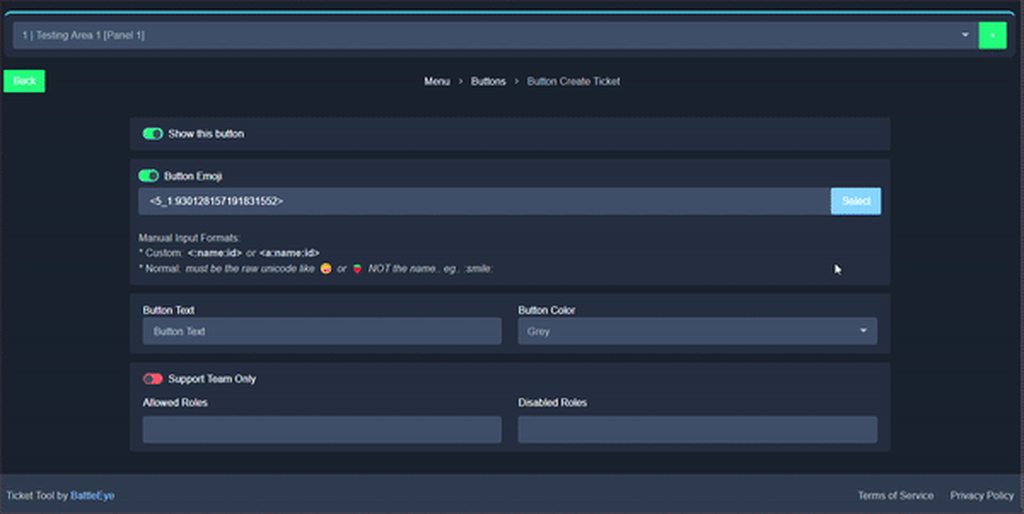
Invalid Form Body: Invalid emoji
This error indicates you have selected an invalid emoji, i.e. an emoji the bot isn't capable of using, in a button field
Which Emoji?
This depends upon which action the error is appearing, the most common cases are the Create Ticket button or one of your Dropdown emojis. You can visit your Button's List to find all available buttons and find the conflicting one by yourself.
Why doesn't the bot accept it as valid?
- You selected an emoji that doesn't exist anymore, i.e. that has been deleted
- You wrote text there, instead of an emoji (or in addition to an emoji)
- You entered a code for a custom emoji from a server that the bot is not a member of
- You entered a custom emoji code incorrectly
- You're on iPhone and entered an emoji using the phone's emoji pad (use the emoji selector in the website instead)
 white plank
ahh okay thank u!
 spiral schooner
 low viper
Hi, is it possible to use a form instead of a ticket?
I mean a simple form with 3–4 options that users can submit, we don’t need a ticket for this.
humble sequoiaBOT
A Discord Form lets the user answer individual questions in a pop-up Form, which then displays the answers in the ticket message. This can save time if you already know what you want to ask the user.
Setup Forms
Forms can be enabled under Panel Settings > Form Options > Edit Forms Options. In the new pop-up window, you can now enable and edit your own Form.
Form Options
You can add up to 5 questions in the Discord form. This is a Discord limitation. Each question can have a placeholder in the input field, a minimum and maximum input, multi-line, and also the option to have the answer required.
Options
Question Title ➞ Your Question goes here
Question Placeholder ➞ The placeholder text in the input field
Required ➞ If enabled, the user has to answer this question, to submit the form
Multi-Line Input ➞ Allows the user to input multiple lines
Minimum and Maximum Input ➞ Set a minimum and maximum input value for the user
Displaying the Answer
To display the answers from the user, you need to enable Auto display form results on the ticket message as an additional embed
If you don't want a second embed, go into your Panel Configs > Ticket Options > Edit Ticket Message. You use the variable {create.form.x} and replace x with the number of your question. For example, the response to Question 5 can be displayed with {create.form.5}.
 silent lava
@low viper read above
low viper
silent lava
<@918696769578233856> read above
Hi, but after submission it’s still creating a ticket. I only need a form, not a ticket.
silent lava
low viper
Hi, but after submission it’s still creating a ticket. I only need a form, not a...
That’s exactly how to do form via dashboard
low viper
silent lava
That’s exactly how to do form via dashboard
I’m really sorry, but it opens tickets after submitting the form. I’m not sure what’s going wrong 🥲
 cobalt crater
For some reason when I try to delte a panel it says an error when im saving changes "Major Config Mismatch", what do I do?
 foggy sparrow
 lethal salmon
Help aim spanish
lethal salmon
Help aim spanish
Como te pued o ayudar?
silent lava
cobalt crater
For some reason when I try to delte a panel it says an error when im saving chan...
You cannot delete a panel if you only have one.
cobalt crater
silent lava
You cannot delete a panel if you only have one.
Ohhh
 desert sapphire
Hey guys for a transcript to be saved, does the bot automatically save one of every ticket or do we need to manually click the button?
silent lava
desert sapphire
Hey guys for a transcript to be saved, does the bot automatically save one of ev...
Manually
 iron nightBOT
Gave +1 Rep to @silent lava (current: #85 - 19)
silent lava
For auto transcript that’s a premium feature
 low dagger
Some one please help me i am trying to setup ticket tool in my server but when i go to the website it just isnt showing the server i want
humble sequoiaBOT
Don't see your server in the dashboard?
Try using the Sync Servers button on your top center of the Dashboard page
If this doesn't work
You should relog from the dashboard, you can do this by clicking here to log out immediately, and then log back in
Note:
You need one of these 3 things to access the dashboard.
1. Server Owner (Level: 6)
2. Server Administrator (Level: 4)
3. Dashboard Role (Level: 2)
:warning: You can check your level using the </permissionlevel:1029797400174399542> command on your Discord Server
If the bot's response is:
- @User is permission level: 0 (User)
You don't have any of the 3 levels required to access the server's dashboard
 deft wedge
When I try to manage my server through your dashboard, I receive the following error:
“Request Failed – timeout of 60000ms exceeded (ECONNABORTED)”
I am the owner and administrator of the Discord server, and I have already tried the following steps:
Reinstalling the bot
Removing and reinviting it with administrator permissions
Checking all role permissions
Trying different browsers and using incognito mode
Refreshing and reconnecting my Discord account
Despite this, the issue persists and I am unable to access or manage the Ticket Tool configuration.
Could you please help me resolve this issue or let me know if there is a current outage?
Thank you for your support.
Best regards,
Sakura
It remains offline, even when I try to reactivate it, and a timeout message appears.
 low dagger
nvm i got it
 sturdy wharf
هم
 knotty haven
How do you make a log?
foggy sparrow
A log for what?
knotty haven
foggy sparrow
A log for what?
Ticket
foggy sparrow
Do you mean a transcript?
knotty haven
foggy sparrow
Do you mean a transcript?
No
 grizzled summit
$articket
humble sequoiaBOT

فريق الدعم الفني العربي
عميلنا العزيز ان كنت تبحث عن مساعدة يرجى فتح تكت خاص بفريق الدعم الفني العربي
اذهب الى#🎫│make-a-ticket
ثم قم بلضغط على الايموجي الاتي (🇯🇴)
knotty haven
If a ticket is opened and then closed, I want to have a separate record that I can review again.
humble sequoiaBOT
━━ User's inquiry has been moved to a ticket ━━
knotty haven
Do you understand what I mean?
foggy sparrow
Seems that your situation is being solved in a ticket you have made, I am afraid I can't help you now
knotty haven
foggy sparrow
Seems that your situation is being solved in a ticket you have made, I am afraid...
They've taken far too long, and I'd like to resolve the issue as quickly as possible because I have a server and need it fixed as soon as possible.
I hope you can help me, please.
foggy sparrow
I am sorry but you have to be patient
knotty haven
foggy sparrow
I am sorry but you have to be patient
Ok
desert sapphire
knotty haven
If a ticket is opened and then closed, I want to have a separate record that I c...
Isn't that just a transcript?
knotty haven
desert sapphire
Isn't that just a transcript?
I think
desert sapphire
knotty haven
I think
Did they help you in the ticket yet?
If not here's what you need to do
Make a new private channel in your server
Then go to the dashboard, open your current panel and then add a transcript channel,
After this whenever you close a ticket, before deleting it, transcript it
You will have a record of the entire ticket this way
foggy sparrow
desert sapphire
If not here's what you need to do
Make a new private channel in your server
Then...
Hey there, once there is a ticket, we can't do anything about it
knotty haven
desert sapphire
Did they help you in the ticket yet?
Thank you, my friend
iron nightBOT
Gave +1 Rep to @desert sapphire (current: #449 - 1)
lethal salmon
Aim spanish help me free acess
 upbeat spindle
What time can I report a bug in Bloxburg, does anyone know the schedules for the USA?
humble sequoiaBOT

⚠️ You're in the wrong place
We provide support for Ticket Tool Discord bot and cannot help you with whatever issue you have.
- We don't know which Support Team you should contact to get this issue resolved, and unfortunately we won't be able to accurately tell you.
If you don't have any further questions regarding our bot Ticket Tool, please close this ticket

Equipo de Soporte Español
Querido usuario, si está buscando ayuda, por favor abra un ticket para contactar al Equipo de Soporte Español. Diríjase a #🎫│make-a-ticket y presione el botón :flag_es:.
lethal salmon
Ya hice el ticket
 wild spire
lethal salmon
Ya hice el ticket
wild spire
lethal salmon
Ya hice el ticket
I dont see an open ticket in spanish from you 
 rare cove
Hi, the bot is in my server and I have logged in, but the dashboard does not display that specific server.
What should I do?
humble sequoiaBOT
Don't see your server in the dashboard?
Try using the Sync Servers button on your top center of the Dashboard page
If this doesn't work
You should relog from the dashboard, you can do this by clicking here to log out immediately, and then log back in
Note:
You need one of these 3 things to access the dashboard.
1. Server Owner (Level: 6)
2. Server Administrator (Level: 4)
3. Dashboard Role (Level: 2)
:warning: You can check your level using the </permissionlevel:1029797400174399542> command on your Discord Server
If the bot's response is:
- @User is permission level: 0 (User)
You don't have any of the 3 levels required to access the server's dashboard
silent lava
humble sequoia
@rare cove
rare cove
silent lava
<@407342486713794562>
thanks.
iron nightBOT
Gave +1 Rep to @silent lava (current: #84 - 20)
 long kelp
how do i make it ping
 humble sequoiaBOT
━━ User's inquiry has been moved to a ticket ━━
humble sequoiaBOT
Within all the messages the bot sends (both embeds and text) you can mention either channels, roles, or even users, these mentions will only send a notification to the user if they are used within a text field, e.g: a role mentioned in an embed won't ping at all the users who have that role.
For mentioning a role you can use one out of three options:
{@Role Name} ➞ Which is Case Sensitive.
{RoleID} ➞ Replace RoleId with the Id of the role you are trying to ping.
<@&RoleID> ➞ Discord's native syntax to ping roles.
<#ChannelID> ➞ Mention a channel by its ID.
<@UserID> ➞ Mention a user by its ID.
long kelp
where do i type it?
 stark igloo
Hello. I set up ticket tool and when I try and make a ticket I get this.
 foggy sparrow
stark igloo
Hello. I set up ticket tool and when I try and make a ticket I get this.
foggy sparrow
stark igloo
Hello. I set up ticket tool and when I try and make a ticket I get this.
It needs writing and reading message permissions
foggy sparrow
long kelp
where do i type it?
Dashboard ➞ Panel Configs ➞ Ticket ➞ Edit Ticket Message
long kelp
foggy sparrow
Dashboard ➞ Panel Configs ➞ Ticket ➞ Edit Ticket Message
I can't
foggy sparrow
Are you the owner of the server? Or have any authorization to invite apps to the server?
 silver hatch
Is there an order to erase all existing tickets?
scenic forum
⚠️ You're in the wrong place ⚠️
We provide support for the Discord Bot Ticket Tool and cannot help you with whatever issue you have.
- We don't know which Support Team you should contact to get this issue resolved, and unfortunately we won't be able to accurately tell you.
The user having ownership can use /purge
However no logs or transcripts will be made
Try reading what i just wrote
foggy sparrow
As happy said but being a bit blunt: WRONG SERVER
scenic forum
I recommend you attempt reading the message i have given you

JUST for the ticket tool discord bot as also stated in my message
So your messages and complaining are not associated to us in any form or way
stark igloo
foggy sparrow
It needs writing and reading message permissions
Thanks. Where do I update permissions?
iron nightBOT
Gave +1 Rep to @foggy sparrow (current: #113 - 10)
foggy sparrow
stark igloo
Thanks. Where do I update permissions?
$permissions
humble sequoiaBOT
When first invited to your server, Ticket Tool should have the permissions shown below in order to ensure an appropriate functioning:
When customizing permissions for the different ticket participants, you must make sure Ticket Tool has the permissions you want it to grant to others, you can learn more about this here.
Missing Permissions
This error is a direct outcome of the bot missing permissions as depicted above. When troubleshooting this error we suggest you go through these steps:
- Use the </debug:1029783024264564765> command to check if the bot is lacking core role or channel permissions.
- Compare the category/channel's overrides and contrast them with the bot's roles to identify any permission denial that is breaking the functioning
- If you can't still figure it out, let our <@&540295656720302081> know so they can guide you through
Additional Resources
- If you are a server administrator and would like to understand more how to set up your server's permissions, we suggest checking the Discord Support Knowledge Base
- If you are a bot developer and are interested in the internal permission hierarchy we suggest you this part of the Discord Developer Docs
Important Note
- Giving Administrator permissions is NOT required and we do NOT encourage you to do unless you are trying to troubleshoot your permissions setup.
 foggy sparrow
stark igloo
Thanks. Where do I update permissions?
foggy sparrow
stark igloo
Thanks. Where do I update permissions?
Read above ^^
foggy sparrow
No worries!!
 uneven lance
How is it failed
 scenic forum
uneven lance
How is it failed
scenic forum
uneven lance
How is it failed
use /debug in the transcript channel
uneven lance
Er
 scenic forum
uneven lance
Er
scenic forum
uneven lance
Er
Bot is missing the view channel permission inside that channel
uneven lance
How do I give perms?
scenic forum
uneven lance
How do I give perms?
Via channel permissions
 deep moss
uneven lance
scenic forum
Via channel permissions
deep moss
uneven lance
scenic forum
Via channel permissions
There's nothing
scenic forum
uneven lance
There's nothing
Thats not possible
 timber violet
when i close the ticket this appear

 glass heath
i want my members to be able to click a button like “create a ticket” and open a new ticket with me and certain roles. anyone know how?
 silent lava
glass heath
i want my members to be able to click a button like “create a ticket” and open a...
silent lava
glass heath
i want my members to be able to click a button like “create a ticket” and open a...
Yes edit the ticket msg
humble sequoiaBOT
Within all the messages the bot sends (both embeds and text) you can mention either channels, roles, or even users, these mentions will only send a notification to the user if they are used within a text field, e.g: a role mentioned in an embed won't ping at all the users who have that role.
For mentioning a role you can use one out of three options:
{@Role Name} ➞ Which is Case Sensitive.
{RoleID} ➞ Replace RoleId with the Id of the role you are trying to ping.
<@&RoleID> ➞ Discord's native syntax to ping roles.
<#ChannelID> ➞ Mention a channel by its ID.
<@UserID> ➞ Mention a user by its ID.
silent lava
Read this and above
How to automatically ping my support team on a ticket?
- Open your Panel Configs tab in your server's dashboard
- Select the panel you want to ping your support team on
- Open the Ticket options menu
- Click on Edit Ticket Message
- In the Message Content use one of the role mention syntax ({@Role Name} / {Role ID})
- Save changes
Note: For this to work properly, Ticket Tool requires the Mention Everyone permission. Or the role must have the Allow anyone to mention this role setting enabled
timber violet
silent lava
Make sure u enable this
same problem
 lost tiger
i need hel[
silent lava
timber violet
same problem
Can u show me what emoji did u choose
lost tiger
help
humble sequoiaBOT
Hello, we would love to help you, but if you don't tell us what you need help with we can't help you :(
lost tiger
2 questions
One, whats the difference between both of these ticket tool bots?
second
timber violet
silent lava
Can u show me what emoji did u choose
this one
 lost tiger
so why isnt it showing up on the website?

 humble sequoiaBOT
Don't see your server in the dashboard?
Try using the Sync Servers button on your top center of the Dashboard page
If this doesn't work
You should relog from the dashboard, you can do this by clicking here to log out immediately, and then log back in
Note:
You need one of these 3 things to access the dashboard.
1. Server Owner (Level: 6)
2. Server Administrator (Level: 4)
3. Dashboard Role (Level: 2)
:warning: You can check your level using the </permissionlevel:1029797400174399542> command on your Discord Server
If the bot's response is:
- @User is permission level: 0 (User)
You don't have any of the 3 levels required to access the server's dashboard
silent lava
humble sequoia
@lost tiger read above
lost tiger
k
timber violet
ok
 humble sequoiaBOT

Ticket Tool - Ticketing without clutter - The #1 Discord support bot
silent lava
Try using this link
lost tiger
exact same one im using still doesnt work
timber violet
silent lava
Do it
same problem
silent lava
lost tiger
Make sure that the bot have the req perms
humble sequoiaBOT
When first invited to your server, Ticket Tool should have the permissions shown below in order to ensure an appropriate functioning:
When customizing permissions for the different ticket participants, you must make sure Ticket Tool has the permissions you want it to grant to others, you can learn more about this here.
Missing Permissions
This error is a direct outcome of the bot missing permissions as depicted above. When troubleshooting this error we suggest you go through these steps:
- Use the </debug:1029783024264564765> command to check if the bot is lacking core role or channel permissions.
- Compare the category/channel's overrides and contrast them with the bot's roles to identify any permission denial that is breaking the functioning
- If you can't still figure it out, let our <@&540295656720302081> know so they can guide you through
Additional Resources
- If you are a server administrator and would like to understand more how to set up your server's permissions, we suggest checking the Discord Support Knowledge Base
- If you are a bot developer and are interested in the internal permission hierarchy we suggest you this part of the Discord Developer Docs
Important Note
- Giving Administrator permissions is NOT required and we do NOT encourage you to do unless you are trying to troubleshoot your permissions setup.
it has all those perms
 silent lava
lost tiger
didnt work
silent lava
lost tiger
didnt work
Do u have administrator perms
lost tiger
yep
silent lava
That’s weird
lost tiger
this happens so many times to me
would u like to join the server yourself and try it out?
scenic forum
lost tiger
this happens so many times to me
Did you log out and back in?
lost tiger
yep
silent lava
Hm?
lost tiger
i tried everything
lost tiger
ur a cool man
scenic forum
lost tiger
ur a cool man
Can you show being logged out on the site please
lost tiger
wdym?
scenic forum
lost tiger
wdym?
Log out of the site and show that youre logged out
lost tiger
i logged back in, and he fixed it
scenic forum
lost tiger

 ebon harbor
Can i do simple maths with the bot?
Preferably using forms answers to multiply something
 undone anvil
humble sequoiaBOT
undone anvil
humble sequoiaBOT
━━ User's inquiry has been moved to a ticket ━━
 queen slate
can someone help me
humble sequoiaBOT
Hello, we would love to help you, but if you don't tell us what you need help with we can't help you :(
lost tiger
humble sequoia
he needs help for gods sake 😆
queen slate
the bot keeps saying it application did not respond and im confused the role is above all the others
silent lava
queen slate
the bot keeps saying it application did not respond and im confused the role is ...
If the bot isn't responding when doing /debug
Its lacking these 3 permissions inside the channel it has been used in view channel, send message and embed links
queen slate
alr thanks man
 halcyon flame
Yoo, can I make it with questions?
humble sequoiaBOT
A Discord Form lets the user answer individual questions in a pop-up Form, which then displays the answers in the ticket message. This can save time if you already know what you want to ask the user.
Setup Forms
Forms can be enabled under Panel Settings > Form Options > Edit Forms Options. In the new pop-up window, you can now enable and edit your own Form.
Form Options
You can add up to 5 questions in the Discord form. This is a Discord limitation. Each question can have a placeholder in the input field, a minimum and maximum input, multi-line, and also the option to have the answer required.
Options
Question Title ➞ Your Question goes here
Question Placeholder ➞ The placeholder text in the input field
Required ➞ If enabled, the user has to answer this question, to submit the form
Multi-Line Input ➞ Allows the user to input multiple lines
Minimum and Maximum Input ➞ Set a minimum and maximum input value for the user
Displaying the Answer
To display the answers from the user, you need to enable Auto display form results on the ticket message as an additional embed
If you don't want a second embed, go into your Panel Configs > Ticket Options > Edit Ticket Message. You use the variable {create.form.x} and replace x with the number of your question. For example, the response to Question 5 can be displayed with {create.form.5}.
silent lava
@halcyon flame read above
halcyon flame
Can I get the link to set it up?
halcyon flame
silent lava
<@1473162496264372234> read above
Like the link to set up
humble sequoiaBOT
Ticket Tool - Ticketing without clutter - The #1 Discord support bot
halcyon flame
Kk, thank u very much
silent lava

 mild vortex
Disculpen, alguien sabe como puedo solucionar esto? No se como hacerlo o que debo hacer o a donde debo ingresar correctamente, cualquier ayuda estaría agradecido

 south jackal
Hi! Does anyone know why this is being sold?

 humble sequoiaBOT
Don't see your server in the dashboard?
Try using the Sync Servers button on your top center of the Dashboard page
If this doesn't work
You should relog from the dashboard, you can do this by clicking here to log out immediately, and then log back in
Note:
You need one of these 3 things to access the dashboard.
1. Server Owner (Level: 6)
2. Server Administrator (Level: 4)
3. Dashboard Role (Level: 2)
:warning: You can check your level using the </permissionlevel:1029797400174399542> command on your Discord Server
If the bot's response is:
- @User is permission level: 0 (User)
You don't have any of the 3 levels required to access the server's dashboard
silent lava
humble sequoia
@south jackal
south jackal
silent lava
<@635542688598589460>
 silent lava
south jackal
silent lava
south jackal
Is that a premium tt bot?
south jackal
silent lava
Is that a premium tt bot?
yup
silent lava
south jackal
yup
It seems like you have enabled the premium bot but haven't invited it yet
south jackal
silent lava
It seems like you have enabled the premium bot but haven't invited it yet
Huh? How do I invite him?
humble sequoiaBOT
The first thing you will need to do is invite the premium bot, an invite can be found here
Once the bot is in your server we will head to the dashboard and manage your server. When you are managing your server, you want to head into "Server Configs" then click the drop down menu under "Select the bot you would like to use on this server" then click "Ticket Tool#6207" and then save.
 silent lava
There mate
silent lava
humble sequoia
@south jackal Lmk if it work
south jackal
silent lava
<@635542688598589460> Lmk if it work
I cannot access the dashboard even though I am an administrator.
 humble sequoiaBOT
Don't see your server in the dashboard?
Try using the Sync Servers button on your top center of the Dashboard page
If this doesn't work
You should relog from the dashboard, you can do this by clicking here to log out immediately, and then log back in
Note:
You need one of these 3 things to access the dashboard.
1. Server Owner (Level: 6)
2. Server Administrator (Level: 4)
3. Dashboard Role (Level: 2)
:warning: You can check your level using the </permissionlevel:1029797400174399542> command on your Discord Server
If the bot's response is:
- @User is permission level: 0 (User)
You don't have any of the 3 levels required to access the server's dashboard
silent lava
humble sequoia
@south jackal
foggy sparrow
mild vortex
Disculpen, alguien sabe como puedo solucionar esto? No se como hacerlo o que deb...
Buenas, eres admin o tienes permisos de meter apps al servidor?
Si es asi, tienes que cerrar algunos tickets para poder abrir otros. Si no tienes permisos, lo mejor es o notificar a los admins y esperar.
mild vortex
foggy sparrow
Buenas, eres admin o tienes permisos de meter apps al servidor?
No, no soy admin pero no se como hacer eso, igualmente gracias por su atención
foggy sparrow
Claro!!
 bitter crane
Algún admin qué me pueda ayudar?
 blissful cipher
When making a ticket for a panel, it is not giving any support team role permissions

 foggy sparrow
bitter crane
Algún admin qué me pueda ayudar?
foggy sparrow
bitter crane
Algún admin qué me pueda ayudar?
Pa que o que
 humble sequoiaBOT
⚠️ Está en el lugar equivocado
Brindamos soporte para el bot de Discord Ticket Tool y no le podemos ayudar con el problema que presenta.
- No sabemos a que equipo de soporte debería contactar para solucionar este problema, y desafortunadamente no podremos ayudarle acertadamente.
Si no tiene alguna duda relacionada a nuestro bot, Ticket Tool, por favor cierre este ticket.
bitter crane
 foggy sparrow
bitter crane
foggy sparrow
bitter crane
Estas en el sitio equivocado, lastimosamente no lo podemos ayudar
Y ni sabemos a donde dirigirlo
bitter crane
No sabría quien me podría ayudar
foggy sparrow
Nope
 ashen pulsar
What exactly is the transcript channel?
Nvm, I think I got it
Basically where the messages of a ticket are saved, right?
 slender minnow
ashen pulsar
Basically where the messages of a ticket are saved, right?
slender minnow
ashen pulsar
Basically where the messages of a ticket are saved, right?
Yes
ashen pulsar
slender minnow
Yes
Yea, I figured it out
desert sapphire
foggy sparrow
Hey there, once there is a ticket, we can't do anything about it
Okay Ig will keep it in mind next time
 unique lava
hiii, I can't configure my server with the bot. When I try to access the dashboard to configure it, an old server appears that I'm no longer on, and the current one doesn't work. I've already removed and added the bot twice, and it didn't work. When I try to update the option to show other servers, it says there was an error.

 grand harbor
Hi
 thorn halo
unique lava
hiii, I can't configure my server with the bot. When I try to access the dashboa...
thorn halo
unique lava
hiii, I can't configure my server with the bot. When I try to access the dashboa...
please attempt to log out ( https://tickettool.xyz/logout ) and log back into the dashboard
if this doesnt work, show me ticket tools response to /permissionlevel
 winged lichen
Okay so I have the bot set up so that when they join, they verify. But how would I go about having the ticket take them specifically to a roles channel, then having them select their roles which unlock access to certain content?
unique lava
thorn halo
please attempt to log out ( <https://tickettool.xyz/logout> ) and log back into ...
IT WORKED! THANK YOU!
iron nightBOT
Gave +1 Rep to @thorn halo (current: #59 - 43)
unique lava
south jackal
Hola
Como hago que el canal se borre automaticamente?

How do I make the channel automatically delete itself?
 sly ivy
why wont my server show up on the dashboard
silent lava
south jackal
Como hago que el canal se borre automaticamente?
The auto delete is a premium feature
south jackal
silent lava
The auto delete is a premium feature
Yup, Im premium
humble sequoiaBOT
With Ticket Tool's automation, you'll be able to customize your ticket system workflow! Using the Automation Editor you can:
- Chose out of 6 different triggers
- Set a Message Watcher to wait for a message for a given time, or to wait for the absence of them
- Add delays on the execution of actions after the trigger or watcher finds a message!
Automation Command
Automations can be stopped, by running the /automation stop command inside the ticket you want it to stop in. Restart it with /automation start You'll also be able to view the current status of the automations with /automation.
__Important Notes__
- Automation is on ALPHA TESTING PHASE, things might work unexpectedly or not at all.
- Any automation will run for a maximum of 7 days or until the ticket is closed, afterward, it will stop checking
+ You can have 5 automations per panel

$auto
silent lava
humble sequoia
@south jackal
 minor skiff
как его перевести на русский?
 iron gull
How can I fix the second message
 scenic forum
iron gull
How can I fix the second message
scenic forum
iron gull
How can I fix the second message
Invalid Form Body: Invalid emoji
This error indicates you have selected an invalid emoji, i.e. an emoji the bot isn't capable of using, in a button field
Which Emoji?
This depends upon which action the error is appearing, the most common cases are the Create Ticket button or one of your Dropdown emojis. You can visit your Button's List to find all available buttons and find the conflicting one by yourself.
Why doesn't the bot accept it as valid?
- You selected an emoji that doesn't exist anymore, i.e. that has been deleted
- You wrote text there, instead of an emoji (or in addition to an emoji)
- You entered a code for a custom emoji from a server that the bot is not a member of
- You entered a custom emoji code incorrectly
- You're on iPhone and entered an emoji using the phone's emoji pad (use the emoji selector in the website instead)
iron gull
All mojos are showing tho
scenic forum
iron gull
All mojos are showing tho
iron gull
Does the emoji need to exist in the same server
scenic forum
iron gull
Does the emoji need to exist in the same server
Read the message again
iron gull
alright thank you
iron gull
scenic forum
Read the message again
Do I have to resend this message?

I updated the emoji and it’s still showing the error
scenic forum
iron gull
Do I have to resend this message?
When exactly does the error appear
iron gull
Whenever anyone opens a ticket from any of the dropdown options
scenic forum
iron gull
Whenever anyone opens a ticket from any of the dropdown options
Show me a screenshot of the close button
iron gull
scenic forum
Show me a screenshot of the close button
Inside tickets or you mean on the dashboard
scenic forum
Dashboard
 minor skiff
как его перевести на русский?
scenic forum
iron gull
Please #🎫│make-a-ticket
 peak jay
i added the ticket tool but it doesnt show on the dashboard
i am owner
and ticket is added to the server
humble sequoiaBOT
Don't see your server in the dashboard?
Try using the Sync Servers button on your top center of the Dashboard page
If this doesn't work
You should relog from the dashboard, you can do this by clicking here to log out immediately, and then log back in
Note:
You need one of these 3 things to access the dashboard.
1. Server Owner (Level: 6)
2. Server Administrator (Level: 4)
3. Dashboard Role (Level: 2)
:warning: You can check your level using the </permissionlevel:1029797400174399542> command on your Discord Server
If the bot's response is:
- @User is permission level: 0 (User)
You don't have any of the 3 levels required to access the server's dashboard
silent lava
humble sequoia
@peak jay read this
iron nightBOT
Gave +1 Rep to @silent lava (current: #81 - 21)
 spice remnant
Is there a way to recover a lost account?
humble sequoiaBOT
⚠️ You're in the wrong place
We provide support for Ticket Tool Discord bot and cannot help you with whatever issue you have.
- We don't know which Support Team you should contact to get this issue resolved, and unfortunately we won't be able to accurately tell you.
If you don't have any further questions regarding our bot Ticket Tool, please close this ticket
 ancient atlas
i got the premium, but it doesnt activate, what do i do?
scenic forum
ancient atlas
i got the premium, but it doesnt activate, what do i do?
Press  at the top left on your servers dashboard
scenic forum
ancient atlas
nothing chagnes
Can you show having gotten the premium
 mint hawk
I invited the ticket tool in my friends server i have it on my own server but on my friends server it doesnt show on dashboard help
humble sequoiaBOT
Don't see your server in the dashboard?
Try using the Sync Servers button on your top center of the Dashboard page
If this doesn't work
You should relog from the dashboard, you can do this by clicking here to log out immediately, and then log back in
Note:
You need one of these 3 things to access the dashboard.
1. Server Owner (Level: 6)
2. Server Administrator (Level: 4)
3. Dashboard Role (Level: 2)
:warning: You can check your level using the </permissionlevel:1029797400174399542> command on your Discord Server
If the bot's response is:
- @User is permission level: 0 (User)
You don't have any of the 3 levels required to access the server's dashboard
silent lava
humble sequoia
@mint hawk
silent lava
Enjoy
 hazy yacht
Can Somone help me when i use ticket tool i need it to ping a role but i dont know how
humble sequoiaBOT
━━ User's inquiry has been moved to a ticket ━━
 ripe dove
What do i do here?
 scenic forum
ripe dove
What do i do here?
scenic forum
ripe dove
What do i do here?
Only a staff can fix it
ripe dove
Yeah, I'm a staff
It's on my friends server, I'm a staff for them, that's a pic from one of the members
scenic forum
ripe dove
Yeah, I'm a staff
Hey there!
«You don't have permissions to use this»
👉 Server Configs -> Blacklist Roles
Any roles there will be unable to interact with the bot in any way, including creating tickets.👉 Panel Configs -> Buttons -> Create Ticket -> Support team only
If this is enabled, only your staff will be able to use the button.
** 👉 Panel Configs -> Buttons -> Create Ticket -> Disabled Roles**
Any roles there will be unable to use the button.
ripe dove
And i gotta go on the panel to do that right?
scenic forum
ripe dove
And i gotta go on the panel to do that right?
Dashboard, yes
ripe dove
Okay thanks
iron gull
if i put two categories for a ticket
does it switch to the second open when the first is full?
scenic forum
iron gull
if i put two categories for a ticket
does it switch to the second open when the ...
yes
iron nightBOT
Gave +1 Rep to @scenic forum (current: #8 - 866)
ripe dove
Thanks @scenic forum
iron nightBOT
Gave +1 Rep to @scenic forum (current: #8 - 867)
ripe dove
Ayeee, thanks @scenic forum
 scenic forum
 echo swan
Does anyone know what instructions a ticket-issuing robot needs to mark a specific identity group when opening tickets?
🙇

I mean this one
Excuse me, can anyone answer me? Thank you.
scenic forum
echo swan
How to automatically ping my support team on a ticket?
1. Open your Panel Configs tab in your server's dashboard
2. Select the panel you want to ping your support team on
3. Open the Ticket options menu
4. Click on Edit Ticket Message
5. In the Message Content use one of the role mention syntax ({@Role Name}/{Role ID})
6. Save changes
Note: For this to work properly, Ticket Tool requires the Mention Everyone permission. Or the role must have the Allow anyone to @mention this role setting enabled
echo swan
Thanks, I‘ll try it right now. Thank you for your answer.
Thanks, I have already succeeded.
 quick summit
Bot ded?
 covert swallow
echo swan
silent lava
Enjoy
covert swallow
echo swan
silent lava
Enjoy
Thanks, @silent lava @scenic forum Good luck for you.
iron nightBOT
Gave +1 Rep to @silent lava (current: #79 - 22)
Gave +1 Rep to @scenic forum (current: #8 - 868)
echo swan
 errant wigeon
I keep getting this error can someone help
 silent lava
errant wigeon
I keep getting this error can someone help
silent lava
errant wigeon
I keep getting this error can someone help
If the bot isn't responding when doing /debug
Its lacking these 3 permissions inside the channel it has been used in view channel, send message and embed links
humble sequoiaBOT
When first invited to your server, Ticket Tool should have the permissions shown below in order to ensure an appropriate functioning:
When customizing permissions for the different ticket participants, you must make sure Ticket Tool has the permissions you want it to grant to others, you can learn more about this here.
Missing Permissions
This error is a direct outcome of the bot missing permissions as depicted above. When troubleshooting this error we suggest you go through these steps:
- Use the </debug:1029783024264564765> command to check if the bot is lacking core role or channel permissions.
- Compare the category/channel's overrides and contrast them with the bot's roles to identify any permission denial that is breaking the functioning
- If you can't still figure it out, let our <@&540295656720302081> know so they can guide you through
Additional Resources
- If you are a server administrator and would like to understand more how to set up your server's permissions, we suggest checking the Discord Support Knowledge Base
- If you are a bot developer and are interested in the internal permission hierarchy we suggest you this part of the Discord Developer Docs
Important Note
- Giving Administrator permissions is NOT required and we do NOT encourage you to do unless you are trying to troubleshoot your permissions setup.
Thanks
iron nightBOT
Gave +1 Rep to @silent lava (current: #77 - 23)
 restive dust
how do i do something like this?

@silent lava maybe u could help would appreciate it !
like i dont want this to be include
the webhook only the reaction button ? (first image i showed)
 scenic forum
restive dust
how do i do something like this?
scenic forum
restive dust
how do i do something like this?
Are you on pc or phone
restive dust
scenic forum
Are you on pc or phone
pc / i can do it on mobile if u want me to use mobile?
@scenic forum
scenic forum
restive dust
pc / i can do it on mobile if u want me to use mobile?
If you hover with your mouse over the embed box a small x should appear on the top right of it
Click it
In discord not the dashboard
restive dust
scenic forum
In discord not the dashboard
oh that simple ?!
scenic forum
restive dust
oh that simple ?!
Yes
restive dust
omg it worked thank you so much! so when ppl clcik the button it woudnt appear back again right?
ah okay okay
scenic forum
restive dust
omg it worked thank you so much! so when ppl clcik the button it woudnt appear b...
Once the embed is removed it cannot come back naturally
restive dust
thank you @scenic forum
iron nightBOT
Gave +1 Rep to @scenic forum (current: #8 - 869)
restive dust
scenic forum
Once the embed is removed it cannot come back naturally
another question if u woudnt mind me asking
how can i do something like this? like its where when a person click the button it shows an question adn u have to fill it and when it creats the ticket itll show this?
 minor skiff
Можно ли с комьютера зайти на сайт тикет тулл? если да то что делать если у меня тупо темно-синий экран а текста нету
Is it possible to access the ticket toll website from a computer? If so, what should I do if I have a dark blue screen with no text?
humble sequoiaBOT
A Discord Form lets the user answer individual questions in a pop-up Form, which then displays the answers in the ticket message. This can save time if you already know what you want to ask the user.
Setup Forms
Forms can be enabled under Panel Settings > Form Options > Edit Forms Options. In the new pop-up window, you can now enable and edit your own Form.
Form Options
You can add up to 5 questions in the Discord form. This is a Discord limitation. Each question can have a placeholder in the input field, a minimum and maximum input, multi-line, and also the option to have the answer required.
Options
Question Title ➞ Your Question goes here
Question Placeholder ➞ The placeholder text in the input field
Required ➞ If enabled, the user has to answer this question, to submit the form
Multi-Line Input ➞ Allows the user to input multiple lines
Minimum and Maximum Input ➞ Set a minimum and maximum input value for the user
Displaying the Answer
To display the answers from the user, you need to enable Auto display form results on the ticket message as an additional embed
If you don't want a second embed, go into your Panel Configs > Ticket Options > Edit Ticket Message. You use the variable {create.form.x} and replace x with the number of your question. For example, the response to Question 5 can be displayed with {create.form.5}.
scenic forum
restive dust
another question if u woudnt mind me asking
how can i do something like this? l...
Check above
scenic forum
minor skiff
Is it possible to access the ticket toll website from a computer? If so, what sh...
Please #🎫│make-a-ticket
minor skiff
scenic forum
Please <#571706435449257997>
I don't know English well, can you answer me?
scenic forum
minor skiff
I don't know English well, can you answer me?
I cannot as I do not know the solution
Please make a ticket as stated
minor skiff
scenic forum
I cannot as I do not know the solution
Please make a ticket as stated
OK,sps
silent lava
restive dust
<@1333448368781000774> maybe u could help would appreciate it !
Oh I’m late
Ggs
silent lava
 twin thorn
Ticket started showing oubcily
twin thorn
Ticket started showing oubcily
Can u show me what error
twin thorn
My member said he can side the tickets created by other members, it should be private
@silent lava I need to fix asap, lots of costumer info
silent lava
twin thorn
<@1333448368781000774> I need to fix asap, lots of costumer info
Can u show me the error
twin thorn
I don’t know bro
My members start saying they can see private tickets out of no where
silent lava
Jt ss?
twin thorn
Idk how to fix
silent lava
Oh I gwt it
twin thorn
They’re sending ME screenshots of them being able to see private tickets s
Pls I need help I’m to stupid w discord
restive dust
scenic forum
Check above
thank you @scenic forum
iron nightBOT
Gave +1 Rep to @scenic forum (current: #8 - 870)
restive dust
silent lava
Oh I’m late
ur good lol
scenic forum
twin thorn
<@1333448368781000774> I need to fix asap, lots of costumer info
Please be patient and don't ping
 topaz tangle
i need help
silent lava
twin thorn
They’re sending ME screenshots of them being able to see private tickets s
Panel config -> Permissions -> Everyone permissions -> Edit open and closed -> View channel ❎
restive dust
humble sequoia
quick question so sorry panel setting like panel config right? (@ me when available :)) )
scenic forum
restive dust
quick question so sorry panel setting like panel config right? (@ me when availa...
Yes
restive dust
scenic forum
Yes
got it found it thank you!
iron nightBOT
Gave +1 Rep to @scenic forum (current: #8 - 871)
restive dust
sorry another one 😭 why cant i click this part?
 scenic forum
restive dust
sorry another one 😭 why cant i click this part?
scenic forum
restive dust
sorry another one 😭 why cant i click this part?
All darkened fields require premium to edit
restive dust
scenic forum
All darkened fields require premium to edit
ohhh wait so i cant do something like this?

like bot will mention me / msg
scenic forum
restive dust
sorry another one 😭 why cant i click this part?
You're trying to edit the panel message (the ticket creator box) not the ticket message
humble sequoiaBOT
The Ticket Message is the first message sent by the bot on a new ticket. To customize it head over to your Dashboard ➞ Panel Configs ➞ Ticket ➞ Edit Ticket Message
 restive dust
scenic forum
You're trying to edit the panel message (the ticket creator box) not the ticket ...
restive dust
scenic forum
You're trying to edit the panel message (the ticket creator box) not the ticket ...
ah i knew i did something wrong lol thank you sm
iron nightBOT
Gave +1 Rep to @scenic forum (current: #8 - 872)
 ivory bear
I want support
foggy sparrow
How can I help?
humble sequoiaBOT
Hello, we would love to help you, but if you don't tell us what you need help with we can't help you :(
foggy sparrow
humble sequoia
@topaz tangle Read above
 craggy marlin
what
 silent lava
craggy marlin
what
silent lava
craggy marlin
what
Jt change the category cuz that has reached its limit
 wind halo
Hello, good morning. A question: could someone help me with an unban? Without reason, I don't know when it happened or why, but I was permanently banned. It doesn't say the motive or reason, but I can't play my favorite game again. That was my favorite game. Please help.
 blissful shuttle
anyone know why it says i have an outgoing ticket although i haven’t sent anything
 silent lava
 lean gyro
If the bot isn't responding when doing /debug
Its lacking these 3 permissions inside the channel it has been used in view channel, send message and embed links
humble sequoiaBOT
When first invited to your server, Ticket Tool should have the permissions shown below in order to ensure an appropriate functioning:
When customizing permissions for the different ticket participants, you must make sure Ticket Tool has the permissions you want it to grant to others, you can learn more about this here.
Missing Permissions
This error is a direct outcome of the bot missing permissions as depicted above. When troubleshooting this error we suggest you go through these steps:
- Use the </debug:1029783024264564765> command to check if the bot is lacking core role or channel permissions.
- Compare the category/channel's overrides and contrast them with the bot's roles to identify any permission denial that is breaking the functioning
- If you can't still figure it out, let our <@&540295656720302081> know so they can guide you through
Additional Resources
- If you are a server administrator and would like to understand more how to set up your server's permissions, we suggest checking the Discord Support Knowledge Base
- If you are a bot developer and are interested in the internal permission hierarchy we suggest you this part of the Discord Developer Docs
Important Note
- Giving Administrator permissions is NOT required and we do NOT encourage you to do unless you are trying to troubleshoot your permissions setup.
Thanks @silent lava
iron nightBOT
Gave +1 Rep to @silent lava (current: #77 - 24)
 silk spire
hi anyone able to help? I have invited bot to discord and given the correct permissions, but it is not showing up on the dashboard so i am unable to manage from the website
humble sequoiaBOT
Don't see your server in the dashboard?
Try using the Sync Servers button on your top center of the Dashboard page
If this doesn't work
You should relog from the dashboard, you can do this by clicking here to log out immediately, and then log back in
Note:
You need one of these 3 things to access the dashboard.
1. Server Owner (Level: 6)
2. Server Administrator (Level: 4)
3. Dashboard Role (Level: 2)
:warning: You can check your level using the </permissionlevel:1029797400174399542> command on your Discord Server
If the bot's response is:
- @User is permission level: 0 (User)
You don't have any of the 3 levels required to access the server's dashboard
 silk spire
yeah thanks to your help. I needed to log out and in again
south jackal
How do I continue the ticket? I have 3 buttons and each button starts the counter at 1
 thorn halo
south jackal
How do I continue the ticket? I have 3 buttons and each button starts the counte...
thorn halo
south jackal
How do I continue the ticket? I have 3 buttons and each button starts the counte...
Hey there, each button is tied to its own panel, and each panel will be tied to its own count
You are not able to merge multiple panels to use the same counter
south jackal
Consulta
Donde puedo configurar para que los usuarios no puedan cerrar sus propios tickets?
Where can I configure so that users cannot close their own tickets?
 half bear
@humble sequoia
 wise crag
Can you help me remove my Roblox ban? My username is isainsz pls
scenic forum
wise crag
Can you help me remove my Roblox ban? My username is isainsz pls
⚠️ You're in the wrong place ⚠️
We provide support for the Discord Bot Ticket Tool and cannot help you with whatever issue you have.
- We don't know which Support Team you should contact to get this issue resolved, and unfortunately we won't be able to accurately tell you.
 vivid island
I got banned from Death Ball for using Flash to make my phone smoother. 😭💔
I just wanted to make my phone smoother for gaming.

 foggy sparrow
Seems crazy what I'm bout to say
humble sequoiaBOT
⚠️ You're in the wrong place
We provide support for Ticket Tool Discord bot and cannot help you with whatever issue you have.
- We don't know which Support Team you should contact to get this issue resolved, and unfortunately we won't be able to accurately tell you.
If you don't have any further questions regarding our bot Ticket Tool, please close this ticket
vivid island
I'm Brazilian and I don't understand any English, I just need some help.
humble sequoiaBOT
Você está no lugar errado
Fornecemos suporte para Ticket Tool Discord bot e não podemos ajudá-lo com qualquer problema que você tenha.
- Não sabemos qual equipe de suporte você deve entrar em contato para resolver esse problema e, infelizmente, não poderemos informar com precisão.
Se você não tiver mais dúvidas sobre nossa ferramenta de ticket de bot, feche este ticket
 modest jolt
Hi, I'm Italian and I made a purchase by mistake on the game and I ask for a refund if it's possible, would it be possible to converse in Italian?
humble sequoiaBOT
⚠️ You're in the wrong place
We provide support for Ticket Tool Discord bot and cannot help you with whatever issue you have.
- We don't know which Support Team you should contact to get this issue resolved, and unfortunately we won't be able to accurately tell you.
If you don't have any further questions regarding our bot Ticket Tool, please close this ticket
 worn phoenix
Queria saber se tem como configurar pra quando criar algum ticket ficar,
1
2
3

Pra não juntar todos os ticket que ja foram criados no server
 fair abyss
Hello, I’m trying to integrate a custom bot with a ticket tool.
When many commands are sent at once, the bot stops accepting commands, so I implemented my own rate limit to allow execution only once every 5 seconds. However, even with this limit, the bot stops accepting commands for a while after about three executions.
Is it possible to know the rate limit that the ticket tool applies to commands received via another bot’s prefix?
 cosmic nexus
i need help
humble sequoiaBOT
Hello, we would love to help you, but if you don't tell us what you need help with we can't help you :(
 void sluice
how do i delete the ticket embed message and just keep the button
silent lava
void sluice
how do i delete the ticket embed message and just keep the button
Menu->TicketMessage-> Ticket
Open the embed editor and then open the field editor
**Note:it's a premium feature  **
**
 amber basin
Any idea why when I open a ticket in my server, it doesn't ping the supporter role?
silent lava
How to automatically ping my support team on a ticket?
- Open your Panel Configs tab in your server's dashboard
- Select the panel you want to ping your support team on
- Open the Ticket options menu
- Click on Edit Ticket Message
- In the Message Content use one of the role mention syntax {@Role Name} / {Role ID}
- Save changes
Note: For this to work properly, Ticket Tool requires the Mention Everyone permission. Or the role must have the Allow anyone to mention this role setting enabled
silent lava
silent lava
How to automatically ping my support team on a ticket?
1. Open your Panel Config...
@amber basin
amber basin
silent lava
<@1164693365611319356>
 silent lava
amber basin
silent lava
amber basin
Yes save it then re send the ticket
 frozen nova

 somber cairn
Hi, please help me. I'm going through verification, but nothing's happening! ((

How to pass this verification (
humble sequoiaBOT
⚠️ You're in the wrong place
We provide support for Ticket Tool Discord bot and cannot help you with whatever issue you have.
- We don't know which Support Team you should contact to get this issue resolved, and unfortunately we won't be able to accurately tell you.
If you don't have any further questions regarding our bot Ticket Tool, please close this ticket
 strange veldt
i cant use premuim options when i try to use 7-days trials
 worldly helm
strange veldt
i cant use premuim options when i try to use 7-days trials
worldly helm
strange veldt
i cant use premuim options when i try to use 7-days trials
Hey! 👋
Please click the button on your dashboard and then try again
strange veldt
worldly helm
Hey! 👋
Please click the <:sync:1265738463534387301> button on your dashboard a...
now* its working thanks early i press many times
iron nightBOT
Gave +1 Rep to @worldly helm (current: #5 - 1087)
scenic forum
 sly salmon
Why the ticket tool says there's to many tickets
sly salmon
Why the ticket tool says there's to many tickets
Because theres too many tickets
sly salmon
But it's take too long to delete them
scenic forum
sly salmon
But it's take too long to delete them
I dont exactly know what youre asking here
sly salmon
It says there are to many tickets and if I delete one I can create ticket but then it says again to many tickets I have to delete them all
Is there a way to delete them faster?
scenic forum
sly salmon
Is there a way to delete them faster?
If youre the owner you can use /purge
That will delete all tickets but without logs and transcripts
sly salmon
Okay ty
 floral egret
I invited the bot to my server gave it administrater but the server is not appearing on ticket tool dash board and I have re inivited it multiple times
humble sequoiaBOT
Don't see your server in the dashboard?
Try using the Sync Servers button on your top center of the Dashboard page
If this doesn't work
You should relog from the dashboard, you can do this by clicking here to log out immediately, and then log back in
Note:
You need one of these 3 things to access the dashboard.
1. Server Owner (Level: 6)
2. Server Administrator (Level: 4)
3. Dashboard Role (Level: 2)
:warning: You can check your level using the </permissionlevel:1029797400174399542> command on your Discord Server
If the bot's response is:
- @User is permission level: 0 (User)
You don't have any of the 3 levels required to access the server's dashboard
silent lava
humble sequoia
@floral egret read this
worldly helm
 plucky sky
Brauche Hilfe
plucky sky
Brauche Hilfe
Womit brauchst du Hilfe?
 dense condor
How can I invite the bot?
Buy Premium
dense condor
dense condor
How can I invite the bot?
Buy Premium
؟؟
worldly helm
dense condor
؟؟
Hello! 👋
What exactly do you mean?
humble sequoiaBOT
The first thing you will need to do is invite the premium bot, an invite can be found here
Once the bot is in your server we will head to the dashboard and manage your server. When you are managing your server, you want to head into "Server Configs" then click the drop down menu under "Select the bot you would like to use on this server" then click "Ticket Tool#6207" and then save.
worldly helm
silent lava
<@1128750094641020958>
Please do not interupt if someone is already supporting them.
silent lava
worldly helm
Please do not interupt if someone is already supporting them.
Gotchu bro
floral egret
thanks!
silent lava
floral egret
thanks!
Nws mate
 prime totem
Is it possible to ask for help with the bot here?
humble sequoiaBOT
Hello, we would love to help you, but if you don't tell us what you need help with we can't help you :(
 real locust
Can I set it so that moderators can interact with the ticket but not be able to close or delete it only the admins?
 sly citrus
Pls help me. Why showing varification failed
 humble sequoiaBOT
⚠️ You're in the wrong place
We provide support for Ticket Tool Discord bot and cannot help you with whatever issue you have.
- We don't know which Support Team you should contact to get this issue resolved, and unfortunately we won't be able to accurately tell you.
If you don't have any further questions regarding our bot Ticket Tool, please close this ticket
prime totem
For some reason I can't fill in some, fields those fields that are slightly dark are inaccessible
 worldly helm
prime totem
For some reason I can't fill in some, fields those fields that are slightly dark...
worldly helm
prime totem
For some reason I can't fill in some, fields those fields that are slightly dark...
Hello! 👋
Those require premium to edit.
prime totem
worldly helm
Hello! 👋
Those require premium to edit.
then why was I able to save it before?
worldly helm
prime totem
then why was I able to save it before?
What do you mean?
prime totem
right here specifically
 worldly helm
I‘m afraid I don‘t understand what you mean.
prime totem
I was able to change the text in this field to this one a long time ago, but for some reason I can't now.
 prime totem
worldly helm
I‘m afraid I don‘t understand what you mean.
prime totem
worldly helm
I‘m afraid I don‘t understand what you mean.
.
Okay then I just have one question: why can't I change the price of the trial version of Premium now?
worldly helm
prime totem
Okay then I just have one question: why can't I change the price of the trial ve...
The trial is free.
worldly helm
prime totem
I was able to change the text in this field to this one a long time ago, but for...
Probably because you used the trial
prime totem
worldly helm
Probably because you used the trial
Well, I just used it again and I don't have access.
worldly helm
You can only use the trial once.
 worldly helm
Correct. The trial can only be used once and lasts 7 days.
prime totem
worldly helm
Correct. The trial can only be used once and lasts 7 days.
Well, I've apparently used it now, but I still can't edit the premium field.
worldly helm
Please click the button on your dashboard
prime totem
okey
WOW
it worked
can I have one last question?
All premium fields that I changed will return to the base text when the premium ends
worldly helm
prime totem
All premium fields that I changed will return to the base text when the premium ...
They‘ll be locked which means you can’t edit them afterwards
prime totem
worldly helm
They‘ll be locked which means you can’t edit them afterwards
but my changes will remain, I just won’t be able to edit them?
 granite mason
Yo is it possible to use dischook and ticket tool together?
 simple cargo
hej, you can be contacted via ticket?
@solid stream
Or describe the situation in a private message to you?
 formal plinth
@worldly helm why can't I edit panel message in mobile
Oh sorry I am new
I will wait
thorn halo
formal plinth
<@972202754212782080> why can't I edit panel message in mobile
hey there, what exactly are you trying to edit?
 quaint marsh
$help
humble sequoiaBOT
quaint marsh
$help
First you will want to invite the bot to your server. Once the bot is in your server, you can manage your server in the dashboard.

To create a panel we are going to need to head over to the Panel Configs Tab on the Dashboard.
Once at the dashboard we will need to click Create Panel.
Enter a panel name (Fill in any optional settings you want).
Click Create Panel and you are ready to get started with configuring your panel.
An example of a creating a panel is shown below.

Once the panel has been created, use the blue Send button and select the channel you want the panel to be sent to.
The Panel wasn't send
Use the </debug:1029783024264564765> command to diagnose possible permission issues with the bot.

 rugged island
This may have been answered already, not 100% sure, but is there a way to add an image input into the tickets form?
When people create tickets in my server they have to send references for the things they want made, and some have complained they have to do it after filling out the form...
Currently I see there's only text.
If this doesn't exist, is there ever plans to support the upload image part of forms?
 scenic forum
rugged island
This may have been answered already, not 100% sure, but is there a way to add an...
scenic forum
rugged island
This may have been answered already, not 100% sure, but is there a way to add an...
This isnt possible as of now im afraid and im unable to tell you if its planned
Feel free to suggest it via /suggest in #🤖│bot-spam
prime totem
Can I ask a question? Can I create a role that will prevent people from creating tickets for it?
scenic forum
prime totem
Can I ask a question? Can I create a role that will prevent people from creating...
Panel config -> Buttons -> Create ticket -> Disabled roles -> Add role
prime totem
scenic forum
Panel config -> Buttons -> Create ticket -> Disabled roles -> Add role
okey
prime totem
scenic forum
Panel config -> Buttons -> Create ticket -> Disabled roles -> Add role
Wait, I put this role there, but at the same time my friends create a ticket.
scenic forum
prime totem
Wait, I put this role there, but at the same time my friends create a ticket.
i have no idea what youre trying to say
prime totem
scenic forum
i have no idea what youre trying to say
I already did what you told me and it didn't help me.
scenic forum
prime totem
I already did what you told me and it didn't help me.
Then you edited the wrong panel
prime totem
everything seems to be fine
 scenic forum
prime totem
everything seems to be fine
scenic forum
prime totem
everything seems to be fine
Then they either have
Admin or an allowed role
prime totem
scenic forum
Then they either have
Admin or an allowed role
I have the shard role set for everyone, maybe it affects it?
scenic forum
prime totem
I have the shard role set for everyone, maybe it affects it?
Thats what i said. yes
prime totem
scenic forum
Thats what i said. yes
We need to think about how to fix this.
prime totem
scenic forum
Thats what i said. yes
Okay, thank you
iron nightBOT
Gave +1 Rep to @scenic forum (current: #8 - 873)
scenic forum
prime totem
We need to think about how to fix this.
By removing the shard role from allowed roles
prime totem
scenic forum
By removing the shard role from allowed roles
I was thinking about doing this
scenic forum
prime totem
I was thinking about doing this
Technically speaking it makes no sense to have an allowed role unless you denied it somewhere else
By default EVERY role is allowed
 thorn nacelle
When a user creates a ticket, the form should ask:
Which server?
Amount?
How many?
Based on the “Amount” field:
If the user chooses 10 zł, the ticket should automatically be created in a category accessible only to the LIMIT 10 role.
If the user chooses 20 zł, the ticket should go to a category for LIMIT 20 role.
If the user chooses 50 zł, the ticket should go to a category for LIMIT 50 role.
Only the users with the correct role should see the ticket. Users with lower roles should not see tickets above their limit.
Basically, I want the ticket creation to automatically restrict access based on the selected amount. Is there a way to set this up directly in Ticket Tool, or do I need separate forms for each amount?
Thanks in advance!
scenic forum
thorn nacelle
When a user creates a ticket, the form should ask:
Which server?
Amount?
How man...
Make different tickets depending on the selection
thorn nacelle
can u help me step by step?
scenic forum
Ask specific questions and ill answer
thorn nacelle
how to do that if someone create ticket and gonna fill the empty space with "10" people with rank limit 10 gonna only see it and the person who created it and the owner of server
cause i want to have sellers on my server
scenic forum
thorn nacelle
how to do that if someone create ticket and gonna fill the empty space with "10"...
What do you mean with empty space
humble sequoiaBOT
1. Open your Panel Configs tab in your server's dashboard
2. Select the panel you want to grant access to
3. Open the General options menu
4. Select your Support Team Roles
5. Save changes

 scenic forum
For what reason would you need the third question now
thorn nacelle
it means how much he will pay
scenic forum
thorn nacelle
it means how much he will pay
is it always 10 or can it change
scenic forum
So it can be anything from 1-10?
thorn nacelle
i want to this ticket go here
 scenic forum
One thing after another.
scenic forum
You cant restrict anything via forms
So youll need to create different ticket panels
 scenic forum
 meager latch
thorn nacelle
scenic forum
So youll need to create different ticket panels
meager latch
thorn nacelle
scenic forum
So youll need to create different ticket panels
k
 winter isle
discord isnt linking with the dashboard, i have the bot in my server but its not showing up
 small silo
what does closing ticket do
 astral grail
I need help. Just purchased a console 3 month subscription and need it changed t PC KEY
 left gazelle
im tryna run commands but it keeps saying app didnt respond is it down?
 icy hinge
left gazelle
im tryna run commands but it keeps saying app didnt respond is it down?
icy hinge
left gazelle
im tryna run commands but it keeps saying app didnt respond is it down?
Same
It’s been saying that for me since yesterday
formal plinth
thorn halo
hey there, what exactly are you trying to edit?
Panel message
 silent lava
 spice bronze
uh
spice bronze
uh
Make sure that the bot has: READ CHANNELS perms in the channel
Use /debug to check for its perms
 lost moss
how do i fix this
 humble sequoiaBOT
Missing Permissions
If Ticket Tool is missing one of the needed permissions it won't be able to properly manage the tickets, leading to the mentioned error. Run $debug within the channel you are facing the issue, any permission marked by the bot as :x: is missing for proper functioning.
What if everything is <:check_green:836268328640184380>?
Note that Ticket Tool, or any other bot, isn't able to grant or deny any permission to anyone if it doesn't have it within its permissions, such as a regular user. If within your Permission Options you marked Send TTS Messages and/or Use External Emojis as  or
or  and Ticket Tool doesn't have those permissions within its role (since they aren't needed to the basic functioning) the bot won't be able to assign the overrides you have specified.
To fix this, grant the mentioned permissions to the bot or mark them as  inside the Permission Options menu.
slender minnow
@lost moss 
lost moss
i hope you sleep nice and cozy with your pillow cold
 frank drum
Hello can i do select menu ticket?
humble sequoiaBOT
The Drop-down menu or Select Menu replaces the buttons on your panel message and uses a drop-down menu with all of your panels. To set this up, go to your Panel Configs and select your main Panel.
<:Numbericons1:1018864164032225340> Enable Select Style
First you enable Select Style. Then you add an item in the Dropdown Editor. Now you can start editing your dropdown!
<:Numbericons2:1018864168041971712> Dropdown Editor
Each line in the dropdown editor represents a line in the drop down menu on discord. You can add more "Items", by clicking on 

First you select a panel. That's the panel this option will open a ticket for.  DONT select the same panel twice. Each option should have a different Panel
After that, you can put a Display. This is the title of this option and will appear in the drop down menu. The *Description can be set right after that, which will be below the title in grey.
Additionally you can select an emoji, that will be shown in front of each option. You can either manually input the ID of an emoji or select it in the selector.
Common Issues ⚠️
- Panel doesn't send? Make sure you have a valid emoji selected
- Option doesn't show up? Check if two options have the same panel in the DropDown Editor

$dropdown
scenic forum
@frank drum check above
frank drum
Graciasss
 rich basin
Hello,
I would like to report a technical issue with the Ticket Tool bot. For the past two days, it has not been responding to commands, even though it appears to be online, which makes it impossible to properly use the ticket system.
I have tried different commands and attempted multiple times, but the issue still persists.
Please check the situation and let me know if this issue is already known or when it might be resolved.
Thank you in advance for your help.
 scenic forum
rich basin
Hello,
I would like to report a technical issue with the Ticket Tool bot. For t...
scenic forum
rich basin
Hello,
I would like to report a technical issue with the Ticket Tool bot. For t...
Use /debug on your server
rich basin
The app still doesn't respond
scenic forum
rich basin
The app still doesn't respond
It's missing the send message permission inside that channel
rich basin
scenic forum
It's missing the send message permission inside that channel
Okay, I'll check when I write something about it
scenic forum
rich basin
Okay, I'll check when I write something about it
Write something about it?
rich basin
Everything is already working. He did not have the authority. Thanks for your help.
Thanks @scenic forum
iron nightBOT
Gave +1 Rep to @scenic forum (current: #8 - 876)
rich basin
 elfin shadow
how can i select a transcript channels
elfin shadow
how can i select a transcript channels
/setup
elfin shadow
rich basin
/setup
how
rich basin
elfin shadow
how
What transcription are you talking about?
You mean a channel like ticket etc?
elfin shadow
rich basin
What transcription are you talking about?
yes like channel
 dapper pine
how do i put ticket
 lilac gate
H
 restive condor
dapper pine
how do i put ticket
restive condor
dapper pine
how do i put ticket
Hey there! Here's a setup guide for you
 stark runeBOT
1. Invite Ticket Tool to your server
First you will want to invite the bot to your server. Once the bot is in your server, you can manage your server in the dashboard.
2. Create a Panel
To create a panel we are going to need to head over to the panel configs on the dashboard.
Once at the dashboard we will need to click Create Panel.
Enter a panel name (Fill in any optional settings you want).
Click Create Panel and your ready to get started with configuring your panel.
An example of a creating a panel is shown below.
3. Send the Panel to a Channel
Once you've created a panel on the dashboard you will need to send it to a channel using send on the dashboard.
Select the channel you want your panel to be created in and click send.
For other questions checkout $help faq.
An example of a sending a panel is shown below.
Having a Problem Sending the Panel?
Do $debug in a channel with Ticket Tool and make sure it has all the necessary Discord permissions.
rich basin
You need to join the channel that will be used for tickets. In that channel, you type the /setup command and complete everything there.
rich basin
elfin shadow
yes like channel
If it doesn't work, you need to allow the bot to post in this channel.
 timber barn
hello guys - i setup the bot in my server , everything works fine. the only problem is , the user that has opened the ticket cannot close their own ticket. how can i fix this? it says they don't have permissions. i have even toggled off "Support Team only" in the close options.
silent lava
timber barn
hello guys - i setup the bot in my server , everything works fine. the only prob...
Panel config -> Buttons -> Close ticket -> Support team only (remove)
Command configs -> Close -> Support team only (remove )
 lunar solar
rich basin
<@&1041059309561323560>
lunar solar
rich basin
<@&1041059309561323560>
gone, in the future please just make a report ticket so any of the moderators are notified #🎫│make-a-ticket
rich basin
lunar solar
gone, in the future please just make a report ticket so any of the moderators ar...
Okay, I'll remember that
 brisk meadow
Hello, my server dissapeared from the dashboard for some reason, but both the default and premium bots are still in the server
lunar solar
brisk meadow
Hello, my server dissapeared from the dashboard for some reason, but both the de...
Can you do /debug in a channel Ticket Tool can reply to in your Discord server
brisk meadow
lunar solar
Can you do `/debug` in a channel Ticket Tool can reply to in your Discord server
ic
 lunar solar
brisk meadow
https://discordapp.com/channels/509192800865353738/662692902245498910/1487802490...
lunar solar
brisk meadow
https://discordapp.com/channels/509192800865353738/662692902245498910/1487802490...
After looking at the Dashboard the two roles that were assigned to be Dashboard roles have been deleted and your permission level is now user
brisk meadow
ok thx, i know what to do now <3
lunar solar
No worries
 oblique pewter
Can't send the panel. I did /debug but it says its all ok

 scenic forum
oblique pewter
Can't send the panel. I did `/debug` but it says its all ok
scenic forum
oblique pewter
Can't send the panel. I did `/debug` but it says its all ok
whats the exact command youre using
 scenic forum
Use $panel 1 in union verify
oblique pewter
scenic forum
Use ``$panel 1`` in union verify
umm what do you mean??
scenic forum
oblique pewter
umm what do you mean??
thats a command
Run that command inside the channel
oblique pewter
scenic forum
thats a command
Run that command inside the channel
thanks
iron nightBOT
Gave +1 Rep to @scenic forum (current: #8 - 877)
oblique pewter
it works now
scenic forum
oblique pewter
it works now
Preferably use the dashboard if you want to use all features and/or adjust the settings
 dense grove
Hello, I was playing Death Ball peacefully when a bunch of people with the default skin joined until the server was full. They all focused me, kept killing me, and even let themselves get killed by one bot in common that had more than 1k wins. Here I have screenshots of what happened.


 scenic forum
dense grove
Hello, I was playing Death Ball peacefully when a bunch of people with the defau...
scenic forum
dense grove
Hello, I was playing Death Ball peacefully when a bunch of people with the defau...
⚠️ You're in the wrong place ⚠️
We provide support for the Discord Bot Ticket Tool and cannot help you with whatever issue you have.
- We don't know which Support Team you should contact to get this issue resolved, and unfortunately we won't be able to accurately tell you.
thanks
dense grove
scenic forum
⚠️ **You're in the wrong place** ⚠️
We provide support for the Discord Bot **Ti...
Thanks
iron nightBOT
Gave +1 Rep to @scenic forum (current: #8 - 878)
 hidden swan
How to make it tag the mod?
 scenic forum
hidden swan
How to make it tag the mod?
scenic forum
hidden swan
How to make it tag the mod?
How to automatically ping my support team on a ticket?
1. Open your Panel Configs tab in your server's dashboard
2. Select the panel you want to ping your support team on
3. Open the Ticket options menu
4. Click on Edit Ticket Message
5. In the Message Content use one of the role mention syntax ({@Role Name}/{Role ID})
6. Save changes
Note: For this to work properly, Ticket Tool requires the Mention Everyone permission. Or the role must have the Allow anyone to @mention this role setting enabled
hidden swan
scenic forum
### [How to automatically ping my support team on a ticket?](<https://docs.ticke...
Thanks 🙂
iron nightBOT
Gave +1 Rep to @scenic forum (current: #8 - 879)
hidden swan
How about this?
 scenic forum
hidden swan
How about this?
scenic forum
hidden swan
How about this?
open the embed editor

 floral oar
How do I fix this

 inner void
como le doy permisos a alguien para que configure el bot sin tener que darle administrador en el servidor?
 rapid topaz
i NEED HELP

BTW it is not meloney support they just named it that
so i want my layout like this
and for it to drop down into this
.

into this
 inner void
como le doy permisos a alguien para que configure el bot sin tener que darle administrador en el servidor?
rapid topaz
I SPEAK ENGLISHHHH
scenic forum
rapid topaz
Thats not ticket tool btw
rapid topaz
It is
rapid topaz
scenic forum
Thats not ticket tool btw
They just renamed it
scenic forum
rapid topaz
They just renamed it
Actually no
scenic forum
Ticket tool does not support cv2 which they are using
rapid topaz
....
humble sequoiaBOT
The Drop-down menu or Select Menu replaces the buttons on your panel message and uses a drop-down menu with all of your panels. To set this up, go to your Panel Configs and select your main Panel.
<:Numbericons1:1018864164032225340> Enable Select Style
First you enable Select Style. Then you add an item in the Dropdown Editor. Now you can start editing your dropdown!
<:Numbericons2:1018864168041971712> Dropdown Editor
Each line in the dropdown editor represents a line in the drop down menu on discord. You can add more "Items", by clicking on
First you select a panel. That's the panel this option will open a ticket for. DONT select the same panel twice. Each option should have a different Panel
After that, you can put a Display. This is the title of this option and will appear in the drop down menu. The *Description can be set right after that, which will be below the title in grey.
Additionally you can select an emoji, that will be shown in front of each option. You can either manually input the ID of an emoji or select it in the selector.
Common Issues ⚠️
- Panel doesn't send? Make sure you have a valid emoji selected
- Option doesn't show up? Check if two options have the same panel in the DropDown Editor
$dropdown
A Discord Form lets the user answer individual questions in a pop-up Form, which then displays the answers in the ticket message. This can save time if you already know what you want to ask the user.
Setup Forms
Forms can be enabled under Panel Settings > Form Options > Edit Forms Options. In the new pop-up window, you can now enable and edit your own Form.
Form Options
You can add up to 5 questions in the Discord form. This is a Discord limitation. Each question can have a placeholder in the input field, a minimum and maximum input, multi-line, and also the option to have the answer required.
Options
Question Title ➞ Your Question goes here
Question Placeholder ➞ The placeholder text in the input field
Required ➞ If enabled, the user has to answer this question, to submit the form
Multi-Line Input ➞ Allows the user to input multiple lines
Minimum and Maximum Input ➞ Set a minimum and maximum input value for the user
Displaying the Answer
To display the answers from the user, you need to enable Auto display form results on the ticket message as an additional embed
If you don't want a second embed, go into your Panel Configs > Ticket Options > Edit Ticket Message. You use the variable {create.form.x} and replace x with the number of your question. For example, the response to Question 5 can be displayed with {create.form.5}.
rapid topaz
 scenic forum
@rapid topaz read above
Nontheless what you showed ISNT tickettool
scenic forum
rapid topaz
Thats not the bot you showed previously
scenic forum
rapid topaz
show me who wrote this message as its physically impossible to be ticket tool
 scenic forum
humble sequoia
scenic forum
humble sequoia
nontheless all you need to know for it are the 2 embeds here
scenic forum
rapid topaz
Wait so that means it does exist
that message ive shown you is either done via a webhook or another bot
Not ticket tool hence i got confused
rapid topaz
ok...
iron gull

so I can add roles but how do i exclude a role
that also has one of those added ones, if that makes sense
scenic forum
iron gull
so I can add roles but how do i exclude a role
by not...adding the role..?
iron gull
scenic forum
by not...adding the role..?
no but then the person has one of the added ones
scenic forum
iron gull
no but then the person has one of the added ones
Then remove the role from them or make a ticket handler role?
iron gull
i have two roles
one is added because it has alot of people like a staff role
but they also have a custom role and i want to exclude that custom role
meaning that person that has the custom role but also has staff doesnt see the tickets
iron gull
scenic forum
Then remove the role from them or make a ticket handler role?
is there another way
scenic forum
iron gull
is there another way
no
iron gull
sigh
iron gull
it works if you change channel settings
if i have two roles on my account
one of them is staff and the other is called john
staff can view the channel but i also add the role john and take that access it does take the access to anyone holding both roles it just has to be higher
scenic forum
iron gull
it works if you change channel settings
if i have two roles on my account
one of...
No
Role order does NOT matter in sense of channel permissions
✅ overwrites ❎
If role A is allowed
and role B is denied
Its still allowed even if they have both roles
 forest wedge
How do I get ticket bot in my own
Server
scenic forum
forest wedge
How do I get ticket bot in my own
Server
click on @pseudo glen and press add app
 rough siren
I’m not sure what you mean because I’m talking about in this server
I already have the app added to my servers
scenic forum
rough siren
I already have the app added to my servers
Don't see your server in the dashboard?
Try using the Sync Servers button on your top center of the Dashboard
If this doesn't work
You should relog from the dashboard, you can do this by clicking here to log out immediately, and then log back in page
You need one of these 3 things to access the dashboard.
Note:
- Server Owner
(Level: 6) - Server Administrator
(Level: 4) - Dashboard Role
(Level: 2)
⚠️ You can check your level using the </permissionlevel:1029797400174399542> command on your Discord Server
You don't have access to the dashboard if the bot's response is:
- @User is permission level: 0 (User)
That’s not what’s happening either
When I joined this server I was prompted to verify to access support
But when I hit verify it says the interaction failed
scenic forum
Their staff need to fix it
 mild mist
auh hello! i am setting up a bug reporting system right now and something integral is to require images/media when reporting the bugs (on top of required questions), i am uncertain if this feature just does not exist or i cannot find it
I am also just looking for clarification with the automation tool (i know its very early development rn), does it stop working after 7 days, or is that per ticket? and with the delay i set, (14400=10 days), will it wait 10 days to delete the ticket? thank you 😁
 scenic forum
mild mist
auh hello! i am setting up a bug reporting system right now and something integr...
scenic forum
mild mist
auh hello! i am setting up a bug reporting system right now and something integr...
7 days after trigger initializement is max
mild mist
ohh okay, so the max delay i can set it to is 7 days? and with that delay, after a ticket is opened, it will wait then delete the ticket?
or can the delay only be set to the options on there (max 30m)
scenic forum
mild mist
ohh okay, so the max delay i can set it to is 7 days? and with that delay, after...
from trigger to end its 7 days max
mild mist
okay thankyu, do you know about my first question too or is the feature just not available?
scenic forum
mild mist
okay thankyu, do you know about my first question too or is the feature just not...
Overlooked it my bad
Not possible as of now
mild mist
no worries, thanks for your help!
floral oar
scenic forum
show me who wrote this message as its physically impossible to be ticket tool
How do I fix this
 scenic forum
floral oar
How do I fix this
scenic forum
floral oar
How do I fix this
By asking your question without pinging anyone and waiting for an answer
floral oar
My bad
mild mist
nother thing .. when using the ticket thread styles and automatically adding support roles to the thread, is there a way to disable it pinging all the roles? i do not have any roles pinged in the panel message, so i am wondering if i can disable it here so the team doesnt have a million pings
 scenic forum
mild mist
nother thing .. when using the ticket thread styles and automatically adding sup...
scenic forum
mild mist
nother thing .. when using the ticket thread styles and automatically adding sup...
Thats physically impossible
You can only enter private threads when youre pinged in any way
So if youre not getting pinged youre unable to see that thread naturally
So the "ping" is how adding someone to a thread works
mild mist
i understand the 'ticket tool added (@user)' cant be removed, but that applies to the actual message ticket tool is sending as well?
scenic forum
floral oar
How do I fix this
Also
Youre discord rate limited
So you need to wait
scenic forum
mild mist
i understand the 'ticket tool added (@user)' cant be removed, but that applies t...
Please reread what i wrote
mild mist
wait acutally. sorry i understand what you mean, sorry im not super well versed in threads, thanks for clarifying
 untold saffron
how do i fix this
 silent lava
untold saffron
how do i fix this
silent lava
untold saffron
how do i fix this
If the bot isn't responding when doing /debug
Its lacking these 3 permissions inside the channel it has been used in view channel, send message and embed links
untold saffron
silent lava
If the bot isn't responding when doing ``/debug``
Its lacking these 3 permission...
thanks my fault im slow rn its late
iron nightBOT
Gave +1 Rep to @silent lava (current: #77 - 25)
floral oar
scenic forum
Also
Youre discord rate limited
So you need to wait
Ok thanks
iron nightBOT
Gave +1 Rep to @scenic forum (current: #8 - 881)
 glossy tulip
alguém pode me ajudar? /// Can someone help me?
 humble sequoiaBOT
━━ User's inquiry has been moved to a ticket ━━
 wind shell
 timid hornet
I wanted to do the Multi Panel Ticket but it says, it works with dropbox ticket tool has the perms for the channels anyone know why?
 silent lava
timid hornet
I wanted to do the Multi Panel Ticket but it says, it works with dropbox ticket ...
silent lava
timid hornet
I wanted to do the Multi Panel Ticket but it says, it works with dropbox ticket ...
Then give it the req perms
humble sequoiaBOT
When first invited to your server, Ticket Tool should have the permissions shown below in order to ensure an appropriate functioning:
When customizing permissions for the different ticket participants, you must make sure Ticket Tool has the permissions you want it to grant to others, you can learn more about this here.
Missing Permissions
This error is a direct outcome of the bot missing permissions as depicted above. When troubleshooting this error we suggest you go through these steps:
- Use the </debug:1029783024264564765> command to check if the bot is lacking core role or channel permissions.
- Compare the category/channel's overrides and contrast them with the bot's roles to identify any permission denial that is breaking the functioning
- If you can't still figure it out, let our <@&540295656720302081> know so they can guide you through
Additional Resources
- If you are a server administrator and would like to understand more how to set up your server's permissions, we suggest checking the Discord Support Knowledge Base
- If you are a bot developer and are interested in the internal permission hierarchy we suggest you this part of the Discord Developer Docs
Important Note
- Giving Administrator permissions is NOT required and we do NOT encourage you to do unless you are trying to troubleshoot your permissions setup.
 wispy crest
Help me solve this issue.
 silent lava
wispy crest
Help me solve this issue.
silent lava
wispy crest
Help me solve this issue.
It’s asking for view channel permission
Jt give it
wispy crest
How?
humble sequoiaBOT
When first invited to your server, Ticket Tool should have the permissions shown below in order to ensure an appropriate functioning:
When customizing permissions for the different ticket participants, you must make sure Ticket Tool has the permissions you want it to grant to others, you can learn more about this here.
Missing Permissions
This error is a direct outcome of the bot missing permissions as depicted above. When troubleshooting this error we suggest you go through these steps:
- Use the </debug:1029783024264564765> command to check if the bot is lacking core role or channel permissions.
- Compare the category/channel's overrides and contrast them with the bot's roles to identify any permission denial that is breaking the functioning
- If you can't still figure it out, let our <@&540295656720302081> know so they can guide you through
Additional Resources
- If you are a server administrator and would like to understand more how to set up your server's permissions, we suggest checking the Discord Support Knowledge Base
- If you are a bot developer and are interested in the internal permission hierarchy we suggest you this part of the Discord Developer Docs
Important Note
- Giving Administrator permissions is NOT required and we do NOT encourage you to do unless you are trying to troubleshoot your permissions setup.
There mate
wispy crest
Can't you explain me how it works I'm not use to with this thing. Please
silent lava
wispy crest
Can't you explain me how it works I'm not use to with this thing. Please
From the role itself
 pallid pond
Script
 magic gull
Hey guys, who's the admin here? I need help, my account has been banned. 😭😭😭
Please, is there an admin here?
humble sequoiaBOT
⚠️ You're in the wrong place
We provide support for Ticket Tool Discord bot and cannot help you with whatever issue you have.
- We don't know which Support Team you should contact to get this issue resolved, and unfortunately we won't be able to accurately tell you.
If you don't have any further questions regarding our bot Ticket Tool, please close this ticket
magic gull
Tell me if you know an admin who can help me unlock my account and remove the ban. 😭😭😭
 whole salmon
 sage rose
 wispy crest
@humble sequoia help me with this issue please.
 humble sequoiaBOT
wispy crest
<@722196398635745312> help me with this issue please.
humble sequoiaBOT
wispy crest
<@722196398635745312> help me with this issue please.
1. Open your Panel Configs tab in your server's dashboard
2. Select the panel you want to grant access to
3. Open the Permissions options menu
4. Find what role you'd like to edit permissions for
5. Choose if you'd like to edit opened or closed permissions for that role
6. Edit the permissions by tickingor unticking
each permission
7. Save changes
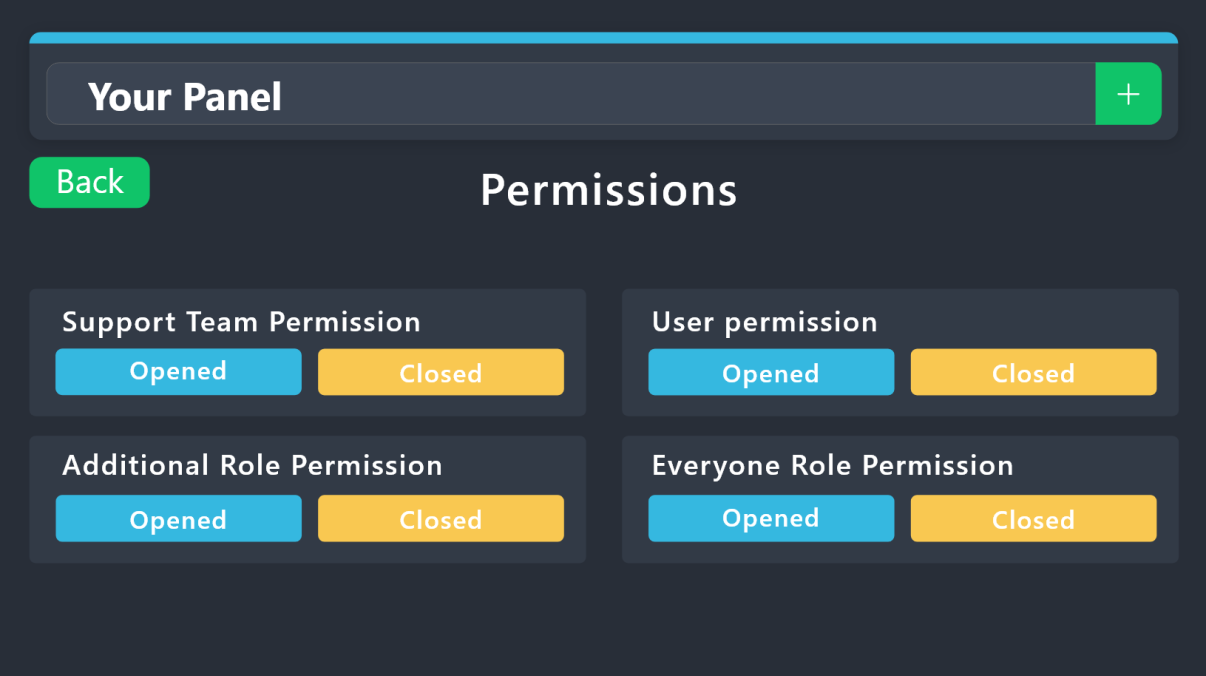
 still forge
magic gull
Tell me if you know an admin who can help me unlock my account and remove the ba...
still forge
magic gull
Tell me if you know an admin who can help me unlock my account and remove the ba...
?
magic gull
Please help me get unblocked
 vague valley
How do I allow tickets to be claimed?
I have the setting enabled (I believe), but the button to claim still doesn't show up. I also tried running the /claim command, but it says "Claiming isn't enabled".

 silent lava
vague valley
How do I allow tickets to be claimed?
I have the setting enabled (I believe), ...
silent lava
vague valley
How do I allow tickets to be claimed?
I have the setting enabled (I believe), ...
Yes mate but, claiming is a premium feature
vague valley
silent lava
Yes mate but, claiming is a premium feature<:Premium:1192403074157912144>
Ohhh okay, thank you so much!
iron nightBOT
Gave +1 Rep to @silent lava (current: #75 - 26)
 coarse flare
One message removed from a suspended account.
coarse flare
One message removed from a suspended account.
humble sequoiaBOT
When first invited to your server, Ticket Tool should have the permissions shown below in order to ensure an appropriate functioning:
When customizing permissions for the different ticket participants, you must make sure Ticket Tool has the permissions you want it to grant to others, you can learn more about this here.
Missing Permissions
This error is a direct outcome of the bot missing permissions as depicted above. When troubleshooting this error we suggest you go through these steps:
- Use the </debug:1029783024264564765> command to check if the bot is lacking core role or channel permissions.
- Compare the category/channel's overrides and contrast them with the bot's roles to identify any permission denial that is breaking the functioning
- If you can't still figure it out, let our <@&540295656720302081> know so they can guide you through
Additional Resources
- If you are a server administrator and would like to understand more how to set up your server's permissions, we suggest checking the Discord Support Knowledge Base
- If you are a bot developer and are interested in the internal permission hierarchy we suggest you this part of the Discord Developer Docs
Important Note
- Giving Administrator permissions is NOT required and we do NOT encourage you to do unless you are trying to troubleshoot your permissions setup.
One message removed from a suspended account.
silent lava
humble sequoia
@coarse flare
coarse flare
One message removed from a suspended account.
sturdy wharf
البوت ما يحذف التكتات بل بيمسح الروم الي كان فيه التكت و ما عدا الروم
 elfin lodge
People on my server, cannot see message history in bot creatted chats, any fixes?
 teal notch
Is there a way to look at prior tickets made?
 devout drum
Do we have a way to put in a ticket
 dawn lion
Opa booa noite
 fluid marlin
Is there a command to show all the current users in a ticket?
 kindred cedar
Who can help me with ticket tool bc when I try to make a ticket it won’t work
Who can help me
 quiet current
sturdy wharf
البوت ما يحذف التكتات بل بيمسح الروم الي كان فيه التكت و ما عدا الروم
quiet current
sturdy wharf
البوت ما يحذف التكتات بل بيمسح الروم الي كان فيه التكت و ما عدا الروم
كيف تسوي بوت
 winged idol
How do I just add the buttons of different tickets below one message
Like it just keeps popping up as this I want all 3 of my panels to be below one message

 next heart
Failed:
Invalid Form Body components[0].components[0].emoji.name[COMPONENT_INVALID_EMOJI]: Invalid emoji
 delicate quiver
Evry time i add the server i press sync servers and it doesnrt work how can i fix this?
humble sequoiaBOT
This error indicates you have selected an invalid emoji, i.e. an emoji the bot isn't capable of using, in a button field
Which Emoji?
This depends upon which action the error is appearing, the most common cases are the Create Ticket button or one of your Dropdown emojis. You can visit your Button's List to find all available buttons and find the conflicting one by yourself.
Why doesn't the bot accept it as valid?
- You selected an emoji that doesn't exist anymore, i.e. that has been deleted
- You wrote text there, instead of an emoji (or in addition to an emoji)
- You entered a code for a custom emoji from a server that the bot is not a member of
- You entered a custom emoji code incorrectly
- You're on iPhone and entered an emoji using the phone's emoji pad (use the emoji selector in the website instead)

 latent dawn
next heart
> Failed: `Invalid Form Body
components[0].components[0].emoji.name[COMPONENT_IN...
latent dawn
next heart
> Failed: `Invalid Form Body
components[0].components[0].emoji.name[COMPONENT_IN...
Refer to the embed above 
latent dawn
delicate quiver
Evry time i add the server i press sync servers and it doesnrt work how can i fi...
Make sure you have Administrator Permissions in the server and that the bot has the necesary permissions too. If it does, jus wait a bit to sync.
 split cargo
Hello
 glossy axle
Tropa eu coloca o comando /painel para criar um ticket e o ticket Tool fala que o app não responde oque eu Faso
humble sequoiaBOT
━━ User's inquiry has been moved to a ticket ━━
 lunar perch
Can I create a button with a hyperlink? for example to whop?
humble sequoiaBOT
━━ User's inquiry has been moved to a ticket ━━
 blazing bluff
Hello everyone,
atm im just working on my DC server trying to create ticket system.
When i was setting panels, ive got on this spot where i cant edit anything else than “Embed description” which is also short for my message that i want there. I cant even edit panel name, nothing. Any help for this one?
I was trying to figure out couple of hours but didnt figure out,
thanks!

 mystic pier
Why can't I see my friend's discord server when I open the dashboard website? I have all perms yet I can't see their server.
 fast heron
anyone can help me this problem? i cant take my cs quest line 3
 prime totem
How can I change the text on a photo?
 humble sequoiaBOT
⚠️ You're in the wrong place
We provide support for Ticket Tool Discord bot and cannot help you with whatever issue you have.
- We don't know which Support Team you should contact to get this issue resolved, and unfortunately we won't be able to accurately tell you.
If you don't have any further questions regarding our bot Ticket Tool, please close this ticket
worldly helm
prime totem
How can I change the text on a photo?
That‘s not possible at the time.
 haughty sky
Hello,
We are about to reach ticket number 9999 in one of our ticket categories. We know this is causing bugs, and we were wondering if there's a solution to prevent this?
Sincerely,
Kitsun
prime totem
worldly helm
That‘s not possible at the time.
Is there any chance of this at all?
worldly helm
Unfortunately, no.
prime totem
worldly helm
Unfortunately, no.
it's a pity
 restive folio
where is the ticcket channel
prime totem
worldly helm
Unfortunately, no.
It will happen anyway, thank you ❤️
iron nightBOT
Gave +1 Rep to @worldly helm (current: #5 - 1088)
 restive folio
idk
i never recieved that
open a ticket in #🎫│make-a-ticket
so they fix it, @prime totem
prime totem
restive folio
so they fix it, <@1023646487114174536>
Are you a support service?
I'll wait for the report first, then I can create a ticket.
restive folio
hell nah im not support service 😭 😭
bt why do u need to report it first
i immediatly made a ticket
prime totem
restive folio
i immediatly made a ticket
It's one thing if it's a serious error, then obviously I'll create a ticket, but just a minor error doesn't mean you need to create a ticket and mess around with trivialities.
scenic forum
prime totem
It's one thing if it's a serious error, then obviously I'll create a ticket, but...
Use /debug in the transcript channel
prime totem
scenic forum
Use /debug in the transcript channel
okey
prime totem
scenic forum
Use /debug in the transcript channel
Thank you
iron nightBOT
Gave +1 Rep to @scenic forum (current: #8 - 882)
scenic forum
restive folio
wth bro,
Try being patient :)
prime totem
restive folio
but no staff are answering
Yes, yes, they still haven’t answered?
Just be more patient, brother.
scenic forum
The tickets state the estimate answer time
prime totem
scenic forum
The tickets state the estimate answer time
WOW, MAN, SHE STARTED WORKING JUST GREAT
prime totem
scenic forum
The tickets state the estimate answer time
THANK YOU AGAIN
iron nightBOT
Gave +1 Rep to @scenic forum (current: #8 - 883)
 burnt rose
How do I add it to a text channel to create a ticket?
stark runeBOT
1. Invite Ticket Tool to your server
First you will want to invite the bot to your server. Once the bot is in your server, you can manage your server in the dashboard.
2. Create a Panel
To create a panel we are going to need to head over to the panel configs on the dashboard.
Once at the dashboard we will need to click Create Panel.
Enter a panel name (Fill in any optional settings you want).
Click Create Panel and your ready to get started with configuring your panel.
An example of a creating a panel is shown below.
3. Send the Panel to a Channel
Once you've created a panel on the dashboard you will need to send it to a channel using send on the dashboard.
Select the channel you want your panel to be created in and click send.
For other questions checkout $help faq.
An example of a sending a panel is shown below.
Having a Problem Sending the Panel?
Do $debug in a channel with Ticket Tool and make sure it has all the necessary Discord permissions.
scenic forum
@burnt rose read above
burnt rose
Ty happy:3
 cosmic wadi
hello, can I no longer use the free ticket tool?

 haughty sky
Hello,
We are about to reach ticket number 9999 in one of our ticket categories....
haughty sky
haughty sky
Hello,
We are about to reach ticket number 9999 in one of our ticket categories....
me too please
inner void
How do I access the ones it won't let me access?

 mighty anchor
inner void
How do I access the ones it won't let me access?
mighty anchor
inner void
How do I access the ones it won't let me access?
premium i think
mighty anchor
dense grove
How do I add it to a text channel to create a ticket?
?
mighty anchor
 tribal socket
What should I do in this situation?
tribal socket
What should I do in this situation?
it tells you to clear channels to continue creating tickets
 lean brook
my server wont pop up on dashboard does anyone know why? ticket bot has an admin role
 terse pasture
Is there a way to set permissions that users can’t close/delete tickets and only staff can?
scenic forum
terse pasture
Is there a way to set permissions that users can’t close/delete tickets and only...
Panel config -> Buttons -> choose button -> support team only ON
Set the buttons you want to support team only
terse pasture
scenic forum
Panel config -> Buttons -> choose button -> support team only ON
Set the buttons...
Thank you!
iron nightBOT
Gave +1 Rep to @scenic forum (current: #8 - 884)
 dusky kayak
Hi I have a problem my ticket tool is sending tickets to a category but it’s giving every role including everyone permission to see it instead of the admins owner and the person who created it
humble sequoiaBOT
━━ User's inquiry has been moved to a ticket ━━
 finite raptor
Has anyone used the /escalate command
 wind pasture
how do i make the ticket tool @ a admin role when someone opens a ticket?
humble sequoiaBOT
━━ User's inquiry has been moved to a ticket ━━
restive condor
wind pasture
how do i make the ticket tool @ a admin role when someone opens a ticket?
Hey there! See below please
humble sequoiaBOT
1. Open your Panel Configs tab in your server's dashboard
2. Select the panel you want to ping your support team on
3. Open the Ticket options menu
4. Click on Edit Ticket Message
5. In the Message Content use one of the role mention syntax ({@Role Name}/{Role ID})
6. Save changes
Note: For this to work properly, Ticket Tool requires the Mention Everyone permission. Or the role must have the Allow anyone to @mention this role setting enabled
iron nightBOT
Gave +1 Rep to @restive condor (current: #1 - 3021)
wind pasture
it just shows like this @restive condor and i did every step
 restive condor
wind pasture
it just shows like this <@795710289425334303> and i did every step
restive condor
wind pasture
it just shows like this <@795710289425334303> and i did every step
Please make sure you are using the correct role ID
wind pasture
yea got it thank you
 raven gate
I cannot find my server in dashboard, even tho I am the admin of that server and I invited bot in there.
Cannot find it in dashbaord, anyone know fix?
restive condor
raven gate
I cannot find my server in dashboard, even tho I am the admin of that server and...
Hi there! Please try the steps below
humble sequoiaBOT
Don't see your server in the dashboard?
Try using the Sync Servers button on your top center of the Dashboard page
If this doesn't work
You should relog from the dashboard, you can do this by clicking here to log out immediately, and then log back in
Note:
You need one of these 3 things to access the dashboard.
1. Server Owner (Level: 6)
2. Server Administrator (Level: 4)
3. Dashboard Role (Level: 2)
:warning: You can check your level using the </permissionlevel:1029797400174399542> command on your Discord Server
If the bot's response is:
- @User is permission level: 0 (User)
You don't have any of the 3 levels required to access the server's dashboard
raven gate
humble sequoia
logging in and out worked, thanks boss
iron nightBOT
Gave +1 Rep to @humble sequoia (current: #18 - 429)
raven gate
is it possible for me to save all my config for ticket bot and transfer it to another server? like ticket form and all of that
restive condor
raven gate
is it possible for me to save all my config for ticket bot and transfer it to an...
Of course, see below please
humble sequoiaBOT
The Backup and Restore feature allows you to transfer your panels, tags, and all settings to a new server, even if the server the settings were created has been deleted! You will want to copy the whole key.
First, go to your server's Dashboard ➞ then Server Configs ➞ under Config Backup & Restore (Server Owner Only) click on Old version can be found here and generate a new backup key by pressing the green button. Now, a key should be generated in the box above. You may need to refresh the page to see this.
Once you have your backup key, navigate to the same page on the new server. Copy the key on the Restore from backup key field.
Now you can choose what you want to copy. Finally, press the green Restore Configs button.
IMPORTANT NOTE
- We suggest you keep this backup key somewhere safe, in case your server is deleted so you are able to recover your panel's settings.
- This feature is only usable by the server's owner
$backup
raven gate
ty
 spice shore
How do I access/Purchase premium?
 next turret
How do I make the bot ping staff?
 remote saffron

I was changed 4 times a month, anyone can help
my ticket was deleted....
no one answer me

I paid an extra 7 months' worth of fees. Can I get a refund for that?
lunar solar
remote saffron
my ticket was deleted....
I have no record of you make a ticket with this Discord account in this server. Please make a billing ticket @ #🎫│make-a-ticket.
 gilded kindle
Hi
My flex city account was linked with facebook and removed it from facebook but it is showing still linked in game and unfortunately I deleted my facebook account permanently before 2 months and it is not recovering what should I do to unlink my in game account with facebook please someone help me
 humble sequoiaBOT
⚠️ You're in the wrong place
We provide support for Ticket Tool Discord bot and cannot help you with whatever issue you have.
- We don't know which Support Team you should contact to get this issue resolved, and unfortunately we won't be able to accurately tell you.
If you don't have any further questions regarding our bot Ticket Tool, please close this ticket
 vale swift
Hey someone help...ticket tool bot is leaving my server automatically...whenever I try to.open a ticket it lefts can anyone tell why?

 worldly helm
vale swift
Hey someone help...ticket tool bot is leaving my server automatically...whenever...
worldly helm
vale swift
Hey someone help...ticket tool bot is leaving my server automatically...whenever...
Hello! 👋
Another bot is most likely kicking Ticket Tool. Please check your Audit Logs.
 lapis cosmos
I Banned from the map Dandy world What should I do?
humble sequoiaBOT
⚠️ You're in the wrong place
We provide support for Ticket Tool Discord bot and cannot help you with whatever issue you have.
- We don't know which Support Team you should contact to get this issue resolved, and unfortunately we won't be able to accurately tell you.
If you don't have any further questions regarding our bot Ticket Tool, please close this ticket
slender minnow
@lapis cosmos ^
lapis cosmos
What
 whole wolf
@sillyprem
worldly helm
lapis cosmos
What
You're in the wrong server. We can't help you.
lapis cosmos
It's okay, I'm very happy I found one I wanted even more, but when can we get the ban lifted?
humble sequoiaBOT
⚠️ Please read the messages previously sent by our team ⚠️
 heavy rose
guys why cant i open the management for my server its just giving me 3 option Home Retry and Choose another server
in an infinite loop
im already trying for 2 hrs
humble sequoiaBOT
Don't see your server in the dashboard?
Try using the Sync Servers button on your top center of the Dashboard page
If this doesn't work
You should relog from the dashboard, you can do this by clicking here to log out immediately, and then log back in
Note:
You need one of these 3 things to access the dashboard.
1. Server Owner (Level: 6)
2. Server Administrator (Level: 4)
3. Dashboard Role (Level: 2)
:warning: You can check your level using the </permissionlevel:1029797400174399542> command on your Discord Server
If the bot's response is:
- @User is permission level: 0 (User)
You don't have any of the 3 levels required to access the server's dashboard
scenic forum
@heavy rose read above
 hidden cedar
@iron night
 proven thistle
why is this bot not able to create a ticket even though it should have permission to, the command works for me and my other acc
 heavy rose
scenic forum
<@1218153839400849420> read above
heavy rose
scenic forum
<@1218153839400849420> read above
tf u want me to read when that sync aINT EVEN WORKING
i restarted my pc
scenic forum
heavy rose
tf u want me to read when that sync aINT EVEN WORKING
If you would have read it you'd realize it's not just sync on there
humble sequoiaBOT
Integrating an External Bot x Ticket Tool <:TicketToolGold:1073948897673748490>
Integrating Ticket Tool with an external bot allows you to customize your server's Ticket System further!
- The external bot must output the
$newor$ticketcommands with the user's ID to start a ticket. Preferably in a private channel.
Eg.
$new 12345678901234567890
-
Your ticket panel must be Command Style enabled
-
You must whitelist that bot's ID in your Dashboard ➞ Server Configs ➞ Bot section.
Otherwise Ticket Tool will not react to the command and a ticket will not be created.
- If you'd like to include a reason in the command usage, feel free to do so after the user ID.
Eg.
$new 12345678901234567890 Your reason goes here
This reason can then be shown anywhere in the Ticket Message with the{create.reason}variable
**  Note:** If you have changed Ticket Tool's default prefix (
$) please ensure to amend the prefix for the $new or $ticket commands.
Eg. If your prefix is
-, then what you're looking for the bot to use is-newor-ticket

$botintegration
scenic forum
proven thistle
why is this bot not able to create a ticket even though it should have permissio...
Check step 3 above
 latent mesa
hi actually i want to add buttons in my panel but i can see the panel name here
 scenic forum
heavy rose
the invite doesnt work
scenic forum
heavy rose
the invite doesnt work
Show that you logged out and in
scenic forum
latent mesa
hi actually i want to add buttons in my panel but i can see the panel name here
Each option needs it's own panel
latent mesa
scenic forum
Each option needs it's own panel
oh alr
 hardy steeple
Hello ! 
For several weeks, the changes I am making have no longer been taken into account on a server, such as adding roles to the support team, changing the welcome message of the ticket, or changing the default permissions of the tickets.
Any ideas about the problem and how to solve it ?
scenic forum
hardy steeple
Hello ! <a:GhostWave:607656953875005471>
For several weeks, the changes I am mak...
You're most likely not editing the correct panel.
latent mesa
i am facing this error again and again can someone suggest me what to do


@scenic forum sorry for ping but i am in rush atm
 willow rapids

 zenith maple
I opened a ticket in someones server and it is closed now and i wanna see the transcript . Is it possible?
 frail brook
Is there a way to turn off the ability for the person who opened the ticket to close it?
thorn halo
frail brook
Is there a way to turn off the ability for the person who opened the ticket to c...
hey there, you can head to https://tickettool.xyz/dashboard/server_id/configs#pc-menu/pc-buttons/pc-button_close -> mark it as support team only
hardy steeple
scenic forum
You're most likely not editing the correct panel.
I have only one panel
my bad
we use only one panel but there are 2 (i don't know why)
thanks
scenic forum
latent mesa
i am facing this error again and again can someone suggest me what to do
It's the third panel in your dropdown
scenic forum
hardy steeple
~~I have only one panel~~
my bad
we use only one panel but there are 2 (i don't ...
latent mesa
scenic forum
It's the third panel in your dropdown
You talking about Reward claim?
scenic forum
latent mesa
You talking about Reward claim?
Probably that emote. Try changing it and sending again
If not please #🎫│make-a-ticket
I'm at work right now so my availability is severely limited
latent mesa
Alright
dense grove
what?
 half magnet
I purchased the account, but neither the name nor the password is showing up.
And I spent 20 reais on it.
humble sequoiaBOT
⚠️ You're in the wrong place
We provide support for Ticket Tool Discord bot and cannot help you with whatever issue you have.
- We don't know which Support Team you should contact to get this issue resolved, and unfortunately we won't be able to accurately tell you.
If you don't have any further questions regarding our bot Ticket Tool, please close this ticket
 fathom granite
When i got alot of tickets some of them appear open and everyone can see them
scenic forum
fathom granite
When i got alot of tickets some of them appear open and everyone can see them
Can you show that
fathom granite
I closed the ticket, but next time it happens i take print
 iron imp
how do i find transcripts?
 alpine vale
 keen sequoia
i am trying to access my dashboard but my server is not showing up
scenic forum
keen sequoia
i am trying to access my dashboard but my server is not showing up
Don't see your server in the dashboard?
Try using the Sync Servers button on your top center of the Dashboard
If this doesn't work
You should relog from the dashboard, you can do this by clicking here to log out immediately, and then log back in page
You need one of these 3 things to access the dashboard.
Note:
- Server Owner
(Level: 6) - Server Administrator
(Level: 4) - Dashboard Role
(Level: 2)
⚠️ You can check your level using the </permissionlevel:1029797400174399542> command on your Discord Server
You don't have access to the dashboard if the bot's response is:
- @User is permission level: 0 (User)
If youre staff
Look through the transcript channel
If youre a user and you havent been dm'd the transcript you can ask a staff on their server if they made one
 exotic hazel
I'm looking through a ticket transcript, and the attachments show as a Hyperlink. I clicked on them and it says "This content is no longer available." Is there any way to recover attachments from transcripts?
keen sequoia
scenic forum
### Don't see your server in the dashboard?
Try using the **Sync Servers** butto...
ty
iron nightBOT
Gave +1 Rep to @scenic forum (current: #8 - 885)
scenic forum
exotic hazel
I'm looking through a ticket transcript, and the attachments show as a Hyperlink...
If you have premium attachments save up to 8MB
exotic hazel
scenic forum
If you have premium attachments save up to 8MB
Oh i see, thanks!
iron nightBOT
Gave +1 Rep to @scenic forum (current: #8 - 886)
 noble bridge
Hello, good afternoon. It doesn't let me get a ticket and they sent me here. What am I supposed to do?
 prime mesa
So, lately I haven't been able to add the ticket tool to my server; the server doesn't appear on the website or anything, and when I try to invite it to the server, it still doesn't work.
scenic forum
prime mesa
So, lately I haven't been able to add the ticket tool to my server; the server d...
Is the bot on your server?
prime mesa
scenic forum
Is the bot on your server?
Yesyes
scenic forum
prime mesa
Yesyes
Don't see your server in the dashboard?
Try using the Sync Servers button on your top center of the Dashboard
If this doesn't work
You should relog from the dashboard, you can do this by clicking here to log out immediately, and then log back in page
You need one of these 3 things to access the dashboard.
Note:
- Server Owner
(Level: 6) - Server Administrator
(Level: 4) - Dashboard Role
(Level: 2)
⚠️ You can check your level using the </permissionlevel:1029797400174399542> command on your Discord Server
You don't have access to the dashboard if the bot's response is:
- @User is permission level: 0 (User)
Tysm, I managed to get the dashboard up and running! You're an angel, man!
 modern perch
Hi! I was wondering if to use ticket tool we need to have admin permission or we can do it with the manage server only? Thanks!
scenic forum
modern perch
Hi! I was wondering if to use ticket tool we need to have admin permission or we...
Dashboard Roles
Any role you put there will have full access to the ticket tool dashboard.
The server owner and users with admin permissions already have access to the dashboard.
Be careful of which roles to put here

Alternative to Administrator
Don't see your server in the dashboard?
Try using the Sync Servers button on your top center of the Dashboard
If this doesn't work
You should relog from the dashboard, you can do this by clicking here to log out immediately, and then log back in page
You need one of these 3 things to access the dashboard.
Note:
- Server Owner
(Level: 6) - Server Administrator
(Level: 4) - Dashboard Role
(Level: 2)
⚠️ You can check your level using the </permissionlevel:1029797400174399542> command on your Discord Server
You don't have access to the dashboard if the bot's response is:
- @User is permission level: 0 (User)


 scenic forum
 grand moss
YOu changed the active bot despite not having the bot on your server
humble sequoiaBOT
The first thing you will need to do is invite the premium bot, an invite can be found here
Once the bot is in your server we will head to the dashboard and manage your server. When you are managing your server, you want to head into "Server Configs" then click the drop down menu under "Select the bot you would like to use on this server" then click "Ticket Tool#6207" and then save.
scenic forum
Click the blue here above
grand moss
life saver
how do i change the normal white ticket bot to the gold bot in ther server
scenic forum
grand moss
how do i change the normal white ticket bot to the gold bot in ther server
resend the panels once gold is yout active bot
grand moss
than kyou
can i set my ticket number to a certain number to start?
im running a ugc program and we have 8 creators now but the tickets are starting at 15 becuase ive been testing it
can i change it so that it starts at 0009
scenic forum
grand moss
can i change it so that it starts at 0009
panel config -> Select panel -> Set count at the top
iron nightBOT
Gave +1 Rep to @scenic forum (current: #8 - 887)
 maiden scaffold
hello does anyone know how to get the tickets to work in my server?
 vital solstice
Every time I try to open the ticket to create a new one, it tells me this is nonsense.

 harsh forge
can someone help me with this weird ahh 500 limit
I cant fix it cuz I don't got any commands
scenic forum
vital solstice
Every time I try to open the ticket to create a new one, it tells me this is non...
If the bot isn't responding when doing /debug
Its lacking these 3 permissions inside the channel it has been used in view channel, send message and embed links
scenic forum
harsh forge
can someone help me with this weird ahh 500 limit
Staff needs to delete some channels
vital solstice
I gave him full access, but every time I say "open," he tells me this is nonsense.

@scenic forum
I had activated the ticket, but there were some problems that I deleted to fix, and now all this is just talk.
scenic forum
vital solstice
I gave him full access, but every time I say "open," he tells me this is nonsens...
That command can only be used inside a ticket
vital solstice
Okay, how do I get a ticket because I accidentally deleted it?
scenic forum
vital solstice
Okay, how do I get a ticket because I accidentally deleted it?
by opening it again
vital solstice
What is the command that opens again?
scenic forum
vital solstice
What is the command that opens again?
are you staff on the server?
vital solstice
scenic forum
are you staff on the server?
If you mean that I'm an administrator on a server, then yes.
stark runeBOT
1. Invite Ticket Tool to your server
First you will want to invite the bot to your server. Once the bot is in your server, you can manage your server in the dashboard.
2. Create a Panel
To create a panel we are going to need to head over to the panel configs on the dashboard.
Once at the dashboard we will need to click Create Panel.
Enter a panel name (Fill in any optional settings you want).
Click Create Panel and your ready to get started with configuring your panel.
An example of a creating a panel is shown below.
3. Send the Panel to a Channel
Once you've created a panel on the dashboard you will need to send it to a channel using send on the dashboard.
Select the channel you want your panel to be created in and click send.
For other questions checkout $help faq.
An example of a sending a panel is shown below.
Having a Problem Sending the Panel?
Do $debug in a channel with Ticket Tool and make sure it has all the necessary Discord permissions.
scenic forum
@vital solstice read above
vital solstice
One minute
Thank you, it's fixed, but I have one question: can I write text from inside?

@scenic forum
Can I write words from inside
humble sequoiaBOT
The Ticket Message is the first message sent by the bot on a new ticket. To customize it head over to your Dashboard ➞ Panel Configs ➞ Ticket ➞ Edit Ticket Message
scenic forum
@vital solstice check above
vital solstice
Okay, how do I change this?
 scenic forum
 kindred hollow
are you guys still giving free premium for big servers?
kindred hollow
are you guys still giving free premium for big servers?
Partnerships are currently closed
scenic forum
vital solstice
Okay, how do I change this?
By opening the embed editor
vital solstice
scenic forum
By opening the embed editor
Oh, I know, but I'm sorry for asking so many questions, but one question: how do I change my name? The closing word for the word I want