#🆘│community-support
1 messages · Page 258 of 1
 scenic forum
 cedar chasm
scenic forum
If that is really the mentioned window
View channel ❎
cedar chasm
scenic forum
If that is really the mentioned window
View channel ❎
ticket 76451
scenic forum
cedar chasm
ticket 76451
- Be patient inside your ticket
- Cant recall seeing a staff role on me
 timber epoch
scenic forum
If that is really the mentioned window
View channel ❎
timber epoch
scenic forum
If that is really the mentioned window
View channel ❎
are you able to join vc and help me once your free by any chance?
scenic forum
timber epoch
are you able to join vc and help me once your free by any chance?
Only via chat.
timber epoch
scenic forum
Only via chat.
alr
 tired isle
guys, why i cant download my scripts anymore?
the bot is skipping the attachments, am I missing something?
[ Server: GMD (822546357293154324)
Channel: closed-0708 (1461777543643267226)
Messages: 20
Attachments Saved: 0
Attachments Skipped: 3 (due maximum file size limits.)]
scenic forum
tired isle
guys, why i cant download my scripts anymore?
the bot is skipping the attachment...
Thats an issue with discords newest update
Im afraid theres nothing you can do besides wait until they fixed that problem
tired isle
scenic forum
Thats an issue with discords newest update
Im afraid theres nothing you can do b...
really? but i was using that feature yesterday!
scenic forum
tired isle
really? but i was using that feature yesterday!
Then the update released for you within that 1 day
Nobody on the current version can download it on pc (Not sure about phone. Didnt test it)
tired isle
scenic forum
Nobody on the current version can download it on pc (Not sure about phone. Didnt...
but the automatic google drive forwarding is okay, right?
scenic forum
tired isle
but the automatic google drive forwarding is okay, right?
Shouldnt be impacted
The only impact is downloading in discord itself
 hollow fossil
how do you do the google drive forwarding
 humble sequoiaBOT
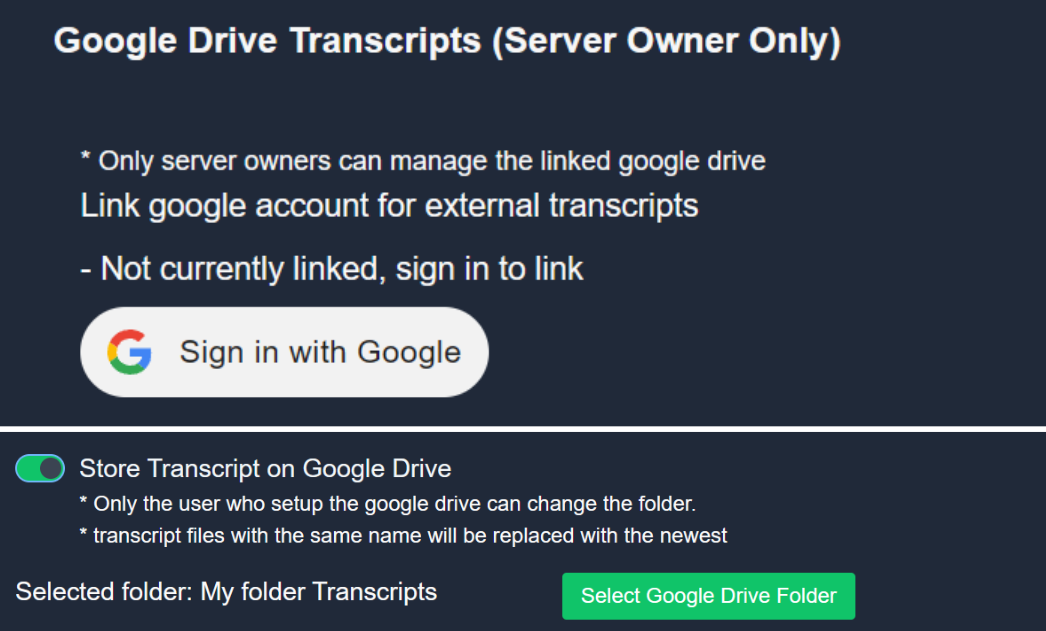
Ticket Tool allows you to save your server's transcripts to your Google Drive!
<:Troubleshooting:1034175234397438032> How do I link my Google Acount?
Go to your Server Configs within your Dashboard, scroll down to the Google Drive Transcripts section, and link the Google Drive account of your preference.
<:SystemList:1018980666551042048> Which folder are transcripts saved to?
Go to your Transcript Options, there you can choose the folder under which the transcripts of this panel will be saved.
<:TTWarning:1034178155872784494> Notes
- Deleting a transcript from your Drive will effectively delete the transcript! This will make it inaccessible from Discord, so be careful when deleting files.
- This feature is only usable by the server's owner.
- Enabling this feature will stop sending the HTML raw transcript file to your transcript channel and will save it exclusively to Drive
 tired isle
@scenic forum for the record, it works on the browser version, i just checked! thanks for the info btw!
 iron nightBOT
Gave +1 Rep to @scenic forum (current: #11 - 745)
scenic forum
tired isle
<@186523978729259009> for the record, it works on the browser version, i just ch...
@hollow fossil
Thanks for the info. Very Valuable
hollow fossil
awesome! thats kind of silly but better than clicking the button manually
scenic forum
So the issue is only directly bound to the client and not discord as a whole
hollow fossil
tired isle
<@186523978729259009> for the record, it works on the browser version, i just ch...
thank you
iron nightBOT
Gave +1 Rep to @tired isle (current: #443 - 1)
 river coral
hey, is it possible to edit the message when a blacklisted role try to make a ticket?
 worldly helm
river coral
hey, is it possible to edit the message when a blacklisted role try to make a ti...
worldly helm
river coral
hey, is it possible to edit the message when a blacklisted role try to make a ti...
Hello! Unfortunately no
river coral
Sadge, thanks
 eternal mirage
hey just a question is it possible to change this name here
 scenic forum
No
Thats the bots original user
eternal mirage
ok thx 👍
eternal mirage
scenic forum
No
Thats the bots original user
and about the the urls in general, how can i convert my image to a url that is accepted by the bot ?
 humble sequoiaBOT
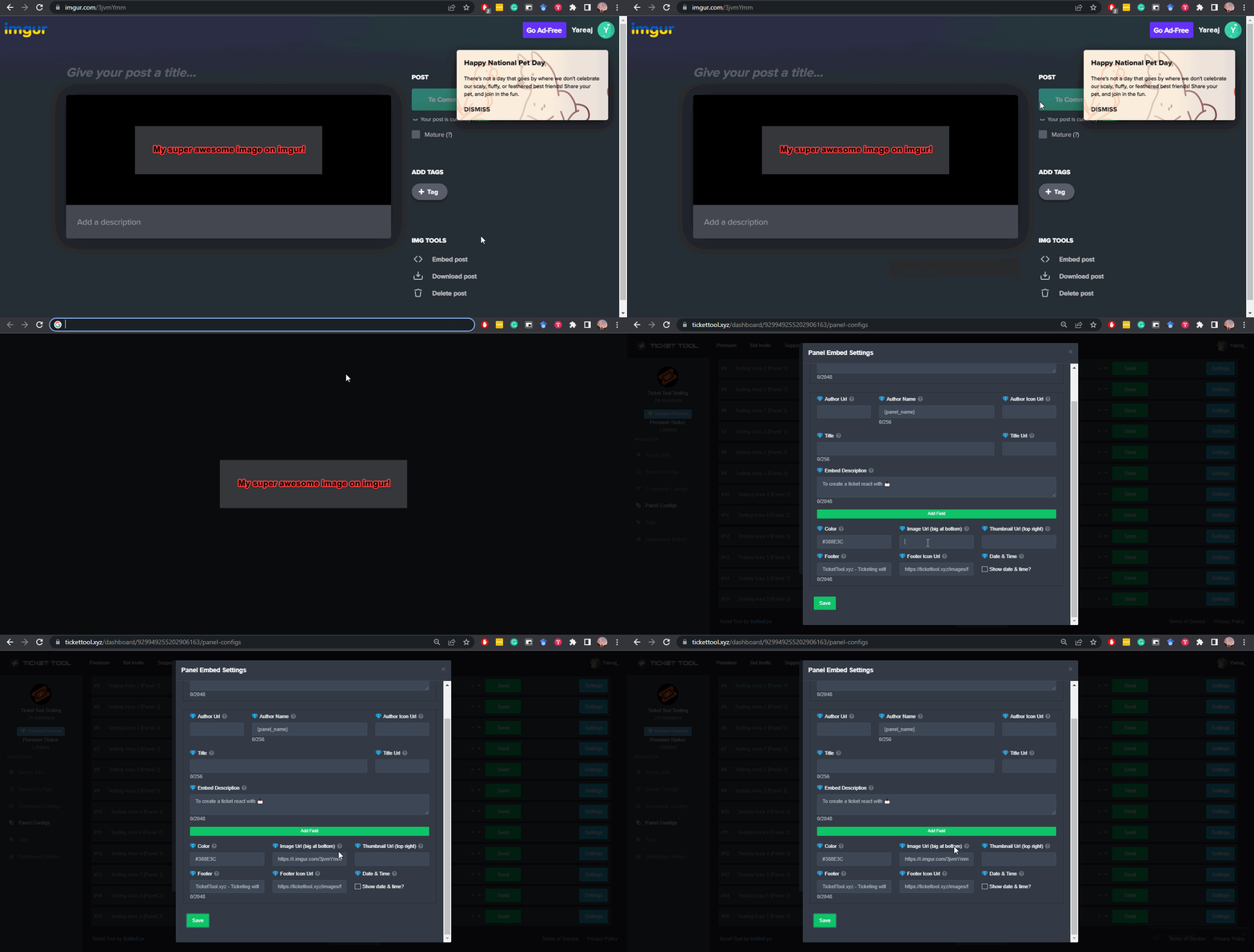
What are the direct URLs?
A direct access URL is an easy to read URL that users can enter to get to a specific item, document, page, category, or perspective, in which our bot TicketTool can read and get it displayed in your 'Panel Message' or your 'Ticket Message'.
Where can I get them?
The recommended way is to use 'Imgur', you can signup within a few minutes and then upload the image you want, and copy the URL of the uploaded image and paste it into one of the four boxes. There are alternatives to this, such as other image or video storing websites or using 'Open Original' of an image and paste it in (please be aware that if your image is deleted, Discord will automatically delete the link to it in a few days). Please note this requires 'Premium'. Imgur
 scenic forum
@eternal mirage refer to the embed above
eternal mirage
scenic forum
<@372734636788416524> refer to the embed above
thanks
iron nightBOT
Gave +1 Rep to @scenic forum (current: #11 - 746)
eternal mirage
appreciate u bro
scenic forum

 chilly gazelle
The first shift:
Notification saying that i have to make reservations Wish i already
After the the notification change to (i have to read and check security advice).
And i miss my shift
The second shift
The sistem where fix by Adecco Uber eat and was ready for work
And the sistem saying u can star when u are in the Post wish is at 21:30
I'm checking app and guess what the app turn back with problem telling me that i need to make reservations Wish i already did
give me the way to get my money i will wait for it for next pay out wish is next Wednesday
My second shift start at 21:30 I'm waiting for it if i can't Star
That means
Uber have to pay me also the second shift
I will wait for my money next Wednesday
Thank you in advance hope we can fix the sistem problem and my money from today Two shift.
Have great day
humble sequoiaBOT
@chilly gazelle

⚠️ You're in the wrong place
We provide support for Ticket Tool Discord bot and cannot help you with whatever issue you have.
- We don't know which Support Team you should contact to get this issue resolved, and unfortunately we won't be able to accurately tell you.
If you don't have any further questions regarding our bot Ticket Tool, please close this ticket
 mystic junco
I have a bot, and I have seen other servers with this. I want to make it where if the ticket reason has a word in it, let's say "application" in it, it will automatically send a message in the ticket.
 spice harbor
My thought is that it's likely a custom command (someone more experienced can confirm)
 earnest plinth
Is The claim a ticket option a premium thing?
 light oak
There are no bans, but the server isn't working. I don't know why; it just says "Joining..."
spice harbor
earnest plinth
Is The claim a ticket option a premium thing?
It's standard, no need for premium.
earnest plinth
Oh, well my premium ran out today and now there’s no embeded text or claim option or anything on the ticket was just wondering
scenic forum
Yes. Claiming is a premium feature
 fringe dew
yo, i can make ticket tools ping roles when a new ticket open?
humble sequoiaBOT
1. Open your Panel Configs tab in your server's dashboard
2. Select the panel you want to ping your support team on
3. Open the Ticket options menu
4. Click on Edit Ticket Message
5. In the Message Content use one of the role mention syntax ({@Role Name}/{Role ID})
6. Save changes
Note: For this to work properly, Ticket Tool requires the Mention Everyone permission. Or the role must have the Allow anyone to @mention this role setting enabled 
 scenic forum
@fringe dew refer to the embed above
fringe dew
ok
spice harbor
scenic forum
Yes. Claiming is a premium feature
That's surprising, my apologies 😅
I've it on by default in my server without premium
scenic forum
mystic junco
I have a bot, and I have seen other servers with this. I want to make it where i...
Please make a #premium-tickets
scenic forum
spice harbor
That's surprising, my apologies 😅
I've it on by default in my server without pr...
Thats not possible
Claiming can only be active while premium is enabled, once it expires claiming automatically turns off again
spice harbor
Ah nevermind, must've been the wind
scenic forum
spice harbor
Ah nevermind, must've been the wind
Could you use /debug on your server?
spice harbor
I guessed wrong, somehow had seen the word "close ticket" as a "claim ticket"
 scenic forum
spice harbor
I guessed wrong, somehow had seen the word "close ticket" as a "claim ticket"
scenic forum
spice harbor
I guessed wrong, somehow had seen the word "close ticket" as a "claim ticket"
ah
 dry arch
Does anyone know how I can fix this problem?

 humble sequoiaBOT
This error indicates you have selected an invalid emoji, i.e. an emoji the bot isn't capable of using, in a button field
Which Emoji?
This depends upon which action the error is appearing, the most common cases are the Create Ticket button or one of your Dropdown emojis. You can visit your Button's List to find all available buttons and find the conflicting one by yourself.
Why doesn't the bot accept it as valid?
- You selected an emoji that doesn't exist anymore, i.e. that has been deleted
- You wrote text there, instead of an emoji (or in addition to an emoji)
- You entered a code for a custom emoji from a server that the bot is not a member of
- You entered a custom emoji code incorrectly
- You're on iPhone and entered an emoji using the phone's emoji pad (use the emoji selector in the website instead)
 scenic forum
@dry arch refer to the embed above
iron nightBOT
Gave +1 Rep to @scenic forum (current: #11 - 747)
humble sequoiaBOT
@latent citrus
⚠️ You're in the wrong place
We provide support for Ticket Tool Discord bot and cannot help you with whatever issue you have.
- We don't know which Support Team you should contact to get this issue resolved, and unfortunately we won't be able to accurately tell you.
If you don't have any further questions regarding our bot Ticket Tool, please close this ticket
 latent citrus
can someone help?
humble sequoiaBOT
⚠️ Please read the messages previously sent by our team ⚠️
fringe dew
scenic forum
<@1184263246476214345> refer to the embed above
tnks for the help bro
 bold fiber
why does it say my cookies are invalid?
 zenith field
Is the server down?
 frosty rapids
@stark rune i have a problem because i have a student in My Google calendar but he is not in the platform is it okey?
humble sequoiaBOT
@frosty rapids
⚠️ You're in the wrong place
We provide support for Ticket Tool Discord bot and cannot help you with whatever issue you have.
- We don't know which Support Team you should contact to get this issue resolved, and unfortunately we won't be able to accurately tell you.
If you don't have any further questions regarding our bot Ticket Tool, please close this ticket
 pearl mesa
I ask you to unban me that's the amount you created that according to it was to avoid a ban no I created it I ask you to come to update I ask you to unban me please😭
humble sequoiaBOT
@pearl mesa
⚠️ You're in the wrong place
We provide support for Ticket Tool Discord bot and cannot help you with whatever issue you have.
- We don't know which Support Team you should contact to get this issue resolved, and unfortunately we won't be able to accurately tell you.
If you don't have any further questions regarding our bot Ticket Tool, please close this ticket
 obsidian schooner
For some reason, even after I invite Ticket Tool to my server and it joins, my server doesn't show up on the website.
spice harbor
obsidian schooner
For some reason, even after I invite Ticket Tool to my server and it joins, my s...
Run /permissionlevel in the server
 leaden tartan
how do I change the channel for ticket
 thorn halo
leaden tartan
how do I change the channel for ticket
thorn halo
leaden tartan
how do I change the channel for ticket
Please elaborate on what you mean, transcript channel? Ticket category?
leaden tartan
thorn halo
Please elaborate on what you mean, transcript channel? Ticket category?
like it won't make the ticket in the channel
thorn halo
leaden tartan
like it won't make the ticket in the channel
Are you getting an error when trying to open a ticket?, and have you set up the panel for tickets to be created by?
leaden tartan
thorn halo
Are you getting an error when trying to open a ticket?, and have you set up the ...
I haven't set up the panel
thorn halo
thorn halo
Are you getting an error when trying to open a ticket?, and have you set up the ...
Alright, please head to the panel configs ( https://tickettool.xyz/dashboard/server_id/configs ) section of your dashboard and create one there

Ticket Tool - Ticketing without clutter - The #1 Discord support bot
 robust hare
The website is not loading when I click on the link. It just redirects to bing.com or about:blank.
thorn halo
robust hare
The website is not loading when I click on the link. It just redirects to bing.c...
the link i sent above?
thorn halo
robust hare
Nope
so just https://tickettool.xyz/dashboard straight up doesnt load?
Ticket Tool - Ticketing without clutter - The #1 Discord support bot
robust hare
Yep
thorn halo
robust hare
Yep
can you try accessing it on incognito mode?
robust hare
On microsoft edge?
thorn halo
robust hare
On microsoft edge?
well, yeah, whatever browser youre using
robust hare
I think I'm having problems with internet or something
thorn halo
robust hare
I think I'm having problems with internet or something
if no other websites are loading either then most likely
thorn halo
robust hare
All the other websites are fine
and incognito mode doesnt work either?
 eternal ivy
 tranquil bison
use the slash command or prefix $close {reason}
 prisma needle
guys my members cant open tıcket ıt says you dont have permıssıon how ı fıx thıs
robust hare
thorn halo
and incognito mode doesnt work either?
nope
obsidian schooner
spice harbor
Run ``/permissionlevel`` in the server
it's permission level 6
spice harbor
obsidian schooner
it's permission level 6
Go to the dashboard (tickettool.xyz) and sync the servers
obsidian schooner
nothing changed
spice harbor
obsidian schooner
nothing changed
Attempt to relogin to the site
 vital lantern
Quick question, what permissions does the bot need in the server for me to access the dashboard?
Or it may be, what persmission do i need to see it there
spice harbor
vital lantern
Quick question, what permissions does the bot need in the server for me to acces...
Pretty sure administration is the easiest way to go, someone correct me if I'm wrong
Do me a favor and run /permissionlevel in this server you have the bot in
vital lantern
spice harbor
Pretty sure administration is the easiest way to go, someone correct me if I'm w...
Owner gave me admin and that fixed it 🙏 thank you
iron nightBOT
Gave +1 Rep to @spice harbor (current: #172 - 4)
thorn halo
vital lantern
Owner gave me admin and that fixed it 🙏 thank you
you don't need admin, you can also have the owner configure a dashboard role
this role will, as it's name implies, give you access to the servers dashboard without needing specific discord permissions
vital lantern
thorn halo
you don't need admin, you can also have the owner configure a dashboard role
th...
Is that in the bots dashboard?
Oh i see it!
thorn halo
vital lantern
Is that in the bots dashboard?
Correct
thorn halo
vital lantern
Oh i see it!
vital lantern
thorn halo
thank you :3
iron nightBOT
Gave +1 Rep to @thorn halo (current: #172 - 4)
spice harbor
thorn halo
you don't need admin, you can also have the owner configure a dashboard role
th...
Give this one a raise 👏
thorn halo
vital lantern
thank you :3
You're welcome
 olive stream
Why won't it let ppl open a ticket
 scenic forum
olive stream
Why won't it let ppl open a ticket
scenic forum
olive stream
Why won't it let ppl open a ticket
Hey there!
«You don't have permissions to use this»
👉 Server Configs -> Blacklist Roles
Any roles there will be unable to interact with the bot in any way, including creating tickets.👉 Panel Configs -> Buttons -> Create Ticket -> Support team only
If this is enabled👉 Panel Configs -> Buttons -> Create Ticket -> Disabled Roles
Any roles there will be unable to use the button.
 full fractal
hola buenas noche me gustaria ingresar deseo aprender y jugar y divertirme por aqui y amistades
 sterile belfry
How do I pay 😭
spice harbor
sterile belfry
How do I pay 😭
Would you elaborate a little. Pay what?
sterile belfry
So I’m trying to get a hoodie but I’m just confused on how I would purchase it
spice harbor
sterile belfry
So I’m trying to get a hoodie but I’m just confused on how I would purchase it
This server is made for the Ticket Tool discord bot
sterile belfry
Oh
spice harbor
If you're looking support for something else, we cannot assist you with that unfortunately
sterile belfry
Sry
 ripe mesa
купил подписку, пинг так и не поменялся
 spice harbor
ripe mesa
купил подписку, пинг так и не поменялся
spice harbor
ripe mesa
купил подписку, пинг так и не поменялся
You're using the wrong server. Our server is to provide support for the Ticket Tool discord bot
 rapid arrow
How do I make it so only staff roles can see a ticket when its made. The current issue is that When someone makes a ticket, all roles are able to see it. Even a BLACKLISTED role with NO perms is still able to see it. Someone please tell me how to fix this.
please @ me if you respond
or dm
thorn halo
rapid arrow
How do I make it so only staff roles can see a ticket when its made. The current...
tickets are by default set to private overrides
 flat fjord
why i cant open any ticket ?
 rapid arrow
thorn halo
tickets are by default set to private overrides
rapid arrow
thorn halo
tickets are by default set to private overrides
to be honest im not exactly sure what this means...
thorn halo
rapid arrow
to be honest im not exactly sure what this means...
can you check your ticket channel overrides?
is there anything being forced there that allows anyone to view the ticket?
thorn halo
flat fjord
why i cant open any ticket ?
do you already have a ticket open for that panel?
flat fjord
thorn halo
do you already have a ticket open for that panel?
no in a another server but i left it
thorn halo
rapid arrow
vc
i cannot vc
rapid arrow
alright, where am i going to find the channel overrides? discord or the ticket tool website
thorn halo
rapid arrow
alright, where am i going to find the channel overrides? discord or the ticket t...
its sort of in both, but can you head to https://tickettool.xyz/dashboard/server_id/configs#pc-menu/pc-permissions -> select your server -> ensure youre on the right panel -> and check permissions for the everyone role in the open section?

 thorn halo
rapid arrow
that is from the everyone role permissions
thorn halo
rapid arrow
that is from the everyone role permissions
in the discord server, for a open ticket, can you look through the channel permissions for any overrides that may be allowing anyone to view that ticket?
thorn halo
flat fjord
no in a another server but i left it
You already have 1 ticket open of the 1 allowed for this panel
ticket tool seems to think otherwise
rapid arrow
thorn halo
in the discord server, for a open ticket, can you look through the channel permi...
this shows up, would i have to sync it every time someone makes a ticket?

like manually sync it every single time?
thorn halo
rapid arrow
this shows up, would i have to sync it every time someone makes a ticket?
no, dont touch that
are there any permissions in that channel as is that allow non staff to view it?
rapid arrow
all roles other than @ everyone are able to see the ticket channels. but when someone makes a ticket, it appears right below "higher-up-report". and every single role is able to see it. even a BLACKLISTED role with NO perms is still able to see it.
 thorn halo
rapid arrow
all roles other than @ everyone are able to see the ticket channels. but when so...
thorn halo
rapid arrow
all roles other than @ everyone are able to see the ticket channels. but when so...
can you go back to the panel menu -> general and send a screenshot of the support and additional roles?
 rapid arrow
the 2 roles other than "owner" are my discord server staff
 thorn halo
rapid arrow
all roles other than @ everyone are able to see the ticket channels. but when so...
thorn halo
rapid arrow
all roles other than @ everyone are able to see the ticket channels. but when so...
all roles other than @ everyone are able to see the ticket channels.
this shouldnt be the case unless someone else was adding permissions manually
rapid arrow
thorn halo
> all roles other than @ everyone are able to see the ticket channels.
this shou...
this is the @ everyone perms
 thorn halo
rapid arrow
thorn halo
rapid arrow
judging from this quite interesting recording method, only these roles (owner, appy, law practice management, & legal education and admission to the bar) are able to view the newly made ticket
 rapid arrow
lmao i had to use my phone. then why when i view the server as a different role why can i still see it
thorn halo
rapid arrow
lmao i had to use my phone. then why when i view the server as a different role ...
are you viewing the server with the same account used to open the ticket with?
thorn halo
rapid arrow
oh my... i might be the biggest idiot
i was gonna tell you nicely
but, that works too
happens to the best of us, but i can assure you no one else except for who you configured will be able to view your ticket
rapid arrow
I appreciate you from each corner of my big ol heart!!!!!
rapid arrow
your an absolute legend!!!!!
 simple widget
how to get the ticket tool?
 ember rapids
Hi, I have a question:
-
Is it possible to make the ticket so that only specific words can be typed? I mean, I've automated Discord and need to use commands, but clients haven't yet adapted and are constantly writing. I have less and less time to respond, and I'd like to achieve exactly this effect.
-
If a client opens a ticket, the message isn't sent or is deleted when they write a command. If they write a command, the message is delivered. I'd also like to be able to unblock the chat using a command. Is this possible?
scenic forum
ember rapids
Hi, I have a question:
- Is it possible to make the ticket so that only specifi...
Both not possible
 late ridge
Hi
How do I make the ticket close automatically without having to press a button? confirm close . Cancel
Or delete it or receive it
scenic forum
late ridge
How do I make the ticket close automatically without having to press a button? c...
you can type $close to not use buttons
To remove the close confirmation and moderator controls
Panel config -> General -> Two step ticket AND two step close -> Disable
humble sequoiaBOT
Ticket Tool - Ticketing without clutter - The #1 Discord support bot
scenic forum
late ridge
Where is it?
Follow the path i provided on the dashboard
Refer to the embed above to get onto the dashboard
late ridge
And after this
scenic forum
Nothing
After it the 2 steps are removed for tickets created after the change
late ridge
Hey boss, I don't understand anything
scenic forum
What are you confused about?
late ridge
late ridge
How do I make the ticket close automatically without having to press a button? c...
.
@scenic forum
How do I do it?
scenic forum
scenic forum
you can type ``$close`` to not use buttons
To remove the close confirmation and ...
@late ridge
Read this message and everything I provided below
ember rapids
scenic forum
Both not possible
is it even possible to do this?
scenic forum
ember rapids
is it even possible to do this?
With ticket tool, no
ember rapids
scenic forum
With ticket tool, no
but not with a ticket, but in general, any word other than the one written down will be deleted
and for example some command unblocks the chat
scenic forum
Unless you know coding this is impossible
iron nightBOT
Gave +1 Rep to @scenic forum (current: #11 - 748)
ember rapids
😄
late ridge
Why does this message appear every time I send a message to a specific room?
Failed:
Invalid Form Body components[0].components[0].emoji.name[COMPONENT_INVALID_EMOJI]: Invalid emoji
@scenic forum
humble sequoiaBOT
This error indicates you have selected an invalid emoji, i.e. an emoji the bot isn't capable of using, in a button field
Which Emoji?
This depends upon which action the error is appearing, the most common cases are the Create Ticket button or one of your Dropdown emojis. You can visit your Button's List to find all available buttons and find the conflicting one by yourself.
Why doesn't the bot accept it as valid?
- You selected an emoji that doesn't exist anymore, i.e. that has been deleted
- You wrote text there, instead of an emoji (or in addition to an emoji)
- You entered a code for a custom emoji from a server that the bot is not a member of
- You entered a custom emoji code incorrectly
- You're on iPhone and entered an emoji using the phone's emoji pad (use the emoji selector in the website instead)
scenic forum
@late ridge refer to the embed above
And next time please dont ping me
Wait until someone has time to assist you
 hushed marsh
Hi the drop-down panel isn’t working for me and the YouTube guides arent helping I’ve already enabled it but it’s still opening without asking
scenic forum
hushed marsh
Hi the drop-down panel isn’t working for me and the YouTube guides arent helping...
Show a screenshot of your dropdown on the dashboard
hushed marsh
 scenic forum
hushed marsh
scenic forum
hushed marsh
Did you resend the panel after setting up the dropdown?
hushed marsh
Idk how to do that because my friend did it
scenic forum
hushed marsh
Idk how to do that because my friend did it
Go back to panel config -> Press send at the top
hushed marsh
Alr ty
 visual quail
What does this mean? It’s saying Ticket Tool does not have permission to view or send messages in this server but it has the 2nd highest role in the entire server even above me? How can it not have access?


 novel raven
visual quail
What does this mean? It’s saying Ticket Tool does not have permission to view or...
novel raven
visual quail
What does this mean? It’s saying Ticket Tool does not have permission to view or...
Regarding the emoji, see this embed: #🆘│community-support message
Regarding permissions, it is literally as it states, the bot doesn't have the correct permissions to view or send in the channel you have set.
 golden moss
is there a option when a ticket is closed it deletes the channel
 arctic junco
How do I set it up so that staff are automatically tagged when a user opens a ticket?
arctic junco
golden moss
I did <@roleid> in the message ticket
thanks
iron nightBOT
Gave +1 Rep to @golden moss (current: #443 - 1)
 subtle loom
So tell me why I don't see every server where I'm admin?
 arctic junco
golden moss
yes it did ping the role lol
arctic junco
golden moss
yes it did ping the role lol
for me its don't working xdd

 golden moss
arctic junco
for me its don't working xdd
golden moss
arctic junco
for me its don't working xdd
oo its <@&12233455
 arctic junco
golden moss
oo its <@&12233455
arctic junco
golden moss
oo its <@&12233455
thanks
iron nightBOT
Gave +1 Rep to @golden moss (current: #259 - 2)
golden moss
arctic junco
thanks
Did it work that time
arctic junco
golden moss
Did it work that time
yea
golden moss
sweet
humble sequoiaBOT
Don't see your server in the dashboard?
Try using the Sync Servers button on your top center of the Dashboard page
If this doesn't work
You should relog from the dashboard, you can do this by clicking here to log out immediately, and then log back in
Note:
You need one of these 3 things to access the dashboard.
1. Server Owner (Level: 6)
2. Server Administrator (Level: 4)
3. Dashboard Role (Level: 2)
:warning: You can check your level using the </permissionlevel:1029797400174399542> command on your Discord Server
If the bot's response is:
- @User is permission level: 0 (User)
You don't have any of the 3 levels required to access the server's dashboard

 austere forge
subtle loom
So tell me why I don't see every server where I'm admin?
austere forge
subtle loom
So tell me why I don't see every server where I'm admin?
Try the steps above please!
subtle loom
austere forge
Try the steps above please!
server name: "bahamas"


nevermind, I found the problem
austere forge
subtle loom
nevermind, I found the problem
Everything is sorted ?
subtle loom
austere forge
Everything is sorted ?
I use Opera
 uncut forge
Why does it say the application didn't respond?
 austere forge
subtle loom
I use Opera
austere forge
subtle loom
I use Opera
Donc tout est régler maintenant ou le serveur tu ne le vois toujours pas ?
austere forge
uncut forge
Why does it say the application didn't respond?
Please run the /debug command
uncut forge
Alr
uncut forge
austere forge
Please run the /debug command
Bruh it also said the application didn't respond
austere forge
uncut forge
Bruh it also said the application didn't respond
All permissions marked with ❌ are missing in that channel
 uncut forge
Alr
subtle loom
austere forge
Donc tout est régler maintenant ou le serveur tu ne le vois toujours pas ?
sur Opera, je ne les vois pas mais sur chrome si
austere forge
subtle loom
sur Opera, je ne les vois pas mais sur chrome si
Sur Opéra essaie de te déconnecter du Dashboard et de te reconnecter derrière, ca devrais re synchroniser tout 🙂
subtle loom
austere forge
Sur Opéra essaie de te déconnecter du Dashboard et de te reconnecter derrière, c...
yes, c'est nickel
austere forge
subtle loom
yes, c'est nickel
Parfait, merci de soutenir Ticket tool! 
uncut forge
How do I make multiple tickets in one group so It does not look like a list with tickets?
spice harbor
uncut forge
How do I make multiple tickets in one group so It does not look like a list with...
Are you saying you want the tickets in different categories or everything under one?
uncut forge
spice harbor
Are you saying you want the tickets in different categories or everything under ...
Yes
spice harbor
uncut forge
Yes
So different categories? In example, say you got two categories named "Support Tickets" and "Appeal Tickets".
You want the support related tickets to go into "Support Tickets" section, and appeal related into "Appeal Tickets" section?
uncut forge
spice harbor
So different categories? In example, say you got two categories named "Support T...
Something like this

Dont mind the pic
But
Its only like this

And if I create more it will just stack up on each other 
@spice harbor
spice harbor
uncut forge
Something like this
Go into your dashboard ( https://tickettool.xyz/dashboard ) -> Select your server -> Panel Configs -> Create new categories from the plus icon (as many you create = as many buttons)
After that -> Buttons -> Under "Create Ticket" click "Edit Button" -> Enable "Show this button", you can change the name under "Button Text".
Dropdown Style -> Make sure it's disabled -> Go back and select "Panel" -> Under "Attached Panels", enable all the options you want visible.
Ticket Tool - Ticketing without clutter - The #1 Discord support bot
Are you on mobile or pc?
On top of the site (on both pc and mobile), you have to go and enable the "Show this button" for each section in order to make the other buttons show as well

 sage whale
I made my server from a template my friend gave me he had tickettool in his server I do too, my server won’t show up on the online dashboard, how do I fix?
spice harbor
sage whale
I made my server from a template my friend gave me he had tickettool in his serv...
Run /permissionlevel in your server first
 steel basalt
sage whale
I made my server from a template my friend gave me he had tickettool in his serv...
steel basalt
sage whale
I made my server from a template my friend gave me he had tickettool in his serv...
Did you invite the Ticket Tool bot?
sage whale
spice harbor
Run ``/permissionlevel`` in your server first
Level 6 guild owner
sage whale
steel basalt
Did you invite the Ticket Tool bot?
Yeah
spice harbor
sage whale
Level 6 guild owner
Make sure to sync servers in the website's dashboard ( https://tickettool.xyz/dashboard )
Ticket Tool - Ticketing without clutter - The #1 Discord support bot
sage whale
spice harbor
Make sure to sync servers in the website's dashboard ( https://tickettool.xyz/da...
I clicked sync multiple times
spice harbor
Try to relogin
sage whale
spice harbor
Try to relogin
In discord or the website?
spice harbor
The website
sage whale
It’s on multiple devices so
sage whale
spice harbor
The website
Ty it worker!
iron nightBOT
Gave +1 Rep to @spice harbor (current: #158 - 5)
sage whale
W epe
 granite sluice
Yall, i need support with the ticket tool
when a regular member creates a ticket, they’re able to close it/have the option to close it can this be changed/removed?
 glacial haven
i need help with putting a separate message for separate support ticket's, is it only possible with premium??
spice harbor
granite sluice
Yall, i need support with the ticket tool
when a regular member creates a ticke...
Go to the dashboard ( https://tickettool.xyz/dashboard ) -> Select your server -> Panel Configs -> Buttons -> Button Close Ticket (Edit it) -> You can either disable to show it or enable "Support Team Only" which lets only your desired roles to close it (Correct me if I'm wrong)
Ticket Tool - Ticketing without clutter - The #1 Discord support bot
granite sluice
spice harbor
Go to the dashboard ( https://tickettool.xyz/dashboard ) -> Select your server -...
Oh my goodness thank u finally 😭😭💔💔💔
iron nightBOT
Gave +1 Rep to @spice harbor (current: #143 - 6)
spice harbor
glacial haven
i need help with putting a separate message for separate support ticket's, is it...
So aside the start message you want another message to pop up?
 glacial haven
spice harbor
So aside the start message you want another message to pop up?
glacial haven
spice harbor
So aside the start message you want another message to pop up?
yes yes
spice harbor
glacial haven
yes yes
Someone more experienced can help you with that I'm not sure
glacial haven
spice harbor
Someone more experienced can help you with that I'm not sure
okay okay, thank you very much
iron nightBOT
Gave +1 Rep to @spice harbor (current: #129 - 7)
uncut forge
spice harbor
Go into your dashboard ( https://tickettool.xyz/dashboard ) -> Select your serve...
Wdym by buttons?
I created 4
What should I do now?
@spice harbor
spice harbor
uncut forge
Wdym by buttons?
 uncut forge
spice harbor
uncut forge
spice harbor
Wdym by drop down style?
 coarse lantern
how to fix this
 scenic forum
coarse lantern
how to fix this
scenic forum
coarse lantern
how to fix this
use /debug in the chanel
coarse lantern
scenic forum
use /debug in the chanel
alr
coarse lantern
scenic forum
use /debug in the chanel
 coarse lantern
coarse lantern
coarse lantern
still like that bro
scenic forum
coarse lantern
Bot is missing the send message permission in that channel
Also im not your bro
coarse lantern
scenic forum
Bot is missing the ``send message`` permission in that channel
Also im not your ...
Anak kota
spice harbor
uncut forge
Wdym by drop down style?
Dropdown Style can be found under the same category, scroll down
uncut forge
spice harbor
On top of the site (on both pc and mobile), you have to go and enable the "Show ...
Where
spice harbor
uncut forge
Where
 uncut forge
Im on phone at this case
spice harbor
uncut forge
Im on phone at this case
I happen to be too, it should look exactly like mine
 spice harbor
uncut forge
Where the heck is the support site
spice harbor
uncut forge
Where the heck is the support site
Are you by mistake mixing two sentences
 shut violet
spice harbor
Are you by mistake mixing two sentences
shut violet
spice harbor
Are you by mistake mixing two sentences
EN ESPAÑOL PORFA
 uncut forge
spice harbor
On top of the site (on both pc and mobile), you have to go and enable the "Show ...
uncut forge
spice harbor
On top of the site (on both pc and mobile), you have to go and enable the "Show ...
@spice harbor so how do I do that?
spice harbor
uncut forge
Have you created more than one section? (They should show up where the "1 | I would like to be STAFF" does)
shut violet
ESTA TODO EN INGLES N ENTIENDO NADA LPM
uncut forge
Where it says support to 1 to 4
spice harbor
uncut forge
Where it says support to 1 to 4
It's an example, the next thing you'll do is head to "Ticket"
uncut forge
Alr then whats next?
 humble sequoiaBOT
@shut violet
⚠️ Está en el lugar equivocado
Brindamos soporte para el bot de Discord Ticket Tool y no le podemos ayudar con el problema que presenta.
- No sabemos a que equipo de soporte debería contactar para solucionar este problema, y desafortunadamente no podremos ayudarle acertadamente.
Si no tiene alguna duda relacionada a nuestro bot, Ticket Tool, por favor cierre este ticket.
spice harbor
uncut forge
Alr then whats next?
Did you go to Ticket on the website?
uncut forge
Yup
spice harbor
uncut forge
I might have said a wrong one, I meant to go in "Buttons" which is found when you scroll down in this menu
worldly helm
uncut forge
<@502449453060325376>
Please don‘t ping for support.
spice harbor
uncut forge
Next?
Find where it says "Create Ticket", under that is a blue "Edit button" which you want to click
uncut forge
Next
spice harbor
After that you want to make sure the "Show this button" is enabled 
Under that, you can choose what the button says by changing the "Button text" box's information
uncut forge
But which one of them?
spice harbor
uncut forge
But which one of them?
Elaborate
uncut forge
Like I mean which one of the blue buttons should I edit?
spice harbor
uncut forge
Like I mean which one of the blue buttons should I edit?
The one that says "Create Ticket" above it
The top one
uncut forge
spice harbor
The top one

 winged heart
Onde abre ticket
spice harbor
uncut forge
Yes, click that
spice harbor
In there, make sure the "Show this button" is checked
Once you're in there, scroll up and click this

You need to check the "show this button" on each of the sections
 mint lodge
guys i have a question how do i get my ticket tool to show a msg and not just this
 humble sequoiaBOT
The Ticket Message is the first message sent by the bot on a new ticket. To customize it head over to your Dashboard ➞ Panel Configs ➞ Ticket ➞ Edit Ticket Message
scenic forum
@mint lodge refer to the embed above
mint lodge
scenic forum
<@936023371899101274> refer to the embed above
huh
scenic forum
mint lodge
huh
Theres a big block of text above you explaining it
 fervent rock
how do i add the ticket bot
scenic forum
fervent rock
how do i add the ticket bot
Click on @pseudo glen and press Add App
 stark runeBOT
1. Invite Ticket Tool to your server
First you will want to invite the bot to your server. Once the bot is in your server, you can manage your server in the dashboard.

2. Create a Panel
To create a panel we are going to need to head over to the panel configs on the dashboard.
Once at the dashboard we will need to click Create Panel.
Enter a panel name (Fill in any optional settings you want).
Click Create Panel and your ready to get started with configuring your panel.
An example of a creating a panel is shown below.

3. Send the Panel to a Channel
Once you've created a panel on the dashboard you will need to send it to a channel using send on the dashboard.
Select the channel you want your panel to be created in and click send.
For other questions checkout $help faq.
An example of a sending a panel is shown below.
Having a Problem Sending the Panel?
Do $debug in a channel with Ticket Tool and make sure it has all the necessary Discord permissions.
 scenic forum
@fervent rock refer to the embed above
 vivid gull
why /setup doesnt work ? it says the app did not answer
mint lodge
scenic forum
Theres a big block of text above you explaining it
ok im very confused i cant lie cause on the block above its alot different to what i can see for me
fervent rock
are tickets automatically private
thorn halo
fervent rock
are tickets automatically private
yes, they are
 spare hinge
Можно ли как-то выдать человеку доступ к модерированию бота на сайте?
uncut forge
spice harbor
Once you're in there, scroll up and click this
Afer I have done that now what should I do?
spice harbor
spice harbor
In there, make sure the "Show this button" is checked
Do the same thing as I told you here
 tight loom
.
uncut forge
spice harbor
Do the same thing as I told you here
But it is alr checked
spice harbor
uncut forge
But it is alr checked
On the different sections?
uncut forge
Wdym
spice harbor
spice harbor
On top of the site (on both pc and mobile), you have to go and enable the "Show ...
These
They're named differently for you
uncut forge
I know
uncut forge
spice harbor
They're named differently for you
And I checked every single of those but my ticket channel hasn't changed yet
spice harbor
uncut forge
And I checked every single of those but my ticket channel hasn't changed yet
Have you clicked "Update" in your menu?
uncut forge
spice harbor
Have you clicked "Update" in your menu?
Which
spice harbor
uncut forge
Which
Update in the menu
uncut forge
spice harbor
Update in the menu
Alr
uncut forge
spice harbor
Update in the menu
In dc?
scenic forum
Not related to ticket tool
spice harbor
uncut forge
In dc?
No in the website
 deep pumice
How do i fix this they are able to see and talk but wont get pinged

 uncut forge
spice harbor
No in the website
uncut forge
spice harbor
No in the website
How please
scenic forum
deep pumice
How do i fix this they are able to see and talk but wont get pinged
Panel config -> Ticket -> Edit ticket message
You used the ping variable not correct.
deep pumice
scenic forum
Panel config -> Ticket -> Edit ticket message
You used the ping variable not cor...
Alr
spice harbor
uncut forge
How please
Go to panel configs
uncut forge
spice harbor
Go to panel configs
Next
spice harbor
uncut forge
Next
Up there is a button named "Update"
uncut forge
spice harbor
Up there is a button named "Update"
But how do I update the channel?
spice harbor
uncut forge
But how do I update the channel?
You paste the message's link where it asks to post it, or you just send a new one in the desired channel
uncut forge
And how do I get the message link???
uncut forge
spice harbor
You paste the message's link where it asks to post it, or you just send a new on...
How
spice harbor
uncut forge
How
By copying the link of the ticket in discord
uncut forge
spice harbor
By copying the link of the ticket in discord
Sorry buy how do I do that?
spice harbor
An alternative option is to post a new one
granite sluice
everytime someone makes a ticket and another user is added they cant type
how do i fix it
like how do i make it so the new person added always has ✅ to send messages in tickets
 deep pumice
scenic forum
Panel config -> Ticket -> Edit ticket message
You used the ping variable not cor...
deep pumice
scenic forum
Panel config -> Ticket -> Edit ticket message
You used the ping variable not cor...
Forgot to say thanks🙏
thorn halo
granite sluice
like how do i make it so the new person added always has ✅ to send messages in t...
how are the new users added? using the $add command?
that should grant them the same override permissions as the ticket owner
granite sluice
thorn halo
how are the new users added? using the `$add` command?
that should grant them ...
Through this
 thorn halo
granite sluice
Through this
thorn halo
granite sluice
Through this
they arent being added through ticket tool, so they arent receiving the right permissions
what youre doing is overriding the regular permissions ticket tool provides by doing so manually, this means you wil manually have to grant them the send messages permission too
alternatively you can just do $add <userid> to let ticket tool handle the permissions for you
granite sluice
thorn halo
alternatively you can just do `$add <userid>` to let ticket tool handle the pe...
Well the thing is it wasn’t a problem before and they could type, but something changed so it got set to /
could it be that the ticket tool needs to be a higher role? or does it not matter
thorn halo
granite sluice
could it be that the ticket tool needs to be a higher role? or does it not matte...
nope thats not an issue
thorn halo
granite sluice
Well the thing is it wasn’t a problem before and they could type, but something ...
"something changed" - can you check audit logs on what changed?
you should ideally be doing $add however
not manually adding them via discord
granite sluice
thorn halo
"something changed" - can you check audit logs on what changed?
No, it was a bit ago till i noticed and we have a lot of tickets daily
not even sure what i would be looking for
thorn halo
granite sluice
not even sure what i would be looking for
alright then
instead of adding them manually, allow ticket tool to handle permissions for you by using $add instead
granite sluice
thorn halo
instead of adding them manually, allow ticket tool to handle permissions for you...
Ill noyify the rest
 grave kindle
Guys my account is suspended how can I get it back
humble sequoiaBOT
@grave kindle
⚠️ You're in the wrong place
We provide support for Ticket Tool Discord bot and cannot help you with whatever issue you have.
- We don't know which Support Team you should contact to get this issue resolved, and unfortunately we won't be able to accurately tell you.
If you don't have any further questions regarding our bot Ticket Tool, please close this ticket
granite sluice
granite sluice
Through this
Now im having issues with mods not being able to use the ticket add command…but they can add them through the manual option here
thorn halo
granite sluice
Now im having issues with mods not being able to use the ticket add command…but ...
by default, the $add command is marked as Support Team Only
are they getting a no permissions error or something else?
granite sluice
thorn halo
are they getting a no permissions error or something else?
Theyre not getting the bot to appear at all for slash commands
thorn halo
granite sluice
Theyre not getting the bot to appear at all for slash commands
they require the Use Application Commands permission to use the slash command, alternatively they can just use the prefix command $add <userid>
you can either grant this on their role or enable that permission in the ticket opened (and closed if you want) permission editor - https://tickettool.xyz/dashboard/server_id/configs#pc-menu/pc-permissions/pc-permission_support_opened
granite sluice
thorn halo
you can either grant this on their role or enable that permission in the ticket ...
Yes that’s where i ran into the problem, they had all permissions
but i went into server settings and manually gave the role theyre on permission to add people through integrations
thorn halo
granite sluice
Yes that’s where i ran into the problem, they had all permissions
but i went in...
what do you mean they had "all permissions"
they specifically need to have the permission stated previously, either on their role or in the ticket overrides
granite sluice
thorn halo
what do you mean they had "all permissions"
the permission application commands are on for all support team, it was specifically mod that had that issue
thorn halo
granite sluice
the permission application commands are on for all support team, it was specific...
alright, so i assume this has been resolved after giving the mod role the correct permission?
granite sluice
thorn halo
alright, so i assume this has been resolved after giving the mod role the correc...
yes, i just didnt think that the bot had the ability to SPECIFICALLY enable/disable certain commands through integrations, though i had to get on desktop to do it.
granite sluice
thorn halo
alright, so i assume this has been resolved after giving the mod role the correc...
Thank you!
 abstract verge
@thorn halo
 blissful grove
/ticket
thorn halo
abstract verge
<@999102134727495702>
do you need help?
thorn halo
blissful grove
/ticket
coarse lantern
how to delete bot role
 coarse lantern
how to delete bot role
coarse lantern
coarse lantern
how to delete bot role
helppp
humble sequoiaBOT
@coarse lantern
⚠️ You're in the wrong place
We provide support for Ticket Tool Discord bot and cannot help you with whatever issue you have.
- We don't know which Support Team you should contact to get this issue resolved, and unfortunately we won't be able to accurately tell you.
If you don't have any further questions regarding our bot Ticket Tool, please close this ticket
coarse lantern
humble sequoia
<@1226532501296517212>
I wanna delete the ticket tool role brah
thorn halo
coarse lantern
I wanna delete the ticket tool role brah
you cannot delete an integrated role
coarse lantern
thorn halo
you cannot delete an integrated role
i want it
thorn halo
to remove that role you will have to kick ticket tool itself
coarse lantern
because it fulfills
thorn halo
coarse lantern
because it fulfills
what?
thorn halo
coarse lantern
so i can't delete it?
does this help
 thorn halo
coarse lantern
how
thorn halo
coarse lantern
how
the role you are trying to delete ( Ticket Tool ) is managed by the bot itself and cannot be deleted
to delete that role, you must kick ticket tool
coarse lantern
✌️😭
coarse lantern
thorn halo
the role you are trying to delete ( Ticket Tool ) is managed by the bot itself a...
but when i Add the app again it whill add the role again?
coarse lantern
coarse lantern
but when i Add the app again it whill add the role again?
Will*
coarse lantern
Fahh
coarse lantern
thorn halo
correct
maybe i want discord Server?
Do you have discord support server
 lament veldt
so im a mod in a server and the owner gave me permissions to add the tool in but i cant see the server on the dashboard
thorn halo
coarse lantern
Do you have discord support server
i do not
what i have stated previously answers your question, that role can not be deleted without removing ticket tool itself
 molten harness
When using $new how can I have it go into a certain panel?
And now just a random one?
thorn halo
lament veldt
so im a mod in a server and the owner gave me permissions to add the tool in but...
you must either be the owner of the server, have administrator, or have a configured dashboard role to access that servers dashboard
coarse lantern
thorn halo
i do not
what i have stated previously answers your question, that role can not ...
but if the discord can make new feature to delete bot role maybe i can?
thorn halo
coarse lantern
but if the discord can make new feature to delete bot role maybe i can?
not viable
thorn halo
molten harness
When using $new how can I have it go into a certain panel?
you must configure each panel to listen to the command in certain channels
so in channel 1, if someone runs $new, it opens a ticket in panel 1, channel 2 -> opens in panel 2, etc
this can be configured at https://tickettool.xyz/dashboard/server_id/configs#pc-menu/pc-commandStyle per your different panels
molten harness
thorn halo
you must configure each panel to listen to the command in certain channels
so in...
Thank you.
iron nightBOT
Gave +1 Rep to @thorn halo (current: #159 - 5)
thorn halo
molten harness
Thank you.

molten harness

 lapis pier
Somebody, Can’t, Give. Me a free Support
 pure stream
lapis pier
Somebody, Can’t, Give. Me a free Support
pure stream
lapis pier
Somebody, Can’t, Give. Me a free Support
Hello there! How can I be of assistance?
 rancid torrent
is there a way to close a ticket with a reason
thorn halo
rancid torrent
is there a way to close a ticket with a reason
or $close <reason>
 rancid torrent
thorn halo
or `$close <reason>`
rancid torrent
thorn halo
or `$close <reason>`
tyy
 willow pond
coarse lantern
but if the discord can make new feature to delete bot role maybe i can?
willow pond
coarse lantern
but if the discord can make new feature to delete bot role maybe i can?
Literally every bot you add to a server will create a role for said bot. You can manage the hirachy (order) of roles and it's permissions but you can not delete the role.
uncut forge
spice harbor
An alternative option is to post a new one
Please send a vid or screenshot how
 junior sierra
How to make the bot ping a role or a user whenever someone made a ticket
 lilac junco
junior sierra
How to make the bot ping a role or a user whenever someone made a ticket
lilac junco
junior sierra
How to make the bot ping a role or a user whenever someone made a ticket
1. Open your Panel Configs tab in your server's dashboard
2. Select the panel you want to ping your support team on
3. Open the Ticket options menu
4. Click on Edit Ticket Message
5. In the Message Content use one of the role mention syntax ({@Role Name}/{Role ID})
6. Save changes
Note: For this to work properly, Ticket Tool requires the Mention Everyone permission. Or the role must have the Allow anyone to @mention this role setting enabled
 worn fable
humble sequoiaBOT
worn fable
humble sequoiaBOT
Don't see your server in the dashboard?
Try using the Sync Servers button on your top center of the Dashboard page
If this doesn't work
You should relog from the dashboard, you can do this by clicking here to log out immediately, and then log back in
Note:
You need one of these 3 things to access the dashboard.
1. Server Owner (Level: 6)
2. Server Administrator (Level: 4)
3. Dashboard Role (Level: 2)
:warning: You can check your level using the </permissionlevel:1029797400174399542> command on your Discord Server
If the bot's response is:
- @User is permission level: 0 (User)
You don't have any of the 3 levels required to access the server's dashboard
scenic forum
@nocturne zenith refer to the embed above
 nocturne zenith
scenic forum
<@1440996237187743764> refer to the embed above
nocturne zenith
scenic forum
<@1440996237187743764> refer to the embed above
Thanks greatly appreciated
iron nightBOT
Gave +1 Rep to @scenic forum (current: #11 - 749)
 crimson sun
is there a way to use ticket tool to create tickets that allow the creator of the ticket to choose who can access it? im
not familiar with the ticket tool dashboard so any help is greatly appreciated
 heady viper
i need help
scenic forum
crimson sun
is there a way to use ticket tool to create tickets that allow the creator of th...
You can add support team roles that can access tickets if thats what you want to do
humble sequoiaBOT
@heady viper, we would love to help you, but if you don't tell us what you need help with we can't help you :(
crimson sun
scenic forum
You can add support team roles that can access tickets if thats what you want to...
nono, certain people have their own channels, i need a way to allow the people that have their own channels to be the only ones allowed in the ticket with the creator of said ticket rather than multiple people being in one
scenic forum
crimson sun
nono, certain people have their own channels, i need a way to allow the people t...
Youd be better of to #🎫│make-a-ticket
crimson sun
i did just waiting for support rn
 wild heath
How do I make a multi panel
humble sequoiaBOT
For more convenient use of multipanels, you can now combine panels on the dashboard. This will allow you to directly send the multipanel from the dashboard or via the $panel ID command.
Where can I find this?
You can find this setting on the Dashboard -> Panel Configs -> Panel -> Attached Panels
Note: if you're attaching all the panels to a panel called English, don't include English in the attached panel's box (If you do this, it will create a duplicate)
This will put all buttons from all of your panels on one message. The message is the panel message from the panel you're combining these panels in.
 scenic forum
@wild heath refer to the embed above
wild heath
Mr happy
wild heath
humble sequoia
I made 3 panels so i can just use this to combine them
scenic forum
yes
wild heath
Mr happy so I need to make a new panel and then attach all 3 to the new panel?
scenic forum
You can use existing panels
wild heath
One last question so like how do I edit the message and how do i add names for the buttons and why is there 4 when I added 3?
 humble sequoiaBOT
The panel message is where people react to make a ticket. To customize it head over to your Dashboard --> Panel Configs -> Panel -> Edit Panel Message
 scenic forum
^this on your main panel
Panel config -> Buttons -> Create ticket
For each own panel
wild heath
Mhm
Aight but how do I remove a ticket/button for 1 single panel
@scenic forum u there?
scenic forum
Dont ping for support
wild heath
Oh my bad
scenic forum
wild heath
Aight but how do I remove a ticket/button for 1 single panel
On the button menu you can disable to show that button
wild heath
 humble sequoiaBOT
This error indicates you have selected an invalid emoji, i.e. an emoji the bot isn't capable of using, in a button field
Which Emoji?
This depends upon which action the error is appearing, the most common cases are the Create Ticket button or one of your Dropdown emojis. You can visit your Button's List to find all available buttons and find the conflicting one by yourself.
Why doesn't the bot accept it as valid?
- You selected an emoji that doesn't exist anymore, i.e. that has been deleted
- You wrote text there, instead of an emoji (or in addition to an emoji)
- You entered a code for a custom emoji from a server that the bot is not a member of
- You entered a custom emoji code incorrectly
- You're on iPhone and entered an emoji using the phone's emoji pad (use the emoji selector in the website instead)
scenic forum
@wild heath refer to the embed above
wild heath
I got the buttons correct how do I change the message for the body
humble sequoiaBOT
The panel message is where people react to make a ticket. To customize it head over to your Dashboard --> Panel Configs -> Panel -> Edit Panel Message
 nimble cape
hi anyone know how to fix the bot isn't giving the prompt of what we wrote in making the ticket?
scenic forum
nimble cape
hi anyone know how to fix the bot isn't giving the prompt of what we wrote in ma...
Can you show what you mean
nimble cape
scenic forum
Can you show what you mean
when we write this, this supposed to send the problem from member in the new channel. but in the new channel the bot sent nothing.

and also. there's no close button or other buttons that it used to have.
here empty
 scenic forum
Open a ticket yourself
Do you receive any error?
nimble cape
scenic forum
Open a ticket yourself
Do you receive any error?
it said this?
 humble sequoiaBOT
This error indicates you have selected an invalid emoji, i.e. an emoji the bot isn't capable of using, in a button field
Which Emoji?
This depends upon which action the error is appearing, the most common cases are the Create Ticket button or one of your Dropdown emojis. You can visit your Button's List to find all available buttons and find the conflicting one by yourself.
Why doesn't the bot accept it as valid?
- You selected an emoji that doesn't exist anymore, i.e. that has been deleted
- You wrote text there, instead of an emoji (or in addition to an emoji)
- You entered a code for a custom emoji from a server that the bot is not a member of
- You entered a custom emoji code incorrectly
- You're on iPhone and entered an emoji using the phone's emoji pad (use the emoji selector in the website instead)
scenic forum
@nimble cape refer to the embed above
nimble cape
scenic forum
<@338707399177273346> refer to the embed above
so problem is with emoji? XD
scenic forum
nimble cape
so problem is with emoji? XD
yes
nimble cape
crazy
nimble cape
@scenic forum hi, i fixed, thank you so much >.<
iron nightBOT
Gave +1 Rep to @scenic forum (current: #11 - 750)
scenic forum
wild heath
So like how do I make so others can attach photos to a form
you cant
wild heath
So like you know any other way people can see questions but they can respond in chat
scenic forum
You can have forms but you cant have photos inside them
wild heath
Wdym
scenic forum
wild heath
Wdym
You can use forms but you cannot use photos inside the forms
wild heath
Awh
spice harbor
uncut forge
Please send a vid or screenshot how
You click either one of these once you're in the panel config. "Send" will pop up with the "Send Panel" screenshot, and the "Update" with the "Update sent panel"


 deft musk
How can i give access to a role to open tickets so that only members having that role will be able to open tickets?
spice harbor
deft musk
How can i give access to a role to open tickets so that only members having that...
Do you have a dropdown (aka something like in the picture) or buttons
 deft musk
Thanks for helping, i use buttons and i already figured out the blacklist option
spice harbor
deft musk
Thanks for helping, i use buttons and i already figured out the blacklist option
deft musk
Thanks @spice harbor
iron nightBOT
Gave +1 Rep to @spice harbor (current: #126 - 8)
 grizzled wraith
I invited the bot to the server tho it won't show it to me or my friends when we try to go to the dashboard
humble sequoiaBOT
Don't see your server in the dashboard?
Try using the Sync Servers button on your top center of the Dashboard page
If this doesn't work
You should relog from the dashboard, you can do this by clicking here to log out immediately, and then log back in
Note:
You need one of these 3 things to access the dashboard.
1. Server Owner (Level: 6)
2. Server Administrator (Level: 4)
3. Dashboard Role (Level: 2)
:warning: You can check your level using the </permissionlevel:1029797400174399542> command on your Discord Server
If the bot's response is:
- @User is permission level: 0 (User)
You don't have any of the 3 levels required to access the server's dashboard
scenic forum
@grizzled wraith refer to the embed above
 sleek light
How can I open a ticket?
scenic forum
sleek light
How can I open a ticket?
Is this related to the discord bot ticket tool?
nocturne zenith
How do I make it so the ticket has a category
sleek light
scenic forum
Is this related to the discord bot ticket tool?
Yeah
scenic forum
sleek light
Yeah
Either #🎫│make-a-ticket or ask here what you need help with
nocturne zenith
scenic forum
Either <#571706435449257997> or ask here what you need help with
How do I make it so the ticket has a category
sleek light
scenic forum
Either <#571706435449257997> or ask here what you need help with
Make a ticket
scenic forum
nocturne zenith
How do I make it so the ticket has a category
Dont ping for support.
nocturne zenith
Oh
sleek light
scenic forum
Either <#571706435449257997> or ask here what you need help with
To make a ticket I need
spice harbor
nocturne zenith
How do I make it so the ticket has a category
So you want a separate category where the tickets are sent whenever someone opens them?
nocturne zenith
spice harbor
So you want a separate category where the tickets are sent whenever someone open...
No something like this

How do I create tht
spice harbor
About that I'm not sure
spice harbor
I think you can wait for support here
nocturne zenith
Alr
humble sequoiaBOT
A Discord Form lets the user answer individual questions in a pop-up Form, which then displays the answers in the ticket message. This can save time if you already know what you want to ask the user.
Setup Forms
Forms can be enabled under Panel Settings > Form Options > Edit Forms Options. In the new pop-up window, you can now enable and edit your own Form.
Form Options
You can add up to 5 questions in the Discord form. This is a Discord limitation. Each question can have a placeholder in the input field, a minimum and maximum input, multi-line, and also the option to have the answer required.
Options
Question Title ➞ Your Question goes here
Question Placeholder ➞ The placeholder text in the input field
Required ➞ If enabled, the user has to answer this question, to submit the form
Multi-Line Input ➞ Allows the user to input multiple lines
Minimum and Maximum Input ➞ Set a minimum and maximum input value for the user
Displaying the Answer
To display the answers from the user, you need to enable Auto display form results on the ticket message as an additional embed
If you don't want a second embed, go into your Panel Configs > Ticket Options > Edit Ticket Message. You use the variable {create.form.x} and replace x with the number of your question. For example, the response to Question 5 can be displayed with {create.form.5}.
 sleek light
Hello
spice harbor
@nocturne zenith Refer to the embed above ^^
 frozen mica
how do u get premium
 finite bane
I don know
spice harbor
You can buy premium in https://tickettool.xyz/premium
Ticket Tool - Ticketing without clutter - The #1 Discord support bot
frozen mica
is that the only way
spice harbor
Basically yeah
novel raven
frozen mica
is that the only way
The only way to get premium is via the official website.
 chrome robin
guys can you use flow?
novel raven
chrome robin
guys can you use flow?
Use flow? Huh?
frozen mica
novel raven
The only way to get premium is via the official website.
i mean is paying the only way
novel raven
frozen mica
i mean is paying the only way
Yes, you have to pay... you cannot get a free premium subscription.
finite bane
Hello, I’m unable to create an ingame report ticket because the server is at channel limit.
I have clear evidence of exploiting.
Could a moderator please help
humble sequoiaBOT
1193413625075998774
⚠️ You're in the wrong place
We provide support for Ticket Tool Discord bot and cannot help you with whatever issue you have.
- We don't know which Support Team you should contact to get this issue resolved, and unfortunately we won't be able to accurately tell you.
If you don't have any further questions regarding our bot Ticket Tool, please close this ticket
novel raven
@finite bane see above.
 verbal compass
Este cineva conectat?
frozen mica
how do u edit a user's permission level in ur server
 astral sigil
Hey when i invite ticket tool to my server and it didnt show me on server list
spice harbor
astral sigil
Hey when i invite ticket tool to my server and it didnt show me on server list
Run /permissionlevel in the server
spice harbor
frozen mica
how do u edit a user's permission level in ur server
Do you want a specific user to also access the dashboard?
astral sigil
(Guild Administrator)this is what it typed
and when i click the sync server it says Woops... to fast
uncut forge
spice harbor
You click either one of these once you're in the panel config. "Send" will pop u...
It failed how do I fix?
 spice harbor
uncut forge
It failed how do I fix?
spice harbor
uncut forge
It failed how do I fix?
Go into discord and type in /permissionlevel
spice harbor
astral sigil
and when i click the sync server it says Woops... to fast
Relogin to the site
See if that fixes the issue.
uncut forge
spice harbor
Go into discord and type in ``/permissionlevel``
Next?
spice harbor
frozen mica
yes
You can create a role only for them that then lets them access the dashboard
uncut forge
spice harbor
Tell me what it says
 uncut forge
spice harbor
Tell me what it says
uncut forge
spice harbor
Tell me what it says
What do I do next?
spice harbor
uncut forge
It can't send the message because it has no permission to send it
uncut forge
spice harbor
It can't send the message because it has no permission to send it
How do I give permission I literally gave all permission to it
spice harbor
Type in /debug
frozen mica
spice harbor
You can create a role only for them that then lets them access the dashboard
how do i edit the permission level of the role?
spice harbor
frozen mica
how do i edit the permission level of the role?
Whenever you create a role you can add it to the Support Team Roles in the dashboard, not sure if the administrator is required to access the dashboard, but give it permissions to edit channels, messages, roles and the server
uncut forge
spice harbor
Type in ``/debug``
Aint work
frozen mica
spice harbor
Whenever you create a role you can add it to the Support Team Roles in the dashb...
is there to just give a certain user or role all administrator perms
 jade topaz
when i went to the website and clicked on the dashboard, it doesn't show all the servers that the bot is in, i kicked the bot and added it back but still didnt show up on the dashboard
spice harbor
uncut forge
Aint work
Wdym?
spice harbor
frozen mica
is there to just give a certain user or role all administrator perms
You can give a role all administrator perms
spice harbor
jade topaz
when i went to the website and clicked on the dashboard, it doesn't show all the...
Run /permissionlevel in your server
jade topaz
spice harbor
Run ``/permissionlevel`` in your server
guild admin
still doesnt show up for some reason
spice harbor
jade topaz
guild admin
Next thing you wanna do is sync the server on the dashboard
If that doesn't work either, relogin to the website
jade topaz
spice harbor
Next thing you wanna do is sync the server on the dashboard
already did that several times
jade topaz
spice harbor
If that doesn't work either, relogin to the website
works, thanks
iron nightBOT
Gave +1 Rep to @spice harbor (current: #118 - 9)
spice harbor
uncut forge
spice harbor
Wdym?
 spice harbor
uncut forge
spice harbor
uncut forge
Make sure both the Ticket Tool role and the channel have the ability to send messages and view the channel enabled
uncut forge
spice harbor
Make sure both the Ticket Tool role and the channel have the ability to send mes...
Wdym both?
I have the view and send messages enabled but both?
Wdym
spice harbor
uncut forge
Wdym both?
Whenever you invite a bot into your server, an automatic role is created upon join.
Give that role that is automatically assigned to Ticket Tool (or to the bot role, if you've created one and added one to it) has the "Send Messages" and "View the channel" enabled
molten harness
 desert marlin
any1 here know how to fix like i wanna make it 2 sperate ticket channel and but the bot kept on sending the ticket to the wrong channel
 jaunty echo
How do I make it to where the ticket is sent to a specific channel and not at the bottom of a category
@iron night
@humble sequoia How do I make it to where the ticket is sent to a specific channel and not at the bottom of a category
humble sequoiaBOT
━━ User's inquiry has been moved to a ticket ━━
 burnt sierra
Any idea why I cannot open a support ticket?
 scenic forum
burnt sierra
Any idea why I cannot open a support ticket?
scenic forum
burnt sierra
Any idea why I cannot open a support ticket?
Are you staff on the server?
burnt sierra
scenic forum
Are you staff on the server?
No
scenic forum
burnt sierra
No
Then theres nothing we can assist you with
Their staff need to fix that
burnt sierra
Thanks. It’s annoying as none of the admin accept friend requests or messages so no way of contacting them
spice harbor
desert marlin
any1 here know how to fix like i wanna make it 2 sperate ticket channel and but ...
Once in the dashboard, go to Panel config -> at the top is a blue Send button which brings up this pop-up. From there you can select the channel you want it sent to
 uncut forge
spice harbor
Whenever you invite a bot into your server, an automatic role is created upon jo...
uncut forge
spice harbor
Whenever you invite a bot into your server, an automatic role is created upon jo...
It is enabled
@spice harbor but it wont work
scenic forum
uncut forge
<@502449453060325376> but it wont work
Ill be taking over
use /debug inside the channel you want to send it into
uncut forge
scenic forum
Ill be taking over
use /debug inside the channel you want to send it into
Bet next?
scenic forum
uncut forge
Bet next?
On your dashboard
Whats the ID of the panel you want to send?

The ID is infront of the name
use /debug inside the ticket logs
uncut forge
scenic forum
On your dashboard
Whats the ID of the panel you want to send?
On the website?
scenic forum
uncut forge
1
use $panel 1 inside the channel you want it into
What does the bot respond with
@cloud ravine The bot is missing these permissions inside the logs channel
 uncut forge
scenic forum
use ``$panel 1`` inside the channel you want it into
What does the bot respond w...
uncut forge
scenic forum
use ``$panel 1`` inside the channel you want it into
What does the bot respond w...
It failed
scenic forum
uncut forge
It failed
Tell me the error
uncut forge
scenic forum
Tell me the error
Failed:
Invalid Form Body components[0].components[0].emoji.name[COMPONENT_INVALID_EMOJI]: Invalid emoji
scenic forum
uncut forge
> Failed: `Invalid Form Body
components[0].components[0].emoji.name[COMPONENT_IN...
Are you using dropdown or multipanel?
uncut forge
scenic forum
Are you using dropdown or multipanel?
Wdym
scenic forum
uncut forge
Wdym
Show me a screenshot of
panel config -> Buttons -> Create ticket
 scenic forum
uncut forge
scenic forum
uncut forge
You have 2 emojis in the emoji slot
Discord allows only one
uncut forge
scenic forum
You have 2 emojis in the emoji slot
Discord allows only one
Oh alr
uncut forge
scenic forum
You have 2 emojis in the emoji slot
Discord allows only one
I fixed it what do I do now?
scenic forum
uncut forge
I fixed it what do I do now?
Try using $panel 1 inside your ticket channel again
uncut forge
scenic forum
Try using ``$panel 1`` inside your ticket channel again
It worked but I wanna do tickets all together so it doesn't stack up like this dudes channel vs mine

 scenic forum
Can you check if transcripting works now?
humble sequoiaBOT
For more convenient use of multipanels, you can now combine panels on the dashboard. This will allow you to directly send the multipanel from the dashboard or via the $panel ID command.
Where can I find this?
You can find this setting on the Dashboard -> Panel Configs -> Panel -> Attached Panels
Note: if you're attaching all the panels to a panel called English, don't include English in the attached panel's box (If you do this, it will create a duplicate)
This will put all buttons from all of your panels on one message. The message is the panel message from the panel you're combining these panels in.
scenic forum
@uncut forge refer to the embed above
uncut forge
scenic forum
<@1310707582960271411> refer to the embed above
Do I need premium
 iron wasp
Help me some member sent me this
 scenic forum
uncut forge
Do I need premium
scenic forum
uncut forge
Do I need premium
no
uncut forge
scenic forum
no
So how do I do?
scenic forum
uncut forge
So how do I do?
Read the embed i sent you
scenic forum
iron wasp
Help me some member sent me this
Hey there!
«You don't have permissions to use this»
👉 Server Configs -> Blacklist Roles
Any roles there will be unable to interact with the bot in any way, including creating tickets.👉 Panel Configs -> Buttons -> Create Ticket -> Support team only
If this is enabled👉 Panel Configs -> Buttons -> Create Ticket -> Disabled Roles
Any roles there will be unable to use the button.
uncut forge
humble sequoia
So now when I did all that how do I put the panels in the tickets
spice harbor
uncut forge
So now when I did all that how do I put the panels in the tickets
use $panel 1 in the channel
uncut forge
spice harbor
use ``$panel 1`` in the channel
It said > Failed: Invalid Form Body components[3].components[0].emoji.name[COMPONENT_INVALID_EMOJI]: Invalid emoji
spice harbor
uncut forge
It said > Failed: `Invalid Form Body
components[3].components[0].emoji.name[COMP...
Go back to the dashboard
panel config -> Buttons -> create ticket
 elder yoke
How do I add this to one of my servers
spice harbor
elder yoke
How do I add this to one of my servers
@pseudo glen click on the mentioned bot -> Add app
spice harbor
uncut forge
Next?
Send me a screenshot from there
 coral wind
How can I add options to tickets, e.g. what kind of issue do I want to create a ticket for?
uncut forge
spice harbor
Send me a screenshot from there
 spice harbor
coral wind
How can I add options to tickets, e.g. what kind of issue do I want to create a ...
spice harbor
coral wind
How can I add options to tickets, e.g. what kind of issue do I want to create a ...
Do you want a multipanel or a dropdown?
coral wind
What is multipanel and drop down?
spice harbor
uncut forge
Check each category under "buttons" to see if there is more than one emoji
spice harbor
coral wind
What is multipanel and drop down?
This is an example of a dropdown
 coral wind
Smt like that
 spice harbor
So a multipanel
humble sequoiaBOT
For more convenient use of multipanels, you can now combine panels on the dashboard. This will allow you to directly send the multipanel from the dashboard or via the $panel ID command.
Where can I find this?
You can find this setting on the Dashboard -> Panel Configs -> Panel -> Attached Panels
Note: if you're attaching all the panels to a panel called English, don't include English in the attached panel's box (If you do this, it will create a duplicate)
This will put all buttons from all of your panels on one message. The message is the panel message from the panel you're combining these panels in.
spice harbor
@coral wind refer to the embed above
iron nightBOT
Gave +1 Rep to @spice harbor (current: #104 - 11)
 winged geyser
How do I @ roles in the tickets when someone opens one
humble sequoiaBOT
1. Open your Panel Configs tab in your server's dashboard
2. Select the panel you want to ping your support team on
3. Open the Ticket options menu
4. Click on Edit Ticket Message
5. In the Message Content use one of the role mention syntax ({@Role Name}/{Role ID})
6. Save changes
Note: For this to work properly, Ticket Tool requires the Mention Everyone permission. Or the role must have the Allow anyone to @mention this role setting enabled
scenic forum
@winged geyser refer to the embed above
 molten tapir
How do I create a ticket?
spice harbor
molten tapir
How do I create a ticket?
winged geyser
scenic forum
<@1381401361106735104> refer to the embed above
Is the command like this {@Role }
??
scenic forum
winged geyser
Is the command like this {@Role }
??
Thats the variable you need to use in your ticket message
winged geyser
scenic forum
Thats the variable you need to use in your ticket message
Like this?
 scenic forum
winged geyser
Like this?
scenic forum
winged geyser
Like this?
If thats the roles ID. yes
Test it with opening a ticket
winged geyser
scenic forum
If thats the roles ID. yes
Test it with opening a ticket
It's not working it's doing this 
 uncut forge
spice harbor
Check each category under "buttons" to see if there is more than one emoji
uncut forge
spice harbor
Check each category under "buttons" to see if there is more than one emoji
There isn't
@spice harbor but it still wont work
scenic forum
winged geyser
It's not working it's doing this <:smil:936485535403356221>
Youre not using a role ID then
 rose inlet
how do u ping support staff in a ticket
scenic forum
uncut forge
There isn't
Show the create ticket button of your other panels
rose inlet
rose inlet
how do u ping support staff in a ticket
can anyone help?
spice harbor
uncut forge
There isn't
someone else will be with you shortly
uncut forge
spice harbor
someone else will be with you shortly
Bet
scenic forum
Please check my message Alfons
scenic forum
humble sequoia
@rose inlet refer to this embed
uncut forge
scenic forum
Show the create ticket button of your other panels
Wdym
scenic forum
uncut forge
Wdym
You have multiple panels
Show me the button of the other panels
uncut forge
Bet
 scenic forum
uncut forge
scenic forum
uncut forge
Show me the create ticket of all panels you have added to your multipanel
uncut forge
scenic forum
Show me the create ticket of all panels you have added to your multipanel
Wdym
scenic forum
uncut forge
Wdym
Show me the create ticket button setting for all panels you have.
 west linden
The server that I want is not on the list of Tktul
uncut forge
scenic forum
Show me the create ticket button setting for all panels you have.
And where is that srry that I ask alot of questions
scenic forum
uncut forge
And where is that srry that I ask alot of questions
click through EACH panel and show me the create ticket page
 humble sequoiaBOT
@west linden
⚠️ You're in the wrong place
We provide support for Ticket Tool Discord bot and cannot help you with whatever issue you have.
- We don't know which Support Team you should contact to get this issue resolved, and unfortunately we won't be able to accurately tell you.
If you don't have any further questions regarding our bot Ticket Tool, please close this ticket
scenic forum
Send me the images in dms @uncut forge
ill still respond here
@uncut forge did you select all of the ticket emojis via the emote selector on the page?
uncut forge
scenic forum
<@1310707582960271411> did you select all of the ticket emojis via the emote sel...
Yes
scenic forum
uncut forge
Yes
Can you show me a screenshot of your main panels
Panel config -> Panel
uncut forge
scenic forum
Can you show me a screenshot of your main panels
Panel config -> Panel
In da website?
scenic forum
uncut forge
In da website?
yes
scenic forum
uncut forge
In da website?
I think youd be better of if you #🎫│make-a-ticket
Staff have tools to assist you easier
uncut forge
scenic forum
I think youd be better of if you <#571706435449257997>
Alr
uncut forge
scenic forum
I think youd be better of if you <#571706435449257997>
What do they mean by what server its related to and Id?
scenic forum
uncut forge
What do they mean by what server its related to and Id?
If its for puffys corner use this id
1375878866115104890
uncut forge
scenic forum
If its for puffys corner use this id
Alr ty and how are you that smart to get my own server id than me 
iron nightBOT
Gave +1 Rep to @scenic forum (current: #11 - 751)
scenic forum
uncut forge
Alr ty and how are you that smart to get my own server id than me <:kermitthink:...
I see the /debug logs
I get an exact copy of all /debugs you use
uncut forge
scenic forum
I get an exact copy of all /debugs you use
Dang none of the staff is responding
scenic forum
uncut forge
Dang none of the staff is responding
Try being patient
uncut forge
scenic forum
Try being patient
Bet
scenic forum
 earnest fog
is it just me who can’t do /setup?
earnest fog
is it just me who can’t do /setup?
use /debug
Bot is missing the send message permission in that channel
 uncut forge
scenic forum
Try being patient
uncut forge
scenic forum
Try being patient
Nobody has still answered
scenic forum
uncut forge
Nobody has still answered
Try being patient
All staff are volunteer based
uncut forge
scenic forum
All staff are volunteer based
Ohhh I didn't know that srry
desert marlin
spice harbor
Once in the dashboard, go to Panel config -> at the top is a blue ``Send`` but...
no i mena like whenever u make a tickets it go to the top for some reason
spice harbor
desert marlin
no i mena like whenever u make a tickets it go to the top for some reason
That means you haven't setup a desired category
desert marlin
spice harbor
That means you haven't setup a desired category
how u do it?
i set up but it only send to 1
spice harbor
Create a new category in discord first (unless you have already)
desert marlin
spice harbor
Create a new category in discord first (unless you have already)
yes
i had 3 channels
spice harbor
Send a screenshot of the current channel/category layout of the server in dms
desert marlin
alr
spice harbor
I'll continue talking here anyway
Do you want the tickets to appear all in one channel?
Or the messages the bot sent
Or would you prefer one of these

 desert marlin
no look is like
whenever i create ticket
u see safe server?
so i make a ticket on backup
it send the ticket to safe
spice harbor
So whenever someone opens the ticket in "safe-server" the ticket appears under the same category as "backup"?
desert marlin
spice harbor
So whenever someone opens the ticket in "safe-server" the ticket appears under t...
yes
i want it seperate
my friend done it b4 so i know there is way
spice harbor
desert marlin
yes
Go to your dashboard in the server ( https://tickettool.xyz/dashboard ) -> your server -> panel config -> under General Ticket Options click "Category"
Ticket Tool - Ticketing without clutter - The #1 Discord support bot
In category, under the Category Created/Opened box, select the category where you want the tickets to be opened
desert marlin
spice harbor
In category, under the ``Category Created/Opened`` box, select the category wh...
yea
i put all of them right?
spice harbor
Make sure you've selected the correct panel on the top of the website
 spice harbor
Send a screenshot here of the panels
desert marlin
 spice harbor
Open up the panels by clicking on the 1 | Ticket Support
Is the ticket support's tickets that you want in safe servers?
spice harbor
For the other 2, you choose the category different, for 2 | Ticket Support panel you wanna choose Backup Request
For instance, since your panels are all named the same it's not that easy to know if it's the right one or not (you can test if it is by saving and opening a ticket)
desert marlin
okay
desert marlin
spice harbor
For instance, since your panels are all named the same it's not that easy to kno...
tyty man
appericate it
spice harbor
 exotic oasis
How do you make a form when they press make a ticket
humble sequoiaBOT
A Discord Form lets the user answer individual questions in a pop-up Form, which then displays the answers in the ticket message. This can save time if you already know what you want to ask the user.
Setup Forms
Forms can be enabled under Panel Settings > Form Options > Edit Forms Options. In the new pop-up window, you can now enable and edit your own Form.
Form Options
You can add up to 5 questions in the Discord form. This is a Discord limitation. Each question can have a placeholder in the input field, a minimum and maximum input, multi-line, and also the option to have the answer required.
Options
Question Title ➞ Your Question goes here
Question Placeholder ➞ The placeholder text in the input field
Required ➞ If enabled, the user has to answer this question, to submit the form
Multi-Line Input ➞ Allows the user to input multiple lines
Minimum and Maximum Input ➞ Set a minimum and maximum input value for the user
Displaying the Answer
To display the answers from the user, you need to enable Auto display form results on the ticket message as an additional embed
If you don't want a second embed, go into your Panel Configs > Ticket Options > Edit Ticket Message. You use the variable {create.form.x} and replace x with the number of your question. For example, the response to Question 5 can be displayed with {create.form.5}.
spice harbor
@exotic oasis refer to the embed above
exotic oasis
I’m stupid ass he’ll do I do this in my server commands sections?
spice harbor
exotic oasis
I’m stupid ass he’ll do I do this in my server commands sections?
You've to do it in the website's dashboard ( https://tickettool.xyz/dashboard )
Ticket Tool - Ticketing without clutter - The #1 Discord support bot
exotic oasis
Oh
 median dome
Gente preciso de ajuda
humble sequoiaBOT
Hello, we would love to help you, but if you don't tell us what you need help with we can't help you :(
rose inlet
 brittle rivet
How can i put more option in a ticket
brittle rivet
How can i put more option in a ticket
Dashboard ---> Go to the ticket you want more options in ----> Panel settings ------> Panel -----> Attached Panels and their you go! @brittle rivet ^
brittle rivet
rose inlet
Dashboard ---> Go to the ticket you want more options in ----> Panel settings --...
Doesnt work...
I create new panel then i added to the principal but it doesnt put in
 snow heath
Are these the correct ticket permissions?

 rose inlet
snow heath
Are these the correct ticket permissions?
rose inlet
snow heath
Are these the correct ticket permissions?
Yes.
rose inlet
brittle rivet
I create new panel then i added to the principal but it doesnt put in
DM Me and invite me to your discord server and rank me. Ill do it for you
brittle rivet
rose inlet
DM Me and invite me to your discord server and rank me. Ill do it for you
Who are u
rose inlet
brittle rivet
Who are u
I Can Help with you If you want me to :)
to setup @pseudo glen
brittle rivet
Idk who are u
rose inlet
Well if you dont trust me thats alright, but I Am here to help.
brittle rivet
I can see all but not partner

 hybrid oak
Please say someone could provide a little - bit of help. 🙏
Everytime somebody opens a ticket in my server it sends them a DM like this; How do I turn it off besides when you close the ticket it sends like a thank with like the transcript.

 pseudo ravine
rose inlet
DM Me and invite me to your discord server and rank me. Ill do it for you
pseudo ravine
rose inlet
DM Me and invite me to your discord server and rank me. Ill do it for you
All support must stay in support channels in this server
rose inlet
brittle rivet
I can see all but not partner
Its in a differant Laungage.
brittle rivet
rose inlet
Its in a differant Laungage.
Italian
rose inlet
pseudo ravine
All support must stay in support channels in this server
Yes, I Know.
brittle rivet
But i csnt see partership on the options
rose inlet
brittle rivet
But i csnt see partership on the options
What do you Mean by that?
hybrid oak
hybrid oak
Please say someone could provide a little - bit of help. 🙏
Everytime somebody ...
Somebody, please 🙏
rose inlet
brittle rivet
But i csnt see partership on the options
Like you cant see the ticket Partnership?
brittle rivet
rose inlet
Like you cant see the ticket Partnership?
Yes
pseudo ravine
rose inlet
Yes, I Know.
Then don't ask for someone to DM you to provide support
brittle rivet
Idkwhy
hybrid oak
pseudo ravine
Then don't ask for someone to DM you to provide support
Wanna help? #🆘│community-support message
brittle rivet
@rose inlet do u know why?
pseudo ravine
hybrid oak
Please say someone could provide a little - bit of help. 🙏
Everytime somebody ...
Hey there! Please head to the Dashboard > Automation > Send Direct Message when ticket created > 
rose inlet
brittle rivet
Yes
Try Make Another one, If it doesnt Work then its probably A Bug with ticket tool.
pseudo ravine
hybrid oak
Wanna help? https://discord.com/channels/509192800865353738/776680605517742090/1...
Please be patient
hybrid oak
pseudo ravine
Hey there! Please head to the Dashboard > Automation > Send Direct Message when ...
Thank you!
iron nightBOT
Gave +1 Rep to @pseudo ravine (current: #2 - 1659)
brittle rivet
rose inlet
Try Make Another one, If it doesnt Work then its probably A Bug with ticket tool...
Like a copy or other
rose inlet
brittle rivet
<@1276948518707400774> do u know why?
Do i know what?
hybrid oak
pseudo ravine
Please be patient
You answered, deeply sorry!
brittle rivet
brittle rivet
Like a copy or other
@rose inlet
rose inlet
brittle rivet
Like a copy or other
A Copy.
brittle rivet
Already do that
rose inlet
i deserve the Helper role 🙏
brittle rivet
Fr
rose inlet
brittle rivet
Already do that
Oh?
rose inlet
brittle rivet
Already do that
Show a screenshot of What you mean.
brittle rivet
rose inlet
Show a screenshot of What you mean.
I put in the panel a copy too but it dont show it
 rose inlet
Oh Now i get it.
brittle rivet
?
hybrid oak
What is a variable for {reason} when someone closes it.
snow heath
snow heath
Are these the correct ticket permissions?
And does it matter for the closed permissions to change the perms ?
brittle rivet
@rose inlet what u got
brittle rivet
?
rose inlet
Please ask another staff to help You, i Am going to sleep its half 1
brittle rivet
Oh
hybrid oak
What is the variable for {reason} when closing? Like if someone does $close [reason]
What is the variable i would use for the DM Message?
humble sequoiaBOT
━━ User's inquiry has been moved to a ticket ━━
hybrid oak
hybrid oak
What is the variable for {reason} when closing? Like if someone does $close [rea...
if you know the answer though, I'll close the ticket
hybrid oak
pseudo ravine
Please be patient
Do yk the answer?
pseudo ravine
You have already been told to be patient. There's no need to reply to a support members latest message for support
rancid torrent
how do i enable claiming a ticket
 upper pond
Hey so im trying to run /setup for ticket tool in my server and it keeps telling me the “application is not responding” for every command im trying to run
Any idea what’s going on
🤔
 lofty zenith
I hve multiple panels, and it becomes unorganized when users open several tickets at the same time across different panels. Is there a way to limit each user to one open ticket at a time across all panels?
scenic forum
upper pond
Hey so im trying to run /setup for ticket tool in my server and it keeps telling...
Bot is very likely missing the send message or view channel permission in that channel
 scenic forum
lofty zenith
I hve multiple panels, and it becomes unorganized when users open several ticket...
scenic forum
lofty zenith
I hve multiple panels, and it becomes unorganized when users open several ticket...
Server config -> global limit
This is how many tickets each user can have overall
upper pond
scenic forum
Bot is very likely missing the send message or view channel permission in that c...
Ohhhh alr
scenic forum
lofty zenith
is it this by chance
Correct
lofty zenith
scenic forum
Correct
okkkkk thank uuuu
iron nightBOT
Gave +1 Rep to @scenic forum (current: #11 - 752)
 woven summit
Question is there a way to give my admin permission to change my panels and how my ticket system is set up?
 ivory lotus
Im attempting to edit the panels for tickets on the dashboard but the server i want to configure isnt showing up no matter how many times i refresh it. im not too sure what im doing wrong 😭
thorn halo
woven summit
Question is there a way to give my admin permission to change my panels and how ...
the discord administrator permission? they can do that already
humble sequoiaBOT
Don't see your server in the dashboard?
Try using the Sync Servers button on your top center of the Dashboard page
If this doesn't work
You should relog from the dashboard, you can do this by clicking here to log out immediately, and then log back in
Note:
You need one of these 3 things to access the dashboard.
1. Server Owner (Level: 6)
2. Server Administrator (Level: 4)
3. Dashboard Role (Level: 2)
:warning: You can check your level using the </permissionlevel:1029797400174399542> command on your Discord Server
If the bot's response is:
- @User is permission level: 0 (User)
You don't have any of the 3 levels required to access the server's dashboard
ivory lotus
tysm! that worked
woven summit
Ok, so the owner has the discord I am in the discord as an admin, but is there a way he can give me permissions and what does he have to do?
thorn halo
woven summit
Ok, so the owner has the discord I am in the discord as an admin, but is there a...
you already by default have permissions to use the servers dashboard
do you not see the server under https://tickettool.xyz/dashboard
woven summit
No i do not. Someone else set it up for us and then gave him permissions
thorn halo
humble sequoia
@woven summit can you refer to this tag?
 night wyvern
ayuda me sale este error no se que hacer
 woven summit
thorn halo
<@373383193606488066> can you refer to this tag?
woven summit
thorn halo
<@373383193606488066> can you refer to this tag?
Understood that part. But how does then someone get assigned those roles. Like if I am already an admin in the server. Do I need to tell the bot to give me the lvl 4 so it knows?
thorn halo
woven summit
Understood that part. But how does then someone get assigned those roles. Like i...
you do not have to tell the bot that, it would know
can you run the /permissionlevel command and see what level it tells you you are?
woven summit
yeah I am only a user 0
night wyvern
help me
 thorn halo
woven summit
yeah I am only a user 0
thorn halo
woven summit
yeah I am only a user 0
then you do not have the discord administrator permission
you can ask the physical server owner to give that to you or configure a dashboard role
thorn halo
night wyvern
help me
your tickets category has too many channels (48), and ticket tool has a limit of 45 channels per category for tickets
night wyvern
And what could I do to fix that?
thorn halo
night wyvern
And what could I do to fix that?
delete some unused channels in that category or make a new ticket category
 tribal cedar
You can add 2 categories to the category option and once the first one if full it goes to the 2nd
 pulsar rain
tribal cedar
You can add 2 categories to the category option and once the first one if full i...
pulsar rain
tribal cedar
You can add 2 categories to the category option and once the first one if full i...
hey bud can you help me out with ticket bot set up
 late jasper
Hi im band pls help me
 stark heath
How can I set up transcipt so that they cannot be opened by everyone?
thorn halo
stark heath
How can I set up transcipt so that they cannot be opened by everyone?
you cannot really do that
just dont share the transcript link with others
stark heath
thorn halo
you cannot really do that
just dont share the transcript link with others
oh okayyy sir
Thank you
iron nightBOT
Gave +1 Rep to @thorn halo (current: #144 - 6)
stark heath
i think like other ticket bot xD
thorn halo
@grizzled summit hi :3
 ebon loom
hello
im currently trying to adjust the ticket panel but the server doesnt show up on dashboard
nvm found it
 wheat pumice
Hello, can "additional roles" claim tickets? If so, how do I configure the permissions? Thank you.
humble sequoiaBOT
Additional Roles are roles that are independent of Support Roles. You can assign unique permissions for roles defined as additional roles in tickets.
To choose your additional roles head to your Panel Configs ➞ General Settings ➞ Additional Roles
To assign permissions for additional roles, go to Dashboard ➞ Panel Configs ➞ Permission Options ➞ Additional Opened/Closed Permissions.
Note: Additional Roles do NOT get affected by the Change other support team permissions when claimed feature under Claiming Options, meaning they don't gain/lose any permissions set in that feature once a ticket is claimed.
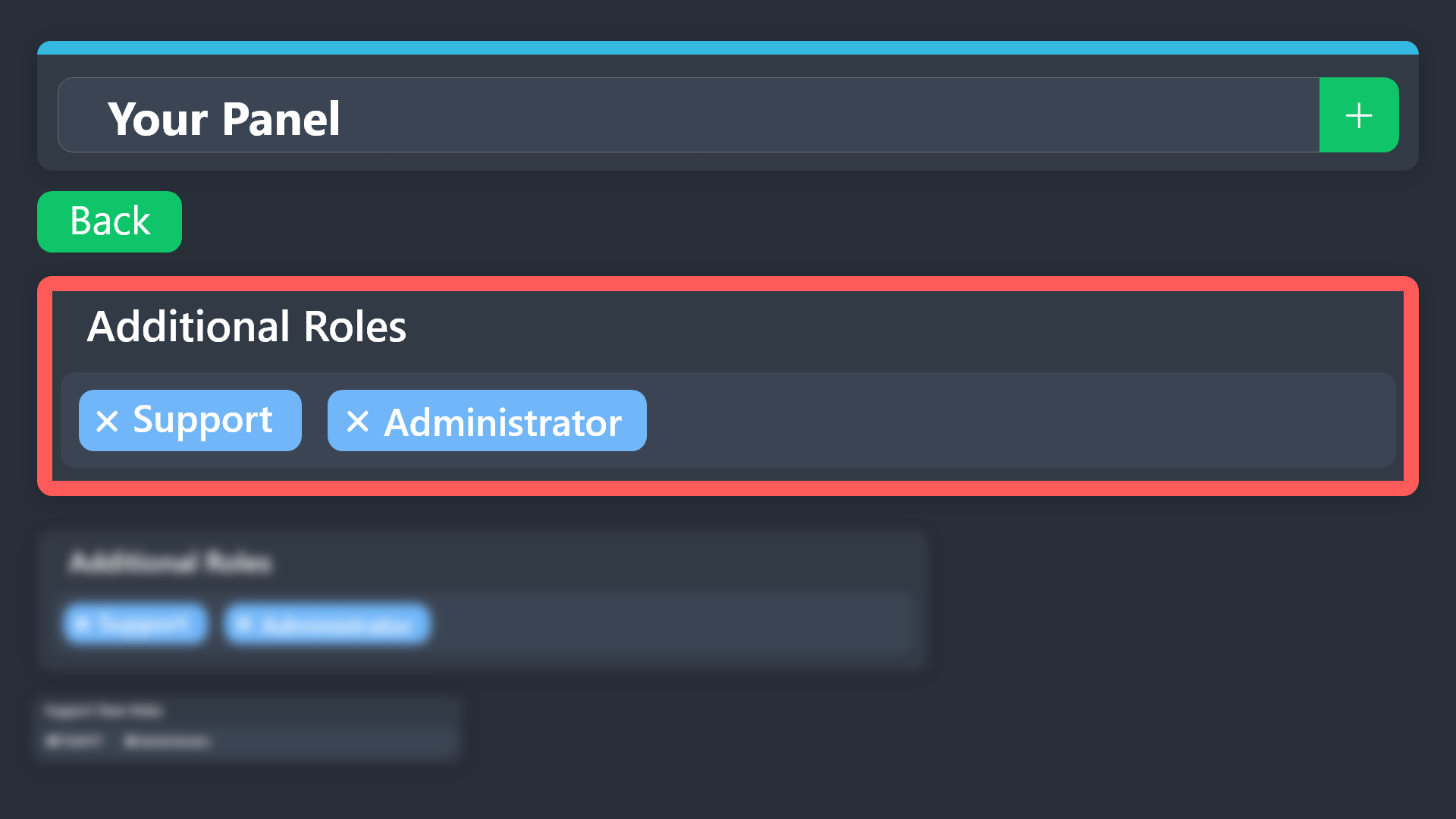
$addroles
spice harbor
@wheat pumice refer to the embed above
wheat pumice
spice harbor
<@1392469652923351063> refer to the embed above
This page is difficult for me to translate...
austere forge
wheat pumice
This page is difficult for me to translate...
Vous pouvez créer un ticket FR dans #🎫│make-a-ticket et je vous assisterais 🙂
 steady junco
i cant find the deleted section in the dashboard. What do i do?
wheat pumice
austere forge
Vous pouvez créer un ticket FR dans <#571706435449257997> et je vous assisterais...
Me régale
 flat oriole
Hi
Como desbanir minha conta?
Fui banido injusto
Da noite para o dia
Sem nem estar jogando
humble sequoiaBOT
Equipa de Apoio Portuguesa
Se você está procurando ajuda, abra um ticket para entrar em contato com a equipe de suporte em português. Vá para #🎫│make-a-ticket e pressione o botão :flag_br:.
 frozen swan
ok so basically whenever anyone tries to interact with any of the buttons associated with the bot (ex. open ticket, close ticket, so forth) is immediately greeted with a "this interaction failed" or it will open a ticket linking to 'unknown' which will just not do anything
austere forge
Check your audit log if a security bot does not delete the channel created by Ticket tool
frozen swan
will do
 barren talon
How do I solve the problem
 harsh terrace
how to use discohook as a ticket sysmtem ?
spice harbor
barren talon
How do I solve the problem
Run /permissionlevel and /debug in the server
barren talon
Ok Thanks
 vocal pendant
hello how to cancel subscryption on my account?
 restive condor
vocal pendant
hello how to cancel subscryption on my account?
restive condor
vocal pendant
hello how to cancel subscryption on my account?
Hi there, see below please
humble sequoiaBOT
<:TicketToolOffline:1018980643092312155> Cancel your subscription
We're sorry to see you go!
To cancel your Ticket Tool Premium Subscription, just head over to your User Settings in Discord, then Subscriptions. Look for Premium Apps and click on Manage Subscriptions. There you can cancel your subscription at the end of your billing cycle.

User Settings > Subscriptions > Premium Apps > Manage Subscriptions > Cancel
 terse idol
I cant get the player link/username link to work on my discord. Ive used the life long token from nitrado and updated it on dayz++ snd its showing my server on both ends but the player link will not work nor will killfeeds.
vocal pendant
humble sequoia
if my server was deleted, its possible that i will not have shown this what is on picture you sent?
 tardy pendant
Quero aprender a bota o ticket
vocal pendant
vocal pendant
if my server was deleted, its possible that i will not have shown this what is o...
please let me know
 brave loom
how to add ticket nee help

 spice harbor
vocal pendant
please let me know
spice harbor
vocal pendant
please let me know
Go to settings -> subscriptions and cancel it in there
spice harbor
 bitter quartz
Hi i want the tickets to be put to my support category
bitter quartz
Hi i want the tickets to be put to my support category
Go to the website ( https://tickettool.xyz/dashboard ) -> select the server -> panel configs -> category -> under Category Created/Opened, select Support
Ticket Tool - Ticketing without clutter - The #1 Discord support bot
bitter quartz
spice harbor
Go to the website ( https://tickettool.xyz/dashboard ) -> select the server -> p...
Nothing

@spice harbor
 main marsh
I am experiencing an issue with the bot syncing my discords accordingly.
austere forge
bitter quartz
Nothing
You must then select the category in which you want the tickets to be created
austere forge
main marsh
I am experiencing an issue with the bot syncing my discords accordingly.
Can you elaborate a bit please ?
austere forge
vocal pendant
if my server was deleted, its possible that i will not have shown this what is o...
In this case, you must contact Discord yourself, as we do not manage Discord subscriptions ⬇️
humble sequoiaBOT
If you have purchased a Premium Subscription of Ticket Tool through Discord and want to request a refund, you will have to contact Discord Support.
We unfortunately can't handle any of these cases.
Am I eligible for a refund?
Discords Refund Policy states that you can request a refund within 5 days of your initial purchase date.
A prorated refund (partial) can be requested if the bot has been removed by either Discord or the bot developer.
 Ticket Tool Premium Refund Request
main marsh
austere forge
Can you elaborate a bit please ?
Ticket Tool Premium Refund Request
main marsh
austere forge
Can you elaborate a bit please ?
Like on the dashboard.
bitter quartz
austere forge
You must then select the category in which you want the tickets to be created
How?
main marsh
The bot is in my other discord, but that discord isn't appearing on the dashboard.
humble sequoiaBOT
Don't see your server in the dashboard?
Try using the Sync Servers button on your top center of the Dashboard page
If this doesn't work
You should relog from the dashboard, you can do this by clicking here to log out immediately, and then log back in
Note:
You need one of these 3 things to access the dashboard.
1. Server Owner (Level: 6)
2. Server Administrator (Level: 4)
3. Dashboard Role (Level: 2)
:warning: You can check your level using the </permissionlevel:1029797400174399542> command on your Discord Server
If the bot's response is:
- @User is permission level: 0 (User)
You don't have any of the 3 levels required to access the server's dashboard
austere forge
main marsh
The bot is in my other discord, but that discord isn't appearing on the dashboar...
Refer to the embed above please!
bitter quartz
@austere forge
austere forge
bitter quartz
How?
By clicking in the field Category opened
 knotty fractal
@covert swallow How can I do it like this?
 humble sequoiaBOT
The Drop-down menu or Select Menu replaces the buttons on your panel message and uses a drop-down menu with all of your panels. To set this up, go to your Panel Configs and select your main Panel.
<:Numbericons1:1018864164032225340> Enable Select Style
First you enable Select Style. Then you add an item in the Dropdown Editor. Now you can start editing your dropdown!
<:Numbericons2:1018864168041971712> Dropdown Editor
Each line in the dropdown editor represents a line in the drop down menu on discord. You can add more "Items", by clicking on 

First you select a panel. That's the panel this option will open a ticket for.  DONT select the same panel twice. Each option should have a different Panel
After that, you can put a Display. This is the title of this option and will appear in the drop down menu. The *Description can be set right after that, which will be below the title in grey.
Additionally you can select an emoji, that will be shown in front of each option. You can either manually input the ID of an emoji or select it in the selector.
Common Issues ⚠️
- Panel doesn't send? Make sure you have a valid emoji selected
- Option doesn't show up? Check if two options have the same panel in the DropDown Editor

$dropdown
austere forge
knotty fractal
<@129308185629687809> How can I do it like this?
Refer to the embed above please!
knotty fractal
austere forge
Refer to the embed above please!
Okey
knotty fractal
austere forge
Refer to the embed above please!
like this ?
 austere forge
Yep, then you need to re-send /update your panel to apply the changes
knotty fractal
Okey
humble sequoiaBOT
⚠️ You're in the wrong place
We provide support for Ticket Tool Discord bot and cannot help you with whatever issue you have.
- We don't know which Support Team you should contact to get this issue resolved, and unfortunately we won't be able to accurately tell you.
If you don't have any further questions regarding our bot Ticket Tool, please close this ticket
knotty fractal
austere forge
Yep, then you need to re-send /update your panel to apply the changes
 austere forge
Ensure you resend the correct panel to apply the change
 tight crescent
guys how do i get the bot help
 native patio
hey is it possibe to change the order of panels from the dropdown in the dashboard ?
 plucky compass
why does my server not appear on dashboard even though i have ownership and the bot is there
 barren pebble
How do I get unbanned?