#🆘│community-support
1 messages · Page 257 of 1
 scenic forum
 echo raptor
@humble sequoia @humble sequoia @humble sequoia
 mental vault
in ticket tool every time having problems with like, discord rate limit?
scenic forum
mental vault
in ticket tool every time having problems with like, discord rate limit?
Bots are also affected by Rate limits, yes
mental vault
oh
i asked it bcs im in a server and cant make tickets (ive make the last ticket in like, 3 months fr) and i cant make it anymore bcs o rate limit
scenic forum
mental vault
i asked it bcs im in a server and cant make tickets (ive make the last ticket in...
Then that server made too many tickets and they need to wait for X time
mental vault
ohh
 long mist
Can someone help me? I’ve tried reading the thread and following the instructions but I can create a ticket in this server for this game.
 scenic forum
long mist
Can someone help me? I’ve tried reading the thread and following the instruction...
scenic forum
long mist
Can someone help me? I’ve tried reading the thread and following the instruction...
The server is at 500 channels. Staff need to delete some
 slate idol
How can i make it so when someone opens a ticket it will change the name to the thing for example not just like ticket-0001 ticket-0002 but like support-0001 achievement-0002
like that
 humble sequoiaBOT
The ticket name is the default channel name of all tickets. To edit it, go to your Dashboard > Panel Configs > Ticket. There you can edit the channel name of opened and closed tickets. You can also use variables in there.

 Note: This is a premium feature
scenic forum
Note: This is a premium feature
scenic forum
@slate idol refer to the embed above
slate idol
scenic forum
<@1095953732656709682> refer to the embed above
bruuh its oremium?
scenic forum
slate idol
bruuh its oremium?
Thats correct
slate idol
anyway to get premoum free
scenic forum
That defeats the purpose of premium dont you think
You can get a one time 7 day trial but thats it
 bold basalt
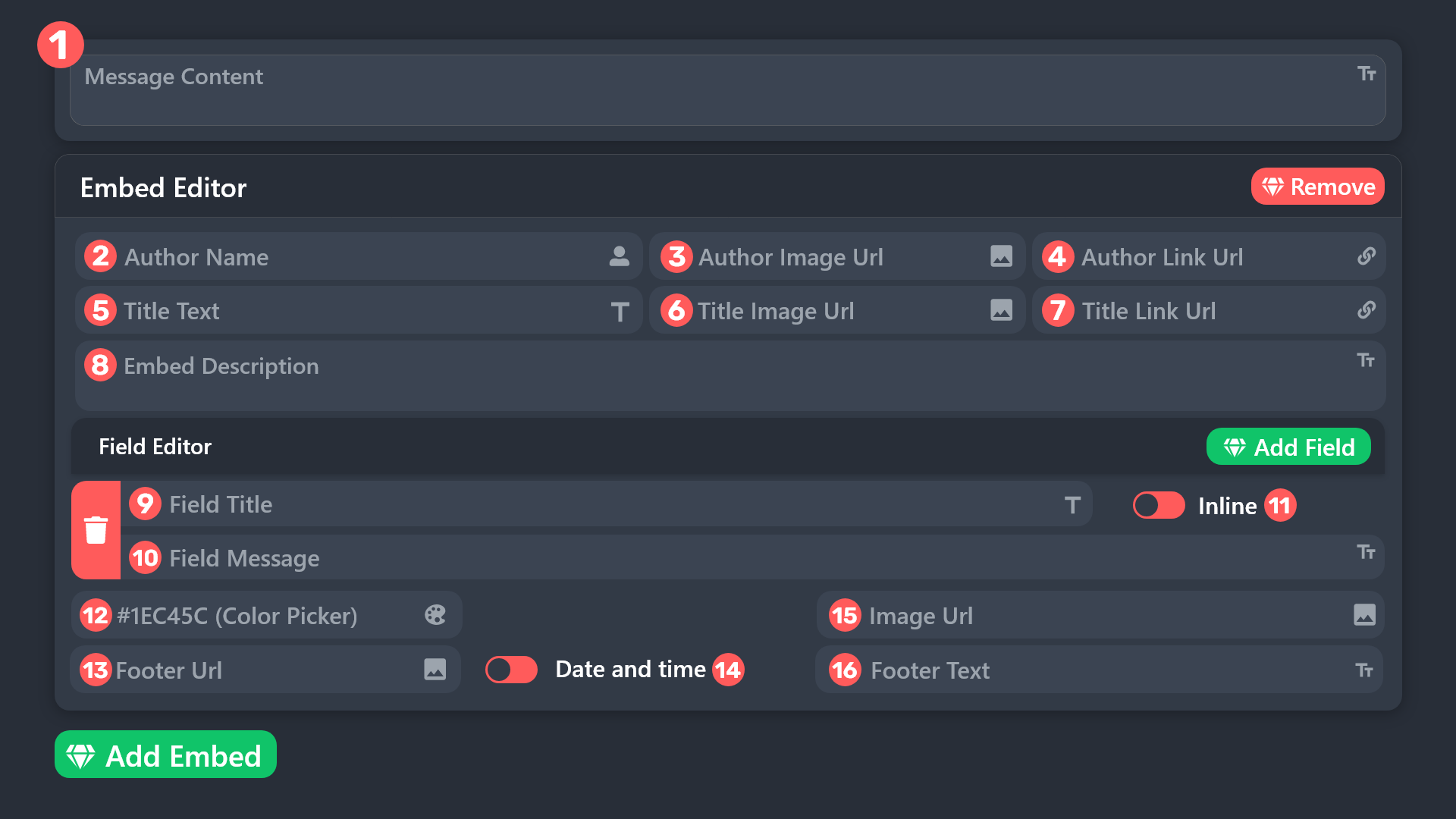
how do you change the color of this and that text?
 humble sequoiaBOT
 scenic forum
Thats field 12 and 13/14
If you mean the "to create a ticket" text aswell
Thats field 8
Panel config -> Panel -> Edit panel message
bold basalt
thanks
 remote basin
I've already tried opening a ticket a million times and it's not working.

 lilac junco
remote basin
I've already tried opening a ticket a million times and it's not working.
lilac junco
remote basin
I've already tried opening a ticket a million times and it's not working.
If you're a member in that server you cannot do anything other than informing a staff member of that server.
slate idol
@scenic forum u could gift me premium, maybe?
scenic forum
slate idol
<@186523978729259009> u could gift me premium, maybe?
How about ⭐ No ⭐
slate idol
scenic forum
How about ⭐ No ⭐
How about kindness to the same species and people
after all were both human
scenic forum
How about ⭐ Still no ⭐
bold basalt
lmao
 scenic plinth

slate idol
scenic forum
How about ⭐ Still no ⭐
how about yes because atleast i tried
scenic forum
slate idol
how about yes because atleast i tried
You can stop annoying me now. Appreciated
slate idol
scenic forum
You can stop annoying me now. Appreciated
im not
scenic forum
slate idol
im not
This is your last warning before I'm getting staff involved
 covert swallow
Yall just knock it off, this is a support channel, just keep it for support
slate idol
covert swallow
Yall just knock it off, this is a support channel, just keep it for support
please tell me what wrong i did
remote basin
Dude, it's impossible to open a ticket, seriously.
 placid girder
What do you mean?
remote basin
placid girder
What do you mean?
I'm having trouble opening a ticket.
placid girder
Are you attempting to open one of our tickets in our #🎫│make-a-ticket channel? Are you referring to another server? Or are you attempting to make a ticket for your server?
placid girder
remote basin
I've already tried opening a ticket a million times and it's not working.
Oh, if this is what you're referring to, there is nothing we can do for you. The staff have decided that only 50 tickets may be open at a time. You'll have to wait for them to clear some of their tickets.
 next nova
Anyone knows why I can’t delete a panel?

 meager crown
hello community is there anyway to see tickets made by someone if u only have their user ID? i tried using the serch option but nothing came up
scenic forum
next nova
Anyone knows why I can’t delete a panel?
Because it's your only panel. You cannot delete a panel if you only have 1
scenic forum
meager crown
hello community is there anyway to see tickets made by someone if u only have th...
Searching via ID in the transcript channel should work if you have one
 quartz herald
why can't I send the panel
our website says:
Failed to send: Access Denied (Ticket Tool doesn't have permission to view or send into this channel)
and a message is sent to the chat:
Error: Invalid
form body components[0].components[0].emoji.name [COMPONENT_INVALID_EMOJI]: Invalid emoji
humble sequoiaBOT
This error indicates you have selected an invalid emoji, i.e. an emoji the bot isn't capable of using, in a button field
Which Emoji?
This depends upon which action the error is appearing, the most common cases are the Create Ticket button or one of your Dropdown emojis. You can visit your Button's List to find all available buttons and find the conflicting one by yourself.
Why doesn't the bot accept it as valid?
- You selected an emoji that doesn't exist anymore, i.e. that has been deleted
- You wrote text there, instead of an emoji (or in addition to an emoji)
- You entered a code for a custom emoji from a server that the bot is not a member of
- You entered a custom emoji code incorrectly
- You're on iPhone and entered an emoji using the phone's emoji pad (use the emoji selector in the website instead)
 scenic forum
@quartz herald refer to the embed above
 orchid sphinx
Anyone know why is the bot cant answering to any commands
 scenic forum
orchid sphinx
Anyone know why is the bot cant answering to any commands
scenic forum
orchid sphinx
Anyone know why is the bot cant answering to any commands
Use /debug
orchid sphinx
scenic forum
Use /debug
Debug output is the same. Do i look at the website?
scenic forum
orchid sphinx
Debug output is the same. Do i look at the website?
Bot is missing the view channel permission inside that channel
 limber swift
Hi all ticket tool It's not working on my server and I need help.
 restive condor
limber swift
Hi all ticket tool It's not working on my server and I need help.
restive condor
limber swift
Hi all ticket tool It's not working on my server and I need help.
Hey there! How exactly is it not working?
Are you getting any error messages?
limber swift
Yes
restive condor
Could you screenshot it please
limber swift
But is it okay even if it's in Italian?
restive condor
Yep, that's same
 restive condor
limber swift
restive condor
limber swift
Please try the /debug command in that same channel
limber swift
/debug
limber swift
In what sense
restive condor
Use the /debug command in your server, in the exact same channel where you're getting the error messages when using other commands
 restive condor
Ticket Tool is missing the SEND MESSAGES permission for that channel
 versed drift
Hi I’m trying to refer a friend and I can’t remember how to do it. Can someone help me please?
humble sequoiaBOT

⚠️ You're in the wrong place
We provide support for Ticket Tool Discord bot and cannot help you with whatever issue you have.
- We don't know which Support Team you should contact to get this issue resolved, and unfortunately we won't be able to accurately tell you.
If you don't have any further questions regarding our bot Ticket Tool, please close this ticket
 elfin sky
I have used the bot before but now when i add it and i refresh the dashboard, it doesnt even show up anywhere. I removed and re-added the bot and it still wont show up.
humble sequoiaBOT
Don't see your server in the dashboard?
Try using the Sync Servers button on your top center of the Dashboard page
If this doesn't work
You should relog from the dashboard, you can do this by clicking here to log out immediately, and then log back in
Note:
You need one of these 3 things to access the dashboard.
1. Server Owner (Level: 6)
2. Server Administrator (Level: 4)
3. Dashboard Role (Level: 2)
:warning: You can check your level using the </permissionlevel:1029797400174399542> command on your Discord Server
If the bot's response is:
- @User is permission level: 0 (User)
You don't have any of the 3 levels required to access the server's dashboard
 scenic forum
@elfin sky refer to the embed above
 ebon grove
Hi, so I am confused with one thing. I have a multi-panel tickets and all of that works fine, howeverr despite the fact that I have set the closed category (for all panels), closed tickets simply are not moved to said category. I have checked Ticket tool's permission and it does have manage channel permission, so I don't really know what is the issue
elfin sky
thanks @scenic forum
 iron nightBOT
Gave +1 Rep to @scenic forum (current: #11 - 734)
 cunning gazelle
Appeals are currently closed, please try creating a ticket during our operational hours posted in Announcements. Thank you!
How to fix?
scenic forum
cunning gazelle
Appeals are currently closed, please try creating a ticket during our operationa...
By reading what the message is saying
 snow fiber
 glossy pond
Hello
 uneven slate
I am an admin in a server however im not able to go into ticket tools dashbord and fix anything
 forest lintel
How can I do that?

 fast robin
how do i create another button in the same message?
humble sequoiaBOT
Don't see your server in the dashboard?
Try using the Sync Servers button on your top center of the Dashboard page
If this doesn't work
You should relog from the dashboard, you can do this by clicking here to log out immediately, and then log back in
Note:
You need one of these 3 things to access the dashboard.
1. Server Owner (Level: 6)
2. Server Administrator (Level: 4)
3. Dashboard Role (Level: 2)
:warning: You can check your level using the </permissionlevel:1029797400174399542> command on your Discord Server
If the bot's response is:
- @User is permission level: 0 (User)
You don't have any of the 3 levels required to access the server's dashboard
 worldly helm
uneven slate
I am an admin in a server however im not able to go into ticket tools dashbord a...
worldly helm
uneven slate
I am an admin in a server however im not able to go into ticket tools dashbord a...
^
humble sequoiaBOT
A Discord Form lets the user answer individual questions in a pop-up Form, which then displays the answers in the ticket message. This can save time if you already know what you want to ask the user.
Setup Forms
Forms can be enabled under Panel Settings > Form Options > Edit Forms Options. In the new pop-up window, you can now enable and edit your own Form.
Form Options
You can add up to 5 questions in the Discord form. This is a Discord limitation. Each question can have a placeholder in the input field, a minimum and maximum input, multi-line, and also the option to have the answer required.
Options
Question Title ➞ Your Question goes here
Question Placeholder ➞ The placeholder text in the input field
Required ➞ If enabled, the user has to answer this question, to submit the form
Multi-Line Input ➞ Allows the user to input multiple lines
Minimum and Maximum Input ➞ Set a minimum and maximum input value for the user
Displaying the Answer
To display the answers from the user, you need to enable Auto display form results on the ticket message as an additional embed
If you don't want a second embed, go into your Panel Configs > Ticket Options > Edit Ticket Message. You use the variable {create.form.x} and replace x with the number of your question. For example, the response to Question 5 can be displayed with {create.form.5}.
 worldly helm
forest lintel
How can I do that?
worldly helm
forest lintel
How can I do that?
^
humble sequoiaBOT
For more convenient use of multipanels, you can now combine panels on the dashboard. This will allow you to directly send the multipanel from the dashboard or via the $panel ID command.
Where can I find this?
You can find this setting on the Dashboard -> Panel Configs -> Panel -> Attached Panels
Note: if you're attaching all the panels to a panel called English, don't include English in the attached panel's box (If you do this, it will create a duplicate)
This will put all buttons from all of your panels on one message. The message is the panel message from the panel you're combining these panels in.
 worldly helm
fast robin
how do i create another button in the same message?
worldly helm
fast robin
how do i create another button in the same message?
^
fast robin
worldly helm
^
Thanks
iron nightBOT
Gave +1 Rep to @worldly helm (current: #5 - 1063)
 pulsar brook
I want to appeal my ban in Rivals. Can you help me
humble sequoiaBOT
@pulsar brook
⚠️ You're in the wrong place
We provide support for Ticket Tool Discord bot and cannot help you with whatever issue you have.
- We don't know which Support Team you should contact to get this issue resolved, and unfortunately we won't be able to accurately tell you.
If you don't have any further questions regarding our bot Ticket Tool, please close this ticket
 elder sorrel
Hello i need help idk how to do with tickets And i wanna add my friend full permission above tickets
 faint torrent
hello can someone help me? i was banned I was permanently banned from the game for using "something illegal" in the game, but I only used a texture and font script; I didn't use anything that could have given me things to be better in the game i just used texture for a more better experience in the game bc my My phone freezes and lags during the game.
 humble sequoiaBOT
@faint torrent
⚠️ You're in the wrong place
We provide support for Ticket Tool Discord bot and cannot help you with whatever issue you have.
- We don't know which Support Team you should contact to get this issue resolved, and unfortunately we won't be able to accurately tell you.
If you don't have any further questions regarding our bot Ticket Tool, please close this ticket
1. Open your Panel Configs tab in your server's dashboard
2. Select the panel you want to grant access to
3. Open the General options menu
4. Select your Support Team Roles
5. Save changes
 scenic forum
@elder sorrel refer to the embed above
 errant wyvern
/transcript
 mystic junco
I want to make it where if I run a command with a set addon it will send a DM to the ticket owner. If the prefex is not added, then it will not send the DM with the custom part. I have the message dont with custom commands but I want to skip the extra step of sending the close prefex if I can
remote basin
Unfair
 humble sequoiaBOT
@remote basin
⚠️ You're in the wrong place
We provide support for Ticket Tool Discord bot and cannot help you with whatever issue you have.
- We don't know which Support Team you should contact to get this issue resolved, and unfortunately we won't be able to accurately tell you.
If you don't have any further questions regarding our bot Ticket Tool, please close this ticket
worldly helm
Hello! What do you mean?
Please send a screenshot of that.
Please also send a screenshot of that aswell 😄
You should be able to view the transcript using the link.
That‘s not possible.
You can download the html file attached to the transcript message
You need to open the file
 quasi carbon
Hey guys i’m making a server
that people use to order something and i want to make everything more neat and make it so to order you have to fill out a form than create a ticket
how do i do that?
i can only find out how to make the ticket
worldly helm
As mentioned you‘ll need to open it using the link (open the html file)
humble sequoiaBOT
━━ User's inquiry has been moved to a ticket ━━
worldly helm
I‘m pretty certain the file‘s name is the same as the tickets.
Also please do not ping me. It‘s against our rules.
 quiet pollen
 humble sequoiaBOT
@quiet pollen
⚠️ You're in the wrong place
We provide support for Ticket Tool Discord bot and cannot help you with whatever issue you have.
- We don't know which Support Team you should contact to get this issue resolved, and unfortunately we won't be able to accurately tell you.
If you don't have any further questions regarding our bot Ticket Tool, please close this ticket
 whole sand
 humble sequoiaBOT
@whole sand
⚠️ You're in the wrong place
We provide support for Ticket Tool Discord bot and cannot help you with whatever issue you have.
- We don't know which Support Team you should contact to get this issue resolved, and unfortunately we won't be able to accurately tell you.
If you don't have any further questions regarding our bot Ticket Tool, please close this ticket
 hasty roost

 radiant valve
whole sand
How can I get permission?
radiant valve
whole sand
How can I get permission?
What button are you pressing?
whole sand
radiant valve
What button are you pressing?
I clicked on claim.
 vocal adder
Bot has the perms but won’t delete the channel after closing ticket
radiant valve
whole sand
I clicked on claim.
Unless if you are staff, you may not be able to claim the ticket
 eternal raptor
🤦🏼♂️
 subtle gale
Problems with iptv
humble sequoiaBOT
@subtle gale
⚠️ You're in the wrong place
We provide support for Ticket Tool Discord bot and cannot help you with whatever issue you have.
- We don't know which Support Team you should contact to get this issue resolved, and unfortunately we won't be able to accurately tell you.
If you don't have any further questions regarding our bot Ticket Tool, please close this ticket
 novel raven
It is a scam, aka why the message was removed by mods.
 marble flax
 humble sequoiaBOT
@marble flax
⚠️ You're in the wrong place
We provide support for Ticket Tool Discord bot and cannot help you with whatever issue you have.
- We don't know which Support Team you should contact to get this issue resolved, and unfortunately we won't be able to accurately tell you.
If you don't have any further questions regarding our bot Ticket Tool, please close this ticket
eternal raptor
why are you trying to fool people into being scammed ?
novel raven
Might have to report him.... as it is a scam and doesn't work.
eternal raptor
reported !
scenic plinth
What
novel raven
scenic plinth
What
dev trying to convince us that the compromised accounts "scam" is real & works...
scenic plinth
No
radiant valve
scenic plinth
What
Scam message, someone decides to pretend its legit(spreading misinformation(at best)(prob disinformation come to think of it))
scenic plinth
Stop spamming.
eternal raptor
🤦♂️
novel raven

radiant valve
- #💬│general-chat
- moderators here cannot guarantee that the messages are ok, as they so not know every single language that one can use
eternal raptor
 scenic plinth
No
iron nightBOT
Gave +1 Rep to @eternal raptor (current: #258 - 2)
scenic plinth
How about we do this
 prime bridgeBOT

30 seconds slowmode ratelimit has been enforced.
eternal raptor
not sure if this belongs here but i've noticed there's different languages for the $tts autoresponder, how do i choose what language it send it in ?
placid girder
You write the regional indicator inside the command!
scenic plinth
eternal raptor
not sure if this belongs here but i've noticed there's different languages for t...
We have it set in pre-made languages.
$tts - English
$estts - Spanish
$detts - German
$frtts - French
$pttts - Portuguese
$artts - Arabic
placid girder
^^
eternal raptor
scenic plinth
We have it set in pre-made languages.
`$tts` - English
`$estts` - Spanish
`$de...
ahhhh that makes much more sense lol, thank you so much :)
iron nightBOT
Gave +1 Rep to @scenic plinth (current: #14 - 532)
novel raven
scenic plinth
We have it set in pre-made languages.
`$tts` - English
`$estts` - Spanish
`$de...
I think we need that enforcement in #💬│general-chat
prime bridgeBOT
5 seconds slowmode ratelimit has been enforced.
 woeful haven
Anyone know why it says interaction failed then /debug says application did not respond?
novel raven
woeful haven
Anyone know why it says interaction failed then /debug says application did not ...
Usually this means the bot doesn't have permissions to send messages in the channel you are using the command.
woeful haven
It’s been letting me set it up then just randomly through that error when I was trying to finish the panel
It has all text channel permissions plus the ones it asked for when I set it up
 proper hearth
Hi I’m not sure what the problem is with this can someone help


Nevermind I locked in
 sly yew
wher can i change where the ticket is made ima crash out
 pearl mesa
Hello, help me, they blocked my forsaken account according to using an account to avoid a ban, but that account created was not mine, please unban me
humble sequoiaBOT
@pearl mesa
⚠️ You're in the wrong place
We provide support for Ticket Tool Discord bot and cannot help you with whatever issue you have.
- We don't know which Support Team you should contact to get this issue resolved, and unfortunately we won't be able to accurately tell you.
If you don't have any further questions regarding our bot Ticket Tool, please close this ticket
pearl mesa
humble sequoia
<@1461887110784225324>
Can you translate it into Spanish, please?
humble sequoiaBOT
⚠️ Está en el lugar equivocado
Brindamos soporte para el bot de Discord Ticket Tool y no le podemos ayudar con el problema que presenta.
- No sabemos a que equipo de soporte debería contactar para solucionar este problema, y desafortunadamente no podremos ayudarle acertadamente.
Si no tiene alguna duda relacionada a nuestro bot, Ticket Tool, por favor cierre este ticket.
pearl mesa
Okay, could you tell me how to make a translated doubt ticket, please?
 wispy quartz
Hello! Uhm. So I’m a server owner and I’m trying to like setup the bot and stuff and I’m just very confused. Can I get help from a mod or someone please!>.< lots of thanks!..
 winter junco
wispy quartz
Hello! Uhm. So I’m a server owner and I’m trying to like setup the bot and stuff...
winter junco
wispy quartz
Hello! Uhm. So I’m a server owner and I’m trying to like setup the bot and stuff...
Elaborate to the team
Am sure the mod will help you out
 pure stream
Help.
 halcyon garnet
hey
i was trying to setup tickets on dashboard but it dosent show theirs server
im on pc so i cant screenshot or recording
uh hello?
ANSWERRRRRRRRRRRRRRRRRRRRRRRRRRRRRRRRRRRRRR
halcyon garnet
nice
scenic forum
Not possible
You can have a confirm close question but they could ignore it and close regardless
Panel config -> general -> Two step close
scenic forum
halcyon garnet
ANSWERRRRRRRRRRRRRRRRRRRRRRRRRRRRRRRRRRRRRR
Being patient is key
Refer to the embed below
humble sequoiaBOT
Don't see your server in the dashboard?
Try using the Sync Servers button on your top center of the Dashboard page
If this doesn't work
You should relog from the dashboard, you can do this by clicking here to log out immediately, and then log back in
Note:
You need one of these 3 things to access the dashboard.
1. Server Owner (Level: 6)
2. Server Administrator (Level: 4)
3. Dashboard Role (Level: 2)
:warning: You can check your level using the </permissionlevel:1029797400174399542> command on your Discord Server
If the bot's response is:
- @User is permission level: 0 (User)
You don't have any of the 3 levels required to access the server's dashboard
halcyon garnet
humble sequoia
it dosent work still
scenic forum
halcyon garnet
it dosent work still
Use /debug on your server6
scenic forum
halcyon garnet
i did
Then you didn't follow the embed above
 slim pelican
I am stuck
humble sequoiaBOT
@slim pelican, we would love to help you, but if you don't tell us what you need help with we can't help you :(
humble sequoiaBOT
@uneven quartz, we would love to help you, but if you don't tell us what you need help with we can't help you :(
scenic forum
 uneven quartz
<@186523978729259009>
uneven quartz
<@186523978729259009>
Don't ping me.
uneven quartz
How do I make the ticket system Arabic? + How do I name the ticket exactly as I want it, like this one with a picture?

@scenic forum
scenic forum
uneven quartz
<@186523978729259009>
I told you to stop pinging me
uneven quartz
scenic forum
I told you to stop pinging me
Yes, why are you in management?
 versed ocean
@humble sequoia
halcyon garnet
thank u guys
 silver vine
Hello, how are you?
I would like to kindly request a review of the ban on my account.
My account was banned for evading protection, but this happened because I lent my account to a friend who already had a "dirty" ID, and unfortunately he didn't inform me about it beforehand. I had no intention of stealing any shadows or breaking any game rules.
I apologize for what happened and would like to know if there is any possibility of removing the ban from my account.
Account name: nsybdydmzhndidnd
Thank you very much for your attention and time.
 cold shoal
Pls support my bot is soo lagging
 near turtle
Is it possible to get an old ticket transcript(April 2025)
I had in a server I don't have perms to access the dashboard for . It has info in the ticket I need to recover.
humble sequoiaBOT
@silver vine
⚠️ You're in the wrong place
We provide support for Ticket Tool Discord bot and cannot help you with whatever issue you have.
- We don't know which Support Team you should contact to get this issue resolved, and unfortunately we won't be able to accurately tell you.
If you don't have any further questions regarding our bot Ticket Tool, please close this ticket
 austere forge
near turtle
Is it possible to get an old ticket transcript(April 2025)
I had in a server I...
austere forge
near turtle
Is it possible to get an old ticket transcript(April 2025)
I had in a server I...
You must ask the server staff of this server to give you the transcript of your ticket
humble sequoiaBOT
Equipa de Apoio Portuguesa
Se você está procurando ajuda, abra um ticket para entrar em contato com a equipe de suporte em português. Vá para #🎫│make-a-ticket e pressione o botão :flag_br:.
austere forge
 brave dagger
Me Brasil
brave dagger
Me Brasil
^
near turtle
austere forge
You must ask the server staff of this server to give you the transcript of your ...
The head mod says they don't have access to it anymore . Is there something I can have them do to help them find it ?
austere forge
near turtle
The head mod says they don't have access to it anymore . Is there something I ca...
Then it won't be possible to recover it, sorry
 real fulcrum
hello
i need help can i put ss here?


it dosent show in the dashboard list
u know why?
<@&1041059309561323560>
@timber kernel
sorry
humble sequoiaBOT
Don't see your server in the dashboard?
Try using the Sync Servers button on your top center of the Dashboard page
If this doesn't work
You should relog from the dashboard, you can do this by clicking here to log out immediately, and then log back in
Note:
You need one of these 3 things to access the dashboard.
1. Server Owner (Level: 6)
2. Server Administrator (Level: 4)
3. Dashboard Role (Level: 2)
:warning: You can check your level using the </permissionlevel:1029797400174399542> command on your Discord Server
If the bot's response is:
- @User is permission level: 0 (User)
You don't have any of the 3 levels required to access the server's dashboard
austere forge
real fulcrum
hello
Refer to the embed above
iron nightBOT
Gave +1 Rep to @austere forge (current: #4 - 1286)
 fallen junco
@austere forge I have a problem because I made a PayPal payment for memesense, but I did not receive the activation code by email, can I ask for help?
humble sequoiaBOT
⚠️ You're in the wrong place
We provide support for Ticket Tool Discord bot and cannot help you with whatever issue you have.
- We don't know which Support Team you should contact to get this issue resolved, and unfortunately we won't be able to accurately tell you.
If you don't have any further questions regarding our bot Ticket Tool, please close this ticket
 woven flume
How do I set the bot up?
 stark runeBOT
1. Invite Ticket Tool to your server
First you will want to invite the bot to your server. Once the bot is in your server, you can manage your server in the dashboard.

2. Create a Panel
To create a panel we are going to need to head over to the panel configs on the dashboard.
Once at the dashboard we will need to click Create Panel.
Enter a panel name (Fill in any optional settings you want).
Click Create Panel and your ready to get started with configuring your panel.
An example of a creating a panel is shown below.

3. Send the Panel to a Channel
Once you've created a panel on the dashboard you will need to send it to a channel using send on the dashboard.
Select the channel you want your panel to be created in and click send.
For other questions checkout $help faq.
An example of a sending a panel is shown below.
Having a Problem Sending the Panel?
Do $debug in a channel with Ticket Tool and make sure it has all the necessary Discord permissions.
 austere forge
woven flume
How do I set the bot up?
austere forge
woven flume
How do I set the bot up?
Refer to the embed above!
woven flume
How do I get my tickets to save to a different channel because it's going to the same one used to open the ticket
humble sequoiaBOT
1. Open your Panel Configs tab in your server's dashboard
2. Select the panel you want to grant access to
3. Open the Transcript options menu
4. Using the Transcript Channel selector, pick the channel you want your transcripts to be sent to
5. Save changes
 austere forge
woven flume
How do I get my tickets to save to a different channel because it's going to the...
austere forge
woven flume
How do I get my tickets to save to a different channel because it's going to the...
Refer to the embed above!
 austere forge
As stated in the embed previously sent, you need to head over the Dashboard and change from there
woven flume
I got confused on how
austere forge
By using embed previously sent, it explains how
humble sequoiaBOT

Ticket Tool - Ticketing without clutter - The #1 Discord support bot

 austere forge
woven flume
austere forge
woven flume
You have created two panels, and in the second panel, the support channel is still selected. You must make changes to this panel as well.
 woven flume
austere forge
You have created two panels, and in the second panel, the `support` channel is s...
woven flume
austere forge
You have created two panels, and in the second panel, the `support` channel is s...
yeah I got it that was the error thank you for your assistance
iron nightBOT
Gave +1 Rep to @austere forge (current: #4 - 1287)
austere forge
No worries, Thanks for choosing Ticket Tool! 
 warm meadow
Is the bot down?
scenic forum
warm meadow
Is the bot down?
no
humble sequoiaBOT
━━ Omar's inquiry has been moved to a ticket ━━
 dire walrus
humble sequoiaBOT
dire walrus
humble sequoiaBOT
@dire walrus
Você está no lugar errado
Fornecemos suporte para Ticket Tool Discord bot e não podemos ajudá-lo com qualquer problema que você tenha.
- Não sabemos qual equipe de suporte você deve entrar em contato para resolver esse problema e, infelizmente, não poderemos informar com precisão.
Se você não tiver mais dúvidas sobre nossa ferramenta de ticket de bot, feche este ticket
 humble sequoiaBOT
Don't see your server in the dashboard?
Try using the Sync Servers button on your top center of the Dashboard page
If this doesn't work
You should relog from the dashboard, you can do this by clicking here to log out immediately, and then log back in
Note:
You need one of these 3 things to access the dashboard.
1. Server Owner (Level: 6)
2. Server Administrator (Level: 4)
3. Dashboard Role (Level: 2)
:warning: You can check your level using the </permissionlevel:1029797400174399542> command on your Discord Server
If the bot's response is:
- @User is permission level: 0 (User)
You don't have any of the 3 levels required to access the server's dashboard
scenic forum
@slim pelican refer to the embed above
scenic forum
slim pelican
Like server owner yk
By owning the server
 lusty forum
Hi can anyone help? I have just set this ticket tool up on my discord server but get the following error when i try to open a ticket:
Category Issues
╰ Failed to find a valid category.
╰ Ticket Tool is missing Manage Channels on "#SUPPORT"
╰ Fix the issues or remove the categories
╰ You can add additional categories
Docs page for this error
51699b5e-f50c-11ed-a05b-0242ac120003
scenic forum
lusty forum
Hi can anyone help? I have just set this ticket tool up on my discord server but...
╰ Ticket Tool is missing Manage Channels on "#SUPPORT"
slim pelican
Can I have the setup
lusty forum
scenic forum
╰ Ticket Tool is missing Manage Channels on "#SUPPORT"
where do i change this? on discord itself or the ticket tool dashboard?
scenic forum
lusty forum
where do i change this? on discord itself or the ticket tool dashboard?
Discord
slim pelican
Thing plz…
lusty forum
scenic forum
Discord
is it a permission on the channel i need to set up?
scenic forum
lusty forum
is it a permission on the channel i need to set up?
On the category
stark runeBOT
1. Invite Ticket Tool to your server
First you will want to invite the bot to your server. Once the bot is in your server, you can manage your server in the dashboard.
2. Create a Panel
To create a panel we are going to need to head over to the panel configs on the dashboard.
Once at the dashboard we will need to click Create Panel.
Enter a panel name (Fill in any optional settings you want).
Click Create Panel and your ready to get started with configuring your panel.
An example of a creating a panel is shown below.
3. Send the Panel to a Channel
Once you've created a panel on the dashboard you will need to send it to a channel using send on the dashboard.
Select the channel you want your panel to be created in and click send.
For other questions checkout $help faq.
An example of a sending a panel is shown below.
Having a Problem Sending the Panel?
Do $debug in a channel with Ticket Tool and make sure it has all the necessary Discord permissions.
scenic forum
@slim pelican refer to the embed above
slim pelican
Ty big bruh
 barren hill
do i have to be the owner to setp the bot
 long bloom
humble sequoia
long bloom
humble sequoia
everyone seems to have this issue but I do not see an answer to this anywhere that has actually worked to solve the problem.
Has anyone found the magic potion to get your server to appear 🙏
 mortal falcon
long bloom
everyone seems to have this issue but I do not see an answer to this anywhere th...
mortal falcon
long bloom
everyone seems to have this issue but I do not see an answer to this anywhere th...
Same is the case with me too
worldly helm
@long bloom @mortal falcon - If I understood correctly, both of you don't see your wanted server on the dashboard?
If yes, please try using the $level or /permissionlevel command in your server and provide me with the response of the bot.
barren hill
the guy gave me admin do i have to be owner when i added the bot it didnt whow his server

show
humble sequoiaBOT
Don't see your server in the dashboard?
Try using the Sync Servers button on your top center of the Dashboard page
If this doesn't work
You should relog from the dashboard, you can do this by clicking here to log out immediately, and then log back in
Note:
You need one of these 3 things to access the dashboard.
1. Server Owner (Level: 6)
2. Server Administrator (Level: 4)
3. Dashboard Role (Level: 2)
:warning: You can check your level using the </permissionlevel:1029797400174399542> command on your Discord Server
If the bot's response is:
- @User is permission level: 0 (User)
You don't have any of the 3 levels required to access the server's dashboard
worldly helm
barren hill
the guy gave me admin do i have to be owner when i added the bot it didnt whow h...
Please try this 
long bloom
worldly helm
Please try this <:this:894279341108772914>
tried all of this. The permission does not even respond
humble sequoiaBOT
When first invited to your server, Ticket Tool should have the permissions shown below in order to ensure an appropriate functioning:
When customizing permissions for the different ticket participants, you must make sure Ticket Tool has the permissions you want it to grant to others, you can learn more about this here.
Missing Permissions
This error is a direct outcome of the bot missing permissions as depicted above. When troubleshooting this error we suggest you go through these steps:
- Use the </debug:1029783024264564765> command to check if the bot is lacking core role or channel permissions.
- Compare the category/channel's overrides and contrast them with the bot's roles to identify any permission denial that is breaking the functioning
- If you can't still figure it out, let our <@&540295656720302081> know so they can guide you through
Additional Resources
- If you are a server administrator and would like to understand more how to set up your server's permissions, we suggest checking the Discord Support Knowledge Base
- If you are a bot developer and are interested in the internal permission hierarchy we suggest you this part of the Discord Developer Docs
Important Note
- Giving Administrator permissions is NOT required and we do NOT encourage you to do unless you are trying to troubleshoot your permissions setup.
 worldly helm
The bot is most likely missing permissions
long bloom
where do I set these permissions?
long bloom
humble sequoia
I finally got /permissionlevel to work. it says I am level 0, but I am a server admin?
 torpid slate
long bloom
torpid slate
long bloom
I heard this bot was amazing but I have been failing to simply add it to my server for weeks now 🙁
scenic forum
long bloom
I finally got /permissionlevel to work. it says I am level 0, but I am a server...
Youre not Admin then
long bloom
scenic forum
Youre not Admin then
I am... but either way the server owner also tried and it failed.
 lean hawk
How do I add admin to mine? I’m trying to figure that out
scenic forum
long bloom
I am... but either way the server owner also tried and it failed.
Show me your role having the Administrator permission then
long bloom
scenic forum
Show me your role having the ``Administrator`` permission then
I'm here for support and you do not sound so supportive but thank you
iron nightBOT
Gave +1 Rep to @scenic forum (current: #11 - 736)
scenic forum
long bloom
I'm here for support and you do not sound so supportive but thank you
Im merely asking for proof of your role having the Administartor permission because if you do have it it would be a bug and needs to be escalated
scenic forum
lean hawk
How do I add admin to mine? I’m trying to figure that out
Your discord role needs to have the Administrator permission
Which can onle be added by an admin or the owner
lean hawk
scenic forum
Your discord role needs to have the ``Administrator`` permission
Which can onle ...
Yes I’m the owner of the server and trying to figure out how to add the administrator permission to some of my admin
scenic forum
lean hawk
Yes I’m the owner of the server and trying to figure out how to add the administ...
Role permissions -> Permission at the VERY BOTTOM
lean hawk
Where do I go, the app/ specific page or do I set the command in my server
 supple kraken
does this bot provide chat transcript report?
scenic forum
supple kraken
does this bot provide chat transcript report?
If the ticket has been transcripted, yes
scenic forum
lean hawk
Where do I go, the app/ specific page or do I set the command in my server
Preferably via the dashboard as it has more options
supple kraken
scenic forum
If the ticket has been transcripted, yes
the ticket has been closed by the server owner now, and i can no longer access the channel
lean hawk
scenic forum
Preferably via the dashboard as it has more options
Which specific part of the dashboard as I’m not seeing what you said should be there. I’m also on mobile so I’m not sure if that affects it
scenic forum
supple kraken
the ticket has been closed by the server owner now, and i can no longer access t...
If you havent received the transcript in your dms then you cannot access it im afraid
stark runeBOT
1. Invite Ticket Tool to your server
First you will want to invite the bot to your server. Once the bot is in your server, you can manage your server in the dashboard.
2. Create a Panel
To create a panel we are going to need to head over to the panel configs on the dashboard.
Once at the dashboard we will need to click Create Panel.
Enter a panel name (Fill in any optional settings you want).
Click Create Panel and your ready to get started with configuring your panel.
An example of a creating a panel is shown below.
3. Send the Panel to a Channel
Once you've created a panel on the dashboard you will need to send it to a channel using send on the dashboard.
Select the channel you want your panel to be created in and click send.
For other questions checkout $help faq.
An example of a sending a panel is shown below.
Having a Problem Sending the Panel?
Do $debug in a channel with Ticket Tool and make sure it has all the necessary Discord permissions.
scenic forum
@lean hawk refer to the embed above for a basic ticket setup
supple kraken
there is no option in the dashboard like for other bots, the transcripts are available on the dashboard
scenic forum
supple kraken
there is no option in the dashboard like for other bots, the transcripts are ava...
Transcripts only get saved locally
They do not show up online or anywhere else
lean hawk
scenic forum
<@1105990526282502154> refer to the embed above for a basic ticket setup
I have done that. I am trying to figure out how to add the administrator permission to people as I am not able to figure it out nor can I find that role add thing that you said would be there
scenic forum
lean hawk
I have done that. I am trying to figure out how to add the administrator permiss...

At the bottom of role permissions
lean hawk
scenic forum
At the bottom of role permissions
I don’t think k you’re understanding me. Where do I find that role permissions. I genuinely cannot find it. I keep going back and forth to look for it and my screen looks nothing like what you have shown.
scenic forum
lean hawk
I don’t think k you’re understanding me. Where do I find that role permissions. ...
Server settings -> Roles -> Select role you want to give admin -> GO to permissions -> Toggle Admin on at the very bottom
lean hawk
Thank you
supple kraken
scenic forum
Transcripts only get saved locally
They do not show up online or anywhere else
well this should be default for ticket bots
scenic forum
supple kraken
well this should be default for ticket bots
No
The server can decide themself if they want others to receive the transcript or not
 jolly field
I bought 3 sets of the Witch Hero, but I only got some of them... What should I do? Where should I write?! 🤷🏼♀️🤦🏼♀️😔
humble sequoiaBOT
@jolly field
⚠️ You're in the wrong place
We provide support for Ticket Tool Discord bot and cannot help you with whatever issue you have.
- We don't know which Support Team you should contact to get this issue resolved, and unfortunately we won't be able to accurately tell you.
If you don't have any further questions regarding our bot Ticket Tool, please close this ticket
 kindred quarry
where i can open ticket
 willow pond
kindred quarry
where i can open ticket
willow pond
kindred quarry
where i can open ticket
 agile scaffold
why cant i edit the message in message panel
scenic forum
agile scaffold
why cant i edit the message in message panel
Any non clickable field requires premium to edit
 earnest sedge
Preciso de ajuda FLEX CITY
humble sequoiaBOT
@earnest sedge
⚠️ You're in the wrong place
We provide support for Ticket Tool Discord bot and cannot help you with whatever issue you have.
- We don't know which Support Team you should contact to get this issue resolved, and unfortunately we won't be able to accurately tell you.
If you don't have any further questions regarding our bot Ticket Tool, please close this ticket
 dense horizon
 humble sequoiaBOT
@dense horizon
⚠️ You're in the wrong place
We provide support for Ticket Tool Discord bot and cannot help you with whatever issue you have.
- We don't know which Support Team you should contact to get this issue resolved, and unfortunately we won't be able to accurately tell you.
If you don't have any further questions regarding our bot Ticket Tool, please close this ticket
 sleek basin
How do I make it so my ticket saids this when you open it

 wheat cave
sleek basin
How do I make it so my ticket saids this when you open it
wheat cave
sleek basin
How do I make it so my ticket saids this when you open it
You mean roles ping?
sleek basin
wheat cave
You mean roles ping?
Not the roles the text
wheat cave
sleek basin
Not the roles the text
Edit ticket message
sleek basin
wheat cave
Edit ticket message
Ok
 wheat cave
sleek basin
wheat cave
sleek basin
No no
sleek basin
Wat
wheat cave
Use dashboard

 viral prairie
How to find my panel id on the dash bozrd
sleek basin
What do I press
viral prairie
How to find my panel id on the dash bozrd
How to find my panel id on the dash bozrd plzz
 humble sequoiaBOT
━━ Wassim's inquiry has been moved to a ticket ━━
 pseudo ravine
Please be patient in the ticket you just created
viral prairie
pseudo ravine
Please be patient in the ticket you just created
Okay
wheat cave
viral prairie
How to find my panel id on the dash bozrd
???
sleek basin
wheat cave
Panel config
I keep doing it and it’s not saving
wheat cave
sleek basin
I keep doing it and it’s not saving
Did you click save?
sleek basin
Lemme see
sleek basin
wheat cave
Try again and test
Ok I did it how to edit this message
 wheat cave
sleek basin
Ok I did it how to edit this message
wheat cave
sleek basin
Ok I did it how to edit this message
Can you show me ss on dashboard?
wheat cave
Great
sleek basin
wheat cave
Great
Tysm for ur help
wheat cave
sleek basin
Tysm for ur help
You are welcome 🤗
sleek basin
Erm it’s not letting me press the edit message 🥹
 normal tusk
Hi, did anyone here buy an account from this shop?
Did you actually receive the credentials and did it work long-term?
humble sequoiaBOT
@normal tusk
⚠️ You're in the wrong place
We provide support for Ticket Tool Discord bot and cannot help you with whatever issue you have.
- We don't know which Support Team you should contact to get this issue resolved, and unfortunately we won't be able to accurately tell you.
If you don't have any further questions regarding our bot Ticket Tool, please close this ticket
 rotund saffron
It keeps saying application did not respond
 polar sluice
 rose bronze
when i go to the online dashboard my server ticket bot doesn’t sync to the website
placid girder
sleek basin
Erm it’s not letting me press the edit message 🥹
Anything with this symbol cannot be edited if you do not pay for Premium:  Otherwise, you can tap "Embed Editor" to open that menu, and type in "Message Content" as well.
placid girder
rotund saffron
It keeps saying application did not respond
This is generally just because Ticket Tool can't view the channel or send messages. 
humble sequoiaBOT
@polar sluice
⚠️ You're in the wrong place
We provide support for Ticket Tool Discord bot and cannot help you with whatever issue you have.
- We don't know which Support Team you should contact to get this issue resolved, and unfortunately we won't be able to accurately tell you.
If you don't have any further questions regarding our bot Ticket Tool, please close this ticket
placid girder
rose bronze
when i go to the online dashboard my server ticket bot doesn’t sync to the websi...
I think this is just a basic error. You might have luck in using the actual sync button, or logging out and back in.
placid girder
 vague jungle
how do i make it where @ everyone cant close a ticket?
vague jungle
how do i make it where @ everyone cant close a ticket?
Permissions are controlled with the Permissions section for a panel! If you use commands, you'll need to set the permissions in Command Configs.
 vague jungle
thanks @placid girder
iron nightBOT
Gave +1 Rep to @placid girder (current: #60 - 36)
 rich trail
And when people make tickets it goes to suggested I want it to go to a specific category I am new so I js want to make sure that because I have 2 tickets I have ticket king as mm tickets and ticket king as base skins but in different category so help pls

I’m on phone btw
@placid girder
 echo latch
Opa queria saber porque fui banido nem jogo
sleek basin
placid girder
Anything with this symbol cannot be edited if you do not pay for Premium: <:Prem...
What symbol

 scenic forum
 feral salmon
Hi, Can anyone tell me if I am the new discord manager, How do I solve this>
feral salmon
Hi, Can anyone tell me if I am the new discord manager, How do I solve this>
By adding more categories
As you can only have 45 tickets per category
humble sequoiaBOT
For more convenient use of multipanels, you can now combine panels on the dashboard. This will allow you to directly send the multipanel from the dashboard or via the $panel ID command.
Where can I find this?
You can find this setting on the Dashboard -> Panel Configs -> Panel -> Attached Panels
Note: if you're attaching all the panels to a panel called English, don't include English in the attached panel's box (If you do this, it will create a duplicate)
This will put all buttons from all of your panels on one message. The message is the panel message from the panel you're combining these panels in.
scenic forum
 stuck nacelle
guys how to create several button on ticket tools?
stuck nacelle
guys how to create several button on ticket tools?
Refer to the embed above
 rain pike
Why when I do /setup it keeps saying application didn’t respond
scenic forum
 barren monolith
How bro?
barren monolith
How bro?
Dont be an idiot and fall for the scam.
scenic forum
rain pike
Why when I do /setup it keeps saying application didn’t respond
The bot is missing either view channel or send message permission
rain pike
scenic forum
The bot is missing either view channel or send message permission
another question how do I make it so when the ticket is created it pings the staff roles?
humble sequoiaBOT
1. Open your Panel Configs tab in your server's dashboard
2. Select the panel you want to ping your support team on
3. Open the Ticket options menu
4. Click on Edit Ticket Message
5. In the Message Content use one of the role mention syntax ({@Role Name}/{Role ID})
6. Save changes
Note: For this to work properly, Ticket Tool requires the Mention Everyone permission. Or the role must have the Allow anyone to @mention this role setting enabled 
 scenic forum
rain pike
another question how do I make it so when the ticket is created it pings the sta...
scenic forum
rain pike
another question how do I make it so when the ticket is created it pings the sta...
Refer to the embed above
rain pike
Alr thanks
 blazing apex
Hey so I can’t find my server where I am an admin on the ticket tool dashboard area for some reason. How do I fix that?
wheat cave
blazing apex
Hey so I can’t find my server where I am an admin on the ticket tool dashboard a...
Login your account on dashboard you will see
rain pike
humble sequoia
Can someone help with step 5
wheat cave
rain pike
Can someone help with step 5
Role id
rain pike
wheat cave
Role id
@roleid?
rain pike
wheat cave
Just copy role id its done
That didn’t work
wheat cave
rain pike
That didn’t work
What you did
rain pike
wheat cave
What you did
Just putting the role id
wheat cave
rain pike
Just putting the role id
Send DC link in dm
rain pike
wheat cave
Send DC link in dm
Check dm
 pliant crane
 scenic plinth
@wheat cave @rain pike please keep support to this server. We don't encourage or allow doing so in DM.
humble sequoiaBOT
@pliant crane
⚠️ Está en el lugar equivocado
Brindamos soporte para el bot de Discord Ticket Tool y no le podemos ayudar con el problema que presenta.
- No sabemos a que equipo de soporte debería contactar para solucionar este problema, y desafortunadamente no podremos ayudarle acertadamente.
Si no tiene alguna duda relacionada a nuestro bot, Ticket Tool, por favor cierre este ticket.
wheat cave
scenic plinth
<@1036231376183250945> <@1449989651145424907> please keep support to this server...
He dk the role id so I help he in him server
I don't think it's allow to send dc link here
scenic plinth
wheat cave
He dk the role id so I help he in him server
We have an in built command ($id @role) for them to use. We don't allow joining other people's servers to solve their issues.
wheat cave
scenic plinth
We have an in built command (`$id @role`) for them to use. We don't allow joinin...
He dk how to get id how to use command if you don't have id
humble sequoiaBOT
scenic plinth
$id <@&642118166243311646>
<@&642118166243311646>
<@&642118166243311646>
<@&642118166243311646>
scenic plinth
They would need to use it in their own server.
wheat cave
Ok
 subtle pewter
Hello, good evening. Where is the Spanish channel?
I'm new here 🙂
And here's how I can appeal ?
 tight bloom
ticket transcript channel isnt working. ive set it for a specific channel and yet it doesnt work consistently
it only works 50/50
tight bloom
Is it possible as well to make it so automatically every ticket closed exports a transcript to a channel
humble sequoiaBOT
@subtle pewter
⚠️ You're in the wrong place
We provide support for Ticket Tool Discord bot and cannot help you with whatever issue you have.
- We don't know which Support Team you should contact to get this issue resolved, and unfortunately we won't be able to accurately tell you.
If you don't have any further questions regarding our bot Ticket Tool, please close this ticket
scenic forum
tight bloom
ticket transcript channel isnt working. ive set it for a specific channel and ye...
Then the tickets were most likely not trancripted
tight bloom
I click on them to transcript them and it says no channel set
scenic forum
tight bloom
Is it possible as well to make it so automatically every ticket closed exports a...
Panel config -> transcript -> automatic transcript
Note this is a premium feature
scenic forum
tight bloom
I click on them to transcript them and it says no channel set
Then you haven't set a channel for that panel
tight bloom
I have
Because sometimes it works sometimes it doesn’t
Same panel as far as I know, when I get home I’ll double check
scenic forum
tight bloom
Same panel as far as I know, when I get home I’ll double check
Can you show a transcript channel being set on your dashboard? For all your panels
tight bloom
Yes when I get home
wheat cave
 remote notch
Are u owner of that server?
wheat cave
remote notch
.. no
......
scenic forum
wheat cave
Are u owner of that server?
You're not required to be the owner to set the bot up.
wheat cave
scenic forum
You're not required to be the owner to set the bot up.
But need perm
scenic forum
wheat cave
But need perm
Administrator or a dashboard role
Ownership isn't needed at all
scenic forum
remote notch
But I have full op like owner
Use /debug on your server
remote notch
Tried it don’t work
scenic forum
remote notch
Tried it don’t work
You need administrator or a dashboard role to access the dashboard
humble sequoiaBOT
Any role you put there will have full access to the ticket tool dashboard. The server owner and users with admin permissions already have access to the dashboard.
Be careful of which roles to put here
 remote notch
The thing is it won’t connect to the server like the bot is in but it’s not syncing
scenic forum
remote notch
The thing is it won’t connect to the server like the bot is in but it’s not sync...
Please read my previous message.
 mortal fossil
Hello,
I was banned from Slap Battles, but I did not use any cheats or exploits.
My younger brother used cheats, and I believe I was banned by mistake.
I understand the rules and I will make sure this does not happen again.
Thank you for reviewing my appeal.
humble sequoiaBOT
@mortal fossil
⚠️ You're in the wrong place
We provide support for Ticket Tool Discord bot and cannot help you with whatever issue you have.
- We don't know which Support Team you should contact to get this issue resolved, and unfortunately we won't be able to accurately tell you.
If you don't have any further questions regarding our bot Ticket Tool, please close this ticket
tight bloom
scenic forum
Panel config -> transcript -> automatic transcript
Note this is a premium featur...
premium feature? lol what ok ill just switch to a free bot that does that for free
 valid magnet
4f112fae-f4d3-11ed-a05b-0242ac120003
 ionic abyss
Transcript failed to save to 𝗧𝗿𝗮𝗻𝘀𝗰𝗿𝗶𝗽𝘁𝘀 Transcript channel #𝗧𝗿𝗮𝗻𝘀𝗰𝗿𝗶𝗽𝘁𝘀 missing permission
But the bot has administrator perms? whats the fix
 barren monolith
Help me how this, I need this ticket to same in middleman in buy and sell
 wheat cave
 limpid galleon
Help bro how to change text
limpid galleon
Help bro how to change text
Which
limpid galleon
wheat cave
Which
All
wheat cave
limpid galleon
All
Edit panel message and ticket
austere forge
limpid galleon
Dashboard > Panel configs > Buttons - Create Ticket - Button Text field for each panels you have created
 wraith pond
Hi, i require help on why is /setup not working when im trying to set up the bot on my server?
i get "application did not respond" error when i type /setup
scenic forum
wraith pond
i get "application did not respond" error when i type /setup
Use /debug
wraith pond
scenic forum
Use /debug
i did, it gave me the same message
scenic forum
wraith pond
i did, it gave me the same message
Bot is missing the SEND MESSAGE permission inside that channel
wraith pond
ahhh thanks, im dumb >.> missed that , thanks for help
 ionic pawn
i have a panel like this

how can i make each ticket type to go to its custom category
scenic forum
ionic pawn
how can i make each ticket type to go to its custom category
Panel config -> Category -> Ticket open category -> Select category
ionic pawn
scenic forum
Panel config -> Category -> Ticket open category -> Select category
well next what.. ?
 scenic forum
ionic pawn
well next what.. ?
scenic forum
ionic pawn
well next what.. ?
Each panel keeps their own config
So you need to set it up for each panel
ionic pawn
scenic forum
Each panel keeps their own config
ty goat
iron nightBOT
Gave +1 Rep to @scenic forum (current: #11 - 738)
wraith pond
another question, since i cannot find it anywhere else, how to make sure normal member cant close the ticket but only staff/support member can?
scenic forum
wraith pond
another question, since i cannot find it anywhere else, how to make sure normal ...
panel config -> Buttons -> Close ticket -> Support team only 
iron nightBOT
Gave +1 Rep to @scenic forum (current: #11 - 739)
 tranquil quiver
how can i start the bot in my server?
stark runeBOT
1. Invite Ticket Tool to your server
First you will want to invite the bot to your server. Once the bot is in your server, you can manage your server in the dashboard.
2. Create a Panel
To create a panel we are going to need to head over to the panel configs on the dashboard.
Once at the dashboard we will need to click Create Panel.
Enter a panel name (Fill in any optional settings you want).
Click Create Panel and your ready to get started with configuring your panel.
An example of a creating a panel is shown below.
3. Send the Panel to a Channel
Once you've created a panel on the dashboard you will need to send it to a channel using send on the dashboard.
Select the channel you want your panel to be created in and click send.
For other questions checkout $help faq.
An example of a sending a panel is shown below.
Having a Problem Sending the Panel?
Do $debug in a channel with Ticket Tool and make sure it has all the necessary Discord permissions.
austere forge
tranquil quiver
how can i start the bot in my server?
Refer to the embed above, this is a quick guide to setup it
tranquil quiver
it says it has no permission to the channel
wheat cave
tranquil quiver
it says it has no permission to the channel
Check if the bot has all permissions
iron nightBOT
Gave +1 Rep to @austere forge (current: #4 - 1290)
tranquil quiver
thanks @wheat cave
iron nightBOT
Gave +1 Rep to @wheat cave (current: #442 - 1)
 crisp galleon
anybody know how i can create a queue system?
 remote quiver
I have a panel made and set up in the dashboard for opened tickets to go into a certain category but when i test it it goes above the category, help pleases
remote quiver
crisp galleon
send ss <@1362188751983607898>
so as i was opening a new ticket to send a ss i figured out the issue
😂
crisp galleon
what was the issue?
remote quiver
i didnt give tt perms in the categories
crisp galleon
lol
remote quiver
yeaa rookie mistake
crisp galleon
ive been tryna code a queue system for ages but it never auto updates
so it js stays stuck at 1
remote quiver
hold up dm me im interested in hearing more about that
scenic forum
crisp galleon
ive been tryna code a queue system for ages but it never auto updates
Generally
To auto update you'd need any sort of trigger
Either an additional command or an interval forcing
 velvet pollen
how do you get tickets in your own server like make it it’s own channel
subtle pewter
Where can I appeal?
 cold olive
how buy premium
humble sequoiaBOT
You can purchase Ticket Tool Premium here! Buying it on our website allows you to have full control over your subscription:
 Cancel your subscription at any time
Change your billing interval (yearly/monthly)
Change your payment method
Add or remove server slots to your subscription
 Transfer the subscription between servers
Note: This level of control is only available when purchasing the subscription from our website.
You can manage your current subscriptions here, any billing questions or concerns, feel free to create a Billing Ticket via #🎫│make-a-ticket

 green marsh
Why aim not play to may private own server
 dry sphinx
how can i set my members to open or create ticket
 grizzled wigeon
how can i set the color like this

 jaunty vortex
How I add multiple tickets
novel raven
jaunty vortex
How I add multiple tickets
Panel Configs > Buttons -> Create Ticket
You can edit the color of the button here.
jaunty vortex
thank you
 loud laurel
Hi I need help please
Hi I did before a ticket but I don’t get anything I don’t know why also I do everything as you say
humble sequoiaBOT

فريق الدعم الفني العربي
عميلنا العزيز ان كنت تبحث عن مساعدة يرجى فتح تكت خاص بفريق الدعم الفني العربي
اذهب الى#🎫│make-a-ticket
ثم قم بلضغط على الايموجي الاتي (🇯🇴)
 signal thunder
Can anyone help me? I added the bot to my server and the server isn't popping up for some reason. I refreshed the tab multiple times and reopened it. Anyone know why?
humble sequoiaBOT
Don't see your server in the dashboard?
Try using the Sync Servers button on your top center of the Dashboard page
If this doesn't work
You should relog from the dashboard, you can do this by clicking here to log out immediately, and then log back in
Note:
You need one of these 3 things to access the dashboard.
1. Server Owner (Level: 6)
2. Server Administrator (Level: 4)
3. Dashboard Role (Level: 2)
:warning: You can check your level using the </permissionlevel:1029797400174399542> command on your Discord Server
If the bot's response is:
- @User is permission level: 0 (User)
You don't have any of the 3 levels required to access the server's dashboard
 patent cliff
I need help
 soft forum
my admin role can see the tickets in my server but my moderator role cannot what is the issue
 static ocean
I need help gaining access back into my account after temporary suspension, how do I go about it
humble sequoiaBOT
@patent cliff, we would love to help you, but if you don't tell us what you need help with we can't help you :(
@static ocean
⚠️ You're in the wrong place
We provide support for Ticket Tool Discord bot and cannot help you with whatever issue you have.
- We don't know which Support Team you should contact to get this issue resolved, and unfortunately we won't be able to accurately tell you.
If you don't have any further questions regarding our bot Ticket Tool, please close this ticket
 tribal inlet
Hi I would like revoke my existing request to join channel … I wana rejoin it
humble sequoiaBOT
@tribal inlet
⚠️ You're in the wrong place
We provide support for Ticket Tool Discord bot and cannot help you with whatever issue you have.
- We don't know which Support Team you should contact to get this issue resolved, and unfortunately we won't be able to accurately tell you.
If you don't have any further questions regarding our bot Ticket Tool, please close this ticket
 spice harbor
I'm having issues in adding non-administrated roles to tickets. I have them added in "Support Roles" but I have no idea how to add them to some of the tickets.
We got 5 dropdowns, each with it's own reason. They can see a dropdown called "Support", but the rest are unavailable and not accessable. What's the reason for this?
spice harbor
spice harbor
I'm having issues in adding non-administrated roles to tickets. I have them adde...
Figured it, had to select the support roles from all different panels/options 👍
 wide geode
Hello, I installed the ticket tool but I couldn't set up the log channel. How do I set it up?
spice harbor
wide geode
Hello, I installed the ticket tool but I couldn't set up the log channel. How do...
Panel configs -> Logging -> Select your logging channel (if you wish it to be different from the rest, create a new one in discord and refresh your page).
ionic abyss
How do i fix this?
The bot has administration permissions and the channel it’s saving to is literally an empty new channel.
 wide geode
spice harbor
Panel configs -> Logging -> Select your logging channel (if you wish it to be di...
wide geode
spice harbor
Panel configs -> Logging -> Select your logging channel (if you wish it to be di...
thx bro
spice harbor
ionic abyss
How do i fix this?
The bot has administration permissions and the channel it’s s...
Do you happen to have more than one panel?
If so, Panel Configs -> Transcript -> Select your transcript channel.
Make sure to do this on each option to get it working properly
 austere forge
ionic abyss
How do i fix this?
The bot has administration permissions and the channel it’s s...
austere forge
ionic abyss
How do i fix this?
The bot has administration permissions and the channel it’s s...
Please run the /debug command in your transcript channel
 ionic abyss
spice harbor
Do you happen to have more than one panel?
If so, Panel Configs -> Transcript ->...
ionic abyss
spice harbor
Do you happen to have more than one panel?
If so, Panel Configs -> Transcript ->...
Yeah ive done this
 spice harbor
ionic abyss
Yeah ive done this
spice harbor
ionic abyss
Yeah ive done this
On top of the page you see "Support", see if you have more than one style and enable it for the rest if you do
ionic abyss
spice harbor
On top of the page you see "Support", see if you have more than one style and en...
I only have this one panel
 spice harbor
ionic abyss
I only have this one panel
spice harbor
ionic abyss
I only have this one panel
Your channel name in the screenshot where it failed is different than in the setting page. Make sure they're correct and align
 craggy creek
Where do I find sub prices
ionic abyss
spice harbor
Your channel name in the screenshot where it failed is different than in the set...
 spice harbor
craggy creek
Where do I find sub prices
spice harbor
craggy creek
Where do I find sub prices
On phone, click the 3 lines on top left and "Premium", in there you're able to see the pricing on both monthly and yearly subscriptions.
 austere forge
ionic abyss
austere forge
ionic abyss
Please #🎫│make-a-ticket I will assist you 🙂
austere forge
 dusky pawn
how can send tickket
dusky pawn
how can send tickket
You want to setup Ticket tool on your server ?
austere forge
This is Discord Server Support for our bot Discord Ticket tool, nothing else
dusky pawn
I'm not used to using Discord; this app is really difficult.
austere forge
All this to say that you're in the wrong place 🙂
humble sequoiaBOT
@queen osprey, we would love to help you, but if you don't tell us what you need help with we can't help you :(
 tidal dagger
im really confused on why i cant use the commands
 covert swallow
Make sure the bot has the ability to send and read messages in that channel
craggy creek
Looked at price list 90 for 2 years is that sub only
humble sequoiaBOT
⚠️ You're in the wrong place
We provide support for Ticket Tool Discord bot and cannot help you with whatever issue you have.
- We don't know which Support Team you should contact to get this issue resolved, and unfortunately we won't be able to accurately tell you.
If you don't have any further questions regarding our bot Ticket Tool, please close this ticket
spice harbor
 hot otter
hello i want delete ticket tool
hot otter
hello i want delete ticket tool
Are you saying you want the bot gone from your server?
 mossy plover
i need help
 brave grove
Quién me ayuda a crear un
mossy plover
yall why doesnt it show my 3rd server
 spice harbor
hot otter
yep
spice harbor
hot otter
yep
Kick it from your server
spice harbor
mossy plover
yall why doesnt it show my 3rd server
Are you an owner/have permission to add bots in that server?
hot otter
spice harbor
Kick it from your server
are you stuff and i cant delete account ?
mossy plover
its nt my server but i have a role whith administration and ticketing is on the server#
spice harbor
mossy plover
its nt my server but i have a role whith administration and ticketing is on the ...
Someone more experienced will be w you, idk ab that
spice harbor
hot otter
are you stuff and i cant delete account ?
you can kick it away from your server if you no longer want it
humble sequoiaBOT
━━ User's inquiry has been moved to a ticket ━━
 storm turret
Guys, is it just meor is it not showing a server
humble sequoiaBOT
Don't see your server in the dashboard?
Try using the Sync Servers button on your top center of the Dashboard page
If this doesn't work
You should relog from the dashboard, you can do this by clicking here to log out immediately, and then log back in
Note:
You need one of these 3 things to access the dashboard.
1. Server Owner (Level: 6)
2. Server Administrator (Level: 4)
3. Dashboard Role (Level: 2)
:warning: You can check your level using the </permissionlevel:1029797400174399542> command on your Discord Server
If the bot's response is:
- @User is permission level: 0 (User)
You don't have any of the 3 levels required to access the server's dashboard
austere forge
storm turret
Guys, is it just meor is it not showing a server
Refer to the embed above!
storm turret
austere forge
Refer to the embed above!
Tyyy
 upbeat dew
how do i fix
 austere forge
As stated, Ticket Tool is missing the Embed links permission for that channel
austere forge
Right click on the channel name (hold down instead, if on mobile) > Edit Channel > Permissions > Ticket Tool > Embed Links
 paper meteor
How do I set up my ticket system to have one button, but after the user clicks this button, it will give more button options?
austere forge
This is not possible with Ticket tool so far
paper meteor
austere forge
This is not possible with Ticket tool so far
I thought I saw a server with Ticket Tool Plus.
do it.
austere forge
Ticket Tool Plus doesn't exist here
austere forge
Could you provide a screenshot of that ?
paper meteor
let me look
paper meteor
austere forge
Could you provide a screenshot of that ?
it looks to be not ticket tool it was another bot
austere forge
We will not be able to help you in this case
paper meteor
austere forge
We will not be able to help you in this case
ya it alright ill just use the my ticket system as a multy panel.
humble sequoiaBOT
@sullen sparrow
⚠️ You're in the wrong place
We provide support for Ticket Tool Discord bot and cannot help you with whatever issue you have.
- We don't know which Support Team you should contact to get this issue resolved, and unfortunately we won't be able to accurately tell you.
If you don't have any further questions regarding our bot Ticket Tool, please close this ticket
 unborn stream
Can somebody please help me get started
i need to know where i set what channel the ticket goes
 lapis pebble
unborn stream
Can somebody please help me get started
lapis pebble
unborn stream
Can somebody please help me get started
I am here searching for just basic start info too. I'm a noob to this and thought there'd be some sort of Getting Started info clearly labeled here.
stark runeBOT
1. Invite Ticket Tool to your server
First you will want to invite the bot to your server. Once the bot is in your server, you can manage your server in the dashboard.
2. Create a Panel
To create a panel we are going to need to head over to the panel configs on the dashboard.
Once at the dashboard we will need to click Create Panel.
Enter a panel name (Fill in any optional settings you want).
Click Create Panel and your ready to get started with configuring your panel.
An example of a creating a panel is shown below.
3. Send the Panel to a Channel
Once you've created a panel on the dashboard you will need to send it to a channel using send on the dashboard.
Select the channel you want your panel to be created in and click send.
For other questions checkout $help faq.
An example of a sending a panel is shown below.
Having a Problem Sending the Panel?
Do $debug in a channel with Ticket Tool and make sure it has all the necessary Discord permissions.
covert swallow
Heres a general guide for what to do to get started, every use case is different so we can't provide a perfect guide for your exact plan
lapis pebble
covert swallow
Heres a general guide for what to do to get started, every use case is different...
thank you!
iron nightBOT
Gave +1 Rep to @covert swallow (current: #15 - 493)
 golden moss
For the Google Drive transcripts is this a payed feature ?
scenic forum
golden moss
For the Google Drive transcripts is this a payed feature ?
Its free
Only the automatic saving of transcripts is premium
Generally any feature with the diamond icon
golden moss
scenic forum
Its free
Only the automatic saving of transcripts is premium
Generally any featu...
I did add my Google Drive e and selected the folder but I don’t see it going into the folder. When I was done I did hit the transcribe and closed the test ticket
scenic forum
golden moss
I did add my Google Drive e and selected the folder but I don’t see it going int...
Can you show me a screenshot of
- Server config -> Google drive being added
- Panel config -> Transcript
golden moss
scenic forum
Can you show me a screenshot of
1. Server config -> Google drive being added
2. ...

 scenic forum
golden moss
scenic forum
golden moss
Please enter the transcript page
golden moss

 somber remnant
hi i need help with making a ticket im trying to make one but it says that i cant add it to my server is there a way i can fix that?
scenic forum
golden moss
Could you give me your server ID?
scenic forum
somber remnant
hi i need help with making a ticket im trying to make one but it says that i can...
Can you show what you mean?
somber remnant
yes
golden moss
scenic forum
Could you give me your server ID?
829601398420406282
somber remnant
scenic forum
Can you show what you mean?


it shows my other servers but not the one i am trying to make it in
scenic forum
somber remnant
use /debug on that server
somber remnant
i have
scenic forum
somber remnant
i have
Log out -> Log in -> Press Sync
Try that in this order
scenic forum
golden moss
If you use a new ticket does it also not send to your email once transcripted?
golden moss
scenic forum
If you use a new ticket does it also not send to your email once transcripted?
Let me try a new ticket
golden moss
scenic forum
If you use a new ticket does it also not send to your email once transcripted?
Do I also need to close the ticket ?
scenic forum
golden moss
Do I also need to close the ticket ?
The command $transcript should work
golden moss
scenic forum
The command ``$transcript`` should work
Ok so I get this message but I do have it set
 somber remnant
scenic forum
Log out -> Log in -> Press Sync
Try that in this order
somber remnant
scenic forum
Log out -> Log in -> Press Sync
Try that in this order
it worked ty!
iron nightBOT
Gave +1 Rep to @scenic forum (current: #11 - 740)
scenic forum
golden moss
Ok so I get this message but I do have it set
Sadly not sure what the specific rules are for the drive transcript
Please #🎫│make-a-ticket to receive a staff members help
golden moss
Ok thank you for the help
 elfin thistle
humble sequoiaBOT
elfin thistle
humble sequoiaBOT
@elfin thistle
⚠️ You're in the wrong place
We provide support for Ticket Tool Discord bot and cannot help you with whatever issue you have.
- We don't know which Support Team you should contact to get this issue resolved, and unfortunately we won't be able to accurately tell you.
If you don't have any further questions regarding our bot Ticket Tool, please close this ticket
 viral kite
I dont find my server in confiyge server and Mange server S
humble sequoiaBOT
Don't see your server in the dashboard?
Try using the Sync Servers button on your top center of the Dashboard page
If this doesn't work
You should relog from the dashboard, you can do this by clicking here to log out immediately, and then log back in
Note:
You need one of these 3 things to access the dashboard.
1. Server Owner (Level: 6)
2. Server Administrator (Level: 4)
3. Dashboard Role (Level: 2)
:warning: You can check your level using the </permissionlevel:1029797400174399542> command on your Discord Server
If the bot's response is:
- @User is permission level: 0 (User)
You don't have any of the 3 levels required to access the server's dashboard
scenic forum
@viral kite refer to the embed above
 celest ruin
The bot is merging seprate tickets together into one so when one is close all close
scenic forum
celest ruin
The bot is merging seprate tickets together into one so when one is close all c...
Can you explain it more
Closing one tickets cannot close other tickets
 hollow sluice
what causes this?

im letting mods having the perm to add a member to a ticket
it does add the member although this message pops up?
what could i be doing wrong?
 grim jolt
dont mind what the things say

but how do u do that , like the text bubble
it’s done with ticket tool but I can’t find where to do that
scenic forum
hollow sluice
what causes this?
use /debug in that ticket
scenic forum
grim jolt
but how do u do that , like the text bubble
What do you mean with text bubble
grim jolt
scenic forum
What do you mean with text bubble
like you know where the text is written?
how do you do that
scenic forum
Do you mean the embed?
hollow sluice
scenic forum
use /debug in that ticket
what is debug
grim jolt
scenic forum
Do you mean the embed?
uh i think
scenic forum
hollow sluice
what is debug
a command
scenic forum
By editing the embed in the message you want to edit
It cannot be done through a human
if you wanted to send the message through yourself
grim jolt
thats just an example
hollow sluice
scenic forum
a command
can i give the link adress?
grim jolt
i want to know where in ticket tool i can do that
make that thing where i can write on
scenic forum
grim jolt
i want to know where in ticket tool i can do that
Panel config -> panel -> Edit panel message
hollow sluice
?
scenic forum
hollow sluice
can i give the link adress?
and they got that error in the same channel?
scenic forum
hollow sluice
?
As you can see im helping 2 people. Wait for your reply.
hollow sluice
scenic forum
and they got that error in the same channel?
i think its better if i ask how do i make mods be able to add a member to a ticket
like what perms should i give the mods and where idk
scenic forum
hollow sluice
i think its better if i ask how do i make mods be able to add a member to a tick...
Panel config -> General -> Support team role
Any role in that can add them to the ticket by default
hollow sluice
scenic forum
Panel config -> General -> Support team role
Any role in that can add them to th...
yes i got mods there
what might be causing the error?
scenic forum
hollow sluice
what causes this?
Did you use /debug in the same channel this error appeared in?
hollow sluice
do i need to enable this on every ticket?
 scenic forum
hollow sluice
do i need to enable this on every ticket?
scenic forum
hollow sluice
do i need to enable this on every ticket?
no.
hollow sluice
scenic forum
Did you use /debug in the same channel this error appeared in?
it says ''the application did not respond''
scenic forum
hollow sluice
it says ''the application did not respond''
Ticket tool is missing the View Channel permission inside that channel.
hollow sluice
scenic forum
Ticket tool is missing the ``View Channel`` permission inside that channel.
ohh
hollow sluice
scenic forum
Ticket tool is missing the ``View Channel`` permission inside that channel.
how do i make it so mods can add a member inside the ticket, without needing to be in the commands channel?
scenic forum
hollow sluice
how do i make it so mods can add a member inside the ticket, without needing to ...
Then you need to enable "Manage Permissions"
However i would advise against that and use the commands intended for that
 grim jolt
scenic forum
Youre supposed to unfold the embed editor
grim jolt
scenic forum
Youre supposed to unfold the embed editor
how
scenic forum
grim jolt
how
Show me a screenshot of the page you edited that on

 scenic forum
hollow sluice
do i need to enable this on every ticket?
scenic forum
hollow sluice
do i need to enable this on every ticket?
Go to this page again
Scroll down -> Application commands Enable
hollow sluice
scenic forum
Go to this page again
Scroll down -> Application commands Enable
does manage permissions need to be enabled too?
scenic forum
hollow sluice
does manage permissions need to be enabled too?
no
grim jolt
scenic forum
You or someone else removed the embed on that panel
when adding it what do i do
scenic forum
grim jolt
when adding it what do i do
Opening it and editing it
 cyan bloom
My ticket tool keeps saying that th application didn’t respond when I tried to make a ticket
scenic forum
cyan bloom
My ticket tool keeps saying that th application didn’t respond when I tried to m...
Are you staff on the server?
cyan bloom
scenic forum
Are you staff on the server?
I own the server ;-;
scenic forum
cyan bloom
I own the server ;-;
Then use /debug in the channel its saying the error in
 simple badger
i want the bot to make a ticket and ping a specific user (me)
cyan bloom
scenic forum
Then use /debug in the channel its saying the error in
It didn’t respond to that
scenic forum
simple badger
i want the bot to make a ticket and ping a specific user (me)
@simple badger
Copy paste that in the ticket message
hollow sluice
scenic forum
Go to this page again
Scroll down -> Application commands Enable
tysm it works amazing now! 😁
simple badger
scenic forum
```<@901199744645357568>```
Copy paste that in the ticket message
i dont need teh curly brackets right?
scenic forum
cyan bloom
It didn’t respond to that
The bot is missing the View Channel permission inside that channel
scenic forum
simple badger
i dont need teh curly brackets right?
you do
cyan bloom
Happy you are working overtime rn
scenic forum
copy paste that block and send it in this channel
hollow sluice
it just kinda confuses me when to use integration perms or channel perms or dashboard perms
scenic forum
hollow sluice
it just kinda confuses me when to use integration perms or channel perms or dash...
If its for permissions inside tickets ONLY use the dashboard perms
hollow sluice
scenic forum
If its for permissions inside tickets **ONLY** use the dashboard perms
ohh makes sence
cyan bloom
It’s working now thank you
simple badger
scenic forum
you do
so i did Welcome {user} to {panel.name}. {@simple badger} will be here shortly to support you !
scenic forum
simple badger
so i did ```Welcome {user} to {panel.name}. {<@901199744645357568>} will be here...
Ah you meant these curly brackets
I thought you meant <>
You remove those from the message i gave you
simple badger
scenic forum
Ah you meant *these* curly brackets
I thought you meant <>
You remove those from...
nah not that, so just the message i snet with the {}
scenic forum
simple badger
nah not that, so just the message i snet with the {}
Remove these

You only want @simple badger there
scenic forum
Does it work?
 warm obsidian
hi so ik this isn't a bot issue but I was recently playing a game with my friends chatting using discord and randomly my discord stopped working I couldn't hear them and they can't hear me. I unlinked the account (the top fix btw) and it still won't work now I can't even log into my account on the support website
 robust summit
so I have 3 panels
support - primary
report player - secondary
report bug - third
im trying to attach the secondary and third panel to the primary panel but it only shows the primary panel. Even though Im attaching both panels to the primary panel properly
spice harbor
warm obsidian
hi so ik this isn't a bot issue but I was recently playing a game with my friend...
Reinstall
spice harbor
robust summit
so I have 3 panels
support - primary
report player - secondary
report bug - th...
Did you send the primary one in the chat instead of the secondsry or third?
robust summit
So I fixed it...I was setting the secondary and third one in the multi panel to the primary panel when in reality I should've been adding in both secondary and third into the primary panel
I completely forgot to say I figured this out
spice harbor
All good, nice to know you figured it out yourself 👍🏼
robust summit
Thank you!
 livid hawk
I have the bot in my discord server but the server won't show up in my dashboard. i am the creator o the server. help?
spice harbor
livid hawk
I have the bot in my discord server but the server won't show up in my dashboard...
Make sure ticket tool has the administrator enabled
livid hawk
i figured it out. i just had to log out and log back in. don't know why that was the solution but whatever lol
 sterile whale
Hello, why does it not ping staff , I have staff but I don’t get a ping neither do other staff
 scenic forum
sterile whale
Hello, why does it not ping staff , I have staff but I don’t get a ping neither ...
scenic forum
sterile whale
Hello, why does it not ping staff , I have staff but I don’t get a ping neither ...
Can you show ticket tool having this permission
 scenic forum
sterile whale
Is that the fix?
scenic forum
sterile whale
Is that the fix?
yes
spice harbor
sterile whale
Is that the fix?
If not – make sure you've enabled the support roles via dashboard.
sterile whale
I did thank you
It works now
Thanks for the help
thanks @scenic forum and @spice harbor
iron nightBOT
Gave +1 Rep to @spice harbor (current: #258 - 2)
Gave +1 Rep to @scenic forum (current: #11 - 741)
spice harbor
scenic forum
spice harbor
If not – make sure you've enabled the support roles via dashboard.
In this case
Thats not related to the issue
spice harbor
scenic forum
In this case
Thats not related to the issue
Ah read it wrong, my bad
 gilded jacinth
What’s command to have the bot send the transcripts to the owners dms
like the person that makes the ticket
scenic forum
gilded jacinth
What’s command to have the bot send the transcripts to the owners dms
either using /transcript and fill the user in or $trancript @user
If you dont have premium
scenic forum
Dont ping me
 olive epoch
<@&832847423801262090>
scenic forum
olive epoch
<@&832847423801262090>
Try being patient and not pinging users/staff for help.
 fast narwhal
Im gonna get unbanned
spice harbor
olive epoch
how do i set it up
Do you need help on the dashboard or on your server?
 restive barn
I invited the bot to my server, I went to the dashboard and it didn't show the server.. why?
 unkempt pike
Hey lads i have retrieving my invoice
I cant find them anywhere
Help would be appreciated
Thanks
 hard venture
uhm guys how to u guys add ticket tool gold
 bleak burrow
who can help me my ticket tool is not finding my server on the dashboard
spice harbor
restive barn
I invited the bot to my server, I went to the dashboard and it didn't show the s...
Refresh the page, if that doesn't work make sure the bot inside discord has the Administrator perm.
If that doesn't work either, log out of the ticket tool website and log back in.
spice harbor
hard venture
uhm guys how to u guys add ticket tool gold
You need to buy premium from their website tickettool.xyz/premium
spice harbor
spice harbor
Refresh the page, if that doesn't work make sure the bot inside discord has the ...
@bleak burrow do this aswell.
 thorn halo
spice harbor
Refresh the page, if that doesn't work make sure the bot inside discord has the ...
thorn halo
spice harbor
Refresh the page, if that doesn't work make sure the bot inside discord has the ...
Ticket tool does not require administrator to function nor to show up in the dashboard
spice harbor
thorn halo
Ticket tool does not require administrator to function nor to show up in the das...
Wasn't aware of that actually
 torpid vortex
spice harbor
Wasn't aware of that actually
torpid vortex
spice harbor
Wasn't aware of that actually
I want to apply for management
spice harbor
torpid vortex
I want to apply for management
Management on here?
humble sequoiaBOT
How do be I become a Support Member?
You can become a support member in 2 ways:
1. You can be really active in #🆘│community-support gain <@&799500225579712543> role and get chosen by a Manager
2. You can apply VIA our applications that would be sent in #📣│server-news
We currently have Support Teams for the following languages:
:flag_us: English
:flag_jo: Arabic
:flag_fr: French
:flag_de: German
:flag_es: Spanish
:flag_br: Portuguese
torpid vortex
spice harbor
Management on here?
What
torpid vortex
spice harbor
Management on here?
Yes, I want to submit it to the supervisor.
austere forge
torpid vortex
Yes, I want to submit it to the supervisor.
The embed previously sent explains how to become support member
torpid vortex
austere forge
The embed previously sent explains how to become support member
I didn't understand
austere forge
You must understand English to be a support member with us
torpid vortex
austere forge
You must understand English to be a support member with us
Yes, I'm a little proficient in it.
restive barn
spice harbor
Refresh the page, if that doesn't work make sure the bot inside discord has the ...
Alright
I did what you said but it didn't work, do you have any more methods? The bot only has Invite tracker role
torpid vortex
austere forge
You must understand English to be a support member with us
Okay, give me the link to the application server.
spice harbor
restive barn
Alright
I did what you said but it didn't work, do you have any more methods? T...
No idea therefore, doing what I can to help. An experienced supporter will be with you
restive barn
spice harbor
No idea therefore, doing what I can to help. An experienced supporter will be wi...
Thank you!
iron nightBOT
Gave +1 Rep to @spice harbor (current: #203 - 3)
austere forge
torpid vortex
Okay, give me the link to the application server.
The embed previously sent explains how to become support member
humble sequoiaBOT
Don't see your server in the dashboard?
Try using the Sync Servers button on your top center of the Dashboard page
If this doesn't work
You should relog from the dashboard, you can do this by clicking here to log out immediately, and then log back in
Note:
You need one of these 3 things to access the dashboard.
1. Server Owner (Level: 6)
2. Server Administrator (Level: 4)
3. Dashboard Role (Level: 2)
:warning: You can check your level using the </permissionlevel:1029797400174399542> command on your Discord Server
If the bot's response is:
- @User is permission level: 0 (User)
You don't have any of the 3 levels required to access the server's dashboard
austere forge
restive barn
Thank you!
Refer to the embed above please!
torpid vortex
austere forge
The embed previously sent explains how to become support member
Where
austere forge
Check pinned messages
restive barn
austere forge
Refer to the embed above please!
Thank you so much this helps alot
iron nightBOT
Gave +1 Rep to @austere forge (current: #4 - 1292)
 lavish beacon
do i need to make a ticket for the premium supporter role? 🤔
 cyan crane
Hi, could you try to recover my login? I was a guest account. she is old
humble sequoiaBOT
@cyan crane
⚠️ You're in the wrong place
We provide support for Ticket Tool Discord bot and cannot help you with whatever issue you have.
- We don't know which Support Team you should contact to get this issue resolved, and unfortunately we won't be able to accurately tell you.
If you don't have any further questions regarding our bot Ticket Tool, please close this ticket
 onyx furnace
Anyone know why it’s saying in dashboard bots not in sever?
thorn halo
onyx furnace
Anyone know why it’s saying in dashboard bots not in sever?
well, either the bot is actually not in the server or you didnt refresh after adding the bot
onyx furnace
Done both, shall I remove and try again?
thorn halo
onyx furnace
Done both, shall I remove and try again?
can you run /permissionlevel in the server?
onyx furnace
Says level 0
thorn halo
onyx furnace
Says level 0
well then, thats why you dont see the server in the dashboard
you have no permissions and ticket tool sees you as a regular user
 weak zinc
Any one got probs with glass smarters
humble sequoiaBOT
@weak zinc
⚠️ You're in the wrong place
We provide support for Ticket Tool Discord bot and cannot help you with whatever issue you have.
- We don't know which Support Team you should contact to get this issue resolved, and unfortunately we won't be able to accurately tell you.
If you don't have any further questions regarding our bot Ticket Tool, please close this ticket
humble sequoiaBOT
@weak zinc
⚠️ You're in the wrong place
We provide support for Ticket Tool Discord bot and cannot help you with whatever issue you have.
- We don't know which Support Team you should contact to get this issue resolved, and unfortunately we won't be able to accurately tell you.
If you don't have any further questions regarding our bot Ticket Tool, please close this ticket
 vapid plinth
My problem is that when I try to modify bot commands for a server that I don't own, but I have a hierarchy with all the necessary permissions, the server doesn't appear. What should I do?
spice harbor
vapid plinth
My problem is that when I try to modify bot commands for a server that I don't o...
Run /permissionlevel on the server
 spice harbor
Refresh the page after you've added it to your server
vapid plinth
I don't want to add it to my server; I want to add it to my friend's server where I have a rank with full privileges.
humble sequoiaBOT
Don't see your server in the dashboard?
Try using the Sync Servers button on your top center of the Dashboard page
If this doesn't work
You should relog from the dashboard, you can do this by clicking here to log out immediately, and then log back in
Note:
You need one of these 3 things to access the dashboard.
1. Server Owner (Level: 6)
2. Server Administrator (Level: 4)
3. Dashboard Role (Level: 2)
:warning: You can check your level using the </permissionlevel:1029797400174399542> command on your Discord Server
If the bot's response is:
- @User is permission level: 0 (User)
You don't have any of the 3 levels required to access the server's dashboard
vapid plinth
I see my servant, but I do not see my friend's servant!
spice harbor
vapid plinth
I see my servant, but I do not see my friend's servant!
Refer to the embed above :)
vapid plinth
I can't log out of my account because I don't remember my password, and sometimes when I try to log out, I only get back in after a long struggle.
@spice harbor
scenic forum
vapid plinth
I can't log out of my account because I don't remember my password, and sometime...
There's nothing we can do about that
The login is handled by discord
vapid plinth
I'm really frustrated. I worked so hard, I searched, and in the end, I can't.
spice harbor
You could try getting another friend of his' to do it
vapid plinth
My friends are crazy and stupid they don't know anything about development or bots. This is really annoying but It isn't a problem
I will apologize to my friend and tell him that I was unable to, and thank him for his help, I appreciate it.
scenic forum
vapid plinth
I will apologize to my friend and tell him that I was unable to, and thank him f...
Just out of curiosity
What did permissionlevel respond with
 raw hemlock
So how do I sell skeletons spawners on donut smp
spice harbor
raw hemlock
So how do I sell skeletons spawners on donut smp
You're asking the wrong server
This server is associated with the Ticket Tool bot in Discord
humble sequoiaBOT
@raw hemlock
⚠️ You're in the wrong place
We provide support for Ticket Tool Discord bot and cannot help you with whatever issue you have.
- We don't know which Support Team you should contact to get this issue resolved, and unfortunately we won't be able to accurately tell you.
If you don't have any further questions regarding our bot Ticket Tool, please close this ticket
 sage lagoon
 humble sequoiaBOT
@sage lagoon
Você está no lugar errado
Fornecemos suporte para Ticket Tool Discord bot e não podemos ajudá-lo com qualquer problema que você tenha.
- Não sabemos qual equipe de suporte você deve entrar em contato para resolver esse problema e, infelizmente, não poderemos informar com precisão.
Se você não tiver mais dúvidas sobre nossa ferramenta de ticket de bot, feche este ticket
sage lagoon
Ticket limit reached, Server already has 51 tickets open of the 50 allowed for this panel
scenic forum
sage lagoon
Ticket limit reached, Server already has 51 tickets open of the 50 allowed for t...
Nothing we can help you with
 teal crest
i’m having issues with ticket tool, i can’t close any tickets or make transcripts because they’re “not a ticket”, new tickets as well
i’ve ran debug but that hasn’t worked
scenic forum
teal crest
i’m having issues with ticket tool, i can’t close any tickets or make transcript...
Can you create a ticket yourself and see if you receive any error at any point
teal crest
scenic forum
Can you create a ticket yourself and see if you receive any error at any point
tickets made by me are alright. we have had ticket tool up for a while and this issue began roughly a few days ago, was working fine before
scenic forum
teal crest
tickets made by me are alright. we have had ticket tool up for a while and this ...
Do the bugged tickets have a ticket message inside them?
The change doesnt work retroactively. Only on tickets created after the change
teal crest
scenic forum
Do the bugged tickets have a ticket message inside them?
like opening message?
scenic forum
teal crest
like opening message?
yes
teal crest
scenic forum
yes
yeah they do
scenic forum
teal crest
yeah they do
Could you show me a screenshot
Very unlikely.
Did you test it with new tickets?
 vocal agate
do u guys know why when i launch rift and login w my user/pass on the web panel it says bad request
humble sequoiaBOT
@vocal agate
⚠️ You're in the wrong place
We provide support for Ticket Tool Discord bot and cannot help you with whatever issue you have.
- We don't know which Support Team you should contact to get this issue resolved, and unfortunately we won't be able to accurately tell you.
If you don't have any further questions regarding our bot Ticket Tool, please close this ticket
scenic forum
as mentioned before. it DOES NOT work retrocatively
only new tickets will be affected by it
teal crest
yo hang on my bad 😭😭 i have 2 ticket bots and was running the wrong command im so sorry 😭
storm turret
vocal agate
do u guys know why when i launch rift and login w my user/pass on the web panel ...
Can you not your servers on your dashboard?
vocal agate
idk what that means
storm turret
vocal agate
idk what that means
Wdym by it says bad request?
storm turret
Do you have a back up sign in?
vocal agate
dont think so
to download to launcher it took me to web panel to create a login and i only made one
eternal raptor
storm turret
Can you not your servers on your dashboard?
their issue is not related to Ticket Tool..
storm turret
eternal raptor
their issue is not related to Ticket Tool..
Oohhh
eternal raptor
explaining the embed below their message stating that.
 gleaming nexus
Hi how do i get the bot to ping a role once a ticket it opened? Ive done {} but it still doesnt ping
humble sequoiaBOT
1. Open your Panel Configs tab in your server's dashboard
2. Select the panel you want to ping your support team on
3. Open the Ticket options menu
4. Click on Edit Ticket Message
5. In the Message Content use one of the role mention syntax ({@Role Name}/{Role ID})
6. Save changes
Note: For this to work properly, Ticket Tool requires the Mention Everyone permission. Or the role must have the Allow anyone to @mention this role setting enabled
scenic forum
@gleaming nexus refer to the embed above
gleaming nexus
scenic forum
<@1289160628266860546> refer to the embed above
Ight, ty
iron nightBOT
Gave +1 Rep to @scenic forum (current: #11 - 742)
 tame mango
is there a way for me to have it set up to where the ticket auto closes once a member looses a certain role?
scenic forum
tame mango
is there a way for me to have it set up to where the ticket auto closes once a m...
Thats not possible
 twin venture
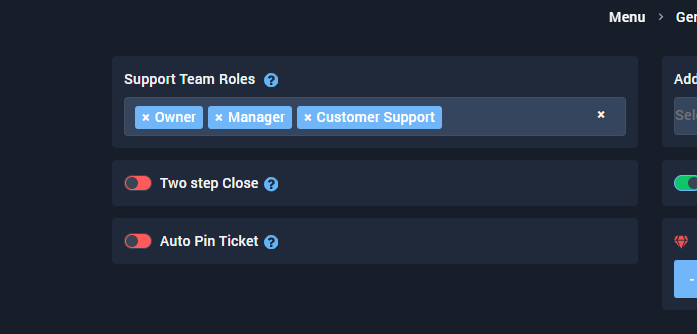
I added customer support but my staff who got the role cant see the tickets😢
Also about the message it doesnt say same thing.
https://i.imgur.com/1UPpEpZ.png
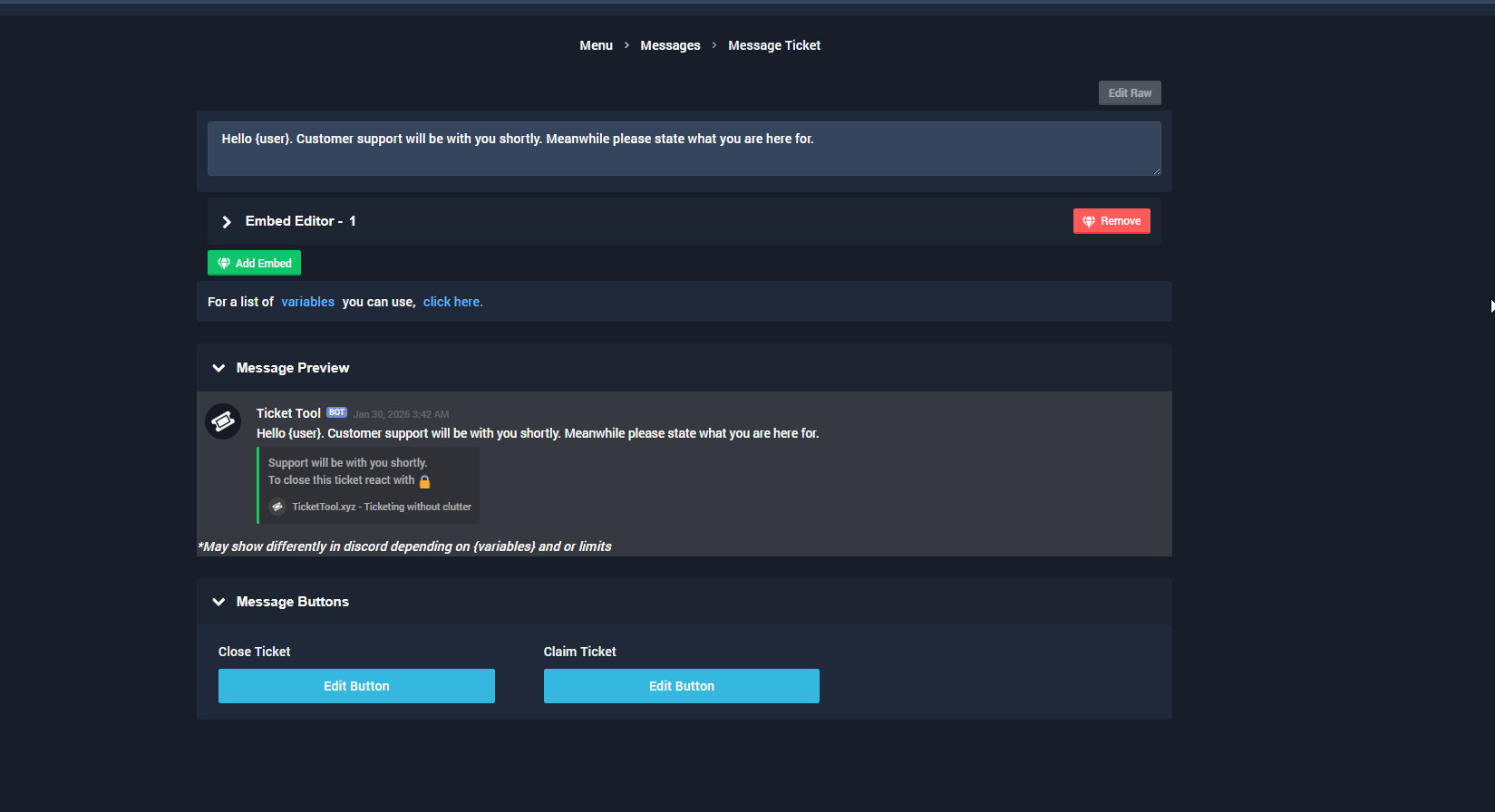
Meanwhile my server:
https://i.imgur.com/vQViQNp.png
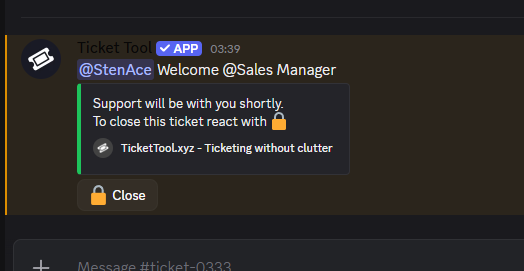
It just doesnt follow my commands what I put in the website for the bot. Is the bot outdated in my discord server?
scenic forum
Hey there!
«You don't have permissions to use this»
👉 Server Configs -> Blacklist Roles
Any roles there will be unable to interact with the bot in any way, including creating tickets.👉 Panel Configs -> Buttons -> Create Ticket -> Support team only
If this is enabled👉 Panel Configs -> Buttons -> Create Ticket -> Disabled Roles
Any roles there will be unable to use the button.
scenic forum
twin venture
Meanwhile my server:
https://i.imgur.com/vQViQNp.png
That's not the same ticket as the one you showed above
You're most likely having multiple panels
Make sure you're editing the correct one
The changes apply for new tickets. Not for already opened ones
twin venture
What do you mean I should edit the correct one? Im editing the one in my server.
I just opened the ticket still the same old.
scenic forum
twin venture
What do you mean I should edit the correct one? Im editing the one in my server.
How many panels do you have?
twin venture
Define panel sorry Im pretty new to this
scenic forum
twin venture
Also about the message it doesnt say same thing.
https://i.imgur.com/1UPpEpZ.png
At the top of the site is your panel selection. You can unfold it and select the different panels you have
Make sure you selected the one corresponding to the ticket you're opening.
iron nightBOT
Gave +1 Rep to @scenic forum (current: #11 - 743)
twin venture
Is there a feature: my staff needs to state the reason for closing the ticket
the bot asks for a reason
Is there such thing?
 tranquil bison
twin venture
Is there a feature: my staff needs to state the reason for closing the ticket
tranquil bison
twin venture
Is there a feature: my staff needs to state the reason for closing the ticket
it's an optional thing... you can skip it if you don't wanna add a reason
or are you asking to make it required so your staff have to add a reason when closing the tickets
 feral steppe
tranquil bison
it's an optional thing... you can skip it if you don't wanna add a reason
feral steppe
tranquil bison
it's an optional thing... you can skip it if you don't wanna add a reason
the bot keeps replieing with it syaing application wont respond pls help
 tribal cedar
feral steppe
the bot keeps replieing with it syaing application wont respond pls help
tribal cedar
feral steppe
the bot keeps replieing with it syaing application wont respond pls help
Do you have the proper perms set?
tranquil bison
feral steppe
the bot keeps replieing with it syaing application wont respond pls help
which one @pseudo glen or @humble sequoia



 feral steppe
tribal cedar
Try use the /debug command?
feral steppe
tribal cedar
Try use the /debug command?
.
tribal cedar
Does the bot have read send embeds?
feral steppe
leme check
feral steppe
tribal cedar
Does the bot have read send embeds?
yup
feral steppe
tribal cedar
Does the bot have read send embeds?
u there
pseudo ravine
You can be patient and wait for a response without the replies
feral steppe
srry
tribal cedar
@pseudo ravine I need to shower and sleep anyway work in 5.5 hrs
 twin cloak
how do i add bot to server
 spice blaze
Rlx 🫡
 dusky pond
please help me with tickets because I can't do it on the server
scenic forum
dusky pond
please help me with tickets because I can't do it on the server
Are you staff on the server you need help on?
dusky pond
no, I have my own server but I can't do it, please help
 polar trail
Is premium required to send custom escalate messages, and if not, why can I not edit the custom escalate message
scenic forum
dusky pond
no, I have my own server but I can't do it, please help
We cannot assist you with tickets of other servers
We only provide support with the ticket tool bot aka setup
dusky pond
Okey
scenic forum
polar trail
Is premium required to send custom escalate messages, and if not, why can I not ...
Any edit field you cannot access requires premium
Ill bring it up to the staff to make it more clear with a premium icon
twin venture
tranquil bison
or are you asking to make it required so your staff have to add a reason when cl...
Yes how
Currently it just closes without asking a reason
torpid vortex
@scenic forum
I have premium access, but I can't do the premium features; I don't have the necessary permissions.
@pseudo ravine
 ionic path
Please stop pinging and read the rules in #📂│information, someone will help you as soon as possible
 livid trellis
Hi i need help
 pure sinew
Hello! Just started using the tool. I've set limit options but im still getting the "Ticket limit reached, You already have 1 tickets open of the 1 allowed for this panel" message. any advice? TIA!
austere forge
pure sinew
Hello! Just started using the tool. I've set limit options but im still getting ...
Ensure you make changes to the other panels you have created, not just one
pure sinew
Thanks! @austere forge I only have one panel currently.
austere forge
pure sinew
Thanks! <@225349654974431232> I only have one panel currently.
Did you make a new ticket after changes ?
pure sinew
I installed the app yesterday
austere forge
All good, please create a new test ticket and let me know if the message still appears
pure sinew
austere forge
All good, please create a new test ticket and let me know if the message still a...
Yes, it still appears.
austere forge
pure sinew
Yes, it still appears.
Okay, can you move to #🎫│make-a-ticket please and ensure to fill the Server ID field
pure sinew
austere forge
Okay, can you move to <#571706435449257997> please and ensure to fill the Server...
Will do, thanks for your help.
iron nightBOT
Gave +1 Rep to @austere forge (current: #4 - 1293)
 eternal mirage
does the premium version let me change the bot's pfp and name or nah
humble sequoiaBOT
<:NewIcon1:1018858809541804124><:NewIcon2:1018858813266333706> Ticket Tool Custom Avatar <:Premium:1192403074157912144>
You can now change: Ticket Tool's profile picture; nickname; banner; and bio, to make it your own!
To further customize the bot's appearance, please head over to your Dashboard ➞ Customize Bot, from there, you will be able to upload a profile picture and banner, and edit the bot's biography.
You can change the bot's nickname by right-clicking on the bot's profile, in the user list, on your server, and clicking Change Nickname.
 Note: This is not a whitelabel, but rather a personalized instance of Ticket Tool for your server only. It is not an individual bot for your server, and it will behave and appear like Ticket Tool outside of it (i.e. in DMs). Our Development Team continues to explore ways to release white labels, this is your own custom bot!
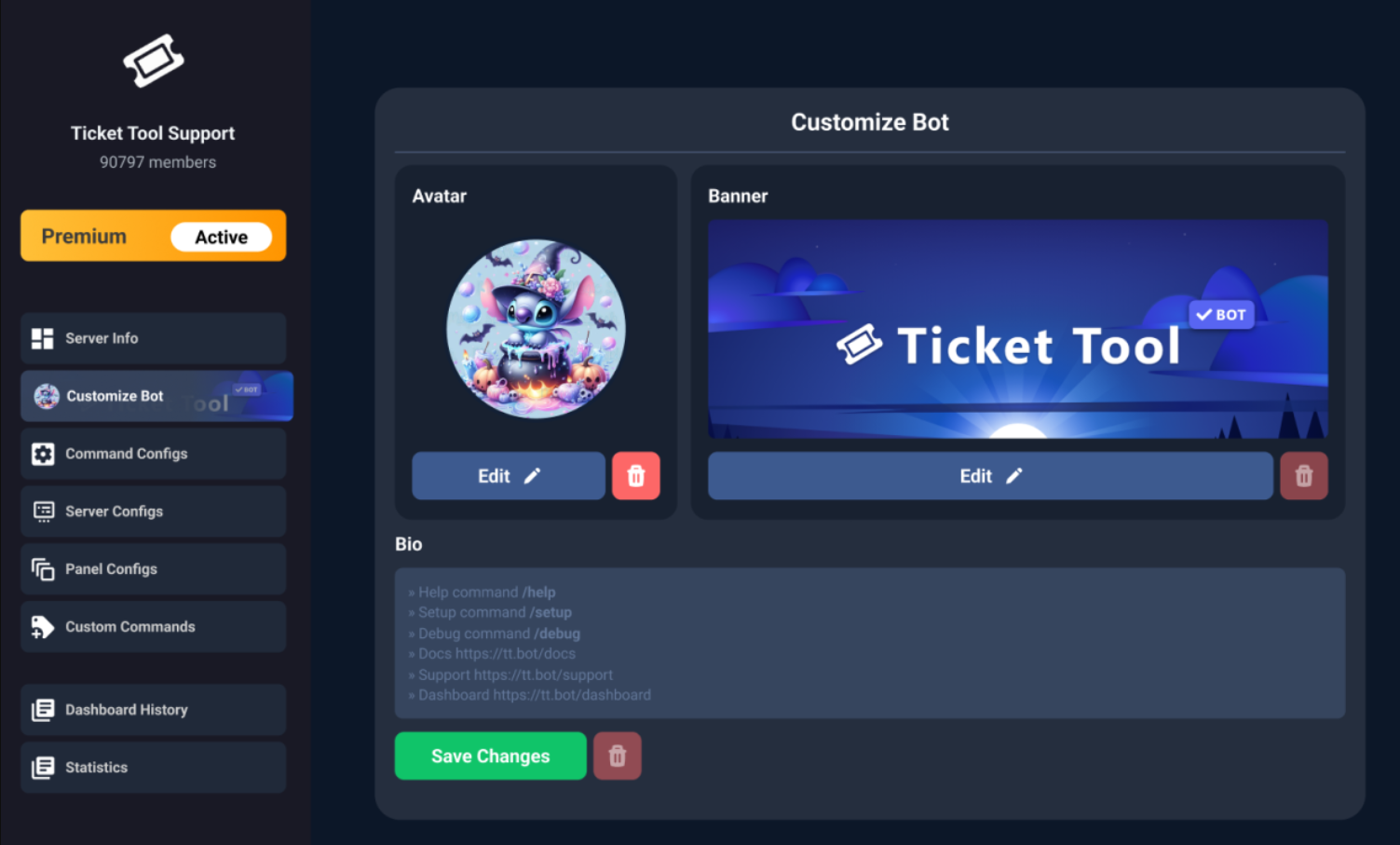
$avatar
austere forge
eternal mirage
does the premium version let me change the bot's pfp and name or nah
Refer to the embed above!
 hollow mason
Can't turn my bot on in my server, any fix?

 austere forge
hollow mason
Can't turn my bot on in my server, any fix?
austere forge
hollow mason
Can't turn my bot on in my server, any fix?
It seems like you have enabled the premium bot but haven't invited it yet
humble sequoiaBOT
The first thing you will need to do is invite the premium bot, an invite can be found here
Once the bot is in your server we will head to the dashboard and manage your server. When you are managing your server, you want to head into "Server Configs" then click the drop down menu under "Select the bot you would like to use on this server" then click "Ticket Tool#6207" and then save.
 austere forge
Click on "here" to invite it please!
hollow mason
austere forge
Click on "here" to invite it please!
thank you
iron nightBOT
Gave +1 Rep to @austere forge (current: #4 - 1294)
 dense pilot
I was unfairly banned due to error 600. My account was from season 1. Can someone help me? Account name: vitorzerado767
humble sequoiaBOT
@dense pilot
⚠️ You're in the wrong place
We provide support for Ticket Tool Discord bot and cannot help you with whatever issue you have.
- We don't know which Support Team you should contact to get this issue resolved, and unfortunately we won't be able to accurately tell you.
If you don't have any further questions regarding our bot Ticket Tool, please close this ticket
hollow mason
How do i put images in? I'm copying the links nothin's workin
humble sequoiaBOT
What are the direct URLs?
A direct access URL is an easy to read URL that users can enter to get to a specific item, document, page, category, or perspective, in which our bot TicketTool can read and get it displayed in your 'Panel Message' or your 'Ticket Message'.
Where can I get them?
The recommended way is to use 'Imgur', you can signup within a few minutes and then upload the image you want, and copy the URL of the uploaded image and paste it into one of the four boxes. There are alternatives to this, such as other image or video storing websites or using 'Open Original' of an image and paste it in (please be aware that if your image is deleted, Discord will automatically delete the link to it in a few days). Please note this requires 'Premium'. Imgur
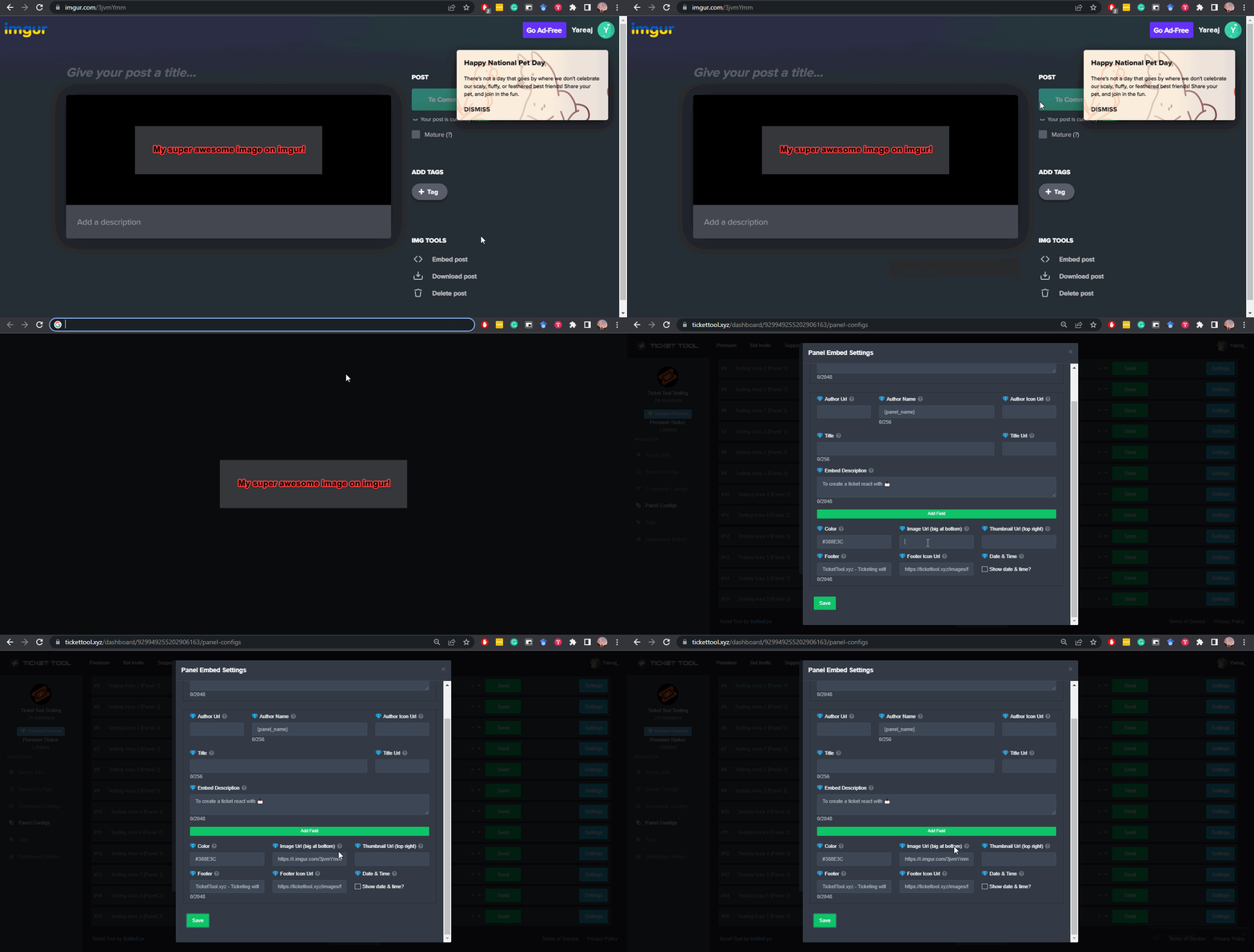 scenic forum
@hollow mason refer to the embed above
hollow mason
scenic forum
<@799206321785667594> refer to the embed above
thanks, how do i add a gif under my message
iron nightBOT
Gave +1 Rep to @scenic forum (current: #11 - 744)
humble sequoiaBOT
scenic forum
@hollow mason refer to the embed above
Number 15
eternal mirage
austere forge
Refer to the embed above!
thank you
iron nightBOT
Gave +1 Rep to @austere forge (current: #4 - 1295)
 vital meadow
My account is still paused. I typed the password and it says it wrong.
humble sequoiaBOT
@vital meadow
⚠️ You're in the wrong place
We provide support for Ticket Tool Discord bot and cannot help you with whatever issue you have.
- We don't know which Support Team you should contact to get this issue resolved, and unfortunately we won't be able to accurately tell you.
If you don't have any further questions regarding our bot Ticket Tool, please close this ticket
 cedar chasm
I don't see anything in the panel. Just a dark blue background.
scenic forum
cedar chasm
I don't see anything in the panel. Just a dark blue background.
Can you show a screenshot
cedar chasm
 scenic forum
Do you use any sort of adblocker/cookie blocker?
 timber epoch
how do i make it where the ticket only allows 2 people instead of everyone in the ticket?
scenic forum
timber epoch
how do i make it where the ticket only allows 2 people instead of everyone in th...
Show me a screenshot of
Panel config -> Permissions -> Everyone role permissions -> Edit opened AND closed
timber epoch
