#🆘│community-support
1 messages · Page 255 of 1
 peak jay
 covert swallow
Can you use the /debug command in your server please?
peak jay
i wil
 worldly helm
As I mentioned before, we don't know.


 eager pendant
Does this help with games
covert swallow
Try fully signing out of the dashboard and sign back in
peak jay
kk
covert swallow
eager pendant
Does this help with games
We are the support team for @pseudo glen, we cannot help with your game
peak jay
it works tysm
covert swallow
Glad to hear it!
 jade topaz
Please help me make ticket
 vast field
Hello, I seem to be experiencing an issue where it just does not seem to register the fact that I have ticket tool on a server regardless of removing it and adding it again or logging out of ticket tool and logging back in
 keen grove
how do i find the panel id?
 flat grotto
hey..... i am super new to creating ticket systems, and i am really struggling with something....
I need to create a ticket system that will have 4 different tickets you can choose from when opening a ticket, and that each option will give different perms. For example:
Select one of the options for support:
A B C D
And then option A will open a ticket with role role A and GM, option B will open ticket with B and BM, and so on so role A cant see ticket for role B.....
can someone help me with this?
 humble sequoiaBOT
━━ User's inquiry has been moved to a ticket ━━
 safe totem
Please help me make ticket
humble sequoiaBOT
Don't see your server in the dashboard?
Try using the Sync Servers button on your top center of the Dashboard page
If this doesn't work
You should relog from the dashboard, you can do this by clicking here to log out immediately, and then log back in
Note:
You need one of these 3 things to access the dashboard.
1. Server Owner (Level: 6)
2. Server Administrator (Level: 4)
3. Dashboard Role (Level: 2)
:warning: You can check your level using the </permissionlevel:1029797400174399542> command on your Discord Server
If the bot's response is:
- @User is permission level: 0 (User)
You don't have any of the 3 levels required to access the server's dashboard

 scenic forum
@vast field refer to the embed above
scenic forum
keen grove
how do i find the panel id?
On the dashboard at panel config
The number infront of the panels name is the ID
vast field
So im an admin in that server and I added the ticket tool myself and it was working fine, nothing changed in the rules. Syncing the servers just repeats that I have no servers connected
keen grove
scenic forum
On the dashboard at panel config
The number infront of the panels name is the ID
Oh ok
scenic forum
vast field
So im an admin in that server and I added the ticket tool myself and it was work...
Can you use /debug on that server
vast field
 scenic forum
vast field
scenic forum
vast field
- The bot is missing the view channel permission inside that channel
- You do not have the administrator permission
vast field
I will try again in another channel but it should have access to that channel and I am an administrator and have access to edit the entire server, Ive even opened up my own server just to test it only to result in the same thing
scenic forum
vast field
I will try again in another channel but it should have access to that channel an...
Can you use /debug inside the server that you created to test
vast field
Did that link work?
vast field
 scenic forum
Did you log out and in again?

 scenic forum
vast field
scenic forum
vast field
That does not show anything
vast field
It's the admin role, Anything specific I should show?
scenic forum
vast field
It's the admin role, Anything specific I should show?
Your role having the Administrator permission inside the permission tab
Should be the most bottom permission
vast field
Let me check
scenic forum
It should not be toggled on
 novel heron
I want to know the reason for my ban.
vast field
Apparently its not toggled. Which is weird as to why it let me add ticket tool and do all the other stuff before but not now. Though im still confused why my own server isn't appearing
scenic forum
vast field
Apparently its not toggled. Which is weird as to why it let me add ticket tool a...
Inviting a bot requires "Manage Server"
scenic forum
vast field
Apparently its not toggled. Which is weird as to why it let me add ticket tool a...
You probably spammed it too often. You should be able to access your test server with that link
https://tickettool.xyz/dashboard/1461091200646906118/configs#pc-menu

Ticket Tool - Ticketing without clutter - The #1 Discord support bot
scenic forum
novel heron
I want to know the reason for my ban.
Are you sure this is related to the discord bot Ticket Tool?
 scenic forum
 chrome basalt
The staff of the server need to delete channels as the reached 500 channels
vast field
Ok so administrator role has been toggled but no changes, do I need to relog?
chrome basalt
scenic forum
The staff of the server need to delete channels as the reached 500 channels
Which channels
scenic forum
vast field
Ok so administrator role has been toggled but no changes, do I need to relog?
For the server Atlyss?
vast field
Yes
scenic forum
chrome basalt
Which channels
The channels you dont see because youre not a staff member
chrome basalt
scenic forum
The channels you dont see because youre not a staff member
Then how to delet
vast field
But a relog seems to have worked, I can see both my server and the other server now
scenic forum
vast field
Not Atlyss itself
All good i just needed to know the server. Tell me if you can access it via the link
https://tickettool.xyz/dashboard/1313335303167152128/configs#pc-menu
Ticket Tool - Ticketing without clutter - The #1 Discord support bot
vast field
Im not sure why it was not showing up my server
scenic forum
Welp perfect then
scenic forum
vast field
Im not sure why it was not showing up my server
You probably clicked "Sync Servers" so often that you got shortly timeouted from any further updates
scenic forum
chrome basalt
Then how to delet
You dont. A staff member needs to
vast field
Fair enough, let me see that all works now and if not ill come pester you some more but if everythig is ok thank you very much for your service.
scenic forum

chrome basalt
scenic forum
<:PabloTiphat:983791053842837624>
Then what i have to do
scenic forum
chrome basalt
Then what i have to do
Either wait or attempt to message THEIR servers staff member about it
chrome basalt
scenic forum
Either wait or attempt to message **THEIR** servers staff member about it
Where is there server
scenic forum
chrome basalt
Their server and their staff are on the server this screenshot is from.
chrome basalt
There is written docs for this server
scenic forum
we cannot assist you
chrome basalt
Who can assist me
scenic forum
chrome basalt
Who can assist me
Staff on THEIR server
chrome basalt
Discord server ?
scenic forum
chrome basalt
Discord server ?
yes
chrome basalt
Where can i find
scenic forum
chrome basalt
This server.
chrome basalt
Can you write name
 brave coral
I need help with getting gta rp on my ps5
scenic forum
chrome basalt
Can you write name
How am i supposed to know the name of the server of which you did a screenshot of
humble sequoiaBOT
@brave coral

⚠️ You're in the wrong place
We provide support for Ticket Tool Discord bot and cannot help you with whatever issue you have.
- We don't know which Support Team you should contact to get this issue resolved, and unfortunately we won't be able to accurately tell you.
If you don't have any further questions regarding our bot Ticket Tool, please close this ticket
chrome basalt
scenic forum
How am i supposed to know the name of the server of which you did a screenshot o...
I started ticket with another discord comunity like a group
humble sequoiaBOT
@chrome basalt
⚠️ You're in the wrong place
We provide support for Ticket Tool Discord bot and cannot help you with whatever issue you have.
- We don't know which Support Team you should contact to get this issue resolved, and unfortunately we won't be able to accurately tell you.
If you don't have any further questions regarding our bot Ticket Tool, please close this ticket
chrome basalt
I didnt understand
humble sequoiaBOT
⚠️ Please read the messages previously sent by our team ⚠️
chrome basalt
I read all he said you have to delet channels but where are channels
scenic forum
chrome basalt
I read all he said you have to delet channels but where are channels
Only STAFF members see the channels
There is nothing you can do as a normal member
chrome basalt
I only started one ticket with a comunity
chrome basalt
scenic forum
Only **STAFF** members see the channels
There is nothing you can do as a normal ...
Then what i should do to solve this problem
scenic forum
chrome basalt
Then what i should do to solve this problem
Being patient or messaging THEIR servers staff about it
as previously told
chrome basalt
How to message their server staff
scenic forum
- We don't know which Support Team you should contact to get this issue resolved, and unfortunately we won't be able to accurately tell you.
scenic forum
This is support for the discord bot @pseudo glen
scenic forum
chrome basalt
You are staff of discord ?
no
chrome basalt
Ok
 warm gyro
how do I make my ticket show the drop down option instead of the button?

 scenic forum
warm gyro
how do I make my ticket show the drop down option instead of the button?
scenic forum
warm gyro
how do I make my ticket show the drop down option instead of the button?
By enabling the button and resending the panel afterwards
 warm gyro
oh see see
scenic forum
Your second dropdown option also has no panel selected which would need to get fixed before
warm gyro
tyty
 fading knot
HELP!!!
i just activated premium on the wrong server 😭
how can i fix it?
humble sequoiaBOT
User's issue has been solved in another channel.
 glad ore
How can I fix this
 scenic forum
glad ore
How can I fix this
scenic forum
glad ore
How can I fix this
use /debug please
glad ore

 iron nightBOT
Gave +1 Rep to @scenic forum (current: #12 - 689)
 neon bronze
/help
 wintry pagoda
Como abre reclamação de DARK RP
 remote berry
Can somebody confirm me that @stuck comet is an admin on this channel? Or an official Epic Game member?
And that the channel he recommended me EG Support Ticket (on discord) is a legit one?
So you cannot confirm his identity.
scenic forum
remote berry
Can somebody confirm me that <@1009471131893387367> is an admin on this channel?...
We merely provide the ticket system
We do not know who uses it for what.
General disclosure.
Do not share any information with anyone that could become harmful to you or your accounts.
remote berry
What do you mean you provide the ticket system? As in what? Can you be more descriptive about this channel`s purpose?
scenic forum
remote berry
What do you mean you provide the ticket system? As in what? Can you be more desc...
This server JUST handles the discord bot ticket tool. Which is the ticket system itself
We do not know who uses it for what
Therefor we cannot verify any user being legit or not
We primarily help to setup the bot on the server and make sure it runs.
Anything else is not something we assist with
remote berry
and how do you handle the ticket system? I am not familliar with discord`s features, this is why I am asking. So what is the purpose of me filing a ticket
scenic forum
remote berry
and how do you handle the ticket system? I am not familliar with discord`s featu...
We provide the bot that can handle tickets
We cannot confirm nor deny the legitimacy of any user you encounter within a ticket as everyone can create a server aswell as a ticket system themself using our bot.
scenic forum
remote berry
Is there any other way for me to contact the Epic Games team?
Google is your best bet.
I'd HIGHLY doubt they do support via discord
remote berry

 hoary shadow
hi so can anyone help me i tried playing the game for the first time and im banned? 😭
humble sequoiaBOT
@hoary shadow
⚠️ You're in the wrong place
We provide support for Ticket Tool Discord bot and cannot help you with whatever issue you have.
- We don't know which Support Team you should contact to get this issue resolved, and unfortunately we won't be able to accurately tell you.
If you don't have any further questions regarding our bot Ticket Tool, please close this ticket
 viscid sable
I'm very sad. I've been playing since the Gigi update and I've never been banned before. I had all the toons, I never bothered anyone, and I never used anything wrong. If you could unban me, I would be very grateful. 🙁
Nick : siteTY3057
 humble sequoiaBOT
@viscid sable
⚠️ You're in the wrong place
We provide support for Ticket Tool Discord bot and cannot help you with whatever issue you have.
- We don't know which Support Team you should contact to get this issue resolved, and unfortunately we won't be able to accurately tell you.
If you don't have any further questions regarding our bot Ticket Tool, please close this ticket
 quartz bramble
how do i setup ticket?
 uncut sparrow
quartz bramble
how do i setup ticket?
uncut sparrow
quartz bramble
how do i setup ticket?
I would suggest watching youtube videos first
humble sequoiaBOT
First you will want to invite the bot to your server. Once the bot is in your server, you can manage your server in the dashboard.

To create a panel we are going to need to head over to the Panel Configs Tab on the Dashboard.
Once at the dashboard we will need to click Create Panel.
Enter a panel name (Fill in any optional settings you want).
Click Create Panel and you are ready to get started with configuring your panel.
An example of a creating a panel is shown below.

Once the panel has been created, use the blue Send button and select the channel you want the panel to be sent to.
The Panel wasn't send
Use the </debug:1029783024264564765> command to diagnose possible permission issues with the bot.

 eternal raptor
quartz bramble
how do i setup ticket?
eternal raptor
quartz bramble
how do i setup ticket?
you can refer to the embed above ^
quartz bramble
im like at the start at ticket tool it says add a bot to sever create commads read a bed time story and what does it mean by add server?
like what sever do.i select?
eternal raptor
quartz bramble
like what sever do.i select?
you select the server you want to add the bot into
quartz bramble
how do i get the sever tho?
eternal raptor
Your initial query was "how do i setup ticket", are you not wanting to setup Ticket Tool in one of your server ?
quartz bramble
no i want to setup one but what sever do i just type in name of sever or what?
eternal raptor
quartz bramble
no i want to setup one but what sever do i just type in name of sever or what?
click on the dropdown and select the server you want to add ticket tool in from there
 eternal raptor
Im confused, you're wanting to setup ticket tool but have no server to add it to ?
quartz bramble
 eternal raptor
if you click on the arrow pointing down, does it not show any servers ?
quartz bramble
yeah no severs
eternal raptor
well do you own or administrate any servers ?
 eternal raptor
then you'd have to create your own server in order to add ticket tool
quartz bramble
oh is it hard to do that?
eternal raptor
quartz bramble
oh is it hard to do that?
Discord
Whether this is the first or tenth server you've made, you’re in the right place for going over the server creation process! Before we begin, keep in mind that the Add a Server () icon can be hidde...
quartz bramble
i created my own sever tysm for all the help!
eternal raptor
quartz bramble
i created my own sever tysm for all the help!
you're welcome !
quartz bramble
one more qustion
i added a bot but
how do i send the ticket to traders that need mm
eternal raptor
humble sequoia
you need to follow the remaining steps and people will open tickets themselves
quartz bramble
ok
 dusty rune
Hi, I'm trying to close the ticket or claim, but both of them are already closed or I can't claim. I didn't close the ticket and the admin panel didn't show up. Can you help me?
quartz bramble
TYSM MICKAEL UR THE BEST NOW IM A MIDLLIE MAN TYSM BYEEEE
 jolly tendon
is it possible to use ticket tool with a discohook embedded message
 brazen crypt
How do I make it to where people can just press a button and make a ticket in a private channel
 olive dawn
I recently registered in Roblox and decided to play in your mode. Everything seemed to be going well, but today I see this picture. As I understand it, this is a block request to unlock my account. I haven't done anything wrong, and I'm here to help you resolve this issue. Nick:PRO1OOXUI
 scenic forum
jolly tendon
is it possible to use ticket tool with a discohook embedded message
scenic forum
jolly tendon
is it possible to use ticket tool with a discohook embedded message
To create tickets you mean?
humble sequoiaBOT
@olive dawn
⚠️ You're in the wrong place
We provide support for Ticket Tool Discord bot and cannot help you with whatever issue you have.
- We don't know which Support Team you should contact to get this issue resolved, and unfortunately we won't be able to accurately tell you.
If you don't have any further questions regarding our bot Ticket Tool, please close this ticket
scenic forum
dusty rune
Hi, I'm trying to close the ticket or claim, but both of them are already closed...
Panel config -> general -> two step ticket
This option needs to be on for the Admin panel to open
jolly tendon
scenic forum
To create tickets you mean?
yes
humble sequoiaBOT
Integrating an External Bot x Ticket Tool <:TicketToolGold:1073948897673748490>
Integrating Ticket Tool with an external bot allows you to customize your server's Ticket System further!
- The external bot must output the
$newor$ticketcommands with the user's ID to start a ticket. Preferably in a private channel.
Eg.
$new 12345678901234567890
-
Your ticket panel must be Command Style enabled
-
You must whitelist that bot's ID in your Dashboard ➞ Server Configs ➞ Bot section.
Otherwise Ticket Tool will not react to the command and a ticket will not be created.
- If you'd like to include a reason in the command usage, feel free to do so after the user ID.
Eg.
$new 12345678901234567890 Your reason goes here
This reason can then be shown anywhere in the Ticket Message with the{create.reason}variable
**  Note:** If you have changed Ticket Tool's default prefix (
$) please ensure to amend the prefix for the $new or $ticket commands.
Eg. If your prefix is
-, then what you're looking for the bot to use is-newor-ticket

$botintegration
scenic forum
@jolly tendon refer to the embed above
jolly tendon
scenic forum
<@1379740589444169789> refer to the embed above
okat
that is so confusing
dusty rune
scenic forum
Panel config -> general -> two step ticket
This option needs to be on for the A...
Will it be resolved if I turn on the two-step mode after the problem occurs?
scenic forum
dusty rune
Will it be resolved if I turn on the two-step mode after the problem occurs?
You'll receive the moderator controls once it's enabled, yes
jolly tendon
wait happy do you understand what im saying
 hollow storm
my servers wont show up on dash board
scenic forum
jolly tendon
wait happy do you understand what im saying
That you want a webhook message be able to create the tickets
humble sequoiaBOT
Don't see your server in the dashboard?
Try using the Sync Servers button on your top center of the Dashboard page
If this doesn't work
You should relog from the dashboard, you can do this by clicking here to log out immediately, and then log back in
Note:
You need one of these 3 things to access the dashboard.
1. Server Owner (Level: 6)
2. Server Administrator (Level: 4)
3. Dashboard Role (Level: 2)
:warning: You can check your level using the </permissionlevel:1029797400174399542> command on your Discord Server
If the bot's response is:
- @User is permission level: 0 (User)
You don't have any of the 3 levels required to access the server's dashboard
scenic forum
@hollow storm refer to the embed above
jolly tendon
scenic forum
That you want a webhook message be able to create the tickets
like like buttons underneath or a drop downmenu to create a ticket
i want the actual buttons or dropdown menu
scenic forum
jolly tendon
like like buttons underneath or a drop downmenu to create a ticket
So you want to use ticket tool and not an external webhook?
jolly tendon
scenic forum
So you want to use ticket tool and not an external webhook?
i want to use external webhook for the message and use tickettool for the buttons and the ticket system
hollow storm
scenic forum
<@1386654504828801124> refer to the embed above
i added it to the server but it dosent show its in it on dashboard what do i do
scenic forum
jolly tendon
i want to use external webhook for the message and use tickettool for the button...
That's not possible. Your only solution is referring to the embed I've sent you.
Buttons can only be attached to webhooks owned by the bot and ticket tool does not support webhooks
scenic forum
hollow storm
i added it to the server but it dosent show its in it on dashboard what do i do
Did you follow the steps in the embed?
hollow storm
yes
scenic forum
hollow storm
yes
Use /debug on your server
jolly tendon
scenic forum
That's not possible. Your only solution is referring to the embed I've sent you....
so what exactly is that
scenic forum
jolly tendon
so what exactly is that
It's the solution to what you asked
You need a webhook with buttons/dropdowns capable of sending messages when clicked so tickets get opened via command style
hollow storm
scenic forum
Use /debug on your server
said the applacation did not respond
scenic forum
hollow storm
said the applacation did not respond
- The bot is missing the view channel permission inside the channel
- You do not have administrator nor a dashboard role
Which is required to access the dashboard
humble sequoiaBOT
Any role you put there will have full access to the ticket tool dashboard. The server owner and users with admin permissions already have access to the dashboard.
Be careful of which roles to put here
 hollow storm
scenic forum
1. The bot is missing the view channel permission inside the channel
2. You do n...
hollow storm
scenic forum
1. The bot is missing the view channel permission inside the channel
2. You do n...
so how do i fix
 orchid wolf
I have a problem; I'm banned from duels for alleged hacks. I never use hacks. I'd like to know if this problem can be resolved so I can play again, please.
 humble sequoiaBOT
@orchid wolf
⚠️ You're in the wrong place
We provide support for Ticket Tool Discord bot and cannot help you with whatever issue you have.
- We don't know which Support Team you should contact to get this issue resolved, and unfortunately we won't be able to accurately tell you.
If you don't have any further questions regarding our bot Ticket Tool, please close this ticket
 vocal saddle
orchid wolf
I have a problem; I'm banned from duels for alleged hacks. I never use hacks. I'...
vocal saddle
orchid wolf
I have a problem; I'm banned from duels for alleged hacks. I never use hacks. I'...
wrong server this isnt a ban appeal u hacked in a game now your banned so you learned you lesson
jade topaz
bruh I can't create apanel and it says the bot doesnt have adminastrative permissions
 ashen peak
I'm trying to set up a system to report rule breakers in my friend's server but I keep getting this message while I swear like a week ago it worked
 scenic forum
hollow storm
so how do i fix
scenic forum
hollow storm
so how do i fix
By giving the bot the specied permission inside the channel and receiving admin or a dashboard role from an admin
scenic forum
jade topaz
bruh I can't create apanel and it says the bot doesnt have adminastrative permis...
Can you show what you mean
scenic forum
ashen peak
I'm trying to set up a system to report rule breakers in my friend's server but ...
Use /debug on your server
scenic forum
ashen peak
Still shows application didn't respond
Bot is missing the send message permission inside that channel
ashen peak
ohh now it's fixed ty for responding unlike most servers I've been in (and thanks @scenic forum)
jade topaz
scenic forum
Can you show what you mean
 scenic forum
jade topaz
scenic forum
jade topaz
Where does it say anything about administrative permissions?
Nontheless
Please use /debug on your server
jade topaz
scenic forum
Where does it say anything about administrative permissions?
I’m about to send a second phone
jade topaz
scenic forum
Nontheless
Please use /debug on your server
Debug doesn’t work either
olive dawn
How do I get unbanned in the game?
scenic forum
jade topaz
Debug doesn’t work either
Please use /debug. I can see it even if it doesn't work
humble sequoiaBOT
@olive dawn
⚠️ You're in the wrong place
We provide support for Ticket Tool Discord bot and cannot help you with whatever issue you have.
- We don't know which Support Team you should contact to get this issue resolved, and unfortunately we won't be able to accurately tell you.
If you don't have any further questions regarding our bot Ticket Tool, please close this ticket
jade topaz
scenic forum
Please use /debug. I can see it even if it doesn't work
I did
Same error message
 scenic forum
jade topaz
I did
scenic forum
jade topaz
I did
It's missing all permissions with an X inside that channel
 jade topaz
scenic forum
It's missing all permissions with an X inside that channel
jade topaz
scenic forum
It's missing all permissions with an X inside that channel
Thank you that worked
iron nightBOT
Gave +1 Rep to @scenic forum (current: #12 - 691)
dusty rune
scenic forum
You'll receive the moderator controls once it's enabled, yes
I'm sorry, but the part you've already mentioned is active.
Warning: Claiming isn't enabled

should I need to activate the two-step close as well?
scenic forum
dusty rune
I'm sorry, but the part you've already mentioned is active.
> **Warning:** Clai...
My apologies I didn't see the claim part
Panel config -> claiming -> enable ticket claiming
Note this is a premium feature
dusty rune
scenic forum
My apologies I didn't see the claim part
Panel config -> claiming -> enable tick...
I'm using premium bots, and for other tickets this function works fine, but this is the only ticket that doesn't close or claim. Any mistakes from us?
 craggy sparrow
Can someone help me here? I bought the extreme panel but the key hasn't arrived.
scenic forum
dusty rune
I'm using premium bots, and for other tickets this function works fine, but this...
Is it enables for all panels?
scenic forum
craggy sparrow
Can someone help me here? I bought the extreme panel but the key hasn't arrived.
Extreme panel?
craggy sparrow
yes
scenic forum
craggy sparrow
yes
That does not sound ticket tool related
dusty rune
scenic forum
Is it enables for all panels?
yes
craggy sparrow
In my order it says that the key will still be sent, but it has already been an hour. I need help.
scenic forum
craggy sparrow
In my order it says that the key will still be sent, but it has already been an ...
This is not related for ticket tool
scenic forum
craggy sparrow
And where can I get help here now to get my key?
Unless it's a ticket tool trial
We cannot assist you
dusty rune
scenic forum
Please make a <#796568540311715870>
thank you
iron nightBOT
Gave +1 Rep to @scenic forum (current: #12 - 692)
scenic forum
craggy sparrow
I have no access to the link
Because that message wasn't for you
Your issue is most likely not related to ticket tool
 lilac swallow
Hallo
 humble sequoiaBOT
Claiming allows you to change the ticket name, category and permissions. To use it you have to enable it first on your Dashboard > Panel Configs > Claiming

 Note: This is a premium feature
 austere forge
 potent torrent
hey how i can make cliam button in ticket tool
potent torrent
hey how i can make cliam button in ticket tool
Refer to the embed above!
potent torrent
austere forge
Refer to the embed above!
is that not free??
potent torrent
humble sequoia
i use the white one??
austere forge
As stated, this feature require a premium subcription
 dim fulcrum
Hello I got a problem, there are panels aren’t shown on the dropdown dashboard however it’s shown on discord
#premium-support message here the detail
scenic forum
dim fulcrum
Hello I got a problem, there are panels aren’t shown on the dropdown dashboard h...
Check your dashboard history
Someone may deleted it
Also note for you. Non premium members do not see that channel you mentioned.
 coarse robin
hi i wanna the link for bot ticket tool
scenic forum
$invite
humble sequoiaBOT
scenic forum
$invite
Ticket Tool Invite & Support
scenic forum
humble sequoia
@coarse robin
coarse robin
scenic forum
<@907241272832577566>
thxx
coarse robin
scenic forum
<@907241272832577566>
but i wanna link edit the tickets in my server .-.
scenic forum
coarse robin
but i wanna link edit the tickets in my server .-.
i have no idea what you mean
coarse robin
scenic forum
i have no idea what you mean
omg I need someone who is Arab
Because I am Arab
scenic forum
$articket
humble sequoiaBOT

فريق الدعم الفني العربي
عميلنا العزيز ان كنت تبحث عن مساعدة يرجى فتح تكت خاص بفريق الدعم الفني العربي
اذهب الى#🎫│make-a-ticket
ثم قم بلضغط على الايموجي الاتي (🇯🇴)
coarse robin
scenic forum
$articket
thx
iron nightBOT
Gave +1 Rep to @scenic forum (current: #12 - 693)
 junior sinew
.
 ember schooner
Can someone please review my ticket or send me the Google link to the ticket so I can add it to my Discord?
uncut sparrow
ember schooner
Can someone please review my ticket or send me the Google link to the ticket so ...
Just go on ticket tool.com to add it to your discord
scenic forum
uncut sparrow
Just go on ticket tool.com to add it to your discord
That's the wrong link
humble sequoiaBOT
Ticket Tool Invite & Support
 urban nest
hey i got a small problem i added ticket tool to my server but on website it doesnt show me that is added and i cant acces dashboard
urban nest
i tried to remove the bot and add it again but did not work
humble sequoiaBOT
━━ User's inquiry has been moved to a ticket ━━
 twilit ermine
/Escalate issue
Hi, I'm having an issue with /escalate. When the ticket jumps to a new panel, it keeps the Ticket Owner, Support Team, etc -- all people who should be in the ticket. But if I (Server Owner) want to /add <user> to a ticket, it says I don't have permission to do so. From what I can see in the Dashboard, I have everything set properly. Also TicketTool has all relevant perms
 vale kestrel
Preciso montar um servidor de vendas básico:
- Ticket privado (comprador + vendedor)
- Sistema de cargos
- Pagamento via pix / robux
- Só eu e o cliente veremos o ticket
Quem puder ajudar?
humble sequoiaBOT
━━ User's inquiry has been moved to a ticket ━━
━━ AZ's inquiry has been moved to a ticket ━━
 fiery oracle
humble sequoia
━━ *User's inquiry has been moved to a ticket* ━━
fiery oracle
humble sequoia
━━ *User's inquiry has been moved to a ticket* ━━
Pq eu fui banido
 spark adder
Meu canal nn aparece no site
 mint flume
The bot is not visible in the dashboard
humble sequoiaBOT
━━ User's inquiry has been moved to a ticket ━━
 sleek gust
Is there a certain server where I can put commands so I can do /setup?
scenic forum
sleek gust
Is there a certain server where I can put commands so I can do /setup?
On any server you have permissions on
sleek gust
K.
 reef pebble
Hello goodmorning to all,
Ask question why I cant log in my free account? Done sing up and my email is verified??
 humble sequoiaBOT
@reef pebble
⚠️ You're in the wrong place
We provide support for Ticket Tool Discord bot and cannot help you with whatever issue you have.
- We don't know which Support Team you should contact to get this issue resolved, and unfortunately we won't be able to accurately tell you.
If you don't have any further questions regarding our bot Ticket Tool, please close this ticket
reef pebble
Pls help🙏🏻
 pseudo ravine
You’re in the wrong place
reef pebble
I'm sorry 😞
 alpine pebble
Can u get me unbanned
humble sequoiaBOT
@alpine pebble
⚠️ You're in the wrong place
We provide support for Ticket Tool Discord bot and cannot help you with whatever issue you have.
- We don't know which Support Team you should contact to get this issue resolved, and unfortunately we won't be able to accurately tell you.
If you don't have any further questions regarding our bot Ticket Tool, please close this ticket
jade topaz
Questions guys
humble sequoiaBOT
@vestal wyvern, we would love to help you, but if you don't tell us what you need help with we can't help you :(
jade topaz
i have administrator in a server but it wont let me on the dashboard
 heavy frigate
hey i have set the roles needed but tickets are still not private
 shell cape
all of my old stuff is gone from like 2019 how do i get it back
humble sequoiaBOT
@shell cape
⚠️ You're in the wrong place
We provide support for Ticket Tool Discord bot and cannot help you with whatever issue you have.
- We don't know which Support Team you should contact to get this issue resolved, and unfortunately we won't be able to accurately tell you.
If you don't have any further questions regarding our bot Ticket Tool, please close this ticket
shell cape
I need help getting my stuff back
pseudo ravine
You're in the wrong place
shell cape
where do i go then
 novel raven
shell cape
where do i go then
novel raven
shell cape
where do i go then
We don't know which Support Team you should contact to get this issue resolved, and unfortunately we won't be able to accurately tell you.
 plush idol
@humble sequoia @humble sequoia
 barren rose
humble sequoiaBOT
barren rose
humble sequoiaBOT
The Drop-down menu or Select Menu replaces the buttons on your panel message and uses a drop-down menu with all of your panels. To set this up, go to your Panel Configs and select your main Panel.
<:Numbericons1:1018864164032225340> Enable Select Style
First you enable Select Style. Then you add an item in the Dropdown Editor. Now you can start editing your dropdown!
<:Numbericons2:1018864168041971712> Dropdown Editor
Each line in the dropdown editor represents a line in the drop down menu on discord. You can add more "Items", by clicking on 

First you select a panel. That's the panel this option will open a ticket for.  DONT select the same panel twice. Each option should have a different Panel
After that, you can put a Display. This is the title of this option and will appear in the drop down menu. The *Description can be set right after that, which will be below the title in grey.
Additionally you can select an emoji, that will be shown in front of each option. You can either manually input the ID of an emoji or select it in the selector.
Common Issues ⚠️
- Panel doesn't send? Make sure you have a valid emoji selected
- Option doesn't show up? Check if two options have the same panel in the DropDown Editor

$dropdown
eternal raptor
humble sequoia
@hasty crypt refer to this embed
 hasty crypt
eternal raptor
<@1386650200512135278> refer to this embed
hasty crypt
eternal raptor
<@1386650200512135278> refer to this embed
Ok
hasty crypt
eternal raptor
<@1386650200512135278> refer to this embed
Dm
 olive stream
Okay so I made a ticket system in my server for people to ask for support in games and it'll ping people. However, I don't want anyone being able to close the ticket unless they have a specific role. How do I do this ?
hasty crypt
How to automatically ping suppourt team
humble sequoiaBOT
1. Open your Panel Configs tab in your server's dashboard
2. Select the panel you want to ping your support team on
3. Open the Ticket options menu
4. Click on Edit Ticket Message
5. In the Message Content use one of the role mention syntax ({@Role Name}/{Role ID})
6. Save changes
Note: For this to work properly, Ticket Tool requires the Mention Everyone permission. Or the role must have the Allow anyone to @mention this role setting enabled 
 hasty crypt
Help me
eternal raptor
humble sequoia
refer to this embed
hasty crypt
eternal raptor
refer to this embed
How to go in that image
eternal raptor
the steps are listed at the top of the embed.
 rare lodge
does ticket tool have the new components v2 support like this embed ?
 scenic forum
rare lodge
does ticket tool have the new components v2 support like this embed ?
scenic forum
rare lodge
does ticket tool have the new components v2 support like this embed ?
Ticket tool does not support CV2 yet
rare lodge
scenic forum
Ticket tool does not support CV2 yet
awe dang it !! alrighty thank you !
iron nightBOT
Gave +1 Rep to @scenic forum (current: #12 - 695)
 smoky arrow
I accidentally closed a ticket, is there any way i can reopen it?
 scarlet kelp
Need assistance, I used the trial period and have accidently and stupidly change the ticket tool to the Gold, realising what I did I went to change it back to white and now it keeps timing out and when I go to open the server on the dashboard it says "You do not have access to the server" ( I am the server owner). is there anyone who could help?
austere forge
scarlet kelp
Need assistance, I used the trial period and have accidently and stupidly change...
You need to invite the Premium bot in your server, and then use the /botswitcher command if you want to switch in the Ticket Tool white
humble sequoiaBOT
The first thing you will need to do is invite the premium bot, an invite can be found here
Once the bot is in your server we will head to the dashboard and manage your server. When you are managing your server, you want to head into "Server Configs" then click the drop down menu under "Select the bot you would like to use on this server" then click "Ticket Tool#6207" and then save.
 austere forge
Simply click "here" on the embed above
austere forge
smoky arrow
I accidentally closed a ticket, is there any way i can reopen it?
As it was closed, you must ask the server staff to reopen it
scarlet kelp
austere forge
You need to invite the Premium bot in your server, and then use the /botswitcher...
Legend Thank You, thats fixed it
iron nightBOT
Gave +1 Rep to @austere forge (current: #4 - 1262)
 low wadi
Sorry how to recover an old acc without having access to email? why thy do that email varification without request to do so
novel raven
low wadi
Sorry how to recover an old acc without having access to email? why thy do that ...
I'm sorry, you need to get access to an old Discord account?
 misty anchor
Hello everyone, I need help with finding out what the default ticket tool permissions are for the "everyone" role. Which ones are checked as allowed in the "Support" Category as well as the "🎟support-ticket"
Channel. Thanks in advance
humble sequoiaBOT
When first invited to your server, Ticket Tool should have the permissions shown below in order to ensure an appropriate functioning:
When customizing permissions for the different ticket participants, you must make sure Ticket Tool has the permissions you want it to grant to others, you can learn more about this here.
Missing Permissions
This error is a direct outcome of the bot missing permissions as depicted above. When troubleshooting this error we suggest you go through these steps:
- Use the </debug:1029783024264564765> command to check if the bot is lacking core role or channel permissions.
- Compare the category/channel's overrides and contrast them with the bot's roles to identify any permission denial that is breaking the functioning
- If you can't still figure it out, let our <@&540295656720302081> know so they can guide you through
Additional Resources
- If you are a server administrator and would like to understand more how to set up your server's permissions, we suggest checking the Discord Support Knowledge Base
- If you are a bot developer and are interested in the internal permission hierarchy we suggest you this part of the Discord Developer Docs
Important Note
- Giving Administrator permissions is NOT required and we do NOT encourage you to do unless you are trying to troubleshoot your permissions setup.
 austere forge
misty anchor
Hello everyone, I need help with finding out what the default ticket tool permis...
austere forge
misty anchor
Hello everyone, I need help with finding out what the default ticket tool permis...
Here are the default permissions that Ticket Tool requires to work correctly ⬆️
 vast dawn
hi
 somber wave
Hi
 wraith cloud
Failed:
Invalid Form Body components[0].components[0].options[1].emoji.name[BUTTON_COMPONENT_INVALID_EMOJI]: Invalid emoji
How can I fix it?
humble sequoiaBOT
This error indicates you have selected an invalid emoji, i.e. an emoji the bot isn't capable of using, in a button field
Which Emoji?
This depends upon which action the error is appearing, the most common cases are the Create Ticket button or one of your Dropdown emojis. You can visit your Button's List to find all available buttons and find the conflicting one by yourself.
Why doesn't the bot accept it as valid?
- You selected an emoji that doesn't exist anymore, i.e. that has been deleted
- You wrote text there, instead of an emoji (or in addition to an emoji)
- You entered a code for a custom emoji from a server that the bot is not a member of
- You entered a custom emoji code incorrectly
- You're on iPhone and entered an emoji using the phone's emoji pad (use the emoji selector in the website instead)
 scenic forum
@wraith cloud refer top the embed above
 stuck furnace
How can I not allow normal users (not mods) to close tickets
 junior citrus
I’ve invited the ticket tool bot to the server but its not showing on the dashboard how to fix?
scenic forum
stuck furnace
How can I not allow normal users (not mods) to close tickets
Panel config -> Buttons -> Close ticket -> Support team only
humble sequoiaBOT
Don't see your server in the dashboard?
Try using the Sync Servers button on your top center of the Dashboard page
If this doesn't work
You should relog from the dashboard, you can do this by clicking here to log out immediately, and then log back in
Note:
You need one of these 3 things to access the dashboard.
1. Server Owner (Level: 6)
2. Server Administrator (Level: 4)
3. Dashboard Role (Level: 2)
:warning: You can check your level using the </permissionlevel:1029797400174399542> command on your Discord Server
If the bot's response is:
- @User is permission level: 0 (User)
You don't have any of the 3 levels required to access the server's dashboard
scenic forum
@junior citrus refer to the embed above
junior citrus
Ty
I still can’t see the server on the dashboard just says it looks like ticket tool isnt online or in any servers you have permission to access
scenic forum
junior citrus
I still can’t see the server on the dashboard just says it looks like ticket too...
Did you follow all steps above
junior citrus
Yes
scenic forum
What does /permissionlevel say
junior citrus
how do i check that?
scenic forum
By using the command as stated in the embed above
junior citrus
it says the application does not respond
scenic forum
use /debug on your server
junior citrus
says appliation did not respond again
scenic forum
- The bot is missing the
View Channelpermission inside that channel - You do not have administrator
scenic forum
junior citrus
But it still doesn’t work
I provided 2 options
You do not have Administrator
junior citrus
How do i check if i have administrator or not
scenic forum
junior citrus
How do i check if i have administrator or not
Role permissions
junior citrus
Ok ty
 last oar
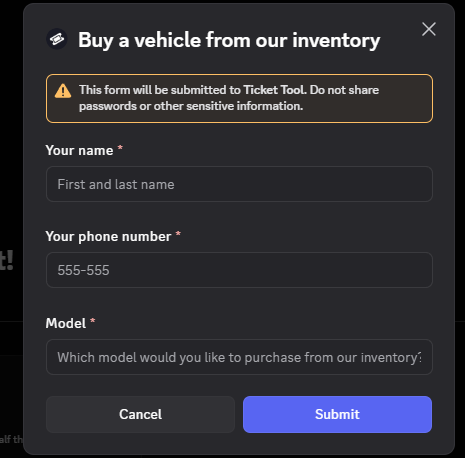
is adding questions like this to ticket bot a premium feature or? I can't find option on panel
humble sequoiaBOT
A Discord Form lets the user answer individual questions in a pop-up Form, which then displays the answers in the ticket message. This can save time if you already know what you want to ask the user.
Setup Forms
Forms can be enabled under Panel Settings > Form Options > Edit Forms Options. In the new pop-up window, you can now enable and edit your own Form.
Form Options
You can add up to 5 questions in the Discord form. This is a Discord limitation. Each question can have a placeholder in the input field, a minimum and maximum input, multi-line, and also the option to have the answer required.
Options
Question Title ➞ Your Question goes here
Question Placeholder ➞ The placeholder text in the input field
Required ➞ If enabled, the user has to answer this question, to submit the form
Multi-Line Input ➞ Allows the user to input multiple lines
Minimum and Maximum Input ➞ Set a minimum and maximum input value for the user
Displaying the Answer
To display the answers from the user, you need to enable Auto display form results on the ticket message as an additional embed
If you don't want a second embed, go into your Panel Configs > Ticket Options > Edit Ticket Message. You use the variable {create.form.x} and replace x with the number of your question. For example, the response to Question 5 can be displayed with {create.form.5}.
 iron nightBOT
Gave +1 Rep to @covert swallow (current: #16 - 476)
last oar
Where do i add variable {create.form.X} for form to work?
 covert swallow
Yes
last oar
https://prnt.sc/xBhVR8Pcwlem it's normal to say like this? @covert swallow
 covert swallow
Yes, itll be replaced with the actual answers in a real ticket
last oar
Okay, thanks @covert swallow
iron nightBOT
Gave +1 Rep to @covert swallow (current: #16 - 477)
last oar
can ticket tool bot be used to assign roles once you put a reaction on a message?
austere forge
Only when ticket being created, but you need premium sub
last oar
thanks @austere forge
iron nightBOT
Gave +1 Rep to @austere forge (current: #4 - 1266)
 shrewd pasture
hi everyone!
would it be possible to have a different message sent by the ticket tool bot based on someone's attributed roles and/or a form response from a dropdown menu?
i.e: user creates a ticket -> user has "ENG" role -> bot sees that and sends proper message in english or a different language
covert swallow
Not quite, you can use the dropdown menu to open different panels though, and each indivudal panel can be set up for different languages
Much like how we have different languages and such in #🎫│make-a-ticket, just with the dropdown feature as opposed to the muliple buttons
humble sequoiaBOT
The Drop-down menu or Select Menu replaces the buttons on your panel message and uses a drop-down menu with all of your panels. To set this up, go to your Panel Configs and select your main Panel.
<:Numbericons1:1018864164032225340> Enable Select Style
First you enable Select Style. Then you add an item in the Dropdown Editor. Now you can start editing your dropdown!
<:Numbericons2:1018864168041971712> Dropdown Editor
Each line in the dropdown editor represents a line in the drop down menu on discord. You can add more "Items", by clicking on
First you select a panel. That's the panel this option will open a ticket for. DONT select the same panel twice. Each option should have a different Panel
After that, you can put a Display. This is the title of this option and will appear in the drop down menu. The *Description can be set right after that, which will be below the title in grey.
Additionally you can select an emoji, that will be shown in front of each option. You can either manually input the ID of an emoji or select it in the selector.
Common Issues ⚠️
- Panel doesn't send? Make sure you have a valid emoji selected
- Option doesn't show up? Check if two options have the same panel in the DropDown Editor
$dropdown
shrewd pasture
gotcha, thank you very much!
 ripe willow
 livid edge
Hi how do I make a ticket?
humble sequoiaBOT
@livid edge
⚠️ You're in the wrong place
We provide support for Ticket Tool Discord bot and cannot help you with whatever issue you have.
- We don't know which Support Team you should contact to get this issue resolved, and unfortunately we won't be able to accurately tell you.
If you don't have any further questions regarding our bot Ticket Tool, please close this ticket
 pliant raptor
hi, im trying to use /automation in my server, but it responds with "The application did not respond"
 hallow sandal
Boa tarde
 mellow fractal
Hello sir
 gentle adder
Hi
 idle osprey
pliant raptor
hi, im trying to use /automation in my server, but it responds with "The applica...
idle osprey
pliant raptor
hi, im trying to use /automation in my server, but it responds with "The applica...
make sure the perms are right, i just did the same in my server
is there a way i can make it so a specific role is automatically tagged when a ticket is opened?
 velvet vine
do you know why its not syncing with my wsever
humble sequoiaBOT
Within all the messages the bot sends (both embeds and text) you can mention either channels, roles, or even users, these mentions will only send a notification to the user if they are used within a text field, e.g: a role mentioned in an embed won't ping at all the users who have that role.
For mentioning a role you can use one out of three options:
{@Role Name} ➞ Which is Case Sensitive.
{RoleID} ➞ Replace RoleId with the Id of the role you are trying to ping.
<@&RoleID> ➞ Discord's native syntax to ping roles.
<#ChannelID> ➞ Mention a channel by its ID.
<@UserID> ➞ Mention a user by its ID.
scenic forum
idle osprey
is there a way i can make it so a specific role is automatically tagged when a t...
Refer to the embed above
humble sequoiaBOT
Don't see your server in the dashboard?
Try using the Sync Servers button on your top center of the Dashboard page
If this doesn't work
You should relog from the dashboard, you can do this by clicking here to log out immediately, and then log back in
Note:
You need one of these 3 things to access the dashboard.
1. Server Owner (Level: 6)
2. Server Administrator (Level: 4)
3. Dashboard Role (Level: 2)
:warning: You can check your level using the </permissionlevel:1029797400174399542> command on your Discord Server
If the bot's response is:
- @User is permission level: 0 (User)
You don't have any of the 3 levels required to access the server's dashboard
scenic forum
velvet vine
do you know why its not syncing with my wsever
Refer to the embed above
idle osprey
scenic forum
Refer to the embed above
amazing, thankyou!! <3
velvet vine
it says im lvl 6 so owner and it just doesnt show on dashboard
scenic forum
velvet vine
it says im lvl 6 so owner and it just doesnt show on dashboard
Did you log out and in?
idle osprey
scenic forum
Refer to the embed above
sorry to be annoying, which step in the setup process so i put this?
velvet vine
scenic forum
Did you log out and in?
no 💔 i jut did and it showed up thank you
iron nightBOT
Gave +1 Rep to @scenic forum (current: #12 - 697)
scenic forum
idle osprey
sorry to be annoying, which step in the setup process so i put this?
Panel config -> ticket -> edit ticket message
idle osprey
thankyou!!
pliant raptor
idle osprey
make sure the perms are right, i just did the same in my server
Yeah I got it working, thank you!
 dense arch
Who can help me?
 keen heron
Hello im getting IO network connection failed. Does anyone know how to fix this?
dense arch
Who can help me?
 pine blaze
how can i check my ticket reports
 subtle spruce
Preciso de suporte
 harsh terrace
h
 drifting birch
How do I get a ticket?
 pulsar kernel
pine blaze
how can i check my ticket reports
pulsar kernel
pine blaze
how can i check my ticket reports
Are you talking about ticket logs? Where you can see if a ticket is closed, opened, or deleted?
humble sequoiaBOT
@dense arch, we would love to help you, but if you don't tell us what you need help with we can't help you :(
 strange pivot
Hello, I'd like to ask why tickets are not synced and visible to all administrators.
When the ticket volume is high, only the server owner can see all tickets, while other administrators are unable to receive or view all of them.
austere forge
Ensure you have selected the role you want them to see tickets created as Support Team roles
humble sequoiaBOT
1. Open your Panel Configs tab in your server's dashboard
2. Select the panel you want to grant access to
3. Open the General options menu
4. Select your Support Team Roles
5. Save changes
 humble sequoiaBOT
Ticket Tool - Ticketing without clutter - The #1 Discord support bot
 vivid fulcrum
Hello, I have a problem with the ticket drop-down, I have 7 buttons on the console but in Discord I only get 2

 scenic forum
vivid fulcrum
Hello, I have a problem with the ticket drop-down, I have 7 buttons on the conso...
scenic forum
vivid fulcrum
Hello, I have a problem with the ticket drop-down, I have 7 buttons on the conso...

Panel Required. No panel provided
vivid fulcrum
scenic forum
Panel Required. No panel provided
I don't get the option
scenic forum
Each options needs its own panel
vivid fulcrum
scenic forum
 scenic forum
Then you need to create panels
vivid fulcrum
scenic forum
Then you need to create panels
I need the panel “contacto interno” no “test”
 humble sequoiaBOT
 Faster Premium Bot
Automatic Transcripts
Full Customization
Direct Messages
Ticket Automation
Thread Style Ticketing
Premium Support
Scheduled Panel Availability
Integrations
Claiming
Advanced Ticket Statistics
You can purchase premium here:
Price
$7.99 - Monthly
$66 - Yearly
scenic forum
jade topaz
and can i do a custom bot
We do not support whitelabel
You can however change its pfp/banner/description for your server
humble sequoiaBOT
Ticket Tool - Ticketing without clutter - The #1 Discord support bot
 bleak ferry
How do I make a ticket
dense arch
What to do if my discord server is not showing in the dashboard but i invited the bot
humble sequoiaBOT
Don't see your server in the dashboard?
Try using the Sync Servers button on your top center of the Dashboard page
If this doesn't work
You should relog from the dashboard, you can do this by clicking here to log out immediately, and then log back in
Note:
You need one of these 3 things to access the dashboard.
1. Server Owner (Level: 6)
2. Server Administrator (Level: 4)
3. Dashboard Role (Level: 2)
:warning: You can check your level using the </permissionlevel:1029797400174399542> command on your Discord Server
If the bot's response is:
- @User is permission level: 0 (User)
You don't have any of the 3 levels required to access the server's dashboard
scenic forum
@dense arch refer to the embed above
dense arch
But i dosent show my discord server
scenic forum
Did you follow the steps
dense arch
No
scenic forum
dense arch
No
What does /permissionlevel reply with
scenic forum
Nice edit btw
dense arch
Thx
Also i dont get the server owner level 6 and server administration and dashboard role level 2
scenic forum
dense arch
Also i dont get the server owner level 6 and server administration and dashboard...
 dense arch
It doesn't say that
scenic forum
What does it say
scenic forum
When you use the command i told you
scenic forum
And you have already
logged out, logged in and pressed sync servers
in that order?
humble sequoiaBOT
The ticket name is the default channel name of all tickets. To edit it, go to your Dashboard > Panel Configs > Ticket. There you can edit the channel name of opened and closed tickets. You can also use variables in there.

 Note: This is a premium feature
scenic forum
Note: This is a premium feature
scenic forum
@neon pendant refer to the embed above
 neon pendant
scenic forum
<@961146970196553738> refer to the embed above
neon pendant
scenic forum
<@961146970196553738> refer to the embed above
Any command?
scenic forum
neon pendant
Any command?
$rename NEWNAME
 latent oak
i keep refreshing and its not showing the new server i added it to
humble sequoiaBOT
Don't see your server in the dashboard?
Try using the Sync Servers button on your top center of the Dashboard page
If this doesn't work
You should relog from the dashboard, you can do this by clicking here to log out immediately, and then log back in
Note:
You need one of these 3 things to access the dashboard.
1. Server Owner (Level: 6)
2. Server Administrator (Level: 4)
3. Dashboard Role (Level: 2)
:warning: You can check your level using the </permissionlevel:1029797400174399542> command on your Discord Server
If the bot's response is:
- @User is permission level: 0 (User)
You don't have any of the 3 levels required to access the server's dashboard
scenic forum
@latent oak refer to the embed above
latent oak
 scenic forum
latent oak
scenic forum
latent oak
Log out -> Log in -> Press Sync Servers
latent oak
worked ty
 paper willow
hello guys
im trying to figure out how the ticket tool works to add it in my comunity but i can't find the server on the dashboard but it does exist on discord self
 torpid hamlet

 versed hamlet
i cant fix it so when i created a new server on the editor website it dosent display my server even tho i have the bot
 rotund basin
 zinc wing
Serv free fire ?
 steady sun
can someone help me setup ticket
 brave ether
I invited the ticketbot to a server, but the server wont show up on the dashboard, other servers show up
steady sun
because you probably have to do everything the other way round
idk
im struggling like u
covert swallow
brave ether
I invited the ticketbot to a server, but the server wont show up on the dashboar...
Make sure you have the administrator permission on the server, if you do and still not there click sync, if that doesnt work, log out of the dashboard and log back in
 stark runeBOT
1. Invite Ticket Tool to your server
First you will want to invite the bot to your server. Once the bot is in your server, you can manage your server in the dashboard.
2. Create a Panel
To create a panel we are going to need to head over to the panel configs on the dashboard.
Once at the dashboard we will need to click Create Panel.
Enter a panel name (Fill in any optional settings you want).
Click Create Panel and your ready to get started with configuring your panel.
An example of a creating a panel is shown below.
3. Send the Panel to a Channel
Once you've created a panel on the dashboard you will need to send it to a channel using send on the dashboard.
Select the channel you want your panel to be created in and click send.
For other questions checkout $help faq.
An example of a sending a panel is shown below.
Having a Problem Sending the Panel?
Do $debug in a channel with Ticket Tool and make sure it has all the necessary Discord permissions.
covert swallow
steady sun
can someone help me setup ticket
Above is a setup guide, if you run into issues please feel free to ask a specific question
 hexed rivet
Hellooo, have support in portuguese?
 trail siren
Hello, my discord server doesn't show up on the dashboard 🙁
humble sequoiaBOT
Equipa de Apoio Portuguesa
Se você está procurando ajuda, abra um ticket para entrar em contato com a equipe de suporte em português. Vá para #🎫│make-a-ticket e pressione o botão :flag_br:.
scenic forum
@hexed rivet ^
humble sequoiaBOT
Don't see your server in the dashboard?
Try using the Sync Servers button on your top center of the Dashboard page
If this doesn't work
You should relog from the dashboard, you can do this by clicking here to log out immediately, and then log back in
Note:
You need one of these 3 things to access the dashboard.
1. Server Owner (Level: 6)
2. Server Administrator (Level: 4)
3. Dashboard Role (Level: 2)
:warning: You can check your level using the </permissionlevel:1029797400174399542> command on your Discord Server
If the bot's response is:
- @User is permission level: 0 (User)
You don't have any of the 3 levels required to access the server's dashboard
scenic forum
@trail siren refer to the embed above
trail siren
i will, thank you
hexed rivet
scenic forum
<@914586972067074048> ^
Thks
trail siren
Yes, it helped thank you very much.
hexed rivet
scenic forum
<@914586972067074048> ^
I have a question. I have a server where I need to use more than one ticketing panel simultaneously. For example, one panel for questions/support, opening tickets in a specific location, and another panel for reporting problems, opening tickets in a different location on the server. This is just an example. Is it possible to have two panels running simultaneously on my server?
scenic forum
hexed rivet
I have a question. I have a server where I need to use more than one ticketing p...
You can use as many panels simultaneously as you want
hexed rivet
Uh nice
scenic forum
hexed rivet
Uh nice
Usually people merge them via multipanel or dropdown
hexed rivet
I dont understand so much
hexed rivet
scenic forum
Its 1 panel having 9 panels overall using multipanel
One exemple
I can make two of these panels, right?

@scenic forum
scenic forum
You can make as many as you want
scenic forum
There is a character limit for non premium users tho so keep that in mind
hexed rivet
scenic forum
There is a character limit for non premium users tho so keep that in mind
My question before buying was this I'm going to upgrade my plan
scenic forum
hexed rivet
My question before buying was this I'm going to upgrade my plan
Once you've purchased and dont have the premium role here
Feel free to ping me and ill grant you it
Thank you for supporting ticket tool
iron nightBOT
Gave +1 Rep to @hexed rivet (current: #439 - 1)
hexed rivet
scenic forum
Once you've purchased and dont have the premium role here
Feel free to ping me a...
Thks for your time and help
 errant thistle
The server I want to edit is not popping up on the dashboard, even after syncing multiple times.
 deft cobalt
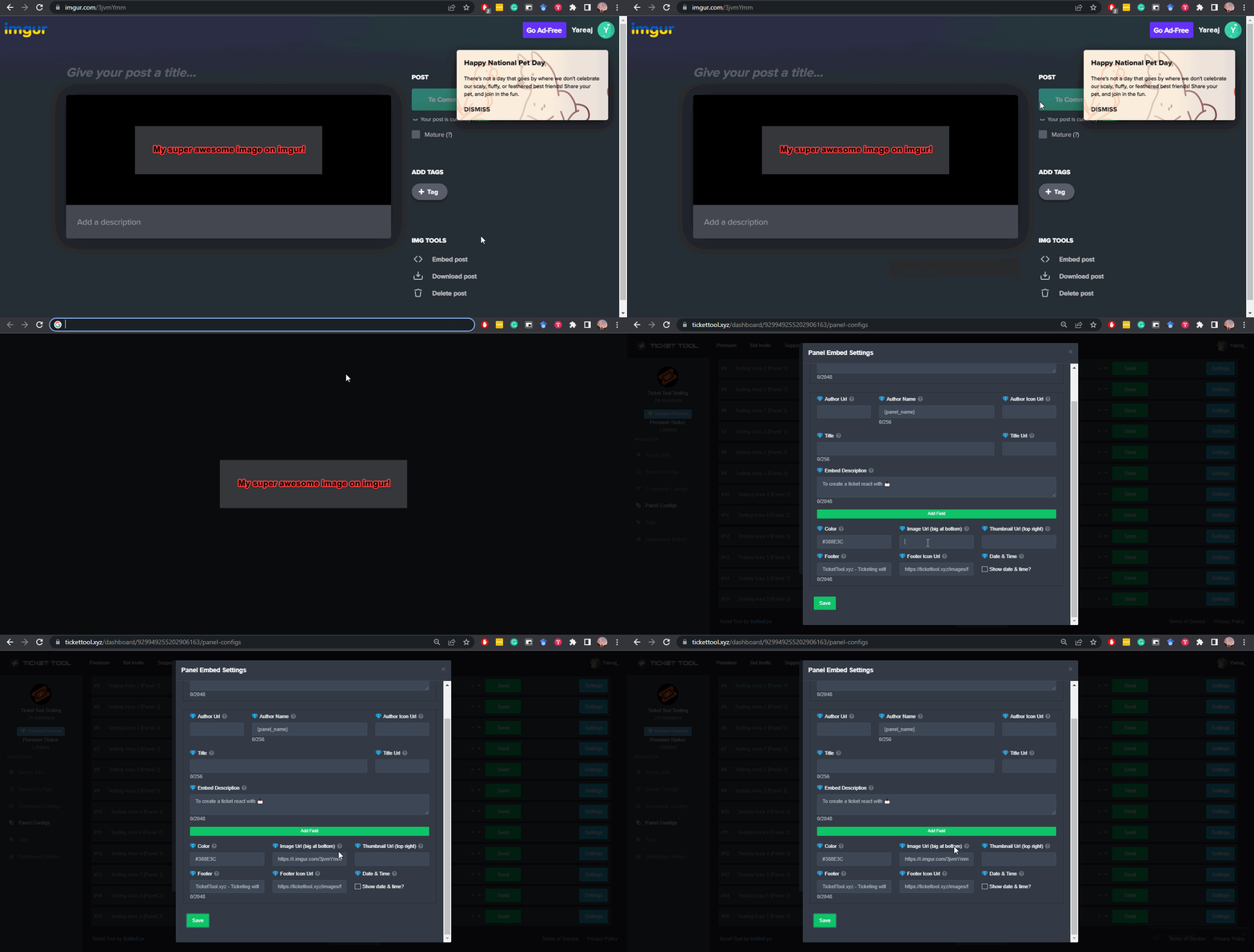
Is there any way for a message or image to pop up after a person has made a ticket
im trying to put an imgur image so its under the panel
humble sequoiaBOT
Don't see your server in the dashboard?
Try using the Sync Servers button on your top center of the Dashboard page
If this doesn't work
You should relog from the dashboard, you can do this by clicking here to log out immediately, and then log back in
Note:
You need one of these 3 things to access the dashboard.
1. Server Owner (Level: 6)
2. Server Administrator (Level: 4)
3. Dashboard Role (Level: 2)
:warning: You can check your level using the </permissionlevel:1029797400174399542> command on your Discord Server
If the bot's response is:
- @User is permission level: 0 (User)
You don't have any of the 3 levels required to access the server's dashboard
scenic forum
@errant thistle refer to the embed above
scenic forum
deft cobalt
Is there any way for a message or image to pop up after a person has made a tick...
The image field for a ticket requires premium to edit
deft cobalt
scenic forum
The image field for a ticket requires premium to edit
i have premium, where do i access it
scenic forum
deft cobalt
i have premium, where do i access it
Panel config -> Ticket -> Edit ticket message -> Insert into the image field
errant thistle
scenic forum
<@1355699733498298480> refer to the embed above
that worked ty
iron nightBOT
Gave +1 Rep to @scenic forum (current: #12 - 698)
deft cobalt
scenic forum
Panel config -> Ticket -> Edit ticket message -> Insert into the image field
I see field editor not image field
 scenic forum
deft cobalt
I see field editor not image field
scenic forum
deft cobalt
I see field editor not image field
Image Url
errant thistle
How do I get it to ping certain roles when a ticket is opened?
humble sequoiaBOT
Within all the messages the bot sends (both embeds and text) you can mention either channels, roles, or even users, these mentions will only send a notification to the user if they are used within a text field, e.g: a role mentioned in an embed won't ping at all the users who have that role.
For mentioning a role you can use one out of three options:
{@Role Name} ➞ Which is Case Sensitive.
{RoleID} ➞ Replace RoleId with the Id of the role you are trying to ping.
<@&RoleID> ➞ Discord's native syntax to ping roles.
<#ChannelID> ➞ Mention a channel by its ID.
<@UserID> ➞ Mention a user by its ID.
scenic forum
@errant thistle refer to the embed above
errant thistle
humble sequoia
Where do I get to this at?
scenic forum
errant thistle
Where do I get to this at?
Panel config -> Ticket -> Edit ticket message -> Use the top field
errant thistle
Thank you
 sand portal
Me borraron todo mi dinero que ago?
humble sequoiaBOT
⚠️ Está en el lugar equivocado
Brindamos soporte para el bot de Discord Ticket Tool y no le podemos ayudar con el problema que presenta.
- No sabemos a que equipo de soporte debería contactar para solucionar este problema, y desafortunadamente no podremos ayudarle acertadamente.
Si no tiene alguna duda relacionada a nuestro bot, Ticket Tool, por favor cierre este ticket.
 hardy thunder
i have problem, when i close the ticket , its auto gets open and the moderator message doesn't appear at all , Not just one panel, they're all like this.
 sand portal
They erased all my money, what do I do?
 restive condor
hardy thunder
i have problem, when i close the ticket , its auto gets open and the moderator m...
restive condor
hardy thunder
i have problem, when i close the ticket , its auto gets open and the moderator m...
Hi there, please make a ticket #premium-tickets
restive condor
sand portal
They erased all my money, what do I do?
You're in the wrong server
hardy thunder
restive condor
Hi there, please make a ticket <#796568540311715870>
ok
deft cobalt
I activated the premium but i still can't access the premium stuff
scenic forum
deft cobalt
I activated the premium but i still can't access the premium stuff
Press the  button at the top left of your dashboard
errant thistle
How do I make it when they make a ticket, instead of if saying ticket#---- it says the type of ticket it is so like, Support-3123
humble sequoiaBOT
The ticket name is the default channel name of all tickets. To edit it, go to your Dashboard > Panel Configs > Ticket. There you can edit the channel name of opened and closed tickets. You can also use variables in there.
Note: This is a premium feature
scenic forum
@errant thistle refer to the embed above
sand portal
A donde tengo que acudir si me quitaron mi dinero
restive condor
sand portal
A donde tengo que acudir si me quitaron mi dinero
No sabemos. Estás en el servidor equivocado
errant thistle
scenic forum
<@1355699733498298480> refer to the embed above
ty
iron nightBOT
Gave +1 Rep to @scenic forum (current: #12 - 699)
 humble sequoiaBOT
What are the direct URLs?
A direct access URL is an easy to read URL that users can enter to get to a specific item, document, page, category, or perspective, in which our bot TicketTool can read and get it displayed in your 'Panel Message' or your 'Ticket Message'.
Where can I get them?
The recommended way is to use 'Imgur', you can signup within a few minutes and then upload the image you want, and copy the URL of the uploaded image and paste it into one of the four boxes. There are alternatives to this, such as other image or video storing websites or using 'Open Original' of an image and paste it in (please be aware that if your image is deleted, Discord will automatically delete the link to it in a few days). Please note this requires 'Premium'. Imgur
 scenic forum
@deft cobalt refer to the embed
Also test it via an opened ticket not via the preview
scenic forum
If you ping me with a "Thanks" inside that message it will give me a rep
deft cobalt
scenic forum
If you ping me with a "Thanks" inside that message it will give me a rep
Thanks
iron nightBOT
Gave +1 Rep to @scenic forum (current: #12 - 700)
 upbeat tinsel
 unborn latch
hi. used the free trial off prem. how to use it now? features are locked
scenic forum
unborn latch
hi. used the free trial off prem. how to use it now? features are locked
press the at the top left
 vital thorn
I made my first top-up on the Africa server and haven't received the rewards yet

 humble sequoiaBOT
@vital thorn
⚠️ You're in the wrong place
We provide support for Ticket Tool Discord bot and cannot help you with whatever issue you have.
- We don't know which Support Team you should contact to get this issue resolved, and unfortunately we won't be able to accurately tell you.
If you don't have any further questions regarding our bot Ticket Tool, please close this ticket
 chilly gorge
How do i make ticket tool ping me when a member opens a ticket, ticket tool has that server perm, ticket tool role is higher then the role its supposed to ping and its displaying the ping right but not actually pinging
And i have the role ticket tool is supposed to ping ofc
scenic forum
chilly gorge
How do i make ticket tool ping me when a member opens a ticket, ticket tool has ...
Then ticket tool is missing the @ everyone ping permission
chilly gorge
scenic forum
Then ticket tool is missing the @ everyone ping permission
its not
scenic forum
chilly gorge
its not
Can you show me its role having that permission
chilly gorge
its a bot role
scenic forum
Thats fine too
Can you show me
chilly gorge
scenic forum
Thats fine too
Can you show me
 scenic forum
Thats not showing me the permission
 distant furnace
no entiendo nada la verdad alguien me ayuda? porfavor
chilly gorge
scenic forum
Thats not showing me the permission
 scenic forum
chilly gorge
scenic forum
chilly gorge
Can you show me the ticket message that should ping but doesnt?
 chilly gorge
still doesnt work lemme show ya
chilly gorge
scenic forum
It needs to be outside of the embed
 scenic forum
chilly gorge
scenic forum
chilly gorge
Can you show having the purchase ping role on you
chilly gorge
scenic forum
Can you show having the purchase ping role on you
i have it
scenic forum
chilly gorge
i have it
Can you show it please
chilly gorge
 scenic forum
chilly gorge
scenic forum
chilly gorge
Can you show me a screenshot of
Panel config -> permissions -> @ everyone role permissions -> edit opened (the part where it mentions the ping permission)
chilly gorge
scenic forum
Can you show me a screenshot of
Panel config -> permissions -> @ everyone role p...
THATS WHAT IM TRYNA FIND 😭
scenic forum
chilly gorge
THATS WHAT IM TRYNA FIND 😭
Had to rule out everything else first
chilly gorge
scenic forum
Had to rule out everything else first
where do i find that
scenic forum
chilly gorge
where do i find that
On the dashboard
Following the path i provided
chilly gorge
istg i saw somewhere like allow @ ticket tool to mention @ everyone here and all roles but i cant find it
chilly gorge
scenic forum
On the dashboard
Following the path i provided
where is the ping perm like what im confused
thats everyone perms
not ticket tool perms
scenic forum
ticket tool is part of everyone
Everyone is in fact part of everyone
So could you please provide the screenshot
chilly gorge
scenic forum
ticket tool is part of everyone
omg im dumb
tysm lemme check if thats it
scenic forum
chilly gorge
tysm lemme check if thats it
Put it on NEUTRAL not on allowed
and it will work without normal members being allowed to ping
chilly gorge
scenic forum
Put it on NEUTRAL not on allowed
it was in neutral 😭
scenic forum
Then that wasnt it either
Does ticket tool have a role thats "support team role"?
chilly gorge
scenic forum
Then that wasnt it either
Does ticket tool have a role thats "support team role"...
 scenic forum
If any of them marked as support team role?
chilly gorge
oh no
hmmm
it can ping the user when they open a ticket but it can not ping that role meaning
scenic forum
Do you have 2 Purchase ticket pings?
chilly gorge
wait still doesnt make sense
scenic forum
White
 chilly gorge
no i dont
scenic forum
Black

Hmm
Can you move the Seller ping into the the same field and open another test ticket
chilly gorge
yes
scenic forum
On the dashboard
Is that dot green or orange for that permission
 chilly gorge
scenic forum
Hmm
Can you move the Seller ping into the the same field and open another test t...
chilly gorge
scenic forum
Hmm
Can you move the Seller ping into the the same field and open another test t...
i did that and @ seller worked
im confused why the other one doesnt
scenic forum
chilly gorge
i did that and @ seller worked
Please double check
You have probably 2 roles
As the ping displays white while the role is black
scenic forum
chilly gorge
thats what im confused about
Can you
iron nightBOT
Gave +1 Rep to @scenic forum (current: #12 - 701)
scenic forum
Give me the ID of the role you put into the dashboard thats the ticket purchase ping
scenic forum
Could you give me your server ID by any chance?
scenic forum
chilly gorge
can the reason be that i added role icon
That should ONLY be a problem
If youre not using discords icons + Use RoleName to ping and not RoleID
 scenic forum
chilly gorge
scenic forum
chilly gorge
HELPPPPPPPPPPPPP
scenic forum
Yeah thats not how you ping

 old needle
I need help fast
I’m trying to use set up and it will not work
It keeps saying application is not responding
scenic forum
old needle
It keeps saying application is not responding
Use /debug on your server
 onyx crater
scenic forum
Use /debug on your server
onyx crater
scenic forum
Use /debug on your server
Didn’t work
scenic forum
onyx crater
Didn’t work
Missing all permissions with an X inside that channel

 uneven axle
I’ve double checked my server permissions and ticket panel configurations ~
When I view my server as a basic entry level role, I can still see opened tickets that should be private to only the staff team and the ticket owner
A fellow admin within my server claims to not be able to see tickets that are opened as well
Is this a case of; I can see the tickets when viewing the server as a basic role because I opened the tickets as an admin?
and maybe my fellow admin’s channel list is hiding the new tickets?
or am I missing something altogether? thank you for any help & suggestions
scenic forum
uneven axle
I’ve double checked my server permissions and ticket panel configurations ~
Wh...
When youre inside the channel
Do normal users appear in the online list?
uneven axle
scenic forum
When youre inside the channel
Do normal users appear in the online list?
no , the correct roles & members are in there
scenic forum
uneven axle
no , the correct roles & members are in there
Then thats what matters
uneven axle
scenic forum
Then thats what matters
perfect , i just didn’t want any tickets visible to the public ; and they don’t seem to be other than when I view the server as a specific role
and I suppose my fellow admin is either missing the tickets or they’re hidden from the list
scenic forum
uneven axle
perfect , i just didn’t want any tickets visible to the public ; and they don’t ...
Does your server still display offline members?
uneven axle
scenic forum
Does your server still display offline members?
no actually
scenic forum
uneven axle
no actually
So your admin is probably offline
Servers above 1000 members no longer display offline members
uneven axle
scenic forum
So your admin is probably offline
Servers above 1000 members no longer display o...
ahh gotcha. thank you for your time and help! @scenic forum
iron nightBOT
Gave +1 Rep to @scenic forum (current: #12 - 702)
scenic forum
uneven axle
ahh gotcha. thank you for your time and help! <@186523978729259009>
If you can @ them in the ticket (if they appear to be selected) they can see it
Thats how you could test it easily
uneven axle
scenic forum
If you can @ them in the ticket (if they appear to be selected) they can see it
...
I appreciate that tip 🙏 thank you again!
 nova terrace
is ticket tool currently down? because i keep getting this message whenver i try to use a command on the bot
 scenic forum
nova terrace
is ticket tool currently down? because i keep getting this message whenver i try...
scenic forum
nova terrace
is ticket tool currently down? because i keep getting this message whenver i try...
Use /debug on your server
nova terrace
scenic forum
Use /debug on your server
 scenic forum
nova terrace
scenic forum
nova terrace
The bot is missing the send message permission inside that channel
 hasty coral
what do i do if someone is giving me a role to like see the tickets that are made but i cant see them and they added me in the website and on discord
pls help
🙏
 vocal adder
How do I get ticky to delete the channel itself after I choose close and delete the ticket
 runic ledge
chat does anyone know when i make a panel where they answer questions, how can i see what they typed in the panel in the ticket?
nvm 😭
 nova terrace
how do i see which panel a ticket is in?
 opal wagon
nova terrace
how do i see which panel a ticket is in?
opal wagon
nova terrace
how do i see which panel a ticket is in?
Panel Configs
 buoyant cedar
I currently have ticket tool in my server, it doesnt show the server in my dashboard
Can I get a hand?
 fresh cosmos
Can someone help me figure out how to make the ticket create thing pop up for everyone and not just myself


Second one is what I see first one is what everyone else sees
humble sequoiaBOT
━━ User's inquiry has been moved to a ticket ━━
 pearl token
@humble sequoia
 unreal birch
Hello, I want to make a bot on my server, I add it and I can't configure it on the site. Requested level, shows 6. But it is not displayed on the site, I added it to another server, and I was able to configure it, but not to 1. How can you solve it?
humble sequoiaBOT
Don't see your server in the dashboard?
Try using the Sync Servers button on your top center of the Dashboard page
If this doesn't work
You should relog from the dashboard, you can do this by clicking here to log out immediately, and then log back in
Note:
You need one of these 3 things to access the dashboard.
1. Server Owner (Level: 6)
2. Server Administrator (Level: 4)
3. Dashboard Role (Level: 2)
:warning: You can check your level using the </permissionlevel:1029797400174399542> command on your Discord Server
If the bot's response is:
- @User is permission level: 0 (User)
You don't have any of the 3 levels required to access the server's dashboard
austere forge
unreal birch
Hello, I want to make a bot on my server, I add it and I can't configure it on t...
Refer to the embed above!
unreal birch
austere forge
Refer to the embed above!
thanks, helped
iron nightBOT
Gave +1 Rep to @austere forge (current: #4 - 1269)
 scenic forum
 mossy yarrow
extra button <@795710289425334303>
mossy yarrow
extra button <@795710289425334303>
Dont ping staff
mossy yarrow
scenic forum
Dont ping staff
new join i did not know
humble sequoiaBOT
For more convenient use of multipanels, you can now combine panels on the dashboard. This will allow you to directly send the multipanel from the dashboard or via the $panel ID command.
Where can I find this?
You can find this setting on the Dashboard -> Panel Configs -> Panel -> Attached Panels
Note: if you're attaching all the panels to a panel called English, don't include English in the attached panel's box (If you do this, it will create a duplicate)
This will put all buttons from all of your panels on one message. The message is the panel message from the panel you're combining these panels in.
 scenic forum
@mossy yarrow refer to the embed above
mossy yarrow
 mossy yarrow
scenic forum
<@281011077716770816> refer to the embed above
mossy yarrow
scenic forum
<@281011077716770816> refer to the embed above
see
scenic forum
mossy yarrow
see
im seeing it. Yes
 mossy yarrow
only 1 is there
 restive condor
 little spruce
Whyyy does it always happen when i am trying to create a ticket panel
little spruce
Whyyy does it always happen when i am trying to create a ticket panel
Hey there! Please try the /debug command in that same channel please
 restive condor
little spruce
It is showing the same thingg
restive condor
little spruce
It is showing the same thingg
Ticket Tool is missing the SEND MESSAGES permission for that channel
 restive condor
That's role permissions. It's missing the permission for the channel you ran the command in specifically
restive condor
Hold down on the channel's name (from the channel list) > Edit Channel > Permissions > Add Ticket Tool >  Send Messages
little spruce
restive condor
Hold down on the channel's name (from the channel list) > Edit Channel > Permiss...
Thanks for that info it works now thank you so much Dan sorry if i shouldn't call u that and again tysm
iron nightBOT
Gave +1 Rep to @restive condor (current: #1 - 2896)
little spruce
restive condor
Hold down on the channel's name (from the channel list) > Edit Channel > Permiss...
Btw W pfp. Which anime?
little spruce
restive condor
Hold down on the channel's name (from the channel list) > Edit Channel > Permiss...
Btw thanks for your time Dan/sir
iron nightBOT
Gave +1 Rep to @restive condor (current: #1 - 2897)
 tidal lynx
Why when I try and add someone on it don’t work? When I put them on it
 narrow lily
Guys when I try to add someone to see all my tickets on server too it doesn't work it just glitches and isn't working I tried from the website and from discord.
 shadow finch
restive condor
tidal lynx
Why when I try and add someone on it don’t work? When I put them on it
shadow finch
restive condor
tidal lynx
Why when I try and add someone on it don’t work? When I put them on it
Hey there! How exactly does it not work? Are you getting any error messages?
restive condor
narrow lily
Guys when I try to add someone to see all my tickets on server too it doesn't wo...
Hey there! Are you testing this with a brand new ticket?
narrow lily
Yes
narrow lily
restive condor
Hey there! How exactly does it not work? Are you getting any error messages?
No error messages it just doesn't eork
restive condor
narrow lily
Yes
So you've added a new support team role that's not getting access to tickets?
narrow lily
Yep that's right
restive condor
Could you screenshot where exactly you added the role please
narrow lily
 restive condor
narrow lily
restive condor
narrow lily
Remove it from the additional roles field please
 restive condor
Alrighty, now give it a try with another (new) ticket
narrow lily
So I should create a new ticket
And look if it works right
It works thanks
Thanks @restive condor
iron nightBOT
Gave +1 Rep to @restive condor (current: #1 - 2898)
scenic forum
 icy dove
<@795710289425334303>
icy dove
<@795710289425334303>
Dont ping staff
 icy dove
scenic forum
Dont ping staff
icy dove
scenic forum
Dont ping staff
@scenic forum
scenic forum
icy dove
<@186523978729259009>
Dont ping me either
 lilac junco
icy dove
It's just like this
lilac junco
icy dove
It's just like this
Did you setup ticket tool?
humble sequoiaBOT
━━ Eren's inquiry has been moved to a ticket ━━
icy dove
RESOLVED
humble sequoiaBOT
━━ User's inquiry has been moved to a ticket ━━
 slate shore
How do i make it so staff that's online/on duty will be pinged
 alpine bear
My server wont show up in my ticket tool dashboard but i was able to do / commands to set it up ive tried syncing the discord but it wont show or sync I NEED HELP!!
humble sequoiaBOT
Within all the messages the bot sends (both embeds and text) you can mention either channels, roles, or even users, these mentions will only send a notification to the user if they are used within a text field, e.g: a role mentioned in an embed won't ping at all the users who have that role.
For mentioning a role you can use one out of three options:
{@Role Name} ➞ Which is Case Sensitive.
{RoleID} ➞ Replace RoleId with the Id of the role you are trying to ping.
<@&RoleID> ➞ Discord's native syntax to ping roles.
<#ChannelID> ➞ Mention a channel by its ID.
<@UserID> ➞ Mention a user by its ID.
scenic forum
@slate shore refer to the embed above
humble sequoiaBOT
Don't see your server in the dashboard?
Try using the Sync Servers button on your top center of the Dashboard page
If this doesn't work
You should relog from the dashboard, you can do this by clicking here to log out immediately, and then log back in
Note:
You need one of these 3 things to access the dashboard.
1. Server Owner (Level: 6)
2. Server Administrator (Level: 4)
3. Dashboard Role (Level: 2)
:warning: You can check your level using the </permissionlevel:1029797400174399542> command on your Discord Server
If the bot's response is:
- @User is permission level: 0 (User)
You don't have any of the 3 levels required to access the server's dashboard
scenic forum
@alpine bear refer to the embed above
alpine bear
thanks it worked...
slate shore
humble sequoia
I do not understand this 😭
humble sequoiaBOT
1. Open your Panel Configs tab in your server's dashboard
2. Select the panel you want to ping your support team on
3. Open the Ticket options menu
4. Click on Edit Ticket Message
5. In the Message Content use one of the role mention syntax ({@Role Name}/{Role ID})
6. Save changes
Note: For this to work properly, Ticket Tool requires the Mention Everyone permission. Or the role must have the Allow anyone to @mention this role setting enabled
austere forge
slate shore
I do not understand this 😭
Refer to the embed above please
slate shore
Thanks a lot, it helped 😋
 thorn lagoon
Hello i was wondering when someone crates a ticket how do you make it so they have to answer questions before it crates the ticket???on mobile
humble sequoiaBOT
A Discord Form lets the user answer individual questions in a pop-up Form, which then displays the answers in the ticket message. This can save time if you already know what you want to ask the user.
Setup Forms
Forms can be enabled under Panel Settings > Form Options > Edit Forms Options. In the new pop-up window, you can now enable and edit your own Form.
Form Options
You can add up to 5 questions in the Discord form. This is a Discord limitation. Each question can have a placeholder in the input field, a minimum and maximum input, multi-line, and also the option to have the answer required.
Options
Question Title ➞ Your Question goes here
Question Placeholder ➞ The placeholder text in the input field
Required ➞ If enabled, the user has to answer this question, to submit the form
Multi-Line Input ➞ Allows the user to input multiple lines
Minimum and Maximum Input ➞ Set a minimum and maximum input value for the user
Displaying the Answer
To display the answers from the user, you need to enable Auto display form results on the ticket message as an additional embed
If you don't want a second embed, go into your Panel Configs > Ticket Options > Edit Ticket Message. You use the variable {create.form.x} and replace x with the number of your question. For example, the response to Question 5 can be displayed with {create.form.5}.
austere forge
thorn lagoon
Hello i was wondering when someone crates a ticket how do you make it so they ha...
Refer to the embed above!
thorn lagoon
Are you able to do it without premium?
 limber portal
thorn lagoon
Are you able to do it without premium?
limber portal
thorn lagoon
Are you able to do it without premium?
Forms can be done without premium yep
thorn lagoon
I don’t understand which button do i press?
 restive condor
thorn lagoon
I don’t understand which button do i press?
restive condor
thorn lagoon
I don’t understand which button do i press?
The one called 'Forms' please
thorn lagoon
O
 rough dagger
Hello everyone. I was wondering if there was a way to indicate the name of the user who escalated the ticket in case of an escalation. Because it's not in the escalation variables.
jade topaz
Hello team,
Whenever I try any command like /setup or /help, the bot says: The application did not respond. Can anyone please help me with this?
 broken path
Any reason why it doesn’t let me set up?
humble sequoiaBOT
When first invited to your server, Ticket Tool should have the permissions shown below in order to ensure an appropriate functioning:
When customizing permissions for the different ticket participants, you must make sure Ticket Tool has the permissions you want it to grant to others, you can learn more about this here.
Missing Permissions
This error is a direct outcome of the bot missing permissions as depicted above. When troubleshooting this error we suggest you go through these steps:
- Use the </debug:1029783024264564765> command to check if the bot is lacking core role or channel permissions.
- Compare the category/channel's overrides and contrast them with the bot's roles to identify any permission denial that is breaking the functioning
- If you can't still figure it out, let our <@&540295656720302081> know so they can guide you through
Additional Resources
- If you are a server administrator and would like to understand more how to set up your server's permissions, we suggest checking the Discord Support Knowledge Base
- If you are a bot developer and are interested in the internal permission hierarchy we suggest you this part of the Discord Developer Docs
Important Note
- Giving Administrator permissions is NOT required and we do NOT encourage you to do unless you are trying to troubleshoot your permissions setup.
 latent dawn
jade topaz
Hello team,
Whenever I try any command like /setup or /help, the bot says: The a...
latent dawn
jade topaz
Hello team,
Whenever I try any command like /setup or /help, the bot says: The a...
Refer to the embed above 
latent dawn
broken path
Any reason why it doesn’t let me set up?
What does the bot say?
 chilly burrow
they accept me pls
jade topaz
latent dawn
Refer to the embed above <:this:894279341108772914>
Thank you so much! I am able to create tickets now!
iron nightBOT
Gave +1 Rep to @latent dawn (current: #94 - 14)
Gave +1 Rep to @humble sequoia (current: #18 - 415)
 glacial trail
I have I question, why I can’t submit a ticket
 clever temple
@ support Team
How can I create a new Mvids Jelly account for my brother?
#🎫│make-a-ticket How can I create a new Mvids Jelly account for my brother?
humble sequoiaBOT
@clever temple
⚠️ You're in the wrong place
We provide support for Ticket Tool Discord bot and cannot help you with whatever issue you have.
- We don't know which Support Team you should contact to get this issue resolved, and unfortunately we won't be able to accurately tell you.
If you don't have any further questions regarding our bot Ticket Tool, please close this ticket
runic ledge
after i make a dropdown menu how can i make it so it mentions the specific role that is dedicated to the ticket

like if it pings a trial middleman when they press it, it pings a @trial middleman and so on
dense arch
How do i make it so that only a specific role can claim a ticket
humble sequoiaBOT
━━ july's inquiry has been moved to a ticket ━━
 white saffron
Como hablo con alguien? Tengo una duda
restive condor
white saffron
Como hablo con alguien? Tengo una duda
Hola, como puedo ayudar?
white saffron
Amigo puedo hablar contigo al privado?
restive condor
Sobre que exactamente?
restive condor
Estás en el servidor equivocado
humble sequoiaBOT
⚠️ Está en el lugar equivocado
Brindamos soporte para el bot de Discord Ticket Tool y no le podemos ayudar con el problema que presenta.
- No sabemos a que equipo de soporte debería contactar para solucionar este problema, y desafortunadamente no podremos ayudarle acertadamente.
Si no tiene alguna duda relacionada a nuestro bot, Ticket Tool, por favor cierre este ticket.
 fallow gazelle
hello guys, im facing a problem in ticket tool where it shows im not subscribed but i am and its really affecting my work because the ticket name is shown messy.
 hearty night
just wondering, where can I submit a ticket because I don't see it on here
humble sequoiaBOT
━━ Faisal's inquiry has been moved to a ticket ━━
 twilit sapphire
I need to make a ticket
 wanton swallow
faz 10 dias que eu gastei meus créditos no site da starpets por robux, mas eles n chegaram, e nem mesmo estão pendentes ou dados como gamepass vendida, embora esteja lá que foi comprado

@humble sequoia
@stark rune
stark runeBOT
wanton swallow
<@818750612204290089>
<:emote:1362933269762543708> Available commands
Use
/help <command>to get more information
help
info
list
ping
guildmembercount
searchdocumentation
report
warns
setup
frsetup
desetup
essetup
 bright stirrup
hollow storm
bright stirrup
hollow storm
why can i not edit pannel message
 ionic void
guys i am an idiot and i dont know how to work ANY bot, can i get like a step by step instruction on how to make this bot do this and also get a ticket log at the bottom of the server im in?
i want it to do this:

 humble sequoiaBOT
@wanton swallow
Você está no lugar errado
Fornecemos suporte para Ticket Tool Discord bot e não podemos ajudá-lo com qualquer problema que você tenha.
- Não sabemos qual equipe de suporte você deve entrar em contato para resolver esse problema e, infelizmente, não poderemos informar com precisão.
Se você não tiver mais dúvidas sobre nossa ferramenta de ticket de bot, feche este ticket
scenic forum
ionic void
guys i am an idiot and i dont know how to work ANY bot, can i get like a step by...
What step are you confused about?
ionic void
scenic forum
What step are you confused about?
well i tried to work it on a burner server but i failed and i dont know where i failed so i just need overall assistance
stark runeBOT
1. Invite Ticket Tool to your server
First you will want to invite the bot to your server. Once the bot is in your server, you can manage your server in the dashboard.
2. Create a Panel
To create a panel we are going to need to head over to the panel configs on the dashboard.
Once at the dashboard we will need to click Create Panel.
Enter a panel name (Fill in any optional settings you want).
Click Create Panel and your ready to get started with configuring your panel.
An example of a creating a panel is shown below.
3. Send the Panel to a Channel
Once you've created a panel on the dashboard you will need to send it to a channel using send on the dashboard.
Select the channel you want your panel to be created in and click send.
For other questions checkout $help faq.
An example of a sending a panel is shown below.
Having a Problem Sending the Panel?
Do $debug in a channel with Ticket Tool and make sure it has all the necessary Discord permissions.
humble sequoiaBOT
1. Open your Panel Configs tab in the server's dashboard
2. Select the panel you want to grant access to
3. Open the Category options menu
4. Select the categories of your preference
5. Save changes
 scenic forum
ionic void
well i tried to work it on a burner server but i failed and i dont know where i ...
scenic forum
ionic void
well i tried to work it on a burner server but i failed and i dont know where i ...
If you refer to the embeds above you can set that up and we continue from there
ionic void
scenic forum
If you refer to the embeds above you can set that up and we continue from there
alright thanks!
iron nightBOT
Gave +1 Rep to @scenic forum (current: #12 - 703)
ionic void
scenic forum
If you refer to the embeds above you can set that up and we continue from there
ok i did it, and the category thing too, i gave it every perm so i didnt have to bother giving it perms for every channel i want it in
thank you!
scenic forum
ionic void
ok i did it, and the category thing too, i gave it every perm so i didnt have to...
So now only logging is missing?
 scenic forum
You need channels for the logs
ionic void
ohhh you mean like message logs for messages that get sent and deleted?
scenic forum
No
Ticket tool has "logging"
That shows you every action someone has done
open, close, delete and such
ionic void
oh ok, i see that in the dashboard
i select a channel and all the things i want it to do and thats it?
scenic forum
Thats correct
ionic void
scenic forum
Thats correct
alright did that, is there anything else i might wanna know?
scenic forum
Setting up a transcript channel if you want to use that
scenic forum
 jaunty cloak
Hi,i have a data loss can someone help me ?
jaunty cloak
Hi,i have a data loss can someone help me ?
Are you sure this is regarding ticket tool?
ionic void
scenic forum
Setting up a transcript channel if you want to use that
nah i could just look at closed tickets cant i? and thanks again!
iron nightBOT
Gave +1 Rep to @scenic forum (current: #12 - 704)
jaunty cloak
scenic forum
Are you sure this is regarding ticket tool?
Idk,i Just want my skins back
ionic void
i think im done setting up
humble sequoiaBOT
@jaunty cloak
⚠️ You're in the wrong place
We provide support for Ticket Tool Discord bot and cannot help you with whatever issue you have.
- We don't know which Support Team you should contact to get this issue resolved, and unfortunately we won't be able to accurately tell you.
If you don't have any further questions regarding our bot Ticket Tool, please close this ticket
scenic forum
ionic void
nah i could just look at closed tickets cant i? and thanks again!
Yes but eventually youll need to delete a close ticket
and transcript is what lets you see what has been written on it even aftet deletion if a transcript of the ticket has been made
ionic void
scenic forum
Yes but eventually youll need to delete a close ticket
its not that big of a server, it probably wont be a big issue without them
scenic forum
ionic void
once it grows it might switch though
 pulsar granite
just to let you know that i typed in the setup command but it didn’t work. why is that?
scenic forum
pulsar granite
just to let you know that i typed in the setup command but it didn’t work. why i...
Use /debug in the same channel you use the command in
pulsar granite
however, the application did not respond to the debug command.
 scenic forum
pulsar granite
however, the application did not respond to the debug command.
scenic forum
pulsar granite
however, the application did not respond to the debug command.
The bot is missing the send message permission inside that channel
 ruby bridge
@humble sequoia
Good evening, could an admin help me? I was unfairly banned from Bola da Morte.
humble sequoiaBOT
@ruby bridge
⚠️ You're in the wrong place
We provide support for Ticket Tool Discord bot and cannot help you with whatever issue you have.
- We don't know which Support Team you should contact to get this issue resolved, and unfortunately we won't be able to accurately tell you.
If you don't have any further questions regarding our bot Ticket Tool, please close this ticket
ruby bridge
 humble sequoiaBOT
⚠️ Please read the messages previously sent by our team ⚠️
 lavish imp
 swift olive
anyone know why the command message isn't being deleted after it's sent?? a ticket opens but the message stays there

 jade topaz
How can I join a team?
scenic forum
swift olive
anyone know why the command message isn't being deleted after it's sent?? a tick...
Can you run /debug inside the channel the command gets executed in
scenic forum
icy dove
Why the other members can view the open ticket?
Can you show me a screenshot of
Panel config -> Permissions -> Everyone role permissions -> edit opened & edit closed
swift olive
scenic forum
Can you run /debug inside the channel the command gets executed in
oop i got it now
 swift olive
thanks
 daring ocean
How do I make a ticket to appeal my permanent ban on dandy's world? Or do I do that somewhere else?
scenic forum
daring ocean
How do I make a ticket to appeal my permanent ban on dandy's world? Or do I do t...
You do that somewhere else
 pale oyster
hello ... ticket raise ni ho rhj...fortunes funding me..kya karu
 scarlet herald
Hola buenas
Alguien que hable español? Necesito algo de ayuda al respecto de como se configura el bot
 daring flare
I need help.
daring flare
 fair gate
maybe we can helo each other
fair gate
maybe we can helo each other
Sure.
I dont know how to set up Tickets.
@fair gate Do you?
fair gate
kinda kinda not
scenic forum
fair gate
its saying The application did not respond
Use /debug on your server
stark runeBOT
1. Invite Ticket Tool to your server
First you will want to invite the bot to your server. Once the bot is in your server, you can manage your server in the dashboard.
2. Create a Panel
To create a panel we are going to need to head over to the panel configs on the dashboard.
Once at the dashboard we will need to click Create Panel.
Enter a panel name (Fill in any optional settings you want).
Click Create Panel and your ready to get started with configuring your panel.
An example of a creating a panel is shown below.
3. Send the Panel to a Channel
Once you've created a panel on the dashboard you will need to send it to a channel using send on the dashboard.
Select the channel you want your panel to be created in and click send.
For other questions checkout $help faq.
An example of a sending a panel is shown below.
Having a Problem Sending the Panel?
Do $debug in a channel with Ticket Tool and make sure it has all the necessary Discord permissions.
scenic forum
@daring flare refer to the embed above
daring flare
scenic forum
<@973603546362708040> refer to the embed above
Thanks.
iron nightBOT
Gave +1 Rep to @scenic forum (current: #11 - 705)
slate shore
What do i use to like mention the user too when they open a ticket
austere forge
slate shore
What do i use to like mention the user too when they open a ticket
use the variable {user}
 night totem
Can i please get help it wont let me make a ticket to get my gun fiend back
humble sequoiaBOT
⚠️ You're in the wrong place
We provide support for Ticket Tool Discord bot and cannot help you with whatever issue you have.
- We don't know which Support Team you should contact to get this issue resolved, and unfortunately we won't be able to accurately tell you.
If you don't have any further questions regarding our bot Ticket Tool, please close this ticket
 misty epoch
question guys, i dont think the bot does , but is there any API info, which I can hook stripe into to auto create tickets based on purchases/donations on my discord?
austere forge
Not so far, feel free to make a suggestion by run the command /suggest in #🤖│bot-spam
 mental shale
!ticket
 young minnow
hello, is there a way i can edit the arguments section under custom commands?
scenic forum
young minnow
hello, is there a way i can edit the arguments section under custom commands?
Hey
I think you misunderstand what the argument part means

Lets say i have this and my custom commend is
$test
$test Hello, this is a test
"Hello" is considered the FIRST argument and "this is a test" is considered the second argument
scenic forum
Thats not an EDIT variable
Thats telling you their variable to be used
$test Anything before the , is considered {argument.1}
Anything after it is considered {argument.2}
And so on if youre using , as seperator
young minnow
so are you saying that in customa commands, i have to write my code in the message area?
scenic forum
The custom commands can only execute actual message responses
They cannot do any actions as of now
young minnow
scenic forum
$test Anything before the ``,`` is considered ``{argument.1}``
Anything after it...
im confused where i write arguments
scenic forum
young minnow
im confused where i write arguments
In your custom command response
How about you tell me
what youre actually trying or wanting to do
young minnow
alright, im wanting to use a custom command like "-start" that opens a private channel for the user who started the command. i can do the rest from there. i need a bot that can do this for me
scenic forum
Then youre not looking at custom commands but rather at command style
Custom commands can ONLY respond with text. They cannot initiate or execute any actions currently
young minnow
alright
scenic forum
In your case
Panel config -> Command style
by default it will use
$new or $ticket to create the ticket aka private channel
young minnow
oh wow, theres a lot here. and you say i can create a private channel? coz i can use a thread...
scenic forum
young minnow
oh wow, theres a lot here. and you say i can create a private channel? coz i ca...
If you have premium, you can also use thread style yes
Any feature with any sort of  icon infront requires premium
young minnow
ok, no i jus want channel creation
i added a style but i still need to made the channel happen
can i change the command from $ticket?
scenic forum
You can only change the prefix im afraid
young minnow
ok i guess i could jus use $new
how can i start working with this so i can see if it's something im looking for
ok how do i edit this?
 scenic forum
if you have enabled command style
You can try using $new
Technically it should already create a channel
Panel config -> Ticket -> Edit ticket message
Just so i understand
You want every member to be able to create their own private channel via the command?
young minnow
yeah, can i jus dm you so i can talk about how i wouldl like to use this???
scenic forum
Any support must remain within the server
If it contains any info you dont want to share with everyone youre okay to dm it to me
Wouldnt it be easier to use the bots native ticket creation panel?
young minnow
ok sure, im trying to make a server where it runs like an rpg game. but to cut down on bloat from so many people joining, i have everyone create a personal channel for their game. hence i need a bot that can open a channel and i can use yagpdb for extra help and customization
but i wanna do away with ticket buttons
scenic forum
young minnow
but i wanna do away with ticket buttons
Any reason?
young minnow
what sense would it make to have a button that says close ticket? it breaks immersion
scenic forum
young minnow
ok sure, im trying to make a server where it runs like an rpg game. but to cut d...
Since i dont know your scale
You can only have 500 channels on your discord total
scenic forum
young minnow
what sense would it make to have a button that says close ticket? it breaks imme...
But you can have a button that says "open ticket"
young minnow
im pretty sure it wont even be a fraction of 500 lol
scenic forum
So people would only need to click the ticket creation button
young minnow
i want a button that says go to home, or pick up gear etc
the tickets are irrelevant
i want the operation, not the help tickets
scenic forum
young minnow
i want the operation, not the help tickets
So
You want people to type $new to create a ticket aka private channel, correct?
young minnow
yes
scenic forum
Why not use the same channel they would type "$new" in have a Ticket create button
"Use the button below to create a private channel for your game" or whatever you want to say inside that window
 jade lynx
Does anyone know how to make it so it pings a role when someone opens a ticket?
young minnow
ooh i like that
scenic forum
young minnow
ooh i like that
this just feels easier than the idea you want to use

 pastel aurora
The ticket stopped receiving files in the logs and moving closed tickets to separate categories for this purpose.
scenic forum
young minnow
how do i do that?
To edit the "panelmessage" aka the message thats used on the ticket creation menu
Panel config -> Panel -> Edit panel message
To change the buttons name/emote
Panel config -> Buttons -> Create ticket
Once you've set that up go back to the main "panel config" page and press the "send" at the top to send it inside the channel you want that menu in
humble sequoiaBOT
1. Open your Panel Configs tab in your server's dashboard
2. Select the panel you want to ping your support team on
3. Open the Ticket options menu
4. Click on Edit Ticket Message
5. In the Message Content use one of the role mention syntax ({@Role Name}/{Role ID})
6. Save changes
Note: For this to work properly, Ticket Tool requires the Mention Everyone permission. Or the role must have the Allow anyone to @mention this role setting enabled
scenic forum
@jade lynx refer to the embed above