Equipa de Apoio Portuguesa
Se você está procurando ajuda, abra um ticket para entrar em contato com a equipe de suporte em português. Vá para #🎫│make-a-ticket e pressione o botão :flag_br:.
1 messages · Page 252 of 1
 humble sequoiaBOT
Se você está procurando ajuda, abra um ticket para entrar em contato com a equipe de suporte em português. Vá para #🎫│make-a-ticket e pressione o botão :flag_br:.
 scenic forum
@bold escarp ^
 bold escarp
tank youuu
scenic forum
 whole nexus
dm me
whole nexus
dm me
no
scenic forum
whole nexus
how do i do that
Panel config -> Claiming -> Only the user who claimed can un-claim 
scenic forum
whole nexus
how do i add claim button
Panel config -> Claiming -> Enable ticket claiming
This is a premium feature
 rough niche
@scenic forum how to make the code
 lilac junco
rough niche
<@186523978729259009> how to make the code
lilac junco
rough niche
<@186523978729259009> how to make the code
Don't ping for support :)
What code are you talking about?
whole nexus
scenic forum
Panel config -> Claiming -> Enable ticket claiming <:Switch_enabled:104173462733...
oh…
rough niche
rough niche
rough niche
this code
scenic forum
 rancid niche
how do i restrict a certain role from making a ticket in a panel
rancid niche
how do i restrict a certain role from making a ticket in a panel
Exactly 2 messages above your message it got said to not ping for support.
Be patient until someone has time to assist you
rancid niche
my bad just saw you were active a few minutes ago
scenic forum
That was an hour ago.
lilac junco
rancid niche
how do i restrict a certain role from making a ticket in a panel
You can go to Panel configs > Buttons > Create Ticket > Disabled Roles
Any roles put there won't be able to use the create ticket button therefore they cannot make a ticket.
 cedar mountain
@rancid niche
rancid niche
hello
lilac junco
rough niche
this code
You've been told to make a billing ticket, please do so. If you have one opened please be patient and wait for someone to answer.
 jade topaz
my bot has no button
 lilac junco
Panel Configs > Buttons > Create Ticket > Show this button
Check if it's enabled.
@jade topaz
 haughty igloo
for some reason my ticket tool isnt pinning the ticket even though i have the setting turned on?
jade topaz
lilac junco
``Panel Configs > Buttons > Create Ticket > Show this button`` <:Switch_enabled:...
yeah it was enabled, im attempting to have the bot rejoin
yeah no luck
 lilac junco
haughty igloo
for some reason my ticket tool isnt pinning the ticket even though i have the se...
lilac junco
haughty igloo
for some reason my ticket tool isnt pinning the ticket even though i have the se...
Could you #🎫│make-a-ticket to help support, I have no idea of what issue that is.
lilac junco
jade topaz
yeah no luck
Can you do /debug and then clear cache?
jade topaz
no luck
 lilac junco
jade topaz
no luck
lilac junco
jade topaz
no luck
Please #🎫│make-a-ticket to resolve the issue, I apologize I couldn't help! 
jade topaz
no worries hermano, i appreciate the attempts
humble sequoiaBOT
@outer peak

We provide support for Ticket Tool Discord bot and cannot help you with whatever issue you have.
- We don't know which Support Team you should contact to get this issue resolved, and unfortunately we won't be able to accurately tell you.
If you don't have any further questions regarding our bot Ticket Tool, please close this ticket
lilac junco
 tawny elbow
Make sure the bot has the following permissions in the channel you're using the command in.
Bot Permissions ឵ ឵឵ ឵ ឵឵ ឵ ឵឵ ឵ ឵឵
Channel Permissions ឵ ឵឵ ឵ ឵឵ ឵ ឵឵ ឵ ឵឵
 alpine sparrow
How the hell do i add the claim ticket button
humble sequoiaBOT
Claiming allows you to change the ticket name, category and permissions. To use it you have to enable it first on your Dashboard > Panel Configs > Claiming

 Note: This is a premium feature
lilac junco
Note: This is a premium feature
lilac junco
@alpine sparrow refer to the embed above!
alpine sparrow
How do I enable it?
lilac junco
alpine sparrow
How do I enable it?
Read what the embed said.
alpine sparrow
Do i need premium?
lilac junco
alpine sparrow
Do i need premium?
Yes.
 gloomy stream
/creat ticket
jade topaz
anyone can set up ticket tool o my server pls:
humble sequoiaBOT
First you will want to invite the bot to your server. Once the bot is in your server, you can manage your server in the dashboard.

To create a panel we are going to need to head over to the Panel Configs Tab on the Dashboard.
Once at the dashboard we will need to click Create Panel.
Enter a panel name (Fill in any optional settings you want).
Click Create Panel and you are ready to get started with configuring your panel.
An example of a creating a panel is shown below.

Once the panel has been created, use the blue Send button and select the channel you want the panel to be sent to.
Use the </debug:1029783024264564765> command to diagnose possible permission issues with the bot.
 lilac junco
@jade topaz it is very unlikely that someone will join your server and set it up, the best we can do is give you instructions. Refer to the embed above.
jade topaz
lilac junco
<@456226577798135808> it is very unlikely that someone will join your server and...
ok ty\
 iron nightBOT
Gave +1 Rep to @lilac junco (current: #48 - 71)
 dry pond
is there any reason why old servers still show up on my dashboard even if i left the discords
lilac junco
dry pond
is there any reason why old servers still show up on my dashboard even if i left...
Press sync servers.
dry pond
i get a message saying to fast try again later
lilac junco
dry pond
i get a message saying to fast try again later
Wait for a little then try again.
dry pond
i have just that message keeps coming up
dry pond
lilac junco
Wait for a little then try again.
i got it had to log out and log back in thank you
iron nightBOT
Gave +1 Rep to @lilac junco (current: #47 - 72)
 serene sigil
How do I configure a Ticket Tool message panel with multiple ticket creation buttons for different issue categories, and is this functionality restricted to the paid plan?
I need some help too. 🥲
 humble sequoiaBOT
For more convenient use of multipanels, you can now combine panels on the dashboard. This will allow you to directly send the multipanel from the dashboard or via the $panel ID command.
You can find this setting on the Dashboard -> Panel Configs -> Panel -> Attached Panels
Note: if you're attaching all the panels to a panel called English, don't include English in the attached panel's box (If you do this, it will create a duplicate)
This will put all buttons from all of your panels on one message. The message is the panel message from the panel you're combining these panels in.
 lilac junco
@serene sigil refer to the embed above.
 rigid dirge
Mine not working nothing loading
lilac junco
rigid dirge
Mine not working nothing loading
Any specific error message?
 strong flame
How to get the create a ticket button?
 quick lily
how to i get the bot to ping a role when ticket is made
lilac junco
quick lily
how to i get the bot to ping a role when ticket is made
1. Open your Panel Configs tab in your server's dashboard
2. Select the panel you want to ping your support team on
3. Open the Ticket options menu
4. Click on Edit Ticket Message
5. In the Message Content use one of the role mention syntax ({@Role Name}/{Role ID})
6. Save changes
Note: For this to work properly, Ticket Tool requires the Mention Everyone permission. Or the role must have the Allow anyone to @mention this role setting enabled 
whole nexus
can someone help me make a dropdown style
lilac junco
whole nexus
can someone help me make a dropdown style
Be patient in your ticket.
 delicate silo
Why is my server not popping up in the ticket website? I have the bot in it
humble sequoiaBOT
Try using the Sync Servers button on your top center of the Dashboard page
You should relog from the dashboard, you can do this by clicking here to log out immediately, and then log back in
You need one of these 3 things to access the dashboard.
1. Server Owner (Level: 6)
2. Server Administrator (Level: 4)
3. Dashboard Role (Level: 2)
:warning: You can check your level using the </permissionlevel:1029797400174399542> command on your Discord Server
If the bot's response is:
- @User is permission level: 0 (User)
You don't have any of the 3 levels required to access the server's dashboard
 lilac junco
@delicate silo refer to the embed above.
iron nightBOT
Gave +1 Rep to @lilac junco (current: #47 - 73)
lilac junco
delicate silo
thanks <@1086519848999329903>
Glad I could help!
 narrow dagger
how to send a dropdown menu panel
 devout tree
Como recuperar minha conta
narrow dagger
into the discord it keeps just sending individual panels
humble sequoiaBOT
The Drop-down menu or Select Menu replaces the buttons on your panel message and uses a drop-down menu with all of your panels. To set this up, go to your Panel Configs and select your main Panel.
First you enable Select Style. Then you add an item in the Dropdown Editor. Now you can start editing your dropdown!
Each line in the dropdown editor represents a line in the drop down menu on discord. You can add more "Items", by clicking on 

First you select a panel. That's the panel this option will open a ticket for.  DONT select the same panel twice. Each option should have a different Panel
After that, you can put a Display. This is the title of this option and will appear in the drop down menu. The *Description can be set right after that, which will be below the title in grey.
Additionally you can select an emoji, that will be shown in front of each option. You can either manually input the ID of an emoji or select it in the selector.
 lilac junco
@narrow dagger refer to the embed above!
narrow dagger
lilac junco
<@1333317435079659622> refer to the embed above!
ive done all that but i dont know how to send it
into the discord
 proud tendon
How can I add the ticket bot in my server
lilac junco
narrow dagger
ive done all that but i dont know how to send it
The send button at the top of panel configs.

$invite
humble sequoiaBOT
lilac junco
$invite
narrow dagger
lilac junco
The send button at the top of panel configs.
when i do that it only sends the one ticket
lilac junco
humble sequoia
@proud tendon
proud tendon
lilac junco
<@1330135705430790228>
K Ty
iron nightBOT
Gave +1 Rep to @lilac junco (current: #47 - 74)
lilac junco
narrow dagger
when i do that it only sends the one ticket
Can you show me a screenshot of your drop-down settings
lilac junco
narrow dagger
First do Enable select style
Then select your panels, afterwards send it.
narrow dagger
just did that and now its showing the ticket and the drop down just says create ticket
its not sending the whole panel
lilac junco
narrow dagger
its not sending the whole panel
If you're currently in a specific panel, do not choose that panel again.
narrow dagger
lilac junco
If you're currently in a specific panel, do not choose that panel again.
ok
narrow dagger
lilac junco
If you're currently in a specific panel, do not choose that panel again.
selected another ticket still same thing
lilac junco
narrow dagger
selected another ticket still same thing
Hm, are you falling out required fields for the drop-down?
scenic forum
narrow dagger
 narrow dagger
the select style thing keeps turning off when i switch to a new ticket
lilac junco
narrow dagger
the select style thing keeps turning off when i switch to a new ticket
Are you saving changes.
narrow dagger
lilac junco
Are you saving changes.
yea i fixed it im just slow becasue i havent slept mb
lilac junco
narrow dagger
yea i fixed it im just slow becasue i havent slept mb
All good!
narrow dagger
lilac junco
All good! <:PabloTiphat:983791053842837624>
thanks for your help
iron nightBOT
Gave +1 Rep to @lilac junco (current: #47 - 75)
 fallow shale
I added a bot to my Discord server, but it doesn't show up on the website. What should I do?
humble sequoiaBOT
Try using the Sync Servers button on your top center of the Dashboard page
You should relog from the dashboard, you can do this by clicking here to log out immediately, and then log back in
You need one of these 3 things to access the dashboard.
1. Server Owner (Level: 6)
2. Server Administrator (Level: 4)
3. Dashboard Role (Level: 2)
:warning: You can check your level using the </permissionlevel:1029797400174399542> command on your Discord Server
If the bot's response is:
- @User is permission level: 0 (User)
You don't have any of the 3 levels required to access the server's dashboard
lilac junco
@fallow shale refer to the embed above
fallow shale
lilac junco
<@1010018636041310248> refer to the embed above
ok
fallow shale
lilac junco
<@1010018636041310248> refer to the embed above
thank
iron nightBOT
Gave +1 Rep to @lilac junco (current: #46 - 76)
 stray sable
Hii I keep getting this as a response to anything I try, how to fix?
 lilac junco
stray sable
Hii I keep getting this as a response to anything I try, how to fix?
lilac junco
stray sable
Hii I keep getting this as a response to anything I try, how to fix?
Make sure the bot has the following permissions in the channel you're using the command in.
Bot Permissions ឵ ឵឵ ឵ ឵឵ ឵ ឵឵ ឵ ឵឵
Channel Permissions ឵ ឵឵ ឵ ឵឵ ឵ ឵឵ ឵ ឵឵
stray sable
lilac junco
Make sure the bot has the following permissions in the channel you're using the ...
It has all permissions, still not working
lilac junco
stray sable
It has all permissions, still not working
Does it have view channel permissions.
stray sable
lilac junco
Does it have view channel permissions.
Yes
lilac junco
stray sable
Yes
Use /debug
 mortal bobcat
Hi
stray sable
lilac junco
Use /debug
I’m so confused I got the exact same response 💔💔💔
lilac junco
stray sable
I’m so confused I got the exact same response 💔💔💔
#🎫│make-a-ticket I don't know how to solve this any further.
 restive condor
It's missing SEND MESSAGES
stray sable
lilac junco
<#571706435449257997> I don't know how to solve this any further.
Thank you for your help anyways
iron nightBOT
Gave +1 Rep to @lilac junco (current: #46 - 77)
stray sable
restive condor
It's missing ``SEND MESSAGES``
No it has the access
mortal bobcat
I have a problem when I'm confused, click here, it doesn't accept, I did more than 4 servers, the same problem, I changed Google Safari, what's the solution? @lilac junco
 restive condor
stray sable
No it has the access
restive condor
stray sable
No it has the access
Please make sure you're checking that channel's permissions specifically
It already has it in its role
stray sable
restive condor
It already has it in its role
Yea it has all the permissions that’s why I’m confused
I’m going to remove it and bring it back
lilac junco
mortal bobcat
I have a problem when I'm confused, click here, it doesn't accept, I did more th...
Which section?
restive condor
stray sable
Yea it has all the permissions that’s why I’m confused
Could you double check once more by right clicking on the channel name (same channel you used /debug in) > Edit Permissions > Add Ticket Tool >  Send Messages
Hold down instead of right-clicking, if on mobile
stray sable
It’s yolo I’ll just figure out another bot sad
mortal bobcat
lilac junco
Which section?
Panel
restive condor
Glad to hear!
mortal bobcat
Does anyone have a solution?
 queen scarab
Hi, I changed the button text but it hasn't updated in my server, do I need to delete the panel and add a new one, if so, how

 restive condor
queen scarab
Hi, I changed the button text but it hasn't updated in my server, do I need to d...
restive condor
queen scarab
Hi, I changed the button text but it hasn't updated in my server, do I need to d...
Hey there! Please update or resend the panel
mortal bobcat
mortal bobcat
I have a problem when I'm confused, click here, it doesn't accept, I did more th...
@restive condor Do you have a solution to the problem?
restive condor
mortal bobcat
Does anyone have a solution?
Hey there! The fields that are grayed out are premium only  .
.
You can only edit the main body text of the panel message embed up to 250 characters for free
queen scarab
restive condor
Hey there! Please update or resend the panel
Sorry but now do you update/resend it?
mortal bobcat
restive condor
Hey there! The fields that are grayed out are premium only <:Premium:11924030741...
No, I tried to post a picture link but it was rejected and locked, I couldn't write anything.
restive condor
mortal bobcat
No, I tried to post a picture link but it was rejected and locked, I couldn't wr...
That's because that field is premium only
mortal bobcat
restive condor
That's because that field is premium only
Or does that mean I can't post a picture without subscribing?
mortal bobcat
restive condor
That's because that field is premium only
Okay, my friend has a subscription, can he give it to me or not?
restive condor
queen scarab
Sorry but now do you update/resend it?
Please go back to the main panel configs page, and you will see the "UPDATE" & "RESEND" buttons at the top
 restive condor
mortal bobcat
Or does that mean I can't post a picture without subscribing?
restive condor
mortal bobcat
Or does that mean I can't post a picture without subscribing?
Correct. Yes, if your friend is subscribed via our website, he can easily transfer it to your server
humble sequoiaBOT
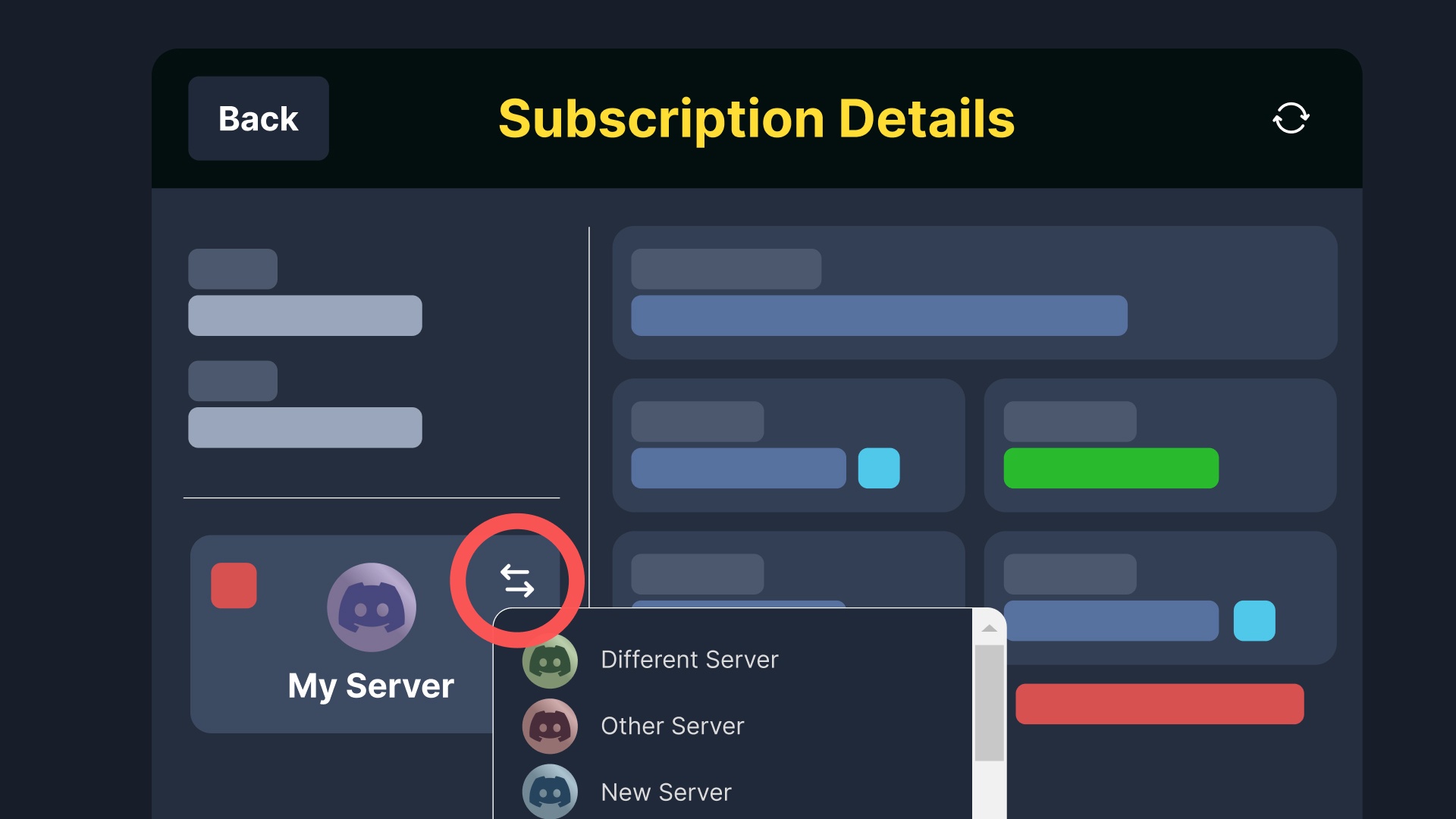
To transfer your Ticket Tool Premium Subscription, head over to your Billing Page. Once there, click Manage for the subscription you wish to transfer, and press the transfer button as shown below. You can then choose the new server to apply premium to in the selection menu.
-# Alternatively, you can press the red button  to revoke your premium from the existing server without cancelling the subscription.
 stray sable
restive condor
Glad to hear! <:PabloTiphat:983791053842837624>
stray sable
restive condor
Glad to hear! <:PabloTiphat:983791053842837624>
Thank you
iron nightBOT
Gave +1 Rep to @restive condor (current: #1 - 2881)
mortal bobcat
restive condor
Correct. Yes, if your friend is subscribed via our website, he can easily transf...
Okay, how?
How do I transfer my subscription? @restive condor
 cold grove
Hola buenas tardes tengo una pregunta y no sé si algo cambio en la configuración del bot o se volvió premium o como puedo solucionar esto , anteriormente se podía tener más de un ticket abierto a la vez y ahorita ya no me deja, así que no sé si me podría ayudar gracias

 latent dawn
cold grove
Hola buenas tardes tengo una pregunta y no sé si algo cambio en la configuración...
latent dawn
cold grove
Hola buenas tardes tengo una pregunta y no sé si algo cambio en la configuración...
Hola 👋🏻, eres dueño o staff del servidor?
queen scarab
restive condor
Please go back to the main panel configs page, and you will see the "UPDATE" & "...
I said update and it asked for a channel link? How do you get that
latent dawn
queen scarab
I said update and it asked for a channel link? How do you get that
You writte the channel on discord and copy the message. Put that on the channel link
restive condor
mortal bobcat
Okay, how?
Please see here #🆘│community-support message
cold grove
latent dawn
Hola 👋🏻, eres dueño o staff del servidor?
Staff de servidor tengo permisos de administrador
queen scarab
latent dawn
You writte the channel on discord and copy the message. Put that on the channel ...
By write the Chanel do you mean make the channel?
latent dawn
cold grove
Staff de servidor tengo permisos de administrador
Ese panel tiene un limite de tickets abiertos. Vaya a la seccion de Limits y cambie el limite de tickets abiertos por cada usuario.
iron nightBOT
Gave +1 Rep to @sharp kettle (current: #437 - 1)
cold grove
latent dawn
Ese panel tiene un limite de tickets abiertos. Vaya a la seccion de *Limits* y c...
Gracias ya lo pude resolver
 umbral heron
Guys, my bot will not save any transcripts. Whenever I try to save a transcript and it says there is no set channel. Even after I have assigned a channel and saved it etc it still does not work. Is anyone else having this issue or has experienced this before? Please let me know.
 young swift
how do i go in the transcripts as a member of the server
umbral heron
If you arnt a admin or ticket admin you will be unable to unless you have administrator permissions or manage server permissions (as far as I'm aware, please correct me if im wrong)
young swift
umbral heron
If you arnt a admin or ticket admin you will be unable to unless you have admini...
oh
scenic forum
umbral heron
Guys, my bot will not save any transcripts. Whenever I try to save a transcript ...
Did you set a transcript channel for all your panels?
umbral heron
They should be all set yes, thing is it previously worked so im unsure why it isnt now. I will double-check though.
umbral heron
scenic forum
Did you set a transcript channel for all your panels?
AH YES! You were correct, I didn't see the option to change between panels, so clearly someone in my team had changed something about. Thanks so much for the help!
iron nightBOT
Gave +1 Rep to @scenic forum (current: #12 - 631)
scenic forum
umbral heron
AH YES! You were correct, I didn't see the option to change between panels, so c...
At the left should be history
You can check who changed something
umbral heron
Ah amazing thanks.
 remote sinew
Hello
 novel raven
👋👋
novel raven
scenic forum
At the left should be history
You can check who changed something
What is the premium server access role?
scenic forum
novel raven
What is the premium server access role?
 novel raven
scenic forum
novel raven
scenic forum
Where is that?
Also what is the premium role?
scenic forum
novel raven
Where is that?
Also what is the premium role?
You need to be on a PC client to see it and the premium role means that i have access on a server with ticket tool premium
novel raven
scenic forum
You need to be on a PC client to see it and the premium role means that i have a...
Oh, I have Premium subscription on a server invite manage? How do I get the role?
scenic forum
novel raven
Oh, I have Premium subscription on a server invite manage? How do I get the role...
there you go
novel raven
Oh, thanks haha.
novel raven
scenic forum
there you go
I didn't realise I couldn't get it using a command or button - thanks.
iron nightBOT
Gave +1 Rep to @scenic forum (current: #12 - 632)
scenic forum
novel raven
I didn't realise I couldn't get it using a command or button - thanks.
I mean the command isnt really known outside of this server as its specific for here
novel raven
Oh, it's a slash command, just seen it when going through the bots 😂
scenic forum
novel raven
Oh, it's a slash command, just seen it when going through the bots 😂
Its a prefix command
$pc UserID
I assume pc stand for premium check
scenic forum
novel raven
Interesting didnt know thats a thing for here
Nearly everyone just uses $pc which is essentially the same command but as prefix
novel raven
Aah... can't use Discord's markdown on this server...
novel raven
scenic forum
Interesting didnt know thats a thing for here
Nearly everyone just uses ``$pc`` ...
Thanks, just to give another rep point to ya.
iron nightBOT
Gave +1 Rep to @scenic forum (current: #12 - 633)
scenic forum
novel raven
Aah... can't use Discord's markdown on this server...
Thats correct since specific markdowns get frequently used by scammers or spammers
novel raven
scenic forum
Thats correct since specific markdowns get frequently used by scammers or spamme...
Aah, I tried to use the small helper text markdown 😂
scenic forum
-#?
novel raven
scenic forum
``-#``?
Yes, correct.
scenic forum
Everything besides the basic fonts and textblocks is blocked out for non staff
novel raven
I didn't want to jinx it by doing it again in code markers 😂
humble sequoiaBOT
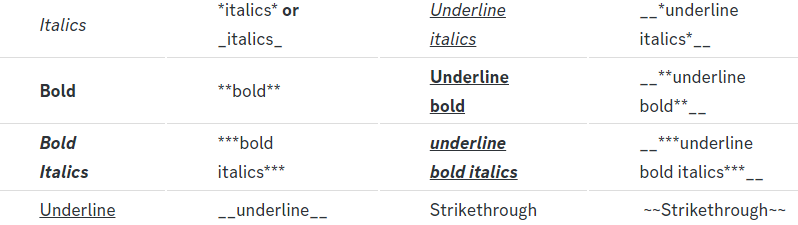
Below cites basic Discord Text Markdown/Formatting. Replace the text below with your own!
See this Discord Help Article for other markdown questions and combining markdowns.
 *Copy me for italicized text!* -> Italicized text!
 _Copy me for italicized text!_ -> Italicized text!
**Copy me for bold text!** -> Bolded text!
You must add 2 underscores on both sides of your text to get the underline text
__Copy me for underlined text!__ -> Underlined Text!
~~Copy me for strikethrough text!~~ -> Strikethrough text!
||Copy me for hidden text!|| -> ||Hidden text|| (Click to reveal)
You can add 3 backticks instead to get multi lined codeblock.
`Copy me for codeblock text!` -> Codeblock Text!
[Copy me with your link](yourlinkforhidelinks.com) -> Ticket Tool!
# Largest header!
## Small header!
### Even smaller header!
-# Even a smaller header with grey text!
 scenic forum
8 is blocked on here afaik
The rest works
novel raven
scenic forum
8 is blocked on here afaik
The rest works
Good to know.
 worldly helm
scenic forum
8 is blocked on here afaik
The rest works
worldly helm
scenic forum
8 is blocked on here afaik
The rest works
You were right. 7 is blocked aswell.
scenic forum
worldly helm
You were right. 7 is blocked aswell.
novel raven
Either way, it is an amazing bot!
worldly helm
We appreciate your feedback!
 severe sundial
why is it opening in uncategorized and with no changed embeds when all of our panels are edited?
scenic forum
severe sundial
why is it opening in uncategorized and with no changed embeds when all of our pa...
Could you show what you mean?
severe sundial
scenic forum
Could you show what you mean?
scenic forum
severe sundial
Can you show that you did setup the support ticket on the dashboard?
scenic forum
severe sundial
Can you use /debug inside a ticket thats INSIDE the correct category?
severe sundial
scenic forum
Can you use /debug inside a ticket thats INSIDE the correct category?
This is what it came up with "If Ticket Tool support requested this debug give them this link:
https://discordapp.com/channels/509192800865353738/662692902245498910/1457163629769265263"
scenic forum
severe sundial
This is what it came up with "If Ticket Tool support requested this debug give t...
And the command has been ran inside a tickets thats inside the correct category?
severe sundial
scenic forum
And the command has been ran inside a tickets thats inside the correct category?
Yes.
scenic forum
severe sundial
Yes.
Could you try a newly created category and check if that works?
severe sundial
scenic forum
Could you try a newly created category and check if that works?
What do you mean?
scenic forum
severe sundial
What do you mean?
Create a new category -> Select that category on the dashboard -> Check if tickets open correctly inside
Very rarely issues arrive that arent within the normal scope
 hoary warren
how do create an ticket system l
severe sundial
scenic forum
Create a new category -> Select that category on the dashboard -> Check if ticke...
Do you want us to open and test which one was glitching?
scenic forum
severe sundial
Do you want us to open and test which one was glitching?
Using a newly created category, yes
severe sundial
scenic forum
Using a newly created category, yes
it opened in wrong category after changing.
scenic forum
severe sundial
it opened in wrong category after changing.
Then im unsure
Please open a #premium-tickets to receive a staff members help
severe sundial
Thank you!
 upper rose
I need help
serene sigil
If the number of tickets under a single category exceeds 50 channels, will newly created tickets be routed to a different location? For example, at the top of all channels.
How can we prevent this from happening?Limit new tickets to a specific category.
 proud sedge
 jolly cliff
Solicitação de servidor dedicado para Sri Lanka
Olá, equipe do Reduto
Gostaríamos de saber se seria possível nos conceder acesso a um servidor beta do Reduto. Somos grandes admiradores do projeto de vocês aqui no Sri Lanka, mas infelizmente, não conseguimos entender totalmente o funcionamento por causa da barreira de idioma e limitações técnicas.
Por isso, pedimos humildemente, se for possível, que nos deem acesso a um servidor ou ambiente de testes para que possamos conhecer melhor a experiência Reduto e talvez usar como inspiração para nossa própria comunidade local.
Agradecemos imensamente pela atenção e respeito, e desejamos muito sucesso à equipe Reduto!
Com gratidão,
Equipe do Sri Lanka 🇱🇰
 stark runeBOT
First you will want to invite the bot to your server. Once the bot is in your server, you can manage your server in the dashboard.
To create a panel we are going to need to head over to the panel configs on the dashboard.
Once at the dashboard we will need to click Create Panel.
Enter a panel name (Fill in any optional settings you want).
Click Create Panel and your ready to get started with configuring your panel.
An example of a creating a panel is shown below.
Once you've created a panel on the dashboard you will need to send it to a channel using send on the dashboard.
Select the channel you want your panel to be created in and click send.
For other questions checkout $help faq.
An example of a sending a panel is shown below.
Having a Problem Sending the Panel?
Do $debug in a channel with Ticket Tool and make sure it has all the necessary Discord permissions.
scenic forum
@quaint bison refer to the embed above
humble sequoiaBOT
@upper rose, we would love to help you, but if you don't tell us what you need help with we can't help you :(
scenic forum
serene sigil
If the number of tickets under a single category exceeds 50 channels, will newly...
You can add multiple categories
They will overflow in the order you have the categories added in the dashboard
 jade cosmos
@humble sequoia
humble sequoiaBOT
@supple egret
We provide support for Ticket Tool Discord bot and cannot help you with whatever issue you have.
- We don't know which Support Team you should contact to get this issue resolved, and unfortunately we won't be able to accurately tell you.
If you don't have any further questions regarding our bot Ticket Tool, please close this ticket
serene sigil
scenic forum
You can add multiple categories
They will overflow in the order you have the cat...
Thanks sir.I'll have a try.
iron nightBOT
Gave +1 Rep to @scenic forum (current: #12 - 635)
jade cosmos
Report megustaelquesito
 lament warren
!help
scenic forum
jade cosmos
Report megustaelquesito
Youre very likely on the wrong server
humble sequoiaBOT
@lament warren, we would love to help you, but if you don't tell us what you need help with we can't help you :(
 tawdry pawn
@humble sequoia
serene sigil
Can the ticket tool backend export historical ticket data?
scenic forum
serene sigil
Can the ticket tool backend export historical ticket data?
What do you mean?
 royal agate
How do you rename this part of the panal
 humble sequoiaBOT
The panel message is where people react to make a ticket. To customize it head over to your Dashboard --> Panel Configs -> Panel -> Edit Panel Message
 lilac junco
@royal agate refer to the embed above.
royal agate
Alr thank you
serene sigil
scenic forum
What do you mean?
View historical ticket information after the ticket is closed,and export as a file.
scenic forum
serene sigil
View historical ticket information after the ticket is closed,and export as a fi...
Ticket tool doesnt store any ticket data
Transcripts are saved locally if a transcript was made
royal agate
When I rename the button text on the website, it doesn’t show up in my panel

Am I doing smth wrong
lilac junco
royal agate
Am I doing smth wrong
Remember to update or send your panel.
lilac junco
royal agate
Or is the website the only option
Do you mean when you want to send the panel?
royal agate
I meant when you want to rename the button text
lilac junco
You can only do it on the dashboard.
 lyric dew
lilac junco
You can only do it on the dashboard.
lyric dew
lilac junco
You can only do it on the dashboard.
How to close ticket without /
lilac junco
lyric dew
How to close ticket without /
There will be a close button under a ticket message when it's opened.
lyric dew
lilac junco
There will be a close button under a ticket message when it's opened.
Any other method
?close
Like from prefix
lilac junco
lyric dew
Like from prefix
Yes we have that option.
You can change the prefix to your choice.
lyric dew
lilac junco
You can change the prefix to your choice.
How to change?
lilac junco
lyric dew
How to change?
Server configs > Command prefix
lyric dew
lilac junco
``Server configs > Command prefix``
I didn't understand
royal agate
when i input what i want in the website dashboards, it doesnt show up in my discord server
lilac junco
lyric dew
I didn't understand
On the dashboard, go to server configs and the first thing that comes up is command prefix.
lyric dew
lilac junco
On the dashboard, go to server configs and the first thing that comes up is comm...
Okie thanks 👍
iron nightBOT
Gave +1 Rep to @lilac junco (current: #46 - 78)
lilac junco
royal agate
when i input what i want in the website dashboards, it doesnt show up in my disc...
Could you tell me what changes are you making in your dashboard?
royal agate
im editing the text of the panal in my dashboard
lilac junco
royal agate
im editing the text of the panal in my dashboard
After editing, save changes and then update your panel.
royal agate
where do you update your panal after you save changes
lyric dew
lilac junco
After editing, save changes and then update your panel.
Can we close all the tickets ?
In one cmnd ?
lilac junco
royal agate
where do you update your panal after you save changes
Go to panel configs, at the very top there will be multiple options like send rename etc. Press update and provide your channel's link where you're sending your panel.
lilac junco
lyric dew
In one cmnd ?
With the command /purge you can.
royal agate
i did that also and it somehow doesnt work too
lilac junco
royal agate
i did that also and it somehow doesnt work too
Try resending your panel.
royal agate
lilac junco
Try resending your panel.
thanks
iron nightBOT
Gave +1 Rep to @lilac junco (current: #46 - 79)
 pulsar kernel
Why is this happening

When I try to do dropdown style
All panels are selected onto it
lilac junco
pulsar kernel
When I try to do dropdown style
Show me your drop-down page in the dashboard.
pulsar kernel
lilac junco
Show me your drop-down page in the dashboard.
I can’t seem to find the problem
lilac junco
pulsar kernel
I can’t seem to find the problem
Resend your panel once again.
See if it works.
pulsar kernel
Okay
lilac junco
pulsar kernel
Make sure you did not switch panels, for example you configured the drop-down is another panel then selected another panel to configure, and you send that panel.
pulsar kernel
I can see
pulsar kernel
lilac junco
Make sure you did not switch panels, for example you configured the drop-down is...
Nope still doing the same thing
lilac junco
pulsar kernel
Nope still doing the same thing
I am unsure of this issue, please #🎫│make-a-ticket . I apologize I couldn't be of any help.
pulsar kernel
lilac junco
I am unsure of this issue, please <#571706435449257997> . I apologize I couldn't...
All good. Thanks for your time.
iron nightBOT
Gave +1 Rep to @lilac junco (current: #46 - 80)
serene sigil
scenic forum
Ticket tool doesnt store any ticket data
Transcripts are saved locally if a tran...
Got it,thank you sir.
 long plaza
I cant seem to be able to make a appeal ticket, it’s been a month and it says “You don’t have permission to use this.” What can I do?
lilac junco
long plaza
I cant seem to be able to make a appeal ticket, it’s been a month and it says “Y...
If you're a regular member on that server you cannot do anything about it.
long plaza
Should I make another discord to appeal my account? Or im like stuck there
lilac junco
long plaza
Should I make another discord to appeal my account? Or im like stuck there
We wouldn't know the solution.
long plaza
Alright thank you
 clear berry
How to claim please
humble sequoiaBOT
Claiming allows you to change the ticket name, category and permissions. To use it you have to enable it first on your Dashboard > Panel Configs > Claiming
Note: This is a premium feature
lilac junco
@clear berry refer to the embed above
lilac junco
clear berry
Server not open
What server?
clear berry
Ticket toll
lilac junco
clear berry
Ticket toll
I can't quite understand you.
clear berry
How to claim free 5k account details please
humble sequoiaBOT
@clear berry
We provide support for Ticket Tool Discord bot and cannot help you with whatever issue you have.
- We don't know which Support Team you should contact to get this issue resolved, and unfortunately we won't be able to accurately tell you.
If you don't have any further questions regarding our bot Ticket Tool, please close this ticket
 north sundial
Hi, is there any way to find logs from a ticket i didnt transcript?
lilac junco
north sundial
Hi, is there any way to find logs from a ticket i didnt transcript?
Hey! Unfortunately you cannot view a deleted ticket without a transcript.
 void mirage
how do you make the delete notification in a different channel then creation one i like to keep things organized?

 quiet tusk
H
void mirage
i
void mirage
whats that
 oblique fox
void mirage
whats that
oblique fox
void mirage
whats that
ticket
void mirage
im not sure
 wind spruce
yooo can someone help me with opening tickets under a channel instead of a catergory?
void mirage
i just trying to figure out how to separate the ticket delete notification on a different channel
 austere forge
void mirage
how do you make the delete notification in a different channel then creation on...
austere forge
void mirage
how do you make the delete notification in a different channel then creation on...
This is not currently possible to separate them
humble sequoiaBOT
━━ AJ's inquiry has been moved to a ticket ━━
void mirage
oh ok
lilac junco
oblique fox
If you are a regular member there you cannot do anything.
lament warren
how can i make ticket tool
stark runeBOT
First you will want to invite the bot to your server. Once the bot is in your server, you can manage your server in the dashboard.
To create a panel we are going to need to head over to the panel configs on the dashboard.
Once at the dashboard we will need to click Create Panel.
Enter a panel name (Fill in any optional settings you want).
Click Create Panel and your ready to get started with configuring your panel.
An example of a creating a panel is shown below.
Once you've created a panel on the dashboard you will need to send it to a channel using send on the dashboard.
Select the channel you want your panel to be created in and click send.
For other questions checkout $help faq.
An example of a sending a panel is shown below.
Having a Problem Sending the Panel?
Do $debug in a channel with Ticket Tool and make sure it has all the necessary Discord permissions.
austere forge
lament warren
how can i make ticket tool
Refer to the embed above
 deft lantern
Hello, I probably missed the setting while looking around the dashboard. It bothers me a bit that user who opens a ticket can close it without having support role. How can I prevent that?
lilac junco
deft lantern
Hello, I probably missed the setting while looking around the dashboard. It both...
Panel Configs > Buttons > Close Ticket > Support Team Only
deft lantern
lilac junco
``Panel Configs > Buttons > Close Ticket > Support Team Only`` <:Switch_enabled:...
Thank you!
iron nightBOT
Gave +1 Rep to @lilac junco (current: #45 - 81)
jade topaz
Hello when I connect to your website the server where I have to work on it does not appear can you help me please @timber kernel
Hello when I connect to your website the server where I have to work on it does not appear can you help me please
Oi bom dia
humble sequoiaBOT
Try using the Sync Servers button on your top center of the Dashboard page
You should relog from the dashboard, you can do this by clicking here to log out immediately, and then log back in
You need one of these 3 things to access the dashboard.
1. Server Owner (Level: 6)
2. Server Administrator (Level: 4)
3. Dashboard Role (Level: 2)
:warning: You can check your level using the </permissionlevel:1029797400174399542> command on your Discord Server
If the bot's response is:
- @User is permission level: 0 (User)
You don't have any of the 3 levels required to access the server's dashboard
lilac junco
@jade topaz refer to the embed above.
 still lavaBOT
jade topaz
<@1086519848999329903> oiie bom diia
still lavaBOT
jade topaz
<@1086519848999329903> oiie bom diia
From Slovak (SK) To English (EN)
@.jacobdev. oiie bom diia
 Translation requested by Mrburger from Flag-Reaction Feature.
lilac junco
jade topaz
<@1086519848999329903> oiie bom diia
Translation requested by Mrburger from Flag-Reaction Feature.
lilac junco
jade topaz
<@1086519848999329903> oiie bom diia
Please don't ping me for nonsense.
humble sequoiaBOT
@ebon field
We provide support for Ticket Tool Discord bot and cannot help you with whatever issue you have.
- We don't know which Support Team you should contact to get this issue resolved, and unfortunately we won't be able to accurately tell you.
If you don't have any further questions regarding our bot Ticket Tool, please close this ticket
 shell ruin
how do i add a role that is unable to make tickets?
so i can give it to users to abuse tickets
humble sequoiaBOT
Any role you assign as a blacklisted role won't be able to use commands or buttons.
Go to your Dashboard ➞ Server Configs. There you will find the option to select blacklisted roles.
Note: Don't forget to save.
 latent dawn
shell ruin
how do i add a role that is unable to make tickets?
latent dawn
shell ruin
how do i add a role that is unable to make tickets?
Refer to the embed above 
 lime trout
is there a way to clone a whole dashboard to another server?
humble sequoiaBOT
The Backup and Restore feature allows you to transfer your panels, tags, and all settings to a new server, even if the server the settings were created has been deleted! You will want to copy the whole key.
First, go to your server's Dashboard ➞ then Server Configs ➞ under Config Backup & Restore (Server Owner Only) click on Old version can be found here and generate a new backup key by pressing the green button. Now, a key should be generated in the box above. You may need to refresh the page to see this.
Once you have your backup key, navigate to the same page on the new server. Copy the key on the Restore from backup key field.
Now you can choose what you want to copy. Finally, press the green Restore Configs button.
- We suggest you keep this backup key somewhere safe, in case your server is deleted so you are able to recover your panel's settings.
- This feature is only usable by the server's owner
@lime trout refer to the embed above
lime trout
now it says i dont have access to the server but im owner
scenic forum
lime trout
now it says i dont have access to the server but im owner
Which bot are you trying to use on the server
Ticket tool white or gold
scenic forum
Did you use another servers backup?
Since you cant use the same servers code on itself
scenic forum
lime trout
i had to make a new server
Please #🎫│make-a-ticket to receive a staff members help
shell ruin
latent dawn
Refer to the embed above <:this:894279341108772914>
i dont get it
this is to do with ticket tool
oh wait nevermind i read the wrong embed thanks
 mild goblet
Why is ticket bot just not working at all for me
lilac junco
mild goblet
Why is ticket bot just not working at all for me
Any error message?
mild goblet
“The application did not respond”
lilac junco
mild goblet
“The application did not respond”
Make sure the bot has the following permissions in the channel you're using the command in.
Bot Permissions ឵ ឵឵ ឵ ឵឵ ឵ ឵឵ ឵ ឵឵
Channel Permissions ឵ ឵឵ ឵ ឵឵ ឵ ឵឵ ឵ ឵឵
mild goblet
It has all the permissions
lilac junco
mild goblet
It has all the permissions
Make sure it has view channel permissions.
mild goblet
We have a specific role in the server with all the bot perms
scenic forum
mild goblet
We have a specific role in the server with all the bot perms
Can you use /debug on your server
mild goblet
I tried, it just says “the application did not respond”
Wait i fixed it by removing the bot and adding it again
scenic forum
mild goblet
Wait i fixed it by removing the bot and adding it again
It lacked the permission View Channel previously inside the channel
mild goblet
I tried in one of my other servers too tho
scenic forum
Then it lacked the permission there aswell
 dusky hamlet
when i go on the dashboard, i cant see the server where the bot has all the permission:
It looks like Ticket Tool isn't online or in any servers you have permission to access, Invite Ticket Tool or check it's status
Servers without Ticket Tool
there are no issues with the status
scenic forum
dusky hamlet
when i go on the dashboard, i cant see the server where the bot has all the perm...
Can you use /debug on that server
scenic forum
dusky hamlet
do u want the link?
Which bot is on your server
Ticket tool white or gold
dusky hamlet
white
scenic forum
dusky hamlet
white

Ticket Tool - Ticketing without clutter - The #1 Discord support bot
Can you access the dashboard with that link?
iron nightBOT
Gave +1 Rep to @scenic forum (current: #12 - 637)
 maiden musk
how to setup like this last time my friend did this but he left dc so i dont know how to do

 humble sequoiaBOT
The Drop-down menu or Select Menu replaces the buttons on your panel message and uses a drop-down menu with all of your panels. To set this up, go to your Panel Configs and select your main Panel.
First you enable Select Style. Then you add an item in the Dropdown Editor. Now you can start editing your dropdown!
Each line in the dropdown editor represents a line in the drop down menu on discord. You can add more "Items", by clicking on
First you select a panel. That's the panel this option will open a ticket for. DONT select the same panel twice. Each option should have a different Panel
After that, you can put a Display. This is the title of this option and will appear in the drop down menu. The *Description can be set right after that, which will be below the title in grey.
Additionally you can select an emoji, that will be shown in front of each option. You can either manually input the ID of an emoji or select it in the selector.
scenic forum
@maiden musk refer to the embed above
maiden musk
scenic forum
<@852063771472035891> refer to the embed above
so i need to go to the dashboard
scenic forum
maiden musk
so i need to go to the dashboard
yes
 torpid loom
I cant see the other servers
 scenic forum
torpid loom
I cant see the other servers
scenic forum
torpid loom
I cant see the other servers
Can you use /debug on the server you cant see in the dashboard?
torpid loom
Wait
maiden musk
scenic forum
yes
 fair saddle
My ticket tool isn't creating ticket channels. I use it connected to the Sapphire bot, but when I select the ticket option, the ticket tool doesn't create the ticket; it only displays the log.
scenic forum
torpid loom
Then?
Ticket Tool - Ticketing without clutter - The #1 Discord support bot
You should be able to access your server with the link
humble sequoiaBOT
Integrating Ticket Tool with an external bot allows you to customize your server's Ticket System further!
$new or $ticket commands with the user's ID to start a ticket. Preferably in a private channel.Eg.
$new 12345678901234567890
Your ticket panel must be Command Style enabled
You must whitelist that bot's ID in your Dashboard ➞ Server Configs ➞ Bot section.
Otherwise Ticket Tool will not react to the command and a ticket will not be created.
Eg.
$new 12345678901234567890 Your reason goes here
This reason can then be shown anywhere in the Ticket Message with the{create.reason}variable
**  Note:** If you have changed Ticket Tool's default prefix (
$) please ensure to amend the prefix for the $new or $ticket commands.
Eg. If your prefix is
-, then what you're looking for the bot to use is-newor-ticket
 scenic forum
@fair saddle refer to the embed above
 marsh turtle
Hola soporte de Flex city online ocupo ayuda mi cuenta asido eliminada por una persona ocupo ayuda para recuperarla mi ID es este #B2DD14BD1FC0
still lavaBOT
marsh turtle
Hola soporte de Flex city online ocupo ayuda mi cuenta asido eliminada por una p...
From Spanish (ES) To English (EN)
Hello support of Flex city online ocupo helps my nest account removed by a person ocupo help to recover it my ID is this # B2DD14BD1FC0
 Translation requested by happy from Flag-Reaction Feature.
humble sequoiaBOT
Translation requested by happy from Flag-Reaction Feature.
humble sequoiaBOT
@marsh turtle
Brindamos soporte para el bot de Discord Ticket Tool y no le podemos ayudar con el problema que presenta.
- No sabemos a que equipo de soporte debería contactar para solucionar este problema, y desafortunadamente no podremos ayudarle acertadamente.
Si no tiene alguna duda relacionada a nuestro bot, Ticket Tool, por favor cierre este ticket.
 cursive talon
Hello! Is there a discount for buying two premium licenses? (two discord servers)
Ping me when you reply please!
scenic forum
cursive talon
Hello! Is there a discount for buying two premium licenses? (two discord servers...
Hey
No there isn't
As far as i know there's only a discount for a yearly subscription
cursive talon
Do you think there's any staff members just to confirm that? Appreciate the answer, I just always want to ask and be sure before buying anything!!
restive condor
cursive talon
Do you think there's any staff members just to confirm that? Appreciate the answ...
Hi, we do offer discounts on bulk purchases but unfortunately 2 servers would be too little to be eligible. There are no active promotional codes at the moment either sadly. Nonetheless, you can use the code 6OFFYEAR for $6 off your first year per subscription
cursive talon
How many servers is eligible? And thank you so much both of you!!
restive condor
More than 5 servers if you're looking to subscribe monthly but it's up to the discretion of our billing manager if you're interested 😄
remote sinew
Hi
 tidal dirge
Hello guys, sorry if I'm bothering with this. Is the support bot not working for anyone else? It appears offline and says the interaction failed
scenic forum
tidal dirge
Hello guys, sorry if I'm bothering with this. Is the support bot not working for...
Can you use /debug on your server?
tidal dirge
scenic forum
Can you use /debug on your server?
I cannot.
scenic forum
tidal dirge
I cannot.
Which bot are you using it on
Ticket tool white or gold
tidal dirge
scenic forum
Which bot are you using it on
Ticket tool white or gold
It's just the basic white
scenic forum
Can you show a screenshot of you using the command?
tidal dirge
scenic forum
Can you show a screenshot of you using the command?
Doesn't even show up really.

We do not use any other prefix too
scenic forum
tidal dirge
Doesn't even show up really.
Ticket tool isnt on the server anymore probably
tidal dirge
scenic forum
Ticket tool isnt on the server anymore probably
Our security bot kicked it, and I didn't even know. Thank you for your help tho, I wouldn't realize this without you.
iron nightBOT
Gave +1 Rep to @scenic forum (current: #12 - 638)
 old harness
how can i make it so it only gives ticket user role and not show who has ticket open
pulsar kernel
 quaint marsh
I need help with something
quaint marsh
I need help with something
With what?
quaint marsh
How can i do this
As example if a member chooses 150M-800M only middlemans with that role or higher can see it and under cannot
 pulsar kernel
quaint marsh
How can i do this
As example if a member chooses 150M-800M only middlemans with ...
pulsar kernel
quaint marsh
How can i do this
As example if a member chooses 150M-800M only middlemans with ...
When you go to the panel of your 150-800M Scroll down until you see “Support Roles”. Then choose what roles you want to be able to access the tickets that are made regarding that panel.
quaint marsh
This not my panel its a random serv one i need help on making it
/add @user
Im not joining servers sorry
pulsar kernel
quaint marsh
This not my panel its a random serv one i need help on making it
Go to your dashboard.
Click the panel you wanna change.
Scroll down until you see “Support roles”.
Choose all the roles you want to see the tickets.
quaint marsh
And how can i make the buttons
For each one
Like i want it to have 4 options and when a member chooses one( 600-800M as example)only the middleman with the role 600-800M and higher see it , lesser , no)
They can choose other ones depends on the trade
pulsar kernel
quaint marsh
And how can i make the buttons
You can make the buttons by when you are on your panel you can scroll down until you see buttons.then when you click it you can choose the options.
quaint marsh
And if i donr see it
pulsar kernel
quaint marsh
And if i donr see it
Tell me
pulsar kernel
quaint marsh
Like i want it to have 4 options and when a member chooses one( 600-800M as exam...
I don’t understand what you mean by “They can choose other ones depends on the trade”
quaint marsh
pulsar kernel
I don’t understand what you mean by “They can choose other ones depends on the t...
Like this
 lilac junco
@quaint marsh You want to make buttons like this, correct?
 quaint marsh
AYes
humble sequoiaBOT
For more convenient use of multipanels, you can now combine panels on the dashboard. This will allow you to directly send the multipanel from the dashboard or via the $panel ID command.
You can find this setting on the Dashboard -> Panel Configs -> Panel -> Attached Panels
Note: if you're attaching all the panels to a panel called English, don't include English in the attached panel's box (If you do this, it will create a duplicate)
This will put all buttons from all of your panels on one message. The message is the panel message from the panel you're combining these panels in.
lilac junco
Refer to the embed above.
iron nightBOT
Gave +1 Rep to @lilac junco (current: #45 - 83)
quaint marsh
Ty @pulsar kernel
iron nightBOT
Gave +1 Rep to @pulsar kernel (current: #255 - 2)
quaint marsh
Bc you both helped
 mortal forum
Hi i need help
humble sequoiaBOT
@mortal forum, we would love to help you, but if you don't tell us what you need help with we can't help you :(
mortal forum
humble sequoia
I need help to set up my dc server
stark runeBOT
First you will want to invite the bot to your server. Once the bot is in your server, you can manage your server in the dashboard.
To create a panel we are going to need to head over to the panel configs on the dashboard.
Once at the dashboard we will need to click Create Panel.
Enter a panel name (Fill in any optional settings you want).
Click Create Panel and your ready to get started with configuring your panel.
An example of a creating a panel is shown below.
Once you've created a panel on the dashboard you will need to send it to a channel using send on the dashboard.
Select the channel you want your panel to be created in and click send.
For other questions checkout $help faq.
An example of a sending a panel is shown below.
Having a Problem Sending the Panel?
Do $debug in a channel with Ticket Tool and make sure it has all the necessary Discord permissions.
scenic forum
@mortal forum refer to the embed above to setup a basic ticket for your server
mortal forum
scenic forum
<@1443976875062857820> refer to the embed above to setup a basic ticket for your...
Can you tell me step by step in phone
scenic forum
stark rune
@mortal forum This message contains the step by step
quaint marsh
Where can i change a panel name
So the button that u create the ticket doesn’t say
create ticket
lilac junco
quaint marsh
So the button that u create the ticket doesn’t say
create ticket
Do you want to change panel name or button name?
quaint marsh
Button
lilac junco
quaint marsh
Button
Panel Configs > Button > Create Ticket
You'll find the option to rename it there.
quaint marsh
Ty @lilac junco
iron nightBOT
Gave +1 Rep to @lilac junco (current: #45 - 84)
quaint marsh
lilac junco
``Panel Configs > Button > Create Ticket``
You'll find the option to rename it ...
And the panel one?
Nvm found out
lilac junco
quaint marsh
And the panel one?
You'll find the rename button at the top of panel configs.
 iron nightBOT
Gave +1 Rep to @lilac junco (current: #45 - 85)
 subtle bobcat
my ticket tool isn't responding. any idea why?
 pulsar kernel
subtle bobcat
my ticket tool isn't responding. any idea why?
pulsar kernel
subtle bobcat
my ticket tool isn't responding. any idea why?
It’s not a bug or anything just retry. It does that sometimes.
scenic forum
pulsar kernel
It’s not a bug or anything just retry. It does that sometimes.
It doesnt do it "sometimes"
It means there is an issue at hand
Could be permission issue, non activated bot and so on
scenic forum
subtle bobcat
my ticket tool isn't responding. any idea why?
Can you use /debug in the same channel?
pulsar kernel
scenic forum
It doesnt do it "sometimes"
It means there is an issue at hand
Could be permiss...
My bad it’s does that for me sometimes when it still has all perms and everything and when I do it again it works
subtle bobcat
pulsar kernel
It’s not a bug or anything just retry. It does that sometimes.
how much is "somtimes"
 pulsar kernel
subtle bobcat
how much is "somtimes"
pulsar kernel
subtle bobcat
how much is "somtimes"
Does ticket tool have the permission to do stuff there?
What is most common is that u make a bot role and put admin perms so it can do anything.
scenic forum
Its not recommended to give ticket tool administrator
subtle bobcat
pulsar kernel
Does ticket tool have the permission to do stuff there?
What is most common is t...
oh thank you
iron nightBOT
Gave +1 Rep to @pulsar kernel (current: #202 - 3)
subtle bobcat
scenic forum
Its not recommended to give ticket tool administrator
whatever lol
pulsar kernel
scenic forum
Its not recommended to give ticket tool administrator
I know it’s not recommended its just that sometimes it can’t talk in channels and I make a bot role that has admin perms so it can do almost anything
scenic forum
pulsar kernel
I know it’s not recommended its just that sometimes it can’t talk in channels an...
While it most likely it a permission issue we dont recommend giving the bot administrator
pulsar kernel
scenic forum
While it most likely it a permission issue we dont recommend giving the bot admi...
Yes I understand that
 pallid steppe
Minha conta de voleiball legends foi banida pois meu amigo ex amigo usou script nela como posso desbanir
Tem como?
@pulsar kernel
pulsar kernel
pallid steppe
Minha conta de voleiball legends foi banida pois meu amigo ex amigo usou script...
Wrong place
 cerulean perch
/me
pallid steppe
/me minha conta de voleiball legends foi banida pois meu ex amigo usou script nela e queria saber se é possível debanir a minha conta
still lavaBOT
pallid steppe
/me minha conta de voleiball legends foi banida pois meu ex amigo usou script n...
From Portuguese (PT) To English (EN)
/me my volleyball legends account was banned because my ex friend used script on it and wanted to know if it's possible to dump my account
Translation requested by happy from Flag-Reaction Feature.
humble sequoiaBOT
@pallid steppe
Fornecemos suporte para Ticket Tool Discord bot e não podemos ajudá-lo com qualquer problema que você tenha.
- Não sabemos qual equipe de suporte você deve entrar em contato para resolver esse problema e, infelizmente, não poderemos informar com precisão.
Se você não tiver mais dúvidas sobre nossa ferramenta de ticket de bot, feche este ticket
quaint marsh
$help
humble sequoiaBOT
quaint marsh
$help
First you will want to invite the bot to your server. Once the bot is in your server, you can manage your server in the dashboard.
To create a panel we are going to need to head over to the Panel Configs Tab on the Dashboard.
Once at the dashboard we will need to click Create Panel.
Enter a panel name (Fill in any optional settings you want).
Click Create Panel and you are ready to get started with configuring your panel.
An example of a creating a panel is shown below.
Once the panel has been created, use the blue Send button and select the channel you want the panel to be sent to.
Use the </debug:1029783024264564765> command to diagnose possible permission issues with the bot.
cerulean perch
!robux buy
humble sequoiaBOT
1. Open your Panel Configs tab in your server's dashboard
2. Select the panel you want to ping your support team on
3. Open the Ticket options menu
4. Click on Edit Ticket Message
5. In the Message Content use one of the role mention syntax ({@Role Name}/{Role ID})
6. Save changes
Note: For this to work properly, Ticket Tool requires the Mention Everyone permission. Or the role must have the Allow anyone to @mention this role setting enabled
 scenic forum
@quaint marsh refer to the embed above
cerulean perch
/rob
quaint marsh
scenic forum
<@1290394286306623629> refer to the embed above
If im putting id do i need to put ,, @“
subtle bobcat
still lava
go to the actual server and use their ticket tool to appeal.
scenic forum
quaint marsh
If im putting id do i need to put ,, @“
{Role ID}
quaint marsh
K ty
scenic forum
What do you mean?
scenic forum
You mean like in #🎫│make-a-ticket ?
pulsar kernel
Yes
humble sequoiaBOT
For more convenient use of multipanels, you can now combine panels on the dashboard. This will allow you to directly send the multipanel from the dashboard or via the $panel ID command.
You can find this setting on the Dashboard -> Panel Configs -> Panel -> Attached Panels
Note: if you're attaching all the panels to a panel called English, don't include English in the attached panel's box (If you do this, it will create a duplicate)
This will put all buttons from all of your panels on one message. The message is the panel message from the panel you're combining these panels in.
scenic forum
refer to the embed above
pulsar kernel
scenic forum
refer to the embed above
I did but im a bit confused
 scenic forum
Then you need to resend the panel
pulsar kernel
Yeah but I can’t see how to configure the other buttons
Like I only could see the first one
scenic forum
Via their own panel
iron nightBOT
Gave +1 Rep to @scenic forum (current: #12 - 639)
 placid fiber
Hi I need help learning to how to assign role permissions for the bot
 placid girder
placid fiber
Hi I need help learning to how to assign role permissions for the bot
placid girder
placid fiber
Hi I need help learning to how to assign role permissions for the bot
Sure! What do you mean in particular?
 mint osprey
i need help on lost colony i cant get out off the water
humble sequoiaBOT
@mint osprey
We provide support for Ticket Tool Discord bot and cannot help you with whatever issue you have.
- We don't know which Support Team you should contact to get this issue resolved, and unfortunately we won't be able to accurately tell you.
If you don't have any further questions regarding our bot Ticket Tool, please close this ticket
 ripe knoll
Thanks @scenic forum
iron nightBOT
Gave +1 Rep to @scenic forum (current: #12 - 640)
ripe knoll
Thanks @scenic forum
pulsar kernel
Why won’t it let my members make a ticket for a certain panel? It works for all the others tho. But I can make one
scenic forum
pulsar kernel
Why won’t it let my members make a ticket for a certain panel? It works for all ...
What error are they receiving?
scenic forum
pulsar kernel
Hey there!
«You don't have permissions to use this»
👉 Server Configs -> Blacklist Roles
Any roles there will be unable to interact with the bot in any way, including creating tickets.👉 Panel Configs -> Buttons -> Create Ticket -> Support team only
If this is enabled👉 Panel Configs -> Buttons -> Create Ticket -> Disabled Roles
Any roles there will be unable to use the button.
pulsar kernel
scenic forum
Hey there!
**__«You don't have permissions to use this»__**
> 👉 **Server Conf...
Thanks I had the 2nd one on
iron nightBOT
Gave +1 Rep to @scenic forum (current: #12 - 641)
 versed escarp
Olá boa noite eu gostaria de solicitar meu desligamento da administração mais o adm líder não responde então preciso urgente de ajuda
 tight cedar
hi does anyone know how to make it if a ticket is closed it deletes automatically?
placid girder
That’s one step ticketing! It’s in Panel Configs > Ticket.
tight cedar
placid girder
That’s one step ticketing! It’s in Panel Configs > Ticket.
I dont see it
 placid girder
Ohh it is um
General?
placid girder
Okay yeah, sorry! That one
You turn that off, yes. Since you have Premium, you should be sure the closure and/or deletion creates a transcript, if you need!
iron nightBOT
Gave +1 Rep to @placid girder (current: #66 - 31)
placid girder
For sure!
 raw jacinth

Esse errado está acontecendo com muitas pessoas
Como ajudo as pessoas resolver
This bug is happening to many people; how can I help them resolve it?
humble sequoiaBOT
@raw jacinth
We provide support for Ticket Tool Discord bot and cannot help you with whatever issue you have.
- We don't know which Support Team you should contact to get this issue resolved, and unfortunately we won't be able to accurately tell you.
If you don't have any further questions regarding our bot Ticket Tool, please close this ticket
 silk wadi
So I have been trying to access the Dashboard so I can configure my panel and the permissions, however Everytime I go to the dashboard it states I need to log in with discord, however wjen I imput my Discord infor it pulls me back into the Discord app and not into the dashboard access.....and reason as to why? Also note that I am using my phone to do all of this and Currently do not have a computer to do this on.
 warped storm
/verify
 short sundial
How do I make it so I can claim tickets
pulsar kernel
short sundial
How do I make it so I can claim tickets
Premium feature only but you might have a free week trial on your dashboard.
short sundial
It kept giving me errors when I did the cmd
 green meteor
So uhn i just bought items in mm2 and i withdraw it and i added the bot and joined the bot and when i trade the bot it keeps on declining and now i tried getting back on the starpets app and the transaction is gone
I also didn't get my money back
 tribal cedar
green meteor
So uhn i just bought items in mm2 and i withdraw it and i added the bot and join...
tribal cedar
green meteor
So uhn i just bought items in mm2 and i withdraw it and i added the bot and join...
Hello. This is a discord for the support of ticket tool discord bot. Not a game.
green meteor
Its not?? Actually im telling a story how did i not get my items
tribal cedar
Ok. For general chat you can always use #💬│general-chat
green meteor
Omg...
 neon jacinth
Hello, I was banned from Grand Piece Online for using a script.
I admit my mistake and I sincerely apologize.
I understand that using scripts is against the rules and I guarantee it will not happen again.
I really enjoy the game and I respectfully ask if there is any chance for a second opportunity.
Thank you for your time.
humble sequoiaBOT
@neon jacinth
We provide support for Ticket Tool Discord bot and cannot help you with whatever issue you have.
- We don't know which Support Team you should contact to get this issue resolved, and unfortunately we won't be able to accurately tell you.
If you don't have any further questions regarding our bot Ticket Tool, please close this ticket
green meteor
Hi i just bought items in mm2 and i withdraw it and i added the bot and joined the bot and when i trade the bot it keeps on declining and now i tried getting back on the starpets app and the transaction is gone
I also didn't get my money back
humble sequoiaBOT
@green meteor
We provide support for Ticket Tool Discord bot and cannot help you with whatever issue you have.
- We don't know which Support Team you should contact to get this issue resolved, and unfortunately we won't be able to accurately tell you.
If you don't have any further questions regarding our bot Ticket Tool, please close this ticket
 pastel pagoda
How do I make a support ticket message like this I forgot is there like a new update on the bot now because I remember it was the /panel command

 dense arch
How do i get a ticket tool in my server anyone know
scenic forum
pastel pagoda
How do I make a support ticket message like this I forgot is there like a new up...
/panel panels:1 will send panel 1 so will $panel 1
Nothing about the bot changed
stark runeBOT
First you will want to invite the bot to your server. Once the bot is in your server, you can manage your server in the dashboard.
To create a panel we are going to need to head over to the panel configs on the dashboard.
Once at the dashboard we will need to click Create Panel.
Enter a panel name (Fill in any optional settings you want).
Click Create Panel and your ready to get started with configuring your panel.
An example of a creating a panel is shown below.
Once you've created a panel on the dashboard you will need to send it to a channel using send on the dashboard.
Select the channel you want your panel to be created in and click send.
For other questions checkout $help faq.
An example of a sending a panel is shown below.
Having a Problem Sending the Panel?
Do $debug in a channel with Ticket Tool and make sure it has all the necessary Discord permissions.
scenic forum
@dense arch refer to the embed above
dense arch
What
scenic forum
dense arch
What
Read the big message above
iron nightBOT
Gave +1 Rep to @scenic forum (current: #12 - 642)
scenic forum
dense arch
It says this
Does the server appear when you press Sync Servers?
dense arch
NO
scenic forum
dense arch
NO
Can you use /debug on your server
dense arch
What is that
scenic forum
dense arch
What is that
A command
scenic forum
dense arch
It says this
Ticket Tool - Ticketing without clutter - The #1 Discord support bot
Use this link to access your dashboard
scenic forum
dense arch
Says this
Then youre logged in with the wrong discord account on the dashboard
scenic forum
 dense arch
What
scenic forum
Visually it seems youre not logged in with the right discord account
scenic forum
Just log in with your main account
dense arch
I want it on this acount
scenic forum
Then you need to LOGIN using your main account
dense arch
This is my main
scenic forum
dense arch
This is my main

you are logged in with the WRONG account on the dashboard
dense arch
Can i be on this acount
scenic forum
If you log in with your main account, yes
dense arch
But i am not in this server on my alt
scenic forum
I fail to understand the complication
You need to login using the CORRECT discord account on the dashboard
 empty shuttle
Hi, I can’t find the Ticket Tool button.
I have an issue with the Italian Chill VIP I purchased.
Could you please help me open a ticket? Thank you.
humble sequoiaBOT
@empty shuttle
We provide support for Ticket Tool Discord bot and cannot help you with whatever issue you have.
- We don't know which Support Team you should contact to get this issue resolved, and unfortunately we won't be able to accurately tell you.
If you don't have any further questions regarding our bot Ticket Tool, please close this ticket
dense arch
What do i do
 scenic forum
stark rune
scenic forum
stark rune
@dense arch refer to this message
dense arch
Well it shows this where do i go?
 empty shuttle
Hi, I accidentally messaged Ticket Tool in DMs.
I can’t find the ticket channel or button.
I need help with a VIP purchase issue.
Where can I open a ticket?
dense arch
dense arch
Well it shows this where do i go?
??
scenic forum
dense arch
??
Remain patient
dense arch
Ok
scenic forum
dense arch
Well it shows this where do i go?
Press on "panel config" and press Send at the top
There you can select a channel you want the ticket to be in
dense arch
Ok
scenic forum
empty shuttle
Hi, I accidentally messaged Ticket Tool in DMs.
I can’t find the ticket channel ...
Youre still in the wrong server.
We cannot help you
dense arch
There's no send?
 scenic forum
dense arch
There's no send?
scenic forum
dense arch
There's no send?
 scenic forum
Dont ping for support.
scenic forum
Panel config -> General -> Support team roles
Any roles put in there can view tickets
dense arch
What
dense arch
dense arch
How do i add people to be mm in my server
I am asking
scenic forum
Thats nothing we can help you with.
scenic forum
Anyone seeing the channel to create a ticket can create a ticket by default
dense arch
Yay
 torn sedge
Hello
torn sedge
scenic forum
Anyone seeing the channel to create a ticket can create a ticket by default
Hello
scenic forum
Use #💬│general-chat if youd like to chat and please dont ping me
 untold ermine
Why the server are down
humble sequoiaBOT
@untold ermine
We provide support for Ticket Tool Discord bot and cannot help you with whatever issue you have.
- We don't know which Support Team you should contact to get this issue resolved, and unfortunately we won't be able to accurately tell you.
If you don't have any further questions regarding our bot Ticket Tool, please close this ticket
 light ermine
ACTIVATED 7 DAYS TRAIL BUT NOT ABLE TO ACCESS PREMIUM FEATURE
scenic forum
light ermine
ACTIVATED 7 DAYS TRAIL BUT NOT ABLE TO ACCESS PREMIUM FEATURE
Press the  at the top left
scenic forum
 teal depot
why arent all the servers I own popping up?
teal depot
why arent all the servers I own popping up?
Did you press the Sync Server button?
teal depot
scenic forum
Did you press the Sync Server button?
Oh there sorry I just tried reloading 😅
Thanks
Thanks @scenic forum
iron nightBOT
Gave +1 Rep to @scenic forum (current: #12 - 643)
light ermine
+1 REP @scenic forum THANKS
iron nightBOT
Gave +1 Rep to @scenic forum (current: #12 - 644)
 vocal adder
Tryna figure out why ticket isn’t deleting closed ticket threads on its own
 zenith bluff
Aqui puedo apelar un ban?
 autumn flame
I got invited to server that allready have Ticket Tool invited to their server they want me to help them with ticket system but i am not seeing their Server here and i have Administrative permissions on their server

and yes i allready synced servcers several time s
humble sequoiaBOT
Try using the Sync Servers button on your top center of the Dashboard page
You should relog from the dashboard, you can do this by clicking here to log out immediately, and then log back in
You need one of these 3 things to access the dashboard.
1. Server Owner (Level: 6)
2. Server Administrator (Level: 4)
3. Dashboard Role (Level: 2)
:warning: You can check your level using the </permissionlevel:1029797400174399542> command on your Discord Server
If the bot's response is:
- @User is permission level: 0 (User)
You don't have any of the 3 levels required to access the server's dashboard
lilac junco
@autumn flame refer to the embed above .
autumn flame
Relog helped Thanks
 storm pond
When a member makes a ticket they can't see the history of the ticket how can I fix that
 gray parrot
How do I create a menu ticket ?
torpid loom
I cant access my server in the dashboard
Should I send the debug link here?
@scenic forum
scenic forum
Don't ping me.
torpid loom
Oh sry
torpid loom
scenic forum
Don't ping me.
But no one is here to support
scenic forum
Be patient. Stop pinging
 noble flare
Hello
austere forge
storm pond
When a member makes a ticket they can't see the history of the ticket how can I ...
Dashboard > Panel Configs > Permissions > Ticket Owner Permissions - Edit Opened > Read Message History
stark runeBOT
First you will want to invite the bot to your server. Once the bot is in your server, you can manage your server in the dashboard.
To create a panel we are going to need to head over to the panel configs on the dashboard.
Once at the dashboard we will need to click Create Panel.
Enter a panel name (Fill in any optional settings you want).
Click Create Panel and your ready to get started with configuring your panel.
An example of a creating a panel is shown below.
Once you've created a panel on the dashboard you will need to send it to a channel using send on the dashboard.
Select the channel you want your panel to be created in and click send.
For other questions checkout $help faq.
An example of a sending a panel is shown below.
Having a Problem Sending the Panel?
Do $debug in a channel with Ticket Tool and make sure it has all the necessary Discord permissions.
austere forge
gray parrot
How do I create a menu ticket ?
Refer to the embed above!
austere forge
torpid loom
I cant access my server in the dashboard
Did you get any error message when you try to access it ?
noble flare
austere forge
Did you get any error message when you try to access it ?
Hello how to create panel
humble sequoiaBOT
A panel is the core of Ticket Tool, so its important to do the adequate process:
1. Open your Panel Configs tab in your server's dashboard
2. Click on the+or in theCreatebutton
3. Fill in the blanks
4. Create the panel
austere forge
noble flare
Hello how to create panel
Refer to the embed above!
 lavish sleet
Hello i need help with activation g premium, i have sent tibiacoins
 true widget
Hello, I want to create a ticket in a new channel with a bot, but I can't find that channel on the site, even when I refresh it.
austere forge
true widget
Hello, I want to create a ticket in a new channel with a bot, but I can't find t...
Please use the button above your server name to refresh the dashboard and retry
true widget
austere forge
Please use the <:sync:1265738463534387301> button above your server name to refr...
I did all these things but it doesn't bring the channel.
austere forge
true widget
I did all these things but it doesn't bring the channel.
Please https://ptb.discord.com/channels/509192800865353738/571706435449257997 I will help you
true widget
austere forge
Please https://ptb.discord.com/channels/509192800865353738/571706435449257997 I ...
Thank you for your response
iron nightBOT
Gave +1 Rep to @austere forge (current: #4 - 1245)
 urban sorrel
Is it possible to transfer the Ticket Tool Bot subscription to a different Discord server?
scenic forum
urban sorrel
Is it possible to transfer the Ticket Tool Bot subscription to a different Disco...
If you've subscribed via the dashboard you can change the server here
https://tickettool.xyz/billing
Ticket Tool - Ticketing without clutter - The #1 Discord support bot
 torn zenith
hey, im making a larp server and is it possible, that when someone opens a ticket, that his character sheet gets postet in the ticket channel?
scenic forum
torn zenith
hey, im making a larp server and is it possible, that when someone opens a ticke...
You could use forms and have a question in which they provide a link. Otherwise no
 tame bluff
i want to set the bot up but it says its not responding
scenic forum
tame bluff
i want to set the bot up but it says its not responding
Can you use /debug on your server?
tame bluff
scenic forum
Can you use /debug on your server?
i used but it didnt respond either
scenic forum
tame bluff
i used but it didnt respond either
It's missing the "view channel" permission inside the channel
jade topaz
why does it show this error when I open a ticket

even tho I chose a different category
 sacred helm
Promo code for tirzepitide? Anyone know
humble sequoiaBOT
@sacred helm
We provide support for Ticket Tool Discord bot and cannot help you with whatever issue you have.
- We don't know which Support Team you should contact to get this issue resolved, and unfortunately we won't be able to accurately tell you.
If you don't have any further questions regarding our bot Ticket Tool, please close this ticket
 sick folio
Como puedo entrar si yo yane rejustre
 brazen sail
is there any way to make it so that whenever someone opens a ticket they’re automatically given a role, and it’s removed once their ticket is closed?
my server has premium btw, if it’s only possible with premium
lilac junco
brazen sail
is there any way to make it so that whenever someone opens a ticket they’re auto...
Panel configs > Ticket > Ticket opened roles/Ticket closed roles
brazen sail
lilac junco
``Panel configs > Ticket > Ticket opened roles/Ticket closed roles``
where do i find panel configs?
humble sequoiaBOT
Ticket Tool - Ticketing without clutter - The #1 Discord support bot
lilac junco
@brazen sail
brazen sail
thanks @lilac junco!
brazen sail
@lilac junco is there any way to do it for just one kind of ticket?
lilac junco
brazen sail
<@1086519848999329903> is there any way to do it for just one kind of ticket?
Let's say you have a ticket called giveaway claims. You go to that panel and configure the ticket opened roles there and save changes, so whenever someone opens a ticket in that panel they'll receive the role you set.
brazen sail
lilac junco
Let's say you have a ticket called giveaway claims. You go to that panel and con...
i can’t find where to only do that specific panel
lilac junco
brazen sail
i can’t find where to only do that specific panel
Alright what is your panel name that you wish to give a specific role when a ticket is opened on there?
brazen sail
lilac junco
Alright what is your panel name that you wish to give a specific role when a tic...
it’s called “hit pass purchase”
we have 5 panels total
lilac junco
brazen sail
it’s called “hit pass purchase”
Alright to your dashboard and select that panel, let me know once you're done.
iron nightBOT
Gave +1 Rep to @lilac junco (current: #45 - 88)
 finite jackal
Can anyone help me here?
humble sequoiaBOT
@finite jackal, we would love to help you, but if you don't tell us what you need help with we can't help you :(
finite jackal
My volleyball legends account was banned for no reason
 random oriole
@humble sequoia
humble sequoiaBOT
@finite jackal
We provide support for Ticket Tool Discord bot and cannot help you with whatever issue you have.
- We don't know which Support Team you should contact to get this issue resolved, and unfortunately we won't be able to accurately tell you.
If you don't have any further questions regarding our bot Ticket Tool, please close this ticket
finite jackal
Ok
 atomic grotto
@iron night @pseudo glen @stark rune könnt ihr mir helfen
humble sequoiaBOT
@atomic grotto, we would love to help you, but if you don't tell us what you need help with we can't help you :(
 humble flare
i need help ive tried to use ticket tool as my verrification system but cant seem to figur it out
humble sequoiaBOT
Using Discord's permission system you can create a setup that allows your team to manually verify new server members while keeping the rest of the server hidden!
Please configure the permissions of your server's channel as depicted below:
 for the @everyone role. for your
 @Member or @Verified role. for the @everyone role. for your @Member or @Verified role.-# Note: Your staff team will still need to grant a verification role. If you have premium, you can check our Ticket Closed Roles feature
scenic forum
@humble flare refer to the embed above
 jade lynx
i need help on how to change the channel the transcript from the ticket saves
jade lynx
jade lynx
i need help on how to change the channel the transcript from the ticket saves
@humble sequoia
@humble sequoia I need help on how to make the channel transcript save in a channel
..
 grizzled summit
dense arch
WHO CAN HELP ME DM ME ASSAP
grizzled summit
dense arch
WHO CAN HELP ME DM ME ASSAP
Hey there. We do not provide support via DMs.
You can ask a question here and a community member may respond, or you can #🎫│make-a-ticket and a support team member will assist you when available.
 lethal flame
hey i need help
scenic forum
jade lynx
<@722196398635745312> I need help on how to make the channel transcript save in ...
Panel config -> transcript
Change transcript channel
humble sequoiaBOT
@lethal flame, we would love to help you, but if you don't tell us what you need help with we can't help you :(
 pure stream
grizzled summit
Hey there. We do not provide support via DMs.
You can ask a question here and ...
pure stream
grizzled summit
Hey there. We do not provide support via DMs.
You can ask a question here and ...
So if I want to make a time stamp which says 10 hours from when the message was sent, how can I make it happen?
 cerulean zodiac
Qui es intéressé pour se faire 10€ avec Sendwave
 azure falcon
Hello hey 👋
cerulean zodiac
Qui veut le parrainages
 wicked plinth
Hello, i am getting this when trying to change the bot's avatar & banner
 scenic forum
wicked plinth
Hello, i am getting this when trying to change the bot's avatar & banner
scenic forum
wicked plinth
Hello, i am getting this when trying to change the bot's avatar & banner
ONLY when you change the bots avatar/banner or does the error also appear when trying to change other settings?
wicked plinth
only the avatar/banner so far
scenic forum
Do you use any sort of VPN or datablocker?
wicked plinth
No, but it seemed to have worked now for some reason
don't know what was the issue, using the same images as before
scenic forum
Using phone or PC?
wicked plinth
pc
scenic forum
wicked plinth
pc
Okay thats odd
Incase that specific error happens again please open a #premium-tickets since connection errors are usually outside of normal members helping scope
 keen crescent
keeps saying this but all of the permissions are enabled
 scenic forum
keen crescent
keeps saying this but all of the permissions are enabled
scenic forum
keen crescent
keeps saying this but all of the permissions are enabled
Can you use /debug inside the transcript channel?
keen crescent
scenic forum
Can you use /debug inside the transcript channel?
yes
send help
i literally cant fix it
scenic forum
keen crescent
send help
Please open a ticket at #🎫│make-a-ticket your issue seems odd
scenic forum
 silent dock
whats with the server not showing up on my dashboard
silent dock
whats with the server not showing up on my dashboard
Can you use /debug in your server?
scenic forum
silent dock
Ticket Tool - Ticketing without clutter - The #1 Discord support bot
Does it work with this link?
scenic forum
silent dock
what how
I used your server ID
silent dock
scenic forum
I used your server ID
?
scenic forum
silent dock
?
Thats your server ID
 silent dock
so did you just copy and paste it
scenic forum
Correct
keen crescent
scenic forum
Please open a ticket at <#571706435449257997> your issue seems odd
okieee
silent dock
thanks @scenic forum
iron nightBOT
Gave +1 Rep to @scenic forum (current: #12 - 647)
 low river
Buenas aqui puedo conseguir un ticket para que me desencarcelen mi cuenta?
 broken beacon
I need help please
 scenic forum
broken beacon
I need help please
scenic forum
broken beacon
I need help please
Are you staff on the server?
 nocturne hearth
is anyone else having an issue where the dashboard wont sync and it wont show the new server you added the bot to
broken beacon
No
scenic forum
nocturne hearth
is anyone else having an issue where the dashboard wont sync and it wont show th...
Can you use /debug on your server?
nocturne hearth
ngl idk let me see, i got added to a server to try and set up the ticket bot for them but they probably didnt give me the necessary permissions
broken beacon
scenic forum
Are you staff on the server?
Im just trying to join the server is all
scenic forum
broken beacon
Im just trying to join the server is all
Then we cannot assist you
Their server isnt setup correctly hence youre seeing that error
Their staff needs to fix it
broken beacon
scenic forum
Then we cannot assist you
Their server isnt setup correctly hence youre seeing t...
Alright thanks
iron nightBOT
Gave +1 Rep to @scenic forum (current: #12 - 648)
scenic forum
 slender vapor
Guys the bot says the application hasn’t responded
slender vapor
Guys the bot says the application hasn’t responded
Please use /debug on your server
slender vapor
scenic forum
Please use /debug on your server
I did but it still says that
I have fixed the moderations also
scenic forum
slender vapor
I did but it still says that
Its missing all permissions with an X inside the channel
 slender vapor
Tysm
 compact lark
How do you make embeds
 fervent ravine
I'm new here, does anyone know how it works?
scenic forum
compact lark
How do you make embeds
Depends for what you want them
Panel message, ticket message
scenic forum
fervent ravine
I'm new here, does anyone know how it works?
This is ticket tool support
We arent a roblox game or associated with robux in any way
fervent ravine
scenic forum
This is ticket tool support
We arent a roblox game or associated with robux in a...
Yes, thank you for letting me know.
iron nightBOT
Gave +1 Rep to @scenic forum (current: #12 - 649)
compact lark
scenic forum
Depends for what you want them
Panel message, ticket message
panel messages,, I made really pretty panel messages in the last server I owned but now I cant figure out how to
humble sequoiaBOT
The panel message is where people react to make a ticket. To customize it head over to your Dashboard --> Panel Configs -> Panel -> Edit Panel Message
scenic forum
@compact lark refer to the embed above
compact lark
It won't let me edit the embed at all
scenic forum
compact lark
It won't let me edit the embed at all
Then your last server has premium while your new doesnt
The panel part is highly limited without premium
compact lark
I activated the free premium
scenic forum
Press the on the top left
compact lark
like deadass I can't type in the embed
iron nightBOT
Gave +1 Rep to @scenic forum (current: #12 - 650)
tribal cedar
@indigo socket this is not the place for that.
humble sequoiaBOT
@dense arch, we would love to help you, but if you don't tell us what you need help with we can't help you :(
tribal cedar
We arent really suppose to join your server
tribal cedar
I dont want to break any rules.. Sorry
 abstract osprey
Curious, is the ticket tool website down right now? It doesn't seem to be loading for me
tribal cedar
You can always make yourself a new user acct on discord and just swirch
dense arch
abstract osprey
Curious, is the ticket tool website down right now? It doesn't seem to be loadin...
Wait what?
tribal cedar
abstract osprey
Curious, is the ticket tool website down right now? It doesn't seem to be loadin...
Loading for me
dense arch
tribal cedar
You can always make yourself a new user acct on discord and just swirch
Bro i forgot my pass of my other acount
abstract osprey
tribal cedar
Loading for me
odd, this is all I'm getting on my end
 tribal cedar
Try clearing temp files and junk?
You could also try another broswer to make sure thats it
abstract osprey
tribal cedar
You could also try another broswer to make sure thats it
wtf somehow that worked. Thanks dude
iron nightBOT
Gave +1 Rep to @tribal cedar (current: #32 - 153)
tribal cedar
Nps
 mossy tiger
is it possible to make it so when a ticket it opened it pings a certain role?
tribal cedar
es
Yes
What you have to do is add a normal message with the embed because you cant ping in an embed.
Sorry Im tired did that make sense?
mossy tiger
not really sorry😭
humble sequoiaBOT
Within all the messages the bot sends (both embeds and text) you can mention either channels, roles, or even users, these mentions will only send a notification to the user if they are used within a text field, e.g: a role mentioned in an embed won't ping at all the users who have that role.
For mentioning a role you can use one out of three options:
{@Role Name} ➞ Which is Case Sensitive.
{RoleID} ➞ Replace RoleId with the Id of the role you are trying to ping.
<@&RoleID> ➞ Discord's native syntax to ping roles.
<#ChannelID> ➞ Mention a channel by its ID.
<@UserID> ➞ Mention a user by its ID.
tribal cedar
@mossy tiger the above will help a littled
mossy tiger
tribal cedar
<@963993983615393832> the above will help a littled
thanks
iron nightBOT
Gave +1 Rep to @tribal cedar (current: #32 - 154)
tribal cedar
mossy tiger
thanks
Anytime ❤️
tribal cedar
🙂
 bright ravine
for some reason when i delete a ticket, it all logs properly, but the channel gets sent to the bottom also..
 tribal cedar
Ok I am tired. Can you explain further?
bright ravine
when i delete a ticket, the channel doesnt actually get deleted, it sends it to my ticket log category.
the transcripts and stuff are perfectly fine
tribal cedar
bright ravine
when i delete a ticket, the channel doesnt actually get deleted, it sends it to ...
In your server configs section do you have storage mode enabled?
bright ravine
tribal cedar
In your server configs section do you have storage mode enabled?
yes
ok i found an error during the deletion
 scenic forum
bright ravine
scenic forum
bright ravine
Could you provide your server ID?
bright ravine
scenic forum
Could you provide your server ID?
1325238662715412592
 pseudo ravine
Hey there! I'll be taking over
It seems like you have Direct Message Transcript enabled on all of your panels, along with Missing user check
Is it possible the user left the server?
bright ravine
i am the user 😭
but its happening on multiple tickets even with the user still in the discord
**- make ticket and then !delete


 pseudo ravine
Please head to the Dashboard > Server Configs > Server Storage Options > Storage Mode Enabled > 
See if that might fix the issue
serene sigil
Hello, may I ask what is the maximum tickets volume that can be handled? Is a workload of around 1,000 tickets per day manageable?
pseudo ravine
Hey there! Discord has a limit of 500 channels in a server. They also have a limit of creating 2000 channels per day
 steel basalt
My account was targeted by some malicious players who claimed I was using illegal software. They reported me, and now my account status is "invalid account." Please help me recover my account. I don't use illegal programs; I don't know how to use that kind of thing.
humble sequoiaBOT
@steel basalt
We provide support for Ticket Tool Discord bot and cannot help you with whatever issue you have.
- We don't know which Support Team you should contact to get this issue resolved, and unfortunately we won't be able to accurately tell you.
If you don't have any further questions regarding our bot Ticket Tool, please close this ticket
bright ravine
pseudo ravine
Please head to the Dashboard > Server Configs > Server Storage Options > Storage...
this fixed it!
but ive had it on for a while and it was working fine 
pseudo ravine
It seems like something about the storage caused an issue
iron nightBOT
Gave +1 Rep to @pseudo ravine (current: #2 - 1634)
pseudo ravine
You're welcome, glad I could help! Thanks for supporting Ticket Tool!
serene sigil
scenic forum
You can add multiple categories
They will overflow in the order you have the cat...
Hello sir,
If a single category can contain 50 ticket channels and Discord has a maximum limit of 500 channels, then if I create 10 categories for opened tickets (for example: opened tickets 1 … opened tickets 10), and another 10 categories for closed tickets, will this setup ensure that up to 500 channels can be created without any of them appearing at the top of all channels, and that ticket creation will stop once the 500-channel limit is reached?
serene sigil
pseudo ravine
Hey there! Discord has a limit of 500 channels in a server. They also have a lim...
yes
I need to solve the problem where tickets, after being created, are randomly placed in other categories or locations. Too many tickets are being created too quickly to handle, so I want them to be placed in a controlled location for proper processing.
scenic forum
serene sigil
Hello sir,
If a single category can contain 50 ticket channels and Discord has a...
While 50 channels per category is discords limit. Ticket tool limits it to 45 channels per category so you'd need to keep that in mind.
Nonetheless you should be fine with 10 open and 10 closed since the limit is 500 channels overall
250 open and 250 closed would also mean the limit is reached
scenic forum
serene sigil
I need to solve the problem where tickets, after being created, are randomly pla...
The tickets are placed in the order of the categories you have selected on the dashboard. Once category 1 is full they will enter category 2 and so on
The premium bot is generally faster and more reliable as it can only be used by other premium servers
 old grail
how long does it take before ticket tool registers that it is in a server on dashboard?
lilac junco
old grail
how long does it take before ticket tool registers that it is in a server on das...
It does that immediately. You will need to press the sync servers at the top.
old grail
lilac junco
It does that immediately. You will need to press the sync servers at the top.
thank you
iron nightBOT
Gave +1 Rep to @lilac junco (current: #44 - 89)
 lament dune
How to do a menu where everyrone can create a ticket ?
lilac junco
lament dune
How to do a menu where everyrone can create a ticket ?
Do you want to setup a ticket system for your server?
lament dune
Yeah
humble sequoiaBOT
First you will want to invite the bot to your server. Once the bot is in your server, you can manage your server in the dashboard.
To create a panel we are going to need to head over to the Panel Configs Tab on the Dashboard.
Once at the dashboard we will need to click Create Panel.
Enter a panel name (Fill in any optional settings you want).
Click Create Panel and you are ready to get started with configuring your panel.
An example of a creating a panel is shown below.
Once the panel has been created, use the blue Send button and select the channel you want the panel to be sent to.
Use the </debug:1029783024264564765> command to diagnose possible permission issues with the bot.
lilac junco
@lament dune refer to the embed above.
lament dune
I will try to do that
 mild quail
Sos
 lilac junco
mild quail
Sos
lilac junco
mild quail
Sos
If you're a member in that server the best you can do is contact the staffs.
mild quail
lilac junco
If you're a member in that server the best you can do is contact the staffs.
Who are the managers?
lilac junco
mild quail
Who are the managers?
For this server?
 thick socket
Guys how can i invite the ticket tool to my serv it wont let me
 lunar solar
 copper trail
<@1086519848999329903>
copper trail
<@1086519848999329903>
Please refrain from pinging members of the community for help unless they have specifically asked you to ping them. They will assist if they can/want to.
copper trail
Okay sorry
lunar solar
Can you do /debug in mm-tickets please
copper trail
I did
lunar solar
Alright I will take a look
copper trail
It said the application did not respond
lunar solar
 copper trail
Oh.
lunar solar
Ticket Tool does not have Send Messages to mm-tickets channel
copper trail
How do I give it permission?
lunar solar
Grant it that permission in the channel settings and send it again.
Right click edit channel / settings cog --> Permissions --> Ticket Tool --> Send Messages ✅
lunar solar
copper trail
Its telling me to share a link with u
Thats okay I have already seen it
copper trail
Okay
lunar solar
lunar solar
That link is just this
copper trail
Okay
copper trail
lunar solar
Grant it that permission in the channel settings and send it again.
Right click...
Let me do that
lunar solar
No worries, once complete attempt to send the panel to Discord channel mm-tickets again
lilac junco
$invite
humble sequoiaBOT
lilac junco
$invite
copper trail
Tysm
lilac junco
humble sequoia
@thick socket refer to this embed to invite ticket tool.
copper trail
Thanks @lunar solar
iron nightBOT
Gave +1 Rep to @lunar solar (current: #17 - 468)
lilac junco
copper trail
... it just told me to.
Ignore the message if you're thanking them.
copper trail
Yeah I saw that
copper trail
Thank you, you to
lunar solar
shh helper
copper trail
Lol
 scarlet monolith
How I can start
still lavaBOT
From Arabic (AR) To English (EN)
Open up, Tickett
 Translation requested by Mrburger from Flag-Reaction Feature.
humble sequoiaBOT
Translation requested by Mrburger from Flag-Reaction Feature.
humble sequoiaBOT

عميلنا العزيز ان كنت تبحث عن مساعدة يرجى فتح تكت خاص بفريق الدعم الفني العربي
اذهب الى#🎫│make-a-ticket
ثم قم بلضغط على الايموجي الاتي (🇯🇴)
lilac junco
@spark zealot ^
still lavaBOT
From Arabic (AR) To English (EN)
Come on, Tickett. I'm Ticket 11595
Translation requested by Mrburger from Flag-Reaction Feature.
humble sequoiaBOT
lilac junco
@round furnace ^
 outer peak


 quaint bison


 plain orchid


