#🆘│community-support
1 messages · Page 239 of 1
 scenic forum
 timber plover
scenic forum
The bot is not down
Can you use /debug on your server?
timber plover
scenic forum
The bot is not down
Can you use /debug on your server?

I just joined and tried to verify here, didn't work either
scenic forum
timber plover
The bot is missing the View Channel permission.
timber plover
scenic forum
The bot is missing the View Channel permission.
Ohh i'll check it rq
It works now, tysm!
timber plover
Is there a way to not let members close their own ticket?
scenic forum
timber plover
Is there a way to not let members close their own ticket?
Panel config -> Buttons -> Close ticket -> Support team only 
timber plover
scenic forum
Panel config -> Buttons -> Close ticket -> Support team only <:onswitch:83626840...
How do i get to panel config? Sorry i never used this bot before 😭
 humble sequoiaBOT

Ticket Tool - Ticketing without clutter - The #1 Discord support bot
scenic forum
timber plover
How do i get to panel config? Sorry i never used this bot before 😭
Refer to the link above, select your server and follow the path i specified
timber plover
scenic forum
Refer to the link above, select your server and follow the path i specified
Got it, tysm!
 sweet vector
I am trying to get the picture of the embed to work in another server I am an admin in but the website will not let me edit any of the options. I'm not sure what to do (I checked bug reports before posting here) so I'm trying to see if anyone would be able to help me.


Nevermind. I just realized I don't have premium anymore.
 blissful temple
Ticket tool is off when will it be online again ?
 gilded verge
blissful temple
Ticket tool is off when will it be online again ?
gilded verge
blissful temple
Ticket tool is off when will it be online again ?
Please send proof that the bot is offline
blissful temple
gilded verge
Please send proof that the bot is offline

 modern dove
Why isn't the page loading?
 gilded verge
blissful temple
gilded verge
blissful temple
please go to #🎫│make-a-ticket and when asking for help, include your server id so the Staff can assist you
modern dove
modern dove
Why isn't the page loading?
oh?
gilded verge
worked for me, something is wrong in your browser
modern dove
and what should I do?
gilded verge
change browser at best but otherwise you can clear cookies
modern dove
If I'm in Belarus, does that make a difference?
gilded verge
i have no idea what it is so i can't answer
modern dove
This is the country Belarus is.
gilded verge
as far as i understand correctly, website isn't blocked by region so you should be good at that point
therefore as mentioned before, either switch browser or clear cookies in the existing one
modern dove
Clearing the cache and cookies didn't help, and it didn't help in another browser either. Are there any other options?
gilded verge
you can also try on another device 🤔
 grizzled summit
I've just tested based on Belarus servers. It appears to be functioning properly. There is something user side that may be causing your issue.
 ruby aspen
where could i create a ticket? i dont see the channel
scenic forum
ruby aspen
where could i create a ticket? i dont see the channel
Is this for support with the ticket tool bot?
ruby aspen
scenic forum
Is this for support with the ticket tool bot?
Yes
scenic forum
ruby aspen
Yes
You can either #🎫│make-a-ticket or ask what you need help with in here
scenic forum
 winged otter
Is there a way to disable the ticket panel control after closing it
winged otter
Is there a way to disable the ticket panel control after closing it
Hey
Panel config -> General -> two step ticket -> Off
 wet parcel
how to make a thread type ticket?
and are there so way to send a message to members after closing a ticket like saying “resolved”
scenic forum
wet parcel
how to make a thread type ticket?
Panel config -> Thread style -> Enable thread style -> On
scenic forum
wet parcel
and are there so way to send a message to members after closing a ticket like sa...
Could be done with either a custom command,
Panel config -> Messaged -> Edit closed dm or Edit close question if two step close is enabled
wet parcel
ooh
 winter forum
What does this mean??? I debugged the bot and everything's fine. - ping reply

 fast spear
Aynone know if it's possible to have the bot sending the tickets to a diferent discord? (It's super common in Rust servers)
scenic forum
winter forum
What does this mean??? I debugged the bot and everything's fine. - ping reply
Does ticket tool have permission to view/create channels in the category you want it to create tickets in?
scenic forum
fast spear
Aynone know if it's possible to have the bot sending the tickets to a diferent d...
Im afraid thats not possible
fast spear
I just have no clue how they do that xD because i've worked as an admin for multiple rust servers and they use the tickets across 2 dif servers.
winter forum
scenic forum
Does ticket tool have permission to view/create channels in the category you wan...
yes
scenic forum
fast spear
I just have no clue how they do that xD because i've worked as an admin for mult...
Most likely a custom bot they made
fast spear
I asked my good old friend chatgpt he said it was true webhooks but i have no clue how to work with lmao
scenic forum
winter forum
What does this mean??? I debugged the bot and everything's fine. - ping reply
Can you run /debug inside that channel
scenic forum
fast spear
I asked my good old friend chatgpt he said it was true webhooks but i have no cl...
Its a custom coded bot i assume which simply sends all message back and forth
scenic forum
 rocky hearth
<@&1041059309561323560>
rocky hearth
<@&1041059309561323560>
Dont ping staff
rocky hearth
why
scenic forum
rocky hearth
why
Because its stated inside the rules to not ping staff, especially not meaninglessly as you have done
rocky hearth
Are you speaking?
 scenic forum
wet parcel
scenic forum
wet parcel
Scroll down till you see Thread Style
wet parcel
scenic forum
Scroll down till you see ``Thread Style``
is it advanced settings or panel settings
AAAA THREADS ARE PREMIUM
scenic forum
wet parcel
is it advanced settings or panel settings
its inside the same window you screenshoted just further down
wet parcel
what a shame..
rocky hearth
Okay
wet parcel
scenic forum
its inside the same window you screenshoted just further down
i need alternatives for thread tickets
scenic forum
wet parcel
i need alternatives for thread tickets
Im afraid youd need premium to use thread style tickets
winter forum
scenic forum
Can you run /debug inside that channel
just did and it shows everything being fine ^>
wet parcel
scenic forum
Im afraid youd need premium to use thread style tickets
alternatives like any other bot good enough
scenic forum
winter forum
just did and it shows everything being fine ^>
Can you show me the bot having
View channel, Send message and Manage channels in the category ticket permission
wet parcel
channels are so inefficient
winter forum
scenic forum
Can you show me the bot having
View channel, Send message and Manage channels in...
 scenic forum
wet parcel
alternatives like any other bot good enough
scenic forum
wet parcel
alternatives like any other bot good enough
This is the support server for Ticket tool, therefor i wont recommend any other bot
scenic forum
winter forum
Please check the open ticket category permission with the permissions stated above
wet parcel
scenic forum
This is the support server for Ticket tool, therefor i wont recommend any other ...
recommend in dms if you can

 merry crag
why is it whenever someone opens a ticket it says "You do not have permission" how do i fix that??
scenic forum
wet parcel
recommend in dms if you can
I wont recommend any other bot related to tickets, sorry
scenic forum
merry crag
why is it whenever someone opens a ticket it says "You do not have permission" h...
Hey there!
«You don't have permissions to use this»
👉 Server Configs -> Blacklist Roles
Any roles there will be unable to interact with the bot in any way, including creating tickets.👉 Panel Configs -> Buttons -> Create Ticket -> Support team only
If this is enabled👉 Panel Configs -> Buttons -> Create Ticket -> Disabled Roles
Any roles there will be unable to use the button.
winter forum
scenic forum
Please check the open ticket category permission with the permissions stated abo...
How?
scenic forum
winter forum
How?
Click on the category -> Edit category -> Permissions -> Add ticket tool role -> grand the role
View channel, send message, manage channels
merry crag
scenic forum
Hey there!
**__«You don't have permissions to use this»__**
> 👉 **Server Conf...
tysm bro ive been looking for this for hours
winter forum
scenic forum
Click on the category -> Edit category -> Permissions -> Add ticket tool role ->...
I just did, still nothing
scenic forum
winter forum
I just did, still nothing
Please #🎫│make-a-ticket in that case
 indigo fiber
guys i need your help, it is not showing up my server, or i mean a server that i am at but i have almost all the permisions and it isnt showing me up the server on the dashboard

 covert swallow
You can only access the dashboards of servers where you have the administrator permission or a dashboard role
 mighty sorrel
Hi, I'm having a problem, I purchased premium and tried to give my server the Gold version and now it's locked me out of my server (in the TT dashboard) because it says "TT White not enabled"
I have 3 dashboards on this server with TT and it would be really bad if I cannot access them 🙁
Oh nvm- I figured out I have to use /botswitcher command... sorry 😅
 glossy salmon
mighty sorrel
Oh nvm- I figured out I have to use /botswitcher command... sorry 😅
glossy salmon
mighty sorrel
Oh nvm- I figured out I have to use /botswitcher command... sorry 😅
It's ok
Enjoy the premium, should be amazing.
mighty sorrel
looking forward to it!
 winged viper
I'm trying to make it to where after someone makes a ticket and their ticket gets sent sent in my transcript. It also shows the results of the form that they made
Is this possible?
scenic forum
 sleek marsh
where do i make a ticket
sleek marsh
where do i make a ticket
Is this related to help for the discord bot ticket tool?
scenic forum
Are you staff on the Rustoria main server?
scenic forum
Then youre at the wrong place
sleek marsh
well my ticket has not been answered in days
scenic forum
Thats not something we can assist you with
Ticket tool only provides the ticket system itself
humble sequoiaBOT
A Discord Form lets the user answer individual questions in a pop-up Form, which then displays the answers in the ticket message. This can save time if you already know what you want to ask the user.
Setup Forms
Forms can be enabled under Panel Settings > Form Options > Edit Forms Options. In the new pop-up window, you can now enable and edit your own Form.
Form Options
You can add up to 5 questions in the Discord form. This is a Discord limitation. Each question can have a placeholder in the input field, a minimum and maximum input, multi-line, and also the option to have the answer required.
Options
Question Title ➞ Your Question goes here
Question Placeholder ➞ The placeholder text in the input field
Required ➞ If enabled, the user has to answer this question, to submit the form
Multi-Line Input ➞ Allows the user to input multiple lines
Minimum and Maximum Input ➞ Set a minimum and maximum input value for the user
Displaying the Answer
To display the answers from the user, you need to enable Auto display form results on the ticket message as an additional embed
If you don't want a second embed, go into your Panel Configs > Ticket Options > Edit Ticket Message. You use the variable {create.form.x} and replace x with the number of your question. For example, the response to Question 5 can be displayed with {create.form.5}.
 scenic forum
@winged viper refer to the embed above the most bottom part
Youd simply need to add the forms variable into the transcript
 sick sapphire
Ahhhh
winged viper
scenic forum
<@1162931447976431767> refer to the embed above the most bottom part
I have followed all these steps and it's not showing me the answers inside the transcript channel only in the ticket channel
scenic forum
winged viper
I have followed all these steps and it's not showing me the answers inside the t...
Could you show the transcript message having the variables inside?
 dapper bone
Can anyone help me figure out how to make sure users can see their closed tickets after I close them?
 tribal cedar
dapper bone
Can anyone help me figure out how to make sure users can see their closed ticket...
tribal cedar
dapper bone
Can anyone help me figure out how to make sure users can see their closed ticket...
You talking about 2 step close? Or something else?
dapper bone
yes
tribal cedar
Let me ask a question
Wouldnt using transcripts since you are premium be better? Maybe not for what you need?
dapper bone
maybe, I am just not familiar with it
tribal cedar
I am 🙂
Moment
Go to panel configs -> transcripts
You can set the channel you wish staff to have access to which would be a collection place for all transcripts ... for staff use.
Honestly its easy asf to setup @dapper bone just look at panel configs -> transcripts and lmk what you need help with
Also idk if this is common knowledge but everything has a blue question mark next to it. Click on these for help on the option
 gleaming crater
/help
gleaming crater
I went to do ticket
tribal cedar
You want to setup ticket tool? Or you want to open a ticket to ticket tool staff?
gleaming crater
I want to make an activation ticket in my server, how do I do that?
tribal cedar
Ok Im going to guess you want to setup tickettool in your server. First go to tickettool.xyz and on top click bot invite
Then you can login to the dashboard on tickettool.xyz and configure all the options
@dapper bone did you look into that? If you need more help ask away
dapper bone
Yes I am setting up transcripts right now. I am just trying to get it setup were it only dm's the user the chat in the ticket
tribal cedar
 dapper bone
this is what it looks like right now . there is to much clutter. i only want the dm to be the chat information
tribal cedar
Well thats just an over view of the ticket for identification
Clicking direct link shows full chat logs
 vocal jolt
help every ticket tool command does this
 tribal cedar
Im sorry I dont know how to use /setup but honestly using the dashboard at http://tickettool.xyz in my opinion is easier and a lot more informative
Ticket Tool - Ticketing without clutter - The #1 Discord support bot
vocal jolt
tribal cedar
Im sorry I dont know how to use /setup but honestly using the dashboard at http...
i will try that then! ty
tribal cedar
vocal jolt
i will try that then! ty
If you have any questions about it come back here
vocal jolt
do i do that
tribal cedar
vocal jolt
i will try that then! ty
Can I ask you to use the command $debug in your ticket channel section
tribal cedar
vocal jolt
help every ticket tool command does this
Im sorry I missed that every command does this
Im told its because of missing perms
Running the $debug command will show me the perms you are missing as well as you
vocal jolt
tribal cedar
Running the $debug command will show me the perms you are missing as well as you
when i use $debug the message just disappears😭
dapper bone
is there a way the user doen't have to follow a link to see the transcript?
tribal cedar
Sorry @vocal jolt use /debug in your server

 glass tundra
How can i edit in the Dashboard, that when a new Ticket opens a role gets pinged?
vocal jolt
tribal cedar
<@1264452293944803358> what is your server name?
gyarudex
tribal cedar
@vocal jolt It shows me the debug info and it says its missing send messages
vocal jolt
tribal cedar
<@1264452293944803358> It shows me the debug info and it says its missing send m...
hmmm wait
vocal jolt
it worked now ty!
tribal cedar
Well thanks to @scenic forum
 iron nightBOT
Gave +1 Rep to @scenic forum (current: #17 - 452)
tribal cedar
🙂
scenic forum

vocal jolt
thank you @scenic forum 🥹
iron nightBOT
Gave +1 Rep to @scenic forum (current: #17 - 453)
humble sequoiaBOT
Within all the messages the bot sends (both embeds and text) you can mention either channels, roles, or even users, these mentions will only send a notification to the user if they are used within a text field, e.g: a role mentioned in an embed won't ping at all the users who have that role.
For mentioning a role you can use one out of three options:
{@Role Name} ➞ Which is Case Sensitive.
{RoleID} ➞ Replace RoleId with the Id of the role you are trying to ping.
<@&RoleID> ➞ Discord's native syntax to ping roles.
<#ChannelID> ➞ Mention a channel by its ID.
<@UserID> ➞ Mention a user by its ID.
scenic forum
@glass tundra refer to the embed above
Simply add the ping into
Panel config -> Ticket -> Edit ticket message -> Content field
glass tundra
scenic forum
<@1058868594760483007> refer to the embed above
Simply add the ping into
Panel ...
alr, thx ♥️
iron nightBOT
Gave +1 Rep to @scenic forum (current: #16 - 454)
 cursive veldt
how do i make something like this?

 fossil current
How I support server?
 dry turtle
Hi
I’m currently working on a workflow that integrates Ticket Tool with n8n, and I’d like to receive real-time events (such as when a ticket is created or closed) via webhook.
I understand that Ticket Tool doesn’t currently offer a default webhook solution, but I’m exploring ways to bridge it through n8n, possibly by listening to message or embed updates in Discord. I’ve already reviewed the docs and explored related community tools like Sapphire and Dischook, but I’d like to know if anyone has successfully synchronized Ticket Tool with a CRM such as Intercom or any external service using event hooks.
Essentially, I’m looking for guidance on whether Ticket Tool can emit ticket lifecycle events externally, or if there’s a recommended workaround for this (for example, through logs, embeds, or message triggers).
 still granite
Alguém me ensina a fazer q seja português?
 brave glen
on the CoinSwitch app, it is written that the swap will happen in a 1:6 ratio. 1 AI16Z=6 elizaos
Then my investment value ?
 scenic plinth
still granite
Alguém me ensina a fazer q seja português?
scenic plinth
still granite
Alguém me ensina a fazer q seja português?
Você precisará alterar manualmente as mensagens que deseja traduzir para o português. É possível personalizar as mensagens na aba "mensagens" das configurações do seu painel.
humble sequoiaBOT
@brave glen

⚠️ You're in the wrong place
We provide support for Ticket Tool Discord bot and cannot help you with whatever issue you have.
- We don't know which Support Team you should contact to get this issue resolved, and unfortunately we won't be able to accurately tell you.
If you don't have any further questions regarding our bot Ticket Tool, please close this ticket
 wooden shadow
Do u have to setup the premium bot again or is it still from the same dashboard?
covert swallow
Youll just need to resend panels when switching between bots
wooden shadow
covert swallow
Youll just need to resend panels when switching between bots
Oh ok so we don’t have to setup everything again?
covert swallow
Correct, when switching between bots the only thing you need to do is select the bot your switching to in the dashboard, and resend the panels (because bots cant use buttons tied to message they didnt send)
wooden shadow
I see ok thankyou
 kindred void
Ya tengo el ticket ahora que hago
 bright arrow
Hi I want, when i close ticket, the ticket owner(the user who created the ticket) loses the ability to see the ticket.. I mean, when its closed, the owner cant view this ticket anymore.. even though i turned it off from here.

@pseudo ravine
mybad come on
 pseudo ravine
Hey there! Please give Ticket Tool the View Channel permission
 hallow smelt
👍🏻
 pseudo ravine
Please give Ticket Tool the permission on its Ticket Tool role
bright arrow

 pseudo ravine
Now please click on the Refresh button above your servers name and icon on the dashboard
bright arrow
pseudo ravine
Now please click on the `Refresh` button above your servers name and icon on the...
didnt help 😭
pseudo ravine
What’s the server ID?
bright arrow
1366018817913782292
pseudo ravine
Please give Ticket Tool the “Send Messages” permission as well
bright arrow
pseudo ravine
Please give Ticket Tool the “Send Messages” permission as well
role?
pseudo ravine
Yep, on its role
pseudo ravine
You’re welcome, glad I could help! Thanks for choosing Ticket Tool!
 quiet vault
hey
i need help asap
@ jstich If you can?
oh sorry
...
how may i do this
.
humble sequoiaBOT
For more convenient use of multipanels, you can now combine panels on the dashboard. This will allow you to directly send the multipanel from the dashboard or via the $panel ID command.
Where can I find this?
You can find this setting on the Dashboard -> Panel Configs -> Panel -> Attached Panels
Note: if you're attaching all the panels to a panel called English, don't include English in the attached panel's box (If you do this, it will create a duplicate)
This will put all buttons from all of your panels on one message. The message is the panel message from the panel you're combining these panels in.
 pseudo ravine
You’re welcome, glad I could help! Thanks for choosing Ticket Tool!
quiet vault
Mhm! My favorite ticket bot I have ever used is yours!
Question, how do I make the claim button.
???????
pseudo ravine
Please refer to the embed below!
humble sequoiaBOT
Claiming allows you to change the ticket name, category and permissions. To use it you have to enable it first on your Dashboard > Panel Configs > Claiming

 Note: This is a premium feature
 woeful robin
Can anyone help me figure out why I can't view attachments in my saved transcripts? This is how it shows when I try to open the attachment link
 gilded verge
woeful robin
Can anyone help me figure out why I can't view attachments in my saved transcrip...
gilded verge
woeful robin
Can anyone help me figure out why I can't view attachments in my saved transcrip...
First, please make sure you're logged to your discord on the browser you're using

 tender blaze
humble sequoiaBOT
tender blaze
humble sequoiaBOT
@tender blaze
⚠️ You're in the wrong place
We provide support for Ticket Tool Discord bot and cannot help you with whatever issue you have.
- We don't know which Support Team you should contact to get this issue resolved, and unfortunately we won't be able to accurately tell you.
If you don't have any further questions regarding our bot Ticket Tool, please close this ticket
 proper valley
Hello, for some reason other users/scammers know the ticket name of new tickets being created in our server. What could this be caused by?
scenic forum
proper valley
Hello, for some reason other users/scammers know the ticket name of new tickets ...
Hey
There are some illegal discord plugins that let you view every channel even if you have permissions or not
Note they cannot see whats INSIDE the channel only the channel name
gilded verge
*if i may add something,
as double check, also make sure in Panel Configs -> Permissions -> Edit opened (and closed) Everyone Role Permissions -> the View Channel and Read Message History is set to ❌
 unreal escarp
hi
I don't know where to contact for help.
I've played through Night 3.
But I didn't get the new tower.
humble sequoiaBOT
@unreal escarp
⚠️ You're in the wrong place
We provide support for Ticket Tool Discord bot and cannot help you with whatever issue you have.
- We don't know which Support Team you should contact to get this issue resolved, and unfortunately we won't be able to accurately tell you.
If you don't have any further questions regarding our bot Ticket Tool, please close this ticket
woeful robin
gilded verge
First, please make sure you're logged to your discord on the browser you're usin...
Yes I am!
gilded verge
could you try to use another browser or device?
woeful robin
gilded verge
could you try to use another browser or device?
I tried it on mobile and on PC
gilded verge
now im wondering... when this transcript was created?
gilded verge
let's try another way 🤔
in our dm's, could you send me the link so i can try to open it as well?
woeful robin
yes
gilded verge
interesting...
i can see the content inside so my only conclusion is that something's wrong with your browser 😳
woeful robin
The part that made me question what was up was that it wasn't only me having issues opening the attachment. I had two other staff members attempt and see the same thing I did
gilded verge
but to be completely sure, would you like me to send a screenshot of it?
woeful robin
Yes please. It's an age verification ticket and the server owner has questions. I'm an admin
woeful robin
Yes I can see that, it's opening the attachment links from within that that's giving me the problem
gilded verge
oh my, so there was a complete misunderstanding on my side...
okay lemme think
i remember some time ago that the staff mentioned the issue with attachments may appear when trying to load them but since this is a pretty new transcript, such problem shouldn't appear
i'll try to do some tests but even if no results from me, i believe it's better to contact with staff directly on #🎫│make-a-ticket, especially because my knowledge can be outdated 😦
not sure if you'll see it but i apologize for wasting your time where i couldn't help at all
woeful robin
no I appreciate you trying! thank you so much 💛
 rancid orbit
can umake something like this wihtout premium?
 humble sequoiaBOT
1. Open your Panel Configs tab in your server's dashboard
2. Select the panel you want to grant access to
3. Open the Transcript options menu
4. Using the Transcript Channel selector, pick the channel you want your transcripts to be sent to
5. Save changes

 lament prairie
rancid orbit
can umake something like this wihtout premium?
lament prairie
rancid orbit
can umake something like this wihtout premium?
Hey there! see above ^
rancid orbit
lament prairie
Hey there! see above ^
yeah, ive already set up the transcipts but i want it to look like this. im wondering how and if i can do it wihtout premium.

 worldly helm
rancid orbit
yeah, ive already set up the transcipts but i want it to look like this. im won...
worldly helm
rancid orbit
yeah, ive already set up the transcipts but i want it to look like this. im won...
What's the difference?
What does it look like when you save a transcript
rancid orbit
worldly helm
What's the difference?
What does it look like when you save a transcript
 worldly helm
That's our logging feature, not the transcript one.
rancid orbit
worldly helm
That's our [logging](<https://docs.tickettool.xyz/dashboard/panel-configs/loggin...
so how do i make it look like the first picture
worldly helm
humble sequoia
By following this guide^ or looking at our docs https://docs.tickettool.xyz/dashboard/panel-configs/transcript-options

Settings for saving your transcripts
rancid orbit
worldly helm
By following this guide^ or looking at our docs https://docs.tickettool.xyz/dash...
oh, then how do i make it so that everytime the ticket is deleted the transcript automatically gets sent to the channel?
worldly helm
That's a premium feature.
 distant vortex
I added more categories for opened/ closed tickets, and updated the categories settings on the dashboard, but when I try to test creating a ticket it still isnt putting it in the new categories, and closing a ticket isnt moving to the closed categories
scenic forum
 rocky pawn
Is the ticket bot down?
rocky pawn
Is the ticket bot down?
Its not
scenic forum
rocky pawn
I can’t seem to close and open tickets in a server I’m in
Do you receive any sort of error?
scenic forum
distant vortex
I added more categories for opened/ closed tickets, and updated the categories s...
Could you show a screenshot of your selected categories?
 scenic forum
distant vortex
scenic forum
distant vortex
Does ticket tool have permissions to view the closed ticket category?
rocky pawn
scenic forum
Do you receive any sort of error?
Could be from the server I’m in, I’ll just wait until the owner of server fixes it cause if we type in $close it doesn’t work and we can’t create tickets either

This is what shows when we try to make a ticket
distant vortex
scenic forum
Does ticket tool have permissions to view the closed ticket category?
ticket tool has administrator permissions
scenic forum
rocky pawn
Can you type in that channel?
rocky pawn
scenic forum
Can you type in that channel?
Yeah we can type just can’t close tickets or create tickets
scenic forum
rocky pawn
Yeah we can type just can’t close tickets or create tickets
Type /debug inside the ticket creation channel please
scenic forum
distant vortex
ticket tool has administrator permissions
When you close the ticket it remains inside the open ticket category?
distant vortex
scenic forum
When you close the ticket it remains inside the open ticket category?
yes
scenic forum
distant vortex
yes
Does the ticket message remain?
distant vortex
scenic forum
Does the ticket message remain?
What do you mean?
scenic forum
distant vortex
What do you mean?
When you close the ticket does the message inside the ticket from ticket tool remain or is it deleted?
rocky pawn
scenic forum
Type /debug inside the ticket creation channel please
This happens
 distant vortex
scenic forum
When you close the ticket does the message inside the ticket from ticket tool re...
distant vortex
scenic forum
When you close the ticket does the message inside the ticket from ticket tool re...
 scenic forum
rocky pawn
This happens
scenic forum
rocky pawn
This happens
You used the debug with this account youre using right now?
scenic forum
distant vortex
If you have more than 1 panel
Did you edit the correct panel?
rocky pawn
scenic forum
You used the debug with this account youre using right now?
Yeah, the server isn’t mines, I just help with tickets
Could it be that the owner needs to do debug?
scenic forum
rocky pawn
Yeah, the server isn’t mines, I just help with tickets
Nono i mean if you used the /debug command with this account im speaking with right now
rocky pawn
scenic forum
Nono i mean if you used the /debug command with this account im speaking with ri...
Yes
scenic forum
Since the /debug isnt going through even on this servers channel
scenic forum
rocky pawn
Yes
I assume ticket tool premium expired
rocky pawn
scenic forum
I assume ticket tool premium expired
Oh
Probably then I’m not sure, I’ll have to let the owner know
Sometimes we also get tickets that gets created and it won’t let us close cause it’s not a ticket channel which is odd
scenic forum
rocky pawn
Sometimes we also get tickets that gets created and it won’t let us close cause ...
That is indeed odd
But the current issue should be tied to the lacking premium subscription on the server resulting in the gold bot to no longer respond
So they either need to continue the premium subscription or invite ticket tool white and transfer the panels to the white one
rocky pawn
scenic forum
So they either need to continue the premium subscription or invite ticket tool w...
Ah that makes sense then
He probs has to repurchase the subscription
Although I noticed we do have both gold bot and the white one
Then that could mean that he needs to repay the subscription, I assume
scenic forum
rocky pawn
Although I noticed we do have both gold bot and the white one
You can only have one bot at a time
To use the white one you'd need to use /botswitcher and repost the panels over the white bot
However in your case i would wait for the owner
rocky pawn
scenic forum
You can only have one bot at a time
To use the white one you'd need to use /bots...
Yeah I’ll wait then, thanks for the help!
iron nightBOT
Gave +1 Rep to @scenic forum (current: #16 - 455)
scenic forum
scenic forum
rocky pawn
Oooo it gave it automatic
As soon as your message contains a reply or ping to a user with a "thanks" in alot of variants it automatically grants them
Surprisingly that didnt give one
 narrow fossil
is it possible to change these?
 distant vortex
scenic forum
If you have more than 1 panel
Did you edit the correct panel?
distant vortex
scenic forum
If you have more than 1 panel
Did you edit the correct panel?
this was the problem, thanks!
iron nightBOT
Gave +1 Rep to @scenic forum (current: #16 - 456)
scenic forum
narrow fossil
is it possible to change these?
Any darkened field requires premium to edit
iron nightBOT
Gave +1 Rep to @scenic forum (current: #16 - 457)
narrow fossil
finally
glass tundra
Why i can't see my Discord Server on my Dashboard?
humble sequoiaBOT
Don't see your server in the dashboard?
Try using the Sync Servers button on your top center of the Dashboard page
If this doesn't work
You should relog from the dashboard, you can do this by clicking here to log out immediately, and then log back in
Note:
You need one of these 3 things to access the dashboard.
1. Server Owner (Level: 6)
2. Server Administrator (Level: 4)
3. Dashboard Role (Level: 2)
:warning: You can check your level using the </permissionlevel:1029797400174399542> command on your Discord Server
If the bot's response is:
- @User is permission level: 0 (User)
You don't have any of the 3 levels required to access the server's dashboard
 worldly helm
@glass tundra ^
glass tundra
worldly helm
<@1058868594760483007> ^
This was fast af, thx ❤️
iron nightBOT
Gave +1 Rep to @worldly helm (current: #5 - 1017)
worldly helm
You're very welcome
 wild furnace
I am new to "ticket tool" bot is there anyway that the bot saves .html files (logs of chats) automatically after a ticket is closed in my transcripts channel? Like I cannot figure out how to save .html files & how to make it automatic
 tawny sedge
There should be a button called transcript
Transcripting saves the logs of tickets and saves them in a separate channel
You can configure this in the bots setup I believe
Also- my question is how do I make tickets that allow all users to read message history? Everytime someone opens a ticket they can’t see it. Is it something to do with server configuration?
 latent dawn
$help
humble sequoiaBOT
latent dawn
$help
First you will want to invite the bot to your server. Once the bot is in your server, you can manage your server in the dashboard.

To create a panel we are going to need to head over to the Panel Configs Tab on the Dashboard.
Once at the dashboard we will need to click Create Panel.
Enter a panel name (Fill in any optional settings you want).
Click Create Panel and you are ready to get started with configuring your panel.
An example of a creating a panel is shown below.

Once the panel has been created, use the blue Send button and select the channel you want the panel to be sent to.
The Panel wasn't send
Use the </debug:1029783024264564765> command to diagnose possible permission issues with the bot.
 latent dawn
@plucky tinsel Use this embded.
wild furnace
tawny sedge
There should be a button called transcript
there I had selected the transcript channel

though the bot doesn't send the .html file only opening/closing tics logs
is there something I am missing here
 tawny sedge
wild furnace
there I had selected the transcript channel
tawny sedge
wild furnace
there I had selected the transcript channel
Oh I meant the button in server
I didn’t know there was a panel actually, that’s good to know
wild furnace
wild furnace
I am new to "ticket tool" bot is there anyway that the bot saves .html files (lo...
Please someone who knows help me!
how should I automatically save the transcript in .html form without clicking the button ofc
 scenic forum
wild furnace
how should I automatically save the transcript in .html form without clicking th...
scenic forum
wild furnace
how should I automatically save the transcript in .html form without clicking th...
That's a premium feature
wild furnace
scenic forum
That's a premium feature
is it? ig gotta buy it then ahhhh
 unique delta
why i can't claim this ??
 humble sequoiaBOT
@unique delta
⚠️ You're in the wrong place
We provide support for Ticket Tool Discord bot and cannot help you with whatever issue you have.
- We don't know which Support Team you should contact to get this issue resolved, and unfortunately we won't be able to accurately tell you.
If you don't have any further questions regarding our bot Ticket Tool, please close this ticket
 gentle bison
sorry if wrong place - trying to add the bot to a server, when i click omto the "dashboard" to open in a new tab it says "It looks like Ticket Tool isn't online or in any servers you have permission to access," but ive added it for sure using the invite link
humble sequoiaBOT
━━ User's inquiry has been moved to a ticket ━━
latent dawn
 lone bridge
<@1340323274453815317>
lone bridge
<@1340323274453815317>
Please, do not ping me. If you have any questions ask them here and wait someone to answer you.
lone bridge
Okay, but I want to know what's going on. When a member opens a chat, they're mentioned along with the message I posted.
What message am I supposed to write?
Why isn't my question being answered quickly?
 icy hamlet
Yo
If anyone is seeing this right now just know if you see someone named lexx he will ban you for something he did. basically he griefed me and I took the ball of him Once then he reported me then I get banned
 pastel lynx
I need help how to anyone on my server can make ticked
 vernal narwhal
It looks like the verification bot in the landing page is broken

 buoyant forge
Interaction failed
 frozen shore
How do I make this

 azure fiber
Hello
 meager plover
Why is it showing interaction failed 😕 (I had tried for 7 times.. but it's showing interaction failed 😕)how can I fix it ??
 scenic forum
meager plover
Why is it showing interaction failed 😕 (I had tried for 7 times.. but it's show...
scenic forum
meager plover
Why is it showing interaction failed 😕 (I had tried for 7 times.. but it's show...
Ticket tool is missing all permissions with an X inside the channel
 humble sequoiaBOT
For more convenient use of multipanels, you can now combine panels on the dashboard. This will allow you to directly send the multipanel from the dashboard or via the $panel ID command.
Where can I find this?
You can find this setting on the Dashboard -> Panel Configs -> Panel -> Attached Panels
Note: if you're attaching all the panels to a panel called English, don't include English in the attached panel's box (If you do this, it will create a duplicate)
This will put all buttons from all of your panels on one message. The message is the panel message from the panel you're combining these panels in.
scenic forum
@frozen shore refer to the embed above
meager plover
scenic forum
Ticket tool is missing all permissions with an X inside the channel
Let me see
Now itss working 🎀
 meager plover
scenic forum
<@1124806458157047930> refer to the embed above
meager plover
scenic forum
<@1124806458157047930> refer to the embed above
Thank you!
iron nightBOT
Gave +1 Rep to @scenic forum (current: #16 - 458)
 radiant kelp
scenic forum
radiant kelp
scenic forum
 junior sky
When i try to close my ticket It says i dont Have permission
junior sky
When i try to close my ticket It says i dont Have permission
Are you staff on the server?
junior sky
Its a Forsaken support server
scenic forum
junior sky
Its a Forsaken support server
We are unable to assist you in that case, youd need to contact their servers staff.
junior sky
Ok
 light herald
For the panel message why can’t I use any of the things? And is there a message limit?


 scenic forum
light herald
For the panel message why can’t I use any of the things? And is there a message ...
scenic forum
light herald
For the panel message why can’t I use any of the things? And is there a message ...
all darkened fields require premium to edit
light herald
scenic forum
all darkened fields require premium to edit
Oh alright then
 glass pike
Help! Can you help me? I can't log into the game The Fasility. I was kicked out and I don't know why. Can someone help me?
 solar wolf
How to fix this pls??
 glass pike
I was expelled, I don't know why, help please
latent dawn
solar wolf
How to fix this pls??
Can you use /debug?
latent dawn
glass pike
Help! Can you help me? I can't log into the game The Fasility. I was kicked out ...
Im sorry, we cant help you with that issue as isnt related with Ticket Tool.
 dense forge
help me please
 shadow kettle
i need help
humble sequoiaBOT
@dense forge @shadow kettle, we would love to help you, but if you don't tell us what you need help with we can't help you :(
shadow kettle
i need help for create my serveur discord
humble sequoiaBOT
@dense forge
⚠️ You're in the wrong place
We provide support for Ticket Tool Discord bot and cannot help you with whatever issue you have.
- We don't know which Support Team you should contact to get this issue resolved, and unfortunately we won't be able to accurately tell you.
If you don't have any further questions regarding our bot Ticket Tool, please close this ticket
scenic forum
shadow kettle
i need help for create my serveur discord
We only assist with the discord bot Ticket tool
dense forge
thanks
latent dawn
$help
humble sequoiaBOT
latent dawn
$help
First you will want to invite the bot to your server. Once the bot is in your server, you can manage your server in the dashboard.
To create a panel we are going to need to head over to the Panel Configs Tab on the Dashboard.
Once at the dashboard we will need to click Create Panel.
Enter a panel name (Fill in any optional settings you want).
Click Create Panel and you are ready to get started with configuring your panel.
An example of a creating a panel is shown below.
Once the panel has been created, use the blue Send button and select the channel you want the panel to be sent to.
The Panel wasn't send
Use the </debug:1029783024264564765> command to diagnose possible permission issues with the bot.
latent dawn
 zenith pagoda
when i want to setup the bot it saays the appli
zenith pagoda
when i want to setup the bot it saays the appli
Use the embded.
zenith pagoda
latent dawn
Use the embded.
sorry i dont understand what do i have to do?
latent dawn
humble sequoia
Use this to setup the bot
 jade topaz
How do I remove 3 discord account linked to same roblox profile if I cant access those remaining accounts.
 stiff nova
Hello, I saved the transcript and there was a video in the transcript now I want to check the video It doesnt let me
 latent dawn
jade topaz
How do I remove 3 discord account linked to same roblox profile if I cant access...
latent dawn
jade topaz
How do I remove 3 discord account linked to same roblox profile if I cant access...
Im sorry, we cant help you in this server. I hope you solve your issue soon.
latent dawn
jade topaz
<@1340323274453815317>
Please, do not ping me.
jade topaz
latent dawn
Please, do not ping me.
Could you help me?
latent dawn
jade topaz
Could you help me?
Can you please describe your issue. Someome will help you but first we need to know with what.
 keen gyro
Eu fui banido 90 dias
Eu sai do banimento aí dunada entrei no 90 dias e ei n tinha 3 avisos

 candid elbow
latent dawn
Can you please describe your issue. Someome will help you but first we need to k...
candid elbow
latent dawn
Can you please describe your issue. Someome will help you but first we need to k...
Hello, please help me
jade topaz
latent dawn
Can you please describe your issue. Someome will help you but first we need to k...
I want to run the bot
latent dawn
$help
humble sequoiaBOT
latent dawn
$help
First you will want to invite the bot to your server. Once the bot is in your server, you can manage your server in the dashboard.
To create a panel we are going to need to head over to the Panel Configs Tab on the Dashboard.
Once at the dashboard we will need to click Create Panel.
Enter a panel name (Fill in any optional settings you want).
Click Create Panel and you are ready to get started with configuring your panel.
An example of a creating a panel is shown below.
Once the panel has been created, use the blue Send button and select the channel you want the panel to be sent to.
The Panel wasn't send
Use the </debug:1029783024264564765> command to diagnose possible permission issues with the bot.
jade topaz
$help
humble sequoiaBOT
jade topaz
$help

Ticket Tool is the only ticketing bot you'll ever need! Explore its features and set the best ticket system for your server!
<:CommandIcon:1018980659064221746> Commands
Browse through Ticket Tool's commands list and find new utilities!
<:TextIcon:1018980662881030144> FAQ
Solutions for the most frequent questions our users have when implementing the bot on their server.
<:Setup:1034174646788030664> Setup
The steps to follow when setting the bot for the first time on any server
latent dawn
humble sequoia
Use this.
candid elbow
Help
latent dawn
candid elbow
Hello, please help me
Can you describe your problem?
candid elbow
latent dawn
Can you describe your problem?
Of course now
I was banned from the dandy world roblox place a long time ago. What should I do and how should I contact the moderators?
latent dawn
Im sorry, but this is the wrong place, we cant help you with that.
candid elbow
Ok
 humble sequoiaBOT
The Drop-down menu or Select Menu replaces the buttons on your panel message and uses a drop-down menu with all of your panels. To set this up, go to your Panel Configs and select your main Panel.
<:Numbericons1:1018864164032225340> Enable Select Style
First you enable Select Style. Then you add an item in the Dropdown Editor. Now you can start editing your dropdown!
<:Numbericons2:1018864168041971712> Dropdown Editor
Each line in the dropdown editor represents a line in the drop down menu on discord. You can add more "Items", by clicking on 

First you select a panel. That's the panel this option will open a ticket for.  DONT select the same panel twice. Each option should have a different Panel
After that, you can put a Display. This is the title of this option and will appear in the drop down menu. The *Description can be set right after that, which will be below the title in grey.
Additionally you can select an emoji, that will be shown in front of each option. You can either manually input the ID of an emoji or select it in the selector.
Common Issues ⚠️
- Panel doesn't send? Make sure you have a valid emoji selected
- Option doesn't show up? Check if two options have the same panel in the DropDown Editor

$dropdown
 copper birch
$help
humble sequoiaBOT
copper birch
$help
Ticket Tool is the only ticketing bot you'll ever need! Explore its features and set the best ticket system for your server!
<:CommandIcon:1018980659064221746> Commands
Browse through Ticket Tool's commands list and find new utilities!
<:TextIcon:1018980662881030144> FAQ
Solutions for the most frequent questions our users have when implementing the bot on their server.
<:Setup:1034174646788030664> Setup
The steps to follow when setting the bot for the first time on any server
For more convenient use of multipanels, you can now combine panels on the dashboard. This will allow you to directly send the multipanel from the dashboard or via the $panel ID command.
Where can I find this?
You can find this setting on the Dashboard -> Panel Configs -> Panel -> Attached Panels
Note: if you're attaching all the panels to a panel called English, don't include English in the attached panel's box (If you do this, it will create a duplicate)
This will put all buttons from all of your panels on one message. The message is the panel message from the panel you're combining these panels in.
 molten harness
So when I try to go to my servers panel it says I don’t have access but I have Administrator permission
 copper birch
Hum
 atomic prawn
Hi, where do I change settings where custom commands can be only triggered in spesific category?
humble sequoiaBOT
━━ SERA's inquiry has been moved to a ticket ━━
atomic prawn
atomic prawn
Hi, where do I change settings where custom commands can be only triggered in sp...
.


 runic oar
How do I fix this
 humble sequoiaBOT
━━ User's inquiry has been moved to a ticket ━━
 soft relic
I need helpp

 wise kernel
How do I make a ticket automatically delete
wise kernel
runic oar
How do I fix this
Do you have a category where tickets go to?
Make sure ticket tool has acsess to those channels/caregories
runic oar
Can u pm me plz
scenic forum
runic oar
Can u pm me plz
All support must happen on the server.
pseudo ravine
wise kernel
Do you have a category where tickets go to?
They already created a ticket
wise kernel
How do I make a ticket automatically delete
 lost wave
How do I make a cliam button?
mighty sorrel
Hi, my users are reporting this error:

I don't know whre to set that permission, the other 2 panels work just fine but for some reason only admins can use this one
 harsh epoch
wise kernel
How do I make a ticket automatically delete
harsh epoch
wise kernel
How do I make a ticket automatically delete
Hey there!
It depends what you mean?
Are you talking about it closing after an inactive window, or closing immediately when you press "Close"
harsh epoch
lost wave
How do I make a cliam button?
Hi there!
Dashboard -> Claiming - Enable Claiming
Note: Claiming is a premium feature
harsh epoch
mighty sorrel
Hi, my users are reporting this error:
Hey there!
If you're recieving the error "You don't have permission to use this", please check the following:
Panel Configs -> Buttons -> Create Ticket -> Support team only 
Turning this off means that anyone can use this button.
If you're still getting the error, check
Panel Configs -> Buttons -> Create Ticket -> Disabled roles.
Roles here won't be able to use the button
iron nightBOT
Gave +1 Rep to @harsh epoch (current: #33 - 138)
harsh epoch
No worries! Glad i could help
 copper jackal
Hey I’m just wondering how do I fix this
 harsh epoch
copper jackal
Hey I’m just wondering how do I fix this
harsh epoch
copper jackal
Hey I’m just wondering how do I fix this
Hi there!
Are you staff in that server?
harsh epoch
copper jackal
I’m not unfortunately it’s my friends server
unfortunately there's nothing you can do to fix the issue then, your best thing to do would be message your friend and let them know
wise kernel
harsh epoch
Hey there!
It depends what you mean?
Are you talking about it closing after a...
Like when I close a ticket, I have to manually press “delete” at the support options
harsh epoch
wise kernel
Like when I close a ticket, I have to manually press “delete” at the support opt...
Ah, alright!
In that case you'll need to disable two step ticket.
Dashboard -> General ->  Two Step ticket
That'll delete the ticket whenever the "Close" button is pressed
 nocturne folio
Hi I need help I went on ticket tool to create the bot but when I went on discord to put the bot it gave me the error screen how could I fix it?
 snow mural
Need some help am I in the right place?
wise kernel
harsh epoch
Ah, alright!
In that case you'll need to disable two step ticket.
Dashboard ->...
It doesn’t, I still have to click delete
 snow mural
Where is all the college football games?
humble sequoiaBOT
@snow mural
⚠️ You're in the wrong place
We provide support for Ticket Tool Discord bot and cannot help you with whatever issue you have.
- We don't know which Support Team you should contact to get this issue resolved, and unfortunately we won't be able to accurately tell you.
If you don't have any further questions regarding our bot Ticket Tool, please close this ticket
harsh epoch
wise kernel
It doesn’t, I still have to click delete
Did you definetly change the settings and save them on the correct panel?
 harsh epoch
wise kernel
harsh epoch
wise kernel
You've disabled Two stwp Close. You need to disable Two step Ticket instead
wise kernel
harsh epoch
You've disabled Two stwp Close. You need to disable Two step Ticket instead
Thanks, it’s fixed
iron nightBOT
Gave +1 Rep to @harsh epoch (current: #33 - 139)
 frosty sundial
Lost link to tigerz tv
nocturne folio
Help

 shell ruin
panel editing options greyed out and i cant type in them, fix?
 harsh epoch
shell ruin
panel editing options greyed out and i cant type in them, fix?
harsh epoch
shell ruin
panel editing options greyed out and i cant type in them, fix?
Hey there!
Greyed out fields, or fields with  indicate premium fields. You can't edit those with the free plan
 thorn condor
Is the bot down?
atomic prawn
atomic prawn
Hi, where do I change settings where custom commands can be only triggered in sp...

Still waiting
 left iron
I need help
atomic prawn
@slender sky
covert swallow
atomic prawn
<:mike:914179028997505125>
That is not a setting we offer, as of right now you can only limit the commands to being triggered by admins
covert swallow
thorn condor
Is the bot down?
No
 versed shard
I need my bot shop purchase coordinates changed
humble sequoiaBOT
⚠️ You're in the wrong place
We provide support for Ticket Tool Discord bot and cannot help you with whatever issue you have.
- We don't know which Support Team you should contact to get this issue resolved, and unfortunately we won't be able to accurately tell you.
If you don't have any further questions regarding our bot Ticket Tool, please close this ticket
 pearl stirrup

 tall portal
how to create a ticket??
 lapis meteor
is there a way to get ticket tool to create a ticket when someone gets assigned a specific role?
lapis meteor
 noble rock
How do i ping a role in the ticket msg
noble rock
How do i ping a role in the ticket msg
for this I believe you need to do <@&(role id)> if ur adding this to the bots msg
 scarlet lantern
Guys, idk why but my TT is saying he doesn't have permision on a channel when I clearly gave him acess to everything
scenic forum
lapis meteor
is there a way to get ticket tool to create a ticket when someone gets assigned ...
Im afraid thats not possible
scenic forum
scarlet lantern
Guys, idk why but my TT is saying he doesn't have permision on a channel when I ...
Can you use /debug in the channel youre having the issue in?
scarlet lantern
scenic forum
Can you use /debug in the channel youre having the issue in?
I can but it didn't do much
it says "application didn't respond"
scenic forum
scarlet lantern
it says "application didn't respond"
The bot is missing all permissions with an X inside the channel
 lapis meteor
scenic forum
Im afraid thats not possible
lapis meteor
scenic forum
Im afraid thats not possible
ah ic. ty for the help!
iron nightBOT
Gave +1 Rep to @scenic forum (current: #16 - 459)
scarlet lantern
scenic forum
The bot is missing all permissions with an X inside the channel
Ty
iron nightBOT
Gave +1 Rep to @scenic forum (current: #16 - 460)
 agile sundial
 humble sequoiaBOT
@agile sundial
⚠️ You're in the wrong place
We provide support for Ticket Tool Discord bot and cannot help you with whatever issue you have.
- We don't know which Support Team you should contact to get this issue resolved, and unfortunately we won't be able to accurately tell you.
If you don't have any further questions regarding our bot Ticket Tool, please close this ticket
 tiny hatch
How do I resend a panel like this?
 humble sequoiaBOT
For more convenient use of multipanels, you can now combine panels on the dashboard. This will allow you to directly send the multipanel from the dashboard or via the $panel ID command.
Where can I find this?
You can find this setting on the Dashboard -> Panel Configs -> Panel -> Attached Panels
Note: if you're attaching all the panels to a panel called English, don't include English in the attached panel's box (If you do this, it will create a duplicate)
This will put all buttons from all of your panels on one message. The message is the panel message from the panel you're combining these panels in.
scenic forum
@tiny hatch refer to the embed above for the multiple buttons part
 fallen gulch
Anyone know how to file a ticket in the forsaken support server? Found a hacker and was trying to make a report, but it said the tickets were at max capacity.
humble sequoiaBOT
@fallen gulch
⚠️ You're in the wrong place
We provide support for Ticket Tool Discord bot and cannot help you with whatever issue you have.
- We don't know which Support Team you should contact to get this issue resolved, and unfortunately we won't be able to accurately tell you.
If you don't have any further questions regarding our bot Ticket Tool, please close this ticket
 viral ridge
Do you know how to delete tickets?
 stoic folio
If I have perm tiger already and ate werewolf, do i get the perm version of werewolf?
humble sequoiaBOT
@stoic folio
⚠️ You're in the wrong place
We provide support for Ticket Tool Discord bot and cannot help you with whatever issue you have.
- We don't know which Support Team you should contact to get this issue resolved, and unfortunately we won't be able to accurately tell you.
If you don't have any further questions regarding our bot Ticket Tool, please close this ticket
scenic forum
viral ridge
Do you know how to delete tickets?
Either with the buttons or by typing $delete
viral ridge
Ok ty
 lilac flint
Hi guys how can I make it so when I make a ticket it pings the staff member?
humble sequoiaBOT
Within all the messages the bot sends (both embeds and text) you can mention either channels, roles, or even users, these mentions will only send a notification to the user if they are used within a text field, e.g: a role mentioned in an embed won't ping at all the users who have that role.
For mentioning a role you can use one out of three options:
{@Role Name} ➞ Which is Case Sensitive.
{RoleID} ➞ Replace RoleId with the Id of the role you are trying to ping.
<@&RoleID> ➞ Discord's native syntax to ping roles.
<#ChannelID> ➞ Mention a channel by its ID.
<@UserID> ➞ Mention a user by its ID.
scenic forum
@lilac flint refer to the embed above
lilac flint
scenic forum
<@1401233286268850300> refer to the embed above
@scenic forum I have another question I’m tryna make it so whenever somebody make a ticket, close a ticket, delete it, save a transpict they all go to ticket logs how to do that?
scenic forum
lilac flint
<@186523978729259009> I have another question I’m tryna make it so whenever some...
Panel config -> Logging
lilac flint
scenic forum
Panel config -> Logging
I did that and everything went to my admin logs and only when I saved transcript went ti transcript logs
scenic forum
lilac flint
I did that and everything went to my admin logs and only when I saved transcript...
Can you show me a screenshot of the page
Panel config -> Logging
lilac flint
scenic forum
Can you show me a screenshot of the page
Panel config -> Logging
I think I just fixed it for the logging channel I didint select anything at first sorry
 scenic forum
Are you sure youre editing the correct panel?
lilac flint
scenic forum
Are you sure youre editing the correct panel?
To be honest no..
I made multiple panels like 3 already..
scenic forum
Make sure to edit the settings to the corresponding panel
lilac flint
scenic forum
Make sure to edit the settings to the corresponding panel
Alright thanks for the help my ticket was on panel 2 and I had it on panel 1 the entire time
iron nightBOT
Gave +1 Rep to @scenic forum (current: #16 - 461)
 analog pilot
HELP 😭

 covert willow
Dashboard error: You don't have access to this server?
humble sequoiaBOT
━━ Hayden's inquiry has been moved to a ticket ━━
 buoyant spade
how do i make it so only a specific person can see ticket
buoyant spade
buoyant spade
how do i make it so only a specific person can see ticket
@iron night
buoyant spade
buoyant spade
how do i make it so only a specific person can see ticket
@pseudo ravine
 bright moth
How to open support ticket
scenic forum
buoyant spade
<@865714582613524491>
Dont ping for support
Be patient until someone has time
buoyant spade
i made ticket
scenic forum
In that case im unable to help you and youd need to wait for a reply within your ticket
buoyant spade
i could close it and maybe you help me\
scenic forum
buoyant spade
i could close it and maybe you help me\
Thats possible, yes
worldly helm
buoyant spade
i could close it and maybe you help me\
Please wait for a reply in your ticket.
scenic forum
Nvm
buoyant spade
bruh i closed it already
humble sequoiaBOT
1. Open your Panel Configs tab in your server's dashboard
2. Select the panel you want to grant access to
3. Open the General options menu
4. Select your Support Team Roles
5. Save changes
 scenic forum
@buoyant spade refer to the embed above
Sorry for the confusion above, i wasnt aware that closing the ticket isnt okay
iron nightBOT
Gave +1 Rep to @scenic forum (current: #16 - 462)
 dim thistle
How to invite bot to server
humble sequoiaBOT
Ticket Tool Invite & Support
scenic forum
@dim thistle you can click on the bot invite above
dim thistle
It says that i cant
scenic forum
dim thistle
It says that i cant
Click on @pseudo glen and press Add App should work that way
dim thistle
scenic forum
Click on <@557628352828014614> and press ``Add App`` should work that way
I cant even visit this page
scenic forum
dim thistle
I cant even visit this page
Do you receive any error?
scenic forum
Could you show it?
 winter ore
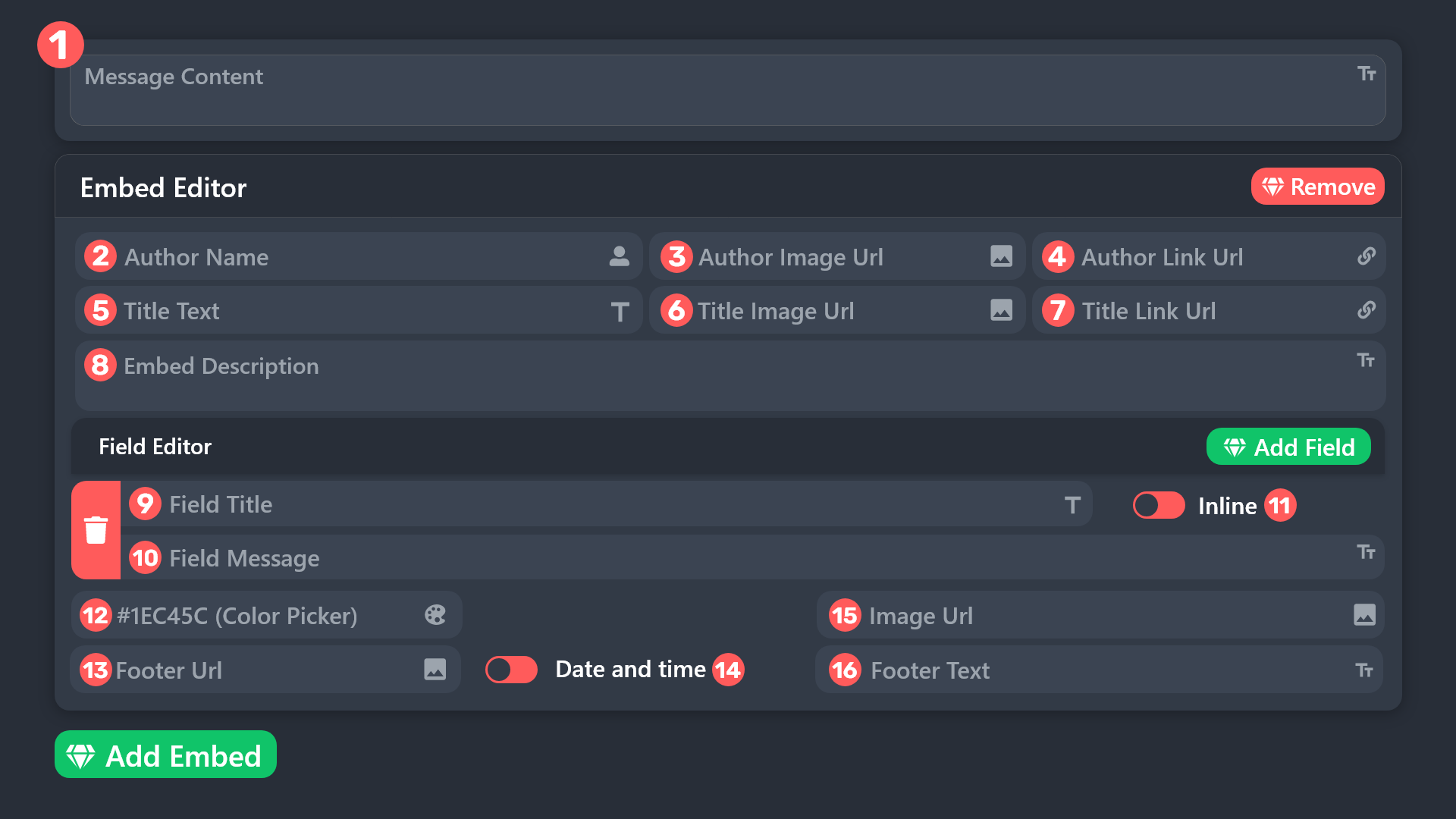
How to add an image to the bottom of a ticket panel?
humble sequoiaBOT
 scenic forum
@winter ore refer to the embed above
Youd need to put the image URL into field 15
winter ore
scenic forum
<@303056829586341888> refer to the embed above
Youd need to put the image URL in...
Thanks
iron nightBOT
Gave +1 Rep to @scenic forum (current: #16 - 463)
scenic forum
 lavish falcon
Hi
lavish falcon
Hi
Please stop spamming.
 quiet dragon
I try to set up the ticket in a channel but it doesn't work,it says I have to be an admin (which I am) or have dashboard access,i don't understand
scenic forum
quiet dragon
I try to set up the ticket in a channel but it doesn't work,it says I have to be...
Can you use /debug on your server?
quiet dragon
Yea
scenic forum
quiet dragon
Yea
You need either Administrator or a dashboard role set by an Administrator to have access to the dashboard
Note: You dont have admin
quiet dragon
Oh
humble sequoiaBOT
Any role you put there will have full access to the ticket tool dashboard. The server owner and users with admin permissions already have access to the dashboard.
Be careful of which roles to put here

 vocal juniper
My Manager is not able to rename tickets. I have add him in Support role already
 dry bison
 winged pecan
How do I setup Ticket Tool in my server?
latent dawn
$help
humble sequoiaBOT
latent dawn
$help
First you will want to invite the bot to your server. Once the bot is in your server, you can manage your server in the dashboard.
To create a panel we are going to need to head over to the Panel Configs Tab on the Dashboard.
Once at the dashboard we will need to click Create Panel.
Enter a panel name (Fill in any optional settings you want).
Click Create Panel and you are ready to get started with configuring your panel.
An example of a creating a panel is shown below.
Once the panel has been created, use the blue Send button and select the channel you want the panel to be sent to.
The Panel wasn't send
Use the </debug:1029783024264564765> command to diagnose possible permission issues with the bot.
latent dawn
winged pecan
How do I setup Ticket Tool in my server?
Use this embded ^^
 wide jewel
i need help!

i have given it every permission on everything everywhere

please someone help
 lapis shore
is anyone german?
humble sequoiaBOT
This error indicates you have selected an invalid emoji, i.e. an emoji the bot isn't capable of using, in a button field
Which Emoji?
This depends upon which action the error is appearing, the most common cases are the Create Ticket button or one of your Dropdown emojis. You can visit your Button's List to find all available buttons and find the conflicting one by yourself.
Why doesn't the bot accept it as valid?
- You selected an emoji that doesn't exist anymore, i.e. that has been deleted
- You wrote text there, instead of an emoji (or in addition to an emoji)
- You entered a code for a custom emoji from a server that the bot is not a member of
- You entered a custom emoji code incorrectly
- You're on iPhone and entered an emoji using the phone's emoji pad (use the emoji selector in the website instead)
 worldly helm
@wide jewel ^
humble sequoiaBOT
@lapis shore, we would love to help you, but if you don't tell us what you need help with we can't help you :(
lapis shore
i am banned or something
humble sequoiaBOT
@lapis shore
⚠️ You're in the wrong place
We provide support for Ticket Tool Discord bot and cannot help you with whatever issue you have.
- We don't know which Support Team you should contact to get this issue resolved, and unfortunately we won't be able to accurately tell you.
If you don't have any further questions regarding our bot Ticket Tool, please close this ticket
latent dawn
wide jewel
i need help!
The bot needs permission to send messages in the channel you want to send the panel. Make sure that the bot can send messages in that specific channel. You can also give the bot an administrator role so it can send messages in all channels.
wide jewel
worldly helm
<@1416843108863316101> ^
i fixed it but now nobody can open tickets
 worldly helm
You may have accidentally denied them permission to use the Create Ticket button.
Look in the following places in your server's dashboard
Server Configs > Blacklist Roles
Any roles there will be unable to interact with the bot in any way, including creating tickets.
If this is enabled
Any roles there will be unable to use the button.
 wicked vale
Why am I banned
humble sequoiaBOT
⚠️ You're in the wrong place
We provide support for Ticket Tool Discord bot and cannot help you with whatever issue you have.
- We don't know which Support Team you should contact to get this issue resolved, and unfortunately we won't be able to accurately tell you.
If you don't have any further questions regarding our bot Ticket Tool, please close this ticket
 edgy spade
hey
i need an help ticket tool is saying
it can't send panel bec its don't have perm to view or send but all perm had given idk why isn't it working
scenic forum
edgy spade
i need an help ticket tool is saying
it can't send panel bec its don't have per...
Can you use /debug inside the channel you want it inside
 lapis dagger
How do you invite premium after buying
humble sequoiaBOT
━━ User's inquiry has been moved to a ticket ━━
edgy spade
wide jewel
this the same messeage i got
humble sequoiaBOT
This error indicates you have selected an invalid emoji, i.e. an emoji the bot isn't capable of using, in a button field
Which Emoji?
This depends upon which action the error is appearing, the most common cases are the Create Ticket button or one of your Dropdown emojis. You can visit your Button's List to find all available buttons and find the conflicting one by yourself.
Why doesn't the bot accept it as valid?
- You selected an emoji that doesn't exist anymore, i.e. that has been deleted
- You wrote text there, instead of an emoji (or in addition to an emoji)
- You entered a code for a custom emoji from a server that the bot is not a member of
- You entered a custom emoji code incorrectly
- You're on iPhone and entered an emoji using the phone's emoji pad (use the emoji selector in the website instead)
scenic forum
@edgy spade refer to the embed above
However it didnt even show in the logs that you used /debug
Did you use /debig with your account?
edgy spade
scenic forum
Did you use /debig with your account?
huh what is /debig...
scenic forum
edgy spade
huh what is /debig...
a command you use on your server
edgy spade
maybe nope
scenic forum
Have you used it?
edgy spade
nope never
scenic forum
Can you use it please
scenic forum
humble sequoia
So in your case its not a permission issue just the emote above
edgy spade
 scenic forum
Read my prior message please
edgy spade
scenic forum
So in your case its not a permission issue just the emote above
ohh okk
i will tell my staff to do so thanks
thanks @scenic forum
iron nightBOT
Gave +1 Rep to @scenic forum (current: #16 - 464)
 ember pier
 golden ledge
Any suggestions with troubleshooting ad revival ad account setup
humble sequoiaBOT
@golden ledge
⚠️ You're in the wrong place
We provide support for Ticket Tool Discord bot and cannot help you with whatever issue you have.
- We don't know which Support Team you should contact to get this issue resolved, and unfortunately we won't be able to accurately tell you.
If you don't have any further questions regarding our bot Ticket Tool, please close this ticket
 fervent mulch
COMO ABRE TICKT ?
humble sequoiaBOT
Equipa de Apoio Portuguesa
Se você está procurando ajuda, abra um ticket para entrar em contato com a equipe de suporte em português. Vá para #🎫│make-a-ticket e pressione o botão :flag_br:.
grizzled summit
@fervent mulch☝️
fervent mulch
Preciso de ajuda
 compact gust
Hiya! is there any way to remove the ticket limit for Discord mods so they can open tickets with users as needed? thanks in advance!
fervent mulch
I need help!
humble sequoiaBOT
Você está no lugar errado
Fornecemos suporte para Ticket Tool Discord bot e não podemos ajudá-lo com qualquer problema que você tenha.
- Não sabemos qual equipe de suporte você deve entrar em contato para resolver esse problema e, infelizmente, não poderemos informar com precisão.
Se você não tiver mais dúvidas sobre nossa ferramenta de ticket de bot, feche este ticket
scenic plinth
Você já foi informado de que está no servidor errado. Não podemos ajudá-lo.
lilac flint
Anybody can help me with this?
 lilac flint
Anybody can help me with this?
lilac flint
lilac flint
Anybody can help me with this?
My ticket I click creat and it don’t say anything like this it just opens the ticket
tribal cedar
lilac flint
My ticket I click creat and it don’t say anything like this it just opens the ti...
Did you still need help with your forms?
lilac flint
tribal cedar
Did you still need help with your forms?
Yes
tribal cedar
Can you take a screen shot of the forms section?
Its quite easy I think just make sure to enable
panel configs -> forms
lilac flint
Ok one second
tribal cedar
You entered the questions already it sounds like?
lilac flint
tribal cedar
You entered the questions already it sounds like?
No not yet
I’m tryna learn how to use ticket it’s a little confusing in my own
tribal cedar
Its fairly easy just remember there is a question mark next to everything which gives you some info
lilac flint
tribal cedar
Its fairly easy just remember there is a question mark next to everything which ...
 lilac flint
tribal cedar
Its fairly easy just remember there is a question mark next to everything which ...
lilac flint
tribal cedar
Its fairly easy just remember there is a question mark next to everything which ...
Alright
tribal cedar
Click question editor and make a question
Then click enable and auto display results in additional embedded
That should be enough to have it work
lilac flint
Alright
tribal cedar
You might want to add more questions after that
lilac flint
Oh thank you it worked @tribal cedar
iron nightBOT
Gave +1 Rep to @tribal cedar (current: #31 - 150)
lilac flint
I have one more request how can I make it so when they create the ticket it pings staff automatically
tribal cedar
In the past I would add a regular message in the ticket message to ping
You can't ping in embeds
lilac flint
Alright
tribal cedar
If you need help with that I can just try it on your own
 long breach
hi
long breach
tribal cedar
If you need help with that I can just try it on your own
hi
4f11290a-f4d3-11ed-a05b-0242ac120003 this error is still showing up
im deleting channels but doesn t work
scenic forum
long breach
4f11290a-f4d3-11ed-a05b-0242ac120003 this error is still showing up
Can you use /debug on your server?
long breach
scenic forum
Can you use /debug on your server?
its not on my server
scenic forum
long breach
its not on my server
Youre not staff either?
long breach
scenic forum
Youre not staff either?
nop
scenic forum
How are you "Deleting channels" then?
long breach
its deepwoken server
scenic forum
Anyway we cannot assist you, youd need to reach out to their servers staff
long breach
scenic forum
Anyway we cannot assist you, youd need to reach out to their servers staff
oh ok tysm
 sleek basin
I’m trying to set up the bot in one of my servers and it’s not letting me
 pure rune
I need a little help. So i have everything up and running but I dont want it to notify in the main channel that the ticket was created. how can i turn this off so it is private information
scenic forum
sleek basin
I’m trying to set up the bot in one of my servers and it’s not letting me
Can you elaborate?
sleek basin
Let me take a screenshot
scenic forum
pure rune
I need a little help. So i have everything up and running but I dont want it to ...
Could you show a screenshot of what message you mean
 scenic forum
sleek basin
scenic forum
sleek basin
Can you use /debug?
sleek basin
Let me try
pure rune
scenic forum
Could you show a screenshot of what message you mean
The second one

Because if not it will post there I believe that a ticket was created??
sleek basin
scenic forum
Can you use /debug?
 scenic forum
sleek basin
scenic forum
sleek basin
Bot is missing these permissions in the channel
 scenic forum
pure rune
The second one
scenic forum
pure rune
The second one
Both of these messages are ephemeral. Meaning ONLY the user creating the ticket can see them
For the second the bot is missing permissions to see the category
sleek basin
Thank u very much it helped
pure rune
scenic forum
Both of these messages are ephemeral. Meaning **ONLY** the user creating the tic...
Which permission do I need to change
scenic forum
pure rune
Which permission do I need to change
 pure rune
Okay great I think I got it then! If I have any more questions I will ask
scenic forum
humble sequoiaBOT
1. Open your Panel Configs tab in the server's dashboard
2. Select the panel you want to grant access to
3. Open the Category options menu
4. Select the categories of your preference
5. Save changes
 scenic forum
@sleek basin refer to the embed above
sleek basin
Ohhh ok
 half swan
when i try to /setup it keep saying it doesnt have permissions for embed links. but i gave it the permission😐
half swan
scenic forum
<@992065795452567602> refer to the embed above
can u help me?
 wide temple
🇵🇰
 polar dawn
Is there anyway to alert staff if they have not replied to a users message in a ticket after lets say 20 minutes
(After they have claimed a ticket) I dont want to alert the whole support team, just the person who claimed

 trim turtle
How do I change this?

 wicked sparrow
trim turtle
How do I change this?
wicked sparrow
trim turtle
How do I change this?
close the ticket you have open.
and if that doesn't work ask an administrator to delete your ticket.
trim turtle
wicked sparrow
close the ticket you have open.
i am the server owner and that opened ticket didnt exist in the server lol i just expanded ticket limit to 2 and that fixed it
thank you
junior sky
How can i get permission to close a ticket
 real sierra
 charred nimbus
How do I create custom emojis from my server for use in creating tickets or descriptions?
humble sequoiaBOT
━━ User's inquiry has been moved to a ticket ━━
 lament parrot
Help
 lusty glen
 tiny cloud
Transcript failed to save to 『📁』transcripts Transcript channel #『📁』transcripts missing permission
anyone know how to fix
humble sequoiaBOT
━━ User's inquiry has been moved to a ticket ━━
tiny cloud
tiny cloud
Transcript failed to save to 『📁』transcripts Transcript channel #『📁』transcript...
anyone know whajt to do
latent dawn
tiny cloud
Transcript failed to save to 『📁』transcripts Transcript channel #『📁』transcript...
The bot needs permission to send messsges in that channel.
 covert ice
Is there a way to make this robot mention a specific identity group?
Like this

Thanks
 austere forge
covert ice
Is there a way to make this robot mention a specific identity group?
austere forge
covert ice
Is there a way to make this robot mention a specific identity group?
Would you like Ticket Tool to mention a role when a ticket is created?
 elfin leaf
Hello, why can't I start the bot? I purchased premium and have the necessary rights. If someone could provide German support, please do so in German.
 covert ice
austere forge
Would you like Ticket Tool to mention a role when a ticket is created?
covert ice
austere forge
Would you like Ticket Tool to mention a role when a ticket is created?
yes
humble sequoiaBOT

Deutsches Support-Team
Wenn du Hilfe vom Deutschen Support-Team erhalten möchtest gehe in #🎫│make-a-ticket und öffne durch einen Klick auf den :flag_de: Button ein Ticket.
austere forge
elfin leaf
Hello, why can't I start the bot? I purchased premium and have the necessary rig...
If you need assistance in German ⬆️
humble sequoiaBOT
1. Open your Panel Configs tab in your server's dashboard
2. Select the panel you want to ping your support team on
3. Open the Ticket options menu
4. Click on Edit Ticket Message
5. In the Message Content use one of the role mention syntax ({@Role Name}/{Role ID})
6. Save changes
Note: For this to work properly, Ticket Tool requires the Mention Everyone permission. Or the role must have the Allow anyone to @mention this role setting enabled
 austere forge
covert ice
yes
austere forge
covert ice
yes
Refer to the embed above please
 stark runeBOT
1. Invite Ticket Tool to your server
First you will want to invite the bot to your server. Once the bot is in your server, you can manage your server in the dashboard.
2. Create a Panel
To create a panel we are going to need to head over to the panel configs on the dashboard.
Once at the dashboard we will need to click Create Panel.
Enter a panel name (Fill in any optional settings you want).
Click Create Panel and your ready to get started with configuring your panel.
An example of a creating a panel is shown below.
3. Send the Panel to a Channel
Once you've created a panel on the dashboard you will need to send it to a channel using send on the dashboard.
Select the channel you want your panel to be created in and click send.
For other questions checkout $help faq.
An example of a sending a panel is shown below.
Having a Problem Sending the Panel?
Do $debug in a channel with Ticket Tool and make sure it has all the necessary Discord permissions.
austere forge
 prime girder
How do I make a ticket..
prime girder
How do I make a ticket..
Refer to the embed above please, this is a quick guide to setup the bot in your server
 fringe sapphire
Gibt es die Möglichkeit das auf deutsch zu übersetzen oder zu bekommen
 grand barn
Ineed help
fringe sapphire
@grand barn ich verstehe auch nicht ganz wie man es dem server Kanal hinzufügen kann
grand barn
fringe sapphire
<@1413577318416384080> ich verstehe auch nicht ganz wie man es dem server Kanal ...
srr but aim english
 hybrid elk

 analog summit
Hello, could someone please guide me through a few steps? I need to: When a ticket is closed by me or a staff member, once it's closed, I'd like no one else to have access to it. How can I do this, please?
humble sequoiaBOT
@hybrid elk
⚠️ You're in the wrong place
We provide support for Ticket Tool Discord bot and cannot help you with whatever issue you have.
- We don't know which Support Team you should contact to get this issue resolved, and unfortunately we won't be able to accurately tell you.
If you don't have any further questions regarding our bot Ticket Tool, please close this ticket

 rugged mulch
My server doesnt show up in the server list, i already try logout log in but it still dont appear
covert swallow
rugged mulch
My server doesnt show up in the server list, i already try logout log in but it ...
Do you have the administrator permission in the server?
covert swallow
 eager kernel
You'll to talk to that server's staff team to fix that error
rugged mulch
covert swallow
Do you have the administrator permission in the server?
yes this is for that, thanks you
iron nightBOT
Gave +1 Rep to @covert swallow (current: #17 - 456)
 slow cove
السلام عليكم . انا مشترك بحسابي الثاني ولا اقدر ادخل السيرفر وهذا الايدي : 1149075964475736127 او (aktrolek) @stuck sigil
 tawny field
iron night
Gave +1 Rep to **<@129308185629687809>** (current: `#17` - `456`)
tawny field
iron night
Gave +1 Rep to **<@129308185629687809>** (current: `#17` - `456`)
What’s rep 🤣
latent dawn
$help
humble sequoiaBOT
latent dawn
$help
First you will want to invite the bot to your server. Once the bot is in your server, you can manage your server in the dashboard.
To create a panel we are going to need to head over to the Panel Configs Tab on the Dashboard.
Once at the dashboard we will need to click Create Panel.
Enter a panel name (Fill in any optional settings you want).
Click Create Panel and you are ready to get started with configuring your panel.
An example of a creating a panel is shown below.
Once the panel has been created, use the blue Send button and select the channel you want the panel to be sent to.
The Panel wasn't send
Use the </debug:1029783024264564765> command to diagnose possible permission issues with the bot.
latent dawn
humble sequoia
@sterile wind Use this for setup the bot
 sterile wind
Thx
analog summit
Hello, could someone please guide me through a few steps? I need to: When a ticket is closed by me or a staff member, once it's closed, I'd like no one else to have access to it. How can I do this, please?
 atomic geyser
how does someone give me permission to access the dashboard
 atomic bear
Queria saber qual skill da dano extra. Minha Karin no servidor 21 tava muito forte. Por causa desse dano, é um dano branco depois do dano normal
 rose glen
I want to close the ticket, it gives such an error, what should I do?
 harsh epoch
analog summit
Hello, could someone please guide me through a few steps? I need to: When a tick...
harsh epoch
analog summit
Hello, could someone please guide me through a few steps? I need to: When a tick...
Hey there!
Try Dashboard -> Permissions -> Support Team Permissions - Edit Closed -> View Channel ❌
harsh epoch
grand barn
How can I creat ticket
You can use either $new in a channel that bot is monitoring to open a ticket
Dashboard -> Command Style
and make sure that Enable command style tickets is enabled, and your channels are set correctly
harsh epoch
atomic geyser
how does someone give me permission to access the dashboard
You'd have to ask someone who already has access to the panel to allow your role under server configs, or grant one of your roles the Administrator permission
atomic geyser
ok thank you
humble sequoiaBOT
This error indicates you have selected an invalid emoji, i.e. an emoji the bot isn't capable of using, in a button field
Which Emoji?
This depends upon which action the error is appearing, the most common cases are the Create Ticket button or one of your Dropdown emojis. You can visit your Button's List to find all available buttons and find the conflicting one by yourself.
Why doesn't the bot accept it as valid?
- You selected an emoji that doesn't exist anymore, i.e. that has been deleted
- You wrote text there, instead of an emoji (or in addition to an emoji)
- You entered a code for a custom emoji from a server that the bot is not a member of
- You entered a custom emoji code incorrectly
- You're on iPhone and entered an emoji using the phone's emoji pad (use the emoji selector in the website instead)
harsh epoch
@rose glen Hey there!
Please refer to the embed above
rose glen
harsh epoch
<@1193545760931844287> Hey there!
Please refer to the embed above
Is this a custom emoji?
🔒
atomic bear
Perdi acesso a minha conta, meu celular foi roubado. E não sei o login. Fiz compras no jogo, servidor 21
Alguém pode me ajudar?
Algum Adm aqui
harsh epoch
rose glen
🔒
It's not. but your close button seems to appear fine, so it'll be another emoji. Try checking the other buttons you might have "Confirm close" as an example
humble sequoiaBOT
@atomic bear
Você está no lugar errado
Fornecemos suporte para Ticket Tool Discord bot e não podemos ajudá-lo com qualquer problema que você tenha.
- Não sabemos qual equipe de suporte você deve entrar em contato para resolver esse problema e, infelizmente, não poderemos informar com precisão.
Se você não tiver mais dúvidas sobre nossa ferramenta de ticket de bot, feche este ticket
atomic bear
Horrível isso. Tenho histórico de compras. Da pra recuperar pelo histórico, nas não querem blz
rose glen
harsh epoch
It's not. but your close button seems to appear fine, so it'll be another emoji....
I just removed the emoji and turned off the emoji display, it gives out the same thing...
harsh epoch
rose glen
I just removed the emoji and turned off the emoji display, it gives out the same...
Which button did you disable the emoji for?
rose glen
 harsh epoch
rose glen
<@1124651666650693774>
harsh epoch
rose glen
<@1124651666650693774>
Your "Close Ticket" button is not the one causing the issue, that one was working fine.
Try checking "Confirm Close" or "Cancel Close" and see if theres an issue with those ones
analog summit
harsh epoch
Hey there!
Try Dashboard -> Permissions -> Support Team Permissions - Edit Clos...
Thx U ! Its good
iron nightBOT
Gave +1 Rep to @harsh epoch (current: #33 - 140)
rose glen
harsh epoch
Your "Close Ticket" button is not the one causing the issue, that one was workin...
Can you just send me an emoji?
harsh epoch
rose glen
Can you just send me an emoji?
what do you mean?
harsh epoch
rose glen
I don't know what to do
Use $id followed by your emoji in your server
harsh epoch
rose glen
$🔒
You would be better to try in your own server if you're using a custom emoji.
Again, it's not the close button causing the issue. It is a different button
rose glen
harsh epoch
You would be better to try in your own server if you're using a custom emoji.
A...
For God's sake, you can go to the server and try to do it, I'll give you the rights
harsh epoch
rose glen
For God's sake, you can go to the server and try to do it, I'll give you the rig...
I can't join servers for help, support must remain here. If you'd rather you're free to #🎫│make-a-ticket where someone will be able to better explain
 tidal heart
Can someone show me how to setup ticket tool for my server
stark runeBOT
1. Invite Ticket Tool to your server
First you will want to invite the bot to your server. Once the bot is in your server, you can manage your server in the dashboard.
2. Create a Panel
To create a panel we are going to need to head over to the panel configs on the dashboard.
Once at the dashboard we will need to click Create Panel.
Enter a panel name (Fill in any optional settings you want).
Click Create Panel and your ready to get started with configuring your panel.
An example of a creating a panel is shown below.
3. Send the Panel to a Channel
Once you've created a panel on the dashboard you will need to send it to a channel using send on the dashboard.
Select the channel you want your panel to be created in and click send.
For other questions checkout $help faq.
An example of a sending a panel is shown below.
Having a Problem Sending the Panel?
Do $debug in a channel with Ticket Tool and make sure it has all the necessary Discord permissions.
harsh epoch
Hey there @tidal heart
Try refering to the embeds above
humble sequoiaBOT
━━ Ploxy0's inquiry has been moved to a ticket ━━
tidal heart
harsh epoch
Hey there <@1359311112641708275>
Try refering to the embeds above
Can you help me by joining and doing it?
scenic plinth
No, we cannot nor condone anyone joining servers to setup anything for anyone.
 pure zenith
Pets disappeared due to a server rollback on Saturday night ~9:30 PM (Sydney time).
Missing Pets: Titan Nightmare Mimic (Huge), 2x Rainbow Hatched Dilophosaurus, Rainbow Hatched Spinosaurus, Titan Rainbow Peacock, 2x Rainbow Mutated Raccoon, Mega Red Kitsune, Nightmare Rainbow Hydra.
These pets were fully in my inventory before the update. Please review inventory logs and restore. Thank you.
humble sequoiaBOT
@pure zenith
⚠️ You're in the wrong place
We provide support for Ticket Tool Discord bot and cannot help you with whatever issue you have.
- We don't know which Support Team you should contact to get this issue resolved, and unfortunately we won't be able to accurately tell you.
If you don't have any further questions regarding our bot Ticket Tool, please close this ticket
 glass saddle
are tickets down atm? we keep getting interaction failed
covert swallow
Bot isnt down, make sure your permissions are right
 leaden lodge
Hey guys, I needed some help with some setup.
So the ticket tool has its own category called Support. I have edited the category to give channel read permissions to another user, but when I create a ticket (creates private channel) that user doesn't have access.
There's a sync permissions with category button and on doing so that user gets access. Is this a known behavior?
scenic forum
leaden lodge
Hey guys, I needed some help with some setup.
So the ticket tool has its own ca...
Can you show a screenshot of
Panel config -> Permissions -> Ticket owner permissions -> Edit Opened
leaden lodge
Let me check
leaden lodge
scenic forum
Can you show a screenshot of
Panel config -> Permissions -> Ticket owner permiss...
From the website right?
scenic forum
leaden lodge
From the website right?
Correct
leaden lodge
scenic forum
Can you show a screenshot of
Panel config -> Permissions -> Ticket owner permiss...
So when I say user, it's another user. Think of it as support staff
 scenic forum
leaden lodge
So when I say user, it's another user. Think of it as support staff
scenic forum
leaden lodge
So when I say user, it's another user. Think of it as support staff
Is their role marked as support team role?
scenic forum
Still needs support team role
leaden lodge
I see. Thanks.
And, is there a way to provide an automatic reply if the ticket is opened on certain days of the week?
glass saddle
covert swallow
Bot isnt down, make sure your permissions are right
Are you positive? No role is able to open a ticket right now. Can't close existing ones either. Was working fine all day.
covert swallow
Whats your server ID
leaden lodge
glass saddle
Are you positive? No role is able to open a ticket right now. Can't close existi...
It's working currently on my server
scenic forum
leaden lodge
It's working currently on my server
That message wasnt meant for you
leaden lodge
No Im just telling them bot is not down because I just tried it
covert swallow
scenic forum
That message wasnt meant for you
Its fine, having independent verification the bot is working doesnt hurt
 sharp coral
the bot is not wroking rn
covert swallow
How so
sharp coral
keeps saying application did not respond
covert swallow
Server ID?
glass saddle
covert swallow
Whats your server ID
i got it, our premium sub lapsed. thanks for the promptness, greatly appreciated!
iron nightBOT
Gave +1 Rep to @covert swallow (current: #17 - 458)
leaden lodge
iron night
Gave +1 Rep to **<@129308185629687809>** (current: `#17` - `458`)
Oh how do you do this
Thanks leonhenn
thanks @scenic forum
iron nightBOT
Gave +1 Rep to @scenic forum (current: #15 - 465)
 rain galleon
question about transcripts, do they get deleted after a point or are they saved forever?
covert swallow
The transcripts are the HTML files attached to your transcript message, itll be deleted if that message is deleted
rain galleon
covert swallow
The transcripts are the HTML files attached to your transcript message, itll be ...
So for tickets, when the ticket is closed does it get saved?
covert swallow
Depends on if you took a transcript from it
rain galleon
its because before i ask from a mod in a server im in, i want to know if it can still be there after a long time
they keep transcripts i know that i just wanna know if they get deleted
covert swallow
If they delete the message containing the transcript message, yes, otherwise no
We do not store transcripts on our end
iron nightBOT
Gave +1 Rep to @covert swallow (current: #17 - 459)
 placid girder
@rain galleon When you configure transcription, that HTML file will persist indefinitely. If it is misplaced after the ticket was deleted, then it is lost forever.
Oh my bad 😭
rain galleon
placid girder
<@1236394510666301500> When you configure transcription, that HTML file will per...
lol thanks
iron nightBOT
Gave +1 Rep to @placid girder (current: #251 - 2)
rain galleon
gonna leave now byeee
 hollow schooner
Why does the thing keep saying the application did not respond
 vital pollen
I tried to make a 2nd panel but it said application did not respond, am I able to make another panel?
 charred sundial
Hi, is there a way to get the bot to publish it's log so I can follow it in another server?
placid girder
hollow schooner
Why does the thing keep saying the application did not respond
This is usually related to the permission to view channel and send messages!
placid girder
vital pollen
I tried to make a 2nd panel but it said application did not respond, am I able t...
I'm not sure what you mean. Can you elaborate? Are you attempting to open a second ticket within a Discord server?
hollow schooner
placid girder
This is usually related to the permission to view channel and send messages!
Yeah I fixed it by feeding the bot role administrator 😁
placid girder
charred sundial
Hi, is there a way to get the bot to publish it's log so I can follow it in anot...
Ticket Tool does have logging which can be configured. These logs include the creation, renaming, closure, opening, transcription, and deletion of tickets.
charred sundial
placid girder
Ticket Tool does have logging which can be configured. These logs include the cr...
thanks, and can I set the log - feed to a channel that's in another discord server?
iron nightBOT
Gave +1 Rep to @placid girder (current: #197 - 3)
placid girder
I believe you can have Ticket Tool send the messages in an Announcements channel. Then, that channel may be followed. But those messages probably wouldn't be published automatically.
Other than that, I believe Ticket Tool doesn't have a direct means to post messages to a different server.
iron nightBOT
Gave +1 Rep to @placid girder (current: #167 - 4)
vital pollen
placid girder
I'm not sure what you mean. Can you elaborate? Are you attempting to open a seco...
I tried to make a 2nd panel, (like a new panel to open tickets) but it said the application was not responding, though it worked before when I opened my first panel
placid girder
So you have sent the second panel into a channel?
vital pollen
nope, it won’t let me
placid girder
vital pollen
nope, it won’t let me
Okay, Ticket Tool is operational at this time, from what I understand. This could be an issue with how the panel was configured. One element that can cause trouble for users is using custom emojis. Are you using any?
vital pollen
placid girder
Okay, Ticket Tool is operational at this time, from what I understand. This coul...
nope, the issue is it doesn’t let me use the panel command at all to create one
 placid girder
Panels are created in the dashboard located at https://tickettool.xyz. You would need to access the website to create additional panels!
Ticket Tool - Ticketing without clutter - The #1 Discord support bot
iron nightBOT
Gave +1 Rep to @placid girder (current: #153 - 5)
 wary musk
stark runeBOT
wary musk
stark runeBOT
1. Invite Ticket Tool to your server
First you will want to invite the bot to your server. Once the bot is in your server, you can manage your server in the dashboard.
2. Create a Panel
To create a panel we are going to need to head over to the panel configs on the dashboard.
Once at the dashboard we will need to click Create Panel.
Enter a panel name (Fill in any optional settings you want).
Click Create Panel and your ready to get started with configuring your panel.
An example of a creating a panel is shown below.
3. Send the Panel to a Channel
Once you've created a panel on the dashboard you will need to send it to a channel using send on the dashboard.
Select the channel you want your panel to be created in and click send.
For other questions checkout $help faq.
An example of a sending a panel is shown below.
Having a Problem Sending the Panel?
Do $debug in a channel with Ticket Tool and make sure it has all the necessary Discord permissions.
placid girder
This is a guide that was constructed to explain the process!
 hearty crystal
I’m a bit lost, so I added the bot to my discord. Set up the tab my players can click make a ticket and it works for me since I’m owner. But my verified members do not have permission? Can someone help?
Please @ me when someone can reply thanks!
 proud bear
Hello, Is anyone able to direct me to any previous discussions on how i can make it so once the tickets are created, only the person who created the ticket + roles selected can view the ticket convo?
 burnt condor
.
 uneven dome
自分は鯖の副管理者なんだけどこのBOTを追加しようとしたとき自分の入ってる鯖が出てこないんだけどどうしたら良いんですかね?
 vale river
Good day, this is what it says when I want to invite a bot to the server

 sick fern
Is it possible for the ticket tool to send a message in the ticket itself instead of an embed? How do I do that?
scenic forum
hearty crystal
I’m a bit lost, so I added the bot to my discord. Set up the tab my players can ...
Hey there!
«You don't have permissions to use this»
👉 Server Configs -> Blacklist Roles
Any roles there will be unable to interact with the bot in any way, including creating tickets.👉 Panel Configs -> Buttons -> Create Ticket -> Support team only
If this is enabled👉 Panel Configs -> Buttons -> Create Ticket -> Disabled Roles
Any roles there will be unable to use the button.
scenic forum
proud bear
Hello, Is anyone able to direct me to any previous discussions on how i can make...
Panel config -> General -> Support team roles
By default the ticked owner should see the ticket
scenic forum
vale river
Good day, this is what it says when I want to invite a bot to the server
Click on @pseudo glen and press Add App should work that way
scenic forum
sick fern
Is it possible for the ticket tool to send a message in the ticket itself instea...
The embed can be removed
This requires premium however
 umbral cliff
Hello, good morning! My bot is giving an error. Every time I use the /add command, it says: "The app did not respond." I would like to know if there is a way to solve this.
scenic forum
umbral cliff
Hello, good morning! My bot is giving an error. Every time I use the /add comman...
Hey
Can you use /debug inside the channel you get the error in?
umbral cliff
When I use this same command, I get the same error.
scenic forum
umbral cliff
When I use this same command, I get the same error.

Ticket tool is missing the Send message permission inside the channel
umbral cliff
scenic forum
Even so, it won't work. I apologize for the delay in responding; I don't speak English and am using a translator.
scenic forum
umbral cliff
Even so, it won't work. I apologize for the delay in responding; I don't speak E...
You removed "View Channel" from its permissions
 umbral cliff
How do I activate it?
scenic forum
Via Discord channel settings in the permission tab
hearty crystal
@scenic forum THANKS!
iron nightBOT
Gave +1 Rep to @scenic forum (current: #15 - 466)
hearty crystal

 chilly silo
Hey, I need some help, for our ticket tool, I need to hide some of the drop down menus, without actively deleting them, I just don't want users to see select drop down ticket options. Is there a way to do this?
 dull rock
olla alguem pode me ajuda
 tough pilot
How to get the bot on my sever
vale river
scenic forum
Click on <@557628352828014614> and press ``Add App`` should work that way
Oh yes thank you so much
iron nightBOT
Gave +1 Rep to @scenic forum (current: #15 - 467)
 quick igloo
 fluid timber
Hello, when I try to open a ticket this error message opens : how can I make it work ? + how can I allow my moderation / admins to see the dashboard to control permissions as well ?

 urban patrol
Me too I don’t no how I fix this
 past fern
How do I create something for my members to press on and make a ticket and get a role once they have finished this is my first time making a server so any help would be appreciated
stiff nova
What should I do

 vivid tinsel
HELP
@placid girder
Then how do I get help urgent
can someone help me
I created a panel in tickets tool dashboard, then i mistakenly kicked ticket
and now when i try to delete the panel , it says major config mismatch
how do i fix it
scenic forum
vivid tinsel
and now when i try to delete the panel , it says major config mismatch
You cannot delete a panel if you only have one.
scenic forum
stiff nova
What should I do
What are you trying to do?
stark runeBOT
1. Invite Ticket Tool to your server
First you will want to invite the bot to your server. Once the bot is in your server, you can manage your server in the dashboard.
2. Create a Panel
To create a panel we are going to need to head over to the panel configs on the dashboard.
Once at the dashboard we will need to click Create Panel.
Enter a panel name (Fill in any optional settings you want).
Click Create Panel and your ready to get started with configuring your panel.
An example of a creating a panel is shown below.
3. Send the Panel to a Channel
Once you've created a panel on the dashboard you will need to send it to a channel using send on the dashboard.
Select the channel you want your panel to be created in and click send.
For other questions checkout $help faq.
An example of a sending a panel is shown below.
Having a Problem Sending the Panel?
Do $debug in a channel with Ticket Tool and make sure it has all the necessary Discord permissions.
scenic forum
@past fern refer to the embed above
scenic forum
fluid timber
Hello, when I try to open a ticket this error message opens : how can I make it ...
Can you use /debug on your server?
 winged solar
Hlo sir today I can't join guardeer bootcamp due to zoom login id not access or failed I try again and again please suggest what should I do and what about today's lecture how can I get 1 lecture of bootcamp please help
humble sequoiaBOT
⚠️ You're in the wrong place
We provide support for Ticket Tool Discord bot and cannot help you with whatever issue you have.
- We don't know which Support Team you should contact to get this issue resolved, and unfortunately we won't be able to accurately tell you.
If you don't have any further questions regarding our bot Ticket Tool, please close this ticket
humble sequoiaBOT
⚠️ Please read the messages previously sent by our team ⚠️
winged solar
I can't access my bootcamp classes why I can't access on zoom @scenic forum @scenic forum
Where I get today's lecture @scenic forum @scenic forum
@humble sequoia how to raise ticket please help
scenic forum
winged solar
I can't access my bootcamp classes why I can't access on zoom <@1865239787292590...
Don't ping me.
humble sequoiaBOT
@winged solar
⚠️ You're in the wrong place
We provide support for Ticket Tool Discord bot and cannot help you with whatever issue you have.
- We don't know which Support Team you should contact to get this issue resolved, and unfortunately we won't be able to accurately tell you.
If you don't have any further questions regarding our bot Ticket Tool, please close this ticket
winged solar
@humble sequoia please help how to raise ticket
humble sequoiaBOT
@winged solar
⚠️ You're in the wrong place
We provide support for Ticket Tool Discord bot and cannot help you with whatever issue you have.
- We don't know which Support Team you should contact to get this issue resolved, and unfortunately we won't be able to accurately tell you.
If you don't have any further questions regarding our bot Ticket Tool, please close this ticket
stiff nova
scenic forum
What are you trying to do?
Check transcript of a ticket
scenic forum
stiff nova
Check transcript of a ticket
To view it you'd either need to be logged in on the dashboard or download the HTML file and open it with your browser
vivid tinsel
scenic forum
You cannot delete a panel if you only have one.
Ok
@scenic forum
Do you play roblox
scenic plinth
Not the place to ask or discuss that
 thin palm
why do the setup or any other command not work
covert swallow
You most likely did not give the bot the read and send messages permission in the channel
thin palm
covert swallow
You most likely did not give the bot the read and send messages permission in th...
ok
 reef sequoia
How do I make it so if someone makes a ticket I can @ the support team automatically for free
humble sequoiaBOT
━━ User's inquiry has been moved to a ticket ━━
thin palm
covert swallow
You most likely did not give the bot the read and send messages permission in th...
you was right
 atomic dew
/bot
 signal finch
/debung
 weak timber
reef sequoia
How do I make it so if someone makes a ticket I can @ the support team automatic...
weak timber
reef sequoia
How do I make it so if someone makes a ticket I can @ the support team automatic...
I'm looking for the same thing but I want the ticket to ping the user & support team, then delete the message (I have premium)
 fair basin
Do I have to be a premium member to change the ticket panel massage?
weak timber
 modern aspen
"ERR_BAD_REQUEST - 413"
modern aspen
"ERR_BAD_REQUEST - 413"
Check bot perms
 jade ravine
Is there any way to let one role see tickets forever
jade ravine
Is there any way to let one role see tickets forever
covert swallow
You should set the role as the support team role, in the general settings in your panel configs
jade ravine
covert swallow
You should set the role as the support team role, in the general settings in yo...
One role that isnt support team
covert swallow
You can add that as an "Additional Role" then, and make sure the additional role permissions are set up too allow viewing of the channel
jade ravine
covert swallow
You can add that as an "Additional Role" then, and make sure the additional role...
How do I add an additional role
covert swallow
Here the link to our documentation explaining it
The core settings of every panel
 slender dew
Hey y'all! We currently have 5 different options for our ticket types, I'd like to add a 6th. But then I came across this message saying "anything that exceeds 5 will be moved to the next row"
I was hoping to check if anyone could show me what that looks like? (when something moves down to the next row)
 scenic forum
slender dew
Hey y'all! We currently have 5 different options for our ticket types, I'd like ...
scenic forum
slender dew
Hey y'all! We currently have 5 different options for our ticket types, I'd like ...

Example of 3 rows
 leaden sleet
System Failure, Please Report to the server owner:
Invalid Form Body
components[0].components[0].options[0].emoji.id[BUTTON_COMPONENT_INVALID_EMOJI]: Invalid emoji
humble sequoiaBOT
This error indicates you have selected an invalid emoji, i.e. an emoji the bot isn't capable of using, in a button field
Which Emoji?
This depends upon which action the error is appearing, the most common cases are the Create Ticket button or one of your Dropdown emojis. You can visit your Button's List to find all available buttons and find the conflicting one by yourself.
Why doesn't the bot accept it as valid?
- You selected an emoji that doesn't exist anymore, i.e. that has been deleted
- You wrote text there, instead of an emoji (or in addition to an emoji)
- You entered a code for a custom emoji from a server that the bot is not a member of
- You entered a custom emoji code incorrectly
- You're on iPhone and entered an emoji using the phone's emoji pad (use the emoji selector in the website instead)