#🆘│community-support
1 messages · Page 227 of 1
 scenic forum
 vestal heron


 sonic lantern
the tickt tool bot is reusing tickets and the new person that opens a ticket can see the previous persons chat and information. Closing and even deleting the previous ticket doesnt help. The new ticket has a new ticket number but its using old tickets. Any advice??
 scenic forum
sonic lantern
the tickt tool bot is reusing tickets and the new person that opens a ticket can...
scenic forum
sonic lantern
the tickt tool bot is reusing tickets and the new person that opens a ticket can...
Server config -> Server Storage Options Check if that option is on, turn it off
 humble sequoiaBOT
The panel message is where people react to make a ticket. To customize it head over to your Dashboard --> Panel Configs -> Panel -> Edit Panel Message
 scenic forum
@barren goblet refer to the embed above to change panel text
sonic lantern
found it and turned it off
will see if it works... thanks!! love the bot!! @scenic forum
 rigid gorge
scenic forum
<@1176505903227347014> refer to the embed above to change panel text
rigid gorge
scenic forum
<@1176505903227347014> refer to the embed above to change panel text
How do I link it to the tickets I made? For example, if I open this ticket, this ticket will open.
humble sequoiaBOT
For more convenient use of multipanels, you can now combine panels on the dashboard. This will allow you to directly send the multipanel from the dashboard or via the $panel ID command.
Where can I find this?
You can find this setting on the Dashboard -> Panel Configs -> Panel -> Attached Panels
Note: if you're attaching all the panels to a panel called English, don't include English in the attached panel's box (If you do this, it will create a duplicate)
This will put all buttons from all of your panels on one message. The message is the panel message from the panel you're combining these panels in.
 scenic forum
@rigid gorge refer to the embed above if you mean tickets like #🎫│make-a-ticket
rigid gorge
For example, if you open a suggestions ticket, the suggestions ticket will be opened immediately. If you open a complaints ticket, the complaints ticket will be opened.
humble sequoiaBOT
━━ User's inquiry has been moved to a ticket ━━
rigid gorge
scenic forum
<@980449937844232243> refer to the embed above if you mean tickets like <#571706...
 scenic forum
rigid gorge
scenic forum
rigid gorge
Your inquiry has been moved to a ticket, a staff member will tend to you now
 blazing anchor
في عرب
 barren goblet
I need do like this how? I mean ticket option
 barren goblet
rigid gorge
barren goblet
rigid gorge
رح ل panel name عند كل بانل وعدل الأسماء
humble sequoiaBOT
The Drop-down menu or Select Menu replaces the buttons on your panel message and uses a drop-down menu with all of your panels. To set this up, go to your Panel Configs and select your main Panel.
<:Numbericons1:1018864164032225340> Enable Select Style
First you enable Select Style. Then you add an item in the Dropdown Editor. Now you can start editing your dropdown!
<:Numbericons2:1018864168041971712> Dropdown Editor
Each line in the dropdown editor represents a line in the drop down menu on discord. You can add more "Items", by clicking on 

First you select a panel. That's the panel this option will open a ticket for.  DONT select the same panel twice. Each option should have a different Panel
After that, you can put a Display. This is the title of this option and will appear in the drop down menu. The *Description can be set right after that, which will be below the title in grey.
Additionally you can select an emoji, that will be shown in front of each option. You can either manually input the ID of an emoji or select it in the selector.
Common Issues ⚠️
- Panel doesn't send? Make sure you have a valid emoji selected
- Option doesn't show up? Check if two options have the same panel in the DropDown Editor

$dropdown
scenic forum
@barren goblet refer to the embed above
barren goblet
scenic forum
<@1176505903227347014> refer to the embed above
Only enable?
scenic forum
barren goblet
Only enable?
Read the full embed
 granite mauve
So I want to create a panel where then they see options of that ticket they wanna open I did that I made 1 panel and then dropdown thing I made 3 things giveaway claim and support etc etc now I want to do like who gets access to which one of those I want giveaway manager to access giveaway claim a
humble sequoiaBOT
━━ User's inquiry has been moved to a ticket ━━
 winter ore
Am I doing something wrong here? Trying to tag a channel

 scenic forum
winter ore
Am I doing something wrong here? Trying to tag a channel
scenic forum
winter ore
Am I doing something wrong here? Trying to tag a channel
<#ChannelID>
winter ore
scenic forum
``<#ChannelID>``
Oh so I need the #. Thanks
 iron nightBOT
Gave +1 Rep to @scenic forum (current: #25 - 266)
scenic forum
winter ore
Oh so I need the #. Thanks
yes and without {} they are only for role mentions in this case
winter ore
scenic forum
yes and without ``{}`` they are only for role mentions in this case
Huh. The variables page says to use the {}. Okay, will try without. Is that the same if I wanna use the channel name instead of the ID?
scenic forum
winter ore
Huh. The variables page says to use the {}. Okay, will try without. Is that the ...
Could you show where it says that? Maybe im mistaken then
humble sequoiaBOT
Within all the messages the bot sends (both embeds and text) you can mention either channels, roles, or even users, these mentions will only send a notification to the user if they are used within a text field, e.g: a role mentioned in an embed won't ping at all the users who have that role.
For mentioning a role you can use one out of three options:
{@Role Name} ➞ Which is Case Sensitive.
{RoleID} ➞ Replace RoleId with the Id of the role you are trying to ping.
<@&RoleID> ➞ Discord's native syntax to ping roles.
<#ChannelID> ➞ Mention a channel by its ID.
<@UserID> ➞ Mention a user by its ID.
winter ore
scenic forum
Could you show where it says that? Maybe im mistaken then

Wait wrong pix

@scenic forum you were right. It is <#channelID>
scenic forum
winter ore
These are set variables they will show the channel name/ID of the ticket opened itself not any outside
 wary frost
 humble sequoiaBOT

⚠️ Du bist hier falsch
Wir bieten hier ausschließlich Support für den Ticket Tool Discord Bot an und können dir leider nicht mit irgendetwas anderem weiterhelfen.
- Bitte melde dich bei einem, für dein Problem geeigneten, Support Team.
Wenn du keine weiteren Fragen hast, die das Ticket Tool betreffen, schließe bitte dieses Ticket.
 pulsar bridge
any help ?
@grizzled summit ...
waht was the command to let a person open a ticket
$new ?
 harsh epoch
/new
pulsar bridge
it doesnt work ..
 grizzled summit
Hey there. I am not a part of our support staff. If you need support from our team please #🎫│make-a-ticket .
This channel is for support from our community.
pulsar bridge
grizzled summit
Hey there. I am not a part of our support staff. If you need support from our te...
sry , mb
harsh epoch
pulsar bridge
it doesnt work ..
Are you getting any error messages?
harsh epoch
Do you know if you have permissions to run commands in that channel?
pulsar bridge
how do i know ?
i am the owner of the server .
kkk done
worked , but another problem .
if i want to create a ticket from a specific panel with the command how ?
harsh epoch
pulsar bridge
if i want to create a ticket from a specific panel with the command how ?
Im pretty sure itll only work with the one panel the feature is enabled on
pulsar bridge
ok
also , i want to suggest smth ...
When we create a ticket using the command it doesnt remove the forms option .
 viral sigil
Bro I am facing problem
It is showing Content Already submitted but I didn't submitted any content
 cyan summit
How i create a pannel where people creatw tickets?
harsh epoch
$help
humble sequoiaBOT
harsh epoch
$help
First you will want to invite the bot to your server. Once the bot is in your server, you can manage your server in the dashboard.

To create a panel we are going to need to head over to the Panel Configs Tab on the Dashboard.
Once at the dashboard we will need to click Create Panel.
Enter a panel name (Fill in any optional settings you want).
Click Create Panel and you are ready to get started with configuring your panel.
An example of a creating a panel is shown below.

Once the panel has been created, use the blue Send button and select the channel you want the panel to be sent to.
The Panel wasn't send
Use the </debug:1029783024264564765> command to diagnose possible permission issues with the bot.
 harsh epoch
@cyan summit refer to the embed above for creating panels
pulsar bridge
soo , i cant make it that i can when i do $new it openes ticket for panel 1
cyan summit
harsh epoch
<@1404651756117295166> refer to the embed above for creating panels
Do i needa do this on the dashbord or in the discord
pulsar bridge
and if i make $new2 it opnes ticket for panel 2 ?
harsh epoch
cyan summit
Do i needa do this on the dashbord or in the discord
Its more reliable on the dashboard but you can also run /setup and do it through discord.
Although, the dashboard offers more options for customisation
cyan summit
harsh epoch
Its more reliable on the dashboard but you can also run `/setup` and do it throu...
Alr ty
iron nightBOT
Gave +1 Rep to @harsh epoch (current: #74 - 21)
harsh epoch
pulsar bridge
and if i make $new2 it opnes ticket for panel 2 ?
I dont believe you can, however you could create another panel exclusively for the command style ticket
pulsar bridge
harsh epoch
I dont believe you can, however you could create another panel exclusively for t...
i opned a ticket about it ...
harsh epoch
cyan summit
Saying application did not respond
Make sure the bots got permission to view channel, send messages and embed links
cyan summit
harsh epoch
Make sure the bots got permission to `view channel`, `send messages` and `embed ...
Ill check
 gloomy forge
okay wait so how do i change the message that’s like “click to open a ticket”, so i can explain to the community what each ticket is for? sorry im new to this
humble sequoiaBOT
The panel message is where people react to make a ticket. To customize it head over to your Dashboard --> Panel Configs -> Panel -> Edit Panel Message
scenic forum
@gloomy forge refer to the embed above
gloomy forge
scenic forum
<@1116095323325079672> refer to the embed above
thank u sm
iron nightBOT
Gave +1 Rep to @scenic forum (current: #25 - 267)
 harsh epoch
 versed igloo
Make sure the bots got permission to view channel, send messages and embed links
versed igloo
harsh epoch
Make sure the bots got permission to `view channel`, `send messages` and `embed ...
I gave it whole administrator bro
at nvm sorry
It works now
humble sequoiaBOT
@stable zephyr, we would love to help you, but if you don't tell us what you need help with we can't help you :(
 static forum
j’ai besoin du ticket, j’ai envoyer email et preuve
static forum
i need my ticket
 stable zephyr
Please
 restive condor
static forum
i need my ticket
restive condor
static forum
i need my ticket
Where?
stable zephyr
static forum
i need my ticket
Brother i need also ticket
static forum
i send my email and proof
restive condor
You both are in the wrong server
stable zephyr
Send brother
humble sequoiaBOT
@stable zephyr @static forum
⚠️ You're in the wrong place
We provide support for Ticket Tool Discord bot and cannot help you with whatever issue you have.
- We don't know which Support Team you should contact to get this issue resolved, and unfortunately we won't be able to accurately tell you.
If you don't have any further questions regarding our bot Ticket Tool, please close this ticket
restive condor
Please keep this channel to Ticket Tool support only.
stable zephyr
No i don't
restive condor
We cannot help you here
restive condor
No worries 👌
stable zephyr
Brother your link take me there
stable zephyr
restive condor
No worries 👌
???
restive condor
Again, this is not the right server for whaterver issue you're having
 vital ether
I have two multipanels set up — one in Russian and one in English. Is there a way to use Dyno, Sapphire, or a similar tool so that a user’s reaction with the Russian emoji automatically sends the Russian multipanel via Ticket Tool, and a reaction with the English emoji sends the English multipanel? For example, there could be a pinned message asking users to choose their preferred language, and based on their reaction, the corresponding multipanel would be sent.
humble sequoiaBOT
━━ User's inquiry has been moved to a ticket ━━
vital ether
Almost like, role-based.
 sudden marsh
How do i get it so that when a ticket is created, only people from the support team can delete the ticket?
nvm found it
 vocal perch
sudden marsh
vocal perch
sudden marsh
anyone know if its possible to disable a button for a ticket without having to remove/hide the button and resending the entire message?
harsh epoch
sudden marsh
anyone know if its possible to disable a button for a ticket without having to r...
You can press "
Show this button" and use the Update button on the main menu for that panel? The button will appear, but won't be functional. You should get a message like this when using it.
You can also enable for only support teams to use the button meaning regular members can't use it
 stable zephyr
Hi

Ticket Tool - Ticketing without clutter - The #1 Discord support bot
Make a channel
@humble sequoia
 native anchor
how do i get my ticket tool configeured to my channel
 stark runeBOT
1. Invite Ticket Tool to your server
First you will want to invite the bot to your server. Once the bot is in your server, you can manage your server in the dashboard.
2. Create a Panel
To create a panel we are going to need to head over to the panel configs on the dashboard.
Once at the dashboard we will need to click Create Panel.
Enter a panel name (Fill in any optional settings you want).
Click Create Panel and your ready to get started with configuring your panel.
An example of a creating a panel is shown below.
3. Send the Panel to a Channel
Once you've created a panel on the dashboard you will need to send it to a channel using send on the dashboard.
Select the channel you want your panel to be created in and click send.
For other questions checkout $help faq.
An example of a sending a panel is shown below.
Having a Problem Sending the Panel?
Do $debug in a channel with Ticket Tool and make sure it has all the necessary Discord permissions.
 echo yacht
@native anchor ⬆️
 split thicket
Hey I just have one question but is this where I give people access to the website dashboard? I never actually checked if these roles gave access to the dashboard and since I dont got a way to check myself im here asking. If it isnt how do you give people access to your server dashboard? Trying to help a friend manage tickets on his server but I can't get access to the dashboard even after he supposedly added me to the support team roles

 mighty thistle
split thicket
Hey I just have one question but is this where I give people access to the websi...
mighty thistle
split thicket
Hey I just have one question but is this where I give people access to the websi...
Support Team roles are for each ticket. That refers to the team(s) who would actually handle the ticket.
You can access Dashboard Roles within Server Configs! I would have the friend refer to that dashboard configuration for your inquiry. 😄

 split thicket
mighty thistle
Support Team roles are for each ticket. That refers to the team(s) who would act...
split thicket
mighty thistle
Support Team roles are for each ticket. That refers to the team(s) who would act...
Thank you!!!
iron nightBOT
Gave +1 Rep to @mighty thistle (current: #51 - 50)
 quick crown
Guys how do I look where is the ticket that I used to report a hacker in ink game
mighty thistle
quick crown
Guys how do I look where is the ticket that I used to report a hacker in ink gam...
Transcripts are only saved to either a channel or a Google Drive when set up. They may also be DMd to you if that was enabled. Once a ticket channel/thread is deleted, and a transcript was not retained, it is lost forever.
If you did not receive the transcript in a DM, whoever you reported to may have it if they set up transcription. They would have it in either a channel or a Google Drive.
 warped crest
i have multipule tickets, and doing !new opens ticket type 4, how do i make it only open ticket type 1
scenic forum
warped crest
i have multipule tickets, and doing !new opens ticket type 4, how do i make it o...
The new command can only open one type of ticket per channel
You'd need all 4 panels to monitor a different channel for command style so depending on which channel you wrote the command in ticket 1-4 gets opened
 wind crystal
Hello Can I have help, I am trying to do the <@numbers> to get my roles to ping but they legit aren't working and ive trade everything.
it just says "@undefined" and idk why

 oak fern
wind crystal
Hello Can I have help, I am trying to do the <@numbers> to get my roles to ping ...
oak fern
wind crystal
Hello Can I have help, I am trying to do the <@numbers> to get my roles to ping ...
kindly read the guide below
humble sequoiaBOT
Within all the messages the bot sends (both embeds and text) you can mention either channels, roles, or even users, these mentions will only send a notification to the user if they are used within a text field, e.g: a role mentioned in an embed won't ping at all the users who have that role.
For mentioning a role you can use one out of three options:
{@Role Name} ➞ Which is Case Sensitive.
{RoleID} ➞ Replace RoleId with the Id of the role you are trying to ping.
<@&RoleID> ➞ Discord's native syntax to ping roles.
<#ChannelID> ➞ Mention a channel by its ID.
<@UserID> ➞ Mention a user by its ID.
wind crystal
oak fern
kindly read the guide below
got it :3
 limber fossil
.?

 warped sparrow
How to invite @humble sequoia to the server we have bought the premium
 austere forge
limber fossil
.?
austere forge
limber fossil
.?
Make sure that the bot has : VIEW CHANNEL SEND MESSAGE and READ MESSAGE HISTORY  permission in the channel where you try the command
humble sequoiaBOT
The first thing you will need to do is invite the premium bot, an invite can be found here
Once the bot is in your server we will head to the dashboard and manage your server. When you are managing your server, you want to head into "Server Configs" then click the drop down menu under "Select the bot you would like to use on this server" then click "Ticket Tool#6207" and then save.
 austere forge
@azure leaf@warped sparrow Refer to the embed above, simply click "here" to invite the bot premium in your server ⬆️
limber fossil
austere forge
Make sure that the bot has : `VIEW CHANNEL` `SEND MESSAGE` and `READ MESSAGE HIS...
ty
iron nightBOT
Gave +1 Rep to @austere forge (current: #4 - 1159)
 azure leaf
austere forge
<@495502304246497280><@511589177922420736> Refer to the embed above, simply clic...
azure leaf
austere forge
<@495502304246497280><@511589177922420736> Refer to the embed above, simply clic...
thanks for the help
iron nightBOT
Gave +1 Rep to @austere forge (current: #4 - 1160)
azure leaf
austere forge
<@495502304246497280><@511589177922420736> Refer to the embed above, simply clic...
by the way i am premium subscriber is there any role which i can get
austere forge
azure leaf
by the way i am premium subscriber is there any role which i can get
sure, done! 🥳
azure leaf
austere forge
sure, done! 🥳
kindly take my friend request
azure leaf
austere forge
sure, done! 🥳
thanks
iron nightBOT
Gave +1 Rep to @austere forge (current: #4 - 1161)
stable zephyr
Send me ticket
austere forge
azure leaf
kindly take my friend request
Against the rules, sorry, I do not accept random friend requests
humble sequoiaBOT
@stable zephyr
⚠️ You're in the wrong place
We provide support for Ticket Tool Discord bot and cannot help you with whatever issue you have.
- We don't know which Support Team you should contact to get this issue resolved, and unfortunately we won't be able to accurately tell you.
If you don't have any further questions regarding our bot Ticket Tool, please close this ticket
azure leaf
austere forge
Against the rules, sorry, I do not accept random friend requests
okay i understand
 river stag
@humble sequoia
/help
My friend got hacked and got banned off tds and he's trying to appeal it
humble sequoiaBOT
⚠️ You're in the wrong place
We provide support for Ticket Tool Discord bot and cannot help you with whatever issue you have.
- We don't know which Support Team you should contact to get this issue resolved, and unfortunately we won't be able to accurately tell you.
If you don't have any further questions regarding our bot Ticket Tool, please close this ticket
river stag
@lunar solar
humble sequoiaBOT
@stable zephyr
⚠️ You're in the wrong place
We provide support for Ticket Tool Discord bot and cannot help you with whatever issue you have.
- We don't know which Support Team you should contact to get this issue resolved, and unfortunately we won't be able to accurately tell you.
If you don't have any further questions regarding our bot Ticket Tool, please close this ticket
 small geode
how can i do this

/ticket
/help
how can i do that
/help
how can i make a selection with tickets
humble sequoiaBOT
The Drop-down menu or Select Menu replaces the buttons on your panel message and uses a drop-down menu with all of your panels. To set this up, go to your Panel Configs and select your main Panel.
<:Numbericons1:1018864164032225340> Enable Select Style
First you enable Select Style. Then you add an item in the Dropdown Editor. Now you can start editing your dropdown!
<:Numbericons2:1018864168041971712> Dropdown Editor
Each line in the dropdown editor represents a line in the drop down menu on discord. You can add more "Items", by clicking on
First you select a panel. That's the panel this option will open a ticket for. DONT select the same panel twice. Each option should have a different Panel
After that, you can put a Display. This is the title of this option and will appear in the drop down menu. The *Description can be set right after that, which will be below the title in grey.
Additionally you can select an emoji, that will be shown in front of each option. You can either manually input the ID of an emoji or select it in the selector.
Common Issues ⚠️
- Panel doesn't send? Make sure you have a valid emoji selected
- Option doesn't show up? Check if two options have the same panel in the DropDown Editor
$dropdown
scenic forum
@small geode refer to the embed above
small geode
thanks babe
small geode
When i finish my dropdown style and click "send" and it shows this why?


it doesnt show anything
scenic forum
small geode
When i finish my dropdown style and click "send" and it shows this why?
Your panel message will by default have the panels name in it's "author" embed editor field
small geode
wym
scenic forum
small geode
wym
 small geode
yea what abt it
scenic forum
You asked why it shows it
small geode
yea
no look when i put that choose a selection right? it shows this not the other ones

i want it to be like this
scenic forum
small geode
i want it to be like this

No panels have been selectedin their required fields
 small geode
so i delete all of them?
scenic forum
Or you just create the additional 6 panels with their setup and select them in the dropdown setup
small geode
i want mine to look like this
 scenic forum
And i told you how to achieve that
small geode
scenic forum
Or you just create the additional 6 panels with their setup and select them in t...
do i delete it and do it again?
scenic forum
small geode
do i delete it and do it again?
- Keep your Dropdown setup as it is
- Create the missing 6 additional panels you need for your setup
- Adjust the 6 additional panels to match their purpose
- Go back to your dropdown setup and select their panels in the
Select a panelfield
 scenic forum
small geode
wait do u mean i create a new panel ?
scenic forum
small geode
wait do u mean i create a new panel ?
Correct. You need a total of 7 to be able to select a total of 7 dropdown options
small geode
do i name them the same thing "choose a selection
scenic forum
small geode
do i name them the same thing "choose a selection
Thats up to you, preferably you name them to their purpose to easily find them later on again
small geode
kk thanks man ly
small geode
scenic forum
Thats up to you, preferably you name them to their purpose to easily find them l...
i finished them all but how do i connect them together
scenic forum
scenic forum
You select them in the marked fields
 scenic forum
small geode
choose a selection not here
scenic forum
small geode
choose a selection not here
Because you have already selected it at the most top option
iron nightBOT
Gave +1 Rep to @scenic forum (current: #25 - 270)
stable zephyr
🎫│make-a-ticket
 half kernel
 harsh epoch
half kernel
harsh epoch
half kernel
Can you run /debug inside that channel?
 harsh epoch
It looks like your bot is missing the "Send Messages" permission in that channel. Add the permissions Send Messages to the bots role in that channel

 unique harness
Hey guys, i just want to ask for the claiming feature, is there a way to set it that rather than removing every other mod's access to the ticket, it will just remove their perms to speak in it?
restive condor
unique harness
Hey guys, i just want to ask for the claiming feature, is there a way to set it ...
Hey there! Of course, Dashboard > Panel Configs > Claiming > Change Other Support Team Permissions when claimed - Edit Permissions >  View Channel &
  Send Messages
unique harness
restive condor
Hey there! Of course, ``Dashboard`` > ``Panel Configs`` > ``Claiming`` > ``Chang...
Gosh thank you so much, i've been trying to figure out this mess for past 30 mins and i didnt notice the team permissions change 😭.. appreciate it!
iron nightBOT
Gave +1 Rep to @restive condor (current: #1 - 2727)
unique harness
iron night
Gave +1 Rep to **<@795710289425334303>** (current: `#1` - `2727`)
Dan is truly amazing 🙏
restive condor
No problem, glad I could help! 
 harsh epoch
 vernal owl
It's better to use the dashboard if you can, but you should be able to press "Create a panel", fill out the details it asks for, and it should send into the channel you choose
vernal owl
harsh epoch
It's better to use the dashboard if you can, but you should be able to press "Cr...
Okejj
 covert snow
I got banned from the site, how can I unlock it?
 split bramble
/help
 gritty shoal
oi
 blazing kestrel
شباب كيف اضيف صوره في ticket tool Guys, how do I add a photo to the ticket tool?
 hoary vector
Why when I close the ticket It reverts back to a non-private state.
It should have deleted that ticket.
 spice wren
ok
 slender trout
is there a admin for solo duo trio on?
humble sequoiaBOT
⚠️ You're in the wrong place
We provide support for Ticket Tool Discord bot and cannot help you with whatever issue you have.
- We don't know which Support Team you should contact to get this issue resolved, and unfortunately we won't be able to accurately tell you.
If you don't have any further questions regarding our bot Ticket Tool, please close this ticket
 main coyote
911 help me
humble sequoiaBOT
⚠️ You're in the wrong place
We provide support for Ticket Tool Discord bot and cannot help you with whatever issue you have.
- We don't know which Support Team you should contact to get this issue resolved, and unfortunately we won't be able to accurately tell you.
If you don't have any further questions regarding our bot Ticket Tool, please close this ticket
 wide pulsar
How many panel we can have in one server?
 slender fjord
Galera como eu faço para fazer o bot digitar em português?
 crude mica
Hello, I can't access the bot panel, it tells me: This website cannot be accessed
Apparently it's blocking my public IP, so I can't access the bot panel.
crude mica
crude mica
Hello, I can't access the bot panel, it tells me: This website cannot be accesse...
@shut bolt
scenic forum
crude mica
Apparently it's blocking my public IP, so I can't access the bot panel.
What error do you receive?
crude mica
 scenic forum
Did you try another browser or incognito mode?
crude mica
scenic forum
Did you try another browser or incognito mode?
I just tried both and neither of them grabs the panel.
scenic forum
crude mica
I just tried both and neither of them grabs the panel.
The site is unreachable on both options?
crude mica
I am a server technician and previously the bot worked normally, now this is happening.
scenic forum
A different browser aswell as incognito mode cannot reach the website either?
crude mica
scenic forum
The site is unreachable on both options?
I tried using the incognito page and in another browser I get the same message "This website cannot be accessed."
scenic forum
Then im not sure
Please open a ticket at #🎫│make-a-ticket and get a staff members assistance on the matter
crude mica
Ty
 foggy terrace
"The application did not respond"
i already made my panel
typed /panel id:1
didnt work


 scenic forum
foggy terrace
"The application did not respond"
scenic forum
foggy terrace
"The application did not respond"
Can you use /debug?
 scenic forum
foggy terrace
scenic forum
foggy terrace
Ticket tool is missing send message in the channel permissions
foggy terrace
scenic forum
Ticket tool is missing ``send message`` in the channel permissions
ty you're a genius
iron nightBOT
Gave +1 Rep to @scenic forum (current: #25 - 271)
 dire cloak
why tickettool didn't response

 bright egret
hi
humble sequoiaBOT
Integrating an External Bot x Ticket Tool <:TicketToolGold:1073948897673748490>
Integrating Ticket Tool with an external bot allows you to customize your server's Ticket System further!
- The external bot must output the
$newor$ticketcommands with the user's ID to start a ticket. Preferably in a private channel.
Eg.
$new 12345678901234567890
-
Your ticket panel must be Command Style enabled
-
You must whitelist that bot's ID in your Dashboard ➞ Server Configs ➞ Bot section.
Otherwise Ticket Tool will not react to the command and a ticket will not be created.
- If you'd like to include a reason in the command usage, feel free to do so after the user ID.
Eg.
$new 12345678901234567890 Your reason goes here
This reason can then be shown anywhere in the Ticket Message with the{create.reason}variable
**  Note:** If you have changed Ticket Tool's default prefix (
$) please ensure to amend the prefix for the $new or $ticket commands.
Eg. If your prefix is
-, then what you're looking for the bot to use is-newor-ticket

$botintegration
bright egret
how to add premium ticket tool bot
scenic forum
@dire cloak refer to step 3 in the embed above
humble sequoiaBOT
The first thing you will need to do is invite the premium bot, an invite can be found here
Once the bot is in your server we will head to the dashboard and manage your server. When you are managing your server, you want to head into "Server Configs" then click the drop down menu under "Select the bot you would like to use on this server" then click "Ticket Tool#6207" and then save.
scenic forum
@bright egret click the blue here above for the premium bot invite
scenic forum
humble sequoia
@dire cloak step 3 in this text
dire cloak
scenic forum
<@812437831610794034> step 3 in this text
thank you ❤️
iron nightBOT
Gave +1 Rep to @scenic forum (current: #25 - 272)
bright egret
how does automation command work
what it do
@scenic forum
its not working
@stray bobcat
humble sequoiaBOT
With Ticket Tool's automation, you'll be able to customize your ticket system workflow! Using the Automation Editor you can:
- Chose out of 6 different triggers
- Set a Message Watcher to wait for a message for a given time, or to wait for the absence of them
- Add delays on the execution of actions after the trigger or watcher finds a message!
Automation Command
Automations can be stopped, by running the /automation stop command inside the ticket you want it to stop in. Restart it with /automation start You'll also be able to view the current status of the automations with /automation.
__Important Notes__
- Automation is on ALPHA TESTING PHASE, things might work unexpectedly or not at all.
- Any automation will run for a maximum of 7 days or until the ticket is closed, afterward, it will stop checking
+ You can have 5 automations per panel

$auto
scenic forum
@bright egret refer to embed above
Don't ping for help. People will respond when they are available
 languid flint
Hi, is it no longer possible to pay by PayPal? The only payment options i see are credit card, Googlepay, Applepay and Cryptopay
wide pulsar
How many panels can we have in one svr?
scenic forum
languid flint
Hi, is it no longer possible to pay by PayPal? The only payment options i see ar...
It should still be possible, could you show the lack of option?
scenic forum
wide pulsar
How many panels can we have in one svr?
I think you can have 50 panels in the dashboard
languid flint
scenic forum
It should still be possible, could you show the lack of option?
those are the only options i can find

 wide pulsar
scenic forum
I think you can have 50 panels in the dashboard
wide pulsar
scenic forum
I think you can have 50 panels in the dashboard
Ooh, thnx
scenic forum
languid flint
those are the only options i can find
This server provides help for the ticket tool discord bot, the screenshot you provide isn't related to it, therefor this is the wrong server to receive help for the matter
 buoyant kindle
 zealous olive
Necesito crear un ticket
zealous olive
Necesito crear un ticket
 limber marsh
Help
Before:
after:

 humble sequoiaBOT
⚠️ You're in the wrong place
We provide support for Ticket Tool Discord bot and cannot help you with whatever issue you have.
- We don't know which Support Team you should contact to get this issue resolved, and unfortunately we won't be able to accurately tell you.
If you don't have any further questions regarding our bot Ticket Tool, please close this ticket
 elfin osprey
How can I delete my ticket
 neon crest
I got banned in a game and don't know how to make a ticket
humble sequoiaBOT
⚠️ You're in the wrong place
We provide support for Ticket Tool Discord bot and cannot help you with whatever issue you have.
- We don't know which Support Team you should contact to get this issue resolved, and unfortunately we won't be able to accurately tell you.
If you don't have any further questions regarding our bot Ticket Tool, please close this ticket
restive condor
elfin osprey
How can I delete my ticket
Hey there! What exactly do you mean?
 vocal surge
I need help
restive condor
vocal surge
I need help
Hi! How can I help?
elfin osprey
Like I created a ticket and it's not working properly so I want it to be deleted as I think it will work properly after I delete it.
vocal surge
 restive condor
elfin osprey
Like I created a ticket and it's not working properly so I want it to be deleted...
restive condor
elfin osprey
Like I created a ticket and it's not working properly so I want it to be deleted...
You will need to ask that server's staff to delete the ticket for you
vocal surge
I did what it ‘said and it still won’t do it
restive condor
vocal surge
Dashboard > Panel Configs > Category
Please make sure the selected category is still valid
vocal surge
It is and still won’t work
elfin osprey
restive condor
You will need to ask that server's staff to delete the ticket for you
Thank you
iron nightBOT
Gave +1 Rep to @restive condor (current: #1 - 2730)
restive condor
vocal surge
It is and still won’t work
Please make sure you're checking the correct panel. There's an invalid category for that panel
restive condor
Could I get your server name or ID please
vocal surge
Me
restive condor
Yes
vocal surge
Ok I send it in dms
neon crest
Can you help me
restive condor
vocal surge
Ok I send it in dms
No, send it here please
restive condor
neon crest
Can you help me
You're in the wrong server unfortunately
neon crest
Where do I have to be
restive condor
We don't know, but this isn't the right server for that
vocal surge
1389033315645919335
neon crest
Ooo oke thank you
restive condor
vocal surge
1389033315645919335
This is not a valid category. Please select another one
 restive condor
Yes?
vocal surge
Can you join a Vc for 1 min
restive condor
Unfortunately not. What exactly is the issue?


 languid plank
Hi, uh may I ask how to make people create a reason 4 y they create a ticket or smth like that?
blazing kestrel
شباب كيف اضيف صوره في ticket tool Guys, how do I add a photo to the ticket tool?
ticket tool Guys, how do I add a photo to the ticket tool?
scenic forum
 covert ore
Hello! For some reason the variable is not being detected?
covert ore
Hello! For some reason the variable is not being detected?
Please open a ticket at #🎫│make-a-ticket to get a staff members help
humble sequoiaBOT
A Discord Form lets the user answer individual questions in a pop-up Form, which then displays the answers in the ticket message. This can save time if you already know what you want to ask the user.
Setup Forms
Forms can be enabled under Panel Settings > Form Options > Edit Forms Options. In the new pop-up window, you can now enable and edit your own Form.
Form Options
You can add up to 5 questions in the Discord form. This is a Discord limitation. Each question can have a placeholder in the input field, a minimum and maximum input, multi-line, and also the option to have the answer required.
Options
Question Title ➞ Your Question goes here
Question Placeholder ➞ The placeholder text in the input field
Required ➞ If enabled, the user has to answer this question, to submit the form
Multi-Line Input ➞ Allows the user to input multiple lines
Minimum and Maximum Input ➞ Set a minimum and maximum input value for the user
Displaying the Answer
To display the answers from the user, you need to enable Auto display form results on the ticket message as an additional embed
If you don't want a second embed, go into your Panel Configs > Ticket Options > Edit Ticket Message. You use the variable {create.form.x} and replace x with the number of your question. For example, the response to Question 5 can be displayed with {create.form.5}.
 scenic forum
@languid plank please refer to the embed above
covert ore
scenic forum
Please open a ticket at <#571706435449257997> to get a staff members help
Oop alr
Gracias!
languid plank
scenic forum
<@1284702666928427012> please refer to the embed above
Ok
scenic forum
covert ore
Oop alr
Sadly idk it myself to a ticket is your best bet to not get lost in traffic 
blazing kestrel
ticket tool Guys, how do I add a photo to the ticket tool?
 worldly helm
blazing kestrel
ticket tool Guys, how do I add a photo to the ticket tool?
worldly helm
blazing kestrel
ticket tool Guys, how do I add a photo to the ticket tool?
Heya! 👋
Do you mean as a profile picture?
languid plank
How do I uh.. add the options thingy? And where is it?
scenic forum
languid plank
How do I uh.. add the options thingy? And where is it?
Panel config -> forms
blazing kestrel
No, I want the same server
 languid plank
scenic forum
Panel config -> forms
languid plank
scenic forum
Panel config -> forms
Ok
blazing kestrel
I want the same thing
worldly helm
blazing kestrel
No, I want the same server
You can upload an image to a hosting website like https://imgur.com and use the link inside an embed.
 blazing kestrel
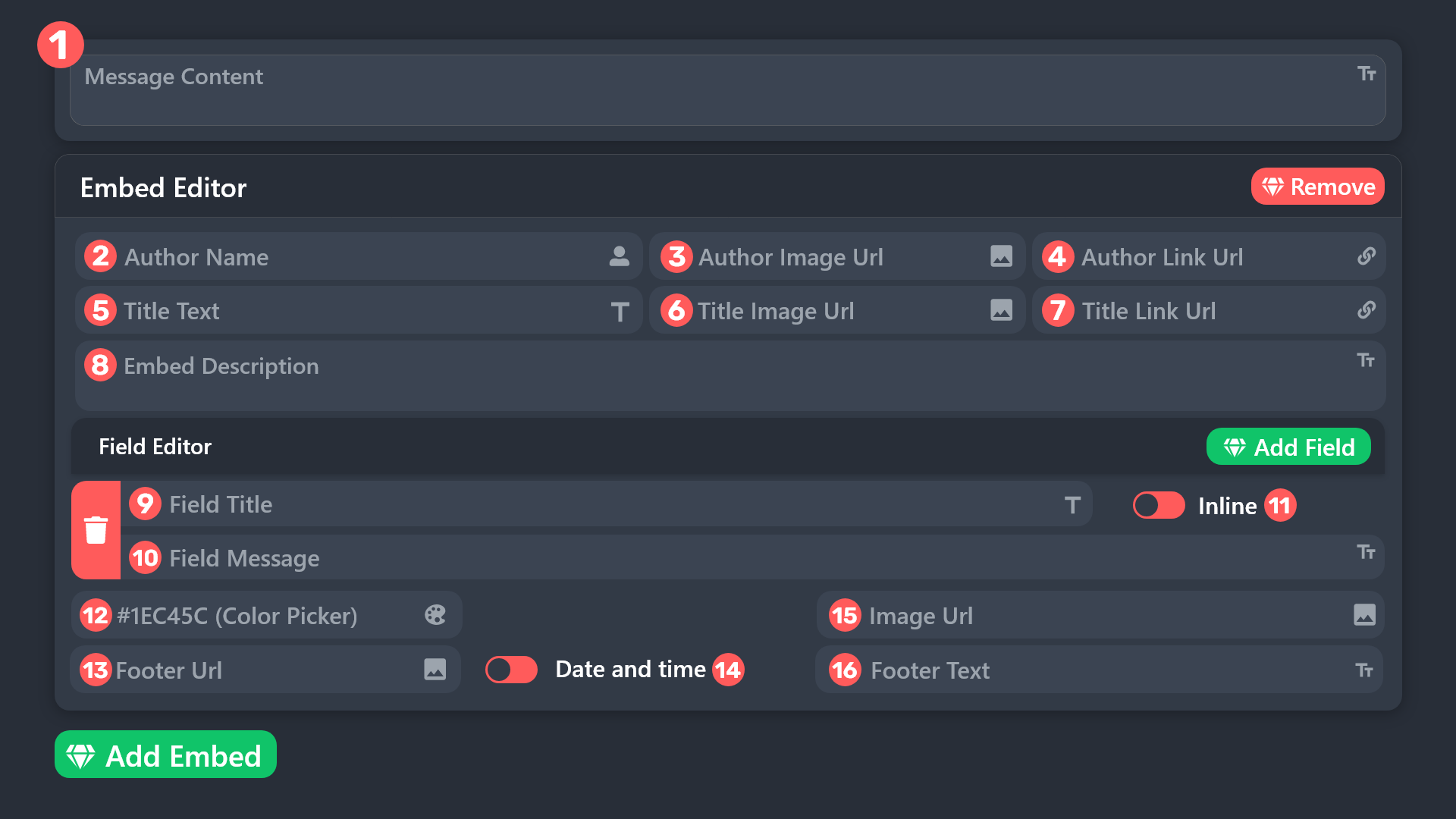
I don't mean that. How do I put an image in the widget? Remember.
worldly helm
I'm afraid I didn't understand what you mean.
blazing kestrel
Same like this
 worldly helm
You can upload an image to a hosting website like https://imgur.com and use the ...
worldly helm
worldly helm
You can upload an image to a hosting website like https://imgur.com and use the ...

blazing kestrel
Do you see that I want to put a picture inside?
 worldly helm
Yes. You can do that by following what I suggested.
blazing kestrel
Okay now how do I put the picture inside?
Okay, now I have a picture of how to put fill inside ticket tool
blazing kestrel
worldly helm
Yes. You can do that by following what I suggested.
Hello ?
humble sequoiaBOT
 scenic forum
blazing kestrel
Hello ?
scenic forum
blazing kestrel
Hello ?
Please be patient
Refer to the embed above
Insert the image link into field 15
blazing kestrel
Okay

 wraith oracle
Any staff?

 scenic forum
@jade topaz @wraith oracle
You need to contact their servers staff and inform them about the issue. There's nothing we can do on our end as it's a setup problem in their server
wraith oracle
scenic forum
<@456226577798135808> <@1412386407758037035>
You need to contact their servers s...
But
Wait I'm sending you another
 scenic forum
wraith oracle
Wait I'm sending you another
scenic forum
wraith oracle
Wait I'm sending you another
There's nothing we can do. The server has reached 500 channels. Their staff needs to delete some channels.
wraith oracle
scenic forum
There's nothing we can do. The server has reached 500 channels. Their staff need...
but there is only 8channel
scenic forum
There is 500 channels.
wraith oracle
Mm?
 scenic forum
They are just invisible to you.
 final meadow
Hello, I need help
scenic forum
The server has 500 channels
wraith oracle
scenic forum
They are just invisible to you.
Ugh fine sory for disturbance
scenic forum
wraith oracle
Ugh fine sory for disturbance
You're not disturbing don't worry, I'm sorry we aren't the right team for that matter
final meadow
how to install android dashboard
wraith oracle
scenic forum
You're not disturbing don't worry, I'm sorry we aren't the right team for that m...
ohk thanks
iron nightBOT
Gave +1 Rep to @scenic forum (current: #25 - 273)
scenic forum
 manic hatch
How to put ur own Ticket tool in ur own server?
manic hatch
How to put ur own Ticket tool in ur own server?
Click on @pseudo glen -> Add app -> select server
wraith oracle
@iron night +1 rep
harsh epoch
final meadow
how to install android dashboard
Its not something you can install. But you can access the ticket tool dashboard at https://tickettool.xyz/dashboard
Ticket Tool - Ticketing without clutter - The #1 Discord support bot
 nova matrix
how to fix it happens when i close ticket
 restive condor
nova matrix
how to fix it happens when i close ticket
restive condor
nova matrix
how to fix it happens when i close ticket
Hi there! Dashboard > Panel Configs > Buttons > Check your Confirm Close, Cancel Close, Transcript, Re-open & Delete buttons
Make sure they all either have text or an emoji
nova matrix
all have emoji and text @restive condor
restive condor
nova matrix
all have emoji and text <@795710289425334303>
Make sure you are checking the correct panel please
nova matrix
restive condor
Make sure you are checking the correct panel please
yeah the corrct panel
restive condor
Could I get your server name or ID please
nova matrix
restive condor
Could I get your server name or ID please
1412902994298667100
𝐀𝐁𝐎𝐃 𝐂𝐎𝐌𝐌𝐔𝐍𝐈𝐓𝐘
restive condor
nova matrix
1412902994298667100
Is this for panel 1 or 2?
nova matrix
the problem will be fixed when ? @restive condor
i have 2 panels 1 work and 1 not the name of panel is dosent work is تقديم الادارة
nova matrix
restive condor
Is this for panel 1 or 2?
2
 restive condor
nova matrix
2
restive condor
nova matrix
2
Can you double check that the emojis selected for both the cancel close & confirm close, are still in the server?
nova matrix
restive condor
Can you double check that the emojis selected for both the cancel close & confir...
ok wait
manic hatch
Thank you @scenic forum I'm finished I have my own Ticket tool Now!
iron nightBOT
Gave +1 Rep to @scenic forum (current: #25 - 274)
nova matrix
restive condor
Can you double check that the emojis selected for both the cancel close & confir...
ohh sorry i missed to write " : "
 restive condor
nova matrix
ohh sorry i missed to write " : "
restive condor
nova matrix
ohh sorry i missed to write " : "
Ah, there you go. Make sure to put it in
And re-try once more please
nova matrix
done it work now
you are the best staff where can i rate you ? @restive condor
 restive condor
nova matrix
done it work now
you are the best staff where can i rate you ? <@79571028942533...
restive condor
nova matrix
done it work now
you are the best staff where can i rate you ? <@79571028942533...
Glad to hear! You can leave a #📈│reviews
 abstract gale
Pls unban me,my friend said download scripts,he said "you won't get banned"I believed him, but then error 600 popped up.my nickname: hastighasediok
humble sequoiaBOT
⚠️ You're in the wrong place
We provide support for Ticket Tool Discord bot and cannot help you with whatever issue you have.
- We don't know which Support Team you should contact to get this issue resolved, and unfortunately we won't be able to accurately tell you.
If you don't have any further questions regarding our bot Ticket Tool, please close this ticket
 unique thorn
hello people does anyone know how i can fix the issue that i cant close tickets in my server?
scenic forum
unique thorn
hello people does anyone know how i can fix the issue that i cant close tickets...
What kind of error are you receiving?
scenic forum
unique thorn
says i dont have permission to close tickets xD
Hey there!
«You don't have permissions to use this»
👉 Server Configs -> Blacklist Roles
Any roles there will be unable to interact with the bot in any way, including creating tickets.👉 Panel Configs -> Buttons -> Close Ticket -> Support team only
If this is enabled, only your staff will be able to use the button.
👉 Panel Configs -> Buttons -> Close Ticket -> Disabled Roles
Any roles there will be unable to use the button.
unique thorn
i seem to have broken something
cause i cannot do anything to close these ticket ....
scenic forum
unique thorn
cause i cannot do anything to close these ticket ....
Did you check the 3 options above?
scenic forum
Can you show me a screenshot of step 1 and 2?
unique thorn
First time doing this
unique thorn
scenic forum
Can you show me a screenshot of step 1 and 2?
Mind if i dm them to you?
scenic forum
unique thorn
Mind if i dm them to you?
You can send them here aswell
If you do dm me the images i will regardless reply to them inside the server

 scenic forum
Could you show your support team roles at
Panel config -> General -> Support Team
unique thorn
 scenic forum
Do you have more than 1 panel?
unique thorn
No
scenic forum
Just to check something
Can you use /debug inside the ticket you cant close
unique thorn
scenic forum
unique thorn
https://discordapp.com/channels/509192800865353738/662692902245498910/1413880916...
Which error exactly are you receiving?
unique thorn
 scenic forum
Please grant the bot the Manage Roles permission
unique thorn
Where do i find said setting please?
scenic forum
unique thorn
Where do i find said setting please?
Server settings -> Roles -> Ticket Tool -> Manage roles ✅
 full badger
@scenic forum
scenic forum
Please do not ping me
unique thorn
Its working!!!!!
scenic forum
unique thorn
Its working!!!!!
Perfect
unique thorn
You a boss
And someone opens a ticket with this it send the automatic message can I talk with that person in the ticket request?
scenic forum
unique thorn
And someone opens a ticket with this it send the automatic message can I talk wi...
Once a ticket is opened
The user that opened the ticket aswell as the support team will be able to write in the ticket if we go of by default
unique thorn
Okay great! Are you a programmer of this bot cause you know a whole lot
scenic forum
unique thorn
Okay great! Are you a programmer of this bot cause you know a whole lot
Im just a voluntary helper, not part of the staff and/or dev team!
unique thorn
I wish more people were cool like you helping other!
Can I send more than one panel wjen someone opens a ticket if the first panel is missing some information I would need?
scenic forum
unique thorn
Can I send more than one panel wjen someone opens a ticket if the first panel is...
Can you elaborate what exactly you mean?
unique thorn
In my panel the limit is 250 but I have like twice this amount. So there's some question I can't ask since the limit is 250.
Oh I think I just found it would it be this?
 scenic forum
Multipanels would be something like #🎫│make-a-ticket
scenic forum
unique thorn
In my panel the limit is 250 but I have like twice this amount. So there's some ...
What you can do is keep short what each ticket is for and enable Forms to get answers on the matter. Refer to the embed below
humble sequoiaBOT
A Discord Form lets the user answer individual questions in a pop-up Form, which then displays the answers in the ticket message. This can save time if you already know what you want to ask the user.
Setup Forms
Forms can be enabled under Panel Settings > Form Options > Edit Forms Options. In the new pop-up window, you can now enable and edit your own Form.
Form Options
You can add up to 5 questions in the Discord form. This is a Discord limitation. Each question can have a placeholder in the input field, a minimum and maximum input, multi-line, and also the option to have the answer required.
Options
Question Title ➞ Your Question goes here
Question Placeholder ➞ The placeholder text in the input field
Required ➞ If enabled, the user has to answer this question, to submit the form
Multi-Line Input ➞ Allows the user to input multiple lines
Minimum and Maximum Input ➞ Set a minimum and maximum input value for the user
Displaying the Answer
To display the answers from the user, you need to enable Auto display form results on the ticket message as an additional embed
If you don't want a second embed, go into your Panel Configs > Ticket Options > Edit Ticket Message. You use the variable {create.form.x} and replace x with the number of your question. For example, the response to Question 5 can be displayed with {create.form.5}.
 royal echo
Help
humble sequoiaBOT
@royal echo, we would love to help you, but if you don't tell us what you need help with we can't help you :(
 lime shuttle
Is ticket tool down?
restive condor
lime shuttle
Is ticket tool down?
Hey there! No, what seems to be the problem?
 restive condor
lime shuttle
restive condor
lime shuttle
Please try the /debug command in that same channel
lime shuttle
restive condor
Please try the ``/debug`` command in that same channel
I did still saying the same thing.
restive condor
lime shuttle
I did still saying the same thing.
Ticket Tool seems to be missing the SEND MESSAGES permission for that channel
lime shuttle
restive condor
Ticket Tool seems to be missing the ``SEND MESSAGES`` permission for that channe...
Fixed thank you alot is their somewhere I can do staff feedback?
iron nightBOT
Gave +1 Rep to @restive condor (current: #1 - 2735)
restive condor
No problem! Feel free to leave a #📈│reviews
nova matrix
+rep @restive condor so good staff and very fast and very help ful
iron nightBOT
Gave +1 Rep to @restive condor (current: #1 - 2736)
 brittle talon
It says
Failed: Invalid Form Body components[0].components[0].options[5].emoji.name[BUTTON_COMPONENT_INVALID_EMOJI]: Invalid emoji
the emoji is ⚖️ does that work or no?
unique thorn
hi there lads i was wondering if theres a way to reset the ticket count after we did all the testing and programming of the bot ? cause i got like 12 test xD
harsh epoch
brittle talon
It says
Failed: `Invalid Form Body
components[0].components[0].options[5].emoji...
It will work, just make sure you use the emoji picker on the dashboard itself rather than you phone/computer and it should work from there
scenic forum
unique thorn
hi there lads i was wondering if theres a way to reset the ticket count after we...
Panel config -> SET COUNT at the very top -> Put 0
brittle talon
harsh epoch
It will work, just make sure you use the emoji picker on the dashboard itself ra...
I found it. There is a bug it was the 6th one.
unique thorn
The boss strikes again!
harsh epoch
brittle talon
I found it. There is a bug it was the 6th one.
Glad you found it!
Remember that quite often in error messages like it options begin at 0, meaning your sixth entry would appear as 5 in error messages
brittle talon
harsh epoch
Glad you found it!
Remember that quite often in error messages like it options ...
Oh.
 echo lantern
 light spruce
I can't open a second ticket
scenic forum
light spruce
I can't open a second ticket
Are you staff on the server?
light spruce
No
scenic forum
Some servers have their ticket limit to 1 per user.
You need to contact their staff for any issues with the limit
light spruce
Ok
 cosmic blaze
Hi, in a support server that I run whenever tickets are closed fully, the channel does not delete and instead only deletes all the messages instead. Any way to have this fixed?
harsh epoch
cosmic blaze
Hi, in a support server that I run whenever tickets are closed fully, the channe...
Can you open your server configs and check if "Server Storage" mode is enabled? If it is, turn it off and retest it
cosmic blaze
harsh epoch
Can you open your server configs and check if "Server Storage" mode is enabled? ...
That did the trick, thanks!
I've also experienced instances of people being randomly added to existing tickets when they try to open a new one, any way to stop this from happening?
iron nightBOT
Gave +1 Rep to @harsh epoch (current: #72 - 22)
harsh epoch
cosmic blaze
That did the trick, thanks!
I've also experienced instances of people being ran...
Is that still happening now?
cosmic blaze
It happened like 10ish minutes ago
harsh epoch
Try test it again now that storage mode is off. If it still happens then come back and someone will be around. It could be an issue with permissions not being changed from the previous tickets
iron nightBOT
Gave +1 Rep to @harsh epoch (current: #70 - 23)
 flint geode
How to fix a full category
harsh epoch
flint geode
How to fix a full category
What's wrong with it?
worldly helm
flint geode
How to fix a full category
As you already opened a ticket, please use it for support.
flint geode
harsh epoch
What's wrong with it?
 humble sequoiaBOT
⚠️ Please read the messages previously sent by our team ⚠️
gritty shoal
oi preciso de ajuda
humble sequoiaBOT
━━ User's inquiry has been moved to a ticket ━━
 stiff nova
If we ban someone from the server, their messages will get deleted, is it a way to turn them back? ( the conversation was in a ticket )
restive condor
stiff nova
If we ban someone from the server, their messages will get deleted, is it a way ...
Hey there! You will need to set it so the bot banning the user doesn't delete their messages. Otherwise, it's not possible
 inland geyser
Any time someone adds someone else to a ticket, the tickets go public. Any help?
humble sequoiaBOT
━━ User's inquiry has been moved to a ticket ━━
 sinful galleon
hey! i have a small question about ticket perms. i dont want members (besides mods) with the perms to close tickets but it doesn't seem to work. am i doing something wrong? am i in the wrong place? or is it just not possible?

 worn tree
harsh epoch
sinful galleon
hey! i have a small question about ticket perms. i dont want members (besides mo...
worn tree
harsh epoch
sinful galleon
hey! i have a small question about ticket perms. i dont want members (besides mo...
With "Support Team Only" it'll make the button only accessible to those with your selected support roles. Anyone else will get the message "You don't have permission to use this."
You can set your support team roles for that panel under Menu -> General -> Support Team Roles
 drifting tangle
I need help from someone. The only issue I'm having is I can't seem to set it up correctly so that once a ticket is "closed" it will move from the 'TICKETS' category to 'TICKETS CLOSED' category automatically. I did setup up the transcripts correctly & that is functioning beautifully. Please help.
restive condor
drifting tangle
I need help from someone. The only issue I'm having is I can't seem to set it up...
Hey there! Dashboard > Panel Configs > Category
You can select a category for your closed tickets from there ^
drifting tangle
restive condor
Hey there! Dashboard > Panel Configs > Category
You can select a category for yo...

It's not moving them though.
restive condor
How many channels are currently in that category?
drifting tangle
restive condor
How many channels are currently in that category?
 restive condor
drifting tangle
restive condor
drifting tangle
Is that all?
drifting tangle
There is 23 closed tickets under my 'TICKETS' category.
With 9 open tickets under my 'TICKETS' category.
32 total?
I'm doing something incrrectly
restive condor
drifting tangle
32 total?
Altight, can you make sure Ticket Tool has all these permissions for that category:
✅ - View Channels
✅ - Send Messages
✅ - Embed Links
✅ - Attach Files
✅ - Manage Permissions
✅ - Manage Channels
✅ - Manage Messages
✅ - Read Message History
drifting tangle
restive condor
Altight, can you make sure Ticket Tool has all these permissions for that catego...
Yes, all are set on
restive condor
drifting tangle
Yes, all are set on
Can you ensure you have selected a category for all your panels please?
drifting tangle
restive condor
Can you ensure you have selected a category for all your panels please?
Panel 1

Panel 3
 sinful galleon
harsh epoch
With "Support Team Only" it'll make the button only accessible to those with you...
sinful galleon
harsh epoch
With "Support Team Only" it'll make the button only accessible to those with you...
i have that enabled and even resent the ticket in the channel, but my alt can still close the ticket :c does it need time? like it has a cooldown if thats the right word

 restive condor
drifting tangle
Panel 1
restive condor
drifting tangle
Panel 1
You don't need to create another panel to have a category for closed tickets. Simply select a category for closed tickets for the first panel
drifting tangle
restive condor
You don't need to create another panel to have a category for closed tickets. Si...
I did that first & it didn't work. So that's why I created another panel.
I can delete it & stick with 1 panel.
restive condor
drifting tangle
I did that first & it didn't work. So that's why I created another panel.
2 panels certainly won't work, as you'd need to transfer tickets to the other panel in order to apply its settings
Give it a try with a brand new ticket through the one panel 1, and let me know if it still doesn't work please
drifting tangle
restive condor
2 panels certainly won't work, as you'd need to transfer tickets to the other p...
How do I delete the extra panels?
restive condor
You can use the red "Delete" button at the top, on the main panel configs page
harsh epoch
sinful galleon
i have that enabled and even *resent* the ticket in the channel, but my alt can ...
Can you check to make sure your alt doesn't have allowed/support roles?
Could you also try this in a new ticket if existing ones aren't working
drifting tangle
restive condor
Give it a try with a brand new ticket through the one panel 1, and let me know i...

That ticket changed to "closed" but stayed under the category 'TICKETS' rather than moving to the 'TICKETS CLOSED' category.
sinful galleon
harsh epoch
Can you check to make sure your alt doesn't have allowed/support roles?
Could y...
i double checked and yes, my alt doesn't have any allowed/support roles and i also opened new tickets ^^
sinful galleon
i figured it out! thanks to you, i was able to find my way around 
Menu -> Ticket -> Edit Ticket Message -> "Close Ticket" underneath Message Buttons
restive condor
drifting tangle
#🎫│make-a-ticket please
harsh epoch
sinful galleon
i figured it out! thanks to you, i was able to find my way around <:kinspikalove...
I thought you were already editing the button, but i got messed up between how the two looked, sorry
sinful galleon
harsh epoch
I thought you were already editing the button, but i got messed up between how t...
no worries!
unique harness
Hey @restive condor , i see youre on and i got couple questions if you don't mind
is there a way for when a staff member claims the ticket, it gets renamed to the staff member's name + the ticket number
for example instea of claimed-0001 it would be peppe-0001.
and also is there a way to set different permissions for different roles, for example we have it set that only the person claiming the tickets gets to talk (except roles with administrator perms), and we would like to set it so that other role would be able to still communicate freely as well.
apologize for that 😔
restive condor
unique harness
Hey <@795710289425334303> , i see youre on and i got couple questions if you don...
Hey there! 👋
Dashboard > Panel Configs > General > Remove that role from 'Support Team Roles' and add it as an 'Additional Role' instead to bypass that claiming permission.
You can use the {author.user.name} variable in the claim name to name the ticket claimer
unique harness
restive condor
Hey there! 👋
Dashboard > Panel Configs > General > Remove that role from 'Suppo...
Oh thank you so much man, genuinely. you are saving me 🙏
iron nightBOT
Gave +1 Rep to @restive condor (current: #1 - 2737)
warped sparrow
Recently I have to ticket tool premium how to set it up and please Lemme know how to do thread style ticketing
Also how to delete unnecessary ticket panels
 sullen stag
How can I do that when someone opens a ticket the staff team of my server will get pinged?
Ping me when you have a response
sullen stag
@restive condor
 worthy moon
انا سويت تكت تطلب منك form وتظهره داخل التكت
الزبده بعد مامليت الform مايطلع بالتكت .. ليش ؟
ومو اول مره
صارت ب panel قبلها ومسحتها وسويت panel جديده وبالاول الform ظهرت وبعدها ال form ماعاد تظهر
 worthy moon
انا سويت تكت تطلب منك form وتظهره داخل التكت
الزبده بعد مامليت الform مايطلع بال...
worthy moon
worthy moon
انا سويت تكت تطلب منك form وتظهره داخل التكت
الزبده بعد مامليت الform مايطلع بال...
I made a ticket that asks you to fill out a form and it should appear inside the ticket.
The problem is, after I filled out the form, it doesn’t show up in the ticket.. why?
And it’s not the first time.
It happened with a previous panel too — I deleted it and made a new one. At first, the form appeared, but then it stopped showing up again.
humble sequoiaBOT

فريق الدعم الفني العربي
عميلنا العزيز ان كنت تبحث عن مساعدة يرجى فتح تكت خاص بفريق الدعم الفني العربي
اذهب الى#🎫│make-a-ticket
ثم قم بلضغط على الايموجي الاتي (🇯🇴)
restive condor
sullen stag
How can I do that when someone opens a ticket the staff team of my server will g...
Hey there! See below please
humble sequoiaBOT
1. Open your Panel Configs tab in your server's dashboard
2. Select the panel you want to ping your support team on
3. Open the Ticket options menu
4. Click on Edit Ticket Message
5. In the Message Content use one of the role mention syntax ({@Role Name}/{Role ID})
6. Save changes
Note: For this to work properly, Ticket Tool requires the Mention Everyone permission. Or the role must have the Allow anyone to @mention this role setting enabled
 restive condor
warped sparrow
Recently I have to ticket tool premium how to set it up and please Lemme know ho...
restive condor
warped sparrow
Recently I have to ticket tool premium how to set it up and please Lemme know ho...
Hey there! See below how to enable thread style tickets
humble sequoiaBOT
Thread Style Tickets allow for the grouping of tickets into threads under a parent channel, as opposed to channels that are grouped under categories.
You can enable this feature by heading to your server's Dashboard➞ Panel Configs ➞ Thread Style Tickets and selecting a channel under which Ticket Tool will create threads.
For this feature to work properly, Ticket Tool will need these additional permissions,
Create Private Threads,Send Messages in Threads, andManage Threads.
Support Team roles will not be able to see newly created tickets by default, to make this the standard behavior, enable the
Auto add team to threadoption in the dashboard. This will ping your support team roles so the ticket shows up in their channel list.
:warning: Note: Claiming, granular permission settings and the ability to use the
/addand/removecommands are incompatible with Thread Style Tickets.
-# Please note that this is a premium  feature.
restive condor
To delete panels, simply use the red "Delete" button at the top of the Dashboard, in the main panel configs page
sullen stag
restive condor
Hey there! See below please
Tyy!
restive condor
worthy moon
I made a ticket that asks you to fill out a form and it should appear inside the...
Hi there! Dashboard > Panel Configs > Forms
Please enable the 2nd switch at the top
worthy moon
restive condor
Hi there! Dashboard > Panel Configs > Forms
Please enable the 2nd switch at the ...
Already done bro


Take a look
restive condor
worthy moon
Have you answered all questions when creating this ticket?
restive condor
worthy moon
Yep
#🎫│make-a-ticket please so we can take a closer look
Make sure to include your server ID
worthy moon
restive condor
Make sure to include your server ID
Aight
warped sparrow
restive condor
Hey there! See below how to enable thread style tickets
How to set a interface while creating a ticket member has to specify the reason first.
restive condor
warped sparrow
How to set a interface while creating a ticket member has to specify the reason ...
See below please
humble sequoiaBOT
A Discord Form lets the user answer individual questions in a pop-up Form, which then displays the answers in the ticket message. This can save time if you already know what you want to ask the user.
Setup Forms
Forms can be enabled under Panel Settings > Form Options > Edit Forms Options. In the new pop-up window, you can now enable and edit your own Form.
Form Options
You can add up to 5 questions in the Discord form. This is a Discord limitation. Each question can have a placeholder in the input field, a minimum and maximum input, multi-line, and also the option to have the answer required.
Options
Question Title ➞ Your Question goes here
Question Placeholder ➞ The placeholder text in the input field
Required ➞ If enabled, the user has to answer this question, to submit the form
Multi-Line Input ➞ Allows the user to input multiple lines
Minimum and Maximum Input ➞ Set a minimum and maximum input value for the user
Displaying the Answer
To display the answers from the user, you need to enable Auto display form results on the ticket message as an additional embed
If you don't want a second embed, go into your Panel Configs > Ticket Options > Edit Ticket Message. You use the variable {create.form.x} and replace x with the number of your question. For example, the response to Question 5 can be displayed with {create.form.5}.
warped sparrow
restive condor
See below please
@restive condor also users are not able to send text in created thread ticket
restive condor
warped sparrow
<@795710289425334303> also users are not able to send text in created thread tic...
Please make sure to give them the SEND MESSAGES IN THREADS permission for the channel threads are created from
warped sparrow
restive condor
Please make sure to give them the ``SEND MESSAGES IN THREADS`` permission for th...
Alright lemme check
 pseudo ravine
There's no advertising allowed in this server
 quartz monolith
ty
 strong wigeon
Queria botar no meu servidor DayZ Ticket
 royal cypress
Quero saber sobre minha punição porq eu fui banido
humble sequoiaBOT
Você está no lugar errado
Fornecemos suporte para Ticket Tool Discord bot e não podemos ajudá-lo com qualquer problema que você tenha.
- Não sabemos qual equipe de suporte você deve entrar em contato para resolver esse problema e, infelizmente, não poderemos informar com precisão.
Se você não tiver mais dúvidas sobre nossa ferramenta de ticket de bot, feche este ticket
mighty thistle
@royal cypress
mighty thistle
strong wigeon
Queria botar no meu servidor DayZ Ticket
Está perguntando como configurar um painel para sua comunidade?
Se for o caso, eu gostaria que abrisse um dos nossos tickets de suporte com a equipe de português para obter mais assistência!
 hidden monolith
Yo
 supple lark
Hi, so we have a ticket option that’s under one section for management but when it closes instead of staying in that section, it moves to the other section where the other tickets go when this is seperate.
mighty thistle
supple lark
Hi, so we have a ticket option that’s under one section for management but when ...
This can be corrected by changing the ticket's category permissions!
Navigate to Panel Configs, General Ticket Options, and Category. There, you can change if you want your closed ticket to go to a different category, or leave it empty to keep the ticket in the same category.

@thorny grotto Please understand that it may take time for a response! I'm sure your ticket will be handled soon.
@jade topaz What do you need help with?
supple lark
mighty thistle
This can be corrected by changing the ticket's category permissions!
Navigate to...
I did that but still nothing.
 mighty thistle
supple lark
I did that but still nothing.
mighty thistle
supple lark
I did that but still nothing.
Hm, it would help to probably the option in Category Closed alotgether. But remember that any existing tickets would not automatically update. You'd have to open another ticket to test what happens when it closes.
scenic forum
 jade topaz
I have a problem
jade topaz
I have a problem
Hello.
What's the problem you're having?
scenic forum
jade topaz
I have a server and the members can close a ticket
Panel config -> Buttons -> close ticket -> support team only
jade topaz
Very thanks
 tepid gust
A senha da conta não deu oque posso fazer?
 drowsy harness
 tepid gust
The account password didn't work, what can I do?
 scenic forum
drowsy harness
scenic forum
drowsy harness
Can you use /debug in the channel?
scenic forum
bright egret
Do you have dashboard access?
bright egret
yes
drowsy harness
scenic forum
Can you use ``/debug`` in the channel?
im slow lol, the security bot in the server got mad for it deleting channels and kicked it. Thanks tho
iron nightBOT
Gave +1 Rep to @scenic forum (current: #25 - 275)
scenic forum
bright egret
yes
Panel config -> permissions -> support team -> edit opened and closed -> send message ✅
bright egret
alr have it
and support team can msg but ticket owner cant
i gaved permission from thier to send msg
but didnt worked
scenic forum
Can you edit the thread parent channel -> edit channel -> @ everyone -> send message neutral
 rustic kettle
.
 patent bridge
anyone know how to do it close auto insted text closed
 restive condor
patent bridge
anyone know how to do it close auto insted text closed
restive condor
patent bridge
anyone know how to do it close auto insted text closed
Hey there! Dashboard > Panel Configs > General > Please disable 
TWO STEP TICKET
patent bridge
restive condor
Hey there! Dashboard > Panel Configs > General > Please disable <:Switch_disable...
thank you so much 🫶
iron nightBOT
Gave +1 Rep to @restive condor (current: #1 - 2738)
 lyric saffron
If anyone could direct me to where I can troubleshoot this issue it would be appreciated.
We have two categories for our tickets, our support category when tickets are created and our Closed Tickets category that they automatically get moved to when they are closed out.
Currently, only about 40% of our tickets are being moved when closed out. Wondering how I should go about resolving the issue
restive condor
lyric saffron
If anyone could direct me to where I can troubleshoot this issue it would be app...
Hey there! How many channels are currently in that category?
lyric saffron
restive condor
Hey there! How many channels are currently in that category?
28 at the moment
 ebon loom
how much does premium cost
humble sequoiaBOT
 Faster Premium Bot
Automatic Transcripts
Full Customization
Direct Messages
Ticket Automation
Thread Style Ticketing
Premium Support
Scheduled Panel Availability
Integrations
Claiming
Advanced Ticket Statistics
You can purchase premium here:
Price
$7.99 - Monthly
$66 - Yearly
harsh epoch
@ebon loom
restive condor
lyric saffron
28 at the moment
Alrighty, and do you have multiple panels?
ebon loom
harsh epoch
<@955839153424179201> <:this:894279341108772914>
alr tysm
lyric saffron
restive condor
Alrighty, and do you have multiple panels?
Currently have 4. We've never experienced this issue in the past
restive condor
lyric saffron
Currently have 4. We've never experienced this issue in the past
Could you #🎫│make-a-ticket please
 terse hinge
My ticket bot dosent have the button to create a ticket

 scenic forum
terse hinge
My ticket bot dosent have the button to create a ticket
scenic forum
terse hinge
My ticket bot dosent have the button to create a ticket
Just to check
Panel config -> Panel -> Edit panel message -> Buttons -> Create ticket (is it also enabled here)
If yes can you resend the panel and check if the button appears
terse hinge
scenic forum
Just to check
Panel config -> Panel -> Edit panel message -> Buttons -> Create t...
Like this?
 scenic forum
terse hinge
Like this?
scenic forum
terse hinge
Like this?
seems good yeah
Try resending the panel and check if that shows the button
terse hinge
scenic forum
seems good yeah
Try resending the panel and check if that shows the button
Still not there.
scenic forum
Can you use /debug in the channel?
terse hinge
scenic forum
seems good yeah
Try resending the panel and check if that shows the button
If it helps my server was nuked and the bot got banned, (its unbanned and re added) I dont know if that would change anything since im using the same panel before it was baned
terse hinge
scenic forum
Can you use ``/debug`` in the channel?
 scenic forum
terse hinge
If it helps my server was nuked and the bot got banned, (its unbanned and re add...
scenic forum
terse hinge
If it helps my server was nuked and the bot got banned, (its unbanned and re add...
How many panels do you have?
terse hinge
scenic forum
How many panels do you have?
one
terse hinge
scenic forum
How many panels do you have?
WAIT I WAS USING THE WRONG PANEL I FORGOT I HAD 2
Now it works
So sorry!
scenic forum
Dont worry, this server is here to help
 pastel sleet
Need link to download the app my fire sticks went out have a new one
humble sequoiaBOT
@pastel sleet
⚠️ You're in the wrong place
We provide support for Ticket Tool Discord bot and cannot help you with whatever issue you have.
- We don't know which Support Team you should contact to get this issue resolved, and unfortunately we won't be able to accurately tell you.
If you don't have any further questions regarding our bot Ticket Tool, please close this ticket
 dense dune
why isnt the ticket panel not sending in the channel.. i gave it admin and yet its not sending it.. it says it got sent but it hasnt nnn it was working before but it suddenly jus doesnt wanna resend it
worldly helm
dense dune
why isnt the ticket panel not sending in the channel.. i gave it admin and yet i...
Heya! 👋
Is any error message being sent into the channel that you're trying to send the panel to?
dense dune
worldly helm
Heya! 👋
Is any error message being sent into the channel that you're trying to ...
nope
worldly helm
Can you please try using the /debug command in the channel that you're trying to send the panel to.
dense dune
worldly helm
Can you please try using the `/debug` command in the channel that you're trying ...
worldly helm
dense dune
https://discordapp.com/channels/509192800865353738/662692902245498910/1414305354...
Alright can I please get your server ID 😄
dense dune
worldly helm
Alright can I please get your server ID 😄
1413241223023431824
worldly helm
dense dune
1413241223023431824
Is this happening on the first panel?
dense dune
worldly helm
Is this happening on the first panel?
any panel i create
worldly helm
Please check: Panel Configs > Buttons > Create Ticket > Check if that emoji has the right ID and if it's still in your server.
 dense dune
worldly helm
Please check: Panel Configs > Buttons > Create Ticket > Check if that emoji has ...
dense dune
worldly helm
Please check: Panel Configs > Buttons > Create Ticket > Check if that emoji has ...
oh right.. i wrote it wrong 😭
worldly helm
Once you fix it and re-send the panel it should work.
dense dune
worldly helm
Once you fix it and re-send the panel it should work.
THANK UUU
iron nightBOT
Gave +1 Rep to @worldly helm (current: #6 - 972)
worldly helm
You're welcome! Glad I was able to help you 
 flint spruce
WOW GOT BAN FOR NO REASON NICE SYSTEM
 humble sequoiaBOT
@flint spruce
⚠️ You're in the wrong place
We provide support for Ticket Tool Discord bot and cannot help you with whatever issue you have.
- We don't know which Support Team you should contact to get this issue resolved, and unfortunately we won't be able to accurately tell you.
If you don't have any further questions regarding our bot Ticket Tool, please close this ticket
flint spruce
I entered the game a little while ago, I saw that my account took a band, I want to know the reason
humble sequoiaBOT
⚠️ Please read the messages previously sent by our team ⚠️
 mystic sky
 harsh epoch
mystic sky
harsh epoch
mystic sky
That's just a rate limit, as long as you give it a couple seconds it should let you proceed :)
mystic sky
Spanish?
harsh epoch
Eso es sólo un límite de velocidad, siempre y cuando le des un par de segundos debería dejarte continuar :)
mystic sky
@harsh epoch que hago si no me llegaron mis compras
harsh epoch
mystic sky
<@1124651666650693774> que hago si no me llegaron mis compras
Esa sería una cuestión que habría que plantear al personal de ese servidor. Como no está relacionado con ticket tool , no puedo ayudar.
 whole ravine
Why is my tickets that I chose not going to the channel category I set it to when I close it
 obsidian vault
idk if it’s just me but for some reason the ticket bot always fails to interact?
 harsh epoch
obsidian vault
idk if it’s just me but for some reason the ticket bot always fails to interact?
harsh epoch
obsidian vault
idk if it’s just me but for some reason the ticket bot always fails to interact?
Can you check that the bots got the permissions View Channel Send Messages and Embed Links please?
obsidian vault
harsh epoch
Can you check that the bots got the permissions `View Channel` `Send Messages` a...
Alright, gimme a second
obsidian vault
harsh epoch
Can you check that the bots got the permissions `View Channel` `Send Messages` a...
i enabled all of the permissions again
harsh epoch
obsidian vault
i enabled all of the permissions again
Can you try running the command again?
harsh epoch
In that case, are you able to run /debug?
obsidian vault
lemme try
ok so it looks like i can’t use any command, i tried 5 different commands.
harsh epoch
obsidian vault
ok so it looks like i can’t use any command, i tried 5 different commands.
Most likely it'll be something related to channel permissions, are you able to show me that it's got theView Channel Send Messages and Embed Links permissions for that channel?
obsidian vault
wait
obsidian vault
harsh epoch
Most likely it'll be something related to channel permissions, are you able to s...
alr got it, ty
iron nightBOT
Gave +1 Rep to @harsh epoch (current: #70 - 24)
 fossil warren
.
whole ravine
whole ravine
Why is my tickets that I chose not going to the channel category I set it to wh...
Sm1
 ashen owl
Whew
 calm ermine
are you able to create a spot for users to answer preliminary question when opening a ticket so we can help them quicker?
humble sequoiaBOT
A Discord Form lets the user answer individual questions in a pop-up Form, which then displays the answers in the ticket message. This can save time if you already know what you want to ask the user.
Setup Forms
Forms can be enabled under Panel Settings > Form Options > Edit Forms Options. In the new pop-up window, you can now enable and edit your own Form.
Form Options
You can add up to 5 questions in the Discord form. This is a Discord limitation. Each question can have a placeholder in the input field, a minimum and maximum input, multi-line, and also the option to have the answer required.
Options
Question Title ➞ Your Question goes here
Question Placeholder ➞ The placeholder text in the input field
Required ➞ If enabled, the user has to answer this question, to submit the form
Multi-Line Input ➞ Allows the user to input multiple lines
Minimum and Maximum Input ➞ Set a minimum and maximum input value for the user
Displaying the Answer
To display the answers from the user, you need to enable Auto display form results on the ticket message as an additional embed
If you don't want a second embed, go into your Panel Configs > Ticket Options > Edit Ticket Message. You use the variable {create.form.x} and replace x with the number of your question. For example, the response to Question 5 can be displayed with {create.form.5}.
harsh epoch
@calm ermine
that'll allow you up to 5 questions that a user can answer before the ticket channel is created
calm ermine
harsh epoch
<@770822069108867092> <:this:894279341108772914>
that'll allow you up to 5 quest...
thank you
iron nightBOT
Gave +1 Rep to @harsh epoch (current: #70 - 25)
 wicked spindle
hi guys
i need help
so like how do u make it where u have to put in things before you make a ticket
 sudden glacier
@obsidian vault
obsidian vault
sudden glacier
<@952500599272906782>
hi
sudden glacier
@stuck sigil
 stuck sigil
sudden glacier
<@938056009459576882>
stuck sigil
sudden glacier
<@938056009459576882>
????
sudden glacier
stuck sigil
????
؟؟
humble sequoiaBOT
**١- دعوة البوت إلى سيرفرك**
يجب عليك اولاً دعوة البوت إلى سيرفرك من خلال رابط دعوة البوت، بعد ذلك يُمكنك تعديل خصائص البوت عبر لوحة التحكم.
**٢- إنشاء لوحة**
لإنشاء لوحة يجب عليك التوجه إلى لوحة التحكم ، ثم قم بإختيار سيرفرك ، بعد ذلك توجه إلى قسم "Panel Config".
بمُجرد وصولك إلى القسم المذكور أعلاه، يجب عليك الضغط على زر "Create Panel" لإنشاء اللوحة ، ومن ثمها قُم بإدخال اسم اللوحة (يمكنك ملء اي اعدادات اختياريه تريدها).
بعد إدخال اسم اللوحة و ملء الإعدادات ، قُم بالضغط على "Create Panel" لإتمام عملية انشاء اللوحة الخاصة بك بنجاح!
سيتم إرفاق صورة توضيحية لعملية إنشاء اللوحة بالطريقة الصحيحة؛
**٣- إرسال اللوحة إلى روم**
بعد الإنتهاء من عملية إنشاء اللوحة بنجاح ، يجب عليك الآن إرسالها إلى روم بإستخدام زر "Send" على لوحة التحكم بقسم الـ "Panel Config".
بعد الضغط على الزر ، قم بإختيار الروم المفضل لإرسال اللوحة.
بعد إختيار الروم قُم بالضغط على زر "Send" لإتمام عملية إرسال اللوحة!
سيتم إرفاق صورة توضيحية لعملية إرسال اللوحة بالطريقة الصحيحة؛
**هل تواجهك مشكلة أثناء محاولة إرسال اللوحة؟**
قُم بإرسال الامر `/debug" في اي روم يستطيع البوت رؤيته ، ثم تأكد أن البوت لدية جميع الصلاحيات اللازمة لإرسال اللوحة.
stuck sigil
sudden glacier
؟؟
^^
stuck sigil
sudden glacier
مفهمت شو لوحه ؟
لوحة التحكم
sudden glacier
طب كيف بدي افعلها بالروم الي بدي ياه
stuck sigil
sudden glacier
طب كيف بدي افعلها بالروم الي بدي ياه
انت لما ترسلها بيسالك وين بدك ترسلها
stuck sigil
sudden glacier
عملت زي ما موجود شوف
شوفي اول شي بتضيفي البوت، بعدين بتروحي على لوحة التحكم و تضغطي على زرار الزائد، و ثم تسوي ارسال للوحه ف التشانل و بس
stuck sigil
sudden glacier
عملت هيك
وين وقفتي؟
sudden glacier
اعطاني اشرع حمره نحت
stuck sigil
sudden glacier
اعطاني اشرع حمره نحت
شو مكتوب فيها
sudden glacier
 fathom sand
which perm is needed for someone to use ticket tool dashboard in a server
worldly helm
fathom sand
which perm is needed for someone to use ticket tool dashboard in a server
Heya! 👋
They either need the administrator permission or a dashboard role.
humble sequoiaBOT
Any role you put there will have full access to the ticket tool dashboard. The server owner and users with admin permissions already have access to the dashboard.
Be careful of which roles to put here

 tropic sky
humble sequoiaBOT
tropic sky
humble sequoiaBOT
فريق الدعم الفني العربي
عميلنا العزيز ان كنت تبحث عن مساعدة يرجى فتح تكت خاص بفريق الدعم الفني العربي
اذهب الى#🎫│make-a-ticket
ثم قم بلضغط على الايموجي الاتي (🇯🇴)
worldly helm
@tropic sky
 dense onyx
TicketTool.xyz - Ticketing without clutter
worldly helm
dense onyx
TicketTool.xyz - Ticketing without clutter
Hello!
How can I help you?
 edgy frost
I need help. I am an O7. I wanted to open a general ticket. But it always said failed to start the ticket. Idk if discord is lagging rn but I just want my admin commands.
scenic forum
edgy frost
I need help. I am an O7. I wanted to open a general ticket. But it always said f...
Are you staff in the server youre having issues on?
edgy frost
I am not Staff.
scenic forum
Then we are unable to assist you,
Youd need to contact their servers staff about the issues
 distant scroll
why does my sevrer not pop up in the dashborad?
harsh epoch
distant scroll
why does my sevrer not pop up in the dashborad?
Can you try using the "
Sync Servers" button and seeing if it appears
distant scroll
still doesnt show
 warm sundial
Can someone help me?
humble sequoiaBOT
@warm sundial, we would love to help you, but if you don't tell us what you need help with we can't help you :(
warm sundial
$help me I need custom emojis for my ticket panel for create
humble sequoiaBOT
warm sundial
$help me I need custom emojis for my ticket panel for create
First you will want to invite the bot to your server. Once the bot is in your server, you can manage your server in the dashboard.
To create a panel we are going to need to head over to the Panel Configs Tab on the Dashboard.
Once at the dashboard we will need to click Create Panel.
Enter a panel name (Fill in any optional settings you want).
Click Create Panel and you are ready to get started with configuring your panel.
An example of a creating a panel is shown below.
Once the panel has been created, use the blue Send button and select the channel you want the panel to be sent to.
The Panel wasn't send
Use the </debug:1029783024264564765> command to diagnose possible permission issues with the bot.
harsh epoch
distant scroll
still doesnt show
In that case you might not have an allowed role. In order to access the dashboard you'll need either an allowed role, or have the Administrator permission
humble sequoiaBOT
Any role you put there will have full access to the ticket tool dashboard. The server owner and users with admin permissions already have access to the dashboard.
Be careful of which roles to put here
harsh epoch
Ask someone with access to allow your role if you can't access it by following the embed above
distant scroll
who should i ask
harsh epoch
warm sundial
$help me I need custom emojis for my ticket panel for create
to add a custom emoji you'll need the emoji ID, You can find that by using $id {Your emoji} and pasting the output into the field you want on the dashboard
harsh epoch
distant scroll
who should i ask
Someone in your server that you know has the Administrator permission :)
 humble sequoiaBOT
This error indicates you have selected an invalid emoji, i.e. an emoji the bot isn't capable of using, in a button field
Which Emoji?
This depends upon which action the error is appearing, the most common cases are the Create Ticket button or one of your Dropdown emojis. You can visit your Button's List to find all available buttons and find the conflicting one by yourself.
Why doesn't the bot accept it as valid?
- You selected an emoji that doesn't exist anymore, i.e. that has been deleted
- You wrote text there, instead of an emoji (or in addition to an emoji)
- You entered a code for a custom emoji from a server that the bot is not a member of
- You entered a custom emoji code incorrectly
- You're on iPhone and entered an emoji using the phone's emoji pad (use the emoji selector in the website instead)
 scenic forum
@warm sundial refer to embed above
warm sundial
scenic forum
<@1409175771284639754> refer to embed above
Wdym?
scenic forum
humble sequoia
@warm sundial refer to this
warm sundial
scenic forum
<@1409175771284639754> refer to this
It’s this not good
 scenic forum
Is the emote also on a server the bot is on?
 ionic dock
hello I got a question I made full Ticket system in my server and I wanted to clone that same exact System to my 2nd server does that work somehow?
humble sequoiaBOT
The Backup and Restore feature allows you to transfer your panels, tags, and all settings to a new server, even if the server the settings were created has been deleted! You will want to copy the whole key.
First, go to your server's Dashboard ➞ then Server Configs ➞ under Config Backup & Restore (Server Owner Only) click on Old version can be found here and generate a new backup key by pressing the green button. Now, a key should be generated in the box above. You may need to refresh the page to see this.
Once you have your backup key, navigate to the same page on the new server. Copy the key on the Restore from backup key field.
Now you can choose what you want to copy. Finally, press the green Restore Configs button.
IMPORTANT NOTE
- We suggest you keep this backup key somewhere safe, in case your server is deleted so you are able to recover your panel's settings.
- This feature is only usable by the server's owner
$backup
scenic forum
@ionic dock refer to the embed above
ionic dock
scenic forum
<@784488007968358471> refer to the embed above
Omg thank you so much
iron nightBOT
Gave +1 Rep to @scenic forum (current: #25 - 277)
 modern kettle
Hello, is there a problem with the bot? It's not working and it says interaction failed.
@covert swallow
scenic forum
 arctic flare
how do i open my ticket?
arctic flare
how do i open my ticket?
Can you elaborate?
scenic forum
modern kettle
Hello, is there a problem with the bot? It's not working and it says interaction...
Are you staff on the server youre having trouble on?
scenic forum
modern kettle
yes
Can you run /debug in the channel youre trouble in
modern kettle
okey 1 min
I debugged it but it said the application was not responding.
@scenic forum
scenic forum
modern kettle
I debugged it but it said the application was not responding.
The bot is missing the following permissions inside the channel

 cunning flame
GmGm, is it possible to create the ticket panel with 3 buttons (such as help, collab, ideas) and make the bot create a ticket inside different categories?
harsh epoch
cunning flame
GmGm, is it possible to create the ticket panel with 3 buttons (such as help, co...
You can set the categories for each individual panel and then make use of the Multipanels or Attached Panels feature to make them all appear on one panel when sent
humble sequoiaBOT
For more convenient use of multipanels, you can now combine panels on the dashboard. This will allow you to directly send the multipanel from the dashboard or via the $panel ID command.
Where can I find this?
You can find this setting on the Dashboard -> Panel Configs -> Panel -> Attached Panels
Note: if you're attaching all the panels to a panel called English, don't include English in the attached panel's box (If you do this, it will create a duplicate)
This will put all buttons from all of your panels on one message. The message is the panel message from the panel you're combining these panels in.
cunning flame
is it a premium features or also work for free?
harsh epoch
cunning flame
is it a premium features or also work for free?
It'll work on the free version
cunning flame
thx mate, appreciate ya
 blazing plume
yo guys
i seriously need help rn
when someone makes a ticket (a member), and then i close the ticket
blazing plume
blazing plume
when someone makes a ticket (a member), and then i close the ticket
the member can still access the reopen, delete, transcript buttons
And he/she can still message after closing the ticket
what do I do so that whenever i close the ticket, the member don't got access to the ticket (he should not be able to even see the ticket)
warm sundial
scenic forum
Is the emote also on a server the bot is on?
Yeah
blazing plume
blazing plume
what do I do so that whenever i close the ticket, the member don't got access to...
im the owner of the server btw*
 fading comet
Is this server connected with meme td?
blazing plume
blazing plume
what do I do so that whenever i close the ticket, the member don't got access to...
tumanbay it would be great if you could assist me please
oak fern
blazing plume
when someone makes a ticket (a member), and then i close the ticket
head to dashboard > panel configs > permissions > Ticket Owner Permissions > edit closed >  View Channel
this will prevent the ticket owner from seeing the ticket after closed
blazing plume
oak fern
head to dashboard > panel configs > permissions > Ticket Owner Permissions > edi...
i meant the members of the servers
i want that the members of the server can't see the ticket after its closed
oak fern
Head to Dashboard > Panel Configs > Permissions
Under Everyone Role Permissions
make sure to disable view channel
blazing plume
i did
oak fern
for both options
blazing plume
but still not working
blazing plume
oak fern
for both options
can u like join my server and make a ticket and like see yourself?
it would help u understand the problem better
oak fern
can you open ticket ? https://discord.com/channels/509192800865353738/571706435449257997
blazing plume
alright
 limber portal
For anyone currently experiencing issues, discord is currently having a major outage - issues may be related to that
 brittle kestrel
Yo
 potent scarab
discord bugou
brittle kestrel
How i get the ticket support for my gang
brittle kestrel
Yooo
 alpine osprey
Oi

 cinder sable
Como posso resolver isso?

 minor cosmos
limber portal
For anyone currently experiencing issues, discord is currently having a major ou...
minor cosmos
limber portal
For anyone currently experiencing issues, discord is currently having a major ou...
I think discord fixed itself but ticket tool might need a restart sacrifice
wicked spindle
minor cosmos
I think discord fixed itself but ticket tool might need a restart sacrifice
y
e
 fierce shard
Is there a way to edit this text? "Are you sure you would like to close this ticket?"
 mighty thistle
fierce shard
Is there a way to edit this text? "Are you sure you would like to close this tic...
mighty thistle
fierce shard
Is there a way to edit this text? "Are you sure you would like to close this tic...
That is the Close Question message!
fierce shard
hmm i havent found it anywhere :c
mighty thistle
In Panel Configs, in your ticket's General Ticket Options, you'll find Messages. Choose Edit Close Question
fierce shard
omg im so dumb lol thanks
mighty thistle
No it's okay!! Glad you got it sorted.
 torpid zodiac
Hey all, not sure where to ask this, but on button-press in a panel, can we send a payload to an external URL? Basically a webhook URL
mighty thistle
I believe that Ticket Tool does not have webhooking functionality.
But I am usually incorrect on support. Which is why I moderate. 😭
mighty thistle
torpid zodiac
Hey all, not sure where to ask this, but on button-press in a panel, can we send...
I would #🎫│make-a-ticket!
torpid zodiac
Done, thanks!
 rocky anchor
 humble sequoiaBOT
@rocky anchor
⚠️ You're in the wrong place
We provide support for Ticket Tool Discord bot and cannot help you with whatever issue you have.
- We don't know which Support Team you should contact to get this issue resolved, and unfortunately we won't be able to accurately tell you.
If you don't have any further questions regarding our bot Ticket Tool, please close this ticket
humble sequoiaBOT
Você está no lugar errado
Fornecemos suporte para Ticket Tool Discord bot e não podemos ajudá-lo com qualquer problema que você tenha.
- Não sabemos qual equipe de suporte você deve entrar em contato para resolver esse problema e, infelizmente, não poderemos informar com precisão.
Se você não tiver mais dúvidas sobre nossa ferramenta de ticket de bot, feche este ticket
humble sequoiaBOT
━━ User's inquiry has been moved to a ticket ━━
jade topaz
Need help getting ticket bot on mobile
brittle kestrel
Yoo
humble sequoiaBOT
Hello, we would love to help you, but if you don't tell us what you need help with we can't help you :(
 barren minnow
how do i create a command like this

 timber mesa
How do I set it up
humble sequoiaBOT
First you will want to invite the bot to your server. Once the bot is in your server, you can manage your server in the dashboard.
To create a panel we are going to need to head over to the Panel Configs Tab on the Dashboard.
Once at the dashboard we will need to click Create Panel.
Enter a panel name (Fill in any optional settings you want).
Click Create Panel and you are ready to get started with configuring your panel.
An example of a creating a panel is shown below.
Once the panel has been created, use the blue Send button and select the channel you want the panel to be sent to.
The Panel wasn't send
Use the </debug:1029783024264564765> command to diagnose possible permission issues with the bot.
wide pulsar
How do they add these texts?

 slender minnow
wide pulsar
How do they add these texts?
slender minnow
wide pulsar
How do they add these texts?
That's a some markup put together with the text. Go to your panel configs > panel option > edit panel message > drodown near the panel editor
Use the appropriate placeholders to customize the panel message.
 mighty thistle
 civic dust
how do people do this
civic dust
how do people do this
What are you asking?

Are you asking about the ticket message?
iron nightBOT
Gave +1 Rep to @mighty thistle (current: #51 - 51)
civic dust
Thanks @mighty thistle
one more thing the ticket message is only working for one panel
scenic forum
civic dust
one more thing the ticket message is only working for one panel
Whats the issue?
civic dust
Anyway nvm cause it works
 twin axle
When I am joining mineville server there is a problem occuring that unable to provide downloaded resource pack contact an administrator
wide pulsar
slender minnow
That's a some markup put together with the text. Go to your panel configs > pane...
Oh, thenku
 timid fjord
I can't add ticket tool to my server
Whenever I try to invite it says the site can't be reached my network is all okay
 pastel pier
me too
scenic forum
timid fjord
Whenever I try to invite it says the site can't be reached my network is all oka...
Could you show a screenshot of the error?
humble sequoiaBOT
@twin axle
⚠️ You're in the wrong place
We provide support for Ticket Tool Discord bot and cannot help you with whatever issue you have.
- We don't know which Support Team you should contact to get this issue resolved, and unfortunately we won't be able to accurately tell you.
If you don't have any further questions regarding our bot Ticket Tool, please close this ticket
harsh epoch
 elfin verge
Hello, ticket tool, can you help me please?
elfin verge
Hello, ticket tool, can you help me please?
What do you mean by "Send a message"?
elfin verge
harsh epoch
What do you mean by "Send a message"?
I need a support, my account was hacked and I was permanently banned for reason: Genitalia outfit
humble sequoiaBOT
⚠️ You're in the wrong place
We provide support for Ticket Tool Discord bot and cannot help you with whatever issue you have.
- We don't know which Support Team you should contact to get this issue resolved, and unfortunately we won't be able to accurately tell you.
If you don't have any further questions regarding our bot Ticket Tool, please close this ticket
elfin verge
I don't know what to do, I just downloaded Discord a couple of days ago, and I need help
harsh epoch
elfin verge
I don't know what to do, I just downloaded Discord a couple of days ago, and I n...
You'd be best off trying to find a support server related to that game and asking there
buoyant kindle
uh?
humble sequoiaBOT
The Drop-down menu or Select Menu replaces the buttons on your panel message and uses a drop-down menu with all of your panels. To set this up, go to your Panel Configs and select your main Panel.
<:Numbericons1:1018864164032225340> Enable Select Style
First you enable Select Style. Then you add an item in the Dropdown Editor. Now you can start editing your dropdown!
<:Numbericons2:1018864168041971712> Dropdown Editor
Each line in the dropdown editor represents a line in the drop down menu on discord. You can add more "Items", by clicking on
First you select a panel. That's the panel this option will open a ticket for. DONT select the same panel twice. Each option should have a different Panel
After that, you can put a Display. This is the title of this option and will appear in the drop down menu. The *Description can be set right after that, which will be below the title in grey.
Additionally you can select an emoji, that will be shown in front of each option. You can either manually input the ID of an emoji or select it in the selector.
Common Issues ⚠️
- Panel doesn't send? Make sure you have a valid emoji selected
- Option doesn't show up? Check if two options have the same panel in the DropDown Editor
$dropdown
harsh epoch
@mental bridge Refer to the embed above
 mental bridge
Can you translate it to arabic @harsh epoch
humble sequoiaBOT
تحل قائمة الخيارات محل الأزرار الموجودة في رسالة لوحة التذاكر الخاصة بك وتستخدم القائمة مع جميع اللوحات الخاصة بك. لإعداد هذا، توجّه الى إعدادات اللوحة، وحدد لوحة التذاكر الرئيسية.
<:Numbericons1:1018864164032225340> تمكين نمط الخيارات
أولًا، عليك تفعيل نمط الخيارات. وبعدها يجب عليك إضافة عناصر في محرّر الخيارات. الآن يمكنك البدء بتعديل الخيارات الخاصة بك!
<:Numbericons2:1018864168041971712> محرر الخيارات
كل سطر في محرر الخيارات يمثّل سطر من قائمة الخيارات على الدسكورد. يمكنك إضافة المزيد من الخيارات، بواسطة الضغط على
أولًا، عليك إختيار لوحة تذاكر. هذه هي اللوحة التي سيفتح لها هذا الخيار تذكرة.
لا تقم بتحديد نفس اللوحة مرتين. يجب أن يكون لكل خيار لوحة مختلفة
وبعد ذلك يمكنك وضع عرض. هذا هو عنوان هذا الخيار وسيظهر في قائمة الخيارات. يمكن تعيين الوصف مباشرة بعد ذلك، والذي سيكون أسفل العنوان باللون الرمادي.
بالإضافة إلى ذلك، يمكنك تحديد رمز تعبيري (إيموجي) سيتم عرضه أمام كل خيار. يمكنك إما إدخال معرف الرمز التعبيري يدويًا أو تحديده في أداة التحديد.
المشاكل الشائعة ⚠️
- اللوحة لا تعمل؟ تأكد أنك قمت بإدخال رمز تعبيري صحيح.
- الخيار لا يظهر؟ تحقق مما إذا كان هناك خياران لهما نفس اللوحة في محرر الخيارات.
$ardropdown
harsh epoch
@mental bridge
mental bridge
شكراً
 civic kettle
my account says i got limited access i cant dm anyone
austere forge
This is not an issue related to Ticket Tool
 flat crater
How can i fix this ?

 cold shell
** help please **
in ticket tool how do i get the name of the ticket owner in the ticket name
harsh epoch
flat crater
How can i fix this ?
Can you run /debug inside that channel?
flat crater
harsh epoch
Can you run `/debug` inside that channel?
Gimme mins
worldly helm
cold shell
** help please **
in ticket tool how do i get the name of the ticket owner in th...
Heya! 👋
You can use the {ticket.user.name} variable in your ticket name!
Please note that is a premium only feature.
For more information, see below.
humble sequoiaBOT
The ticket name is the default channel name of all tickets. To edit it, go to your Dashboard > Panel Configs > Ticket. There you can edit the channel name of opened and closed tickets. You can also use variables in there.

 Note: This is a premium feature
cold shell
worldly helm
Heya! 👋
You can use the `{ticket.user.name}` variable in your ticket name!
Pl...
Note: This is a premium feature
cold shell
worldly helm
Heya! 👋
You can use the `{ticket.user.name}` variable in your ticket name!
Pl...
thankyou for your help
also
how do i make a header in the ticket the # hashtag dont work want to make it look like the mee 6 ticket

 fiery ether
Help, please. When I try to claim a ticket in my server it says it isn't turned on and It doesn't show the button.
worldly helm
cold shell
how do i make a header in the ticket the # hashtag dont work want to make it loo...
That isn't possbile in the header. You need to edit the Embed message.
harsh epoch
fiery ether
Help, please. When I try to claim a ticket in my server it says it isn't turned ...
Do you have a premium subscription?
worldly helm
fiery ether
Help, please. When I try to claim a ticket in my server it says it isn't turned ...
Heya! 👋
Can I please get the server ID of that server
-# Ignore this please. Lewis can most likely help you 😄
fiery ether
harsh epoch
Do you have a premium subscription?
No.
cold shell
worldly helm
That isn't possbile in the header. You need to edit the Embed message.
thankyou sir 😘
harsh epoch
fiery ether
No.
Claiming tickets is a premium only feature, so you won't have access to that feature using the free bot
fiery ether
harsh epoch
Claiming tickets is a premium only feature, so you won't have access to that fea...
Why can I configure it then?
harsh epoch
fiery ether
Why can I configure it then?
You shouldn't be able to, can you show me a screenshot of the menu that you're editing?
fiery ether
harsh epoch
You shouldn't be able to, can you show me a screenshot of the menu that you're e...

 harsh epoch
The first image is of the button to claim tickets, and the second for the /claim command. They can be edited, however any changes that you make won't be reflected in your tickets. You'd still need the premium bot active on your server to be able to edit the main Claiming options and for it to show
fiery ether
harsh epoch
The first image is of the button to claim tickets, and the second for the `/clai...
Oh, okay. I'll just use an other ticket bot.
austere forge
cold shell
how do i make a header in the ticket the # hashtag dont work want to make it loo...
Use the # markdown in the embed editor in the description
 granite haven
Have you guys took away the permanent premium from everyone or ?
 frail crag
claim button didnt show
 harsh epoch
frail crag
claim button didnt show
harsh epoch
frail crag
claim button didnt show
Claiming is a premium only feature :) It won't show if you're using the free bot
scenic forum
granite haven
Have you guys took away the permanent premium from everyone or ?
Could you elaborate as permanent premium isnt a thing as far as i know
granite haven
scenic forum
Could you elaborate as permanent premium isnt a thing as far as i know
I think we had an partner or some sort of things like that
We had premium for as far as i remember
scenic forum
granite haven
I think we had an partner or some sort of things like that
Partners need to do some checkups from time to time to maintain their premium and partner status
granite haven
This guy got it if im not mistaking @north crag His an admin
granite haven
scenic forum
Partners need to do some checkups from time to time to maintain their premium an...
We pas that as i can see my buddy have the partner role
scenic forum
granite haven
We pas that as i can see my buddy have the partner role
Even if you still have partner role you may still didnt pass or attend the checkup
Im just a member so im not aware of any details regarding the matter
Your partner representative can open a premium to get a staff members help on the matter
granite haven
The problem is that my friend here was offline for the past few months (he got a life) so im willing to take his place as the partner role holder to do the checkups
granite haven
scenic forum
Even if you still have partner role you *may* still didnt pass or attend the che...
Oh ok thank bud
iron nightBOT
Gave +1 Rep to @scenic forum (current: #25 - 280)
granite haven
Ill open a ticket right away
scenic forum
granite haven
The problem is that my friend here was offline for the past few months (he got a...
In that case please open a ticket at #🎫│make-a-ticket and state all infos inside there as in any case you need a staff members assistance
granite haven
Thanks for letting me know
scenic forum
granite haven
scenic forum
In that case please open a ticket at <#571706435449257997> and state all infos i...
One last question does the English staff response faster or the arabic one
scenic forum
granite haven
One last question does the English staff response faster or the arabic one
English 100%
granite haven
Im in a hurry cause the bot stoped working
granite haven
scenic forum
English 100%
K thx
cold shell
austere forge
Use the # markdown in the embed editor in the description
are custom buttons possible with in tickets
such as give roles to user button if they pass
austere forge
cold shell
are custom buttons possible with in tickets
such as give roles to user button if...
Custom buttons no, but to assign a role to a user when the ticket is opened and/or closed, you can - Head go to Panel configs > Ticket - Ticket Opened Roles Ticket Closed Roles
 crude gorge
Does anyone know how to fix “this application did not respond” when trying to use a command
harsh epoch
crude gorge
Does anyone know how to fix “this application did not respond” when trying to u...
Make sure the bots got the permissions View channel Send Messages and Embed Links in the channel you're running the command in
crude gorge
harsh epoch
Make sure the bots got the permissions `View channel` `Send Messages` and `Embed...
I gave it manager role and everything
harsh epoch
crude gorge
I gave it manager role and everything
can you run /debug
crude gorge
harsh epoch
can you run `/debug`
Just tried it and it said the same thing
harsh epoch
Most likely it'll be missing a permission then. Can you show me the permissions that you've given the bot in that channel?
crude gorge
Yeah one sec
barren minnow
how do i create a command like this
 harsh epoch
crude gorge
Yeah one sec
harsh epoch
crude gorge
Yeah one sec
@crude gorge It looks like the bots missing some permissions. Make sure the bots role has got these permissions.
 harsh epoch
That's okay! Once it has those permissions it should work properly
crude gorge
I turned all of them on now imma try it now
austere forge
barren minnow
how do i create a command like this
Refer to the embed below please
humble sequoiaBOT
Custom Commands are used to send a predefined response to your channels. Commands will only respond if the command itself is used, it will not function if you put the tag into a sentence.
To create commands, go to: Dashboard > Custom Commands > New. After creating and naming one, you can edit the command trigger and behaviors. Tap on the edit message button to edit the response of the command.
 crude gorge
How can I edit a ticket so it asks questions and stuff
humble sequoiaBOT
A Discord Form lets the user answer individual questions in a pop-up Form, which then displays the answers in the ticket message. This can save time if you already know what you want to ask the user.
Setup Forms
Forms can be enabled under Panel Settings > Form Options > Edit Forms Options. In the new pop-up window, you can now enable and edit your own Form.
Form Options
You can add up to 5 questions in the Discord form. This is a Discord limitation. Each question can have a placeholder in the input field, a minimum and maximum input, multi-line, and also the option to have the answer required.
Options
Question Title ➞ Your Question goes here
Question Placeholder ➞ The placeholder text in the input field
Required ➞ If enabled, the user has to answer this question, to submit the form
Multi-Line Input ➞ Allows the user to input multiple lines
Minimum and Maximum Input ➞ Set a minimum and maximum input value for the user
Displaying the Answer
To display the answers from the user, you need to enable Auto display form results on the ticket message as an additional embed
If you don't want a second embed, go into your Panel Configs > Ticket Options > Edit Ticket Message. You use the variable {create.form.x} and replace x with the number of your question. For example, the response to Question 5 can be displayed with {create.form.5}.
harsh epoch
@crude gorge Refer to the embed above
iron nightBOT
Gave +1 Rep to @harsh epoch (current: #67 - 26)
crude gorge
How can I set up Ticket Tool so when someone opens a ticket, only me and the person who created the ticket can see the channel not other staff or mods?
cold shell
austere forge
Custom buttons no, but to assign a role to a user when the ticket is opened and/...
is there a way to ping the support role when i ticket is opened
humble sequoiaBOT
1. Open your Panel Configs tab in your server's dashboard
2. Select the panel you want to ping your support team on
3. Open the Ticket options menu
4. Click on Edit Ticket Message
5. In the Message Content use one of the role mention syntax ({@Role Name}/{Role ID})
6. Save changes
Note: For this to work properly, Ticket Tool requires the Mention Everyone permission. Or the role must have the Allow anyone to @mention this role setting enabled
austere forge
cold shell
is there a way to ping the support role when i ticket is opened
Refer to the embed above
harsh epoch
crude gorge
How can I set up Ticket Tool so when someone opens a ticket, only me and the per...
You can change the support team roles for that panel to your desired roles. Although, anyone with the "Administrator" permission will be able to see all channels
crude gorge
Thanks @harsh epoch
iron nightBOT
Gave +1 Rep to @harsh epoch (current: #65 - 27)
cold shell
austere forge
Refer to the embed above
i dont know what you mean
austere forge
cold shell
i dont know what you mean
I have sent a guide on how to ping your support just above my message
crude gorge
I just created a form for my ticket but it isn’t showing up when I create one to test it
harsh epoch
crude gorge
I just created a form for my ticket but it isn’t showing up when I create one to...
Could you show me what your Forms menu looks like?
crude gorge


 crude gorge
crude gorge
crude gorge
@harsh epoch
harsh epoch
crude gorge
Can you try resending your panel and seeing if that has any effect?
crude gorge
Wdym
harsh epoch
So the panel that you've set this form up on, navigate back to the menu and press the "Send" button and choose a channel
crude gorge
It worked thanks @harsh epoch
iron nightBOT
Gave +1 Rep to @harsh epoch (current: #65 - 28)
harsh epoch
crude gorge
It worked thanks <@1124651666650693774>
Glad it worked :)
 static forum
boys, can someone help me with the prommissions in different tickts because I dont get any progress done
harsh epoch
static forum
boys, can someone help me with the prommissions in different tickts because I do...
What is it that you're trying to do?
humble sequoiaBOT
فريق الدعم الفني العربي
عميلنا العزيز ان كنت تبحث عن مساعدة يرجى فتح تكت خاص بفريق الدعم الفني العربي
اذهب الى#🎫│make-a-ticket
ثم قم بلضغط على الايموجي الاتي (🇯🇴)
static forum
@harsh epoch I have to panals, so to typs of tickets and they are going in different categorys. But in every single on of them the members can see them to so i want one type of ticket to be only accesseble by me and one by all the other staffroles
harsh epoch
static forum
<@1124651666650693774> I have to panals, so to typs of tickets and they are goin...
For each panel, navigate to Menu -> General -> Support team roles and select the roles you want to have access to those tickets.
Bear in mind that anyone with the "Administrator" permission will be able to see and type in them all, regardless of ticket permissions
static forum
Okay thanks @harsh epoch
 swift hare
humble sequoiaBOT
swift hare
humble sequoiaBOT
Você está no lugar errado
Fornecemos suporte para Ticket Tool Discord bot e não podemos ajudá-lo com qualquer problema que você tenha.
- Não sabemos qual equipe de suporte você deve entrar em contato para resolver esse problema e, infelizmente, não poderemos informar com precisão.
Se você não tiver mais dúvidas sobre nossa ferramenta de ticket de bot, feche este ticket
barren minnow
austere forge
Refer to the embed below please
thanks
iron nightBOT
Gave +1 Rep to @austere forge (current: #4 - 1162)
 chilly silo
/help
humble sequoiaBOT
Hello, we would love to help you, but if you don't tell us what you need help with we can't help you :(
chilly silo
/help my account rexino890 has a no weapon bug in type soul please help me
humble sequoiaBOT
⚠️ You're in the wrong place
We provide support for Ticket Tool Discord bot and cannot help you with whatever issue you have.
- We don't know which Support Team you should contact to get this issue resolved, and unfortunately we won't be able to accurately tell you.
If you don't have any further questions regarding our bot Ticket Tool, please close this ticket